Metasploit Wrap-Up

Post Syndicated from Alan David Foster original https://blog.rapid7.com/2022/08/19/metasploit-wrap-up-172/

Advantech iView NetworkServlet Command Injection

Metasploit Wrap-Up

This week Shelby Pace has developed a new exploit module for CVE-2022-2143. This module uses an unauthenticated command injection vulnerability to gain remote code execution against vulnerable versions of Advantech iView software below 5.7.04.6469. The software runs as NT AUTHORITY\SYSTEM, granting the module user unauthenticated privileged access with relatively low effort. Version 5.7.04.6469 has been patched to require authentication, but remote code execution can still be achieved – gaining a shell as the LOCAL SERVICE user.

Cisco ASA ASDM Brute-force Login

Our very own Jake Baines has contributed a new module which scans for the Cisco ASA ASDM landing page and performs login brute-force to identify valid credentials:

msf6 > use auxiliary/scanner/http/cisco_asa_asdm_bruteforce
msf6 auxiliary(scanner/http/cisco_asa_asdm_bruteforce) > set RHOST 10.9.49.201
RHOST => 10.9.49.201
msf6 auxiliary(scanner/http/cisco_asa_asdm_bruteforce) > set VERBOSE false
VERBOSE => false
msf6 auxiliary(scanner/http/cisco_asa_asdm_bruteforce) > run
[*] The remote target appears to host Cisco ASA ASDM. The module will continue.
[*] Starting login brute force...
[+] SUCCESSFUL LOGIN - "cisco":"cisco123"
[*] Scanned 1 of 1 hosts (100% complete)
[*] Auxiliary module execution completed
msf6 auxiliary(scanner/http/cisco_asa_asdm_bruteforce) > 

New module content (2)

  • Cisco ASA ASDM Brute-force Login by jbaines-r7 – This adds a scanner module to brute force the Cisco ASA’s ASDM interface in its default configuration.
  • Advantech iView NetworkServlet Command Injection by Shelby Pace, rgod, and y4er, which exploits CVE-2022-2143 – This adds an exploit module that leverages a command injection vulnerability in Advantech iView (CVE-2022-2143) to get remote command execution as the SYSTEM user. Versions below 5.7.04.6469 are vulnerable and do not require authentication. Version 5.7.04.6469 is still vulnerable but requires valid credentials to be exploited. Also, this version only gets you RCE as the LOCAL SERVICE user.

Enhancements and features (7)

  • #16883 from gwillcox-r7 -This PR deprecates the srt_webdrive_priv script as the same functionality is included in the service_permissions post module.
  • #16884 from bcoles – This PR deprecates the credcollect script as it has effectively been replaced by post/windows/gather/credentials/credential_collector
  • #16902 from bcoles – The scripts/meterpreter/killav.rb script has been removed since scripts have been depreciated for over 5 years. It has been replaced with post/windows/manage/killav.
  • #16905 from bcoles – The scripts/meterpreter/panda_2007_pavsrv51.rb script has been removed and replaced by exploit/windows/local/service_permissions. Note that scripts have been deprecated for over 5 years and are no longer supported.
  • #16908 from bcoles – Remove ./scripts/meterpreter/dumplinks.rb, replace with post/windows/gather/dumplink which does pretty much the same thing but is a proper module vs a deprecated script, since we stopped supporting scripts several years ago.
  • #16909 from bcolesscripts/meterpreter/get_pidgin_creds.rb has been removed since scripts have been depreciated for some time now and are no longer supported. It has been replaced by post/multi/gather/pidgin_cred.
  • #16910 from bcoles – The scripts/meterpreter/arp_scanner.rb script has been replaced with post/windows/gather/arp_scanner which implements the same logic with an improved OUI database to help fingerprint the MAC vendor.

Bugs fixed (1)

  • #16881 from bcoles – This fixes a crash in the post/windows/manage/forward_pageant module caused by the removal of Dir::Tmpname.make_tmpname() in Ruby 2.5.0. This also makes some improvements to the code.

Get it

As always, you can update to the latest Metasploit Framework with msfupdate
and you can get more details on the changes since the last blog post from
GitHub:

If you are a git user, you can clone the Metasploit Framework repo (master branch) for the latest.
To install fresh without using git, you can use the open-source-only Nightly Installers or the
binary installers (which also include the commercial edition).

Sequence Diagrams enrich your understanding of distributed architectures

Post Syndicated from Kevin Hakanson original https://aws.amazon.com/blogs/architecture/sequence-diagrams-enrich-your-understanding-of-distributed-architectures/

Architecture diagrams visually communicate and document the high-level design of a solution. As the level of detail increases, so does the diagram’s size, density, and layout complexity. Using Sequence Diagrams, you can explore additional usage scenarios and enrich your understanding of the distributed architecture while continuing to communicate visually.

This post takes a sample architecture and iteratively builds out a set of Sequence Diagrams. Each diagram adds to the vocabulary and graphical notation of Sequence Diagrams, then shows how the diagram deepened understanding of the architecture. All diagrams in this post were rendered from a text-based domain specific language using a diagrams-as-code tool instead of being drawn with graphical diagramming software.

Sample architecture

The architecture is based on Implementing header-based API Gateway versioning with Amazon CloudFront from the AWS Compute Blog, which uses the AWS Lambda@Edge feature to dynamically route the request to the targeted API version.

Amazon API Gateway is a fully managed service that makes it easier for developers to create, publish, maintain, monitor, and secure APIs at any scale. Amazon CloudFront is a global content delivery network (CDN) service built for high-speed, low-latency performance, security, and developer ease-of-use. Lambda@Edge lets you run functions that customize the content that CloudFront delivers.

The numbered labels in Figure 1 correspond to the following text descriptions:

  1. User sends an HTTP request to CloudFront, including a version header.
  2. CloudFront invokes the Lambda@Edge function for the Origin Request event.
  3. The function matches the header value to data fetched from an Amazon DynamoDB table, then modifies the Host header and path of the request and returns it to CloudFront.
  4. CloudFront routes the HTTP request to the matching API Gateway.

Figure 1 architecture diagram is a free-form mixture between a structure diagram and a behavior diagram. It includes structural aspects from a high-level Deployment Diagram, which depicts network connections between AWS services. It also demonstrates behavioral aspects from a Communication Diagram, which uses messages represented by arrows labeled with chronological numbers.

High-level architecture diagram

Figure 1. High-level architecture diagram

Sequence Diagrams

Sequence Diagrams are part of a subset of behavior diagrams known as interaction diagrams, which emphasis control and data flow. Sequence Diagrams model the ordered logic of usage scenarios in a consistent visual manner and capture detailed behaviors. I use this diagram type for analysis and design purposes and to validate my assumptions about data flows in distributed architectures. Let’s investigate the system use case where the API is called without a header indicating the requested version using a Sequence Diagram.

Examining the system use case

In Figure 2, User, Web Distribution, and Origin Request are each actors or system participants. The parallel vertical lines underneath these participants are lifelines. The horizontal arrows between participants are messages, with the arrowhead indicating message direction. Messages are arranged in time sequence from top to bottom. The dashed lines represent reply messages. The text inside guillemets («like this») indicate a stereotype, which refines the meaning of a model element. The rectangle with the bent upper-right corner is a note containing additional useful information.

Missing accept-version header

Figure 2. Missing accept-version header

The message from User to Web Distribution lacks any HTTP header that indicates the version, which precipitates the choice of Accept-Version for this name. The return message requires a decision about HTTP status code for this error case (400). The interaction with the Origin Request prompts a selection of Lambda runtimes (nodejs14.x) and understanding the programming model for generating an HTTP response for this request.

Designing the interaction

Next, let’s design the interaction when the Accept-Version header is present, but the corresponding value is not found in the Version Mappings table.

Figure 3 adds new notation to the diagram. The rectangle with “opt” in the upper-left corner and bolded text inside square brackets is an interaction fragment. The “opt” indicates this operation is an option based on the constraint (or guard) that “version mappings not cached” is true.

API version not found

Figure 3. API version not found

A DynamoDB scan operation on every request consumes table read capacity. Caching Version Mappings data inside the Lambda@Edge function’s memory optimizes for on-demand capacity mode. The «on-demand» stereotype on the DynamoDB participant succinctly communicates this decision. The “API V3 not found” note on Figure 3 provides clarity to the reader. The HTTP status code for this error case is decided as 404 with a custom description of “API Version Not Found.”

Now, let’s design the interaction where the API version is found and the caller receives a successful response.

Figure 4 is similar to Figure 3 up until the note, which now indicates “API V1 found.” Consulting the documentation for Writing functions for Lambda@Edge, the request event is updated with the HTTP Host header and path for the “API V1” Amazon API Gateway.

API version found

Figure 4. API version found

Instead of three separate diagrams for these individual scenarios, a single, combined diagram can represent the entire set of use cases. Figure 5 includes two new “alt” interaction fragments that represent choices of alternative behaviors.

The first “alt” has a guard of “missing Accept-Version header” mapping to our Figure 2 use case. The “else” guard encompasses the remaining use cases containing a second “alt” splitting where Figure 3 and Figure 4 diverge. That “version not found” guard is the Figure 3 use case returning the 404, while that “else” guard is the Figure 4 success condition. The added notes improve visual clarity.

Header-based API Gateway versioning with CloudFront

Figure 5. Header-based API Gateway versioning with CloudFront

Diagrams as code

After diagrams are created, the next question is where to save them and how to keep them updated. Because diagrams-as-code use text-based files, they can be stored and versioned in the same source control system as application code. Also consider an architectural decision record (ADR) process to document and communicate architecturally significant decisions. Then as application code is updated, team members can revise both the ADR narrative and the text-based diagram source. Up-to-date documentation is important for operationally supporting production deployments, and these diagrams quickly provide a visual understanding of system component interactions.

Conclusion

This post started with a high-level architecture diagram and ended with an additional Sequence Diagram that captures multiple usage scenarios. This improved understanding of the system design across success and error use cases. Focusing on system interactions prior to coding facilitates the interface definition and emergent properties discovery, before thinking in terms of programming language specific constructs and SDKs.

Experiment to see if Sequence Diagrams improve the analysis and design phase of your next project. View additional examples of diagrams-as-code from the AWS Icons for PlantUML GitHub repository. The Workload Discovery on AWS solution can even build detailed architecture diagrams of your workloads based on live data from AWS.

For vetted architecture solutions and reference architecture diagrams, visit the AWS Architecture Center. For more serverless learning resources, visit Serverless Land.

Related information

  • The Unified Modeling Language specification provides the full definition of Sequence Diagrams. This includes notations for additional interaction frame operators, using open arrow heads to represent asynchronous messages, and more.
  • Diagrams were created for this blog post using PlantUML and the AWS Icons for PlantUML. PlantUML integrates with IDEs, wikis, and other external tools. PlantUML is distributed under multiple open-source licenses, allowing local server rendering for diagrams containing sensitive information. AWS Icons for PlantUML include the official AWS Architecture Icons.

[$] The ABI status of ELF hash tables

Post Syndicated from original https://lwn.net/Articles/904892/

It is fair to say that some projects are rather more concerned about
preserving ABI compatibility than others; the GNU C Library (glibc) project
stands out even among those that put a lot of effort into preserving
interface stability,
So it may be a bit surprising that a recent glibc change is being
blamed for breaking a number of applications, most of which are proprietary
games. There is, it seems, a class of glibc changes that can break
applications, but which are not deemed to be ABI changes.

Pushing Open-Source Security Forward: Insights From Black Hat 2022

Post Syndicated from Jesse Mack original https://blog.rapid7.com/2022/08/19/pushing-open-source-security-forward-insights-from-black-hat-2022/

Pushing Open-Source Security Forward: Insights From Black Hat 2022

Open-source security has been a hot topic in recent years, and it’s proven to be something of a double-edged sword. On the one hand, there’s an understanding of the potential that open-source tools hold for democratizing security, making industry best practices accessible to more organizations and helping keep everyone’s data better protected from attackers. On the other hand, open-source codebases have been the subject of some of the most serious and high-impact vulnerabilities we’ve seen over the past 12 months, namely Log4Shell and Spring4Shell.

While the feeling around open-source understandably wavers between excitement and trepidation, one thing is for sure: Open-source frameworks are here to stay, and it’s up to us to ensure they deliver on their potential and at the same time remain secure.

The future of open-source was common theme at Black Hat 2022, and two members of the Rapid7 research team — Lead Security Research Spencer McIntyre and Principal Security Researcher Curt Barnard — shined a light on the work they’ve been doing to improve and innovate with open-source tools. Here’s a look at their presentations from Black Hat, and how their efforts are helping push open-source security forward.

A more powerful Metasploit

Spencer, whose work focuses primarily on Rapid7’s widely used attacker emulation and penetration testing tool Metasploit, shared the latest and greatest improvements he and the broader team have made to the open-source framework in the past year. The upgrades they’ve made reflect a reality that security pros across the globe are feeling everyday: The perimeter is disappearing.

In a threat environment shaped by ransomware, supply chain attacks, and widespread vulnerabilities like Log4Shell, bad actors are increasingly stringing together complex attack workflows leveraging multiple vulnerabilities. These techniques allow adversaries to go from outside to within an organization’s network more quickly and easily than ever before.

The updates Spencer and team have made to Metasploit are intended to help security teams keep up with this shift, with more modern, streamlined workflows for testing the most common attack vectors. These recent improvements to Metasploit include:

Credential capturing: Credential capture is a key component of the attacker emulation toolkit, but previously, the process for this in Metasploit involved spinning up 13 different modules and managing and specifying configurations for each. Now, Metasploit offers a credential capture plugin that lets you configure all options from a single start/stop command, eliminating redundant work.

User interface (UI) optimization: URLs are commonly used to identify endpoints — particularly web applications — during attacker emulation. Until now, Metasploit required users to manually specify quite a few components when using URLs. The latest update to the Metasploit UI understands a URL’s format, so users can copy and paste them from anywhere, even right from their browser.

Payloadless session capabilities: When emulating attacks, exploits typically generate Meterpreter payloads, making them easy to spot for many antivirus and EDR solutions — and reducing their effectiveness for security testing. Metasploit now lets you run post-exploitation actions and operations without needing a payload. You can tunnel modules through SSH sessions or create a WinRM session for any Metasploit module compatible with the shell session type, removing the need for a payload like reverse shell or Meterpreter.

SMB server support: Metasploit Version 6 included SMB 3 server support, but only for client modules, which was limiting for users who were working with modern Windows targets that had disabled SMB 3 client support. Now, SMB 3 is available in all SMB server modules, so you can target modern Windows environments and have them fetch (often payload) files from Metasploit. This means you don’t need to install and configure an external service to test for certain types of vulnerabilities, including PrintNightmare.

Defaultinator: Find default credentials faster

Metasploit is at the heart of Rapid7’s commitment to open-source security, but we’re not stopping there. In addition to continually improving Metasploit, our research team works on new open-source projects that help make security more accessible for all. The latest of those is Defaultinator, a new tool that Curt Barnard announced the release of in his Black Hat Arsenal talk this year. (Curt also joined our podcast, Security Nation, to preview the announcement — check out that episode if you haven’t yet!)

Defaultinator is an open-source tool for looking up default usernames and passwords, providing an easy-to-search data repository in which security pros can query these commonly used credentials to find and eliminate them from their environment. This capability is becoming increasingly important for security teams, for a few key reasons:

  • Some commonly used pieces of hardware in IT environments come with default credentials that could give attackers an easily exploitable method of network access. Curt gave the example of the Raspberry Pi microcontroller board, which always comes with the username “pi” and password “raspberry” for initial login — a security flaw that resulted in a 10 CVSS vulnerability published in 2021.
  • Meanwhile, IoT devices have been proliferating, and many of these manufacturers don’t have security best practices at the front of their mind. That means hardcoded default credentials for first-time logins are common in this type of tool.
  • Many software engineers (Curt included) spend a lot of time in Stack Overflow, and many of the code snippets found there contain example usernames and passwords. If you aren’t careful when copying and pasting, default credentials could make their way into your production environment.

With a whopping 54 CVEs for hardcoded usernames and passwords released just in 2022 so far (by Curt’s count), security pros are in need of a fast, accurate way to audit for default credentials. But until now, the tools for these kinds of audits just haven’t been out there, let alone widely available.

That’s why it was so important to make Defaultinator, the first tool of its kind for querying default usernames and passwords, an open-source solution — to ensure broad accessibility and help as many defenders as possible. Defaultinator offers an API search-based utility or a web-based user interface if you prefer not to interact with the API. It runs in Docker, and the quickstart repository on Github takes just four lines of code to get up and running.

Watch the replays of Spencer’s and Curt’s presentations, as well as other great sessions from Black Hat 2022, at our replay page.

Additional reading:

NEVER MISS A BLOG

Get the latest stories, expertise, and news about security today.

What’s Up, Home? – A Pawesome Bedtime Story

Post Syndicated from Janne Pikkarainen original https://blog.zabbix.com/whats-up-home-a-pawesome-bedtime-story/22779/

Can you monitor your dogs’ sleeping habits with Zabbix? Of course, you can! By day, I am a monitoring technical lead in a global cyber security company. By night, I monitor my home with Zabbix & Grafana and do some weird experiments with them. Welcome to my weekly blog about this project.

Meet Lily, our soon-eleven-years old French bulldog. As she’s getting old, a year or two ago we got her a very nice bed from a Finnish company PAIKKA. The bed is more advanced than the one we humans in this house have; it has a memory foam mattress and some kind of thermal system to keep our furry buddy warm.

Anyway, even though Lily has three or four additional beds all around our house so she can be with us, no matter in what room we are spending our time, Lily really loves this bed and seemingly spends very long periods of time in it without coming out of it meanwhile.

Or, that’s our impression. But what’s the actual usage pattern? Zabbix to the rescue!

Oh hi, RuuviTag, would you like to do some temperature monitoring?

How to monitor Lily’s bed usage? A surveillance camera and something like ZoneMinder would be weird; a motion sensor would not give any meaningful results … but wait, there’s RuuviTag, a nice little environmental monitoring gadget from another Finnish company Ruuvi. It’s just a Bluetooth Low Energy device… a Bluetooth Beacon… I don’t know how to officially call it, but it has reprogrammable firmware, and by default RuuviTag acts as an environmental monitoring device, measuring temperature, humidity, and movement.

Here’s what Ruuvi’s mobile app looks like. For most people, that would be enough. For me, I skip that altogether after I have tried out with it that a RuuviTag works.

“Installing” RuuviTag to Lily’s bed

So, this part is not too hard. Here, let’s put the RuuviTag under Lily’s mattress.

Now that it’s there, it’s time to harvest data from RuuviTag and insert it into Zabbix.

Bridging RuuviTag and Zabbix

For easy reading of data from RuuviTag, there’s Bluewalker with built-in support for parsing Ruuvi’s data. It can format the output in various formats. I used just the traditional text format, made Zabbix read the log file, and made it parse the log file using item preprocessing.

Here’s the log:

Here’s Zabbix master item for the data:

.. and then I just have a bunch of dependent items parsing individual items from the master item.

… with some preprocessing applied.

Does it work?

Yes, it does. It seems that quite soon after Lily enters her bed the mattress temperature will raise a couple of degrees, so from that data we can guess that Lily is in her bed. And, as we can see, she really stays in her bed for several hours without leaving it, especially during the nighttime.

As you can see from the graph, I already did set up some alert thresholds to guess when Lily is in her bed and when she is not. The threshold is very careful on purpose not to get false alerts.
Anyway, I now also see data like this on my ZBX Viewer app and of course on my Zabbix/Grafana dashboard.

Of course, all this is just me being silly with our dog. But imagine the benefits of deploying this kind of “smart mattress” for the elderly or whoever we might need to monitor for their safety. “Hey, grandma Martha usually wakes up early, she’s still in bed even though it’s 11am, is she OK?”, or vice versa, “Hey, grandma Martha did not ever go to her bed last night, what’s up?”.

I recently just heard that a close relative of one of our friends had found their mother from her home after she had been there for one week in bad shape — luckily just ended up in hospital in the end, but imagine what kind of terror that week must have been. A 30 EUR gadget like RuuviTag or a smartwatch might have helped to detect the situation and alert people to help much, much earlier.

Hey watchdog, I am monitoring you too.

I have been working at Forcepoint since 2014 and even our dog must now think I am a monitoring addict. — Janne Pikkarainen

This post was originally published on the author’s LinkedIn account.

The post What’s Up, Home? – A Pawesome Bedtime Story appeared first on Zabbix Blog.

How to detect suspicious activity in your AWS account by using private decoy resources

Post Syndicated from Maitreya Ranganath original https://aws.amazon.com/blogs/security/how-to-detect-suspicious-activity-in-your-aws-account-by-using-private-decoy-resources/

As customers mature their security posture on Amazon Web Services (AWS), they are adopting multiple ways to detect suspicious behavior and notify response teams or workflows to take action. One example is using Amazon GuardDuty to monitor AWS accounts and workloads for malicious activity and deliver detailed security findings for visibility and remediation. Another tactic is to deploy decoys, also called honeypots, as an effective way to detect suspicious behavior.

In this blog post, we’ll show how you can create low-cost private decoy AWS resources in your AWS accounts and configure them to generate alerts when they are accessed. These decoy resources appear legitimate but don’t contain any useful or sensitive data and typically are not accessed in the normal course of business by your users and systems. Any attempt to access them is a clear signal of suspicious activity that should be investigated. You can use data sources like AWS CloudTrail, services like Amazon Detective, and your own security incident and event monitoring (SIEM) systems to investigate the activity further. This post is aimed at experienced AWS users and security professionals.

Detecting suspicious activity

Imagine that an unauthorized user has obtained credentials for your account. This could also be an insider, malicious or careless, using their valid credentials inappropriately. The unauthorized user might use these credentials to invoke AWS API calls to list resources in your account. As the next step, they might try to access resources that are commonly used to store sensitive data—such as objects in Amazon Simple Storage Service (Amazon S3) buckets, secrets in AWS Secrets Manager, or items in Amazon DynamoDB. They might also try to elevate their privileges by assuming other Identity and Access Management (IAM) roles in your account. In your role as a security professional, your task is to detect this suspicious behaviour and take actions in response. One approach is to learn the baseline of activities of the IAM users and roles in your account and flag any deviations from the learned baseline—this is the approach taken by GuardDuty when it generates findings such as Discovery:IAMUser/AnomalousBehavior.

This post focuses on another approach of creating private decoy resources in your account that are intended to look legitimate, but don’t have any useful or sensitive data and are not exposed publicly. These decoys are designed to alert you about suspicious activities that could indicate AWS credentials exposure or account compromise. You can use the decoys in conjunction with other techniques, such as creating deception environments and public and private honeypots to better detect suspicious activity in your accounts and applications.

The Fidelity-Isolation-Cost trilemma

In an ACM Queue article titled Lamboozling Attackers: A New Generation of Deception, Kelly Shortridge and Ryan Petrich introduced the Fidelity-Isolation-Cost (FIC) trilemma that “captures the most important dimensions of designing deception systems: fidelity, isolation, and cost.” Using their definition of the FIC trilemma, we see that decoy AWS resources can be well suited to designing deception systems:

  • Fidelity – Because the decoys are actual AWS resources, they behave like other legitimate resources and have high fidelity. For example, a decoy S3 bucket behaves exactly like any other S3 bucket, with the only exception being that the object data it contains is dummy and not useful. However, the unauthorized user only discovers this fact after downloading the object data and generating an automated alert to your security team.
  • Isolation – You can simply isolate the decoy AWS resources from other resources in the same account. For example, an S3 bucket is inherently isolated from other S3 buckets in the same account. An unauthorized user that can read the decoy S3 bucket does not, by doing so, get the ability to access or impact the availability of other resources in the account. The credentials obtained by the unauthorized user might have permissions to actions on other services, but the presence of the decoy S3 bucket doesn’t add to those permissions in any way.
  • Cost – You can keep the cost of deception low by choosing AWS resources that have no cost or low cost to deploy, are deployed by means of automation, and require no further operation or maintenance effort. For example, an S3 bucket with several files that are a few MB in size costs a fraction of a US cent per month for storage. The API request cost should be zero, because the bucket is designed never to be accessed in the normal course of business. Choosing similar zero or low-cost resources can make it cost-effective and feasible to create such decoy resources in multiple accounts, including in Production accounts, where it’s especially important to detect suspicious activity.

Examples of private decoy AWS resources

The following table shows examples of private decoy AWS resources that are high-fidelity, high-isolation, low-cost and are suitable to be deployed in an account that has sensitive data or applications. The table also lists the CloudTrail event fields that provide the source and name for accesses to each resource. You can use these CloudTrail events to create corresponding Amazon EventBridge rules that will generate alerts and notifications.

Private decoy resource CloudTrail event source CloudTrail event names Considerations
S3 bucket and S3 objects with dummy data s3.amazonaws.com GetObject
HeadObject
Ensure that the S3 objects do not contain any sensitive data.

S3 data events must be enabled in CloudTrail for the decoy S3 bucket

IAM role that should never be assumed sts.amazonaws.com AssumeRole Ensure that the IAM policies attached to this role allow access only to decoy resources and no other data or resources.

Ensure that the IAM role’s trust policy only trusts principals in the same account to assume the role.

Secrets Manager secret (See Note at end of table) kms.amazonaws.com Decrypt Ensure that the secret value does not contain any sensitive data.
AWS Systems Manager Parameter Store parameter (See Note at end of table) kms.amazonaws.com Decrypt Ensure that the parameter value does not contain any sensitive data.
DynamoDB table that contains items with dummy data dynamodb.amazonaws.com BatchExecuteStatement
BatchGetItem
BatchWriteItem
DeleteItem
ExecuteStatement
ExecuteTransaction
GetItem
PutItem
Query
Scan
TransactGetItems
TransactWriteItems
UpdateItem
Ensure that the item does not have any sensitive data.

DynamoDB data events must be enabled in CloudTrail for the decoy DynamoDB table.

Note: When CloudTrail Management API events are sent to EventBridge, read-only events such as Get*, List*, and Describe* are filtered out and not processed. In order to get findings for secrets and Systems Manager parameters that are being accessed, you need to alert on GetSecretValue and GetParameter API calls. Since these are not processed by EventBridge, you can instead use the fact that secrets and secure string parameters are encrypted by using AWS Key Management Service (AWS KMS), and match on the corresponding AWS KMS Decrypt API calls. This means that successful calls from an unauthorized user to GetSecretValue and GetParameter are able to be matched and alerted on.

Notifications from matching EventBridge rules can be sent to an AWS Lambda function that generates custom findings in Security Hub. These findings can then be sent to downstream systems that you might have configured in your environment, such as your SIEM system or an automated response workflow in your Security Orchestration, Automation, and Response system. Figure 1 shows this workflow.

Figure 1: Accesses to decoy resources automatically create custom Security Hub findings

Figure 1: Accesses to decoy resources automatically create custom Security Hub findings

Deploy the private decoy resources

We’ve provided an AWS CloudFormation template that you can use to deploy the solution. The template creates the following private decoy AWS resources in your account:

  • DynamoDB table
  • IAM role
  • S3 bucket with a decoy S3 object
  • Systems Manager SecureString parameter
  • Secrets Manager secret

In addition, the CloudFormation template deploys the following resources in your account to detect accesses to the decoys and send custom findings to Security Hub:

  • A CloudTrail data events trail that includes only data events from the decoy S3 bucket and DynamoDB table
  • Six EventBridge rules to match specific CloudTrail API events
  • Two Lambda functions with corresponding IAM roles:
    • The WriteData Lambda function is a CloudFormation custom resource that is used to create the decoy S3 object and the Systems Manager SecureString parameter
    • The Data Lambda function is a target for the EventBridge rules, and it sends custom findings to Security Hub when the decoy resources are accessed

Prerequisites

The prerequisites to deploying the solution are as follows:

  • Security Hub must be enabled in the AWS Regions where the private decoys will be deployed, in order to receive custom findings.
  • You must have created a CloudTrail trail to log management events for the AWS account in the Region where you deploy the private decoys. This trail can be created locally in the account or can be an organization trail. Ensure that you have enabled both read and write events, and enabled all AWS KMS events in the trail (this is the default configuration).

Deploy the solution

After you have the prerequisites set up, you can launch the CloudFormation template to deploy the private decoys.

To launch the template

  1. Choose the following Launch Stack button to launch a CloudFormation stack in your account.

    Launch Stack

    Note: The stack will launch in the N. Virginia (us-east-1) Region. To deploy this solution into other AWS Regions, download the solution’s CloudFormation template, modify it, and deploy it to the selected Region. In order to get maximum coverage for detecting suspicious activity, we recommend that you deploy the solution into your key production accounts and Regions.

  2. On the Specify stack details page, enter the stack name, then choose Next.

    The CloudFormation template will use the stack name as part of the naming of the resources that are created. We recommend that you use your organization’s existing naming conventions for stack names, and not make reference to decoy resources, because this could alert any unauthorized user to the real purpose of the resources they’re attempting to access.

    Figure 2: Specify stack details

    Figure 2: Specify stack details

  3. Configure any tags or other organization-specific stack options you need, or accept the default settings, and then choose Next.
  4. Review the CloudFormation settings and select the box acknowledging that AWS CloudFormation might create IAM resources with custom names, and then choose Create stack.
  5. After the stack has completed deployment, the CloudFormation stack output will show the Amazon Resource Names (ARNs) of the decoy resources that were created.
    Figure 3: CloudFormation stack outputs

    Figure 3: CloudFormation stack outputs

Estimated costs

This solution has been designed to keep costs as low as possible, by using services that have no associated costs (such as IAM roles or any parameters stored in Systems Manager Parameter Store), and keeping the use of paid for services (such as S3 and DynamoDB) to a minimum.

Deploying the solution as outlined in this blog post should result in a cost of less than $1 per month for a single account deployment, however please refer to the AWS Pricing Calculator where you can create a pricing estimate based on your deployment using the most up-to-date pricing information.

Test the alerts

In normal circumstances, after you configure the decoys, there will be no attempted access to these resources, and no findings will be sent to Security Hub in your account. To test that the configuration is working as expected, you can issue the following commands from a device that has programmatic access to your account where the private decoy resources have been deployed. To run each command, replace the bracketed, italicized text with your own information. You can find the details for each of the resources in the outputs section of the CloudFormation stack after it has been deployed successfully.

S3 object access

  • aws s3 cp s3://<bucket_name/object_name> /tmp
  • aws s3 cp s3://<bucket_name/object_name> s3://<any_existing_bucket>

IAM role assumption

  • aws sts assume-role –role-arn <role_name> –role-session-name BlogTestRole

Secrets Manager access

  • aws secretsmanager get-secret-value –secret-id <secret_name>

Parameter Store access

  • aws ssm get-parameters –names <ssm_parameter> –with-decryption

    DynamoDB table scan

  • aws dynamodb scan –table-name <table_name>

An example of what these test-generated findings looks like is shown in Figure 4.

Figure 4: Security Hub findings

Figure 4: Security Hub findings

Considerations

Consider the following as you deploy decoy AWS resources:

  • You should consider decoy AWS resources as enhancements to your foundational security controls. Your foundational controls should include these measures:
    • Help prevent the compromise of AWS credentials and limit the privileges of credentials by implementing strong identity management and permissions management.
    • Identify and investigate alerts generated by decoy resources by implementing detective controls.
    • Implement incident response mechanisms to respond to and mitigate the potential impact of security incidents, such as a decoy AWS resource being accessed.
  • You should ensure that your monitoring services and tools are configured to query the configuration of resources and not the data stored in resources. Otherwise, you might get a large volume of false positives because every time a resource is accessed, a custom finding is created in Security Hub. For example, consider a service like Security Hub Security Standards checks, or a cloud security posture management (CSPM) tool that monitors your S3 buckets by describing the properties of all buckets in your account. Such tools will find the decoy S3 bucket and will interrogate its configuration by making calls such as GetBucketPolicy and GetBucketLogging. However, as long as these tools don’t try to read data in the bucket through calls such as GetObject, the EventBridge rules that are configured as described in this post won’t generate a finding.
  • As a specific example of the previous point, ensure that you don’t run a sensitive data discovery job in Amazon Macie on the decoy S3 bucket, to avoid false alerts. You can configure Amazon Macie to monitor the metadata of your S3 buckets, because those actions won’t generate alerts.
  • The solution generates custom findings in Security Hub only for successful accesses of Secrets Manager secrets and Systems Manager parameters. However, both successful and unsuccessful accesses of S3 objects and DynamoDB items, and IAM role assumption, will generate custom findings in Security Hub.

Conclusion

In this post, we discussed the advantages of using private decoy AWS resources to detect suspicious activities within your account and how these decoys can complement your existing security solutions. You learned how to create private decoys, set up alerting, and ingest (and test) these alerts as custom findings into Security Hub for central visibility across your AWS environment. The solution deployment included a set of common resources as private decoys; however, the necessary code and templates can be found in our GitHub repository, and you can extend and customize these to add other resources that you want to include in your accounts.

If you would also like to learn about using CloudTrail as another method of detecting unexpected behavior within your accounts, see the blog post Using CloudTrail to identify unexpected behaviors in individual workloads for more information.

If you have feedback about this post, submit comments in the Comments section below. If you have questions about this post, contact AWS Support.

Want more AWS Security news? Follow us on Twitter.

Author

Maitreya Ranganath

Maitreya is an AWS Security Solutions Architect. He enjoys helping customers solve security and compliance challenges and architect scalable and cost-effective solutions on AWS.

Mark Keating

Mark Keating

Mark is an AWS Security Solutions Architect based out of the U.K. who works with Global Healthcare & Life Sciences and Automotive customers to solve their security and compliance challenges and help them reduce risk. He has over 20 years of experience working with technology, within in operations, solution, and enterprise architecture roles.

Keeping Passwords Secret and Your Data Safe

Post Syndicated from Laura Debney original https://www.backblaze.com/blog/keeping-passwords-secret-and-your-data-safe/


Even if you’ve heard about the 3.27 billion email and password combinations made public on an English language hacker forum in 2020, you may not have heard the worst of it.

Anyone could buy the list for $2 a download.

You’d think that was the scariest part of what became known as the Compilation of Many Breaches (COMB) leak–but it’s not.

The scariest and most preventable part of this breach is that people reuse their passwords and cybercriminals know it.

You may have read Backblaze’s post about credential stuffing attacks. Briefly, it’s a brute force attack using credentials from a list like COMB to unlock an account, most likely with a weak and common password like 123456 or “passwort” (if you’re German).

Is there a better reason than COMB to stop reusing passwords for multiple devices, apps and websites? That alone should do it, but if you need more reasons, they are legion.

There’s no denying how hard it can be to remember 12 to 15 pieces of information in length. After all, our telephone numbers are only seven digits long by design–which happens to be the length of any sequence of numbers we humans can easily recall.

While we each have responsibility for implementing password best practices, the COMB attacks show us that personal password protection isn’t enough. Cloud service providers (CSP) are also responsible for protecting the data entrusted to them. Backblaze uses a sophisticated security approach to protect access.

Regardless, user verification is just more effective with strong passwords, so here are a few tips on keeping your password secret and your data safe.

What Is a Password?

First and foremost, a password is a secret authenticator, according to the National Institute of Standards and Technology (NIST). They have a lot to say about the strength of passwords by complexity, length, and manner of creation. We’ll get into details a little later.

The string of letters, numbers, and symbols used in a password can’t be easy to guess or forget. This is tougher to achieve than it sounds, and typically users choose short, memorable passwords for convenience.

If you want to eliminate the possibility of being the next victim of credential stuffing, here are some things you shouldn’t do:

  1. Use the same password for more than one online account or website.
  2. Recycle or rotate passwords.
  3. Store passwords where anyone can access them (e.g. on a piece of paper or as an autofill setting in your browser).

The reality is that hackers can (and have) released accurate email and password combinations, and the best way to render that old information utterly useless is never to use those passwords again. (Also, stop adding a “2” at the end of “Password1.” You’re not fooling anyone.)

How Does a Strong Password Help Keep Your Data Safe?

You should know that verifying a digital identity with an email and a password isn’t as straightforward as presenting your photo ID at the airport. And, password authentication isn’t as safe as it once was, thanks to cybercrimes resulting in lists like COMB. In light of the security risks hackers pose, new authentication guidelines were created to help CSPs ensure the authenticity of a user.

The Three Authenticators

There are three types of authenticators.

    1. Something you know (e.g. password).
    2. Something you have (e.g. a cellphone).
    3. Something you are (e.g. biometric data).

CSPs or verifiers can employ different combinations of authenticators to achieve different levels of assurance that will ultimately help to reduce successful cybersecurity attacks. The different combinations of authenticators create an authentication assurance level (AAL). For example, when you log in, a CSP might use a combination of your password and a code generated by an authenticator app.

A strong password is essential to each authentication level. Each AAL meets the recommended privacy controls and relies on something that only you know and is difficult to estimate. Cyber criminals only need to guess one reused email and password combination to make a costly mess of things for you or your business.

Strong Passwords Defined

This may sound too simplistic, but the NIST (SP 800-63-3 Appendix A) qualifies a password’s strength by its length. In the case of brute force attacks, shorter passwords are too easy to uncover before rate limitings results in a lockout. Passwords of sufficient length reduce the success of credential stuffing or denial-of-service attacks. The NIST recommends that CSPs allow passwords or password phrases of almost any length so long as it doesn’t demand excessive time to disguise with a salting of random letters, numbers, and hashing algorithm.

The next thing to consider when creating a strong password is complexity. That said, the NIST recommends that password complexity not impede memorability, which would defeat the purpose of using a password to authenticate something you know. Too complex of a password leads people to writing down passwords or storing them in unsafe places rather than forgetting them. This vulnerability has to be addressed when CSPs provide instructions for creating passwords for users.

Unfortunately, analysis of breached data reveals that combining complexity and length isn’t a foolproof deterrent. However, a sufficiently long password is harder to guess, and an adequately complex one will improve the masking efforts like salting and hashing.

One more way to ensure you’re using a strong password is to use a tool to randomly generate one based on a set of standards, like length, type of character, readability, etc.. Randomly produced passwords are harder to brute force attack or guess. While there are a few different places you can find a random password generator, we love password managers like BitWarden, 1Password, and LastPass, which generate, organize, and secure passwords.

Remember that breached data can provide insights into what an old password might be for the same account or similar type because cybercriminals know that we are creatures of habit. Not only that, but some facts are immutable. A great example is when you always select the same challenge question. If that data has been breached, it’s likely known to cybercriminals; also, your mother’s maiden name is not going to change. As another layer, you can use randomly generated answers to security questions the same way you use randomly generated passwords, meaning those answers won’t be able to be reused (or easily gleaned from dumb Facebook quizzes).

Next, let’s get into how you can keep hackers from guessing your strong passwords.

How to Create a Strong Password

To review, strong passwords are long, complex, and secret. These days you can take advantage of a password generator and save it to your password manager. However, there are times you need to come up with a strong password.

Consider these two steps for making a password strong:

Step one: Use a memorable phrase that’s 12 to 15 characters long (e.g. she sells seashells).

Step two: Lightly salt your version with some random characters (e.g. sHe sellz seasHells).

A few ideas for memorable phrases are to use a song lyric, a poetic verse or a line from a movie.

Pro Tip: When you lightly salt your memorable phrase, try not to use @ for the letter ‘a’ or the number zero for the letter ‘o’.

Avoid being predictable. Also, avoid the temptation to use sensitive information like your child’s birthdate or your first and last name or 12345678. Trust me, using this type of information is uber common worldwide.

Another way to check that you’re using a unique password is by culling breached data records. According to Troy Hunt’s pwned.com site, the password Qwerty was used 71,219 times before I typed it into Have I Been Pwned Password API. As Hunt points out, the NIST recommends that CSPs compare user-generated passwords with unacceptable ones. A blocklist should have passwords from previous breaches and predictable options that include the service name, like using the password ‘G000gle’ for your Gmail account.

What Else Can You Do to Protect Against Credential Stuffing Attacks?

In the battle against brute force attacks from hackers that can compute ridiculous numbers of hashes without rate limiting, users play a critical role in protecting your data with strong passwords.

Here are a few other ways to keep your data safer:

The good news is that even as cybercriminals get more ingenious, new and innovative tools have been created to make personal data security easier than ever. And, as data nerds ourselves, Backblaze takes your cybersecurity seriously. Check out some of the ways we secure your data here.

The post Keeping Passwords Secret and Your Data Safe appeared first on Backblaze Blog | Cloud Storage & Cloud Backup.

Set up federated access to Amazon Athena for Microsoft AD FS users using AWS Lake Formation and a JDBC client

Post Syndicated from Mostafa Safipour original https://aws.amazon.com/blogs/big-data/set-up-federated-access-to-amazon-athena-for-microsoft-ad-fs-users-using-aws-lake-formation-and-a-jdbc-client/

Tens of thousands of AWS customers choose Amazon Simple Storage Service (Amazon S3) as their data lake to run big data analytics, interactive queries, high-performance computing, and artificial intelligence (AI) and machine learning (ML) applications to gain business insights from their data. On top of these data lakes, you can use AWS Lake Formation to ingest, clean, catalog, transform, and help secure your data and make it available for analysis and ML. Once you have setup your data lake, you can use Amazon Athena which is an interactive query service that makes it easy to analyze data in Amazon Simple Storage Service (Amazon S3) using standard SQL.

With Lake Formation, you can configure and manage fine-grained access control to new or existing databases, tables, and columns defined in the AWS Glue Data Catalog for data stored in Amazon S3. After you set access permissions using Lake Formation, you can use analytics services such as Amazon Athena, Amazon Redshift, and Amazon EMR without needing to configure policies for each service.

Many of our customers use Microsoft Active Directory Federation Services (AD FS) as their identity provider (IdP) while using cloud-based services. In this post, we provide a step-by-step walkthrough of configuring AD FS as the IdP for SAML-based authentication with Athena to query data stored in Amazon S3, with access permissions defined using Lake Formation. This enables end-users to log in to their SQL client using Active Directory credentials and access data with fine-grained access permissions.

Solution overview

To build the solution, we start by establishing trust between AD FS and your AWS account. With this trust in place, AD users can federate into AWS using their AD credentials and assume permissions of an AWS Identity and Access Management (IAM) role to access AWS resources such as the Athena API.

To create this trust, you add AD FS as a SAML provider into your AWS account and create an IAM role that federated users can assume. On the AD FS side, you add AWS as a relying party and write SAML claim rules to send the right user attributes to AWS (specifically Lake Formation) for authorization purposes.

The steps in this post are structured into the following sections:

  1. Set up an IAM SAML provider and role.
  2. Configure AD FS.
  3. Create Active Directory users and groups.
  4. Create a database and tables in the data lake.
  5. Set up the Lake Formation permission model.
  6. Set up a SQL client with JDBC connection.
  7. Verify access permissions.

The following diagram provides an overview of the solution architecture.

The flow for the federated authentication process is as follows:

  1. The SQL client which has been configured with Active Directory credentials sends an authentication request to AD FS.
  2. AD FS authenticates the user using Active Directory credentials, and returns a SAML assertion.
  3. The client makes a call to Lake Formation, which initiates an internal call with AWS Security Token Service (AWS STS) to assume a role with SAML for the client.
  4. Lake Formation returns temporary AWS credentials with permissions of the defined IAM role to the client.
  5. The client uses the temporary AWS credentials to call the Athena API StartQueryExecution.
  6. Athena retrieves the table and associated metadata from the AWS Glue Data Catalog.
  7. On behalf of the user, Athena requests access to the data from Lake Formation (GetDataAccess). Lake Formation assumes the IAM role associated with the data lake location and returns temporary credentials.
  8. Athena uses the temporary credentials to retrieve data objects from Amazon S3.
  9. Athena returns the results to the client based on the defined access permissions.

For our use case, we use two sample tables:

  • LINEORDER – A fact table containing orders
  • CUSTOMER – A dimension table containing customer information including Personally Identifiable Information (PII) columns (c_name, c_phone, c_address)

We also have data consumer users who are members of the following teams:

  • CustomerOps – Can see both orders and customer information, including PII attributes of the customer
  • Finance – Can see orders for analytics and aggregation purposes but only non-PII attributes of the customer

To demonstrate this use case, we create two users called CustomerOpsUser and FinanceUser and three AD groups for different access patterns: data-customer (customer information access excluding PII attributes), data-customer-pii (full customer information access including PII attributes), and data-order (order information access). By adding the users to these three groups, we can grant the right level of access to different tables and columns.

Prerequisites

To follow along with this walkthrough, you must meet the following prerequisites:

Set up an IAM SAML provider and role

To set up your SAML provider, complete the following steps:

  1. In the IAM console, choose Identity providers in the navigation pane.
  2. Choose Add provider.
  3. For Provider Type, choose SAML.
  4. For Provider Name, enter adfs-saml-provider.
  5. For Metadata Document, download your AD FS server’s federation XML file by entering the following address in a browser with access to the AD FS server:
    https://<adfs-server-name>/FederationMetadata/2007-06/FederationMetadata.xml

  6. Upload the file to AWS by choosing Choose file.
  7. Choose Add provider to finish.

Now you’re ready to create a new IAM role.

  1. In the navigation pane, choose Roles.
  2. Choose Create role.
  3. For the type of trusted entity, choose SAML 2.0 federation.
  4. For SAML provider, choose the provider you created (adfs-saml-provider).
  5. Choose Allow programmatic and AWS Management Console access.
  6. The Attribute and Value fields should automatically populate with SAML:aud and https://signin.aws.amazon.com/saml.
  7. Choose Next:Permissions.
  8. Add the necessary IAM permissions to this role. For this post, attach AthenaFullAccess.

If the Amazon S3 location for your Athena query results doesn’t start with aws-athena-query-results, add another policy to allow users write query results into your Amazon S3 location. For more information, see Specifying a Query Result Location Using the Athena Console and Writing IAM Policies: How to Grant Access to an Amazon S3 Bucket.

  1. Leave the defaults in the next steps and for Role name, enter adfs-data-access.
  2. Choose Create role.
  3. Take note of the SAML provider and IAM role names to use in later steps when creating the trust between the AWS account and AD FS.

Configure AD FS

SAML-based federation has two participant parties: the IdP (Active Directory) and the relying party (AWS), which is the service or application that wants to use authentication from the IdP.

To configure AD FS, you first add a relying party trust, then you configure SAML claim rules for the relying party. Claim rules are the way that AD FS forms a SAML assertion sent to a relying party. The SAML assertion states that the information about the AD user is true, and that it has authenticated the user.

Add a relying party trust

To create your relying party in AD FS, complete the following steps:

  1. Log in to the AD FS server.
  2. On the Start menu, open ServerManger.
  3. On the Tools menu, choose the AD FS Management console.
  4. Under Trust Relationships in the navigation pane, choose Relying Party Trusts.
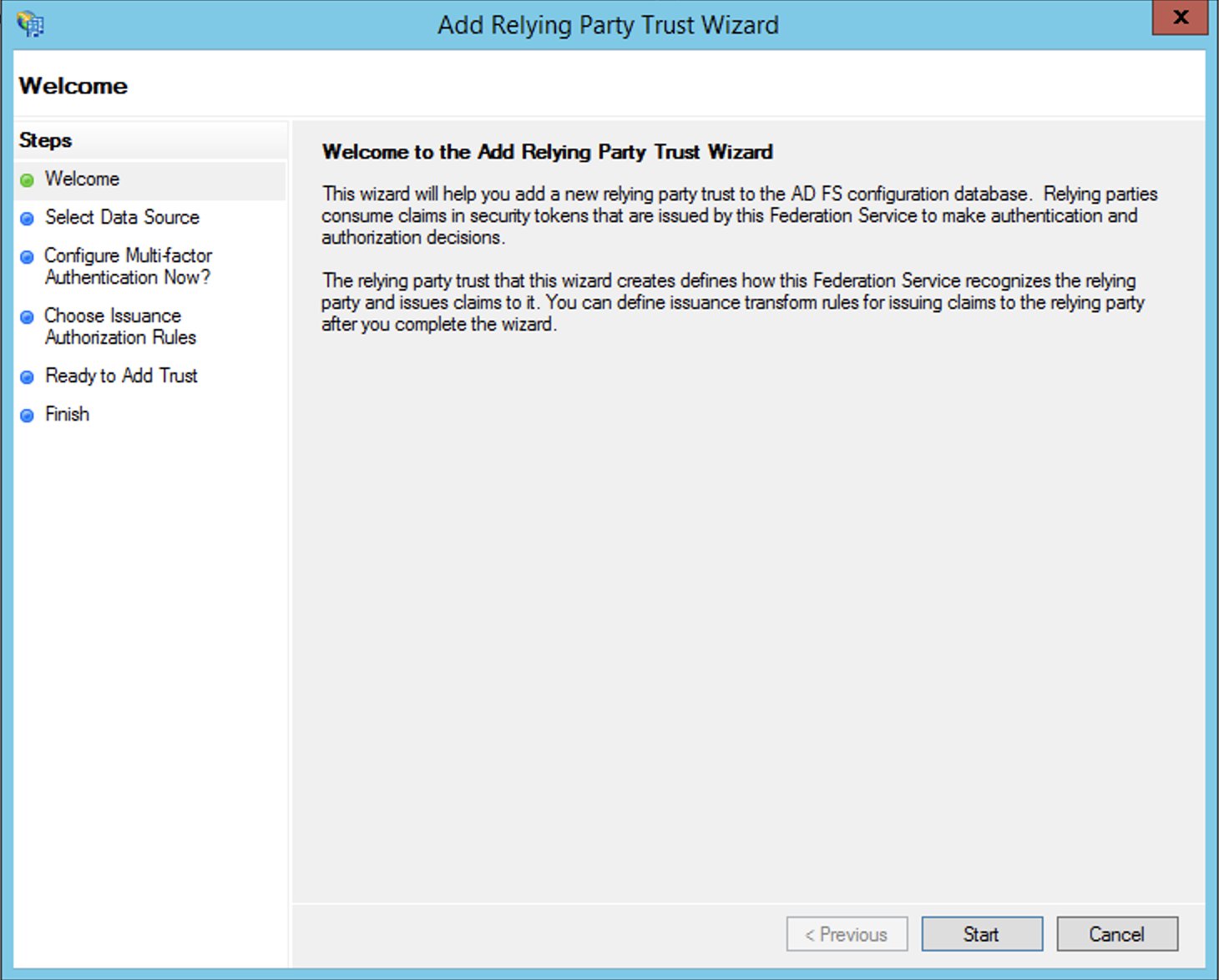
  5. Choose Add Relying Party Trust.
  6. Choose Start.
  7. Select Import data about the relying party published online or on a local network and enter the URL https://signin.aws.amazon.com/static/saml-metadata.xml.

The metadata XML file is a standard SAML metadata document that describes AWS as a relying party.

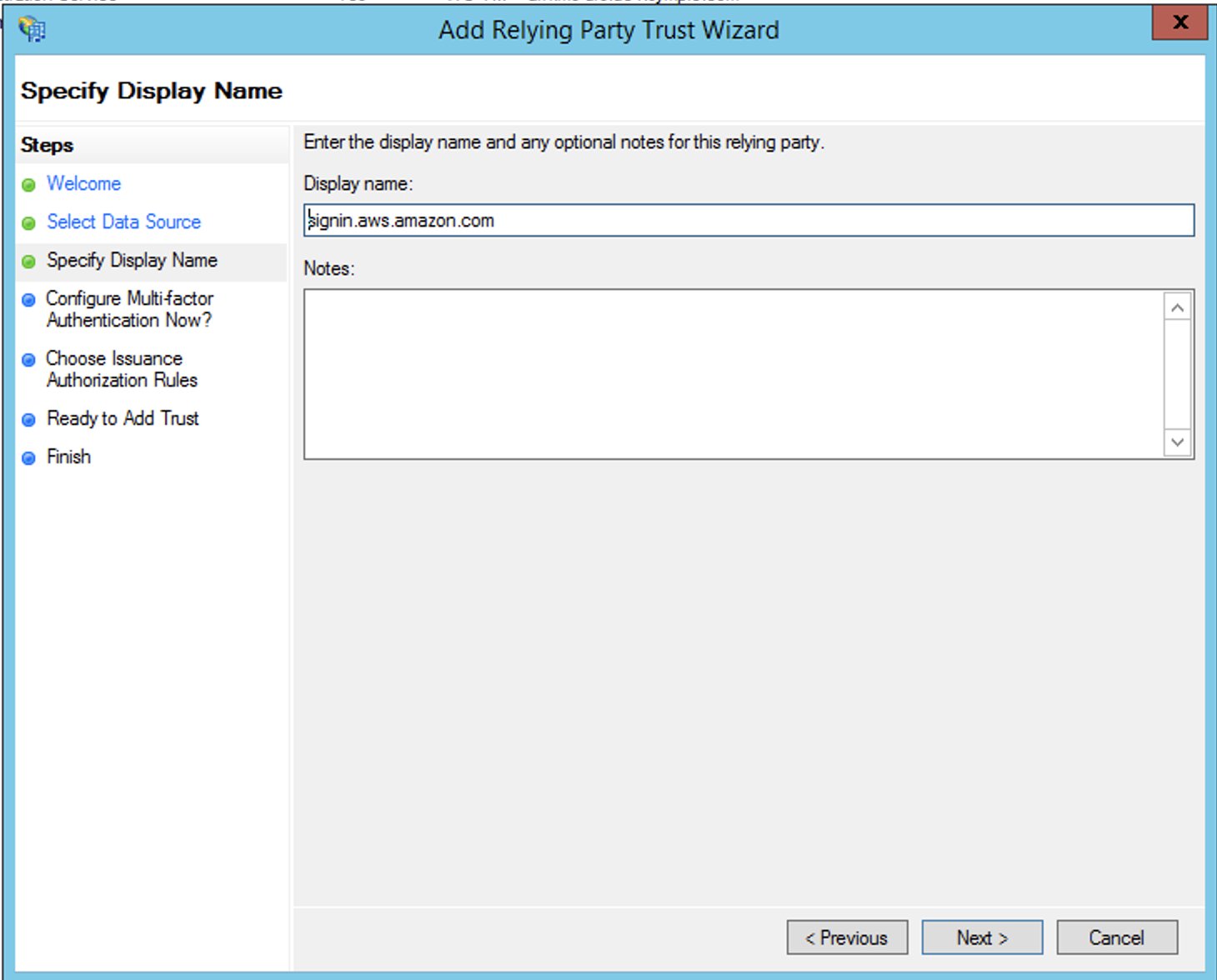
  1. Choose Next.
  2. For Display name, enter a name for your relying party.
  3. Choose Next.
  4. Select I do not want to configure multi-factor authentication.

For increased security, we recommend that you configure multi-factor authentication to help protect your AWS resources. We don’t enable multi-factor authentication for this post because we’re using a sample dataset.

  1. Choose Next.
  2. Select Permit all users to access this relying party and choose Next.

This allows all users in Active Directory to use AD FS with AWS as a relying party. You should consider your security requirements and adjust this configuration accordingly.

  1. Finish creating your relying party.

Configure SAML claim rules for the relying party

You create two sets of claim rules in this post. The first set (rules 1–4) contains AD FS claim rules that are required to assume an IAM role based on AD group membership. These are the rules that you also create if you want to establish federated access to the AWS Management Console. The second set (rules 5–6) are claim rules that are required for Lake Formation fine-grained access control.

To create AD FS claim rules, complete the following steps:

  1. On the AD FS Management console, find the relying party you created in the previous step.
  2. Right-click the relying party and choose Edit Claim Rules.
  3. Choose Add Rule and create your six new rules.
  4. Create claim rule 1, called NameID:
    1. For Rule template, use Transform an Incoming Claim.
    2. For Incoming claim type, choose Windows account name.
    3. For Outgoing claim type, choose Name ID.
    4. For Outgoing name ID format, choose Persistent Identifier.
    5. Select Pass through all claim values.
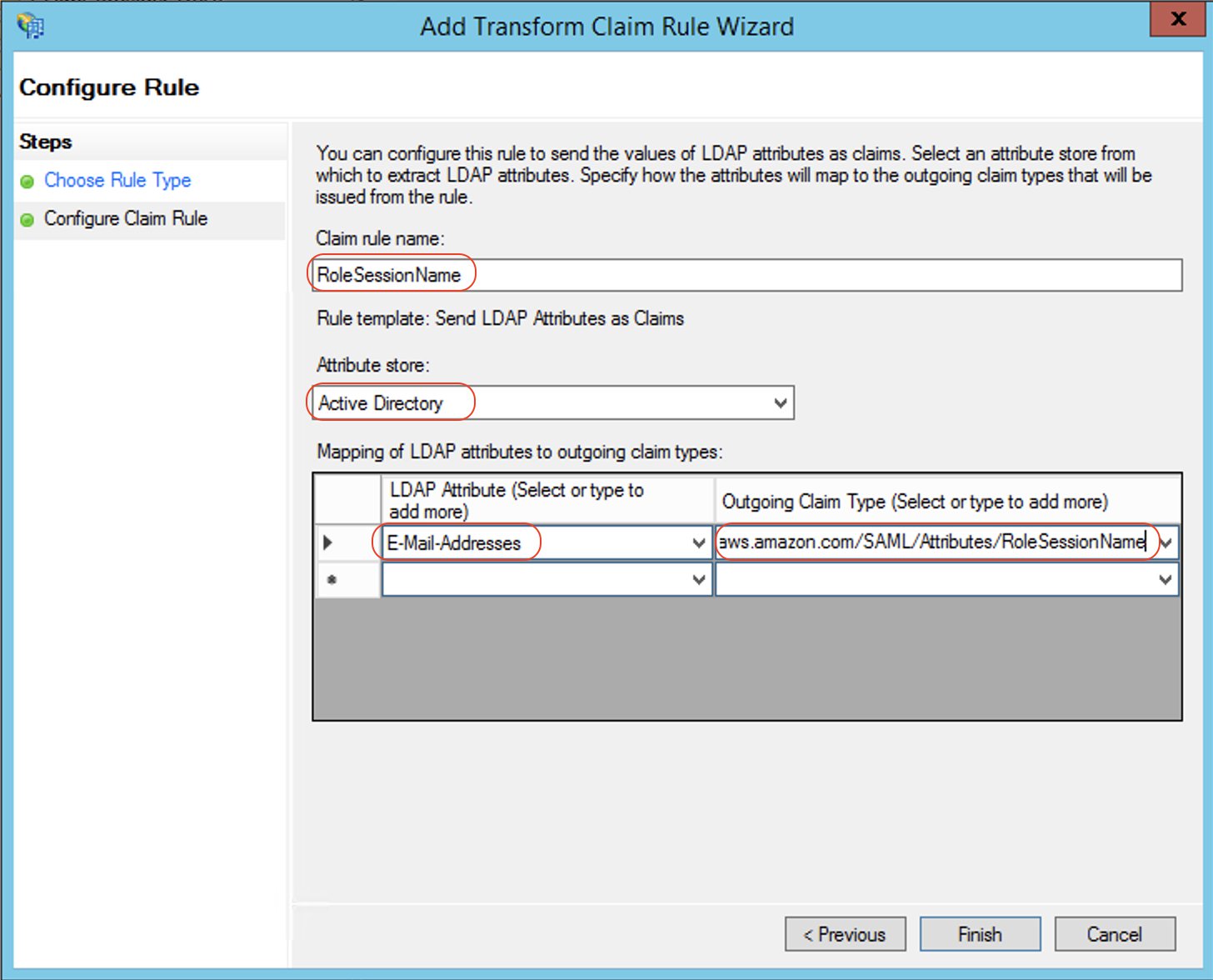
  5. Create claim rule 2, called RoleSessionName:
    1. For Rule template, use Send LDAP Attribute as Claims.
    2. For Attribute store, choose Active Directory.
    3. For Mapping of LDAP attributes to outgoing claim types, add the attribute E-Mail-Addresses and outgoing claim type https://aws.amazon.com/SAML/Attributes/RoleSessionName.
  6. Create claim rule 3, called Get AD Groups:
    1. For Rule template, use Send Claims Using a Custom Rule.
    2. For Custom rule, enter the following code:
      c:[Type == "http://schemas.microsoft.com/ws/2008/06/identity/claims/windowsaccountname", Issuer == "AD AUTHORITY"]
      => add(store = "Active Directory", types = ("http://temp/variable"), query = ";tokenGroups;{0}", param = c.Value);

  7. Create claim rule 4, called Roles:
    1. For Rule template, use Send Claims Using a Custom Rule.
    2. For Custom rule, enter the following code (enter your account number and name of the SAML provider you created earlier):
      c:[Type == "http://temp/variable", Value =~ "(?i)^aws-"]
      => issue(Type = "https://aws.amazon.com/SAML/Attributes/Role", Value = RegExReplace(c.Value, "aws-", "arn:aws:iam::<AWS ACCOUNT NUMBER>:saml-provider/<adfs-saml-provider>,arn:aws:iam::<AWS ACCOUNT NUMBER>:role/"));

Claim rules 5 and 6 allow Lake Formation to make authorization decisions based on user name or the AD group membership of the user.

  1. Create claim rule 5, called LF-UserName, which passes the user name and SAML assertion to Lake Formation:
    1. For Rule template, use Send LDAP Attributes as Claims.
    2. For Attribute store, choose Active Directory.
    3. For Mapping of LDAP attributes to outgoing claim types, add the attribute User-Principal-Name and outgoing claim type https://lakeformation.amazon.com/SAML/Attributes/Username.
  2. Create claim rule 6, called LF-Groups, which passes data and analytics-related AD groups that the user is a member of, along with the SAML assertion to Lake Formation:
    1. For Rule template, use Send Claims Using a Custom Rule.
    2. For Custom rule, enter the following code:
      c:[Type == "http://temp/variable", Value =~ "(?i)^data-"]
      => issue(Type = "https://lakeformation.amazon.com/SAML/Attributes/Groups", Value = c.Value);

The preceding rule snippet filters AD group names starting with data-. This is an arbitrary naming convention; you can adopt your preferred naming convention for AD groups that are related to data lake access.

Create Active Directory users and groups

In this section, we create two AD users and required AD groups to demonstrate varying levels of access to the data.

Create users

You create two AD users: FinanceUser and CustomerOpsUser. Each user corresponds to an individual who is a member of the Finance or Customer business units. The following table summarizes the details of each user.


FinanceUser CustomerOpsUser
First Name FinanceUser CustomerOpsUser
User logon name [email protected] [email protected]
Email [email protected] [email protected]

To create your users, complete the following steps:

  1. On the Server Manager Dashboard, on the Tools menu, choose Active Directory Users and Computers.
  2. In the navigation pane, choose Users.
  3. On the tool bar, choose the Create user icon.
  4. For First name, enter FinanceUser.
  5. For Full name, enter FinanceUser.
  6. For User logon name, enter [email protected].
  7. Choose Next.
  8. Enter a password and deselect User must change password at next logon.

We choose this option for simplicity, but in real-world scenarios, newly created users must change their password for security reasons.

  1. Choose Next.
  2. In Active Directory Users and Computers, choose the user name.
  3. For Email, enter [email protected].

Adding an email is mandatory because it’s used as the RoleSessionName value in the SAML assertion.

  1. Choose OK.
  2. Repeat these steps to create CustomerOpsUser.

Create AD groups to represent data access patterns

Create the following AD groups to represent three different access patterns and also the ability to assume an IAM role:

  • data-customer – Members have access to non-PII columns of the customer table
  • data-customer-pii – Members have access to all columns of the customer table, including PII columns
  • data-order – Members have access to the lineorder table
  • aws-adfs-data-access – Members assume the adfs-data-access IAM role when logging in to AWS

To create the groups, complete the following steps:

  1. On the Server Manager Dashboard, on the Tools menu, choose Active Directory Users and Computers.
  2. On the tool bar, choose the Create new group icon.
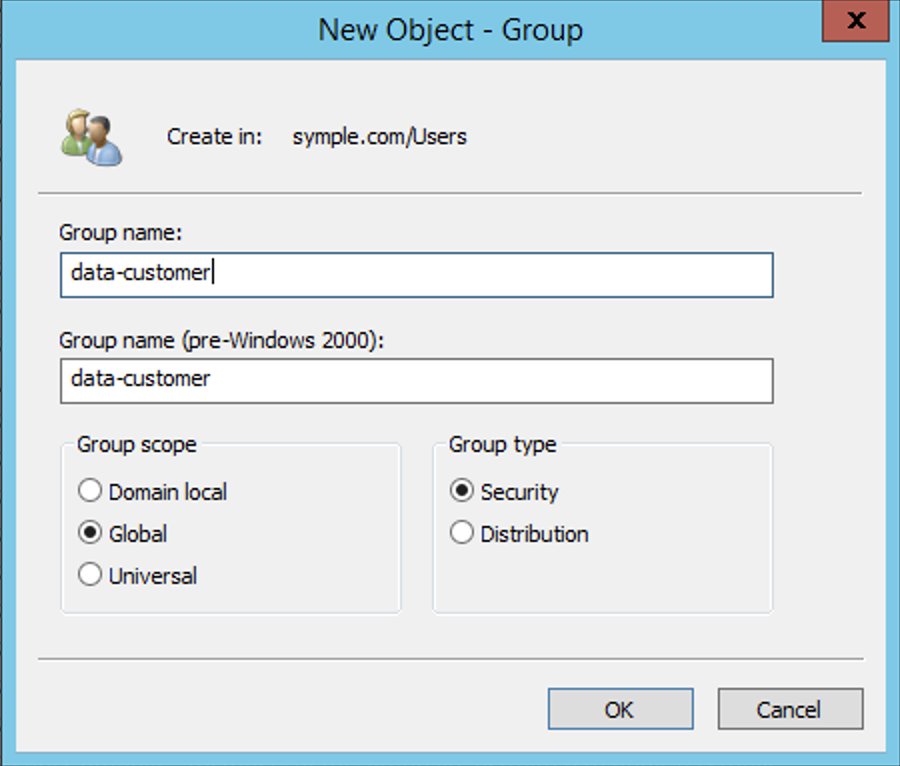
  3. For Group name¸ enter data-customer.
  4. For Group scope, select Global.
  5. For Group type¸ select Security.
  6. Choose OK.
  7. Repeat these steps to create the remaining groups.

Add users to appropriate groups

Now you add your newly created users to their appropriate groups, as detailed in the following table.

User Group Membership Description
CustomerOpsUser data-customer-pii
data-order
aws-adfs-data-access
Sees all customer information including PII and their orders
FinanceUser data-customer
data-order
aws-adfs-data-access
Sees only non-PII customer data and orders

Complete the following steps:

  1. On the Server Manager Dashboard, on the Tools menu, choose Active Directory Users and Computers.
  2. Choose the user FinanceUser.
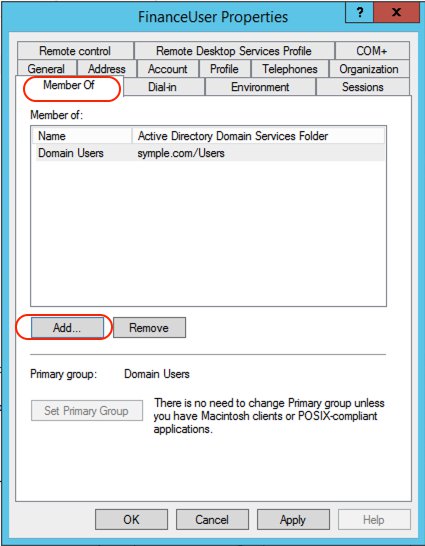
  3. On the Member Of tab, choose Add.
  4. Add the appropriate groups.
  5. Repeat these steps for CustomerOpsUser.

Create a database and tables in the data lake

In this step, you copy data files to an S3 bucket in your AWS account by running the following AWS Command Line Interface (AWS CLI) commands. For more information on how to set up the AWS CLI, refer to Configuration Basics.

These commands copy the files that contain data for customer and lineorder tables. Replace <BUCKET NAME> with the name of an S3 bucket in your AWS account.

aws s3 sync s3://awssampledb/load/ s3://<BUCKET NAME>/customer/ \
--exclude "*" --include "customer-fw.tbl-00*" --exclude "*.bak"

aws s3api copy-object --copy-source awssampledb/load/lo/lineorder-single.tbl000.gz \
--key lineorder/lineorder-single.tbl000.gz --bucket <BUCKET NAME> \
--tagging-directive REPLACE

For this post, we use the default settings for storing data and logging access requests within Amazon S3. You can enhance the security of your sensitive data with the following methods:

  • Implement encryption at rest using AWS Key Management Service (AWS KMS) and customer managed encryption keys
  • Use AWS CloudTrail and audit logging
  • Restrict access to AWS resources based on the least privilege principle

Additionally, Lake Formation is integrated with CloudTrail, a service that provides a record of actions taken by a user, role, or AWS service in Lake Formation. CloudTrail captures all Lake Formation API calls as events and is enabled by default when you create a new AWS account. When activity occurs in Lake Formation, that activity is recorded as a CloudTrail event along with other AWS service events in event history. For audit and access monitoring purposes, all federated user logins are logged via CloudTrail under the AssumeRoleWithSAML event name. You can also view specific user activity based on their user name in CloudTrail.

To create a database and tables in the Data Catalog, open the query editor on the Athena console and enter the following DDL statements. Replace <BUCKET NAME> with the name of the S3 bucket in your account.

CREATE DATABASE salesdata;
CREATE EXTERNAL TABLE salesdata.customer
(
    c_custkey VARCHAR(10),
    c_name VARCHAR(25),
    c_address VARCHAR(25),
    c_city VARCHAR(10),
    c_nation VARCHAR(15),
    c_region VARCHAR(12),
    c_phone VARCHAR(15),
    c_mktsegment VARCHAR(10)
)
-- The data files contain fixed width columns hence using RegExSerDe
ROW FORMAT SERDE 'org.apache.hadoop.hive.serde2.RegexSerDe'
WITH SERDEPROPERTIES (
    "input.regex" = "(.{10})(.{25})(.{25})(.{10})(.{15})(.{12})(.{15})(.{10})"
)
LOCATION 's3://<BUCKET NAME>/customer/';

CREATE EXTERNAL TABLE salesdata.lineorder(
  `lo_orderkey` int, 
  `lo_linenumber` int, 
  `lo_custkey` int, 
  `lo_partkey` int, 
  `lo_suppkey` int, 
  `lo_orderdate` int, 
  `lo_orderpriority` varchar(15), 
  `lo_shippriority` varchar(1), 
  `lo_quantity` int, 
  `lo_extendedprice` int, 
  `lo_ordertotalprice` int, 
  `lo_discount` int, 
  `lo_revenue` int, 
  `lo_supplycost` int, 
  `lo_tax` int, 
  `lo_commitdate` int, 
  `lo_shipmode` varchar(10))
ROW FORMAT DELIMITED 
  FIELDS TERMINATED BY '|' 
LOCATION 's3://<BUCKET NAME>/lineorder/';

Verify that tables are created and you can see the data:

SELECT * FROM "salesdata"."customer" limit 10;
SELECT * FROM "salesdata"."lineorder" limit 10;

Set up the Lake Formation permission model

Lake Formation uses a combination of Lake Formation permissions and IAM permissions to achieve fine-grained access control. The recommended approach includes the following:

  • Coarse-grained IAM permissions – These apply to the IAM role that users assume when running queries in Athena. IAM permissions control access to Lake Formation, AWS Glue, and Athena APIs.
  • Fine-grained Lake Formation grants – These control access to Data Catalog resources, Amazon S3 locations, and the underlying data at those locations. With these grants, you can give access to specific tables or only columns that contain specific data values.

Configure IAM role permissions

Earlier in the walkthrough, you created the IAM role adfs-data-access and attached the AWS managed IAM policy AthenaFullAccess to it. This policy has all the permissions required for the purposes of this post.

For more information, see the Data Analyst Permissions section in Lake Formation Personas and IAM Permissions Reference.

Register an S3 bucket as a data lake location

The mechanism to govern access to an Amazon S3 location using Lake Formation is to register a data lake location. Complete the following steps:

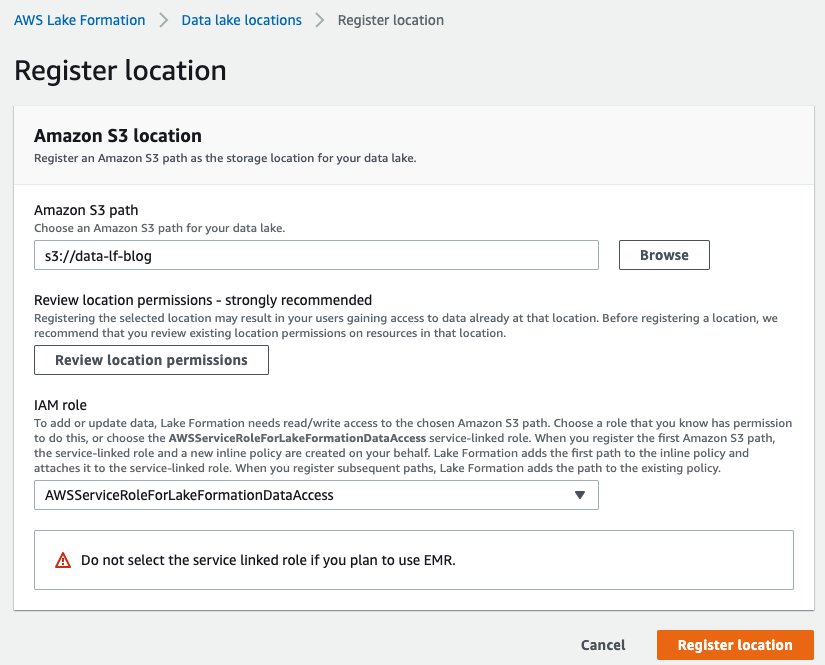
  1. On the Lake Formation console, choose Data lake locations.
  2. Choose Register location.
  3. For Amazon S3 path, choose Browse and locate your bucket.
  4. For IAM role, choose AWSServiceRoleForLakeFormationDataAccess.

In this step, you specify an IAM service-linked role, which Lake Formation assumes when it grants temporary credentials to integrated AWS services that access the data in this location. This role and its permissions are managed by Lake Formation and can’t be changed by IAM principals.

  1. Choose Register location.

Configure data permissions

Now that you have registered the Amazon S3 path, you can give AD groups appropriate permissions to access tables and columns in the salesdata database. The following table summarizes the new permissions.

Database and Table AD Group Name Table Permissions Data Permissions
salesdata.customer data-customer Select c_city, c_custkey, c_mktsegment, c_nation, and c_region
salesdata.customer data-customer-pii Select All data access
salesdata.lineorder data-order Select All data access
  1. On the Lake Formation console, choose Tables in the navigation pane.
  2. Filter tables by the salesdata database.
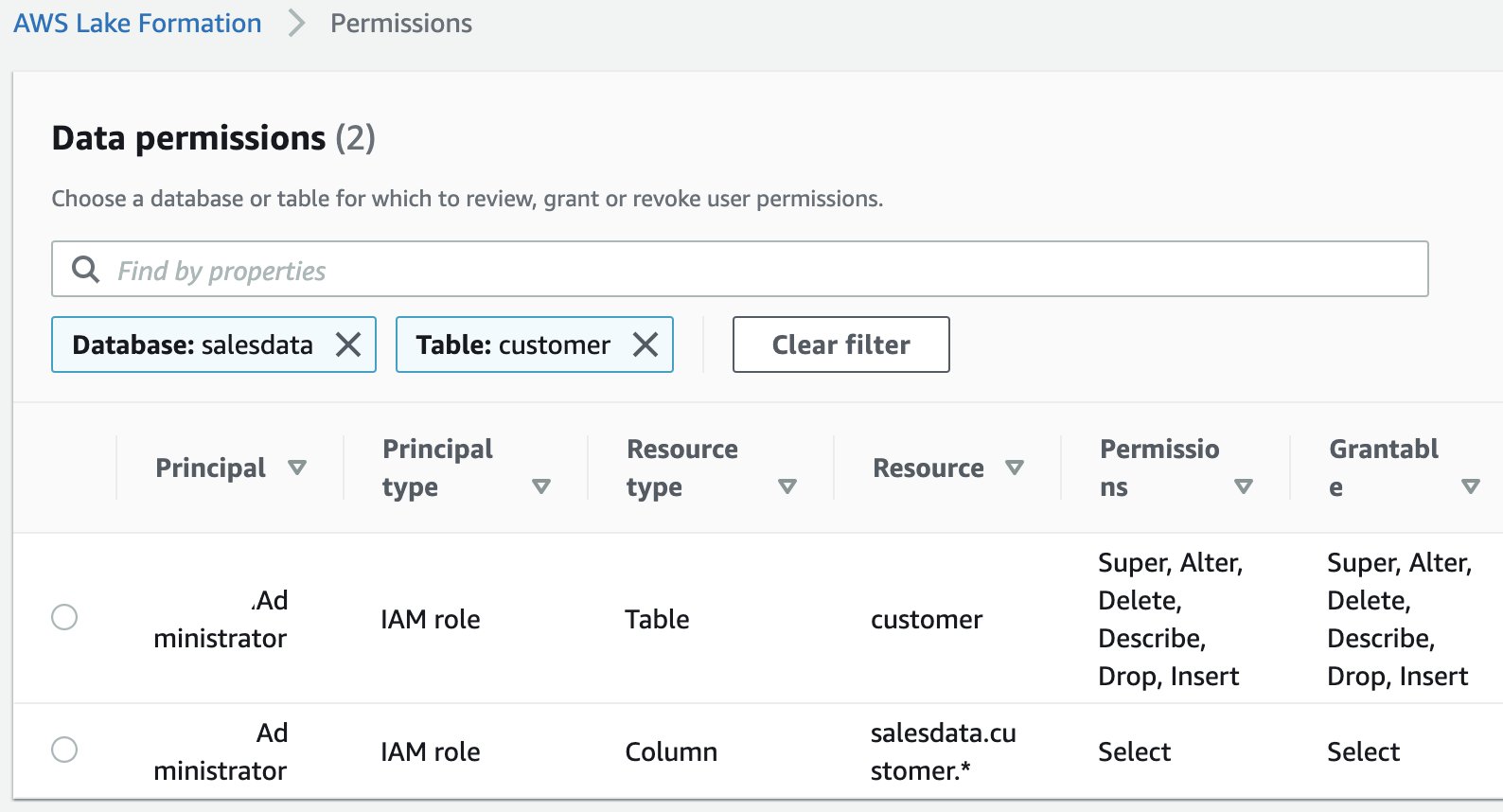
  3. Select the customer table and on the Actions menu, choose View permissions.

You should see following existing permissions. These entries allow the current data lake administrator to access the table and all its columns.

  1. To add new permissions, select the table and on the Actions menu, choose Grant.
  2. Select SAML user and groups.
  3. For SAML and Amazon QuickSight users and groups, enter arn:aws:iam::<AWS ACCOUNT NUMBER>:saml-provider/adfs-saml-provider:group/data-customer.

To get this value, get the ARN of the SAML provider from the IAM console and append :group/data-customer to the end of it.

  1. Select Named data catalog resources.
  2. For Databases, choose the salesdata database.
  3. For Tables, choose the customer table.
  4. For Table permissions, select Select.
  5. For Data permissions, select Column-based access.
  6. For Select columns, add the columns c_city, c_custkey, c_mktsegment, c_nation, and c_region.
  7. Choose Grant.

You have now allowed members of the AD group data-customer to have access to columns of the customer table that don’t include PII.

  1. Repeat these steps for the customer table and data-customer-pii group with all data access.
  2. Repeat these steps for the lineorder table and data-order group with all data access.

Set up a SQL client with JDBC connection and verify permissions

In this post, we use SQL Workbench to access Athena through AD authentication and verify the Lake Formation permissions you created in the previous section.

Prepare the SQL client

To set up the SQL client, complete the following steps:

  1. Download and extract the Lake Formation-compatible Athena JDBC driver with AWS SDK (2.0.14 or later version) from Using Athena with the JDBC Driver.
  2. Go to the SQL Workbench/J website and download the latest stable package.
  3. Install SQL Workbench/J on your client computer.
  4. In SQL Workbench, on the File menu, choose Manage Drivers.
  5. Choose the New driver icon.
  6. For Name, enter Athena JDBC Driver.
  7. For Library, browse to and choose the Simba Athena JDBC .jar file that you just downloaded.
  8. Choose OK.

You’re now ready to create connections in SQL Workbench for your users.

Create connections in SQL Workbench

To create your connections, complete the following steps:

  1. On the File menu, choose Connect.
  2. Enter the name Athena-FinanceUser.
  3. For Driver, choose the Simba Athena JDBC driver.
  4. For URL, enter the following code (replace the placeholders with actual values from your setup and remove the line breaks to make a single line connection string):
jdbc:awsathena://AwsRegion=<AWS Region Name e.g. ap-southeast-2>;
S3OutputLocation=s3://<Athena Query Result Bucket Name>/jdbc;
plugin_name=com.simba.athena.iamsupport.plugin.AdfsCredentialsProvider;
idp_host=<adfs-server-name e.g. adfs.company.com>;
idp_port=443;
preferred_role=<ARN of the role created in step1 e.g. arn>;
user=financeuser@<Domain Name e.g. company.com>;
password=<password>;
SSL_Insecure=true;
LakeFormationEnabled=true;

For this post, we used a self-signed certificate with AD FS. This certificate is not trusted by the client, therefore authentication doesn’t succeed. This is why the SSL_Insecure attribute is set to true to allow authentication despite the self-signed certificate. In real-world setups, you would use valid trusted certificates and can remove the SSL_Insecure attribute.

  1. Create a new SQL workbench profile named Athena-CustomerOpsUser and repeat the earlier steps with CustomerOpsUser in the connection URL string.
  2. To test the connections, choose Test for each user, and confirm that the connection succeeds.

Verify access permissions

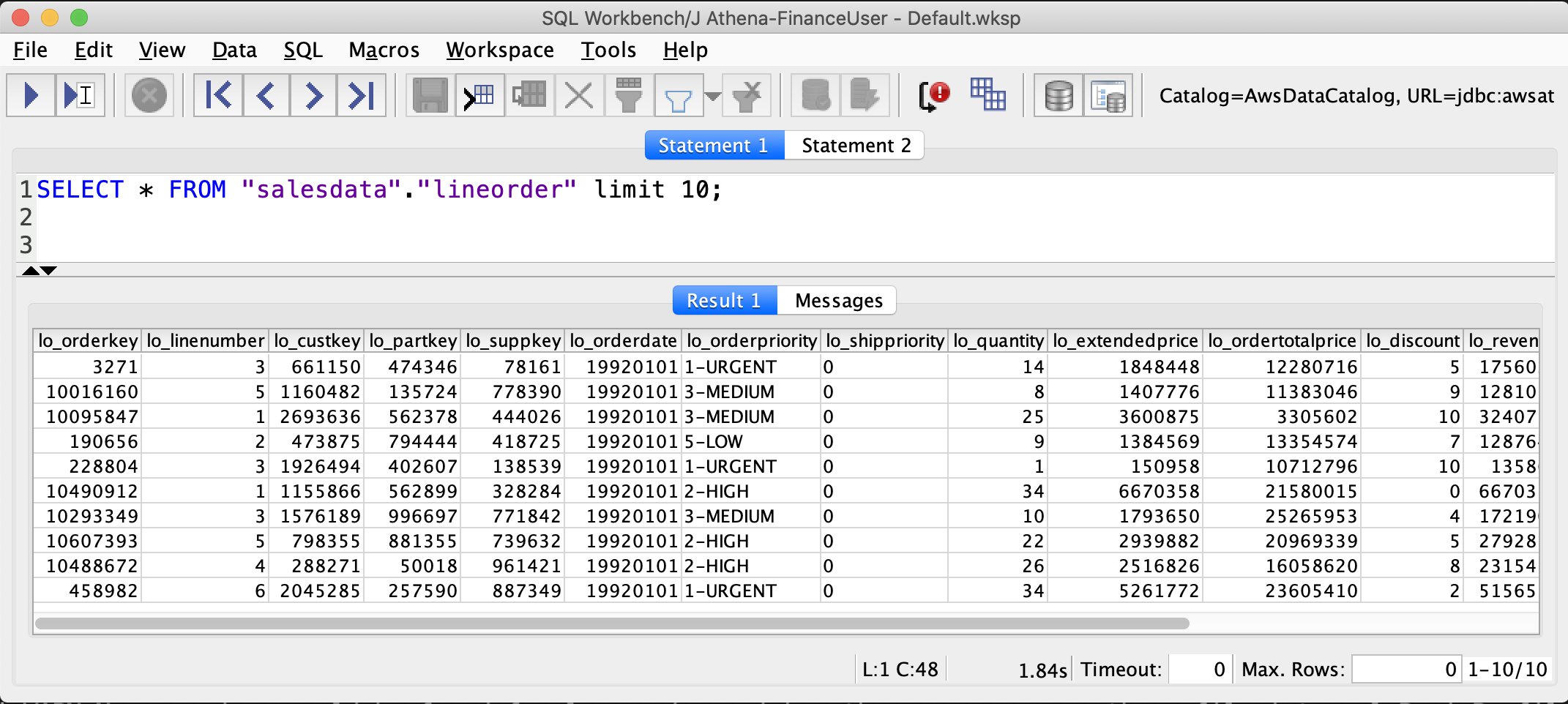
Now we can verify permissions for FinanceUser. In the SQL Workbench Statement window, run the following SQL SELECT statement:

SELECT * FROM "salesdata"."lineorder" limit 10;
SELECT * FROM "salesdata"."customer" limit 10;

Verify that only non-PII columns are returned from the customer table.

As you see in the preceding screenshots, FinanceUser only has access to non-PII columns of the customer table and full access to (all columns) of the lineorder table. This allows FinanceUser, for example, to run aggregate and summary queries based on market segment or location of customers without having access to their personal information.

Run a similar query for CustomerOpsUser. You should be able to see all columns, including columns containing PII, in the customer table.

Conclusion

This post demonstrated how to configure your data lake permissions using Lake Formation for AD users and groups. We configured AD FS 3.0 on your Active Directory and used it as an IdP to federate into AWS using SAML. This post also showed how you can integrate your Athena JDBC driver to AD FS and use your AD credentials directly to connect to Athena.

Integrating your Active Directory with the Athena JDBC driver gives you the flexibility to access Athena from business intelligence tools you’re already familiar with to analyze the data in your Amazon S3 data lake. This enables you to have a consistent central permission model that is managed through AD users and their group memberships.


About the Authors

Mostafa Safipour is a Solutions Architect at AWS based out of Sydney. Over the past decade he has helped many large organizations in the ANZ region build their data, digital, and enterprise workloads on AWS.

Praveen Kumar is a Specialist Solution Architect at AWS with expertise in designing, building, and implementing modern data and analytics platforms using cloud-native services. His areas of interests are serverless technology, streaming applications, and modern cloud data warehouses.

360-Degree XDR and Attack Surface Coverage With Rapid7

Post Syndicated from Margaret Wei original https://blog.rapid7.com/2022/08/18/360-degree-xdr-and-attack-surface-coverage-with-rapid7/

360-Degree XDR and Attack Surface Coverage With Rapid7

Today’s already resource-constrained security teams are tasked with protecting more as environments sprawl and alerts pile up, while attackers continue to get stealthier and add to their arsenal. To be successful against bad actors, security teams need to be proactive against evolving attacks in their earliest stages and ready to detect and respond to advanced threats that make it past defenses (because they will).

Eliminate blindspots and extinguish threats earlier and faster

Rapid7’s external threat intelligence solution, Threat Command, reduces the noise of numerous threat feeds and external sources, and prioritizes and alerts on the most relevant threats to your organization. When used alongside InsightIDR, Rapid7’s next-gen SIEM and XDR, and InsightConnect, Rapid7’s SOAR solution, you’ll unlock a complete view of your internal and external attack surface with unmatched signal to noise.

Leverage InsightIDR, Threat Command, and InsightConnect to:

  • Gain 360-degree visibility with expanded coverage beyond the traditional network perimeter thanks to Threat Command alerts being ingested into InsightIDR, giving you a more holistic picture of your threat landscape.
  • Proactively thwart attack plans with Threat Command alerts that identify active threats from across your attack surface.
  • Find and eliminate threats faster when you correlate and investigate Threat Command alerts with InsightIDR’s rich investigative capabilities.
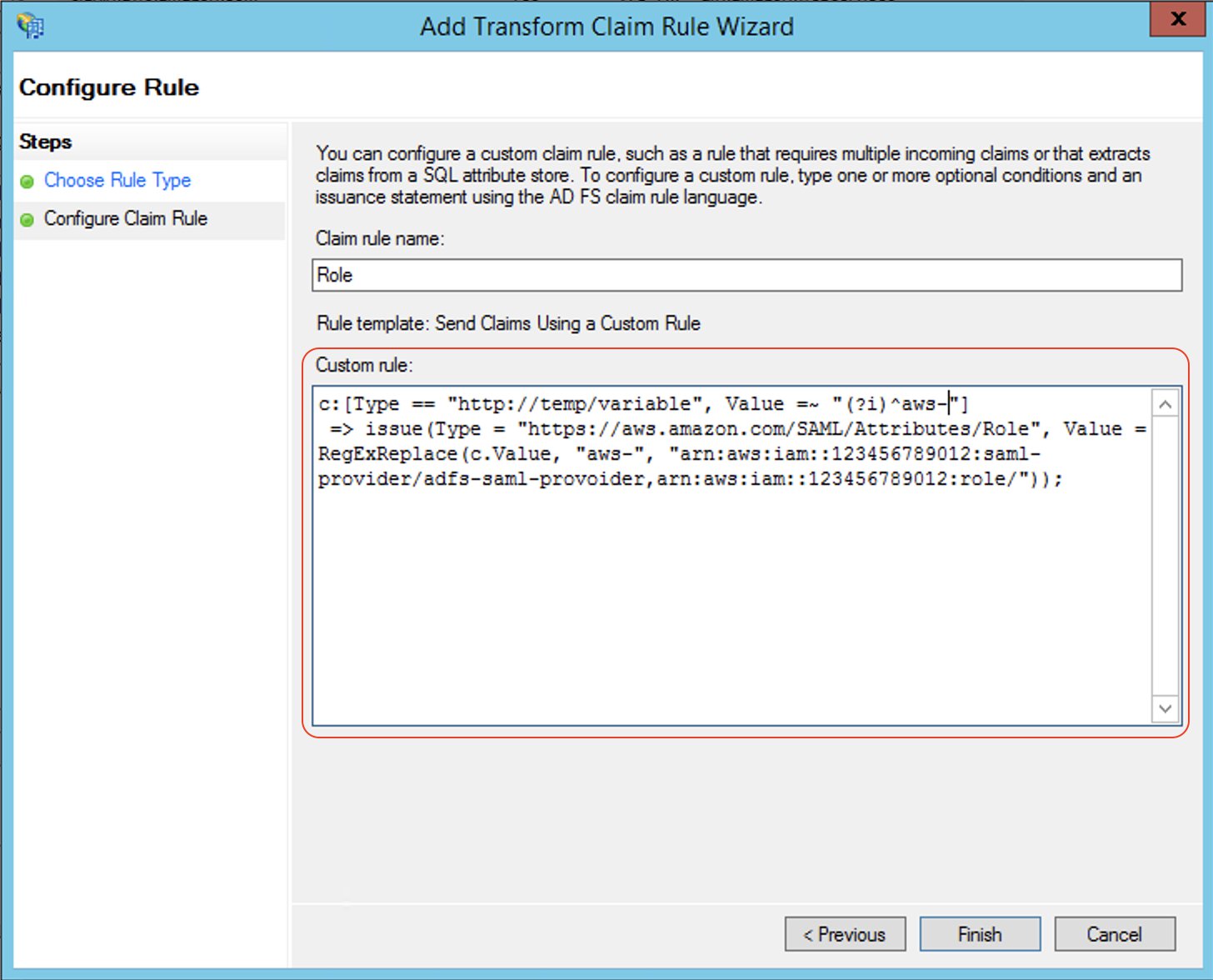
  • Automate your response by attaching an InsightConnect workflow to take action as soon as a detection or a Threat Command alert surfaces in InsightIDR.
360-Degree XDR and Attack Surface Coverage With Rapid7
Threat Command alerts alongside InsightIDR Detection Rules

Stronger signal to noise with Threat Command Threat Library

The power of InsightIDR and Threat Command doesn’t end there. We added another layer to our threat intelligence earlier this year when we integrated Threat Command’s Threat Library into InsightIDR to give more visibility into new indicators of compromise (IOCs) and continued strength around signal to noise.

All IOCs related to threat actors tracked in Threat Command are automatically applied to customer data sent to InsightIDR, which means you automatically get current and future coverage as new IOCs are found by the research team. Alongside InsightIDR’s variety of detection types — User Behavior Analytics (UBA), Attacker Behavior Analytics (ABA), and custom detections — you’re covered against all infiltrations, from lateral movement to unique attacker behaviors and everything in between. The impact? Your team is never behind on emerging threats to your organization.

Faster, more efficient responses with InsightConnect

Strong signal to noise is taken a step further with automation, so teams can not only identify threats quickly but respond immediately. The expanded integration between InsightConnect and InsightIDR allows you to respond to any alert being generated in your environment. With this, you can easily create and map InsightConnect workflows to any ABA, UBA, or custom detection rule, so tailored response actions can be initiated as soon as there is a new detection.

See something suspicious that didn’t trip a detection? You can invoke on-demand automation with integrated Quick Actions from any page in InsightIDR.

360-Degree XDR and Attack Surface Coverage With Rapid7
Mapping of InsightConnect workflows to an ABA alert in InsightIDR

Sophisticated XDR without any headaches

With Rapid7, you’ll achieve sophisticated detection and response outcomes with greater efficiency and efficacy — no matter where you and your team are on your security journey. Stay up to date on the latest from InsightIDR, Threat Command, and InsightConnect as we continue to up-level our cross-product integrations to bring you the most comprehensive XDR solution.

Additional reading:

NEVER MISS A BLOG

Get the latest stories, expertise, and news about security today.

[$] The growing image-processor unpleasantness

Post Syndicated from original https://lwn.net/Articles/904776/

There was a time when care had to be taking when buying hardware if the
goal was to run Linux on it. The situation has improved considerably in
recent decades, and unsupported hardware is more the exception than the
rule. That has, for many years, been especially true of Intel hardware;
that company has made a point of ensuring that its offerings work with
Linux. So it is a bit surprising that the IPU6 image processor shipped
with Alder Lake CPUs
lacks support in Linux, and is unlikely to get it anytime soon. The
problem highlighted here goes beyond just Intel, though.

LibreOffice 7.4 Community released

Post Syndicated from original https://lwn.net/Articles/905088/

The Document Foundation has announced the release of LibreOffice 7.4 Community, which is the community-supported version of the open-source office suite. Version 7.4 comes with new features for the suite as a whole (WebP and EMZ/WMZ support, …), the Writer word-processor (better change tracking and hyphenation settings, …), the Calc spreadsheet (16K columns, …), and more. “Development is now focused on interoperability with Microsoft’s proprietary file formats, and many new features are targeted at users migrating from MS Office“. More information can be found in the release notes.

Krita 5.1.0 released

Post Syndicated from original https://lwn.net/Articles/905075/

Version 5.1.0
of the Krita painting program is out. “Krita 5.1 comes with a ton of
smaller improvements and technical polish. This release sees updates to
usability across the board, improved file format handling, and a whole lot
of changes to the selection and fill tools.

The collective thoughts of the interwebz