SystemTap 4.7 released

Post Syndicated from original https://lwn.net/Articles/893682/

Version 4.7 of the SystemTap tracing system is out. “Enhancements to this release include: a new stap-profile-annotate
tool, a new –sign-module module signing option, -d is now implied for
processes specified with -c/-x
“.

Security updates for Tuesday

Post Syndicated from original https://lwn.net/Articles/893681/

Security updates have been issued by Debian (jackson-databind, kernel, openvpn, and twisted), Fedora (xz), Mageia (chromium-browser-stable and curl), Oracle (vim and xmlrpc-c), Red Hat (gzip), Slackware (libxml2), SUSE (git, python39, and subversion), and Ubuntu (libvirt and mysql-5.7, mysql-8.0).

Wildcard proxy for everyone

Post Syndicated from Hannes Gerhart original https://blog.cloudflare.com/wildcard-proxy-for-everyone/

Wildcard proxy for everyone

Wildcard proxy for everyone

Today, I have the pleasure to announce that we’re giving everyone the ability to proxy DNS wildcard records. Previously, this feature was only available to our Enterprise customers. After many of our free and pay-as-you-go users reached out, we decided that this feature should be available to everyone.

What is a wildcard DNS record?

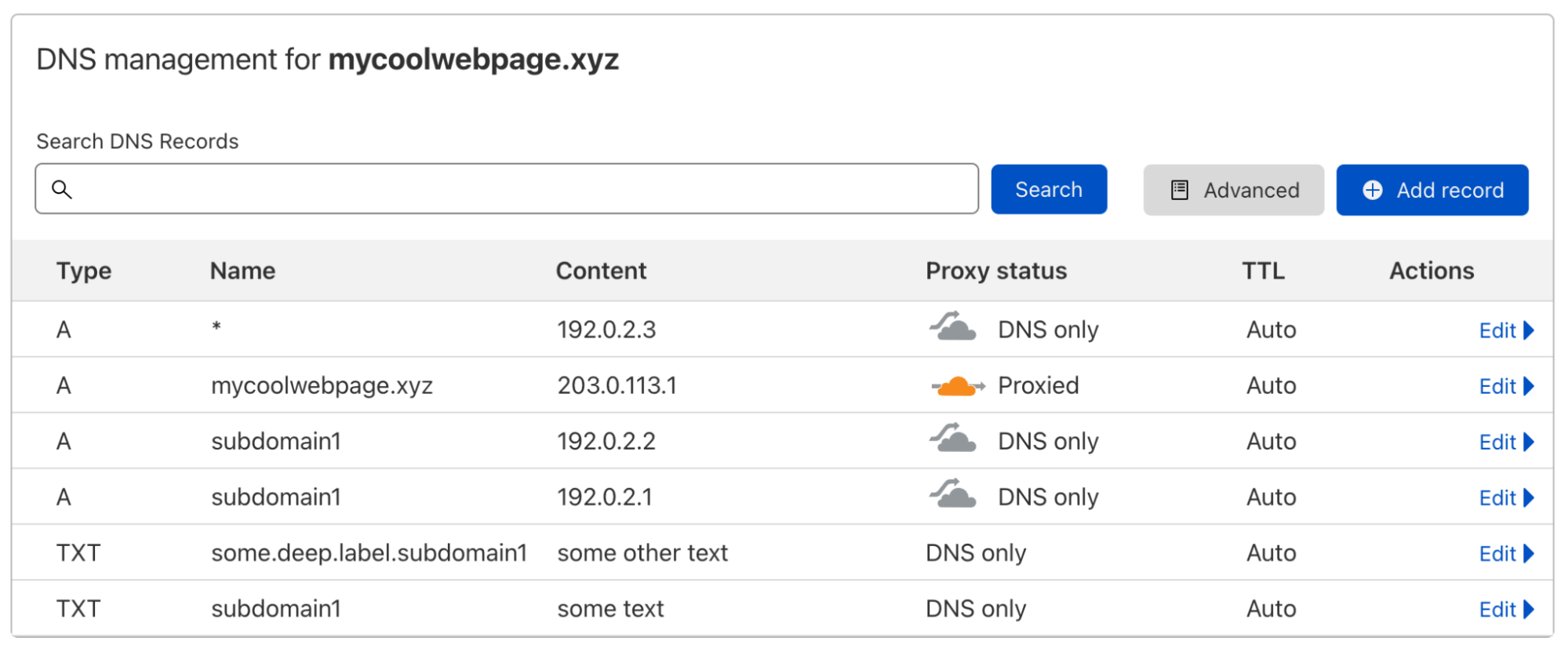
A DNS record usually maps a domain name to one or multiple IP addresses or another resource associated with that name, so it’s a one-to-many mapping. Let’s look at an example:

Wildcard proxy for everyone

When I do a DNS lookup for the IP address of subdomain1.mycoolwebpage.xyz, I get two IP addresses back, because I have added two A records on that subdomain:

$ dig subdomain1.mycoolwebpage.xyz -t a +short
192.0.2.1
192.0.2.2

I could specify the target of all subdomains like this, with one or multiple DNS records per subdomain. But what if I have hundreds or even thousands of subdomains that I all want to point to the same resource?

This is where a wildcard DNS record comes in. By using the asterisk symbol "*" in the Name field, I can create one or multiple DNS records that are used as the response for all subdomains that are not specifically covered by another DNS record (more on this later). So the wildcard record you can see in the screenshot above is covering *.mycoolwebpage.xyz, meaning all subdomains of mycoolwebpage.xyz. This can also be done on deeper levels, like on *.www.mycoolwebpage.xyz.

If I perform a lookup for subdomain2.mycoolwebpage.xyz, the target I specified in the wildcard record will be used as the response. Again, this is only happening because there is no DNS record specifically for this subdomain.

$ dig subdomain2.mycoolwebpage.xyz -t a +short
192.0.2.3

And it is often overlooked that a wildcard record does not only cover the level it is set on directly, but deeper levels, as well:

$ dig some.deep.label.subdomain2.mycoolwebpage.xyz -t a +short 
192.0.2.3

Also, a wildcard DNS record does not cover the apex of the zone (in this example the apex is mycoolwebpage.xyz).

A few more things to know about wildcard records

Below you can find additional rules that apply to wildcard DNS records you should be aware of:

Wildcards are only supported on the first label. Meaning something like subdomain.*.mycoolwebpage.xyz is not a wildcard on the level of the asterisk character. If you create a DNS record with that name, the asterisk is interpreted as the literal character and not as the wildcard operator.

You cannot create wildcards on multiple levels. So if you create a DNS record on *.*.mycoolwebpage.xyz, only the first asterisk is interpreted as a wildcard while the second one is interpreted as the literal “*” character.

Wildcards will be applied for multiple levels. But a specific record on any equal or lower level will terminate anything on or below this specific record — independent of the type of that specific record. Here is an example. If you have only these two records on your domain

subdomain1.mycoolwebpage.xyz  TXT  “some text”
*.mycoolwebpage.xyz  	A  192.0.2.3

the wildcard record will be used for queries going to any subdomain of mycoolwebpage.xyz except subdomain1.mycoolwebpage.xyz or anything below that specific label, like deeper.label.subdomain1.mycoolwebpage.xyz — simply because there already exists a record on subdomain1.mycoolwebpage.xyz. However, the wildcard will be used for deeper labels that are not below the specific record on subdomain1 — for example, deeper.label.subdomain2.mycoolwebpage.xyz.

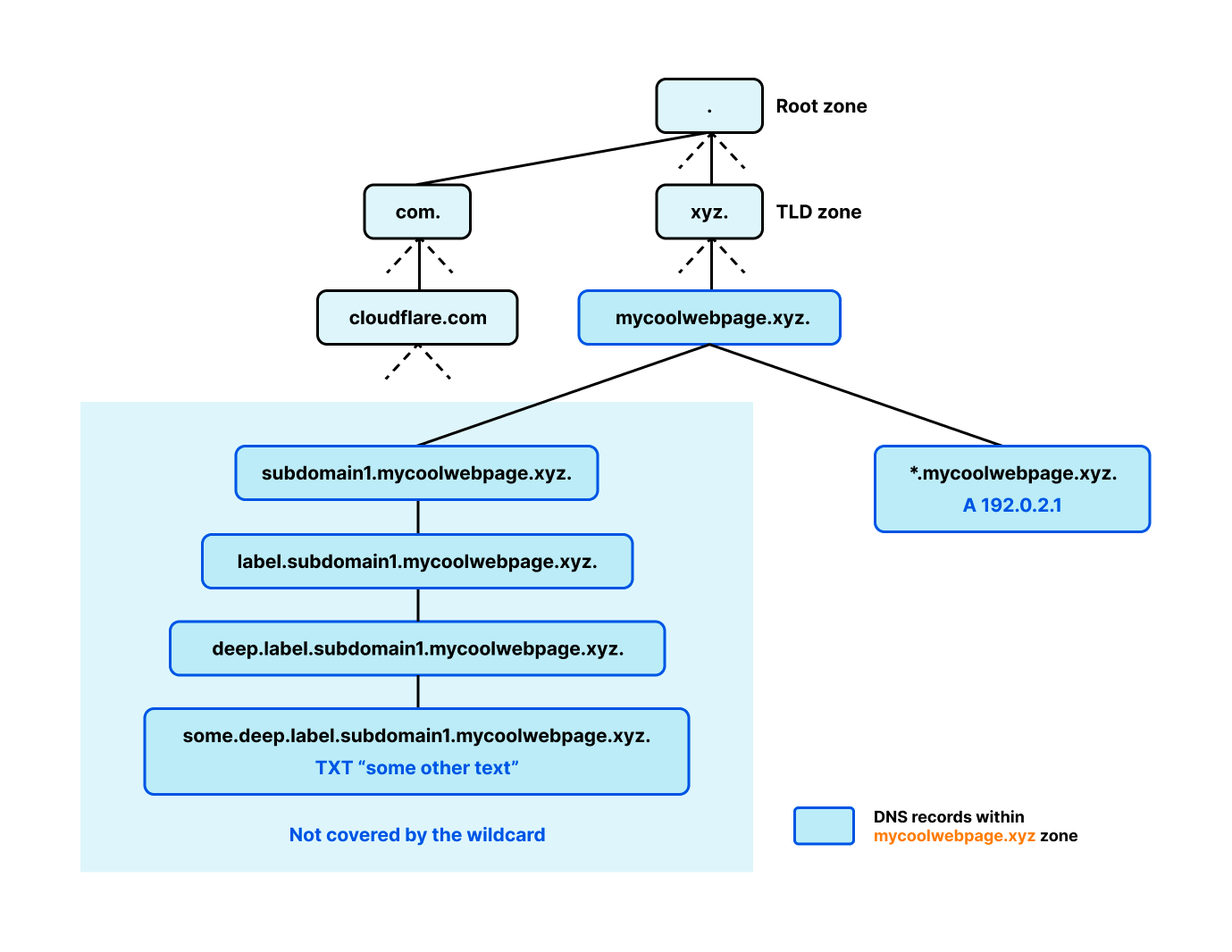
To expand on this rule: if you think of DNS as a tree starting from the root zone (see the diagram below), simply the existence of a branch terminates the wildcard for all records on that branch. In the example above the wildcard was terminated for anything on the label subdomain1 and below, but even if there only exists a record on a deeper level, anything above will also be terminating the wildcard. This example should make it clear. If you only have the following two records on your domain, as shown in the diagram below

some.deep.label.subdomain1.mycoolwebpage.xyz  TXT  “some other text”
*.mycoolwebpage.xyz  	A  192.0.2.3

a query to label.subdomain1.mycoolwebpage.xyz for an A record is not covered by the wildcard because it is a node on the existing branch ending in the TXT record above.

Wildcard proxy for everyone

Wildcard records only cover the record type they are specified for. If you add a wildcard A record for *.mycoolwebpage.xyz it will not cover queries specifying AAAA records (or any other type). But as mentioned in the previous point, a record on a specific label will terminate the wildcard for this label and everything below even if it’s a different record type.

All the above and more can be found in RFC4592. Not the type to read through complex RFCs but still generally interested in how DNS works, go check out Julia Evans’ wizard zines about DNS, she did a great job explaining all the complexities about DNS in an easy to digest way.

What is a proxied wildcard DNS record?

Cloudflare provides a range of features (including Caching, Firewall, or Workers) that require you to proxy the specific hostname you want to use these features on. You can proxy DNS records of the type A, AAAA, and CNAME. These record types are used to specify the origin server of a hostname which expects traffic via HTTP/S.

Proxying a wildcard DNS record works exactly as proxying a specific record. In the Cloudflare dashboard, navigate to the DNS app and either create a new wildcard record or edit an existing record and toggle the proxy status to Proxied. Previously, we only allowed this on wildcard records if the domain was upgraded to the Enterprise plan, but this feature is now available on all plan levels!

Once you have enabled the proxy status of your wildcard DNS record, Cloudflare nameservers will respond with two Cloudflare anycast IPs instead of the origin IP(s) you have specified for that record. These Cloudflare IPs are advertised on our global network from more than 275 locations in more than 100 countries.

$ dig subdomain2.mycoolwebpage.xyz -t a +short
104.18.35.126
172.64.152.130

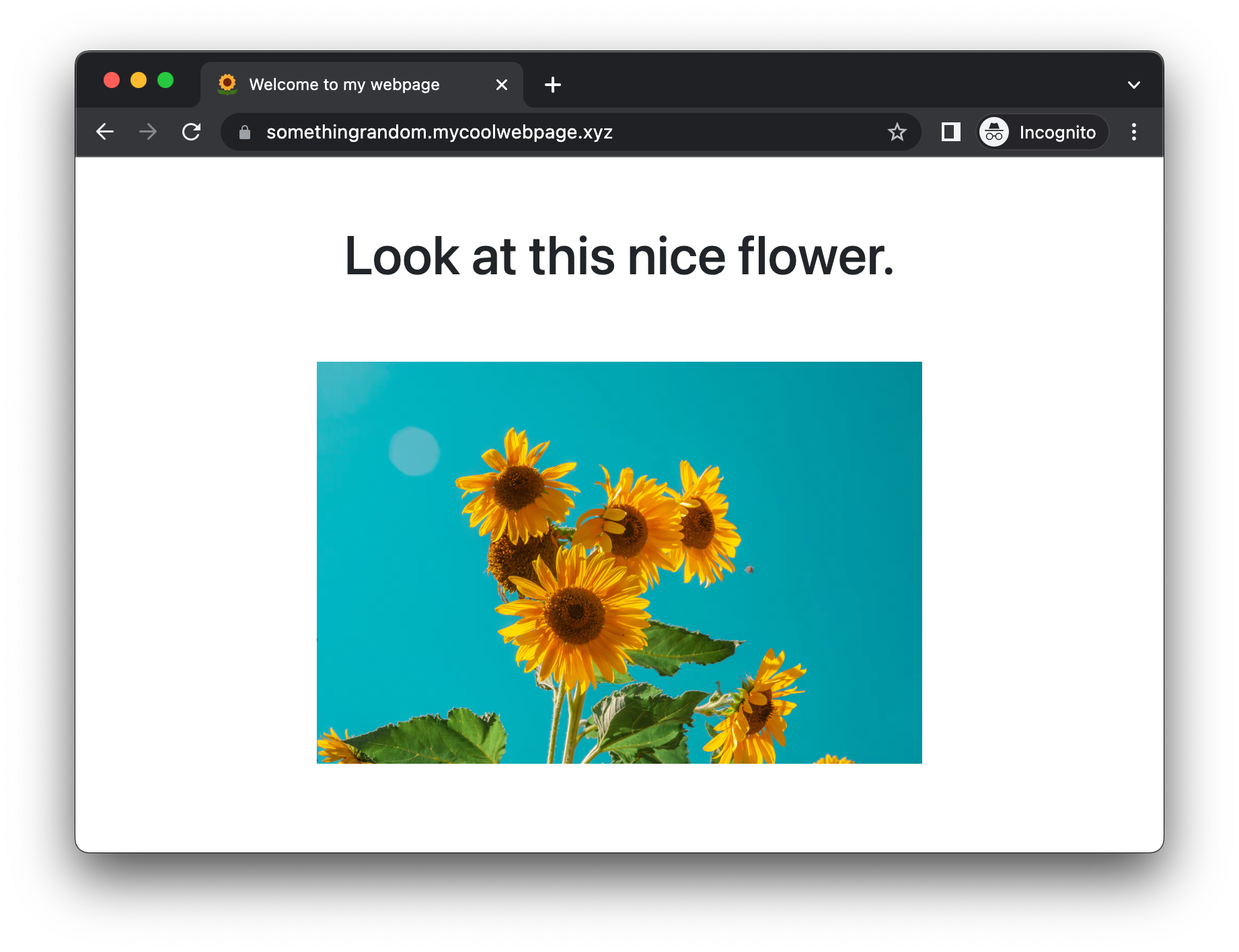
In the example above, this will ensure that all HTTP/S requests sent to subdomain2.mycoolwebpage.xyz or any other subdomain that is covered by the proxied wildcard DNS record are proxied by Cloudflare’s network, specifically the closest Cloudflare data center. Go see for yourself and pick a random subdomain of mycoolwebpage.xyz. You will see a simple page that is generated using Cloudflare Workers:

Wildcard proxy for everyone

And the cool thing is that you don’t even have to think about creating a TLS certificate. By default, Cloudflare will issue and automatically renew a certificate for your zone apex (mycoolwebpage.xyz) and all subdomains on the next level (*.mycoolwebpage.xyz).

Wildcard proxy for everyone

If you want to proxy a wildcard DNS record on a deeper level like *.www.mycoolwebpage.xyz you can subscribe to Cloudflare Advanced Certificate Manager and get a certificate that is covering that wildcard like this:

Wildcard proxy for everyone

Try it yourself on your domain

If you are not already using Cloudflare DNS for your domain, it is very easy to move from your existing DNS provider and can be done in a few minutes. Head over to our developer documentation for detailed instructions on how to change your authoritative nameservers.

Fitting Everything Together

Post Syndicated from original https://0pointer.net/blog/fitting-everything-together.html

TLDR: Hermetic /usr/ is awesome; let’s popularize image-based OSes
with modernized security properties built around immutability,
SecureBoot, TPM2, adaptability, auto-updating, factory reset,
uniformity – built from traditional distribution packages, but
deployed via images.

Over the past years, systemd gained a number of components for
building Linux-based operating systems. While these components
individually have been adopted by many distributions and products for
specific purposes, we did not publicly communicate a broader vision
of how they should all fit together in the long run. In this blog story I
hope to provide that from my personal perspective, i.e. explain how I
personally would build an OS and where I personally think OS
development with Linux should go.

I figure this is going to be a longer blog story, but I hope it
will be equally enlightening. Please understand though that everything
I write about OS design here is my personal opinion, and not one of my
employer.

For the last 12 years or so I have been working on Linux OS
development, mostly around systemd. In all those years I had a lot
of time thinking about the Linux platform, and specifically
traditional Linux distributions and their strengths and weaknesses. I
have seen many attempts to reinvent Linux distributions in one way or
another, to varying success. After all this most would probably
agree that the traditional RPM or dpkg/apt-based distributions still
define the Linux platform more than others (for 25+ years now), even
though some Linux-based OSes (Android, ChromeOS) probably outnumber
the installations overall.

And over all those 12 years I kept wondering, how would I actually
build an OS for a system or for an appliance, and what are the
components necessary to achieve that. And most importantly, how can we
make these components generic enough so that they are useful in
generic/traditional distributions too, and in other use cases than my
own.

The Project

Before figuring out how I would build an OS it’s probably good to
figure out what type of OS I actually want to build, what purpose I
intend to cover. I think a desktop OS is probably the most
interesting. Why is that? Well, first of all, I use one of these for my
job every single day, so I care immediately, it’s my primary tool of
work. But more importantly: I think building a desktop OS is one of
the most complex overall OS projects you can work on, simply because
desktops are so much more versatile and variable than servers or
embedded devices. If one figures out the desktop case, I think there’s
a lot more to learn from, and reuse in the server or embedded case,
then going the other way. After all, there’s a reason why so much of the
widely accepted Linux userspace stack comes from people with a desktop
background (including systemd, BTW).

So, let’s see how I would build a desktop OS. If you press me hard,
and ask me why I would do that given that ChromeOS already exists and
more or less is a Linux desktop OS: there’s plenty I am missing in
ChromeOS, but most importantly, I am lot more interested in building
something people can easily and naturally rebuild and hack on,
i.e. Google-style over-the-wall open source with its skewed power
dynamic is not particularly attractive to me. I much prefer building
this within the framework of a proper open source community, out in
the open, and basing all this strongly on the status quo ante,
i.e. the existing distributions. I think it is crucial to provide a
clear avenue to build a modern OS based on the existing distribution
model, if there shall ever be a chance to make this interesting for a
larger audience.

(Let me underline though: even though I am going to focus on a desktop
here, most of this is directly relevant for servers as well, in
particular container host OSes and suchlike, or embedded devices,
e.g. car IVI systems and so on.)

Design Goals

  1. First and foremost, I think the focus must be on an image-based
    design rather than a package-based one. For robustness and security
    it is essential to operate with reproducible, immutable images that
    describe the OS or large parts of it in full, rather than operating
    always with fine-grained RPM/dpkg style packages. That’s not to say
    that packages are not relevant (I actually think they matter a
    lot!), but I think they should be less of a tool for deploying code
    but more one of building the objects to deploy. A different way to
    see this: any OS built like this must be easy to replicate in a
    large number of instances, with minimal variability. Regardless if
    we talk about desktops, servers or embedded devices: focus for my
    OS should be on “cattle”, not “pets”, i.e that from the start it’s
    trivial to reuse the well-tested, cryptographically signed
    combination of software over a large set of devices the same way,
    with a maximum of bit-exact reuse and a minimum of local variances.

  2. The trust chain matters, from the boot loader all the way to the
    apps. This means all code that is run must be cryptographically
    validated before it is run. All storage must be cryptographically
    protected: public data must be integrity checked; private data must
    remain confidential.

    This is in fact where big distributions currently fail pretty
    badly. I would go as far as saying that SecureBoot on Linux
    distributions is mostly security theater at this point, if you so
    will. That’s because the initrd that unlocks your FDE (i.e. the
    cryptographic concept that protects the rest of your system) is not
    signed or protected in any way. It’s trivial to modify for an
    attacker with access to your hard disk in an undetectable way, and
    collect your FDE passphrase. The involved bureaucracy around the
    implementation of UEFI SecureBoot of the big distributions is to a
    large degree pointless if you ask me, given that once the kernel is
    assumed to be in a good state, as the next step the system invokes
    completely unsafe code with full privileges.

    This is a fault of current Linux distributions though, not of
    SecureBoot in general. Other OSes use this functionality in more
    useful ways, and we should correct that too.

  3. Pretty much the same thing: offline security matters. I want
    my data to be reasonably safe at rest, i.e. cryptographically
    inaccessible even when I leave my laptop in my hotel room,
    suspended.

  4. Everything should be cryptographically measured, so that remote
    attestation is supported for as much software shipped on the OS as
    possible.

  5. Everything should be self descriptive, have single sources of truths
    that are closely attached to the object itself, instead of stored
    externally.

  6. Everything should be self-updating. Today we know that software is
    never bug-free, and thus requires a continuous update cycle. Not
    only the OS itself, but also any extensions, services and apps
    running on it.

  7. Everything should be robust in respect to aborted OS operations,
    power loss and so on. It should be robust towards hosed OS updates
    (regardless if the download process failed, or the image was
    buggy), and not require user interaction to recover from them.

  8. There must always be a way to put the system back into a
    well-defined, guaranteed safe state (“factory reset”). This
    includes that all sensitive data from earlier uses becomes
    cryptographically inaccessible.

  9. The OS should enforce clear separation between vendor resources,
    system resources and user resources: conceptually and when it comes
    to cryptographical protection.

  10. Things should be adaptive: the system should come up and make the
    best of the system it runs on, adapt to the storage and
    hardware. Moreover, the system should support execution on bare
    metal equally well as execution in a VM environment and in a
    container environment (i.e. systemd-nspawn).

  11. Things should not require explicit installation. i.e. every image
    should be a live image. For installation it should be sufficient to
    dd an OS image onto disk. Thus, strong focus on “instantiate on
    first boot”, rather than “instantiate before first boot”.

  12. Things should be reasonably minimal. The image the system starts
    its life with should be quick to download, and not include
    resources that can as well be created locally later.

  13. System identity, local cryptographic keys and so on should be
    generated locally, not be pre-provisioned, so that there’s no leak
    of sensitive data during the transport onto the system possible.

  14. Things should be reasonably democratic and hackable. It should be
    easy to fork an OS, to modify an OS and still get reasonable
    cryptographic protection. Modifying your OS should not necessarily
    imply that your “warranty is voided” and you lose all good
    properties of the OS, if you so will.

  15. Things should be reasonably modular. The privileged part of the
    core OS must be extensible, including on the individual system.
    It’s not sufficient to support extensibility just through
    high-level UI applications.

  16. Things should be reasonably uniform, i.e. ideally the same formats
    and cryptographic properties are used for all components of the
    system, regardless if for the host OS itself or the payloads it
    receives and runs.

  17. Even taking all these goals into consideration, it should still be
    close to traditional Linux distributions, and take advantage of what
    they are really good at: integration and security update cycles.

Now that we know our goals and requirements, let’s start designing the
OS along these lines.

Hermetic /usr/

First of all the OS resources (code, data files, …) should be
hermetic in an immutable /usr/. This means that a /usr/ tree
should carry everything needed to set up the minimal set of
directories and files outside of /usr/ to make the system work. This
/usr/ tree can then be mounted read-only into the writable root file
system that then will eventually carry the local configuration, state
and user data in /etc/, /var/ and /home/ as usual.

Thankfully, modern distributions are surprisingly close to working
without issues in such a hermetic context. Specifically, Fedora works
mostly just fine: it has adopted the /usr/ merge and the declarative
systemd-sysusers
and
systemd-tmpfiles
components quite comprehensively, which means the directory trees
outside of /usr/ are automatically generated as needed if missing.
In particular /etc/passwd and /etc/group (and related files) are
appropriately populated, should they be missing entries.

In my model a hermetic OS is hence comprehensively defined within
/usr/: combine the /usr/ tree with an empty, otherwise unpopulated
root file system, and it will boot up successfully, automatically
adding the strictly necessary files, and resources that are necessary
to boot up.

Monopolizing vendor OS resources and definitions in an immutable
/usr/ opens multiple doors to us:

  • We can apply dm-verity to the whole /usr/ tree, i.e. guarantee
    structural, cryptographic integrity on the whole vendor OS resources
    at once, with full file system metadata.

  • We can implement updates to the OS easily: by implementing an A/B
    update scheme on the /usr/ tree we can update the OS resources
    atomically and robustly, while leaving the rest of the OS environment
    untouched.

  • We can implement factory reset easily: erase the root file system
    and reboot. The hermetic OS in /usr/ has all the information it
    needs to set up the root file system afresh — exactly like in a new
    installation.

Initial Look at the Partition Table

So let’s have a look at a suitable partition table, taking a hermetic
/usr/ into account. Let’s conceptually start with a table of four
entries:

  1. An UEFI System Partition (required by firmware to boot)

  2. Immutable, Verity-protected, signed file system with the /usr/ tree in version A

  3. Immutable, Verity-protected, signed file system with the /usr/ tree in version B

  4. A writable, encrypted root file system

(This is just for initial illustration here, as we’ll see later it’s
going to be a bit more complex in the end.)

The Discoverable Partitions
Specification
provides
suitable partition types UUIDs for all of the above partitions. Which
is great, because it makes the image self-descriptive: simply by
looking at the image’s GPT table we know what to mount where. This
means we do not need a manual /etc/fstab, and a multitude of tools
such as systemd-nspawn and similar can operate directly on the disk
image and boot it up.

Booting

Now that we have a rough idea how to organize the partition table,
let’s look a bit at how to boot into that. Specifically, in my model
“unified kernels” are the way to go, specifically those implementing
Boot Loader Specification Type #2. These are basically
kernel images that have an initial RAM disk attached to them, as well as
a kernel command line, a boot splash image and possibly more, all
wrapped into a single UEFI PE binary. By combining these into one we
achieve two goals: they become extremely easy to update (i.e. drop in
one file, and you update kernel+initrd) and more importantly, you can
sign them as one for the purpose of UEFI SecureBoot.

In my model, each version of such a kernel would be associated with
exactly one version of the /usr/ tree: both are always updated at
the same time. An update then becomes relatively simple: drop in one
new /usr/ file system plus one kernel, and the update is complete.

The boot loader used for all this would be
systemd-boot,
of course. It’s a very simple loader, and implements the
aforementioned boot loader specification. This means it requires no
explicit configuration or anything: it’s entirely sufficient to drop
in one such unified kernel file, and it will be picked up, and be made
a candidate to boot into.

You might wonder how to configure the root file system to boot from
with such a unified kernel that contains the kernel command line and
is signed as a whole and thus immutable. The idea here is to use the
usrhash= kernel command line option implemented by
systemd-veritysetup-generator
and
systemd-fstab-generator. It
does two things: it will search and set up a dm-verity volume for
the /usr/ file system, and then mount it. It takes the root hash
value of the dm-verity Merkle tree as the parameter. This hash is
then also used to find the /usr/ partition in the GPT partition
table, under the assumption that the partition UUIDs are derived from
it, as per the suggestions in the discoverable partitions
specification (see above).

systemd-boot (if not told otherwise) will do a version sort of the
kernel image files it finds, and then automatically boot the newest
one. Picking a specific kernel to boot will also fixate which version
of the /usr/ tree to boot into, because — as mentioned — the Verity
root hash of it is built into the kernel command line the unified
kernel image contains.

In my model I’d place the kernels directly into the UEFI System
Partition (ESP), in order to simplify things. (systemd-boot also
supports reading them from a separate boot partition, but let’s not
complicate things needlessly, at least for now.)

So, with all this, we now already have a boot chain that goes
something like this: once the boot loader is run, it will pick the
newest kernel, which includes the initial RAM disk and a secure
reference to the /usr/ file system to use. This is already
great. But a /usr/ alone won’t make us happy, we also need a root
file system. In my model, that file system would be writable, and the
/etc/ and /var/ hierarchies would be located directly on it. Since
these trees potentially contain secrets (SSH keys, …) the root file
system needs to be encrypted. We’ll use LUKS2 for this, of course. In
my model, I’d bind this to the TPM2 chip (for compatibility with
systems lacking one, we can find a suitable fallback, which then
provides weaker guarantees, see below). A TPM2 is a security chip
available in most modern PCs. Among other things it contains a
persistent secret key that can be used to encrypt data, in a way that
only if you possess access to it and can prove you are using validated
software you can decrypt it again. The cryptographic measuring I
mentioned earlier is what allows this to work. But … let’s not get
lost too much in the details of TPM2 devices, that’d be material for a
novel, and this blog story is going to be way too long already.

What does using a TPM2 bound key for unlocking the root file system
get us? We can encrypt the root file system with it, and you can only
read or make changes to the root file system if you also possess the
TPM2 chip and run our validated version of the OS. This protects us
against an evil maid scenario to some level: an attacker cannot
just copy the hard disk of your laptop while you leave it in your
hotel room, because unless the attacker also steals the TPM2 device it
cannot be decrypted. The attacker can also not just modify the root
file system, because such changes would be detected on next boot
because they aren’t done with the right cryptographic key.

So, now we have a system that already can boot up somewhat completely,
and run userspace services. All code that is run is verified in some
way: the /usr/ file system is Verity protected, and the root hash of
it is included in the kernel that is signed via UEFI SecureBoot. And
the root file system is locked to the TPM2 where the secret key is
only accessible if our signed OS + /usr/ tree is used.

(One brief intermission here: so far all the components I am
referencing here exist already, and have been shipped in systemd and
other projects already, including the TPM2 based disk
encryption. There’s one thing missing here however at the moment that
still needs to be developed (happy to take PRs!): right now TPM2 based
LUKS2 unlocking is bound to PCR hash values. This is hard to work with
when implementing updates — what we’d need instead is unlocking by
signatures of PCR hashes. TPM2 supports this, but we don’t support it
yet in our systemd-cryptsetup + systemd-cryptenroll stack.)

One of the goals mentioned above is that cryptographic key material
should always be generated locally on first boot, rather than
pre-provisioned. This of course has implications for the encryption
key of the root file system: if we want to boot into this system we
need the root file system to exist, and thus a key already generated
that it is encrypted with. But where precisely would we generate it if
we have no installer which could generate while installing (as it is
done in traditional Linux distribution installers). My proposed
solution here is to use
systemd-repart,
which is a declarative, purely additive repartitioner. It can run from
the initrd to create and format partitions on boot, before
transitioning into the root file system. It can also format the
partitions it creates and encrypt them, automatically enrolling an
TPM2-bound key.

So, let’s revisit the partition table we mentioned earlier. Here’s
what in my model we’d actually ship in the initial image:

  1. An UEFI System Partition (ESP)

  2. An immutable, Verity-protected, signed file system with the /usr/ tree in version A

And that’s already it. No root file system, no B /usr/ partition,
nothing else. Only two partitions are shipped: the ESP with the
systemd-boot loader and one unified kernel image, and the A version
of the /usr/ partition. Then, on first boot systemd-repart will
notice that the root file system doesn’t exist yet, and will create
it, encrypt it, and format it, and enroll the key into the TPM2. It
will also create the second /usr/ partition (B) that we’ll need for
later A/B updates (which will be created empty for now, until the
first update operation actually takes place, see below). Once done the
initrd will combine the fresh root file system with the shipped
/usr/ tree, and transition into it. Because the OS is hermetic in
/usr/ and contains all the systemd-tmpfiles and systemd-sysuser
information it can then set up the root file system properly and
create any directories and symlinks (and maybe a few files) necessary
to operate.

Besides the fact that the root file system’s encryption keys are
generated on the system we boot from and never leave it, it is also
pretty nice that the root file system will be sized dynamically,
taking into account the physical size of the backing storage. This is
perfect, because on first boot the image will automatically adapt to what
it has been dd‘ed onto.

Factory Reset

This is a good point to talk about the factory reset logic, i.e. the
mechanism to place the system back into a known good state. This is
important for two reasons: in our laptop use case, once you want to
pass the laptop to someone else, you want to ensure your data is fully
and comprehensively erased. Moreover, if you have reason to believe
your device was hacked you want to revert the device to a known good
state, i.e. ensure that exploits cannot persist. systemd-repart
already has a mechanism for it. In the declarations of the partitions
the system should have, entries may be marked to be candidates for
erasing on factory reset. The actual factory reset is then requested
by one of two means: by specifying a specific kernel command line
option (which is not too interesting here, given we lock that down via
UEFI SecureBoot; but then again, one could also add a second kernel to
the ESP that is identical to the first, with only different that it
lists this command line option: thus when the user selects this entry
it will initiate a factory reset) — and via an EFI variable that can
be set and is honoured on the immediately following boot. So here’s
how a factory reset would then go down: once the factory reset is
requested it’s enough to reboot. On the subsequent boot
systemd-repart runs from the initrd, where it will honour the
request and erase the partitions marked for erasing. Once that is
complete the system is back in the state we shipped the system in:
only the ESP and the /usr/ file system will exist, but the root file
system is gone. And from here we can continue as on the original first
boot: create a new root file system (and any other partitions), and
encrypt/set it up afresh.

So now we have a nice setup, where everything is either signed or
encrypted securely. The system can adapt to the system it is booted on
automatically on first boot, and can easily be brought back into a
well defined state identical to the way it was shipped in.

Modularity

But of course, such a monolithic, immutable system is only useful for
very specific purposes. If /usr/ can’t be written to, – at least in
the traditional sense – one cannot just go and install a new software
package that one needs. So here two goals are superficially
conflicting: on one hand one wants modularity, i.e. the ability to
add components to the system, and on the other immutability, i.e. that
precisely this is prohibited.

So let’s see what I propose as a middle ground in my model. First,
what’s the precise use case for such modularity? I see a couple of
different ones:

  1. For some cases it is necessary to extend the system itself at the
    lowest level, so that the components added in extend (or maybe even
    replace) the resources shipped in the base OS image, so that they live
    in the same namespace, and are subject to the same security
    restrictions and privileges. Exposure to the details of the base OS
    and its interface for this kind of modularity is at the maximum.

    Example: a module that adds a debugger or tracing tools into the
    system. Or maybe an optional hardware driver module.

  2. In other cases, more isolation is preferable: instead of extending
    the system resources directly, additional services shall be added
    in that bring their own files, can live in their own namespace
    (but with “windows” into the host namespaces), however still are
    system components, and provide services to other programs, whether
    local or remote. Exposure to the details of the base OS for this
    kind of modularity is restricted: it mostly focuses on the
    ability to consume and provide IPC APIs from/to the
    system. Components of this type can still be highly privileged, but
    the level of integration is substantially smaller than for the type
    explained above.

    Example: a module that adds a specific VPN connection service to
    the OS.

  3. Finally, there’s the actual payload of the OS. This stuff is
    relatively isolated from the OS and definitely from each other. It
    mostly consumes OS APIs, and generally doesn’t provide OS
    APIs. This kind of stuff runs with minimal privileges, and in its
    own namespace of concepts.

    Example: a desktop app, for reading your emails.

Of course, the lines between these three types of modules are blurry,
but I think distinguishing them does make sense, as I think different
mechanisms are appropriate for each. So here’s what I’d propose in my
model to use for this.

  1. For the system extension case I think the
    systemd-sysext
    images are appropriate. This tool operates on
    system extension images that are very similar to the host’s disk
    image: they also contain a /usr/ partition, protected by
    Verity. However, they just include additions to the host image:
    binaries that extend the host. When such a system extension image
    is activated, it is merged via an immutable overlayfs mount into
    the host’s /usr/ tree. Thus any file shipped in such a system
    extension will suddenly appear as if it was part of the host OS
    itself. For optional components that should be considered part of
    the OS more or less this is a very simple and powerful way to
    combine an immutable OS with an immutable extension. Note that most
    likely extensions for an OS matching this tool should be built at
    the same time within the same update cycle scheme as the host OS
    itself. After all, the files included in the extensions will have
    dependencies on files in the system OS image, and care must be
    taken that these dependencies remain in order.

  2. For adding in additional somewhat isolated system services in my
    model, Portable Services
    are the proposed tool of choice. Portable services are in most ways
    just like regular system services; they could be included in the
    system OS image or an extension image. However, portable services
    use
    RootImage=
    to run off separate disk images, thus within their own
    namespace. Images set up this way have various ways to integrate
    into the host OS, as they are in most ways regular system services,
    which just happen to bring their own directory tree. Also, unlike
    regular system services, for them sandboxing is opt-out rather than
    opt-in. In my model, here too the disk images are Verity protected
    and thus immutable. Just like the host OS they are GPT disk images
    that come with a /usr/ partition and Verity data, along with
    signing.

  3. Finally, the actual payload of the OS, i.e. the apps. To be useful
    in real life here it is important to hook into existing ecosystems,
    so that a large set of apps are available. Given that on Linux
    flatpak (or on servers OCI containers) are the established format
    that pretty much won they are probably the way to go. That said, I
    think both of these mechanisms have relatively weak properties, in
    particular when it comes to security, since
    immutability/measurements and similar are not provided. This means,
    unlike for system extensions and portable services a complete trust
    chain with attestation and per-app cryptographically protected data
    is much harder to implement sanely.

What I’d like to underline here is that the main system OS image, as
well as the system extension images and the portable service images
are put together the same way: they are GPT disk images, with one
immutable file system and associated Verity data. The latter two
should also contain a PKCS#7 signature for the top-level Verity
hash. This uniformity has many benefits: you can use the same tools to
build and process these images, but most importantly: by using a
single way to validate them throughout the stack (i.e. Verity, in the
latter cases with PKCS#7 signatures), validation and measurement is
straightforward. In fact it’s so obvious that we don’t even have to
implement it in systemd: the kernel has direct support for this Verity
signature checking natively already (IMA).

So, by composing a system at runtime from a host image, extension
images and portable service images we have a nicely modular system
where every single component is cryptographically validated on every
single IO operation, and every component is measured, in its entire
combination, directly in the kernel’s IMA subsystem.

(Of course, once you add the desktop apps or OCI containers on top,
then these properties are lost further down the chain. But well, a lot
is already won, if you can close the chain that far down.)

Note that system extensions are not designed to replicate the fine
grained packaging logic of RPM/dpkg. Of course, systemd-sysext is a
generic tool, so you can use it for whatever you want, but there’s a
reason it does not bring support for a dependency language: the goal
here is not to replicate traditional Linux packaging (we have that
already, in RPM/dpkg, and I think they are actually OK for what they
do) but to provide delivery of larger, coarser sets of functionality,
in lockstep with the underlying OS’ life-cycle and in particular with
no interdependencies, except on the underlying OS.

Also note that depending on the use case it might make sense to also
use system extensions to modularize the initrd step. This is
probably less relevant for a desktop OS, but for server systems it
might make sense to package up support for specific complex storage in
a systemd-sysext system extension, which can be applied to the
initrd that is built into the unified kernel. (In fact, we have been
working on implementing signed yet modular initrd support to general
purpose Fedora this way.)

Note that portable services are composable from system extension too,
by the way. This makes them even more useful, as you can share a
common runtime between multiple portable service, or even use the host
image as common runtime for portable services. In this model a common
runtime image is shared between one or more system extensions, and
composed at runtime via an overlayfs instance.

More Modularity: Secondary OS Installs

Having an immutable, cryptographically locked down host OS is great I
think, and if we have some moderate modularity on top, that’s also
great. But oftentimes it’s useful to be able to depart/compromise for
some specific use cases from that, i.e. provide a bridge for example to
allow workloads designed around RPM/dpkg package management to coexist
reasonably nicely with such an immutable host.

For this purpose in my model I’d propose using systemd-nspawn
containers. The containers are focused on OS containerization,
i.e. they allow you to run a full OS with init system and everything
as payload (unlike for example Docker containers which focus on a
single service, and where running a full OS in it is a mess).

Running systemd-nspawn containers for such secondary OS installs has
various nice properties. One of course is that systemd-nspawn
supports the same level of cryptographic image validation that we rely
on for the host itself. Thus, to some level the whole OS trust chain
is reasonably recursive if desired: the firmware validates the OS, and the OS can
validate a secondary OS installed within it. In fact, we can run our
trusted OS recursively on itself and get similar security guarantees!
Besides these security aspects, systemd-nspawn also has really nice
properties when it comes to integration with the host. For example the
--bind-user= permits binding a host user record and their directory
into a container as a simple one step operation. This makes it
extremely easy to have a single user and $HOME but share it
concurrently with the host and a zoo of secondary OSes in
systemd-nspawn containers, which each could run different
distributions even.

Developer Mode

Superficially, an OS with an immutable /usr/ appears much less
hackable than an OS where everything is writable. Moreover, an OS
where everything must be signed and cryptographically validated makes
it hard to insert your own code, given you are unlikely to possess
access to the signing keys.

To address this issue other systems have supported a “developer” mode:
when entered the security guarantees are disabled, and the system can
be freely modified, without cryptographic validation. While that’s a
great concept to have I doubt it’s what most developers really want:
the cryptographic properties of the OS are great after all, it sucks
having to give them up once developer mode is activated.

In my model I’d thus propose two different approaches to this
problem. First of all, I think there’s value in allowing users to
additively extend/override the OS via local developer system
extensions
. With
this scheme the underlying cryptographic validation would remain in
tact, but — if this form of development mode is explicitly enabled –
the developer could add in more resources from local storage, that are
not tied to the OS builder’s chain of trust, but a local one
(i.e. simply backed by encrypted storage of some form).

The second approach is to make it easy to extend (or in fact replace)
the set of trusted validation keys, with local ones that are under the
control of the user, in order to make it easy to operate with kernel,
OS, extension, portable service or container images signed by the
local developer without involvement of the OS builder. This is
relatively easy to do for components down the trust chain, i.e. the
elements further up the chain should optionally allow additional
certificates to allow validation with.

(Note that systemd currently has no explicit support for a
“developer” mode like this. I think we should add that sooner or later
however.)

Democratizing Code Signing

Closely related to the question of developer mode is the question of
code signing. If you ask me, the status quo of UEFI SecureBoot code
signing in the major Linux distributions is pretty sad. The work to
get stuff signed is massive, but in effect it delivers very little in
return: because initrds are entirely unprotected, and reside on
partitions lacking any form of cryptographic integrity protection any
attacker can trivially easily modify the boot process of any such
Linux system and freely collected FDE passphrases entered. There’s
little value in signing the boot loader and kernel in a complex
bureaucracy if it then happily loads entirely unprotected code that
processes the actually relevant security credentials: the FDE
keys.

In my model, through use of unified kernels this important gap is
closed, hence UEFI SecureBoot code signing becomes an integral part of
the boot chain from firmware to the host OS. Unfortunately, code
signing – and having something a user can locally hack, is to some
level conflicting. However, I think we can improve the situation here,
and put more emphasis on enrolling developer keys in the trust chain
easily. Specifically, I see one relevant approach here: enrolling keys
directly in the firmware is something that we should make less of a
theoretical exercise and more something we can realistically
deploy. See this work in
progress

making this more automatic and eventually safe. Other approaches are
thinkable (including some that build on existing MokManager
infrastructure), but given the politics involved, are harder to
conclusively implement.

Running the OS itself in a container

What I explain above is put together with running on a bare metal
system in mind. However, one of the stated goals is to make the OS
adaptive enough to also run in a container environment (specifically:
systemd-nspawn) nicely. Booting a disk image on bare metal or in a
VM generally means that the UEFI firmware validates and invokes the
boot loader, and the boot loader invokes the kernel which then
transitions into the final system. This is different for containers:
here the container manager immediately calls the init system, i.e. PID
1. Thus the validation logic must be different: cryptographic
validation must be done by the container manager. In my model this is
solved by shipping the OS image not only with a Verity data partition
(as is already necessary for the UEFI SecureBoot trust chain, see
above), but also with another partition, containing a PKCS#7 signature
of the root hash of said Verity partition. This of course is exactly
what I propose for both the system extension and portable service
image. Thus, in my model the images for all three uses are put
together the same way: an immutable /usr/ partition, accompanied by
a Verity partition and a PKCS#7 signature partition. The OS image
itself then has two ways “into” the trust chain: either through the
signed unified kernel in the ESP (which is used for bare metal and VM
boots) or by using the PKCS#7 signature stored in the partition
(which is used for container/systemd-nspawn boots).

Parameterizing Kernels

A fully immutable and signed OS has to establish trust in the user
data it makes use of before doing so. In the model I describe here,
for /etc/ and /var/ we do this via disk encryption of the root
file system (in combination with integrity checking). But the point
where the root file system is mounted comes relatively late in the
boot process, and thus cannot be used to parameterize the boot
itself. In many cases it’s important to be able to parameterize the
boot process however.

For example, for the implementation of the developer mode indicated
above it’s useful to be able to pass this fact safely to the initrd,
in combination with other fields (e.g. hashed root password for
allowing in-initrd logins for debug purposes). After all, if the
initrd is pre-built by the vendor and signed as whole together with
the kernel it cannot be modified to carry such data directly (which is
in fact how parameterizing of the initrd to a large degree was traditionally
done).

In my model this is achieved through system
credentials
, which allow passing
parameters to systems (and services for the matter) in an encrypted
and authenticated fashion, bound to the TPM2 chip. This means that we
can securely pass data into the initrd so that it can be authenticated
and decrypted only on the system it is intended for and with the
unified kernel image it was intended for.

Swap

In my model the OS would also carry a swap partition. For the simple
reason that only then
systemd-oomd.service
can provide the best results. Also see In defence of swap: common
misconceptions

Updating Images

We have a rough idea how the system shall be organized now, let’s next
focus on the deployment cycle: software needs regular update cycles,
and software that is not updated regularly is a security
problem. Thus, I am sure that any modern system must be automatically
updated, without this requiring avoidable user interaction.

In my model, this is the job for
systemd-sysupdate. It’s
a relatively simple A/B image updater: it operates either on
partitions, on regular files in a directory, or on subdirectories in a
directory. Each entry has a version (which is encoded in the GPT
partition label for partitions, and in the filename for regular files
and directories): whenever an update is initiated the oldest version
is erased, and the newest version is downloaded.

With the setup described above a system update becomes a really simple
operation. On each update the systemd-sysupdate tool downloads a
/usr/ file system partition, an accompanying Verity partition, a
PKCS#7 signature partition, and drops it into the host’s partition
table (where it possibly replaces the oldest version so far stored
there). Then it downloads a unified kernel image and drops it into
the EFI System Partition’s /EFI/Linux (as per Boot Loader
Specification; possibly erase the oldest such file there). And that’s
already the whole update process: four files are downloaded from the
server, unpacked and put in the most straightforward of ways into the
partition table or file system. Unlike in other OS designs there’s no
mechanism required to explicitly switch to the newer version, the
aforementioned systemd-boot logic will automatically pick the newest
kernel once it is dropped in.

Above we talked a lot about modularity, and how to put systems
together as a combination of a host OS image, system extension images
for the initrd and the host, portable service images and
systemd-nspawn container images. I already emphasized that these
image files are actually always the same: GPT disk images with
partition definitions that match the Discoverable Partition
Specification. This comes very handy when thinking about updating: we
can use the exact same systemd-sysupdate tool for updating these
other images as we use for the host image. The uniformity of the
on-disk format allows us to update them uniformly too.

Boot Counting + Assessment

Automatic OS updates do not come without risks: if they happen
automatically, and an update goes wrong this might mean your system
might be automatically updated into a brick. This of course is less
than ideal. Hence it is essential to address this reasonably
automatically. In my model, there’s systemd’s Automatic Boot
Assessment
for
that. The mechanism is simple: whenever a new unified kernel image is
dropped into the system it will be stored with a small integer counter
value included in the filename. Whenever the unified kernel image is
selected for booting by systemd-boot, it is decreased by one. Once
the system booted up successfully (which is determined by userspace)
the counter is removed from the file name (which indicates “this entry
is known to work”). If the counter ever hits zero, this indicates that
it tried to boot it a couple of times, and each time failed, thus is
apparently “bad”. In this case systemd-boot will not consider the
kernel anymore, and revert to the next older (that doesn’t have a
counter of zero).

By sticking the boot counter into the filename of the unified kernel
we can directly attach this information to the kernel, and thus need
not concern ourselves with cleaning up secondary information about the
kernel when the kernel is removed. Updating with a tool like
systemd-sysupdate remains a very simple operation hence: drop one
old file, add one new file.

Picking the Newest Version

I already mentioned that systemd-boot automatically picks the newest
unified kernel image to boot, by looking at the version encoded in the
filename. This is done via a simple
strverscmp()
call (well, truth be told, it’s a modified version of that call,
different from the one implemented in libc, because real-life package
managers use more complex rules for comparing versions these days, and
hence it made sense to do that here too). The concept of having
multiple entries of some resource in a directory, and picking the
newest one automatically is a powerful concept, I think. It means
adding/removing new versions is extremely easy (as we discussed above,
in systemd-sysupdate context), and allows stateless determination of
what to use.

If systemd-boot can do that, what about system extension images,
portable service images, or systemd-nspawn container images that do
not actually use systemd-boot as the entrypoint? All these tools
actually implement the very same logic, but on the partition level: if
multiple suitable /usr/ partitions exist, then the newest is determined
by comparing the GPT partition label of them.

This is in a way the counterpart to the systemd-sysupdate update
logic described above: we always need a way to determine which
partition to actually then use after the update took place: and this
becomes very easy each time: enumerate possible entries, pick the
newest as per the (modified) strverscmp() result.

Home Directory Management

In my model the device’s users and their home directories are managed
by
systemd-homed. This
means they are relatively self-contained and can be migrated easily
between devices. The numeric UID assignment for each user is done at
the moment of login only, and the files in the home directory are
mapped as needed via a uidmap mount. It also allows us to protect
the data of each user individually with a credential that belongs to
the user itself. i.e. instead of binding confidentiality of the user’s
data to the system-wide full-disk-encryption each user gets their own
encrypted home directory where the user’s authentication token
(password, FIDO2 token, PKCS#11 token, recovery key…) is used as
authentication and decryption key for the user’s data. This brings
a major improvement for security as it means the user’s data is
cryptographically inaccessible except when the user is actually logged
in.

It also allows us to correct another major issue with traditional
Linux systems: the way how data encryption works during system
suspend. Traditionally on Linux the disk encryption credentials
(e.g. LUKS passphrase) is kept in memory also when the system is
suspended. This is a bad choice for security, since many (most?) of us
probably never turn off their laptop but suspend it instead. But if
the decryption key is always present in unencrypted form during the
suspended time, then it could potentially be read from there by a
sufficiently equipped attacker.

By encrypting the user’s home directory with the user’s authentication
token we can first safely “suspend” the home directory before going to
the system suspend state (i.e. flush out the cryptographic keys needed
to access it). This means any process currently accessing the home
directory will be frozen for the time of the suspend, but that’s
expected anyway during a system suspend cycle. Why is this better than
the status quo ante? In this model the home directory’s cryptographic
key material is erased during suspend, but it can be safely reacquired
on resume, from system code. If the system is only encrypted as a
whole however, then the system code itself couldn’t reauthenticate the
user, because it would be frozen too. By separating home directory
encryption from the root file system encryption we can avoid this
problem.

Partition Setup

So we discussed the organization of the partitions OS images multiple
times in the above, each time focusing on a specific aspect. Let’s
now summarize how this should look like all together.

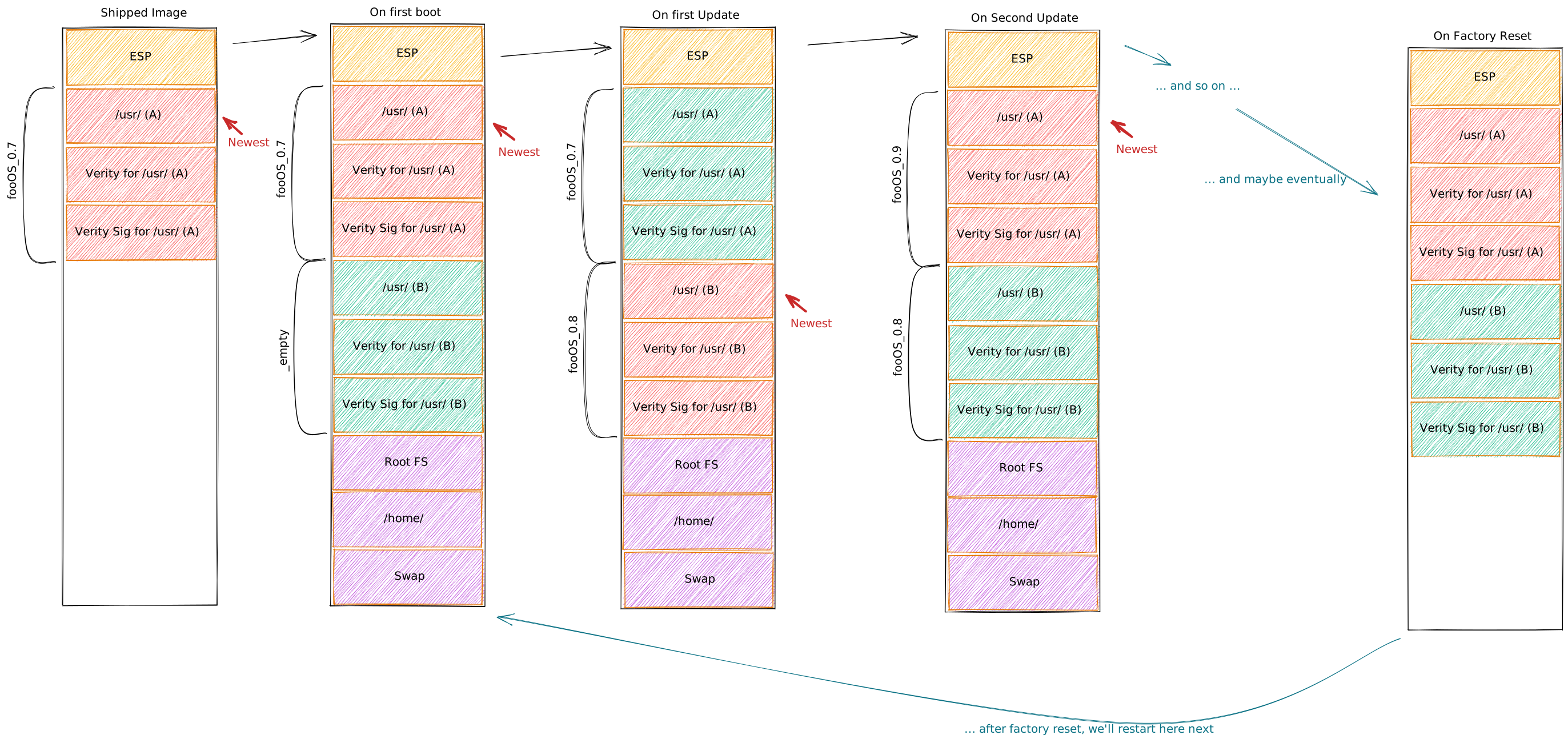
In my model, the initial, shipped OS image should look roughly like this:

  • (1) An UEFI System Partition, with systemd-boot as boot loader and one unified kernel
  • (2) A /usr/ partition (version “A”), with a label fooOS_0.7 (under the assumption we called our project fooOS and the image version is 0.7).
  • (3) A Verity partition for the /usr/ partition (version “A”), with the same label
  • (4) A partition carrying the Verity root hash for the /usr/ partition (version “A”), along with a PKCS#7 signature of it, also with the same label

On first boot this is augmented by systemd-repart like this:

  • (5) A second /usr/ partition (version “B”), initially with a label _empty (which is the label systemd-sysupdate uses to mark partitions that currently carry no valid payload)
  • (6) A Verity partition for that (version “B”), similar to the above case, also labelled _empty
  • (7) And ditto a Verity root hash partition with a PKCS#7 signature (version “B”), also labelled _empty
  • (8) A root file system, encrypted and locked to the TPM2
  • (9) A home file system, integrity protected via a key also in TPM2 (encryption is unnecessary, since systemd-homed adds that on its own, and it’s nice to avoid duplicate encryption)
  • (10) A swap partition, encrypted and locked to the TPM2

Then, on the first OS update the partitions 5, 6, 7 are filled with a
new version of the OS (let’s say 0.8) and thus get their label
updated to fooOS_0.8. After a boot, this version is active.

On a subsequent update the three partitions fooOS_0.7 get wiped and
replaced by fooOS_0.9 and so on.

On factory reset, the partitions 8, 9, 10 are deleted, so that
systemd-repart recreates them, using a new set of cryptographic
keys.

Here’s a graphic that hopefully illustrates the partition stable from
shipped image, through first boot, multiple update cycles and eventual
factory reset:

Partitions Overview

Trust Chain

So let’s summarize the intended chain of trust (for bare metal/VM
boots) that ensures every piece of code in this model is signed
and validated, and any system secret is locked to TPM2.

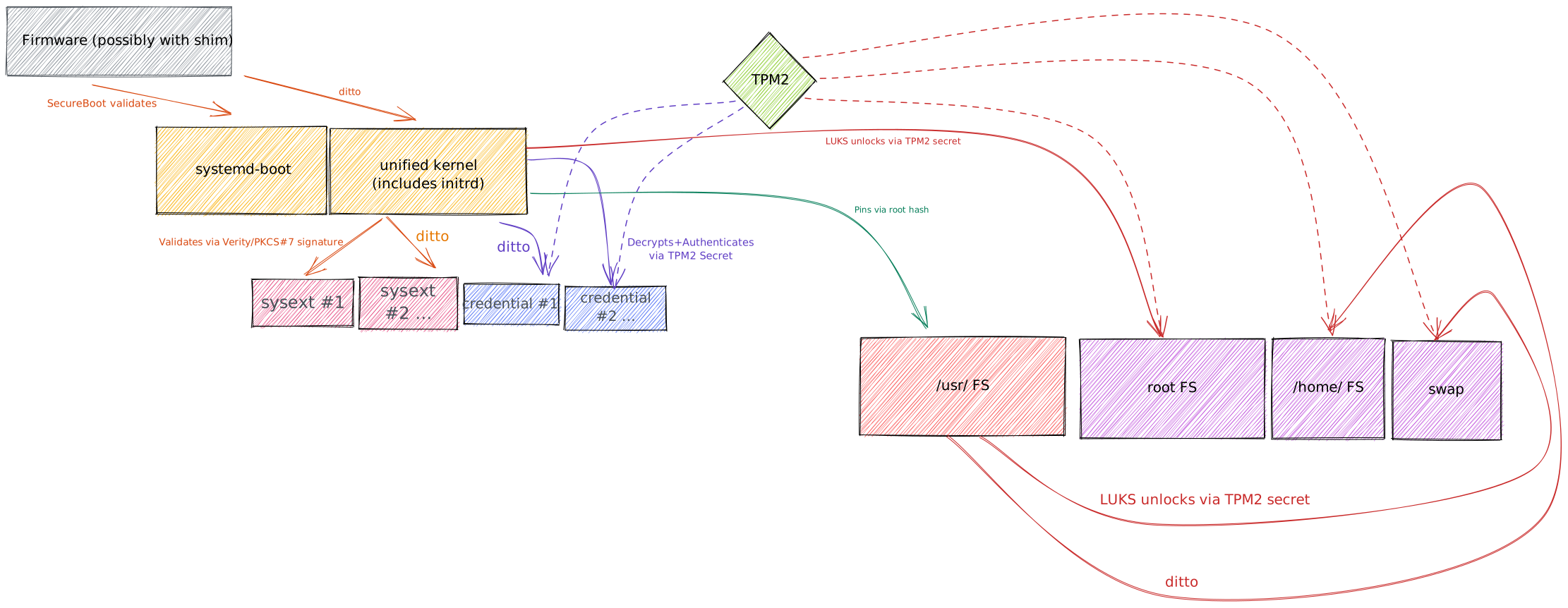
  1. First, firmware (or possibly shim) authenticates systemd-boot.

  2. Once systemd-boot picks a unified kernel image to boot, it is
    also authenticated by firmware/shim.

  3. The unified kernel image contains an initrd, which is the first
    userspace component that runs. It finds any system extensions passed
    into the initrd, and sets them up through Verity. The kernel will
    validate the Verity root hash signature of these system extension
    images against its usual keyring.

  4. The initrd also finds credentials passed in, then securely unlocks
    (which means: decrypts + authenticates) them with a secret from the
    TPM2 chip, locked to the kernel image itself.

  5. The kernel image also contains a kernel command line which contains
    a usrhash= option that pins the root hash of the /usr/ partition
    to use.

  6. The initrd then unlocks the encrypted root file system, with a
    secret bound to the TPM2 chip.

  7. The system then transitions into the main system, i.e. the
    combination of the Verity protected /usr/ and the encrypted root
    files system. It then activates two more encrypted (and/or
    integrity protected) volumes for /home/ and swap, also with a
    secret tied to the TPM2 chip.

Here’s an attempt to illustrate the above graphically:

Trust Chain

This is the trust chain of the basic OS. Validation of system
extension images, portable service images, systemd-nspawn container
images always takes place the same way: the kernel validates these
Verity images along with their PKCS#7 signatures against the kernel’s
keyring.

File System Choice

In the above I left the choice of file systems unspecified. For the
immutable /usr/ partitions squashfs might be a good candidate, but
any other that works nicely in a read-only fashion and generates
reproducible results is a good choice, too. The home directories as managed
by systemd-homed should certainly use btrfs, because it’s the only
general purpose file system supporting online grow and shrink, which
systemd-homed can take benefit of, to manage storage.

For the root file system btrfs is likely also the best idea. That’s
because we intend to use LUKS/dm-crypt underneath, which by default
only provides confidentiality, not authenticity of the data (unless
combined with dm-integrity). Since btrfs (unlike xfs/ext4) does
full data checksumming it’s probably the best choice here, since it
means we don’t have to use dm-integrity (which comes at a higher
performance cost).

OS Installation vs. OS Instantiation

In the discussion above a lot of focus was put on setting up the OS
and completing the partition layout and such on first boot. This means
installing the OS becomes as simple as dd-ing (i.e. “streaming”) the
shipped disk image into the final HDD medium. Simple, isn’t it?

Of course, such a scheme is just too simple for many setups in real
life. Whenever multi-boot is required (i.e. co-installing an OS
implementing this model with another unrelated one), dd-ing a disk
image onto the HDD is going to overwrite user data that was supposed
to be kept around.

In order to cover for this case, in my model, we’d use
systemd-repart (again!) to allow streaming the source disk image
into the target HDD in a smarter, additive way. The tool after all is
purely additive: it will add in partitions or grow them if they are
missing or too small. systemd-repart already has all the necessary
provisions to not only create a partition on the target disk, but also
copy blocks from a raw installer disk. An install operation would then
become a two stop process: one invocation of systemd-repart that
adds in the /usr/, its Verity and the signature partition to the
target medium, populated with a copy of the same partition of the
installer medium. And one invocation of bootctl that installs the
systemd-boot boot loader in the ESP. (Well, there’s one thing
missing here: the unified OS kernel also needs to be dropped into the
ESP. For now, this can be done with a simple cp call. In the long
run, this should probably be something bootctl can do as well, if
told so.)

So, with this scheme we have a simple scheme to cover all bases: we
can either just dd an image to disk, or we can stream an image onto
an existing HDD, adding a couple of new partitions and files to the
ESP.

Of course, in reality things are more complex than that even: there’s
a good chance that the existing ESP is simply too small to carry
multiple unified kernels. In my model, the way to address this is by
shipping two slightly different systemd-repart partition definition
file sets: the ideal case when the ESP is large enough, and a
fallback case, where it isn’t and where we then add in an addition
XBOOTLDR partition (as per the Discoverable Partitions
Specification). In that mode the ESP carries the boot loader, but the
unified kernels are stored in the XBOOTLDR partition. This scenario is
not quite as simple as the XBOOTLDR-less scenario described first, but
is equally well supported in the various tools. Note that
systemd-repart can be told size constraints on the partitions it
shall create or augment, thus to implement this scheme it’s enough to
invoke the tool with the fallback partition scheme if invocation with
the ideal scheme fails.

Either way: regardless how the partitions, the boot loader and the
unified kernels ended up on the system’s hard disk, on first boot the
code paths are the same again: systemd-repart will be called to
augment the partition table with the root file system, and properly
encrypt it, as was already discussed earlier here. This means: all
cryptographic key material used for disk encryption is generated on
first boot only, the installer phase does not encrypt anything.

Live Systems vs. Installer Systems vs. Installed Systems

Traditionally on Linux three types of systems were common: “installed”
systems, i.e. that are stored on the main storage of the device and
are the primary place people spend their time in; “installer” systems
which are used to install them and whose job is to copy and setup the
packages that make up the installed system; and “live” systems, which
were a middle ground: a system that behaves like an installed system
in most ways, but lives on removable media.

In my model I’d like to remove the distinction between these three
concepts as much as possible: each of these three images should carry
the exact same /usr/ file system, and should be suitable to be
replicated the same way. Once installed the resulting image can also
act as an installer for another system, and so on, creating a certain
“viral” effect: if you have one image or installation it’s
automatically something you can replicate 1:1 with a simple
systemd-repart invocation.

Building Images According to this Model

The above explains how the image should look like and how its first
boot and update cycle will modify it. But this leaves one question
unanswered: how to actually build the initial image for OS instances
according to this model?

Note that there’s nothing too special about the images following this
model: they are ultimately just GPT disk images with Linux file
systems, following the Discoverable Partition Specification. This
means you can use any set of tools of your choice that can put
together GPT disk images for compliant images.

I personally would use mkosi for
this purpose though. It’s designed to generate compliant images, and
has a rich toolset for SecureBoot and signed/Verity file systems
already in place.

What is key here is that this model doesn’t depart from RPM and dpkg,
instead it builds on top of that: in this model they are excellent for
putting together images on the build host, but deployment onto the
runtime host does not involve individual packages.

I think one cannot underestimate the value traditional distributions
bring, regarding security, integration and general polishing. The
concepts I describe above are inherited from this, but depart from the
idea that distribution packages are a runtime concept and make it a
build-time concept instead.

Note that the above is pretty much independent from the underlying
distribution.

Final Words

I have no illusions, general purpose distributions are not going to
adopt this model as their default any time soon, and it’s not even my
goal that they do that. The above is my personal vision, and I
don’t expect people to buy into it 100%, and that’s fine. However,
what I am interested in is finding the overlaps, i.e. work with people
who buy 50% into this vision, and share the components.

My goals here thus are to:

  1. Get distributions to move to a model where images like this can be
    built from the distribution easily. Specifically this means that
    distributions make their OS hermetic in /usr/.

  2. Find the overlaps, share components with other projects to revisit
    how distributions are put together. This is already happening, see
    systemd-tmpfiles and systemd-sysuser support in various
    distributions, but I think there’s more to share.

  3. Make people interested in building actual real-world images based
    on general purpose distributions adhering to the model described
    above. I’d love a “GnomeBook” image with full trust properties,
    that is built from true Linux distros, such as Fedora or
    ArchLinux.

FAQ

  1. What about ostree? Doesn’t ostree already deliver what this blog story describes?

    ostree is fine technology, but in respect to security and
    robustness properties it’s not too interesting I think, because
    unlike image-based approaches it cannot really deliver
    integrity/robustness guarantees easily. To be able to trust an
    ostree setup you have to establish trust into the underlying
    file system first, and the complexity of the file system makes
    that challenging. To provide an effective offline-secure trust
    chain through the whole depth of the stack it is essential to
    cryptographically validate every single I/O operation. In an
    image-based model this is trivially easy, but in ostree model
    it’s with current file system technology not possible and even if
    this is added in one way or another in the future (though I am not
    aware of anyone doing file-based integrity that was compatible
    with ostree‘s hardlink farm model) I think validation is still
    at too high a level, since Linux file system developers made very
    clear their implementations are not robust to rogue images.

    With my design I want to deliver similar security guarantees as
    ChromeOS does, but ostree is much weaker there, and I see no
    perspective of this changing. In a way ostree‘s integrity checks
    are similar to RPM’s and enforced on download rather than on
    access. In the model I suggest above, it’s always on access, and
    thus safe towards offline attacks (i.e. evil maid attacks). In
    today’s world, I think offline security is absolutely necessary
    though.

    That said, ostree does have some benefits over the model
    described above: it naturally shares file system inodes if many of
    the modules/images involved share the same data. It’s thus more
    space efficient on disk (and thus also in RAM/cache to some
    degree) by default. In my model it would be up to the image
    builders to minimize shipping overly redundant disk images, by
    making good use of suitably composable system extensions.

  2. What about configuration management?

    At first glance immutable systems and configuration management
    don’t go that well together. However, do note, that in the model
    I propose above the root file system with all its contents,
    including /etc/ and /var/ is actually writable and can be
    modified like on any other typical Linux distribution. The only
    exception is /usr/ where the immutable OS is hermetic. That
    means configuration management tools should work just fine in this
    model – up to the point where they are used to install additional
    RPM/dpkg packages, because that’s something not allowed in the
    model above: packages need to be installed at image build time and
    thus on the image build host, not the runtime host.

  3. What about non-UEFI and non-TPM2 systems?

    The above is designed around the feature set of contemporary PCs,
    and this means UEFI and TPM2 being available (simply because the
    PC is pretty much defined by the Windows platform, and current
    versions of Windows require both).

    I think it’s important to make the best of the features of today’s
    PC hardware, and then find suitable fallbacks on more limited
    hardware. Specifically this means: if there’s desire to implement
    something like the this on non-UEFI or non-TPM2 hardware we should
    look for suitable fallbacks for the individual functionality, but
    generally try to add glue to the old systems so that conceptually
    they behave more like the new systems instead of the other way
    round. Or in other words: most of the above is not strictly tied
    to UEFI or TPM2, and for many cases already there are reasonably
    fallbacks in place for more limited systems. Of course, without
    TPM2 many of the security guarantees will be weakened.

  4. How would you name an OS built that way?

    I think a desktop OS built this way if it has the GNOME desktop
    should of course be called GnomeBook, to mimic the ChromeBook
    name. 😉

    But in general, I’d call hermetic, adaptive, immutable OSes like this “particles“.

How can you help?

  1. Help making Distributions Hermetic in /usr/!

    One of the core ideas of the approach described above is to make
    the OS hermetic in /usr/, i.e. make it carry a comprehensive
    description of what needs to be set up outside of it when
    instantiated. Specifically, this means that system users that are
    needed are declared in systemd-sysusers snippets, and skeleton
    files and directories are created via systemd-tmpfiles. Moreover
    additional partitions should be declared via systemd-repart
    drop-ins.

    At this point some distributions (such as Fedora) are (probably
    more by accident than on purpose) already mostly hermetic in
    /usr/, at least for the most basic parts of the OS. However,
    this is not complete: many daemons require to have specific
    resources set up in /var/ or /etc/ before they can work, and
    the relevant packages do not carry systemd-tmpfiles descriptions
    that add them if missing. So there are two ways you could help
    here: politically, it would be highly relevant to convince
    distributions that an OS that is hermetic in /usr/ is highly
    desirable and it’s a worthy goal for packagers to get there. More
    specifically, it would be desirable if RPM/dpkg packages would
    ship with enough systemd-tmpfiles information so that
    configuration files the packages strictly need for operation are
    symlinked (or copied) from /usr/share/factory/ if they are
    missing (even better of course would be if packages from their
    upstream sources on would just work with an empty /etc/ and
    /var/, and create themselves what they need and default to good
    defaults in absence of configuration files).

    Note that distributions that adopted systemd-sysusers,
    systemd-tmpfiles and the /usr/ merge are already quite close
    to providing an OS that is hermetic in /usr/. These were the
    big, the major advancements: making the image fully hermetic
    should be less controversial – at least that’s my guess.

    Also note that making the OS hermetic in /usr/ is not just useful in
    scenarios like the above. It also means that stuff like
    this

    and like
    this

    can work well.

  2. Fill in the gaps!

    I already mentioned a couple of missing bits and pieces in the
    implementation of the overall vision. In the systemd project
    we’d be delighted to review/merge any PRs that fill in the voids.

  3. Build your own OS like this!

    Of course, while we built all these building blocks and they have
    been adopted to various levels and various purposes in the various
    distributions, no one so far built an OS that puts things together
    just like that. It would be excellent if we had communities that
    work on building images like what I propose above. i.e. if you
    want to work on making a secure GnomeBook as I suggest above a
    reality that would be more than welcome.

    How could this look like specifically? Pick an existing
    distribution, write a set of mkosi descriptions plus some
    additional drop-in files, and then build this on some build
    infrastructure. While doing so, report the gaps, and help us
    address them.

Further Documentation of Used Components and Concepts

  1. systemd-tmpfiles
  2. systemd-sysusers
  3. systemd-boot
  4. systemd-stub
  5. systemd-sysext
  6. systemd-portabled, Portable Services Introduction
  7. systemd-repart
  8. systemd-nspawn
  9. systemd-sysupdate
  10. systemd-creds, System and Service Credentials
  11. systemd-homed
  12. Automatic Boot Assessment
  13. Boot Loader Specification
  14. Discoverable Partitions Specification
  15. Safely Building Images

Earlier Blog Stories Related to this Topic

  1. The Strange State of Authenticated Boot and Disk Encryption on Generic Linux Distributions
  2. The Wondrous World of Discoverable GPT Disk Images
  3. Unlocking LUKS2 volumes with TPM2, FIDO2, PKCS#11 Security Hardware on systemd 248
  4. Portable Services with systemd v239
  5. mkosi — A Tool for Generating OS Images

And that’s all for now.

AWS Week in Review – May 2, 2022

Post Syndicated from Steve Roberts original https://aws.amazon.com/blogs/aws/aws-week-in-review-may-2-2022/

This post is part of our Week in Review series. Check back each week for a quick roundup of interesting news and announcements from AWS!

Wow, May already! Here in the Pacific Northwest, spring is in full bloom and nature has emerged completely from her winter slumbers. It feels that way here at AWS, too, with a burst of new releases and updates and our in-person summits and other events now in full flow. Two weeks ago, we had the San Francisco summit; last week, we held the London summit and also our .NET Enterprise Developer Day virtual event in EMEA. This week we have the Madrid summit, with more summits and events to come in the weeks ahead. Be sure to check the events section at the end of this post for a summary and registration links.

Last week’s launches
Here are some of the launches and updates last week that caught my eye:

If you’re looking to reduce or eliminate the operational overhead of managing your Apache Kafka clusters, then the general availability of Amazon Managed Streaming for Apache Kafka (MSK) Serverless will be of interest. Starting with the original release of Amazon MSK in 2019, the work needed to set up, scale, and manage Apache Kafka has been reduced, requiring just minutes to create a cluster. With Amazon MSK Serverless, the provisioning, scaling, and management of the required resources is automated, eliminating the undifferentiated heavy-lift. As my colleague Marcia notes in her blog post, Amazon MSK Serverless is a perfect solution when getting started with a new Apache Kafka workload where you don’t know how much capacity you will need or your applications produce unpredictable or highly variable throughput and you don’t want to pay for idle capacity.

Another week, another set of Amazon Elastic Compute Cloud (Amazon EC2) instances! This time around, it’s new storage-optimized I4i instances based on the latest generation Intel Xeon Scalable (Ice Lake) Processors. These new instances are ideal for workloads that need minimal latency, and fast access to data held on local storage. Examples of these workloads include transactional databases such as MySQL, Oracle DB, and Microsoft SQL Server, as well as NoSQL databases including MongoDB, Couchbase, Aerospike, and Redis. Additionally, workloads that benefit from very high compute performance per TB of storage (for example, data analytics and search engines) are also an ideal target for these instance types, which offer up to 30 TB of AWS Nitro SSD storage.

Deploying AWS compute and storage services within telecommunications providers’ data centers, at the edge of the 5G networks, opens up interesting new possibilities for applications requiring end-to-end low latency (for example, delivery of high-resolution and high-fidelity live video streaming, and improved augmented/virtual reality (AR/VR) experiences). The first AWS Wavelength deployments started in the US in 2020, and have expanded to additional countries since. This week we announced the opening of the first Canadian AWS Wavelength zone, in Toronto.

Other AWS News
Some other launches and news items you may have missed:

Amazon Relational Database Service (RDS) had a busy week. I don’t have room to list them all, so below is just a subset of updates!

  • The addition of IPv6 support enables customers to simplify their networking stack. The increase in address space offered by IPv6 removes the need to manage overlapping address spaces in your Amazon Virtual Private Cloud (VPC)s. IPv6 addressing can be enabled on both new and existing RDS instances.
  • Customers in the Asia Pacific (Sydney) and Asia Pacific (Singapore) Regions now have the option to use Multi-AZ deployments to provide enhanced availability and durability for Amazon RDS DB instances, offering one primary and two readable standby database instances spanning three Availability Zones (AZs). These deployments benefit from up to 2x faster transaction commit latency, and automated fail overs, typically under 35 seconds.
  • Amazon RDS PostgreSQL users can now choose from General-Purpose M6i and Memory-Optimized R6i instance types. Both of these sixth-generation instance types are AWS Nitro System-based, delivering practically all of the compute and memory resources of the host hardware to your instances.
  • Applications using RDS Data API can now elect to receive SQL results as a simplified JSON string, making it easier to deserialize results to an object. Previously, the API returned a JSON string as an array of data type and value pairs, which required developers to write custom code to parse the response and extract the values, so as to translate the JSON string into an object. Applications that use the API to receive the previous JSON format are still supported and will continue to work unchanged.

Applications using Amazon Interactive Video Service (IVS), offering low-latency interactive video experiences, can now add a livestream chat feature, complete with built-in moderation, to help foster community participation in livestreams using Q&A discussions. The new chat support provides chat room resource management and a messaging API for sending, receiving, and moderating chat messages.

Amazon Polly now offers a new Neural Text-to-Speech (TTS) voice, Vitória, for Brazilian Portuguese. The original Vitória voice, dating back to 2016, used standard technology. The new voice offers a more natural-sounding rhythm, intonation, and sound articulation. In addition to Vitória, Polly also offers a second Brazilian Portuguese neural voice, Camila.

Finally, if you’re a .NET developer who’s modernizing .NET Framework applications to run in the cloud, then the announcement that the open-source CoreWCF project has reached its 1.0 release milestone may be of interest. AWS is a major contributor to the project, a port of Windows Communication Foundation (WCF), to run on modern cross-platform .NET versions (.NET Core 3.1, or .NET 5 or higher). This project benefits all .NET developers working on WCF applications, not just those on AWS. You can read more about the project in my blog post from last year, where I spoke with one of the contributing AWS developers. Congratulations to all concerned on reaching the 1.0 milestone!

For a full list of AWS announcements, be sure to keep an eye on the What’s New at AWS page.

Upcoming AWS Events
As I mentioned earlier, the AWS Summits are in full flow, with some some virtual and in-person events in the very near future you may want to check out:

I’m also happy to share that I’ll be joining the AWS on Air crew at AWS Summit Washington, DC. This in-person event is coming up May 23–25. Be sure to tune in to the livestream for all the latest news from the event, and if you’re there in person feel free to come say hi!

Registration is also now open for re:MARS, our conference for topics related to machine learning, automation, robotics, and space. The conference will be in-person in Las Vegas, June 21–24.

That’s all the news I have room for this week — check back next Monday for another week in review!

— Steve

Пролетарии от всички страни, разединявайте се!

Post Syndicated from original https://bivol.bg/%D0%BF%D1%80%D0%BE%D0%BB%D0%B5%D1%82%D0%B0%D1%80%D0%B8%D0%B8-%D0%BE%D1%82-%D0%B2%D1%81%D0%B8%D1%87%D0%BA%D0%B8-%D1%81%D1%82%D1%80%D0%B0%D0%BD%D0%B8-%D1%80%D0%B0%D0%B7%D0%B5%D0%B4%D0%B8%D0%BD%D1%8F.html

понеделник 2 май 2022


Дайте да го караме в прав текст. Всички сволочи в България, а и не само, са се обострили мощно. Когато нямаш качества, а само използваш, крадеш „в полза на народа“,…

Being friendly: Strategies for friendly fork management

Post Syndicated from Lessley Dennington original https://github.blog/2022-05-02-friend-zone-strategies-friendly-fork-management/

This is the second and final post in a series describing friendly forks and alternative strategies for managing them. Make sure to check out Being friendly: friendly forks 101 for general information on friendly forks and background on the three forks on which we center this post’s discussion.

In the first post in this series, we discussed what friendly forks are and learned about three GitHub-managed friendly forks of git/git, git-for-windows/git, microsoft/git, and github/git. In this post, we deep dive into the management strategies we employ for each of these forks and provide scenarios to help you select the appropriate management strategy for your own friendly fork.

📋 The importance of friendly fork management

While the basics of friendly forks could make for mildly interesting cocktail party conversation 🍹, it takes a deeper understanding to successfully manage a fork once you have it. Management (or lack thereof) can make or break friendly forks for the following reasons:

  1. Contributions taken by the upstream project are also generally valuable to the fork.
  2. The number of changes to the upstream project since the last merge is correlated with the difficulty of merging those changes into the fork.
  3. When security patches are pushed upstream, it is critical to be able to easily apply them (without other conflicts getting in the way).

Although there is no one-size-fits-all approach to friendly fork management, our goal for the remainder of this post is to provide a solid starting point for your management journey that will help your friendly fork remain securely in the friend zone.

🎯 Our management strategies

We employ a different management strategy for each of the forks discussed in the previous post based on that fork’s unique needs. These strategies are illustrated in the graphic below.

If the above image makes you feel slightly dizzy, don’t worry! We know it’s a lot, so we’re going to break it down into detailed descriptions of how each fork works. Take a deep breath, and prepare to dive in.

git-for-windows/git

Git for Windows uses a custom merging rebase strategy to take changes from upstream. A merging rebase is just what it sounds like-a combination of a merge and a rebase. Merging rebases are executed at a predictable cadence that follows the git/git release cycle.

When it is time for a new release, git/git creates a series of release candidate tags (typically rc0, rc1, rc2, and final) on its default branch. As soon as each new candidate is released, we execute a merging rebase of the main branch on top of it. The merge portion comes first, with this command:

$ git merge -s ours -m "Start the merging-rebase to <version>" HEAD@{1}

This creates what we call a “fake merge” since it uses the “ours” strategy to discard all the changes from main. While this may seem odd, it actually provides the benefits of a clean slate for rebasing and the ability to fast forward from previous states of the branch.

After the merge is complete, the rebase commences. This portion of the process helps us resolve merge conflicts that occur when upstream changes conflict with changes that have been made in git-for-windows/git. One type of conflict in particular is worth discussing in more depth: commits that have been added to git-for-windows/git and subsequently upstreamed.

When these commits are submitted upstream, the community supporting git/git usually requests changes before they are accepted. Additionally, since git/git only accepts patches sent via mailing list (instead of pull requests), commit IDs inevitably change when applied upstream. This means there will be conflicts when git-for-windows/git is rebased on top of a new release. Running the following command helps us identify commits that have been upstreamed when we encounter conflicts:

$ git range-diff --left-only <commit>^! <commit>..<upstream-branch>

This command compares the differences between the below ranges of commits, dropping any that are not in the first specified range:

  1. From the commit before the commit you are checking to the commit you are checking (this will only contain the commit you are checking).
  2. The upstream commits that are not in the commit history of <commit>.

If there is a matching commit in upstream, it will be shown in the command’s output. In this case, we use git rebase --skip to bypass the commit (and implicitly accept the upstream version).

Because git-for-windows/git begins its merging rebase immediately after the creation of each release candidate, we classify it as proactive-it ensures all new git/git features are integrated and released as soon as possible. The merging rebase is generally executed for each release candidate by one developer, but is reviewed by multiple other developers with the help of range-diff comparisons. You can find an example of such a review here. When complete, the changes are pushed directly to the main branch, and a new release is created.

microsoft/git

Like git-for-windows/git, microsoft/git is proactive, executing rebases immediately following the creation of each new git/git release candidate. It also uses the same strategies for identifying commits that have made it upstream. However, there are a few key differences between the git-for-windows/git approach and the microsoft/git approach. These are:

  1. Since microsoft/git is a fork of git-for-windows/git, it does not take commits directly from git/git. Instead, we wait for the git-for-windows/git merging rebase to complete for each candidate then rebase on top of the resulting tag.
  2. Instead of repeatedly rebasing a designated main branch, we cut a brand new branch for each version with the naming scheme vfs-2.X.Y (see the current default as an example). This branch is based off the initial git-for-windows/git release candidate tag and is updated with the rebase for each new release candidate. We based this strategy on release branches in Azure DevOps to make hotfixing easier and to clarify which commits are released with each new version.

Once the rebases are complete, we designate vfs-2.X.Y, as the new default branch, and create a new release.

github/git

github/git integrates new git/git releases using a traditional merge strategy. It is cautious in its cadence for taking releases; for this fork, we prefer to allow new features to “simmer” for some time before integration. This means that github/git is typically one or two versions behind the latest release of git/git.

To ensure merges are high-quality and accurate, the merge of a new git/git version is carried out by at least two developers in parallel. For commits that began in github/git and subsequently made it upstream, we generally accept the upstream version when resolving resulting conflicts. Occasionally, however, there are reasons to take the github/git version (or, some parts of both versions). It is up to the developers executing the merge to decide the correct strategy for a particular commit. When each merge is complete, the trees at the tip of each merge are compared, and the different approaches to conflict resolution are reviewed. The outcome of this review is merged and deployed as a new release.

Note that there are tradeoffs to the decision to use a traditional merge strategy to manage this fork. Merging is more straightforward than rebasing or rebase merging. However, merges in github/git can become somewhat tricky when it has drifted far from upstream or when a sweeping change in upstream affects many parts of its custom code. Additionally, this strategy requires all commits to be preserved (as opposed to git-for-windows/git and microsoft/git, which use the autosquash feature of the rebase command to remove squash and fixup commits), which means more commits are involved in github/git merges.

Comparison

Below is a side-by-side summary of the key similarities and differences in the management strategies discussed above.

Fork Management Strategy # of developers executing Proactive or cautious Long-running main branch Integrates release candidates
git-for-windows/git merging rebase 1 Proactive Yes Yes
microsoft/git merging rebase 1 Proactive No Yes
github/git merge >=2 Cautious Yes No

As shown in the table, git-for-windows/git and microsoft/git have a lot in common. They are both proactive, executed by one developer, and use a form of rebase to integrate new releases (and release candidates). github/git is a bit different in its choice of a merge management strategy, the number of developers that simultaneously execute this strategy, and its cautious approach to integrating new releases (and in that release candidates are not considered).

As lovely as the above table is, you may still be scratching your head, wondering which strategy is right for you or your organization. Never fear! Our final section provides a series of scenarios with the goal of making this decision easier for you.

🌹 Finding your perfect match

Well done! You’ve successfully made it through our deep dive into three alternatives for friendly fork management. 👏👏👏

However, now comes the really important part! It’s time to take a good look at each of the above strategies to understand which one is the best fit for you. We’ve organized this section as a series of scenarios to help you frame the above in the context of your own needs. Keep reading if you’re ready to choose your own friendly fork adventure!

Scenario 1: You have many contributors working simultaneously.

Constantly creating new default branches can leave developers with open pull requests in a bad state; obviously, this is particularly problematic when there’s a healthy amount of active development in your repository. Consider a merge or merging rebase strategy to avoid changing default branches and requiring your developers to constantly rebase.

Scenario 2: You need to support multiple versions with security releases or other bug fixes.

Consider the rebase model to have an easy story for cherry-picking fixes to supported versions.

Note: it is also possible to cherry-pick features from upstream with a merge-based workflow. However, if you later merge the commits containing the cherry-picked features, you may have to resolve some trivial conflicts depending on your merge strategy.

Scenario 3: You don’t (or do!) want to take new features immediately.

You can apply a cautious or proactive approach to any of the above strategies. Work with your team/management to find a cadence everyone is comfortable with and stick to it.

Scenario 4: You’re new to the fork game and want to keep it simple.

If this is your (or, your team’s) first time managing a fork and/or you’re just learning your way around Git, the merge strategy may be the most straightforward place for you to start.

Still not sure which strategy to use? Consider getting in touch with the maintainers of one of the friendly forks listed above (for example, via the appropriate mailing list(s) or a GitHub discussion) to get input from the experts!

🎁 Wrapping up

A friendly fork can help accelerate development and increase developer productivity and satisfaction. Additionally, managing a friendly fork carefully to stay in the friend zone can lead to successful collaboration between different communities and improved project quality for all parties involved. We hope this series has helped you understand whether a friendly fork is right for you or your organization and, if so, empowered you to create and begin managing your friendly fork successfully.

Cloud-Native Application Protection (CNAPP): What’s Behind the Hype?

Post Syndicated from Jesse Mack original https://blog.rapid7.com/2022/05/02/cloud-native-application-protection-cnapp-whats-behind-the-hype/

Cloud-Native Application Protection (CNAPP): What's Behind the Hype?

There’s no shortage of acronyms when it comes to security product categories. DAST, EDR, CWPP — it sometimes feels like we’re awash in a sea of letters, and that can be a little dizzying. Every once in a while, though, a new term pops up that cuts through the noise, thanks to a combination of catchiness and excitement about that product category’s potential to solve the big problems security teams face. (Think of XDR, for a recent example.)

Cloud-native application protection platform, or CNAPP, is one of those standout terms that has the potential to solve significant problems in cloud security by consolidating a list of other “C” letter acronyms. Gartner introduced CNAPP as one of its cloud security categories in 2021, and the term quickly began to make headlines. But what’s the reality behind the hype? Is CNAPP an all-in-one answer to building secure apps in a cloud-first ecosystem, or is it part of a larger story? Let’s take a closer look.

New needs of cloud-native teams

CNAPP is a cloud security archetype that takes an integrated, lifecycle approach, protecting both hosts and workloads for truly cloud-native application development environments. These environments have their own unique demands and challenges, so it should come as little surprise that new product categories have arisen to address those concerns.

Cloud infrastructures are inherently complex — that makes it tougher to monitor these environments, potentially opening the door to security gaps. If you’re building applications within a cloud platform, the challenge multiplies: You need next-level visibility to ensure your environment and the applications you’re building in it are secure from the ground up.

A few trends have emerged within teams building cloud-native applications to address their unique needs.

DevSecOps: A natural extension of the DevOps model, DevSecOps brings security into the fold with development and operations as an integral part of the same shared lifecycle. It makes security everyone’s business, not just the siloed responsibility of a team of infosec specialists.

Shift left: Tied into the DevSecOps model is the imperative to shift security left — i.e. earlier in the development cycle — making it a fundamental aspect of building applications rather than an afterthought. The “bake it in, don’t bolt it on” adage has become almost cliché in security circles, but shifting left is in some ways a more mature — and arguably more radical — version of this concept. It changes security from something you do to an application to part of what the application is. Security becomes part of the fundamental conception and design of a web app.

All of that said, the real challenge here comes down to security teams trying to monitor and manage large-scale, complex cloud environments – not to mention trying to generate buy-in from other teams and get them to collaborate on security protocols that may occasionally slow them down.

How CNAPP hopes to help

To bring DevSecOps and shift-left practices to life, teams need tools that support the necessary levels of visibility and flexibility that underlie these goals. That brings us to where CNAPP fits into this picture.

“Optimal security of cloud-native applications requires an integrated approach that starts in development and extends to runtime protection,” Gartner writes in their report introducing CNAPP, according to Forbes. “The unique characteristics of cloud-native applications makes them impossible to secure without a complex set of overlapping tools spanning development and production.”

Forbes goes on to outline the 5 core components that Gartner uses in its definition of CNAPP:

Infrastructure as code (IaC) scanning: Because infrastructure is managed and provisioned as code in many cloud environments, this code must be continuously scanned for vulnerabilities.

Container scanning: The cloud has made containers an integral part of application development and deployment — these must also be scanned for security threats.

Cloud workload protection (CWPP): This type of security solution focuses on protecting workloads in cloud data center architectures.

Cloud infrastructure entitlement management (CIEM): This cloud security category streamlines identity and access management (IAM) by providing least-privileged access and governance controls for distributed cloud environments.

Cloud security posture management (CSPM): CSPM capabilities continuously manage cloud security risk, with automated detection, logging, and reporting to aid governance and compliance.

A holistic approach to cloud-native security

You might have noticed some of the components of CNAPP are themselves cloud security categories as defined by Gartner. How are they different from CNAPP? Do you need all of them individually, or are they available in a single package? What gives?

While CNAPP is meant to be a product category, right now the broad set of capabilities in Gartner’s definition describes an ideal future state that remains rare in the industry as a single solution. The fact remains there aren’t many vendors out there that have all these components, even across multiple product sets – let alone the ability to fit them into a single solution.

That said, vendors and practitioners can start working together now to bring that vision to life. While there are and will continue to be products that label or identify themselves as a CNAPP, what’s really needed is a comprehensive approach to cloud security – both from the technology provided by vendors and the strategy executed by practitioners – that simplifies the process of monitoring and remediating risks from end to end within vast, complex cloud environments.

The cloud is now dominant, and infrastructure is increasingly becoming code — that means scanning for vulnerabilities within infrastructure and in applications have begun to look more alike than ever. Just like DevSecOps brings development, security, and operations together into (ideally) a harmonious unit, application security testing and cloud security monitoring are coequal, integral parts of a truly cloud-native security platform.

The real excitement around CNAPP is that by bringing once-disparate cloud security concepts together, it shines a light on what today’s organizations really need: a full-access path to a secure cloud ecosystem, with all the necessary speed of innovation and deployment and as little risk as possible.

Additional reading:

NEVER MISS A BLOG

Get the latest stories, expertise, and news about security today.

[$] NUMA rebalancing on tiered-memory systems

Post Syndicated from original https://lwn.net/Articles/893024/

The classic NUMA architecture is built around nodes, each of which contains
a set of CPUs and some local memory; all nodes are more-or-less equal.
Recently, though, “tiered-memory” NUMA systems have begun to appear; these
include CPU-less nodes that contain persistent memory rather than (faster,
but more expensive) DRAM. One possible use for that
memory is to hold less-frequently-used pages rather than forcing them out
to a backing-store device. There is an interesting problem that emerges
from this use case, though: how does the kernel manage the movement of
pages between faster and slower memory? Several recent patch sets have
taken differing approaches to the problem of rebalancing memory on these
systems.

Hughes: fwupd 1.8.0 and 50 million updates

Post Syndicated from original https://lwn.net/Articles/893452/

Richard Hughes announces
the fwupd 1.8.0 release and notes that the associated Linux Vendor Firmware Service has now shipped
a minimum of 50 million firmware updates.

Just 7 years ago Christian asked me to “make firmware updates work
on Linux” and now we have a thriving client project that respects
both your freedom and your privacy, and a thriving ecosystem of
hardware vendors who consider Linux users first class citizens. Of
course, there are vendors who are not shipping updates for popular
hardware, but they’re now in the minority — and every month we have
two or three new vendor account requests.

Smithy Server and Client Generator for TypeScript (Developer Preview)

Post Syndicated from Adam Thomas original https://aws.amazon.com/blogs/devops/smithy-server-and-client-generator-for-typescript/

We’re excited to announce the Developer Preview of Smithy’s server and client generators for TypeScript. This enables developers to write concise, type-safe code in the same model-first manner that AWS has used to develop its services. Smithy is AWS’s open-source Interface Definition Language (IDL) for web services. AWS uses Smithy and its internal predecessor to model services, generate server scaffolding, and generate rich clients in multiple languages, such as the AWS SDKs.

If you’re unfamiliar with Smithy, check out the Smithy website and watch an introductory talk from Michael Dowling, Smithy’s Principal Engineer.

This post will demonstrate how you can write a simple Smithy model, write a service that implements the model, deploy it to AWS Lambda, and call it using a generated client.

What can the server generator do for me?

Using Smithy and its server generator unlocks model-first development. Model-first development puts your customers first. This forces you to define your interface first rather than let your API to become implicitly defined by your implementation choices.

Smithy’s server generator for TypeScript enables development at a higher level of abstraction. By making serialization, deserialization, and routing an implementation detail in generated code, service developers can focus on writing code against modeled types, rather than against raw HTTP requests. Your business logic and unit tests will be cleaner and more readable, and the way that your messages are represented on the wire is defined explicitly by a protocol, not implicitly by your JSON parser.

The server generator also lets you leverage TypeScript’s type safety. Not only is the business logic of your service written against strongly typed interfaces, but also you can reference your service’s types in your AWS Cloud Development Kit (AWS CDK) definition. This makes sure that your stack will fail at build time rather than deployment time if it’s out of sync with your model.

Finally, using Smithy for service generation lets you ship clients in Smithy’s growing portfolio of generated clients. We’re unveiling a developer preview of the client generator for TypeScript today as well, and we’ll continue to unveil more implementations in the future.

The architecture of a Smithy service

A Smithy service looks much like any other web service running on Lambda behind Amazon API Gateway. The difference lies in the code itself. Where a standard service might use a generic deserializer to parse an incoming request and bind it to an object, a Smithy service relies on code generation for deserialization, serialization, validation, and the object model itself. These functions are generated into a standalone library known as a Smithy server SDK. Using a server SDK with one of AWS’s prepackaged request converters, service developers can focus on their business logic, rather than the undifferentiated heavy lifting of parsing and generating HTTP requests and responses.

A data flow diagram for a Smithy service

Walkthrough

This post will walk you through the process of building and using a Smithy service, from modeling to deployment.

By the end, you should be able to:

  • Model a simple REST service in Smithy
  • Generate a Smithy server SDK for TypeScript
  • Implement a service in Lambda using the generated server SDK
  • Deploy the service to AWS using the AWS CDK
  • Generate a client SDK, and use it to call the deployed service

The complete example described in this post can be found here.

Prerequisites

For this walkthrough, you should have the following prerequisites:

Checking out the sample repository

Create a new repository from the template repository here.

To clone the application in your browser

  1. Open https://github.com/aws-samples/smithy-server-generator-typescript-sample in your browser
  2. Select “Use this template” in the top right-hand corner
  3. Fill out the form, and select “Create repository from template”
  4. Clone your new repository from GitHub by following the instructions in the “Code” dropdown

Exploring and setting up the sample application

The sample application is split into three separate submodules:

  • model – contains the Smithy model that defines the service
  • Server – contains the code generation setup, application logic, and CDK stack for the service
  • typescript-client – contains the code generation setup for a rich client generated in TypeScript

To bootstrap the sample application and run the initial build

  1. Open a terminal and navigate to the root of the sample application
  2. Run the following command:
    ./gradlew build && yarn install
  3. Wait until the build finishes successfully

Modeling a service using Smithy

In an IDE of your choice, open the file at model/src/main/smithy/main.smithy. This file defines the interface for the sample web service, a service that can echo strings back to the caller, as well as provide the string length.

The service definition forms the root of a Smithy model. It defines the operations that are available to clients, as well as common errors that are thrown by all of the operations in a service.


@sigv4(name: "execute-api")
@restJson1
service StringWizard {
    version: "2018-05-10",
    operations: [Echo, Length],
    errors: [ValidationException],
}

This service uses the @sigv4 trait to indicate that calls must be signed with AWS Signature V4. In the sample application, API Gateway’s Identity and Access Management (IAM) Authentication support provides this functionality.

@restJson1 indicates the protocol supported by this service. RestJson1 is Smithy’s built-in protocol for RESTful web services that use JSON for requests and responses.

This service advertises two operations: Echo and Length. Furthermore, it indicates that every operation on the service must be expected to throw ValidationException, if an invalid input is supplied.

Next, let’s look at the definition of the Length operation and its input type.

/// An operation that computes the length of a string
/// provided on the URI path
@readonly
@http(code: 200, method: "GET", uri: "/length/{string}",)
operation Length {
     input: LengthInput,
     output: LengthOutput,
     errors: [PalindromeException],
}

@input
structure LengthInput {
     @required
     @httpLabel
     string: String,
}

This operation uses the @http trait to model how requests are processed with restJson1, including the method (GET) and how the URI is formed (using a label to bind the string field from LengthInput to a path segment). HTTP binding with Smithy can be explored in depth at Smithy’s documentation page.

Note that this operation can also throw a PalindromeException, which we’ll explore in more detail when we check out the business logic.

Updating the Smithy model to add additional constraints to the input

Smithy constraint traits are used to enable additional validation for input types. Server SDKs automatically perform validation based on the Smithy constraints in the model. Let’s add a new constraint to the input for the Length operation. Moreover, let’s make sure that only alphanumeric characters can be passed in by the caller.

  1. Open model/src/main/smithy/main.smithy in an editor
  2. Add a @pattern constraint to the string member of Length input. It should look like this:
    structure LengthInput {
        @required
        @httpLabel
        @pattern(“^[a-zA-Z0-9]$”)
        string: String,
    }
  3. Open a terminal, and navigate to the root of the sample application
  4. Run the following command:
    yarn build
  5. Wait for the build to finish successfully

Using the Smithy Server Generator for TypeScript

The key component of a Smithy web service is its code generator, which translates the Smithy model into actual code. You’ve already run the code generator – it runs every time that you build the sample application.

The codegen directory inside of the server submodule is where the Smithy Server Generator for TypeScript is configured and run. The server generator uses Smithy Build to build, and it’s configured by smithy-build.json.

{
  "version" : "1.0",
  "outputDirectory" : "build/output",
  "projections" : {
      "ts-server" : {
         "plugins": {
           "typescript-ssdk-codegen" : {
              "package" : "@smithy-demo/string-wizard-service-ssdk",
              "packageVersion": "0.0.1"
           }
        }
      },
      "apigateway" : {
        "plugins" : {
          "openapi": {
             "service": "software.amazon.smithy.demo#StringWizard",
             "protocol": "aws.protocols#restJson1",
             "apiGatewayType" : "REST"
           }
         }
      }
   }
}

This smithy-build configures two projections. The ts-server projection generates the server SDK by invoking the typescript-ssdk-codegen plugin. The package and packageVersion arguments are used to generate an npm package that you can add as a dependency in your server code.

The OpenAPI projection configures Smithy’s OpenAPI converter to generate a file that can be imported into API Gateway to host this service. It uses Smithy’s ability to extend models via the imports keyword to extend the base model with an additional API Gateway configuration. The generated OpenAPI specification is used by the CDK stack, which we’ll explore later.

If you open package.json in the server submodule, then you’ll notice this line in the dependencies section:

"@smithy-demo/string-wizard-service-ssdk": "workspace:server/codegen/build/smithyprojections/server-codegen/ts-server/typescript-ssdk-codegen"

The key, @smithy-demo/string-wizard-service-ssdk, matches the package key in the smithy-build.json file. The value uses Yarn’s workspaces feature to set up a local dependency on the generated server SDK. This lets you use the server SDK as a standalone npm dependency without publishing it to a repository. Since we bundle the server application into a zip file before uploading it to Lambda, you can treat the server SDK as an implementation detail that isn’t published externally.

We won’t get into the details here, but you can see the specifics of how the code generator is invoked by looking at the regenerate:ssdk script in the server’s package.json, as well as the build.gradle file in the server’s codegen directory.

Implementing an operation using a server SDK

The server generator takes care of the undifferentiated heavy lifting of writing a Smithy service. However, there are still two tasks left for the service developer: writing the Lambda entrypoint, and implementing the operation’s business logic.

First, let’s look at the entrypoint for the Length operation. Open server/src/length_handler.ts in an editor. You should see the following content:

import { getLengthHandler } from "@smithy-demo/string-wizard-service-ssdk";
import { APIGatewayProxyHandler } from "aws-lambda";
import { LengthOperation } from "./length";
import { getApiGatewayHandler } from "./apigateway";
// This is the entry point for the Lambda Function that services the LengthOperation
export const lambdaHandler: APIGatewayProxyHandler = getApiGatewayHandler(getLengthHandler(LengthOperation));

If you’ve written a Lambda entry-point before, then exporting a function of type APIGatewayProxyHandler will be familiar to you. However, there are a few new pieces here. First, we have a function from the server SDK, called getLengthHandler, that takes a Smithy Operation type and returns a ServiceHandler. Operation is the interface that the server SDK uses to encapsulate business logic. The core task of implementing a Smithy service is to implement Operations. ServiceHandler is the interface that encapsulates the generated logic of a server SDK. It’s the black box that handles serialization, deserialization, error handling, validation, and routing.

The getApiGatewayHandler function simply invokes the request and response conversion logic, and then builds a custom context for the operation. We won’t go into their details here.

Next, let’s explore the operation implementation. Open server/src/length.ts in an editor. You should see the following content:

import { Operation } from "@aws-smithy/server-common";
import {
  LengthServerInput,
  LengthServerOutput,
  PalindromeException,
} from "@smithy-demo/string-wizard-service-ssdk";
import { HandlerContext } from "./apigateway";
import { reverse } from "./util";

// This is the implementation of business logic of the LengthOperation
export const LengthOperation: Operation<LengthServerInput, LengthServerOutput, HandlerContext> = async (
  input,
  context
) => {
  console.log(`Received Length operation from: ${context.user}`);

  if (input.string != undefined && input.string === reverse(input.string)) {
     throw new PalindromeException({ message: "Cannot handle palindrome" });
  }

  return {
     length: input.string?.length,
  };
};

Let’s look at this implementation piece-by-piece. First, the function type Operation<LengthServerInput, LengthServerOutput, HandlerContext> provides the type-safe interface for our business logic. LengthServerInput and LengthServerOutput are the code generated types that correspond to the input and output types for the Length operation in our Smithy model. If we use the wrong type arguments for the Operation, then it will fail type checks against the getLengthHandler function in the entry-point. If we try to access the incorrect properties on the input, then we’ll also see type checker failures. This is one of the core tenets of the Smithy Server Generator for TypeScript: writing a web service should be as strongly typed as writing anything else.

Next, let’s look at the section that validates that the input isn’t a palindrome:

if (input.string != undefined && input.string === reverse(input.string)) {
    throw new PalindromeException({ message: "Cannot handle palindrome" });
}

Although the server SDK can validate the input against Smithy’s constraint traits, there is no constraint trait for rejecting palindromes. Therefore, we must include this validation in our business logic. Our Smithy model includes a PalindromeException definition that includes a message member. This is generated as a standard subclass of Error with a constructor that takes in a message that your operation implementation can throw like any other error. This will be caught and properly rendered as a response by the server SDK.

Finally, there’s the return statement. Since the Smithy model defines LengthOutput as a structure containing an integer member called length, we return an object that has the same structural type here.

Note that this business logic doesn’t have to consider serialization, or the wire format of the request or response, let alone anything else related to HTTP or API Gateway. The unit tests in src/length/length.spec.ts reflect this. They’re the same standard unit tests as you would write against any other TypeScript class. The server SDK lets you write your business logic at a higher level of abstraction, thus simplifying your unit testing and letting your developers focus on their business logic rather than the messy details.

Deploying the sample application

The sample application utilizes the AWS CDK to deploy itself to your AWS account. Explore the CDK definition in server/lib/cdk-stack.ts. An in-depth exploration of the stack is out of the scope for this post, but it looks largely like any other AWS application that deploys TypeScript code to Lambda behind API Gateway.

The key difference is that the cdk stack can rely on a generated OpenAPI definition for the API Gateway resource. This makes sure that your deployed application always matches your Smithy model. Furthermore, it can use the server SDK’s generated types to make sure that every modeled operation has an implementation deployed to Lambda. This means that forgetting to wire up the implementation for a new operation becomes a compile-time failure, rather than a runtime one.

To deploy the sample application from the command line

    1. Open a terminal and navigate to the server directory of your sample application.
    2. Run the following command:
      yarn cdk deploy
    3. The cdk will display a list of security-sensitive resources that will be deployed to your account. These consist mostly of AWS Identity and Access Management (IAM) roles used by your Lambda functions for execution. Enter y to continue deploying the application to your account.
    4. When it has completed, the CDK will print your new application’s endpoint and the CloudFormation stack containing your application to the console. It will look something like the following:
      Outputs:
          StringWizardService.StringWizardApiEndpoint59072E9B
          = https://RANDOMSTRING.execute-api.us-west-2.amazonaws.com/prod/
      	
      Stack ARN:
          arn:aws:cloudformation:us-west-2:YOURACCOUNTID:stack/StringWizardService/SOME-UUID
    5. Log on to your AWS account in the AWS Management Console.
    6. Navigate to the Lambda console. You should see two new functions: one that starts with StringWizardService-EchoFunction, and one that starts with StringWizardService-EchoFunction. These are the implementations of your Smithy service’s operations.
    7. Navigate to the Amazon API Gateway console. You should see a new REST API named StringWizardAPI, with Resources POST /echo and GET /length/{string}, corresponding to your Smithy model.

    Calling the sample application with a generated client

    The last piece of the Smithy puzzle is the strongly-typed generated client generated by the Smithy Client Generator for TypeScript. It’s located in the typescript-client folder, which has a codegen folder that uses SmithyBuild to generate a client in much the same manner as the server.

    The sample application ships with a simple wrapper script for the length operation that uses the generated client to build a rudimentary CLI. Open the typescript-client/bin/length.ts file in your editor. The contents will look like the following:

    #!/usr/bin/env node
    
    import {LengthCommand, StringWizardClient} from "@smithy-demo/string-client";
    
    const client = new StringWizardClient({endpoint: process.argv[2]});
    
    client.send(new LengthCommand({
         string: process.argv[3]
    })).catch((err) => {
         console.log("Failed with error: " + err);
    process.exit(1);
    }).then((res) => {
         process.stderr.write(res.length?.toString() ?? "0");
    });

    If you’ve used the AWS SDK for JavaScript v3, this will look familiar. This is because it’s generated using the Smithy Client Generator for TypeScript!

    From the code, you can see that the CLI takes two positional arguments: the endpoint for the deployed application, and an input string. Let’s give it a spin.

    To call the deployed application using the generated client

    1. Open a terminal and navigate to the typescript-client directory.
    2. Run the following command to build the client:
      yarn build
    3. Using the endpoint output by the CDK in the Deploying the sample application section above, run the following command:
      yarn run str-length https://RANDOMSTRING.execute-api.us-west-2.amazonaws.com/prod/ foo 
    4. You should see an output of 3, the length of foo.
    5. Next, trigger anerror by calling your endpoint with a palindrome by running the following command:
      yarn run str-length https://RANDOMSTRING.execute-api.us-west-2.amazonaws.com/prod/ kayak
    6. You should see the following output:
      Failed with error: PalindromeException: Cannot handle palindrome

    Cleaning up

    To avoid incurring future charges, delete the resources.

    To delete the sample application using the CDK

    1. Open a terminal and navigate to the server directory.
    2. Run the following command:
      yarn cdk destroy StringWizardService
    3. Answer y to the prompt Are you sure you want to delete: StringWizardService (y/n)?
    4. Wait for the CDK to complete the deletion of your CloudFormation stack. You should see the following when it has completed:
      ✅ StringWizardService: destroyed

    Conclusion

    You have now used a Smithy model to define a service, explored how a generated server SDK can simplify your web service development, deployed the service to the AWS Cloud using the AWS CDK, and called the service using a strongly-typed generated client.

    If you aren’t familiar with Smithy, but you want to learn more, then don’t forget to check out the documentation or the introductory video.

    To learn more about the Smithy Server Generator for TypeScript, check out its documentation.

    If you have feature requests, bug reports, feedback of any kind, or would like to contribute, head over to the GitHub repository.

    Adam Thomas

    Adam Thomas is a Senior Software Development engineer on the Smithy team. He has been a web service developer at Amazon for over ten years. Outside of work, Adam is a passionate advocate for staying inside, playing video games, and reading fiction.

Security updates for Monday

Post Syndicated from original https://lwn.net/Articles/893440/

Security updates have been issued by Debian (ffmpeg, ghostscript, libarchive, and tinyxml), Fedora (CuraEngine, epiphany, gzip, usd, vim, xen, and xz), Oracle (maven-shared-utils and qemu), Red Hat (gzip, python27-python and python27-python-pip, rh-maven36-maven-shared-utils, rh-python38-python, rh-python38-python-lxml, and rh-python38-python-pip, and zlib), Slackware (pidgin), SUSE (jasper, java-11-openjdk, libcaca, libslirp, mariadb, mutt, nodejs12, opera, and python-Twisted), and Ubuntu (libinput).

Cloudflare Relay Worker

Post Syndicated from Matt Boyle original https://blog.cloudflare.com/cloudflare-relay-worker/

Cloudflare Relay Worker

Cloudflare Relay Worker

Our Notification Center offers first class support for a variety of popular services (a list of which are available here). However, even with such extensive support, you may use a tool that isn’t on that list. In that case, it is possible to leverage Cloudflare Workers in combination with a generic webhook to deliver notifications to any service that accepts webhooks.

Today, we are excited to announce that we are open sourcing a Cloudflare Worker that will make it as easy as possible for you to transform our generic webhook response into any format you require. Here’s how to do it.

For this example, we are going to write a Cloudflare Worker that takes a generic webhook response, transforms it into the correct format and delivers it to Rocket Chat, a popular customer service messaging platform.  When Cloudflare sends you a generic webhook, it will have the following schema, where “text” and “data” will vary depending on the alert that has fired:

{
   "name": "Your custom webhook",
   "text": "The alert text",
   "data": {
       "some": "further",
       "info": [
           "about",
           "your",
           "alert",
           "in"
       ],
       "json": "format"
   },
   "ts": 123456789
}

Whereas Rocket Chat is looking for this format:

{
   "text": "Example message",
   "attachments": [
       {
           "title": "Rocket Chat",
           "title_link": "https://rocket.chat",
           "text": "Rocket.Chat, the best open source chat",
           "image_url": "/images/integration-attachment-example.png",
           "color": "#764FA5"
       }
   ]
}

Getting Started

Firstly, you’ll need to ensure you are ready to develop on the Cloudflare Workers platform. You can find more information on how to do that here. For the purpose of this example, we will assume you have a Cloudflare account and Wrangler, the Workers CLI, setup.

Next, let us see the steps to extend the notifications system in detail.

Step 1
Clone the webhook relay worker GitHub repository: git clone [email protected]:cloudflare/cf-webhook-relay.git

Step 2
Check the webhook payload format required by your communication tool. In this specific case, it would look like the Rocket Chat example payload shared above.

Step 3
Sign up for Rocket Chat and add a webhook integration to accept incoming webhook notifications.

Cloudflare Relay Worker

Step 4
Configure an encrypted wrangler secret for request authentication and the Rocket Chat URL for sending requests in your Worker: Environment variables · Cloudflare Workers docs (for this example, the secret is not encrypted.)

Cloudflare Relay Worker

Step 5
Modify your worker to accept POST webhook requests with the secret configured as a query param for authentication.

if (headers.get("cf-webhook-auth") !== WEBHOOK_SECRET) {
    return new Response(":(", {
        headers: {'content-type': 'text/plain'},
            status: 401
    })
}

Step 6
Convert the incoming request payload from the notification system (like in the example shared above) to the Rocket Chat format in the worker.

let incReq = await request.json()
let msg = incReq.text
let webhookName = incReq.name
let rocketBody = {
    "text": webhookName,
    "attachments": [
        {
            "title": "Cloudflare Webhook",
            "text": msg,
            "title_link": "https://cloudflare.com",
            "color": "#764FA5"
        }
    ]
}

Step 7
Configure the Worker to send POST requests to the Rocket Chat webhook with the converted payload.

const rocketReq = {
    headers: {
        'content-type': 'application/json',
    },
    method: 'POST',
    body: JSON.stringify(rocketBody),
}
const response = await fetch(
    ROCKET_CHAT_URL,
    rocketReq,
)
const res = await response.json()
console.log(res)
return new Response(":)", {
    headers: {'content-type': 'text/plain'},
})

Step 8
Set up deployment configuration in your wrangler.toml file and publish your Worker. You can now see the Worker in the Cloudflare dashboard.

Cloudflare Relay Worker

Step 9
You can manage and monitor the Worker with a variety of available tools.

Cloudflare Relay Worker

Step 10
Add the Worker URL as a generic webhook to the notification destinations in the Cloudflare dashboard: Configure webhooks · Cloudflare Fundamentals docs.

Cloudflare Relay Worker

Step 11
Create a notification with the destination as the configured generic webhook: Create a Notification · Cloudflare Fundamentals docs.

Cloudflare Relay Worker

Step 12
Tada! With your Cloudflare Worker running, you can now receive all notifications to Rocket Chat. We can configure in the same way for any communication tool.

Cloudflare Relay Worker

We know that a notification system is essential to proactively monitor any issues that may arise within a project. We are excited with this announcement to make notifications available to any communication service without having to worry too much about the system’s compatibility to them. We have lots of updates planned, like adding more alertable events to choose from and extending our support to a wide range of webhook services to receive them.

If you’re interested in building scalable services and solving interesting technical problems, we are hiring engineers on our team in Austin & Lisbon.

DeVault: Announcing the Hare programming language

Post Syndicated from original https://lwn.net/Articles/893285/

Drew DeVault has announced
the existence of a new programming language called “Hare”.

Hare is a systems programming language designed to be simple,
stable, and robust. Hare uses a static type system, manual memory
management, and a minimal runtime. It is well-suited to writing
operating systems, system tools, compilers, networking software,
and other low-level, high performance tasks.

Willis: Engaging with the OSI Elections 2022.1

Post Syndicated from original https://lwn.net/Articles/893284/

Nathan Willis took
a long look
at the Open Source Initiative’s 2022 board election and
wasn’t entirely pleased with what he saw.

So it’s a troubling ballot to look at. There’s an ostensibly
non-profit organization that’s an official OSI affiliate trying to
run its CEO as an individual candidate while also running a second
member (a board director) on the appropriate, affiliate ballot in
the same election. There’s also two financial sponsors running
candidates on the individual ballot, one of them (Red Hat) running
two candidates at the same time for the two open seats.

The collective thoughts of the interwebz