Tag Archives: AWS Wavelength

AWS Weekly Roundup: Upcoming AWS Summits, Amazon Q Developer, Amazon CloudFront updates, and more (April 21, 2025)

Post Syndicated from Channy Yun (윤석찬) original https://aws.amazon.com/blogs/aws/aws-weekly-roundup-upcoming-aws-summits-amazon-q-developer-amazon-cloudfront-updates-and-more-april-21-2025/

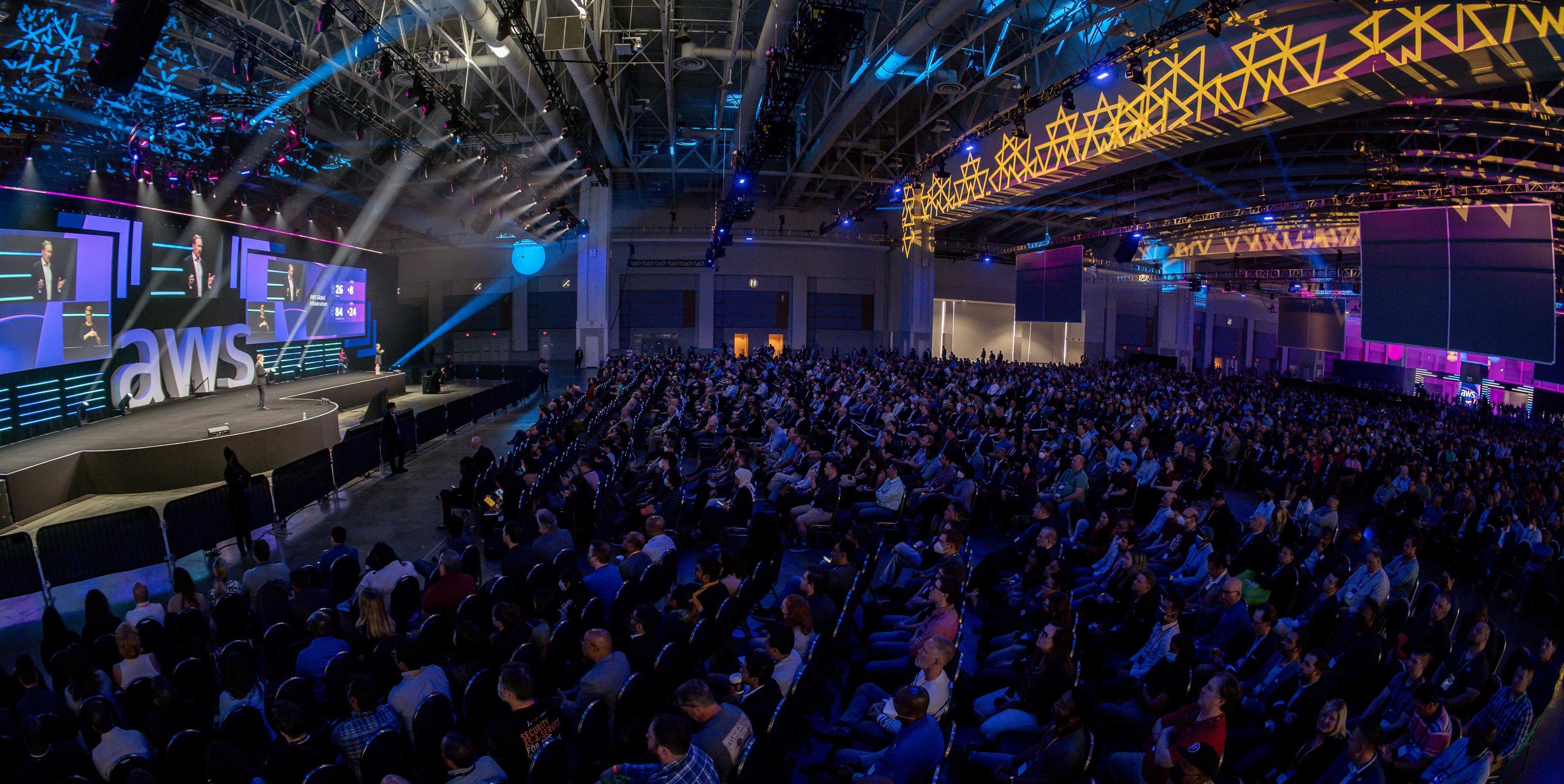
Last week, we had the AWS Summit Amsterdam, one of the global Amazon Web Services (AWS) events that offers you the opportunity to learn from technical and industry leaders, and meet AWS experts and like-minded professionals. In particular, most AWS Summits have Developer and Community Lounges in their exhibition halls.

AWS Summit Amsterdam - DevLoungeA photo taken by Thembile Martis in AWS Summit Amsterdam 2025

Here, you can experience generative AI services for developers or participate in developer sessions prepared by the AWS community. You can also take a turn at the prize wheel, where you can receive special gifts after signing up for AWS Builder ID to use Amazon Q Developer, AWS Skill Builder, AWS re:Post, and AWS Community for developers.

Check your schedule and join an AWS Summit in a city near you: Bangkok (April 29), London (April 30), Poland (May 5), Bengaluru (May 7–8), Hong Kong (May 8), Seoul (May 14–15), Dubai (May 21), Tel Aviv (May 28), Singapore (May 29), Stockholm (June 4), Sydney (June 4-5), Hamburg (June 5), Washington, D.C, (June 10–11), Madrid (June 11), Milan (June 18), Shanghai (June 19–20), Mumbai (June 19), and Tokyo (June 25–26).

Last week’s launches
Here are some launches that got my attention:

  • GitLab Duo with Amazon Q – GitLab Duo with Amazon Q is generally available for Self-Managed Ultimate customers, embedding advanced agent capabilities for software development. It also supports Java modernization, enhanced quality assurance, and code review optimization directly in GitLab’s enterprise DevSecOps platform. To learn more, read the DevOps blog post or visit the Amazon Q Developer integrations page to learn more.
  • Amazon Q Developer in the Europe (Frankfurt) Region – Amazon Q Developer Pro tier customers can now use and configure Amazon Q Developer in the AWS Management Console and in the integrated development environment (IDE) to store data in the Europe (Frankfurt) Region. It performs inference in European Union (EU) Regions giving them more choice over where their data resides and transits. To learn more, read the blog post.
  • New 223 AWS Config rules in AWS Control Tower – AWS Control Tower supports an additional 223 managed Config rules in Control Catalog for various use cases such as security, cost, durability, and operations. With this launch, you can now search, discover, enable and manage these additional rules directly from AWS Control Tower and govern more use cases for your multi-account environment. To learn more, visit the AWS Control Tower User Guide.
  • Amazon CloudFront Anycast Static IPs support for apex domains – You can easily use your root domain (for example, example.com) with CloudFront. This new feature simplifies DNS management by providing only three static IP addresses instead of the previous 21, making it easier to configure and manage apex domains with CloudFront distributions. To learn more, visit the CloudFront Developer Guide for detailed documentation and implementation guidance.
  • AWS Lambda@Edge advanced logging controls – This feature improves how Lamgda function logs are captured, processed, and consumed at the edge. This enhancement provides you with more control over your logging data, making it easier to monitor application behavior and quickly resolve issues. To learn more, read the Compute blog post, the Lambda Developer Guide, or the CloudFront Developer Guide.
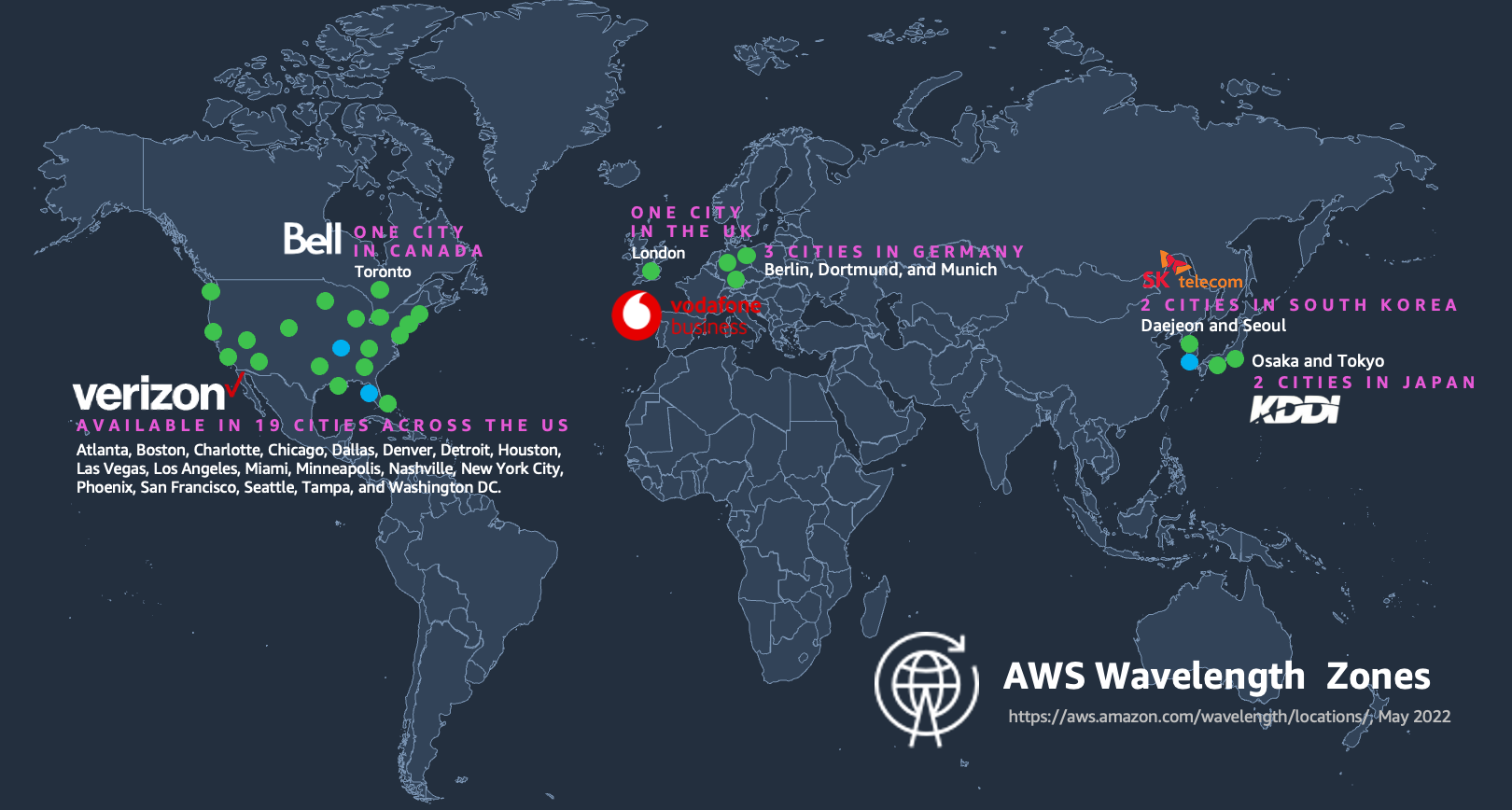
  • New AWS Wavelength Zone in Dakar, Senegal – With this first Wavelength Zone in sub-Saharan Africa in a partnership with Sonatel, an affiliate of Orange, independent software vendors (ISVs), enterprises, and developers can now use AWS infrastructure and services to support applications with data residency, low latency, and resiliency requirements. AWS Wavelength is available in 31 cities across the globe in a partnership with seven telecommunication companies. To learn more, visit AWS Wavelength and get started today.

For a full list of AWS announcements, be sure to keep an eye on the What’s New with AWS? page.

Other AWS news
Here are some additional news items that you might find interesting:

From community.aws
Here are my personal favorites posts from community.aws:

Upcoming AWS events
Check your calendars and sign up for these upcoming AWS events:

  • AWS re:Inforce – Mark your calendars for AWS re:Inforce (June 16–18) in Philadelphia, PA. AWS re:Inforce is a learning conference focused on AWS security solutions, cloud security, compliance, and identity. You can subscribe for event updates now!
  • AWS Partners Events – You’ll find a variety of AWS Partner events that will inspire and educate you, whether you are just getting started on your cloud journey or you are looking to solve new business challenges.
  • AWS Community Days – Join community-led conferences that feature technical discussions, workshops, and hands-on labs led by expert AWS users and industry leaders from around the world: Istanbul, Turkey (April 25), Prague, Czech Republic (April 25), Yerevan, Armenia (May 24), Zurich, Switzerland (May 25), and Bengaluru, India (May 25).

You can browse all upcoming in-person and virtual events.

That’s all for this week. Check back next Monday for another Weekly Roundup!

Channy

This post is part of our Weekly Roundup series. Check back each week for a quick roundup of interesting news and announcements from AWS!


How is the News Blog doing? Take this 1 minute survey!

(This survey is hosted by an external company. AWS handles your information as described in the AWS Privacy Notice. AWS will own the data gathered via this survey and will not share the information collected with survey respondents.)
Join AWS Hybrid Cloud & Edge Day to Learn How to Deploy Your Applications in the Everywhere Cloud

Post Syndicated from Channy Yun original https://aws.amazon.com/blogs/aws/join-aws-hybrid-cloud-edge-day-to-learn-how-to-deploy-your-applications-in-the-everywhere-cloud/

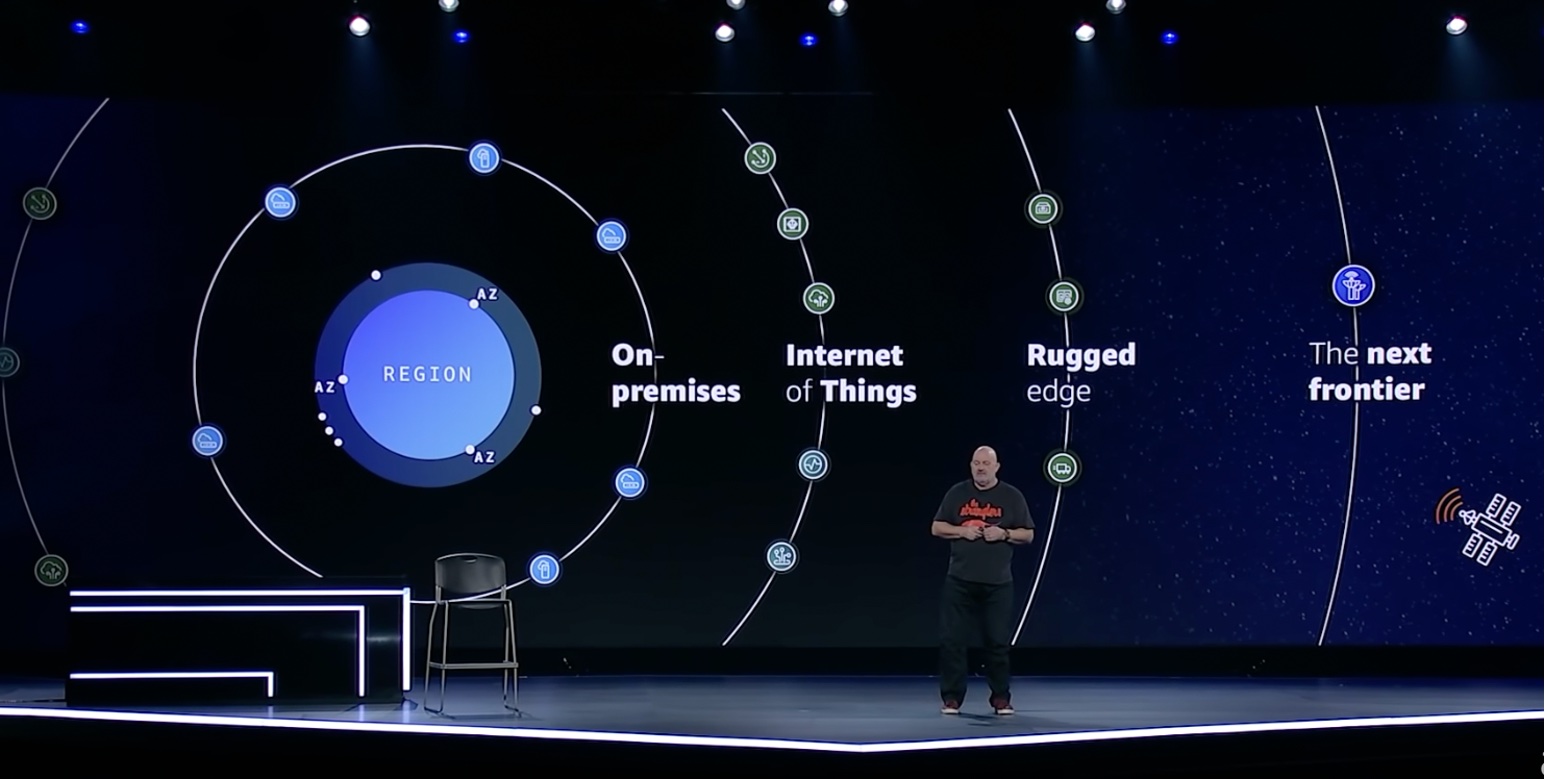
In his keynote of AWS re:Invent 2021, Dr. Werner Vogels shared the insight of how “the everywhere cloud” is bringing AWS to new locales through AWS hardware and services and spotlighted it as one of his tech predictions for 2022 and beyond in his blog post.

“What we will see in 2022, and even more so in the years to come, is the cloud accelerating beyond the traditional centralized infrastructure model and into unexpected environments where specialized technology is needed. The cloud will be in your car, your tea kettle, and your TV. The cloud will be in everything from trucks driving down the road, to the ships and planes that transport goods. The cloud will be globally distributed, and connected to almost any digital device or system on Earth, and even in space.”

AWS provides a truly consistent and secure experience to build and run applications across the continuum of environments where customers operate—from the cloud to large metro areas, 5G networks, on-premises locations, and to mobile and Internet of Things (IoT) devices.

To learn more, join us for AWS Hybrid Cloud & Edge Day, a free-to-attend one-day virtual event on August 30, 2023, starting at 10:00 AM PDT (1:00 PM ET). We will stream the event simultaneously across multiple platforms, including LinkedIn Live, Twitter, YouTube, and Twitch.

You can hear from AWS leaders and industry analysts on the latest hybrid cloud and edge computing trends and emerging technologies and learn best practices for using AWS hybrid cloud and edge services across the cloud continuum. Also, learn from our customers on data strategies and key use cases and gain a deeper understanding of AWS hybrid cloud and edge services and new features and benefits.

Here are some of the highlights you can expect from this event:

Leadership session – To kick off the day, we have a leadership session featuring Jan Hofmeyr, vice president of EC2 Edge, sharing insights into how customers are building high-performance, intelligent applications with recently announced AWS hybrid cloud, edge, and IoT capabilities. Elias Khnaser, chief of research at EK Media Group, will join Jan to discuss the global, business, and economic trends impacting hybrid cloud and edge computing and discuss the customer requirements and use cases.

Cloud-closer sessions – We’ll discuss how AWS is bringing the cloud closer to metro areas and telco networks. Services such as AWS Local Zones, AWS Outposts family, and AWS Wavelength bring the power of cloud compute and storage to the edge of 5G networks, unlocking more performant mobile experiences. We’ll highlight new and innovative use cases, including Norton LifeLock, Electronic Arts, and Epic Games, who have taken advantage of the operational consistency between AWS Regions and the edge. Also you can learn how to deploy in hybrid cloud scenarios in on-premises locations, such as examples from MindBody and ElToro through Onica, and more customer cases.

On-premises sessions – Learn about our options to bring AWS Cloud to your data centers and on-premises locations for a truly consistent experience across your environments. We will review real-world examples of how AWS hybrid and edge services enable local processing of data for faster response time and faster decision-making. Also, we will share how Toyota takes advantage of hybrid options from Amazon ECS and Amazon EKS to use familiar management tools across your environments to successfully modernize your applications. You can learn how to meet your on-premises regulatory requirements and real-world scenarios effectively in critical aspects of digital sovereignty and data residency.

Rugged edge sessions – You will learn about AWS services to support rugged, mobile, and disconnected edge, such as AWS Snow Family to enable organizations to deploy compute workloads in locations with denied, disrupted, intermittent, and limited (DDIL) connectivity. Learn how DDR.Live deployed their own 4G/LTE or 5G private network using AWS Private 5G for live events in the place with limited wireless connection. We will discuss the top use cases, such as deploying a pre-trained object detection model and architecting applications at the edge. Finally, we will discuss the benefits and requirements of operating at the edge with Holger Mueller, vice president and principal analyst, Constellation Research, Inc.

IoT panel discussion – We will discuss from panelist of AWS IoT customers and industry experts on their innovation journey. Join us to see how EuroTech brought to market a set of devices and services that improve operational efficiencies with connectivity at the edge. You’ll also hear how Wallbox, an Electric Vehicle charging company, reduced their operational costs and scaled efficiently with AWS IoT services.

Multicloud sessions – AWS has the tools to help you run and support your multicloud operations in the areas of governance, ops management, observability, and more. We will discuss common challenges in hybrid and multicloud environments and how AWS helps you manage, operate, and automate your processes. We’ll also talk about how Rackspace used AWS Systems Manager for instance patching across hybrid and multicloud environments, automating their infrastructure management across cloud providers.

This event is for any customer and builder who is eager to learn more about hybrid cloud, edge computing, IoT, networking, content delivery, and 5G. We’ll cover how you can support applications that need to remain on premises or at the edge due to low latency, local data processing, or data residency requirements.

To learn more details, see the event schedule, and register for AWS Hybrid Cloud & Edge Day, go to the event page.

Channy

Enabling load-balancing of non-HTTP(s) traffic on AWS Wavelength

Post Syndicated from Sheila Busser original https://aws.amazon.com/blogs/compute/enabling-load-balancing-of-non-https-traffic-on-aws-wavelength/

This blog post is written by Jack Chen, Telco Solutions Architect, and Robert Belson, Developer Advocate.

AWS Wavelength embeds AWS compute and storage services within 5G networks, providing mobile edge computing infrastructure for developing, deploying, and scaling ultra-low-latency applications. AWS recently introduced support for Application Load Balancer (ALB) in AWS Wavelength zones. Although ALB addresses Layer-7 load balancing use cases, some low latency applications that get deployed in AWS Wavelength Zones rely on UDP-based protocols, such as QUIC, WebRTC, and SRT, which can’t be load-balanced by Layer-7 Load Balancers. In this post, we’ll review popular load-balancing patterns on AWS Wavelength, including a proposed architecture demonstrating how DNS-based load balancing can address customer requirements for load-balancing non-HTTP(s) traffic across multiple Amazon Elastic Compute Cloud (Amazon EC2) instances. This solution also builds a foundation for automatic scale-up and scale-down capabilities for workloads running in an AWS Wavelength Zone.

Load balancing use cases in AWS Wavelength

In the AWS Regions, customers looking to deploy highly-available edge applications often consider Amazon Elastic Load Balancing (Amazon ELB) as an approach to automatically distribute incoming application traffic across multiple targets in one or more Availability Zones (AZs). However, at the time of this publication, AWS-managed Network Load Balancer (NLB) isn’t supported in AWS Wavelength Zones and ALB is being rolled out to all AWS Wavelength Zones globally. As a result, this post will seek to document general architectural guidance for load balancing solutions on AWS Wavelength.

As one of the most prominent AWS Wavelength use cases, highly-immersive video streaming over UDP using protocols such as WebRTC at scale often require a load balancing solution to accommodate surges in traffic, either due to live events or general customer access patterns. These use cases, relying on Layer-4 traffic, can’t be load-balanced from a Layer-7 ALB. Instead, Layer-4 load balancing is needed.

To date, two infrastructure deployments involving Layer-4 load balancers are most often seen:

  • Amazon EC2-based deployments: Often the environment of choice for earlier-stage enterprises and ISVs, a fleet of EC2 instances will leverage a load balancer for high-throughput use cases, such as video streaming, data analytics, or Industrial IoT (IIoT) applications
  • Amazon EKS deployments: Customers looking to optimize performance and cost efficiency of their infrastructure can leverage containerized deployments at the edge to manage their AWS Wavelength Zone applications. In turn, external load balancers could be configured to point to exposed services via NodePort objects. Furthermore, a more popular choice might be to leverage the AWS Load Balancer Controller to provision an ALB when you create a Kubernetes Ingress.

Regardless of deployment type, the following design constraints must be considered:

  • Target registration: For load balancing solutions not managed by AWS, seamless solutions to load balancer target registration must be managed by the customer. As one potential solution, visit a recent HAProxyConf presentation, Practical Advice for Load Balancing at the Network Edge.
  • Edge Discovery: Although DNS records can be populated into Amazon Route 53 for each carrier-facing endpoint, DNS won’t deterministically route mobile clients to the most optimal mobile endpoint. When available, edge discovery services are required to most effectively route mobile clients to the lowest latency endpoint.
  • Cross-zone load balancing: Given the hub-and-spoke design of AWS Wavelength, customer-managed load balancers should proxy traffic only to that AWS Wavelength Zone.

Solution overview – Amazon EC2

In this solution, we’ll present a solution for a highly-available load balancing solution in a single AWS Wavelength Zone for an Amazon EC2-based deployment. In a separate post, we’ll cover the needed configurations for the AWS Load Balancer Controller in AWS Wavelength for Amazon Elastic Kubernetes Service (Amazon EKS) clusters.

The proposed solution introduces DNS-based load balancing, a technique to abstract away the complexity of intelligent load-balancing software and allow your Domain Name System (DNS) resolvers to distribute traffic (equally, or in a weighted distribution) to your set of endpoints.

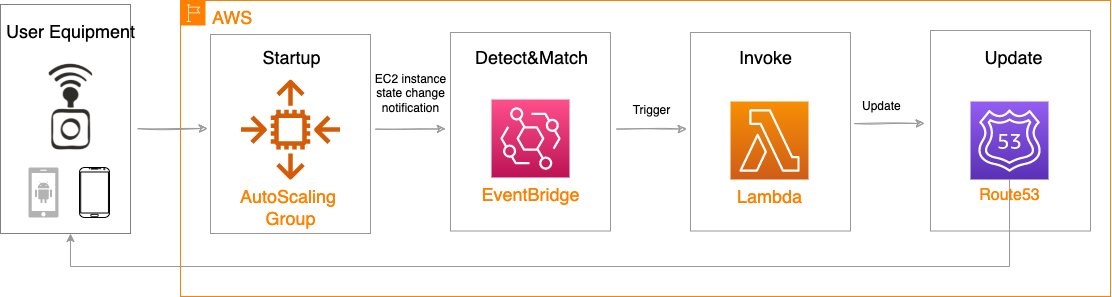
Our solution leverages the weighted routing policy in Route 53 to resolve inbound DNS queries to multiple EC2 instances running within an AWS Wavelength zone. As EC2 instances for a given workload get deployed in an AWS Wavelength zone, Carrier IP addresses can be assigned to the network interfaces at launch.

Through this solution, Carrier IP addresses attached to AWS Wavelength instances are automatically added as DNS records for the customer-provided public hosted zone.

To determine how Route 53 responds to queries, given an arbitrary number of records of a public hosted zone, Route53 offers numerous routing policies:

Simple routing policy – In the event that you must route traffic to a single resource in an AWS Wavelength Zone, simple routing can be used. A single record can contain multiple IP addresses, but Route 53 returns the values in a random order to the client.

Weighted routing policy – To route traffic more deterministically using a set of proportions that you specify, this policy can be selected. For example, if you would like Carrier IP A to receive 50% of the traffic and Carrier IP B to receive 50% of the traffic, we’ll create two individual A records (one for each Carrier IP) with a weight of 50 and 50, respectively. Learn more about Route 53 routing policies by visiting the Route 53 Developer Guide.

The proposed solution leverages weighted routing policy in Route 53 DNS to route traffic to multiple EC2 instances running within an AWS Wavelength zone.

Reference architecture

The following diagram illustrates the load-balancing component of the solution, where EC2 instances in an AWS Wavelength zone are assigned Carrier IP addresses. A weighted DNS record for a host (e.g., www.example.com) is updated with Carrier IP addresses.

DNS-based load balancing

When a device makes a DNS query, it will be returned to one of the Carrier IP addresses associated with the given domain name. With a large number of devices, we expect a fair distribution of load across all EC2 instances in the resource pool. Given the highly ephemeral mobile edge environments, it’s likely that Carrier IPs could frequently be allocated to accommodate a workload and released shortly thereafter. However, this unpredictable behavior could yield stale DNS records, resulting in a “blackhole” – routes to endpoints that no longer exist.

Time-To-Live (TTL) is a DNS attribute that specifies the amount of time, in seconds, that you want DNS recursive resolvers to cache information about this record.

In our example, we should set to 30 seconds to force DNS resolvers to retrieve the latest records from the authoritative nameservers and minimize stale DNS responses. However, a lower TTL has a direct impact on cost, as a result of increased number of calls from recursive resolvers to Route53 to constantly retrieve the latest records.

The core components of the solution are as follows:

Alongside the services above in the AWS Wavelength Zone, the following services are also leveraged in the AWS Region:

  • AWS Lambda – a serverless event-driven function that makes API calls to the Route 53 service to update DNS records.
  • Amazon EventBridge– a serverless event bus that reacts to EC2 instance lifecycle events and invokes the Lambda function to make DNS updates.
  • Route 53– cloud DNS service with a domain record pointing to AWS Wavelength-hosted resources.

In this post, we intentionally leave the specific load balancing software solution up to the customer. Customers can leverage various popular load balancers available on the AWS Marketplace, such as HAProxy and NGINX. To focus our solution on the auto-registration of DNS records to create functional load balancing, this solution is designed to support stateless workloads only. To support stateful workloads, sticky sessions – a process in which routes requests to the same target in a target group – must be configured by the underlying load balancer solution and are outside of the scope of what DNS can provide natively.

Automation overview

Using the aforementioned components, we can implement the following workflow automation:

Event-driven Auto Scaling Workflow

Amazon CloudWatch alarm can trigger the Auto Scaling group Scale out or Scale in event by adding or removing EC2 instances. Eventbridge will detect the EC2 instance state change event and invoke the Lambda function. This function will update the DNS record in Route53 by either adding (scale out) or deleting (scale in) a weighted A record associated with the EC2 instance changing state.

Configuration of the automatic auto scaling policy is out of the scope of this post. There are many auto scaling triggers that you can consider using, based on predefined and custom metrics such as memory utilization. For the demo purposes, we will be leveraging manual auto scaling.

In addition to the core components that were already described, our solution also utilizes AWS Identity and Access Management (IAM) policies and CloudWatch. Both services are key components to building AWS Well-Architected solutions on AWS. We also use AWS Systems Manager Parameter Store to keep track of user input parameters. The deployment of the solution is automated via AWS CloudFormation templates. The Lambda function provided should be uploaded to an AWS Simple Storage Service (Amazon S3) bucket.

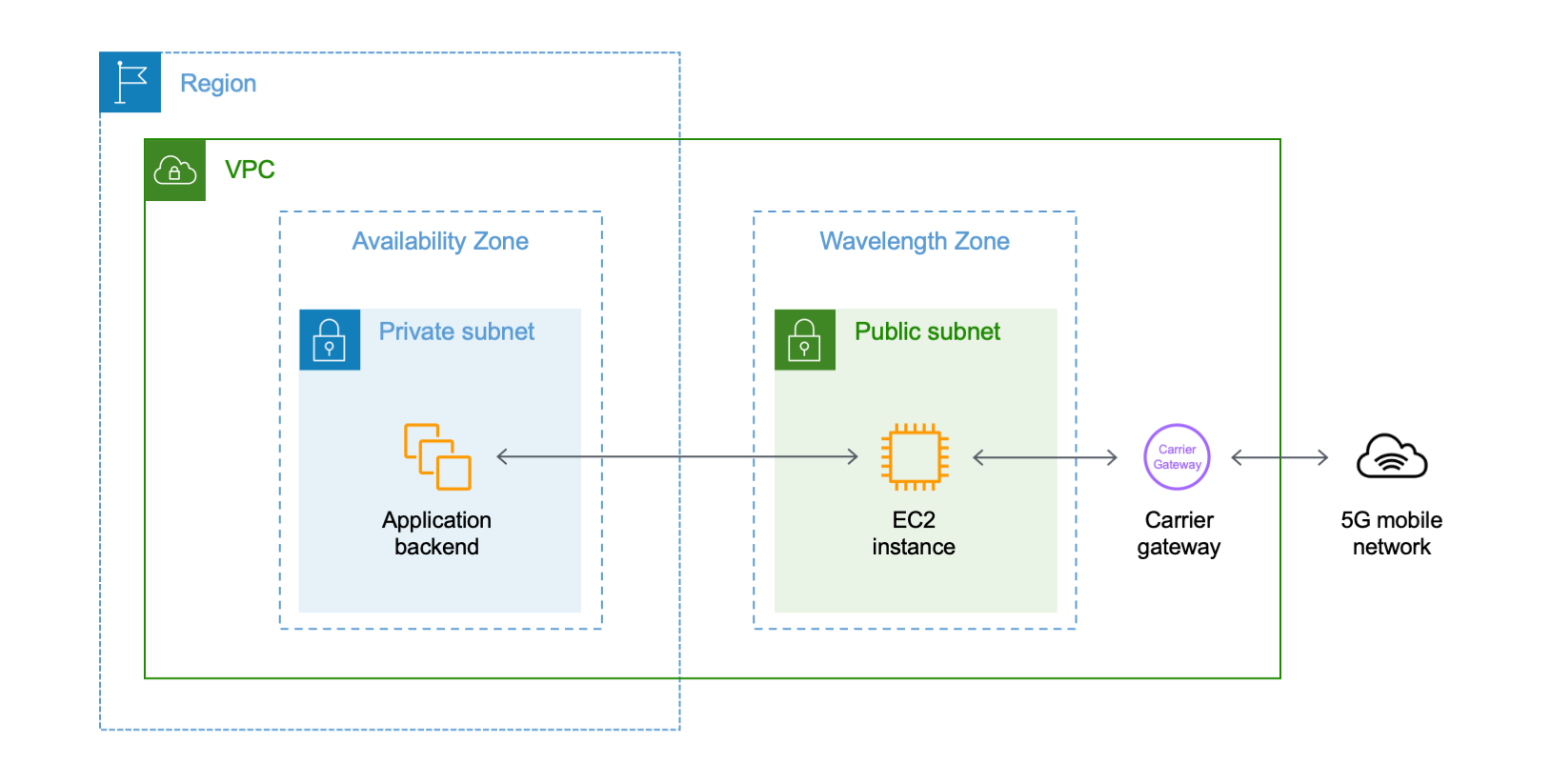
Amazon Virtual Private Cloud (Amazon VPC), subnets, Carrier Gateway, and Route Tables are foundational building blocks for AWS-based networking infrastructure. In our deployment, we are creating a new VPC, one subnet in an AWS Wavelength zone of your choice, a Carrier Gateway, and updating the route table for this subnet to point the default route to the Carrier Gateway.

Wavelength VPC architecture.

Deployment prerequisites

The following are prerequisites to deploy the described solution in your account:

  • Access to an AWS Wavelength zone. If your account is not allow-listed to use AWS Wavelength zones, then opt-in to AWS Wavelength zones here.
  • Public DNS Hosted Zone hosted in Route 53. You must have access to a registered public domain to deploy this solution. The zone for this domain should be hosted in the same account where you plan to deploy AWS Wavelength workloads.
    If you don’t have a public domain, then you can register a new one. Note that there will be a service charge for the domain registration.
  • Amazon S3 bucket. For the Lambda function that updates DNS records in Route 53, store the source code as a .zip file in an Amazon S3 bucket.
  • Amazon EC2 Key pair. You can use an existing Key pair for the deployment. If you don’t have a KeyPair in the region where you plan to deploy this solution, then create one by following these instructions.
  • 4G or 5G-connected device. Although the infrastructure can be deployed independent of the underlying connected devices, testing the connectivity will require a mobile device on one of the Wavelength partner’s networks. View the complete list of Telecommunications providers and Wavelength Zone locations to learn more.

Conclusion

In this post, we demonstrated how to implement DNS-based load balancing for workloads running in an AWS Wavelength zone. We deployed the solution that used the EventBridge Rule and the Lambda function to update DNS records hosted by Route53. If you want to learn more about AWS Wavelength, subscribe to AWS Compute Blog channel here.

AWS Week In Review – May 30, 2022

Post Syndicated from Channy Yun original https://aws.amazon.com/blogs/aws/aws-week-in-review-may-30-2022/

Today, the US observes Memorial Day. South Korea also has a national Memorial Day, celebrated next week on June 6. In both countries, the day is set aside to remember those who sacrificed in service to their country. This time provides an opportunity to recognize and show our appreciation for the armed services and the important role they play in protecting and preserving national security.

AWS also has supported our veterans, active-duty military personnel, and military spouses with our training and hiring programs in the US. We’ve developed a number of programs focused on engaging the military community, helping them develop valuable AWS technical skills, and aiding in transitioning them to begin their journey to the cloud. To learn more, see AWS’s military commitment.

Last Week’s Launches
The launches that caught my attention last week are the following:

Three New AWS Wavelength Zones in the US and South Korea  – We announced the availability of three new AWS Wavelength Zones on Verizon’s 5G Ultra Wideband network in Nashville, Tennessee, and Tampa, Florida in the US, and Seoul in South Korea on SK Telecom’s 5G network.

AWS Wavelength Zones embed AWS compute and storage services at the edge of communications service providers’ 5G networks while providing seamless access to cloud services running in an AWS Region. We have a total of 28 Wavelength Zones in Canada, Germany, Japan, South Korea, the UK, and the US globally. Learn more about AWS Wavelength and get started today.

New Amazon EC2 C7g, M6id, C6id, and P4de Instance Types – Last week, we announced four new EC2 instance types. C7g instances are the first instances powered by the latest AWS Graviton3 processors and deliver up to 25 percent better performance over Graviton2-based C6g instances for a broad spectrum of applications, even high-performance computing (HPC) and CPU-based machine learning (ML) inference.

M6id and C6id instances are powered by the Intel Xeon Scalable processors (Ice Lake) with an all-core turbo frequency of 3.5 GHz, equipped with up to 7.6 TB of local NVMe-based SSD block-level storage, and deliver up to 15 percent better price performance compared to the previous generation instances.

P4de instances are a preview of our latest GPU-based instances that provide the highest performance for ML training and HPC applications. It is powered by 8 NVIDIA A100 GPUs with 80 GB high-performance HBM2e GPU memory, 2X higher than the GPUs in our current P4d instances. The new P4de instances provide a total of 640GB of GPU memory, providing up to 60 percent better ML training performance along with 20 percent lower cost to train when compared to P4d instances.

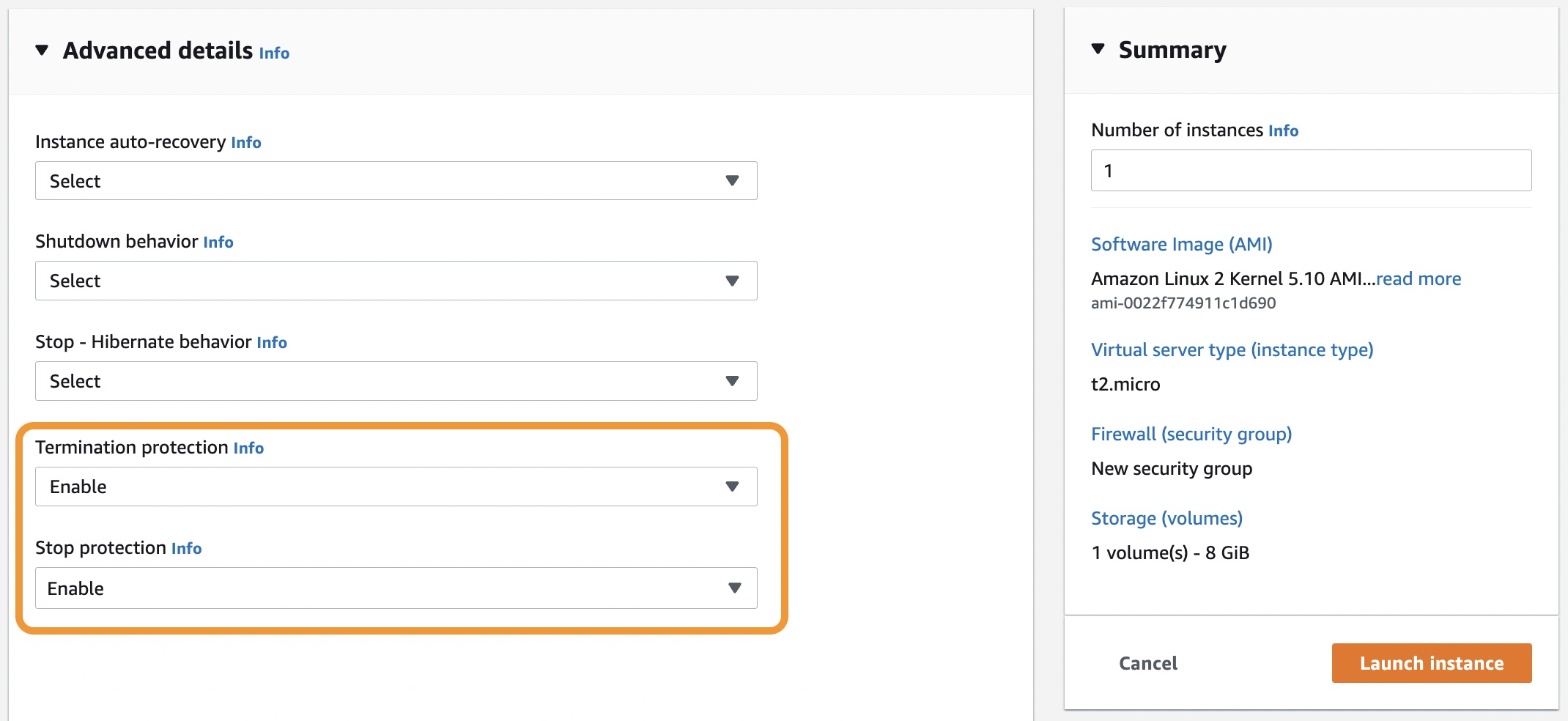
Amazon EC2 Stop Protection Feature to Protect Instances From Unintentional Stop Actions – Now you don’t have to worry about stopping or terminating your instances from accidental actions. With Stop Protection, you can safeguard data in instance store volume(s) from unintentional stop actions. Previously, you could protect your instances from unintentional termination actions by enabling Termination Protection too.

When enabled, the Stop or Termination Protection feature blocks attempts to stop or terminate the instance via the EC2 console, API call, or CLI command. This feature provides an extra measure of protection for stateful workloads since instances can be stopped or terminated only by deactivating the Stop Protection feature.

AWS DataSync Supports Google Cloud Storage and Azure Files Storage Locations – We announced the general availability of two additional storage locations for AWS DataSync, an online data movement service that makes it easy to sync your data both into and out of the AWS Cloud. With this release, DataSync now supports Google Cloud Storage and Azure Files storage locations in addition to Network File System (NFS) shares, Server Message Block (SMB) shares, Hadoop Distributed File Systems (HDFS), self-managed object storage, AWS Snowcone, Amazon Simple Storage Service (Amazon S3), Amazon Elastic File System (Amazon EFS), Amazon FSx for Windows File Server, Amazon FSx for Lustre, and Amazon FSx for OpenZFS.

For a full list of AWS announcements, be sure to keep an eye on the What’s New at AWS page.

Other AWS News
Last week, there were lots of announcements of public sectors at AWS Summit Washington, DC.

To learn more, watch the keynote of Max Peterson, Vice President of AWS Worldwide Public Sector.

Upcoming AWS Events
If you have a developer background or similar and are looking to develop ML skills you can use to solve real-world problems, Let’s Ship It – with AWS! ML Edition is the perfect place to start. Over eight episodes of Twitch training scheduled from June 2 to July 21, you can learn hands-on how to build ML models, such as predicting demand and personalizing your offerings, and more.

The AWS Summit season is mostly over in Asia Pacific and Europe, but there are some upcoming virtual and in-person Summits that might be close to you in June:

More to come in August and September.

Please join Amazon re:MARS 2022 (June 21 – 24) to hear from recognized thought leaders and technical experts who are building the future of machine learning, automation, robotics, and space. You can preview Robotics at Amazon to discuss the recent real-world challenges of building robotic systems, published by Amazon Science.

You can now register for AWS re:Inforce 2022 (July 26 – 27). Join us in Boston to learn how AWS is innovating in the world of cloud security, and hone your technical skills in expert-led interactive sessions.

You can now register for AWS re:Invent 2022 (November 28 – December 2). Join us in Las Vegas to experience our most vibrant event that brings together the global cloud community. You can virtually attend live keynotes and leadership sessions and access our on-demand breakout sessions even after re:Invent closes.

That’s all for this week. Check back next Monday for another Week in Review!

Channy

This post is part of our Week in Review series. Check back each week for a quick roundup of interesting news and announcements from AWS!

AWS Week in Review – May 2, 2022

Post Syndicated from Steve Roberts original https://aws.amazon.com/blogs/aws/aws-week-in-review-may-2-2022/

This post is part of our Week in Review series. Check back each week for a quick roundup of interesting news and announcements from AWS!

Wow, May already! Here in the Pacific Northwest, spring is in full bloom and nature has emerged completely from her winter slumbers. It feels that way here at AWS, too, with a burst of new releases and updates and our in-person summits and other events now in full flow. Two weeks ago, we had the San Francisco summit; last week, we held the London summit and also our .NET Enterprise Developer Day virtual event in EMEA. This week we have the Madrid summit, with more summits and events to come in the weeks ahead. Be sure to check the events section at the end of this post for a summary and registration links.

Last week’s launches
Here are some of the launches and updates last week that caught my eye:

If you’re looking to reduce or eliminate the operational overhead of managing your Apache Kafka clusters, then the general availability of Amazon Managed Streaming for Apache Kafka (MSK) Serverless will be of interest. Starting with the original release of Amazon MSK in 2019, the work needed to set up, scale, and manage Apache Kafka has been reduced, requiring just minutes to create a cluster. With Amazon MSK Serverless, the provisioning, scaling, and management of the required resources is automated, eliminating the undifferentiated heavy-lift. As my colleague Marcia notes in her blog post, Amazon MSK Serverless is a perfect solution when getting started with a new Apache Kafka workload where you don’t know how much capacity you will need or your applications produce unpredictable or highly variable throughput and you don’t want to pay for idle capacity.

Another week, another set of Amazon Elastic Compute Cloud (Amazon EC2) instances! This time around, it’s new storage-optimized I4i instances based on the latest generation Intel Xeon Scalable (Ice Lake) Processors. These new instances are ideal for workloads that need minimal latency, and fast access to data held on local storage. Examples of these workloads include transactional databases such as MySQL, Oracle DB, and Microsoft SQL Server, as well as NoSQL databases including MongoDB, Couchbase, Aerospike, and Redis. Additionally, workloads that benefit from very high compute performance per TB of storage (for example, data analytics and search engines) are also an ideal target for these instance types, which offer up to 30 TB of AWS Nitro SSD storage.

Deploying AWS compute and storage services within telecommunications providers’ data centers, at the edge of the 5G networks, opens up interesting new possibilities for applications requiring end-to-end low latency (for example, delivery of high-resolution and high-fidelity live video streaming, and improved augmented/virtual reality (AR/VR) experiences). The first AWS Wavelength deployments started in the US in 2020, and have expanded to additional countries since. This week we announced the opening of the first Canadian AWS Wavelength zone, in Toronto.

Other AWS News
Some other launches and news items you may have missed:

Amazon Relational Database Service (RDS) had a busy week. I don’t have room to list them all, so below is just a subset of updates!

  • The addition of IPv6 support enables customers to simplify their networking stack. The increase in address space offered by IPv6 removes the need to manage overlapping address spaces in your Amazon Virtual Private Cloud (VPC)s. IPv6 addressing can be enabled on both new and existing RDS instances.
  • Customers in the Asia Pacific (Sydney) and Asia Pacific (Singapore) Regions now have the option to use Multi-AZ deployments to provide enhanced availability and durability for Amazon RDS DB instances, offering one primary and two readable standby database instances spanning three Availability Zones (AZs). These deployments benefit from up to 2x faster transaction commit latency, and automated fail overs, typically under 35 seconds.
  • Amazon RDS PostgreSQL users can now choose from General-Purpose M6i and Memory-Optimized R6i instance types. Both of these sixth-generation instance types are AWS Nitro System-based, delivering practically all of the compute and memory resources of the host hardware to your instances.
  • Applications using RDS Data API can now elect to receive SQL results as a simplified JSON string, making it easier to deserialize results to an object. Previously, the API returned a JSON string as an array of data type and value pairs, which required developers to write custom code to parse the response and extract the values, so as to translate the JSON string into an object. Applications that use the API to receive the previous JSON format are still supported and will continue to work unchanged.

Applications using Amazon Interactive Video Service (IVS), offering low-latency interactive video experiences, can now add a livestream chat feature, complete with built-in moderation, to help foster community participation in livestreams using Q&A discussions. The new chat support provides chat room resource management and a messaging API for sending, receiving, and moderating chat messages.

Amazon Polly now offers a new Neural Text-to-Speech (TTS) voice, Vitória, for Brazilian Portuguese. The original Vitória voice, dating back to 2016, used standard technology. The new voice offers a more natural-sounding rhythm, intonation, and sound articulation. In addition to Vitória, Polly also offers a second Brazilian Portuguese neural voice, Camila.

Finally, if you’re a .NET developer who’s modernizing .NET Framework applications to run in the cloud, then the announcement that the open-source CoreWCF project has reached its 1.0 release milestone may be of interest. AWS is a major contributor to the project, a port of Windows Communication Foundation (WCF), to run on modern cross-platform .NET versions (.NET Core 3.1, or .NET 5 or higher). This project benefits all .NET developers working on WCF applications, not just those on AWS. You can read more about the project in my blog post from last year, where I spoke with one of the contributing AWS developers. Congratulations to all concerned on reaching the 1.0 milestone!

For a full list of AWS announcements, be sure to keep an eye on the What’s New at AWS page.

Upcoming AWS Events
As I mentioned earlier, the AWS Summits are in full flow, with some some virtual and in-person events in the very near future you may want to check out:

I’m also happy to share that I’ll be joining the AWS on Air crew at AWS Summit Washington, DC. This in-person event is coming up May 23–25. Be sure to tune in to the livestream for all the latest news from the event, and if you’re there in person feel free to come say hi!

Registration is also now open for re:MARS, our conference for topics related to machine learning, automation, robotics, and space. The conference will be in-person in Las Vegas, June 21–24.

That’s all the news I have room for this week — check back next Monday for another week in review!

— Steve

New AWS Wavelength Zone in Toronto – The First in Canada

Post Syndicated from Danilo Poccia original https://aws.amazon.com/blogs/aws/new-aws-wavelength-zone-in-toronto-the-first-in-canada/

Wireless communication has put us closer to each other. 5G networks increase the reach of what we can achieve to new use cases that need end-to-end low latency. With AWS Wavelength, you can deploy AWS compute and storage services within telecommunications providers’ data centers at the edge of the 5G networks. Your applications can then deliver single-digit millisecond latencies to mobile devices and end users and, at the same time, seamlessly access AWS services in the closest AWS Region.

For example, low latency enables new use cases such as:

  • Delivery of high-resolution and high-fidelity live video streaming.
  • Improved experience for augmented/virtual reality (AR/VR) applications.
  • Running machine learning (ML) inference at the edge for applications in medical diagnostics, retail, and factories.
  • Connected vehicle applications with near real-time connectivity with the cloud to improve driver assistance, autonomous driving, and in-vehicle entertainment experiences.

We opened the first AWS Wavelength Zones in 2020 in the US, and then we expanded to new countries, such as Japan, South Korea, the United Kingdom, and Germany. Today, I am happy to share that, in partnership with Bell Canada, we are expanding in a new country with a Wavelength Zone in Toronto.

What You Can Do with AWS Wavelength
As an example of what is possible with Wavelength, let’s look at food deliveries in Toronto. Most deliveries are made within 2 km, and a significant number are for just one item, such as a cup of coffee. Using a car for these deliveries is slow, expensive, and has a large carbon footprint. A better solution is provided by Tiny Mile: they use small remote-controlled robots to deliver small food orders such as coffees and sandwiches at one-tenth the cost of conventional delivery services.

Tiny Mile robot image.

Their remote staff uses the camera feed from the robots to understand the environment, read signage, and drive the robots. To scale up more efficiently, Tiny Mile can now use Bell’s public Multi-access Edge Computing (MEC) solution, delivered through AWS Wavelength, to process data and analyze the video feed in almost real time to detect obstacles and avoid collisions without manual intervention. Having computation at the edge also reduces the weight and the costs of the robots (they don’t need expensive computers onboard) and increases the amount of cargo they can carry.

Using a Wavelength Zone
I follow the instructions in Get started with AWS Wavelength in the documentation. First, I opt in to use the new Wavelength Zone. In the EC2 console for the Canada (Central) Region, I enable New EC2 Experience in the upper-left corner. In the navigation pane, I choose EC2 Dashboard. In the Account attributes section, I choose Zones. There, I enable the Canada (BELL) Wavelength Zone.

Console screenshot.

Now, I can configure networking to use the Wavelength Zone. I can either create an Amazon Virtual Private Cloud (VPC) or extend an existing VPC to include a subnet in a Wavelength Zone. In this case, I want to use a new VPC. In the VPC console, I choose Your VPCs and then Create VPC. I select the VPC only option to create subnets later. I write a name for the VPC and choose the IPv4 CIDR block that will be used for the private addresses of the resources in this VPC. Then, I complete the creation of the VPC.

Console screenshot.

In the navigation pane, I choose Carrier Gateways and then Create carrier gateway. I write a name and select the VPC I just created. I enable Route subnet traffic to the carrier gateway to automatically route traffic from subnets to the carrier gateway.

Console screenshot.

In the Subnets to route section, I configure a subnet residing in the Canada (BELL) – Toronto Wavelength Zone. For the subnet IPv4 CIDR Block, I use a block within the VPC range. Then, I complete the creation of the carrier gateway.

Console screenshot.

Now that networking is configured, I can deploy the portions of my application that require ultra-low latency in the Wavelength Zone and then connect that back to the rest of the application and the cloud services running in the Canada (Central) Region.

To run an EC2 instance in the Wavelength Zone, I use the AWS Command Line Interface (CLI) run-instances command. In this way, I can pass an option to automatically allocate and associate the Carrier IP address with the network interface of the EC2 instance. Another option is to allocate the carrier address and associate it with the network interface after I create the instance. The Carrier IP address is only valid within the telecommunications provider’s network. The carrier gateway uses NAT to translate the Carrier IP address and send traffic to the internet or to mobile devices.

aws ec2 --region ca-central-1 run-instances
--network-interfaces '[{"DeviceIndex":0, "AssociateCarrierIpAddress": true, "SubnetId": "subnet-0d753f7203c2cfd42"}]'
--image-id ami-01d29fca5bdf8f4b4 --instance-type t3.medium

To discover the IP associated with the EC2 instance in the carrier network, I use the describe-instances command:

aws ec2 --region ca-central-1 describe-instances

In the NetworkInterfaces section of the output, I find the Association and the CarrierIP:

"Association": {
  "CarrierIp": "207.61.170.56",
  "IpOwnerId": "amazon",
  "PublicDnsName": ""
}

Now that the EC2 instance is running in the Wavelength Zone, I can deploy a portion of my application in the EC2 instance so that application traffic can be processed at very low latency without leaving the mobile network.

Architectural diagram.

For my next steps, I look at Deploying your first 5G enabled application with AWS Wavelength and follow the walkthrough for a common Wavelength use case: implementing machine learning inference at the edge.

Availability and Pricing
The new Wavelength Zone in Toronto, Canada, is embedded in Bell Canada’s 5G network and is available today. EC2 instances and other AWS resources in Wavelength Zones have different prices than in the parent Region. See the Wavelength pricing page for more information.

AWS Wavelength is part of AWS for the Edge services that help you deliver data processing, analysis, and storage outside AWS data centers and closer to your endpoints. These capabilities allow you to process and store data close to where it’s generated, enabling low-latency, intelligent, and real-time responsiveness.

Start using AWS Wavelength to deliver ultra-low-latency applications for 5G devices.

Danilo

Catch Important Moments in Sports with 5G and AWS Wavelength

Post Syndicated from Ashwini Rudra original https://aws.amazon.com/blogs/architecture/catch-important-moments-in-sports-with-5g-and-aws-wavelength/

To enhance the viewing experience for spectators, fans, and players, the sports industry is continuously evaluating ways to lower video latency. With 5G, networks can now provide high-density radio (air) interfaces with high bandwidth and reliability.

This new technology especially benefits sports broadcasting and player tracking and analytics, which need to be processed at the edge. Having these services processed closer to their respective venues means viewers are less likely to miss any exciting and important moments because of lag.

This blog discusses how AWS Wavelength brings AWS Cloud to the edge of the 5G mobile network by providing AWS compute resources, services, APIs, and toolkits. For example, a real-time machine learning algorithm that analyzes a game may appear slow if it runs exclusively in the cloud. Additional latency will be introduced as the application traffic travels across the internet to the cloud.

We’ll show you how to run applications in edge computing infrastructure to provide low latency so viewers like coaches, players, production teams, crew, etc., get a quality viewing experience.

Reducing the travel distance for applications

You can reduce the distance traveled for an application to reach the compute, storage, and cloud services by running applications closer to their endpoints. Accessing these resources in the cloud using traditional mobile architectures requires several stops on the network:

  1. Device
  2. Cell tower
  3. Metro aggregation sites
  4. Regional aggregation sites
  5. The internet
  6. The cloud

Then it has to go back through these stops before getting back to the device. This whole process creates tens to hundreds of milliseconds of latency.

With AWS Wavelength Zones located at the edge of the 5G network, application traffic can reach servers without leaving the mobile network. The network path is shorter from mobile device across the communication service provider’s packet core before reaching AWS Wavelength Zone:

  1. Device
  2. Cell tower
  3. Metro aggregation sites
  4. Regional aggregation sites

This path is highly controlled by quality of service (QoS) and routing in cloud service provider (CSP) networks; the latency is predictable and has less jitter.

AWS services, 5G, and video production at the edge

The combination of 5G and mobile edge computing can dramatically change how the sports industry creates, captures, manages, and distributes content, especially for live events.

Before 5G, on-site production created content, which was typically sent via internet, fiber, and satellite, usually with redundant paths.

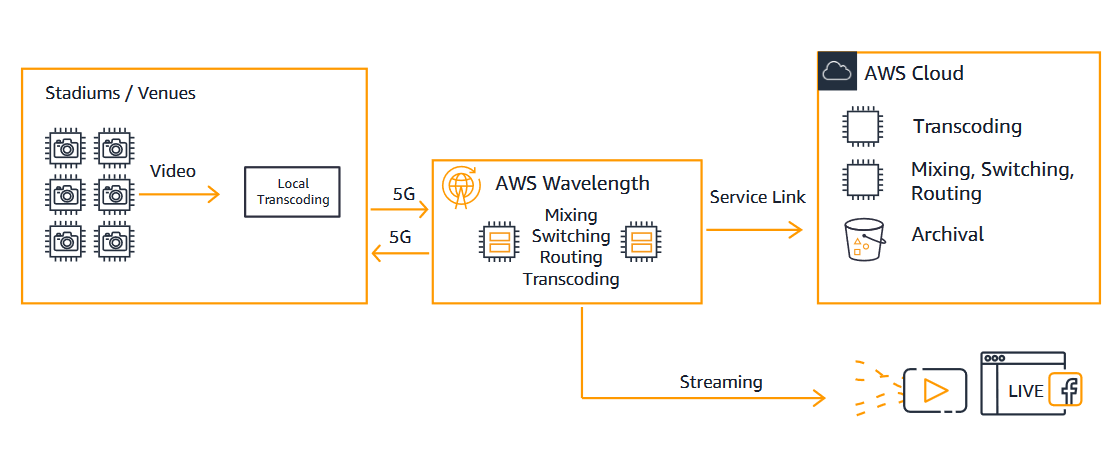
As shown in Figure 1, our solution uses 5G to ingest produced content into the AWS Wavelength Zone where localized overlays, closed caption, and personalized graphics are added. Cloud production workflows such as switching, editing, and mixing are handled in the AWS Wavelength Zone. Then the content is streamed back to viewers, or it is sent to the cloud for wider distribution via content delivery network (CDN).

5G video ingestion

Figure 1. 5G video ingestion

Taking this solution one step further, a fan could choose different viewing experiences. They could choose different camera angles in the stadium that they want to view on their mobile device, with potential augmented reality overlay on the video. Or, for fans in the stadium, they could potentially have their “fan view” added to the final broadcast.

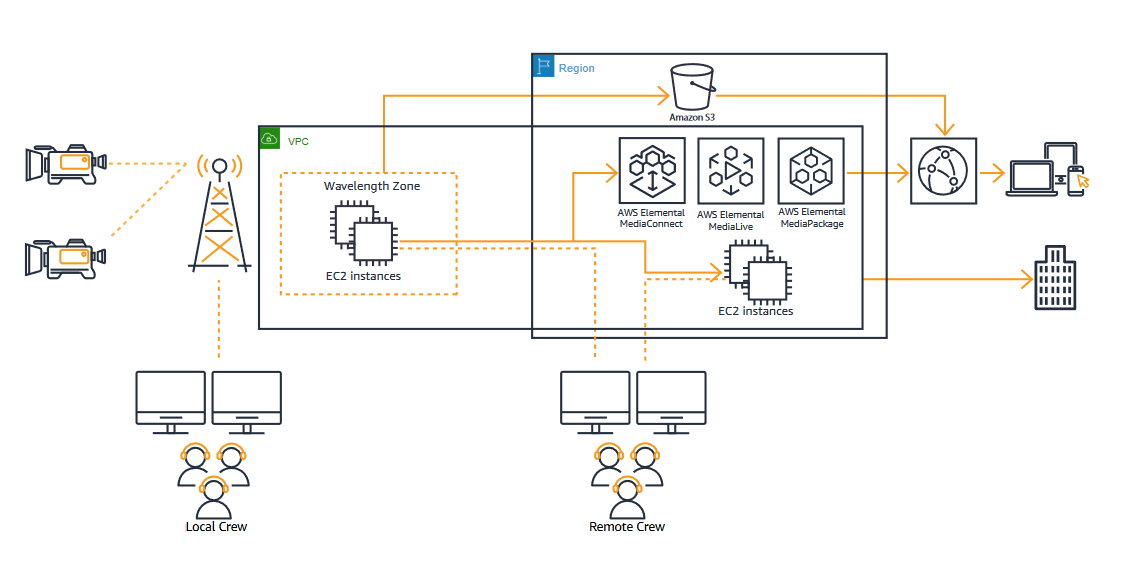
Figure 2 shows how the contribution over 5G can be provided to compute instances in AWS Wavelength Zones. Video switching, audio mixing, and graphics are operated by a local crew connected directly to the 5G network or a remote crew connected via an AWS Region.

Video processing in AWS Wavelength Zone

Figure 2. Video processing in AWS Wavelength Zone

AWS services, 5G, and IoT-based sports analytics

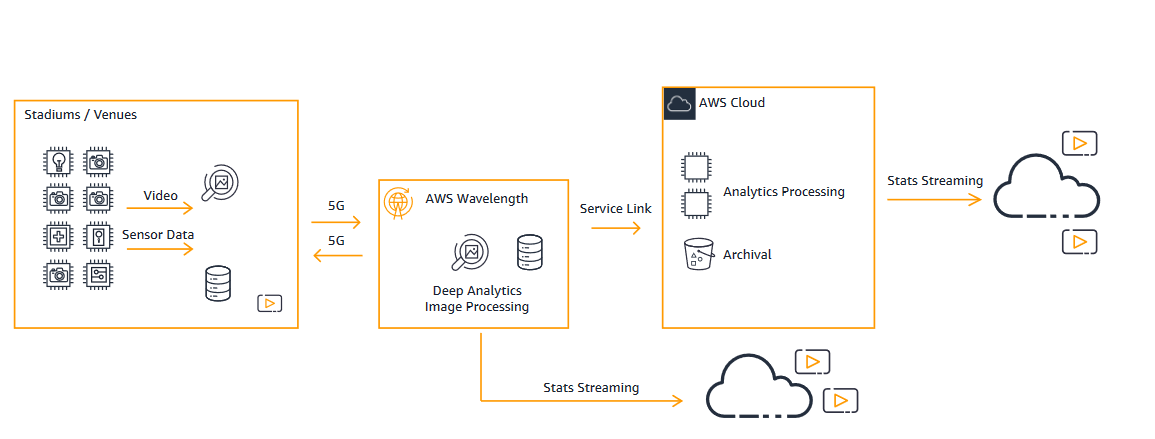
Currently, most sports leagues are using optical and IoT-based sensors for player tracking. These sensors traditionally use RFID-based tags and chips.

Leagues or teams use this data for player health and performance, officiating, game planning, training, and product development. This data can also be used to drive in-game augmentation and potentially support in-game real money gaming (where legal). Resiliency and low latency are critical in these cases because we need quick and accurate data to make decisions.

Figure 3.

Summary

In this blog, we discussed how you can enhance the viewing experience for your customers and examine sports analytics with 5G.

We showed you how to ingest encoded video over 5G from venues to the AWS Wavelength Zones for video production. We also talked about applying innovative augmented reality overlays and graphics and stream this content back to the fans for an immersive in-stadium experience.

Then we talked about how sports industry customers like broadcasters, leagues, and teams are adopting 5G-based technology to analyze games. They collect data through 5G connected devices and IoT sensors, and then using machine learning to further personalize in-venue experiences and game event prediction.

If you want to learn more about how 5G technology can deliver the next generation of mobile entertainment, review AWS Wavelength for Media & Entertainment.

Related information

Creating an EC2 instance in the AWS Wavelength Zone

Post Syndicated from Bala Thekkedath original https://aws.amazon.com/blogs/compute/creating-an-ec2-instance-in-the-aws-wavelength-zone/

Creating an EC2 instance in the AWS Wavelength Zone

This blog post is contributed by Saravanan Shanmugam, Lead Solution Architect, AWS Wavelength

AWS announced Wavelength at re:Invent 2019 in partnership with Verizon in US, SK Telecom in South Korea, KDDI in Japan, and Vodafone in UK and Europe. Following the re:Invent 2019 announcement, on August 6, 2020, AWS announced GA of one Wavelength Zone with Verizon in Boston connected to US East (N.Virginia) Region and one in San Francisco connected to the US West (Oregon) Region.

In this blog, I walk you through the steps required to create an Amazon EC2 instance in an AWS Wavelength Zone from the AWS Management console. We also address the questions asked by our customers regarding the different protocol traffic allowed into and out of a AWS Wavelength Zones.

Customers who want to access AWS Wavelength Zones and deploy their applications to the Wavelength Zone can sign up using this link. Customers that opted in to access the AWS Wavelength Zone can confirm the status on the EC2 console Account Attribute section as shown in the following image.

 Services and features

AWS Wavelength Zones are Availability Zones inside the Carrier Service Provider network closer to the Edge of the Mobile Network. Wavelength Zones bring the AWS core compute and storage services like Amazon EC2 and Amazon EBS that can be used by other services like Amazon EKS and Amazon ECS. We look at Wavelength Zone(s) as a hub and spoke model, where developers can deploy latency sensitive, high-bandwidth applications at the Edge and non-latency sensitive and data persistent applications in the Region.

Wavelength Zones supports three Nitro based Amazon EC2 instance types t3 (t3.medium, t3.xlarge) r5 (r5.2xlarge) and g4 (g4dn.2xlarge) with EBS volume types gp2. Customers can also use Amazon ECS and Amazon EKS to deploy container applications at the Edge. Other AWS Services, like AWS CloudFormation templates, CloudWatch, IAM resources, and Organizations, continue to work as expected, providing you a consistent experience. You can also leverage the full suite of services like Amazon S3 in the parent Region over AWS’s private network backbone. Now that we have reviewed AWS wavelength, the services and features associated with it, let us talk about the steps to launch an EC2 instance in the AWS Wavelength zone.

Creating a Subnet in the Wavelength Zone

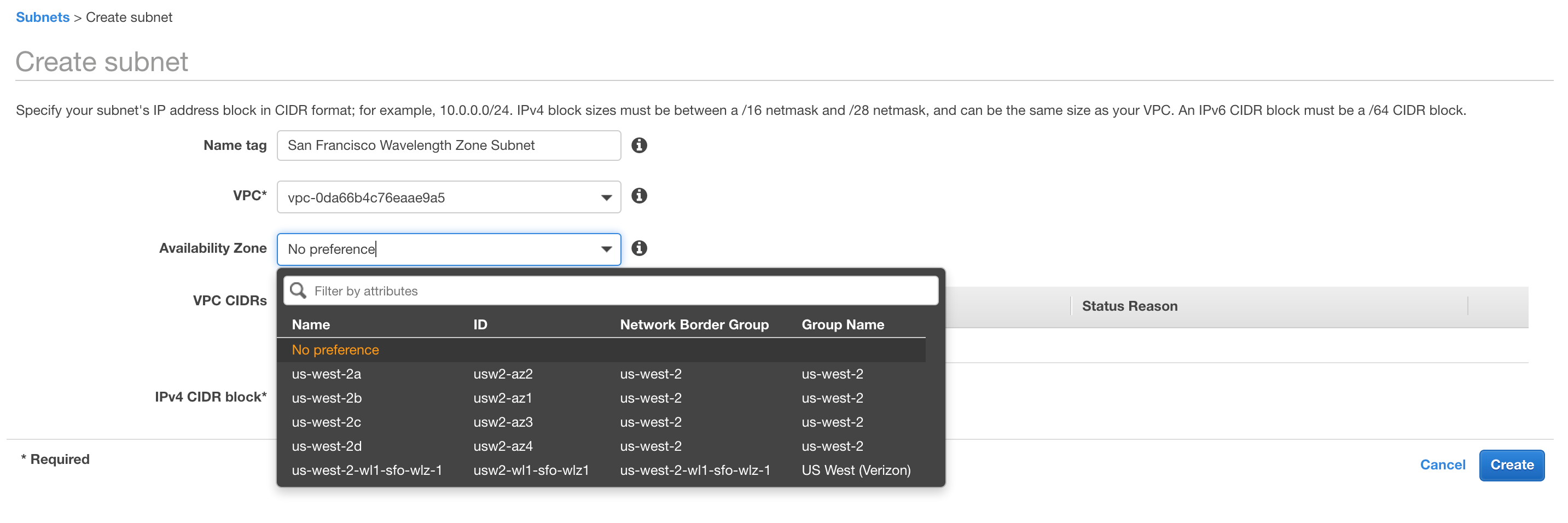
Once the Wavelength Zone is enabled for your AWS Account, you can extend your existing VPC from the parent Region to a Wavelength Zone by creating a new VPC subnet assigned to the AWS Wavelength Zone. Customers can also create a new VPC and then a Subnet to deploy their applications in the Wavelength zone. The following image shows the Subnet creation step, where you pick the Wavelength Zone as the Availability zone for the subnet

Carrier Gateway

We have introduced a new gateway type called Carrier Gateway, which allows you to route traffic from the Wavelength Zone subnet to the CSP network and to the Internet. Carrier Gateways are similar to the Internet gateway in the Region. Carrier Gateway is also responsible for NAT’ing the traffic from/to the Wavelength Zone subnets mapping it to the carrier ip address assigned to the instances.

Creating a Carrier Gateway

In the VPC console, you can now create Carrier Gateway and attach it to your VPC.

You select the VPC to which the Carrier Gateway must be attached. There is also option to select “Route subnet traffic to the Carrier Gateway” in the Carrier Gateway creation step. By selecting this option, you can pick the Wavelength subnets you want to default route to the Carrier Gateway. This option automatically deletes the existing route table to the subnets, creates a new route table, creates a default route entry, and attaches the new route table to the Subnets you selected. The following picture captures the necessary input required while creating a Carrier Gateway


Creating an EC2 instance in a Wavelength Zone with Private IP Address

Once a VPC subnet is created for the AWS Wavelength Zone, you can launch an EC2 instance with a Private address using the EC2 Launch Wizard. In the configure instance details step, you can select the Wavelength Zone Subnet that you created in the “Creating a Subnet” section.

Attach a IAM profile with SSM role included, which allows you to SSH into the console of the instance through SSM. This is a recommended practice for Wavelength Zone instances as there is no direct SSH access allowed from Public internet.

 Creating an EC2 instance in a Wavelength Zone with Carrier IP Address

The instances running in the Wavelength Zone subnets can obtain a Carrier IP address, which is allocated from a pool of IP addresses called Network Border group (NBG). To create an EC2 instance in the Wavelength Zone with a carrier routable IP address, you can use AWS CLI. You can use the following command to create EC2 instance in a Wavelength Zone subnet. Note the additional network interface (NIC) option “AssociateCarrierIpAddress: as part of the EC2 run instance command, as shown in the following command.

aws ec2 --region us-west-2 run-instances --network-interfaces '[{"DeviceIndex":0, "AssociateCarrierIpAddress": true, "SubnetId": "<subnet-0d3c2c317ac4a262a>"}]' --image-id <ami-0a07be880014c7b8e> --instance-type t3.medium --key-name <san-francisco-wavelength-sample-key>

 *To use “AssociateCarrierIpAddress” option in the ec2 run-instance command use the latest aws cli v2.

The carrier IP assigned to the EC2 instance can be obtained by running the following command.

 aws ec2 describe-instances --instance-ids <replace-with-your-instance-id> --region us-west-2

 Make necessary changes to the default security group that is attached to the EC2 instance after running the run-instance command to allow the necessary protocol traffic. If you allow ICMP traffic to your EC2 instance, you can test ICMP connectivity to your instance from the public internet.

The different protocols allowed in and out of the Wavelength Zone are captured in the following table.


TCP Connection FROM TCP Connection TO Result*
Region Zones WL Zones Allowed
Wavelength Zones Region Allowed
Wavelength Zones Internet Allowed
Internet (TCP SYN) WL Zones Blocked
Internet (TCP EST) WL Zones Allowed
Wavelength Zones UE (Radio) Allowed
UE(Radio) WL Zones Allowed


UDP Packets FROM UDP Packets TO Result*
Wavelength Zones WL Zones Allowed
Wavelength Zones Region Allowed
Wavelength Zones Internet Allowed
Internet WL Blocked
Wavelength Zones UE (Radio) Allowed
UE(Radio) WL Zones Allowed


ICMP FROM ICMP TO Result*
Wavelength Zones WL Zones Allowed
Wavelength Zones Region Allowed
Wavelength Zones Internet Allowed
Internet WL Allowed
Wavelength Zones UE (Radio) Allowed
UE(Radio) WL Zones Allowed

Conclusion

We have covered how to create and run an EC2 instance in the AWS Wavelength Zone, the core foundation for application deployments. We will continue to publish blogs helping customers to create ECS and EKS clusters in the AWS Wavelength Zones and deploy container applications at the Mobile Carriers Edge. We are really looking forward to seeing what all you can do with them. AWS would love to get your advice on additional local services/features or other interesting use cases, so feel free to leave us your comments!