Post Syndicated from Home Assistant original https://www.youtube.com/watch?v=TgGiUchnmDw
Learn, Connect, and Level Up at Zabbix Summit 2026
Post Syndicated from Michael Kammer original https://blog.zabbix.com/learn-connect-and-level-up-at-zabbix-summit-2026/33415/
Let’s be honest. You could spend another October watching webinars at 1.5x speed while answering Slack messages, pretending you’ll “circle back” to that infrastructure project you’ve been meaning to automate since 2023.
Or you could spend two days in Riga at Zabbix Summit 2026, surrounded by hundreds of people who actually get excited about automation, integrations, observability, and that oddly satisfying moment when every dashboard is perfectly green.
If you do, you’ll be among the first to dive into Zabbix 8.0, discover the latest innovations in Zabbix Cloud, and see where the platform is headed next. The choice seems fairly obvious.
It’s not just another tech conference
Some conferences are basically just an expensive delivery service for company-branded merch. Zabbix Summit 2026 isn’t one of them. On October 8-9, 2026, the global Zabbix community returns to Riga for two days packed with technical talks, real-world case studies, product announcements, workshops, networking, and enough ideas to completely rewrite your observability roadmap (well, we can’t promise you’ll finish rewriting it, but you’ll definitely want to start).
This year’s Summit is especially exciting as it marks the arrival of Zabbix 8.0, our next major release, alongside the continued evolution of Zabbix Cloud. That makes it the best place to discover what’s new, what’s next, and how these innovations can simplify and strengthen your observability strategy.
Whether you’re keeping tabs on a handful of servers, an international enterprise, industrial infrastructure, or something delightfully weird, you’ll leave with practical techniques you can put to work.
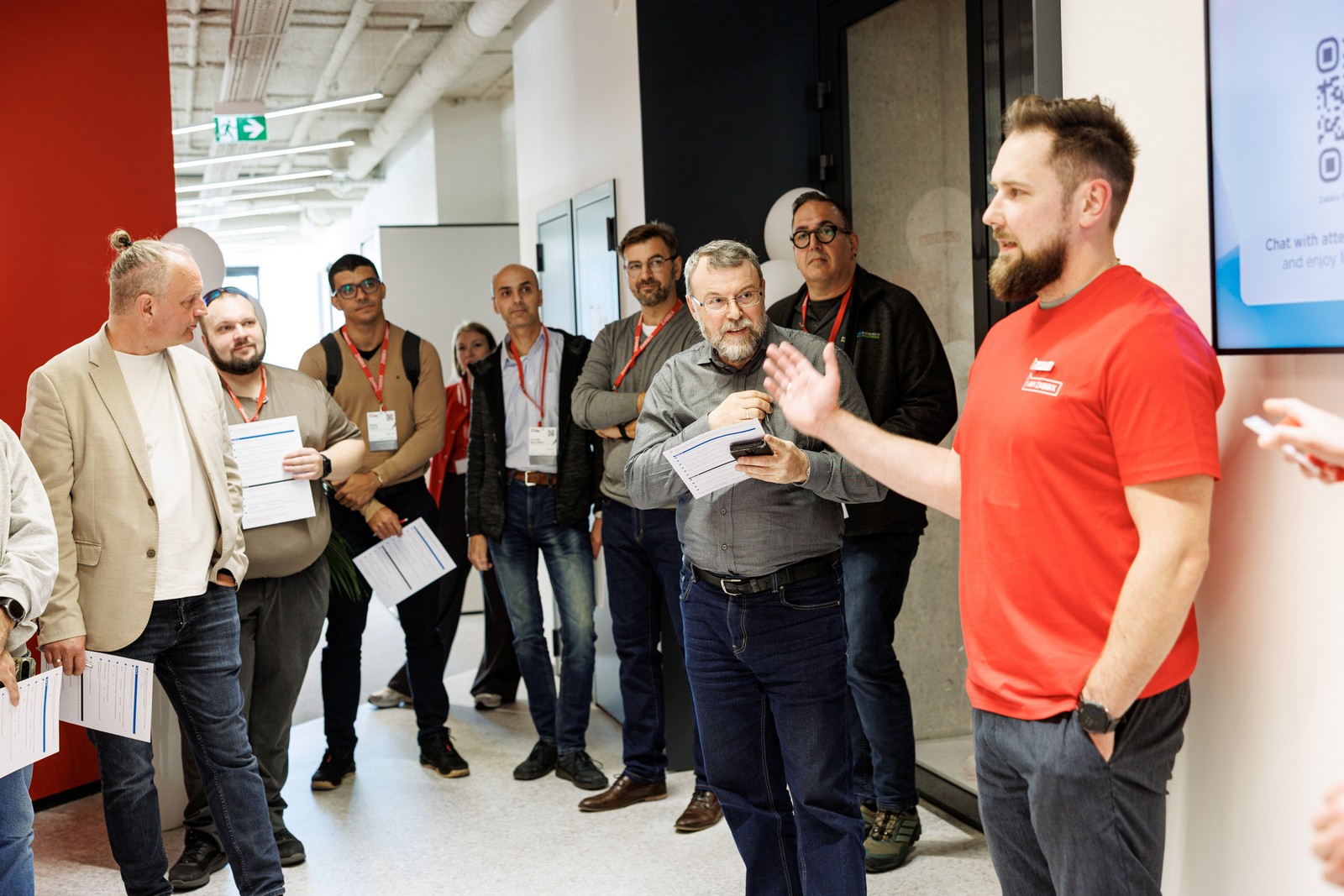
Start the week at the Zabbix Open House
Before Zabbix Summit 2026 officially begins on October 7, you can drop by the Zabbix offices, meet the people building and supporting the platform you use every day, and get a glimpse of the team behind the technology. Grab a coffee in the kitchen, swap stories with fellow community members, and test your Zabbix knowledge with a fun quiz that might teach even the most seasoned Zabbix fans a few new facts.
It’s a relaxed way to kick off your Summit experience, put faces to names, and start the week surrounded by the people who make the Zabbix community what it is.

Come for Zabbix 8.0, stay because your notebook is full
Zabbix Summit 2026 features one of the biggest moments in recent Zabbix history – an in-depth look at Zabbix 8.0. You’ll hear directly from Zabbix Founder and CEO Alexei Vladishev about the next evolution of the platform, where observability is heading, what’s new under the hood, and how Zabbix continues to expand with solutions like Zabbix Cloud for organizations looking to deploy and scale faster. And that’s only the beginning.
Across the Main Track, Solutions Track, Dev Track, Community Track, and workshops, you’ll learn from engineers, architects, consultants, and customers who have solved problems you’ll probably encounter sooner or later. After all, why should you spend weeks reinventing solutions when someone else is willing to show you theirs?
Zabbix Marketplace – your shortcut to doing more with Zabbix
One of the best things about being part of the Zabbix ecosystem is that you don’t have to build everything from scratch. Zabbix Marketplace brings together a growing collection of integrations, templates, dashboards, and other ready-to-use resources that can help you extend your observability and get value from Zabbix faster.
Zabbix Summit 2026 is the perfect opportunity to go beyond simply downloading a template. Talk to the people behind integrations and community solutions, discover how others are using them in production, and pick up ideas for adapting them to your own environment. In other words, fewer “I’ll build that someday” projects, and more things you can actually try.
Zabbix in your pocket with the Zabbix Mobile app
Observability doesn’t stop being important just because you’ve stepped away from your desk. The Zabbix Mobile app makes it easier to stay connected to your monitoring environment when you’re on the move, whether you’re grabbing coffee between sessions, heading home after the Summit, or simply trying to avoid being permanently attached to your laptop.
It’s another example of how the Zabbix ecosystem is making monitoring accessible when and where you need it. And yes, that means you can leave the Summit with more than just new ideas – you can also take practical Zabbix capabilities with you wherever you go.

Real stories. Real environments. Real “Wait…you used Zabbix for what?”
The best Summit talks aren’t polished, rehearsed sales pitches. They’re stories from people who built something difficult, broke something important, fixed something impossible, and decided to tell everyone exactly how they did it.
Expect practical sessions covering automation, large-scale deployments, MSP environments, integrations, performance optimization, Zabbix Cloud deployments, and plenty of creative techniques that will have you quietly opening a new browser tab entitled “Things I Should Definitely Try.”
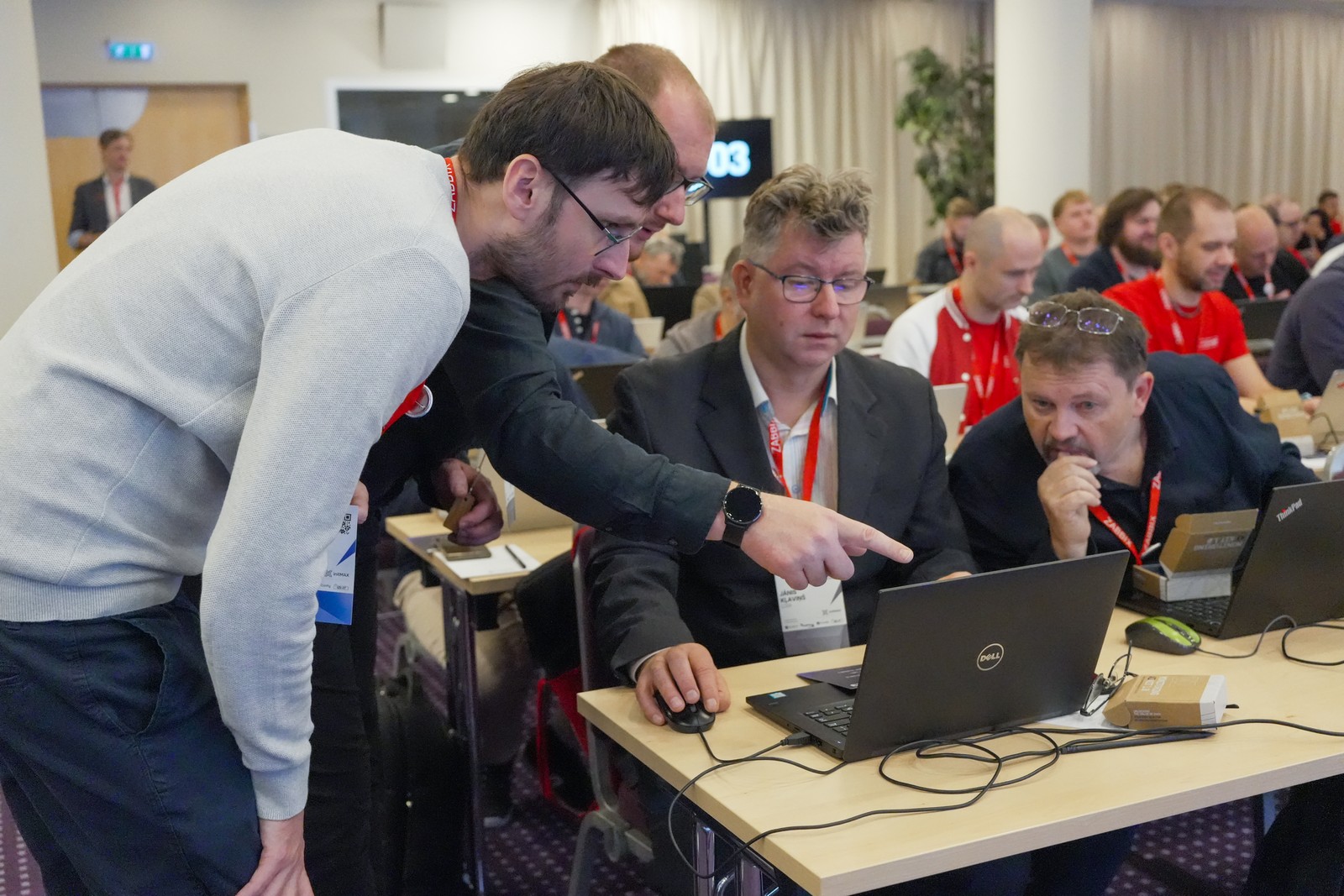
Workshops – because there’s a difference between reading documentation and actually doing the thing
If you’re the kind of person who learns by typing instead of watching, you’ll want to spend some time at the Summit workshops. Bring your laptop, break things, fix them, and ask questions. Leave with new skills instead of just good intentions. Workshops are included for Summit attendees and cover hands-on topics led by Zabbix experts, including new capabilities introduced in Zabbix 8.0.

Networking that doesn’t feel like networking
Nobody likes forced small talk over lukewarm coffee. Fortunately, that’s not really the Zabbix Summit vibe. Some of the best ideas at previous Summits started as conversations over coffee. Others probably started much later in the evening over other beverages.
This year’s three networking events (including the Welcome Event, Main Event, and Closing Event) will give you plenty of opportunities to meet the people whose blog posts you’ve bookmarked, whose templates you’ve borrowed (with gratitude), or whose infrastructure stories make yours seem almost reasonable.
And yes, Zabbix Summit 2026 is in Riga
If you’ve never been to Riga, you’re in for a treat. Historic architecture, fantastic food, a thriving tech scene, walkable streets, and (for one week in October) an unusually high concentration of people discussing triggers, proxies, APIs, template inheritance, and everything new in Zabbix 8.0 with genuine enthusiasm. It’s beautiful, it’s (slightly) nerdy, and it’s exactly where the Zabbix community belongs.
Bring your colleagues (they’ll thank you later)
Observability isn’t a one-person job. Bring your team, compare notes during sessions, divide and conquer the agenda, and return home with enough new ideas to keep everyone busy for months. There’s even a group discount for teams of three or more, making it considerably easier to convince your manager this is “a strategic investment in operational excellence.” Which, to be fair, it is!
See you in October!
Whether this is your first Summit or you’ve already collected enough Summit t-shirts to avoid doing laundry for a week, Zabbix Summit 2026 promises fresh ideas, new technology, inspiring people, a comprehensive look at Zabbix 8.0, and the latest developments in Zabbix Cloud. If you want to see where observability is heading, this is where the conversation starts.
So grab your ticket, book the trip, charge your laptop, and prepare to spend two days with people who understand why a perfectly configured dashboard is a thing of beauty.
Register here, and we’ll see you in Riga!
The post Learn, Connect, and Level Up at Zabbix Summit 2026 appeared first on Zabbix Blog.
OpenAI Jalapeno Custom AI ASIC at Hot Chips 2026
Post Syndicated from Patrick Kennedy original https://www.servethehome.com/openai-jalapeno-asic-at-hot-chips-2026/
We got a deep-dive on OpenAI Jalapeño at Hot Chips 2026 as the company rapidly built its own competitive AI accelerator
The post OpenAI Jalapeno Custom AI ASIC at Hot Chips 2026 appeared first on ServeTheHome.
Google’s TPUv8s for Training and Inference at Hot Chips 2026
Post Syndicated from Ryan Smith original https://www.servethehome.com/googles-tpuv8s-for-training-and-inference-at-hot-chips-2026/
Hot Chips 2026 sees Google discussing its new eighth-generation TPU family for the technical crowd. One of the only hyperscalers to develop its own training hardware, the company has developed the TPU 8t for training, as well as the TPU 8i for inference
The post Google’s TPUv8s for Training and Inference at Hot Chips 2026 appeared first on ServeTheHome.
Trade
Post Syndicated from xkcd.com original https://xkcd.com/3290/

SambaNova’s SN50 RDU for AI at Hot Chips 2026
Post Syndicated from Ryan Smith original https://www.servethehome.com/sambanovas-sn50-rdu-for-ai-at-hot-chips-2026/
This year’s Hot Chips conference includes a presentation from AI accelerator developer SambaNova, who is at the show to discuss their latest-generation RDU, the SN50
The post SambaNova’s SN50 RDU for AI at Hot Chips 2026 appeared first on ServeTheHome.
Microsoft’s Maia 200 AI Accelerator at Hot Chips 2026
Post Syndicated from Ryan Smith original https://www.servethehome.com/microsofts-maia-200-accelerator-at-hot-chips-2026/
At Hot Chips 2026, Microsoft is going into new detail on Maia 200, their second-generation server AI inference processor
The post Microsoft’s Maia 200 AI Accelerator at Hot Chips 2026 appeared first on ServeTheHome.
Cerebras Talks Going Rack-Scale with Their WSEs at Hot Chips 2026
Post Syndicated from Ryan Smith original https://www.servethehome.com/cerebras-talks-going-rack-scale-with-their-wses-at-hot-chips-2026/
At Hot Chips 2026, wafer scale engine developer Cerebras is talking about the next generation of their giant accelerators, as well as how the company is going rack-scale thanks to their Nexus platform architecture
The post Cerebras Talks Going Rack-Scale with Their WSEs at Hot Chips 2026 appeared first on ServeTheHome.
Fast Track ISM-ready cloud environments and IRAP Assessments with Landing Zone Accelerator on AWS
Post Syndicated from Kevin Donohue original https://aws.amazon.com/blogs/security/fast-track-ism-ready-cloud-environments-and-irap-assessments-with-landing-zone-accelerator-on-aws/
This post announces the availability of a new independent assessment report available on AWS Artifact analyzing how Landing Zone Accelerator on AWS (LZA) can automatically deploy multi-account environments in Amazon Web Services (AWS) with Australian Government Information Security Manual (ISM) security controls coverage at scale. The report includes findings from an independent third-party analysis conducted by AWS Partner gwi.digital. In addition to the report, we talk about ISM compliance applicability to LZA and a new testing mechanism for measuring configuration drift, which together can provide Australian customers with a documented and validated foundation to accelerate IRAP assessment readiness.
Background
Australian organizations in public sector, defense, and critical infrastructure agencies must build cloud environments that meet (ISM requirements. The ISM defines 1,081 security control requirements across 22 guideline chapters. Demonstrating compliance is central to achieving an IRAP assessment outcome, but assessments typically require months of preparation, evidence gathering, and testing.
In October 2025, we introduced the LZA Universal Configuration and LZA Compliance Workbook. LZA provisions a multi-account security architecture that automates the deployment of nearly 200 security controls based on AWS Well-Architected pillars and AWS security best practices. The LZA Compliance Workbook, available on AWS Artifact, documents how the Universal Configuration (UC) maps to technical security requirements from 17 global compliance frameworks, with more being added. LZA is an ideal solution for customers with security and compliance obligations—both existing and anticipated—because the guardrails it deploys are applied automatically to new accounts as environments grow.
What’s in the report
To see how LZA can help customers in Australia we teamed up with AWS Partner gwi.digital to run LZA as a customer would. gwi.digital is a consultancy partner specializing in cybersecurity and governance, risk, and compliance (GRC) and has deep experience in IRAP assessments and the ISM framework. The team conducted an independent analysis and evaluation of LZA UC against 1,081 ISM controls. The assessment was conducted in a greenfield AWS environment hosted in the ap-southeast-2 (Sydney) AWS Region, positioned within Phase 2 of the ASD Cloud Security Assessment and Authorization Framework and focused on cloud consumers building on already-authorized AWS services. It builds on existing AWS IRAP foundations: Underlying AWS services were most recently independently assessed at the PROTECTED level by CyberCX last year. While this report does not constitute an official IRAP authorization, certification, or accreditation, it provides a professional evaluation of evidence based on what LZA delivers out of the box (and what it does not), so organizations can make informed decisions.
What the assessment found
Of the 1,081 ISM controls, 256 are within the addressable scope of LZA and include the technical infrastructure controls that a solution like LZA can meaningfully address. Of those 256, LZA achieves Full or Partial coverage for 234 (91%). The remaining 825 controls are outside the scope of LZA: physical security, personnel, organizational governance, and classification-level exclusions. A key contribution for the assessment was analysis of the shared responsibility model that goes beyond the traditional AWS/customer binary. It considers a three-tier view—AWS (provided), LZA (enabled), and Customer (responsibility)—and further categorizes the 825 out-of-scope controls into subcategories so customers can quickly determine which controls require their attention compared to which are already addressed at the infrastructure level. By combining automated deployment, ISM-specific compliance mappings, independent validation, and continuous evidence generation, Australian customers can reduce IRAP assessment timelines while achieving more reliable compliance outcomes.
Note: Results are based on the configuration as-provisioned based on the LZA version and during the time of this assessment. Results may vary depending on customer implementation and configuration choices.
Continuous validation with CATS
Confirming controls are implemented and operating effectively across your environment is complex and often lacks complete coverage. To simplify testing your LZA deployment, we developed the Controls Acceptance Testing Suite (CATS). CATS is an automated compliance validation engine that runs purpose-built tests against the security configuration baseline deployed by LZA UC. For the ISM assessment, CATS executed over 3,600 individual tests across six AWS accounts, evaluating account structure, identity and access, network configuration, logging, encryption, and backup. For Australian customers, CATS enables:
- Automated evidence generation: Machine-readable results may replace weeks of manual evidence collection
- ISM-enriched reporting: gwi-digital developed a conversion script that maps CATS output to ISM control references, enabling auditors to interpret results from an ISM perspective
- OSCAL export: Results in Open Security Controls Assessment Language (OSCAL) format for interoperability with assessment tools
- Continuous drift detection: Repeatable execution identifies when configurations deviate from the validated baseline between assessment cycles
Note: CATS availability is limited and currently accessible only through AWS Professional Services as a private beta solution and may be subject to change. Availability, features, and pricing are subject to change without notice. Contact your AWS account representative or reach out to a member of the LZA team for questions about CATS, or to provide feedback on the LZA ISM report.
ISM-optimized configuration
Through the assessment, gwi-digital identified configuration adjustments that elevate specific control ratings from Partial to Full, with minimal effort; for example, increasing the default password length from 14 to 15 characters or adjusting log retention to align with Australian Federal Disposal Authority standards. These recommendations have been communicated to the LZA UC team for inclusion in a future ISM-specific guidance section in LZA GitHub documentation.
Getting started
In addition to the LZA ISM report, you can also find the LZA Compliance Workbook available on AWS Artifact. It maps related ISM requirement identifiers to security implementation statements, giving you a starting point from which you can customize and enhance your compliance documentation for your unique use cases after deploying LZA.
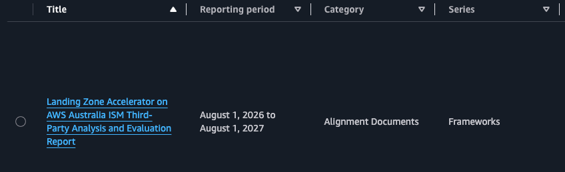
- Sign in to your AWS account and then download the LZA Australia ISM Third-Party Analysis and Evaluation Report and LZA Compliance Workbook from AWS Artifact.

Figure 1: LZA report and workbook in AWS Artifact
- Visit the LZA Universal Configuration GitHub repository to review and download the latest configuration baseline.
- Use the LZA Implementation Guide to see use cases, review pre-deployment considerations and then follow deployment steps.
- Set-up a security compliance chat agent. Consider creating a knowledge base with Amazon Bedrock using the LZA Compliance Workbook, LZA Implementation Guide, web crawlers to the LZA GitHub, and your custom resources to set up your own chat agent.
If you have questions, contact a gwi.digitalexpert, AWS LZA team member, or your AWS account representative.
Conclusion
The combination of ISM mappings in the LZA Compliance Workbook, the gwi-digital analysis report, and CATS evidence gives Australian customers a head start on IRAP assessments.
- Weeks saved on scoping: Pre-determined control applicability significantly reduces upfront scoping effort
- Documentation ready: Implementation statements and control requirement alignment reduce the documentation burden
- Independent assurance: A third-party report that customers and their assessors can reference directly
- Continuous evidence: CATS generates repeatable security evidence between assessment cycles, replacing periodic manual audits with ongoing assurance
Acknowledgements
The Landing Zone Accelerator team would like to thank Baden Hughes, Henrik Melkonyan, Iain Lindsay-German, and Ian Roderick from gwi.digital for their professionalism and expertise in performing an incredibly thorough assessment, helping us to make LZA better for customers, and for their contributions to this blog post.
If you have feedback about this post, submit comments in the Comments section below.
NVIDIA’s Groq 3 LPU Accelerators for Heterogeneous AI Compute at Hot Chips 2026
Post Syndicated from Ryan Smith original https://www.servethehome.com/nvidias-groq-3-lpu-accelerators-for-heterogeneous-ai-compute-at-hot-chips-2026/
The newest member of NVIDIA’s AI hardware family, at Hot Chips 2026 NVIDIA is diving into the use of LPUs as part of Vera Rubin clusters. The specialized chips from acquihire Groq are being tapped to offer significantly lower latency in the decode phase of inference
The post NVIDIA’s Groq 3 LPU Accelerators for Heterogeneous AI Compute at Hot Chips 2026 appeared first on ServeTheHome.
Meta’s MTIA Custom AI Silicon at Hot Chips 2026
Post Syndicated from Ryan Smith original https://www.servethehome.com/metas-mtia-custom-ai-silicon-at-hot-chips-2026/
For Hot Chips 2026, Meta is at the show to discuss their AI inference accelerators. The MTIA family, the company has an ambitious roadmap to release 4 accelerators over the next couple of years
The post Meta’s MTIA Custom AI Silicon at Hot Chips 2026 appeared first on ServeTheHome.
mklinux-v7.0-mk2 released
Post Syndicated from corbet original https://lwn.net/Articles/1090582/
For people who would like to experiment with the multi-kernel Linux concept, Cong Wang has
announced the
release of mklinux v7.0-mk2.
mklinux lets one machine run several independent Linux kernels at
the same time on bare metal, without a hypervisor. A host kernel
owns a pool of CPUs, memory and PCI devices, carves that pool into
instances, and boots a spawn kernel into each instance through
kexec_file_load(). Every spawn kernel runs natively on its own
CPUs, its own physical memory and its own devices. Nothing is
emulated and nothing is trapped; the only thing shared is what you
choose to share.
Note that this is not the old MkLinux, which was a port to PowerPC
Macintosh systems.
This 5G Adapter Beats UniFi’s 5G Max (Here’s Why)
Post Syndicated from Crosstalk Solutions original https://www.youtube.com/shorts/UFfNtMPb5YM
PythonOperator and BashOperator Now Available on Amazon Managed Workflows for Apache Airflow (Amazon MWAA) Serverless
Post Syndicated from Pradeep Kumar Nalluri original https://aws.amazon.com/blogs/big-data/pythonoperator-and-bashoperator-now-available-on-amazon-managed-workflows-for-apache-airflow-amazon-mwaa-serverless/
If you run Apache Airflow workflows on Amazon MWAA Serverless, you can now use PythonOperator and BashOperator to run custom code directly in the serverless runtime. Previously, Amazon Managed Workflows for Apache Airflow (Amazon MWAA) Serverless only supported orchestration of AWS services through operators for scheduling tasks, managing dependencies, and handling retries. It did not support running your own Python functions or shell scripts natively. If you needed custom Python logic or shell commands, you had to wrap code in AWS Lambda functions, start Amazon Elastic Container Service (Amazon ECS) tasks, or use other AWS compute services. These alternatives add complexity, cost, and latency to your orchestration pipelines.
With this launch, you can run custom Python functions and shell scripts directly within the serverless task runtime, without requiring additional infrastructure. This means you can now use PythonOperator and BashOperator many data engineering teams rely on for ETL pipelines and data quality checks – without provisioning additional compute.
In this post, we walk through how this feature works and demonstrate a practical example: building a serverless pipeline that converts CSV files to JSON format using a PythonOperator, and verifies the output using a BashOperator. By the end, you will know how to:
- Package a Python module with dependencies and upload it to an Amazon Simple Storage Service (Amazon S3) bucket as a code bundle
- Define a multi-task workflow using the dag-factory compatible YAML
- Create and run a workflow with the AWS Command Line Interface (AWS CLI)
- Verify that your pipeline produced the expected output
How it works
With MWAA Serverless, you can package your custom code, upload it to an Amazon S3 bucket, and reference it when creating a workflow. The service snapshots your code at workflow creation time and uses that snapshot for all subsequent runs of the same workflow version.
Code bundles
A code bundle is the package that contains your custom logic. You package your Python modules or shell scripts and upload them to an Amazon S3 bucket. A code bundle can be:
- A single .py file or .sh bash script (uploaded to an Amazon S3 bucket)
- A ZIP archive containing multiple shell scripts, Python modules and dependencies (up to 250 MB)
Execution model
When you create or update a workflow, MWAA Serverless snapshots your code bundle from an Amazon S3 bucket provided and stores it on the service side. At task execution time, the service uses this snapshot – not the object currently residing in your Amazon S3 bucket – to run your code in an isolated runtime environment.
Python and Bash tasks do not have internet access. They can reach only Amazon S3, Amazon Elastic Container Registry (Amazon ECR), and Amazon CloudWatch, which are the services the runtime requires to operate. To have internet access, configure the workflow with Amazon VPC so that it can go through the provided VPC.
Supported operators
The following table describes the two operators now available in MWAA Serverless.
| Operator | Description |
| PythonOperator | Executes a Python callable (function) from your code bundle |
| BashOperator | Runs shell commands or scripts |
Security
AWS Key Management Service (AWS KMS) encrypts your code bundles at rest. IAM policies control who can create, update, and trigger the workflows. The execution role scopes what AWS resources your code can access at runtime.
Prerequisites
Before getting started, verify that you have the following resources and tools configured in your AWS account:
- An AWS account with access to Amazon MWAA Serverless
- AWS CLI v2 (latest version) installed and configured. To install or update, see Installing or updating to the latest version of the AWS CLI.
- An Amazon S3 bucket for storing DAG definitions and code bundles
- An IAM role that MWAA Serverless can assume (see the execution role setup below)
Walkthrough: Building a serverless CSV-to-JSON pipeline
In this walkthrough, we build a pipeline that converts CSV files to JSON format – a common data transformation for downstream APIs and analytics systems that consume JSON. The pipeline uses a PythonOperator for the conversion logic and a BashOperator to verify the output. Here is what the pipeline does:
- Reads a CSV file from an Amazon S3 bucket
- Converts it to JSON format with column type inference
- Writes the JSON file back to an Amazon S3 bucket
- Validates record counts match between source and output
Step 1: Create the execution role
Create an IAM role that your workflow assumes at runtime. The trust policy must allow the airflow-serverless.amazonaws.com service to assume the role:
Create the role and attach an inline policy granting least-privilege access to your S3 bucket:
Step 2: Write the Python module
Create a file called csv_to_json.py with the conversion logic:
This function uses boto3 (which comes pre-installed with the MWAA Serverless execution environment) and Python’s built-in csv and json modules. The conversion reads the CSV, infers numeric types, and writes a JSON lines file back to the S3 bucket.
Step 3: Write the verification script
Create a file called verify_output.sh. This script validates the pipeline output by comparing the record count in the source CSV against the output JSON file. If the counts do not match, the task fails with a non-zero exit code, which causes the workflow run to fail.
This script runs the AWS CLI, which is bundled as a dependency in the code package. The s3 cp streams the file content to stdout without writing to disk, allowing standard shell tools like wc -l and tail to process it. The execution role credentials are automatically available in the execution environment, so the CLI can access S3 without additional configuration.
Step 4: Package and upload the code to Amazon S3
Since the verification script uses the AWS CLI, bundle it as a dependency in the ZIP archive along with your Python module and shell script:
Upload a sample CSV file for testing:
Step 5: Define the DAG (YAML)
MWAA Serverless uses a declarative YAML format for DAG definitions. Create a file called conversion_dag.yaml:
This DAG defines two tasks:
convert_to_json– Runs the convert function from the Python module to transform CSV to JSON lines.verify_output– Runs a shell script that validates the pipeline output by comparing source and output record counts, failing the task if they do not match.
Upload the DAG definition to S3. Note: You can also run inline Bash commands directly without a shell script.
Step 6: Create the workflow
Create the MWAA Serverless workflow, referencing the DAG definition and the code bundle:
The response includes a WorkflowArn that you use to trigger runs:
Step 7: Run the workflow
Trigger a workflow run:
The response confirms the run has started:
Step 8: Monitor execution
Check the status of your run:
A successful run returns:
Step 9: Verify the output
Confirm the JSON file was written to the S3 bucket:
You should see the JSON file:
You can also verify task-level output in Amazon CloudWatch Logs. Open the log group for your workflow and find the convert_to_json task log stream:
Considerations and limits
When planning your workloads on MWAA Serverless with these operators, keep the following considerations in mind:
- Code bundle size – ZIP archives must be under 250 MB per bundle.
- Network access – Python and Bash tasks do not have internet access. They can reach a limited set of AWS services required for the runtime to function (Amazon S3, Amazon ECR, and Amazon CloudWatch) but cannot call other AWS services or external endpoints. If your workflow requires calls to external APIs, preprocess that data and store it in an Amazon S3 bucket before invoking the workflow.
- Runtime dependencies – boto3 and the Python standard library are pre-installed. For additional packages (such as pandas or requests), bundle them in your ZIP archive following the Amazon MWAA Serverless packaging guidelines.
- Execution timeout – Tasks are subject to the workflow’s configured timeout limits.
- Python version – Check the Amazon MWAA Serverless documentation for the currently supported Python runtime version.
- DAG format – MWAA Serverless uses YAML-based DAG definitions, not traditional Python DAG files. If you are migrating from MWAA Provisioned, you will need to convert your DAGs to the YAML format.
- Operators not supported – Some Airflow community operators and custom plugins are not available in the Serverless runtime. Refer to the documentation for the full compatibility list.
Clean up
To avoid ongoing charges, delete the resources you created in this walkthrough. The following commands remove the workflow, S3 objects, and IAM role:
Note: $WORKFLOW_ARN is defined in Step 7.
Note: $BUCKET is exported in Step 4. If appropriate, delete the bucket as well.
Conclusion
With native support for PythonOperator and BashOperator, you can now run the custom code execution patterns that many data engineering teams rely on daily directly in MWAA Serverless. Run data transformations, format conversions, validations, and shell scripts in the serverless runtime – without provisioning additional compute or managing containers.
If you are running Airflow workloads on MWAA Provisioned or self-managed infrastructure, your existing PythonOperator and BashOperator logic requires minimal changes. Convert your Python DAG files to the YAML format, package your code as a bundle, and you are ready to run on MWAA Serverless.
To get started, visit the Amazon MWAA Serverless documentation and try the walkthrough earlier in this post with your own data. For pricing details, visit the Amazon MWAA pricing page. We look forward to your feedback.
About the authors
NVIDIA Spectrum-X Ethernet Multiplane Network Architecture at Hot Chips 2026
Post Syndicated from Patrick Kennedy original https://www.servethehome.com/nvidia-spectrum-x-ethernet-multiplane-network-architecture-at-hot-chips-2026/
At Hot Chips 2026, NVIDIA showed how Spectrum-X and a multiplane network is its vision for AI Factory networks
The post NVIDIA Spectrum-X Ethernet Multiplane Network Architecture at Hot Chips 2026 appeared first on ServeTheHome.
NVIDIA BlueField-4 DPU at Hot Chips 2026
Post Syndicated from Patrick Kennedy original https://www.servethehome.com/nvidia-bluefield-4-processor-at-hot-chips-2026/
At Hot Chips 2026, NVIDIA is detailing the huge upgrades in its BlueField-4 DPU along with the reasons behind it and its scale-in networking
The post NVIDIA BlueField-4 DPU at Hot Chips 2026 appeared first on ServeTheHome.
Broadcom Thor Ultra Ethernet NIC at Hot Chips 2026
Post Syndicated from Patrick Kennedy original https://www.servethehome.com/broadcom-thor-ultra-ethernet-nic-at-hot-chips-2026/
At Hot Chips 2026, we got a lot of detail on how the Broadcom Thor Ultra 800GbE NIC works and some of the performance views
The post Broadcom Thor Ultra Ethernet NIC at Hot Chips 2026 appeared first on ServeTheHome.
Setting up an RCS agent with an AI coding assistant and AWS End User Messaging
Post Syndicated from Bruno Giorgini original https://aws.amazon.com/blogs/messaging-and-targeting/setting-up-an-rcs-agent-with-an-ai-coding-assistant-and-aws-end-user-messaging/
Clone a repo, open it in your AI coding assistant, type “go,” and walk away with a working RCS agent.
Creating an RCS agent on AWS End User Messaging normally means juggling 23 registration fields, three different CLI parameter types, brand asset requirements, and a multi-step approval process. An AI coding assistant can handle all of that for you. With AWS End User Messaging, you can create RCS agents that send and receive rich messages complete with your brand’s logo, colors, and verified identity.
Setting up an RCS agent involves creating an agent container, uploading brand assets, configuring a 23-field registration, submitting for approval, adding verified testers, and testing both outbound and inbound messaging. Each field has a specific type (TEXT, SELECT, or ATTACHMENT) that requires a different CLI parameter, and getting any of them wrong means starting over.
We built an open-source sample repository that encodes all of this knowledge into an AGENTS.md file. When you open the repo in an AI coding assistant like Kiro, Cursor, or Windsurf, the assistant reads the instructions and walks you through the entire setup interactively. You provide a brand name and your phone number. The AI handles everything else.
How it works
The repository aws-samples/sample-rcs-agent-setup-and-send-messages contains:
AGENTS.md— A structured instruction file that AI coding assistants read automatically. It contains the complete RCS agent setup workflow: credential checks, brand asset generation, registration field configuration, tester management, and message testing.brand-assets/— Template SVG files for the agent logo (224×224 px) and banner (1440×448 px), ready to be customized and converted to PNG..kiro/steering/rcs-agent-setup.md— A Kiro-specific steering file with the same instructions, using theinclusion: alwaysfrontmatter so Kiro loads it automatically.
The AGENTS.md file is the key. It defines six skills that the AI assistant executes in sequence:
- Create RCS agent — Creates the agent container, generates brand assets (logo and banner SVGs), converts them to PNG, creates a test registration, sets all 23 fields with the correct parameter types, and submits for approval.
- Add verified testers — Registers test phone numbers and guides you through accepting the tester invitation.
- Send a test message — Checks for blockers (protect configuration, opt-out lists) and sends your first branded RCS message.
- Set up inbound keyword — Configures an automatic response keyword so you can test inbound messaging without writing backend code.
- Verify inbound messaging — Walks you through the console deep link flow to confirm two-way messaging works.
- Delete an RCS agent — Removes an agent cleanly by disabling deletion protection, deleting the associated registration, then deleting the agent itself.
Prerequisites
Before you start, you need:
- An AWS account with access to AWS End User Messaging.
- AWS Command Line Interface (AWS CLI) v2.35.12 or later installed and configured with credentials that have
pinpoint-sms-voice-v2:*permissions. - An AI coding assistant that reads
AGENTS.mdfiles (Kiro, Cursor, Windsurf, or similar). - librsvg for SVG to PNG conversion (
brew install librsvgon macOS). - A test phone that supports RCS messaging.
Getting started
Follow these steps to go from zero to a working RCS agent. The entire process takes about five minutes.
Step 1: Clone the repository
Step 2: Open in your AI coding assistant
Open the cloned directory in your preferred AI coding assistant. The assistant will automatically detect the AGENTS.md file (or .kiro/steering/rcs-agent-setup.md if you are using Kiro).
Step 3: Type “go”
In the chat panel, type go. The AI assistant will:
- Check your AWS credentials — It runs
aws sts get-caller-identityand asks how you authenticate if credentials are not configured. It supports named profiles, SSO, IAM user credentials, and environment variables. - Verify EUM access — It confirms your account can use AWS End User Messaging.
- Check tooling — It verifies
rsvg-convertis installed for brand asset generation. - Ask for your preference — Quick mode (provide a brand name) or interactive mode (you specify every detail).
Step 4: Provide a brand name
In quick mode, you provide a brand name and the AI generates everything else: a description, an accessible accent color, contact information with placeholder values, privacy and terms URLs, and custom SVG brand assets with your brand name and colors.
In interactive mode, the AI asks for each detail one section at a time: brand name, accent color, logo description, banner description, contact information, and policy URLs.
Step 5: Watch it work
The AI assistant executes every AWS CLI command in sequence:
- Creates the RCS agent container.
- Enables deletion protection.
- Creates a test registration and links it to the agent.
- Generates and converts brand asset SVGs to PNG.
- Uploads the logo and banner as registration attachments.
- Sets all 23 registration fields using the correct parameter type for each (TEXT, SELECT, or ATTACHMENT).
- Submits the registration and polls for approval.
- Reports when the agent is active.
Step 6: Add a tester and send a message
Once the agent is approved, the AI asks for your test phone number, registers it as a verified tester, and waits for you to accept the invitation. After verification, it checks for blockers (protect configuration and opt-out lists), then sends your first branded RCS message.
Step 7: Test inbound messaging
The AI configures an automatic keyword response and walks you through the console deep link flow to verify two-way messaging. When you send RCSINBOUNDTESTING to your agent, you receive an automatic reply confirming inbound messaging works.
What the AI handles for you
The AGENTS.md file encodes several non-obvious behaviors that would otherwise require trial and error:
| Challenge | How the repo handles it |
create-rcs-agent takes no --display-name parameter |
The brand name comes from the registration, not the agent creation call. The instructions reflect this. |
| Three different field parameter types | The instructions include a field reference table mapping each of the 23 fields to its correct CLI parameter: --text-value, --select-choices, or --registration-attachment-id. |
--field-values does not exist |
The instructions explicitly warn against this non-existent parameter and use the correct alternatives. |
--attachment-body and --attachment-url conflict |
The instructions use --attachment-body only. |
| Accent color contrast requirements | The instructions include pre-validated color choices with 4.5:1 contrast ratio against white. |
| Field paths differ from what you might expect | The correct paths are agentDetails.logoImage and agentDetails.bannerImage, not logoAttachmentId or bannerAttachmentId. |
| New registration versions do not inherit field values | The troubleshooting section warns that all 23 fields must be re-populated when creating a new version. |
Customizing the repo
You can modify the AGENTS.md file to fit your workflow:
- Change default values — Update placeholder contact information, privacy URLs, or terms URLs to match your organization.
- Add custom brand assets — Replace the template SVGs in
brand-assets/with your own designs. Keep the logo at 224×224 px and the banner at 1440×448 px. - Extend the skills — Add new skills for richer message types (cards, carousels), event destinations for programmatic inbound handling, or integration with other AWS services.
Cleanup
To remove the resources created during testing:
Note: You must delete the registration before the agent. Skipping this step results in a ConflictException: RESOURCE_NOT_EMPTY error.
Conclusion
The aws-samples/sample-rcs-agent-setup-and-send-messages repository turns a multi-step, error-prone CLI workflow into a guided conversation. Clone the repo, open it in your AI coding assistant, type “go,” and you have a working RCS agent that can send and receive branded messages to verified testers.
The AGENTS.md pattern is reusable. Any complex AWS workflow with non-obvious API behavior can be encoded the same way: document the correct commands, parameter types, and pitfalls in a structured file, and let the AI assistant execute it interactively.
For a detailed manual walkthrough of the same process, see Creating and testing an RCS agent with AWS End User Messaging. For an overview of the business case for RCS, see Upgrade business messaging with RCS on AWS. For more information, see the AWS End User Messaging service page and the RCS documentation.
About the author
XCENA MX1 CXL Computational Memory Device at Hot Chips 2026 with Samsung
Post Syndicated from Patrick Kennedy original https://www.servethehome.com/xcena-mx1-cxl-computational-memory-device-at-hot-chips-2026/
At Hot Chips 2026, XCENA showed off how the MX1 combines a CXL memory controller with 3072 RISC-V cores and tiering to SSDs, and Samsung showed how it scales
The post XCENA MX1 CXL Computational Memory Device at Hot Chips 2026 with Samsung appeared first on ServeTheHome.
Samsung LPDDR5X-PIM at Hot Chips 2026
Post Syndicated from Patrick Kennedy original https://www.servethehome.com/samsung-lpddr5x-pim-at-hot-chips-2026/
Samsung has a new generation of its LPDDR5X-PIM solution at Hot Chips 2026. This processing in memory solution looks more polished this generation
The post Samsung LPDDR5X-PIM at Hot Chips 2026 appeared first on ServeTheHome.