Post Syndicated from digiblur DIY original https://www.youtube.com/watch?v=vfhOFwr97_8
Viva Las Vegas
Post Syndicated from The History Guy: History Deserves to Be Remembered original https://www.youtube.com/watch?v=w92IsCXRsp8
Comic for 2025.03.09 – Gregnant
Post Syndicated from Explosm.net original https://explosm.net/comics/gregnant
New Cyanide and Happiness Comic
buttercream
Post Syndicated from Oglaf! -- Comics. Often dirty. original https://www.oglaf.com/buttercream/


My highlights from CP+ 2025
Post Syndicated from Matt Granger original https://www.youtube.com/watch?v=vRiZVy9SdfU
How to Reset a HPE iLO Administrator Password From the OS Using ipmitool
Post Syndicated from E Lopez original https://www.servethehome.com/how-to-reset-a-hpe-ilo-administrator-password-from-the-os-using-ipmitool/
We have a quick guide to resetting a HPE iLO Administrator Password using ipmitool or adding a new administrator user to iLO
The post How to Reset a HPE iLO Administrator Password From the OS Using ipmitool appeared first on ServeTheHome.
Картата на Евростат за плодовитостта и какво всъщност ни показва?
Post Syndicated from Боян Юруков original https://yurukov.net/blog/2025/eurostat-data/
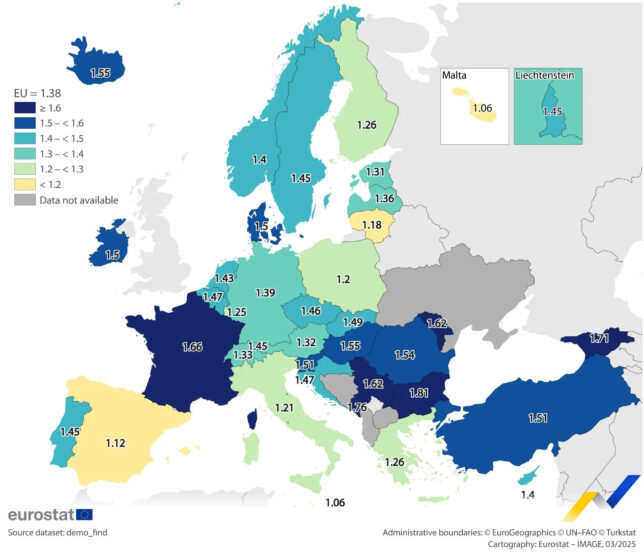
Горната снимка обиколи мрежата в петък, когато Eurostat обнови данните си за раждаемостта в Европа. Тя беше посрещната с разнопосочни реакции, но най-честата беше радост, че сме на първо място в България по брой деца на жена в детеродна възраст – 1.81. Доколкото това изглежда е вярно, има няколко важни подробности, които бяха пропуснати по веригата.
Първо, препоръчвам да прегледате статията ми обясняваща подробно каква е разликата между плодовитост и раждаемост и защо всъщност е нямало скок в първото преди три години. В графиката илюстрирам как и защо коригирам населението след последните две преброявания и как това се отразява на този индекс.
Имаше критика към преизчисляването на коефициента в същата статия, която пуснах през август 2024-та. От дискусиите се виждаше, че причината е предимно това, че показваше практически застой в последните седем години и неизбежните изводи за промяната на условията на живот в годините преди 2018-та и влиянието им за решенията на двойките. Данните публикувани на 7-ми март 2025-та от Евростат обаче съвпадат почти идеално с моите корекции. Голямата разлика е през 2012-та, когато те взимат числото на НСИ като базова точка, а аз го преизчислявам. Отклонението в другите години е под 0.7% и се дължи на това, че аз имам данни за ражданията само по възрастови групи, а не по отделни възрасти на майките. Все пак са доста точки и потвърждават моите изводи шест месеца по рано.
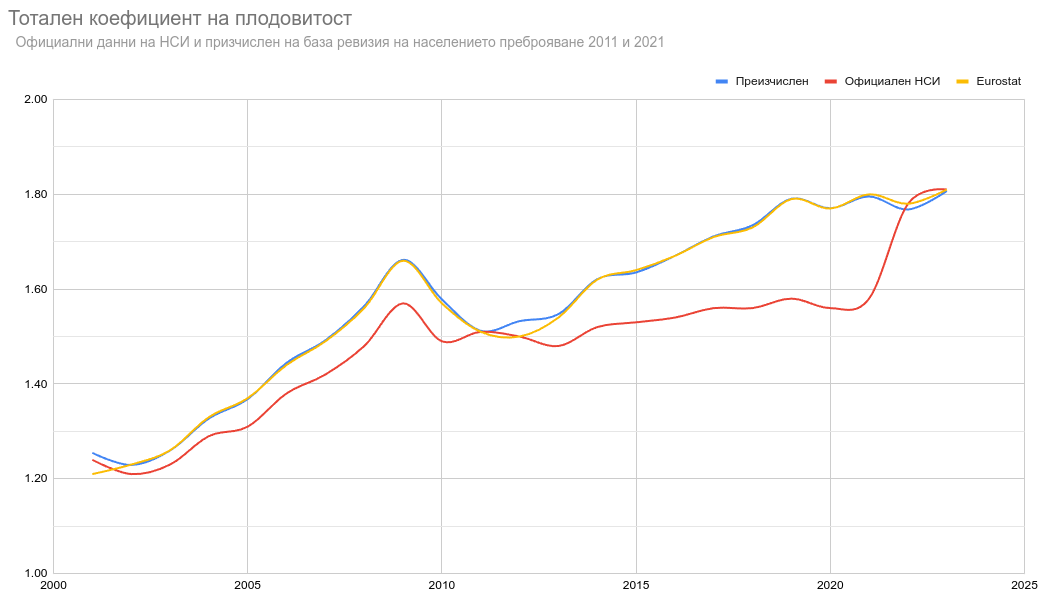
Много по-важно в случая обаче е, че макар да виждаме добри сигнали, трябва да ги поставим в контекст. Макар да имаме тази година най-висок показател в Европа, плодовитостта има значение единствено ако се разглежда в продължителен период от време, защото тогава проличават истинският ефект върху населението и обществото. Краткосрочен скок или спад носи само шумни заглавия, но само толкова. Притеснителен е застоя в последните години, макар по-долу ще покажа, че на фона на Европа може и да е добра новина. Въпреки това фактът, че е под 2.1 остава проблем. Зад това число има много детайли и съм ги обсъждал често. Най-важното е, че се използва премного за консервативана пропаганда целяща намаляване правата на жените без обаче да показват особено разбиране или работещи решения. Също така, плодовитостта е само един от многото параметри на демографията, не съществува в изолация и свеждането му до едно число, макар удобно, скрива много важни детайли като възрастовото разпределение на майките, еднократни ефекти, здравеопазване, реална смъртност на жени и новородени и прочие.
Забелязва се също разминаване с данните за други държави като Турция с официалните такива за 2023-та. Това може да се обясни с преизчислението, което правят за всички на база оценките за населението и дали имат достъп до окончателни данни. Всъщност, имаше разминаване и с данните на НСИ. Ще забележите че в статията ми от август миналата година за 2023-та съм посочил плодовитостта от НСИ да е 1.79. Тъй като пазя всичко, което свалям като данни, виждам, че това е показвал порталът Инфостат, когато свалих справката на 29-ти април 2024. Днес числото е коригирано на 1.81, което съвпада точно с моята оценка и тази на Евростат.
Предупрежавам, че трябва да се много внимателни когато сравняваме показатели между държави, особено такива зависещи от възрастовата структура на населението като смъртност, рак или заболевамост. В случая тези стойности могат да се сравняват като имаме едно наум, че има голяма вариация в средната възраст на раждане и разпределението по възрасти. Затова нека направим няколко сравнения.
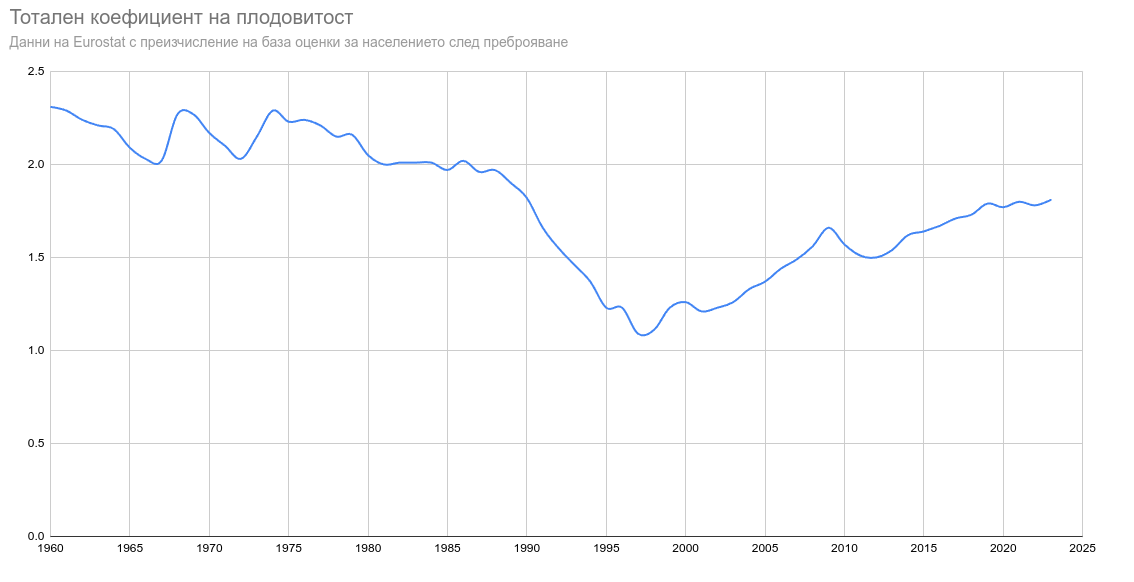
Първо тук виждате коефициентът на плодовитост на България от 1960 до 2023-та по данни и оценки на Евростат. След резкия спад през 90-те виждаме бързо покачване. Вижда се спирането на растежа в последните седем години. На практика през 2018-та сме стигнали нивото, което е имала България преди голямата миграция от една трета от младото тогава поколение. След това обаче България на практика е спряла в демографското си развитие по този показател.
В следващите две графики ще видите сравнение за същия период между за България и няколко други европейски държави. Вижда се, че след възстановяването от кризата през 90-те сме задминали Германия преди 20 години. Повишението при тях в последните 10 години се дължи изцяло на външна миграция. В последните няколко години сме задминали дори шампионите демографски – Ирландия и Франция. Франция е интересен случай, защото има ниска раждаемост в последните 200 години и често се използва като ранен пре-индустриален пример за изследване на демографски преход. Ирландия пък показва много висока плодовитост през 60-те, но аналогичен на нас спад след това, но траещ 25 години вместо 10 и по други причини.
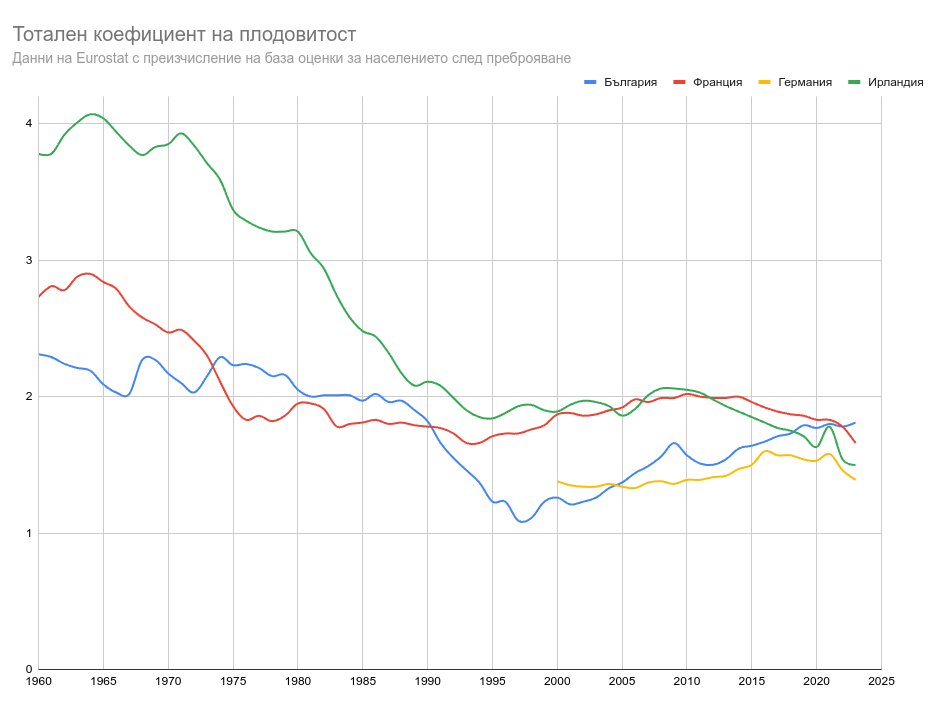
Тук виждаме сравнение със съседите ни. Демографския преход при всички съвпада с икономически крах и напускане на сериозна част от младите. Виждаме, че при Гърция в започнал 10 години по-рано и все още остава доста нисък. Плодовитостта в България и Румъния върви практически в унисон до пандемията, което може да даде индикации, че се диктува основно от външни фактори и общи черти и промени на ситуацията в двете държави. След пандемията обаче виждаме сериозен спад в Румъния, както и в Гърция, докато в България нещата остават непроменени.
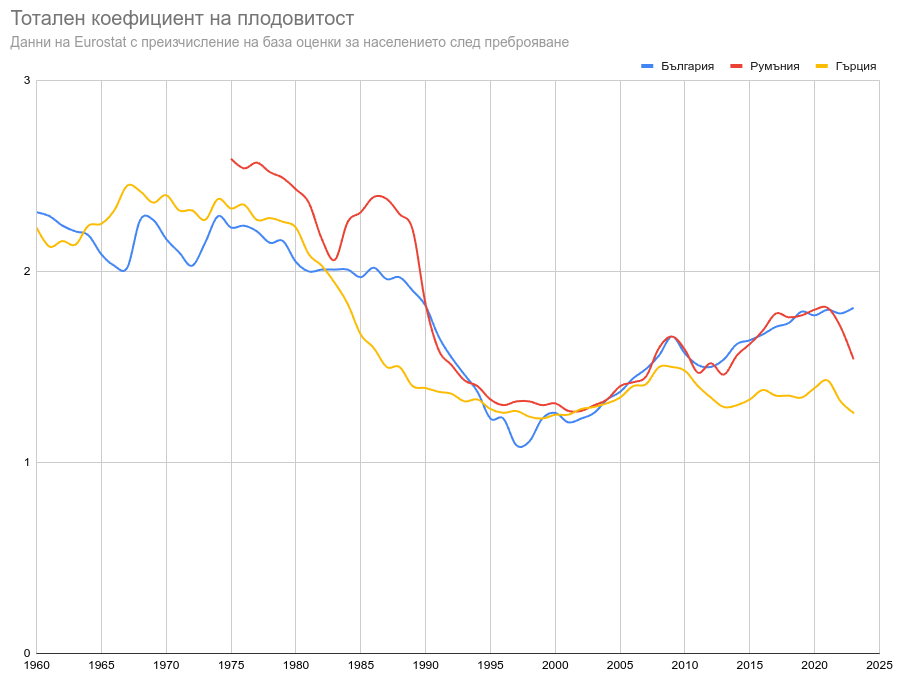
За пълните данни препоръчвам да погледнете статията на Евростат и таблицата им, както и таблицата в Инфостат на НСИ, а тук ще намерите последните справки, карта и методологията им
The post Картата на Евростат за плодовитостта и какво всъщност ни показва? first appeared on Блогът на Юруков.
Седмицата (3–8 март)
Post Syndicated from Йовко Ламбрев original https://www.toest.bg/sedmitsata-3-8-mart/

Скандалната среща между Зеленски и Тръмп в Белия дом от края на миналата седмица в голяма степен предопредели събитията и от настоящата. След нея тревожността поизмести прагматизма от коментарите и анализите както в сериозните медии, така и в изявленията на политиците. По целия свят.
И някак естествено идва да се запитаме дали не можем да обясним всичко, което се случва, чрез тази толкова човешка и първична емоция – страха. Според Искрен Иванов отговорът е „да“. В текста си „Медът и жилото на САЩ, или за разговора между Тръмп и Зеленски“ той рационализира страха като ключов двигател на събитията, на които сме свидетели. А палитрите от различни страхове – като пресечни точки или червени линии, които изглеждат напълно валидни маркери за прегрупиране или разделение, поне в политиката и сред елитите.
„Властта на себе си прилича“, твърди Емилия Милчева в актуалния си политически коментар за взаимоотношенията в управлението и в частност за олекването на ДПС–ДПС за сметка на гравитацията около Делян Пеевски. Последният изземва все повече характерната за ДПС роля на брокер на реална власт, като я надгражда с корпулентен размах. Разбира се – не в положителна посока.
Емилия припомня и една важна публикация на „Капитал“ от миналия уикенд. Ако сте пропуснали да прочетете интервюто с българската европрокурорка Теодора Георгиева, непременно поправете това. Защото е ярко свидетелство за безобразието, в което сме затънали до уши. Безобразие, което е пряко свързано с фундамента на устройството на държавата ни и засяга всичко и всички. Заради възпроизвеждащата се гнилоч в съдебната система, грижливо пазена от статуквото.
Не знам дали е заради тази повсеместна и все по-сгъстяваща се тревожност, но почти всички материали тази седмица в „Тоест“ са силно критични. Не че Елена Телбис някога не е била… но в саркастичния си преразказ на събитията от седмицата тя едновременно разхвърля във въздуха Тръмп, Пеевски, Кирил Петков, братята Тейт, че и онези даже малко повече от „братя“ от Възраждане. И пита за още.
Честит 8 март, скъпи читателки на „Тоест“!
Уви, този ден у нас все още се свързва с мама, баба, цветя, бонбони и алкохол. Докато всъщност е символ на борбата за равноправие на жените. Затова е и някак навременно на този ден да започне новата поредица на Надежда Цекулова, посветена на женското здравеопазване и наречена „Анатомия на пола: Жена“. Логично е също първата тема в тази рубрика да е исторически преглед на отношението и нагласите на човечеството към женското здраве.
Свикнали сме в „Тоест“ да четем интересните статии на Анета Василева за архитектура. Тази седмица обаче за всеобща изненада тя пише за кино. Добре де, за кино и архитектура. „Бруталистът“, който Анета смята за недоразумение въпреки няколкото спечелени престижни награди, че и с номинация за най-добър филм на Оскарите, я провокира да напише силно критична рецензия.
Критичен този път е дори материалът на Павлина Върбанова. Тя споделя личното си мнение за подготвяно от Института за български език на БАН прекрояване на граматиката ни, което се прави непрозрачно, без обсъждане с филолози и за съжаление, изглежда твърде самоуверено и самоцелно. Прочетете повече в „Критика на граматичния разум“. Даже да не сте филолог, не подминавайте този текст дори ако на места ви се стори твърде специализиран.
В рубриката ни „На второ четене“ тази седмица Стефан Иванов ни връща към една много важна книга с изключително дългото заглавие „Всички са свободни. Русия една секунда преди Путин, или какво се обърка, как и защо“. Авторът на този монументален документ е Михаил Зигар – журналист, писател, военен кореспондент, бивш главен редактор на независимата телевизия „Дожд“, а сега живеещ в изгнание в Берлин. Книгата „играе на границата между журналистическо разследване, исторически анализ и почти романизирана реконструкция“ на президентските избори в Русия през 1996 г., довели Владимир Путин на власт и поставили началото на мащабното манипулиране на реалността в Русия. На подмяната на свободата и демокрацията с режисиран спектакъл, от който измъкването е трудно до невъзможно. И тази манипулация, оказва се, далеч не е патент на постсоциалистическа Русия.
В този контекст изключително важно е да опазим независимостта на медиите като инструмент за обществена самозащита срещу режисираната реалност. „Тоест“ вече започна осмата си година в служба на българското общество и демокрация.
Приятно четене и гледане!
The Bullet Cannon
Post Syndicated from The History Guy: History Deserves to Be Remembered original https://www.youtube.com/watch?v=wugzXrzI120
Comic for 2025.03.08 – I’m A Spy
Post Syndicated from Explosm.net original https://explosm.net/comics/im-a-spy
New Cyanide and Happiness Comic
Friday Squid Blogging: Squid Loyalty Cards
Post Syndicated from Bruce Schneier original https://www.schneier.com/blog/archives/2025/03/friday-squid-blogging-squid-loyalty-cards.html
Squid is a loyalty card platform in Ireland.
Four more stable kernel updates
Post Syndicated from daroc original https://lwn.net/Articles/1013395/
Greg Kroah-Hartman has announced the release of four more stable kernels:
6.13.6,
6.12.18,
6.6.81, and
6.1.130.
Unlike a normal release, Kroah-Hartman did not call for all users to
update their kernels. Specifically, the 6.6.81 kernel is currently broken on
i386 systems, and users should wait for 6.6.82.
Ubuntu 25.04 (Plucky Puffin) progress
Post Syndicated from jzb original https://lwn.net/Articles/1013386/
Matthieu Clemenceau has published
a status update on Ubuntu 25.04 (Plucky Puffin) development to the Ubuntu
Discourse forum. This includes updates on Ubuntu’s adoption
of Dracut as an alternative to initramfs-tools, a move to
a single ISO for arm64 devices rather than device-specific images, and
reverting the planned O3 optimization flags for Plucky Puffin.
Earlier in this cycle, we announced
plans to enable the O3 optimization level for all Ubuntu packages
by default. As part of this effort, we conducted extensive
benchmarking, which revealed that while some workloads saw
improvements, overall system performance slightly declined, and binary
sizes increased. Given these results, we are likely to revert this
change soon.
The beta for Ubuntu 25.04 is planned
for March 27, with the final release scheduled on April 17.
Subminimum Wage
Post Syndicated from LastWeekTonight original https://www.youtube.com/watch?v=NwR0cEQx1i8
Training a call center fraud detection model for IVR calls with Amazon SageMaker Canvas
Post Syndicated from Pablo Forero original https://aws.amazon.com/blogs/architecture/training-a-call-center-fraud-detection-model-for-ivr-calls-with-amazon-sagemaker-canvas/
Fraud detection is a critical challenge for call centers, they need to provide a seamless customer experience while protecting the organization from fraudulent activities. Traditionally, call centers have relied on agents to manually screen calls, which can be time-consuming and expensive. Alternatively, companies might force customers to authenticate themselves every time they call, leading to a poor user experience. Machine learning (ML) offers a powerful solution that can help organization reach a harmonious balance between these approaches, enabling efficient and accurate fraud detection without compromising the customer experience.
This blog post will show you how to use the power of ML to build a fraud-detection model using Amazon SageMaker Canvas, a no-code/low-code ML service that business analysts and domain experts can use to build, train, and deploy ML models without requiring extensive ML expertise.
Background
In this solution, you will use a contact trace record (CTR) dataset from Amazon Connect. The solution works with data from other inbound telephony services provided they contain call specific metadata. Importantly, each call has been previously labeled based on past fraud detection efforts by the call center.
To start, you will enrich the raw CTR data using the phone number validation service from Amazon Pinpoint. Then, you will prepare the data using Amazon SageMaker notebooks and train a fraud detection model using SageMaker Canvas. Finally, to understand how to provide a scalable and cost-effective solution, you will explore how to deploy the model to a Sagemaker endpoint and right-size through autoscaling in a managed, serverless environment.
The following figure shows the architecture with the complete process including data enrichment, merging, cleanup, and model training and deployment. Throughout this blogpost we will reference the key parts as we implement them.

Data enrichment and preparation
Each CTR contains information about an incoming call such as agent, connection attempts, and channel. Before proceeding, you must transform the data into a tabular form (CSV, Parquet, or tables), which are the supported formats in SageMaker Canvas.
The raw CTR dataset doesn’t contain enough information to effectively train an ML model. You will enrich it using the Amazon Pinpoint validate API, which provides additional fields such as carrier, location data, and phone type. After you have the enriched dataset, you can use a SageMaker notebook to clean and prepare the data for training.
Enriching the data with Amazon Pinpoint validate API
Amazon Pinpoint includes a phone number validation service that you can use to determine if a phone number is valid and to obtain additional contact information. For example, the API response for a valid mobile phone number would look like the following:
{
    "NumberValidateResponse": {
        "Carrier": "ExampleCorp Mobile",
        "City": "Seattle",
        "CleansedPhoneNumberE164": "+12065550142",
        "CleansedPhoneNumberNational": "2065550142",
        "Country": "United States",
        "CountryCodeIso2": "US",
        "CountryCodeNumeric": "1",
        "OriginalPhoneNumber": "+12065550142",
        "PhoneType": "MOBILE",
        "PhoneTypeCode": 0,
        "Timezone": "America/Los_Angeles",
        "ZipCode": "98101"
    }
}
While the response for an invalid phone number would contain the following:
{
    "NumberValidateResponse": {
        "CleansedPhoneNumberE164": "+44163296076",
        "CleansedPhoneNumberNational": "163296076",
        "Country": "United Kingdom",
        "CountryCodeIso2": "GB",
        "CountryCodeNumeric": "44",
        "OriginalPhoneNumber": "+440163296076",
        "PhoneType": "INVALID",
        "PhoneTypeCode": 3
    }
}
There are multiple ways to enrich your dataset with this API. The response from the validate API call is a JSON document that contains all the fields. You will need to convert them to the appropriate format and merge them with the original CTR dataset. This will give you an enriched dataset that includes all the fields from the CTR and their corresponding validate results. The goal is to extract the caller phone number from each row in the dataset (CustomerEndpoint in Connect) and run it against the Amazon Pinpoint validate API.
The following figure shows an example architecture used to enrich with Amazon Pinpoint, cache in Amazon DynamoDB, and merge the datasets with Lambda functions. The DynamoDB cache saves the responses from Pinpoint by input key so that you don’t have to re-validate phone numbers.

Data engineering and data preparation
The first step is to clean up the data by discarding fields that aren’t adding any predictive value. This will make the training process faster and the model more accurate. For example, in the CTR data, the AWSAccountId field will be the same for all records, and the ContactId field will be unique, so you can discard them both. The goal is to simplify the dataset as much as possible using SageMaker Canvas to perform multiple experiments to better understand which fields in the data have the biggest impact on the prediction.
After you have reduced the dataset, you can select a random, smaller subset of data (for example, 1,000 records) and build a model in SageMaker Canvas. SageMaker Canvas provides a visual interface that you can use to rapidly build, train, and deploy ML models without the need for extensive coding.
To begin the training process, you will first import the prepared, enriched data file containing the CTR data into SageMaker Canvas. SageMaker Canvas will automatically detect the data format and structure, allowing you to preview the dataset and make any necessary adjustments before proceeding.
After the dataset is ready, you can select the fraud label as your target variable and configure the model training parameters. SageMaker Canvas will handle the underlying ML algorithms and hyperparameter tuning, streamlining the model development process.
After the model is trained, SageMaker Canvas will show an analysis of the fields and their weights. In addition to the build step—where you can drop and transform your imported dataset—SageMaker Canvas also includes Amazon SageMaker Data Wrangler, which you can use to prepare, featurize, and analyze your data. This allows you to do additional transformations as you experiment and iterate. You should continue to run these small experiments while making changes to the training dataset with the goal of getting the best performance from your model, while reducing the training time and the latency in inference.
After experimenting, you will identify the most important features and how you want to transform your data. When you’re confident in your model’s performance, you can decide how to deploy the trained model.
Final model deployment and right-sizing
Once your model is trained, you will need to deploy an endpoint so that you can invoke your model and consume the results via API. For example, the diagram below shows a Lambda Function calling the deployed endpoint. We continue to use the DynamoDB table as a cache. This way we avoid reprocessing numbers.

SageMaker Canvas offers a default deployment option where you can choose the instance type and number of instances to host the trained model that will meet your scaling needs. To help ensure that these instances aren’t over- or under-provisioned, SageMaker provides multiple features to help you optimize your deployment to your specific needs.
- Autoscaling: Autoscaling dynamically adjusts the number of instances provisioned for a model in response to workload changes. The steps to make this change are described in detail in Configure model autoscaling. SageMaker recently introduced Scale Down to Zero for AI inference, which allows endpoints to scale to zero instances during periods of inactivity and can help customers save costs.
- Inference recommender: Amazon SageMaker Inference Recommender reduces the time required to get ML models into production by automating load testing and model tuning across SageMaker ML instances.
- Serverless deployment: Amazon SageMaker Serverless Inference is a purpose-built inference option that you can use to deploy and scale ML models without configuring or managing any of the underlying infrastructure. Compute resources scale automatically depending on traffic, eliminating the need to choose instance types or manage scaling policies. To learn more, see Serverless endpoint operations.
To have use a serverless deployment and obtain inference recommendations, a single-container model is needed. This is currently not possible when using SageMaker Data Wrangler, because it generates two containers following data transformation: one for data preprocessing and one for model prediction.
After preparing the final dataset, you can bring it into SageMaker Canvas to train the detection model. Follow the same steps as you did with the smaller tests, making sure that you don’t use any of the data transformation options within SageMaker Canvas.
Depending on the size and complexity of the final dataset, the training process can take several hours to complete. After the training is complete, SageMaker Canvas will generate a trained model that you can immediately deploy to an endpoint.
Conclusion
By using the power of Amazon SageMaker Canvas, you can build, train, and deploy a robust fraud detection model, empowering your call center to deliver exceptional customer experiences while safeguarding your business and allowing your human agents to focus on legitimate customers.
You can begin testing SageMaker Canvas using the AWS Management Console today or learn more about SageMaker Canvas basics at the SageMaker Canvas Immersion Day workshop.
About the authors
Rayhunter: Device to Detect Cellular Surveillance
Post Syndicated from Bruce Schneier original https://www.schneier.com/blog/archives/2025/03/rayhunter-device-to-detect-cellular-surveillance.html
The EFF has created an open-source hardware tool to detect IMSI catchers: fake cell phone towers that are used for mass surveillance of an area.
It runs on a $20 mobile hotspot.
Express brokers for Amazon MSK: Turbo-charged Kafka scaling with up to 20 times faster performance
Post Syndicated from Masudur Rahaman Sayem original https://aws.amazon.com/blogs/big-data/express-brokers-for-amazon-msk-turbo-charged-kafka-scaling-with-up-to-20-times-faster-performance/
Managing and scaling data streams efficiently is a cornerstone of success for many organizations. Apache Kafka has emerged as a leading platform for real-time data streaming, offering unmatched scalability and reliability. However, setting up and scaling Kafka clusters can be challenging, requiring significant time, expertise, and resources. This is where Amazon Managed Streaming for Apache Kafka (Amazon MSK) Express brokers come into play.
Express brokers are a new broker type in Amazon MSK that are designed to simplify Kafka deployment and scaling.
In this post, we walk you through the implementation of MSK Express brokers, highlighting their core features, benefits, and best practices for rapid Kafka scaling.
Key features of MSK Express brokers
MSK Express brokers revolutionize Kafka cluster management by delivering exceptional performance and operational simplicity. With up to three times more throughput per broker, Express brokers can sustainably handle an impressive 500 MBps ingress and 1000 MBps egress on m7g.16xl instances, setting new standards for data streaming performance.
Their standout feature is their fast scaling capability—up to 20 times faster than standard Kafka brokers—allowing rapid cluster expansion within minutes. This is complemented by 90% faster recovery from failures and built-in three-way replication, providing robust reliability for mission-critical applications.
Express brokers eliminate traditional storage management responsibility by offering unlimited storage without pre-provisioning, while simplifying operations through preconfigured best practices and automated cluster management. With full compatibility with existing Kafka APIs and comprehensive monitoring through Amazon CloudWatch and Prometheus, MSK Express brokers provide an ideal solution for organizations seeking a highly-performant and low-maintenance data streaming infrastructure.
Comparison with traditional Kafka deployment
Although Kafka provides robust fault-tolerance mechanisms, its traditional architecture, where brokers store data locally on attached storage volumes, can lead to several issues impacting the availability and resiliency of the cluster. The following diagram compares the deployment architecture.

The traditional architecture comes with the following limitations:
- Extended recovery times – When a broker fails, recovery requires copying data from surviving replicas to the newly assigned broker. This replication process can be time-consuming, particularly for high-throughput workloads or in cases where recovery requires a new volume, resulting in extended recovery periods and reduced system availability.
- Suboptimal load distribution – Kafka achieves load balancing by redistributing partitions across brokers. However, this rebalancing operation can strain system resources and take considerable time due to the volume of data that must be transferred between nodes.
- Complex scaling operations – Expanding a Kafka cluster requires adding brokers and redistributing existing partitions across the new nodes. For large clusters with substantial data volumes, this scaling operation can impact performance and require significant time to complete.
MSK Express brokers offers fully managed and highly available Regional Kafka storage. This significantly decouples compute and storage resources, addressing the aforementioned challenges and improving the availability and resiliency of Kafka clusters. The benefits include:
- Faster and more reliable broker recovery – When Express brokers recover, they do so in up to 90% less time than standard brokers and place negligible strain on the clusters’ resources, which makes recovery faster and more reliable.
- Efficient load balancing – Load balancing in MSK Express brokers is faster and less resource-intensive, enabling more frequent and seamless load balancing operations.
- Faster scaling – MSK Express brokers enable efficient cluster scaling through rapid broker addition, minimizing data transfer overhead and partition rebalancing time. New brokers become operational quickly due to accelerated catch-up processes, resulting in faster throughput improvements and minimal disruption during scaling operations.
Scaling use case example
Consider a use case requiring 300 MBps data ingestion on a Kafka topic. We implemented this using an MSK cluster with three m7g.4xlarge Express brokers. The configuration included a topic with 3,000 partitions and 24-hour data retention, with each broker initially managing 1,000 partitions.
To prepare for anticipated midday peak traffic, we needed to double the cluster capacity. This scenario highlights one of Express brokers’ key advantages: rapid, safe scaling without disrupting application traffic or requiring extensive advance planning. During this scenario, the cluster was actively handling approximately 300 MBps of ingestion. The following graph shows the total ingress on this cluster and the number of partitions it is holding across three brokers.

The scaling process involved two main steps:
- Adding three additional brokers to the cluster, which completed in approximately 18 minutes
- Using Cruise Control to redistribute the 3,000 partitions evenly across all six brokers, which took about 10 minutes

As shown in the following graph, the scaling operation completed smoothly, with partition rebalancing occurring rapidly across all six brokers while maintaining uninterrupted producer traffic.

Notably, throughout the entire process, we observed no disruption to producer traffic. The entire operation to double the cluster’s capacity was completed in just 28 minutes, demonstrating MSK Express brokers’ ability to scale efficiently with minimal impact on ongoing operations.
Best practices
Consider the following guidelines to adopt MSK Express brokers:
- When implementing new streaming workloads on Kafka, select MSK Express brokers as your default option. If uncertain about your workload requirements, begin with express.m7g.large instances.
- Use the Amazon MSK sizing tool to calculate optimal broker count and type for your workload. Although this provides a good baseline, always validate through load testing that simulates your real-world usage patterns.
- Review and implement MSK Express broker best practices.
- Choose larger instance types for high-throughput workloads. A smaller number of large instances is preferable to many smaller instances, because fewer total brokers can simplify cluster management operations and reduce operational overhead.
Conclusion
MSK Express brokers represent a significant advancement in Kafka deployment and management, offering a compelling solution for organizations seeking to modernize their data streaming infrastructure. Through its innovative architecture that decouples compute and storage, MSK Express brokers deliver simplified operations, superior performance, and rapid scaling capabilities.
The key advantages demonstrated throughout this post—including 3 times higher throughput, 20 times faster scaling, and 90% faster recovery times—make MSK Express brokers an attractive option for both new Kafka implementations and migrations from traditional deployments.
As organizations continue to face growing demands for real-time data processing, MSK Express brokers provide a future-proof solution that combines the reliability of Kafka with the operational simplicity of a fully managed service.
To get started, refer to Amazon MSK Express brokers.
About the Author
 Masudur Rahaman Sayem is a Streaming Data Architect at AWS with over 25 years of experience in the IT industry. He collaborates with AWS customers worldwide to architect and implement sophisticated data streaming solutions that address complex business challenges. As an expert in distributed computing, Sayem specializes in designing large-scale distributed systems architecture for maximum performance and scalability. He has a keen interest and passion for distributed architecture, which he applies to designing enterprise-grade solutions at internet scale.
HPE ProLiant DL145 Gen11 Review An AMD EPYC 8004 Edge Server
Post Syndicated from Patrick Kennedy original https://www.servethehome.com/hpe-proliant-dl145-gen11-review-an-amd-epyc-8004-edge-server-nvidia/
In our HPE ProLiant DL145 Gen11 edge server review, we see how this AMD EPYC 8004 server offers a lot in a low power envelope
The post HPE ProLiant DL145 Gen11 Review An AMD EPYC 8004 Edge Server appeared first on ServeTheHome.
[$] Hash-based module integrity checking
Post Syndicated from daroc original https://lwn.net/Articles/1012946/
On January 20, Thomas Weißschuh shared a new
patch set implementing an alternate method for checking the integrity of
loadable kernel modules. This mechanism, which checks module integrity based
on hashes computed at build time instead of using cryptographic signatures,
could enable reproducible kernel builds in more contexts. Several distributions
have already expressed interest in the patch set if Weißschuh can get it
into the kernel.
Dynamically optimize, clip, and resize video from any origin with Media Transformations
Post Syndicated from Taylor Smith original https://blog.cloudflare.com/media-transformations-for-video-open-beta/
Today, we are thrilled to announce Media Transformations, a new service that brings the magic of Image Transformations to short-form video files wherever they are stored.
Since 2018, Cloudflare Stream has offered a managed video pipeline that empowers customers to serve rich video experiences at global scale easily, in multiple formats and quality levels. Sometimes, the greatest friction to getting started isn’t even about video, but rather the thought of migrating all those files. Customers want a simpler solution that retains their current storage strategy to deliver small, optimized MP4 files. Now you can do that with Media Transformations.
For customers with a huge volume of short video, such as generative AI output, e-commerce product videos, social media clips, or short marketing content, uploading those assets to Stream is not always practical. Furthermore, Stream’s key features like adaptive bitrate encoding and HLS packaging offer diminishing returns on short content or small files.
Instead, content like this should be fetched from our customers’ existing storage like R2 or S3 directly, optimized by Cloudflare quickly, and delivered efficiently as small MP4 files. Cloudflare Images customers reading this will note that this sounds just like their existing Image Transformation workflows. Starting today, the same workflow can be applied to your short-form videos.
The distinction between video and images online can sometimes be blurry — consider an animated GIF: is that an image or a video? (They’re usually smaller as MP4s anyway!) As a practical example, consider a selection of product images for a new jacket on an e-commerce site. You want a consumer to know how it looks, but also how it flows. So perhaps the first “image” in that carousel is actually a video of a model simply putting the jacket on. Media Transformations empowers customers to optimize the product video and images with similar tools and identical infrastructure.
Any website that is already enabled for Image Transformations is now enabled for Media Transformations. To enable a new zone, navigate to “Transformations” under Stream (or Images), locate your zone in the list, and click Enable. Enabling and disabling a zone for transformations affects both Images and Media transformations.
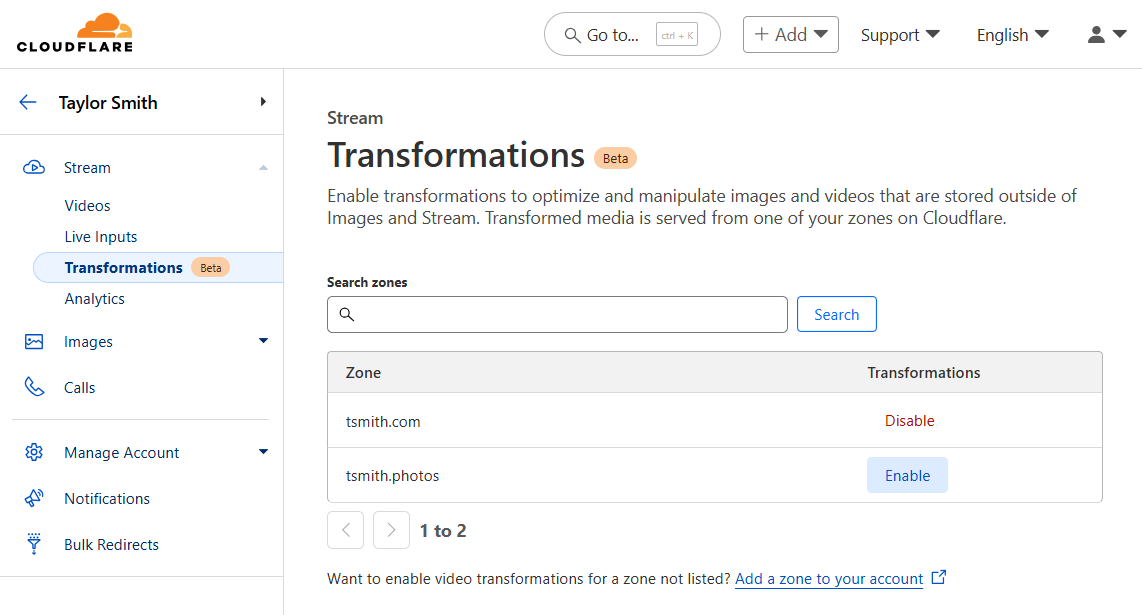
After enabling Media Transformations on a website, it is simple to construct a URL that transforms a video. The pattern is similar to Image Transformations, but uses the media endpoint instead of the image endpoint:
https://example.com/cdn-cgi/media/<OPTIONS>/<SOURCE-VIDEO>The <OPTIONS> portion of the URL is a comma-separated list of flags written as key=value. A few noteworthy flags:
-
modecan bevideo(the default) to output a video,frameto pull a still image of a single frame, or even spritesheet to generate an image with multiple frames, which is useful for seek previews or storyboarding. -
timespecifies the exact start time from the input video to extract a frame or start making a clip -
durationspecifies the length of an output video to make a clip shorter than the original -
fit, together withheightandwidthallow resizing and cropping the output video or frame. -
Setting
audioto false removes the sound in the output video.
The <SOURCE-VIDEO> is a full URL to a source file or a root-relative path if the origin is on the same zone as the transformation request.
A full list of supported options, examples, and troubleshooting information is available in DevDocs.
I used my phone to take this video of the randomness mobile in Cloudflare’s Austin Office and put it in an R2 bucket. Of course, it is possible to embed the original video file from R2 directly:
That video file is almost 30 MB. Let’s optimize it together — a more efficient choice would be to resize the video to the width of this blog post template. Let’s apply a width adjustment in the options portion of the URL:
https://example.com/cdn-cgi/media/width=760/https://pub-d9fcbc1abcd244c1821f38b99017347f.r2.dev/aus-mobile.mp4That will deliver the same video, resized and optimized:
Not only is this video the right size for its container, now it’s less than 4 MB. That’s a big bandwidth savings for visitors.
As I recorded the video, the lobby was pretty quiet, but there was someone talking in the distance. If we wanted to use this video as a background, we should remove the audio, shorten it, and perhaps crop it vertically. All of these options can be combined, comma-separated, in the options portion of the URL:
https://example.com/cdn-cgi/media/mode=video,duration=10s,width=480,height=720,fit=cover,audio=false/https://pub-d9fcbc1abcd244c1821f38b99017347f.r2.dev/aus-mobile.mp4The result:
If this were a product video, we might want a small thumbnail to add to the carousel of images so shoppers can click to zoom in and see it move. Use the “frame” mode and a “time” to generate a static image from a single point in the video. The same size and fit options apply:
https://example.com/cdn-cgi/media/mode=frame,time=3s,width=120,height=120,fit=cover/https://pub-d9fcbc1abcd244c1821f38b99017347f.r2.dev/aus-mobile.mp4Which generates this optimized image:

Try it out yourself using our video or one of your own:
-
Enable transformations on your website/zone and use the endpoint:
https://[your-site]/cdn-cgi/media/ -
Mobile video: https://pub-d9fcbc1abcd244c1821f38b99017347f.r2.dev/aus-mobile.mp4
-
Check out the Media Transformation URL Generator from Kristian Freeman on our Developer Relations team, which he built using the Streamlit Python framework on Workers.
We are eager to start supporting real customer content, and we will right-size our input limitations with our early adopters. To start:
-
Video files must be smaller than 40 megabytes.
-
Files must be MP4s and should be h.264 encoded.
-
Videos and images generated with Media Transformations will be cached. However, in our initial beta, the original content will not be cached which means regenerating a variant will result in a request to the origin.
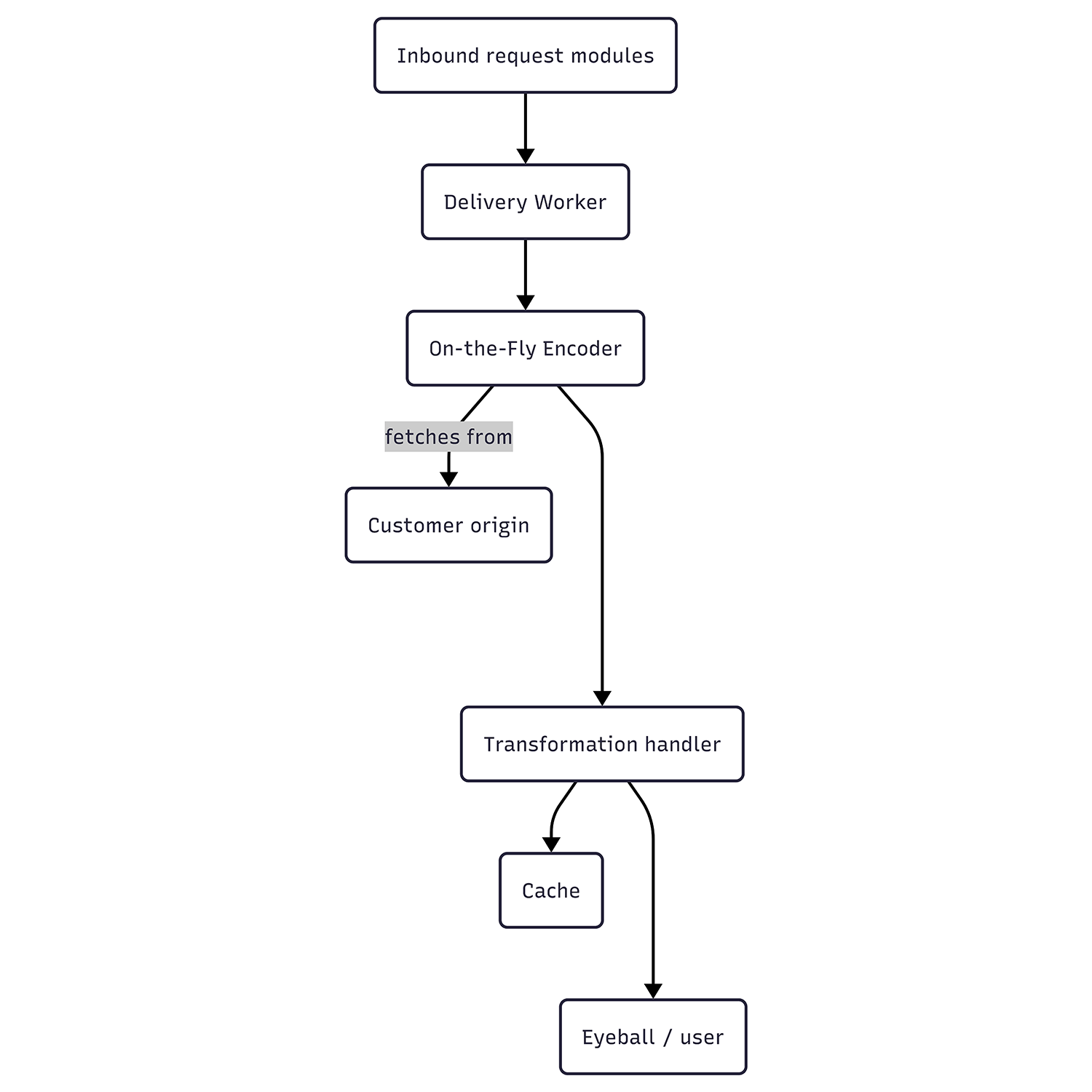
Unlike Stream, Media Transformations receives requests on a customer’s own website. Internally, however, these requests are passed to the same On-the-Fly Encoder (“OTFE”) platform that Stream Live uses. To achieve this, the Stream team built modules that run on our servers to act as entry points for these requests.
These entry points perform some initial validation on the URL formatting and flags before building a request to Stream’s own Delivery Worker, which in turn calls OTFE’s set of transformation handlers. The original asset is fetched from the customer’s origin, validated for size and type, and passed to the same OTFE methods responsible for manipulating and optimizing video or still frame thumbnails for videos uploaded to Stream. These tools do a final inspection of the media type and encoding for compatibility, then generate the requested variant. If any errors were raised along the way, an HTTP error response will be generated using similar error codes to Image Transformations. When successful, the result is cached for future use and delivered to the requestor as a single file. Even for new or uncached requests, all of this operates much faster than the video’s play time.
Media Transformations will be free for all customers while in beta. We expect the beta period to extend into Q3 2025, and after that, Media Transformations will use the same subscriptions and billing mechanics as Image Transformations — including a free allocation for all websites/zones. Generating a still frame (single image) from a video counts as 1 transformation. Generating an optimized video is billed as 1 transformation per second of the output video. Each unique transformation is only billed once per month. All Media and Image Transformations cost $0.50 per 1,000 monthly unique transformation operations, with a free monthly allocation of 5,000.
Using this post as an example, recall the two transformed videos and one transformed image above — the big original doesn’t count because it wasn’t transformed. The first video (showing blog post width) was 15 seconds of output. The second video (silent vertical clip) was 10 seconds of output. The preview square is a still frame. These three operations would count as 26 transformations — and they would only bill once per month, regardless of how many visitors this page receives.
Our short-term focus will be on right-sizing input limits based on real customer usage as well as adding a caching layer for origin fetches to reduce any egress fees our customers may be facing from other storage providers. Looking further, we intend to streamline Images and Media Transformations to further simplify the developer experience, unify the features, and streamline enablement: Cloudflare’s Media Transformations will optimize your images and video, quickly and easily, wherever you need them.
Try it for yourself today using our sample asset above, or get started by enabling Transformations on a zone in your account and uploading a short file to R2, both of which offer a free tier to get you going.