Post Syndicated from Technology Connextras original https://www.youtube.com/watch?v=yO5fJ8z66Z8
Nancy Pelosi on the Future of Global Democracy | The Atlantic at SXSW
Post Syndicated from The Atlantic original https://www.youtube.com/watch?v=uhl2lyIzzME
[$] Heuristics for software-interrupt processing
Post Syndicated from original https://lwn.net/Articles/925540/
The kernel’s software-interrupt (“softirq”) mechanism was added prior to
the 1.0 kernel release, but it implements a design seen in systems that were
already old when Linux was born. For much of that time, softirqs have been
an impediment to the kernel community’s scalability and response-time
goals, but they have proved resistant to removal. A recent discussion on a
proposed new heuristic to mitigate a softirq-related performance problem
may have reinvigorated interested in doing something about this subsystem
as a whole rather than just tweaking the parameters of how it operates.
What’s Up, Home? – Raspberry Pi 4: goodbye or good buy for running Zabbix?
Post Syndicated from Janne Pikkarainen original https://blog.zabbix.com/whats-up-home-raspberry-pi-4-goodbye-or-good-buy-for-running-zabbix/25558/
Is Raspberry Pi 4 a goodbye or a good buy for running Zabbix? How is it performance-wise? Is it reliable? Here’s my nine-month review of it, with a splash of appliance/application performance monitoring.
In about April 2022 when it became clear that I am going to continue my home monitoring project, I bought a Raspberry Pi 4 to run the show. Here’s my opinion on how well it is suited for running Zabbix.
Installing Zabbix
Applying that delicious layer of Zabbix on top of your Raspberry Pi 4 cake is extremely straightforward, as just like for every other platform that Zabbix officially supports, they do have packages and instructions to set up what you’d like to run.

After installing the packages, the next steps are just like with Zabbix running on any other platform, so I am not going to dive into that now.
Modifications to my Raspberry setup
As I do not need to run a graphical environment on my Raspberry, I did disable the graphical environment from starting at all to save some precious RAM and other resources.
After some time I did also purchase an external USB hard disk, as the memory card from where Raspberry Pi 4 runs its OS is not very snappy, especially with write operations, and can also run tight on free space.
Other than that, my Raspberry Pi 4 is running pretty much by default.
How about the performance?
The graphs that you are about to see are from nine months period of time, as that’s about as long I have had the device.

No problem with the CPU usage. It’s been creeping up a little bit over time though, as I have been adding new items to monitoring and also additional software, such as HomeBridge and Home Assistant.

It still has available memory, even though the device runs Zabbix server, MariaDB, Grafana, Mosquitto, Home Assistant and HomeBridge.

As you can see, the number of running processes has grown significantly as I have been adding other stuff than Zabbix.

It’s easy to see when I did switch from an internal memory card to an external USB drive. The disk I/O utilization percentage is hovering at very tolerable levels.

I/O latency has remained about the same.

With only Zabbix, MariaDB and Grafana running the device remained around the 55-60C area, but has been warming to about 70C with the additional software. Still not too bad.
Splash of APM
Have you ever wondered what happens to the memory usage of a wrapper shell script that runs other scripts in a loop and keeps doing that until it’s manually stopped? This happens, it’s boringly stable. The results are brought you to by Zabbix Agent 2 process discovery.

Really, it does not vary much.

But as I have been adding new stuff, clearly the OS needs to do some more swapping and even the script has more page faults than before.
There’s more than that to process discovery, but those were some examples.

Zabbix server itself is doing very well, here are some example stats.
My conclusion: Raspberry Pi 4 is an excellent Zabbix server for smaller environments and a very good Zabbix proxy candidate. It’s been rock solid.
This post was originally published on the author’s page.
Top 50 most impersonated brands in phishing attacks and new tools you can use to protect your employees from them
Post Syndicated from Alexandra Moraru original https://blog.cloudflare.com/50-most-impersonated-brands-protect-phishing/
Someone in your organization may have just submitted an administrator username and password for an internal system to the wrong website. And just like that, an attacker is now able to exfiltrate sensitive data.
How did it all happen? A well crafted email.
Detecting, blocking, and mitigating the risks of phishing attacks is arguably one of the hardest challenges any security team is constantly facing.
Starting today, we are opening beta access to our new brand and anti-phishing tools directly from our Security Center dashboard, allowing you to catch and mitigate phishing campaigns targeting your organization even before they happen.
The challenge of phishing attacks
Perhaps the most publicized threat vector over the past several months has been phishing attacks. These attacks are highly sophisticated, difficult to detect, becoming more frequent, and can have devastating consequences for businesses that fall victim to them.
One of the biggest challenges in preventing phishing attacks is the sheer volume and the difficulty of distinguishing legitimate emails and websites from fraudulent ones. Even when users are vigilant, it can be hard to spot the subtle differences that attackers use to make their phishing emails and websites look convincing.
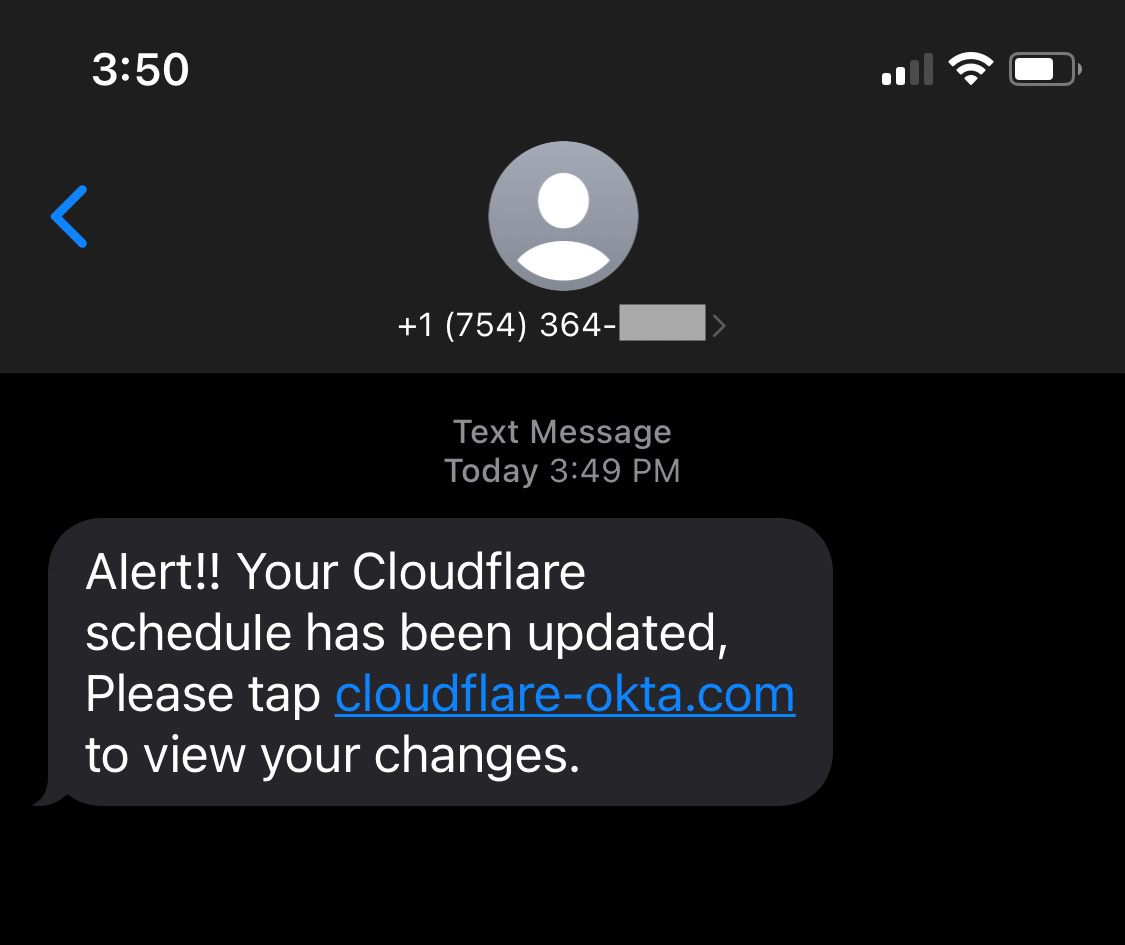
For example, last July our Cloudflare One suite of products and use of physical security keys thwarted the sophisticated “Oktapus” phishing attack targeting Cloudflare employees. The attacker behind the “Oktapus” attack that successfully compromised more than one hundred companies, registered the “cloudflare-okta.com” domain name just 40 minutes before sending it to our employees.
At that time, we identified phishing domains with our secure registrar product—but there was a delay in receiving the list of newly registered domains for monitoring purposes. Today, by streaming newly observed domains resolved by our 1.1.1.1 resolver (and other resolvers), we are able to detect phishing domains almost immediately. This gives us the upper hand and allows us to block phishing attempts before they happen.
We want to start giving our customers access to the same tools we use internally, to help you fight the ongoing challenge.
New Brand and Phishing Protection tools in Cloudflare’s Security Center
We’re expanding the phishing protections available to Cloudflare One customers by automatically identifying—and blocking—so-called “confusable” domains. Common misspellings (clodflare.com) and concatenation of services (cloudflare-okta.com) are often registered by attackers to trick unsuspecting victims into submitting private information such as passwords, and these new tools provide an additional layer of protection against such attempts.
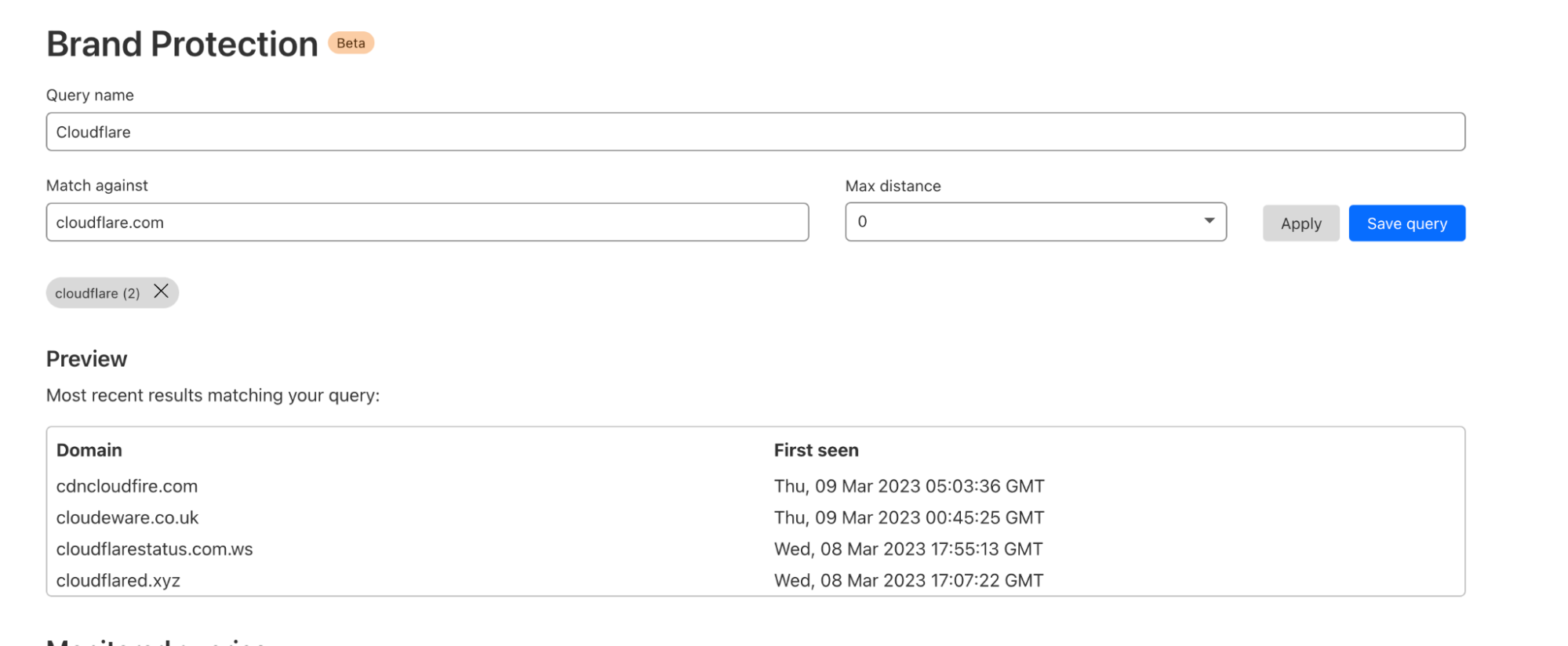
The new Brand and Phishing Protection tools can be found under the Cloudflare Security Center, and provide even more controls (e.g. custom strings to monitor, searchable list of historical domains, etc.) to our customers. Cloudflare One plans can have access, with the level of control, visibility, and automation based on their plan type.
New domain brand matching and alerting
At the heart of our new brand protection feature is our ability to detect hostnames created specifically for phishing legitimate brands. We start by monitoring the first use of a domain or subdomain by sifting through trillions of daily DNS queries made to 1.1.1.1, Cloudflare’s public DNS resolver, in order to compile a list of hostnames in the wild for the first time.
Using this list, we perform ”fuzzy” matching, a technique used to match two strings that are similar in meaning or spelling, against our users’ saved patterns in real-time. We compare the strings and calculate a similarity score based on various factors (ie: phonetics, distance, substring matching). These saved patterns, which can be strings with edit distances, enable our system to generate alerts whenever we detect a match with any of the domains in the list.
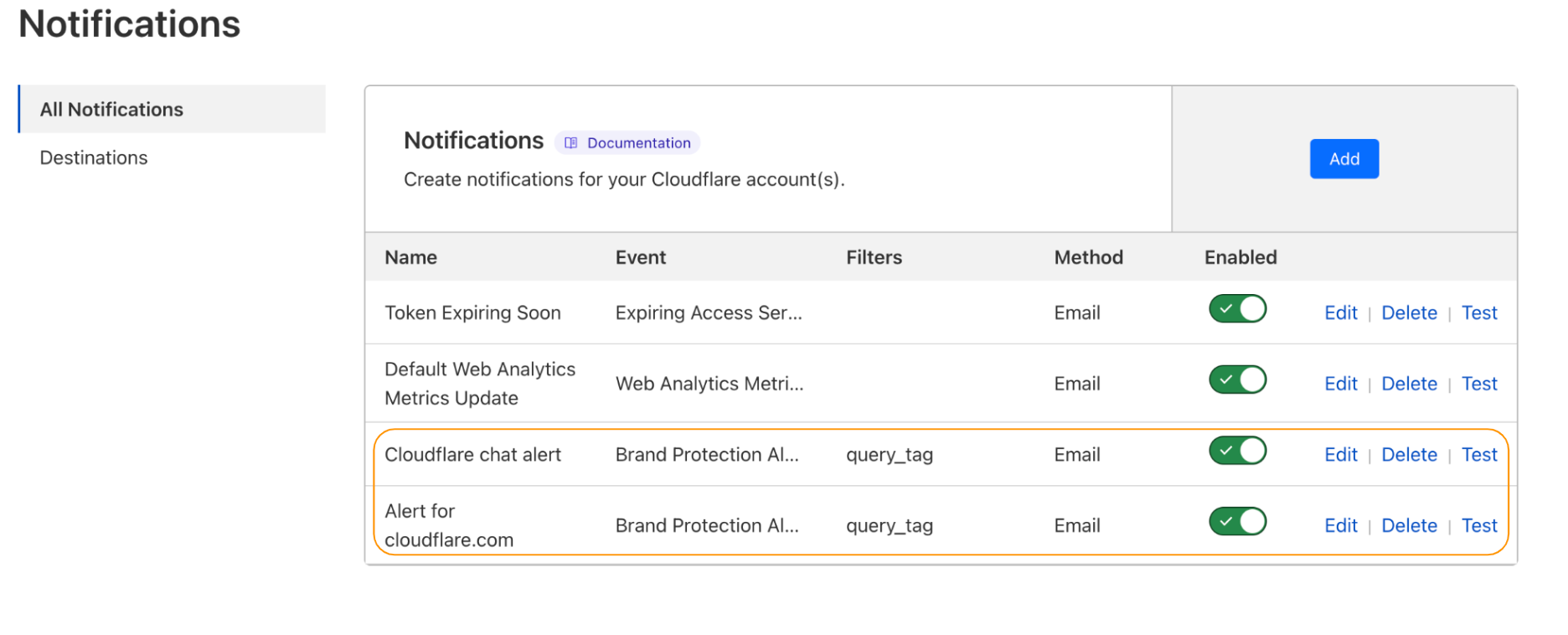
While our users currently have to create and save these queries, we will introduce an automated matching system in the future. This system will simplify the process of detecting matches for our users, though custom strings will still be available for security teams tracking more complex patterns.
Historical searches
In addition to real-time monitoring, we offer historical searches (saved queries) and alerts for newly observed domains within the last 30 days. When a new pattern is created, we will display search results from the last 30 days to show any potential matches. This allows security teams to quickly assess the potential threat level of a new domain and take necessary actions.
Furthermore, this search mechanism can also be used for ad hoc domain hunting, providing additional flexibility for security teams who may need to investigate specific domains or patterns.
Observations in the wild: most phished brands
While building out these new Brand Protection tools, we wanted to test our capabilities against a broad set of commonly phished brands. To do so, we examined the frequency that domains containing phishing URLs were resolved against our 1.1.1.1 resolver. All domains that are used for shared services (like hosting sites Google, Amazon, GoDaddy) that could not be verified as a phishing attempt were removed from the data set.
The top 50 brands we found, along with one of the most commonly used domains for phishing those brands can be found in the table below.
| Rank | Brand | Sample domain used to phish brand[1] |
|---|---|---|
| 1 | AT&T Inc. | att-rsshelp[.]com |
| 2 | PayPal | paypal-opladen[.]be |
| 3 | Microsoft | login[.]microsoftonline.ccisystems[.]us |
| 4 | DHL | dhlinfos[.]link |
| 5 | Meta | facebookztv[.]com |
| 6 | Internal Revenue Service | irs-contact-payments[.]com |
| 7 | Verizon | loginnnaolcccom[.]weebly[.]com |
| 8 | Mitsubishi UFJ NICOS Co., Ltd. | cufjaj[.]id |
| 9 | Adobe | adobe-pdf-sick-alley[.]surge[.]sh |
| 10 | Amazon | login-amazon-account[.]com |
| 11 | Apple | apple-grx-support-online[.]com |
| 12 | Wells Fargo & Company | connect-secure-wellsfargo-com.herokuapp[.]com |
| 13 | eBay, Inc. | www[.]ebay8[.]bar |
| 14 | Swiss Post | www[.]swiss-post-ch[.]com |
| 15 | Naver | uzzmuqwv[.]naveicoipa[.]tech |
| 16 | Instagram (Meta) | instagram-com-p[.]proxy.webtoppings[.]bar |
| 17 | WhatsApp (Meta) | joingrub-whatsapp-pistol90[.]duckdns[.]org |
| 18 | Rakuten | rakutentk[.]com |
| 19 | East Japan Railway Company | www[.]jreast[.]co[.]jp[.]card[.]servicelist[].bcens[.]net |
| 20 | American Express Company | www[.]webcome-aexp[.]com |
| 21 | KDDI | aupay[.]kddi-fshruyrt[.]com |
| 22 | Office365 (Microsoft) | office365loginonlinemicrosoft[.]weebly[.]com |
| 23 | Chase Bank | safemailschaseonlineserviceupgrade09[.]weebly[.]com |
| 24 | AEON | aeon-ver1fy[.]shop |
| 25 | Singtel Optus Pty Limited | myoptus[.]mobi |
| 26 | Coinbase Global, Inc. | supp0rt-coinbase[.]com |
| 27 | Banco Bradesco S.A. | portalbradesco-acesso[.]com |
| 28 | Caixa Econômica Federal | lnternetbanklng-caixa[.]com |
| 29 | JCB Co., Ltd. | www[.]jcb-co-jp[.]ascaceeccea[.]ioukrg[.]top |
| 30 | ING Group | ing-ingdirect-movil[.]com |
| 31 | HSBC Holdings plc | hsbc-bm-online[.]com |
| 32 | Netflix Inc | renew-netflix[.]com |
| 33 | Sumitomo Mitsui Banking Corporation | smbc[.]co[.]jp[.]xazee[.]com |
| 34 | Nubank | nuvip2[.]ru |
| 35 | Bank Millennium SA | www[.]bankmillenium-pl[.]com |
| 36 | National Police Agency Japan | sun[.]pollice[.]xyz |
| 37 | Allegro | powiadomienieallegro[.]net |
| 38 | InPost | www.inpost-polska-lox.order9512951[.]info |
| 39 | Correos | correosa[.]online |
| 40 | FedEx | fedexpress-couriers[.]com |
| 41 | LinkedIn (Microsoft) | linkkedin-2[.]weebly[.]com |
| 42 | United States Postal Service | uspstrack-7518276417-addressredelivery-itemnumber.netlify[.]app |
| 43 | Alphabet | www[.]googlecom[.]vn10000[.]cc |
| 44 | The Bank of America Corporation | baanofamericase8[.]hostfree[.]pw |
| 45 | Deutscher Paketdienst | dpd-info[.]net |
| 46 | Banco Itaú Unibanco S.A. | silly-itauu[.]netlify[.]app |
| 47 | Steam | gift-steam-discord[.]com |
| 48 | Swisscom AG | swiss-comch[.]duckdns[.]org |
| 49 | LexisNexis | mexce[.]live |
| 50 | Orange S.A. | orange-france24[.]yolasite[.]com |
[1] Phishing sites are typically served on a specific URL and not on the root, e.g., hxxp://example.com/login.html rather than hxxp://example.com/. Full URLs are not provided here.
Combining threat intelligence capabilities with Zero Trust enforcement
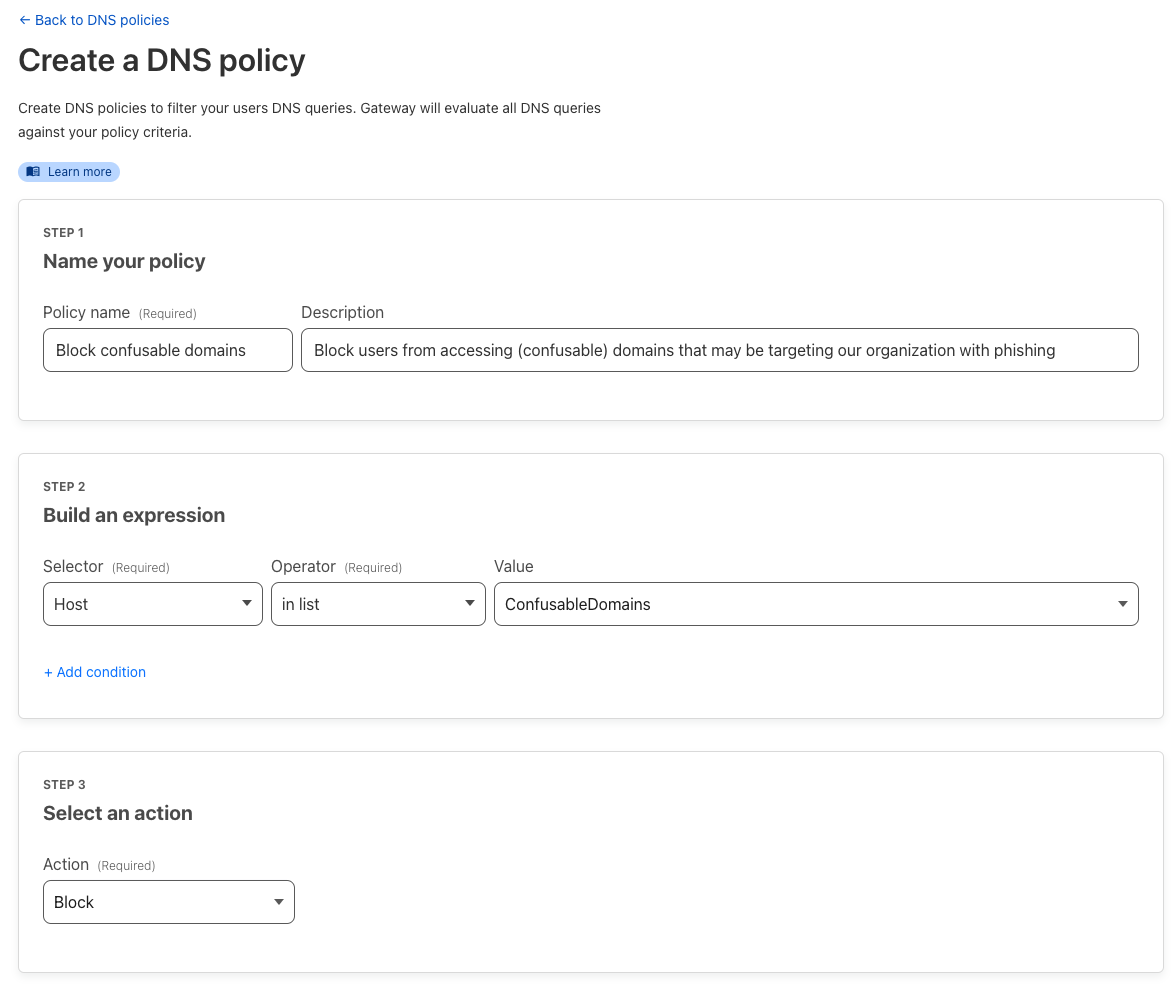
The new features become a lot more effective for customers using our Zero Trust product suite. You can in fact easily block any confusable domains found as soon as they are detected by creating Cloudflare Gateway or DNS policy rules. This immediately stops your users from resolving or browsing to potentially malicious sites thwarting attacks before they happen.
Future enhancements
The new features are just the start of our broader brand infringement and anti-phishing security portfolio.
Matching against SSL/TLS certificates
In addition to matching against domains, we plan to also match against new SSL/TLS certificates logged to Nimbus, our Certificate Transparency log. By analyzing CT logs, we can identify potentially fraudulent certificates that may be used in phishing attacks. This is helpful as certificates are typically created shortly after domain registration in an attempt to give the phishing site more legitimacy by supporting HTTPS.
Automatic population of managed lists
While today customers can script updates to custom lists referenced in a Zero Trust blocking rule, as mentioned above, we plan to automatically add domains to dynamically updating lists. Additionally, we will automatically add matching domains to lists that can be used in Zero Trust rules, e.g. blocking from Gateway.
Changes in domain ownership and other metadata
Lastly, we plan to provide the ability to monitor domains for changes in ownership or other metadata, such as registrant, name servers, or resolved IP addresses. This would enable customers to track changes in key information related to their domains and take appropriate action if necessary.
Getting started
If you’re an Enterprise customer, sign up for Beta access for Brand protection now to gain access to private scanning for your domains, save queries and set up alerts on matched domains.
How to stay safe from phishing
Post Syndicated from João Tomé original https://blog.cloudflare.com/stay-safe-phishing-attacks/

As you wake up in the morning feeling sleepy and preoccupied, you receive an urgent email from a seemingly familiar source, and without much thought, you click on a link that you shouldn’t have. Sometimes it’s that simple, and this more than 30-year-old phishing method means chaos breaks loose – whether it’s your personal bank account or social media, where an attacker also begins to trick your family and friends; or at your company, with what could mean systems and data being compromised, services being disrupted, and all other subsequent consequences. Following up on our “Top 50 Most Impersonated Brands in phishing attacks” post, here are some tips to catch these scams before you fall for them.
We’re all human, and responding to or interacting with a malicious email remains the primary way to breach organizations. According to CISA, 90% of cyber attacks begin with a phishing email, and losses from a similar type of phishing attack, known as business email compromise (BEC), are a $43 billion problem facing organizations. One thing is for sure, phishing attacks are getting more sophisticated every day thanks to emerging tools like AI chatbots and the expanded usage of various communication apps (Teams, Google Chat, Slack, LinkedIn, etc.).
What is phishing? Where it starts (the hacker’s foot in the door)
Seems simple, but it is always good to remind everyone in simple terms. Email phishing is a deceptive technique where the attacker uses various types of bait, such as a convincing email or link, to trick victims into providing sensitive information or downloading malware. If the bait works — the attacker only needs it to work once — and the victim clicks on that link, the attacker now has a foot in the door to carry out further attacks with potentially devastating consequences. Anyone can be fooled by a general “phish” — but these attacks can also be focused on a single target, with specific information about the victim, called spear phishing.
Recent examples of phishing include Reddit as a target, Twilio, and also Cloudflare in a similar attack around the same time — we explain here “The mechanics of a sophisticated phishing scam and how we stopped it” thanks to our own use of Cloudflare One products. In some cases, a home computer of an employee as a target can be the door opening for hackers in what is a few weeks later a major breach.
Some alerts to bear in mind include the UK’s National Cyber Security Centre (NCSC), that phishing attacks are targeting individuals and organizations in a range of sectors. The White House National Cybersecurity Strategy (Cloudflare is ready for that) also highlights those risks. Germany, Japan or Australia are working on a similar approach.
Without further ado, here are some tips to protect yourself from phishing attacks.
Tips for Staying Safe Online: How to Avoid Being Reeled in By Phishing Scams
- Don’t click strategy. If you get an email from your bank or government agencies like the IRS, instead of clicking on a link in the email, go directly to the website itself.
- Look out for misspellings or strange characters in the sender’s email address. Phishing attempts often rely on look-alike domains or ‘from’ emails to encourage clicks. Common tactics are extra or switched letters (microsogft[.]com), omissions (microsft[.]com) or characters that look alike (the letter o and 0, or micr0soft[.]com).
Here’s a classic brand impersonation phish, using Chase as the trusted lure:

- Think before clicking links to “unlock account” or “update payment details.” Technology services were one of the top industries to be used in phishing campaigns, due to the personal information that can be found in our email, online storage, and social media accounts. Hover over a link and confirm it’s a URL you’re familiar with before clicking.
- Be wary of financial-related messages. Financial institutions are the most likely industry to be phished, so pause and assess any messages asking to accept or make a payment.
- Look out for messages that create a sense of urgency. Emails or text messages that warn of a final chance to pick up a package, or last chance to confirm an account, are likely fake. The rise in online shopping during the pandemic has made retail and logistics/shipping companies a hot target for these types of phishing attempts.
Both financial and package delivery scams typically use the SMS phishing attack, or smishing, and are related to the attacker’s use of SMS messages to lure the victims. Cloudflare was the target of this type of phishing a few months ago (it was stopped). Next, we show you an example of a text message from that thwarted attack:
- If things sound too good to be true, they probably are. Beware of “limited time offers” for free gifts, exclusive services, or great deals on trips to Hawaii or the Maldives. Phishing emails target our senses of satisfaction, pleasure, and excitement to compel us to make split second decisions without thinking things through. These types of tactics are lures for a user to click on a link or provide sensitive information. Pause, even if it’s for a few seconds, and quickly look up the offer online to see if others have received similar offers.
- Very important message from a very important… Phishing emails sometimes mimic high-ranking individuals, urging urgent action such as money transfers or credential sharing. Scrutinize emails with such requests, and verify their authenticity. Contact your manager if the sender is a CEO. For unfamiliar politicians, assess the request’s feasibility before responding.
- The message body is full of errors (but beware of AI tools). Poor grammar, spelling, and sentence structure may indicate that an email is not from a reputable source. That said, recent AI text tools have made it easier for hackers or bad actors to create convincing and error-free copies.
- Romance scam emails. These are emails where scammers adopt a fake online identity to gain a victim’s affection and trust. They may also send an email that appears to have been sent in error, prompting the recipient to respond and initiating a conversation with the fraudster. This tactic is used to lure victims.
- Use a password manager. Password managers will verify if the domain name matches what you expect, and will warn you if you try to fill in your password on the wrong domain name.
If you want to apply even greater scrutiny to a potential phishing email, you can check out our learning center to understand what happens when an email does not pass standard authentication methods like SPF, DKIM, or DMARC.
A few more Cloudflare related trends, besides the Top 50 Most Impersonated Brands, comes from Cloudflare Area 1. In 2022, our services focused on email protection identified and kept 2.3 billion unwanted messages out of customer inboxes. On average, we blocked 6.3 million messages per day. That’s almost 44,000 every 10 minutes, which is the time it takes to read a blog post like this one.
Typically, the type of email threats most used (looking at our Area 1 January 2023 data) are: identity deception, malicious links, brand impersonation, malicious attachments, scam, extortion, account compromise. And there’s also voice phishing.
Voice phishing, also known as vishing, is another common threat and is related to the practice of tricking people into sharing sensitive information through telephone calls. Victims are led to believe they are talking to a trusted entity, such as the tax authority, their employer, or an airline they use. Here, you can learn more about protecting yourself or your company from voice phishing.
Another type of attack is the watering hole attack, where hackers identify websites frequented by users within a targeted organization and then compromise those websites to distribute malware. Those are often times associated with supply chain exploitation.
Next, we show a phishing email example that was received from a real vendor that got an email account hacked in what is called vendor invoice fraud:
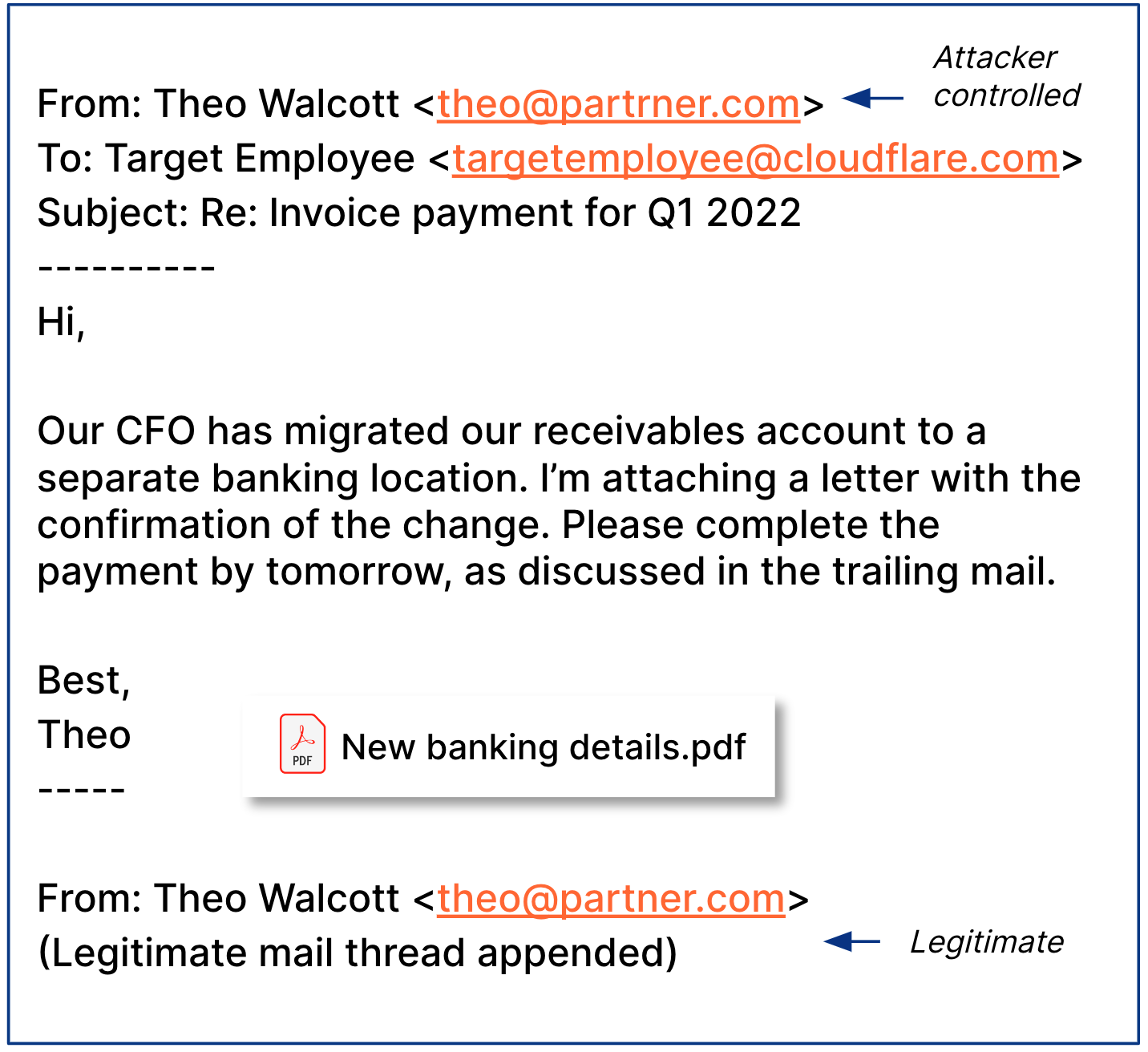
Last but not least in our list of examples, there’s also Calendar phishing, where a fraudster could potentially use a cloud email account to inject fake invites into target employee calendars. Those are detected and avoided with products in our Cloudflare Zero Trust product.
Email Link Isolation approach: a safety net for phishing attacks
As we wrote recently for CIO Week, there’s also a possible safety net, even if the best trained user mistakes a good link from a bad link. Leveraging the Cloudflare Browser Isolation service, Email Link Isolation turns Cloudflare’s cloud email security into the most comprehensive solution when it comes to protecting against phishing attacks that go beyond just email. It rewrites and isolates links that could be exploited, keeps users vigilant by alerting them of the uncertainty around the website they’re about to visit, and protects against malware and vulnerabilities. Also, in true Cloudflare fashion, it’s a one-click deployment. Check the related blog post to learn more.
That said, not all malicious links come from emails. If you’re concerned about malicious links that may come through Instant Messaging or other communication tools (Slack, iMessage, Facebook, Instagram, WhatsApp, etc), Zero Trust and Remote Browser Isolation are an effective way to go.
Conclusion: better safe than sorry
As we saw, email is one of the most ubiquitous and also most exploited tools that businesses use every single day. Baiting users into clicking malicious links within an email has been a particularly long-standing tactic for the vast majority of bad actors, from the most sophisticated criminal organizations to the least experienced attackers. So, remember, when online:
Be cautious. Be prepared. Be safe.
If you want to learn more about email security, you can visit our Learning Center or reach out for a complimentary phishing risk assessment for your organization.
Mutual TLS now available for Workers
Post Syndicated from Tanushree Sharma original https://blog.cloudflare.com/mtls-workers/
In today’s digital world, security is a top priority for businesses. Whether you’re a Fortune 500 company or a startup just taking off, it’s essential to implement security measures in order to protect sensitive information. Security starts inside an organization; it starts with having Zero Trust principles that protect access to resources.
Mutual TLS (mTLS) is useful in a Zero Trust world to secure a wide range of network services and applications: APIs, web applications, microservices, databases and IoT devices. Cloudflare has products that enforce mTLS: API Shield uses it to secure API endpoints and Cloudflare Access uses it to secure applications. Now, with mTLS support for Workers you can use Workers to authenticate to services secured by mTLS directly. mTLS for Workers is now generally available for all Workers customers!
A recap on how TLS works
Before diving into mTLS, let’s first understand what TLS (Transport Layer Security) is. Any website that uses HTTPS, like the one you’re reading this blog on, uses TLS encryption. TLS is used to create private communications on the Internet – it gives users assurance that the website you’re connecting to is legitimate and any information passed to it is encrypted.
TLS is enforced through a TLS handshake where the client and server exchange messages in order to create a secure connection. The handshake consists of several steps outlined below:
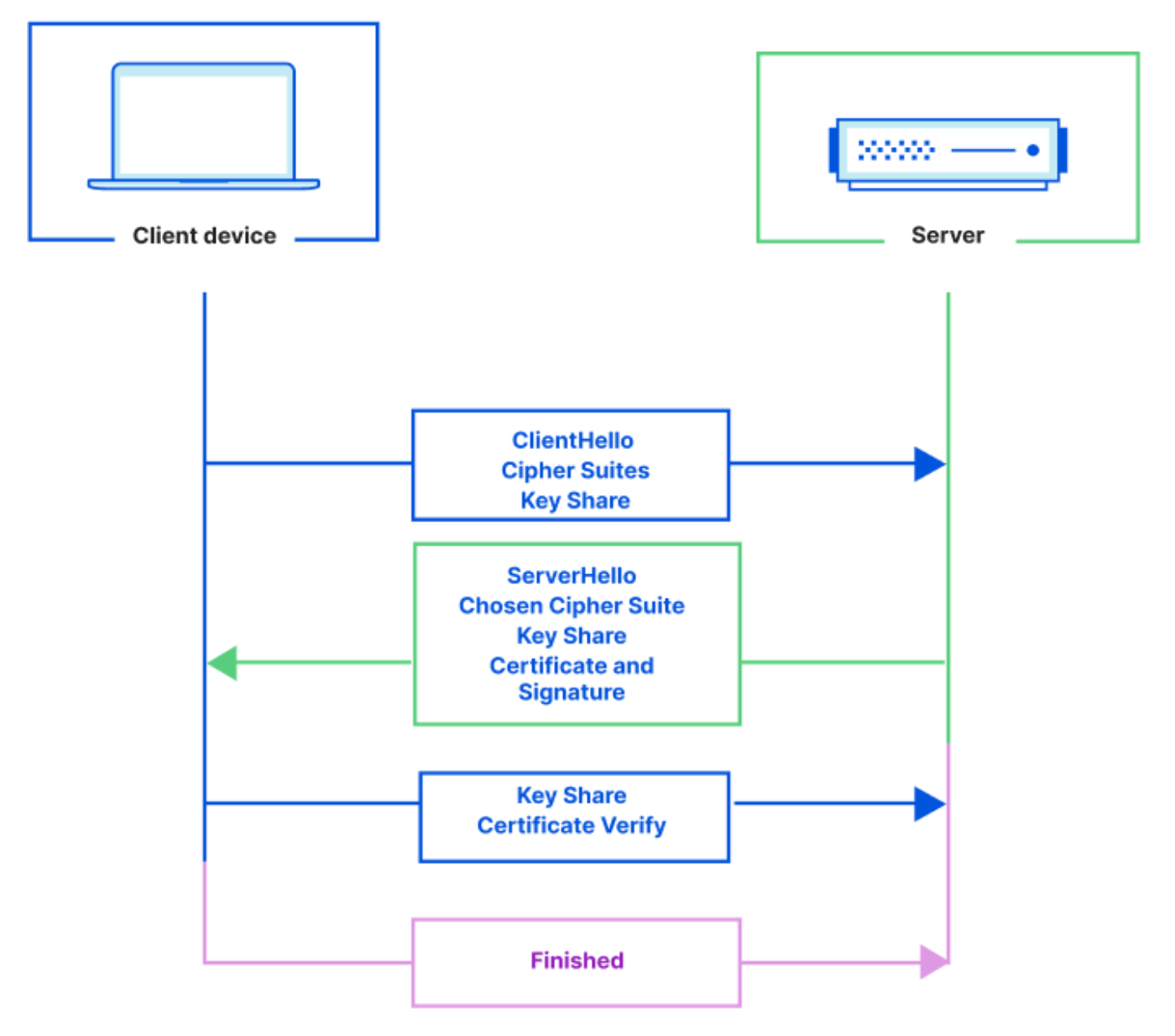
The client and server exchange cryptographic keys, the client authenticates the server’s identity and the client and server generate a secret key that’s used to create an encrypted connection.
For most connections over the public Internet TLS is sufficient. If you have a website, for example a landing page, storefront or documentation, you want any user to be able to navigate to it – validating the identity of the client isn’t necessary. But, if you have services that run on a corporate network or private/sensitive applications you may want access to be locked down to only authorized clients.
Enter mTLS
With mTLS, both the client and server present a digital certificate during the TLS handshake to mutually verify each other’s credentials and prove identities. mTLS adds additional steps to the TLS handshake in order to authenticate the client as well as the server.
In comparison to TLS, with mTLS the server also sends a ‘Certificate Request’ message that contains a list of parties that it trusts and it tells the client to respond with its certificate. The mTLS authentication process is outlined below:
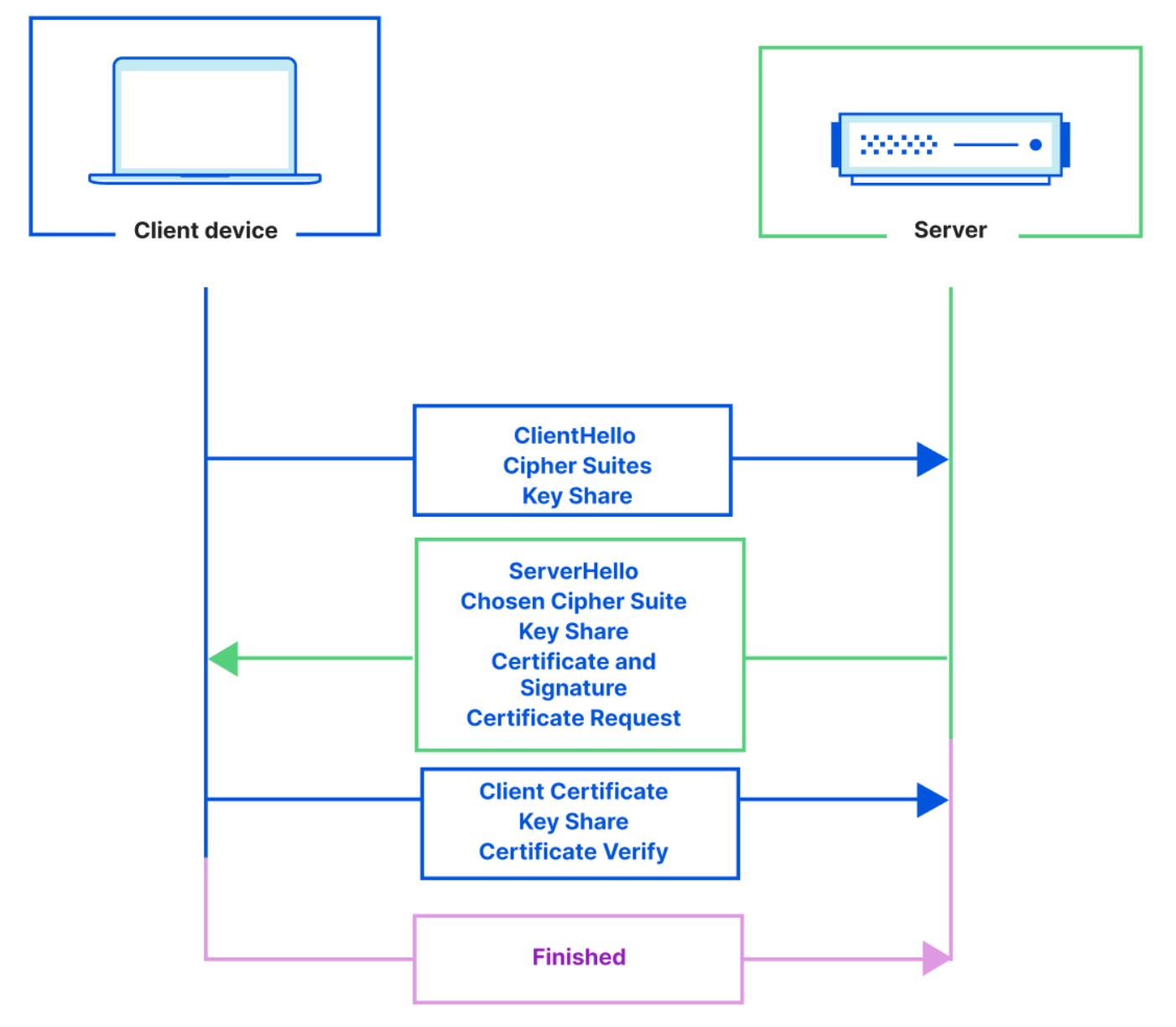
mTLS is typically used when a managed list of clients (eg. users, devices) need access to a server. It uses cryptographically signed certificates for authentication, which are harder to spoof than passwords or tokens. Some common use cases include: communications between APIs or microservices, database connections from authorized hosts, and machine-to-machine IoT connections.
Introducing mTLS on Workers
With mTLS support on Workers, your Workers can now communicate with resources that enforce an mTLS connection. mTLS through Workers can be configured in just a few easy steps:
1. Upload a client certificate and private key obtained from your service that enforces mTLS using wrangler
wrangler mtls-certificate upload --cert cert.pem --key key.pem --name my-client-cert
2. Add a mtls_certificates binding in your project’s wrangler.toml file. The CERTIFICATE_ID is returned after your certificate is uploaded in step 1
mtls_certificates = [
 { binding = "MY_CERT", certificate_id = "<CERTIFICATE_ID>" }
]
3. Add the mTLS binding to any fetch() requests. This will present the client certificate when establishing the TLS connection.
index.js

export default {
   async fetch(request, environment) {
       return await environment.MY_CERT.fetch("https://example-secure-origin.com")
   }

}
To get per-request granularity, you can configure multiple mTLS certificates if you’re connecting to multiple hosts within the same Worker. There’s a limit of 1,000 certificates that can be uploaded per account. Contact your account team or reach out through the Cloudflare Developer Discord if you need more certificates.
Try it yourself
It’s that easy! For more information and to try it yourself, refer to our developer documentation – client authentication with mTLS.
We love to see what you’re developing on Workers. Join our Discord community and show us what you’re building!
Cloudflare Aegis: dedicated IPs for Zero Trust migration
Post Syndicated from David Tuber original https://blog.cloudflare.com/cloudflare-aegis/


Realizing the goals of Zero Trust is a journey: moving from a world of static networking and hardware concepts to organization-based access and continuous validation is not a one-step process. This challenge is never more real than when dealing with IP addresses. For years, companies on the Internet have built hardened systems based on the idea that only users with certain IP addresses can access certain resources. This implies that IP addresses are tied with identity, which is a kluge and can actually open websites up to attack in some cases. For large companies with many origins and applications that need to be protected in a Zero Trust model, it’s important to be able to support their transition to Zero Trust using mTLS, Access, or Tunnel. To make the transition some organizations may need dedicated IP addresses.
Today we’re introducing Cloudflare Aegis: dedicated IPs that we use to send you traffic. This allows you to lock down your services and applications at an IP level and build a protected environment that is application aware, protocol aware, and even IP-aware. Aegis is available today through Early Access for Enterprise customers, and you can talk to your account team if you want to learn more about it.
We’re going to talk about what Aegis is, give an example of how customers are using it today to secure their networks and services, and talk about how it can integrate with existing products and services to help protect you on your Zero Trust journey. But before we get into what Aegis is, let’s talk about why we built it.
Protecting your services at scale
Cloudflare protects your networks and services from attackers and improves your application performance, but protecting your origin on its own is still an important challenge that must be tackled. To help, Cloudflare built mTLS support and enforcement in conjunction with API Shield, Cloudflare Access, and Cloudflare Tunnel to help enforce a zero trust approach to security: the only entities who can access your origins are ones with the proper certificates, which are configured in Cloudflare and revalidated on a regular basis. Bad traffic is explicitly blocked because the networks and services are set up to only receive encrypted, authenticated traffic.
While mTLS and Access are great for protecting networks and applications regardless of what IP addresses are being used, it isn’t always feasible to deploy at large scale in a short amount of time, especially if you haven’t already configured it for every application or service you build. For some customers who have hundreds, maybe even thousands of applications or services protected behind Cloudflare, adding mTLS or Access for every single origin is a significant task. Some customers might have an additional problem: they can’t keep track of every service so they don’t know where to put mTLS configurations. Enforcing good security behavior can take years in this case, and may have a long tail of unprotected origins that can leave customers vulnerable to potential attacks through spoofing Cloudflare IPs and gaining access to customer networks and user data.
How does Cloudflare Aegis protect you?
What our customers want to be able to do is lock down their entire network by getting dedicated egress IPs from Cloudflare: a small list of IP addresses that Cloudflare uses to send traffic which are reserved only for them which they can configure in their L3 firewalls and block everything else. By ensuring that only a single customer’s traffic will use those dedicated IP addresses, customers have essentially bought blanket protection for their network and give them an additional layer of security for their networks and applications once mTLS is set up. To outline how Cloudflare Aegis might help protect a customer, let’s consider Blank Bank, a fictional customer.
Blank Bank has about 900 applications and services scattered across different instances using a mix of on-premise equipment and cloud services. Blank Bank relies on Cloudflare for L7 services like CDN, DDoS, WAF, and Bot Management, but does not implement mTLS to any of their origins today. During a recent security audit, Blank Bank was told that all new feature development would stop until they were able to secure all of their applications and services to prevent outside traffic from reaching any of the services behind Cloudflare. The audit found that existing services did not implement sufficient security measure at the application, and allowlisting Cloudflare IPs was not enough to secure the services because potential attackers could use Workers to access Blank Bank services outside the prescribed APIs and data flows. Blank Bank was told to apply security precautions as soon as possible. But adding mTLS to each of their 900 applications and services could take years as each service must be configured individually, and they want to keep improving their service now.
Cloudflare Aegis helps solve this problem by scoping the number of IPs we use to talk to Blank Bank from millions down to one: the private egress IP we allocated for them and only them. This IP address ensures that the only traffic that should be reaching Blank Bank servers comes from an IP meant for only Blank Bank traffic: no other Cloudflare customer attempting to reach Blank Bank will have this IP address. Furthermore, this IP is not publicly listed making it harder for an attacker to figure out what IP Cloudflare is using to speak to Blank Bank. With this, Blank Bank can restrict their network Access Control Lists (ACLs) to only allow traffic coming from this IP into their network. Here’s how their network firewall looks before Aegis:
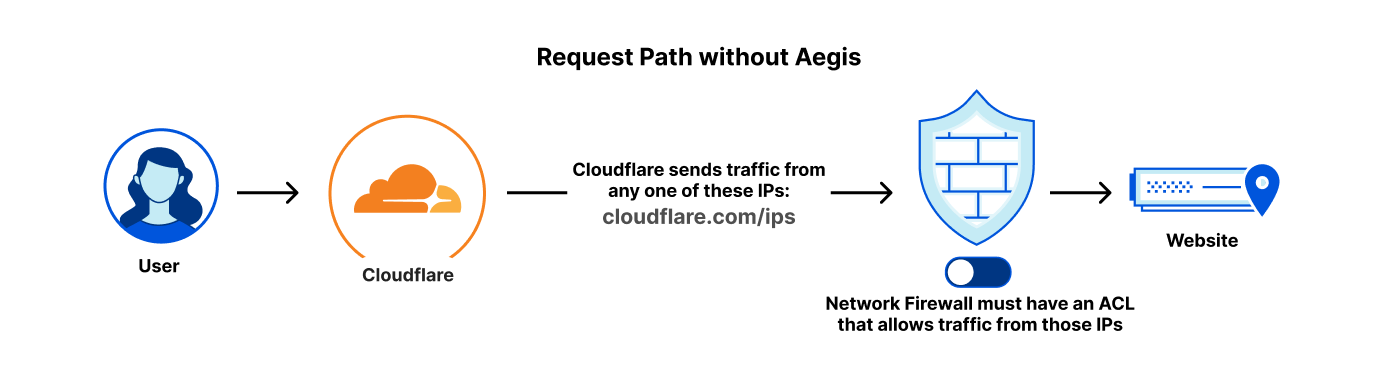
After getting an Aegis IP, they can completely lock down their firewalls to only allow traffic from the Aegis IP that is reserved for them:
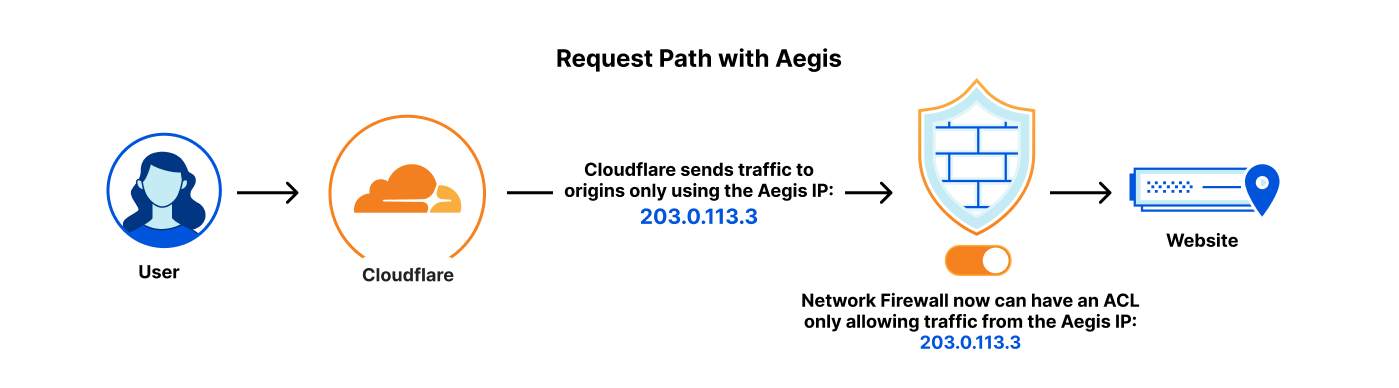
Simply by making a change of egress IP, we’ve been able to better protect Blank Bank’s entire network, ensuring they can keep developing new features and improving their already stellar customer experience, while keeping their endpoints safe until they are able to deploy mTLS to every single origin they need to.
Every sword needs a shield
Cloudflare Aegis pairs really well with any of our products to provide heightened application security and protection while allowing you to get things done. Let’s talk about how it can work with some of our products to improve security posture, such as Cloudflare Access, Cloudflare Network Interconnect, and Cloudflare Workers.
Cloudflare Access + CNI
Cloudflare Aegis works really well with Access and CNI to provide a completely secure application access framework that doesn’t even use the public Internet. Access provides the authorization security and caching to ensure that your policies are always being enforced from beyond the application’s server. Aegis ensures that all requests for your application come through a dedicated IP that we assign you. And finally, Cloudflare Network Interconnect provides the private path from Cloudflare over to your application, where you can apply L3 firewall policies to completely protect your network and applications.
This set up of protecting the path to your services sounds a lot like another product we offer: Cloudflare Tunnel. Cloudflare Tunnel encrypts and protects traffic from Cloudflare to an origin network by installing a daemon on the server-side machines. In terms of goals of protecting the origin network by creating private network concepts, Tunnel and this set up are very much comparable. However, some customers might not necessarily want to expose the public endpoints that Tunnel requires. This setup can protect your origin servers without needing to expose anything to the public Internet. This setup is also easier to configure from an application point of view: you don’t need to configure JWT or install Tunnel on your origin: you can configure a firewall policy instead. This makes setting up Access across an organization very easy.
Workers
Aegis and Workers (and the rest of our developer platform) pair incredibly well together. Whenever our developer platform needs to access your services, when paired with Aegis, they’ll use dedicated IPs. This allows your network to be extra protected and ensure that only the Workers you assign will access your endpoints.
Shields up
Many people view the Internet like the wild west, where anything can happen. Attackers can DDoS origins, and they can spoof IP addresses and pretend to be someone else. But with Cloudflare Aegis, you get an extra shield to protect your origin network so that attackers can’t get in. The IPs that you receive traffic from are reserved only for you and no one else, ensuring that the only users that access your network are the ones that you want to access it, and come through those IP addresses.
If you’re interested in better locking down your networks and applications with Cloudflare Aegis, reach out to your account team today to get started and give yourself a shield you can use to defend yourself.
Using Cloudflare Access with CNI
Post Syndicated from David Tuber original https://blog.cloudflare.com/access-aegis-cni/


We are thrilled to introduce an innovative new approach to secure hosted applications via Cloudflare Access without the need for any installed software or custom code on your application server. But before we dive into how this is possible, let’s review why Access previously required installed software or custom code on your application server.
Protecting an application with Access
Traditionally, companies used a Virtual Private Network (VPN) to access a hosted application, where all they had to do was configure an IP allowlist rule for the VPN. However, this is a major security threat because anyone on the VPN can access the application, including unauthorized users or attackers.
We built Cloudflare Access to replace VPNs and provide the option to enforce Zero Trust policies in hosted applications. Access allows you to verify a user’s identity before they even reach the application. By acting as a proxy in front of your application’s hostname (e.g. app.example.com), Cloudflare enables strong verification techniques such as identity, device posture, hardkey MFA, and more. All without having to directly add SSO or Authentication logic directly into your applications.
However, since Access enforces at a hostname level, there is still a potential for bypass – the origin server IP address. This means that if someone knows your origin server IP address, they can bypass Access and directly interact with the target application. Seems scary, right? Luckily, there are proven solutions to prevent an origin IP attack.
Traditionally, organizations use two approaches to prevent an Origin IP bypass: Cloudflare Tunnel and JSON Web Token (JWT) Validation.
Cloudflare Tunnel
Cloudflare Tunnel creates a secure, outbound-only tunnel from your origin server to Cloudflare, with no origin IP address. This means that the only inbound traffic to your origin is coming from Cloudflare. However, it does require a daemon to be installed in your origin server’s network.
JWT Validation
JWT validation, on the other hand, prevents requests coming from unauthenticated sources by issuing a JWT when a user successfully authenticates. Application software can then be modified to check any inbound HTTP request for the Access JWT. The Access JWT uses signature-based verification to ensure that it cannot be easily spoofed by malicious users. However, modifying the logic of legacy hosted applications can be cumbersome or even impossible, making JWT validation a limited option for some.
Protecting an application without installed or custom software
And now, the exciting news – our new approach to protect Access applications from bypass without any installed software or code modifications! We achieve this using Cloud Network Interconnect (CNI) and a new Cloudflare product called Aegis.
In this blog, we’ll explore the benefits of using Access, CNI, and Aegis together to protect and optimize your applications. This offers a better way to securely connect your on-premise or cloud infrastructure to the Cloudflare network, as well as manage access to your applications and resources. All without having to install additional software.
Cloudflare Access
Cloudflare Access is a cloud-based identity and access management solution that allows users to secure access to their applications and resources. With Access, users can easily set up single sign-on (SSO) and multi-factor authentication (MFA) to protect against unauthorized access.
Many companies use Access today to protect their applications. However, since Access is based on an application’s hostname, there is still a possibility that security controls are bypassed by going straight to an application’s IP address. The solution to this is using Cloudflare Tunnels and JWT validation, to ensure that any request to the application server is legitimate and coming directly from Cloudflare.
Both Cloudflare Tunnels and JWT validation require additional software (e.g. cloudflared) or code customization in the application itself. This takes time and requires ongoing monitoring and maintenance.
Cloudflare Network Interconnect
Cloudflare Network Interconnect (CNI) enables users to securely connect their on-premises or cloud infrastructure to the Cloudflare network. Until recently, direct network connections were a cumbersome and manual process. Cloud CNI allows users to manage their own direct connections of their infrastructure and Cloudflare.
Cloudflare peers with over 11,500 networks directly and is located in over 285 cities which means there are many opportunities for direct connections with a company’s own private network. This can massively reduce latency of requests between an application server and Cloudflare, leading to a better application user experience.
Aegis
Cloudflare Aegis allows a customer to define a reliable IP address for traffic from Cloudflare to their own infrastructure. With Aegis it is assured that the assigned IP address is coming only from Cloudflare and for traffic associated with a specific account. This means that a company can configure their origin applications to verify all inbound requests are coming from the known IP. You can read more about Aegis here.
Access + CNI and Aegis
With CNI and Aegis, the only configuration required is an allowlist rule based on the inbound IP address. Cloudflare takes care of the rest and ensures that all requests are verified by Access (and other security products like DDoS and Web Application Firewall). All without requiring software or application code modification!
This is a different approach from traditional IP allowlists for VPNs because you can still enforce Zero Trust policies on the inbound request. Plus, Cloudflare has logic in place to ensure that the Aegis IP address can only be used by Cloudflare services.
Hosting your own infrastructure and applications can be a powerful way to have complete control and customization over your online presence. However, one of the challenges of hosting your own infrastructure is providing secure access to your applications and resources.
Traditionally, users have relied on virtual private networks (VPNs) or private circuits to provide secure access to their applications. While these solutions can be effective, they can also be complex to set up and maintain, and may not offer the same level of security and performance as newer solutions.
How it works
An application can be secured behind Access if its hostname is configured in Cloudflare. That hostname can be pointed to either a Cloudflare Tunnel, Load Balancer or direct IP Address. An application can then be configured to enforce specific security policies like identity provider group, hard key MFA, device posture and more.
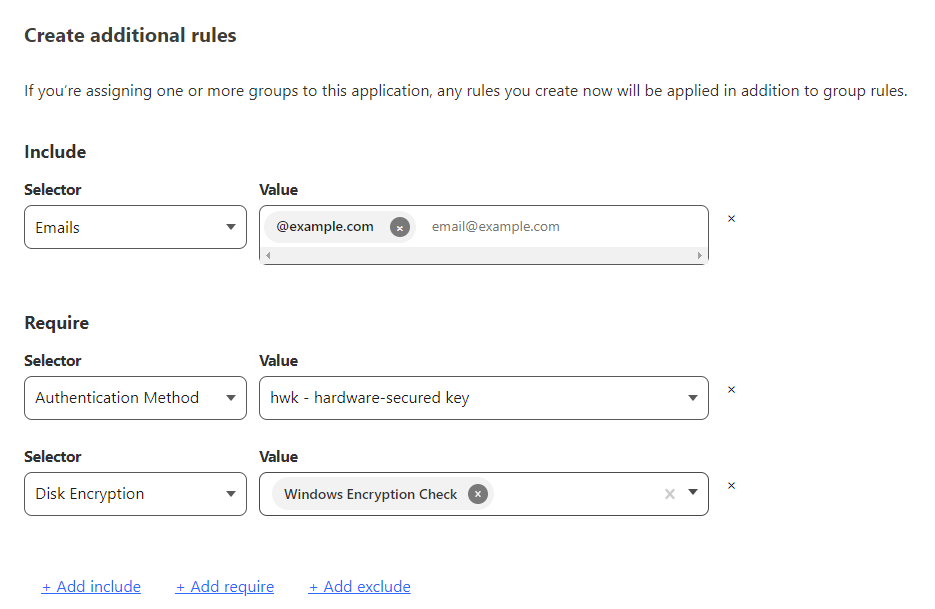
However, the network path that the application takes can be different and Cloudflare Network Interconnect allows for a completely private path from Cloudflare to your application. For example, Cloudflare Tunnel implicitly assumes that the network path between Cloudflare and your application is using the public Internet. Cloudflare Tunnel encrypts your traffic over the public Internet and ensures that your connection to Cloudflare is secure. But the public Internet is still a concern for a lot of people, who don’t want to harden their service to the public Internet at all.
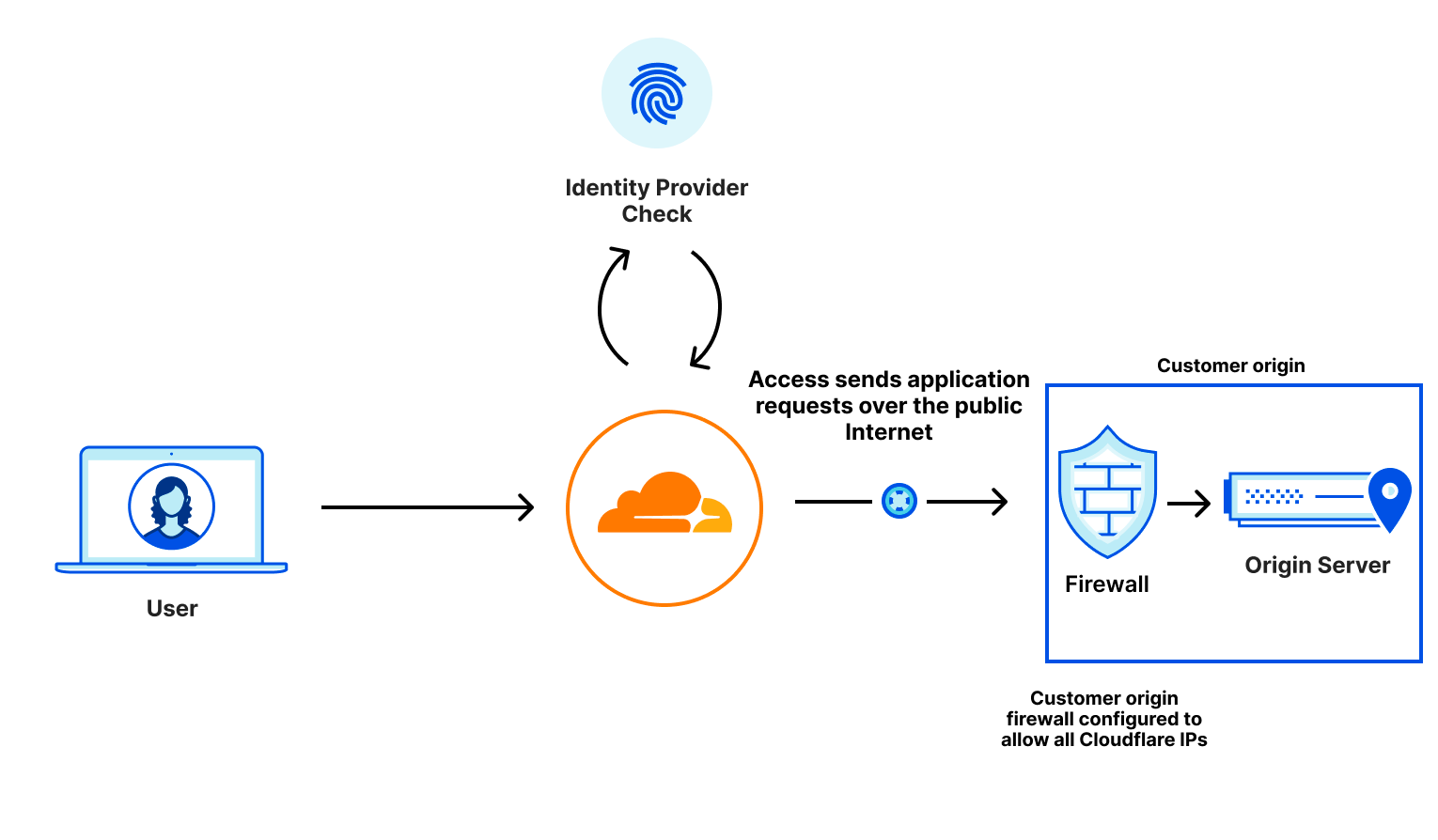
What if you implicitly knew that your connection was secure because nobody else was using it? That’s what Cloudflare Network Interconnect allows you to guarantee: private, performant connectivity back to Cloudflare.
By configuring Access and CNI together, you get protected application access over a private link. Cloudflare Aegis provides a dedicated IP that allows you to apply network-level firewall policies to ensure that your solution is completely airgapped: no one can access your application but Cloudflare-protected Access calls that come from their own dedicated IP address.
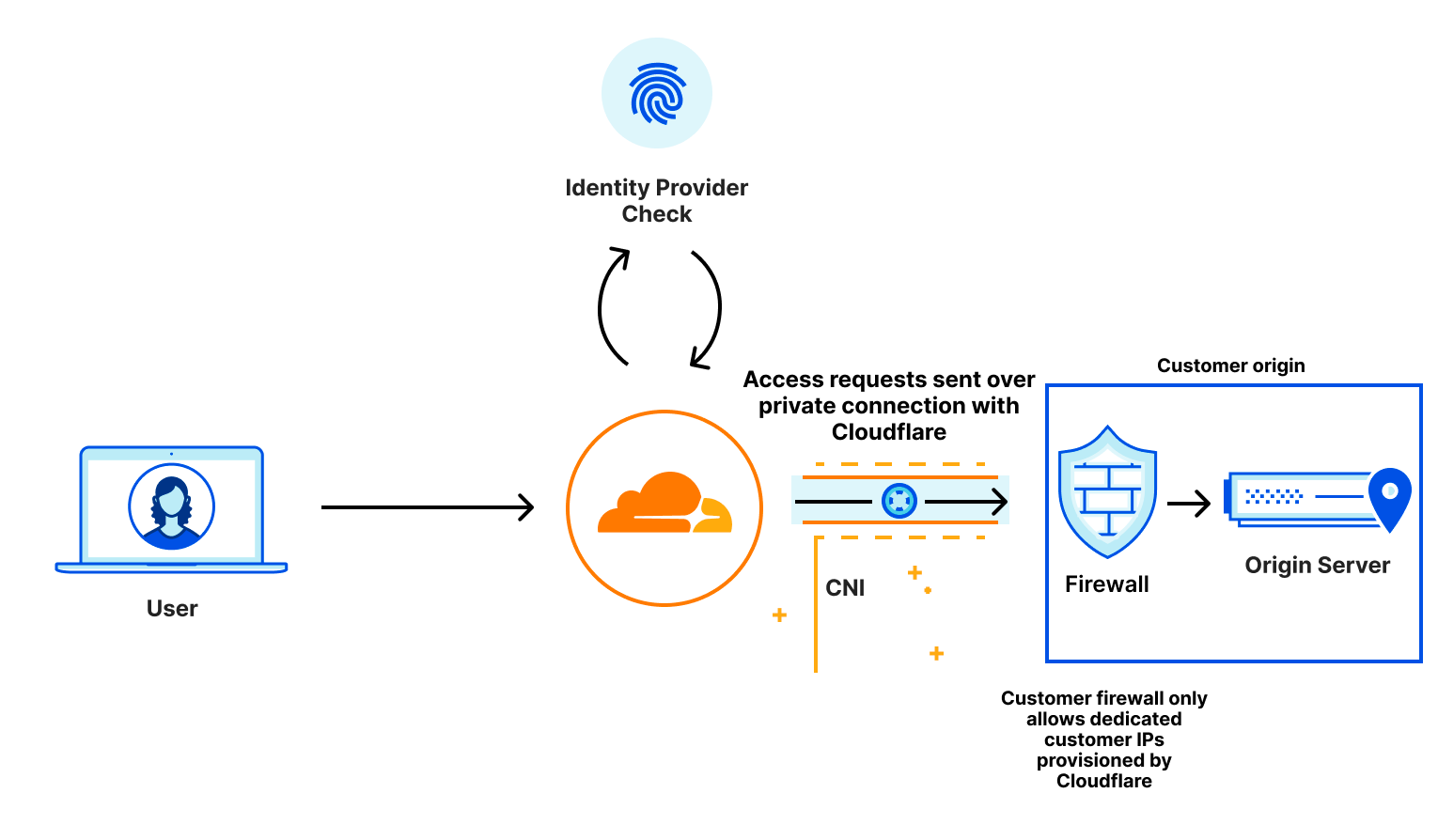
Even if somebody could access your application over the CNI, they would get blocked by your firewall because they didn’t go through Access. This provides security at Layer 7 and Layer 3: at the application and the network.
Getting started
Access, Cloud CNI and Aegis are generally available to all Enterprise customers. If you would like to learn more about protecting and accelerating your private applications, please reach out to your account team for more information and how to enable your account.
Locking down your JavaScript: positive blocking with Page Shield policies
Post Syndicated from Michael Tremante original https://blog.cloudflare.com/page-shield-positive-blocking-policies/


Web development teams are tasked with delivering feature-rich applications at lightning speeds. To help them, there are thousands of pre-built JavaScript libraries that they can integrate with little effort.
Not always, however, are these libraries backed with hardened security measures to ensure the code they provide is not tampered with by malicious actors. This ultimately leads to an increased risk of an application being compromised.
Starting today, tackling the risk of external JavaScript libraries just got easier. We are adding a new feature to our client side security solution: Page Shield policies. Using policies you can now ensure only allowed and vetted libraries are executed by your application by simply reviewing a checklist.
Client side libraries
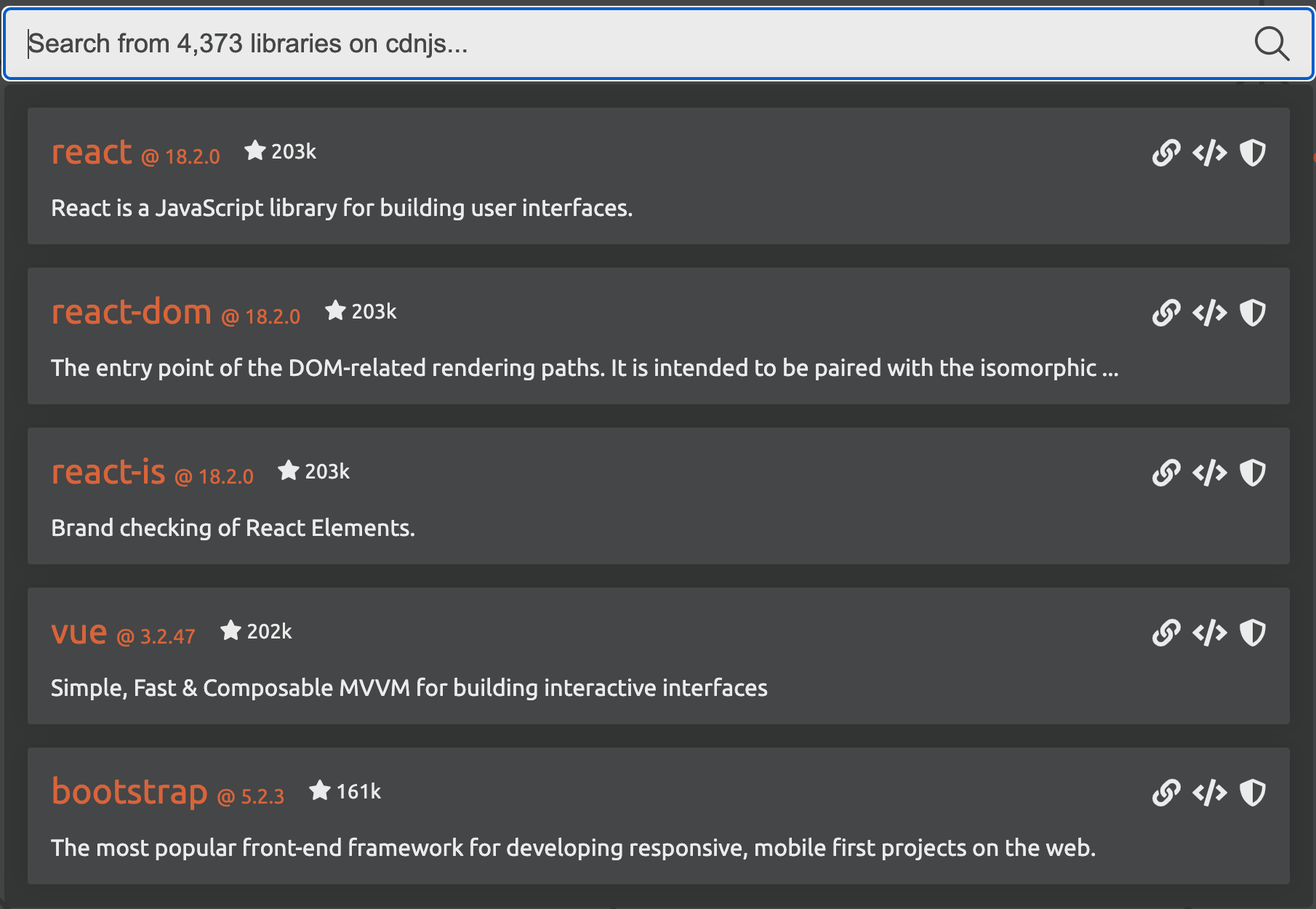
There are more than 4,373 libraries available on cdnjs, a popular JavaScript repository, at the time of writing. These libraries provide access to pre-built functionality to build web applications. The screenshot below shows the most popular on the platform such as React, Vue.js and Bootstrap. Bootstrap alone, according to W3Techs, is used on more than 20% of all websites.
In addition to library repositories like cdnjs, there are thousands of plugins provided directly by SaaS platforms including from names such as Google, Meta, Microsoft, and more.
According to our Page Shield data, any large enterprise application is loading AND connecting to tens if not hundreds of different destinations for analytics, payments, real user monitoring, conversion tracking, customer relationship management, and many other features that internal teams “must have”.
| Script hosts (JavaScript loaded from…) |
Connection hosts (Data sent to…) |
|---|---|
| Cloudflare | Microsoft |
| Salesforce | Hotjar |
| Prospect One | OneTrust |
| Open JS Foundation | |
| Microsoft | TikTok |
| Hotjar | PayPal |
| hCaptcha | Snapchat |
| Fly.io | NewRelic |
Ultimately, it is hard for most organizations to not rely on external JavaScript libraries.
Yet another vector for attackers
Although there are good reasons to embed external JavaScript in an application, the proliferation of client side libraries, especially from SaaS providers, has increased scrutiny from malicious actors seeking new ways to exploit web applications. A single compromised SaaS provider that offers a client side library can provide direct access to thousands of applications drastically increasing return on “hacker” investment.
Client side security issues are not new. Attacks such as “web skimming”, also referred to as “Magecart-style” when in the context of payment pages, have been around for a long time. Yet, core application security products often focus on protecting the underlying web application rather than the end user data resulting in a large attack surface that most security teams simply have no visibility on. This gap in visibility, caused by “supply chains”, led us to build Page Shield, Cloudflare’s native client-side security solution.
Although the risk of supply chain attacks is becoming widely known, they are still very much an active threat. New research is being published monthly from vendors in this space highlighting ongoing attack campaigns. The Payment Card Industry Security Standards Council has also introduced new requirements in PCI DSS 4.0* that enforce companies to have systems and processes in place to tackle client side security threats.
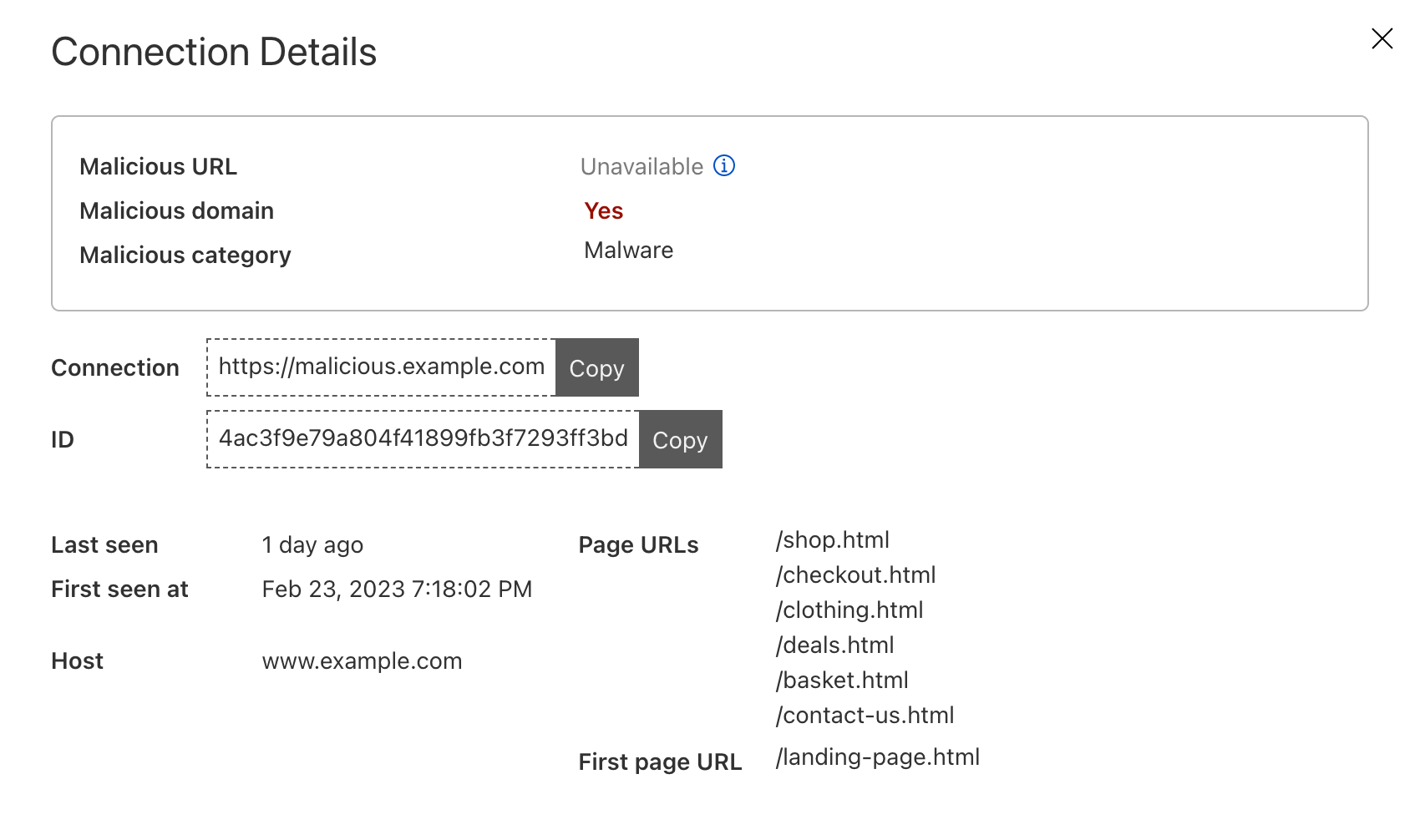
Page Shield itself has already been effective at warning customers of ongoing attacks on their applications, such as the screenshot below highlighting an active malicious outbound connection from a Magecart-style attack on a customer e-commerce application.

* PCI DSS 4.0 requirements 6.4.3 and 11.6.1 are just two examples focusing on client side security.
Reducing the attack surface
Page Shield aims to detect and alert whenever malicious activity is found within the client environment. That’s still a core focus as we improve detection capabilities further.
We are now also looking at expanding capabilities to also reduce the opportunity for an attacker to compromise an application in the first place. In other words, prevent attacks happening by reducing the attack surface available.
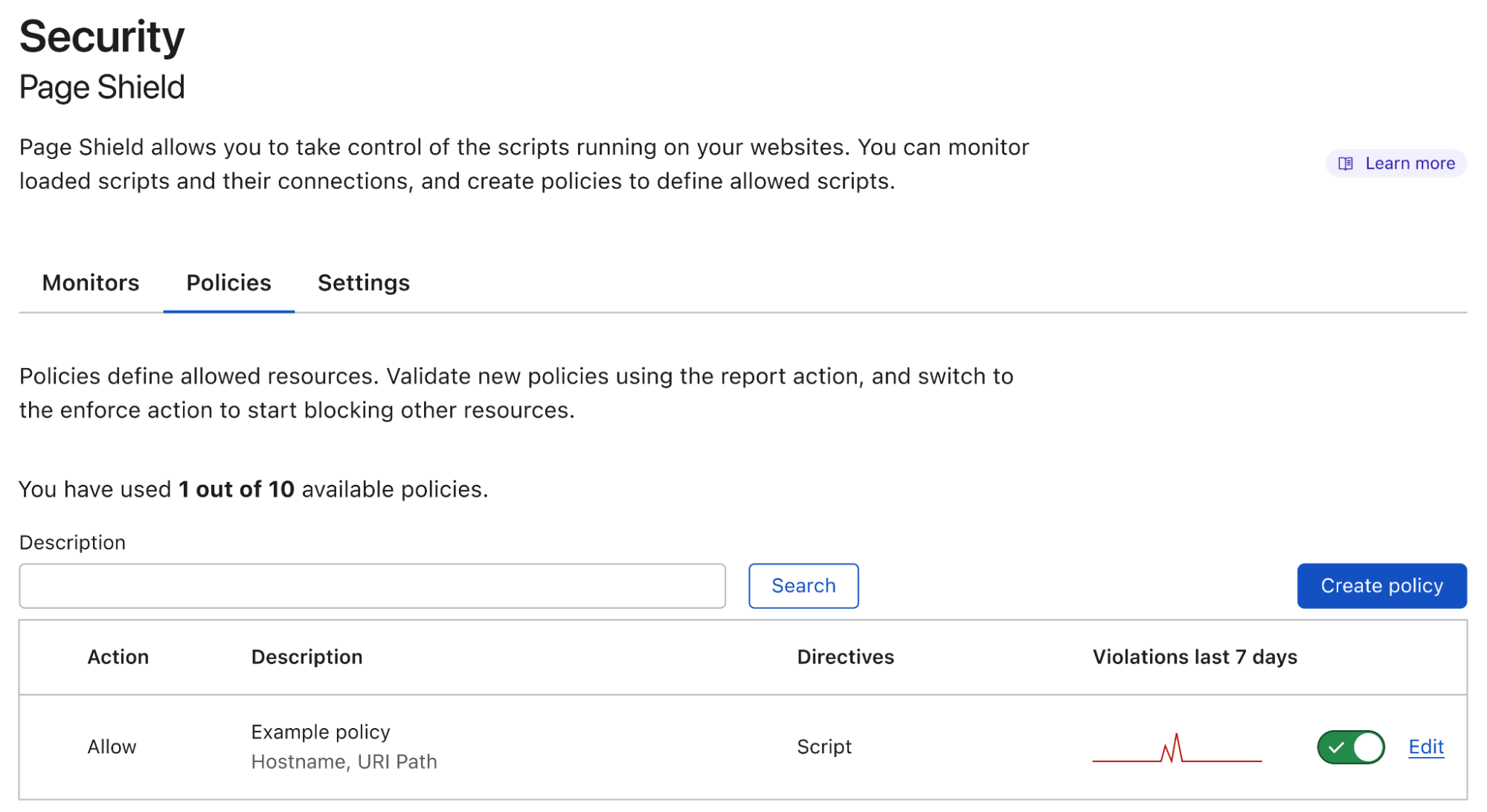
Today we are announcing our first major feature in this space: Page Shield policies. Here’s what it looks like:
Positive blocking policies
By leveraging our position in the network stack as a reverse proxy, and by using Page Shield policies, you can now enforce client browsers to load and execute JavaScript libraries only from your pre-approved list of allowed sources implementing a positive security model.
This ensures that an attacker that is able to inject a script in a page, won’t be successful in compromising users, as browsers will refuse to load it. At the same time, vetted tools will run without issues.
Policies will also soon allow you to specify data destinations (connection endpoints) also enforcing not only where JavaScript files are being loaded from, but also where the browser can send data to drastically reduce the risk of “Magecart-style” attacks.
CSPs as the core mechanism
Page Shield policies are currently implemented with Content Security Policies (CSPs), a feature natively supported by all major browsers.
CSPs are specially formatted HTTP response headers that are added to HTML page loads. These headers may contain one or more directives that instruct the browser how to and what to execute in the context of the given page.
From today Page Shield policies support the script-src directive. This directive lets application owners specify “where” JavaScript files are allowed to be loaded from. Support for the connect-src directive is also being finalized which behaves similarly to script-src, but specifies where the browser is allowed to send data “to”.
Let’s take a look at a one example and assume we were opening the following web page www.example.com/index.html and the browser received a CSP header as below:
Content-Security-Policy: script-src 'self' *.example.com cdnjs.cloudflare.com https://www.google-analytics.com/analytics.js
The header instructs the browser to allow scripts (defined by the use of the script-src directive) to be loaded from the same hostname as the page itself (defined by self) as well as from any subdomain (*.example.com). It is additionally allowing any script under cdnjs and only a specific script for Google Analytics and no other scripts under the Google owned domain.
This ensures that any attacker injected script from different hosts would not be executed, drastically reducing the attack surface available.
If rather than Content-Security-Policy we had received a Content-Security-Policy-Report-Only header, the policy would not be enforced, but browsers would only send violation reports letting you know what is outside of policy.
This is useful when testing and when investigating new scripts that have been added to your application.
Additional statements are also available and supported by Page Shield within the script-src directive to block inline JavaScript (unsafe-inline) or normally unsafe function calls (unsafe-eval). These directives help prevent other attack types such as cross site scripting attacks (XSS).
Making policy management easy
CSPs, the underlying system used by Page Shield policies, are great but hard to manage. The larger the application, the more complex CSPs become while also causing a bottleneck for application development teams. This leads to CSPs becoming ineffective as security teams broaden the list of allowed hosts to the point that their purpose becomes debatable.
Making policy management easy, and ensuring they are effective, was a core goal of our design process. This led us to build a suggestions feature.
When deploying a policy, the first step is deciding “where” will the policy be applied to. Typical examples may include only your checkout flow or admin pages. This is done using wirefilter syntax, the same syntax that powers Cloudflare’s WAF.
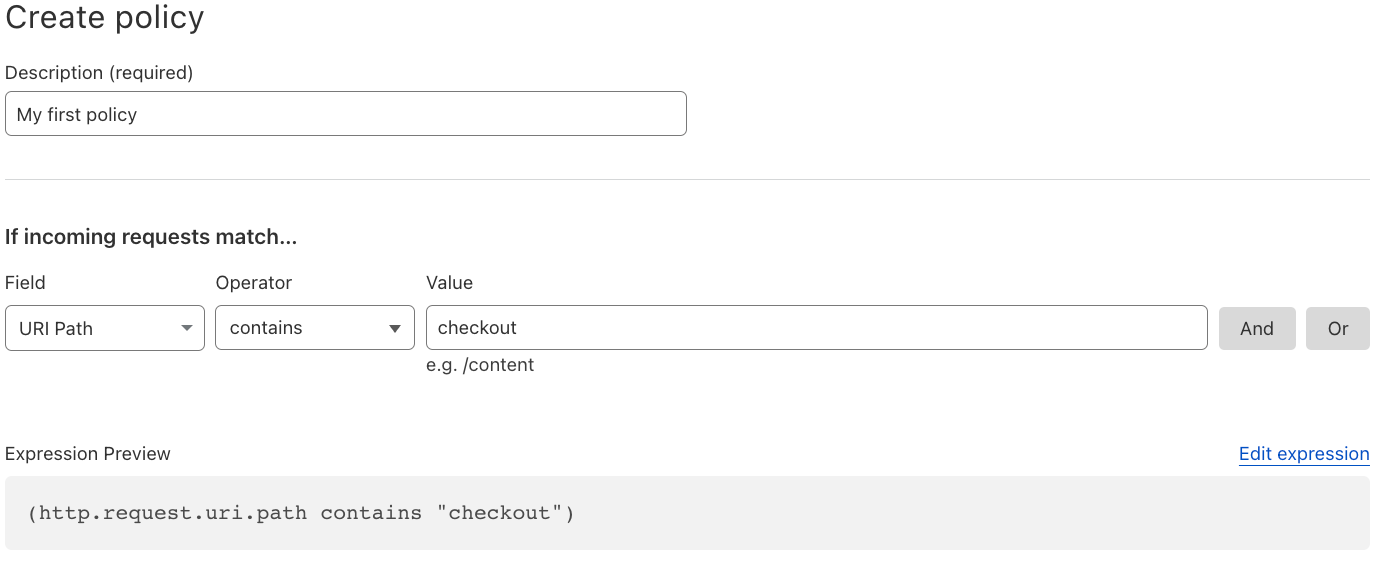
Once the filter is specified, using the data already collected by Page Shield, the interface will provide a list of suggested directive values, making it very easy to build the simplest and most effective policy for your application. No need to worry about syntax, the policy preview will be shown before committing.
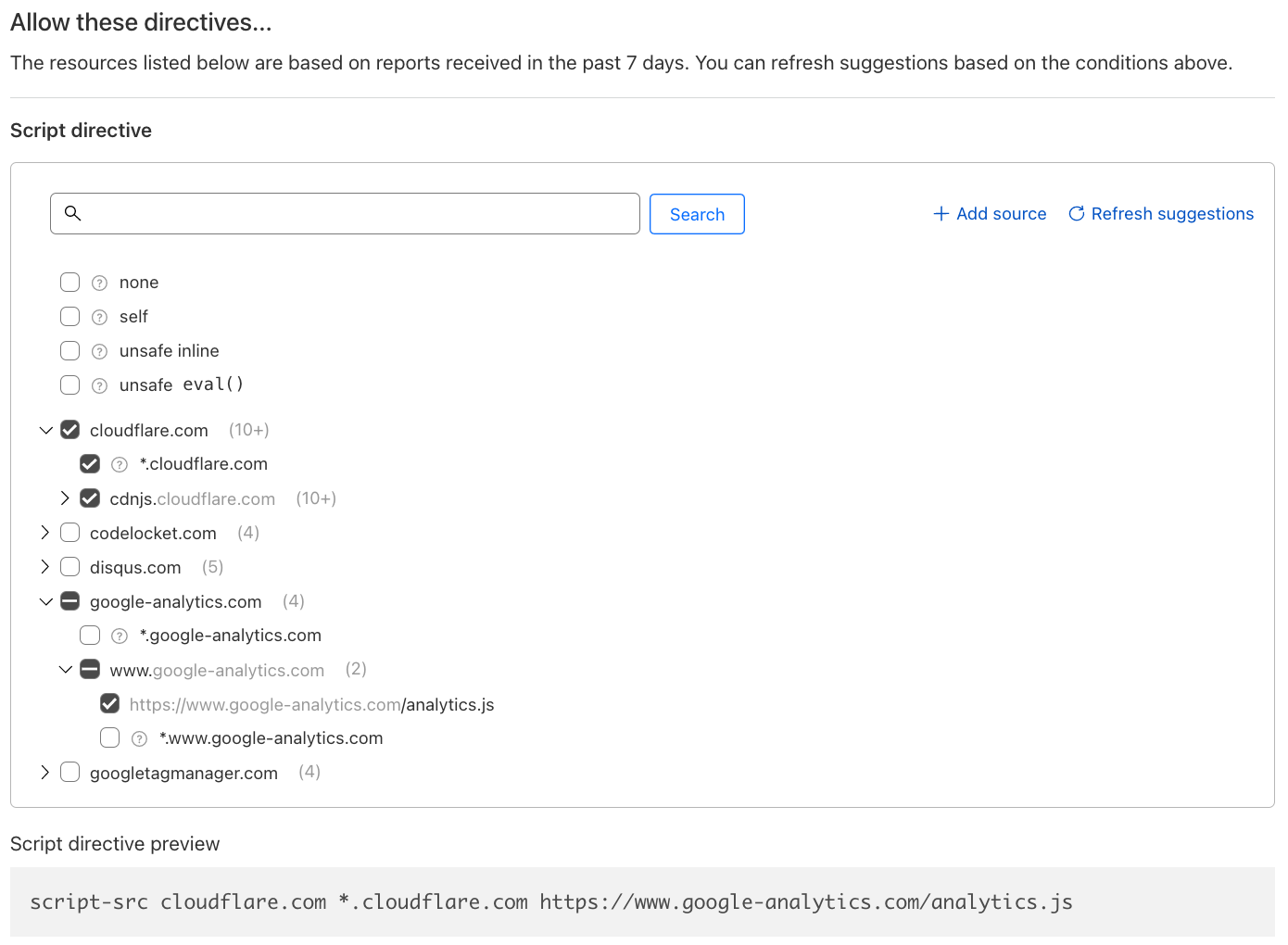
Finally, policies can be deployed both in “report only/log” and “enforce/allow”, letting you control and test as required.
We are currently finishing work on our alerting backend to warn you whenever we notice a spike in violation reports. This lets you easily return to the policy builder and update it with any newly seen script that may have been added by your development team.
Positive blocking policies are not enough
It is important not to forget that CSPs provide no security or malicious activity detection within the list of allowed endpoints. They are meant to reduce the likelihood of an attack happening by reducing the attack surface available. For this reason, Page Shield’s automated malicious activity detection will continue to function in the background regardless of any policy being deployed.
Secure your end user data today
All Cloudflare paid customers have access to a subset of Page Shield features today. Turning on Page Shield is as simple as clicking a button. Head over to Security > Page Shield and give it a go!
If you are an enterprise customer and are interested in Page Shield policies, reach out to your account team to get access to the full feature set.
Making Maine
Post Syndicated from The History Guy: History Deserves to Be Remembered original https://www.youtube.com/watch?v=xtALN8S79CY
The stable kernels just keep coming
Post Syndicated from original https://lwn.net/Articles/925988/
Greg Kroah-Hartman has announced the release of the 6.2.6, 6.1.19,
5.15.102, 5.10.174, 5.4.236, 4.19.277, and 4.14.309 stable kernels. These contain a
small number of fixes, including a partial reversion that fixes WiFi
problems that were introduced recently.
Security updates for Monday
Post Syndicated from original https://lwn.net/Articles/925987/
Security updates have been issued by Debian (imagemagick, libapache2-mod-auth-mellon, mpv, rails, and ruby-sidekiq), Fedora (chromium, dcmtk, and strongswan), Mageia (chromium-browser-stable, dcmtk, kernel, kernel-linus, libreswan, microcode, redis, and tmux), SUSE (postgresql14 and python39), and Ubuntu (linux-kvm, linux-raspi-5.4, and thunderbird).
TANF: Last Week Tonight with John Oliver (HBO)
Post Syndicated from LastWeekTonight original https://www.youtube.com/watch?v=wJDk-czsivk
Kernel prepatch 6.3-rc2
Post Syndicated from original https://lwn.net/Articles/925961/
The 6.3-rc2 kernel prepatch is out.
This one looks fairly normal, although if you look at the diffs,
they are dominated by the removal of a staging driver (r8188eu)
that has been superceded by a proper driver. That removal itself is
90% of the diffs.But if you filter that out, it all looks normal
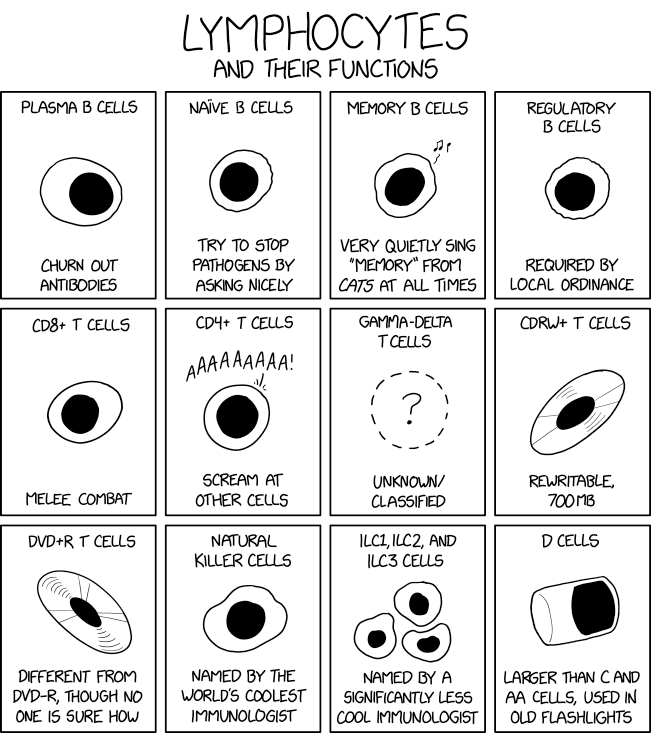
Lymphocytes
Post Syndicated from original https://xkcd.com/2749/
NVIDIA GeForce RTX 4090 Founders Edition Review The GPU
Post Syndicated from William Harmon original https://www.servethehome.com/nvidia-geforce-rtx-4090-founders-edition-review-the-gpu/
In our NVIDIA GeForce RTX 4090 Founders Edition review, we evaluate the GPU that started the Ada Lovelace revolution and compare to OC models
The post NVIDIA GeForce RTX 4090 Founders Edition Review The GPU appeared first on ServeTheHome.
How to Add Virtual Media to an ASRock Rack Server via HTML5 iKVM Web IPMI Interface
Post Syndicated from Eric Smith original https://www.servethehome.com/how-to-add-virtual-media-to-an-asrock-rack-server-via-html5-ikvm-web-ipmi-interface/
We have a quick how-to guide for mounting an ISO on an ASRock Rack server and motherboard over the IPMI web interface
The post How to Add Virtual Media to an ASRock Rack Server via HTML5 iKVM Web IPMI Interface appeared first on ServeTheHome.
Comic for 2023.03.12 – Art
Post Syndicated from Explosm.net original https://explosm.net/comics/art
New Cyanide and Happiness Comic
Shrouded
Post Syndicated from Oglaf! -- Comics. Often dirty. original https://www.oglaf.com/shrouded/

