Post Syndicated from Talks at Google original https://www.youtube.com/watch?v=UA_Hl3doHzA
Yearly Archives: 2024
Migrate Amazon Redshift from DC2 to RA3 to accommodate increasing data volumes and analytics demands
Post Syndicated from Valdiney Gomes original https://aws.amazon.com/blogs/big-data/migrate-amazon-redshift-from-dc2-to-ra3-to-accommodate-increasing-data-volumes-and-analytics-demands/
This is a guest post by Valdiney Gomes, Hélio Leal, Flávia Lima, and Fernando Saga from Dafiti.
As businesses strive to make informed decisions, the amount of data being generated and required for analysis is growing exponentially. This trend is no exception for Dafiti, an ecommerce company that recognizes the importance of using data to drive strategic decision-making processes. With the ever-increasing volume of data available, Dafiti faces the challenge of effectively managing and extracting valuable insights from this vast pool of information to gain a competitive edge and make data-driven decisions that align with company business objectives.
Amazon Redshift is widely used for Dafiti’s data analytics, supporting approximately 100,000 daily queries from over 400 users across three countries. These queries include both extract, transform, and load (ETL) and extract, load, and transform (ELT) processes and one-time analytics. Dafiti’s data infrastructure relies heavily on ETL and ELT processes, with approximately 2,500 unique processes run daily. These processes retrieve data from around 90 different data sources, resulting in updating roughly 2,000 tables in the data warehouse and 3,000 external tables in Parquet format, accessed through Amazon Redshift Spectrum and a data lake on Amazon Simple Storage Service (Amazon S3).
The growing need for storage space to maintain data from over 90 sources and the functionality available on the new Amazon Redshift node types, including managed storage, data sharing, and zero-ETL integrations, led us to migrate from DC2 to RA3 nodes.
In this post, we share how we handled the migration process and provide further impressions of our experience.
Amazon Redshift at Dafiti
Amazon Redshift is a fully managed data warehouse service, and was adopted by Dafiti in 2017. Since then, we’ve had the opportunity to follow many innovations and have gone through three different node types. We started with 115 dc2.large nodes and with the launch of Redshift Spectrum and the migration of our cold data to the data lake, then we considerably improved our architecture and migrated to four dc2.8xlarge nodes. RA3 introduced many features, allowing us to scale and pay for computing and storage independently. This is what brought us to the current moment, where we have eight ra3.4xlarge nodes in the production environment and a single node ra3.xlplus cluster for development.
Given our scenario, where we have many data sources and a lot of new data being generated every moment, we came across a problem: the 10 TB we had available in our cluster was insufficient for our needs. Although most of our data is currently in the data lake, more storage space was needed in the data warehouse. This was solved by RA3, which scales compute and storage independently. Also, with zero-ETL, we simplified our data pipelines, ingesting tons of data in near real time from our Amazon Relational Database Service (Amazon RDS) instances, while data sharing enables a data mesh approach.
Migration process to RA3
Our first step towards migration was to understand how the new cluster should be sized; for this, AWS provides a recommendation table.
Given the configuration of our cluster, consisting of four dc2.8xlarge nodes, the recommendation was to switch to ra3.4xlarge.
At this point, one concern we had was regarding reducing the amount of vCPU and memory. With DC2, our four nodes provided a total of 128 vCPUs and 976 GiB; in RA3, even with eight nodes, these values were reduced to 96 vCPUs and 768 GiB. However, the performance was improved, with processing of workloads 40% faster in general.
AWS offers Redshift Test Drive to validate whether the configuration chosen for Amazon Redshift is ideal for your workload before migrating the production environment. At Dafiti, given the particularities of our workload, which gives us some flexibility to make changes to specific windows without affecting the business, it wasn’t necessary to use Redshift Test Drive.
We carried out the migration as follows:
- We created a new cluster with eight ra3.4xlarge nodes from the snapshot of our four-node dc2.8xlarge cluster. This process took around 10 minutes to create the new cluster with 8.75 TB of data.
- We turned off our internal ETL and ELT orchestrator, to prevent our data from being updated during the migration period.
- We changed the DNS pointing to the new cluster in a transparent way for our users. At this point, only one-time queries and those made by Amazon QuickSight reached the new cluster.
- After the read query validation stage was complete and we were satisfied with the performance, we reconnected our orchestrator so that the data transformation queries could be run in the new cluster.
- We removed the DC2 cluster and completed the migration.
The following diagram illustrates the migration architecture.

During the migration, we defined some checkpoints at which a rollback would be performed if something unwanted happened. The first checkpoint was in Step 3, where the reduction in performance in user queries would lead to a rollback. The second checkpoint was in Step 4, if the ETL and ELT processes presented errors or there was a loss of performance compared to the metrics collected from the processes run in DC2. In both cases, the rollback would simply occur by changing the DNS to point to DC2 again, because it would still be possible to rebuild all processes within the defined maintenance window.
Results
The RA3 family introduced many features, allowed scaling, and enabled us to pay for compute and storage independently, which changed the game at Dafiti. Before, we had a cluster that performed as expected, but limited us in terms of storage, requiring daily maintenance to maintain control of disk space.
The RA3 nodes performed better and workloads ran 40% faster in general. It represents a significant decrease in the delivery time of our critical data analytics processes.
This improvement became even more pronounced in the days following the migration, due to the ability in Amazon Redshift to optimize caching, statistics, and apply performance recommendations. Additionally, Amazon Redshift is able to provide recommendations for optimizing our cluster based on our workload demands through Amazon Redshift Advisor recommendations, and offers automatic table optimization, which played a key role in achieving a seamless transition.
Moreover, the storage capacity leap from 10 TB to multiple PB solved Dafiti’s primary challenge of accommodating growing data volumes. This substantial increase in storage capabilities, combined with the unexpected performance enhancements, demonstrated that the migration to RA3 nodes was a successful strategic decision that addressed Dafiti’s evolving data infrastructure requirements.
Data sharing has been used since the moment of migration, to share data between the production and development environment, but the natural evolution is to enable the data mesh at Dafiti through this resource. The limitation we had was the need to activate case sensitivity, which is a prerequisite for data sharing, and which forced us to change some broken processes. But that was nothing compared to the benefits we’re seeing from migrating to RA3.
Conclusion
In this post, we discussed how Dafiti handled migrating to Redshift RA3 nodes, and the benefits of this migration.
Do you want to know more about what we’re doing in the data area at Dafiti? Check out the following resources:
- How Dafiti made Amazon QuickSight its primary data visualization tool
- AWS Summit SP 2022 – Dafiti, habilitando uma Empresa Data Driven na AWS
- Caso de sucesso: Dafiti reduz custos em 70% e otimiza tomadas de decisões com dados na nuvem da AWS
The content and opinions in this post are those of Dafiti’s authors and AWS is not responsible for the content or accuracy of this post.
About the Authors

Valdiney Gomes is Data Engineering Coordinator at Dafiti. He worked for many years in software engineering, migrated to data engineering, and currently leads an amazing team responsible for the data platform for Dafiti in Latin America.

Hélio Leal is a Data Engineering Specialist at Dafiti, responsible for maintaining and evolving the entire data platform at Dafiti using AWS solutions.

Flávia Lima is a Data Engineer at Dafiti, responsible for sustaining the data platform and providing data from many sources to internal customers.

Fernando Saga is a data engineer at Dafiti, responsible for maintaining Dafiti’s data platform using AWS solutions.
[$] Distinguishing Debian testing from unstable
Post Syndicated from corbet original https://lwn.net/Articles/984635/
Sometimes, the smallest changes create the longest discussions. As a case
in point, a proposal to make a one-line change in an informational text
file on systems running the Debian unstable distribution has blown up into
an interminable and sometimes unfriendly debate. At its core, though, this
discussion comes down to a seemingly simple question: should a program be
able to determine whether it is running on a Debian testing or unstable
system?
New attack against the SLUB allocator
Post Syndicated from daroc original https://lwn.net/Articles/984984/
Researchers from Graz University of Technology have
published details of a new attack
on the Linux kernel called SLUBstick. The attack uses timing information to turn an ability to trigger use-after-free or double-free bugs into the ability to overwrite page tables, and thence into the ability to read and write arbitrary areas of memory. The good news is that this attack does require an existing bug to be usable; the bad news is that the kernel regularly sees bugs of this kind.
We assume that an unprivileged user has code execution.
Additionally, we consider the presence of a heap vulnerability
in the Linux kernel. We assume that the Linux kernel
incorporates all defense mechanisms available in version 6.4, the
most recent Linux kernel version when we started our work.
These mechanisms include features such as WˆX, KASLR,
SMAP, and kCFI. We do not assume any microarchitectural
vulnerabilities, e.g., transient execution, fault
injection, or hardware side channels.
Code Clarity: Enhancing Code Understanding and Efficiency with Amazon Q Developer
Post Syndicated from Jehu Gray original https://aws.amazon.com/blogs/devops/code-clarity-enhancing-code-understanding-and-efficiency-with-amazon-q-developer/
“All code will become legacy”. This saying, widely recognized amongst software developers, highlights the reality of their day-to-day activities. While writing new code is an integral part of a developer’s role, a significant portion of their time is dedicated to refactoring and maintaining existing codebases.
Developers typically encounter numerous challenges when attempting to understand and work with existing codebases. One of the primary obstacles is the lack of proper code documentation. As projects evolve and developers come and go, the rationale behind design decisions and implementation details can become obscured, making it challenging for new team members to understand the intricacies of the codebase.
Another hurdle is the need to work with unfamiliar or legacy programming languages and frameworks. The rapid pace of technology advancements means that developers must constantly adapt to new tools and libraries, while also maintaining an understanding of older technologies that may still be in use.
Compounding these challenges is the inherent difficulty of understanding code written by others. Even with comprehensive documentation and adherence to best coding practices, the nuances of another developer’s thought process and design decisions can be challenging to decipher. This lack of familiarity can lead to increased risk of introducing bugs or breaking existing functionality during code modifications.
In a bid to address these challenges, organizations must explore innovative solutions that enhance code understanding and improve developer efficiency. By empowering developers with tools that streamline code maintenance and refactoring processes, organizations can unlock their potential for innovation and accelerate their ability to deliver high-quality software products to the market.
In this blog post, we explore how developers in organizations can leverage Amazon Q Developer to simplify the process of understanding and explaining code in order to boost productivity and efficiency.
Prerequisites
The following prerequisites are required to make use of Amazon Q Developer in your IDE:
- An AWS Account.
- An AWS Builder ID or an AWS Identity Center login controlled by your organization.
- Visual Studio Code or supported JetBrains IDEs.
- How to set up and chat with Amazon Q.
Introduction to Amazon Q Developer as a solution for simplifying code comprehension
Amazon Q Developer is a generative AI-powered service that helps developers and IT professionals with all of their tasks across the software development lifecycle—from coding, testing, and upgrading, to troubleshooting, performing security scanning and fixes, optimizing AWS resources, and creating data engineering pipelines. Amazon Q Developer aims to simplify code comprehension for developers, making it easier to understand and navigate complex codebases. It leverages advanced machine learning and natural language processing techniques to provide intelligent code analysis and exploration capabilities.
Developers can ask questions about their codebase in natural language and receive concise, relevant answers. Amazon Q Developer can explain the purpose and functionality of code elements, identify dependencies, and provide insights into code structure and architecture. This can significantly reduce the time and effort required to onboard new team members, maintain legacy systems, or refactor existing code. This result in not just better code quality and consistency across teams and projects; Amazon Q Developer also helps developers unlock a new level of productivity and efficiency by allowing them to focus more on innovation.
Understanding Amazon Q Developer’s ability to provide natural language explanations of code
One of the most powerful uses of Amazon Q Developer is getting natural language explanations of code directly within your integrated development environment (IDE). This can be an invaluable tool when trying to understand legacy code, review code you haven’t touched in a while, or learn how certain programming patterns or algorithms work. Rather than spending so much time reviewing code line-by-line or searching for tutorials, you can leverage Amazon Q Developer to provide insightful explanations.
The process is simple – highlight the section of code you need explained in your IDE, then right-click and select “Explain” from the Amazon Q Developer menu. Amazon Q Developer’s advanced language model will analyze the highlighted code and generate a plain English explanation breaking down what the code is doing line-by-line.

Figure 1 – Selecting the relevant code by highlighting or right-clicking on it.

Figure 2 – Selecting “Explain” to get natural language explanation from Amazon Q Developer
Let’s take a look at an example. If you highlight a few lines of code that creates a reference to an S3 bucket, Amazon Q Developer generates a natural language explanation such as:

Figure 3 – Amazon Q Developer analyzes the selected code and provides an explanation of what the code does in natural language.
Amazon Q Developer continues providing clear explanations of how the code implementation works. This natural language explanation can provide much-needed context and clarity, especially for complex coding patterns. This allows you to quickly catch up on code you haven’t looked at in a while. It can also be an excellent learning tool when researching how certain algorithms or coding techniques work under the hood.
If any part of the explanation is unclear, you can ask Amazon Q Developer follow-up questions using natural language in the chat interface. Amazon Q Developer will use the conversation context and the code to provide clarifying responses to follow-up questions. You can continue the back-and-forth conversation until you fully comprehend the code functionality. Optionally, you can provide feedback to Amazon Q Developer on the quality of its code explanations to help improve the service.
The “Explain” functionality is just one of the ways Amazon Q Developer augments your coding workflow by providing generative AI-powered insights into your code on-demand, right within your familiar IDE environment.
Now let’s dive into more examples.
Example demonstrating how Amazon Q Developer breaks down complex code algorithms
In this example, let’s assume a developer is working on a coding project that involves path-finding, network optimization and latency. We will use Amazon Q Developer to review code that should find the shortest path tree from a single source node, by building a set of nodes that have minimum distance from the source. This is the popular Djikstra’s algorithm and can be complex for developers that are new to graph theory and its implementation.
The developer can use Amazon Q Developer to understand what the block of code is doing in simple terms.
Here’s the code implementing the algorithm:

Figure 4 – Python code in IDE implementing Djikstra’s Algorithm for path-finding.

Figure 5 – With Amazon Q Developer, you can Explain, Refactor, Fix or Optimize your code.
You can Right-click the highlighted code to open a context window. Choose Send to Amazon Q, then select Explain. Selecting the “Explain” option will prompt Amazon Q Developer to analyze the code and provide a natural language explanation of what the code does.

Figure 6 – Amazon Q Developer will analyze the selected code and provide an explanation of what the code does in natural language.
Amazon Q Developer opens a chat panel on the right within the IDE, where you see the result of choosing the “Explain” option. Amazon Q Developer has analyzed the highlighted code and provided a detailed, step-by-step explanation in the chat panel. This explanation breaks down the complex algorithm in plain, easy-to-understand language, helping the developer better comprehend the purpose and functionality of the code. You can follow-up by asking clarifying questions within the chat panel.
You can also Refactor your code with Amazon Q Developer in order to improve code readability or efficiency, among other improvements.
Here’s how:

Figure 7 – Using Amazon Q Developer to Refactor code.
Highlight the code in the IDE and Refactor the code by first right clicking and selecting “send to Amazon Q”. This allows Amazon Q Developer to analyze the code and suggest ways to improve its readability, efficiency, or other aspects of the implementation. The chat panel provides the developer with the recommended refactoring steps.

Figure 8 – Amazon Q Developer analyzes the selected code and provides an explanation of steps you can take to refactor your code in the chat panel.
In the image above, Amazon Q Developer has carefully reviewed the code and provided a step-by-step plan for the developer to follow in order to refactor the code, making it more concise, maintainable, and aligned with best practices. This collaborative approach between the developer and Amazon Q Developer enables the efficient creation of high-quality, optimized code.
Conclusion
Amazon Q Developer is a game-changer for developers looking to streamline their understanding of complex code segments. By offering natural language explanations within the IDE, Amazon Q Developer eliminates the need for time-consuming manual research or reliance on outdated documentation. Amazon Q Developer’s ability to break down intricate algorithms and unfamiliar syntax, as shown in the preceding examples, empowers developers to tackle even the most challenging codebases with confidence.
Whether you’re a seasoned developer or just starting, Amazon Q Developer is an invaluable tool that simplifies the coding process and makes the coding environment more accessible and easier to navigate. With its seamless integration and user-friendly interface, Amazon Q Developer is poised to become an essential companion for developers worldwide, enabling them to write better code, learn more efficiently, and ultimately, deliver superior software solutions.
About the Authors:
People-Search Site Removal Services Largely Ineffective
Post Syndicated from Bruce Schneier original https://www.schneier.com/blog/archives/2024/08/people-search-site-removal-services-largely-ineffective.html
Consumer Reports has a new study of people-search site removal services, concluding that they don’t really work:
As a whole, people-search removal services are largely ineffective. Private information about each participant on the people-search sites decreased after using the people-search removal services. And, not surprisingly, the removal services did save time compared with manually opting out. But, without exception, information about each participant still appeared on some of the 13 people-search sites at the one-week, one-month, and four-month intervals. We initially found 332 instances of information about the 28 participants who would later be signed up for removal services (that does not include the four participants who were opted out manually). Of those 332 instances, only 117, or 35%, were removed within four months.
Security updates for Friday
Post Syndicated from daroc original https://lwn.net/Articles/984966/
Security updates have been issued by AlmaLinux (httpd, kernel, kernel-rt, and libtiff), Debian (postgresql-13, postgresql-15, and thunderbird), Fedora (frr, thunderbird, vim, and xrdp), Gentoo (Librsvg, Nautilus, ncurses, Percona XtraBackup, QEMU, and re2c), Red Hat (httpd, kernel, kernel-rt, openssl, and python-setuptools), SUSE (bind, ffmpeg-4, kubernetes1.23, kubernetes1.24, python-Django, and python3-Twisted), and Ubuntu (linux, linux-aws, linux-aws-5.4, linux-gcp, linux-gcp-5.4, linux-gkeop, linux-hwe-5.4, linux-ibm, linux-ibm-5.4, linux-iot, linux-kvm, linux-raspi, linux-xilinx-zynqmp, linux, linux-aws, linux-gcp, linux-gcp-5.15, linux-gke, linux-gkeop, linux-intel-iotg, linux-intel-iotg-5.15, linux-kvm, linux-lowlatency, linux-lowlatency-hwe-5.15, linux-nvidia, linux, linux-aws, linux-gcp, linux-gke, linux-ibm, linux-nvidia, linux-nvidia-6.8, linux-oem-6.8, linux-nvidia-lowlatency, linux-oracle, linux-oracle, linux-oracle-5.4, and salt).
Key Takeaways From The Take Command Summit: Unlocking Security Success
Post Syndicated from Emma Burdett original https://blog.rapid7.com/2024/08/09/key-takeaways-from-the-take-command-summit-unlocking-security-success/

As cybersecurity threats continue to evolve, so must our defenses. The recent Rapid7 Take Command Summit provided invaluable insights into preparing for, responding to, and recovering from ransomware attacks. Here are three essential takeaways from the session, “Before, During, & After Ransomware Attacks,” that every cybersecurity professional should consider.
1. Proactive Defense is Crucial: Fortify your defenses before an attack happens.. According to the panel, comprehensive security measures such as regular patching, network segmentation, and user training are vital. Implementing endpoint detection and response solutions can significantly reduce vulnerabilities. Eddie Bobritsky said, “prevention is always coming before detection and response. Investing in proactive measures is crucial.”
2. Swift Decision-Making During an Attack: During an attack, immediate and decisive action is paramount. Establishing clear protocols and communication channels can mitigate damage effectively. The panel highlighted the importance of isolating infected systems and restricting network access to contain the threat. Robert Knapp said, “swift decision-making is key to minimizing impact and ensuring a successful investigation.”
3. Building Resilience After an Attack: Recovery is a multifaceted effort. Conducting thorough forensic analysis to identify the root causes of the attack and implementing robust data backup and recovery processes are essential steps. Lonnie Best said, “building resilience against the recurrence of ransomware attacks requires proactive security measures and regular security assessments.”
Key Statistics
- 65% of organizations impacted by ransomware in 2023 faced more than 6 days of downtime.
- Ransomware payments were said to have topped $1 billion in 2023.
- Rapid7 tracked 5600 reported ransomware cases between January 2023 and February 2024.
No matter how much you invest in the before stage, it will always be cheaper than dealing with it afterwards.” – Eddy Bobritsky, Senior Director, Product Management, Rapid7
Ransomware attacks are a significant threat, but with the right strategies and proactive measures, organizations can enhance their defenses and build resilience. To dive deeper into these strategies and hear more from the experts, watch the full video from the Rapid7 Take Command Summit.
A Palace of Corn
Post Syndicated from The History Guy: History Deserves to Be Remembered original https://www.youtube.com/watch?v=997ufuj10uo
Comic for 2024.08.10 – Milk 3
Post Syndicated from Explosm.net original https://explosm.net/comics/milk-3
New Cyanide and Happiness Comic
Comic for 2024.08.09 – Dr Bizkit
Post Syndicated from Explosm.net original https://explosm.net/comics/dr-bizkit
New Cyanide and Happiness Comic
History and Evolution of the modern playing card deck
Post Syndicated from The History Guy: History Deserves to Be Remembered original https://www.youtube.com/watch?v=KvGLYMrQ5FE
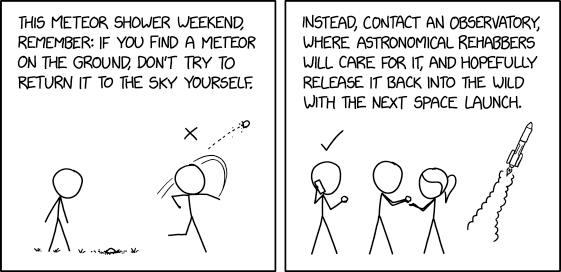
Meteor Shower PSA
Post Syndicated from xkcd.com original https://xkcd.com/2970/
Acclaimed science writer on the the Earth’s interconnected ecosystem
Post Syndicated from Talks at Google original https://www.youtube.com/watch?v=Jfn2fPBjWP4
Enabling high availability of Amazon EC2 instances on AWS Outposts servers: (Part 2)
Post Syndicated from Macey Neff original https://aws.amazon.com/blogs/compute/enabling-high-availability-of-amazon-ec2-instances-on-aws-outposts-servers-part-2/
This blog post was written by Brianna Rosentrater – Hybrid Edge Specialist SA and Jessica Win – Software Development Engineer
This post is Part 2 of the two-part series ‘Enabling high availability of Amazon EC2 instances on AWS Outposts servers’, providing you with code samples and considerations for implementing custom logic to automate Amazon Elastic Compute Cloud (Amazon EC2) relaunch on AWS Outposts servers. This post focuses on stateful applications where the Amazon EC2 instance store state needs to be maintained at relaunch.
Overview
AWS Outposts servers provide compute and networking services that are ideal for low-latency, local data processing needs for on-premises locations such as retail stores, branch offices, healthcare provider locations, or environments that are space-constrained. Outposts servers use EC2 instance store storage to provide non-durable block-level storage to the instances, and many applications use the instance store to save stateful information that must be retained in a Disaster Recovery (DR) type event. In this post, you will learn how to implement custom logic to provide High Availability (HA) for your applications running on an Outposts server using two or more servers for N+1 fault tolerance. The code provided is meant to help you get started with creating your own custom relaunch logic for workloads that require HA, and can be modified further for your unique workload needs.
Architecture
This solution is scoped to work for two Outposts servers set up as a resilient pair. For three or more servers running in the same data center, each server would need to be mapped to a secondary server for HA. One server can be the relaunch destination for multiple other servers, as long as Amazon EC2 capacity requirements are met. If both the source and destination Outposts servers are unavailable or experience a failure at the same time, then additional user action is required to resolve. In this case, a notification email is sent to the address specified in the notification email parameter that you supplied when executing the init.py script from Part 1 of this series. This lets you know that the attempted relaunch of your EC2 instances failed.

Figure 1: Amazon EC2 auto-relaunch custom logic on Outposts server architecture.
Refer to Part 1 of this series for a detailed breakdown of Steps 1-6 that discusses how the Amazon EC2 relaunch automation works, as shown in the preceding figure. For stateful applications, this logic has been extended to capture the EC2 instance store state. In order to save the state of the instance store, AWS Systems Manager automation is being used to create an Amazon Elastic Block Store (Amazon EBS)-backed Amazon Machine Image (AMI) in the Region of the EC2 instance running on the source Outposts server. Then, this AMI can be relaunched on another Outposts server in the event of a source server hardware or service link failure. The EBS volume associated with the AMI is automatically converted to the instance store root volume when relaunched on another Outposts server.
Prerequisites
The following prerequisites are required to complete the walkthrough:
- EC2 instances being protected must be Linux instances.
- EC2 instances being protected must have access to either an Internet Gateway (IGW) or NAT gateway in an AWS Region to download and install the required Linux packages and future updates.
- Create an Amazon Simple Storage Service (Amazon S3) bucket in your Outposts servers’ parent region to store the Systems Manager automation document.
- If you are setting this up from an Outpost consumer account, you need to configure Amazon CloudWatch cross-account observability between the consumer account and the Outpost owning account to view Outposts metrics in your consumer account.
- Download the repository backup-outposts-servers-linux-instance.
- Note the prerequisites and limitations listed in the README file of the GitHub repository.
This post builds on the Amazon EC2 auto-relaunch logic implemented in Part 1 of this series. In Part 1, we covered the implementation for achieving HA for stateless applications. In Part 2, we extend the Part 1 implementation to achieve HA for stateful applications, which must retain EC2 instance store data when instances are relaunched.
Deploying Outposts Servers Linux Instance Backup Solution
For the purpose of this post, a virtual private cloud (VPC) named “Production-Application-A”, and subnets on each of the two Outposts servers being used for this post named “source-outpost-a” and “destination-outpost-b” have been created. The destination-outpost-b subnet is supplied in the launch template being used for this walkthrough. The Amazon EC2 auto-relaunch logic discussed in Part 1 of this series has already been implemented, and the focus here is on the next steps required to extend that auto-relaunch capability to stateful applications.
Following the installation instructions available in the GitHub repository README file, you first open an AWS CloudShell terminal from within the account that has access to your Outposts servers. Next, clone the GitHub repository and cd into the “backup-outposts-servers-linux-instance” directory:

From here you can build the Systems Manager Automation document with its attachments using the make documents command. Your output should look similar to the following after successful execution:

Finally, upload the Systems Manager Automation document you just created to the S3 bucket you created in your Outposts server’s parent region for this purpose. For the purpose of this post, an S3 bucket named “ssm-bucket07082024” was created. Following Step 4 in the GitHub installation instructions, the command looks like the following:
After you have successfully created the Systems Manager Automation document, the output of the command shows the content of your newly created file. After reviewing it, you can exit the terminal and confirm that a new file named “attachments.zip” is in the S3 bucket that you specified.
Now you’re ready to put this automation logic in place. Following the GitHub instructions for usage, navigate to Systems Manager in the account that has access to your Outposts servers, and execute the automation. The default document name is used for the purpose of this post “BackupOutpostsServerLinuxInstanceToEBS”, so that is the document selected. You may have other documents available to you for quick setup, and those can be disregarded for now.

Select the chosen document to execute this automation using the button in the top right-hand corner of the document details page.
After executing the automation, you are asked to configure the runbook for this automation. Leave the default Simple execution option selected:
For the Input parameters section, review the parameter definitions given in the GitHub repository README file. For the purpose of this post, the following is used:
Note that you may need to create a service role for Systems Manager to perform this automation on your behalf. For the purposes of this post, I have done so using the Required IAM Permissions to run this runbook section of the GitHub repository README file. The other settings can be left as default. Finish your set up by selecting Execute at the bottom of this page. It could take up to 30 minutes for all necessary steps to execute. Note that the automation document shows 32 steps, but the number of steps that are executed varies based on the type of Linux AMI that you started with. As long as your automation’s overall status shows as successful, you have completed implementation successfully. Here is a sample output:
You can find the AMI that was produced from this automation in your Amazon EC2 console under the Images section:
The final implementation step is creating a Systems Manager parameter for the AMI you just created. This prevents you from having to manually update the launch template for your application each time a new AMI is created and the AMI ID changes. Since this AMI is essentially a backup of your application and its current instance store state, you should expect the AMI ID to change with each new backup or new AMI that you create for your application, and determine the cadence for creating these AMIs that aligns to your application Recovery Point Objectives (RPO).
To create a Systems Manager parameter for your AMI, first navigate to your Systems Manager console. Under Application Management, select Parameter Store and Create parameter. You can select either the Standard or Advanced tier depending on your needs. The AMI ID I have is ami-038c878d31d9d0bfb and the following is an example of how the parameter details are filled in for this walkthrough:
Now you can modify your application’s launch template that you created in Part 1 of this series, and specify the Systems Manager parameter you just created. To do this, navigate to your Amazon EC2 console, and under Instances select the Launch Templates option. Create a new version of your launch template, select the Browse more AMIs option, and choose the arrow button to the right of the search bar. Select Specify custom value/Systems Manager parameter.
Now enter the name of your parameter in one of the listed formats, and select Save.

You should see your parameter listed in the launch template summary under Software Image (AMI):

Make sure that your launch template is set to the latest version. Your installation is now complete, and in the event of a source Outposts server failure, your application will be automatically relaunched on a new EC2 instance on your destination Outposts server. You will also receive a notification email sent to the address specified in the notification email parameter of the init.py script from Part 1 of this series. This means you can start triaging why your source Outposts server experienced a failure immediately without worrying about getting your application(s) back up and running. This helps make sure that your application(s) are highly available and reduces your Recovery Time Objective (RTO).
Cleaning up
The custom Amazon EC2 relaunch logic is implemented through AWS CloudFormation, so the only clean up required is to delete the CloudFormation stack from your AWS account. Doing so deletes the resources that were deployed through the CloudFormation stack. To remove the Systems Manager automation, un-enroll your EC2 instance from Host Management and delete the Amazon EBS-backed AMI in the Region.
Conclusion
The use of custom logic through AWS tools such as CloudFormation, CloudWatch, Systems Manager, and AWS Lambda enables you to architect for HA for stateful workloads on Outposts server. By implementing the custom logic we walked through in this post, you can automatically relaunch EC2 instances running on a source Outposts server to a secondary destination Outposts server while maintaining your application’s state data. This also reduces the downtime of your application(s) in the event of a hardware or service link failure. The code provided in this post can also be further expanded upon to meet the unique needs of your workload.
Note that while the use of Infrastructure-as-Code (IaC) can improve your application’s availability and be used to standardize deployments across multiple Outposts servers, it is crucial to do regular failure drills to test the custom logic in place to make sure that you understand your application’s expected behavior on relaunch in the event of a failure. To learn more about Outposts servers, please visit the Outposts servers user guide.
Enabling high availability of Amazon EC2 instances on AWS Outposts servers: (Part 1)
Post Syndicated from Macey Neff original https://aws.amazon.com/blogs/compute/enabling-high-availability-of-amazon-ec2-instances-on-aws-outposts-servers-part-1/
This blog post is written by Brianna Rosentrater – Hybrid Edge Specialist SA and Jessica Win – Software Development Engineer.
This post is part 1 of the two-part series ‘Enabling high availability of Amazon EC2 instances on AWS Outposts servers’, providing you with code samples and considerations for implementing custom logic to automate Amazon Elastic Compute Cloud (EC2) relaunch on Outposts servers. This post focuses on guidance for stateless applications, whereas part 2 focuses on stateful applications where the Amazon EC2 instance store state needs to be maintained at relaunch.
Outposts servers provide compute and networking services that are ideal for low-latency, local data processing needs for on-premises locations such as retail stores, branch offices, healthcare provider locations, or environments that are space-constrained. Outposts servers use EC2 instance store storage to provide non-durable block-level storage to the instances running stateless workloads, and while stateless workloads don’t require resilient storage, many application owners still have uptime requirements for these types of workloads. In this post, you will learn how to implement custom logic to provide high availability (HA) for your applications running on Outposts servers using two or more servers for N+1 fault tolerance. The code provided is meant to help you get started, and can be modified further for your unique workload needs.
Overview
In this post, we have provided an init.py script. This script takes your input parameters and creates a custom AWS CloudFormation template that is deployed in the specified account. Users can run “./init.py –-help” or “./init.py -h” to view parameter descriptions. The following input parameters are needed:
| Parameter | Description |
| Launch template ID(s) | This is used to relaunch your EC2 instances on the destination Outposts server in the event of a source server hardware or service link failure. You can specify multiple Launch Template IDs for multiple applications. |
| Source Outpost ID | This is the Outpost ID of the server actively running your EC2 workload. |
| Template file | This is the base CloudFormation template. The init.py script customizes the AutoRestartTemplate.yaml template based on your inputs. Make sure to execute the init.py in the file directory that contains the AutoRestartTemplate.yaml file. |
| Stack name | This is the name you’d like to give your CloudFormation stack. |
| Region | This should be the same AWS Region to which your Outposts servers are anchored. |
| Notification email | This is the email Amazon Simple Notification Service (SNS) uses to alert you if Amazon CloudWatch detects that your source Outposts server has failed. |
| Launch template description | This is the description of the launch template(s) used to relaunch your EC2 instances on the destination Outposts server in the event of a source server failure. |
After collecting the preceding parameters, the
script generates a CloudFormation template. You are asked to review the template and confirm that it meets your expectations. Once you select yes, the CloudFormation template is deployed in your account, and you can view the stack from your AWS Management Console. You also receive a confirmation email sent to the address specified in the notification email parameter, confirming your subscription to the SNS topic. This SNS topic was created by the CloudFormation stack to alert you if your source Outposts server experiences a hardware or service link failure.
The init.py script and AutoRestartTemplate.yaml CloudFormation template provided in this post is intended to be used to implement custom logic that relaunches EC2 instances running on the source Outposts server to a specified destination Outposts server for improved application availability. This logic works by essentially creating a mapping between the source and destination Outpost, and only works between two Outposts servers. This code can be further customized to meet your application requirements, and is meant to help you get started with implementing custom logic for your Outposts server environment. Now that we have covered the init.py parameters, the intended use case, scope, and limitations of the code provided, read on for more information on the architecture for this solution.
Architecture diagram
This solution is scoped to work for two Outposts servers set up as a resilient pair. For more than two servers running in the same data center, each server would need to be mapped to a secondary server for HA. One server can be the relaunch destination for multiple other servers, as long as Amazon EC2 capacity requirements are met. If both the source and destination Outposts servers are unavailable or experience a failure at the same time, then additional user action is required to resolve. In this case, a notification email is sent to the address specified in the notification email parameter letting you know that the attempted relaunch of your EC2 instances failed.

Figure 1: Amazon EC2 auto-relaunch custom logic on AWS Outposts server architecture.
- Input environment parameters required for the CloudFormation template
AutoRestartTemplate.yaml. After confirming that the customized template looks correct, agree to allow theinit.pyscript to deploy the CloudFormation stack in your desired AWS account. - The CloudFormation stack is created and deployed in your AWS account with two or more Outposts servers. The CloudFormation stack creates the following resources:
-
- A CloudWatch alarm to monitor the source Outpost server ConnectedStatus metric;
- An SNS topic that alerts you if your source Outposts server ConnectedStatus shows as down;
- An AWS Lambda function that relaunches the source Outposts server EC2 instances on the destination Outposts server according to the launch template you provided.
- A CloudWatch alarm monitors the ConnectedStatus metric of the source Outposts server to detect hardware or service link failure.
- If the ConnectedStatus metric shows the source Outposts server service link as down, then a Lambda function coordinates relaunching the EC2 instances on the destination Outposts server according to the launch template that you provided.
- In the event of a source Outposts server hardware or service link failure and Amazon EC2 relaunch, Amazon SNS sends a notification to the notification email provided in the
init.pyscript as an environment parameter. You will be notified when the CloudWatch alarm is triggered, and when the automation finishes executing with an execution status included. - The EC2 instances described in your launch template are launched on the destination Outposts server automatically, with no manual action needed.
Now that we’ve covered the architecture and workflow for this solution, read on for step-by-step instructions on how to implement this code in your AWS account.
Prerequisites
The following prerequisites are required to complete the walkthrough:
- Python is used to run the
init.pyscript that dynamically creates a CloudFormation stack in the account specified as an input parameter. - Two Outposts servers that can be set up as an active/active or active/passive resilient pair depending on the size of the workload.
- Create Launch Templates for the applications you want to protect—make sure that an instance type is selected that is available on your destination Outposts server.
- Make sure that you have the credentials needed to programmatically deploy the CloudFormation stack in your AWS account.
- If you are setting this up from an Outposts consumer account, you will need to configure CloudWatch cross-account observability between the consumer account and the Outposts owning account to view Outposts metrics.
- Download the repository ec2-outposts-autorestart.
Deploying the AutoRestart CloudFormation stack

For the purpose of this post, a virtual private cloud (VPC) named “Production-Application-A”, and subnets on each of the two Outposts servers being used for this post named “source-outpost-a” and “destination-outpost-b” have been created. The destination-outpost-b subnet is supplied in the launch template being used for this walkthrough.
- Make sure that you are in the directory that contains the
init.pyandAutoRestartTemplate.yamlfiles. Next, run the following command to execute theinit.pyfile. Note that you may need to change the file permissions to do this. If so, then run “chmod a+x init.py” to give all users execute permissions for this file:./init.py --launch-template-id <value> --source-outpost-id <value> --template-file AutoRestartTemplate.yaml --stack-name <value> --region <value> --notification-email <value>
- After executing the preceding command, the
init.pyscript asks you for a launch template description. Provide a brief description for the launch template that describes to which application it correlates. After that, theinit.pyscript customizes theAutoRestartTemplate.yamlfile using the parameter values you entered, and the content of the file is displayed in the terminal for you to verify before confirming everything looks correct.
- After verifying the
AutoRestartTemplate.yamlfile looks correct, enter ‘y’ to confirm. Then, the script deploys a CloudFormation stack in your AWS account using theAutoRestartTemplate.yamlfile as its template. It takes a few moments for the stack to deploy, after which it is visible in your AWS account under your CloudFormation console.
- Verify the CloudFormation stack is visible in your AWS account.

- You receive an email that looks like the preceding example asking you to confirm your subscription to the SNS topic that was created for your CloudWatch alarm. This alarm monitors your Outposts server ConnectedStatus metric. This is a crucial step, without confirming your SNS topic subscription for this alarm, you won’t be notified in the event that your source Outposts server experiences a hardware or service link failure and this relaunch logic is used. Once you have confirmed your email address, the implementation of this Amazon EC2 Auto-Relaunch logic is now complete, and in the event of a service link or source Outposts server failure, your EC2 instances now automatically relaunch on the destination Outposts server subnet you supplied as a parameter in your launch template. You also receive an email notifying you that your source Outpost went down and a relaunch event occurred.


A service link failure is simulated on the source-outpost-a server for the purpose of this post. Within a minute or so of the CloudWatch alarm being triggered, you receive an email alert from the SNS topic to which you subscribed earlier in the post. The email alert looks like the following image:

After receiving this alert, you can navigate to your EC2 Dashboard and view your running instances. There you should see a new instance being launched. It takes a minute or two to finish initializing before showing that both status checks passed:
Now that your EC2 instance(s) has been relaunched on your healthy destination Outposts server, you can start triaging why your source Outposts server experienced a failure without worrying about getting your application(s) back up and running.
Cleaning up
Because this custom logic is implemented through CloudFormation, the only clean up required is to delete the CloudFormation stack from your AWS account. Doing so deletes all resources that were deployed through the CloudFormation stack.
Conclusion
The use of custom logic through AWS tools such as CloudFormation, CloudWatch, and Lambda enables you to architect for HA for stateless workloads on an Outposts server. By implementing the custom logic we walked through in this post, you can automatically relaunch EC2 instances running on a source Outposts server to a secondary destination Outposts server, reducing the downtime of your applications in the event of a hardware or service link failure. The code provided in this post can also be further expanded upon to meet the unique needs of your workload.
Note that, while the use of Infrastructure-as-Code (IaC) can improve your application’s availability and be used to standardize deployments across multiple Outposts servers, it is crucial to do regular failure drills to test the custom logic in place. This helps make sure that you understand your application’s expected behavior on relaunch in the event of a hardware failure. Check out part 2 of this series to learn more about enabling HA on Outposts servers for stateful workloads.
Appalachia: The Appalachian Coal Mining Wars
Post Syndicated from Geographics original https://www.youtube.com/watch?v=nhACetKIyMM
0.0.0.0 Day: Exploiting Localhost APIs From the Browser (Oligo Security)
Post Syndicated from corbet original https://lwn.net/Articles/984838/
The Oligo Security blog discloses
a web-browser vulnerability that has been named “0.0.0.0 day”. In short,
browsers will allow JavaScript code to open connections to the all-zeroes
IPv4 address; the result is that any port that is open on the local host
can be accessed by a remote site. “When services use localhost, they
“
assume a constrained environment. This assumption, which can (as in the
case of this vulnerability) be faulty, results in insecure server
implementations.
How AppsFlyer modernized their interactive workload by moving to Amazon Athena and saved 80% of costs
Post Syndicated from Michael Pelts original https://aws.amazon.com/blogs/big-data/how-appsflyer-modernized-their-interactive-workload-by-moving-to-amazon-athena-and-saved-80-of-costs/
This post is co-written with Nofar Diamant and Matan Safri from AppsFlyer.
AppsFlyer develops a leading measurement solution focused on privacy, which enables marketers to gauge the effectiveness of their marketing activities and integrates them with the broader marketing world, managing a vast volume of 100 billion events every day. AppsFlyer empowers digital marketers to precisely identify and allocate credit to the various consumer interactions that lead up to an app installation, utilizing in-depth analytics.
Part of AppsFlyer’s offering is the Audiences Segmentation product, which allows app owners to precisely target and reengage users based on their behavior and demographics. This includes a feature that provides real-time estimation of audience sizes within specific user segments, referred to as the Estimation feature.
To provide users with real-time estimation of audience size, the AppsFlyer team originally used Apache HBase, an open-source distributed database. However, as the workload grew to 23 TB, the HBase architecture needed to be revisited to meet service level agreements (SLAs) for response time and reliability.
This post explores how AppsFlyer modernized their Audiences Segmentation product by using Amazon Athena. Athena is a powerful and versatile serverless query service provided by AWS. It’s designed to make it straightforward for users to analyze data stored in Amazon Simple Storage Service (Amazon S3) using standard SQL queries.
We dive into the various optimization techniques AppsFlyer employed, such as partition projection, sorting, parallel query runs, and the use of query result reuse. We share the challenges the team faced and the strategies they adopted to unlock the true potential of Athena in a use case with low-latency requirements. Additionally, we discuss the thorough testing, monitoring, and rollout process that resulted in a successful transition to the new Athena architecture.
Audiences Segmentation legacy architecture and modernization drivers
Audience segmentation involves defining targeted audiences in AppsFlyer’s UI, represented by a directed tree structure with set operations and atomic criteria as nodes and leaves, respectively.
The following diagram shows an example of audience segmentation on the AppsFlyer Audiences management console and its translation to the tree structure described, with the two atomic criteria as the leaves and the set operation between them as the node.

To provide users with real-time estimation of audience size, the AppsFlyer team used a framework called Theta Sketches, which is an efficient data structure for counting distinct elements. These sketches enhance scalability and analytical capabilities. These sketches were originally stored in the HBase database.
HBase is an open source, distributed, columnar database, designed to handle large volumes of data across commodity hardware with horizontal scalability.
Original data structure
In this post, we focus on the events table, the largest table initially stored in HBase. The table had the schema date | app-id | event-name | event-value | sketch and was partitioned by date and app-id.
The following diagram showcases the high-level original architecture of the AppsFlyer Estimations system.

The architecture featured an Airflow ETL process that initiates jobs to create sketch files from the source dataset, followed by the importation of these files into HBase. Users could then use an API service to query HBase and retrieve estimations of user counts according to the audience segment criteria set up in the UI.
To learn more about the previous HBase architecture, see Applied Probability – Counting Large Set of Unstructured Events with Theta Sketches.
Over time, the workload exceeded the size for which HBase implementation was originally designed, reaching a storage size of 23 TB. It became apparent that in order to meet AppsFlyer’s SLA for response time and reliability, the HBase architecture needed to be revisited.
As previously mentioned, the focus of the use case entailed daily interactions by customers with the UI, necessitating adherence to a UI standard SLA that provides quick response times and the capability to handle a substantial number of daily requests, while accommodating the current data volume and potential future expansion.
Furthermore, due to the high cost associated with operating and maintaining HBase, the aim was to find an alternative that is managed, straightforward, and cost-effective, that wouldn’t significantly complicate the existing system architecture.
Following thorough team discussions and consultations with the AWS experts, the team concluded that a solution using Amazon S3 and Athena stood out as the most cost-effective and straightforward choice. The primary concern was related to query latency, and the team was particularly cautious to avoid any adverse effects on the overall customer experience.
The following diagram illustrates the new architecture using Athena. Notice that import-..-sketches-to-hbase and HBase were omitted, and Athena was added to query data in Amazon S3.

Schema design and partition projection for performance enhancement
In this section, we discuss the process of schema design in the new architecture and different performance optimization methods that the team used including partition projection.
Merging data for partition reduction
In order to evaluate if Athena can be used to support Audiences Segmentation, an initial proof of concept was conducted. The scope was limited to events arriving from three app-ids (approximated 3 GB of data) partitioned by app-id and by date, using the same partitioning schema that was used in the HBase implementation. As the team scaled up to include the entire dataset with 10,000 app-ids for a 1-month time range (reaching an approximated 150 GB of data), the team started to see more slow queries, especially for queries that spanned over significant time ranges. The team dived deep and discovered that Athena spent significant time at the query planning stage due to a large number of partitions (7.3 million) that it loaded from the AWS Glue Data Catalog (for more information about using Athena with AWS Glue, see Integration with AWS Glue).
This led the team to examine partition indexing. Athena partition indexes provide a way to create metadata indexes on partition columns, allowing Athena to prune the data scan at the partition level, which can reduce the amount of data that needs to be read from Amazon S3. Partition indexing shortened the time of partition discovery in the query planning stage, but the improvement wasn’t substantial enough to meet the required query latency SLA.
As an alternative to partition indexing, the team evaluated a strategy to reduce partition number by reducing data granularity from daily to monthly. This method consolidated daily data into monthly aggregates by merging day-level sketches into monthly composite sketches using the Theta Sketches union capability. For example, taking a data of a month range, instead of having 30 rows of data per month, the team united those rows into a single row, effectively slashing the row count by 97%.
This method greatly decreased the time needed for the partition discovery phase by 30%, which initially required approximately 10–15 seconds, and it also reduced the amount of data that had to be scanned. However, the expected latency goals based on the UI’s responsiveness standards were still not ideal.
Furthermore, the merging process inadvertently compromised the precision of the data, leading to the exploration of other solutions.
Partition projection as an enhancement multiplier
At this point, the team decided to explore partition projection in Athena.
Partition projection in Athena allows you to improve query efficiency by projecting the metadata of your partitions. It virtually generates and discovers partitions as needed without the need for the partitions to be explicitly defined in the database catalog beforehand.
This feature is particularly useful when dealing with large numbers of partitions, or when partitions are created rapidly, as in the case of streaming data.
As we explained earlier, in this particular use case, each leaf is an access pattern being translated into a query that must contain date range, app-id, and event-name. This led the team to define the projection columns by using date type for the date range and injected type for app-id and event-name.
Rather than scanning and loading all partition metadata from the catalog, Athena can generate the partitions to query using configured rules and values from the query. This avoids the need to load and filter partitions from the catalog by generating them in the moment.
The projection process helped avoid performance issues caused by a high number of partitions, eliminating the latency from partition discovery during query runs.
Because partition projection eliminated the dependency between number of partitions and query runtime, the team could experiment with an additional partition: event-name. Partitioning by three columns (date, app-id, and event-name) reduced the amount of scanned data, resulting in a 10% improvement in query performance compared to the performance using partition projection with data partitioned only by date and app-id.
The following diagram illustrates the high-level data flow of sketch file creation. Focusing on the sketch writing process (write-events-estimation-sketches) into Amazon S3 with three partition fields caused the process to run twice as long compared to the original architecture, due to an increased number of sketch files (writing 20 times more sketch files to Amazon S3).

This prompted the team to drop the event-name partition and compromise on two partitions: date and app-id, resulting in the following partition structure:
s3://bucket/table_root/date=${day}/app_id=${app_id}
Using Parquet file format
In the new architecture, the team used Parquet file format. Apache Parquet is an open source, column-oriented data file format designed for efficient data storage and retrieval. Each Parquet file contains metadata such as minimum and maximum value of columns that allows the query engine to skip loading unneeded data. This optimization reduces the amount of data that needs to be scanned, because Athena can skip or quickly navigate through sections of the Parquet file that are irrelevant to the query. As a result, query performance improves significantly.
Parquet is particularly effective when querying sorted fields, because it allows Athena to facilitate predicate pushdown optimization and quickly identify and access the relevant data segments. To learn more about this capability in Parquet file format, see Understanding columnar storage formats.
Recognizing this advantage, the team decided to sort by event-name to enhance query performance, achieving a 10% improvement compared to non-sorted data. Initially, they tried partitioning by event-name to optimize performance, but this approach increased writing time to Amazon S3. Sorting demonstrated query time improvement without the ingestion overhead.
Query optimization and parallel queries
The team discovered that performance could be improved further by running parallel queries. Instead of a single query over a long window of time, multiple queries were run over shorter windows. Even though this increased the complexity of the solution, it improved performance by about 20% on average.
For instance, consider a scenario where a user requests the estimated size of app com.demo and event af_purchase between April 2024 and end of June 2024 (as illustrated earlier, the segmentation is defined by the user and then translated to an atomic leaf, which is then broken down to multiple queries depending on the date range). The following diagram illustrates the process of breaking down the initial 3-month query into two separate up to 60-day queries, running them simultaneously and then merging the results.

Reducing results set size
In analyzing performance bottlenecks, examining the different types and properties of the queries, and analyzing the different stages of the query run, it became clear that specific queries were slow in fetching query results. This problem wasn’t rooted in the actual query run, but in data transfer from Amazon S3 at the GetQueryResults phase, due to query results containing a large number of rows (a single result can contain millions of rows).
The initial approach of handling multiple key-value permutations in a single sketch inflated the number of rows considerably. To overcome this, the team introduced a new event-attr-key field to separate sketches into distinct key-value pairs.
The final schema looked as follows:
date | app-id | event-name | event-attr-key | event-attr-value | sketch
This refactoring resulted in a drastic reduction of result rows, which significantly expedited the GetQueryResults process, markedly improving overall query runtime by 90%.
Athena query results reuse
To address a common use case in the Audiences Segmentation GUI where users often make subtle adjustments to their queries, such as adjusting filters or slightly altering time windows, the team used the Athena query results reuse feature. This feature improves query performance and reduces costs by caching and reusing the results of previous queries. This feature plays a pivotal role, particularly when taking into account the recent improvements involving the splitting of date ranges. The ability to reuse and swiftly retrieve results means that these minor—yet frequent—modifications no longer require a full query reprocessing.
As a result, the latency of repeated query runs was reduced by up to 80%, enhancing the user experience by providing faster insights. This optimization not only accelerates data retrieval but also significantly reduces costs because there’s no need to rescan data for every minor change.
Solution rollout: Testing and monitoring
In this section, we discuss the process of rolling out the new architecture, including testing and monitoring.
Solving Amazon S3 slowdown errors
During the solution testing phase, the team developed an automation process designed to assess the different audiences within the system, using the data organized within the newly implemented schema. The methodology involved a comparative analysis of results obtained from HBase against those derived from Athena.
While running these tests, the team examined the accuracy of the estimations retrieved and also the latency change.
In this testing phase, the team encountered some failures when running many concurrent queries at once. These failures were caused by Amazon S3 throttling due to too many GET requests to the same prefix produced by concurrent Athena queries.
In order to handle the throttling (slowdown errors), the team added a retry mechanism for query runs with an exponential back-off strategy (wait time increases exponentially with a random offset to prevent concurrent retries).
Rollout preparations
At first, the team initiated a 1-month backfilling process as a cost-conscious approach, prioritizing accuracy validation before committing to a comprehensive 2-year backfill.
The backfilling process included running the Spark job (write-events-estimation-sketches) in the desired time range. The job read from the data warehouse, created sketches from the data, and wrote them to files in the specific schema that the team defined. Additionally, because the team used partition projection, they could skip the process of updating the Data Catalog with every partition being added.
This step-by-step approach allowed them to confirm the correctness of their solution before proceeding with the entire historical dataset.
With confidence in the accuracy achieved during the initial phase, the team systematically expanded the backfilling process to encompass the full 2-year timeframe, assuring a thorough and reliable implementation.
Before the official release of the updated solution, a robust monitoring strategy was implemented to safeguard stability. Key monitors were configured to assess critical aspects, such as query and API latency, error rates, API availability.
After the data was stored in Amazon S3 as Parquet files, the following rollout process was designed:
- Keep both HBase and Athena writing processes running, stop reading from HBase, and start reading from Athena.
- Stop writing to HBase.
- Sunset HBase.
Improvements and optimizations with Athena
The migration from HBase to Athena, using partition projection and optimized data structures, has not only resulted in a 10% improvement in query performance, but has also significantly boosted overall system stability by scanning only the necessary data partitions. In addition, the transition to a serverless model with Athena has achieved an impressive 80% reduction in monthly costs compared to the previous setup. This is due to eliminating infrastructure management expenses and aligning costs directly with usage, thereby positioning the organization for more efficient operations, improved data analysis, and superior business outcomes.
The following table summarizes the improvements and the optimizations implemented by the team.
| Area of Improvement | Action Taken | Measured Improvement |
| Athena partition projection | Partition projection over the large number of partitions, avoiding limiting the number of partitions; partition by event_name and app_id |
Hundreds of percent improvement in query performance. This was the most significant improvement, which allowed the solution to be feasible. |
| Partitioning and sorting | Partitioning by app_id and sorting event_name with daily granularity |
100% improvement in jobs calculating the sketches. 5% latency in query performance. |
| Time range queries | Splitting long time range queries into multiple queries running in parallel | 20% improvement in query performance. |
| Reducing results set size | Schema refactoring | 90% improvement in overall query time. |
| Query result reuse | Supporting Athena query results reuse | 80% improvement in queries ran more than once in the given time. |
Conclusion
In this post, we showed how Athena became the main component of the AppsFlyer Audiences Segmentation offering. We explored various optimization techniques such as data merging, partition projection, schema redesign, parallel queries, Parquet file format, and the use of the query result reuse.
We hope our experience provides valuable insights to enhance the performance of your Athena-based applications. Additionally, we recommend checking out Athena performance best practices for further guidance.
About the Authors
 Nofar Diamant is a software team lead at AppsFlyer with a current focus on fraud protection. Before diving into this realm, she led the Retargeting team at AppsFlyer, which is the subject of this post. In her spare time, Nofar enjoys sports and is passionate about mentoring women in technology. She is dedicated to shifting the industry’s gender demographics by increasing the presence of women in engineering roles and encouraging them to succeed.
 Matan Safri is a backend developer focusing on big data in the Retargeting team at AppsFlyer. Before joining AppsFlyer, Matan was a backend developer in IDF and completed an MSC in electrical engineering, majoring in computers at BGU university. In his spare time, he enjoys wave surfing, yoga, traveling, and playing the guitar.
 Michael Pelts is a Principal Solutions Architect at AWS. In this position, he works with major AWS customers, assisting them in developing innovative cloud-based solutions. Michael enjoys the creativity and problem-solving involved in building effective cloud architectures. He also likes sharing his extensive experience in SaaS, analytics, and other domains, empowering customers to elevate their cloud expertise.
 Orgad Kimchi is a Senior Technical Account Manager at Amazon Web Services. He serves as the customer’s advocate and assists his customers in achieving cloud operational excellence focusing on architecture, AI/ML in alignment with their business goals.
We Bought 1347 Used Data Center SSDs to Look at SSD Endurance
Post Syndicated from Patrick Kennedy original https://www.servethehome.com/we-bought-1347-used-data-center-ssds-to-look-at-ssd-endurance-solidigm/
We share data on what we have seen other organizations use in terms of drive writes per day and find many are overbuying SSD endurance
The post We Bought 1347 Used Data Center SSDs to Look at SSD Endurance appeared first on ServeTheHome.