How AppsFlyer modernized their interactive workload by moving to Amazon Athena and saved 80% of costs

Post Syndicated from Michael Pelts original https://aws.amazon.com/blogs/big-data/how-appsflyer-modernized-their-interactive-workload-by-moving-to-amazon-athena-and-saved-80-of-costs/

This post is co-written with Nofar Diamant and Matan Safri from AppsFlyer. 

AppsFlyer develops a leading measurement solution focused on privacy, which enables marketers to gauge the effectiveness of their marketing activities and integrates them with the broader marketing world, managing a vast volume of 100 billion events every day. AppsFlyer empowers digital marketers to precisely identify and allocate credit to the various consumer interactions that lead up to an app installation, utilizing in-depth analytics.

Part of AppsFlyer’s offering is the Audiences Segmentation product, which allows app owners to precisely target and reengage users based on their behavior and demographics. This includes a feature that provides real-time estimation of audience sizes within specific user segments, referred to as the Estimation feature.

To provide users with real-time estimation of audience size, the AppsFlyer team originally used Apache HBase, an open-source distributed database. However, as the workload grew to 23 TB, the HBase architecture needed to be revisited to meet service level agreements (SLAs) for response time and reliability.

This post explores how AppsFlyer modernized their Audiences Segmentation product by using Amazon Athena. Athena is a powerful and versatile serverless query service provided by AWS. It’s designed to make it straightforward for users to analyze data stored in Amazon Simple Storage Service (Amazon S3) using standard SQL queries.

We dive into the various optimization techniques AppsFlyer employed, such as partition projection, sorting, parallel query runs, and the use of query result reuse. We share the challenges the team faced and the strategies they adopted to unlock the true potential of Athena in a use case with low-latency requirements. Additionally, we discuss the thorough testing, monitoring, and rollout process that resulted in a successful transition to the new Athena architecture.

Audiences Segmentation legacy architecture and modernization drivers

Audience segmentation involves defining targeted audiences in AppsFlyer’s UI, represented by a directed tree structure with set operations and atomic criteria as nodes and leaves, respectively.

The following diagram shows an example of audience segmentation on the AppsFlyer Audiences management console and its translation to the tree structure described, with the two atomic criteria as the leaves and the set operation between them as the node.

Audience segmentation tool and its translation to a tree structure

To provide users with real-time estimation of audience size, the AppsFlyer team used a framework called Theta Sketches, which is an efficient data structure for counting distinct elements. These sketches enhance scalability and analytical capabilities. These sketches were originally stored in the HBase database.

HBase is an open source, distributed, columnar database, designed to handle large volumes of data across commodity hardware with horizontal scalability.

Original data structure

In this post, we focus on the events table, the largest table initially stored in HBase. The table had the schema date | app-id | event-name | event-value | sketch and was partitioned by date and app-id.

The following diagram showcases the high-level original architecture of the AppsFlyer Estimations system.

High level architecture of the Estimations system

The architecture featured an Airflow ETL process that initiates jobs to create sketch files from the source dataset, followed by the importation of these files into HBase. Users could then use an API service to query HBase and retrieve estimations of user counts according to the audience segment criteria set up in the UI.

To learn more about the previous HBase architecture, see Applied Probability – Counting Large Set of Unstructured Events with Theta Sketches.

Over time, the workload exceeded the size for which HBase implementation was originally designed, reaching a storage size of 23 TB. It became apparent that in order to meet AppsFlyer’s SLA for response time and reliability, the HBase architecture needed to be revisited.

As previously mentioned, the focus of the use case entailed daily interactions by customers with the UI, necessitating adherence to a UI standard SLA that provides quick response times and the capability to handle a substantial number of daily requests, while accommodating the current data volume and potential future expansion.

Furthermore, due to the high cost associated with operating and maintaining HBase, the aim was to find an alternative that is managed, straightforward, and cost-effective, that wouldn’t significantly complicate the existing system architecture.

Following thorough team discussions and consultations with the AWS experts, the team concluded that a solution using Amazon S3 and Athena stood out as the most cost-effective and straightforward choice. The primary concern was related to query latency, and the team was particularly cautious to avoid any adverse effects on the overall customer experience.

The following diagram illustrates the new architecture using Athena. Notice that import-..-sketches-to-hbase and HBase were omitted, and Athena was added to query data in Amazon S3.

High level architecture of the Estimations system using Athena

Schema design and partition projection for performance enhancement

In this section, we discuss the process of schema design in the new architecture and different performance optimization methods that the team used including partition projection.

Merging data for partition reduction

In order to evaluate if Athena can be used to support Audiences Segmentation, an initial proof of concept was conducted. The scope was limited to events arriving from three app-ids (approximated 3 GB of data) partitioned by app-id and by date, using the same partitioning schema that was used in the HBase implementation. As the team scaled up to include the entire dataset with 10,000 app-ids for a 1-month time range (reaching an approximated 150 GB of data), the team started to see more slow queries, especially for queries that spanned over significant time ranges. The team dived deep and discovered that Athena spent significant time at the query planning stage due to a large number of partitions (7.3 million) that it loaded from the AWS Glue Data Catalog (for more information about using Athena with AWS Glue, see Integration with AWS Glue).

This led the team to examine partition indexing. Athena partition indexes provide a way to create metadata indexes on partition columns, allowing Athena to prune the data scan at the partition level, which can reduce the amount of data that needs to be read from Amazon S3. Partition indexing shortened the time of partition discovery in the query planning stage, but the improvement wasn’t substantial enough to meet the required query latency SLA.

As an alternative to partition indexing, the team evaluated a strategy to reduce partition number by reducing data granularity from daily to monthly. This method consolidated daily data into monthly aggregates by merging day-level sketches into monthly composite sketches using the Theta Sketches union capability. For example, taking a data of a month range, instead of having 30 rows of data per month, the team united those rows into a single row, effectively slashing the row count by 97%.

This method greatly decreased the time needed for the partition discovery phase by 30%, which initially required approximately 10–15 seconds, and it also reduced the amount of data that had to be scanned. However, the expected latency goals based on the UI’s responsiveness standards were still not ideal.

Furthermore, the merging process inadvertently compromised the precision of the data, leading to the exploration of other solutions.

Partition projection as an enhancement multiplier

At this point, the team decided to explore partition projection in Athena.

Partition projection in Athena allows you to improve query efficiency by projecting the metadata of your partitions. It virtually generates and discovers partitions as needed without the need for the partitions to be explicitly defined in the database catalog beforehand.

This feature is particularly useful when dealing with large numbers of partitions, or when partitions are created rapidly, as in the case of streaming data.

As we explained earlier, in this particular use case, each leaf is an access pattern being translated into a query that must contain date range, app-id, and event-name. This led the team to define the projection columns by using date type for the date range and injected type for app-id and event-name.

Rather than scanning and loading all partition metadata from the catalog, Athena can generate the partitions to query using configured rules and values from the query. This avoids the need to load and filter partitions from the catalog by generating them in the moment.

The projection process helped avoid performance issues caused by a high number of partitions, eliminating the latency from partition discovery during query runs.

Because partition projection eliminated the dependency between number of partitions and query runtime, the team could experiment with an additional partition: event-name. Partitioning by three columns (date, app-id, and event-name) reduced the amount of scanned data, resulting in a 10% improvement in query performance compared to the performance using partition projection with data partitioned only by date and app-id.

The following diagram illustrates the high-level data flow of sketch file creation. Focusing on the sketch writing process (write-events-estimation-sketches) into Amazon S3 with three partition fields caused the process to run twice as long compared to the original architecture, due to an increased number of sketch files (writing 20 times more sketch files to Amazon S3).

High level data flow of Sketch file creation

This prompted the team to drop the event-name partition and compromise on two partitions: date and app-id, resulting in the following partition structure:

s3://bucket/table_root/date=${day}/app_id=${app_id}

Using Parquet file format

In the new architecture, the team used Parquet file format. Apache Parquet is an open source, column-oriented data file format designed for efficient data storage and retrieval. Each Parquet file contains metadata such as minimum and maximum value of columns that allows the query engine to skip loading unneeded data. This optimization reduces the amount of data that needs to be scanned, because Athena can skip or quickly navigate through sections of the Parquet file that are irrelevant to the query. As a result, query performance improves significantly.

Parquet is particularly effective when querying sorted fields, because it allows Athena to facilitate predicate pushdown optimization and quickly identify and access the relevant data segments. To learn more about this capability in Parquet file format, see Understanding columnar storage formats.

Recognizing this advantage, the team decided to sort by event-name to enhance query performance, achieving a 10% improvement compared to non-sorted data. Initially, they tried partitioning by event-name to optimize performance, but this approach increased writing time to Amazon S3. Sorting demonstrated query time improvement without the ingestion overhead.

Query optimization and parallel queries

The team discovered that performance could be improved further by running parallel queries. Instead of a single query over a long window of time, multiple queries were run over shorter windows. Even though this increased the complexity of the solution, it improved performance by about 20% on average.

For instance, consider a scenario where a user requests the estimated size of app com.demo and event af_purchase between April 2024 and end of June 2024 (as illustrated earlier, the segmentation is defined by the user and then translated to an atomic leaf, which is then broken down to multiple queries depending on the date range). The following diagram illustrates the process of breaking down the initial 3-month query into two separate up to 60-day queries, running them simultaneously and then merging the results.

Splitting query by date range

Reducing results set size

In analyzing performance bottlenecks, examining the different types and properties of the queries, and analyzing the different stages of the query run, it became clear that specific queries were slow in fetching query results. This problem wasn’t rooted in the actual query run, but in data transfer from Amazon S3 at the GetQueryResults phase, due to query results containing a large number of rows (a single result can contain millions of rows).

The initial approach of handling multiple key-value permutations in a single sketch inflated the number of rows considerably. To overcome this, the team introduced a new event-attr-key field to separate sketches into distinct key-value pairs.

The final schema looked as follows:

date | app-id | event-name | event-attr-key | event-attr-value | sketch

This refactoring resulted in a drastic reduction of result rows, which significantly expedited the GetQueryResults process, markedly improving overall query runtime by 90%.

Athena query results reuse

To address a common use case in the Audiences Segmentation GUI where users often make subtle adjustments to their queries, such as adjusting filters or slightly altering time windows, the team used the Athena query results reuse feature. This feature improves query performance and reduces costs by caching and reusing the results of previous queries. This feature plays a pivotal role, particularly when taking into account the recent improvements involving the splitting of date ranges. The ability to reuse and swiftly retrieve results means that these minor—yet frequent—modifications no longer require a full query reprocessing.

As a result, the latency of repeated query runs was reduced by up to 80%, enhancing the user experience by providing faster insights. This optimization not only accelerates data retrieval but also significantly reduces costs because there’s no need to rescan data for every minor change.

Solution rollout: Testing and monitoring

In this section, we discuss the process of rolling out the new architecture, including testing and monitoring.

Solving Amazon S3 slowdown errors

During the solution testing phase, the team developed an automation process designed to assess the different audiences within the system, using the data organized within the newly implemented schema. The methodology involved a comparative analysis of results obtained from HBase against those derived from Athena.

While running these tests, the team examined the accuracy of the estimations retrieved and also the latency change.

In this testing phase, the team encountered some failures when running many concurrent queries at once. These failures were caused by Amazon S3 throttling due to too many GET requests to the same prefix produced by concurrent Athena queries.

In order to handle the throttling (slowdown errors), the team added a retry mechanism for query runs with an exponential back-off strategy (wait time increases exponentially with a random offset to prevent concurrent retries).

Rollout preparations

At first, the team initiated a 1-month backfilling process as a cost-conscious approach, prioritizing accuracy validation before committing to a comprehensive 2-year backfill.

The backfilling process included running the Spark job (write-events-estimation-sketches) in the desired time range. The job read from the data warehouse, created sketches from the data, and wrote them to files in the specific schema that the team defined. Additionally, because the team used partition projection, they could skip the process of updating the Data Catalog with every partition being added.

This step-by-step approach allowed them to confirm the correctness of their solution before proceeding with the entire historical dataset.

With confidence in the accuracy achieved during the initial phase, the team systematically expanded the backfilling process to encompass the full 2-year timeframe, assuring a thorough and reliable implementation.

Before the official release of the updated solution, a robust monitoring strategy was implemented to safeguard stability. Key monitors were configured to assess critical aspects, such as query and API latency, error rates, API availability.

After the data was stored in Amazon S3 as Parquet files, the following rollout process was designed:

  1. Keep both HBase and Athena writing processes running, stop reading from HBase, and start reading from Athena.
  2. Stop writing to HBase.
  3. Sunset HBase.

Improvements and optimizations with Athena

The migration from HBase to Athena, using partition projection and optimized data structures, has not only resulted in a 10% improvement in query performance, but has also significantly boosted overall system stability by scanning only the necessary data partitions. In addition, the transition to a serverless model with Athena has achieved an impressive 80% reduction in monthly costs compared to the previous setup. This is due to eliminating infrastructure management expenses and aligning costs directly with usage, thereby positioning the organization for more efficient operations, improved data analysis, and superior business outcomes.

The following table summarizes the improvements and the optimizations implemented by the team.

Area of Improvement Action Taken Measured Improvement
Athena partition projection Partition projection over the large number of partitions, avoiding limiting the number of partitions; partition by event_name and app_id Hundreds of percent improvement in query performance. This was the most significant improvement, which allowed the solution to be feasible.
Partitioning and sorting Partitioning by app_id and sorting event_name with daily granularity 100% improvement in jobs calculating the sketches. 5% latency in query performance.
Time range queries Splitting long time range queries into multiple queries running in parallel 20% improvement in query performance.
Reducing results set size Schema refactoring 90% improvement in overall query time.
Query result reuse Supporting Athena query results reuse 80% improvement in queries ran more than once in the given time.

Conclusion

In this post, we showed how Athena became the main component of the AppsFlyer Audiences Segmentation offering. We explored various optimization techniques such as data merging, partition projection, schema redesign, parallel queries, Parquet file format, and the use of the query result reuse.

We hope our experience provides valuable insights to enhance the performance of your Athena-based applications. Additionally, we recommend checking out Athena performance best practices for further guidance.


About the Authors

Nofar DiamantNofar Diamant is a software team lead at AppsFlyer with a current focus on fraud protection. Before diving into this realm, she led the Retargeting team at AppsFlyer, which is the subject of this post. In her spare time, Nofar enjoys sports and is passionate about mentoring women in technology. She is dedicated to shifting the industry’s gender demographics by increasing the presence of women in engineering roles and encouraging them to succeed.

Matan Safri Matan Safri is a backend developer focusing on big data in the Retargeting team at AppsFlyer. Before joining AppsFlyer, Matan was a backend developer in IDF and completed an MSC in electrical engineering, majoring in computers at BGU university. In his spare time, he enjoys wave surfing, yoga, traveling, and playing the guitar.

Michael PeltsMichael Pelts is a Principal Solutions Architect at AWS. In this position, he works with major AWS customers, assisting them in developing innovative cloud-based solutions. Michael enjoys the creativity and problem-solving involved in building effective cloud architectures. He also likes sharing his extensive experience in SaaS, analytics, and other domains, empowering customers to elevate their cloud expertise.

Orgad Kimchi Orgad Kimchi is a Senior Technical Account Manager at Amazon Web Services. He serves as the customer’s advocate and assists his customers in achieving cloud operational excellence focusing on architecture, AI/ML in alignment with their business goals.

We Bought 1347 Used Data Center SSDs to Look at SSD Endurance

Post Syndicated from Patrick Kennedy original https://www.servethehome.com/we-bought-1347-used-data-center-ssds-to-look-at-ssd-endurance-solidigm/

We share data on what we have seen other organizations use in terms of drive writes per day and find many are overbuying SSD endurance

The post We Bought 1347 Used Data Center SSDs to Look at SSD Endurance appeared first on ServeTheHome.

Stream data to Amazon S3 for real-time analytics using the Oracle GoldenGate S3 handler

Post Syndicated from Prasad Matkar original https://aws.amazon.com/blogs/big-data/stream-data-to-amazon-s3-for-real-time-analytics-using-the-oracle-goldengate-s3-handler/

Modern business applications rely on timely and accurate data with increasing demand for real-time analytics. There is a growing need for efficient and scalable data storage solutions. Data at times is stored in different datasets and needs to be consolidated before meaningful and complete insights can be drawn from the datasets. This is where replication tools help move the data from its source to the target systems in real time and transform it as necessary to help businesses with consolidation.

In this post, we provide a step-by-step guide for installing and configuring Oracle GoldenGate for streaming data from relational databases to Amazon Simple Storage Service (Amazon S3) for real-time analytics using the Oracle GoldenGate S3 handler.

Oracle GoldenGate for Oracle Database and Big Data adapters

Oracle GoldenGate is a real-time data integration and replication tool used for disaster recovery, data migrations, high availability. It captures and applies transactional changes in real time, minimizing latency and keeping target systems synchronized with source databases. It supports data transformation, allowing modifications during replication, and works with various database systems, including SQL Server, MySQL, and PostgreSQL. GoldenGate supports flexible replication topologies such as unidirectional, bidirectional, and multi-master configurations. Before using GoldenGate, make sure you have reviewed and adhere to the license agreement.

Oracle GoldenGate for Big Data provides adapters that facilitate real-time data integration from different sources to big data services like Hadoop, Apache Kafka, and Amazon S3. You can configure the adapters to control the data capture, transformation, and delivery process based on your specific requirements to support both batch-oriented and real-time streaming data integration patterns.

GoldenGate provides special tools called S3 event handlers to integrate with Amazon S3 for data replication. These handlers allow GoldenGate to read from and write data to S3 buckets. This option allows you to use Amazon S3 for GoldenGate deployments across on-premises, cloud, and hybrid environments.

Solution overview

The following diagram illustrates our solution architecture.

In this post, we walk you through the following high-level steps:

  1. Install GoldenGate software on Amazon Elastic Compute Cloud (Amazon EC2).
  2. Configure GoldenGate for Oracle Database and extract data from the Oracle database to trail files.
  3. Replicate the data to Amazon S3 using the GoldenGate for Big Data S3 handler.

Prerequisites

You must have the following prerequisites in place:

Install GoldenGate software on Amazon EC2

You need to run GoldenGate on EC2 instances. The instances must have adequate CPU, memory, and storage to handle the anticipated replication volume. For more details, refer to Operating System Requirements. After you determine the CPU and memory requirements, select a current generation EC2 instance type for GoldenGate.

Use the following formula to estimate the required trail space:

trail disk space = transaction log volume in 1 hour x number of hours down x .4

When the EC2 instance is up and running, download the following GoldenGate software from the Oracle GoldenGate Downloads page:

  • GoldenGate 21.3.0.0
  • GoldenGate for Big Data 21c

Use the following steps to upload and install the file from your local machine to the EC2 instance. Make sure that your IP address is allowed in the inbound rules of the security group of your EC2 instance before starting a session. For this use case, we install GoldenGate for Classic Architecture and Big Data. See the following code:

scp -i pem-key.pem 213000_fbo_ggs_Linux_×64_Oracle_shiphome.zip ec2-user@hostname:~/.
ssh -i pem-key.pem  ec2-user@hostname
unzip 213000_fbo_ggs_Linux_×64_Oracle_shiphome.zip

Install GoldenGate 21.3.0.0

Complete the following steps to install GoldenGate 21.3 on an EC2 instance:

  1. Create a home directory to install the GoldenGate software and run the installer:
    mkdir /u01/app/oracle/product/OGG_DB_ORACLE
    /fbo_ggs_Linux_x64_Oracle_shiphome/Disk1
    
    ls -lrt
    total 8
    drwxr-xr-x. 4 oracle oinstall 187 Jul 29 2021 install
    drwxr-xr-x. 12 oracle oinstall 4096 Jul 29 2021 stage
    -rwxr-xr-x. 1 oracle oinstall 918 Jul 29 2021 runInstaller
    drwxrwxr-x. 2 oracle oinstall 25 Jul 29 2021 response

  2. Run runInstaller:
    [oracle@hostname Disk1]$ ./runInstaller
    Starting Oracle Universal Installer.
    Checking Temp space: must be greater than 120 MB.   Actual 193260 MB Passed
    Checking swap space: must be greater than 150 B.       Actual 15624 MB    Passed

A GUI window will pop up to install the software.

  1. Follow the instructions in the GUI to complete the installation process. Provide the directory path you created as the home directory for GoldenGate.

After the GoldenGate software installation is complete, you can create the GoldenGate processes that read the data from the source. First, you configure OGG EXTRACT.

  1. Create an extract parameter file for the source Oracle database. The following code is the sample file content:
    [oracle@hostname Disk1]$vi eabc.prm
    
    -- Extract group name
    EXTRACT EABC
    SETENV (TNS_ADMIN = "/u01/app/oracle/product/19.3.0/network/admin")
    
    -- Extract database user login
    
    USERID ggs_admin@mydb, PASSWORD "********"
    
    -- Local trail on the remote host
    EXTTRAIL /u01/app/oracle/product/OGG_DB_ORACLE/dirdat/ea
    IGNOREREPLICATES
    GETAPPLOPS
    TRANLOGOPTIONS EXCLUDEUSER ggs_admin
    TABLE scott.emp;

  2. Add the EXTRACT on the GoldenGate prompt by running the following command:
    GGSCI> ADD EXTRACT EABC, TRANLOG, BEGIN NOW

  3. After you add the EXTRACT, check the status of the running programs with the info all

You will see the EXTRACT status is in the STOPPED state, as shown in the following screenshot; this is expected.

  1. Start the EXTRACT process as shown in the following figure.

The status changes to RUNNING. The following are the different statuses:

  • STARTING – The process is starting.
  • RUNNING – The process has started and is running normally.
  • STOPPED – The process has stopped either normally (controlled manner) or due to an error.
  • ABENDED – The process has been stopped in an uncontrolled manner. An abnormal end is known as ABEND.

This will start the extract process and a trail file will be created in the location mentioned in the extract parameter file.

  1. You can verify this by using the command stats <<group_name>>, as shown in the following screenshot.

Install GoldenGate for Big Data 21c

In this step, we install GoldenGate for Big Data in the same EC2 instance where we installed the GoldenGate Classic Architecture.

  1. Create a directory to install the GoldenGate for Big Data software. To copy the .zip file, follow these steps:
    mkdir /u01/app/oracle/product/OGG_BIG_DATA
    
    unzip 214000_ggs_Linux_x64_BigData_64bit.zip
    tar -xvf ggs_Linux_x64_BigData_64bit.tar
    
    GGSCI> CREATE SUBDIRS
    GGSCI> EDIT PARAM MGR
    PORT 7801
    
    GGSCI> START MGR

This will start the MANAGER program. Now you can install the dependencies required for the REPLICAT to run.

  1. Go to /u01/app/oracle/product/OGG_BIG_DATA/DependencyDownloader and run the sh file with the latest version of aws-java-sdk. This script downloads the AWS SDK, which provides client libraries for connectivity to the AWS Cloud.
    [oracle@hostname DependencyDownloader]$ ./aws.sh 1.12.748

Configure the S3 handler

To configure an GoldenGate Replicat to send data to an S3 bucket, you need to set up a Replicat parameter file and properties file that defines how data is handled and sent to Amazon S3.

AWS_ACCESS_KEY_ID and AWS_SECRET_ACCESS_KEY are the access key and secret access key of your IAM user, respectively. Do not hardcode credentials or security keys in the parameter and properties file. There are several methods available to achieve this, such as the following:

#!/bin/bash

# Use environment variables that are already set in the OS
export AWS_ACCESS_KEY_ID=$AWS_ACCESS_KEY_ID
export AWS_SECRET_ACCESS_KEY=$AWS_SECRET_ACCESS_KEY
export AWS_REGION="your_aws_region"

You can set these environment variables in your shell configuration file (e.g., .bashrc, .bash_profile, .zshrc) or use a secure method to set them temporarily:

export AWS_ACCESS_KEY_ID="your_access_key_id"
export AWS_SECRET_ACCESS_KEY="your_secret_access_key"

Configure the properties file

Create a properties file for the S3 handler. This file defines how GoldenGate will interact with your S3 bucket. Make sure that you have added the correct parameters as shown in the properties file.

The following code is an example of an S3 handler properties file (dirprm/reps3.properties):

[oracle@hostname dirprm]$ cat reps3.properties
gg.handlerlist=filewriter

gg.handler.filewriter.type=filewriter
gg.handler.filewriter.fileRollInterval=60s
gg.handler.filewriter.fileNameMappingTemplate=${tableName}${currentTimestamp}.json
gg.handler.filewriter.pathMappingTemplate=./dirout
gg.handler.filewriter.stateFileDirectory=./dirsta
gg.handler.filewriter.format=json
gg.handler.filewriter.finalizeAction=rename
gg.handler.filewriter.fileRenameMappingTemplate=${tableName}${currentTimestamp}.json
gg.handler.filewriter.eventHandler=s3

goldengate.userexit.writers=javawriter
#TODO Set S3 Event Handler- please update as needed
gg.eventhandler.s3.type=s3
gg.eventhandler.s3.region=eu-west-1
gg.eventhandler.s3.bucketMappingTemplate=s3bucketname
gg.eventhandler.s3.pathMappingTemplate=${tableName}_${currentTimestamp}
gg.eventhandler.s3.accessKeyId=$AWS_ACCESS_KEY_ID
gg.eventhandler.s3.secretKey=$AWS_SECRET_ACCESS_KEY

gg.classpath=/u01/app/oracle/product/OGG_BIG_DATA/dirprm/:/u01/app/oracle/product/OGG_BIG_DATA/DependencyDownloader/dependencies/aws_sdk_1.12.748/
gg.log=log4j
gg.log.level=DEBUG

#javawriter.bootoptions=-Xmx512m -Xms32m -Djava.class.path=.:ggjava/ggjava.jar -Daws.accessKeyId=my_access_key_id -Daws.secretKey=my_secret_key
javawriter.bootoptions=-Xmx512m -Xms32m -Djava.class.path=.:ggjava/ggjava.jar

Configure GoldenGate REPLICAT

Create the parameter file in /dirprm in the GoldenGate for Big Data home:

[oracle@hostname dirprm]$ vi rps3.prm
REPLICAT rps3
-- Command to add REPLICAT
-- add replicat fw, exttrail AdapterExamples/trail/tr
SETENV(GGS_JAVAUSEREXIT_CONF = 'dirprm/rps3.props')
TARGETDB LIBFILE libggjava.so SET property=dirprm/rps3.props
REPORTCOUNT EVERY 1 MINUTES, RATE
MAP SCOTT.EMP, TARGET gg.handler.s3handler;;

[oracle@hostname OGG_BIG_DATA]$ ./ggsci
GGSCI > add replicat rps3, exttrail ./dirdat/tr/ea
Replicat added.

GGSCI > info all
Program Status Group Lag at Chkpt Time Since Chkpt
MANAGER RUNNING
REPLICAT STOPPED RPS3 00:00:00 00:00:39

GGSCI > start *
Sending START request to Manager ...
Replicat group RPS3 starting.

Now you have successfully started the Replicat. You can verify this by running info and stats commands followed by the Replicat name, as shown in the following screenshot.

To confirm that the file has been replicated to an S3 bucket, open the Amazon S3 console and open the bucket you created. You can see that the table data has been replicated to Amazon S3 in JSON file format.

Best practices

Make sure that you are following the best practices on performance, compression, and security.

Consider the following best practices for performance:

The following are best practices for compression:

  • Enable compression for trail files to reduce storage requirements and improve network transfer performance.
  • Use GoldenGate’s built-in compression capabilities or use file system-level compression tools.
  • Strike a balance between compression level and CPU overhead, because higher compression levels may impact performance.

Lastly, when implementing Oracle GoldenGate for streaming data to Amazon S3 for real-time analytics, it’s crucial to address various security considerations to protect your data and infrastructure. Follow the security best practices for Amazon S3 and security options available for GoldenGate Classic Architecture.

Clean up

To avoid ongoing charges, delete the resources that you created as part of this post:

  1. Remove the S3 bucket and trail files if no longer needed and stop the GoldenGate processes on Amazon EC2.
  2. Revert the changes that you made in the database (such as grants, supplemental logging, and archive log retention).
  3. To delete the entire setup, stop your EC2 instance.

Conclusion

In this post, we provided a step-by-step guide for installing and configuring GoldenGate for Oracle Classic Architecture and Big Data for streaming data from relational databases to Amazon S3. With these instructions, you can successfully set up an environment and take advantage of the real-time analytics using a GoldenGate handler for Amazon S3, which we will explore further in an upcoming post.

If you have any comments or questions, leave them in the comments section.


About the Authors

Prasad Matkar is Database Specialist Solutions Architect at AWS based in the EMEA region. With a focus on relational database engines, he provides technical assistance to customers migrating and modernizing their database workloads to AWS.

Arun Sankaranarayanan is a Database Specialist Solution Architect based in London, UK. With a focus on purpose-built database engines, he assists customers in migrating and modernizing their database workloads to AWS.

Giorgio Bonzi is a Sr. Database Specialist Solutions Architect at AWS based in the EMEA region. With a focus on relational database engines, he provides technical assistance to customers migrating and modernizing their database workloads to AWS.

Query AWS Glue Data Catalog views using Amazon Athena and Amazon Redshift

Post Syndicated from Pathik Shah original https://aws.amazon.com/blogs/big-data/query-aws-glue-data-catalog-views-using-amazon-athena-and-amazon-redshift/

Today’s data lakes are expanding across lines of business operating in diverse landscapes and using various engines to process and analyze data. Traditionally, SQL views have been used to define and share filtered data sets that meet the requirements of these lines of business for easier consumption. However, with customers using different processing engines in their data lakes, each with its own version of views, they’re creating separate views per engine, adding to maintenance overhead. Furthermore, accessing these engine-defined views requires customers to have elevated access levels, granting them access to both the SQL view itself and the underlying databases and tables referenced in the view’s SQL definition. This approach impedes granting consistent access to a subset of data using SQL views, hampering productivity and increasing management overhead.

Glue Data Catalog views is a new feature of the AWS Glue Data Catalog that customers can use to create a common view schema and single metadata container that can hold view-definitions in different dialects that can be used across engines such as Amazon Redshift and Amazon Athena. By defining a single view object that can be queried from multiple engines, Data Catalog views enable customers to manage permissions on a single view schema consistently using AWS Lake Formation. A view can be shared across different AWS accounts as well. For querying these views, users need access to the view object only and don’t need access to the referenced databases and tables in the view definition. Further, all requests against the Data Catalog views, such as requests for access credentials on underlying resources, will be logged as AWS CloudTrail management events for auditing purposes.

In this blog post, we will show how you can define and query a Data Catalog view on top of open source table formats such as Iceberg across Athena and Amazon Redshift. We will also show you the configurations needed to restrict access to the underlying database and tables. To follow along, we have provided an AWS CloudFormation template.

Use case

An Example Corp has two business units: Sales and Marketing. The Sales business unit owns customer datasets, including customer details and customer addresses. The Marketing business unit wants to conduct a targeted marketing campaign based on a preferred customer list and has requested data from the Sales business unit. The Sales business unit’s data steward (AWS Identity and Access Management (IAM) role: product_owner_role), who owns the customer and customer address datasets, plans to create and share non-sensitive details of preferred customers with the Marketing unit’s data analyst (business_analyst_role) for their campaign use case. The Marketing team analyst plans to use Athena for interactive analysis for the marketing campaign and later, use Amazon Redshift to generate the campaign report.

In this solution, we demonstrate how you can use Data Catalog views to share a subset of customer details stored in Iceberg format filtered by the preferred flag. This view can be seamlessly queried using Athena and Amazon Redshift Spectrum, with data access centrally managed through AWS Lake Formation.

Prerequisites

For the solution in this blog post, you need the following:

  • An AWS account. If you don’t have an account, you can create one.
  • You have created a data lake administrator Take note of this role’s Amazon Resource Name (ARN) to use later. For simplicity’s sake, this post will use IAM Admin role as the Datalake Admin and Redshift Admin but make sure that in your environment you follow the principle of least privilege.
  • Under Data Catalog settings, have the default settings in place. Both of the following options should be selected:
    • Use only IAM access control for new databases
    • Use only IAM access control for new tables in new databases

Get started

To follow the steps in this post, sign in to the AWS Management Console as the IAM Admin and deploy the following CloudFormation stack to create the necessary resources:

  1. Choose to deploy the CloudFormation template.
    Launch Cloudformation Stack
  2. Provide an IAM role that you have already configured as a Lake Formation administrator.
  3. Complete the steps to deploy the template. Leave all settings as default.
  4. Select I acknowledge that AWS CloudFormation might create IAM resources, then choose Submit.

The CloudFormation stack creates the following resources. Make a note of these values—you will use them later.

  • Amazon Simple Storage Service (Amazon S3) buckets that store the table data and Athena query result
  • IAM roles: product_owner_role and business_analyst_role
  • Virtual private cloud (VPC) with the required network configuration, which will be used for compute
  • AWS Glue database: customerdb, which contains the customer and customer_address tables in Iceberg format
  • Glue database: customerviewdb, which will contain the Data Catalog views
  • Redshift Serverless cluster

The CloudFormation stack also registers the data lake bucket with Lake Formation in Lake Formation access mode. You can verify this by navigating to the Lake Formation console and selecting Data lake locations under Administration.

Solution overview

The following figure shows the architecture of the solution.

As a requirement to create a Data Catalog view, the data lake S3 locations for the tables (customer and customer_address) need to be registered with Lake Formation and granted full permission to product_owner_role.

The Sales product owner: product_owner_role is also granted permission to create views under customerviewdb using Lake Formation.

After the Glue Data Catalog View (customer_view) is created on the customer dataset with the required subset of customer information, the view is shared with the Marketing analyst (business_analyst_role), who can then query the preferred customer’s non sensitive information as defined by the view without having access to underlying customer tables.

  1. Enable Lake Formation permission mode on the customerdbdatabase and its tables.
  2. Grant the database (customerdb) and tables (customer and customer_address) full permission to product_owner_role using Lake Formation.
  3. Enable Lake Formation permission mode on the database (customerviewdb) where the multiple dialect Data Catalog view will be created.
  4. Grant full database permission to product_owner_role using Lake Formation.
  5. Create Data Catalog views as product_owner_role using Athena and Amazon Redshift to add engine dialects.
  6. Share the database and Data Catalog views read permission to business_analyst_role using Lake Formation.
  7. Query the Data Catalog view using business_analyst_role from Athena and Amazon Redshift engine.

With the prerequisites in place and an understanding of the overall solution, you’re ready to set up the solution.

Set up Lake Formation permissions for product_owner_role

Sign in to the LakeFormation console as a data lake administrator. For the examples in this post, we use the IAM Admin role, Admin as the data lake admin.

Enable Lake Formation permission mode on customerdb and its tables

  1. In the Lake Formation console, under Data Catalog in the navigation pane, choose Databases.
  2. Choose customerdb and choose Edit.
  3. Under Default permissions for newly created tables, clear Use only IAM access control for new tables in this database.
  4. Choose Save.
  5. Under Data Catalog in the navigation pane, choose Databases.
  6. Select customerdb and under Action, select View
  7. Select the IAMAllowedPrincipal from the list and choose Revoke.
  8. Repeat the same for all tables under the database customerdb.

Grant the product_owner_role access to customerdb and its tables

Grant product_owner_role all permissions to the customerdb database.

  1. On the Lake Formation console, under Permissions in the navigation pane, choose Data lake permissions.
  2. Choose Grant.
  3. Under Principals, select IAM users and roles.
  4. Select product_owner_role.
  5. Under LF-Tags or catalog resources, select Named Data Catalog resourcesand select customerdb for Databases.
  6. Select SUPER for Database permissions.
  7. Choose Grant to apply the permissions.

Grant product_owner_role all permissions to the customer and customer_address tables.

  1. On the Lake Formation console, under Permissions in the navigation pane, choose Data lake permission
  2. Choose Grant.
  3. Under Principals, select IAM users and roles.
  4. Choose the product_owner_role.
  5. Under LF-Tags or catalog resources, choose Named Data Catalog resourcesand select customerdb for databases and customer and customer_address for tables.
  6. Choose SUPER for Table permissions.
  7. Choose Grant to apply the permissions.

Enable Lake Formation permission mode

Enable Lake Formation permission mode on the database where the Data Catalog view will be created.

  1. In the Lake Formation console, under Data Catalog in the navigation pane, choose Databases.
  2. Select customerviewdb and choose Edit.
  3. Under Default permissions for newly created tables, clear Use only IAM access control for new tables in this database.
  4. Choose Save.
  5. Choose Databases from Data Catalog in the navigation pane.
  6. Select customerviewdb and under Action select View.
  7. Select the IAMAllowedPrincipal from the list and choose Revoke.

Grant the product_owner_role access to customerviewdb using Lake Formation mode

Grant product_owner_role all permissions to the customerviewdb database.

  1. On the Lake Formation console, under Permissions in the navigation pane, choose Data lake permissions.
  2. Choose Grant
  3. Under Principals, select IAM users and roles.
  4. Choose product_owner_role
  5. Under LF-Tags or catalog resources, choose Named Data Catalog resourcesand select customerviewdb for Databases.
  6. Select SUPER for Database permissions.
  7. Choose Grant to apply the permissions.

Create Glue Data Catalog views as product_owner_role

Now that you have Lake Formation permissions set on the databases and tables, you will use the product_owner_role to create Data Catalog views using Athena and Amazon Redshift. This will also add the engine dialects for Athena and Amazon Redshift.

Add the Athena dialect

  1. In the AWS console, either sign in using product_owner_role or, if you’re already signed in as an Admin, switch to product_owner_role.
  2. Launch query editor and select the workgroup athena_glueview from the upper right side of the console. You will create a view that combines data from the customer and customer_address tables, specifically for customers who are marked as preferred. The tables include personal information about the customer, such as their name, date of birth, country of birth, and email address.
  3. Run the following in the query editor to create the customer_view view under the customerviewdb database.
    create protected multi dialect view customerviewdb.customer_view
    security definer
    as
    select c_customer_id, c_first_name, c_last_name, c_birth_day, c_birth_month,
    c_birth_year, c_birth_country, c_email_address,
    ca_country,ca_zip
    from customerdb.customer, customerdb.customer_address
    where c_current_addr_sk = ca_address_sk and c_preferred_cust_flag='Y';

  4. Run the following query to preview the view you just created.
    select * from customerviewdb.customer_view limit 10;

  5. Run following query to find the top three birth years with the highest customer counts from the customer_view view and display the birth year and corresponding customer count for each.
    select c_birth_year,
    	count(*) as count
    from "customerviewdb"."customer_view"
    group by c_birth_year
    order by count desc
    limit 3

Output:

  1. To validate that the view is created, go to the navigation pane and choose Views under Data catalog on the Lake Formation console
  2. Select customer_view and go to the SQL definition section to validate the Athena engine dialect.

When you created the view in Athena, it added the dialect for Athena engine. Next, to support the use case described earlier, the marketing campaign report needs to be generated using Amazon Redshift. For this, you need to add the Redshift dialect to the view so you can query it using Amazon Redshift as an engine.

Add the Amazon Redshift dialect

  1. Sign in to the AWS console as an Admin, navigate to Amazon Redshift console and sign in to Redshift Qurey editor v2.
  2. Connect to the Serverless cluster as Admin (federated user) and run the following statements to grant permission on the Glue automount database (awsdatacatalog) access to product_owner_role and business_analyst_role.
    create user  "IAMR:product_owner_role" password disable;
    create user  "IAMR:business_analyst_role" password disable;
    
    grant usage on database awsdatacatalog to "IAMR:product_owner_role";
    grant usage on database awsdatacatalog to "IAMR:business_analyst_role";

  3. Sign in to the Amazon Redshift console as product_owner_role and sign in to the QEv2 editor using product_owner_role (as a federated user). You will use the following ALTER VIEW query to add the Amazon Redshift engine dialect to the view created previously using Athena.
  4. Run the following in the query editor:
    alter external view awsdatacatalog.customerviewdb.customer_view AS
    select c_customer_id, c_first_name, c_last_name, c_birth_day, c_birth_month,
    c_birth_year, c_birth_country, c_email_address,
    ca_country, ca_zip
    from awsdatacatalog.customerdb.customer, awsdatacatalog.customerdb.customer_address
    where c_current_addr_sk = ca_address_sk and c_preferred_cust_flag='Y'

  5. Run following query to preview the view.
    select * from awsdatacatalog.customerviewdb.customer_view limit 10;

  6. Run the same query that you ran in Athena to find the top three birth years with the highest customer counts from the customer_view view and display the birth year and corresponding customer count for each.
    select c_birth_year,
    	count(*) as count
    from awsdatacatalog.customerviewdb.customer_view
    group by c_birth_year
    order by count desc
    limit 3

By querying the same view and running the same query in Redshift, you obtained the same result set as you observed in Athena.

Validate the dialects added

Now that you have added all the dialects, navigate to the Lake Formation console to see how the dialects are stored.

  1. On the Lake Formation console, under Data catalog in the navigation pane, choose Views.
  2. Select customer_view and go to SQL definitions section to validate that the Athena and Amazon Redshift dialects have been added.

Alternatively, you can also create the view using Redshift to add Redshift dialect and update in Athena to add the Athena dialect.

Next, you will see how the business_analyst_role can query the view without having access to query the underlying tables and the Amazon S3 location where the data exists.

Set up Lake Formation permissions for business_analyst_role

Sign in to the Lake Formation console as the DataLake administrator (For this blog, we use the IAM Admin role, Admin, as the Datalake admin).

Grant business_analyst_role access to the database and view using Lake Formation

  1. On the Lake Formation console, under Permissions in the navigation pane, choose Data lake permissions.
  2. Choose Grant
  3. Under Principals, select IAM users and roles.
  4. Select business_analyst_role.
  5. Under LF-Tags or catalog resources, select Named Data Catalog resources and select customerviewdb for Databases.
  6. Select DESCRIBE for Database permissions.
  7. Choose Grant to apply the permissions.

Grant the business_analyst_role SELECT and DESCRIBE permissions to customer_view

  1. On the Lake Formation console, under Permissions in the navigation pane, choose Data lake permission.
  2. Choose Grant.
  3. Under Principals, select IAM users and roles.
  4. Select  business_analyst_role.
  5. Under LF-Tags or catalog resources, choose Named Data Catalog resources and select customerviewdb for Databases and customer_view for Views.
  6. Choose SELECT and DESCRIBE for View permissions.
  7. Choose Grant to apply the permissions.

Query the Data Catalog views using business_analyst_role

Now that you have set up the solution, test it by querying the data using Athena and Amazon Redshift.

Using Athena

  1. Sign in to the Athena console as business_analyst_role.
  2. Launch query editor and select the workgroup athena_glueview. Select database customerviewdb from the dropdown on the left and you should be able to see the view created previously using product_owner_role. Also, notice that no tables are shown because business_analyst_role doesn’t have access granted for the base tables.
  3. Run the following in the query editor to query the view query.
    select * from customerviewdb.customer_view limit 10

As you can see in the preceding figure, business_analyst_role can query the view without having access to the underlying tables.

  1. Next, query the table customer on which the view is created. It should give an error.
    SELECT * FROM customerdb.customer limit 10

Using Amazon Redshift

  1. Navigate to the Amazon Redshift console and sign in to Amazon Redshift query editor v2. Connect to the Serverless cluster as business_analyst_role (federated user) and run the following in the query editor to query the view.
  2. Select the customerviewdb on the left side of the console. You should see the view customer_view. Also, note that you cannot see the tables from which the view is created. Run the following in the query editor to query the view.
    SELECT * FROM "awsdatacatalog"."customerviewdb"."customer_view";

The business analyst user can run the analysis on the Data Catalog view without needing access to the underlying databases and tables on from which the view is created.

Glue Data Catalog views offer solutions for various data access and governance scenarios. Organizations can use this feature to define granular access controls on sensitive data—such as personally identifiable information (PII) or financial records—to help them comply with data privacy regulations. Additionally, you can use Data Catalog views to implement row-level, column-level, or even cell-level filtering based on the specific privileges assigned to different user roles or personas, allowing for fine-grained data access control. Furthermore, Data Catalog views can be used in data mesh patterns, enabling secure, domain-specific data sharing across the organization for self-service analytics, while allowing users to use preferred analytics engines like Athena or Amazon Redshift on the same views for governance and consistent data access.

Clean up

To avoid incurring future charges, delete the CloudFormation stack. For instructions, see Deleting a stack on the AWS CloudFormation console. Ensure that the following resources created for this blog post are removed:

  • S3 buckets
  • IAM roles
  • VPC with network components
  • Data Catalog database, tables and views
  • Amazon Redshift Serverless cluster
  • Athena workgroup

Conclusion

In this post, we demonstrated how to use AWS Glue Data Catalog views across multiple engines such as Athena and Redshift. You can share Data Catalog views so that different personas can query them. For more information about this new feature, see Using AWS Glue Data Catalog views.


About the Authors

Pathik Shah is a Sr. Analytics Architect on Amazon Athena. He joined AWS in 2015 and has been focusing in the big data analytics space since then, helping customers build scalable and robust solutions using AWS analytics services.

Srividya Parthasarathy is a Senior Big Data Architect on the AWS Lake Formation team. She enjoys building data mesh solutions and sharing them with the community.

Paul Villena is a Senior Analytics Solutions Architect in AWS with expertise in building modern data and analytics solutions to drive business value. He works with customers to help them harness the power of the cloud. His areas of interests are infrastructure as code, serverless technologies, and coding in Python.

Derek Liu is a Senior Solutions Architect based out of Vancouver, BC. He enjoys helping customers solve big data challenges through AWS analytic services.

Introducing AWS Glue Data Quality anomaly detection

Post Syndicated from Noah Soprala original https://aws.amazon.com/blogs/big-data/introducing-aws-glue-data-quality-anomaly-detection/

Thousands of organizations build data integration pipelines to extract and transform data. They establish data quality rules to ensure the extracted data is of high quality for accurate business decisions. These rules commonly assess the data based on fixed criteria reflecting the current business state. However, when the business environment changes, data properties shift, rendering these fixed criteria outdated and causing poor data quality.

For example, a data engineer at a retail company established a rule that validates daily sales must exceed a 1-million-dollar threshold. After a few months, daily sales surpassed 2 million dollars, rendering the threshold obsolete. The data engineer couldn’t update the rules to reflect the latest thresholds due to lack of notification and the effort required to manually analyze and update the rule. Later in the month, business users noticed a 25% drop in their sales. After hours of investigation, the data engineers discovered that an extract, transform, and load (ETL) pipeline responsible for extracting data from some stores had failed without generating errors. The rule with outdated thresholds continued to operate successfully without detecting this anomaly.

Also, breaks or gaps that significantly deviate from the seasonal pattern can sometimes point to data quality issues. For instance, retail sales may be highest on weekends and holiday seasons while relatively low on weekdays. Divergence from this pattern may indicate data quality issues such as missing data from a store or shifts in business circumstances. Data quality rules with fixed criteria can’t detect seasonal patterns because this requires advanced algorithms that can learn from past patterns and capture seasonality to detect deviations. You need the ability spot anomalies with ease, enabling you to proactively detect data quality issues and make confident business decisions.

To address these challenges, we are excited to announce the general availability of anomaly detection capabilities in AWS Glue Data Quality. In this post, we demonstrate how this feature works with an example. We provide an AWS Cloud Formation template to deploy this setup and experiment with this feature.

For completeness and ease of navigation, you can explore all the following AWS Glue Data Quality blog posts. This will help you understand all the other capabilities of AWS Glue Data Quality, in addition to anomaly detection.

Solution overview

For our use case, a data engineer wants to measure and monitor data quality of the New York taxi ride dataset. The data engineer knows about a few rules, but wants to monitor critical columns and be notified about any anomalies in these columns. These columns include fare amount, and the data engineer wants to be notified about any major deviations. Another attribute is the number of rides, which varies during peak hours, mid-day hours, and night hours. Also, as the city grows, there will be gradual increase in the number of rides overall. We use anomaly detection to help set up and maintain rules for this seasonality and growing trend.

We demonstrate this feature with the following steps:

  1. Deploy a CloudFormation template that will generate 7 days of NYC taxi data.
  2. Create an AWS Glue ETL job and configure the anomaly detection capability.
  3. Run the job for 6 days and explore how AWS Glue Data Quality learns from data statistics and detects anomalies.

Set up resources with AWS CloudFormation

This post includes a CloudFormation template for a quick setup. You can review and customize it to suit your needs. The template generates the following resources:

  • An Amazon Simple Storage Service (Amazon S3) bucket (anomaly-detection-blog-<account-id>-<region>)
  • An AWS Identity and Access Management (IAM) policy to associate with the S3 bucket (anomaly-detection-blog-<account-id>-<region>)
  • An IAM role with AWS Glue run permission as well as read and write permission on the S3 bucket (anomaly_detection_blog_GlueServiceRole)
  • An AWS Glue database to catalog the data (anomaly_detection_blog_db)
  • An AWS Glue visual ETL job to generate sample data (anomaly_detection_blog_data_generator_job)

To create your resources, complete the following steps:

  1. Launch your CloudFormation stack in us-east-1.
  2. Keep all settings as default.
  3. Select I acknowledge that AWS CloudFormation might create IAM resources and choose Create stack.
  4. When the stack is complete, copy the AWS Glue script to the S3 bucket anomaly-detection-blog-<account-id>-<region>.
  5. Open AWS CloudShell.
  6. Run the following command; replace account-id and region as appropriate:
    aws s3 cp s3://aws-blogs-artifacts-public/BDB-4485/scripts/anomaly_detection_blog_data_generator_job.py s3://anomaly-detection-blog-<account-id>-<region>/scripts/anomaly_detection_blog_data_generator_job.py

Run the data generator job

As part of the CloudFormation template, a data generator AWS Glue job is provisioned in your AWS account. Complete the following steps to run the job:

  1. On the AWS Glue console, choose ETL jobs in the navigation pane.
  2. Choose the job
  3. Review the script on the Script
  4. On the Job details tab, verify the job run parameters in the Advanced section:
    1. bucket_name – The S3 bucket name where you want the data to be generated.
    2. bucket_prefix – The prefix in the S3 bucket.
    3. gluecatalog_database_name – The database name in the AWS Glue Data Catalog that was created by the CloudFormation template.
    4. gluecatalog_table_name – The table name to be created in the Data Catalog in the database.
  5. Choose Run to run this job.
  6. On the Runs tab, monitor the job until the Run status column shows as Succeeded.

When the job is complete, it will have generated the NYC taxi dataset for the date range of May 1, 2024, to May 7, 2024, in the specified S3 bucket and cataloged the table and partitions in the Data Catalog for year, month, day, and hour. This dataset contains 7 day of hourly rides that fluctuates between high and low on alternate days. For instance, on Monday, there are approximately 1,400 rides, on Tuesday around 700 rides, and this pattern continues. Of the 7 days, the first 5 days of data is non-anomalous. However, on the sixth day, an anomaly occurs where the number of rows jumps to around 2,200 and the fare_amount is set to an unusually high value of 95 for mid-day traffic.

Create an AWS Glue visual ETL job

Complete the following steps:

  1. On the AWS Glue console, create a new AWS Glue visual job named anomaly-detection-blog-visual.
  2. On the Job details tab, provide the IAM role created by the CloudFormation stack.
  3. On the Visual tab, add an S3 node for the data source.
  4. Provide the following parameters:
    1. For Database, choose anomaly_detection_blog_db.
    2. For Table, choose nyctaxi_raw.
    3. For Partition predicate, enter year==2024 AND month==5 AND day==1.
  1. Add the Evaluate Data Quality transform and add use the following rule for fare_amount:
    Rules = [
        ColumnValues "fare_amount" between 1 and 100
    ]

Because we’re still trying to understand the statistics on this metric, we start with a wide range rule, and after a few runs, we will analyze the results and fine-tune as needed.

Next, we add two analyzers: one for RowCount and another for distinct values of pulocationid.

  1. On the Anomaly detection tab, choose Add analyzer.
  2. For Statistics, enter RowCount.
  3. Add a second analyzer.
  4. For Statistics, enter DistinctValuesCount and for Columns, enter pulocationid.

Your final ruleset should look like the following code:

Rules = [
    ColumnValues "fare_amount" between 1 and 100
]
Analyzers = [
DistinctValuesCount "pulocationid",
RowCount
]
  1. Save the job.

We have now generated a synthetic NYC taxi dataset and authored an AWS Glue visual ETL job to read from this dataset and perform analysis with one rule and two analyzers.

Run and evaluate the visual ETL job

Before we run the job, let’s look at how anomaly detection works. In this example, we have configured one rule and two analyzers. Rules have thresholds to compare what good looks like. Sometimes, you might know the critical columns, but not know specific thresholds. Rules and analyzers gather data statistics or data profiles. In this example, AWS Glue Data Quality will gather four statistics (a ColumnValue rule will gather two statistics, namely minimum and maximum fare amount, and two analyzers will gather two statistics). After gathering three data points from three runs, AWS Glue Data Quality will predict the fourth run along with upper and lower bounds. It will then compare the predicted value with the actual value. When the actual value breaches the predicted upper or lower bounds, it will create an anomaly.

Let’s see this in action.

Run the job for 5 days and analyze results

Because the first 5 days of data is non-anomalous, it will set a baseline with seasonality for training the model. Complete the following steps to run the job five times, once for each day’s partition:

  1. Choose the S3 node on the Visual tab and go to its properties.
  2. Set the day field in the partition predicate to 1.
  3. Choose Run to run this job.
  4. Monitor the job on the Runs tab for Succeeded
  5. Repeat these steps four more times, each time incrementing the day field in the partition predicate. Run the jobs at more or less regular intervals to get a clean graph that simulates the automated scheduled pipeline.
  6. After five successful runs, go to the Data quality tab, where you should see the statistic gathered for fare_amount and RowCount.

The anomaly detection algorithm takes a minimum of three data points to learn and start predicting. After three runs, you may see multiple anomalies detected in your dataset. This is expected because every new trend is seen as an anomaly at first. As the algorithm processes more and more records, it learns from it and sets the upper and lower bounds on your data accurately. The upper and lower bound predictions are dependent on the interval between the job runs.

Also, we can observe that the data quality score is always 100% based on the generic fare_amount rule we set up. You can explore the statistics by choosing the View trends links for each of the metrics to deep dive into the values. For example, the following screenshot shows the values for minimum fare_amount over a set of runs.

The model has predicted the upper bound to be around 1.4 and the lower bound to be around 1.2 for the minimum statistic of the fare_amount metric. When these bounds are breached, it would be considered an anomaly.

Run the job for the sixth (anomalous) day and analyze results

For the sixth day, we process a file that has two known anomalies. With this run, you should see anomalies detected on the graph. Complete the following steps:

  1. Choose the S3 node on the Visual tab and go to its properties.
  2. Set the day field in the partition predicate to 6.
  3. Choose Run to run this job.
  4. Monitor the job on the Runs tab for Succeeded

You should see a screenshot as follows where two anomalies are detected as expected: one for fare_amount with a high value of 95 and one for RowCount with a value of 2776.

Notice that even though the fare_amount score was anomalous and high, the data quality score is still 100%. We will fix this later.

Let’s investigate the RowCount anomaly further. As shown in the following screenshot, if you expand the anomaly record, you can see how the prediction upper bound was breached to cause this anomaly.

Up until this point, we saw how a baseline was set for the model training and statistics collected. We also saw how an anomalous value in our dataset was flagged as an anomaly by the model.

Update data quality rules based on findings

Now that we understand the statistics, lets adjust our ruleset such that when the rules fail, the data quality score is impacted. We take rule recommendations from the anomaly detection feature and add them to the ruleset.

As shown earlier, when the anomaly is detected, it gives you rule recommendations to the right of the graph. For this case, the rule recommendation states the RowCount metric should be between 275.0–1966.0. Let’s update our visual job.

  1. Copy the rule under Rule Recommendations for RowCount.
  2. On the Visual tab, choose the Evaluate Data Quality node, go to its properties, and enter the rule in the rules editor.
  3. Repeat these steps for fare_amount.
  4. You can adjust your final ruleset to look as follows:
    Rules = [
        ColumnValues "fare_amount" <= 52, 
        RowCount between 100 and 1800
    ]
    Analyzers = [
    DistinctValuesCount "pulocationid",
    RowCount
    ]

  5. Save the job, but don’t run it yet.

So far, we have learned how to use statistics collected to adjust the rules and make sure our data quality score is accurate. But there is a problem—the anomalous values influence the model training, forcing the upper and lower bounds to adjust to the anomaly. We need to exclude those data points.

Exclude the RowCount anomaly

When an anomaly is detected in your dataset, the upper and lower bound prediction will adjust to it because it will assume it’s a seasonality by default. After investigation, if you believe that it is indeed an anomaly and not a seasonality, you should exclude the anomaly so it doesn’t impact future predictions.

Because our sixth run is an anomaly, you can complete the following steps to exclude it:

  1. On the Anomalies tab, select the anomaly row you want to exclude.
  2. On the Edit training inputs menu, choose Exclude anomaly.
  3. Choose Save and retrain.
  4. Choose the refresh icon.

If you need to view previous anomalous runs, navigate to the Data quality trend graph, hover over the anomaly data point, and choose View selected run results. This will take you to the job run on a new tab where you can follow the preceding steps to exclude the anomaly.

Alternatively, if you ran the job over a period of time and need to exclude multiple data points, you can do so from the Statistics tab:

  1. On the Data quality tab, go to the Statistics tab and choose View trends for RowCount.
  2. Select the value you want to exclude.
  3. On the Edit training inputs menu, choose Exclude anomaly.
  4. Choose Save and retrain.
  5. Choose the refresh icon.

It may take a few seconds to reflect the change.

The following figure shows how the model adjusted to the anomalies before exclusion.

The following figure shows how the model retrained itself after the anomalies were excluded.

Now that the predictions are adjusted, all future out-of-range values will be detected as anomalies again.

Now you can run the job for day 7, which has non-anomalous data, and explore the trends.

Add an anomaly detection rule

It can be challenging to modify the rule values with the growing business trends. For example, at some point in future, the NYC taxi rows will exceed the now anomalous RowCount value of 2200. As you run the job over a longer period of time, the model matures and fine-tunes itself to the incoming data. At that point, you can make anomaly detection a rule by itself so you don’t have to update the values and can stop the jobs or decrease the data quality score. When there is an anomaly in the dataset, it means that the quality of the data is not good and the data quality score should reflect that. Let’s add a DetectAnomalies rule for the RowCount metric.

  1. On the Visual tab, choose the Evaluate Data Quality node.
  2. For Rule types, search for and choose DetectAnomalies, then add the rule.

Your final ruleset should look like the following screenshot. Notice that you don’t have any values for RowCount.

This is the real power of anomaly detection in your ETL pipeline.

Seasonality use case

The following screenshot shows an example of a trend with a more in-depth seasonality. The NYC taxi dataset has a varying number of rides throughout the day depending on peak hours, mid-day hours, and night hours. The following anomaly detection job ran on the current timestamp every hour to capture the seasonality of the day, and the upper and lower bounds have adjusted to this seasonality. When the number of rides drops unexpectedly within that seasonality trend, it is detected as an anomaly.

We saw how a data engineer can build anomaly detection into their pipeline for the incoming flow of data being processed at regular interval. We also learned how you can make anomaly detection a rule after the model is mature and fail the job, if an anomaly is detected, to avoid redundant downstream processing.

Clean up

To clean up your resources, complete the following steps:

  1. On the Amazon S3 console, empty the S3 bucket created by the CloudFormation stack.
  2. On the AWS Glue console, delete the anomaly-detection-blog-visual AWS Glue job you created.
  3. If you deployed the CloudFormation stack, delete the stack on the AWS CloudFormation console.

Conclusion

This post demonstrated the new anomaly detection feature in AWS Glue Data Quality. Although data quality static and dynamic rules are very useful, they can’t capture data seasonality and how data changes as your business evolves. A machine learning model supporting anomaly detection can understand these complex changes and inform you of anomalies in the dataset. Also, the recommendations provided can help you author accurate data quality rules. You can also enable anomaly detection as a rule after the model has been trained over a longer period of time on a sufficient amount of data.

To learn more about AWS Glue Data Quality, check out AWS Glue Data Quality. If you have any comments or feedback, leave them in the comments section.


About the authors

Noah Soprala is a Solutions Architect based out of Dallas. He is a trusted advisor to his customers in the ISV industry and helps them build innovative solutions using AWS technologies. Noah has over 20+ years of experience in consulting, development and solution delivery.

Shovan Kanjilal is a Senior Analytics and Machine Learning Architect with Amazon Web Services. He is passionate about helping customers build scalable, secure and high-performance data solutions in the cloud.

Shiv Narayanan is a Technical Product Manager for AWS Glue’s data management capabilities like data quality, sensitive data detection and streaming capabilities. Shiv has over 20 years of data management experience in consulting, business development and product management.

Jesus Max Hernandez is a Software Development Engineer at AWS Glue. He joined the team after graduating from The University of Texas at El Paso, and the majority of his work has been in frontend development. Outside of work, you can find him practicing guitar or playing flag football.

Tyler McDaniel is a software development engineer on the AWS Glue team with diverse technical interests, including high-performance computing and optimization, distributed systems, and machine learning operations. He has eight years of experience in software and research roles.

Andrius Juodelis is a Software Development Engineer at AWS Glue with a keen interest in AI, designing machine learning systems, and data engineering.

Introducing Automatic SSL/TLS: securing and simplifying origin connectivity

Post Syndicated from Alex Krivit original https://blog.cloudflare.com/introducing-automatic-ssl-tls-securing-and-simplifying-origin-connectivity


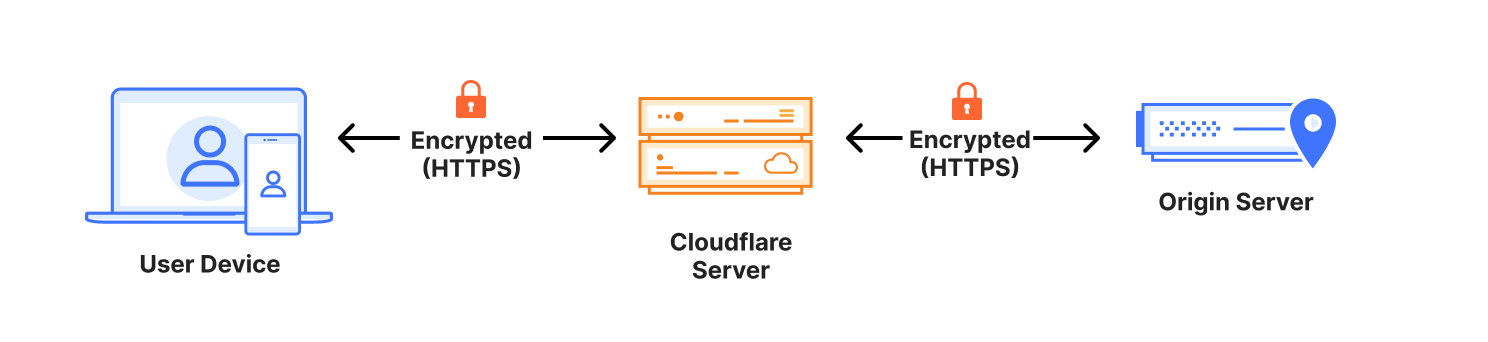
During Birthday Week 2022, we pledged to provide our customers with the most secure connection possible from Cloudflare to their origin servers automatically. I’m thrilled to announce we will begin rolling this experience out to customers who have the SSL/TLS Recommender enabled on August 8, 2024. Following this, remaining Free and Pro customers can use this feature beginning September 16, 2024 with Business and Enterprise customers to follow.

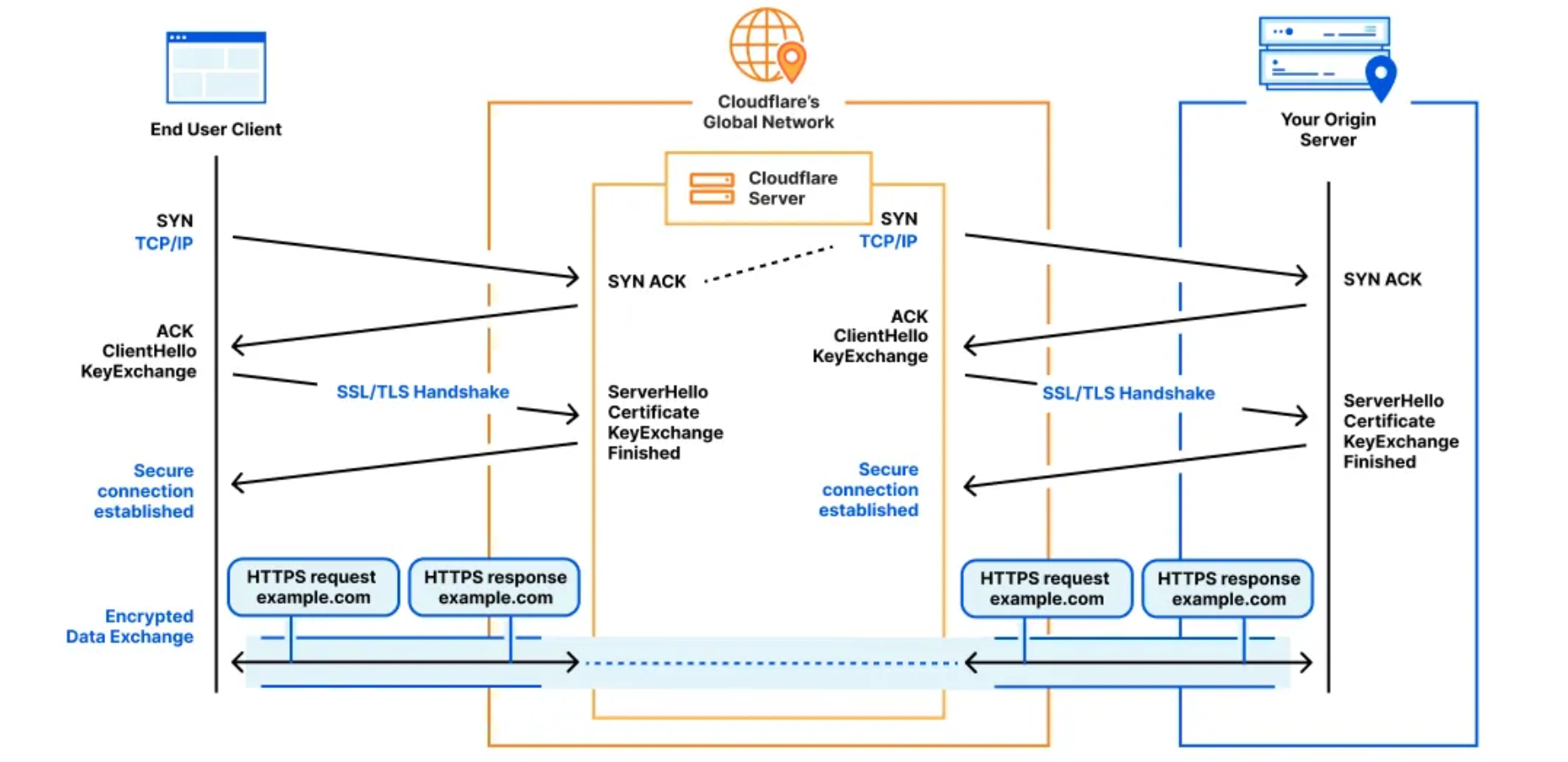
Although it took longer than anticipated to roll out, our priority was to achieve an automatic configuration both transparently and without risking any site downtime. Taking this additional time allowed us to balance enhanced security with seamless site functionality, especially since origin server security configuration and capabilities are beyond Cloudflare’s direct control. The new Automatic SSL/TLS setting will maximize and simplify the encryption modes Cloudflare uses to communicate with origin servers by using the SSL/TLS Recommender

We first talked about this process in 2014: at that time, securing connections was hard to configure, prohibitively expensive, and required specialized knowledge to set up correctly. To help alleviate these pains, Cloudflare introduced Universal SSL, which allowed web properties to obtain a free SSL/TLS certificate to enhance the security of connections between browsers and Cloudflare. 

This worked well and was easy because Cloudflare could manage the certificates and connection security from incoming browsers. As a result of that work, the number of encrypted HTTPS connections on the entire Internet doubled at that time. However, the connections made from Cloudflare to origin servers still required manual configuration of the encryption modes to let Cloudflare know the capabilities of the origin. 

Today we’re excited to begin the sequel to Universal SSL and make security between Cloudflare and origins automatic and easy for everyone.

History of securing origin-facing connections

Ensuring that more bytes flowing across the Internet are automatically encrypted strengthens the barrier against interception, throttling, and censorship of Internet traffic by third parties. 

Generally, two communicating parties (often a client and server) establish a secure connection using the TLS protocol. For a simplified breakdown: 

  • The client advertises the list of encryption parameters it supports (along with some metadata) to the server.

  • The server responds back with its own preference of the chosen encryption parameters. It also sends a digital certificate so that the client can authenticate its identity.

  • The client validates the server identity, confirming that the server is who it says it is.

  • Both sides agree on a symmetric secret key for the session that is used to encrypt and decrypt all transmitted content over the connection.

Because Cloudflare acts as an intermediary between the client and our customer’s origin server, two separate TLS connections are established. One between the user’s browser and our network, and the other from our network to the origin server. This allows us to manage and optimize the security and performance of both connections independently.

Unlike securing connections between clients and Cloudflare, the security capabilities of origin servers are not under our direct control. For example, we can manage the certificate (the file used to verify identity and provide context on establishing encrypted connections) between clients and Cloudflare because it’s our job in that connection to provide it to clients, but when talking to origin servers, Cloudflare is the client.

Customers need to acquire and provision an origin certificate on their host. They then have to configure Cloudflare to expect the new certificate from the origin when opening a connection. Needing to manually configure connection security across multiple different places requires effort and is prone to human error. 

This issue was discussed in the original Universal SSL blog:

For a site that did not have SSL before, we will default to our Flexible SSL mode, which means traffic from browsers to Cloudflare will be encrypted, but traffic from Cloudflare to a site’s origin server will not. We strongly recommend site owners install a certificate on their web servers so we can encrypt traffic to the origin … Once you’ve installed a certificate on your web server, you can enable the Full or Strict SSL modes which encrypt origin traffic and provide a higher level of security.

Over the years Cloudflare has introduced numerous products to help customers configure how Cloudflare should talk to their origin. These products include a certificate authority to help customers obtain a certificate to verify their origin server’s identity and encryption capabilities, Authenticated Origin Pulls that ensures only HTTPS (encrypted) requests from Cloudflare will receive a response from the origin server, and Cloudflare Tunnels that can be configured to proactively establish secure and private tunnels to the nearest Cloudflare data center. Additionally, the ACME protocol and its corresponding Certbot tooling make it easier than ever to obtain and manage publicly-trusted certificates on customer origins. While these technologies help customers configure how Cloudflare should communicate with their origin server, they still require manual configuration changes on the origin and to Cloudflare settings. 

Ensuring certificates are configured appropriately on origin servers and informing Cloudflare about how we should communicate with origins can be anxiety-inducing because misconfiguration can lead to downtime if something isn’t deployed or configured correctly. 

To simplify this process and help identify the most secure options that customers could be using without any misconfiguration risk, Cloudflare introduced the SSL/TLS Recommender in 2021. The Recommender works by probing customer origins with different SSL/TLS settings to provide a recommendation whether the SSL/TLS encryption mode for the web property can be improved. The Recommender has been in production for three years and has consistently managed to provide high quality origin-security recommendations for Cloudflare’s customers. 

The SSL/TLS Recommender system serves as the brain of the automatic origin connection service that we are announcing today. 

How does SSL/TLS Recommendation work?

The Recommender works by actively comparing content on web pages that have been downloaded using different SSL/TLS modes to see if it is safe and risk-free to update the mode Cloudflare uses to connect to origin servers.

Cloudflare currently offers five SSL/TLS modes:

  1. Off: No encryption is used for traffic between browsers and Cloudflare or between Cloudflare and origins. Everything is cleartext HTTP.

  2. Flexible: Traffic from browsers to Cloudflare can be encrypted via HTTPS, but traffic from Cloudflare to the origin server is not. This mode is common for origins that do not support TLS, though upgrading the origin configuration is recommended whenever possible. A guide for upgrading is available here.

  3. Full: Cloudflare matches the browser request protocol when connecting to the origin. If the browser uses HTTP, Cloudflare connects to the origin via HTTP; if HTTPS, Cloudflare uses HTTPS without validating the origin’s certificate. This mode is common for origins that use self-signed or otherwise invalid certificates.

  4. Full (Strict): Similar to Full Mode, but with added validation of the origin server’s certificate, which can be issued by a public CA like Let’s Encrypt or by Cloudflare Origin CA.

  5. Strict (SSL-only origin pull): Regardless of whether the browser-to-Cloudflare connection uses HTTP or HTTPS, Cloudflare always connects to the origin over HTTPS with certificate validation.

HTTP from visitor

HTTPS from visitor

Off

HTTP to origin

HTTP to origin

Flexible

HTTP to origin

HTTP to origin

Full

HTTP to origin

HTTPS without cert validation to origin

Full (strict)

HTTP to origin

HTTPS with cert validation to origin

Strict (SSL-only origin pull)

HTTPS with cert validation to origin

HTTPS with cert validation to origin

The SSL/TLS Recommender works by crawling customer sites and collecting links on the page (like any web crawler). The Recommender downloads content over both HTTP and HTTPS, making GET requests to avoid modifying server resources. It then uses a content similarity algorithm, adapted from the research paper “A Deeper Look at Web Content Availability and Consistency over HTTP/S” (TMA Conference 2020), to determine if content matches. If the content does match, the Recommender makes a determination for whether the SSL/TLS mode can be increased without misconfiguration risk. 

The recommendations are currently delivered to customers via email. 

When the Recommender is making security recommendations, it errs on the side of maintaining current site functionality to avoid breakage and usability issues. If a website is non-functional, blocks all bots, or has SSL/TLS-specific Page Rules or Configuration Rules, the Recommender may not complete its scans and provide a recommendation. It was designed to maximize domain security, but will not help resolve website or domain functionality issues.

The crawler uses the user agent “`Cloudflare-SSLDetector`” and is included in Cloudflare’s list of known good bots. It ignores `robots.txt` (except for rules specifically targeting its user agent) to ensure accurate recommendations.

When downloading content from your origin server over both HTTP and HTTPS and comparing the content, the Recommender understands the current SSL/TLS encryption mode that your website uses and what risk there might be to the site functionality if the recommendation is followed.

Using SSL/TLS Recommender to automatically manage SSL/TLS settings 

Previously, signing up for the SSL/TLS Recommender provided a good experience for customers, but only resulted in an email recommendation in the event that a zone’s current SSL/TLS modes could be updated. To Cloudflare, this was a positive signal that customers wanted their websites to have more secure connections to their origin servers – over 2 million domains have enabled the SSL/TLS Recommender. However, we found that a significant number of users would not complete the next step of pushing the button to inform Cloudflare that we could communicate over the upgraded settings. Only 30% of the recommendations that the system provided were followed. 

With the system designed to increase security while avoiding any breaking changes, we wanted to provide an option for customers to allow the Recommender to help upgrade their site security, without requiring further manual action from the customer. Therefore, we are introducing a new option for managing SSL/TLS configuration on Cloudflare: Automatic SSL/TLS. 

Automatic SSL/TLS uses the SSL/TLS Recommender to make the determination as to what encryption mode is the most secure and safest for a website to be set to. If there is a more secure option for your website (based on your origin certification or capabilities), Automatic SSL/TLS will find it and apply it for your domain. The other option, Custom SSL/TLS, will work exactly like the setting the encryption mode does today. If you know what setting you want, just select it using Custom SSL/TLS, and we’ll use it. 

Automatic SSL/TLS is currently meant to service an entire website, which typically works well for those with a single origin. For those concerned that they have more complex setups which use multiple origin servers with different security capabilities, don’t worry. Automatic SSL/TLS will still avoid breaking site functionality by looking for the best setting that works for all origins serving a part of the site’s traffic. 

If customers want to segment the SSL/TLS mode used to communicate with the numerous origins that service their domain, they can achieve this by using Configuration Rules. These rules allow you to set more precise modes that Cloudflare should respect (based on path or subdomain or even IP address) to maximize the security of the domain based on your desired Rules criteria. If your site uses SSL/TLS-specific settings in a Configuration Rule or Page rule, those settings will override the zone-wide Automatic and Custom settings.

The goal of Automatic SSL/TLS is to simplify and maximize the origin-facing security for customers on Cloudflare. We want this to be the new default for all websites on Cloudflare, but we understand that not everyone wants this new default, and we will respect your decision for how Cloudflare should communicate with your origin server. If you block the Recommender from completing its crawls, the origin server is non-functional or can’t be crawled, or if you want to opt out of this default and just continue using the same encryption mode you are using today, we will make it easy for you to tell us what you prefer. 

How to onboard to Automatic SSL/TLS

To improve the security settings for everyone by default, we are making the following default changes to how Cloudflare configures the SSL/TLS level for all zones: 

Starting on August 8, 2024 websites with the SSL/TLS Recommender currently enabled will have the Automatic SSL/TLS setting enabled by default. Enabling does not mean that the Recommender will begin scanning and applying new settings immediately though. There will be a one-month grace period before the first scans begin and the recommended settings are applied. Enterprise (ENT) customers will get a six-week grace period. Origin scans will start getting scheduled by September 9, 2024, for non-Enterprise customers and September 23rd for ENT customers with the SSL Recommender enabled. This will give customers the ability to opt out by removing Automatic SSL/TLS and selecting the Custom mode that they want to use instead.

Further, during the second week of September all new zones signing up for Cloudflare will start seeing the Automatic SSL/TLS setting enabled by default.

Beginning September 16, 2024, remaining Free and Pro customers will start to see the new Automatic SSL/TLS setting. They will also have a one-month grace period to opt out before the scans start taking effect. 

Customers in the cohort having the new Automatic SSL/TLS setting applied will receive an email communication regarding the date that they are slated for this migration as well as a banner on the dashboard that mentions this transition as well. If they do not wish for Cloudflare to change anything in their configurations, the process for opt-out of this migration is outlined below. 

Following the successful migration of Free and Pro customers, we will proceed to Business and Enterprise customers with a similar cadence. These customers will get email notifications and information in the dashboard when they are in the migration cohort.

The Automatic SSL/TLS setting will not impact users that are already in Strict or Full (strict) mode nor will it impact websites that have opted-out. 

Opting out

There are a number of reasons why someone might want to configure a lower-than-optimal security setting for their website. Some may want to set a lower security setting for testing purposes or to debug some behavior. Whatever the reason, the options to opt-out of the Automatic SSL/TLS setting during the migration process are available in the dashboard and API.

To opt-out, simply select Custom SSL/TLS in the dashboard (instead of the enabled Automatic SSL/TLS) and we will continue to use the previously set encryption mode that you were using prior to the migration. Automatic and Custom SSL/TLS modes can be found in the Overview tab of the SSL/TLS section of the dashboard. To enable your preferred mode, select configure.  

If you want to opt-out via the API you can make this API call on or before the grace period expiration date. 

    curl --request PATCH \
        --url https://api.cloudflare.com/client/v4/zones//settings/ssl_automatic_mode \
        --header 'Authorization: Bearer ' \
        --header 'Content-Type: application/json' \
        --data '{"value":"custom"}'

If an opt-out is triggered, there will not be a change to the currently configured SSL/TLS setting. You are also able to change the security level at any time by going to the SSL/TLS section of the dashboard and choosing the Custom setting you want (similar to how this is accomplished today). 

If at a later point you’d like to opt-in to Automatic SSL/TLS, that option is available by changing your setting from Custom to Automatic.

What if I want to be more secure now?

We will begin to roll out this change to customers with the SSL/TLS Recommender enabled on August 8, 2024. If you want to enroll in that group, we recommend enabling the Recommender as soon as possible. 

If you read this and want to make sure you’re at the highest level of backend security already, we recommend Full (strict) or Strict mode. Directions on how to make sure you’re correctly configured in either of those settings are available here and here

If you prefer to wait for us to automatically upgrade your connection to the maximum encryption mode your origin supports, please watch your inbox for the date we will begin rolling out this change for you.

Celebrating one year of Project Cybersafe Schools

Post Syndicated from Zaid Zaid original https://blog.cloudflare.com/celebrating-one-year-of-project-cybersafe-schools

August 8, 2024, is the first anniversary of Project Cybersafe Schools, Cloudflare’s initiative to provide free security tools to small school districts in the United States.

Cloudflare announced Project Cybersafe Schools at the White House on August 8, 2023 as part of the Back to School Safely: K-12 Cybersecurity Summit hosted by First Lady Dr. Jill Biden. The White House highlighted Cloudflare’s commitment to provide free resources to small school districts in the United States. Project Cybersafe Schools supports eligible K-12 public school districts with a package of Zero Trust cybersecurity solutions – for free, and with no time limit. These tools help eligible school districts minimize their exposure to common cyber threats.

Cloudflare’s mission is to help build a better Internet. One way we do that is by supporting organizations that are particularly vulnerable to cyber threats and lack the resources to protect themselves through projects like Project Galileo, the Athenian Project, the Critical Infrastructure Defense Project, Project Safekeeping, and most recently, Project Secure Health.

Schools are vulnerable to cyber attacks

In Q2 2024, education ranked 4th on the list of most attacked industries. Between 2016 and 2022, there were 1,619 K-12 cyber incidents. Since we launched Project Cybersafe Schools in August 2023, there have been a number of cyber attacks targeting hundreds of thousands of students. In August 2023, Prince George’s County Public Schools in Maryland fell victim to a ransomware attack that affected the personal data of more than 100,000 people. Then, in December 2023, a Cincinnati area school district suffered a cyber attack that resulted in the loss of $1.7M. In 2024, there have been numerous incidents affecting K-12 schools across the U.S., including in Massachusetts, New Jersey, and Washington state. The smallest school districts are often the most vulnerable because of a lack of resources or capacity. Sometimes, the person responsible for cybersecurity does so in addition to another primary role, whether as a teacher, coach or administrator.

We are proud of our impact, but we can do more

There are about 14,000 school districts in the United States, and about 9,800 of them have fewer than 2,500 students. All 9,800 of those small public school districts are eligible for Project Cybersafe Schools (for free, and with no time limit – see below for all the details), and we want to help as many as possible. We are proud of the number of school districts that we have onboarded since August 2023, but it is not enough. We want to do more, and we can onboard more school districts by getting the word out about Project Cybersafe Schools. When we published an update in December 2023 encouraging school districts to sign up before the holiday break, we saw a noticeable bump in the number of inquiries from eligible school districts. If you work at a small school district in the United States, we encourage you to see if you qualify for this program.

Nearly 30 states have school districts now enrolled in Project Cybersafe Schools, representing every region of the country. Since we launched the program, we have onboarded nearly 120 qualifying school districts. As a result, more than 160,000 students, teachers, and staff are protected by Cloudflare’s cloud email security to protect against a broad spectrum of threats including Business Email Compromise, multichannel phishing, credential harvesting, and other targeted attacks. These school districts are also receiving protection against Internet threats with DNS filtering by preventing users from reaching unwanted or harmful online content like ransomware or phishing sites.

Attacks prevented by Project Cybersafe Schools in 2024

When the White House launched its National Cybersecurity Strategy in March 2023, Acting National Cyber Director Kemba Walden noted in her remarks that “we expect school districts to go toe-to-toe with transnational criminal organizations largely by themselves. This isn’t just unfair; it’s ineffective.” Cloudflare agrees, and this is one of the reasons we launched Project Cybersafe Schools after conversations with officials from the Cybersecurity & Infrastructure Security Agency (CISA), the Department of Education, and the White House about how we could help to protect small school districts in the United States from cyber threats.

Year to date, Cloudflare’s cloud email security solution has identified and blocked more than 2 million malicious emails targeting the school districts enrolled in Project Cybersafe Schools. This represents roughly 3.5% of their total email traffic, though certain school districts are attacked at a far higher rate. In one district, malicious emails blocked by Cloudflare represented more than 15% of all email traffic.

Another challenge facing these schools is the large volume of spam emails sent their way. While some of this spam is promotional and not overtly malicious, it can often be used in a variety of attacks. Project Cybersafe Schools has prevented more than 2.2 million spam emails from clogging the inboxes of the school districts who have enrolled.

According to CISA, more than 90% of all cyber attacks begin with a phishing email. So helping these school districts secure their email inboxes is a critical factor in reducing their cyber risk. With email providing a relatively high success rate for gaining initial access, it’s no surprise that attackers continue to exploit email users with increasingly sophisticated and evasive techniques that bypass native security controls. And the consequences of these attacks can be severe: ​​Recovery time can extend from two all the way up to nine months – that’s almost an entire school year.

Here’s what a few Project Cybersafe Schools participants have to say about the impact of the program on their school district:

What Cloudflare’s Project Cybersafe Schools has allowed us to do as a rural district is add a missing layer of protection to our devices, providing a previously missing and unique layer of security even off our secure network. Where other options would cost us somewhere in the thousands, we are now able to secure devices for free using one of the simplest and scalable platforms, featuring one of the easiest learning curves I’ve worked with. Cloudflare’s feature set as a whole for districts are unparalleled and integration is a must for schools looking to add an additional layer of protection to their network architecture, which by my estimation should be everyone.” – Wyatt Determan, Technology Specialist (HLWW Public School District, Minnesota)

“Since implementing the Cybersafe Schools program as our secure email gateway, we’ve saved over $5,000 per year compared to similar solutions. The program has effectively filtered out numerous malicious emails, greatly enhancing our security posture. Its seamless integration and user-friendly interface make it easy for our IT team to manage. Cybersafe Schools has become a critical part of our IT infrastructure, ensuring a safe and secure educational environment.” Paul Strout, Network Manager (Regional School Unit RSU71, Belfast, Maine)

What Zero Trust services are available?

Eligible K-12 public school districts in the United States have access to a package of enterprise-level Zero Trust cybersecurity services for free and with no time limit – there is no catch and no underlying obligations. Eligible organizations will benefit from:

  • Email Protection: Safeguards inboxes with cloud email security by protecting against a broad spectrum of threats including malware-less Business Email Compromise, multichannel phishing, credential harvesting, and other targeted attacks.

  • DNS Filtering: Protects against Internet threats with DNS filtering by preventing users from reaching unwanted or harmful online content like ransomware or phishing sites and can be deployed to comply with the Children’s Internet Protection Act (CIPA).

Who can apply?

To be eligible, Project Cybersafe Schools participants must be:

  • K-12 public school districts located in the United States

  • Up to 2,500 students in the district

If you think your school district may be eligible, we welcome you to contact us to learn more. Please fill out the form today.

For schools or school districts that do not qualify for Project Cybersafe Schools, Cloudflare has other packages available with educational pricing. If you do not qualify for Project Cybersafe Schools, but are interested in our educational services, please contact us at [email protected].

[$] Endless OS aimed at educational and offline environments

Post Syndicated from daroc original https://lwn.net/Articles/984086/


Endless OS
is a Linux distribution with a focus on improving access to
educational tools by providing a simple-to-manage, full-featured desktop for
educators and students — one that works offline, with minimal maintenance. The
distribution also aims to be suitable for older devices, in order to promote access to
computers by ensuring those systems remain usable.
In pursuit of those goals, it makes some unusual technical
choices. But what makes the distribution really shine is its curated collection
of software and educational resources.

Security updates for Thursday

Post Syndicated from jake original https://lwn.net/Articles/984807/

Security updates have been issued by AlmaLinux (freeradius and freeradius:3.0), Debian (chromium, odoo, and roundcube), Fedora (microcode_ctl, mingw-qt5-qtbase, mingw-qt6-qtbase, opentofu, orc, python-setuptools, and vim), Gentoo (Nokogiri), Oracle (kernel), Red Hat (go-toolset:rhel8, golang, kernel, krb5, libtiff, python-setuptools, and python39:3.9 and python39-devel:3.9), SUSE (python-Django), and Ubuntu (krb5).

Introducing Automatic SSL/TLS: securing and simplifying origin connectivity

Post Syndicated from Alex Krivit original https://blog.cloudflare.com/introducing-automatic-ssl-tls-securing-and-simplifying-origin-connectivity


During Birthday Week 2022, we pledged to provide our customers with the most secure connection possible from Cloudflare to their origin servers automatically. I’m thrilled to announce we will begin rolling this experience out to customers who have the SSL/TLS Recommender enabled on August 8, 2024. Following this, remaining Free and Pro customers can use this feature beginning September 16, 2024, with Business and Enterprise customers to follow.

Although it took longer than anticipated to roll out, our priority was to achieve an automatic configuration both transparently and without risking any site downtime. Taking this additional time allowed us to balance enhanced security with seamless site functionality, especially since origin server security configuration and capabilities are beyond Cloudflare’s direct control. The new Automatic SSL/TLS setting will maximize and simplify the encryption modes Cloudflare uses to communicate with origin servers by using the SSL/TLS Recommender.

We first talked about this process in 2014: at that time, securing connections was hard to configure, prohibitively expensive, and required specialized knowledge to set up correctly. To help alleviate these pains, Cloudflare introduced Universal SSL, which allowed web properties to obtain a free SSL/TLS certificate to enhance the security of connections between browsers and Cloudflare.

This worked well and was easy because Cloudflare could manage the certificates and connection security from incoming browsers. As a result of that work, the number of encrypted HTTPS connections on the entire Internet doubled at that time. However, the connections made from Cloudflare to origin servers still required manual configuration of the encryption modes to let Cloudflare know the capabilities of the origin.

Today we’re excited to begin the sequel to Universal SSL and make security between Cloudflare and origins automatic and easy for everyone.

History of securing origin-facing connections

Ensuring that more bytes flowing across the Internet are automatically encrypted strengthens the barrier against interception, throttling, and censorship of Internet traffic by third parties.

Generally, two communicating parties (often a client and server) establish a secure connection using the TLS protocol. For a simplified breakdown:

  • The client advertises the list of encryption parameters it supports (along with some metadata) to the server.
  • The server responds back with its own preference of the chosen encryption parameters. It also sends a digital certificate so that the client can authenticate its identity.
  • The client validates the server identity, confirming that the server is who it says it is.
  • Both sides agree on a symmetric secret key for the session that is used to encrypt and decrypt all transmitted content over the connection.

Because Cloudflare acts as an intermediary between the client and our customer’s origin server, two separate TLS connections are established. One between the user’s browser and our network, and the other from our network to the origin server. This allows us to manage and optimize the security and performance of both connections independently.

Unlike securing connections between clients and Cloudflare, the security capabilities of origin servers are not under our direct control. For example, we can manage the certificate (the file used to verify identity and provide context on establishing encrypted connections) between clients and Cloudflare because it’s our job in that connection to provide it to clients, but when talking to origin servers, Cloudflare is the client.

Customers need to acquire and provision an origin certificate on their host. They then have to configure Cloudflare to expect the new certificate from the origin when opening a connection. Needing to manually configure connection security across multiple different places requires effort and is prone to human error.

This issue was discussed in the original Universal SSL blog:

For a site that did not have SSL before, we will default to our Flexible SSL mode, which means traffic from browsers to Cloudflare will be encrypted, but traffic from Cloudflare to a site’s origin server will not. We strongly recommend site owners install a certificate on their web servers so we can encrypt traffic to the origin … Once you’ve installed a certificate on your web server, you can enable the Full or Strict SSL modes which encrypt origin traffic and provide a higher level of security.

Over the years Cloudflare has introduced numerous products to help customers configure how Cloudflare should talk to their origin. These products include a certificate authority to help customers obtain a certificate to verify their origin server’s identity and encryption capabilities, Authenticated Origin Pulls that ensures only HTTPS (encrypted) requests from Cloudflare will receive a response from the origin server, and Cloudflare Tunnels that can be configured to proactively establish secure and private tunnels to the nearest Cloudflare data center. Additionally, the ACME protocol and its corresponding Certbot tooling make it easier than ever to obtain and manage publicly-trusted certificates on customer origins. While these technologies help customers configure how Cloudflare should communicate with their origin server, they still require manual configuration changes on the origin and to Cloudflare settings.

Ensuring certificates are configured appropriately on origin servers and informing Cloudflare about how we should communicate with origins can be anxiety-inducing because misconfiguration can lead to downtime if something isn’t deployed or configured correctly.

To simplify this process and help identify the most secure options that customers could be using without any misconfiguration risk, Cloudflare introduced the SSL/TLS Recommender in 2021. The Recommender works by probing customer origins with different SSL/TLS settings to provide a recommendation whether the SSL/TLS encryption mode for the web property can be improved. The Recommender has been in production for three years and has consistently managed to provide high quality origin-security recommendations for Cloudflare’s customers.

The SSL/TLS Recommender system serves as the brain of the automatic origin connection service that we are announcing today.

How does SSL/TLS Recommendation work?

The Recommender works by actively comparing content on web pages that have been downloaded using different SSL/TLS modes to see if it is safe and risk-free to update the mode Cloudflare uses to connect to origin servers.

Cloudflare currently offers five SSL/TLS modes:

  1. Off: No encryption is used for traffic between browsers and Cloudflare or between Cloudflare and origins. Everything is cleartext HTTP.
  2. Flexible: Traffic from browsers to Cloudflare can be encrypted via HTTPS, but traffic from Cloudflare to the origin server is not. This mode is common for origins that do not support TLS, though upgrading the origin configuration is recommended whenever possible. A guide for upgrading is available here.
  3. Full: Cloudflare matches the browser request protocol when connecting to the origin. If the browser uses HTTP, Cloudflare connects to the origin via HTTP; if HTTPS, Cloudflare uses HTTPS without validating the origin’s certificate. This mode is common for origins that use self-signed or otherwise invalid certificates.
  4. Full (Strict): Similar to Full Mode, but with added validation of the origin server’s certificate, which can be issued by a public CA like Let’s Encrypt or by Cloudflare Origin CA.
  5. Strict (SSL-only origin pull): Regardless of whether the browser-to-Cloudflare connection uses HTTP or HTTPS, Cloudflare always connects to the origin over HTTPS with certificate validation.

HTTP from visitor

HTTPS from visitor

Off

HTTP to origin

HTTP to origin

Flexible

HTTP to origin

HTTP to origin

Full

HTTP to origin

HTTPS without cert validation to origin

Full (strict)

HTTP to origin

HTTPS with cert validation to origin

Strict (SSL-only origin pull)

HTTPS with cert validation to origin

HTTPS with cert validation to origin

The SSL/TLS Recommender works by crawling customer sites and collecting links on the page (like any web crawler). The Recommender downloads content over both HTTP and HTTPS, making GET requests to avoid modifying server resources. It then uses a content similarity algorithm, adapted from the research paper “A Deeper Look at Web Content Availability and Consistency over HTTP/S” (TMA Conference 2020), to determine if content matches. If the content does match, the Recommender makes a determination for whether the SSL/TLS mode can be increased without misconfiguration risk.

The recommendations are currently delivered to customers via email.

When the Recommender is making security recommendations, it errs on the side of maintaining current site functionality to avoid breakage and usability issues. If a website is non-functional, blocks all bots, or has SSL/TLS-specific Page Rules or Configuration Rules, the Recommender may not complete its scans and provide a recommendation. It was designed to maximize domain security, but will not help resolve website or domain functionality issues.

The crawler uses the user agent “Cloudflare-SSLDetector” and is included in Cloudflare’s list of known good bots. It ignores robots.txt (except for rules specifically targeting its user agent) to ensure accurate recommendations.

When downloading content from your origin server over both HTTP and HTTPS and comparing the content, the Recommender understands the current SSL/TLS encryption mode that your website uses and what risk there might be to the site functionality if the recommendation is followed.

Using SSL/TLS Recommender to automatically manage SSL/TLS settings

Previously, signing up for the SSL/TLS Recommender provided a good experience for customers, but only resulted in an email recommendation in the event that a zone’s current SSL/TLS modes could be updated. To Cloudflare, this was a positive signal that customers wanted their websites to have more secure connections to their origin servers – over 2 million domains have enabled the SSL/TLS Recommender. However, we found that a significant number of users would not complete the next step of pushing the button to inform Cloudflare that we could communicate over the upgraded settings. Only 30% of the recommendations that the system provided were followed.

With the system designed to increase security while avoiding any breaking changes, we wanted to provide an option for customers to allow the Recommender to help upgrade their site security, without requiring further manual action from the customer. Therefore, we are introducing a new option for managing SSL/TLS configuration on Cloudflare: Automatic SSL/TLS.

Automatic SSL/TLS uses the SSL/TLS Recommender to make the determination as to what encryption mode is the most secure and safest for a website to be set to. If there is a more secure option for your website (based on your origin certification or capabilities), Automatic SSL/TLS will find it and apply it for your domain. The other option, Custom SSL/TLS, will work exactly like the setting the encryption mode does today. If you know what setting you want, just select it using Custom SSL/TLS, and we’ll use it.

Automatic SSL/TLS is currently meant to service an entire website, which typically works well for those with a single origin. For those concerned that they have more complex setups which use multiple origin servers with different security capabilities, don’t worry. Automatic SSL/TLS will still avoid breaking site functionality by looking for the best setting that works for all origins serving a part of the site’s traffic.

If customers want to segment the SSL/TLS mode used to communicate with the numerous origins that service their domain, they can achieve this by using Configuration Rules. These rules allow you to set more precise modes that Cloudflare should respect (based on path or subdomain or even IP address) to maximize the security of the domain based on your desired Rules criteria. If your site uses SSL/TLS-specific settings in a Configuration Rule or Page rule, those settings will override the zone-wide Automatic and Custom settings.

The goal of Automatic SSL/TLS is to simplify and maximize the origin-facing security for customers on Cloudflare. We want this to be the new default for all websites on Cloudflare, but we understand that not everyone wants this new default, and we will respect your decision for how Cloudflare should communicate with your origin server. If you block the Recommender from completing its crawls, the origin server is non-functional or can’t be crawled, or if you want to opt out of this default and just continue using the same encryption mode you are using today, we will make it easy for you to tell us what you prefer.

How to onboard to Automatic SSL/TLS

To improve the security settings for everyone by default, we are making the following default changes to how Cloudflare configures the SSL/TLS level for all zones:

Starting on August 8, 2024, websites with the SSL/TLS Recommender currently enabled will have the Automatic SSL/TLS setting enabled by default. Enabling does not mean that the Recommender will begin scanning and applying new settings immediately though. There will be a one-month grace period before the first scans begin and the recommended settings are applied. Enterprise (ENT) customers will get a six-week grace period. Origin scans will start getting scheduled by September 9, 2024, for non-Enterprise customers and September 23rd for ENT customers with the SSL Recommender enabled. This will give customers the ability to opt out by removing Automatic SSL/TLS and selecting the Custom mode that they want to use instead.

Further, during the second week of September all new zones signing up for Cloudflare will start seeing the Automatic SSL/TLS setting enabled by default.

Beginning September 16, 2024, remaining Free and Pro customers will start to see the new Automatic SSL/TLS setting. They will also have a one-month grace period to opt out before the scans start taking effect.

Customers in the cohort having the new Automatic SSL/TLS setting applied will receive an email communication regarding the date that they are slated for this migration as well as a banner on the dashboard that mentions this transition as well. If they do not wish for Cloudflare to change anything in their configurations, the process for opt-out of this migration is outlined below.

Following the successful migration of Free and Pro customers, we will proceed to Business and Enterprise customers with a similar cadence. These customers will get email notifications and information in the dashboard when they are in the migration cohort.

The Automatic SSL/TLS setting will not impact users that are already in Strict or Full (strict) mode nor will it impact websites that have opted-out.

Opting out

There are a number of reasons why someone might want to configure a lower-than-optimal security setting for their website. Some may want to set a lower security setting for testing purposes or to debug some behavior. Whatever the reason, the options to opt-out of the Automatic SSL/TLS setting during the migration process are available in the dashboard and API.

To opt-out, simply select Custom SSL/TLS in the dashboard (instead of the enabled Automatic SSL/TLS) and we will continue to use the previously set encryption mode that you were using prior to the migration. Automatic and Custom SSL/TLS modes can be found in the Overview tab of the SSL/TLS section of the dashboard. To enable your preferred mode, select configure.

If you want to opt out via the API you can make this API call on or before the grace period expiration date.

    curl --request PATCH \
        --url https://api.cloudflare.com/client/v4/zones/<insert_zone_tag_here>/settings/ssl_automatic_mode \
        --header 'Authorization: Bearer <insert_api_token_here>' \
        --header 'Content-Type: application/json' \
        --data '{"value":"custom"}'

If an opt-out is triggered, there will not be a change to the currently configured SSL/TLS setting. You are also able to change the security level at any time by going to the SSL/TLS section of the dashboard and choosing the Custom setting you want (similar to how this is accomplished today).

If at a later point you’d like to opt in to Automatic SSL/TLS, that option is available by changing your setting from Custom to Automatic.

What if I want to be more secure now?

We will begin to roll out this change to customers with the SSL/TLS Recommender enabled on August 8, 2024. If you want to enroll in that group, we recommend enabling the Recommender as soon as possible.

If you read this and want to make sure you’re at the highest level of backend security already, we recommend Full (strict) or Strict mode. Directions on how to make sure you’re correctly configured in either of those settings are available here and here.

If you prefer to wait for us to automatically upgrade your connection to the maximum encryption mode your origin supports, please watch your inbox for the date we will begin rolling out this change for you.

Celebrating one year of Project Cybersafe Schools

Post Syndicated from Zaid Zaid original https://blog.cloudflare.com/celebrating-one-year-of-project-cybersafe-schools


August 8, 2024, is the first anniversary of Project Cybersafe Schools, Cloudflare’s initiative to provide free security tools to small school districts in the United States.

Cloudflare announced Project Cybersafe Schools at the White House on August 8, 2023 as part of the Back to School Safely: K-12 Cybersecurity Summit hosted by First Lady Dr. Jill Biden. The White House highlighted Cloudflare’s commitment to provide free resources to small school districts in the United States. Project Cybersafe Schools supports eligible K-12 public school districts with a package of Zero Trust cybersecurity solutions – for free, and with no time limit. These tools help eligible school districts minimize their exposure to common cyber threats.

Cloudflare’s mission is to help build a better Internet. One way we do that is by supporting organizations that are particularly vulnerable to cyber threats and lack the resources to protect themselves through projects like Project Galileo, the Athenian Project, the Critical Infrastructure Defense Project, Project Safekeeping, and most recently, Project Secure Health.

Schools are vulnerable to cyber attacks

In Q2 2024, education ranked 4th on the list of most attacked industries. Between 2016 and 2022, there were 1,619 K-12 cyber incidents. Since we launched Project Cybersafe Schools in August 2023, there have been a number of cyber attacks targeting hundreds of thousands of students. In August 2023, Prince George’s County Public Schools in Maryland fell victim to a ransomware attack that affected the personal data of more than 100,000 people. Then, in December 2023, a Cincinnati area school district suffered a cyber attack that resulted in the loss of $1.7M. In 2024, there have been numerous incidents affecting K-12 schools across the U.S., including in Massachusetts, New Jersey, and Washington state. The smallest school districts are often the most vulnerable because of a lack of resources or capacity. Sometimes, the person responsible for cybersecurity does so in addition to another primary role, whether as a teacher, coach or administrator.

We are proud of our impact, but we can do more

There are about 14,000 school districts in the United States, and about 9,800 of them have fewer than 2,500 students. All 9,800 of those small public school districts are eligible for Project Cybersafe Schools (for free, and with no time limit – see below for all the details), and we want to help as many as possible. We are proud of the number of school districts that we have onboarded since August 2023, but it is not enough. We want to do more, and we can onboard more school districts by getting the word out about Project Cybersafe Schools. When we published an update in December 2023 encouraging school districts to sign up before the holiday break, we saw a noticeable bump in the number of inquiries from eligible school districts. If you work at a small school district in the United States, we encourage you to see if you qualify for this program.

Nearly 30 states have school districts now enrolled in Project Cybersafe Schools, representing every region of the country. Since we launched the program, we have onboarded nearly 120 qualifying school districts. As a result, more than 160,000 students, teachers, and staff are protected by Cloudflare’s cloud email security to protect against a broad spectrum of threats including Business Email Compromise, multichannel phishing, credential harvesting, and other targeted attacks. These school districts are also receiving protection against Internet threats with DNS filtering by preventing users from reaching unwanted or harmful online content like ransomware or phishing sites.

Attacks prevented by Project Cybersafe Schools in 2024

When the White House launched its National Cybersecurity Strategy in March 2023, Acting National Cyber Director Kemba Walden noted in her remarks that “we expect school districts to go toe-to-toe with transnational criminal organizations largely by themselves. This isn’t just unfair; it’s ineffective.” Cloudflare agrees, and this is one of the reasons we launched Project Cybersafe Schools after conversations with officials from the Cybersecurity & Infrastructure Security Agency (CISA), the Department of Education, and the White House about how we could help to protect small school districts in the United States from cyber threats.

Year to date, Cloudflare’s cloud email security solution has identified and blocked more than 2 million malicious emails targeting the school districts enrolled in Project Cybersafe Schools. This represents roughly 3.5% of their total email traffic, though certain school districts are attacked at a far higher rate. In one district, malicious emails blocked by Cloudflare represented more than 15% of all email traffic.

Another challenge facing these schools is the large volume of spam emails sent their way. While some of this spam is promotional and not overtly malicious, it can often be used in a variety of attacks. Project Cybersafe Schools has prevented more than 2.2 million spam emails from clogging the inboxes of the school districts who have enrolled.

According to CISA, more than 90% of all cyber attacks begin with a phishing email. So helping these school districts secure their email inboxes is a critical factor in reducing their cyber risk. With email providing a relatively high success rate for gaining initial access, it’s no surprise that attackers continue to exploit email users with increasingly sophisticated and evasive techniques that bypass native security controls. And the consequences of these attacks can be severe: ​​Recovery time can extend from two all the way up to nine months – that’s almost an entire school year.

Here’s what a few Project Cybersafe Schools participants have to say about the impact of the program on their school district:

What Cloudflare’s Project Cybersafe Schools has allowed us to do as a rural district is add a missing layer of protection to our devices, providing a previously missing and unique layer of security even off our secure network. Where other options would cost us somewhere in the thousands, we are now able to secure devices for free using one of the simplest and scalable platforms, featuring one of the easiest learning curves I’ve worked with. Cloudflare’s feature set as a whole for districts are unparalleled and integration is a must for schools looking to add an additional layer of protection to their network architecture, which by my estimation should be everyone.” – Wyatt Determan, Technology Specialist (HLWW Public School District, Minnesota)

“Since implementing the Cybersafe Schools program as our secure email gateway, we’ve saved over $5,000 per year compared to similar solutions. The program has effectively filtered out numerous malicious emails, greatly enhancing our security posture. Its seamless integration and user-friendly interface make it easy for our IT team to manage. Cybersafe Schools has become a critical part of our IT infrastructure, ensuring a safe and secure educational environment.”Paul Strout, Network Manager (Regional School Unit RSU71, Belfast, Maine)

What Zero Trust services are available?

Eligible K-12 public school districts in the United States have access to a package of enterprise-level Zero Trust cybersecurity services for free and with no time limit – there is no catch and no underlying obligations. Eligible organizations will benefit from:

  • Email Protection: Safeguards inboxes with cloud email security by protecting against a broad spectrum of threats including malware-less Business Email Compromise, multichannel phishing, credential harvesting, and other targeted attacks.
  • DNS Filtering: Protects against Internet threats with DNS filtering by preventing users from reaching unwanted or harmful online content like ransomware or phishing sites and can be deployed to comply with the Children’s Internet Protection Act (CIPA).

Who can apply?

To be eligible, Project Cybersafe Schools participants must be:

  • K-12 public school districts located in the United States
  • Up to 2,500 students in the district

If you think your school district may be eligible, we welcome you to contact us to learn more.  Please fill out the form today.

For schools or school districts that do not qualify for Project Cybersafe Schools, Cloudflare has other packages available with educational pricing. If you do not qualify for Project Cybersafe Schools, but are interested in our educational services, please contact us at [email protected].

Illuminating the Shadows: Managing the Risks of Shadow AI in Modern Enterprises

Post Syndicated from Hannah Coakley original https://blog.rapid7.com/2024/08/08/managing-the-risks-of-shadow-ai-in-modern-enterprises/

Illuminating the Shadows: Managing the Risks of Shadow AI in Modern Enterprises

Understanding the challenge of Shadow AI

Shadow AI – a dramatic term for a new problem. With the rise of widely available consumer level AI services with easy-to-use chat interfaces, anyone from the summer intern to the CEO can easily use these shiny and new AI products. However, anyone who’s ever used a chatbot can understand the challenges and risks that tools like this can pose. They are very open-ended, sometimes not very useful unless implemented properly (remember SmarterChild??) and the quality and content of responses heavily depend on the person using them.

Many companies today are unsure how to regulate their employees’ use of these tools, particularly because of the open-ended nature of interaction and the lightweight browser-based interface. There is the risk that employees enter confidential or sensitive information, and an InfoSec team would have no visibility into it. Currently, there is almost no regulation around what can be used as training data for AI models, so one should assume anything put into a chatbot is not just between you and the bot.

As there is nothing running locally on machines, InfoSec teams then have to get creative in managing use, and a majority of teams are unsure how widespread the issue actually is.

Mitigating the risks

As these services are so lightweight, companies are left with few options to mitigate their usage. Of course one could use firewalls to block any network traffic to OpenAI and the like, but as companies look to take advantage of the benefits of this technology, no InfoSec or security team wants to be the department of ‘no’. So how can one weed out the potential harmful situations where employees may be putting sensitive information in places they shouldn’t from the beneficial and safe uses of AI?

The short answer is that you can’t truly block all employee usage of AI services, and so a holistic governance and security policy is the best way to achieve a good level of security. Internally at Rapid7, we have developed a comprehensive system of controls based on AI TRiSM (Trust, Risk, Security Management) to engage all employees in the security practices needed to keep our resources safe. This ebook outlines some of the ongoing projects to develop secure AI at Rapid7. But in addition to developing secure code, all employees at a company must be invested in keeping their infrastructure secure.

Implementing trust and verification

Even with all employees on board with these security measures, trusting but verifying is still important. Rapid7’s InsightIDR technology helps organizations pinpoint unacceptable uses of AI technology. Using SIEM technology such as InsightIDR’s Log Search and Dashboarding capabilities, users can easily build out views to track this behavior.  InsightIDR also has behavioral analytics injected into each log – using host-to-IP observations and authentication patterns to identify which user is performing actions.

In this blog, we’ll outline how to use InsightIDR to detect shadow AI use at your organization.

Detecting Shadow AI with InsightIDR

The use cases outlined here primarily use DNS logs to search for domains affiliated with the most popular AI services like XYZ. We’ve put together a list of common AI technologies to get started, and you can utilize this method to extend to additional technologies that are applicable for your company.

Starting with a list of domains known to be associated with AI services:

AWS SageMaker

  • sagemaker.amazonaws.com
  • api.sagemaker.amazonaws.com
  • runtime.sagemaker.amazonaws.com
  • s3.amazonaws.com (for storing datasets and models)

Google AI Platform (Vertex AI)

  • ml.googleapis.com
  • aiplatform.googleapis.com
  • storage.googleapis.com (for storing datasets and models)

Azure Machine Learning

  • management.azure.com
  • ml.azure.com
  • westus2.api.azureml.ms
  • blob.core.windows.net (for storing datasets and models)

IBM Watson

  • watsonplatform.net
  • api.us-south.watson.cloud.ibm.com
  • api.eu-gb.watson.cloud.ibm.com
  • cloud.ibm.com

Other Common AI Service Domains

  • OpenAI: api.openai.com
  • Hugging Face: api-inference.huggingface.co
  • Clarifai: api.clarifai.com
  • Dialogflow (Google): dialogflow.googleapis.com
  • Algorithmia: algorithmia.com
  • DataRobot: app.datarobot.com

The easiest way to build dashboards and queries to find instances of network activity to these services is to first create a variable to track this activity, and then to use that variable in your queries.

  1. Navigate to Settings → Log Management → Variables → Create Variable.

Here my variable name is “Consumer_AI”. Note: variables are case sensitive when referenced in Log Search. I added all domains as a CSV list. Again, this list can be edited per an individual organization’s needs.

Illuminating the Shadows: Managing the Risks of Shadow AI in Modern Enterprises

2. Navigate to Log Search, select any relevant DNS event sources, and use the query where(query ICONTAINS-ANY [${Consumer_AI}]).

This LEQL query will filter on anytime the “query” key matches a specified value. The “ICONTAINS-ANY” operator is a streamlined way to return log events where the values contain specified text values, particularly where there is a list of possible values. The “i” at the beginning of the phrase indicates that the search is case-insensitive. So the LEQL query reads that it is searching for any log events where the query contains any one of the CSV values listed in the variable named Consumer_AI, regardless of upper or lower case.

It is useful to use “CONTAINS-ANY” as opposed to “=”, as then the DNS query will still match even if there are appended domain prefixes or suffixes (for example, the value in the variable is “watson.cloud.ibm”. If the “=” was used, it would need to be an exact match. With the “CONTAINS” operator, a partial match is still valid, and so the result where “query”: “api.us-south.watson.cloud.ibm.com” is returned.

Illuminating the Shadows: Managing the Risks of Shadow AI in Modern Enterprises

Now that we have a working query, this can be more easily digested by human eyes via a dashboard.

3. Navigating to Dashboards and Reports → New Dashboard will create a new dashboard that can be populated with relevant cards.

Next, using Add Card → From Card Library, we can use existing DNS Query templates to build our custom cards. I added all 5 DNS Query cards.

Illuminating the Shadows: Managing the Risks of Shadow AI in Modern Enterprises

4. Edit the cards to query for AI usage instead of uncommon domains.

Plugging in the query that we built above but keeping the calculate(count) timeslice(60) syntax will allow the query to create a visual representation of DNS activity to those domains over time, with a time division of 60 seconds. This means that in a 1-hour time period, time is sliced into 60 intervals (so each timeslice is 1 minute each).

Illuminating the Shadows: Managing the Risks of Shadow AI in Modern Enterprises

Enhancing user accountability

Now, you can go through the rest of the dashboard cards and edit them to accommodate the correct titles and descriptions of the cards. If you are worried about a particular website, this card is an example of how individual domains can be tracked:

Illuminating the Shadows: Managing the Risks of Shadow AI in Modern Enterprises

InsightIDR event source parsing does much more than just breaking a log entry into JSON. It uses UEBA to tie assets to users, and allows you to then understand exactly which users are responsible for network activity. Once you have that sort of visibility, you can drive accountability for those who choose to use AI services. This is pivotal for analysts – without this sort of correlation, analysts are left to decipher who owns which asset, a time-consuming process that can eat into precious response time. By injecting users’ names and information into logs searchable with InsightIDR’s Log Search, analysts can now create queries, dashboards, and alerts to track this activity directly back to individual users.  

Here at Rapid7, we have used automation via InsightConnect to close the loop and keep our employees accountable for their browser-based activity. Once a user is identified as having navigated to an AI tool for the first time, they will get a Slack notification to remind them about our AI policy. This will continue to ping them until they review the policy.

Illuminating the Shadows: Managing the Risks of Shadow AI in Modern Enterprises

Developing an AI policy

The Rapid7 AI policy was created in conjunction with our AI Center of Excellence and Legal teams. As with all acceptable use policies we develop here, it is meant to be an easy read – taking time to define potentially ambiguous or colloquially used phrases, so that employees have no excuse not to read and internalize it. One of the core values at Rapid7 is “Challenge Convention”. This does not mean that we are throwing caution to the wind when adopting new technologies, but rather to challenge old ways of thinking and forge new paths with foresight, discipline, and determination.

AI technology holds huge capabilities for teams to boost efficiency and supercharge their ability to make fast impacts across the organization. Security teams, tasked with ensuring that sensitive information isn’t exposed to a publicly facing LLM, can enable the safe use of AI technology by shining a light on the use of shadow AI.

Open-Source Security: The Zabbix Advantage

Post Syndicated from Michael Kammer original https://blog.zabbix.com/open-source-security-the-zabbix-advantage/28523/

At Zabbix, we’ve championed the open-source movement, with its emphasis on openness, transparency, and cooperation, from day one. Because of this, prospective customers and partners often have questions about the security of our product – the fear being that open-source software is somehow less secure than proprietary software.

In this post, we’ll provide a bit of background regarding how open-source software works, explain why fears about the security of open-source software are largely unfounded, and provide an overview of how the Zabbix team works to make sure that our product is as secure as it can possibly be.

A short open-source primer

At its most basic, open-source software is code that is available for anyone to modify and share in either its original or modified forms. It lets developers share their work without the restrictions of a proprietary license. The open-source movement is based on collaborative development and encourages the creation of high-quality software by tapping into the creativity and enthusiasm of a global community of developers.

Zabbix itself is an open-source solution covered by the GNU Affero General Public License version 3 (AGPLv3). The Zabbix source code is readily available and can be redistributed or modified – anyone with a great idea can create their own version of Zabbix. Apart from Zabbix, many well-known and widely used software solutions have emerged from the open-source movement, including Mozilla’s Firefox browser, the WordPress content management system, VLC Media Player, and the Linux operating system.

Open-source software and security

Data security is an issue that unites every company (and therefore every potential partner or client). Developers are constantly on the lookout for solutions that follow up-to-the-minute data and application security best practices in order to reduce risk and give users the most secure experience possible.

A common debate among both users and developers is whether open-source software is secure enough when compared to closed source alternatives. The good news is that there are massive efforts underway to help make sure that the open-source community is as safe as possible.

The Linux Foundation’s Community Health Analytics Open Source Software (CHAOSS) is a project that’s focused on creating a standard set of metrics and software to help define open source community health, and its GrimoireLab tool in particular makes it much easier for open-source projects to analyze and report their community health metrics.

Opinions vary regarding what makes for a truly secure environment, but quite possibly the biggest security advantage of open-source software is its transparency.

If you see something, say something

Open-source code is available for anyone to review, modify, and distribute. “Hold up,” you may be thinking – “If someone can see the whole code, can’t they just take advantage of a vulnerability if they see it?” The answer is that someone could certainly exploit a vulnerability, but because everybody can also see the code, there’s a far higher probability that someone else has also noticed the vulnerability in question and taken steps to correct it.

With open-source code, it’s usually much easier to get in touch with the developers and report issues directly to them than it is with a closed source project. This means a faster resolution of most security issues. Not only that, because the public is often allowed and encouraged to submit code improvements directly to the developers, anyone could submit the code to fix a vulnerability as a part of them reporting an issue. This leads to rigorous security scrutiny, with many eyes on the code, identifying and reporting vulnerabilities.

Think of it as the equivalent of a “neighborhood watch” program, in which organized groups of civilians devote themselves to crime and vandalism prevention within a neighborhood, ultimately making it safer and more secure for everyone.

No “waiting game” for updates

With standard closed source (or proprietary) software, users are completely at the mercy of the companies behind the software when it comes to getting software updates. Updates and fixes for high-profile closed source applications usually involve a great deal of complicated planning, and if there’s no budget or resources available, users might go months or even years before they see a new update, whether there are glaring security flaws or not.

Open-source solutions are also more agile when it comes to iterating and releasing new versions. This is down to any number of reasons, including the fact that open-source software has more eyes on the source code at any given time, plus a community-driven interest in making the product as good as it can be.

The Zabbix advantage

At Zabbix, we’ve long benefited from the inherent security advantages of being open-source. Because we’re enterprise-level open-source software, we’ve been able to adopt a “best of both worlds” approach that combines the flexibility and community policing of open-source with the knowledge that only a dedicated team of in-house security experts and robust security policies can provide.

If a member of our community notices a security vulnerability, the best way to make sure that it gets fixed as quickly as possible if for them to create a new issue in the Zabbix Security Reports (ZBXSEC) section of the public bug tracker, describing the problem (and a proposed solution if possible) in detail. This helps us make sure that only the Zabbix security team and the reporter have access to the case.

At that point, the Zabbix Security team reviews the issue and evaluates its potential impact. The team then works on the issue to provide a solution, creating new packages and making them available for download. Clients with support agreements are informed about security vulnerabilities that have been addressed and fixed, and given a window of opportunity to upgrade before the issue becomes known to the public. After that, a public announcement for the community is made.

Another potential security risk involves complex dependencies on other open-source libraries, where each dependency can introduce vulnerabilities if not properly managed. A perfect example of this is 2023’s repojacking attack on GitHub, in which a critical vulnerability in an open-source repository led to the exposure of over 4,000 other repositories.

To minimize the possibility of these supply chain attacks, we use tools that can generate an SBOM (Software Bill of Materials), which is basically a list of ingredients that make up software components. This makes it easy to keep track of each individual ingredient and take appropriate actions in the event of a red flag. What’s more, the fact that our clients are the sole owners of their data eliminates another potential source of security issues – unlike with other software vendors, there is no risk of an attacker accessing systems running Zabbix.

As an additional line of defense, we work with HackerOne, the world’s leading platform for ethical hackers, to maintain a Zabbix-specific bug bounty program that challenges the world’s most elite ethical hackers to find the weak spots in our code and let us know about them in time to fix them. We’re proud of the way that our community has done their part to help us make Zabbix as secure as possible, and we’re confident that with a few refinements we can pay out even more bug bounties in the future.

To learn more about the Zabbix approach to open-source security, please visit our website or get in touch with us.

The post Open-Source Security: The Zabbix Advantage appeared first on Zabbix Blog.

 CSTA 2024: What happened in Las Vegas

Post Syndicated from James Robinson original https://www.raspberrypi.org/blog/csta-2024/

About three weeks ago, a small team from the Raspberry Pi Foundation braved high temperatures and expensive coffees (and a scarcity of tea) to spend time with educators at the CSTA Annual Conference in Las Vegas.

A team of 6 educators inside a conference hall.

With thousands of attendees from across the US and beyond participating in engaging workshops, thought-provoking talks, and visiting the fantastic expo hall, the CSTA conference was an excellent opportunity for us to connect with and learn from educators.

Meeting educators & sharing resources

Our hope for the conference week was to meet and learn from as many different educators as possible, and we weren’t disappointed. We spoke with a wide variety of teachers, school administrators, and thought leaders about the progress, successes, and challenges of delivering successful computer science (CS) programs in the US (more on this soon). We connected and reconnected with so many educators at our stand, gave away loads of stickers… and we even gave away a Raspberry Pi Pico to one lucky winner each day.

A group of educators taking a selfie at a conference.
The team with one of the winners of a Raspberry Pi Pico

As well as learning from hundreds of educators throughout the week, we shared some of the ways in which the Foundation supports teachers to deliver effective CS education. Our team was on hand to answer questions about our wide range of free learning materials and programs to support educators and young people alike. We focused on sharing our projects site and all of the ways educators can use the site’s unique projects pathways in their classrooms. And of course we talked to educators about Code Club. It was awesome to hear from club leaders about the work their students accomplished, and many educators were eager to start a new club at their schools! 

An educator is holding Hello World magazine.
We gave a copy of the second Big Book to all conference attendees.

Back in 2022 at the last in-person CSTA conference, we had donated a copy of our first special edition of Hello World magazine, The Big Book of Computing Pedagogy, for every attendee. This time around, we donated copies of our follow-up special edition, The Big Book of Computing Content. Where the first Big Book focuses on how to teach computing, the second Big Book delves deep into what we teach as the subject of computing, laying it out in 11 content strands.

Our talks about teaching (with) AI

One of the things that makes CSTA conferences so special is the fantastic range of talks, workshops, and other sessions running at and around the conference. We took the opportunity to share some of our work in flash talks and two full-length sessions.

One of the sessions was led by one of our Senior Learning Managers, Ben Garside, who gave a talk to a packed room on what we’ve learned from developing AI education resources for Experience AI. Ben shared insights we’ve gathered over the last two years and talked about the design principles behind the Experience AI resources.

An educator is giving a talk at a conference.
Ben discussed AI education with attendees.

Being in the room for Ben’s talk, I was struck by two key takeaways:

  1. The issue of anthropomorphism, that is, projecting human-like characteristics onto artificial intelligence systems and other machines. This presents several risks and obstacles for young people trying to understand AI technology. In our teaching, we need to take care to avoid anthropomorphizing AI systems, and to help young people shift false conceptions they might bring into the classroom.
  2. Teaching about AI requires fostering a shift in thinking. When we teach traditional programming, we show learners that this is a rules-based, deterministic approach; meanwhile, AI systems based on machine learning are driven by data and statistical patterns. These two approaches and their outcomes are distinct (but often combined), and we need to help learners develop their understanding of the significant differences.

Our second session was led by Diane Dowling, another Senior Learning Manager at the Foundation. She shared some of the development work behind Ada Computer Science, our free platform providing educators and learners with a vast set of questions and content to help understand CS.

An educator is presenting at a conference.
Diane presented our trial with using LLM-based automated feedback.

Recently, we’ve been experimenting with the use of a large language model (LLM) on Ada to provide assessment feedback on long-form questions. This led to a great conversation between Diane and the audience about the practicalities, risks, and implications of such feature.

More on what we learned from CSTA coming soon

We had a fantastic time with the educators in Vegas and are grateful to CSTA and their sponsors for the opportunity to meet and learn from so many different people. We’ll be sharing some of what we learned from the educators we spoke to in a future blog post, so watch this space.

A group of educators standing outside a conference venue.

The post  CSTA 2024: What happened in Las Vegas appeared first on Raspberry Pi Foundation.