Post Syndicated from LastWeekTonight original https://www.youtube.com/watch?v=n3SPA3_EoFE
Kernel prepatch 7.1-rc7
Post Syndicated from corbet original https://lwn.net/Articles/1076835/
The 7.1-rc7 kernel prepatch is out for
testing. Linus said: “Anyway, as things look now this is the last
“
rc. Something can obviously always come up and force us to change that, but
please give rc7 a whirl and keep testing for one more week.
Comic for 2026.06.08 – Pinocchio
Post Syndicated from Explosm.net original https://explosm.net/comics/pinocchio
New Cyanide and Happiness Comic
CAMERA MAN RISING – Comic Con 2026
Post Syndicated from Matt Granger original https://www.youtube.com/shorts/N-uT0flXb5U
NXP Computex Keynote 2026 Coverage
Post Syndicated from Ryan Smith original https://www.servethehome.com/nxp-computex-keynote-2026-coverage/
The final keynote for Computex 2026 comes from NXP, where CEO Rafael Sotomayor is talking all about what it takes to deliver AI for edge devices and robotics in the real world, and how NXP is well-positioned to accomplish this
The post NXP Computex Keynote 2026 Coverage appeared first on ServeTheHome.
Comic for 2026.06.07 – Grateful
Post Syndicated from Explosm.net original https://explosm.net/comics/grateful
New Cyanide and Happiness Comic
Lolth
Post Syndicated from Oglaf! -- Comics. Often dirty. original https://www.oglaf.com/lolth/


A 40-Node 1U Cluster Gigabyte R1C7-K0A-AS1
Post Syndicated from Cliff Robinson original https://www.servethehome.com/a-40-node-1u-cluster-gigabyte-r1c7-k0a-as1/
At Computex 2026, we found the Gigabyte R1C7-K0A-AS1 which can put 40 nodes with 320 cores, 40 iGPUs and 80 SSDs in just 1U
The post A 40-Node 1U Cluster Gigabyte R1C7-K0A-AS1 appeared first on ServeTheHome.
Как да си извадим европейска здравна карта дистанционно?
Post Syndicated from Боян Юруков original https://yurukov.net/blog/2026/ezok-gid/
Преди три години описах как може да се поръча през интернет европейска здравноосигурителна карта или ЕЗОК и да ви я доставят с куриер. Година по-рано такъв процес не съществуваше, но с упорство и няколко месеца разговори с НЗОК все пак изпълниха Закона за електронно управление и ми изкараха карта поръчана през Системата за сигурно електронно връчване.
В края на 2024-та въведоха по-лесен начин за поръчване – с формуляр, който събира сам нужната информация и изпраща съобщение на районната каса. Описах процеса, обнових първата ми статия и доста хора се възползваха. Все пак, към средата на миналата година под 6% от всички извадили такава карта използваха електронния формуляр. Повечето все още предпочитат да чакат на опашка в банка по два пъти за това нещо. Тогава описах данните за изваждането на картите, защо един единствен кандидат от БСП все печели обществената поръчка за милиони и защо НЗОК са решили, че трябва да я обновяваме всяка година.
Дистанционно стъпка по стъпка
Една от причините хората да ходят на място, която беше коментирана под предишните ми статии, е грешките във формуляра. За съжаление, има още много какво да се желае от работата на Информационно обслужване по тези точки. Затова описвам тук подробно със снимки какво трябва да се направи и как да преодолеете основния проблем, за който им писах.
Първо, трябва да имате предвид тези неща:
- ЕЗОК важи за спешни случаи във всички държави на ЕС заедно с Великобритания, Исландия, Швейцария, Сърбия и Македония
- ЕЗОК не покрива медицински транспорт, лечение и други. За целта препоръчвам да си правите допълнителни здравни осигуровки за пътуване.
- Картите за деца важат до 5 години. За пенсионери – 10. За останалите трябва да се обновява всяка година
- Може да заявите обновяване на карта само в рамките на месец преди изтичането на срока. Ако искате по-рано, по някаква причина трябва да подадете отделна молба за заличаване на старата карта.
Повече за тези и други условия може да прочетете на страницата на НЗОК. Повече за самата електронна услуга ще намерите тук.
След като отворите формуляра ще иска да влезете в портала на egov. Най-удобно е това да стане с ПИН на НАП, но може и с някой от електронните подписи. За съжаление, електронната идентичност все още не е осъществена на държавно ниво, най-вече заради блокиране от страна на МВР и лобизъм. Ако за пръв път влизате, може да ви иска да си направите профил, но няма нужда да въвеждате нищо освен навярно мейл адрес.
След това минавате през тези екрани. Сменяйте снимките им със стрелката надясно в галерията.
-

Първо ще иска да изберете местното си РЗОК. -

Избирате „Следваща стъпка“ -

После изберете полето за зареждане автоматично на данните ви -

Ще ви иска телефон и като изберете изпращане с куриер ще иска адрес, където да го изпрати. -
Избирате „Следваща стъпка“ -

Тук чакате да зареди формуляра -

Когато е готов ще видите, че липсва бутон за изпращане. Намирате горе вляво „Моите услуги“ и го натискате. -

Избирате последния формуляр и натискате бутона с молива. -

Тогава виждате бутон за изпращане.
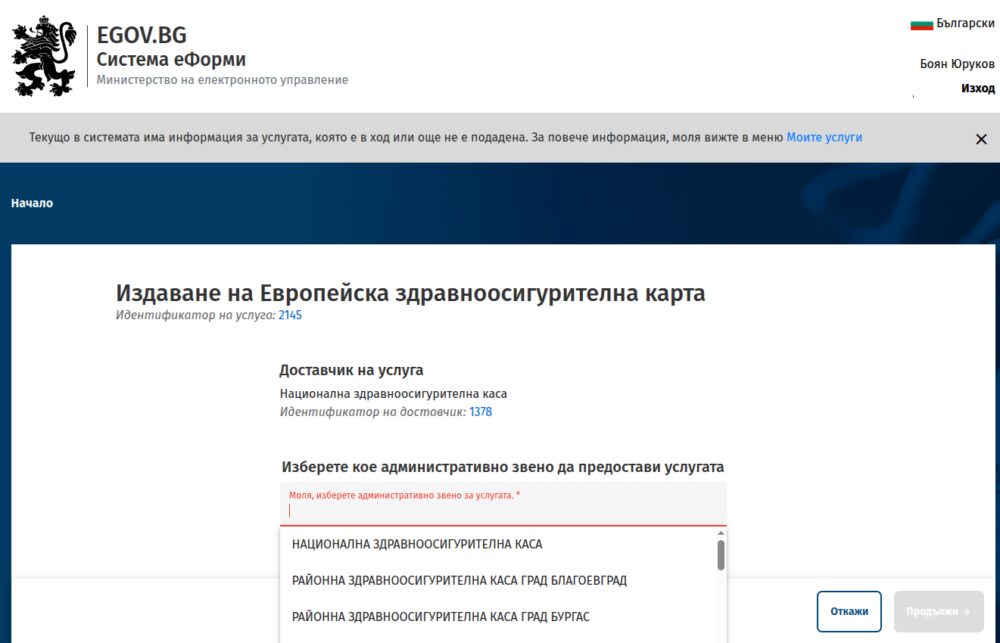
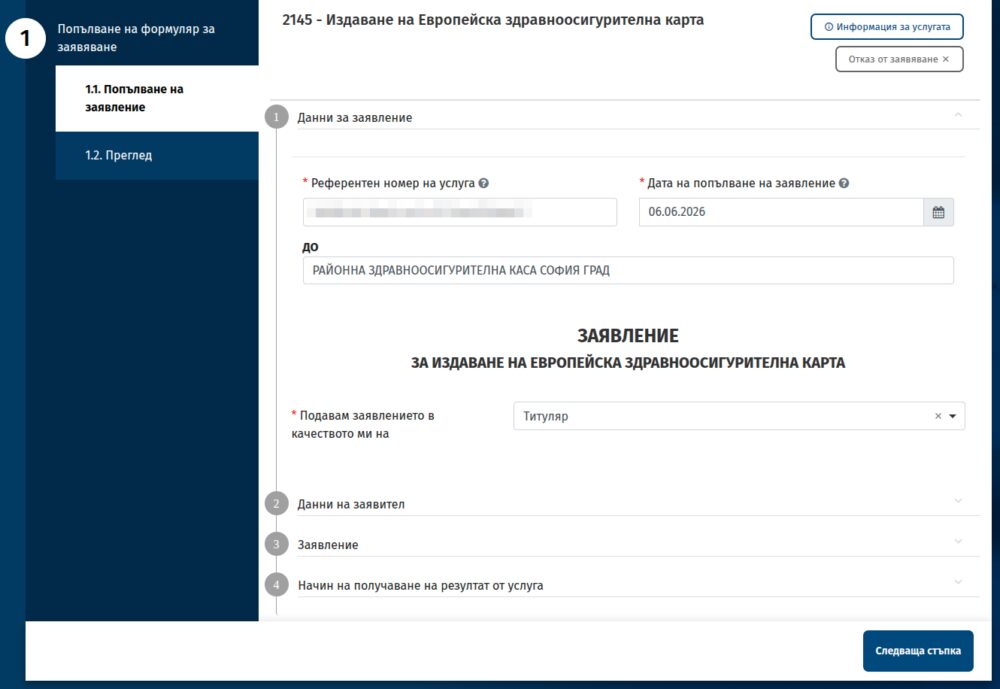
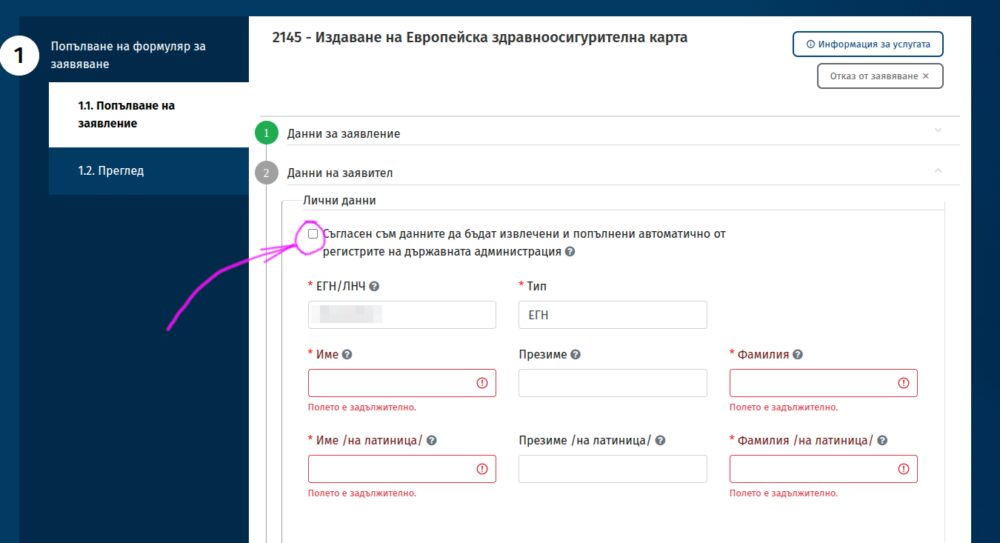
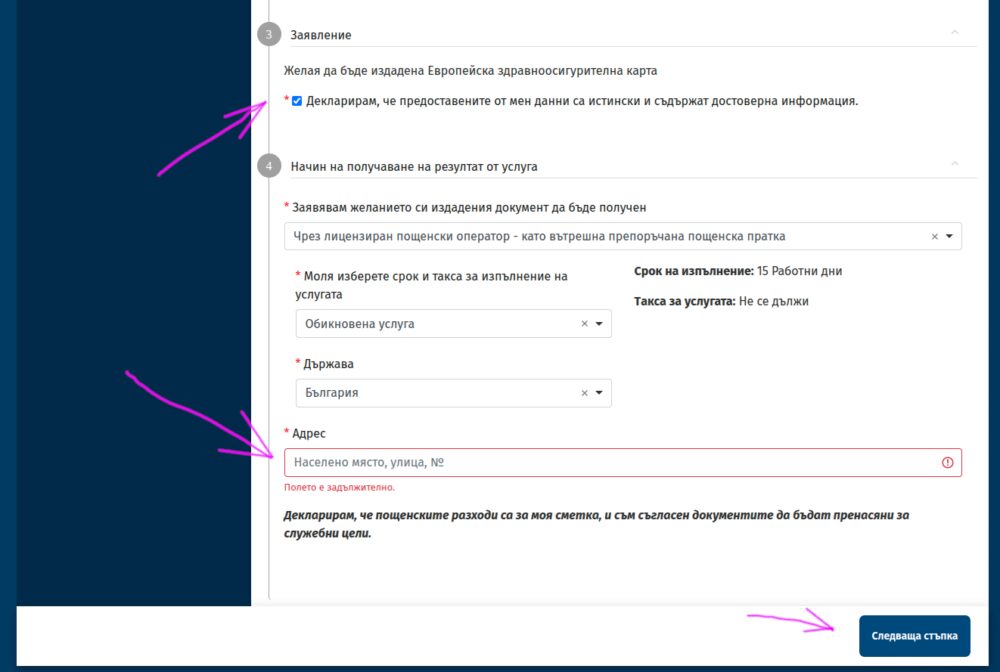
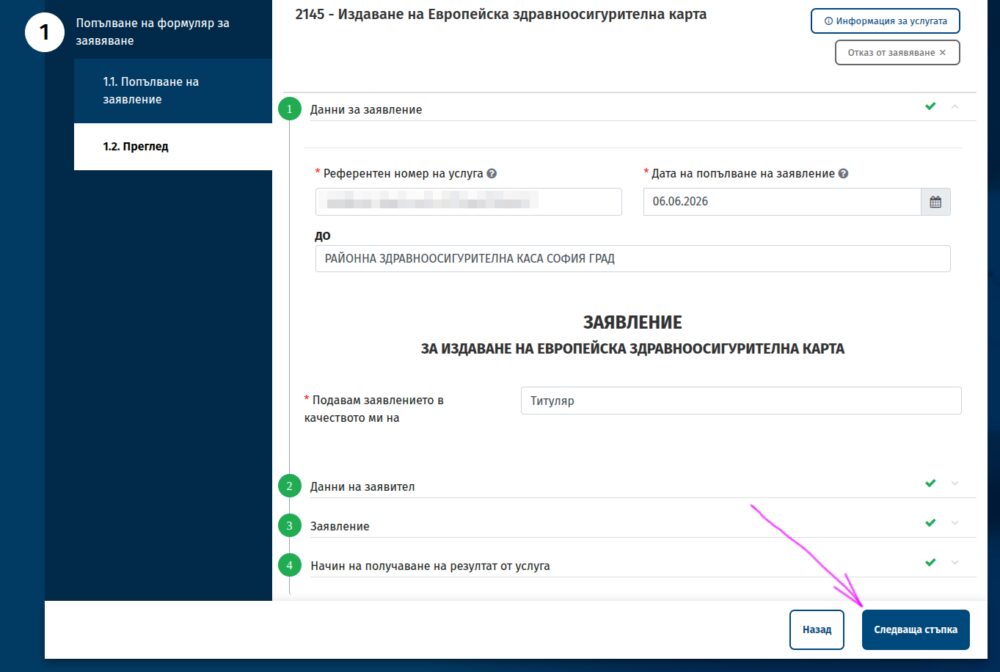
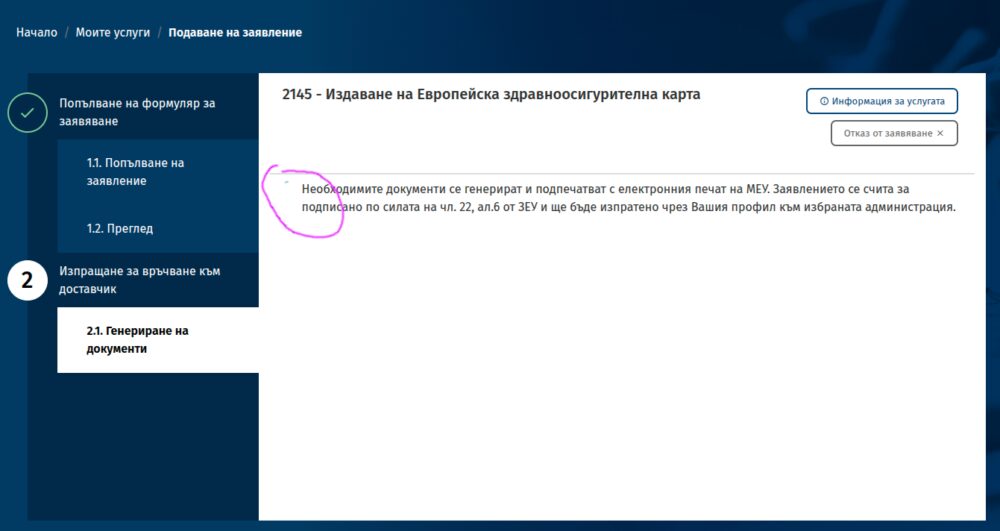
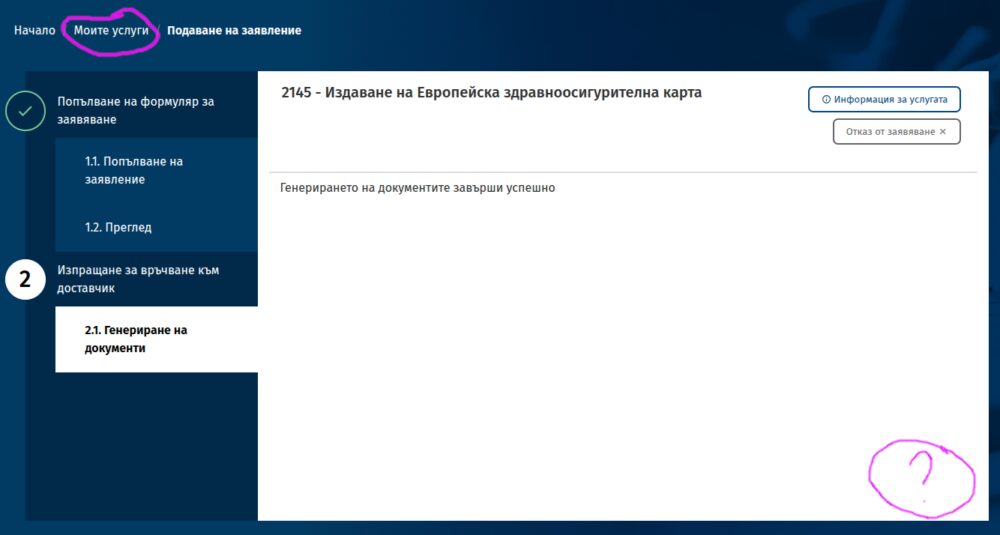
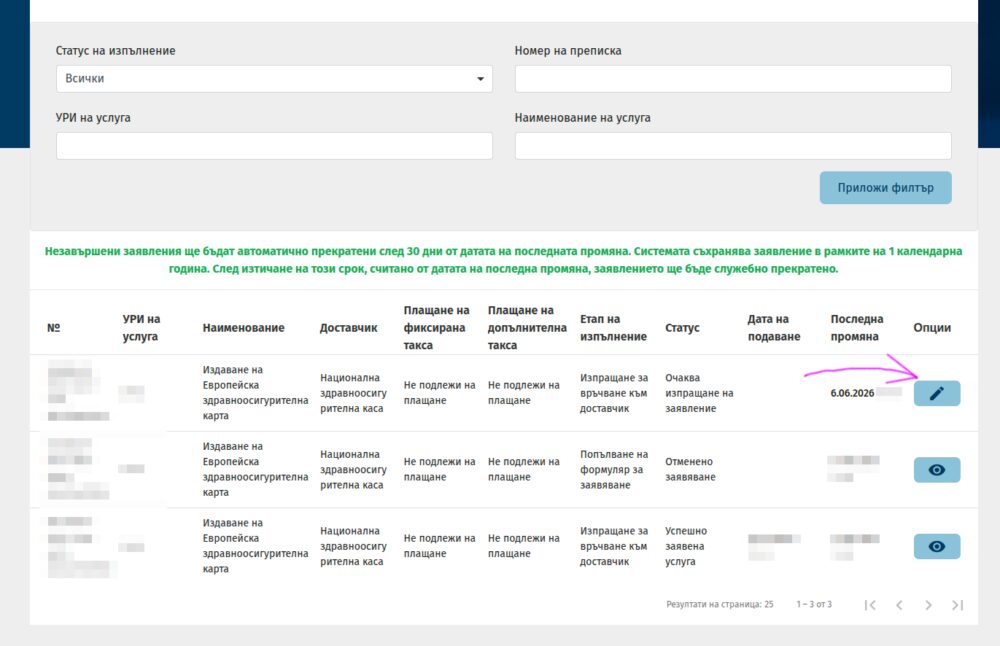
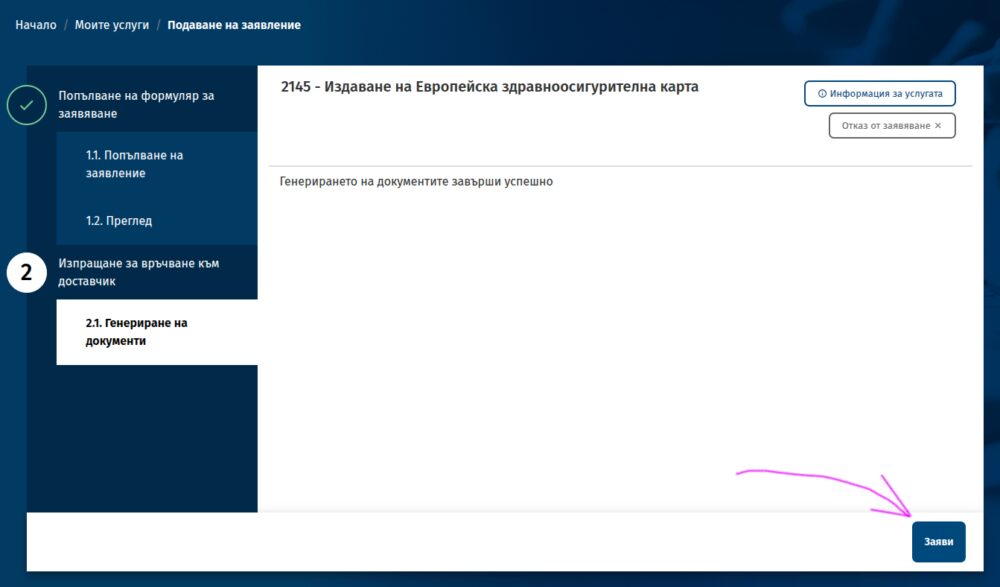
Проблемите с EGov
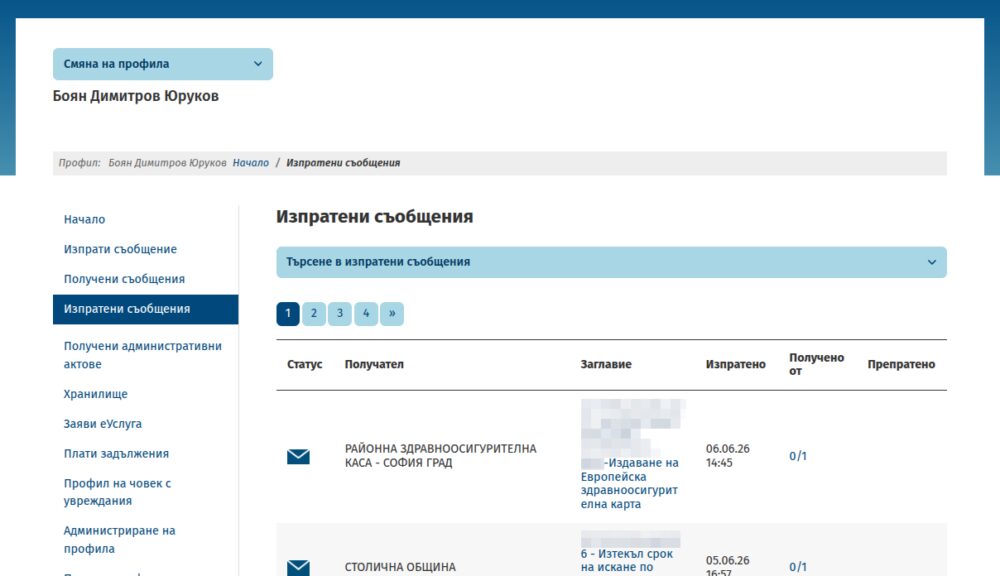
Най-честата грешка в работата на формуляра е, че не се появява бутонът за изпращане на генерирания документ. Тогава трябва да натиснете „Моите услуги“ както показвам горе, за да отворите списъка с вашите формуляри. Ще ви пита дали сте сигурни, защото сте щели да загубите въведеното – не е вярно, не се губи. Като натиснете бутона с молива на последния формуляр ще се отвори същата страница, но вече с бутон за изпращане. Натискате го.
Може да потвърдите, че формулярът е изпратен като отворите ССЕВ и намерите в изходящи попълнен документ към районната здравна каса.
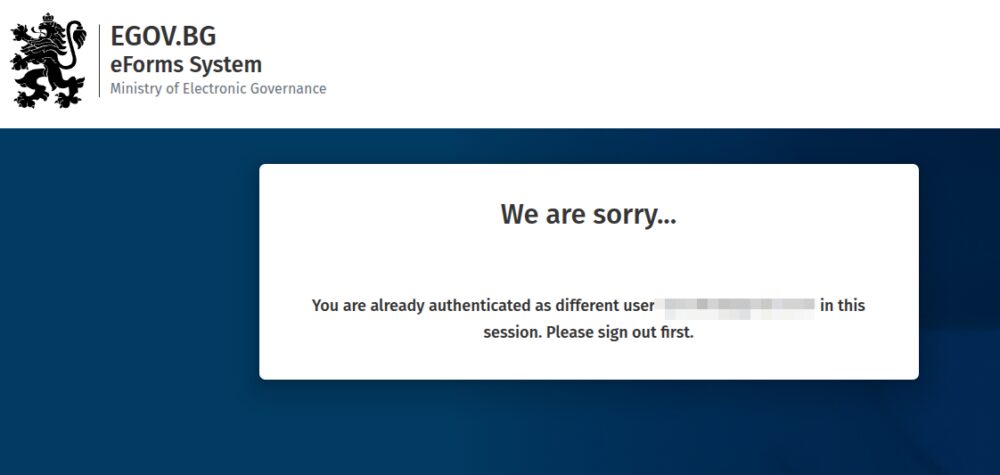
Друга честа грешка е, ако се опитате през няколко различни профила един след друг да подадете заявления. Няма значение дали сте излезли от стария профил, системата на EGov конкретно за формулярите може да ви покаже нещо като това олу. Оправя се като отворите формуляра в инкогнито прозорец. Ако се разровите в адресите в опит да се разлогнете отново, най-много да откриете, че Информационно обслужване си е забравило куп начални страници по подразбиране и линкове към админ панели, което никога не е добра идея.
Когато отворите формуляра, е възможно да видите съобщение в червено, че има проблем със ССЕВ. Вчера това се беше случило, независимо, че цял ден изпращах съобщения през същата система и нямаше проблем. Ако използвате ПИК на НАП и тази връзка пада понякога. Случва се и да не приема в някои дни електронни подписи.
Вероятността да хванете такива проблеми е малка, но не вдъхва особено доверие в усилията за дигитализация на държавата и работата на ИО в сегашния си формат (и ръководство), когато се случи точно на вас. Когато използвате почти всеки ден тези портали се сблъсквате с това поне веднъж седмично. Замислете се как нещата може да се случват по-добре и опитайте по-късно.
През октомври ще искам пак данните на извадилите ЕЗОК през годината и начина на подаване на заявлението. Ще е интересно дали и тази година ще видим увеличение, както миналата.
The White House Is the New Green Zone
Post Syndicated from The Atlantic original https://www.youtube.com/shorts/HPlAPDHXI4g
Промяна при транспондерите за тол таксите в Гърция
Post Syndicated from Боян Юруков original https://yurukov.net/blog/2026/greece-toll-2/
Доста хора отбелязаха в последните седмици, че са срещнали трудност при поръчването на транспондери за бързо минаване на тол станциите в Гърция. Миналия януари описах колко е лесно да се поръча такъв RFID чип, да се захрани с пари и да се избягват опашките.
В последните седмици след промени в структурата, конкретно EgnatiaPass вече не може да се доставя извън Гърция. Потвърдих това с тях. Не планират в близко бъдеще да възстановят доставките. Не ми е известно и някой от другите доставчици да позволяват такава опция. Ако имате вече такъв чип, то той ще работи. Акаунта и сумите, които сте заредили, се пазят и нищо не се променя. Просто за нови клиенти са спрели възможността да получат чипа в чужбина.
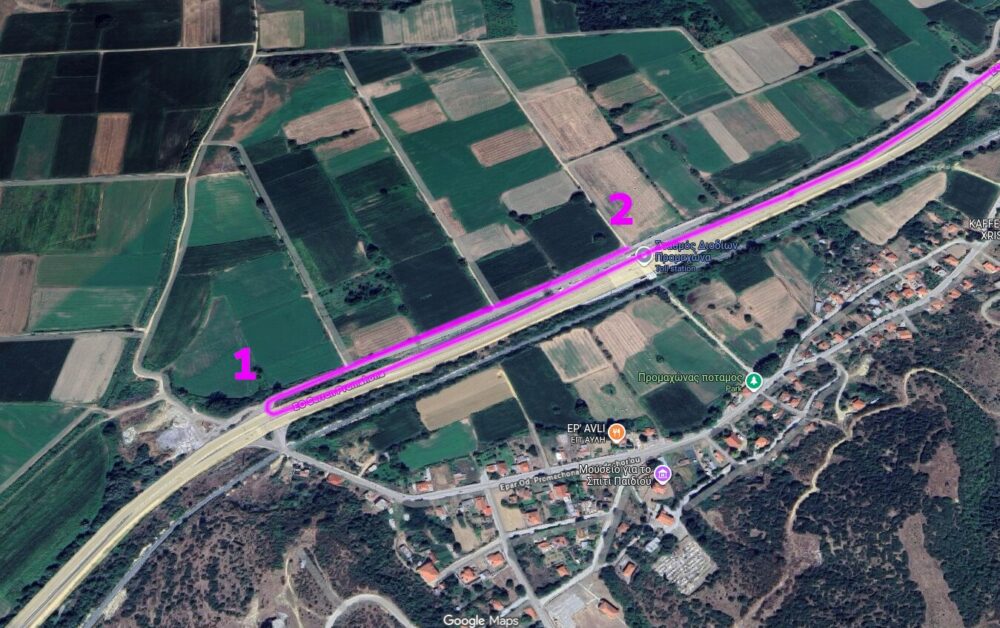
Затова единственият вариант остава да го вземете на място. Най-удобно за целта специално за EgnatiaPass е да го вземете още на първата тол станция след кулата. По техните инструкции като минете тол станцията Promachonas след Кулата, на първият светофар няколко стотин метра по-нататък завивате надясно се връщате по локалния път и ще намерите паркинг и будка на Egnatia точно до тол станцията. Там може да попълните документите и да получите чип. Според центъра за клиенти нямало нужда да се попълва нищо предварително през online формуляра – всичко се прави на място. На снимките долу се вижда какъв е пътя и как изглежда мястото.
Не намерих такъв център за клиенти при Маказа. Ако знаете други доставчици на такива танспондери с други удобни места за взимане или дори някои, които доставят в България – споделете.
Припомням също, че е много добра идея да си извадите или ако имате – да си обновите европейската здравна карта. Тя може да се поръча изцяло online и достави с куриер, макар и да трябва да я обновяваме всяка година за възрастни.


Седмицата (1–6 юни)
Post Syndicated from Боряна Телбис original https://www.toest.bg/sedmitsata-1-6-yuni/

„Това дете няма много добър цвят, трябва да отидете веднага до болницата и да му изследвате билирубина“, ми каза Ася Демирева (която Ина Иванова ви представя в „Тези хора“), когато я бях повикала на консултация за втория ми син.
Детето беше с цвят „Тръмп“, да се разбира – жизнерадостно оранжево, с което и се изчерпваше цялата жизнерадост на ситуацията. Защото после се оказа, че лекарите имат съмнения за чернодробна недостатъчност, и бебето беше хоспитализирано в неонатологията само две седмици след раждането. Беше особен момент: занесох до входа на отделението дете, отвориха вратата, взеха ми го, затвориха вратата, после пак я отвориха, за да ми пуснат в шепите миниатюрните му дрешки и да ми кажат, че свиждането е всеки ден от 16:00 до 16:30.
Всичко ти се сгромолясва за секунди и после спешно намираш сили да го изградиш отново, защото имаш още едно дете за гледане и работа за вършене. Човек малко оглупява в такива ситуации и е добре, че разполагаме с хора като Ася, които успяват да ни фиксират тук и сега.
Ася Демирева: Нашите съвършени тела
В седмицата, в която празнуваме Деня на детето, Ина Иванова разговаря с Ася Демирева за майките и божествените им тела, за живота им с бебетата и за нуждата от подкрепа по този сложен път на сливане, раздяла и въпреки това – свързаност.
 Ина Иванова
След личното лирическо отклонение, което не беше съвсем неоснователно, защото в крайна сметка успях да въведа в играта първия текст от тазседмичния брой на „Тоест“, тръгвам рязко на север. Оттам идва материалът на Светла Стоянова, който също е свързан със спасяването на човеци от човеци. Става дума за оказването на първа помощ на бедстващи хора в Исландия. От известно време Светла работи като хижарка в страната и ни разказва какво представлява тамошната спасителна служба.
От текста става ясно, че на всеки 100 исландци се пада по един доброволец от Исландската спасителна служба. Едва ли ще ви изненадам, но в България нещата не стоят точно така. Освен да си внесем исландци…
На север: Спасяването на хора в Исландия и у нас
Работата като хижарка в Исландия е причината Светла Стоянова да усвои ценни умения по оказване на първа помощ и спасяване на бедстващи хора. Сега тя ни разказва как е организирана тази животоспасяваща дейност в Исландия и в България.
 Светла Стоянова
Исландци не сме си внесли, но копираме смело и сръчно американския опит по овладяване на медии през политики и регулации. Или може би те копират нашия? При всички положения има някакъв международен обмен (да живей, да живей!).
Тази седмица в текста си Good night, and good luck, motherf*ckers Дарина Сарелска ни разказва за обезкървяването на легендарното американско предаване „60 минути“, кулминирало с дисциплинарното уволнение на водещия Скот Пели. „Айде няма нужда да го жалим Пели“, би казал някой – и с право. Не жалим него, а по-скоро си даваме малко по-ясна сметка (заради мащаба) какво се случва с нашите медии. Ето малка част от текста на Дарина:
Ефирът става фасада, а журналистиката – разменна монета в една много по-голяма игра. Място, на което се изграждат отношения, печели се достъп и се договарят решения, струващи много повече от рекламното време между две новинарски емисии. Този завой в бизнес модела е далеч по-видим на малки пазари като нашия, където парите просто свършват по-бързо.
Големите търговски оператори у нас, като част от мултинационални компании с разнородни бизнес интереси, отдавна практикуват този модел. В него телевизията е само рекламна витрина, през която се отварят (или затварят) врати към далеч по-доходоносни сделки и индустрии.
Good night, and good luck, motherf*ckers
Историята на американското предаване „60 минути“ е разказ за механизмите, чрез които се опитомяват медиите. И тези механизми са удивително сходни, независимо от пазара или знамето пред сградата на телевизията. Един текст в стил „Думам ти, дъще, сещай се, журналистическа снахо“ от Дарина Сарелска.
 Дарина Сарелска
„Жива мизерия“, както каза във включване в сутрешния блок една от жителките на село Тича, чиято къща е пълна с кални наноси заради бедствието от нощта на 4 срещу 5 юни. „Жива мизерия“ потвърждавам и аз.
И като казах „бедствие“, веднага се сещам, че бюджетът на страната е в бедствено положение и Гълъб Донев ще трябва много добре да си подреди перата, за да вържем – не, но поне да приближим двата края. И това надали ще стане без надзора на Европейската комисия. За всичко това разказва Емилия Милчева в материала „Прогресът на Радев тръгва с остеритет“.
Прогресът на Радев тръгва с остеритет
Първият месец на управлението на Радев мина под знака на дефицити, неразплатени сметки и обещания за реформи. И това поставя кабинета пред труден избор: да лекува причините за кризата или просто да управлява последствията ѝ. Коментар от Емилия Милчева.
 Емилия Милчева
От бюджета минавам към буквите, по които и тази седмица се движи Зорница Христова в опит да си отговори на въпроси като: общуват ли помежду си литературните поколения; четат ли се едни други в книгите си; познават ли се изобщо? Книгите, за които ни разказва този път, са „Записано“ от Александър Шурбанов и „Тиха логика“ от Светослав Тодоров.
По буквите: Шурбанов, Тодоров
Общуват ли помежду си литературните поколения? Четат ли се едни други в книгите си? Познават ли се изобщо? И доколко важно е това за консолидирането на съвременната литература и литературна среда? Отговорите – от Зорница Христова, която ни среща с две днешни книги.
 Зорница Христова
Изисква се специален талант да разказваш интересно книги. Още по-специален е талантът да разказваш за книги, без да ги разказваш. Зорница Христова е майсторка в този занаят. Наскоро тя гостува на Владислав Севов в десети епизод на „Тоест разговаряме“. Ако по това време сте били заети, сега е моментът да се върнете към този наистина вдъхновяващ 24-майски разговор, който засега е последен в поредицата.
Тоест разговаряме – епизод 10
В последния (засега) епизод на „Тоест разговаряме“ ни гостува Зорница Христова – писателка, преводачка, издателка и човек, който умее да говори за книгите така, сякаш между тях има невидими мостове.
 Владислав Севов
Междувременно светът продължава да се държи така, сякаш няма намерение да забавя темпото. Климатът се променя, войните не свършват, алгоритмите стават все по-уверени в себе си, а хората все по-рядко четат нещо по-дълго от описание под рийл. Което е чудесен повод да направите точно обратното. В „Тоест“ се грижим за това.
Завършвам с текста на Теодора Станимирова, в който се разглежда въпросът защо Gen Z и Gen Alpha са все по-тревожни по отношение на климатичните промени и неизбежно някак стават по-ангажирани с климатичните политики. (То е ясно защо – за тях е въпрос на бъдеще, а за чичовците със златните рамки на очилата, дето притежават тецове и мини, е въпрос на все тая.) Чудесен материал на Теодора, в който се обяснява и защо природни бедствия като в Сливенско от тази седмица или в Габровско от миналата ще ни струват все по-скъпо – не само финансово.
Gen Z и промените в климата. Защо младите хора са все по-ангажирани със зелените политики
Как ще се почувства едно дете, ако в училище му кажат, че питейната вода на планетата ще свърши, преди да навърши 50 години? Теодора Станимирова познава усещането от личен опит. Днес тя разговаря с младежи от своето поколение, ангажирани със зелени политики, и ни разказва какво е научила.
 Теодора Станимирова
В петък сутринта гледах по телевизията как една репортерка нахлува от къща в къща в същото това село Тича – без да пита може ли, само с „На живо сме“, – за да ни покаже как всичко е потънало в тиня и как хората се опитват да си изгребат живота от подовете на къщите си, макар да не е много ясно как точно ще им се помогне, като ги показваме, но нейсе… В един момент пред нея се изправи някакъв слабичък човечец, когото тя застреля с „Как ще се справите?“, все едно очакваше ей сега да ѝ излезе с презентация или даже с TED Talk как точно ще се справят.
Той обаче ѝ каза само:
Бог ще помисли за всичко.
How AI Could Change the Way Campaigns Are Run
Post Syndicated from The Atlantic original https://www.youtube.com/shorts/qr9SBzwXmrA
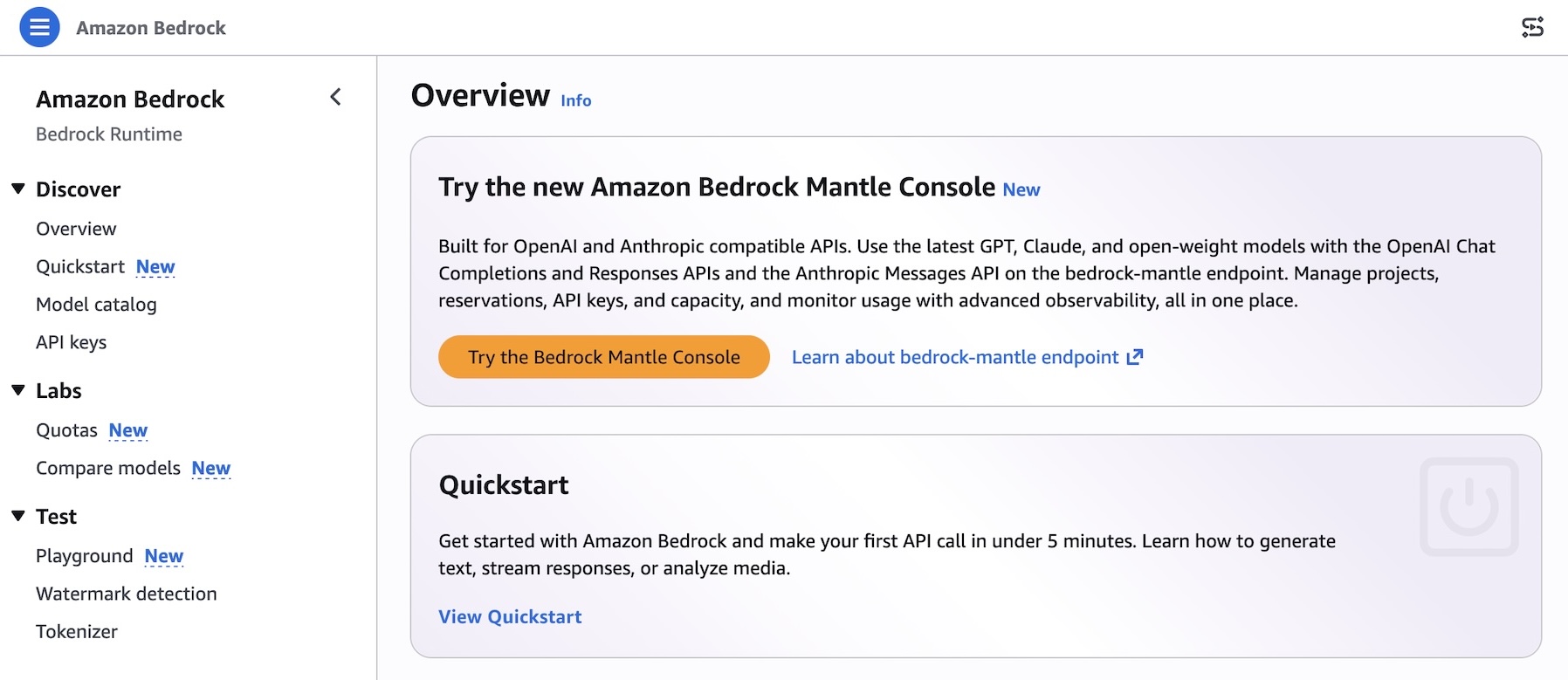
Try the new console experience in Amazon Bedrock, optimized for Anthropic- and OpenAI-compatible APIs
Post Syndicated from Channy Yun (윤석찬) original https://aws.amazon.com/blogs/aws/try-the-new-console-experience-in-amazon-bedrock-optimized-for-anthropic-and-openai-compatible-apis/
Today, we’re announcing a new console experience in Amazon Bedrock for you to experiment, iterate, and scale with the latest AI models on Amazon Bedrock’s next-generation inference engine built for high performance, reliability, and security. This console has a refreshed workflow optimized for bedrock-mantle endpoint, which supports the latest GPT, Claude, and open-weight models with the OpenAI Responses API, OpenAI Chat Completions API, and the Anthropic Messages API.
The new console experience makes it simple to find the right model and move quickly from evaluation to production.
- New model card – You can browse the full model catalog, compare them side by side on capabilities, modality support, context window, and applicable service quotas in a single view, removing the need to stitch together documentation, and limit calculators.
- Project-based work – You can make a project to run evaluations and review usage insights in one streamlined workflow that mirrors the lifecycle of building a generative AI application.
- Live documentation – You can use project-aware live documentation: code samples, SDK snippets, and API references are automatically prefilled with your project variables. You can copy a snippet straight from the console into your application and run it without modification.
How to get started
You can try a new experience by choosing Try the Bedrock Mantle Console from within the Amazon Bedrock console, or by using the new console link directly.
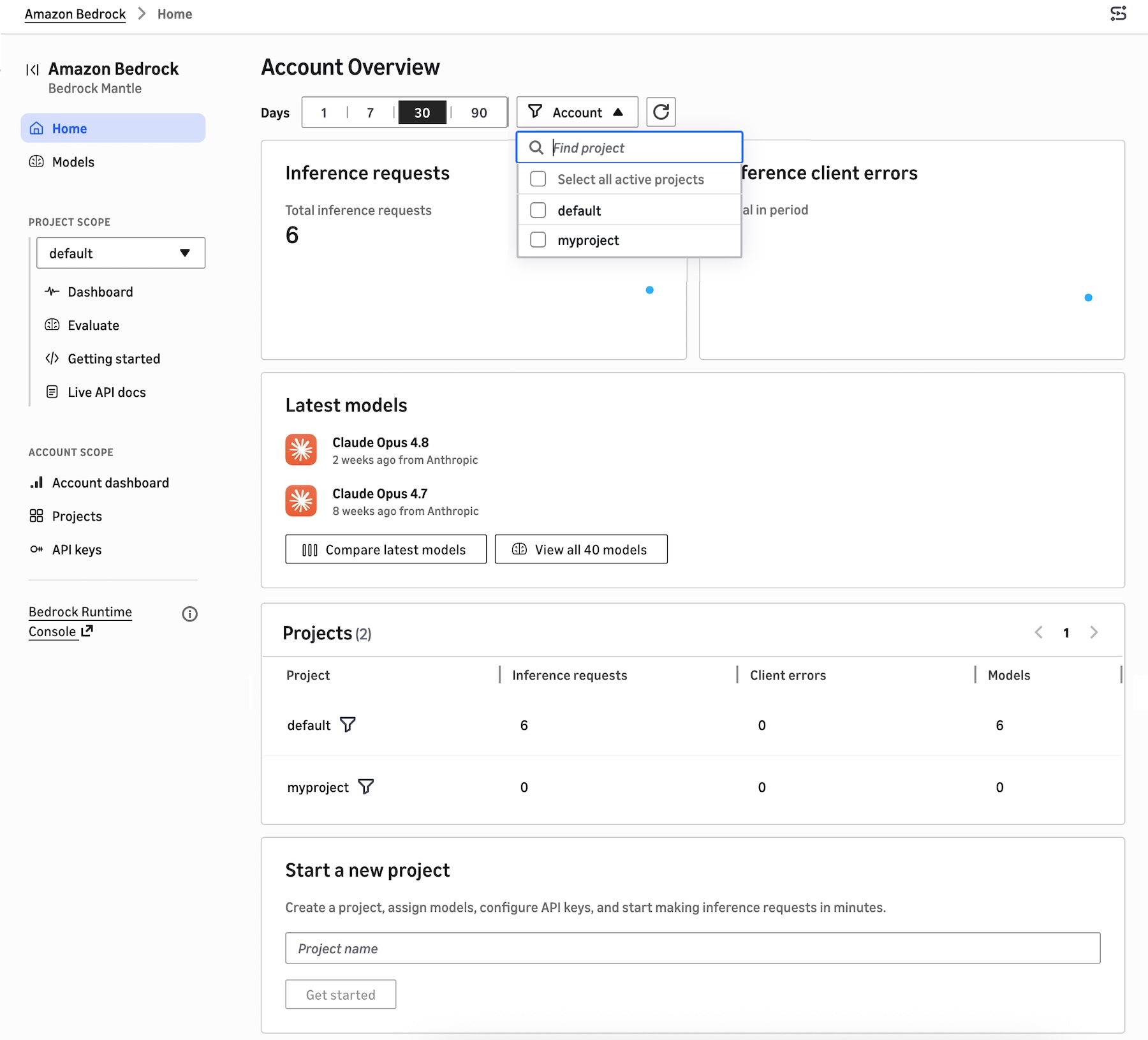
You can find a project-based dashboard to show inference requests and error by range of recent dates, recently used models, and the project list. You can create a project, assign models, configure API keys, and start making inference requests in minutes.
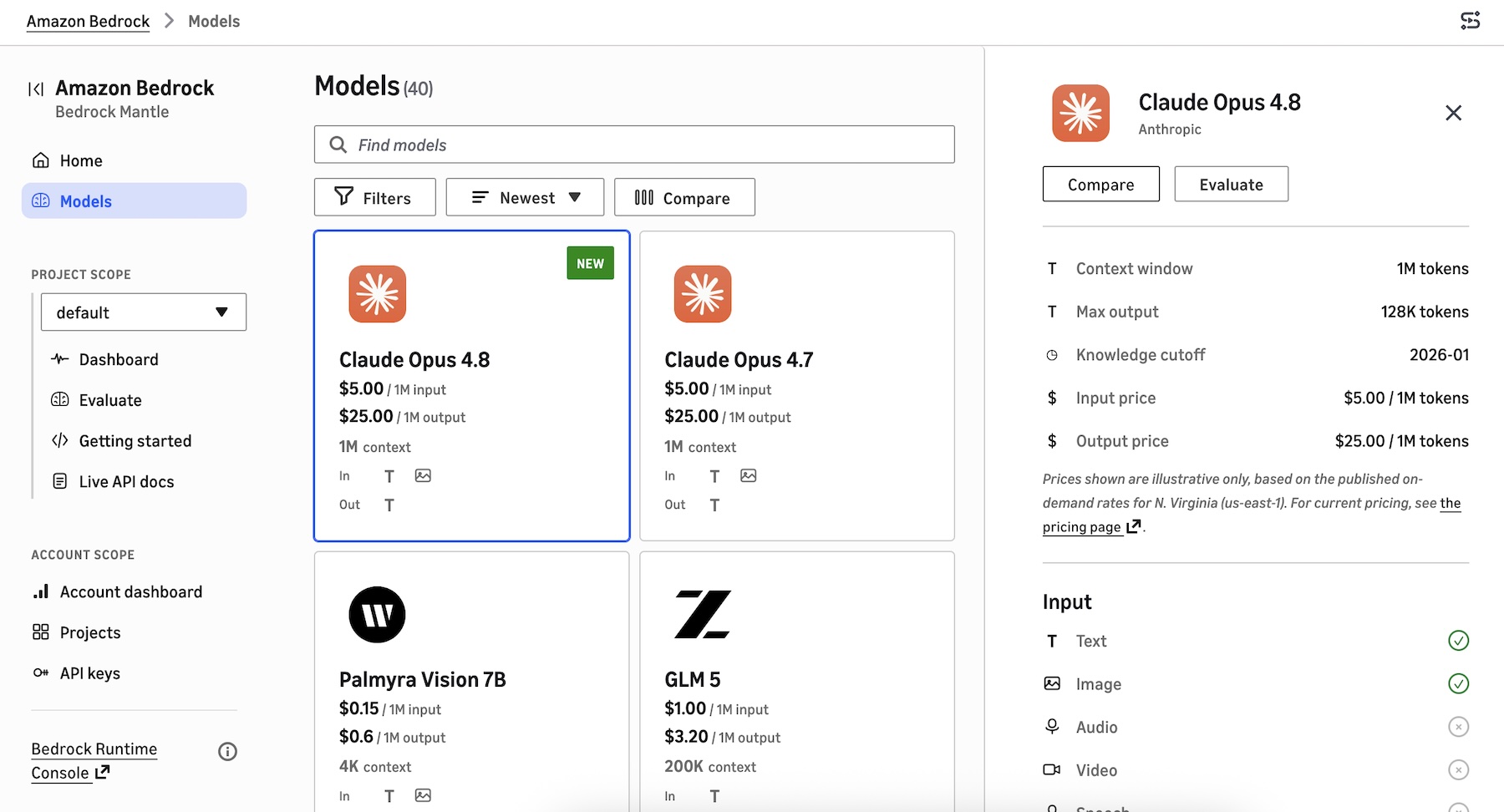
A new model catalog shows the latest GPT, Claude, and open-weight models that are supported on the bedrock-mantle engine. You can see the details of features, tokens, pricing, input/output, pricing information, and Regional availability. You can also compare up to 3 models in a single view.
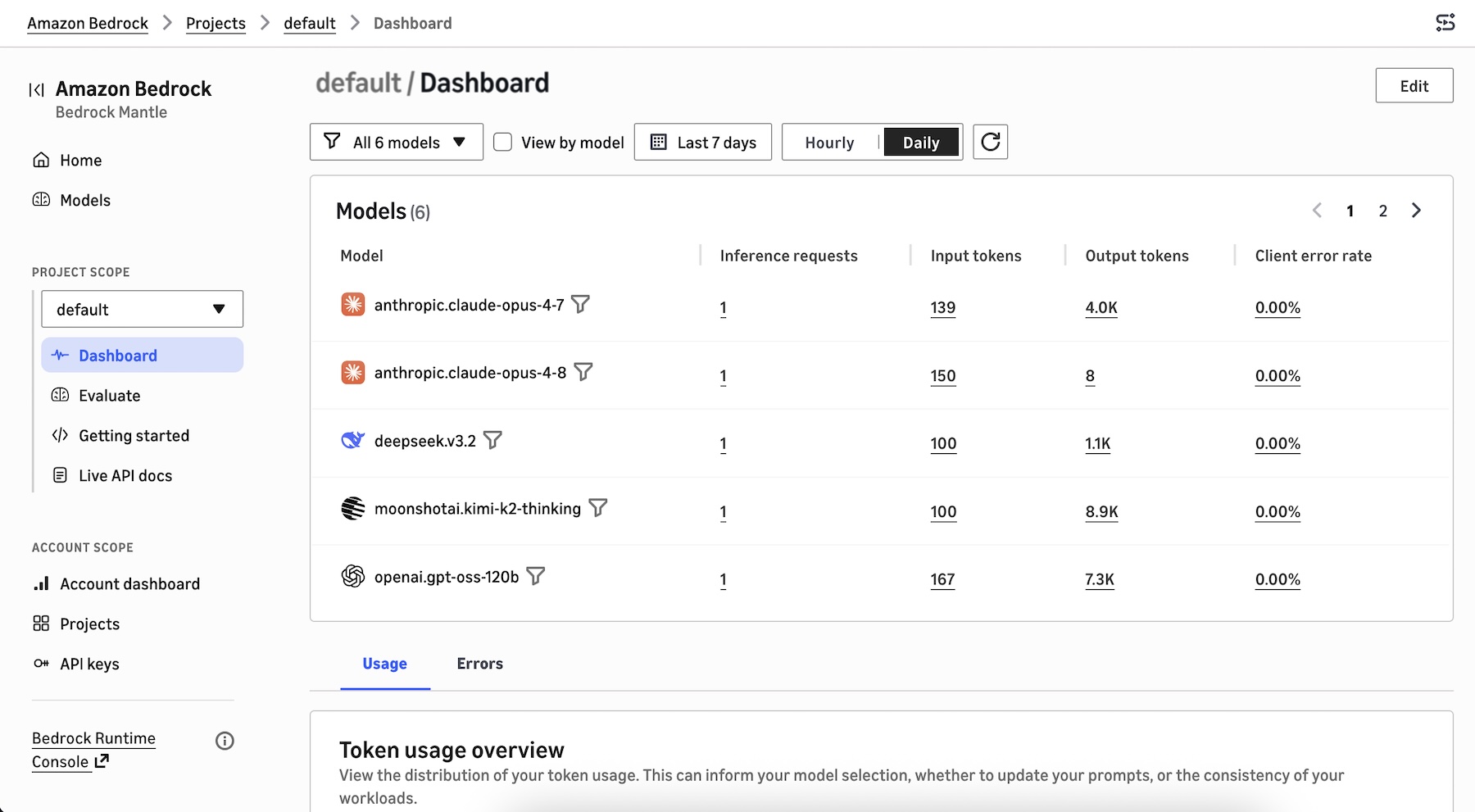
When you choose the project dashboard, you can see the models used in the project, the distribution of your token usage such as total token usage, token usage per minute, inference requests per minute, and tokens per inference request. This can inform your model selection, prompt optimization, and workload consistency decisions.
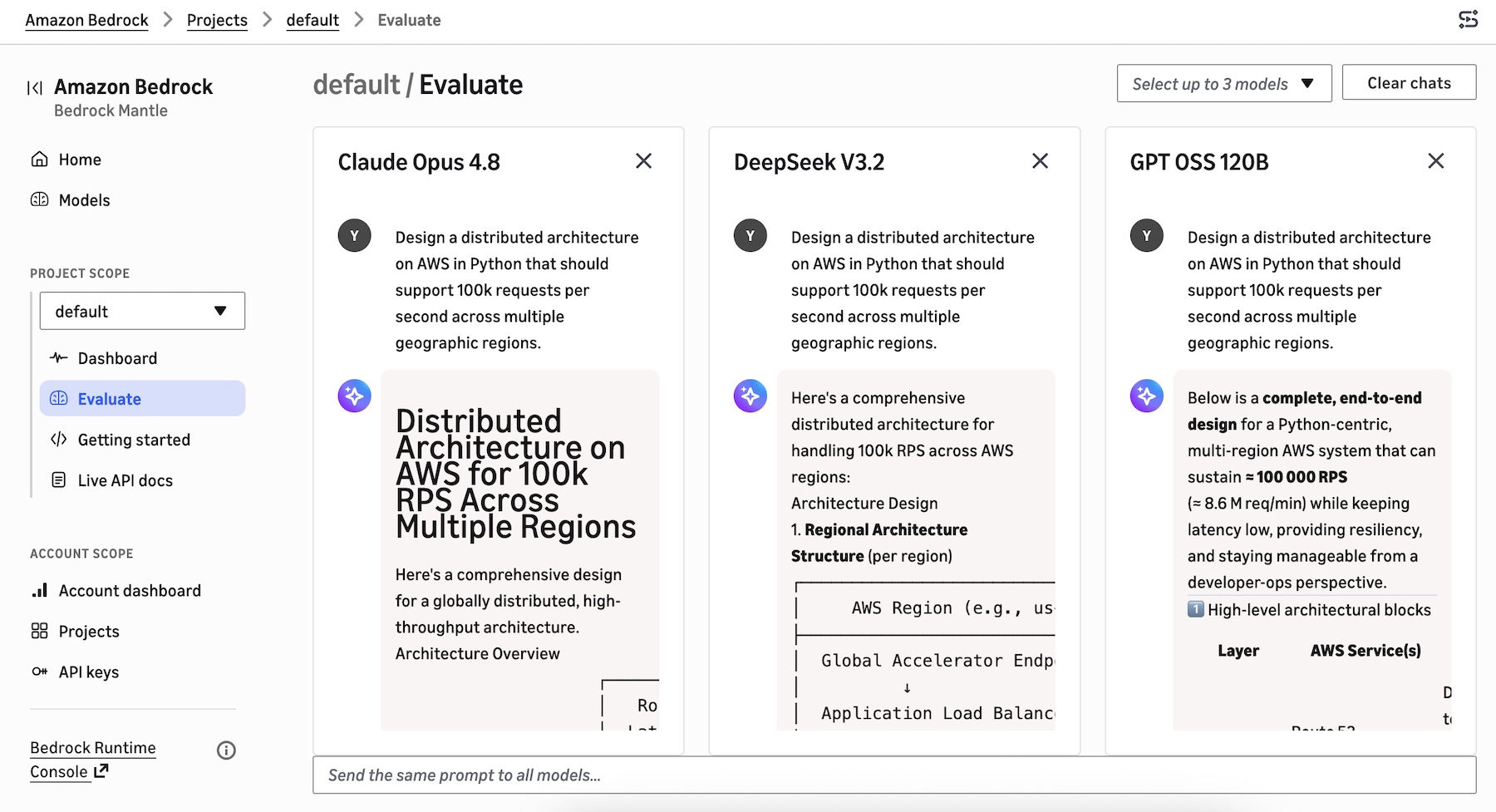
You can select up to 3 models to start evaluating to compare responses side by side with the same prompt.
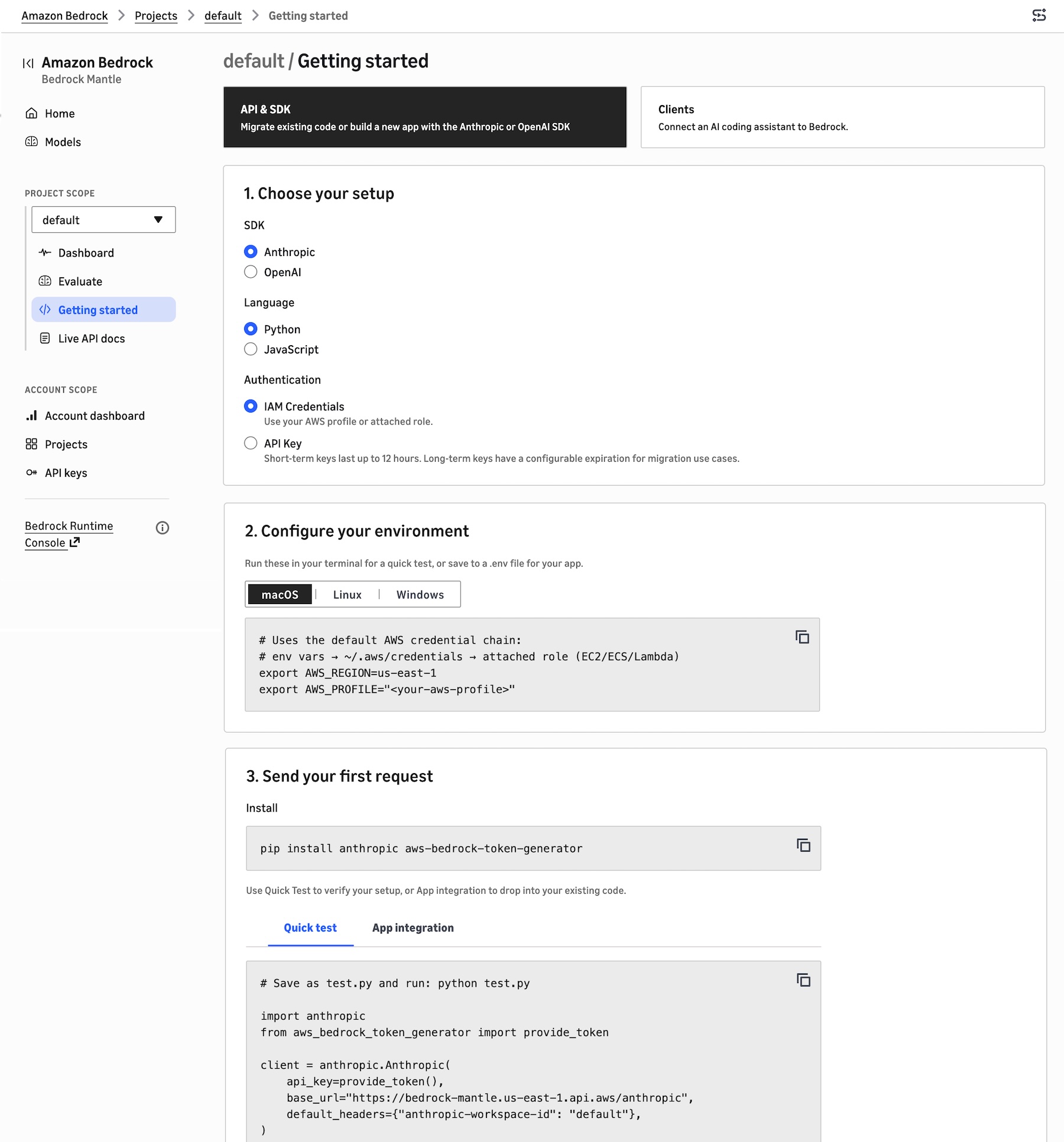
To build your application in the project, choose Getting started. You can migrate existing code, build a new app with the Anthropic or OpenAI SDK, or connect an AI coding assistant to Bedrock.
Choose the API & SDK, your SDK (either Anthropic or OpenAI), your preferred programming language, and your authentication method. It shows your environment code to run these in your terminal for a quick test, or save to a .env file for your application. You can also send your first request with sample code snippets to verify your setup.
When you choose Clients, you can select the AI coding agent source such as Claude Code, Cline, Codex, Cursor, or OpenCode that you want to connect to the bedrock-mantle engine. It provides instructions on how to install the AI agent, use your AWS IAM credentials or use a Bedrock API key, set environment variables, and route requests from each AI agent through Bedrock.
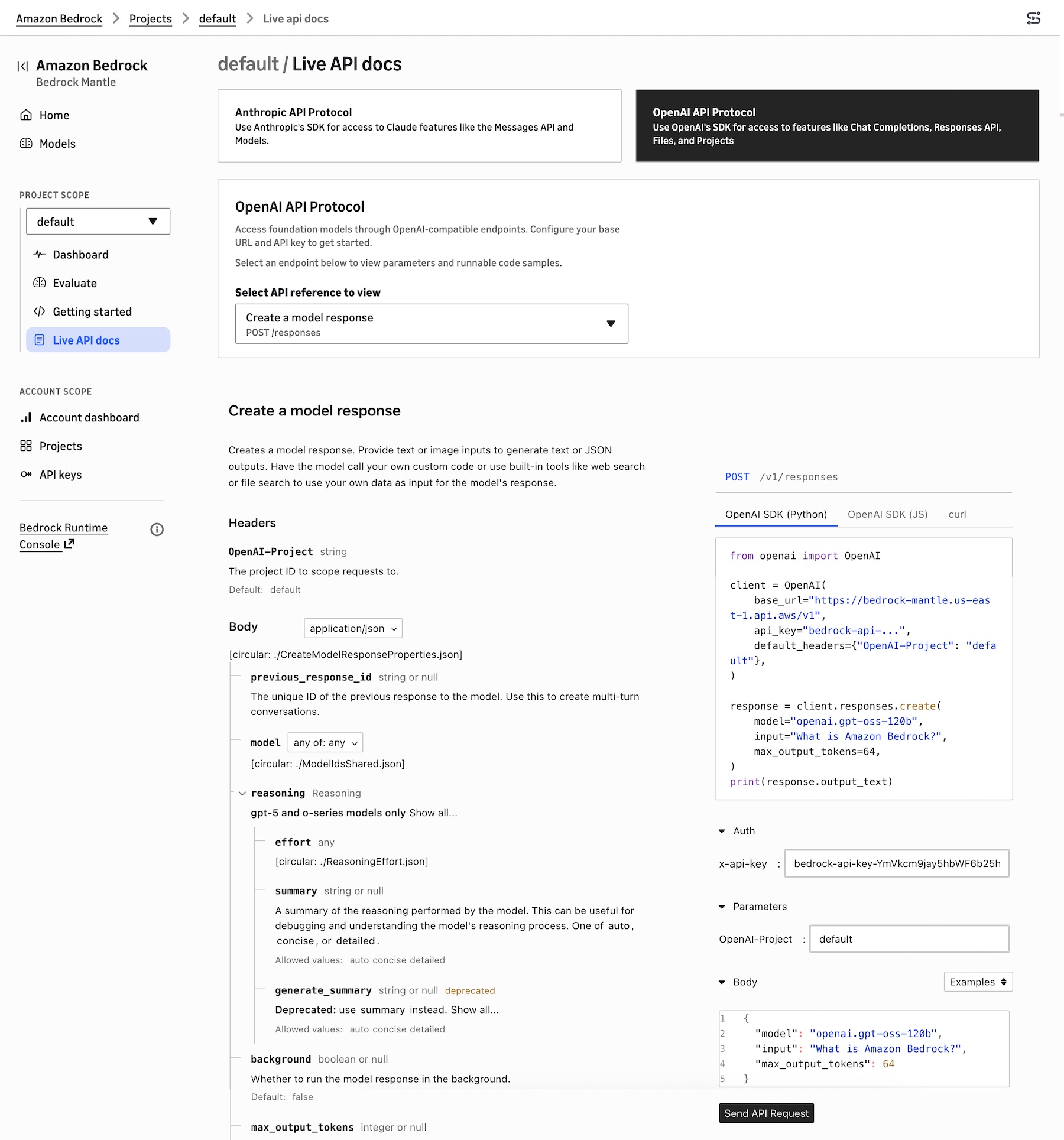
To learn about Anthropic- and OpenAI-compatible APIs, choose Live API docs. You can choose Anthropic API Protocol for access to Claude model features like the Messages API or OpenAI API Protocol for access to features like Responses API.
For example, when you choose OpenAI Response API, it retrieves a model response with the given model ID. These API references are automatically prefilled with the project’s selected model ID, Region, bedrock-mantle endpoint URL, and API key reference, and they update in place as you change models or settings.
You can also choose the existing Bedrock console to manage fully-managed features such as Agents, Knowledge Bases, Guardrails, fine-tuning, or the InvokeModel and Converse APIs to run on the bedrock-runtime endpoint.
Now available
The new console experience is available in all AWS Regions where the bedrock-mantle endpoint is offered: US East (N. Virginia, Ohio), US West (Oregon), Asia Pacific (Jakarta, Mumbai, Sydney, Tokyo), Europe (Frankfurt, Ireland, London, Milan, Stockholm), and South America (São Paulo). Check the full list of Regions for future updates.
Give the new console experience a try in the new Amazon Bedrock console and send feedback to AWS re:Post for Amazon Bedrock or through your usual AWS Support contacts.
— Channy
Building secure B2C applications with fine-grained access control using Amazon Cognito and Amazon Verified Permissions
Post Syndicated from Sowmya Vemuri original https://aws.amazon.com/blogs/security/building-secure-b2c-applications-with-fine-grained-access-control-using-amazon-cognito-and-amazon-verified-permissions/
Modern web applications require robust security controls to protect user data and application resources. Authentication and authorization are two fundamental pillars of application security that answer critical questions: Who are you? and What are you allowed to do? Implementing these controls correctly can be challenging for developers, especially when building data-intensive applications with frameworks like Streamlit (an open-source Python framework for building interactive web applications) or when requiring fine-grained access control. Key challenges include protecting access to application resources, implementing application identity with multi-factor authentication (MFA), and implementing usage-based controls.
In this post, you will learn how to build fine-grained access controls for a sample Streamlit application using Amazon Cognito for authentication and Amazon Verified Permissions with Cedar policies for authorization. This architecture provides enterprise-grade security with minimal development effort, so you can focus on your application’s core functionality. You will learn how to reduce development time for secure applications, implement enterprise-grade authentication, through proper access management, and scale security with growing user bases.
Security architecture overview
The reference architecture follows a layered security design with four key components; separating identity verification, authorization evaluation, application logic, and enforcement boundaries. By assigning clear responsibilities to each layer, the architecture limits blast radius and ensures that a failure in any single control does not compromise the overall system.
- Authentication layer: Amazon Cognito handles user authentication with secure credential validation and JSON web tokens (JWTs). It provides built-in password policies, account lockout protection, and session management.
- Authorization layer: Verified Permissions uses the Cedar policy engine to evaluate fine-grained access requests based on centrally stored policies.
- Application layer: The Streamlit frontend integrates with both services, managing user sessions and enforcing access controls in the user interface.
- Security boundaries: Multiple layers of security controls protect against unauthorized access, privilege escalation, authentication verification, authorization checks, and input validation.
This separation of concerns enables authentication and authorization to function as complementary security controls, following defense-in-depth principles. Figure 1 illustrates the end-to-end authentication and authorization workflow, showing how a user’s sign-in request flows through Amazon Cognito for identity verification, then through Verified Permissions for Cedar policy-based access decisions, before the application enforces the result.
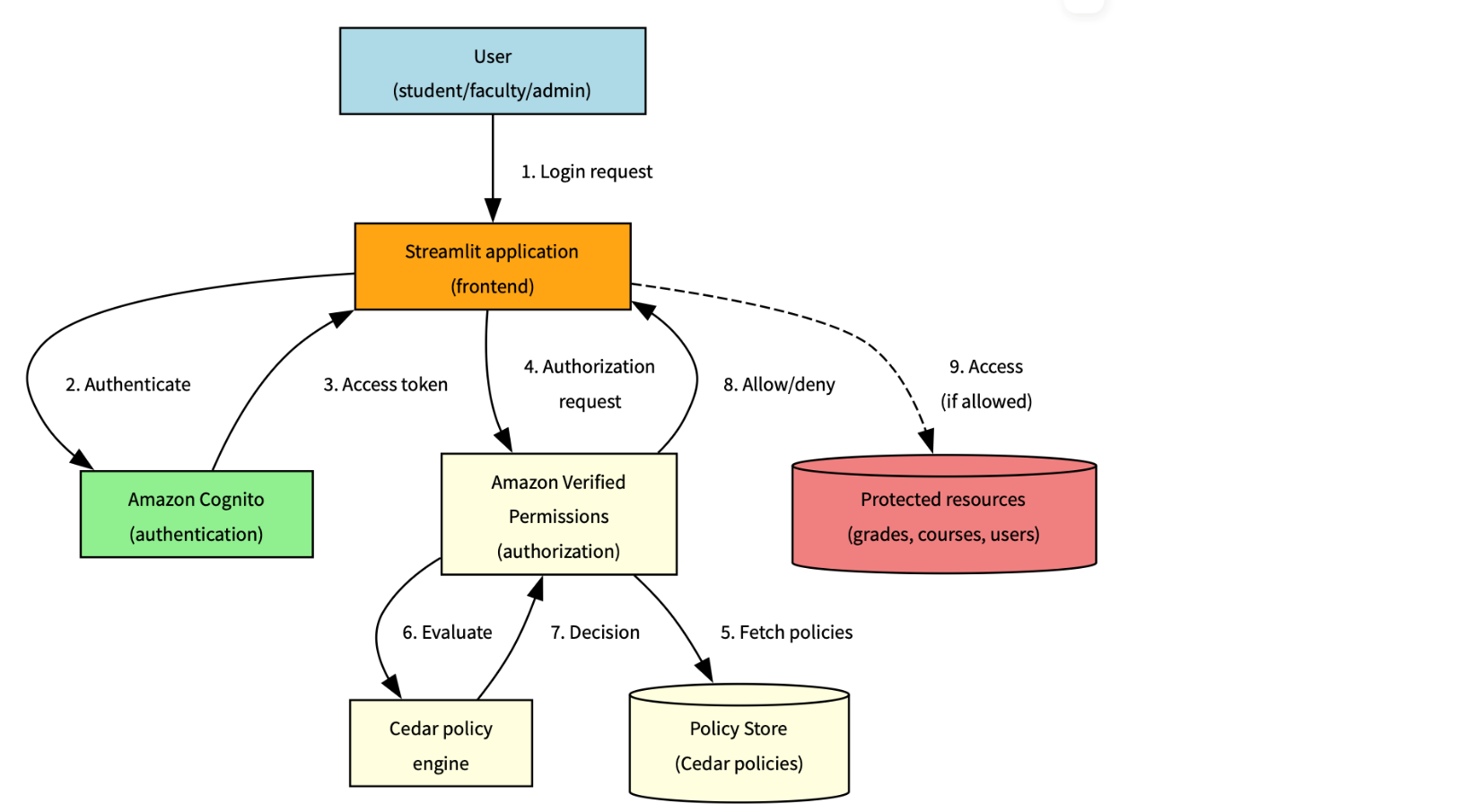
Figure 1: Solution architecture and workflow
The following workflow demonstrates how the three architecture layers work together: the authentication layer (steps 1–3) handles identity verification using Amazon Cognito, the authorization layer (steps 4–6) evaluates Cedar policies using Verified Permissions, and the application layer (steps 7–8) enforces the decision in Streamlit.
- The user sends a sign-in request, which is submitted through Streamlit
- The request is authenticated by Amazon Cognito
- An access token is sent back to Streamlit
- An authorization request is sent to Verified Permissions
- The Cedar policy engine evaluates the request
- A decision is sent back by the policy engine
- The instruction to allow or deny is sent back to Streamlit
- If the instruction is to allow, access is provided
Understanding authorization with Cedar
While authentication establishes user identity, authorization determines what actions users can perform. Verified Permissions provides a scalable authorization service based on Cedar, a policy language specifically designed for fine-grained access control.
Cedar policies follow a structured format that defines who can perform which actions on what resources. Let’s examine the anatomy of a Cedar policy:
Policy components
- Effect:
permitorforbiddetermines whether the policy allows or denies access - Principal: The entity (user) making the request, represented by
?principalas a variable - Action: The operation being performed, scoped to your application namespace
- Resource: The target of the action, also represented as a variable
- Conditions: The
whenclause contains logical expressions that must evaluate totrue
Advanced Cedar policy patterns
This section describes commonly used Cedar policy patterns for implementing fine-grained authorization with Amazon Verified Permissions. The examples illustrate how to model ownership, role-based access, hierarchical permissions, and administrative controls in real-world applications
Resource ownership control
This pattern helps ensure that users can only access resources they own:
What it does – This policy allows students to view only their own grades by:
- Checking that the user has the
Studentrole - Verifying that the grade resource’s student attribute matches the student’s
entityId - Preventing students from accessing other students’ grades while allowing access to their own academic performance
Role-based access with resource type
This pattern grants access based on role and resource type:
What it does – This policy allows faculty members to edit courses they teach by:
- Verifying the user has the
Facultyrole - Confirming the resource is of type
Course - Verifying that the course’s instructor attribute matches the faculty member’s
entityId - Restricting faculty to modify only their own courses, not courses taught by other instructors
Hierarchical authorization
This pattern allows department heads to manage faculty in their department:
What it does – This policy implements departmental hierarchy controls by:
- Requiring the user to be a
DepartmentHead - Verifying the resource is a faculty member
- Matching the faculty member’s department with the department head’s department
- Preventing department heads from managing faculty in other departments
Administrative override
This pattern provides emergency access with proper justification:
What it does – This policy provides emergency access capabilities by:
- Allowing administrators to perform any action on any resource
- Requiring an emergency access flag to be set to
true - Requiring a justification for emergency access
- Supporting accountability through required documentation while enabling emergency operations
Cedar policy evaluation flow
Understanding how policies are evaluated helps design effective authorization systems. Figure 2 shows a common evaluation pattern for an academic scenario
Note: A policy match evaluates to the policy’s effect (permit or forbid). Forbid policies take precedence: if any forbid policy matches, access is denied regardless of permit policies.

Figure 2: Policy evaluation process
The policy evaluation process follows these steps:
- User attempts to access a protected resource
- Application sends an authorization request to Verified Permissions
- Verified Permissions retrieves applicable Cedar policies from the policy store
- The Cedar policy engine evaluates each policy against the request
- If any
forbidpolicy matches, access is denied immediately - If any
permitpolicy matches and noforbidpolicies match, access is allowed - If no policies match, access is denied by default
- The evaluation result (
ALLOWorDENY) is returned to the application - Application enforces the authorization decision
Cedar policy language
Cedar is an Amazon open source policy language designed for fine-grained authorization. Every policy defines who (principal) can perform what action on which resource under what conditions, as shown in Figure 3.
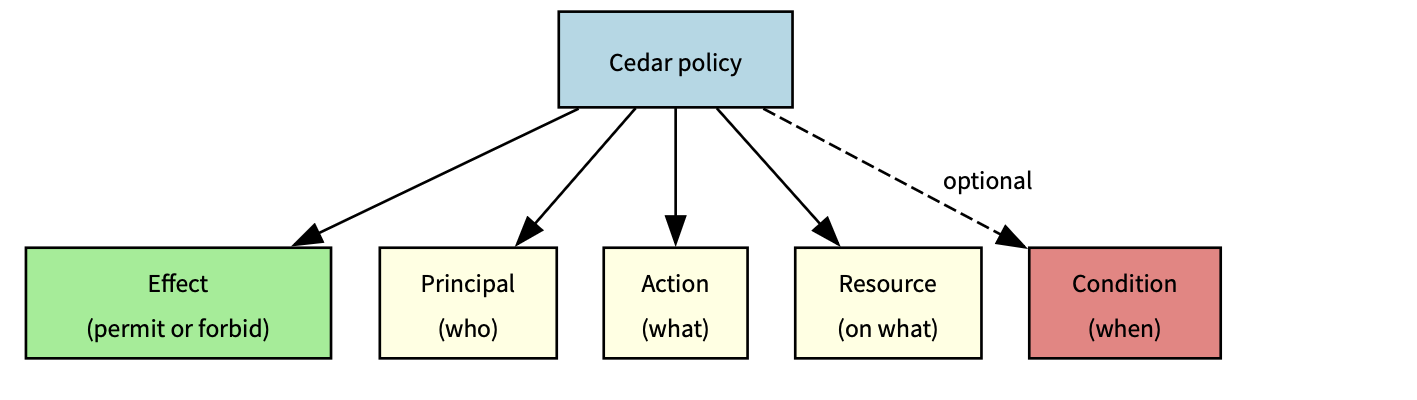
Figure 3: Cedar policy definitions
Policy interaction
The following table shows how different policies interact in complex scenarios where multiple policies could apply:
| Scenario | Student policy | Faculty policy | Department head policy | Admin policy |
| Student accessing own grade | Permit | N/A | N/A | Override |
| Faculty editing course | N/A | Permit | N/A | Override |
| Department head managing faculty | N/A | N/A | Permit | Override |
| Emergency admin access | N/A | N/A | N/A | Permit |
Legend:
- Permit – Policy allows access
- N/A – Policy doesn’t apply
- Override – Emergency admin access
The preceding table shows how each role’s policy applies to different scenarios, with admin access having override capabilities across most situations except for emergency admin access where it’s the primary permit authority. The Override column specifically indicates that the administrator’s emergency access policy can supersede other role-specific policies, but only when the emergencyAccess context flag is explicitly set and a justification is provided. This is not an automatic override.
Policy optimization tips:
- Order conditions by likelihood of success – Place the most frequently true conditions first in your when clause to enable short-circuit evaluation. For example, check role before resource ownership, because role mismatches are caught earlier. See Cedar best practices.
- Use indexed attributes for faster lookups – Use entity attributes that Verified Permissions indexes natively (
entityId,role,resource type) as primary conditions. Best practices for designing an authorization model - Cache policy evaluations when appropriate
- Monitor evaluation metrics and performance
Real-world application: Academic system
Consider an academic system with different user roles and their corresponding permissions:
Student: View own grades
- Policy helps ensure students can only access grade resources where they are listed as the student
- The policy verifies the student’s role and matches the resource owner to the principal’s entity ID
Faculty: Edit course content, manage grades
- Policy allows faculty to edit courses they teach
- Faculty can view and modify grades for students in their courses
Teaching assistant (TA): Grade management and course support
- Policy permits TAs to manage grades for courses they assist with
- Access is limited to specific courses assigned to the TA
Department head: Manage faculty assignments
- Policy allows department heads to manage faculty in their department
- Access is scoped to the department hierarchy
Administrator: System-wide access
- Policy provides emergency access with proper justification
- Administrative actions are logged and audited
Prerequisites
To implement the preceding Academic system application, you need an active AWS account, Python 3.8 or later, basic Streamlit knowledge, and AWS Identity and Access Management (IAM) permissions for Amazon Cognito and Verified Permissions.
Run the sample and extend the solution
- Download the code base: Start by downloading the code base from the avp streamlit samples repository
- Set up your development environment: Install the AWS SDK for Python (boto3) and configure your AWS credentials.
- Install the AWS SDK for Python:
- Log in to your AWS account:
- Verify that your AWS Command Line Interface (AWS CLI), Python, and dependencies are correctly configured.
- Create your AWS resources: Use the AWS Management Console or infrastructure as code (IaC) tools to provision your Amazon Cognito user pool and Verified Permissions policy store.
This provisions an Amazon Cognito user pool, a Verified Permissions policy store, and any sample resources needed for the demo.
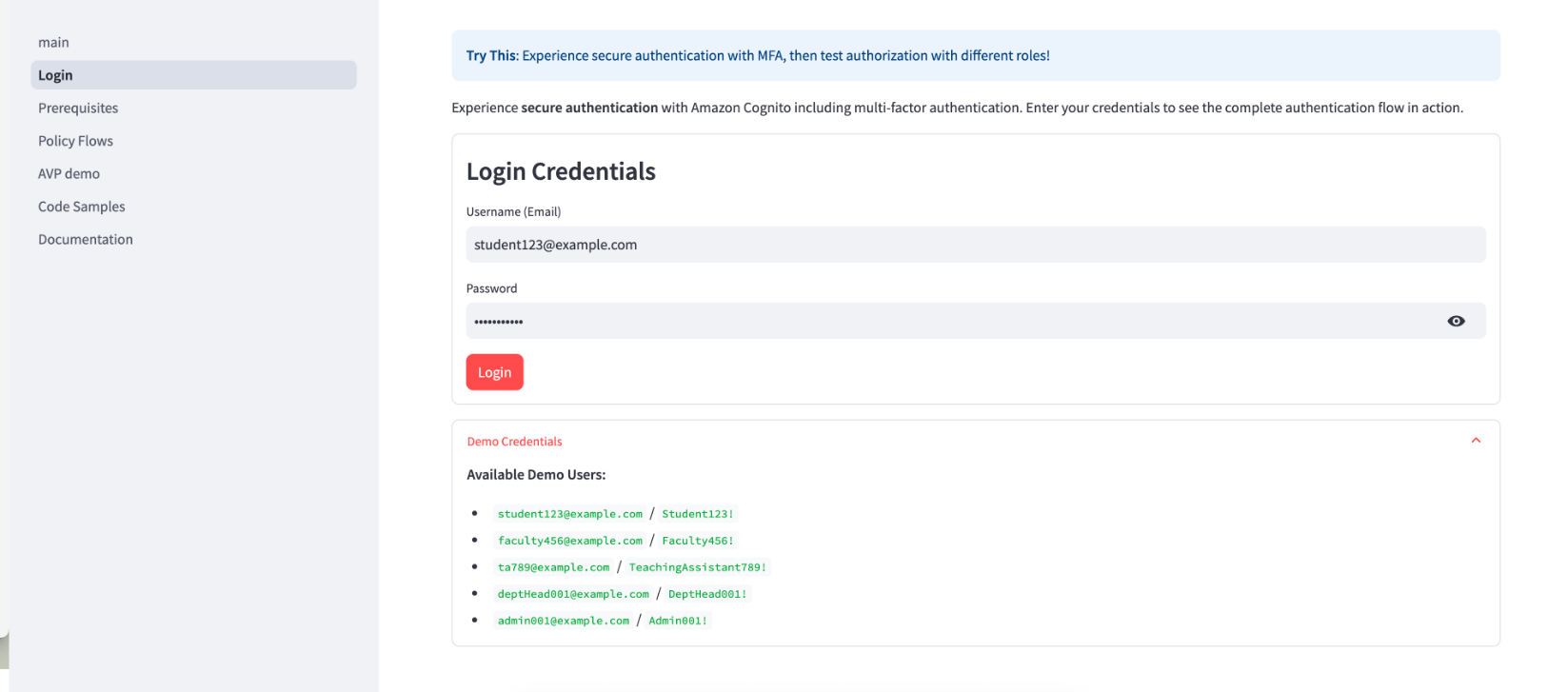
- Verify the login screen:

Figure 4: Verify login credentials
- Demo walkthrough and shut down: Interact with the demo and test the policies and features. When you’re ready to exit, press
Ctrl+Cto shut down and stop. - Define your Cedar policies: Start with basic policies and gradually add complexity as you understand the evaluation model.
- Implement authentication: Integrate Amazon Cognito authentication into your application with proper error handling.
- Add authorization checks: Implement authorization checks at critical access points in your application. For authentication, implement proper error handling for expired tokens, failed MFA challenges, and account lockouts. Use the Amazon Cognito built-in token refresh flow. For authorization, place Verified Permissions checks at every API endpoint and UI component that accesses protected resources.
- Test thoroughly: Create test scenarios for each user role and permission combination.
- Monitor and iterate: Set up AWS CloudTrail logging and Amazon CloudWatch alarms to monitor your security controls and refine them based on real-world usage.
Security best practices
When implementing this architecture, follow these best practices to support security:
- Layer your security controls: Use both authentication and authorization as complementary controls rather than relying on a single mechanism.
- Follow least privilege principles: Grant only the permissions needed for specific user roles. Start with minimal permissions and add more as needed.
- Implement proper session management: Set appropriate token expiration and refresh policies. Amazon Cognito handles much of this automatically, but you should configure timeouts based on your security requirements.
- Validate all inputs: Sanitize user inputs to prevent injection attacks. Don’t rely on client-side validation alone.
- Monitor authentication events: Set up logging and alerts for suspicious activities such as repeated failed login attempts or unusual access patterns.
- Conduct regular security reviews: Periodically audit your policies and security configurations to verify they still meet your requirements and follow current best practices.
- Implement secure error handling: Avoid information disclosure through error messages. Provide helpful feedback to users without revealing system details that could aid attackers.
Conclusion
Implementing proper authentication and authorization is critical for application security. By using Amazon Cognito and Amazon Verified Permissions, you can build robust security controls without complex custom code. Through this approach, you can implement enterprise-grade authentication with minimal effort, define and enforce fine-grained authorization policies, scale your security controls as your application grows, and centrally manage and audit security policies.
To get started with your implementation, create your AWS resources including an Amazon Cognito user pool and Verified Permissions policy store. Define your Cedar policies based on your application’s access requirements. Integrate authentication and authorization checks into your application flow. Test thoroughly with different user roles and access scenarios. Finally, monitor and refine your security controls based on usage patterns.
For additional resources, check out the Amazon Cognito documentation and Amazon Verified Permissions documentation.
If you have feedback about this post, submit comments in the Comments section below.
Weekly Metasploit Update: Apache ActiveMQ RCE, Gogs Rebase RCE, and Windows Kernel Pointer Enum
Post Syndicated from Brendan Watters original https://www.rapid7.com/blog/post/pt-metasploit-wrap-up-05-06-2026
When Open Source is a bit too Open
Several fun modules landed this week, including an Apache RCE, Windows Kernel pointer collection, and Gogs RCE via naming. Leading off is Gogs’ RCE that allows an attacker to execute commands by naming their branch –exec <command> and requesting a rebase.
Another useful post module by CharlesQuinnDev enumerates the Kernel pointers leaked via the popular NtQuerySystemInformation technique. Those exposed pointers, combined with a good write primitive, make local privilege escalation easier to accomplish. Several local privilege escalations already use that technique, so exposing just that technique was a great call!
New module content (3)
Apache ActiveMQ RCE via Jolokia addNetworkConnector
Authors: dinosn and h00die
Type: Exploit
Pull request: #21497 contributed by h00die
Path: multi/http/apache_activemq_jolokia_rce
AttackerKB reference: CVE-2026-34197
Adds a new exploit module exploit/multi/http/apache_activemq_jolokia_rce targeting CVE-2026-34197 in Apache ActiveMQ. The module abuses the Jolokia JMX-over-HTTP API exposed at /api/jolokia/ by calling the addNetworkConnector() MBean operation with a crafted brokerConfig=xbean:http://… URI. ActiveMQ fetches the attacker-controlled URL and instantiates it as a Spring XML application context, achieving remote code execution via a java.lang.ProcessBuilder bean. Authentication is required to exploit this vulnerability.
Gogs Git Rebase Argument Injection RCE
Author: Crypto-Cat
Type: Exploit
Pull request: #21515 contributed by jburgess-r7
Path: multi/http/gogs_rebase_rce
This adds an exploit module for the Gogs rebase Remote Code Execution (RCE) vulnerability. The module leverages an argument injection flaw residing in the pull request merge workflow of Gogs versions <= 0.14.2 and <= 0.15.0+dev.
Windows Kernel Pointer Exposure Enumerator
Author: CharlesQuinnDev
Type: Post
Pull request: #21039 contributed by CharlesQuinnDev
Path: windows/gather/windows_kernel_pointer_enum
Adds a new post module for Windows that enumerates kernel object pointers exposed through NtQuerySystemInformation on x64 systems. The module collects observable handle metadata and provides analysis of pointer distribution, object types, and ALPC usage, then saves the results to a CSV loot file for review. Also introduces a reusable Windows kernel handle-enumeration library.
Enhancements and features (7)
- #20881 from h00die – This adds support for cracking Kerberos type hashes in Metasploit, specifically timeroasting, krb5tgs* and krb5asrep.
- #21087 from jbx81-1337 – The new payloads_manager plugin lets you maintain a local archive of custom payloads and stage them into the data directory. Use the fetch or add subcommands to download or import a payload, then select to symlink it into place so it’s available to other modules. The plugin tracks each payload’s name, hash, tags, and description in a database.
- #21412 from zeroSteiner – Updates Metasploit’s post modules to now run by default against the last opened alive session, unless explicitly specified.
- #21429 from zeroSteiner – Removes the now redundant Linux-specific method for finding the arch so there’s a single source of truth that works in a superset of platform / session-type combinations.
- #21488 from sjanusz-r7 – Updates HTTP login scanners to report the detected service hierarchy.
- #21504 from h00die – Adds missing CVE references to seven existing modules: gladinet_storage_access_ticket_forge (CVE-2025-14611), cassandra_web_file_read (CVE-2020-36939), pretalx_file_read_cve_2023_28459 (CVE-2023-28459 and CVE-2023-28458), centreon_pollers_auth_rce (CVE-2019-19699), wp_responsive_thumbnail_slider_upload (CVE-2015-10144), xerte_unauthenticated_template_import_rce (CVE-2026-32985), and solarwinds_storage_manager_sql (CVE-2012-2576).
- #21526 from zeroSteiner – Makes stability and logging improvements to the ipmi_cipher_zero, ipmi_dumphashes, and ipmi_version modules.
Bugs fixed (7)
- #21432 from 4ravind-b – Fixes a bug in modules that invoke other modules that prevented datastore options from being validated.
- #21448 from kx7m2qd – Fixes an issue where CIDR range filters in the addresses parameter of the db.hosts RPC endpoint were not processed correctly.
- #21484 from zeroSteiner – Fixes python ssl command shell payloads that failed with AttributeError: module ‘ssl’ has no attribute ‘wrap_socket’.
- #21489 from h00die – Improves the GitLab version scanner by handling additional exceptions in the scanner for non-GitLab targets and adding additional version fingerprints for real GitLab targets.
- #21502 from h00die – Fixes a crash in the scanner/snmp/snmp_enum module when the system date was read as Null.
- #21506 from h00die – Adds a guard clause when running uname -r in WSL startup_folder persistence.
- #21514 from orbit-bot – Fixes a couple of references to outdated msfvenom options.
Documentation
You can find the latest Metasploit documentation on our docsite at docs.metasploit.com.
Get it
As always, you can update to the latest Metasploit Framework with msfupdate and you can get more details on the changes since the last blog post from GitHub:
If you are a git user, you can clone the Metasploit Framework repo (master branch) for the latest. To install fresh without using git, you can use the open-source-only Nightly Installers or the commercial edition Metasploit Pro.
Recreating Marilyn Monroe’s Most Intimate Shoot
Post Syndicated from Matt Granger original https://www.youtube.com/shorts/T-f5Lo2oM4M
The Old Campaign Playbook Is Dead
Post Syndicated from The Atlantic original https://www.youtube.com/watch?v=iTYVBNQbEkU
Scoping Out RTX Spark SFF Mini-PCs at Computex 2026
Post Syndicated from Ryan Smith original https://www.servethehome.com/scoping-out-rtx-spark-sff-mini-pcs-at-computex-2026/
While at Computex, we caught a look at some of the upcoming SFF mini-PCs based on NVIDIA’s RTX Spark SoC, including systems from ASUS, Dell, Lenovo, and MSI
The post Scoping Out RTX Spark SFF Mini-PCs at Computex 2026 appeared first on ServeTheHome.
Adding LINE Messenger to your AWS omnichannel fallback solution
Post Syndicated from Rommel Sunga original https://aws.amazon.com/blogs/messaging-and-targeting/adding-line-messenger-to-your-aws-omnichannel-fallback-solution/
In this post, you will learn how to extend an existing omnichannel fallback solution by integrating LINE Messenger, including architecture updates, deployment steps, and testing procedures. The original solution, built with Amazon API Gateway, AWS Lambda, Amazon Simple Email Service (Amazon SES), and AWS End User Messaging, delivers messages across SMS, WhatsApp, and email with automatic fallback capabilities.
For more information about the original omnichannel fallback solution that this aims to extend to LINE, see the Enhancing Message Reach: An Omnichannel Approach Using WhatsApp, SMS, and Email with AWS.
Why LINE Messenger?
LINE is a popular messaging platform in Japan, Taiwan, and Thailand, with 181 million monthly active users across its primary markets, including 100 million in Japan alone (LY Corporation FY2025 Q3 earnings data). With an 84 percent DAU/MAU ratio (88 percent in Japan), LINE sees high daily engagement, making it a reliable channel for time-sensitive communications such as appointment reminders in healthcare, order and shipping notifications in ecommerce, and promotional campaigns in retail.
While other messaging platforms are popular in specific APAC markets (KakaoTalk in South Korea, WeChat in China, Zalo in Vietnam, Viber in the Philippines), LINE holds a strong position across Japan, Taiwan, and Thailand simultaneously, making it a high-impact addition to a multi-channel messaging strategy for those countries. By adding LINE to the omnichannel fallback solution, you can reach your audience on their preferred messaging channel in these key markets. You can use LINE as either a primary or fallback channel while maintaining the same fallback and broadcast patterns already available for other channels.
Cost note: LINE Messaging API pricing varies by country and plan. See the pricing pages for LINE Messaging API, Amazon Simple Email Service (Amazon SES), and Amazon End User Messaging for details on each channel.
Architecture overview
Adding LINE to your fallback solution means you can now cover four major messaging channels from a single API endpoint, giving you broader reach without added operational complexity. The LINE integration follows the same event-driven serverless pattern as the existing channels. The following diagram shows the key additions to the architecture.
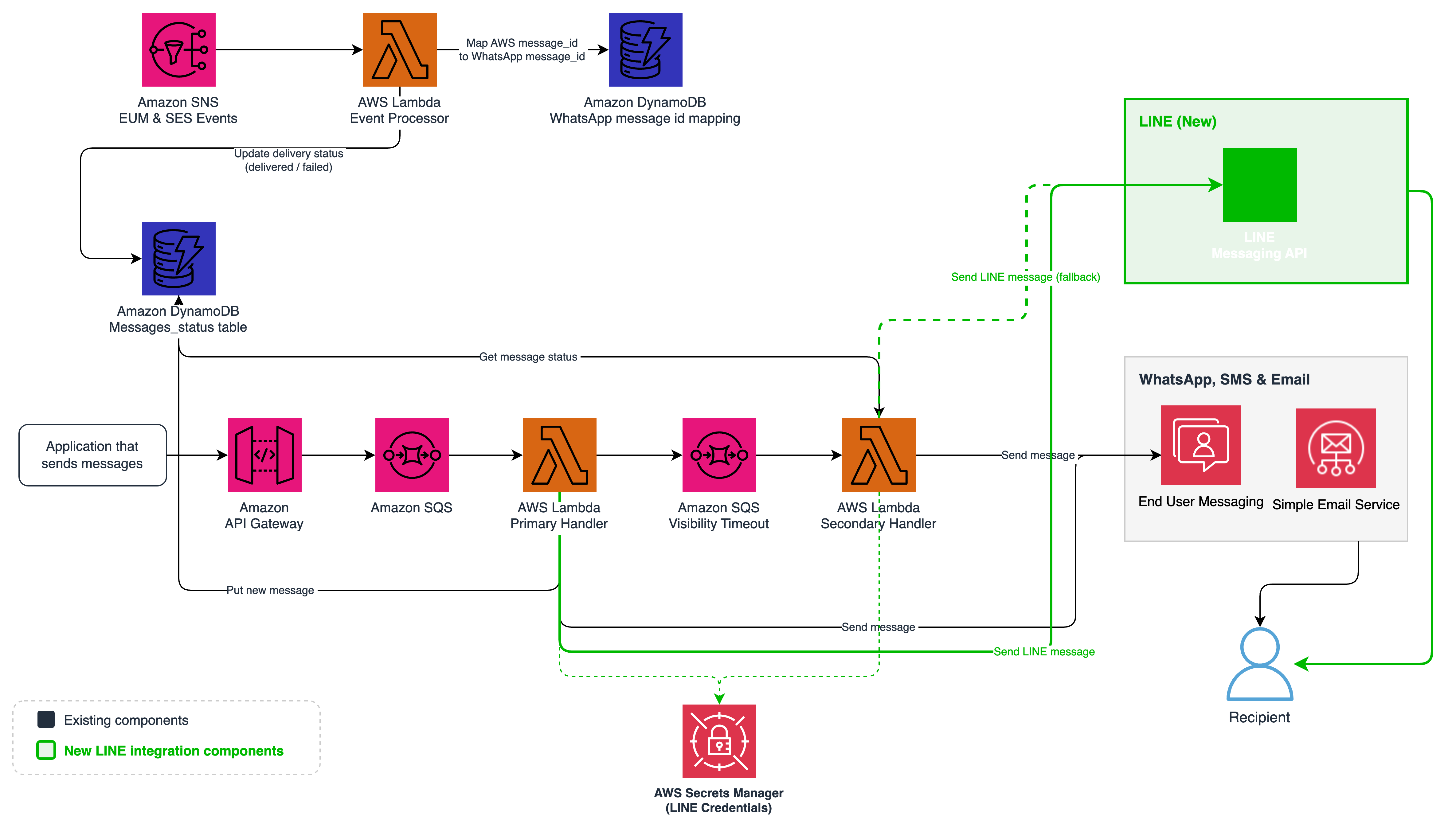
Figure 1: Updated omnichannel architecture with LINE Messenger (new components highlighted)
You can now reach LINE users with two straightforward additions to the existing architecture:
LINE Messaging API Integration – The Primary and Secondary Handler Lambda functions now include a send_line module that calls the LINE Messaging API to deliver messages using the Push Message endpoint.
AWS Secrets Manager Integration – LINE channel credentials (access token and channel secret) are stored securely in AWS Secrets Manager and retrieved by Lambda functions with caching for performance.
How LINE integration works
The LINE Messenger integration extends the existing message processing pipeline, so you get the same reliable fallback behavior that you already have for email, SMS, and WhatsApp. The following sections describe how the system handles LINE messages and fallback scenarios.
Sending a LINE message
When you send a message with LINE as the primary or fallback channel, the flow follows the same pattern as other channels with LINE-specific handling:
- API Gateway receives the request and places it in the Primary Amazon Simple Queue Service (Amazon SQS) Queue.
- The Primary Handler Lambda detects the channel as “line” and invokes the send_line module.
- The send_line module retrieves LINE credentials from Secrets Manager (cached for performance) and sends a request to the LINE Messaging API Push Message endpoint. The Push Message API sends messages to LINE users without requiring the user to message first. The request body contains a to field with the recipient’s LINE User ID (a unique identifier assigned when a user follows your LINE Official Account) and a messages array with the message objects to deliver. The module validates the recipient LINE User ID against the expected format (a capital ‘U’ followed by 32 lowercase hexadecimal characters) before invoking the LINE API. Requests with malformed recipient IDs are rejected early and don’t reach the external API.
- The Lambda function records the message status in the Amazon DynamoDB table.
- If fallback is configured, the Lambda function enqueues the message to the Fallback Queue. This happens regardless of whether the LINE API call succeeds (HTTP 200) or fails (non-200 response, timeout, or exception). DynamoDB records the message status as delivered on success or failed on failure. The Secondary Handler checks DynamoDB and sends through the fallback channel if the status isn’t delivered.
- The Secondary Handler updates the DynamoDB status to sent_fallback.
How LINE differs from other channels
| Aspect | SMS | LINE | ||
| API | Amazon SES SendEmail API | AWS End User Messaging SendTextMessage API | AWS End User Messaging Social SendWhatsAppMessage API | LINE Messaging API Push Message API |
| Authentication | IAM roles | IAM roles | IAM roles | Channel access token via Secrets Manager |
| External Message ID Mapping | Not required. SES returns the same message ID in delivery callbacks | Not required. SMS returns the same message ID in delivery callbacks. | Required. WhatsApp returns a different platform message ID in delivery webhooks that must be mapped back to the internal AWS message ID. | Not required. No delivery callbacks exist, so no message ID correlation is needed. |
| Credential Storage | IAM (automatic) | IAM (automatic) | IAM (automatic) | Secrets Manager (manual) |
| Delivery Tracking | Async via SES delivery events (SNS callback updates DynamoDB) | Async via End User Messaging events (SNS callback updates DynamoDB) | Async via End User Messaging events (SNS callback updates DynamoDB) | None. Status set to delivered immediately on 200 response from LINE API. No delivery webhook available for LINE Messaging API. |
LINE uses an external API with its own authentication rather than AWS-native IAM authentication. This means you must manage credentials through AWS Secrets Manager rather than relying on AWS Identity and Access Management (IAM)-managed authentication. For more information, see the LINE Messaging API documentation.
LINE offers two distinct messaging products for businesses, LINE Messaging API, and LINE Official Notification.
- The LINE Messaging API, which is the focus of this guide, supports two-way conversational messaging and is widely adopted across industries for use cases such as mobile ordering, loyalty programs, and customer engagement. LINE also offers LINE Official Notification (also known as LINE Notification Messages), a separate service designed for one-way transactional notifications such as shipping updates and appointment reminders, which requires business verification.
- LINE Official Notification provides per-message delivery completion events, but the LINE Messaging API doesn’t. With the Messaging API, an HTTP 200 response confirms LINE accepted the message for delivery, and this is the most granular delivery signal available.
Creating a LINE Messaging API Channel
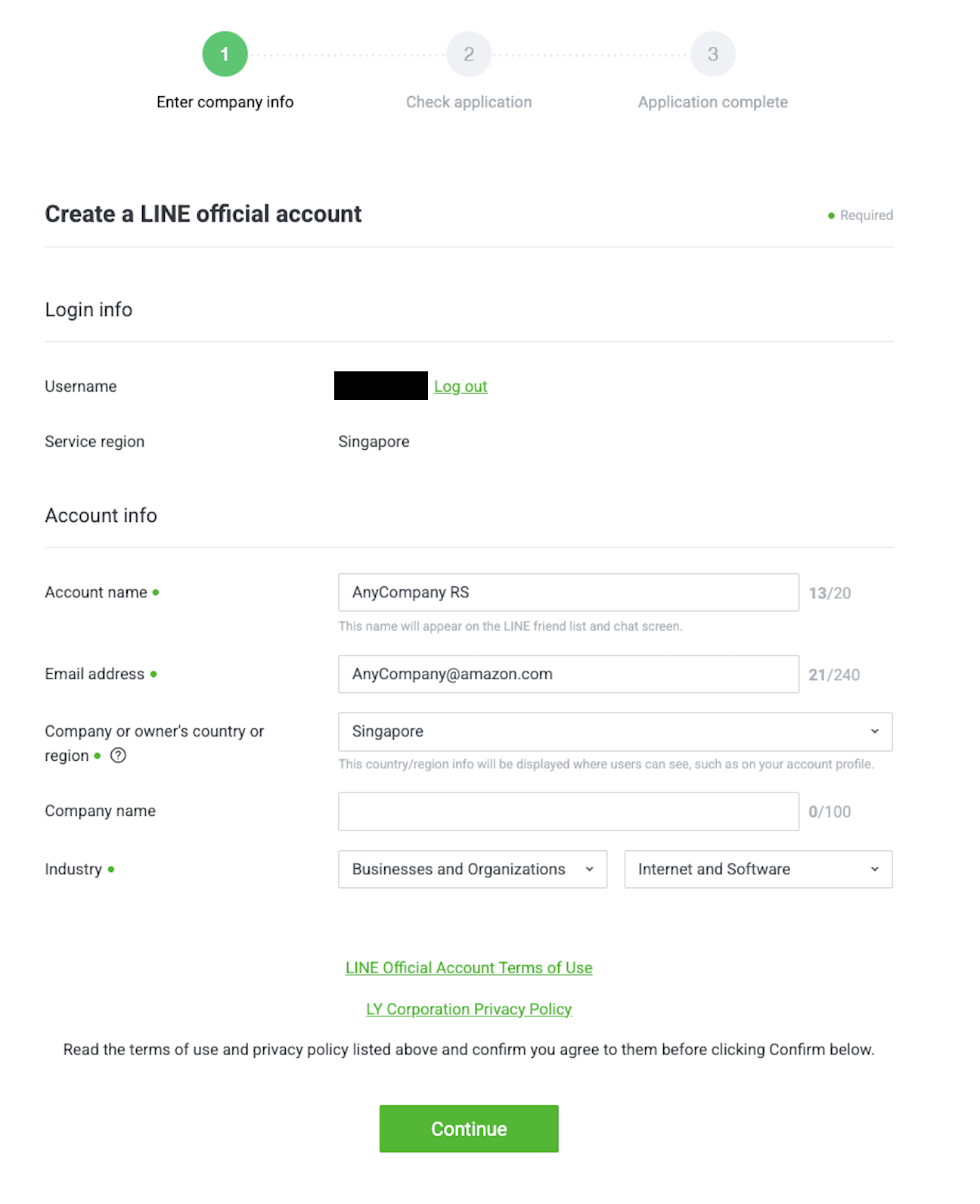
You need a LINE Messaging API Channel to authenticate and send messages through the LINE integration. The following steps walk you through creating one:
- Sign in to the LINE Developers Console. Create a personal LINE account if you don’t have one already and download the corresponding iOS/Android/PC application. This is required to test receiving LINE messages.
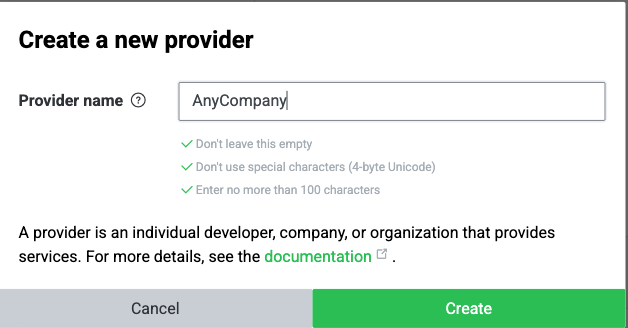
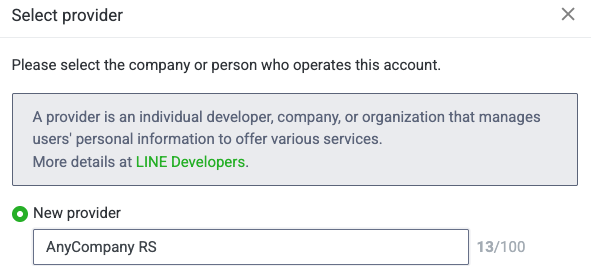
- Create a Provider (your company/org name).

- Create a new Messaging API channel under that provider.

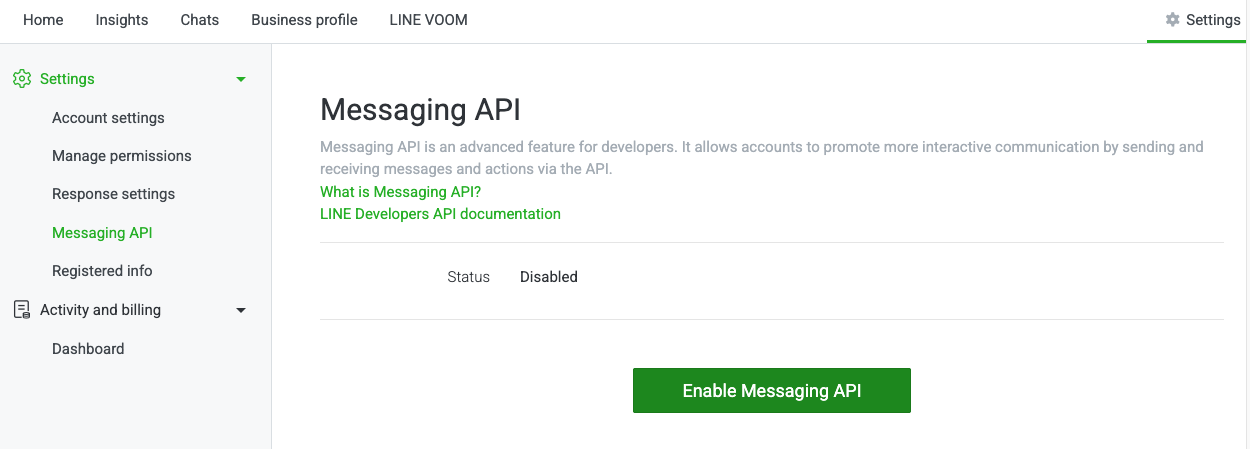
- After you create the channel, enable the Messaging API from the LINE Official Account Manager page.

- From the channel settings, note the following:
- Channel access token (Messaging API tab, then select Issue)


- Channel secret (Basic settings tab)

- Channel access token (Messaging API tab, then select Issue)
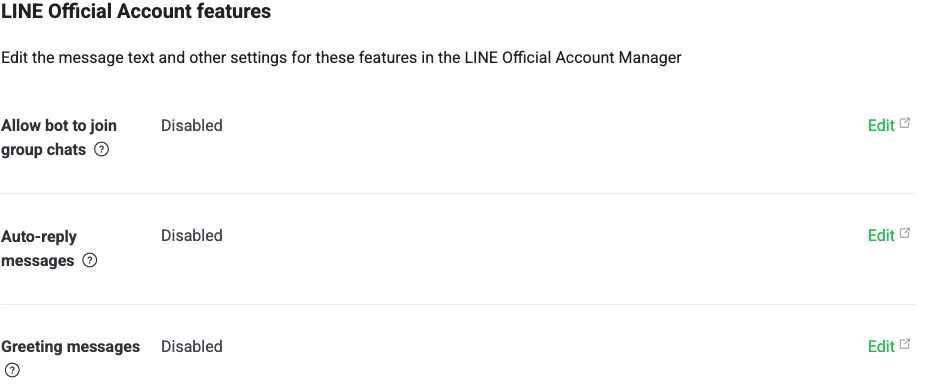
- Disable Auto-reply and Greeting messages under Messaging API settings.



Deploying and testing
The repository includes a complete deployment guide with step-by-step instructions for deploying the CDK stack, configuring LINE credentials in AWS Secrets Manager, obtaining personal LINE user IDs, and running the integration test suite. The test suite automatically detects which channels are configured and runs the applicable tests. For full deployment and testing instructions, see the Deployment Guide in the repository.
Security considerations
Before deploying this solution to production, review the following considerations and adjust for your workload and compliance obligations.
Least-privilege IAM
The Lambda execution roles in the sample scope DynamoDB, Amazon SQS, and AWS Secrets Manager permissions to specific resource ARNs. The send actions for Amazon SES (ses:SendEmail, ses:SendTemplatedEmail), SMS (sms-voice:SendTextMessage), and WhatsApp (social-messaging:SendWhatsAppMessage) are granted on resources: [“*”] in this sample for simplicity, because the specific sending identities, phone pools, and WhatsApp business accounts are left configurable. For production, scope these further where the API supports it: SES allows identity-level ARNs (for example, arn:aws:ses:region:account:identity/example.com), and End User Messaging SMS supports pool and phone-number ARNs. When adapting this code, keep resource-level scoping for everything that supports it and review the AWS Well-Architected Security Pillar and Lambda execution role guidance for production deployments.
Rotating LINE credentials
LINE channel access tokens are long-lived and are issued and rotated manually through the LINE Developers Console; there’s no programmatic rotation API. Rotate the token periodically in line with your organization’s key-rotation policy (for example, every 90 days), update the Secrets Manager secret with the new value, and force a Lambda cold start (by redeploying the stack or updating a Lambda environment variable) so the cached credentials are refreshed.
Data protection and PII retention
The solution stores message metadata and recipient identifiers (including LINE User IDs, phone numbers, and email addresses) in Amazon DynamoDB. DynamoDB uses AWS-managed encryption at rest, Secrets Manager uses AWS Key Management Service (AWS KMS), and all outbound calls to the LINE API are made over HTTPS. Point-in-time recovery is enabled on the message table.
The sample doesn’t configure a DynamoDB Time-to-Live (TTL) attribute, so records persist indefinitely. For production, add a TTL attribute (for example, expiresAt) that matches your retention policy, and review whether the RemovalPolicy.RETAIN setting on the tables is appropriate for your environment. LINE User IDs, phone numbers, and email addresses are personally identifiable information under regulations including Japan’s APPI, the EU’s GDPR, and similar laws. Assess your retention obligations, data residency requirements, and processes for handling subject access and deletion requests for the regions you serve.
Conclusion
By adding LINE Messenger to the omnichannel fallback solution, you can now reach your customers across the four messaging channels that matter most: email, SMS, WhatsApp, and LINE. The integration follows the same serverless, event-driven patterns as the existing channels, making it straightforward to deploy and maintain. LINE can serve as either a primary or fallback channel, giving you the flexibility to tailor your messaging strategy to regional preferences. As a next step, consider adding other regional messaging services to further expand your reach. You can also explore advanced LINE features such as rich messages, quick replies, and Flex Messages to create more engaging customer interactions.
Resources
- GitHub Repository
- Enhancing Message Reach: An Omnichannel Approach Using WhatsApp, SMS, and Email with AWS
- LINE Developers Documentation
- AWS CDK Documentation