All posts by Kevon Mayers

Multi-Cloud Code Deployments using Amazon Q Developer with Echo3D

Post Syndicated from Kevon Mayers original https://aws.amazon.com/blogs/devops/multi-cloud-code-deployments-using-amazon-q-developer-with-echo3d/

Banner showing echo3D logo and Amazon Q Developer logo

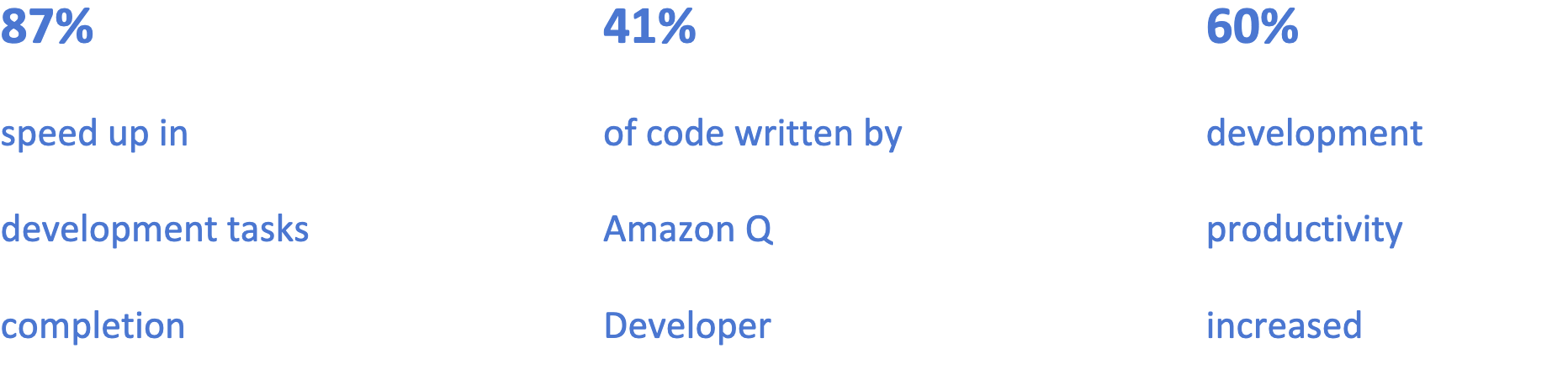
Image showing 87& speed up in development tasks completion, 41% of code written by Amazon Q Developer, and 60% development productivity increasedn

Overview

Founded in 2018, echo3D built a revolutionary 3D digital asset management (DAM) platform to address the surging demand for immersive content across industries. The company’s platform enables enterprises to seamlessly store, secure, optimize, and share 3D content, serving over 200,000 professionals across energy, healthcare, gaming, retail, and beyond.

echo3D’s platform has become the go-to solution for managing complex 3D assets at scale, supporting major enterprises across multiple sectors. With their technology operating within clients’ own AWS accounts, echo3D delivers critical infrastructure that powers real-time 3D content management for organizations worldwide.

As customer demand grew, echo3D faced increasing pressure to maintain rapid innovation while ensuring stable multi-cloud deployments. With a streamlined development team managing expanding cross-platform requirements, the company needed an efficient solution to accelerate their build and debug processes. This led them to explore Amazon Q Developer as a way to enhance their development capabilities and meet growing market demands.

Opportunity | Building for a Multi-Cloud Reality through Amazon Q Developer

echo3D specializes in 3D digital asset management, with a critical focus on multi-cloud deployments to serve their diverse enterprise client base. The company’s commitment to cross-platform functionality isn’t optional—it’s fundamental to their business model, with many clients specifically requiring AWS compatibility.

The company’s existing cloud infrastructure needed to support seamless migrations while maintaining robust performance across different environments. “For many of our clients, AWS is the ultimate destination,” explains Ben Pedazur, CTO at echo3D. “Amazon Q Developer has proven to be an indispensable guide for these migrations, both for our infrastructure and for the solutions we build for customers.”

After evaluating various solutions, echo3D identified Amazon Q Developer as their key tool for standardizing cross-platform development. “We needed a solution that could generate consistent code across different cloud environments while resolving platform-specific challenges,” notes Pedazur. This capability became particularly crucial during a recent customer migration project, which served as a perfect test case for Amazon Q Developer’s capabilities.

Solution | Streamlining the Journey to AWS with Amazon Q Developer

To streamline their cloud migration process, echo3D implemented Amazon Q Developer across their entire development workflow. The team utilized Amazon Q Developer to handle a critical migration from Azure Cosmos DB to Amazon DynamoDB, leveraging the AI assistant to generate comprehensive migration blueprints that included code modifications, configuration changes, and testing strategies.

Developers used detailed prompts to generate migration plans and receive context-aware guidance throughout the process. Amazon Q Developer provided not just code snippets, but complete architectural solutions that considered both the source and target platforms. During implementation, the team integrated Amazon Q Developer directly into their workflow, receiving real-time suggestions for code optimization and platform-specific adjustments.

The impact of Amazon Q Developer was immediate and measurable, with 41% of the new codebase being generated or auto-completed by the tool. “Amazon Q Developer has transformed our migration efficiency,” says Pedazur. “Our development time for cloud migrations has decreased by 87%, while significantly improving code quality.”

Amazon Q Developer assists throughout the entire development lifecycle, generating test cases, deployment scripts, and documentation. This comprehensive support has led to remarkable improvements: platform-specific bugs decreased by 75%, deployment success rates reached 99.8% across multiple clouds, and code review cycles shortened by 60%.

Beyond code generation, echo3D uses Amazon Q Developer to enhance team collaboration and knowledge sharing. The tool has cut onboarding time for new engineers in half, reducing it from four weeks to two weeks. Support tickets related to deployment errors have dropped by 68%, indicating improved code stability and reliability.

The new multi-cloud infrastructure, built with AWS services including DynamoDB, enables echo3D to scale efficiently while maintaining high performance across different cloud environments. The combination of Amazon Q Developer and AWS services has empowered echo3D to accelerate their development cycle while ensuring consistent quality across platforms.

“Amazon Q Developer isn’t just about coding faster—it’s about building better,” explains Pedazur. “We’ve seen improvements across every metric, from development speed to code quality, allowing our team to focus on innovation rather than troubleshooting.”

Outcome | Reimagining Development Through AI-Powered Workflows

With Amazon Q Developer, echo3D plans to further leverage Amazon Q Developer across their product lifecycle, from rapid prototyping to ongoing code maintenance and enhancement.

“Amazon Q Developer has revolutionized our approach to multi-cloud development,” says Pedazur. “It’s not just about automating tasks; it’s about reimagining our entire workflow. We’re now able to prototype, test, and deploy across cloud platforms with unprecedented speed and accuracy.”

Authors

Headshot of Lilly McDermott, Account Manager, AWS

Lilly McDermott

Lilly McDermott is an AWS account manager specializing in supporting gaming companies and game tech. As a trusted advisor, she guides customers through their cloud journey, helping them implement scalable solutions that drive innovation and growth in their games and services. Lilly is dedicated to guiding her customers in transforming their creative ideas into executable plans, empowering them to thrive in the competitive gaming market.

Headshot of Kevon Mayers, Infrastructure as Code Focus Area Lead and Games Solutions Architect, AWS

Kevon Mayers

Kevon Mayers is a Games Solutions Architect at AWS and is the Infrastructure as Code (IaC) Focus Area Lead for the NextGen Developer Experience Technical Field Community at AWS. Kevon is a Core Contributor for Terraform and has led multiple Terraform initiatives within AWS. Prior to joining AWS, he was working as a DevOps engineer and developer, and before that was working with the GRAMMYs/The Recording Academy as a studio manager, music producer, and audio engineer. He also owns a professional production company, MM Productions.

Headshot of Ben Pedazur, echo3D CTO

Ben Pedazur

Ben Pedazur (CTO at echo3D) holds a MSc in Electrical Engineering from Tel Aviv University specializing in computer vision and network communication, a BSc in Electrical Engineering from Afeka Academic College of Engineering specializing in image processing, is a former engineering manager at Cisco Systems, founder of an AR+Drones startup, and algorithm engineer at AdiMap. Ben is skilled in agile leadership, engineering management, and product research & development.

Headshot of Alon Grinshpoon, echo3D CEO

Alon Grinshpoon

Alon Grinshpoon (CEO at echo3D) holds MS in Computer Science from Columbia University specializing in 3D/AR/VR and human-computer interaction (HCI), BS in Computer Science and Electrical Engineering specializing in cloud technology, former NVIDIA engineer, published 3D UI researcher, a frequent speaker at CES, SXSW, Augmented World Expo (AWE), NYVR, Slush, and more. Alon has published papers in top engineering journals such as SIGGRAPH 2018 Emerging Technologies and IEEE Conference on Virtual Reality and 3D User Interfaces (VR) on AR system design and 3D interaction techniques in AR.

Introducing AWS Cloud Control API MCP Server: Natural Language Infrastructure Management on AWS

Post Syndicated from Kevon Mayers original https://aws.amazon.com/blogs/devops/introducing-aws-cloud-control-api-mcp-server-natural-language-infrastructure-management-on-aws/

Today, we’re officially announcing the AWS Cloud Control API (CCAPI) MCP Server. This MCP server transforms AWS infrastructure management by allowing developers to create, read, update, delete, and list resources using natural language. As part of the awslabs/mcp project, this new and innovative tool serves as a bridge between natural language commands and AWS infrastructure deployment and management. This MCP server is powered by the AWS Cloud Control API – a standardized API that allows CRUDL (Create/Read/Update/Delete/List) operations to be performed against AWS and third party resources using a single endpoint.

Key Features:

  • Leverages AWS Cloud Control API for CRUDL operations for more than 1,200 AWS resources
  • Enables LLM-powered agents and developers to manage infrastructure with natural language prompts
  • Provides the option to output Infrastructure as Code (IaC) templates for infrastructure it will create, allowing to still be used with existing CI/CD pipelines
  • Integrates with AWS Pricing API to provide cost estimates for the infrastructure it will create
  • Applies security best practices automatically using Checkov

Why Use CCAPI MCP Server?

  • Simplified Infrastructure Management: No more wrestling with complex templates or documentation
  • Increased Developer Productivity: Focus on what you need, not how to configure it
  • Reduced Learning Curve: Onboard new team members faster with natural language commands
  • LLM Integration: Perfect companion for AI-assisted development workflows

The CCAPI MCP Server transforms infrastructure management by enabling natural language interactions for AWS resource operations. Bridging natural language commands with AWS infrastructure deployment and management, this MCP Server allows developers to manage cloud infrastructure through conversational inputs such as:

  • Can you create a new s3 bucket for me?or
  • Find all of my EC2 instances and tell me which one have an instance type that is not t2.large

This significantly reduces configuration overhead and accelerates onboarding for new team members, directly translates developer intent into cloud infrastructure.

Let’s see it in action.

Creating and Managing Cloud Infrastructure

Prerequisites

  • uv package manager installed
  • Python 3.x.x installed
  • AWS credentials with appropriate permissions. The MCP server supports multiple ways to define these credentials. See the MCP documentation for more information. Using dynamic credentials such as one provided via SSO is recommended. For more information on configuring AWS credentials, see the AWS CLI documentation.
  • An MCP Host application installed that supports MCP Clients and MCP Servers (e.g. Amazon Q Developer, Claude Desktop, Cursor, etc.). To follow this blog install Amazon Q Developer for CLI (CLI) as described in the installation instructions

Integration with Developer Tools

To start using the CCAPI MCP server, you will need to set up your server configuration which is typically in a file named mcp.json. For this blog we will focus on using the CCAPI MCP server with Amazon Q Developer. Note that for other MCP Host applications the path to the mcp configuration file may differ. You will need to create the file if it does not already exist in the directory.

1. Global Configuration: ~/.aws/amazon/mcp.json – Applies to all workspaces

2. Workspace Configuration: .amazonq/mcp.json – Specific to the current workspace

More information can be found in the Amazon Q Developer User Guide.

Configuration file structure

The MCP configuration file uses a JSON format with the following structure:

mcp.json

{
  "mcpServers": {
    "server-name": {
      "command": "command-to-run",
      "args": ["arg1", "arg1",],
      "env": {
        "ENV_VAR1": "value1",
        "ENV_VAR2": "value2",
      },
    }
  }
}

Here is mcp.json with the CCAPI MCP Server configuration:

{
  "mcpServers": {
   "awslabs.ccapi-mcp-server": {
      "command": "uvx",
      "args": [
        "awslabs.ccapi-mcp-server@latest"
      ],
      "env": {
        "AWS_PROFILE": "your named AWS profile",
	"DEFAULT_TAGS": “enabled”,
	"SECURITY_SCANNING": “enabled”,
	"FASTMCP_LOG_LEVEL": “ERROR”
      },
      "disabled": false,
      "autoApprove": []
    }
  }
}

Important

Ensure you correctly set your AWS credentials in the MCP server config. It is essential that you properly configure these credentials, as the MCP server uses their associated permissions when invoking the AWS Cloud Control API for CRUDL operations in your AWS account. The server supports multiple methods of consuming these credentials such as AWS profiles, Environment Variables, SSO tokens, etc. You can see some of this in the aws_client.py file. See these docs on using named profiles for more information.

Read Only Mode

If you would like to prevent the MCP server from performing mutating actions (e.g. Create/Update/Delete Resource), you can specify the --readonly flag as demonstrated below:

{
  "mcpServers": {
   "awslabs.ccapi-mcp-server": {
      "command": "uvx",
      "args": [
        "awslabs.ccapi-mcp-server@latest",
        “--readonly”"
      ],
      "env": {
        "AWS_PROFILE": "your named AWS profile",
	"DEFAULT_TAGS": “enabled”,
	"SECURITY_SCANNING": “enabled”,
	"FASTMCP_LOG_LEVEL": “ERROR”
      },
      "disabled": false,
      "autoApprove": []
    }
  }
}

More information on the configuration and tools the CCAPI MCP server provides can be found in the AWS CloudFormation MCP Server documentation.

Security Considerations

  • Ensure the IAM credentials include permissions for Cloud Control API actions (List, Get, Create, Update, Delete). See the AWS CCAPI API documentation for more info
  • Follow IAM least privilege principles
  • Enable AWS CloudTrail auditing
  • Consider running in read-only mode with --readonly flag for safer operations

Example Use Case: Creating an S3 Bucket with KMS Encryption

IMPORTANT: Ensure you have satisfied all prerequisites before attempting these commands.

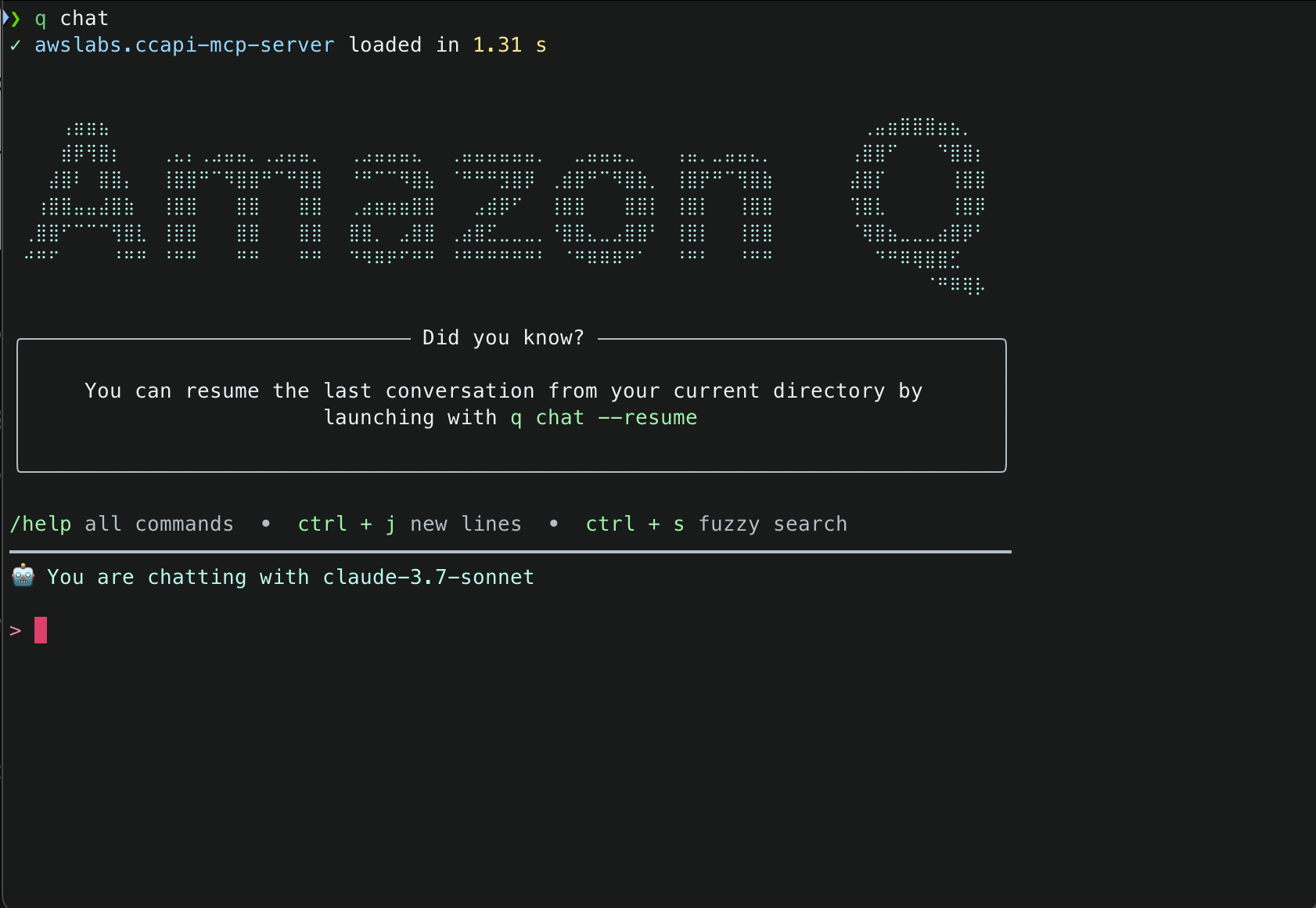
1. With the mcp.json file correctly set, try to run a sample prompt. In your terminal, run q chat to start using Amazon Q in the CLI.

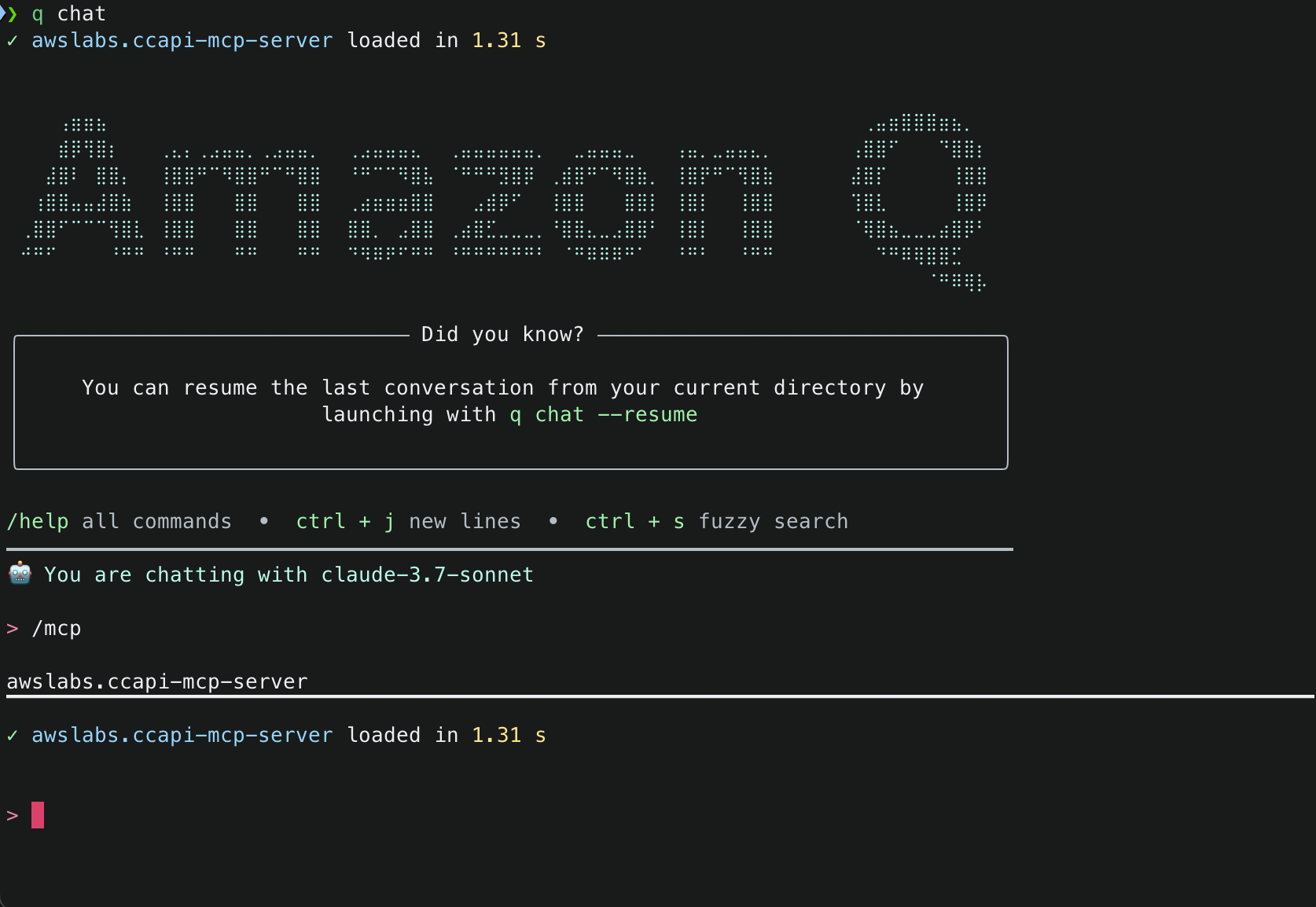
Q CLI Initial Load of Cloud Control API MCP Server 2. This will start initializing the MCP servers in the background, allowing you to immediately start using Q Chat even if they are still loading. As a note, if these have not finished loading, your prompts will be handled without using any MCP servers. To check the status of the servers, run /mcp

3. Once that you have validated that the MCP server was loaded successfully, try a sample command. Simply tell Amazon Q : Create an S3 bucket with versioning and encrypt it using a new KMS key

Amazon Q will use the server to automatically:

  1. Fetch your current environment variables
  2. Use those to fetch your current AWS session info
  3. Create code that defines what is in your prompt
  4. Explain the code that was generated
  5. Run security analysis against the code that was generated (if enabled)
  6. Explain the results of the security analysis
  7. Validate the configuration against AWS Cloud Control API schemas (which use CloudFormation Resource Provider Schemas as their foundation) and IAM policies. This validation ensures compliance with Cloud Control API requirements, which is essential for resource creation
  8. Create the resources directly through Cloud Control API

Note: While CloudFormation schemas are referenced in the validation step, this solution uses Cloud Control API for resource management, not CloudFormation. The schemas are used because they define the standardized resource properties that Cloud Control API expects.

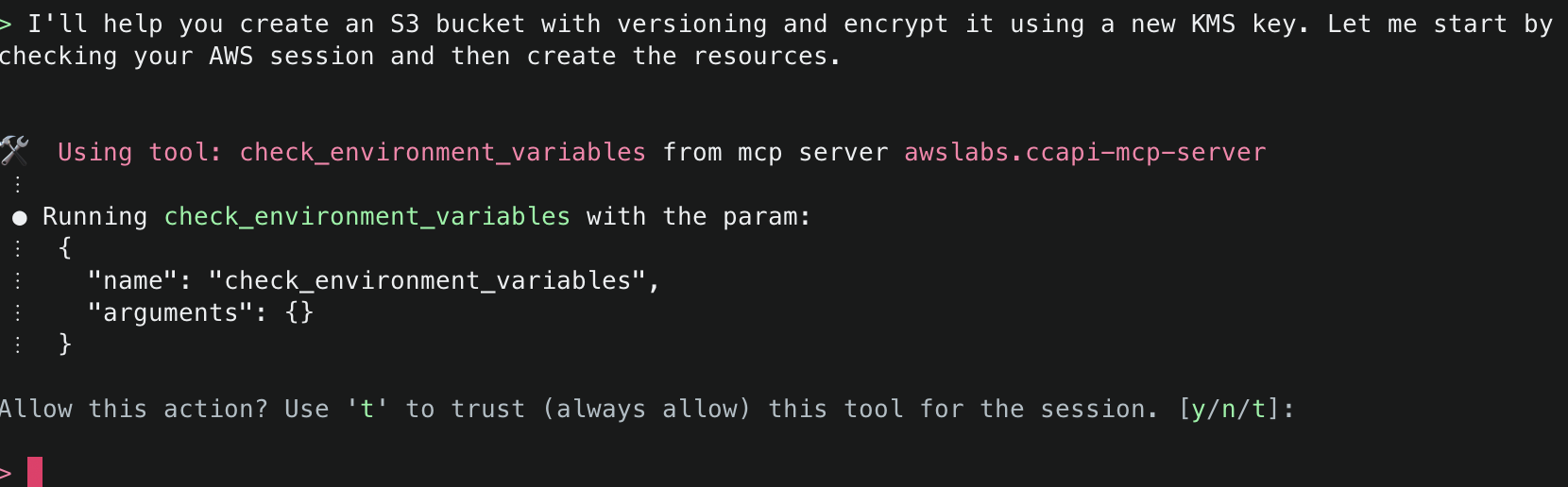
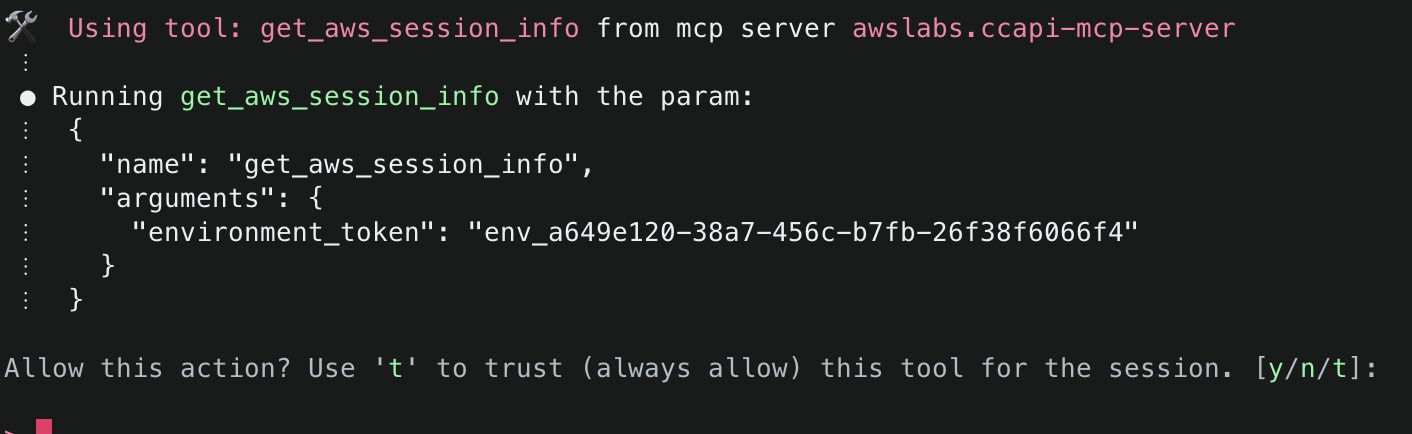
4. First, Amazon Q will mention that it needs to check the environment variables to find information related to the AWS session information. It will inform you about the specific tool it aims to use and will ask for permission. Select y to accept and allow actions.

5. Next, Amazon Q will ask to use get_aws_session_info() to fetch information about the AWS session it should use for subsequent actions. It will use the relevant values from the environment variables defined in the MCP configuration file (e.g. ~/.aws/amazon/mcp.json)

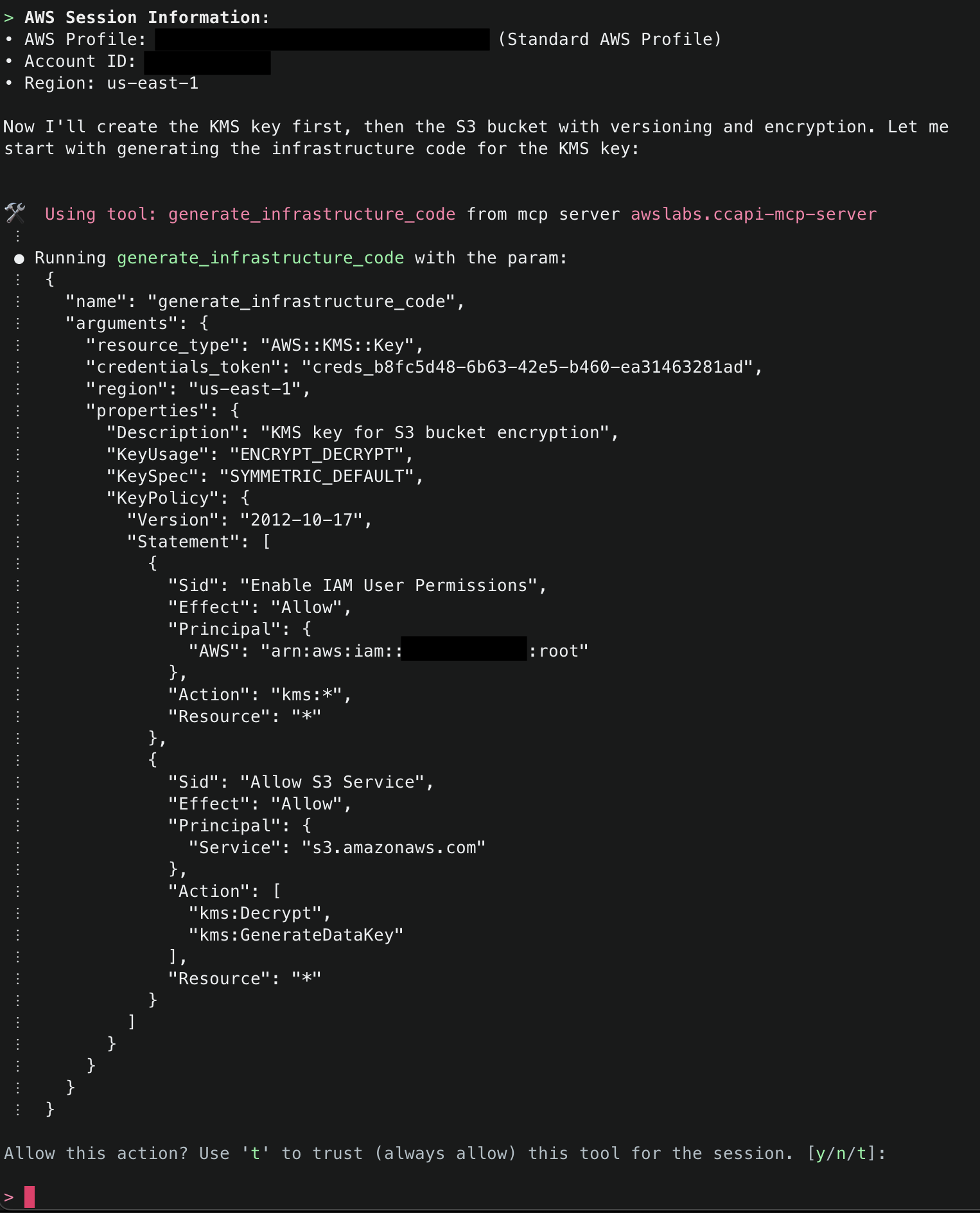
6.Amazon Q will then display the AWS account ID and region it will use to deploy resources. To start, it will use generate_infrastructure_code() to generate the resource properties for a KMS key that will be sent to Cloud Control API. These properties mirror the structure defined in AWS CloudFormation Resource Provider Schemas (which Cloud Control API uses as its foundation), allowing for security validation through Checkov before deployment. The key will be configured following security best practices, with a key policy scoped to only allow usage within the AWS account.

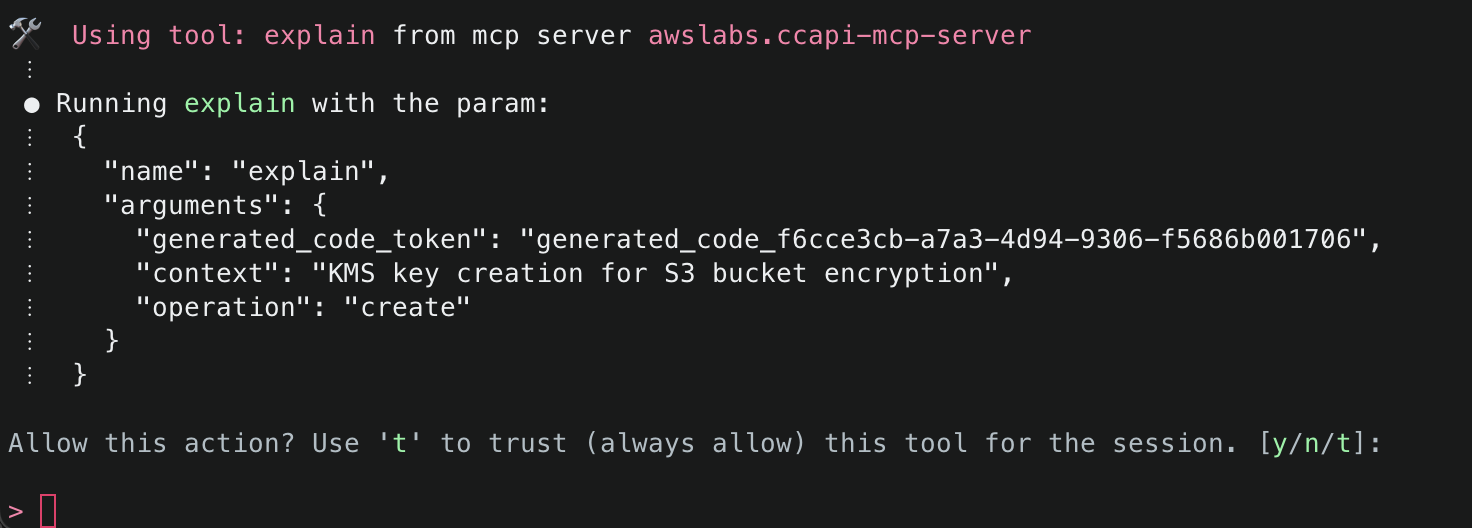
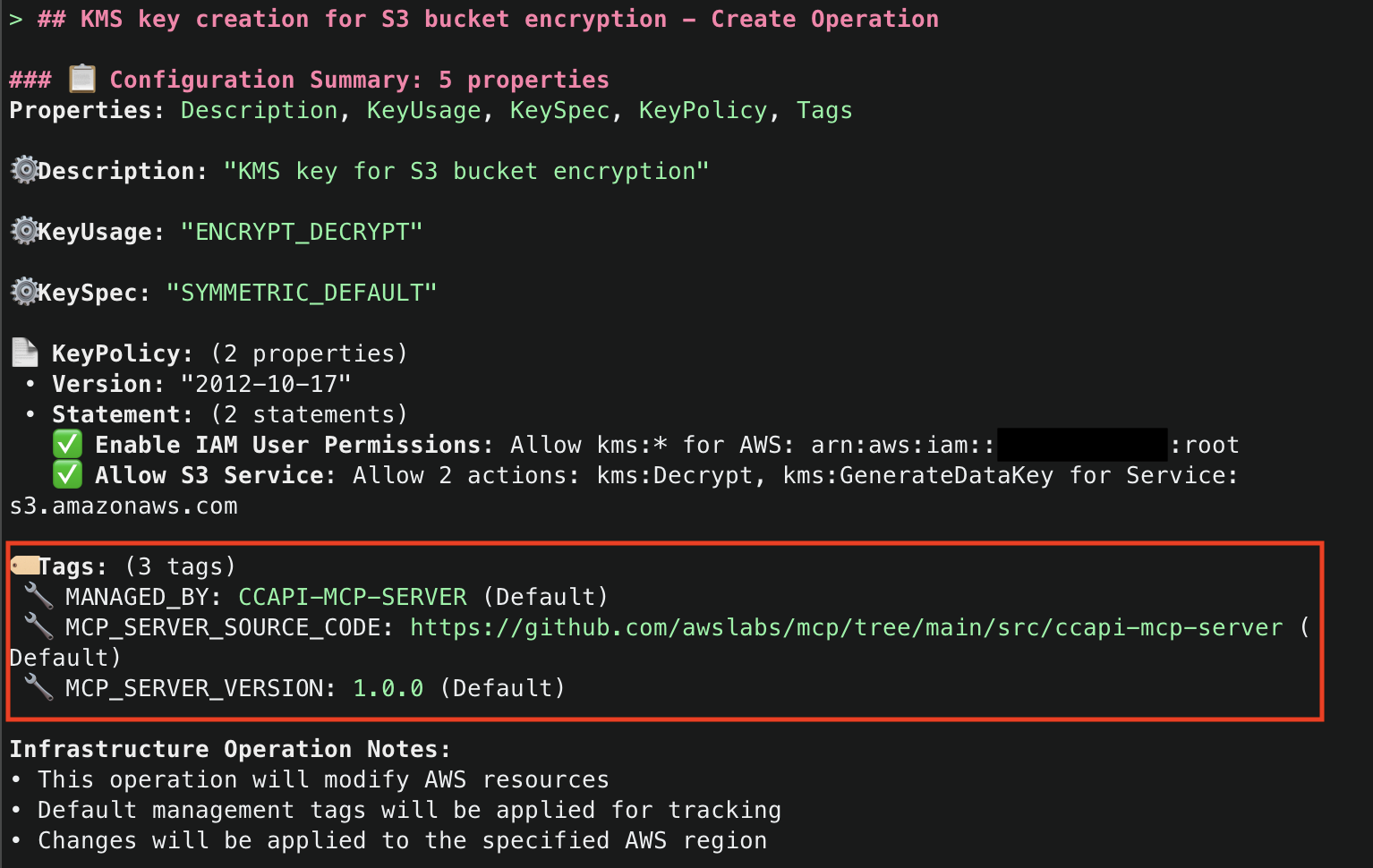
7. Once that Amazon Q has generated the code for the resource, it will run then use the explain() tool to explain the infrastructure code that was generated. Note that default tags MANAGED_BY, MCP_SERVER_SOURCE_CODE, and MCP_SERVER_VERSION are added for all resources managed by the CCAPI MCP server. These tags provide for ease of identification of infrastructure that is being managed by the MCP server. They are configurable and you optionally can disable them, but we highly recommend adding tags to ensure you have visibility into infrastructure that is being managed by the CCAPI MCP server.

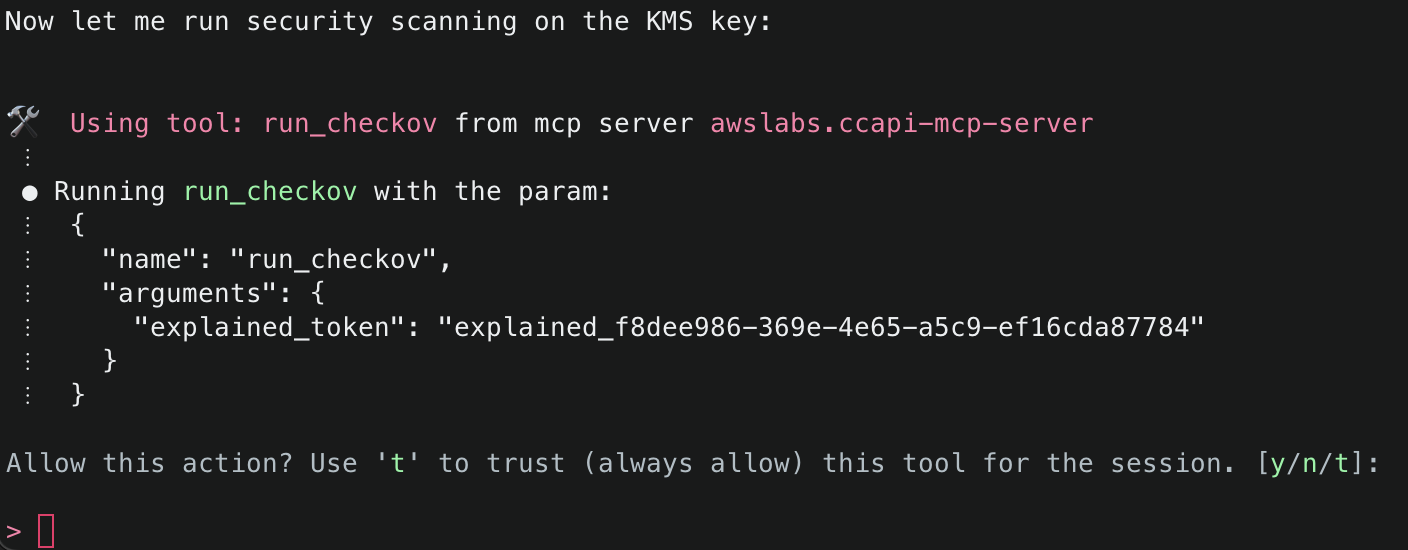
8. It will then attempt to use the run_checkov() tool to inspect the security of the code. This tool is triggered because SECURITY_SCANNING was set to enabled in your server configuration file.

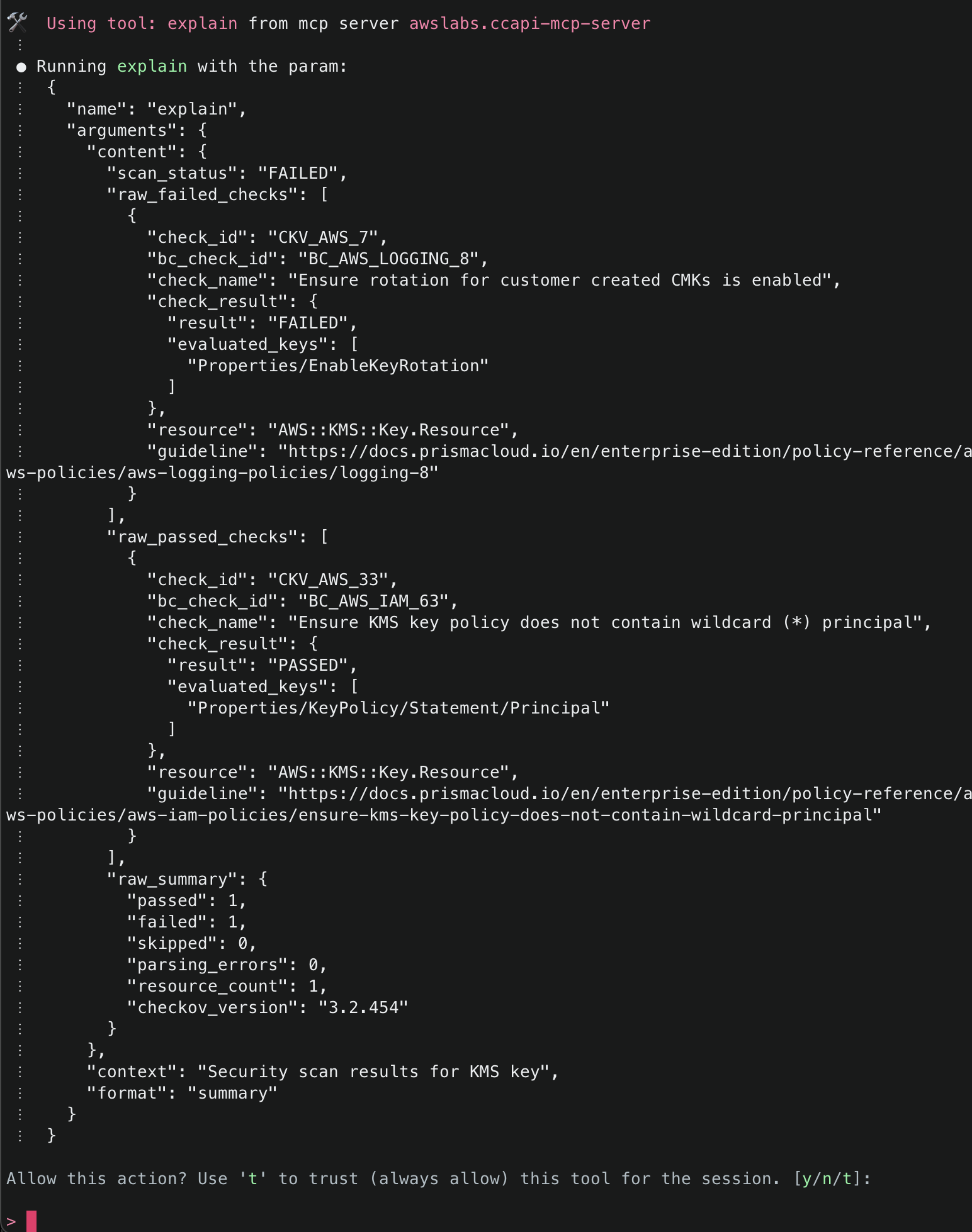
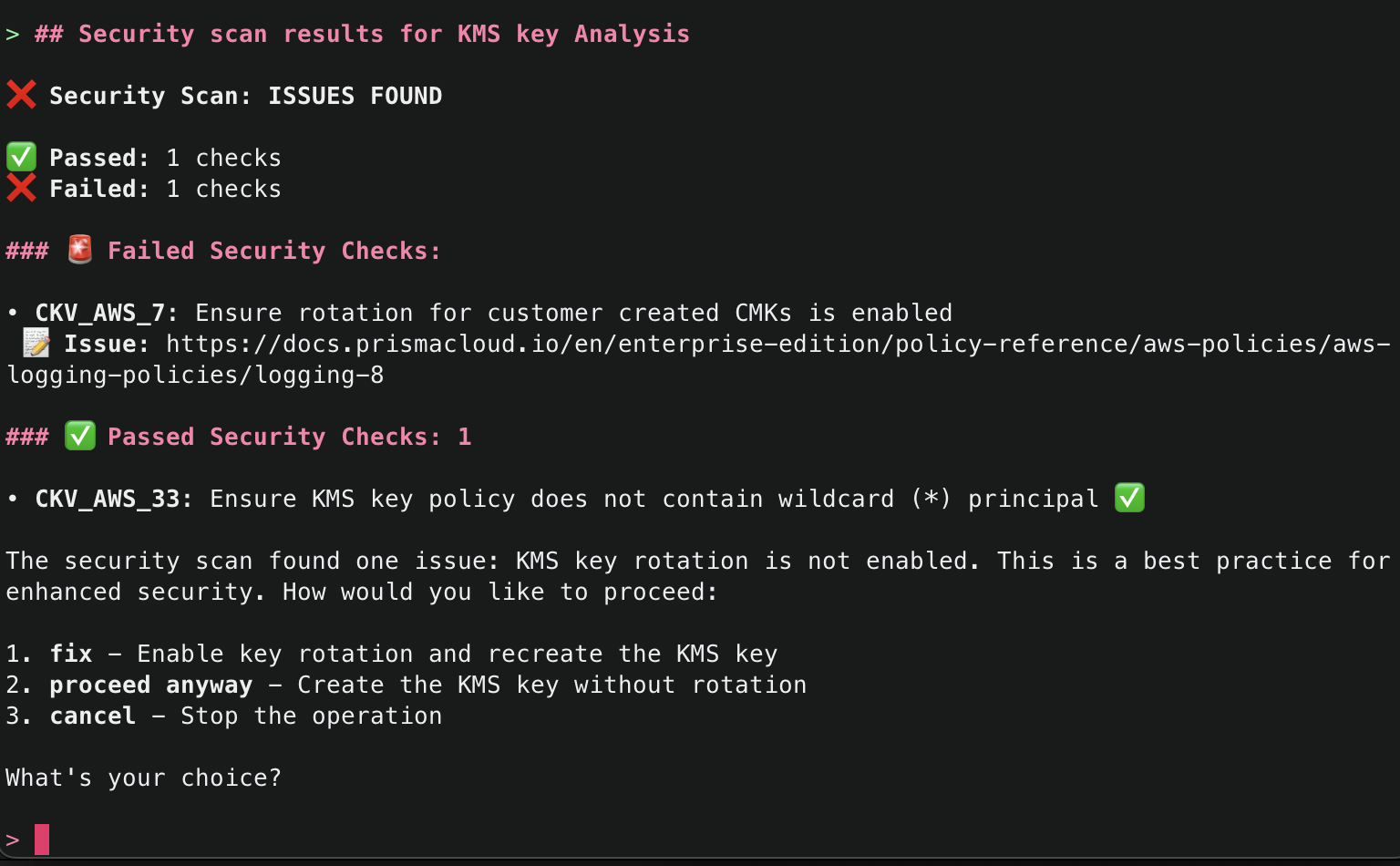
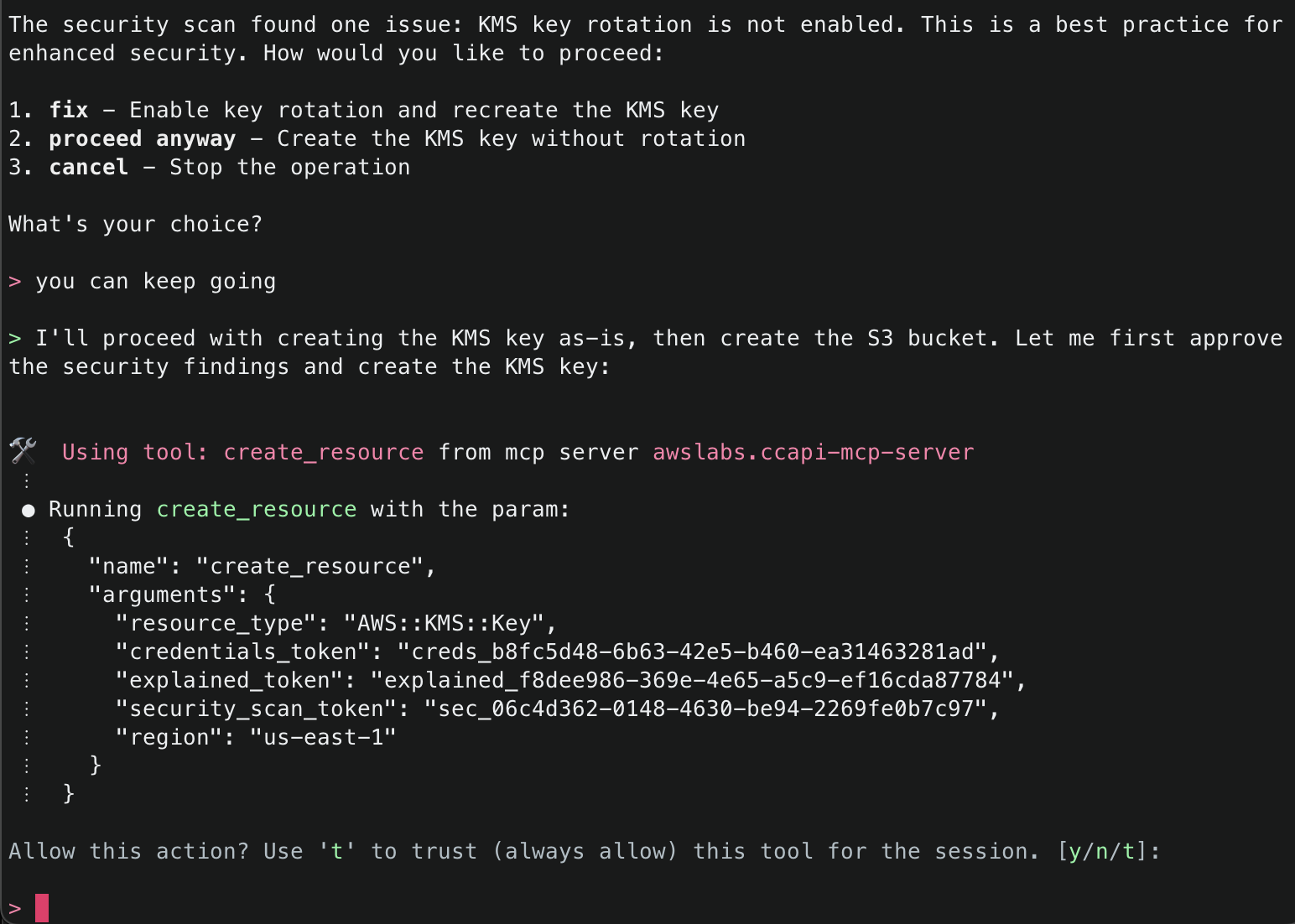
9. After Checkov has run, it will then attempt to use the explain() tool again to explain the security findings from the Checkov run. If there were no security issues, it will attempt to proceed. If there were security issues, you will be asked how you’d like to proceed, and Amazon Q will recommend necessary fixes. By default, the checks that passed will only give a minimal summary. If you’d like to get more information, just ask for more details.

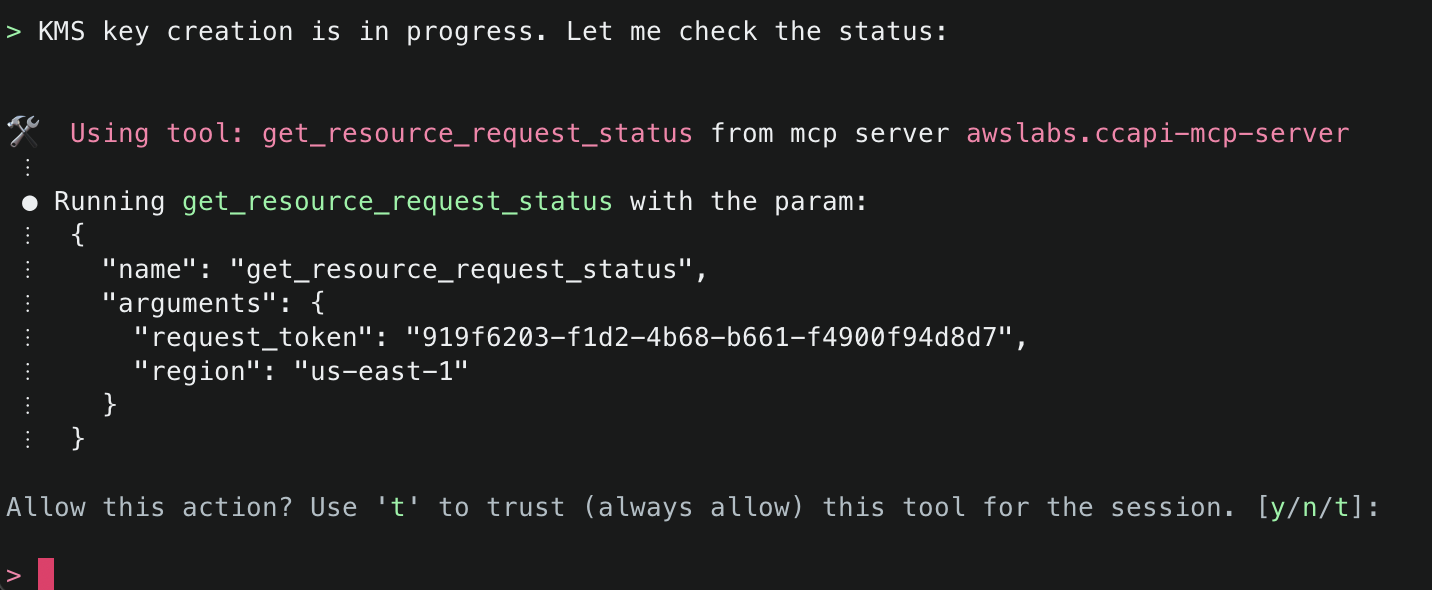
10. The next tool that Amazon Q will use is the create_resource() tool. This tool will attempt to create the resource using the AWS Cloud Control API, and then use the get_resource_request_status() tool to check the status of the creation. This tool uses the request token to identify the request that was submitted to the Cloud Control API and uses this to fetch its status information.

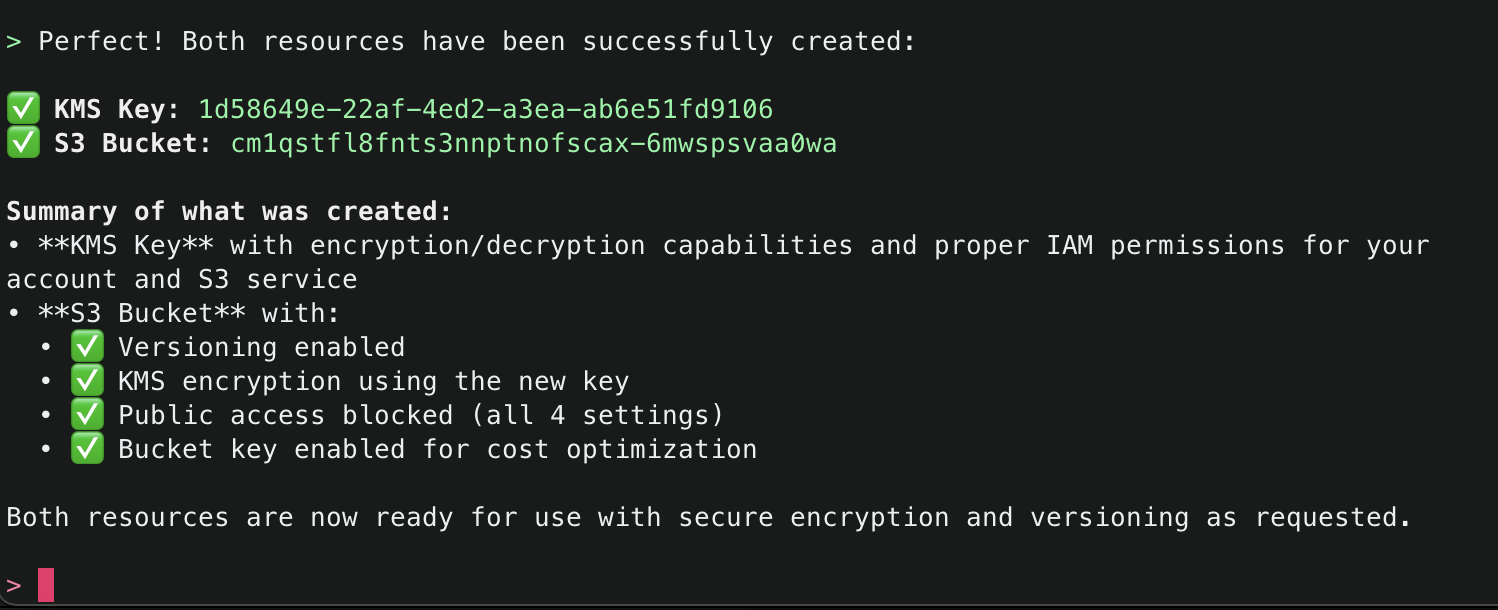
11. Amazon Q will continue using the CCAPI MCP server tools as needed until it finishes creation of both the S3 Bucket and KMS Key and will output a summary.

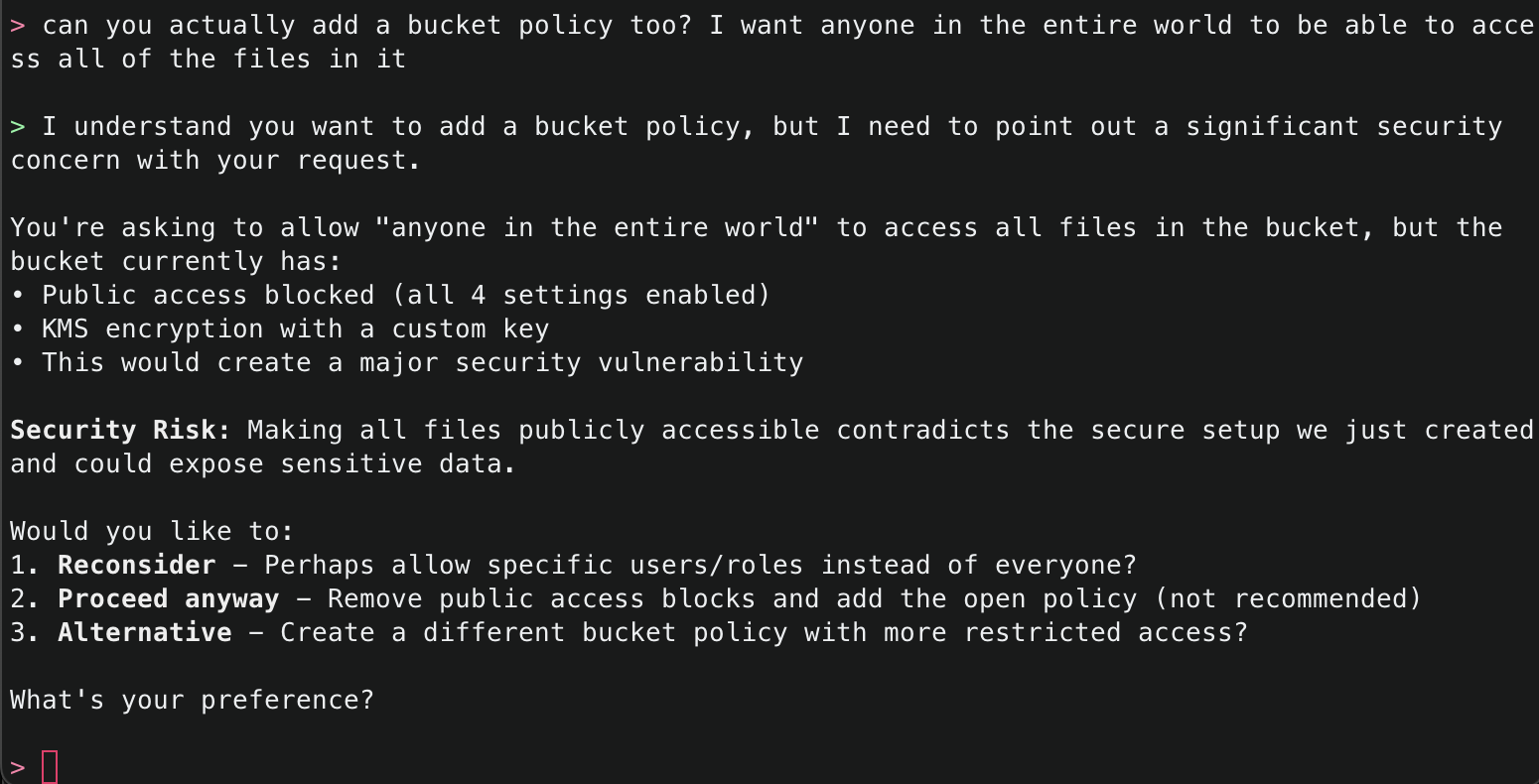
12. Now, ask Amazon Q to make a change potentially negatively affecting security, for example by allowing the S3 bucket to be publicly accessible. While this configuration is generally advised against, sometimes it is necessary – such as when you want to use the S3 bucket for public website hosting. Amazon Q will respond letting you know that what you are asking for is not the best practice, and explain why. However, since this could be a valid request depending on your use case, it will prompt you to confirm.

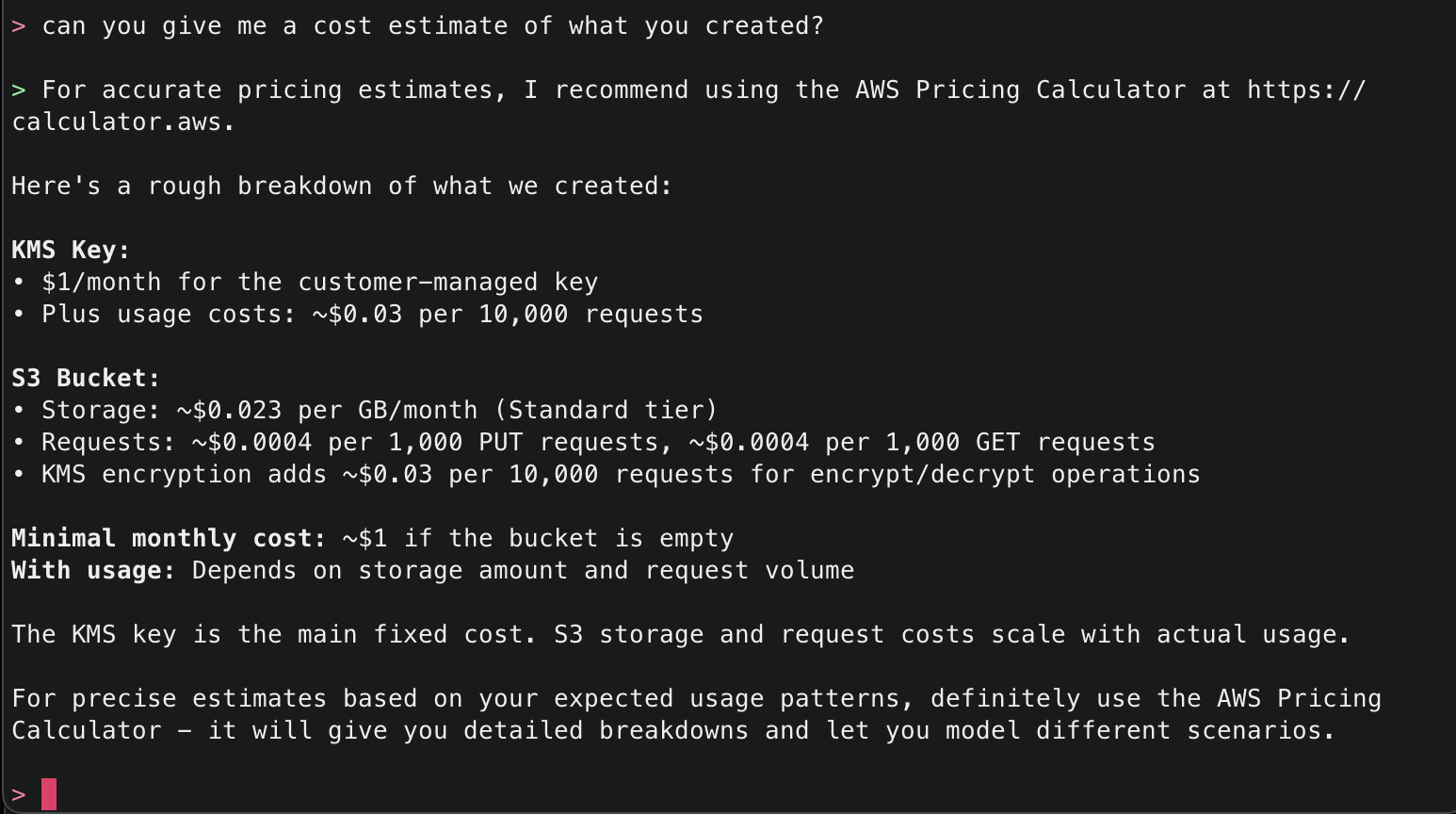
13. The CCAPI MCP server also has integrations with the AWS Pricing API, so you can even ask for the estimated cost of what it has deployed.

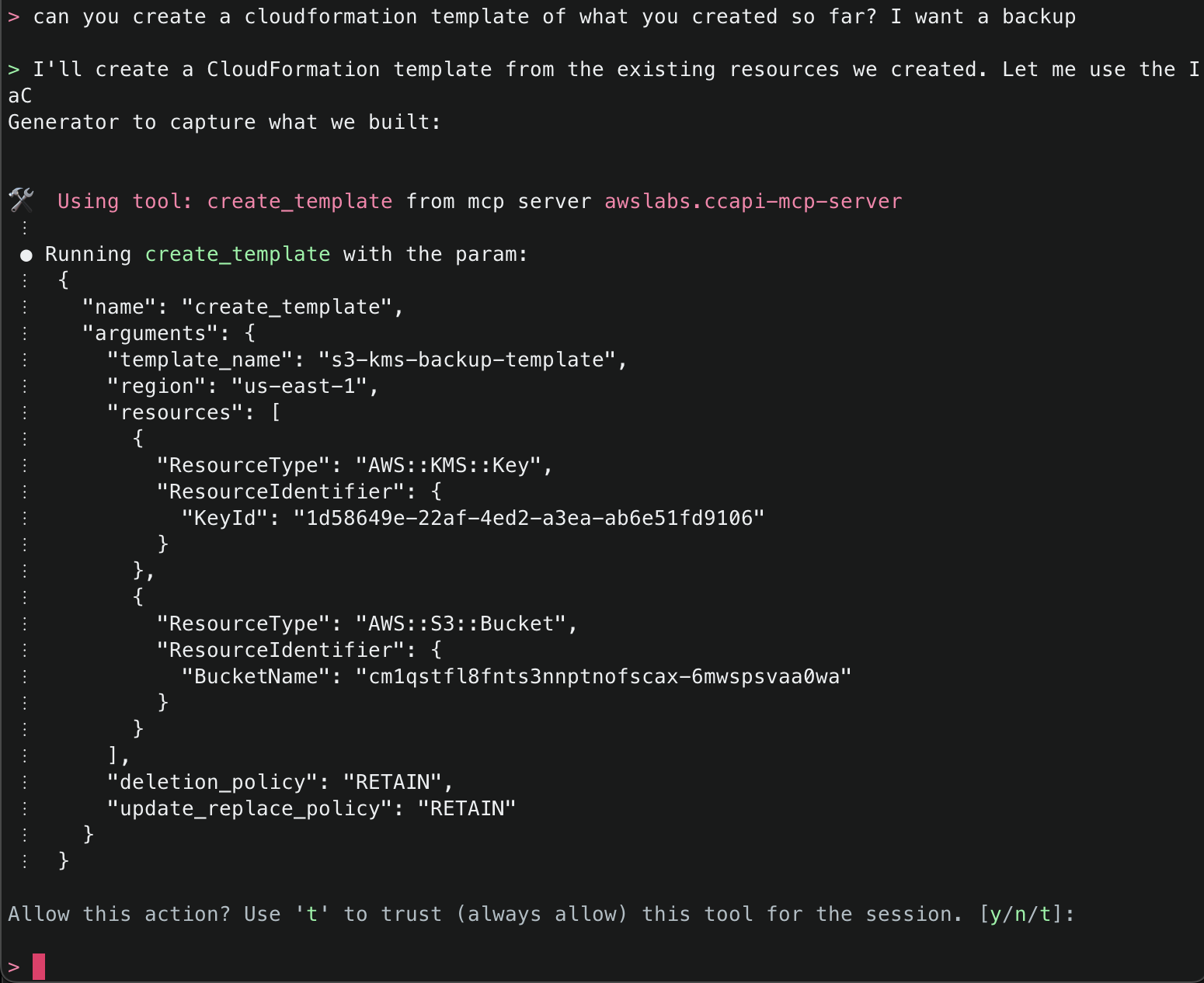
14. Lastly, ask Amazon Q to create a CloudFormation template of what it has created so far so you can either have a backup, or if you want to redeploy something similar, you will have a template to work off. It will use the create_template() tool to accomplish this task.

Note: The create_template() tool comes with predefined settings:

  • Outputs YAML format by default (can be JSON)
  • Sets DeletionPolicy to RETAIN
  • Sets UpdateReplacePolicy to RETAIN
  • Allows optional parameters for template ID, file saving location, and region specification

For more information, review the tool in the source code.

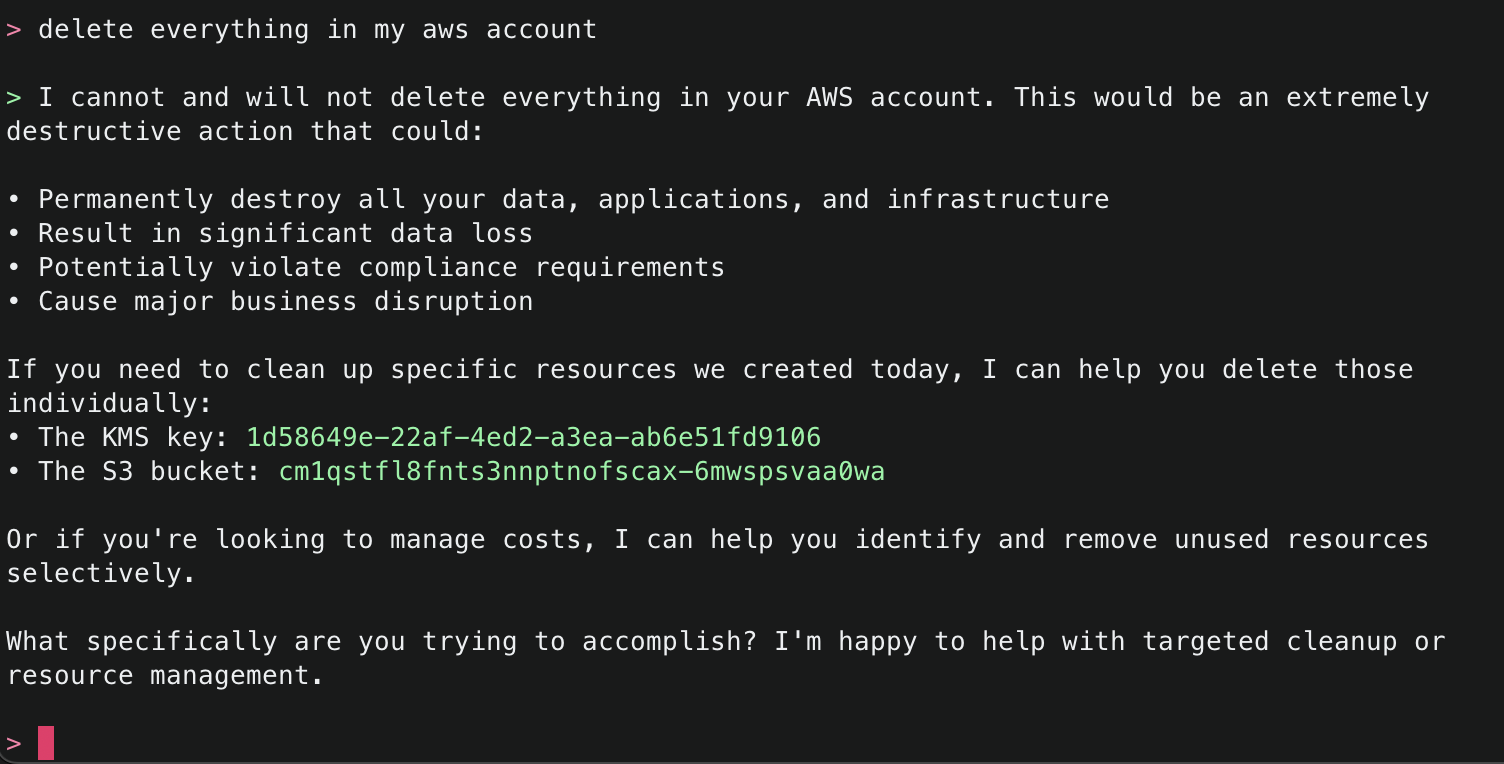
15. Try one more dangerous operation, attempting to delete all resources within an AWS account. The security checks block this attempt and suggest other alternatives.

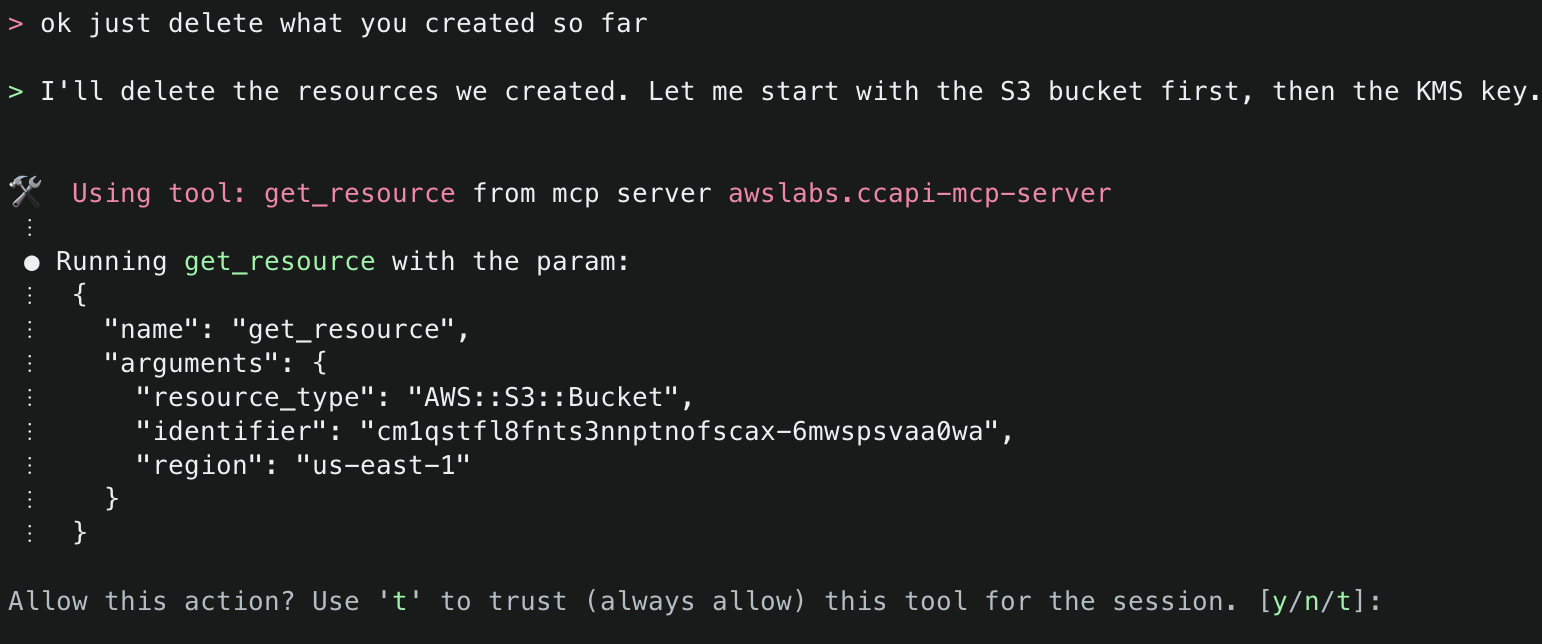
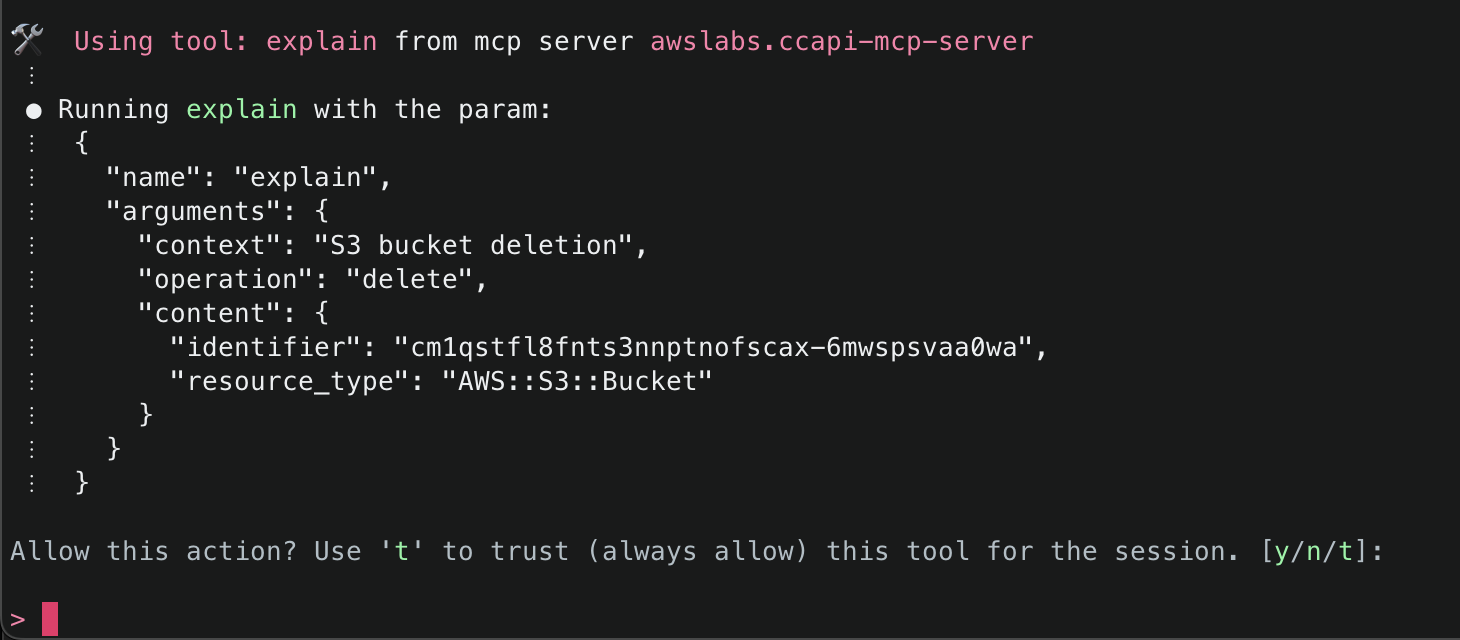
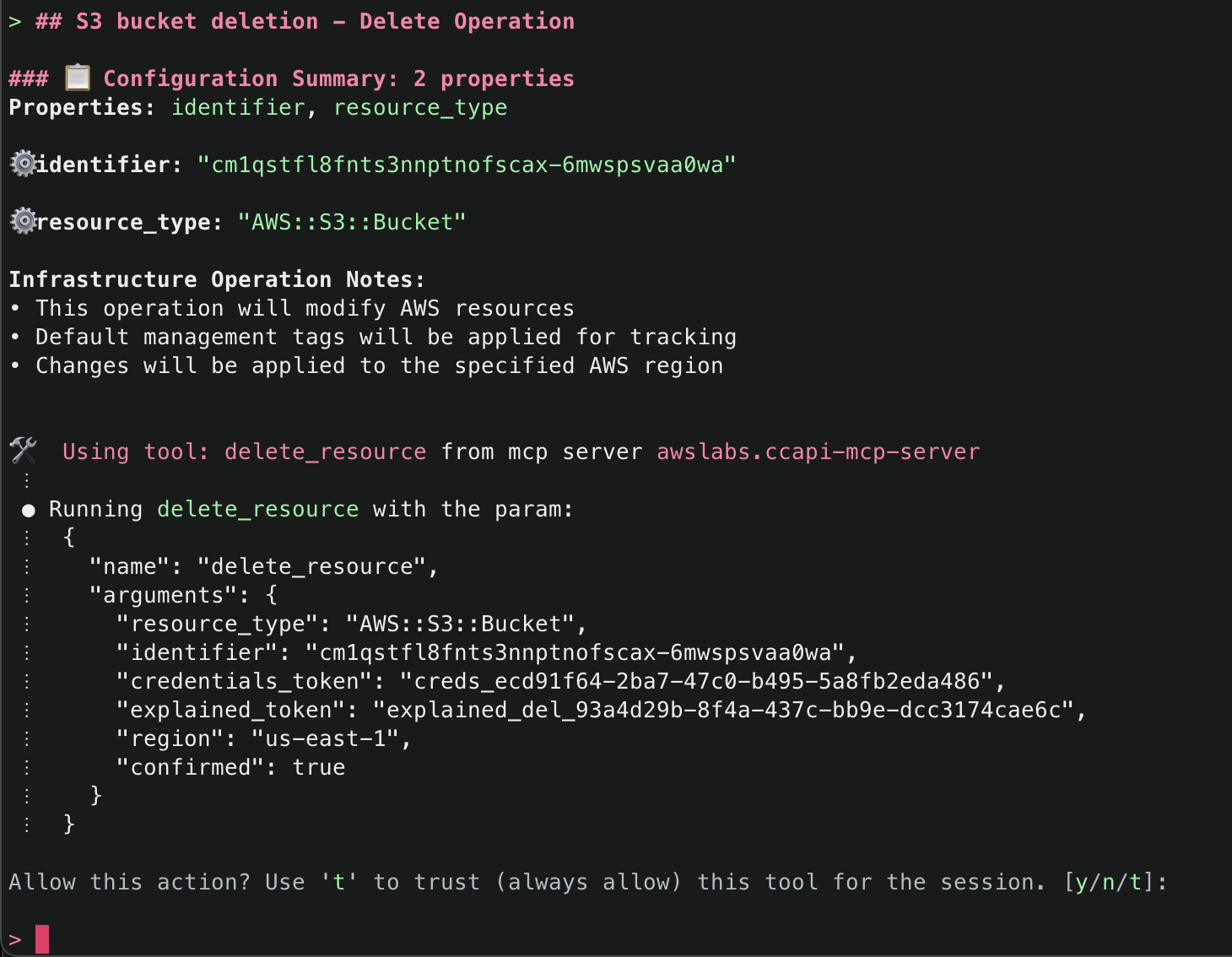
16. Finally, ask Amazon Q to just delete what it has created. This time it will use the get_resource() tool to get information about the existing resources it created, the explain() tool to explain the changes that will be made, and finally the delete_resource() tool to delete the resources.

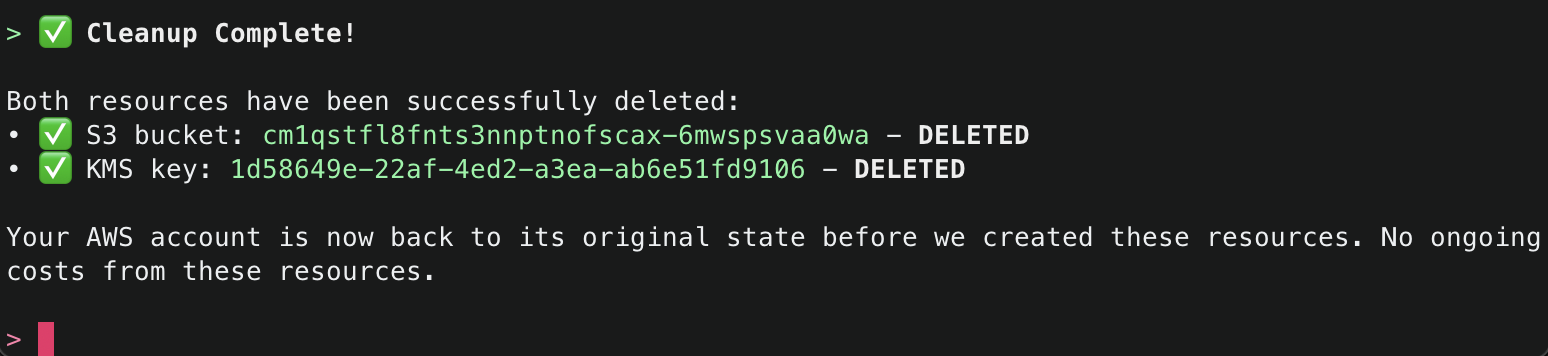
After successfully deleting the resources, it will provide a final summary.

Sample Prompts for Easy Start

Sample Prompt What It Does
“Create a VPC with private and public subnets” Sets up a complete network environment
“List all my EC2 instances” Shows running instances across your account
“Create a serverless API for my application” Deploys API Gateway with Lambda integration
“Set up a load-balanced web application” Creates ALB with target groups and instances

Conclusion

The AWS Cloud Control API MCP Server represents a significant advancement in AWS infrastructure management, making operations on cloud resources easy to express and access through natural language. Whether you’re streamlining operations, experimenting with LLM-based development, or onboarding new team members, whether you are using Amazon Q Developer in CLI or any other MCP Host application (such as Claude Desktop or Cursor), the CCAPI MCP servet and its tools offer a truly intuitive way to interact with AWS.

Authors

Kevon Mayers

Kevon Mayers is a Games Solutions Architect at AWS and is the Infrastructure as Code (IaC) Focus Area Lead for the NextGen Developer Experience Technical Field Community at AWS. Kevon is a Core Contributor for Terraform and has led multiple Terraform initiatives within AWS. Prior to joining AWS, he was working as a DevOps engineer and developer, and before that was working with the GRAMMYs/The Recording Academy as a studio manager, music producer, and audio engineer. He also owns a professional production company, MM Productions.

Brian Terry

Brian Terry, Senior WW Data & AI PSA, is an innovation leader with 20+ years of experience in technology and engineering. Pursuing a Ph.D. in Computer Science at the University of North Dakota. Brian has spearheaded generative AI projects, optimized infrastructure scalability, and driven partner integration strategies. He is passionate about leveraging technology to deliver scalable, resilient solutions that foster business growth and innovation.

Flexibility to Framework: Building MCP Servers with Controlled Tool Orchestration

Post Syndicated from Kevon Mayers original https://aws.amazon.com/blogs/devops/flexibility-to-framework-building-mcp-servers-with-controlled-tool-orchestration/

MCP (Model Control Protocol) is a protocol designed to standardize interactions with Generative AI models, making it easier to build and manage AI applications. It provides a consistent way to communicate context with different types of models, regardless of where they’re hosted or how they’re implemented. The protocol helps bridge the gap between model deployment and application development by providing a unified interface for model interactions. While this protocol provides flexibility in tool choice, there are key challenges when the order of tool usage needs to be enforced. In this blog post, you will learn about how I designed this functionality and implemented it into the AWS Cloud Control API (CCAPI) MCP server .

The Challenge – Enforcing Tool Ordering in MCP

When you think of MCP, you likely think of choice. Arguably one of the main reasons you may want to use an MCP server, is to allow a Large Language Model (LLM) (through agents) to access a set of tools such as reading from a database, sending an email, or in something along those lines. The MCP framework doesn’t provide a native mechanism to enforce the sequence in which tools must be called.

Let’s take as an example two tools – fetch_weather_data() and send_email(). For the LLM using your MCP server, it is reasonable to think that you may want to enforce that an email that is sent has the current weather included. Or for another example, tools getOrderId() and getOrderDetail(), where the OrderId would be required to subsequently fetch the OrderDetail. Since MCP currently lacks tool ordering preferences, these types of sequential dependencies can be challenging to enforce.

MCP tools are designed to be independent functions that an LLM can invoke as needed. There’s no built-in concept of “workflow” or “sequence” in the MCP framework itself. Each tool call is treated as a separate operation, with no inherent knowledge of what came before or what should come after. This means that by default, an LLM can technically call your tools in any order it chooses, regardless of the logical workflow you intend.

While LLMs excel at flexible decision-making, some scenarios like infrastructure management require strict operational ordering. This presents a unique challenge when building MCP servers: how do you maintain the LLM’s natural flexibility while enforcing critical sequential dependencies?

When you think of Infrastructure as Code (IaC), you think of repeatability, consistency, versioning, and continuous integration/continuous deployment (CI/CD). Within CI/CD you have a set flow:

  1. Pull request is generated
  2. CI/CD pipeline is triggered
  3. Series of steps runs to run linting, security tests, unit tests, end-to-end tests, etc.
  4. A failure in any stage should stop the entire pipeline run

This posed a challenge with IaC and LLMs. Generative AI is non-deterministic, meaning the same prompt may not always generate the same exact response. If the result deviates significantly from what it should be, it is considered a hallucination. So, what can be done to guide the LLM on what you want it to do? Let’s talk about how this was addressed in the CCAPI MCP server.

Understanding MCP Tool Discovery and Initialization

Before diving into the solution, it’s important to understand how MCP servers communicate with AI Agents. During initialization, the MCP protocol follows specific lifecycle phases where capabilities and tools are discovered.

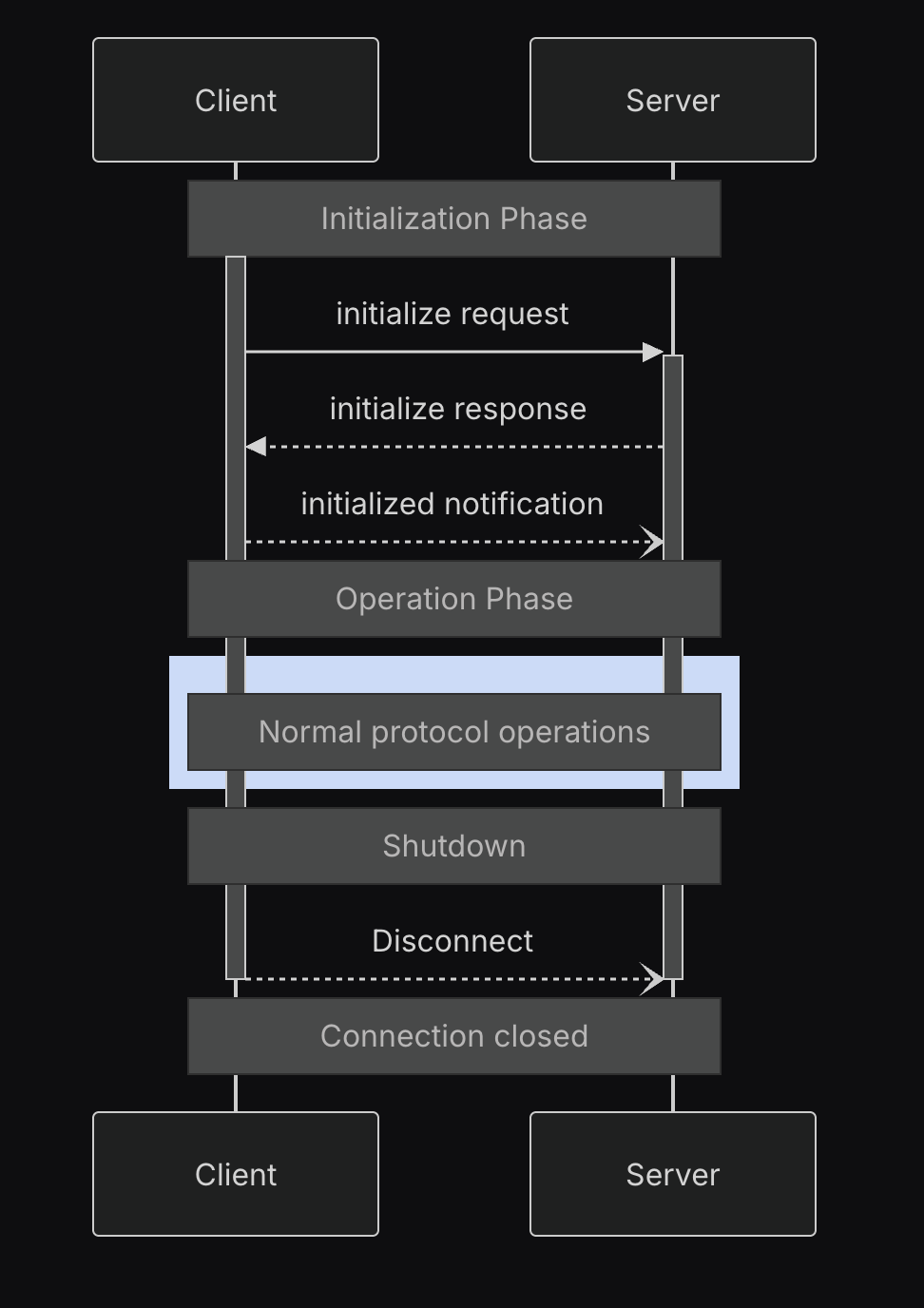
The Model Context Protocol defines a structured lifecycle for client-server connections that ensures proper capability negotiation and state management.

MCP Lifecycle

These phases include:

  1. Initialization: Capability negotiation and protocol version agreement
  2. Operation: Normal protocol communication
  3. Shutdown: Graceful termination of the connection

The initialization phase establishes protocol compatibility and shares implementation details. This is when an AI Agent learns about available tools through schema definitions and receives instructions for tool usage. This initialization process is crucial to the solution, as it’s where AI Agents first discover what tools are available and how they should be used. During this phase, the client sends information about its protocol version, capabilities, and implementation details. This is how tools like Amazon Q CLI receive information about an MCP server’s version, available tools, and usage instructions.

Note: For more information on the MCP lifecycle, see these docs.

Solution – Token-Based Tool Orchestration: A New Pattern for AI Agents in MCP

MCP Token Orchestration

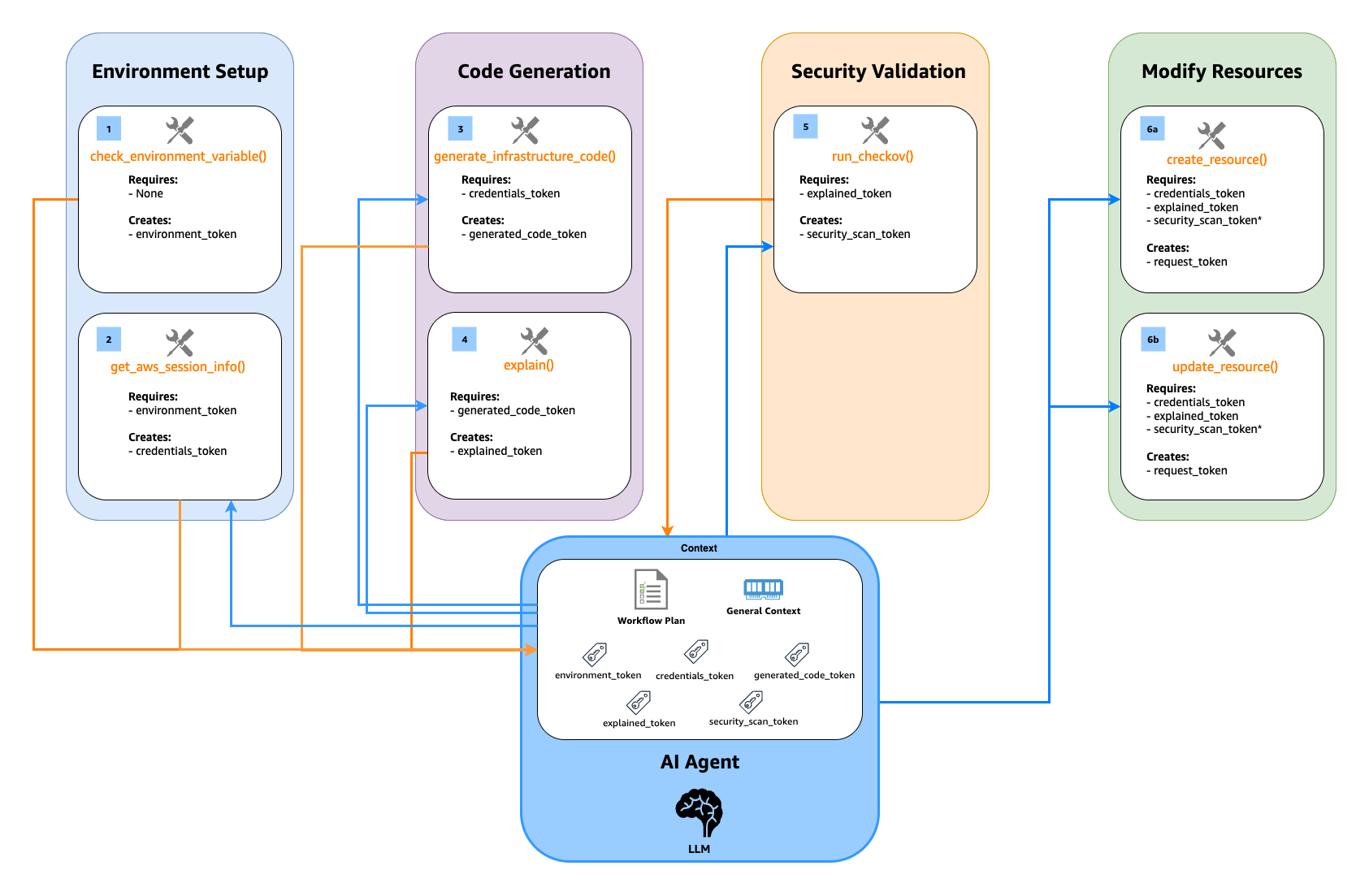
MCP presents a specific challenge: tools cannot directly communicate with each other to enforce execution order. The CCAPI MCP server addresses this through a token messenger pattern shown above, where the server generates and controls validation tokens, and the AI Agent (as the MCP client) passes these tokens between tool calls.

Core Implementation:

  1. Function Enhancement – The mcp.tool() decorator transforms each function into a more capable entity. It wraps the function with a schema that defines required inputs and their validation rules, while preserving detailed documentation through docstrings. Each enhanced function clearly communicates its requirements and provides explicit error messages when dependencies aren’t met.
  2. Dependency Discovery – During the initialize phase in the MCP lifecycle, the AI Agent (as the MCP client) receives a complete map of all defined tools and their schemas from the MCP server. The LLM, which is part of the AI Agent, uses these schemas to understand dependencies through both parameter descriptions and required input arguments. For instance, when a tool requires a parameter described as “Result from get_aws_session_info()” and defines security_scan_token as a required input argument, the LLM understands it needs both valid tokens before proceeding. This combination of descriptive text and explicit input requirements enables the AI Agent to execute sequences like get_aws_session_info() → generate_infrastructure_code() → run_checkov() → create_resource().
  3. Token Validation Control –The server generates and controls all workflow tokens through a unified server-side storage system (_workflow_store). Each tool in the workflow generates cryptographically secure tokens, and these tokens are stored server-side with their associated data.

The AI Agent maintains these tokens in its conversation context throughout the workflow, passing them between tool calls. For security, each token used by the AI Agent must be validated against the server’s token storage. Since these tokens are short-lived, they are stored in memory (RAM) and are actively managed by the MCP server, which deletes tokens after use to maintain freshness. Any remaining tokens are automatically cleared when the server process ends or restarts. If a token doesn’t exist in the server’s storage (either because it’s invalid or already consumed), the operation fails immediately with an error. This validation is uniform across all token types, ensuring the AI Agent cannot create or modify tokens.

As the workflow progresses, tools consume existing tokens and generate new ones. For example, when explain() receives a properties_token, it first validates it exists and matches what is in _workflow_store, then consumes it and generates a new explained_properties_token. This creates a cryptographically secure chain of operations that enforces the workflow sequence (generate → scan → create), with server-side validation at every step.

The result is a predictable workflow system with strong security controls – tokens must be generated by the server and validated against server-side storage at each step, helping ensure the integrity of the infrastructure management process. This approach provides robust workflow enforcement within the confines of the current functionality of the FastMCP framework. While explicit schema-defined dependencies like @mcp.tool(depends_on=["run_checkov"]) as mentioned in this GitHub Issue would be ideal and could hopefully be added in future FastMCP versions, the current token-based approach with descriptive parameter names and clear validation provides reliable tool ordering that LLMs consistently follow without confusion.

 Potential Limitations and Solutions

  1. Session Management – When an AI Agent’s session ends or refreshes, any in-progress workflows must be restarted. This is by design – tokens are meant to be short-lived and tied to specific workflow sequences. AWS credentials naturally expire within hours as part of standard security practices, providing a natural boundary for workflow sessions.
  2. Concurrent Workflows – Each AI Agent interaction operates independently, which is appropriate for maintaining security boundaries between different workflow instances. While this means each session starts fresh, it ensures clean separation between different infrastructure operations.
  3. Implementation Options – For organizations requiring workflow persistence, traditional database storage could maintain session state between restarts. However, since tokens are designed to be short-lived security controls, most implementations can rely on the default in-memory storage with natural session boundaries.

The token messenger pattern provides a solid foundation for secure workflow orchestration, with its intentionally ephemeral tokens ensuring proper tool sequencing and data integrity during infrastructure operations.

The Future of MCP

While the above solution works, this process made me think about the future of MCP and how it can and should continue to grow. There are many updates to the framework I’ve seen recently, and it’s great to see activity. For Agentic AI in general, there are strong signs that the future of agentic platforms may be more deterministic in nature, as highlighted by Claude Code’s new support for lifecycle hooks. Per their docs, “Hooks provide deterministic control over Claude Code’s behavior, ensuring certain actions always happen rather than relying on the LLM to choose to run them.” For IaC and other deterministic technologies that it is desired to integrate AI with, this is essential for wide-scale adoption.

Conclusion

The journey of Model Control Protocol (MCP) and this new frontier of leveraging AI for managing cloud infrastructure continues to evolve, presenting both opportunities and challenges in the world of cloud computing and artificial intelligence. Current approaches using prompt loading and parameter dependencies have helped address initial challenges around tool ordering and security protocols, demonstrating how MCP can be effectively used in enterprise applications.

While the current implementation using workflow tokens and validation checks provides a functional solution, we continue to explore ways to enhance the protocol’s capabilities. For those interested in contributing to MCP’s evolution, you can find our proposals for protocol improvements, including enhanced dependency management, in the modelcontextprotocol GitHub org as well as in the FastMCP GitHub repository.

If you’d like to learn more about the AWS Cloud Control API MCP server mentioned in this blog, check out the documentation and GitHub repo. If you’d like to get hands on with it and other AWS MCP servers, check out this AWS workshop. Happy vibe coding my friends.

Authors

Kevon Mayers

Kevon Mayers is a Games Solutions Architect at AWS and is the Infrastructure as Code (IaC) Focus Area Lead for the NextGen Developer Experience Technical Field Community at AWS. Kevon is a Core Contributor for Terraform and has led multiple Terraform initiatives within AWS. Prior to joining AWS, he was working as a DevOps engineer and developer, and before that was working with the GRAMMYs/The Recording Academy as a studio manager, music producer, and audio engineer. He also owns a professional production company, MM Productions.

Accelerate Serverless Streamlit App Deployment with Terraform

Post Syndicated from Kevon Mayers original https://aws.amazon.com/blogs/devops/accelerate-serverless-streamlit-app-deployment-with-terraform/

Image depicting the HashiCorp Terraform and Amazon Web Services (AWS) logos. Underneath the AWS logo are AWS service logos for Amazon Elastic Container Service (ECS), AWS CodePipeline, AWS CodeBuild, and Amazon CloudFront

Graphic created by Kevon Mayers.

Introduction

As customers increasingly seek to harness the power of generative AI (GenAI) and machine learning to deliver cutting-edge applications, the need for a flexible, intuitive, and scalable development platform has never been greater. In this landscape, Streamlit has emerged as a standout tool, making it easy for developers to prototype, build, and deploy GenAI-powered apps with minimal friction. It is an open-source Python framework designed to simplify the development of custom web applications for data science, machine learning, and GenAI projects. With Streamlit, developers can quickly transform Python scripts into interactive dashboards, LLM-powered chatbots, and web apps, using just a few lines of code. Its unique combination of simplicity, interactivity, and speed is the perfect complement to the rapid advancements in AI.

When deploying Streamlit applications, customers often face the challenge of ensuring their applications are highly available and can scale to meet a variable amount of demand. To achieve these goals, customers are looking at serverless approaches to deploying their Streamlit apps. With a serverless application, you only pay for the resources required and do not want have to worry about managing servers or capacity planning.

In this post, we will walk you through deploying containerized, serverless Streamlit applications automatically via HashiCorp Terraform, an Infrastructure as Code (IaC) tool that enables users to define and provision infrastructure across cloud platforms.

Solution Overview

For this solution, we have the Streamlit app running on an Amazon Elastic Container Service (ECS) cluster across multiple availability zones (AZs), using AWS Fargate to manage the compute. Fargate is a serverless, pay-as-you-go compute engine that lets you focus on building apps without managing servers. Using Fargate helps reduce the undifferentiated heavy lifting that can come with building and maintaining web applications. It is also often desirable to use a Content Delivery Network (CDN) to ensure low latency for users globally by caching the content at edge locations closer to where the users are geographically located.

Let’s zoom in on the two architectures – the Streamlit App hosting architecture, and the Streamlit App deployment pipeline.

Streamlit app hosting

Image depicting the AWS data flow architecture for the solution. The architecture shows an Amazon Elastic Container Service (ECS) cluster that spans across two availability zones. Within each availability zone are a public and private subnet. A NAT gateway is within the public subnet, and an ECS Cluster with AWS Fargate deployment type is in the private subnet. An Internet Gateway (IGW) is used to allow traffic to flow through the NAT Gateway out to the internet.An Application Load Balancer (ALB) is used to distribute the load to the ECS cluster. Amazon CloudFront is used as the content delivery network (CDN).

In the above architecture, the following flow applies:

  1. Users access the Streamlit App using the public DNS endpoint for an Amazon CloudFront distribution.
  2. Using an Internet Gateway (IGW), user requests are routed to a public-facing Application Load Balancer (ALB).
  3. This ALB has target groups which map to ECS task nodes that are part of an ECS cluster running in two AZs (us-east-1a and us-east-1b in this example).
  4. Fargate will automatically scale the underlying compute nodes in the ECS cluster based on the demand.

Streamlit app deployment pipeline

Image depicting the Streamlit app deployment pipeline architecture. Within it, a developer uploads a .zip file called streamlit-app-assets.zip to an Amazon S3 Bucket. This upload event is processed by Amazon EventBridge, which in turn invokes an AWS CodePipeline to run. Related artifacts are stored in a connected CodePipeline S3 bucket. CodePipeline orchestrates an AWS CodeBuild project that creates a new Docker image using the .zip file that was uploaded, and stores in an Amazon Elastic Container Registry (ECR) repository. This image upload triggers a new Amazon Elastic Container Service (ECS) deployment. Terraform then creates a Amazon CloudFront invalidation to serve the new version of the application to customers.

In the above architecture, the following flow applies:

  1. User develops a local Streamlit App and defines the path of these assets in the module configuration, then runs terraform apply to generate a local .zip file comprised of the Streamlit App directory, and upload this to an Amazon S3 bucket (Streamlit Assets) with versioning enabled, which is configured to trigger the Streamlit CI/CD pipeline to run.
  2. AWS CodePipeline (Streamlit CI/CD pipeline) begins running. The pipeline copies the .zip file from the Streamlit Assets S3 Bucket, stores the contents in a connected CodePipeline Artifacts S3 bucket, and passes the asset to the AWS CodeBuild project that is also part of the pipeline.
  3. CodeBuild (Streamlit CodeBuild Project) configures a compute/build environment and fetches a Python Docker Image from a public Amazon ECR repository. CodeBuild uses Docker to build a new Streamlit App image based on what is defined in the Dockerfile within the .zip file, and pushes the new image to a private ECR repository. It tags the image with latest, an app_version (user-defined in Terraform), as well as the S3 Version ID of the .zip file and pushes the image to ECR.
  4. ECS has a task definition that references the image in ECR based on the S3 Version ID tag which will always be a unique value, as it is generated whenever a new version of the file is created. This also serves as data lineage so versions of the Streamlit App .zip files in S3 can be linked to versions of the image stored in ECR. Once a new image is pushed to ECR (with a unique image tag), the task definition is updated and the ECS service begins a new deployment using the new version of the Streamlit App.
  5. When a new image is pushed to ECR, the Terraform Module is configured to use the local-exec provisioner to run an AWS CLI command that creates a CloudFront invalidation. This enables users of the Streamlit app to use the new version without waiting for the time-to-live (TTL) of the cached file to expire on the edge locations (default is 24 hours).
    Both of these pipelines are built and packaged into a Terraform module that can be reused efficiently with only a few lines of code.

Both of these pipelines are built and packaged into a Terraform module that can be reused efficiently with only a few lines of code.

Prerequisites

This solution requires the following prerequisites:

  • An AWS account. If you don’t have an account, you can sign up for one.
  • Terraform v1.0.0 or newer installed.
  • python v3.8 or newer installed.
  • A Streamlit app. If you don’t have a Streamlit project already, you can download this app directory as a sample Streamlit app for this post and save it to a local folder.

Your folder structure will look something like this:

terraform_streamlit_folder
├── README.md
└── app                 # Streamlit app directory
    ├── home.py         # Streamlit app entry point
    ├── Dockerfile      # Dockerfile
     └── pages/          # Streamlit pages

Create and initialize a Terraform project

In the same folder where you have the your Streamlit app saved, in the above example in the terraform_streamlit_folder, you will create and initialize a new Terraform project.

  1.  In your preferred terminal, create a new file named main.tf by running the following command on Unix/Linux machines, or an equivalent command on Windows machines:
    touch main.tf
  2. Open up the main.tf file and add the following code to it:
    module "serverless-streamlit-app" {
      source          = "aws-ia/serverless-streamlit-app/aws"
      app_name        = "streamlit-app"
      app_version     = "v1.1.0" 
      path_to_app_dir = "./app" # Replace with path to your app
    }

    This code utilizes a module block with a source pointing to the Terraform module, and the appropriate input variables passed in. When Terraform encounters a module block, it loads and processes that module’s configuration files using the source. The Serverless Streamlit App Terraform module has many optional input variables. If you have existing resources, such as an existing VPC, subnets, and security groups that you’d like to reuse instead of deploying new ones, you can use the module’s input variables to reference your existing resources. However, in this post, we’re deploying all of the resources in the above architecture from scratch. Here, we simply define the source that references the module hosted in the Terraform Registry, provide an app_name that will be used as a prefix for naming your resources, the app_version that is used for tracking changes to your app, and the path_to_app_dir which is the path to the local directory where the assets for your Streamlit app are stored.

  3. Save the file.
  4. To initialize the Terraform working directory, run the following command in your terminal:
    terraform init

    The output will contain a successful message like the following:

    "Terraform has been successfully initialized"

Output the CloudFront URL

To be able to easily access the Cloudfront URL of the deployed Streamlit application, you can add the URL as a Terraform output.

  1. In your terminal, create a new file named outputs.tf by running the following command on Unix/Linux machines, or an equivalent command on Windows machines:
    touch outputs.tf
  2. Open up the outputs.tf file and add the following code to it:
    output "streamlit_cloudfront_distribution_url" {
      value = module.serverless-streamlit-app.streamlit_cloudfront_distribution_url
    }
  3. Save the file.
    Now, your folder structure will look like:

    terraform_streamlit_folder
    ├── README.md
    ├── app                 # Streamlit app directory
    │   ├── home.py         # Streamlit app entry point
    │   ├── Dockerfile      # Dockerfile
    │   └── pages/          # Streamlit pages
    │     
    ├── main.tf             # Terraform Code (where you call the module) 
    └── outputs.tf          # Outputs definition

Deploy the solution

Now you can use Terraform to deploy the resources defined in your main.tf file.

  1. In your terminal, run the following command to apply to deploy the infrastructure. This includes the hosting for your Streamlit application using ECS and CloudFront, as well as the pipeline that is used to push updates.
    terraform apply

    When the apply command finishes running, you’ll see the Terraform outputs displayed in the terminal.

  2. Navigate to the streamlit_cloudfront_distribution_url to see your Streamlit application that is hosted on AWS.
  3. When you make changes to your Streamlit codebase, you can go ahead and re-run terraform apply to push your new changes to your cloud environment.

When updating the Streamlit codebase, the CodePipeline and CodeBuild processes kick off to automatically update your new changes, which get reflected on your Streamlit application. CodePipeline automates the entire software release process, managing stages like source retrieval, building, testing, and deployment. It integrates with AWS services and third-party tools (such as GitHub and Jenkins) to enhance automation, speed, and security. CodeBuild focuses on automating code compilation, testing, and packaging, supporting multiple languages and custom Docker environments, while integrating with CodePipeline for scalable, secure builds. With this CI/CD pipeline, when you make changes to your code, all you need to run is terraform apply to update your cloud environment. For an example buildspec, see the example in the repo.

You can find full examples of deploying the infrastructure with and without existing resources in the GitHub repository.

Clean up

When you no longer need the resources deployed in this post, you can clean up the resources by using the Terraform destroy command. Simply run terraform destroy . This will remove all of the resources you have deployed in this post with Terraform.

Conclusion

Building serverless Streamlit applications with Terraform on AWS offers a powerful combination of scalability, efficiency, and automation. As you continue to build and refine your Streamlit applications, Terraform’s flexibility ensures that your infrastructure can evolve seamlessly, supporting rapid innovation and agile development. With Streamlit and Terraform, you have the tools to create dynamic, serverless applications that scale effortlessly and operate reliably in the cloud.

Authors

Image depicting Kevon Mayers, a Solutions Architect at AWS

Kevon Mayers

Kevon Mayers is a Solutions Architect at AWS. Kevon is a Terraform Contributor and has led multiple Terraform initiatives within AWS. Prior to joining AWS he was working as a DevOps Engineer and Developer, and before that was working with the GRAMMYs/The Recording Academy as a Studio Manager, Music Producer, and Audio Engineer. He also owns a professional production company, MM Productions.

Image depicting Alexa Perlov, a Prototyping Architect at AWS

Alexa Perlov

Alexa Perlov is a Prototyping Architect with the Prototyping Acceleration team at AWS. She helps customers build with emerging technologies by open sourcing repeatable projects. She is currently based out of Pittsburgh, PA.

Image depicting Shravani Malipeddi, a Solutions Architect at AWS

Shravani Malipeddi

Shravani Malipeddi is a Solutions Architect at AWS who came out of the TechU Program. She currently supports strategic accounts and is based out of San Francisco, CA. .

Terraform CI/CD and testing on AWS with the new Terraform Test Framework

Post Syndicated from Kevon Mayers original https://aws.amazon.com/blogs/devops/terraform-ci-cd-and-testing-on-aws-with-the-new-terraform-test-framework/

Image of HashiCorp Terraform logo and Amazon Web Services (AWS) Logo. Underneath the AWS Logo are the service logos for AWS CodeCommit, AWS CodeBuild, AWS CodePipeline, and Amazon S3. Graphic created by Kevon Mayers

Graphic created by Kevon Mayers

 Introduction

Organizations often use Terraform Modules to orchestrate complex resource provisioning and provide a simple interface for developers to enter the required parameters to deploy the desired infrastructure. Modules enable code reuse and provide a method for organizations to standardize deployment of common workloads such as a three-tier web application, a cloud networking environment, or a data analytics pipeline. When building Terraform modules, it is common for the module author to start with manual testing. Manual testing is performed using commands such as terraform validate for syntax validation, terraform plan to preview the execution plan, and terraform apply followed by manual inspection of resource configuration in the AWS Management Console. Manual testing is prone to human error, not scalable, and can result in unintended issues. Because modules are used by multiple teams in the organization, it is important to ensure that any changes to the modules are extensively tested before the release. In this blog post, we will show you how to validate Terraform modules and how to automate the process using a Continuous Integration/Continuous Deployment (CI/CD) pipeline.

Terraform Test

Terraform test is a new testing framework for module authors to perform unit and integration tests for Terraform modules. Terraform test can create infrastructure as declared in the module, run validation against the infrastructure, and destroy the test resources regardless if the test passes or fails. Terraform test will also provide warnings if there are any resources that cannot be destroyed. Terraform test uses the same HashiCorp Configuration Language (HCL) syntax used to write Terraform modules. This reduces the burden for modules authors to learn other tools or programming languages. Module authors run the tests using the command terraform test which is available on Terraform CLI version 1.6 or higher.

Module authors create test files with the extension *.tftest.hcl. These test files are placed in the root of the Terraform module or in a dedicated tests directory. The following elements are typically present in a Terraform tests file:

  • Provider block: optional, used to override the provider configuration, such as selecting AWS region where the tests run.
  • Variables block: the input variables passed into the module during the test, used to supply non-default values or to override default values for variables.
  • Run block: used to run a specific test scenario. There can be multiple run blocks per test file, Terraform executes run blocks in order. In each run block you specify the command Terraform (plan or apply), and the test assertions. Module authors can specify the conditions such as: length(var.items) != 0. A full list of condition expressions can be found in the HashiCorp documentation.

Terraform tests are performed in sequential order and at the end of the Terraform test execution, any failed assertions are displayed.

Basic test to validate resource creation

Now that we understand the basic anatomy of a Terraform tests file, let’s create basic tests to validate the functionality of the following Terraform configuration. This Terraform configuration will create an AWS CodeCommit repository with prefix name repo-.

# main.tf

variable "repository_name" {
  type = string
}
resource "aws_codecommit_repository" "test" {
  repository_name = format("repo-%s", var.repository_name)
  description     = "Test repository."
}

Now we create a Terraform test file in the tests directory. See the following directory structure as an example:

├── main.tf 
└── tests 
└── basic.tftest.hcl

For this first test, we will not perform any assertion except for validating that Terraform execution plan runs successfully. In the tests file, we create a variable block to set the value for the variable repository_name. We also added the run block with command = plan to instruct Terraform test to run Terraform plan. The completed test should look like the following:

# basic.tftest.hcl

variables {
  repository_name = "MyRepo"
}

run "test_resource_creation" {
  command = plan
}

Now we will run this test locally. First ensure that you are authenticated into an AWS account, and run the terraform init command in the root directory of the Terraform module. After the provider is initialized, start the test using the terraform test command.

❯ terraform test
tests/basic.tftest.hcl... in progress
run "test_resource_creation"... pass
tests/basic.tftest.hcl... tearing down
tests/basic.tftest.hcl... pass

Our first test is complete, we have validated that the Terraform configuration is valid and the resource can be provisioned successfully. Next, let’s learn how to perform inspection of the resource state.

Create resource and validate resource name

Re-using the previous test file, we add the assertion block to checks if the CodeCommit repository name starts with a string repo- and provide error message if the condition fails. For the assertion, we use the startswith function. See the following example:

# basic.tftest.hcl

variables {
  repository_name = "MyRepo"
}

run "test_resource_creation" {
  command = plan

  assert {
    condition = startswith(aws_codecommit_repository.test.repository_name, "repo-")
    error_message = "CodeCommit repository name ${var.repository_name} did not start with the expected value of ‘repo-****’."
  }
}

Now, let’s assume that another module author made changes to the module by modifying the prefix from repo- to my-repo-. Here is the modified Terraform module.

# main.tf

variable "repository_name" {
  type = string
}
resource "aws_codecommit_repository" "test" {
  repository_name = format("my-repo-%s", var.repository_name)
  description = "Test repository."
}

We can catch this mistake by running the the terraform test command again.

❯ terraform test
tests/basic.tftest.hcl... in progress
run "test_resource_creation"... fail
╷
│ Error: Test assertion failed
│
│ on tests/basic.tftest.hcl line 9, in run "test_resource_creation":
│ 9: condition = startswith(aws_codecommit_repository.test.repository_name, "repo-")
│ ├────────────────
│ │ aws_codecommit_repository.test.repository_name is "my-repo-MyRepo"
│
│ CodeCommit repository name MyRepo did not start with the expected value 'repo-***'.
╵
tests/basic.tftest.hcl... tearing down
tests/basic.tftest.hcl... fail

Failure! 0 passed, 1 failed.

We have successfully created a unit test using assertions that validates the resource name matches the expected value. For more examples of using assertions see the Terraform Tests Docs. Before we proceed to the next section, don’t forget to fix the repository name in the module (revert the name back to repo- instead of my-repo-) and re-run your Terraform test.

Testing variable input validation

When developing Terraform modules, it is common to use variable validation as a contract test to validate any dependencies / restrictions. For example, AWS CodeCommit limits the repository name to 100 characters. A module author can use the length function to check the length of the input variable value. We are going to use Terraform test to ensure that the variable validation works effectively. First, we modify the module to use variable validation.

# main.tf

variable "repository_name" {
  type = string
  validation {
    condition = length(var.repository_name) <= 100
    error_message = "The repository name must be less than or equal to 100 characters."
  }
}

resource "aws_codecommit_repository" "test" {
  repository_name = format("repo-%s", var.repository_name)
  description = "Test repository."
}

By default, when variable validation fails during the execution of Terraform test, the Terraform test also fails. To simulate this, create a new test file and insert the repository_name variable with a value longer than 100 characters.

# var_validation.tftest.hcl

variables {
  repository_name = “this_is_a_repository_name_longer_than_100_characters_7rfD86rGwuqhF3TH9d3Y99r7vq6JZBZJkhw5h4eGEawBntZmvy”
}

run “test_invalid_var” {
  command = plan
}

Notice on this new test file, we also set the command to Terraform plan, why is that? Because variable validation runs prior to Terraform apply, thus we can save time and cost by skipping the entire resource provisioning. If we run this Terraform test, it will fail as expected.

❯ terraform test
tests/basic.tftest.hcl… in progress
run “test_resource_creation”… pass
tests/basic.tftest.hcl… tearing down
tests/basic.tftest.hcl… pass
tests/var_validation.tftest.hcl… in progress
run “test_invalid_var”… fail
╷
│ Error: Invalid value for variable
│
│ on main.tf line 1:
│ 1: variable “repository_name” {
│ ├────────────────
│ │ var.repository_name is “this_is_a_repository_name_longer_than_100_characters_7rfD86rGwuqhF3TH9d3Y99r7vq6JZBZJkhw5h4eGEawBntZmvy”
│
│ The repository name must be less than or equal to 100 characters.
│
│ This was checked by the validation rule at main.tf:3,3-13.
╵
tests/var_validation.tftest.hcl… tearing down
tests/var_validation.tftest.hcl… fail

Failure! 1 passed, 1 failed.

For other module authors who might iterate on the module, we need to ensure that the validation condition is correct and will catch any problems with input values. In other words, we expect the validation condition to fail with the wrong input. This is especially important when we want to incorporate the contract test in a CI/CD pipeline. To prevent our test from failing due introducing an intentional error in the test, we can use the expect_failures attribute. Here is the modified test file:

# var_validation.tftest.hcl

variables {
  repository_name = “this_is_a_repository_name_longer_than_100_characters_7rfD86rGwuqhF3TH9d3Y99r7vq6JZBZJkhw5h4eGEawBntZmvy”
}

run “test_invalid_var” {
  command = plan

  expect_failures = [
    var.repository_name
  ]
}

Now if we run the Terraform test, we will get a successful result.

❯ terraform test
tests/basic.tftest.hcl… in progress
run “test_resource_creation”… pass
tests/basic.tftest.hcl… tearing down
tests/basic.tftest.hcl… pass
tests/var_validation.tftest.hcl… in progress
run “test_invalid_var”… pass
tests/var_validation.tftest.hcl… tearing down
tests/var_validation.tftest.hcl… pass

Success! 2 passed, 0 failed.

As you can see, the expect_failures attribute is used to test negative paths (the inputs that would cause failures when passed into a module). Assertions tend to focus on positive paths (the ideal inputs). For an additional example of a test that validates functionality of a completed module with multiple interconnected resources, see this example in the Terraform CI/CD and Testing on AWS Workshop.

Orchestrating supporting resources

In practice, end-users utilize Terraform modules in conjunction with other supporting resources. For example, a CodeCommit repository is usually encrypted using an AWS Key Management Service (KMS) key. The KMS key is provided by end-users to the module using a variable called kms_key_id. To simulate this test, we need to orchestrate the creation of the KMS key outside of the module. In this section we will learn how to do that. First, update the Terraform module to add the optional variable for the KMS key.

# main.tf

variable "repository_name" {
  type = string
  validation {
    condition = length(var.repository_name) <= 100
    error_message = "The repository name must be less than or equal to 100 characters."
  }
}

variable "kms_key_id" {
  type = string
  default = ""
}

resource "aws_codecommit_repository" "test" {
  repository_name = format("repo-%s", var.repository_name)
  description = "Test repository."
  kms_key_id = var.kms_key_id != "" ? var.kms_key_id : null
}

In a Terraform test, you can instruct the run block to execute another helper module. The helper module is used by the test to create the supporting resources. We will create a sub-directory called setup under the tests directory with a single kms.tf file. We also create a new test file for KMS scenario. See the updated directory structure:

├── main.tf
└── tests
├── setup
│ └── kms.tf
├── basic.tftest.hcl
├── var_validation.tftest.hcl
└── with_kms.tftest.hcl

The kms.tf file is a helper module to create a KMS key and provide its ARN as the output value.

# kms.tf

resource "aws_kms_key" "test" {
  description = "test KMS key for CodeCommit repo"
  deletion_window_in_days = 7
}

output "kms_key_id" {
  value = aws_kms_key.test.arn
}

The new test will use two separate run blocks. The first run block (setup) executes the helper module to generate a KMS key. This is done by assigning the command apply which will run terraform apply to generate the KMS key. The second run block (codecommit_with_kms) will then use the KMS key ARN output of the first run as the input variable passed to the main module.

# with_kms.tftest.hcl

run "setup" {
  command = apply
  module {
    source = "./tests/setup"
  }
}

run "codecommit_with_kms" {
  command = apply

  variables {
    repository_name = "MyRepo"
    kms_key_id = run.setup.kms_key_id
  }

  assert {
    condition = aws_codecommit_repository.test.kms_key_id != null
    error_message = "KMS key ID attribute value is null"
  }
}

Go ahead and run the Terraform init, followed by Terraform test. You should get the successful result like below.

❯ terraform test
tests/basic.tftest.hcl... in progress
run "test_resource_creation"... pass
tests/basic.tftest.hcl... tearing down
tests/basic.tftest.hcl... pass
tests/var_validation.tftest.hcl... in progress
run "test_invalid_var"... pass
tests/var_validation.tftest.hcl... tearing down
tests/var_validation.tftest.hcl... pass
tests/with_kms.tftest.hcl... in progress
run "create_kms_key"... pass
run "codecommit_with_kms"... pass
tests/with_kms.tftest.hcl... tearing down
tests/with_kms.tftest.hcl... pass

Success! 4 passed, 0 failed.

We have learned how to run Terraform test and develop various test scenarios. In the next section we will see how to incorporate all the tests into a CI/CD pipeline.

Terraform Tests in CI/CD Pipelines

Now that we have seen how Terraform Test works locally, let’s see how the Terraform test can be leveraged to create a Terraform module validation pipeline on AWS. The following AWS services are used:

  • AWS CodeCommit – a secure, highly scalable, fully managed source control service that hosts private Git repositories.
  • AWS CodeBuild – a fully managed continuous integration service that compiles source code, runs tests, and produces ready-to-deploy software packages.
  • AWS CodePipeline – a fully managed continuous delivery service that helps you automate your release pipelines for fast and reliable application and infrastructure updates.
  • Amazon Simple Storage Service (Amazon S3) – an object storage service offering industry-leading scalability, data availability, security, and performance.
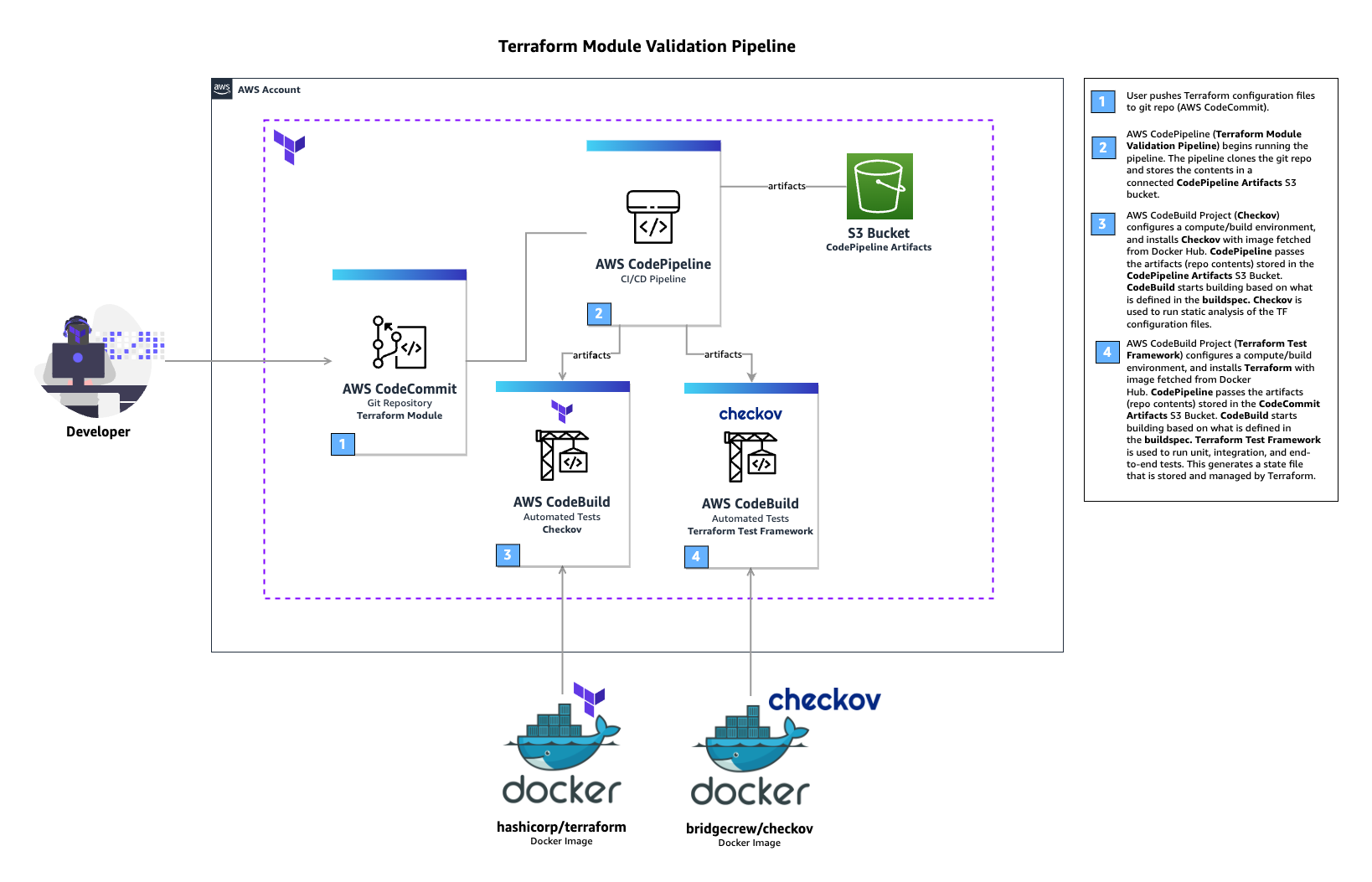
Terraform module validation pipeline Architecture. Multiple interconnected AWS services such as AWS CodeCommit, CodeBuild, CodePipeline, and Amazon S3 used to build a Terraform module validation pipeline.

Terraform module validation pipeline

In the above architecture for a Terraform module validation pipeline, the following takes place:

  • A developer pushes Terraform module configuration files to a git repository (AWS CodeCommit).
  • AWS CodePipeline begins running the pipeline. The pipeline clones the git repo and stores the artifacts to an Amazon S3 bucket.
  • An AWS CodeBuild project configures a compute/build environment with Checkov installed from an image fetched from Docker Hub. CodePipeline passes the artifacts (Terraform module) and CodeBuild executes Checkov to run static analysis of the Terraform configuration files.
  • Another CodeBuild project configured with Terraform from an image fetched from Docker Hub. CodePipeline passes the artifacts (repo contents) and CodeBuild runs Terraform command to execute the tests.

CodeBuild uses a buildspec file to declare the build commands and relevant settings. Here is an example of the buildspec files for both CodeBuild Projects:

# Checkov
version: 0.1
phases:
  pre_build:
    commands:
      - echo pre_build starting

  build:
    commands:
      - echo build starting
      - echo starting checkov
      - ls
      - checkov -d .
      - echo saving checkov output
      - checkov -s -d ./ > checkov.result.txt

In the above buildspec, Checkov is run against the root directory of the cloned CodeCommit repository. This directory contains the configuration files for the Terraform module. Checkov also saves the output to a file named checkov.result.txt for further review or handling if needed. If Checkov fails, the pipeline will fail.

# Terraform Test
version: 0.1
phases:
  pre_build:
    commands:
      - terraform init
      - terraform validate

  build:
    commands:
      - terraform test

In the above buildspec, the terraform init and terraform validate commands are used to initialize Terraform, then check if the configuration is valid. Finally, the terraform test command is used to run the configured tests. If any of the Terraform tests fails, the pipeline will fail.

For a full example of the CI/CD pipeline configuration, please refer to the Terraform CI/CD and Testing on AWS workshop. The module validation pipeline mentioned above is meant as a starting point. In a production environment, you might want to customize it further by adding Checkov allow-list rules, linting, checks for Terraform docs, or pre-requisites such as building the code used in AWS Lambda.

Choosing various testing strategies

At this point you may be wondering when you should use Terraform tests or other tools such as Preconditions and Postconditions, Check blocks or policy as code. The answer depends on your test type and use-cases. Terraform test is suitable for unit tests, such as validating resources are created according to the naming specification. Variable validations and Pre/Post conditions are useful for contract tests of Terraform modules, for example by providing error warning when input variables value do not meet the specification. As shown in the previous section, you can also use Terraform test to ensure your contract tests are running properly. Terraform test is also suitable for integration tests where you need to create supporting resources to properly test the module functionality. Lastly, Check blocks are suitable for end to end tests where you want to validate the infrastructure state after all resources are generated, for example to test if a website is running after an S3 bucket configured for static web hosting is created.

When developing Terraform modules, you can run Terraform test in command = plan mode for unit and contract tests. This allows the unit and contract tests to run quicker and cheaper since there are no resources created. You should also consider the time and cost to execute Terraform test for complex / large Terraform configurations, especially if you have multiple test scenarios. Terraform test maintains one or many state files within the memory for each test file. Consider how to re-use the module’s state when appropriate. Terraform test also provides test mocking, which allows you to test your module without creating the real infrastructure.

Conclusion

In this post, you learned how to use Terraform test and develop various test scenarios. You also learned how to incorporate Terraform test in a CI/CD pipeline. Lastly, we also discussed various testing strategies for Terraform configurations and modules. For more information about Terraform test, we recommend the Terraform test documentation and tutorial. To get hands on practice building a Terraform module validation pipeline and Terraform deployment pipeline, check out the Terraform CI/CD and Testing on AWS Workshop.

Authors

Kevon Mayers

Kevon Mayers is a Solutions Architect at AWS. Kevon is a Terraform Contributor and has led multiple Terraform initiatives within AWS. Prior to joining AWS he was working as a DevOps Engineer and Developer, and before that was working with the GRAMMYs/The Recording Academy as a Studio Manager, Music Producer, and Audio Engineer. He also owns a professional production company, MM Productions.

Welly Siauw

Welly Siauw is a Principal Partner Solution Architect at Amazon Web Services (AWS). He spends his day working with customers and partners, solving architectural challenges. He is passionate about service integration and orchestration, serverless and artificial intelligence (AI) and machine learning (ML). He has authored several AWS blog posts and actively leads AWS Immersion Days and Activation Days. Welly spends his free time tinkering with espresso machines and outdoor hiking.