Security updates have been issued by Debian (connman and e17), Fedora (curl, open-vm-tools, pcs, and python-lxml), Mageia (curl, dpkg, freecad, gimp, libtar, libtiff, mediawiki, ostree, python-lxml, schroot, SDL12, sdl2, wireshark, and zlib), Oracle (kernel and php:7.4), Red Hat (php:7.4), Slackware (vim), SUSE (chromium, kernel, libarchive, libtirpc, mupdf, python-rsa, ruby2.5, and virtualbox), and Ubuntu (linux-intel-iotg).
Do you manage more than a single domain? If the answer is yes, now you can manage a single WAF configuration for all your enterprise domains.
Cloudflare has been built around the concept of zone, which is broadly equivalent to a domain. Customers can add multiple domains to a Cloudflare account, and every domain has its own independent security configuration. If you deploy a rule to block bots on example.com, you will need to rewrite the same rule on example.org. You’ll then need to visit the dashboard of every zone when you want to update it. This applies to all WAF products including Managed, Firewall and Rate Limiting rules.
If you have just two domains that’s not a big deal. But if you manage hundreds or thousands of domains like most large organizations do. Dealing with individual domains becomes time-consuming, expensive or outright impractical. Of course, you could build automation relying on our API or Terraform. This will work seamlessly but not all organizations have the capabilities to manage this level of complexity. Furthermore, having a Terraform integration doesn’t fully replicate the experience or give the confidence provided by interacting with a well-designed UI.
Following Cloudflare philosophy of making it easy to deploy security products, we are launching Account WAF.
Customers can now have a single WAF deployment for all their enterprise domains.
Welcome to the simpler world of Account WAF
You might wonder why an organization might have thousands of domains, but this is actually very common.
For example, an e-commerce business can have tens of marketing domains for all its brands localized in different countries, they’ll have APIs that power their e-commerce sites and mobile applications, applications integrated with partners, logistics services or payment systems, domains used by employees, and so on and so forth. The structure of these accounts can be very complex.
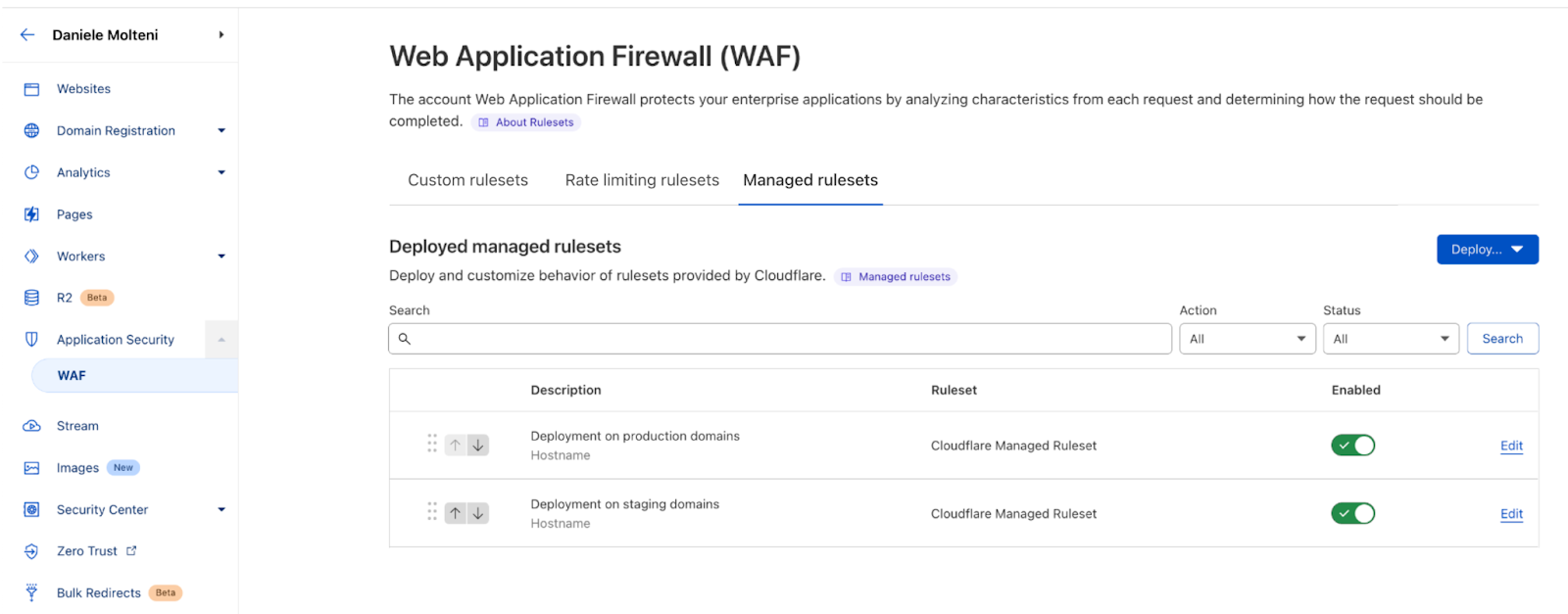
Now, let’s imagine that you need to deal with the simple use case of deploying Cloudflare Managed ruleset across all your production domains.
Without Account WAF you’d need to track down all the correct domains and visit the WAF page of each one of them, deploy the ruleset and possibly add overrides to select only the attack vectors you are interested in. This is messy and mistakes are easy.
With Account WAF, you can now deploy a managed ruleset just once while providing the list of hostnames where you want it on. With deploying here we refer to writing a filter that defines what requests we should run (or execute) the ruleset on. The filter works like a normal WAF Custom Rule, where you can take advantage of the power of the Wirefilter syntax and use any parameter of the HTTP request, metadata and computed values, such as Bot Score or our new WAF Attack Score. For example, you can run a ruleset only on traffic with a specific User Agent, or only on your API traffic.
You can deploy these rulesets multiple times on your account, so you can have different settings for different groups of domains. For example, you might want to deploy OWASP with different sensitivity levels for your staging domains versus your production domains, or enforce a minimum level of security across all zones (e.g. for legal protection or compliance), before tailoring the security posture of the most sensitive domains. Furthermore, if in the future you are going to add a new domain to your production environment, you can simply add it to the rule filter, and we will start protecting these requests too.
It works for all WAF features
You can follow a similar flow if you want to deploy WAF Custom or Rate Limiting rules. However, in this case, to simplify management of large numbers of rules, we introduced the concept of Custom Rulesets. Like with managed rules, a ruleset is a group of rules, this time they are user defined. Like in the example above, you can deploy a custom ruleset on a user-defined filter to scope on what portion of your traffic you want to run these rules.
For example, consider the situation where you want to create two rules for all your domains: one that blocks traffic from a set of countries and then one rule to only allow requests with a non-malicious WAF Attack Score. You will create a custom ruleset with these two rules and then deploy it across your entire account.
One thing to note is that Account WAF rulesets (Managed, Custom and Rate Limiting) can be deployed on traffic to domains on Enterprise plans. You won’t be able to run rulesets on traffic of Free, Pro or Biz domains. This condition is enforced by the UI when writing a deployment filter.
Finally, you can follow the same flow to deploy custom rulesets that contain rate limiting rules. Custom rulesets are designed to contain either custom or rate limiting rules, at this stage these rules cannot be combined in the same ruleset. Please note that the Rate Limiting section will be available in October.
Who gets it?
Account WAF is an Enterprise only feature. If you are an Enterprise customer on our new Advanced plan, you will get access to the new feature automatically this week. If you are not on our Advanced plan, please reach out to your account team to learn more.
Starting today, it is possible to scope your users’ access to specific domains with Domain Scoped Roles becoming generally available!
We are making it easier for account owners to manage their team’s access to Cloudflare by allowing user access to be scoped to individual domains. Ensuring users have the least amount of access they need and no more is critical, and Domain Scoped Roles is a major step in this direction. Additionally, with the use of Domain Groups, account owners can grant users access to a group of domains instead of individually. Domains can be added or removed from these groups to automatically update the access of those who have been granted access to the group. This reduces toil in managing user access.
One of the most common uses we have seen for Domain Scoped Roles is to limit access to production domains to a small set of team members, while still allowing development and pre-production domains to be open to the rest of the team. That way, someone can’t make changes to a production domain unless they are given access.
We are doing a rollout of this functionality across all Enterprise Cloudflare accounts, and you will receive an email when this functionality is enabled for your account.
Any existing access on accounts today will remain the same, with the ability to further scope down access where it makes sense. All of our account-wide roles are still available to assign to users.
How to use Domain Scoped Roles
Once you have Domain Scoped Roles, here is how to start using it:
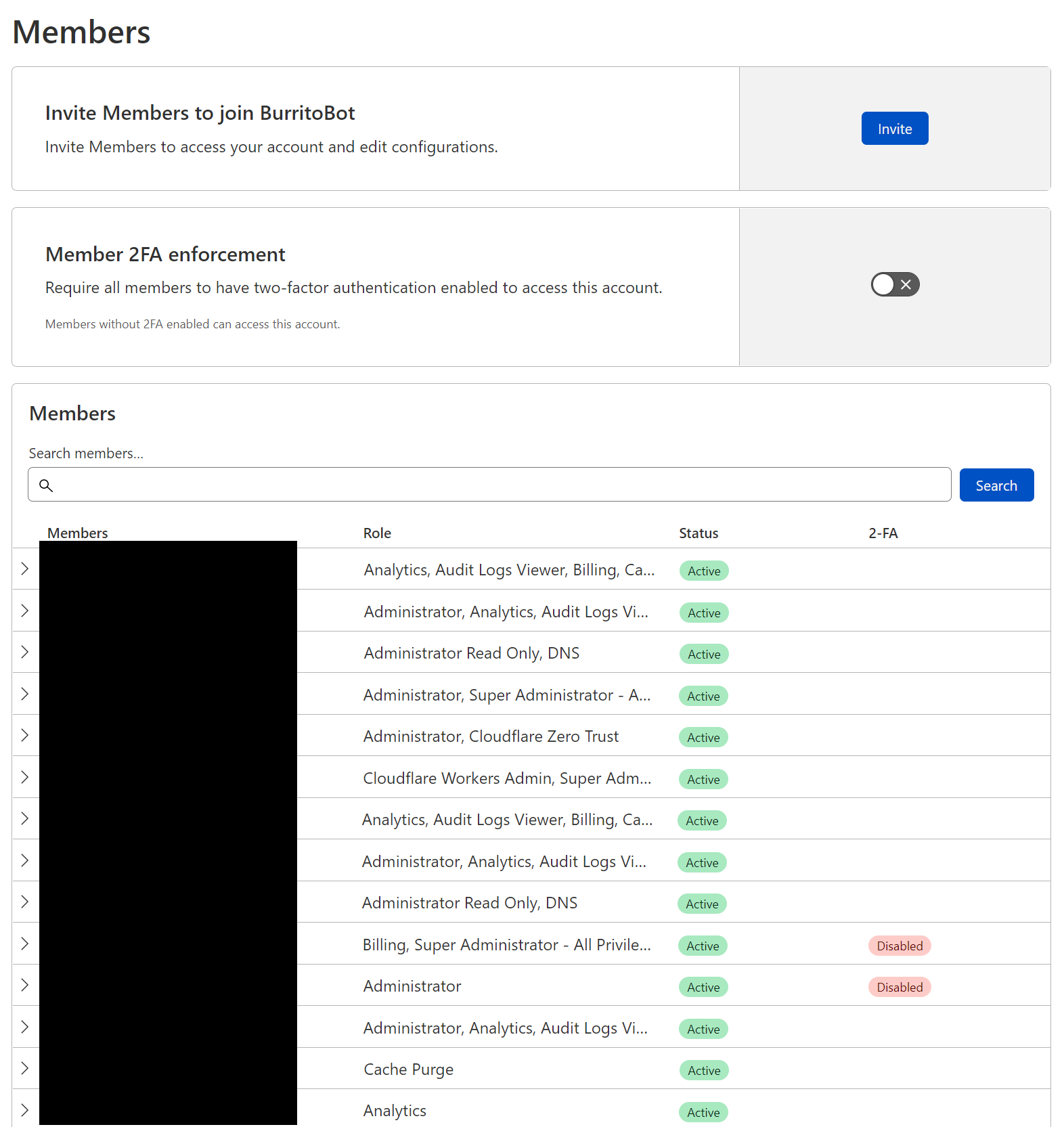
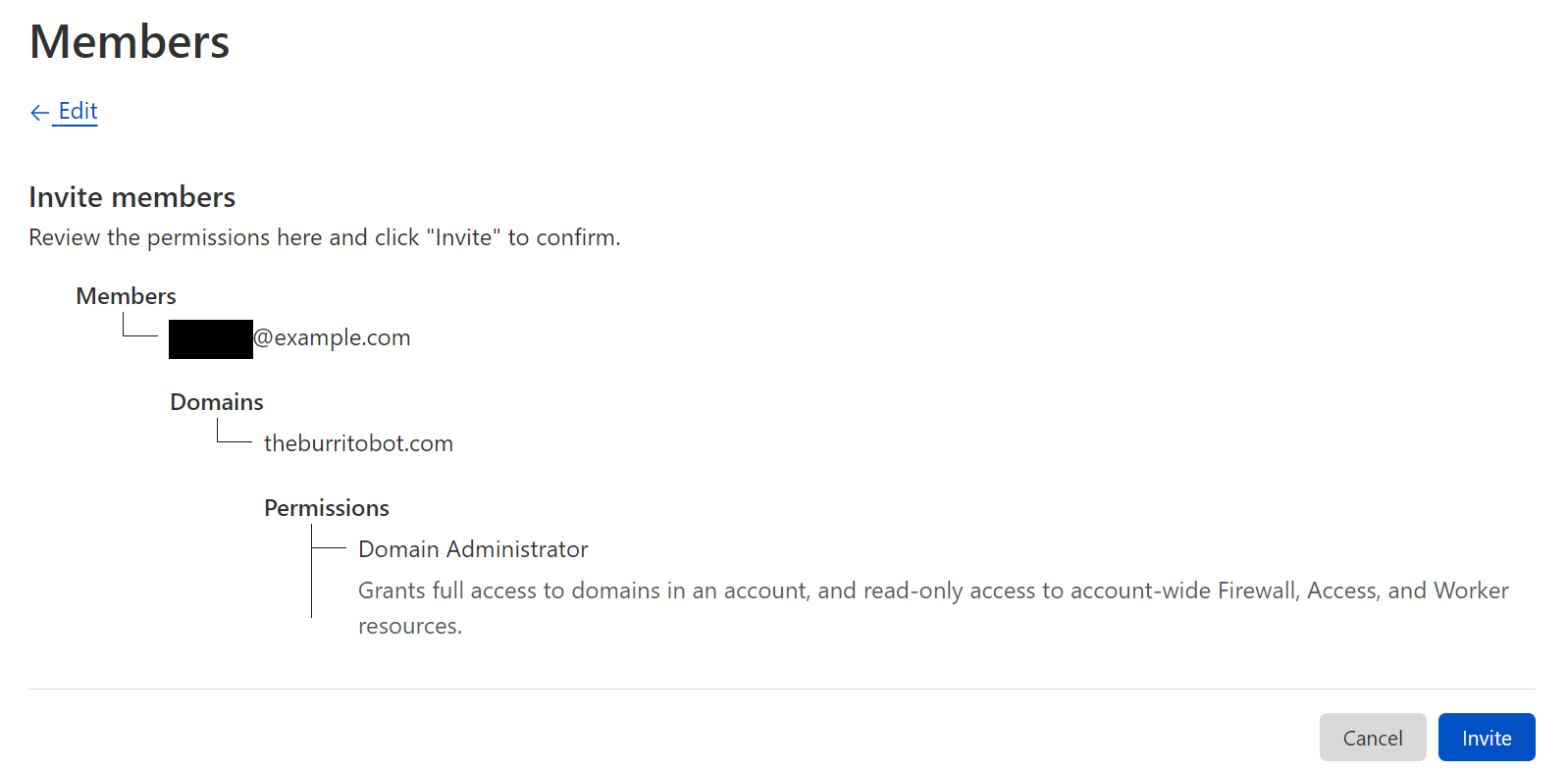
From this page, you can manage your members’ permissions. In this case, we will invite a new user, however you can also modify an existing user’s permissions.
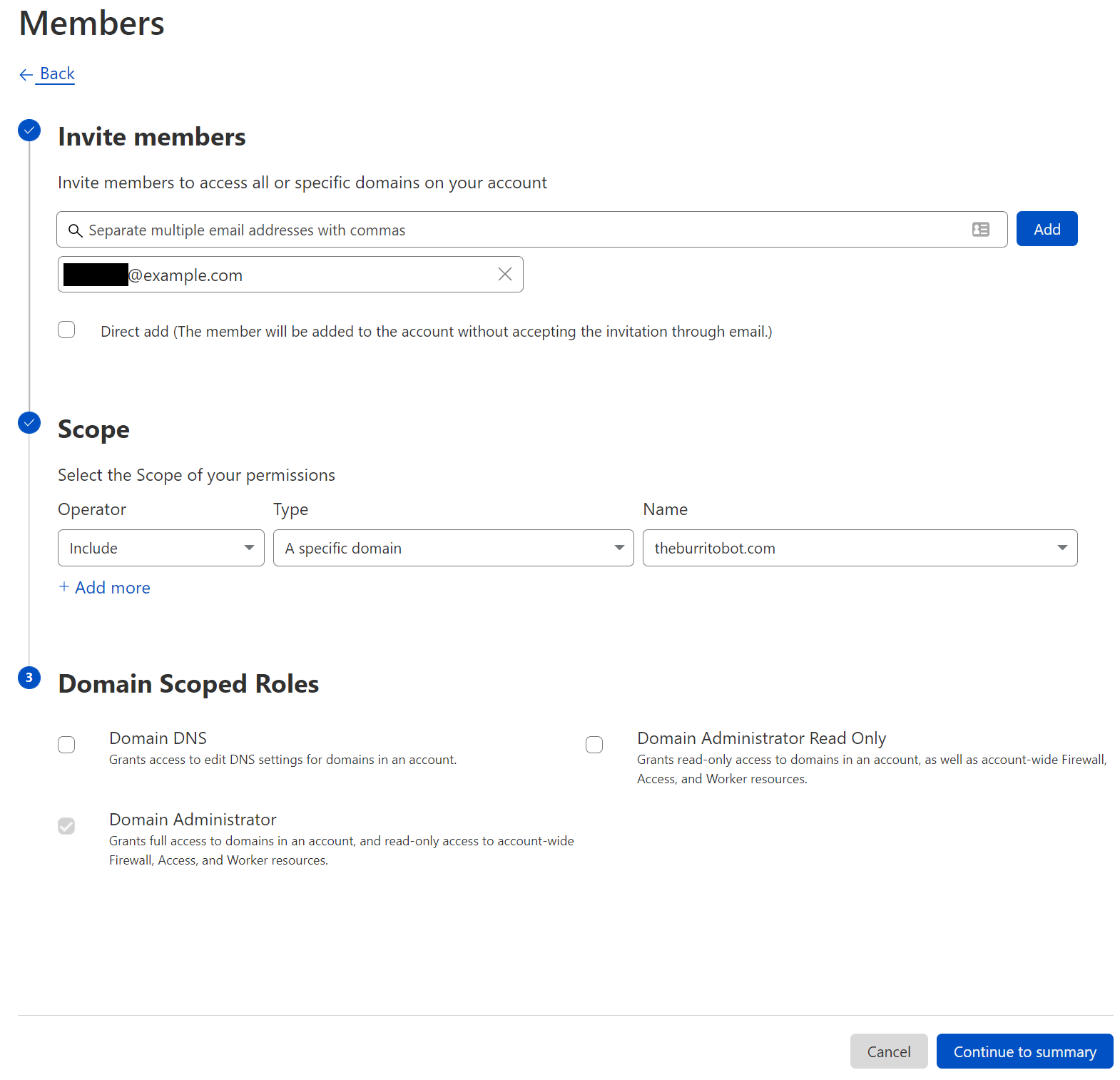
After clicking “Invite”, you will determine which users to invite, multiple users can be invited at the same time. After selecting users, we provide appropriate scope. Within the scope selection list, three options are available: all domains, a specific domain, and a domain group. Selecting all domains continues to grant account wide access, and all of our legacy roles are available at this level of scoping. A specific domain or domain groups provide access to our new domain scoped roles. Finally, with a user and a scope selected, a role (or multiple roles) can be selected to grant appropriate permissions.
Before sending the invite, you will be able to confirm the users, scope, and roles.
Domain Groups
In addition to manually creating inclusion or exclusion lists per user, account owners can also create Domain Groups to allow granting one or more users to a group of domains. Domain Groups can be created from the member invite flow or directly from Account Configurations → Lists. When creating a domain group, the user selects the domains to include and, from that point on, the group can be used when inviting a user to the account.
What’s next
We are doing a rollout of this functionality across all Enterprise Cloudflare accounts, and you will receive an email when this functionality is enabled for your account.
Any existing access on accounts today will remain the same, with the ability to further scope access where you decide. All of our account-wide roles are still available to assign to users.
If you are an enterprise customer and interested in getting Domain Scoped Roles sooner, please contact your CSM to get enabled! Otherwise, you will receive an email when your account has this feature enabled.
This announcement represents a step forward in our migration to a new authorization system built for Cloudflare’s scale. This will allow us to expand these capabilities to more products in the future and to create an authorization system that puts customers more in control of their team’s access across all of Cloudflare’s services.
Cloudflare’s threat operations and research team, Cloudforce One, is now open for business and has begun conducting threat briefings. Access to the team is available via an add-on subscription, and includes threat data and briefings, security tools, and the ability to make requests for information (RFIs) to the team.
Fill out this form or contact your account team to learn more.
Subscriptions come in two packages, and are priced based on number of employees: “Premier” includes our full history of threat data, bundled RFIs, and an API quota designed to support integrations with SIEMs. “Core” level includes reduced history and quotas. Both packages include access to all available security tools, including a threat investigation portal and sinkholes-as-a-service.
If you’re an enterprise customer interested in understanding the type of threat briefings that Cloudforce One customers receive, you can register here for “YackingYeti: How a Russian threat group targets Ukraine—and the world”, scheduled for October 12. The briefing will include Q&A with Blake Darché, head of Cloudforce One, and an opportunity to learn more about the team and offering.
Requests for Information (RFIs) and Briefings
The Cloudforce One team is composed of analysts assigned to five subteams: Malware Analysis, Threat Analysis, Active Mitigation and Countermeasures, Intelligence Analysis, and Intelligence Sharing. Collectively, they have tracked many of the most sophisticated cyber criminals on the Internet while at the National Security Agency (NSA), USCYBERCOM, and Area 1 Security, and have worked closely with similar organizations and governments to disrupt these threat actors. They’ve also been prolific in publishing “finished intel” reports on security topics of significant geopolitical importance, such as targeted attacks against governments, technology companies, the energy sector, and law firms, and have regularly briefed top organizations around the world on their efforts.
Included with a Cloudforce One subscription is the ability to make “requests for information” (RFIs) to these experts. RFIs can be on any security topic of interest, and will be analyzed and responded to in a timely manner. For example, the Cloudforce One Malware Analysis team can accept uploads of possible malware and provide a technical analysis of the submitted resource. Each plan level comes with a fixed number of RFIs, and additional requests can be added.
In addition to customer-specific requests, Cloudforce One conducts regular briefings on a variety of threats and threat actors—those targeting specific industries as well as more general topics of interest.
Threat Data
The best way to understand threats facing networks and applications connected to the Internet is to operate and protect critical, large scale Internet infrastructure. And to defend attacks against millions of customers, large and small. Since our early days, Cloudflare has set out to build one of the world’s largest global networks to do just that. Every day we answer trillions of DNS queries, track the issuance of millions SSL/TLS certificates in our CT log, inspect millions of emails for threats, route multiple petabytes of traffic to our customers’ networks, and proxy trillions of HTTP requests destined for our customers’ applications. Each one of these queries and packets provides a unique data point that can be analyzed at scale and anonymized into actionable threat data—now available to our Cloudforce One customers.
Data sets now available in the dashboard and via API for subscribers include IP, ASN, and domain intelligence, passive DNS resolutions; threat actor cards with indicators of compromise (IoC), open port, and new Managed IP Lists are planned for release later this year.
Security Tools
Security analysts and threat hunting teams are being forced to do more with less in today’s operating environment, but that doesn’t reduce their need for reliable tools that can quickly identify and eliminate risks.
Bundled with Cloudforce One are several security tools that can be deployed as services to expedite threat hunting and remediation:
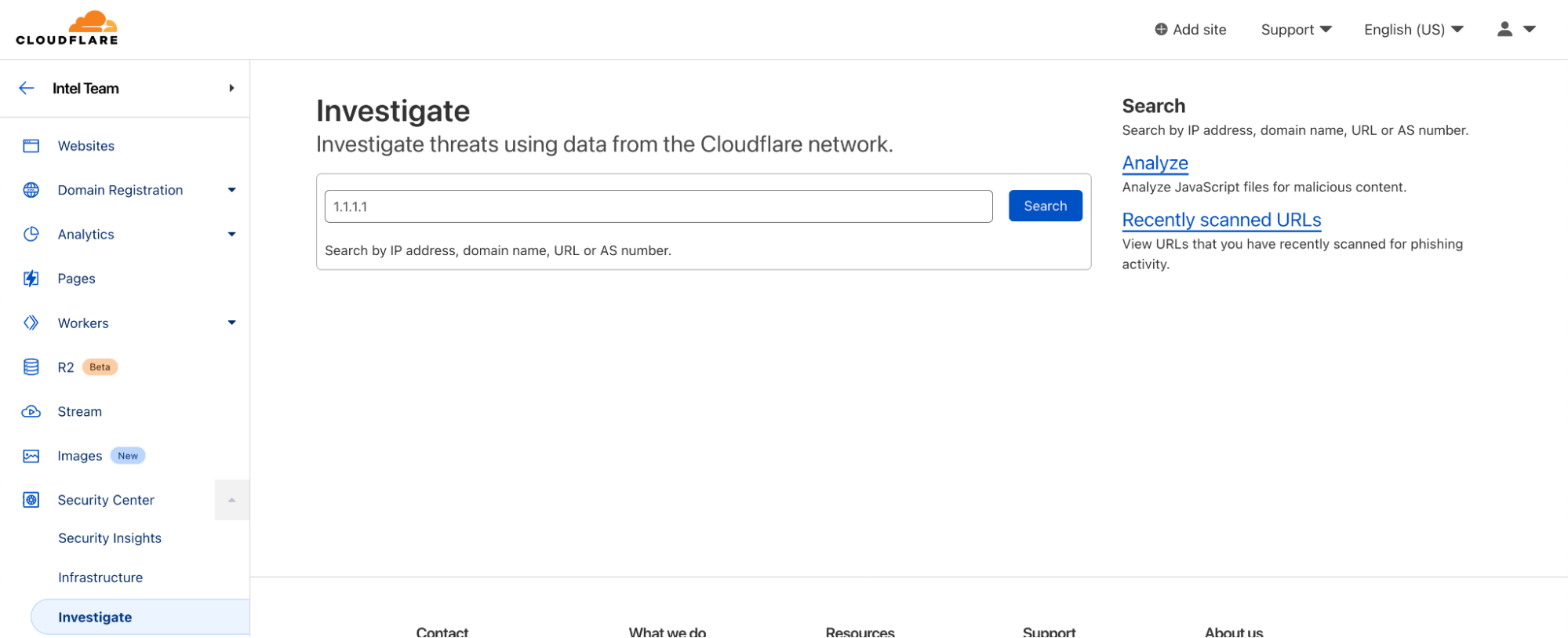
Threat Investigation Portal
Located within Security Center, the Investigate tab is your portal for querying current and historical threat data on IPs, ASNs, URLs (new!), and domains.
URLs can now be scanned for phishing contents, with heuristic and machine learning-scored results presented on demand.
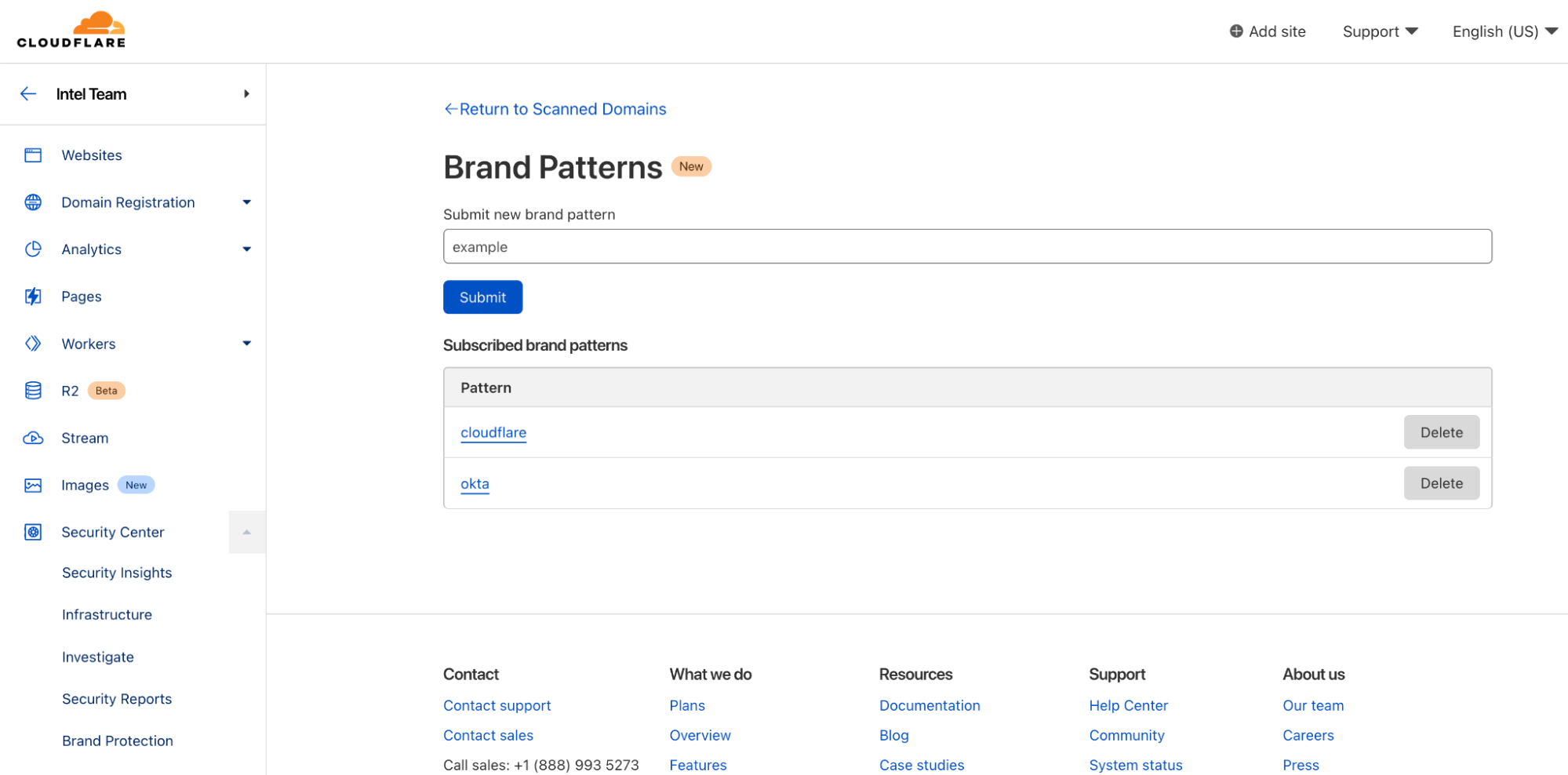
Brand Protection (new!)
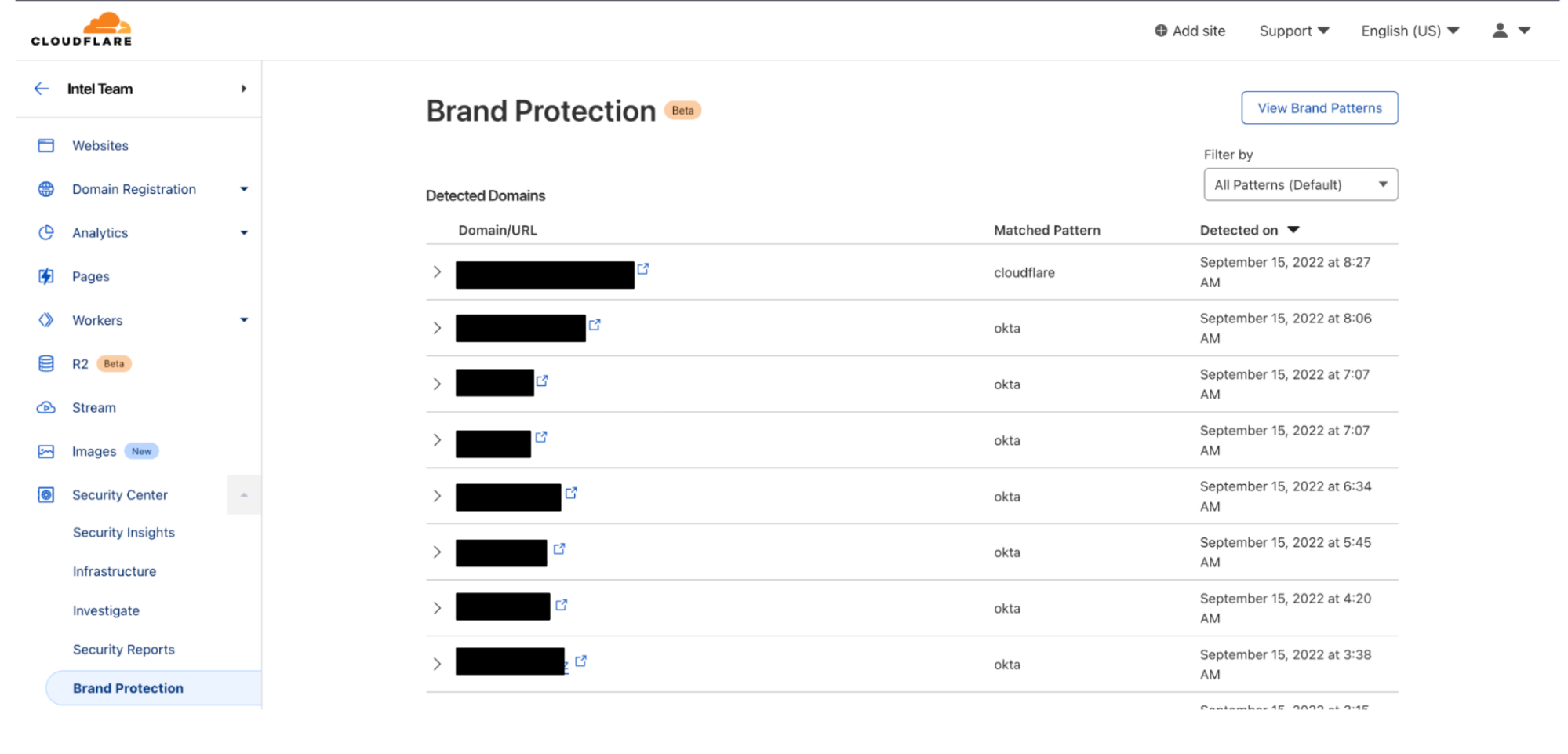
Also located within the Security Center, the Brand Protection tab can be used to register keywords or assets (e.g., corporate logos, etc.) that customers wish to be notified of when they appear on the Internet.
Sinkholes (new!)
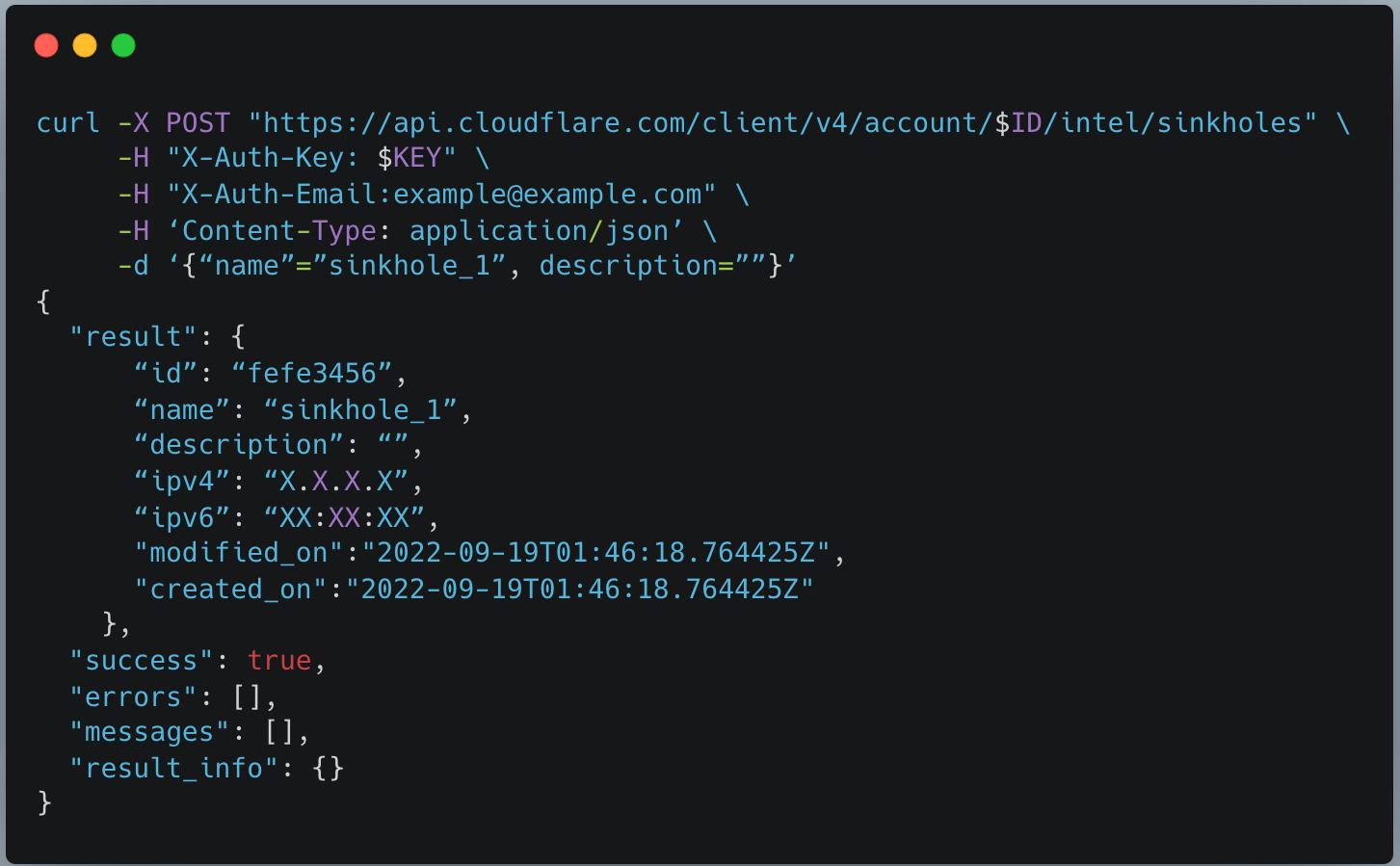
Sinkholes can be created on-demand, as a service, to monitor hosts infected with malware and prevent them from communicating with command-and-control (C2) servers.
After creating a sinkhole via API, an IP will be returned which can be used with DNS products like Cloudflare Gateway to route web requests to safe sinkholes (and away from C2 servers). Sinkholes can be used to intercept SMTP traffic.
Premier customers can also bring their own IP address space to use for sinkholes, to accommodate egress firewall filtering or other use cases. In the future we plan to extend our sinkhole capability to the network layer, which will allow it to be deployed alongside offerings such as Magic Transit and Magic WAN.
Getting Started with Cloudforce One
Cloudforce One is open for business and ready to answer your security inquiries. Speak to your account manager or fill out this form to learn more. We hope to see you on the upcoming webinar!
The Washington Post is reporting that the US Customs and Border Protection agency is seizing and copying cell phone, tablet, and computer data from “as many as” 10,000 phones per year, including an unspecified number of American citizens. This is done without a warrant, because “…courts have long granted an exception to border authorities, allowing them to search people’s devices without a warrant or suspicion of a crime.”
CBP’s inspection of people’s phones, laptops, tablets and other electronic devices as they enter the country has long been a controversial practice that the agency has defended as a low-impact way to pursue possible security threats and determine an individual’s “intentions upon entry” into the U.S. But the revelation that thousands of agents have access to a searchable database without public oversight is a new development in what privacy advocates and some lawmakers warn could be an infringement of Americans’ Fourth Amendment rights against unreasonable searches and seizures.
[…]
CBP conducted roughly 37,000 searches of travelers’ devices in the 12 months ending in October 2021, according to agency data, and more than 179 million people traveled that year through U.S. ports of entry.
After my last post, someone suggested that having employers be able to restrict keys to machines they control is a bad thing. So here’s why I think Bring Your Own Device (BYOD) scenarios are bad not only for employers, but also for users.
There’s obvious mutual appeal to having developers use their own hardware rather than rely on employer-provided hardware. The user gets to use hardware they’re familiar with, and which matches their ergonomic desires. The employer gets to save on the money required to buy new hardware for the employee. From this perspective, there’s a clear win-win outcome.
But once you start thinking about security, it gets more complicated. If I, as an employer, want to ensure that any systems that can access my resources meet a certain security baseline (eg, I don’t want my developers using unpatched Windows ME), I need some of my own software installed on there. And that software doesn’t magically go away when the user is doing their own thing. If a user lends their machine to their partner, is the partner fully informed about what level of access I have? Are they going to feel that their privacy has been violated if they find out afterwards?
But it’s not just about monitoring. If an employee’s machine is compromised and the compromise is detected, what happens next? If the employer owns the system then it’s easy – you pick up the device for forensic analysis and give the employee a new machine to use while that’s going on. If the employee owns the system, they’re probably not going to be super enthusiastic about handing over a machine that also contains a bunch of their personal data. In much of the world the law is probably on their side, and even if it isn’t then telling the employee that they have a choice between handing over their laptop or getting fired probably isn’t going to end well.
But obviously this is all predicated on the idea that an employer needs visibility into what’s happening on systems that have access to their systems, or which are used to develop code that they’ll be deploying. And I think it’s fair to say that not everyone needs that! But if you hold any sort of personal data (including passwords) for any external users, I really do think you need to protect against compromised employee machines, and that does mean having some degree of insight into what’s happening on those machines. If you don’t want to deal with the complicated consequences of allowing employees to use their own hardware, it’s rational to ensure that only employer-owned hardware can be used.
But what about the employers that don’t currently need that? If there’s no plausible future where you’ll host user data, or where you’ll sell products to others who’ll host user data, then sure! But if that might happen in future (even if it doesn’t right now), what’s your transition plan? How are you going to deal with employees who are happily using their personal systems right now? At what point are you going to buy new laptops for everyone? BYOD might work for you now, but will it always?
And if your employer insists on employees using their own hardware, those employees should ask what happens in the event of a security breach. Whose responsibility is it to ensure that hardware is kept up to date? Is there an expectation that security can insist on the hardware being handed over for investigation? What information about the employee’s use of their own hardware is going to be logged, who has access to those logs, and how long are those logs going to be kept for? If those questions can’t be answered in a reasonable way, it’s a huge red flag. You shouldn’t have to give up your privacy and (potentially) your hardware for a job.
Using technical mechanisms to ensure that employees only use employer-provided hardware is understandably icky, but it’s something that allows employers to impose appropriate security policies without violating employee privacy.
The artemis.sh blog has a
detailed review of the state of Wayland compared to X.org.
It feels fantastic. It even made my software cursor
not feel so softwarey, which I’ve never experienced with a software
cursor before. I have a pretty bad GPU, but on a higher end card
you’d get a huge benefit to this in games. If your card can render
the game many times faster than your monitor refresh rate, you can
unlock your FPS in the game, tune your max_render_time to the
absolute minimum, and get EXTREMELY low latency while still having
absolutely no screen tearing whatsoever.
And like, this is the first time I’ve ever seen the vsync setting
in a game actually sync the game up with the vblank interval in a
way that matters. It works for games in wine. It’s amazing. I have
never experienced gaming on Linux that looked this smooth in my
life.
So this is an artificially small -rc release, because this past
week we had the Maintainers’ Summit in Dublin (along with OSS EU
and LPC 2022), so we’ve had a lot of maintainers traveling.
Or – putting my ridiculously optimistic hat on – maybe things are
just so nice and stable that there just weren’t all that many
fixes?
Cloudflare ships a lot of products. Some of those products are shipped as beta, sometimes open, sometimes closed, and our huge customer base gives those betas an incredible workout. Making products work at scale, and in the heterogeneous environment of the real Internet is a challenge. We’re lucky to have so many enthusiastic customers ready to try out our betas.
And when those products exit beta they’re GA or Generally Available. This week you’ll be hearing a lot about products becoming GA.
But it’s not just about making products work and be available, it’s about making the best-of-breed. We ship early and iterate rapidly. We’ve done this over the years for WAF, DDoS mitigation, bot management, API protection, CDN and our developer platform. Today analyst firms such as Gartner, Forrester and IDC recognize us as leaders in all those areas.
That’s one reason we’re trusted by the likes of Broadcom, NCR, DHL Parcel, Panasonic, Canva, Shopify, L’Oréal, DoorDash, Garmin and more.
Over the years we’ve heard criticism that we’re the new kid on the block. The latest iteration of that is Zero Trust vendors seeing us as novices. It sounds all too familiar. It’s what the DDoS, WAF, bot management, DNS, API protection, and serverless vendors used to say before we blew past them.
We innovate fast because we built a structure and culture that allows it. Cloudflare operates three main innovation teams (Product/Engineering, Emerging Technology and Incubation, and Technology/Research) that work on projects with differing time horizons. We encourage innovation from outside those teams as well.
In a week’s time it’ll be Cloudflare’s 12th birthday and, as every year, we’ll have a Birthday Week when we’ll announce radically new and different products that are likely to cause a great deal of surprise. The teams above have been working hard on things that will change how people think about Cloudflare.
But before we get there, you’re going to hear about products that are out of beta and generally available. Most of these things have been announced before, here on this blog. But they were in beta.
Now they’re ready for everyone.
In fact, we had so many products becoming generally available that we decided to create a new Innovation Week: Cloudflare GA Week. We’ll still keep making products Generally Available throughout the year, but this year, at least, we have a bonanza week of products that are ready.
Even during the beta these products have been in use by real customers, and you’ll be hearing from them this week as well. It’s always inspiring to see how our products are used. It’s one thing to build a product, it’s fascinating to work with customers on how they’ll use it and what it enables them to do.
We aren’t going to be satisfied until every one of the products we talk about is best of breed and a leader in its own category. Together they form Cloudflare’s platform, a platform which is unmatched by anyone in the industry.
To provide the best experiences, we use technologies like cookies to store and/or access device information. Consenting to these technologies will allow us to process data such as browsing behavior or unique IDs on this site. Not consenting or withdrawing consent, may adversely affect certain features and functions.
Functional
Always active
The technical storage or access is strictly necessary for the legitimate purpose of enabling the use of a specific service explicitly requested by the subscriber or user, or for the sole purpose of carrying out the transmission of a communication over an electronic communications network.
Preferences
The technical storage or access is necessary for the legitimate purpose of storing preferences that are not requested by the subscriber or user.
Statistics
The technical storage or access that is used exclusively for statistical purposes.The technical storage or access that is used exclusively for anonymous statistical purposes. Without a subpoena, voluntary compliance on the part of your Internet Service Provider, or additional records from a third party, information stored or retrieved for this purpose alone cannot usually be used to identify you.
Marketing
The technical storage or access is required to create user profiles to send advertising, or to track the user on a website or across several websites for similar marketing purposes.


 comments