Improving network observability with new AWS Outposts racks network metrics

Post Syndicated from Adam Duffield original https://aws.amazon.com/blogs/compute/improving-network-observability-with-new-aws-outposts-racks-network-metrics/

With AWS Outposts racks, you can extend AWS infrastructure, services, APIs, and tools to on-premises locations. Providing performant, stable, and resilient network connections to both the parent AWS Region as well as the local network is essential to maintaining uninterrupted service.

The release of two new Amazon CloudWatch metrics, VifConnectionStatus and VifBgpSessionState, gives you greater visibility into the operational status of the Outpost network connections. In this post, we discuss how to use these metrics to quickly identify network disruptions, using additional data points that can help reduce time to resolution.

Outposts network connectivity overview

When connecting an Outposts rack to your chosen data center location, network connections are made between the Outpost Networking Devices (ONDs) and Customer Network Devices (CNDs). These network connections support both the Service Link connectivity back to the chosen anchor Region and connectivity to the on-premises local network through the Local Gateway. First-generation Outposts racks include a minimum of two network devices to provide resilience, with second-generation Outposts racks including four network devices.

Virtual interfaces (VIFs) are used to establish IP network connectivity between the Outpost and CNDs, using Border Gateway Protocol (BGP) for dynamic routing. You can view the details for these VIFs on the Outposts console by choosing Link aggregation groups (LAGs) in the navigation pane and drilling down to find the specific service link and local gateway VIF information. For each connection between an OND and CND, two BGP sessions are established: one to support service link traffic and the other to support local gateway traffic.

The following diagram shows an example of this connectivity for a first-generation Outposts rack.
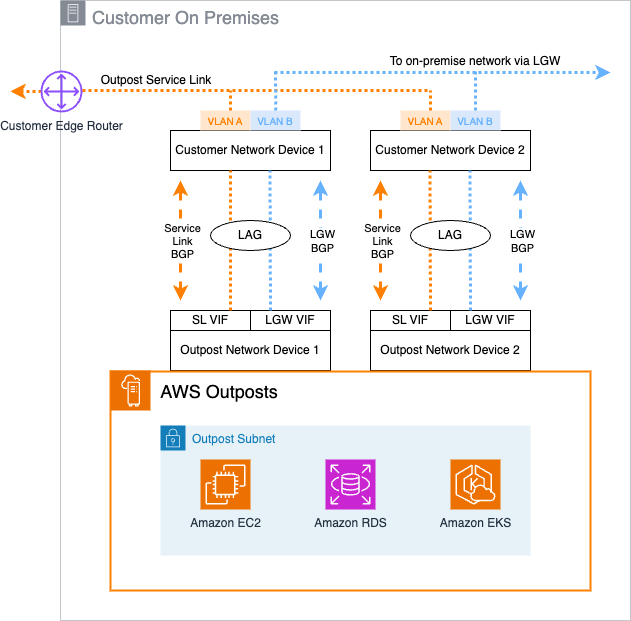
Figure 1: First-Generation Outposts Rack network connections

Figure 1: First-Generation Outposts Rack network connections

In this configuration, a total of four VIFs are configured into two link aggregation groups (LAGs): one on each OND for the service link and local gateway VIFs.

Understanding the new CloudWatch metrics for Outposts

Observability into the operational status of Outposts rack, including the status and performance of network connectivity, is important for you to be able to quickly identify and investigate potential issues. With the addition of the VifConnectionStatus and VifBgpSessionState Outposts metrics in CloudWatch, you have greater visibility into the connection status of the Outposts rack to your CNDs. The VifConnectionStatus metric is provided on a per-VIF level, available for both the local gateway and service link VIFs. It provides an indication on the status of the VIF using two possible values:

  • A value of 1 indicates that the VIF is successfully connected to the CND with established BGP sessions and able to transmit traffic
  • A value of 0 indicates that the VIF is not in an operational state due to an underlying issue

The VifBgpSessionState metric goes deeper into the BGP connectivity status between each Outposts VIF and CND. A BGP session can be in one of multiple states, each providing insight into where a potential issue might be. To reflect this, the CloudWatch metric value shown relates to the following BGP states:

  1. IDLE – The initial state; the ONDs are waiting for a start event
  2. Connect – The Outposts rack is waiting for the TCP connection to be complete
  3. Active – The Outposts rack is trying to initiate a TCP connection
  4. OpenSent – The router has sent an OPEN message and is waiting for a response
  5. OpenConfirm – The router has received an OPEN message and is waiting for a KEEPALIVE response
  6. Established – The BGP connection is fully established and the ONDs and CNDs can exchange routing information

With these metrics now available in CloudWatch, you can configure Amazon CloudWatch alarms to alert when the metric values indicate potential issues. You can combine existing CloudWatch metrics for Outposts racks with these new metrics to give additional context and visibility into network connectivity status.

Using CloudWatch metrics to investigate Outposts network connectivity issues

In the event of network connectivity issues, it’s important to understand how to use these metrics to assist with investigations and understand potential causes when seeing network impairment. To start with, the Configuration state of the VIFs should be checked. For each VIF, there are four possible states:

  • Pending – A VIF is in this state from the time that it is created within a VIF group until the VIF becomes active on the OND
  • Available – A VIF is active on ONDs
  • Deleting – A VIF is in this state immediately after requesting deletion
  • Deleted – A VIF is deleted

To check the state of an individual VIF on the Outposts console, choose Networking followed by Link aggregation groups (LAGS) in the navigation pane. The service link and local gateway VIFs associated with a specific LAG are shown, and when you choose a specific LAG, the configuration state of the associated VIFs are visible.
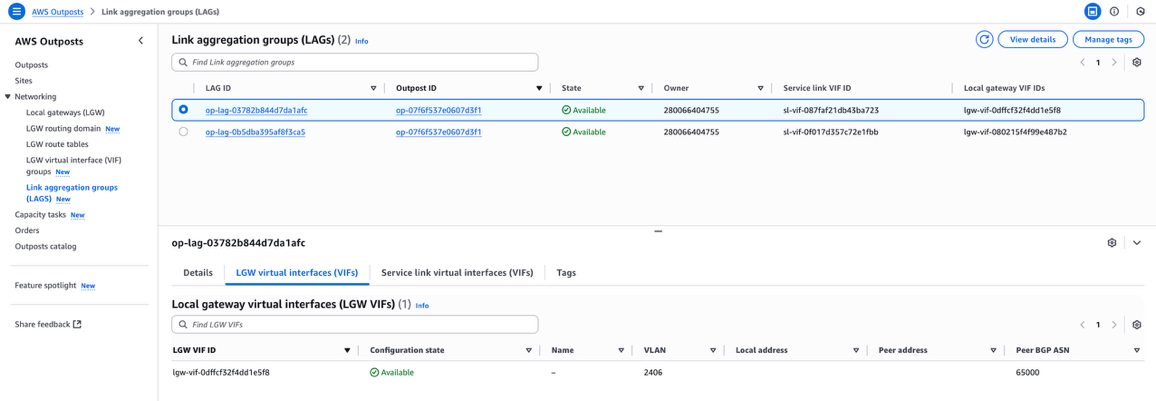
Figure 2: AWS Outposts console showing VIF configuration details

Figure 2: AWS Outposts console showing VIF configuration details

You can also retrieve these details programmatically. For example, use the following AWS Command Line Interface (AWS CLI) command to specifically check the configuration state of a service link VIF with ID sl-vif-087faf21db43ba723:

aws ec2 describe-service-link-virtual-interfaces \
--service-link-virtual-interface-id sl-vif-087faf21db43ba723
{
    "ServiceLinkVirtualInterfaces": [
        {
            "ServiceLinkVirtualInterfaceId": "sl-vif-087faf21db43ba723",
            "ServiceLinkVirtualInterfaceArn": "arn:aws:ec2:us-west-2:111122223333:service-link-virtual-interface/sl-vif-087faf21db43ba723",
            "OutpostId": "op-07f6f537e0607d3f1",
            "OutpostArn": "arn:aws:outposts:us-west-2:111122223333:outpost/op-07f6f537e0607d3f1",
            "OwnerId": "280066404755",
            "LocalAddress": "XX.XX.XX.XX/XX",
            "PeerAddress": " XX.XX.XX.XX/XX ",
            "PeerBgpAsn": 65000,
            "Vlan": 2006,
            "OutpostLagId": "op-lag-03782b844d7da1afc",
            "Tags": [],
            "ConfigurationState": "available"
        }
    ]
}

After confirming the Configuration state, you can use the VifConnectionStatus metric to determine the network connectivity status of individual VIFs. When operating and processing traffic in a healthy state, the value of this metric is 1. If this value changes to 0, it indicates a connectivity problem for that VIF between the Outpost and CNDs.

To further understand the potential cause of the VifConnectionStatus value, you can use the VifBgpSessionState metric. Under normal operational status, this metric value is 6, indicating that the BGP session is established and traffic can be sent and received. However, if this metric value changes to 1–5, then it is indicative of an issue. To start investigating the cause of this, you should review VIF configuration both on the Outposts console and programmatically. This includes the values set on the OND for VLAN, local and peer addresses, and BGP ASN. These values can be validated against the configuration on your on-premises CNDs if required. Furthermore, you can use the VifBgpSessionState metric value to determine the potential cause:

  • If the value is 1, validate the values for BGP ASN and peer addresses
  • If the value is 2, this might indicate port or IP address issues
  • If the value is 3, this might indicate BGP version mismatches
  • If the value is 4 or 5, this refers to networking path problems

By using a combination of these metrics, you can gain a clearer understanding of the potential network issue without having to engage with AWS or third-party support teams.

You can view and query these metrics on the CloudWatch console. In the navigation pane, choose All metrics, followed by Outposts under the AWS namespaces section. The Outposts namespace can only be viewed by the Outposts owner account, unless CloudWatch cross-account observability is configured. The new VifConnectionStatus and VifBgpSessionState metrics can be found under the OutpostsID, VirtualInterfaceGroupId, VirtualInterfaceId dimension.
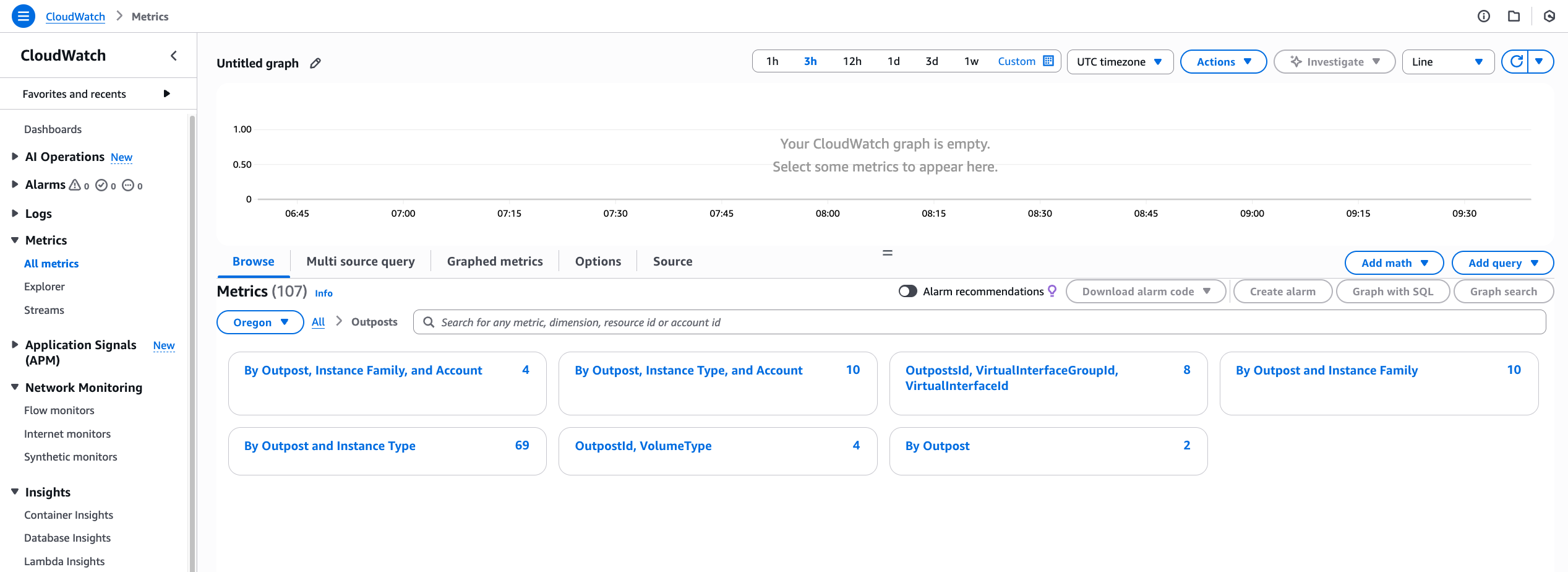
Figure 3: Amazon CloudWatch metrics for AWS Outposts

Figure 3: Amazon CloudWatch metrics for AWS Outposts

For more information on working with metrics, see Metrics in Amazon CloudWatch. For creating alerts based upon these new metrics and their values, refer to Using Amazon CloudWatch alarms.

The resilient design of using multiple ONDs for both service link and local gateway traffic allows workloads to continue to run in the event of connectivity issues for single VIFs. For example, a single service link VIF might report as being down, but the remaining service link VIFs might be unaffected and remain available. In this scenario, the service link itself would remain functional and connected, albeit with potentially lower resilience and capacity. This can be validated throught the ConnectedStatus metric which would have a value of 1.

Conclusion

This post provided details on the newly released CloudWatch metrics for Outposts racks, VifConnectionStatus and VifBgpSessionState, and how you can use them to investigate potential connectivity issues. For more information on Outposts rack networking patterns, see the Networking section of the Outposts High Availability Design and Architecture Considerations whitepaper. For more information about additional CloudWatch metrics that are available, check out the CloudWatch metrics for AWS Outposts documentation for second-generation Outposts racks and first-generation Outposts racks.

Reach out to your AWS account team, or fill out this form to learn more about observability for Outposts.

Boosting search relevance: Automatic semantic enrichment in Amazon OpenSearch Serverless

Post Syndicated from Jon Handler original https://aws.amazon.com/blogs/big-data/boosting-search-relevance-automatic-semantic-enrichment-in-amazon-opensearch-serverless/

Traditional search engines rely on word-to-word matching (referred to as lexical search) to find results for queries. Although this works well for specific queries such as television model numbers, it struggles with more abstract searches. For example, when searching for “shoes for the beach,” a lexical search merely matches individual words “shoes,” “beach,” “for,” and “the” in catalog items, potentially missing relevant products like “water-resistant sandals” or “surf footwear” that don’t contain the exact search terms.

Large language models (LLMs) create dense vector embeddings for text that expand retrieval beyond individual word boundaries to include the context in which words are used. Dense vector embeddings capture the relationship between shoes and beaches by learning how often they occur together, enabling better retrieval for more abstract queries through what is called semantic search.

Sparse vectors combine the benefits of lexical and semantic search. The process starts with a WordPiece tokenizer to create a limited set of tokens from text. A transformer model then assigns weights to these tokens. During search, the system calculates the dot-product of the weights on the tokens (from the reduced set) from the query with tokens from the target document. You get a blended score from the terms (tokens) whose weights are high for both the query and the target. Sparse vectors encode semantic information, like dense vectors, and supply word-to-word matching through the dot-product, giving you a hybrid lexical-semantic match. For a detailed understanding of sparse and dense vector embeddings, visit Improving document retrieval with sparse semantic encoders in the OpenSearch blog.

Automatic semantic enrichment for Amazon OpenSearch Serverless makes implementing semantic search with sparse vectors effortless. You can now experiment with search relevance improvements and deploy to production with only a few clicks, requiring no long-term commitment or upfront investment. In this post, we show how automatic semantic enrichment removes friction and makes the implementation of semantic search for text data seamless, with step-by-step instructions to enhance your search functionality.

Automatic semantic enrichment

You could already enhance search relevance scoring beyond OpenSearch’s default lexical scoring with the Okapi BM25 algorithm, integrating dense vector and sparse vector models for semantic search using OpenSearch’s connector framework. However, implementing semantic search in OpenSearch Serverless has been complex and costly, requiring model selection, hosting, and integration with an OpenSearch Serverless collection.

Automatic semantic enrichment lets you automatically encode your text fields in your OpenSearch Serverless collections as sparse vectors by just setting the field type. During ingestion, OpenSearch Serverless automatically processes the data through a service-managed machine learning (ML) model, converting text to sparse vectors in native Lucene format.

Automatic semantic enrichment supports both English-only and multilingual options. The multilingual variant supports the following languages: Arabic, Bengali, Chinese, English, Finnish, French, Hindi, Indonesian, Japanese, Korean, Persian, Russian, Spanish, Swahili, and Telugu.

Model details and performance

Automatic semantic enrichment uses a service-managed, pre-trained sparse model that works effectively without requiring custom fine-tuning. The model analyzes the fields you specify, expanding them into sparse vectors based on learned associations from diverse training data. The expanded terms and their significance weights are stored in native Lucene index format for efficient retrieval. We’ve optimized this process using document-only mode, where encoding happens only during data ingestion. Search queries are merely tokenized rather than processed through the sparse model, making the solution both cost-effective and performant.

Our performance validation during feature development used the MS MARCO passage retrieval dataset, featuring passages averaging 334 characters. For relevance scoring, we measured average Normalized discounted cumulative gain (NDCG) for the first 10 search results (ndcg@10) on the BEIR benchmark for English content and average ndcg@10 on MIRACL for multilingual content. We assessed latency through client-side, 90th-percentile (p90) measurements and search response p90 took values. These benchmarks provide baseline performance indicators for both search relevance and response times.

The following table shows the automatic semantic enrichment benchmark.

Language Relevance improvement P90 search latency
English 20.0% over lexical search 7.7% lower latency over lexical search (bm25 is 26 ms, and automatic semantic enrichment is 24 ms)
Multilingual 105.1% over lexical search 38.4% higher latency over lexical search (bm25 is 26 ms, and automatic semantic enrichment is 36 ms)

Given the unique nature of each workload, we encourage you to evaluate this feature in your development environment using your own benchmarking criteria before making implementation decisions.

Pricing

OpenSearch Serverless bills automatic semantic enrichment based on OpenSearch Compute Units (OCUs) consumed during sparse vector generation at indexing time. You’re charged only for actual usage during indexing. You can monitor this consumption using the Amazon CloudWatch metric SemanticSearchOCU. For specific details about model token limits and volume throughput per OCU, visit Amazon OpenSearch Service Pricing.

Prerequisites

Before you create an automatic semantic enrichment index, verify that you’ve been granted the necessary permissions for the task. Contact an account administrator for assistance if required. To work with automatic semantic enrichment in OpenSearch Serverless, you need the account-level AWS Identity and Access Management (IAM) permissions shown in the following policy. The permissions serve the following purposes:

  • The aoss:*Index IAM permissions is used to create and manage indices.
  • The aoss:APIAccessAll IAM permission is used to perform OpenSearch API operations.
{
"Version": "2012-10-17",
    "Statement": [
        {
            "Effect": "Allow",
            "Action": [
              "aoss:CreateIndex",
              "aoss:GetIndex",
              "aoss:APIAccessAll",
            ],
            "Resource": "<ARN of your Serverless Collection>"
        }
    ]
}

You also need an OpenSearch Serverless data access policy to create and manage Indices and associated resources in the collection. For more information, visit Data access control for Amazon OpenSearch Serverless in the OpenSearch Serverless Developer Guide. Use the following policy:

[
    {
        "Description": "Create index permission",
        "Rules": [
            {
                "ResourceType": "index",
                "Resource": ["index/<collection_name>/*"],
                "Permission": [
                  "aoss:CreateIndex", 
                  "aoss:DescribeIndex",                  
"aoss:ReadDocument",
    "aoss:WriteDocument"
                ]
            }
        ],
        "Principal": [
            "arn:aws:iam::<account_id>:role/<role_name>"
        ]
    },
    {
        "Description": "Create pipeline permission",
        "Rules": [
            {
                "ResourceType": "collection",
                "Resource": ["collection/<collection_name>"],
                "Permission": [
                  "aoss:CreateCollectionItems",
                  "aoss:"
                ]
            }
        ],
        "Principal": [
            "arn:aws:iam::<account_id>:role/<role_name>"
        ]
    },
    {
        "Description": "Create model permission",
        "Rules": [
            {
                "ResourceType": "model",
                "Resource": ["model/<collection_name>/*"],
                "Permission": ["aoss:CreateMLResources"]
            }
        ],
        "Principal": [
            "arn:aws:iam::<account_id>:role/<role_name>"
        ]
    },
]

To access private collections, set up the following network policy:

[
   {
      "Description":"Enable automatic semantic enrichment in private collection",
      "Rules":[
         {
            "ResourceType":"collection",
            "Resource":[
               "collection/<collection_name>"
            ]
         }
      ],
      "AllowFromPublic":false,
      "SourceServices":[
         "aoss.amazonaws.com"
      ],
   }
]

Set up an automatic semantic enrichment index

To set up an automatic semantic enrichment index, follow these steps:

  1. To create an automatic semantic enrichment index using the AWS Command Line Interface (AWS CLI), use the create-index command:
aws opensearchserverless create-index \
    --id <collection_id> \
    --index-name <index_name> \
    --index-schema <index_body>
  1. To describe the created index, use the following command:
aws opensearchserverless create-index \
    --id <collection_id> \
    --index-name <index_name> 

You can also use AWS CloudFormation templates (Type: AWS::OpenSearchServerless::CollectionIndex) or the AWS Management Console to create semantic search during collection provisioning as well as after the collection is created.

Example: Index setup for product catalog search

This section shows how to set up a product catalog search index. You’ll implement semantic search on the title_semantic field (using an English model). For the product_id field, you’ll maintain default lexical search functionality.

In the following index-schema, the title_semantic field has a field type set to text and has parameter semantic_enrichment set to status ENABLED. Setting the semantic_enrichment parameter enables automatic semantic enrichment on the title_semantic field. You can use the language_options field to specify either english or multi-lingual. For this post, we generate a nonsemantic title field named title_non_semantic. Use the following code:

aws opensearchserverless create-index \
    --id XXXXXXXXX \
    --index-name 'product-catalog' \
    --index-schema '{
    "mappings": {
        "properties": {
            "product_id": {
                "type": "keyword"
            },
            "title_semantic": {
                "type": "text",
                "semantic_enrichment": {
                    "status": "ENABLED",
                    "language_options": "english"
                }
            },
            "title_non_semantic": {
                "type": "text"
            }
        }
    }
}'

Data ingestion

After the index is created, you can ingest data through standard OpenSearch mechanisms, including client libraries, REST APIs, or directly through OpenSearch Dashboards. Here’s an example of how to add multiple documents using bulk API in OpenSearch Dashboards Dev Tools:

POST _bulk
{"index": {"_index": "product-catalog"}}
{"title_semantic": "Red shoes", "title_non_semantic": "Red shoes", "product_id": "12345" }
{"index": {"_index": "product-catalog"}}
{"title_semantic": "Black shirt", "title_non_semantic": "Black shirt", "product_id": "6789" }
{"index": {"_index": "product-catalog"}}
{"title_semantic": "Blue hat", "title_non_semantic": "Blue hat", "product_id": "0000" }

Search against automatic semantic enrichment index

After the data is ingested, you can query the index:

POST product-catalog/_search?size=1
{
  "query": {
    "match":{
      "title_semantic":{
        "query": "crimson footwear"
      }
    }
  }
}

The following is the response:

{
    "took": 240,
    "timed_out": false,
    "_shards": {
        "total": 0,
        "successful": 0,
        "skipped": 0,
        "failed": 0
    },
    "hits": {
        "total": {
            "value": 1,
            "relation": "eq"
        },
        "max_score": 7.6092715,
        "hits": [
            {
                "_index": "product-catalog",
                "_id": "Q61b35YBAkHYIP5jIOWH",
                "_score": 7.6092715,
                "_source": {
                    "title_semantic": "Red shoes",
                    "title_non_semantic": "Red shoes",
                    "title_semantic_embedding": {
                        "feet": 0.85673976,
                        "dress": 0.48490667,
                        "##wear": 0.26745942,
                        "pants": 0.3588211,
                        "hats": 0.30846077,
                        ...
                    },
                    "product_id": "12345"
                }
            }
        ]
    }
}

The search successfully matched the document with Red shoes despite the query using crimson footwear, demonstrating the power of semantic search. The system automatically generated semantic embeddings for the document (truncated here for brevity) which enable these intelligent matches based on meaning rather than exact keywords.

Comparing search results

By running a similar query against the nonsemantic index title_non_semantic, you can confirm that nonsemantic fields can’t search based on context:

GET product-catalog/_search?size=1
{
  "query": {
    "match":{
      "title_non_semantic":{
        "query": "crimson footwear"
      }
    }
  }
}

The following is the search response:

{
    "took": 398,
    "timed_out": ,
    "_shards": {
        "total": 0,
        "successful": 0,
        "skipped": 0,
        "failed": 0
    },
    "hits": {
        "total": {
            "value": 0,
            "relation": "eq"
        },
        "max_score": ,
        "hits": []
    }
}

Limitations of automatic semantic enrichment

Automatic semantic search is most effective when applied to small-to-medium sized fields containing natural language content, such as movie titles, product descriptions, reviews, and summaries. Although semantic search enhances relevance for most use cases, it might not be optimal for certain scenarios:

  • Very long documents – The current sparse model processes only the first 8,192 tokens of each document for English. For multilingual documents, it’s 512 tokens. For lengthy articles, consider implementing document chunking to ensure complete content processing.
  • Log analysis workloads – Semantic enrichment significantly increases index size, which might be unnecessary for log analysis where exact matching typically suffices. The additional semantic context rarely improves log search effectiveness enough to justify the increased storage requirements.

Consider these limitations when deciding whether to implement automatic semantic enrichment for your specific use case.

Conclusion

Automatic semantic enrichment marks a significant advancement in making sophisticated search capabilities accessible to all OpenSearch Serverless users. By eliminating the traditional complexities of implementing semantic search, search developers can now enhance their search functionality with minimal effort and cost. Our feature supports multiple languages and collection types, with a pay-as-you-use pricing model that makes it economically viable for various use cases. Benchmark results are promising, particularly for English language searches, showing both improved relevance and reduced latency. However, although semantic search enhances most scenarios, certain use cases such as processing extremely long articles or log analysis might benefit from alternative approaches.

We encourage you to experiment with this feature and discover how it can optimize your search implementation so you can deliver better search experiences without the overhead of managing ML infrastructure. Check out the video and tech documentation for additional details.


About the Authors

Jon Handler is Director of Solutions Architecture for Search Services at Amazon Web Services, based in Palo Alto, CA. Jon works closely with OpenSearch and Amazon OpenSearch Service, providing help and guidance to a broad range of customers who have generative AI, search, and log analytics workloads for OpenSearch. Prior to joining AWS, Jon’s career as a software developer included four years of coding a large-scale, eCommerce search engine. Jon holds a Bachelor of the Arts from the University of Pennsylvania, and a Master of Science and a Ph. D. in Computer Science and Artificial Intelligence from Northwestern University.

Arjun Kumar Giri is a Principal Engineer at AWS working on the OpenSearch Project. He primarily works on OpenSearch’s artificial intelligence and machine learning (AI/ML) and semantic search features. He is passionate about AI, ML, and building scalable systems.

Siddhant Gupta is a Senior Product Manager (Technical) at AWS, spearheading AI innovation within the OpenSearch Project from Hyderabad, India. With a deep understanding of artificial intelligence and machine learning, Siddhant architects features that democratize advanced AI capabilities, enabling customers to harness the full potential of AI without requiring extensive technical expertise. His work seamlessly integrates cutting-edge AI technologies into scalable systems, bridging the gap between complex AI models and practical, user-friendly applications.

Almeida: a brief introduction on how GPU drivers work

Post Syndicated from corbet original https://lwn.net/Articles/1032744/

Daniel Almeida continues
his look at graphics drivers
on the Collabora blog.

The starting point is to understand that a kernel-mode GPU driver
connects a much larger UMD (user-mode driver) to the actual
GPU. The UMD will actually implement APIs like Vulkan, OpenGL,
OpenCL, and others. These APIs, in turn, will be used by actual
programs to describe their workload to the GPU. This includes
allocating and using not only the geometry and textures, but also
the shaders being used to process said data into the final
result. This means that a key aspect of GPU drivers is actually
allocating GPU memory to house data related to the current scene
being drawn so that it can actually be operated on by the hardware.

[$] Don’t fear the TPM

Post Syndicated from jzb original https://lwn.net/Articles/1032026/

There is a great deal of misunderstanding, and some misinformation, about the
Trusted
Platform Module
(TPM); to combat this, Debian developer Jonathan
McDowell would like to clear the air and help users understand what it
is good for, as well as what it’s not. At DebConf25 in Brest, France,
he delivered a
talk about TPMs
that explained what they are, why people might be
interested in using them, and how users might do so on a Debian
system.

Minimize AI hallucinations and deliver up to 99% verification accuracy with Automated Reasoning checks: Now available

Post Syndicated from Danilo Poccia original https://aws.amazon.com/blogs/aws/minimize-ai-hallucinations-and-deliver-up-to-99-verification-accuracy-with-automated-reasoning-checks-now-available/

Today, I’m happy to share that Automated Reasoning checks, a new Amazon Bedrock Guardrails policy that we previewed during AWS re:Invent, is now generally available. Automated Reasoning checks helps you validate the accuracy of content generated by foundation models (FMs) against a domain knowledge. This can help prevent factual errors due to AI hallucinations. The policy uses mathematical logic and formal verification techniques to validate accuracy, providing definitive rules and parameters against which AI responses are checked for accuracy.

This approach is fundamentally different from probabilistic reasoning methods which deal with uncertainty by assigning probabilities to outcomes. In fact, Automated Reasoning checks delivers up to 99% verification accuracy, providing provable assurance in detecting AI hallucinations while also assisting with ambiguity detection when the output of a model is open to more than one interpretation.

With general availability, you get the following new features:

  • Support for large documents in a single build, up to 80K tokens – Process extensive documentation; we found this can add up to 100 pages of content
  • Simplified policy validation – Save your validation tests and run them repeatedly, making it easier to maintain and verify your policies over time
  • Automated scenario generation – Create test scenarios automatically from your definitions, saving time and effort while helping make coverage more comprehensive
  • Enhanced policy feedback – Provide natural language suggestions for policy changes, simplifying the way you can improve your policies
  • Customizable validation settings – Adjust confidence score thresholds to match your specific needs, giving you more control over validation strictness

Let’s see how this works in practice.

Creating Automated Reasoning checks in Amazon Bedrock Guardrails
To use Automated Reasoning checks, you first encode rules from your knowledge domain into an Automated Reasoning policy, then use the policy to validate generated content. For this scenario, I’m going to create a mortgage approval policy to safeguard an AI assistant evaluating who can qualify for a mortgage. It is important that the predictions of the AI system do not deviate from the rules and guidelines established for mortgage approval. These rules and guidelines are captured in a policy document written in natural language.

In the Amazon Bedrock console, I choose Automated Reasoning from the navigation pane to create a policy.

I enter name and description of the policy and upload the PDF of the policy document. The name and description are just metadata and do not contribute in building the Automated Reasoning policy. I describe the source content to add context on how it should be translated into formal logic. For example, I explain how I plan to use the policy in my application, including sample Q&A from the AI assistant.

Consoel screenshot.

When the policy is ready, I land on the overview page, showing the policy details and a summary of the tests and definitions. I choose Definitions from the dropdown to examine the Automated Reasoning policy, made of rules, variables, and types that have been created to translate the natural language policy into formal logic.

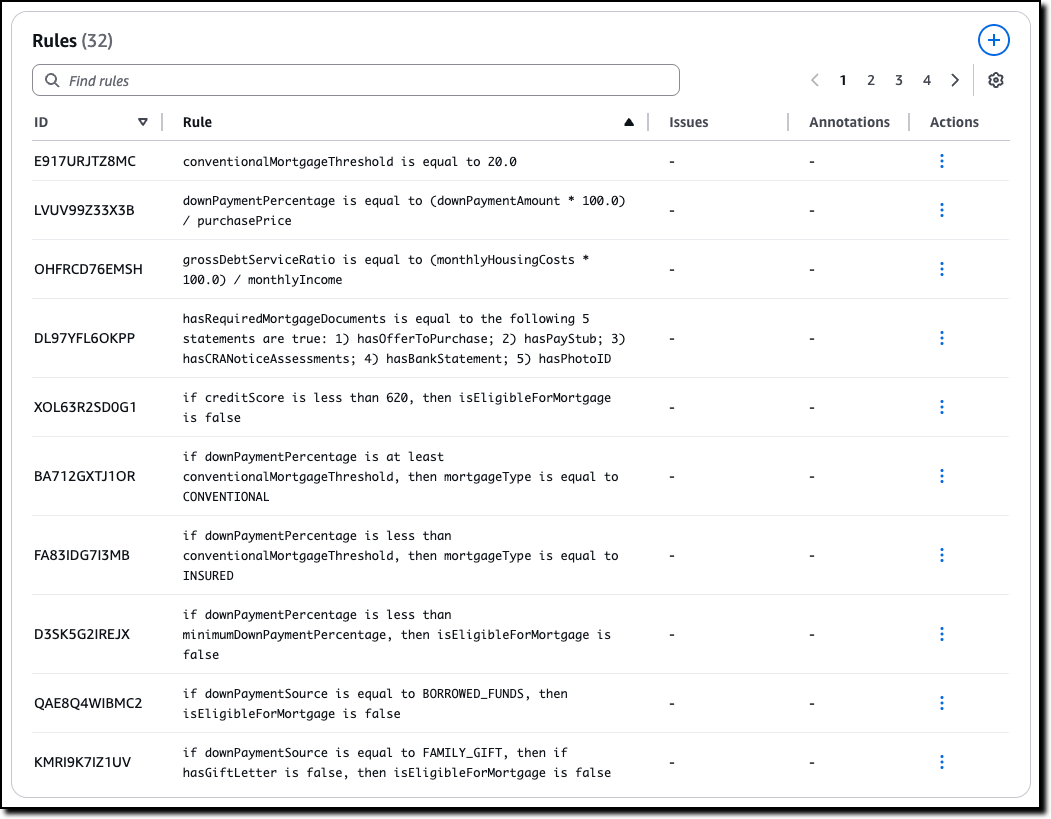
The Rules describe how variables in the policy are related and are used when evaluating the generated content. For example, in this case, which are the thresholds to apply and how some of the decisions are taken. For traceability, each rule has its own unique ID.

Console screenshot.

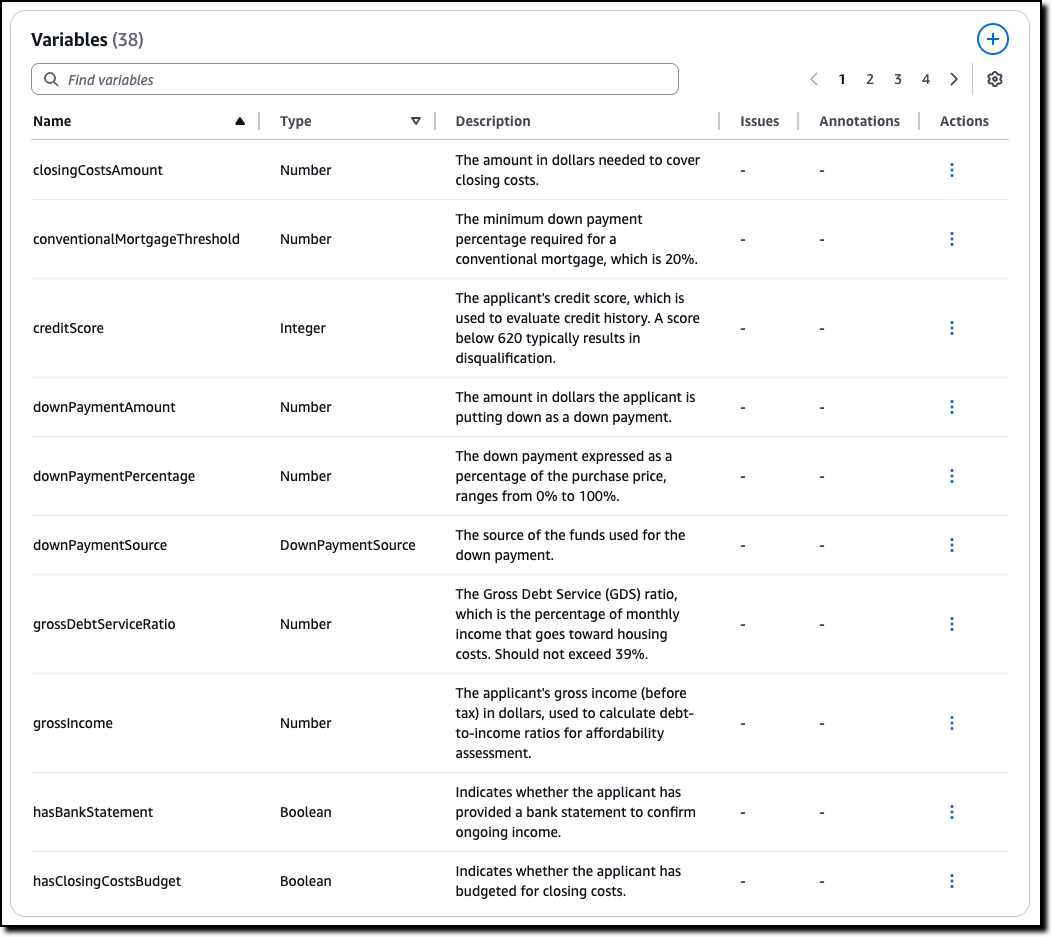
The Variables represent the main concepts at play in the original natural language documents. Each variable is involved in one or more rules. Variables allow complex structures to be easier to understand. For this scenario, some of the rules need to look at the down payment or at the credit score.

Console screenshot.

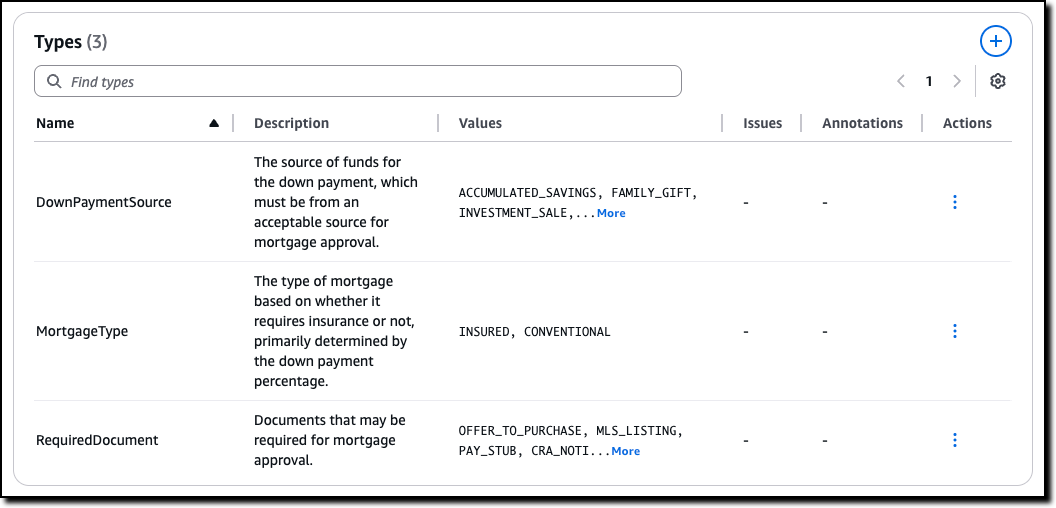
Custom Types are created for variables that are neither boolean nor numeric. For example, for variables that can only assume a limited number of values. In this case, there are two type of mortgage described in the policy, insured and conventional.

Console screenshot.

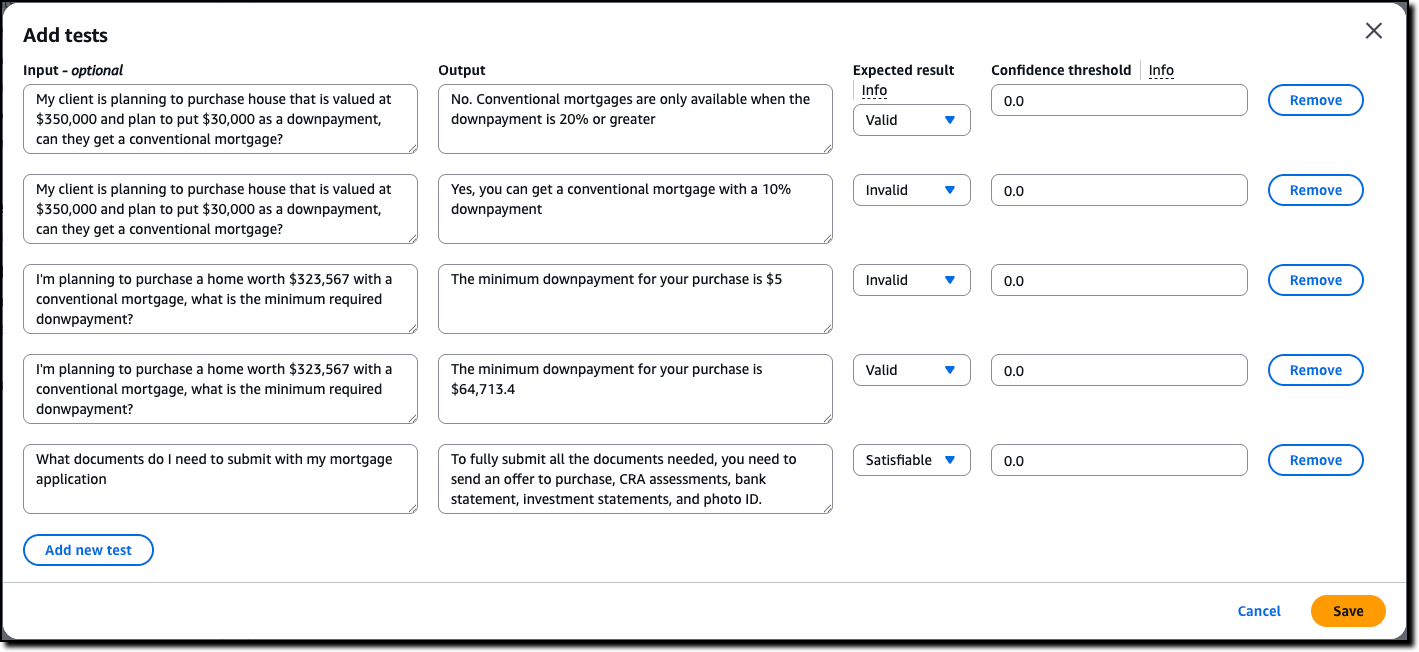
Now we can assess the quality of the initial Automated Reasoning policy through testing. I choose Tests from the dropdown. Here I can manually enter a test, consisting of input (optional) and output, such as a question and its possible answer from the interaction of a customer with the AI assistant. I then set the expected result from the Automated Reasoning check. The expected result can be valid (the answer is correct), invalid (the answer is not correct), or satisfiable (the answer could be true or false depending on specific assumptions). I can also assign a confidence threshold for the translation of the query/content pair from natural language to logic.

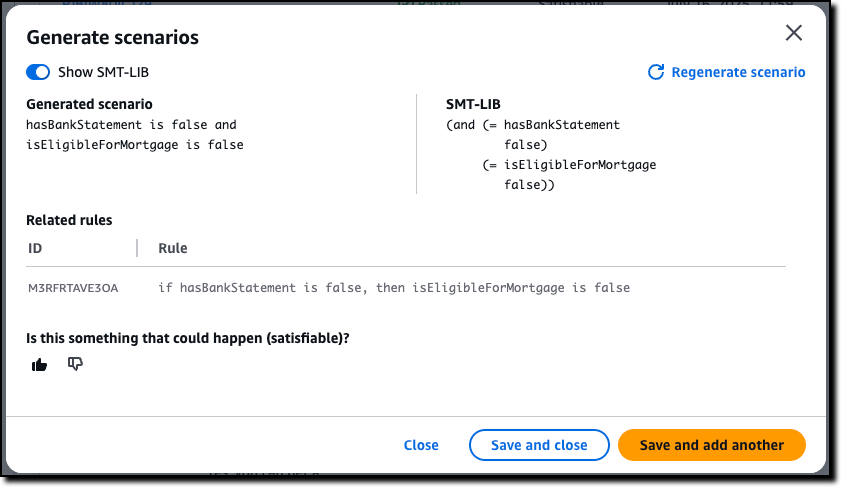
Before I enter tests manually, I use the option to automatically generate a scenario from the definitions. This is the easiest way to validate a policy and (unless you’re an expert in logic) should be the first step after the creation of the policy.

For each generated scenario, I provide an expected validation to say if it is something that can happen (satisfiable) or not (invalid). If not, I can add an annotation that can then be used to update the definitions. For a more advanced understanding of the generated scenario, I can show the formal logic representation of a test using SMT-LIB syntax.

Console screenshot.

After using the generate scenario option, I enter a few tests manually. For these tests, I set different expected results: some are valid, because they follow the policy, some are invalid, because they flout the policy, and some are satisfiable, because their result depends on specific assumptions.

Console screenshot.

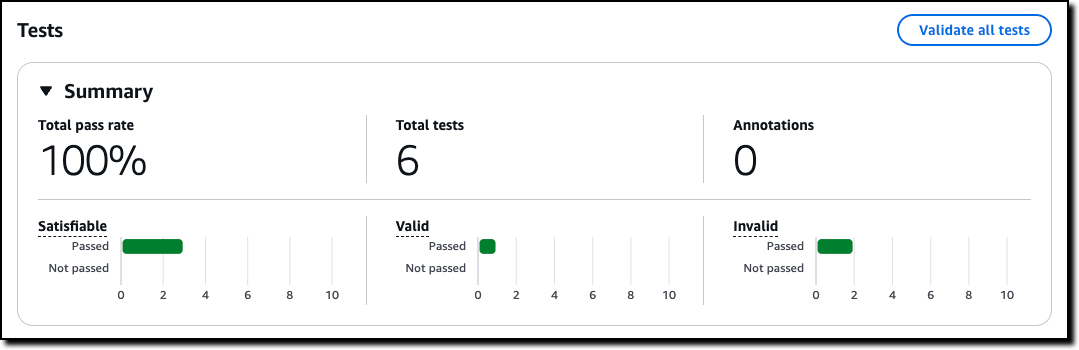
Then, I choose Validate all tests to see the results. All tests passed in this case. Now, when I update the policy, I can use these tests to validate that the changes didn’t introduce errors.

Console screenshot.

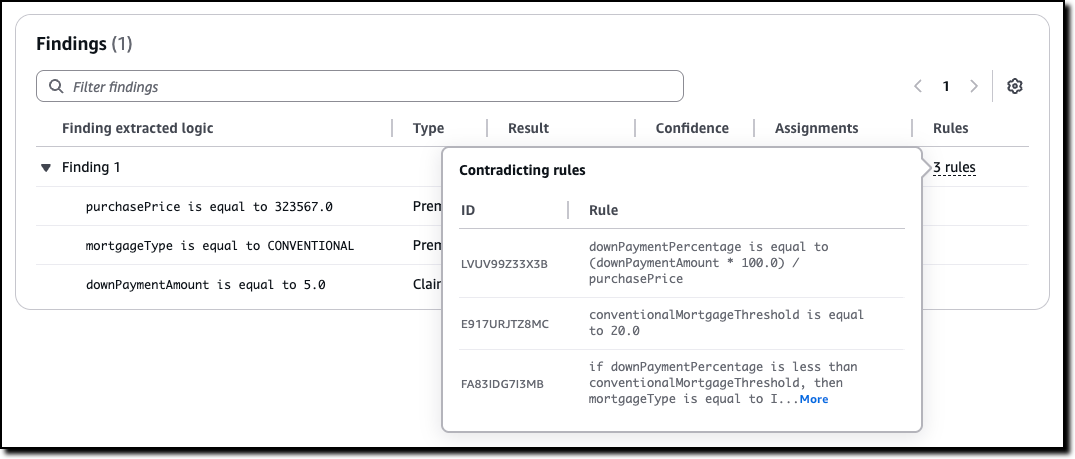
For each test, I can look at the findings. If a test doesn’t pass, I can look at the rules that created the contradiction that made the test fail and go against the expected result. Using this information, I can understand if I should add an annotation, to improve the policy, or correct the test.

Console screenshot.

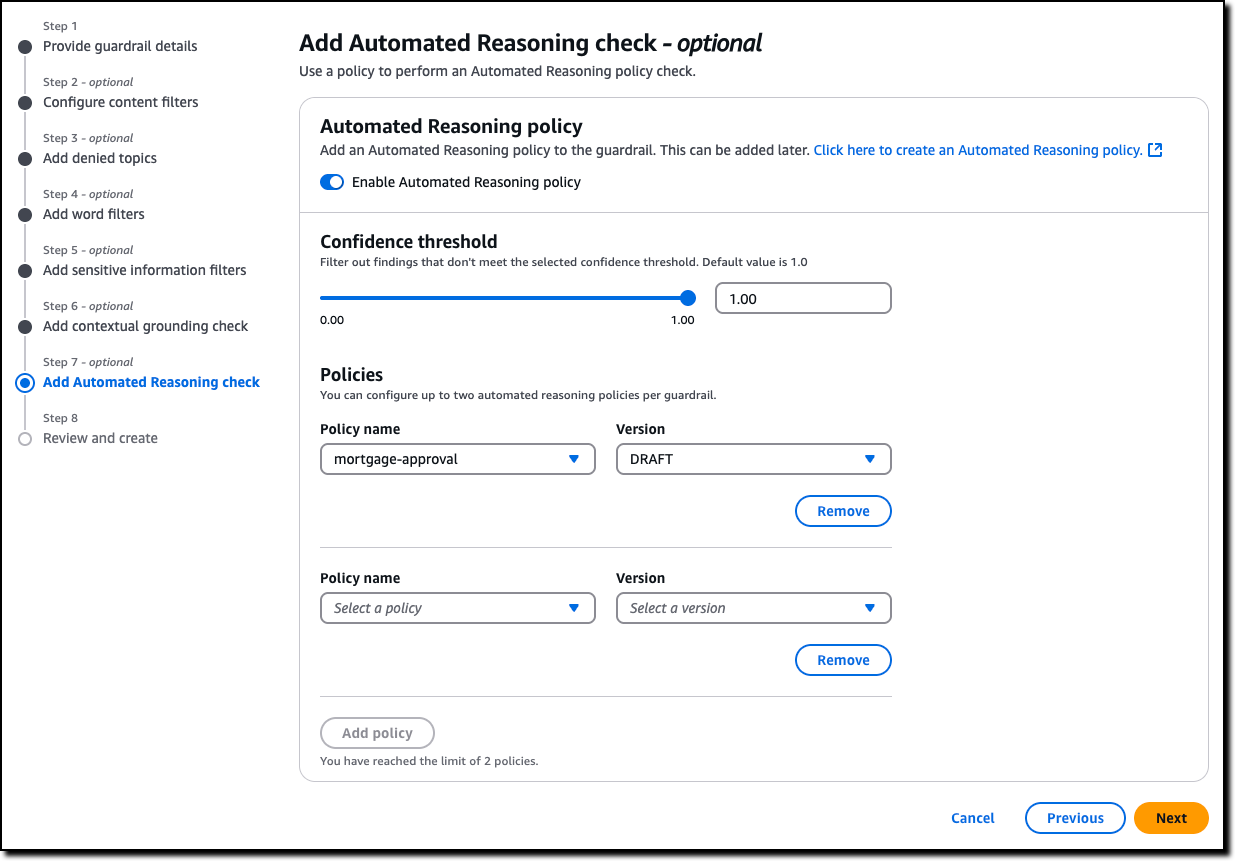
Now that I’m satisfied with the tests, I can create a new Amazon Bedrock guardrail (or update an existing one) to use up to two Automated Reasoning policies to check the validity of the responses of the AI assistant. All six policies offered by Guardrails are modular, and can be used together or separately. For example, Automated Reasoning checks can be used with other safeguards such as content filtering and contextual grounding checks. The guardrail can be applied to models served by Amazon Bedrock or with any third-party model (such as OpenAI and Google Gemini) via the ApplyGuardrail API. I can also use the guardrail with an agent framework such as Strands Agents, including agents deployed using Amazon Bedrock AgentCore.

Console screenshot.

Now that we saw how to set up a policy, let’s look at how Automated Reasoning checks are used in practice.

Customer case study – Utility outage management systems
When the lights go out, every minute counts. That’s why utility companies are turning to AI solutions to improve their outage management systems. We collaborated on a solution in this space together with PwC. Using Automated Reasoning checks, utilities can streamline operations through:

  • Automated protocol generation – Creates standardized procedures that meet regulatory requirements
  • Real-time plan validation – Ensures response plans comply with established policies
  • Structured workflow creation – Develops severity-based workflows with defined response targets

At its core, this solution combines intelligent policy management with optimized response protocols. Automated Reasoning checks are used to assess AI-generated responses. When a response is found to be invalid or satisfiable, the result of the Automated Reasoning check is used to rewrite or enhance the answer.

This approach demonstrates how AI can transform traditional utility operations, making them more efficient, reliable, and responsive to customer needs. By combining mathematical precision with practical requirements, this solution sets a new standard for outage management in the utility sector. The result is faster response times, improved accuracy, and better outcomes for both utilities and their customers.

In the words of Matt Wood, PwC’s Global and US Commercial Technology and Innovation Officer:

“At PwC, we’re helping clients move from AI pilot to production with confidence—especially in highly regulated industries where the cost of a misstep is measured in more than dollars. Our collaboration with AWS on Automated Reasoning checks is a breakthrough in responsible AI: mathematically assessed safeguards, now embedded directly into Amazon Bedrock Guardrails. We’re proud to be AWS’s launch collaborator, bringing this innovation to life across sectors like pharma, utilities, and cloud compliance—where trust isn’t a feature, it’s a requirement.”

Things to know
Automated Reasoning checks in Amazon Bedrock Guardrails is generally available today in the following AWS Regions: US East (Ohio, N. Virginia), US West (Oregon), and Europe (Frankfurt, Ireland, Paris).

With Automated Reasoning checks, you pay based on the amount of text processed. For more information, see Amazon Bedrock pricing.

To learn more, and build secure and safe AI applications, see the technical documentation and the GitHub code samples. Follow this link for direct access to the Amazon Bedrock console.

The videos in this playlist include an introduction to Automated Reasoning checks, a deep dive presentation, and hands-on tutorials to create, test, and refine a policy.

Danilo

A kbuild and kconfig maintainer change

Post Syndicated from corbet original https://lwn.net/Articles/1032722/

For eight years, Masahiro Yamada has been the sole maintainer of the
kernel’s build and configuration systems — two complex pieces of
infrastructure that many people interact with, but few truly understand.
Yamada has just stepped
down from that position
. Maintenance of the build system will be taken
up by Nathan Chancellor and Nicolas Schier (in the “odd fixes” capacity),
while the configuration system is now entirely unmaintained.

Thanks are due to Yamada for all that work, and to Chancellor and Schier
for stepping up. Hopefully a way will be found to better support these
important subsystems in the near future.

Security updates for Wednesday

Post Syndicated from jzb original https://lwn.net/Articles/1032700/

Security updates have been issued by AlmaLinux (kernel and python3.12-setuptools), Fedora (perl-Crypt-CBC and unbound), Gentoo (FontForge, GPL Ghostscript, Mozilla Network Security Service (NSS), and PAM), Oracle (gdk-pixbuf2, jq, kernel, mod_security, ncurses, python-requests, and python3-setuptools), Red Hat (python-requests and socat), SUSE (docker, kernel-livepatch-MICRO-6-0-RT_Update_2, kernel-livepatch-MICRO-6-0-RT_Update_4, kernel-livepatch-MICRO-6-0-RT_Update_5, kernel-livepatch-MICRO-6-0-RT_Update_6, kernel-livepatch-MICRO-6-0-RT_Update_7, kernel-livepatch-MICRO-6-0_Update_2, kernel-livepatch-MICRO-6-0_Update_4, kernel-livepatch-MICRO-6-0_Update_5, kernel-livepatch-MICRO-6-0_Update_6, kubeshark-cli, libgcrypt, pam-config, perl, python-requests, python311, and python313), and Ubuntu (linux-raspi).

Opening the box: Tools to teach young people about AI

Post Syndicated from Bonnie Sheppard original https://www.raspberrypi.org/blog/opening-the-box-tools-to-teach-young-people-about-ai/

New research by the Alan Turing Institute, published in June, shows that in the UK nearly one in four children aged 8 to 12 is using artificial intelligence (AI) tools like ChatGPT. With learners exploring these tools at such young ages, it’s more urgent than ever to develop teaching resources that help them understand how AI works.

One of the biggest challenges with AI is that it’s hard to tell how these tools function. With a chatbot, you enter a prompt and the tool returns a response, but what happens in between is invisible. For educators, that’s a problem: how can we help young people become thoughtful, creative users of AI tools if the technology feels like a closed box?

In our May research seminar, we welcomed Matti Tedre and Henriikka Vartiainen from the University of Eastern Finland. They’ve been working on how to teach about AI for years and were frustrated with existing educational platforms: many of these are either too complex, raise privacy concerns, or rely on coding skills that not all students (or teachers) have. In response, they created an award-winning, classroom-friendly tool designed to make AI technology more transparent and more hands-on.

A practical way to teach AI in schools

Matti and Henriikka began by discussing the unique challenges of teaching young learners about AI technology. Many students start with “folk theories”, for example, thinking that computers understand language like humans do. These misconceptions can be surprisingly hard to shake.

They also pointed out broader issues:

  • The abstract nature of AI means there are very few research-based approaches to teaching it effectively
  • Mastery of AI concepts requires sustained practice and curricular change, not just a few one-off interventions
  • In countries like Finland, where programming isn’t part of the curriculum, any teaching tool must be no-code to be accessible

To address these challenges, Matti and Henriikka have spent three years co-designing tools and approaches with local schools, teachers, and over 200 students. Their approach is grounded in educational theory and a set of core AI learning principles:

  • No-code for inclusivity: Removing the need for programming lowers the barrier to entry for both teachers and students
  • Learner-centred co-design: Every part of the experience is developed in collaboration with schools to make sure it’s engaging and relevant
  • Working with personal data: Learners create and work with their own data sets, which makes the experience more engaging and personally relevant
  • Integration with school subjects: Integrating AI concepts into other subjects helps to make the uses of AI tools more concrete for learners
  • Focus on specific applications: Rather than teaching about generic ‘AI’, the focus is on specific and understandable applications, such as facial recognition
  • Hands-on experimentation: Practical projects help students understand tricky ideas like bias, fairness, and social impact
  • Collaborative learning: Working together helps students reflect, question, and learn from each other

GenAI Teachable Machine: Opening the box

Frustrated by existing platforms that require programming skills, raise privacy concerns, or don’t allow collaboration, Matti and Henriikka’s team developed GenAI Teachable Machine: a no-code, browser-based tool designed to make key AI concepts tangible. In the central research study, the team used the tool with Finnish students in grade 4–7 (10 to 14 years of age). It’s a great introductory tool that could also be used with younger and older students.

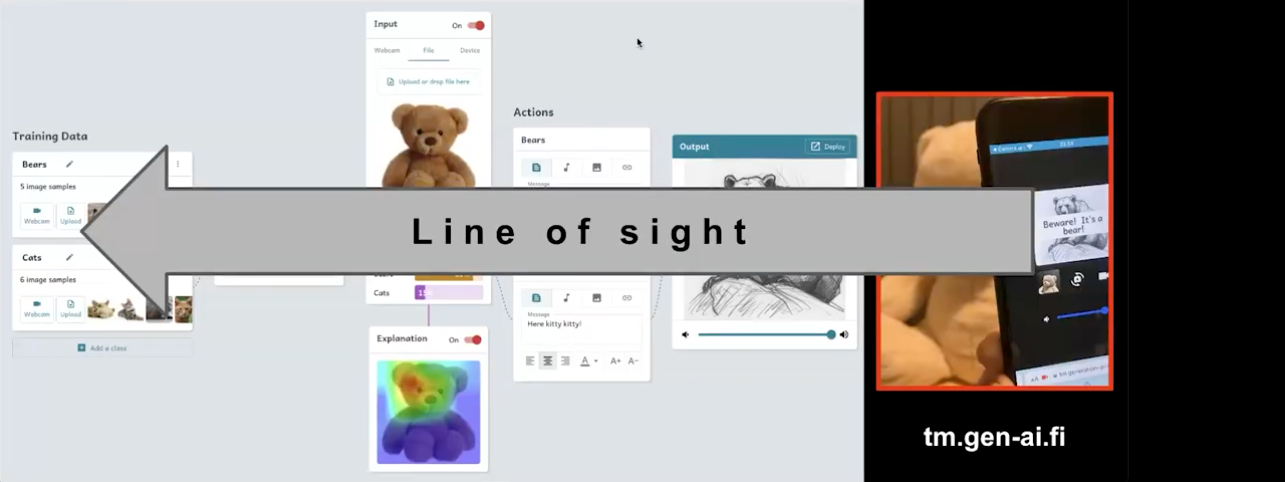
GenAI Teachable Machine is freely available online and maintains a “line of sight”: All important steps are visible to the learner.
GenAI Teachable Machine is freely available online and maintains a “line of sight”: All important steps are visible to the learner

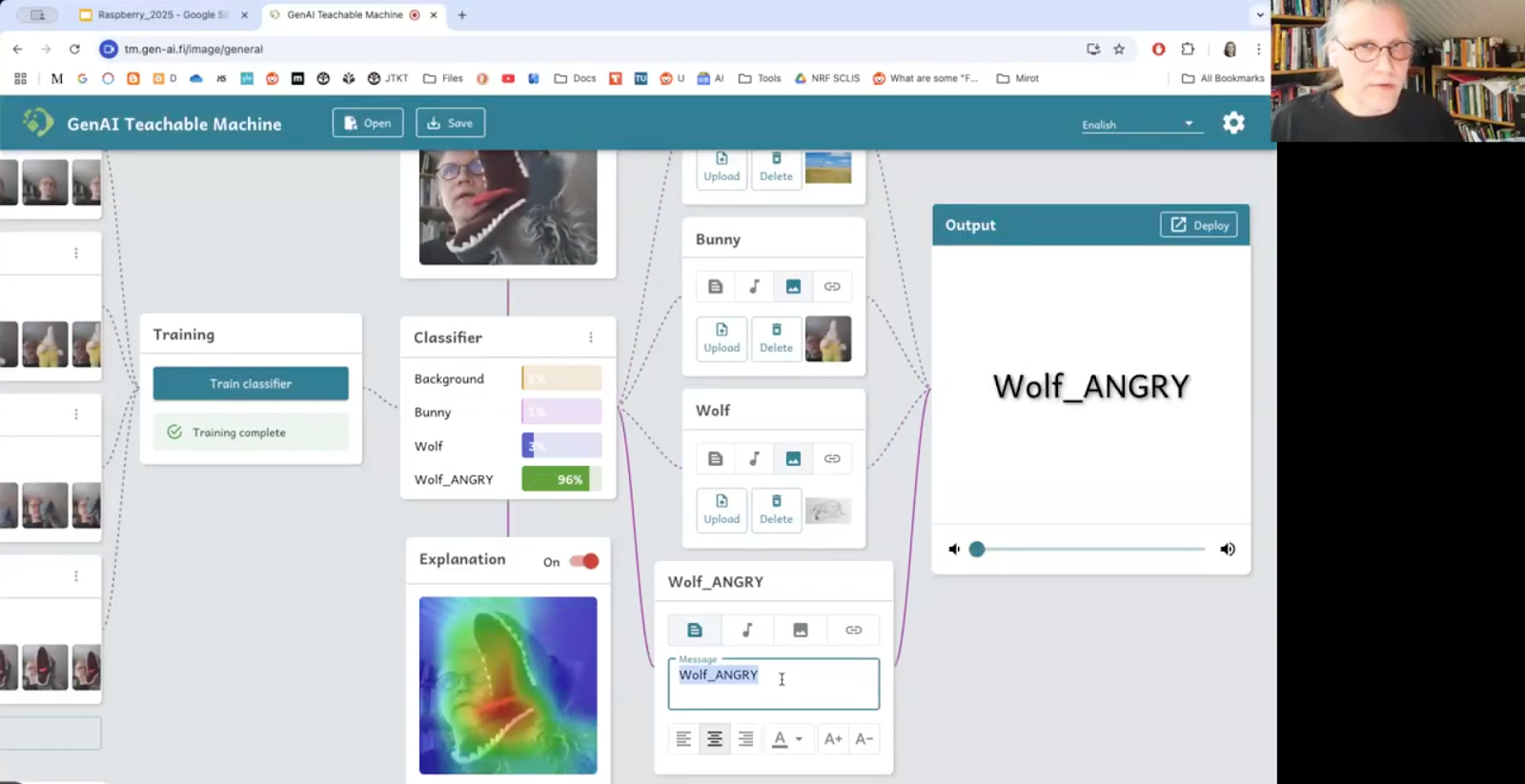
Matti demonstrated how the tool addresses their core AI learning principles with a simple, creative project. Using hand puppets, he trained a model to recognise four distinct classes: a background, a bunny, a calm wolf, and an angry wolf. For each class, he assigned a specific action: a sound, an image, or both. This hands-on process gives students a direct line of sight from the data they might create (visuals of hand puppets) to the final behaviour of the model (outputted sounds and images). They learn about classifiers, training, and confidence levels not as abstract definitions, but as creative tools they can control.

Matti Tedre demonstrating a bunny and wolf recognition model.
Matti Tedre demonstrating a bunny and wolf recognition model

But the learning really starts when things don’t work as expected. Students can easily open their models on their phones with an automatically created QR code and then move around the classroom to test their models. At this point, they quickly notice how fragile AI technology can be. For example, in the case of a simple recognition model trained on specific colours or features, with a change of lighting or a different shirt, the model might fail. These “failures” turn into powerful lessons. For instance, a face-recognition app trained mostly on students with blonde hair might not work well for someone with brown hair — sparking immediate conversations about bias. As Matti put it, students very quickly start asking deep questions. 

In a computing classroom, two girls concentrate on their programming task.

GenAI Teachable Machine also allows students to apply their AI models to the physical world. By connecting to a simple, low-cost robotics kit, students can use their models to control motors, lights, and other actuators. This step into the physical world teaches fundamental concepts that are difficult to grasp in a purely virtual environment. Students learn about causality, as their model’s classifications trigger real, physical actions. They also learn about the need for a world model — an understanding of how the physical world works — and see that they must take responsibility for what happens when their abstract models have real-world consequences.

Examples of students’ robot creations.
Examples of students’ robot creations

By combining a no-code platform with practical, well-designed learning experiences, Matti, Henriikka, and their team are showing what AI education can look like: hands-on, accessible, and grounded in real understanding. Their work is helping students see inside the box, and giving them the tools to think critically about the AI technologies that are becoming part of their everyday lives.

Find out more

If you’re an educator interested in including the topic of AI in your teaching, you can try GenAI Teachable Machine on its official website.

You may also be interested in our own Experience AI resources, which are designed to help you and your learners navigate the fast-moving world of AI and machine learning technologies.

Join us at our next seminar

In September, Matti and his team are returning to discuss other ways to teach young people about AI technologies.

To sign up and take part in the Matti’s seminar on Tues 9 Sept at 17:00–18:30 BST, click the button below. We’ll then send you information about joining. We hope to see you there.

The schedule of our upcoming seminars is online. You can catch up on past seminars on our previous seminars page.

The post Opening the box: Tools to teach young people about AI appeared first on Raspberry Pi Foundation.

OpenAI open weight models now available on AWS

Post Syndicated from Danilo Poccia original https://aws.amazon.com/blogs/aws/openai-open-weight-models-now-available-on-aws/

AWS is committed to bringing you the most advanced foundation models (FMs) in the industry, continuously expanding our selection to include groundbreaking models from leading AI innovators so that you always have access to the latest advancements to drive your business forward.

Today, I am happy to announce the availability of two new OpenAI models with open weights in Amazon Bedrock and Amazon SageMaker JumpStart. OpenAI gpt-oss-120b and gpt-oss-20b models are designed for text generation and reasoning tasks, offering developers and organizations new options to build AI applications with complete control over their infrastructure and data.

These open weight models excel at coding, scientific analysis, and mathematical reasoning, with performance comparable to leading alternatives. Both models support a 128K context window and provide adjustable reasoning levels (low/medium/high) to match your specific use case requirements. The models support external tools to enhance their capabilities and can be used in an agentic workflow, for example, using a framework like Strands Agents.

With Amazon Bedrock and Amazon SageMaker JumpStart, AWS gives you the freedom to innovate with access to hundreds of FMs from leading AI companies, including OpenAI open weight models. With our comprehensive selection of models, you can match your AI workloads to the perfect model every time.

Through Amazon Bedrock, you can seamlessly experiment with different models, mix and match capabilities, and switch between providers without rewriting code—turning model choice into a strategic advantage that helps you continuously evolve your AI strategy as new innovations emerge. At launch, these new models are available in Bedrock via an OpenAI compatible endpoint. You can point the OpenAI SDK to this endpoint or use the Bedrock InvokeModel and Converse API.

With SageMaker JumpStart, you can quickly evaluate, compare, and customize models for your use case. You can then deploy the original or the customized model in production with the SageMaker AI console or using the SageMaker Python SDK.

Let’s see how these work in practice.

Getting started with OpenAI open weight models in Amazon Bedrock
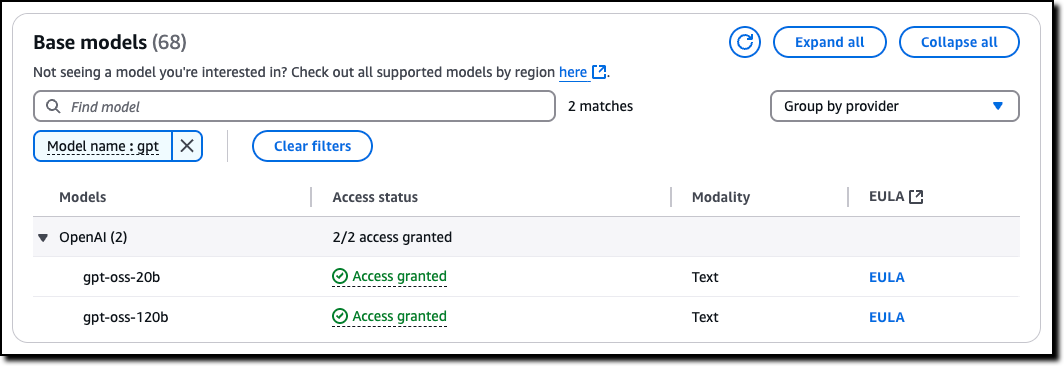
In the Amazon Bedrock console, I choose Model access from the Configure and learn section of the navigation pane. Then, I navigate to the two listed OpenAI models on this page and request access.

Console screenshot

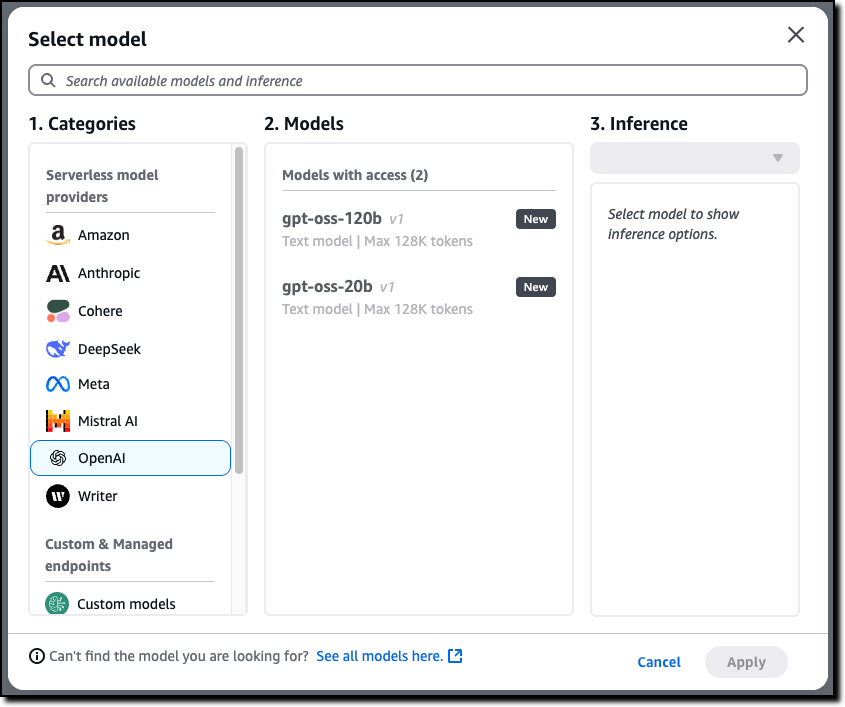
Now that I have access, I use the Chat/Test playground to test and evaluate the models. I select OpenAI as the category and then the gpt-oss-120b model.

Console screenshot

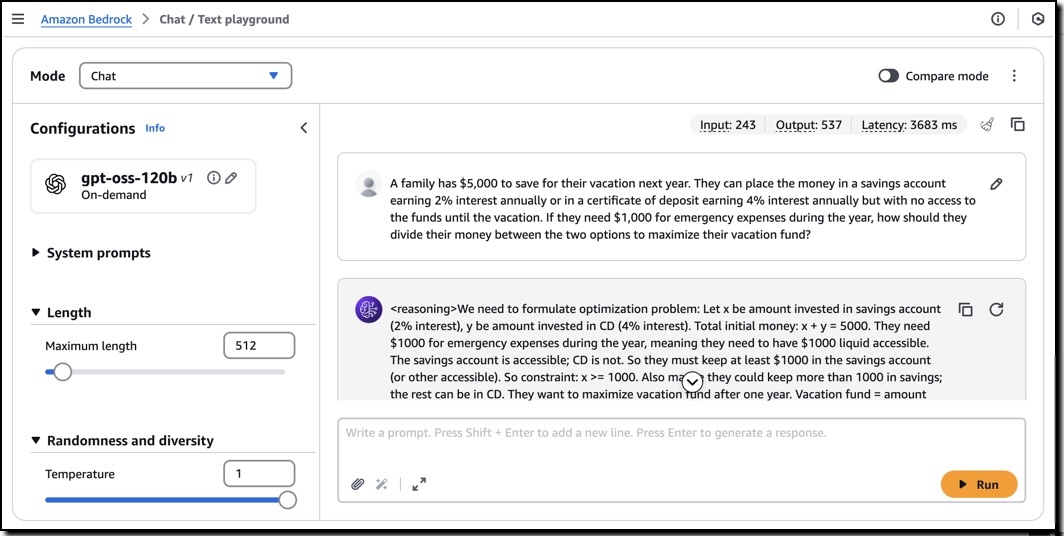
Using this model, I run the following sample prompt:

A family has $5,000 to save for their vacation next year. They can place the money in a savings account earning 2% interest annually or in a certificate of deposit earning 4% interest annually but with no access to the funds until the vacation. If they need $1,000 for emergency expenses during the year, how should they divide their money between the two options to maximize their vacation fund?

This prompt generates an output that includes the chain of thought used to produce the result.

I can use these models with the OpenAI SDK by configuring the API endpoint (base URL) and using an Amazon Bedrock API key for authentication. For example, I set this environment variables to use the US West (Oregon) AWS Region endpoint (us-west-2) and my Amazon Bedrock API key:

export OPENAI_API_KEY="<my-bedrock-api-key>"
export OPENAI_BASE_URL="https://bedrock-runtime.us-west-2.amazonaws.com/openai/v1"

Now I invoke the model using the OpenAI Python SDK.

client = OpenAI()

response = client.chat.completion.create(
    messages=[{
        "role": "user",
        "content": "Hello, how are you?"
    }],
    model="openai.gpt-oss-120b-1:0",
    stream=True
)

for item in response:
    print(item)

To build an AI agent, I can choose any framework that supports the Amazon Bedrock API or the OpenAI API. For example, here’s the starting code for Strands Agents using the Amazon Bedrock API:

from strands import Agent
from strands.models import BedrockModel
from strands_tools import calculator

model = BedrockModel(
    model_id="openai.gpt-oss-120b-1:0"
)
agent = Agent(
    model=model,
    tools=[calculator]
)

agent("Tell me the square root of 42 ^ 3")

I save the code (app.py file), install the dependencies, and run the agent locally:

pip install strands-agents strands-agents-tools
python app.py

When I am satisfied with the agent, I can deploy in production using the capabilities offered by Amazon Bedrock AgentCore, including a fully managed serverless runtime and memory and identity management.

Getting started with OpenAI open weight models in Amazon SageMaker JumpStart
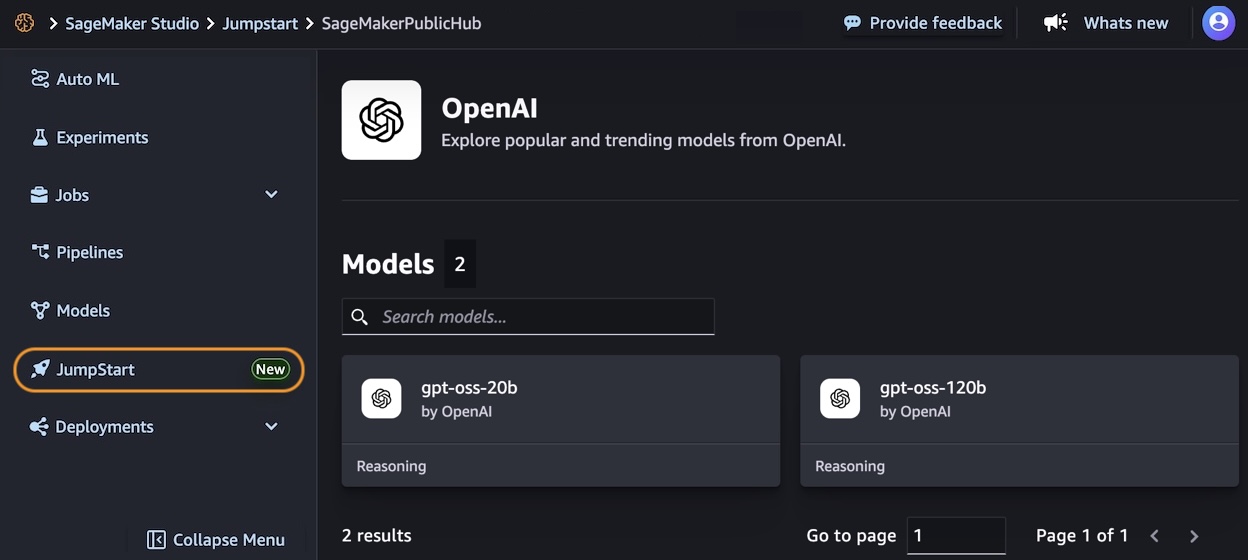
In the Amazon SageMaker AI console, you can use OpenAI open weight models in the SageMaker Studio. The first time I do this, I need to set up a SageMaker domain. There are options to set it up for a single user (simpler) or an organization. For these tests, I use a single user setup.

In the SageMaker JumpStart model view, I have access to a detailed description of the gpt-oss-120b or gpt-oss-20b model.

I choose the gpt-oss-20b model and then deploy the model. In the next steps, I select the instance type and the initial instance count. After a few minutes, the deployment creates an endpoint that I can then invoke in SageMaker Studio and using any AWS SDKs.

To learn more, visit GPT OSS models from OpenAI are now available on SageMaker JumpStart in the AWS Artificial Intelligence Blog.

Things to know
The new OpenAI open weight models are now available in Amazon Bedrock in the US West (Oregon) AWS Region, while Amazon SageMaker JumpStart supports these models in US East (Ohio, N. Virginia) and Asia Pacific (Mumbai, Tokyo).

Each model comes equipped with full chain-of-thought output capabilities, providing you with detailed visibility into the model’s reasoning process. This transparency is particularly valuable for applications requiring high levels of interpretability and validation. These models give you the freedom to modify, adapt, and customize them to your specific needs. This flexibility allows you to fine-tune the models for your unique use cases, integrate them into your existing workflows, and even build upon them to create new, specialized models tailored to your industry or application.

Security and safety are built into the core of these models, with comprehensive evaluation processes and safety measures in place. The models maintain compatibility with the standard GPT-4 tokenizer.

Both models can be used in your preferred environment, whether that’s through the serverless experience of Amazon Bedrock or the extensive machine learning (ML) development capabilities of SageMaker JumpStart. For information about the costs associated with using these models and services, visit the Amazon Bedrock pricing and Amazon SageMaker AI pricing pages.

To learn more, see the parameters for the models and the chat completions API in the Amazon Bedrock documentation.

Get started today with OpenAI open weight models on AWS in the Amazon Bedrock console or in Amazon SageMaker AI console.

Danilo

The Semiconductor Industry and Regulatory Compliance

Post Syndicated from Bruce Schneier original https://www.schneier.com/blog/archives/2025/08/its-time-for-the-semiconductor-industry-to-step-up.html

Earlier this week, the Trump administration narrowed export controls on advanced semiconductors ahead of US-China trade negotiations. The administration is increasingly relying on export licenses to allow American semiconductor firms to sell their products to Chinese customers, while keeping the most powerful of them out of the hands of our military adversaries. These are the chips that power the artificial intelligence research fueling China’s technological rise, as well as the advanced military equipment underpinning Russia’s invasion of Ukraine.

The US government relies on private-sector firms to implement those export controls. It’s not working. US-manufactured semiconductors have been found in Russian weapons. And China is skirting American export controls to accelerate AI research and development, with the explicit goal of enhancing its military capabilities.

American semiconductor firms are unwilling or unable to restrict the flow of semiconductors. Instead of investing in effective compliance mechanisms, these firms have consistently prioritized their bottom lines—a rational decision, given the fundamentally risky nature of the semiconductor industry.

We can’t afford to wait for semiconductor firms to catch up gradually. To create a robust regulatory environment in the semiconductor industry, both the US government and chip companies must take clear and decisive actions today and consistently over time.

Consider the financial services industry. Those companies are also heavily regulated, implementing US government regulations ranging from international sanctions to anti-money laundering. For decades, these companies have invested heavily in compliance technology. Large banks maintain teams of compliance employees, often numbering in the thousands.

The companies understand that by entering the financial services industry, they assume the responsibility to verify their customers’ identities and activities, refuse services to those engaged in criminal activity, and report certain activities to the authorities. They take these obligations seriously because they know they will face massive fines when they fail. Across the financial sector, the Securities and Exchange Commission imposed a whopping $6.4 billion in penalties in 2022. For example, TD Bank recently paid almost $2 billion in penalties because of its ineffective anti-money laundering efforts

An executive order issued earlier this year applied a similar regulatory model to potential “know your customer” obligations for certain cloud service providers.

If Trump’s new license-focused export controls are to be effective, the administration must increase the penalties for noncompliance. The Commerce Department’s Bureau of Industry and Security (BIS) needs to more aggressively enforce its regulations by sharply increasing penalties for export control violations.

BIS has been working to improve enforcement, as evidenced by this week’s news of a $95 million penalty against Cadence Design Systems for violating export controls on its chip design technology. Unfortunately, BIS lacks the people, technology, and funding to enforce these controls across the board.

The Trump administration should also use its bully pulpit, publicly naming companies that break the rules and encouraging American firms and consumers to do business elsewhere. Regulatory threats and bad publicity are the only ways to force the semiconductor industry to take export control regulations seriously and invest in compliance.

With those threats in place, American semiconductor firms must accept their obligation to comply with regulations and cooperate. They need to invest in strengthening their compliance teams and conduct proactive audits of their subsidiaries, their customers, and their customers’ customers.

Firms should elevate risk and compliance voices onto their executive leadership teams, similar to the chief risk officer role found in banks. Senior leaders need to devote their time to regular progress reviews focused on meaningful, proactive compliance with export controls and other critical regulations, thereby leading their organizations to make compliance a priority.

As the world becomes increasingly dangerous and America’s adversaries become more emboldened, we need to maintain stronger control over our supply of critical semiconductors. If Russia and China are allowed unfettered access to advanced American chips for their AI efforts and military equipment, we risk losing the military advantage and our ability to deter conflicts worldwide. The geopolitical importance of semiconductors will only increase as the world becomes more dangerous and more reliant on advanced technologies—American security depends on limiting their flow.

This essay was written with Andrew Kidd and Celine Lee, and originally appeared in The National Interest.

OCSP Service Has Reached End of Life

Post Syndicated from Let's Encrypt original https://letsencrypt.org/2025/08/06/ocsp-service-has-reached-end-of-life.html

Today we turned off our Online Certificate Status Protocol (OCSP) service, as announced in December of last year. We stopped including OCSP URLs in our certificates more than 90 days ago, so all Let’s Encrypt certificates that contained OCSP URLs have now expired. Going forward, we will publish revocation information exclusively via Certificate Revocation Lists (CRLs).

We ended support for OCSP primarily because it represents a considerable risk to privacy on the Internet. When someone visits a website using a browser or other software that checks for certificate revocation via OCSP, the Certificate Authority (CA) operating the OCSP responder immediately becomes aware of which website is being visited from that visitor’s particular IP address. Even when a CA intentionally does not retain this information, as is the case with Let’s Encrypt, it could accidentally be retained or CAs could be legally compelled to collect it. CRLs do not have this issue.

We are also taking this step because keeping our CA infrastructure as simple as possible is critical for the continuity of compliance, reliability, and efficiency at Let’s Encrypt. For every year that we have existed, operating OCSP services has taken up considerable resources that can soon be better spent on other aspects of our operations. Now that we support CRLs, our OCSP service has become unnecessary.

At the height of our OCSP service’s traffic earlier this year, we handled approximately 340 billion OCSP requests per month. That’s more than 140,000 requests per second handled by our CDN, with 15,000 requests per second handled by our origin. We’d like to thank Akamai for generously donating CDN services for OCSP to Let’s Encrypt for the past ten years.

The collective thoughts of the interwebz