In this second installment of our two-part series on the construction industry, Rapid7 is looking at the specific threat ransomware poses, why the industry is particularly vulnerable, and ways in which threat actors exploit its weaknesses to great effect. You can catch up on the first part here: Initial Access, Supply Chain, and the Internet of Things.
Ransomware and the construction industry
The construction sector is increasingly vulnerable to ransomware attacks in 2025 due to its complex ecosystem and distinctive operational challenges. Construction projects typically involve a web of contractors, subcontractors, suppliers, and consultants, collaborating through shared digital platforms and exchanging sensitive documents such as blueprints, contracts, and timelines.
While essential for project delivery, this interconnectedness creates numerous digital entry points that attackers can exploit, mainly as many firms rely on outdated software and insufficient cybersecurity protocols. Adding to the challenge, construction companies often operate under tight deadlines and financial constraints, leaving little room for prolonged IT outages or data recovery efforts.
Ransomware attackers take advantage of this urgency, knowing that even short disruptions can halt entire job sites, delay multimillion-dollar projects, and damage reputations, making companies more likely to pay ransoms quickly.
Compounding the problem, many construction organizations lack dedicated cybersecurity staff and robust employee training, making them susceptible to phishing, weak passwords, and other basic attack vectors, as we talked about in part one of this series. The sector’s dependency on third-party vendors, who may have weaker security, amplifies the risk by widening the potential attack surface.
Together, these factors make it difficult for construction firms to detect, prevent, and recover from ransomware incidents, leaving the industry facing financial losses, operational chaos, legal consequences, and growing pressure to modernize its approach to digital security.
⠀
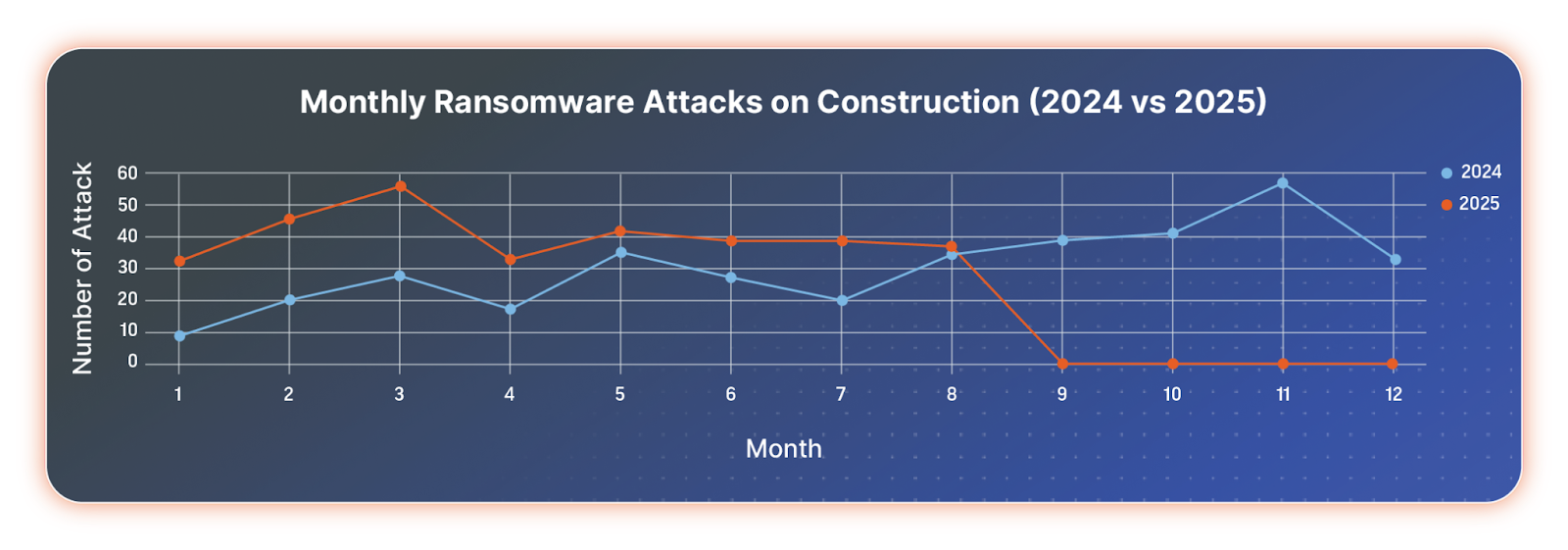
Monthly comparison of ransomware attacks against the construction industry 2024 vs. 2025
⠀
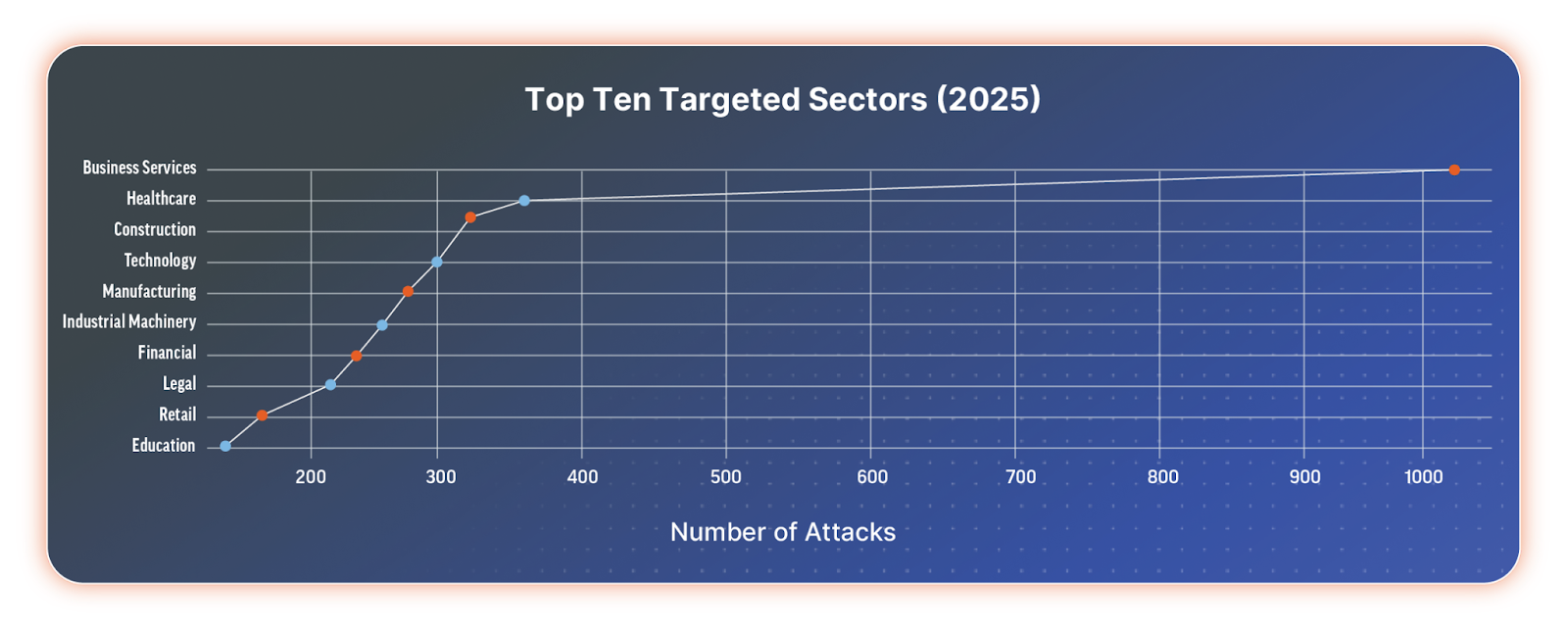
The construction industry is ranked among the top 3 most attacked sectors in 2025.
⠀
Top 10 targeted sectors in 2025
⠀
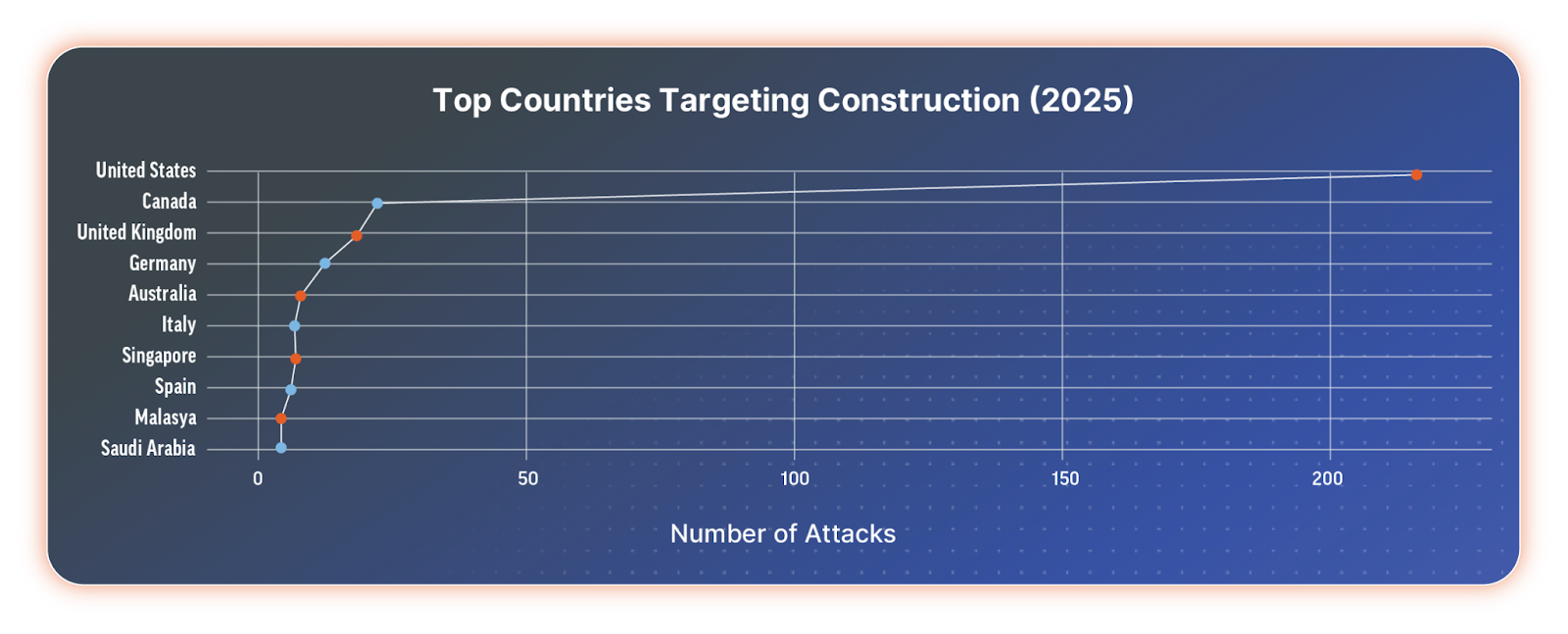
The majority of attacks are against companies in the United States, followed by Canada, the United Kingdom, and Germany.
⠀
Top 10 targeted countries in the construction industry in 2025
⠀
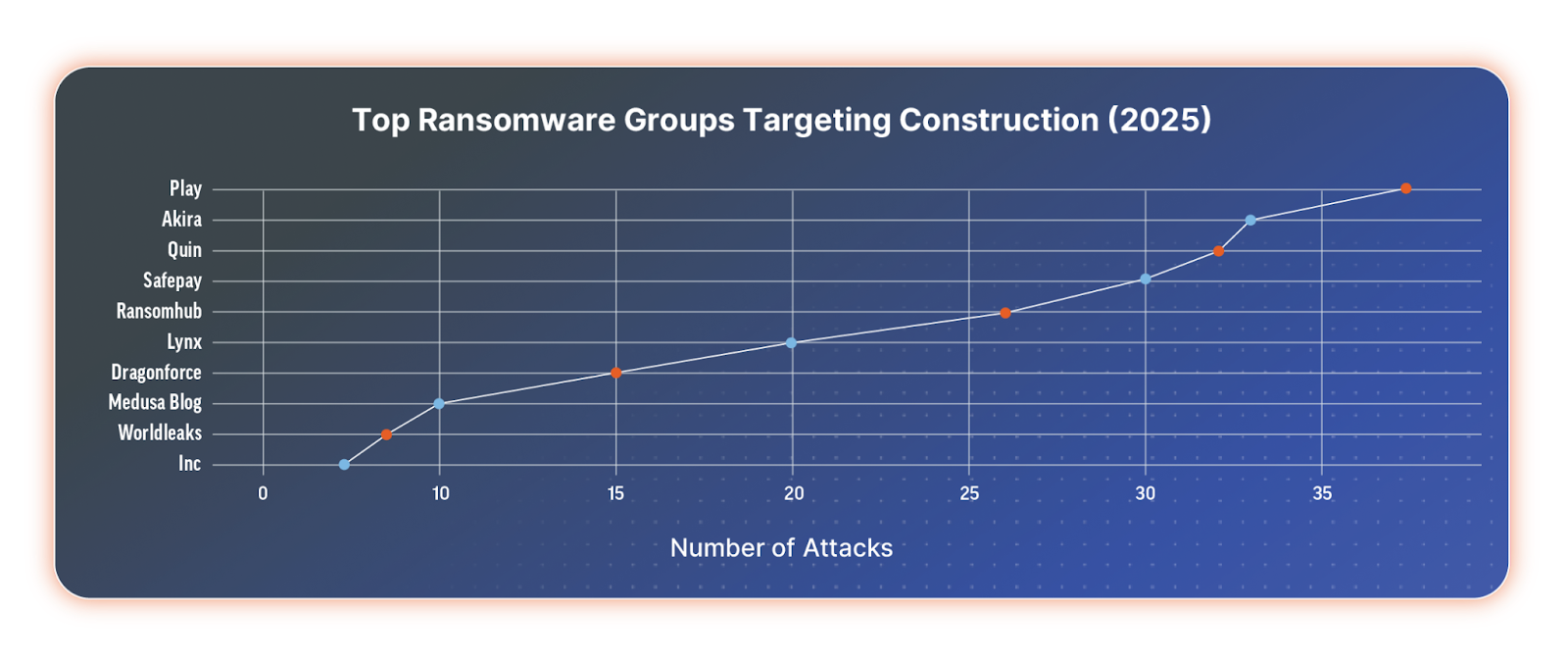
In 2025, the ransomware groups that targeted construction companies most frequently were Play, Akira, Qilin (AKA Agenda), SafePay, RansomHub, Lynx, DragonForce, Medusa, WorldLeaks, and INC Ransom. Notably, RansomHub is no longer active in its original form.
⠀
Top ransomware groups targeting the construction industry in 2025
⠀
Why the construction sector is attractive to ransomware groups
The reasons why ransomware groups have zeroed in on this sector are diverse and include the following:
High-value, time-sensitive projects
Construction projects are high-stakes endeavors, often involving multi-million (or even billion) dollar budgets and strict delivery deadlines. Even a brief disruption, whether caused by ransomware, data breaches, or system outages, can lead to costly project delays and penalties. Attackers know this, and they exploit the sector’s reliance on tight timelines to extort higher ransoms, banking on the urgency to restore operations.
Complex, interconnected supply chains
Few industries are as dependent on an intricate web of subcontractors, vendors, and service providers. Each connection in this sprawling supply chain presents a potential vulnerability. A compromised partner can serve as a gateway for attackers, enabling threats like supply chain attacks and lateral movement across multiple organizations. Securing every link is a significant challenge, especially when third-party cybersecurity practices vary widely.
Low cybersecurity maturity
While sectors like finance and healthcare have long invested in cybersecurity, many construction firms are only beginning their journey. Legacy systems, limited IT budgets, and a traditional focus on physical rather than digital risks have left gaps in defenses. As a result, attackers often find weaker security controls, outdated software, and unpatched systems, making this sector a prime target.
Accelerated digitalization and IoT adoption
Adopting cloud platforms, Building Information Modeling (BIM), IoT sensors, and smart machinery is revolutionizing project management and delivery. However, each new digital innovation adds to the attack surface. IoT devices, in particular, often lack robust security controls, providing attackers with novel entry points that are difficult to monitor and defend.
Exposure of sensitive intellectual property
Construction firms handle more than just blueprints. Proprietary architectural designs, bid documents, financial plans, and sensitive client data are all highly valuable and highly sought after by cybercriminals. The theft or exposure of this information can have devastating consequences, from reputational damage and loss of competitive advantage to implications for critical infrastructure and national security.
Commonly exploited vulnerabilities
Commonly exploited vulnerabilities by the above-mentioned ransomware groups include:
CVE-2025-31324 – The SAP NetWeaver Visual Composer file upload flaw. It enables unauthenticated threat actors to send specially crafted POST requests to the /developmentserver/metadatauploader endpoint, leading to unrestricted malicious file upload and full system compromise.
CVE-2024-21887 – The Ivanti Connect Secure and Policy Secure command injection flaw enables authenticated administrators to execute arbitrary commands on the appliances by sending specially crafted requests.
CVE-2024-21762 is a Fortinet FortiOS out-of-bounds write flaw that allows threat actors to gain super-admin privileges, bypassing the authentication mechanism, leading to remote code execution (RCE).
CVE-2024-55591 – The Fortinet FortiOS and FortiProxy authentication bypass flaw enables threat actors to remotely gain super-admin privileges by making malicious requests to the Node.js websocket module. Attackers were observed leveraging the flaw to create randomly generated admin or local users and add them to existing SSL VPN user groups or newly created ones. In addition, they add or modify firewall policies and other settings and log into the SSL VPN using these rogue accounts to allow network tunneling.
CVE-2024-40711 – The Veeam Backup and Replication deserialization flaw allows unauthenticated threat actors to initiate RCE.
CVE-2024-40766 – The SonicWall SonicOS and SSLVPN improper access control flaw. It enables unauthorized threat actors to access resources and, under certain conditions, cause firewall crashes.
What to do next
In 2025, the construction industry faces unprecedented digital opportunities and rising cyber risk. IoT, BIM, and cloud platforms have boosted efficiency but expanded attack surfaces, making firms vulnerable to ransomware, supply chain breaches, and IP theft. These risks, driven by fragmented supply chains, legacy systems, human error, and insecure devices, are systemic, not isolated. Cybersecurity must now be treated as a core pillar of project management, equal to safety, cost, and schedule, requiring board-level commitment and industry-wide collaboration.
To build resilience, firms should modernize legacy systems, secure supply chains, protect connected devices, and train all staff in cyber defense. Proactive measures like risk assessments, secure-by-design technologies, unified frameworks, and incident response playbooks must replace piecemeal defenses. By embedding security into daily operations and culture, the industry can turn cyber resilience into a competitive advantage, ensuring that innovation and protection move together to secure construction’s future.
As AI capabilities grow, we must delineate the roles that should remain exclusively human. The line seems to be between fact-based decisions and judgment-based decisions.
For example, in a medical context, if an AI was demonstrably better at reading a test result and diagnosing cancer than a human, you would take the AI in a second. You want the more accurate tool. But justice is harder because justice is inherently a human quality in a way that “Is this tumor cancerous?” is not. That’s a fact-based question. “What’s the right thing to do here?” is a human-based question.
Chess provides a useful analogy for this evolution. For most of history, humans were best. Then, in the 1990s, Deep Blue beat the best human. For a while after that, a good human paired with a good computer could beat either one alone. But a few years ago, that changed again, and now the best computer simply wins. There will be an intermediate period for many applications where the human-AI combination is optimal, but eventually, for fact-based tasks, the best AI will likely surpass both.
The enduring role for humans lies in making judgments, especially when values come into conflict. What is the proper immigration policy? There is no single “right” answer; it’s a matter of feelings, values, and what we as a society hold dear. A lot of societal governance is about resolving conflicts between people’s rights—my right to play my music versus your right to have quiet. There’s no factual answer there. We can imagine machines will help; perhaps once we humans figure out the rules, the machines can do the implementing and kick the hard cases back to us. But the fundamental value judgments will likely remain our domain.
В този епизод има много Росен Желязков специално за любителите на Росен Желязков, ако изобщо се сещате кой е този човек, разбира се. Министър–председател ни е. На самата ни държава.
На около 20 минути от центъра на Белград се намира т.нар. Novo groblje (Новото гробище), което всъщност никак не е ново, а датира от 1886 г. и все още е главното в града по размери и културно значение. Августовският следобед е изключително горещ. С нова група туристи от Италия търсим малко сянка на Бранковия мост, докато чакаме автобус 65, за да стигнем до гробището.
Застанали сме над Сава и гледаме на юг. Вляво се извисяват чудовищните мрачни небостъргачи на спорния проект Belgrade Waterfront (BW),или Beograd na vodi („Белград на водата“), насред реката изплуват самотни бетонни колони, а вдясно се вижда зелена метална арка. Едно момче пита дали това е някакъв мост. Да, отговаряме, и е една от най-старите и важни архитектурни емблеми на столицата – Савския мост. Част е от градския пейзаж от 1942 г. и е символ на съпротивата срещу нацистката окупация на Белград.
– Ремонтират ли го?
– Не, разрушават го след месеци непрекъснат отпор от група активисти, които прекараха цели дни и нощи в палатки на моста. Защото не пасва на Мордор.
Мордор наричаме пред гостите грамадната купчина черни стъкла с лого BW навсякъде – хем за безопасност, хем с презрение. Именно поради съмнителния проект на Beograd na vodi през ноември 2024 г., след години опити, Савският мост е окончателно затворен за движение и се очаква разрушаването му. На негово място властите възнамеряват да бъде построен нов, по-модерен и технологичен мост от китайска компания.
Докато пътуваме към гробището, автобусът минава покрай някакво училище. От един прозорец виси транспарант, който гласи: Ovo je zemlja za nas? Посочвам надписа на гостите, превеждам и пояснявам, че изречението „Това е страната за нас“ е цитат от Zemlja, известна песен на групата Ekatarina Velika (EKV), която е сред най-влиятелните югославски рок банди. Първият куплет започва точно така, но без въпросителния знак.
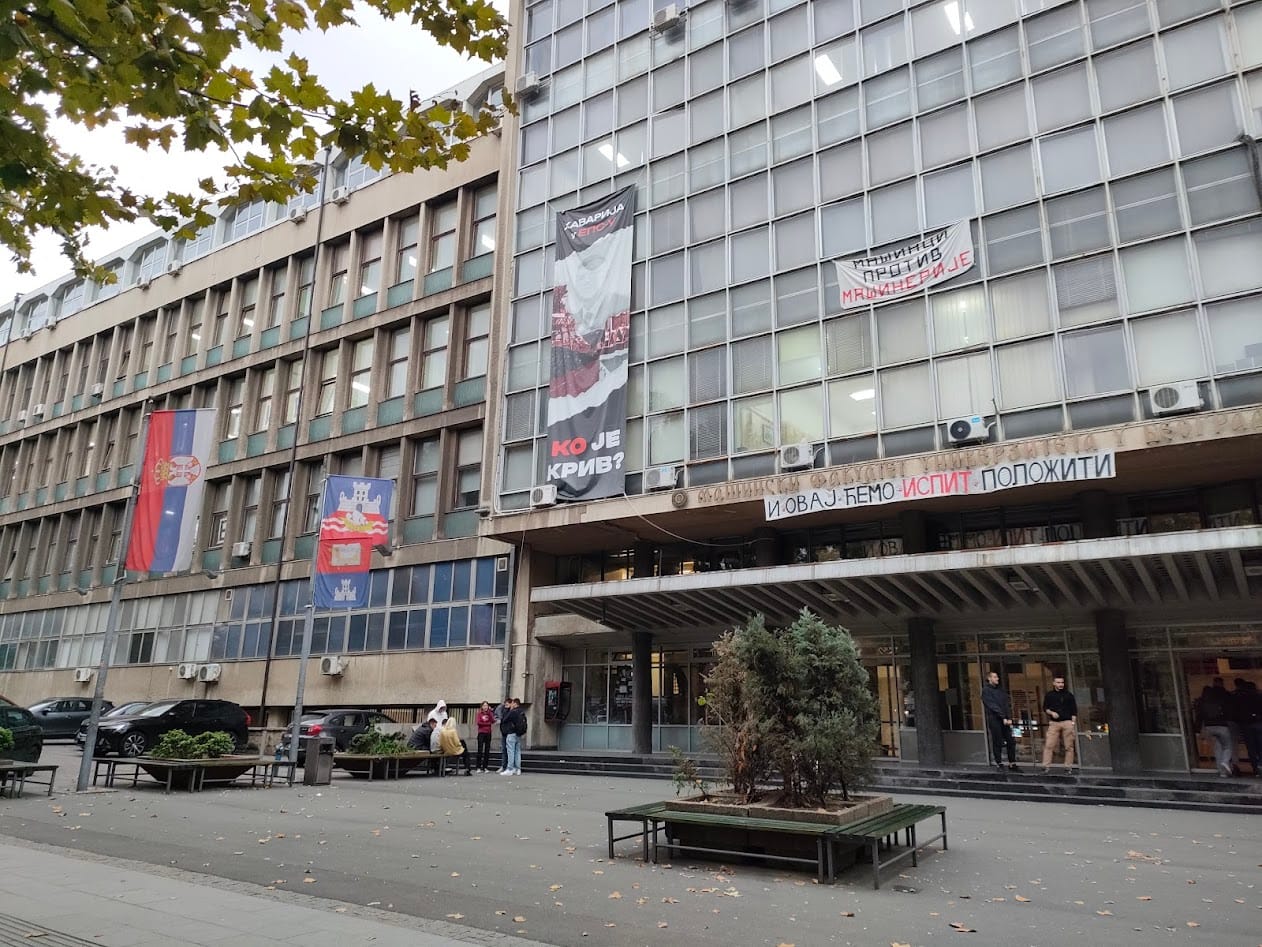
Написана е през 1987 г., когато националистическите ветрове отново задухват из късната Югославска федерация. Парчето е един вид подкана към всеки югославски гражданин. Напразно, ако имаме предвид разпадането на държавата. Или може би не съвсем. През последните месеци стихът се появява сред слоганите на сегашните протести, понякога нарочно с въпросителна, понякога нарочно с удивителна като знак за твърдо искане.
Ovo je zemlja za nas Ovo je zemlja za sve naše ljude Ovo je kuća za nas Ovo je kuća za svu našu decu
Това е страната за нас Това е страната за всички наши хора Това е домът за нас Това е домът за всички наши деца
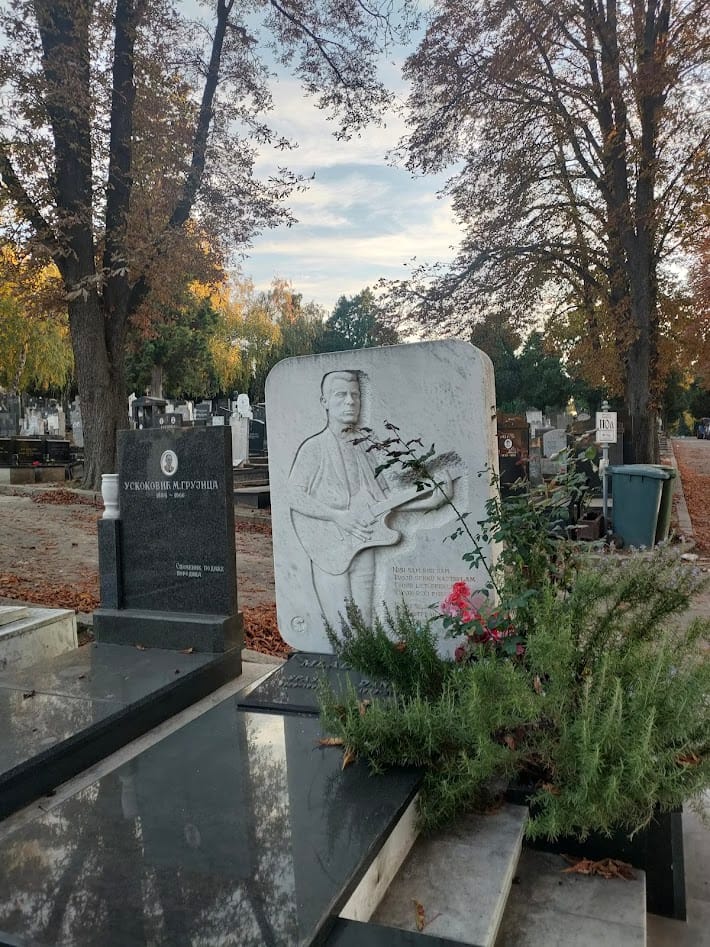
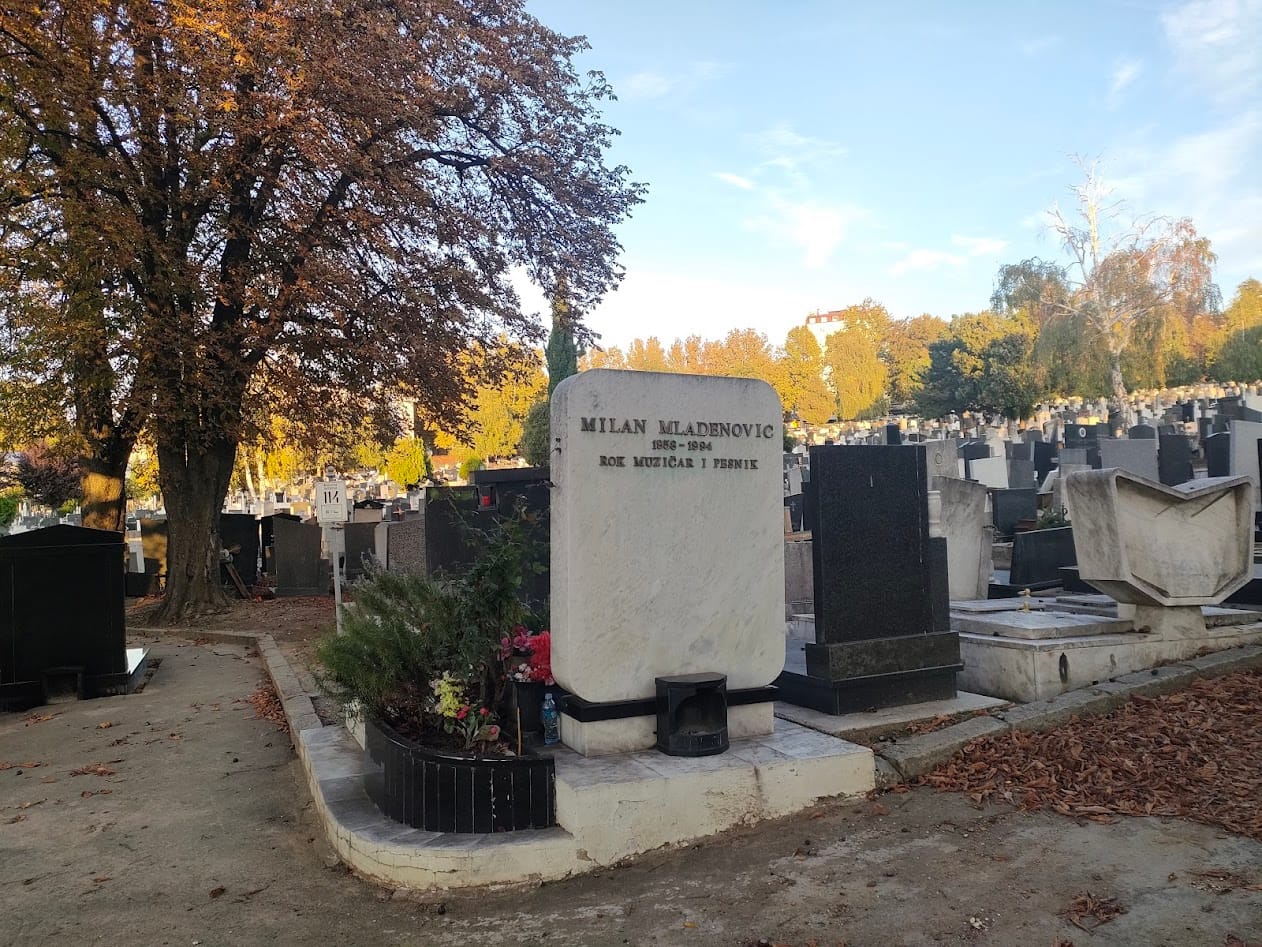
Влизаме в гробището и след като сме отдали почит на личности като Иво Андрич и Зоран Джинджич, се събираме около мраморната възпоменателна плоча на фронтмена на EKV Милан Младенович. Две години след Димитър Воев от „Нова генерация“ внезапно и трагично на 36 години умира и харизматичният лидер на Ekatarina Velika, оставяйки незаличима следа в културната среда на бивша Югославия. И точно както Димитър Воев е силно обичан дори от поколенията, родени след неговата смърт.
До средата на 90-те EKV непрекъснато се противопоставя чрез музиката си на популистките вълни и на това, което политиците все по-шумно обещават за тяхната zemlja. През 1989 г. всичко това се предусеща в албума на бандата Samo par godina za nas, а едноименната песен от него започва с потресаващо прозрение:
Moj prijatelj i ja sedimo na klupi, gledamo zvezde Slušamo vesti što su upravo stigle Kažu da imamo još samo par godina za nas
Седим с моя приятел на пейката, гледаме звездите слушаме новините, които току-що пристигат казаха, че ще имаме още само няколко години за нас
През 1992 г. Младенович и членове на други известни групи основават Rimtutituki – амбициозен антивоенен проект. Записват сингъла Slušaj ‘vamo („Слушай т’ва“) и рефренът mir, brate, mir! бързо се разнася. След като не получават разрешение от властите да изнесат планирания си концерт в Белград, се качват в ремаркето на един камион, с който обикалят улиците на града, свирят, пеят и раздават листовки, брошки и тениски против войната. Инициативата е финансово подкрепена от бившия президент Иван Стамболич. Следващият им концерт, този път разрешен, събира около 55 000 души в центъра на столицата.
Докато разказваме тези истории, по алеята зад надгробната плоча минава господин на около 60 години. Застава и ни гледа учудено – не разбира езика. Обръщаме се на сръбски към него: „Разказваме за EKV и Милан Младенович на тази група италианци, водим ги на туристическа обиколка.“ Очите на мъжа светват с тъга, ръката му посочва гроба: Baš volim njihovu muziku… („Много обичам тяхната музика…“) Аз веднага му отговарям: I mi! („И ние!“)
Отзвуци през годините
Стиховете на EKV не са единствените музикални цитати, които са се появили на протестите през последните месеци. Чуват се и се четат и откъси от песни, изпълвали улиците и площадите и при падането на президента Слободан Милошевич. Един пример е парчето Buka u modi („Шум в модата“) на Disciplina Kičme, записано през 1990 г. и бързо включено във всички манифестации срещу тогавашния режим. Енергичната мелодия добре изразява желанието за свобода и бунт, въпреки че текстът не съдържа такова пряко послание.
Далеч по-категорични са Pada vlada („Пада властта“) на Момчил Баягич – Баяга и Živeti slobodno („Да живееш свободно“) на Джордже Балашевич – и двамата култови сръбски музиканти. Първото парче е от 2003 г. и от сегашна гледна точка може да се тълкува като мантра, понеже иронично се върти почти изцяло около двете думи от заглавието.
Pada pada pada pada Šta to pada, pada vlada Već su mnoge pale vlasti Pa ćeš i ti dragi pasti
Пада, пада, пада, пада Какво пада, пада властта Вече много пъти е падала властта Така че и ти, скъпи, ще паднеш
Živeti slobodno е записана през 2000 г. и веднага става химн на тогавашните протести. Текстът е на Джордже Балашевич, който е легенда в югославската музика. Песните му често представляват плътни стихотворения, дълбоко потопени в националния контекст и много трудни за превод. Živeti slobodno се появява отново и на сегашните антиправителствени протести.
Особено забележителни са два стиха, използвани от студентите от Юридическия факултет: Dokle, bre, da nas voza / zli čarobnjak iz Oza? („Докога ще ни води за нос / Злият магьосник от Оз?“). През 2000 г. въпросният „магьосник“ е Слободан Милошевич, но сравнението, за съжаление, отлично работи и днес при неговия наследник Александър Вучич.
От друга страна, поддръжниците на президента и на неговата Сръбска прогресивна партия (Srpska napredna stranka) – СПП, използват „своя“ музика по време на „контрапротестите“ – предимно турбофолк и народни песни, без точно послание. Поне допреди масовия митинг на 1 ноември, когато граждани от цялата страна се насочиха към Нови Сад, за да отбележат годишнината от трагедията на гарата.
В същия ден Дияна Хърка, майка на младия Стефан, убит при срутването на бетонната козирка, обявява гладна стачка, докато правителството не изпълни три искания: истина и справедливост за нейния син и другите жертви; свобода за всички незаконно задържани студенти; предсрочни избори. Сутринта на 2 ноември тя започва акцията си в непосредствена близост до парламента и до вече известния палатков лагер. Към нея за подкрепа се присъединяват стотици граждани.
Междувременно лагерът е охраняван от кордони полиция и започва да се пълни с още симпатизанти на СПП, докарани с автобуси. Късно вечерта там се играе коло и се надуват националистически песни, сред които и Morem plovi jedna mala barka („Малка лодка плува през морето“) на Baja Mali Knindža. В песента се разказва за майка, която търси сина си. И в този момент симпатизантите на СПП се доближават до Хърка и запяват към нея Pošla majka da potraži sina („Тръгнала майка да търси сина си“). Полицията остава между двете фракции, без да реагира.
Ден след посещението ни на Новото гробище пресичаме отново Бранковия мост, но с минибуса ни – този път предстои по-голяма обиколка из страната. Групата веднага разпознава Мордор и този път всички сме еднакво натъжени, щом виждаме изоставената зелена арка на Савския мост. Пускам песента на Здравко Чолич April u Beogradu – няма значение, че е август – и превеждам.
Ispod Savskog mosta Dok se sumrak sprema Više mene nema
Под Савския мост докато бавно се здрачава мен вече ме няма
Савският мост и козирката в Нови Сад далеч не са единствените инфраструктурни катастрофи в страната. Покрай поръчките, възлагани без конкурс на китайски компании, през миналия юли самият Вучич откри отсечка от магистрала в Югозападна Сърбия, като мина по нея с двуетажен автобус. Отсечката е без разрешение за експлоатация и без доказан технически преглед, като властите си затвориха очите за изискванията за безопасност в тунели, само и само Вучич да бъде сниман по правилния начин. Главният изпълнител на проекта е дружеството China Communications Construction Company, Ltd., което участва и в ремонта на гарата в Нови Сад.
Един месец преди това е представен проект за разширението на Beograd na vodi до другия бряг на Сава въпреки 10 000 протестни писма, получени в рамките на няколко дни след известието. През юли разширяването на Мордоре гласувано. Заради това и заради безконтролните планове, свързани с Експо 2027, под заплаха са също парк „Ушче“ – най-голямата зелена площ на столицата, и комплексът „Белградски панаир“(Beogradski sajam), който е защитен като паметник на културата.
Друга застрашена сграда е т.нар. Генералщаб. Става въпрос за огромния модернистичен комплекс, където до края на миналия век се помещават Министерството на отбраната и Генералният щаб на Югославската армия. Той е проектиран и построен между 1955 и 1965 г., а по време на бомбардировките на NATO над Белград през 1999 г. е сериозно повреден и веднага се превръща в емблема. Няколко години по-късно е поставен под защита като паметник на културата.
През март 2024 г. обаче сръбското правителство сключва меморандум, с който комплексът ще бъде отдаден за 99 години на Kushner Realty и Atlantic Incubation Partners Llc. – офшорни компании на Джаред Къшнър, зет на Доналд Тръмп. През януари 2025 г. предприемачът обяви, че целта му е на мястото да се построи луксозен хотел на стойност на 500 млн. долара, който ще носи името „Тръмп Тауър“. Институтът за защита на паметниците на култура на Белград, опозицията, протестиращите студенти и граждани веднага се противопоставиха на плана, докато правителство се опитва да премахне статута на културния обект. От казуса се интересува активно и общоевропейското гражданско движение за опазване на културното и природното наследство на континента Europa Nostra.
По-малко от седмица след масовия митинг в Нови Сад 130 от общо 171 депутати в Народната скупщина на Сърбия приеха lex specialis относно сградата на Генералщаба, с което се разрешава събарянето ѝ. Веднага последваха протести в защита на сградата.
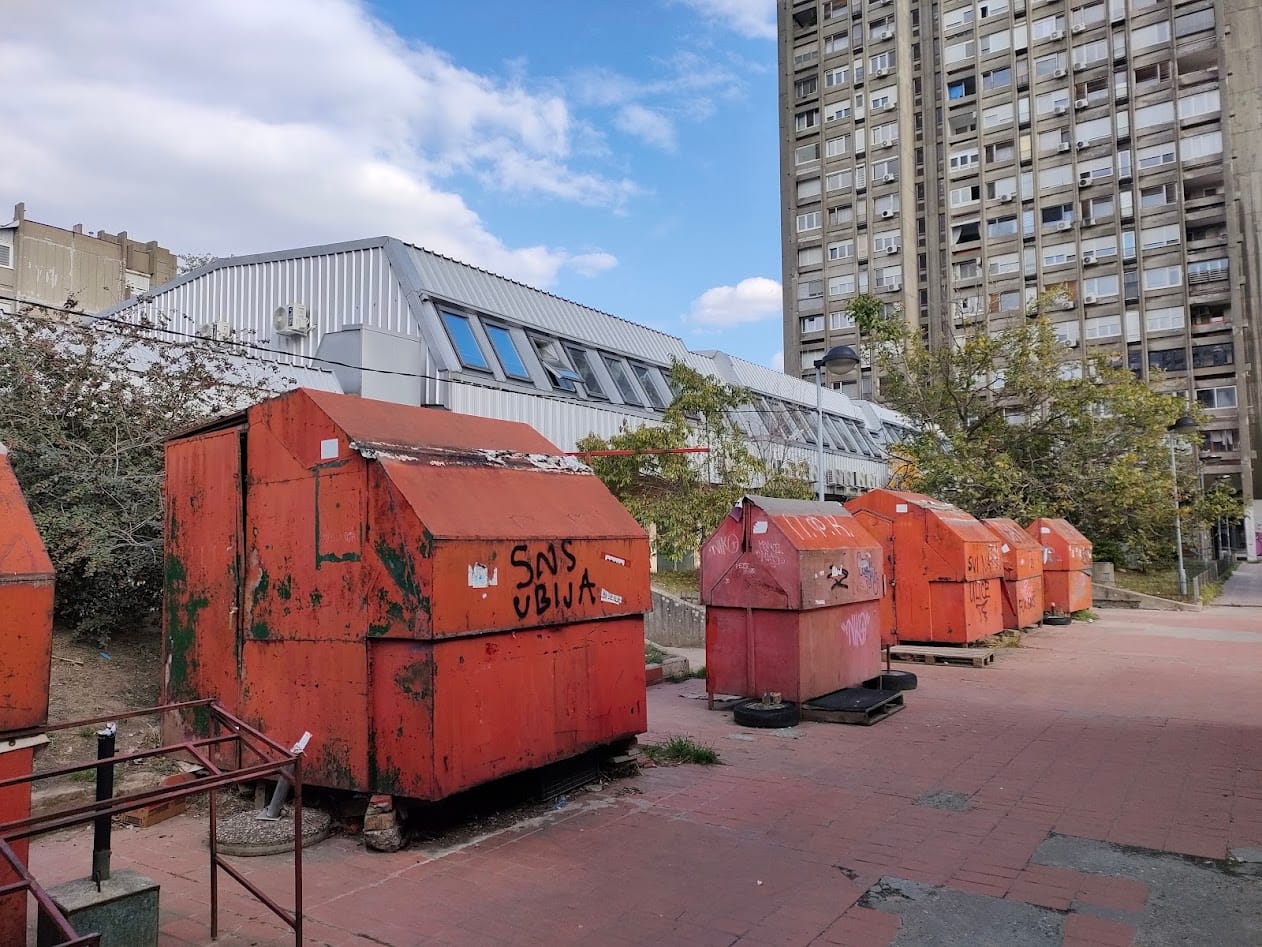
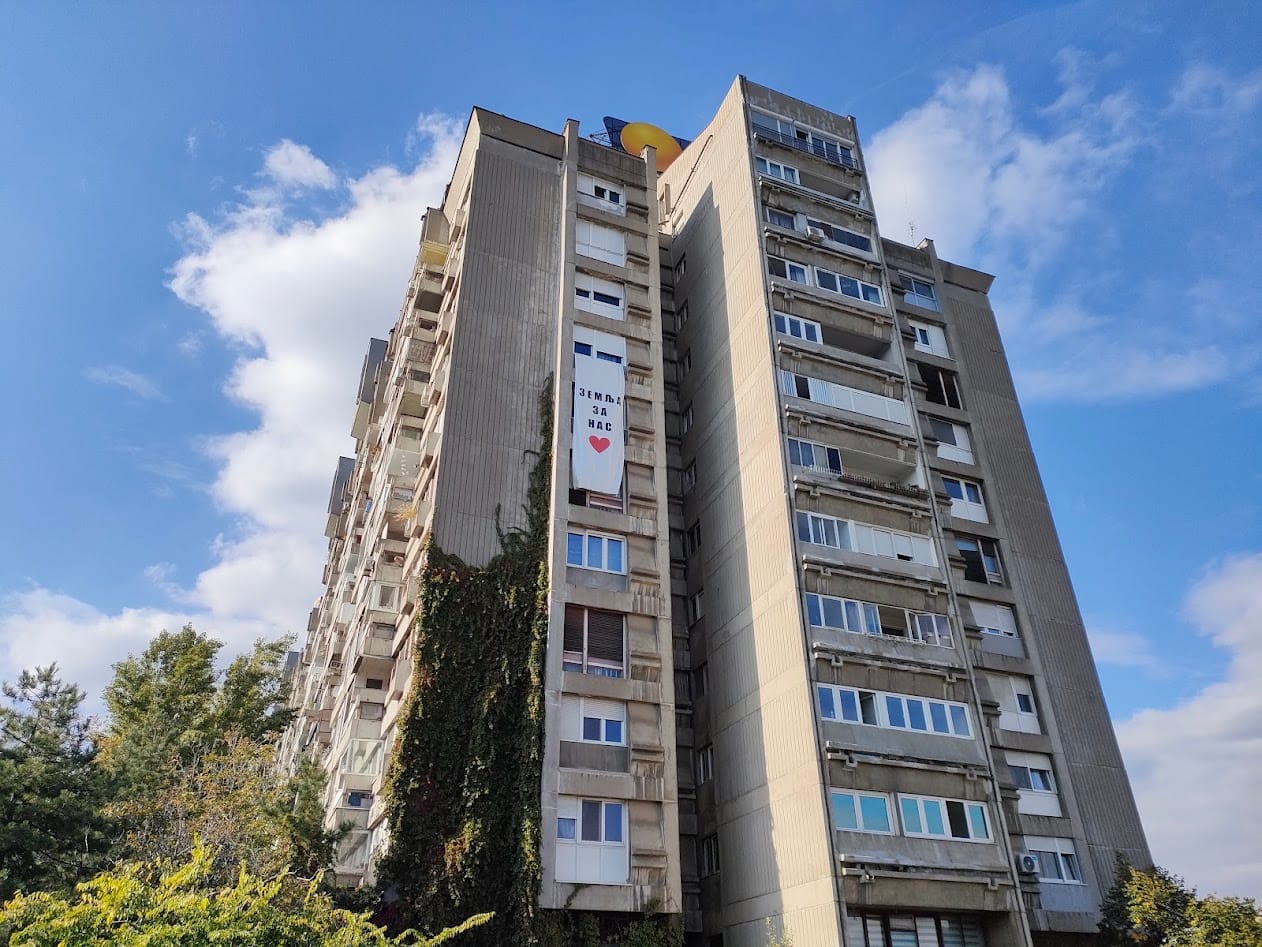
След десет дни пътуване се прибираме в столицата – обиколката свършва. Излизаме от магистралата в Нови Белград и след един завой сред югославския жилищен брутализъм от една огромна кооперация ни дебне друг транспарант, където този път пише на кирилица: Земљя за нас. Без въпросителна, без възклицателна, а с едно голямо червено сърце.
С колегата ми и шофьора чуваме гласовете на двете момичета в групата, които знаят руски – четат надписа високо и го посочват на другите. Малко след това чуваме и гласа на Милан Младенович от тонколоните на микробуса, който повтаря същите думи. И тримата се усмихваме. Няма нужда да обясняваме нищо повече.
Amazon Inspector security researchers have identified and reported over 150,000 packages linked to a coordinated tea.xyz token farming campaign in the npm registry. This is one of the largest package flooding incidents in open source registry history, and represents a defining moment in supply chain security, far surpassing the initial 15,000 packages reported by Sonatype researchers in April 2024. Through a combination of advanced rule-based detection and AI, the research team uncovered a self-replicating attack pattern where threat actors automatically generate and publish packages to earn cryptocurrency rewards without user awareness, revealing how the campaign has expanded exponentially since its initial identification.
This incident demonstrates both the evolving nature of threats where financial incentives drive registry pollution at unprecedented scale, and the critical importance of industry-community collaboration in defending the software supply chain. The Amazon Inspector team’s capability to detect subtle, non-traditional threats through innovative detection methodologies, combined with rapid collaboration with the Open Source Security Foundation (OpenSSF) to assign malicious package identifiers (MAL-IDs) and coordinate response, provides a blueprint for how security organizations can respond swiftly and effectively to emerging attack vectors. As the open source community continues to grow, this case serves as both a warning that new threats will emerge wherever financial incentives exist, and a demonstration of how collaborative defense can help address supply chain attacks.
Detection
On October 24, 2025, Amazon Inspector security researchers deployed a new detection rule—paired with AI—to identify additional suspicious package patterns in the npm registry. Within days, the system began flagging packages linked to the tea.xyz protocol—a blockchain-based system designed to reward open source developers.
By November 7, the researchers flagged thousands of packages and began investigating what appeared to be a coordinated campaign. The next day, after validating the evaluation results and analyzing the patterns, they reached out to OpenSSF to share their findings and coordinate a response. With OpenSSF’s review and alignment, Amazon Inspector security researchers began systematically submitting discovered packages to the OpenSSF malicious packages repository, with each package receiving a MAL-ID within 30 minutes. The operation continued through November 12, ultimately uncovering over 150,000 malicious packages.
Here’s what the investigation revealed:
Over 150,000 packages linked to the tea.xyz token farming campaign
Self-replicating automation that creates packages without legitimate functionality
Systematic inclusion of tea.yaml files that link packages to blockchain wallet addresses
Coordinated publishing activity across multiple developer accounts
Unlike traditional malware, these packages do not contain overtly malicious code. Instead, they exploit the tea.xyz reward mechanism by artificially inflating package metrics through automated replication and dependency chains, allowing threat actors to extract financial benefits from the open source community.
Token farming as a new attack vector
This campaign represents a concerning evolution in supply chain security. Although the packages might not steal credentials or deploy ransomware, they pose significant risks:
Registry pollution – The npm registry is flooded with low-quality, non-functional packages that obscure legitimate software and degrade trust in the open source community.
Resource exploitation – Registry infrastructure, bandwidth, and storage are consumed by packages created solely for financial gain rather than genuine contribution.
Precedent for abuse – The success of this campaign could inspire similar exploitation of other reward-based systems, normalizing automated package generation for financial gain.
Supply chain risk – Even packages that seem benign can add unnecessary dependencies, potentially introducing unexpected behaviors or creating confusion in dependency resolution.
Collaboration with OpenSSF: rapid response
The collaboration between Amazon Inspector security researchers and OpenSSF led to swift action and benefits such as the following:
Immediate threat intelligence sharing – The researchers’ findings were shared with OpenSSF’s malicious packages repository, providing the community with comprehensive threat data.
MAL-ID assignment – OpenSSF rapidly assigned MAL-IDs to the detected packages, enabling community-wide blocking and remediation. Average time of assignment was 30 minutes.
Coordinated disclosure – Both organizations worked together to inform the broader open source community about the threat.
Enhanced detection standards – Insights from this campaign are informing improved detection capabilities and policy recommendations across the open source security community.
This collaboration exemplifies how industry leaders and community organizations can work together to help protect software supply chains. The rapid assignment of MAL-IDs demonstrates OpenSSF’s commitment to maintaining the integrity of open source registries, while the researchers’ detection work and threat intelligence provide the advanced insights needed to stay ahead of evolving attack patterns.
Technical details: how the researchers detected the campaign
Amazon Inspector security researchers used a combination of rule-based detection paired with AI-powered techniques to uncover this campaign. The researchers developed pattern matching rules to identify suspicious characteristics such as the following:
Presence of tea.yaml configuration files
Minimal or cloned code with no original functionality
Predictable naming patterns and automated generation signatures
Circular dependency chains between related packages
By monitoring publishing patterns, the researchers revealed coordinated campaigns that used automated tooling to create packages at automated speeds.
How to respond to these types of events
You should follow your standard incident response process for active incidents to resolve the issue.
To sweep your development environment, we recommend the following steps:
Use Amazon Inspector – Check the findings for packages that are linked to tea.xyz token farming and follow recommended remediation.
Greg Kroah-Hartman has announced the release of the 6.17.8 and 6.12.58 stable kernels. Each contains an
important set of fixes. Users are advised to upgrade.
On October 6, 2025, the cyber deception company Defused published a proof-of-concept exploit on social media that was captured by one of their Fortinet FortiWeb Manager honeypots. FortiWeb is a Web Application Firewall (WAF) product that is designed to detect and block malicious traffic to web applications. Exploitation of this new vulnerability, now tracked as CVE-2025-64446, allows an attacker with no existing level of access to gain administrator-level access to the FortiWeb Manager panel and websocket command-line interface. Rapid7 has tested the latest FortiWeb version 8.0.2 and observed that the existing public proof-of-concept exploit does not work. However, the exploit does work against earlier versions, including version 8.0.1, which was released in August, 2025.
Based on the information circulated by Defused, this new vulnerability is claimed to have been exploited in the wild in October, 2025. On November 14, 2025, Fortinet PSIRT published CVE-2025-64446 and an official advisory for the critical vulnerability, which holds a CVSS score of 9.1. Organizations running versions of Fortinet FortiWeb that are listed as affected in the advisory are advised to remediate this vulnerability on an emergency basis, given that exploitation has been occurring since October in targeted attacks, and broad exploitation will likely occur in the coming days. A Metasploit module for CVE-2025-64446 is available here, and security firm watchTowr has published a technical analysis. CISA’s KEV catalog has been updated to include CVE-2025-64446.
It’s unclear whether the FortiWeb release cycle intentionally included a silent patch for this vulnerability or merely coincidentally included changes that broke the existing exploit.
On November 18, 2025, Fortinet published a new advisory for CVE-2025-58034. This new vulnerability is an authenticated command injection affecting FortiWeb. Fortinet has indicated CVE-2025-58034 has also been exploited in-the-wild, and CISA’s KEV catalog has been updated to include this new vulnerability. It is not clear at this time if both CVE-2025-64446 and CVE-2025-58034 have been exploited in-the-wild together as an exploit chain.
This blog post will be updated as new developments arise.
Rapid7 observations
On November 6, 2025, Rapid7 Labs observed that an alleged zero-day exploit targeting FortiWeb was published for sale on a popular black hat forum. While it is not clear at this time if this is the same exploit as the one described above, the timing is coincidental.
⠀
Mitigation guidance
On November 14, 2025, Fortinet published an advisory that outlines remediation steps and workaround mitigations for CVE-2025-64446. According to Fortinet, the following versions are affected, and the fixed versions for each main release branch are also listed:
Versions 8.0.0 through 8.0.1 are vulnerable, 8.0.2 and above are fixed.
Versions 7.6.0 through 7.6.4 are vulnerable, 7.6.5 and above are fixed.
Versions 7.4.0 through 7.4.9 are vulnerable, 7.4.10 and above are fixed.
Versions 7.2.0 through 7.2.11 are vulnerable, 7.2.12 and above are fixed.
Versions 7.0.0 through 7.0.11 are vulnerable, 7.0.12 and above are fixed.
In cases where immediate upgrades are not possible, the advisory states the following: “Disable HTTP or HTTPS for internet facing interfaces. Fortinet recommends taking this action until an upgrade can be performed. If the HTTP/HTTPS Management interface is internally accessible only as per best practice, the risk is significantly reduced.”
Exploitation behavior
When testing the public exploit against a target FortiWeb device, the target application’s differing responses between versions 8.0.1 and 8.0.2 are included below.
Against version 8.0.1, the application returns the following response for a successful exploitation attempt, in which a new malicious local administrator account “hax0r” was created:
Exposure Command, InsightVM and Nexpose customers can assess their exposure to CVE-2025-64446 with an unauthenticated vulnerability check available in the November 14 content release. Please note that the “SAFE” check mode needs to be disabled while running scans to ensure the check runs successfully.
Customers running FortiWeb release branches 8.0, 7.2, or 7.0 can leverage the existing CVE-2025-64446 check to establish exposure to the medium-severity authenticated vulnerability CVE-2025-58034. Those running FortiWeb release branches 7.6 or 7.4 should manually verify that the 7.6.6 and 7.4.11 patches, respectively, are in place for CVE-2025-58034.
Intelligence Hub
Customers leveraging Rapid7’s Intelligence Hub can track the latest developments surrounding CVE-2025-64446, including a Sigma rule and IOCs of IP addresses attempting to exploit this vulnerability.
Updates
November 14, 2025: The blog post has been updated to reflect the newly-published official advisory and CVE identifier, the availability of vulnerability checks and a Metasploit module for customer testing, the CISA KEV addition, and a published technical analysis.
November 17, 2025: The Rapid7 customers section has been updated to add Intelligence Hub coverage, and clarify that vulnerability checks were shipped on Nov 14, 2025.
November 19, 2025: The Overview section has been updated to reference the newly published vulnerability, CVE-2025-58034. The Rapid7 customers section has been updated to add expected coverage availability for CVE-2025-58034.
November 19, 2025: The Rapid7 customers section has been updated with CVE-2025-58034 coverage information for supported FortiWeb release branches.
The Google Security Blog has a
new post on just how well the use of Rust is working out for the
Android project.
We adopted Rust for its security and are seeing a 1000x reduction
in memory safety vulnerability density compared to Android’s C and
C++ code. But the biggest surprise was Rust’s impact on software
delivery. With Rust changes having a 4x lower rollback rate and
spending 25% less time in code review, the safer path is now also
the faster one.
It’s that time of year again — AWS re:Invent is here! At re:Invent, bold ideas come to life. Get a front-row seat to hear inspiring stories from AWS experts, customers, and leaders as they explore today’s most impactful topics, from data analytics to AI.
For all the data enthusiasts and professionals, we’ve curated a comprehensive guide to every analytics session to help you plan your perfect agenda. Make sure to secure your seat early for must-attend sessions via the attendee portal.
Pro tip: Even if a session shows as fully reserved, we encourage you to join the walk-up line at the session location. Based on previous years’ experiences, additional seats often become available due to no-shows or last-minute schedule changes. The walk-up line operates on a first-come, first-served basis, and many attendees have successfully accessed their desired sessions this way. Just be sure to arrive at least 15 minutes before the session starts for the best chance of getting a seat.
Can’t make it in person? No problem — grab a free virtual pass to stream live sessions from anywhere.
And don’t forget to stop by the AWS Kiosk in the AWS Village Expo for AWS Analytics, Amazon SageMaker, Amazon OpenSearch Service and AWS Messaging and Streaming services! See live demos of analytics services, meet AWS experts, get your toughest data questions answered, explore the latest launches, join our data trivia, and even win exclusive AWS-authored books and many more swags.
Emerging trends, ranging from Open Table Formats (OTF) to agentic infrastructure, are rapidly changing how humans and applications interact with analytics to drive mission-critical business decisions. Join Mai-Lan Tomsen Bukovec, VP of AWS Technology, to explore emerging trends, the evolution of analytics engines and applications, and how to future-proof your data foundation for the rapidly changing landscape of analytics at scale. Learn how AWS is transforming data and analytics services to lead in optimized data storage, querying, streaming, processing, and governance – for both human users and agentic infrastructure.
Breakouts
Dive into cutting-edge topics with re:Invent breakout sessions. These immersive, hour-long lectures are led by AWS experts, customers, offering you unparalleled insights and knowledge in a concise format. Whether you’re exploring the latest in cloud technology, AWS Analytics advancements, or industry-specific solutions, these sessions are designed to expand your horizon and inspire your next big idea.
Monday, Dec 1
Tuesday, Dec 2
Wednesday, Dec 3
Thursday, Dec 4
8:30 AM – 9:30 AM PST | Venetian | Level 3 | Lido 3106
ANT203 | Enabling AI innovation with Amazon SageMaker Unified Studio
11:30 AM – 12:30 PM PST | Mandalay Bay | Level 2 South | Oceanside C | Content Hub | Turquoise Theater
BIZ207 | Democratize access to insights with Amazon Quick Suite
8:30 AM – 9:30 AM PST | MGM | Level 1 | Grand 123
ANT204 | Architecting the future: Amazon SageMaker as a data and AI platform
11:00 AM – 12:00 PM PST | Mandalay Bay | Level 2 South | Oceanside C | Content Hub | Pink Theater
ANT317 | Modernize your data warehouse by moving to Amazon Redshift
8:30 AM – 9:30 AM PST | MGM | Level 3 | Chairman’s 366
ANT318 | Scaling Amazon Redshift with a multi-warehouse architecture
11:30 AM – 12:30 PM PST | Mandalay Bay | Level 2 South | Oceanside C | Content Hub | Pink Theater
ANT216 | What’s new with Amazon SageMaker in the era of unified data and AI
10:00 AM – 11:00 AM PST | Mandalay Bay | Level 2 South | Oceanside C | Content Hub | Turquoise Theater
ANT335 | Agentic data engineering with AWS Analytics MCP Servers
BIZ228 | Reimagine business intelligence with Amazon Quick Sight
.
.
.
1:30 PM – 2:30 PM PST | Mandalay Bay | Level 3 South | South Seas E
OPN413 | Transforming Apache Kafka into a Scalable Message Queue
.
.
.
5:30 PM – 6:30 PM PST | Mandalay Bay | Level 3 South | South Seas F
ANT423 | Amazon Kinesis Data Streams under the hood
.
.
.
Chalk talks
These hour-long, highly engaging sessions offer a unique blend of expert insight and collaborative learning. An AWS specialist kicks off with a concise, informative lecture, setting the stage for an in-depth, interactive Q&A. With a limited audience size, you’ll have the opportunity to dive deep into topics, ask pressing questions, and engage in meaningful discussions with both the presenter and fellow attendees.
Monday, Dec 1
Tuesday, Dec 2
Wednesday, Dec 3
Thursday, Dec 4
Friday, Dec 5
8:30 AM – 9:30 AM PST | MGM | Level 1 | Boulevard 167
ANT301-R1 | Accelerating the shift from batch to real-time streaming
11:30 AM – 12:30 PM PST | Caesars Forum | Level 1 | Academy 411
ANT302-R1 | Accelerate GenAI-powered data discovery and sharing with SageMaker Catalog
9:00 AM – 10:00 AM PST | MGM | Level 3 | Room 353
ANT301-R | Accelerating the shift from batch to real-time streaming
ANT316 | Orchestrating with Apache Airflow, MWAA, and SageMaker Unified Studio
Builders’ sessions
Immerse yourself in our builders’ sessions – a hands-on learning experience designed to elevate your AWS skills. These focused, hour-long workshops bring together a small group of up to ten attendees with a dedicated AWS expert at each table.
Monday, Dec 1
Tuesday, Dec 2
Wednesday, Dec 3
Thursday, Dec 4
8:30 AM – 9:30 AM PST | Wynn | Convention Promenade | Latour 7
ANT407-R1 | Building event-driven applications with AWS Streaming and Messaging
OPN407-R | Performance tuning for streaming Ingestion into Apache Iceberg
.
.
.
4:00 PM – 5:00 PM PST | Mandalay Bay | Lower Level North | Islander H
ANT405-R | Build high performance Apache Iceberg data lakes with Amazon S3 Tables
.
.
.
Workshops
Roll your sleeves in our dynamic 2-hour workshops, where you’ll tackle real-world challenges using AWS services. These interactive sessions kick off with a brief, informative lecture to set the stage, then quickly transition into hands-on problem-solving. Bring your laptop and prepare to build alongside AWS experts, who will guide you through practical applications of cloud computing concepts. Whether you’re new to AWS or looking to sharpen your skills, these workshops offer a unique opportunity to learn by doing, enabling you to leave with confidence and applicable knowledge in AWS technologies.
Monday, Dec 1
Tuesday, Dec 2
Wednesday, Dec 3
Thursday, Dec 4
8:00 AM – 10:00 AM PST | Mandalay Bay | Lower Level North | Islander C
ANT402-R1 | Build a fraud detection system with Amazon SageMaker Unified Studio
BIZ204-R | Experience AI-powered BI with Amazon Quick Suite
3:30 PM – 5:30 PM PST | Mandalay Bay | Lower Level North | Islander C
ANT401 | Build an AI-powered enterprise search with Amazon OpenSearch service
.
3:00 PM – 5:00 PM PST | Mandalay Bay | Level 2 South | Mandalay Bay Ballroom K
ANT414 | Scale intelligent analytics with Amazon Redshift multi-cluster architectures
.
.
.
Lightning Talks
Located in the Expo Hall, each of these 20-minute theater presentations are dedicated to a specific customer story, service demo, or AWS Partner offering.
Monday, Dec 1
Tuesday, Dec 2
Wednesday, Dec 3
Thursday, Dec 4
5:00 PM – 5:20 PM PST | Venetian | Level 2 | Hall B | Expo | Theater 4
ANT334 | High-performance NLP & geospatial analysis with Redshift
.
3:00 PM – 3:20 PM PST | Mandalay Bay | Level 2 South | Oceanside C | Content Hub | Lightning Theater
ANT333 | Fast-track to insights: AWS-SAP data strategy
12:30 PM – 12:50 PM PST | Venetian | Level 2 | Hall B | Expo | Theater 3
ANT342 | ITTI’s Cross-Company Data Mesh Blueprint with Amazon SageMaker
6:00 PM – 6:20 PM PST | Venetian | Level 2 | Hall B | Expo | Theater 3
We hope this post acts as your go-to resource for navigating the AWS analytics track at re:Invent 2025. For staying in the know about the most recent trends and advancements in AWS Analytics, follow our LinkedIn page.
Today, I’m happy to announce a new capability to resolve location data for Amazon Sidewalk enabled devices with the AWS IoT Core Device Location service. This feature removes the requirement to install GPS modules in a Sidewalk device and also simplifies the developer experience of resolving location data. Devices powered by small coin cell batteries, such as smart home sensor trackers, use Sidewalk to connect. Supporting built-in GPS modules for products that move around is not only expensive, it can creates challenge in ensuring optimal battery life performance and longevity.
With this launch, Internet of Things (IoT) device manufacturers and solution developers can build asset tracking and location monitoring solutions using Sidewalk-enabled devices by sending Bluetooth Low Energy (BLE), Wi-Fi, or Global Navigation Satellite System (GNSS) information to AWS IoT for location resolution. They can then send the resolved location data to an MQTT topic or AWS IoT rule and route the data to other Amazon Web Services (AWS) services, thus using different capabilities of AWS Cloud through AWS IoT Core. This would simplify their software development and give them more options to choose the optimal location source, thereby improving their product performance.
This launch addresses previous challenges and architecture complexity. You don’t need location sensing on network-based devices when you use the Sidewalk network infrastructure itself to determine device location, which eliminates the need for power-hungry and costly GPS hardware on the device. And, this feature also allows devices to efficiently measure and report location data from GNSS and Wi-Fi, thus extending the product battery life. Therefore, you can build a more compelling solution for asset tracking and location-aware IoT applications with these enhancements.
For those unfamiliar with Amazon Sidewalk and the AWS IoT Core Device Location service, I’ll briefly explain their history and context. If you’re already familiar with them, you can skip to the section on how to get started.
AWS IoT Core integrations with Amazon Sidewalk Amazon Sidewalk is a shared network that helps devices work better through improved connectivity options. It’s designed to support a wide range of customer devices with capabilities ranging from locating pets or valuables, to smart home security and lighting control and remote diagnostics for appliances and tools.
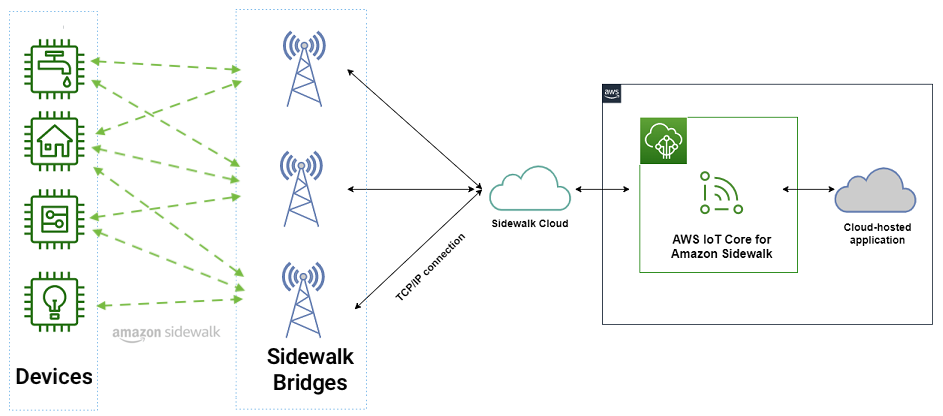
Amazon Sidewalk is a secure community network that uses Amazon Sidewalk Gateways (also called Sidewalk Bridges), such as compatible Amazon Echo and Ring devices, to provide cloud connectivity for IoT endpoint devices. Amazon Sidewalk enables low-bandwidth and long-range connectivity at home and beyond using BLE for short-distance communication and LoRa and frequency-shift keying (FSK) radio protocols at 900MHz frequencies to cover longer distances.
Sidewalk now provides coverage to more than 90% of the US population and supports long-range connected solutions for communities and enterprises. Users with Ring cameras or Alexa devices that act as a Sidewalk Bridge can choose to contribute a small portion of their internet bandwidth, which is pooled to create a shared network that benefits all Sidewalk-enabled devices in a community.
In March 2023, AWS IoT Core deepened its integration with Amazon Sidewalk to seamlessly provision, onboard, and monitor Sidewalk devices with qualified hardware development kits (HDKs), SDKs, and sample applications. As of this writing, AWS IoT Core is the only way for customers to connect the Sidewalk network.
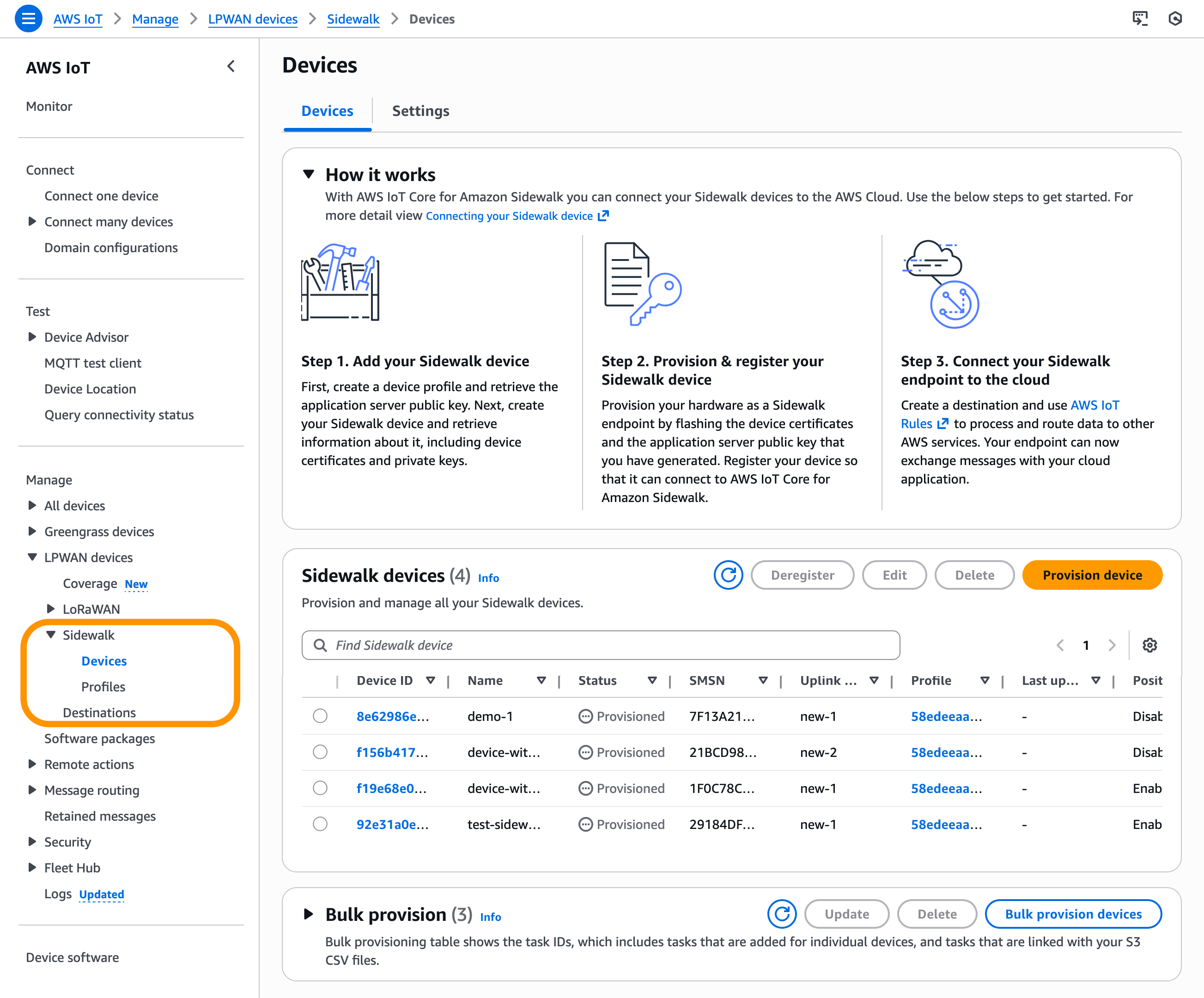
In the AWS IoT Core console, you can add your Sidewalk device, provision and register your devices, and connect your Sidewalk endpoint to the cloud. To learn more about onboarding your Sidewalk devices, visit the Getting started with AWS IoT Core for Amazon Sidewalk in the AWS IoT Wireless Developer Guide.
In November 2022, we announced AWS IoT Core Device Location service, a new feature that you can use to get the geo-coordinates of their IoT devices even when the device doesn’t have a GPS module. You can use the Device Location service as a simple request and response HTTP API, or you can use it with IoT connectivity pathways like MQTT, LoRaWAN, and now with Amazon Sidewalk.
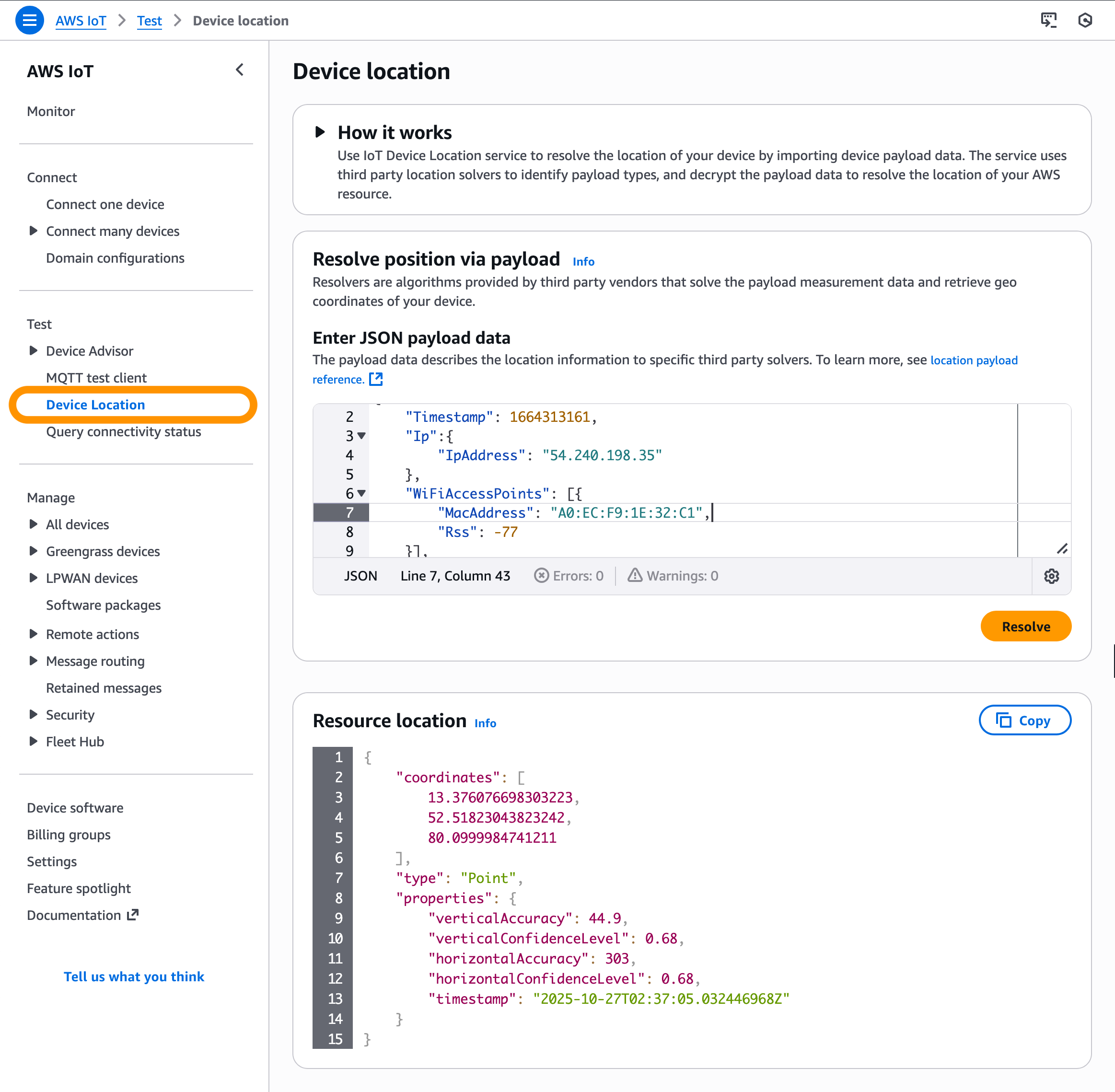
In the AWS IoT Core console, you can test the Device Location service to resolve the location of your device by importing device payload data. Resource location is reported as a GeoJSON payload. To learn more, visit the AWS IoT Core Device Location in the AWS IoT Core Developer Guide.
Customers across multiple industries like automotive, supply chain, and industrial tools have requested a simplified solution such as the Device Location service to extract location-data from Sidewalk products. This would streamline customer software development and give them more options to choose the optimal location source, thereby improving their product.
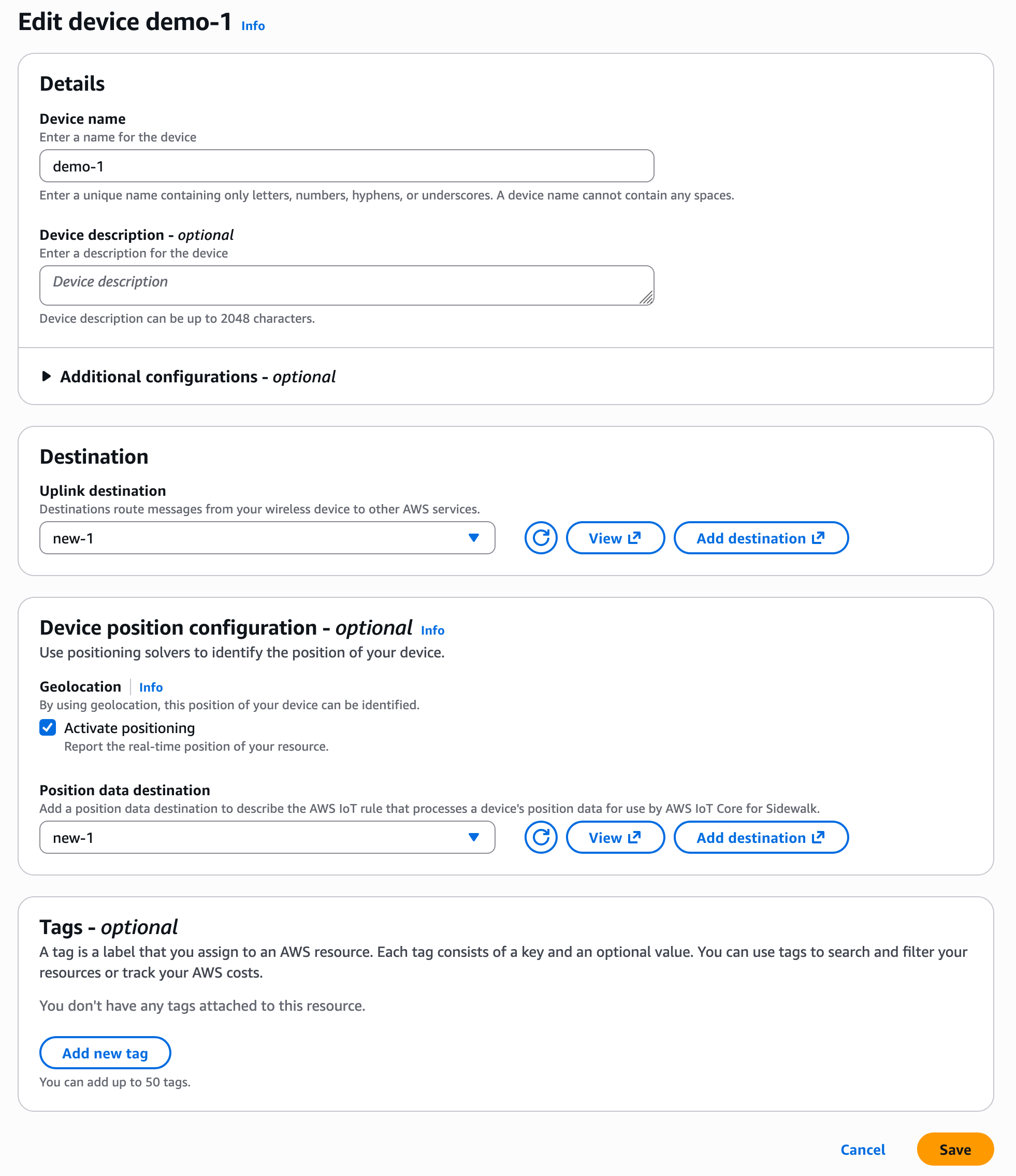
Get started with a Device Location integration with Amazon Sidewalk To enable Device Location for Sidewalk devices, go to the AWS IoT Core for Amazon Sidewalk section under LPWAN devices in the AWS IoT Core console. Choose Provision device or your existing device to edit the setting and select Activate positioning in the Geolocation option when creating and updating your Sidewalk devices.
While activating position, you need to specify a destination where you want to send your location data. The destination can either be an AWS IoT rule or an MQTT topic.
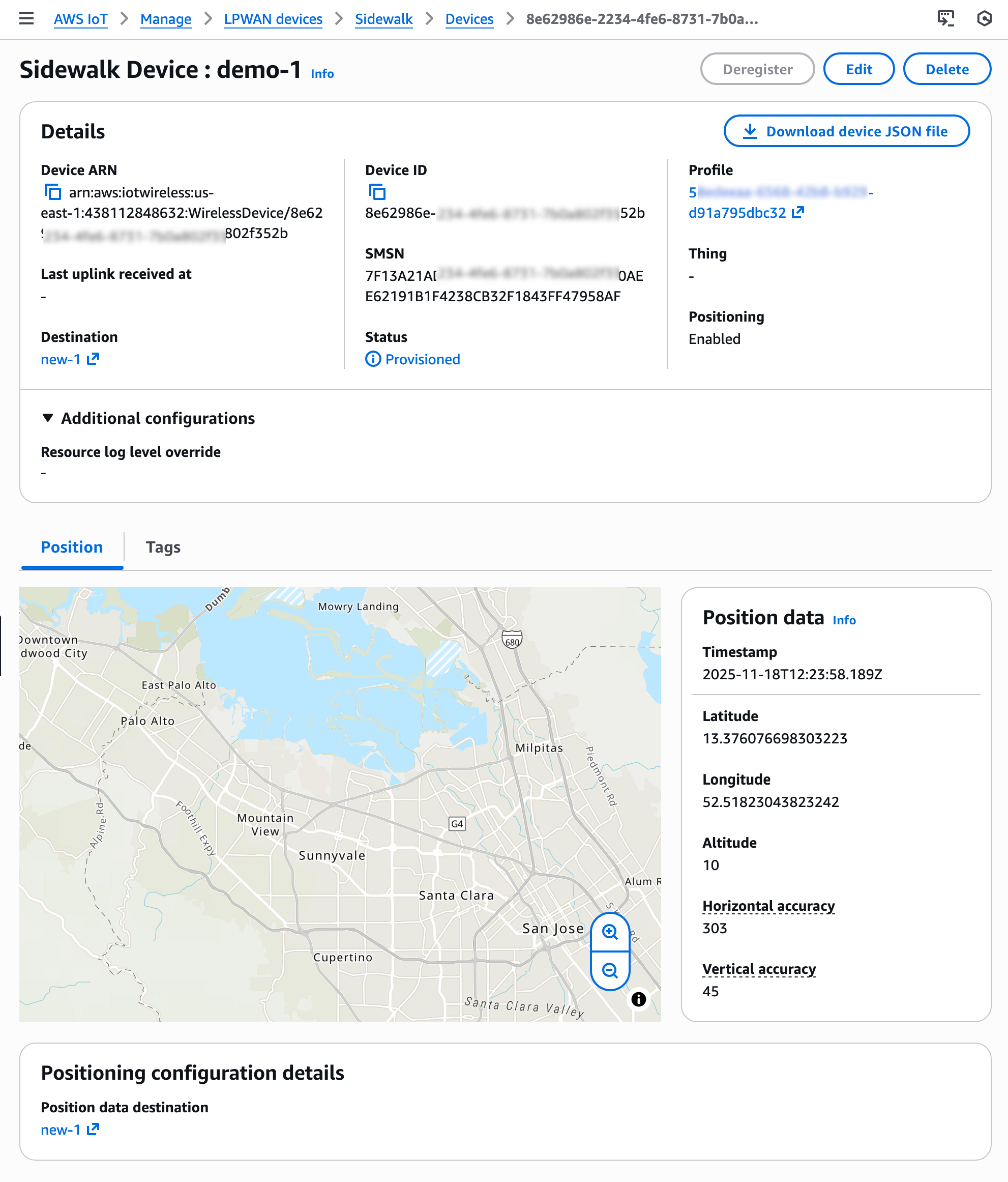
After your Sidewalk device establishes a connection to the Amazon Sidewalk network, the device SDK will send the GNSS-, Wi-Fi- or BLE-based information to AWS IoT Core for Amazon Sidewalk. If the customer has enabled Positioning, then AWS IoT Core Device Location will resolve the location data and send the location data to the specified Destination. After your Sidewalk device transmits location measurement data, the resolved geographic coordinates and a map pin will also be displayed in the Position section for the selected device.
You will also get location information delivered to your destination in GeoJSON format, as shown in the following example:
Now available AWS IoT Core Device Location integration with Amazon Sidewalk is now generally available in the US East (N. Virginia) Region. To learn more about use cases, documentation, sample codes, and partner devices, visit the AWS IoT Core for Amazon Sidewalk product page.
The SUSE Security Team has published an in-depth
article on its findings after reviewing a D-Bus service contained
in LightDM
Greeter by KDE (the lightdm-kde-greeter package)
for addition to openSUSE Tumbleweed. The team found a privilege
escalation from the lightdm service user to root, as
well as other attack vectors in the service:
In agreement with upstream, we assigned CVE-2025-62876 to track the lightdm service user to root privilege escalation aspect described in
this report. The severity of the issue is low, since it only affects
defense-in-depth (if the lightdm service user were compromised) and
the problematic logic can only be reached and exploited if triggered
interactively by a privileged user.
The fixes are contained in the 6.0.4
release of the project.
Version
145 of the Thunderbird email client has been released. Notable
changes in this release include enabling DNS over HTTPS, support for
Microsoft Exchange via Exchange Web Services, and quite a few bug
fixes. As of 145, the project is no longer shipping 32-bit binaries
for Linux on x86.
This is a guest post by Umesh Dangat, Senior Principal Engineer for Distributed Services and Systems at Yelp, and Toby Cole, Principle Engineer for Data Processing at Yelp, in partnership with AWS.
Yelp processes massive amounts of user data daily—over 300 million business reviews, 100,000 photo uploads, and countless check-ins. Maintaining sub-minute data freshness with this volume presented a significant challenge for our Data Processing team. Our homegrown data pipeline, built in 2015 using then-modern streaming technologies, scaled effectively for many years. As our business and data needs evolved, we began to encounter new challenges in managing observability and governance across an increasingly complex data ecosystem, prompting the need for a more modern approach. This affected our outage incidents, making it harder to both assess impact and restore service. At the same time, our streaming framework struggled with Kafka for data streaming and permanent data storage. In addition, our connectors to analytical data stores experienced latencies exceeding 18 hours.
This came to a head when our efforts to comply with General Data Protection Regulation (GDPR) requirements revealed gaps in our infrastructure that would require us to clean up our data, while simultaneously maintaining operational reliability and reducing data processing times. Something had to change.
In this post, we share how we modernized our data infrastructure by embracing a streaming lakehouse architecture, achieving real-time processing capabilities at a fraction of the cost while reducing operational complexity. With this modernization effort, we reduced analytics data latencies from 18 hours to mere minutes, while also removing the need for using Kafka as a permanent storage for our change log streams.
The problem: Why we needed change
We started this transformation by initiating a migration from self-managed Apache Kafka to Amazon Managed Streaming for Apache Kafka (Amazon MSK), which significantly reduced our operational overhead and enhanced security. Amazon MSK’s express brokers also provided better elasticity for our Apache Kafka clusters. While these improvements were a promising start, we recognized the need for a more fundamental architectural change
Legacy architecture pain points
Let’s examine the specific challenges and limitations of our previous architecture that prompted us to seek a modern solution.
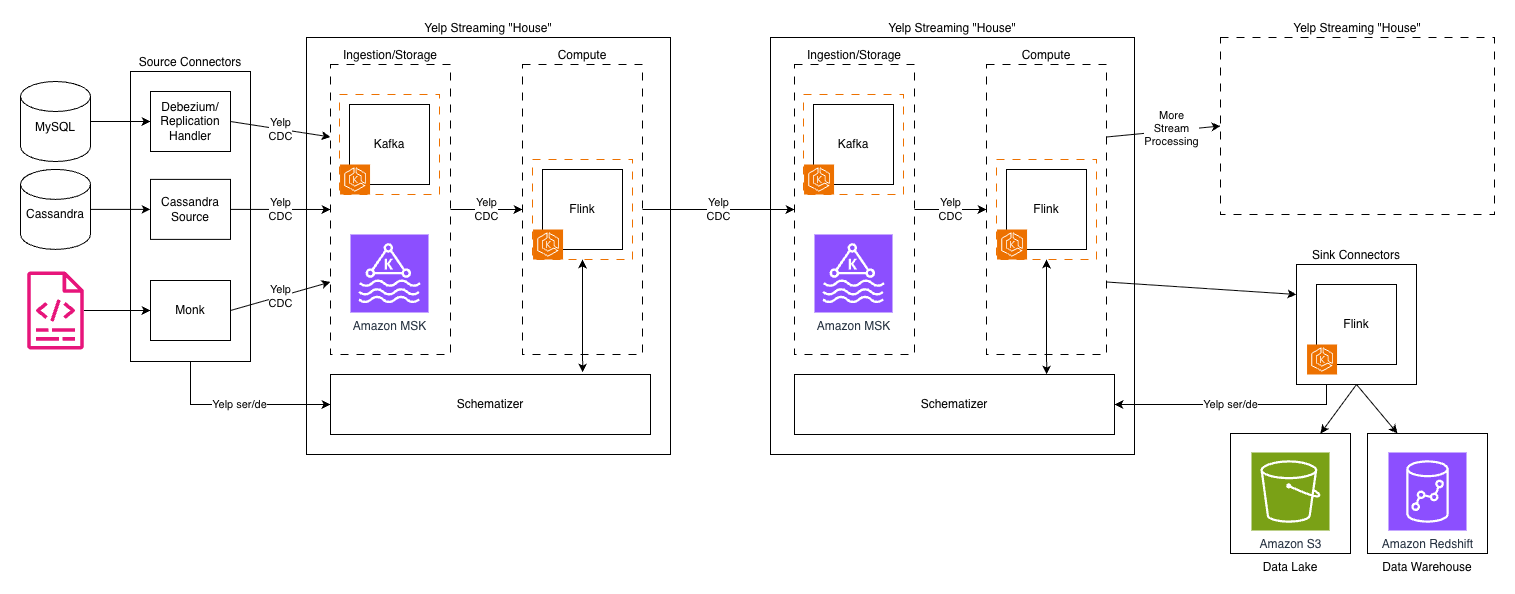
The following diagram depicts Yelp’s original data architecture.
Kafka topics proliferated across our infrastructure, creating long processing chains. As a result, each hop added latency, operational overhead, and storage costs. The system’s reliance on Kafka for both ingestion and storage created a fundamental bottleneck—Kafka’s architecture, optimized for high-throughput messaging, wasn’t designed for long-term storage and to handle complex querying patterns.
Another challenge was our custom “Yelp CDC” format—a proprietary change data capture language—was powerful and tailored to our needs. However, as our team grew and our use cases expanded, it introduced complexity and a steeper learning curve for new engineers. It also made integrations with off-the-shelf systems more complex and maintenance intensive.
The cost and latency trade-off
The traditional trade-off between real-time processing and cost efficiency had us caught in an expensive bind. Real-time streaming systems demand significant resources to maintain state within compute engines like Apache Flink, keep multiple copies of data across Kafka clusters, and run always-on processing jobs. Our infrastructure costs were growing, and it was largely driven by:
Long Kafka chains: Data often traversed 4-5 Kafka topics before reaching its destination and each topic was replicated for reliability
Duplicate data storage: The same data existed in multiple formats across different systems—raw in Kafka, processed in intermediate topics, and final forms in data warehouses and Flink RocksDB for join-like use cases
Complex custom tooling maintenance: The proprietary nature of our tools meant engineering resources were focused on maintenance rather than building new capabilities
Meanwhile, our business requirements became more demanding. Teams at Yelp needed faster insights, near-real-time results, and the ability to quickly run complex historical analyses without delay. This pushed us to shape our new architecture to improve streaming discovery and metadata visibility, provide more flexible transformation tooling, and simplify operational workflows with faster recovery times.
Understanding the streamhouse concept
To understand how we solved our data infrastructure challenges, it’s important to first grasp the concept of a streamhouse and how it differs from traditional architectures.
Evolution of data architecture
To understand why a streaming lakehouse or streamhouse was the answer to our challenges, it’s helpful to trace the evolution of data architectures. The journey from data warehouses to modern streaming systems reveals why each generation solved certain problems while creating new ones.
Data warehouses like Amazon Redshift and Snowflake brought structure and reliability to analytics, but their batch-oriented nature meant accepting hours or days of latency. Data lakes emerged to handle the volume and variety of big data, using low-cost object storage like Amazon S3, but often became “data swamps” without proper governance. The lakehouse architecture, pioneered by technologies like Apache Iceberg and Delta Lake, promised to combine the best of both, the structure of warehouses with the flexibility and economics of lakes.
But even lakehouses were designed with batch processing in mind. While they added streaming capabilities, these were often bolted on rather than fundamental to the architecture. What we needed was something different: a reimagining that treated streaming as a first-class citizen while maintaining lakehouse economics.
What makes a streamhouse different
A streamhouse, as we define it, is “a stream processing framework with a storage layer that leverages a table format, making intermediate streaming data directly queryable.” This seemingly simple definition represents a fundamental shift in how we think about data processing.
Traditional streaming systems maintain dynamic tables like materialized views in databases, but these aren’t directly queryable. You can only consume them as streams, limiting their utility for ad-hoc analysis or debugging. Lakehouses, conversely, excel at queries but struggle with low-latency updates and complex streaming operations like out-of-order event handling or partial updates.
The streamhouse bridges this gap by:
Treating batch as a special case of streaming, rather than a separate paradigm
Making data, including intermediate processing results, queryable via SQL
Providing streaming-native features like database change-data capture (CDC) and temporal joins
Leveraging cost-effective object storage while maintaining minute-level latencies
Core capabilities we needed
Our requirements for a streaming lakehouse were shaped by years of operating at scale:
Real-time processing with minute-level latency: While sub-second latency wasn’t necessary for most use cases, our previous hours-long delays weren’t acceptable. The sweet spot was processing latencies measured in minutes fast enough for real-time decision-making but relaxed enough to leverage cost-effective storage.
Efficient CDC handling: With numerous MySQL databases powering our applications, the ability to efficiently capture and process database changes was crucial. The solution needed to handle both initial snapshots and ongoing changes seamlessly, without manual intervention or downtime.
Cost-effective scaling: The architecture had to break the linear relationship between data volume and cost. This meant leveraging tiered storage, with hot data on fast storage and cold data on low-cost object storage, all while maintaining query performance.
Built-in data management: Schema evolution, data lineage, time travel queries, and data quality controls needed to be first-class features, not afterthoughts. Our experience maintaining our custom Schematizer taught us that these capabilities were essential for operating at scale.
The solution architecture
Our modernized data infrastructure combines several key technologies into a cohesive streamhouse architecture that addresses our core requirements while maintaining operational efficiency.
Our technology stack selection
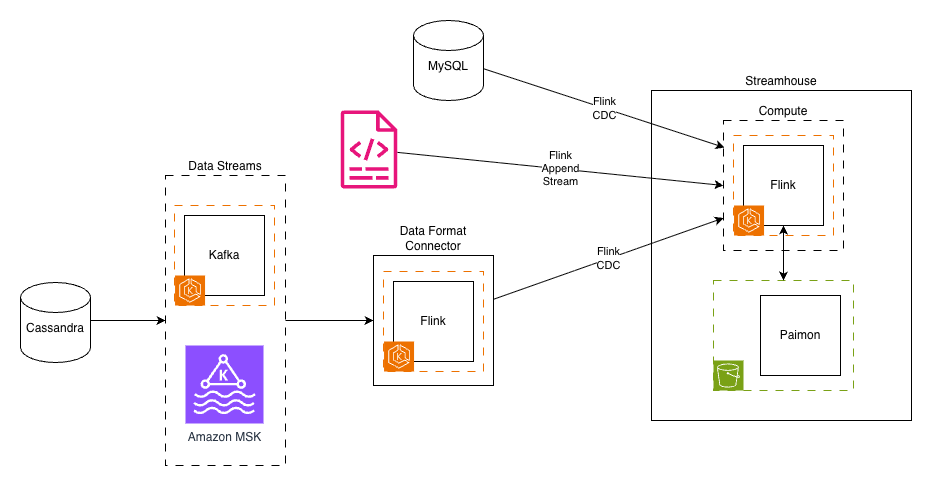
We carefully selected and integrated several proven technologies to build our streamhouse solution.The following diagram depicts Yelp’s new data architecture.
After extensive evaluation, we assembled a modern streaming lakehouse stack, streamhouse, built on proven open source technologies:
Amazon MSK continues to deliver existing streams as they did before from source applications and services.
Apache Flink on Amazon EKS served as our compute engine, a natural choice given our existing expertise and investment in Flink-based processing. Its powerful stream processing capabilities, exactly-once semantics, and mature framework made it ideal for the computational layer.
Apache Paimon emerged as the key innovation, providing the streaming lakehouse storage layer. Born from the Flink community’s FLIP-188 proposal for built-in dynamic table storage, Paimon was designed from the ground up for streaming workloads. Its LSM-tree-based architecture provided the high-speed ingestion capabilities we needed.
Amazon S3 serves as our streamhouse storage layer, offering highly scalable capacity at a fraction of the cost. The shift from compute-coupled storage (Kafka brokers) to object storage represented a fundamental architectural change that unlocked massive cost savings.
Flink CDC connectors replaced our custom CDC implementations, providing battle-tested integrations with databases like MySQL. These connectors handled the complexity of initial snapshots, incremental updates, and schema changes automatically.
Architectural transformation
The transformation from our legacy architecture to the streamhouse model involved three key architectural shifts:
1. Decoupling ingestion from storage
In our old world, Kafka handled both data ingestion and storage, creating an expensive coupling. Every byte ingested had to be stored on Kafka brokers with replication for reliability. Our new architecture separated these concerns: Flink CDC handled ingestion by immediately writing to Paimon tables backed by S3. This separation reduced our storage costs by over 80% and improved reliability through the 11 nines of durability of S3.
2. Unified data format
The migration from our proprietary CDC format to the industry-standard Debezium format was more than a technical change. It reflected a broader move toward community-supported standards. We built a Data Format Converter that bridged the gap, allowing legacy streams to continue functioning while new streams leveraged standard formats. This approach facilitated backward compatibility while paving the way for future simplification.
3. Streamhouse tables
Perhaps the most radical change was replacing some of our Kafka topics with Paimon tables. These weren’t just storage locations—they were dynamic, versioned, queryable entities that supported:
Time travel queries in the table’s snapshot retention period
Automatic schema evolution without downtime
SQL-based access for both streaming and batch workloads
Built-in compaction and optimization
Key design decisions
Several key design decisions shaped our implementation:
SQL as the primary interface: Rather than requiring developers to write Java or Scala code for every transformation, SQL became our lingua franca. This democratized access to streaming data, allowing analysts and data scientists to work with real-time data using familiar tools.
Separation of compute and storage: By decoupling these layers, we could scale them independently. A spike in processing needs no longer meant provisioning more storage, and historical data could be kept indefinitely without impacting compute costs.
Embracing open source standards: The shift from home-grown formats and tools to community-supported projects reduced our maintenance burden and accelerated feature development. When issues arose, our engineers could leverage community knowledge rather than debugging in isolation.
Implementation journey
Our transition to the new streamhouse architecture followed a carefully planned path, encompassing prototype development, phased migration, and systematic validation of each component.
Migration strategy
Our migration to the streamhouse architecture required careful planning and execution. The strategy had to balance the need for transformation with the reality of maintaining critical production systems.
1. Prototype development
Our journey began with building foundational components:
Pure Java client library: Removing Scala dependencies were crucial for broader adoption. Our new library removed reliance on Yelp-specific configurations, allowing it to run in many environments.
Data Format Converter: This bridge component translated between our proprietary CDC format and the standard Debezium format, making sure existing consumers could continue operating during the migration.
Paimon ingestor: A Flink job that could ingest data from Kafka sources into Paimon tables, handling schema evolution automatically.
2. Phased rollout approach
Rather than attempting a “big bang” migration, we adopted a per-use case approach—moving a vertical slice of data rather than the entire system at once. Our phased rollout followed these steps:
Select a representative, real-world use case that provides broad coverage of the existing feature set.
In our use case, this included data sourced from both databases and event streams, with writes going to Cassandra and Nrtsearch
Re-implement the use case on the new stack in a development environment using sample data to test the logic
Shadow-launch the new stack in production to test it at scale
This was a critical step for us, as we had to iterate through various configuration tweaks before the system could reliably sustain our production traffic.
Verify the new production deployment against the legacy system’s output
Switch live traffic to the new system only after both the Yelp Platform team and data owners are confident in its performance and reliability
Decommission the legacy system for that use case once the migration is complete
This phased approach allowed our team to build confidence, identify issues early, and refine our processes before touching business-critical systems in production.
Technical challenges we overcame
The migration surfaced several technical challenges that required innovative solutions:
System integration: We developed comprehensive monitoring to track end-to-end latencies and built automated alerting to detect any degradation in performance.
Performance tuning: Initial write performance to Paimon tables was suboptimal for our higher-throughput streams. After careful analysis, we identified that Paimon was re-reading manifest files from S3 on every commit. To alleviate this, we enabled Paimon’s sink writer coordinator cache setting, which is disabled by default. This massively reduced the number of S3 calls during commits. We also found that writing parallelism in Paimon is limited by the number of “buckets” within a partition. Selecting the right number of buckets to allow you to scale horizontally, but also not spread your data too thinly is important for balancing write performance against query performance.
Data validation: Validating data consistency between our legacy Yelp CDC streams and the new Debezium-based format presented notable challenges. During the parallel run phase, we implemented comprehensive validation frameworks to make sure the Data Format Convertor accurately transformed messages, while maintaining data integrity, ordering guarantees, and schema compatibility across both systems.
Data migration complexity: For consistency, we developed custom tooling to verify ordering guarantees and implemented parallel running of old and new systems. We chose Spark as the framework to implement our validations as every data source and sink in our framework has mature connectors, and Spark is a well-supported system at Yelp.
Simplified streaming stack: By replacing multiple custom components with standardized tools, we avoided years of technical debt in one migration. We reduced our complexity and thereby simplified our entire streaming architecture, leading to higher reliability and less maintenance overhead. Our Schematizer, encryption layer, and custom CDC format were all replaced by built-in features from Paimon and standard Kafka, along with IAM controls across S3 and MSK.
Fine-grained access management: Moving our analytical use cases read via Iceberg unlocked a huge win for us: the ability to enable AWS Lake Formation on our data lake. Previously, our access management relied on large, complex S3 bucket policy documents that were approaching their size limits. By moving to Lake Formation we could build an access request lifecycle into our in-house Access Hub to automate access granting and revocation.
Built-in data management features: Capabilities that would have required months of custom development came out-of-the-box, such as automatic schema evolution, time travel queries, and incremental snapshots for efficient processing.
Potential for reduced operational costs: We anticipate that transitioning from Kafka storage to S3 in a streamhouse architecture will significantly reduce storage costs. Avoiding long Kafka chains will also simplify data pipelines and reduce compute costs.
Enhanced troubleshooting capabilities: The streamhouse architecture promises built-in observability features that will make debugging easier. Rather than having to manually look through event streams for problematic data, which can be time-consuming and complex for multi-stream pipelines, engineers can now query live data directly from tables using standard SQL.
Lessons learned and best practices
Throughout this transformation, we gained valuable insights about both technical implementation and organizational change management that can benefit others undertaking similar modernization efforts.
Technical insights
Our journey revealed several crucial technical lessons:
Battle-tested open source wins: Choosing Apache Paimon and Flink CDC over custom solutions proved wise. The community support, continuous improvements, and shared knowledge base accelerated our development and reduced risk.
SQL interfaces democratize access: Making streaming data accessible via SQL transformed who could work with real-time data. Engineers and analysts familiar with SQL can now understand how streaming pipelines work. The barrier to entry has been significantly lowered as engineers no longer need to understand Flink-specific APIs to create a streaming application.
Separation of storage and compute is fundamental: This architectural principle unlocked cost savings and operational flexibility that wouldn’t have been possible otherwise. Our teams can now optimize storage and compute independently based on their specific needs.
Organizational learnings
The human side of the transformation was equally important:
Phased migration reduces risk: Our gradual approach allowed teams to build confidence and expertise, while maintaining business continuity. Each successful phase created momentum for the next. Building trust with newer systems helps gain velocity in later stages of migrations.
Backward compatibility enables progress: By maintaining compatibility layers, our teams could migrate at their own pace without forcing synchronized changes across the organization.
Investment in learning pays dividends: Giving our teams space to learn new technologies like Paimon and streaming SQL had some opportunity cost, but they paid off through increased productivity and reduced operational burden.
Conclusion
Our transformation to a streaming lakehouse architecture (streamhouse) has revolutionized Yelp’s data infrastructure, delivering impressive results across multiple dimensions. By implementing Apache Paimon with AWS services like Amazon S3 and Amazon MSK, we reduced our analytics data latencies from 18 hours to just minutes while cutting storage costs by 80%. The migration also simplified our architecture by replacing multiple custom components with standardized tools, significantly reducing maintenance overhead and improving reliability.
Key achievements include the successful implementation of real-time processing capabilities, streamlined CDC handling, and enhanced data management features like automatic schema evolution and time travel queries. The shift to SQL-based interfaces has democratized access to streaming data, while the separation of compute and storage has given us unprecedented flexibility in resource optimization. These improvements have transformed not just our technology stack, but also how our teams work with data.
For organizations facing similar challenges with data processing latency, operational costs, and infrastructure complexity, we encourage you to explore the streamhouse approach. Start by evaluating your current architecture against modern streaming solutions, particularly those leveraging cloud services and open-source technologies like Apache Paimon. Make sure to leverage security best practices when implementing your solution. You can find AWS security best practices here. Visit the Apache Paimon website or AWS documentation to learn more about implementing these solutions in your environment.
About the authors
The collective thoughts of the interwebz
Manage Consent
To provide the best experiences, we use technologies like cookies to store and/or access device information. Consenting to these technologies will allow us to process data such as browsing behavior or unique IDs on this site. Not consenting or withdrawing consent, may adversely affect certain features and functions.
Functional
Always active
The technical storage or access is strictly necessary for the legitimate purpose of enabling the use of a specific service explicitly requested by the subscriber or user, or for the sole purpose of carrying out the transmission of a communication over an electronic communications network.
Preferences
The technical storage or access is necessary for the legitimate purpose of storing preferences that are not requested by the subscriber or user.
Statistics
The technical storage or access that is used exclusively for statistical purposes.The technical storage or access that is used exclusively for anonymous statistical purposes. Without a subpoena, voluntary compliance on the part of your Internet Service Provider, or additional records from a third party, information stored or retrieved for this purpose alone cannot usually be used to identify you.
Marketing
The technical storage or access is required to create user profiles to send advertising, or to track the user on a website or across several websites for similar marketing purposes.