Julia is a modern programming
language that is of particular interest to scientists due to its high
performance combined with language features such as Lisp-style macros, an
advanced type system, and multiple dispatch. We last looked at Julia in January on the occasion of
its 1.11 release. Early in October Julia 1.12
appeared, bringing a handful of quality-of-life improvements for Julia
programmers, most notably support, though still experimental and limited,
for the creation of binaries.
Security updates have been issued by Debian (dcmtk, geographiclib, gimp, pure-ftpd, and ruby-rack), Fedora (dotnet9.0), Oracle (expat, kernel, tigervnc, xorg-x11-server, and xorg-x11-server-Xwayland), Red Hat (git, mariadb:10.5, multiple packages, osbuild-composer, pcs, sssd, and tigervnc), SUSE (kernel and redis), and Ubuntu (google-guest-agent).
Security teams have long depended on SIEM tools as the backbone of threat detection and response. But the threat landscape, and the technology required to defend against it, has changed dramatically.
Rapid7’s new whitepaper, The End of Legacy SIEM and the Rise of Incident Command, examines why legacy SIEM models can no longer keep up with the scale and complexity of modern attacks, and why next-gen SIEMs (like that offered by Rapid7) combined with exposure management capabilities is the better choice in combatting modern enemies.
A turning point for the SOC
When SIEM first emerged, it was a breakthrough. For the first time, organizations could centralize log data, generate compliance reports, and detect threats from a single pane of glass. But two decades later, that approach is showing its age.
Today, data is distributed across cloud, on-prem, and hybrid environments. Adversaries are using artificial intelligence to automate and accelerate increasingly complex attacks that are escaping detection. Analysts are overwhelmed by alert fatigue and unpredictable costs that hamper visibility.
Legacy SIEM tools were built to collect data. They rely on rigid pricing models, static correlation rules, and constant manual upkeep. These systems slow down investigations and prevent analysts from focusing on the alerts that truly matter. Modern attackers exploit exposures faster than human teams can respond. Without automation, context, and clear prioritization, organizations remain in a reactive state.
What comes after SIEM?
The whitepaper outlines how the security industry is shifting toward a unified approach that combines SIEM, Security Orchestration and Automation (SOAR), Attack Surface Management (ASM), and threat intelligence in one platform, augmented by artificial intelligence.
This new model emphasizes automation, machine learning, and contextual awareness while collecting data from a wider variety of sources than SIEMs were originally designed for. It gives security teams the ability to identify and act on high-impact threats quickly. It also changes how organizations think about risk, focusing less on collecting alerts and more on understanding exposure across assets, identities, and vulnerabilities.
Introducing Rapid7 Incident Command
At the center of this shift is Rapid7 Incident Command, a unified platform that redefines modern detection and response. Trained on trillions of real-world alerts from Rapid7’s 24/7 Managed Detection and Response (MDR) service, Incident Command can accurately classify benign activity 99.93 percent of the time. This precision saves hundreds of analyst hours each week and drastically reduces noise.
Incident Command connects exposure data directly to detection logic, helping analysts see which threats are most likely to impact their organization. Built-in automation enables teams to isolate hosts, revoke credentials, or run response playbooks, while keeping humans in control of every action.
With asset-based pricing and a fast, cloud-based deployment model, organizations can scale visibility and response without the fear of surprise costs or drawn-out implementations.
A new chapter for defenders
Legacy SIEM served its purpose, but it was built for a different era. The modern SOC requires a platform that is unified, intelligent, and focused on outcomes.
The End of Legacy SIEM and the Rise of Incident Command explores how this transformation is reshaping detection and response for security teams everywhere.
Read the full whitepaper to learn why the future of SIEM is already here and how you can take command of what comes next.
Cloudflare Workflows is our take on “Durable Execution.” They provide a serverless engine, powered by the Cloudflare Developer Platform, for building long-running, multi-step applications that persist through failures. When Workflows became generally available earlier this year, they allowed developers to orchestrate complex processes that would be difficult or impossible to manage with traditional stateless functions. Workflows handle state, retries, and long waits, allowing you to focus on your business logic.
However, complex orchestrations require robust testing to be reliable. To date, testing Workflows was a black-box process. Although you could test if a Workflow instance reached completion through an await to its status, there was no visibility into the intermediate steps. This made debugging really difficult. Did the payment processing step succeed? Did the confirmation email step receive the correct data? You couldn’t be sure without inspecting external systems or logs.
Why was this necessary?
As developers ourselves, we understand the need to ensure reliable code, and we heard your feedback loud and clear: the developer experience for testing Workflows needed to be better.
The black box nature of testing was one part of the problem. Beyond that, though, the limited testing offered came at a high cost. If you added a workflow to your project, even if you weren’t testing the workflow directly, you were required to disable isolated storage because we couldn’t guarantee isolation between tests. Isolated storage is a vitest-pool-workers feature to guarantee that each test runs in a clean, predictable environment, free from the side effects of other tests. Being forced to have it disabled meant that state could leak between tests, leading to flaky, unpredictable, and hard-to-debug failures.
This created a difficult choice for developers building complex applications. If your project used Workers, Durable Objects, and R2 alongside Workflows, you had to either abandon isolated testing for your entire project or skip testing. This friction resulted in a poor testing experience, which in turn discouraged the adoption of Workflows. Solving this wasn’t just an improvement, it was a critical step in making Workflows part of any well-tested Cloudflare application.
Introducing isolated testing for Workflows
We’re introducing a new set of APIs that enable comprehensive, granular, and isolated testing for your Workflows, all running locally and offline with vitest-pool-workers, our testing framework that supports running tests in the Workers runtime workerd. This enables fast, reliable, and cheap test runs that don’t depend on a network connection.
They are available through the cloudflare:test module, with @cloudflare/vitest-pool-workers version 0.9.0 and above. The new test module provides two primary functions to introspect your Workflows:
introspectWorkflowInstance: useful for unit tests with known instance IDs
introspectWorkflow: useful for integration tests where IDs are typically generated dynamically.
Let’s walk through a practical example.
A practical example: testing a blog moderation workflow
Imagine a simple Workflow for moderating a blog. When a user submits a comment, the Workflow requests a review from workers-ai. Based on the violation score returned, it then waits for a moderator to approve or deny the comment. If approved, it calls a step.do to publish the comment via an external API.
Testing this without our new APIs would be impossible. You’d have no direct way to simulate the step’s outcomes and simulate the moderator’s approval. Now, you can mock everything.
Here’s the test code using introspectWorkflowInstance with a known instance ID:
This test mocks the outcomes of steps that require external API calls, such as the ‘AI content scan’, which calls Workers AI, and the ‘publish comment’ step, which calls an external blog API.
If the instance ID is not known, because you are either making a worker request that starts one/multiple Workflow instances with random generated ids, you can call introspectWorkflow(env.MY_WORKFLOW). Here’s the test code for that scenario, where only one Workflow instance is created:
Notice how in both examples we’re calling the introspectors with await using – this is the Explicit Resource Management syntax from modern JavaScript. It is crucial here because when the introspector objects go out of scope at the end of the test, its disposal method is automatically called. This is how we ensure each test works with its own isolated storage.
The modify and modifyAll functions are the gateway to controlling instances. Inside its callback, you get access to a modifier object with methods to inject behavior such as mocking step outcomes, events and disabling sleeps.
To understand the solution, you first need to understand the local architecture. When you run wrangler dev, your Workflows are powered by Miniflare, a simulator for testing Cloudflare Workers, and workerd. Each running workflow instance is backed by its own SQLite Durable Object, which we call the “Engine DO”. This Engine DO is responsible for executing steps, persisting state, and managing the instance’s lifecycle. It lives inside the local isolated Workers runtime.
Meanwhile, the Vitest test runner is a separate Node.js process living outside of workerd. This is why we have a Vitest custom pool that allows tests to run inside workerd called vitest-pool-workers. Vitest-pool-workers has a Runner Worker, which is a worker to run the tests with bindings to everything specified in the user wrangler.json file. This worker has access to the APIs under the “cloudflare:test” module. It communicates with Node.js through a special DO called Runner Object via WebSocket/RPC.
The first approach we considered was to use the test runner worker. In its current state, Runner worker has access to Workflow bindings from Workflows defined on the wrangler file. We considered also binding each Workflow’s Engine DO namespace to this runner worker. This would give vitest-pool-workers direct access to the Engine DOs where it would be possible to directly call Engine methods.
While promising, this approach would have required undesirable changes to the core of Miniflare and vitest-pool-workers, making it too invasive for this single feature.
Firstly, we would have needed to add a new unsafe field to Miniflare’s Durable Objects. Its sole purpose would be to specify the service name of our Engines, preventing Miniflare from applying its default user prefix which would otherwise prevent the Durable Objects from being found.
Secondly, vitest-pool-workers would have been forced to bind every Engine DO from the Workflows in the project to its runner, even those not being tested. This would introduce unwanted bindings into the test environment, requiring an additional cleanup to ensure they were not exposed to the user’s tests env.
The breakthrough
The solution is a combination of privileged local-only APIs and Remote Procedure Calls (RPC).
First, we added a set of unsafe functions to the local implementation of the Workflows binding, functions that are not available in the production environment. They act as a controlled access point, accessible from the test environment, allowing the test runner to get a stub to a specific Engine DO by providing its instance ID.
Once the test runner has this stub, it uses RPC to call specific, trusted methods on the Engine DO via a special RpcTarget called WorkflowInstanceModifier. Any class that extends RpcTarget has its objects replaced by a stub. Calling a method on this stub, in turn, makes an RPC back to the original object.
This simpler approach is far less invasive because it’s confined to the Workflows environment, which also ensures any future feature changes are safely isolated.
Introspecting Workflows with unknown IDs
When creating Workflows instances (either by create() or createBatch()) developers can provide a specific ID or have it automatically generated for them. This ID identifies the Workflow instance and is then used to create the associated Engine DO ID.
The logical starting point for implementation was introspectWorkflowInstance(binding, instanceID), as the instance ID is known in advance. This allows us to generate the Engine DO ID required to identify the engine associated with that Workflow instance.
But often, one part of your application (like an HTTP endpoint) will create a Workflow instance with a randomly generated ID. How can we introspect an instance when we don’t know its ID until after it’s created?
The answer was to use a powerful feature of JavaScript: Proxy objects.
When you use introspectWorkflow(binding), we wrap the Workflow binding in a Proxy. This proxy non-destructively intercepts all calls to the binding, specifically looking for .create() and .createBatch(). When your test triggers a workflow creation, the proxy inspects the call. It captures the instance ID — either one you provided or the random one generated — and immediately sets up the introspection on that ID, applying all the modifications you defined in the modifyAll call. The original creation call then proceeds as normal.
env[workflow] = new Proxy(env[workflow], {
  get(target, prop) {
    if (prop === "create") {
      return new Proxy(target.create, {
        async apply(_fn, _this, [opts = {}]) {

          // 1. Ensure an ID exists
          const optsWithId = "id" in opts ? opts : { id: crypto.randomUUID(), ...opts };

          // 2. Apply test modifications before creation
          await introspectAndModifyInstance(optsWithId.id);

          // 3. Call the original 'create' method
          return target.create(optsWithId);
        },
      });
    }

    // Same logic for createBatch()
  }
}
When the await using block from introspectWorkflow() finishes, or the dispose() method is called at the end of the test, the introspector is disposed of, and the proxy is removed, leaving the binding in its original state. It’s a low-impact approach that prioritizes developer experience and long-term maintainability.
Get started with testing Workflows
Ready to add tests to your Workflows? Here’s how to get started:
Update your dependencies: Make sure you are using @cloudflare/vitest-pool-workers version 0.9.0 or newer. Run the following command in your project: npm install @cloudflare/vitest-pool-workers@latest
Start writing tests: Import introspectWorkflowInstance or introspectWorkflow from cloudflare:test in your test files and use the patterns shown in this post to mock, control, and assert on your Workflow’s behavior. Also check out the official API reference.
Version
1.0 of the Capability Hardware Extension to RISC-V for IoT
(CHERIoT) specification has been released. CHERIoT is a
hardware-software system for secure embedded devices, and the
specification provides a full description of the ISA and its intended
use by CHERIoT
RTOS. David Chisnall has written a blog
post about the release that explains its significance as well as plans
for CHERIoT 2.0 and beyond:
The last change that we made to the ISA was in December 2024, so we
are confident that this is a stable release that we can support in
hardware for a long time. This specification was implemented by the
1.0 release of CHERIoT Ibex and by CHERIoT Kudu (which has not yet had
an official release). These two implementations demonstrate that the
ISA scales from three-stage single-issue pipelines to six-stage
dual-issue pipelines, roughly the same range of microarchitectures
supported by Arm’s M profile.
We at SCI have the first of our ICENI chips, which use the CHERIoT
Ibex core, on the way back from the fab now and will be scaling up to
mass production in the new year. I am not allowed to speak for other
folks building CHERIoT silicon, but I expect 2026 to be an exciting
year for the CHERIoT project!
Microsoft is warning of a scam involving online payroll systems. Criminals use social engineering to steal people’s credentials, and then divert direct deposits into accounts that they control. Sometimes they do other things to make it harder for the victim to realize what is happening.
I feel like this kind of thing is happening everywhere, with everything. As we move more of our personal and professional lives online, we enable criminals to subvert the very systems we rely on.
Едно от най-традиционните български неща е грижата за чуждо дете, сякаш е твое. Преди век и половина това се е наричало храненичество: дете да се отглежда в друго семейство, без да губи връзка със своите родители и роднини. Без законодателство, без формалности – просто грижа. По-късно, когато държавата поема ролята на „по-добрия родител“, възникват домовете за деца, чрез които тази естествена загриженост се институционализира. В опита си да реши по структуриран, стандартизиран начин сериозни социални проблеми, държавата създава нов – как да отгледаш здраво, силно, отговорно и съзнателно дете, без да се свързваш с него по автентичен, човешки начин.
Кратка история на домовете за деца в България
Първите сиропиталища в страната ни са създадени в началото на ХХ век в подкрепа на децата, останали без родител, без покрив над главата си или без храна в тежките периоди около войните и националните катастрофи. Тези институции са изградени и управлявани изцяло от граждански инициативи, т.нар. благотворителни дружества. В началото на 40-те години в страната има 18 сиропиталища, в които живеят около 1200 крайно нуждаещи се деца.
Скоро след 1944 г. благотворителните дружества са ликвидирани. Съществуващите институции за детска грижа са национализирани и всякакъв официален граждански ангажимент към тяхната дейност става незаконен. След като държавата поема управлението, дейността им е не просто реорганизирана, а започва да се подчинява на нова, различна логика.
В Решение на Централния съвет за обществени грижи и възпитание на дететокъм БКП още през 1948 г. се изтъква, че въпросът за оцеляването и отглеждането на децата е приоритетен за народната република и затова „на детето следва да не се гледа вече като на принадлежност и бреме за семействата, а като на бъдещ член на обществото и държавата“ (ако не е упоменато друго, акцентите тук и по-нататък са на авторката), за който последната се ангажира да положи съответните правилни грижи.
Този въпрос е от особена важност, но не защото детето се разглежда като ценност само̀ по себе си,
а защото неговото възпитаване има отношение към добруването на обществото, в което от всеки отделен член се очаква да се реализира пълноценно според социалистическата идеология и морал. Аргументите са, на първо място, както обикновено, демографски: повече деца значи повече членове на социалистическото общество.
Освен въпроса за количеството обаче, стои и този за качеството. Социалистическата идеология и морал предполагат също, че детето може да бъде „бреме“ както за собственото си семейство (ако е родено извън нормата, извънбрачно, с увреждания, още едно гърло за изхранване, но и непокорно, „трудно“ – все неща, които биха попречили на останалите от семейството да са пълноценни членове на обществото), така и за цялото общество (ако порасне като нефункционален, не-полезен възрастен негов член).
Заимствайки модела, развит със същата цел в Съветския съюз, социалистическата държава се заема да реши чрез „домове“ проблемите при отглеждането на децата, които смята за социално значими. В духа на цитирания по-горе документ, тези институции са добро решение. Те осигуряват място за живот на деца, лишени от адекватни родителски грижи. Но също така помагат на семействата – родителите се освобождават от ежедневните грижи за „трудни деца“ в условията на интензивна индустриализация. При това, както се твърди, в домовете децата получават от държавата професионални грижи, които са по-добри от тези вкъщи.
Видове институции за деца
Изграждането на мрежата от специализирани институции започва с домове за бебета – познатите домове „Майка и дете“, които целят основно намаляване на високата детска смъртност в ранна възраст, поемайки грижата за бебетата вместо бедните и неграмотни техни майки. После – седмични ясли и детски градини (откъдето децата се прибират вкъщи само през почивните дни), домове за деца и юноши, за деца с увреждания (различни видове), общежития и интернати към специализирани учебни заведения. След по-малко от 20 години вече работят над 150 дома с повече от 14 000 деца в тях.
Най-многобройни са домовете за деца и юноши, в каквито са преобразувани и бившите сиропиталища. В „Ръководство за възпитателна работа в домовете за деца и юноши“ от 1970 г. четем, че това са „държавни възпитателни заведения задеца и юноши от 3- до 19-годишна възраст, на които липсват условия за правилно отглеждане и възпитание в семействата“. Задачата на домовете е подрастващите да получат добри материални условия за живот и „правилно развитие“, в което централно място заема възпитанието, и то „в комунистически дух“. По-конкретно – „любов към ПАРТИЯТА, ПРАВИТЕЛСТВОТО и преданост към СЪВЕТСКИЯ СЪЮЗ“, според същия Правилник (акцентите са на оригинала).
Правилното възпитание се реализира колективно, тъй като се смята, че изграждането на личността е възможно само чрез колектив.
Всекидневието трябва да се подчинява на строго установен режим и правила, вдъхновени от възгледите на съветския педагог Антон Макаренко. Режимът обхваща всички дейности – учение, труд, почивка и забавления – и изрично цели да се ограничи свободното време, за да се предотврати търсенето на всякакви занимания извън дома и контрола на възпитателите. Така институцията се оказва не просто място за живеене, а изолирана от външния свят система, която работи за изграждане на дисциплинирани и идеологически правилно ориентирани личности.
Домовете за деца с увреждания поемат грижата за неподлежащите на стандартно възпитание. Децата с по-леки нарушения в развитието се насочват към интернати към специализирани училища, а тези с по-тежки – към институции, изградени на регионален принцип. На родителите, насърчавани активно да настаняват децата си в тях, те са представяни като места, където децата получават медицински и терапевтични грижи, по-подходящи за тяхното състояние в сравнение с грижите в домашна среда. На практика обаче професионализмът на персонала често е формален, а самите домове, намиращи се под управлението на Социалното, а не на Здравното министерство, се намират в малки и отдалечени населени места.
Чрез физическото изолиране на децата с увреждания държавата поддържа илюзията за общество без „инвалиди“.
Ежедневието и в тези институции също е стриктно организирано и подчинено на следването на режим, а обитателите им правят всичко заедно, често при пълна липса на лично пространство и вещи. Във все още съществуващите след 2010 г. такива домове, които самата аз съм посещавала по онова време, децата нямаха собствени дрехи – облеклото беше общо.
Децата с увреждания после се превръщат във възрастни с увреждания, за които също са създадени множество институции на същия принцип и със същото предназначение. На всеки, достатъчно смел да се докосне до изкривената, зловеща реалност в тях, препоръчвам наскоро издадения фотоалбум на Антоан Божинов „Излишни“. В него са събрани фотоесета от посещения в домове за деца и възрастни в Северозападна България през 80-те и 90-те години. Сборникът завършва със статия на психиатъра д-р Владимир Сотиров за историята на възникването и проблемите на социалните домове за възрастни хора в страната. Темата е особено интересна в контекста на общественото внимание към „домовете на ужасите“ през 2025 г.
Домът за деца като тотална институция
Институциите за грижа за деца са замислени и функционират не просто като места, които осигуряват подслон, сигурност, топлина – с каквито асоциираме думата „дом“, – а като технология за управление на социални проблеми. Социалистическата държава се заявява като по-компетентна от родителите да поеме грижата за всяко „трудно“ за отглеждане и възпитание дете. Така тя решава свои идеологически въпроси и „се справя“ – но чрез прикриването им – с големи структурни предизвикателства, като бедността, уязвимостта и уврежданията. Логиката е, че ако страданието е невидимо, то не съществува.
Това прикриване се представя като акт на грижа, но под повърхността се трупат нерешени проблеми, а броят на домовете и децата в тях расте. Качеството на „грижата“ също толкова естествено намалява. Фокусът, доколкото изобщо е бил другаде, се измества върху спазването на режима, контрола, отчетността, а в крайна сметка – върху управлението на самите институции, финансирането на които става все по-оскъдно.
„Тотална институция“ е концепция, развита от канадския социолог Ървинг Гофман през 60-те години въз основа на изследователската му работа в психиатрии.
Гофман описва един тип затворена система, в която животът на обитателите е регулиран от установен режим, а едни и същи елементи от ежедневието се изпълняват от всички заедно, в група, в рамките на едни и същи пространства и под надзора на персонала. Това създава илюзията, че хората, настанени в такива заведения, са абсолютно еднакви. При нормални обстоятелства хората влизат в различни социални роли, казва Гофман, и си взаимодействат с другите по различни начини вкъщи, на работа, в градския транспорт, в киното, но в институциите начинът на живот не предполага това. Затова и институциите вредят.
Домовете за деца в България от времето на социализма напълно отговарят на характеристиките на тоталната институция.
Всъщност те са създадени, за да бъдат именно това. Границата между индивидуалното и колективното в тях е почти напълно заличена в името на „удобството“ много деца да бъдат едновременно и ефективно обгрижвани, възпитавани, дисциплинирани. При това те са изолирани от останалия свят, така че както неестественото ежедневие, така и проблемите, довели до попадането им в домовете, остават невидими.
Помислете си за следната сцена, позната на поколения българи: 30 малки деца седят на гърнета в детската градина – заедно, в едно помещение, в определен момент от деня. Това е съвършено неестествена ситуация от гледна точка на физиологията, но напълно нормална от гледна точка на удобството – трябва да е „подредено“, така че двама възрастни да са в състояние да се справят с всички тези деца. Сега си помислете, че докато за повечето от нас това е било просто един неприятен момент от деня в детската градина, ежедневието на децата в домовете е низ само от такива моменти.
Тоталните институции са страшни не само заради фиксацията върху контрола и прикриването на социалните проблеми, а най-вече защото неизбежно дехуманизират както обитателите, така и персонала си.
В тях хората са лишени от човешко лице, от индивидуалност и автономия. Те са просто части от един механизъм, който работи основно по поддържането на собственото си функциониране. В дома детето престава да бъде личност със свои нужди и емоции и се превръща във „възпитаник“, а възпитателят – в съблюдател на правила. Това положение притъпява емпатията, която при други обстоятелства би възникнала спонтанно, и обезличаването става норма.
Обезличаването и изолацията водят до стигма. Обществото започва да гледа на децата от домовете като на „други“, „различни“, „повредени“, „опасни“, без да се задълбочава в историите им и да ги третира като отделни човешки същества. Самите домове се превръщат не само в отражение на страха от „другото“, намиращото се „извън нормата“, но и го възпроизвеждат, като със самото си съществуване затвърждават нагласата, че социалните проблеми са решими чрез изолация, строг режим и дисциплина.
15 години след обещанието за деинституционализация
В статията си за реформата на домовете разказах за деинституционализацията, която трябваше да гарантира, че всяко дете ще бъде отглеждано в среда, максимално близка до семейната. Днес, 15 години след обещанието за тази реформа, в навечерието на изтичането на срока за осъществяването ѝ, почти всяка четвърта от уж новите социални услуги за грижа се намира в сграда, в която в миналото е имало дом. 30 от тях – за над 350 деца – се намират в села или малки градове с население под 5000 души. Други 25 услуги – за още 300 деца – са създадени в такива населени места като част от плана за деинституционализация. При общ капацитет на всички услуги приблизително 3400 места това означава, че
20% от местата за настаняване на деца в малките групови домове, с които разполага държавата в момента, са в села и градчета със затихващи функции.
За общинските администрации, които управляват малките групови домове, те са актив: социални дейности за отчитане и възможности за осигуряване на заетост, финансирани при това от държавния бюджет. За децата от близо и далеч, които се озовават там обаче, те носят предимно познатите от миналото изолация и стигматизиране.
Натрупаните през последните няколко години критични анализи на резултатите от реформата насочват вниманието към факта, че
дори и в малките групови домове, които не са в сградите на стари институции и/или в отдалечени населени места, няма сигурна семейна среда.
Въпреки значително подобрените материални условия и претенцията, заявена в официалното наименование на малките групови домове – „центрове за настаняване от семеен тип“, – нагласите и отношенията в тях следват институционална логика, а не логиката на правата. Обитателите са твърде много, за да получават индивидуално внимание, а персоналът се състои предимно от недостатъчно квалифицирани и недобре заплатени служители, което предполага възпроизвеждане на старите модели. В ежедневието всичко се върти около реда и правилата. Децата разполагат с малко време извън центровете и с нищожно количество собствени пари и вещи, което допълнително засилва социалната им изолация, кара ги да се срамуват от връстниците си и създава рискове да станат жертви или извършители на престъпления.
В много от новите малки домове за деца с увреждания пък институционалните практики, които противоречат на принципите за зачитане на човешкото достойнство, продължават да са ежедневие. Режимът остава еднакъв за всички, децата нямат право на избор в ежедневието си, личните им предпочитания не са от значение, поведението им се контролира с наказания, а понякога и с медикаменти.
На този фон
най-големият проблем си остава липсата на осезаема промяна в нагласите към държавната грижа и ползвателите ѝ.
Именно от това произтичат най-сериозните негативи за децата. Стари или нови, домовете продължават да бъдат „затворените системи“ от миналото, асоцииращи се с нелицеприятни тайни и социални проблеми, за които хората предпочитат да не знаят; на децата се гледа с подозрение и резерви, а често те са и откровено дискриминирани. Донякъде парадоксално, тези негативни нагласи засягат дори децата, които растат в приемна грижа.
Как системата да престане да произвежда аутсайдери
Всяка година около 200 навършващи пълнолетие млади хора в България напускат малките групови домове и приемната грижа. Началото на самостоятелния им живот рядко е леко. Причината е не само че държавата не им осигурява нужната подкрепа след излизането от системата. Помощта, която се предлага, и то съвсем отскоро, се изчерпва с минимални средства за първите три месеца и понякога с логистична подкрепа за настаняване в общинско жилище или за намиране на някаква първа работа.
Истинският проблем е, че децата не са подготвени за реалността извън системата за грижа и носят травми от живота си в нея.
В домовете те порастват не защитени, а уязвими. Без възможности да развият социалните умения, които се формират естествено чрез доверие, право на избор и лична отговорност, те се оказват изложени на рискове навън, в истинския свят. В приемната грижа това не е така. Но и там най-често порасналите деца застават на прага на самостоятелния си живот без капка вяра във възможностите и потенциала си, без амбиции, без мечти. Стигмата ги следва, където и да отидат.
Ако искаме системата за грижа да изгражда млади хора, уверени в собствената си стойност, способни да развиват талантите си и мотивирани да работят здраво за бъдещето си, тя трябва преди всичко да се освободи от институционалната логика и нагласи, които все още я движат. Да престане да се грижи приоритетно за собственото си функциониране и да се отвори към света навън, за да позволи децата да бъдат видени и третирани като истински хора, а не като проблеми, които трябва да се държат под контрол.
Coolest Projects is all about celebrating young digital creators and the brilliant things they make with technology. This year, we’ve seen just how much taking part can boost young people’s confidence, creativity, and sense of belonging. Today, we’re sharing the impact of Coolest Projects 2025 and looking ahead to what’s next for 2026.
Young creators at the Coolest Projects Ireland 2025 event.
This year saw significant growth in in-person events, with a record number of young people sharing their creations face-to-face. Across the UK and Ireland, more than 200 young people showcased their projects to judges, families, and peers. Attendance at the UK event grew significantly compared to 2024, reflecting the strong enthusiasm for digital making, while the Ireland event continued to attract a dedicated community of young creators. This enthusiasm shows how much young people value being part of a creative, supportive community that helps them share ideas and develop their skills.
The Coolest Projects 2025 participant map.
We were equally delighted to run Coolest Projects USA again, where young people embraced the chance to connect, share their work, and draw inspiration from one another. We also saw strong interest in the new AI category, with notable uptake at the UK and US events.
Participation by girls in the online showcase kept growing in 2025: 51% of entrants identified as female, up from 47% last year. We’re excited to build on this momentum and inspire even more girls to share their creations in 2026. We’ll continue encouraging participation by girls across all categories and broaden local promotion, especially where new in-person events are launching, to help maintain gender balance.
Online showcase: Confidence, skills, and inspiration
To understand Coolest Projects’ impact, we gathered survey and interview feedback from young creators, mentors, and event attendees across both the online showcase and in-person events.
This year’s online surveys and interviews indicate that Coolest Projects continues to be a powerful driver of confidence and skills:
72% of young people and 100% of mentors agreed that participating increased confidence in coding and digital making
89% of young people reported improved coding and digital making skills
83% of young people (and 100% of mentors) said they felt inspired to continue with computing and digital making after taking part
Young people and mentors told us that the online gallery plays a crucial role in sparking ideas and motivation:
“Kids definitely were excited in knowing their project might be seen by other kids around the world and displayed publicly online, so it’s truly a way for them to feel recognised. It definitely motivated them too.” – Mentor, South Africa
Coolest Projects truly offers a global setting like no other, giving young people the chance to see ideas from across the world and feel part of an inspiring international community.
In-person events: community and belonging
Creators told us how special it felt to be surrounded by peers who love making with technology. They valued sharing their projects, meeting like-minded people, and getting ideas from others:
“I think it’s really interesting seeing a lot of other children that understand programming and want to get better at it.” – Young creator, Coolest Projects USA
Young creators at the Coolest Projects India 2025 event.
Survey data echoes this: 74% of young people said Coolest Projects helped them feel they belong in computing. Many also highlighted the wider skills they developed, from problem solving and creativity to communication and teamwork:
“We [my friends and I] thought it was a really great opportunity and idea to make a project that we could all work on together and it’s been really awesome getting to know these girls and working together, fixing whatever code that we made wrong, debugging, you know…. We’d come together once a week to work on this project. So, I honestly got to learn a lot from them, watching them and how they code because they’re a little more advanced than I am. But, you know, that just means I get to learn more. So, you get to learn skills and support each other. It’s been awesome…” – Young creator, Coolest Projects USA
Young people returning for another year described how they stretched themselves, from advanced Scratch techniques to experimenting with AI and robotics. They also said hands-on project work is better than passive learning every time.
“…It’s the journey on which I go through to create the robot. And through that journey, I seem to learn much more than say if I were to watch a YouTube video and not do anything practical with it. I learn much more if I physically get hands-on with robotics encoding.” – Young creator, Coolest Projects UK
Alongside the projects on show, young people loved the interactive activities at events (with shout outs for VR and our escape room in the UK), and appreciated the friendly, approachable judges and smooth event setup. A new group registration system also made it much easier for mentors to enter multiple projects.
Dates for Coolest Projects 2026
We’re thrilled that so many young people around the world took part this year, and we can’t wait to welcome even more creators in 2026.
“Make it [the event] bigger so more people can come.” – Young creator, Coolest Projects USA
The Coolest Projects online showcase is open to any young person up to age 18, anywhere in the world. Registration will open on 14 January 2026. We’ll host a celebratory livestream on 24 June 2026.
Coolest Projects in-person events will also be popping up around the world. In-person events are open to everyone up to age 18 in the host country. Family and friends are very welcome to come along too.
It’s never too early to start making and saving your digital projects for next year’s showcase. Whether you’re into AI, games, web, hardware, or Scratch, there’s a place for your ideas at Coolest Projects.
Start by:
Checking out the judges’ favourites in the online gallery to spark ideas
Starting a project with a friend, your family, or a club, and sharing your progress
We can’t wait to see what the world’s young tech creators will make next!
At the recent Zabbix Summit community meeting, participants gathered to discuss an exciting initiative – the creation of the first-ever community-driven Zabbix book. While several books about Zabbix have been published in the past (often written by individual authors over a decade ago), this project marks a new milestone. For the first time, Zabbix community members from around the world are coming together to co-author a book, share their expertise, and tell the Zabbix story from many perspectives.
What is the Zabbix Book?
The project, hosted at thezabbixbook.com, is an open, collaborative effort led by Nathan Liefting and Patrik Uytterhoeven from Opensource ICT Solutions B.V. The goal is to create a community-built guide to Zabbix, written by users, for users. As Zabbix trainers, Patrik and Nathan have both been long-time (don’t want to say old) contributors to the Zabbix community, authoring multiple books and blog posts.
The Zabbix Book will cover topics ranging from cloud templates and infrastructure monitoring to host triggers, Zabbix internals, SNMP, low-level discovery, multi-factor authentication, and much more. Each contributor can choose a specific chapter or topic that matches their expertise, making it a truly collective and flexible effort.
The content is managed on GitHub, written in Markdown, and follows open contribution principles. The aim is to complete the main foundation of the book alongside the release of Zabbix 8.0 LTS (expected in 2026, Q1/Q2), with an update to include new 8.0 features approximately a month later.
Why write a Zabbix Book when documentation exists?
While the official Zabbix documentation remains the primary source for technical accuracy, the Zabbix Book serves as an alternative and more narrative approach to learning, created by everyday Zabbix users. It’s designed to introduce new users to Zabbix through practical examples, real-world use cases, and community wisdom – making it easier for newcomers to connect the dots.
How the community works together
During the Summit breakout session, the group discussed:
• The current project status and foundational setup
• How contributions are managed — commits, rules, and legal aspects
• Missing topics and a call for more writers, editors, and translators
• Ideas for practical information and real-world examples (like JMX, SNMP, etc.)
• Donations and funding goals, including ideas for supporting open-source projects, good causes, or new Zabbix community features
The project embraces an open, democratic spirit – anyone can contribute, vote, or help improve the book’s structure, content, and readability. The Zabbix Book is created by the Monitoring Penmasters Foundation, which was created in order to make it a real community project – all the intellectual rights belong to the foundation itself, and when revenue is created there will be a vote on where to donate the money.
Currently, the Monitoring Penmasters foundation consists of Patrik, Nathan, and Zabbix CEO and Founder Alexei Vladishev, who is involved in the book’s review and has agreed to contribute to some parts of the book while allocating design resources from Zabbix itself.
The project has also gotten a big assist from Brian van Baekel of Opensource ICT Solutions, a dedicated community member and certified Zabbix trainer who has given his fair share of presentations and written extensively about Zabbix and its capabilities.
Get involved
If you’d like to contribute, share your expertise, or simply follow the book’s progress, visit thezabbixbook.com to explore the current chapters and learn how to join the project. The project’s digital chapters are available to everyone, and while the writing and printing are still in progress, we hope to see finalized online and printed versions in spring 2026.
It’s also worth remembering that even though the book is free to download and use, the creators do have costs and financial contributions are welcome – you can chip in here.
Together, we’re not just writing a book — we’re writing a piece of Zabbix community history!
In the world of digital services, accurate extraction of information from user-submitted documents such as identification (ID) cards, driver’s licenses, and registration certificates is a critical first step for processes like electronic know-your-customer (eKYC). This task is especially challenging in Southeast Asia (SEA) due to the diversity of languages and document formats.
We began this journey to address the limitations of traditional Optical Character Recognition (OCR) systems, which struggled with the variety of document templates it had to process. While powerful proprietary Large Language Models (LLMs) were an option, they often fell short in understanding SEA languages, produced errors, hallucinations, and had high latency. On the other hand, open-sourced Vision LLMs were more efficient but not accurate enough for production.
This prompted us to fine-tune and ultimately develop a lightweight, specialized Vision LLM from the ground up. This blog is our account of the entire process.
Figure 1: Simplified overview of how Vision LLM works.
Background
What is a Vision LLM?
You’ve likely heard of LLMs that process text. You give the LLM a text prompt, and it responds with a text output. A Vision LLM takes this a step further by allowing the model to understand images. The basic architecture involves three key components:
Image encoder: This component ‘looks’ at an image and converts it into a numerical (vectorized) format.
Vision-language projector: It acts as a translator, converting the image’s numerical format into a representation that the language model can understand.
Language model: The familiar text-based model that processes the combined image and text input to generate a final text output.
Figure 2: Vision LLM basic architecture.
Choosing our base Vision LLM model
We evaluated a range of LLMs capable of performing OCR and Key Information Extraction (KIE). Our exploration of open-source options—including Qwen2VL, miniCPM, Llama3.2 Vision, Pixtral 12B, GOT-OCR2.0, and NVLM 1.0—led us to select Qwen2-VL 2B as our base multimodal LLM. This decision was driven by several critical factors:
Efficient size: It is small enough for full fine-tuning on GPUs with limited VRAM resources.
SEA language support: Its tokenizer is efficient for languages like Thai and Vietnamese, indicating decent native vocabulary coverage.
Dynamic resolution: Unlike models that require fixed-size image inputs, Qwen2-VL can process images in their native resolution. This is crucial for OCR tasks as it prevents the distortion of text characters that can happen when images are resized or cropped.
We benchmarked Qwen2VL and miniCPM on Grab’s dataset. Our initial findings showed low accuracy, mainly due to the limited coverage of SEA languages. This motivated us to fine-tune the model to improve OCR and KIE accuracy. Training the LLM can be a very data-intensive and GPU resource-intensive process. Due to this, we had to address these two concerns before progressing further:
Data: How do we use open source and internal data effectively to train the model?
Model: How do we customize the model to reduce latency but keep high accuracy?
Training dataset generation
Synthetic OCR dataset
We extracted the SEA languages text content from a large online text corpus—Common Crawl (internet dataset). Then, we used an in-house synthetic data pipeline to generate text images by rendering SEA text contents in various fonts, backgrounds and augmentations.
The dataset contains text in Bahasa Indonesia, Thai, Vietnamese, and English. Each image has a paragraph of random sentences extracted from the dataset as shown in Figure 3.
Figure 3: Two synthetic sample images in Thai language used for model training.
Documint: AI-powered, auto-labelling framework
Our experiments showed that applying document detection and orientation correction significantly improves OCR and information extraction. Now that we have an OCR dataset, we needed to generate a pre-processing dataset to further improve model training.
Documint is an internal platform developed by our team that creates an auto‑labelling and pre‑processing framework for document understanding. It prepares high‑quality, labelled datasets. Documint utilizes various submodules to effectively execute the full OCR and KIE task. We then used a pipeline with the large amount of Grab collected cards and documents to extract training labels. The data was further refined by a human reviewer to achieve high label accuracy.
Documint has four main modules:
Detection module: Detect the region from the full picture.
Orientation module: Gives correction angle (e.g. if document is upside down, 180 degrees).
OCR module: Returns text values in unstructured format.
KIE module: Returns JSON values from unstructured text.
Figure 4: Pipeline overview of Documint.
Experimentation
Phase 1: The LoRA experiment
Our first attempt in fine-tuning a Vision LLM involved fine-tuning an open-source model Qwen2VL, using a technique called Low-Rank Adaptation (LoRA). LoRA is efficient because it allows lightweight updates to the model’s parameters, minimizing the need for extensive computational resources.
We trained the model on our curated document data, which included various document templates in multiple languages. The performance was promising for documents with Latin scripts. Our experiment of LoRA fine-tuned Qwen2VL-2B achieved high field-level of accuracy for Indonesian documents.
However, the fine-tuned model still struggled with:
Documents containing non-Latin scripts like Thai and Vietnamese.
Unstructured layouts with small, dense text.
Phase 2: The power of full fine-tuning
Our experiments revealed a key limitation. While open-source Vision LLMs often have extensive multi-lingual corpus coverage for the LLM decoder’s pre-training, they lack visual text in SEA languages during vision encoder and joint training. This insight drove our decision to pursue full parameter fine-tuning for optimal results.
Figure 5: From left to right—two-stage training process.
Stage 1 – Continual pre-training: We first trained the vision components of the model using synthetic OCR datasets that we created for Bahasa Indonesia, Thai, Vietnamese, and English. This helps the model to learn the unique visual patterns of SEA scripts.
Stage 2 – Full-parameter fine-tuning: We then fine-tuned the entire model—vision encoder, projector, and language model—using our task-specific document data.
Results:
Table 1: OCR Field level accuracy between the baseline and Qwen2-VL 2B model. (pp: percentage points).
The fully fine-tuned Qwen2-VL 2B model delivered significant improvement, especially on documents that the LoRA model struggled with.
Thai document accuracy increased +70pp from baseline.
Vietnamese document accuracy rose +40pp from baseline.
Phase 3: Building a lightweight 1B model from scratch
While the Qwen2VL-2B model was a success, the full fine-tuning pushed the limits of GPUs. To optimize resources used and to create a model perfectly tailored to our needs, we decided to build a lightweight Vision LLM (~1B parameters) from scratch.
Our strategy was to combine the best parts of all models:
We took the powerful vision encoder from the larger Qwen2-VL 2B model.
We paired it with the compact and efficient language decoder from the Qwen2.5 0.5B model.
We connected them with an adjusted projector layer to ensure they could work together seamlessly.
This created a custom ~1B parameter Vision LLM optimized for training and deployment.
Four stages in training our custom model
We trained our new model using a comprehensive four-stage process as shown in Figure 6.
Figure 6: From left to right— four stages of model training.
Stage 1 – Projector alignment: The first step was to train the new projector layer to ensure the vision encoder and language decoder could communicate effectively.
Stage 2 – Vision tower enhancement: We then trained the vision encoder on a vast and diverse set of public multimodal datasets, covering tasks like visual Q&A, general OCR, and image captioning to improve its foundational visual understanding.
Stage 3 – Language-specific visual training: We trained the model on two types of synthetic OCR data. Without this stage, performance on non-Latin documents dropped by as much as 10%.
Stage 4 – Task-centric fine-tuning: Lastly, we performed full-parameter fine-tuning on our custom 1B model using our curated document dataset.
The final results are as follow:
Accuracy:
It achieved performance comparable to the larger 2B model, staying within a 3pp accuracy gap across most document types. The model also maintained strong generalization when trained on quality-augmented datasets.
Latency:
The latency of our model far outperforms the 2B model, as well as traditional OCR models, as well as external APIs like chatGPT or Gemini. One of the biggest weaknesses we identified with external APIs was the P99 latency, which can easily be 3 to 4x the P50 latency, which would not be acceptable for Grab’s large scale rollouts.
Table 2: Performance comparison between Qwen2-VL 2B and 1B sized Vision LLM.
Key takeaways
Our work demonstrates that strategic training with high-quality data enables smaller, specialized models to achieve remarkable efficiency and effectiveness. Here are the critical insights from our extensive experiments:
Full fine-tuning is superior: For specialized, non-Latin script domains, full-parameter fine-tuning dramatically outperforms LoRA.
Lightweight models are effective: A smaller model (~1B) built from scratch and trained comprehensively can achieve near state-of-the-art results, validating the custom architecture.
Base model matters: Starting with a base model that has native support for your target languages is crucial for success.
Data is king: Meticulous dataset preprocessing and augmentation plays a critical role in achieving consistent and accurate results.
Native resolution is a game changer: A model that can handle dynamic image resolutions preserves text integrity, dramatically improves OCR capabilities.
Our journey demonstrates that specialized Vision LLMs can effectively replace traditional OCR pipelines with a single, unified, highly accurate model—opening new possibilities for document processing at scale.
Table 3: Comparison of model types .
What’s next?
As we continue to enhance our Vision LLM capabilities, exciting developments are underway:
Smarter, more adaptable models: We’re developing Chain of Thought-based OCR and KIE models to strengthen generalisation capabilities and tackle even more diverse document scenarios.
Expanding across Southeast Asia: We’re extending support to all Grab markets, bringing our advanced document processing to Myanmar, Cambodia, and beyond.
Grab is a leading superapp in Southeast Asia, operating across the deliveries, mobility and digital financial services sectors. Serving over 800 cities in eight Southeast Asian countries, Grab enables millions of people everyday to order food or groceries, send packages, hail a ride or taxi, pay for online purchases or access services such as lending and insurance, all through a single app. Grab was founded in 2012 with the mission to drive Southeast Asia forward by creating economic empowerment for everyone. Grab strives to serve a triple bottom line – we aim to simultaneously deliver financial performance for our shareholders and have a positive social impact, which includes economic empowerment for millions of people in the region, while mitigating our environmental footprint.
Powered by technology and driven by heart, our mission is to drive Southeast Asia forward by creating economic empowerment for everyone. If this mission speaks to you, join our team today!
The Project Zero blog explains
that, on 64-bit Arm systems, the kernel’s direct map is always placed at
the same virtual location, regardless of whether kernel address-space
layout randomization (KASLR) is enabled.
While it remains true that KASLR should not be trusted to prevent
exploitation, particularly in local contexts, it is regrettable
that the attitude around Linux KASLR is so fatalistic that putting
in the engineering effort to preserve its remaining integrity is
not considered to be worthwhile. The joint effect of these two
issues dramatically simplified what might otherwise have been a
more complicated and likely less reliable exploit.
The emergence of AI as a transformative force is changing the way organizations approach security. While AI technologies can augment human expertise and increase the efficiency of security operations, they also introduce risks ranging from lower technical barriers for threat actors to inaccurate outputs.
As AI adoption accelerates alongside cyber threats and a growing patchwork of regulations, adapting security and compliance strategies is critical.
The World Economic Forum Global Cybersecurity Outlook 2025 reveals that 66% of organizations expect AI to significantly impact cybersecurity.
We’re excited to share a whitepaper we recently authored with SANS Institute called AI for Security and Security for AI: Navigating Opportunities and Challenges. The whitepaper explores the use of AI systems through three interconnected lenses: securing generative AI applications, using generative AI to strengthen overall security posture in the cloud, and protecting against generative AI-powered threats. Key considerations include the following:
Understanding generative AI and AI agents
Scoping generative AI use cases
Using key concepts to help architect generative AI solutions
Verifying large language model (LLM) outputs with automated reasoning
Implementing responsible AI practices throughout the AI lifecycle
Scaling security best practices
Balancing AI automation with human oversight
Effectively using generative AI technologies to enhance your security posture while reducing associated risks is an iterative process that is different for every organization. The whitepaper details key action items that can help set you on the right path. We encourage you to download it, and gain insight into how you can address generative AI security with a multi-layered strategy that meaningfully improves your technical and business outcomes. We look forward to your feedback, and to continuing the journey together.
Today, AWS announced the new Amazon Kinesis Data Streams On-demand Advantage mode, which includes warm throughput capability and an updated pricing structure. With this feature you can enable instant scaling for traffic surges while optimizing costs for consistent streaming workloads. On-demand Advantage mode is a cost-effective way to stream with Kinesis Data Streams for use cases that ingest at least 10 MiB/s in aggregate or have hundreds of data streams in an AWS Region.
In this post, we explore this new feature, including key use cases, configuration options, pricing considerations, and best practices for optimal performance.
Real-world use cases
As streaming data volumes grow and use cases evolve, you can face two common challenges with your streaming workloads:
Challenge 1: Preparing for traffic spikes
Many businesses experience predictable but significant traffic surges during events like product launches, content releases, or holiday sales. Using an on-demand capacity mode, you have to complete several steps when preparing for traffic spikes:
Transition to provisioned mode
Manually estimate and increase shards based on anticipated peak demand
Wait for scaling operations to finish
Subsequently return to on-demand mode
This mode-switching process was time consuming, required careful planning, and introduced operational complexity, forcing customers to either accept this operational burden, overprovision capacity well in advance, or risk throttling during critical business periods when data ingestion reliability matters most.
Challenge 2: Cost optimization for consistent workloads
Organizations with large, consistent streaming workloads want to optimize costs without sacrificing the simplicity and scalability available with on-demand streams. On-demand capacity mode serves well for fluctuating data traffic, yet customers desired a more economical approach to handle high-volume streaming workloads.
On-demand Advantage directly address both challenges by providing the capability to warm on-demand streams and a new pricing structure. With the new On-demand Advantage mode, there is no longer a fixed, per-stream charge, and the throughput usage is priced at a lower rate. The only requirement is that the account commits to streaming with at least 25 MiB/s of data ingest and 25 MiB/s of data retrieval usage.
This launch improves data streaming across multiple industries:
Online gaming companies can now prepare their streams for game launches without the cumbersome process of switching between modes and manually calculating shard requirements
Media and entertainment providers can support smooth data ingestion during major content releases and live events
E-commerce services can handle holiday sales traffic while optimizing costs for their baseline workloads.
By combining instant scaling with cost efficiency, you can confidently manage both predictable traffic surges and consistent streaming volumes without compromising on performance or budget.
How it works
The key features of On-demand Advantage mode are warm throughput and committed-usage pricing.
Warm throughput
With the warm throughput feature, available once you’ve enabled On-demand Advantage mode, you can configure your Kinesis Data Streams on-demand streams to have instantly available throughput capacity up to 10 GiB/s. This means you can proactively prepare on-demand streams for expected peak traffic events without the cumbersome process of switching between provisioned modes and manually calculating shard requirements. Key benefits include:
The ability to prepare for peak events so you can handle traffic surges smoothly
Alleviation of the need to build custom scaling solutions
The capability to continue scaling automatically beyond warm throughput if needed, up to 10 GiB/s or 10 million events per second
No additional fee for maintaining warm capacity
Committed-usage pricing
When you’ve enabled On-demand Advantage mode, the billing for the on-demand streams switches to a new structure that removes the stream hour charge and offers a discount of at least 60% for the throughput usage. Based on US East (N. Virginia) pricing, data ingested is priced 60% lower, data retrieval is priced 60% lower, Enhanced fan-out data retrieval is 68% lower, and extended retention is priced 77% lower. In return, you commit to stream 25 MiB/s for at least 24 hours. Even when actual usage is lower, if you enable this setting, you’re charged for the minimum 25 MiB/s throughput at the discounted price. Overall, the signficant discounts offered means that On-demand Advantage is more cost-effective for use cases that ingest at least 10 MiB/s in aggregate, fan out to more than two consumer applications, or have hundreds of data streams in an AWS Region.
Getting started
Follow these steps to start using On-demand Advantage mode.
Enabling On-demand Advantage mode
To start using the On-demand Advantage mode:
In the AWS Management Console
Navigate to the Kinesis Data Streams console
Navigate to the Account Settings tab
Choose Edit billing mode
Select the On-demand Advantage option
Select the checkbox, I acknowledge this change cannot be reverted for 24 hours
Choose Save changes
Using the AWS CLI
You can run the following CLI command to enable the minimum throughput billing commitment:
You can also create a new on-demand stream with warm throughput using the existing CreateStream API, or set warm throughput when converting a data stream from provisioned to On-demand Advantage mode.
Throttling and best practices for optimal performance
When working with warm throughput, it’s important to understand how capacity is managed. Each stream can instantly handle traffic up to the configured warm throughput level and will automatically scale beyond that as needed.
For optimal performance with warm throughput:
Use a uniformly distributed partition key strategy to evenly distribute records across shards and avoid hotspots and consider your partition key strategy carefully as you can ingest a maximum of 1 MiB/s of data per partition key, regardless of the warm throughput configured.
For cost optimization with committed usage pricing:
Analyze your daily throughput to verify it is at least 10 MiB/s.
Consider consolidating streams across your organization to maximize the benefit of the discount for on-demand streams.
Use cost effective data retrievals with – Use Enhanced Fan-Out – Use Enhanced Fan-Out consumers for applications that need dedicated throughput with 68% lower data retrievals cost in advantage mode.
Warm throughput in action
To demonstrate how warm throughput behaves, we enabled committed pricing in an AWS account and created two on-demand streams: “KDS-OD-STANDARD” and “KDS-OD-WARM-TP”. The “KDS-OD-WARM-TP” stream was configured with 100 MiB/second warm throughput, while “KDS-OD-STANDARD” remained as a regular on-demand stream without warm throughput, as demonstrated in the following screenshot.
In our experiment, we initially simulated approximately 2 MiB/second traffic ingest for both “KDS-OD-STANDARD” and “KDS-OD-WARM-TP” streams. We used a UUID as a partition key so that traffic was evenly distributed across the shards of the Kinesis data streams, helping prevent potential hotspots that might skew our results. After establishing this baseline, we increased the ingest traffic to around 28 MiB/second within 10 minutes. We then further escalated the traffic to exceed 60 MiB/second within 15 minutes of the initial increase, as illustrated in the following screenshot.
The following graph shows the ThrottledRecords CloudWatch metric for both “KDS-OD-STANDARD” and “KDS-OD-WARM-TP” that the warm throughput-enabled stream (“KDS-OD-WARM-TP”) did not encounter throttles during both traffic spikes, as it had 100 MiB/second warm throughput configured. In contrast, the standard on-demand stream (“KDS-OD-STANDARD”) experienced throttling when we increased traffic by 14x initially and by 2x later, before eventually scaling to bring throttles back to zero. This experiment demonstrates that you can use warm throughput to instantly prepare for peak usage times and avoid throttling during sudden traffic increases.
Conclusion
As we outlined in this post, the new Amazon Kinesis Data Streams On-demand Advantage mode provides significant benefits for organizations of different sizes:
Instant scaling for predictable traffic surges without overprovisioning.
Cost optimization for consistent streaming workloads with at least 60% discount.
Simplified operations with no need to switch between different capacity modes.
Enhanced flexibility to handle both expected and unexpected traffic patterns.
With these enhancements you can build and operate real-time streaming applications at many scales. Kinesis Data Streams now provides the ideal combination of scalability, performance, and cost-efficiency.
Covestro Deutschland AG, headquartered in Leverkusen, Germany, is a global leader in high-performance polymer materials and components. Since its spin-off from Bayer AG in 2015, Covestro has established itself as a key player in the chemical industry, with 48 production sites worldwide, €14.4 billion 2023 revenue, and 17,500 employees. Covestro’s core business focuses on developing innovative, sustainable solutions for products used in various aspects of daily life. The company offers materials for mobility, building and living, electrical and electronics sectors, in addition to sports and leisure, cosmetics, health, and the chemical industry. The company’s products, such as polycarbonates, polyurethanes, coatings, adhesives, and specialty elastomers, are important components in automotive, construction, electronics, and medical device industries.
To support this global operation and diverse product portfolio, Covestro adopted a robust data management solution. In this post, we show you how Covestro transformed its data architecture by implementing Amazon DataZone and AWS Serverless Data Lake Framework (SDLF), transitioning from a centralized data lake to a data mesh architecture. Through this strategic shift, teams can share and consume data while maintaining high quality standards through a consolidated data marketplace and business metadata glossary. The result: streamlined data access, better data quality, and stronger governance at scale that various producer and consumer teams can use to run data and analytics workloads at scale, enabling over 1,000 data pipelines and achieving a 70% reduction in time-to-market.
Business and data challenges
Prior to their transformation, Covestro operated with a centralized data lake managed by a single data platform team that handled the data engineering tasks. This centralized approach created several challenges: bottlenecks in project delivery because of limited engineering resources, complicated prioritization of use cases, and inefficient data sharing processes. The setup often resulted in unnecessary data duplication, which in turn slowed down time-to-market for new analytics initiatives, increased costs, and limited the ability of business units to act quickly on insights.The lack of visibility into data assets created significant operational challenges:
Teams could not find existing datasets, often recreating data already stored elsewhere
No clear understanding of data lineage or quality metrics
Difficulty in determining who owned specific data assets or who to contact for access
Absence of metadata and documentation about available datasets
Departments shared little knowledge about how they were using data
These visibility issues, combined with the lack of unified access controls, led to:
Siloed data initiatives across departments
Reduced trust in data quality
Inefficient use of resources
Delayed project timelines
Missed opportunities for cross-functional collaboration and insights
A strategic solution: Why Amazon DataZone and SDLF?
The challenges Covestro faced reflect deeper structural limitations of centralized data architectures. As Covestro scaled, central data teams often became bottlenecks, and lack of domain context led to fragmented quality, inconsistent standards, and poor collaboration. Instead of centralizing control, a data mesh gives ownership to the teams who generate and understand the data, while keeping the governance and interoperability consistent across the organization. This makes it well-suited for Covestro’s environment, which requires agility, scalability, and cross-team collaboration.
AWS Serverless Data Lake Framework (SDLF) is a solution to these challenges, providing a robust foundation for data mesh architectures. Traditional data lake implementations often centralize data ownership and governance, but with the flexible design of SDLF, organizations can build decentralized data domains that align with modern data mesh principles. The framework provides domain-oriented teams with the infrastructure, security controls, and operational patterns needed to own and manage their data products independently, while maintaining consistent governance across the organization. Through its modular architecture and infrastructure as code templates, SDLF accelerates the creation of domain-specific data products, so that Covestro’s teams can deploy standardized yet customizable data pipelines. This approach supports the key pillars of data mesh: domain-oriented decentralization, data as a product, self-serve infrastructure, and federated governance, providing Covestro with a practical path to overcome the limitations of traditional centralized architectures.
Amazon DataZone enhances the data mesh implementation through a unified experience for discovering and accessing data across decentralized domains. As a data management service, Amazon DataZone helps organizations catalog, discover, share, and govern data across organizational boundaries. It provides a central governance layer where organizations can establish data sharing agreements, manage access controls, and enable self-service data access while supporting security and compliance. While teams can use the SDLF framework to build and operate domain-specific data products, Amazon DataZone complements it with a searchable catalog enriched with metadata, business context, and usage policies, making data products easier to find, trust, and reuse.
Through the sharing capabilities of Amazon DataZone, domain teams can share their data products with other domains while maintaining granular access controls and governance policies, enabling cross-domain collaboration and data reuse. This integration means that domain teams can publish their SDLF-managed datasets to an Amazon DataZone catalog, so authorized consumers across the organization can discover and access them. Through the built-in governance capabilities built into Amazon DataZone, organizations can implement standardized data sharing workflows, check data quality, and enforce consistent access controls across their distributed data system, strengthening their data mesh architecture with robust data governance and democratization capabilities.Together, SDLF and Amazon DataZone provide Covestro with a comprehensive solution for implementing a modern data mesh architecture, enabling autonomous data domains to operate with consistent governance, seamless data sharing, and enterprise-wide data discovery.
Solution architecture and implementation
The following architecture illustrates the high-level design of the data mesh solution. The implementation used a comprehensive AWS solution built on AWS services to create a robust, scalable, and governed data mesh that serves multiple business domains across the Covestro organization.
Data domain foundation: Serverless Data Lake Framework
A key pillar of the implementation is the Serverless Data Lake Framework (SDLF), which provides the foundational infrastructure and security needed to support data mesh strategies. SDLF delivers the core building blocks for data domains such as Amazon S3 storage layers, built-in encryption with AWS KMS, IAM-based access control, and infrastructure as code (IaC) automation. By using these components, Covestro can deploy decentralized, domain-owned data products rapidly while maintaining consistent governance across the enterprise.
The framework uses Amazon Simple Storage Service (Amazon S3) as the primary data storage layer, delivering virtually unlimited scalability and eleven nines of durability for diverse data assets. The proposed S3 bucket architecture follows AWS Well-Architected principles, implementing a multi-tiered structure with distinct raw, staging, and analytics data zones. This layered approach helps different business domains to maintain data sovereignty (each domain owns and controls its data, while keeping accessibility patterns organization-wide).
Security is a fundamental aspect in Covestro’s data mesh implementation. SDLF automatically implements encryption at rest and in transit across data storage and processing components. AWS Key Management Service (AWS KMS) provides centralized key management, while carefully crafted AWS Identity and Access Management (IAM) roles enable resource isolation.
Data processing with AWS Glue
AWS Glue serves as the cornerstone of the data processing and transformation capabilities, offering serverless extract, transform, and load ETL services that automatically scale based on workload demands.
Covestro’s pre-existent centralized data lake was fed by more than 1,000 ingestion data pipelines interacting with a variety of source systems. To support the migration of existing ingestion and processing pipelines, Covestro developed reusable blueprints that included the development and security standards defined for the data mesh.Covestro released standardized patterns that teams can deploy across multiple domains while providing the flexibility needed for domain-specific requirements. These blueprints support diverse source systems, from traditional databases like Oracle, SQL Server, and MySQL to modern software as a service (SaaS) applications such as SAP C4C.
They also developed specialized blueprints for processing, standardizing, and cleaning ingested raw data. These blueprints store processed data in Apache Iceberg format, automatically saving metadata in the AWS Glue Data Catalog and providing built-in capabilities to handle schema evolution seamlessly.
Covestro relies on SDLF to quickly configure and deploy the blueprints as AWS Glue jobs inside the domain. With SDLF, teams deploy a data pipeline through a YAML configuration file, and the orchestration and management mechanisms of SDLF handle the rest. The solution includes comprehensive monitoring capabilities built on Amazon DynamoDB, providing real-time visibility into data pipeline health and performance metrics (when teams deploy a pipeline through SDLF, the system automatically integrates it with the monitoring setup).
Data quality with AWS Glue Data Quality
To achieve data reliability across domains, Covestro extended the capabilities of SDLF to incorporate AWS Glue Data Quality into data processing pipelines. This integration enables automated data quality checks as part of the standard data processing workflow. Thanks to the configuration-driven design of SDLF, data producers can implement quality controls either using recommended rules, which are automatically generated through data profiling, or applying their own domain-specific rules.
The integration provides data teams with the flexibility to define quality expectations while maintaining consistency in how quality checks are implemented at the pipeline level. The solution logs quality evaluation results, providing visibility into the data quality metrics for each data product. These elements are illustrated in the following figure.
Enterprise-ready access control with AWS Lake Formation
AWS Lake Formation integration with the Data Catalog supports the security and access control layer that makes the data mesh implementation enterprise-ready. Through Lake Formation, Covestro implemented fine-grained access controls that respect domain boundaries while enabling controlled cross-domain data sharing.
The service’s integration with IAM means that Covestro can implement role-based access patterns that align with their organizational structure, so users can access the data they need while keeping appropriate security boundaries.
Data democratization with Amazon DataZone
Amazon DataZone functions as the heart of the data mesh implementation. Deployed in a dedicated AWS account, it provides the data governance, discovery, and sharing capabilities that were missing in the previous centralized approach. DataZone offers a unified, searchable catalog enriched with business context, automated access controls, and standardized sharing workflows that enable true data democratization across the organization.
Through Amazon DataZone, Covestro established a comprehensive data catalog that helps business users across different domains to discover, understand, and request access to data assets without requiring deep technical expertise. The business glossary functionality supports consistent data definitions across domains, eliminating the confusion that often arises when different teams use different terminology for the same concepts.
Data product owners can use the integration of Amazon DataZone integration with AWS Lake Formation to grant or revoke cross-domain access to data, streamlining the data sharing process while supporting security and compliance requirements.
Managing cross-domain data pipeline dependencies
When implementing Covestro’s data mesh architecture on AWS, one of the most significant challenges was orchestrating data pipelines across multiple domains. The core question to address was “How can Data Domain A determine when a required dataset from Data Domain B has been refreshed and is ready for consumption?”.
In a data mesh architecture, domains maintain ownership of their data products while enabling consumption by other domains. This distributed model creates complex dependency chains where downstream pipelines must wait for upstream data products to complete processing before execution can begin.
To address this cross-domain dependency coordination, Covestro extended the SDLF with a custom dependency checker component that operates through both shared and domain-specific elements.
The shared components consist of two centralized Amazon DynamoDB tables located in a hub AWS account: one collecting successful pipeline execution logs from the domains, and another aggregating pipeline dependencies across the entire data mesh.
These domains deploy local components such as a dependency-tracking Amazon DynamoDB table and an AWS Step Functions state machine. The state machine checks prerequisites using centralized execution logs and integrates seamlessly as the first step in every SDLF-deployed pipeline, without additional configuration. The following diagram shows the process described.
To prevent circular dependencies that could create locks in the distributed orchestration system, Covestro implemented a sophisticated detection mechanism using Amazon Neptune. DynamoDB Streams automatically replicate dependency changes from domain tables to the central registry, triggering an AWS Lambda function that uses the Gremlin graph traversal language (using pygremlin) to construct, update, and analyze a directed acyclic graph (DAG) of the pipeline relationships, with native Gremlin functions detecting circular dependencies and sending automated notifications, as illustrated in the following diagram. This process continuously updates the graph to reflect any new pipeline dependencies or changes across the data mesh.
Operational excellence through infrastructure as code
Infrastructure as code (IaC) practices using AWS CloudFormation and the AWS Cloud Development Kit (AWS CDK) significantly improve the operational efficiency of the data mesh implementation. The infrastructure code is version-controlled in GitHub repositories, providing complete traceability and collaboration capabilities for data engineering teams. This approach uses a dedicated deployment account that uses AWS CodePipeline to orchestrate consistent deployments across multiple data mesh domains.
The centralized deployment model supports that infrastructure changes follow a standardized continuous integration and deployment (CI/CD) process, where code commits trigger automated pipelines that validate, test, and deploy infrastructure components to the appropriate domain accounts. Each data domain resides in its own separate set of AWS accounts (dev, qa, prod), and the centralized deployment pipeline respects these boundaries while enabling controlled infrastructure provisioning.
IaC enables the data mesh to scale horizontally when onboarding new domains, supporting the maintenance of consistent security, governance, and operational standards across the entire environment. Covestro provisions new domains quickly using proven templates, accelerating time-to-value for business teams.
Business impact and technical outcomes
The implementation of the data mesh architecture using Amazon DataZone and SDLF has delivered significant measurable benefits across Covestro’s organization:
Accelerated data pipeline development
70% reduction in time-to-market for new data products through standardized blueprints
Successful migration of more than 1,000 data pipelines to the new architecture
Automated pipeline creation without manual coding requirements
Standardized approach and sharing across domains
Enhanced data governance and quality
Comprehensive business glossary implementation that supports consistent terminology
Automated data quality checks integrated into pipelines
End-to-end data lineage visibility across domains
Standardized metadata management through Apache Iceberg integration
Improved data discovery and access
Self-service data discovery portal through Amazon DataZone
Streamlined cross-domain data sharing with appropriate security controls
Reduced data duplication through improved visibility of existing assets
Efficient management of cross-domain pipeline dependencies
Operational efficiency
Decreased central data team bottlenecks through domain-oriented ownership
Reduced operational overhead through automated deployment processes
Improved resource utilization through elimination of redundant data processing
Enhanced monitoring and troubleshooting capabilities
The new infrastructure has fundamentally transformed how Covestro’s teams interact with data, enabling business domains to operate autonomously while upholding enterprise-wide standards for quality and governance. This has created a more agile, efficient, and collaborative data ecosystem that supports both current needs and future growth.
What’s next
As Covestro’s data platform continues to evolve, the focus is now to support domain teams to effectively built data products for cross domain analytics. In parallel, Covestro is actively working to improve data transparency with data lineage in Amazon DataZone through OpenLineage to support more comprehensive data traceability across a diverse set of processing tools and formats.
Conclusion
In this post, we showed you how Covestro transformed its data architecture transitioning from a centralized data lake to a data mesh architecture, and how this foundation will prove invaluable in supporting their journey toward becoming a more data-driven organization. Their experience demonstrates how modern data architectures, when properly implemented with the right tools and frameworks, can transform business operations and unlock new opportunities for innovation.
This implementation serves as a blueprint for other enterprises looking to modernize their data infrastructure while maintaining security, governance, and scalability. It shows that with careful planning and the right technology choices, organizations can successfully transition from centralized to distributed data architectures without compromising on control or quality.
Barry Warsaw, writing for the Python steering council, has announced
that PEP 810 (“Explicit lazy
imports”) has been approved, unanimously, by the four who could vote. Since
Pablo Galindo Salgado was one of the PEP authors, he did not vote. The PEP provides a way to defer importing modules until the names
defined in a module are
needed by other parts of the program. We covered the PEP and the discussion around it
a few weeks back. The council also had “recommendations about some of
the PEP’s details, a few suggestions for filling a couple of small
gaps“, including:
Use lazy as the keyword. We debated many of the given alternatives
(and some we came up with ourselves), and ultimately agreed with the PEP’s
choice of the lazy keyword. The closest challenger was defer, but once we tried to use that in all the places where the
term is visible, we ultimately didn’t think it was as good an overall
fit. The same was true with all the other alternative keywords we could
come up with, so… lazy it is!
What about from foo lazy import bar? Nope! We like that in both module imports and from-imports that the lazy keyword is the first thing on the line. It helps to visually recognize lazy imports of both varieties.
Last week I met Jeff Barr at the AWS Shenzhen Community Day. Jeff shared stories about how builders around the world are experimenting with generative AI and encouraged local developers to keep pushing ideas into real prototypes. Many attendees stayed after the sessions to discuss model grounding, evaluation, and how to bring generative AI into real applications.
Community builders showcased creative Kiro-themed demos, AI-powered IoT projects, and student-led experiments. It was inspiring to see new developers, students, and long-time Amazon Web Services (AWS) community leaders connecting over shared curiosity and excitement for generative AI innovation.
Project Rainier, one of the world’s most powerful operational AI supercomputers is now online. Built by AWS in close collaboration with Anthropic, Project Rainier brings nearly 500,000 AWS custom-designed Trainium2 chips into service using a new Amazon Elastic Compute (Amazon EC2) UltraServer and EC2 UltraCluster architecture designed for high-bandwidth, low-latency model training at hyperscale.
Anthropic is already training and running inference for Claude on Project Rainier, and is expected to scale to more than one million Trainium2 chips across direct usage and Amazon Bedrock by the end of 2025. For architecture details, deployment insights, and behind-the-scenes video of an UltraServer coming online, refer to AWS activates Project Rainier for the full announcement.
Last week’s launches Here are the launches that got my attention this week:
Amazon Bedrock – TwelveLabs’ Marengo Embed 3.0 is now available for long-form, video-native multimodal embeddings across video, images, audio, and text with improved domain accuracy. Stability AI Image Services added four new tools: Outpaint, Fast Upscale, Conservative Upscale, and Creative Upscale for high-resolution upscaling, outpainting, and controlled variations.
Model Context Protocol (MCP) Proxy for AWS – Now generally available as a client-side proxy that connects MCP clients to remote AWS hosted MCP servers using SigV4 authentication. It works with tools like Amazon Q Developer CLI, Kiro, Cursor, and Strands Agents, and provides safety controls such as read-only mode, retry logic, and logging. The Proxy is open-source. You can visit the AWS GitHub repository to view the installation and configuration options and start connecting with remote AWS MCP servers.
Amazon DocumentDB – Adds a new query planner in Amazon DocumentDB 5.0 that delivers up to 10 times faster query performance with more optimal index plans and support for $neq, $nin, and nested $elementMatch, and can be enabled through cluster parameter groups without downtime.
Amazon Elastic Block Store (Amazon EBS) – You can now use new per-volume CloudWatch metrics, VolumeAvgIOPS and VolumeAvgThroughput, to get minute-level visibility into average IOPS and throughput for EBS volumes on AWS Nitro based instances. These metrics help monitor performance trends, troubleshoot bottlenecks, and optimize provisioned capacity.
Additional updates Here are some additional projects, blog posts, and news items that I found interesting:
Building production-ready 3D pipelines with AWS VAMS and 4D Pipeline – A reference architecture for creating scalable, cloud-based 3D asset pipelines using AWS Visual Asset Management System (VAMS) and 4D Pipeline, supporting ingest, validation, collaborative review, and distribution across games, visual effects (VFX), and digital twins.
Amazon Location Service introduces new API key restrictions – You can now create granular security policies with bundle IDs to restrict API access to specific mobile applications, improving access control and strengthening application-level security across location-based workloads.
AWS Clean Rooms launches advanced SQL configurations – A performance enhancement for Spark SQL workloads that supports runtime customization of Spark properties and compute sizes, plus table caching for faster and more cost-efficient processing of large analytical queries.
AWS Serverless MCP Server adds event source mappings (ESM) tools – A capability for event-driven serverless applications that supports configuration, performance tuning, and troubleshooting of AWS Lambda event source mappings, including AWS Serverless Application Model (AWS SAM) template generation and diagnostic insights.
AWS IoT Greengrass releases an AI agent context pack – A development accelerator for cloud-connected edge applications that provides ready-to-use instructions, examples, and templates, helping teams integrate generative AI tools such as Amazon Q for faster software creation, testing, and fleet-wide deployment. It’s available as open source on the GitHub repository.
AWS Step Functions introduces a new metrics dashboard – You can now view usage, billing, and performance metrics at the state-machine level for standard and express workflows in a single console view, improving visibility and troubleshooting for distributed applications.
Upcoming AWS events Check your calendars so that you can sign up for these upcoming events:
AWS Builder Loft – A community tech space in San Francisco where you can learn from expert sessions, join hands-on workshops, explore AI and emerging technologies, and collaborate with other builders to accelerate their ideas. Browse the upcoming sessions and join the events that interest you.
AWS Community Days – Join community-led conferences that feature technical discussions, workshops, and hands-on labs led by experienced AWS users and industry leaders from around the world: Hong Kong (November 2), Abuja (November 8), Cameroon (November 8), and Spain (November 15).
Python already has several ways to run programs concurrently —
including asynchronous functions, threads, subinterpreters, and multiprocessing
— but all of those options have drawbacks of one kind or another.
PEP 703 (“Making the Global Interpreter Lock Optional in CPython”) removed a major barrier to running Python
threads in parallel, but also exposed Python programmers to the same tricky
synchronization problems found in other languages supporting multithreaded
programs. A new draft proposal
by Mark Shannon,
PEP 805 (“Safe Parallel Python”), suggests a way for the CPython runtime
to cut down on concurrency bugs, making it more practical for Python programmers
to use versions of the language without the global interpreter lock (GIL).
The collective thoughts of the interwebz
Manage Consent
To provide the best experiences, we use technologies like cookies to store and/or access device information. Consenting to these technologies will allow us to process data such as browsing behavior or unique IDs on this site. Not consenting or withdrawing consent, may adversely affect certain features and functions.
Functional
Always active
The technical storage or access is strictly necessary for the legitimate purpose of enabling the use of a specific service explicitly requested by the subscriber or user, or for the sole purpose of carrying out the transmission of a communication over an electronic communications network.
Preferences
The technical storage or access is necessary for the legitimate purpose of storing preferences that are not requested by the subscriber or user.
Statistics
The technical storage or access that is used exclusively for statistical purposes.The technical storage or access that is used exclusively for anonymous statistical purposes. Without a subpoena, voluntary compliance on the part of your Internet Service Provider, or additional records from a third party, information stored or retrieved for this purpose alone cannot usually be used to identify you.
Marketing
The technical storage or access is required to create user profiles to send advertising, or to track the user on a website or across several websites for similar marketing purposes.



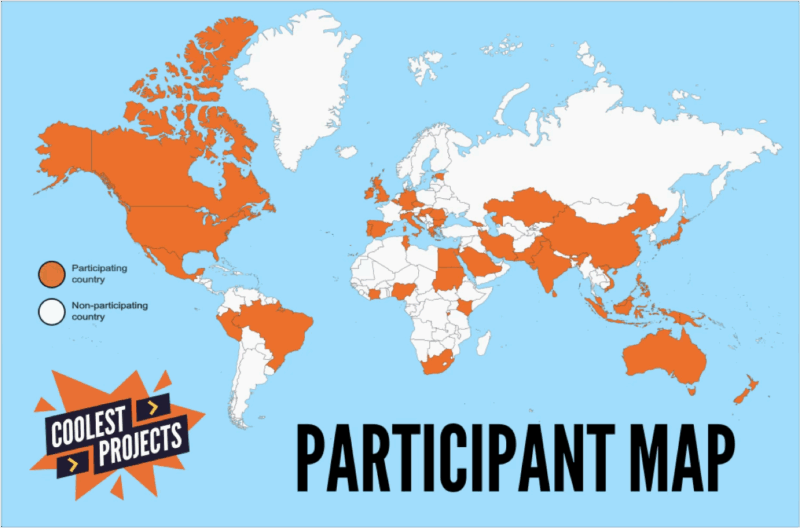
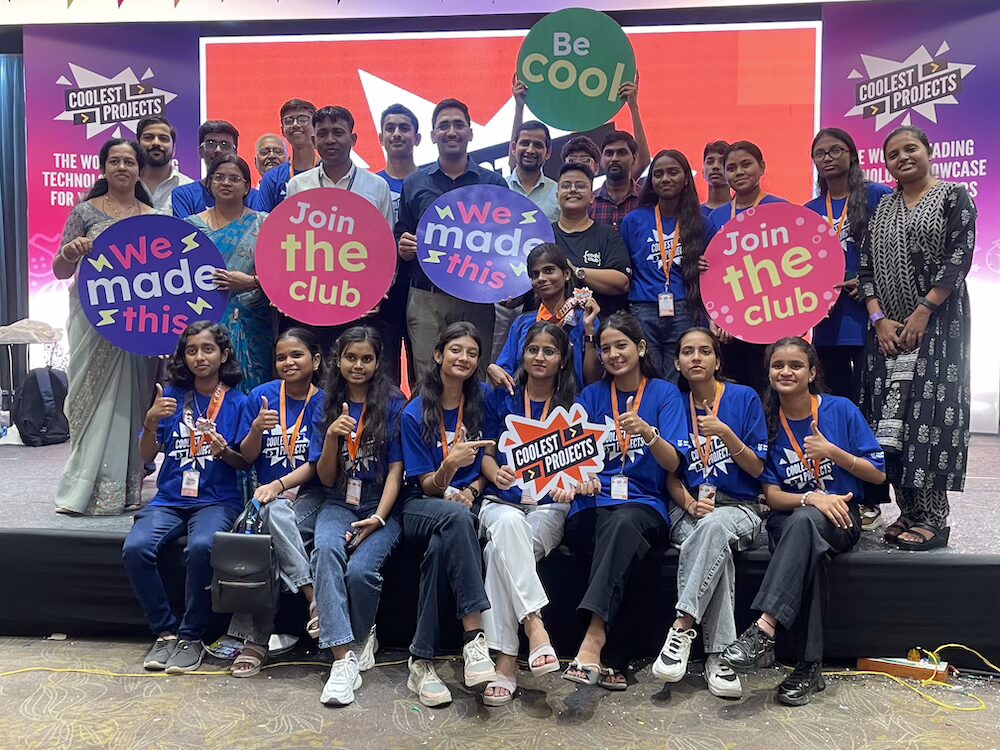

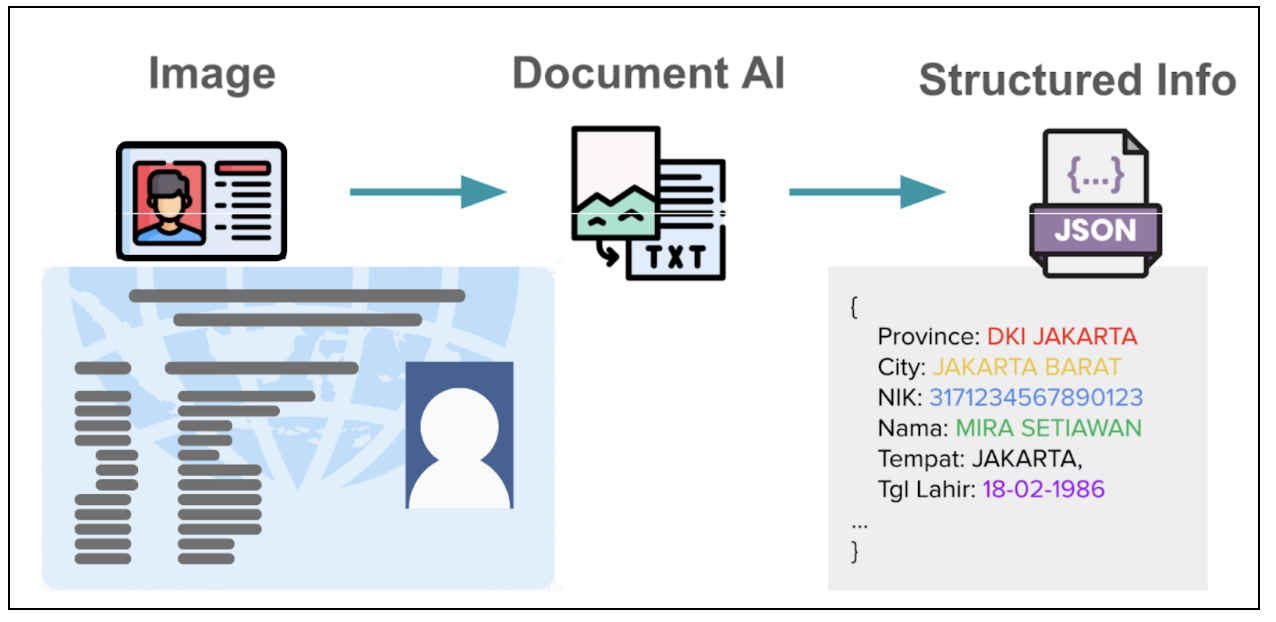
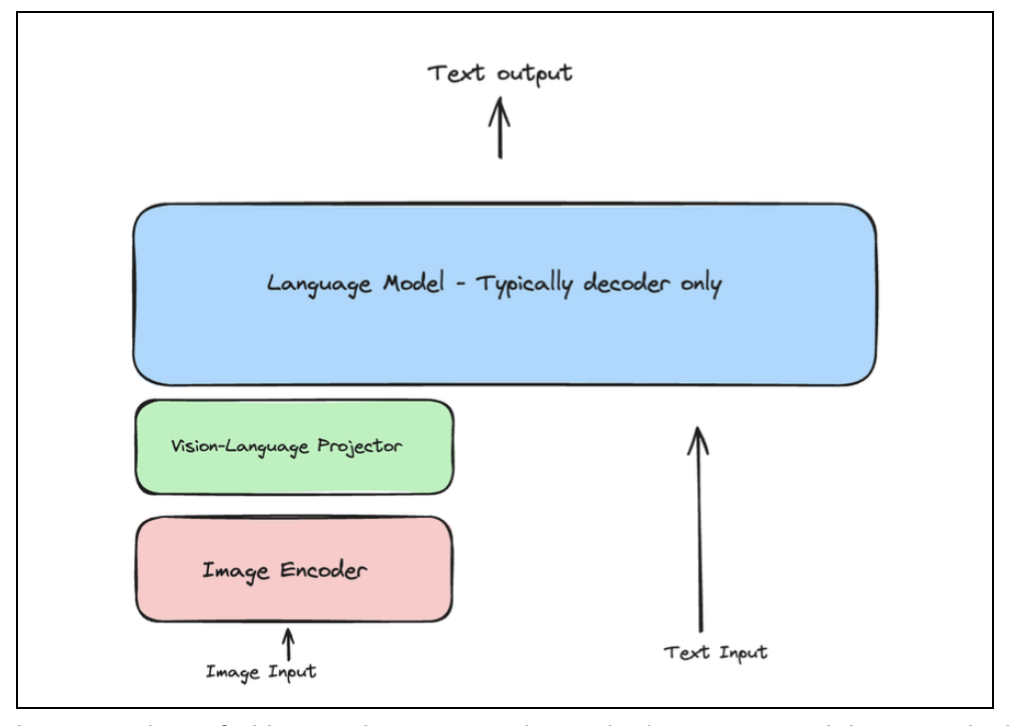

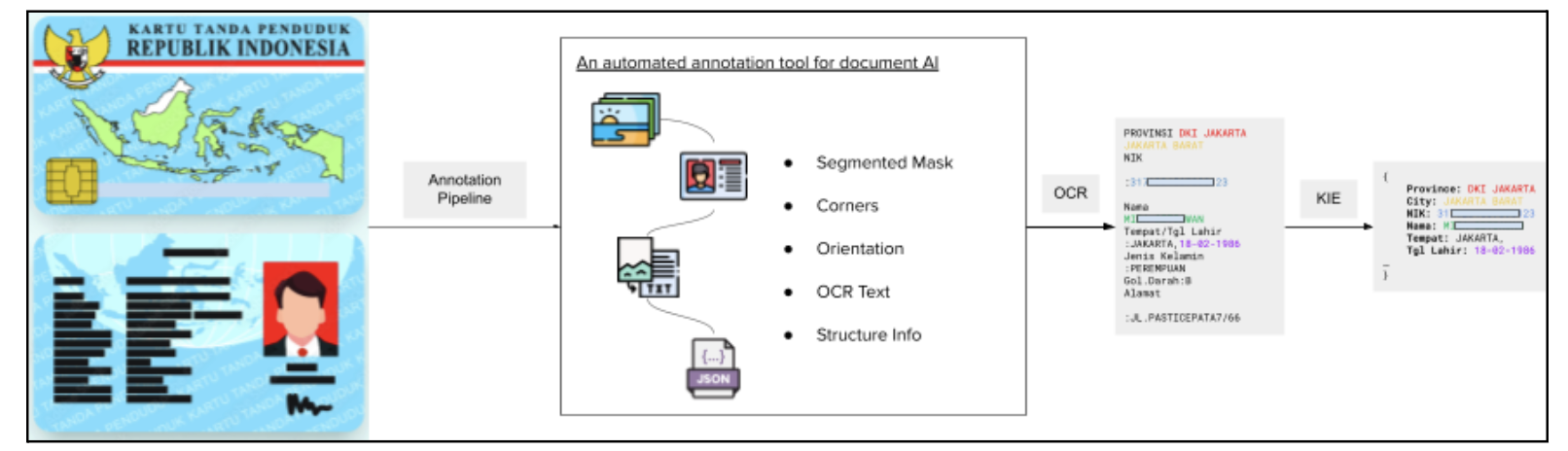
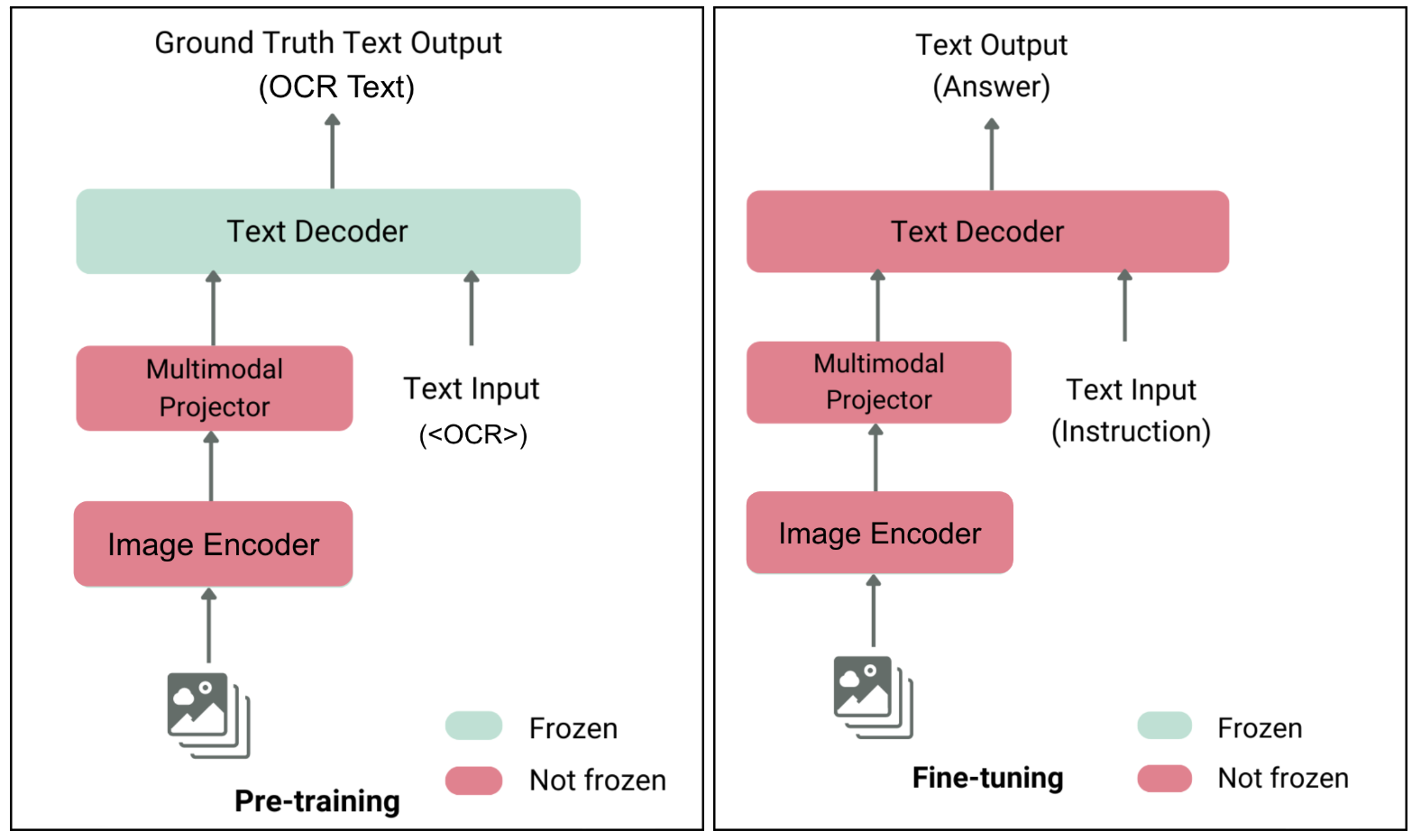
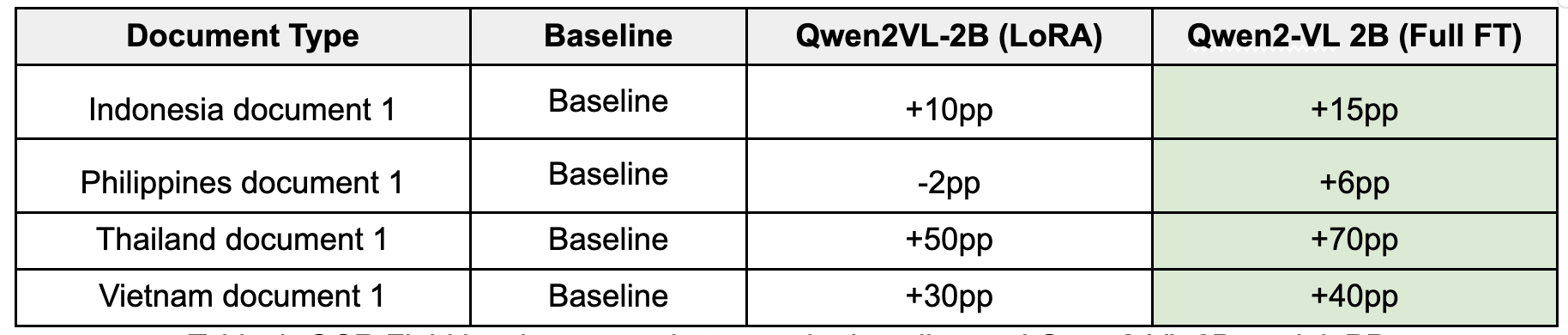
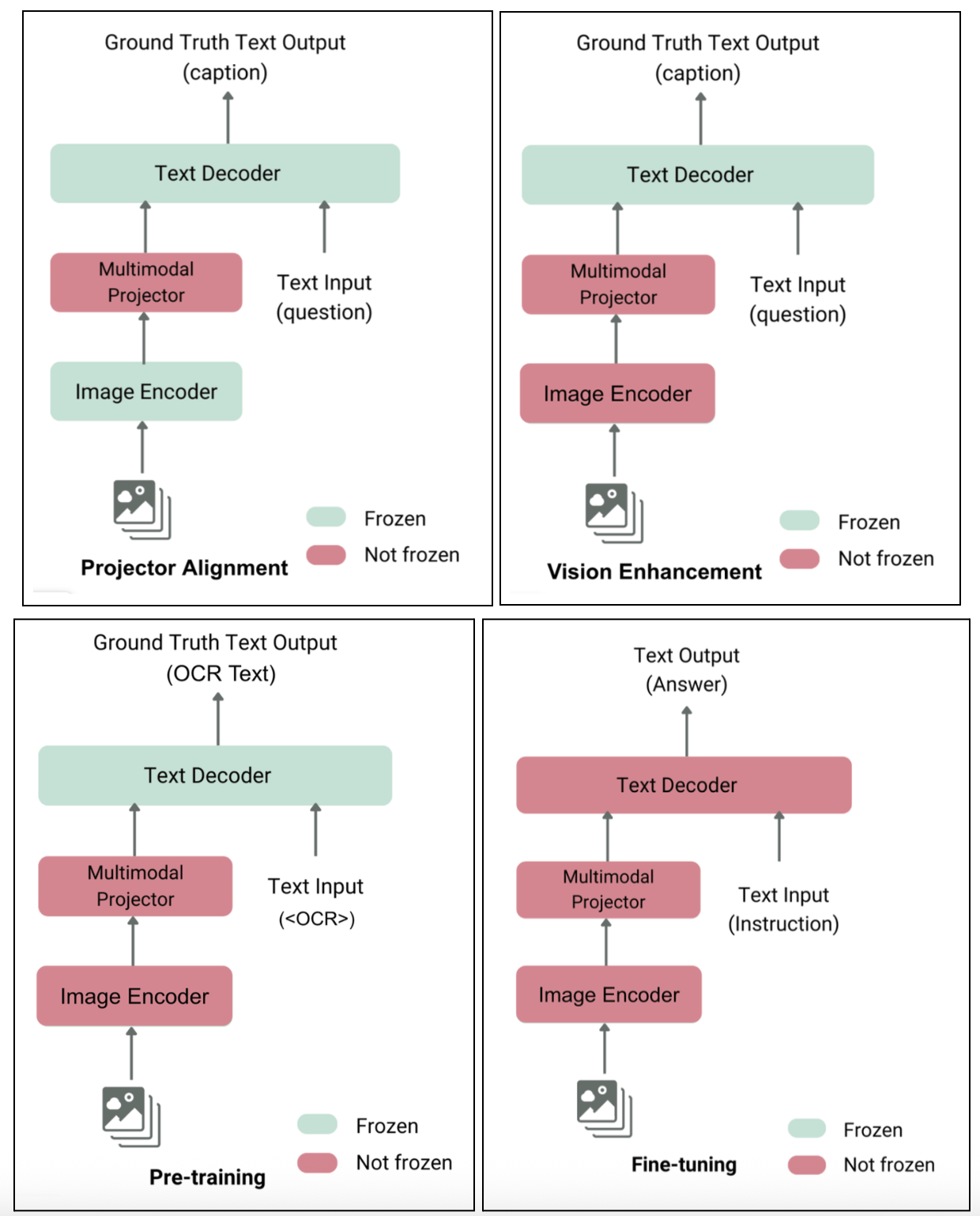
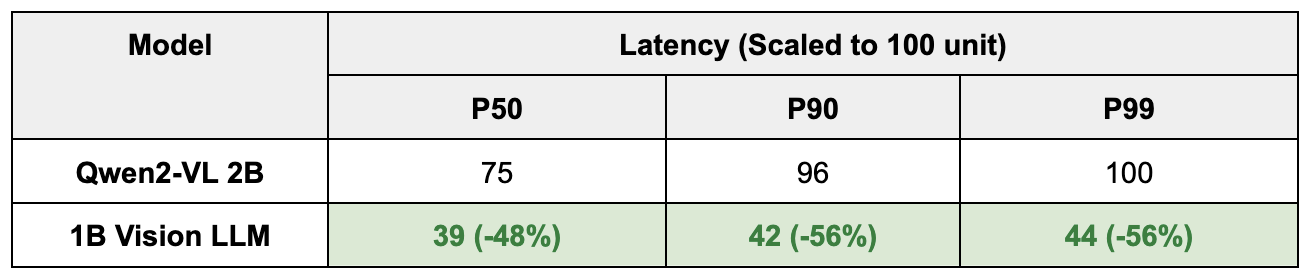
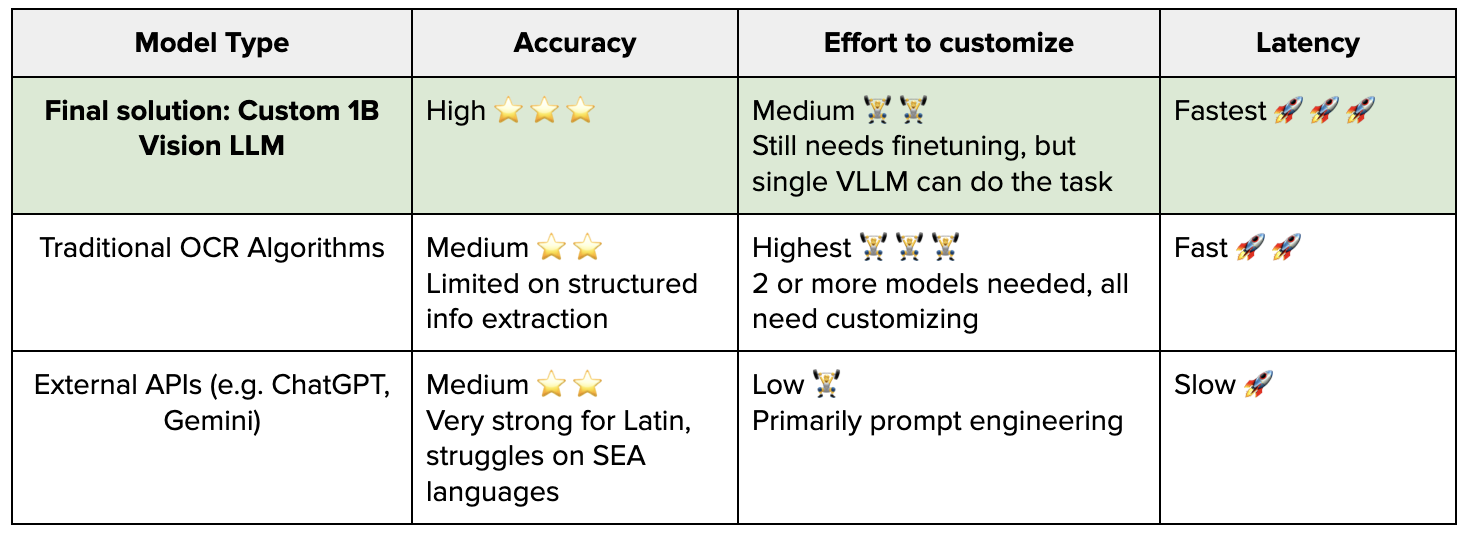
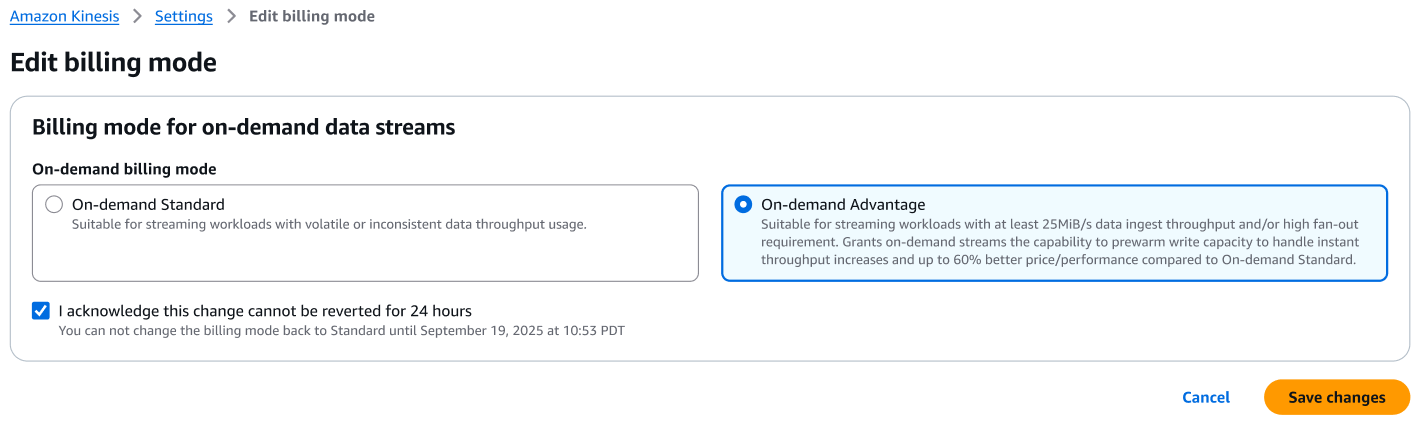

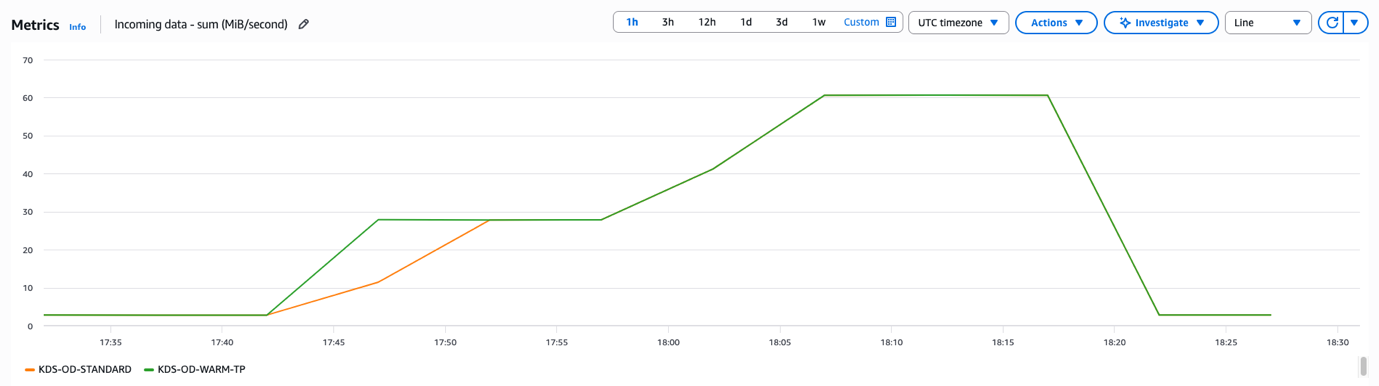
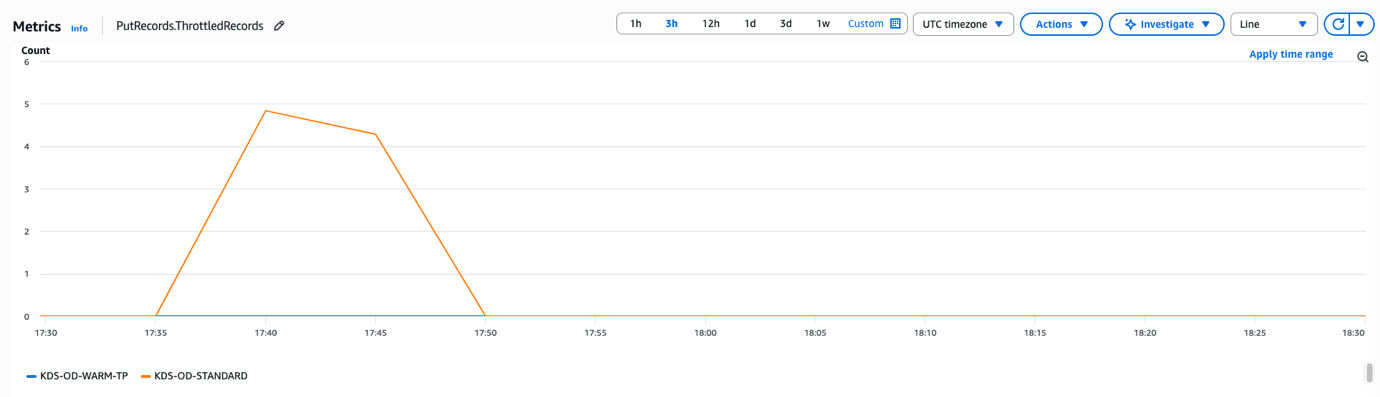
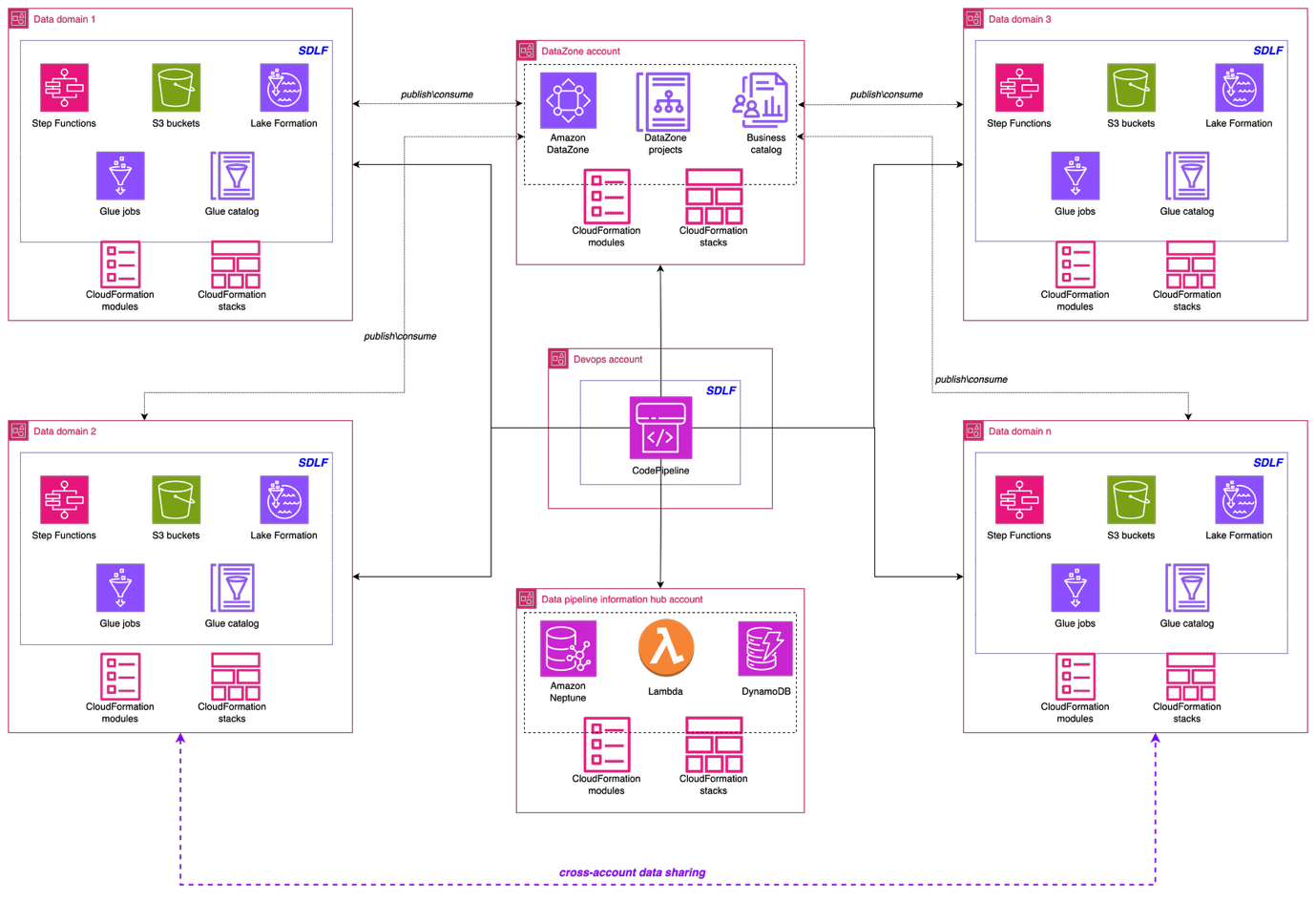
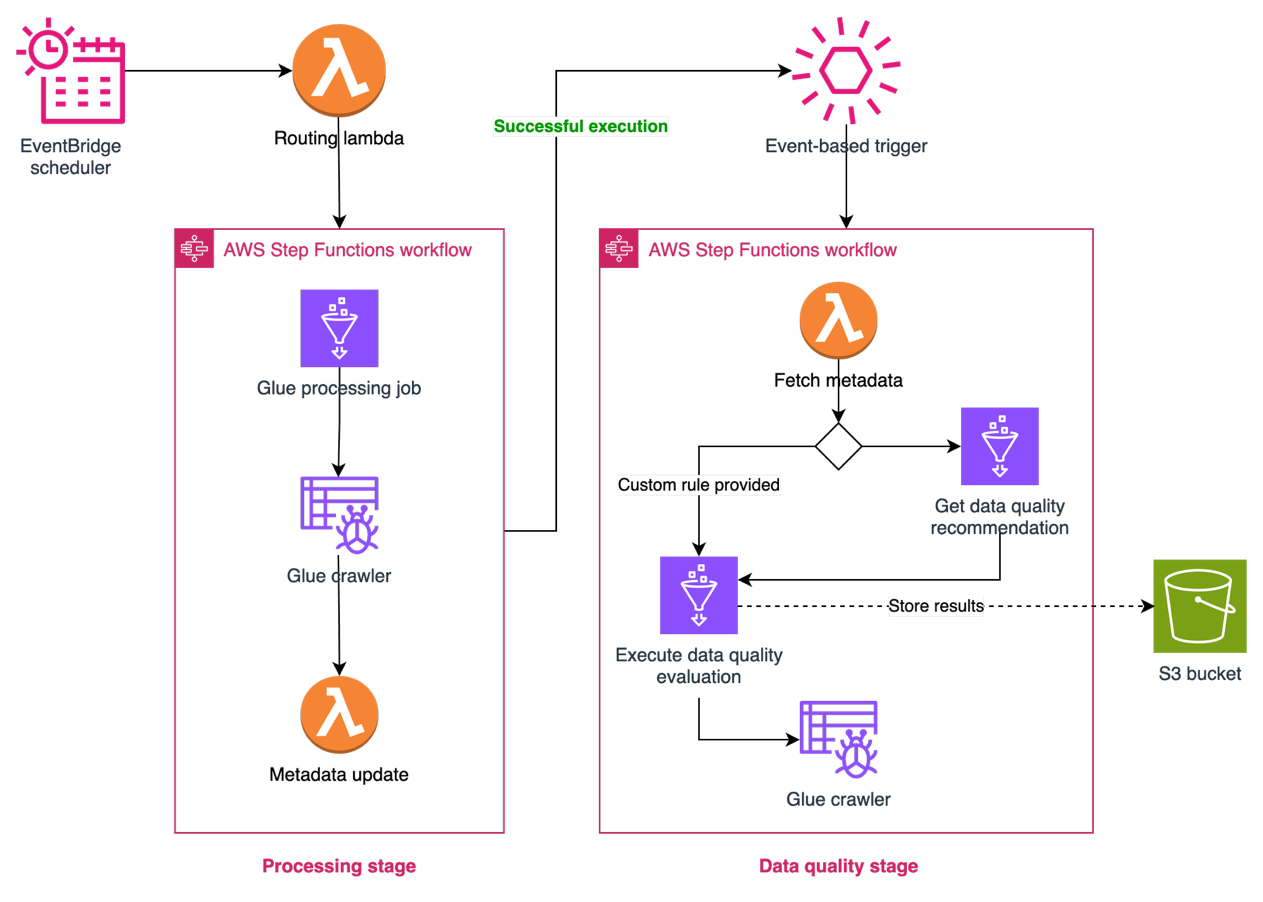
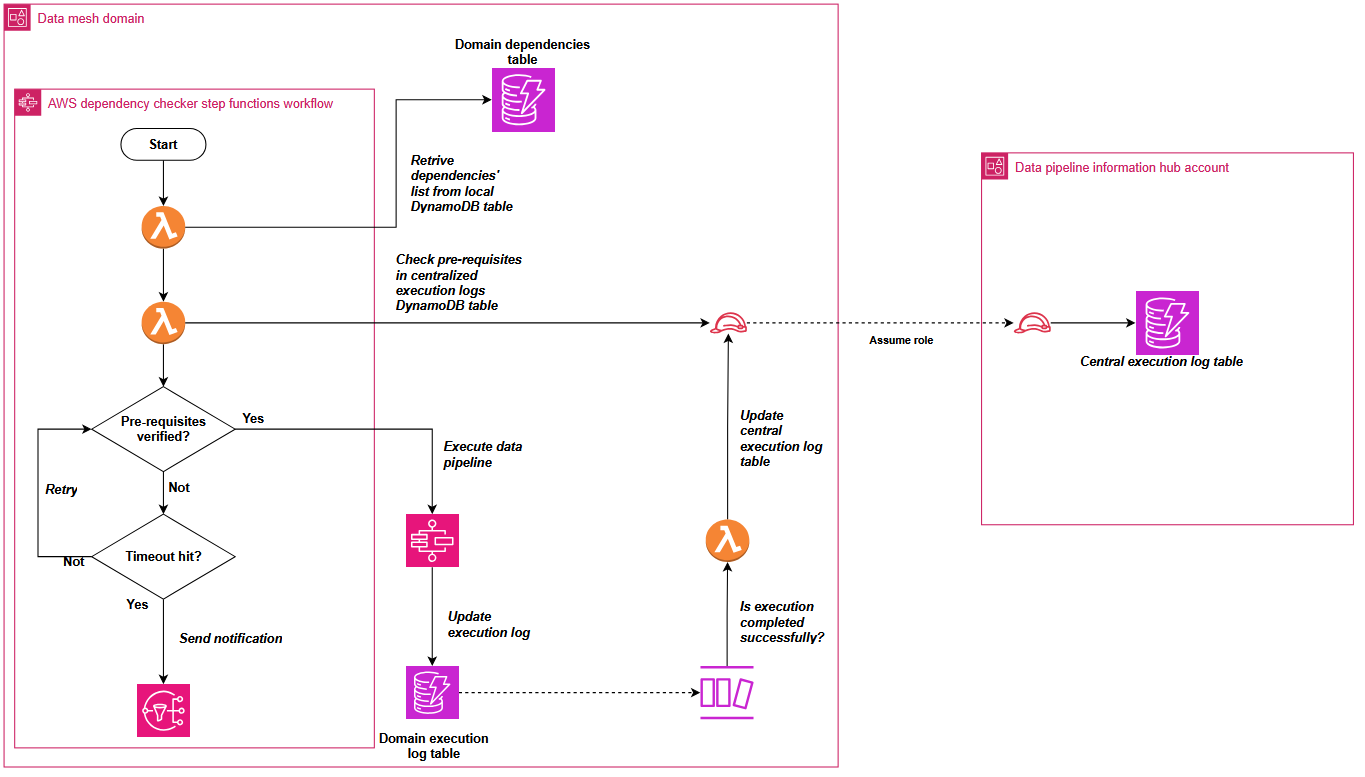
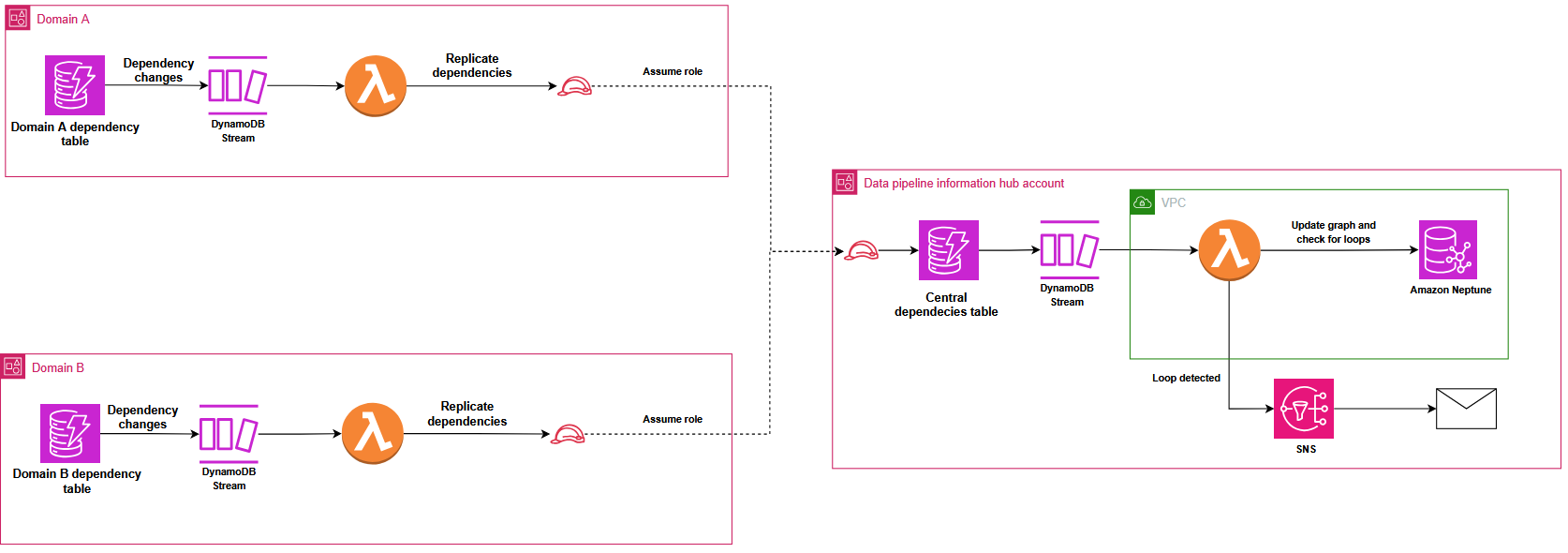
 Last week I met Jeff Barr at the