Post Syndicated from Matt Granger original https://www.youtube.com/watch?v=JPqiYtW5cfs
When Naval Guns Explode
Post Syndicated from The History Guy: History Deserves to Be Remembered original https://www.youtube.com/watch?v=E2bGpbiPIes
Agentic AI’s OODA Loop Problem
Post Syndicated from Bruce Schneier original https://www.schneier.com/blog/archives/2025/10/agentic-ais-ooda-loop-problem.html
The OODA loop—for observe, orient, decide, act—is a framework to understand decision-making in adversarial situations. We apply the same framework to artificial intelligence agents, who have to make their decisions with untrustworthy observations and orientation. To solve this problem, we need new systems of input, processing, and output integrity.
Many decades ago, U.S. Air Force Colonel John Boyd introduced the concept of the “OODA loop,” for Observe, Orient, Decide, and Act. These are the four steps of real-time continuous decision-making. Boyd developed it for fighter pilots, but it’s long been applied in artificial intelligence (AI) and robotics. An AI agent, like a pilot, executes the loop over and over, accomplishing its goals iteratively within an ever-changing environment. This is Anthropic’s definition: “Agents are models using tools in a loop.”1
OODA Loops for Agentic AI
Traditional OODA analysis assumes trusted inputs and outputs, in the same way that classical AI assumed trusted sensors, controlled environments, and physical boundaries. This no longer holds true. AI agents don’t just execute OODA loops; they embed untrusted actors within them. Web-enabled large language models (LLMs) can query adversary-controlled sources mid-loop. Systems that allow AI to use large corpora of content, such as retrieval-augmented generation (https://en.wikipedia.org/wiki/Retrieval-augmented_generation), can ingest poisoned documents. Tool-calling application programming interfaces can execute untrusted code. Modern AI sensors can encompass the entire Internet; their environments are inherently adversarial. That means that fixing AI hallucination is insufficient because even if the AI accurately interprets its inputs and produces corresponding output, it can be fully corrupt.
In 2022, Simon Willison identified a new class of attacks against AI systems: “prompt injection.”2 Prompt injection is possible because an AI mixes untrusted inputs with trusted instructions and then confuses one for the other. Willison’s insight was that this isn’t just a filtering problem; it’s architectural. There is no privilege separation, and there is no separation between the data and control paths. The very mechanism that makes modern AI powerful—treating all inputs uniformly—is what makes it vulnerable. The security challenges we face today are structural consequences of using AI for everything.
- Insecurities can have far-reaching effects. A single poisoned piece of training data can affect millions of downstream applications. In this environment, security debt accrues like technical debt.
- AI security has a temporal asymmetry. The temporal disconnect between training and deployment creates unauditable vulnerabilities. Attackers can poison a model’s training data and then deploy an exploit years later. Integrity violations are frozen in the model. Models aren’t aware of previous compromises since each inference starts fresh and is equally vulnerable.
- AI increasingly maintains state—in the form of chat history and key-value caches. These states accumulate compromises. Every iteration is potentially malicious, and cache poisoning persists across interactions.
- Agents compound the risks. Pretrained OODA loops running in one or a dozen AI agents inherit all of these upstream compromises. Model Context Protocol (MCP) and similar systems that allow AI to use tools create their own vulnerabilities that interact with each other. Each tool has its own OODA loop, which nests, interleaves, and races. Tool descriptions become injection vectors. Models can’t verify tool semantics, only syntax. “Submit SQL query” might mean “exfiltrate database” because an agent can be corrupted in prompts, training data, or tool definitions to do what the attacker wants. The abstraction layer itself can be adversarial.
For example, an attacker might want AI agents to leak all the secret keys that the AI knows to the attacker, who might have a collector running in bulletproof hosting in a poorly regulated jurisdiction. They could plant coded instructions in easily scraped web content, waiting for the next AI training set to include it. Once that happens, they can activate the behavior through the front door: tricking AI agents (think a lowly chatbot or an analytics engine or a coding bot or anything in between) that are increasingly taking their own actions, in an OODA loop, using untrustworthy input from a third-party user. This compromise persists in the conversation history and cached responses, spreading to multiple future interactions and even to other AI agents. All this requires us to reconsider risks to the agentic AI OODA loop, from top to bottom.
- Observe: The risks include adversarial examples, prompt injection, and sensor spoofing. A sticker fools computer vision, a string fools an LLM. The observation layer lacks authentication and integrity.
- Orient: The risks include training data poisoning, context manipulation, and semantic backdoors. The model’s worldview—its orientation—can be influenced by attackers months before deployment. Encoded behavior activates on trigger phrases.
- Decide: The risks include logic corruption via fine-tuning attacks, reward hacking, and objective misalignment. The decision process itself becomes the payload. Models can be manipulated to trust malicious sources preferentially.
- Act: The risks include output manipulation, tool confusion, and action hijacking. MCP and similar protocols multiply attack surfaces. Each tool call trusts prior stages implicitly.
AI gives the old phrase “inside your adversary’s OODA loop” new meaning. For Boyd’s fighter pilots, it meant that you were operating faster than your adversary, able to act on current data while they were still on the previous iteration. With agentic AI, adversaries aren’t just metaphorically inside; they’re literally providing the observations and manipulating the output. We want adversaries inside our loop because that’s where the data are. AI’s OODA loops must observe untrusted sources to be useful. The competitive advantage, accessing web-scale information, is identical to the attack surface. The speed of your OODA loop is irrelevant when the adversary controls your sensors and actuators.
Worse, speed can itself be a vulnerability. The faster the loop, the less time for verification. Millisecond decisions result in millisecond compromises.
The Source of the Problem
The fundamental problem is that AI must compress reality into model-legible forms. In this setting, adversaries can exploit the compression. They don’t have to attack the territory; they can attack the map. Models lack local contextual knowledge. They process symbols, not meaning. A human sees a suspicious URL; an AI sees valid syntax. And that semantic gap becomes a security gap.
Prompt injection might be unsolvable in today’s LLMs. LLMs process token sequences, but no mechanism exists to mark token privileges. Every solution proposed introduces new injection vectors: Delimiter? Attackers include delimiters. Instruction hierarchy? Attackers claim priority. Separate models? Double the attack surface. Security requires boundaries, but LLMs dissolve boundaries. More generally, existing mechanisms to improve models won’t help protect against attack. Fine-tuning preserves backdoors. Reinforcement learning with human feedback adds human preferences without removing model biases. Each training phase compounds prior compromises.
This is Ken Thompson’s “trusting trust” attack all over again.3 Poisoned states generate poisoned outputs, which poison future states. Try to summarize the conversation history? The summary includes the injection. Clear the cache to remove the poison? Lose all context. Keep the cache for continuity? Keep the contamination. Stateful systems can’t forget attacks, and so memory becomes a liability. Adversaries can craft inputs that corrupt future outputs.
This is the agentic AI security trilemma. Fast, smart, secure; pick any two. Fast and smart—you can’t verify your inputs. Smart and secure—you check everything, slowly, because AI itself can’t be used for this. Secure and fast—you’re stuck with models with intentionally limited capabilities.
This trilemma isn’t unique to AI. Some autoimmune disorders are examples of molecular mimicry—when biological recognition systems fail to distinguish self from nonself. The mechanism designed for protection becomes the pathology as T cells attack healthy tissue or fail to attack pathogens and bad cells. AI exhibits the same kind of recognition failure. No digital immunological markers separate trusted instructions from hostile input. The model’s core capability, following instructions in natural language, is inseparable from its vulnerability. Or like oncogenes, the normal function and the malignant behavior share identical machinery.
Prompt injection is semantic mimicry: adversarial instructions that resemble legitimate prompts, which trigger self-compromise. The immune system can’t add better recognition without rejecting legitimate cells. AI can’t filter malicious prompts without rejecting legitimate instructions. Immune systems can’t verify their own recognition mechanisms, and AI systems can’t verify their own integrity because the verification system uses the same corrupted mechanisms.
In security, we often assume that foreign/hostile code looks different from legitimate instructions, and we use signatures, patterns, and statistical anomaly detection to detect it. But getting inside someone’s AI OODA loop uses the system’s native language. The attack is indistinguishable from normal operation because it is normal operation. The vulnerability isn’t a defect—it’s the feature working correctly.
Where to Go Next?
The shift to an AI-saturated world has been dizzying. Seemingly overnight, we have AI in every technology product, with promises of even more—and agents as well. So where does that leave us with respect to security?
Physical constraints protected Boyd’s fighter pilots. Radar returns couldn’t lie about physics; fooling them, through stealth or jamming, constituted some of the most successful attacks against such systems that are still in use today. Observations were authenticated by their presence. Tampering meant physical access. But semantic observations have no physics. When every AI observation is potentially corrupted, integrity violations span the stack. Text can claim anything, and images can show impossibilities. In training, we face poisoned datasets and backdoored models. In inference, we face adversarial inputs and prompt injection. During operation, we face a contaminated context and persistent compromise. We need semantic integrity: verifying not just data but interpretation, not just content but context, not just information but understanding. We can add checksums, signatures, and audit logs. But how do you checksum a thought? How do you sign semantics? How do you audit attention?
Computer security has evolved over the decades. We addressed availability despite failures through replication and decentralization. We addressed confidentiality despite breaches using authenticated encryption. Now we need to address integrity despite corruption.4
Trustworthy AI agents require integrity because we can’t build reliable systems on unreliable foundations. The question isn’t whether we can add integrity to AI but whether the architecture permits integrity at all.
AI OODA loops and integrity aren’t fundamentally opposed, but today’s AI agents observe the Internet, orient via statistics, decide probabilistically, and act without verification. We built a system that trusts everything, and now we hope for a semantic firewall to keep it safe. The adversary isn’t inside the loop by accident; it’s there by architecture. Web-scale AI means web-scale integrity failure. Every capability corrupts.
Integrity isn’t a feature you add; it’s an architecture you choose. So far, we have built AI systems where “fast” and “smart” preclude “secure.” We optimized for capability over verification, for accessing web-scale data over ensuring trust. AI agents will be even more powerful—and increasingly autonomous. And without integrity, they will also be dangerous.
References
1. S. Willison, Simon Willison’s Weblog, May 22, 2025. [Online]. Available: https://simonwillison.net/2025/May/22/tools-in-a-loop/
2. S. Willison, “Prompt injection attacks against GPT-3,” Simon Willison’s Weblog, Sep. 12, 2022. [Online]. Available: https://simonwillison.net/2022/Sep/12/prompt-injection/
3. K. Thompson, “Reflections on trusting trust,” Commun. ACM, vol. 27, no. 8, Aug. 1984. [Online]. Available: https://www.cs.cmu.edu/~rdriley/487/papers/Thompson_1984_ReflectionsonTrustingTrust.pdf
4. B. Schneier, “The age of integrity,” IEEE Security & Privacy, vol. 23, no. 3, p. 96, May/Jun. 2025. [Online]. Available: https://www.computer.org/csdl/magazine/sp/2025/03/11038984/27COaJtjDOM
This essay was written with Barath Raghavan, and originally appeared in IEEE Security & Privacy.
Air Bud Pt. II: Last Week Tonight with John Oliver (Web Exclusive)
Post Syndicated from LastWeekTonight original https://www.youtube.com/watch?v=s9FsxWK0f1A
Kernel prepatch 6.18-rc2
Post Syndicated from corbet original https://lwn.net/Articles/1042593/
The 6.18-rc2 kernel prepatch is out.
End result: rc2 is on the bigger side, and we still have some of
the remaining regressions outstanding, but we should be making slow
progress. It’s fairly early days yet, so I’m not very
worried. Things on the whole look fairly normal.
Comic for 2025.10.20 – No Pants
Post Syndicated from Explosm.net original https://explosm.net/comics/no-pants
New Cyanide and Happiness Comic
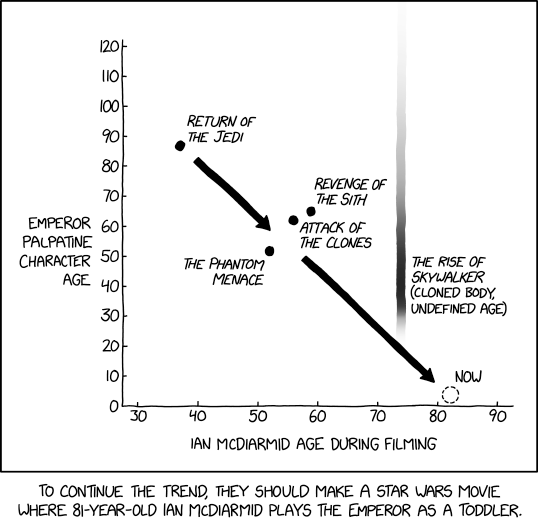
Emperor Palpatine
Post Syndicated from xkcd.com original https://xkcd.com/3157/
Bari Weiss, Billionaires & CBS #lastweektonight
Post Syndicated from LastWeekTonight original https://www.youtube.com/shorts/-xIQxzlXN-0
HACS Update Overload! The Risks of Home Assistant Custom Repositories #shorts
Post Syndicated from BeardedTinker original https://www.youtube.com/shorts/m3Ipp2hUWQE
Sunday stable kernels
The Massive Size of Broadcom Tomahawk 6 102.4T Switch Chips and Tomhawk Ultra Bonus
Post Syndicated from Patrick Kennedy original https://www.servethehome.com/the-massive-size-of-broadcom-tomahawk-6-102-4t-switch-chips-and-tomhawk-ultra-bonus/
We got to see the massive Broadcom Tomahawk 6 102.4T switch chips and even have a bonus appearance by the Tomahawk Ultra
The post The Massive Size of Broadcom Tomahawk 6 102.4T Switch Chips and Tomhawk Ultra Bonus appeared first on ServeTheHome.
Comic for 2025.10.19 – Shock Collar
Post Syndicated from Explosm.net original https://explosm.net/comics/shock-collar
New Cyanide and Happiness Comic
Designing the World’s Best Lenses – Sigma CEO Kazuto Yamaki
Post Syndicated from Matt Granger original https://www.youtube.com/watch?v=4io7pgb0EJY
Wishbone
Post Syndicated from Oglaf! -- Comics. Often dirty. original https://www.oglaf.com/wishbone/


Wild Density Supermicro 2OU 8x NVIDIA B300 Server at OCP 2025
Post Syndicated from Eric Smith original https://www.servethehome.com/wild-density-supermicro-2ou-8x-nvidia-b300-server-at-ocp-2025/
At OCP Summit 2025, we saw the new 2OU Supermicro 8x NVIDIA B300 GPU system that is designed to pack GPUs into a rack
The post Wild Density Supermicro 2OU 8x NVIDIA B300 Server at OCP 2025 appeared first on ServeTheHome.
Къде може да си сложим безплатно ваксина срещу COVID-19?
Post Syndicated from Боян Юруков original https://yurukov.net/blog/2025/covidmap/
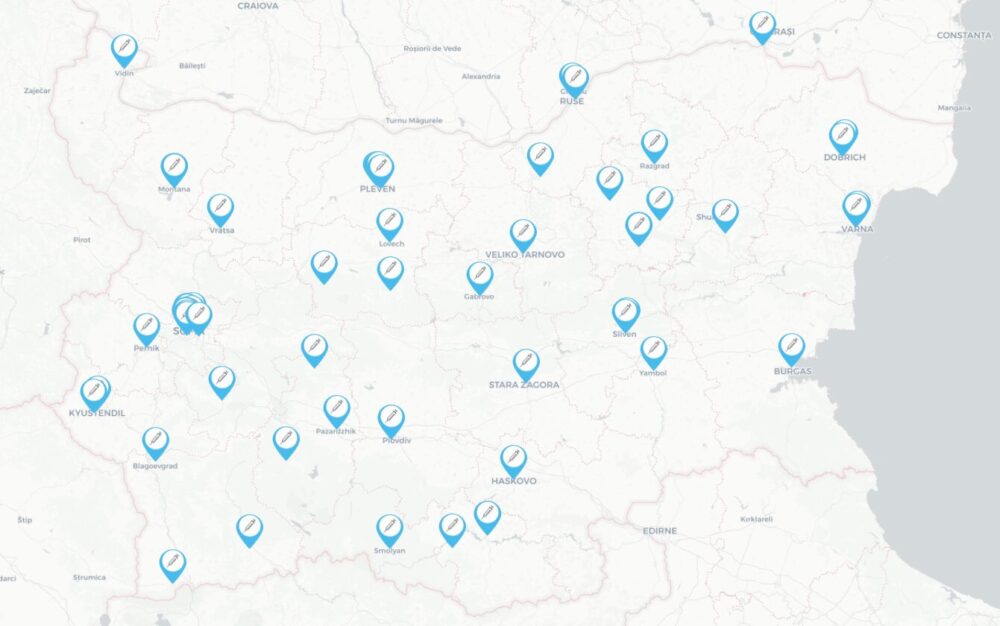
Преди няколко седмици си сложих ваксина срещу COVID-19. До две седмици ще си сложа противогрипна. Първите са безплатни за всички, а вторите – безплатни за хора над 65 г. Беше ми трудно обаче да се ориентирам къде има имунизационни центрове за тези за COVID-19, защото страниците на РЗИ-тата са шарени и трудни за навигиране. Затова направих тази карта с информацията към днешна дата.
Целият списък с места ще намерите на информационния портал за задължителни и препоръчителни имунизации на Министерството на здравеопазването Плюс мен. Препоръчвам ви да го разгледате, защото е изготвен с помощта на имунолози и епидемиолози и за разлика от други ресурси в мрежата, съдържа информация базирана на факти, данни и изследвания.
Списъкът води обаче към отделни страници и файлове на РЗИ-тата, които са разнородни и невинаги разбираеми. Подобно на РДВР-тата и горските стопанства, всяко РЗИ си е държава в държавата и липсва особена координация, носене на отговорност или последователност в усилията, комуникацията или дори практиките. В София има най-много и по таблицата ми беше трудно да се ориентирам къде е най-удобният за мен имунизационен център. Когато си поставих ваксината открих грешки в публикуваните таблици – две болници настояваха, че нямат такива центрове при позвъняване – затова не направих картата по-рано. Виждам обаче, че в края на септември с началото на кампанията са обновили списъците навсякъде и затова реших, че ще е полезно.
Доста РЗИ-та съобщават, че всеки от нас има възможност да поиска личния му лекар да поръча ваксина и да си сложи там. Доколкото някои не знаят, не искат или няма голям интерес, т.е. отварянето на една доза за 1-2-ма души е безсмислено, често се случва да насочват всички към РЗИ-тата. Също така, доста РЗИ-та говорят за мобилни екипи, с които може да се ваксинират трудноподвижни хора или такива в отдалечени райони. На страниците им и на картата са поместени контактите.
На някои места е посочено, че няма нужда от предварително запазване на час, но на повечето изрично казват, че трябва – навярно, за да се групират повече хора в един ден, за да не се прахосват флаконите ваксини. Има доста центрове за имунизиране на деца. Ваксината може да се поставя още от 6 месечна възраст, но не на всякъде е отбелязано, че слагат на деца. Като правило над 12 годишна възраст може да сложат навсякъде.
Припомням също, че пенсионери над 65 години имат право на безплатна ваксина срещу грип. Ако не ви е звъннал вече личния лекар, свържете се, за да поръча ваксина. Останалите трябва да си набавим сами от аптеките. Вече са налични, макар заради огромното търсене да свършват бързо. В някои аптеки има даже списъци на чакащи. Може да ги поставите при личните лекари или в същите имунизационни центрове на картата. Няма проблем да се поставя заедно с ваксината срещу COVID-19.
Може да отворите картата на цял екран тук. Данните в нея са актуални към 18-ти октомври 2025. Непременно сверявайте в страниците на РЗИ-тата и по телефона последното състояние, защото е възможно да променят местата на кабинетите, работното време и други условия. Ако забележите някаква такава промяна или неточност в картата, моля коментирайте под тази статия, за да обърна внимание.
The post Къде може да си сложим безплатно ваксина срещу COVID-19? first appeared on Блогът на Юруков.
This is not a music format
Post Syndicated from Techmoan original https://www.youtube.com/watch?v=c6TiIduyag0
Седмицата (13–18 октомври)
Post Syndicated from Йовко Ламбрев original https://www.toest.bg/sedmitsata-13-18-oktomvri/

Седмицата започна с изключително важно предупреждение, което не бива да подминаваме. „Бюджетът за 2026 г. е изправен пред сериозни трудности“, каза в интервю за БНТ управителят на БНБ Димитър Радев. Уточнявайки, че държавните разходи възлизат на около 40% от брутния вътрешен продукт, той добави:
Ако поддържаме устойчиво тези разходи значително над тази граница, това неизбежно поражда въпроса как ще се финансират. И отговорите не са толкова сложни – чрез дълг или чрез увеличение на данъците, или чрез комбинация от тези две възможности. А те не са добри възможности.
В същия момент Министерството на финансите се бави с проектобюджета, синдикатите шумят за данъчни реформи и увеличаване на осигуровките и данъците, а близки до правителството „говорещи глави“ им пригласят.
След безобразно щедрите увеличения на заплатите в МВР и в другите силови структури на държавата и обвързването на нивото на минималната работна заплата с 50% от средната на фона на скромната производителност на труда, уверено сме се засилили да влезем в еврозоната със свръхдефицит и ускоряваща се инфлация. А после сигурно еврото ще ни е виновно?
В същото това време големите Д-та ни разиграват сценки от самодейни вечеринки. Понеже талантът на Бойко Борисов като стендъп комедиант се поизтърка, напоследък той се упражнява в жанра старогръцка трагедия. В новия епизод на „Т.Е. от Е.Т.“ Елена Телбис за три минути разхвърля този и други „герои“ от седмицата в различните ъгли на тепиха. Докато мята щанги.
Емилия Милчева също взема за информационен повод гибелния гняв на Бойко Борисов. Според нея ние сме в преддверието на криза и е много вероятно следващите парламентарни избори да изпреварят президентските догодина. Не подминавайте седмичния ѝ политически коментар, озаглавен „Конграчулейшънс, Борисов 2.0“.
Емилия Милчева беше и вторият събеседник в поредицата ни „Тоест разговаряме“. Ако сте пропуснали излъчването на живо, може да изгледате или да изслушате записа на срещата, водена от Владислав Севов – линкове ще намерите в статията за епизода, в която е включен още един отговор от Емилия на зрителски въпрос: „Злодей ли е Пеевски?“
Министърът на образованието Красимир Вълчев не изглежда да е злодей, но ми е личен „любимец“. Така далеч е от моите позиции за миналото, настоящето и бъдещето, че дори неволно не можем да нацелим тема, по която да се доближим на по-малко от 200 светлинни години отстояние. Но понеже социалните мрежи според мен вече са фундаментално вредни, за малко да се подхлъзна по идеята му да ги ограничава за подрастващите. След като прочетох обаче статията на Светла Енчева „Не дай боже училището да стане интересно“, благосклонността ми към МОН и министъра отново се разсея.
Джорджа Спадони започва в „Тоест“ публицистична поредица за събитията в съседна Сърбия, които бяха възпламенени от злощастния инцидент на гарата в Нови Сад преди година. На 1 ноември 2024 г. почти 50-метровата бетонна козирка на новоремонтираната гара рухва върху главите на няколко десетки души, 16 от които умират. Трагедията се превръща в сръбския символ на корупцията, която убива. Последвалите студентски протести, които не стихват вече цяла година, разклатиха управлението на Сръбската прогресивна партия и Александър Вучич както нищо друго досега.
Културните войни са темата на новия текст на Йоанна Елми. Почти няма колебания, че те са симптом за социална криза и пренареждане на обществени и икономически слоеве, но колко разрушителни могат да са последиците? И ако несъгласията (от съвсем недалечното минало) бяха белег за жизнена и здрава демокрация, дали тя ще издържи екстремумите на днешните ни разминавания? Прочетете повече в брой 9 на „Гласовете на Америка“ и се абонирайте за този бюлетин, ако все още не сте.
В съвместната ни рубрика с „Екипът на София“ тази седмица Елена Гечева, която е политолог с фокус върху местните политики, показва какво прави един градски бюджет добър. И че водещото в него са не числата, а целите и идеите, заложени в плана за развитие на местната общност, които числата измерват и оценяват.
Автобиографичният роман „Живей бързо“ от Брижит Жиро е изборът на Антония Апостолова в рубриката ни „На второ четене“. В книгата, отличена с наградата „Гонкур“ за 2022 г., Жиро се опитва да разсъди има ли непредвидимост и непредотвратимост и изчислим ли е животът. Романът прераства в значим социален коментар, минава отвъд личното и засяга колективни измерения, смята Антония.
И накрая – ако миналата седмица Атанас Шиников напълно ви е ошашавил със сложния религиозен контекст на невидимите парични преводи хауала и сте очаквали във втората част (някак естествено или божествено) да се стигне до криптовалутите… уви, този път ще бъдем засилени още по-назад в дълбините на времето, чак до делниците на Пророка Мохамед.
Пожелавам ви приятно четене и гледане. А ако цените нашата журналистическа работа, подкрепете ни. „Тоест“ се издържа от месечните дарения на своите читатели.
NVIDIA DGX Spark and Partner GB10 Firmware
Post Syndicated from Eric Smith original https://www.servethehome.com/nvidia-dgx-spark-and-dell-partner-gb10-firmware/
We show you how to update the firmware on your NVIDIA DGX Spark and partner systems as we discuss a key difference between the firmware
The post NVIDIA DGX Spark and Partner GB10 Firmware appeared first on ServeTheHome.
Configure seamless single sign-on with SQL analytics in Amazon SageMaker Unified Studio
Post Syndicated from Arun A K original https://aws.amazon.com/blogs/big-data/configure-seamless-single-sign-on-with-sql-analytics-in-amazon-sagemaker-unified-studio/
Amazon SageMaker Unified Studio provides a unified experience for using data, analytics, and AI capabilities. SageMaker Unified Studio now supports trusted identity propagation (TIP) for SQL workloads, enabling fine-grained data access control based on individual user identities. Organizations can use this integration to manage data permissions through AWS Lake Formation while using their existing single sign-on (SSO) infrastructure.
Organizations already using Amazon Redshift with TIP can extend their existing Lake Formation permissions to SageMaker Unified Studio. Users simply log in through SSO and access their authorized data using the SQL editor, maintaining consistent security controls across their analytics environment.
This post demonstrates how to configure SageMaker Unified Studio with SSO, set up projects and user onboarding, and access data securely using integrated analytics tools.
Solution overview
For our use case, a retail corporation is planning to implement sales analytics to identify sales patterns and product categories that are doing well. This will help the sales team improve on sales planning with targeted promotions and help the finance team plan budgeting with better inventory management. The corporation stores a customer table in an Amazon Simple Storage Service (Amazon S3) data lake and a store_sales table in a Redshift cluster.
The corporation uses SageMaker Unified Studio as the UI, with users onboarded from their identity provider (IdP) to AWS IAM Identity Center with TIP. Amazon SageMaker Lakehouse centralizes data from Amazon S3 and Amazon Redshift, and Lake Formation provides fine-grained access control based on user identity. For our example use case, we explore two different users. The following table summarizes their roles, the tools they use, and their data access.
| User | Group | Tool | Data Access |
| Ethan (Data Analyst) | Sales | Amazon Athena for interactive SQL analysis | Non-sensitive customer data (id, c_country, birth_year) and store_sales full table access |
| Frank (BI Analyst) | Finance | Amazon Redshift for reports and visualization | US customer data (c_country='US') |
The following diagram illustrates the solution architecture.
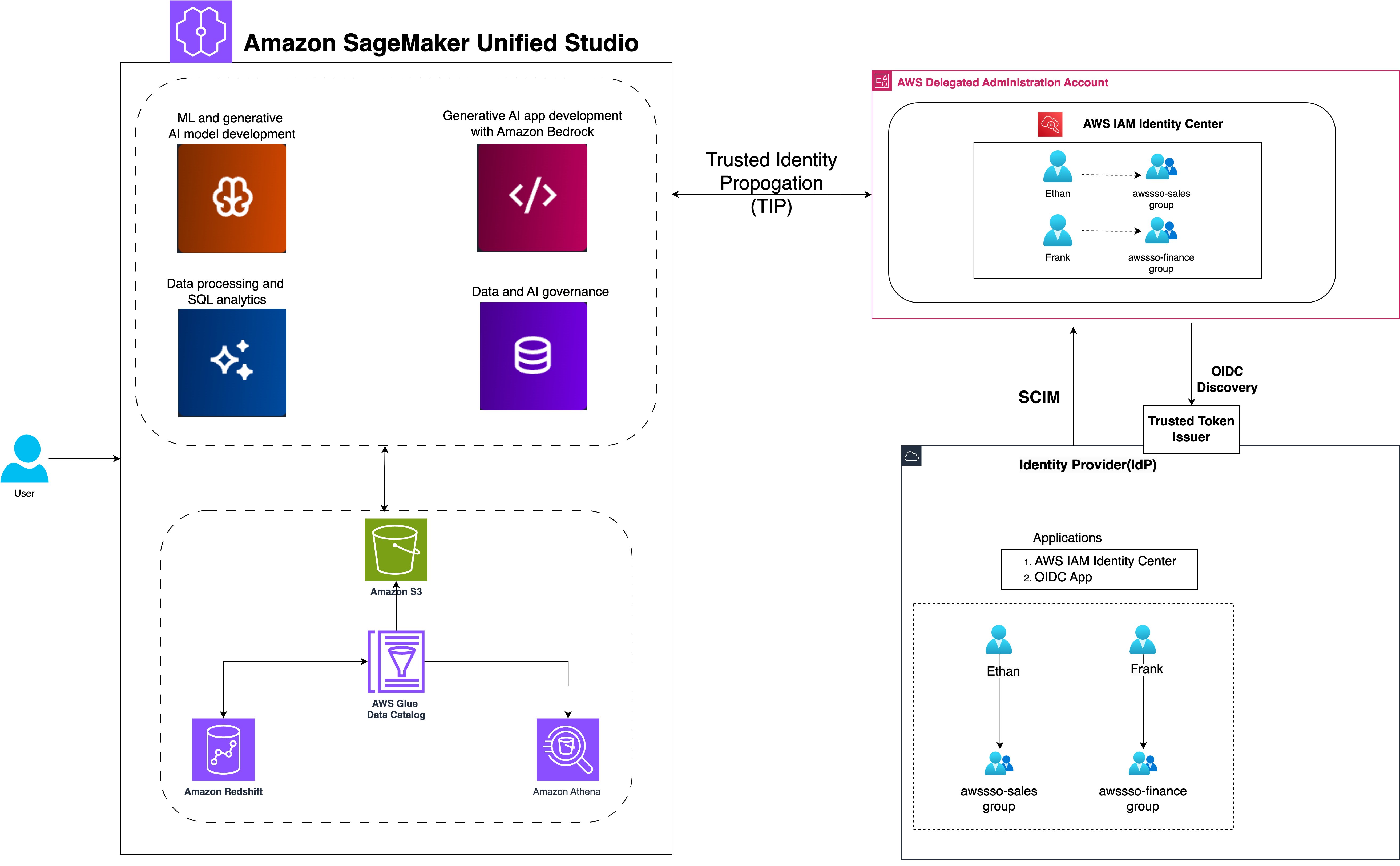
SageMaker Unified Studio with IAM Identity Center simplifies the user journey from authentication to data analysis. The workflow consists of the following steps:
- Users sign in with organizational SSO credentials through their IdP and are redirected to SageMaker Unified Studio.
- Users configure IAM Identity Center authentication for Amazon Redshift, linking identity management with data access.
- Users access the query editor for Amazon Redshift or SageMaker Lakehouse, triggering IAM Identity Center federation to generate session and access tokens.
- SageMaker Unified Studio retrieves user authorization details and group membership using the session token.
- Users are authenticated as IAM Identity Center users, ready to explore and analyze data using Amazon Redshift and Amazon Athena.
To implement our solution, we walk through the following high-level steps:
- Set up SageMaker Lakehouse resources.
- Create a SageMaker Unified Studio domain with SSO and TIP enabled.
- Configure Amazon Redshift for TIP and validate access.
- Validate data access using Amazon Athena.
Prerequisites
Before you begin implementing the solution, you must have the following in place:
- If you don’t have an AWS account, you can sign up for one.
- We provide utility scripts to help set up various sections of the post. To use them:
- Right-click this link and save the utility scripts zip file.
- Unzip the file to a terminal that has the AWS Command Line Interface (AWS CLI) configured. You can also use AWS CloudShell.
- Run the scripts only when prompted in the relevant sections.
- To deploy the infrastructure, right-click this link and select ‘Save Link As’ to save it as
sagemaker-unified-studio-infrastructure.yaml. Then upload the file when creating a new stack in the AWS CloudFormation console, which will create the following resources:- An S3 bucket to hold the customer data used in this post.
- An AWS Identity and Access Management (IAM) role called
DataTransferRolewith permissions as defined in Prerequisites for managing Amazon Redshift namespaces in the AWS Glue Data Catalog. - An IAM role called
IAMIDCRedshiftRole, which will be used later to set up the IAM Identity Center Redshift application. - An IAM role called
LakeFormationRegistrationRole, following the instructions in Requirements for roles used to register locations, and necessary IAM policies.
- If you don’t have a Lake Formation user, you can create one. For this post, we use an admin user. For instructions, see Create a data lake administrator.
- If IAM Identity Center is not enabled, refer to Enabling AWS IAM Identity Center for instructions to enable it.
- If you need to migrate existing Redshift users and groups, use the IAM Identity Center Redshift migration utility.
- For a quick way to test the feature and familiarize yourself with the process, we provide a script to generate mock users and groups. Run the
setup-idc.shscript, which is provided in Step 2, to create test users and groups in IAM Identity Center for demonstration purposes.
- Integrate IAM Identity Center with Lake Formation. For instructions, see Connecting Lake Formation with IAM Identity Center.
- Register the S3 bucket as a data lake location:
- On the Lake Formation console, choose Data lake locations in the navigation pane.
- Choose Register location.
- For the role, use
LakeFormationRegistrationRole.
- Create an IAM Identity Center Redshift application, as detailed in our previous post:
- On the Amazon Redshift console, choose IAM Identity Center connections in the navigation pane and choose Create application.
- For both the display name and application name, enter
redshift-idc-app. - Set the IdP namespace to
awsidc. - Choose
IAMIDCRedshiftRoleas the IAM role. - Choose Next to create the application.
- Take note of the application Amazon Resource Name (ARN) to use in subsequent steps. The ARN format is
arn:aws:sso::<ACCOUNT_NUMBER>:application/ssoins-<RANDOM_STRING>/apl-<RANDOM_STRING>.
- If you don’t have existing Redshift tables to work with, run the script
setup-producer-redshift.sh, which is provided in Step 2, to create a producer namespace and workgroup, set up a sample sales database, and generate necessary tables with test data. - The post also uses simulated customer data stored in the AWS Glue Data Catalog. To set up this data and configure the necessary Lake Formation permissions, run the
setup-glue-tables-and-access.shscript provided in Step 2.
Note: The utility scripts are configured for
us-east-1 region. If you prefer another region, edit the region in the scripts before running them.
Set up SageMaker Lakehouse resources
In this section, we configure the foundational lakehouse resources required for SageMaker to access and analyze data across multiple storage systems. We’ll register the Redshift instance to the AWS Glue Data Catalog to make warehouse data discoverable and establish Lake Formation permissions on lakehouse resources for user identities to ensure secure, governed access to both data lake and data warehouse resources from within SageMaker environments.
Register Redshift instance to the Data Catalog
In this step, we use the store_sales data, which we created earlier using the setup-producer-redshift.sh script. You can register entire clusters to the Data Catalog and create catalogs managed by AWS Glue. To register a cluster to the Data Catalog, complete the following steps:
- On the Lake Formation console, choose Administrative roles and tasks in the navigation pane.
- Under Data lake administrators, choose Add.
- Choose Read-only administrator, then choose
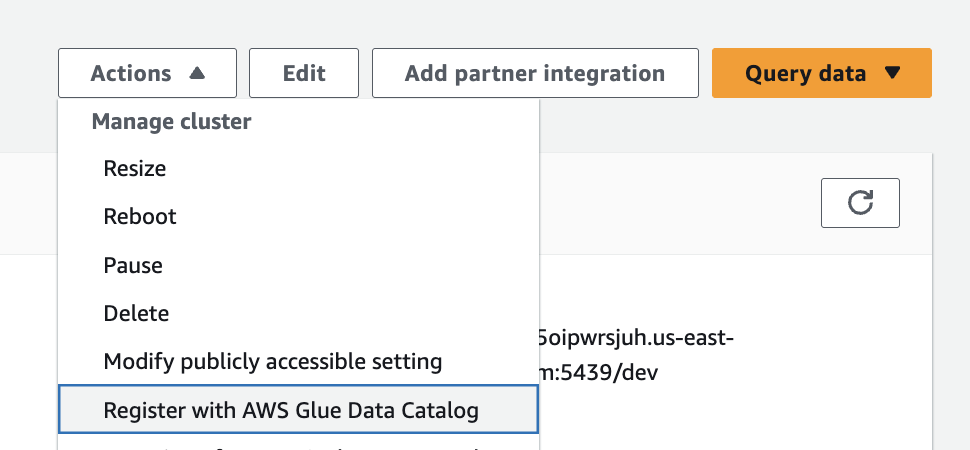
AWSServiceRoleForRedshift. - On the Amazon Redshift console, open your namespace.
- On the Actions dropdown menu, chose Register with AWS Glue Data Catalog, then choose Register.

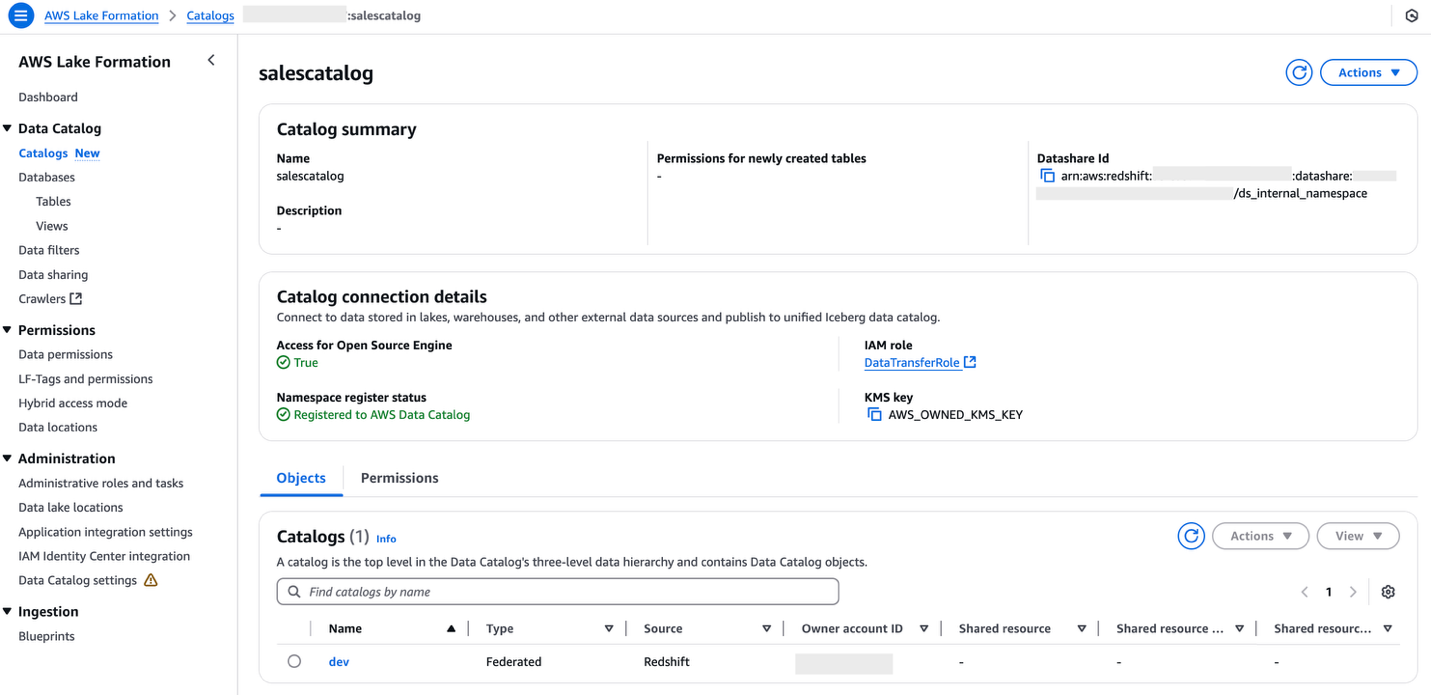
- Sign in to the Lake Formation console as the data lake administrator and choose Catalogs in the navigation pane.
- Under Pending catalog invitations, select the namespace and accept the invitation by choosing Approve and create catalog.
- Provide the name for the catalog as
salescatalog. - Select Access this catalog from Apache Iceberg compatible engines, choose
DataTransferRolefor the IAM role, then choose Next. - Choose Add permissions and choose the admin IAM role under IAM users and roles.
- Select Super user for catalog permissions and choose Add.
- Choose Next.
- Choose Create catalog.

Set up Lake Formation permission on lakehouse resources for user identities
In this section, we configure Lake Formation permissions to enable secure access to lakehouse resources for federated user identities. Lake Formation provides fine-grained access control that works seamlessly with IAM Identity Center, allowing you to manage permissions centrally while maintaining security boundaries.
We’ll focus on granting database access to IAM Identity Center groups in Lake Formation and setting table-level permissions for federated Redshift catalog tables. These permissions form the security foundation for our federated query architecture, enabling users to seamlessly access both S3 data lake and Redshift data warehouse resources through a unified interface.
Grant database access to IAM Identity Center groups in Lake Formation
After you share your Redshift catalog with the Data Catalog and integrate with Lake Formation, you must grant appropriate database access. Follow these steps to set up permissions on your data lake resources for corporate identities:
- On the Lake Formation console, under Permissions in the navigation pane, choose Data permissions.
- Choose Grant.
- Select Principals for Principal type.
- Under Principals, select IAM Identity Center and choose Add.
- In the pop-up window, if this is your first time assigning users and groups, choose Get started.
- Search for and select the IAM Identity Center groups
awssso-salesandawssso-finance. - Choose Assign.
- Under LF-Tags or catalog resources, choose Named Data Catalog resources.
- Choose
<accountid>:salescatalog/devfor Catalogs. - Choose
sales_schemafor Database.
- Choose
- Under Database permissions, select Describe.
- Choose Grant to apply the permissions.
Grant table-level permissions for federated Redshift catalog tables
Complete the following steps to grant table permissions to the IAM Identity Center groups:
- On the Lake Formation console, under Permissions in the navigation pane, choose Data permissions.
- Choose Grant.
- Select Principals for Principal type.
- Under Principals, select IAM Identity Center and choose Add.
- In the pop-up window, if this is your first time assigning users and groups, choose Get started.
- Search for and select the IAM Identity Center group
awssso-sales. - Choose Assign.
- Under LF-Tags or catalog resources, choose Named Data Catalog resources.
- Choose
<accountid>:salescatalog/devfor Catalogs. - Choose
sales_schemafor Database. - Choose
store_salesfor Table.
- Choose
- Select Select and Describe for Table permissions.
- Choose Grant to apply the permissions.
Create a SageMaker Unified Studio domain with SSO and TIP enabled
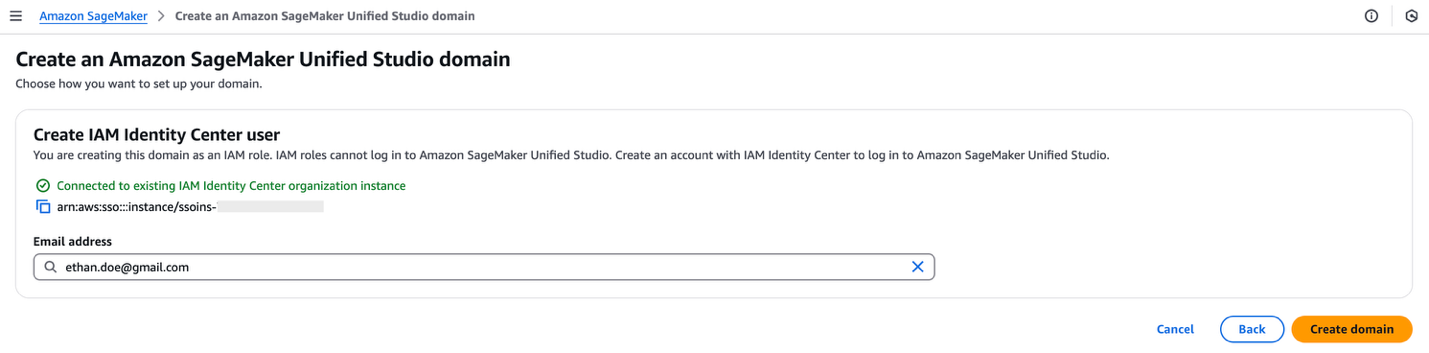
For instructions to create a SageMaker Unified Studio domain, refer to Create an Amazon SageMaker Unified Studio domain – quick setup. Because your IAM Identity Center integration is already complete, you can specify an IAM Identity Center user in the domain configuration settings.
Enable TIP in SageMaker Unified Studio
Complete the following steps to enable TIP in SageMaker Unified Studio:
- On the SageMaker console, use the AWS Region selector in the top navigation bar to choose the appropriate Region.
- Choose View domains and choose the domain’s name from the list.
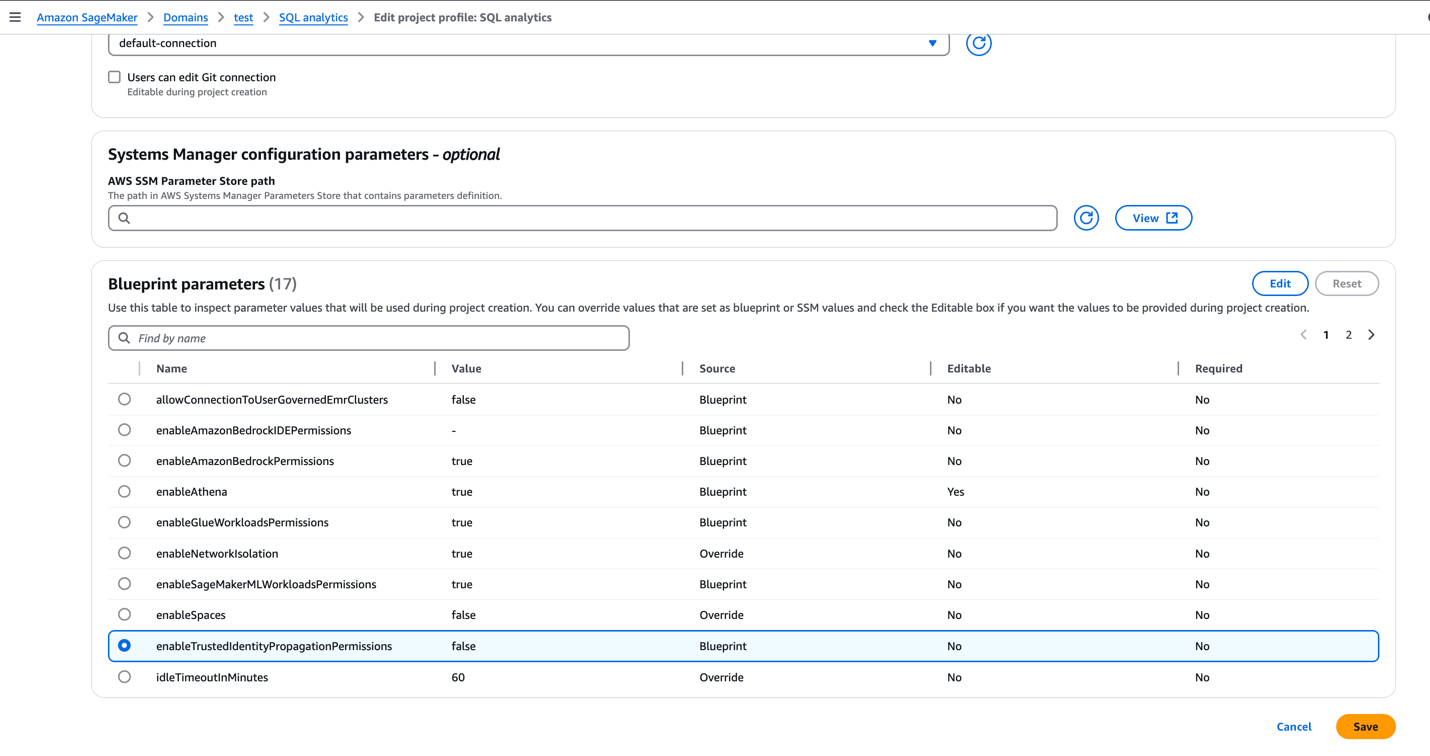
- On the domain’s details page, on the Project profiles tab, choose a project profile, for example, SQL analytics.
- Select SQL analytics and choose Edit.
- In the Blueprint parameters section, select
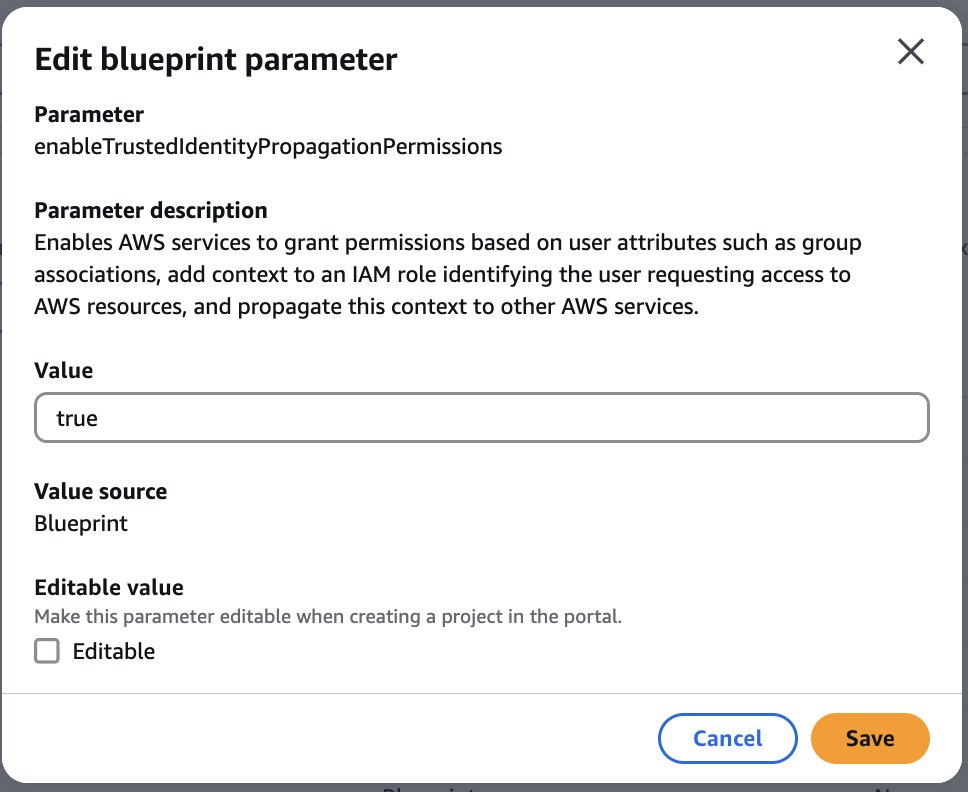
enableTrustedIdentityPropagationPermissionsand choose Edit.
- Update the value as
true. - To enforce authorization-based on TIP, the SageMaker Unified Studio admin can make this parameter non-editable.
- Choose Save.
Enable user access for SageMaker Unified Studio domain
Complete the following steps to enable user access for the SageMaker Unified Studio domain:
- Open the SageMaker console in the appropriate Region and choose Domains in the navigation pane.
- Choose an existing SageMaker Unified Studio domain where you want to add SSO user access.
- On the domain’s details page, on the User management tab, in the Users section, choose Add and Add SSO users and groups.
- Choose the user (for this post, we add the user Frank) from the dropdown list and choose Add users and groups.
Add project members
SageMaker Unified Studio projects facilitate team collaboration for different business initiatives. As the project owner, Ethan now can add Frank as a team member to enable their collaboration. To add members to an existing project, complete the following steps:
- Sign in to the SageMaker Unified Studio console using the SSO credentials of who owns the project (for this post, Ethan).
- Choose Select a project.
- Choose the project you want to edit.
- On the Project overview page, expand Actions and choose Manage members.
- Choose Add members.
- Enter the name of the user or group you want to add (for this post, we add Frank).
- Select Contributor if you want to add the project member as a contributor.
- (Optional) Repeat these steps to add more project members. You can add up to eight project members at a time.
- Choose Add members.
Create a SQL analytics project in Unified Studio
In this step, we federate into SageMaker Unified Studio and create a project using SQL analytics. Complete the following steps:
- Federate into SageMaker Unified Studio using your IAM Identity Center credentials:
- On the SageMaker console, choose Domains in the navigation pane.
- Copy the SageMaker Unified Studio URL for your domain and enter it into a new browser window.
- Choose Sign in with SSO.
- A browser pop-up will redirect you to your preferred IdP login page, where you enter your IdP credentials.
- If authentication if successful, you will be redirected to SageMaker Unified Studio.
- After logging in, choose Create project.
- Enter a name for your project. This project name is final and can’t be changed later.
- (Optional) Enter a description for your project. You can edit this later.
- Choose a project profile. For this demo, we choose the SQL analytics profile from the available templates.
- Leave the default values as they are or modify them according to your use case, then choose Continue.
- Choose Create project to finalize the project and initialize your SQL analytics workspace.
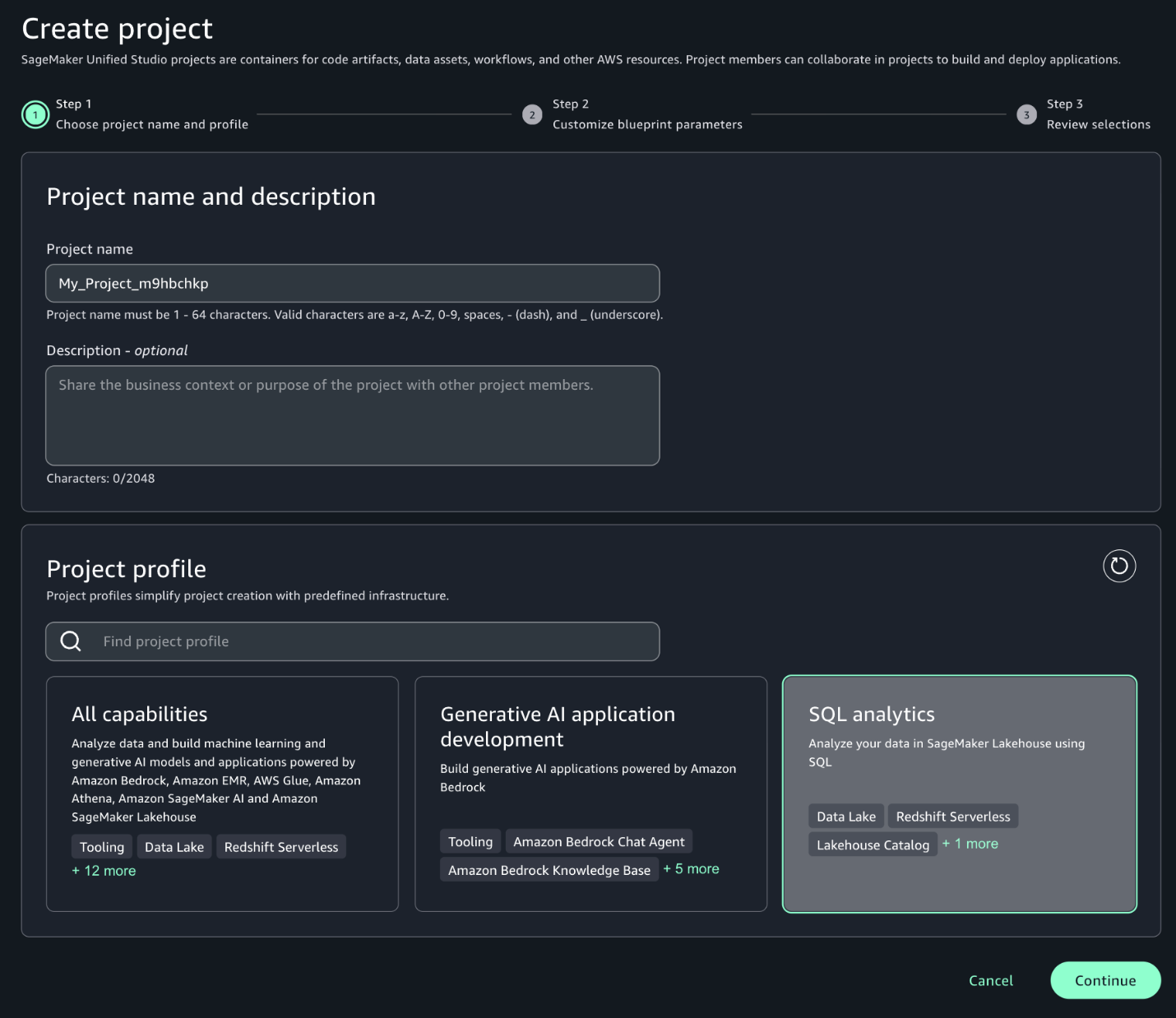
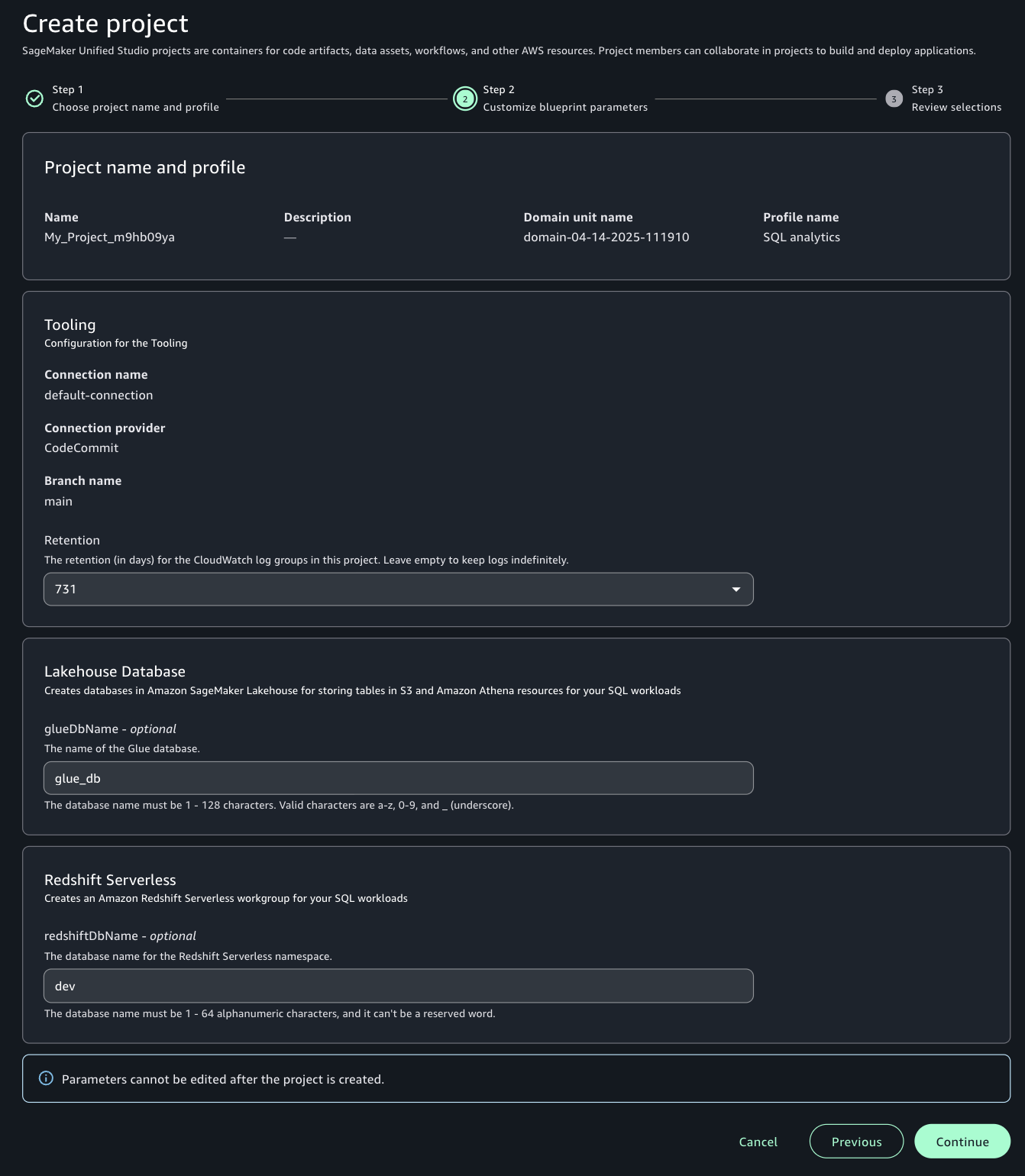
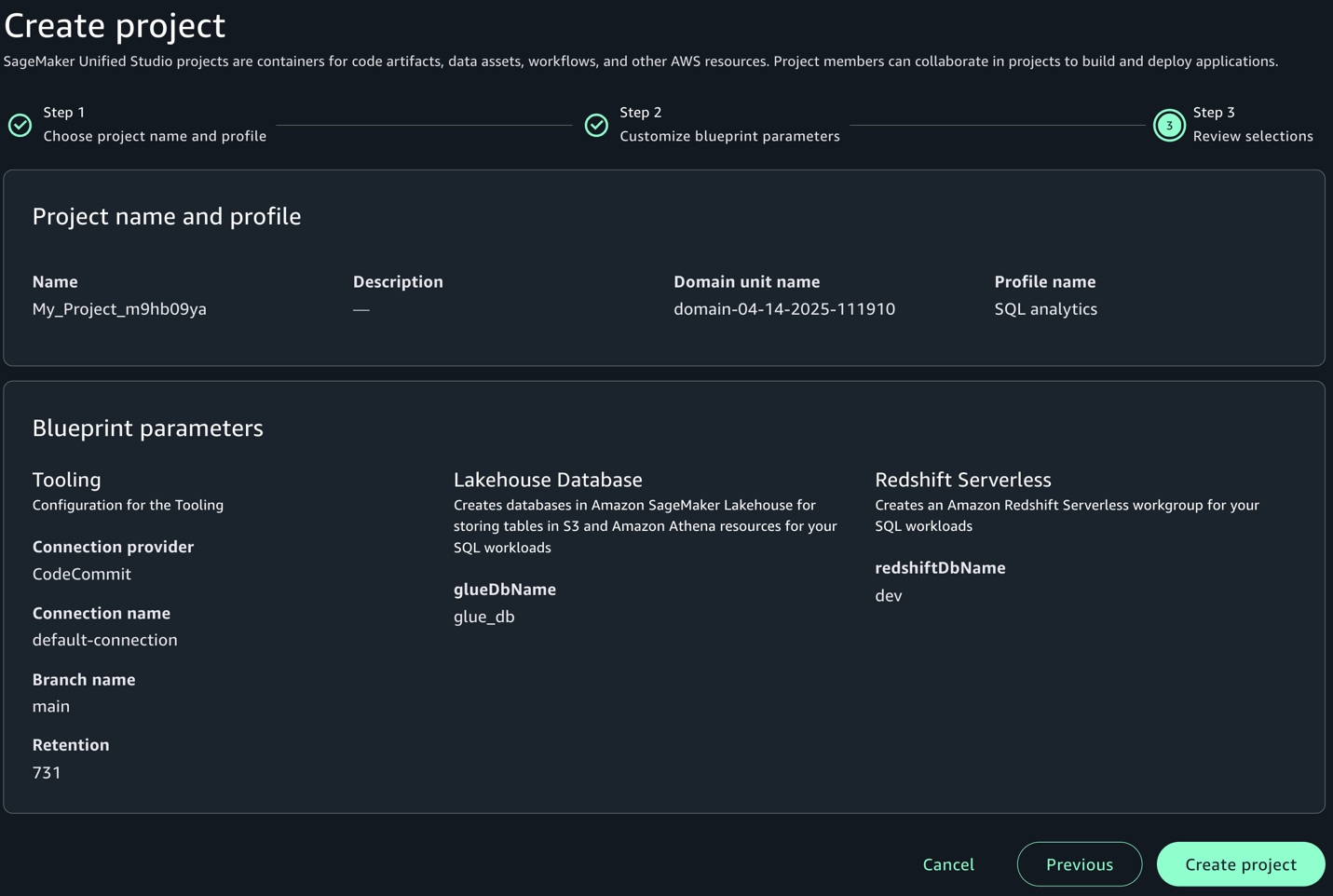
For more detailed information and advanced configurations, refer to Create a project.
Configure Amazon Redshift for TIP and validate access
Run the setup-consumer-redshift.sh script (provided in the prerequisites). This script will create a new namespace and workgroup and add the required tags, which you will use later to integrate with SageMaker Unified Studio compute.
If you are creating the cluster manually, add one of the following tags to the Redshift cluster or workgroup that you want to add to SageMaker Unified Studio:
- Option 1 – Add a tag to allow only a specific SageMaker Unified Studio project to access it:
AmazonDataZoneProject=<projectID> - Option 2 – Add a tag to allow all SageMaker Unified Studio projects in this account to access it:
for-use-with-all-datazone-projects=true
Create compute using IAM Identity Center authentication
After you set up your project, the next step is to establish a compute resource connection on the SageMaker Unified Studio console. Follow these steps to add either Amazon Redshift Serverless or a provisioned cluster to your project environment:
- Go to the Compute section of your project in SageMaker Unified Studio.
- On the Data warehouse tab, choose Add compute.
- You can create a new compute resource or choose an existing one. For this post, we choose Connect to existing compute resources, then choose Next.
- Choose the type of compute resource you want to add, then choose Next. For this post, we choose Redshift Serverless.
- Under Connection properties, provide the JDBC URL or the compute you want to add, which is integrated with IAM Identity Center. If the compute resource is in the same account as your SageMaker Unified Studio project, you can select the compute resource from the dropdown menu. In our example, we use the consumer account that was just provisioned.
- Under Authentication, select IAM Identity Center.
- For Name, enter the name of the Redshift Serverless or provisioned cluster you want to add.
- For Description, enter a description of the compute resource.
- Choose Add compute.
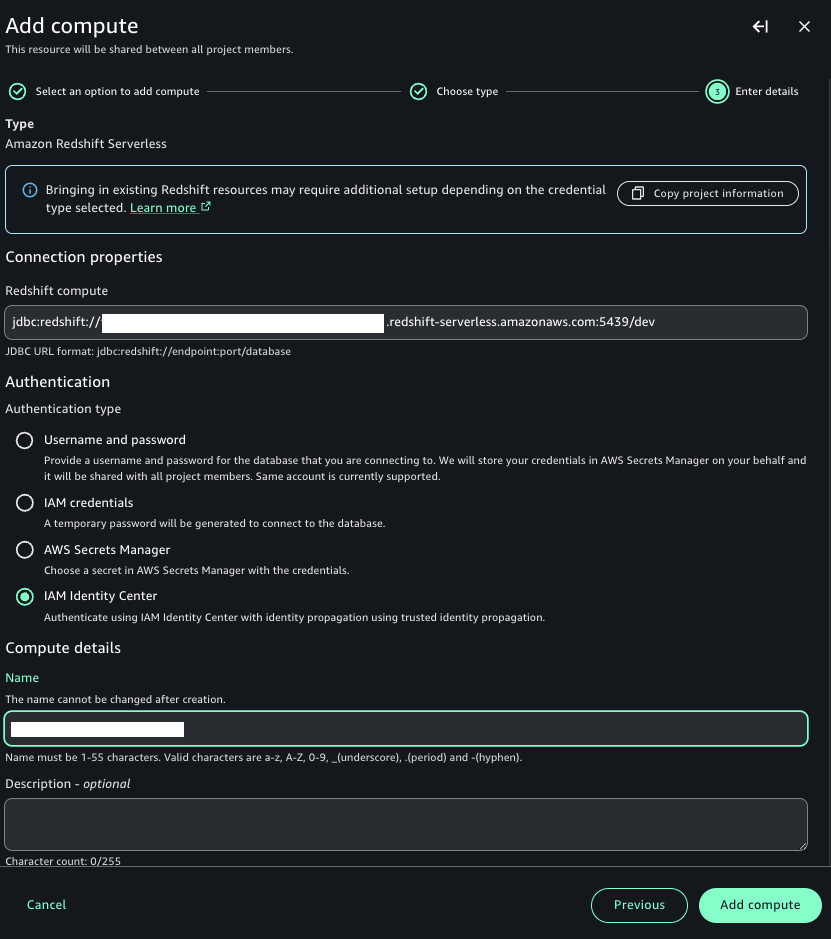
The SageMaker Unified Studio Project Compute and Data pages will now display information for that resource.
If everything is configured correctly, your compute will be created using IAM Identity Center. Because your IdP credentials are already cached while you’re logged in to SageMaker Unified Studio, it uses the same credentials and creates the compute.
Test data access using Amazon Redshift
When Ethan logs in to SageMaker Unified Studio using IAM Identity Center authentication, he successfully federates and can access customer data from all countries but only for non-sensitive columns. Let’s connect to Amazon Redshift in SageMaker Unified Studio by following these steps:
- Choose Actions and choose Open Query editor.
- Choose Redshift in the Data explorer pane.
- Run the customer sales calculation query to observe that user Ethan (a data analyst) can access customer data from all countries but only non-sensitive columns (
id,birth_country,product_id):
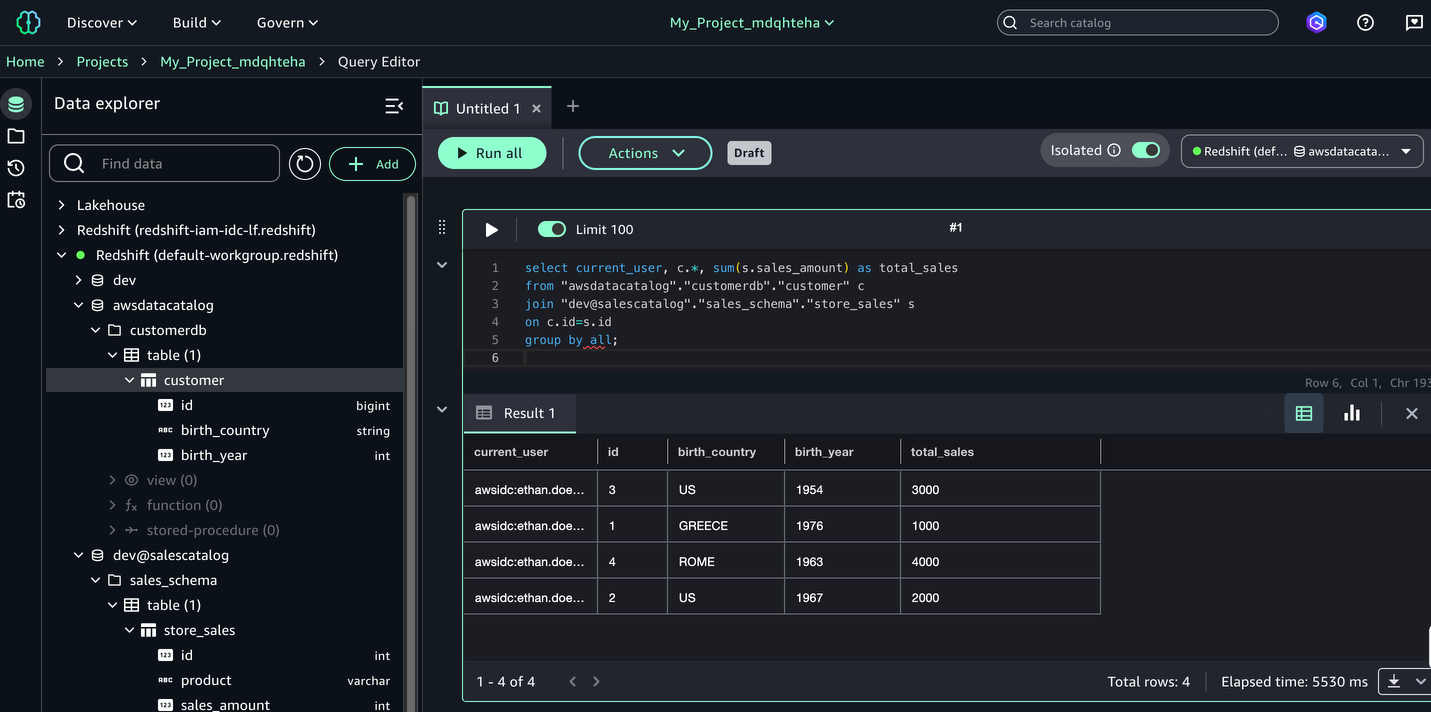
You have successfully configured Redshift to use IAM Identity Center authentication in SageMaker Unified Studio.
Validate data access using Amazon Athena
When Frank logs in to SageMaker Unified Studio using IAM Identity Center authentication, he successfully federates and can access customer data only for the United States. To query with Athena, complete the following steps:
- Choose Actions and choose Open Query editor.
- Choose Lakehouse in the Data explorer pane.
- Explore
AwsDataCatalog, expand the database, choose the respective table, and on the options menu (three dots), choose Preview data.
The following demonstration illustrates how user Frank, a BI analyst, can perform SQL analysis using Athena. Due to row-level filtering implemented through Lake Formation, Frank’s access is restricted to customer data from the United States only. Additionally, you can observe that in the Data explorer pane, Frank can only view the customerdb database. The dev@salescatalog database is not visible to Frank because no access has been granted to his respective group from Lake Formation.
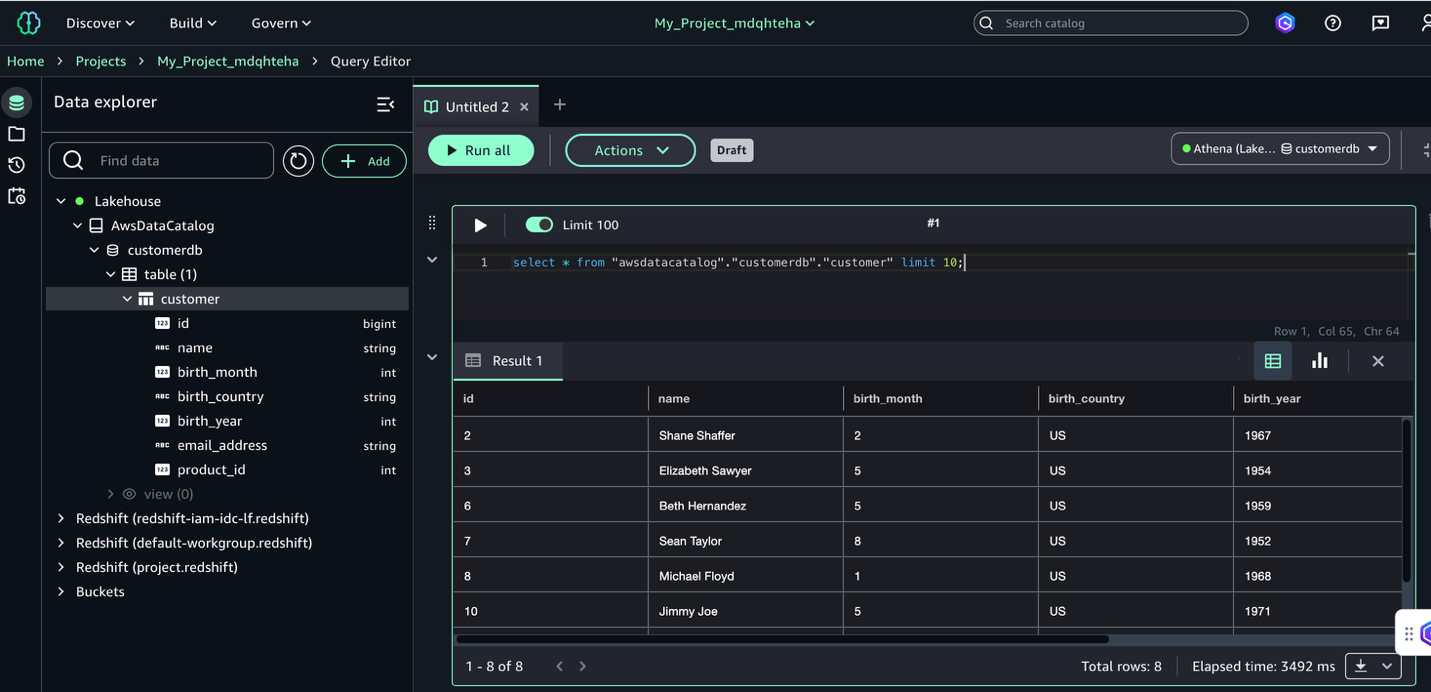
The IAM Identity Center authentication integration is complete; you can use both Amazon Redshift and Athena through SageMaker Unified Studio in a simplified, all-in-one interface.Note that, at the time of writing, Athena doesn’t work with Redshift Managed Storage (RMS).
Clean up
Complete the following steps to clean up the resources you created as part of this post:
- Delete the data from the S3 bucket.
- Delete the Data Catalog objects.
- Delete the Lake Formation resources and Athena account.
- Delete the SageMaker Unified Studio project and associated domain.
- If you created new Redshift cluster for testing this solution, delete the cluster.
Conclusion
In this post, we provided a comprehensive guide to enabling trusted identity propagation within SageMaker Unified Studio. We covered the setup of a SageMaker Unified Studio domain with SSO, the creation of tailored projects, efficient user onboarding with appropriate permissions, and the management of AWS Glue and Amazon Redshift managed catalog permissions using Lake Formation. Through practical examples, we demonstrated how to use both Amazon Redshift and Athena within SageMaker Unified Studio, showcasing secure data access and analysis capabilities. This approach helps organizations maintain strict identity controls while helping data scientists and analysts derive valuable insights from both data lake and data warehouse environments, supporting both security and productivity in machine learning workflows.
For more information on this integration, refer to Trusted identity propagation.