Post Syndicated from The Atlantic original https://www.youtube.com/shorts/NcT88YcA0Pg
XGIMI Aura 3 Max 4K 120Hz UST Projector. Rather impressive.
Post Syndicated from Techmoan original https://www.youtube.com/watch?v=KPCWngbDCoc
Accelerating AS/400 business rule extraction with Kiro: Step-by-step guide
Post Syndicated from Daniel Gray original https://aws.amazon.com/blogs/devops/accelerating-as-400-business-rule-extraction-with-kiro-step-by-step-guide/
AS/400 business rule extraction no longer requires months of manual effort. With Kiro, an agentic AI-powered development environment (spanning IDE, CLI, web, and mobile surfaces, along with the Kiro Crew workspace), you can compress the process into days. This step-by-step guide walks through the approach. Organizations face a common challenge: critical business logic embedded in extensive RPG and COBOL code bases, often maintained by a declining number of developers and subject matter experts (SMEs) with RPG expertise. The fulfillment rules and shipping logic are scattered across interconnected programs that no single person fully understands.
In this post, we walk you through a step-by-step approach for using Kiro to extract business rules from AS/400 RPG and COBOL programs, generate technical specifications, and produce modernization-ready documentation.
Extraction process challenges
Before this engagement, one of our customers faced several challenges with their existing business rules extraction process. They were planning to modernize their AS/400 order fulfillment workflow, which handled inventory validation, shipping document generation, and warehouse operations.
- Significant consulting costs for specialized AS/400 consultants.
- Time-intensive manual analysis, typically 4–6 weeks of dedicated effort.
- Documentation that becomes outdated before the team finishes writing it.
- Risk of overlooking critical business logic during modernization.
The following is the sample system flow considered to walk through the step-by-step guide.
Each program has embedded business rules, including order validation and stock allocation with warehouse priority. These programs also handle shipping weight calculations, character encoding conversion, and integration with external carrier systems. Traditional analysis would have taken 4–6 weeks per system. The effort required across consultants, technical writers, and reviewers would have been 40–80 person-hours per system.
Solution
With Kiro, an agentic AI-powered development environment, you can extract comprehensive business rules, generate technical specifications, and create modernization-ready documentation in hours, not months (as detailed in the Outcomes section).
Working autonomously across your code base, Kiro analyzes dependencies, traces execution paths, and produces detailed documentation.
The approach relies on two core Kiro capabilities:
- Steering files: Persistent instructions that guide the AI’s behavior, including project context, naming conventions, analysis standards. Configure them once and they apply to all subsequent sessions. Steering files can reference documentation templates that define the exact output format. Each subsequent analysis follows the same repeatable structure.
- Specs: A structured way to define requirements, design, and implementation tasks. Kiro executes tasks autonomously with progress tracking. Spec tasks tell Kiro which templates to use and where to save the output.
The workflow has three phases:
Phase 1 – Configure steering files to define project context, directory structure, and technical standards. Examples include “extract 10–20 lines of code context around business rules” and “map abbreviated DDS field names to business terms.” Create documentation templates that the steering files reference. These templates specify the exact output format for business rules with code snippets, pseudocode equivalents, DDS field mappings, and integration specifications.
Figure 1: Steering files provide persistent instructions that guide the analysis behavior of Kiro across sessions, configured once and applied to subsequent analyses
Phase 2 – Build a Kiro Spec with discrete, actionable tasks: analyze source files, parse DDS definitions, extract business rules, generate pseudocode, create consolidated documentation using the templates, and verify business rules against source code.
Figure 2: The Kiro Spec, showing discrete tasks that Kiro executes autonomously with progress tracking
Phase 3 – Execute the Spec and let Kiro work autonomously. Monitor progress as tasks complete, then review the generated documentation.
Important: AI-extracted rules should be reviewed by an AS/400 SME. Automated extraction might occasionally misinterpret complex or ambiguous business logic, so human validation remains essential before acting on extracted rules.
Here’s an example of what Kiro produces. Given this RPG subroutine that validates orders against the master file, Kiro generates a plain-language business rule and its pseudocode equivalent:
Rule 1.3.16: Stock Allocation
Category: Processing Subroutine: ALLCST (lines 3820-3960) Description: Allocates stock from warehouse inventory. Looks up inventory by item key, verifies sufficient available quantity, then decrements available quantity and increments reserved quantity by the order amount. Updates the inventory record.
Source Code (lines 3820-3960):
Pseudocode:
Figure 3: Kiro extracts business rules with original RPG code, pseudocode equivalents, and plain-English descriptions
The following is the DDS field mapping that translates abbreviated AS/400 field names into business terms:
1.1 ORDERMST — Order Master
| Field | Type | Length | Dec | TEXT (Business Term) | COLHDG | VALUES | Used By |
| ZIORCD | A | 8 | — | Order Code | Order / Code | — | PROG001, PROG002, PROG003, PROG004 |
| ZIPERD | P | 6 | 0 | Fulfillment Period | Fulfill / Period | — | PROG001 |
| CURPER | P | 6 | 0 | Current Period | Current / Period | — | PROG001 |
| STATUS | A | 1 | — | Order Status | Order / Status | ‘A’ ‘H’ ‘C’ ‘X’ ’ ’ | PROG001, PROG002 |
| CUSTNAME | A | 40 | — | Customer Name | Customer / Name | — | PROG001, PROG002, PROG003, PROG004 |
| WHSCD | A | 4 | — | Warehouse Code | Warehouse / Code | — | PROG001, PROG002, PROG003, PROG004 |
| ORDDTE | P | 8 | 0 | Order Date | Order / Date | — | PROG001 |
| ORDQTY | P | 7 | 0 | Order Quantity | Order / Quantity | — | PROG001 |
| SHPTYP | A | 2 | — | Shipment Type | Shipment / Type | — | PROG001 |
| PRIORT | A | 1 | — | Priority Code | Priority | ‘1’ ‘2’ ‘3’ | PROG001 |
Record Format: ORDERMST — TEXT(‘Order Master Record’)
Key: ZIORCD (unique)
STATUS Values: A = Active, H = Hold, C = Complete, X = Canceled, ’ ’ = New/Blank
PRIORT Values: 1 = High (requires MGR session), 2 = Medium, 3 = Low
1.2 INVSTOCK — Inventory Stock Levels
| Field | Type | Length | Dec | TEXT (Business Term) | COLHDG | VALUES | Used By |
| ITEMCD | A | 10 | — | Item Code | Item / Code | — | PROG001, PROG004 |
| WHSCD | A | 4 | — | Warehouse Code | Warehouse / Code | — | PROG001, PROG004 |
| QTYOH | P | 9 | 0 | Quantity On Hand | Qty / On Hand | — | PROG001 |
| QTYAV | P | 9 | 0 | Quantity Available | Qty / Available | — | PROG001 |
| QTYRS | P | 9 | 0 | Quantity Reserved | Qty / Reserved | — | PROG001 |
| UNITWT | P | 7 | 2 | Unit Weight KG | Unit / Weight | — | PROG001, PROG004 |
| UNITLN | P | 5 | 2 | Unit Length CM | Unit / Length | — | PROG001, PROG004 |
Figure 4: DDS field mapping translates abbreviated AS/400 field names into business terms
This mapping is essential for modernization. Without it, developers building the replacement system are guessing at what Z1ORDCD means.
Deployment
The following steps walk you through setting up and running the extraction workflow.
Prerequisites
Before you begin, make sure that you have the following in place:
- Kiro installed on your workstation (download from https://kiro.dev/).
- Access to the AS/400 source code you plan to analyze (RPG/RPGLE, CL/CLLE, and DDS definitions), exported as text files.
- Optionally, DB2 configuration tables exported to CSV for configuration-driven behavior analysis.
- Familiarity with your organization’s business domain, plus access to an AS/400 SME to validate the extracted rules.
- A local project directory where Kiro can read the source files and write generated documentation.
The complete setup is available in the companion GitHub repository listed in the Resources section. This includes steering files, templates, sample AS/400 source code, and Spec definitions.
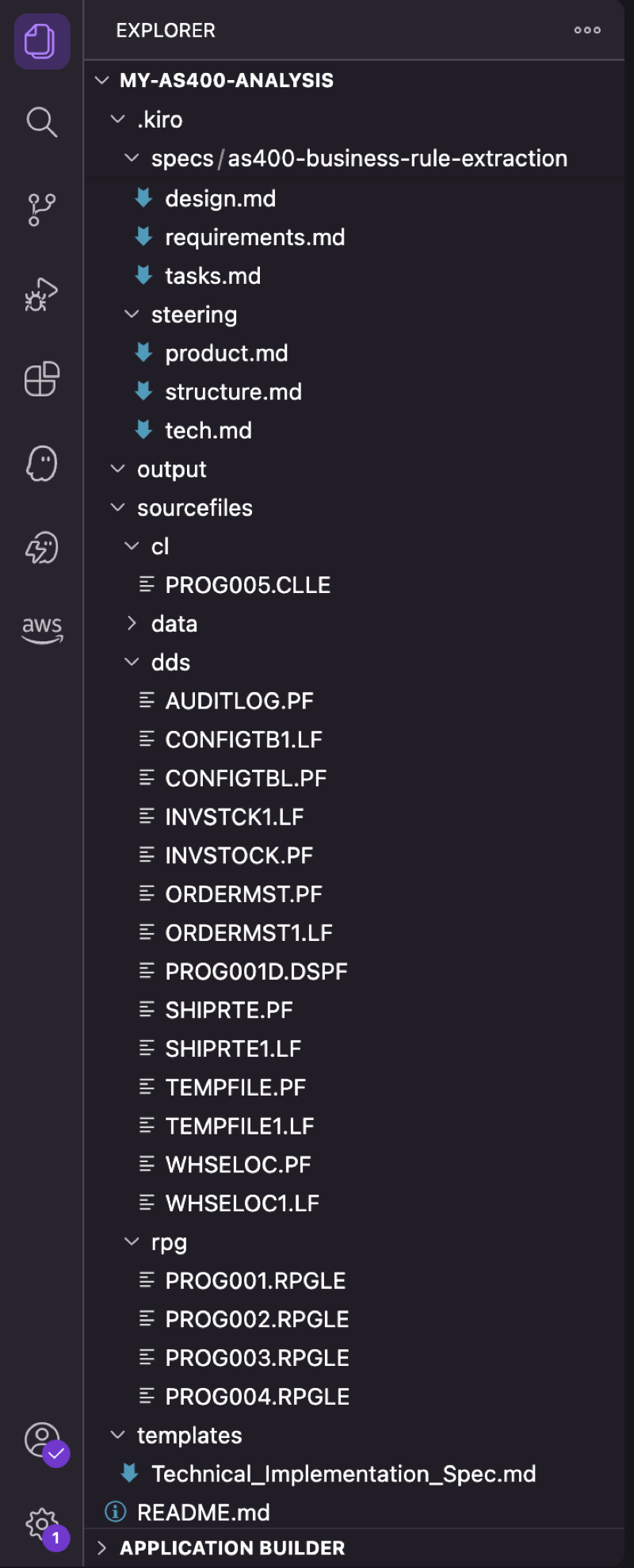
Figure 5: Project structure in Kiro, showing source files, steering configuration, templates, and output directory
The setup has five steps:
Step 1: Project setup
Create the directories that you will be working from for source files, data, output, and other artifacts:
Step 2: Configure steering files
Create steering files to define your analysis standards. For example, .kiro/steering/product.md:
Step 3: Add your source files
Copy your AS/400 source code into the sourcefiles/ subdirectories: RPGLE files in rpg/, CLLE files in cl/, and DDS definitions in dds/. Optionally, export DB2 tables to CSV in sourcefiles/data/ for configuration table analysis if you have programs with conditional logic that use those tables to hold runtime configuration options.
Step 4: Create a Kiro Spec
In Kiro, use the command palette: Create New Spec. Define tasks like:
Example Spec definition:
Step 5: Execute
- Open the Spec in Kiro, choose Start, and monitor progress as tasks complete autonomously. Review the generated documentation in the output/ directory.
- For detailed instructions, templates, and example outputs, see the GitHub repository.
What the workflow looks like
Figure 6: Kiro executing the Spec, with real-time progress as each task completes
When you execute the Spec, Kiro processes tasks in sequence with real-time progress tracking. Here is what happens during execution:
- Opening the Spec with all tasks listed.
- Kiro autonomously reading RPG source files and DDS definitions.
- Business rules being extracted with code snippets and pseudocode.
- DDS field names being mapped to business terms.
- The final consolidated documentation in the output directory.
Outcomes
This section summarizes the measured results from the customer engagement described earlier in this post (a five-program AS/400 order fulfillment system with approximately 40,000 lines of RPG/COBOL). Traditional estimates sourced from the customer’s prior modernization planning documents. Results vary by code base complexity.
Time and effort savings
Using Kiro reduced both elapsed time and total person-hours by an order of magnitude compared to the customer’s traditional manual approach. The following table compares the two approaches:
| Metric | Traditional Approach | Kiro-Assisted | Savings |
| Total effort | 40-80 person-hours | 12 person-hours | 70-85% reduction (measured against the customer’s planning estimates) |
| Timeline | 4-6 weeks | 3 days | ~90% reduction (measured against the customer’s planning estimates) |
Breakdown of Kiro-assisted effort
The 12-hour total breaks down as follows, showing that most of the time is spent on human review rather than setup or execution:
- Setup (steering + templates + spec): 2 hours.
- Kiro autonomous execution: 30 minutes.
- Review and validation: 9.5 hours (reflective of iterative refinement of steering, template, spec, and execution).
- Total: approximately 12 hours per system of 5 programs with approximately 40,000 lines of code (measured during the customer engagement described earlier in this post).
What Kiro produced
Kiro autonomously generated a complete documentation package for the five-program system, including:
- Business rules catalog with original RPG code snippets and pseudocode equivalents.
- DDS field-to-business-term mappings across seven physical files.
- File dependencies matrix showing which programs access which files.
- Inter-program parameter passing documentation.
- Configuration-to-behavior mapping (tracing DB2 config table values to RPG subroutine invocations).
- Integration specifications for the external carrier gateway (CCSID conversion, transmission parameters).
- Over 50 pages of structured, template-aligned documentation (measured output from this engagement).
Multiplier effect
The setup cost (templates, steering, Specs) is one-time and is not repeated for additional systems. The following projections extrapolate the per-system effort (approximately 10 hours) from the single-system measured results and add the one-time setup only once:
| Scale | Traditional | Kiro-Assisted | Savings |
| 1 system | 40-80 hrs / 4-6 weeks | 12 hrs / 3 days | 28-68 hrs |
| 10 systems | 400-800 hrs / 40-60 weeks | 102 hrs / 30 days | 298-698 hrs |
Key quality improvements
- Consistent, template-driven output across every system analyzed.
- Exact line number references back to source code for every business rule.
- Cross-referencing between DDS definitions and RPG program usage alleviates guesswork.
- Reusable templates and Specs can often be reused for similar systems with minimal reconfiguration.
Conclusion
Legacy AS/400 business rule extraction doesn’t need to take months. With the steering files and Specs in Kiro, you can extract business logic from RPG code bases and produce developer-ready documentation in days.
You still need AS/400 knowledge, business context, and architectural judgment to validate, prioritize, and plan the modernization. But you don’t need to spend months manually reading code and writing specifications. With Kiro handling extraction, you can focus on strategy and decision-making.
To get started, download Kiro, clone the companion repository, and try it on a legacy system this week. For more on AS/400 modernization patterns, refer to the AWS Mainframe Modernization documentation.
If you have questions or want to share your experience, leave a comment on this post. If you’re an AWS customer working on AS/400 or mainframe modernization, reach out through your AWS account team.
About the authors
[$] The year in Plasma and what’s ahead
Post Syndicated from jzb original https://lwn.net/Articles/1096518/
A lot has happened in the KDE
Plasma desktop environment in the last year. Marco Martin, a KDE contributor
who spends most of his time working on Plasma, took the stage at Akademy 2026 in Graz, Austria to give
an update on Plasma’s major new features, some of the minor-but-interesting
ones, and a preview of what’s coming soon. The biggest upcoming change, dropping
X11 support from Plasma, has been well-advertised; but there are also plans
afoot to further improve remote-desktop support and more.
Kernel Recipes videos posted
Post Syndicated from corbet original https://lwn.net/Articles/1097802/
The full set
of videos from the recently concluded Kernel Recipes conference
has been posted. Also noteworthy are the associated caricature drawings,
by Frank Tizzoni, of attendees
and the
speakers.
Critical Cisco Catalyst SD-WAN Manager API authentication bypass exploited in the wild (CVE-2026-76504)
Post Syndicated from Rapid7 original https://www.rapid7.com/blog/post/etr-critical-cisco-catalyst-sd-wan-manager-api-authentication-bypass-exploited-in-the-wild-cve-2026-76504
Overview
On September 30, 2026, Cisco published a security advisory for CVE-2026-76504, a critical API authentication bypass vulnerability affecting Cisco Catalyst SD-WAN Manager. The vulnerability has a CVSSv3.1 score of 9.8 and results from improper handling of URL encoding (CWE-177). An unauthenticated, remote attacker can send a crafted HTTP request that bypasses an authentication rule for a specific API endpoint, gaining access to the API with the privileges of the admin user.
According to Cisco, CVE-2026-76504 is being actively exploited in the wild; Cisco PSIRT became aware of the activity in September 2026. Cisco Catalyst SD-WAN Manager systems with ports exposed to the internet are at risk of compromise. The vulnerability affects the product regardless of system configuration, and Cisco has not provided a workaround, however vendor supplied updates are available. Rapid7 strongly recommends that organizations upgrade affected systems to a fixed release on an emergency basis, outside of normal patch cycles, and investigate internet-facing systems for signs of exploitation.
Cisco Catalyst SD-WAN Manager was also affected by two critical, unauthenticated peering authentication flaws earlier in 2026: CVE-2026-20127 and Rapid7-discovered CVE-2026-20182. Both were distinct issues in the vdaemon service and similar parts of its networking stack. CVE-2026-76504 targets a separate API authentication path, but the recurrence of authentication bypasses in internet-facing Catalyst SD-WAN control components reinforces the need for emergency remediation.
Mitigation guidance
Cisco has released software updates that remediate CVE-2026-76504. Organizations running affected instances of Cisco Catalyst SD-WAN Manager should upgrade to an appropriate fixed release listed below without waiting for a regular patch cycle:
|
Cisco Catalyst SD-WAN Software release |
First fixed release |
|---|---|
|
Earlier than 20.9 |
Migrate to a fixed release |
|
20.9 |
20.9.10.1 |
|
20.12 |
20.12.8.2 |
|
20.15 |
20.15.6.1 |
|
20.18 |
20.18.4.1 |
|
26.1 |
26.1.2.1 |
|
26.2 |
26.2.1 |
Cisco has addressed the vulnerability in the cloud-based Cisco SD-WAN Cloud (Cisco Managed) release 20.15.605, and indicates that no customer action is required for that service.
There are no workarounds. As a temporary mitigation, Cisco recommends that on-premises customers prevent access to the system from unsecured networks. If internet access is required, restrict access to known, trusted hosts and protect Cisco Catalyst SD-WAN control components behind a filtering device. Cisco indicates that this mitigation is already deployed in Cisco Catalyst SD-WAN Cloud Hosted environments. Organizations should apply updates even when the mitigation is in place.
Because active exploitation has occurred, Rapid7 strongly recommends that organizations audit affected systems for compromise. For help assessing a potentially compromised system, Cisco customers may open a Severity 3 TAC case with CVE-2026-76504 in the title and provide an admin-tech file generated with the request admin-tech command.
For the latest mitigation guidance and release compatibility information, please refer to the vendor’s security advisory.
Rapid7 customers
Exposure Command, Vulnerability Management, and Nexpose
Exposure Command, Vulnerability Management, and Nexpose customers can assess exposure to CVE-2026-76504 with vulnerability checks expected to be available in the October 1 content release.
Indicators of compromise
Cisco recommends reviewing the following logs for requests related to j_security_check from unknown or unauthorized IP addresses:
-
/var/log/nms/containers/service-proxy/serviceproxy-access.log: Requests with an encoded character in the j_security_check path, such as POST /%6a_security_check HTTP/1.1.
-
/var/log/nms/vmanage-server.log: Requests to j_security_check associated with usernames beginning with viptela-reserved-.
The %6a value, which URI-encodes the character j, is only an example. According to Cisco, an attacker can exploit the vulnerability by encoding any single character in the request. The vendor cautions that these log entries can also occur during standard operations and should be evaluated against normal network posture to avoid false positives.
Updates
-
September 30, 2026: Initial publication.
How Trump Could Threaten the 2026 Elections (With Eric Holder) | The David Frum Show
Post Syndicated from The Atlantic original https://www.youtube.com/watch?v=joMUhBFasD4
I Used Lymow for 4 Months. Here’s What Actually Happened
Post Syndicated from BeardedTinker original https://www.youtube.com/watch?v=yfEu37pZc4Y
Reports from the 2026 Python Language Summit
Post Syndicated from corbet original https://lwn.net/Articles/1097761/
The 2026 Python Language Summit was held on July 14 in Kraków, Poland;
there is now a
series of reports available on the topics that were discussed there.
They include the memory buffer protocol, garbage collection, free-threaded
Python, and “Spicycrab”.
Higher education is under siege, and fragmented security is making it harder to respond
Post Syndicated from Rapid7 original https://www.rapid7.com/blog/post/it-higher-education-under-siege-fragmented-security
Higher education faces a difficult security equation. Universities hold large volumes of sensitive student, financial, health, and research data while supporting open networks, distributed users, legacy infrastructure, and increasingly complex cloud environments. Attackers have taken notice, and the pressure on security teams continues to grow.
In Q2 2025, universities faced an average of 4,388 cyberattacks per organization per week, up 24% from the same period in 2024. Nine in ten universities reported experiencing a breach or security incident during the previous 12 months, while the average cost of a data breach in education reached $10.22 million. Confirmed attacks against higher education institutions exposed more than 3.9 million records in 2025, with ransomware continuing to disrupt teaching, research, financial aid, and administrative operations.
Those figures are concerning on their own, but they only explain part of the problem. For university systems with multiple campuses, the way security is organized can create an additional layer of risk.
Why is higher education so difficult to secure?
Universities operate differently from most commercial organizations. Open access, collaboration, and academic freedom are central to their mission, which means security teams must protect environments where students, faculty, researchers, guests, and third parties connect from almost anywhere.
That openness sits alongside an unusually broad mix of sensitive data. A single university may hold student PII, financial aid and tax records, health information, proprietary research, government-funded projects, and intellectual property. Many institutions also rely on legacy systems that have been connected over time to modern cloud applications, APIs, learning platforms, and research networks, creating visibility gaps that can be difficult to manage.
Resource pressure adds to the challenge. The draft cites 94% of higher education IT leaders as saying they lack enough personnel to defend their environments adequately, leaving relatively small teams responsible for sprawling networks with large numbers of users, devices, applications, and third-party services.
Why multi-campus fragmentation increases cyber risk
For multi-campus university systems, many of these pressures are compounded by decentralized security operations. Individual campuses often maintain their own infrastructure, security tools, teams, incident response processes, vendor relationships, and renewal cycles.
The result can be limited visibility across the wider institution. If ransomware is detected at one campus, teams elsewhere may have no immediate view of the same attacker activity. If a zero-day is exploited in one research environment, another campus may remain exposed because the intelligence and response process stay local.
Fragmentation also affects efficiency. When each campus independently buys, deploys, and manages its own security stack, the wider university system can carry duplicated costs, additional management overhead, and inconsistent coverage. Fragmentation can also slow the spread of threat intelligence across a university system. If one campus detects a new attack pattern, an unusual intrusion technique, or previously unseen malware, that insight may remain local rather than reaching security teams elsewhere in time to act. A suspicious login sequence identified at Campus B, for example, could be the early signal of activity already moving toward Campus A or Campus C, but without shared visibility each team may investigate the same threat independently and at different speeds.
The same problem can appear during vulnerability response. If one campus confirms active exploitation of a newly disclosed vulnerability in a research environment, another campus may still be exposed because patching decisions, asset inventories, and remediation workflows are managed separately. What should become a system-wide priority can remain a local incident until someone connects the dots.
Attackers do not necessarily respect those organizational boundaries. A smaller or less-resourced campus can provide an entry point into relationships, systems, and data connected to the wider institution, while defenders may still be working with a campus-by-campus view.
What should university systems change?
Higher education security needs to preserve the autonomy individual campuses require while improving visibility and coordination across the broader institution.
That means giving security teams a shared view of exposure, threats, and active incidents across campuses, along with the ability to coordinate detection and response when activity in one part of the university may affect another. It also creates an opportunity to reduce duplicated tooling and processes, share threat intelligence more effectively, and make better use of limited security resources.
The objective is a model where a local security team can continue managing the needs of its own campus without losing access to the wider context of what is happening across the university system.
As the threat landscape becomes more connected, higher education security architecture needs to become more connected with it.
In Part 2 of this series, we’ll look at another pressure making that shift more urgent: the growing compliance burden across FERPA, GLBA, HIPAA, and CMMC, and why fragmented security can make regulatory readiness harder to manage across a university system.
Rapid7 helps more than 11,000 organizations worldwide take command of their security. Learn more at rapid7.com/sled.
[$] Comparing Chromium development at Google and Igalia
Post Syndicated from jake original https://lwn.net/Articles/1094721/
Sharon Yang is a Chromium developer who worked at Google on the browser
and now works on it at Igalia. On the final day of FOSSY 2026, she gave a
presentation on her experiences with both of those companies, comparing and
contrasting the ways the each operates and how that affects work on the
code base. She enjoyed working at Google and feels the same about Igalia,
so the talk was not aimed at complaints—instead it was meant to give a feel
for two companies that are rather different.
The Linux Foundation Technical Advisory Board 2026 election approaches
Post Syndicated from corbet original https://lwn.net/Articles/1097758/
The election for members of the Linux Foundation Technical Advisory Board
will be held electronically after the close of the upcoming Linux Plumbers Conference. The call for
candidates is is open, with a nomination deadline of October 7.
There are five seats to fill this time, including the one vacated by the
unfortunate passing of Dan Williams.
Serving on the TAB is a good way to help the kernel-development community.
Please see this article from last year for
an overview of what the TAB does and why membership is rewarding, then
consider putting in your nomination.
Security updates for Wednesday
Post Syndicated from jzb original https://lwn.net/Articles/1097753/
Security updates have been issued by AlmaLinux (389-ds:1.4, container-tools:rhel8, go-toolset:rhel8, grafana, httpd:2.4, nodejs:22, postgresql:12, and postgresql:15), Debian (libwebsockets, openssl, and pcre2), Fedora (adwaita-icon-theme, cinnamon, dconf, epiphany, flatpak-builder, gcr, gdm, gjs, glib-networking, glib2, gnome-backgrounds, gnome-calendar, gnome-characters, gnome-chess, gnome-clocks, gnome-connections, gnome-console, gnome-contacts, gnome-control-center, gnome-desktop3, gnome-initial-setup, gnome-keyring, gnome-kiosk, gnome-maps, gnome-remote-desktop, gnome-settings-daemon, gnome-shell, gnome-shell-extensions, gnome-system-monitor, gnome-text-editor, gnome-user-docs, gnote, gnucash, gnucash-docs, gsettings-desktop-schemas, gtk4, hplip, libadwaita, libdex, libsecret, libshumate, libxmp, mingw-llvm, mutter, nautilus, parted, perl-Imager, quadrapassel, rootlesskit, rygel, shotwell, sngrep, sushi, sysprof, tecla, thunderbird, xdg-desktop-portal-gnome, and xdotool), Red Hat (buildah, container-tools:rhel8, containernetworking-plugins, delve, git-lfs, grafana, grafana-pcp, host-metering, ignition, image-builder, osbuild-composer, podman, rhc, rhc-worker-playbook, runc, skopeo, yggdrasil, and yggdrasil-worker-package-manager), Slackware (mozilla-firefox), SUSE (389-ds, amazon-cloudwatch-agent, cjose, corosync, cosign, cups, distribution-registry, expat, firefox, flatpak, glib2, google-osconfig-agent, goose, helm, ImageMagick, jackson-annotations, jackson-bom, jackson-core, jackson- databind, jackson-dataformat-xml, jackson-dataformats-binary, jackson-modules- base, jackson-core, jackson-databind, jackson-dataformat-csv, jsoup, re2j, kbd, kernel, kubectl-cnpg, libpcap, libsoup, libtpms, libX11, libXrender, netty, netty-tcnative, pcre2, perl-Authen-SASL, perl-DBI, python-pymongo, python310, python311, swtpm, terraform-provider-susepubliccloud, and util-linux), and Ubuntu (atril, booth, c-ares, catdoc, dracut, emacs, erlang, freeipmi, libdbi-perl, libheif, linux, linux-aws, linux-azure, linux-fips, linux-gcp, linux-gcp-5.4, linux-gcp-fips, linux-hwe-5.4, linux-iot, linux-kvm, linux-oracle, linux-oracle-5.4, linux-raspi, linux-xilinx-zynqmp, linux, linux-nvidia, linux-aws-fips, linux-aws-fips, linux-azure-fips, linux-fips, linux-bluefield, linux-fips, linux-nvidia-tegra-5.15, openssl, openssl, openssl1.0, pdfminer, php-phpseclib, and plasma-workspace).
Cloudflare Impact reaches $100 million in donations
Post Syndicated from Patrick Day original https://blog.cloudflare.com/100-million-donations/
This week, Cloudflare's Impact programs will reach $100 million in donated services. It's a significant milestone, and one that we are proud of because it means that thousands of organizations, like journalism outlets, civil society, state and local governments, election management bodies, and public schools are being protected from cyberattacks.
But Cloudflare's Impact programs have never been about philanthropy. They are a fundamental part of our business and our mission, and they continue to help guide almost everything we do.
As we celebrate this milestone and our 16th Birthday Week, we wanted to revisit not only how we got here, but also how our Impact programs continue to grow and evolve to help those working for the public interest.
Free → Impact
Cloudflare started as a free service. The original idea was to provide a basic version of our services to developers and small businesses for free, and then use the data about cyberattacks on their websites to build more sophisticated products that we could sell.
However, we quickly discovered that some of our free customers were not only doing essential work, like reporting on corruption in Africa or on the Russian invasion of Crimea, but also experiencing some of the largest attacks on our network. That realization changed how we thought about our free services. We committed not only to making them available for free for everyone, but also to doing more for organizations being targeted by powerful adversaries simply for serving the public.
Cloudflare launched Project Galileo in 2014 to provide more advanced security services for important but vulnerable people and organizations online, including journalists, human rights defenders, and civil society groups. Today, the program includes more than 3,500 domains in over 120 countries. In 2025, Cloudflare blocked more than 38.5 billion DDoS, website vulnerability, email phishing, and other cyberattacks against Project Galileo participants, almost 105.4 million per day.
Over the last 12 years, Cloudflare has continued to expand what we now call our Impact programs. Although each program is unique, our goal is the same: to support organizations and institutions serving the public, particularly those that would not otherwise have access to the necessary cybersecurity services. For example:
- The Athenian Project (2017): Supporting state and local governments operating democratic elections, which includes more than 440 websites in 33 U.S. states. We later expanded that program outside the United States and now protect election management bodies in eight countries, including Canada, North Macedonia, Georgia, and Moldova.
- Cloudflare for Campaigns (2020): Partnering with Defending Digital Campaigns to provide free cybersecurity services for candidates for public office, which now includes more than 530 websites across the United States.
- Critical Infrastructure: Extending additional programs to help protect public schools, COVID-19 response efforts, the government of Ukraine, public health clinics, community networks, and other essential services.
Helping keep these organizations online by protecting their websites and internal data remains essential. In 2026, Cloudflare released its first annual report on cyberattacks against civil society, which found that civil society organizations are targeted more frequently and more intensely than other Cloudflare customers. For example, Project Galileo participants faced attempts to exploit security vulnerabilities in websites at a rate more than seven times higher than an average user. Cloudflare is also on pace to more than double the number of applications to Project Galileo from last year.
But Cloudflare's Impact programs have never been static; they evolve alongside our company and technology, and the organizations they serve. Increasingly that means not just defending public interest organizations, but empowering them to adapt and thrive in the era of AI.
Looking to the future
In early September 2026, on a rainy day in Barcelona, Cloudflare co-hosted a hackathon. Because our developer platform is such an important part of our business, we hold these events all the time. But this one was different: instead of a room full of software engineers or startup founders, it was the first time we held an event specifically for journalists.
Media Party hackathon co-hosted by Cloudflare at the BIT Habitat in Barcelona (September 9, 2026).
The event was part of a three-day conference organized by Media Party, a nonprofit dedicated to media innovation through digital tools. The event was designed to bring together journalists, developers, and strategists to solve a single problem: how to help newsrooms adapt to an AI-driven, post-search information landscape. The sprint focused on four themes: workflow automation, agentic journalism, synthetic-content verifications, and information integrity.
Each team received free access to Cloudflare's developer platform and the assistance of volunteer Cloudflare engineers to see what they could build in a day.
Four teams made it to the final round. The winning team, AIdas, built a tool that helps researchers and journalists study AI bias across politically contested topics by comparing how different LLMs answer the same question, and recording their responses as open data.
The hackathon was just one part of a broader effort across Cloudflare Impact to expand beyond cybersecurity services to help public interest groups adapt to a changing world:
- Protecting Local News from AI Crawlers: Last year, Cloudflare provided free access to our Bot Management and AI Crawl control for Project Galileo participants, including more than 750 journalists, independent news organizations and non-profits supporting news-gathering around the world. These tools will help these organizations understand and control how their content is accessed by AI crawlers, and safeguard their reporting from unauthorized scraping.
- Non-profit startups: Last year during Birthday Week, Cloudflare announced its startup program, which provides more than $250,000 in Cloudflare credits, would be available for the first time for non-profit organizations. This week we will announce the first 30 organizations accepted into the program and how they are serving their communities with tools built on our developer platform.
- Automation tools for human rights: This week we will also announce three new projects that Cloudflare engineers have built using our developer platform for three leading human rights organizations, covering topics including tracking transnational repression, digital rights legislation and policy development, and corporate human rights due diligence.
Across all of these new efforts, the goal remains the same: to help organizations doing essential work access the tools and support they need to continue to advance their missions.
Join Us
I had the opportunity to meet with two of the Cloudflare engineers who volunteered at the hackathon in Barcelona. They both mentioned to me that one of the reasons they came to work at Cloudflare was Project Galileo, and the chance to use their skills to help organizations working in their communities.
It was an important reminder that Cloudflare's Impact programs and our mission are not just things we have done. They continue to shape our identity, including through the people who choose to come work with us.
If that sounds like the kind of work you want to do, come join us.
Cut your AI spend with AI Gateway’s Auto Router
Post Syndicated from Ming Lu original https://blog.cloudflare.com/auto-router/
From our conversations with companies at every stage of their AI adoption journey, we've seen some common patterns. First, there is an exploration period as you bring on every new tool, dole out API keys freely, and let the tokens flow. Then, you converge on the canonical tools for your organization for agentic coding, for non-technical workflows, for running and deploying agents. As companies formalize their AI adoption, they want to manage and oversee token spend for users, but budgets and rules only go so far. The best savings are the ones users never notice.
Today, we are releasing Cloudflare's Auto Router in public beta, available through AI Gateway. Set your model to cloudflare/auto and the Auto Router will automatically route each request to a model that is capable enough for the task, without requiring an end user to think about model selection. Our early results using the Auto Router internally through our OpenCode harness show a cost savings of up to 30% when compared to using only frontier models like OpenAI Sol and Anthropic Claude Opus.
Why we built this
From our own experience tracking AI spend at Cloudflare, we’ve learned managing costs requires a multipronged approach. Previously, we talked about how to set budgets and limits around AI spend, and how to see who is spending across your organization by linking employees to their AI usage.
In many harnesses, including OpenCode, Claude Code, and Codex, individual users still select models manually. Of course, not all tasks are created equal, and often individuals end up using models that are overkill for their work. For example, you don't need Opus-level intelligence if you're looking to summarize an email or chat threads. However, you wouldn't want to block that model completely from your security engineering team.
Our goal is for AI Gateway to be the control plane for organizations deploying AI internally. Because every request from every user, agent, and tool already flows through it, AI Gateway is in a unique position to do more than observe and enforce. Budgets, spend limits, and identity-aware analytics give organizations visibility and guardrails, but they still rely on individuals to make cost-conscious choices request by request. The next step is for the gateway itself to make intelligent decisions on a user's behalf: sending each request to a model that is capable enough for the task. That way, organizations reduce spend automatically, while users keep access to the most capable models when their work actually needs them.
The results
We use Auto Router internally at Cloudflare within our OpenCode deployment and within Cloudflare OS, our custom agent harness. In our internal usage, we’ve seen results comparable with frontier models for coding tasks.
Auto Router does best when used across a wide range of knowledge-work tasks, like those typically found in a large organization with work spanning both technical and non-technical teams. We evaluated cloudflare/auto against OpenAI’s GPT-6 Sol and Anthropic’s Claude Opus 5.5 on our internal general knowledge work benchmark. The benchmark uses simulated workspace tools and covers common day-to-day workflows across email, calendars, Slack, files, travel and finance. Each task requires the model to use these tools to produce a verifiable answer or complete an action.
|
Model |
Successful Trials |
Success Rate |
Total Cost |
Cost per success |
|
cloudflare/auto |
252/291 |
86.6% (+6.2/−6.9 pp) |
$2.10 |
$0.0084 |
|
Anthropic Claude Opus 5.5 |
281/291 |
96.6% (+2.7/−3.8 pp) |
$5.91 |
$0.0210 |
|
OpenAI GPT-6 Sol |
245/291 |
84.2% (+6.5/−6.9 pp) |
$2.64 |
$0.0108 |
97 tasks with three samples per model per task. Parenthetical values show 95% confidence intervals estimated from 10,000 task-level bootstrap resamples, preserving all three repetitions within each task. “pp” indicates percentage points.
Our Auto Router delivered similar performance to other state-of-the-art daily-driver models, coming in at 80% the cost of Sol and 35% the cost of Opus. While that may initially seem surprising, one way to frame the problem a model router solves is through the “jagged frontier” across models. The ability to solve a problem often exists somewhere in this portfolio of models; the router’s job is to choose the right model for each task while balancing quality and price. Savings come from not paying frontier rates for non-frontier work, and they grow with how much of that work you have.
Another insight is that lower token prices do not always produce lower-cost outcomes. A model that looks cheaper on paper may end up using disproportionately more tokens to solve a problem. A router should minimize predicted trajectory cost, not just load-balance by dollars per million tokens.
This is already useful today, but it’s only the beginning of what the Auto Router can learn from Cloudflare’s position in the inference path.
How it works
When you send a request to cloudflare/auto, AI Gateway first builds the pool of models that can actually serve it. It filters out models that do not support the request format or execution mode, and accounts for the credentials, billing configuration, access control policies, and spend limits attached to the gateway. It will also filter out unhealthy upstream providers or models during downtime and automatically bring them back into the pool after an outage.
For the remaining candidates, the router looks at a compact view of the conversation. It considers the most recent messages, prioritizing the newest turns. The conversation is then sent to a multi-head classification model running on Workers AI and deployed on GPUs across our edge network. The classifier produces two sets of signals. First, it assigns probabilities across 14 task categories (like coding, planning, research, data analysis). It then rates the request across four dimensions on a scale from one to five: complexity, ambiguity, stakes, and dependence on earlier context.
A separate scoring matrix combines those signals with model benchmark results to estimate how well each model fits the request. To calibrate the scoring matrix, we defined the preferred model for a set of example task and difficulty profiles, then adjusted the weights to produce those choices.
Finally, the router combines expected quality with each model's input and output token prices. On straightforward requests, price carries more weight, so a smaller model can win when it is capable enough. As difficulty rises, the cost penalty falls and stronger models have more room to win. In simplified terms, cloudflare/auto selects the model with the highest utility as defined by:
For long agentic sessions like debugging or coding, cost is less driven by the model’s list price than by the cost of cache reads, which grows with session length. Switching models throws the cache away and forces a new model to write the whole context again. This can be worth it, as a model with a cheaper cache-read and cache-write prices can pay back the rewrite quickly.
Rather than completely avoiding model switching, the Auto Router accounts for the cost of cache reads and writes. Within a turn (one user input loop), the cache is hot and switching rarely pays off, so it’s better to keep using the same model. Across turns, the Auto Router applies a switching penalty that grows with the number of tokens already in context. A model that still holds a live cache for the session is priced at its cheaper cache-read rate. Every other candidate is priced at the full cost of rewriting the context, so the deeper the conversation, the more a switch has to earn back, through higher quality results that use fewer tokens overall or cheaper cache rereads. Switching models has another cost: most models can't read another model's reasoning tokens, so a model switch that drops reasoning tokens means that the new model may have to redo it at output prices. In the future, we want to account for this by having the router prefer to stay within the same model family when it switches.
From there, the router returns a ranked list. AI Gateway attempts the winner first and can move to another eligible model if that provider cannot serve the request.
This overall design has several benefits. The two-stage architecture (task and dimensions classifier to scoring matrix) means that routing decisions are legible because you can inspect each task’s predicted category and complexity to see how it translated into the model choice. Adjusting the router when a new model is released also does not require retraining — we only add its benchmark-derived weights to the scoring matrix. The same classifier can also support different routing profiles. For example, in addition to cloudflare/auto, we plan to release other routers in the future, including cloudflare/auto-best, which uses the same classification and model pool, but selects the highest expected quality without applying the cost tradeoff.
What's next
Our release today is only the starting point, and we’re continuing to invest in research and new routing strategies. In the near term, we want to:
- Expand the models offered through cloudflare/auto
- Include zero-data-retention requirements when filtering models
- Account for provider capacity when selecting models
- Select the appropriate reasoning or thinking level for each request
- Add full support for the Responses API and WebSockets
- Explore structured decision models as a first-pass classifier
The Auto Router is free while in beta. Read more in our developer documentation.
Acknowledgements: This project was also made possible by the efforts of Mats Dodd, Sam Scott, Oliver Yu, and Jeff Rafter.
Detect and send production issues straight to your agent
Post Syndicated from Thomas Ankcorn original https://blog.cloudflare.com/real-time-issue-detection/
As agents help us build more complex applications, both humans and agents need a better way to stay on top of what goes wrong in production. Coding agents can already query observability data, navigate a repository, change code, write tests, and open a pull request. What remains manual is connecting those steps: recognizing that repeated failures come from the same bug, gathering the relevant logs and traces, sending that context to an agent, and checking whether the fix worked. Without that structured handoff, the agent must search raw telemetry to reconstruct the scope and context of the failure before it can investigate.
Today, we are introducing Issues, built-in error monitoring for Cloudflare Workers (now in open beta!) to streamline this workflow. Issues can:
- Group repeated exceptions, 5xx responses, and error logs into one issue.
- Send the error, stack trace, logs, traces, and Worker version to a configured coding agent.
- Trigger the agent’s configured workflow — from triaging an issue to querying more data to opening a pull request.
Fix your first issue with the following prompt for your agent with CF CLI or checkout the documentation to get started:
Catch failures automatically
With one line of configuration, you can start receiving Issues detected on your Worker with no additional instrumentation required. Issues are built into the Workers runtime, so there is no SDK to install or application wrapper to add.
Once enabled, Issues records uncaught exceptions, failed invocations, HTTP 5xx responses, output from console.log() and console.error(), and logs that contain a stack trace. It also flags runaway alarm conditions and code that writes large volumes of logs inside loops.
Consider a Worker whose handler starts throwing errors after a deployment. Every failed request has a different request ID, but they all come from the same bug. Issues groups them together and shows when the error first appeared, how many times it has happened, and whether it is becoming more frequent.
When you open an issue you can see the error, a stack trace when available, the logs and traces leading up to it, the Worker version, request details and trend of the issue over time, as shown below:
Contextualizing errors for your agent
Cloudflare can capture what happened inside the Worker, but it does not know which users, accounts, or sessions matter to your application. Use the Worker runtime's built-in OpenTelemetry API to add those identifiers, without installing another package:
Those identifiers appear with each occurrence. In this issue, you can now see whether failures are concentrated in one account or session before sending the issue to an agent.
Send detected issues to your agent
An issue no longer has to sit in a dashboard while someone copies a stack trace and pastes it into a prompt. Configure an automation once, and when an issue crosses an occurrence threshold or returns after a quiet period, Issues sends it straight to your agent through Automations. You can choose when the automation should run and where the issue should go.
This can be via:
- Built-in coding agents: Connect Claude Code with a routine ID and token, Cursor with an automation webhook URL, or Devin with an API token and organization ID.
- Generic webhooks: Send issue context to your own agent or HTTPS endpoint.
- Chat and incident management: Notify your team through chat or an on-call workflow.
When the automation runs, Issues sends the failure summary and diagnostic context captured with the issue — the exception, error, source-mapped stack trace, leading and trailing logs and traces, Worker version, and the application context you added. For deeper investigation, you can connect the agent separately to Cloudflare MCP that lets the agent query the related logs and traces so that it can propose code and test changes and open a pull request.
You stay in control of what reaches production: review the pull request, deploy the fix, and mark the issue resolved.
How Issues uncovered and resolved two Workflows bugs in one day
Cloudflare Workflows, a primitive that powers long-running, multi-step applications, is built entirely on the Workers platform.
Behind the scenes, its services keep track of steps, retries, and saved state. This makes Workflows a useful place to test Issues on our own production systems. Within a day of turning it on, the team found two unusual problems hidden inside a large volume of traffic.
- A migration stuck in a retry loop: A Workflows control plane migration repeatedly hit a SQLite foreign key error when attempting to apply migrations in an edge case. Issues allowed the Workflows team to identify the problem and fix it.
- A deletion process that never completed: Workflows discovered that during deletion of Workflow instances, there was an edge case where they could exceed a Workers subrequest limit and not finish the deletion. Issues helped the Workflows team identify the issue and do a fix.
Instead of leaving the team to connect thousands of separate pieces of telemetry and user reports, their automation setup sent these issues directly to Cloudflare OS, which followed the errors into the Workflows code and proposed a fix for both issues.
Get started
Ready to see what Issues finds in your app? To get started:
- Set
observability.issues.enabledtotruein yourwrangler.jsoncfile - Set up your first automation in the Cloudflare dashboard to send issues to your destination of choice whether that’s an agent, a webhook, incident management tool or chat platform.
If your agent is handling setup, it can also use the new cf CLI to inspect issues and create automations. Check out our documentation to learn more!
Simplifying domains for people and agents
Post Syndicated from Ankit Shah original https://blog.cloudflare.com/simplifying-domains/
You just thought of your next great idea, and buying the right domain feels like the easiest way to make that first bit of progress. Naturally, you open a new tab in your browser, only to find yourself face-to-face with an experience that feels like a budget airline peppering you with add-ons at checkout: Want security? How about a website? Do you want email? You’re just a few minutes into building your next idea, and it doesn’t feel fun anymore.
Launched a decade ago, Cloudflare Registrar has always taken a simpler approach. Domains at cost, transparent pricing, and no unnecessary upsells. But simplicity shouldn’t begin at checkout. It should begin the moment you start looking for the right domain.
Today, we’re bringing that same simplicity to the entire experience of finding and buying a domain. Our new domain search shows every extension we support, responds as quickly as you type, and makes hundreds of possibilities easier to explore through sorting, filtering, and transparent pricing.
And you know what is particularly good at ignoring distractions and staying focused on the destination? An AI agent. We designed Cloudflare Registrar to work naturally with agents through the Registrar API, MCP, and our newly launched cf CLI. You can ask your favorite agent to find the right domain, buy it, or transfer one you already own.
The agentic registrar, expanded
In April, we launched the Registrar API beta, allowing developers and agents to search for, check, and register domains programmatically. We have expanded the API since then. The new sandbox lets you test registrar workflows without purchasing a domain or triggering a real transaction. Our extensions endpoint returns relevant information for each of the 420+ extensions we support, helping you account for the different requirements across registries. We also added transfers, so you can bring domains from another registrar into Cloudflare programmatically.
The Registrar API is available through Cloudflare MCP, giving agents access without requiring a separate integration. Earlier this week, we also announced the launch of cf CLI, bringing the same capabilities directly into your terminal. You can prompt your favorite agent to search for, register, or transfer a domain. These tasks already lend themselves naturally to a conversation:
- “Is example.com available?”
- “Buy example.com.”
- “Transfer example.com from my current registrar.”
The way people interact with the Internet is changing. Cloudflare Registrar should feel natural whether you use it through an agent or in your browser. For many people, the browser is still where the search begins, and that experience was long overdue for an overhaul.
Search simplified
Previously, our search page showed around 20 available results from a subset of extensions, sometimes modifying your search term to suggest related options. You couldn’t see that exact name across every extension we support.
We decided to take a simpler approach: show you the exact term you searched across every supported extension. Results appear as you type and continue to load as you scroll, letting you explore hundreds of options without starting another search. We also include domains that have already been registered, giving you a more complete picture. If you only want domains available to buy, you can filter everything else out.
More results might not sound simpler, but these are the results you asked for. Sorting and filtering help you narrow them down. Whether you are logged in or logged out, on your phone or at your desk, the experience feels the same.
Making a complex question feel simple
Cloudflare Registrar supports 420+ extensions. A single search can thus create more than 420 separate availability questions. Each extension is operated by a registry that maintains its official registration records and provides the authoritative answer about a domain’s availability and price.
Asking every registry every question at once would be slow and wasteful. Registries respond at different speeds and impose request limits, and much of the work would be for results the person might never view. To solve this, our search gathers evidence from multiple sources: (1) prepared availability datasets (e.g. zone files) and cached answers; (2) DNS answers; (3) live registry lookups.
A hit against an availability dataset or DNS can tell us that a domain is already in use, but a miss cannot necessarily prove availability as a domain may be registered without being configured in DNS, or it may be on a blocked list. A recent registry-derived answer is stronger but becomes stale over time, while a live registry check provides the freshest authoritative answer but takes longer and draws on limited upstream capacity. Our new search progressively probes these sources while balancing speed, freshness, and certainty for each result. As better or more accurate information arrives, we update only the affected result dynamically.
How we built search for speed and scale
We built the new search on the same Cloudflare developer platform available to our customers. Workers run the public search entry point and the services that gather availability evidence. Durable Objects give each active search one coordinator, while Workers KV stores prepared data that can be reused across searches. Together, these primitives let the service scale across users and 420+ extensions while keeping operating costs low.
We prepare useful evidence before a search begins: a purpose-built pipeline converts registry zone files and other bulk sources into compact availability datasets in Workers KV. Large datasets are split into smaller pieces, so a lookup retrieves only the data required for that domain. These fast checks can answer many questions without making a new live registry request.
A search session is composed of a Durable Object that coordinates that specific search interaction. It establishes the result order from the query, sort, and filters without waiting for network lookups, remembers the best evidence received for each domain, and tracks which results are visible so lookup work follows the person's attention.
WebSockets provide the bidirectional connection, and we designed an application protocol on top of them to connect the browser to the resolution process. An initial snapshot establishes the ordered list. Subsequent delta messages contain only the fields that changed, letting the browser update one domain instead of downloading the full result set again. Before sending a delta, the Durable Object compares the new evidence with the current answer: stronger evidence can replace it but weaker evidence cannot.
A separate Worker gathers additional evidence. It can query DNS through Cloudflare's 1.1.1.1 resolver, make a live Registrar check, or reuse a recently cached answer. Reusing fresh answers avoids repeating upstream requests. Because an available domain can be registered at any moment, an available answer has a shorter useful cache life than evidence that a domain is already taken.
Together, these pieces turn hundreds of independent availability checks and all that coordination into one coherent search experience. Cloudflare’s Developer Platform gives us all the building blocks to hide that complexity and craft a domain search experience that feels simple and is among the fastest in the world.
Transparent pricing and price drops
Making search feel simple is not only about speed. It is also about knowing exactly what a domain will cost. Cloudflare Registrar has offered domains at cost since day one. Great prices are part of making domains simple, but so is knowing what you will pay. Our new search and our new pricing page show both the initial registration price and the renewal price for every domain. When a domain is discounted, we show the original at-cost registration price crossed out alongside the promotional price.
Beginning with Birthday Week (this week!), we’re offering first-year registration discounts on select extensions including .io, .dev, .app, and .tech. You can explore every discounted extension directly from the search page as well as our newly launched pricing page.
Whether you search in your browser or ask an agent, our goal is the same. Remove the friction between having an idea and making it real. Buying a domain for your next idea should be fun and feel like progress.
Find your next domain
Choose how you want to get started:
- Search in your browser: Explore every available extension and find your next domain.
- Ask your favorite agent: Install cf CLI, then prompt your agent to search for, register, or transfer a domain.
- Build with the API: Use the Registrar API to bring domain search and registration into your own application or workflow.
However you choose to do it, finding your next domain should be the fun part.
Acknowledgements: This simplicity was a result of cross-team collaboration. Special thanks to Pedro Menezes, Shobhit Kuruvilla, Lucy Dryaeva, Fred Pinto, and the Registrar Team, the Design Engineering Team, and the Forge team.
Monetization Gateway beta: charge AI agents for consumption with HTTP 402
Post Syndicated from Rohin Lohe original https://blog.cloudflare.com/monetization-gateway-beta/
Today, we’re making the Cloudflare Monetization Gateway available as part of a closed beta, and showcasing four customer use cases that are in production today. Since we announced the plan three months ago, we have been working closely with our customers to make the Gateway fast, flexible, and easy to use.
With just a few clicks, the Monetization Gateway allows domain owners to charge agents for access to their website, APIs, MCP tools, or datasets. Request access today in the Cloudflare Dashboard.
Proliferation of agents and machine payments
Today, most software businesses sell their products through subscriptions or prepaid credits. These business models require buyers to make a considerable upfront economic investment, so buyers limit themselves to a few subscriptions that fit into their budget. But this business model doesn’t align itself with how the predominant source of traffic on the Internet — agents — operates.
Agents seek outcomes, whether that’s sourced from a direct question or an implicit elicitation. To achieve an outcome, an agent may visit new sites, call MCP tools, or ingest data feeds. Businesses everywhere want to be in the critical path to help agents get better results. This helps them meet new users where they are, get paid for their inputs to those agents' answers, and take a leading position in headless agentic commerce.
Companies need to align their business models with the consumption patterns of agents to capture this opportunity. Payments must match an agent's consumption unit: per request, per search query, per token. The popular payment rails of today are unable to support this. These payment rails assume that the buyer will accept high latency, will only transact in large dollar values, and that they are a well-known, or identifiable, entity to the seller. Agents desire the opposite: cheap, fast, and reliable payment rails that can safely scale with minimal human intervention.
Sellers and buyers will be incentivized to align their business models with consumption, and they’ll use the payment network that helps them achieve that. Today, stablecoin transactions, and their underlying blockchain networks, are able to support these requirements. Over time, we may see existing networks introduce solutions or new payment networks come online. The Monetization Gateway exists to help ensure that sellers can focus on their product, and buyers can receive a predictable buying experience.
Building with the Monetization Gateway
The Monetization Gateway lets sellers charge agents for any resource behind Cloudflare’s network, priced per use. It's built for resources where every request is the use, like APIs, tools, and data. High-value content is different: a page might be crawled once and used a thousand times. For that, Pay Per Use offers a trusted network of verified buyers who report each use and pay for it.
The gateway uses the HTTP 402 Payment Required status code so buyers can offer payment for a resource over HTTP, inline with the request for the resource itself. This is an important distinction because there is no redirect to a checkout page and no separate payment API to call.
Sellers define which requests require payment, the cost, and where the payment should be sent. Buyers receive the payment instructions, sign an authorization, and receive the resource after the payment has been settled.
In its simplest form, this can be thought of as a ‘paywall for agents’. Sellers can go live in seconds with a few clicks, identify the audience they want to charge, and ensure that buyers are unable to access the resources until the buyer has paid.
Beyond its ease of implementation, we provide sellers a set of pricing and monetization capabilities out of the box. You write pricing rules that match any part of a request, such as the URL, headers, or query parameters, and choose from several pricing schemes. We handle the rest: payment verification and settlement through Coinbase's x402 Facilitator, failures and retries, analytics, and keeping up with changes to the x402 protocol. Payments settle on the Base blockchain using USDC, a stablecoin pegged to the U.S. dollar. Over time, we plan to help sellers make their services discoverable to agents, expose logs for all transactions, support additional payment rails, and incorporate identity primitives.
Let’s look at how our customers are using it in production today.
Cloudflare AI Gateway: pay for inference
Cloudflare’s AI Gateway is a control plane and model marketplace that allows developers to access hundreds of AI models with a single API key. Our goal is to operate the richest model catalog in the ecosystem and get it in the hands of as many customers as possible. AI Gateway allows customers to purchase credits that can be used toward all AI Gateway consumption. But as more agents carry wallets, maintaining a credit balance as the only usage mechanism adds unnecessary friction.
Starting today, U.S.-based Cloudflare customers can pay for inference at request time to a select set of models by adding the header PAYMENT-METHOD: x402. Detailed instructions are in our AI Gateway Developer Docs. Over time, you can expect to see the HTTP 402 status code embedded natively through more of Cloudflare’s infrastructure products.
AI Gateway has a complex pricing engine powering how each token gets billed. We’ve co-designed Monetization Gateway to meet the requirements of origin-controlled pricing. When this configuration is enabled, the Monetization Gateway requests pricing information directly from the seller (AI Gateway). For AI Gateway, this means being able to rely on its existing pricing module without having to maintain a rules catalog in the Monetization Gateway.
Need to set prices from your origin? Email us and we'll help you get started.
Ceramic.ai: pay for web search
"The web was built for a human buyer, someone who signs up and enters a card. Agents need to act on their own behalf, and payments are how they do it. Search is one of the first things every agent needs, so it should be one of the first things an agent can buy." — Dr. Anna Patterson, Founder, Ceramic.ai
If inference is the reasoning, search is the reality check. Ceramic.ai provides a web search API built for agents. Ceramic.ai maintains a proprietary index of more than 40 billion pages and has optimized every layer of its stack for machine callers, returning search results in as little as 50 milliseconds. At that speed, an agent can search repeatedly throughout a task.
That makes search a natural fit for agent-native payments. Search is one of the most elastic things an agent buys. A simple question might take one query, while a complex research task might take hundreds. When an agent can pay for search itself, it no longer has to ration queries against a budget someone set in advance. It can decide how hard to look based on the task, spending more when the stakes call for more evidence.
Ceramic.ai uses the Monetization Gateway’s fixed pricing monetization scheme to allow agents to pay to execute a search without an API key. Use the demo and Ceramic.ai docs to learn more.
Stocktwits: pay for stock signals
“Agents change the way data gets consumed. Instead of a customer signing up for a subscription or negotiating an enterprise license, an agent can ask for exactly what it needs, when it needs it. The ability to charge for that individual request opens up a completely new way for Stocktwits to make its data available.” – Howard Lindzon, Founder and CEO, Stocktwits
When a stock starts moving, one of the first questions traders ask is: what is everyone else saying?
For 18 years, that conversation has been happening on Stocktwits. Launched in 2008, Stocktwits pioneered cashtags (like $NET) to organize market conversations around individual stocks. Today, more than 10 million people use Stocktwits to follow markets, share ideas, and see what other investors are talking about.
Because Stocktwits is built specifically for investors, it provides a real-time view into what retail investors are watching and discussing. Stocktwits turns that activity into signals including:
- Sentiment: whether recent posts about a ticker are predominantly bullish or bearish
- Message volume: how much conversation a ticker is generating relative to its typical activity
- Followers: how many Stocktwits users follow a ticker, providing a measure of sustained retail interest
- Trending: which tickers are gaining attention fastest
These signals have long been available through Stocktwits' existing data products. The Monetization Gateway creates an additional distribution channel for a new type of customer: AI agents that need market context on demand. For example, an agent monitoring a portfolio or researching an investment might check whether conversation around $NET is taking off, whether sentiment is skewing bullish or bearish, or how many investors follow the ticker. Instead of requiring a traditional data license, a developer can pay for the individual requests their agent actually makes.
To start, Stocktwits built a separate, agent-facing path for these requests, with Cloudflare's Monetization Gateway sitting in front of it. Its existing API and enterprise data products remain unchanged. Each request is priced individually, giving Stocktwits a way to make its market signals accessible to AI agents while preserving its existing data products and licensing models. Get started with their docs today.
API2PDF: pay for API access
API2PDF is a REST API that helps developers generate PDFs from HTML and Office documents. Since launching in 2018, API2PDF has seen a growing number of AI agents directing developers to its service and now treats them as a first-class customer.
API2PDF’s consumption-based pricing model charges customers for the bandwidth and compute required to fulfill each request. Previously, customers needed to create an account and obtain an API key before using the service. After the first month, they needed to supply a credit card, which resulted in a >50% drop off in conversion. API2PDF now uses the Monetization Gateway to return an HTTP 402 response when a user or agent makes a request without an API key. Because each request depends on variable compute and bandwidth costs, API2PDF uses variable pricing to inform agents of the maximum price a single request could cost. Once the client completes the payment, API2PDF fulfills the request and settles only the actual consumption.
Agents face the same build-versus-buy decision developers do. An agent that needs a PDF could burn tokens to generate one itself, or it could pay a specialized API like API2PDF a fraction of a cent to do it properly.
Get started today
The Monetization Gateway is available in closed beta to eligible U.S.-based sellers and buyers, with support for new geographies on the way. If you are interested in making your product agent-native, we want to hear from you. Fill out the onboarding application in the Cloudflare Dashboard, check out our Developer Docs, and we’ll get back to you shortly. If you have questions, ideas, or want to help us scale agentic payments, please send us an email.
We’d like to thank our partners for their contributions and feedback. Without them, this launch wouldn’t be possible. This includes Vail Gold and Jeff Rafter from Cloudflare AI Gateway; Dr. Anna Patterson, Sean Costello, Sadé Ried, and Autumn Yuan from Ceramic.ai; Leo Gorkin, Ethan Berk, and Santiago Sanchez from Stocktwits; and Zack Schwartz from API2PDF.
Pay Per Use: when AI uses your work, you should get paid
Post Syndicated from Rúben Teixeira original https://blog.cloudflare.com/pay-per-use/
AI answer engines read a publisher’s page and hand the reader a summary, so the visit, and the revenue that would come with it, never happens. Most publishers will never sign a licensing deal with the companies that use their work in AI products, and no company can negotiate with millions of sites. The web needs a way to say “yes, if you pay.” Pay Per Use is one way to say it, and it's now in beta.
In July, we outlined our plan for Pay Per Use. Since then, we’ve been working with buyers and content owners to bring it to life. The gist: A buyer offers a price for a specific use of your content. You choose whether to accept. The buyer reports each use, and Cloudflare bills the buyer and pays you. Publishers track usage and earnings in the Cloudflare dashboard. Buyers report usage through a single API.
Pay for the use, not the crawl
AI products fetch far more than they use. A search engine indexes pages it never shows. Charging for every crawl makes the buyer pay before it knows what it needs, and many buyers won't. Paying for use ties the price to the value the buyer actually gets, which we hope brings more buyers to the table and more money to publishers. Pay Per Crawl, which we launched in 2025, charges for access. Pay Per Use pays for what happens next. Publishers can choose the model that suits them.
For buyers, the case is just as simple. Some of the content your product needs is behind a block or a paywall today, and it’s the content that changes fastest: news, research, specialist trade publications. Pay Per Use lets buyers make an offer. You pay only for the content your product actually uses, you’re identified to every publisher as a verified buyer, and one API connects you to every site that says yes. You won’t need thousands of integrations or individually-negotiated contracts.
Each AI company defines the use it will pay for and sets a price. Publishers decide which offers to accept, and then can see how often their content is used and what it has earned. Cloudflare handles enrollment, usage records, billing, and payment.
How Pay Per Use works
Pay Per Use lets publishers make their content available to identified AI companies on terms that turn downstream use into revenue. Publishers choose which programs to join and retain control over crawler access and downstream uses. AI companies identify their crawling activity using Verified bots and, when permitted by the publisher’s controls, can access and index content owned by the publisher. That content can later power many experiences: a cited answer in AI search, a passage quoted in a research agent's report, a product review weighed by a shopping agent, or a recipe adapted by a cooking assistant.
Let’s show how it works!
1. Define what counts as a paid use
Each AI company sets up its program with Cloudflare. It identifies its crawler, defines the use it will pay for, sets a price, and connects a payment account.
Consider two possible offers. A search service could pay when it returns an excerpt from an enrolled page to a customer. A shopping agent could pay when an enrolled review shapes a recommendation. Under the second offer, payment follows use even if the shopper never reads the review.
The same article can create value in different products and publishers can accept different payment offers for different uses. The buyer proposes the definition of the use being paid for; Cloudflare provides the reporting and payment infrastructure.
2. Publishers choose whether to participate
Publishers review offers in the Cloudflare dashboard, under Monetize → Pay Per Use: it will show the AI company, the use it pays for, and its offer price. Publishers decide whether to accept, and can stop participating if an arrangement no longer works for them. There is no origin change or technical integration with each AI company. Each program’s terms also define what the AI company may do with the content, including any restrictions on training.
3. The buyer reports each use
The buyer fetches the list of domains that have accepted its offer, then reports each use as one line of JSON: when it happened, the URL the content came from, and an event ID.
Usage is self-reported: the program terms require complete reporting, and Cloudflare checks that each reported use maps to an enrolled publisher.
4. Cloudflare settles both sides
We aggregate reported uses, charge the buyer, and pay publishers monthly through their connected payment account. Buyers get one integration. Publishers get one place to see offers and earnings.
Payment is only half the product
Today, publishers see how often each AI company uses their content and what it has earned, by domain and over time. Business Insights already shows which crawlers visit and what they take. Pay Per Use shows what happens next: whether that content was actually used, how often, and what it earned.
Next, we’re working with AI companies to report to publishers more context about each use, such as the keywords that led to the citation, the topic of the request, or the product it powered, with no personal data being exchanged.
Our Answer Engine Optimization (AEO) tool shows how assistants answer questions about your work. Pay Per Use shows what buyers report using, and what that use earned. Together, they connect how your content is found, how it's used, and what it pays.
That helps with two kinds of decisions. Commercial ones: which content earns, which uses are worth it, and whether to keep participating. And editorial ones: what to cover, what to update, and what to make easier for agents to find.
What comes next
During the beta, we’re working directly with each buyer and with the publishers who opt in. The question is simple: do both sides want to keep going? Buyers need content that improves their products at a price that works. Publishers need a return that makes participation worthwhile, reporting they can trust, and payments that arrive on time.
Over time, we want new buyers to onboard with their own products and payment models, without rebuilding enrollment, reporting, and settlement for each publisher.
For publishers, that means one place to accept or decline offers, counter on price, and price content differently by use. Last week’s reporting may be worth more to an AI product than a ten-year-old archive page, and you should be able to charge for that.
The beta will help us determine how to make those choices simple and practical at scale.
Building an economic layer for the agentic web
Content should be able to reach new audiences and generate sustainable revenue, even when it becomes part of someone else's product: a cited search result, a shopping recommendation, an agent's report. Pay Per Use turns those uses into a commercial relationship. A buyer makes an offer, a publisher chooses whether to accept, and the use of valuable content leads to payments and records of what happened.
Not everything should be sold the same way. High-value content needs a trusted network of verified buyers who report how they use it, and that's Pay Per Use. APIs, tools, and data are frequently different, because every request is the use. For those, Monetization Gateway (also in beta as of today) lets sellers charge agents per request, using the open x402 protocol. The two run on the same foundations: identity, metering, pricing, and analytics.
Publishers shouldn't have to choose between blocking every agent and giving their work away. Pay Per Use gives them a way to say yes, on clear terms, with an account of what happened.
Identify AI model overuse with User Insights
Post Syndicated from Ayush Kumar original https://blog.cloudflare.com/ai-model-overuse-user-insights/
When we launched User Insights last month, we wanted to help teams answer a basic question: What are people actually doing with AI? User Insights gives teams a clearer view of their AI usage, showing which users, applications, tasks, and models are driving traffic. It also highlights user and agent anomalies, helping teams identify unexpected or out-of-control spending and usage before they become larger problems.
Our latest update adds something our users have been asking for: context.
Since launch, we’ve heard from users that model names and request counts only tell part of the story. They show where traffic is going, but reveal little about the work behind it: is that request a code review, a research task, or an agent making several calls to complete a job? The same token count can represent very different kinds of work, and you can’t evaluate with model choice without understanding the task.
User Insights now shows when a model may be more capable than a task requires, which of your users and agents are driving that usage, and how the task, model, cost, and conversation patterns relate. Teams can use these insights to investigate and make targeted changes within their organization. These capabilities are available for free to AI Gateway users.
Why AI usage is hard to understand
Consider a team that has routed its internal AI traffic through AI Gateway. After a few weeks, spending is increasing and some requests feel slower than expected, a common challenge as organizations adopt AI at scale.
There could be several explanations. Developers may be using AI for increasingly complex coding work. Agents may be making too many follow-up calls to complete a task. Or a small group of users or agents may be responsible for a disproportionate share of the organization’s usage.
Tokens and request counts alone cannot show which pattern is driving the increase. Teams need to understand what the traffic represents before deciding whether a model, workflow, or routing rule should change.
Helping teams find where AI models are overkill
The model overkill view helps teams identify conversations where the selected model appears to be more capable than the task requires. For example, a team might discover that users or agents are sending simple formatting or summarization requests to a high-capability reasoning model.
That gives the organization a place to start. They can see which users, agents, or applications are associated with the pattern, then investigate the tasks behind it. A team might find that a model is being used because it is the default, because users are unsure which model to choose, or because an agent has been configured to use the same model for every step.
The overkill view is not a leaderboard and does not automatically recommend a replacement model. It helps teams ask better questions:
- Is this model appropriate for the task?
- Is the extra capability improving the result?
- Would a faster or less expensive model produce an equivalent outcome?
- Is the issue limited to one workflow, user, or agent?
From there, teams can compare cost, latency, token usage, and conversation turns before deciding what to change.
These insights support both the new Potential Savings view and the Auto Router, which is launching in public beta alongside this release. The Potential Savings view helps teams identify requests that may be handled by a faster or less expensive model without compromising output quality. The Auto Router applies these task and model-fit signals automatically, helping reduce costs without requiring a separate routing rule for every workload.
The Overkill view is a starting point for evaluating model fit. Teams can compare latency, input and output tokens, conversation turns, and total cost for the same type of task. A difficult coding or research task may need a capable reasoning model, while a short summary or simple classification task may not. The goal is not to move every request to the least expensive model, but to understand whether the selected model is appropriate for the work.
Understand what people are using AI for
Task analysis groups conversations by the kind of work they represent. Initial categories include coding, research, writing, summarization, and data analysis.
This provides context that a list of model names cannot. An engineering team might use AI mostly for coding and debugging, while another team might use it for research and summarization. A team may also discover that a surprising amount of traffic comes from simple tasks, even though those tasks are being sent to a high-capability model.
The answers will vary by team. The category data provides a way to investigate those differences using traffic already passing through AI Gateway. Teams can determine whether a model is being used for the work it is best suited to handle, or whether a default model is being applied too broadly.
Understand the full cost of a task
Some tasks are finished in one exchange. Others take a few rounds of questions, corrections, and follow-ups. Turns analysis shows how much back-and-forth different tasks require. A long conversation is not necessarily a bad thing, especially for complex work. But if a simple task keeps taking several turns, it may be worth looking at the prompt, the model, or the workflow.
The first request is only part of the cost. Teams should also look at the time, tokens, and money spent before the task is finished. Comparing those numbers can show where a workflow is taking longer or costing more than expected.
Turn insights into auto routing
Once a team has identified an overkill pattern and confirmed it across task, cost, latency, and turn data, it can turn that insight into an automatic routing decision.
For example, the task view might show that much of the team’s AI usage is summarization and formatting. The model view could show that those requests are being sent to a large reasoning model, while the turns view shows that most conversations finish in a single turn. Together, these signals give the team a concrete workload to evaluate.
In addition to our updates to User Insights, the Auto Router is now available in closed beta. The Auto Router uses the conversation trajectory, task category, task complexity, and model-fit signals to automatically route requests to an appropriate model while taking cost into account.
Instead of creating a separate routing rule for every workload, customers in the beta can let the Auto Router select among the models available to their application. The router does not simply send every request to the least expensive model, but instead selects an appropriate model for the task at hand. Complex coding or research work may still need a more capable model, while simpler tasks may be handled by a faster or less expensive option.
To learn more about the Auto Router and sign up for the closed beta, read the blog post here.
The Auto Router uses the same task and conversation signals that power User Insights. The section below explains how those signals are produced.
How User Insights classifies traffic
Each conversation receives an analysis signal that can be grouped in User Insights. The signal is used for reporting and routing analysis, and is not intended to replace or expose the original request.
The categorization engine is a dedicated Cloudflare Worker that processes eligible AI Gateway logs. It examines the conversation trajectory, including user requests, assistant responses, tool calls, and tool results, and identifies the type of work being performed, such as coding, debugging, research, or summarization. It also returns a confidence score and evaluates dimensions such as task complexity, intent ambiguity, stakes, and context dependence.
The Worker returns a category that can be joined with the log metadata used by the dashboard. These signals can also be used to evaluate model fit by comparing how well candidate models suit the task against their cost. The current implementation focuses on a small set of categories that are easy to understand, rather than trying to infer every detail about a user’s work.
The pipeline follows the existing AI Gateway log architecture. Metadata is stored separately from log bodies, and the current implementation uses Durable Objects for metadata and R2 for log bodies. User Insights exposes derived categories and aggregate views. It does not turn the dashboard into a raw prompt browser. Retention of the underlying log bodies continues to follow the configured AI Gateway logging behavior, so teams should review those settings when deciding what to send through the classifier.
The classification is asynchronous, which means it happens after AI Gateway has handled the request rather than while the user is waiting for a response. AI Gateway writes the log to the existing storage path first, and the classification Worker processes it afterward. This keeps classification out of the request path and adds no latency to the user’s response.
The tradeoff is that User Insights is not a real-time view. Newly received conversations may not appear in the dashboard immediately, and analysis may trail incoming traffic by approximately one day as logs are processed and aggregated. Teams should use User Insights to identify usage patterns over time rather than monitor live request activity.
The flow looks like this:
Connect usage to users, teams, and tools
Task categories become more useful when they can be viewed by user, team, or application. AI Gateway is identity-aware, providing that context without requiring teams to build a separate reporting pipeline.
This works not only for applications that teams build themselves, but also for developer tools and agent harnesses such as Claude Code, Codex, and OpenCode. By putting AI Gateway behind Cloudflare Access, teams can connect authenticated users and sessions to their AI traffic, allowing User Insights to associate activity with the right person and conversation.
For custom applications, requests must include both a stable user_id and a session_id for User Insights analysis. The exact identity configuration and field names depend on how the application or tool is set up. The important part is to provide stable, non-sensitive user and session identifiers so usage can be grouped without putting identity data in the prompt itself.
For custom applications, the request metadata might look like this:
The request body contains the model and messages for the conversation.
With Access configured in front of AI Gateway, tools such as Claude Code, Codex, and OpenCode can inherit this identity context automatically. Cloudflare Access is available at no cost for teams with up to 50 users, making it an easy way to get started.
Get started with AI Gateway User Insights
AI usage is changing quickly. Models change, teams develop new workflows, and the right choice for one group may be the wrong choice for another.
User Insights lets teams start making smarter choices by identifying where certain models may be overkill. They can then see which users and agents are driving that usage, understand the tasks behind it, and compare the cost of completing the work.
Learn more with the AI Gateway User Insights documentation . Open AI Gateway in the Cloudflare dashboard, and use what you learn to make more targeted model and routing decisions.