At a workshop for the study, teachers collaborated to identify adaptations to Computing lessons
We used a set of ten areas of opportunity to scaffold and prompt teachers to look for ways that Computing resources could be adapted, including making changes to the content or the context of lessons, and using pedagogical techniques such as collaboration and open-ended tasks.
Today’s blog lays out our findings about how teachers can bring students’ identities into the classroom as an entry point for culturally responsive Computing teaching.
Collaborating with teachers
A group of twelve primary teachers, from schools spread across England, volunteered to participate in the study. The primary objective was for our research team to collaborate with these teachers to adapt two units of work about creating digital images and vector graphics so that they better aligned with the cultural contexts of their students. The research team facilitated an in-person, one-day workshop where the teachers could discuss their experiences and work in small groups to adapt materials that they then taught in their classrooms during the following term.
A shared focus on identity
As the workshop progressed, an interesting pattern emerged. Despite the diversity of schools and student populations represented by the teachers, each group independently decided to focus on the theme of identity in their adaptations. This was not a directive from the researchers, but rather a spontaneous alignment of priorities among the teachers.
An example of an adapted Computing activity to create a vector graphic emoji.
The focus on identity manifested in various ways. For some teachers, it involved adding diverse role models so that students could see themselves represented in computing, while for others, it meant incorporating discussions about students’ own experiences into the lessons. However, the most compelling commonality across all groups was the decision to have students create a digital picture that represented something important about themselves. This digital picture could take many forms — an emoji, a digital collage, an avatar to add to a game, or even creating fantastical animals. The goal of these activities was to provide students with a platform to express aspects of their identity that were significant to them whilst also practising the skills to manipulate vector graphics or digital images.
Funds of identity theory
After the teachers had returned to their classrooms and taught the adapted lessons to their students, we analysed the digital pictures created by the students using funds of identity theory. This theory explains how our personal experiences and backgrounds shape who we are and what makes us unique and individual, and argues that our identities are not static but are continuously shaped and reshaped through interactions with the world around us.
Funds of identity framework, drawing on work by Esteban-Guitart and Moll (2014) and Poole (2017).
In the context of our study, this theory argues that students bring their funds of identity into their Computing classrooms, including their cultural heritage, family traditions, languages, values, and personal interests. Through the image editing and vector graphics activities, students were able to create what the funds of identity theory refers to as identity artefacts. This allowed them to explore and highlight the various elements that hold importance in their lives, illuminating different facets of their identities.
Students’ funds of identity
The use of the funds of identity theory provided a robust framework for understanding the digital artefacts created by the students. We analysed the teachers’ descriptions of the artefacts, paying close attention to how students represented their identities in their creations.
1. Personal interests and values
One significant aspect of the analysis centered around the personal interests and values reflected in the artefacts. Some students chose to draw on their practical funds of identity and create images about hobbies that were important to them, such as drawing or playing football. Others focused on existential funds of identity and represented values that were central to their personalities, such as cool, chatty, or quiet.
2. Family and community connections
Many students also chose to include references to their family and community in their artefacts. Social funds of identity were displayed when students featured family members in their images. Some students also drew on their institutional funds, adding references to their school, or geographical funds, by showing places such as the local area or a particular country that held special significance for them. These references highlighted the importance of familial and communal ties in shaping the students’ identities.
3. Cultural representation
Another common theme was the way students represented their cultural backgrounds. Some students chose to highlight their cultural funds of identity, creating images that included their heritage, including their national flag or traditional clothing. Other students incorporated ideological aspects of their identity that were important to them because of their faith, including Catholicism and Islam. This aspect of the artefacts demonstrated how students viewed their cultural heritage as an integral part of their identity.
Implications for culturally responsive Computing teaching
The findings from this study have several important implications. Firstly, the spontaneous focus on identity by the teachers suggests that identity is a powerful entry point for culturally responsive Computing teaching. Secondly, the application of the funds of identity theory to the analysis of student work demonstrates the diverse cultural resources that students bring to the classroom and highlights ways to adapt Computing lessons in ways that resonate with students’ lived experiences.
An example of an identity artefact made by one of the students in the culturally adapted lesson on vector graphics.
However, we also found that teachers often had to carefully support students to illuminate their funds of identity. Sometimes students found it difficult to create images about their hobbies, particularly if they were from backgrounds with fewer social and economic opportunities. We also observed that when teachers modelled an identity artefact themselves, perhaps to show an example for students to aim for, students then sometimes copied the funds of identity revealed by the teacher rather than drawing on their own funds. These points need to be taken into consideration when using identity artefact activities.
Finally, these findings relate to lessons about image editing and vector graphics that were taught to students aged 8- to 10-years old in England, and it remains to be explored how students in other countries or of different ages might reveal their funds of identity in the Computing classroom.
Moving forward with cultural responsiveness
The study demonstrated that when Computing teachers are given the opportunity to collaborate and reflect on their practice, they can develop innovative ways to make their teaching more culturally responsive. The focus on identity, as seen in the creation of identity artefacts, provided students with a platform to express themselves and connect their learning to their own lives. By understanding and valuing the funds of identity that students bring to the classroom, teachers can create a more equitable and empowering educational experience for all learners.
We would like to thank all the researchers who worked on this project, including our collaborations with Lynda Chinaka from the University of Roehampton, and Alex Hadwen-Bennett from King’s College London. Finally, we are grateful to Cognizant for funding this academic research, and to the cohort of primary Computing teachers for their enthusiasm, energy, and creativity, and their commitment to this project.
The Prometheus Team is proud to announce the availability of Prometheus Version 3.0-beta!
You can download it here.
As is traditional with a beta release, we do not recommend users install Prometheus 3.0-beta on critical production systems, but we do want everyone to test it out and find bugs.
In general, the only breaking changes are the removal of deprecated feature flags. The Prometheus team worked hard to ensure backwards-compatibility and not to break existing installations, so all of the new features described below build on top of existing functionality. Most users should be able to try Prometheus 3.0 out of the box without any configuration changes.
With over 7500 commits in the 7 years since Prometheus 2.0 came out there are too many new individual features and fixes to list, but there are some big shiny and breaking changes we wanted to call out. We need everyone in the community to try them out and report any issues you might find.
The more feedback we get, the more stable the final 3.0 release can be.
New UI
One of the highlights in Prometheus 3.0 is its brand new UI that is enabled by default:
The UI has been completely rewritten with less clutter, a more modern look and feel, new features like a PromLens-style tree view, and will make future maintenance easier by using a more modern technical stack.
Learn more about the new UI in general in Julius’ detailed article on the PromLabs blog.
Users can temporarily enable the old UI by using the old-ui feature flag.
Since the new UI is not battle-tested yet, it is also very possible that there are still bugs. If you find any, please report them on GitHub.
Remote Write 2.0
Remote-Write 2.0 iterates on the previous protocol version by adding native support for a host of new elements including metadata, exemplars, created timestamp and native histograms. It also uses string interning to reduce payload size and CPU usage when compressing and decompressing. More details can be found here.
OpenTelemetry Support
Prometheus intends to be the default choice for storing OpenTelemetry metrics, and 3.0 includes some big new features that makes it even better as a storage backend for OpenTelemetry metrics data.
UTF-8
By default, Prometheus will allow all valid UTF-8 characters to be used in metric and label names, as well as label values as has been true in version 2.x.
Users will need to make sure their metrics producers are configured to pass UTF-8 names, and if either side does not support UTF-8, metric names will be escaped using the traditional underscore-replacement method. PromQL queries can be written with the new quoting syntax in order to retrieve UTF-8 metrics, or users can specify the __name__ label name manually.
Not all language bindings have been updated with support for UTF-8 but the primary Go libraries have been.
OTLP Ingestion
Prometheus can be configured as a native receiver for the OTLP Metrics protocol, receiving OTLP metrics on the /api/v1/otlp/v1/metrics endpoint.
Native Histograms
Native histograms are a Prometheus metric type that offer a higher efficiency and lower cost alternative to Classic Histograms. Rather than having to choose (and potentially have to update) bucket boundaries based on the data set, native histograms have pre-set bucket boundaries based on exponential growth.
Native Histograms are still experimental and not yet enabled by default, and can be turned on by passing --enable-feature=native-histograms. Some aspects of Native Histograms, like the text format and accessor functions / operators are still under active design.
Other Breaking Changes
The following feature flags have been removed, being enabled by default instead. References to these flags should be removed from configs, and will be ignored in Prometheus starting with version 3.0
promql-at-modifier
promql-negative-offset
remote-write-receiver
no-scrape-default-port
new-service-discovery-manager
Range selections are now left-open and right-closed, which will avoid rare occasions that more points than intended are included in operations.
Agent mode is now stable and has its own config flag instead of a feature flag
Microsoft is addressing 79 vulnerabilities this September 2024 Patch Tuesday. Microsoft has evidence of in-the-wild exploitation and/or public disclosure for four of the vulnerabilities published today; at time of writing, all four are listed on CISA KEV. Microsoft is also patching four critical remote code execution (RCE) vulnerabilities today. Unusually, Microsoft has not patched any browser vulnerabilities yet this month.
Servicing Stack: Windows 10 1507 rollback zero-day RCE
At first glance, the most concerning of today’s exploited-in-the-wild vulnerabilities is CVE-2024-43491, which describes a pre-auth RCE vulnerability caused by a regression in the Windows Servicing Stack that has rolled back fixes for a number of previous vulnerabilities affecting optional components.
The CVSSv3.1 base score is 9.8, which is typically not good news. However, things aren’t quite as bad as they seem: the key takeaway here is that only Windows 10, version 1507 (Windows 10 Enterprise 2015 LTSB and Windows 10 IoT Enterprise 2015 LTSB) is affected. Also, Microsoft notes that while at least some of the accidentally unpatched vulnerabilities were known to be exploited, they haven’t seen in-the-wild exploitation of CVE-2024-43491 itself, and the defect was discovered by Microsoft. All in all, while there are certainly more than a few organizations out there still running Windows 10 1507, most admins can breathe a sigh of relief on this one, and then go back to worrying about everything else.
The Servicing Stack regression described by CVE-2024-43491 was introduced in the March 2024 patches. Those nostalgic few still running Windows 10 1507 should note that patches are required for both Servicing Stack and the regular Windows OS patch released today, and must be applied in that order. Microsoft does not specify which vulnerabilities were accidentally unpatched back in March, although there is a significant list of affected optional components at the end of the FAQ, so potentially the set of vulnerabilities in play is quite long. Given time, an enthusiastic data miner could no doubt come up with a list of likely suspects.
Microsoft does also provide a high-level explanation of what went wrong: the build number of the March 2024 security patch for 1507 triggered a latent code defect in the Servicing Stack, and any optional component which was updated during this time was downgraded to the RTM version. This might sound eerily similar to the Windows OS downgrade attacks disclosed at Black Hat USA 2024 last month, but there’s not obviously any substantial connection between the two. It’s quite likely that someone at Microsoft HQ is carefully reviewing other Windows versions for similar version range-based flaws in the Servicing Stack.
The Mark-of-the-Web (MotW) security feature bypass CVE-2024-38217 is not only known to be exploited, but is also publicly disclosed via an extensive write-up which names the technique “LNK stomping” and highlights that exploitation will typically involve explorer.exe overwriting an existing LNK file. The write-up also links to exploit code on GitHub. Beyond that, the discoverer points to VirusTotal samples going back as far as 2018 to make the case that this has been abused for a very long time indeed.
As is generally the case with MotW bypass vulnerabilities, exploitation occurs when a user downloads and opens a specially-crafted malicious file, which could then bypass the SmartScreen Application Reputation security check and/or the legacy Windows Attachment Services security prompt.
Windows Installer: zero-day EoP
Next up in today’s foursome of exploited-in-the-wild vulnerabilities is CVE-2024-38014: an elevation of privilege vulnerability in Windows Installer. The middling CVSSv3.1 base score of 7.8 lines up with Microsoft’s severity assessment of Important rather than Critical. Exploitation grants code execution as SYSTEM, and although the attack vector is local, this might be at least slightly attractive to malware authors, since both attack complexity and privilege requirements are low, and no user interaction is required.
In this case, CWE-269: Improper Privilege Management presumably describes a means of causing the Windows Installer to be over-generous with the privileged access it requires to install software and configure the OS. All current versions of Windows receive a fix, as well as Server 2008, which Microsoft persists in patching from time to time out of the goodness of its heart, even if the end of official support was almost a year ago now.
Microsoft Publisher: zero-day macro policy bypass
It’s been a little while since we talked about Microsoft Publisher, so today’s publication of CVE-2024-38226 — a local security feature bypass for Office macro policy — gives us a chance to do that. The Preview Pane is not involved, and the description of exploit methodology in the FAQ is welcome, but somewhat unusual: an attacker must not only convince a user to download and open a malicious file, but the attacker must also be authenticated on the system itself, although the FAQ does not explain further.
Moving past those vulnerabilities which are known to be exploited or disclosed already, we see three critical RCE vulns: two in SharePoint, and one in the Windows NAT implementation.
SharePoint: two critical RCEs
Network-vector exploitation of SharePoint RCE CVE-2024-38018 requires that an attacker have Site Member permissions already, but since those aren’t exactly the crown jewels, attack complexity is low, and no user interaction is required, Microsoft very reasonably rates this as Critical on its own proprietary severity scale, and expects that exploitation is more likely.
The second SharePoint critical RCE patched this month is CVE-2024-43464, which describes a deserialization of untrusted data leading to code execution in the context of the SharePoint Server via specially-crafted API calls after uploading a malicious file; one mitigating factor is that the attacker must already have Site Owner permissions or better. This all sounds very similar to CVE-2024-30044, which Rapid7 wrote about back in May 2024.
Windows NAT: critical RCE
Rounding out this month’s critical RCE vulnerabilities is CVE-2024-38119, which describes a use after free flaw in the Windows NAT implementation. Attack vector is listed as adjacent, so an attacker would need an existing foothold on the same network as the target asset before winning a race condition, which bumps up the attack complexity to high. Even though this looks to be pre-auth RCE, Microsoft lists exploitation as less likely. For reasons unknown, Server 2012/2012 R2 does not receive a patch, although all newer supported versions of Windows do.
Exchange: nothing, still?
After a busy couple of months back in March and April 2024, it’s been all quiet on the Exchange front for quite some time, and this month extends that curiously lucky streak.
Microsoft lifecycle update
There are no significant changes to Microsoft product lifecycle during September 2024, although anyone responsible for Azure Database for MySQL – Single Server has until the sunset date of 2024-09-16 to migrate to a supported service to avoid involuntary forced-migration and server unavailability.
As Rapid7 noted last month, Visual Studio for Mac received its last ever patches on 2024-08-31. Also on 2024-08-31, a number of legacy Azure services reached retirement, including Azure Cache for Redis on Cloud Services (Classic).
October will see significant lifecycle changes for Windows 11: release end date for the 21H2 versions of Windows 11 Enterprise and Education, as well as release end date for 22H2 versions for other Windows 11 editions. Fans of legacy software will already know that Server 2012 and 2012 R2 move into year two of the cash-for-updates Extended Security Update program in October.
Pushy is Netflix’s WebSocket server that maintains persistent WebSocket connections with devices running the Netflix application. This allows data to be sent to the device from backend services on demand, without the need for continually polling requests from the device. Over the last few years, Pushy has seen tremendous growth, evolving from its role as a best-effort message delivery service to be an integral part of the Netflix ecosystem. This post describes how we’ve grown and scaled Pushy to meet its new and future needs, as it handles hundreds of millions of concurrent WebSocket connections, delivers hundreds of thousands of messages per second, and maintains a steady 99.999% message delivery reliability rate.
History & motivation
There were two main motivating use cases that drove Pushy’s initial development and usage. The first was voice control, where you can play a title or search using your virtual assistant with a voice command like “Show me Stranger Things on Netflix.” (See How to use voice controls with Netflix if you want to do this yourself!).
If we consider the Alexa use case, we can see how this partnership with Amazon enabled this to work. Once they receive the voice command, we allow them to make an authenticated call through apiproxy, our streaming edge proxy, to our internal voice service. This call includes metadata, such as the user’s information and details about the command, such as the specific show to play. The voice service then constructs a message for the device and places it on the message queue, which is then processed and sent to Pushy to deliver to the device. Finally, the device receives the message, and the action, such as “Show me Stranger Things on Netflix”, is performed. This initial functionality was built out for FireTVs and was expanded from there.
Sample system diagram for an Alexa voice command. Where aws ends and the internet begins is an exercise left to the reader.
The other main use case was RENO, the Rapid Event Notification System mentioned above. Before the integration with Pushy, the TV UI would continuously poll a backend service to see if there were any row updates to get the latest information. These requests would happen every few seconds, which ended up creating extraneous requests to the backend and were costly for devices, which are frequently resource constrained. The integration with WebSockets and Pushy alleviated both of these points, allowing the origin service to send row updates as they were ready, resulting in lower request rates and cost savings.
For more background on Pushy, you can see this InfoQ talk by Susheel Aroskar. Since that presentation, Pushy has grown in both size and scope, and this article will be discussing the investments we’ve made to evolve Pushy for the next generation of features.
Client Reach
This integration was initially rolled out for Fire TVs, PS4s, Samsung TVs, and LG TVs, leading to a reach of about 30 million candidate devices. With these clear benefits, we continued to build out this functionality for more devices, enabling the same efficiency wins. As of today, we’ve expanded our list of candidate devices even further to nearly a billion devices, including mobile devices running the Netflix app and the website experience. We’ve even extended support to older devices that lack modern capabilities, like support for TLS and HTTPS requests. For those, we’ve enabled secure communication from client to Pushy via an encryption/decryption layer on each, allowing for confidential messages to flow between the device and server.
Scaling to handle that growth (and more)
Growth
With that extended reach, Pushy has gotten busier. Over the last five years, Pushy has gone from tens of millions of concurrent connections to hundreds of millions of concurrent connections, and it regularly reaches 300,000 messages sent per second. To support this growth, we’ve revisited Pushy’s past assumptions and design decisions with an eye towards both Pushy’s future role and future stability. Pushy had been relatively hands-free operationally over the last few years, and as we updated Pushy to fit its evolving role, our goal was also to get it into a stable state for the next few years. This is particularly important as we build out new functionality that relies on Pushy; a strong, stable infrastructure foundation allows our partners to continue to build on top of Pushy with confidence.
Throughout this evolution, we’ve been able to maintain high availability and a consistent message delivery rate, with Pushy successfully maintaining 99.999% reliability for message delivery over the last few months. When our partners want to deliver a message to a device, it’s our job to make sure they can do so.
Here are a few of the ways we’ve evolved Pushy to handle its growing scale.
A few of the related services in Pushy’s immediate ecosystem and the changes we’ve made for them.
Message processor
One aspect that we invested in was the evolution of the asynchronous message processor. The previous version of the message processor was a Mantis stream-processing job that processed messages from the message queue. It was very efficient, but it had a set job size, requiring manual intervention if we wanted to horizontally scale it, and it required manual intervention when rolling out a new version.
It served Pushy’s needs well for many years. As the scale of the messages being processed increased and we were making more code changes in the message processor, we found ourselves looking for something more flexible. In particular, we were looking for some of the features we enjoy with our other services: automatic horizontal scaling, canaries, automated red/black rollouts, and more observability. With this in mind, we rewrote the message processor as a standalone Spring Boot service using Netflix paved-path components. Its job is the same, but it does so with easy rollouts, canary configuration that lets us roll changes safely, and autoscaling policies we’ve defined to let it handle varying volumes.
Rewriting always comes with a risk, and it’s never the first solution we reach for, particularly when working with a system that’s in place and working well. In this case, we found that the burden from maintaining and improving the custom stream processing job was increasing, and we made the judgment call to do the rewrite. Part of the reason we did so was the clear role that the message processor played — we weren’t rewriting a huge monolithic service, but instead a well-scoped component that had explicit goals, well-defined success criteria, and a clear path towards improvement. Since the rewrite was completed in mid-2023, the message processor component has been completely zero touch, happily automated and running reliably on its own.
Push Registry
For most of its life, Pushy has used Dynomite for keeping track of device connection metadata in its Push Registry. Dynomite is a Netflix open source wrapper around Redis that provides a few additional features like auto-sharding and cross-region replication, and it provided Pushy with low latency and easy record expiry, both of which are critical for Pushy’s workload.
As Pushy’s portfolio grew, we experienced some pain points with Dynomite. Dynomite had great performance, but it required manual scaling as the system grew. The folks on the Cloud Data Engineering (CDE) team, the ones building the paved path for internal data at Netflix, graciously helped us scale it up and make adjustments, but it ended up being an involved process as we kept growing.
These pain points coincided with the introduction of KeyValue, which was a new offering from the CDE team that is roughly “HashMap as a service” for Netflix developers. KeyValue is an abstraction over the storage engine itself, which allows us to choose the best storage engine that meets our SLO needs. In our case, we value low latency — the faster we can read from KeyValue, the faster these messages can get delivered. With CDE’s help, we migrated our Push Registry to use KV instead, and we have been extremely satisfied with the result. After tuning our store for Pushy’s needs, it has been on autopilot since, appropriately scaling and serving our requests with very low latency.
Scaling Pushy horizontally and vertically
Most of the other services our team runs, like apiproxy, the streaming edge proxy, are CPU bound, and we have autoscaling policies that scale them horizontally when we see an increase in CPU usage. This maps well to their workload — more HTTP requests means more CPU used, and we can scale up and down accordingly.
Pushy has slightly different performance characteristics, with each node maintaining many connections and delivering messages on demand. In Pushy’s case, CPU usage is consistently low, since most of the connections are parked and waiting for an occasional message. Instead of relying on CPU, we scale Pushy on the number of connections, with exponential scaling to scale faster after higher thresholds are reached. We load balance the initial HTTP requests to establish the connections and rely on a reconnect protocol where devices will reconnect every 30 minutes or so, with some staggering, that gives us a steady stream of reconnecting devices to balance connections across all available instances.
For a few years, our scaling policy had been that we would add new instances when the average number of connections reached 60,000 connections per instance. For a couple hundred million devices, this meant that we were regularly running thousands of Pushy instances. We can horizontally scale Pushy to our heart’s content, but we would be less content with our bill and would have to shard Pushy further to get around NLB connection limits. This evolution effort aligned well with an internal focus on cost efficiency, and we used this as an opportunity to revisit these earlier assumptions with an eye towards efficiency.
Both of these would be helped by increasing the number of connections that each Pushy node could handle, reducing the total number of Pushy instances and running more efficiently with the right balance between instance type, instance cost, and maximum concurrent connections. It would also allow us to have more breathing room with the NLB limits, reducing the toil of additional sharding as we continue to grow. That being said, increasing the number of connections per node is not without its own drawbacks. When a Pushy instance goes down, the devices that were connected to it will immediately try to reconnect. By increasing the number of connections per instance, it means that we would be increasing the number of devices that would be immediately trying to reconnect. We could have a million connections per instance, but a down node would lead to a thundering herd of a million devices reconnecting at the same time.
This delicate balance led to us doing a deep evaluation of many instance types and performance tuning options. Striking that balance, we ended up with instances that handle an average of 200,000 connections per node, with breathing room to go up to 400,000 connections if we had to. This makes for a nice balance between CPU usage, memory usage, and the thundering herd when a device connects. We’ve also enhanced our autoscaling policies to scale exponentially; the farther we are past our target average connection count, the more instances we’ll add. These improvements have enabled Pushy to be almost entirely hands off operationally, giving us plenty of flexibility as more devices come online in different patterns.
Reliability & building a stable foundation
Alongside these efforts to scale Pushy for the future, we also took a close look at our reliability after finding some connectivity edge cases during recent feature development. We found a few areas for improvement around the connection between Pushy and the device, with failures due to Pushy attempting to send messages on a connection that had failed without notifying Pushy. Ideally something like a silent failure wouldn’t happen, but we frequently see odd client behavior, particularly on older devices.
In collaboration with the client teams, we were able to make some improvements. On the client side, better connection handling and improvements around the reconnect flow meant that they were more likely to reconnect appropriately. In Pushy, we added additional heartbeats, idle connection cleanup, and better connection tracking, which meant that we were keeping around fewer and fewer stale connections.
While these improvements were mostly around those edge cases for the feature development, they had the side benefit of bumping our message delivery rates up even further. We already had a good message delivery rate, but this additional bump has enabled Pushy to regularly average 5 9s of message delivery reliability.
Push message delivery success rate over a recent 2-week period.
Recent developments
With this stable foundation and all of these connections, what can we now do with them? This question has been the driving force behind nearly all of the recent features built on top of Pushy, and it’s an exciting question to ask, particularly as an infrastructure team.
Shift towards direct push
The first change from Pushy’s traditional role is what we call direct push; instead of a backend service dropping the message on the asynchronous message queue, it can instead leverage the Push library to skip the asynchronous queue entirely. When called to deliver a message in the direct path, the Push library will look up the Pushy connected to the target device in the Push Registry, then send the message directly to that Pushy. Pushy will respond with a status code reflecting whether it was able to successfully deliver the message or it encountered an error, and the Push library will bubble that up to the calling code in the service.
The system diagram for the direct and indirect push paths.
Susheel, the original author of Pushy, added this functionality as an optional path, but for years, nearly all backend services relied on the indirect path with its “best-effort” being good enough for their use cases. In recent years, we’ve seen usage of this direct path really take off as the needs of backend services have grown. In particular, rather than being just best effort, these direct messages allow the calling service to have immediate feedback about the delivery, letting them retry if a device they’re targeting has gone offline.
These days, messages sent via direct push make up the majority of messages sent through Pushy. For example, for a recent 24 hour period, direct messages averaged around 160,000 messages per second and indirect averaged at around 50,000 messages per second..
Graph of direct vs indirect messages per second.
Device to device messaging
As we’ve thought through this evolving use case, our concept of a message sender has also evolved. What if we wanted to move past Pushy’s pattern of delivering server-side messages? What if we wanted to have a device send a message to a backend service, or maybe even to another device? Our messages had traditionally been unidirectional as we send messages from the server to the device, but we now leverage these bidirectional connections and direct device messaging to enable what we call device to device messaging. This device to device messaging supported early phone-to-TV communication in support of games like Triviaverse, and it’s the messaging foundation for our Companion Mode as TVs and phones communicate back and forth.
A screenshot of one of the authors playing Triviaquest with a mobile device as the controller.
This requires higher level knowledge of the system, where we need to know not just information about a single device, but more broader information, like what devices are connected for an account that the phone can pair with. This also enables things like subscribing to device events to know when another device comes online and when they’re available to pair or send a message to. This has been built out with an additional service that receives device connection information from Pushy. These events, sent over a Kafka topic, let the service keep track of the device list for a given account. Devices can subscribe to these events, allowing them to receive a message from the service when another device for the same account comes online.
Pushy and its relationship with the Device List Service for discovering other devices.
This device list enables the discoverability aspect of these device to device messages. Once the devices have this knowledge of the other devices connected for the same account, they’re able to choose a target device from this list that they can then send messages to.
Once a device has that list, it can send a message to Pushy over its WebSocket connection with that device as the target in what we call a device to device message (1 in the diagram below). Pushy looks up the target device’s metadata in the Push registry (2) and sends the message to the second Pushy that the target device is connected to (3), as if it was the backend service in the direct push pattern above. That Pushy delivers the message to the target device (4), and the original Pushy will receive a status code in response, which it can pass back to the source device (5).
A basic order of events for a device to device message.
The messaging protocol
We’ve defined a basic JSON-based message protocol for device to device messaging that lets these messages be passed from the source device to the target device. As a networking team, we naturally lean towards abstracting the communication layer with encapsulation wherever possible. This generalized message means that device teams are able to define their own protocols on top of these messages — Pushy would just be the transport layer, happily forwarding messages back and forth.
The client app protocol, built on top of the device to device protocol, built on top of Pushy.
This generalization paid off in terms of investment and operational support. We built the majority of this functionality in October 2022, and we’ve only needed small tweaks since then. We needed nearly no modifications as client teams built out the functionality on top of this layer, defining the higher level application-specific protocols that powered the features they were building. We really do enjoy working with our partner teams, but if we’re able to give them the freedom to build on top of our infrastructure layer without us getting involved, then we’re able to increase their velocity, make their lives easier, and play our infrastructure roles as message platform providers.
With early features in experimentation, Pushy sees an average of 1000 device to device messages per second, a number that will only continue to grow.
Graph of device to device messages per second.
The Netty-gritty details
In Pushy, we handle incoming WebSocket messages in our PushClientProtocolHandler (code pointer to class in Zuul that we extend), which extends Netty’s ChannelInboundHandlerAdapter and is added to the Netty pipeline for each client connection. We listen for incoming WebSocket messages from the connected device in its channelRead method and parse the incoming message. If it’s a device to device message, we pass the message, the ChannelHandlerContext, and the PushUserAuth information about the connection’s identity to our DeviceToDeviceManager.
A rough overview of the internal organization for these components.
The DeviceToDeviceManager is responsible for validating the message, doing some bookkeeping, and kicking off an async call that validates that the device is an authorized target, looks up the Pushy for the target device in the local cache (or makes a call to the data store if it’s not found), and forwards on the message. We run this asynchronously to avoid any event loop blocking due to these calls. The DeviceToDeviceManager is also responsible for observability, with metrics around cache hits, calls to the data store, message delivery rates, and latency percentile measurements. We’ve relied heavily on these metrics for alerts and optimizations — Pushy really is a metrics service that occasionally will deliver a message or two!
Security
As the edge of the Netflix cloud, security considerations are always top of mind. With every connection over HTTPS, we’ve limited these messages to just authenticated WebSocket connections, added rate limiting, and added authorization checks to ensure that a device is able to target another device — you may have the best intentions in mind, but I’d strongly prefer it if you weren’t able to send arbitrary data to my personal TV from yours (and vice versa, I’m sure!).
Latency and other considerations
One main consideration with the products built on top of this is latency, particularly when this feature is used for anything interactive within the Netflix app.
We’ve added caching to Pushy to reduce the number of lookups in the hotpath for things that are unlikely to change frequently, like a device’s allowed list of targets and the Pushy instance the target device is connected to. We have to do some lookups on the initial messages to know where to send them, but it enables us to send subsequent messages faster without any KeyValue lookups. For these requests where caching removed KeyValue from the hot path, we were able to greatly speed things up. From the incoming message arriving at Pushy to the response being sent back to the device, we reduced median latency to less than a millisecond, with the 99th percentile of latency at less than 4ms.
Our KeyValue latency is usually very low, but we have seen brief periods of elevated read latencies due to underlying issues in our KeyValue datastore. Overall latencies increased for other parts of Pushy, like client registration, but we saw very little increase in device to device latency with this caching in place.
Cultural aspects that enable this work
Pushy’s scale and system design considerations make the work technically interesting, but we also deliberately focus on non-technical aspects that have helped to drive Pushy’s growth. We focus on iterative development that solves the hardest problem first, with projects frequently starting with quick hacks or prototypes to prove out a feature. As we do this initial version, we do our best to keep an eye towards the future, allowing us to move quickly from supporting a single, focused use case to a broad, generalized solution. For example, for our cross-device messaging, we were able to solve hard problems in the early work for Triviaverse that we later leveraged for the generic device to device solution.
As one can immediately see in the system diagrams above, Pushy does not exist in a vacuum, with projects frequently involving at least half a dozen teams. Trust, experience, communication, and strong relationships all enable this to work. Our team wouldn’t exist without our platform users, and we certainly wouldn’t be here writing this post without all of the work our product and client teams do. This has also emphasized the importance of building and sharing — if we’re able to get a prototype together with a device team, we’re able to then show it off to seed ideas from other teams. It’s one thing to mention that you can send these messages, but it’s another to show off the TV responding to the first click of the phone controller button!
The future of Pushy
If there’s anything certain in this world, it’s that Pushy will continue to grow and evolve. We have many new features in the works, like WebSocket message proxying, WebSocket message tracing, a global broadcast mechanism, and subscription functionality in support of Games and Live. With all of this investment, Pushy is a stable, reinforced foundation, ready for this next generation of features.
We’ll be writing about those new features as well — stay tuned for future posts.
Special thanks to our stunning colleagues Jeremy Kelly and Justin Guerra who have both been invaluable to Pushy’s growth and the WebSocket ecosystem at large. We would also like to thank our larger teams and our numerous partners for their great work; it truly takes a village!
Version
3.4 of the Pandoc
document-conversion tool has been released. Notable changes in this
release include a new ANSI output format (for console output), a switch to WeasyPrint as the PDF engine for
HTML to PDF conversion, the ability to position captions
above or below tables and figures, and much more.
The Compute and Performance Engineering teams at Netflix regularly investigate performance issues in our multi-tenant environment. The first step is determining whether the problem originates from the application or the underlying infrastructure. One issue that often complicates this process is the "noisy neighbor" problem. On Titus, our multi-tenant compute platform, a "noisy neighbor" refers to a container or system service that heavily utilizes the server's resources, causing performance degradation in adjacent containers. We usually focus on CPU utilization because it is our workload's most frequent source of noisy neighbor issues.
Detecting the effects of noisy neighbors is complex. Traditional performance analysis tools such as perf can introduce significant overhead, risking further performance degradation. Additionally, these tools are typically deployed after the fact, which is too late for effective investigation.Another challenge is that debugging noisy neighbor issues requires significant low-level expertise and specialized tooling. In this blog post, we'll reveal how we leveraged eBPF to achieve continuous, low-overhead instrumentation of the Linux scheduler, enabling effective self-serve monitoring of noisy neighbor issues. Learn how Linux kernel instrumentation can improve your infrastructure observability with deeper insights and enhanced monitoring.
Continuous Instrumentation of the Linux Scheduler
To ensure the reliability of our workloads that depend on low latency responses, we instrumented the run queue latency for each container, which measures the time processes spend in the scheduling queue before being dispatched to the CPU. Extended waiting in this queue can be a telltale of performance issues, especially when containers are not utilizing their total CPU allocation. Continuous instrumentation is critical to catching such matters as they emerge, and eBPF, with its hooks into the Linux scheduler with minimal overhead, enabled us to monitor run queue latency efficiently.
To emit a run queue latency metric, we leveraged three eBPF hooks: sched_wakeup, sched_wakeup_new, and sched_switch.
The sched_wakeup and sched_wakeup_new hooks are invoked when a process changes state from 'sleeping' to 'runnable.' They let us identify when a process is ready to run and is waiting for CPU time. During this event, we generate a timestamp and store it in an eBPF hash map using the process ID as the key.
Conversely, the sched_switch hook is triggered when the CPU switches between processes. This hook provides pointers to the process currently utilizing the CPU and the process about to take over. We use the upcoming task's process ID (PID) to fetch the timestamp from the eBPF map. This timestamp represents when the process entered the queue, which we had previously stored. We then calculate the run queue latency by simply subtracting the timestamps.
// fetch timestamp of when the next task was enqueued u64 *tsp = bpf_map_lookup_elem(&runq_lat, &next_pid); if (tsp == NULL) { return 0; // missed enqueue }
// calculate runq latency before deleting the stored timestamp u64 now = bpf_ktime_get_ns(); u64 runq_lat = now - *tsp;
// delete pid from enqueued map bpf_map_delete_elem(&runq_lat, &next_pid); ....
One of the advantages of eBPF is its ability to provide pointers to the actual kernel data structures representing processes or threads, also known as tasks in kernel terminology. This feature enables access to a wealth of information stored about a process. We required the process's cgroup ID to associate it with a container for our specific use case. However, the cgroup information in the struct is safeguarded by an RCU (Read Copy Update) lock.
To safely access this RCU-protected information, we can leverage kfuncs in eBPF. kfuncs are kernel functions that can be called from eBPF programs. There are kfuncs available to lock and unlock RCU read-side critical sections. These functions ensure that our eBPF program remains safe and efficient while retrieving the cgroup ID from the task struct.
Having the data ready, we must package it and send it to userspace. For this purpose, we chose the eBPF ring buffer. It is efficient, high-performing, and user-friendly. It can handle variable-length data records and allows data reading without necessitating extra memory copying or syscalls. However, the sheer amount of data points was causing the userspace program to use too much CPU, so we implemented a rate limiter in eBPF to sample the data effectively.
// check the rate limit for the cgroup_id in consideration // before doing more work if (now - last_ts_val < RATE_LIMIT_NS) { // Rate limit exceeded, drop the event return 0; }
if (event) { event->prev_cgroup_id = prev_cgroup_id; event->cgroup_id = cgroup_id; event->runq_lat = runq_lat; event->ts = now; bpf_ringbuf_submit(event, 0); // Update the last event timestamp for the current cgroup_id bpf_map_update_elem(&cgroup_id_to_last_event_ts, &cgroup_id, &now, BPF_ANY);
}
return 0; }
Our userspace application, developed in Go, processes events from the ring buffer to emit metrics to our metrics backend, Atlas. Each event includes a run queue latency sample with a cgroup ID, which we associate with running containers on the host. We categorize it as a system service if no such association is found. When a cgroup ID correlates with a container, we emit a percentile timer Atlas metric (runq.latency) for that container. We also increment a counter metric (sched.switch.out) to monitor preemptions occurring for the container's processes. Access to the prev_cgroup_id of the preempted process allows us to tag the metric with the cause of the preemption, whether it's due to a process within the same container (or cgroup), a process in another container, or a system service.
It's important to highlight that both the runq.latency metric and the sched.switch.out metrics are needed to determine if a container is affected by noisy neighbors, which is the goal we aim to achieve — relying solely on the runq.latency metric can lead to misconceptions. For example, if a container is at or over its cgroup CPU limit, the scheduler will throttle it, resulting in an apparent spike in run queue latency due to delays in the queue. If we were only to consider this metric, we might incorrectly attribute the performance degradation to noisy neighbors when it's actually because the container is hitting its CPU request limits. However, simultaneous spikes in both metrics, mainly when the cause is a different container or system process, clearly indicate a noisy neighbor issue.
A Noisy Neighbor Story
Below is the runq.latency metric for a server running a single container with ample CPU overhead. The 99th percentile averages 83.4µs (microseconds), serving as our baseline. Although there are some spikes reaching 400µs, the latency remains within acceptable parameters.
container1’s 99th percentile runq.latency averages 83µs (microseconds), with spikes up to 400µs, without adjacent containers. This serves as our baseline for a container not contending for CPU on a host.
At 10:35, launching container2, which fully utilized all CPUs on the host, caused a significant 131-millisecond spike (131,000 microseconds) in container1's P99 run queue latency. This spike would be noticeable in the userspace application if it were serving HTTP traffic. If userspace app owners reported an unexplained latency spike, we could quickly identify the noisy neighbor issue through run queue latency metrics.
Launching container2 at 10:35, which maxes out all CPUs on the host, caused a 131-millisecond spike in container1’s P99 run queue latency due to increased preemptions by system processes. This indicates a noisy neighbor issue, where system services compete for CPU time with containers.
The sched.switch.out metric indicates that the spike was due to increased preemptions by system processes, highlighting a noisy neighbor issue where system services compete with containers for CPU time. Our metrics show that the noisy neighbors were actually system processes, likely triggered by container2 consuming all available CPU capacity.
Optimizing eBPF Code
We developed an open-source eBPF process monitor called bpftop to measure the overhead of eBPF code in this hot kernel path. Our estimates suggest that the instrumentation adds less than 600 nanoseconds to each sched_* hook. We conducted a performance analysis on a Java service running in a container, and the instrumentation did not introduce significant overhead. The performance variance with the run queue profiling code active versus inactive was not measurable in milliseconds.
During our research on how eBPF statistics are measured in the kernel, we identified an opportunity to improve its calculation. We submitted this patch, which was included in the Linux kernel 6.10 release.
Through trial and error and using bpftop, we identified several optimizations that helped maintain low overhead for this code:
We found that BPF_MAP_TYPE_HASH was the most performant for storing enqueued timestamps. Using BPF_MAP_TYPE_TASK_STORAGE resulted in nearly a twofold performance decline. BPF_MAP_TYPE_PERCPU_HASH was slightly less performant than BPF_MAP_TYPE_HASH, which was unexpected and requires further investigation.
The BPF_CORE_READ helper adds 20–30 nanoseconds per invocation. In the case of raw tracepoints, specifically those that are "BTF-enabled" (tp_btf/*), it is safe and more efficient to access the task struct members directly. Andrii Nakryiko recommends this approach in this blog post.
BPF_MAP_TYPE_LRU_HASH maps are 40–50 nanoseconds slower per operation than regular hash maps. Due to space concerns from PID churn, we initially used them for enqueued timestamps. We have since increased the map size, mitigating this risk.
The sched_switch, sched_wakeup, and sched_wakeup_new are all triggered for kernel tasks, which are identifiable by their PID of 0. We found monitoring these tasks unnecessary, so we implemented several early exit conditions and conditional logic to prevent executing costly operations, such as accessing BPF maps, when dealing with a kernel task. Notably, kernel tasks operate through the scheduler queue like any regular process.
Conclusion
Our findings highlight the value of low-overhead continuous instrumentation of the Linux kernel with eBPF. We have integrated these metrics into customer dashboards, enabling actionable insights and guiding multitenancy performance discussions. We can also now use these metrics to refine CPU isolation strategies to minimize the impact of noisy neighbors. Additionally, thanks to these metrics, we've gained deeper insights into the Linux scheduler.
This project has also deepened our understanding of eBPF technology and underscored the importance of tools like bpftop for optimizing eBPF code. As eBPF adoption increases, we foresee more infrastructure observability and business logic shifting to it. One promising project in this space is sched_ext, potentially revolutionizing how scheduling decisions are made and tailored to specific workload needs.
Today, we are pleased to announce Amazon Elastic Kubernetes Service (EKS) support in Amazon SageMaker HyperPod — purpose-built infrastructure engineered with resilience at its core for foundation model (FM) development. This new capability enables customers to orchestrate HyperPod clusters using EKS, combining the power of Kubernetes with Amazon SageMaker HyperPod‘s resilient environment designed for training large models. Amazon SageMaker HyperPod helps efficiently scale across more than a thousand artificial intelligence (AI) accelerators, reducing training time by up to 40%.
Amazon SageMaker HyperPod now enables customers to manage their clusters using a Kubernetes-based interface. This integration allows seamless switching between Slurm and Amazon EKS for optimizing various workloads, including training, fine-tuning, experimentation, and inference. The CloudWatch Observability EKS add-on provides comprehensive monitoring capabilities, offering insights into CPU, network, disk, and other low-level node metrics on a unified dashboard. This enhanced observability extends to resource utilization across the entire cluster, node-level metrics, pod-level performance, and container-specific utilization data, facilitating efficient troubleshooting and optimization.
Launched at re:Invent 2023, Amazon SageMaker HyperPod has become a go-to solution for AI startups and enterprises looking to efficiently train and deploy large scale models. It is compatible with SageMaker’s distributed training libraries, which offer Model Parallel and Data Parallel software optimizations that help reduce training time by up to 20%. SageMaker HyperPod automatically detects and repairs or replaces faulty instances, enabling data scientists to train models uninterrupted for weeks or months. This allows data scientists to focus on model development, rather than managing infrastructure.
The integration of Amazon EKS with Amazon SageMaker HyperPod uses the advantages of Kubernetes, which has become popular for machine learning (ML) workloads due to its scalability and rich open-source tooling. Organizations often standardize on Kubernetes for building applications, including those required for generative AI use cases, as it allows reuse of capabilities across environments while meeting compliance and governance standards. Today’s announcement enables customers to scale and optimize resource utilization across more than a thousand AI accelerators. This flexibility enhances the developer experience, containerized app management, and dynamic scaling for FM training and inference workloads.
Amazon EKS support in Amazon SageMaker HyperPod strengthens resilience through deep health checks, automated node recovery, and job auto-resume capabilities, ensuring uninterrupted training for large scale and/or long-running jobs. Job management can be streamlined with the optional HyperPod CLI, designed for Kubernetes environments, though customers can also use their own CLI tools. Integration with Amazon CloudWatch Container Insights provides advanced observability, offering deeper insights into cluster performance, health, and utilization. Additionally, data scientists can use tools like Kubeflow for automated ML workflows. The integration also includes Amazon SageMaker managed MLflow, providing a robust solution for experiment tracking and model management.
At a high level, Amazon SageMaker HyperPod cluster is created by the cloud admin using the HyperPod cluster API and is fully managed by the HyperPod service, removing the undifferentiated heavy lifting involved in building and optimizing ML infrastructure. Amazon EKS is used to orchestrate these HyperPod nodes, similar to how Slurm orchestrates HyperPod nodes, providing customers with a familiar Kubernetes-based administrator experience.
Let’s explore how to get started with Amazon EKS support in Amazon SageMaker HyperPod I start by preparing the scenario, checking the prerequisites, and creating an Amazon EKS cluster with a single AWS CloudFormation stack following the Amazon SageMaker HyperPod EKS workshop, configured with VPC and storage resources.
To create and manage Amazon SageMaker HyperPod clusters, I can use either the AWS Management Console or AWS Command Line Interface (AWS CLI). Using the AWS CLI, I specify my cluster configuration in a JSON file. I choose the Amazon EKS cluster created previously as the orchestrator of the SageMaker HyperPod Cluster. Then, I create the cluster worker nodes that I call “worker-group-1”, with a private Subnet,NodeRecovery set to Automatic to enable automatic node recoveryand for OnStartDeepHealthChecks I add InstanceStress and InstanceConnectivity to enable deep health checks.
Once the cluster is ready, I can access the SageMaker HyperPod cluster nodes. For most operations, I can use kubectl commands to manage resources and jobs from my development environment, using the full power of Kubernetes orchestration while benefiting from SageMaker HyperPod’s managed infrastructure. On this occasion, for advanced troubleshooting or direct node access, I use AWS Systems Manager (SSM) to log into individual nodes, following the instructions in the Access your SageMaker HyperPod cluster nodes page.
Finally, in the SageMaker Console, I can view the Status and Kubernetes version of recently added EKS clusters, providing a comprehensive overview of my SageMaker HyperPod environment.
Things to know Here are some key things you should know about Amazon EKS support in Amazon SageMaker HyperPod:
Resilient Environment – This integration provides a more resilient training environment with deep health checks, automated node recovery, and job auto-resume. SageMaker HyperPod automatically detects, diagnoses, and recovers from faults, allowing you to continually train foundation models for weeks or months without disruption. This can reduce training time by up to 40%.
Enhanced GPU Observability – Amazon CloudWatch Container Insights provides detailed metrics and logs for your containerized applications and microservices. This enables comprehensive monitoring of cluster performance and health.
Scientist-Friendly Tool – This launch includes a custom HyperPod CLI for job management, Kubeflow Training Operators for distributed training, Kueue for scheduling, and integration with SageMaker Managed MLflow for experiment tracking. It also works with SageMaker’s distributed training libraries, which provide Model Parallel and Data Parallel optimizations to significantly reduce training time. These libraries, combined with auto-resumption of jobs, enable efficient and uninterrupted training of large models.
Flexible Resource Utilization – This integration enhances developer experience and scalability for FM workloads. Data scientists can efficiently share compute capacity across training and inference tasks. You can use your existing Amazon EKS clusters or create and attach new ones to HyperPod compute, bring your own tools for job submission, queuing and monitoring.
To get started with Amazon SageMaker HyperPod on Amazon EKS, you can explore resources such as the SageMaker HyperPod EKS Workshop, the aws-do-hyperpod project, and the awsome-distributed-training project. This release is generally available in the AWS Regions where Amazon SageMaker HyperPod is available except Europe(London). For pricing information, visit the Amazon SageMaker Pricing page.
This blog post was a collaborative effort. I would like to thank Manoj Ravi, Adhesh Garg, Tomonori Shimomura, Alex Iankoulski, Anoop Saha, and the entire team for their significant contributions in compiling and refining the information presented here. Their collective expertise was crucial in creating this comprehensive article.
Organizations are increasingly using a multi-cloud strategy to run their production workloads. We often see requests from customers who have started their data journey by building data lakes on Microsoft Azure, to extend access to the data to AWS services. Customers want to use a variety of AWS analytics, data, AI, and machine learning (ML) services like AWS Glue, Amazon Redshift, and Amazon SageMaker to build more cost-efficient, performant data solutions harnessing the strength of individual cloud service providers for their business use cases.
In such scenarios, data engineers face challenges in connecting and extracting data from storage containers on Microsoft Azure. Customers typically use Azure Data Lake Storage Gen2 (ADLS Gen2) as their data lake storage medium and store the data in open table formats like Delta tables, and want to use AWS analytics services like AWS Glue to read the delta tables. AWS Glue, with its ability to process data using Apache Spark and connect to various data sources, is a suitable solution for addressing the challenges of accessing data across multiple cloud environments.
AWS Glue is a serverless data integration service that makes it straightforward to discover, prepare, and combine data for analytics, ML, and application development. AWS Glue custom connectors allow you to discover and integrate additional data sources, such as software as a service (SaaS) applications and your custom data sources. With just a few clicks, you can search for and subscribe to connectors from AWS Marketplace and begin your data preparation workflow in minutes.
In this post, we explain how you can extract data from ADLS Gen2 using the Azure Data Lake Storage Connector for AWS Glue. We specifically demonstrate how to import data stored in Delta tables in ADLS Gen2. We provide step-by-step guidance on how to configure the connector, author an AWS Glue ETL (extract, transform, and load) script, and load the extracted data into Amazon Simple Storage Service (Amazon S3).
Azure Data Lake Storage Connector for AWS Glue
The Azure Data Lake Storage Connector for AWS Glue simplifies the process of connecting AWS Glue jobs to extract data from ADLS Gen2. It uses the Hadoop’s FileSystem interface and the ADLS Gen2 connector for Hadoop. The Azure Data Lake Storage Connector for AWS Glue also includes the hadoop-azure module, which lets you run Apache Hadoop or Apache Spark jobs directly with data in ADLS. When the connector is added to the AWS Glue environment, AWS Glue loads the library from the Amazon Elastic Container Registry (Amazon ECR) repository during initialization (as a connector). When AWS Glue has internet access, the Spark job in AWS Glue can read from and write to ADLS.
With the availability of the Azure Data Lake Storage Connector for AWS Glue in AWS Marketplace, an AWS Glue connection makes sure you have the required packages to use in your AWS Glue job.
For this post, we use the Shared Key authentication method.
Solution overview
In this post, our objective is to migrate a product table named sample_delta_table, which currently resides in ADLS Gen2, to Amazon S3. To accomplish this, we use AWS Glue, the Azure Data Lake Storage Connector for AWS Glue, and AWS Secrets Manager to securely store the Azure shared key. We employed an AWS Glue serverless ETL job, configured with the connector, to establish a connection to ADLS using shared key authentication over the public internet. After the table is migrated to Amazon S3, we use Amazon Athena to query Delta Lake tables.
The following architecture diagram illustrates how AWS Glue facilitates data ingestion from ADLS.
AWSGlueServiceRole, which allows the AWS Glue service role access to related services.
AmazonEC2ContainerRegistryReadOnly, which provides read-only access to Amazon EC2 Container Registry repositories. This policy is for using AWS Marketplace connector libraries.
An S3 bucket policy for the S3 bucket that you need to load ETL data from Data Lake.
Configure your ADLS Gen2 account in Secrets Manager
Complete the following steps to create a secret in Secrets Manager to store the ADLS credentials:
On the Secrets Manager console, choose Store a new secret.
For Secret type, select Other type of secret.
Enter the key accountName for the ADLS Gen2 storage account name.
Enter the key accountKey for the ADLS Gen2 storage account key.
Enter the key container for the ADLS Gen2 container.
Leave the rest of the options as default and choose Next.
Enter a name for the secret (for example, adlstorage_credentials).
Choose Next.
Complete the rest of the steps to store the secret.
Subscribe to the Azure Data Lake Storage Connector for AWS Glue
The Azure Data Lake Storage Connector for AWS Glue simplifies the process of connecting AWS Glue jobs to extract data from ADLS Gen2. The connector is available as an AWS Marketplace offering.
Complete the following steps to subscribe to the connector:
Log in to your AWS account with the necessary permissions.
Navigate to the AWS Marketplace page for the Azure Data Lake Storage Connector for AWS Glue.
Choose Continue to Subscribe.
Choose Continue to Configuration after reading the EULA.
For Fulfilment option, choose Glue 4.0.
For Software version, choose the latest software version.
Choose Continue to Launch.
Create a custom connection in AWS Glue
After you’re subscribed to the connector, complete the following steps to create an AWS Glue connection based on it. This connection will be added to the AWS Glue job to make sure the connector is available and the data store connection information is accessible to establish a network pathway.
To create the AWS Glue connection, you need to activate the Azure Data Lake Storage Connector for AWS Glue on the AWS Glue Studio console. After you choose Continue to Launch in the previous steps, you’re redirected to the connector landing page.
In the Configuration details section, choose Usage instructions.
Choose Activate the Glue connector from AWS Glue Studio.
The AWS Glue Studio console allows the option to either activate the connector or activate it and create the connection in one step. For this post, we choose the second option.
For Connector, confirm Azure ADLS Connector for AWS Glue 4.0 is selected.
For Name, enter a name for the connection (for example, AzureADLSStorageGen2Connection).
Enter an optional description.
Choose Create connection and activate connector.
The connection is now ready for use. The connector and connection information is visible on the Data connections page of the AWS Glue console.
Read Delta tables from ADLS Gen2 using the connector in an AWS Glue ETL job
Complete the following steps to create an AWS Glue job and configure the AWS Glue connection and job parameter options:
On the AWS Glue console, choose ETL jobs in the navigation pane.
Choose Author code with a script editor and choose Script editor.
Choose Create script and go to the Job details section.
Update the settings for Name and IAM role.
Under Advanced properties, add the AWS Glue connection AzureADLSStorageGen2Connection created in previous steps.
For Job parameters, add the key --datalake-formats with the value as delta.
Use the following script to read the Delta table from ADLS. Provide the path to where you have Delta table files in your Azure storage account container and the S3 bucket for writing delta files to the output S3 location.
On the Runs tab, confirm the job ran successfully.
On the Amazon S3 console, verify the delta files in the S3 bucket (Delta table path).
Create a database and table in Athena to query the migrated Delta table in Amazon S3.
You can accomplish this step using an AWS Glue crawler. The crawler can automatically crawl your Delta table stored in Amazon S3 and create the necessary metadata in the AWS Glue Data Catalog. Athena can then use this metadata to query and analyze the Delta table seamlessly. For more information, see Crawl Delta Lake tables using AWS Glue crawlers.
SELECT * FROM "deltadb"."sample_delta_table" limit 10;
By following the steps outlined in the post, you have successfully migrated a Delta table from ADLS Gen2 to Amazon S3 using an AWS Glue ETL job.
Read the Delta table in an AWS Glue notebook
The following are optional steps if you want to read the Delta table from ADLS Gen2 in an AWS Glue notebook:
Create a notebook and run the following code in the first notebook cell to configure the AWS Glue connection and --datalake-formats in an interactive session:
Run the following code in a new cell to read the Delta table stored in ADLS Gen 2. Provide the path to where you have delta files in an Azure storage account container and the S3 bucket for writing delta files to Amazon S3.
To clean up your resources, complete the following steps:
Remove the AWS Glue job, database, table, and connection:
On the AWS Glue console, choose Tables in the navigation pane, select sample_delta_table, and choose Delete.
Choose Databases in the navigation pane, select deltadb, and choose Delete.
Choose Connections in the navigation pane, select AzureADLSStorageGen2Connection, and on the Actions menu, choose Delete.
On the Secrets Manager console, choose Secrets in the navigation pane, select adlstorage_credentials, and on the Actions menu, choose Delete secret.
If you are no longer going to use this connector, you can cancel the subscription to the connector:
On the AWS Marketplace console, choose Manage subscriptions.
Select the subscription for the product that you want to cancel, and on the Actions menu, choose Cancel subscription.
Read the information provided and select the acknowledgement check box.
Choose Yes, cancel subscription.
On the Amazon S3 console, delete the data in the S3 bucket that you used in the previous steps.
You can also use the AWS Command Line Interface (AWS CLI) to remove the AWS Glue and Secrets Manager resources. Remove the AWS Glue job, database, table, connection, and Secrets Manager secret with the following command:
In this post, we demonstrated a real-world example of migrating a Delta table from Azure Delta Lake Storage Gen2 to Amazon S3 using AWS Glue. We used an AWS Glue serverless ETL job, configured with an AWS Marketplace connector, to establish a connection to ADLS using shared key authentication over the public internet. Additionally, we used Secrets Manager to securely store the shared key and seamlessly integrate it within the AWS Glue ETL job, providing a secure and efficient migration process. Lastly, we provided guidance on querying the Delta Lake table from Athena.
Try out the solution for your own use case, and let us know your feedback and questions in the comments.
About the Authors
Nitin Kumar is a Cloud Engineer (ETL) at Amazon Web Services, specialized in AWS Glue. With a decade of experience, he excels in aiding customers with their big data workloads, focusing on data processing and analytics. He is committed to helping customers overcome ETL challenges and develop scalable data processing and analytics pipelines on AWS. In his free time, he likes to watch movies and spend time with his family.
Shubham Purwar is a Cloud Engineer (ETL) at AWS Bengaluru, specialized in AWS Glue and Amazon Athena. He is passionate about helping customers solve issues related to their ETL workload and implement scalable data processing and analytics pipelines on AWS. In his free time, Shubham loves to spend time with his family and travel around the world.
Pramod Kumar P is a Solutions Architect at Amazon Web Services. With 19 years of technology experience and close to a decade of designing and architecting connectivity solutions (IoT) on AWS, he guides customers to build solutions with the right architectural tenets to meet their business outcomes.
Madhavi Watve is a Senior Solutions Architect at Amazon Web Services, providing help and guidance to a broad range of customers to build highly secure, scalable, reliable, and cost-efficient applications on the cloud. She brings over 20 years of technology experience in software development and architecture and is data analytics specialist.
Swathi S is a Technical Account Manager with the Enterprise Support team in Amazon Web Services. She has over 6 years of experience with AWS on big data technologies and specializes in analytics frameworks. She is passionate about helping AWS customers navigate the cloud space and enjoys assisting with design and optimization of analytics workloads on AWS.
Amazon Redshift is a widely used, fully managed, petabyte-scale data warehouse service. Tens of thousands of customers use Amazon Redshift to process exabytes of data every day to power their analytics workloads.
Redshift Test Drive is a tool hosted on the GitHub repository that let customers evaluate which data warehouse configurations options are best suited for their workload. The Test Drive Workload Replicator utility consists of scripts that can be used to extract the workload queries from your source warehouse audit logs and replay them on a target warehouse you launched. The Test Drive Configuration Comparison utility automates this process by deploying target Amazon Redshift warehouses and orchestrating the replay of the source workload through a combination of AWS CloudFormation and AWS StepFunctions.
Both utilities unload the performance metrics from the replay of the source workload on the target configuration(s) to Amazon Simple Storage Service (Amazon S3), which is used as a storage to store the performance metrics. Although the Replay Analysis UI and Configuration Comparison utility can provide a preliminary performance comparison, many customers want to dig deeper by analyzing the raw data themselves.
The walkthrough illustrates an example workload replayed on a single Amazon Redshift data warehouse and data sharing architecture using the Workload Replicator utility, the output of which will be used to evaluate the performance of the workload.
Use case overview
For the sample use case, we assumed we have an existing 2 x ra3.4xlarge provisioned data warehouse that currently runs extract, transform, and load (ETL), ad hoc, and business intelligence (BI) queries. We’re interested in breaking these workloads apart using data sharing into a 32 base Redshift Processing Unit (RPU) Serverless producer running ETL and a 64 base RPU Serverless consumer running the BI workload. We used Workload Replicator to replay the workload on a replica baseline of the source and target data sharing configuration as specified in the tutorial. The following image shows the process flow.
Generating and accessing Test Drive metrics
The results of Amazon Redshift Test Drive can be accessed using an external schema for analysis of a replay. Refer to the Workload Replicator README and the Configuration Comparison README for more detailed instructions to execute a replay using the respective tool.
The external schema for analysis is automatically created with the Configuration Comparison utility, in which case you can proceed directly to the SQL analysis in the Deploy the QEv2 SQL Notebook and analyze workload section. If you use Workload Replicator, however, the external schema is not created automatically, and therefore needs to be configured as a prerequisite to the SQL analysis. We demonstrate in the following walkthrough how the external schema can be set up, using sample analysis of the Data Sharing use case.
Executing Test Drive Workload Replicator for data sharing
To execute Workload Replicator, use Amazon Elastic Compute Cloud (Amazon EC2) to run the automation scripts used to extract the workload from the source.
Configure Amazon Redshift Data Warehouse
Create a snapshot following the guidance in the Amazon Redshift Management Guide.
Enable audit logging following the guidance in Amazon Redshift Management Guide.
Enable the user activity logging of the source cluster following the guidance Amazon Redshift Management Guide.
Enabling logging requires a change of the parameter group. Audit logging needs to be enabled prior to the workload that will be replayed because this is where the connections and SQL queries of the workload will be extracted from.
Launch the baseline replica from the snapshot by restoring a 2 node ra3.4xlargeprovisioned cluster from the snapshot.
Launch the producer warehouse by restoring the snapshot to a 32 RPU serverless namespace.
The consumer should not contain the schema and tables that will be shared from the producer. You can launch the 64 RPU Serverless consumer either from the snapshot and then drop the relevant objects, or you can create a new 64 RPU Serverless consumer warehouse and recreate consumer users.
Create a datashare from the producer to the consumer and add the relevant objects.
Data share objects can be read using two mechanisms: using three-part notation (database.schema.table), or by creating an external schema pointing to a shared schema and querying that using two-part notation (external_schema.table). Because we want to seamlessly run the source workload, which uses two-part notation on the local objects, this post demonstrates the latter approach. For each schema shared from the producer, run the following command on the consumer:
CREATE EXTERNAL SCHEMA schema_name
FROM REDSHIFT DATABASE ‘datashare_database_name’ SCHEMA ‘schema_name’;
Make sure to use the same schema name as the source for the external schema. Also, if any queries are run on the public schema, drop the local public schema first before creating the external equivalent.
Grant usage on the schema for any relevant users.
Configure Redshift Test Drive Workload Replicator
Create an S3 bucket to store the artifacts required by the utility (such as the metrics, extracted workload, and output data from running UNLOAD commands).
Launch the following three types of EC2 instances using the recommended configuration of m5.8xlarge, 32GB of SSD storage, and Amazon Linux AMI:
Baseline instance
Target-producer instance
Target-consumer instance
Make sure you can connect to the EC2 instance to run the utility.
For each instance, install the required libraries by completing the following steps from the GitHub repository: a. 2.i b. 2.ii (if an ODBC driver should be used—the default is the Amazon Redshift Python driver) c. 2.iii d. 2.iv e. 2.v
Create an AWS Identity and Access Management (IAM) role for the EC2 instances to access the Amazon Redshift warehouses, to read from the S3 audit logging bucket, and with both read and write access to the new S3 bucket created for storing replay artifacts.
If you are going to run COPY and UNLOAD commands, create an IAM role with access to the S3 buckets required, and attach it to the Amazon Redshift warehouses that will execute the load and unload.
In this example, the IAM role is attached to the baseline replica and producer warehouses because these will be executing the ETL processes. The utility will update UNLOAD commands to unload data to a bucket you define, which as a best practice should be the bucket created for S3 artifacts. Write permissions need to be granted to the Amazon Redshift warehouse for this location.
Run Redshift Test Drive Workload Replicator
Run aws configure on the EC2 instances and populate the default Region with the Region the utility is being executed in.
Extract only needs to be run once, so connect to the baseline EC2 instance and run vi config/extract.yaml to open the extract.yaml file and configure the extraction details (select i to begin configuring elements, then use escape to leave edit mode and :wq! to leave vi). For more details on the parameters, see Configure parameters.
The following code is an example of a configured extract that unloads the logs for a half hour window to the Test Drive artifacts bucket and updates COPY commands to run with the POC Amazon Redshift role.
Run make extract to extract the workload. When completed, make note of the folder created at the path specified for the workload_location parameter in the extract (s3://testdriveartifacts/myworkload/Extraction_xxxx-xx-xxTxx:xx:xx.xxxxxx+00:00).
On the same baseline EC2 instance that will run the full workload on the source replica, run vi config/replay.yaml and configure the details with the workload location copied in the previous step 3 and the baseline warehouse endpoint. (See additional details on the parameters Configure parameters to run an extract job. The values after the analysis_iam_role parameter can be left as the default).
The following code is an example for the beginning of a replay configuration for the source replica.
On the EC2 instance that will run the target-producer workload, run vi config/replay.yaml. Configure the details with the workload location copied in the previous step 3, the producer warehouse endpoint and other configuration as in step 4. In order to replay only the producer workload, add the appropriate users to include or exclude for the filters parameter.
The following code is an example of the filters used to exclude the BI workload from the producer.
On the EC2 instance that will run the target-consumer workload, run vi config/replay.yaml and configure the details with the workload location copied in the previous step 3, the consumer warehouse endpoint, and appropriate filters as for step 5. The same users that were excluded on the producer workload replay should be included in the consumer workload replay.
The following is an example of the filters used to only run the BI workload from the consumer.
Run make replay on the baseline instance, target-producer instance, and target-consumer instance simultaneously to run the workload on the target warehouses.
Analyze the Workload Replicator output
Create the folder structure in the S3 bucket that was created in the previous step.
For comparison_stats_s3_path, enter the S3 bucket and path name. For what_if_timestamp, enter the replay start time. For cluster_identifier, enter the target cluster name for easy identification.
The following screenshot shows
Use the following script to unload system table data for each target cluster to a corresponding Amazon S3 target path that was created previously in the baseline Redshift cluster using QEv2.
UNLOAD ($$
SELECT a.*,Trim(u.usename) as username FROM sys_query_history a , pg_user u
WHERE a.user_id = u.usesysid
and a.start_time > to_timestamp('{what_if_timestamp}','YYYY-MM- DD-HH24-MI-SS')
$$) TO '{comparison_stats_s3_path}/{what_if_timestamp}/{cluster_identifier}/'
FORMAT AS PARQUET PARALLEL OFF ALLOWOVERWRITE
IAM_ROLE '{redshift_iam_role}';
For what_if_timestamp, enter the replay start time. For comparison_stats_s3_path, enter the S3 bucket and path name. For cluster_identifier, enter the target cluster name for easy identification. For redshift_iam_role, enter the Amazon Resource Name (ARN) of the Redshift IAM role for the target cluster.
Create an external schema in Amazon Redshift with the name comparison_stats.
CREATE EXTERNAL SCHEMA comparison_stats from DATA CATALOG
DATABASE 'redshift_config_comparison'
IAM_ROLE '{redshift-iam-role}'
CREATE EXTERNAL DATABASE IF NOT EXISTS;
Create an external table in Amazon Redshift with the name redshift_config_comparision_aggregate based on the Amazon S3 file location.
After creating a partitioned table, alter the table using the following statement to register partitions to the external catalog.
When you add a partition, you define the location of the subfolder on Amazon S3 that contains the partition data. Run that statement for each cluster identifier.
ALTER TABLE comparison_stats.redshift_config_comparision_aggregate
ADD PARTITION (cluster_identifier='{cluster_identifier}')
LOCATION '{comparison_stats_s3_path}/{what_if_timestamp}/{cluster_identifier}/';
Example:
ALTER TABLE comparison_stats.redshift_config_comparision_aggregate
ADD PARTITION (cluster_identifier='baseline-ra3-4xlarge-2')
LOCATION 's3://workload-replicator-redshift/2024-03-05-21-00-00/baseline-ra3-4xlarge-2/';
ALTER TABLE comparison_stats.redshift_config_comparision_aggregate
ADD PARTITION (cluster_identifier='producer-serverless32RPU')
LOCATION 's3://workload-replicator-redshift/2024-03-05-21-00-00/producer-serverless32RPU/';
ALTER TABLE comparison_stats.redshift_config_comparision_aggregate
ADD PARTITION (cluster_identifier='consumer-serverless64RPU')
LOCATION 's3://workload-replicator-redshift/2024-03-05-21-00-00/consumer-serverless64RPU/';
Deploy the QEv2 SQL Notebook and analyze workload
In this section, we analyze the queries that were replayed in both the baseline and target clusters. We analyze the workload based on the common queries that are executed in the baseline and target clusters.
Import the notebook into the baseline Redshift clusters using QEv2. For guidance, refer to the Authoring and running notebooks.
Create the stored procedure common_queries_sp in the same database that was used to create the external schema.
The stored procedure will create a view called common_queries by querying the external table redshift_config_comparison_aggregate that was created in previous steps.
The view will identify the queries common to both the baseline and target clusters as mentioned in the notebook.
Execute the stored procedure by passing the cluster identifiers for the baseline and target clusters as parameters to the stored procedure.
For this post, we passed the baseline and producer cluster identifier as the parameters. Passing the cluster identifiers as parameters will retrieve the data only for those specific clusters.
Once the common_queries view is created, you can perform further analysis using subsequent queries that are available in the notebook. If you have more than one target cluster, you can follow the same analysis process for each one. For this post, we have two target clusters: producer and consumer. We first performed the analysis between the baseline and producer clusters, then repeated the same process to analyze the data for the baseline versus consumer clusters.
To analyze our workload, we will use the sys_query_history view. We frequently use several columns from this view, including the following:
elapsed_time: The end-to-end time of the query run
execution_time: The time the query spent running. In the case of a SELECT query, this also includes the return time.
compile_time: The time the query spent compiling
For more information on sys_query_history, refer to SYS_QUERY_HISTORY in the Amazon Redshift Database Developer Guide. The following table shows the descriptions of the analysis queries.
Name of the query
Description
1
Overall workload by user
Count of common queries between baseline and target clusters based on user
2
Overall workload by query type
Count of common queries between baseline and target clusters based on query type
3
Overall workload comparison (in seconds)
Compare the overall workload between the baseline and target clusters by analyzing the execution time, compile time, and elapsed time
4
Percentile workload comparison
The percentage of queries that perform at or below that runtime (for example, p50_s having the value of 5 seconds means 50% of queries in that workload were 5 seconds or faster)
5
Number of improve/degrade/stay same queries
The number of queries degraded/stayed the same/improved when comparing the elapsed time between the baseline and target clusters
6
Degree of query-level performance change (proportion)
The degree of change of the query from the baseline to target relative to the baseline performance
7
Comparison by query type (in seconds)
Compare the elapsed time of different query types such as SELECT, INSERT, and COPY commands between the baseline cluster and target cluster
8
Top 10 slowest running queries (in seconds)
Top 10 slowest queries between the baseline and target cluster by comparing the elapsed time of both clusters
9
Top 10 improved queries (in seconds)
The top 10 queries with the most improved elapsed time when comparing the baseline cluster to the target cluster
Sample Results analysis
In our example, the overall workload improvement for workload isolation architecture using data sharing for ETL workload between baseline and producer is 858 seconds (baseline_elapsed_time – target_elapsed_time) for the sample TPC data, as shown in the following screenshots.
The overall workload improvement for workload isolation architecture using data sharing for BI workload between baseline and consumer is 1148 seconds (baseline_elapsed_time – target_elapsed_time) for sample TPC data, as shown in the following screenshots.
Cleanup
Complete the following steps to clean up your resources:
Delete the Redshift provisioned replica cluster and the two Redshift serverless endpoints (32 RPU and 64 RPU)
Delete the S3 bucket used to store the artifacts
Delete the baseline, target-producer, and target-consumer EC2 instances
Delete the IAM role created for the EC2 instances to access Redshift clusters and S3 buckets
Delete the IAM roles created for Amazon Redshift warehouses to access S3 buckets for COPY and UNLOAD commands
Conclusion
In this post, we walked you through the process of testing workload isolation architecture using Amazon Redshift Data Sharing and Test Drive utility. We demonstrated how you can use SQL for advanced price performance analysis and compare different workloads on different target Redshift cluster configurations. We encourage you to evaluate your Amazon Redshift data sharing architecture using the Redshift Test Drive tool. Use the provided SQL script to analyze the price-performance of your Amazon Redshift cluster.
About the Authors
Ayan Majumder is an Analytics Specialist Solutions Architect at AWS. His expertise lies in designing robust, scalable, and efficient cloud solutions for customers. Beyond his professional life, he derives joy from traveling, photography, and outdoor activities.
Ekta Ahuja is an Amazon Redshift Specialist Solutions Architect at AWS. She is passionate about helping customers build scalable and robust data and analytics solutions. Before AWS, she worked in several different data engineering and analytics roles. Outside of work, she enjoys landscape photography, traveling, and board games.
Julia Beck is an Analytics Specialist Solutions Architect at AWS. She is passionate about supporting customers in validating and optimizing analytics solutions by architecting proof of concept workloads designed to meet their specific needs.
Cloudflare’s global network handles a lot of HTTP requests – over 60 million per second on average. That in and of itself is not news, but it is the starting point to an adventure that started a few months ago and ends with the announcement of a new open-source Rust crate that we are using to reduce our CPU utilization, enabling our CDN to handle even more of the world’s ever-increasing Web traffic.
Motivation
Let’s start at the beginning. You may recall a few months ago we released Pingora (the heart of our Rust-based proxy services) as an open-source project on GitHub. I work on the team that maintains the Pingora framework, as well as Cloudflare’s production services built upon it. One of those services is responsible for the final step in transmitting users’ (non-cached) requests to their true destination. Internally, we call the request’s destination server its “origin”, so our service has the (unimaginative) name of “pingora-origin”.
One of the many responsibilities of pingora-origin is to ensure that when a request leaves our infrastructure, it has been cleaned to remove the internal information we use to route, measure, and optimize traffic for our customers. This has to be done for every request that leaves Cloudflare, and as I mentioned above, it’s a lot of requests. At the time of writing, the rate of requests leaving pingora-origin (globally) is 35 million requests per second. Any code that has to be run per-request is in the hottest of hot paths, and it’s in this path that we find this code and comment:
// PERF: heavy function: 1.7% CPU time
pub fn clear_internal_headers(request_header: &mut RequestHeader) {
    INTERNAL_HEADERS.iter().for_each(|h| {
        request_header.remove_header(h);
    });
}
This small and pleasantly-readable function consumes more than 1.7% of pingora-origin’s total cpu time. To put that in perspective, the total cpu time consumed by pingora-origin is 40,000 compute-seconds per second. You can think of this as 40,000 saturated CPU cores fully dedicated to running pingora-origin. Of those 40,000, 1.7% (680) are only dedicated to evaluating clear_internal_headers. The function’s heavy usage and simplicity make it seem like a great place to start optimizing.
Benchmarking
Benchmarking the function shown above is straightforward because we can use the wonderful criterion Rust crate. Criterion provides an api for timing rust code down to the nanosecond by aggregating multiple isolated executions. It also provides feedback on how the performance improves or regresses over time. The input for the benchmark is a large set of synthesized requests with a random number of headers with a uniform distribution of internal vs. non-internal headers. With our tooling and test data we find that our original clear_internal_headers function runs in an average of 3.65µs. Now for each new method of clearing headers, we can measure against the same set of requests and get a relative performance difference.
Reducing Reads
One potentially quick win is to invert how we find the headers that need to be removed from requests. If you look at the original code, you can see that we are evaluating request_header.remove_header(h) for each header in our list of internal headers, so 100+ times. Diagrammatically, it looks like this:
Since an average request has significantly fewer than 100 headers (10-30), flipping the lookup direction should reduce the number of reads while yielding the same intersection. Because we are working in Rust (and because retain does not exist for http::HeaderMapyet), we have to collect the identified internal headers in a separate step before removing them from the request. Conceptually, it looks like this:
Using our benchmarking tool, we can measure the impact of this small change, and surprisingly this is already a substantial improvement. The runtime improves from 3.65µs to 1.53µs. That’s a 2.39x speed improvement for our function. We can calculate the theoretical CPU percentage by multiplying the starting utilization by the ratio of the new and old times: 1.71% * 1.53 / 3.65 = 0.717%. Unfortunately, if we subtract that from the original 1.71% that only equates to saving 1.71% – 0.717% = 0.993% of the total CPU time. We should be able to do better.
Searching Data Structures
Now that we have reorganized our function to search a static set of internal headers instead of the actual request, we have the freedom to choose what data structure we store our header name in simply by changing the type of INTERNAL_HEADER_SET.
Our first attempt used std::HashMap, but there may be other data structures that better suit our needs. All computer science students were taught at some point that hash tables are great because they have constant-time asymptotic behavior, or O(1), for reading. (If you are not familiar with big O notation, it is a way to express how an algorithm consumes a resource, in this case time, as the input size changes.) This means no matter how large the map gets, reads always take the same amount of time. Too bad this is only partially true. In order to read from a hash table, you have to compute the hash. Computing a hash for strings requires reading every byte, so while read time for a hashmap is constant over the table’s size, it’s linear over key length. So, our goal is to find a data structure that is better than O(L) where L is the length of the key.
There are a few common data structures that provide for reads that have read behavior that meets our criteria. Sorted sets like BTreeSet use comparisons for searching, and that makes them logarithmic over key length O(log(L)), but they are also logarithmic in size too. The net effect is that even very fast sorted sets like FST work out to be a little (50 ns) slower in our benchmarks than the standard hashmap.
State machines like parsers and regex are another common tool for searching for strings, though it’s hard to consider them data structures. These systems work by accepting input one unit at a time and determining on each step whether or not to keep evaluating. Being able to make these determinations at every step means state machines are very fast to identify negative cases (i.e. when a string is not valid or not a match). This is perfect for us because only one or two headers per request on average will be internal. In fact, benchmarking an implementation of clear_internal_headers using regular expressions clocks in as taking about twice as long as the hashmap-based solution. This is impressively fast given that regexes, while powerful, aren’t known for their raw speed. This approach feels promising – we just need something in between a data structure and a state machine.
That’s where the trie comes in.
Don’t Just Trie
A trie (pronounced like “try” or “tree”) is a type of tree data structure normally used for prefix searches or auto-complete systems over a known set of strings. The structure of the trie lends itself to this because each node in the trie represents a substring of characters found in the initial set. The connections between the nodes represent the characters that can follow a prefix. Here is a small example of a trie built from the words: “and”, “ant”, “dad”, “do”, & “dot”.
The root node represents an empty string prefix, so the two lettered edges directed out of it are the only letters that can appear as the first letter in the list of strings, “a” and “d”. Subsequent nodes have increasingly longer prefixes until the final valid words are reached. This layout should make it easy to see how a trie could be useful for quickly identifying strings that are not contained. Even at the root node, we can eliminate any strings that are presented that do not start with “a” or “d”. This paring down of the search space on every step gives reading from a trie the O(log(L)) we were looking for … but only for misses. Hits within a trie are still O(L), but that’s okay, because we are getting misses over 90% of the time.
Benchmarking a few trie implementations from crates.io was disheartening. Remember, most tries are used in response to keyboard events, so optimizing them to run in the hot path of tens of millions of requests per second is not a priority. The fastest existing implementation we found was radix_trie, but it still clocked in at a full microsecond slower than hashmap. The only thing left to do was write our own implementation of a trie that was optimized for our use case.
Trie Hard
And we did! Today we are announcing trie-hard. The repository gives a full description of how it works, but the big takeaway is that it gets its speed from storing node relationships in the bits of unsigned integers and keeping the entire tree in a contiguous chunk of memory. In our benchmarks, we found that trie-hard reduced the average runtime for clear_internal_headers to under a microsecond (0.93µs). We can reuse the same formula from above to calculate the expected CPU utilization for trie-hard to be 1.71% * 3.65 / 0.93 = 0.43% That means we have finally achieved and surpassed our goal by reducing the compute utilization of pingora-origin by 1.71% – 0.43% = 1.28%!
Up until now we have been working only in theory and local benchmarking. What really matters is whether our benchmarking reflects real-life behavior. Trie-hard has been running in production since July 2024, and over the course of this project we have been collecting performance metrics from the running production of pingora-origin using a statistical sampling of its stack trace over time. Using this technique, the CPU utilization percentage of a function is estimated by the percent of samples in which the function appears. If we compare the sampled performance of the different versions of clear_internal_headers, we can see that the results from the performance sampling closely match what our benchmarks predicted.
Optimizing functions and writing new data structures is cool, but the real conclusion for this post is that knowing where your code is slow and by how much is more important than how you go about optimizing it. Take a moment to thank your observability team (if you’re lucky enough to have one), and make use of flame graphs or any other profiling and benchmarking tool you can. Optimizing operations that are already measured in microseconds may seem a little silly, but these small improvements add up.
CPU scheduling is a challenging job; since it inherently requires making
guesses about what the demands on the system will be in the future, it
remains reliant on heuristics, despite ongoing efforts to remove them.
Some of those heuristics take special note of tasks that are (or appear to
be) waiting for fast I/O operations. There is some unhappiness, though,
with how this factor is used, leading to a couple of patches taking rather
different approaches to improve the situation.
Version 1.0
of the Radicle development platform has been released.
Radicle 1.0 represents the culmination of years of experimentation
and hard work from our team and community, where we set out to
ensure that free and open source software ecosystems can flourish
without having to rely on the whims of Big Tech. We designed
Radicle with a first-principles approach, as a natural extension to
Git, expanding it to work in a collaborative, local-first,
peer-to-peer setting.
To provide the best experiences, we use technologies like cookies to store and/or access device information. Consenting to these technologies will allow us to process data such as browsing behavior or unique IDs on this site. Not consenting or withdrawing consent, may adversely affect certain features and functions.
Functional
Always active
The technical storage or access is strictly necessary for the legitimate purpose of enabling the use of a specific service explicitly requested by the subscriber or user, or for the sole purpose of carrying out the transmission of a communication over an electronic communications network.
Preferences
The technical storage or access is necessary for the legitimate purpose of storing preferences that are not requested by the subscriber or user.
Statistics
The technical storage or access that is used exclusively for statistical purposes.The technical storage or access that is used exclusively for anonymous statistical purposes. Without a subpoena, voluntary compliance on the part of your Internet Service Provider, or additional records from a third party, information stored or retrieved for this purpose alone cannot usually be used to identify you.
Marketing
The technical storage or access is required to create user profiles to send advertising, or to track the user on a website or across several websites for similar marketing purposes.


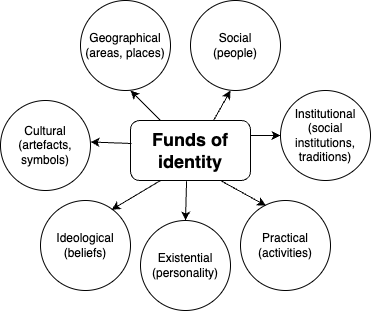



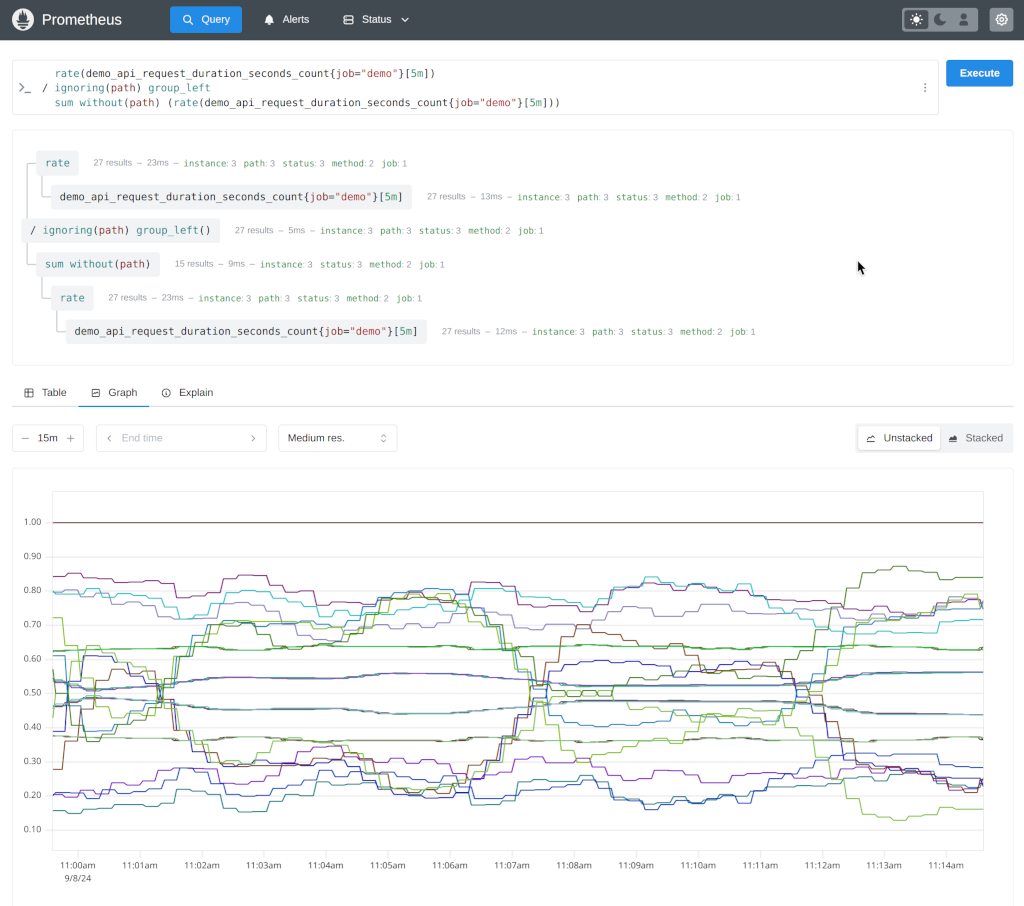

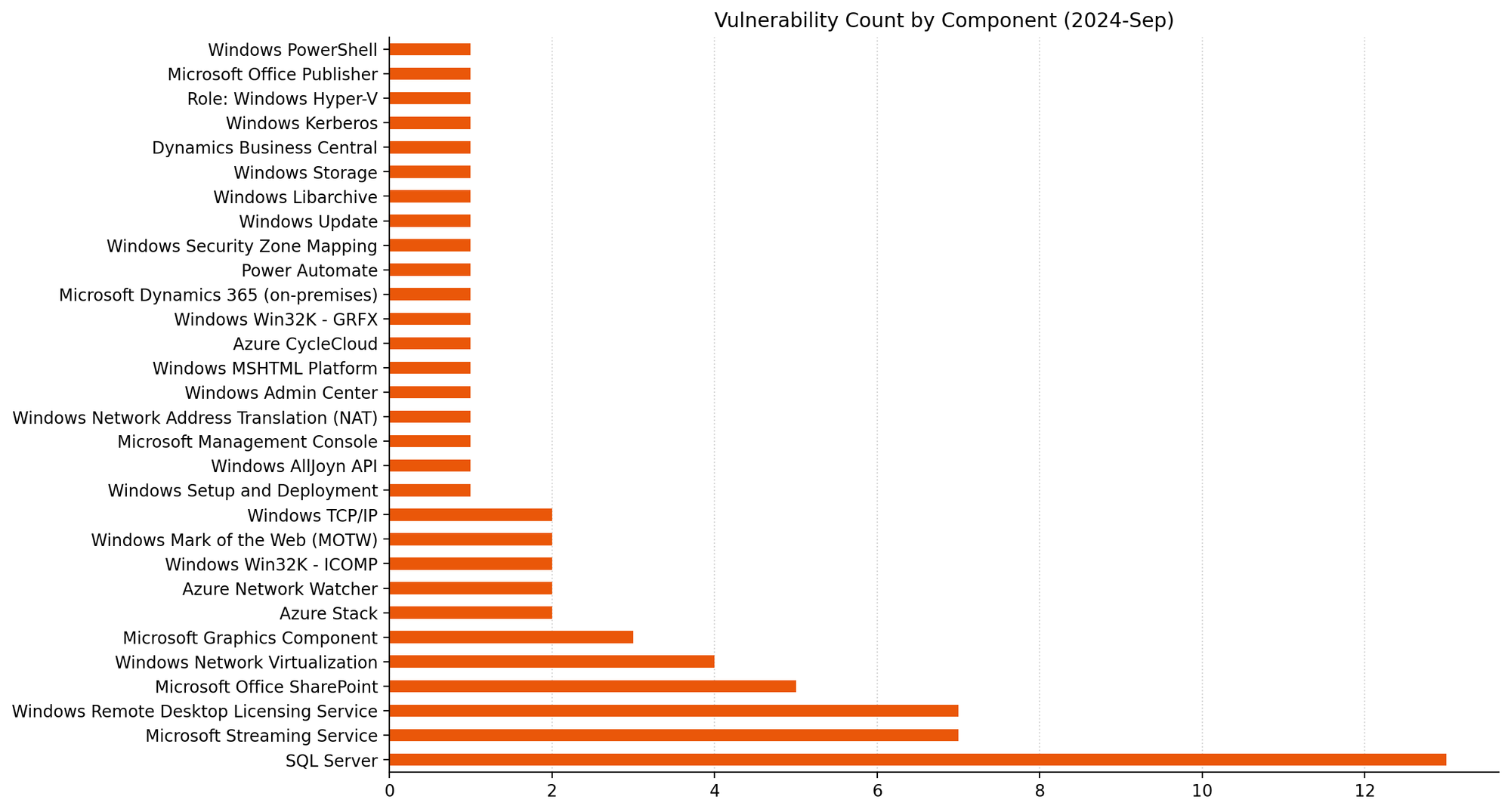
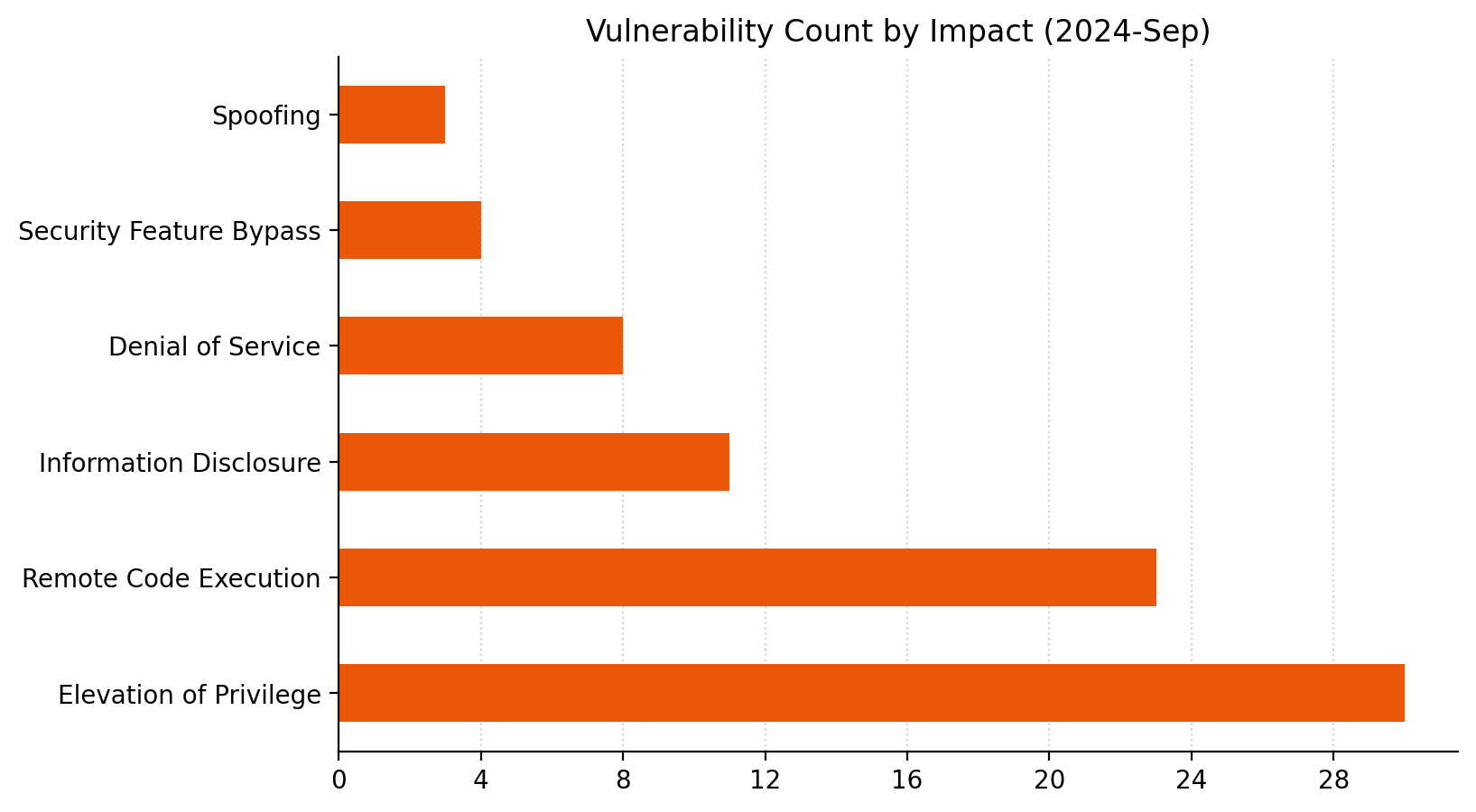
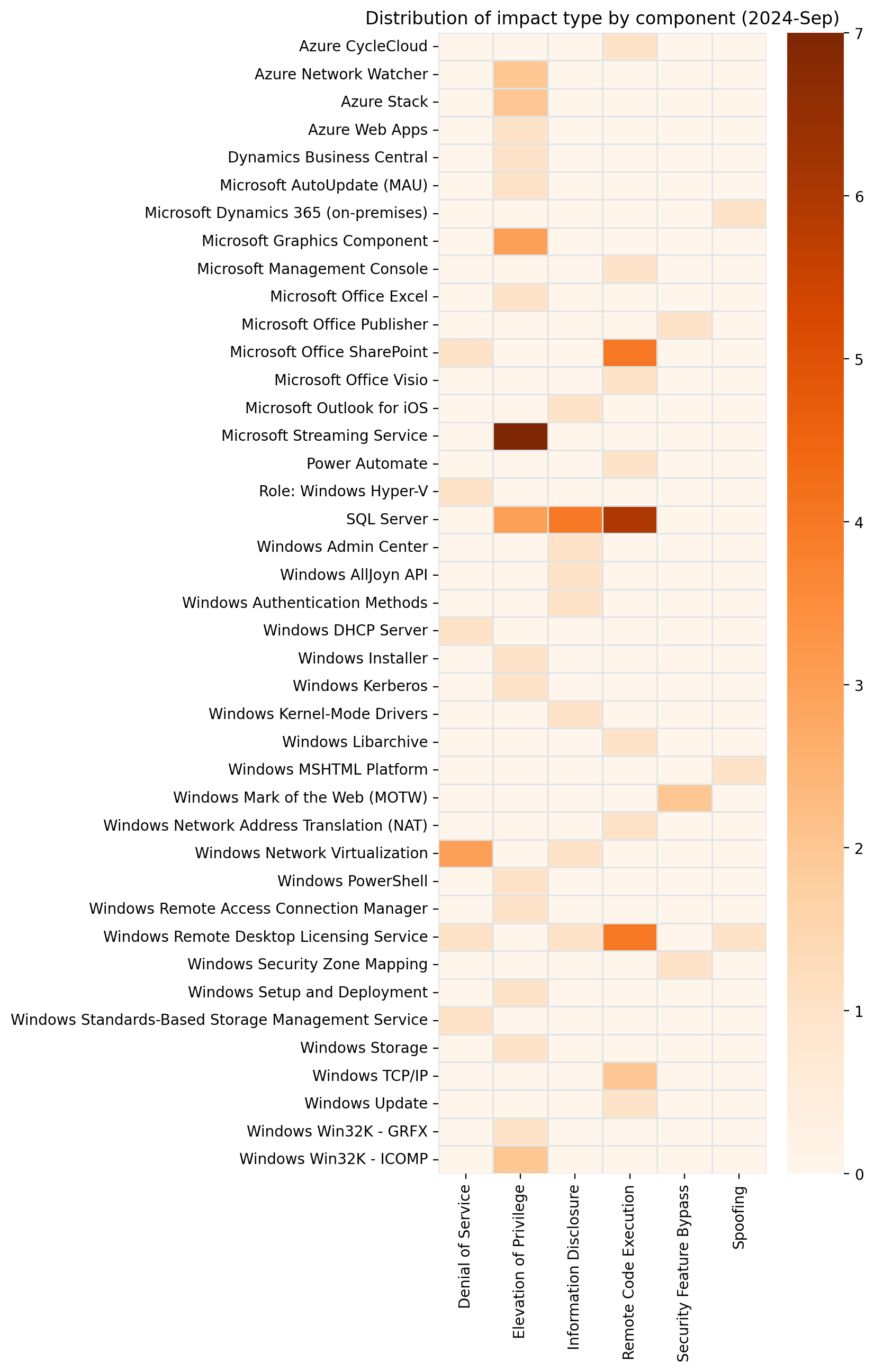
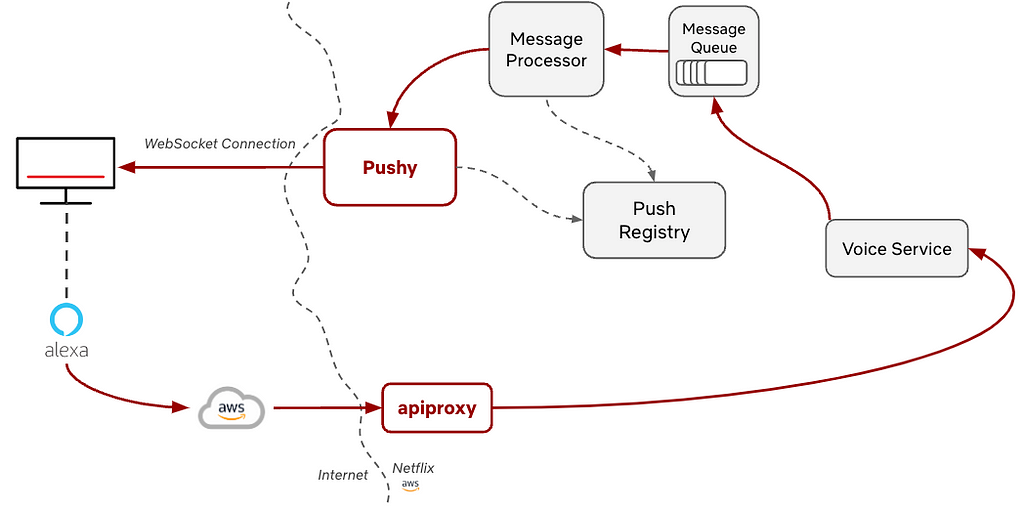
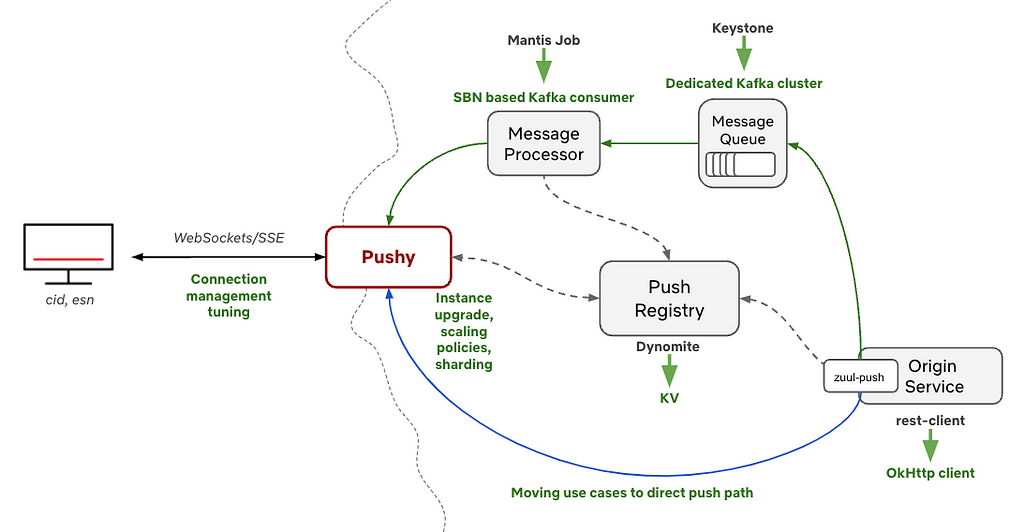
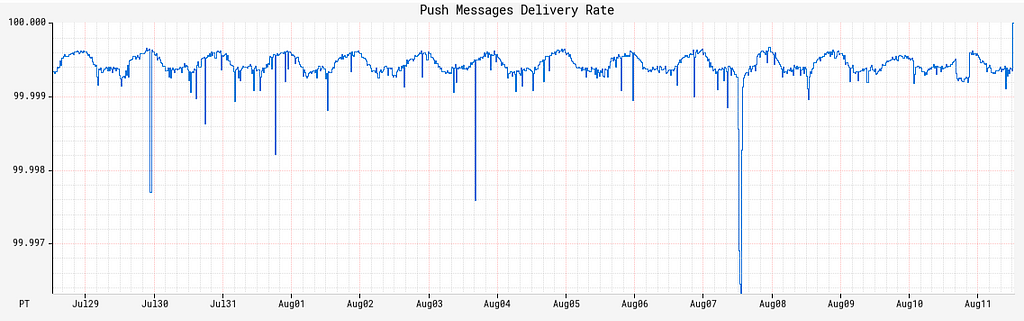
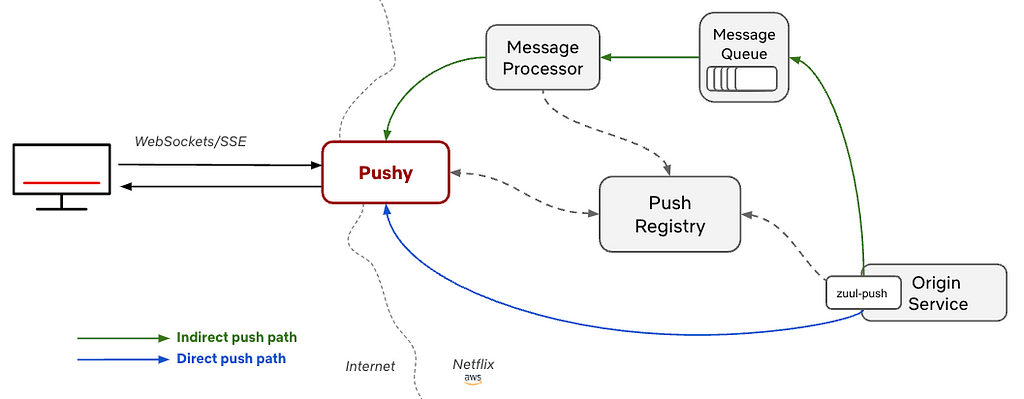
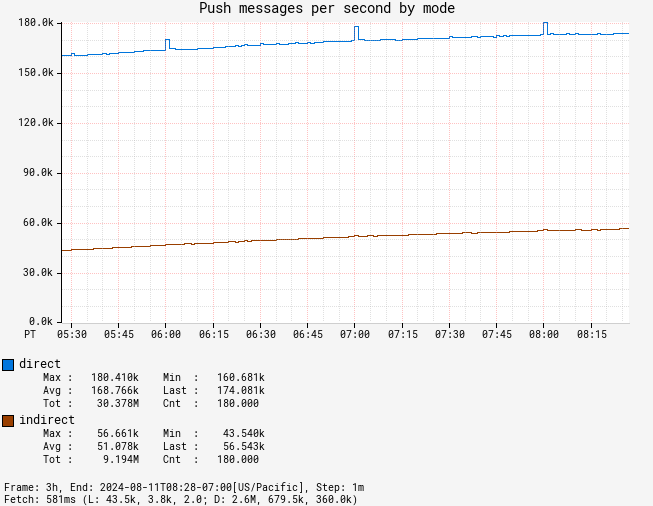

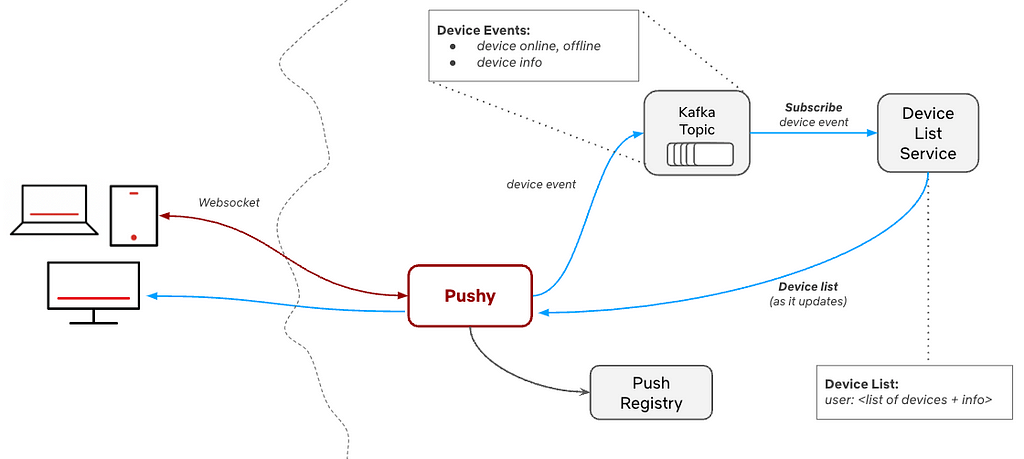
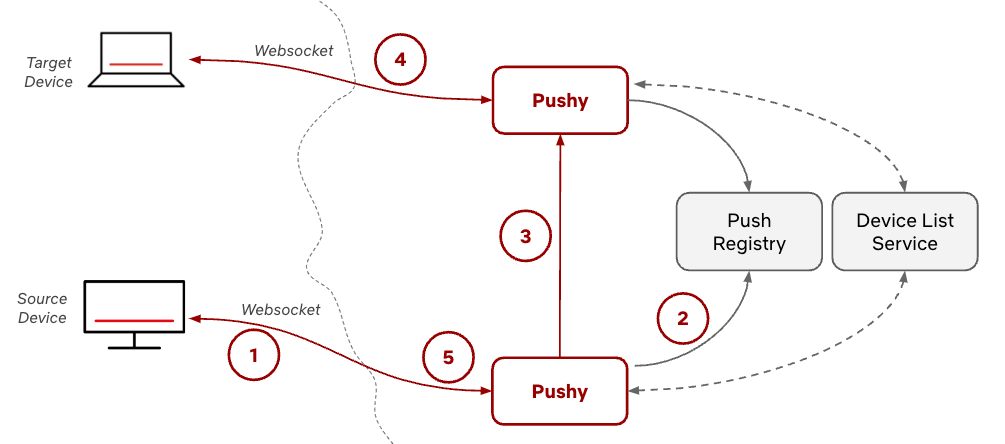
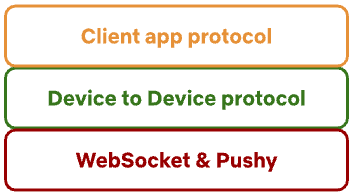
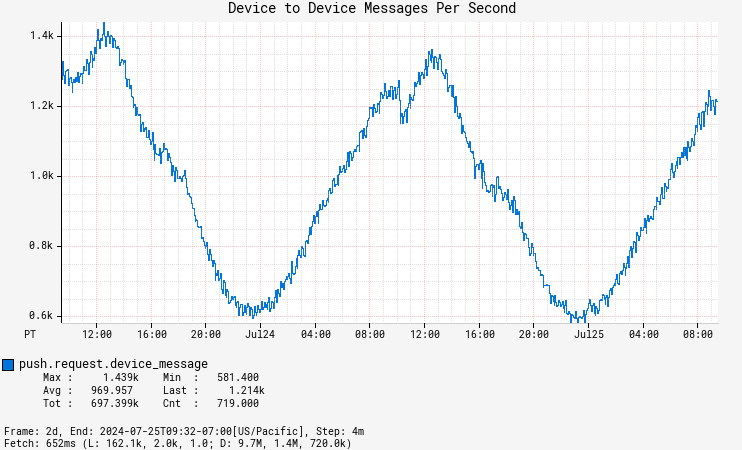
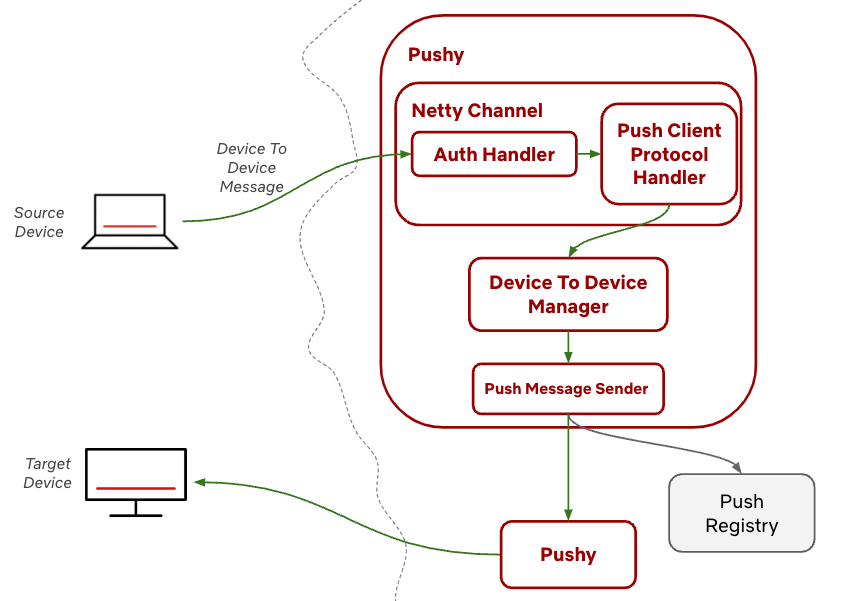

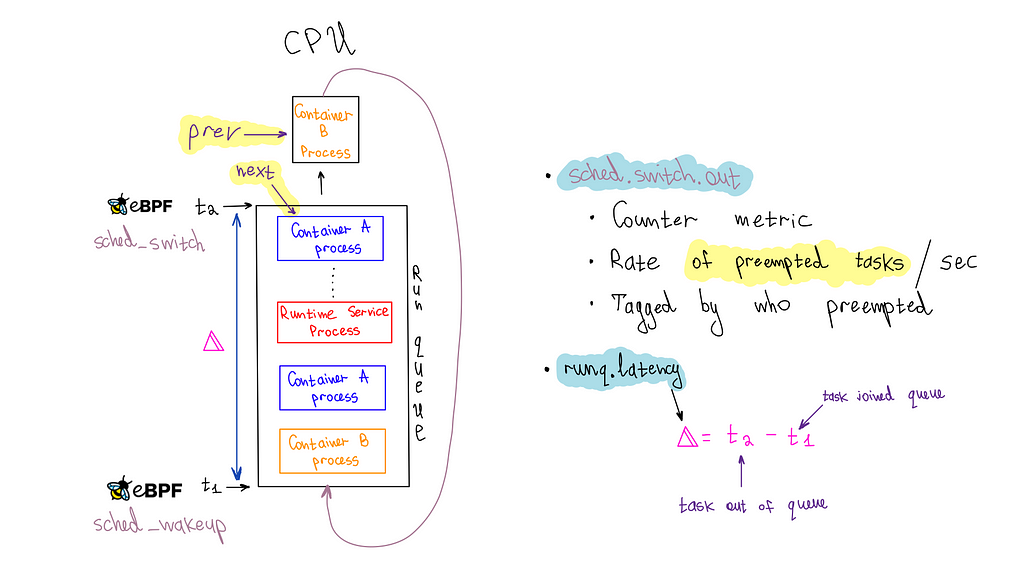
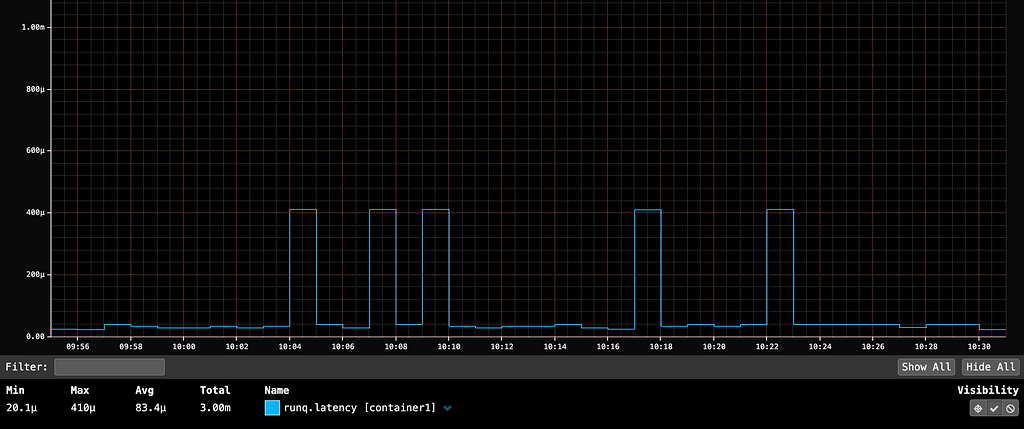
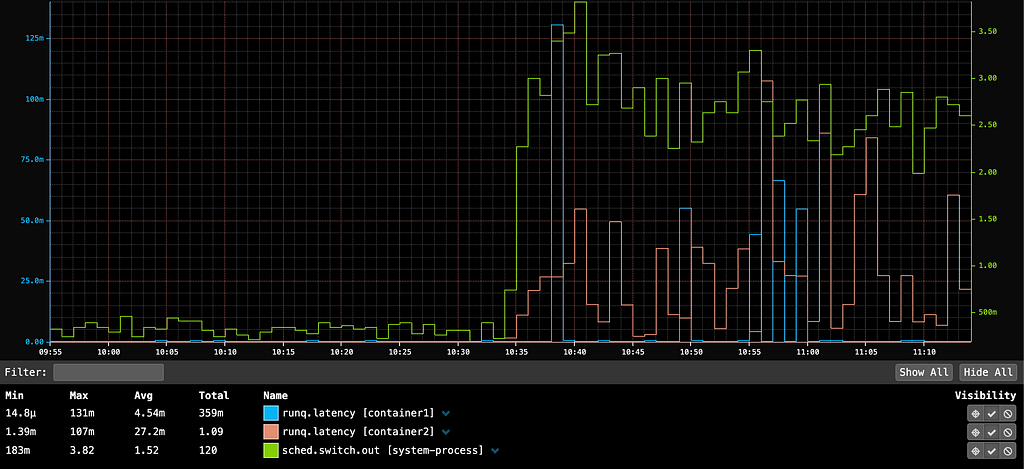
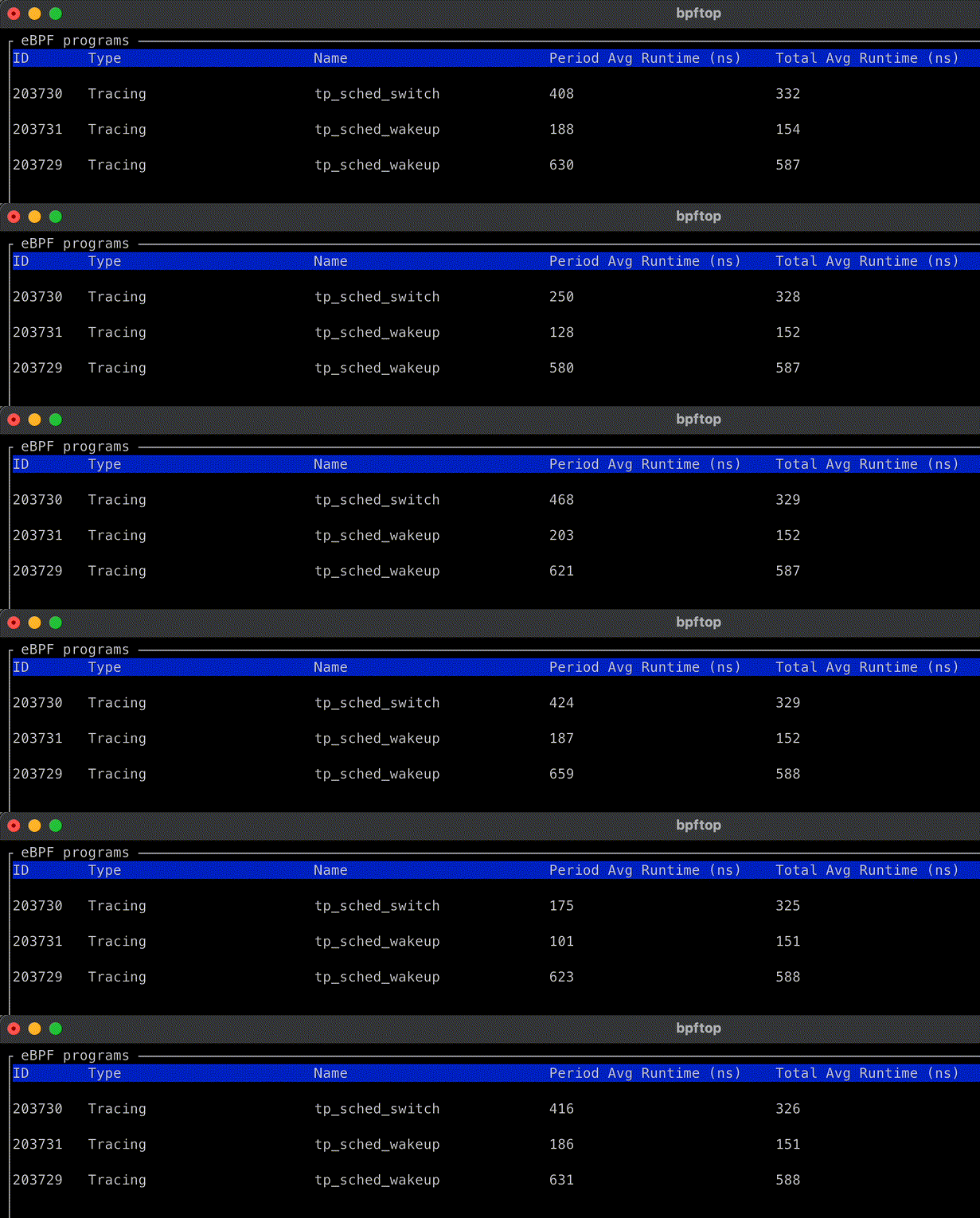


 Nitin Kumar is a Cloud Engineer (ETL) at Amazon Web Services, specialized in AWS Glue. With a decade of experience, he excels in aiding customers with their big data workloads, focusing on data processing and analytics. He is committed to helping customers overcome ETL challenges and develop scalable data processing and analytics pipelines on AWS. In his free time, he likes to watch movies and spend time with his family.
 Shubham Purwar is a Cloud Engineer (ETL) at AWS Bengaluru, specialized in AWS Glue and Amazon Athena. He is passionate about helping customers solve issues related to their ETL workload and implement scalable data processing and analytics pipelines on AWS. In his free time, Shubham loves to spend time with his family and travel around the world.
 Pramod Kumar P is a Solutions Architect at Amazon Web Services. With 19 years of technology experience and close to a decade of designing and architecting connectivity solutions (IoT) on AWS, he guides customers to build solutions with the right architectural tenets to meet their business outcomes.
 Madhavi Watve is a Senior Solutions Architect at Amazon Web Services, providing help and guidance to a broad range of customers to build highly secure, scalable, reliable, and cost-efficient applications on the cloud. She brings over 20 years of technology experience in software development and architecture and is data analytics specialist.
 Swathi S is a Technical Account Manager with the Enterprise Support team in Amazon Web Services. She has over 6 years of experience with AWS on big data technologies and specializes in analytics frameworks. She is passionate about helping AWS customers navigate the cloud space and enjoys assisting with design and optimization of analytics workloads on AWS.