Unit Testing AWS Lambda with Python and Mock AWS Services

Post Syndicated from Kevin Hakanson original https://aws.amazon.com/blogs/devops/unit-testing-aws-lambda-with-python-and-mock-aws-services/

When building serverless event-driven applications using AWS Lambda, it is best practice to validate individual components.  Unit testing can quickly identify and isolate issues in AWS Lambda function code.  The techniques outlined in this blog demonstrates unit test techniques for Python-based AWS Lambda functions and interactions with AWS Services.

The full code for this blog is available in the GitHub project as a demonstrative example.

Example use case

Let’s consider unit testing a serverless application which provides an API endpoint to generate a document.  When the API endpoint is called with a customer identifier and document type, the Lambda function retrieves the customer’s name from DynamoDB, then retrieves the document text from DynamoDB for the given document type, finally generating and writing the resulting document to S3.
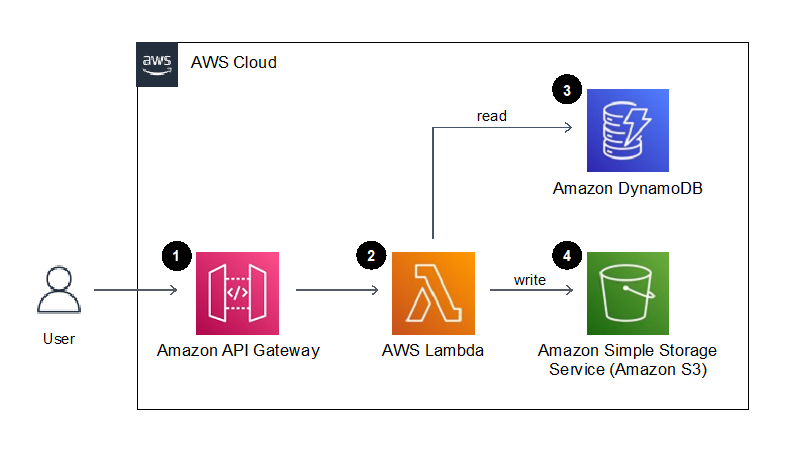
Figure 1. Example application architecture

Figure 1. Example application architecture

  1. Amazon API Gateway provides an endpoint to request the generation of a document for a given customer.  A document type and customer identifier are provided in this API call.
  2. The endpoint invokes an AWS Lambda function that generates a document using the customer identifier and the document type provided.
  3. An Amazon DynamoDB table stores the contents of the documents and the users name, which are retrieved by the Lambda function.
  4. The resulting text document is stored to Amazon S3.

Our testing goal is to determine if an isolated “unit” of code works as intended. In this blog, we will be writing tests to provide confidence that the logic written in the above AWS Lambda function behaves as we expect. We will mock the service integrations to Amazon DynamoDB and S3 to isolate and focus our tests on the Lambda function code, and not on the behavior of the AWS Services.

Define the AWS Service resources in the Lambda function

Before writing our first unit test, let’s look at the Lambda function that contains the behavior we wish to test.  The full code for the Lambda function is available in the GitHub repository as src/sample_lambda/app.py.

As part of our Best practices for working AWS Lambda functions, we recommend initializing AWS service resource connections outside of the handler function and in the global scope.  Additionally, we can retrieve any relevant environment variables in the global scope so that subsequent invocations of the Lambda function do not repeatedly need to retrieve them.  For organization, we can put the resource and variables in a dictionary:

_LAMBDA_DYNAMODB_RESOURCE = { "resource" : resource('dynamodb'), 
                              "table_name" : environ.get("DYNAMODB_TABLE_NAME","NONE") }

However, globally scoped code and global variables are challenging to test in Python, as global statements are executed on import, and outside of the controlled test flow.  To facilitate testing, we define classes for supporting AWS resource connections that we can override (patch) during testing.  These classes will accept a dictionary containing the boto3 resource and relevant environment variables.

For example, we create a DynamoDB resource class with a parameter “boto3_dynamodb_resource” that accepts a boto3 resource connected to DynamoDB:

class LambdaDynamoDBClass:
    def __init__(self, lambda_dynamodb_resource):
        self.resource = lambda_dynamodb_resource["resource"]
        self.table_name = lambda_dynamodb_resource["table_name"]
        self.table = self.resource.Table(self.table_name)

Build the Lambda Handler

The Lambda function handler is the method in the AWS Lambda function code that processes events. When the function is invoked, Lambda runs the handler method. When the handler exits or returns a response, it becomes available to process another event.

To facilitate unit test of the handler function, move as much of logic as possible to other functions that are then called by the Lambda hander entry point.  Also, pass the AWS resource global variables to these subsequent function calls.  This approach enables us to mock and intercept all resources and calls during test.

In our example, the handler references the global variables, and instantiates the resource classes to setup the connections to specific AWS resources.  (We will be able to override and mock these connections during unit test.)

Then the handler calls the create_letter_in_s3 function to perform the steps of creating the document, passing the resource classes.  This downstream function avoids directly referencing the global context or any AWS resource connections directly.

def lambda_handler(event: APIGatewayProxyEvent, context: LambdaContext) -> Dict[str, Any]:

    global _LAMBDA_DYNAMODB_RESOURCE
    global _LAMBDA_S3_RESOURCE

    dynamodb_resource_class = LambdaDynamoDBClass(_LAMBDA_DYNAMODB_RESOURCE)
    s3_resource_class = LambdaS3Class(_LAMBDA_S3_RESOURCE)

    return create_letter_in_s3(
            dynamo_db = dynamodb_resource_class,
            s3 = s3_resource_class,
            doc_type = event["pathParameters"]["docType"],
            cust_id = event["pathParameters"]["customerId"])

Unit testing with mock AWS services

Our Lambda function code has now been written and is ready to be tested, let’s take a look at the unit test code!   The full code for the unit test is available in the GitHub repository as tests/unit/src/test_sample_lambda.py.

In production, our Lambda function code will directly access the AWS resources we defined in our function handler; however, in our unit tests we want to isolate our code and replace the AWS resources with simulations.  This isolation facilitates running unit tests in an isolated environment to prevent accidental access to actual cloud resources.

Moto is a python library for Mocking AWS Services that we will be using to simulate AWS resource our tests.  Moto supports many AWS resources, and it allows you to test your code with little or no modification by emulating functionality of these services.

Moto uses decorators to intercept and simulate responses to and from AWS resources.  By adding a decorator for a given AWS service, subsequent calls from the module to that service will be re-directed to the mock.

@moto.mock_dynamodb
@moto.mock_s3

Configure Test Setup and Tear-down

The mocked AWS resources will be used during the unit test suite.  Using the setUp() method allows you to define and configure the mocked global AWS Resources before the tests are run.

We define the test class and a setUp() method and initialize the mock AWS resource.  This includes configuring the resource to prepare it for testing, such as defining a mock DynamoDB table or creating a mock S3 Bucket.

class TestSampleLambda(TestCase):
    def setUp(self) -> None:
        dynamodb = boto3.resource("dynamodb", region_name="us-east-1")
        dynamodb.create_table(
            TableName = self.test_ddb_table_name,
            KeySchema = [{"AttributeName": "PK", "KeyType": "HASH"}],
            AttributeDefinitions = [{"AttributeName": "PK", 
                                     "AttributeType": "S"}],
            BillingMode = 'PAY_PER_REQUEST'
           
        s3_client = boto3.client('s3', region_name="us-east-1")
        s3_client.create_bucket(Bucket = self.test_s3_bucket_name ) 

After creating the mocked resources, the setup function creates resource class object referencing those mocked resources, which will be used during testing.

        mocked_dynamodb_resource = resource("dynamodb")
        mocked_s3_resource = resource("s3")
        mocked_dynamodb_resource = { "resource" : resource('dynamodb'),
                                     "table_name" : self.test_ddb_table_name  }
        mocked_s3_resource = { "resource" : resource('s3'),
                               "bucket_name" : self.test_s3_bucket_name }
        self.mocked_dynamodb_class = LambdaDynamoDBClass(mocked_dynamodb_resource)
        self.mocked_s3_class = LambdaS3Class(mocked_s3_resource)

Test #1: Verify the code writes the document to S3

Our first test will validate our Lambda function writes the customer letter to an S3 bucket in the correct manner.  We will follow the standard test format of arrange, act, assert when writing this unit test.

Arrange the data we need in the DynamoDB table:

def test_create_letter_in_s3(self) -> None:
    
    self.mocked_dynamodb_class.table.put_item(Item={"PK":"D#UnitTestDoc",
                                                        "data":"Unit Test Doc Corpi"})
    self.mocked_dynamodb_class.table.put_item(Item={"PK":"C#UnitTestCust",
                                                        "data":"Unit Test Customer"})

Act by calling the create_letter_in_s3 function.  During these act calls, the test passes the AWS resources as created in the setUp().

    test_return_value = create_letter_in_s3(
                        dynamo_db = self.mocked_dynamodb_class,
                        s3=self.mocked_s3_class,
                        doc_type = "UnitTestDoc",
                        cust_id = "UnitTestCust"
                        )

Assert by reading the data written to the mock S3 bucket, and testing conformity to what we are expecting:

bucket_key = "UnitTestCust/UnitTestDoc.txt"
    body = self.mocked_s3_class.bucket.Object(bucket_key).get()['Body'].read()

    self.assertEqual(test_return_value["statusCode"], 200)
    self.assertIn("UnitTestCust/UnitTestDoc.txt", test_return_value["body"])
    self.assertEqual(body.decode('ascii'),"Dear Unit Test Customer;\nUnit Test Doc Corpi")

Tests #2 and #3: Data not found error conditions

We can also test error conditions and handling, such as keys not found in the database.  For example, if a customer identifier is submitted, but does not exist in the database lookup, does the logic handle this and return a “Not Found” code of 404?

To test this in test #2, we add data to the mocked DynamoDB table, but then submit a customer identifier that is not in the database.

This test, and a similar test #3 for “Document Types not found”, are implemented in the example test code on GitHub.

Test #4: Validate the handler interface

As the application logic resides in independently tested functions, the Lambda handler function provides only interface validation and function call orchestration.  Therefore, the test for the handler validates that the event is parsed correctly, any functions are invoked as expected, and the return value is passed back.

To emulate the global resource variables and other functions, patch both the global resource classes and logic functions.

    @patch("src.sample_lambda.app.LambdaDynamoDBClass")
    @patch("src.sample_lambda.app.LambdaS3Class")
    @patch("src.sample_lambda.app.create_letter_in_s3")
    def test_lambda_handler_valid_event_returns_200(self,
                            patch_create_letter_in_s3 : MagicMock,
                            patch_lambda_s3_class : MagicMock,
                            patch_lambda_dynamodb_class : MagicMock
                            ):

Arrange for the test by setting return values for the patched objects.

patch_lambda_dynamodb_class.return_value = self.mocked_dynamodb_class
        patch_lambda_s3_class.return_value = self.mocked_s3_class

        return_value_200 = {"statusCode" : 200, "body":"OK"}
        patch_create_letter_in_s3.return_value = return_value_200

We need to provide event data when invoking the Lambda handler.  A good practice is to save test events as separate JSON files, rather than placing them inline as code. In the example project, test events are located in the folder “tests/events/”. During test execution, the event object is created from the JSON file using the utility function named load_sample_event_from_file.

test_event = self.load_sample_event_from_file("sampleEvent1")

Act by calling the lambda_handler function.

test_return_value = lambda_handler(event=test_event, context=None)

Assert by ensuring the create_letter_in_s3 function is called with the expected parameters based on the event, and a create_letter_in_s3 function return value is passed back to the caller.  In our example, this value is simply passed with no alterations.

patch_create_letter_in_s3.assert_called_once_with(
                                        dynamo_db=self.mocked_dynamodb_class,
                                        s3=self.mocked_s3_class,
                                        doc_type=test_event["pathParameters"]["docType"],
                                        cust_id=test_event["pathParameters"]["customerId"])

       self.assertEqual(test_return_value, return_value_200)

Tear Down

The tearDown() method is called immediately after the test method has been run and the result is recorded.  In our example tearDown() method, we clean up any data or state created so the next test won’t be impacted.

Running the unit tests

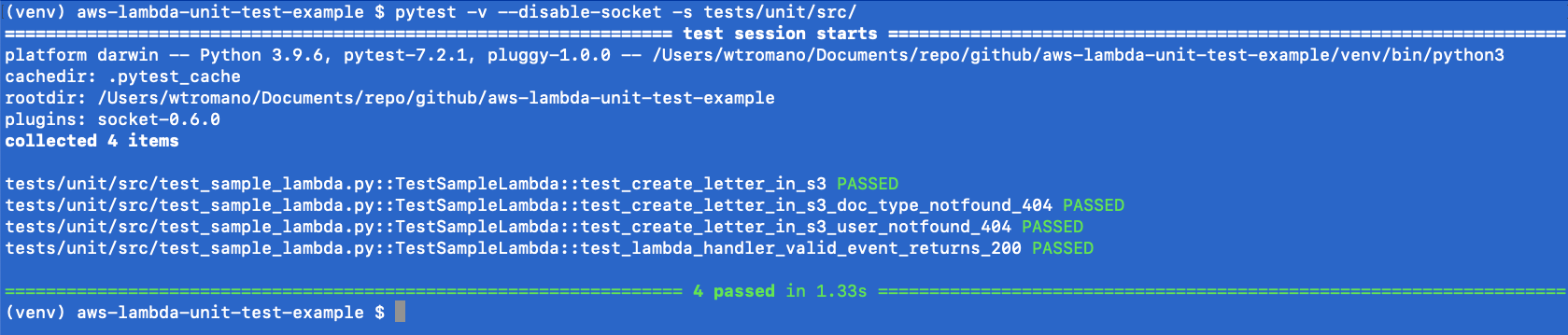
The unittest Unit testing framework can be run using the Python pytest utility.  To ensure network isolation and verify the unit tests are not accidently connecting to AWS resources, the pytest-socket project provides the ability to disable network communication during a test.

pytest -v --disable-socket -s tests/unit/src/

The pytest command results in a PASSED or FAILED status for each test.  A PASSED status verifies that your unit tests, as written, did not encounter errors or issues,
Conclusion

Unit testing is a software development process in which different parts of an application, called units, are individually and independently tested. Tests validate the quality of the code and confirm that it functions as expected. Other developers can gain familiarity with your code base by consulting the tests. Unit tests reduce future refactoring time, help engineers get up to speed on your code base more quickly, and provide confidence in the expected behaviour.

We’ve seen in this blog how to unit test AWS Lambda functions and mock AWS Services to isolate and test individual logic within our code.

AWS Lambda Powertools for Python has been used in the project to validate hander events.   Powertools provide a suite of utilities for AWS Lambda functions to ease adopting best practices such as tracing, structured logging, custom metrics, idempotency, batching, and more.

Learn more about AWS Lambda testing in our prescriptive test guidance, and find additional test examples on GitHub.  For more serverless learning resources, visit Serverless Land.

About the authors:

Tom Romano

Tom Romano is a Solutions Architect for AWS World Wide Public Sector from Tampa, FL, and assists GovTech and EdTech customers as they create new solutions that are cloud-native, event driven, and serverless. He is an enthusiastic Python programmer for both application development and data analytics. In his free time, Tom flies remote control model airplanes and enjoys vacationing with his family around Florida and the Caribbean.

Kevin Hakanson

Kevin Hakanson is a Sr. Solutions Architect for AWS World Wide Public Sector based in Minnesota. He works with EdTech and GovTech customers to ideate, design, validate, and launch products using cloud-native technologies and modern development practices. When not staring at a computer screen, he is probably staring at another screen, either watching TV or playing video games with his family.

Use backups to recover from security incidents

Post Syndicated from Jason Hurst original https://aws.amazon.com/blogs/security/use-backups-to-recover-from-security-incidents/

Greetings from the AWS Customer Incident Response Team (CIRT)! AWS CIRT is dedicated to supporting customers during active security events on the customer side of the AWS Shared Responsibility Model.

Over the past three years, AWS CIRT has supported customers with security events in their AWS accounts. These include the unauthorized use of AWS Identity and Access Management (IAM) credentials, ransomware, and data deletion in an AWS account.

In this post, I will walk you through key AWS services and features that provide backup and recovery solutions to restore your data based upon the lessons our team has learned when supporting customers experiencing security events.

Shared Responsibility Model

Security is a shared responsibility between AWS and the customer. Customers are responsible for protecting their data IN the cloud. For Amazon Elastic Compute Cloud (Amazon EC2), this includes the guest operating system, installed applications, and data stored within the instance and associated Amazon Elastic Block Store (Amazon EBS) volumes. For Amazon Simple Storage Service (Amazon S3) and Amazon DynamoDB, AWS operates the infrastructure layer, the operating system, and service resources, and customers access the endpoints to store and retrieve data.

Backup and recovery configuration are a part of the customer’s side of the shared responsibility model. AWS doesn’t have the ability to recover a deleted resource. It doesn’t matter how quickly the event is reported to AWS. The inability to recover resources includes actions by the AWS account root user or an IAM principal in the account.

Customers are also responsible for managing their data (including encryption options), classifying their assets, and using IAM tools to apply the appropriate permissions. AWS strives to make it simple for customers to back up and restore their data. We recommend that you compare the risk and costs associated with losing data to the available solutions to make the best decision for your data and business use cases.

Why do you need backups?

The National Institute of Technology (NIST) Computer Security Incident Handling Guide SP 800-61 Rev. 2 defines a computer security incident as “a violation or imminent threat of violation of computer security policies, acceptable use policies, or standard security practices.” AWS recently updated the AWS Security Incident Response Guide as a resource to help customers throughout the incident response life cycle.

Backup and restore processes help you restore data to a point in time before unauthorized actions. Unauthorized actions can be accidental or part of a security event. Implementing backup and restore processes can help you reduce costs by limiting the number of resources that need backups, associated storage, and overall timelines associated with acceptable Recovery Time Objectives (RTOs) and Recovery Point Objectives (RPOs). For additional guidance on backup solutions and programs, see Top 10 security best practices for securing backups in AWS

How does AWS help?

AWS provides several solutions for backups to integrate with your operational and security incident recovery procedures which I describe in more detail in this section. For additional information, see AWS Backup & Restore.

Amazon EC2

Amazon EC2 provides scalable computing capacity in the AWS Cloud. Using Amazon EC2 can help eliminate your need to invest in hardware up front, helping you to develop and deploy applications faster.

  • EBS volumes are the primary persistent storage option for Amazon EC2. Use this block storage for structured data, such as databases, or unstructured data, such as files in a file system on a volume. An EBS snapshot takes a copy of the EBS volume and places it in Amazon S3, where it is stored redundantly in multiple Availability Zones.
  • Restore an entire EC2 instance including its associated volumes by restoring an Amazon Machine Image (AMI) backup of your instance. Create AMIs for known good configurations, and integrate them with auto scaling groups to support the scaling and resiliency of your services. For more information on snapshots and AMIs, see Backup and recovery for Amazon EC2 with EBS volumes.
  • Create a golden image by preloading needed software and configuration on an EC2 instance, and then creating an image of that. Then, use the resulting image to launch new instances, with updates needed only for the period after image creation.
  • Amazon FSx for Windows File Server provides fully-managed Microsoft Windows file servers, backed by a fully native Windows file system. To help ensure file system consistency, Amazon FSx uses the Volume Shadow Copy Service (VSS) in Microsoft Windows. Each FSx for Windows File Server backup contains the information that is needed to create a new file system from the backup, effectively restoring a point-in-time snapshot of the file system. For more information, see Amazon FSx: Working with backups.
  • Amazon EC2 Recycle Bin is a data recovery feature that enables you to restore Amazon EBS snapshots and EBS-backed AMIs that were accidentally deleted. If your resources are deleted, they are retained in the Recycle Bin for a period that you specify, before they are permanently deleted.

Transactional databases

In cloud computing, the ideal scenario is to keep persistent transactional states in databases so that those resources are the only things that actively require backups. When used in conjunction with AWS compute services, this minimizes the volume of data that you need to back up. Everything else is restored from a golden image or equivalent through auto scaling or a continuous integration and continuous delivery (CI/CD) pipeline. To estimate costs associated with service usage and the use of backup storage, use the AWS Pricing Calculator. Work backwards from your critical data that requires backups to help limit costs associated with your overall backup solution.

  • Amazon Aurora backups are continuous and incremental so that you can quickly restore to any point within the backup retention period. You can specify a backup retention period of 1 to 35 days when you create or modify a database cluster. Aurora backups are stored in Amazon S3.
  • Amazon DynamoDB allows you to back up your table data continuously by using point-in-time recovery (PITR). When you use PITR, DynamoDB backs up your table data automatically with per-second granularity to restore to any second in the preceding 35 days. For more information, see DynamoDB PITR.
  • Amazon Neptune is a fast, reliable, fully managed graph database service. The core of Neptune is a purpose-built, high-performance graph database engine. Neptune backups are continuous and incremental so that you can quickly restore to any point within the backup retention period. You can specify a backup retention period, from 1 to 35 days, when you create or modify a DB cluster.
  • Amazon Relational Database Service (Amazon RDS) creates and saves automated backups of your DB instance during the backup window of your DB instance. Amazon RDS creates a storage volume snapshot of your DB instance, backing up the entire DB instance and not just individual databases. Amazon RDS saves the automated backups of your DB instance according to the backup retention period that you specify between 0 and 35 days. If necessary, you can recover your database to any point in time during the backup retention period.

Amazon Elastic File System

Amazon Elastic File System (Amazon EFS) provides serverless, fully elastic file storage to help you share file data without provisioning or managing storage capacity and performance. The service manages the file storage infrastructure for you to avoid the complexity of deploying, patching, and maintaining complex file system configurations.

The EFS-to-EFS Backup solution is suitable for Amazon EFS file systems in each AWS Region. It includes an AWS CloudFormation template that launches, configures, and runs the AWS services required to deploy the solution. This solution follows AWS best practices for security and availability.

Amazon S3

Amazon S3 is an object storage service that offers industry-leading scalability, data availability, security, and performance designed for 99.999999999% (11 9’s) of durability. When using Amazon S3, you should configure the security of the S3 buckets and objects that are part of your backup solution. For more information on security best practices for Amazon S3, see Top 10 security best practices for securing data in Amazon S3 and The anatomy of ransomware event targeting data residing in Amazon S3.

AWS Backup: A comprehensive solution

If you need a backup strategy for multiple services or to manage backups from a single solution, consider using AWS Backup. AWS Backup is a fully-managed service that makes it simple to centralize and automate data protection across AWS services in the cloud, and on premises. For a list of supported services and resource feature availability, see the AWS Backup Developer Guide.

AWS Backup provides for centralized, policy-based data protection. Your backup data is encrypted using encryption keys managed by AWS Key Management Service (KMS), reducing your need to build and maintain a key management infrastructure. With AWS Backup, you can do the following:

  • Set backup retention policies that automatically retain and expire backups, minimizing backup storage costs.
  • Copy backups across different AWS Regions and accounts from a central console to help you meet your compliance and disaster recovery needs.
  • Create data protection policies and use AWS Organizations to enforce the protection policies throughout the accounts in that organization.
  • Set resource-based access policies on backup vaults. Use resource-based access policies to control access to backups in a backup vault across users, rather than having to define permissions for each user.

AWS Backup can help you align with your data protection needs with real-time analytics and insights, as follows:

  • You can audit and report on the compliance of your data protection policies to help meet your business and regulatory needs with AWS Backup Audit Manager.
  • AWS Backup supports legal hold, which is used when an organization must retain certain data either for preservation, auditing, or as evidence in legal proceedings and e-Discovery.
  • You can choose your controls. For information on the available controls, their customizable parameters, and their AWS Config recording resource types, see Choosing your controls. Every control requires the recording resource type AWS Config: resource compliance because this type records your compliance status with either the AWS Backup Framework or a custom framework that you define.

How much will this cost?

To estimate costs for individual services and features, use the AWS Pricing Calculator. For additional cost information, see the feature page for each service at AWS Cloud Products.

Conclusion

In this blog post, you learned about several AWS services and features to help you back up and restore your data. By analyzing and configuring backup and restore capabilities, you can enable resilience from an accidental deletion or security event.

Jason Hurst

Jason Hurst

Jason is a Senior Security Consultant with Amazon Web Services, working on the Customer Incident Response Team to assist customer’s with security events on their side of the shared responsibility model. You can find Jason presenting in The Safe Room on the AWS Twitch Channel to share information on being more secure on AWS, and on linkedin at https://www.linkedin.com/in/jasonlhurst.

Celebrating Women’s History Month at Rapid7

Post Syndicated from Rapid7 original https://blog.rapid7.com/2023/03/22/celebrating-womens-history-month-at-rapid7/

Celebrating Women’s History Month at Rapid7

Each March, we reflect on the historical accomplishments and ongoing need to support women. This, of course, should be embraced all 12 months of the year, but Women’s History Month gives us a special opportunity to learn from, celebrate, and amplify the voices of women.

At Rapid7, we’re shining a light on women’s voices all month long with special events and panel discussions, while recommitting to the ongoing efforts that last all year long. Below you’ll find some highlights from our International Women’s Day panel, which focused equity, inclusion, and advocacy in the workplace.

Rapid7 International Women’s Day Panel

This year’s panel focused on the difference between equity and equality. While historically the focus has been on creating equal opportunities, it’s argued that focusing instead on equitable policies is more effective, as it takes into account the advantages and disadvantages of each individual’s circumstance.

“If we want to drive equitable processes to create an EQUAL playing field, we need to recognize the advantages and disadvantages that are out there today, and address them,” said Laura Ellis, Rapid7 Vice President of Data Engineering and Platform Analytics.

Creating equitable processes requires a dedicated effort and requires us to lean into hard conversations to address common stigmas. If organizations are committed to creating equitable policies and practices, having a culture that supports safe spaces is essential in getting to the most impactful solutions.

“Safety comes easy for a lot of our dominant groups or leaders with a certain title—but we should be aware that it’s not always there for our non-dominant groups,” said Nancy Li, Rapid7 Director of Engineering. “Be open to trying different forums where people can speak. Your loudest voices aren’t always representative of the whole population.”

So, what are some practices that we can take into the workplace to help create more equitable workplaces? Here are a few additional takeaways from the discussion.

  1. Grow your teams with intention. If you are a hiring manager, or in a role where you influence hiring, slow down and partner with your Talent Acquisition team to ensure you’re seeking out a diverse candidate pool right from the start. Ask questions about where they are sourcing talent, what schools and universities they are historically partnering with, and see if there are opportunities to incorporate more diversity into the talent pipeline. It doesn’t stop once someone gets hired either—mentoring and providing support can help them gain the skills necessary to continue to advance their careers. Build out a multi dimensional team, and be open to the ways that each member’s different experiences can help fuel the innovation and creativity of the team.
  2. Be an Upstander for One Another. Many women on the panel shared experiences of when another woman or a male ally stood up for them in the moment. What was shared was that once you feel the support of someone standing up for you by pointing out something that wasn’t right, it makes that person feel even more comfortable passing that support on and standing up for someone else. As stated by one group member, “After an upstander demonstrates how you should be treated—what a difference it makes in your confidence, and in your ability to be an upstander for someone else and pay that forward. Embrace it and then pass it on and use it to support someone else.”
  3. Recognize that progress is fragile—we cannot lose focus. While women have made significant advancements in the workplace, the COVID-19 pandemic illustrated just how fragile this progress can be, especially when many women still bear the brunt of caregiving. While panelists observed progress being made and the gender diversity of the teams around them, they also pointed out that post pandemic, many women who left the workforce still have yet to return. In fact, the US Department of Labor reported that more than two years post-pandemic, women’s labor participation is still a full percentage point lower than what it was pre-pandemic. This means that roughly 1 million women are missing from the labor force. Flexible working policies provide a way to ensure that employees are able to balance their personal commitments and caregiving responsibilities with their work responsibilities. Offering this flexibility to both men and women in the workplace takes this one step further, as it was noted that even policies that are not exclusively for women, have the ability to impact women elsewhere as families are able to share responsibilities more equally.
  4. We all have imposter syndrome. Imposter syndrome isn’t something that is limited to a specific pay band or job level. We are consistently our own toughest critic, and can sometimes feel like there is “someone else” who should be taking advantage of an opportunity or stepping up to take on a leadership role. To combat imposter syndrome,  the panel recommended  looking around the room to determine where your skills can add value, and not being afraid to share that. It was also mentioned that many women are quick to brush off compliments when they are recognized for their work. However, it takes a lot for someone to go out of their way and pay you a compliment, so when that happens, lean into it and really listen to that positive feedback. Those moments can really make an impact on what you believe you are capable of, and make it easier to overcome that feeling of imposter syndrome. Finally, the group stressed the importance of leveraging the resources available to you through your employer, whether it’s access to therapy services or an employee assistance program. Sometimes the key to overcoming imposter syndrome is having someone help us reframe the situation, and shift our perspective. There’s no shame in speaking with someone who is trained to help us navigate all stages of life and career.
  5. Use your voice. Even if it shakes. When paving the path to a more equitable world, things aren’t going to be easy or comfortable the whole time. Continue to speak up and speak out – both for yourself, and for others.

This panel discussion took place on March 8th, and through the month our Women Impact Group will continue to partner with the business to host open and honest conversations and opportunities for reflection and education. This includes an allyship training session hosted by both our Women’s Impact Group and our PRIDE Impact Group, with guests from PFLAG.

In our internal communication channels, we’re spotlighting women in our organization who are making a considerable impact on our business and customers, shining an extra spotlight on the work and accomplishments of our own women at Rapid7. In a fireside chat, “Celebrating Women’s Voices”, leaders shared their own experiences in the workplace and the importance of sharing our journeys and building each other up. From parenting challenges to advocating for yourself and others, to moments of self doubt, these personal stories are shared to emphasize the importance of hard conversations and navigating challenges.

While we remain committed to uplifting the voices and representation of women in our industry throughout the year, we’re proud to have our Rapid Impact Groups driving these events in March that spark important conversations and provide real resources and opportunities for connection and community for our people.

Click here to learn more about our Rapid Impact Groups, and our ongoing commitment to diversity at Rapid7.

Manage users and group memberships on Amazon QuickSight using SCIM events generated in IAM Identity Center with Azure AD

Post Syndicated from Wakana Vilquin-Sakashita original https://aws.amazon.com/blogs/big-data/manage-users-and-group-memberships-on-amazon-quicksight-using-scim-events-generated-in-iam-identity-center-with-azure-ad/

Amazon QuickSight is cloud-native, scalable business intelligence (BI) service that supports identity federation. AWS Identity and Access Management (IAM) allows organizations to use the identities managed in their enterprise identity provider (IdP) and federate single sign-on (SSO) to QuickSight. As more organizations are building centralized user identity stores with all their applications, including on-premises apps, third-party apps, and applications on AWS, they need a solution to automate user provisioning into these applications and keep their attributes in sync with their centralized user identity store.

When architecting a user repository, some organizations decide to organize their users in groups or use attributes (such as department name), or a combination of both. If your organization uses Microsoft Azure Active Directory (Azure AD) for centralized authentication and utilizes its user attributes to organize the users, you can enable federation across all QuickSight accounts as well as manage users and their group membership in QuickSight using events generated in the AWS platform. This allows system administrators to centrally manage user permissions from Azure AD. Provisioning, updating, and de-provisioning users and groups in QuickSight no longer requires management in two places with this solution. This makes sure that users and groups in QuickSight stay consistent with information in Azure AD through automatic synchronization.

In this post, we walk you through the steps required to configure federated SSO between QuickSight and Azure AD via AWS IAM Identity Center (Successor to AWS Single Sign-On) where automatic provisioning is enabled for Azure AD. We also demonstrate automatic user and group membership update using a System for Cross-domain Identity Management (SCIM) event.

Solution overview

The following diagram illustrates the solution architecture and user flow.

solution architecture and user flow.

In this post, IAM Identity Center provides a central place to bring together administration of users and their access to AWS accounts and cloud applications. Azure AD is the user repository and configured as the external IdP in IAM Identity Center. In this solution, we demonstrate the use of two user attributes (department, jobTitle) specifically in Azure AD. IAM Identity Center supports automatic provisioning (synchronization) of user and group information from Azure AD into IAM Identity Center using the SCIM v2.0 protocol. With this protocol, the attributes from Azure AD are passed along to IAM Identity Center, which inherits the defined attribute for the user’s profile in IAM Identity Center. IAM Identity Center also supports identity federation with SAML (Security Assertion Markup Language) 2.0. This allows IAM Identity Center to authenticate identities using Azure AD. Users can then SSO into applications that support SAML, including QuickSight. The first half of this post focuses on how to configure this end to end (see Sign-In Flow in the diagram).

Next, user information starts to get synchronized between Azure AD and IAM Identity Center via SCIM protocol. You can automate creating a user in QuickSight using an AWS Lambda function triggered by the CreateUser SCIM event originated from IAM Identity Center, which was captured in Amazon EventBridge. In the same Lambda function, you can subsequently update the user’s membership by adding into the specified group (whose name is comprised of two user attributes: department-jobTitle, otherwise create the group if it doesn’t exist yet, prior to adding the membership.

In this post, this automation part is omitted because it would be redundant with the content discussed in the following sections.

This post explores and demonstrates an UpdateUser SCIM event triggered by the user profile update on Azure AD. The event is captured in EventBridge, which invokes a Lambda function to update the group membership in QuickSight (see Update Flow in the diagram). Because a given user is supposed to belong to only one group at a time in this example, the function will replace the user’s current group membership with the new one.

In Part I, you set up SSO to QuickSight from Azure AD via IAM Identity Center (the sign-in flow):

  1. Configure Azure AD as the external IdP in IAM Identity Center.
  2. Add and configure an IAM Identity Center application in Azure AD.
  3. Complete configuration of IAM Identity Center.
  4. Set up SCIM automatic provisioning on both Azure AD and IAM Identity Center, and confirm in IAM Identity Center.
  5. Add and configure a QuickSight application in IAM Identity Center.
  6. Configure a SAML IdP and SAML 2.0 federation IAM role.
  7. Configure attributes in the QuickSight application.
  8. Create a user, group, and group membership manually via the AWS Command Line Interface (AWS CLI) or API.
  9. Verify the configuration by logging in to QuickSight from the IAM Identity Center portal.

In Part II, you set up automation to change group membership upon an SCIM event (the update flow):

  1. Understand SCIM events and event patterns for EventBridge.
  2. Create attribute mapping for the group name.
  3. Create a Lambda function.
  4. Add an EventBridge rule to trigger the event.
  5. Verify the configuration by changing the user attribute value at Azure AD.

Prerequisites

For this walkthrough, you should have the following prerequisites:

  • IAM Identity Center. For instructions, refer to Steps 1–2 in the AWS IAM Identity Center Getting Started guide.
  • A QuickSight account subscription.
  • Basic understanding of IAM and privileges required to create an IAM IdP, roles, and policies.
  • An Azure AD subscription. You need at least one user with the following attributes to be registered in Azure AD:
    • userPrincipalName – Mandatory field for Azure AD user.
    • displayName – Mandatory field for Azure AD user.
    • Mail – Mandatory field for IAM Identity Center to work with QuickSight.
    • jobTitle – Used to allocate user to group
    • department – Used to allocate user to group.
    • givenName – Optional field.
    • surname – Optional field.

Part I: Set up SSO to QuickSight from Azure AD via IAM Identity Center

This section presents the steps to set up the sign-in flow.

Configure an external IdP as Azure AD in IAM Identity Center

To configure your external IdP, complete the following steps:

  1. On the IAM Identity Center console, choose Settings.
  2. Choose Actions on the Identity source tab, then choose Change identity source.
  3. Choose External identity provider, then choose Next.

The IdP metadata is displayed. Keep this browser tab open.

Add and configure an IAM Identity Center application in Azure AD

To set up your IAM Identity Center application, complete the following steps:

  1. Open a new browser tab.
  2. Log in to the Azure AD portal using your Azure administrator credentials.
  3. Under Azure services, choose Azure Active Directory.
  4. In the navigation pane, under Manage, choose Enterprise applications, then choose New application.
  5. In the Browse Azure AD Galley section, search for IAM Identity Center, then choose AWS IAM Identity Center (successor to AWS Single Sign-On).
  6. Enter a name for the application (in this post, we use IIC-QuickSight) and choose Create.
  7. In the Manage section, choose Single sign-on, then choose SAML.
  8. In the Assign users and groups section, choose Assign users and groups.
  9. Choose Add user/group and add at least one user.
  10. Select User as its role.
  11. In the Set up single sign on section, choose Get started.
  12. In the Basic SAML Configuration section, choose Edit, and fill out following parameters and values:
  13. Identifier – The value in the IAM Identity Center issuer URL field.
  14. Reply URL – The value in the IAM Identity Center Assertion Consumer Service (ACS) URL field.
  15. Sign on URL – Leave blank.
  16. Relay State – Leave blank.
  17. Logout URL – Leave blank.
  18. Choose Save.

The configuration should look like the following screenshot.

configuration

  1. In the SAML Certificates section, download the Federation Metadata XML file and the Certificate (Raw) file.
    Federation Metadata XML file and the Certificate (Raw) file

You’re all set with Azure AD SSO configuration at this moment. Later on, you’ll return to this page to configure automated provisioning, so keep this browser tab open.

Complete configuration of IAM Identity Center

Complete your IAM Identity Center configuration with the following steps:

  1. Go back to the browser tab for IAM Identity Center console which you have kept open in previous step.
  2. For IdP SAML metadata under the Identity provider metadata section, choose Choose file.
  3. Choose the previously downloaded metadata file (IIC-QuickSight.xml).
  4. For IdP certificate under the Identity provider metadata section, choose Choose file.
  5. Choose the previously downloaded certificate file (IIC-QuickSight.cer).
  6. Choose Next.
  7. Enter ACCEPT, then choose Change Identity provider source.

Set up SCIM automatic provisioning on both Azure AD and IAM Identity Center

Your provisioning method is still set as Manual (non-SCIM). In this step, we enable automatic provisioning so that IAM Identity Center becomes aware of the users, which allows identity federation to QuickSight.

  1. In the Automatic provisioning section, choose Enable.
    choose Enable
  2. Choose Access token to show your token.
    access token
  3. Go back to the browser tab (Azure AD), which you kept open in Step 1.
  4. In the Manage section, choose Enterprise applications.
  5. Choose IIC-QuickSight, then choose Provisioning.
  6. Choose Automatic in Provisioning Mode and enter the following values:
  7. Tenant URL – The value in the SCIM endpoint field.
  8. Secret Token – The value in the Access token field.
  9. Choose Test Connection.
  10. After the test connection is successfully complete, set Provisioning Status to On.
    set Provisioning Status to On
  11. Choose Save.
  12. Choose Start provisioning to start automatic provisioning using the SCIM protocol.

When provisioning is complete, it will result in propagating one or more users from Azure AD to IAM Identity Center. The following screenshot shows the users that were provisioned in IAM Identity Center.

the users that were provisioned in IAM Identity Center

Note that upon this SCIM provisioning, the users in QuickSight should be created using the Lambda function triggered by the event originated from IAM Identity Center. In this post, we create a user and group membership via the AWS CLI (Step 8).

Add and configure a QuickSight application in IAM Identity Center

In this step, we create a QuickSight application in IAM Identity Center. You also configure an IAM SAML provider, role, and policy for the application to work. Complete the following steps:

  1. On the IAM Identity Center console, on the Applications page, choose Add Application.
  2. For Pre-integrated application under Select an application, enter quicksight.
  3. Select Amazon QuickSight, then choose Next.
  4. Enter a name for Display name, such as Amazon QuickSight.
  5. Choose Download under IAM Identity Center SAML metadata file and save it in your computer.
  6. Leave all other fields as they are, and save the configuration.
  7. Open the application you’ve just created, then choose Assign Users.

The users provisioned via SCIM earlier will be listed.

  1. Choose all of the users to assign to the application.

Configure a SAML IdP and a SAML 2.0 federation IAM role

To set up your IAM SAML IdP for IAM Identity Center and IAM role, complete the following steps:

  1. On the IAM console, in the navigation pane, choose Identity providers, then choose Add provider.
  2. Choose SAML as Provider type, and enter Azure-IIC-QS as Provider name.
  3. Under Metadata document, choose Choose file and upload the metadata file you downloaded earlier.
  4. Choose Add provider to save the configuration.
  5. In the navigation pane, choose Roles, then choose Create role.
  6. For Trusted entity type, select SAML 2.0 federation.
  7. For Choose a SAML 2.0 provider, select the SAML provider that you created, then choose Allow programmatic and AWS Management Console access.
  8. Choose Next.
  9. On the Add Permission page, choose Next.

In this post, we create QuickSight users via an AWS CLI command, therefore we’re not creating any permission policy. However, if the self-provisioning feature in QuickSight is required, the permission policy for the CreateReader, CreateUser, and CreateAdmin actions (depending on the role of the QuickSight users) is required.

  1. On the Name, review, and create page, under Role details, enter qs-reader-azure for the role.
  2. Choose Create role.
  3. Note the ARN of the role.

You use the ARN to configure attributes in your IAM Identity Center application.

Configure attributes in the QuickSight application

To associate the IAM SAML IdP and IAM role to the QuickSight application in IAM Identity Center, complete the following steps:

  1. On the IAM Identity Center console, in the navigation pane, choose Applications.
  2. Select the Amazon QuickSight application, and on the Actions menu, choose Edit attribute mappings.
  3. Choose Add new attribute mapping.
  4. Configure the mappings in the following table.
User attribute in the application Maps to this string value or user attribute in IAM Identity Center
Subject ${user:email}
https://aws.amazon.com/SAML/Attributes/RoleSessionName ${user:email}
https://aws.amazon.com/SAML/Attributes/Role arn:aws:iam::<ACCOUNTID>:role/qs-reader-azure,arn:aws:iam::<ACCOUNTID>:saml-provider/Azure-IIC-QS
https://aws.amazon.com/SAML/Attributes/PrincipalTag:Email ${user:email}

Note the following values:

  • Replace <ACCOUNTID> with your AWS account ID.
  • PrincipalTag:Email is for the email syncing feature for self-provisioning users that need to be enabled on the QuickSight admin page. In this post, don’t enable this feature because we register the user with an AWS CLI command.
  1. Choose Save changes.

Create a user, group, and group membership with the AWS CLI

As described earlier, users and groups in QuickSight are being created manually in this solution. We create them via the following AWS CLI commands.

The first step is to create a user in QuickSight specifying the IAM role created earlier and email address registered in Azure AD. The second step is to create a group with the group name as combined attribute values from Azure AD for the user created in the first step. The third step is to add the user into the group created earlier; member-name indicates the user name created in QuickSight that is comprised of <IAM Role name>/<session name>. See the following code:

aws quicksight register-user \
--aws-account-id <ACCOUNTID> --namespace default \
--identity-type IAM --email <email registered in Azure AD> \
--user-role READER --iam-arn arn:aws:iam::<ACCOUNTID>:role/qs-reader-azure \
--session-name <email registered in Azure AD>

 aws quicksight create-group \
--aws-account-id <ACCOUNTID> --namespace default \
--group-name Marketing-Specialist

 aws quicksight create-group-membership \
--aws-account-id <ACCOUNTID> --namespace default \
--member-name qs-reader-azure/<email registered in Azure AD> \
–-group-name Marketing-Specialist

At this point, the end-to-end configuration of Azure AD, IAM Identity Center, IAM, and QuickSight is complete.

Verify the configuration by logging in to QuickSight from the IAM Identity Center portal

Now you’re ready to log in to QuickSight using the IdP-initiated SSO flow:

  1. Open a new private window in your browser.
  2. Log in to the IAM Identity Center portal (https://d-xxxxxxxxxx.awsapps.com/start).

You’re redirected to the Azure AD login prompt.

  1. Enter your Azure AD credentials.

You’re redirected back to the IAM Identity Center portal.

  1. In the IAM Identity Center portal, choose Amazon QuickSight.

IAM Identity Center portal, choose Amazon QuickSight

You’re automatically redirected to your QuickSight home.
automatically redirected to your QuickSight home

Part II: Automate group membership change upon SCIM events

In this section, we configure the update flow.

Understand the SCIM event and event pattern for EventBridge

When an Azure AD administrator makes any changes to the attributes on the particular user profile, the change will be synced with the user profile in IAM Identity Center via SCIM protocol, and the activity is recorded in an AWS CloudTrail event called UpdateUser by sso-directory.amazonaws.com (IAM Identity Center) as the event source. Similarly, the CreateUser event is recorded when a user is created on Azure AD, and the DisableUser event is for when a user is disabled.

The following screenshot on the  Event history page shows two CreateUser events: one is recorded by IAM Identity Center, and the other one is by QuickSight. In this post, we use the one from IAM Identity Center.

CloudTrail console

In order for EventBridge to be able to handle the flow properly, each event must specify the fields of an event that you want the event pattern to match. The following event pattern is an example of the UpdateUser event generated in IAM Identity Center upon SCIM synchronization:

{
  "source": ["aws.sso-directory"],
  "detail-type": ["AWS API Call via CloudTrail"],
  "detail": {
    "eventSource": ["sso-directory.amazonaws.com"],
    "eventName": ["UpdateUser"]
  }
}

In this post, we demonstrate an automatic update of group membership in QuickSight that is triggered by the UpdateUser SCIM event.

Create attribute mapping for the group name

In order for the Lambda function to manage group membership in QuickSight, it must obtain the two user attributes (department and jobTitle). To make the process simpler, we’re combining two attributes in Azure AD (department, jobTitle) into one attribute in IAM Identity Center (title), using the attribute mappings feature in Azure AD. IAM Identity Center then uses the title attribute as a designated group name for this user.

  1. Log in to the Azure AD console, navigate to Enterprise Applications, IIC-QuickSight, and Provisioning.
  2. Choose Edit attribute mappings.
  3. Under Mappings, choose Provision Azure Active Directory Users.
    Azure AD console, Under mappings
  4. Choose jobTitle from the list of Azure Active Directory Attributes.
  5. Change the following settings:
    1. Mapping TypeExpression
    2. ExpressionJoin("-", [department], [jobTitle])
    3. Target attribute title
      update settings
  6. Choose Save.
  7. You can leave the provisioning page.

The attribute is automatically updated in IAM Identity Center. The updated user profile looks like the following screenshots (Azure AD on the left, IAM Identity Center on the right).

updated user profile
Job related information

Create a Lambda function

Now we create a Lambda function to update QuickSight group membership upon the SCIM event. The core part of the function is to obtain the user’s title attribute value in IAM Identity Center based on the triggered event information, and then to ensure that the user exists in QuickSight. If the group name doesn’t exist yet, it creates the group in QuickSight and then adds the user into the group. Complete the following steps:

  1. On the Lambda console, choose Create function.
  2. For Name, enter UpdateQuickSightUserUponSCIMEvent.
  3. For Runtime, choose Python 3.9.
  4. For Time Out, set to 15 seconds.
  5. For Permissions, create and attach an IAM role that includes the following permissions (the trusted entity (principal) should be lambda.amazonaws.com):
    {
        "Version": "2012-10-17",
        "Statement": [
            {
                "Sid": "MinimalPrivForScimQsBlog",
                "Effect": "Allow",
                "Action": [
                    "identitystore:DescribeUser",
                    "quicksight:RegisterUser",
                    "quicksight:DescribeUser",
                    "quicksight:CreateGroup",
                    "quicksight:DeleteGroup",
                    "quicksight:DescribeGroup",
                    "quicksight:ListUserGroups",
                    "quicksight:CreateGroupMembership",
                    "quicksight:DeleteGroupMembership",
                    "quicksight:DescribeGroupMembership",
                    "logs:CreateLogGroup",
                    "logs:CreateLogStream",
                    "logs:PutLogEvents"
                ],
                "Resource": "*"
            }
        ]
    }

  6. Write Python code using the Boto3 SDK for IdentityStore and QuickSight. The following is the entire sample Python code:
import sys
import boto3
import json
import logging
from time import strftime
from datetime import datetime

# Set logging
logger = logging.getLogger()
logger.setLevel(logging.INFO)

def lambda_handler(event, context):
  '''
  Modify QuickSight group membership upon SCIM event from IAM Identity Center originated from Azure AD.
  It works in this way:
    Azure AD -> SCIM -> Identity Center -> CloudTrail -> EventBridge -> Lambda -> QuickSight
  Note that this is a straightforward sample to show how to update QuickSight group membership upon certain SCIM event.
  For example, it assumes that 1:1 user-to-group assigmnent, only one (combined) SAML attribute, etc. 
  For production, take customer requirements into account and develop your own code.
  '''

  # Setting variables (hard-coded. get dynamically for production code)
  qs_namespace_name = 'default'
  qs_iam_role = 'qs-reader-azure'

  # Obtain account ID and region
  account_id = boto3.client('sts').get_caller_identity()['Account']
  region = boto3.session.Session().region_name

  # Setup clients
  qs = boto3.client('quicksight')
  iic = boto3.client('identitystore')

  # Check boto3 version
  logger.debug(f"## Your boto3 version: {boto3.__version__}")

  # Get user info from event data
  event_json = json.dumps(event)
  logger.debug(f"## Event: {event_json}")
  iic_store_id = event['detail']['requestParameters']['identityStoreId']
  iic_user_id = event['detail']['requestParameters']['userId']  # For UpdateUser event, userId is provided through requestParameters
  logger.info("## Getting user info from Identity Store.")
  try:
    res_iic_describe_user = iic.describe_user(
      IdentityStoreId = iic_store_id,
      UserId = iic_user_id
    )
  except Exception as e:
    logger.error("## Operation failed due to unknown error. Exiting.")
    logger.error(e)
    sys.exit()
  else:
    logger.info(f"## User info retrieval succeeded.")
    azure_user_attribute_title = res_iic_describe_user['Title']
    azure_user_attribute_userprincipalname = res_iic_describe_user['UserName']
    qs_user_name = qs_iam_role + "/" + azure_user_attribute_userprincipalname
    logger.info(f"#### Identity Center user name: {azure_user_attribute_userprincipalname}")
    logger.info(f"#### QuickSight group name desired: {azure_user_attribute_title}")
    logger.debug(f"#### res_iic_describe_user: {json.dumps(res_iic_describe_user)}, which is {type(res_iic_describe_user)}")

  # Exit if user is not present since this function is supposed to be called by UpdateUser event
  try:
    # Get QuickSight user name
    res_qs_describe_user = qs.describe_user(
      UserName = qs_user_name,
      AwsAccountId = account_id,
      Namespace = qs_namespace_name
    )
  except qs.exceptions.ResourceNotFoundException as e:
    logger.error(f"## User {qs_user_name} is not found in QuickSight.")
    logger.error(f"## Make sure the QuickSight user has been created in advance. Exiting.")
    logger.error(e)
    sys.exit()
  except Exception as e:
    logger.error("## Operation failed due to unknown error. Exiting.")
    logger.error(e)
    sys.exit()
  else:
    logger.info(f"## User {qs_user_name} is found in QuickSight.")

  # Remove current membership unless it's the desired one
  qs_new_group = azure_user_attribute_title  # Set "Title" SAML attribute as the desired QuickSight group name
  in_desired_group = False  # Set this flag True when the user is already a member of the desired group
  logger.info(f"## Starting group membership removal.")
  try:
    res_qs_list_user_groups = qs.list_user_groups(
      UserName = qs_user_name,
      AwsAccountId = account_id,
      Namespace = qs_namespace_name
    )
  except Exception as e:
    logger.error("## Operation failed due to unknown error. Exiting.")
    logger.error(e)
    sys.exit()
  else:
    # Skip if the array is empty (user is not member of any groups)
    if not res_qs_list_user_groups['GroupList']:
      logger.info(f"## User {qs_user_name} is not a member of any QuickSight group. Skipping removal.")
    else:
      for grp in res_qs_list_user_groups['GroupList']:
        qs_current_group = grp['GroupName']
        # Retain membership if the new and existing group names match
        if qs_current_group == qs_new_group:
          logger.info(f"## The user {qs_user_name} already belong to the desired group. Skipping removal.")
          in_desired_group = True
        else:
          # Remove all unnecessary memberships
          logger.info(f"## Removing user {qs_user_name} from existing group {qs_current_group}.")
          try:
            res_qs_delete_group_membership = qs.delete_group_membership(
              MemberName = qs_user_name,
              GroupName = qs_current_group,
              AwsAccountId = account_id,
              Namespace = qs_namespace_name
            )
          except Exception as e:
            logger.error(f"## Operation failed due to unknown error. Exiting.")
            logger.error(e)
            sys.exit()
          else:
            logger.info(f"## The user {qs_user_name} has removed from {qs_current_group}.")

  # Create group membership based on IIC attribute "Title"
  logger.info(f"## Starting group membership assignment.")
  if in_desired_group is True:
      logger.info(f"## The user already belongs to the desired one. Skipping assignment.")
  else:
    try:
      logger.info(f"## Checking if the desired group exists.")
      res_qs_describe_group = qs.describe_group(
        GroupName = qs_new_group,
        AwsAccountId = account_id,
        Namespace = qs_namespace_name
      )
    except qs.exceptions.ResourceNotFoundException as e:
      # Create a QuickSight group if not present
      logger.info(f"## Group {qs_new_group} is not present. Creating.")
      today = datetime.now()
      res_qs_create_group = qs.create_group(
        GroupName = qs_new_group,
        Description = 'Automatically created at ' + today.strftime('%Y.%m.%d %H:%M:%S'),
        AwsAccountId = account_id,
        Namespace = qs_namespace_name
      )
    except Exception as e:
      logger.error(f"## Operation failed due to unknown error. Exiting.")
      logger.error(e)
      sys.exit()
    else:
      logger.info(f"## Group {qs_new_group} is found in QuickSight.")

    # Add the user to the desired group
    logger.info("## Modifying group membership based on its latest attributes.")
    logger.info(f"#### QuickSight user name: {qs_user_name}")
    logger.info(f"#### QuickSight group name: {qs_new_group}")
    try: 
      res_qs_create_group_membership = qs.create_group_membership(
        MemberName = qs_user_name,
        GroupName = qs_new_group,
        AwsAccountId = account_id,
        Namespace = qs_namespace_name
    )
    except Exception as e:
      logger.error("## Operation failed due to unknown error. Exiting.")
      logger.error(e)
    else:
      logger.info("## Group membership modification succeeded.")
      qs_group_member_name = res_qs_create_group_membership['GroupMember']['MemberName']
      qs_group_member_arn = res_qs_create_group_membership['GroupMember']['Arn']
      logger.debug("## QuickSight group info:")
      logger.debug(f"#### qs_user_name: {qs_user_name}")
      logger.debug(f"#### qs_group_name: {qs_new_group}")
      logger.debug(f"#### qs_group_member_name: {qs_group_member_name}")
      logger.debug(f"#### qs_group_member_arn: {qs_group_member_arn}")
      logger.debug("## IIC info:")
      logger.debug(f"#### IIC user name: {azure_user_attribute_userprincipalname}")
      logger.debug(f"#### IIC user id: {iic_user_id}")
      logger.debug(f"#### Title: {azure_user_attribute_title}")
      logger.info(f"## User {qs_user_name} has been successfully added to the group {qs_new_group} in {qs_namespace_name} namespace.")
  
  # return response
  return {
    "namespaceName": qs_namespace_name,
    "userName": qs_user_name,
    "groupName": qs_new_group
  }

Note that this Lambda function requires Boto3 1.24.64 or later. If the Boto3 included in the Lambda runtime is older than this, use a Lambda layer to use the latest version of Boto3. For more details, refer to How do I resolve “unknown service”, “parameter validation failed”, and “object has no attribute” errors from a Python (Boto 3) Lambda function.

Add an EventBridge rule to trigger the event

To create an EventBridge rule to invoke the previously created Lambda function, complete the following steps:

  1. On the EventBridge console, create a new rule.
  2. For Name, enter updateQuickSightUponSCIMEvent.
  3. For Event pattern, enter the following code:
    {
      "source": ["aws.sso-directory"],
      "detail-type": ["AWS API Call via CloudTrail"],
      "detail": {
        "eventSource": ["sso-directory.amazonaws.com"],
        "eventName": ["UpdateUser"]
      }
    }

  4. For Targets, choose the Lambda function you created (UpdateQuickSightUserUponSCIMEvent).
  5. Enable the rule.

Verify the configuration by changing a user attribute value at Azure AD

Let’s modify a user’s attribute at Azure AD, and then check if the new group is created and that the user is added into the new one.

  1. Go back to the Azure AD console.
  2. From Manage, click Users.
  3. Choose one of the users you previously used to log in to QuickSight from the IAM Identity Center portal.
  4. Choose Edit properties, then edit the values for Job title and Department.
    Edit Properties
  5. Save the configuration.
  6. From Manage, choose Enterprise application, your application name, and Provisioning.
  7. Choose Stop provisioning and then Start provisioning in sequence.

In Azure AD, the SCIM provisioning interval is fixed to 40 minutes. To get immediate results, we manually stop and start the provisioning.

Provisioning status

  1. Navigate to the QuickSight console.
  2. On the drop-down user name menu, choose Manage QuickSight.
  3. Choose Manage groups.

Now you should find that the new group is created and the user is assigned to this group.

new group is created and the user is assigned to this group

Clean up

When you’re finished with the solution, clean up your environment to minimize cost impact. You may want to delete the following resources:

  • Lambda function
  • Lambda layer
  • IAM role for the Lambda function
  • CloudWatch log group for the Lambda function
  • EventBridge rule
  • QuickSight account
    • Note : There can only be one QuickSight account per AWS account. So your QuickSight account might already be used by other users in your organization. Delete the QuickSight account only if you explicitly set it up to follow this blog and are absolutely sure that it is not being used by any other users.
  • IAM Identity Center instance
  • IAM ID Provider configuration for Azure AD
  • Azure AD instance

Summary

This post provided step-by-step instructions to configure IAM Identity Center SCIM provisioning and SAML 2.0 federation from Azure AD for centralized management of QuickSight users. We also demonstrated automated group membership updates in QuickSight based on user attributes in Azure AD, by using SCIM events generated in IAM Identity Center and setting up automation with EventBridge and Lambda.

With this event-driven approach to provision users and groups in QuickSight, system administrators can have full flexibility in where the various different ways of user management could be expected depending on the organization. It also ensures the consistency of users and groups between QuickSight and Azure AD whenever a user accesses QuickSight.

We are looking forward to hearing any questions or feedback.


About the authors

Takeshi Nakatani is a Principal Bigdata Consultant on Professional Services team in Tokyo. He has 25 years of experience in IT industry, expertised in architecting data infrastructure. On his days off, he can be a rock drummer or a motorcyclyst.

Wakana Vilquin-Sakashita is Specialist Solution Architect for Amazon QuickSight. She works closely with customers to help making sense of the data through visualization. Previously Wakana worked for S&P Global  assisting customers to access data, insights and researches relevant for their business.

Integrating with GitHub Actions – Amazon CodeGuru in your DevSecOps Pipeline

Post Syndicated from Mahesh Biradar original https://aws.amazon.com/blogs/devops/integrating-with-github-actions-amazon-codeguru-in-your-devsecops-pipeline/

Many organizations have adopted DevOps practices to streamline and automate software delivery and IT operations. A DevOps model can be adopted without sacrificing security by using automated compliance policies, fine-grained controls, and configuration management techniques. However, one of the key challenges customers face is analyzing code and detecting any vulnerabilities in the code pipeline due to a lack of access to the right tool. Amazon CodeGuru addresses this challenge by using machine learning and automated reasoning to identify critical issues and hard-to-find bugs during application development and deployment, thus improving code quality.

We discussed how you can build a CI/CD pipeline to deploy a web application in our previous post “Integrating with GitHub Actions – CI/CD pipeline to deploy a Web App to Amazon EC2”. In this post, we will use that pipeline to include security checks and integrate it with Amazon CodeGuru Reviewer to analyze and detect potential security vulnerabilities in the code before deploying it.

Amazon CodeGuru Reviewer helps you improve code security and provides recommendations based on common vulnerabilities (OWASP Top 10) and AWS security best practices. CodeGuru analyzes Java and Python code and provides recommendations for remediation. CodeGuru Reviewer detects a deviation from best practices when using AWS APIs and SDKs, and also identifies concurrency issues, resource leaks, security vulnerabilities and validates input parameters. For every workflow run, CodeGuru Reviewer’s GitHub Action copies your code and build artifacts into an S3 bucket and calls CodeGuru Reviewer APIs to analyze the artifacts and provide recommendations. Refer to the code detector library here for more information about CodeGuru Reviewer’s security and code quality detectors.

With GitHub Actions, developers can easily integrate CodeGuru Reviewer into their CI workflows, conducting code quality and security analysis. They can view CodeGuru Reviewer recommendations directly within the GitHub user interface to quickly identify and fix code issues and security vulnerabilities. Any pull request or push to the master branch will trigger a scan of the changed lines of code, and scheduled pipeline runs will trigger a full scan of the entire repository, ensuring comprehensive analysis and continuous improvement.

Solution overview

The solution comprises of the following components:

  1. GitHub Actions – Workflow Orchestration tool that will host the Pipeline.
  2. AWS CodeDeploy – AWS service to manage deployment on Amazon EC2 Autoscaling Group.
  3. AWS Auto Scaling – AWS service to help maintain application availability and elasticity by automatically adding or removing Amazon EC2 instances.
  4. Amazon EC2 – Destination Compute server for the application deployment.
  5. Amazon CodeGuru – AWS Service to detect security vulnerabilities and automate code reviews.
  6. AWS CloudFormation – AWS infrastructure as code (IaC) service used to orchestrate the infrastructure creation on AWS.
  7. AWS Identity and Access Management (IAM) OIDC identity provider – Federated authentication service to establish trust between GitHub and AWS to allow GitHub Actions to deploy on AWS without maintaining AWS Secrets and credentials.
  8. Amazon Simple Storage Service (Amazon S3) – Amazon S3 to store deployment and code scan artifacts.

The following diagram illustrates the architecture:

Figure 1. Architecture Diagram of the proposed solution in the blog.

Figure 1. Architecture Diagram of the proposed solution in the blog

  1. Developer commits code changes from their local repository to the GitHub repository. In this post, the GitHub action is triggered manually, but this can be automated.
  2. GitHub action triggers the build stage.
  3. GitHub’s Open ID Connector (OIDC) uses the tokens to authenticate to AWS and access resources.
  4. GitHub action uploads the deployment artifacts to Amazon S3.
  5. GitHub action invokes Amazon CodeGuru.
  6. The source code gets uploaded into an S3 bucket when the CodeGuru scan starts.
  7. GitHub action invokes CodeDeploy.
  8. CodeDeploy triggers the deployment to Amazon EC2 instances in an Autoscaling group.
  9. CodeDeploy downloads the artifacts from Amazon S3 and deploys to Amazon EC2 instances.

Prerequisites

This blog post is a continuation of our previous post – Integrating with GitHub Actions – CI/CD pipeline to deploy a Web App to Amazon EC2. You will need to setup your pipeline by following instructions in that blog.

After completing the steps, you should have a local repository with the below directory structure, and one completed Actions run.

Figure 2. Directory structure

Figure 2. Directory structure

To enable automated deployment upon git push, you will need to make a change to your .github/workflow/deploy.yml file. Specifically, you can activate the automation by modifying the following line of code in the deploy.yml file:

From:

workflow_dispatch: {}

To:

  #workflow_dispatch: {}
  push:
    branches: [ main ]
  pull_request:

Solution walkthrough

The following steps provide a high-level overview of the walkthrough:

  1. Create an S3 bucket for the Amazon CodeGuru Reviewer.
  2. Update the IAM role to include permissions for Amazon CodeGuru.
  3. Associate the repository in Amazon CodeGuru.
  4. Add Vulnerable code.
  5. Update GitHub Actions Job to run the Amazon CodeGuru Scan.
  6. Push the code to the repository.
  7. Verify the pipeline.
  8. Check the Amazon CodeGuru recommendations in the GitHub user interface.

1. Create an S3 bucket for the Amazon CodeGuru Reviewer

    • When you run a CodeGuru scan, your code is first uploaded to an S3 bucket in your AWS account.

Note that CodeGuru Reviewer expects the S3 bucket name to begin with codeguru-reviewer-.

    • You can create this bucket using the bucket policy outlined in this CloudFormation template (JSON or YAML) or by following these instructions.

2.  Update the IAM role to add permissions for Amazon CodeGuru

  • Locate the role created in the pre-requisite section, named “CodeDeployRoleforGitHub”.
  • Next, create an inline policy by following these steps. Give it a name, such as “codegurupolicy” and add the following permissions to the policy.
{
    “Version”: “2012-10-17",
    “Statement”: [
        {
            “Action”: [
                “codeguru-reviewer:ListRepositoryAssociations”,
                “codeguru-reviewer:AssociateRepository”,
                “codeguru-reviewer:DescribeRepositoryAssociation”,
                “codeguru-reviewer:CreateCodeReview”,
                “codeguru-reviewer:DescribeCodeReview”,
                “codeguru-reviewer:ListRecommendations”,
                “iam:CreateServiceLinkedRole”
            ],
            “Resource”: “*”,
            “Effect”: “Allow”
        },
        {
            “Action”: [
                “s3:CreateBucket”,
                “s3:GetBucket*“,
                “s3:List*“,
                “s3:GetObject”,
                “s3:PutObject”,
                “s3:DeleteObject”
            ],
            “Resource”: [
                “arn:aws:s3:::codeguru-reviewer-*“,
                “arn:aws:s3:::codeguru-reviewer-*/*”
            ],
            “Effect”: “Allow”
        }
    ]
}

3.  Associate the repository in Amazon CodeGuru

Figure 3. associate the repository

Figure 3. Associate the repository

At this point, you will have completed your initial full analysis run. However, since this is a simple “helloWorld” program, you may not receive any recommendations. In the following steps, you will incorporate vulnerable code and trigger the analysis again, allowing CodeGuru to identify and provide recommendations for potential issues.

4.  Add Vulnerable code

  • Create a file application.conf
    at /aws-codedeploy-github-actions-deployment/spring-boot-hello-world-example
  • Add the following content in application.conf file.
db.default.url="postgres://test-ojxarsxivjuyjc:ubKveYbvNjQ5a0CU8vK4YoVIhl@ec2-54-225-223-40.compute-1.amazonaws.com:5432/dcectn1pto16vi?ssl=true&sslfactory=org.postgresql.ssl.NonValidatingFactory"

db.default.url=${?DATABASE_URL}

db.default.port="3000"

db.default.datasource.username="root"

db.default.datasource.password="testsk_live_454kjkj4545FD3434Srere7878"

db.default.jpa.generate-ddl="true"

db.default.jpa.hibernate.ddl-auto="create"

5. Update GitHub Actions Job to run Amazon CodeGuru Scan

  • You will need to add a new job definition in the GitHub Actions’ yaml file. This new section should be inserted between the Build and Deploy sections for optimal workflow.
  • Additionally, you will need to adjust the dependency in the deploy section to reflect the new flow: Build -> CodeScan -> Deploy.
  • Review sample GitHub actions code for running security scan on Amazon CodeGuru Reviewer.
codescan:
    needs: build
    runs-on: ubuntu-latest
    permissions:
      id-token: write
      contents: read
      security-events: write

    steps:
    
    - name: Download an artifact
      uses: actions/download-artifact@v2
      with:
          name: build-file 
    
    - name: Configure AWS credentials
      id: iam-role
      continue-on-error: true
      uses: aws-actions/configure-aws-credentials@v1
      with:
          role-to-assume: ${{ secrets.IAMROLE_GITHUB }}
          role-session-name: GitHub-Action-Role
          aws-region: ${{ env.AWS_REGION }}
    
    - uses: actions/checkout@v2
      if: steps.iam-role.outcome == 'success'
      with:
        fetch-depth: 0 

    - name: CodeGuru Reviewer
      uses: aws-actions/[email protected]
      if: ${{ always() }} 
      continue-on-error: false
      with:          
        s3_bucket: ${{ env.S3bucket_CodeGuru }} 
        build_path: .

    - name: Store SARIF file
      if: steps.iam-role.outcome == 'success'
      uses: actions/upload-artifact@v2
      with:
        name: SARIF_recommendations
        path: ./codeguru-results.sarif.json

    - name: Upload review result
      uses: github/codeql-action/upload-sarif@v2
      with:
        sarif_file: codeguru-results.sarif.json
    

    - run: |
          
          echo "Check for critical volnurability"
          count=$(cat codeguru-results.sarif.json | jq '.runs[].results[] | select(.level == "error") | .level' | wc -l)
          if (( $count > 0 )); then
            echo "There are $count critical findings, hence stopping the pipeline."
            exit 1
          fi
  • Refer to the complete file provided below for your reference. It is important to note that you will need to replace the following environment variables with your specific values.
    • S3bucket_CodeGuru
    • AWS_REGION
    • S3BUCKET
name: Build and Deploy

on:
    #workflow_dispatch: {}
  push:
    branches: [ main ]
  pull_request:

env:
  applicationfolder: spring-boot-hello-world-example
  AWS_REGION: us-east-1 # <replace this with your AWS region>
  S3BUCKET: *<Replace your bucket name here>*
  S3bucket_CodeGuru: codeguru-reviewer-<*replacebucketnameher*> # S3 Bucket with "codeguru-reviewer-*" prefix


jobs:
  build:
    name: Build and Package
    runs-on: ubuntu-latest
    permissions:
      id-token: write
      contents: read
    steps:
      - uses: actions/checkout@v2
        name: Checkout Repository

      - uses: aws-actions/configure-aws-credentials@v1
        with:
          role-to-assume: ${{ secrets.IAMROLE_GITHUB }}
          role-session-name: GitHub-Action-Role
          aws-region: ${{ env.AWS_REGION }}

      - name: Set up JDK 1.8
        uses: actions/setup-java@v1
        with:
          java-version: 1.8

      - name: chmod
        run: chmod -R +x ./.github

      - name: Build and Package Maven
        id: package
        working-directory: ${{ env.applicationfolder }}
        run: $GITHUB_WORKSPACE/.github/scripts/build.sh

      - name: Upload Artifact to s3
        working-directory: ${{ env.applicationfolder }}/target
        run: aws s3 cp *.war s3://${{ env.S3BUCKET }}/
      
      - name: Artifacts for codescan action
        uses: actions/upload-artifact@v2
        with:
          name: build-file
          path: ${{ env.applicationfolder }}/target/*.war           

  codescan:
    needs: build
    runs-on: ubuntu-latest
    permissions:
      id-token: write
      contents: read
      security-events: write

    steps:
    
    - name: Download an artifact
      uses: actions/download-artifact@v2
      with:
          name: build-file 
    
    - name: Configure AWS credentials
      id: iam-role
      continue-on-error: true
      uses: aws-actions/configure-aws-credentials@v1
      with:
          role-to-assume: ${{ secrets.IAMROLE_GITHUB }}
          role-session-name: GitHub-Action-Role
          aws-region: ${{ env.AWS_REGION }}
    
    - uses: actions/checkout@v2
      if: steps.iam-role.outcome == 'success'
      with:
        fetch-depth: 0 

    - name: CodeGuru Reviewer
      uses: aws-actions/[email protected]
      if: ${{ always() }} 
      continue-on-error: false
      with:          
        s3_bucket: ${{ env.S3bucket_CodeGuru }} 
        build_path: .

    - name: Store SARIF file
      if: steps.iam-role.outcome == 'success'
      uses: actions/upload-artifact@v2
      with:
        name: SARIF_recommendations
        path: ./codeguru-results.sarif.json

    - name: Upload review result
      uses: github/codeql-action/upload-sarif@v2
      with:
        sarif_file: codeguru-results.sarif.json
    

    - run: |
          
          echo "Check for critical volnurability"
          count=$(cat codeguru-results.sarif.json | jq '.runs[].results[] | select(.level == "error") | .level' | wc -l)
          if (( $count > 0 )); then
            echo "There are $count critical findings, hence stopping the pipeline."
            exit 1
          fi
  deploy:
    needs: codescan
    runs-on: ubuntu-latest
    environment: Dev
    permissions:
      id-token: write
      contents: read
    steps:
    - uses: actions/checkout@v2
    - uses: aws-actions/configure-aws-credentials@v1
      with:
        role-to-assume: ${{ secrets.IAMROLE_GITHUB }}
        role-session-name: GitHub-Action-Role
        aws-region: ${{ env.AWS_REGION }}
    - run: |
        echo "Deploying branch ${{ env.GITHUB_REF }} to ${{ github.event.inputs.environment }}"
        commit_hash=`git rev-parse HEAD`
        aws deploy create-deployment --application-name CodeDeployAppNameWithASG --deployment-group-name CodeDeployGroupName --github-location repository=$GITHUB_REPOSITORY,commitId=$commit_hash --ignore-application-stop-failures

6.  Push the code to the repository:

  • Remember to save all the files that you have modified.
  • To ensure that you are in your git repository folder, you can run the command:
git remote -v
  • The command should return the remote branch address, which should be similar to the following:
username@3c22fb075f8a GitActionsDeploytoAWS % git remote -v
 origin	[email protected]:<username>/GitActionsDeploytoAWS.git (fetch)
 origin	[email protected]:<username>/GitActionsDeploytoAWS.git (push)
  • To push your code to the remote branch, run the following commands:

git add . 
git commit -m “Adding Security Scan” 
git push

Your code has been pushed to the repository and will trigger the workflow as per the configuration in GitHub Actions.

7.  Verify the pipeline

  • Your pipeline is set up to fail upon the detection of a critical vulnerability. You can also suppress recommendations from CodeGuru Reviewer if you think it is not relevant for setup. In this example, as there are two critical vulnerabilities, the pipeline will not proceed to the next step.
  • To view the status of the pipeline, navigate to the Actions tab on your GitHub console. You can refer to the following image for guidance.
Figure 4. github actions pipeline

Figure 4. GitHub Actions pipeline

  • To view the details of the error, you can expand the “codescan” job in the GitHub Actions console. This will provide you with more information about the specific vulnerabilities that caused the pipeline to fail and help you to address them accordingly.
Figure 5. Codescan actions logs

Figure 5. Codescan actions logs

8. Check the Amazon CodeGuru recommendations in the GitHub user interface

Once you have run the CodeGuru Reviewer Action, any security findings and recommendations will be displayed on the Security tab within the GitHub user interface. This will provide you with a clear and convenient way to view and address any issues that were identified during the analysis.

Figure 6. security tab with results

Figure 6. Security tab with results

Clean up

To avoid incurring future charges, you should clean up the resources that you created.

  1. Empty the Amazon S3 bucket.
  2. Delete the CloudFormation stack (CodeDeployStack) from the AWS console.
  3. Delete codeguru Amazon S3 bucket.
  4. Disassociate the GitHub repository in CodeGuru Reviewer.
  5. Delete the GitHub Secret (‘IAMROLE_GITHUB’)
    1. Go to the repository settings on GitHub Page.
    2. Select Secrets under Actions.
    3. Select IAMROLE_GITHUB, and delete it.

Conclusion

Amazon CodeGuru is a valuable tool for software development teams looking to improve the quality and efficiency of their code. With its advanced AI capabilities, CodeGuru automates the manual parts of code review and helps identify performance, cost, security, and maintainability issues. CodeGuru also integrates with popular development tools and provides customizable recommendations, making it easy to use within existing workflows. By using Amazon CodeGuru, teams can improve code quality, increase development speed, lower costs, and enhance security, ultimately leading to better software and a more successful overall development process.

In this post, we explained how to integrate Amazon CodeGuru Reviewer into your code build pipeline using GitHub actions. This integration serves as a quality gate by performing code analysis and identifying challenges in your code. Now you can access the CodeGuru Reviewer recommendations directly within the GitHub user interface for guidance on resolving identified issues.

About the author:

Mahesh Biradar

Mahesh Biradar is a Solutions Architect at AWS. He is a DevOps enthusiast and enjoys helping customers implement cost-effective architectures that scale.

Suresh Moolya

Suresh Moolya is a Senior Cloud Application Architect with Amazon Web Services. He works with customers to architect, design, and automate business software at scale on AWS cloud.

Shikhar Mishra

Shikhar is a Solutions Architect at Amazon Web Services. He is a cloud security enthusiast and enjoys helping customers design secure, reliable, and cost-effective solutions on AWS.

Чадър на трупчета: как прокуратурата има безконтролна власт

Post Syndicated from Bozho original https://blog.bozho.net/blog/4039

Чадър на трупчета. Така метафорично може да бъде описана прокуратурата. Заради чадърите, които се опъват над определени разследвания. И заради делата, които се държат „на трупчета“, за да бъдат държани хора в зависимост.

Защо искаме реформа на прокуратурата? Защото е важно не какви пресконференции дава прокуратурата, и дори не колко процента осъдителни присъди има, а колко обвинения и какви са повдигнати в един конкретен сегмент – висши публични длъжности (министри, зам-министри, председатели на агенции, кметове и др.).

Кого НЕ е обвинила прокуратурата? Ако знаеш, че всяка схема ще ти се размине, защото „имаш човек/чадър в прокуратурата“, корупцията е неизбежна.

Кого са обвинили със съзнателни пропуски в обвинението, за да падне в съда?

Кого са обвинили без доказателства, за назидание, че не се е подчинил (да, тези дела се разпадат в съда, но на човека му се лепи етикета „обвиняем“)

И най-важното: за кого главният прокурор има „папки“, които чакат „на трупчета“ да бъдат отворени – когато си на властова позиция и ти покажат папката в прокуратурата, за да не се отклоняваш от „правия път“.

Какво общо има главния прокурор с това? Че то се случва с негово формално или неформално искане. И че всички прокурори зависят кариерно от него.

В Конституцията има чл. 126, ал. 2: „Главният прокурор осъществява надзор за законност и методическо ръководство върху дейността на всички прокурори“.

Заради тази алинея и заради няколко други структурни предпоставки няма как да има съдебна реформа без изменение в Конституцията. И затова настояваме за такава от години. За да няма чадъри и трупчета по решение на един свръховластен и безконтролен човек, който и да е той. Защото това е основна пречка пред нормалното функциониране на държавата във всички нейни части.

Материалът Чадър на трупчета: как прокуратурата има безконтролна власт е публикуван за пръв път на БЛОГодаря.

Женското лице на бедността в България

Post Syndicated from Светла Енчева original https://www.toest.bg/zhenskoto-litse-na-bednostta-v-bulgariya/

Женското лице на бедността в България

В статията „Женска приказка за стълбата към стъкления таван“, която се основава на доклада „Гласовете на жените в България“ към проекта „Изследване на нуждите и проблемите на жените в България”, разказах за неравното третиране на жените на пазара на труда. Тази тема има логично продължение. Защото ако жените често не са наемани в по-високо платени, типично „мъжки“ професии или получават по-малко от мъжете за една и съща работа, те са в по-голям риск от изпадане в бедност. Рискът се засилва и поради обстоятелството, че е разпространена практика жени, които имат малки деца или дори само се предполага, че скоро може да имат, изобщо да не бъдат наемани на работа.

По данни на НСИ от 2021 г. жените в риск от бедност, с материални и социални лишения, както и тези, които живеят в домакинства на безработни или с нисък интензитет на икономическа активност, са с 4,5 процентни пункта повече от мъжете. И дори с годините и мъжете, и жените в риск от бедност да намаляват, тази разлика между тях остава постоянна. В най-голям риск са ромите – 78,7% от тях могат да изпаднат в бедност. За сравнение, рискът за българското етническо мнозинство е 25,1%, а за етническите турци – 34,6%.

Ще представя няколко лица на бедността през личните истории на някои от 42-те жени, за които се разказва в доклада. Ще добавя и информация от биографичните интервюта, която не е намерила място в него. Този път обаче ще се концентрирам по-подробно върху историята на една жена – не защото в интервютата няма много други примери за бедност, дори по-шокиращи, а защото тя най-подробно изговаря какво означава да нямаш пари.

Ще разкажа и за три от четирите ромски жени, които участват в изследването. Макар то да не е представително, три четвърти от ромките в него споделят, че парите не им стигат, което отговаря на статистическите данни за жените от този етнос, които са в риск от бедност.

Ани, която е с магистратура по психология, но не може да си плати тока

Историята на 29-годишната Ани (имената са измислени) онагледява една зависимост, която се откроява в много от интервютата – ако едно момиче е отраснало в бедност, голяма е вероятността да се бори с бедността и като пораснала жена. Независимо от образованието и квалификацията си.

От проблемна тийнейджърка до социална работничка
В гимназията Ани преживява „тъжен, депресивен период, бунтарски“ и развива проблемно поведение. Една от предпоставките за това е постоянният тормоз – включително сексуален – от страна на момчетата в преобладаващо „мъжкото“ ѝ училище. Според нея отговорност носят и родителите ѝ, които са я възпитавали „безгранично“, тоест са я оставяли да прави каквото си иска – било защото са искали да са либерални с децата си, било поради борбата си с бедността: „Моите родители, те пък бяха по-скоро заети с това да оцеляваме, отколкото да се занимават с моето емоционално благосъстояние. […] Всъщност те имаха много дълги периоди, в които не им се изплащаха редовно заплатите, задлъжняха към приятели и близки.“

Ани започва да се държи агресивно и се забърква „с всякакви неблагоприятни хора“. В опит да се справят с нея, от училището търсят помощ от неправителствена организация, която ѝ подава ръка. И не само ѝ помага да преодолее тежкия си период, а и я вдъхновява да се посвети на социалната работа. Още в гимназията момичето става доброволка към организацията, после и социална работничка в нея. Завършва магистратура по психология. След това работи и за други неправителствени организации.

Защо Ани обмисля да напусне работа
Въпреки квалификацията си Ани едва оцелява финансово: „Предполагам, знаете, че социалната работа е изключително слабо платена. […] Изискването е хората да са магистри по психология, с минимум две години стаж в сферата и всякакви такива допълнителни неща, и в същия момент чисто вземаме по 5,80 лв. на час.“ Тя не успява да спестява пари – и малкото ѝ средства биват „изгълтани“ от двете кучета, които е прибрала от улицата.

Ани е имала две връзки с мъже програмисти, с които е съжителствала. Те са покривали основните разходи на домакинството, защото са носили основния доход – „и двамата за един месец са вземали толкова, колкото аз вземам за 3–4 месеца“. Днес живее сама на квартира и се срамува, че се налага да иска пари от родителите си: „Не е като да съм мързелива, не е като да съм неграмотна, напротив!“

Споделя, че обмисля да смени професионалното си поприще, което обича: „Сега, като започне отоплителният сезон […], с моите приходи […] как бих могла да си плащам тока? […] В момента обмислям да напусна, за да си намеря някаква по-обикновена работа, която просто ще я върша буквално за пари. […] Мен лично ми е гадно от това – искам това, което правя, да ми носи удоволствие, а не само за да плащам тока.“

Какво е да си на дъното на пирамидата на Маслоу
Парите не са най-важното в живота на Ани, но хроничната им липса я кара да се чувства стресирана и непълноценна: „Не се имам за човек материалист по никакъв начин, но когато ми се налага да правя избори „или–или“ на ежедневна база, само и само за да мога да скътам някой лев, това товари, това напряга. Иска ми се […] абе, дори на масаж да отида. Мисля, че всеки един човек на този свят заслужава да има едни заделени 100 лв. на месечна база за лично удоволствие.“

За Ани начинът, по който тя преживява перманентната си борба с бедността, не е въпрос на личен характер, а е закономерен. За да онагледи тази закономерност, тя се позовава на пирамидата на Маслоу: „Наистина, ако са ти задоволени първичните нужди, човек има спокойствието да мисли и да се развива. Това като не ти е осигурено, и ти стоиш един разстроен, тревожен, почваш да нервничиш, защото това ти е ежедневна мисъл.“

Бедността на ромските жени

Представям ви Моника, Сара и Стояна. За друг аспект от живота им вече разказах в статия в „Свободна Европа“ за отпадането на ромските момичета от училище. За разлика от Ани, те не са без партньор, а са омъжени, с деца. Но не отговарят на клишето за многодетните ромски майки – Моника и Сара са с по две деца, в интервюто Стояна споменава за двама сина и внуци. Освен това и трите работят.

Моника, която мечтае за самостоятелен дом
Моника е на 25 години. Напуснала е училище след шести клас, защото приятелките ѝ от ромската махала са се оженили и се е чувствала самотна сред българските си съученици. Животът ѝ се върти около децата – освен за своите две се грижи и за други деца към неправителствената организация, за която работи.

В отглеждането на собствените ѝ деца помага свекървата, която ги води на детска градина, когато Моника е на работа. Родителите ѝ работят в Германия, затова не могат да се включат в грижите. Допреди няколко години е помагал и съпругът ѝ: „… той е доста отговорен и доста се грижи за тях […]. Работеше по чистотата, от 3–4 години пътува доста. Ходи в Германия, по чужбина, такива работи.“ В момента мъжът ѝ работи в Англия.

Самата Моника, преди да постъпи в неправителствената организация, е поработила малко в Нидерландия. Причината тя и членове на семейството ѝ да търсят препитание в чужбина е една – липсата на пари. „Като имаш деца, имаш разходи доста, плащаш ток, на тях им се искат дрехи, такива работи, и […] все не стигат [парите].“

Моника не мечтае за свобода и развлечение. „В нашата среда е недопустимо да излезеш някъде сама, където ти скимне, ако си жена“, казва тя. Камо ли да отидеш на кафе извън ромската махала. В тази среда не можеш „да бъдеш самостоятелен, ти да си решаваш какво искаш да правиш“. Защото „произходът, произходът го налага“.

Това, от което Моника има нужда, е дом за семейството ѝ, тъй като живее при родителите на мъжа си: „Самостоятелен дом, в който да си живееш с децата, да имаш свое място, където да е само твое.“ Ала засега не може да си го позволи.

Сара, която е жертвала мечтата си за висше образование
35-годишната Сара е единствената от интервюираните ромски жени, завършила средно образование, без да прекъсва. Дипломира се с профил „Счетоводство“ и планира да кандидатства в университет. Но… настъпва хиперинфлацията от 1996–1997 г., известна като „Виденовата зима“. Семейството ѝ изпада в затруднение и затова Сара жертва мечтите си за университет: „Имаше период, мисля, че година и повече, в който татко не работеше, само майка работеше. Имахме и заем. И това изключително много ги натоварваше. Аз знаех, че когато тръгна да уча, те трябва да имат някакви пари, докато си стъпя на крака, докато започна работа – семестри, които трябва да се плащат. Затова предпочетох да не ги въвличам пак в някои нови заеми и такива неща. И казах, че не искам, а те знаеха, че аз искам.“

Днес Сара работи в обувна фабрика – едно от основните поприща за ромските жени в нейния град. Съпругът ѝ е строител. Въпреки че и двамата работят, Сара смята, че семейството ѝ не е добре финансово. Затова се е записала на курс за офис секретар, който също ѝ се заплаща, и така получава пари от две места.

„Ако днес можех да избирам, бих продължила ученето. Аз и тогава исках да продължа ученето. Желанието ми беше огромно и родителите ми виждаха това“, казва Сара със съжаление и се размечтава: „Ако можех, сега бих станала някакъв дизайнер.“

Сара се притеснява за бъдещето на дъщеря си, защото знае, че не е лесно да си жена в ромско гето. За сина си няма такива тревоги – мъжете от квартала се оправят. И тя, както и Моника, мечтае за собствена къща, но „извън квартала, да не сме в махалата. Искам къща на село. Това ми е мечтата, за това мечтаем и говорим постоянно с моя съпруг. Искаме къща, за да не сме в гетото“.

Стояна, която знае, че и възрастните хора имат потребности
56-годишната Стояна работи в неправителствена организация и смята, че парите не ѝ стигат. В рода ѝ бедността се предава през поколенията – родителите ѝ са от семейства на бедни работници. Тя напуска училище в осми клас, за да се ожени. Била е и чистачка, но се посвещава на работа, в която може да помага на други ромски жени. Затова и завършва гимназия – на 43-годишна възраст.

Мечтата на Моника и Сара за самостоятелен дом е станала реалност за Стояна, но не по лесния начин. „От мама и тате – директно при чужди хора, непознати. В началото беше много трудно – при свекърва и свекър. Те [децата им] бяха трима братя, аз съм най-голямата снаха. Трудно беше, дванайсет години живях при свекърва, с две етърви, трите с по две деца, знаете, шумна къща, проблеми навсякъде.“

Липсата на пари е била един от малкото поводи за конфликти между Стояна и мъжа ѝ: „Сериозни караници сме нямали. Предимно кавгите идват, когато човек остане например без пари […], но трябва да има компромис и отстъпка, за да продължи човек напред.“

След 12-те трудни години в къщата на свекъра и свекървата Стояна и мъжът ѝ, който междувременно работи в чужбина, успяват да заделят пари за собствена къща наблизо в махалата. Голяма, на три етажа – един за тях двамата и по един за синовете, снахите и децата им.

„Голяма къща, обаче хората липсват“, споделя Стояна. Днес мъжът ѝ работи из курортите по Черноморието. Бедността е принудила синовете и снахите да търсят препитание в Англия, с тях са и внуците. Защото „всички знаем, че тук парите не стигат, малко пари, животът стана толкова скъп! […] Само едното момиче остана, но и то ще замине скоро“.

Стояна обяснява емиграцията на децата си с интересите на внуците, които растат, а „нали знаете, младите искат всичко да им е точно, всеки иска“. После се замисля: „И стар да си, ти си имаш своите неща, които ежедневно искаш. Парите са важни.“

Предпоставките за женската бедност, скрити зад личните истории

Личните истории на Ани, Моника, Сара и Стояна са уникални, но зад тях можем да разчетем някои структурни проблеми. За един от тях стана дума по-горе – бедността има свойството да се възпроизвежда. Единици са тези от интервюираните 42 жени, които са успели да превъзмогнат финансово недоимъка, в който са отраснали.

Структурен проблем е и че силно феминизираните професии по правило са по-нископлатени от смятаните за „мъжки“ поприща. Социалната работа – и в публичния, и в неправителствения сектор – е силно феминизирана и закономерно, зле платена. Да, в тази област се случва да работят и мъже, но те са по-скоро изключения.

Равните шансове намаляват още повече за жените от ромските гета. Възможностите им за работа са в ограничен брой поприща, и то в зависимост от населеното място – някъде има обувни фабрики, другаде метенето на улици е почти единственият шанс. На ромските мъже също не им е лесно. Но те могат да станат и строители и да печелят в пъти повече от една жена в обувна фабрика. За тях е по-лесно сами да отидат да работят в друг град или в чужбина.

Ето защо бедността не може да се преодолее само с повишаване на доходите. Колкото по-силни са стереотипите и дискриминацията и колкото по-неравни са шансовете, толкова повече ще се възпроизвежда тя.

The collective thoughts of the interwebz