Realtime Ubuntu launched

Post Syndicated from original https://lwn.net/Articles/923366/

Canonical has announced
the general availability of a realtime variant of its distribution.

Based on the 5.15 version of the Linux kernel, Ubuntu 22.04 LTS
integrates the out-of-tree PREEMPT_RT patches for x86 and Arm
architectures. The PREEMPT_RT patchset reduces the kernel latencies
as required by the most exacting workloads, helping to ensure
time-predictable task execution. Meeting stringent determinism
requirements and upper-bounding execution time, Ubuntu with
PREEMPT_RT makes the kernel more preemptive than mainline Linux.

Security updates for Wednesday

Post Syndicated from original https://lwn.net/Articles/923364/

Security updates have been issued by Debian (gnutls28 and haproxy), Fedora (syslog-ng), Mageia (apr-util, chromium-browser-stable, editorconfig-core-c, ffmpeg, libzen, phpmyadmin, tpm2-tss, and webkit2), Oracle (kernel and kernel-container), Slackware (mozilla and php), SUSE (git, haproxy, kernel, nodejs18, phpMyAdmin, and timescaledb), and Ubuntu (APR-util, git, and haproxy).

Пиратите в Бургаския залив – 4 години по-късно

Post Syndicated from Гешо Иванов original https://bivol.bg/badr-4-years.html

сряда 15 февруари 2023


В края на 2018 България се прочу с доста необикновен, бихме казали даже уникален скандал – пиратска атака в Бургаския залив. Точно преди Коледа беше „превзет на абордаж“ либийския танкер…

Patch Tuesday – February 2023

Post Syndicated from Adam Barnett original https://blog.rapid7.com/2023/02/15/patch-tuesday-february-2023/

Patch Tuesday - February 2023

It’s Patch Tuesday again. Microsoft is addressing fewer individual vulnerabilities this month than last, but there’s still plenty to keep admins and defenders occupied.

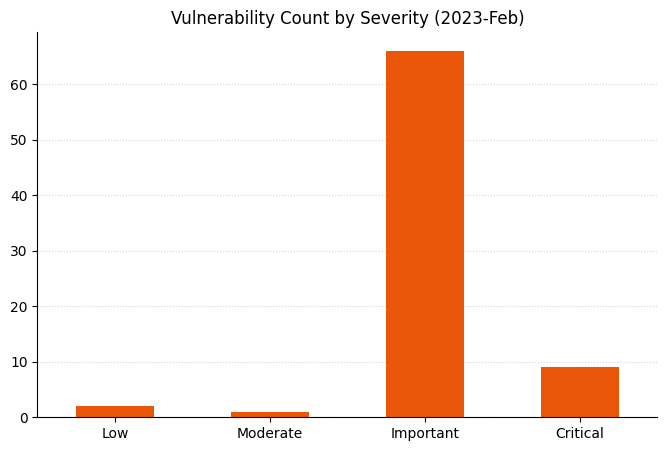
Three zero-day vulnerabilities are vying for your attention today: a lone Microsoft Publisher vulnerability as well as a couple affecting Windows itself. None is marked as publicly disclosed, but Microsoft has already observed in-the-wild exploitation of all three.

One zero-day vulnerability is a Security Features Bypass vulnerability in Microsoft Publisher. Successful exploitation of CVE-2023-21715 allows an attacker to bypass Office macro defenses using a specially-crafted document and run code which would otherwise be blocked by policy. Only Publisher installations delivered as part of Microsoft 365 Apps for Enterprise are listed as affected.

CVE-2023-23376 describes a vulnerability in the Windows Common Log File System Driver which allows Local Privilege Escalation (LPE) to SYSTEM. Although Microsoft isn’t necessarily aware of mature exploit code at time of publication, this is worth patching at the first opportunity, since it affects essentially all current Windows hosts.

CVE-2023-21823 is described as a Remote Code Execution (RCE) vulnerability in Windows Graphics Component, but has Attack Vector listed as Local. This apparent inconsistency is often accompanied with a clarification like: “The word Remote in the title refers to the location of the attacker. […] The attack itself is carried out locally.” No such clarification is available in this case, but this is likely applicable here also. Microsoft also notes the existence of mature exploit code.

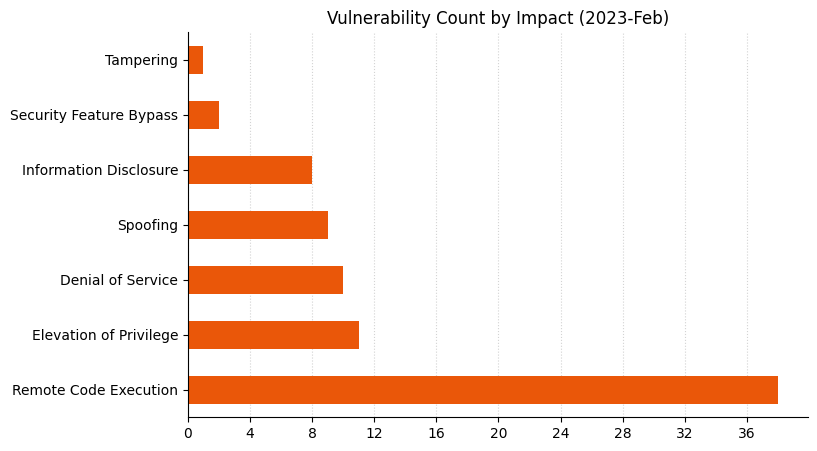
Microsoft is also releasing patches for nine critical RCE vulnerabilities. A more varied selection than last month, February 2023 includes critical RCE in an SQL Server ODBC driver, the iSCSI Discovery Service, .NET/Visual Studio, three in network authentication framework PEAP, one in Word, and two in Visual Studio only. Microsoft has not observed in-the-wild exploitation for any of these vulnerabilities, nor is any of them marked as publicly disclosed. Microsoft predicts that most of these are less likely to be exploited, with the exception of the PEAP vulnerabilities.

Microsoft’s recent announcement about the potential inclusion of CBL-Mariner CVEs in the Security Update Guide is now reflected in the list of covered products, but there aren’t any CBL-Mariner vulnerabilities this Patch Tuesday.

SharePoint Server makes another appearance today with CVE-2023-21717, which allows an authenticated user with the Manage List permission to achieve RCE. Admins responsible for a SharePoint Server 2013 instance may be interested in the FAQ, which includes what Microsoft optimistically describes as a clarification of the existing servicing model for SharePoint Server 2013.

This is the first Patch Tuesday after the end of Extended Security Updates (ESU) for Windows 8.1. Admins responsible for Windows Server 2008 instances should note that ESU for Windows Server 2008 is now only available for instances hosted in Azure or on-premises instances hosted via Azure Stack. Instances of Windows Server 2008 hosted in a non-Azure context will no longer receive security updates, so will forever remain vulnerable to any new vulnerabilities, including the two zero-days covered above.

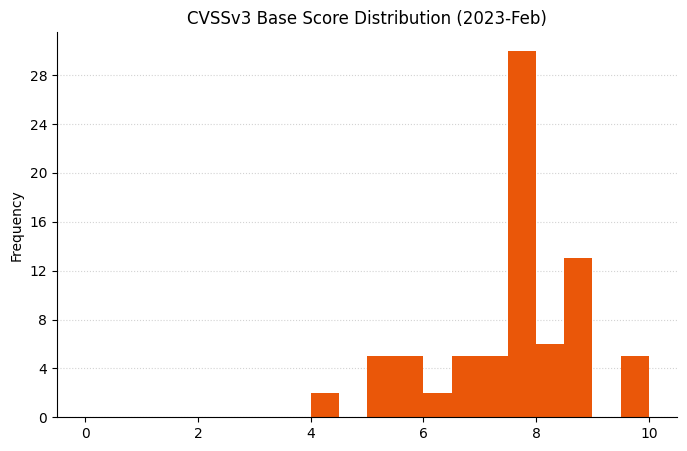
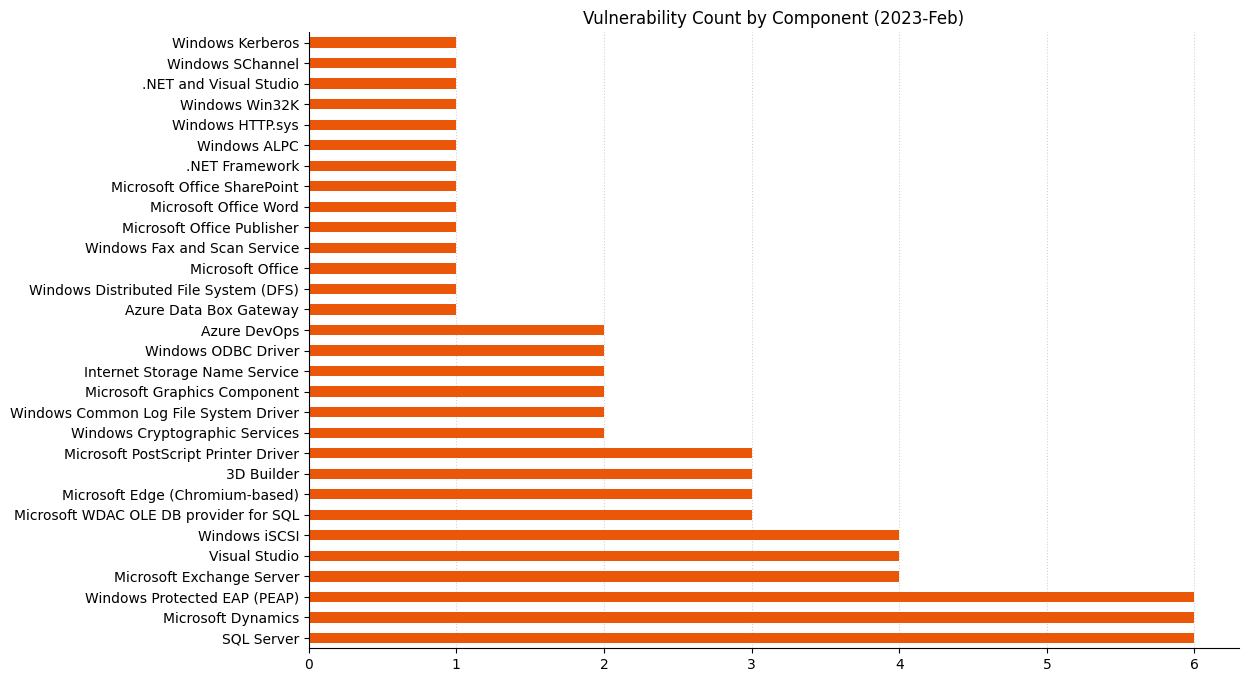
Summary charts

Patch Tuesday - February 2023

Summary tables

Apps vulnerabilities

CVE Title Exploited? Publicly disclosed? CVSSv3 base score
CVE-2023-23378 Print 3D Remote Code Execution Vulnerability No No 7.8
CVE-2023-23377 3D Builder Remote Code Execution Vulnerability No No 7.8
CVE-2023-23390 3D Builder Remote Code Execution Vulnerability No No 7.8

Azure vulnerabilities

CVE Title Exploited? Publicly disclosed? CVSSv3 base score
CVE-2023-21777 Azure App Service on Azure Stack Hub Elevation of Privilege Vulnerability No No 8.7
CVE-2023-21564 Azure DevOps Server Cross-Site Scripting Vulnerability No No 7.1
CVE-2023-23382 Azure Machine Learning Compute Instance Information Disclosure Vulnerability No No 6.5
CVE-2023-21703 Azure Data Box Gateway Remote Code Execution Vulnerability No No 6.5

Browser vulnerabilities

CVE Title Exploited? Publicly disclosed? CVSSv3 base score
CVE-2023-23374 Microsoft Edge (Chromium-based) Remote Code Execution Vulnerability No No 8.3
CVE-2023-21720 Microsoft Edge (Chromium-based) Tampering Vulnerability No No 5.3
CVE-2023-21794 Microsoft Edge (Chromium-based) Spoofing Vulnerability No No 4.3

Developer Tools vulnerabilities

CVE Title Exploited? Publicly disclosed? CVSSv3 base score
CVE-2023-21815 Visual Studio Remote Code Execution Vulnerability No No 8.4
CVE-2023-23381 Visual Studio Remote Code Execution Vulnerability No No 8.4
CVE-2023-21808 .NET and Visual Studio Remote Code Execution Vulnerability No No 8.4
CVE-2023-21566 Visual Studio Elevation of Privilege Vulnerability No No 7.8
CVE-2023-21553 Azure DevOps Server Remote Code Execution Vulnerability No No 7.5
CVE-2023-21567 Visual Studio Denial of Service Vulnerability No No 5.6
CVE-2023-21722 .NET Framework Denial of Service Vulnerability No No 4.4

Device vulnerabilities

CVE Title Exploited? Publicly disclosed? CVSSv3 base score
CVE-2019-15126 MITRE: CVE-2019-15126 Specifically timed and handcrafted traffic can cause internal errors (related to state transitions) in a WLAN device No No N/A

ESU vulnerabilities

CVE Title Exploited? Publicly disclosed? CVSSv3 base score
CVE-2023-21800 Windows Installer Elevation of Privilege Vulnerability No No 7.8

ESU Microsoft Office Windows vulnerabilities

CVE Title Exploited? Publicly disclosed? CVSSv3 base score
CVE-2023-21823 Windows Graphics Component Remote Code Execution Vulnerability Yes No 7.8

ESU Windows vulnerabilities

CVE Title Exploited? Publicly disclosed? CVSSv3 base score
CVE-2023-21803 Windows iSCSI Discovery Service Remote Code Execution Vulnerability No No 9.8
CVE-2023-21689 Microsoft Protected Extensible Authentication Protocol (PEAP) Remote Code Execution Vulnerability No No 9.8
CVE-2023-21690 Microsoft Protected Extensible Authentication Protocol (PEAP) Remote Code Execution Vulnerability No No 9.8
CVE-2023-21692 Microsoft Protected Extensible Authentication Protocol (PEAP) Remote Code Execution Vulnerability No No 9.8
CVE-2023-21799 Microsoft WDAC OLE DB provider for SQL Server Remote Code Execution Vulnerability No No 8.8
CVE-2023-21685 Microsoft WDAC OLE DB provider for SQL Server Remote Code Execution Vulnerability No No 8.8
CVE-2023-21686 Microsoft WDAC OLE DB provider for SQL Server Remote Code Execution Vulnerability No No 8.8
CVE-2023-21684 Microsoft PostScript Printer Driver Remote Code Execution Vulnerability No No 8.8
CVE-2023-21797 Microsoft ODBC Driver Remote Code Execution Vulnerability No No 8.8
CVE-2023-21798 Microsoft ODBC Driver Remote Code Execution Vulnerability No No 8.8
CVE-2023-21802 Windows Media Remote Code Execution Vulnerability No No 7.8
CVE-2023-21805 Windows MSHTML Platform Remote Code Execution Vulnerability No No 7.8
CVE-2023-21817 Windows Kerberos Elevation of Privilege Vulnerability No No 7.8
CVE-2023-21822 Windows Graphics Component Elevation of Privilege Vulnerability No No 7.8
CVE-2023-21812 Windows Common Log File System Driver Elevation of Privilege Vulnerability No No 7.8
CVE-2023-23376 Windows Common Log File System Driver Elevation of Privilege Vulnerability Yes No 7.8
CVE-2023-21688 NT OS Kernel Elevation of Privilege Vulnerability No No 7.8
CVE-2023-21801 Microsoft PostScript Printer Driver Remote Code Execution Vulnerability No No 7.8
CVE-2023-21811 Windows iSCSI Service Denial of Service Vulnerability No No 7.5
CVE-2023-21702 Windows iSCSI Service Denial of Service Vulnerability No No 7.5
CVE-2023-21700 Windows iSCSI Discovery Service Denial of Service Vulnerability No No 7.5
CVE-2023-21813 Windows Secure Channel Denial of Service Vulnerability No No 7.5
CVE-2023-21818 Windows Secure Channel Denial of Service Vulnerability No No 7.5
CVE-2023-21816 Windows Active Directory Domain Services API Denial of Service Vulnerability No No 7.5
CVE-2023-21695 Microsoft Protected Extensible Authentication Protocol (PEAP) Remote Code Execution Vulnerability No No 7.5
CVE-2023-21691 Microsoft Protected Extensible Authentication Protocol (PEAP) Information Disclosure Vulnerability No No 7.5
CVE-2023-21701 Microsoft Protected Extensible Authentication Protocol (PEAP) Denial of Service Vulnerability No No 7.5
CVE-2023-21820 Windows Distributed File System (DFS) Remote Code Execution Vulnerability No No 7.4
CVE-2023-21694 Windows Fax Service Remote Code Execution Vulnerability No No 6.8
CVE-2023-21697 Windows Internet Storage Name Service (iSNS) Server Information Disclosure Vulnerability No No 6.2
CVE-2023-21693 Microsoft PostScript Printer Driver Information Disclosure Vulnerability No No 5.7
CVE-2023-21699 Windows Internet Storage Name Service (iSNS) Server Information Disclosure Vulnerability No No 5.3

Exchange Server vulnerabilities

CVE Title Exploited? Publicly disclosed? CVSSv3 base score
CVE-2023-21706 Microsoft Exchange Server Remote Code Execution Vulnerability No No 8.8
CVE-2023-21707 Microsoft Exchange Server Remote Code Execution Vulnerability No No 8.8
CVE-2023-21529 Microsoft Exchange Server Remote Code Execution Vulnerability No No 8.8
CVE-2023-21710 Microsoft Exchange Server Remote Code Execution Vulnerability No No 7.2

Microsoft Dynamics vulnerabilities

CVE Title Exploited? Publicly disclosed? CVSSv3 base score
CVE-2023-21778 Microsoft Dynamics Unified Service Desk Remote Code Execution Vulnerability No No 8.3
CVE-2023-21572 Microsoft Dynamics 365 (on-premises) Cross-site Scripting Vulnerability No No 6.5
CVE-2023-21807 Microsoft Dynamics 365 (on-premises) Cross-site Scripting Vulnerability No No 5.8
CVE-2023-21570 Microsoft Dynamics 365 (on-premises) Cross-site Scripting Vulnerability No No 5.4
CVE-2023-21571 Microsoft Dynamics 365 (on-premises) Cross-site Scripting Vulnerability No No 5.4
CVE-2023-21573 Microsoft Dynamics 365 (on-premises) Cross-site Scripting Vulnerability No No 5.4

Microsoft Office vulnerabilities

CVE Title Exploited? Publicly disclosed? CVSSv3 base score
CVE-2023-21716 Microsoft Word Remote Code Execution Vulnerability No No 9.8
CVE-2023-21717 Microsoft SharePoint Server Elevation of Privilege Vulnerability No No 8.8
CVE-2023-21715 Microsoft Publisher Security Features Bypass Vulnerability Yes No 7.3
CVE-2023-21721 Microsoft OneNote Spoofing Vulnerability No No 6.5
CVE-2023-21714 Microsoft Office Information Disclosure Vulnerability No No 5.5

SQL Server vulnerabilities

CVE Title Exploited? Publicly disclosed? CVSSv3 base score
CVE-2023-21705 Microsoft SQL Server Remote Code Execution Vulnerability No No 8.8
CVE-2023-21713 Microsoft SQL Server Remote Code Execution Vulnerability No No 8.8
CVE-2023-21806 Power BI Report Server Spoofing Vulnerability No No 8.2
CVE-2023-21528 Microsoft SQL Server Remote Code Execution Vulnerability No No 7.8
CVE-2023-21718 Microsoft SQL ODBC Driver Remote Code Execution Vulnerability No No 7.8
CVE-2023-21704 Microsoft ODBC Driver for SQL Server Remote Code Execution Vulnerability No No 7.8
CVE-2023-21568 Microsoft SQL Server Integration Service (VS extension) Remote Code Execution Vulnerability No No 7.3

System Center vulnerabilities

CVE Title Exploited? Publicly disclosed? CVSSv3 base score
CVE-2023-21809 Microsoft Defender for Endpoint Security Feature Bypass Vulnerability No No 7.8
CVE-2023-23379 Microsoft Defender for IoT Elevation of Privilege Vulnerability No No 6.4

Windows vulnerabilities

CVE Title Exploited? Publicly disclosed? CVSSv3 base score
CVE-2023-21804 Windows Graphics Component Elevation of Privilege Vulnerability No No 7.8
CVE-2023-21819 Windows Secure Channel Denial of Service Vulnerability No No 7.5
CVE-2023-21687 HTTP.sys Information Disclosure Vulnerability No No 5.5

AWS Security Profile: Jana Kay, Cloud Security Strategist

Post Syndicated from Roger Park original https://aws.amazon.com/blogs/security/aws-security-profile-jana-kay-cloud-security-strategist/

In the AWS Security Profile series, we interview Amazon Web Services (AWS) thought leaders who help keep our customers safe and secure. This interview features Jana Kay, Cloud Security Strategist. Jana shares her unique career journey, insights on the Security and Resiliency of the Cloud Tabletop Exercise (TTX) program, thoughts on the data protection and cloud security landscape, and more.


How long have you been at AWS and what do you do in your current role?
I’ve been at AWS a little over four years. I started in 2018 as a Cloud Security Strategist, and in my opinion, I have one of the coolest jobs at AWS. I get to help customers think through how to use the cloud to address some of their most difficult security challenges, by looking at trends and emerging and evolving issues, and anticipating those that might still be on the horizon. I do this through various means, such as whitepapers, short videos, and tabletop exercises. I love working on a lot of different projects, which all have an impact on customers and give me the opportunity to learn new things myself all the time!

How did you get started in the security space? What about it piqued your interest?
After college, I worked in the office of a United States senator, which led me to apply to the Harvard Kennedy School for a graduate degree in public policy. When I started graduate school, I wasn’t sure what my focus would be, but my first day of class was September 11, 2001, which obviously had a tremendous impact on me and my classmates. I first heard about the events of September 11 while I was in an international security policy class, taught by the late Dr. Ash Carter. My classmates and I came from a range of backgrounds, cultures, and professions, and Dr. Carter challenged us to think strategically and objectively—but compassionately—about what was unfolding in the world and our responsibility to effect change. That experience led me to pursue a career in security. I concentrated in international security and political economy, and after graduation, accepted a Presidential Management Fellowship in the Office of the Secretary of Defense at the Pentagon, where I worked for 16 years before coming to AWS.

What’s been the most dramatic change you’ve seen in the security industry?
From the boardroom to builder teams, the understanding that security has to be integrated into all aspects of an organization’s ecosystem has been an important shift. Acceptance of security as foundational to the health of an organization has been evolving for a while, and a lot of organizations have more work to do, but overall there is prioritization of security within organizations.

I understand you’ve helped publish a number of papers at AWS. What are they and how can customers find them?
Good question! AWS publishes a lot of great whitepapers for customers. A few that I’ve worked on are Accreditation Models for Secure Cloud Adoption, Security at the Edge: Core Principles, and Does data localization cause more problems than it solves? To stay updated on the latest whitepapers, see AWS Whitepapers & Guides.

What are your thoughts on the security of the cloud today?
There are a lot of great technologies—such as AWS Data Protection services—that can help you with data protection, but it’s equally important to have the right processes in place and to create a strong culture of data protection. Although one of the biggest shifts I’ve seen in the industry is recognition of the importance of security, we still have a ways to go for people to understand that security and data protection is everyone’s job, not just the job of security experts. So when we talk about data protection and privacy issues, a lot of the conversation focuses on things like encryption, but the conversation shouldn’t end there because ultimately, security is only as good as the processes and people who implement it.

Do you have a favorite AWS Security service and why?
I like anything that helps simplify my life, so AWS Control Tower is one of my favorites. It has so much functionality. Not only does AWS Control Tower help you set up multi-account AWS environments, you can use it to help identify which of your resources are compliant. The dashboard, which allows for visibility of provisioned accounts, controls enabled policy enforcement and can help you detect noncompliant resources.

What are you currently working on that you’re excited about?
Currently, my focus is the Security and Resiliency of the Cloud Tabletop Exercise (TTX). It’s a 3-hour interactive event about incident response in which participants discuss how to prevent, detect, contain, and eradicate a simulated cyber incident. I’ve had the opportunity to conduct the TTX in South America, the Middle East, Europe, and the US, and it’s been so much fun meeting customers and hearing the discussions during the TTX and how much participants enjoy the experience. It scales well for groups of different sizes—and for a single customer or industry or for multiple customers or industries—and it’s been really interesting to see how the conversations change depending on the participants.

How does the Security and Resiliency of the Cloud Tabletop Exercise help security professionals hone their skills?
One of the great things about the tabletop is that it involves interacting with other participants. So it’s an opportunity for security professionals and business leaders to learn from their peers, hear different perspectives, and understand all facets of the problem and potential solutions. Often our participants range from CISOs to policymakers to technical experts, who come to the exercise with different priorities for data protection and different ideas on how to solve the scenarios that we present. The TTX isn’t a technical exercise, but participants link their collective understanding of what capabilities are needed in a given scenario to what services are available to them and then finally how to implement those services. One of the things that I hope participants leave with is a better understanding of the AWS tools and services that are available to them.

How can customers learn more about the Security and Resiliency of the Cloud Tabletop Exercise?
To learn more about the TTX, reach out to your account manager.

Is there something you wish customers would ask you about more often?
I wish they’d ask more about what they should be doing to prepare for a cyber incident. It’s one thing to have an incident response plan; it’s another thing to be confident that it’s going to work if you ever need it. If you don’t practice the plan, how do you know that it’s effective, if it has gaps, or if everyone knows their role in an incident?

How about outside of work—any hobbies?
I’m the mother of a teenager and tween, so between keeping up with their activities, I wish I had more time for hobbies! But someday soon, I’d like to get back to traveling more for leisure, reading for fun, and playing tennis.

 
If you have feedback about this post, submit comments in the Comments section below. If you have questions about this post, contact AWS Support.

Want more AWS Security news? Follow us on Twitter.

Roger Park

Roger Park

Roger is a Senior Security Content Specialist at AWS Security focusing on data protection. He has worked in cybersecurity for almost ten years as a writer and content producer. In his spare time, he enjoys trying new cuisines, gardening, and collecting records.

Author

Jana Kay

Since 2018, Jana has been a cloud security strategist with the AWS Security Growth Strategies team. She develops innovative ways to help AWS customers achieve their objectives, such as security table top exercises and other strategic initiatives. Previously, she was a cyber, counter-terrorism, and Middle East expert for 16 years in the Pentagon’s Office of the Secretary of Defense.

Automate replication of relational sources into a transactional data lake with Apache Iceberg and AWS Glue

Post Syndicated from Luis Gerardo Baeza original https://aws.amazon.com/blogs/big-data/automate-replication-of-relational-sources-into-a-transactional-data-lake-with-apache-iceberg-and-aws-glue/

Organizations have chosen to build data lakes on top of Amazon Simple Storage Service (Amazon S3) for many years. A data lake is the most popular choice for organizations to store all their organizational data generated by different teams, across business domains, from all different formats, and even over history. According to a study, the average company is seeing the volume of their data growing at a rate that exceeds 50% per year, usually managing an average of 33 unique data sources for analysis.

Teams often try to replicate thousands of jobs from relational databases with the same extract, transform, and load (ETL) pattern. There is lot of effort in maintaining the job states and scheduling these individual jobs. This approach helps the teams add tables with few changes and also maintains the job status with minimum effort. This can lead to a huge improvement in the development timeline and tracking the jobs with ease.

In this post, we show you how to easily replicate all your relational data stores into a transactional data lake in an automated fashion with a single ETL job using Apache Iceberg and AWS Glue.

Solution architecture

Data lakes are usually organized using separate S3 buckets for three layers of data: the raw layer containing data in its original form, the stage layer containing intermediate processed data optimized for consumption, and the analytics layer containing aggregated data for specific use cases. In the raw layer, tables usually are organized based on their data sources, whereas tables in the stage layer are organized based on the business domains they belong to.

This post provides an AWS CloudFormation template that deploys an AWS Glue job that reads an Amazon S3 path for one data source of the data lake raw layer, and ingests the data into Apache Iceberg tables on the stage layer using AWS Glue support for data lake frameworks. The job expects tables in the raw layer to be structured in the way AWS Database Migration Service (AWS DMS) ingests them: schema, then table, then data files.

This solution uses AWS Systems Manager Parameter Store for table configuration. You should modify this parameter specifying the tables you want to process and how, including information such as primary key, partitions, and the business domain associated. The job uses this information to automatically create a database (if it doesn’t already exist) for every business domain, create the Iceberg tables, and perform the data loading.

Finally, we can use Amazon Athena to query the data in the Iceberg tables.

The following diagram illustrates this architecture.

Solution architecture

This implementation has the following considerations:

  • All tables from the data source must have a primary key to be replicated using this solution. The primary key can be a single column or a composite key with more than one column.
  • If the data lake contains tables that don’t need upserts or don’t have a primary key, you can exclude them from the parameter configuration and implement traditional ETL processes to ingest them into the data lake. That’s outside of the scope of this post.
  • If there are additional data sources that need to be ingested, you can deploy multiple CloudFormation stacks, one to handle each data source.
  • The AWS Glue job is designed to process data in two phases: the initial load that runs after AWS DMS finishes the full load task, and the incremental load that runs on a schedule that applies change data capture (CDC) files captured by AWS DMS. Incremental processing is performed using an AWS Glue job bookmark.

There are nine steps to complete this tutorial:

  1. Set up a source endpoint for AWS DMS.
  2. Deploy the solution using AWS CloudFormation.
  3. Review the AWS DMS replication task.
  4. Optionally, add permissions for encryption and decryption or AWS Lake Formation.
  5. Review the table configuration on Parameter Store.
  6. Perform initial data loading.
  7. Perform incremental data loading.
  8. Monitor table ingestion.
  9. Schedule incremental batch data loading.

Prerequisites

Before starting this tutorial, you should already be familiar with Iceberg. If you’re not, you can get started by replicating a single table following the instructions in Implement a CDC-based UPSERT in a data lake using Apache Iceberg and AWS Glue. Additionally, set up the following:

Set up a source endpoint for AWS DMS

Before we create our AWS DMS task, we need to set up a source endpoint to connect to the source database:

  1. On the AWS DMS console, choose Endpoints in the navigation pane.
  2. Choose Create endpoint.
  3. If your database is running on Amazon RDS, choose Select RDS DB instance, then choose the instance from the list. Otherwise, choose the source engine and provide the connection information either through AWS Secrets Manager or manually.
  4. For Endpoint identifier, enter a name for the endpoint; for example, source-postgresql.
  5. Choose Create endpoint.

Deploy the solution using AWS CloudFormation

Create a CloudFormation stack using the provided template. Complete the following steps:

  1. Choose Launch Stack:
  2. Choose Next.
  3. Provide a stack name, such as transactionaldl-postgresql.
  4. Enter the required parameters:
    1. DMSS3EndpointIAMRoleARN – The IAM role ARN for AWS DMS to write data into Amazon S3.
    2. ReplicationInstanceArn – The AWS DMS replication instance ARN.
    3. S3BucketStage – The name of the existing bucket used for the stage layer of the data lake.
    4. S3BucketGlue – The name of the existing S3 bucket for storing AWS Glue scripts.
    5. S3BucketRaw – The name of the existing bucket used for the raw layer of the data lake.
    6. SourceEndpointArn – The AWS DMS endpoint ARN that you created earlier.
    7. SourceName – The arbitrary identifier of the data source to replicate (for example, postgres). This is used to define the S3 path of the data lake (raw layer) where data will be stored.
  5. Do not modify the following parameters:
    1. SourceS3BucketBlog – The bucket name where the provided AWS Glue script is stored.
    2. SourceS3BucketPrefix – The bucket prefix name where the provided AWS Glue script is stored.
  6. Choose Next twice.
  7. Select I acknowledge that AWS CloudFormation might create IAM resources with custom names.
  8. Choose Create stack.

After approximately 5 minutes, the CloudFormation stack is deployed.

Review the AWS DMS replication task

The AWS CloudFormation deployment created an AWS DMS target endpoint for you. Because of two specific endpoint settings, the data will be ingested as we need it on Amazon S3.

  1. On the AWS DMS console, choose Endpoints in the navigation pane.
  2. Search for and choose the endpoint that begins with dmsIcebergs3endpoint.
  3. Review the endpoint settings:
    1. DataFormat is specified as parquet.
    2. TimestampColumnName will add the column last_update_time with the date of creation of the records on Amazon S3.

AWS DMS endpoint settings

The deployment also creates an AWS DMS replication task that begins with dmsicebergtask.

  1. Choose Replication tasks in the navigation pane and search for the task.

You will see that the Task Type is marked as Full load, ongoing replication. AWS DMS will perform an initial full load of existing data, and then create incremental files with changes performed to the source database.

On the Mapping Rules tab, there are two types of rules:

  • A selection rule with the name of the source schema and tables that will be ingested from the source database. By default, it uses the sample database provided in the prerequisites, dms_sample, and all tables with the keyword %.
  • Two transformation rules that include in the target files on Amazon S3 the schema name and table name as columns. This is used by our AWS Glue job to know to which tables the files in the data lake correspond.

To learn more about how to customize this for your own data sources, refer to Selection rules and actions.

AWS mapping rules

Let’s change some configurations to finish our task preparation.

  1. On the Actions menu, choose Modify.
  2. In the Task Settings section, under Stop task after full load completes, choose Stop after applying cached changes.

This way, we can control the initial load and incremental file generation as two different steps. We use this two-step approach to run the AWS Glue job once per each step.

  1. Under Task logs, choose Turn on CloudWatch logs.
  2. Choose Save.
  3. Wait about 1 minute for the database migration task status to show as Ready.

Add permissions for encryption and decryption or Lake Formation

Optionally, you can add permissions for encryption and decryption or Lake Formation.

Add encryption and decryption permissions

If your S3 buckets used for the raw and stage layers are encrypted using AWS Key Management Service (AWS KMS) customer managed keys, you need to add permissions to allow the AWS Glue job to access the data:

Add Lake Formation permissions

If you’re managing permissions using Lake Formation, you need to allow your AWS Glue job to create your domain’s databases and tables through the IAM role GlueJobRole.

  1. Grant permissions to create databases (for instructions, refer to Creating a Database).
  2. Grant SUPER permissions to the default database.
  3. Grant data location permissions.
  4. If you create databases manually, grant permissions on all databases to create tables. Refer to Granting table permissions using the Lake Formation console and the named resource method or Granting Data Catalog permissions using the LF-TBAC method according to your use case.

After you complete the later step of performing the initial data load, make sure to also add permissions for consumers to query the tables. The job role will become the owner of all the tables created, and the data lake admin can then perform grants to additional users.

Review table configuration in Parameter Store

The AWS Glue job that performs the data ingestion into Iceberg tables uses the table specification provided in Parameter Store. Complete the following steps to review the parameter store that was configured automatically for you. If needed, modify according to your own needs.

  1. On the Parameter Store console, choose My parameters in the navigation pane.

The CloudFormation stack created two parameters:

  • iceberg-config for job configurations
  • iceberg-tables for table configuration
  1. Choose the parameter iceberg-tables.

The JSON structure contains information that AWS Glue uses to read data and write the Iceberg tables on the target domain:

  • One object per table – The name of the object is created using the schema name, a period, and the table name; for example, schema.table.
  • primaryKey – This should be specified for every source table. You can provide a single column or a comma-separated list of columns (without spaces).
  • partitionCols – This optionally partitions columns for target tables. If you don’t want to create partitioned tables, provide an empty string. Otherwise, provide a single column or a comma-separated list of columns to be used (without spaces).
  1. If you want to use your own data source, use the following JSON code and replace the text in CAPS from the template provided. If you’re using the sample data source provided, keep the default settings:
{
    "SCHEMA_NAME.TABLE_NAME_1": {
        "primaryKey": "ONLY_PRIMARY_KEY",
        "domain": "TARGET_DOMAIN",
        "partitionCols": ""
    },
    "SCHEMA_NAME.TABLE_NAME_2": {
        "primaryKey": "FIRST_PRIMARY_KEY,SECOND_PRIMARY_KEY",
        "domain": "TARGET_DOMAIN",
        "partitionCols": "PARTITION_COLUMN_ONE,PARTITION_COLUMN_TWO"
    }
}
  1. Choose Save changes.

Perform initial data loading

Now that the required configuration is finished, we ingest the initial data. This step includes three parts: ingesting the data from the source relational database into the raw layer of the data lake, creating the Iceberg tables on the stage layer of the data lake, and verifying results using Athena.

Ingest data into the raw layer of the data lake

To ingest data from the relational data source (PostgreSQL if you are using the sample provided) to our transactional data lake using Iceberg, complete the following steps:

  1. On the AWS DMS console, choose Database migration tasks in the navigation pane.
  2. Select the replication task you created and on the Actions menu, choose Restart/Resume.
  3. Wait about 5 minutes for the replication task to complete. You can monitor the tables ingested on the Statistics tab of the replication task.

AWS DMS full load statistics

After some minutes, the task finishes with the message Full load complete.

  1. On the Amazon S3 console, choose the bucket you defined as the raw layer.

Under the S3 prefix defined on AWS DMS (for example, postgres), you should see a hierarchy of folders with the following structure:

  • Schema
    • Table name
      • LOAD00000001.parquet
      • LOAD0000000N.parquet

AWS DMS full load objects created on S3

If your S3 bucket is empty, review Troubleshooting migration tasks in AWS Database Migration Service before running the AWS Glue job.

Create and ingest data into Iceberg tables

Before running the job, let’s navigate the script of the AWS Glue job provided as part of the CloudFormation stack to understand its behavior.

  1. On the AWS Glue Studio console, choose Jobs in the navigation pane.
  2. Search for the job that starts with IcebergJob- and a suffix of your CloudFormation stack name (for example, IcebergJob-transactionaldl-postgresql).
  3. Choose the job.

AWS Glue ETL job review

The job script gets the configuration it needs from Parameter Store. The function getConfigFromSSM() returns job-related configurations such as source and target buckets from where the data needs to be read and written. The variable ssmparam_table_values contain table-related information like the data domain, table name, partition columns, and primary key of the tables that needs to be ingested. See the following Python code:

# Main application
args = getResolvedOptions(sys.argv, ['JOB_NAME', 'stackName'])
SSM_PARAMETER_NAME = f"{args['stackName']}-iceberg-config"
SSM_TABLE_PARAMETER_NAME = f"{args['stackName']}-iceberg-tables"

# Parameters for job
rawS3BucketName, rawBucketPrefix, stageS3BucketName, warehouse_path = getConfigFromSSM(SSM_PARAMETER_NAME)
ssm_param_table_values = json.loads(ssmClient.get_parameter(Name = SSM_TABLE_PARAMETER_NAME)['Parameter']['Value'])
dropColumnList = ['db','table_name', 'schema_name','Op', 'last_update_time', 'max_op_date']

The script uses an arbitrary catalog name for Iceberg that is defined as my_catalog. This is implemented on the AWS Glue Data Catalog using Spark configurations, so a SQL operation pointing to my_catalog will be applied on the Data Catalog. See the following code:

catalog_name = 'my_catalog'
errored_table_list = []

# Iceberg configuration
spark = SparkSession.builder \
    .config('spark.sql.warehouse.dir', warehouse_path) \
    .config(f'spark.sql.catalog.{catalog_name}', 'org.apache.iceberg.spark.SparkCatalog') \
    .config(f'spark.sql.catalog.{catalog_name}.warehouse', warehouse_path) \
    .config(f'spark.sql.catalog.{catalog_name}.catalog-impl', 'org.apache.iceberg.aws.glue.GlueCatalog') \
    .config(f'spark.sql.catalog.{catalog_name}.io-impl', 'org.apache.iceberg.aws.s3.S3FileIO') \
    .config('spark.sql.extensions', 'org.apache.iceberg.spark.extensions.IcebergSparkSessionExtensions') \
    .getOrCreate()

The script iterates over the tables defined in Parameter Store and performs the logic for detecting if the table exists and if the incoming data is an initial load or an upsert:

# Iteration over tables stored on Parameter Store
for key in ssm_param_table_values:
    # Get table data
    isTableExists = False
    schemaName, tableName = key.split('.')
    logger.info(f'Processing table : {tableName}')

The initialLoadRecordsSparkSQL() function loads initial data when no operation column is present in the S3 files. AWS DMS adds this column only to Parquet data files produced by the continuous replication (CDC). The data loading is performed using the INSERT INTO command with SparkSQL. See the following code:

sqltemp = Template("""
    INSERT INTO $catalog_name.$dbName.$tableName  ($insertTableColumnList)
    SELECT $insertTableColumnList FROM insertTable $partitionStrSQL
""")
SQLQUERY = sqltemp.substitute(
    catalog_name = catalog_name, 
    dbName = dbName, 
    tableName = tableName,
    insertTableColumnList = insertTableColumnList[ : -1],
    partitionStrSQL = partitionStrSQL)

logger.info(f'****SQL QUERY IS : {SQLQUERY}')
spark.sql(SQLQUERY)

Now we run the AWS Glue job to ingest the initial data into the Iceberg tables. The CloudFormation stack adds the --datalake-formats parameter, adding the required Iceberg libraries to the job.

  1. Choose Run job.
  2. Choose Job Runs to monitor the status. Wait until the status is Run Succeeded.

Verify the data loaded

To confirm that the job processed the data as expected, complete the following steps:

  1. On the Athena console, choose Query Editor in the navigation pane.
  2. Verify AwsDataCatalog is selected as the data source.
  3. Under Database, choose the data domain that you want to explore, based on the configuration you defined in the parameter store. If using the sample database provided, use sports.

Under Tables and views, we can see the list of tables that were created by the AWS Glue job.

  1. Choose the options menu (three dots) next to the first table name, then choose Preview Data.

You can see the data loaded into Iceberg tables. Amazon Athena review initial data loaded

Perform incremental data loading

Now we start capturing changes from our relational database and applying them to the transactional data lake. This step is also divided in three parts: capturing the changes, applying them to the Iceberg tables, and verifying the results.

Capture changes from the relational database

Due to the configuration we specified, the replication task stopped after running the full load phase. Now we restart the task to add incremental files with changes into the raw layer of the data lake.

  1. On the AWS DMS console, select the task we created and ran before.
  2. On the Actions menu, choose Resume.
  3. Choose Start task to start capturing changes.
  4. To trigger new file creation on the data lake, perform inserts, updates, or deletes on the tables of your source database using your preferred database administration tool. If using the sample database provided, you could run the following SQL commands:
UPDATE dms_sample.nfl_stadium_data_upd
SET seatin_capacity=93703
WHERE team = 'Los Angeles Rams' and sport_location_id = '31';

update  dms_sample.mlb_data 
set bats = 'R'
where mlb_id=506560 and bats='L';

update dms_sample.sporting_event 
set start_date  = current_date 
where id=11 and sold_out=0;
  1. On the AWS DMS task details page, choose the Table statistics tab to see the changes captured.
    AWS DMS CDC statistics
  2. Open the raw layer of the data lake to find a new file holding the incremental changes inside every table’s prefix, for example under the sporting_event prefix.

The record with changes for the sporting_event table looks like the following screenshot.

AWS DMS objects migrated into S3 with CDC

Notice the Op column in the beginning identified with an update (U). Also, the second date/time value is the control column added by AWS DMS with the time the change was captured.

CDC file schema on Amazon S3

Apply changes on the Iceberg tables using AWS Glue

Now we run the AWS Glue job again, and it will automatically process only the new incremental files since the job bookmark is enabled. Let’s review how it works.

The dedupCDCRecords() function performs deduplication of data because multiple changes to a single record ID could be captured within the same data file on Amazon S3. Deduplication is performed based on the last_update_time column added by AWS DMS that indicates the timestamp of when the change was captured. See the following Python code:

def dedupCDCRecords(inputDf, keylist):
    IDWindowDF = Window.partitionBy(*keylist).orderBy(inputDf.last_update_time).rangeBetween(-sys.maxsize, sys.maxsize)
    inputDFWithTS = inputDf.withColumn('max_op_date', max(inputDf.last_update_time).over(IDWindowDF))
    
    NewInsertsDF = inputDFWithTS.filter('last_update_time=max_op_date').filter("op='I'")
    UpdateDeleteDf = inputDFWithTS.filter('last_update_time=max_op_date').filter("op IN ('U','D')")
    finalInputDF = NewInsertsDF.unionAll(UpdateDeleteDf)

    return finalInputDF

On line 99, the upsertRecordsSparkSQL() function performs the upsert in a similar fashion to the initial load, but this time with a SQL MERGE command.

Review the applied changes

Open the Athena console and run a query that selects the changed records on the source database. If using the provided sample database, use one the following SQL queries:

SELECT * FROM "sports"."nfl_stadiu_data_upd"
WHERE team = 'Los Angeles Rams' and sport_location_id = 31
LIMIT 1;

Amazon Athena review cdc data loaded

Monitor table ingestion

The AWS Glue job script is coded with simple Python exception handling to catch errors during processing a specific table. The job bookmark is saved after each table finishes processing successfully, to avoid reprocessing tables if the job run is retried for the tables with errors.

The AWS Command Line Interface (AWS CLI) provides a get-job-bookmark command for AWS Glue that provides insight into the status of the bookmark for each table processed.

  1. On the AWS Glue Studio console, choose the ETL job.
  2. Choose the Job Runs tab and copy the job run ID.
  3. Run the following command on a terminal authenticated for the AWS CLI, replacing <GLUE_JOB_RUN_ID> on line 1 with the value you copied. If your CloudFormation stack is not named transactionaldl-postgresql, provide the name of your job on line 2 of the script:
jobrun=<GLUE_JOB_RUN_ID>
jobname=IcebergJob-transactionaldl-postgresql
aws glue get-job-bookmark --job-name jobname --run-id $jobrun

In this solution, when a table processing causes an exception, the AWS Glue job will not fail according to this logic. Instead, the table will be added into an array that is printed after the job is complete. In such scenario, the job will be marked as failed after it tries to process the rest of the tables detected on the raw data source. This way, tables without errors don’t have to wait until the user identifies and solves the problem on the conflicting tables. The user can quickly detect job runs that had issues using the AWS Glue job run status, and identify which specific tables are causing the problem using the CloudWatch logs for the job run.

  1. The job script implements this feature with the following Python code:
# Performed for every table
        try:
            # Table processing logic
        except Exception as e:
            logger.info(f'There is an issue with table: {tableName}')
            logger.info(f'The exception is : {e}')
            errored_table_list.append(tableName)
            continue
        job.commit()
if (len(errored_table_list)):
    logger.info('Total number of errored tables are ',len(errored_table_list))
    logger.info('Tables that failed during processing are ', *errored_table_list, sep=', ')
    raise Exception(f'***** Some tables failed to process.')

The following screenshot shows how the CloudWatch logs look for tables that cause errors on processing.

AWS Glue job monitoring with logs

Aligned with the AWS Well-Architected Framework Data Analytics Lens practices, you can adapt more sophisticated control mechanisms to identify and notify stakeholders when errors appear on the data pipelines. For example, you can use an Amazon DynamoDB control table to store all tables and job runs with errors, or using Amazon Simple Notification Service (Amazon SNS) to send alerts to operators when certain criteria is met.

Schedule incremental batch data loading

The CloudFormation stack deploys an Amazon EventBridge rule (disabled by default) that can trigger the AWS Glue job to run on a schedule. To provide your own schedule and enable the rule, complete the following steps:

  1. On the EventBridge console, choose Rules in the navigation pane.
  2. Search for the rule prefixed with the name of your CloudFormation stack followed by JobTrigger (for example, transactionaldl-postgresql-JobTrigger-randomvalue).
  3. Choose the rule.
  4. Under Event Schedule, choose Edit.

The default schedule is configured to trigger every hour.

  1. Provide the schedule you want to run the job.
  2. Additionally, you can use an EventBridge cron expression by selecting A fine-grained schedule.
    Amazon EventBridge schedule ETL job
  3. When you finish setting up the cron expression, choose Next three times, and finally choose Update Rule to save changes.

The rule is created disabled by default to allow you to run the initial data load first.

  1. Activate the rule by choosing Enable.

You can use the Monitoring tab to view rule invocations, or directly on the AWS Glue Job Run details.

Conclusion

After deploying this solution, you have automated the ingestion of your tables on a single relational data source. Organizations using a data lake as their central data platform usually need to handle multiple, sometimes even tens of data sources. Also, more and more use cases require organizations to implement transactional capabilities to the data lake. You can use this solution to accelerate the adoption of such capabilities across all your relational data sources to enable new business use cases, automating the implementation process to derive more value from your data.


About the Authors

Luis Gerardo BaezaLuis Gerardo Baeza is a Big Data Architect in the Amazon Web Services (AWS) Data Lab. He has 12 years of experience helping organizations in the healthcare, financial and education sectors to adopt enterprise architecture programs, cloud computing, and data analytics capabilities. Luis currently helps organizations across Latin America to accelerate strategic data initiatives.

SaiKiran Reddy AenuguSaiKiran Reddy Aenugu is a Data Architect in the Amazon Web Services (AWS) Data Lab. He has 10 years of experience implementing data loading, transformation, and visualization processes. SaiKiran currently helps organizations in North America to adopt modern data architectures such as data lakes and data mesh. He has experience in the retail, airline, and finance sectors.

Narendra MerlaNarendra Merla is a Data Architect in the Amazon Web Services (AWS) Data Lab. He has 12 years of experience in designing and productionalizing both real-time and batch-oriented data pipelines and building data lakes on both cloud and on-premises environments. Narendra currently helps organizations in North America to build and design robust data architectures, and has experience in the telecom and finance sectors.


[$] An overview of single-purpose Linux distributions

Post Syndicated from original https://lwn.net/Articles/922968/

Many people, when they are installing a Linux distribution for a single
purpose such as
running containers, would prefer an install-and-forget
type of deployment. At FOSDEM 2023 in Brussels, several
projects of this minimal Linux distribution type were presented. Fedora
CoreOS
, Ubuntu Core, openSUSE MicroOS, and Bottlerocket OS
all tackle this problem in their own way. The talks at FOSDEM gave an
interesting overview of how these projects differ in their approaches.

Two stable kernels — and maybe a third

Post Syndicated from original https://lwn.net/Articles/923306/

The
6.1.12 and
5.15.94
stable kernel updates have been released, each with the usual set of
important fixes. There is also a 5.10.168 release in the works, but it ran
into some snags in the
review process
; it can be expected shortly.

Another set of updates, containing the mitigations for the just-disclosed
cross-thread
return-address prediction vulnerability
(yet another Spectre variant
that affects AMD processors), can be expected soon.

How to Connect Business and Technology to Embrace Strategic Thinking (Book Review)

Post Syndicated from Danilo Poccia original https://aws.amazon.com/blogs/aws/how-to-connect-business-and-technology-to-embrace-strategic-thinking-book-review/

The Value Flywheel Effect: Power the Future and Accelerate Your Organization to the Modern Cloud
by David Anderson with Mark McCann and Michael O’Reilly

With this post, I’d like to share a new book that got my attention. It’s a book at the intersection of business, technology, and people. This is a great read for anyone who wants to understand how organizations can evolve to maximize the business impact of new technologies and speed up their internal processes.

The Value FlyWheel Effect book with David Anderson and Danilo Poccia

Last year at re:Invent, I had the opportunity to meet David Anderson. As Director of Technology at Liberty Mutual, he drove the technology change when the global insurance company, founded in 1912, moved its services to the cloud and adopted a serverless-first strategy. He created an environment where experimentation was normal, and software engineers had time and space to learn. This worked so well that, at some point, he had four AWS Heroes in his extended team.

A few months before, I heard that David was writing a book with Mark McCann and Michael O’Reilly. They all worked together at Liberty Mutual, and they were distilling their learnings to help other organizations implement a similar approach. The book was just out when we met, and I was curious to learn more, starting from the title. We met in the expo area, and David was kind enough to give me a signed copy of the book.

The book is published by IT Revolution, the same publisher behind some of my favorite books such as The Phoenix Project, Team Topologies, and Accelerate. The book is titled The Value Flywheel Effect because when you connect business and technology in an organization, you start to turn a flywheel that builds momentum with each small win.

The Value Flywhell
The four phases of the Value Flywheel are:

  1. Clarity of Purpose – This is the part where you look at what is really important for your organization, what makes your company different, and define your North Star and how to measure your distance from it. In this phase, you look at the company through the eyes of the CEO.
  2. Challenge & Landscape – Here you prepare the organization and set up the environment for the teams. We often forget the social aspect of technical teams and great focus is given here on how to set up the right level of psychological safety for teams to operate. This phase is for engineers.
  3. Next Best Action – In this phase, you think like a product leader and plan the next steps with a focus on how to improve the developer experience. One of the key aspects is that “code is a liability” and the less code you write to solve a business problem, the better it is for speed and maintenance. For example, you can avoid some custom implementations and offload their requirements to capabilities offered by cloud providers.
  4. Long-Term Value – This is the CTO perspective, looking at how to set up a problem-preventing culture with well-architected systems and a focus on observability and sustainability. Sustainability here is not just considering the global environment but also the teams and the people working for the organization.

As you would expect from a flywheel, you should iterate on these four phases so that every new spin gets easier and faster.

Wardley Mapping
One thing that I really appreciate from the book is how it made it easy for me to use Wardley mapping (usually applied to a business context) in a technical scenario. Wardley maps, invented by Simon Wardley, provide a visual representation of the landscape in which a business operates.

Each map consists of a value chain, where you draw the components that your customers need. The components are connected to show how they depend on each other. The position of the components is based on how visible they are to customers (vertical) and their evolution status from genesis to being a product or a commodity (horizontal). Over time, some components evolve from being custom-built to becoming a product or being commoditized. This displays on the map with a natural movement to the right as things evolve. For example, data centers were custom-built in the past, but then they became a standard product, and cloud computing made them available as a commodity.

Wardley mapping – Basic elements of a map

Basic elements of a map – Provided courtesy of Simon Wardley, CC BY-SA 4.0.

With mapping, you can more easily understand what improvements you need and what gaps you have in your technical solution. In this way, engineers can identify which components they should focus on to maximize their impact and what parts are not strategic and can be offloaded to a SaaS solution. It’s a sort of evolutionary architecture where mapping gives a way to look ahead at how the system should evolve over time and where inertia can slow down the evolution of part of the system.

Sometimes it seems the same best practices apply everywhere but this is not true. An advantage of mapping is that it helps identify the best team and methodology to use based on a component evolution status as described by its horizontal position on a map. For example, an “explorer” attitude is best suited for components in their genesis or being custom built, a “villager” works best on products, and when something becomes a commodity you need a “town planner.”

More Tools and Less Code
The authors look at many available tools and frameworks. For example, the book introduces the North Star Framework, a way to manage products by first identifying their most important metric (the North Star), and Gojko Adzic‘s Impact Mapping, a collaborative planning technique that focuses on leading indicators to help teams make a big impact with their software products. By the way, Gojko is also an AWS Serverless Hero.

Another interesting point is how to provide engineers with the necessary time and space to learn. I specifically like how internal events are called out and compared to public conferences. In internal events, engineers have a chance to use a new technology within their company environment, making it easier to demonstrate what can be done with all the limits of an actual scenario.

Finally, I’d like to highlight this part that clearly defines what the book intends by the statements, “code is a liability”:

“When you ask a software team to build something, they deliver a system, not lines of code. The asset is not the code; the asset is the system. The less code in the system, the less overhead you have bought. Some developers may brag about how much code they’ve written, but this isn’t something to brag about.”

This is not a programming book, and serverless technologies are used as examples of how you can speed up the flywheel. If you are looking for a technical deep dive on serverless technologies, you can find more on Serverless Land, a site that brings together the latest information and learning resources for serverless computing, or have a look at the Serverless Architectures on AWS book.

Now that every business is a technology business, The Value Flywheel Effect is about how to accelerate and transform an organization. It helps set the right environment, purpose, and stage to modernize your applications as you adopt cloud computing and get the benefit of it.

You can meet David, Mark, and Michael at the Serverless Edge, where a team of engineers, tech enthusiasts, marketers, and thought leaders obsessed with technology help learn and communicate how serverless can transform a business model.

Danilo

Migrating to token-based authentication for iOS applications with Amazon SNS

Post Syndicated from Pascal Vogel original https://aws.amazon.com/blogs/compute/migrating-to-token-based-authentication-for-ios-applications-with-amazon-sns/

This post is written by Yashlin Naidoo, Cloud Support Engineer.

Amazon Simple Notification Service (Amazon SNS) enables you to send notifications directly to a mobile push endpoint. For iOS apps, Amazon SNS dispatches the notification on your application’s behalf to the Apple Push Notification service (APNs).

To send mobile push notifications via Amazon SNS, you must provide a set of credentials to connect to the APNs (see Prerequisites for Amazon SNS user notifications).

Amazon SNS supports two methods for authenticating with iOS mobile push endpoints when sending a mobile push notification via the APNs:

  • Certificate-based authentication
  • Token-based authentication

To use certificate-based authentication, you must configure Amazon SNS with a provider certificate. Amazon SNS will use this certificate on your behalf to establish a secure connection with the APNs to dispatch your mobile push notifications. For each application that you support, you will need to provide unique certificates.

As the number of applications you manage grows, you will also need to create and manage an increasing number of certificates. Furthermore, certificates expire yearly, and you must renew them to ensure that Amazon SNS can continue to send mobile push notifications on your behalf. To learn more about how to use certificate-based authentication, see Certificate-based authentication for iOS applications with Amazon SNS on the AWS Compute Blog.

For new and existing iOS applications, we recommend that you use token-based authentication. To learn more about how to use token-based authentication, see Token-Based authentication for iOS applications with Amazon SNS on the AWS Compute Blog.

There are several benefits in using token-based authentication:

  • You can use a single token that is shared among all of your applications.
  • You can remove the need for yearly certificate renewal for certificate-based authentication.
  • You can improve the security of your application by using token-based requests. For these requests, your credentials are never transferred from Amazon SNS to your mobile push notification provider, making the communication less likely to be compromised.

Token-based authentication is the latest authentication method provided by the APNs that improves security for your applications, requires less management effort, and is more efficient. We recommend migrating as soon as possible to ensure the security and ease of operations of your applications.

This blog post provides step-by-step instructions for migrating your iOS application from certificate-based authentication to token-based authentication with Amazon SNS. You will learn how to create a new token using your Apple developer account. Next, you will migrate your platform application to token-based authentication. Finally, you will test your application by sending a test push notification via Amazon SNS to a device to confirm the successful migration.

Prerequisites

  • XCode IDE
  • iOS application with a valid p.12 certificate

Before proceeding with this migration, we recommend to stop sending push notifications to your applications until the migration is complete to avoid any disruptions in your message delivery workloads.

Walkthrough

You can also create a test platform application with token-based authentication to ensure that the Amazon SNS platform application is created successfully. Finally, you can create a device token and send a test push notification to it. Once confirmed that the application works correctly, you can migrate your main platform application to token-based authentication.

Creating a .p8 token to upload to Amazon SNS

  1. Log in to your Apple Developer account.
  2. Choose Certificates, Identifiers & Profiles.
  3. In the Keys section, choose the Add button (+).
  4. Under Register a New Key, for Key Name, type the token key name and tick the box for Apple Push Notifications service (APNs) for the key services.
  5. Select Continue.
  6. In the Register a New Key section, check that all values were entered correctly.
  7. Select Register to register the new token key.
  8. Download your token key. Store it in a safe location, as you can’t download the token key again.

Migrating your platform application from certificate-based authentication to token-based authentication

  1. Navigate to the Amazon SNS console. Expand the Mobile menu and choose Push Notification.
  2. Choose your platform application.
  3. Choose Edit. Under Apple credentials section choose Token:
    1. Under Token, select Choose file to upload the .p8 token key file.
    2. Provide values for signing key ID, team ID and bundle ID. These values can be found in your Apple Developer account. Ensure that your bundle ID is identical to the ID used for this application with certificate-based authentication.
  4. Event notifications – optional: refer to the following guide for enabling event notifications: Mobile app events
  5. Delivery status logging – optional: refer to the following guide for enabling delivery status logging: How do I access Amazon SNS topic delivery logs for push notifications? Find more information on these steps can in the Mobile push notifications best practices.
    Apple credential settings
  6. Choose Save changes. This changes your platform application to token-based authentication.

Testing push notification delivery to your device

In this section, you will test sending a push notification to your device using the Amazon SNS console and the AWS Command Line Interface (AWS CLI).

Amazon SNS console

  1. From the Amazon SNS console, navigate to your platform endpoint and choose Publish message.
  2. For message body, select Custom payload for each delivery protocol to send to the endpoint. This example uses a custom payload that allows you to provide additional APNs headers:
    Custom payload for each delivery model configuration
  3. Choose Publish message.
  4. The push notification is delivered to your device:
    iOS sample notification message

AWS CLI

Note: If you receive errors when running AWS CLI commands, make sure that you’re using the most recent AWS CLI version.
Run the following command. For target-arn, specify your platform application endpoint ARN:

aws sns publish \
    --target-arn arn:aws:sns:us-west-2:191418023309:endpoint/APNS_SANDBOX/computeblogdemo/ba7a35f8-c73d-364f-9edd-5c438add0533 \
    --message '{"APNS_SANDBOX": "{\"aps\":{\"alert\":\"Sample message for iOS development endpoints\"}}"}' \
    --message-attributes '{"AWS.SNS.MOBILE.APNS.PUSH_TYPE":{"DataType":"String","StringValue":"alert"}}' \
    --message-structure json
  1. An output containing a MessageId is shown in case of successful delivery:
    {
        "MessageId": "83ecb3a1-c728-5b7c-96e5-e8417d5cd4f4"
    }
  2. The push notification is delivered to your device:
    iOS sample notification message

Troubleshooting

You might encounter various errors when migrating to token-based authentication. This section explains how to troubleshoot these errors.

If a message is not delivered after publishing it to your platform application endpoint, refer to the Amazon CloudWatch failed logs of your platform application. These logs are named sns/your-aws-region/your-accountID/app/platform_name/application_name/Failure.

Once you have navigated to your platform application’s CloudWatch failed log group, click on one of the log streams based on the time that you published the message. Focus on the following attributes:

  • statusCode: error messages are grouped according to the status code.
  • status : shows whether a message was delivered successfully to the provider or if it failed to deliver.
  • providerResponse: provides the response message from the provider and is only shown in case a message failed to deliver.

We will look through messages that failed to deliver because of the following errors:

InvalidProviderToken

"providerResponse": "{\"reason\":\"InvalidProviderToken\"}",
"statusCode": 403,
"status": "FAILURE"

The cause of this error can be an incorrect token key ID, team ID or if the token is invalid.

To resolve this issue, go to your Apple Developer account and ensure that you are providing the correct token ID, team ID and that your token key exists.

TopicDisallowed

"providerResponse": "{\"reason\":\"TopicDisallowed\"}",
"statusCode": 400,
"status": "FAILURE"

The cause of this error can be an incorrect bundle ID or a device token that was created with the wrong bundle ID.

To resolve this issue, go to your Apple Developer account and navigate to your existing certificate used when migrating to token-based authentication. Confirm the bundle ID assigned to this certificate and ensure you are using the same ID for your platform application and also for your device tokens.

Conclusion

Developers can send mobile push notifications for the APNs using token-based authentication by using a .p8 key to authenticate an Apple device endpoint. This is the recommended authentication method due to improved security and lower management effort by removing the need for annual certificate renewal and by being able to share tokens among multiple applications.

To learn more about APNs token-based authentication with Amazon SNS, visit the Amazon SNS Developer Guide.

For more serverless learning resources, visit Serverless Land.

Upcoming Speaking Engagements

Post Syndicated from Schneier.com Webmaster original https://www.schneier.com/blog/archives/2023/02/upcoming-speaking-engagements-27.html

This is a current list of where and when I am scheduled to speak:

The list is maintained on this page.

The collective thoughts of the interwebz