CVE-2022-21587: Rapid7 Observed Exploitation of Oracle E-Business Suite Vulnerability

Post Syndicated from Glenn Thorpe original https://blog.rapid7.com/2023/02/07/etr-cve-2022-21587-rapid7-observed-exploitation-of-oracle-e-business-suite-vulnerability/

CVE-2022-21587: Rapid7 Observed Exploitation of Oracle E-Business Suite Vulnerability

Emergent threats evolve quickly, and as we learn more about this vulnerability, this blog post will evolve, too.

Rapid7 is responding to various compromises arising from the exploitation of CVE-2022-21587, a critical arbitrary file upload vulnerability (rated 9.8 on the CVSS v3 risk metric) impacting Oracle E-Business Suite (EBS). Oracle published a Critical Patch Update Advisory in October 2022 which included a fix, meanwhile, CISA added CVE-2022-21587 to its Known Exploited Vulnerabilities (KEV) catalog on February 2, 2023.

Oracle E-Business Suite is a packaged collection of enterprise applications for a wide variety of tasks such as customer relationship management (CRM), enterprise resource planning (ERP), and human capital management (HCM).

CVE-2022-21587 can lead to unauthenticated remote code execution.

On January 16, 2023, Viettel Security published an analysis of the issue detailing both the vulnerability’s root cause and a method of leveraging the vulnerability to gain code execution. An exploit based on the Viettel Security analysis technique was published on GitHub by “HMs” on February 6, 2023.

Affected products

  • Oracle Web Applications Desktop Integrator as shipped with Oracle E-Business Suite versions 12.2.3 through 12.2.11 are vulnerable.

What we’re seeing

The attacker(s) are using the above-mentioned proof of concept exploit, uploading a perl script, which fetches (via curl/wget) additional scripts to download a malicious binary payload making the victim host part of a botnet.

Rapid7 customers

InsightVM & Nexpose customers: Authenticated vulnerability checks for CVE-2022-21587 have been available since November 2022. Note that these require valid Oracle Database credentials to be configured in order to collect the relevant patch level information.

InsightIDR & Managed Detection & Response (MDR) customers: in our current investigations, the previously existing detections have been triggering post exploitation:

  • Suspicious Process - Wget to External IP Address
  • Attacker Technique - Curl or Wget To Public IP Address With Non Standard Port

We’re also testing new rules more specific to Oracle E-Business Suite.

Supermicro X12SDV-4C-SP6F Review 25GbE and Intel Xeon D-1718T

Post Syndicated from Patrick Kennedy original https://www.servethehome.com/supermicro-x12sdv-4c-sp6f-review-25gbe-and-intel-xeon-d-1718t/

In our Supermicro X12SDV-4C-SP6F review, we see what is new with this FlexATX Intel Xeon D-1718T platform with 25GbE onboard

The post Supermicro X12SDV-4C-SP6F Review 25GbE and Intel Xeon D-1718T appeared first on ServeTheHome.

Security updates for Tuesday

Post Syndicated from original https://lwn.net/Articles/922519/

Security updates have been issued by Debian (graphite-web, openjdk-11, webkit2gtk, wpewebkit, and xorg-server), Mageia (advancecomp, apache, dojo, git, java/timezone, libtiff, libxpm, netatalk, nodejs-minimist, opusfile, python-django, python-future, python-mechanize, ruby-sinatra, sofia-sip, thunderbird, and tigervnc), Oracle (git and thunderbird), Red Hat (git, libksba, rh-git227-git, rh-nodejs14-nodejs and rh-nodejs14-nodejs-nodemon, and thunderbird), SUSE (apache2, nginx, php8-pear, redis, rubygem-activesupport-5_1, rubygem-rack, sssd, xorg-x11-server, and xwayland), and Ubuntu (tmux).

Устойчив мир или нова желязна завеса?

Post Syndicated from Александър Нуцов original https://www.toest.bg/ustoichiv-mir-ili-nova-zhelyazna-zavesa/

Устойчив мир или нова желязна завеса?

Войната в Украйна фокусира вниманието на експерти и анализатори върху актуалната обстановка на фронта, политическите решения за предоставяне на военна помощ и съответните реакции на страните по конфликта. Така дебатът за установения ред в международните отношения и структурните причини за избухване на войната остава маргинализиран в политическото и медийното пространство. Той обаче е крайно необходим за установяването на по-справедлив и траен мир, който ограничава възможността за ново разпалване на конфликта.

Мирът като понятие

В науката понятията за мир и насилие са неразривно свързани. Йохан Галтунг, един от създателите на дисциплината за изследване на мира и военните действия, различава две понятия – негативен и позитивен мир. Под негативен мир разбираме отсъствието на пряко насилие (например война) между държави или народи.

Позитивният мир пък е състояние, което се характеризира с отсъствието както на пряко, така и на структурно и културно насилие. А със структурно насилие Галтунг означава репресивни състояния, като бедност, социално неравенство, дискриминация, неравен достъп до образование и здравеопазване, цензура и др. Културното насилие пък обхваща залегналите обществени нагласи и идеологии, които оправдават и възпроизвеждат различните форми на насилие.

Понятийното разграничаване е важно заради необходимостта от правилен подбор на подхода и средствата. Когато даден конфликт придобие насилствен характер, присъщите за борбата със структурното и културното насилие меки мерки, като посредничество, дипломация, изграждане на комуникационни канали, ангажиране на граждански организации и неправителствения сектор, не играят толкова съществена роля. Те обаче имат ключово значение по време на възстановителния период след прекратяване на огъня.

Формулата за мир с мирни средства все пак е най-ефикасна в превенцията, създавайки условия за устойчив мир, антивоенна култура и модели за разрешаване на конфликтите по мирен път. При вече разразило се насилие тя сработва много по-трудно, а доказателство за това е ограниченият успех на Турция в търсенето на диалог и дипломатическо решение след началото на руската инвазия в Украйна.

Русия и НАТО

Действията на международни институции като ООН и Организацията за сигурност и сътрудничество в Европа ще имат водеща роля в следвоенното опазване и изграждане на мира. Независимо от това усилията за траен и дълбок мир ще имат ефект, ако международната общност съумее да анализира структурните причини за войната. А те се коренят предимно в отношенията между Русия и НАТО, стъпващи на постулатите на реализма – баланс на силите, сфери на влияние, политика на сдържане, надпревара във въоръжаването и т.н.

Добре е да се вземе под внимание и схващането, че всяка структура, организация или власт се стреми изначално да продължи да съществува и разширява влиянието си. Така след разпада на СССР и Варшавския договор наяве излиза въпросът за ролята на НАТО в една чисто нова геополитическа действителност.

Без враговете, заради които е създаден, Алиансът търси аргументи да оправдае самото си съществуване. Той първо черпи смисъл от устрема на бившите членки на Варшавския договор за присъединяване, а в хода на историческите събития намира източника на несигурност, от който се нуждае, за да засили влиянието си в Европа – Русия.

Авторитарният режим на Путин се нуждае от НАТО също толкова силно – предимно за вътрешна консолидация и обособяване на хомогенна „руска“ идентичност чрез образа на външния враг, както и за да оправдае външнополитическите си амбиции. Структурният проблем се състои именно в това, че Русия и НАТО имат взаимна потребност от несигурността в Европа, за да продължават да се утвърждават като геополитически фактор въпреки заплахата от военна ескалация.

Възможно ли е войната в Украйна да промени това?

Много вероятно е да се случи точно обратното – издигане на нова желязна завеса, по думите на полския президент Анджей Дуда. Главните причини са две. Първата – преврат в Русия или поне частична демократизация на режима – засега изглежда с малка вероятност с оглед на противоречивите нагласи в руското общество към инвазията в Украйна и все още здравата хватка на Путин около властовите структури. Втората причина е, че НАТО съумя да засили позициите си като гарант за сигурността на своите членове, което на практика ограничава възможността на Европейския съюз да се еманципира.

Какво значи това? В научното и политическото пространство отдавна се тиражира идеята за създаване на обща европейска армия. Тази идея спечели допълнително внимание след хаоса в Афганистан и инвазията в Украйна, когато зависимостта на ЕС от военните и оперативните способности на САЩ и НАТО стана твърде очевидна. Поддръжниците ѝ посочват като аргументи нуждата от по-силен и независим Европейски съюз, способен да реагира бързо и адекватно на кризи и непредвидени обстоятелства, по-високата ефективност на армията и инвестициите, както и укрепването на общата европейска идентичност.

Една част от опозиционерите, обикновено от крайнодесния политически спектър, изтъкват като контрааргумент загубата на национален суверенитет. По-правдиви обаче са опасенията на онези, които се страхуват, че заради продължаващата интеграция в отбраната ЕС рискува да загуби нормативната си сила, тоест способността си да отстоява изконните си принципи и норми – демокрация, мир и свобода. Тези страхове определено биха се оправдали, ако ЕС влезе изцяло в руслото на милитаристичната логика, изграждайки инструменти за краткосрочна военна реакция за сметка на дългосрочните си мерки за превенция и на механизмите за помирение и възстановяване на засегнатите общества.

Дублиране или допълване на НАТО?

Най-голямата пречка пред евроинтеграцията в отбраната засега обаче остава НАТО. Алиансът не може да си позволи да загуби позиции и да се превърне в „реликва на миналото“ заради откъсването на ЕС от военната му орбита – теза, защитавана още от администрацията на Бил Клинтън.

И въпреки известното отдръпване на САЩ при Тръмп, президентът Байдън затвърди ангажиментите на страната си към Алианса и към сигурността на европейските си съюзници и приветства идеята за присъединяване на Швеция и Финландия. Освен това прибалтийските държави и страните от Централна и Източна Европа разчитат главно на военната мощ на САЩ и НАТО като сдържащ фактор срещу потенциална руска агресия, което предполага разнобой в ЕС по въпроса дали може да се изгради съизмерима алтернативна структура.

Поради това европейските лидери говорят повече за развиване на способности, които не дублират функциите на НАТО, а ги допълват. Такава теза застъпи и бившият председател на Военния комитет на ЕС генерал Клаудио Грациано, в интервю от март миналата година, в което говори за вече одобрения от ЕС Капацитет за бързо разгръщане. Считан за важна стъпка към по-силна интеграция, механизмът ще бъде приведен в оперативна готовност до 2025 г. и ще позволи на Съюза да реагира незабавно при различни обстоятелства – например при нужда от първоначална стабилизация на засегнати от конфликт страни и при спасителни и евакуационни операции.

Засилването на евроинтеграцията в областта на отбраната е още в зародиш, но има потенциала да размести пластовете в международните отношения така, че да превърне ЕС в балансиращ фактор на световната сцена. Това означава разширен инструментариум в отговор на конфликти от различно естество, както и подсилване на меките инструменти за влияние.

Осланяйки се на мира като ценност и цел, ЕС ще бъде предвидим актьор в международните отношения, ако военният му потенциал стъпи на принципите за превенция и териториална отбрана, а не на агресивна проекция на сила. Вътрешната консолидация на Съюза не противоречи на стратегическите партньорства със САЩ и Великобритания, а създава условия за промяна в отношенията между Запада и Русия в по-далечно бъдеще.

Разбира се, задълбочаването на интеграцията в тази област е дългосрочен процес, пред който застават неимоверни трудности от логистичен, оперативен и управленски характер, както и много отворени въпроси – например за взаимодействието с НАТО и опасността от подмяна на ценностите и поведението на ЕС във външната политика.

Multiple DMS XSS (CVE-2022-47412 through CVE-20222-47419)

Post Syndicated from Tod Beardsley original https://blog.rapid7.com/2023/02/07/multiple-dms-xss-cve-2022-47412-through-cve-20222-47419/

Multiple DMS XSS (CVE-2022-47412 through CVE-20222-47419)

Through the course of routine security testing and analysis, Rapid7 has discovered several issues in on-premises installations of open source and freemium Document Management System (DMS) offerings from four vendors. While all of the discovered issues are instances of CWE-79: Improper Neutralization of Input During Web Page Generation, in this disclosure, we have ordered them from most severe to least.

The issues are summarized in the table below.

Vendor Product Version CVE Patched?
ONLYOFFICE Workspace 12.1.0.1760 CVE-2022-47412 Unpatched
OpenKM OpenKM 6.3.12 CVE-2022-47413 Unpatched
OpenKM OpenKM 6.3.12 CVE-2022-47414 Unpatched
LogicalDOC LogicalDOC CE/Enterprise 8.7.3/8.8.2 CVE-2022-47415 Unpatched
LogicalDOC LogicalDOC CE/Enterprise 8.7.3/8.8.2 CVE-2022-47416 Unpatched
LogicalDOC LogicalDOC CE/Enterprise 8.7.3/8.8.2 CVE-2022-47417 Unpatched
LogicalDOC LogicalDOC CE/Enterprise 8.7.3/8.8.2 CVE-2022-47418 Unpatched
Mayan Mayan EDMS 4.3.3 CVE-2022-47419 Unpatched

All of these issues were discovered by Rapid7 researcher Matthew Kienow, and validated by Rapid7’s security sciences team. Unfortunately, none of these vendors were able to respond to Rapid7’s disclosure outreach, despite having coordinated these disclosures with CERT/CC. As such, these issues are being disclosed in accordance with Rapid7’s vulnerability disclosure policy. When we become aware of patches or vendor advisories, we will update this advisory with that information.

CVE-2022-47412: ONLYOFFICE Workspace Search Stored XSS

Given a malicious document provided by an attacker, the ONLYOFFICE Workspace DMS is vulnerable to a stored (persistent, or "Type II") cross-site scripting (XSS) condition.

Product Description

ONLYOFFICE Workspace is an AGPL licensed DMS, available as an on-prem or cloud-hosted collaboration platform. Read more about ONLYOFFICE at the vendor’s website.

This vulnerability was identified in testing against ONLYOFFICE Workspace Version 12.1.0.1760. It is likely the vulnerability exists in previous versions of the software as well as the Enterprise offering. The test instance was installed using the Docker image and the instructions for installing ONLYOFFICE Workspace using the provided script.

CVE-2022-47412 Exploitation

The attack hinges on the ability of the attacker to get a document saved in the DMS for indexing. The details of how this might happen are going to vary significantly between sites, ranging from an email or web-based portal for submitting documents automatically to the target organization, to convincing a human operator to manually save the malicious document on behalf of the attacker, to an insider indexing their own document and waiting for another user to trigger the XSS condition.

Once indexed, the attacker then needs to wait for, or convince, a user to trigger the stored document via the search functionality provided by ONLYOFFICE Workspace. One technique to ensure success would be to create a document with several commonly searched-for terms, which will depend on the target organization’s industry, commonly spoken language, and other factors.

Reproduction of the issue is straightforward:

  1. Upload or create a new document that contains the following two lines of text and tags:
One <img src/onerror=alert('XSS-doc-1')> two
Three <script>alert('XSS-doc-2')</script> four
  1. Select the document and open it with either the edit or preview option. For example, /Products/Files/DocEditor.aspx?fileid=11 is a typical path.
  2. Open the search panel by clicking the magnifying glass icon on the left side of the editor.
  3. Type one of the words on either side of the tag (one, two, three, or four) and it will cause the related XSS to execute in the user’s web browser.

Impact

Once an attacker has provided a malicious document, and a suitable victim has triggered the XSS condition, the attacker has several avenues for furthering their control over the target organization. A typical attack pattern would be to steal the session cookie that a locally-logged in administrator is authenticated with, and reuse that session cookie to impersonate that user to create a new privileged account.

A slightly more subtle and extensible attack would be to hook the victim’s browser session and inject the attacker’s own commands under the identity of the hooked user, using BeEF or similar post-exploitation tooling.

Once enabled, the attacker would have access to the stored documents, which may be critically important to the targeted organization.

Remediation

In the absence of an update from the vendor, users of the affected DMS should take care when importing documents from unknown or untrusted sources. Of course, many modern workflows depend on cataloging inbound documents, so this advice should be backed up with a robust document scanner that automatically searches for common XSS patterns embedded in documents. XSS filter evasion is a constantly evolving field, but a reasonable scanner should be able to at least pick out common XSS patterns.

Given the high severity of a stored XSS vulnerability in a document management system, especially one that is often part of automated workflows, administrators are urged to apply any vendor-supplied updates on an emergency basis.

Disclosure Timeline

  • October-November: Research project on DMS vulnerabilities initiated by Matthew Kienow
  • Thu, Dec 1, 2022: Initial notification to the vendor via guessed email addresses and support channels.
  • Fri, Dec 2, 2022: Support ticket #37150 suggests emailing [email protected]
  • Mon, Dec 5, 2022: Provided details to the vendor
  • Fri, Dec 16, 2022: Details disclosed to CERT/CC via VINCE (VRF#22-12-LFBLV)
  • Tue, Feb 7, 2023: Public disclosure

CVE-2022-47413, CVE-2022-47414: OpenKM Document and Application XSS

Two XSS vulnerabilities were discovered in OpenKM, a popular DMS.

Given a malicious document provided by an attacker, the OpenKM DMS is vulnerable to a stored (persistent, or "Type II") XSS condition.

For the second issue, direct access to OpenKM is required in order for the attacker to craft a malicious "note" attached to a stored document.

Product Description

OpenKM is a GPL licensed DMS, available as an on-prem or cloud-hosted collaboration platform. Read more about OpenKM at the vendor’s website.

These vulnerabilities were identified in testing against OpenKM Version 6.3.12 (build: a3587ce). It is likely the vulnerability exists in previous versions of the software. The tested instance was installed using the Docker image and the installation instructions.

CVE-2022-47413 Exploitation

The attack hinges on the ability of the attacker to get a document saved in the DMS for indexing. The details of how this might happen are going to vary significantly between sites, ranging from an email or web-based portal for submitting documents automatically to the target organization, to convincing a human operator to manually save the malicious document on behalf of the attacker, to an insider indexing their own document and waiting for another user to trigger the XSS condition.

Once indexed, the attacker then needs to wait for, or convince, a user to trigger the stored document via either direct navigation to the document, or the search functionality provided by OpenKM. One technique to ensure success would be to create a document with several commonly searched-for terms, which will depend on the target organization’s industry, commonly spoken language, and other factors.

Reproduction of the issue is straightforward:

  1. Create a PDF and a text file that contains the following line of text and tag:
One <img src/onerror=alert('XSS-doc-1')> two
  1. Upload both documents
  2. A user that selects the text document will trigger the XSS to execute in their web browser. This does not require the Preview tab to be selected, and it will trigger when the default tab, Properties, is selected.
  3. The stored XSS in the document will also execute via a search
    a. Click the Search tab and check the “View advanced mode” checkbox
    b. On the Basic tab, change the Context drop-down to “My documents”
    c. In the Content field enter one of the words on either side of the tag (one or two)
    d. Click the Search button.
    e. The XSS will execute in the user’s web browser as long as the document was included in the displayed search results.

CVE-2022-47414 Exploitation

If an attacker has access to the console for OpenKM (and is authenticated), a stored XSS vulnerability is reachable in the document "note" functionality. Reproduction of the issue is below.

  1. Upload or navigate to a document in the system and click to select it.
  2. In the lower panel click the Notes tab and enter a tag such as <img src/onerror=alert('XSS-doc-note')> in the note field.
  3. Click the Add button
  4. A user that selects this document will trigger the XSS to execute in their web browser. This does not require the Notes tab to be selected, and it will trigger when the default tab, Properties, is selected.

Impact

Once a suitable victim has triggered one of the described XSS conditions, the attacker has several avenues for furthering their control over the target organization. A typical attack pattern would be to steal the session cookie a locally-logged in administrator is authenticated with, and reuse that session cookie to impersonate that user to create a new privileged account.

A slightly more subtle and extensible attack would be to hook the victim’s browser session and inject the attacker’s own commands under the identity of the hooked user, using BeEF or similar post-exploitation tooling.

Once enabled, the attacker would then have access to the stored documents, which may be critically important to the targeted organization.

Remediation

For the first issue, in the absence of an update from the vendor, users of the affected DMS should take care when importing documents from unknown or untrusted sources. Of course, many modern workflows depend on cataloging inbound documents, so this advice should be backed up with a robust document scanner that automatically searches for common XSS patterns embedded in documents. XSS filter evasion is a constantly evolving field, but a reasonable scanner should be able to at least pick out common XSS patterns.

For the second issue, in the absence of an update from the vendor, administrators should limit the creation of untrusted users for the affected DMS, since all users have access to the note creation system by default. Until a patch or updated is provided by the vendor, only known, trusted users of the DMS should be permitted to use the tagging features of the application.

Given the high severity of a stored XSS vulnerability in a document management system, especially one that is often part of automated workflows, administrators are urged to apply any vendor-supplied updates on an emergency basis.

Disclosure Timeline

  • October-November: Research project on DMS vulnerabilities initiated by Matthew Kienow
  • Thu, Dec 1, 2022: Initial notification to the vendor via guessed email addresses and support channels.
  • Fri, Dec 16, 2022: Details disclosed to CERT/CC via VINCE (VRF#22-12-PNWWF)
  • Tue, Feb 7, 2023: Public disclosure

CVE-2022-47415 through CVE-2022-47418: LogicalDOC Multiple Stored XSS

Four XSS vulnerabilities were discovered in the LogicalDOC DMS. Successful XSS exploitation was observed in the in-product messaging system, the chat system, stored document file name indexes, and stored document version comments.

Product Description

LogicalDOC Community Edition is an LGPL licensed document management system (DMS), available as an on-prem or cloud-hosted collaboration platform. Read more about LogicalDOC at the vendor’s website.

These vulnerabilities were identified in testing against LogicalDOC Enterprise version 8.8.2 and Community version 8.7.3. It is likely the vulnerability exists in previous versions of the software. The instances tested were installed using the Docker images and the Community installation and Enterprise installation instructions.

Exploitation

The XSS issues identified in LogicalDOC each have their own unique vectors for attacker utility. All require some level of access to the DMS system itself, though "Guest" access is often sufficient to target administrators.

CVE-2022-47415 Exploitation

CVE-2022-47415 is a stored XSS in the in-app messaging system (both subject and bodies of the messages). Reproduction steps are detailed below.

  1. Click messages tab
  2. Click Send message button
  3. Enter one or more Recipients
  4. In the subject field enter a tag such as <img src/onerror=alert('XSS-msg-subject')>
  5. In the message body field enter a tag such as <img src/onerror=alert('XSS-msg-body')>
  6. Click the Send button
  7. If the message recipient is logged into LogicalDOC in the Chrome web browser a pop-up will appear notifying the user of the new message and the XSS will execute in their web browser. If the user was not logged in at the time the message was sent, or they are using the Firefox web browser the XSS will execute in their web browser when they navigate to the messages panel if the XSS was placed in the subject field. If the XSS was placed in the message body it will execute when they select the message.

Note that the "Guest" group is able to send messages to other users by default, including administrators. This would be the likely attack path for an otherwise untrusted, but technically authenticated, user.

CVE-2022-47416 Exploitation

CVE-2022-47416 is a stored XSS in the in-app chat system, and was observed in the Enterprise edition of the DMS. Reproduction steps are detailed below.

  1. Click Dashboard tab
  2. Click Chat tab
  3. In the message input box at the bottom of the bag enter a tag such as <img src/onerror=alert('XSS-chat-msg')>
  4. Click the Post button
  5. The XSS will execute in a user’s web browser if the user is logged into LogicalDoc with the Chat tab selected. If the user was not logged in at the time the message was sent, the XSS will execute in their web browser when they navigate to the Chat tab.

Note that the "Guest" group is able to initiate chats to other users by default, including administrators. This would be the likely attack path for an otherwise untrusted, but technically authenticated, user.

CVE-2022-47417 Exploitation

CVE-2022-47417 is a stored XSS in the document file name, but the filename must be changed in-app (rather than being merely provided by the attacker through some other mechanism). Reproduction steps are detailed below.

  1. Click Documents tab
  2. Click Add documents button
  3. Select a PDF document to upload, check the “Immediate indexing” checkbox, click the Send button and then click the Save button
  4. Select the uploaded document in the upper panel
  5. In the lower panel locate the “File name” field and enter as tag such as <img src/onerror=alert('XSS-filename')>.pdf
  6. Click the Save button
  7. A dialog box will appear asking “The file extension has been changed. Do you want to proceed?”, click the Yes button

Once the file name is changed to include the malicious XSS payload, there are a number of conditions that trigger the XSS.

  1. The XSS will execute in a user’s web browser when they navigate to the Documents tab.
  2. The stored XSS will execute in another user’s web browser, such as the administrator, without them performing any actions as long as that user previously clicked the Documents tab before the adversarial user performed steps 1-7. The user does not need to remain on the Documents tab for the zero-click XSS to execute in their browser.
  3. The stored XSS in the document file name will also execute via a search
    a. Either using the search box in the upper right hand corner or the Search tab, enter a unique term that appears within the previously uploaded document and click the magnifying glass icon (search button).
    b. The XSS will execute in a user’s web browser as long as the document was included in the displayed search results.

CVE-2022-47418 Exploitation

CVE-2022-47418 is an XSS in document version comments. Reproduction steps are detailed below.

  1. Click Documents tab
  2. Click Add documents button
  3. Select a document and click the Send button
  4. In the input box for the “Version comment” at the bottom of the dialog box enter a value such as <img src/onerror=alert('XSS-version-comment')> and click the Save button.
  5. The stored XSS will execute in any user’s web browser if they select the document in the document panel and then click on either the Versions or History tabs.

Impact

Once a suitable victim has triggered one of the described XSS conditions, the attacker has several avenues for furthering their control over the target organization. A typical attack pattern would be to steal the session cookie a locally-logged in administrator is authenticated with, and reuse that session cookie to impersonate that user to create a new privileged account.

A slightly more subtle and extensible attack would be to hook the victim’s browser session and inject the attacker’s own commands under the identity of the hooked user, using BeEF or similar post-exploitation tooling.

Once enabled, the attacker would then have access to the stored documents, which may be critically important to the targeted organization.

Remediation

In the absence of an update from the vendor, administrators should limit the creation of anonymous, untrusted users for the affected DMS, since in many cases, the "Guest" access level is capable of launching these stored XSS attacks against more privileged users. Until a patch or updated is provided by the vendor, only known, trusted users of the DMS should be permitted to use the messaging, chat, document rename, and document version features of the application.

Given the high severity of a stored XSS vulnerability in a document management system, especially one that is often part of automated workflows, administrators are urged to apply any vendor-supplied updates on an emergency basis.

Disclosure Timeline

  • October-November: Research project on DMS vulnerabilities initiated by Matthew Kienow
  • Thu, Dec 1, 2022: Initial notification to the vendor via guessed email addresses and support channels. Ticket #11105 opened automatically.
  • Fri, Dec 16, 2022: Details disclosed to CERT/CC via VINCE (VRF#22-12-ZMXZP)
  • Mon, Dec 19, 2022: Details disclosed to OpenKM
  • Tue, Feb 7, 2023: Public disclosure

CVE-2022-47419: Mayan EDMS Tag XSS

An XSS vulnerability was discovered in the Mayan EDMS DMS. Successful XSS exploitation was observed in the in-product tagging system.

Product Description

Mayan EDMS Workspace is an Apache licensed DMS, available as an on-prem or cloud-hosted collaboration platform. Read more about Mayan EDMS at the vendor’s website.

This vulnerability was identified in testing against Mayan EDMS Version 4.3.3 (Build number: v4.3.3_Tue Nov 15 18:12:36 2022 -0500). It is likely the vulnerability exists in previous versions of the software. Installed using the Docker image and the installation instructions.

CVE-2022-47419 Exploitation

CVE-2022-47419 is a stored XSS in the in-product tagging system. Reproduction steps are below.

  1. Click Tags and then the “Create new tag” link in the panel on the left. This will take you to the URL http://hostname/#/tags/tags/create/.
  2. In the Label field enter a tag such as <script>alert('XSS-tag-label')</script>
  3. Click the Save button
  4. Select Documents and then the “All documents” link in the panel on the left.
  5. Click a document to open the document preview
  6. Click the Tags link on the panel to the right.
  7. Click the “Attach tags” button
  8. Click in the Tags drop-down menu and the XSS will execute in the user’s web browser.

Impact

Once a suitable victim has triggered the described XSS condition, the attacker has several avenues for furthering their control over the target organization. A typical attack pattern would be to steal the session cookie a locally-logged in administrator is authenticated with, and reuse that session cookie to impersonate that user to create a new privileged account.

A slightly more subtle and extensible attack would be to hook the victim’s browser session and inject the attacker’s own commands under the identity of the hooked user, using BeEF or similar post-exploitation tooling.

Once enabled, the attacker would then have access to all stored documents, which may be critically important to the targeted organization.

Remediation

In the absence of an update from the vendor, administrators should limit the creation of anonymous, untrusted users for the affected DMS, since all users have access to the tagging system by default. Until a patch or updated is provided by the vendor, only known, trusted users of the DMS should be permitted to use the tagging features of the application.

Given the high severity of a stored XSS vulnerability in a document management system, especially one that is often part of automated workflows, administrators are urged to apply any vendor-supplied updates on an emergency basis.

Disclosure Timeline

  • October-November: Research project on DMS vulnerabilities initiated by Matthew Kienow
  • Thu, Dec 1, 2022: Initial notification to the vendor via guessed email addresses and support channels.
  • Fri, Dec 16, 2022: Details disclosed to CERT/CC via VINCE (VRF#22-12-WMFKG)
  • Tue, Feb 7, 2023: Public disclosure

Malware Delivered through Google Search

Post Syndicated from Bruce Schneier original https://www.schneier.com/blog/archives/2023/02/malware-delivered-through-google-search.html

Criminals using Google search ads to deliver malware isn’t new, but Ars Technica declared that the problem has become much worse recently.

The surge is coming from numerous malware families, including AuroraStealer, IcedID, Meta Stealer, RedLine Stealer, Vidar, Formbook, and XLoader. In the past, these families typically relied on phishing and malicious spam that attached Microsoft Word documents with booby-trapped macros. Over the past month, Google Ads has become the go-to place for criminals to spread their malicious wares that are disguised as legitimate downloads by impersonating brands such as Adobe Reader, Gimp, Microsoft Teams, OBS, Slack, Tor, and Thunderbird.

[…]

It’s clear that despite all the progress Google has made filtering malicious sites out of returned ads and search results over the past couple decades, criminals have found ways to strike back. These criminals excel at finding the latest techniques to counter the filtering. As soon as Google devises a way to block them, the criminals figure out new ways to circumvent those protections.

How to write a webhook for Zabbix

Post Syndicated from Andrey Biba original https://blog.zabbix.com/how-to-write-a-webhook-for-zabbix/25298/

As you know, a picture is worth a thousand words. Therefore, I would like to share the process of creating a webhook from scratch. In this article, we will walk through the creation process step by step – starting with studying the target service with which Zabbix will integrate and finishing with tests for sending events from Zabbix. Although it may seem complicated, writing your own integrations is not so difficult.

Preparation

First, we need to decide what we want to see as a result of the webhook. In most cases, the services to which we will send events are divided into 2 types:

  • Messengers to which you can send messages. For example, Telegram, Slack, Discord, etc.
  • Service Desks where you can open, close, and update tickets. For example, Jira, Redmine, ServiceNow, etc.

In both cases, the principle of creating a webhook will not differ – the difference is only in the complexity of one type from the other.

In this article, I will describe the process of creating a webhook for messengers – and specifically for Line messenger.

After we have decided on the type, we need to find out whether this service supports the possibility of API requests and, if it does, what is required for this. Usually, all the services you want to integrate Zabbix with have somewhat detailed documentation about the API methods they support. By the way, Zabbix also has its own API, which is documented in detail.

After we are done studying the Line documentation, we find out that messages are sent using the POST method to the https://api.line.me/v2/bot/message/push endpoint, using the Line bot token in the request header for authorization and passing a specially formatted JSON in the request body with the content of the message. Confused? No problem. Let’s take a closer look.

HTTP requests

The operation of the API is based on HTTP requests, which are executed with parameters provided by the developers of this API.

Several types of HTTP requests are used more often than others:

  • GET – is perhaps the most common one that all of us encounter on a daily basis. This request only involves getting data. For example, the browser used a GET request from the web server to fetch the article you are currently reading.
  • POST – is a request that sends data to a resource. This is exactly the case when we want to pass something to the service using API requests.
  • PUT – is much less common than the previous 2, but no less important. This query replaces the values in a resource.

These are not all HTTP request methods, but these three will suffice for a general introduction.

We are done with methods. Let’s move on to the endpoint.

An endpoint is a permanent address of a resource via which we transfer, receive, or change data. In this case, https://api.line.me/v2/bot/message/push is the endpoint that accepts POST requests to send messages.

So, the method and the endpoint are defined. What’s next?

Generally, any HTTP request consists of:

  1. URL
  2. Method
  3. Headers
  4. Body
HTTP request structure

We have already dealt with the first two, but the headers and the request body remain.

Headers usually contain service information that allows you to process a request correctly. For example, the Content-Type: application/json header implies that our request body should be interpreted as a json object. Also, quite often, authorization information is passed in the headers. As in the case of Line, the Authorization: Bearer {channel access token} header contains the authorization token of the bot on behalf of which messages will be sent.

The request body usually contains the information we want to pass on to the service. In our case, this will be the subject and body of the event in Zabbix.

Checking the service API

The documentation is good, but it is necessary to check that everything we read works exactly how it is documented. It is not uncommon that a service can be developed faster than the documentation can keep up with it. So field testing never hurts. Excluding unexpected behavior will significantly reduce the time spent searching for problems.

I recommend using Postman to work with API requests – a handy tool that saves time. But for this article, we will use cURL due to its prevalence and ease of use.

I will not describe the process of creating the Line Bot API token because this is not directly related to the article. However, for those interested in this process, I will leave a link here.

As we have already found out, the request type will be POST, the access point URL is https://api.line.me/v2/bot/message/push, and additional headers must be passed: Content-Type: application/json which specifies the type of data to be sent (in our case it is JSON) and Authorization: Bearer {token value}. And the messages themselves are in JSON format. For example, I used 2 messages – “Hello, world1” and “Hello, world2”. As a result, I got the following query:

After executing the request, we got the expected result of 2 messages that came to the messenger, which were in the request body.

Excellent! So half of the work has already been done: there is a ready-made request that works in manual mode and successfully sends messages to Line. The only thing left is to put the necessary information in the right places and automate the process using JS and Zabbix.

Integration with Zabbix

After successfully completing the tests, go to Zabbix, create a new notification method in the Administration section, select the webhook type, and name it Line.

For webhook integrations with external services, Zabbix uses the built-in JavaScript engine on Duktape. Parameters are passed to the script, which is used to build the logic of the webhook. As a result of the script, tags can be returned that will be assigned to the event. This is usually necessary in case of integration with service desks in order to be able to update the status of tickets.

Let’s take a closer look at the webhook setup interface.

The Media type section contains the general settings for the new media type:

  • Name – Name of the media type.
  • Type – The type of media type. There are 4 types: email, SMS, webhook, and script.
  • Parameters – This is a list of variables passed to the code. All necessary data can be passed through parameters: event id, event type, trigger severity, event source, etc. You can specify macros and text values in parameters. The parameters are passed as a JSON string, accessible through the built-in variable value.
  • Script – JS script describing the logic of the webhook.
  • Timeout – The time after which the script will be terminated.
  • Process tags   – If this option is enabled, the webhook will support generating tags for events sent using this hook.
  • Include event menu entry – This option makes the Menu Entry Name and Menu Entry URL fields available for use.
  • Menu entry name – The text displayed in the event dropdown menu for the Menu entry URL submitted using this hook.
  • Menu entry URL – A link to an external resource in the event menu.
  • Description – A text field that contains a description of the notification method.
  • Enabled – an Option that allows enabling or disabling the media type.

The Message templates section contains templates that are used by webhook to send alerts. Each template contains:

  • Message type – The event type to which the message will apply. For example, Problem – when the trigger fires and Problem recovery – when the problem is resolved.
  • Subject  – The headline of the message.
  • Message – A message template that contains useful information about the event. For example, event time, date, event name, host name, etc.

The Options section contains additional options:

  • Concurrent sessions – The number of concurrent sessions to send an alert.
  • Attempts – The number of retries in case of send failure.
  • Attempt interval  – The frequency of attempts to send an alert.

When writing your own webhook, you can take an existing one as a basis – Zabbix has more than thirty ready-made webhook solutions of varying complexity. All basic functions are usually repeated from hook to hook with little or no change at all, as are the parameters passed to them.

Let’s set the following parameters:

It is convenient to set parameter values with macros. A macro is a variable in Zabbix that contains a specific value. Macros allow you to optimize and automate your work. They can be used in various places, such as triggers, filters, alerts, and so on.

A little more about each macro separately in order to understand why each of them is needed:

  • {ALERT.SUBJECT} – The subject of the event message. This value is taken from the Subject field of the corresponding Message template type.
  • {ALERT.MESSAGE} – The event message body. This value is taken from the Message field of the corresponding Message template type.
  • {EVENT.ID} – The event id in Zabbix. Could be used for generating a link to an event
  • {EVENT.NSEVERITY} – The numerical definition of the event’s severity from 0-5. We will use this to change the message in case of different severity.
  • {EVENT.SOURCE} – The event source. Needed to handle events correctly. In most cases, we are interested in triggers; this corresponds to source value 0.
  • {EVENT.UPDATE.STATUS} – Returns 1 if it is an update event. For example, in case of acknowledge operations or a change in severity.
  • {EVENT.VALUE} – The event state. 0 for recovery and 1 for the problem.
  • {ALERT.SENDTO} – The field from the media type assigned to the user. It returns the ID of the user or group in the Line, where it will be necessary to send a message
  • {TRIGGER.DESCRIPTION} – A macro that will be expanded if the event source is a trigger. Returns the description of the trigger
  • {TRIGGER.ID} – The trigger ID. Required to generate a link to an event in Zabbix

Webhooks can use other macros if needed. A list of all macros can be viewed on the documentation page. Be careful – not all macros can be used in webhooks.

Writing the script

Before writing the script, let’s define the main points that the webhook will need to be able to perform:

  • the script should describe the logic for sending messages
  • handle possible errors
  • logging for debugging

I will not describe the entire code in order not to repeat the same type of blocks and concentrate only on important aspects.

To send messages, let’s write a function that will accept messages and params variables. We got the following function:

function sendMessage(messages, params) {
    // Declaring variables
    var response,
        request = new HttpRequest();

    // Adding the required headers to the request
    request.addHeader('Content-Type: application/json');
    request.addHeader('Authorization: Bearer ' + params.bot_token);

    // Forming the request that will send the message
    response = request.post('https://api.line.me/v2/bot/message/push', JSON.stringify({
        "to": params.send_to,
        "messages": messages
    }));

    // If the response is different from 200 (OK), return an error with the content of the response
    if (request.getStatus() !== 200) {
        throw "API request failed: " + response;
    }
}

Of course, this is not a reference function, and depending on the requirements for the request may differ. There may be other required headers and a different request body. In some cases, it may be necessary to add an additional step to obtain authorization data through another API request.

In this case, the request to send a message returns an empty {} object, so it makes no sense to return it from the function. But for example, when sending a message to Telegram, an object with data about this message is returned. If you pass this data to tags, you can write logic that will change the already sent message – for example, in case of closing or updating the problem.

Now let’s describe a function that will accept webhook parameters and validate their values. In the example, we will not describe all the conditions because they are of the same type:

function validateParams(params) {
    // Checking that the bot_token parameter is a string and not empty
    if (typeof params.bot_token !== 'string' || params.bot_token.trim() === '') {
        throw 'Field "bot_token" cannot be empty';
    }

    // Checking that the event_source parameter is only a number from 0-3
    if ([0, 1, 2, 3].indexOf(parseInt(params.event_source)) === -1) {
        throw 'Incorrect "event_source" parameter given: "' + params.event_source + '".nMust be 0-3.';
    }

    // If an event of type "Discovery" or "Autoregistration" set event_value 1, 
    // which means "Problem", and we will process these events same as problems
    if (params.event_source === '1' || params.event_source === '2') {
        params.event_value = '1';
    }

    ...

    // Checking that trigger_id is a number and not equal to zero
    if (isNaN(params.trigger_id) && params.event_source === '0') {
        throw 'field "trigger_id" is not a number';
    }
}

As you can see from the code, in most cases these are simple checks that allow you to avoid errors associated with the input data. Validation is necessary because there is no guarantee that the expected value will be in the parameter.

The main block of code is placed inside the try…catch block in order to correctly handle errors:

try {
    // Declaring the params variable and writing the webhook parameters to it
    var params = JSON.parse(value);

    // Calling the validation function and passing parameters to it for verification
    validateParams(params);

    // If the event is a trigger and it is in the problem status, compose the message body
    if (params.event_source === '0' && params.event_value === '1') {
        var line_message = [
            {
                "type": "text",
                "text": params.alert_subject + 'nn' +
                    params.alert_message + 'n' + params.trigger_description
            }
        ];
    }

    ...

    // Sending a composed message
    sendMessage(line_message, params);

    // Returning OK so that the webhook understands that the script has completed with OK status
    return 'OK';
}
catch (err) {
    // Adding a log function so in case of problems you can see the error in the Zabbix server console
    Zabbix.log(4, '[ Line Webhook ] Line notification failed : ' + err);

    // In case of an error, return it from the webhook
    throw 'Line notification failed : ' + err;
}

Here we assign parameter values to the params variable, then validate them using the validateParams() function, describe the main conditions for generating a message, and send this message to the messenger. At the same time, the try…catch block allows you to catch all errors, log them to Zabbix and return them in a readable form to the user in the web interface.

For writing webhooks in Zabbix, there is a guideline dedicated to this topic. Please read this information because it will help you write better code and avoid common mistakes.

Testing

After we’ve finished with the webhook script, it’s time to test how our code works. To do this, Zabbix provides a function to send test messages. Go to the AdministrationMedia types, find Line, and click on the Test button opposite it. In the window that appears, fill in all the fields with the necessary data and press the Test button. Check the messenger and see that the message came with the data we specified in the test.

Ready-made Line integration can be found in the Zabbix git repository and in all recent Zabbix instance builds.

Troubleshooting

Of course, everything in the article looks like I did it on the first attempt and did not encounter a single error or problem. Naturally, this is not the case in practice. Work with each new product includes Research & Development. How can you catch errors and, most importantly, understand the problem?

Well, as I wrote earlier – read the documentation and test all requests before writing code. At this stage, it is easiest to catch all the problems. The response to the HTTP request will explicitly describe the error. For example, if you make a mistake in the request body and send an object with incorrect values, the service will return the body with an error description and the response status 400 (Bad request).

There are several options for debugging in case of errors that may occur when writing a webhook script:

  • Focus on the errors displayed when the notification method is executed. For example, if you mistyped or set the wrong name of the function and variable.
  • Include logging in the code for displaying service information. For example, while you are in the script development stage, the result of the function can be logged using the Zabbix.log() function. Zabbix supports 6 debug levels (0-5), which can be set in this function. Usually, webhooks use level 4, which contains information for debugging.
  • Use the zabbix_js utility. You can transfer a file with a script and parameters to it. You can read more about it here.

Conclusion

I hope this article has helped you better understand how webhooks work in Zabbix and highlighted the basic steps for creating, diagnosing, and preparing to write your integration. The Zabbix community is constantly adding custom templates and media types. I expect that after reading this article, more people will be interested in creating their own webhooks and sharing them with the community. We appreciate any contribution to the development and expansion of the base of integration solutions.

Questions

Q: I don’t know JS, but I know other languages. Is native support of other languages planned in Zabbix, such as Python?

A: For now, there are no such plans.

Q: Are there any restrictions with writing a JS script for a webhook?

A: Yes, there are. The built-in Duktape engine is used to execute the code, and it does not have all the functionality that is available in the latest JS releases. Therefore, I recommend that you read the documentation of this engine and the built-in objects to learn more about the available methods.

New – Visualize Your VPC Resources from Amazon VPC Creation Experience

Post Syndicated from Channy Yun original https://aws.amazon.com/blogs/aws/new-visualize-your-vpc-resources-from-amazon-vpc-creation-experience/

Today we are announcing Amazon Virtual Private Cloud (Amazon VPC) resource map, a new feature that simplifies the VPC creation experience in the AWS Management Console. This feature displays your existing VPC resources and their routing visually on a single page, allowing you to quickly understand the architectural layout of the VPC.

A year ago, in March 2022, we launched a new VPC creation experience that streamlines the process of creating and connecting VPC resources. With just one click, even across multiple Availability Zones (AZs), you can create and connect VPC resources, eliminating more than 90 percent of the manual steps required in the past. The new creation experience is centered around an interactive diagram that displays a preview of the VPC architecture and updates as options are selected, providing a visual representation of the resources and their relationships within the VPC that you are about to create.

However, after the creation of the VPC, the diagram that was available during the creation experience that many of our customers loved was no longer available. Today we are changing that! With VPC resource map, you can quickly understand the architectural layout of the VPC, including the number of subnets, which subnets are associated with the public route table, and which route tables have routes to the NAT Gateway.

You can also get to the specific resource details by clicking on the resource. This eliminates the need for you to map out resource relationships mentally and hold the information in your head while working with your VPC, making the process much more efficient and less prone to mistakes.

Getting Started with VPC Resource Map
To get started, choose an existing VPC in the VPC console. In the details section, select the Resource map tab. Here, you can see the resources in your VPC and the relationships between those resources.

As you hover over a resource, you can see the related resources and the connected lines highlighted. If you click to select the resource, you can see a few lines of details and a link to see the details of the selected resource.

Getting Started with VPC Creation Experience
I want to explain how to use the VPC creation experience to improve your workflow to create a new VPC to make a high-availability three-tier VPC easily.

Choose Create VPC and select VPC and more in the VPC console. You can preview the VPC resources that you are about to create all on the same page.

In Name tag auto-generation, you can specify a prefix value for Name tags. This value is used to generate Name tags for all VPC resources in the preview. If I change the default value, which is project to channy, the Name tag in the preview changes to channy- something, such as channy-vpc. You can customize a Name tag per resource in the preview by clicking each resource and making changes.

You can easily change the default CIDR value (10.0.0.0/16) when you click the IPv4 CIDR block field to reveal the CIDR joystick. Use the left or right arrow to move to the previous (9.255.0.0/16) or next (10.0.1.0/16) CIDR block within the /16 network mask. You can also change the subnet mask to /17 by using the down arrow, or go back to /16 using the up arrow.

Choose the number of Availability Zones (AZs) up to 3. The number of public and private subnet types changes based on the number of AZs and shows the total number of each subnet type it will create.

I want a high-availability VPC in three AZs and select 6 for the number of private subnets. In the preview panel, you can see that there are 9 subnets. When I hover over channy-rtb-public, I can visually confirm that this route table is connected to three public subnets and also routed to the internet gateway (channy-igw). The dotted lines indicate routes to network node, and the solid lines indicate relationships such as implicit or explicit associations.

Adding NAT gateways and VPC endpoints is easy. You can simply change the number of NAT gateways in or per Availability Zone (AZ). Note that there is a charge for each NAT gateway. We always recommend having one NAT gateway per AZ and route traffic from subnets in an AZ to the NAT gateway in the same AZ for high availability and to avoid inter-AZ data charges.

To route traffic to Amazon Simple Storage Service (Amazon S3) buckets more securely, you can choose the S3 Gateway endpoint by default. The S3 Gateway endpoint is free of charge and does not use NAT gateways when moving data from private subnets.

You can create additional tags and assign them to all resources in the VPC in no time. I select Add new tag and enter environment for the Key and test for the Value. This key-value pair will be added to every resource here.

Choose Create VPC at the bottom of the page and see the resources and the IDs of those resources that are being created. Before creating, please validate resources from the preview.

Once all the resources are created, choose View VPC at the bottom. The button takes you directly to the VPC resource map, where you can see a visual representation of what you created.

Now Available
Amazon VPC resource map is now available in all AWS Regions where Amazon VPC is available, and you can start using it today.

The VPC resource map and creation experience now only displays VPC, subnets, route tables, internet gateway, NAT gateways, and Amazon S3 gateway. The Amazon VPC console teams and user experience teams will continue to improve the console experience using customer feedback.

To learn more, see the Amazon VPC User Guide, and please send feedback to AWS re:Post for Amazon VPC or through your usual AWS support contacts.

Channy

Deep dive into the AWS ProServe Hadoop Migration Delivery Kit TCO tool

Post Syndicated from Jiseong Kim original https://aws.amazon.com/blogs/big-data/deep-dive-into-the-aws-proserve-hadoop-migration-delivery-kit-tco-tool/

In the post Introducing the AWS ProServe Hadoop Migration Delivery Kit TCO tool, we introduced the AWS ProServe Hadoop Migration Delivery Kit (HMDK) TCO tool and the benefits of migrating on-premises Hadoop workloads to Amazon EMR. In this post, we dive deep into the tool, walking through all steps from log ingestion, transformation, visualization, and architecture design to calculate TCO.

Solution overview

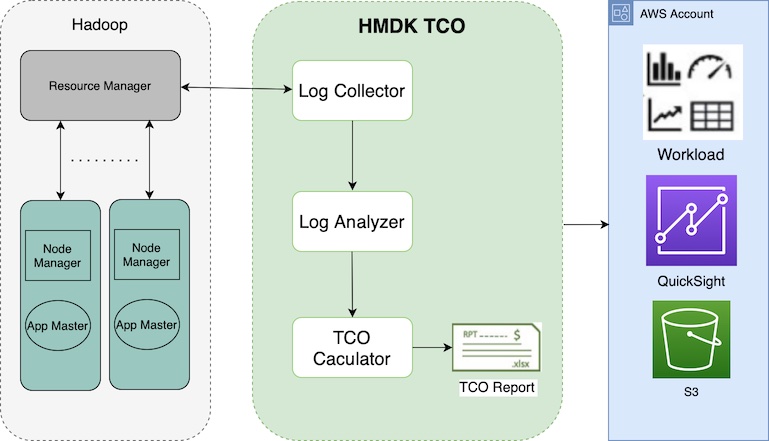
Let’s briefly visit the HMDK TCO tool’s key features. The tool provides a YARN log collector to connect Hadoop Resource Manager to collect YARN logs. A Python-based Hadoop workload analyzer, called the YARN log analyzer, scrutinizes Hadoop applications. Amazon QuickSight dashboards showcase the results from the analyzer. The same results also accelerate the design of future EMR instances. Additionally, a TCO calculator generates the TCO estimation of an optimized EMR cluster for facilitating the migration.

Now let’s look at how the tool works. The following diagram illustrates the end-to-end workflow.

In the next sections, we walk through the five main steps of the tool:

  1. Collect YARN job history logs.
  2. Transform the job history logs from JSON to CSV.
  3. Analyze the job history logs.
  4. Design an EMR cluster for migration.
  5. Calculate the TCO.

Prerequisites

Before getting started, make sure to complete the following prerequisites:

  1. Clone the hadoop-migration-assessment-tco repository.
  2. Install Python 3 on your local machine.
  3. Have an AWS account with permission on AWS Lambda, QuickSight (Enterprise edition), and AWS CloudFormation.

Collect YARN job history logs

First, you run a YARN log collector, start-collector.sh, on your local machine. This step collects Hadoop YARN logs and places the logs on your local machine. The script connects your local machine with the Hadoop primary node and communicates with Resource Manager. Then it retrieves the job history information (YARN logs from application managers) by calling the YARN ResourceManager application API.

Prior to running the YARN log collector, you need to configure and establish the connection (HTTP: 8088 or HTTPS: 8090; the latter is recommended) to verify the accessibility of YARN ResourceManager and enabled YARN Timeline Server (Timeline Server v1 or later are supported). You may need to define the YARN logs’ collection interval and retention policy. To ensure that you collect consecutive YARN logs, you can use a cron job to schedule the log collector in a proper time interval. For example, for a Hadoop cluster with 2,000 daily applications and the setting yarn.resourcemanager.max-completed-applications set to 1,000, theoretically, you have to run the log collector at least twice to get all the YARN logs. In addition, we recommend collecting at least 7 days of YARN logs for analyzing holistic workloads.

For more details on how to configure and schedule the log collector, refer to the yarn-log-collector GitHub repo.

Transform the YARN job history logs from JSON to CSV

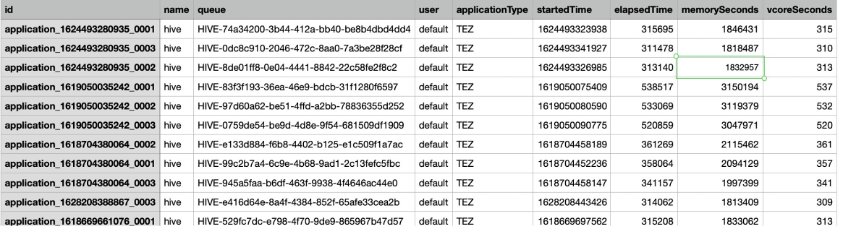
After obtaining YARN logs, you run a YARN log organizer, yarn-log-organizer.py, which is a parser to transform JSON-based logs to CSV files. These output CSV files are the inputs for the YARN log analyzer. The parser also has other capabilities, including sorting events by time, removing dedicates, and merging multiple logs.

For more information on how to use the YARN log organizer, refer to the yarn-log-organizer GitHub repo.

Analyze the YARN job history logs

Next, you launch the YARN log analyzer to analyze the YARN logs in CSV format.

With QuickSight, you can visualize YARN log data and conduct analysis against the datasets generated by pre-built dashboard templates and a widget. The widget automatically creates QuickSight dashboards in the target AWS account, which configured in a CloudFormation template.

The following diagram illustrates the HMDK TCO architecture.

The YARN log analyzer provides four key functionalities:

  1. Upload transformed YARN job history logs in CSV format (for example, cluster_yarn_logs_*.csv) to Amazon Simple Storage Service (Amazon S3) buckets. These CSV files are the outputs from the YARN log organizer.
  2. Create a manifest JSON file (for example, yarn-log-manifest.json) for QuickSight and upload it to the S3 bucket:
    {
        "fileLocations": [ { 
            "URIPrefixes": [
                "s3://emr-tco-date-bucket/yarn-log/demo/logs/"] 
        } ], 
        "globalUploadSettings": { 
            "format": "CSV", 
            "delimiter": ",", 
            "textqualifier": "'", 
            "containsHeader": "true" 
        }
     }

  3. Deploy QuickSight dashboards using a CloudFormation template, which is in YAML format. After deploying, choose the refresh icon until you see the stack’s status as CREATE_COMPLETE. This step creates datasets on QuickSight dashboards in your AWS target account.
  4. On the QuickSight dashboard, you can find insights of the analyzed Hadoop workloads from various charts. These insights help you design future EMR instances for migration acceleration, as demonstrated in the next step.

Design an EMR cluster for migration

The results of the YARN log analyzer help you understand the actual Hadoop workloads on the existing system. This step accelerates designing future EMR instances for migration by using an Excel template. The template contains a checklist for conducting workload analysis and capacity planning:

  • Are the applications running on the cluster being used appropriately with their current capacity?
  • Is the cluster under load at a certain time or not? If so, when is the time?
  • What types of applications and engines (such as MR, TEZ, or Spark) are running on the cluster, and what is the resource usage for each type?
  • Are different jobs’ run cycles (real-time, batch, ad hoc) running in one cluster?
  • Are any jobs running in regular batches, and if so, what are these schedule intervals? (For example, every 10 minutes, 1 hour, 1 day.) Do you have jobs that use a lot of resources during a long time period?
  • Do any jobs need performance improvement?
  • Are any specific organizations or individuals monopolizing the cluster?
  • Are any mixed development and operation jobs operating in one cluster?

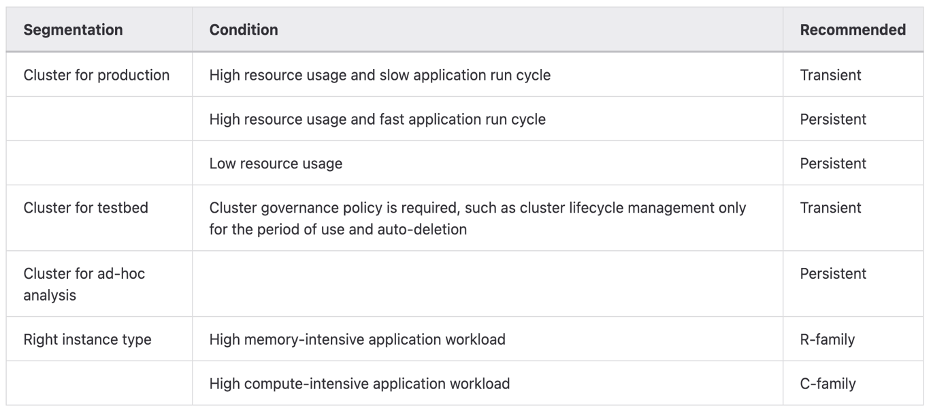
After you complete the checklist, you’ll have a better understanding of how to design the future architecture. For optimizing EMR cluster cost effectiveness, the following table provides general guidelines of choosing the proper type of EMR cluster and Amazon Elastic Compute Cloud (Amazon EC2) family.

To choose the proper cluster type and instance family, you need to perform several rounds of analysis against YARN logs based on various criteria. Let’s look at some key metrics.

Timeline

You can find workload patterns based on the number of Hadoop applications run in a time window. For example, the daily or hourly charts “Count of Records by Startedtime” provide the following insights:

  • In daily time series charts, you compare the number of application runs between working days and holidays, and among calendar days. If the numbers are similar, it means the daily utilizations of the cluster are comparable. On the other hand, if the deviation is large, the proportion of ad hoc jobs is significant. You also can figure out the possible weekly or monthly jobs on particular days. In the situation, you can easily see specific days in a week or a month with high workload concentration.
  • In hourly time series charts, you further understand how applications are run in hourly windows. You can find peak and off-peak hours in a day.

Users

The YARN logs contain the user ID of each application. This information helps you understand who submits an application to a queue. Based on the statistics of individual and aggregated application runs per queue and per user, you can determine the existing workload distribution by user. Usually, users at the same team have shared queues. Sometime, multiple teams have shared queues. When designing queues for users, you now have insights to help you design and distribute application workloads that are more balanced across queues than they previously were.

Application types

You can segment workloads based on various application types (such as Hive, Spark, Presto, or HBase) and run engines (such as MR, Spark, or Tez). For the compute-heavy workloads such as MapReduce or Hive-on-MR jobs, use CPU-optimized instances. For memory-intensive workloads such as Hive-on-TEZ, Presto, and Spark jobs, use memory-optimized instances.

ElapsedTime

You can categorize applications by runtime. The embedded CloudFormation template automatically creates an elapsedGroup field in a QuickSight dashboard. This enables a key feature to allow you to observe long-running jobs in one of four charts on QuickSight dashboards. Therefore, you can design tailored future architectures for these large jobs.

The corresponding QuickSight dashboards include four charts. You can drill down each chart, which is associated to one group.

Group
Number
Runtime/Elapsed Time of a Job
1 Less than 10 minutes
2 Between 10 minutes and 30 minutes
3 between 30 minutes and 1 hour
4 Greater than 1 hour

In the chart of Group 4, you can concentrate on scrutinizing large jobs based on various metrics, including user, queue, application type, timeline, resource usage, and so on. Based on this consideration, you may have dedicated queues on a cluster or a dedicated EMR cluster for large jobs. Meanwhile, you may submit small jobs to shared queues.

Resources

Based on resource (CPU, memory) consumption patterns, you choose the right size and family of EC2 instances for performance and cost effectiveness. For compute-intensive applications, we recommend instances of CPU-optimized families. For memory-intensive applications, the memory-optimized instance families are recommended.

In addition, based on the nature of the application workloads and resource utilization over the time, you may choose a persistent or transient EMR cluster, Amazon EMR on EKS, or Amazon EMR Serverless.

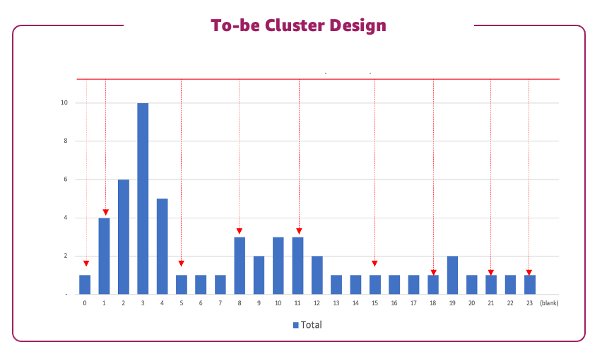
After analyzing YARN logs by various metrics, you’re ready to design future EMR architectures. The following table lists examples of proposed EMR clusters. You can find more details in the optimized-tco-calculator GitHub repo.

Calculate TCO

Finally, on your local machine, run tco-input-generator.py to aggregate YARN job history logs on an hourly basis prior to using an Excel template to calculate the optimized TCO. This step is crucial because the results simulate the Hadoop workloads in future EMR instances.

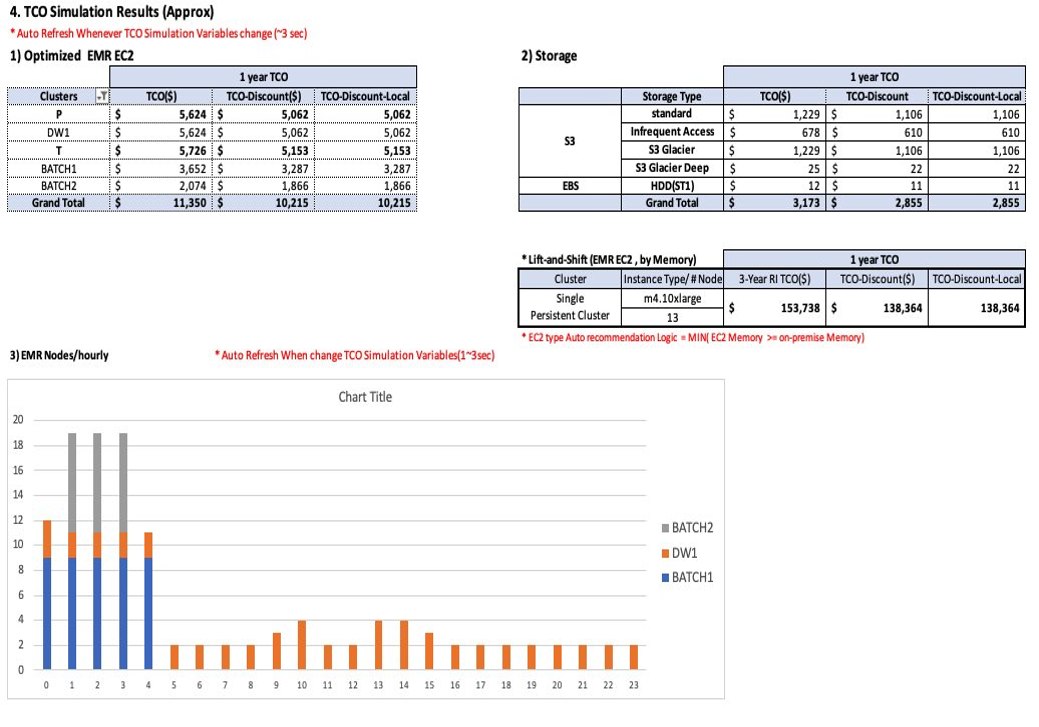
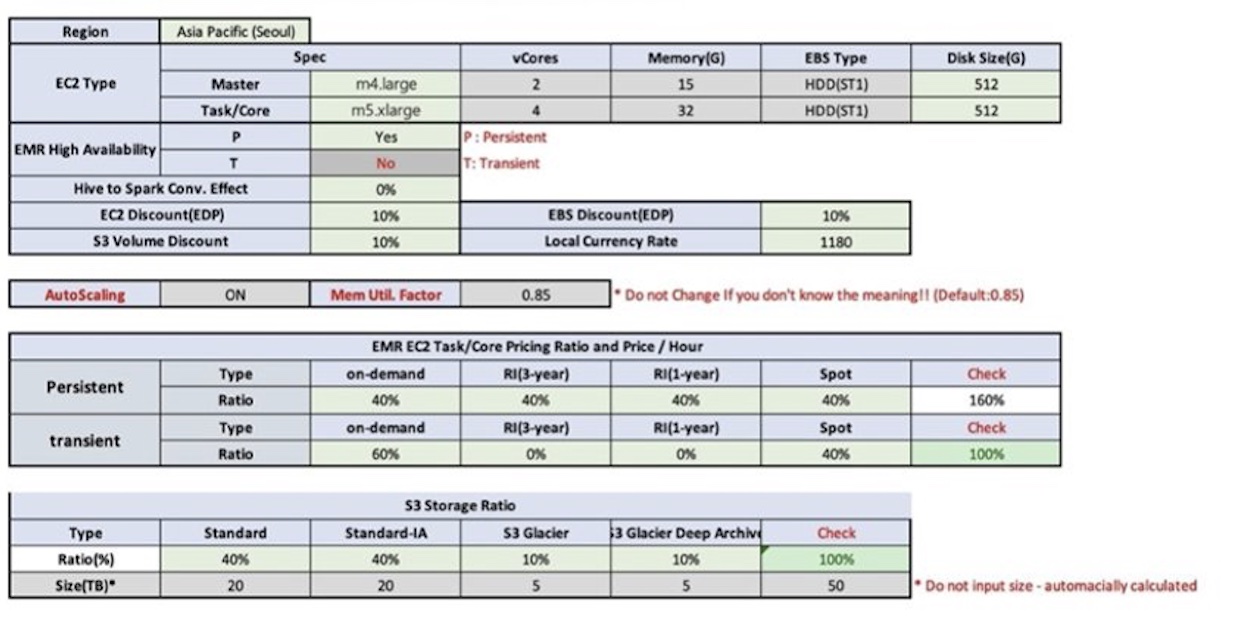
The prerequisite of TCO simulation is to run tco-input-generator.py, which generates hourly aggregated logs. Next, you open an Excel template file to enable macros and provide your inputs in green cells for calculating the TCO. Regarding the input data, you enter the actual data size without replication, and the hardware specifications (vCore, mem) of the Hadoop primary node and data nodes. You also need to select and upload previously generated hourly aggregated logs. After you set the TCO simulation variables, such as Region, EC2 type, Amazon EMR high availability, engine effect, Amazon EC2 and Amazon EBS discount (EDP), Amazon S3 volume discount, local currency rate, and EMR EC2 task/core pricing ratio and price/hour, the TCO simulator automatically calculates the optimum cost of future EMR instances on Amazon EC2. The following screenshots show an example of HMDK TCO results.

For additional information and instructions of HMDK TCO calculations, refer to the optimized-tco-calculator GitHub repo.

Clean up

After you complete all the steps and finish testing, complete the following steps to delete resources to avoid incurring costs:

  1. On the AWS CloudFormation console, choose the stack you created.
  2. Choose Delete.
  3. Choose Delete stack.
  4. Refresh the page until you see the status DELETE_COMPLETE.
  5. On the Amazon S3 console, delete S3 bucket you created.

Conclusion

The AWS ProServe HMDK TCO tool significantly reduces migration planning efforts, which are the time-consuming and challenging tasks of assessing your Hadoop workloads. With the HMDK TCO tool, the assessment usually takes 2–3 weeks. You can also determine the calculated TCO of future EMR architectures. With the HMDK TCO tool, you are able to quickly understand your workloads and resource usage patterns. With the insights generated by the tool, you are equipped to design optimal future EMR architectures. In many use cases, a 1-year TCO of the optimized refactored architecture provides significant cost savings (64–80% reduction) on compute and storage, compared to lift-and-shift Hadoop migrations.

To learn more about accelerating your Hadoop migrations to Amazon EMR and the HMDK CTO tool, refer to the Hadoop Migration Delivery Kit TCO GitHub repo, or reach out to [email protected].


About the authors

Sungyoul Park is a Senior Practice Manager at AWS ProServe. He helps customers innovate their business with AWS Analytics, IoT, and AI/ML services. He has a specialty in big data services and technologies and an interest in building customer business outcomes together.

Jiseong Kim is a Senior Data Architect at AWS ProServe. He mainly works with enterprise customers to help data lake migration and modernization, and provides guidance and technical assistance on big data projects such as Hadoop, Spark, data warehousing, real-time data processing, and large-scale machine learning. He also understands how to apply technologies to solve big data problems and build a well-designed data architecture.

George Zhao is a Senior Data Architect at AWS ProServe. He is an experienced analytics leader working with AWS customers to deliver modern data solutions. He is also a ProServe Amazon EMR domain specialist who enables ProServe consultants on best practices and delivery kits for Hadoop to Amazon EMR migrations. His area of interests are data lakes and cloud modern data architecture delivery.

Kalen Zhang was the Global Segment Tech Lead of Partner Data and Analytics at AWS. As a trusted advisor of data and analytics, she curated strategic initiatives for data transformation, led data and analytics workload migration and modernization programs, and accelerated customer migration journeys with partners at scale. She specializes in distributed systems, enterprise data management, advanced analytics, and large-scale strategic initiatives.
Introducing the AWS ProServe Hadoop Migration Delivery Kit TCO tool

Post Syndicated from George Zhao original https://aws.amazon.com/blogs/big-data/introducing-the-aws-proserve-hadoop-migration-delivery-kit-tco-tool/

When migrating Hadoop workloads to Amazon EMR, it’s often difficult to identify the optimal cluster configuration without analyzing existing workloads by hand. To solve this, we’re introducing the Hadoop migration assessment Total Cost of Ownership (TCO) tool. You now have a Hadoop migration assessment TCO tool within the AWS ProServe Hadoop Migration Delivery Kit (HMDK). The self-serve HMDK TCO tool accelerates the design of new cost-effective Amazon EMR clusters by analyzing the existing Hadoop workload and calculating the total cost of the ownership (TCO) running on the future Amazon EMR system. The Amazon EMR TCO report with the new Amazon EMR design can demonstrate the Amazon EMR migration with detailed cost saving and business benefits.

In this post, we introduce a use case and the functions and components of the tool. We also share case studies to show you the benefits of using the tool. Finally, we show you the technical information to use the tool.

Use case overview

Migrating Hadoop workloads to Amazon EMR accelerates big data analytics modernization, increases productivity, and reduces operational cost. Refactoring coupled compute and storage to a decoupling architecture is a modern data solution. It enables compute such as EMR instances and storage such as Amazon Simple Storage Service (Amazon S3) data lakes to scale. For various Hadoop jobs, customers have bespoke deployment options of fully managed Amazon EMR, Amazon EMR on Amazon EKS, and EMR Serverless. The optimized future EMR cluster yields the same results and values with much lower TCO compared to the source Hadoop cluster. But we need a TCO report to showcase the cost saving details, as shown in the following figure.

Typically, the commencement of a Hadoop migration needs Hadoop experts to spend weeks or even months to assess current Hadoop cluster workloads towards a plan for subsequent migration. This could delay the project from being accepted without a good TCO report.

To accelerate Hadoop migrations and mitigate the workload assessment efforts by SMEs, AWS ProServe created the Hadoop migration assessment TCO tool within the AWS ProServe Hadoop Migration Delivery Kit.

Introduction to the HMDK TCO tool

As a Hadoop migration accelerator, the HMDK TCO tool has three components:

  • YARN log collector – Retrieves the existing workload logs from YARN Resource Manager
  • YARN log analyzer – Provides a deep time-based insight on different aspects of the jobs
  • TCO calculator – Generates a 3-year or 1-year TCO calculated automatically

The self-serve HMDK TCO tool is available for download on GitHub.

Using the tool consists of three steps:

  1. First, the YARN Log collector communicates with the current Hadoop system to retrieve YARN logs.
  2. With the collected YARN logs, the next step is to use the YARN log analyzer and set up the log analyzer stack using AWS CloudFormation. The results of the log analyzer reveal Hadoop workload insights with various views and metrics of the Hadoop applications shown in Amazon QuickSight dashboards, which leads to the design of a future EMR cluster.
  3. Lastly, the TCO calculator generates the TCO report by simulating hourly resource usage of a future EMR cluster. To accelerate Hadoop migration assessment, the TCO report provides crucial information and values for your business stakeholders to make a buy-in decision.

The following diagram illustrates this architecture.

The Hadoop workload insights enable you to design a well-architected EMR cluster to achieve performance and cost-effectiveness in an agile way. For conducting well-architected designs, you need to deliberate between various system specifications of an EMR cluster and multiple cost considerations.

The system specifications are as follows:

  • Number of EMR clusters – Amazon EMR enables you to run multiple elastic clusters in the AWS Cloud to serve the same purpose of a shared static Hadoop cluster on premises
  • Types of EMR cluster (persistent or transient) – Design your system to keep minimum persistent clusters to save cost
  • Instance types and configuration (memory, vCore, and so on) – Choose the right instance for your job
  • Resource allocation for applications and cluster utilization – Based on the on-premises workload analysis, design effective resource allocation and efficient resource utilization in future EMR clusters

The cost considerations are as follows:

  • Latest price list (from thousands of available EC2 instances available) – The HMDK TCO tool makes the price calculation with Amazon Elastic Compute Cloud (Amazon EC2) instance types, configurations, and their prices.
  • Amazon S3 storage cost (standard, Glacier, and so on) – Data replication is no longer required for reliability. You can use tired storage in Amazon S3 for cost savings.

YARN log collector

The HMDK TCO tool enables a simple way to capture Hadoop YARN logs, which include the Hadoop job runs statistics and the corresponding resource usages. The following screenshot is an example of a YARN log.

The tool supports HTTPS protocol to communicate with YARN Resource Manager. The tool transports the JSON YARN logs as the inputs to a Python parser, which converts the YARN logs from JSON to CSV format. The new CSV formatted logs are the standard input files for the YARN log analyzer.

For more information, see the GitHub repo.

YARN log analyzer and optimized design use cases

With the log, we can follow up the steps in the TCO yarn-log-analysis README file to use AWS CloudFormation to set up QuickSight resources.

The HMDK TCO log analyzer generates a QuickSight dashboard on various metrics:

  • Job timeline – How many jobs are running at one time
  • Job user – Breakdown of users and queues
  • Application type and engine type – Breakdown by application types (Spark, Hive, Presto) and run engine type (MapReduce, Spark, Tez)
  • Elapsed time – The time span of completing an application
  • Resources – Memory and CPU

The following screenshot shows an example dashboard.

The QuickSight dashboards exhibit insights based on consecutive YARN logs collected in a long-enough period of time (for example, a 2-week window). The insights from the logs reveal the application types, users, queues, running cadence, time spans, and resource usages. The data also helps you discover daily batch jobs or ad hoc jobs, long-running jobs, and resource consumption. These insights help you design the right clusters, such as transient clusters or baseline permanent clusters, and choose the right EC2 instance for memory- or compute-intensive jobs. With the log analyzer results, the TCO tool automatically calculates the TCO of a future EMR cluster.

Let’s see some real customer use cases in the following sections.

Case 1: Use transient and persistent clusters wisely

For this use case, a customer in the financial sector has an 11-node Hadoop cluster.

The QuickSight timeline dashboard shows the peak time job runs because of the daily batch job. This guides us to design two clusters for fulfilling the existing workloads. When we keep a persistent cluster at a minimal size, we can have the transient EMR cluster to handle the batch style job around the peak time.

Therefore, we designed the clusters to have a persistent cluster with 2 data nodes, while transient nodes can scale from 0–10 between the hours of 1:00 AM and 4:00 AM.

The following figure illustrates this design.

This balanced design using transient and persistent clusters resulted in a cost savings of about 80% compared to a lift-and-shift design.

Case 2: Identify Hadoop queue usage and long-running jobs to design multiple clusters and optimized runs

For our next use case, a company runs 196 nodes using Hadoop 3.1 with jobs like Hive, Spark, and Kafka. The Hadoop default queue and four other queues were used to group various workloads. As illustrated in the following figure, some very long-running jobs are seen in the shared cluster, resulting in queued jobs that have resource competition and unbalanced resource allocation.

The QuickSight user dashboard guides us through the queue usage, the elapsed time dashboard guides us through the long-running jobs, and the resource dashboard guides us through the memory and vCore usage for the jobs.

Therefore, we design a solution to transfer queue jobs to run in separated clusters, and the default queue jobs are split to run in different clusters. By identifying the long-running jobs and understanding the resource needs, we could design a cluster to run such jobs more efficiently.

This design allows the job to run faster and the clusters to be used more efficiently with a cost savings benefit.

Cluster design

The HMDK TCO tool provides a cluster design template like the following example.

Here we have two clusters, one transient and one persistent, to handle the Spark and Tez jobs accordingly. The starting and ending hour for each cluster can be determined from the log analysis. With this cluster design, we can get the hourly workload resource usage forecast. Then the TCO calculator gets all the information needed to generate costs based on the TCO simulation variables you choose.

TCO calculator

The HMDK TCO calculator is a component guiding the EMR cluster design by using the EMR design template. Then it generates the hourly aggregated resource usage forecast using a Python program. The component provides guidelines and an Excel template to input system and cost specification parameters. The component has the logic with a built-in Amazon EMR price list. The 1-year and 3-year TCO cost can be automatically generated by the macro-enabled Excel TCO template.

The following figure shows the details of our HMDK TCO simulation.

The following figures show the TCO report.

TCO tool engagement outcomes

In this section, we share some of the engagement outcomes from customers after using the TCO tool for 1–2 weeks. Additionally, with the TCO tool, we can refactor on-premises Hadoop clusters to EMR clusters utilizing Amazon S3 as a data lake. The modern data solution of migrating to Amazon EMR provides unlimited scalability with operational efficiency and cost savings.

The following table illustrates four case studies of some engagements using the tool.

Case# Case Description Engagement Outcome
1 Pressured by the Hadoop License, they migrated to AWS using Amazon EMR and used Spark for replacing Hive. They designed the new EMR clusters using a balanced design of transient and persistent clusters. They can get job insights through the tool and design the new EMR clusters to fulfill the existing workloads, and expect to achieve 80% cost savings and six times performance enhancement.
2 Their goal was to migrate a Hadoop cluster with over 1,000 nodes from HDFS to Amazon S3 and Hive to Spark, and redesign the cluster using a balanced design of transient and persistent clusters. They can get job insights and redesign the cluster with a 1-year TCO of the optimized redesign architecture expected to have 64% cost savings.
3 Their goal was to migrate to Hadoop 3.1. They transferred the Hadoop queue-based job, which shared the same cluster, to two transient clusters and five persistent clusters with optimized resource usage for each job run, and handled long-running jobs faster. They can get Amazon EMR TCO results quickly in 2 weeks. Customers get insights on their workloads and long-running jobs and get the job done faster and cheaper.
4 Their goal was to migrate from Hive 1 to Spark and design an auto scaling EMR cluster. They can get Amazon EMR TCO results in 1 week. They’re expecting to see 75% cost savings on the redesigned EMR clusters and 10 times on performance improvement.

Conclusion

This post introduced use cases, functions, and components of the HMDK TCO tool. Through the case studies discussed in this post, you learned about real examples of the tool usage and its benefits. The HMDK TCO tool is designed for automating source Hadoop cluster workload assessment with calculated TCO calculation, and it can be done in 2–3 weeks instead of months.

More and more customers are adopting the HMDK TCO tool to accelerate their migration to Amazon EMR.

To dive deep into the HMDK TCO tool, refer to the next post in this series, How AWS ProServe Hadoop TCO tool accelerate Hadoop workload migrations to Amazon EMR.


About the authors

Sungyoul Park is a Senior Practice Manager at AWS ProServe. He helps customers innovate their business with AWS Analytics, IoT, and AI/ML services. He has a specialty in big data services and technologies and an interest in building customer business outcomes together.

Jiseong Kim is a Senior Data Architect at AWS ProServe. He mainly works with enterprise customers to help data lake migration and modernization, and provides guidance and technical assistance on big data projects such as Hadoop, Spark, data warehousing, real-time data processing, and large-scale machine learning. He also understands how to apply technologies to solve big data problems and build a well-designed data architecture.

George Zhao is a Senior Data Architect at AWS ProServe. He is an experienced analytics leader working with AWS customers to deliver modern data solutions. He is also a ProServe Amazon EMR domain specialist who enables ProServe consultants on best practices and delivery kits for Hadoop to Amazon EMR migrations. His area of interests are data lakes and cloud modern data architecture delivery.

Kalen Zhang was the Global Segment Tech Lead of Partner Data and Analytics at AWS. As a trusted advisor of data and analytics, she curated strategic initiatives for data transformation, led data and analytics workload migration and modernization programs, and accelerated customer migration journeys with partners at scale. She specializes in distributed systems, enterprise data management, advanced analytics, and large-scale strategic initiatives.
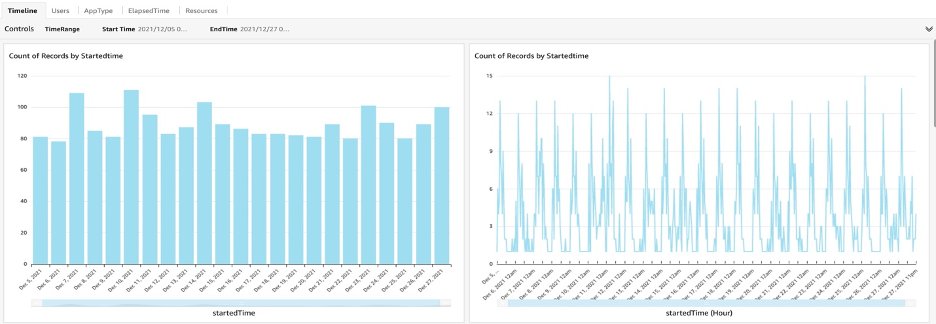
Improve observability across Amazon MWAA tasks

Post Syndicated from Payal Singh original https://aws.amazon.com/blogs/big-data/improve-observability-across-amazon-mwaa-tasks/

Amazon Managed Workflows for Apache Airflow (Amazon MWAA) is a managed orchestration service for Apache Airflow that makes it simple to set up and operate end-to-end data pipelines in the cloud at scale. A data pipeline is a set of tasks and processes used to automate the movement and transformation of data between different systems.­ The Apache Airflow open-source community provides over 1,000 pre-built operators (plugins that simplify connections to services) for Apache Airflow to build data pipelines. The Amazon provider package for Apache Airflow comes with integrations for over 31 AWS services, such as Amazon Simple Storage Service (Amazon S3), Amazon Redshift, Amazon EMR, AWS Glue, Amazon SageMaker, and more.

The most common use case for Airflow is ETL (extract, transform, and load). Nearly all Airflow users implement ETL pipelines ranging from simple to complex. Operationalizing machine learning (ML) is another growing use case, where data has to be transformed and normalized before it can be loaded into an ML model. In both use cases, the data pipeline is preparing the data for consumption by ingesting data from different sources and transforming it through a series of steps.

Observability across the different processes within the data pipeline is a key component to monitor the success or failure of the pipeline. Although scheduling the runs of tasks within the data pipeline is controlled by Airflow, the run of the task itself (transforming, normalizing, and aggregating data) is done by different services based on the use case. Having an end-to-end view of the data flow is a challenge due to multiple touch points in the data pipeline.

In this post, we provide an overview of logging enhancements when working with Amazon MWAA, which is one of the pillars of observability. We then discuss a solution to further enhance end-to-end observability by modifying the task definitions that make up the data pipeline. For this post, we focus on task definitions for two services: AWS Glue and Amazon EMR­, however the same method can be applied across different services.

Challenge

Many customers’ data pipelines start simple, orchestrating a few tasks, and over time grow to be more complex, consisting of a large number of tasks and dependencies between them. As the complexity increases, it becomes increasingly hard to operate and debug in case of failure, which creates a need for a single pane of glass to provide end-to-end data pipeline orchestration and health management. For data pipeline orchestration, the Apache Airflow UI is a user-friendly tool that provides detailed views into your data pipeline. When it comes to pipeline health management, each service that your tasks are interacting with could be storing or publishing logs to different locations, such as an S3 bucket or Amazon CloudWatch logs. As the number of integration touch points increases, stitching the distributed logs generated by different services in various locations can be challenging.

One solution provided by Amazon MWAA to consolidate the Airflow and task logs within the directed acyclic graph (DAG) is to forward the logs to CloudWatch log groups. A separate log group is created for each enabled Airflow logging option (For example, DAGProcessing, Scheduler, Task, WebServer, and Worker). These logs can be queried across log groups using CloudWatch Logs Insights.

A common approach in distributed tracing is to use a correlation ID to stitch and query distributed logs. A correlation ID is a unique identifier that is passed through a request flow for tracking a sequence of activities throughout the lifetime of the workflow. When each service in the workflow needs to log information, it can include this correlation ID, thereby ensuring you can track a full request from start to finish.

The Airflow engine passes a few variables by default that are accessible to all templates. run_id is one such variable, which is a unique identifier for a DAG run. The run_id can be used as the correlation ID to query against different log groups within CloudWatch to capture all the logs for a particular DAG run.

However, be aware that services that your tasks are interacting with will use a separate log group and won’t log the run_id as part of their output. This will prevent you from getting an end-to-end view across the DAG run.

For example, if your data pipeline consists of an AWS Glue task running a Spark job as part of the pipeline, then the Airflow task logs will be available in one CloudWatch log group and the AWS Glue job logs will be in a different CloudWatch log group. However, the Spark job that is run as part of the AWS Glue job doesn’t have access to the correlation ID and can’t be tied back to a particular DAG run. So even if you use the correlation ID to query the different CloudWatch log groups, you won’t get any information about the run of the Spark job.

Solution overview

As you now know, run_id is a variable that is a unique identifier for a DAG run. The run_id is present as part of the Airflow task logs. To use the run_id effectively and increase the observability across the DAG run, we use run_id as the correlation ID and pass it to different tasks with the DAG. The correlation ID is then be consumed by the scripts used within the tasks.

The following diagram illustrates the solution architecture.

Architecture Diagram

The data pipeline that we focus on consists of the following components:

  • An S3 bucket that contains the source data
  • An AWS Glue crawler that creates the table metadata in the Data Catalog from the source data
  • An AWS Glue job that transforms the raw data into a processed data format while performing file format conversions
  • An EMR job that generates reporting datasets

For details on the architecture and complete steps on how to run the DAG refer, to Amazon MWAA for Analytics Workshop.

In the next sections, we explore the following topics:

  • The DAG file, in order to understand how to define and then pass the correlation ID in the AWS Glue and EMR tasks
  • The code needed in the Python scripts to output information based on the correlation ID

Refer to the GitHub repo for the detailed DAG definition and Spark scripts. To run the scripts, refer to the Amazon MWAA analytics workshop.

DAG definitions

In this section, we look at snippets of the additions needed to the DAG file. We also discuss how to pass the correlation ID to the AWS Glue and EMR jobs. Refer to the GitHub repo for the complete DAG code.

The DAG file begins by defining the variables:

# Variables

correlation_id = “{{ run_id }}” 
dag_name = “data_pipeline” 
S3_BUCKET_NAME = “airflow_data_pipeline_bucket”

Next, let’s look at how to pass the correlation ID to the AWS Glue job using the AWS Glue operator. Operators are the building blocks of Airflow DAGs. They contain the logic of how data is processed in the data pipeline. Each task in a DAG is defined by instantiating an operator.

Airflow provides operators for different tasks. For this post, we use the AWS Glue operator.

The AWS Glue task definition contains the following:

  • The Python Spark job script (raw_to_tranform.py) to run the job
  • The DAG name, task ID, and correlation ID, which are passed as arguments
  • The AWS Glue service role assigned, which has permissions to run the crawler and the jobs

See the following code:

# Glue Task definition

glue_task = AwsGlueJobOperator(
    task_id=’glue_task’,
    job_name=’raw_to_transform’,
    iam_role_name=’AWSGlueServiceRoleDefault’,
    script_args={‘--dag_name’: dag_name,
                 ‘--task_id’: ‘glue_task’,
                 ‘--correlation_id’: correlation_id},
)

Next, we pass the correlation ID to the EMR job using the EMR operator. This includes the following steps:

  1. Define the configuration of an EMR cluster.
  2. Create the EMR cluster.
  3. Define the steps to be run by the EMR job.
  4. Run the EMR job:
    1. We use the Python Spark job script aggregations.py.
    2. We pass the DAG name, task ID, and correlation ID as arguments to the steps for the EMR task.

Let’s start with defining the configuration for the EMR cluster. The correlation_id is passed in the name of the cluster to easily identify the cluster corresponding to a DAG run. The logs generated by EMR jobs are published to a S3 bucket; the correlation_id is part of the LogUri as well. See the following code:

# Define the EMR cluster configuration

emr_task_id=’create_emr_cluster’
JOB_FLOW_OVERRIDES = {
    "Name": dag_name + "." + emr_task_id + "-" + correlation_id,
    "ReleaseLabel": "emr-5.29.0",
    "LogUri": "s3://{}/logs/emr/{}/{}/{}".format(S3_BUCKET_NAME, dag_name, emr_task_id, correlation_id),
    "Instances": {
      "InstanceGroups": [{
         "Name": "Master nodes",
         "Market": "ON_DEMAND",
         "InstanceRole": "MASTER",
         "InstanceType": "m5.xlarge",
         "InstanceCount": 1
       },{
         "Name": "Slave nodes",
         "Market": "ON_DEMAND",
         "InstanceRole": "CORE",
         "InstanceType": "m5.xlarge",
         "InstanceCount": 2
       }],
       "TerminationProtected": False,
       "KeepJobFlowAliveWhenNoSteps": True
}}

Now let’s define the task to create the EMR cluster based on the configuration:

# Create the EMR cluster

cluster_creator = EmrCreateJobFlowOperator(
    task_id= emr_task_id,
    job_flow_overrides=JOB_FLOW_OVERRIDES,
    aws_conn_id=’aws_default’,
    emr_conn_id=’emr_default’,
    dag=dag
)

Next, let’s define the steps needed to run as part of the EMR job. The input and output data processed by the EMR job is stored in an S3 bucket passed as arguments. Dag_name, task_id, and correlation_id are also passed in as arguments. The task_id used can be the name of your choice; here we use add_steps:

# EMR steps to be executed by EMR cluster

SPARK_TEST_STEPS = [{
    'Name': 'Run Spark',
    'ActionOnFailure': 'CANCEL_AND_WAIT',
    'HadoopJarStep': {
        'Jar': 'command-runner.jar',
        'Args': ['spark-submit',
        '/home/hadoop/aggregations.py',
            's3://{}/data/transformed/green'.format(S3_BUCKET_NAME),
            's3://{}/data/aggregated/green'.format(S3_BUCKET_NAME),
             dag_name,
             'add_steps',
             correlation_id]
}]

Next, let’s add a task to run the steps on the EMR cluster. The job_flow_id is the ID of the JobFlow, which is passed down from the EMR create task described earlier using Airflow XComs. See the following code:

#Run the EMR job

step_adder = EmrAddStepsOperator(
    task_id='add_steps',
    job_flow_id="{{ task_instance.xcom_pull('create_emr_cluster', key='return_value') }}",      
    aws_conn_id='aws_default',
    steps=SPARK_TEST_STEPS,
)

This completes the steps needed to pass the correlation ID within the DAG task definition.

In the next section, we use this ID within the script run to log details.

Job script definitions

In this section, we review the changes required to log information based on the correlation_id. Let’s start with the AWS Glue job script (for the complete code, refer to the following file in GitHub):

# Script changes to file ‘raw_to_transform’

## @params: [JOB_NAME]
args = getResolvedOptions(sys.argv, ['JOB_NAME','dag_name','task_id','correlation_id'])

sc = SparkContext()
glueContext = GlueContext(sc)
spark = glueContext.spark_session
job = Job(glueContext)
job.init(args['JOB_NAME'], args)
logger = glueContext.get_logger()
correlation_id = args['dag_name'] + "." + args['task_id'] + " " + args['correlation_id']
logger.info("Correlation ID from GLUE job: " + correlation_id)

Next, we focus on the EMR job script (for the complete code, refer to the file in GitHub):

# Script changes to file ‘nyc_aggregations’

from __future__ import print_function
import sys
from pyspark.sql import SparkSession
from pyspark.sql.functions import sum

if __name__ == "__main__":
    if len(sys.argv) != 6:
        print("""
        Usage: nyc_aggregations.py <s3_input_path> <s3_output_path> <dag_name> <task_id> <correlation_id>
        """, file=sys.stderr)
        sys.exit(-1)
    input_path = sys.argv[1]
    output_path = sys.argv[2]
    dag_task_name = sys.argv[3] + "." + sys.argv[4]
    correlation_id = dag_task_name + " " + sys.argv[5]
    spark = SparkSession\
        .builder\
        .appName(correlation_id)\
        .getOrCreate()
    sc = spark.sparkContext
    log4jLogger = sc._jvm.org.apache.log4j
    logger = log4jLogger.LogManager.getLogger(dag_task_name)
    logger.info("Spark session started: " + correlation_id)

This completes the steps for passing the correlation ID to the script run.

After we complete the DAG definitions and script additions, we can run the DAG. Logs for a particular DAG run can be queried using the correlation ID. The correlation ID for a DAG run can be found via the Airflow UI. An example of a correlation ID is manual__2022-07-12T00:22:36.111190+00:00. With this unique string, we can run queries on the relevant CloudWatch log groups using CloudWatch Logs Insights. The result of the query includes the logging provided by the AWS Glue and EMR scripts, along with other logs associated with the correlation ID.

Example query for DAG level logs : manual__2022-07-12T00:22:36.111190+00:00

We can also obtain task-level logs by using the format <dag_name.task_id correlation_id>:

Example query : data_pipeline.glue_task manual__2022-07-12T00:22:36.111190+00:00

Clean up

If you created the setup to run and test the scripts using the Amazon MWAA analytics workshop, perform the cleanup steps to avoid incurring charges.

Conclusion

In this post, we showed how to send Amazon MWAA logs to CloudWatch log groups. We then discussed how to tie in logs from different tasks within a DAG using the unique correlation ID. The correlation ID can be outputted with as much or as little information needed by your job to provide more details across your entire DAG run. You can then use CloudWatch Logs Insights to query the logs.

With this solution, you can use Amazon MWAA as a single pane of glass for data pipeline orchestration and CloudWatch logs for data pipeline health management. The unique identifier improves the end-to-end observability for a DAG run and helps reduce the time needed for troubleshooting.

To learn more and get hands-on experience, start with the Amazon MWAA analytics workshop and then use the scripts in the GitHub repo to gain more observability of your DAG run.


About the Author

Payal Singh is a Partner Solutions Architect at Amazon Web Services, focused on the Serverless platform. She is responsible for helping partner and customers modernize and migrate their applications to AWS.
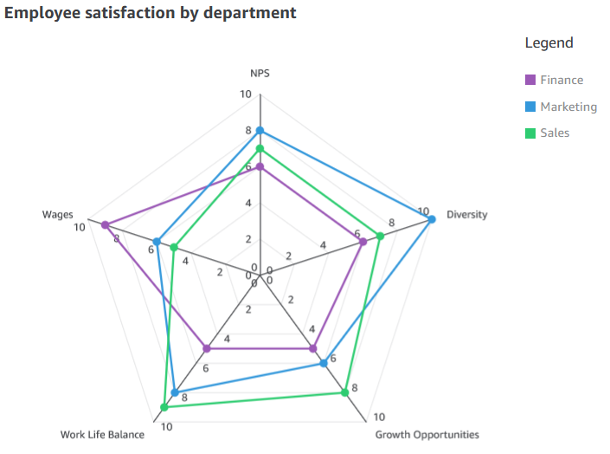
The anatomy of ransomware event targeting data residing in Amazon S3

Post Syndicated from Megan O'Neil original https://aws.amazon.com/blogs/security/anatomy-of-a-ransomware-event-targeting-data-in-amazon-s3/

Ransomware events have significantly increased over the past several years and captured worldwide attention. Traditional ransomware events affect mostly infrastructure resources like servers, databases, and connected file systems. However, there are also non-traditional events that you may not be as familiar with, such as ransomware events that target data stored in Amazon Simple Storage Service (Amazon S3). There are important steps you can take to help prevent these events, and to identify possible ransomware events early so that you can take action to recover. The goal of this post is to help you learn about the AWS services and features that you can use to protect against ransomware events in your environment, and to investigate possible ransomware events if they occur.

Ransomware is a type of malware that bad actors can use to extort money from entities. The actors can use a range of tactics to gain unauthorized access to their target’s data and systems, including but not limited to taking advantage of unpatched software flaws, misuse of weak credentials or previous unintended disclosure of credentials, and using social engineering. In a ransomware event, a legitimate entity’s access to their data and systems is restricted by the bad actors, and a ransom demand is made for the safe return of these digital assets. There are several methods actors use to restrict or disable authorized access to resources including a) encryption or deletion, b) modified access controls, and c) network-based Denial of Service (DoS) attacks. In some cases, after the target’s data access is restored by providing the encryption key or transferring the data back, bad actors who have a copy of the data demand a second ransom—promising not to retain the data in order to sell or publicly release it.

In the next sections, we’ll describe several important stages of your response to a ransomware event in Amazon S3, including detection, response, recovery, and protection.

Observable activity

The most common event that leads to a ransomware event that targets data in Amazon S3, as observed by the AWS Customer Incident Response Team (CIRT), is unintended disclosure of Identity and Access Management (IAM) access keys. Another likely cause is if there is an application with a software flaw that is hosted on an Amazon Elastic Compute Cloud (Amazon EC2) instance with an attached IAM instance profile and associated permissions, and the instance is using Instance Metadata Service Version 1 (IMDSv1). In this case, an unauthorized user might be able to use AWS Security Token Service (AWS STS) session keys from the IAM instance profile for your EC2 instance to ransom objects in S3 buckets. In this post, we will focus on the most common scenario, which is unintended disclosure of static IAM access keys.

Detection

After a bad actor has obtained credentials, they use AWS API actions that they iterate through to discover the type of access that the exposed IAM principal has been granted. Bad actors can do this in multiple ways, which can generate different levels of activity. This activity might alert your security teams because of an increase in API calls that result in errors. Other times, if a bad actor’s goal is to ransom S3 objects, then the API calls will be specific to Amazon S3. If access to Amazon S3 is permitted through the exposed IAM principal, then you might see an increase in API actions such as s3:ListBuckets, s3:GetBucketLocation, s3:GetBucketPolicy, and s3:GetBucketAcl.

Analysis

In this section, we’ll describe where to find the log and metric data to help you analyze this type of ransomware event in more detail.

When a ransomware event targets data stored in Amazon S3, often the objects stored in S3 buckets are deleted, without the bad actor making copies. This is more like a data destruction event than a ransomware event where objects are encrypted.

There are several logs that will capture this activity. You can enable AWS CloudTrail event logging for Amazon S3 data, which allows you to review the activity logs to understand read and delete actions that were taken on specific objects.

In addition, if you have enabled Amazon CloudWatch metrics for Amazon S3 prior to the ransomware event, you can use the sum of the BytesDownloaded metric to gain insight into abnormal transfer spikes.

Another way to gain information is to use the region-DataTransfer-Out-Bytes metric, which shows the amount of data transferred from Amazon S3 to the internet. This metric is enabled by default and is associated with your AWS billing and usage reports for Amazon S3.

For more information, see the AWS CIRT team’s Incident Response Playbook: Ransom Response for S3, as well as the other publicly available response frameworks available at the AWS customer playbooks GitHub repository.

Response

Next, we’ll walk through how to respond to the unintended disclosure of IAM access keys. Based on the business impact, you may decide to create a second set of access keys to replace all legitimate use of those credentials so that legitimate systems are not interrupted when you deactivate the compromised access keys. You can deactivate the access keys by using the IAM console or through automation, as defined in your incident response plan. However, you also need to document specific details for the event within your secure and private incident response documentation so that you can reference them in the future. If the activity was related to the use of an IAM role or temporary credentials, you need to take an additional step and revoke any active sessions. To do this, in the IAM console, you choose the Revoke active session button, which will attach a policy that denies access to users who assumed the role before that moment. Then you can delete the exposed access keys.

In addition, you can use the AWS CloudTrail dashboard and event history (which includes 90 days of logs) to review the IAM related activities by that compromised IAM user or role. Your analysis can show potential persistent access that might have been created by the bad actor. In addition, you can use the IAM console to look at the IAM credential report (this report is updated every 4 hours) to review activity such as access key last used, user creation time, and password last used. Alternatively, you can use Amazon Athena to query the CloudTrail logs for the same information. See the following example of an Athena query that will take an IAM user Amazon Resource Number (ARN) to show activity for a particular time frame.

SELECT eventtime, eventname, awsregion, sourceipaddress, useragent
FROM cloudtrail
WHERE useridentity.arn = 'arn:aws:iam::1234567890:user/Name' AND
-- Enter timeframe
(event_date >= '2022/08/04' AND event_date <= '2022/11/04')
ORDER BY eventtime ASC

Recovery

After you’ve removed access from the bad actor, you have multiple options to recover data, which we discuss in the following sections. Keep in mind that there is currently no undelete capability for Amazon S3, and AWS does not have the ability to recover data after a delete operation. In addition, many of the recovery options require configuration upon bucket creation.

S3 Versioning

Using versioning in S3 buckets is a way to keep multiple versions of an object in the same bucket, which gives you the ability to restore a particular version during the recovery process. You can use the S3 Versioning feature to preserve, retrieve, and restore every version of every object stored in your buckets. With versioning, you can recover more easily from both unintended user actions and application failures. Versioning-enabled buckets can help you recover objects from accidental deletion or overwrite. For example, if you delete an object, Amazon S3 inserts a delete marker instead of removing the object permanently. The previous version remains in the bucket and becomes a noncurrent version. You can restore the previous version. Versioning is not enabled by default and incurs additional costs, because you are maintaining multiple copies of the same object. For more information about cost, see the Amazon S3 pricing page.

AWS Backup

Using AWS Backup gives you the ability to create and maintain separate copies of your S3 data under separate access credentials that can be used to restore data during a recovery process. AWS Backup provides centralized backup for several AWS services, so you can manage your backups in one location. AWS Backup for Amazon S3 provides you with two options: continuous backups, which allow you to restore to any point in time within the last 35 days; and periodic backups, which allow you to retain data for a specified duration, including indefinitely. For more information, see Using AWS Backup for Amazon S3.

Protection

In this section, we’ll describe some of the preventative security controls available in AWS.

S3 Object Lock

You can add another layer of protection against object changes and deletion by enabling S3 Object Lock for your S3 buckets. With S3 Object Lock, you can store objects using a write-once-read-many (WORM) model and can help prevent objects from being deleted or overwritten for a fixed amount of time or indefinitely.

AWS Backup Vault Lock

Similar to S3 Object lock, which adds additional protection to S3 objects, if you use AWS Backup you can consider enabling AWS Backup Vault Lock, which enforces the same WORM setting for all the backups you store and create in a backup vault. AWS Backup Vault Lock helps you to prevent inadvertent or malicious delete operations by the AWS account root user.

Amazon S3 Inventory

To make sure that your organization understands the sensitivity of the objects you store in Amazon S3, you should inventory your most critical and sensitive data across Amazon S3 and make sure that the appropriate bucket configuration is in place to protect and enable recovery of your data. You can use Amazon S3 Inventory to understand what objects are in your S3 buckets, and the existing configurations, including encryption status, replication status, and object lock information. You can use resource tags to label the classification and owner of the objects in Amazon S3, and take automated action and apply controls that match the sensitivity of the objects stored in a particular S3 bucket.

MFA delete

Another preventative control you can use is to enforce multi-factor authentication (MFA) delete in S3 Versioning. MFA delete provides added security and can help prevent accidental bucket deletions, by requiring the user who initiates the delete action to prove physical or virtual possession of an MFA device with an MFA code. This adds an extra layer of friction and security to the delete action.

Use IAM roles for short-term credentials

Because many ransomware events arise from unintended disclosure of static IAM access keys, AWS recommends that you use IAM roles that provide short-term credentials, rather than using long-term IAM access keys. This includes using identity federation for your developers who are accessing AWS, using IAM roles for system-to-system access, and using IAM Roles Anywhere for hybrid access. For most use cases, you shouldn’t need to use static keys or long-term access keys. Now is a good time to audit and work toward eliminating the use of these types of keys in your environment. Consider taking the following steps:

  1. Create an inventory across all of your AWS accounts and identify the IAM user, when the credentials were last rotated and last used, and the attached policy.
  2. Disable and delete all AWS account root access keys.
  3. Rotate the credentials and apply MFA to the user.
  4. Re-architect to take advantage of temporary role-based access, such as IAM roles or IAM Roles Anywhere.
  5. Review attached policies to make sure that you’re enforcing least privilege access, including removing wild cards from the policy.

Server-side encryption with customer managed KMS keys

Another protection you can use is to implement server-side encryption with AWS Key Management Service (SSE-KMS) and use customer managed keys to encrypt your S3 objects. Using a customer managed key requires you to apply a specific key policy around who can encrypt and decrypt the data within your bucket, which provides an additional access control mechanism to protect your data. You can also centrally manage AWS KMS keys and audit their usage with an audit trail of when the key was used and by whom.

GuardDuty protections for Amazon S3

You can enable Amazon S3 protection in Amazon GuardDuty. With S3 protection, GuardDuty monitors object-level API operations to identify potential security risks for data in your S3 buckets. This includes findings related to anomalous API activity and unusual behavior related to your data in Amazon S3, and can help you identify a security event early on.

Conclusion

In this post, you learned about ransomware events that target data stored in Amazon S3. By taking proactive steps, you can identify potential ransomware events quickly, and you can put in place additional protections to help you reduce the risk of this type of security event in the future.

 
If you have feedback about this post, submit comments in the Comments section below. If you have questions about this post, start a new thread on the Security, Identity and Compliance re:Post or contact AWS Support.

Want more AWS Security news? Follow us on Twitter.

Author

Megan O’Neil

Megan is a Principal Specialist Solutions Architect focused on threat detection and incident response. Megan and her team enable AWS customers to implement sophisticated, scalable, and secure solutions that solve their business challenges.

Karthik Ram

Karthik Ram

Karthik is a Senior Solutions Architect with Amazon Web Services based in Columbus, Ohio. He has a background in IT networking, infrastructure architecture and Security. At AWS, Karthik helps customers build secure and innovative cloud solutions, solving their business problems using data driven approaches. Karthik’s Area of Depth is Cloud Security with a focus on Threat Detection and Incident Response (TDIR).

Kyle Dickinson

Kyle Dickinson

Kyle is a Sr. Security Solution Architect, specializing in threat detection, incident response. He focuses on working with customers to respond to security events with confidence. He also hosts AWS on Air: Lockdown, a livestream security show. When he’s not – he enjoys hockey, BBQ, and trying to convince his Shitzu that he’s in-fact, not a large dog.

AWS Week in Review – February 6, 2023

Post Syndicated from Marcia Villalba original https://aws.amazon.com/blogs/aws/aws-week-in-review-february-6-2023/

This post is part of our Week in Review series. Check back each week for a quick roundup of interesting news and announcements from AWS!

If you are looking for a new year challenge, the Serverless Developer Advocate team launched the 30 days of Serverless. You can follow the hashtag #30DaysServerless on LinkedIn, Twitter, or Instagram or visit the challenge page and learn a new Serverless concept every day.

Last Week’s Launches
Here are some launches that got my attention during the previous week.

AWS SAM CLIv1.72 added the capability to list important information from your deployments.

  • List the URLs of the Amazon API Gateway or AWS Lambda function URL.
    $ sam list endpoints
  • List the outputs of the deployed stack.
    $ sam list outputs
  • List the resources in the local stack. If a stack name is provided, it also shows the corresponding deployed resources and the ids.
    $ sam list resources

Amazon RDSNow supports increasing the allocated storage size when creating read replicas or when restoring a database from snapshots. This is very useful when your primary instances are near their maximum allocated storage capacity.

Amazon QuickSight Allows you to create Radar charts. Radar charts are a way to visualize multivariable data that are used to plot one or more groups of values over multiple common variables.

AWS Systems Manager AutomationNow integrates with Systems Manager Change Calendar. Now you can reduce the risks associated with changes in your production environment by allowing Automation runbooks to run during an allowed time window configured in the Change Calendar.

AWS AppConfigIt announced its integration with AWS Secrets Manager and AWS Key Management Service (AWS KMS). All sensitive data retrieved from Secrets Manager via AWS AppConfig can be encrypted at deployment time using an AWS KMS customer managed key (CMK).

For a full list of AWS announcements, be sure to keep an eye on the What’s New at AWS page.

Other AWS News
Some other updates and news that you may have missed:

AWS Cloud Clubs – Cloud Clubs are peer-to-peer user groups for students and young people aged 18–28. In these clubs, you can network, attend career-building events, earn benefits like AWS credits, and more. Learn more about the clubs in your region in the AWS student portal.

Get AWS Certified: Profesional challenge – You can register now for the certification challenge. Prepare for your AWS Professional Certification exam and get a 50 percent discount for the certification exam. Learn more about the challenge on the official page.

Podcast Charlas Técnicas de AWS – If you understand Spanish, this podcast is for you. Podcast Charlas Técnicas is one of the official AWS podcasts in Spanish, and every other week, there is a new episode. The podcast is for builders, and it shares stories about how customers implemented and learned AWS services, how to architect applications, and how to use new services. You can listen to all the episodes directly from your favorite podcast app or at AWS Podcasts en Español.

AWS Open-Source News and Updates – This is a newsletter curated by my colleague Ricardo to bring you the latest open-source projects, posts, events, and more.

Upcoming AWS Events
Check your calendars and sign up for these AWS events:

AWS re:Invent recaps – We had a lot of announcements during re:Invent. If you want to learn them all in your language and in your area, check the re: Invent recaps. All the upcoming ones are posted on this site, so check it regularly to find an event nearby.

AWS Innovate Data and AI/ML edition – AWS Innovate is a free online event to learn the latest from AWS experts and get step-by-step guidance on using AI/ML to drive fast, efficient, and measurable results.

  • AWS Innovate Data and AI/ML edition for Asia Pacific and Japan is taking place on February 22, 2023. Register here.
  • Registrations for AWS Innovate EMEA (March 9, 2023) and the Americas (March 14, 2023) will open soon. Check the AWS Innovate page for updates.

You can find details on all upcoming events, in-person or virtual, here.

That’s all for this week. Check back next Monday for another Week in Review!

— Marcia

Introducing MongoDB Atlas metadata collection with AWS Glue crawlers

Post Syndicated from Igor Alekseev original https://aws.amazon.com/blogs/big-data/introducing-mongodb-atlas-metadata-collection-with-aws-glue-crawlers/

For data lake customers who need to discover petabytes of data, AWS Glue crawlers are a popular way to discover and catalog data in the background. This allows users to search and find relevant data from multiple data sources. Many customers also have data in managed operational databases such as MongoDB Atlas and need to combine it with data from Amazon Simple Storage Service (Amazon S3) data lakes to derive insights. AWS Glue crawlers now support MongoDB Atlas, making it simpler for you to understand MongoDB collections’ evolution and extract meaningful insights.

AWS Glue is a serverless data integration service that makes it simple to discover, prepare, move, and integrate data from multiple sources for analytics, machine learning (ML), and application development.

MongoDB Atlas is a developer data service from AWS technology partner MongoDB, Inc. The service combines transactional processing, relevance-based search, real-time analytics, and mobile-to-cloud data synchronization in an integrated architecture.

With today’s launch, you can create and schedule an AWS Glue crawler to crawl MongoDB Atlas. In the crawler setup, you can select MongoDB as a data source. You can then create an AWS Glue connection with MongoDB Atlas and provide the MongoDB Atlas cluster name and credentials. We walk you through this process in this post.

Solution overview

The following architecture illustrates how you can scan a MongoDB Atlas database and collections using AWS Glue.

With each run of the crawler, the crawler inspects specified collections and catalogs information, such as updates or deletes to MongoDB Atlas collections, views, and materialized views in the AWS Glue Data Catalog. In AWS Glue Studio, you can then use the AWS Glue Data Catalog as a source to pull data from MongoDB Atlas and populate an Amazon S3 target. Finally, this job can run and read data from MongoDB Atlas and write the results to Amazon S3, opening up possibilities to integrate with AWS services such as Amazon SageMaker, Amazon QuickSight, and more.

In the following sections, we describe how to create an AWS Glue crawler with MongoDB Atlas as a data source. We then create an AWS Glue connection and provide the MongoDB Atlas cluster information and credentials. Then we specify the MongoDB Atlas database and collections to crawl.

Prerequisites

To follow along with this post, you must have access to MongoDB Atlas and the AWS Management Console. We also assume you have access to a VPC with subnets preconfigured via Amazon Virtual Private Cloud (Amazon VPC). The crawler that we configure later in the post runs in the VPC and connects to MongoDB Atlas via an AWS PrivateLink endpoint.

Set up MongoDB Atlas

To configure MongoDB Atlas, complete the following steps:

  1. Configure a MongoDB cluster on AWS. For instructions, refer to How to Set Up a MongoDB Cluster.
  2. Configure PrivateLink by following the steps described in Connecting Applications Securely to a MongoDB Atlas Data Plane with AWS PrivateLink.

This allows us to simplify our networking architecture and make sure the traffic stays on the AWS network.

Next, we obtain the MongoDB cluster connection string from the Connect UI on the MongoDB Atlas console.

  1. On the MongoDB Atlas console, choose Connect, Private Endpoint, and Connection Method.
  2. Copy the SRV connection string.

We use this SRV connection string in the subsequent steps.

The following screenshot shows that we have loaded a sample collection in MongoDB Atlas, which we crawl over in the next steps. Note that the records in this collection include several arrays as well as nested data.

Set up the MongoDB Atlas connection with AWS Glue

Before we can configure the AWS Glue crawler, we need to create the MongoDB Atlas connection in AWS Glue.

  1. On the AWS Glue Studio console, choose Connectors in the navigation pane.
  2. Choose Create connection.

  1. When filling out the connection details, use the SRV connection string we obtained earlier in MongoDB Atlas.
  2. In the Network options section, the VPC and subnets must correspond to the PrivateLink settings you configured earlier.

Create a MongoDB crawler

After we create the connection, we can create an AWS Glue crawler.

  1. On the AWS Glue console, choose Crawlers in the navigation pane.
  2. Choose Create crawler.

  1. For Name, enter a name.
  2. For the data source, choose the MongoDB Atlas data source we configured earlier and supply the path that corresponds to the MongoDB Atlas database and collection.

  1. Configure your security settings, output, and scheduling.

  1. On the Crawlers page, choose Run crawler.

After the crawler finishes crawling the MongoDB collections, its status shows as Completed.

Review the MongoDB AWS Glue database and table

We can navigate to the AWS Glue Data Catalog to examine the tables that were created by the crawler.

Choose the table to view the schema and other metadata.

Note that the crawler captured nested data as a STRUCT and correctly listed the ARRAY fields.

Import MongoDB Atlas data to Amazon S3

Now we use the MongoDB Atlas-based AWS Glue Data Catalog table to perform a data import without writing code. We use AWS Glue Studio to build boilerplate code quickly. Alternatively, you can build the script in script editor.

  1. On the AWS Glue Studio console, choose Jobs in the navigation pane.
  2. Choose Create job.
  3. Select Visual with a source and target.
  4. Choose the Data Catalog table as the source and Amazon S3 as the target.

  1. In the AWS Glue Studio UI, supply additional parameters such as the S3 bucket name and choose the database and table from the drop-down menus.

  1. Next, review the generated script that is built by AWS Glue Studio. We now need to add a database and collection in the script as follows:
additional_options = {"database": "sample_airbnb","collection": "listingsAndReviews"},

When the ETL job is complete, the extracted data is available on Amazon S3.

  1. On the Amazon S3 console, choose Buckets in the navigation pane.
  2. Choose our bucket and folder containing the extracted files.
  3. Choose a file and on the Actions menu, choose Query with S3 Select to view the contents of the file.

Clean up

To avoid incurring charges for the services used in this walkthrough, complete the following steps to delete your resources:

  1. On the AWS Glue console, choose Crawlers in the navigation pane.
  2. Select your crawler and on the Action menu, choose Delete crawler.
  3. On the AWS Glue Studio console, choose View jobs.
  4. Select the job you created and on the Actions menu, choose Delete job(s).
  5. Return to the AWS Glue console and choose Tables in the navigation pane.
  6. Select your table and choose Delete.
  7. Choose Databases in the navigation pane.
  8. Select your database and choose Delete.
  9. On the Amazon VPC console, choose Endpoints in the navigation pane.
  10. Select the PrivateLink endpoint you created and on the Actions menu, choose Delete VPC endpoints.

Conclusion

In this post, we showed how to set up an AWS Glue crawler to crawl over a MongoDB Atlas collection, gathering metadata and creating table records in the AWS Glue Data Catalog. With the Data Catalog table, we created an ETL process using the AWS Glue Studio UI to extract data from the MongoDB Atlas collection to an S3 bucket without writing a single line of code.

You can try this yourself by configuring an AWS Glue crawler, creating an AWS Glue ETL job with AWS Glue Studio, and launching MongoDB Atlas from a QuickStart or from MongoDB Atlas on AWS Marketplace.

Special thanks to everyone who contributed to this crawler feature launch: Julio Montes de Oca, Mita Gavade, and Alex Prazma.


About the authors

Igor Alekseev is a Senior Partner Solution Architect at AWS in Data and Analytics domain. In his role Igor is working with strategic partners helping them build complex, AWS-optimized architectures. Prior joining AWS, as a Data/Solution Architect he implemented many projects in Big Data domain, including several data lakes in Hadoop ecosystem. As a Data Engineer he was involved in applying AI/ML to fraud detection and office automation.

Sandeep Adwankar is a Senior Technical Product Manager at AWS. Based in the California Bay Area, he works with customers around the globe to translate business and technical requirements into products that enable customers to improve how they manage, secure, and access data.

The technology behind GitHub’s new code search

Post Syndicated from Timothy Clem original https://github.blog/2023-02-06-the-technology-behind-githubs-new-code-search/

From launching our technology preview of the new and improved code search experience a year ago, to the public beta we released at GitHub Universe last November, there’s been a flurry of innovation and dramatic changes to some of the core GitHub product experiences around how we, as developers, find, read, and navigate code.

One question we hear about the new code search experience is, “How does it work?” And to complement a talk I gave at GitHub Universe, this post gives a high-level answer to that question and provides a small window into the system architecture and technical underpinnings of the product.

So, how does it work? The short answer is that we built our own search engine from scratch, in Rust, specifically for the domain of code search. We call this search engine Blackbird, but before I explain how it works, I think it helps to understand our motivation a little bit. At first glance, building a search engine from scratch seems like a questionable decision. Why would you do that? Aren’t there plenty of existing, open source solutions out there already? Why build something new?

To be fair, we’ve tried and have been trying, for almost the entire history of GitHub, to use existing solutions for this problem. You can read a bit more about our journey in Pavel Avgustinov’s post, A brief history of code search at GitHub, but one thing sticks out: we haven’t had a lot of luck using general text search products to power code search. The user experience is poor, indexing is slow, and it’s expensive to host. There are some newer, code-specific open source projects out there, but they definitely don’t work at GitHub’s scale. So, knowing all that, we were motivated to create our own solution by three things:

  1. We’ve got a vision for an entirely new user experience that’s about being able to ask questions of code and get answers through iteratively searching, browsing, navigating, and reading code.
  2. We understand that code search is uniquely different from general text search. Code is already designed to be understood by machines and we should be able to take advantage of that structure and relevance. Searching code also has unique requirements: we want to search for punctuation (for example, a period or open parenthesis); we don’t want stemming; we don’t want stop words to be stripped from queries; and, we want to search with regular expressions.
  3. GitHub’s scale is truly a unique challenge. When we first deployed Elasticsearch, it took months to index all of the code on GitHub (about 8 million repositories at the time). Today, that number is north of 200 million, and that code isn’t static: it’s constantly changing and that’s quite challenging for search engines to handle. For the beta, you can currently search almost 45 million repositories, representing 115 TB of code and 15.5 billion documents.

At the end of the day, nothing off the shelf met our needs, so we built something from scratch.

Just use grep?

First though, let’s explore the brute force approach to the problem. We get this question a lot: “Why don’t you just use grep?” To answer that, let’s do a little napkin math using ripgrep on that 115 TB of content. On a machine with an eight core Intel CPU, ripgrep can run an exhaustive regular expression query on a 13 GB file cached in memory in 2.769 seconds, or about 0.6 GB/sec/core.

We can see pretty quickly that this really isn’t going to work for the larger amount of data we have. Code search runs on 64 core, 32 machine clusters. Even if we managed to put 115 TB of code in memory and assume we can perfectly parallelize the work, we’re going to saturate 2,048 CPU cores for 96 seconds to serve a single query! Only that one query can run. Everybody else has to get in line. This comes out to a whopping 0.01 queries per second (QPS) and good luck doubling your QPS—that’s going to be a fun conversation with leadership about your infrastructure bill.

There’s just no cost-effective way to scale this approach to all of GitHub’s code and all of GitHub’s users. Even if we threw a ton of money at the problem, it still wouldn’t meet our user experience goals.

You can see where this is going: we need to build an index.

A search index primer

We can only make queries fast if we pre-compute a bunch of information in the form of indices, which you can think of as maps from keys to sorted lists of document IDs (called “posting lists”) where that key appears. As an example, here’s a small index for programming languages. We scan each document to detect what programming language it’s written in, assign a document ID, and then create an inverted index where language is the key and the value is a posting list of document IDs.

Forward index

Doc ID Content
1 def lim
puts “mit”
end
2 fn limits() {
3 function mits() {

Inverted index

Language Doc IDs (postings)
JavaScript 3, 8, 12, …
Ruby 1, 10, 13, …
Rust 2, 5, 11, …

For code search, we need a special type of inverted index called an ngram index, which is useful for looking up substrings of content. An ngram is a sequence of characters of length n. For example, if we choose n=3 (trigrams), the ngrams that make up the content “limits” are lim, imi, mit, its. With our documents above, the index for those trigrams would look like this:

ngram Doc IDs (postings)
lim 1, 2, …
imi 2, …
mit 1, 2, 3, …
its 2, 3, …

To perform a search, we intersect the results of multiple lookups to give us the list of documents where the string appears. With a trigram index you need four lookups: lim, imi, mit, and its in order to fulfill the query for limits.

Unlike a hashmap though, these indices are too big to fit in memory, so instead, we build iterators for each index we need to access. These lazily return sorted document IDs (the IDs are assigned based on the ranking of each document) and we intersect and union the iterators (as demanded by the specific query) and only read far enough to fetch the requested number of results. That way we never have to keep entire posting lists in memory.

Indexing 45 million repositories

The next problem we have is how to build this index in a reasonable amount of time (remember, this took months in our first iteration). As is often the case, the trick here is to identify some insight into the specific data we’re working with to guide our approach. In our case it’s two things: Git’s use of content addressable hashing and the fact that there’s actually quite a lot of duplicate content on GitHub. Those two insights lead us the the following decisions:

  1. Shard by Git blob object ID which gives us a nice way of evenly distributing documents between the shards while avoiding any duplication. There won’t be any hot servers due to special repositories and we can easily scale the number of shards as necessary.
  2. Model the index as a tree and use delta encoding to reduce the amount of crawling and to optimize the metadata in our index. For us, metadata are things like the list of locations where a document appears (which path, branch, and repository) and information about those objects (repository name, owner, visibility, etc.). This data can be quite large for popular content.

We also designed the system so that query results are consistent on a commit-level basis. If you search a repository while your teammate is pushing code, your results shouldn’t include documents from the new commit until it has been fully processed by the system. In fact, while you’re getting back results from a repository-scoped query, someone else could be paging through global results and looking at a different, prior, but still consistent state of the index. This is tricky to do with other search engines. Blackbird provides this level of query consistency as a core part of its design.

Let’s build an index

Armed with those insights, let’s turn our attention to building an index with Blackbird. This diagram represents a high level overview of the ingest and indexing side of the system.

a high level overview of the ingest and indexing side of the system

Kafka provides events that tell us to go index something. There are a bunch of crawlers that interact with Git and a service for extracting symbols from code, and then we use Kafka, again, to allow each shard to consume documents for indexing at its own pace.

Though the system generally just responds to events like git push to crawl changed content, we have some work to do to ingest all the repositories for the first time. One key property of the system is that we optimize the order in which we do this initial ingest to make the most of our delta encoding. We do this with a novel probabilistic data structure representing repository similarity and by driving ingest order from a level order traversal of a minimum spanning tree of a graph of repository similarity1.

Using our optimized ingest order, each repository is then crawled by diffing it against its parent in the delta tree we’ve constructed. This means we only need to crawl the blobs unique to that repository (not the entire repository). Crawling involves fetching blob content from Git, analyzing it to extract symbols, and creating documents that will be the input to indexing.

These documents are then published to another Kafka topic. This is where we partition2 the data between shards. Each shard consumes a single Kafka partition in the topic. Indexing is decoupled from crawling through the use of Kafka and the ordering of the messages in Kafka is how we gain query consistency.

The indexer shards then take these documents and build their indices: tokenizing to construct ngram indices3 (for content, symbols, and paths) and other useful indices (languages, owners, repositories, etc) before serializing and flushing to disk when enough work has accumulated.

Finally, the shards run compaction to collapse up smaller indices into larger ones that are more efficient to query and easier to move around (for example, to a read replica or for backups). Compaction also k-merges the posting lists by score so relevant documents have lower IDs and will be returned first by the lazy iterators. During the initial ingest, we delay compaction and do one big run at the end, but then as the index keeps up with incremental changes, we run compaction on a shorter interval as this is where we handle things like document deletions.

Life of a query

Now that we have an index, it’s interesting to trace a query through the system. The query we’re going to follow is a regular expression qualified to the Rails organization looking for code written in the Ruby programming language: /arguments?/ org:rails lang:Ruby. The high level architecture of the query path looks a little bit like this:

Architecture diagram of a query path.

In between GitHub.com and the shards is a service that coordinates taking user queries and fanning out requests to each host in the search cluster. We use Redis to manage quotas and cache some access control data.

The front end accepts the user query and passes it along to the Blackbird query service where we parse the query into an abstract syntax tree and then rewrite it, resolving things like languages to their canonical Linguist language ID and tagging on extra clauses for permissions and scopes. In this case, you can see how rewriting ensures that I’ll get results from public repositories or any private repositories that I have access to.

And(
    Owner("rails"),
    LanguageID(326),
    Regex("arguments?"),
    Or(
        RepoIDs(...),
        PublicRepo(),
    ),
)

Next, we fan out and send n concurrent requests: one to each shard in the search cluster. Due to our sharding strategy, a query request must be sent to each shard in the cluster.

On each individual shard, we then do some further conversion of the query in order to lookup information in the indices. Here, you can see that the regex gets translated into a series of substring queries on the ngram indices.

and(
  owners_iter("rails"),
  languages_iter(326),
  or(
    and(
      content_grams_iter("arg"),
      content_grams_iter("rgu"),
      content_grams_iter("gum"),
      or(
        and(
         content_grams_iter("ume"),
         content_grams_iter("ment")
        )
        content_grams_iter("uments"),
      )
    ),
    or(paths_grams_iter…)
    or(symbols_grams_iter…)
  ), 
  …
)

If you want to learn more about a method to turn regular expressions into substring queries, see Russ Cox’s article on Regular Expression Matching with a Trigram Index. We use a different algorithm and dynamic gram sizes instead of trigrams (see below3). In this case the engine uses the following grams: arg,rgu, gum, and then either ume and ment, or the 6 gram uments.

The iterators from each clause are run: and means intersect, or means union. The result is a list of documents. We still have to double check each document (to validate matches and detect ranges for them) before scoring, sorting, and returning the requested number of results.

Back in the query service, we aggregate the results from all shards, re-sort by score, filter (to double-check permissions), and return the top 100. The GitHub.com front end then still has to do syntax highlighting, term highlighting, pagination, and finally we can render the results to the page.

Our p99 response times from individual shards are on the order of 100 ms, but total response times are a bit longer due to aggregating responses, checking permissions, and things like syntax highlighting. A query ties up a single CPU core on the index server for that 100 ms, so our 64 core hosts have an upper bound of something like 640 queries per second. Compared to the grep approach (0.01 QPS), that’s screaming fast with plenty of room for simultaneous user queries and future growth.

In summary

Now that we’ve seen the full system, let’s revisit the scale of the problem. Our ingest pipeline can publish around 120,000 documents per second, so working through those 15.5 billion documents should take about 36 hours. But delta indexing reduces the number of documents we have to crawl by over 50%, which allows us to re-index the entire corpus in about 18 hours.

There are some big wins on the size of the index as well. Remember that we started with 115 TB of content that we want to search. Content deduplication and delta indexing brings that down to around 28 TB of unique content. And the index itself clocks in at just 25 TB, which includes not only all the indices (including the ngrams), but also a compressed copy of all unique content. This means our total index size including the content is roughly a quarter the size of the original data!

If you haven’t signed up already, we’d love for you to join our beta and try out the new code search experience. Let us know what you think! We’re actively adding more repositories and fixing up the rough edges based on feedback from people just like you.

Notes


  1. To determine the optimal ingest order, we need a way to tell how similar one repository is to another (similar in terms of their content), so we invented a new probabilistic data structure to do this in the same class of data structures as MinHash and HyperLogLog. This data structure, which we call a geometric filter, allows computing set similarity and the symmetric difference between sets with logarithmic space. In this case, the sets we’re comparing are the contents of each repository as represented by (path, blob_sha) tuples. Armed with that knowledge, we can construct a graph where the vertices are repositories and edges are weighted with this similarity metric. Calculating a minimum spanning tree of this graph (with similarity as cost) and then doing a level order traversal of the tree gives us an ingest order where we can make best use of delta encoding. Really though, this graph is enormous (millions of nodes, trillions of edges), so our MST algorithm computes an approximation that only takes a few minutes to calculate and provides 90% of the delta compression benefits we’re going for. 
  2. The index is sharded by Git blob SHA. Sharding means spreading the indexed data out across multiple servers, which we need to do in order to easily scale horizontally for reads (where we are concerned about QPS), for storage (where disk space is the primary concern), and for indexing time (which is constrained by CPU and memory on the individual hosts). 
  3. The ngram indices we use are especially interesting. While trigrams are a known sweet spot in the design space (as Russ Cox and others have noted: bigrams aren’t selective enough and quadgrams take up too much space), they cause some problems at our scale.

    For common grams like for trigrams aren’t selective enough. We get way too many false positives and that means slow queries. An example of a false positive is something like finding a document that has each individual trigram, but not next to each other. You can’t tell until you fetch the content for that document and double check at which point you’ve done a lot of work that has to be discarded. We tried a number of strategies to fix this like adding follow masks, which use bitmasks for the character following the trigram (basically halfway to quad grams), but they saturate too quickly to be useful.

    We call the solution “sparse grams,” and it works like this. Assume you have some function that given a bigram gives a weight. As an example, consider the string chester. We give each bigram a weight: 9 for “ch”, 6 for “he”, 3 for “es”, and so on.

    Click to view slideshow.

    Using those weights, we tokenize by selecting intervals where the inner weights are strictly smaller than the weights at the borders. The inclusive characters of that interval make up the ngram and we apply this algorithm recursively until its natural end at trigrams. At query time, we use the exact same algorithm, but keep only the covering ngrams, as the others are redundant. 

The collective thoughts of the interwebz