Петя Петрова: „Спасявайки животни, ние спасяваме и хората“

Post Syndicated from Йоанна Елми original https://www.toest.bg/petya-petrova-interview/

Петя Петрова: „Спасявайки животни, ние спасяваме и хората“

Тя тръгва за Украйна дни след началото на руската инвазия през февруари. С нея са приятелят ѝ и още двама активисти. Задачата им: да доставят хуманитарна помощ на дом за сираци в Лвов. Освен пратката, в буса има и клетки за 30 котки и 15 кучета. Това е само първият от много подобни курсове на Петя Петрова, която се мести в Киев, за да помага на животните, засегнати от войната. Нейната история стига чак до Американското национално радио, където тя споделя част от преживяното – войната убива както хора, така и животни. Когато я питам какво би казала на хората, които смятат, че в случая животните надали са приоритет, Петя отговаря без колебание:

Давайки нещо на животните, не вземаме от грижата за хората. Няма нужда от тази фалшива дилема в един конфликт, който така или иначе е достатъчно сложен. Много хора в Украйна виждат своите домашни любимци като важни. Освен всички, които помагат на бежанците или бедстващите, освен хуманитарния импулс, има и някой, който да вижда животните. Това не значи, че губим хората от полезрение.

Да се преместиш в Украйна през войната

Петя живее в Киев от юни тази година. Избира столицата, защото ѝ се струва най-логично – това е най-удобното място между сравнително безопасните региони в Западна Украйна и източните области, които са пряко засегнати от бойните действия и където има най-голяма нужда от помощ. Преди това Петя работи в Германия за „Хора за етично отношение към животните“ (PETA). Когато Русия нахлува в Украйна, организацията се обръща към нея с въпроса дали иска да замине.

Петя Петрова: „Спасявайки животни, ние спасяваме и хората“
Границата на Украйна през май т.г. © Петя Петрова
Петя Петрова: „Спасявайки животни, ние спасяваме и хората“
Киев през май т.г. © Петя Петрова

Петя казва, че няма да забрави първото си пътуване. Тръгват от полския град Пшемишъл в началото на март. „Не знаехме какво да очакваме. Не беше ясно колко мащабни ще бъдат атаките, Киев беше под атака и никой не знаеше какво предстои в Украйна. Исках да видя как можем да влезем, как ще протече пътуването, каква е логистиката“, разказва тя.

Шофират ден и половина без прекъсване. Пътните условия са тежки, пътищата са заснежени, няколко пъти попадат във виелица. Често са спирани на цивилни контролни постове, където охраняващи украинци ги питат кои са, какво носят, къде отиват и защо са там. Въпреки трудностите пристигат в Лвов.

Това беше една от най-емоционалните срещи, не си спомням друг такъв случай, в който да сме били толкова затруднени да решим на кого да помогнем. Хората стояха в снега с котките си в ръце и просто плачеха. Ситуацията беше тъжна и страшна, защото нямаше къде да ги поберем, много хора току-що бяха пристигнали в Лвов от цялата страна с домашните си любимци. И в момента, в който колата спря, ни наобиколиха.

В първите дни на войната Лвов – най-големият град в Западна Украйна – е една от основните точки на концентрация на бежанци, които се готвят да напуснат страната или бягат от военните действия на изток.

Приспособяване към ужаса

Петя и спътниците ѝ не успяват да доставят хуманитарната помощ до дома за сираци – не ги допускат. Разтоварват помощите в село край Лвов, където има много бежанци с малки деца, и тъй като по това време още няма системна хуманитарна помощ, всяка подадена ръка е добре дошла. Така в двете коли се освобождава място и екипът евакуира две семейства с три бебета и момче, което наскоро е навършило 18 години. Успяват да стигнат до полската граница, откъдето обаче ги връщат – младият мъж не може да напусне страната.

Не бяхме подготвени за нищо от това. Върнахме се обратно, с все животни и бебета, които плачеха постоянно. Трябваше да търсим допълнителни документи – майката на момчето искаше да вземе сина си с тях. Но не го допуснаха, върнаха се без него. На всичкото отгоре спукахме и гума. Но това ни научи, че трябва да очакваме всичко.

Домашните животни са малка част от цялата картина. Освен зоопаркове и резервати, засегнати са и селскостопанските животни, които са мишена, тъй като се считат за ресурс. Петя споделя, че често получават кадри от ферми, по които е стреляно, и затворените животни биват ранени от падащите отломки или загиват мъчително в пожари, от артилерийски обстрел, въздушни атаки.

Има документирани садистични атаки от страна на руските войски срещу животни, а през април бяха намерени стотици кучета, умрели от глад в приют в Бородянка. Активистката разказва, че в много области няма останали ветеринари или ветеринарите не са подготвени за много процедури, например за евтаназия на едри животни. Често няма дори разработени методи за хуманно убиване на селскостопански животни.

Петя Петрова: „Спасявайки животни, ние спасяваме и хората“
© Петя Петрова
Петя Петрова: „Спасявайки животни, ние спасяваме и хората“
С козела Мустафа, който има честта да е първият представител на вида си, возил се в колата на Петя. Евакуиран от освободеното село Рохан в близост до Харков, понастоящем козелът съжителства с няколко лъва, елени и магаре на име Химарс. © Петя Петрова

С времето екипът им се разраства, организират се и се учат на терен, в движение. Придобиват ритъм на работа, който Петя определя като относително успешен. Но организацията решава да прекрати работата си в Украйна, тъй като предизвикателствата се променят. Петя обаче остава.

Разделям войната дотук на три части. Първата беше с атаката срещу Киев, което беше пречка в центъра на страната, спираше всякакви усилия за пътуване навътре в Украйна. Хуманитарните помощи стигаха до Лвов и всеки, който искаше да се евакуира, трябваше да се добере някак дотам. Ние се движехме по относително сигурен маршрут, далеч от бойните действия, в зона без цивилни жертви и големи разрушения, не бяхме под обстрел. Това се промени. След преместването си в Киев свикнах да пътувам в зони, където се чуват престрелки, има въздушни атаки, свикнах да използвам защитни бронежилетки и каска, живеех с мисълта за реална опасност за живота си. Освен това не бях част от екип, имаше други доброволци, с които обменяхме информация, но пътувахме самостоятелно.

Петя Петрова: „Спасявайки животни, ние спасяваме и хората“
Снимка от Балаклия, градче в наскоро освободените територии край Харков. Петя споделя, че има трудности с достъпа до малките населени места, тъй като в някои от тях все още се водят престрелки. Понякога ѝ отнема часове да намери път, който да не е напълно разрушен. „По-голямата част от щетите са нанесени преди месеци, тъй като руската окупационна стратегия цели тотално разрушение в местностите. Но имаше и пресни бомбардировки и беше много болезнено да гледам как хората събират остатъците от домовете си“, пише тя в личния си Facebook профил. © Петя Петрова
Петя Петрова: „Спасявайки животни, ние спасяваме и хората“
Разрушеният дом на семейство, в което синът е с увреждане, в Мерефа, Харковска област. След атаките палят огън в двора, за да се топлят, и прекарват повечето си време сред останките. Чрез социалните медии в рамките на дни Петя успява да събере финансова помощ за бедстващите. © Петя Петрова

Петя определя ситуацията в Киев като относително спокойна до октомври, когато започва третата фаза. Всичко работи до началото на вечерния час, има възможност поне за ден почивка от пътуването в тежките зони. Сега, казва тя, вече не е така.

Най-много призиви за помощ получава от военни

От 10 октомври насам Украйна е подложена на масиран обстрел от страна на Русия, която нанася щети на цивилна инфраструктура. Петя разказва, че тези събития отнемат и последното чувство за сигурност, което е имала.

Събудих се не от взрива, а от вибрациите – спомня си тя за първата серия от подобни атаки срещу Киев от февруари насам. – Усещаш вибрацията на земята, която е специфична. Последваха още две експлозии и разбрах какво се случва. След това имахме проблеми с електроснабдяването, водоснабдяването, липса на отопление. В моята сграда и сега няма отопление, напълно тъмно е, вода също често няма, а понякога няма и интернет. И това превръща предизвикателството в психологическо. Човек свиква с опасностите по време на пътуванията и намира начин да се пази, да се информира. Но атаките срещу дома ти са съвсем друг вид агресия.

Петя Петрова: „Спасявайки животни, ние спасяваме и хората“

Питам я каква е общата картина сега, девет месеца след началото на конфликта. Хората приютяват домашните любимци на безследно изчезналите си съграждани. Събират колкото повече животни могат. Повечето украинци се опитват да избягат с питомците си. Посрещала е бежанци, преминали границата с животни, които дни наред са пътували, не са имали достатъчно храна или са премръзнали, някои са ранени, други – просто стресирани. Тогава много хора всъщност дори не вземат толкова личен багаж, а носят на раменете си например куче, което вече не може да върви. Някои водят за ръка децата си, които носят клетка с малко коте или кученце.

Затягането на изискванията за преминаване на границата с животно обаче затруднява процеса. От украинците често се изискват документи, чието придобиване може да отнеме до два месеца – твърде много време в разгара на война. Затова е и трудно да се каже дали хората, които ѝ дават животните си, не са се опитали да ги вземат, но са се отказали, защото нямат друго решение за оцеляването си.

Ако трябва да съм обективна, най-много ни търсят военни. Това, което ме шокира, е, че тези хора имат един ден в седмицата за лично ползване или почивка и именно в този ден те търсят среща с нас, за да ни предадат животните далеч от фронтовата линия. Те ги приютяват, животните живеят с тях в техните къщи или в местности, където е по-безопасно, докато успеем да организираме превоз. Получавали сме лисичета, диви животни, евакуирахме дори няколко кошера с пчели. Всичко това се развива по време на обстрел – военните носят животните в окопите, от окопите ги местят в автомобилите си, после до мястото, където нощуват. Те спасяват най-много животни.

Том, Дора и Рижик

За финал Петя ми разказва две истории, които са оставили дълбока следа в нея. Първата е за немските овчарки Том и Дора, открити от военни в Донецк. Семейството се евакуира и решава да затвори животните вътре вероятно с мисълта, че така ще са в безопасност. Оставят им храна и вода. Военните ги намират стресирани, Том просто лежи върху лапата си с поглед, който Петя определя като най-сърцераздирателното изражение, което е виждала. Кучето няма желание за нищо. Майка му Дора си е прегризала опашката до кокал. Украинските войници ѝ предават животните, а тя ги кара от Донецк в Киев, където Дора е оперирана и двете овчарки са пратени при приемно семейство. Понастоящем двете кучета са осиновени в село, далеч от фронтовата линия.

Петя Петрова: „Спасявайки животни, ние спасяваме и хората“
Немската овчарка Дора и Саша, с когото няма контакт от повече от месец. Той изчезна по време на мисия в Донецка област през октомври. © Петя Петрова
Петя Петрова: „Спасявайки животни, ние спасяваме и хората“
Рижик © Петя Петрова

Котаракът Рижик пък е жител на квартал „Салтовка“ в Харков, втория по големина град в Украйна. „Салтовка“ е модерна част от града със сравнително много хора, но за нещастие, е разположен на север, откъдето навлиза руската армия. Според Петя понастоящем регионът е почти напълно разрушен и там месеци наред се водят активни боеве, тъй като украинските части пресрещат руснаците. С нея се свързва възрастната жена, с която котаракът е живял през целия си живот – животното е стресирано и жената търси по-добър дом за него. Когато пристига на място, Петя се среща с един от най-големите котараци, които някога е виждала.

Тя трудно се раздели с него. Дойде с него до колата, плака много. Вадихме го от колата, настанявахме го обратно вътре, тя не можеше да се реши да го даде ли, или не. В крайна сметка Рижик замина за Западна Украйна, където беше осиновен след няколко дни от семейство с друга гигантска котка и куче. В момента двете котки „тероризират“ кучето на семейството и са щастливи заедно. Изпратихме снимки на бабата – чрез съседка, тъй като тя не ползва интернет.

Петя смята, че съдбите на хората и животните са преплетени в много случаи, те са свързани. „Спасявайки животни, ние спасяваме и хората – както в преносен, така и в буквален смисъл. Има хора, които не желаят да се евакуират, грижата за техните животни ги държи на място. С животните тръгват и хората, които иначе не биха напуснали рисковите зони“, казва тя.

След разговора ни в София Петя отново заминава за Киев, за да продължи работата си.

What’s Up, Home? – No More Blackouts with Zabbix HA Cluster

Post Syndicated from Janne Pikkarainen original https://blog.zabbix.com/whats-up-home-no-more-blackouts-with-zabbix-ha-cluster/24738/

Can you have a Zabbix HA cluster at home? Of course, you can! By day, I am a monitoring tech lead in a global cyber security company. By night, I monitor my home with Zabbix & Grafana and do some weird experiments with them. Welcome to my blog about this project.

The winter has come, and due to world events, it might bring one to two hours of rolling blackouts here in Finland, too. As I have my home Zabbix running on my Raspberry Pi, without a UPS this would mean my Zabbix possibly could not monitor the actual duration of the outages, as my Zabbix server would be without power, too, right?

No. Thanks to the simplicity of setting up a HA cluster with Zabbix, I now have a two-node Zabbix server setup at home, with the standby node running on my laptop, which of course can run on battery for the duration of the blackout. So, while this post is kind of boring — I’m not introducing anything weird to monitor today — I hope the post encourages you to try out the high-availability features of Zabbix. It’s easy!

Set up the nodes

As written on Zabbix documentation, setting up HA on Zabbix means two additional lines added to your zabbix_server.conf file:

  • HANodeName for the descriptive, unique name of the node
  • NodeAddress, which should be the address Zabbix front-end will then use

That’s it! And, that is what I did. Then make sure your Zabbix servers point to the same database, and that all your Zabbix servers can connect to that database.

But does it work?

Of course, it does! Here’s the status as seen from Zabbix Reports System Information:

And here’s the status as reported by sudo zabbix_server -R ha_status from the command line on my Raspberry Pi:

Out of curiosity, I tried out what happens if I try the same command on my laptop. This happens:

Still to do

As nowadays due to our baby my time is very limited, I do have one remaining task to make this perfect: to set up a database cluster. For now, MariaDB is running on my Raspberry Pi only, so I would need to spread it to run on my laptop, too. I will most likely do this with MariaDB Galera Cluster, but that will be another story.

Winter, you might take out my electricity, but you won’t take down my Zabbix.

I have been working at Forcepoint since 2014 and I won’t let my systems go down. — Janne Pikkarainen

This post was originally published on the author’s LinkedIn account.

Прошката като единствения начин да се продължи напред

Post Syndicated from Стефан Русинов original https://toest.bg/justine-toms-interview/

Clair de lune е белетристичният дебют на Жюстин Томс, преподавател по онлайн маркетинг в Нов български университет и автор на множество документални книги, изследвания и наръчници. Романът разказва историята на Устине, която като малка преживява арменския геноцид, а по-късно – събитията около българската 1944 година. Художественото разръчкване на тези исторически травми – извършено с еднакво внимание към факта и фикцията, с интерес към сблъсъка между политическата жестокост и индивидуалната чувствителност – ме вдъхнови да потърся Жюстин Томс, за да поговорим за литературния ѝ опит.

В началото на своите „Задочни репортажи за България“ Георги Марков говори за две противоположни желания, които винаги са го съпътствали – от една страна, желанието да забрави всичко, което е било преди, а от друга, „трудно удържимият, почти болезнен порив на човек да се изприкаже“, да извади навън това, което го души, защото „миналото е по-реално от настоящето“. Каква болка изприказвате Вие с романа си?

Много хора, свидетели на епохата на социализма, ми казваха често: „Забрави всичко, гледай напред.“ И наистина при мен поривът да опиша тези смутни времена беше почти болезнен. Общностната памет носи голяма болка – и от геноцида над арменците и разбягването им във всички посоки на света, и още повече от Втората световна война, както и от последвалия у нас „социализъм“. Рани, които не са зараснали, защото никога не са били свободно обговаряни. Теми, основно замитани, покрити с прах. Отдолу раните не зарастват така лесно. Макар да не съм живяла много в тази епоха, сякаш я познавах и имах нужда да я изприказвам – от гледната точка на жена, на малцинство, на обикновения човек, далеч от политиката, но нейна жертва.

Дали литературата може да бъде натоварена с очакването да помага за преодоляването на исторически травми?

Хм, според мен не само литературата, а изкуството като цяло лекува. Дали това е натоварване, или разтоварване, е въпрос на перспектива. Но да, мисля, че те са единствен лек за травмите – индивидуални и колективни.

Как този Ваш проект прие художествена форма? Има ли някакви предимства фикционалното обработване на изследвания материал?

Много е различна работата по нехудожествени текстове. Първата ми такава книга беше издадена много, много отдавна. Последва цяла поредица. Естеството на работата ми в областта на дигиталните медии и комуникация е такова, че изисква често опресняване. Динамиката е голяма. Нови платформи и възможности се появяват ежедневно. Осмислянето им, изследването им ми е интересно. Тези книги се превръщат в учебници за студенти години наред. И това е удовлетворително за мен, разбира се.

Художественият текст изисква радикално различен подход, поне при мен. И тук се зарових в източници, четох много и различни материали – статии, книги, архиви. Срещах се с хора и записвах усърдно спомените им, детайли за епохата, емоции. Но самото писане бе изключително любопитно за мен като процес – сядах и сякаш потъвах в онова време, което описвах. Дълги месеци живях в два успоредни живота – реалния ми и този от романа, на моите герои. Живях из онези шумни и прашни улици на Истанбул, после се разхождах по Сена, бях на всяка крачка от пътя на Тина, Туркя, Елена, Сирма, плаках за Луси, за Зарко… после и за Иван. Беше интензивно, потрисащо и на моменти стряскащо реалистично. Вероятно така е при мнозина от пишещите.

Плачът на писателя влияе ли на написаното? Дали имаме нужда от повече плачещи писатели?

Аз чета доста, основно съвременна литература, и често си поплаквам. Вероятно съм си такава. Плачът – мисля, че е така за всеки човек – пречиства. Успокоява. Помага. Няма неискрен плач. Признавам, че плаках почти през цялото време, докато писах. И това нямаше как да го контролирам.

Нямам представа дали имаме нужда от повече плачещи писатели. Може би е достатъчно да са повече човеци.

„Повече човек“ бих нарекъл Вашата главна героиня и разказвачка Устине. Арменският геноцид, бомбардировките в София, Деветосептемврийският преврат и трудовите лагери ѝ отнемат бащата, съпруга, децата, свободата, но обичта ѝ към хората устоява и на най-тежките изпитания – своеобразно потвърждение на хуманистичната идея на Цветан Тодоров, който в книгата си „На предела“ показва как нечовешките условия невинаги убиват човещината. Съзнателен ли беше изборът на тази не толкова популярна житейска нагласа?

Докато обмислях историята и героите си, не ми беше ясно всичко. Знаех, че тя ще е силна. Знаех, че е нужна прошка, защото това е основната тема, но докато не я разгърнах, не знаех как ще се получи точно. Изследвах героите си и според тяхната същност нямаше как да се развият нещата по друг начин, мисля.

Любопитен щрих е обратната връзка от един читател, че това развитие в края на романа е наивно и нереалистично – Иван да поиска прошка, а Тина да му прости. А според мен хората сме способни на това. И в това е смисълът, както и това е единственият начин да се продължи напред.

Докато четях за преживяванията ѝ в трудовия лагер, се замислих за съдържанието на фразата „унищожаването на българския елит“. Дадох си сметка, че след 9 септември обществото губи не само хора, способни да вършат интелектуална работа, но и огромен брой хора, способни да прощават, да разбират чуждото, да се грижат за другия, да се умиляват пред красивото. За какво още не говорим достатъчно, когато говорим за миналото?

Съвсем човешки, хората не обичат да си спомнят за време, което ги е травмирало. Затова и има тенденция да се поглежда назад и да се припомнят само розови факти от миналото – билетчето и бозата от 6 стотинки, „редът“, „отличните ученици“ или „четящите хора“. Митове са това, но темата е дълга.

Не говорим за срама, за страха в ежедневието на хората, на всички хора. За това, че дори само да разкажеш виц е можело да преобърне целия ти живот, за измисленото равенство между хората, за репресиите и над хората с различна сексуална ориентация, за връзкарството, издигнато в култ, и още, и още, и още…

Освен обстойните проучвания по фабулата в романа е вложена и доста езикова работа – историята е разказана в първо лице от Устине, при това с един целенасочено музикален и особен глас, който сякаш също е част от противопоставянето срещу грубата реалност. Може ли да споделите как работихте по изграждането на този разказвателен език?

Ако трябва да съм честна, това беше най-страшната задача за мен – езикът, музиката с него, чрез него, от него. Опитвах, търсех, опипвах внимателно думите. В целия текст. Събирах си хрумки, записки, на места използвах цели фрази от интервютата, които бях направила. Няма да скрия, че един от изворите за това вдъхновение и игра с думите идваше с епизодите на „Бележка под линия“, подкаст, който ми е любим и следя всеки нов епизод с голям интерес.

Писах основно по време на локдауна, което от своя страна бе възможност да имам доста време в тишина, с нежна музика на пиано за фон, с блъскащите се мисли в главата ми и текста, сцена след сцена. Някои пасажи просто идваха сами, за други търсех кой израз ще направи историята по-жива и категорична. Кратките изречения бяха единственият възможен за мен начин да разкажа тази история. За да оставя достатъчно въздух всеки да намери с въображението си недоизказаното.

Заглавна снимка: Жюстин Томс по време на представянето на книгата в София през май 2022 г. © Марина Банделюк
Активните дарители на „Тоест“ получават постоянна отстъпка в размер на 20% от коричната цена на всички заглавия от каталога на „Ерго“, както и на няколко други български издателства в рамките на партньорската програма Читателски клуб „Тоест“. За повече информация прочетете на toest.bg/club.

Източник

Прошката като единствения начин да се продължи напред

Post Syndicated from Стефан Русинов original https://www.toest.bg/justine-toms-interview/

Прошката като единствения начин да се продължи напред

Clair de lune е белетристичният дебют на Жюстин Томс, преподавател по онлайн маркетинг в Нов български университет и автор на множество документални книги, изследвания и наръчници. Романът разказва историята на Устине, която като малка преживява арменския геноцид, а по-късно – събитията около българската 1944 година. Художественото разръчкване на тези исторически травми – извършено с еднакво внимание към факта и фикцията, с интерес към сблъсъка между политическата жестокост и индивидуалната чувствителност – вдъхнови Стефан Русинов да потърси Жюстин Томс, за да поговорят за литературния ѝ опит.


В началото на своите „Задочни репортажи за България“ Георги Марков говори за две противоположни желания, които винаги са го съпътствали – от една страна, желанието да забрави всичко, което е било преди, а от друга, „трудно удържимият, почти болезнен порив на човек да се изприкаже“, да извади навън това, което го души, защото „миналото е по-реално от настоящето“. Каква болка изприказвате Вие с романа си?

Много хора, свидетели на епохата на социализма, ми казваха често: „Забрави всичко, гледай напред.“ И наистина при мен поривът да опиша тези смутни времена беше почти болезнен. Общностната памет носи голяма болка – и от геноцида над арменците и разбягването им във всички посоки на света, и още повече от Втората световна война, както и от последвалия у нас „социализъм“. Рани, които не са зараснали, защото никога не са били свободно обговаряни. Теми, основно замитани, покрити с прах. Отдолу раните не зарастват така лесно. Макар да не съм живяла много в тази епоха, сякаш я познавах и имах нужда да я изприказвам – от гледната точка на жена, на малцинство, на обикновения човек, далеч от политиката, но нейна жертва.

Прошката като единствения начин да се продължи напред

Дали литературата може да бъде натоварена с очакването да помага за преодоляването на исторически травми?

Хм, според мен не само литературата, а изкуството като цяло лекува. Дали това е натоварване, или разтоварване, е въпрос на перспектива. Но да, мисля, че те са единствен лек за травмите – индивидуални и колективни.

Как този Ваш проект прие художествена форма? Има ли някакви предимства фикционалното обработване на изследвания материал?

Много е различна работата по нехудожествени текстове. Първата ми такава книга беше издадена много, много отдавна. Последва цяла поредица. Естеството на работата ми в областта на дигиталните медии и комуникация е такова, че изисква често опресняване. Динамиката е голяма. Нови платформи и възможности се появяват ежедневно. Осмислянето им, изследването им ми е интересно. Тези книги се превръщат в учебници за студенти години наред. И това е удовлетворително за мен, разбира се.

Художественият текст изисква радикално различен подход, поне при мен. И тук се зарових в източници, четох много и различни материали – статии, книги, архиви. Срещах се с хора и записвах усърдно спомените им, детайли за епохата, емоции. Но самото писане бе изключително любопитно за мен като процес – сядах и сякаш потъвах в онова време, което описвах. Дълги месеци живях в два успоредни живота – реалния ми и този от романа, на моите герои. Живях из онези шумни и прашни улици на Истанбул, после се разхождах по Сена, бях на всяка крачка от пътя на Тина, Туркя, Елена, Сирма, плаках за Луси, за Зарко… после и за Иван. Беше интензивно, потрисащо и на моменти стряскащо реалистично. Вероятно така е при мнозина от пишещите.

Плачът на писателя влияе ли на написаното? Дали имаме нужда от повече плачещи писатели?

Аз чета доста, основно съвременна литература, и често си поплаквам. Вероятно съм си такава. Плачът – мисля, че е така за всеки човек – пречиства. Успокоява. Помага. Няма неискрен плач. Признавам, че плаках почти през цялото време, докато писах. И това нямаше как да го контролирам.

Нямам представа дали имаме нужда от повече плачещи писатели. Може би е достатъчно да са повече човеци.

„Повече човек“ бих нарекъл Вашата главна героиня и разказвачка Устине. Арменският геноцид, бомбардировките в София, Деветосептемврийският преврат и трудовите лагери ѝ отнемат бащата, съпруга, децата, свободата, но обичта ѝ към хората устоява и на най-тежките изпитания – своеобразно потвърждение на хуманистичната идея на Цветан Тодоров, който в книгата си „На предела“ показва как нечовешките условия невинаги убиват човещината. Съзнателен ли беше изборът на тази не толкова популярна житейска нагласа?

Докато обмислях историята и героите си, не ми беше ясно всичко. Знаех, че тя ще е силна. Знаех, че е нужна прошка, защото това е основната тема, но докато не я разгърнах, не знаех как ще се получи точно. Изследвах героите си и според тяхната същност нямаше как да се развият нещата по друг начин, мисля.

Любопитен щрих е обратната връзка от един читател, че това развитие в края на романа е наивно и нереалистично – Иван да поиска прошка, а Тина да му прости. А според мен хората сме способни на това. И в това е смисълът, както и това е единственият начин да се продължи напред.

Докато четях за преживяванията ѝ в трудовия лагер, се замислих за съдържанието на фразата „унищожаването на българския елит“. Дадох си сметка, че след 9 септември обществото губи не само хора, способни да вършат интелектуална работа, но и огромен брой хора, способни да прощават, да разбират чуждото, да се грижат за другия, да се умиляват пред красивото. За какво още не говорим достатъчно, когато говорим за миналото?

Съвсем човешки, хората не обичат да си спомнят за време, което ги е травмирало. Затова и има тенденция да се поглежда назад и да се припомнят само розови факти от миналото – билетчето и бозата от 6 стотинки, „редът“, „отличните ученици“ или „четящите хора“. Митове са това, но темата е дълга.

Не говорим за срама, за страха в ежедневието на хората, на всички хора. За това, че дори само да разкажеш виц е можело да преобърне целия ти живот, за измисленото равенство между хората, за репресиите и над хората с различна сексуална ориентация, за връзкарството, издигнато в култ, и още, и още, и още…

Освен обстойните проучвания по фабулата в романа е вложена и доста езикова работа – историята е разказана в първо лице от Устине, при това с един целенасочено музикален и особен глас, който сякаш също е част от противопоставянето срещу грубата реалност. Може ли да споделите как работихте по изграждането на този разказвателен език?

Ако трябва да съм честна, това беше най-страшната задача за мен – езикът, музиката с него, чрез него, от него. Опитвах, търсех, опипвах внимателно думите. В целия текст. Събирах си хрумки, записки, на места използвах цели фрази от интервютата, които бях направила. Няма да скрия, че един от изворите за това вдъхновение и игра с думите идваше с епизодите на „Бележка под линия“, подкаст, който ми е любим и следя всеки нов епизод с голям интерес.

Писах основно по време на локдауна, което от своя страна бе възможност да имам доста време в тишина, с нежна музика на пиано за фон, с блъскащите се мисли в главата ми и текста, сцена след сцена. Някои пасажи просто идваха сами, за други търсех кой израз ще направи историята по-жива и категорична. Кратките изречения бяха единственият възможен за мен начин да разкажа тази история. За да оставя достатъчно въздух всеки да намери с въображението си недоизказаното.


Активните дарители на „Тоест“ получават постоянна отстъпка в размер на 20% от коричната цена на всички заглавия от каталога на „Ерго“, както и на няколко други български издателства в рамките на партньорската програма Читателски клуб „Тоест“. За повече информация прочетете на toest.bg/club.

Прошката като единствения начин да се продължи напред

Post Syndicated from Стефан Русинов original https://www.toest.bg/justine-toms-interview/

Прошката като единствения начин да се продължи напред

Clair de lune е белетристичният дебют на Жюстин Томс, преподавател по онлайн маркетинг в Нов български университет и автор на множество документални книги, изследвания и наръчници. Романът разказва историята на Устине, която като малка преживява арменския геноцид, а по-късно – събитията около българската 1944 година. Художественото разръчкване на тези исторически травми – извършено с еднакво внимание към факта и фикцията, с интерес към сблъсъка между политическата жестокост и индивидуалната чувствителност – вдъхнови Стефан Русинов да потърси Жюстин Томс, за да поговорят за литературния ѝ опит.


В началото на своите „Задочни репортажи за България“ Георги Марков говори за две противоположни желания, които винаги са го съпътствали – от една страна, желанието да забрави всичко, което е било преди, а от друга, „трудно удържимият, почти болезнен порив на човек да се изприкаже“, да извади навън това, което го души, защото „миналото е по-реално от настоящето“. Каква болка изприказвате Вие с романа си?

Много хора, свидетели на епохата на социализма, ми казваха често: „Забрави всичко, гледай напред.“ И наистина при мен поривът да опиша тези смутни времена беше почти болезнен. Общностната памет носи голяма болка – и от геноцида над арменците и разбягването им във всички посоки на света, и още повече от Втората световна война, както и от последвалия у нас „социализъм“. Рани, които не са зараснали, защото никога не са били свободно обговаряни. Теми, основно замитани, покрити с прах. Отдолу раните не зарастват така лесно. Макар да не съм живяла много в тази епоха, сякаш я познавах и имах нужда да я изприказвам – от гледната точка на жена, на малцинство, на обикновения човек, далеч от политиката, но нейна жертва.

Прошката като единствения начин да се продължи напред

Дали литературата може да бъде натоварена с очакването да помага за преодоляването на исторически травми?

Хм, според мен не само литературата, а изкуството като цяло лекува. Дали това е натоварване, или разтоварване, е въпрос на перспектива. Но да, мисля, че те са единствен лек за травмите – индивидуални и колективни.

Как този Ваш проект прие художествена форма? Има ли някакви предимства фикционалното обработване на изследвания материал?

Много е различна работата по нехудожествени текстове. Първата ми такава книга беше издадена много, много отдавна. Последва цяла поредица. Естеството на работата ми в областта на дигиталните медии и комуникация е такова, че изисква често опресняване. Динамиката е голяма. Нови платформи и възможности се появяват ежедневно. Осмислянето им, изследването им ми е интересно. Тези книги се превръщат в учебници за студенти години наред. И това е удовлетворително за мен, разбира се.

Художественият текст изисква радикално различен подход, поне при мен. И тук се зарових в източници, четох много и различни материали – статии, книги, архиви. Срещах се с хора и записвах усърдно спомените им, детайли за епохата, емоции. Но самото писане бе изключително любопитно за мен като процес – сядах и сякаш потъвах в онова време, което описвах. Дълги месеци живях в два успоредни живота – реалния ми и този от романа, на моите герои. Живях из онези шумни и прашни улици на Истанбул, после се разхождах по Сена, бях на всяка крачка от пътя на Тина, Туркя, Елена, Сирма, плаках за Луси, за Зарко… после и за Иван. Беше интензивно, потрисащо и на моменти стряскащо реалистично. Вероятно така е при мнозина от пишещите.

Плачът на писателя влияе ли на написаното? Дали имаме нужда от повече плачещи писатели?

Аз чета доста, основно съвременна литература, и често си поплаквам. Вероятно съм си такава. Плачът – мисля, че е така за всеки човек – пречиства. Успокоява. Помага. Няма неискрен плач. Признавам, че плаках почти през цялото време, докато писах. И това нямаше как да го контролирам.

Нямам представа дали имаме нужда от повече плачещи писатели. Може би е достатъчно да са повече човеци.

„Повече човек“ бих нарекъл Вашата главна героиня и разказвачка Устине. Арменският геноцид, бомбардировките в София, Деветосептемврийският преврат и трудовите лагери ѝ отнемат бащата, съпруга, децата, свободата, но обичта ѝ към хората устоява и на най-тежките изпитания – своеобразно потвърждение на хуманистичната идея на Цветан Тодоров, който в книгата си „На предела“ показва как нечовешките условия невинаги убиват човещината. Съзнателен ли беше изборът на тази не толкова популярна житейска нагласа?

Докато обмислях историята и героите си, не ми беше ясно всичко. Знаех, че тя ще е силна. Знаех, че е нужна прошка, защото това е основната тема, но докато не я разгърнах, не знаех как ще се получи точно. Изследвах героите си и според тяхната същност нямаше как да се развият нещата по друг начин, мисля.

Любопитен щрих е обратната връзка от един читател, че това развитие в края на романа е наивно и нереалистично – Иван да поиска прошка, а Тина да му прости. А според мен хората сме способни на това. И в това е смисълът, както и това е единственият начин да се продължи напред.

Докато четях за преживяванията ѝ в трудовия лагер, се замислих за съдържанието на фразата „унищожаването на българския елит“. Дадох си сметка, че след 9 септември обществото губи не само хора, способни да вършат интелектуална работа, но и огромен брой хора, способни да прощават, да разбират чуждото, да се грижат за другия, да се умиляват пред красивото. За какво още не говорим достатъчно, когато говорим за миналото?

Съвсем човешки, хората не обичат да си спомнят за време, което ги е травмирало. Затова и има тенденция да се поглежда назад и да се припомнят само розови факти от миналото – билетчето и бозата от 6 стотинки, „редът“, „отличните ученици“ или „четящите хора“. Митове са това, но темата е дълга.

Не говорим за срама, за страха в ежедневието на хората, на всички хора. За това, че дори само да разкажеш виц е можело да преобърне целия ти живот, за измисленото равенство между хората, за репресиите и над хората с различна сексуална ориентация, за връзкарството, издигнато в култ, и още, и още, и още…

Освен обстойните проучвания по фабулата в романа е вложена и доста езикова работа – историята е разказана в първо лице от Устине, при това с един целенасочено музикален и особен глас, който сякаш също е част от противопоставянето срещу грубата реалност. Може ли да споделите как работихте по изграждането на този разказвателен език?

Ако трябва да съм честна, това беше най-страшната задача за мен – езикът, музиката с него, чрез него, от него. Опитвах, търсех, опипвах внимателно думите. В целия текст. Събирах си хрумки, записки, на места използвах цели фрази от интервютата, които бях направила. Няма да скрия, че един от изворите за това вдъхновение и игра с думите идваше с епизодите на „Бележка под линия“, подкаст, който ми е любим и следя всеки нов епизод с голям интерес.

Писах основно по време на локдауна, което от своя страна бе възможност да имам доста време в тишина, с нежна музика на пиано за фон, с блъскащите се мисли в главата ми и текста, сцена след сцена. Някои пасажи просто идваха сами, за други търсех кой израз ще направи историята по-жива и категорична. Кратките изречения бяха единственият възможен за мен начин да разкажа тази история. За да оставя достатъчно въздух всеки да намери с въображението си недоизказаното.


Активните дарители на „Тоест“ получават постоянна отстъпка в размер на 20% от коричната цена на всички заглавия от каталога на „Ерго“, както и на няколко други български издателства в рамките на партньорската програма Читателски клуб „Тоест“. За повече информация прочетете на toest.bg/club.

Memory Safe Languages in Android 13 (Google security blog)

Post Syndicated from original https://lwn.net/Articles/916537/

Over on the Google security blog, Jeffrey Vander Stoep writes about the impact of focusing on using memory-safe languages for new code in Android.

As the amount of new memory-unsafe code entering Android has decreased, so too has the number of memory safety vulnerabilities. From 2019 to 2022 it has dropped from 76% down to 35% of Android’s total vulnerabilities. 2022 is the first year where memory safety vulnerabilities do not represent a majority of Android’s vulnerabilities.

While correlation doesn’t necessarily mean causation, it’s interesting to note that the percent of vulnerabilities caused by memory safety issues seems to correlate rather closely with the development language that’s used for new code. This matches the expectations published in our blog post 2 years ago about the age of memory safety vulnerabilities and why our focus should be on new code, not rewriting existing components. Of course there may be other contributing factors or alternative explanations. However, the shift is a major departure from industry-wide trends that have persisted for more than a decade (and likely longer) despite substantial investments in improvements to memory unsafe languages.

(Thanks to Rahul Sundaram.)

AWS Local Zones and AWS Outposts, choosing the right technology for your edge workload

Post Syndicated from Sheila Busser original https://aws.amazon.com/blogs/compute/aws-local-zones-and-aws-outposts-choosing-the-right-technology-for-your-edge-workload/

This blog post is written by Joe Sacco, Senior Technical Account Manager.

The AWS Global Cloud Infrastructure includes 30 Launched Regions, 96 Availability Zones (AZs), 410+ Points of Presence with 400+ Edge Locations, and 13 Regional Edge Caches.  With over 200 AWS services, most customer workloads can run in the AWS Regions. However, for some location-sensitive workloads with low-latency or data residency requirements, and when an AWS Region isn’t close enough, AWS offers two additional infrastructure options: AWS Local Zones and AWS Outposts. Although Local Zones and Outposts solve for similar problems, we’ll review use cases as well as the services and features available that can help you decide which offering best suits your needs.

Let’s start with an overview of Local Zones and Outposts.

What are Local Zones?

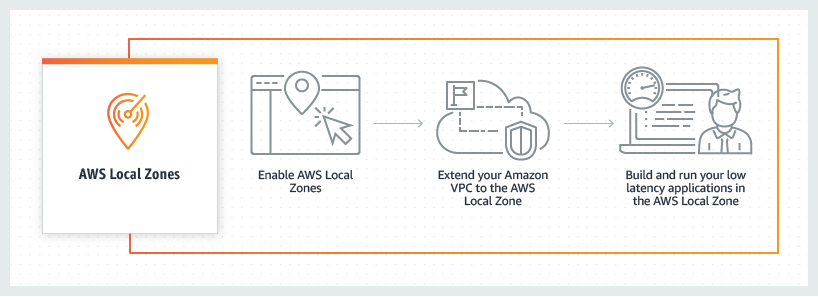
Local Zones are a new type of infrastructure deployment that places AWS compute, storage, database, and other select AWS services in large metropolitan areas closer to end users. This gives you access to single-digit millisecond latency with the use of AWS Direct Connect and the ability to meet data residency requirements. Local Zones are also connected to their parent Region via AWS’s redundant and high bandwidth private network. This gives applications running in Local Zones fast, secure, and seamless access to a complete list of services in the parent Region.

Unlike Outposts, which you deploy within your datacenter or a co-location of your choice, Local Zones are owned, managed, and operated by AWS. Local Zones eliminate the need for you to manage power, connectivity, and capacity. Furthermore, you can provision workloads on a Local Zone from your AWS Management Console just as you would for AZs and Regions today.

AWS Local Zones how it worksWhat is Outposts?

Outposts is a family of fully managed solutions delivering AWS infrastructure and services to virtually any on-premises or edge location for a truly consistent hybrid experience. Outposts lets you run some AWS services locally and connect to a broad range of services available in the local AWS Region. Outposts comes in two types of offerings: Outposts rack and Outposts servers, with which you can run applications and workloads on-premises using the same AWS infrastructure, services, tools, and APIs as in AWS Regions.

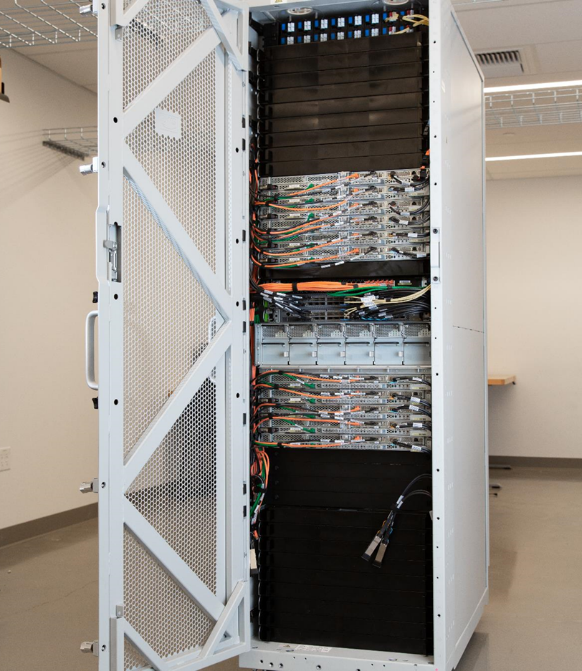
The Outposts rack is available as an industry standard 42U form factor. It provides the same AWS infrastructure, services, tools, and APIs to your data center or co-location space  that you would find in an AWS Region.

Outposts Rack

The Outposts servers come in a 1U or 2U form factor and are designed for locations that have limited space or smaller capacity requirements. Both support different compute instances, as detailed in the Outposts servers feature page.

Outposts ServersCustomer use cases

Now that we have an overview of both Local Zones and Outposts service offerings, let’s dive into use cases, the differences between them, and how your business can leverage each to accomplish your workloads requirements.

Low latency

Customers today require low latency computing for workloads, such as medical imaging, transaction processing for Enterprise Resource Planning (ERP) applications, enterprise migration with hybrid architecture, real-time multiplayer gaming, telco network function virtualization, and regulated gaming workloads.

Outposts can meet ultra-low latency requirements. This is accomplished by bringing AWS services on premises and to the edge at Outpost Sites. An Outpost site is the physical location where your Outpost operates, and it can be local within one of your data centers or at a co-location facility of your choice.

When accessing from within the same metro, Local Zones will provide you with a low, single millisecond latency experience when communicating with your applications. Latency between Local Zones and AWS Regions or Local Zones and on-premises environments varies, and these will depend on how close the nearest Local Zone is as well as the type of modality used for the connection (Public Internet, VPN, and AWS Direct Connect). You should always choose the closest Local Zone location to achieve the lowest possible latency. For use cases such as mobile gaming, you can utilize Local Zones by deploying your applications to a Local Zone location nearest to your end users. Local Zones are generally available in 17 metros across the US, 4 outside the US, and we are continuing to launch Local Zones in 30 cities across 25 countries. Check out updates for more general availability of Local Zones.

Data residency

On occasion, data must remain in a specific geographic region for regulatory or information security reasons. Healthcare and other regulated industries, such as financial services or Oil & Gas, have specific data residency requirements.

Outposts helps meet a customer’s data residency requirements because it’s installed on premises and essentially brings AWS to where the data currently resides. This allows you to pick and control where your workloads run, and where your data will stay. Check out the full list of countries and territories where Outposts is available on the FAQs page of Outposts rack and the FAQs page of Outposts servers.

Local Zones bring AWS closer or within a customer’s geographic boundary in a fully AWS owned and operated mode. Although Local Zones can help meet data residency use cases in some scenarios, data residency requirements vary depending on the jurisdictions. Therefore, you should work closely with your compliance and information security teams when choosing the Local Zone location in which to deploy your regulated workloads.

Migration and modernization

When trying to migrate to the cloud and modernize your stack, some workloads can be challenging. Often there are on-premises applications which are difficult to move into Regions due to latency-sensitive system intermittencies between their various components. As dependencies arise, you may choose to segment these migrations into smaller pieces. Then this will require latency-sensitive connectivity between the various parts of the application.

Outposts and Local Zones both allow for a gradual migration and modernization of your stack. You can choose to migrate parts of their workloads while still maintaining latency-sensitive connectivity between components until the entirety is ready to move.

Factors in selecting Local Zones or Outposts

Choosing between Local Zones and Outposts will depend on the following factors, and you should examine all of them together when selecting a service for your use case.

  1. Latency requirements

Local Zones can achieve low single millisecond latency when accessing within the same metro. On the other hand, Outposts can achieve ultra-low latency requirements when deployed within your datacenter or at a co-location facility of your choice. When selecting one over the other, you must work backward from your goal and workload requirements.

If you’re conducting a migration and modernization strategy which requires ultra-low latency between a workloads application and database tiers that are difficult to migrate to the AWS Regions, then Outposts would be the right solution for you.

Alternatively, if your workload involves streaming live broadcasts to end users which requires low single millisecond latency, but your end users are located where an AWS Region isn’t available, then Local Zones distributed across various metros would work best to serve your content.

  1. Availability of services needed to support your workload

Local Zones and Outposts differ with their list of supported AWS services, and you must review your workload’s service requirements when determining the best fit for you. For example, if a customer has a computer vision workload that requires storing and retrieving large volumes of images locally using Amazon Simple Storage Service (Amazon S3), then Outposts and certain Local Zones meet this requirement while other Local Zones don’t. Learn how you can use Amazon S3 on Outposts for computer vision workloads.

Outposts rack and servers support different sets of AWS services locally. You can view comparisons between them, or visit the Outposts servers and Outposts rack feature sites for more details.

Local Zones’ features vary depending on the location in which you choose to deploy. You can view more details and a full list of supported features and services per location on our Local Zones features page.

  1. Investment and management of infrastructure on-premises

Management of the infrastructure and prerequisites are another factor when considering which AWS service best suits your needs.

Outposts is ordered through AWS, and it requires installation in a customer’s on-premises datacenter or co-location provider of their choice. Outposts rack installation is handled by AWS, while Outposts servers installation is done by the customer or a third-party of their choosing. There are power and redundant networking requirements for the Outpost Site, as well as a required subscription to AWS Enterprise Support or On-Ramp Support.

Local Zones infrastructure is fully-managed by AWS, including the power, networking, and capacity. This reduces operational management as well as the overhead cost for customers. An Enterprise support agreement isn’t required to utilize Local Zones.

You should always choose Regions or Local Zones if your use case allows, and use Outposts when a Region or Local Zone isn’t a good fit. If both Outposts and Local Zones fit a customer’s use case and requirements, then Local Zones will be the preferred choice.

  1. Regulations, compliance, and information security

If a Local Zone is either unavailable or unable to meet your residency requirements within your geographic boundary consider Outposts, which can be deployed to a data center or co-location facility of your choice. Data residency requirements can be a factor based on your industry and the regulations to which your workload must adhere. Furthermore, you should work closely with your compliance and information security teams when choosing between Local Zones or Outposts.

Conclusion

Whether you’re dealing with latency-sensitive applications, data residency requirements, or a migration and modernization strategy, AWS provides options and flexibility for you to leverage the same AWS infrastructure, services, APIs, and tools to metro areas and on-premises locations with Local Zones and Outposts.

The decision of which technology to use will depend on several factors that we discussed above. You must work across teams within your organization to make sure that the latency requirements (low single millisecond latency within a metro for Local Zones vs the ultra low latency of Outposts when deployed close to or within your datacenter), data reseidency needs, installation prerequisites, and availability of services to support your workload are met.

Once these factors are taken into account, and you have made a choice, visit our product pages for Outposts and Local Zones with information on how you can get started.

Visualize and create your serverless workloads with AWS Application Composer

Post Syndicated from James Beswick original https://aws.amazon.com/blogs/compute/visualize-and-create-your-serverless-workloads-with-aws-application-composer/

This post is written by Luca Mezzalira, Principal Specialist Solutions Architect.

Today, AWS is launching a preview of AWS Application Composer, a visual designer that you can use to build your serverless applications from multiple AWS services.

In distributed systems, empowering teams is a cultural shift needed for enabling developers to help translate business capabilities into code.

This doesn’t mean every team works in isolation. Different teams or even new-joiners must understand what they are building to contribute to a project. The best way to understand architecture quickly is by using diagrams. Unfortunately, architectural diagrams are often outdated. Often, when releasing a workload in production, there are already discrepancies from the initial design and infrastructure.

Developers new to building serverless applications can face a learning curve when composing applications from multiple AWS services. They must understand how to configure each service, and then learn and write infrastructure as code (IaC) to deploy their application.

Example scenario

Emma is a cloud architect working for a video on-demand platform where every user can access the content after subscribing to the service. In the next few months, the marketing team wants to start a campaign to increase the user base using discount codes for new users only.

She collaborates with a team of developers who are new to building serverless applications. They must design a discount code service that can scale to thousands of transactions per second. There are many requirements to implement this service:

  • Gathering the gift code from a user.
  • Verifying the discount code is available.
  • Applying the discount code to the invoice at the end of the month.

Based on these requirements and default SLAs available for all the platform services, Emma designs a high-level architecture with the key elements needed for building this microservice.

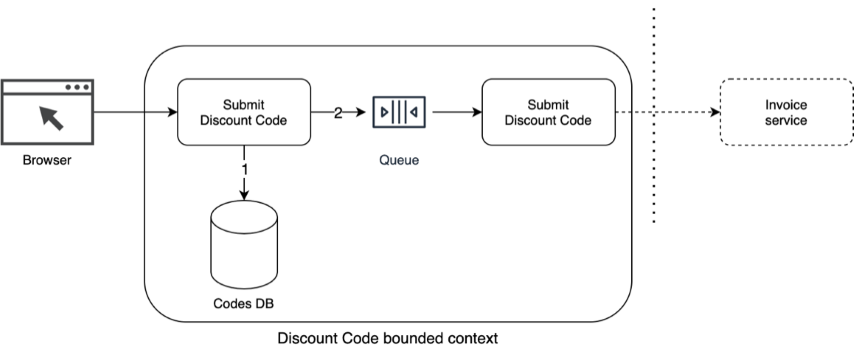
Discount code service high-level architecture

Discount code service high-level architecture

Her idea is to receive a request from clients with a discount code in the payload, and validate the availability of the discount code in a database. The service then asynchronously processes different discount codes in batches to reduce traffic to downstream dependencies and reduce the cost of the overall infrastructure.

This approach ensures that the service can scale in the future beyond the initial traffic volume. It simplifies the management and implementation of the discount code service and other parts of the system with a loosely coupled architecture.

After discussing the architecture with her developers, she opens Application Composer in the AWS Management Console and starts building the implementation using serverless services.

Application Composer initial screen

Application Composer initial screen

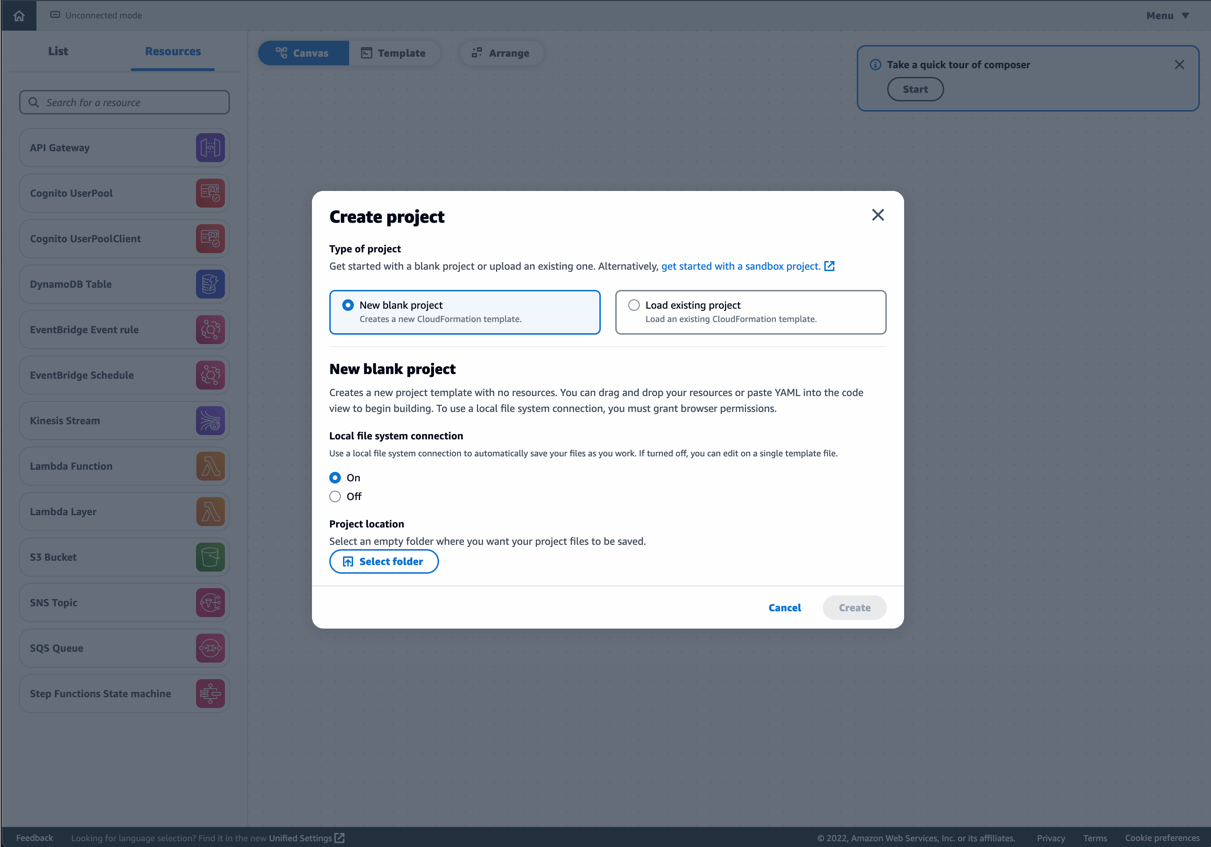
To start, she selects New blank project and selects a local file system folder to save the project files.

Application Composer create blank project

Application Composer create blank project

Granting Application Composer access to your local project files allows near real time bidirectional syncing of changes between the console interface and locally stored project files. When you update a property with the Application Composer interface, it’s reflected in the files stored locally. When you change a local file in your IDE, it automatically reflects in the Application Composer canvas.

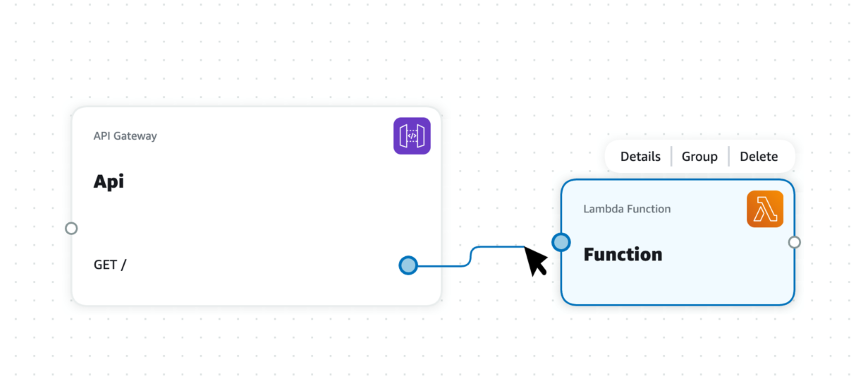
After creating the project, Emma drags the AWS resources she needs from the left sidebar for expressing the initial design agreed with the team.

Using Application Composer, you can drag serverless resources on the canvas and connect them together. In the background, Application Composer generates the infrastructure as code AWS CloudFormation template for you.

Application Composer canvas

Application Composer canvas

For example, this is the default configuration generated when you drag a Lambda function onto the canvas. The following code is present in the template view:

  Function:
    Type: AWS::Serverless::Function
    Properties:
      FunctionName: !Sub ${AWS::StackName}-Function
      Description: !Sub
        - Stack ${AWS::StackName} Function ${ResourceName}
        - ResourceName: Function
      CodeUri: src/Function
      Handler: index.handler
      Runtime: nodejs14.x
      MemorySize: 3008
      Timeout: 30
      Tracing: Active

Application Composer incorporates some helpful default property values, which are sometimes overlooked by developers new to serverless workloads. These include activating tracing using AWS X-Ray or increasing a function timeout, for instance.

You can change these parameters either in the CloudFormation template inside Application Composer or by visually selecting a resource. In the previous example, you can update the Lambda function parameters by opening the resource properties panel.

Application Composer resource panel

Application Composer resource panel

When you synchronize an Application Composer project with the local system, you can change the CloudFormation template from a code editor. This reflects the change in the Application Composer interface automatically.

When you connect two elements in the canvas, Application Composer sets default IAM policies, environment variables for Lambda functions, and event subscriptions where applicable.

For instance, if you have a Lambda function that interacts with an Amazon DynamoDB table and Amazon SQS queue, Application Composer generates the following configuration for the Lambda function.

Function:
    Type: AWS::Serverless::Function
    Properties:
      FunctionName: !Sub ${AWS::StackName}-Function
      Description: !Sub
        - Stack ${AWS::StackName} Function ${ResourceName}
        - ResourceName: Function
      CodeUri: src/Function
      Handler: index.handler
      […]
      Environment:
        Variables:
          QUEUE_NAME: !GetAtt Queue.QueueName
          QUEUE_ARN: !GetAtt Queue.Arn
          QUEUE_URL: !Ref Queue
          TABLE_NAME: !Ref Table
          TABLE_ARN: !GetAtt Table.Arn
      Policies:
        - SQSSendMessagePolicy:
            QueueName: !GetAtt Queue.QueueName
        - DynamoDBCrudPolicy:
            TableName: !Ref Table

This helps new builders when designing their first serverless applications and provides an initial configuration, which more advanced builders can amend. This allows you to include good operational practices when designing a serverless application.

Emma’s team continues to add together the different services needed to express the discount code architecture. This is the final result in Application Composer:

Discount code architecture in Application Composer

Discount code architecture in Application Composer

  1. The application includes an Amazon API Gateway endpoint that exposes the API needed for submitting a discount code to the system.
  2. The POST API triggers a Lambda function that first validates that the discount code is still available.
  3. This is stored using a DynamoDB table
  4. After successfully validating the discount code, the function adds a message to an SQS queue and returns a successful response to the client.
  5. Another Lambda function retrieves the message from the SQS queue and sends an invoice.

Using this approach optimizes the Lambda function invocation for speed as the remaining operations are handled asynchronously. This also simplifies the complexity and cost of the architecture because you can aggregate multiple discount codes per user SQS batching, rather than scaling the service when requests arrive from the users.

The team agrees to use this as the initial design of their service. In the future, they plan to integrate with their authentication mechanism. They add Lambda Powertools for observability, and additional libraries developed internally to make the project compliant with company standards.

Application Composer has created all the files needed to start the project in Emma’s local file system including the CloudFormation template .yaml file and the Lambda functions’ handlers.

Application Composer generated files

Application Composer generated files

Emma can now upload the outline of this service to a version control system and share the artifacts with other developers who can start coding the business logic.

Additional features

Application Composer includes a resource list tab within the left-side panel that allows you to quickly browse available resources.

Application Composer browse available resources

Application Composer browse available resources

You can also group resources semantically for simplifying the visualization inside the canvas. This helps when you have a large application in the canvas and you want to select an element quickly without dragging the canvas around to find the resource. This feature doesn’t impact the infrastructure generated.

Application Composer grouping

Application Composer grouping

Application Composer adds some metadata to the CloudFormation template to allow the canvas to group resources together when the project is loaded again.

Metadata:
  AWS::Composer::Groups:
    Group:
      Label: Group
      Members:
        - CodesQueue
        - CodesTable

You can use Application Composer beyond building new serverless workloads. You can load existing CloudFormation templates by selecting Load existing project in the Create project dialog.

Application Composer load existing project

Application Composer load existing project

You can use this to define your blueprints with organizational best practices and then visualize them within Application Composer. This helps teams collaborate when starting new serverless services. You can add resources from an existing base template to build serverless microservices or event-driven architectures.

Integration with AWS SAM

AWS Serverless Application Model (AWS SAM) recently announced the general availability of AWS SAM Accelerate to accelerate the feedback loop and testing of your code and cloud infrastructure by synchronizing only project changes. You can use Application Composer together with AWS SAM Accelerate to more simply visually build and then test your serverless applications in the cloud.

To learn more about AWS SAM Accelerate, watch this live demo.

Where Application Composer fits into the development process

Emma used Application Composer to help her team for this project but has ideas on further ways to use it.

  • Rapid prototyping.
  • Reviewing and collaboratively evolving existing serverless projects.
  • Generating diagrams for documentation or Wikis.
  • On-boarding new team members to a project
  • Reducing the first steps to deploy something in an AWS Cloud account.

Application Composer availability

Application Composer is currently available as a public preview in the following Regions: Frankfurt (eu-central-1), Ireland (eu-west-1), Ohio (us-east-2), Oregon (us-west-2), North Virginia (us-east-1) and Tokyo (ap-northeast-1).

Application Composer is available at no additional cost and can be accessed via the AWS Management Console.

Conclusion

Application Composer is a visual designer to help developers and architects express and build their application architecture. They can iterate on their ideas with colleagues and create documentation for others working on the application for the first time. You can use Application Composer during multiple stages of your software development lifecycle, reducing the friction in getting your project started and into production.

Currently, Application Composer supports a limited number of services that we plan to add to in the future. Let us know which services you would like to see included.

As a public preview, we are looking for suggestions and ideas to evolve the tool. We are looking for ways to help you and your teams to speed up the adoption of serverless workloads inside your organization. Add a comment to this post or tweet with the tag #AWSAppComposerWishlist.

For more serverless learning resources, visit Serverless Land.

New – Process PDFs, Word Documents, and Images with Amazon Comprehend for IDP

Post Syndicated from Marcia Villalba original https://aws.amazon.com/blogs/aws/now-process-pdfs-word-documents-and-images-with-amazon-comprehend-for-idp/

Today we are announcing a new Amazon Comprehend feature for intelligent document processing (IDP). This feature allows you to classify and extract entities from PDF documents, Microsoft Word files, and images directly from Amazon Comprehend without you needing to extract the text first.

Many customers need to process documents that have a semi-structured format, like images of receipts that were scanned or tax statements in PDF format. Until today, those customers first needed to preprocess those documents using optical character recognition (OCR) tools to extract the text. Then they could use Amazon Comprehend to classify and extract entities from those preprocessed files.

Now with Amazon Comprehend for IDP, customers can process their semi-structured documents, such as PDFs, docx, PNG, JPG, or TIFF images, as well as plain-text documents, with a single API call. This new feature combines OCR and Amazon Comprehend’s existing natural language processing (NLP) capabilities to classify and extract entities from the documents. The custom document classification API allows you to organize documents into categories or classes, and the custom-named entity recognition API allows you to extract entities from documents like product codes or business-specific entities. For example, an insurance company can now process scanned customers’ claims with fewer API calls. Using the Amazon Comprehend entity recognition API, they can extract the customer number from the claims and use the custom classifier API to sort the claim into the different insurance categories—home, car, or personal.

Starting today, Amazon Comprehend for IDP APIs are available for real-time inferencing of files, as well as for asynchronous batch processing on large document sets. This feature simplifies the document processing pipeline and reduces development effort.

Getting Started
You can use Amazon Comprehend for IDP from the AWS Management Console, AWS SDKs, or AWS Command Line Interface (CLI).

In this demo, you will see how to asynchronously process a semi-structured file with a custom classifier. For extracting entities, the steps are different, and you can learn how to do it by checking the documentation.

In order to process a file with a classifier, you will first need to train a custom classifier. You can follow the steps in the Amazon Comprehend Developer Guide. You need to train this classifier with plain text data.

After you train your custom classifier, you can classify documents using either asynchronous or synchronous operations. For using the synchronous operation to analyze a single document, you need to create an endpoint to run real-time analysis using a custom model. You can find more information about real-time analysis in the documentation. For this demo, you are going to use the asynchronous operation, placing the documents to classify in an Amazon Simple Storage Service (Amazon S3) bucket and running an analysis batch job.

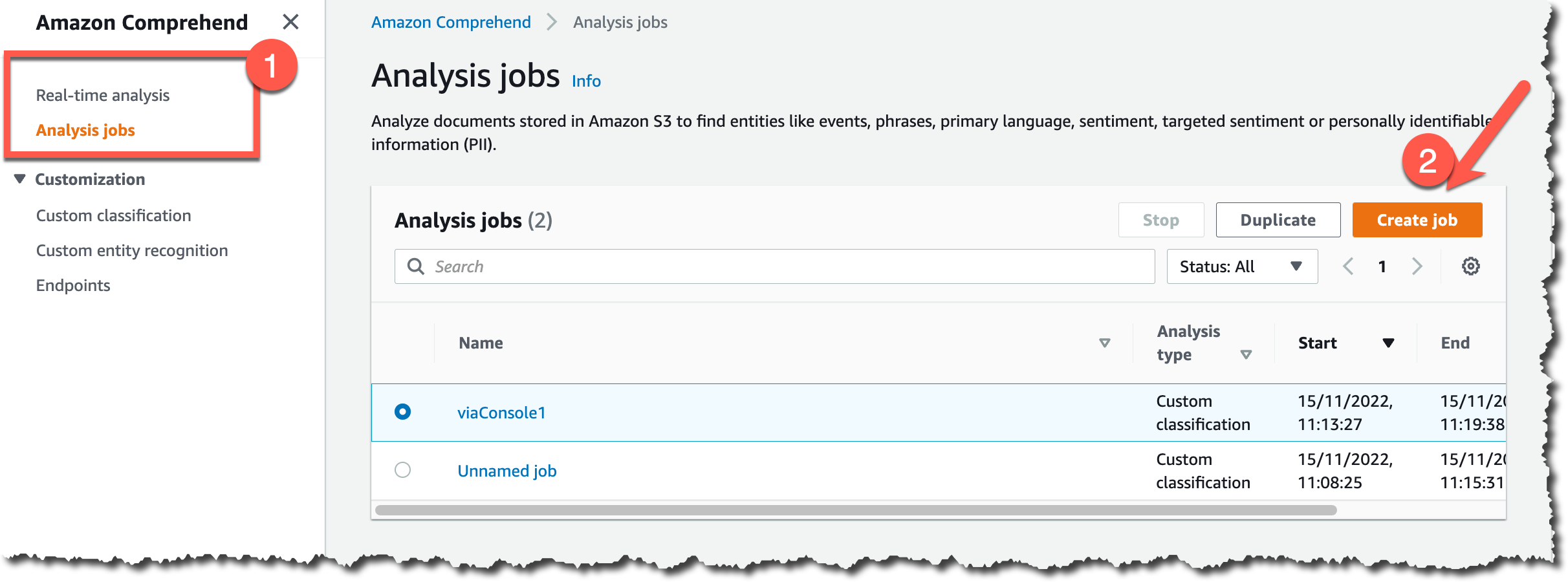
To get started classifying documents in batch from the console, on the Amazon Comprehend page, go to Analysis jobs and then Create job.

Create new job

Then you can configure the new analysis job. First, input a name and pick Custom classification and the custom classifier you created earlier.

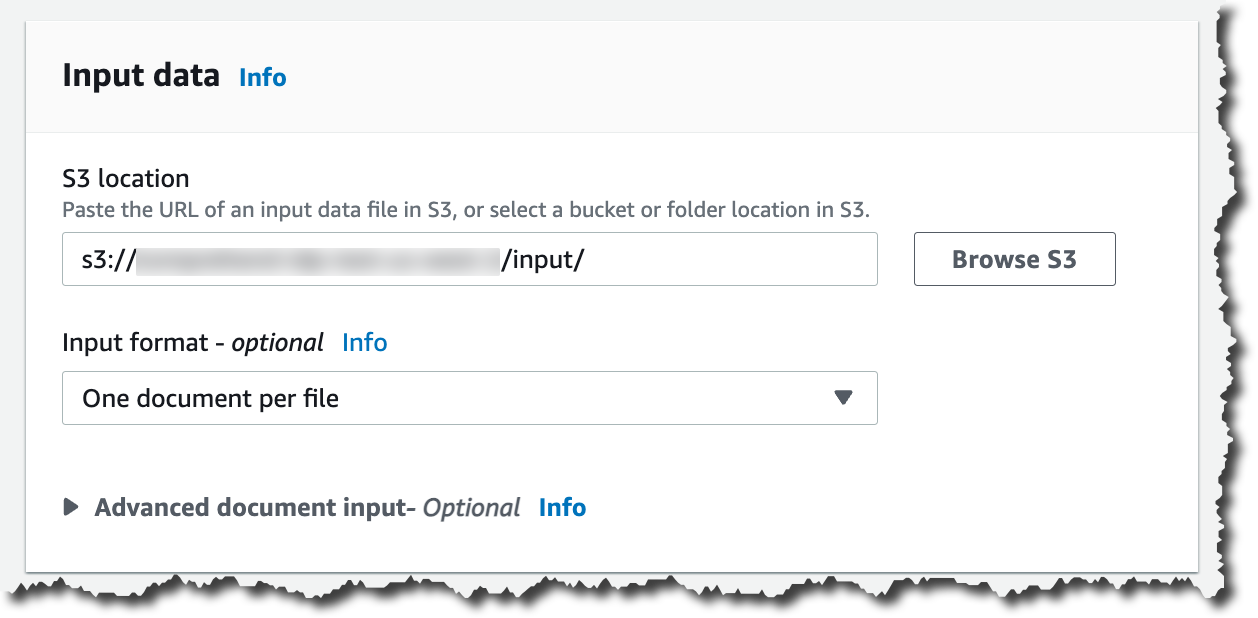
Then you can configure the input data. First, select the S3 location for that data. In that location, you can place your PDFs, images, and Word Documents. Because you are processing semi-structured documents, you need to choose One document per file. If you want to override Amazon Comprehend settings for extracting and parsing the document, you can configure the Advanced document input options.

Input data for analysis job

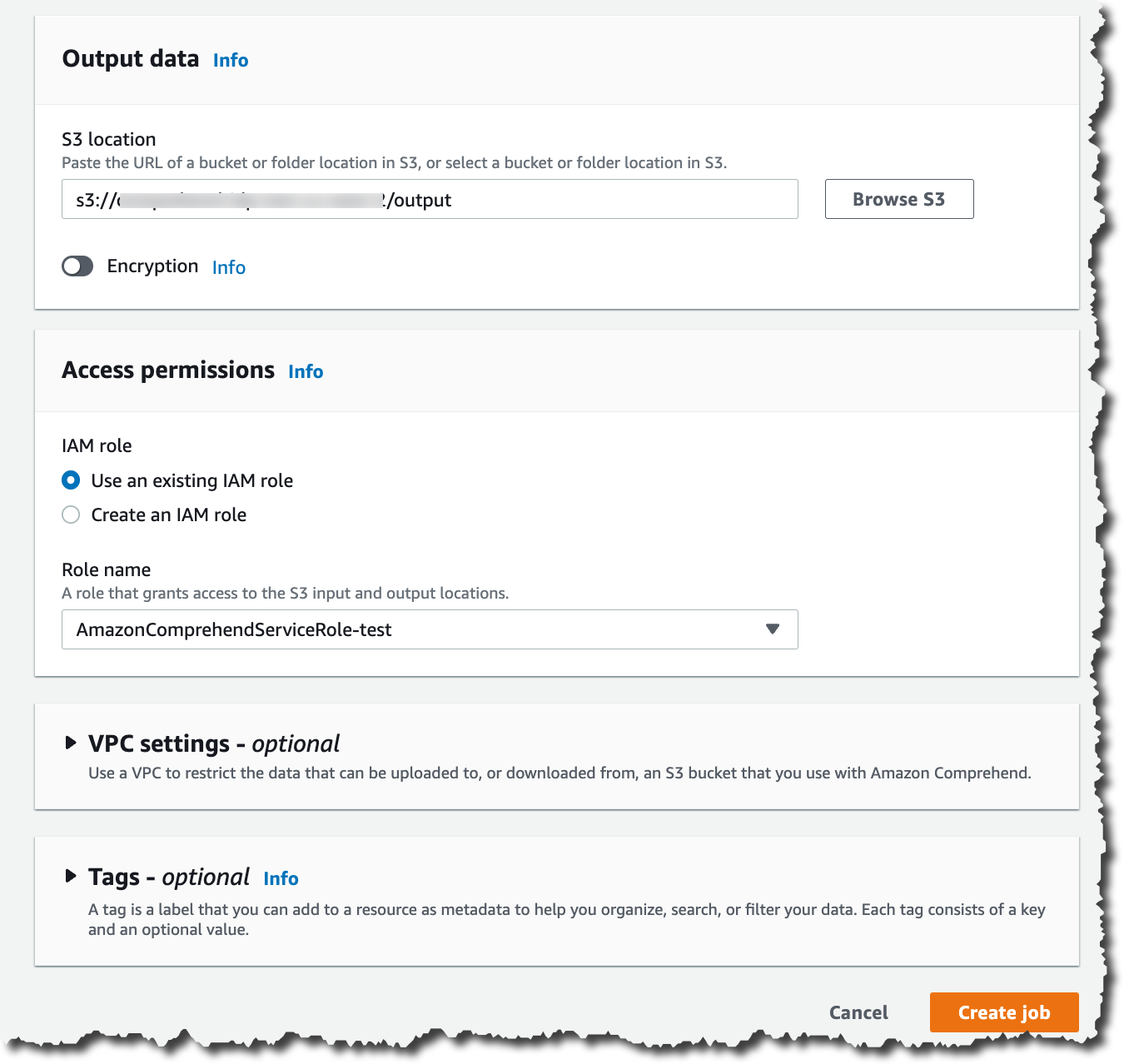
After configuring the input data, you can select where the output of this analysis should be stored. Also, you need to give access permissions for this analysis job to read and write on the specified Amazon S3 locations, and then you are ready to create the job.

Configuring the classification job

The job takes a few minutes to run, depending on the size of the input. When the job is ready, you can check the output results. You can find the results in the Amazon S3 location you specified when you created the job.

In the results folder, you will find a .out file for each of the semi-structured files Amazon Comprehend classified. The .out file is a JSON, in which each line represents a page of the document. In the amazon-textract-output directory, you will find a folder for each classified file, and inside that folder, there is one file per page from the original file. Those page files contain the classification results. To learn more about the outputs of the classifications, check the documentation page.

Job output

Available Now
You can get started classifying and extracting entities from semi-structured files like PDFs, images, and Word Documents asynchronously and synchronously today from Amazon Comprehend in all the Regions where Amazon Comprehend is available. Learn more about this new launch in the Amazon Comprehend Developer Guide.

Marcia

Introducing Amazon GameLift Anywhere – Run Your Game Servers on Your Own Infrastructure

Post Syndicated from Channy Yun original https://aws.amazon.com/blogs/aws/introducing-amazon-gamelift-anywhere-run-your-game-servers-on-your-own-infrastructure/

In 2016, we launched Amazon GameLift, a dedicated hosting solution that securely deploys and automatically scales fleets of session-based multiplayer game servers to meet worldwide player demand.

With Amazon GameLift, you can create and upload a game server build once, replicate, and then deploy across multiple AWS Regions and AWS Local Zones to reach your players with low-latency experiences across the world. GameLift also includes standalone features for low-cost game fleets with GameLift FleetIQ and player matchmaking with GameLift FlexMatch.

Game developers asked us to reduce the wait time to deploy a candidate server build to the cloud each time they needed to test and iterate their game during the development phase. In addition, our customers told us that they often have ongoing bare-metal contracts or on-premises game servers and want the flexibility to use their existing infrastructure with cloud servers.

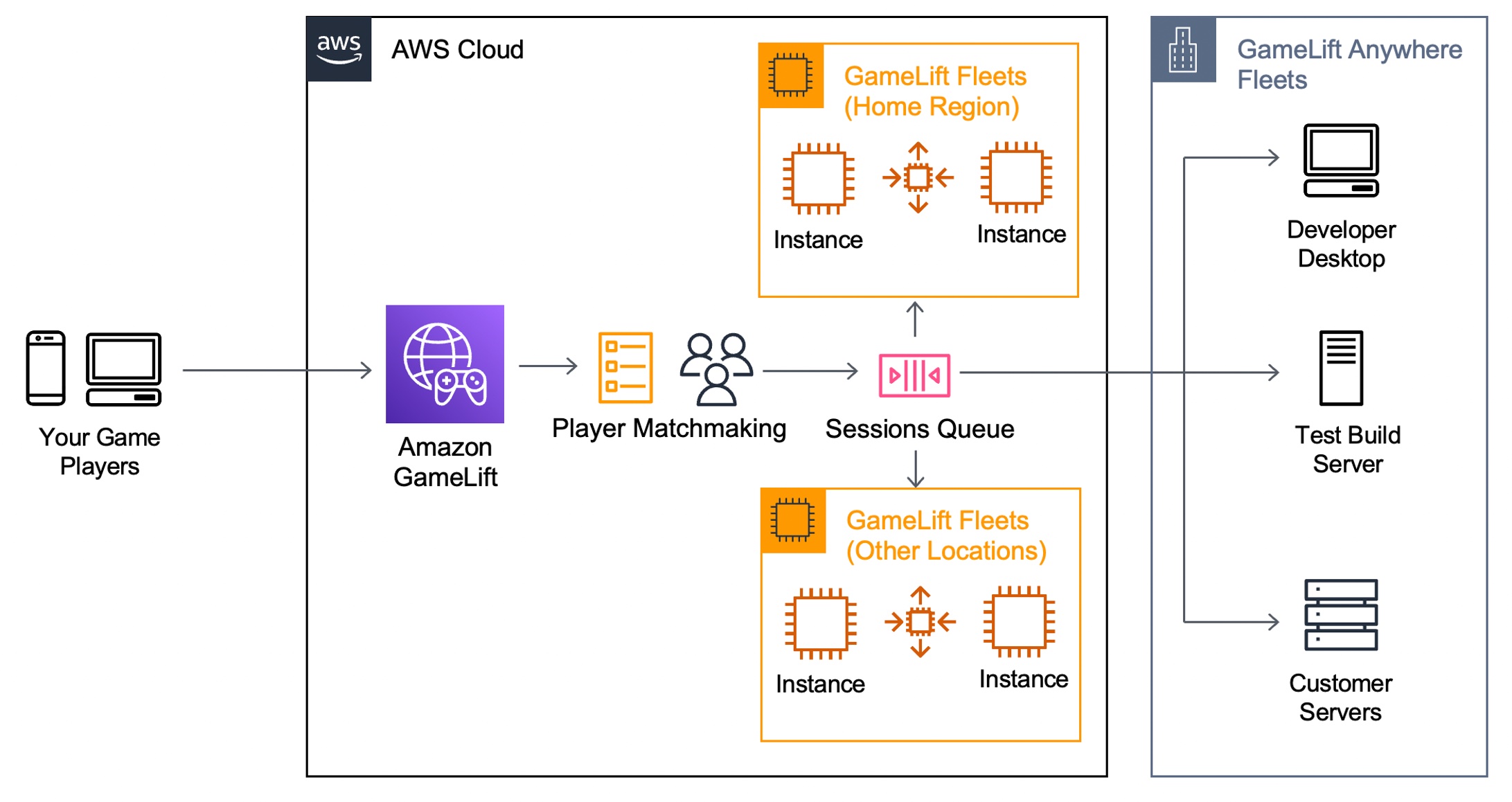
Today we are announcing the general availability of Amazon GameLift Anywhere, which decouples game session management from the underlying compute resources. With this new release, you can now register and deploy any hardware, including your own local workstations, under a logical construct called an Anywhere Fleet.

Because your local hardware can now be a GameLift-managed server, you can iterate on the server build in your familiar local desktop environment, and any server error can materialize in seconds. You can also set breakpoints in your environment’s debugger, thereby eliminating trial and error and further speeding up the iteration process.

Here are the major benefits for game developers to use GameLift Anywhere.

  • Faster game development – Instantly test and iterate on your local workstation while still leveraging GameLift FlexMatch and Queue services.
  • Hybrid server management – Deploy, operate, and scale dedicated game servers hosted in the cloud or on-premises, all from a single location.
  • Streamline server operations – Reduce cost and operational complexity by unifying server infrastructure under a single game server orchestration layer.

During the beta period of GameLift Anywhere, lots of customers gave feedback. For example, Nitro Games has been an Amazon GameLift customer since 2020 and have used the service for player matchmaking and managing dedicated game servers in the cloud. Daniel Liljeqvist, Senior DevOps Engineer at Nitro Games said “With GameLift Anywhere we can easily debug a game server on our local machine, saving us time and making the feedback loop much shorter when we are developing new games and features.”

GameLift Anywhere resources such as locations, fleets, and compute are managed through the same highly secure AWS API endpoints as all AWS services. This also applies to generating the authentication tokens for game server processes that are only valid for a limited amount of time for additional security. You can leverage AWS Identity and Access Management (AWS IAM) roles and policies to fully manage access to all the GameLift Anywhere endpoints.

Getting Started with GameLift Anywhere
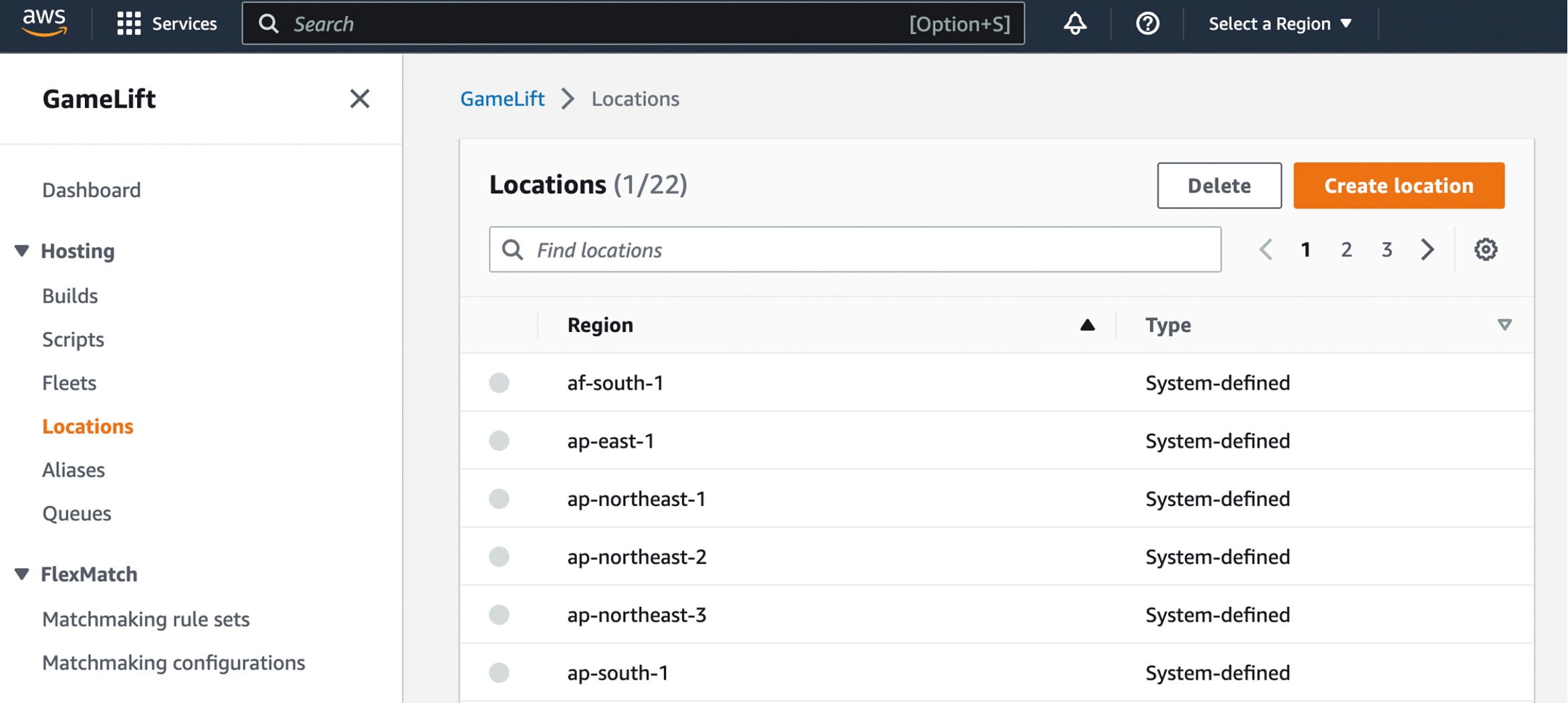
Before creating your GameLift fleet in your local hardware, you can create custom locations to run your game builds or scripts. Choose Locations in the left navigation pane of the GameLift console and select Create location.

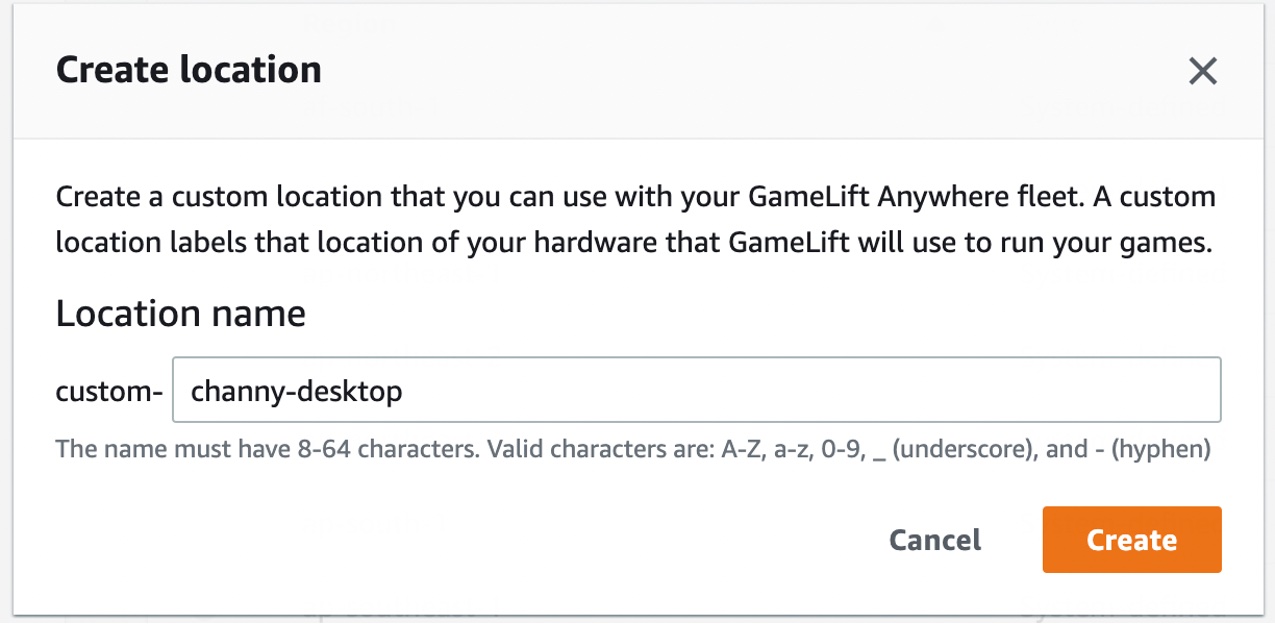
You can create a custom location of your hardware that you can use with your GameLift Anywhere fleet to test your games.

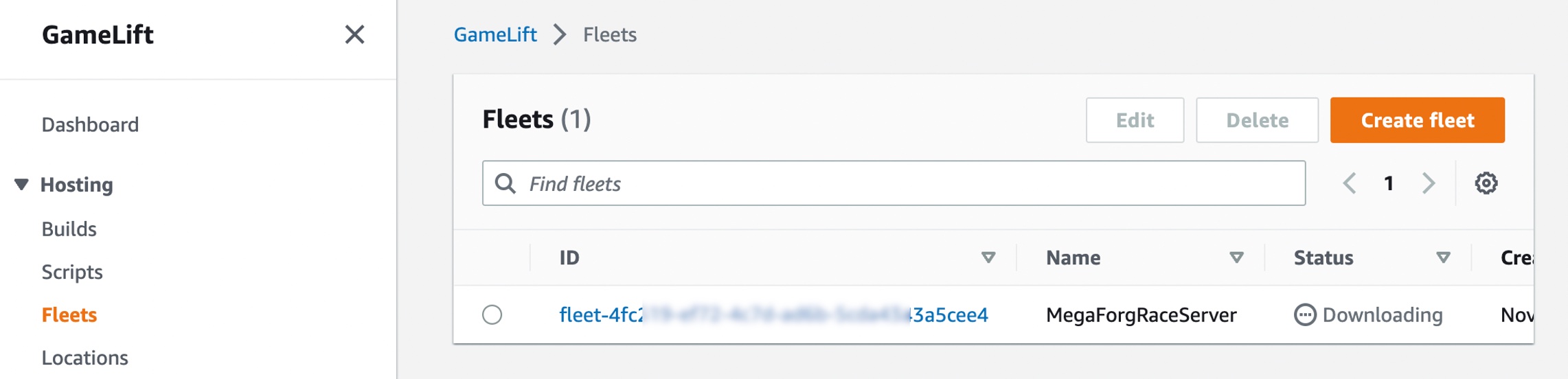
Choose Fleets from the left navigation pane, then choose Create fleet to add your GameLift Anywhere fleet in the desired location.

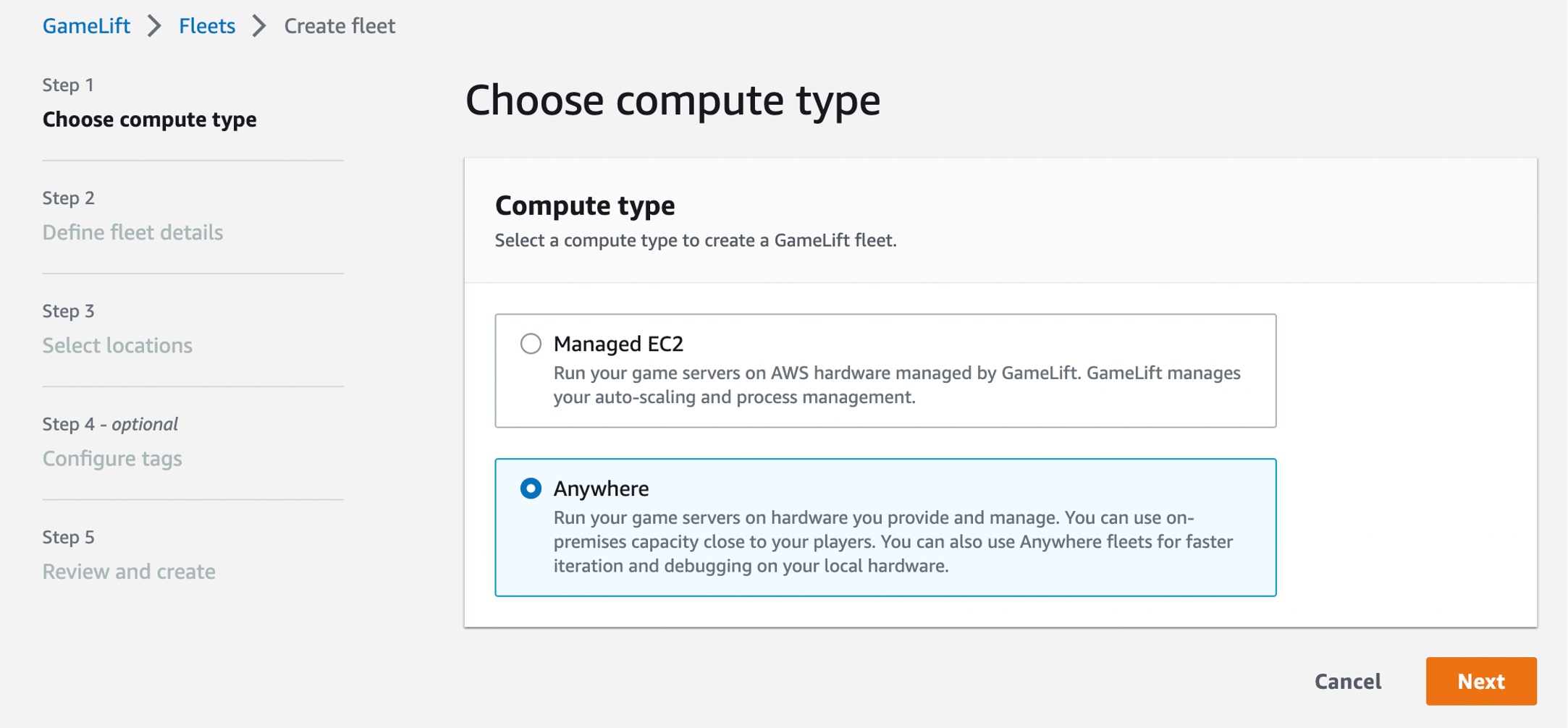
Choose Anywhere on the Choose compute type step.

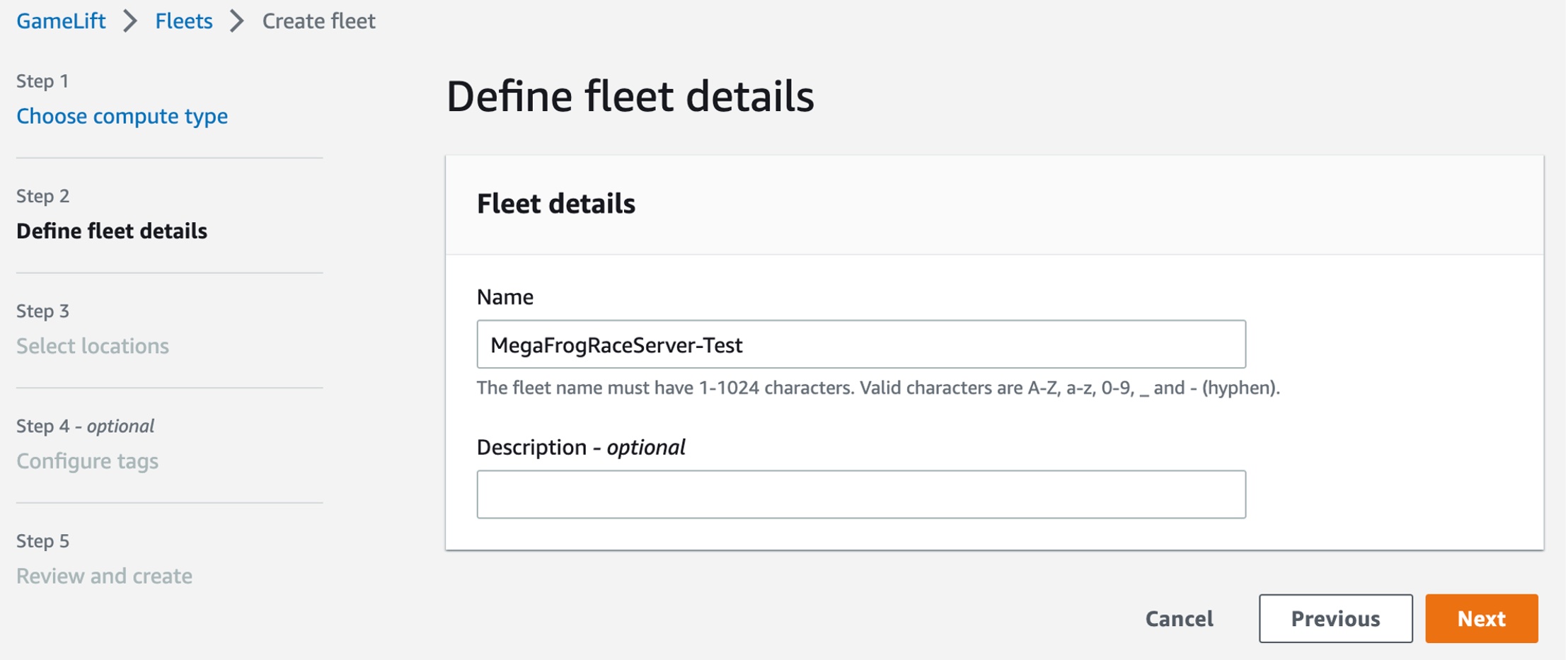
Define your fleet details, such as a fleet name and optional items. For more information on settings, see Create a new GameLift fleet in the AWS documentation.

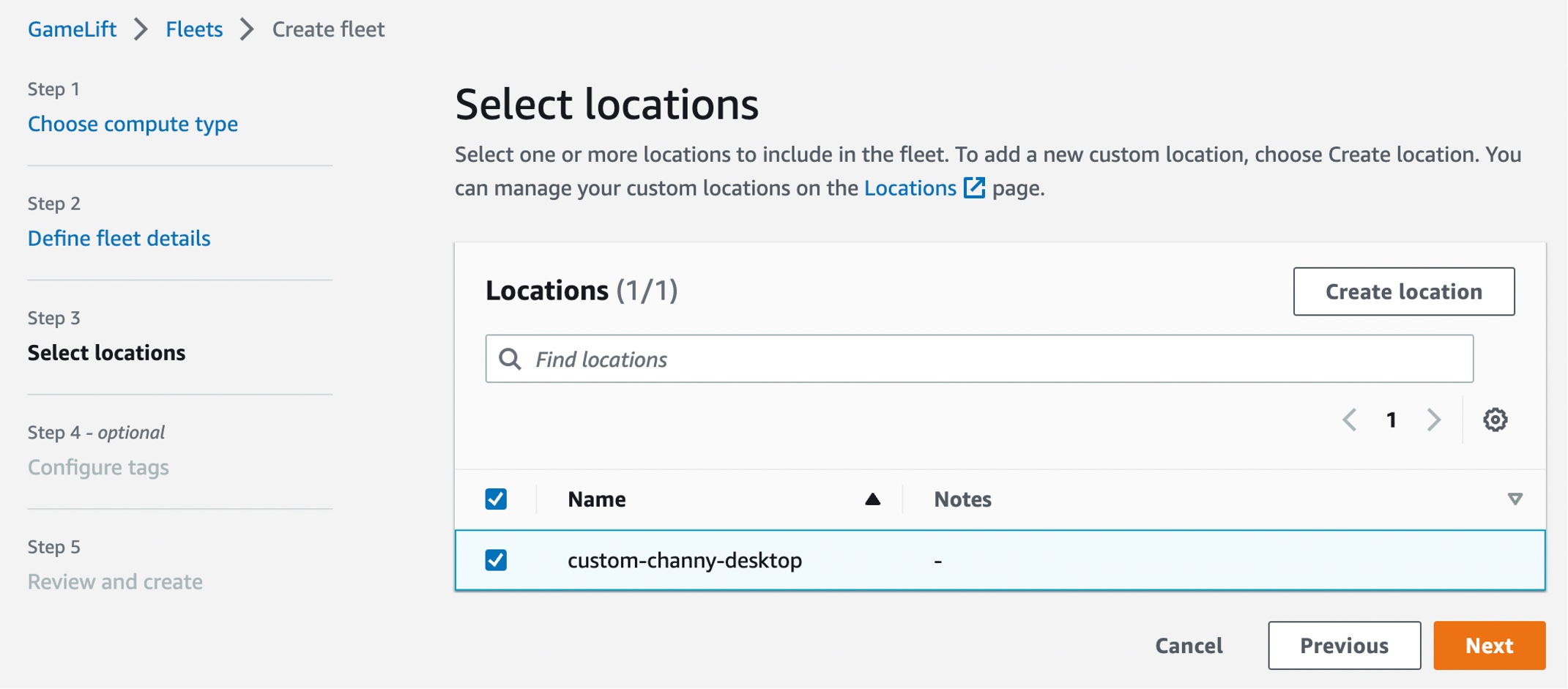
On the Select locations step, select the custom location that you created. The home AWS Region is automatically selected as the Region you are creating the fleet in. You can use the home Region to access and use your resources.

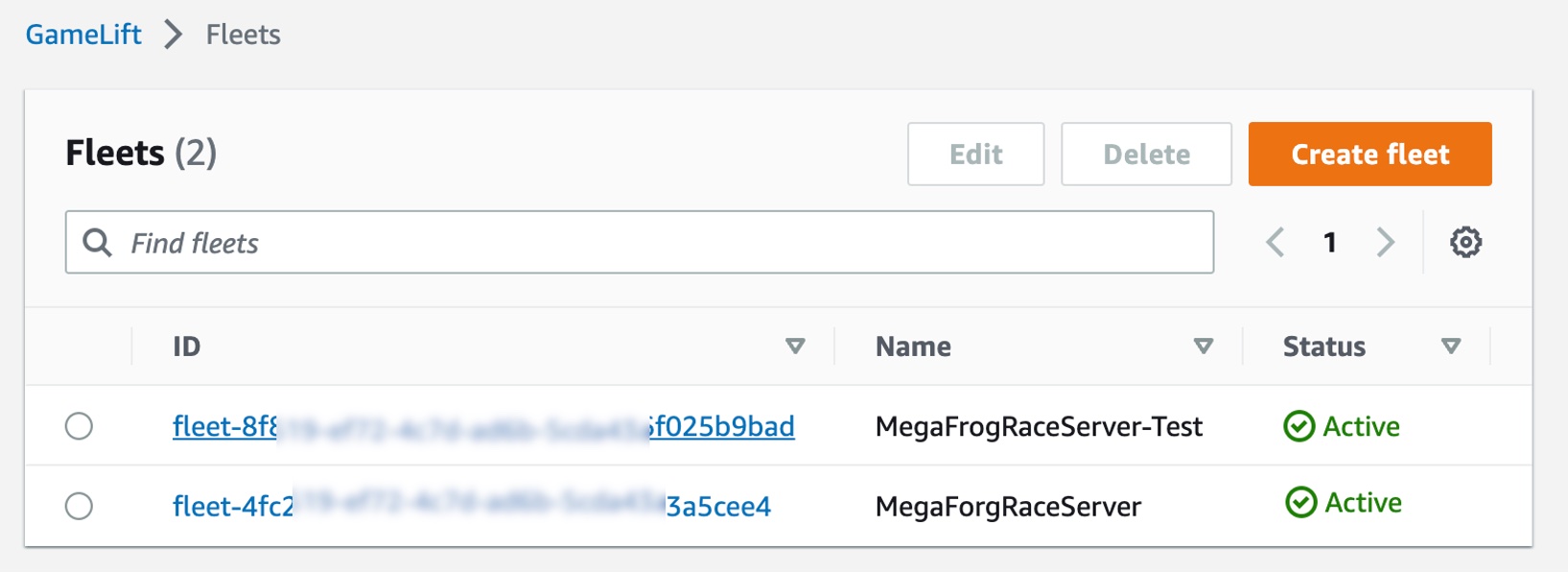
After completing the fleet creation steps to create your Anywhere fleet, you can see active fleets in both the managed EC2 instances and the Anywhere location. You also can integrate remote on-premises hardware by adding more GameLift Anywhere locations, so you can manage your game sessions from one place. To learn more, see Create a new GameLift fleet in the AWS documentation.

You can register your laptop as a compute resource in the fleet that you created. Use the fleet-id created in the previous step and add a compute-name and your laptop’s ip-address.

$ aws gamelift register-compute \
    --compute-name ChannyDevLaptop \
    --fleet-id fleet-12345678-abcdefghi \
    --ip-address 10.1.2.3

Now, you can start a debug session of your game server by retrieving the authorization token for your laptop in the fleet that you created.

$ aws gamelift get-compute-auth-token \
    --fleet-id fleet-12345678-abcdefghi \
    --compute-name ChannyDevLaptop

To run a debug instance of your game server executable, your game server must call InitSDK(). After the process is ready to host a game session, the game server calls ProcessReady(). To learn more, see Integrating games with custom game servers and Testing your integration in the AWS documentation.

Now Available
Amazon GameLift Anywhere is available in all Regions where Amazon GameLift is available.  GameLift offers a step-by-step developer guide, API reference guide, and GameLift SDKs. You can also see for yourself how easy it is to test Amazon GameLift using our sample game to get started.

Give it a try, and please send feedback to AWS re:Post for Amazon GameLift or through your usual AWS support contacts.

Channy

Why Cyberattacks Surge During the Holiday Season

Post Syndicated from Molly Clancy original https://www.backblaze.com/blog/why-cyberattacks-surge-during-the-holiday-season/

The holiday season should be all about spending some much-needed time off with friends and family, not dealing with cyberattacks at work. But the holiday season is the most wonderful time of year for cybercriminals, too. Cyberattacks surge between Thanksgiving and New Year’s. Many businesses and workers may be too busy or distracted to check every security alert or look over every email for suspicious content.

All businesses should be aware of cybersecurity risks during the holiday season, but small and medium sized businesses face different challenges when it comes to cyberattacks compared with large enterprises. Small businesses (with fewer than 500 employees) comprise 99.9% of all businesses in the United States. And microbusinesses, or businesses with four or fewer employees, comprise 91%. Due to their staffing and budget constraints, it is likely they are more vulnerable to cyberattacks than larger organizations.

Let’s take a closer look at why the holidays are so dangerous when it comes to digital security, and how you can prepare your business for a holiday cyberattack and retain your holiday cheer.

Download our Ransomware Guide

There’s never been a better time to strengthen your ransomware defenses. Get our comprehensive guide to defending your business against ransomware this holiday season.➔ Download The Complete Guide to Ransomware

The Most Vulnerable Time of the Year

So, why do cybercriminals choose the holiday season to perform their most damaging attacks? Here are a few reasons:

1. Companies Are Short-Staffed

Many companies find themselves short-staffed during the peak of the holiday season. Between holiday travel, events, and obligations, it’s easier for things to fall through the cracks. No matter how much you plan to have a full staff, there will always be times when you wish you had more personnel. End-of-year planning, increased order volumes, more time spent performing customer service duties, and technology hiccups keep staff more than busy at this time of year. Not to mention that there’s an added burden on IT professionals during the holidays, who are busy trying to keep office networks and remote access safe and secure, responding to help tickets, and keeping an eye on increased anomalous activity.

2. Workers Are Distracted

When employees are spread thin and juggling numerous duties and holiday obligations, office duties often take a back seat. Employees are looking forward to the holidays just as much as you are, so you can imagine that they might be more inattentive than at less festive times of the year. Workers that are distracted from their normal cybersecurity awareness might miss a clue that an email is coming from an illegitimate source.

Cybersecurity activities include scanning for vulnerabilities, mitigating risks, and looking for bad actors moving through systems. Among the hustle and bustle of the holidays, it might seem like there is no time for cybersecurity, or that it can wait till next year. That’s exactly why cybercriminals will be waiting to launch their attack when you least expect it.

Just a little office gift wrapping.

3. Email Activity Increases

With so many “happy holidays” emails from vendors, internal employees, and even outside addresses, there are plenty of opportunities for a fraudster to plant a malicious link that goes unnoticed. If a worker falls for a scam on a company device, the entire company could be at risk for a malware attack.

Cybersecurity Risks During the Holiday Season

Ransomware is one of the most damaging threats to businesses of all kinds. Last year there was a 30% increase in ransomware attacks targeting companies during the holiday season. When a worker unknowingly clicks on a malicious link or accesses a hijacked website on a company device, the business may become infected with ransomware. Attackers can then hold the organization for ransom by threatening to leak information. The advice is generally to refuse to pay.

Whether your company is in finance, retail, logistics, or any other industry, the first step to getting prepared for the holiday season is to reevaluate your cybersecurity. Ensure that you are ready in case one of these cybersecurity risks hits you this year.

Phishing

Phishing is a popular attack vector that cybercriminals use to gain access to a company’s system. Phishing emails can be very convincing when they impersonate another organization or legitimate person to trick the receiver into divulging crucial login information.

While many people think they would be able to recognize a phishing email, they’re the entry point for 90% of data breaches. Plus, busy workers may not have the time to focus on the minute details of every message they receive this holiday season. Attackers will use that to their advantage.

A phishing email recently received by the author that came from a false sender address.

Distributed Denial of Service (DDoS) Attacks

Another serious threat to business during the holidays is a DDoS attack. This is an especially popular route for cyberattacks at this time of year. Why? Simply put: Because businesses are busy, and attackers are keen to take advantage of that distraction to launch an attack. Cybercriminals use DDoS attacks to overload business systems with so much traffic that none of your applications can function.

Compromised Passwords

The best way for a cybercriminal to gain access to your business websites, accounts, and other mission-critical apps is to obtain compromised credentials. There are many ways that fraudsters can attempt to steal company login credentials with minimal effort. In fact, there have been several well-publicized password-related breaches that made passwords available to anyone who cares to search for that information—people have even created APIs so that you can easily see if you’re affected by those breaches. We humans are also prone to reusing passwords. According to a 2022 report, employees admitted to reusing passwords across an average of 16 different workplace accounts.

Protect Your Business This Holiday Season

So, what can you do to minimize your risks as cybercriminals ramp up their attacks? Here are some tips to help protect your business this holiday season:

  • Ensure your anti-virus and/or anti-phishing software scans for vulnerabilities regularly.
  • Discuss phishing email best practices with your staff year-round, but especially during the holiday season.
  • Never click on suspicious links or download email attachments from unknown senders.
  • Turn on safe browsing capabilities in your browser.
  • Backup business data locally and to the cloud.
  • Update your software and apply patches when they are released.
  • Use strong passwords, multi-factor authentication, and a secure password manager to generate and store secure passwords.

Even if you’ve done everything right, there is still a chance that you could be outsmarted by a cybercriminal this holiday season. Every business, no matter how big or small, needs to have an incident response plan in place to help staff identify the breach before it’s too late.

Don’t forget to include thorough training on the specific security protocols that workers need to follow in the event that a cyberattack does occur. If your business becomes the victim of a cyberattack, the sooner you can identify the breach, the better.

And just in case the worst happens, it’s smart to invest in a reliable backup solution. A decentralized approach to data security can help protect your business and safeguard your private information from anyone who wants to take advantage of your company. If your systems do go down and a cybercriminal locks you out of your business applications, you will still have your backup data, which means that you can restore your business data and resume business as usual with as little disruption as possible.

The holiday season is a money-maker for businesses and cybercriminals alike. Make sure that your company is protected so you can focus on the joy of the season instead of giving cybercriminals an easy payday.

The post Why Cyberattacks Surge During the Holiday Season appeared first on Backblaze Blog | Cloud Storage & Cloud Backup.

Yet another attack against freedom of speech in Bulgaria Lawsuit against Bivol in Greece over article about the Badr tanker

Post Syndicated from Николай Марченко original https://bivol.bg/lawsuit-against-bivol-in-greece-over-article-about-the-badr-tanker-2.html

четвъртък 1 декември 2022


Lawsuits against the investigative reporting outlet Bivol were among the cases discussed at the  New Horizons in Journalism international conference, hosted by the World Press Institute and the Association of European…

Announcing Amazon CodeCatalyst (preview), a Unified Software Development Service

Post Syndicated from Steve Roberts original https://aws.amazon.com/blogs/aws/announcing-amazon-codecatalyst-preview-a-unified-software-development-service/

Today, we announced the preview release of Amazon CodeCatalyst. A unified software development and delivery service, Amazon CodeCatalyst enables software development teams to quickly and easily plan, develop, collaborate on, build, and deliver applications on AWS, reducing friction throughout the development lifecycle.

In my time as a developer the biggest excitement—besides shipping software to users—was the start of a new project, or being invited to join a project. Both came with the anticipation of building something cool, cutting new code—seeing an idea come to life. However, starting out was sometimes a slow process. My team or I would need to update our local development environments—or entirely new machines—with tools, libraries, and programming frameworks. We had to create source code repositories and set up other shared tools such as Jira, Confluence, or Jenkins, configure build pipelines and other automation workflows, create test environments, and so on. Day-to-day maintenance of development and build environments consumed valuable team cycles and energy. Collaboration between the team took effort, too, because tools to share information and have a single source of truth were not available. Context switching between projects and dealing with conflicting dependencies in those projects, e.g., Python 3.6 for project X and Python 2.7 for project Y—especially when we had only a single machine to work on—further increased the burden.

It doesn’t seem to have gotten any better! These days, when talking to developers about their experiences, I often hear them express that they feel modern development has become even more complicated. This is due to having to select and configure a wider collection of modern frameworks and libraries, tools, cloud services, continuous integration and delivery pipelines, and many other choices that all need to work together to deliver the application experience. What was once manageable by one developer on one machine is now a sprawling, dynamic, complex net of decisions and tradeoffs, made even more challenging by the need to coordinate all this across dispersed teams.

Enter Amazon CodeCatalyst
I’ve spent some time talking with the team behind Amazon CodeCatalyst about their sources of inspiration and goals. Taking feedback from both new and experienced developers and service teams here at AWS, they examined the challenges typically experienced by teams and individual developers when building software for the cloud. Having gathered and reviewed this feedback, they set about creating a unified tool that smooths out the rough edges that needlessly slow down software delivery, and they added features to make it easier for teams to work together and collaborate. Features in Amazon CodeCatalyst to address these challenges include:

  • Blueprints that set up the project’s resources—not just scaffolding for new projects, but also the resources needed to support software delivery and deployment.
  • On-demand cloud-based Dev Environments, to make it easy to replicate consistent development environments for you or your teams.
  • Issue management, enabling tracing of changes across commits, pull requests, and deployments.
  • Automated build and release (CI/CD) pipelines using flexible, managed build infrastructure.
  • Dashboards to surface a feed of project activities such as commits, pull requests, and test reporting.
  • The ability to invite others to collaborate on a project with just an email.
  • Unified search, making it easy to find what you’re looking for across users, issues, code and other project resources.

There’s a lot in Amazon CodeCatalyst that I don’t have space to cover in this post, so I’m going to briefly cover some specific features, like blueprints, Dev Environments, and project collaboration. Other upcoming posts will cover additional features.

Project Blueprints
When I first heard about blueprints, they sounded like a feature to scaffold some initial code for a project. However, they’re much more! Parameterized application blueprints enable you to set up shared project resources to support the application development lifecycle and team collaboration in minutes—not just initial starter code for an application. The resources that a blueprint creates for a project include a source code repository, complete with initial sample code and AWS service configuration for popular application patterns, which follow AWS best practices by default. If you prefer, an external Git repository such as GitHub may be used instead. The blueprint can also add an issue tracker, but external trackers such as Jira can also be used. Then, the blueprint adds a build and release pipeline for CI/CD, which I’ll come to shortly, as well as other integrated tooling.

The project resources and integrated tools set up using blueprints, including the CI/CD pipeline and the AWS resources to host your application, make it so that you can press “deploy” and get sample code running in a few minutes, enabling you to jump right in and start working on your specific business logic.

Project blueprints when starting a new project

At launch, customers can choose from blueprints with Typescript, Python, Java, .NET, Javascript for languages and React, Angular, and Vue frameworks, with more to come. And you don’t need to start with a blueprint. You can build projects with workflows that run on anything that works with Linux and Windows operating systems.

Cloud-Based Dev Environments
Development teams can often run into a problem of “environment drift” where one team member has a slightly different version of a toolchain or library compared to everyone else or the test environments. This can introduce subtle bugs that might go unnoticed for some time. Dev Environment specifications, and the other shared resources, that blueprints create help ensure there’s no unnecessary variance, and everyone on the team gets the same setup to provide a consistent, repeatable experience between developers.

Amazon CodeCatalyst uses a devfile to define the configuration of an on-demand, cloud-based Dev Environment, which currently supports four resizable instance size options with 2, 4, 8, or 16 vCPUs. The devfile defines and configures all of the resources needed to code, test, and debug for a given project, minimizing the time the development team members need to spend on creating and maintaining their local development environments. Devfiles, which are added to the source code repository by the selected blueprint can also be modified if required. With Dev Environments, context switching between projects incurs less overhead—with one click, you can simply switch to a different environment, and you’re ready to start working. This means you’re easily able to work concurrently on multiple codebases without reconfiguring. Being on-demand, Dev Environments can also be paused, restarted, or deleted as needed.

Below is an example of a devfile that bootstraps a Dev Environment.

schemaVersion: 2.0.0
metadata:
  name: aws-universal
  version: 1.0.1
  displayName: AWS Universal
  description: Stack with AWS Universal Tooling
  tags:
    - aws
    - a12
  projectType: aws
commands:
  - id: npm_install
    exec:
      component: aws-runtime
      commandLine: "npm install"
      workingDir: /projects/spa-app
events:
  postStart:
    - npm_install
components:
  - name: aws-runtime
    container:
      image: public.ecr.aws/aws-mde/universal-image:latest
      mountSources: true
      volumeMounts:
        - name: docker-store
          path: /var/lib/docker
  - name: docker-store
    volume:
      size: 16Gi

Developers working in cloud-based Dev Environments provisioned by Amazon CodeCatalyst can use AWS Cloud9 as their IDE. However, they can just as easily work with Amazon CodeCatalyst from other IDEs on their local machines, such as JetBrains IntelliJ IDEA Ultimate, PyCharm Pro, GoLand, and Visual Studio Code. Developers can also create Dev Environments from within their IDE, such as Visual Studio Code or for JetBrains using the JetBrains Gateway app. Below, JetBrains IntelliJ is being used.

Editing an application source file in JetBrains IntelliJ

Build and Release Pipelines
The build and release pipeline created by the blueprint run on flexible, managed infrastructure. The pipelines can use on-demand compute or preprovisioned builds, including a choice of machine sizes, and you can bring your own container environments. You can incorporate build actions that are built in or provided by partners (e.g., Mend, which provides a software composition analysis build action), and you can also incorporate GitHub Actions to compose fully automated pipelines. Pipelines are configurable using either a visual editor or YAML files.

Build and release pipelines enable deployment to popular AWS services, including Amazon Elastic Container Service (Amazon ECS), AWS Lambda, and Amazon Elastic Compute Cloud (Amazon EC2). Amazon CodeCatalyst makes it trivial to set up test and production environments and deploy using pipelines to one or many Regions or even multiple accounts for security.

Running automated workflow

Project Collaboration
As a unified software development service, Amazon CodeCatalyst not only makes it easier to get started building and delivering applications on AWS, it helps developers of all levels collaborate on projects through a single shared project space and source of truth. Developers can be invited to collaborate using just an email. On accepting the invitation, the developer sees the full project context and can begin work at once using the project’s Dev Environments—no need to spend time updating or reconfiguring their local machine with required tools, libraries, or other pre-requisites.

Existing members of an Amazon CodeCatalyst space, or new members using their email, can be invited to collaborate on a project:

Inviting new members to collaborate on a project

Each will receive an invitation email containing a link titled Accept Invitation, which when clicked, opens a browser tab to sign in. Once signed in, they can view all the projects in the Amazon CodeCatalyst space they’ve been invited to and can also quickly switch to other spaces in which they are the owner or to which they’ve been invited.

Projects I'm invited to collaborate on

From there, they can select a project and get an immediate overview of where things stand, for example, the status of recent workflows, any open pull requests, and available Dev Environments.

CodeCatalyst project summary

On the Issues board, team members can see which issues need to be worked on, select one, and get started.

Viewing issues

Being able to immediately see the context for the project, and have access to on-demand cloud-based Dev Environments, all help with being able to start contributing more quickly, eliminating setup delays.

Get Started with Amazon CodeCatalyst in the Free Tier Today!
Blueprints to scaffold not just application code but also shared project resources supporting the development and deployment of applications, issue tracking, invite-by-email collaboration, automated workflows, and more are all available today in the newly released preview of Amazon CodeCatalyst to help accelerate your cloud development and delivery efforts. Learn more in the Amazon CodeCatalyst User Guide. And, as I mentioned earlier, additional blogs posts and other supporting content are planned by the team to dive into the range of features in more detail, so be sure to look out for them!

Explore your data lake using Amazon Athena for Apache Spark

Post Syndicated from Pathik Shah original https://aws.amazon.com/blogs/big-data/explore-your-data-lake-using-amazon-athena-for-apache-spark/

Amazon Athena now enables data analysts and data engineers to enjoy the easy-to-use, interactive, serverless experience of Athena with Apache Spark in addition to SQL. You can now use the expressive power of Python and build interactive Apache Spark applications using a simplified notebook experience on the Athena console or through Athena APIs. For interactive Spark applications, you can spend less time waiting and be more productive because Athena instantly starts running applications in less than a second. And because Athena is serverless and fully managed, analysts can run their workloads without worrying about the underlying infrastructure.

Data lakes are a common mechanism to store and analyze data because they allow companies to manage multiple data types from a wide variety of sources, and store this data, structured and unstructured, in a centralized repository. Apache Spark is a popular open-source, distributed processing system optimized for fast analytics workloads against data of any size. It’s often used to explore data lakes to derive insights. For performing interactive data explorations on the data lake, you can now use the instant-on, interactive, and fully managed Apache Spark engine in Athena. It enables you to be more productive and get started quickly, spending almost no time setting up infrastructure and Spark configurations.

In this post, we show how you can use Athena for Apache Spark to explore and derive insights from your data lake hosted on Amazon Simple Storage Service (Amazon S3).

Solution overview

We showcase reading and exploring CSV and Parquet datasets to perform interactive analysis using Athena for Apache Spark and the expressive power of Python. We also perform visual analysis using the pre-installed Python libraries. For running this analysis, we use the built-in notebook editor in Athena.

For the purpose of this post, we use the NOAA Global Surface Summary of Day public dataset from the Registry of Open Data on AWS, which consists of daily weather summaries from various NOAA weather stations. The dataset is primarily in plain text CSV format. We have transformed the entire and subsets of the CSV dataset into Parquet format for our demo.

Before running the demo, we want to introduce the following concepts related to Athena for Spark:

  • Sessions – When you open a notebook in Athena, a new session is started for it automatically. Sessions keep track of the variables and state of notebooks.
  • Calculations – Running a cell in a notebook means running a calculation in the current session. As long as a session is running, calculations use and modify the state that is maintained for the notebook.

For more details, refer to Session and Calculations.

Prerequisites

For this demo, you need the following prerequisites:

  • An AWS account with access to the AWS Management Console
  • Athena permissions on the workgroup DemoAthenaSparkWorkgroup, which you create as part of this demo
  • AWS Identity and Access Management (IAM) permissions to create, read, and update the IAM role and policies created as part of the demo
  • Amazon S3 permissions to create an S3 bucket and read the bucket location

The following policy grants these permissions. Attach it to the IAM role or user you use to sign in to the console. Make sure to provide your AWS account ID and the Region in which you’re running the demo.

{
    "Version": "2012-10-17",
    "Statement": [
        {
            "Effect": "Allow",
            "Action": "athena:*",
            "Resource": "arn:aws:athena:<REGION>:<ACCOUNT_ID>:workgroup/DemoAthenaSparkWorkgroup"
        },
        {
            "Effect": "Allow",
            "Action": [
                "iam:CreatePolicy",
                "iam:GetRole",
                "iam:ListAttachedRolePolicies",
                "iam:CreateRole",
                "iam:AttachRolePolicy",
                "iam:PutRolePolicy",
                "iam:ListRolePolicies",
                "iam:GetRolePolicy",
                "iam:PassRole"
            ],
            "Resource": [
                "arn:aws:iam::<ACCOUNT_ID>:role/service-role/AWSAthenaSparkExecutionRole-*",
                "arn:aws:iam::<ACCOUNT_ID>:policy/service-role/AWSAthenaSparkRolePolicy-*"
            ]
        },
        {
            "Effect": "Allow",
            "Action": [
                "s3:CreateBucket",
                "s3:GetBucketLocation"
            ],
            "Resource": "arn:aws:s3:::<ACCOUNT_ID>-<REGION>-athena-results-bucket-*"
        },
        {
            "Effect": "Allow",
            "Action": [
                "iam:ListPolicies",
                "iam:ListRoles",
                "athena:ListWorkGroups",
                "athena:ListEngineVersions"
            ],
            "Resource": "*"
        }
    ]
}

Create your Athena workgroup

We create a new Athena workgroup with Spark as the engine. Complete the following steps:

  1. On the Athena console, choose Workgroups in the navigation pane.
  2. Choose Create workgroup.
  3. For Workgroup name, enter DemoAthenaSparkWorkgroup.
    Make sure to enter the exact name because the preceding IAM permissions are scoped down for the workgroup with this name.
  4. For Analytics engine, choose Apache Spark.
  5. For Additional configurations, select Use defaults.
    The defaults include the creation of an IAM role with the required permissions to run Spark calculations on Athena and an S3 bucket to store calculation results. It also sets the notebook (which we create later) encryption key management to an AWS Key Management Service (AWS KMS) key owned by Athena.
  6. Optionally, add tags to your workgroup.
  7. Choose Create workgroup.

Modify the IAM role

Creating the workgroup creates a new IAM role. Choose the newly created workgroup, then the value under Role ARN to be redirected to the IAM console.

Add the following permission as an inline policy to the IAM role created earlier. This allows the role to read the S3 datasets. For instructions, refer to the section To embed an inline policy for a user or role (console) in Adding IAM identity permissions (console).

{
    "Version": "2012-10-17",
    "Statement": [
        {
            "Sid": "VisualEditor0",
            "Effect": "Allow",
            "Action": [
                "s3:GetObject",
                "s3:ListBucket"
            ],
            "Resource": [
                "arn:aws:s3:::athena-examples-us-east-1/athenasparkblog/noaa-gsod-pds/parquet/*",
                "arn:aws:s3:::noaa-gsod-pds/2022/*",
                "arn:aws:s3:::noaa-gsod-pds",
                "arn:aws:s3:::athena-examples-us-east-1"
            ]
        }
    ]
}

Set up your notebook

To run the analysis on Spark on Athena, we need a notebook. Complete the following steps to create one:

  1. On the Athena console, choose Notebook Editor.
  2. Choose the newly created workgroup DemoAthenaSparkWorkgroup on the drop-down menu.
  3. Choose Create Notebook.
  4. Provide a notebook name, for example AthenaSparkBlog.
  5. Keep the default session parameters.
  6. Choose Create.

Your notebook should now be loaded, which means you can start running Spark code. You should see the following screenshot.

Explore the dataset

Now that we have workgroup and notebook created, let’s start exploring the NOAA Global Surface Summary of Day dataset. The datasets used in this post are stored in the following locations:

  • CSV data for year 2022s3://noaa-gsod-pds/2022/
  • Parquet data for year 2021s3://athena-examples-us-east-1/athenasparkblog/noaa-gsod-pds/parquet/2021/
  • Parquet data for year 2020s3://athena-examples-us-east-1/athenasparkblog/noaa-gsod-pds/parquet/2020/
  • Entire dataset in Parquet format (until October 2022)s3://athena-examples-us-east-1/athenasparkblog/noaa-gsod-pds/parquet/historical/

In the rest of this post, we show PySpark code snippets. Copy the code and enter it in the notebook’s cell. Press Shift+Enter to run the code as a calculation. Alternatively, you can choose Run. Add more cells to run subsequent code snippets.

We start by reading the CSV dataset for the year 2022 and print its schema to understand the columns contained in the dataset. Run the following code in the notebook cell:

year_22_csv = spark.read.option("header","true").csv(f"s3://noaa-gsod-pds/2022/")
year_22_csv.printSchema()

We get the following output.

We were able to submit the preceding code as a calculation instantly using the notebook.

Let’s continue exploring the dataset. Looking at the columns in the schema, we’re interested in previewing the data for the following attributes in 2022:

  • TEMP – Mean temperature
  • WDSP – Mean wind speed
  • GUST – Maximum wind gust
  • MAX – Maximum temperature
  • MIN – Minimum temperature
  • Name – Station name

Run the following code:

year_22_csv.select('NAME','DATE','TEMP','WDSP','GUST','MAX','MIN').show()

We get the following output.

Now we have an idea of what the dataset looks like. Next, let’s perform some analysis to find the maximum recorded temperature for the Seattle-Tacoma Airport in 2022. Run the following code:

from pyspark.sql.functions import max

year_22_csv.filter("NAME == 'SEATTLE TACOMA AIRPORT, WA US'").agg(max("MAX").alias("max_temp_yr_2022")).show()

We get the following output.

Next, we want to find the maximum recorded temperature for each month of 2022. For this, we use the Spark SQL feature of Athena. First, we need to create a temporary view on the year_22_csv data frame. Run the following code:

year_22_csv.createOrReplaceTempView("y22view")

To run our Spark SQL query, we use %%sql magic:

%%sql
select month(to_date(date,'yyyy-MM-dd')) as month_yr_22,max(MAX) as max_temp 
from y22view where NAME == 'SEATTLE TACOMA AIRPORT, WA US' 
group by 1

We get the following output.

The output of the preceding query produces the month in numeric form. To make it more readable, let’s convert the month numbers into month names. For this, we use a user-defined function (UDF) and register it to use in the Spark SQL queries for the rest of the notebook session. Run the following code to create and register the UDF:

import calendar

# UDF to convert month number to month name
spark.udf.register("month_name_udf",lambda x: calendar.month_name[int(x)])

We rerun the query to find the maximum recorded temperature for each month of 2022 but with the month_name_udf UDF we just created. Also, this time we sort the results based on the maximum temperature value. See the following code:

%%sql
select month_name_udf(month(to_date(date,'yyyy-MM-dd'))) as month_yr_22,
max(MAX) as max_temp
from y22view where NAME == 'SEATTLE TACOMA AIRPORT, WA US' 
group by 1 order by 2 desc

The following output shows the month names.

Until now, we have run interactive explorations for the year 2022 of the NOAA Global Surface Summary of Day dataset. Let’s say we want to compare the temperature values with the previous 2 years. We compare the maximum temperature across 2020, 2021, and 2022. As a reminder, the dataset for 2022 is in CSV format and for 2020 and 2021, the datasets are in Parquet format.

To continue with the analysis, we read the 2020 and 2021 Parquet datasets into the data frame and create temporary views on the respective data frames. Run the following code:

#Read the dataset
year_20_pq = spark.read.parquet(f"s3://athena-examples-us-east-1/athenasparkblog/noaa-gsod-pds/parquet/2020/")
year_21_pq = spark.read.parquet(f"s3://athena-examples-us-east-1/athenasparkblog/noaa-gsod-pds/parquet/2021/")

#Create temporary views
year_20_pq.createOrReplaceTempView("y20view")
year_21_pq.createOrReplaceTempView("y21view")

#Preview the datasets
print('Preview for year 2020:')
year_20_pq.select('NAME','DATE','TEMP','WDSP','GUST','MAX','MIN').show(1)
print('Preview for year 2021:')
year_21_pq.select('NAME','DATE','TEMP','WDSP','GUST','MAX','MIN').show(1)

We get the following output.

To compare the recorded maximum temperature for each month in 2020, 2021, and 2022, we perform a join operation on the three views created so far from their respective data frames. Also, we reuse the month_name_udf UDF to convert month number to month name. Run the following code:

%%sql
select month_name_udf(month(to_date(y21.DATE,'yyyy-MM-dd'))) as month, max(y20.max) as max_temp_2020, 
max(y21.max) as max_temp_2021, max(y22.max) as max_temp_2022 \
from y20view y20 inner join y21view y21 inner join y22view y22 \
on month(to_date(y20.DATE,'yyyy-MM-dd')) = month(to_date(y21.DATE,'yyyy-MM-dd'))
and month(to_date(y21.DATE,'yyyy-MM-dd')) = month(to_date(y22.DATE,'yyyy-MM-dd')) \
where y20.NAME == 'SEATTLE TACOMA AIRPORT, WA US' and y21.NAME == 'SEATTLE TACOMA AIRPORT, WA US' and y22.NAME == 'SEATTLE TACOMA AIRPORT, WA US' \
group by 1

We get the following output.

So far, we’ve read CSV and Parquet datasets, run analysis on the individual datasets, and performed join and aggregation operations on them to derive insights instantly in an interactive mode. Next, we show how you can use the pre-installed libraries like Seaborn, Matplotlib, and Pandas for Spark on Athena to generate a visual analysis. For the full list of preinstalled Python libraries, refer to List of preinstalled Python libraries.

We plot a visual analysis to compare the recorded maximum temperature values for each month in 2020, 2021, and 2022. Run the following code, which creates a Spark data frame from the SQL query, converts it into a Pandas data frame, and uses Seaborn and Matplotlib for plotting:

import seaborn as sns
import matplotlib.pyplot as plt

y20_21_22=spark.sql("select month(to_date(y21.DATE,'yyyy-MM-dd')) as month, max(y20.max) as max_temp_yr_2020, \
max(y21.max) as max_temp_yr_2021, max(y22.max) as max_temp_yr_2022 \
from y20view y20 inner join y21view y21 inner join y22view y22 \
on month(to_date(y20.DATE,'yyyy-MM-dd')) = month(to_date(y21.DATE,'yyyy-MM-dd')) \
and month(to_date(y21.DATE,'yyyy-MM-dd')) = month(to_date(y22.DATE,'yyyy-MM-dd')) \
where y20.NAME == 'SEATTLE TACOMA AIRPORT, WA US' and y21.NAME == 'SEATTLE TACOMA AIRPORT, WA US' and y22.NAME == 'SEATTLE TACOMA AIRPORT, WA US' \
group by 1 order by 1")

#convert to pandas dataframe
y20_21_22=y20_21_22.toPandas()

#change datatypes to float for plotting
y20_21_22['max_temp_yr_2020']= y20_21_22['max_temp_yr_2020'].astype(float)
y20_21_22['max_temp_yr_2021']= y20_21_22['max_temp_yr_2021'].astype(float)
y20_21_22['max_temp_yr_2022']= y20_21_22['max_temp_yr_2022'].astype(float)

# Unpivot dataframe from wide to long format for plotting
y20_21_22=y20_21_22.melt('month',var_name='max_temperature', \
             value_name='temperature')

plt.clf()

sns.catplot(data=y20_21_22,x='month',y='temperature', hue='max_temperature', \
            sort=False, kind='point', height=4, aspect=1.5)
%matplot plt

The following graph shows our output.

Next, we plot a heatmap showing the maximum temperature trend for each month across all the years in the dataset. For this, we have converted the entire CSV dataset (until October 2022) into Parquet format and stored it in s3://athena-examples-us-east-1/athenasparkblog/noaa-gsod-pds/parquet/historical/.

Run the following code to plot the heatmap:

noaa = spark.read.parquet(f"s3://athena-examples-us-east-1/athenasparkblog/noaa-gsod-pds/parquet/historical/")
noaa.createOrReplaceTempView("noaaview")

#query to find maximum temperature for each month from year 1973 to 2022
year_hist=spark.sql("select month(to_date(date,'yyyy-MM-dd')) as month, \
year(to_date(date,'yyyy-MM-dd')) as year,  cast(max(temp) as float) as temp \
from noaaview where NAME == 'SEATTLE TACOMA AIRPORT, WA US' group by 1,2") 

# convert spark dataframe to pandas
year_hist=year_hist.toPandas()
year_hist=year_hist.pivot("month","year","temp")

plt.clf()
grid_kws = {"height_ratios": (0.9, .05), "hspace": .5}
f, (ax, cbar_ax) = plt.subplots(2, gridspec_kw=grid_kws)

sns.heatmap(year_hist, ax=ax, cbar_ax=cbar_ax, cmap="RdYlBu_r", \
            cbar_kws={"orientation": "horizontal"})
%matplot plt

We get the following output.

From the potting, we can see the trend has been almost similar across the years, where the temperature rises during summer months and lowers as winter approaches in the Seattle-Tacoma Airport area. You can continue exploring the datasets further, running more analyses and plotting more visuals to get the feel of the interactive and instant-on experience Athena for Apache Spark offers.

Clean up resources

When you’re done with the demo, make sure to delete the S3 bucket you created to store the workgroup calculations to avoid storage costs. Also, you can delete the workgroup, which deletes the notebook as well.

Conclusion

In this post, we saw how you can use the interactive and serverless experience of Athena for Spark as the engine to run calculations instantly. You just need to create a workgroup and notebook to start running the Spark code. We explored datasets stored in different formats in an S3 data lake and ran interactive analyses to derive various insights. Also, we ran visual analyses by plotting charts using the preinstalled libraries. To learn more about Spark on Athena, refer to Using Apache Spark in Amazon Athena.


About the Authors

Pathik Shah is a Sr. Big Data Architect on Amazon Athena. He joined AWS in 2015 and has been focusing in the big data analytics space since then, helping customers build scalable and robust solutions using AWS analytics services.

Raj Devnath is a Sr. Product Manager at AWS working on Amazon Athena. He is passionate about building products customers love and helping customers extract value from their data. His background is in delivering solutions for multiple end markets, such as finance, retail, smart buildings, home automation, and data communication systems.

New — Create Point-to-Point Integrations Between Event Producers and Consumers with Amazon EventBridge Pipes

Post Syndicated from Donnie Prakoso original https://aws.amazon.com/blogs/aws/new-create-point-to-point-integrations-between-event-producers-and-consumers-with-amazon-eventbridge-pipes/

It is increasingly common to use multiple cloud services as building blocks to assemble a modern event-driven application. Using purpose-built services to accomplish a particular task ensures developers get the best capabilities for their use case. However, communication between services can be difficult if they use different technologies to communicate, meaning that you need to learn the nuances of each service and how to integrate them with each other. We usually need to create integration code (or “glue” code) to connect and bridge communication between services. Writing glue code slows our velocity, increases the risk of bugs, and means we spend our time writing undifferentiated code rather than building better experiences for our customers.

Introducing Amazon EventBridge Pipes
Today, I’m excited to announce Amazon EventBridge Pipes, a new feature of Amazon EventBridge that makes it easier for you to build event-driven applications by providing a simple, consistent, and cost-effective way to create point-to-point integrations between event producers and consumers, removing the need to write undifferentiated glue code.

The simplest pipe consists of a source and a target. An optional filtering step allows only specific source events to flow into the Pipe and an optional enrichment step using AWS Lambda, AWS Step Functions, Amazon EventBridge API Destinations, or Amazon API Gateway enriches or transforms events before they reach the target. With Amazon EventBridge Pipes, you can integrate supported AWS and self-managed services as event producers and event consumers into your application in a simple, reliable, consistent and cost-effective way.

Amazon EventBridge Pipes bring the most popular features of Amazon EventBridge Event Bus, such as event filtering, integration with more than 14 AWS services, and automatic delivery retries.

How Amazon EventBridge Pipes Works
Amazon EventBridge Pipes provides you a seamless means of integrating supported AWS and self-managed services, favouring configuration over code. To start integrating services with EventBridge Pipes, you need to take the following steps:

  1. Choose a source that is producing your events. Supported sources include: Amazon DynamoDB, Amazon Kinesis Data Streams, Amazon SQS, Amazon Managed Streaming for Apache Kafka, and Amazon MQ (both ActiveMQ and RabbitMQ).
  2. (Optional) Specify an event filter to only process events that match your filter (you’re not charged for events that are filtered out).
  3. (Optional) Transform and enrich your events using built-in free transformations, or AWS Lambda, AWS Step Functions, Amazon API Gateway, or EventBridge API Destinations to perform more advanced transformations and enrichments.
  4. Choose a target destination from more than 14 AWS services, including Amazon Step Functions, Kinesis Data Streams, AWS Lambda, and third-party APIs using EventBridge API destinations.

Amazon EventBridge Pipes provides simplicity to accelerate development velocity by reducing the time needed to learn the services and write integration code, to get reliable and consistent integration.

EventBridge Pipes also comes with additional features that can help in building event-driven applications. For example, with event filtering, Pipes helps event-driven applications become more cost-effective by only processing the events of interest.

Get Started with Amazon EventBridge Pipes
Let’s see how to get started with Amazon EventBridge Pipes. In this post, I will show how to integrate an Amazon SQS queue with AWS Step Functions using Amazon EventBridge Pipes.

The following screenshot is my existing Amazon SQS queue and AWS Step Functions state machine. In my case, I need to run the state machine for every event in the queue. To do so, I need to connect my SQS queue and Step Functions state machine with EventBridge Pipes.

Existing Amazon SQS queue and AWS Step Functions state machine

First, I open the Amazon EventBridge console. In the navigation section, I select Pipes. Then I select Create pipe.

On this page, I can start configuring a pipe and set the AWS Identity and Access Management (IAM) permission, and I can navigate to the Pipe settings tab.

Navigate to Pipe Settings

In the Permissions section, I can define a new IAM role for this pipe or use an existing role. To improve developer experience, the EventBridge Pipes console will figure out the IAM role for me, so I don’t need to manually configure required permissions and let EventBridge Pipes configures least-privilege permissions for IAM role. Since this is my first time creating a pipe, I select Create a new role for this specific resource.

Setting IAM Permission for pipe

Then, I go back to the Build pipe section. On this page, I can see the available event sources supported by EventBridge Pipes.

List of available services as the event source

I select SQS and select my existing SQS queue. If I need to do batch processing, I can select Additional settings to start defining Batch size and Batch window. Then, I select Next.

Select SQS Queue as event source

On the next page, things get even more interesting because I can define Event filtering from the event source that I just selected. This step is optional, but the event filtering feature makes it easy for me to process events that only need to be processed by my event-driven application. In addition, this event filtering feature also helps me to be more cost-effective, as this pipe won’t process unnecessary events. For example, if I use Step Functions as the target, the event filtering will only execute events that match the filter.

Event filtering in Amazon EventBridge Pipes

I can use sample events from AWS events or define custom events. For example, I want to process events for returned purchased items with a value of 100 or more. The following is the sample event in JSON format:

{
   "event-type":"RETURN_PURCHASE",
   "value":100
}

Then, in the event pattern section, I can define the pattern by referring to the Content filtering in Amazon EventBridge event patterns documentation. I define the event pattern as follows:

{
   "event-type": ["RETURN_PURCHASE"],
   "value": [{
      "numeric": [">=", 100]
   }]
}

I can also test by selecting test pattern to make sure this event pattern will match the custom event I’m going to use. Once I’m confident that this is the event pattern that I want, I select Next.

Defining and testing an event pattern for filtering

In the next optional step, I can use an Enrichment that will augment, transform, or expand the event before sending the event to the target destination. This enrichment is useful when I need to enrich the event using an existing AWS Lambda function, or external SaaS API using the Destination API. Additionally, I can shape the event using the Enrichment Input Transformer.

The final step is to define a target for processing the events delivered by this pipe.

Defining target destination service

Here, I can select various AWS services supported by EventBridge Pipes.

I select my existing AWS Step Functions state machine, named pipes-statemachine.

In addition, I can also use Target Input Transformer by referring to the Transforming Amazon EventBridge target input documentation. For my case, I need to define a high priority for events going into this target. To do that, I define a sample custom event in Sample events/Event Payload and add the priority: HIGH in the Transformer section. Then in the Output section, I can see the final event to be passed to the target destination service. Then, I select Create pipe.

In less than a minute, my pipe was successfully created.

Pipe successfully created

To test this pipe, I need to put an event into the Amaon SQS queue.

Sending a message into Amazon SQS Queue

To check if my event is successfully processed by Step Functions, I can look into my state machine in Step Functions. On this page, I see my event is successfully processed.

I can also go to Amazon CloudWatch Logs to get more detailed logs.

Things to Know
Event Sources
– At launch, Amazon EventBridge Pipes supports the following services as event sources: Amazon DynamoDB, Amazon Kinesis, Amazon Managed Streaming for Apache Kafka (Amazon MSK) alongside self-managed Apache Kafka, Amazon SQS (standard and FIFO), and Amazon MQ (both for ActiveMQ and RabbitMQ).

Event Targets – Amazon EventBridge Pipes supports 15 Amazon EventBridge targets, including AWS Lambda, Amazon API Gateway, Amazon SNS, Amazon SQS, and AWS Step Functions. To deliver events to any HTTPS endpoint, developers can use API destinations as the target.

Event Ordering – EventBridge Pipes maintains the ordering of events received from an event sources that support ordering when sending those events to a destination service.

Programmatic Access – You can also interact with Amazon EventBridge Pipes and create a pipe using AWS Command Line Interface (CLI), AWS CloudFormation, and AWS Cloud Development Kit (AWS CDK).

Independent Usage – EventBridge Pipes can be used separately from Amazon EventBridge bus and Amazon EventBridge Scheduler. This flexibility helps developers to define source events from supported AWS and self-managed services as event sources without Amazon EventBridge Event Bus.

Availability – Amazon EventBridge Pipes is now generally available in all AWS commercial Regions, with the exception of Asia Pacific (Hyderabad) and Europe (Zurich).

Visit the Amazon EventBridge Pipes page to learn more about this feature and understand the pricing. You can also visit the documentation page to learn more about how to get started.

Happy building!

— Donnie

The collective thoughts of the interwebz