Creating an Exceptional Workplace: Building and Expansion in a Post-COVID World

Post Syndicated from Jamie Kinch original https://blog.rapid7.com/2022/07/13/creating-an-exceptional-workplace-building-and-expansion-in-a-post-covid-world/

Creating an Exceptional Workplace: Building and Expansion in a Post-COVID World

Since its launch in 2011, Rapid7 UK has been on a mission to build a strong footprint in the region. Today, the company is celebrating the opening of its newly expanded and designed Reading office, located in the Thames Valley District at Forbury Place.

This new location was selected to reflect both the changing needs of the business since its original UK introduction, while balancing the needs and desires of our people. Working together, Rapid7’s Real Estate and Workplace Experience team partnered with many of the local employees, ultimately narrowing down the search for new space based on items such as accessibility to rail, newly configured space to meet the evolving needs of our team members (we call them “Moose”!), and our ongoing commitment to championing environmental sustainability in our office spaces.

In designing this new space during a time when many companies are managing through dynamics such as “The War for Talent” and “The Great Resignation,” much thought was put into creating a vibrant, energetic space that draws people in. The team is intent on building a space that fosters meaningful connections that help us innovate and build careers while providing a neighborhood community feel, as opposed to static workstations and limited connections and collaboration.

The world has adopted a sharing economy (think Lyft, Uber, WeWork, and Airbnb), and the workplace has evolved, too. We no longer divvy up office space based on the size of a team with no consideration of how they use it – we are purpose-focused, we help our Moose consider the work that needs to be completed on any given day, and we make sure the resources exist to best achieve this. (We also measure this so that we can adapt and respond to how our resources are used – we are never done.) Through these efforts, we are confident that even those who prefer to work largely remotely and want the option to do so will be drawn to this space in a way that makes them feel working in this office will serve to support their success and career.  

Using our new Reading space as a model, here are three ways we believe in-office time (even in a “hybrid” situation) can make a positive impact on the business as a whole:

  1. Relationships – Technology certainly helped us stay connected and productive through the pandemic. And yet, no amount of virtual happy hours will ever truly be able to replace genuine human interaction. Virtual meeting platforms are a game-changer for productivity and flexibility, but they can’t offer true trust or relationship-building. Think of all the magic that occurs when you share a lunch outing with colleagues or catch a person in the hall and say, “Hey, do you have five minutes to whiteboard this with me?” Consider all the impromptu conversations that take place in the halls, elevators, etc. Those interactions are wonderful because they don’t require formal meetings.
  2. Separation – Nearly everyone we’ve spoken to feels like they have been working more hours since the pandemic began. Why?! We are never away from our technology. Even if we’ve managed to carve in more flexible time during our days to help a child with homework or walk our dog during lunch, we are never more than a few steps away from email, Slack, or our computers. Having a space to go to actually meet with people and get some project work done allows us to create a bit more distance between our work and the rest of our lives.
  3. InclusionDiversity, Equity, and Inclusion has been a hot topic in recent years. At the same time, companies are working hard to diversify their workforces in terms of their mix of people, while also creating a sense of parity among people AND nurturing a sense of belonging. That is a high challenge for any organization, but it will be further complicated with new working models. And it’s absolutely the right problem to be solving. Even with the most flexible new “work of the future” models, there is a risk of people “not in the room” feeling left out or overlooked. However, by carefully crafting experiences where people can gather, we can optimize that feeling of inclusion and belonging through collaboration and human connection.
Creating an Exceptional Workplace: Building and Expansion in a Post-COVID World

We aren’t just providing a desk – we’re building a community

At Rapid7, we are laser-focused on creating the chemistry that provides people with the right environment to create their best impact. We understand that not everyone thrives on the traditional 8am-to-6pm, in-office model, and we are not working to reinvent that – instead, we are building a flexible and supportive community that makes every Rapid7 office a great place to come to work.

Learn more about our company and its values. Click here to read about Social Good at Rapid7.

Additional reading:

NEVER MISS A BLOG

Get the latest stories, expertise, and news about security today.

Post-Roe Privacy

Post Syndicated from Bruce Schneier original https://www.schneier.com/blog/archives/2022/07/post-roe-privacy.html

This is an excellent essay outlining the post-Roe privacy threat model. (Summary: period tracking apps are largely a red herring.)

Taken together, this means the primary digital threat for people who take abortion pills is the actual evidence of intention stored on your phone, in the form of texts, emails, and search/web history. Cynthia Conti-Cook’s incredible article “Surveilling the Digital Abortion Diary details what we know now about how digital evidence has been used to prosecute women who have been pregnant. That evidence includes search engine history, as in the case of the prosecution of Latice Fisher in Mississippi. As Conti-Cook says, Ms. Fisher “conduct[ed] internet searches, including how to induce a miscarriage, ‘buy abortion pills, mifepristone online, misoprostol online,’ and ‘buy misoprostol abortion pill online,’” and then purchased misoprostol online. Those searches were the evidence that she intentionally induced a miscarriage. Text messages are also often used in prosecutions, as they were in the prosecution of Purvi Patel, also discussed in Conti-Cook’s article.

These examples are why advice from reproductive access experts like Kate Bertash focuses on securing text messages (use Signal and auto-set messages to disappear) and securing search queries (use a privacy-focused web browser, and use DuckDuckGo or turn Google search history off). After someone alerts police, digital evidence has been used to corroborate or show intent. But so far, we have not seen digital evidence be a first port of call for prosecutors or cops looking for people who may have self-managed an abortion. We can be vigilant in looking for any indications that this policing practice may change, but we can also be careful to ensure we’re focusing on mitigating the risks we know are indeed already being used to prosecute abortion-seekers.

[…]

As we’ve discussed above, just tracking your period doesn’t necessarily put you at additional risk of prosecution, and would only be relevant should you both become (or be suspected of becoming) pregnant, and then become the target of an investigation. Period tracking is also extremely useful if you need to determine how pregnant you might be, especially if you need to evaluate the relative access and legal risks for your abortion options.

It’s important to remember that if an investigation occurs, information from period trackers is probably less legally relevant than other information from your phone.

See also EFF’s privacy guide for those seeking an abortion.

Optimizing Node.js dependencies in AWS Lambda

Post Syndicated from James Beswick original https://aws.amazon.com/blogs/compute/optimizing-node-js-dependencies-in-aws-lambda/

This post is written by Richard Davison, Senior Partner Solutions Architect.

AWS Lambda offers support for Node.js versions 12, 14 and recently announced version 16. Since Node.js parses, optimizes and runs JavaScript on-the-fly, it can provide fast startup and low overhead in a serverless environment.

Node.js reads and parses all dependencies and sources that are required or imported from the entry point. Consequently, it’s important to keep the dependencies to a minimum and optimize the ones in use.

This post shows how to bundle and minify Lambda function code to optimize performance and stay up to date with the latest version of your dependencies.

Understanding Node.js module resolution

When you require or import a resource in your code, Node.js tries to resolve that resource by either the file- or directory name, or in the node_modules directory. Once it finds the resource, it is loaded from disk, parsed and run.

If that file or dependency in turn contains other imports or require statements, the process repeats, which causes disk reads. The more dependencies and files that are imported in a function, the longer it takes to initialize.

This only impacts imported and used code. Including files in a project that are not imported or used has minimal effect on startup performance.

You should also evaluate what’s being imported. Even though modern JavaScript bundlers such as esbuild, Rollup, or WebPack uses tree shaking and dead code elimination, importing dependencies via wildcard, global-, or top-level imports can result in larger bundles.

Use path imports if your library supports it:

//es6
import DynamoDB from "aws-sdk/clients/dynamodb"
//es5
const DynamoDB = require("aws-sdk/clients/dynamodb")

Avoid wildcard imports:

//es6
import {* as AWS} from "aws-sdk"
//es5
const AWS = require("aws-sdk")

Avoid top-level imports:

//es6
import AWS from "aws-sdk"
//es5
const AWS = require("aws-sdk")

AWS SDK for JavaScript v3

The documentation shows that all Node.js runtimes share the same AWS SDK for JavaScript version. To control the version of the SDK that you depend on, you must provide it yourself. Consider using AWS SDK V3, which uses a modular architecture with a separate package for each service.

This has many benefits, including faster installations and smaller deployment sizes. It also includes many frequently requested features, such as a first-class TypeScript support and a new middleware stack. Since there is a separate package for each service, top-level import is not possible, which further increases startup performance.

By providing your own AWS SDK, it can also be bundled and minified during the build process, which can result in cold start reduction.

Bundle and minify Node.js Lambda functions

You can bundle and minify Lambda functions by using esbuild. This is one of the fastest JavaScript bundlers available, often 10-100x faster than alternatives like WebPack or Parcel.

To use esbuild:

1. Add esbuild to your dev dependencies using npm or yarn:

  • npm: npm i esbuild --save-dev
  • yarn: yarn add esbuild --dev

2. Create a “build” script in the script section of the package.json file:

 "scripts": {
    "build": "rm -rf dist && esbuild ./src/* --entry-names=[dir]/[name]/index --bundle --minify --sourcemap --platform=node --target=node16.14 --outdir=dist",
 }

This script first removes the dist directory and then runs esbuild with the following command-line arguments:

  • ./src/* First, specify the entry points of the application. esbuild creates one bundle (when the bundle option is enabled) for each entry point provided, containing only the dependencies it uses.
  • --entry-names=[dir]/[name]/index specifies that esbuild should create bundles in the same directory as its entry point and in a directory with the same name as the entry point. The bundle is then named index.js.
  • --bundle indicates that you want to bundle all dependencies and source code in a single file.
  • --minify is used to minify the code.
  • --sourcemap is used to create a source map file, which is essential for debugging minified code. Since the minified code is different from your source code, a source map enables a JavaScript debugger to map the minified code to the original source code. Generating source maps helps debugging but increases the size. Note that source maps must be registered to be applied. To register source maps in a Lambda function, use the NODE_OPTIONS environment variable with the following value: --enable-source-maps
  • --platform=node and --target=node16.14 are used to indicate the ECMAScript version to target. By using a bundler, you can often compile newer JavaScript features and syntaxes to earlier standards. Since Lambda now supports Node.js 16, set the target to node16.14. For reference, use https://node.green/ to compare Node.js versions with ECMAScript features.
  • --outdir=dist indicates that all files should be placed in the dist directory.

Build

Run the build script by running yarn build or npm run build.

Package and deploy

To package your Lambda functions, navigate to the dist directory and zip the contents of each respective directory. Note that one zip file per function should be created, only containing index.js and index.js.map. You may also clone the sample project.

If you are already using the AWS CDK, consider using the NodejsFunction construct. This construct abstracts away the bundle procedure and internally uses esbuild to bundle the code:

const nodeJsFunction = new lambdaNodejs.NodejsFunction(
  this,
  "NodeJsFunction",
  {
    runtime: lambda.Runtime.NODEJS_16_X,
    handler: "main",
    entry: "../path/to/your/entry.js_or_ts",
  }
);

Build and deploy sample project

Once all the sources have been bundled you may have noticed that they have small file sizes compared to zipping node_modules and the source files. Your package may be more than 100x smaller. They will also initialize faster.

  1. Clone the sample project and, install the dependencies, build the project and package the application by running the following commands:
    npm install
    npm run build
    npm run package
    npm run package:unbundled

    This produces zip artifacts in the dist directory as well as in the project root. Comparing the size difference between dist/ddbHandler.zip and unoptimized.zip, the unbundled artifact is more than ten times larger. When unpacked, the code size with dependencies is more than 19 Mb compared to 2.1 Mb for the bundled and minified example.

    This is significant in the ddbHandler example because of the AWS SDK DynamoDB dependencies, which contains multiple files and resources.

  2. To deploy the application, run:
    npm run deploy

Comparing and measuring the results

After deployment, you can also see a significant cold start performance improvement. You can load test the Lambda functions using Artillery. Replace the url from the deployment output:

Load test unbundled

artillery run -t "https://{YOUR_ID_HERE}.execute-api.eu-west-1.amazonaws.com" -v '{ "url": "/x86/v2-top-level-unbundled" }' loadtest.yml

Load test bundled

artillery run -t "https://{YOUR_ID_HERE}.execute-api.eu-west-1.amazonaws.com" -v '{ "url": "/x86/v3" }' loadtest.yml

View results in CloudWatch Insights by selecting the two functions’ log groups and running the following query:

Logs Insights

filter @type = "REPORT"
| parse @log /\d+:\/aws\/lambda\/[\w\d]+-(?<function>[\w\d]+)-[\w\d]+/
| stats
count(*) as invocations,
pct(@duration+greatest(@initDuration,0), 0) as p0,
pct(@duration+greatest(@initDuration,0), 25) as p25,
pct(@duration+greatest(@initDuration,0), 50) as p50,
pct(@duration+greatest(@initDuration,0), 75) as p75,
pct(@duration+greatest(@initDuration,0), 90) as p90,
pct(@duration+greatest(@initDuration,0), 95) as p95,
pct(@duration+greatest(@initDuration,0), 99) as p99,
pct(@duration+greatest(@initDuration,0), 100) as p100
group by function, ispresent(@initDuration) as coldstart
| sort by function, coldstart

The cold start invocations for DdbV3X86 run in 551 ms versus DdbVZTopLevelX86Unbundled, which run in 945 ms (p90). The minified and bundled v3 version has about 1.7x faster cold starts, while also providing faster performance during warm invocations.

Performance results

Conclusion

In this post, you learn how to improve Node.js cold start performance by up to 70% by bundling and minifying your code. You also learned how to provide a different version of AWS SDK for JavaScript and that dependencies and how they are imported affects the performance of Node.js Lambda functions. To achieve the best performance, use AWS SDK V3, bundle and minify your code, and avoid top-level imports.

For more serverless learning resources, visit Serverless Land.

Видеоинтервю на “Биволъ” Георги Господинов и Георги Бърдаров. За децата, войната и правителствата

Post Syndicated from Николай Марченко original https://bivol.bg/%D0%B3%D0%B5%D0%BE%D1%80%D0%B3%D0%B8-%D0%B3%D0%BE%D1%81%D0%BF%D0%BE%D0%B4%D0%B8%D0%BD%D0%BE%D0%B2-%D0%B8-%D0%B3%D0%B5%D0%BE%D1%80%D0%B3%D0%B8-%D0%B1%D1%8A%D1%80%D0%B4%D0%B0%D1%80%D0%BE%D0%B2-%D0%B7.html

сряда 13 юли 2022


За писателя най-убийственото нещо е да бъде безразличен. Това коментира писателят Георги Господинов за „Биволъ“ по време на Международния младежки литературен фестивал „Приятелството, смисъл и спасение“ в Бургас, организиран от…

How we automated FAQ responses at Grab

Post Syndicated from Grab Tech original https://engineering.grab.com/automated-faq

Overview and initial analysis

Knowledge management is often one of the biggest challenges most companies face internally. Teams spend several working hours trying to either inefficiently look for information or constantly asking colleagues about information already documented somewhere. A lot of time is spent on the internal employee communication channels (in our case, Slack) simply trying to figure out answers to repetitive questions. On our journey to automate the responses to these repetitive questions, we needed first to figure out exactly how much time and effort is spent by on-call engineers answering such repetitive questions.

We soon identified that many of the internal engineering tools’ on-call activities involve answering users’ (internal users) questions on various Slack channels. Many of these questions have already been asked or documented on the wiki. These inquiries hinder on-call engineers’ productivity and affect their ability to focus on operational tasks. Once we figured out that on-call employees spend a lot of time answering Slack queries, we decided on a journey to determine the top questions.

We considered smaller groups of teams for this study and found out that:

  • The topmost user queries are “How do I do ABC?” or “Is XYZ broken?”.
  • The second most commonly asked questions revolve around access requests, approvals, or other permissions. The answer to such questions is often URLs to existing documentation.

These findings informed us that we didn’t just need an artificial intelligence (AI) based autoresponder to repetitive questions. We must, in fact, also leverage these channels’ chat histories to identify patterns.

Gathering user votes for shortlisted vendors

In light of saving costs and time and considering the quality of existing solutions already available in the market, we decided not to reinvent the wheel and instead purchase an existing product. And to figure out which product to purchase, we needed to do a comparative analysis. And thus began our vendor comparison journey!

While comparing the feature sets offered by different vendors, we understood that our users need to play a part in this decision-making process. However, sharing our vendor analysis with our users and allowing them to choose the bot of their choice posed several challenges:

  • Users could be biased towards known bots (from previous experiences).
  • Users could be biased towards big brands with a preconceived notion that big brands mean better features and better user support.
  • Users may likely pick the most expensive vendor, assuming that a higher cost means higher efficiency.

To ensure that we receive unbiased feedback, here’s how we opened users up to voting. We highlighted the top features of each vendor’s bot compared to other shortlisted bots. We hid the names of the bots to avoid brand attraction. At a high level, here’s what the categorisation looked like:

Features Vendor 1 (name  hidden) Vendor 2 (name  hidden) Vendor 3 (name  hidden)
Enables crowdsourcing, everyone is incentivised to participate.
Participants/SME names are visible.
Everyone can access the web UI and see how the responses configured on the bot.
Lowers discussions on channels by providing easy ways to raise tickets to the team instead of discussing on Slack.
Only a specific set of admins (or oncall engineers) feed and maintain the bot thus ensuring information authenticity and reliability.
Easy bot feeding mechanism/web UI to update FAQs.
Superior natural language processing capabilities.
Please vote Vendor 1 Vendor 2 Vendor 3

Although none of the options had all the features our users wanted, about 60% chose Vendor 1 (OneBar). From this, we discovered the core features that our users needed while keeping them involved in the decision-making process.

Matching our requirements with available vendors’ feature sets

Although our users made their preferences clear, we still needed to ensure that the feature sets available in the market suited our internal requirements in terms of the setup and the features available in portals that we envisioned replacing. As part of our requirements gathering process, here are some of the critical conditions that became more and more prominent:

  • An ability to crowdsource Slack discussions/conclusions and save them directly from Slack (preferably with a single command).
  • An ability to auto-respond to Slack queries without calling the bot manually.
  • The bot must be able to respond to queries only on the preconfigured Slack channel (not a Slack-wide auto-responder that is already available).
  • Ability to auto-detect frequently asked questions on the channels would mean less work for platform engineers to feed the bot manually and periodically.
  • A trusted and secured data storage setup and a responsive customer support team.

Proof of concept

We considered several tools (including some of the tools used by our HR for auto-answering employee questions). We then decided to do a complete proof of concept (POC) with OneBar to check if it fulfils our internal requirements.

These were the phases in which we conducted the POC for the shortlisted vendor (OneBar):

Phase 1: Study the traffic, see what insights OneBar shows and what it could/should potentially show. Then think about how an ideal oncall or support should behave in such an environment. i.e. we could identify specific messages in history and describe what should’ve happened to each one of them.

Phase 2: Create required records in OneBar and configure it to match the desired behaviour as closely as possible.

Phase 3: Let the tool run for a couple of weeks and then evaluate how well it responds to questions, how often people search directly, how much information they add, etc. Onebar adds all these metrics in the app making it easier to monitor activity.

In addition to the Onebar POC, we investigated other solutions and did a thorough vendor comparison and analysis. After running the POC and investigating other vendors, we decided to use OneBar as its features best meet our needs.

Prioritising Slack channels

While we had multiple Slack channels that we’d love to have enabled the shortlisted bot on, our initial contract limited our use of the bot to only 20 channels. We could not use OneBar to auto-scan more than 20 Slack channels.

Users could still chat directly with the bot to get answers to FAQs based on what was fed to the bot’s knowledge base (KB). They could also access the web login, which displays its KB, other valuable features, and additional features for admins/experts.

Slack channels that we enabled the licensed features on were prioritised based on:

  • Most messages sent on the channel per month, i.e. most active channels.
  • Most members impacted, i.e. channels with a large member count.

To do this, we used Slack analytics reports and identified the channels that fit our prioritisation criteria.

Change is difficult but often essential

Once we’d onboarded the vendor, we began training and educating employees on using this new Knowledge Management system for all their FAQs. It was a challenge as change is always complex but essential for growth.

A series of tech talks and training conducted across the company and at more minor scales also helped guide users about the bot’s features and capabilities.

At the start, we suffered from a lack of data resulting in incorrect responses from the bot. But as the team became increasingly aware of the features and learned more about its capabilities, the bot’s number of KB items grew, resulting in a much more efficient experience. It took us around one quarter to feed the bot consistently to see accurate and frequent responses from it.

Crowdsourcing our internal glossary

With an increasing number of acronyms and company-specific words emerging each year, the number of acronyms and company-specific abbreviations that new joiners face is immense.

We solved this issue by using the bot’s channel-specific KB feature. We created a specific Slack channel dedicated to storing and retrieving definitions of acronyms and other words. This solution turned out to be a big hit with our users.

And who fed the bot with the terms and glossary items? Who better than our onboarding employees to train the bot to help other onboarders. A targeted campaign dedicated to feeding the bot excited many of our onboarders. They began to play around with the bot’s features and provide it with as many glossary items as possible, thus winning swags!

In a matter of weeks, the user base grew from a couple of hundred to around 3000. This effort was also called out in one of our company-wide All Hands meetings, a big win for our team!

Join us

Grab is the leading superapp platform in Southeast Asia, providing everyday services that matter to consumers. More than just a ride-hailing and food delivery app, Grab offers a wide range of on-demand services in the region, including mobility, food, package and grocery delivery services, mobile payments, and financial services across 428 cities in eight countries.

Powered by technology and driven by heart, our mission is to drive Southeast Asia forward by creating economic empowerment for everyone. If this mission speaks to you, join our team today!

[$] Native Python support for units?

Post Syndicated from original https://lwn.net/Articles/900739/

Back in April, there was an interesting discussion on the python-ideas
mailing list that started as a query about adding support for custom
literals
, a la C++, but branched off from there. Custom literals are
frequently used for handling units and unit conversion in C++, so the
Python discussion fairly quickly focused on that use case. While ideas about a
possible feature were batted about, it does not seem like anything that is
being pursued in earnest, at least at this point. But some of the facets
of the problem are, perhaps surprisingly, more complex than might be guessed.

Introducing Embedded Analytics Data Lab to accelerate integration of Amazon QuickSight analytics into applications

Post Syndicated from Romit Girdhar original https://aws.amazon.com/blogs/big-data/introducing-embedded-analytics-data-lab-to-accelerate-integration-of-amazon-quicksight-analytics-into-applications/

We are excited to announce Embedded Analytics Data Lab (EADL), a no-cost collaborative engagement that helps engineering and development teams cut down time required to launch applications with embedded analytics from Amazon QuickSight in production by providing hands-on guidance and architectural best practices.

Embedding rich analytics such as interactive visuals and dashboards directly into applications allows developers to create differentiated, analytics-driven experiences that enables end-users to make more informed decisions. QuickSight is a cloud-native, serverless business intelligence (BI) service that allows developers from enterprises and independent software vendors (ISVs) to incorporate powerful BI capabilities such as interactive visualizations, dashboards, and machine learning (ML)-powered natural language query (NLQ) using Amazon QuickSight Q into their applications and web portals, delivering insights to end-users where they are.

AWS Data Lab is an AWS offering that offers accelerated, joint engineering engagements between customers and AWS technical resources to create tangible deliverables that accelerate data, analytics, AI/ML, serverless, and containers modernization initiatives.

Today, with the new EADL offering, we’re bringing together the breadth of QuickSight’s embedding capabilities with proven expertise from AWS Data Lab. With EADL, AWS customers can request a hands-on session to prototype embedded analytics solutions, build custom architectures, and implement best practices with QuickSight-specialist Data Lab Solutions Architects. The output from this engagement is a customized solution that is specific to customer requirements, built using their data, in their AWS account, while providing hands-on learning to the engineering teams attending the lab. EADL engagements accelerate time from ideation to proof of concept to production by months, through tailored guidance while using resources across AWS teams to accelerate the rollout of embedded analytics features powered by QuickSight.

“We’re excited to announce the launch of the Embedded Analytics Data Lab that enables customers and ISVs to accelerate their embedded analytics offering using Amazon QuickSight. With Amazon QuickSight’s embedded analytics capabilities, AWS customers can integrate rich visuals and dashboards into their applications to scale to 100,000s of end-users, differentiating their user experiences—without any servers or infrastructure management. Embedded Analytics Data Lab helps demonstrate this business value in a matter of days by accelerating the QuickSight embedded journey for development teams.”

– Tracy Daugherty, General Manager, Amazon QuickSight.

Customers in EADL work closely with assigned AWS Data Lab Solutions Architect, solidifying the architecture design for their embedded analytics solution, including designing any data model and data pipeline components. The engagement then proceeds to the lab phase, where builders spend 2–4 days with their Solutions Architect, working backward from end goals and building a solution based on the previously defined architecture and real-time guidance from the Solutions Architect and other AWS service experts. Data Lab Solutions Architects also provide implementation guidance on data modeling, setting up multi-tenancy, enabling single sign-on with customers’ identity providers, enabling row- and column-level security, and tracking the health of the QuickSight environment. At lab completion, customers leave with a working prototype of their embedded analytics solution, built by their own builders in their AWS accounts that meet their requirements and specs.

Over the last year, we have worked closely with customers to help design and build their embedded analytics solutions. Some of these customers include BriteCore, Carbyne, and KRS.io.

BriteCore is an enterprise-level insurance processing suite that relies on dashboards to provide operational tracking and trend insights to insurance carriers on data points such as insurance claims and losses by agency, policy type, and line of business. To provide a seamless experience for their over 125,000 customers, BriteCore sought to integrate their BI offerings with their core platform and deliver dashboards to customers as embedded visuals. BriteCore’s engineering and reporting and analytics teams engaged the AWS Data Lab to design and validate the best integration approach between QuickSight and their application and to jumpstart building their interactive, embedded QuickSight dashboards.

“AWS Data Lab was pivotal in helping us build out our embedded analytics solution with the AWS suite of analytics services. Within 4 days, we built a working prototype of our multi-tenant solution with the right identity and security policies in place. Engaging with AWS Data Lab to build our solution definitely helped us reduce our time to production. Our customers now have even better insights into their business, and we will be able to deliver a much richer experience.”

– Supreet Oberoi, Senior Vice President of Engineering, BriteCore.

Carbyne is the global leader in contact center solutions, enabling emergency contact centers and selected enterprises to connect with callers on any connected devices via highly secure communication channels without downloading a consumer app. Carbyne worked with AWS Data Lab to explore options for building a low-latency, multi-tenant analytical system that would enable them to generate meaningful insights using QuickSight’s interactive dashboards for call center owners who manage 911 calls. Example insights include 911 call duration ranges, peak time of day for callers, and percentage of abandoned vs. answered calls—all data points that help Carbyne customers measure the effectiveness of their emergency response systems and then provision staff and resources accordingly. These insights were then embedded into their application, enabling a seamless experience for the 911 call center managers.

“This experience with the AWS Data Lab is what it means to be in true partnership. Data Lab’s support and efforts are much appreciated as we push innovative solutions to the public safety industry. I can say confidently that Data Lab’s support will reduce our time to production by weeks, if not months.”

– Alex Dizengof, Founder & CTO, Carbyne, Inc. 

KRS.io is a leader in coalition loyalty marketing connecting thousands of retailers with their customers on an intimate level with rewards programs and loyalty solutions. To truly democratize data, they set out to build a solution that harnesses the power of NQL. In a 1-day workshop with the AWS Data Lab team, KRS.io embedded QuickSight Q into Epiphany and successfully modeled 20 questions for their Profit Central back office accounting system, perpetual inventory, and loyalty datasets.

“In business, speed matters. Working with AWS Data Lab accelerated our timeframe from proof of concept to deployment. I had zero-tolerance for risk and the Data Lab allowed my team to meet my high bar for security and reliability”

– Brian McManus, CTO, KRS.io.

Get started with EADL

Prerequisites required to qualify for this offering are:

  • Valid embedded analytics use case.
  • Ready and accessible data to be used with QuickSight.
  • Available AWS sandbox or development environment to build the prototype. Data sources for QuickSight must be accessible through this sandbox account.
  • Available webpages or assets to be used to embed the QuickSight visuals and dashboards.
  • Full-time participation of at least two builders, including a builder that is comfortable and familiar with the web assets to be used for embedding.

To get started, register now. Once registered, a member of the AWS team will contact you with next steps.


About the Authors

Romit Girdhar manages Technical Product Management & Software Development teams for AWS Data Lab. He focuses on working backwards from customer outcomes to help accelerate their cloud journey. Romit has over a decade of experience working on engineering solutions for and with customers across two major public cloud companies – Amazon and Microsoft.

Kareem Syed-Mohammed is a Product Manager at Amazon QuickSight. He focuses on embedded analytics, APIs, and developer experience. Prior to QuickSight he has been with AWS Marketplace and Amazon retail as a PM. Kareem started his career as a developer and then PM for call center technologies, Local Expert and Ads for Expedia. He worked as a consultant with McKinsey and Company for a short while.

Patch Tuesday – July 2022

Post Syndicated from Greg Wiseman original https://blog.rapid7.com/2022/07/12/patch-tuesday-july-2022/

Patch Tuesday - July 2022

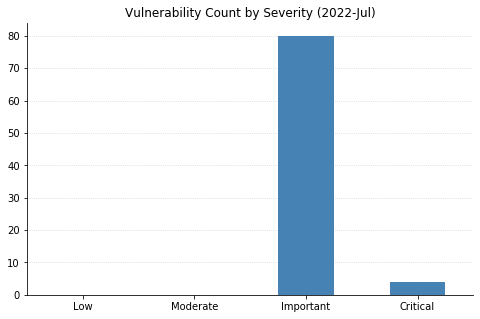
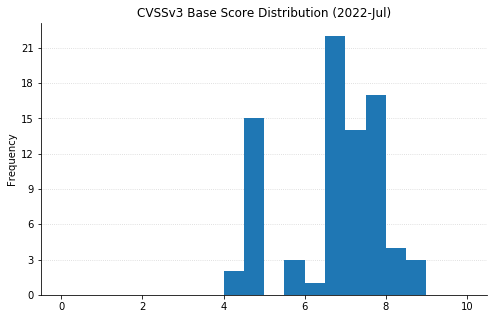
Microsoft’s updates for July’s Patch Tuesday fix 86 CVEs, including two vulnerabilities in their Chromium-based Edge browser that were patched earlier in the month.

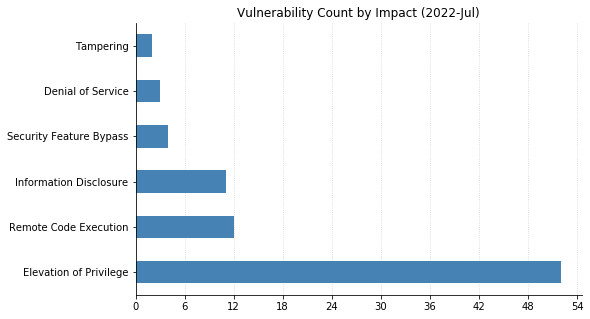
One 0-day vulnerability has been patched: CVE-2022-22047 affects all currently supported versions of Microsoft’s pervasive operating system. This is an elevation-of-privilege vulnerability in the Windows Client Server Runtime Subsystem (CSRSS), a critical service that is often impersonated by malware. An attacker with an already-existing foothold can exploit this vulnerability to gain SYSTEM-level privileges. Two similar vulnerabilities in CSRSS (CVE-2022-22049 and CVE-2022-22026) were also fixed, likely as a result of Microsoft’s investigation into the in-the-wild exploitation of CVE-2022-22047.

Four critical remote code execution (RCE) vulnerabilities were fixed today. CVE-2022-22029 and CVE-2022-22039 affect network file system (NFS) servers, and CVE-2022-22038 affects the remote procedure call (RPC) runtime. Although all three of these will be relatively tricky for attackers to exploit due to the amount of sustained data that needs to be transmitted, administrators should patch sooner rather than later. CVE-2022-30221 supposedly affects the Windows Graphics Component, though Microsoft’s FAQ indicates that exploitation requires users to access a malicious RDP server.

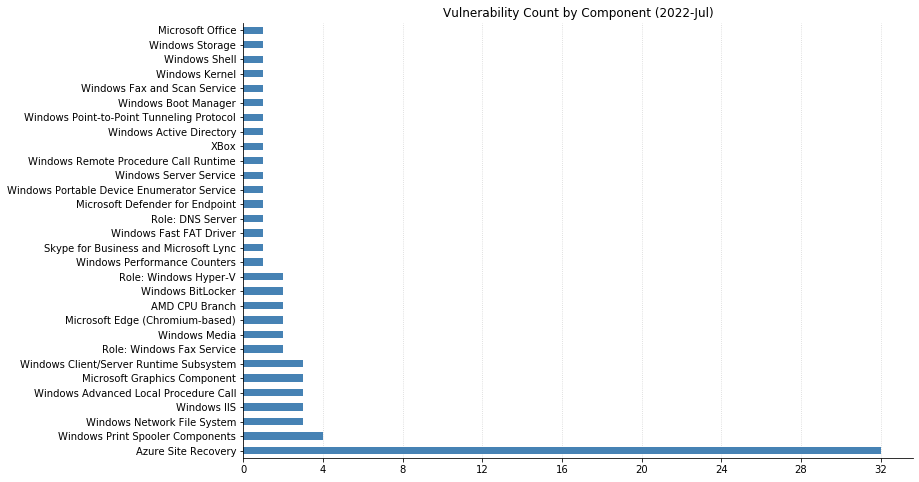
Over a third of today’s vulnerabilities (a whopping 32 CVEs) affect their Azure Site Recovery offering. Anyone making use of this VMWare-to-Azure backup solution should be sure to upgrade to version 9.49 of the Microsoft Azure Site Recovery Unified Setup, available in Update rollup 62.

Summary charts

Patch Tuesday - July 2022

Summary tables

Azure vulnerabilities

CVE Title Exploited? Publicly disclosed? CVSSv3 base score Has FAQ?
CVE-2022-33676 Azure Site Recovery Remote Code Execution Vulnerability No No 7.2 Yes
CVE-2022-33678 Azure Site Recovery Remote Code Execution Vulnerability No No 7.2 Yes
CVE-2022-33674 Azure Site Recovery Elevation of Privilege Vulnerability No No 8.3 Yes
CVE-2022-33675 Azure Site Recovery Elevation of Privilege Vulnerability No No 7.8 Yes
CVE-2022-33677 Azure Site Recovery Elevation of Privilege Vulnerability No No 7.2 Yes
CVE-2022-30181 Azure Site Recovery Elevation of Privilege Vulnerability No No 6.5 Yes
CVE-2022-33641 Azure Site Recovery Elevation of Privilege Vulnerability No No 6.5 Yes
CVE-2022-33643 Azure Site Recovery Elevation of Privilege Vulnerability No No 6.5 Yes
CVE-2022-33655 Azure Site Recovery Elevation of Privilege Vulnerability No No 6.5 Yes
CVE-2022-33656 Azure Site Recovery Elevation of Privilege Vulnerability No No 6.5 Yes
CVE-2022-33657 Azure Site Recovery Elevation of Privilege Vulnerability No No 6.5 Yes
CVE-2022-33661 Azure Site Recovery Elevation of Privilege Vulnerability No No 6.5 Yes
CVE-2022-33662 Azure Site Recovery Elevation of Privilege Vulnerability No No 6.5 Yes
CVE-2022-33663 Azure Site Recovery Elevation of Privilege Vulnerability No No 6.5 Yes
CVE-2022-33665 Azure Site Recovery Elevation of Privilege Vulnerability No No 6.5 Yes
CVE-2022-33666 Azure Site Recovery Elevation of Privilege Vulnerability No No 6.5 Yes
CVE-2022-33667 Azure Site Recovery Elevation of Privilege Vulnerability No No 6.5 Yes
CVE-2022-33672 Azure Site Recovery Elevation of Privilege Vulnerability No No 6.5 Yes
CVE-2022-33673 Azure Site Recovery Elevation of Privilege Vulnerability No No 6.5 Yes
CVE-2022-33642 Azure Site Recovery Elevation of Privilege Vulnerability No No 4.9 Yes
CVE-2022-33650 Azure Site Recovery Elevation of Privilege Vulnerability No No 4.9 Yes
CVE-2022-33651 Azure Site Recovery Elevation of Privilege Vulnerability No No 4.9 Yes
CVE-2022-33653 Azure Site Recovery Elevation of Privilege Vulnerability No No 4.9 Yes
CVE-2022-33654 Azure Site Recovery Elevation of Privilege Vulnerability No No 4.9 Yes
CVE-2022-33659 Azure Site Recovery Elevation of Privilege Vulnerability No No 4.9 Yes
CVE-2022-33660 Azure Site Recovery Elevation of Privilege Vulnerability No No 4.9 Yes
CVE-2022-33664 Azure Site Recovery Elevation of Privilege Vulnerability No No 4.9 Yes
CVE-2022-33668 Azure Site Recovery Elevation of Privilege Vulnerability No No 4.9 Yes
CVE-2022-33669 Azure Site Recovery Elevation of Privilege Vulnerability No No 4.9 Yes
CVE-2022-33671 Azure Site Recovery Elevation of Privilege Vulnerability No No 4.9 Yes
CVE-2022-33652 Azure Site Recovery Elevation of Privilege Vulnerability No No 4.4 Yes
CVE-2022-33658 Azure Site Recovery Elevation of Privilege Vulnerability No No 4.4 Yes

Azure Microsoft Dynamics vulnerabilities

CVE Title Exploited? Publicly disclosed? CVSSv3 base score Has FAQ?
CVE-2022-30187 Azure Storage Library Information Disclosure Vulnerability No No 4.7 Yes

Browser vulnerabilities

CVE Title Exploited? Publicly disclosed? CVSSv3 base score Has FAQ?
CVE-2022-2295 Chromium: CVE-2022-2295 Type Confusion in V8 No No N/A Yes
CVE-2022-2294 Chromium: CVE-2022-2294 Heap buffer overflow in WebRTC No No N/A Yes

Microsoft Office vulnerabilities

CVE Title Exploited? Publicly disclosed? CVSSv3 base score Has FAQ?
CVE-2022-33633 Skype for Business and Lync Remote Code Execution Vulnerability No No 7.2 Yes
CVE-2022-33632 Microsoft Office Security Feature Bypass Vulnerability No No 4.7 Yes

System Center vulnerabilities

CVE Title Exploited? Publicly disclosed? CVSSv3 base score Has FAQ?
CVE-2022-33637 Microsoft Defender for Endpoint Tampering Vulnerability No No 6.5 Yes

Windows vulnerabilities

CVE Title Exploited? Publicly disclosed? CVSSv3 base score Has FAQ?
CVE-2022-33644 Xbox Live Save Service Elevation of Privilege Vulnerability No No 7 Yes
CVE-2022-22045 Windows.Devices.Picker.dll Elevation of Privilege Vulnerability No No 7.8 Yes
CVE-2022-30222 Windows Shell Remote Code Execution Vulnerability No No 8.4 Yes
CVE-2022-30216 Windows Server Service Tampering Vulnerability No No 8.8 Yes
CVE-2022-22041 Windows Print Spooler Elevation of Privilege Vulnerability No No 6.8 Yes
CVE-2022-30214 Windows DNS Server Remote Code Execution Vulnerability No No 6.6 Yes
CVE-2022-22031 Windows Credential Guard Domain-joined Public Key Elevation of Privilege Vulnerability No No 7.8 Yes
CVE-2022-30212 Windows Connected Devices Platform Service Information Disclosure Vulnerability No No 4.7 Yes
CVE-2022-22711 Windows BitLocker Information Disclosure Vulnerability No No 6.7 Yes
CVE-2022-22038 Remote Procedure Call Runtime Remote Code Execution Vulnerability No No 8.1 Yes
CVE-2022-27776 HackerOne: CVE-2022-27776 Insufficiently protected credentials vulnerability might leak authentication or cookie header data No No N/A Yes
CVE-2022-30215 Active Directory Federation Services Elevation of Privilege Vulnerability No No 7.5 Yes

Windows ESU vulnerabilities

CVE Title Exploited? Publicly disclosed? CVSSv3 base score Has FAQ?
CVE-2022-30208 Windows Security Account Manager (SAM) Denial of Service Vulnerability No No 6.5 No
CVE-2022-30206 Windows Print Spooler Elevation of Privilege Vulnerability No No 7.8 Yes
CVE-2022-30226 Windows Print Spooler Elevation of Privilege Vulnerability No No 7.1 Yes
CVE-2022-22022 Windows Print Spooler Elevation of Privilege Vulnerability No No 7.1 Yes
CVE-2022-22023 Windows Portable Device Enumerator Service Security Feature Bypass Vulnerability No No 6.6 Yes
CVE-2022-22029 Windows Network File System Remote Code Execution Vulnerability No No 8.1 Yes
CVE-2022-22039 Windows Network File System Remote Code Execution Vulnerability No No 7.5 Yes
CVE-2022-22028 Windows Network File System Information Disclosure Vulnerability No No 5.9 Yes
CVE-2022-30225 Windows Media Player Network Sharing Service Elevation of Privilege Vulnerability No No 7.1 Yes
CVE-2022-30211 Windows Layer 2 Tunneling Protocol (L2TP) Remote Code Execution Vulnerability No No 7.5 Yes
CVE-2022-21845 Windows Kernel Information Disclosure Vulnerability No No 4.7 Yes
CVE-2022-22025 Windows Internet Information Services Cachuri Module Denial of Service Vulnerability No No 7.5 No
CVE-2022-30209 Windows IIS Server Elevation of Privilege Vulnerability No No 7.4 Yes
CVE-2022-22042 Windows Hyper-V Information Disclosure Vulnerability No No 6.5 Yes
CVE-2022-30223 Windows Hyper-V Information Disclosure Vulnerability No No 5.7 Yes
CVE-2022-30205 Windows Group Policy Elevation of Privilege Vulnerability No No 6.6 Yes
CVE-2022-30221 Windows Graphics Component Remote Code Execution Vulnerability No No 8.8 Yes
CVE-2022-22034 Windows Graphics Component Elevation of Privilege Vulnerability No No 7.8 Yes
CVE-2022-30213 Windows GDI+ Information Disclosure Vulnerability No No 5.5 Yes
CVE-2022-22024 Windows Fax Service Remote Code Execution Vulnerability No No 7.8 Yes
CVE-2022-22027 Windows Fax Service Remote Code Execution Vulnerability No No 7.8 Yes
CVE-2022-22050 Windows Fax Service Elevation of Privilege Vulnerability No No 7.8 Yes
CVE-2022-22043 Windows Fast FAT File System Driver Elevation of Privilege Vulnerability No No 7.8 Yes
CVE-2022-30220 Windows Common Log File System Driver Elevation of Privilege Vulnerability No No 7.8 Yes
CVE-2022-22026 Windows CSRSS Elevation of Privilege Vulnerability No No 8.8 Yes
CVE-2022-22047 Windows CSRSS Elevation of Privilege Vulnerability Yes No 7.8 Yes
CVE-2022-22049 Windows CSRSS Elevation of Privilege Vulnerability No No 7.8 Yes
CVE-2022-30203 Windows Boot Manager Security Feature Bypass Vulnerability No No 7.4 Yes
CVE-2022-22037 Windows Advanced Local Procedure Call Elevation of Privilege Vulnerability No No 7.5 Yes
CVE-2022-30202 Windows Advanced Local Procedure Call Elevation of Privilege Vulnerability No No 7 Yes
CVE-2022-30224 Windows Advanced Local Procedure Call Elevation of Privilege Vulnerability No No 7 Yes
CVE-2022-22036 Performance Counters for Windows Elevation of Privilege Vulnerability No No 7 Yes
CVE-2022-22040 Internet Information Services Dynamic Compression Module Denial of Service Vulnerability No No 7.3 Yes
CVE-2022-22048 BitLocker Security Feature Bypass Vulnerability No No 6.1 Yes
CVE-2022-23825 AMD: CVE-2022-23825 AMD CPU Branch Type Confusion No No N/A Yes
CVE-2022-23816 AMD: CVE-2022-23816 AMD CPU Branch Type Confusion No No N/A Yes

NEVER MISS A BLOG

Get the latest stories, expertise, and news about security today.

The Forecast Is Flipped: Flipping L&D to Ensure Continuous Growth

Post Syndicated from Courtney Campbell original https://blog.rapid7.com/2022/07/12/the-forecast-is-flipped-flipping-l-d-to-ensure-continuous-growth/

The Forecast Is Flipped: Flipping L&D to Ensure Continuous Growth

At Rapid7, we staunchly believe that our people are central to upholding our mission and embodying our core values to ultimately drive our customers into a more secure future. For this reason, Rapid7 works tediously to ensure that our Moose have ample opportunities to learn and grow in their careers.

In order to support such development, the People Development team strives to ensure that our programs are not only impactful but also support our Moose to be “Never Done” in their pursuit to have the career experience of their lifetime. Our approach to learning is to “Challenge Convention” through the proactive and consistent iteration of our programs to reflect this ever-changing world. Such evolution is crucial after a forced 2-year remote work experience and Rapid7’s shift to a hybrid workplace.

Limitations on learning

Let’s travel back to 2018. From a Learning and Development perspective, this year feels like visiting a vastly different universe – one in which exclusively in-person training across a select set of offices, offered a few times a year, was the norm.

At this point in time, Rapid7 offered five soft-skills training courses, designed to introduce participants to best practices of a specific soft skill that supported professional success. The instructor would facilitate the majority of trainings in our Boston office location and then travel to one or two other office locations in order to offer training to participants outside of the hub location. The challenge? This in-person approach did not account for a growing global workforce; we needed to figure out how to keep our programs inclusive and accessible for those outside of Boston. Furthermore, because it intrinsically took time for the instructor to travel to physical office locations to offer these training sessions, there was a lag between the time when the employee needed the training and the time it was delivered to them. Ultimately, this interlude resulted in a delayed, or even missed, opportunity for learning.

Our team also realized that we were standardizing career development by operating under the assumption that each employee should focus narrowly on those five soft skills rather than championing the uniqueness of each Moose’s individual career experiences and the shifting needs of the business. These challenges served as the fuel that propelled us into the future of our “All Moose” learning programs. It was time to align learner needs with those of the business, put our Moose in the driver’s seat of their development, nurture our ever-growing global employee base, and acknowledge the new world of hybrid work. This focus ultimately helped us move away from a one-size-fits-all approach to learning and propel our mission forward.

The evolution

With in-person trainings on hold, Rapid7 had the space to thoughtfully investigate what the future of learning could look and feel like for “All Moose.” Thus, the Moose GPS was born. The Moose GPS serves as a strategically adapted version of a traditional Individual Development Plan, transformed into a dynamic and collaborative tool. The “GPS” portion of the tool stands for “Growing, Partnering, and Succeeding” because these are all things the Moose will do while completing one! Composed of three steps, the GPS is unique in that it encourages employee ownership, accountability, and managerial partnership around development. No longer is the conversation and action plan initiated and driven solely by a Moose’s manager.

Originally conceived as enablement for the Moose GPS, People Development curated a collection of courses strategically designed to enable Moose to fiercely take ownership of their unique development path, namely, the Continuous Growth Courses. The ethos behind the three-course Continuous Growth Program is to provide employees with the tools, opportunities, and connections necessary to become champions of their development. While the courses mirror the progression of the Moose GPS, the curriculum intentionally focuses on skill-building rather than on the use of the tool itself.

In reflection of our core value “Challenge Convention,” continuously challenging what is for what could be, the Continuous Growth Program would be the focus for the next iteration of Rapid7’s Learning and Development programs.

2022: Flipping, scaling, going global

The collision between our revolutionized learning philosophy and a global pandemic catalyzed a shift into a new realm of learning, one that prioritizes inclusivity, utilizes technology, and rethinks traditional, classroom-based teaching methods. We understood that changes needed to be made in order to ensure business alignment and overall program effectiveness.

Now, in 2022, Rapid7 has catapulted the Continuous Growth Courses even further ahead. This year, we have “flipped” approximately 50% of our content. This shift has enabled us to “scale with soul” and maximize learner accessibility and inclusivity. Flipped learning is an instructional strategy where learners engage in both self-paced and in-classroom learning activities. The program is strategically designed to ensure cross-sectional engagement and enable measurable behavioral shifts. Courses are taught in a cohort model and include both synchronous and asynchronous activities to support scale while striking a balance between individual learners’ schedules and providing opportunities for collaborative learning.

Each of the courses is two weeks long; during these two weeks, learners are first provided with an interactive e-learning where they engage with material on their own time. The e-learning intentionally introduces the learner to the content by mingling text, video, gamification, and knowledge checks in order to seamlessly immerse the learner into the material and maximize engagement. The on-demand nature of this activity permits the Moose to learn flexibly, encouraging them to self-pace around their own schedules.

The material introduced digitally will later be applied in the live session, where participants across the globe are united in one virtual classroom. By the time the participants attend the live session, the familiarity they have gained with the content in the digital learning experience will be practiced and applied in the live session in order to maximize knowledge absorption. The sessions consist of various activities in which learners are put into breakout rooms where they are able to create new, and otherwise unlikely, connections while bonding over the learning experience. We leverage tenured Moose to present on their own experiences with career development in these sessions, enabling us to scale our programs and foster high impact learning. Simultaneously, through our management development programs, our managers are equipped with the same skills and tools to facilitate meaningful development, feedback, and coaching conversations, providing their Moose with space and time for action.

How is it going? Let’s take a look

By equipping employees with the necessary skills to be active participants in their development, we not only empower them to raise the bar and become lifelong learners, but we also cyclically feed our culture of continuous learning. These employees cultivate growth mindsets and understand that their individual growth and success is intertwined with, not separate from, our shared organizational growth and success. By providing experiences for our employees to lean into their growth and development through onboarding, Continuous Growth Courses, and a variety of learning resources, we are investing in their future and our shared future.

Program and sessions

“I think this program helped me take a step back and really think about my work and how I want to evolve. It’s easy to get caught up in your day to day without really thinking so this course will help me be more intentional in my goals and growth going forward.”

“I found all three modules to be very helpful – it’s not often you’re prompted to sit and reflect on your career, and the prompts were helpful for doing so.”

“This experience has helped me feel more engaged!”

Data!

Since the launch of these courses in April, Moose who have enrolled in the course say:

  • 100% said they felt confident using the learned skills
  • 93% said they had a development conversation with their manager
  • 93% said they had taken more accountability for their development since completing the course

Managers of Moose who have enrolled in the course say:

  • 94% said their direct reports had taken more accountability for their development since completing the course

This is the final blog post in our series, “The Forecast Is Flipped.” Thank you so much for following along with Rapid7’s innovative learning practices!

Additional reading:

NEVER MISS A BLOG

Get the latest stories, expertise, and news about security today.

The “Retbleed” speculative execution vulnerabilities

Post Syndicated from original https://lwn.net/Articles/900917/

Some researchers at ETH Zurich have disclosed a
new set of speculative-execution vulnerabilities known as “Retbleed”. In
short, the retpoline defenses added when Spectre was initially disclosed
turn out to be insufficient on x86 machines because return instructions,
too, can be speculatively executed.

​Kernel and hypervisor developers have developed mitigations in
coordination with Intel and AMD. Mitigating Retbleed in the Linux
kernel required a substantial effort, involving changes to 68
files, 1783 new lines and 387 removed lines. Our performance
evaluation shows that mitigating Retbleed has unfortunately turned
out to be expensive: we have measured between 14% and 39% overhead
with the AMD and Intel patches respectively.

Those mitigations were pulled into the mainline
kernel
today. They are
not in the July 12 stable kernel
updates
but will almost certainly show up in those channels soon.

Optimize your Amazon Redshift query performance with automated materialized views

Post Syndicated from Adam Gatt original https://aws.amazon.com/blogs/big-data/optimize-your-amazon-redshift-query-performance-with-automated-materialized-views/

Amazon Redshift is a fast, fully managed cloud data warehouse database that makes it cost-effective to analyze your data using standard SQL and business intelligence tools. Amazon Redshift allows you to analyze structured and semi-structured data and seamlessly query data lakes and operational databases, using AWS designed hardware and automated machine learning (ML)-based tuning to deliver top-tier price-performance at scale.

Although Amazon Redshift provides excellent price performance out of the box, it offers additional optimizations that can improve this performance and allow you to achieve even faster query response times from your data warehouse.

For example, you can physically tune tables in a data model to minimize the amount of data scanned and distributed within a cluster, which speeds up operations such as table joins and range-bound scans. Amazon Redshift now automates this tuning with the automatic table optimization (ATO) feature.

Another optimization for reducing query runtime is to precompute query results in the form of a materialized view. Materialized views store precomputed query results that future similar queries can use. This improves query performance because many computation steps can be skipped and the precomputed results returned directly. Unlike a simple cache, many materialized views can be incrementally refreshed when DML changes are applied on the underlying (base) tables and can be used by other similar queries, not just the query used to create the materialized view.

Amazon Redshift introduced materialized views in March 2020. In June 2020, support for external tables was added. With these releases, you could use materialized views on both local and external tables to deliver low-latency performance by using precomputed views in your queries. However, this approach required you to be aware of what materialized views were available on the cluster, and if they were up to date.

In November 2020, materialized view automatic refresh and query rewrite features were added. With materialized view-aware automatic rewriting, data analysts get the benefit of materialized views for their queries and dashboards without having to query the materialized view directly. The analyst may not even be aware the materialized views exist. The auto rewrite feature enables this by rewriting queries to use materialized views without the query needing to explicitly reference them. In addition, auto refresh keeps materialized views up to date when base table data is changed, and there are available cluster resources for the materialized view maintenance.

However, materialized views still have to be manually created, monitored, and maintained by data engineers or DBAs. To reduce this overhead, Amazon Redshift has introduced the Automated Materialized View (AutoMV) feature, which goes one step further and automatically creates materialized views for queries with common recurring joins and aggregations.

This post explains what materialized views are, how manual materialized views work and the benefits they provide, and what’s required to build and maintain manual materialized views to achieve performance improvements and optimization. Then we explain how this is greatly simplified with the new automated materialized view feature.

Manually create materialized views

A materialized view is a database object that stores precomputed query results in a materialized (persisted) dataset. Similar queries can use the precomputed results from the materialized view and skip the expensive tasks of reading the underlying tables and performing joins and aggregates, thereby improving the query performance.

For example, you can improve the performance of a dashboard by materializing the results of its queries into a materialized view or multiple materialized views. When the dashboard is opened or refreshed, it can use the precomputed results from the materialized view instead of rereading the base tables and reprocessing the queries. By creating a materialized view once and querying it multiple times, redundant processing can be avoided, improving query performance and freeing up resources for other processing on the database.

To demonstrate this, we use the following query, which returns daily order and sales numbers. It joins two tables and aggregates at the day level.

SET enable_result_cache_for_session TO OFF;

SELECT o.o_orderdate AS order_date
      ,SUM(l.l_extendedprice) AS ext_price_total
FROM orders o
INNER JOIN lineitem l
   ON o.o_orderkey = l.l_orderkey
WHERE o.o_orderdate >= '1997-01-01'
AND   o.o_orderdate < '1998-01-01'
GROUP BY o.o_orderdate
ORDER BY 1;

At the top of the query, we set enable_result_cache_for_session to OFF. This setting disables the results cache, so we can see the full processing runtime each time we run the query. Unlike a materialized view, the results cache is a simple cache that stores the results of a single query in memory, it can’t be used by other similar queries, is not updated when the base tables are modified, and because it isn’t persisted, can be aged-out of memory by more frequently used queries.

When we run this query on a 10-node ra3.4xl cluster with the TPC-H 3 TB dataset, it returns in approximately 20 seconds. If we need to run this query or similar queries more than once, we can create a materialized view with the CREATE MATERIALIZED VIEW command and query the materialized view object directly, which has the same structure as a table:

CREATE MATERIALIZED VIEW mv_daily_sales
AS
SELECT o.o_orderdate AS order_date
      ,SUM(l.l_extendedprice) AS ext_price_total
FROM orders o
INNER JOIN lineitem l
   ON o.o_orderkey = l.l_orderkey
WHERE o.o_orderdate >= '1997-01-01'
AND   o.o_orderdate < '1998-01-01'
GROUP BY o.o_orderdate;

SELECT order_date
      ,ext_price_total
FROM   mv_daily_sales
ORDER BY 1;

Because the join and aggregations have been precomputed, it runs in approximately 900 milliseconds, a performance improvement of 96%.

As we have just shown, you can query the materialized view directly; however, Amazon Redshift can automatically rewrite a query to use one or more materialized views. The query rewrite feature transparently rewrites the query as it’s being run to retrieve precomputed results from a materialized view. This process is automatically triggered on eligible and up-to-date materialized views, if the query contains the same base tables and joins, and has similar aggregations as the materialized view.

For example, if we rerun the sales query, because it’s eligible for rewriting, it’s automatically rewritten to use the mv_daily_sales materialized view. We start with the original query:

SELECT o.o_orderdate AS order_date
      ,SUM(l.l_extendedprice) AS ext_price_total
FROM orders o
INNER JOIN lineitem l
   ON o.o_orderkey = l.l_orderkey
WHERE o.o_orderdate >= '1997-01-01'
AND   o.o_orderdate < '1998-01-01'
GROUP BY o.o_orderdate
ORDER BY 1;

Internally, the query is rewritten to the following SQL and run. This process is completely transparent to the user.

SELECT order_date
      ,ext_price_total
FROM   mv_daily_sales
ORDER BY 1;

The rewriting can be confirmed by looking at the query’s explain plan:

EXPLAIN SELECT o.o_orderdate AS order_date
      ,SUM(l.l_extendedprice) AS ext_price_total
FROM orders o
INNER JOIN lineitem l
   ON o.o_orderkey = l.l_orderkey
WHERE o.o_orderdate >= '1997-01-01'
AND   o.o_orderdate < '1998-01-01'
GROUP BY o.o_orderdate;

+------------------------------------------------------------------------------------------------+
|QUERY PLAN                                                                                      |
+------------------------------------------------------------------------------------------------+
|XN HashAggregate  (cost=5.47..5.97 rows=200 width=31)                                           |
|  ->  XN Seq Scan on mv_tbl__mv_daily_sales__0 derived_table1  (cost=0.00..3.65 rows=365 width=31)|
+------------------------------------------------------------------------------------------------+

The plan shows the query has been rewritten and has retrieved the results from the mv_daily_sales materialized view, not the query’s base tables: orders and lineitem.

Other queries that use the same base tables and level of aggregation, or a level of aggregation derived from the materialized view’s level, are also rewritten. For example:

EXPLAIN SELECT date_trunc('month', o.o_orderdate) AS order_month
      ,SUM(l.l_extendedprice) AS ext_price_total
FROM orders o
INNER JOIN lineitem l
   ON o.o_orderkey = l.l_orderkey
WHERE o.o_orderdate >= '1997-01-01'
AND   o.o_orderdate < '1998-01-01'
GROUP BY order_month;

+------------------------------------------------------------------------------------------------+
|QUERY PLAN                                                                                      |
+------------------------------------------------------------------------------------------------+
|XN HashAggregate  (cost=7.30..10.04 rows=365 width=19)                                          |
|  ->  XN Seq Scan on mv_tbl__mv_daily_sales__0 derived_table1  (cost=0.00..5.47 rows=365 width=19)|
+------------------------------------------------------------------------------------------------+

If data in the orders or lineitem table changes, mv_daily_sales becomes stale; this means the materialized view isn’t reflecting the state of its base tables. If we update a row in lineitem and check the stv_mv_info system table, we can see the is_stale flag is set to t (true):

UPDATE lineitem
SET l_extendedprice = 5000
WHERE l_orderkey = 2362252519
AND l_linenumber = 1;

SELECT name
      ,is_stale
FROM stv_mv_info
WHERE name = 'mv_daily_sales';

+--------------+--------+
|name          |is_stale|
+--------------+--------+
|mv_daily_sales|t       |
+--------------+--------+

We can now manually refresh the materialized view using the REFRESH MATERIALIZED VIEW statement:

REFRESH MATERIALIZED VIEW mv_daily_sales;

SELECT name
      ,is_stale
FROM stv_mv_info
WHERE name = 'mv_daily_sales';

+--------------+--------+
|name          |is_stale|
+--------------+--------+
|mv_daily_sales|f       |
+--------------+--------+

There are two types of materialized view refresh: full and incremental. A full refresh reruns the underlying SQL statement and rebuilds the whole materialized view. An incremental refresh only updates specific rows affected by the source data change. To see if a materialized view is eligible for incremental refreshes, view the state column in the stv_mv_info system table. A state of 0 indicates the materialized view will be fully refreshed, and a state of 1 indicates the materialized view will be incrementally refreshed.

SELECT name
      ,state
FROM stv_mv_info
WHERE name = 'mv_daily_sales';

+--------------+--------+
|name          |state   |
+--------------+--------+
|mv_daily_sales|       1|
+--------------+--------+

You can schedule manual refreshes on the Amazon Redshift console if you need to refresh a materialized view at fixed periods, such as once per hour. For more information, refer to Scheduling a query on the Amazon Redshift console.

As well as the ability to do a manual refresh, Amazon Redshift can also automatically refresh materialized views. The auto refresh feature intelligently determines when to refresh the materialized view, and if you have multiple materialized views, which order to refresh them in. Amazon Redshift considers the benefit of refreshing a materialized view (how often the materialized view is used, what performance gain the materialized view provides) and the cost (resources required for the refresh, current system load, available system resources).

This intelligent refreshing has a number of benefits. Because not all materialized views are equally important, deciding when and in which order to refresh materialized views on a large system is a complex task for a DBA to solve. Also, the DBA needs to consider other workloads running on the system, and try to ensure the latency of critical workloads is not increased by the effect of refreshing materialized views. The auto refresh feature helps remove the need for a DBA to do these difficult and time-consuming tasks.

You can set a materialized view to be automatically refreshed in the CREATE MATERIALIZED VIEW statement with the AUTO REFRESH YES parameter:

CREATE MATERIALIZED VIEW mv_daily_sales
AUTO REFRESH YES
AS
SELECT ...

Now when the source data of the materialized view changes, the materialized view is automatically refreshed. We can view the status of the refresh in the svl_mv_refresh_status system table. For example:

UPDATE lineitem
SET l_extendedprice = 6000
WHERE l_orderkey = 2362252519
AND l_linenumber = 1;

SELECT mv_name
      ,starttime
      ,endtime
      ,status
      ,refresh_type
FROM svl_mv_refresh_status
WHERE mv_name = 'mv_daily_sales';

+--------------+--------------------------+--------------------------+---------------------------------------------+------------+
|mv_name       |starttime                 |endtime                   |status                                       |refresh_type|
+--------------+--------------------------+--------------------------+---------------------------------------------+------------+
|mv_daily_sales|2022-05-06 14:07:24.857074|2022-05-06 14:07:33.342346|Refresh successfully updated MV incrementally|Auto        |
+--------------+--------------------------+--------------------------+---------------------------------------------+------------+

To remove a materialized view, we use the DROP MATERIALIZED VIEW command:

DROP MATERIALIZED VIEW mv_daily_sales;

Now that you’ve seen what materialized views are, their benefits, and how they are created, used, and removed, let’s discuss the drawbacks. Designing and implementing a set of materialized views to help improve overall query performance on a database requires a skilled resource to perform several involved and time-consuming tasks:

  • Analyzing queries run on the system
  • Identifying which queries are run regularly and provide business benefit
  • Prioritizing the identified queries
  • Determining if the performance improvement is worth creating a materialized view and storing the dataset
  • Physically creating and refreshing the materialized views
  • Monitoring the usage of the materialized views
  • Dropping materialized views that are rarely or never used or can’t be refreshed due to the structure of base tables changing

Significant skill, effort, and time is required to design and create materialized views that provide an overall benefit. Also, ongoing monitoring is needed to identify poorly designed or underutilized materialized views that are occupying resources without providing gains.

Amazon Redshift now has a feature to automate this process, Automated Materialized Views (AutoMVs). We explain how AutoMVs work and how to use them on your cluster in the following sections.

Automatically create materialized views

When the AutoMV feature is enabled on an Amazon Redshift cluster (it’s enabled by default), Amazon Redshift monitors recently run queries and identifies any that could have their performance improved by a materialized view. Expensive parts of the query, such as aggregates and joins that can be persisted into materialized views and reused by future queries, are then extracted from the main query and any subqueries. The extracted query parts are then rewritten into create materialized view statements (candidate materialized views) and stored for further processing.

The candidate materialized views are not just one-to-one copies of queries; extra processing is applied to create generalized materialized views that can be used by queries similar to the original query. In the following example, the result set is limited by the filters o_orderpriority = '1-URGENT' and l_shipmode ='AIR'. Therefore, a materialized view built from this result set could only serve queries selecting that limited range of data.

SELECT o.o_orderdate
      ,SUM(l.l_extendedprice)
FROM orders o
INNER JOIN lineitem l
   ON o.o_orderkey = l.l_orderkey
WHERE o.o_orderpriority = '1-URGENT'
AND   l.l_shipmode ='AIR'
GROUP BY o.o_orderdate;

Amazon Redshift uses many techniques to create generalized materialized views; one of these techniques is called predicate elevation. To apply predicate elevation to this query, the filtered columns o_orderpriority and l_shipmode are moved into the GROUP BY clause, thereby storing the full range of data in the materialized view, which allows similar queries to use the same materialized view. This approach is driven by dashboard-like workloads that often issue identical queries with different filter predicates.

SELECT o.o_orderdate
      ,o.o_orderpriority
      ,l.l_shipmode
      ,SUM(l.l_extendedprice)
FROM orders o
INNER JOIN lineitem l
   ON o.o_orderkey = l.l_orderkey
GROUP BY o.o_orderdate
        ,o.o_orderpriority
        ,l.l_shipmode;

In the next processing step, ML algorithms are applied to calculate which of the candidate materialized views provides the best performance benefit and system-wide performance optimization. The algorithms follow similar logic to the auto refresh feature mentioned previously. For each candidate materialized view, Amazon Redshift calculates a benefit, which corresponds to the expected performance improvement should the materialized view be materialized and used in the workload. In addition, it calculates a cost corresponding to the system resources required to create and maintain the candidate. Existing manual materialized views are also considered; an AutoMV will not be created if a manual materialized view already exists that covers the same scope, and manual materialized views have auto refresh priority over AutoMVs.

The list of materialized views is then sorted in order of overall cost-benefit, taking into consideration workload management (WLM) query priorities, with materialized views related to queries on a higher priority queue ordered before materialized views related to queries on a lower priority queue. After the list of materialized views has been fully sorted, they’re automatically created and populated in the background in the prioritized order.

The created AutoMVs are then monitored by a background process that checks their activity, such as how often they have been queried and refreshed. If the process determines that an AutoMV is not being used or refreshed, for example due to the base table’s structure changing, it is dropped.

Example

To demonstrate this process in action, we use the following query taken from the 3 TB Cloud DW Benchmark, a performance testing benchmark derived from TPC-H. You can load the benchmark data into your cluster and follow along with the example.

SET enable_result_cache_for_session TO OFF;

SELECT /* TPC-H Q12 */
       l_shipmode
     , SUM(CASE
              WHEN o_orderpriority = '1-URGENT'
                 OR o_orderpriority = '2-HIGH'
                 THEN 1
              ELSE 0
   END) AS high_line_count
     , SUM(CASE
              WHEN o_orderpriority  '1-URGENT'
                 AND o_orderpriority  '2-HIGH'
                 THEN 1
              ELSE 0
   END) AS low_line_count
FROM orders
   , lineitem
WHERE o_orderkey = l_orderkey
AND l_shipmode IN ('MAIL', 'SHIP')
AND l_commitdate < l_receiptdate
AND l_shipdate = DATE '1994-01-01'
AND l_receiptdate < DATEADD(YEAR, 1, CAST('1994-01-01' AS DATE))
GROUP BY l_shipmode
ORDER BY l_shipmode;

We run the query three times and then wait for 30 minutes. On a 10-node ra3.4xl cluster, the query runs in approximately 8 seconds.

During the 30 minutes, Amazon Redshift assesses the benefit of materializing candidate AutoMVs. It computes a sorted list of candidate materialized views and creates the most beneficial ones with incremental refresh, auto refresh, and query rewrite enabled. When the query or similar queries run, they’re automatically and transparently rewritten to use one or more of the created AutoMVs.

Ongoing, if data in the base tables is modified (i.e. the AutoMV becomes stale), an incremental refresh automatically runs, inserting, updating, and deleting rows in the AutoMV to bring its data to the latest state.

Rerunning the query shows that it runs in approximately 800 milliseconds, a performance improvement of 90%. We can confirm the query is using the AutoMV by checking the explain plan:

EXPLAIN SELECT /* TPC-H Q12 */
       l_shipmode
     ,
 SUM(CASE
              WHEN o_orderpriority = '1-URGENT'
                 OR o_orderpriority = '2-HIGH'
                 THEN 1
              ELSE 0
   END) AS high_line_count
     , SUM(CASE
              WHEN o_orderpriority <> '1-URGENT'
                 AND o_orderpriority <> '2-HIGH'
                 THEN 1
              ELSE 0
   END) AS low_line_count
FROM orders
   , lineitem
WHERE o_orderkey = l_orderkey
AND l_shipmode IN ('MAIL', 'SHIP')
AND l_commitdate < l_receiptdate
AND l_shipdate < l_commitdate
AND l_receiptdate >= DATE '1994-01-01'
AND l_receiptdate < DATEADD(YEAR, 1, CAST('1994-01-01' AS DATE))
GROUP BY l_shipmode
ORDER BY l_shipmode;

+---------------------------------------------------------------------------------------------------------------------------------------------------------------------+
|QUERY PLAN                                                                                                                                                           |
+---------------------------------------------------------------------------------------------------------------------------------------------------------------------+
|XN Merge  (cost=1000000000354.23..1000000000354.23 rows=1 width=30)                                                                                                  |
|  Merge Key: derived_table1.grvar_1                                                                                                                                  |
|  ->  XN Network  (cost=1000000000354.23..1000000000354.23 rows=1 width=30)                                                                                          |
|        Send to leader                                                                                                                                               |
|        ->  XN Sort  (cost=1000000000354.23..1000000000354.23 rows=1 width=30)                                                                                       |
|              Sort Key: derived_table1.grvar_1                                                                                                                       |
|              ->  XN HashAggregate  (cost=354.21..354.22 rows=1 width=30)                                                                                            |
|                    ->  XN Seq Scan on mv_tbl__auto_mv_2000__0 derived_table1  (cost=0.00..349.12 rows=679 width=30)                                                 |
|                          Filter: ((grvar_2 < '1995-01-01'::date) AND (grvar_2 >= '1994-01-01'::date) AND ((grvar_1 = 'SHIP'::bpchar) OR (grvar_1 = 'MAIL'::bpchar)))|
+---------------------------------------------------------------------------------------------------------------------------------------------------------------------+

To demonstrate how AutoMVs can also improve the performance of similar queries, we change some of the filters on the original query. In the following example, we change the filter on l_shipmode from IN ('MAIL', 'SHIP') to IN ('TRUCK', 'RAIL', 'AIR'), and change the filter on l_receiptdate to the first 6 months of the previous year. The query runs in approximately 900 milliseconds and, looking at the explain plan, we confirm it’s using the AutoMV:

EXPLAIN SELECT /* TPC-H Q12 modified */
       l_shipmode
     , SUM(CASE
              WHEN o_orderpriority = '1-URGENT'
                 OR o_orderpriority = '2-HIGH'
                 THEN 1
              ELSE 0
   END) AS high_line_count
     , SUM(CASE
              WHEN o_orderpriority <> '1-URGENT'
                 AND o_orderpriority <> '2-HIGH'
                 THEN 1
              ELSE 0
   END) AS low_line_count
FROM orders
   , lineitem
WHERE o_orderkey = l_orderkey
AND l_shipmode IN ('TRUCK', 'RAIL', 'AIR')
AND l_commitdate < l_receiptdate
AND l_shipdate < l_commitdate
AND l_receiptdate >= DATE '1993-01-01'
AND l_receiptdate < DATE '1993-07-01'
GROUP BY l_shipmode
ORDER BY l_shipmode;

+---------------------------------------------------------------------------------------------------------------------------------------------------------------------------------------------------+
|QUERY PLAN                                                                                                                                                                                         |
+---------------------------------------------------------------------------------------------------------------------------------------------------------------------------------------------------+
|XN Merge  (cost=1000000000396.30..1000000000396.31 rows=1 width=30)                                                                                                                                |
|  Merge Key: derived_table1.grvar_1                                                                                                                                                                |
|  ->  XN Network  (cost=1000000000396.30..1000000000396.31 rows=1 width=30)                                                                                                                        |
|        Send to leader                                                                                                                                                                             |
|        ->  XN Sort  (cost=1000000000396.30..1000000000396.31 rows=1 width=30)                                                                                                                     |
|              Sort Key: derived_table1.grvar_1                                                                                                                                                     |
|              ->  XN HashAggregate  (cost=396.29..396.29 rows=1 width=30)                                                                                                                          |
|                    ->  XN Seq Scan on mv_tbl__auto_mv_2000__0 derived_table1  (cost=0.00..392.76 rows=470 width=30)                                                                               |
|                          Filter: ((grvar_2 < '1993-07-01'::date) AND (grvar_2 >= '1993-01-01'::date) AND ((grvar_1 = 'AIR'::bpchar) OR (grvar_1 = 'RAIL'::bpchar) OR (grvar_1 = 'TRUCK'::bpchar)))|
+---------------------------------------------------------------------------------------------------------------------------------------------------------------------------------------------------+

The AutoMV feature is transparent to users and is fully system managed. Therefore, unlike manual materialized views, AutoMVs are not visible to users and can’t be queried directly. They also don’t appear in any system tables like stv_mv_info or svl_mv_refresh_status.

Finally, if the AutoMV hasn’t been used for some time by the workload, it’s automatically dropped and the storage released. When we rerun the query after this, the runtime returns to the original 8 seconds because the query is now using the base tables. This can be confirmed by examining the explain plan.

This example illustrates that the AutoMV feature reduces the effort and time required to create and maintain materialized views.

Performance tests and results

To see how well AutoMVs work in practice, we ran tests using the 1 TB and 3 TB versions of the Cloud DW benchmark derived from TPC-H. This test consists of a power run script with 22 queries that is run three times with the results cache off. The tests were run with two different clusters: 4-node ra3.4xlarge and 2-node ra3.16xlarge with a concurrency of 1 and 5.

The Cloud DW benchmark is derived from the TPC-H benchmark. It isn’t comparable to published TPC-H results, because the results of our tests don’t fully comply with the specification.

The following table shows our results.

Suite Scale Cluster Concurrency Number Queries Elapsed Secs – AutoMV Off Elapsed Secs – AutoMV On % Improvement
TPC-H 1 TB 4 node ra3.4xlarge 1 66 1046 913 13%
TPC-H 1 TB 4 node ra3.4xlarge 5 330 3592 3191 11%
TPC-H 3 TB 2 node
ra3.16xlarge
1 66 1707 1510 12%
TPC-H 3 TB 2 node
ra3.16xlarge
5 330 6971 5650 19%

The AutoMV feature improved query performance by up to 19% without any manual intervention.

Summary

In this post, we first presented manual materialized views, their various features, and how to take advantage of them. We then looked into the effort and time required to design, create, and maintain materialized views to provide performance improvements in a data warehouse.

Next, we discussed how AutoMVs help overcome these challenges and seamlessly provide performance improvements for SQL queries and dashboards. We went deeper into the details of how AutoMVs work and discussed how ML algorithms determine which materialized views to create based on the predicted performance improvement and overall benefit they will provide compared to the cost required to create and maintain them. Then we covered some of the internal processing logic such as how predicate elevation creates generalized materialized views that can be used by a range of queries, not just the original query that triggered the materialized view creation.

Finally, we showed the results of a performance test on an industry benchmark where the AutoMV feature improved performance by up to 19%.

As we have demonstrated, automated materialized views provide performance improvements to a data warehouse without requiring any manual effort or specialized expertise. They transparently work in the background, optimizing your workload performance and automatically adapting when your workloads change.

Automated materialized views are enabled by default. We encourage you to monitor any performance improvements they have on your current clusters. If you’re new to Amazon Redshift, try the Getting Started tutorial and use the free trial to create and provision your first cluster and experiment with the feature.


About the Authors

Adam Gatt is a Senior Specialist Solution Architect for Analytics at AWS. He has over 20 years of experience in data and data warehousing and helps customers build robust, scalable and high-performance analytics solutions in the cloud.

Rahul Chaturvedi is an Analytics Specialist Solutions Architect at AWS. Prior to this role, he was a Data Engineer at Amazon Advertising and Prime Video, where he helped build petabyte-scale data lakes for self-serve analytics.
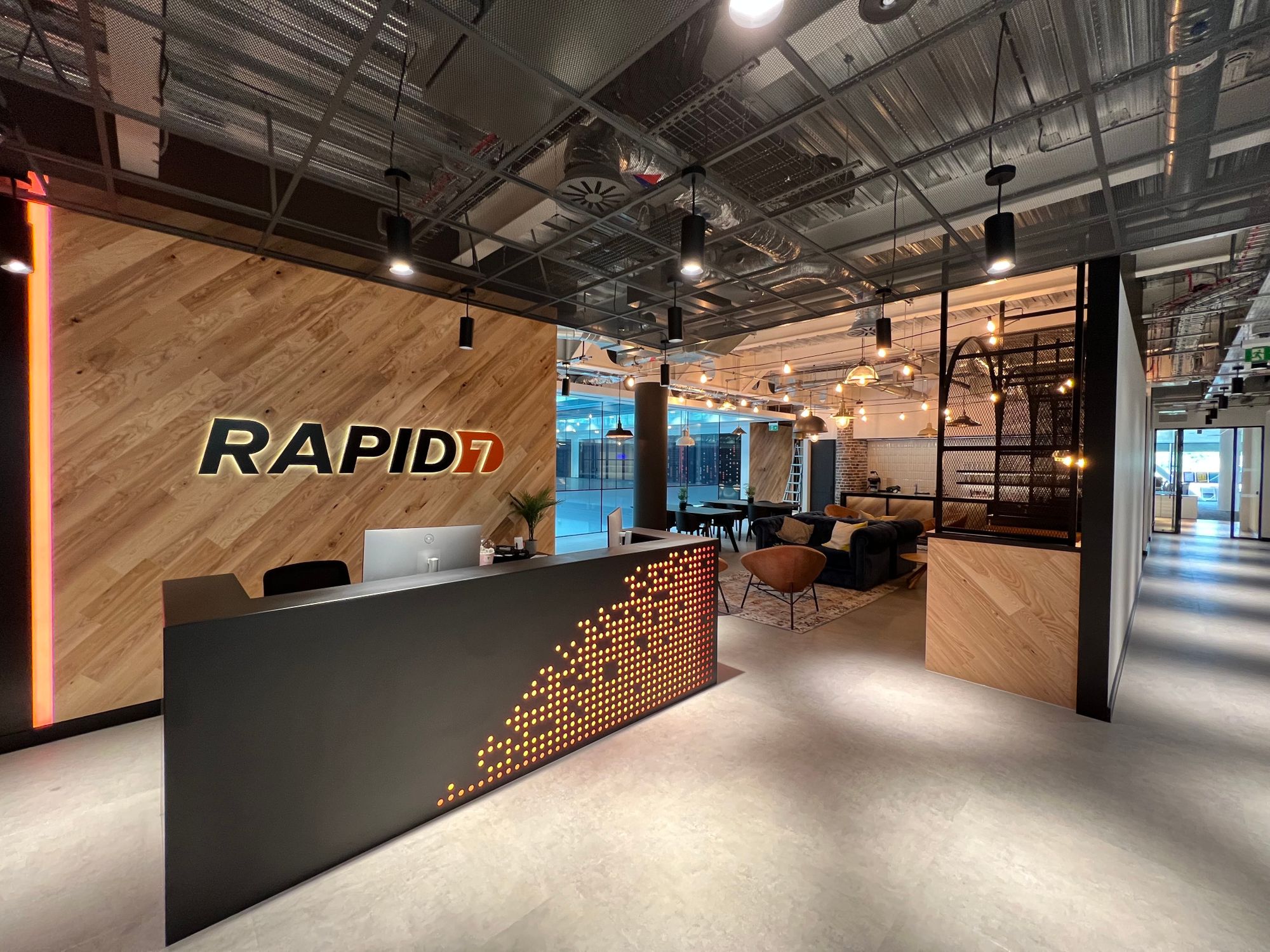

New — Detect and Resolve Issues Quickly with Log Anomaly Detection and Recommendations from Amazon DevOps Guru

Post Syndicated from Donnie Prakoso original https://aws.amazon.com/blogs/aws/new-detect-and-resolve-issues-quickly-with-log-anomaly-detection-and-recommendations-from-amazon-devops-guru/

Today, we are announcing a new feature, Log Anomaly Detection and Recommendations for Amazon DevOps Guru. With this feature, you can find anomalies throughout relevant logs within your app, and get targeted recommendations to resolve issues. Here’s a quick look at this feature:

AWS launched DevOps Guru, a fully managed AIOps platform service, in December 2020 to make it easier for developers and operators to improve applications’ reliability and availability. DevOps Guru minimizes the time needed for issue remediation by using machine learning models based on more than 20 years of operational expertise in building, scaling, and maintaining applications for Amazon.com.

You can use DevOps Guru to identify anomalies such as increased latency, error rates, and resource constraints and then send alerts with a description and actionable recommendations for remediation. You don’t need any prior knowledge in machine learning to use DevOps Guru, and only need to activate it in the DevOps Guru dashboard.

New Feature – Log Anomaly Detection and Recommendations

Observability and monitoring are integral parts of DevOps and modern applications. Applications can generate several types of telemetry, one of which is metrics, to reveal the performance of applications and to help identify issues.

While the metrics analyzed by DevOps Guru today are critical to surfacing issues occurring in applications, it is still challenging to find the root cause of these issues. As applications become more distributed and complex, developers and IT operators need more automation to reduce the time and effort spend detecting, debugging, and resolving operational issues. By sourcing relevant logs in conjunction with metrics, developers can now more effectively monitor and troubleshoot their applications.

With this new Log Anomaly Detection and Recommendations feature, you can get insights along with precise recommendations from application logs without manual effort. This feature delivers contextualized log data of anomaly occurrences and provides actionable insights from recommendations integrated inside the DevOps Guru dashboard.

The Log Anomaly Detection and Recommendations feature is able to detect exception keywords, numerical anomalies, HTTP status codes, data format anomalies, and more. When DevOps Guru identifies anomalies from logs, you will find relevant log samples and deep links to CloudWatch Logs on the DevOps Guru dashboard. These contextualized logs are an important component for DevOps Guru to provide further features, namely targeted recommendations to help faster troubleshooting and issue remediation.

Let’s Get Started!

This new feature consists of two things, “Log Anomaly Detection” and “Recommendations.” Let’s explore further into how we can use this feature to find the root cause of an issue and get recommendations. As an example, we’ll look at my serverless API built using Amazon API Gateway, with AWS Lambda integrated with Amazon DynamoDB. The architecture is shown in the following image:

If it’s your first time using DevOps Guru, you’ll need to enable it by visiting the DevOps Guru dashboard. You can learn more by visiting the Getting Started page.

Since I’ve already enabled DevOps Guru I can go to the Insights page, navigate to the Log groups section, and select the Enable log anomaly detection.

Log Anomaly Detection

After a few hours, I can visit the DevOps Guru dashboard to check for insights. Here, I get some findings from DevOps Guru, as seen in the following screenshots:

With Log Anomaly Detection, DevOps Guru will show the findings of my serverless API in the Log groups section, as seen in the following screenshot:

I can hover over the anomaly and get a high-level summary of the contextualized enrichment data found in this log group. It also provides me with additional information, including the number of log records analyzed and the log scan time range. From this information, I know these anomalies are new event types that have not been detected in the past with the keyword ERROR.

To investigate further, I can select the log group link and go to the Detail page. The graph shows relevant events that might have occurred around these log showcases, which is a helpful context for troubleshooting the root cause. This Detail page includes different showcases, each representing a cluster of similar log events, like exception keywords and numerical anomalies, found in the logs at the time of the anomaly.

Looking at the first log showcase, I noticed a ConditionalCheckFailedException error within the AWS Lambda function. This can occur when AWS Lambda fails to call DynamoDB. From here, I learned that there was an error in the conditional check section, and I reviewed the logic on AWS Lambda. I can also investigate related CloudWatch Logs groups by selecting View details in CloudWatch links.

One thing I want to emphasize here is that DevOps Guru identifies significant events related to application performance and helps me to see the important things I need to focus on by separating the signal from the noise.

Targeted Recommendations

In addition to anomaly detection of logs, this new feature also provides precise recommendations based on the findings in the logs. You can find these recommendations on the Insights page, by scrolling down to find the Recommendations section.

Here, I get some recommendations from DevOps Guru, which make it easier for me to take immediate steps to remediate the issue. One recommendation shown in the following image is Check DynamoDB ConditionalExpression, which relates to an anomaly found in the logs derived from AWS Lambda.

Availability

You can use DevOps Guru Log Anomaly Detection and Recommendations today at no additional charge in all Regions where DevOps Guru is available, US East (Ohio), US East (N. Virginia), US West (Oregon), Asia Pacific (Singapore), Asia Pacific (Sydney), Asia Pacific (Tokyo), Europe (Frankfurt), Europe (Ireland), and Europe (Stockholm).

To learn more, please visit Amazon DevOps Guru web site and technical documentation, and get started today.

Happy building
— Donnie

Achieve fine-grained data security with row-level access control in Amazon Redshift

Post Syndicated from Harshida Patel original https://aws.amazon.com/blogs/big-data/achieve-fine-grained-data-security-with-row-level-access-control-in-amazon-redshift/

Amazon Redshift is a fully managed, petabyte-scale data warehouse service in the cloud. With Amazon Redshift, you can analyze all your data to derive holistic insights about your business and your customers. One of the challenges with security is that enterprises want to provide fine-grained access control at the row level for sensitive data. You can do this by creating views or using different databases and schemas for different users. However, this approach isn’t scalable and becomes complex to maintain over time. Customers have asked us to simplify the process of securing their data by providing the ability to control granular access.

Row-level security (RLS) in Amazon Redshift is built on the foundation of role-based access control (RBAC). RLS allows you to control which users or roles can access specific records of data within tables, based on security policies that are defined at the database object level. This new RLS capability in Amazon Redshift enables you to dynamically filter existing rows of data in a table. This is in addition to column-level access control, where you can grant users permissions to a subset of columns. Now you can combine column-level access control with RLS policies to further restrict access to particular rows of visible columns.

In this post, we explore the row-level security features of Amazon Redshift and how you can use roles to simplify managing privileges required to your end-users.

Customer feedback

TrustLogix is a Norwest Venture Partners backed cloud security startup in the Data Security Governance space. TrustLogix delivers powerful monitoring, observability, audit, and fine-grained data entitlement capabilities that empower Amazon Redshift clients to implement data-centric security for their digital transformation initiatives.

“We’re excited about this new and deeper level of integration with Amazon Redshift. Our joint customers in security-forward and highly regulated sectors including financial services, healthcare, and pharmaceutical need to have incredibly fine-grained control over which users are allowed to access what data, and under which specific contexts. The new role-level security capabilities will allow our customers to precisely dictate data access controls based on their business entitlements while abstracting them away from the technical complexities. The new Amazon Redshift RLS capability will enable our joint customers to model policies at the business level, deploy and enforce them via a security-as-code model, ensuring secure and consistent access to their sensitive data.”

-Ganesh Kirti, founder and CEO of TrustLogix.

Overview of row-level security in Amazon Redshift

Row-level security allows you to restrict some records to certain users or roles, depending on the content of those records. With RLS, you can define policies to enforce fine-grained row-level access control. When creating RLS policies, you can specify expressions that control whether Amazon Redshift returns any existing rows in a table in a query. With RLS policies limiting access, you don’t have to add or externalize additional conditions in your queries. You can attach multiple policies to a table, and a single policy can be attached to multiple tables, making this implementation relationship many-to-many. Once attached, the RLS policy is applied on a relation and a set of users or roles, to run SELECT, UPDATE, and DELETE operations. All attached RLS policies have to evaluate together to true for a record to be returned by query. The RBAC built-in role, security admin, is responsible for managing the policies.

The following diagram illustrates the workflow.

With RLS, you can do the following:

  • Restrict row access based on roles – The security admin creates and defines if a role can access specific records of data within a table based on an RLS policy.
  • Combine multiple policies per user or role – Multiple policies can be defined per user or role, and all policies are applied with AND syntax.
  • Enhance granular access control – RLS is built on role-based access control and can work alongside column-level access control.
  • No access if no policy applied – All data access is blocked when there is no applicable policy on an RLS-protected table.
  • Enable row-level and column-level security on the table – In the following example, the user house is part of the role staff. When house queries the table, only one record pertaining to house is returned; the rest of the records are filtered as per the RLS policy. The sensitive column is also restricted, so users from the role staff can’t see this column. User cuddy is part of the role manager. When cuddy queries the employees table, all records and columns are returned.

Row-level security relevant use cases

With row-level security, many use cases for fine-grained access controls become possible. The following are just some of the many application use cases:

  • A global company with data analysts across different countries or regions can enforce restriction of data access to analysts based on geo location due to data compliance requirements.
  • A sales department can create a policy that allows them to restrict the access to sales performance information specific to a particular salesperson or region.
  • A payroll department can create an RLS policy to restrict access to look at an individual’s payroll, but managers need payroll information on their direct reports. Managers don’t need to know the details of payroll information for other departments.
  • A hospital can create an RLS policy that allows doctors and nurses to view data rows for their patients only.
  • A bank can create a policy to restrict access to financial data rows based on an employee’s business division or role in the company.
  • A multi-tenant application can create a policy to enforce a logical separation of each tenant’s data rows from every other tenant’s rows.

In the following example use cases, we illustrate enforcing an RLS policy on a fictitious healthcare setup. We demonstrate RLS on the medicine_data table and patients table, based on a policy established for managers, doctors, and departments. We also cover using a custom session variable context to set an RLS policy for the multi-tenant table customer.

To download the script and set up the tables, choose rls_createtable.sql.

Example 1: Read and write access

To grant read and write access, complete the following steps:

  1. Define four RLS policies using the secadmin role:
    1. all_can_see – No restrictions to be imposed
    2. hide_confidential – Restricts records for non-confidential rows
    3. only_doctors_can_see – Restricts records such that only doctors can see data
    4. see_only_own_department – Restricts records to only see data for own department
      CREATE RLS POLICY all_can_see
      USING ( true );
      
      CREATE RLS POLICY hide_confidential
      WITH ( confidential BOOLEAN )
      USING ( confidential = false )
      ;
      
      Note: Employee table is used as lookup in this policy
      
      CREATE RLS POLICY only_doctors_can_see
      USING (
          true = (
                  SELECT employee_is_doctor
                  FROM employees
                  WHERE employee_username = current_user
                  )
          )
      ;
      
      GRANT SELECT ON employees
      TO RLS POLICY only_doctors_can_see;
      
      CREATE RLS POLICY see_only_own_department
      WITH ( patient_dept_id INTEGER )
      USING (
          patient_dept_id IN (
                              SELECT department_id
                              FROM employees_departments
                              WHERE employee_username = current_user
                              )
          )
      ;
      
      GRANT SELECT ON employees_departments 
      TO RLS POLICY see_only_own_department;

  2. Create three roles for STAFF, MANAGER, and EXTERNAL:
    CREATE ROLE staff;
    CREATE ROLE manager;
    CREATE ROLE external;

  3. Now we define column-level access control for the roles and columns that are implementing the RLS policy:
    1. The MANAGER can access all columns in the Patients and Medicine_data tables, including the confidential column that defines RLS policies:
      --- manager can see full table patients and medicine data
      GRANT SELECT ON employees, employees_departments, patients, medicine_data TO ROLE manager, ROLE external;

    2. The STAFF role can access all columns except the confidential column:
      --- staff can see limited columns from medicine data
      GRANT SELECT (medicine_name, medicine_price) ON medicine_data 
      TO ROLE staff;
      
      --- staff can see limited columns from patients
      GRANT SELECT (patient_dept_id, patient_name, patient_birthday, patient_medicine, diagnosis) ON patients TO ROLE staff;

  4. Attach RLS policies to the roles we created:
    --- manager can see all medicine data
    ATTACH RLS POLICY all_can_see
    ON medicine_data
    TO ROLE manager;
    
    --- manager can see all patient data
    ATTACH RLS POLICY all_can_see
    ON patients
    TO ROLE manager;
    
    --- staff cannot see confidential medicine data
    ATTACH RLS POLICY hide_confidential
    ON medicine_data
    TO ROLE staff;
    
    --- staff cannot see confidential patient data
    ATTACH RLS POLICY hide_confidential
    ON patients
    TO ROLE staff;
    
    --- only doctors can see patient data
    ATTACH RLS POLICY only_doctors_can_see 
    ON patients
    TO PUBLIC;
    
    --- regular staff (doctors) can see data for patients in their department only
    ATTACH RLS POLICY see_only_own_department 
    ON patients
    TO ROLE staff;

  5. Enable RLS security on objects:
    ALTER TABLE medicine_data ROW LEVEL SECURITY on;
    ALTER TABLE patients ROW LEVEL SECURITY on;

  6. Create the users and grant them roles:
    CREATE USER house PASSWORD DISABLE;
    CREATE USER cuddy PASSWORD DISABLE;
    CREATE USER external PASSWORD DISABLE;
    
    GRANT ROLE staff TO house;
    GRANT ROLE manager TO cuddy;
    GRANT ROLE external TO external;

We can see RLS in action with a SELECT query:

--- As Cuddy, who is a doctor and a manager
SET SESSION AUTHORIZATION 'cuddy';

SELECT * FROM medicine_data;
--- policies applied: all_can_see

SELECT * FROM patients;
--- policies applied: all_can_see, only_doctors_can_see

As a super user and secadmin, you can query the svv_rls_applied_policy to audit and monitor the policies applied. We discuss system views for auditing and monitoring more later in this post.

--- As House, who is a doctor but not a manager - he is staff in department id 1

SET SESSION AUTHORIZATION 'house';

SELECT * FROM medicine_data;
--- column level access control applied 

SELECT current_user, medicine_name, medicine_price FROM medicine_data;
--- CLS + RLS policy = hide_confidential

SELECT * FROM patients;
--- column level access control applied

SELECT current_user, patient_dept_id, patient_name, patient_birthday, patient_medicine, diagnosis FROM patients;
--- CLS + RLS policies = hide_confidential, only_doctors_can_see, see_only_own_department

--- As External, who has no permission granted
SET SESSION AUTHORIZATION 'external';

SELECT * FROM medicine_data;
--- RLS policy applied: none - so no access

SELECT * FROM patients;
--- policies applied: none - so no access

With the UPDATE command, only the user house should be able to update patients records, as per the RLS for department 1:

SET SESSION AUTHORIZATION 'house';
UPDATE patients
SET diagnosis = 'house updated diagnosis';

select current_user, * from patients; --house should only be able to query department 1 non-confidential records

To test DELETE, as the user house, let’s delete records from patient table. Only two non-confidential records from patient_dept_id should be deleted as per the RLS policy:

SET SESSION AUTHORIZATION 'house';
delete  from patients;

Because both the records that house has access to are deleted from patients, selecting from the table will return no records.

When we switch to the user cuddy, who is manager and doctor, we have access to confidential records and can see three records:

SET SESSION AUTHORIZATION 'cuddy';
SELECT current_user, * from patients;

As a security admin, you can detach a policy from a table, user, or role. In this example, we detach the policy hide_confidential from the table patients from role staff:

DETACH RLS POLICY hide_confidential ON patients FROM ROLE staff;

When the user house queries the patients table, they should now have access to confidential records:

SET SESSION AUTHORIZATION 'house';

SELECT * from patients;

Using the security admin role, you can drop the policy hide_confidential:

DROP RLS POLICY IF EXISTS hide_confidential;

Because the hide_confidential RLS policy is still attached to the medicine_data table, you get the dependency error.

To remove this policy from all the tables, users, and roles, you can use the cascade option:

DROP RLS POLICY IF EXISTS hide_confidential cascade;

When user house queries the medicine_data table, no records are returned, because the medicine_data table has RLS on and no RLS policy is attached to the role staff for this table.

SET SESSION AUTHORIZATION 'house';
SELECT * from MEDICINE_DATA;

Let’s turn off row-level security on the table medicine_data using the security admin role:

ALTER TABLE MEDICINE_DATA ROW LEVEL SECURITY OFF;
SET SESSION AUTHORIZATION 'house';

SELECT * FROM MEDICINE_DATA;

Example 2: Session context variables

Some of the applications require you to use connection pooling, and you can use application-based user authentication instead of using separate database users for each user. The session context variables feature in Amazon Redshift enables you to pass the application user ID to the database for applying role-base security.

Amazon Redshift now allows you to set a customized session context variable using set_config. Using the session context variable allows you to provide such granular access using RLS.

In this example, we illustrate the use case when you have the common table customer, where you’re getting data from several customers. The table has a column with c_customer_id to distinguish data for respective customers.

  1. Create the external user and grant the external role:
    CREATE USER external_user PASSWORD 'Testemp1';
    grant role EXTERNAL to external_user;

  2. Grant SELECT on the customer table to role external:
    grant usage on schema report to role EXTERNAL;
    GRANT select ON TABLE report.customer TO ROLE EXTERNAL;

  3. Turn on row-level security for the report.customer table:
    ALTER TABLE report.customer row level security on;

  4. Create a row-level security policy using the session context variable app.customer_id to enforce the policy to filter records for c_customer_id:
    CREATE RLS POLICY see_only_own_customer_rows
    WITH ( c_customer_id char(16) )
    USING ( c_customer_id = current_setting('app.customer_id', FALSE));
    ATTACH RLS POLICY see_only_own_customer_rows ON report.customer TO ROLE EXTERNAL;

Now we can observe RLS in action. When you query the customer table with session context set to customer ID AAAAAAAAJNGEGCBA, the row-level policy was enforced only to return one customer row that matched the session variable value:

SET SESSION AUTHORIZATION 'external_user';

select set_config('app.customer_id', 'AAAAAAAAJNGEGCBA', FALSE);
select * from report.customer limit 10;

Auditing and monitoring RLS policies

Amazon Redshift has added several new system views to be able to monitor the row-level policies. The following table lists the system views, users, and roles that have access, and the function of the views.

System View Users Function
SVV_RLS_POLICY sys:secadmin View a list of all row-level security policies created
SVV_RLS_RELATION sys:secadmin View a list of all relations and users that have one or more row-level security policies attached on the currently connected database
SVV_RLS_APPLIED_POLICY sys:secadmin List RLS-protected relations
SVV_RLS_ATTACHED_POLICY Superuser, sys:operator, or any user with the system permission ACCESS SYSTEM TABLE Trace the application of RLS policies on queries that reference RLS-protected relations

Conclusion

In this post, we demonstrated how you can simplify the management of row-level security for fine-grained access control of your sensitive data building on the foundation of role-based access control. For more information about RLS best practices, refer to Amazon Redshift security overview. Try out RLS for your future Amazon Redshift implementations, and feel free to leave a comment about your use cases and experience.

Amazon Redshift Spectrum supports row-level, column-level, and cell-level access control for data stored in Amazon Simple Storage Service (Amazon S3) and managed by AWS Lake Formation. In a future post, we will show how you can implement row-level security for Redshift Spectrum tables using Lake Formation.


About the authors

Harshida Patel is a Specialist Sr. Solutions Architect, Analytics, with AWS.

Milind Oke is a Senior Specialist Solutions Architect based out of New York. He has been building data warehouse solutions for over two decades and specializes in Amazon Redshift.

Abhilash Nagilla is a Specialist Solutions Architect, Analytics, with AWS.

Yanzhu Ji is a Product Manager on the Amazon Redshift team. She worked on the Amazon Redshift team as a Software Engineer before becoming a Product Manager. She has rich experience of how the customer-facing Amazon Redshift features are built from planning to launching, and always treats customers’ requirements as first priority. In her personal life, Yanzhu likes painting, photography, and playing tennis.

Kiran Chinta is a Software Development Manager at Amazon Redshift. He leads a strong team in query processing, SQL language, data security, and performance. Kiran is passionate about delivering products that seamlessly integrate with customers’ business applications with the right ease of use and performance. In his spare time, he enjoys reading and playing tennis.

Debu-PandaDebu Panda is a Senior Manager, Product Management, with AWS. He is an industry leader in analytics, application platforms, and database technologies, and has more than 25 years of experience in the IT world. Debu has published numerous articles on analytics, enterprise Java, and databases, and has presented at multiple conferences such as AWS re:Invent, Oracle Open World, and Java One. He is lead author of the EJB 3 in Action (Manning Publications 2007, 2014) and Middleware Management (Packt).

Amazon Redshift Serverless – Now Generally Available with New Capabilities

Post Syndicated from Danilo Poccia original https://aws.amazon.com/blogs/aws/amazon-redshift-serverless-now-generally-available-with-new-capabilities/

Last year at re:Invent, we introduced the preview of Amazon Redshift Serverless, a serverless option of Amazon Redshift that lets you analyze data at any scale without having to manage data warehouse infrastructure. You just need to load and query your data, and you pay only for what you use. This allows more companies to build a modern data strategy, especially for use cases where analytics workloads are not running 24-7 and the data warehouse is not active all the time. It is also applicable to companies where the use of data expands within the organization and users in new departments want to run analytics without having to take ownership of data warehouse infrastructure.

Today, I am happy to share that Amazon Redshift Serverless is generally available and that we added many new capabilities. We are also reducing Amazon Redshift Serverless compute costs compared to the preview.

You can now create multiple serverless endpoints per AWS account and Region using namespaces and workgroups:

  • A namespace is a collection of database objects and users, such as database name and password, permissions, and encryption configuration. This is where your data is managed and where you can see how much storage is used.
  • A workgroup is a collection of compute resources, including network and security settings. Each workgroup has a serverless endpoint to which you can connect your applications. When configuring a workgroup, you can set up private or publicly accessible endpoints.

Each namespace can have only one workgroup associated with it. Conversely, each workgroup can be associated with only one namespace. You can have a namespace without any workgroup associated with it, for example, to use it only for sharing data with other namespaces in the same or another AWS account or Region.

In your workgroup configuration, you can now use query monitoring rules to help keep your costs under control. Also, the way Amazon Redshift Serverless automatically scales data warehouse capacity is more intelligent to deliver fast performance for demanding and unpredictable workloads.

Let’s see how this works with a quick demo. Then, I’ll show you what you can do with namespaces and workgroups.

Using Amazon Redshift Serverless
In the Amazon Redshift console, I select Redshift serverless in the navigation pane. To get started, I choose Use default settings to configure a namespace and a workgroup with the most common options. For example, I’ll be able to connect using my default VPC and default security group.

Console screenshot.

With the default settings, the only option left to configure is Permissions. Here, I can specify how Amazon Redshift can interact with other services such as S3, Amazon CloudWatch Logs, Amazon SageMaker, and AWS Glue. To load data later, I give Amazon Redshift access to an S3 bucket. I choose Manage IAM roles and then Create IAM role.

Console screenshot.

When creating the IAM role, I select the option to give access to specific S3 buckets and pick an S3 bucket in the same AWS Region. Then, I choose Create IAM role as default to complete the creation of the role and to automatically use it as the default role for the namespace.

Console screenshot.

I choose Save configuration and after a few minutes the database is ready for use. In the Serverless dashboard, I choose Query data to open the Redshift query editor v2. There, I follow the instructions in the Amazon Redshift Database Developer guide to load a sample database. If you want to do a quick test, a few sample databases (including the one I am using here) are already available in the sample_data_dev database. Note also that loading data into Amazon Redshift is not required for running queries. I can use data from an S3 data lake in my queries by creating an external schema and an external table.

The sample database consists of seven tables and tracks sales activity for a fictional “TICKIT” website, where users buy and sell tickets for sporting events, shows, and concerts.

Sample database tables relations

To configure the database schema, I run a few SQL commands to create the users, venue, category, date, event, listing, and sales tables.

Console screenshot.

Then, I download the tickitdb.zip file that contains the sample data for the database tables. I unzip and load the files to a tickit folder in the same S3 bucket I used when configuring the IAM role.

Now, I can use the COPY command to load the data from the S3 bucket into my database. For example, to load data into the users table:

copy users from 's3://MYBUCKET/tickit/allusers_pipe.txt' iam_role default;

The file containing the data for the sales table uses tab-separated values:

copy sales from 's3://MYBUCKET/tickit/sales_tab.txt' iam_role default delimiter '\t' timeformat 'MM/DD/YYYY HH:MI:SS';

After I load data in all tables, I start running some queries. For example, the following query joins five tables to find the top five sellers for events based in California (note that the sample data is for the year 2008):

select sellerid, username, (firstname ||' '|| lastname) as sellername, venuestate, sum(qtysold)
from sales, date, users, event, venue
where sales.sellerid = users.userid
and sales.dateid = date.dateid
and sales.eventid = event.eventid
and event.venueid = venue.venueid
and year = 2008
and venuestate = 'CA'
group by sellerid, username, sellername, venuestate
order by 5 desc
limit 5;

Console screenshot.

Now that my database is ready, let’s see what I can do by configuring Amazon Redshift Serverless namespaces and workgroups.

Using and Configuring Namespaces
Namespaces are collections of database data and their security configurations. In the navigation pane of the Amazon Redshift console, I choose Namespace configuration. In the list, I choose the default namespace that I just created.

In the Data backup tab, I can create or restore a snapshot or restore data from one of the recovery points that are automatically created every 30 minutes and kept for 24 hours. That can be useful to recover data in case of accidental writes or deletes.

Console screenshot.

In the Security and encryption tab, I can update permissions and encryption settings, including the AWS Key Management Service (AWS KMS) key used to encrypt and decrypt my resources. In this tab, I can also enable audit logging and export the user, connection, and user activity logs.

Console screenshot.

In the Datashares tab, I can create a datashare to share data with other namespaces and AWS accounts in the same or different Regions. In this tab, I can also create a database from a share I receive from other namespaces or AWS accounts, and I can see the subscriptions for datashares managed by AWS Data Exchange.

Console screenshot.

When I create a datashare, I can select which objects to include. For example, here I want to share only the date and event tables because they don’t contain sensitive data.

Console screenshot.

Using and Configuring Workgroups
Workgroups are collections of compute resources and their network and security settings. They provide the serverless endpoint for the namespace they are configured for. In the navigation pane of the Amazon Redshift console, I choose Workgroup configuration. In the list, I choose the default namespace that I just created.

In the Data access tab, I can update the network and security settings (for example, change the VPC, the subnets, or the security group) or make the endpoint publicly accessible. In this tab, I can also enable Enhanced VPC routing to route network traffic between my serverless database and the data repositories I use (for example, the S3 buckets used to load or unload data) through a VPC instead of the internet. To access serverless endpoints that are in another VPC or subnet, I can create a VPC endpoint managed by Amazon Redshift.

Console screenshot.

In the Limits tab, I can configure the base capacity (expressed in Redshift processing units, or RPUs) used to process my queries. Amazon Redshift Serverless scales the capacity to deal with a higher number of users. Here I also have the option to increase the base capacity to speed up my queries or decrease it to reduce costs.

In this tab, I can also set Usage limits to configure daily, weekly, and monthly thresholds to keep my costs predictable. For example, I configured a daily limit of 200 RPU-hours, and a monthly limit of 2,000 RPU-hours for my compute resources. To control the data-transfer costs for cross-Region datashares, I configured a daily limit of 3 TB and a weekly limit of 10 TB. Finally, to limit the resources used by each query, I use Query limits to time out queries running for more than 60 seconds.

Console screenshot.

Availability and Pricing
Amazon Redshift Serverless is generally available today in the US East (Ohio), US East (N. Virginia), US East (Oregon), Europe (Frankfurt), Europe (Ireland), Europe (London), Europe (Stockholm), and Asia Pacific (Seoul), Asia Pacific (Singapore), Asia Pacific (Sydney), and Asia Pacific (Tokyo) AWS Regions.

You can connect to a workgroup endpoint using your favorite client tools via JDBC/ODBC or with the Amazon Redshift query editor v2, a web-based SQL client application available on the Amazon Redshift console. When using web services-based applications (such as AWS Lambda functions or Amazon SageMaker notebooks), you can access your database and perform queries using the built-in Amazon Redshift Data API.

With Amazon Redshift Serverless, you pay only for the compute capacity your database consumes when active. The compute capacity scales up or down automatically based on your workload and shuts down during periods of inactivity to save time and costs. Your data is stored in managed storage, and you pay a GB-month rate.

To give you improved price performance and the flexibility to use Amazon Redshift Serverless for an even broader set of use cases, we are lowering the price from $0.5 to $0.375 per RPU-hour for the US East (N. Virginia) Region. Similarly, we are lowering the price in other Regions by an average of 25 percent from the preview price. For more information, see the Amazon Redshift pricing page.

To help you get practice with your own use cases, we are also providing $300 in AWS credits for 90 days to try Amazon Redshift Serverless. These credits are used to cover your costs for compute, storage, and snapshot usage of Amazon Redshift Serverless only.

Get insights from your data in seconds with Amazon Redshift Serverless.

Danilo

Garrett: Responsible stewardship of the UEFI secure boot ecosystem

Post Syndicated from original https://lwn.net/Articles/900886/

Matthew Garrett grumbles about an
apparent Microsoft policy change making it harder to boot Linux on some
systems.

So, to have Microsoft, the self-appointed steward of the UEFI
Secure Boot ecosystem, turn round and say that a bunch of binaries
that have been reviewed through processes developed in negotiation
with Microsoft, implementing technologies designed to make
management of revocation easier for Microsoft, and incorporating
fixes for vulnerabilities discovered by the developers of those
binaries who notified Microsoft of these issues despite having no
obligation to do so, and which have then been signed by Microsoft
are now considered by Microsoft to be insecure is, uh, kind of
impolite?

The collective thoughts of the interwebz