Tag Archives: B2Cloud

CISO’s Guide to Ransomware

Post Syndicated from Mark Potter original https://www.backblaze.com/blog/cisos-guide-to-ransomware/

The job of a Chief Information Security Officer (CISO) is never truly done. Just as soon as one threat is neutralized and mitigating controls have been put in place, some industrious cybercriminal finds a new way to make life miserable.

Even those of us working in information technology aren’t immune to these attacks. For example, Coinbase recently shared lessons learned from a phishing attempt on one of their employees. No customer account information was compromised, but the incident goes to show that “anyone can be social engineered.”

Coinbase took the right approach by assuming they’d be attacked and understanding that humans make mistakes, even the most diligent among us. In sharing what they learned, they make the whole community more aware. A rising tide lifts all boats, as they say. In that spirit, I’m sharing some of the lessons I’ve learned over the course of my career as a CISO that might help you be better prepared for the inevitable cyberattack.

Read on for best practices you can follow to mitigate your ransomware risk.

Ransomware Prevention, Detection, Mitigation, and Recovery Best Practices

The best way to address the threat of ransomware is to reduce the likelihood of a successful attack. First, help your employees through training and mitigating controls:

  • User Training: Making sure end users are savvy enough to spot a malicious email will ensure that you get fewer well-intentioned folks clicking on links. Things like phishing simulations can train users not to click on suspicious links or download unexpected attachments. While training is the first line of defense, you can’t rely on it alone. Even gold standard security training companies have been hit with successful phishing attacks.
  • Endpoint Detection and Response: An endpoint detection and response (EDR) tool can provide additional guardrails. Backblaze leverages EDR to help block and quarantine malicious payloads as they attempt to execute on the workstation.
  • Multifactor Authentication: Password strength can be weak, and people often reuse passwords across websites, so another essential component is multifactor authentication (MFA). If you click on a phishing link, or a cybercriminal gains privileged access to your system through some other means, they may be able to retrieve your account password from memory using readily available tools like Mimikatz on Windows or dscl on a Mac. MFA in the form of a logical or physical token, provides for an additional authentication credential that is random, and changes after a brief period of time.
  • Limiting Applications: Only allowing authorized applications to be installed by users, either through operating system configuration or third-party software, can help limit what employees can download. Be sure that people aren’t permitted to install applications that may open up additional vulnerabilities.

In addition to helping end users from falling for phishing, there are some best practices you can implement on your systems, network, and backend to reduce vulnerabilities as well.

  • Implement a Strong Vulnerability Management Program: A robust program can help you reduce your overall risk by being proactive in identifying and remediating your vulnerabilities.
  • Conduct Static Analysis Security Tests: These focus on looking for vulnerabilities in source code.
  • Perform Dynamic Application Security Tests: These look for vulnerabilities in running applications.
  • Execute Software Composition Analysis Security Tests: These can focus on enumerating and identifying vulnerabilities in versions of the third-party libraries and frameworks leveraged by your application.
  • Engage Third Parties to Conduct Penetration Testing: Third parties can discover weaknesses in your systems that your own team may miss.
  • Implement a Bug Bounty Program: Security researchers are incentivized to find security vulnerabilities in your application through bug bounty program rewards.
  • Stay on Top of Your Patching Cadence: Test and deploy system and application updates as soon as possible, but also have a rollback strategy in the event of a bad patch.
  • Implement Least Privilege: Users and programs/processes should only have the privileges they need to accomplish their tasks.
  • Use Standard User Accounts for Non-Admin Tasks: Admins can fall for the same types of phishing attacks as any other user. Using a regular non-admin account to read email, browse the web, etc., can help protect the admin from drive-by downloads, phishing, ransomware, and other forms of attack.
  • Segment Your Network: Implement physical separation, virtual local area networks (VLAN), and/or microsegmentation to limit what a server or device is able to communicate with.

Finally, stay up to date on guidance from sources such as the White House, the National Institute of Standards and Technology (NIST), the Federal Bureau of Investigation (FBI), and the Cybersecurity and Infrastructure Security Agency (CISA). The FBI and CISA also issued holiday and weekend ransomware advisories after a pattern of increased attacks was observed during those periods.

Responding If an Attack Slips Through

Realistically, attacks may slip through, and smart CISOs work from that assumption (and assume breach mindset).

Limiting the Blast Radius

As I mentioned during a 2021 SpiceWorld presentation, limiting the blast radius is key. When you’re experiencing a ransomware attack, you also want to isolate the infected system before the ransomware can attempt to access and encrypt other files on network shares. Once it has been isolated, you can investigate whether or not the ransomware has spread to other systems, collect digital forensics, wipe the system, reimage the system, restore the data from backup, and block the command and control IP addresses while monitoring the network to see if other systems attempt to communicate with those IP addresses.

Restoring Your Data

Once you have identified and remediated the root cause of the compromise, you can restore the data from backup after making sure that the backup doesn’t contain the malware you just cleaned up.

Of course, you can only back up if you’ve planned ahead. If you haven’t, you now have a difficult choice.

Should I Pay?

That really depends on what you have done to prepare for a ransomware attack. If you have backups that are disconnected, there’s a high likelihood you will be able to successfully recover to a known good state. It’s in everybody’s best interest not to pay the ransom, because it continues to fuel this type of criminal activity, and there’s no guarantee that any decrypter or key that a cybercriminal gives you is going to unlock your files. Ransomware, like any other code, can contain bugs, which may add to the recovery challenges.

There is, of course, cyber insurance, but you should know that organizations that have been hit are likely to pay higher premiums or have a more difficult time securing cyber insurance that covers ransomware.

Planning for a Fast Recovery

It is important to have a robust recovery plan, and to practice executing the plan. Some elements of a strong recovery plan include:

  • Train and Test Your Team: Regularly test your plan and train those with incident response and recovery responsibilities on what to do if and when an incident occurs. Tensions are high when an incident occurs, and regular testing and training builds muscle memory and increases familiarity so your team knows exactly what to do.
  • Plan, Implement, and Test Your Backups: Ensure that you have immutable backups that cannot be compromised during an attack. Test your restore process frequently to ensure backups are working properly. Focus on your data most importantly, but also your system images and configurations. Have a solid change management process that includes updating the system images and configuration files/scripts.
  • Know Who to Call: Maintain a list of internal and external contacts, so you know who to contact within your organization.
  • Establish Relationships With Law Enforcement: Building relationships with your local FBI field office and local law enforcement before an attack goes a long way toward being able to take the steps required to recover quickly from a ransomware attack while also collecting legally defensible evidence. Sharing indicators of compromise with the FBI or other partner law enforcement agencies may help with attribution and (later) prosecution efforts.

Don’t Be a Soft Target

Ransomware continues to cause problems for companies large and small. It’s not going away anytime soon. Cybercriminals are also targeting backups and Windows Shadow Volumes as part of their attacks. As a backup provider, of course, we have some thoughts on tools that can help, including:

Object Lock: Object Lock provides the immutability you need to know your backups are protected from ransomware. With Object Lock, no one can modify or delete your data, including cybercriminals and even the person who set the lock.

Instant Recovery in Any Cloud: Integrated with Veeam, this solution gives you your data back with a single command.

The reality is that attacks happen all the time, but you can take steps to prepare, prevent, respond to, and then recover from them in a way that doesn’t take your business down for weeks or months.

The post CISO’s Guide to Ransomware appeared first on Backblaze Blog | Cloud Storage & Cloud Backup.

AWS CloudFront vs. bunny.net: How Do the CDNs Compare?

Post Syndicated from Molly Clancy original https://www.backblaze.com/blog/aws-cloudfront-vs-bunny-net-how-do-the-cdns-compare/

Remember the story about the hare and the tortoise? Well, this is not that story, but we are comparing bunny.net with another global content delivery network (CDN) provider, AWS CloudFront, to see how the two stack up. When you think of rabbits, you automatically think of speed, but a CDN is not just about speed; sometimes, other factors “win the race.”

As a leading specialized cloud storage provider, we provide application storage that folks use with many of the top CDNs. Working with these vendors allows us deep insight into the features of each platform so we can share the information with you. Read on to get our take on these two leading CDNs.

What Is a CDN?

A CDN is a network of servers dispersed around the globe that host content closer to end users to speed up website performance. Let’s say you keep your website content on a server in New York City. If you use a CDN, when a user in Las Vegas calls up your website, the request can pull your content from a server in, say, Phoenix instead of going all the way to New York. This is known as caching. A CDN’s job is to reduce latency and improve the responsiveness of online content.

Join the Webinar

Tune in to our webinar on Tuesday, February 28, 2022 at 10:00 a.m. PT/1:00 p.m. ET to learn how you can leverage bunny.net’s CDN and Backblaze B2 to accelerate content delivery and scale media workflows with zero-cost egress.

Sign Up for the Webinar

CDN Use Cases

Before we compare these two CDNs, it’s important to understand how they might fit into your overall tech stack. Some common use cases for a CDN include:

  • Website Reliability: If your website server goes down and you have a CDN in place, the CDN can continue to serve up static content to your customers. Not only can a CDN speed up your website performance tremendously, but it can also keep your online presence up and running, keeping your customers happy.
  • App Optimization: Internet apps use a lot of dynamic content. A CDN can optimize that content and keep your apps running smoothly without any glitches, regardless of where in the world your users access them.
  • Streaming Video and Media: Streaming media is essential to keep customers engaged these days. Companies that offer high-resolution video services need to know that their customers won’t be bothered by buffering or slow speeds. A CDN can quickly solve this problem by hosting 8K videos and delivering reliable streams across the globe.
  • Scalability: Various times of the year are busier than others—think Black Friday. If you want the ultimate scalability, a CDN can help buffer the traffic coming into your website and ease the burden on the origin server.
  • Gaming: Video game fans know nothing is worse than having your favorite online duel lock up during gameplay. Video providers use CDNs to host high-resolution content, so all their games run flawlessly to keep players engaged. They also use CDN platforms to roll out new updates and security patches without any limits.
  • Images/E-Commerce: Online retailers typically host thousands of images for their products so you can see every color, angle, and option available. A CDN is an excellent way to instantly deliver crystal clear, high-quality images without any speed issues or quality degradation.
  • Improved Security: CDN services often come with beefed-up security protocols, including distributed denial-of-service (DDoS) prevention across the platform and detection of suspicious behavior on the network.

Speed Tests: How Fast Can You Go?

Speed tests are a valuable tool that businesses can use to gauge site performance, page load times, and customer experience. You can use dozens of free online speed tests to evaluate time to first byte (TTFB) and the number of requests (how many times the browser has to make the request before the page loads). Some speed tests show other more advanced metrics.

A CDN is one aspect that can affect speed and performance, but there are other factors at play as well. A speed test can help you identify bottlenecks and other issues.

Some of the most popular tools are:

Comparing bunny.net vs. AWS CloudFront

Although bunny.net and AWS CloudFront provide CDN services, their features and technology work differently. You will want all of the details when deciding which CDN is right for your application.

bunny.net is a powerfully simple CDN that delivers content at lightning speeds across the globe. The service is scalable, affordable, and secure. They offer edge storage, optimization services, and DNS resources for small to large companies.

AWS CloudFront is a global CDN designed to work primarily with other AWS services. The service offers robust cloud-based resources for enterprise businesses.

Let’s compare all the features to get a good sense of how each CDN option stacks up. To best understand how the two CDNs compare, we’ll look at different aspects of each one so you can decide which option works best for you, including:

  • Network
  • Cache
  • Compression
  • DDoS Protection
  • Integrations
  • TLS Protocols
  • CORS Support
  • Signed Exchange Support
  • Pricing

Network

Distribution points are the number of servers within a CDN network. These points are distributed throughout the globe to reach users anywhere. When users request content through a website or app, the CDN connects them to the closest distribution point server to deliver the video, image, script, etc., as quickly as possible.

bunny.net

bunny.net has 114 global distribution points (also called points of presence or PoPs) in 113 cities and 77 countries. For high-bandwidth users, they also offer a separate, cost-optimized network of 10 PoPs. They don’t charge any request fees and offer multiple payment options.

AWS CloudFront

Currently, AWS CloudFront advertises that they have roughly 450 distribution points in 90 cities in 48 countries.

Our Take

While AWS CloudFront has many points in some major cities, bunny.net has a wider global distribution—AWS CloudFront covers 90 cities, and bunny.net covers 114. And bunny.net ranks first on CDNPerf, a third-party CDN performance analytics and comparison tool.

Cache

Caching files allows a CDN to serve up copies of your digital content from distribution points closer to end users, thus improving performance and reliability.

bunny.net

With their Origin Shield feature, when CDN nodes have a cache miss (meaning the content an end user wants isn’t at the node closest to them), the network directs the request to another node versus the origin. They offer Perma-Cache where you can permanently store your files at the edge for a 100% cache hit rate. They also recently introduced request coalescing, where requests by different users for the same file are combined into one request. Request coalescing works well for streaming content or large objects.

AWS CloudFront

AWS CloudFront uses caching to reduce the load of requests to your origin store. When a user visits your website, AWS CloudFront directs them to the closest edge cache so they can view content without any wait. You can configure AWS CloudFront’s cache settings using the backend interface.

Our Take

Caching is one of bunny.net’s strongest points of differentiation, primarily around static content. They also offer dynamic caching with one-click configuration by query string, cookie, and state cache as well as cache chunking for video delivery. With their Perma-Cache and request coalescing, their capabilities for dynamic caching are improving.

Compression

Compressing files makes them smaller, which saves space and makes them load faster. Many CDNs allow compression to maximize your server space and decrease page load times. The two services are on par with each other when it comes to compression.

bunny.net

The bunny.net system automatically optimizes/compresses images and minifies CSS and JavaScript files to improve performance. Images are compressed by roughly 80%, improving load times by up to 90%. bunny.net supports both .gzip and .br (Brotli) compression formats. The bunny.net optimizer can compress images and optimize files on the fly.

AWS CloudFront

AWS CloudFront allows you to compress certain file types automatically and use them as compressed objects. The service supports both .gzip and .br compression formats.

DDoS Protection

Distributed denial of service (DDoS) attacks can overwhelm a website or app with too much traffic causing it to crash and interrupting actual website traffic. CDNs can help prevent DDoS attacks.

bunny.net

bunny.net stops DDoS attacks via a layered DDoS protection system that stops both network and HTTP layer attacks. Additionally, a number of checks and balances—like download speed limits, connection counts for IP addresses, burst requests, and geoblocking—can be configured. You can hide IP addresses and use edge rules to block requests.

AWS CloudFront

AWS CloudFront uses security technology called AWS Shield designed to prevent DDoS and other types of attacks.

Our Take

As an independent, specialized CDN service, bunny.net has put most of their focus on being a standout when it comes to core CDN tasks like caching static content. That’s not to say that their security services are lacking, but just that their security capabilities are sufficient to meet most users’ needs. AWS Shield is a specialized DDoS protection software, so it is more robust. However, that robustness comes at an added cost.

Integrations

Integrations allow you to customize a product or service using add-ons or APIs to extend the original functionality. One popular tool we’ll highlight here is Terraform, a tool that allows you to provision infrastructure as code (IaC).

Terraform

HashiCorp’s Terraform is a third-party program that allows you to manage your CDN, store source code in repositories like GitHub, track each version, and even roll back to an older version if needed. You can use Terraform to configure bunny.net CDN pull zones only. You can use Terraform with AWS CloudFront by editing configuration files and installing Terraform on your local machine.

TLS Protocols

Transport Layer Security (TLS), formerly known as secure sockets layer (SSL), are encryption protocols used to protect website data. Whenever you see the lock sign on your internet browser, you are using a website that is protected by an TLS (HTTPS). Both services conform adequately to TLS standards.

bunny.net offers customers free TLS with its CDN service. They make setting it up a breeze (two clicks) in the backend of your account. You also have the option of installing your own SSL. They provide helpful step-by-step instructions on how to install it.

Because AWS CloudFront assigns a unique URL for your CDN content, you can use the default TLS certificate installed on the server or your own TLS. If you use your own, you should consult the explicit instructions for key length and install it correctly. You also have the option of using an Amazon TLS certificate.

CORS Support

Cross-origin resource sharing (CORS) is a service that allows your internet browser to deliver content from different sources seamlessly on a single webpage or app. Default security settings normally reject certain items if they come from a different origin and they may block the content. CORS is a security exception that allows you to host various types of content from other servers and deliver them to your users without any errors.

bunny.net and AWS CloudFront both offer customers CORS support through configurable CORS headers. Using CORS, you can host images, scripts, style sheets, and other content in different locations without any issues.

Signed Exchange Support

Signed exchange (SXG) is a service that allows search engines to find and serve cached pages to users in place of the original content. SXG speeds up performance and improves SEO in the process. The service uses cryptography to authenticate the origin of digital assets.

Both bunny.net and AWS CloudFront support SXG. bunny.net supports signed exchange through its token authentication system. The service allows you to enable, configure, and generate tokens and assign them an expiration date to stop working when you want.

AWS CloudFront supports SXG through its security settings. When configuring your settings, you can choose which cipher to use to verify the origin of the content.

Pricing

bunny.net

bunny.net offers simple, affordable, region-based pricing starting at $0.01/GB in the U.S. For high-bandwidth projects, their volume pricing starts at $0.005/GB for the first 500TB.

AWS CloudFront

AWS CloudFront offers a free plan, including 1TB of data transfer out, 10,000,000 HTTP or HTTPS requests, and 2,000,000 functions invocations each month.

AWS CloudFront’s paid service is tiered based on bandwidth usage. AWS CloudFront’s pricing starts at $0.085 per GB up to 10TB in North America. All told, there are seven pricing tiers from 10TB to >5PB. If you stay within the AWS ecosystem, data transfer is free from Amazon S3, their object storage service, however you’ll be charged to transfer data outside of AWS. Each tier is priced by location/country.

Our Take

bunny.net is probably one of the most cost effective CDNs on the market. For example, their traffic pricing for 5TB in Europe or North America is $50 compared to $425 with CloudFront. There are no request fees, you only pay for the bandwidth you actually use. All of their features are included without extra charges. And finally, egress is free between bunny.net and Backblaze B2, if you choose to pair the two services.

Our Final Take

bunny.net’s key advantages are its simplicity, pricing, and customer support. Many of the above features are configured in one-click, giving you advanced capabilities without the headache of trying to figure out complicated provisioning. Their pricing is straightforward and affordable. And, not for nothing, they also offer one-to-one, round-the-clock customer support. If it’s important to you to be able to speak with an expert when you need to, bunny.net is the better choice.

AWS CloudFront offers more robust features, like advanced security services, but those services come with a price tag and you’re on your own when it comes to setting them up properly. AWS also prefers customers to stay within the AWS ecosystem, so using any third-party services outside of AWS can be costly.

If you’re looking for an agnostic, specialized, affordable CDN, bunny.net would be a great fit. If you need more advanced features and have the time, know-how, and money to make them work for you, AWS CloudFront offers those.

CDNs and Cloud Storage

A CDN can boost the speed of your website pages and apps. However, you still need reliable, affordable application storage for the cache to pull from. Pairing robust application storage with a speedy CDN is the perfect solution for improved performance, security, and scalability.

The post AWS CloudFront vs. bunny.net: How Do the CDNs Compare? appeared first on Backblaze Blog | Cloud Storage & Cloud Backup.

Go Wild with Wildcards in the Backblaze B2 Command Line Tool 3.7.1

Post Syndicated from Pat Patterson original https://www.backblaze.com/blog/go-wild-with-wildcards-in-backblaze-b2-command-line-tool-3-7-1/

File transfer tools such as Cyberduck, FileZilla Pro, and Transmit implement a graphical user interface (GUI), which allows users to manage and transfer files across local storage and any number of services, including cloud object stores such as Backblaze B2 Cloud Storage. Some tasks, however, require a little more power and flexibility than a GUI can provide. This is where a command line interface (CLI) shines. A CLI typically provides finer control over operations than a GUI tool, and makes it straightforward to automate repetitive tasks. We recently released version 3.7.0 (and then, shortly thereafter, version 3.7.1) of the Backblaze B2 Command Line Tool, alongside version 1.19.0 of the underlying Backblaze B2 Python SDK. Let’s take a look at the highlights in the new releases, and why you might want to use the Backblaze B2 CLI rather than the AWS equivalent.

Battle of the CLI’s: Backblaze B2 vs. AWS

As you almost certainly already know, Backblaze B2 has an S3-compatible API in addition to its original API, now known as the B2 Native API. In most cases, we recommend using the S3-compatible API, since a rich ecosystem of S3 tools and knowledge has evolved over the years.

While the AWS CLI works perfectly well with Backblaze B2, and we explain how to use it in our B2 Developer Quick-Start Guide, it’s slightly clunky. The AWS CLI allows you to set your access key id and secret access key via either environment variables or a configuration file, but you must override the default endpoint on the command line with every command, like this:

% aws --endpoint-url https://s3.us-west-004.backblazeb2.com s3api list-buckets

This is very tiresome if you’re working interactively at the command line! In contrast, the B2 CLI retrieves the correct endpoint from Backblaze B2 when it authenticates, so the command line is much more concise:

% b2 list-buckets

Additionally, the CLI provides fine-grain access to Backblaze B2-specific functionality, such as application key management and replication.

Automating Common Tasks with the B2 Command Line Tool

If you’re already familiar with CLI tools, feel free to skip to the next section.

Imagine you’ve uploaded a large number of WAV files to a Backblaze B2 Bucket for transcoding into .mp3 format. Once the transcoding is complete, and you’ve reviewed a sample of the .mp3 files, you decide that you can delete the .wav files. You can do this in a GUI tool, opening the bucket, navigating to the correct location, sorting the files by extension, selecting all of the .wav files, and deleting them. However, the CLI can do this in a single command:

% b2 rm --withWildcard --recursive my-bucket 'audio/*.wav'

If you want to be sure you’re deleting the correct files, you can add the --dryRun option to show the files that would be deleted, rather than actually deleting them:

% b2 rm --dryRun --withWildcard --recursive my-bucket 'audio/*.wav'
audio/aardvark.wav
audio/barracuda.wav
...
audio/yak.wav
audio/zebra.wav

You can find a complete list of the CLI’s commands and their options in the documentation.

Let’s take a look at what’s new in the latest release of the Backblaze B2 CLI.

Major Changes in B2 Command Line Tool Version 3.7.0

New rm command

The most significant addition in 3.7.0 is a whole new command: rm. As you might expect, rm removes files. The CLI has always included the low-level delete-file-version command (to delete a single file version) but you had to call that multiple times and combine it with other commands to remove all versions of a file, or to remove all files with a given prefix.

The new rm command is significantly more powerful, allowing you to delete all versions of a file in a single command:

% b2 rm --versions --withWildcard --recursive my-bucket images/san-mateo.png

Let’s unpack that command:

  • %: represents the command shell’s prompt. (You don’t type this.)
  • b2: the B2 CLI executable.
  • rm: the command we’re running.
  • --versions: apply the command to all versions. Omitting this option applies the command to just the most recent version.
  • --withWildcard: treat the folderName argument as a pattern to match the file name.
  • --recursive: descend into all folders. (This is required with –withWildcard.)
  • my-bucket: the bucket name.
  • images/san-mateo.png: the file to be deleted. There are no wildcard characters in the pattern, so the file name must match exactly. Note: there is no leading ‘/’ in Backblaze B2 file names.

As mentioned above, the --dryRun argument allows you to see what files would be deleted, without actually deleting them. Here it is with the ‘*’ wildcard to apply the command to all versions of the .png files in /images. Note the use of quotes to avoid the command shell expanding the wildcard:

% b2 rm --dryRun --versions --withWildcard --recursive my-bucket 'images/*.png'
images/amsterdam.png
images/sacramento.png

DANGER ZONE: by omitting --withWildcard and the folderName argument, you can delete all of the files in a bucket. We strongly recommend you use --dryRun first, to check that you will be deleting the correct files.

% b2 rm --dryRun --versions –recursive my-bucket
index.html
images/amsterdam.png
images/phoenix.jpeg
images/sacramento.png
stylesheets/style.css

New --withWildcard option for the ls command

The ls command gains the --withWildcard option. It operates identically as described above. In fact, b2 rm --dryRun --withWildcard --recursive executes the exact same code as b2 ls --withWildcard --recursive. For example:

% b2 ls --withWildcard --recursive my-bucket 'images/*.png'
images/amsterdam.png
images/sacramento.png

You can combine --withWildcard with any of the existing options for ls, for example --long:

% b2 ls --long --withWildcard --recursive my-bucket 'images/*.png'
4_z71d55dummyid381234ed0c1b_f108f1dummyid163b_d2dummyid_m165048_c004
_v0402014_t0016_u01dummyid48198 upload 2023-02-09 16:50:48 714686 images/amsterdam.png
4_z71d55dummyid381234ed0c1b_f1149bdummyid1141_d2dummyid_m165048_c004
_v0402010_t0048_u01dummyid48908 upload 2023-02-09 16:50:48 549261 images/sacramento.png

New --incrementalMode option for upload-file and sync

The new --incrementalMode option saves time and bandwidth when working with files that grow over time, such as log files, by only uploading the changes since the last upload. When you use the --incrementalMode option with upload-file or sync, the B2 CLI looks for an existing file in the bucket with the b2FileName that you supplied, and notes both its length and SHA-1 digest. Let’s call that length l. The CLI then calculates the SHA-1 digest of the first l bytes of the local file. If the digests match, then the CLI can instruct Backblaze B2 to create a new file comprising the existing file and the remaining bytes of the local file.

That was a bit complicated, so let’s look at a concrete example. My web server appends log data to a file, access.log. I’ll see how big it is, get its SHA-1 digest, and upload it to a B2 Bucket:

% ls -l access.log
-rw-r--r-- 1 ppatterson staff 5525849 Feb 9 15:55 access.log

% sha1sum access.log
ff46904e56c7f9083a4074ea3d92f9be2186bc2b access.log

The upload-file command outputs all of the file’s metadata, but we’ll focus on the SHA-1 digest, file info, and size.

% b2 upload-file my-bucket access.log access.log
...
{
...
"contentSha1": "ff46904e56c7f9083a4074ea3d92f9be2186bc2b",
...
"fileInfo": {
"src_last_modified_millis": "1675986940381"
},
...
"size": 5525849,
...
}

As you might expect, the digest and size match those of the local file.

Time passes, and our log file grows. I’ll first upload it as a different file, so that we can see the default behavior when the B2 Cloud Storage file is simply replaced:

% ls -l access.log
-rw-r--r-- 1 ppatterson staff 11047145 Feb 9 15:57 access.log

% sha1sum access.log
7c97866ff59330b67aa96d7a481578d62e030788 access.log

% b2 upload-file my-bucket access.log new-access.log
{
...
"contentSha1": "7c97866ff59330b67aa96d7a481578d62e030788",
...
"fileInfo": {
"src_last_modified_millis": "1675987069538"
},
...
"size": 11047145,
...
}

Everything is as we might expect—the CLI uploaded 11,047,145 bytes to create a new file, which is 5,521,296 bytes bigger than the initial upload.

Now I’ll use the --incrementalMode option to replace the first Backblaze B2 file:

% b2 upload-file --quiet my-bucket access.log access.log
...
{
...
"contentSha1": "none",
...
"fileInfo": {
"large_file_sha1": "7c97866ff59330b67aa96d7a481578d62e030788",
"plan_id": "ea6b099b48e7eb7fce01aba18dbfdd72b56eb0c2",
"src_last_modified_millis": "1675987069538"
},
...
"size": 11047145,
...
}

The digest is exactly the same, but it has moved from contentSha1 to fileInfo.large_file_sha1, indicating that the file was uploaded as separate parts, resulting in a large file. The CLI didn’t need to upload the initial 5,525,849 bytes of the local file; it instead instructed Backblaze B2 to combine the existing file with the final 5,521,296 bytes of the local file to create a new version of the file.

There are several more new features and fixes to existing functionality in version 3.7.0—make sure to check out the B2 CLI changelog for a complete list.

Major Changes in B2 Python SDK 1.19.0

Most of the changes in the B2 Python SDK support the new features in the B2 CLI, such as adding wildcard matching to the Bucket.ls operation and adding support for incremental upload and sync. Again, you can inspect the B2 Python SDK changelog for a comprehensive list.

Get to Grips with B2 Command Line Tool Version 3.7.0 3.7.1

Whether you’re working on Windows, Mac or Linux, it’s straightforward to install or update the B2 CLI; full instructions are provided in the Backblaze B2 documentation.

Note that the latest version is now 3.7.1. The only changes from 3.7.0 are a handful of corrections to help text and that the Mac binary is no longer provided, due to shortcomings in the Mac version of PyInstaller. Instead, we provide the Mac version of the CLI via the Homebrew package manager.

The post Go Wild with Wildcards in the Backblaze B2 Command Line Tool 3.7.1 appeared first on Backblaze Blog | Cloud Storage & Cloud Backup.

Thinking Through Your Cloud Strategy With Veeam’s V12 Release

Post Syndicated from Kari Rivas original https://www.backblaze.com/blog/thinking-through-your-cloud-strategy-with-veeams-v12-release/

We wouldn’t normally make a big deal about another company’s version release except this one is, well… kind of a big deal. Unlike most software releases that fly under the radar, there are big implications—for your backup strategy, your cloud storage usage, and your budget.

Leading backup and recovery provider, Veeam, announced the release of Version 12 (v12) of its popular Backup & Replication software on February 14. And we’re feeling the backup love.

So, what’s the big deal? With this release, Veeam customers can send backups directly to the cloud instead of (or in addition to) routing them to local storage first. Ultimately, the changes announced in v12 provide for easier backups, more diversified workloads, more flexibility in your cloud strategy, and capital expense (CapEx) savings on local storage.

Today, we’re breaking down what all that means and how you can take advantage of the changes to optimize your backup strategy and cloud storage spend.

Save the Date for VeeamON 2023 May 22–24 in Miami

Learn more about the Veeam v12 release and how Backblaze and Veeam make modern data protection easy. Backblaze is proud to be a Platinum sponsor at VeeamON this year and we look forward to seeing you there!

About Veeam

Veeam is a leader in backup, recovery, and data management solutions. They offer a single platform for cloud, virtual, physical, software as a service (SaaS), and Kubernetes environments. Their products help customers own, control, and protect data anywhere in the hybrid cloud.

Customers can already select Backblaze B2 Cloud Storage as a destination for their Veeam backups, and doing so just got a whole lot easier with v12. Read on to learn more.

How Veeam Previously Worked with Cloud Storage

Prior to v12, cloud object storage was enabled in Veeam through the Scale-Out Backup Repository (SOBR). To set up the Cloud Tier, you first had to set up a local repository for your backup data. Many people used a NAS for this purpose, but it could also be a SAN, hard drives, etc. This was your primary repository, also known as your performance tier.

Here’s an example workflow with SOBR and Backblaze B2.

You needed enough capacity on your local repository to land the data there first before you could then use the Veeam console to Move or Copy it to the cloud. If your data set is perpetually growing (and whose isn’t?), you previously had to either tier off more data to the cloud to free up local capacity, or invest in more local storage.

Veeam v12 changes all that.

Veeam v12 Gives You Choices

With this new version release, the primary repository can now be local, on-premises storage, or it can also be local object storage arrays or cloud storage like Backblaze B2.

You can still use the SOBR or back up direct to object storage. This opens up a whole range of benefits, including:

  • Easier Backups: You can now use the Backup Job functionality to send your data straight to the cloud. You no longer need to land it in local storage first. You can also create multiple Backup Jobs that go to different destinations. For instance, to better fortify your backup strategy, you can create a Backup Job to a Backblaze B2 Bucket in one region and then a Backup Copy Job to a B2 Bucket in a different region for redundancy purposes.
  • Diversified Workloads: More choices give you the ability to think through your workloads and how you want to optimize them for cost and access. You may want to send less critical workloads—like older backups, archives, or data from less important work streams—to the cloud to free up capacity on your local storage. You can do this by editing your Backup Jobs (using the Move backup function) that were previously routing through the SOBR to cloud storage to point directly to cloud object storage instead.
  • More Flexibility: v12 allows for more flexibility to use cloud storage in your backup strategy. You have options, including:
    • Making your primary repository on-premises and using the cloud as part of your Capacity Tier in the SOBR.
    • Moving to a fully cloud-based repository.
    • Mixing your use of the SOBR and direct-to-object storage Backup Jobs to optimize your disaster recovery (DR) strategy, recovery needs, and costs.
  • CapEx Savings: You no longer need to keep investing in more local storage as your data set grows. Rather than buying another server or NAS, you can optimize your existing infrastructure by more easily off-loading data to cloud storage to free up capacity on on-premises devices.

What’s Next: Thinking Through Your Strategy

Great, you have more choices. But which choice should you make, and why?

Ultimately, you want to increase your company’s cyber resilience. Your backup strategy should be airtight, but you also need to think through your recovery process and your DR strategy as well. We’ll explain a couple different ways you could make use of the functionality v12 provides and break down the pros and cons of each.

Scenario 1: Using Cloud Storage as Part of Your SOBR

In this case, your on-premises storage is your primary repository and the cloud is your secondary repository. The advantage of an on-premises repository is that it’s often going to give you the fastest, easiest access to recovery. If your recovery time objective (RTO) is very short, a local backup is likely going to give you the fastest data restoration option to meet that RTO goal.

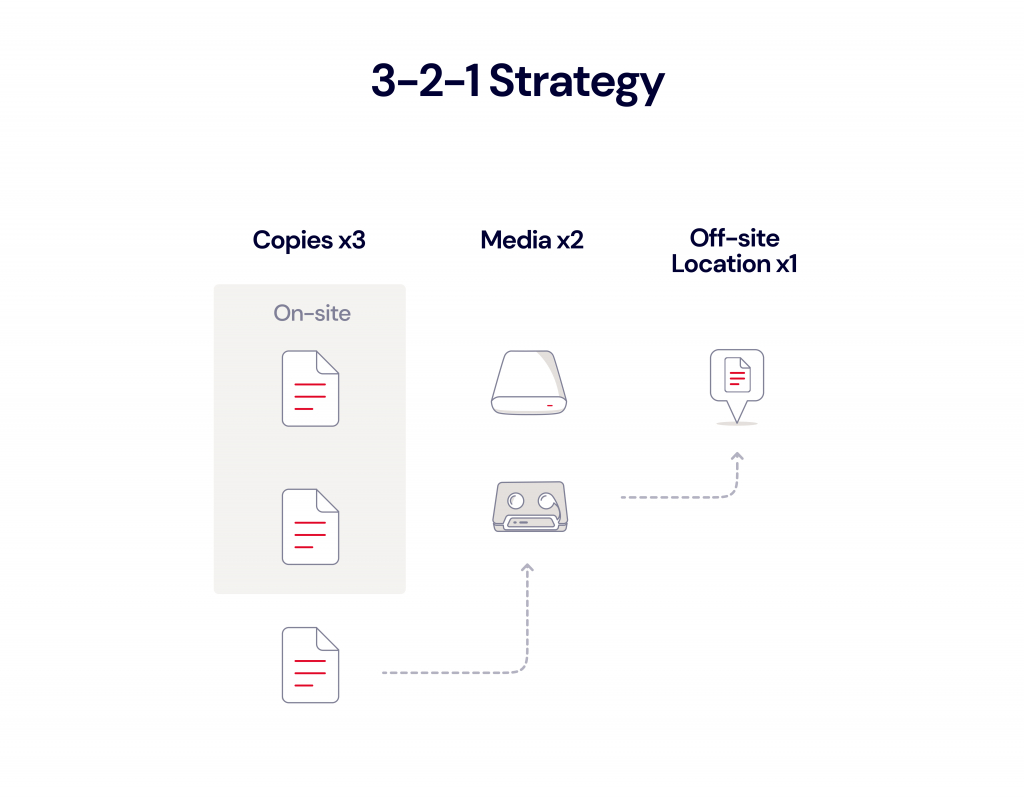
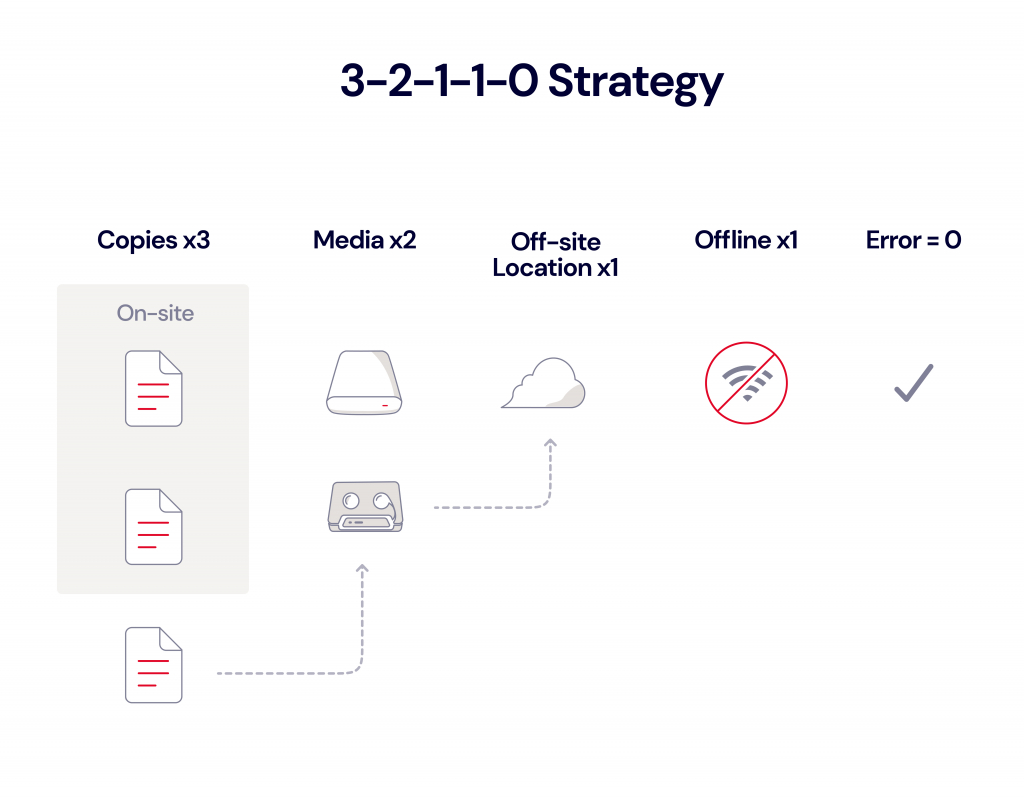
Then, copy your backups to cloud storage to ensure you have another copy in case of a local disaster. This is always good practice as part of the 3-2-1 rule or 3-2-1-1-0 rule. Why is it important to have a copy in cloud storage? Well, even if you store backups for disaster recovery at another location, is your DR site far away enough? Is it immune from a local disaster? If not, you need another copy in the cloud in a location that’s geographically distanced from you.

Scenario 2: Using the Cloud as Your Primary Repository

In this case, the cloud is your primary repository. Direct backups to cloud object storage from Veeam are helpful for the following use cases:

  • Less critical workloads: This could include a lesser-used server, archived projects, files, and data; or business data that is less critical to restore in the case of disaster recovery.
  • To free up local storage: If you’re running up against a lack of local storage and need to make a decision on spending more for additional on-premises storage, the cloud is often more affordable than investing in additional physical storage devices.
  • Workloads where slightly longer recovery periods are acceptable: If you can handle a slightly longer recovery period, cloud storage is a good fit. But remember that not all cloud storage is created equal. Backblaze B2, for example, is always-hot storage, so you won’t have to worry about cold storage delays like you might with AWS Glacier.
  • To migrate away from an LTO system: If you were previously sending backup copy jobs to tape, you can now more easily use cloud storage as a replacement.
  • To eliminate a secondary on-premises location: Maybe you are worried your backups are stored too close to each other, or you simply want to get rid of a secondary on-premises location. The direct-to-cloud option gives you this option. You can reroute those backup copy jobs to copy direct-to-cloud object storage instead.
  • To eliminate on-premises backups altogether: Of course, if you want to completely eliminate local backups for whatever reason, you can now do that by sending all your backup and archive data to the cloud only, although you should carefully consider the implications of that strategy for your disaster recovery plan.

Planning for Disaster Recovery—How You’ll Restore

While it’s important to think about how to optimize your backup strategy using the new functionality introduced by v12, it’s equally as important to think about how you’ll restore business operations in the case of an on-premises disaster. Backblaze offers a unique solution through its partnerships with Veeam and PhoenixNAP—Instant Recovery in Any Cloud.

With this solution, you can run a single command using an industry-standard automation tool to quickly bring up an orchestrated combination of on-demand servers, firewalls, networking, storage, and other infrastructure in phoenixNAP. The command draws data from Veeam backups immediately to your VMware/Hyper-V based environment, so businesses can get back online with minimal disruption or expense. Best of all, there’s no cost unless you actually need to use the solution, so there’s no reason not to set it up now.

Instant Recovery in Any Cloud works with both of the scenarios described above—whether your cloud is your primary or secondary repository. One advantage of using the direct-to-cloud object storage Backup Job is that you can more easily leverage Instant Recovery in Any Cloud since your primary backup is in the cloud. Taking advantage of cloud transit speeds, your business can get back up and running in less time than it would take to restore back to on-premises storage.

Planning for Disaster Recovery—How You’ll Budget

Another consideration for tightening up your cyber resilience plan (and getting your executive team on board with it) is better understanding and anticipating any egress expenses you may face when recovering data—because the last thing you want to be doing in the case of a major data disaster is trying to convince your executive team to sign off on an astronomical egress bill from your cloud provider.

At Backblaze, we’ve always believed it’s good and right to enable customers to readily use their data. With B2 Reserve, our capacity-based offering, there are no egress fees, unlike those charged by AWS, Azure, and Google Cloud. B2 Reserve also includes premium support and Universal Data Migration services so you can move your data from another cloud provider without any lift on your team’s part.

For our Backblaze B2 pay-as-you-go consumption-based offering, egress fees stand at just $0.01/GB, and we waive egress fees altogether with many of our compute and CDN partners.

How Veeam Works with Backblaze B2

Backblaze is a Veeam Ready partner and certified Veeam Ready for Object with Immutability, meaning it’s incredibly easy to set up Backblaze B2 Cloud Storage as your cloud repository in Veeam’s SOBR. In fact, it takes only about 20 minutes.

Setting up Backblaze B2 as your primary repository in the direct-to-object storage method is even easier. Just follow the steps in our Quick-Start Guide to get started.

Backblaze B2 is one-fifth the cost of other major cloud providers and offers enterprise-grade security without enterprise pricing. Unlike other cloud providers, we do not charge extra for the use of Object Lock, which enables immutability for protection from ransomware. There’s also no minimum retention requirement unlike other cloud providers who charge you for 30, 60 or even 90 days for deleted data.

No matter how you choose to configure Veeam with Backblaze B2, you’ll know that your data is protected from on-site disaster, ransomware, and hardware failure.

Veeam + Backblaze: Now Even Easier

Get started today for $5/TB per month or contact your favorite reseller, like CDW or SHI, to purchase Backblaze via B2 Reserve, our all-inclusive capacity-based bundles.

The post Thinking Through Your Cloud Strategy With Veeam’s V12 Release appeared first on Backblaze Blog | Cloud Storage & Cloud Backup.

Fastly vs. AWS CloudFront: How Do the CDNs Stack Up?

Post Syndicated from Molly Clancy original https://www.backblaze.com/blog/fastly-vs-aws-cloudfront-how-do-the-cdns-stack-up/

As a leading specialized cloud platform for application storage, we work with a variety of content delivery network (CDN) providers. From this perch, we get to see the specifics on how each operates. Today, we’re sharing those learnings with you by comparing Fastly and AWS CloudFront to help you understand your options when it comes to choosing a CDN. 

A Guide to CDNs

This article is the first in a series on all things CDN. We’ll cover how to decide which CDN is best for you, how to decipher pricing, and how to use a video CDN with cloud storage.

If there’s anything you’d like to hear more about when it comes to CDNs, let us know in the comments.

What Is a CDN?

If you run a website or a digital app, you need to ensure that you are delivering your content to your audience as quickly and efficiently as possible to beat out the competition. One way to do this is by using a CDN. A CDN caches all your digital assets like videos, images, scripts, style sheets, apps, etc. Then, whenever a user accesses your content, the CDN connects them with the closest server so that your items load quickly and without any issues. Many CDNs have servers around the globe to offer low-latency data access and drastically improve the responsiveness of your app through caching.

Before you choose a CDN, you need to consider your options. There are dozens of CDNs to choose from, and they all have benefits and drawbacks. Let’s compare Fastly with AWS CloudFront to see which works best for you.

CDN Use Cases

Before we compare these two CDNs, it’s important to understand how they might fit into your overall tech stack. Here are some everyday use cases for a CDN:

  • Websites: If you have a video- or image-heavy website, you will want to use a CDN to deliver all your content without any delays for your visitors.
  • Web Applications: A CDN can help optimize your dynamic content and allow your web apps to run flawlessly, regardless of where your users access them.
  • Streaming Video: Customers expect more from companies these days and will not put up with buffering or intermittent video streaming issues. If you host a video streaming service like Hulu, Netflix, Kanopy, or Amazon, a CDN can solve these problems. You can host high-resolution (8K) video on your CDN and then stream it to your users, offering them a smooth, gapless streaming experience.
  • Gaming: If you are a “Call of Duty” or “Halo” fan, you know that most video games use high-resolution images and video to provide the most immersive gaming experience possible. Video game providers use CDNs to ensure responsive gameplay without any blips. You can also use a CDN to streamline rolling out critical patches or updates to all your customers without any limits.
  • E-Commerce Applications: Online retailers typically use dozens of images to showcase their products. If you want to use high-quality images, your website could suffer slow page loads unless you use a CDN to deliver all your photos instantly without any wait.

Need for Speed (Test)

Website developers and owners use speed tests to gauge page load speeds and other aspects affecting the user experience. A CDN is one way to improve your website metrics. You can use various online speed tests that show details like load time, time to first byte (TTFB), and the number of requests (how many times the browser must make the request before the page loads).

A CDN can help improve performance quite a bit, but speed tests are dependent on many factors outside of a CDN. To find out exactly how well your site performs, there are dozens of reputable speed test tools online that you can use to evaluate your site, and then you can make improvements from there. Some of the most popular tools are:

Comparing Fastly vs. AWS CloudFront

Fastly, founded in 2011, has rapidly grown to be a competitive global edge cloud platform and CDN offering international customers a wide variety of products and services. The company’s flagship product is its CDN which offers nearly instant content delivery for companies like The New York Times, Reddit, and Pinterest.

AWS CloudFront is Amazon Web Service’s (AWS) CDN offering. It’s tightly integrated with other AWS products.

To best understand how the two CDNs compare, we’ll look at different aspects of each one so you can decide which option works best for you, including:

  • Network
  • Caching
  • DDoS Protection
  • Log streaming
  • Integrations
  • TLS Protocols
  • Pricing

Network

CDN networks are made up of distribution points, which are network connections (servers) that allow a CDN to deliver content instantly to users anywhere.

Fastly

Fastly’s network is built fundamentally differently than a legacy CDN. Rather than a wide-ranging network populated with many points of presence (PoPs), Fastly built a stronger network based on fewer, more powerful, and strategically placed PoPs. Fastly promises 233Tbps of connected global capacity with its system of PoPs (as of 9/30/2022).

AWS CloudFront

AWS CloudFront doesn’t share specific capacity figures in terms of terabits per second (Tbps). They keep that claim somewhat vague, advertising “hundreds of terabits of deployed capacity.” But they do advertise that they have roughly 450 distribution points in 90 cities in 48 countries.

Our Take

At first glance, it might seem like more PoPs means a faster, more robust network. Fastly uses a useful metaphor to explain why that’s not true. They compare legacy PoPs to convenience stores—they’re everywhere, but they’re small, meaning that the content your users are requesting may not be there when they need it. Fastly’s PoPs are more like supermarkets—you have a better chance of getting everything you need (your cached content) in one place. It only takes a few milliseconds to get to one of Fastly’s PoPs nowadays (as opposed to when legacy providers like AWS CloudFront built their networks), and there’s much more likelihood that the content you need is going to be housed in that PoP already, instead of needing to be called up from origin storage.

Caching

Caching reduces the number of direct requests to your origin server. A CDN acts as a middleman responding to requests for content on your behalf and directing users to edge caches nearest to the user. When a user calls up your website, the CDN serves up a cached version located on the server closest to them. This feature drastically improves the speed and performance of your website.

Fastly

Fastly uses a process of calculating the Time to Live (TTL) with its caching feature. TTL is the maximum time Fastly will use the content to answer requests before returning to your origin server. You can set various cache settings like purging objects, conditional caching, and assigning different TTLs for cached content through Fastly’s API.

Fastly shows its average cache hit ratio live on its website, which is over 91% at the time of publication. This is the ratio of how many content requests the CDN is able to fill from the cache versus the total number of requests.

Fastly also allows you to automatically compress some file types in gzip and then cache them. You can modify these settings from inside Fastly’s web interface. The service also includes support for Brotli data compression via general availability as of February 7, 2023.

AWS CloudFront

AWS CloudFront routes requests for your content to servers holding a cached version, lessening the burden on your origin container. When users visit your site, the CDN directs them to the closest edge cache for instantaneous page loads. You can change your cache settings in AWS CloudFront’s backend. AWS CloudFront supports compressed files and allows you to store and access gzip and Brotli compressed objects.

Our Take

Fastly does not charge a fee no matter how many times content is purged from the cache, while AWS CloudFront does. And, Fastly can invalidate content in 150 milliseconds, while AWS CloudFront can be 60–120 times slower. Both of these aspects make Fastly better with dynamic content that changes quickly for customers, such as news outlets, social media sites, and e-commerce sites.

DDoS Protection

Distributed denial of service (DDoS) attacks are a serious concern for website and web app owners. A typical attack can interrupt website traffic or crash it completely, making it impossible for your customers to reach you.

Fastly

Fastly relies on its 233Tbps+ (as of 9/30/2022) of globally-distributed network capacity to absorb any DDoS attacks, so they don’t affect customers’ origin content. They also use sophisticated filtering technology to remove malicious requests at the edge before they get close to your origin.

AWS CloudFront

AWS CloudFront is backed by comprehensive security technology designed to prevent DDoS and other types of attacks. Amazon calls its DDoS protection service AWS Shield.

Our Take

Fastly’s next gen web application firewall (WAF) actively filters the correct traffic. More than 90% of their customers use the WAF in active full blocking mode whereas across the industry, only 57% of customers use their WAF in full blocking mode. This means the Fastly WAF works as it should out of the box. Other WAFs require more fine-tuning and advanced rule setting to be as efficient as Fastly’s. Fastly’s WAF can also be deployed anywhere—at the edge, on-premises, or both—whereas most AWS instances are cloud hosted.

Log Streaming

Log streaming enables you to collect logs from your CDN and forward them to specific destinations. They help customers stay on top of up-to-date information about what’s happening within the CDN, including detecting security anomalies.

Fastly

Fastly allows for near real-time visibility into delivery performance with real-time logs. Logs can be sent to 29 endpoints, including popular third-party services like Datadog, Sumo Logic, Splunk, and others where they can be monitored.

AWS CloudFront

AWS CloudFront real-time logs are integrated with Amazon Kinesis Data Streams to enable delivery using Amazon Kinesis Data Firehose. Kinesis Data Firehose can then deliver logs to Amazon S3, Amazon Redshift, Amazon Elasticsearch Service, as well as service providers like Datadog, New Relic, and Splunk. AWS charges for real-time logs in addition to charging for Kinesis Data Streams.

Our Take

More visibility into your data is always better, and Fastly’s free real-time log streaming is the clear winner here with more choice of endpoints, allowing customers to use the specialized third-party services they prefer. AWS encourages staying within the AWS ecosystem and penalizes customers for not using AWS services, namely their S3 object storage.

Integrations

Integrations allow you to extend a product or service’s functionality through add-ons. With your CDN, you might want to enhance it with a different interface or add on new features the original doesn’t include. One popular tool we’ll highlight here is Terraform, a tool that allows you to provision infrastructure as code (IaC).

Terraform

Both Fastly and AWS CloudFront support Terraform. Fastly has detailed instructions on its website about how to set this up and configure it to work seamlessly with the service.

Amazon’s AWS CloudFront allows you to integrate with Terraform by installing the program on your local machine and configuring it within AWS CloudFront’s configuration files.

The Drawbacks of a Closed Ecosystem

It’s important to note that AWS CloudFront, as an AWS product, works best with other AWS products, and doesn’t exactly play nice with competitor products. As an independent cloud services provider, Fastly is vendor agnostic and works with many other cloud providers, including AWS’s other products and Backblaze.

TLS (Transport Layer Security) Protocols

TLS or transport layer security (formerly known as secure sockets layer (SSL)) is an encryption device used to protect website data. Whenever you see the lock sign on your internet browser, you are using a website that is protected by an TLS (HTTPS).

Fastly assigns a shared domain name to your CDN content. You can use the associated TLS certificate for free or bring your own TLS certificate and install it. Fastly offers detailed instructions and help guides so you can securely configure your content.

Amazon’s AWS CloudFront also assigns a unique URL for your CDN content. You can use an Amazon-issued certificate, the default TLS certificate installed on the server or use your own TLS. If you use your own TLS, you must follow the explicit instructions for key length and install it correctly on the server.

Pricing

Fastly

Fastly offers a free trial which includes $50 of traffic with pay-as-you-go bandwidth pricing after that. Bandwidth pricing is based on geographic location and starts at, for example, $0.12 per GB for the first 10TB for North America. The next 10TB is $0.08 per GB, and they charge $0.0075 per 10,000 requests. Fastly also offers tiered capacity-based pricing for edge cloud services, starting with its Essential product for small businesses, which includes 3TB of global delivery per month. Their Professional tier includes 10TB of global delivery per month, and their Enterprise tier is unlimited. They also offer add-on products for security and distributed applications.

AWS CloudFront

AWS CloudFront offers a free plan including 1TB of data transfer out, 10,000,000 HTTP or HTTPS requests, and 2,000,000 functions invocations each month. However, customers needing more than the basic plan will have to consider the tiered pricing based on bandwidth usage. AWS CloudFront’s pricing starts at $0.085 per GB up to 10TB in North America. All told, there are seven pricing tiers from 10TB to >5PB.

Our Take

When it comes to content delivery, AWS CloudFront can’t compete on cost. Not only that, but Fastly’s pay-as-you-go pricing model with only two tiers is simpler than AWS CloudFront’s pricing with seven tiers. As with many AWS products, complexity demands configuration and management time. Customers tend to spend less time getting Fastly to work the way they want it to. With AWS CloudFront, customers also run the risk of getting locked in to the AWS ecosystem.

Our Final Take

Between the two CDNs, Fastly is the better choice for customers that rely on managing and serving dynamic content without paying high fees to create personalized experiences for their end users. Fastly wins over AWS CloudFront on a few key points:

  • More price competitive for content delivery
  • Simpler pricing tiers
  • Vendor agnostic
  • Better caching
  • Easier image optimization
  • Real-time log streaming
  • More expensive, but better performing out-of-the-box WAF

Using a CDN with Cloud Storage

A CDN can greatly speed up your website load times, but there will still be times when a request will call the origin store. Having reliable and affordable origin storage is key when the cache doesn’t have the content stored. When you pair a CDN with origin storage in the cloud, you get the benefit of both scalability and speed.

The post Fastly vs. AWS CloudFront: How Do the CDNs Stack Up? appeared first on Backblaze Blog | Cloud Storage & Cloud Backup.

Our Journey to SOC 2 Type 2 Certification

Post Syndicated from original https://www.backblaze.com/blog/our-journey-to-soc-2-type-2-certification/

In late December of 2022, the email arrived from the auditor. A deep breath and a mouse click later and the word “Congratulations” jumped from the screen. Backblaze had passed our SOC 2 Type 2 examination with no exceptions noted. The examination covered both our Backblaze B2 Cloud Storage service and our Backblaze Computer Backup service.

It was the end of an important milestone that had begun years ago, and we wanted to take a few minutes to look back and share the lessons we learned along the way as we created and built a successful SOC 2 certification program. Whether you’re interested in how we made the journey, or how your organization might follow in some of our footsteps, we thought the things we learned along the way were worth sharing.

Background

SOC stands for System and Organization Controls, with SOC 2 being a voluntary compliance standard for service organizations developed by the American Institute of CPAs (AICPA). The standard is based on the Trust Services Criteria (TSC) which specifies how organizations should manage and protect customer data. The specific criteria you will use are based on your organization’s business operation and practices. An outside auditor reviews and tests your practices and procedures to ensure you are complying with those criteria.

“When it comes to selection of criteria and implementation of controls, there is no one-size-fits-all approach to identifying the scope, as it is critical for a company to first understand what controls are applicable to their products and services, and how they would fit within their very own environment.”
—Evangeline Cheung, VP and Associate General Counsel, Backblaze

Given the uniqueness of the criteria each organization will use, we are not going to get into the mechanics of SOC 2 criteria selection here. Instead we will focus on the process you can expect as you go through your SOC 2 journey.

The Importance of SOC 2

Over the past several years, many organizations have started asking, and even requiring, their vendors to be SOC 2 compliant and verified by a third party auditor to ensure the vendor is providing a service which adheres to a defined set of industry best practices for data protection.

While Backblaze utilizes data centers which have a current SOC 2 report and/or other similar certifications such as ISAE 3402, ISO 27001, or ISO 20000, we are seeing an upward trend of customers and prospects asking for a SOC 2 report covering the Backblaze service and platform. This makes sense—while everyone is comfortable their data is safe in the data centers we use, they want to ensure our cloud storage platform and its associated applications are also safe. To address their concerns, the compliance group under our legal department kicked off our SOC 2 program.

Getting Started

There are many tasks you do at the beginning of any project, such as conducting a kickoff meeting, creating a project plan, and so on. We’ll focus on a handful of things you will need to do for your SOC 2 project.

Executive Buy-In: Okay, every significant company project needs this, but given the resources and support you will need for project success, this is a must. You will not be able to fly the SOC 2 certification under the radar of your CEO or CFO.

Stakeholder Buy-In: While a SOC 2 evaluation affects nearly every department in your organization, technical operations, information technology (IT), and engineering are the most impacted. Without buy-in from those departments to provide the necessary resources to create, document, and follow the required policies, procedures, and controls, you will not get far.

Seek Out Experience: Ask key stakeholders and others in their sphere if they’ve been through a SOC 2 or a similar certification before. Experience in the process is helpful, and having that knowledge with respect to your infrastructure and internal processes will provide you with meaningful inputs and feedback as you define your policies, procedures, and controls.

Build a Strong Core: Forming a core team with the key stakeholders is one of the most impactful steps in the SOC 2 process, as it helps provide visibility on the status of the project and identifies any roadblock issues.

“Having alignment cross-functionally through communication and transparency is key to the success of our SOC 2 program. Not only is getting buy-in from leadership key, but it is just as important to ensure that any process change is transparent to the rest of the organization and that input from process owners are thoughtfully considered as new controls are being introduced and implemented.”
—Evangeline Cheung, VP and Associate General Counsel, Backblaze

Outside Help Is Okay: Another source of help to consider (and budget for) is an outside consulting firm. This can be very useful, especially if your organization is new to the SOC 2 framework. Choose a consulting firm that understands and supports your objectives and is familiar with your business, preferably with references for having worked with similar firms.

Choose an Audit Firm That Knows Your Business: The audit firm you select is one of the more important decisions you’ll make. We reviewed and interviewed several firms before selecting Schellman as our auditor for our SOC 2 efforts. They had completed hundreds of audits for SOC 2, ISO 27001, PCI-DSS, and so on, and they had worked with Lumen Technologies (CenturyLink), Iron Mountain, and others on the data center side, and Litmus and others on the Software as a Service (SaaS) side. That breadth and depth of experience was a great fit for us.

Tools of the Trade: A SOC 2 examination is a large multi-departmental project. While some organizations have managed the project using spreadsheets, the complexity often leads you to look at solutions built specifically for SOC 2 and similar certifications. The category is known as Governance, Risk, and Compliance (GRC) with offerings ranging from a few hundred dollars to $50K+ a year. For Backblaze, we wanted a system that could be used for multiple types of certifications, that way we could leverage the work we did for one certification towards the next one. If you are new to SOC 2, you may want to start out with a simple, purpose-built solution. If you do, ensure that your data can be exported as needed should you decide to upgrade later on.

Don’t underestimate how long the “getting started” stage will take. Activities like selecting an auditor, choosing a consulting firm, and selecting your tools can consume months. So, start your preparation work early!

Your Path to SOC 2 Type 2

One of the decisions you’ll have to make early is where to start. The three basic steps are as follows:

  1. SOC 2 Type 1 Assessment
  2. SOC 2 Type 1 Audit
  3. SOC 2 Type 2 Audit

If your company is new to SOC 2 and audits in general, then starting with an assessment makes the most sense, but where you start is up to you. We’ll dig into each of the steps below.

SOC 2 Type 1 Assessment Preparation

The assessment step starts with you educating your auditor about your organization. Typically the auditor will provide you with a long list of questions about your organization, how it operates, what equipment you use, what type of policies and procedures are already in place and so on. You need to be brutally honest here as many downstream actions will be based on this information. For example, based on the information you provide, the auditor will work with you to define the scope of the assessment; that is, the systems and services that will be reviewed. If you leave an important system out and the auditor finds it later, that’s—well, it’s not good. On the other hand, giving the auditor everything, whether it matters or not, can lead to an expansive, overly intrusive audit.

You’ll also spend much of your preparation time understanding the SOC 2 framework and determining what evidence you are going to use to address the SOC 2 criteria. As noted previously, the criteria and controls which apply to your business will be unique to you, although basics like risk management, disaster preparedness, encryption practices, and so on will apply in varying degrees to everyone.

We used the word evidence above; you will become very familiar with that term in the process. Evidence is the proof you need to provide the auditor to prove that your organization does indeed meet the criteria that is applicable to your organization. Evidence comes in many forms: policies, procedures, tickets, scripts, and so on.

You’ll find some evidence is useful in helping comply with multiple criteria, and you’ll find that some criteria can take 10 or more pieces of evidence to address the issue at hand. Understanding the mapping from evidence to criteria and keeping track of the evidence you have and where it applies are two of the biggest challenges in your SOC 2 project.

SOC 2 Type 1 Assessment

The actual assessment will typically be a couple of weeks long. The auditor will review your evidence and interview key employees about that evidence. Think of an assessment as a dress rehearsal. You should be ready, but the process is flexible enough for you to ask questions and fix things along the way.

The two most important learnings of an assessment are first, to determine the sufficiency of your evidence, and second, to determine how your company’s employees do in the audit process. We’ll talk more about sufficiency in a bit, because the second point is often overlooked. For example, if during the interviews your IT manager is a wall-flower—or worse, combative—in front of the auditor, you have some work to do beyond getting the evidence right.

Evidence sufficiency is a subjective term that ranges from the concrete to the creative. Sufficiency is also related to context or use. For example, a list of employees with hire dates is sufficient when you need to demonstrate who was hired in the last three months. But if the list does not have terminated employees, it does not help identify who should have access to your systems. Do you want two lists or just one? The assessment period is the time to pose and answer such questions.

After the assessment is complete, you’ll get a report outlining how well you did. It should contain a pass or fail on each of the points of focus within each criteria group. At this point, you’ll need to address how to fix the failed items and how you are going to move forward towards an actual audit.

SOC 2 Type 1 Preparation and Audit

The SOC 2 Type 1 audit is based on a date in time. The audit is all about proving to the auditor that:

  1. You have all your policies, procedures, and controls in place.
  2. These policies, procedures, etc, are sufficient to meet the criteria you’re addressing.
  3. That you have a defined cadence of when various controls will occur.
  4. You have documented how you will prove you have exercised the various controls, or you have actually taken the action and have documentation.

As an example, you have a checklist in place for new hire onboarding. The checklist has sufficient inputs from all departments involved in bringing a new person onboard. Each quarter the human resources (HR) manager will review all new hire checklists to ensure compliance with the controls in place. You have evidence of the completed HR manager’s most recent review via a ticket in your service management or other activity tracking system.

Preparation for a SOC 2 Type 1 audit is about cleaning up any missing or incomplete items (policies, procedures, controls, etc.) found in the assessment, and taking a deep breath before you plow forward towards the audit. The assessment itself can be exhausting, especially if such a task is new to the organization and the people involved. This is a good time to assess whether you had the right employees to answer questions on the subject at hand. Were they too senior or junior? How well did they answer the questions? If you need to make changes or coach up your folks, now’s the time.

You should have at least a quarter between completing the assessment and starting the SOC 2 Type 1 audit. This gives you time to test your controls, at least the quarterly ones, and have them ready as evidence for the audit. The more “we just finished that yesterday” policies, procedures, and untested controls you have when starting the actual audit, the less prepared you will feel. The auditor may also want to dig deeper into those items to make sure they do, in fact, address the criteria appropriately and you are ready to act on them when the time comes. In short, the more evidence you have that demonstrates you have done a given task, the better off you will be.

Type 1 Versus Type 2

While the SOC 2 Type 1 audit is about a point in time, the SOC 2 Type 2 audit is an evaluation of how well you document and maintain your controls over a specified evaluation period. The evaluation period is at least six months and usually no more than one year. And it is not a one-and-done thing. You will be audited at least annually to maintain your SOC 2 Type 2 certification.

The difference in the evaluation period between a Type 1 and a Type 2 is the primary reason not to jump from an assessment directly to a Type 2 audit. If you jump straight into Type 2 and you have missing or insufficient controls, you won’t know until the Type 2 audit itself, and it is too late at that point. This could lead to an exception or worse for a given criterion.

You may be able to pass a SOC 2 Type 2 examination with a limited number of exceptions, but they will be listed in the SOC 2 Type 2 audit report for all to see. You will be able to respond to any exceptions found, with your response being part of the final report. Still, it is not a good look regardless of the circumstances. Doing the SOC 2 Type 1 audit first allows you to determine whether your controls are sufficient before placing them into practice. This will minimize potential exceptions in your SOC 2 Type 2 audit that are based solely on insufficient controls.

Staggering Reviews

One mistake that is easy to make is to have all your quarterly reviews done on the same date each quarter, or even in the same month. This is especially vexing to everyone when the reviews are piled into the last month of a fiscal reporting period. Spread out the reviews of the various controls. They can be done anytime as long as they meet the cadence you specified. It’s perfectly fine to have a quarterly review on the 15th of February, May, and so on.

One way reviews can be scheduled is by using the GRC application we mentioned earlier. The nice part of using the GRC application here is that the review can be tied directly to the control, which in turn is tied to the criteria you are attempting to satisfy. The evidence gathered in the review can be captured (or linked to) in the application, then, at audit time, the review and supporting documentation are readily available.

SOC 2 Type 2 Evaluation Period and Audit

For a SOC 2 Type 2 audit you will have to demonstrate that you performed and recorded the actions specified by the policies, procedures, and controls you devised to meet the SOC 2 criteria over the evaluation period. Here are a few examples:

  • You have a requirement to document the code changes, additions, and deletions for each production product build. A build typically occurs once a week, but not always. You have a change management system which documents everything you need and includes any sign-offs you captured as part of your process. You also document the weeks when there was no build. The auditor will ask for your build documentation for several different weeks during the evaluation period. This could include weeks you did not do a build. How many different weeks and which weeks they will ask for is unknown until the audit itself.
  • Your risk management plan is required to be reviewed by the risk management officer once a quarter. You’ll want to have a tracking ticket showing the action was completed and, within that ticket, a note or other correspondence that discusses the findings along with any follow up actions from the review.
  • Your risk management plan is required to be reviewed each year by your executive staff to ensure all appropriate risks are being surfaced and addressed in the plan, and that all risks are correctly rated. The review is documented per your risk management procedures. If the date for this review falls outside of the evaluation period, make sure you have a previously completed review ready to show the auditor if asked. Saying, “We haven’t done one yet,” is not the best answer and will only cause the auditor to dig into your risk management policies and procedures to ensure you will be ready when the time comes.

At its core, the SOC 2 Type 2 is about demonstrating your ability to consistently enact and follow industry best practices across your organization over a period of time and then demonstrate that to the auditor.

Consistency Matters

During the initial SOC 2 Type 1 assessment you will meet the actual auditors who are doing the audit. There are usually two or three auditors, each focusing on a different area where they have some expertise. As you work with each of these folks, you need to decide if this is the auditor you’ll want to use in future audits, including SOC 2 Type 1, and so on. After completing the assessment, the auditor will have a decent understanding of your organization and its quirks and capabilities. Swapping out auditors or even audit firms between the different SOC 2 phases means you’ll be starting from nearly ground zero each time.

The only downside to wanting to use the same auditor for each SOC 2 audit is you may have to wait for them to have a future hole in their schedule to conduct the next audit. Still, the consistency gained is worth the wait if, each time, you can have the same auditor with prior knowledge of how your company works.

Summary

The entire SOC 2 process, from the initial assessment through annual SOC 2 Type 2 renewals, adds rigor and consistency to many of the processes and procedures you already have in place. It also helps you identify deficiencies and correct them along the way. You don’t have any deficiencies you say? Well good on you, but keep an open mind as you go through the process—just in case.

Another Beginning

Thanks for joining us as we celebrate our first SOC 2 journey. In the end there was little tomfoolery, no bloodshed, and no one got lost under a mound of paperwork. Hopefully there were a few nuggets of useful information that can help you along the way on your own SOC 2 odyssey. Of course, as this SOC 2 Type 2 journey ends, we start a new one, as each year we will be audited to ensure our continued compliance. Onward.

The post Our Journey to SOC 2 Type 2 Certification appeared first on Backblaze Blog | Cloud Storage & Cloud Backup.
Open Sourcing the IPO

Post Syndicated from original https://www.backblaze.com/blog/open-sourcing-the-ipo/

Taking a company public is an investment. At Backblaze, we spent more than $10 million* in connection with our IPO and learned a lot in the process. Now, all that knowledge is yours for free. Why? We’re open sourcing our IPO.

In the tech world, the open source movement has long promoted growth, innovation, and collaboration. The push to democratize code is such a powerful thing that it is credited with the rapid expansion of technological innovation in recent decades. And yet, while open sourcing is widespread in our industry, you don’t find it in many others.

Some of the most common and repetitive business practices are still not well understood. The IPO process, for example, is as cryptic as the most jealously guarded algorithms for anyone who hasn’t been through it, and for no good reason. Entrepreneurs and business leaders often enter into this process not entirely blind, but without the building blocks those who IPO’d before had constructed. It doesn’t make sense.

When Backblaze went public in 2021, we found ourselves wondering why there wasn’t a better roadmap available to any entrepreneur who dared to take the IPO path. It’s an investment not only of management time, but also a significant amount of financial resources. Having more information going into it is never a bad thing.

Last year, I wrote about why you should go IPO, but in this series what I really want to do is open source our IPO process and share every step along the way: who to talk to, what to chase, what to build. I want any business leader to be able to use this series as a foundation along the journey to IPO. An IPO will still be an investment, but you’ll be armed with the knowledge to make it lean and mean. (And whether you actually go public or not is beside the point—the preparation takes your business to a whole new level.)

More to Come

This blog series is for everyone: from those of you dreaming up your first idea, to startups still in stealth mode, to the thousands of companies with revenue in the tens of millions. Check out the first installment here:

You can also tune in to our Stocks and Storage series on YouTube for more explainers on Wall Street jargon from IPO to EBITDA. And stay tuned for more—I’ll be filling in the details over the next year and writing the playbook I wish we had when we started down our IPO path.

The Backblaze Way

In the 20 years leading up to 2021—the year Backblaze was listed—around 4,500 companies went public, and yet there was still no definitive resource for us to follow when we started out. It wasn’t just that the roadmap was unclear, the process was also clouded by perceptions of what type of company could make the journey. The message we frequently heard was that without lots of media buzz, multiple rounds of traditional venture capital (VC) funding, public declarations of money raised, revenue above $100M, and lofty growth metrics, don’t even bother getting started.

But we’d already taken a different route to get where we were, bootstrapping our way to profitability and growth without following the road most traveled and the structure that provides, so we weren’t afraid to do the same thing in an IPO. It created some unique obstacles, but it worked for us, and we hope other entrepreneurs and business leaders can leverage our learnings, avoid our mistakes, and find some of the same benefits we did in going public.

Potential Stumbling Blocks

The road to IPO was something we thought about from day one of our company, but we started moving along it more seriously in early 2020.

We had some excellent advisors and mentors guiding our first steps (and if you’re contemplating an IPO, I highly, highly recommend starting to seek out folks with experience with IPOs who can help guide you along the way). At the same time, I wanted to make sure I was developing my own understanding of the process and forming my own opinions. My research included everything from digging deep into the resources shared by outside counsel to a late night “how to IPO” Google search (with limited results).

So what would have been most helpful to me at the time? What were the gray areas? What resources could have made all the difference at the beginning of the process? Below are the key points that I would give myself if I could go back in time, and they form the backbone of my thinking as I’ve begun to open source our experience for you.

How to IPO: The Things That Should Keep You Up at Night

  • The Unicorn CFO: We all know the importance of the CFO in the IPO process, but when the markets are strong and many companies are marching towards a public offering, CFOs with IPO-specific experience are rare. Can we start with a head of Financial Planning & Analysis (FP&A)? A controller? What’s right for our company?
  • General Guidance from General Counsel (GC): At the end of 2019, our in-house legal team was essentially nonexistent. We needed to hire a GC to help us navigate many of the nuanced IPO best practices, but where else should they provide guidance? Your GC should instruct you on how to start thinking and acting like a public company and direct your executive team on the specific roles they should play.
  • What Is My Role in All of This?: As a CEO, I naturally wanted to have my hands in every part of the IPO process. But, that was impractical and impossible. For example, I needed to play a very specific role as chief executive in the drafting of the S-1. (That’s the document you file with the SEC when you want to go public.) I had to approach the document with company vision/storytelling as my main focus—to ensure the picture we were painting of the company’s future was neither slanted by the desires of the market, nor overshadowed by legal and financial jargon.
  • Avoiding Fyre Festival: While on one hand you want to deliver a strong company narrative, many entrepreneurs can get carried away. You want to make sure you’re not telling a story you can’t deliver on. I don’t fault anyone for building a vision, but when thousands of influencers wind up in FEMA tents on a remote Caribbean island, you’ve taken your business narrative too far.
  • Systems, Processes, & People: These are the core components necessary to have in place for a successful IPO. When we started having the IPO conversations, ours were sufficient for the operations at a scrappy startup. I thought we had been informally putting the right infrastructure in place as we scaled, but preparing for an IPO takes a more concerted and intentional effort.

The Tip of the Iceberg

What I’ve touched on above is truly just the tip of the iceberg—something to get you thinking. In the rest of this series, I plan to dig deep into the inner workings of the IPO and share my insights—plus, many of the materials, planning docs, decks, spreadsheets, and more—with full transparency.

Here are some of the topics on deck for the rest of the year:

  • Building the Foundation: If you want to take your startup public, what’s the best way to set yourself up for success as you grow?
  • IPO Readiness: The opportunity stars have aligned. What does it take to actually be ready to take advantage of it?
  • Making the Call: When are you ready to pull the trigger and how does your mentality need to change?
  • Building the IPO Machine: What cogs are essential for the IPO machine, and how and when do you select them? Think bankers, analysts, executive team members, etc. And what if you pick wrong?
  • Storytelling: How to sell success and navigate the S-1.
  • Old Friends: Managing morale and focus.
  • The Roadshow: Storytelling beyond the S-1: How does it work and how do you prepare?
  • Notes on Not Drowning: Testing the waters.
  • The Final Steps: What are the final details you need to consider and what could go wrong?
  • IPO Day: My experience and key learnings.

In the meantime, please let me know in the comments if there’s anything in particular you’d like to learn more about as we help more businesses grow better.

The post Open Sourcing the IPO appeared first on Backblaze Blog | Cloud Storage & Cloud Backup.

Shooting for the Clouds: How One Photo Storage Service Moved Beyond Physical Devices

Post Syndicated from Barry Kaufman original https://www.backblaze.com/blog/shooting-for-the-clouds-how-one-photo-storage-service-moved-beyond-physical-devices/

The sheer number of creative and unique ways our customers and partners utilize Backblaze B2 Cloud Storage never ceases to amaze us. Whether it’s pairing our storage with a streaming platform to deliver seamless video or protecting research data that is saving lives, we applaud their ingenuity. From time to time, we like to put the spotlight on one of these inspired customers, which brings us to the company we’re highlighting today: Monument, a photo management service with a strong focus on security and privacy.

The TL;DR

Situation: The Monument story started with a physical device where customers could securely save photos, but they saw the winds shifting to the cloud. They wanted to offer users the flexibility and automation that the cloud provides while maintaining their focus on privacy and security.

Solution: Monument launched their cloud-based offering, Monument Cloud, with Backblaze as its storage backbone. User photos are encrypted and stored in Backblaze B2 Cloud Storage, and are accessible via the Monument Cloud app.

Result: Monument Cloud eliminates the need for users to maintain a physical device at their homes or offices. Users just install the Monument Cloud app on their devices and their photos and videos are automatically backed up, fully encrypted, organized, and shareable.

What Is Monument?

Monument was founded in 2016 by a group of engineers and designers who wanted an easy way to back up and organize their photos without giving up their privacy and security. Since smartphones saturated the market, the average person’s digital photo archive has grown exponentially. The average user has around 2,100 photos on their smartphone at any given time, and that’s not even counting the photos stashed away on various old laptops, hard drives, USBs, and devices.

Photo management services like Google Photos stepped in to help folks corral all of those memories. But, most photo management services are a black box—you don’t know how they’re using your data or your images. Monument wanted to give folks the same functionality as something like iCloud or Google Photos while also keeping their private data private.

“There are plenty of photo storage solutions right now, but they come with limitations and fail to offer transparency about their privacy policies—how photos are being used or processed” said Monument’s co-founder Ercan Erciyes. “At Monument, we reimagined how we store and access our photos and provided a clutter-free experience while keeping users in the center, not their personal data.”

They launched their first generation product in 2017—a physical storage device with advanced AI software that helps users manage photo libraries between devices and organize photos by faces, scenery, and other properties. The hardware side was fueled by two rounds of Kickstarter funding, each helping create new versions of the company’s smart storage device powered by a neural processing unit (NPU) that lived on-device and allowed access from anywhere.

An Eye for Secure Photo Storage

That emphasis on privacy fueled the software side of Monument’s offering, an AI-driven approach that allows easy searchability of photos without processing any of the metadata on Monument’s end. Advanced image recognition couples with slick de-duplication features for an experience that catalogs photos without exposing photographers’ data to algorithms that influence their choices. No ads, no profiling, no creepy trackers, and Monument doesn’t use or sell customers’ personal data.

We were getting a lot of questions along the lines of, “What happens if my house catches fire?” or “What if there is physical damage to the device?” so we could see there was a lot of interest in a cloud solution.”

—Ercan Erciyes, Co-Founder, Monument Labs, Inc.

The Gathering Cloud

With the rise of cloud storage, Monument saw their typical consumer shifting away from on-prem solutions. “We were getting a lot of questions along the lines of, ‘What happens if my house catches fire?’ or ‘What if there is physical damage to the device?’ so we could see there was a lot of interest in a cloud solution,” said Ercan. “Plus there were a lot of users that didn’t want a physical device in their home.”

Their answer: Offer the same privacy-first service through a comprehensive cloud solution.

Using Free Credits Wisely

Launching a cloud-based storage service built around their philosophy of privacy and security was a clear necessity for the company’s future. To kick off their move to the cloud, Monument utilized free startup credits from AWS. But, they knew free credits wouldn’t last forever. Rather than using the credits to build a minimum viable product as fast as humanly possible, they took a very measured approach. “The credits are sweet,” Ercan said, “But you need to pay attention to your long-term vision. You need to have a backup plan, so to speak.” (We think so, too.)

Ercan ran the numbers with success in mind and realized they’d ultimately lose money if they built the infrastructure for Monument Cloud on AWS. He also didn’t want to accumulate tech debt and become locked in to AWS.

They ended up using the credits to develop the AI model, but not to build their infrastructure. For that they turned to specialized cloud providers.

Integrating Backblaze B2 Cloud Storage

Monument created a lean tech stack that incorporated Backblaze B2 for long-term encrypted storage. They run their AI software on Vultr, a Backblaze compute partner that offers free egress fees between the two services. And, they use another specialized cloud provider to store thumbnails that are displayed in the Monument Cloud app. The cloud service has quickly become the company’s flagship offering, drawing 25,000 active users.

Group Photos: Serving New Customers

With infrastructure that will scale without cutting into their margins, Monument is poised to serve an increasing number of customers who care about what happens to their personal data. More and more, customers are seeking out alternatives to big name cloud providers, using services like DuckDuckGo instead of Google Search or WhatsApp instead of garden variety text messaging apps. With a distributed, multi-cloud system, they can serve these types of customers with a cloud option while keeping data privacy front and center. And the customers that gravitate to this value proposition are wide-ranging.

Of course, the first ones you might think of would be prolific photo takers or even amateur photographers, but Ercan pointed out some surprising use cases for their technology. “We are seeing a lot of different use cases coming up from schools, real estate companies, and even elder care systems,” he said. With Monument’s new cloud solution, classrooms are exploring new online frontiers in education, and families scattered around the world are able to share photos with their elderly relatives.

A Monument to Security

Challenging monster brands like Google is no small task as a small team of just five people. Monument does it by keeping a laser focus on their core values and their customers’ needs. “If you keep the user’s needs in the center, building a solution doesn’t require an army of engineers,” Ercan said. Without having to worry about how to use customer data to build algorithms that keep advertisers happy, Monument can focus on serving their customers what they actually need—a photo management solution that just works.

Monument Co-founders Semih Hazar (left) and Ercan Erciyes (right)

Monument and Backblaze

Whether you’re the family photographer, the office party chronicler, or you just have a convoluted system of hard drives stickered and slotted onto a shelf somewhere that you’d like to get rid of, first and foremost: Make sure you’re availing yourself of the very reasonable storage available from Backblaze for archiving or backing up your data.

After you’re done with that: Check out Monument.

The post Shooting for the Clouds: How One Photo Storage Service Moved Beyond Physical Devices appeared first on Backblaze Blog | Cloud Storage & Cloud Backup.
Backblaze Drive Stats for 2022

Post Syndicated from original https://www.backblaze.com/blog/backblaze-drive-stats-for-2022/

As of December 31, 2022, we had 235,608 drives under management. Of that number, there were 4,299 boot drives and 231,309 data drives. This report will focus on our data drives. We’ll review the hard drive failure rates for 2022, compare those rates to previous years, and present the lifetime failure statistics for all the hard drive models active in our data center as of the end of 2022. Along the way, we’ll share our observations and insights on the data presented and, as always, we look forward to you doing the same in the comments section at the end of the post.

2022 Hard Drive Failure Rates

At the end of 2022, Backblaze was monitoring 231,309 hard drives used to store data. For our evaluation, we removed 388 drives from consideration which were used for either testing purposes or drive models for which we did not have at least 60 drives. This leaves us with 230,921 hard drives to analyze for this report.

Observations and Notes

One Zero for the Year

In 2022, only one drive had zero failures, the 8TB Seagate (model: ST8000NM000A). That “zero” does come with some caveats: We have only 79 drives in service and the drive has a limited number of drive days—22,839. These drives are used as spares to replace 8TB drives that have failed.

What About the Old Guys?

  • The 6TB Seagate (model: ST6000DX000) drive is the oldest in our fleet with an average age of 92.5 months. In 2021, it had an annualized failure rate (AFR) of just 0.11%, but has slipped a bit to 0.68% for 2022. A very respectable number any time, but especially after nearly eight years of duty.
  • The 4TB Toshiba (model: MD04ABA400V) drives have an average age of 91.3 months. In 2021, this drive has an AFR of 2.04% and that has jumped to 3.13% for 2022, which included three drive failures. Given the limited number of drives and drive days for this model, if there were only two drive failures in 2022, the AFR would be 2.08%, or nearly the same as 2021.
  • Both of these drive models have a relatively small number of drive days, so confidence in the AFR numbers is debatable. That said, both drives have performed well over their lifespan.

New Models

In 2021, we added five new models while retiring zero, giving us a total of 29 different models we are tracking. Here are the five new models:

  1. HUH728080ALE604–8TB
  2. ST8000NM000A–8TB
  3. ST16000NM002J–16TB
  4. MG08ACA16TA–16TB
  5. WUH721816ALE6L4–16TB

The two 8TB drive models are being used to replace failed 8TB drives. The three 16TB drive models are additive to the inventory.

Comparing Drive Stats for 2020, 2021, and 2022

The chart below compares the AFR for each of the last three years. The data for each year is inclusive of that year only and the operational drive models present at the end of each year.

Drive Failure Was Up in 2022

After a slight increase in AFR from 2020 to 2021, there was a more notable increase in AFR in 2022 from 1.01% in 2021 to 1.37%. What happened? In our Q2 2022 and Q3 2022 quarterly Drive Stats reports, we noted an increase in the overall AFR from the previous quarter and attributed it to the aging fleet of drives. But, is that really the case? Let’s take a look at some of the factors at play that could cause the rise in AFR for 2022. We’ll start with drive size.

Drive Size and Drive Failure

The chart below compares 2021 and 2022 AFR for our large drives (which we’ve defined as 12TB, 14TB, and 16TB drives) to our smaller drives (which we’ve defined as 4TB, 6TB , 8TB, and 10TB drives).

With the exception of the 16TB drives, every drive size had an increase in their AFR from 2021 to 2022. In the case of the small drives, the increase was pronounced, and at 2.12% is well above the 1.37% AFR for 2022 for all drives.

In addition, while the small drive cohort represents only 28.7% of the drive days in 2022, they account for 44.5% of the drive failures. Our smaller drives are failing more often, but they are also older, so let’s take a closer look at that.

Drive Age and Drive Failure

When examining the correlation of drive age to drive failure we should start with our previous look at the hard drive failure bathtub curve. There we concluded that drives generally fail more often as they age. To see if that matters here, we’ll start with the table below which shows the average age of each drive model of drives by size.

With the exception of the 8TB Seagate (model: ST8000NM000A), which we recently purchased as replacements for failed 8TB drives, the drives fall neatly into our two groups noted above—10TB and below and 12TB and up.

Now let’s group the individual drive models into cohorts defined by drive size. But before we do, we should remember that the 6TB and 10TB drive models have a relatively small number of drives and drive days in comparison to the remaining drive groups. In addition, the 6TB and 10TB drive cohorts consist of one drive model, while the other drive groups have at least four different drive models. Still, leaving them out seems incomplete, so we’ve included tables with and without the 6TB and 10TB drive cohorts.

Each table shows the relationship for each drive size, between the average age of the drives and their associated AFR. The chart on the right (V2) clearly shows that the older drives, when grouped by size, fail more often. This increase as a drive model ages follows the bathtub curve we spoke of earlier.

So, What Caused the Increase in Drive Failure and Does it Matter?

The aging of our fleet of hard drives does appear to be the most logical reason for the increased AFR in 2022. We could dig in further, but that is probably moot at this point. You see, we spent 2022 building out our presence in two new data centers, the Nautilus facility in Stockton, California and the CoreSite facility in Reston, Virginia. In 2023, our focus is expected to be on replacing our older drives with 16TB and larger hard drives. The 4TB drives and yes, even our O.G. 6TB Seagate drives could go. We’ll keep you posted.

Drive Failures by Manufacturer

We’ve looked at drive failure by drive age and drive size, so it’s only right to look at drive failure by manufacturer. Below we have plotted the quarterly AFR over the last three years by manufacturer.

Starting in Q1 of 2021 and continuing to the end of 2022, we can see that the overall rise in the overall AFR over that time seems to be driven by Seagate and, to a lesser degree, Toshiba, although HGST contributes heavily to the Q1 2022 rise. In the case of Seagate, this makes sense as most of our Seagate drives are significantly older than any of the other manufacturers’ drives.

Before you throw your Seagate and Toshiba drives in the trash, you might want to consider the lifecycle cost of a given hard drive model versus its failure rate. We looked at this in our Q3 2022 Drive Stats report, and outlined the trade-offs between drive cost and failure rates. For example, in general, Seagate drives are less expensive and their failure rates are typically higher in our environment. But, their failure rates are typically not high enough to make them less cost effective over their lifetime. You could make a good case that for us, many Seagate drive models are just as cost effective as more expensive drives. It helps that our B2 Cloud Storage platform is built with drive failure in mind, but we’ll admit that fewer drive failures is never a bad thing.

Lifetime Hard Drive Stats

The table below is the lifetime AFR of all the drive models in production as of December 31, 2022.

The current lifetime AFR is 1.39%, which is down from a year ago (1.40%) and also down from last quarter (1.41%). The lifetime AFR is less prone to rapid changes due to temporary fluctuations in drive failures and is a good indicator of a drive model’s AFR. But it takes a fair amount of observations (in our case, drive days) to be confident in that number. To that end, the table below shows only those drive models which have accumulated one million drive days or more in their lifetime. We’ve ordered the list by drive days.

Finally, we are going to open up a bit here and share the results of the 388 drives we removed from our analysis because they were test drives or drive models with 60 or fewer drives. These drives are divided amongst 20 different drive models and the table below lists those drive models which were operational in our data centers as of December 31, 2022. Big caveat here: these are just test drives and so on, so be gentle. We usually ignore them in the reports, so this is their chance to shine, or not. We look forward to seeing your comments.

There are many reasons why these drives got to this point in their Backblaze career, but we’ll save those stories for another time. At this point, we’re just sharing to be forthright about the data, but there are certainly tales to be told. Stay tuned.

Our Annual Drive Stats Webinar

Join me on Tuesday, February 7 at 10 a.m. PT to review the results of the 2022 report. You’ll get a look behind the scenes at the data and the process we use to create the annual report.

Sign Up for the Webinar

The Hard Drive Stats Data

The complete data set used to create the tables and charts in this report is available on our Hard Drive Test Data page. You can download and use this data for free for your own purpose. All we ask are three things: 1) you cite Backblaze as the source if you use the data, 2) you accept that you are solely responsible for how you use the data, and 3) you do not sell this data itself to anyone; it is free.

If you just want the data used to create the tables and charts in this blog post you can download the ZIP file containing the CSV files for each chart.

Good luck and let us know if you find anything interesting.

Want More Insights?

Check out our take on Hard Drive Cost per Gigabyte and Hard Drive Life Expectancy.

Interested in the SSD Data?

Read the most recent SSD edition of our Drive Stats Report.

The post Backblaze Drive Stats for 2022 appeared first on Backblaze Blog | Cloud Storage & Cloud Backup.
Extended Maintenance Window for US West Data Center

Post Syndicated from Backblaze original https://www.backblaze.com/blog/extended-maintenance-window-for-us-west-data-center/

On Wednesday, February 1, at 8:00 a.m. PT (4:00 p.m. UTC), we’ll be performing planned maintenance on a data center in our U.S. West data region. We expect the work to take place over four to eight hours. During the window, we do not anticipate any service impacts outside of what customers typically experience during our standard scheduled maintenance. The maintenance is only being performed on one data center in the U.S. West data region. Customers with data stored in this region should see minimal to no impact beyond what is listed below.

Most services, including Computer Backup uploads and most B2 Cloud Storage operations (i.e., uploads, downloads, listing, key creation) will function normally. Within the maintenance window, some customers may experience interruptions of four hours to eight hours in the following areas:

Web Interface:

  • Website sign in

Computer Backup:

  • Data restore and recovery (requires website sign in)
  • Backups may sleep temporarily when starting a new session
  • Sign in via installers, downloader apps, and mobile apps

B2 Cloud Storage:

  • Bucket creation, deletion, and updating via API
  • B2 Snapshot creation (requires website sign in)

If timing or impacts change materially—which we do not expect to occur—we will endeavor to offer updates on our social media channels. If you have any questions, you can contact our Support Team through the Help page.

The post Extended Maintenance Window for US West Data Center appeared first on Backblaze Blog | Cloud Storage & Cloud Backup.

Simplify Data Protection with Backblaze and Commvault

Post Syndicated from Jennifer Newman original https://www.backblaze.com/blog/simplify-data-protection-with-backblaze-and-commvault/

The most effective backups are the ones you never have to think about—It’s that simple. For anyone in charge of data protection—IT Admins, IT Directors, CTOs and CIOs, managed service providers, and others—driving to that level of simplicity is always the goal. A new partnership between Backblaze and Commvault brings you one step closer to achieving that goal.

Now, Commvault customers can select Backblaze B2 as a cloud storage destination for their Commvault backups and data management needs. Read on to learn more about the partnership.

What Is Commvault?

Commvault is a global leader in data management. Their Intelligent Data Services help organizations transform how they protect, store, and use data. They offer a simple, unified Data Management Platform that spans all of a company’s data, no matter where it lives—on-premises, or in a hybrid or multi-cloud environment—or how it’s structured—in legacy applications, databases, virtual machines, or in containers.

How Does This Partnership Benefit Joint Customers?

Joint customers gain access to easy, affordable cloud storage that integrates with Commvault’s software. The partnership benefits joint customers in a few key ways:

  • Quick setup: Get started with a seamless integration.
  • Easy administration: Manage data in one platform.
  • Better backups: Protect your data from ransomware risks, equipment failure, damage, theft, and human error.
  • Faster recoveries: Restore your environment quickly in the event of a disaster.
  • Affordable storage: Backblaze is ⅕ the cost of major cloud providers.

Take Advantage of Capacity-Based Pricing with Backblaze B2 Reserve

Joint customers who prefer predictable cloud spend rather than consumption-based pricing can take advantage of Backblaze B2 Reserve. The Backblaze B2 Reserve offering is capacity-based, starting at 20TB, with key features, including:

  • Free egress up to the amount of storage purchased per month.
  • Free transaction calls.
  • Enhanced migration services.
  • No delete penalties.
  • Upgraded Tera support.

Customers can purchase B2 Reserve through our channel partners. If you’re interested in participating or just want to learn more, contact our Sales team.

If you’re a channel partner and Commvault is in your suite of offerings, we’d love to engage with you. Register on our Partner Portal to get started with offering Backblaze B2 as a backup target.

Customer Spotlight: How Pittsburg State Protects Data in Tornado Alley

Pittsburg State University, located in the heart of Tornado Alley in Kansas, took steps to protect their data by deploying private cloud infrastructure via Commvault Distributed Storage. They established two nodes on-premises and a third across the state for geographic separation, but they wanted another layer of protection. They added Backblaze B2 Cloud Storage giving them peace of mind that their data would be better protected from threats like ransomware. Since Backblaze is integrated with Commvault, Commvault de-duplicates the data, then sends a copy to Backblaze nightly.

“Backblaze B2 had the capability we lacked. I bolted it onto our system, so now I have off-site backup that is safe and well-protected from a regional disaster in Kansas.”
—Tim Pearson, Director for IT Infrastructure and Security, Pittsburg State University

Getting Started with Backblaze B2 and Commvault

Ready to simplify your Commvault backup storage? Check out our Commvault Quickstart Guide for a walk through on how to set up Backblaze B2 as your Commvault cloud storage target.

The post Simplify Data Protection with Backblaze and Commvault appeared first on Backblaze Blog | Cloud Storage & Cloud Backup.

Build a Cloud Storage App in 30 Minutes

Post Syndicated from Pat Patterson original https://www.backblaze.com/blog/build-a-cloud-storage-app-in-30-minutes/

The working title for this developer tutorial was originally the “Polyglot Quickstart.” It made complete sense to me—it’s a “multilingual” guide that shows developers how to get started with Backblaze B2 using different programming languages—Java, Python, and the command line interface (CLI). But the folks on our publishing and technical documentation teams wisely advised against such an arcane moniker.

Editor’s Note

Full disclosure, I had to look up the word polyglot. Thanks, Merriam-Webster, for the assist.

Polyglot, adjective.
1a: speaking or writing several languages: multilingual
1b: composed of numerous linguistic groups; a polyglot population
2: containing matter in several languages; a polyglot sign
3: composed of elements from different languages
4: widely diverse (as in ethnic or cultural origins); a polyglot cuisine

Fortunately for you, readers, and you, Google algorithms, we landed on the much easier to understand Backblaze B2 Developer Quick-Start Guide, and we’re launching it today. Read on to learn all about it.

Start Building Applications on Backblaze B2 in 30 Minutes or Less

Yes, you heard that correctly. Whether or not you already have experience working with cloud object storage, this tutorial will get you started building applications that use Backblaze B2 Cloud Storage in 30 minutes or less. You’ll learn how scripts and applications can interact with Backblaze B2 via the AWS SDKs and CLI and the Backblaze S3-compatible API.

The tutorial covers how to:

  • Sign up for a Backblaze B2 account.
  • Create a public bucket, upload and view files, and create an application key using the Backblaze B2 web console.
  • Interact with the Backblaze B2 Storage Cloud using Java, Python, and the CLI: listing the contents of buckets, creating new buckets, and uploading files to buckets.

This first release of the tutorial covers Java, Python, and the CLI. We’ll add more programming languages in the future. Right now we’re looking at JavaScript, C#, and Go. Let us know in the comments if there’s another language we should cover!

➔ Check Out the Guide

What Else Can You Do?

If you already have experience with Amazon S3, the Quick-Start Guide shows how to use the tools and techniques you already know with Backblaze B2. You’ll be able to quickly build new applications and modify existing ones to interact with the Backblaze Storage Cloud. If you’re new to cloud object storage, on the other hand, this is the ideal way to get started.

Watch this space for future tutorials on topics such as:

  • Downloading files from a private bucket programmatically.
  • Uploading large files by splitting them into chunks.
  • Creating pre-signed URLs so that users can access private files securely.
  • Deleting versions, files and buckets.

Want More?

Have questions about any of the above? Curious about how to use Backblaze B2 with your specific application? Already a wiz at this and ready to do more? Here’s how you can get in touch and get involved:

  • Sign up for Backblaze’s virtual user group.
  • Find us at Developer Week.
  • Let us know in the comments which programming languages we should add to the Quick-Start Guide.

The post Build a Cloud Storage App in 30 Minutes appeared first on Backblaze Blog | Cloud Storage & Cloud Backup.

Ransomware Takeaways Q4 2022

Post Syndicated from Jeremy Milk original https://www.backblaze.com/blog/ransomware-takeaways-q4-2022/

It may seem like ransomware is not in the news as much as it was in 2021 and the first part of 2022. Back then, major attacks and record-breaking ransom demands dominated headlines, and governments took action to make life more difficult for cybercriminals. But the spotlight is never a good place to be when you’re trying to defraud companies to the tune of millions of dollars. So, while you might be hearing about it less, that doesn’t mean that the threat of cybercrime is negligible. Exactly the opposite—the lack of media attention makes potential victims lower their guard, leaving vulnerabilities that cybercriminals love to exploit.

Staying up-to-date on the latest ransomware news keeps you informed of potential threats. And, keeping the latest threats fresh in your mind means you’ll be ready if and when cybercriminals turn their sights in your direction. We all hope that never happens, but it’s wise to be prepared in case it does. To arm you with the latest, here are some of the biggest developments in ransomware that we observed in Q4 2022.

This post is a part of our ongoing series on ransomware. Take a look at our other posts for more information on how businesses can defend themselves against a ransomware attack, and more.

And, don’t forget that we offer a thorough walkthrough of ways to prepare yourself and your business for ransomware attacks—free to download below.

➔ Download The Complete Guide to Ransomware

1. Many Ransomware Attacks Go Unreported in the Media

One possible reason you don’t hear about ransomware attacks is that they simply don’t get reported in the news. A study released in late 2022 by Jumpsec found that 86% of ransomware attacks go unreported in typical media sources in the UK. The attacks that do get covered are typically ones where the victims are legally required to disclose the attacks due to personally identifiable information (PII) being compromised. While public disclosure is uncommon, keep in mind that reporting requirements—that is, the legal requirement to disclose to the authorities—in the UK, U.S., and elsewhere are becoming more stringent. For example, in 2022, President Biden signed a bill into law that requires operators of critical infrastructure to disclose cyber attacks to the government within 72 hours.

Key Takeaway

It may seem like there’s no real incentive to disclose a cyberattack publicly. Why serve the greater good at the expense of your reputation, right? But, some organizations have found that being open and honest positions them ahead of the game. Chip Daniels, head of government affairs at SolarWinds, shared the positive response the company has received about their transparency, “I meet with somebody for the first time, they’ll say, ‘I just want to tell you, you guys are the gold standard on how you should respond to a cyber incident.’” Being seen as the “gold standard” isn’t a bad place to land after an attack.

2. Hospitals and Schools Continued to Be Targeted

Sadly, it’s not the first time we reported on the threat to hospitals and schools. It was highlighted in our very first Ransomware Takeaways report. In Q4 2022, cybercriminals showed no sign of letting up as CommonSpirit Health, a Chicago-based health provider with more than 700 care sites and 142 hospitals in 21 states, suffered a major attack that made patient records vulnerable. And earlier in the year, over Labor Day weekend, one of the largest school districts in the country—the Los Angeles Unified School District—was attacked as well.

Key Takeaway

Nonprofit and public sector institutions need budget-friendly options for implementing ransomware protection that work with their existing purchasing programs. Through government IT aggregators like Carahsoft, public sector decision makers can purchase affordable, capacity-based cloud storage to support their recovery objectives.

3. Ransomware Attacks Take a Psychological Toll

In news that should come as a surprise to no one who’s been through a ransomware incident, cyberattacks take a psychological toll, and new research from cybersecurity company Northwave released in Q4 2022 quantifies it. They measured the mental impacts of ransomware attacks at three points in time, within the first week, month, and year after an attack. At a month out, 75% reported having negative thoughts, and at one year, 14% reported symptoms of trauma requiring professional help.

Key Takeaway

Companies involved in a ransomware attack can take action to minimize negative effects on employees’ mental health. Northwave recommends having regular check-ins and breaks during the first phase, making space for rest and recovery time in the second phase, and creating an open environment in the third phase, where employees can talk about what happened and decompress.

4. Some Ransomware Is Badly Made, and All the More Dangerous

Researchers analyzed the Cryptonite ransomware strain, which first appeared in October 2022, and found that its “barebones” functionality makes it even more of a threat—there’s no way to recover encrypted files. Researchers point out that it’s likely not an intentional feature, but simply poor design.

Key Takeaway

Since the software is broken to the point where decryption is impossible, there’s absolutely no reason to pay the ransom if you fall victim to a Cryptonite attack. Instead, it makes sense to spend some time creating a disaster recovery plan so you can resume normal business operations as soon as possible. Researchers also report that phishing seems to be the most common attack vector for this ransomware strain, so it’s a good idea to ramp up your cybersecurity training.

5. A Vast Majority of Ransomware Attacks Attempted to Infect Backups

In November, Veeam released their 2022 Ransomware Trends report, a study of more than 3,000 organizations across 28 countries. Among their key findings: 95% of ransomware attacks attempted to infect backups. Of those attacks that targeted backups, 38% of respondents had some backup repositories impacted, and 30% had all of their backup repositories impacted.

Key Takeaway

One word: immutability. Protecting backups with Object Lock costs nothing to implement and prevents backups from being modified or encrypted by ransomware. With backups that can’t be altered, recoveries are much easier and more reliable.

Closing Thoughts

While you may not be hearing about as many high profile ransomware attacks as you once were, make no mistake that they’re still happening. Just know that there are steps you can take to keep your company from becoming the next victim, including protecting data with Object Lock, applying security best practices, and creating a disaster recovery plan.

The post Ransomware Takeaways Q4 2022 appeared first on Backblaze Blog | Cloud Storage & Cloud Backup.

How to Serve Data From a Private Bucket with a Cloudflare Worker

Post Syndicated from Pat Patterson original https://www.backblaze.com/blog/how-to-serve-data-from-a-private-bucket-with-a-cloudflare-worker/

Customers storing data in Backblaze B2 Cloud Storage enjoy zero-cost downloads via our Content Delivery Network (CDN) partners: Cloudflare, Fastly, and Bunny.net. Configuring a CDN to proxy access to a Backblaze B2 Bucket is straightforward and improves the user experience, since the CDN caches data close to end-users. Ensuring that end-users can only access content via the CDN, and not directly from the bucket, requires a little more effort. A new technical article, Cloudflare Workers for Backblaze B2, provides the steps to serve content from Backblaze B2 via your own Cloudflare Worker.

In this blog post, I’ll explain why you might want to prevent direct downloads from your Backblaze B2 Bucket, and how you can use a Cloudflare Worker to do so.

Why Prevent Direct Downloads?

As mentioned above, Backblaze’s partnerships with CDN providers allow our customers to deliver content to end users with zero costs for data egress from Backblaze to the CDN. To illustrate why you might want to serve data to your end users exclusively through the CDN, let’s imagine you’re creating a website, storing your website’s images in a Backblaze B2 Bucket with public-read access, acme-images.

For the initial version, you build web pages with direct links to the images of the form https://acme-images.s3.us-west-001.backblazeb2.com/logos/acme.png. As users browse your site, their browsers will download images directly from Backblaze B2. Everything works just fine for users near the Backblaze data center hosting your bucket, but the further a user is from that data center, the longer it will take each image to appear on screen. No matter how fast the network connection, there’s no getting around the speed of light!

Aside from the degraded user experience, there are costs associated with end users downloading data directly from Backblaze. The first GB of data downloaded each day is free, then we charge $0.01 for each subsequent GB. Depending on your provider’s pricing plan, adding a CDN to your architecture can both reduce download costs and improve the user experience, as the CDN will transfer data through its own network and cache content close to end users. Another detail to note when comparing costs is that Backblaze and Cloudflare’s Bandwidth Alliance means that data flows from Backblaze to Cloudflare free of download charges, unlike data flowing from, for example, Amazon S3 to Cloudflare.

Typically, you need to set up a custom domain, say images.acme.com, that resolves to an IP address at the CDN. You then configure one or more origin servers or backends at the CDN with your Backblaze B2 Buckets’ S3 endpoints. In this example, we’ll use a single bucket, with endpoint acme-images.s3.us-west-001.backblazeb2.com, but you might use Cloud Replication to replicate content between buckets in multiple regions for greater resilience.

Now, after you update the image links in your web pages to the form https://images.acme.com/logos/acme.png, your users will enjoy an improved experience, and your operating costs will be reduced.

As you might have guessed, however, there is one chink in the armor. Clients can still download images directly from the Backblaze B2 Bucket, incurring charges on your Backblaze account. For example, users might have bookmarked or shared links to images in the bucket, or browsers or web crawlers might have cached those links.

The solution is to make the bucket private and create an edge function: a small piece of code running on the CDN infrastructure at the images.acme.com endpoint, with the ability to securely access the bucket.

Both Cloudflare and Fastly offer edge computing platforms; in this blog post, I’ll focus on Cloudflare Workers and cover Fastly Compute@Edge at a later date.

Proxying Backblaze B2 Downloads With a Cloudflare Worker

The blog post Use a Cloudflare Worker to Send Notifications on Backblaze B2 Events provides a brief introduction to Cloudflare Workers; here I’ll focus on how the Worker accesses the Backblaze B2 Bucket.

API clients, such as Workers, downloading data from a private Backblaze B2 Bucket via the Backblaze S3 Compatible API must digitally sign each request with a Backblaze Application Key ID (access key ID in AWS parlance) and Application Key (secret access key). On receiving a signed request, the Backblaze B2 service verifies the identity of the sender (authentication) and that the request was not changed in transit (integrity) before returning the requested data.

So when the Worker receives an unsigned HTTP request from an end user’s browser, it must sign it, forward it to Backblaze B2, and return the response to the browser. Here are the steps in more detail:

  1. A user views a web page in their browser.
  2. The user’s browser requests an image from the Cloudflare Worker.
  3. The Worker makes a copy of the incoming request, changing the target host in the copy to the bucket endpoint, and signs the copy with its application key and key ID.
  4. The Worker sends the signed request to Backblaze B2.
  5. Backblaze B2 validates the signature, and processes the request.
  6. Backblaze B2 returns the image to the Worker.
  7. The Worker forwards the image to the user’s browser.

These steps are illustrated in the diagram below.

The signing process imposes minimal overhead, since GET requests have no payload. The Worker need not even read the incoming response payload into memory, instead returning the response from Backblaze B2 to the Cloudflare Workers framework to be streamed directly to the user’s browser.

Now you understand the use case, head over to our newly published technical article, Cloudflare Workers for Backblaze B2, and follow the steps to serve content from Backblaze B2 via your own Cloudflare Worker.

Put the Proxy to Work!

The Cloudflare Worker for Backblaze B2 can be used as-is to ensure that clients download files from one or more Backblaze B2 Buckets via Cloudflare, rather than directly from Backblaze B2. At the same time, it can be readily adapted for different requirements. For example, the Worker could verify that clients pass a shared secret in an HTTP header, or route requests to buckets in different data centers depending on the location of the edge server. The possibilities are endless.

How will you put the Cloudflare Worker for Backblaze B2 to work? Sign up for a Backblaze B2 account and get started!

The post How to Serve Data From a Private Bucket with a Cloudflare Worker appeared first on Backblaze Blog | Cloud Storage & Cloud Backup.

Stable Diffusion and Backblaze: Create a Masterpiece from a Bucket of Your Own Images

Post Syndicated from Troy Liljedahl original https://www.backblaze.com/blog/stable-diffusion-and-backblaze-create-a-masterpiece-from-a-bucket-of-your-own-images/

AI is really having a moment. There’s DALL-E, Lensa, ChatGPT. Your social media feed is probably full of new avatars and AI-generated haiku. Naturally, we at Backblaze were intrigued by this brave new world of AI-generated content. The technology has been wildly popular, but is not without controversy, raising questions about intellectual property, copyright law, artist disenfranchisement, possible displacement of jobs, and general fear over the rise of the machines. On the other side of that coin, there’s definitely a place for AI in the future of work and life. So, I wanted to experiment with it.

Let’s start with Stable Diffusion.

Stable Diffusion is one of the new text-to-image technologies popping up all over the internet that allows users to input words and phrases and get back amazing pictures created by its deep learning model. What makes Stable Diffusion so interesting is that it has been open sourced to allow anyone to create their own models for text-to-image generation.

Today, I’ll walk through how you can do just that using Backblaze B2 Cloud Storage.

Kicking the Stable Diffusion Tires

After playing with an online instance of Stable Diffusion, I sought out content on some more ways to use the AI tool. I found several examples of how to use Stable Diffusion with your own images like this one and this one. The most common use case for this was taking advantage of AI to create art from a model based on your own face. Sounds cool, right? But what if I also had a bunch more pictures in Backblaze B2 Cloud Storage? Could I do the same thing to create art, graphics, branded images, and more, from my content in the cloud? The answer is a resounding YES.

Use Cases for Stable Diffusion

For me, this was a fun experiment, but we see a number of different ways this set up could be used both individually and for businesses. I started with about 20 images or so as fodder for Stable Diffusion’s algorithm. But, that’s just the beginning.

Let’s say you’re a marketing team at a small company. You could use Stable Diffusion’s paid version and get access to hundreds of thousands of random images from Google, but you really only care about analyzing and generating photos that are relevant to your business. So, you run Stable Diffusion in a cloud compute instance and have it analyze a Backblaze B2 Bucket where you store your own library of images, which you’ve probably been collecting for years. Set up that way, you have your own customized AI engine that analyzes and generates only images that are pertinent to your needs, rather than a bunch of images you don’t care about.

In this experiment, I used Google Colab, which worked well for my needs. But for a real implementation, you could use a Backblaze cloud compute partner like Vultr. Egress between Backblaze and Vultr is free, so the analysis won’t cost you anything beyond what it costs to use the two services.

This could be hugely useful for marketing teams, but we also see the value for individuals or businesses who want to keep their data private but still take advantage of AI technology. This way, you aren’t serving up images on public sites.

So, how does it all work? Let’s get into it.

Getting Started with Stable Diffusion and Backblaze B2

What you’ll need:

  • A Backblaze B2 account. You can sign up for free here.
  • A Google account.
  • A smartphone to take pictures if you don’t have 20 or so pictures of whatever subject you want to use lying around.
  • Whatever software tool you’d like to use to mount Backblaze B2 as a drive on your computer. I use Rclone in this example but any cloud drive software will work.

The first thing you’ll need to do is create an account at Hugging Face. Hugging Face is the home of the modern AI community and is where Stable Diffusion lives. In your Hugging Face account, navigate to your Account Settings and go to Access Tokens—we’ll need one of these to allow our environment to use the Stable Diffusion engines.

Now as to the environment, this can be on your own computer, in a virtual machine (VM), really wherever. My favorite (and free) method I found was a Google Colab notebook created by GitHub user TheLastBen that makes the process so incredibly simple that anyone can do this. The Colab notebook also takes advantage of DreamBooth, a Google Research project that provides for incredible detail on the art and images created by a diffusion model. In short, this is the easiest way to get really good looking AI art. You can get started with the Colab notebook here.

In the Colab notebook there are a ton of different options and a great step-by-step guide that explains them, but I’ll walk you through the basic settings to get going:

  1. First, hit the Play button next to Dependencies.
  2. Once that’s done, copy your User Access Token from your Hugging Face account.
  3. In the Model Download section, paste that User Access Token into the Huggingface_Token field.
  4. Click the Play button for Model Download.
  5. You’ll see the script run below all the fields here. You can proceed when you see “DONE!”
  6. Finally, in the Dreambooth section, provide a name in the Session_Name field. This will be the name of the session that gets saved in your Google Drive. That name can be reused later to skip these steps next time.

Training the Stable Diffusion Model

Now the pictures: You’ll want at least 20 pictures or so for your AI model to analyze in order to avoid creating a bunch of generic person art or nightmare fuel. So bust out your phone and take some selfies! If you have a friend to throw in two or three full body pictures this will help as well. A few optional tips:

  • Use different expressions and angles.
  • Use different backgrounds if you can.
  • Use a square or 1:1 ratio setting. By default, Stable Diffusion’s default image size is 512 x 512 pixels, so using square images makes your input more similar to your desired output.

If you’re an iPhone user, you will need to take one extra step here to save your files in JPEG format. You can find a guide for that in this article.

As you save your photos, make sure the file names include the name you’re going to use when generating your AI art. For example, my photos were all named troy (1).jpg, troy (2).jpg, troy (3).jpg, etc. This is important so that the AI understands what to call you (or your subject) when generating your images.

Once you have your photos, it’s time to upload them to a Bucket in Backblaze B2 Cloud Storage. You can easily do this in the Backblaze mobile app or on the Backblaze website.

With your selfies safely in Backblaze B2, make sure you make them accessible on your computer using a tool such as Rclone mount. If you don’t have an account yet, you can check out our guide on how to set up and configure Rclone mount.

You might be wondering why you should upload the photos to a Backblaze B2 Bucket and then mount the Bucket so that we can access it locally, rather than just saving the files to a local folder?

The answer is simple. In this example, we’re working with a few images representing a single subject, so you likely won’t have issues working from your local drive. As you further experiment with more subjects and more images of each subject, you’ll likely outgrow your local drive. Backblaze B2 Cloud Storage scales infinitely so you won’t have to worry about running out of space.

Now, back to the Colab notebook, hit the play button on Instance Images and click the button that shows up to Choose Files. In the pop up, choose your mounted instance of your B2 Bucket and select the photos.

Once they are uploaded, skip the Concept Images section and click the play button for Training. If you’ve done everything right, you should see some ASCII art like this:

Depending on how many photos you selected, this can take some time. So grab a coffee, go for a walk, listen to a podcast, or perhaps all three.

Creating Your Own AI-Generated Masterpieces

Once complete, click the Play button under Test the Trained Model. This will launch a temporary instance of Stable Diffusion with your new custom model in Gradio, which is an open-source Python library for running machine learning apps. Click the Gradio link generated and we’re ready to start making some AI art.

Again, there are a ton of options and configurations but all you really need to do at this point is enter some text into the Prompt box and click the big Generate button.

Creating prompts for AI art is quickly becoming its own art form. There are tons of resources out there to inspire you, but here are a few prompts I used along with the resulting art.

Pro Tip: You may need to click the Generate button a few times if something looks off. This is totally normal—your new AI friend is learning over time, and it does this by repeating the generation process.

Prompt: “Photo of troy digital painting”

Prompt: “Photo of troy person digital painting”

Prompt: “Photo of troy person digital painting asymmetrical headshot smiling”

And finally for something fun…

Prompt: ”photo of troy person hand-drawn cartoon”

It even has an artist signature! Although I’m not sure who fRny Y is?

So, there you have it. Your very own AI engine, customized to generate versions of your face (or your library of images).

Good luck to all the budding AI artists out there. If you give this a try, we’d love to see your images on social media. You can find us @backblaze on Twitter, Facebook, and LinkedIn. I look forward to seeing what you all create!

The post Stable Diffusion and Backblaze: Create a Masterpiece from a Bucket of Your Own Images appeared first on Backblaze Blog | Cloud Storage & Cloud Backup.

What’s the Diff: Image-Based Backup vs. File-Based Backup

Post Syndicated from Kari Rivas original https://www.backblaze.com/blog/whats-the-diff-image-based-backup-vs-file-based-backup/

When you’re planning your backup strategy, one important decision to make is whether to use image-based or file-based backups. Both methods have pros and cons and both are useful in different situations. Think of it like packing for a trip: Sometimes you need to take everything plus the kitchen sink (image-based), and sometimes you only need the essentials (file-based). It’s not a perfect metaphor, but it will make more sense once you understand the differences between these two backup types. Let’s dig in.

The TLDR: What’s the Difference Between Image-Based and File-Based Backups?

The short answer is this: An image-based backup (also known as a bare metal backup, which is a deeply cool name) is a backup of an entire machine or server, including the operating system (OS) and applications as well as all of the files. A file-based backup only includes the files. We’ll dig deeper into the implications of each below, but that should give you a good base of knowledge to start.

First, Some Basic Backup Best Practices

In addition to understanding the difference between file-based and image-based backups and when to use them, there are a few key elements of a backup strategy you should have in your playbook:

Want a Deeper Dive?

Check out “Server Backup: A Comprehensive Guide to Protecting The Data on Your Servers” for an in-depth look at creating a bulletproof backup strategy.

➔ Download the Guide

Why Is Your Backup Configuration Important?

Properly configuring your backups, including when to use file-based versus image-based backups, is important for a couple reasons. First, it enables you to optimize your cloud storage usage and costs. Image-based backups are typically larger than file-based backups, so they’ll cost more to store. File-based backups are smaller and cost less to store, but they’re also not as robust. Finding the right mix is important as you’re planning your cloud storage strategy.

It’s also important to properly configure your backups so that you can recover more effectively in the case of a disaster. Restoring from an image-based backup will allow you to bring your entire operation back online. Understanding how each type of backup works will help you decide which to use when (and when you should use both).

What Is a File-Based Backup?

A file-based backup, sometimes called a file backup or a file-level backup, is a backup of a single file, multiple files, or even all the files on your system. The biggest distinction from an image-based backup is that it does not include a backup of the OS.

When configuring a file-based backup, you can choose which files you want to back up. For instance, you might choose to back up only certain file types, like Word documents or databases. Or you might choose to back up a particular set of files for one department, such as accounting files.

To understand when to use a file-based backup, it helps to know the pros and cons. We’ll dig into those next.

Advantages of File-Based Backup

File-based backups are simple and straightforward—you just need to back up files versus the entire system. Advantages of this type of backup include:

  • More control over what gets backed up. You can choose specific files or folders that get backed up or sent to cloud storage.
  • More control over what you recover. You can be more granular when it comes to choosing which files you need to restore should you need to.
  • Less storage utilization and faster backups. Since file-based backups are typically smaller in size than image-based, they take up less storage space and can be faster to run.
  • Ability to customize. Some backup applications allow you to set customized backup cadences for different types of files. For example, you could back up accounting files daily, but other project files weekly. Or, you could back up all files on a specific schedule.

Disadvantages of File-Based Backup

There are two main disadvantages of file-based backups:

  • The files are saved, but not the applications that created them. If you need to restore files to a different machine, you need to make sure that machine has all of the appropriate applications to read and use the files.
  • File-based backups are very limited in a disaster recovery scenario. If you need to restore an entire environment after a natural disaster or a ransomware attack, you would need to recover all of your files, then spend additional time reconstructing your OS, reinstalling all of your applications, reconfiguring them, etc.

What Is an Image-Based Backup?

An image-based backup, also known as a bare metal backup, disk backup, disk image backup, or mirror backup, allows you to back up all of the volumes on your server, creating a copy of your whole system.

As opposed to a file-based backup, an image-based backup backs up your entire OS, including settings, applications, configurations, and executable programs.

An image-based backup is more robust, which makes it larger. That comes with some advantages and disadvantages as well.

Advantages of Image-Based Backup

Image-based backups are comprehensive. Going back to our packing metaphor, this is the kitchen sink method. Advantages of this type of backup include:

  • The ability to restore a server in its entirety. This is great when you need to protect your entire server, including the OS.
  • The flexibility to restore individual files or the entire system. With an image-based backup, you get the same restore capabilities as a file-based backup, but with the added option to restore the entire disk if needed.
  • Faster recoveries. If you need to meet specific recovery time objectives (RTOs), image-based backups can save you time. You don’t need to reinstall and patch the OS.

Disadvantages of Image-Based Backup

There are a few disadvantages of image-based backups, including:

  • More time-consuming and bandwidth-hogging during backup. Since you’re backing up everything, image-based backups are going to take longer and use more internet bandwidth when you’re saving them to cloud storage. Backing up after work hours is typically recommended.
  • More expensive to store. Image-based backups take up more cloud storage space and hence cost more to store.
  • Could be overkill for day-to-day recovery needs. When you only need to recover a file that’s accidentally been deleted or corrupted, you don’t need a full image-based backup.

Image-Based vs. File-Based: How to Choose?

Now that you know the difference between image-based and file-based backups, how do you know when to use each type? Here are a few basic guidelines.

Choose a file-based backup for the following scenarios:

  1. If you have a virtualized environment. When you can reimage a new OS quickly in a virtualized environment, you may not want or need to back up the full OS.
  2. To back up employee workstations. Employees will most often need to restore individual files, and a file-based backup will cover this use case. If you ever needed to do a full restore, chances are good that you can just reinstall the OS easily.

Choose an image-based backup for the following scenarios:

  1. For servers with mission-critical data. If you can’t function without it, you should do a full image-based backup.
  2. For anything that would take a long time to configure. In a recovery situation, you don’t want to be spending time reconfiguring settings and reinstalling applications.

Why Not Use Both? Optimizing for Cost and Utility

Rather than choosing between file-based or image-based, you could design a backup strategy that employs both. This allows you to manage your storage usage and costs while maximizing your ability to recover quickly. For example, you could consider doing an image-based backup monthly and file-based backups more frequently. Or you could do an image-based backup of your mission critical servers and file-based backups of employee workstations. The right combination will help you to keep your costs low while maintaining the fidelity of your environment in a disaster scenario.

Storing Backups in the Cloud

Whether you choose image-based or file-based backups, you need somewhere safe to store them. According to the 3-2-1 backup strategy, one of those copies should live off-site in a geographically distant location, and cloud storage is a great fit. Check out server backup solutions from Backblaze B2 to learn more about storing your image-based and file-based backups in the cloud.

The post What’s the Diff: Image-Based Backup vs. File-Based Backup appeared first on Backblaze Blog | Cloud Storage & Cloud Backup.

Amazon Sunsets Cloud Drive

Post Syndicated from Stephanie Doyle original https://www.backblaze.com/blog/amazon-sunsets-cloud-drive/

Another one bites the dust. Amazon announced they’re putting Amazon Cloud Drive in the rearview to focus on Amazon Photos in a phased deprecation through December 2023. Today, we’ll dig into what this means for folks with data on Amazon Cloud Drive, especially those with files other than photos and videos.

Dear Amazon Drive User

When Amazon dropped the news, they explained the phased approach they would take to deprecating Amazon Drive. They’re not totally eliminating Drive—yet. Here’s what they’ve done so far, and what they plan to do moving forward:

  • October 31, 2022: Amazon removed the Drive app from iOS and Android app stores. The app doesn’t get bug fixes and security updates anymore.
  • January 31, 2023: Uploading to the Amazon Drive website will be cut off. You will have read-only access to your files.
  • December 31, 2023: Amazon Drive will no longer be supported and access to files will be cut off. Every file stored on Amazon Drive, except photo or video files, needs a new home. Users can access photo and video files on Amazon Photos.

Now, users face two options for what to do with files stored on Amazon Drive:

  1. Follow instructions to download Amazon Photos for iOS and Android devices. And, use the Amazon Drive website to download and store all other files locally or with another service.
  2. Transfer your entire library of photos, videos, and other data to another service.

Looking for an Amazon Cloud Drive Alternative?

Shameless plug: If you used Amazon Cloud Drive to store anything other than photos and you need a new place to keep your data, give Backblaze B2 Cloud Storage a try. The first 10GB are free, and our storage is priced at a flat rate of $5/TB/month ($0.005/GB/month) after that. And if you’re a business customer, we also offer the choice of capacity-based pricing with Backblaze B2 Reserve.

A Quick History of Amazon Cloud Drive

In 2014, Amazon offered free, unlimited photo storage on Amazon Cloud Drive as a loyalty perk for Prime members. The following year, they rolled out a subscription-based offering to store other types of files in addition to photos—video, documents, etc.—on Cloud Drive.

Then, in 2017, they capped the free tier at 5GB. This was just one of many in a string of cloud storage providers ending a free offering and forcing users to pay or move.

All Amazon account holders—regardless of whether they paid for Prime or not—got 5GB for photos and other file types free of charge. If you wanted or needed more storage than that, you had to sign up for the subscription-based offering starting at $11.99 per year for 100GB of storage, and prices went up from there.

You might consider this the beginning of the end for Amazon Cloud Drive.

Why Say Goodbye?

When tech companies deprecate a feature—as Amazon has done with Drive—it’s for any number of reasons:

  1. To combine one feature with another.
  2. To rectify naming inconsistencies.
  3. When a newer version makes supporting the older one impossible or impractical.
  4. To avoid flaws in a necessary feature.
  5. When a better alternative replaced the feature.
  6. To simplify the system as a whole.

Amazon’s reason for deprecating Drive? To provide a dedicated solution for photos and videos. The company stated, “We are taking the opportunity to more fully focus our efforts on Amazon Photos to provide customers a dedicated solution for photos and video storage.” Unfortunately, that leaves folks who store anything else high and dry.

Where Do We Go From Here?

The bottom line: Amazon Drive customers must park emails, documents, spreadsheets, PDFs, and text files somewhere else. If you’re an Amazon Drive customer looking to move your files out before you lose access, we invite you to try Backblaze B2. The first 10GB is on us.

How to Get Started with Backblaze B2

  1. If you’re not a customer, first sign up for B2 Cloud Storage.
  2. If you’re already a customer, enable B2 Cloud Storage in your “My Settings” tab. You can follow our Quick Start Guide for more detailed instructions.
  3. Download your data from Amazon Drive.
  4. Upload your data to Backblaze B2. Many customers choose to do so directly through the web interface, while others prefer to use integrated transfer solutions like Cyberduck, which is free and open-source, or Panic’s Transmit for Macs.
  5. Sit back and relax knowing your data is safely stored in the Backblaze B2 Storage Cloud.

The post Amazon Sunsets Cloud Drive appeared first on Backblaze Blog | Cloud Storage & Cloud Backup.

A Behind the Scenes Look at Our US East Data Center

Post Syndicated from original https://www.backblaze.com/blog/a-behind-the-scenes-look-at-our-us-east-data-center/

In the last couple of years, Backblaze has taken residence in three new data center facilities. In the West, we added the CyrusOne facility in Chandler, Arizona and the Nautilus Data Center in Stockton, California. In the East, we just added the Coresight facility in Reston, Virginia as our anchor to our new U.S. East data region. Each of these data centers will house over an exabyte of customer data. A number like an exabyte of storage is nice, and we’ll share a bunch more numbers as we go. But what I really wanted to share are the stories behind the scenes as we moved into the Coresight facility in Reston, which we call IAD 1.

The process of turning a big empty room into a data center location is complex and requires intense coordination, an adaptable project plan, and folks who can think on their feet. Let’s face it, no project is perfect, and building out a data center is no different. But, once in a while, it’s fun to peek behind the curtain to see how the actual work gets done. Let’s take a look.

Big Boxes, Tight Spaces, and Construction

There were over 700 boxes of various shapes and sizes to be received at the IAD site. This included server cabinets, storage servers, support servers, networking equipment, and other odds and ends. The cabinet and storage server boxes were particularly large, and only four of these boxes at a time could fit into the service elevator used to move everything from the loading dock to the Backblaze facility on the fourth floor.

Cabinets and servers are normally received almost daily, but the IAD data center was undergoing construction which limited where and how trucks could unload their cargo. One poor fellow spent the better part of three hours trying to manipulate his semi into the loading dock. The construction also limited the amount of cargo that could stay in the dock area to basically zero. When a truck arrived and started unloading Backblaze goods, our process was: load four boxes, go up four floors, unload four boxes, go down four floors, and repeat until the truck was empty.

Each time a truck arrived, the race was on, and there were a lot of trucks as everything was scheduled to arrive within a 30-day window. Why 30 days? We wanted to install the cabinets all at once, so we could run the networking once and not have to piecemeal it in. To help out, we enlisted the help of the Coresight staff to assemble and install the cabinets, while we ran the networking and installed the servers and other gear.

Taking the Long Way Home

The Backblaze presence is spread across two buildings. One building houses the data center itself and includes the maintenance area. The Backblaze office is located in another building. It’s not ideal, but sometimes things work out that way. But, what it means is this: If you don’t know where you are going you’re either not supposed to be there or you are new. Data centers are not known for having a lot of “you are here” signs, nor are there a lot of folks around to ask if you are lost.

Being new can turn a five minute walk from the office to the data center floor into a 30 minute expletive laden stroll through unmarked halls and deadend corridors complete with visions of serial killers being behind every door. Lucky for us, Coresight does background checks on all their employees.

Let’s Talk Boxes

While Backblaze was responsible for getting the boxes to the new space and unboxing the contents, Coresight helped out by providing us with some temporary storage space as we built out our facility. Given our aggressive schedule, things occasionally got messy (as seen below).

Shortly after this photo was taken, we learned the site had “the crusher”, which takes boxes or garbage or whatever and, well, crushes such things into dumpster-suitable or recycling-suitable packages. While not as fun as a Megabot, the crusher ensured that we didn’t lose any employees under an avalanche of boxes.

How many boxes? Well, there were 126 boxes containing cabinets, one per box. Each cabinet was assembled and installed by the Coresight folks. There were hundreds of smaller boxes containing networking servers, conduits, networking cables, and, of course, thousands of various types of cable ties used by the Backblaze cabling ninjas as we see below.

The cabinets are 52U tall, and 120 of them will be used to house 1,440 storage servers which will make up 72 Backblaze Vaults. Each vault consists of twenty storage servers. Each storage server has 60 16TB drives, which totals 960TB of raw storage per server. Doing the math, the IAD data center will have over 1.3EB of raw storage. Subtracting formatting and parity, the capacity is still over 1EB. Of course, over time we expect to use larger hard drives in all of our data centers as the cost per gigabyte for hard drives continues to decrease.

A Note on Parity

The IAD data center uses our own open-source Reed-Solomon erasure coding in a 16/4 data/parity scheme for storing data. This is our new normal when using 16TB drives and above, versus the 17/3 scheme used with smaller drives. This helps lessen the time it takes to recover from a failed drive in our farm.

My Kingdom for a Storage Pod

Not to be a villain here, but there are no Backblaze Storage Pods in the IAD 1 data center. All 100 of the storage servers used for the initial build out of the IAD data center are the Supermicro models we detailed in the recent Storage Pod Story blog post. You can see from the photo below each of the five vaults are racked and waiting for their hard drives to be installed. Maybe one day Supermicro will make us some pretty red bezels.

An Old Friend to the Rescue

The 52U Enconnex cabinets are 94.49 inches (2400 mm) tall. The 4U Supermicro storage servers will eventually be stacked 12 high in the cabinet, leaving 4U at the top of each for 1U core servers and IPMI (Intelligent Platform Management Interface) switches. Lifting a 4U 150lb (68kg) storage server is difficult, but so is lifting a 1U core server to nearly eight feet high. We needed some muscle, and there’s no one better than Guido, our first and most experienced server lift. He was flown in from the Phoenix data center to help the IAD staff get set up, and if he likes the gig he can stay. After all, he earned the right to a choice after nearly 12 years of heavy lifting for Backblaze.

Power

The data center provides fully redundant power to each cabinet. Each separate power source connects to a PDU in each cabinet. In each cabinet, there is a red PDU and a blue PDU with each color representing a power source. Since most of the servers we use in the data center support redundant power, a given server connects to each PDU (red and blue) in their cabinet as shown below.

The PDUs that we used were recommended by the data center and not a brand we had used before. The PDU manufacturer does not make the power cables, but they do recommend a couple of brands. We happened to like our red and blue cables and used them instead. We were surprised to discover they were a bad fit and kept falling out of the PDUs—so much for standards. Amazingly, it just so happens that a company makes PDU plug locks to keep the plugs from falling out. The plug locks also help when someone accidentally bumps into a power plug connected to the PDU while working on some equipment, so there’s that.

Security

As with all data center facilities, security is a prime concern. At the Coresite facility, Backblaze personnel must pass through a minimum of four checkpoints to get from the parking lot to the Backblaze data center facility or the Backblaze office. Along the way, both badge access and biometric scans are employed—sometimes separately and sometimes together. In addition, Backblaze personnel are limited in where they can go. For example, they are not allowed on the second and third floors of the data center building, only the fourth floor, and then they can only enter our facility. Getting lost while going from the office to the datacenter floor should make a little more sense now.

Within the Backblaze facility there are cameras that monitor everything inside. There are also cameras used by the Coresight staff to monitor the common areas such as hallways, the loading dock, and the parking lot. Before you can enter or leave the parking lot, an access badge and visual confirmation are required by the Coresight staff. This led to a very interesting dinner one evening for Backblaze and Coresight personnel…

Huevos Rancheros

Several of the Backblaze staff were temporarily deployed to Reston to set up the IAD data center. One of their favorite places to eat was Ted’s Bulletin, located in Reston near the data center. They serve breakfast all day until they close at 10 p.m. or so. Working into the evening is typical for data center set ups, and the gang decided to order from Ted’s and have it delivered via DoorDash so they could keep working.

The Dasher arrived with their order at the back gate of the compound. That’s not a public entrance and the Dasher was told to go around to the public gate. “This is where it says to go,” said the Dasher. He wasn’t even sure where he was; he just followed the GPS. Jack, who placed the DoorDash order, got a call from the Dasher. He was going to leave if someone didn’t meet him at the gate. Not wanting to see his huevos rancheros go to waste, Jack found his way to the back gate talking to the Dasher all the way so he wouldn’t leave. Jack showed his credentials to the security camera, but they would not open the gate. Why? The Dasher was a visitor at a non-visitor gate, and Jack was not a vehicle that needed to exit. The compromise; the Dasher was allowed to hand Jack the containers of food through a narrow opening in the gate. Jack showed his huevos rancheros and the other delights to security as he passed through the various checkpoints to get to a Backblaze office, and breakfast for dinner was had by all.

Three days later they wanted Ted’s again. They drove.

Epilogue

The Backblaze U.S. East data region is ready to go with five Backblaze Vaults online and accepting data. That’s 100 servers and thousands of connections open for business on day one with more vaults waiting in the wings to be deployed by the end of the year. Many thanks to Jack, Jessie, Zachary, Brent, Rich, Mark, and the supporting cast back at Backblaze HQ in San Mateo for getting IAD 1 up and running. Jessie and Zachary are part of the permanent crew at IAD 1 with more folks joining them over the coming months.

One last shoutout to the IAD crew for having the courage and sense of humor to share their stories with me. Having a Dasher squeezing your huevos through a gate in the dark while security folks watch on a live feed is not something I could ever make up. Thanks again.

Putting the New Region to Work for Your Business

With the addition of the new region, customers have more options for storing data and replicating datasets to separate cloud locations. Even better: Egress is free for Cloud Replication across the Backblaze platform. Go to our website for more information, check out our FAQ, and feel free to contact our Support Team if you have any questions.

The post A Behind the Scenes Look at Our US East Data Center appeared first on Backblaze Blog | Cloud Storage & Cloud Backup.

Backblaze Adds US East Region, Expanding Location Choices and Cloud Replication Options

Post Syndicated from Tonya Comer original https://www.backblaze.com/blog/backblaze-adds-us-east-region-expanding-location-choices-and-cloud-replication-options/

Customers looking for more local availability and data resilience can get both with the opening of the U.S. East data region, now available to current and future Backblaze users. With an expanded data center footprint, customers can easily store replicated datasets to two or more cloud locations for compliance and continuity. Plus, data egress for Cloud Replication is free, so you can copy data at no expense across the Backblaze platform.

Data Regions Deliver Speed, Security, and Scalability

You can now select the U.S. East data region when you’re storing with Backblaze B2 Cloud Storage to:

  • Achieve redundancy in the cloud. Automatically replicate datasets across North America, whether it’s for compliance, protection from cyberattacks, continuity needs, or to keep data closer to users or customers. (We love a redundant backup plan.)
  • Deliver your data faster. Store data closer to end users to improve latency for primary data sets—especially important if you’re an East Coast-based company.
  • Scale sustainably. Increase or decrease your storage requirements as your business expands—no need to invest in additional hardware. And minimize costs associated with managing a data center, including hardware, software, support, and other costs.

To start storing data in U.S. East today, you can choose “Region: US East” when you create a Backblaze account.

Astonishingly Easy Cloud Replication

Backblaze’s multi-region cloud infrastructure allows you to further take advantage of Cloud Replication to improve reliability, accessibility, and overall fault tolerance. Even better: While other cloud providers charge you to replicate your data, there are no egress fees across the Backblaze platform for Cloud Replication.

It’s easy to get started. If you’re an existing customer, all you have to do to implement Cloud Replication is to log in to your B2 Storage Cloud account and click on Cloud Replication in the right-hand column. Go to our website for more information, check out our FAQ, and feel free to contact our Support Team if you have any questions.

New Data Region; Same Data Center Standards

Data stored in U.S. East will reside in Backblaze’s newest data center, IAD 1, located in Reston, Virginia. Backblaze has a high standard for our data centers, and this new facility is best-in-class. All Backblaze data centers are SSAE-18/SOC-2 compliant, use biometric security, and have ID checks and area locks that require badge-level access to keep your data safe. In addition to SOC 2 Type 2, this latest data center is ISO 27001, NIST 800-53, and HIPAA compliant.

Cloud Storage That Meets Evolving Needs

The way businesses use and access cloud storage is changing. Rather than relying on local storage, companies are increasingly turning to the cloud to meet their data storage needs, including data protection and redundancy. Opening our U.S. East data region is the next logical step to better serve our customers, now and in the future, as they increasingly adopt cloud-only infrastructures. And for the many customers who continue to store data on-premises, the new region gives them more choices for their backup needs as well.

Look out for Backblaze Evangelist, Andy Klein, to fill you in all the details of our newest data center in an upcoming blog post, and feel free to comment below if you want to know more.

The post Backblaze Adds US East Region, Expanding Location Choices and Cloud Replication Options appeared first on Backblaze Blog | Cloud Storage & Cloud Backup.

Widening the Channel: Exertis Broadcast Adds Backblaze B2 Reserve

Post Syndicated from Elton Carneiro original https://www.backblaze.com/blog/widening-the-channel-exertis-broadcast-adds-backblaze-b2-reserve/

We launched our Channel Partner program about seven months ago. In the months since, we’ve rapidly onboarded some great strategic resellers, added new benefits, welcomed more staff to our team, and completed our initial launch of Backblaze B2 Reserve, our capacity-based cloud storage offering that includes download fees, premium support, and our Universal Data Migration service, exclusively for Backblaze resellers—but we’re still just getting started.

We’re very excited to announce another partner today.

Exertis Broadcast + Backblaze

Exertis Broadcast now offers resellers the full value and benefits of our Backblaze B2 Reserve program. This new partnership is doubly exciting to us because a number of our alliance partners already work with Exertis Broadcast—including Quantum, Studio Network Solutions (SNS), and SoDA—which means the world class Exertis engineers can package a suite of best-in-breed cloud workflow solutions in one seamless package for teams working in media and entertainment, modern data protection, and/or disaster recovery solutions industries.

If you’re a reseller looking for a distribution partner that can help your customers with their cloud storage needs, here are a few of the benefits Exertis offers:

  • Sales and Support dedicated to customer success.
  • Engineering Team available to consult on the best products and solutions to fit any needs.
  • Tools and Resources ranging from a state-of-the-art demo center to an innovative video solution builder.
  • Video Production to create cutting-edge content.
  • Marketing Professionals to design effective marketing content to keep you abreast of industry news and events.

To get started, resellers can contact us at [email protected] today.

The Backblaze Channel Partner Program

The Channel Partner program exists to provide easy, transparent, predictable cloud storage solutions to accelerate growth for resellers through the value of our Backblaze B2 Reserve offering.

The program provides benefits ranging from deal registration to joint marketing; rewards like seller incentives and market development funds (coming soon); as well as support including a Partner Portal and sales and marketing staff assistance.

Join Us!

We can’t wait to join with our current and future Channel Partners to deliver tomorrow’s solutions to any customer who can use astonishingly easy cloud storage. (We think that’s pretty much everybody.)
If you’re a reseller, we’d love to hear from you. If you’re a customer interested in benefiting from any of the above, we’d love to connect you with the right Channel Partner team to serve your needs. Either way, the doors are open and we look forward to helping out.

The post Widening the Channel: Exertis Broadcast Adds Backblaze B2 Reserve appeared first on Backblaze Blog | Cloud Storage & Cloud Backup.