Tag Archives: Events

New – Amazon QuickSight Q Answers Natural-Language Questions About Business Data

Post Syndicated from Harunobu Kameda original https://aws.amazon.com/blogs/aws/amazon-quicksight-q-to-answer-ad-hoc-business-questions/

We launched Amazon QuickSight as the first Business Intelligence (BI) service with Pay-per-Session pricing. Today, we are happy to announce the preview of Amazon QuickSight Q, a Natural Language Query (NLQ) feature powered by machine learning (ML). With Q, business users can now use QuickSight to ask questions about their data using everyday language and receive accurate answers in seconds.

For example, in response to questions such as, “What is my year-to-date year-over-year sales growth?” or “Which products grew the most year-over-year?” Q automatically parses the questions to understand the intent, retrieves the corresponding data and returns the answer in the form of a number, chart, or table in QuickSight. Q uses state-of-the art ML algorithms to understand the relationships across your data and build indexes to provide accurate answers. Also, since Q does not require BI teams to pre-build data models on specific datasets, you can ask questions across all your data.

The Need for Q
Traditionally, BI engineers and analysts create dashboards to make it easier for business users to view and monitor key metrics. When a new business question arises and no answers are found in the data displayed on an existing dashboard, the business user must submit a data request to the BI Team, which is often thinly staffed, and wait several weeks for the question to be answered and added to the dashboard.

A sales manager looking at a dashboard that outlines daily sales trends may want to know what their overall sales were for last week, in comparison to last month, the previous quarter, or the same time last year. They may want to understand how absolute sales compare to growth rates, or how growth rates are broken down by different geographies, product lines, or customer segments to identify new opportunities for growth. This may require a BI team to reconstruct the data, create new data models, and answer additional questions. This process can take from a few days to a few weeks. Such specific data requests increase the workload for BI teams that may be understaffed, increases the time spent waiting for answers, and frustrates business users and executives who need the data to make timely decisions.

How Q Works
To ask a question, you simply type your question into the QuickSight Q search bar. Once you start typing in your question, Q provides autocomplete suggestions with key phrases and business terms to speed up the process. It also automatically performs spell check, and acronym and synonym matching, so you don’t have to worry about typos or remember the exact business terms in the data. Q uses natural language understanding techniques to extract business terms (e.g., revenue, growth, allocation, etc.) and intent from your questions, retrieves the corresponding data from the source, and returns the answers in the form of numbers and graphs.

Q further learns from user interactions from within the organization to continually improve accuracy. For example, if Q doesn’t understand a phrase in a question, such as what “my product” refers to, Q prompts the user to choose from a drop-down menu of suggested options in the search bar. Q then remembers the phrase for next time, thus improving accuracy with use. If you ask a question about all your data, Q provides an answer using that data. Users are not limited to asking questions that are confined to a pre-defined dashboard and can ask any questions relevant to your business.

Let’s see a demo. We assume that there is a dashboard of sales for a company.
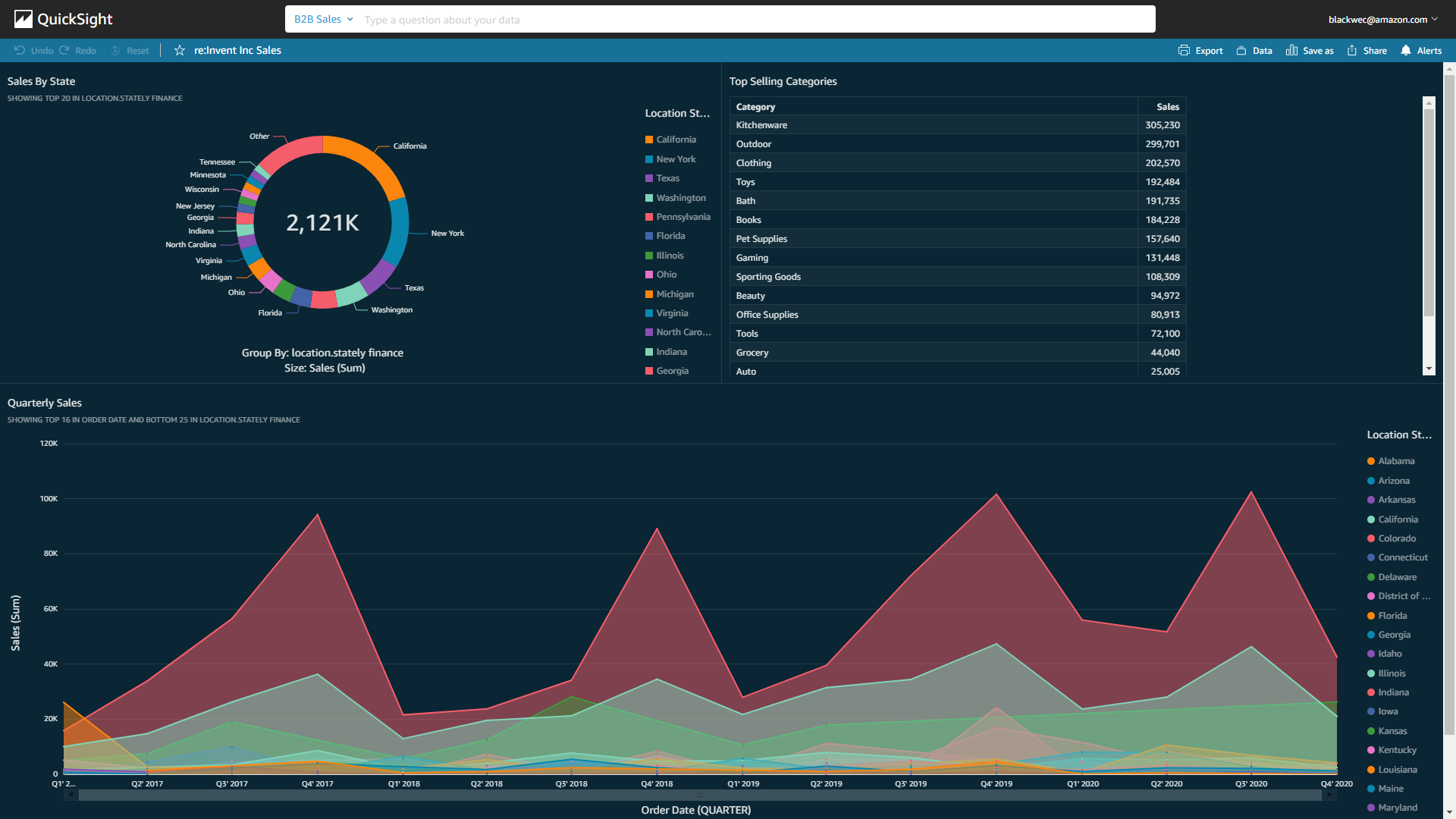
Dashboard of Quicksight

The business users of the dashboard can drill down and slice and dice the data simply by typing their questions on the Q search bar above.

Let’s use the Q search bar to ask a question, “Show me last year’s weekly sales in California.” Q generates numbers and a graph within seconds.
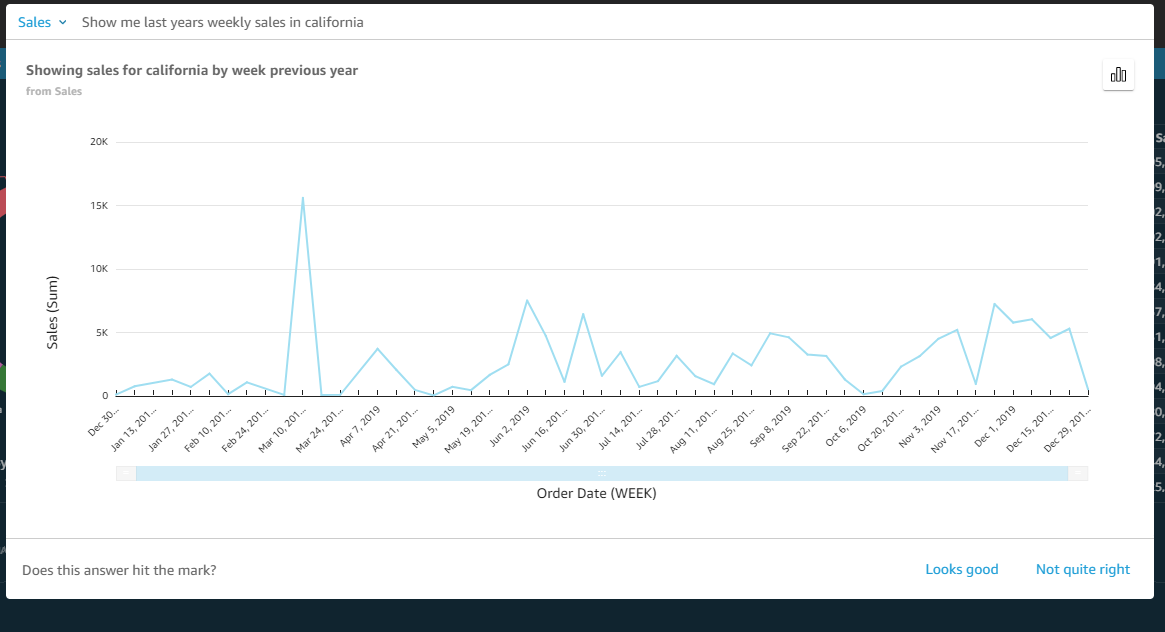
Generated dashboard

You can click “Looks good” or “Not quite right” on the answer. When clicking “Not quite right,” you can submit your feedback to your BI team to help improve Q. You can also investigate the answer further. Let’s add “versus New York” to the end of the question and hit enter. A new answer will pop up.
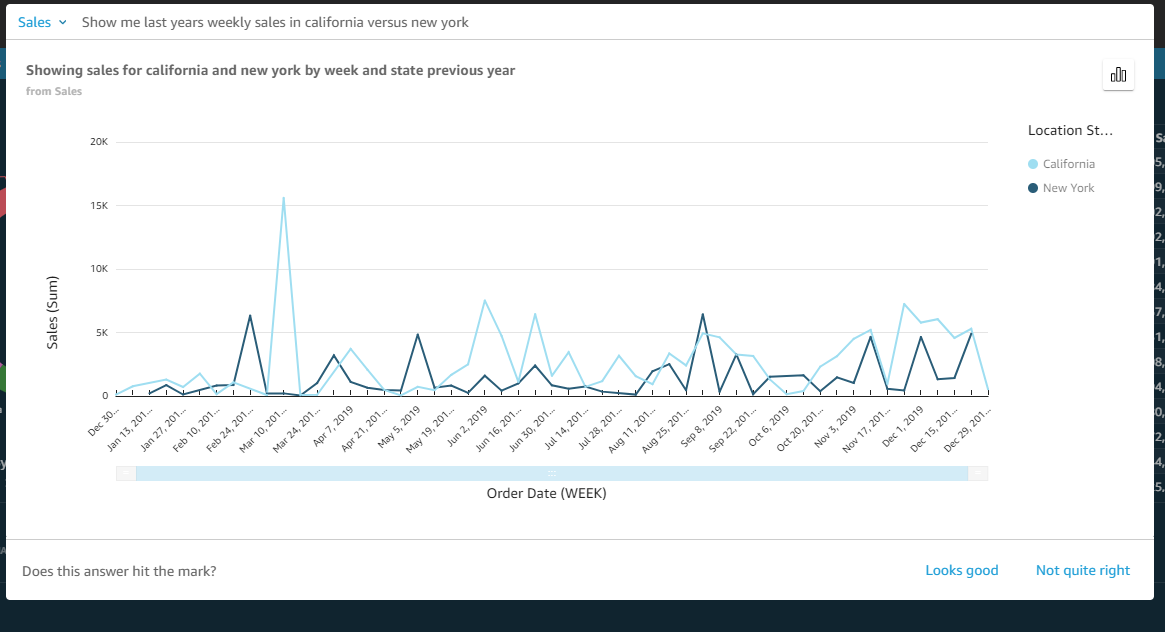
Generated new graph

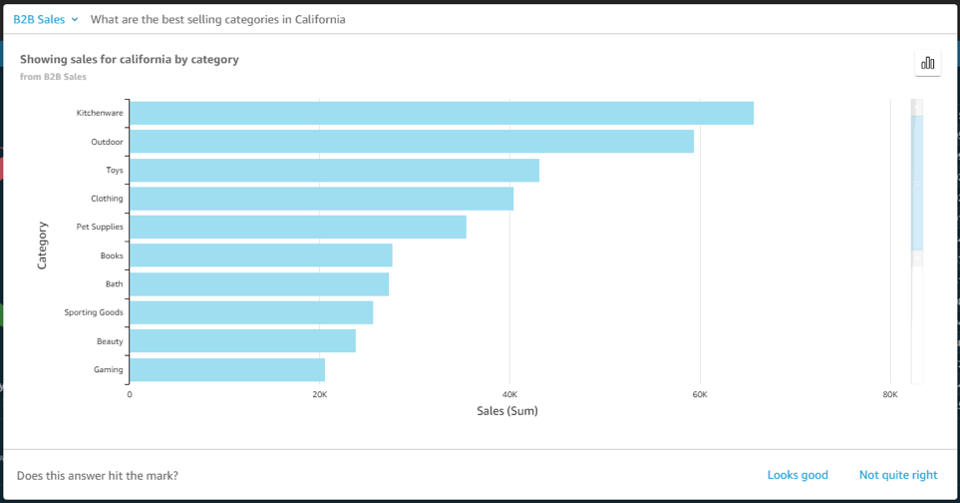
Next, let’s investigate further in California. Type in “What are the best selling categories in California.

categories detail

With Q, you can easily change the presentation. Let’s see another diagram for the same question.
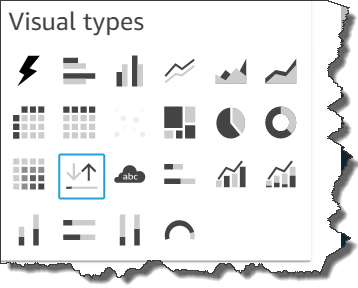
line start

Next, let’s take a look at the biggest industry, “Finance.” Type in “Show me the sales growth % week over week in the Finance sector” to Q, and specify “Line chart” to check weekly sales revenue growth.

The sales revenue shows growth, but it has peak and off-peak spikes. With these insights, you might now consider how to stabilize for a better profit structure.

Getting Started with Amazon QuickSight Q
A new “Q Topics” link will appear on the left navigation bar. Topics are a collection of one or more datasets and are meant to represent a subject area that users can ask questions about. For example, a marketing team may have Q Topics for “Ad Spending,” “Email Campaign,” “Website Analytics,” and others. Additionally, as an author, you can:

  • Add friendly names, synonyms, and descriptions to datasets and columns to improve Q’s answers.
  • Share the Topic to your users so they can ask questions about the Topic.
  • See questions your users are asking, how Q answered these questions, and improve upon the answer.
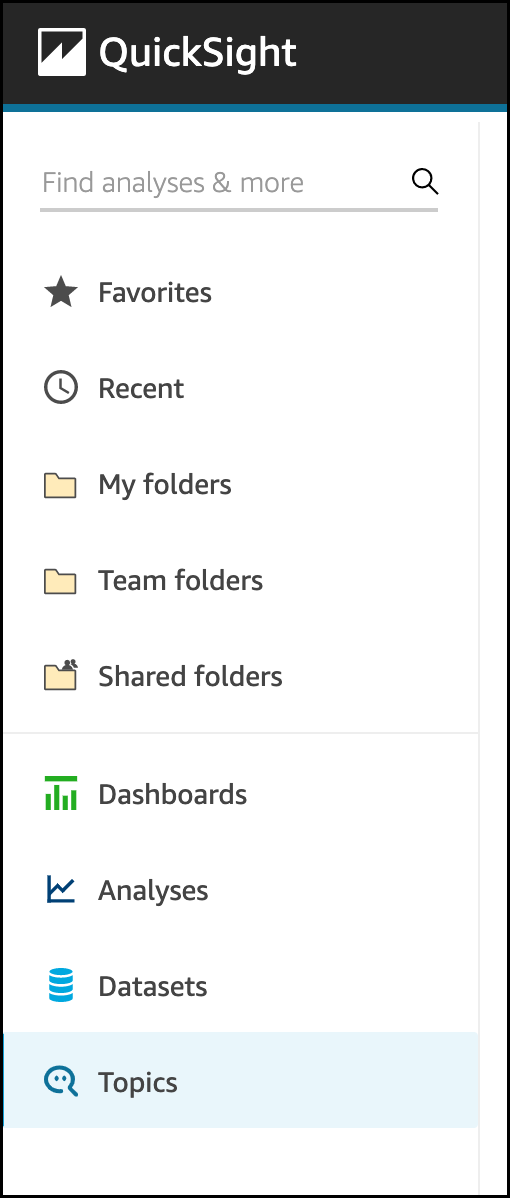
topic tool barSelect Topics, and set Topic name and its Description.
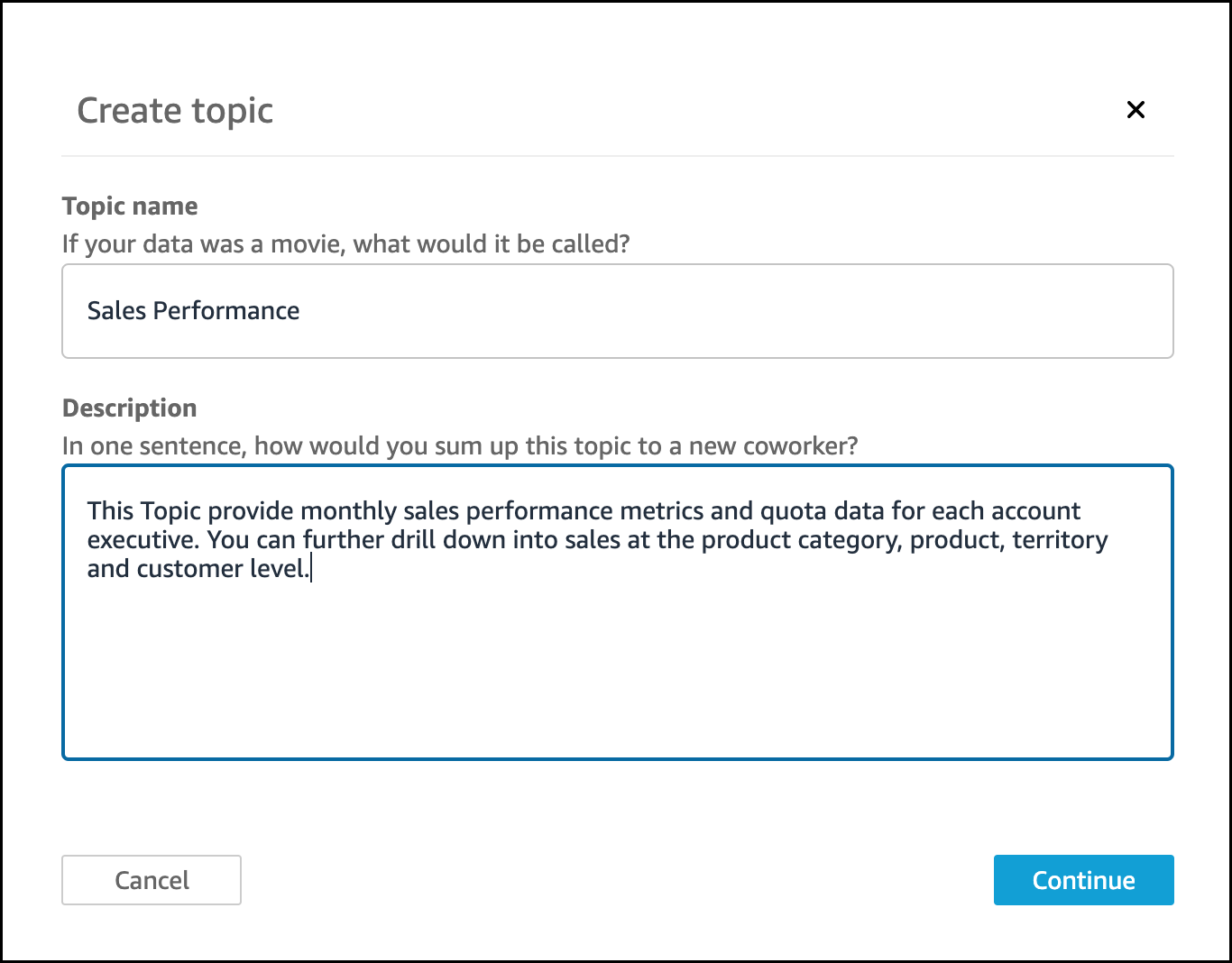
setting up topics

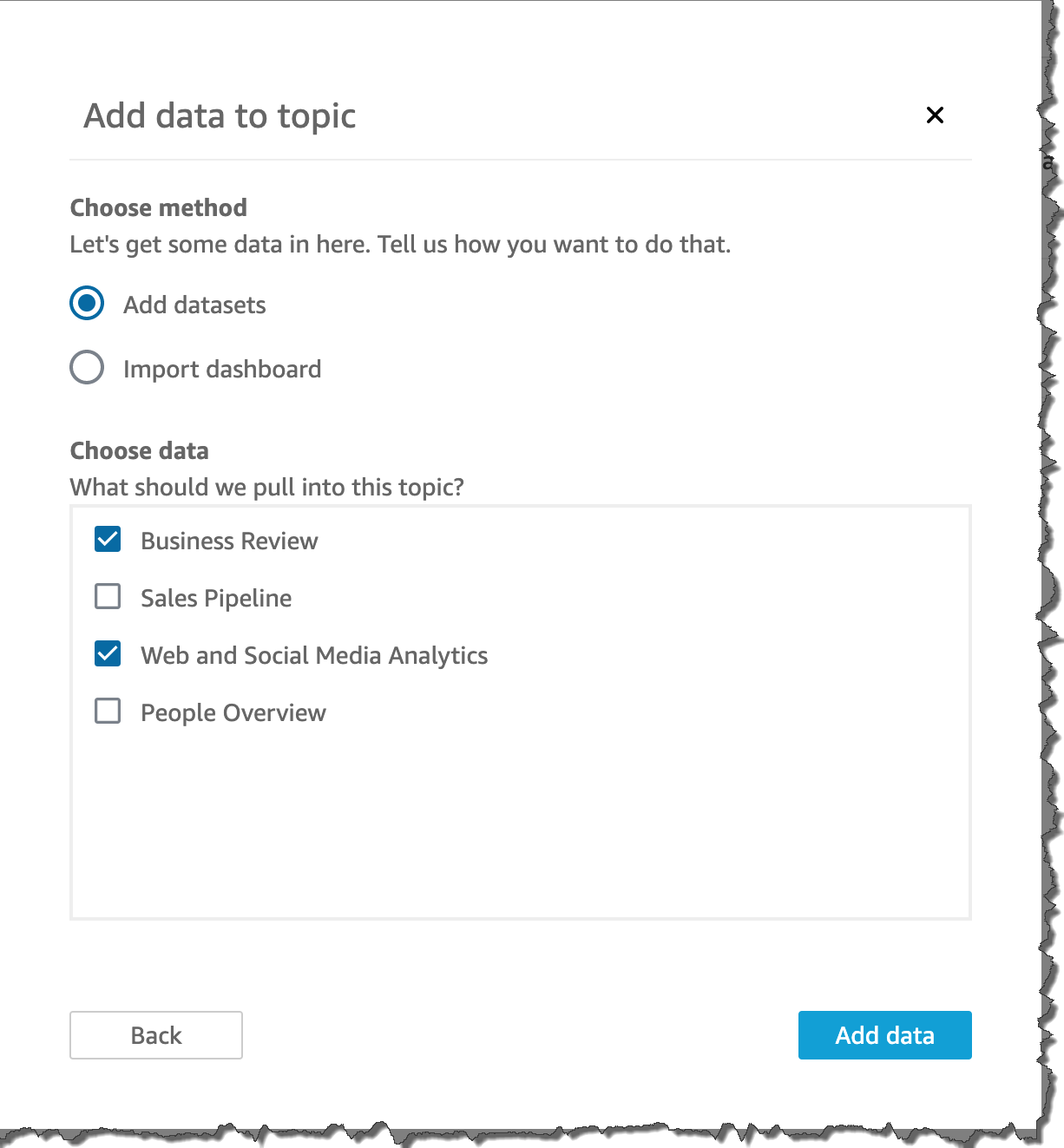
After clicking the Continue button, you can add datasets to a topic in two ways: You can add one or more datasets directly to your topic by selecting Add datasets, or you can import all the datasets in an existing dashboard into your topic by selecting Import dashboard.
The next step is to make your datasets natural-language friendly. Generally, names of datasets and columns are based on technical naming conventions and do not reflect how they are referred to by end users. Q relies heavily on names to match the right dataset and column with the terms used in questions. Therefore, such technical names must be converted to user-friendly names to ensure that they can be mapped correctly. Below are examples:

  • Dataset Name – D_CUST_DLY_ORD_DTL → Friendly Name: Customer Daily Order Details.
  • Column Name: pdt_cd Column → Friendly name: Product Code

Also, you can set up synonyms for each column so users can use the terms they are most comfortable with. For example, some users might input the term “client” or “segment” instead of “industry.” Q provides a feature to correct to the right name when typing the query, but BI operators can also set up synonyms for frequently used words. Click “Topics” in the left pane and choose the dashboard where you want to set synonyms.
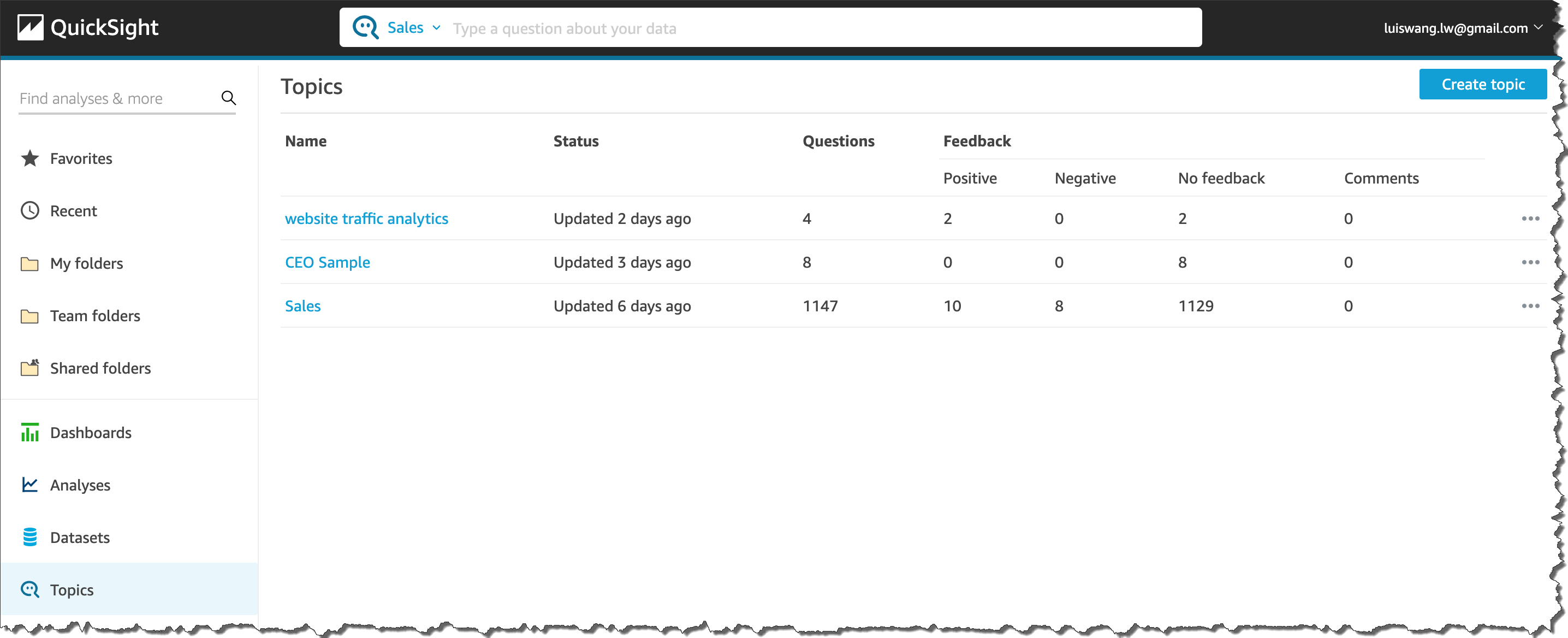
Then, choose “datasets.

Now, we can set a Friendly Name or synonyms as Aliases, such as “client” for “Customer,” or “Segment” for “Industry.”
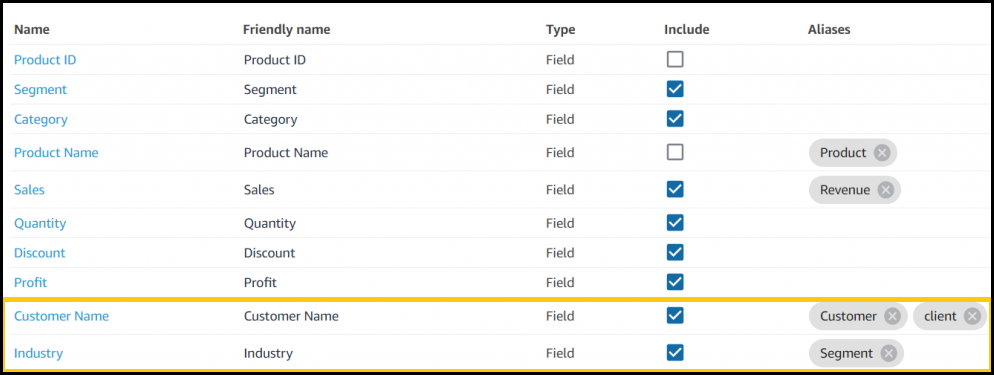
setting up Friendly Name

After adding synonyms, a user can save the changes and start asking questions in the Q search bar.

Amazon QuickSight Q Preview Available Today
Q is available in preview for US East (N. Virginia), US West (Oregon), US East (Ohio) and Europe (Ireland). Getting started with Q is just a few clicks away from QuickSight. You can use Q with AWS data sources such as Amazon Redshift, Amazon RDS, Amazon Aurora, Amazon Athena, and Amazon S3, or third-party commercial sources such as SQL Server, Teradata, and Snowflake. Salesforce, ServiceNow, and Adobe automatically integrate with all data sources supported by QuickSight, including business applications such as Analytics or Excel.

Learn more about Q and get started with the preview today.

– Kame
 

New- Amazon DevOps Guru Helps Identify Application Errors and Fixes

Post Syndicated from Harunobu Kameda original https://aws.amazon.com/blogs/aws/amazon-devops-guru-machine-learning-powered-service-identifies-application-errors-and-fixes/

Today, we are announcing Amazon DevOps Guru, a fully managed operations service that makes it easy for developers and operators to improve application availability by automatically detecting operational issues and recommending fixes. DevOps Guru applies machine learning informed by years of operational excellence from Amazon.com and Amazon Web Services (AWS) to automatically collect and analyze data such as application metrics, logs, and events to identify behavior that deviates from normal operational patterns.

Once a behavior is identified as an operational problem or risk, DevOps Guru alerts developers and operators to the details of the problem so they can quickly understand the scope of the problem and possible causes. DevOps Guru provides intelligent recommendations for fixing problems, saving you time resolving them. With DevOps Guru, there is no hardware or software to deploy, and you only pay for the data analyzed; there is no upfront cost or commitment.

Distributed/Complex Architecture and Operational Excellence
As applications become more distributed and complex, operators need more automated practices to maintain application availability and reduce the time and effort spent on detecting, debugging, and resolving operational issues. Application downtime, for example, as caused by misconfiguration, unbalanced container clusters, or resource depletion, can result in significant revenue loss to an enterprise.

In many cases, companies must invest developer time in deploying and managing multiple monitoring tools, such as metrics, logs, traces, and events, and storing them in various locations for analysis. Developers or operators also spend time developing and maintaining custom alarms to alert them to issues such as sudden spikes in load balancer errors or unusual drops in application request rates. When a problem occurs, operators receive multiple alerts related to the same issue and spend time combining alerts to prioritize those that need immediate attention.

How DevOps Guru Works
The DevOps Guru machine learning models leverages AWS expertise in running highly available applications for the world’s largest e-commerce business for the past 20 years. DevOps Guru automatically detects operational problems, details the possible causes, and recommends remediation actions. DevOps Guru provides customers with a single console experience to search and visualize operational data by integrating data across multiple sources supporting Amazon CloudWatch, AWS Config, AWS CloudTrail, AWS CloudFormation, and AWS X-Ray and reduces the need to use multiple tools.

Getting Started with DevOps Guru
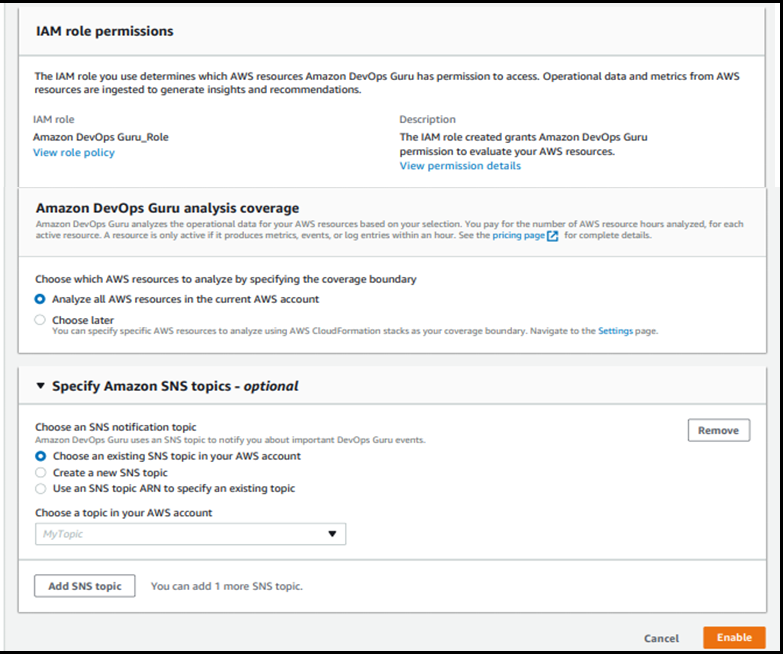
Activating DevOps Guru is as easy as accessing the AWS Management Console and clicking Enable. When enabling DevOps Guru, you can select the IAM role. You’ll then choose the AWS resources to analyze, which may include all resources in your AWS account or just specified CloudFormation StackSets. Finally, you can set an Amazon SNS topic if you want to send notifications from DevOps Guru via SNS.

DevOps Guru starts to accumulate logs and analyze your environment; it can take up to several hours. Let’s assume we have a simple serverless architecture as shown in this illustration.

When the system has an error, the operator needs to investigate if the error came from Amazon API Gateway, AWS Lambda, or AWS DynamoDB. They must then determine the root cause and how to fix the issue. With DevOps Guru, the process is now easy and simple.

When a developer accesses the management console of DevOps Guru, they will see a list of insights which is a collection of anomalies that are created during the analysis of the AWS resources configured within your application. In this case, Amazon API Gateway, AWS Lambda, and Amazon DynamoDB. Each insight contains observations, recommendations, and contextual data you can use to better understand and resolve the operational problem.

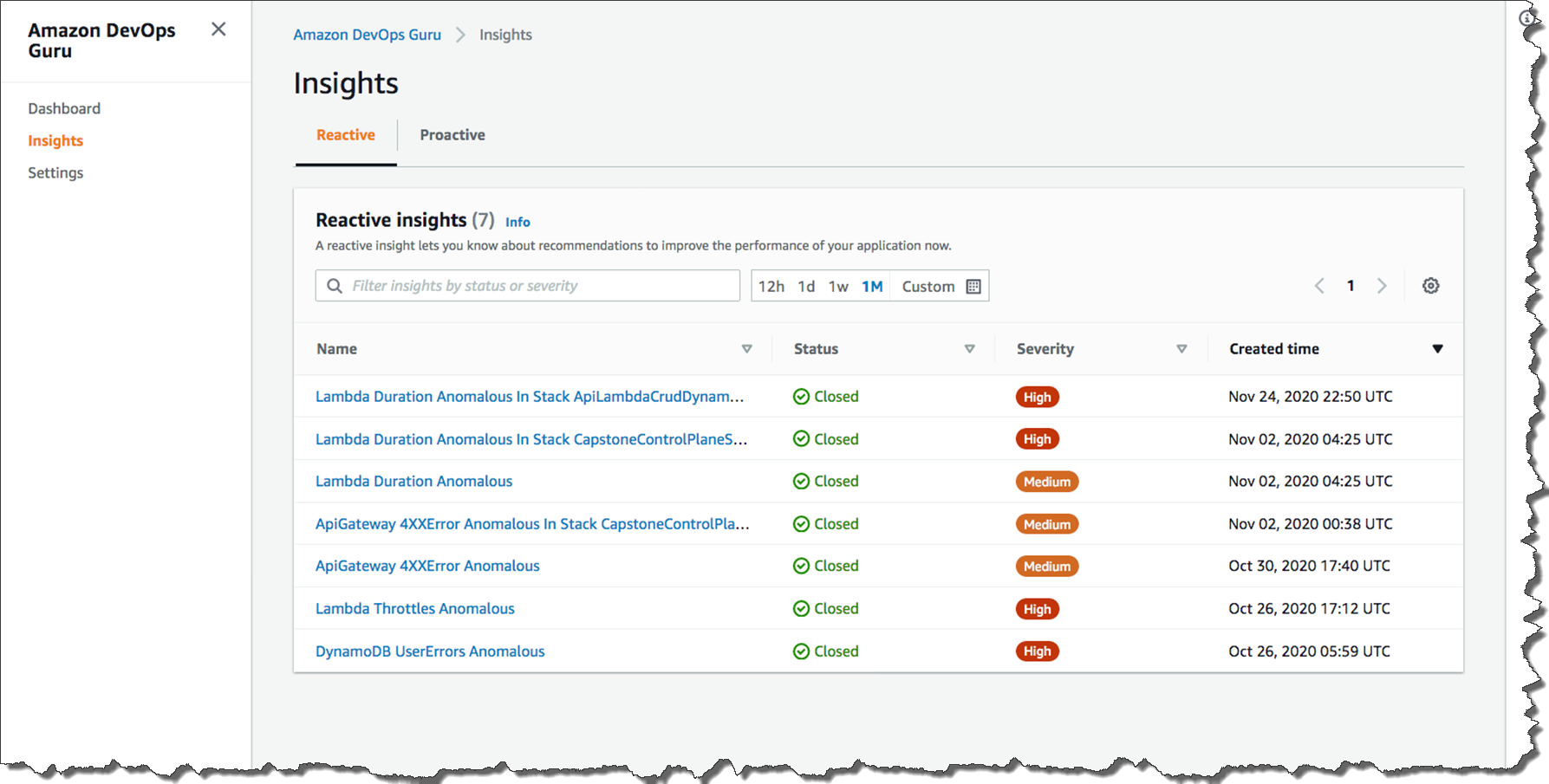
The list below shows the insight name, the status (closed or ongoing), severity, and when the insight was created. Without checking any logs, you can immediately see that in the most recent issue (line1), a problem with a Lambda function within your stack was the cause of the issue, and it was related to duration. If the issue was still occurring, the status would be listed as Ongoing. Since this issue was temporary, the status is showing Closed.

Insights

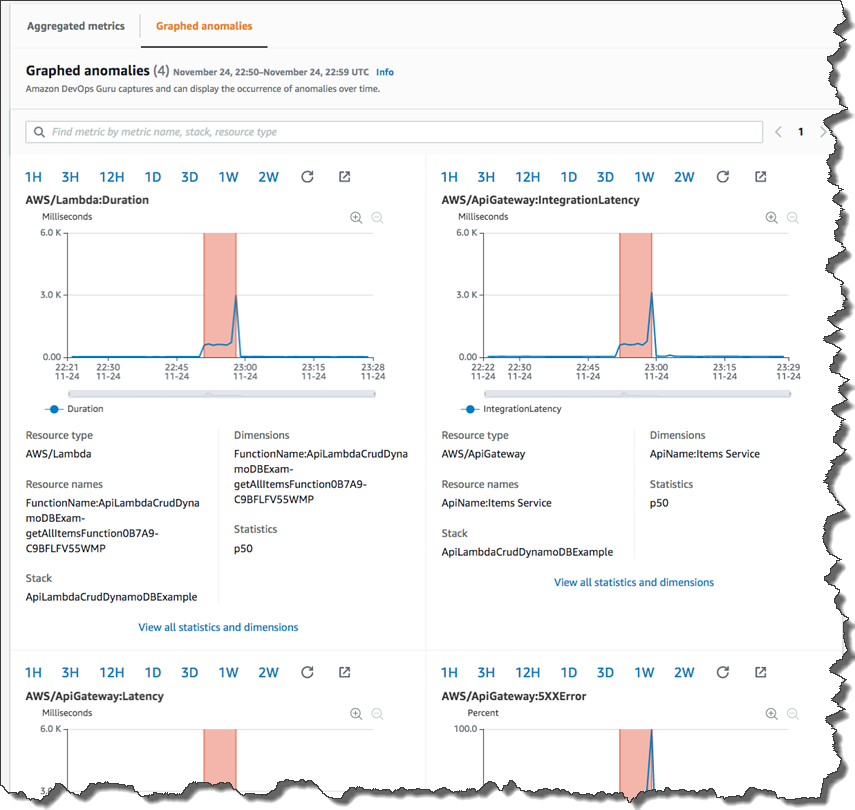
Let’s look deeper at the most recent anomaly by clicking through the first insight link. There are two tabs: Aggregated metrics and Graphed anomalies.

Aggregated metrics display metrics that are related to the insight. Operators can see which AWS CloudFormation stack created the resource that emitted the metric, the name of the resource, and its type. The red lines on a timeline indicate spans of time when a metric emitted unusual values. In this case, the operator can see the specific time of day on Nov 24 when the anomaly occurred for each metric.

Graphed anomalies display detailed graphs for each of the insight’s anomalies. Operators can investigate and look at an anomaly at the resource level and per statistic. The graphs are grouped by metric name.

metrics

By reviewing aggregated and graphed anomalies, an operator can see when the issue occurred, whether it is still ongoing, as well as the resources impacted. It appears the increased Lambda duration had a corresponding impact on API Gateway causing timeouts and resulted in 5XX errors in API Gateway.

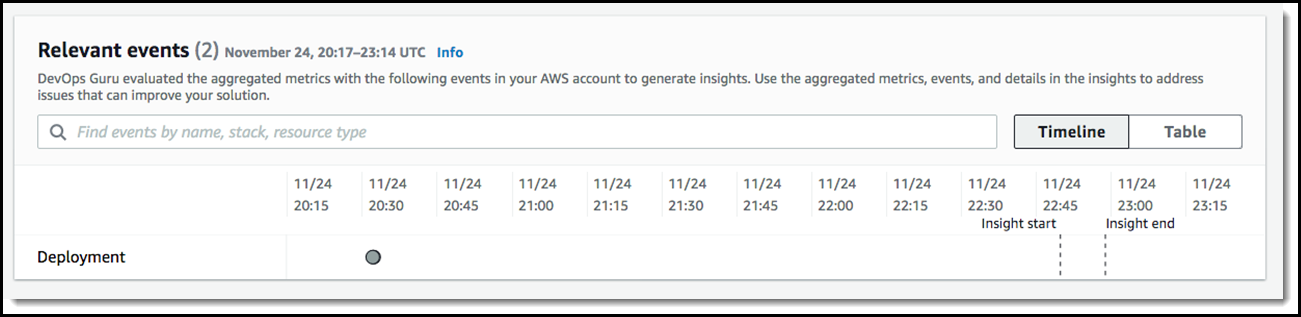
Dev Ops Guru also provides Relevant events which are related to activities that changed your application’s configuration as illustrated below.

Events

We can now see that a configuration change happened 2 hours before this issue occurred. If we click the point on the graph at 20:30 on 11/24, we can learn more and see the details of that change.

If you click through to the Ops event, the AWS CloudTrail logs would show that the configuration change was twofold: 1) a change in the concurrency provisioned capacity on a Lambda function and 2) the reduction in the integration timeout on an API integration latency.

recommendations to fix

The recommendations tell the operator to evaluate the provisioned concurrency for Lambda and how to troubleshoot errors in API Gateway. After further evaluation, the operator will discover this is exactly correct. The root cause is a mismatch between the Lambda provisioned concurrency setting and the API Gateway integration latency timeout. When the Lambda configuration was updated in the last deployment, it altered how this application responded to burst traffic, and it no longer fit within the API Gateway timeout window. This error is unlikely to have been found in unit testing and will occur repeatedly if the configurations are not updated.

DevOps Guru can send alerts of anomalies to operators via Amazon SNS, and it is integrated with AWS Systems Manager OpsCenter, enabling customers to receive insights directly within OpsCenter as quickly diagnose and remediate issues.

Available for Preview Today
Amazon DevOps Guru is available for preview in US East (N. Virginia), US East (Ohio), US West (Oregon), Europe (Ireland), and Asia Pacific (Tokyo). To learn more about DevOps Guru, please visit our web site and technical documentation, and get started today.

– Kame


New – Amazon EBS gp3 Volume Lets You Provision Performance Apart From Capacity

Post Syndicated from Harunobu Kameda original https://aws.amazon.com/blogs/aws/new-amazon-ebs-gp3-volume-lets-you-provision-performance-separate-from-capacity-and-offers-20-lower-price/

Amazon Elastic Block Store (EBS) is an easy-to-use, high-performance block storage service designed for use with Amazon EC2 instances for both throughput and transaction-intensive workloads of all sizes. Using existing general purpose solid state drive (SSD) gp2 volumes, performance scales with storage capacity. By provisioning larger storage volume sizes, you can improve application input / output operations per second (IOPS) and throughput.

However some applications, such as MySQL, Cassandra, and Hadoop clusters, require high performance but not high storage capacity. Customers want to meet the performance requirements of these types of applications without paying for more storage volumes than they need.

Today I would like to tell you about gp3, a new type of SSD EBS volume that lets you provision performance independent of storage capacity, and offers a 20% lower price than existing gp2 volume types.

New gp3 Volume Type

With EBS, customers can choose from multiple volume types based on the unique needs of their applications. We introduced general purpose SSD gp2 volumes in 2014 to offer SSD performance at a very low price. gp2 provides an easy and cost-effective way to meet the performance and throughput requirements of many applications our customers use such as virtual desktops, medium-sized databases such as SQLServer and OracleDB, and development and testing environments.

That said, some customers need higher performance. Because the basic idea behind gp2 is that the larger the capacity, the faster the IOPS, customers may end up provisioning more storage capacity than desired. Even though gp2 offers a low price point, customers end up paying for storage they don’t need.

The new gp3 is the 7th variation of EBS volume types. It lets customers independently increase IOPS and throughput without having to provision additional block storage capacity, paying only for the resources they need.

gp3 is designed to provide predictable 3,000 IOPS baseline performance and 125 MiB/s regardless of volume size. It is ideal for applications that require high performance at a low cost such as MySQL, Cassandra, virtual desktops and Hadoop analytics. Customers looking for higher performance can scale up to 16,000 IOPS and 1,000 MiB/s for an additional fee. The top performance of gp3 is 4 times faster than max throughput of gp2 volumes.

How to Switch From gp2 to gp3

If you’re currently using gp2, you can easily migrate your EBS volumes to gp3 using Amazon EBS Elastic Volumes, an existing feature of Amazon EBS. Elastic Volumes allows you to modify the volume type, IOPS, and throughput of your existing EBS volumes without interrupting your Amazon EC2 instances. Also, when you create a new Amazon EBS volume, Amazon EC2 instance, or Amazon Machine Image (AMI), you can choose the gp3 volume type. New AWS customers receive 30GiB of gp3 storage with the baseline performance at no charge for 12 months.

Available Today

The gp3 volume type is available for all AWS Regions. You can access the AWS Management Console to launch your first gp3 volume.

For more information, see Amazon Elastic Block Store and get started with gp3 today.

– Kame


AWS On Air – re:Invent Weekly Streaming Schedule

Post Syndicated from Nicholas Walsh original https://aws.amazon.com/blogs/aws/reinvent-2020-streaming-schedule/

Last updated: 11:00 am (PST), November 30

Join AWS On Air throughout re:Invent (Dec 1 – Dec 17) for daily livestreams with news, announcements, demos, and interviews with experts across industry and technology. To get started, head over to register for re:Invent. Then, after Andy Jassy’s keynote (Tuesday, Dec 1 at 8-11 am PST) check back here for the latest livestreams and where to tune-in.

Time (PST) Tuesday 12/1 Wednesday 12/2 Thursday (12/3) 12/3
12:00 AM
1:00 AM
2:00 AM Daily Recap (Italian) Daily Recap (Italian)
3:00 AM Daily Recap (German) Daily Recap (German)
4:00 AM Daily Recap (French) Daily Recap (French)
5:00 AM
6:00 AM Daily Recap
(Portuguese)
7:00 AM Daily Recap (Spanish)
8:00 AM
9:00 AM
9:30 AM
10:00 AM AWS What’s Next AWS What’s Next
10:30 AM AWS What’s Next AWS What’s Next
11:00 AM Voice of the Customer AWS What’s Next
11:30 AM Keynoteworthy Voice of the Customer Keynoteworthy
12:00 PM
12:30 PM
1:00 PM Industry Live Session – Energy AWS What’s Next
1:30 PM
2:00 PM AWS What’s Next AWS What’s Next AWS What’s Next
2:30 PM AWS What’s Next AWS What’s Next AWS What’s Next
3:00 PM Howdy Partner Howdy Partner
3:30 PM This Is My
Architecture
All In The Field This Is My
Architecture
4:00 PM
4:30 PM AWS What’s Next
5:00 PM Daily Recap (English) Daily Recap (English) Daily Recap (English)
5:30 PM Certification Quiz
Show
Certification Quiz
Show
Certification Quiz
Show
6:00 PM Industry Live
Sessions
Industry Live
Sessions
6:30 PM
7:00 PM Daily Recap
(Japanese)
Daily Recap
(Japanese)
Daily Recap
(Japanese)
8:00 PM Daily Recap (Korean) Daily Recap (Korean) Daily Recap (Korean)
9:00 PM
10:00 PM Daily Recap
(Cantonese)
Daily Recap
(Cantonese)
Daily Recap
(Cantonese)
11:00 PM

Show synopses

AWS What’s Next. Dive deep on the latest launches from re:Invent with AWS Developer Advocates and members of the service teams. See demos and get your questions answered live during the show.

Keynoteworthy. Join hosts Robert Zhu and Nick Walsh after each re:Invent keynote as they chat in-depth on the launches and announcements.

AWS Community Voices. Join us each Thursday at 11:00AM (PST) during re:Invent to hear from AWS community leaders who will share their thoughts on re:Invent and answer your questions live!

Howdy Partner. Howdy Partner highlights AWS Partner Network (APN) Partners so you can build with new tools and meet the people behind the companies. Experts and newcomers alike can learn how AWS Partner solutions enable you to drive faster results and how to pick the right tool when you need it.

re:Invent Recaps. Tune in for daily and weekly recaps about all things re:Invent—the greatest launches, events, and more! Daily recaps are available Tuesday through Thursday in English and Wednesday through Friday in Japanese, Korean, Italian, Spanish, French, and Portuguese. Weekly recaps are available Thursday in English.

This Is My Architecture.Designed for a technical audience, this popular series highlights innovative architectural solutions from customers and AWS Partners. Our hosts, Adrian DeLuca, Aarthi Raju, and Boaz Ziniman, will showcase the most interesting and creative elements of each architecture. #thisismyarchitecture

All in the Field: AWS Agriculture Live. Our expert AgTech hosts Karen Hildebrand and Matt Wolff review innovative applications that bring food to your table using AWS technology. They are joined by industry guests who walk through solutions from under the soil to low-earth-orbit satellites. #allinthefield

IoT All the Things: Special Projects Edition. Join expert hosts Erin McGill and Tim Mattison as they showcase exploratory “side projects” and early stage use cases from guest solution architects. These episodes let developers and IT professionals at any level jump in and experiment with AWS services in a risk-free environment. #alltheexperiments

Certification Quiz Show. Test your AWS knowledge on our fun, interactive AWS Certification Quiz Show! Each episode covers a different area of AWS knowledge that is ideal for preparing for AWS Certification. We also deep-dive into how best to gain AWS skills and how to become AWS Certified.

AWS Industry Live. Join AWS Industry Live for a comprehensive look into 14 different industries. Attendees will get a chance to join industry experts for a year in review, a review of common use cases, and learning about customer success stories from 2020.

Voice of the Customer. Tune in for one-on-one interviews with AWS industry customers to learn about their AWS journey, the technology that powers their products, and the innovation they are bringing to their industry.

Register for the Modern Applications Online Event

Post Syndicated from Rachel Richardson original https://aws.amazon.com/blogs/compute/register-for-the-modern-applications-online-event/

Earlier this year we hosted the first serverless themed virtual event, the Serverless-First Function. We enjoyed the opportunity to virtually connect with our customers so much that we want to do it again. This time, we’re expanding the scope to feature serverless, containers, and front-end development content. The Modern Applications Online Event is scheduled for November 4-5, 2020.

This free, two-day event addresses how to build and operate modern applications at scale across your organization, enabling you to become more agile and respond to change faster. The event covers topics including serverless application development, containers best practices, front-end web development and more. If you missed the containers or serverless virtual events earlier this year, this is great opportunity to watch the content and interact directly with expert moderators. The full agenda is listed below.

Register now

Organizational Level Operations

Wednesday, November 4, 2020, 9:00 AM – 1:00 PM PT

Move fast and ship things: Using serverless to increase speed and agility within your organization
In this session, Adrian Cockcroft demonstrates how you can use serverless to build modern applications faster than ever. Cockcroft uses real-life examples and customer stories to debunk common misconceptions about serverless.

Eliminating busywork at the organizational level: Tips for using serverless to its fullest potential 
In this session, David Yanacek discusses key ways to unlock the full benefits of serverless, including building services around APIs and using service-oriented architectures built on serverless systems to remove the roadblocks to continuous innovation.

Faster Mobile and Web App Development with AWS Amplify
In this session, Brice Pellé, introduces AWS Amplify, a set of tools and services that enables mobile and front-end web developers to build full stack serverless applications faster on AWS. Learn how to accelerate development with AWS Amplify’s use-case centric open-source libraries and CLI, and its fully managed web hosting service with built-in CI/CD.

Built Serverless-First: How Workgrid Software transformed from a Liberty Mutual project to its own global startup
Connected through a central IT team, Liberty Mutual has embraced serverless since AWS Lambda’s inception in 2014. In this session, Gillian McCann discusses Workgrid’s serverless journey—from internal microservices project within Liberty Mutual to independent business entity, all built serverless-first. Introduction by AWS Principal Serverless SA, Sam Dengler.

Market insights: A conversation with Forrester analyst Jeffrey Hammond & Director of Product for Lambda Ajay Nair
In this session, guest speaker Jeffrey Hammond and Director of Product for AWS Lambda, Ajay Nair, discuss the state of serverless, Lambda-based architectural approaches, Functions-as-a-Service platforms, and more. You’ll learn about the high-level and enduring enterprise patterns and advancements that analysts see driving the market today and determining the market in the future.

AWS Fargate Platform Version 1.4
In this session we will go through a brief introduction of AWS Fargate, what it is, its relation to EKS and ECS and the problems it addresses for customers. We will later introduce the concept of Fargate “platform versions” and we will then dive deeper into the new features that the new platform version 1.4 enables.

Persistent Storage on Containers
Containerizing applications that require data persistence or shared storage is often challenging since containers are ephemeral in nature, are scaled in and out dynamically, and typically clear any saved state when terminated. In this session you will learn about Amazon Elastic File System (EFS), a fully managed, elastic, highly-available, scalable, secure, high-performance, cloud native, shared file system that enables data to be persisted separately from compute for your containerized applications.

Security Best Practices on Amazon ECR
In this session, we will cover best practices with securing your container images using ECR. Learn how user access controls, image assurance, and image scanning contribute to securing your images.

Application Level Design

Thursday, November 5, 2020, 9:00 AM – 1:00 PM PT

Building a Live Streaming Platform with Amplify Video
In this session, learn how to build a live-streaming platform using Amplify Video and the platform powering it, AWS Elemental Live. Amplify video is an open source plugin for the Amplify CLI that makes it easy to incorporate video streaming into your mobile and web applications powered by AWS Amplify.

Building Serverless Web Applications
In this session, follow along as Ben Smith shows you how to build and deploy a completely serverless web application from scratch. The application will span from a mobile friendly front end to complex business logic on the back end.

Automating serverless application development workflows
In this talk, Eric Johnson breaks down how to think about CI/CD when building serverless applications with AWS Lambda and Amazon API Gateway. This session will cover using technologies like AWS SAM to build CI/CD pipelines for serverless application back ends.

Observability for your serverless applications
In this session, Julian Wood walks you through how to add monitoring, logging, and distributed tracing to your serverless applications. Join us to learn how to track platform and business metrics, visualize the performance and operations of your application, and understand which services should be optimized to improve your customer’s experience.

Happy Building with AWS Copilot
The hard part’s done. You and your team have spent weeks pouring over pull requests, building micro-services and containerizing them. Congrats! But what do you do now? How do you get those services on AWS? Copilot is a new command line tool that makes building, developing and operating containerized apps on AWS a breeze. In this session, we’ll talk about how Copilot helps you and your team set up modern applications that follow AWS best practices

CDK for Kubernetes
The CDK for Kubernetes (cdk8s) is a new open-source software development framework for defining Kubernetes applications and resources using familiar programming languages. Applications running on Kubernetes are composed of dozens of resources maintained through carefully maintained YAML files. As applications evolve and teams grow, these YAML files become harder and harder to manage. It’s also really hard to reuse and create abstractions through config files — copying & pasting from previous projects is not the solution! In this webinar, the creators of cdk8s show you how to define your first cdk8s application, define reusable components called “constructs” and generally say goodbye (and thank you very much) to writing in YAML.

Machine Learning on Amazon EKS
Amazon EKS has quickly emerged as a leading choice for machine learning workloads. In this session, we’ll walk through some of the recent ML related enhancements the Kubernetes team at AWS has released. We will then dive deep with walkthroughs of how to optimize your machine learning workloads on Amazon EKS, including demos of the latest features we’ve contributed to popular open source projects like Spark and Kubeflow

Deep Dive on Amazon ECS Capacity Providers
In this talk, we’ll dive into the different ways that ECS Capacity Providers can enable teams to focus more on their core business, and less on the infrastructure behind the scenes. We’ll look at the benefits and discuss scenarios where Capacity Providers can help solve the problems that customers face when using container orchestration. Lastly, we’ll review what features have been released with Capacity Providers, as well as look ahead at what’s to come.

Register now

Testing cloud apps with GitHub Actions and cloud-native open source tools

Post Syndicated from Sarah Khalife original https://github.blog/2020-10-09-devops-cloud-testing/

See this post in action during GitHub Demo Days on October 16.

What makes a project successful? For developers building cloud-native applications, successful projects thrive on transparent, consistent, and rigorous collaboration. That collaboration is one of the reasons that many open source projects, like Docker containers and Kubernetes, grow to become standards for how we build, deliver, and operate software. Our Open Source Guides and Introduction to innersourcing are great first steps to setting up and encouraging these best practices in your own projects.

However, a common challenge that application developers face is manually testing against inconsistent environments. Accurately testing Kubernetes applications can differ from one developer’s environment to another, and implementing a rigorous and consistent environment for end-to-end testing isn’t easy. It can also be very time consuming to spin up and down Kubernetes clusters. The inconsistencies between environments and the time required to spin up new Kubernetes clusters can negatively impact the speed and quality of cloud-native applications.

Building a transparent CI process

On GitHub, integration and testing becomes a little easier by combining GitHub Actions with open source tools. You can treat Actions as the native continuous integration and continuous delivery (CI/CD) tool for your project, and customize your Actions workflow to include automation and validation as next steps.

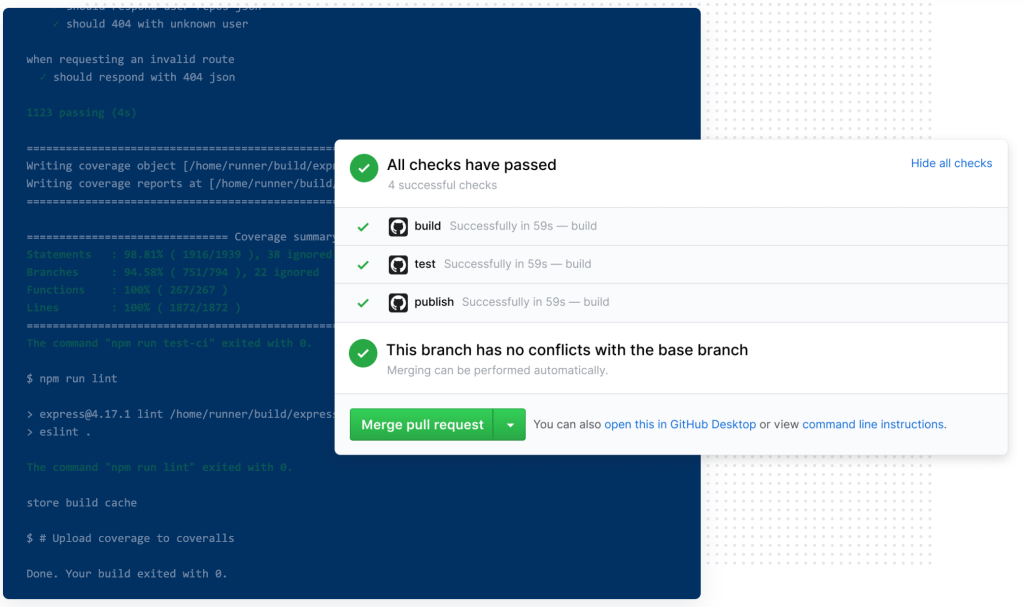
Since Actions can be triggered based on nearly any GitHub event, it’s also possible to build in accountability for updating tests and fixing bugs. For example, when a developer creates a pull request, Actions status checks can automatically block the merge if the test fails.

Here are a few more examples:

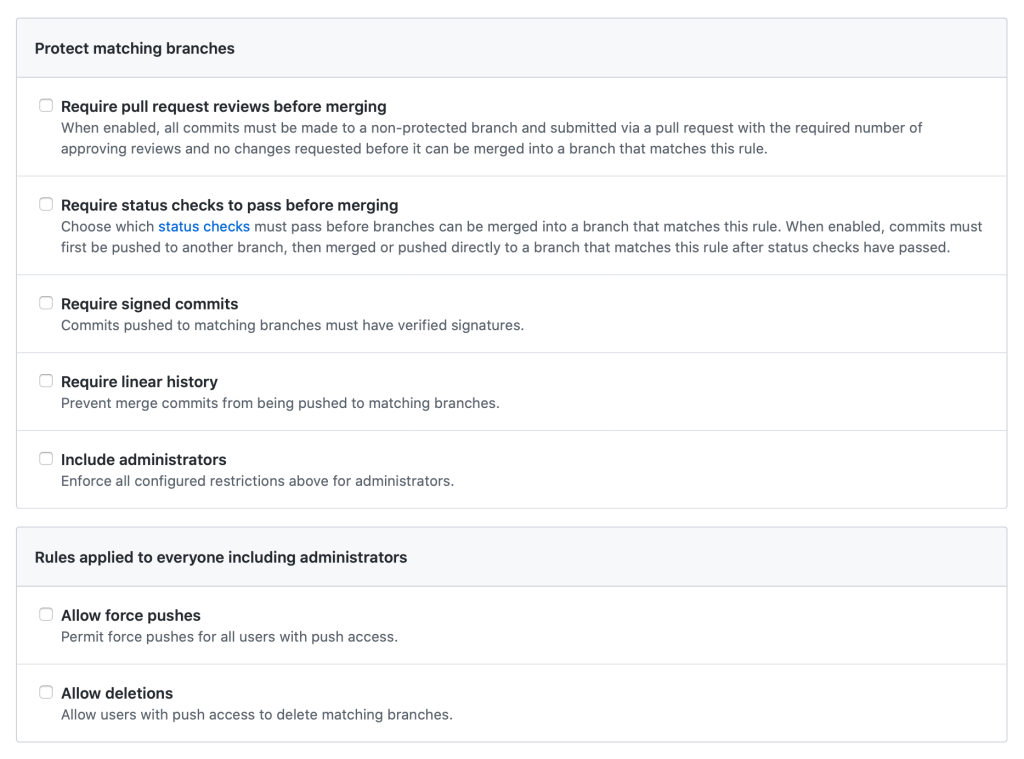
Branch protection rules in the repository help enforce certain workflows, such as requiring more than one pull request review or requiring certain status checks to pass before allowing a pull request to merge.

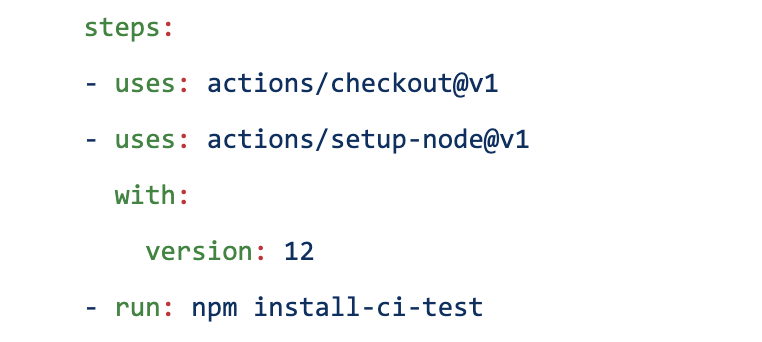
GitHub Actions are natively configured to act as status checks when they’re set up to trigger `on: [pull_request]`.

Continuous integration (CI) is extremely valuable as it allows you to run tests before each pull request is merged into production code. In turn, this will reduce the number of bugs that are pushed into production and increases confidence that newly introduced changes will not break existing functionality.

But transparency remains key: Requiring CI status checks on protected branches provides a clearly-defined, transparent way to let code reviewers know if the commits meet the conditions set for the repository—right in the pull request view.

Using community-powered workflows

Now that we’ve thought through the simple CI policies, automated workflows are next. Think of an Actions workflow as a set of “plug and play” open sourced, automated steps contributed by the community. You can use them as they are, or customize and make them your own. Once you’ve found the right one, open sourced Actions can be plugged into your workflow with the`- uses: repo/action-name` field.

You might ask, “So how do I find available Actions that suit my needs?”

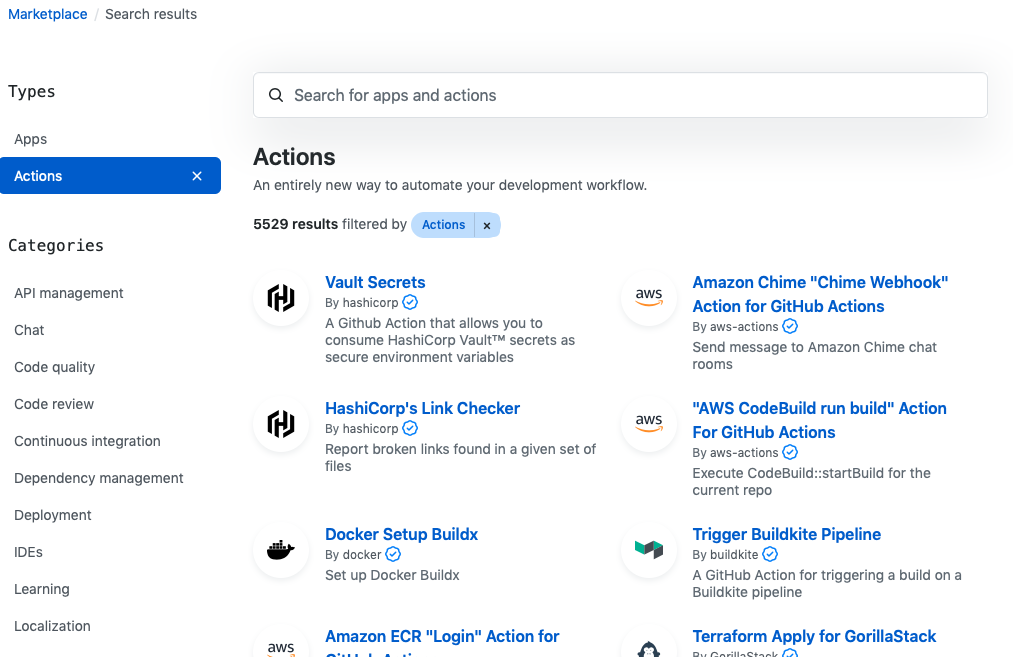
The GitHub Marketplace!

As you’re building automation and CI pipelines, take advantage of Marketplace to find pre-built Actions provided by the community. Examples of pre-built Actions span from a Docker publish and the kubectl CLI installation to container scans and cloud deployments. When it comes to cloud-native Actions, the list keeps growing as container-based development continues to expand.

Testing with kind

Testing is a critical part of any CI/CD pipeline, but running tests in Kubernetes can absorb the extra time that automation saves. Enter kind. kind stands for “Kubernetes in Docker.” It’s an open source project from the Kubernetes special interest group (SIGs) community, and a tool for running local Kubernetes clusters using Docker container “nodes.” Creating a kind cluster is a simple way to run Kubernetes cluster and application testing—without having to spin up a complete Kubernetes environment.

As the number of Kubernetes users pushing critical applications to production grows, so does the need for a repeatable, reliable, and rigorous testing process. This can be accomplished by combining the creation of a homogenous Kubernetes testing environment with kind, the community-powered Marketplace, and the native and transparent Actions CI process.

Bringing it all together with kind and Actions

Come see kind and Actions at work during our next GitHub Demo Day live stream on October 16, 2020 at 11am PT. I’ll walk you through how to easily set up automated and consistent tests per pull request, including how to use kind with Actions to automatically run end-to-end tests across a common Kubernetes environment.