Projects and technologies come and go, and with each new tool comes new workflow changes. But changing the way you move media around can be tough. Maybe you’ve always done things a certain way, and using a new tool feels like too much of a learning curve especially when you’re pressed for time. But the way you’ve always done things isn’t always the best, easiest, or fastest way. Sometimes you need to change the status quo to level up your media operations.
As a freelance editor, I worked on a recent project that presented some challenges that demanded new approaches to media storage challenges you might also be facing. I solved them with the cloud—but not an all-in-one cloud. My solution was a mix of cloud tools, including Adobe Premiere Pro, which gives me customization and flexibility—the best of all worlds in media workflows.
Right Opportunity at the Right Time
Last year I had the opportunity to serve as a digital imaging technician (DIT) on the set of an indie film titled “Vengeance” produced by Falcon Pictures. The role of a DIT can vary. In many instances you’re simply a data wrangler making backups of the data being shot. In others, you work in the color space of the project creating color corrected dailies on set. For “Vengeance”, I was mostly data wrangling.
“Vengeance” was an 11-day shoot in the mountains of Northern California near Bass Lake. While the rest of the crew spent their days hiking around with equipment, I was stationed back at home base with my DIT cart. With a lot of free time, I found myself logging data as it came in. Logging clip names soon turned into organizing bins and prepping the project for editing. And, while I was not the editor on the project, I was happy to help edit while I was on set.
The Challenge
A few months after my work as DIT ended, it became clear that “Vengeance” needed a boost in post-production. The editing was a bit stuck—they had no assistant editor to complete logging and to sound sync all the footage. So, I was asked to help out. The only problem: I needed to be able to share my work with another editor who lived 45 miles away.
Editing “Vengeance” in Adobe Premiere Pro.
Evaluating the World of Workflows and Cloud Tools
So we began to evaluate a few different solutions. It was clear that Adobe Premiere Pro would be used, but data storage was still a big question. We debated a few methods for sharing media:
The traditional route: Sharing a studio. With the other editor 45 miles away, commuting and scheduling time with each other was going to be cumbersome.
Email: We could email project files back and forth as we worked, but how would we keep track of versioning? Project bloat was a big concern.
Sharing a shuttle drive. Or what I’m calling “Sneakernet 2.0.” This is a popular method, but far from efficient.
Google Drive or Dropbox: Another popular option, but also one that comes with costs and service limitations like rate limiting.
None of these options were great, so we went back to the drawing board.
The Solution: A Hybrid Workflow Designed for Our Needs
To come to a final decision for this workflow, we made a list of our needs:
The ability to share a Premiere Pro project file for updates.
The ability to share media for the project.
No exchanging external hard drives.
No driving (a car).
Changes need to be real time.
Based on those needs, here’s where we landed.
Sharing Project Files
Adobe recently released a new update to its Team Projects features within Premiere Pro. Team Projects allows you to host a Premiere Pro project in the Adobe cloud and share it with other Adobe Creative Cloud users. This gave us the flexibility to share a single project and share updates in real time. This means no emailing of project files, versioning issues, or bloated files. That left the issues of the media. How do we share media?
Sharing Media Files
You may think that it would be obvious to share files in the Adobe Creative Cloud where you get 100GB free. And while 100GB may be enough storage for .psd and .ai files, 100GB is nothing for video, especially when we are talking about RED (.r3d) files which start off as approximately 4GB chunks and can quickly add up to terabytes of footage.
So we put everything in a Backblaze B2 Bucket. All the .r3d source files went directly from my Synology network attached storage (NAS) into a Backblaze B2 Bucket using the Synology Cloud Sync tool. In addition to the source files, I used Adobe Media Encoder to generate proxy files of all the .r3d files. This folder of proxy files also synced with Backblaze automatically.
Making Changes in Real Time
What was great about this solution is that all of the uploading is done automatically via a seamless Backblaze + Synology integration, and the Premiere Pro Team Project had a slew of publish functions perfect for real-time updates. And because the project files and proxies are stored in the cloud, I could get to them from several computers. I spent time at my desktop PC logging and syncing footage, but was also able to move to my couch and do the same from my MacBook Pro. I never had to move hard drives around, copy projects files, or worry about version control.
The other editor was able to connect to my Backblaze B2 Bucket using Cyberduck, a cloud storage browser for Mac. Using Cyberduck, he was able to pull down all the proxy files I created and share any files that he created. So, we were synced for the entire duration of the project.
Once the technology was configured, I was able to finish logging for “Vengeance”, sync all the sound, build out stringouts and assemblies, and even a rough cut of every scene for the entire movie, giving the post-production process the boost it needed.
The Power of Centralized Storage for Media Workflows
Technology is constantly evolving, and, in most circumstances, technology makes how we work a lot easier. For years filmmakers have worked on projects by physically moving our source material, whether it was on film reels, tapes, or hard drives. The cloud changed all that.
The key to getting “Vengeance” through post-production was our centralized approach to file management. Files existed in Backblaze already, we simply brought Premiere Pro to the data rather than moving the huge amount of files to Premiere Pro via the Creative Cloud.
The mix of technologies lets us create a customized flow that works for us. Creative Cloud had the benefit of providing a project sharing mechanism, and Backblaze provided a method of sharing media (Synology and Cyberduck) regardless of the tooling each editor had.
Once we hit picture lock, the centralized files will serve as a distribution point for VFX, color, and sound, making turnover a breeze. It can even be used as a distribution hub—check out how American Public Television uses Backblaze to distribute their finished assets.
Centralizing in the cloud not only made it easy for me to work from home, it allowed us to collaborate on a project with ease eliminating the overhead of driving, shuttle drive delivery (Sneakernet 2.0), and version control. The best part? A workflow like this is affordable for any size production and can be set up in minutes.
Have you recently moved to a cloud workflow? Let us know what you’re using and how it went in the comments.
When you’re working hard on an IT or development project, you need to be able to find instructions about the tools you’re using quickly. And, it helps if those instructions are easy to use, easy to understand, and easy to share.
On the Technical Publications team, we spend a lot of time thinking about how to make our docs just that—easy.
The documentation portal has been completely overhauled to deliver on-demand content with a modern look and feel. Whether you’re a developer, web user, or someone who wants to understand how our products and services work, our portal is designed to be user-friendly, with a clean and intuitive interface that makes it easy to navigate and find the information you need.
Here are some highlights of what you can look forward to:
New and updated articles right on the landing page—so you’re always the first to know about important content changes.
A powerful search engine to help you find topics quickly.
A more logical navigation menu that organizes content into sections for easy browsing.
Information about all of the Backblaze B2 features and services in the About section.
You can get started using the Backblaze UI quickly to create application keys, create buckets, manage your files, and more. If you’re programmatically managing your data, we’ve included resources such as SDKs, developer quick-start guides, and step-by-step integration guides.
Perhaps the most exciting enhancement is our API documentation. This resource provides endpoints, parameters, and responses for all three of our APIs: S3-Compatible, B2 Native, and Partner API.
For Fun: A Brief History of Technical Documentation
As our team put our heads together to think about how to announce the new portal, we went down some internet rabbit holes on the history of technical documentation. Technical documentation was recognized as a profession around the start of World War II when technical documents became a necessity for military purposes. (Note: This was also the same era that a “computer” referred to a job for a person, meaning “one who computes”.) But the first technical content in the Western world can be traced back to 1650 B.C—the Rhind Papyrus describes some of the mathematical knowledge and methods of the Egyptians. And the title of first Technical Writer? That goes to none other than poet Geoffrey Chaucer of Canterbury Tales fame for his lesser-known work “A Treatise on the Astrolabe”—a tool that measures angles to calculate time and determine latitude.
After that history lesson, we ourselves waxed a bit poetic about the “old days” when we wrote long manuals in word processing software that were meant to be printed, compiled long indexes for user guides using desktop publishing tools, and wrote more XML code in structured authoring programs than actual content. These days we use what-you-see-is-what-you-get (WYSIWYG) editors in cloud-based content management systems which make producing content much easier and quicker—and none of us are dreaming in HTML anymore.
<section><p>Or maybe we are.</p></section>
Overall, the history of documentation in the tech industry reflects the changing needs of users and the progression of technology. It evolved from technical manuals for experts to user-centric, accessible resources for audiences of all levels of technical proficiency.
The Future of Backblaze Technical Documentation Portal
In the coming months, you’ll see even more Backblaze B2 Cloud Storage content including many third-party integration guides. Backblaze Computer Backup documentation will also find a home here in this new portal so that you’ll have a one-stop-shop for all of your Backblaze technical and help documentation needs.
We are committed to providing the best possible customer-focused documentation experience. Explore the portal to see how our documentation can make using Backblaze even easier!
Erasing data from old devices is important, but it doesn’t have to be boring. Sure, you could just encrypt the data, wipe your drive, and so on, but you can also physically destroy a drive in a myriad of exciting ways. In honor of the United State’s favorite day to celebrate with explosives, let’s talk about not-so-standard ways to get rid of old data (permanently).
Know Your Device
Effective data destruction starts with good planning. When you’re looking at how to securely erase your data, there are different options for hard disk drives (HDDs) and solid state drives (SSDs).
With an HDD, spinning disks are encased in a steel enclosure. In order to do sufficient levels of damage, it’s helpful to get through this steel layer first. Once you’re in, you can drill holes in it, wash it in acid, or shred it.
With an SSD, it’s not just recommended to get through that steel layer, it’s almost essential. SSDs are more resilient because data is stored magnetically. So, pull out that screwdriver, shuck that drive like an oyster, and expose your SSD. If you’re going the physical destruction route, make sure that you’re shredding with a narrow enough width that no forensic scientist can humpty-dumpty your data together again.
Have a Blast
We do have a Sr. Infrastructure Software Engineer who’s gone on record recommending explosives. Note that while we don’t doubt the efficacy, we can’t recommend this option. On the other hand, we’re big fans of bots that smash things.
Destroy Responsibly
We could be accused of overcomplicating things. It’s very effective to wipe your device, or just encrypt your data. Here’s a list of some more extensive articles on the subject that include those options:
Recently, artificial intelligence has been having a moment: It’s gone from an abstract idea in a sci-fi movie, to an experiment in a lab, to a tool that is impacting our everyday lives. With headlines from Bing’s AI confessing its love to a reporter to the struggles over who’s liable in an accident with a self-driving car, the existential reality of what it means to live in an era of rapid technological change is playing out in the news.
The headlines may seem fun, but it’s important to consider what this kind of tech means. In some ways, you can draw a parallel to the birth of the internet, with all the innovation, ethical dilemmas, legal challenges, excitement, and chaos that brought with it. (We’re totally happy to discuss in the comments section.)
So, let’s keep ourselves grounded in fact and do a quick rundown of some of the technical terms in the greater AI landscape. In this article, we’ll talk about three basic terms to help you define the playing field: artificial intelligence (AI), machine learning (ML), and deep learning (DL).
What Is Artificial Intelligence (AI)?
If you were to search “artificial intelligence,” you’d see varying definitions. Here are a few from good sources.
From Google, and not Google as in the search engine, but Google in their thought leadership library:
Artificial intelligence is a broad field, which refers to the use of technologies to build machines and computers that have the ability to mimic cognitive functions associated with human intelligence, such as being able to see, understand, and respond to spoken or written language, analyze data, make recommendations, and more.
Although artificial intelligence is often thought of as a system in itself, it is a set of technologies implemented in a system to enable it to reason, learn, and act to solve a complex problem.
From IBM, a company that has been pivotal in computer development since the early days:
At its simplest form, artificial intelligence is a field, which combines computer science and robust datasets, to enable problem-solving. It also encompasses sub-fields of machine learning and deep learning, which are frequently mentioned in conjunction with artificial intelligence. These disciplines are comprised of AI algorithms which seek to create expert systems which make predictions or classifications based on input data.
From Wikipedia, the crowdsourced and scholarly-sourced oversoul of us all:
Artificial intelligence is intelligence demonstrated by machines, as opposed to intelligence displayed by humans or by other animals. “Intelligence” encompasses the ability to learn and to reason, to generalize, and to infer meaning. Example tasks… include speech recognition, computer vision, translation between (natural) languages, as well as other mappings of inputs.
Allow us to give you the Backblaze summary: Each of these sources are saying that artificial intelligence is what happens when computers start thinking (or appearing to think) for themselves. It’s the what. You call a bot you’re training “an AI;” you also call the characteristic of a computer making decisions AI; you call the entire field of this type of problem solving and programming AI.
However, using the term “artificial intelligence” does not define how bots are solving problems. Terms like “machine learning” and “deep learning” are how that appearance of intelligence is created—the complexity of the algorithms and tasks to perform, whether the algorithm learns, what kind of theoretical math is used to make a decision, and so on. For the purposes of this article, you can think of artificial intelligence as the umbrella term for the processes of machine learning and deep learning.
What Is Machine Learning (ML)?
Machine learning (ML) is the study and implementation of computer algorithms that improve automatically through experience. In contrast with AI and in keeping with our earlier terms, AI is when a computer appears intelligent, and ML is when a computer can solve a complex, but defined, task. An algorithm is a set of instructions (the requirements) of a task.
We engage with algorithms all the time without realizing it—for instance, when you visit a site using a URL starting with “https:” your browser is using SSL (or, more accurately in 2023, TLS), a symmetric encryption algorithm that secures communication between your web browser and the site. Basically, when you click “play” on a cat video, your web browser and the site engage in a series of steps to ensure that the site is what it purports to be, and that a third-party can neither eavesdrop on nor modify any of the cuteness exchanged.
Machine learning does not specify how much knowledge the bot you’re training starts with—any task can have more or fewer instructions. You could ask your friend to order dinner, or you could ask your friend to order you pasta from your favorite Italian place to be delivered at 7:30 p.m.
Both of those tasks you just asked your friend to complete are algorithms. The first algorithm requires your friend to make more decisions to execute the task at hand to your satisfaction, and they’ll do that by relying on their past experience of ordering dinner with you—remembering your preferences about restaurants, dishes, cost, and so on.
By setting up more parameters in the second question, you’ve made your friend’s chances of a satisfactory outcome more probable, but there are a ton of things they would still have to determine or decide in order to succeed—finding the phone number of the restaurant, estimating how long food delivery takes, assuming your location for delivery, etc.
I’m framing this example as a discrete event, but you’ll probably eat dinner with your friend again. Maybe your friend doesn’t choose the best place this time, and you let them know you don’t want to eat there in the future. Or, your friend realizes that the restaurant is closed on Mondays, so you can’t eat there. Machine learning is analogous to the process through which your friend can incorporate feedback—yours or the environment’s—and arrive at a satisfactory dinner plan.
Machines Learning to Teach Machines
A real-world example that will help us tie this down is teaching robots to walk (and there are a ton of fun videos on the subject, if you want to lose yourself in YouTube). Many robotics AI experiments teach their robots to walk in simulated, virtual environments before the robot takes on the physical world.
The key is, though, that the robot updates its algorithm based on new information and predicts outcomes without being programmed to do so. With our walking robot friend, that would look like the robot avoiding an obstacle on its own instead of an operator moving a joystick to avoid the obstacle.
There’s an in-between step here, and that’s how much human oversight there is when training an AI. In our dinner example, it’s whether your friend is improving dinner plans from your feedback (“I didn’t like the food.”) or from the environment’s feedback (the restaurant is closed). With our robot friend, it’s whether their operator tells them there is an obstacle, or they sense it on their own. These options are defined as supervised learning and unsupervised learning.
Supervised Learning
An algorithm is trained with labeled input data and is attempting to get to a certain outcome. A good example is predictive maintenance. Here at Backblaze, we closely monitor our fleet of over 230,000 hard drives; every day, we record the SMART attributes for each drive, as well as which drives failed that day. We could feed a subset of that data into a machine learning algorithm, building a model that captures the relationships between those SMART attributes (the input data) and a drive failure (the label). After this training phase, we could test the algorithm and model on a separate subset of data to verify its accuracy at predicting failure, with the ultimate goal of preventing failure by flagging problematic drives based on unlabeled, real-time data.
Unsupervised Learning
An AI is given unlabeled data and asked to identify patterns and probable outcomes. In this case, you’re not asking the bot for an outcome (“Find me an article on AI.”), you’re asking what exists in the dataset (“What types of articles are in this library? What’s the best way to organize this library?”). For example, Google News uses unsupervised learning to categorize articles on the same story from various online news outlets. It recognizes clusters of contemporaneous articles that share key words, and groups them under a suitable heading.
Generative AI: ChatGPT and Bing, DALL-E and Lensa
Most folks’ exposure to AI has been in the form of generative AI. What generative AIs have done that’s revolutionary is to allow us to make a human-speak query to generate “new” material. You can almost think of a generative AI as a DJ with a huge song library—it’s rapidly pulling information from a huge dataset, remixing that information, and presenting you the result.
So, when you ask ChatGPT to write you a story about a spy, they’re going to go back to all the spy text they’ve seen and give you a story based on those patterns. If you ask it to write a story about James Bond, it’s got a more limited dataset with more predictable patterns. If you ask it to write a six sentence paragraph giving you a good spy plot based on James Bond with the main character Oogly Boogly, you might confuse it (or come up with something totally awesome) because “Oogly Boogly” doesn’t really sound like a name you’d see in spy novels.
Obviously We Had ChatGPT Write the Story
And here it is, for your amusement:
In the realm of espionage, Oogly Boogly, a suave and cunning agent, embarks on a high-stakes mission akin to James Bond’s daring escapades. Sent to retrieve a stolen prototype weapon, he finds himself entangled in a web of international intrigue. Posing as a debonair art collector, Oogly infiltrates an extravagant gala hosted by a nefarious arms dealer known only as “The Viper.” With his wit and charm, Oogly seduces the Viper’s right-hand woman, gaining access to the secret underground lair where the weapon is hidden. In a thrilling climax, Oogly engages in a heart-stopping duel with The Viper, narrowly escaping the clutches of death. With the weapon recovered, Oogly delivers a clever one-liner before vanishing into the night, leaving the world in awe of his daring exploits and longing for his next thrilling adventure.
I couldn’t live without knowing the clever one-liner, so I asked ChatGPT: “Based on the previous response, what was Oogly’s clever one-liner?”
As Oogly outwitted The Viper and secured the weapon, he flashed a sly smile and uttered his clever one-liner, “Looks like this snake’s venom has run dry.”
We can only assume that Oogly then put on sunglasses while the CSI: Miami theme started in the background.
As a tool, generative AI certainly has both possibilities and limitations. In order to train an AI, you need huge amounts of data, which can come from various sources—one example is when consumers share data in exchange for free or improved apps or services, as evidenced by some (ahem) surprising photos surfacing from a Roomba.
Also, just to confuse things before we’ve even gotten to defining deep learning: Some people are calling generative AI’s processes “deep machine learning” based on its use of metadata as well as tools like image recognition, and because the algorithms are designed to learn from themselves in order to give you better results in the future.
An important note for generative AI: It’s certainly not out of the question to make your own library of content—folks call that “training” an AI, though it’s usually done on a larger scale. Check out Backblaze Director of Solution Engineers Troy Liljedahl’s article on Stable Diffusion to see why and how you might want to do that.
What Is Deep Learning (DL)?
Deep learning is the process of training an AI for complex decision making. “Wait,” you say. “I thought ML was already solving complex tasks.” And you’re right, but the difference is in orders of magnitude, branching possibilities, assumptions, task parameters, and so on.
To understand the difference between machine learning and deep learning, we’re going to take a brief time-out to talk about programmable logic. And, we’ll start by using our robot friend to help us see how decision making works in a seemingly simple task, and what that means when we’re defining “complex tasks.”
The direction from the operator is something like, “Robot friend, get yourself from the lab to the front door of the building.” Here are some of the possible decisions the robot then has to make and inputs the robot might have to adjust for:
Now?
If yes, then take a step.
If no, then wait.
What are valid reasons to wait?
If you wait, when should you resume the command?
Take a step.
That step could land on solid ground.
Or, there could be a pencil on the floor.
If you step on the pencil, was it inconsequential or do you slip?
If you slip, do you fall?
If you fall, did you sustain damage?
If yes, do you need to call for help?
If not or if it’s minor, get back up.
If you sustained damage but you could get back up, do you proceed or take the time to repair?
If there’s no damage, then take the next step.
First, you’ll have to determine your new position in the room.
Take the next step. All of the first-step possibilities exist, and some new ones, too.
With the same foot or the other foot?
In a straight line or make a turn?
And so on and so forth. Now, take that direction that has parameters—where and how—and get rid of some of them. Your direction for a deep learning AI might be, “Robot, come to my house.” Or, it might be telling the robot to go about a normal day, which means it would have to decide when and how to walk for itself without a specific “walk” command from an operator.
Neural Networks: Logic, Math, and Processing Power
Thus far in the article, we’ve talked about intelligence as a function of decision making. Algorithms outline the decision we want made or the dataset we want the AI to engage with. But, when you think about the process of decision making, you’re actually talking about many decisions getting made in a series. With machine learning, you’re giving more parameters for how to make decisions. With deep learning, you’re asking open-ended questions.
You can certainly view these definitions as having a big ol’ swath of gray area and overlap in their definitions. But at a certain point, all those decisions a computer has to make starts to slow a computer down and require more processing power. There are processors for different kinds of AI by the way, all designed to increase processing power. Whatever that point is, you’ve reached a deep learning threshold.
If we’re looking at things as yes/nos, we assume there’s only one outcome to each choice. Ultimately, yes, our robot is either going to take a step or not. But all of those internal choices, as you can see from the above messy and incomplete list, create nested dependencies. When you’re solving a complex task, you need a structure that is not a strict binary, and that’s when you create a neural network.
Neural networks learn, just like other ML mechanisms. As its name suggests, a neural network is an interlinked network of artificial neurons based on the structure of biological brains. Each neuron processes data from its incoming connections, passing on results to its outgoing connections. As we train the network by feeding it data, the training algorithm adjusts those processes to optimize the output of the network as a whole. Our robot friend may slip the first few times it steps on a pencil, but, each time, it’s fine-tuning its processing with the goal of staying upright.
You’re Giving Me a Complex!
As you can probably tell, training is important, and the more complex the problem, the more time and data you need to train to consider all possibilities. All possibilities necessarily means providing as much data as possible so that an AI can learn what’s relevant to solving a problem and give you a good solution to your question. Frankly, if or when you’ve succeeded, often scientists have difficulty tracking how neural networks make decisions.
That’s not surprising, in some ways. Deep learning has to solve for shades of gray—for the moment when one user would choose one solution and another would use another solution and it’s hard to tell which was the “better” solution between the two. Take natural language models: You’re translating “I want to drive a car” from English to Spanish. Do you include the implied subject—”yo quiero” instead of “quiero”—when both are correct? Do you use “el coche” or “el carro” or “el auto” as your preferred translation of “car”? Great, now do all that for poetry, with its layers of implied meanings even down to using a single word, cultural and historical references, the importance of rhythm, pagination, lineation, etc.
And that’s before we even get to ethics. Just like in the trolley problem, you have to define how you define what’s “better,” and “better” might just change with context. The trolley problem presents you with a scenario: a train is on course to hit and kill people on the tracks. You can change the direction of the train, but you can’t stop the train. You have two choices:
You can do nothing, and the train will hit five people.
You can pull a lever and the train will move to a side track where it will kill one person.
The second scenario is better from a net-harm perspective, but it makes you directly responsible for killing someone. And, things become complicated when you start to add details. What if there are children on the track? Does it matter if the people are illegally on the track? What if pulling the lever also kills you—how much do you/should you value your own survival against other peoples’? These are just the sorts of scenarios that self-driving cars have to solve for.
Deep learning also leaves room for assumptions. In our walking example above, we start with challenging a simple assumption—Do I take the first step now or later? If I wait, how do I know when to resume? If my operator is clearly telling me to do something, under what circumstances can I reject the instruction?
Yeah, But Is AI (or ML or DL) Going to Take Over the World?
Okay, deep breaths. Here’s the summary:
Artificial intelligence is what we call it when a computer appears intelligent. It’s the umbrella term.
Machine learning and deep learning both describe processes through which the computer appears intelligent—what it does. As you move from machine learning to deep learning, the tasks get more complex, which means they take more processing power and have different logical underpinnings.
Our brains organically make decisions, adapt to change, process stimuli—and we don’t really know how—but the bottom line is: it’s incredibly difficult to replicate that process with inorganic materials, especially when you start to fall down the rabbit hole of the overlap between hardware and software when it comes to producing chipsets, and how that material can affect how much energy it takes to compute. And don’t get us started on quantum math.
AI is one of those areas where it’s easy to get lost in the sauce, so to speak. Not only does it play on our collective anxieties, but it also represents some seriously complicated engineering that brings together knowledge from various disciplines, some of which are unexpected to non-experts. (When you started this piece, did you think we’d touch on neuroscience?) Our discussions about AI—what it is, what it can do, and how we can use it—become infinitely more productive once we start defining things clearly. Jump into the comments to tell us what you think, and look out for more stories about AI, cloud storage, and beyond.
Running an industry-standard benchmark, and because AWS is almost five times more expensive, we were expecting to see a trade-off between better performance on the single cloud AWS deployment and lower cost on the multi-cloud Backblaze/Vultr equivalent, but we were very pleasantly surprised by the results we saw.
Spoiler alert: not only was the Backblaze B2 + Vultr combination significantly cheaper than Amazon S3/EC2, it also outperformed the Amazon services by a wide margin. Read on for the details—we cover a lot of background on this experiment, but you can skip straight ahead to the results of our tests if you’d rather get to the good stuff.
First, Some History: The Evolution of Big Data Storage Architecture
Back in 2004, Google’s MapReduce paper lit a fire under the data processing industry, proposing a new “programming model and an associated implementation for processing and generating large datasets.” MapReduce was applicable to many real-world data processing tasks, and, as its name implies, presented a straightforward programming model comprising two functions (map and reduce), each operating on sets of key/value pairs. This model allowed programs to be automatically parallelized and executed on large clusters of commodity machines, making it well suited for tackling “big data” problems involving datasets ranging into the petabytes.
The Apache Hadoop project, founded in 2005, produced an open source implementation of MapReduce, as well as the Hadoop Distributed File System (HDFS), which handled data storage. A Hadoop cluster could comprise hundreds, or even thousands, of nodes, each one responsible for both storing data to disk and running MapReduce tasks. In today’s terms, we would say that each Hadoop node combined storage and compute.
With the advent of cloud computing, more flexible big data frameworks, such as Apache Spark, decoupled storage from compute. Now organizations could store petabyte-scale datasets in cloud object storage, rather than on-premises clusters, with applications running on cloud compute platforms. Fast intra-cloud network connections and the flexibility and elasticity of the cloud computing environment more than compensated for the fact that big data applications were now accessing data via the network, rather than local storage.
Today we are moving into the next phase of cloud computing. With specialist providers such as Backblaze and Vultr each focusing on a core capability, can we move storage and compute even further apart, into different data centers? Our hypothesis was that increased latency and decreased bandwidth would severely impact performance, perhaps by a factor of two or three, but cost savings might still make for an attractive alternative to colocating storage and compute at a hyperscaler such as AWS. The tools we chose to test this hypothesis were the Trino open source SQL Query Engine and the TPC-DS benchmark.
Benchmarking Deployment Options With TPC-DS
The TPC-DS benchmark is widely used to measure the performance of systems operating on online analytical processing (OLAP) workloads, so it’s well suited for comparing deployment options for big data analytics.
A formal TPC-DS benchmark result measures query response time in single-user mode, query throughput in multiuser mode and data maintenance performance, giving a price/performance metric that can be used to compare systems from different vendors. Since we were focused on query performance rather than data loading, we simply measured the time taken for each configuration to execute TPC-DS’s set of 99 queries.
Helpfully, Trino includes a tpcds catalog with a range of schemas each containing the tables and data to run the benchmark at a given scale. After some experimentation, we chose scale factor 10, corresponding to approximately 10GB of raw test data, as it was a good fit for our test hardware configuration. Although this test dataset was relatively small, the TPC-DS query set simulates a real-world analytical workload of complex queries, and took several minutes to complete on the test systems. It would be straightforward, though expensive and time consuming, to repeat the test for larger scale factors.
We generated raw test data from the Trino tpcds catalog with its sf10 (scale factor 10) schema, resulting in 3GB of compressed Parquet files. We then used Greg Rahn’s version of the TPC-DS benchmark tools, tpcds-kit, to generate a standard TPC-DS 99-query script, modifying the script syntax slightly to match Trino’s SQL dialect and data types. We ran the set of 99 queries in single user mode three times on each of three combinations of compute/storage platforms: EC2/S3, EC2/B2 and Vultr/B2. The EC2/B2 combination allowed us to isolate the effect of moving storage duties to Backblaze B2 while keeping compute on Amazon EC2.
A note on data transfer costs: AWS does not charge for data transferred between an Amazon S3 bucket and an Amazon EC2 instance in the same region. In contrast, the Backblaze + Vultr partnership allows customers free data transfer between Backblaze B2 and Vultr Cloud Compute across any combination of regions.
Deployment Options for Cloud Compute and Storage
AWS
The EC2 configuration guide for Starburst Enterprise, the commercial version of Trino, recommends a r4.4xlarge EC2 instance, a memory-optimized instance offering 16 virtual CPUs and 122 GiB RAM, running Amazon Linux 2.
Following this lead, we configured an r4.4xlarge instance with 32GB of gp2 SSD local disk storage in the us-west-1 (Northern California) region. The combined hourly cost for the EC2 instance and SSD storage was $1.19.
We created an S3 bucket in the same us-west-1 region. After careful examination of the Amazon S3 Pricing Guide, we determined that the storage cost for the data on S3 was $0.026 per GB per month.
Vultr
We selected Vultr’s closest equivalent to the EC2 r4.4xlarge instance: a Memory Optimized Cloud Compute instance with 16 vCPUs, 128GB RAM plus 800GB of NVMe local storage, running Debian 11, at a cost of $0.95/hour in Vultr’s Silicon Valley region. Note the slight difference in the amount of available RAM–Vultr’s virtual machine (VM) includes an extra 6GB, despite its lower cost.
Backblaze B2
We created a Backblaze B2 Bucket located in the Sacramento, California data center of our U.S. West region, priced at $0.005/GB/month, about one-fifth the cost of Amazon S3.
Trino Configuration
We used the official Trino Docker image configured identically on the two compute platforms. Although a production Trino deployment would typically span several nodes, for simplicity, time savings, and cost-efficiency we brought up a single-node test deployment. We dedicated 78% of the VM’s RAM to Trino, and configured its Hive connector to access the Parquet files via the S3 compatible API. We followed the Trino/Backblaze B2 getting started tutorial to ensure consistency between the environments.
Benchmark Results
The table shows the time taken to complete the TPC-DS benchmark’s 99 queries. We calculated the mean of three runs for each combination of compute and storage. All times are in minutes and seconds, and a lower time is better.
We used Trino on Amazon EC2 accessing data on Amazon S3 as our starting point; this configuration ran the benchmark in 20:43.
Next, we kept Trino on Amazon EC2 and moved the data to Backblaze B2. We saw a surprisingly small difference in performance, considering that the data was no longer located in the same AWS region as the application. The EC2/B2 Storage Cloud combination ran the benchmark just 38 seconds slower (that’s about 3%), clocking in at 21:21.
When we looked at Trino running on Vultr accessing data on Amazon S3, we saw a significant increase in performance. On Vultr/S3, the benchmark ran in 15:07, 27% faster than the EC2/S3 combination. We suspect that this is due to Vultr providing faster vCPUs, more available memory, faster networking, or a combination of the three. Determining the exact reason for the performance delta would be an interesting investigation, but was out of scope for this exercise.
Finally, looking at Trino on Vultr accessing data on Backblaze B2, we were astonished to see that not only did this combination post the fastest benchmark time of all, Trino on Vultr/Backblaze B2’s time of 12:39 was 16% faster than Vultr/S3 and 39%faster than Trino on EC2/S3!
Note: this is not a formal TPC-DS result, and the query times generated cannot be compared outside this benchmarking exercise.
The Bottom Line: Higher Performance at Lower Cost
For the scale factor 10 TPC-DS data set and queries, with comparably specified instances, Trino running on Vultr retrieving data from B2 is 39% faster than Trino on EC2 pulling data from S3, with 20% lower compute cost and 76% lower storage cost.
You can get started with both Backblaze B2 and Vultr free of charge—click here to sign up for Backblaze B2, with 10GB free storage forever, and click here for $250 of free credit at Vultr.
The Cybersecurity and Infrastructure Security Agency (CISA) released a joint ransomware advisory last Wednesday, reporting that LockBit ransomware has proven to be the most popular ransomware variant in the world after executing at least 1,700 attacks and raking in $91 million in ransom payments.
Today, I’m recapping the advisory and sharing some best practices for protecting your business from this prolific threat.
What Is LockBit?
LockBit is a ransomware variant that’s sold as ransomware as a service (RaaS). The RaaS platform requires little to no skill to use and provides a point and click interface for launching ransomware campaigns. That means the barrier to entry for would-be cybercriminals is staggeringly low—they can simply use the software as affiliates and execute it using LockBit’s tools and infrastructure.
LockBit either gets an up-front fee, subscription payments, a cut of the profits from attacks, or a combination of all three. Since there are a wide range of affiliates with different skill levels and no connection to one another other than their use of the same software, no LockBit attack is the same. Observed tactics, techniques, and procedures (TTP) vary which makes defending against LockBit particularly challenging.
Who Is Targeted by LockBit?
LockBit victims range across industries and sectors, including critical infrastructure, financial services, food and agriculture, education, energy, government, healthcare, manufacturing, and transportation. Attacks have been carried out against organizations large and small.
What Operating Systems (OS) Are Targeted by LockBit?
By skimming the advisory, you may think that this only impacts Windows systems, but there are variants available through the LockBit RaaS platform that target Linux and VMware ESXi.
How Do Cybercriminals Gain Access to Execute LockBit?
The Common Vulnerabilities and Exposures (CVEs) Exploited section lists some of the ways bad actors are able to get in to drop a malicious payload. Most of the vulnerabilities listed are older, but it’s worth taking a moment to familiarize yourself with them and make sure your systems are patched if they affect you.
In the MITRE ATT&CK Tactics and Techniques section, you’ll see the common methods of gaining initial access. These include:
Drive-By Compromise: When a user visits a website that cybercriminals have planted with LockBit during normal browsing.
Public-Facing Applications: LockBit cybercriminals have used vulnerabilities like Log4J and Log4Shell to gain access to victims’ systems.
External Remote Services: LockBit affiliates exploit remote desktop procedures (RDP) to gain access to victims’ networks.
Phishing: LockBit affiliates have used social engineering tactics like phishing, where they trick users into opening an infected email.
Valid Accounts: Some LockBit affiliates have been able to obtain and abuse legitimate credentials to gain initial access.
How to Prevent a LockBit Attack
CISA provides a list of mitigations that aim to enhance your cybersecurity posture and defend against LockBit. These recommendations align with the Cross-Sector Cybersecurity Performance Goals (CPGs) developed by CISA and the National Institute of Standards and Technology (NIST). The CPGs are based on established cybersecurity frameworks and guidance, targeting common threats, tactics, techniques, and procedures. Here are some of the key mitigations organized by MITRE ATT&CK tactic (this is not an exhaustive list):
Initial Access:
Implement sandboxed browsers to isolate the host machine from web-borne malware.
Enforce compliance with NIST standards for password policies across all accounts.
Require longer passwords with a minimum length of 15 characters.
Prevent the use of commonly used or compromised passwords.
Implement account lockouts after multiple failed login attempts.
Disable password hints and refrain from frequent password changes.
Require multifactor authentication (MFA).
Execution:
Develop and update comprehensive network diagrams.
Control and restrict network connections using a network flow matrix.
Enable enhanced PowerShell logging and configure PowerShell instances with the latest version and logging enabled.
Configure Windows Registry to require user account control (UAC) approval for PsExec operations.
Privilege Escalation:
Disable command-line and scripting activities and permissions.
Enable Credential Guard to protect Windows system credentials.
Implement Local Administrator Password Solution (LAPS) if using older Windows OS versions.
Defense Evasion:
Apply local security policies (e.g., SRP, AppLocker, WDAC) to control application execution.
Establish an application allowlist to allow only approved software to run.
Credential Access:
Restrict NTLM usage with security policies and firewalling.
Discovery:
Disable unused ports and close unused RDP ports.
Lateral Movement:
Identify and eliminate critical Active Directory control paths.
Use network monitoring tools to detect abnormal activity and potential ransomware traversal.
Command and Control:
Implement a tiering model and trust zones for sensitive assets.
Reconsider virtual private network (VPN) access and move towards zero trust architectures.
Exfiltration:
Block connections to known malicious systems using a TLS Proxy.
Use web filtering or a Cloud Access Security Broker (CASB) to restrict or monitor access to public-file sharing services.
Impact:
Develop a recovery plan and maintain multiple copies of sensitive data in a physically separate and secure location.
Maintain offline backups of data with regular backup and restoration practices.
Encrypt backup data, make it immutable, and cover the entire data infrastructure.
By implementing these mitigations, organizations can significantly strengthen their cybersecurity defenses and reduce the risk of falling victim to cyber threats like LockBit. It is crucial to regularly review and update these measures to stay resilient in the face of evolving threats.
Ransomware Resources
Take a look at our other posts on ransomware for more information on how businesses can defend themselves against an attack, and more.
Whether you’re protecting your business against drive failures or optimizing performance, choosing the right RAID level for your NAS is important for data safety and efficiency. A simple question inspired this blog: At what size of RAID should you have a two-drive tolerance instead of one for your NAS device? The answer isn’t complex per se, but there were enough “if/thens” that we thought it warranted a bit more explanation.
So today, I’m explaining everything you need to know to choose the right RAID level for your needs, including their benefits, drawbacks, and different use cases.
Refresher: What’s NAS? What Is RAID?
NAS stands for network attached storage. It is an excellent solution for organizations and users that require shared access to large amounts of data. NAS provides cost-effective, centralized storage that can be accessed by multiple users, from different locations, simultaneously. However, as the amount of data stored on NAS devices grows, the risk of data loss also increases.
This is where RAID levels come into play. RAID stands for redundant array of independent disks (or “inexpensive disks” depending on who you ask). It’s crucial for NAS users to understand the different RAID levels so they can effectively protect data while ensuring optimal performance of their NAS system.
Both NAS devices and RAID are disk arrays. That is, they are a set of several hard disk drives (HDDs) and/or solid state drives (SSDs) that store large amounts of data, orchestrating the drives to work as one unit. The biggest difference is that NAS is configured to work over your network. That means that it’s easy to configure your NAS device to support RAID levels—you’re combining the RAID’s data storage strategy and the NAS’s user-friendly network capabilities to get the best of both worlds.
This combination allows NAS users to implement RAID types that align with their needs, whether for data redundancy, increased write performance, or a balance of both. With proper configuration, a NAS device equipped with RAID provides both flexibility and enhanced data protection.
What Is RAID Storage?
RAID was first introduced by researchers at the University of California, Berkeley in the late 1980s. The original paper, “A Case for Redundant Arrays of Inexpensive Disks (RAID)”, was authored by David Patterson, Garth A. Gibson, and Randy Katz, where they introduced the concept of combining multiple smaller disks into a single larger disk array for improved performance and data redundancy.
They also argued that the top-performing mainframe disk drives of the time could be beaten on performance by an array of the inexpensive drives. Since then, RAID has become a widely used data storage technology in the data storage industry, and many different levels of RAID levels evolved over time.
RAID storage is now utilized in systems ranging from NAS devices to enterprise-grade data centers, offering configurations that balance write performance, data protection, and fault tolerance. This flexibility makes RAID an important part of storage architectures, helping businesses and individuals store and protect their data blocks efficiently.
Different Types of RAID Storage Techniques
Before we learn more about the different types of RAID levels, it’s important to understand the different types of RAID storage techniques so that you will have a better understanding of how RAID levels work.
There are essentially three types of RAID storage techniques—striping, mirroring, and parity. Depending on the level, RAID systems combine these methods in different ways to achieve varying balances of performance, redundancy, and storage efficiency.
Striping
Striping distributes your data over multiple drives. If you use a NAS device, striping spreads the blocks that comprise your files across the available hard drives simultaneously. This allows you to create one large drive, giving you faster read and write access since data can be stored and retrieved concurrently from multiple disks. However, striping doesn’t provide any redundancy whatsoever, and it’s typically found in systems where performance is prioritized over data redundancy. If a single drive fails in the storage array, all data on the device can be lost. Striping is usually used in combination with other techniques, as we’ll explore below.
Striping
Mirroring
As the name suggests, mirroring makes a copy of your data. Data is written simultaneously to two disks, thereby providing redundancy by having two copies of the data. Even if one disk fails, your data can still be accessed from the other disk.
Mirroring
There’s also a performance benefit here for reading data—you can request blocks concurrently from the drives (e.g. you can request block 1 from HDD1 at the same time as block 2 from HDD2). The disadvantage is that mirroring requires twice as many disks for the same total storage capacity. Mirroring is typically used in RAID levels such as RAID 1 and RAID 10.
Parity
Parity is all about error detection and correction. The system creates an error correction code (ECC) and stores the code along with the data on the disk. This code allows the RAID controller to detect and correct errors that may occur during data transmission or storage, thereby reducing the risk of data corruption or data loss due to disk failure. If a drive fails, you can install a new drive and the NAS device will restore your files based on the previously created ECC.
Parity is commonly used in RAID 5 and RAID 6, and the latter uses double parity, meaning that two sets of parity data are stored for additional protection.
Parity
What Is RAID Fault Tolerance?
In addition to the different RAID storage techniques, the other essential factor to consider before choosing a RAID level is RAID fault tolerance.” RAID fault tolerance refers to the ability of a RAID configuration to continue functioning even in the event of a hard disk failure.
In other words, fault tolerance gives you an idea of how many drives you can afford to lose in a RAID level configuration, but continue to access or re-create the data.
Different RAID levels offer varying degrees of fault tolerance and redundancy, and it’s essential to understand the trade-offs in storage capacity, performance, and cost as we’ll cover next.
What Are the Different RAID Levels?
RAID levels are standardized by the Storage Networking Industry Association (SNIA) and are assigned a number based on how they affect data storage and redundancy.
While RAID levels evolved over time, the standard RAID levels available today are RAID 0, RAID 1, RAID 5, RAID 6, and RAID 10. In addition to RAID configurations, non-RAID drive architectures also exist like JBOD, which we’ll explain first.
Now that you understand the basics of RAID storage, let’s take a look at the different RAID level configurations for NAS devices, including their benefits, use cases, and degree of fault tolerance.
JBOD: Simple Arrangement, Data Written Across All Drives
JBOD, also referred to as “Just a Bunch of Disks” or “Just a Bunch of Drives”, is a storage configuration where multiple drives are combined as one logical volume. In JBOD, data is written in a sequential way, across all drives without any RAID configuration. This approach allows for flexible and efficient storage utilization, but it does not provide any data redundancy or fault tolerance.
JBOD: Just a bunch of disks.
JBOD has no fault tolerance to speak of. On the plus side, it’s the simplest storage arrangement, and all disks are available for use. But, there’s no data redundancy and no performance improvements.
RAID 0: Striping, Data Evenly Distributed Over All Disks
RAID 0, also referred to as a “stripe set” or “striped volume”, stores the data evenly across all disks. Blocks of data are written to each disk in the array in turn, resulting in faster read and write speeds. However, RAID 0 doesn’t provide fault tolerance or redundancy. The failure of one drive can cause the entire storage array to fail, resulting in total loss of data.
RAID 0 also has no fault tolerance. There are some pros: it’s easy to implement, you get faster read/write speeds, and it’s cost effective. But there’s no data redundancy and an increased risk of data loss.
RAID 0 is typically used in scenarios where speed is critical but data safety isn’t a priority, such as video editing or temporary storage of unimportant files.
RAID 0: Data evenly distributed across two drives.
Raid 0: The Math
We can do a quick calculation to illustrate how RAID 0, in fact, increases the chance of losing data. To keep the math easy, we’ll assume an annual failure rate (AFR) of 1%. This means that, out of a sample of 100 drives, we’d expect one of them to fail in the next year; that is, the probability of a given drive failing in the next year is 0.01.
Now, the chance of the entire RAID array failing–its AFR–is the chance that any of the disks fail. The way to calculate this is to recognize that the probability of the array surviving the year is simply the product of the probability of each drive surviving the year. Note: we’ll be rounding all results in this article to two significant figures.
Multiply the possibility of one drive failing by the number of drives you have. In this example, there are two.
0.99 x 0.99 = 0.98
Subtract that result from one to calculate the percentage. So, the AFR is:
1 – 0.98 = 0.02, or 2%
So the two-drive RAID array is twice as likely to fail as a single disk.
For larger arrays, the risk increases exponentially as the number of drives increases, which makes RAID 0 unsuitable for critical or long-term data storage.
RAID 1: Mirroring, Exact Copy of Data on Two or More Disks
RAID 1 uses disk mirroring to create an exact copy of a set of data on two or more disks to protect data from disk failure. The data is written to two or more disks simultaneously, resulting in disks that are identical copies of each other. If one disk fails, the data is still available on the other disk(s). The array can be repaired by installing a replacement disk and copying all the data from the remaining drive to the replacement. However, there is still a small chance that the remaining disk will fail before the copy is complete.
RAID 1 has a fault tolerance of one drive. Advantages include data redundancy and improved read performance. Disadvantages include reduced storage capacity compared to disk potential. It also requires twice as many disks as RAID 0.
RAID 1: Exact copy of data on two or more disks.
RAID 1: The Math
To calculate the AFR for a RAID 1 array, we need to take into account the time needed to repair the array—that is, to copy all of the data from the remaining good drive to the replacement. This can vary widely depending on the drive capacity, write speed, and whether the array is in use while it is being repaired.
For simplicity, let’s assume that it takes a day to repair the array, leaving you with a single drive. The chance that the remaining good drive will fail during that day is simply (1/365) x AFR:
(1/365) x 0.01 = 0.000027
Now, the probability that the entire array will fail is the probability that one drive will fail and also the remaining good drive fail during that one-day repair period:
0.01 x 0.000027 = 0.00000027
Since there are two drives, and so two possible ways for this to happen, we need to combine the probabilities as we did in the RAID 0 case:
1 – (1 – 0.00000027) x 2 = 0.00000055 = 0.000055%
That’s a tiny fraction of the AFR for a single disk—out of two million RAID arrays, we’d expect just one of them to fail over the course of a year, as opposed to 20,000 out of a population of two million single disks.
This calculation highlights how RAID 1 dramatically reduces the likelihood of data loss, making it a safer option than RAID 0 for critical data storage.
When AFRs are this small, we often flip the numbers around and talk about reliability in terms of “number of nines.” Reliability is the probability that a device will survive the year. Then, we just count the nines after the decimal point, disregarding the remaining figures. Our single drive has reliability a of 0.99, or two nines, and the RAID 0 array has just a single nine with a reliability of 0.98.
The reliability of this two-drive RAID 1 array, given our assumption that it will take a day to repair the array, is:
1 – 0.00000055 = 0.99999945
Counting the nines, we’d also call this six nines.
RAID 5: Striping and Parity With Error Correction
RAID 5 uses a combination of disk striping and parity to distribute data evenly across multiple disks, along with creating an error correction code. Parity, the error correction information, is calculated and stored in one block per stripe set. This way, even if there is a disk failure, the data can be reconstructed using error correction.
RAID 5 also has a fault tolerance of one drive. On the plus side, you get data redundancy and improved performance. It’s a cost-effective solution for those who need redundancy and performance. On the minus side, you only get limited fault tolerance: RAID 5 can only tolerate one disk failure. If two disks fail, data will be lost.
RAID 5 is well-suited for environments like web hosting or file servers where storage efficiency and reliability are critical but not at the cost of excessive redundancy.
RAID 5: Striping and parity distributed across disks.
RAID 5: The Math
Let’s do the math. The array fails when one disk fails, and any of the remaining disks fail during the repair period. A RAID 5 array requires a minimum of three disks. We’ll use the same numbers for AFR and repair time as we did previously.
We’ve already calculated the probability that either disk fails during the repair time as 0.000027.
And, given that there are three ways that this can happen, the AFR for the three-drive RAID array is:
1 – (1 – 0.000027)3 = 0.000082 = 0.0082%
To calculate the durability, we’d perform the same operation as previous sections (1 – AFR), which gives us four nines. That’s much better durability than a single drive, but much worse than a two-drive RAID 1 array. We’d expect 164 of two million three-drive RAID 5 arrays to fail. The tradeoff is in cost-efficiency—67% of the three-drive RAID 5 array’s disk space is available for data, compared with just 50% of the RAID 1 array’s disk space.
Increasing the number of drives to four increases the available space to 75%, but, since the array is now vulnerable to any of the three remaining drives failing, it also increases the AFR, to 0.033%, or just one nine.
RAID 6: Striping and Dual Parity With Error Correction
RAID 6 uses disk striping with dual parity. As with RAID 5, blocks of data are written to each disk in turn, but RAID 6 includes two parity blocks in each stripe set. This provides additional data protection compared to RAID 5, and a RAID 6 array can withstand two drive failures and continue to function.
With RAID 6, you get a fault tolerance of two drives. Advantages include higher data protection and improved performance. Disadvantages include reduced write speed. Due to dual parity, write transactions are slow. It also takes longer to repair the array because of its complex structure.
RAID 6 is ideal for large-scale environments like enterprise data centers where drive failures are more likely, and downtime is unacceptable.
RAID 6: Striping and dual parity with error correction.
RAID 6: The Math
The calculation for a four-drive RAID 6 array is similar to the four-drive RAID 5 case, but this time, we can calculate the probability that any two of the remaining three drives fail during the repair. First, the probability that a given pair of drives fail is:
(1/365) x (1/365) = 0.0000075
There are three ways this can happen, so the probability that any two drives fail is:
1 – (1 – 0.0000075)3 = 0.000022
So the probability of a particular drive failing, then a further two of the remaining three failing during the repair is:
0.01 * 0.000022 = 0.00000022
There are four ways that this can happen, so the AFR for a four-drive RAID array is therefore:
1 – (1 – 0.000000075)4 = 0.0000009, or 0.00009%
Subtracting our result from one, we calculate six nines of durability. We’d expect just two drives out of approximately two million to fail within a year. It’s not surprising that the AFR is similar to RAID 1, since, with a four-drive RAID 6 array, 50% of the storage is available for data.
As with RAID 5, we can increase the number of drives in the array, with a corresponding increase in the AFR. A five-drive RAID 6 array allows use of 60% of the storage, with an AFR of 0.00011%, or five nines; two of our approximately two million drives would fail.
RAID 1+0: Striping and Mirroring for Protection and Performance
RAID 1+0, also known as RAID 10, is a combination of RAID 0 and RAID 1, in which it combines both striping and mirroring to provide enhanced data protection and improved performance. In RAID 1+0, data is striped across multiple mirrored pairs of disks. This means that if one disk fails, the other disk on the mirrored pair can still provide access to the data.
RAID 1+0 requires a minimum of four disks, of which two will be used for striping and two for mirroring, allowing you to combine the speed of RAID 0 with the dependable data protection of RAID 1. It can tolerate multiple disk failures as long as they are not in the same mirrored pair of disks.
With RAID 1+0, you get a fault tolerance of one drive per mirrored set. This gives you high data protection and improved performance over RAID 1 or RAID 5. However, it comes at a higher cost as it requires more disks for data redundancy. Your storage capacity is also reduced (only 50% of the total disk space is usable).
RAID 10: Striping and mirroring for protection and performance.
The below table shows a quick summary of the different RAID levels, their storage methods, and their fault tolerance levels.
RAID Level
Storage Method
Fault Tolerance
Advantages
Disadvantages
JBOD
Just a bunch of disks
None
Simplest storage arrangement.
All disks are available for use.
No data redundancy.
No performance improvements.
RAID 0
Block-level striping
None
Easy to implement.
Faster read and write speeds.
Cost-effective.
No data redundancy.
Increased risk of data loss.
RAID 1
Mirroring
One drive
Data redundancy.
Improved read performance.
Reduced storage capacity compared to disk potential.
Requires twice as many disks.
RAID 5
Block-level striping with distributed parity
One drive
Data redundancy.
Improved performance.
Cost-effective for those who need redundancy and performance.
Limited fault tolerance.
RAID 6
Block-level striping with dual distributed parity
Two drives
Higher data protection.
Improved performance.
Reduced write speed: Due to dual parity, write transactions are slow.
Repairing the array takes longer because of its complex structure.
RAID 1+0
Block-level striping with mirroring
One drive per mirrored set
High data protection.
Improved performance over RAID 1 and RAID 5.
Higher cost, as it requires more disks for data redundancy.
Reduced storage capacity.
How Many Parity Disks Do I Need?
We’ve limited ourselves to the standard RAID levels in this article. It’s not uncommon for NAS vendors to offer proprietary RAID configurations offering features such as the ability to combine different sizes of disks into a single array, but the calculation usually comes down to fault tolerance, which is the same as the number of parity drives in the array.
The common case of a four-drive NAS device, assuming a per-drive AFR of 1% and a repair time of one day:
RAID Level
Storage Method
Fault Tolerance Level
Notes
RAID 2
Bit-level striping, variable number of dedicated parity disks
Variable
More complex than RAID 5 and 6 with negligible gains.
RAID 3
Byte-level striping, dedicated parity drive
One drive
Again, more complex than RAID 5 and 6 with no real benefit.
RAID 4
Block-level striping, dedicated parity drive
One drive
The dedicated parity drive is a bottleneck for writing data, and there is no benefit over RAID 5.
RAID 5, dedicating a single disk to parity, is a good compromise between space efficiency and reliability. Its AFR of 0.033% equates to an approximately one in 3000 chance of failure per year. If you prefer longer odds, then you can move to mirroring or two parity drives, giving you odds of between one in one million and one in three million.
A note on our assumptions: In our calculations, we assume that it will take one day to repair the array in case of disk failure. So, as soon as the disk fails, the clock is ticking! If you have to go buy a disk, or wait for an online order to arrive, that repair time increases, with a corresponding increase in the chances of another disk failing during the repair. A common approach is to buy a NAS device that has space for a “hot spare”, so that the replacement drive is always ready for action. If the NAS device detects a drive failure, it can immediately bring the hot spare online and start the repair process, minimizing the chances of a second, catastrophic, failure.
Even the Highest RAID Level Still Leaves You Vulnerable
Like we said, answering the question “What RAID level do you need?” isn’t super complex, but there are a lot of if/thens. Now, you should have a good understanding of the different RAID levels, the fault tolerance they provide, and their pros and cons. But, even with the highest RAID level, your data could still be vulnerable.
While different RAID levels offer different levels of data redundancy, they are not enough to provide complete data protection for NAS devices. RAID provides protection against physical disk failures by storing multiple copies of NAS data on different disks to achieve fault tolerance objectives. However, it does not protect against the broader range of events that could result in data loss, including natural disasters, theft, or ransomware attacks. Neither does RAID protect against user error. If you inadvertently delete an important file from your NAS device, it’s gone from that array, no matter how parity disks you have.
Of course, that assumes you have no backup files. To ensure complete NAS data protection, it’s important to implement additional measures for a complete backup strategy, such as off-site cloud backup—not that we’re biased or anything. Cloud storage solutions are an effective tool to protect your NAS data with a secure, off-site cloud backup, ensuring your data is secured against various data loss threats or other events that could affect the physical location of the NAS.
At the end of the day, taking a multi-layered approach is the safest way to protect your data. RAID is an important component to achieve data redundancy, but additional measures should also be taken for increased cyber resilience.
We’d love to hear from you about any additional measures you’re taking to protect your NAS data besides RAID. Share your thoughts and experiences in the comments below.
Over the past several years, folks have come to embrace the solid state drive (SSD) as their standard data storage device. It’s gotten to the point where people are breathlessly predicting the imminent death of the venerable hard drive. While we don’t see the demise of the hard drive happening any time soon, SSDs are here to stay and we want to share what we know about them. To that end, we’ve previously compared hard drives and SSDs as it relates to power, reliability, speed, price, and so on. But, the one area we’ve left primarily unexplored for SSDs is SMART.
SMART—or, more properly, S.M.A.R.T.—stands for Self Monitoring, Analysis, and Reporting Technology. This is a monitoring system built into hard drives and SSDs whose primary function is to detect and report on the state of the drive by populating specific SMART attributes. These include time-in-service and temperature, as well as reliability-based attributes for media condition, operational efficiency, and many more.
Both hard drives and SSDs populate SMART attributes, but given how different these drive types are, the information produced is quite different as well. For example, hard drives have sectors, while SSDs have pages and blocks. Let’s take a look at the common attributes of hard drives and SSDs, and then we’ll dig into the SSD SMART attributes we’ve found useful, interesting, or just weird.
Let’s Get SMARTed
For each SSD model, the drive manufacturer decides which SMART attributes to populate. Attributes are numbered from 1 to 255, with raw and normalized values for each attribute. Some SMART reference material will also list attributes in hexadecimal (HEX), for example, decimal 12 will also be shown as “HEX 0C.”
At Backblaze, we have over a dozen different SSD models in service, and we pull daily SMART stats from each. To simplify the task at hand for the purposes of this blog post, we chose three SSD models, one each from Seagate, Western Digital, and Crucial, to show the similarities and differences between the models. All three are 250GB SSDs.
To that end, we have created a table of the SMART attributes used by each of those three drive models. You can download a PDF of the table, or jump to the end of this post to view the table. Things to note about the table:
Only 44 of the 255 available attributes are used by these SSDs. Most of the other attributes are exclusive to hard drives or not used at all.
The attribute names and definitions were gathered from multiple sources which are referenced at the end of this post. The consistency of the names and definitions across all SSD manufacturers is, well, not as consistent as we would like.
Of the 44 attributes listed in the table, the Seagate SSD (model: Seagate BarraCuda 120 SSD ZA250CM10003) uses 20, the Western Digital (model: WDC WDS250G2B0A) uses 25, and the Crucial (model: CT250MX500SSD1) uses 23.
The SMART values listed for each SSD model are those that were recorded using the smartctl utility from the smartmontools package.
One of the things you’ll notice as you examine the list of attributes is that there are several which have similar names, but are different attribute numbers. That is, different vendors use a different attribute for basically the same thing. This highlights a deficiency in SMART: Participation is voluntary. While the vendors try to play nice with each other, who uses a given attribute for what purpose is subject to the whims, patience, and persistence of the many SSD manufacturers in the market today.
Often manufacturers have created their own SMART monitoring tools to use on their drives. As they add, change, and delete the SMART attributes they use, they update their tools. Drive agnostic tools such as smartctl, which we use, have to chase down updates that have occurred in each of the manufacturer’s homegrown SMART monitoring tools. There are other tools out there as well. DriveDX is another vendor-agnostic SSD monitoring tool, and here’s a link to their release notes page. They made 38 updates in release 1.10.0 (700) alone just to keep up with the drive manufacturers.
Making things more complicated, manufacturers differ widely in how they advertise the attributes and definitions they use. Kingston, for example, is very good about publishing a table of named SMART attributes and definitions for each of their drives, whereas similar information for Western Digital SSDs is difficult to find in the public domain. The net result is that agnostic SMART tools such as smartctl, DriveDx, and others have to work extra hard to keep up with new, updated, and deleted attributes.
Common Attributes
Of the 44 attributes we list in our table, only five are common for all three of the SSD models we are examining. Let’s start with the three of the common attributes that are also common to nearly every hard drive in production today.
SMART 9: Power-On Hours. The count of hours in power-on state.
SMART 12: Power Cycle Count. The number of times the disk is powered off and then powered back on. This is cumulative over the life of the drive.
SMART 194: Temperature. The internal temperature of the drive. For some drive models, the normalized value ranges from 0 to 255, for other drive models the range is 0 to 100, and for others the normalized value is the same as the raw value. In all cases, the raw value is in degrees Celsius.
SSD Unique Common Attributes
These two attributes are specific to SSDs and are common to all three of the models we are examining.
SMART 173: SSD Wear Leveling. Counts the maximum worst erase count on a single block.
SMART 174: Unexpected Power Loss Count. The number of unclean (unexpected) shutdowns, like when you kick out the plug of your external drive. This value is cumulative over the life of the SSD. This attribute is a subset of the count for SMART 12 and with a little math you can get the number of normal shutdowns if that is interesting to you.
Not Much In Common
As noted, only five of the 44 SMART attributes are common between our three SSD models. This lack of commonality, 11%, seemed low to us, and we wondered what the commonality was between the SMART attributes on the hard drive models we use. We reviewed the SMART attributes for three 14TB hard drive models in our drive stats data set, one model each from Seagate, Western Digital, and Toshiba. We found that 42% of the SMART attributes were common between the three models. That’s nearly four times more than the SSD commonality, but admittedly less than we thought.
Useful Attributes
For the purpose at hand, we’ll define a useful attribute as something that clearly indicates the health of the SSD. That led us to focus on two concepts: Lifetime remaining (or used) percentage, and logical block addressing (LBA) read/write counts. Let’s take a look at how each of the drive models reports on these attributes.
This attribute measures the approximate life left from a combination of program-erase cycles and available reserve blocks of the device. A brand new SSD will report a value of “100” for the Normalized value and decrease down to “0” as the drive is used.
SMART 202: Percentage of Lifetime Used (Crucial)
This attribute measures how much of the drive’s projected lifetime has been used at any point in time. For a brand new drive, the attribute will report “0”, and when its specified lifetime has been reached, it will show “100,” reporting that 100 percent of the lifetime has been used.
SMART 231: Life Left (Seagate)
This attribute indicates the approximate SSD life left, in terms of program/erase cycles or available reserved blocks. A brand new SSD has a normalized value of “100” and decreases from there with a threshold value at “10” indicating a need for replacement. A value of “0” may mean that the drive is operating in read-only mode.
All three use program/erase cycles (SMART 232) and available reserved blocks (SMART 170) to compute their percentages, although as is seen, SMART 202 counts up, while the other two count down. Lifetime, as defined here, is relative. That is you could be at 50% lifetime after six months or six years depending on the SSD usage.
LBAs Written/Read
In an SSD, data is written to and read from a page, also known as a NAND page. A group of pages forms a block. The LBA written/read count is just that, a count of blocks written/read. Each time a block is written or read the respective SMART attribute counter increases by one. For example, if various pieces of data on the pages within a single block are read 10 times, it will increase the SMART counter by 10.
SMART 241: LBAs Written (Seagate and Western Digital)
Total count of LBAs written.
SMART 242: LBAs Read (Seagate and Western Digital)
Total count of LBAs read.
SMART 246: Cumulative Host Sectors Written (Crucial)
LBAs written due to a computer request. Note that the name of this attribute seems incorrect as it states sectors versus blocks.
Crucial also counts NAND pages written due to a computer request (SMART 247) and NAND pages written due to a background operation such as garbage collection (SMART 248). Crucial does not seem to have a SMART attribute for total count of LBAs read. Nor does it seem to record LBAs written for background operations.
Interesting Attributes
Below we’ve gathered several SSD SMART attributes we found interesting and one could argue potentially useful. In no particular order, let’s take a look.
SMART 230: Drive Life Protection Status (Western Digital)
This attribute indicates whether the SSD’s usage trajectory is outpacing the expected life curve. This attribute implies a couple of interesting things. First, there is a usage trajectory calculation and value. This could be SMART 169 noted previously. Second, there is a defined expected life. We assume that the expected life curve is fixed for a given SSD model and perhaps uses the warranty period as its zero date, but we’re only guessing here.
Redundant Array of Independent NAND (RAIN) is similar to gaining data redundancy using RAID in a drive array, except RAIN redundancy is accomplished within the drive, i.e., all the data written to this SSD is made redundant on the SSD itself. This redundancy is not free and either consumes some of disk space from the total space specified (250GB in this case), or uses additional space not counted in the total. Either way, this is a really cool feature and allows for data to be recovered transparently to the user even when initially it couldn’t be read due to a bad page or block.
SMART 232: Endurance Remaining (Seagate and Western Digital)
The number of physical erase cycles completed on the SSD as a percentage of the maximum physical erase cycles the drive is designed to endure. At first look, this seems similar to SMART 231 (Life Left), but this attribute does not consider available reserved blocks as part of its calculus. Still, this attribute could be a harbinger of what’s to come, as erasing SSD blocks at an accelerated rate often leads to having to utilize available reserved blocks downstream as the SSD cells wear out.
SMART 233: Media Wearout Indicator (Seagate and Western Digital)
Similar to SMART 232 (but without the math) as this attribute records the count of the actual NAND erase cycles. The normalized value starts at 100 for a new drive and decreases to a minimum of 1. As it decreases, the NAND erase cycles count (raw value) increases from 0 to the maximum-rated number of cycles.
SMART 171: SSD Program Fail Count (Western Digital and Crucial)andSMART 172: SSD Erase Count Fail (Western Digital and Crucial)
Both of these attributes count their respective failures (Program Fail and Erase Count) from when the drive was deployed. As a drive ages, one would expect these counts to increase and eventually pass some threshold value which would indicate a problem. While this is helpful in determining the health of a drive, these attributes alone provide only a partial picture as they can miss a rapid acceleration of failures over a short period of time.
Weird Things
There are a handful of attributes which seem odd based on our table and the attribute names and the definitions we have found. We’d like to point these out to start the conversation—If anyone can shed some light on these oddities, jump in the comments. Your input is much appreciated.
SMART 16: Total LBAs Read (Seagate)
There are two odd things here. First, the definition states that this attribute is only found on select Western Digital hard drive models—yet it was found in most of our Seagate SSDs. This could be a definition problem, but then there’s the second thing: Seagate SSDs record Total LBAs Read in attribute 242 (noted above). So, it seems it could also be an attribute name problem.
SMART 17: Unknown (Seagate)
We could not find any information on SMART 17, except for the fact that our Seagate drives report on this attribute.
Our Crucial drives report values for these attributes, but this is another case where the names and definitions don’t make sense, as they are talking about sectors which are hard drive-specific.
SMART 206: Flying Height (Crucial)
Another attribute reported by our Crucial drives which makes no sense based on the name and definition. I think we can all agree that measuring the flying height of the cells within an SSD is not meaningful.
The questions around the Crucial reported attributes could be straightforward to answer as Crucial has their own free SMART monitoring software, Storage Executive. If you are using this software, we’d appreciate any info you can share on the Crucial names and definitions of these attributes.
Data Retention
Many of us have an external hard drive or two sitting on a shelf somewhere acting as a backup or perhaps even an archive of our data. Every so often, we take out one of those drives, plug it in, and hope it spins up. This can go on for years.
Can SSDs be used for offline data storage, and if so how long can they safely remain unplugged? It’s a good question and one that has been debated many times over the years with time frames ranging from a few weeks to several years. The current thinking is that when an SSD is new, it can safely store your data without power for a year or so, but as the drive wears out the data retention period begins to diminish.
This begs the question: How worn out is your SSD? For Crucial SSDs, the answer is SMART 202: Percentage Lifetime Used. We discussed this attribute earlier in relation to drive life, but it also plays a role in data retention when the drive is unpowered. Using the normalized value, Crucial estimates the following:
“0” indicates that the drive can be stored unpowered for up to one year.
“50” indicates that the drive can be stored unpowered for up to six months.
“100” indicates that the drive can be stored unpowered for up to one month.
Anything above “100” and your data is at risk when the SSD is powered off.
In theory, you should be able to use the SMART 231: Life Left (Seagate) or SMART 169: Remaining Lifetime Percentage (Western Digital) to perform the same analysis as was done above with SMART 202 and the Crucial SSD model. Remember that these two attributes (231 and 169) count downward, that is “100” is good and “0” is bad. All that said, this is just a theory, as we’ve found no documentation this is actually the case (but it does seem to make sense).
SMART Could Be Even SMARTer
It’s great that SSD manufacturers are using SMART attributes to record relevant information about the status and health of their drive models. It’s also great that many manufacturers also provide software that monitors these SMART stats and provides the user feedback. All is wonderful when you are buying all your SSDs from the same manufacturer. But that’s just not the reality for most IT shops who are managing servers, networking gear, and so on from different vendors. It is also not the reality when it comes to running a cloud storage company.
Having accurate, up-to-date, vendor agnostic SSD monitoring tools is important to many organizations as part of their ability to cost effectively manage their systems and keep them healthy. Having to use a multitude of different tools to monitor SSDs doesn’t benefit anyone. Maybe it’s time we take SMART for SSDs beyond voluntary and look to standardize the attributes and their names and definitions across the board for all SSD manufacturers.
Sources
Multiple sources were consulted in researching this post, they are listed below. We may have missed one or two sources, and we apologize in advance if we did.
We only used sources which are available to us without purchasing something. That is, we didn’t buy agnostic monitoring applications or purchase a specific manufacturer’s SSD to have something to use their free monitoring application on. We took our Drive Stats data and then, just like you, we ventured into the internet to search out SSD SMART attribute information that was publicly available.
SMART Attributes Table
The following table contains the SMART attributes for the three SSD models listed. These attributes are collected by the smartctl utility within the smartmon toolset.
“Nobody ever got fired for buying AWS.” It’s true: AWS’s one-size-fits-all solution worked great for most businesses, and those businesses made the shift away from the traditional model of on-prem and self-hosted servers—what we think of as Cloud 1.0—to an era where AWS was the cloud, the one and only, which is what we call Cloud 2.0. However, as the cloud landscape evolves, it’s time to question the old ways. Maybe nobody ever got fired for buying AWS, but these days, you can certainly get a lot of value (and kudos) for exploring other options.
Developers and IT teams might hesitate when it comes to moving away from AWS, but AWS comes with risks, too. If you don’t have the resources to manage and maintain your infrastructure, costs can get out of control, for one. As we enter Cloud 3.0 where the landscape is defined by the open, multi-cloud internet, there is an emerging trend that is worth considering: the rise of specialized cloud providers.
Today, I’m sharing how software as a service (SaaS) startups and modern businesses can take advantage of these highly-focused, tailored services, each specializing and excelling in specific areas like cloud storage, content delivery, cloud compute, and more. Building on a specialized stack offers more control, return on investment, and flexibility, while being able to achieve the same performance you expect from hyperscaler infrastructure.
From a cost of goods sold perspective, AWS pricing wasn’t a great fit. From an engineering perspective, we didn’t want a net-new platform. So the fact that we got both with Backblaze—a drop-in API replacement with a much better cost structure—it was just a no-brainer.
Specialized providers—including content delivery networks (CDNs) like Fastly, bunny.net, and Cloudflare, as well as cloud compute providers like Vultr—offer services that focus on a particular area of the infrastructure stack. Rather than trying to be everything to everyone, like the hyperscalers of Cloud 2.0, they do one thing and do it really well. Customers get best-of-breed services that allow them to build a tech stack tailored to their needs.
Use Cases for Specialized Cloud Providers
There are a number of businesses that might benefit from switching from hyperscalers to specialized cloud providers, including:
Businesses dealing with large amounts of data that need an easy cost-effective way of storing their data.
In order for businesses to take advantage of the benefits (since most applications rely on more than just one service), these services must work together seamlessly.
Let’s Take a Closer Look at How Specialized Stacks Can Work For You
If you’re wondering how exactly specialized clouds can “play well with each other,” we ran a whole series of application storage webinars that talk through specific examples and uses cases. I’ll share what’s in it for you below.
1. Low Latency Multi-Region Content Delivery with Fastly and Backblaze
Did you know a 100-millisecond delay in website load time can hurt conversion rates by 7%? In this session, Pat Patterson from Backblaze and Jim Bartos from Fastly discuss the importance of speed and latency in user experience. They highlight how Backblaze’s B2 Cloud Storage and Fastly’s content delivery network work together to deliver content quickly and efficiently across multiple regions. Businesses can ensure that their content is delivered with low latency, reducing delays and optimizing user experience regardless of the user’s location.
2. Scaling Media Delivery Workflows with bunny.net and Backblaze
Delivering content to your end users at scale can be challenging and costly. Users expect exceptional web and mobile experiences with snappy load times and zero buffering. Anything less than an instantaneous response may cause them to bounce.
In this webinar, Pat Patterson demonstrates how to efficiently scale your content delivery workflows from content ingestion, transcoding, storage, to last-mile acceleration via bunny.net CDN. Pat demonstrates how to build a video hosting platform called “Cat Tube” and shows how to upload a video and play it using HTML5 video element with controls. Watch below and download the demo code to try it yourself.
3. Balancing Cloud Cost and Performance with Fastly and Backblaze
With a global economic slowdown, IT and development teams are looking for ways to slash cloud budgets without compromising performance. E-commerce, SaaS platforms, and streaming applications all rely on high-performant infrastructure, but balancing bandwidth and storage costs can be challenging. In this 45-minute session, we explored how to recession-proof your growing business with key cloud optimization strategies, including ways to leverage Fastly’s CDN to balance bandwidth costs while avoiding performance tradeoffs.
4. Reducing Cloud OpEx Without Sacrificing Performance and Speed
Greg Hamer from Backblaze and DJ Johnson from Vultr explore the benefits of building on best-of-breed, specialized cloud stacks tailored to your business model, rather than being locked into traditional hyperscaler infrastructure. They cover real-world use cases, including:
How Can Stock Photo broke free from AWS and reduced their cloud bill by 55% while achieving 4x faster generation.
How Monument Labs launched a new cloud-based photo management service to 25,000+ users.
How Black.ai processes 1000s of files simultaneously, with a significant reduction of infrastructure costs.
5. Leveling Up a Global Gaming Platform while Slashing Cloud Spend by 85%
James Ross of Nodecraft, an online gaming platform that aims to make gaming online easy, shares how he moved his global game server platform from Amazon S3 to Backblaze B2 for greater flexibility and 85% savings on storage and egress. He discusses the challenges of managing large files over the public internet, which can result in expensive bandwidth costs. By storing game titles on Backblaze B2 and delivering them through Cloudflare’s CDN, they achieve reduced latency since games are cached at the edge, and pay zero egress fees thanks to the Bandwidth Alliance. Nodecraft also benefited from Universal Data Migration, which allows customers to move large amounts of data from any cloud services or on-premises storage to Backblaze’s B2 Cloud Storage, managed by Backblaze and free of charge.
Migrating From a Hyperscaler
Though it may seem daunting to transition from a hyperscaler to a specialized cloud provider, it doesn’t have to be. Many specialized providers offer tools and services to make the transition as smooth as possible.
S3-compatible APIs, SDKs, CLI: Interface with storage as you would with Amazon S3—switching can be as easy as dropping in a new storage target.
Universal Data Migration: Free and fully managed migrations to make switching as seamless as possible.
Free egress: Move data freely with the Bandwidth Alliance and other partnerships between specialized cloud storage providers.
As the decision maker at your growing SaaS company, it’s worth considering whether a specialized cloud stack could be a better fit for your business. By doing so you could potentially unlock cost savings, improve performance, and gain flexibility to adapt your services to your unique needs. The one-size-fits-all is no longer the only option out there.
Want to Test It Out Yourself?
Take a proactive approach to cloud cost management: Get 10GB free to test and validate your proof of concept (POC) with Backblaze B2. All it takes is an email to get started.
With recent reports showing the global NAS market size is projected to grow from $26 billion to $82.9 billion in 2030, it’s clear that NAS isn’t going anywhere. So, let’s talk about how to choose an enterprise-level NAS solution.
What Is an Enterprise NAS?
Enterprise NAS is a large-scale data storage system that is connected to a local network to provide data storage and access to the organization. It’s designed for large-scale business environments that require high-capacity storage, superior performance, and advanced data management capabilities.
Compared with home-use NAS devices, enterprise NAS devices often come with superior hardware specifications, including powerful processors, large amounts of memory (RAM), and numerous drive bays to accommodate vast amounts of data.
How Do Enterprises Use NAS Devices?
Enterprises use NAS devices for a wide range of use cases and applications:
File storage and sharing: NAS devices provide a centralized platform for storing and sharing files across a network. This fosters collaboration, as employees can easily access shared files regardless of their physical location.
Data protection: With built-in redundancy features, NAS devices offer robust data protection. This ensures data remains safe and accessible even in the event of a disk failure.
Disaster recovery: Snapshot and replication features allow for quick restoration of data minimizing downtime and data loss from hardware failures, cyberattacks, or natural disasters. However, it’s important to note that NAS devices alone don’t provide this protection—they’re subject to the same vulnerabilities as all on-premises devices. Rather, this benefit comes from a NAS setup that tiers to the cloud.
Hosting business applications: Businesses can also use NAS devices to host business applications. Much the same as how you would use a server, since these devices can handle high volumes of data traffic and support multiple connections, they are well suited for running enterprise-level applications that require high availability and performance.
Running virtual machines (VMs): Virtualization software providers, like VMware, support running their products on NAS. With proper configuration, including potentially adding RAM to your device, you can easily spin up virtual machines using NAS.
Using NAS as a file server: NAS devices can function as dedicated file servers, offering high-performance, stable environments, which are useful for businesses with large user bases requiring concurrent access to shared files.
Archiving: Long-term storage and archiving is another key application of NAS devices in the enterprise. There are benefits to having archival data on-premises. It can reduce recovery times in case you need to restore from backups.
Enterprise NAS vs. Server Area Networks (SAN)
As you’re choosing how to create an enterprise-level storage system, it’s important to know the differences between NAS and SAN. The short answer: From the perspective of the user, there’s not much difference. From the perspective of the person managing the system, SAN setups are more complex and have more customization options, particularly in your network connections.
However, NAS companies have done an excellent job of adding functionality to NAS devices, making those features easily manageable. Since they’re less complex, they may be easier for your internal IT team to manage—and that can translate to OpEx savings and more time for your IT team to stay on top of challenges in an ever-changing tech landscape.
What Is the Difference Between Entry-Level, Mid-Market, and Enterprise NAS Devices?
NAS devices can be grouped into three major categories based on factors such as storage capacity, performance, and scalability. The following table provides a side-by-side comparison of the key features and differences between entry-level, mid-market, and enterprise NAS devices.
Feature
Entry-Level NAS
Mid-Market NAS
Enterprise NAS
Storage Capacity
Up to a few terabytes.
Can range from a few terabytes to tens of terabytes.
Usually hundreds of terabytes or more, scalable to meet enterprise needs.
Performance
Adequate for home use and basic file sharing.
Enhanced performance for small to medium businesses with higher data traffic.
High-performance systems designed to handle heavy workloads and concurrent access.
Reliability & Redundancy
Basic redundancy usually with RAID 1 or RAID 5 options.
More advanced redundancy options, including multiple RAID configurations.
Highly reliable with advanced redundancy features (RAID, replication, etc.).
Scalability
Limited scalability.
Moderate scalability, depending on model.
Highly scalable with clustering options.
Advanced Features
Basic features like media streaming, remote access, and basic data redundancy.
More advanced features like virtualization, data encryption, access control, and snapshot capability.
Enterprise-grade features like high-speed data transfers, advanced backup and disaster recovery options, deduplication, encryption, and virtualization support.
How Do I Choose an Enterprise NAS Device?
Now that you understand the difference between the different types of NAS devices and their respective features, it’s crucial to understand your specific business needs before choosing an enterprise NAS device. There are several aspects to consider, so let’s take them one by one.
1. Storage Capacity
One of the first things to consider is the amount of storage your enterprise requires. This isn’t just about your current needs, but also about the projected growth of your data over time. In a NAS system, storage is defined by the number of drives, the total amount of shared volume they create, and their striping scheme. A striping scheme defines where data is stored and what kinds of redundancies it has, and is also known as RAID levels that are usually defined like so: RAID 0, 1 5, 6, etc.
There are a few ways to add storage to a NAS device.
You can add drives to your NAS unit if you originally provisioned one with extra bays. This is most applicable to entry-level units.
You can purchase another NAS device and network it with your first device. On the enterprise level, you’ll likely have a more complex architecture of connected NAS devices acting as clusters or nodes on your network.
Finally, cloud-connected NAS devices mean that you can provision both primary and backup data to the cloud, so your setup is infinitely scalable. This means you can also nimbly add more storage on a short time frame—no need to wait for hardware upgrades (though you may still want to make upgrades in the longer term).
2. Data Access Speeds
The speed at which data can be accessed from your NAS device is another crucial factor. NAS devices are built to be directly connected to your local area network (LAN) and usually require a direct ethernet connection. An entry-level NAS system will have a gigabit ethernet connection (1GigE), and is suitable for entry-level or home NAS users.
But for enterprises that want to provide frequent and intensive data access to a large number of users, NAS vendors offer higher capacity ethernet connections on their systems. Some vendors offer 2.5 Gb/s or 5 Gb/s connections on their systems, but they usually require that you get a compatible network switch, USB adapters, or expansion cards. Still other NAS systems provide the option of Thunderbolt connections in addition to ethernet connections to provide higher bandwidth—up to 40GigE—and are good for systems that need to edit large files directly on the NAS.
3. Scalability
As your business grows, your data needs will likely increase. Therefore, it’s essential that your NAS device has the ability to grow with your business. You may not know exactly how much data you’ll need in a year or five, but you can certainly make an estimate based on your product roadmap, current rate of growth, and so on. And, we put together this handy NAS Buyer’s Guide so you can compare that potential growth to existing NAS features.
With any good backup strategy, you’ll want to set up recurring and automatic backups of all your systems. Also, in complex environments like a business, backups are just as much about data management—that is, knowing where all your data is stored (the shared file system vs. employee workstations vs. the cloud) and how to back it up effectively.
Enterprise NAS devices provide advanced data protection and backup features to protect NAS data against data loss and enhance accessibility. These include advanced RAID configurations (i.e. on what server and how redundant your data storage is), automated backup features, cloud storage integrations, enterprise grade encryption features, advanced backup and disaster recovery options, data deduplication, encryption, and virtualization support, etc.
Other features to look for can include snapshot technology, which allows capturing the state of the system at different points in time, and replication features which enable copying of data from one NAS device to another for redundancy.
5. Evaluating Total Cost of Ownership
When evaluating an investment in an enterprise NAS device, it’s important to not limit your focus on the initial purchase price of the NAS device itself. Keep in mind that with a NAS device, you’ll need to purchase hard drives (HDDs) or solid-state drives (SSDs) (and possibly other devices) to complete your setup.
Depending on the kind of data durability you want to create, the storage hardware cost can add up if you’re aiming for high capacity storage with advanced RAID configurations. Also, make sure to take into account energy consumption, software licenses, labor and IT costs, and maintenance costs.
6. Vendor Support and Warranty
One of the often ignored and underestimated parts of selecting an enterprise NAS device is the support and warranty provided by the NAS vendors. Enterprise NAS devices are complex pieces of technology. NAS devices, in general, are designed to be user-friendly, but once you’re networking NAS devices on the enterprise level, things get more complex.
When you encounter an issue, addressing the challenges as quickly as possible can mean the difference between prolonged downtime and quick resolution. Of course, this means having in-house IT support, but it’s also absolutely critical to choose an enterprise NAS vendor that provides robust support and a good warranty to ensure the resilience and longevity of your enterprise NAS solution.
Level Up: Connect Your Enterprise NAS to the Cloud
Okay, so you’ve chosen your enterprise NAS and devised your on-site, connected NAS solution. In industry parlance, what you’ve essentially done is to create a private cloud: storage dedicated solely to your organization, but accessible from anywhere. But, if you only have on-site storage, your data is vulnerable to theft, natural disasters, fire, and so on; and, as we mentioned above, you always want to have multiple copies of your data with at least one copy stored off-site.
The easiest way to achieve this is to connect your NAS to a public cloud service provider (CSP) like Backblaze. Make sure that you take into account the location of the CSP’s data centers to ensure that you have adequate geographic separation between your data. And, once connected to a CSP, you can take advantage of services like cloud replication to create yet another redundant copy of your data automatically.
Beyond backups, data storage on your NAS vs. in the cloud can have performance (speed) differences. This has implications on both your internal workflows and your external workflows. Take the use case of a media and entertainment company: when you’re editing files, you’re typically working with large, raw files that take time to transmit. That means that on-site storage can be faster for your team. But, teams have become more remote, and you might be using freelancers.
The great news is that most NAS devices have data management and syncing features, as noted above. A NAS hybrid cloud setup lets your employees or freelancers access remotely. They can access data via cloud storage, and your NAS client takes care of making sure all versions are up-to-date.
Once you have your business’ hybrid cloud setup, then you’ve opened up several opportunities to enhance how you store, manage, and use your data.
Store your data closer to delivery endpoints for faster speeds. If you’re creating, editing, or delivering large files like you would in the media and entertainment industry, the physical location of your data makes a difference to how fast you can deliver it to the end user. Depending on where your endpoints are located and what region you choose, using cloud storage as an active archive allows you to store data closer to delivery endpoints for fast access.
Integrate your NAS device with software as a service (SaaS) tools. In our SaaS landscape, all of our programs are internet-connected, and all of them need to be connected to storage. Many of these tools have their own clouds (like Google Drive or Adobe Creative Cloud) that you can bypass by connecting your own cloud storage account. Your NAS client then has excellent sync tools to keep your files updated as necessary, and, since that file is on your network instead of the tool’s cloud, it will be protected by your backup rules.
Actively strengthen your backups. We’ve talked about the need for geographic separation, and storing in the cloud is the easiest way to do this. (People used to ship tape backups back in the distant past of the 1990s and early 2000s.) You can also set up different rules for your different files. Your primary storage obviously needs to be modifiable, but you can use tools like Object Lock to set immutable rules on your backups as well.
Scale your storage flexibly. One of the biggest challenges of on-site storage is that adding more storage means buying more drives—it’s not an instant solution—and you’re more vulnerable to fluctuations in the supply chain. (Remember the Thailand Drive Crisis?) While you want to plan for future storage needs, cloud storage lets you add more storage immediately should you have unexpected needs.
Sum Up and Get Started
As you can see, having a clear understanding of your business needs is crucial before you build your storage strategy. Choosing an enterprise NAS is not only about getting a device that works now, but one that will continue to serve your business efficiently as your organization grows and evolves. A well thought-out enterprise NAS selection can boost your data management, provide robust data protection, and support your business’s growth goals.
If you have any questions or thoughts, please feel free to share them in the comments.
If you’re responsible for securing your company’s data, you’re likely well-acquainted with the basics of backups. You may be following the 3-2-1 rule and may even be using cloud storage for off-site backup of essential data.
But there’s a new model of iterative, process-improvement driven outcomes to improve business continuity, and it’s called cyber resilience. What is cyber resilience and why does it matter to your business? That’s what we’ll talk about today.
Join Us for Our Upcoming Webinar
Learn more about how to strengthen your organization’s cyber resilience by protecting systems, responding to incidents, and recovering with minimal disruption at our upcoming webinar “Build Your Company’s Cyber Resilience: Protect, Respond, and Recover from Security Incidents” on Friday, June 9 at 10 a.m. PT/noon CT.
Plus, see a demo of Instant Business Recovery, an on-demand, fully managed disaster recovery as a service (DRaaS) solution that works seamlessly with Veeam. Deploy and recover via a simple web interface or a phone call to instantly begin recovering critical servers and Veeam backups.
The Case for Cyber Resilience
The advance of artificial intelligence (AI) technologies, geopolitical tensions, and the ever-present threat of ransomware have all fundamentally changed the approach businesses must take to data security. In fact, the White House has prioritized cybersecurity by announcing a new cybersecurity strategy because of the increased risks of cyberattacks and the threat to critical infrastructure. And, according to the World Economic Forum’s Global Cybersecurity Outlook 2023, business continuity (67%) and reputational damage (65%) concern organization leaders more than any other cyber risk.
Cyber resilience assumes that it’s not if a security incident will occur, but when.
Being cyber resilient means that a business is able to not only identify threats and protect against them, but also withstand attacks as they’re happening, respond effectively, and bounce back better—so that the business is better fortified against future incidents.
What Is Cyber Resilience?
Cyber resilience is ultimately a holistic and continuous view of data protection; it implies that businesses can build more robust security practices, embed those throughout the organization, and put processes into place to learn from security threats and incidents in order to continuously shore up defenses. In the cyber resilience model, improving data security is no longer a finite series of checkbox items; it is not something that is ever “done.”
Unlike common backup strategies like 3-2-1 or grandfather-father-son that are well defined and understood, there is no singular model for cyber resilience. The National Institute of Standards and Technology defines cyber resiliency as the ability to anticipate, withstand, recover from, and adapt to incidents that compromise systems. You’ll often see the cyber resilience model depicted in a circular fashion because it is a cycle of continuous improvement. While cyber resilience frameworks may vary slightly from one another, they all typically focus on similar stages, including:
Identify: Stay informed about emerging security threats, especially those that your systems are most vulnerable to. Share information throughout the organization when employees need to install critical updates and patches.
Protect: Ensure systems are adequately protected with cybersecurity best practices like multi-factor authentication (MFA), encryption at rest and in transit, and by applying the principle of least privilege. For more information on how to shore up your data protection, including data protected in cloud storage, check out our comprehensive checklist on cyber insurance best practices. Even if you’re not interested in cyber insurance, this checklist still provides a thorough resource for improving your cyber resilience.
Detect: Proactively monitor your network and system to ensure you can detect any threats as soon as possible.
Respond and Recover: Respond to incidents in the most effective way and ensure you can sustain critical business operations even while an incident is occurring. Plan your recovery in advance so your executive and IT teams are prepared to execute on it when the time comes.
Adapt: This is the key part. Run postmortems to understand what happened, what worked and what didn’t, and how it can be prevented in the future. This is how you truly build resilience.
Why Is Cyber Resilience Important?
Traditionally, IT leaders have excelled at thinking through backup strategy, and more and more IT administrators understand the value of next level techniques like using Object Lock to protect copies of data from ransomware. But, it’s less common to give attention to creating a disaster recovery (DR) plan, or thinking through how to ensure business continuity during and after an incident.
In other words, we’ve been focusing too much on the time before an incident occurs and not enough on time on what to do during and after an incident. Consider the zero trust principle, which assumes that a breach is happening and it’s happening right now: taking such a viewpoint may seem negative, but it’s actually a proactive, not reactive, way to increase your business’ cyber resilience. When you assume you’re under attack, then your responsibility is to prove you’re not, which means actively monitoring your systems—and if you happen to discover that you are under attack, then your cybersecurity readiness measures kick in.
How Is Cyber Resilience Different From Cybersecurity?
Cybersecurity is a set of practices on what to do before an incident occurs. Cyber resilience asks businesses to think more thoroughly about recovery processes and what comes after. Hence, cybersecurity is a component of cyber resilience, but cyber resilience is a much bigger framework through which to think about your business.
How Can I Improve My Business’ Cyber Resilience?
Besides establishing a sound backup strategy and following cybersecurity best practices, the biggest improvement that data security leaders can make is likely in helping the organization to shift its culture around cyber resilience.
Reframe cyber resilience. It is not solely a function of IT. Ensuring business continuity in the face of cyber threats can and should involve operations, legal, compliance, finance teams, and more.
Secure executive support now. Don’t wait until an incident occurs. Consider meeting on a regular basis with stakeholders to inform them about potential threats. Present if/then scenarios in terms that executives can understand: impact of risks, potential trade-offs, how incidents might affect customers or external partners, expected costs for mitigation and recovery, and timelines.
Practice your disaster recovery scenarios. Your business continuity plans should be run as fire drills. Ensure you have all stakeholders’ emergency/after hours contact information. Run tabletop exercises with any teams that need to be involved and conduct hypothetical retrospectives to determine how you can respond more efficiently if a given incident should occur.
It may seem overwhelming to try and adopt a cyber resiliency framework for your business, but you can start to move your organization in this direction by helping your internal stakeholders first shift their thinking. Acknowledging that a cyber incident will occur is a powerful way to realign priorities and support for data security leaders, and you’ll find that the momentum behind the effort will naturally help advance your security agenda.
Cyber Resilience Resources
Interested in learning more about how to improve business cyber resilience? Check out the free Backblaze resources below.
Looking for Support to Help Achieve Your Cyber Resilience Goals?
Backblaze provides end-to-end security and recovery solutions to ensure you can safeguard your systems with enterprise-grade security, immutability, and options for redundancy, plus fully-managed, on-demand disaster recovery as a service (DRaaS)—all at one-fifth the cost of AWS. Get started today or contact Sales for more information on B2 Reserve, our all-inclusive capacity-based pricing that includes premium support and no egress fees.
Each passing year brings with it a June, and with that comes a Backup Awareness Month. For those that are new to the blog, each June we partner with The Harris Poll to gauge the state of backups in the United States, by asking the simple question: “How often do you back up all the data on your computer?” (And a handful of other questions, too.) This post marks our survey’s 15th anniversary, and as you can imagine, the backup world has changed a lot in that time.
If you’ve followed our previous State of the Backup articles, you’ll know that we usually have a burning question that we want to answer. In 2021 and 2022, we were interested in the “best backer upper.” This year’s focus touches on the different “cloud” services that respondents use, and their confidence level that those services are providing them with the protection they crave—nay, deserve.
And that’s not just our (totally) normal love of backup coming out. It comes as news to no one that the world has shifted to a more digital environment, the ways we store, use, and manage data have changed. We have our data at more touchpoints in our lives, and cloud-based sync services are readily available. Being able to capture a full backup for all those various uses—business and personal—means that the need for automatic, unlimited solutions that you can access from anywhere is no longer a “nice to have.” It’s essential.
Backup Frequency Trends for 2023
This is one of my favorite graphs. Now with 15 years of data, we look at our headline question: How often do you back up all the data on your computer? This year we’re pleased that daily backups have not decreased and remain at similar levels to last year. In 2023, 11% of Americans who own a computer backed up their data at least once a day compared to 10% in 2022 and 11% in 2021. Weekly (8% in 2023 and 7% for both previous years) and monthly (15% in 2023 and 13% and 14% in the two previous years) backups among those who own a computer are similar to the past years as well.
The number of people who have never backed up data also remains at similar levels, with 18% of Americans who own a computer saying they’ve never backed up data in 2023 compared to 20% saying the same in the prior two years.
If you’ve hung around the Backblaze blog before, you likely have heard me (Yev) saying that the main competitor we have to our computer backup service is apathy. While we’re not (yet) seeing a statistically significant drop in those “never” numbers, we love to see that this category isn’t growing. And, we’ve got big plans to get more folks backing up in the future—we love using polls like this to learn more about how to move the needle. You can see from the graph below that, if you compare to 2008, we’ve certainly seen change over time.
Since some people prefer the raw data, and you can find it here, lovingly copied from Google Sheets:
While we’re past March 14, Pi Day is one of my favorite holidays to celebrate and also one of my favorite chart types. Here we have pie charts comparing the 2008 to 2023 data:
We love seeing the daily section growing while the never section shrinks—that’s progress. And, like we stated above, we view it as a big indicator of the massive shift in the ways people are using data.
Of course, we would love to see the daily backups skyrocketing year over year, because at the end of the day, if people aren’t backing up frequently, they are at risk of losing at least that day’s worth of data, which is one of the things that Backblaze Computer Backup is trying to help people avoid.
The Title of “Best” at Backing Up Is Up For Grabs
A few years ago we got curious about who is “best” at backing up. In 2021, we saw some statistical significance that indicated women between 35-44 years of age (21% likely to backup versus 9% of those 18-34 and 6% of those 55-64), and those who live in the Western United States (17% more likely to back up vs. the South and Midwest at 9% and 7%, respectively) were more likely to be computer owners who backed up once a day or more. When we checked in 2022, we found no statistical difference between the categories—but, we’ll explain why we keep checking in on this profile.
It’s worth taking a time-out for a stats mini-lesson, because we Backblaze plebeians did see some interesting fluctuations in the data, and the awesome experts at The Harris Poll let us know that these fluctuations are to be expected. Here’s why: When you’re talking about surveys rather than a census of a group, there is a sampling error that is expected just because you get a different group of people responding over time. We do statistical testing to see if the fluctuation could be due to chance (we just randomly got a different group of people) or if something has really changed in the group over time. In our survey, performed with 95% confidence, that means if we collected the survey 100 times we would report differences that would only occur in five of those surveys by chance assuming no change in the group. (Here’s an article that explains in more detail, if you’d like to dig in.)
The TL:DR of all that is that for a category to show statistical significance, it needs to be 5% greater or less than the total average of the parent category. In our parent category of computer owners who back up once a day or more,” we have a total average of 11% for 2023. Women between the ages of 35–44—clock in at 15%. So, while that’s not statistically significant, it’s certainly worth monitoring in our future surveys.
And that means that this year, the title is up for grabs! Get geared up for next year, folks: We love healthy competition about better backups.
Cloud Services Are All Around
When we started Backblaze 16 years ago, Amazon AWS had only recently started marketing Amazon Elastic Cloud Compute (in 2006, folks). Now, “the cloud” is a household name although it’s something of an amorphous concept for many—but there’s no denying that the cloud is accessible to consumers and companies alike.
Here are some indicative stats:
Nearly two in three Americans (65%) who have backed up all the data on their computer use a cloud-based system as their primary backup method.
Those who use the cloud services backup (63%), drive (67%), or sync (62%) to back up their computers are much more likely to say their backup method automatically backs up all the data on their computer than those who use an external hard drive (36%).
Those who use a cloud backup service are more likely to say they had to recover, access, or restore lost data from their computer in the past month than those who use a cloud drive service, cloud sync service, or external hard drive (18% vs. 9% and 7% each).
Some of these facts reveal very important questions about backup and sync in relation to our backup questions. We’ve talked about the differences in the past, and here we see folks who are saying that they use a drive or sync service as their backup method.
So, when those Americans using cloud-based systems think they’re backing up each day, in all likelihood, at least some of them are describing another type of data storage—syncing data across devices or storing data on a cloud drive. But, without an additional copy of your data, you aren’t truly backing up.
Still, even with more people backing up, overall data confidence is low, with fewer than one in five Americans (17%) stating they are absolutely certain that their most important computer files are safely backed up somewhere. Even more telling? 12% of Americans who use a cloud service, external hard drive, or a network attached storage (NAS) as a primary method to back up data say they are not confident the method they use is set up to protect all of the data on their computer.
That number means we need to get more people not only backing up but testing their restores. If you’ve never tested your restores, we highly recommend it. Not only does it let you see exactly where you’re storing your files and what it takes to restore them, but it also shows you how long it will take to get your files back online in the event of data loss. It’s also one of the main differentiators between “cloud” services—the ease with which you can get all your data back is a good selection criteria.
In Recovery Situations, A Plan Makes All the Difference
The whole point of a backup is to make sure that you never lose critical data. We certainly want and value this for personal recovery—check out our article about how a digital go bag can help you prepare for natural disasters and the like.
But, if you’re a business owner, any disruption in data or file loss can mean that your business is off-line. Business continuity plans help you understand how to get back online with minimal stress and as soon as possible. Especially if you’re a small or medium-sized business, you know how important that is! Services like Instant Business Recovery are a great tool in that respect: They help your business prepare for scenarios in which you might have outages and to get back online as quickly as possible.
What Are Those Services Doing Anyway?
When looking at computer owners who use a cloud backup service like Backblaze as their primary backup we find that:
63% say their service automatically backs up all the data on their computer.
27% say it backs up only the data they select with no limitations.
9% say it backs up only the data they select but with some limits.
1% marked “other.”
1% are not sure at all.
Why is this important? Well, different types of backups mean that you can recover things in different ways. For instance, a bare metal recovery is designed to take you from a computer with nothing on it—not even an operating system—to a fully-functional computer with all your files. Does your backup service support those file types?
Another example: a grandfather-father-son or a full vs. incremental backup may help you save valuable storage space when it comes to backing up (especially when your backup service may have limits or charge you based on storage space, as some folks indicate above).
Finally, our old pal, the 3-2-1 backup strategy, recommends both an on-site and an off-site copy of your data, which means that whichever method you use to backup, you’re going to want to store those backups in different and accessible ways.
It’s not only a question of knowing if your backup service is automatically backing up all the data on your computer—you also want to know where that data is being stored, what file types are supported, if or how you need to set “rules,” and more. There are positives and negatives to each backup strategy, of course, but the numbers above show us that we have some work to do to help people know where to start when it comes to building an effective plan. We see a detailed education campaign about what Backblaze backs up brewing in our future!
Backing Up Remains Paramount
When looking at the data loss statistics of Americans who own a computer:
70% report accidentally deleting something.
54% report having lost data.
54% were affected by a security incident (like ransomware or malware).
46% had an internal or external hard drive crash.
36% of those who did had crashes happen within the last year.
45% lost access to their data when a shared drive or synced drive was deleted.
This year over half of Americans who own a computer reported being affected by a security incident, and that number is in line with last year (54% this year vs. 53% last year). Over the years, ransomware has increasingly become a “when, not if” situation, which means that seemingly simple things, like making strong passwords, using virtual private networks (VPNs), and knowing how to recognize a phishing attack are more important than ever. Prevention is only half the battle of course—and a good backup and recovery plan is the other.
What’s more, these things become even more interesting when you think about data loss as it comes to our working environment. As we see modern work patterns change, we see more people working on their home networks and using mobile phones. As the workplace has shifted to include more remote and hybrid environments, employers are having to think about what it looks like to secure data across dispersed locations. Not only do you have lots of folks working on software as a service (SaaS) tools that include synced or shared drives (and have their own backup strategy demands), but you also need to capture folks saving on their local drives—which means you need individual workstation backup to ensure that you have a complete disaster recovery (DR) plan in place.
Good Backups Get Personal
Fifteen years into this Harris Poll (and 16 years into being Backblaze!), we are still driven to understand the world of backup to support our ultimate goal: making storing and using data astonishingly easy. The work of taking these disparate data points (70% of Americans who own a computer have accidentally deleted something) and turning them into solutions (hey, an automatic backup means that you can get it back) is something we can’t do without understanding the world and how it changes.
We hope you enjoy seeing the big picture as much as we do, and we hope this information ultimately helps you to find the best backup service for your data. Jump into the comments and let us know what you think!
Survey Method:
This year’s survey was conducted online within the United States by The Harris Poll on behalf of Backblaze from April 25–27, 2023, among 2,050 adults ages 18+, among whom 1,857 own a computer. The sampling precision of Harris online polls is measured by using a Bayesian credible interval. For this study, the sample data is accurate to within +/- 2.8 percentage points using a 95% confidence level.
Prior year’s surveys were conducted online by The Harris Poll on behalf of Backblaze among U.S. adults ages 18+ who own a computer in May 19–23, 2022 (n=1,861); May 12–14, 2021 (n=1,870); June 1–3, 2020 (n=1,913); June 6–10, 2019 (n=1,858); June 5–7, 2018 (n=1,871); May 19–23, 2017 (n=1,954); May 13–17, 2016 (n=1,920); May 15–19, 2015 (n=2,009); June 2-4, 2014 (n=1,991); June 13–17, 2013 (n=1,952); May 31–June 4, 2012 (n=2,176); June 28–30, 2011 (n=2,209); June 3–7, 2010 (n=2,051); May 13–14, 2009 (n=2,154); and May 27–29, 2008 (n=2,723).
For complete survey methodologies, including weighting variables and subgroup sample sizes, please contact Backblaze.
In today’s fast-paced media landscape, efficient collaboration is essential for success. With teams managing large files between geographically dispersed team members on tight deadlines, the need for a robust, flexible storage solution has never been greater. Hybrid cloud storage addresses this need by combining the power of on-premises solutions, like network attached storage (NAS) devices, with cloud storage, creating an ideal setup for enhanced productivity and seamless collaboration.
In this post, I’ll walk you through some approaches for optimizing media workflows using hybrid cloud storage. You’ll learn how to unlock fast local storage, easy file sharing and collaboration, and enhanced data protection, which are all essential components for success in the media and entertainment industry.
Plus, we’ll share specific media workflows for different types of collaboration scenarios and practical steps you can take to get started with your hybrid cloud approach today using Synology NAS and Backblaze B2 Cloud Storage as an example.
Common Challenges for Media Teams
Before we explore a hybrid cloud approach that combines NAS devices with cloud storage, let’s first take a look at some of the common challenges media teams face, including:
Data storage and accessibility.
File sharing and collaboration.
Security and data protection.
Data Storage and Accessibility Challenges
It’s no secret that recent data growth has been exponential. This is no different for media files. Cameras are creating larger and higher-quality files. There are more projects to shoot and edit. And editors and team members require immediate access to those files due to the high demand for fresh content.
File Sharing and Collaboration Challenges
Back in 2020, everyone was forced to go remote and the workforce changed. Now you can hire freelancers and vendors from around the world. This means you have to share assets with external contributors, and, in the past, this used to exclusively mean shipping hard drives to said vendors (and sometimes, it can still be necessary). Different contractors, freelancers, and consultants may use different tools and different processes.
Security and Data Protection Challenges
Data security poses unique challenges for media teams due to the industry’s specific requirements including managing large files, storing data on physical devices, and working with remote teams and external stakeholders. The need to protect sensitive information and intellectual property from data breaches, accidental deletions, and device failures adds complexity to data protection initiatives.
How Does Hybrid Cloud Help Media Teams Solve These Challenges?
As a quick reminder, the hybrid cloud refers to a computing environment that combines the use of both private cloud and public cloud resources to achieve the benefits of each platform.
A private cloud is a dedicated and secure cloud infrastructure designed exclusively for a single tenant or organization. It offers a wide range of benefits to users. With NAS devices, organizations can enjoy centralized storage, ensuring all files are accessible in one location. Additionally, it offers fast local access to files that helps streamline workflows and productivity.
The public cloud, on the other hand, is a shared cloud infrastructure provided by cloud storage companies like Backblaze. With public cloud, organizations can scale their infrastructure up or down as needed without the up-front capital costs associated with traditional on-premises infrastructure.
By combining cloud storage with NAS, media teams can create a hybrid cloud solution that offers the best of both worlds. Private local storage on NAS offers fast access to large files while the public cloud securely stores those files in remote servers and keeps them accessible at a reasonable price.
How To Get Started With A Hybrid Cloud Approach
If you’d like to get started with a hybrid cloud approach, using NAS on-premises is an easy entry point. Here are a few tips to help you choose the right NAS device for your data storage and collaboration needs.
Storage Requirements: Begin by assessing your data volume and growth rate to determine how much storage capacity you’ll need. This will help you decide the number of drives required to support your data growth.
Compute Power: Evaluate the NAS device’s processor, controller, and memory to ensure it can handle the workloads and deliver the performance you need for running applications and accessing and sharing files.
Network Infrastructure: Consider the network bandwidth, speed, and port support offered by the NAS device. A device with faster network connectivity will improve data transfer rates, while multiple ports can facilitate the connection of additional devices.
Data Collaboration: Determine your requirements for remote access, sync direction, and security needs. Look for a NAS device that provides secure remote access options, and supports the desired sync direction (one-way or two-way) while offering data protection features such as encryption, user authentication, and access controls.
By carefully reviewing these factors, you can choose a NAS device that meets your storage, performance, network, and security needs. If you’d like additional help choosing the right NAS device, download our complete NAS Buyer’s Guide.
Real-World Examples: Using Synology NAS + Backblaze B2
Let’s explore a hybrid cloud use case. To discuss specific media workflows for different types of collaboration scenarios, we’re going to use Synology NAS as the private cloud and Backblaze B2 Cloud Storage as the public cloud as examples in the rest of this article.
Scenario 1: Working With Distributed Teams Across Locations
In the first scenario, let’s assume your organization has two different locations with your teams working from both locations. Your video editors work in one office, while a separate editorial team responsible for final reviews operates from the second location.
To facilitate seamless collaboration, you can install a Synology NAS device at both locations and connect them to Backblaze B2 using Cloud Sync.
Here’s a video guide that demonstrates how to synchronize Synology NAS to Backblaze B2 using cloud sync.
This hybrid cloud setup allows for fast local access, easy file sharing, and real-time synchronization between the two locations, ensuring that any changes made at one site are automatically updated in the cloud and mirrored at the other site.
Scenario 2: Working With Distributed Teams
In this second scenario, you have teams working on your projects from different regions, let’s say the U.S. and Europe. Downloading files from different parts of the world can be time-consuming, causing delays and impacting productivity. To solve this, you can use Backblaze B2 Cloud Replication. This allows you to replicate your data automatically from your source bucket (U.S. West) to a destination bucket (EU Central).
Source files can be uploaded into B2 Bucket on the U.S. West region. These files are then replicated to the EU Central region so you can move data closer to your team in Europe for faster access. Vendors and teams in Europe can configure their Synology NAS devices with Cloud Sync to automatically sync with the replicated files in the EU Central data center.
Scenario 3: Working With Freelancers
In both scenarios discussed so far, file exchanges can occur between different companies or within the same company across various regions of the world. However, not everyone has access to these resources. Freelancers make up a huge part of the media and entertainment workforce, and not every one of them has a Synology NAS device.
But that’s not a problem!
In this case, you can still use a Synology NAS to upload your project files and sync them with your Backblaze B2 Bucket. Instead of syncing to another NAS or replicating to a different region, freelancers can access the files in your Backblaze B2 Bucket using third-party tools like Cyberduck.
This approach allows anyone with an internet connection and the appropriate access keys to access the required files instantly without needing to have a NAS device.
Scenario 4: Working With Vendors
In this final scenario, which is similar to the first one, you collaborate with another company or vendor located elsewhere instead of working with your internal team. Both parties can install their own Synology NAS device at their respective locations, ensuring centralized access, fast local access, and easy file sharing and collaboration.
The two NAS devices are then connected to a Backblaze B2 Bucket using Cloud Sync, allowing for seamless synchronization of files and data between the two companies.
Whenever changes are made to files by one company, the updated files are automatically synced to Backblaze B2 and subsequently to the other company’s Synology NAS device. This real-time synchronization ensures that both companies have access to the latest versions of the files, allowing for increased efficiency and collaboration.
Making Hybrid Cloud Work for Your Production Team
As you can see, there are several different ways you can move your media files around and get them in the hands of the right people—be it another one of your offices, vendors, or freelancers. The four scenarios discussed here are just a few common media workflows. You may or may not have the same scenario. Regardless, a hybrid cloud approach provides you with all the tools you need to customize your workflow to best suit your media collaboration needs.
In addition to Synology NAS, Backblaze B2 Cloud Storage integrates seamlessly with other NAS devices such as Asustor, Ctera, Dell Isilon, iOsafe, Morro Data, OWC JellyFish, Panzura, QNAP, TrueNAS, and more. Regardless of which NAS device you use, getting started with a hybrid cloud approach is simple and straightforward with Backblaze B2.
Hybrid Cloud Unlocks Collaboration and Productivity for Media Teams
Easing collaboration and boosting productivity in today’s fast-paced digital landscape is vital for media teams. By leveraging a hybrid cloud storage solution that combines the power of NAS devices with the flexibility of cloud storage, organizations can create an efficient, scalable, and secure solution for managing their media assets.
This approach not only addresses storage capacity and accessibility challenges, but also simplifies file sharing and collaboration, while ensuring data protection and security. Whether you’re working within your team from different locations, collaborating with external partners, or freelancers, a hybrid cloud solution offers a seamless, cost-effective, and high-performance solution to optimize your media workflows and enhance productivity in the ever-evolving world of media and entertainment.
We’d love to hear about other different media workflow scenarios. Share with us how you collaborate with your media teams and vendors in the comments below.
Cybersecurity is a major concern for individuals as well as small businesses, and there are several strategies bad actors use to exploit small businesses and their employees. In fact, around 60% of small businesses that experienced a data breach were forced to close their doors within six months of being hacked.
From monitoring your network endpoints to routinely educating your employees, there are several proactive steps you can take to protect against cyber attacks. In this article, we’ll share six cybersecurity protection strategies to help protect your small business.
1. Implement Layered Security
According to the FBI’s Internet Crime Report, the cost of cybercrimes to small businesses reached $2.4 billion in 2021. Yet, many small business owners believe they are not in danger of an attack. Robust and layered security allows small businesses to contend with the barrage of hackers after their information.
System Level Security. This is the security of the system you are using. For instance, many systems require a password to access their files.
Network Level Security. This layer is where the system connects to the internet. Typically, a firewall is used to filter network traffic and halt suspicious activity.
Application Level Security. Security is needed for any applications you choose to use to run your business, and should include safeguards for both the internal and the client side.
Transmission Level Security. Data when it travels from network to network also needs to be protected. Virtual private networks (VPNs) can be used to safeguard information.
As a business, you should always operate on the principle of least privilege. This ensures that access at each of these levels of security is limited to only those necessary to do the task at hand and reduces the potential for breaches. It also can “limit the blast radius” in the event of a breach.
The Human Element: Employee Training Is Your First Defense
The most common forms of cyberattack leverage social engineering, particularly in phishing attacks. This means that they target employees, often during busy times of the year, and attempt to gain their trust and get them to lower their guard. Training employees to spot potential phishing red flags—like incorrect domains, misspelling information, and falsely urgent requests—is a powerful tool in your arsenal.
Additionally, you’ll note that most of the things on this list just don’t work unless your employees understand how, why, and when to use them. In short, an educated staff is your best defense against cyberattacks.
2. Use Multi-Factor Authentication
Multi-factor authentication (MFA) has become increasingly common, and many organizations now require it. So what is it? Multi-factor authentication requires at least two different forms of user verification to access a program, system, or application. Generally, a user must input their password. Then, they will be prompted to enter a code they receive via email or text. Push notifications may substitute email or text codes, while biometrics like fingerprints can substitute a password.
The second step prevents unauthorized users from gaining entry even if login credentials have been compromised. Moreover, the code or push notification alerts the user of a potential breach—if you receive a notification when you did not initiate a login attempt, then you know your account has a vulnerability.
3. Make Sure Your Tech Stack Is Configured Properly
When systems are misconfigured, they are vulnerable. Some examples of misconfiguration are when passwords are left as their system default, software is outdated, or security settings are not properly enabled. As businesses scale and upgrade their tools, they naturally add more complexity to their tech stacks.
It’s important to run regular audits to make sure that IT best practices are being followed, and to make sure that all of your tools are working in harmony. (Bonus: regular audits of this type can result in OpEx savings since you may identify tools you no longer use in the process.)
4. Encrypt Your Data
Encryption uses an algorithm to apply a cipher to your data. The most commonly used algorithm is known as Advanced Encryption Standard (AES). AES can be used in authenticating website servers from both the server end and the client end, as well as to encrypt transferred files between users. This can also be extended to include digital documents, messaging histories, and so on. Using encryption is often necessary to meet compliance standards, some of which are stricter based on your or your customers’ geographic location or industry.
Once it’s encrypted properly, data can only be accessed with an encryption key. There are two main types of encryption key: symmetric (private) and asymmetric (public).
Symmetric (Private) Encryption Keys
In this model, you use one key to both encode and decode your data. This means that it’s particularly important to keep this key secret—if it were obtained by a bad actor, they could use it to decrypt your data.
Asymmetric (Public) Encryption Keys
Using this method, you use one key to encrypt your data and another to decrypt it. You then make the decryption key public. This is a widely-used method, and makes internet security protocols like SSL and HTTPS possible.
Server Side Encryption (SSE)
Some providers are now offering a service known as server side encryption (SSE). SSE encrypts your data as it is stored, so stolen data is unable to be read or viewed, and even your data storage provider doesn’t have access to sensitive client information. To make data even more secure when stored, you can also make it immutable by enabling Object Lock. This means you can set periods of time that the data cannot be changed—even by those who set the object lock rules.
Combined with SSE, you can see how it would be key to protecting against a ransomware attack: Cyberattackers may access data, but it would be difficult to decrypt with SSE, and with object lock, they wouldn’t be able to delete or modify data.
5. Have a Breach Plan
Unfortunately, as cybercrime has increased, breaches have become nearly inevitable. To mitigate damage, it is paramount to have a disaster recovery (DR) plan in place.
This plan starts with robust and layered security. For example, a cybercriminal may gain a user’s login information, but having MFA enabled would help ensure that they don’t gain access to the account. Or, if they do gain access to an account, by operating on the principle of least privilege, you have limited the amount of information the user can access or breach. Finally, if they do gain access to your data, SSE and Object Lock can prevent sensitive data from being read, modified, or deleted.
Hopefully, you’ve set things up so that you have all the protections you need in place before an attack, but once you’re or in the midst of an attack (or you’ve discovered a previous breach), it’s important that everyone knows what to do. Here are a few best practices to help you develop your DR plan:
Back Up Regularly and Test Your Backups
The most important thing to do is to make sure that you can reconstitute your data to continue business operations as normal—and that means that you have a solid backup plan in place, and that you’ve tested your backups and your DR plan ahead of time.
Establish Procedures for Immediate Action
First and foremost, employees should immediately inform IT of suspicious activity. The old adage “if you see something, say something,” very much applies to security. And, there should also be clear discovery and escalation procedures in effect to both evaluate and address the incident.
Change Credentials and Monitor Accounts
Next, it is crucial to change all passwords, and identify where and how the issue occurred. Each issue is unique, so this step takes careful information gathering. Having monitoring tools set up in advance of a breach will help you gain insight into what happened.
Support Employees
It may sound out of place to consider this, but given that employees are your first line of defense and the most targeted security vulnerability, there is a measurable impact from the stress of ransomware attacks. Once the dust has settled and your business is back online, good recovery includes both insightful and responsive training as well as employee support.
Is Cyber Insurance Worth It?
You may want to consider cyber insurance as you’re thinking through different disaster recovery scenarios. Cyber insurance is still a growing field, and it can cover things like your legal fees, business expenses related to recovery, and potential liability costs. Still, even the process of preparing your business for cyber insurance coverage can be beneficial to improving your business’ overall security procedures.
6. Use Trusted Services
Every business needs to rely on other businesses to operate smoothly, but it can also expose your business to risk if you don’t perform your due diligence. Whether it is a credit card processor, bank, supplier, or another support, you will need to select reliable, reputable, and businesses that also employ good security practices. Evaluating new tools should be a multi-faceted process that engages teams with different expertises, including the stakeholder teams, security, IT, finance, and anyone else who you deem appropriate.
And, remember that more tools are being created all the time! Often, they make things easier on employees while also solving security conundrums. Some good examples are single sign on (SSO) services, password management tools, specialized vendors that evaluate harmful links, automatic workstation backup that runs in the background, and more. Staying up-to-date on the new frontier of tools can solve long-standing problems in innovative ways.
Cybersecurity Is An Ongoing Process
The prevalence of cyber crime means it is not a matter of if a breach will happen, but when a breach will happen. These prevention measures can reduce your risk of becoming the victim of a successful attack, but you should still be prepared for when one occurs.
Bear in mind, cybersecurity is an ongoing process. Your strategies will need to be reviewed routinely, passwords need to be changed, and software and systems will need to be updated. Lastly, knowing what types of scams are prevalent and their signs will help keep you, your business, your employees, and your clients safe.
In today’s economic climate, cost cutting is on everyone’s mind, and businesses are doing everything they can to save money. But, it’s equally important that they can’t afford to compromise the integrity of their infrastructure or the quality of the customer experience. As a startup, taking advantage of free cloud credits from cloud providers like Amazon AWS, especially at a time like this, seems enticing.
Using those credits can make sense, but it takes more planning than you might think to use them in a way that allows you to continue managing cloud costs once the credits run out.
In this blog post, I’ll walk through common use cases for credit programs, the risks of using credits, and alternatives that help you balance growth and cloud costs.
The True Cost of “Free”
This post is part of a series exploring free cloud credits and the hidden complexities and limitations that come with these offers. Check out our previous installments:
As we see it, there have been three stages of “The Cloud” in its history:
Phase 1: What is the Cloud?
Starting around when Backblaze was founded in 2007, the public cloud was in its infancy. Most people weren’t clear on what cloud computing was or if it was going to take root. Businesses were asking themselves, “What is the cloud and how will it work with my business?”
Phase 2: Cloud = Amazon Web Services
Fast forward to 10 years later, and AWS and “The Cloud” started to become synonymous. Amazon had nearly 50% of market share of public cloud services, more than Microsoft, Google, and IBM combined. “The Cloud” was well-established, and for most folks, the cloud was AWS.
Phase 3: Multi-Cloud
Today, we’re in Phase 3 of the cloud. “The Cloud” of today is defined by the open, multi-cloud internet. Traditional cloud vendors are expensive, complicated, and seek to lock customers into their walled gardens. Customers have come to realize that (see below) and to value the benefits they can get from moving away from a model that demands exclusivity in cloud infrastructure.
In Cloud Phase 3.0, companies are looking to reign in spending, and are increasingly seeking specialized cloud providers offering affordable, best-of-breed services without sacrificing speed and performance. How do you balance that with the draw of free credits? I’ll get into that next, and the two are far from mutually exclusive.
Getting Hooked on Credits: Common Use Cases
So, you have $100k in free cloud credits from AWS. What do you do with them? Well, in our experience, there are a wide range of use cases for credits, including:
App development and testing: Teams may leverage credits to run an app development proof of concept (PoC) utilizing Amazon EC2, RDS, and S3 for compute, database, and storage needs, for example, but without understanding how these will scale in the longer term, there may be risks involved. Spinning up EC2 instances can quickly lead to burning through your credits and getting hit with an unexpected bill.
Machine learning (ML): Machine learning models require huge amounts of computing power and storage. Free cloud credits might be a good way to start, but you can expect them to quickly run out if you’re using them for this use case.
Data analytics: While free cloud credits may cover storage and computing resources, data transfer costs might still apply. Analyzing large volumes of data or frequently transferring data in and out of the cloud can lead to unexpected expenses.
Website hosting: Hosting your website with free cloud credits can eliminate the up front infrastructure spend and provide an entry point into the cloud, but remember that when the credits expire, traffic spikes you should be celebrating can crater your bottom line.
Backup and disaster recovery: Free cloud credits may have restrictions on data retention, limiting the duration for which backups can be stored. This can pose challenges for organizations requiring long-term data retention for compliance or disaster recovery purposes.
All of this is to say: Proper configuration, long-term management and upkeep, and cost optimization all play a role on how you scale on monolith platforms. It is important to note that the risks and benefits mentioned above are general considerations, and specific terms and conditions may vary depending on the cloud service provider and the details of their free credit offerings. It’s crucial to thoroughly review the terms and plan accordingly to maximize the benefits and mitigate the risks associated with free cloud credits for each specific use case. (And, given the complicated pricing structures we mentioned before, that might take some effort.)
Monument Uses Free Credits Wisely
Monument, a photo management service with a strong focus on security and privacy, utilized free startup credits from AWS. But, they knew free credits wouldn’t last forever. Monument’s co-founder, Ercan Erciyes, realized they’d ultimately lose money if they built the infrastructure for Monument Cloud on AWS.
He also didn’t want to accumulate tech debt and become locked in to AWS. Rather than using the credits to build a minimum viable product as fast as humanly possible, he used the credits to develop the AI model, but not to build their infrastructure. Read more about how they put AWS credits to use while building infrastructure that could scale as they grew.
The Risks of AWS Credits: Lessons from Founders
If you’re handed $100,000 in credits, it’s crucial to be aware of the risks and implications that come along with it. While it may seem like an exciting opportunity to explore the capabilities of the cloud without immediate financial constraints, there are several factors to consider:
The temptation to overspend: With a credit balance at your disposal just waiting to be spent, there is a possibility of underestimating the actual costs of your cloud usage. This can lead to a scenario where you inadvertently exhaust the credits sooner than anticipated, leaving you with unexpected expenses that may strain your budget.
The shock of high bills once credits expire: Without proper planning and monitoring of your cloud usage, the transition from “free” to paying for services can result in high bills that catch you off guard. It is essential to closely track your cloud usage throughout the credit period and have a clear understanding of the costs associated with the services you’re utilizing. Or better yet, use those credits for a discrete project to test your PoC or develop your minimum viable product, and plan to build your long-term infrastructure elsewhere.
The risk of vendor lock-in: As you build and deploy your infrastructure within a specific cloud provider’s ecosystem, the process of migrating to an alternative provider can seem complex and can definitely be costly (shameless plug: at Backblaze, we’ll cover your migration over 50TB). Vendor lock-in can limit your flexibility, making it challenging to adapt to changing business needs or take advantage of cost-saving opportunities in the future.
The problems are nothing new for founders, as the online conversation bears out.
Where does that leave you today? Here are some best practices startups and early founders can implement to balance growth and cloud costs:
Establishing a cloud cost management plan early on.
Monitoring and optimizing cloud usage to avoid wasted resources.
Leveraging multiple cloud providers.
Moving to a new cloud provider altogether.
Setting aside some of your credits for the migration.
1. Establishing a Cloud Cost Management Plan
Put some time into creating a well-thought-out cloud cost management strategy from the beginning. This includes closely monitoring your usage, optimizing resource allocation, and planning for the expiration of credits to ensure a smooth transition. By understanding the risks involved and proactively managing your cloud usage, you can maximize the benefits of the credits while minimizing potential financial setbacks and vendor lock-in concerns.
2. Monitoring and Optimizing Cloud Usage
Monitoring and optimizing cloud usage plays a vital role in avoiding wasted resources and controlling costs. By regularly analyzing usage patterns, organizations can identify opportunities to right-size resources, adopt automation to reduce idle time, and leverage cost-effective pricing options. Effective monitoring and optimization ensure that businesses are only paying for the resources they truly need, maximizing cost efficiency while maintaining the necessary levels of performance and scalability.
3. Leveraging Multiple Cloud Providers
By adopting a multi-cloud strategy, businesses can diversify their cloud infrastructure and services across different providers. This allows them to benefit from each provider’s unique offerings, such as specialized services, geographical coverage, or pricing models. Additionally, it provides a layer of protection against potential service disruptions or price increases from a single provider. Adopting a multi-cloud approach requires careful planning and management to ensure compatibility, data integration, and consistent security measures across multiple platforms. However, it offers the flexibility to choose the best-fit cloud services from different providers, reducing dependency on a single vendor and enabling businesses to optimize costs while harnessing the capabilities of various cloud platforms.
4. Moving to a New Cloud Provider Altogether
If you’re already deeply invested in a major cloud platform, shifting away can seem cumbersome, but there may be long-term benefits that outweigh the short term “pains” (this leads into the shift to Cloud 3.0). The process could involve re-architecting applications, migrating data, and retraining personnel on the new platform. However, factors such as pricing models, performance, scalability, or access to specialized services may win out in the end. It’s worth noting that many specialized providers have taken measures to “ease the pain” and make the transition away from AWS more seamless without overhauling code. For example, at Backblaze, we developed an S3 compatible API so switching providers is as simple as dropping in a new storage target.
5. Setting Aside Credits for the Migration
By setting aside credits for future migration, businesses can ensure they have the necessary resources to transition to a different provider without incurring significant up front expenses like egress fees to transfer large data sets. This strategic allocation of credits allows organizations to explore alternative cloud platforms, evaluate their pricing models, and assess the cost-effectiveness of migrating their infrastructure and services without worrying about being able to afford the migration.
Going back to on-premises solutions is certainly one answer to the problem of AWS bills. In fact, when we started designing Backblaze’s Personal Backup solution, we were faced with the same problem. Hosting data storage for our computer backup product on AWS was a non-starter—it was going to be too expensive, and our business wouldn’t be able to deliver a reasonable consumer price point and be solvent. So, we didn’t just invest in on-premises resources: We built our own Storage Pods, the first evolution of the Backblaze Storage Cloud.
But, moving back to on-premises solutions isn’t the only answer—it’s just the only answer if it’s 2007 and your two options are AWS and on-premises solutions. The cloud environment as it exists today has better choices. We’ve now grown that collection of Storage Pods into the Backblaze B2 Storage Cloud, which delivers performant, interoperable storage at one-fifth the cost of AWS. And, we offer free egress to our content delivery network (CDN) and compute partners. Backblaze may provide an even more cost-effective solution for mid-sized SaaS startups looking to save on cloud costs while maintaining speed and performance.
As we transition to Cloud 3.0 in 2023 and beyond, companies are expected to undergo a shift, reevaluating their cloud spending to ensure long-term sustainability and directing saved funds into other critical areas of their businesses. The age of limited choices is over. The age of customizable cloud integration is here.
So, shout out to David Heinemeier Hansson: We’d love to chat about your storage bills some time.
Want to Test It Yourself?
Take a proactive approach to cloud cost management: If you’ve got more than 50TB of data storage or want to check out our capacity-based pricing model, B2 Reserve, contact our Sales Team to test a PoC for free with Backblaze B2.
And, for the streamlined, self–serve option, all you need is an email to get started today.
FAQs About Cloud Spend
If you’re thinking about moving to Backblaze B2 after taking AWS credits, but you’re not sure if it’s right for you, we’ve put together some frequently asked questions that folks have shared with us before their migrations:
My cloud credits are running out. What should I do?
Backblaze’s Universal Data Migration service can help you off-load some of your data to Backblaze B2 for free. Speak with a migration expert today.
AWS has all of the services I need, and Backblaze only offers storage. What about the other services I need?
Shifting away from AWS doesn’t mean ditching the workflows you have already set up. You can migrate some of your data storage while keeping some on AWS or continuing to use other AWS services. Moreover, AWS may be overkill for small to midsize SaaS businesses with limited resources.
How should I approach a migration?
Identify the specific services and functionalities that your applications and systems require, such as CDN for content delivery or compute resources for processing tasks. Check out our partner ecosystem to identify other independent cloud providers that offer the services you need at a lower cost than AWS.
What CDN partners does Backblaze have?
With the ease of use, predictable pricing, zero egress, our joint solutions are perfect for businesses looking to reduce their IT costs, improve their operational efficiency, and increase their competitive advantage in the market. Our CDN partners include Fastly, bunny.net, and Cloudflare. And, we extend free egress to joint customers.
Business disruptions can be devastating, as any business owner who has been through one will tell you. This stat isn’t meant to stoke fear, but the Atlas VPN research team found that 31% of businesses in the U.S. are forced to close for a period of time as a consequence of falling victim to ransomware attacks.
It’s likely some, if not most, of those businesses had backups in place. But, having backups alone won’t necessarily save your business if it takes you days or weeks to restore operations from those backups. And true disaster recovery means more than simply having backups and a plan to restore: It means testing that plan regularly to make sure you can bring your business back online.
Today, we’re sharing news of a new disaster recovery service built on Backblaze B2 Cloud Storage that’s aimed to help businesses restore faster and more affordably: Continuity Centers’ Cloud Instant Business Recovery (Cloud IBR) which instantly recovers Veeam backups from the Backblaze B2 Storage Cloud.
Helping Businesses Recover After a Disaster
We launched the first generation version of this solution—Instant Recovery in Any Cloud—in May of 2022 to help businesses complete their disaster recovery playbook. And now, we’re building on that original infrastructure as code (IaC) package, to bring you Cloud IBR.
Cloud IBR is a second generation solution that further simplifies disaster recovery plans. The easy-to-use interface and affordability make Cloud IBR an ideal disaster recovery solution designed for small and medium size businesses (SMBs) who are typically priced out of enterprise-scale disaster recovery solutions.
How Does Cloud IBR Work?
Continuity Centers combines the automation-driven Veeam REST API calls with phoenixNAP Bare Metal Cloud platform into a unified system, and completely streamlines the user experience.
The fully-automated service deploys a recovery process through a simple web UI, and, in the background, uses phoenixNAP’s Bare Metal Cloud servers to import Veeam backups stored in Backblaze B2 Cloud Storage, and fully restores the customer’s server infrastructure. The solution hides the complexity of dealing with automation scripts and APIs and offers a simple interface to stand up an entire cloud infrastructure when you need it. Best of all, you pay for the service only for the period of time that you need.
Cloud IBR gives small and mid-market companies the highest level of business continuity available, against disasters of all types. It’s a simple and accessible solution for SMBs to embrace. We developed this solution with affordability and availability in mind, so that businesses of all sizes can benefit from our decades of disaster recovery experience, which is often financially out of reach for the SMB.
—Gregory Tellone, CEO of Continuity Centers.
Right-Sized Disaster Recovery
Previously, mid-market businesses were underserved by disaster recovery and business continuity planning because the requirements and efforts to create a disaster recovery (DR) plan are often foregone in favor of more immediate business demands. Additionally, many disaster recovery solutions are designed for larger size companies and do not meet the specific needs for SMBs. Cloud IBR allows businesses of all sizes to instantly stand up their entire server infrastructure in the cloud, at a moment’s notice and with a single click, making it easy to plan for and easy to execute.
In addition to being a stand-alone offering that can be purchased alongside pay-as-you-go cloud storage, the Cloud IBR Silver Package will be offered at no cost for one year to any Veeam customers that purchase Backblaze through our capacity-based cloud storage packages, B2 Reserve. Those customers can activate Cloud IBR within 30 days of purchasing Backblaze’s B2 Reserve service.
If your business is looking into cyber insurance to protect your bottom line against security incidents, you’re in good company. The global market for cybersecurity insurance is projected to grow from 11.9 billion in 2022 to 29.2 billion by 2027.
But you don’t want to go into buying cyber security insurance blind. We put together this cyber insurance readiness checklist to help you strengthen your cyber resilience stance in order to better secure a policy and possibly a lower premium. (And even if you decide not to pursue cyber insurance, simply following some of these best practices will help you secure your company’s data.)
What is Cyber Insurance?
Cyber insurance is a specialty insurance product that is useful for any size business, but especially those dealing with large amounts of data. Before you buy cyber insurance, it helps to understand some fundamentals. Check out our post on cyber insurance basics to get up to speed.
Once you understand the basic choices available to you when securing a policy, or if you’re already familiar with how cyber insurance works, read on for the checklist.
Cyber Insurance Readiness Checklist
Cybersecurity insurance providers use their questionnaire and assessment period to understand how well-situated your business is to detect, limit, or prevent a cyber attack. They have requirements, and you want to meet those specific criteria to be covered at the most reasonable cost.
Your business is more likely to receive a lower premium if your security infrastructure is sound and you have disaster recovery processes and procedures in place. Though each provider has their own requirements, use the checklist below to familiarize yourself with the kinds of criteria a cyber insurance provider might look for. Any given provider may not ask about or require all these precautions; these are examples of common criteria. Note: Checking these off means your cyber resilience score is attractive to providers, though not a guarantee of coverage or a lower premium.
You encrypt data at rest and in transit. Note: Backblaze B2 provides server-side encryption (encryption at rest), and many of our partner integration tools, like Veeam, MSP360, and Archiware, offer encryption in transit.
You follow the 3-2-1 or 3-2-1-1-0 backup strategies and keep an air-gapped copy of your backup data (that is, a copy that’s not connected to your network).
You run backups frequently. You might consider implementing grandfather-father-son strategy for your cloud backups to meet this requirement.
You store backups off-site and in a geographically separate location. Note: Even if you keep a backup off-site, your cyber insurance provider may not consider this secure enough if your off-site copy is in the same geographic region or held at your own data center.
Your backups are protected from ransomware with object lock for data immutability.
AcenTek Adopts Cloud for Cyber Insurance Requirement
Learn how Backblaze customer AcenTek secured their data with B2 Cloud Storage to meet their cyber insurance provider’s requirement that backups be secured in a geographically distanced location.
By adding features like SSE, 2FA, and object lock to your backup security, insurance companies know you take data security seriously.
Cyber insurance provides the peace of mind that, when your company is faced with a digital incident, you will have access to resources with which to recover. And there is no question that by increasing your cybersecurity resilience, you’re more likely to find an insurer with the best coverage at the right price.
Ultimately, it’s up to you to ensure you have a robust backup strategy and security protocols in place. Even if you hope to never have to access your backups (because that might mean a security breach), it’s always smart to consider how fast you can restore your data should you need to, keeping in mind that hot storage is going to give you a faster recovery time objective (RTO) without any delays like those seen with cold storage like Amazon Glacier. And, with Backblaze B2 Cloud Storage offering hot cloud storage at cold storage prices, you can afford to store all your data for as long as you need—at one-fifth the price of AWS.
Get Started With Backblaze
Get started today with pay-as-you-go pricing, or contact our Sales Team to learn more about B2 Reserve, our all-inclusive, capacity-based bundles starting at 20TB.
Last year, our team published a history of the Python GIL. We tapped two contributors, Barry Warsaw, a longtime Python core developer, and Pawel Polewicz, a backend software developer and longtime Python user, to help us write the post.
Today, Pawel is back to revisit the original inspiration for the post: the experiments he did testing different versions of Python with the Backblaze B2 CLI.
If you find the results of Pawel’s speed tests useful, sign up to get more developer content every month in our Backblaze Developer Newsletter. We’ll let Pawel take it from here.
—The Editors
I was setting up and testing a backup solution for one of my clients when I noticed a couple of interesting things I’d like to share today. I realized by using Python 3.9-nogil, I could increase I/O performance by 10x. I’ll get into the tests themselves, but first let me tell you why I’m telling this story on the Backblaze blog.
Durability: The numbers bear out that B2 Cloud Storage is reliable.
Redundancy: If the entire AWS, Google Cloud Platform (GCP), or Microsoft Azure account of one of my clients (usually a startup founder) gets hacked, backups stored in B2 Cloud Storage will stay safe.
Affordability: The price for B2 Cloud Storage is one-fifth the cost of AWS, GCP, or Azure—better than anywhere else.
Availability: You can read data immediately without any special “restore from archive” steps. Those might be hard to perform when your hands are shaking after you accidentally deleted something.
Naturally, I always want to make sure my clients can get their backup data out of cloud storage fast should they need to. This brings us to “The Experiment.”
The Experiment: Speed Testing the Backblaze B2 CLI With Different Python Versions
I ran a speed test to see how quickly we could get large files back from Backblaze B2 using the B2 CLI. To my surprise, I’ve found that it depends on the Python version.
The chart below shows download speeds from different Python versions, 3.6 to 3.11, for both single-file and multi-file downloads.
What’s Going On Under the Hood?
The Backblaze B2 CLI is fetching data from the B2 Cloud Storage server using Python’s Requests library. It then saves it on a local storage device using Python threads—one writer thread per file. In this type of workload, the newer versions of Python are much faster than the older ones—developers of CPython (the standard implementation of the Python programming language) have been working hard on performance for many years. CPython 3.10 had the highest performance improvement from the official releases I’ve tested. CPython 3.11 is almost twice as fast as 3.6!
Refresher: What’s the GIL Again?
GIL stands for global interpreter lock. You can check out the history of the GIL in the post from last year for a deep dive, but essentially, the GIL is a lock that allows only a single operating system thread to run the central Python bytecode interpreter loop. It serves to serialize operations involving the Python bytecode interpreter—that is, to run tasks in an order—without which developers would need to implement fine grained locks to prevent one thread from overriding the state set by another thread.
Don’t worry—here’s a diagram.
Two threads incrementing an object reference counter.
The GIL prevents multiple threads from mutating this state at the same time, which is a good thing as it prevents data corruption, but unfortunately it also prevents any Python code from running in other threads (regardless of whether they would mutate a shared state or not).
How Did “nogil” Perform?
I ran one more test using the “nogil” fork of CPython 3.9. I had heard it improves performance in some cases, so I wanted to try it out to see how much faster my program would be without GIL.
The results of that test were added to the tests run on versions of unmodified CPython and you can see them below:
In this case not being limited by GIL has quite an effect! Most performance benchmarks I’ve seen show how fast the CPython test suite is, but some Python programs move data around. For this type of usage, 3.9-nogil was 2.5 or 10 times faster (for single and multiple files, respectively) on the test than unmodified CPython 3.9.
Why Isn’t nogil Even Faster?
A simple test running parallel writes on the RAID-0 array we’ve set up on an AWS EC2 i3en.24xlarge instance—a monster VM, with 96 virtual CPUs, 768 GiB RAM and 8 x 7500GB of NVMe SSD storage—shows that the bottleneck is not in userspace. The bottleneck is likely a combination of filesystem, raid driver, and the storage device. A single I/O-heavy Python process outperformed one of the fastest virtual servers you can get in 2023, and enabling nogil required just one change—the FROM line of the Dockerfile.
Why Not Use Multiprocessing?
For a single file, POSIX doesn’t guarantee consistency of writes if those are done from different threads (or processes)—that’s why the B2 Cloud Storage CLI uses a single writer thread for each file while the other threads are getting data off the network and passing it to the writer using a queue.Queue object. Using a multiprocessing.Queue in the same place results in degraded performance (approximately -15%).
The cool thing about threading is that it’s easy to learn. You can take almost any synchronous code and run it in threads in a few minutes. Using something like asyncio or multiprocessing is not so easy. In fact, whenever I tried multiprocessing, the serialization overhead was so high that the entire program slowed down instead of speeding up. As for asyncio, it won’t make Python run on 20 cores, and the cost of rewriting a program based on Requests is prohibitive. Many libraries do not support async anyway and the only way to make them work with async is to wrap them in a thread. Performance of clean async code is known to be higher than threads, but if you mix the async code with threading code, you lose this performance gain.
But Threads Can Be Hard Too!
Threads might be easy in comparison to other ways of making your program concurrent, but even that’s a high bar. While some of us may feel confident enough to go around limitations of Python by using asyncio with uvloop or writing custom extensions in C, not everyone can do that. Case in point: over the last three years I’ve challenged 1622 applicants to a senior Python backend developer job opening with a very basic task using Python threads. There was more than enough time, but only 30% of the candidates managed to complete it.
What’s Next for nogil?
On January 9, 2023, Sam Gross (the author of the nogil branch) submitted [PEP-703]—an official proposal to include the nogil mode in CPython. I hope that it will be accepted and that one day nogil will be merged into mainline, so that Python can exceed single core performance when commanded by lots of users of Python and not just those who are talented and lucky enough to be able to benefit from asyncio, multiprocessing, or custom extensions written in C.
If you already use Veeam, you’re probably familiar with using object storage, typically in the cloud, as your secondary repository using Veeam’s Scale-Out Backup Repository (SOBR). But Veeam v12, released on February 14, 2023, introduced a new direct-to-object storage feature that expands the way enterprises can use cloud storage and on-premises object storage for data protection.
Today, I’m talking through some specific use cases as well as the benefits of the direct-to-object storage feature, including fortifying your 3-2-1 backup strategy, ensuring your business is optimizing your cloud storage, and improving cyber resilience.
Meet Us at VeeamON
We hope to see you at this year’s VeeamON conference. Here are some highlights you can look forward to:
Check out our breakout session “Build a DRaaS Offering at No Extra Cost” on Tuesday, May 23, 1:30 p.m. ET to create your affordable, right-sized disaster recovery plan.
Come by the Backblaze booth for demos, swag, and more. Don’t forget to book your meeting time.
The Basics of Veeam’s Direct-to-Object Storage
Veeam’s v12 release added the direct-to-object storage feature that allows you to add object storage as a primary backup repository. This object storage can be an on-premises object storage system like Pure Storage or Cloudian or a cloud object storage provider like Backblaze B2 Cloud Storage’s S3 compatible storage. You can configure the job to run as often as you would like, set your retention policy, and configure all the other settings that Veeam Backup & Replication provides.
Prior to v12, you had to use Veeam’s SOBR to save data to cloud object storage. Setting up the SOBR requires you to first add a local storage component, called your Performance Tier, as a primary backup repository. You can then add a Capacity Tier where you can copy backups to cloud object storage via the SOBR. Your Capacity Tier can be used for redundancy and disaster recovery (DR) purposes, or older backups can be completely off-loaded to cloud storage to free up space on your local storage component.
The diagram below shows how both the SOBR and direct-to-object storage methods work. As you can see, with the direct-to-object feature, you no longer have to first land your backups in the Performance Tier before sending them to cloud storage.
Why Use Cloud Object Storage With Veeam?
On-premises object storage systems can be a great resource for storing data locally and achieving the fastest recoveries, but they’re expensive especially if you’re maintaining capacity to store multiple copies of your data, and they’re still vulnerable to on-site disasters like fire, flood, or tornado. Cloud storage allows you to keep a backup copy in an off-site, geographically distanced location for DR purposes.
Additionally, while local storage will provide the fastest recovery time objective (RTO), cloud object storage can be effective in the case of an on-premises disaster as it serves the dual purpose of protecting your data and being off-site.
To be clear, the addition of direct-to-object storage doesn’t mean you should immediately abandon your SOBR jobs or your on-premises devices. The direct-to-object storage feature gives you more options and flexibility, and there are a few specific use cases where it works particularly well, which I’ll get into later.
How to Use Veeam’s Direct-to-Object Storage Feature
With v12, you can now use Veeam’s direct-to-object storage feature in the Performance Tier, the Capacity Tier, or both. To understand how to use the direct-to-object storage feature to its full potential, you need to understand the implications of using object storage in your different tiers. I’ll walk through what that means.
Using Object Storage in Veeam’s Performance Tier
In earlier versions of Veeam’s backup software, the SOBR required the Performance Tier to be an on-premises storage device like a network attached storage (NAS) device. V12 changed that. You can now use an on-premises system or object storage, including cloud storage, as your Performance Tier.
So, why would you want to use cloud object storage, specifically Backblaze B2, as your Performance Tier?
Scalability: With cloud object storage as your Performance Tier, you no longer have to worry about running out of storage space on your local device.
Immutability: By enabling immutability on your Veeam console and in your Backblaze B2 account (using Object Lock), you can prevent your backups from being corrupted by a ransomware network attack like they might be if your Performance Tier was a local NAS.
Security: By setting cloud storage as your Performance Tier in the SOBR, you remove the threat of your backups being affected by a local disaster. With your backups safely protected off-site and geographically distanced from your primary business location, you can rest assured they are safe even if your business is affected by a natural disaster.
Understandably, some IT professionals prefer to keep on-premises copies of their backups because they offer the shortest RTO, but for many organizations, the pros of using cloud storage in the Performance Tier can outweigh the slightly longer RTO.
Using Object Storage in the Performance AND Capacity Tiers
If you’re concerned about overreliance on cloud storage but also feeling eager to eliminate often unwieldy, expensive, space-consuming physical local storage appliances, consider that Veeam v12 allows you to set cloud object storage as both your Performance and Capacity tier, which could add redundancy to ease your worries.
For instance, you could follow this approach:
Create a Backblaze B2 Bucket in one region and set that as your primary repository using the SOBR.
Send your Backup Jobs to that bucket (and make it immutable) as often as you would like.
Create a second Backblaze B2 account with a bucket in a different region, and set it as your secondary repository.
Create Backup Copy Jobs to replicate your data to that second region for added redundancy.
This may ease your concerns about using the cloud as the sole location for your backup data, as having two copies of your data—in geographically disparate regions—satisfies the 3-2-1 rule (since, even though you’re using one cloud storage service, the two backup copies of your data are kept in different locations.
Refresher: What is the 3-2-1 Backup Strategy?
A 3-2-1 strategy means having at least three total copies of your data, two of which are local but on different media, and at least one off-site copy (in the cloud).
Use Cases for Veeam’s Direct-to-Object Storage Feature
Now that you know how to use Veeam’s direct-to-object storage feature, you might be wondering what it’s best suited to do. There are a few use cases where Veeam’s direct-to-object storage feature really shines, including:
In remote offices
For NAS backup
For end-to-end immutability
For Veeam Cloud and Service Providers (VCSP)
Using Direct-to-Object Storage in Remote Offices
The new functionality works well to support distributed and remote work environments.
Veeam had the ability to back up remote offices in v11, but it was unwieldy. When you wanted to back up the remote office, you had to back up the remote office to the main office, where the primary on-premises instance of Veeam Backup & Replication is installed, then use the SOBR to copy the remote office’s data to the cloud. This two-step process puts a strain on the main office network. With direct-to-object storage, you can still use a SOBR for the main office, and remote offices with smaller IT footprints (i.e. no on-premises device on which to create a Performance Tier) can send backups directly to the cloud.
If the remote office ever closes or suffers a local disaster, you can bring up its virtual machines (VMs) at the main office and get back in business quickly.
Using Direct-to-Object Storage for NAS Backup
NAS devices are often used as the Performance Tier for backups in the SOBR, and a business using a NAS may be just as likely to be storing its production data on the same NAS. For instance, a video production company might store its data on a NAS because it likes how easily a NAS incorporates into its workflows. Or a remote office branch may be using a NAS to store its data and make it easily accessible to the employees at that location.
With v11 and earlier versions, your production NAS had to be backed up to a Performance Tier and then to the cloud. And, with many Veeam users utilizing a NAS as their Performance Tier, this meant you had a NAS backing up to …another NAS, which made no sense.
For media and entertainment professionals in the field or IT administrators at remote offices, having to back up the production NAS to the main office (wherever that is located) before sending it to the cloud was inconvenient and unwieldy.
With v12, your production NAS can be backed up directly to the cloud using Veeam’s direct-to-object storage feature.
Direct-to-Object Storage for End-to-End Immutability
As I mentioned, previous versions of Veeam required you to use local storage like a NAS as the Performance Tier in your SOBR, but that left your data vulnerable to security attacks. Now, with direct-to-object storage functionality, you can achieve an end-to-end immutability. Here’s how:
In the SOBR, designate an on-premises appliance that supports immutability as your primary repository (Performance Tier). Cloudian and Pure Storage are popular names to consider here.
Set cloud storage like Backblaze B2 as your secondary repository (Capacity Tier).
Enable Object Lock for immutability in your Backblaze B2 account and set the date of your lock.
With this setup, you check a lot of boxes:
You fulfill a 3-2-1 backup strategy.
Both your local data and your off-site data are protected from deletion, encryption, or modification.
Your infrastructure is provisioned for the fastest RTO with your local storage.
You’ve also fully protected your data—including your local copy—from a ransomware attack.
Immutability for NAS Data in the Cloud
Backing up your NAS straight to the cloud with Veeam’s direct-to-object storage feature means you can enable immutability using the Veeam console and Object Lock in Backblaze B2. Few NAS devices natively support immutability, so using Veeam and B2 Cloud Storage to back up your NAS offers all the benefits of secure, off-site backup plus protection from ransomware.
Direct-to-Object Storage for VCSPs
The direct-to-object storage feature also works well for VCSPs. It changes how VCSPs use Cloud Connect, Veeam’s offering for service partners. A VCSP can send customer backups straight to the cloud instead of first sending them to the VCSP’s own systems.
Veeam V12 and Cyber Resiliency
When it comes to protecting your data, ultimately, you want to make the decision that best meets your business continuity and cyber resilience requirements. That means ensuring you not only have a sound backup strategy, but that you also consider what your data restoration process will look like during an active security incident (because a security incident is more likely to happen than not).
Veeam’s direct-to-object storage feature gives you more options for establishing a backup strategy that meets your RTO and DR requirements while also staying within your budget and allowing you to use the most optimal and preferred kind of storage for your use case.
Veeam + Backblaze: Now Even Easier
Get started today for $5/TB per month, pay-as-you-go cloud storage. Or contact your favorite reseller, like CDW or SHI to purchase Backblaze via B2 Reserve, our all-inclusive, capacity-based bundles.
There’s no doubt we’re living in the era of big data. And, as the amount of data we generate grows exponentially, organizing it becomes all the more challenging. If you don’t organize the data well, especially if it resides in cloud storage, it becomes complex to track, manage, and process.
That’s why I’m sharing six strategies you can use to efficiently organize big data in the cloud so things don’t spiral out of control. You can consider how to organize data from different angles, including within a bucket, at the bucket level, and so on. In this article, I’ll primarily focus on how you can efficiently organize data on Backblaze B2 Cloud Storage within a bucket. With the strategies described here, you can consider what information you need about each object you store and how to logically structure an object or file name, which should hopefully equip you to better organize your data.
Before we delve into the topic, let me give a super quick primer on some basics of object storage. Feel free to skip this section if you’re familiar.
First: A Word About Object Storage
Unlike traditional file systems, when you’re using object storage, you have a simple, flat structure with buckets and objects to store your data. It’s designed as a key-value store so that it can scale to the internet.
There are no real folders in the object store file system. The impact of this is data is not separated into a hierarchical structure. That said, there are times that you actually want to limit what you’re querying. In that instance, prefixes provide a folder-like look and feel, which means that you can get all the benefits of having a folder without any major drawbacks. From here onwards, I’ll generally refer to folders as prefixes and files as objects.
With all that out of the way, let’s dive into the ways you can efficiently organize your data within a bucket. You probably don’t have to employ all these guidelines. Rather, you can pick and choose what best fits your requirements.
1. Standardize Object Naming Conventions
Naming conventions, simply put, are rules about what you and others within your organization name your files. For example, you might decide it’s important that the file name describes the type of file, the date created, and the subject. You can combine that information in different ways and even format pieces of information differently. For example, one employee may think it makes more sense to call a file Blog Post_Object Storage_May 6, 2023, while another might think it makes sense to call that same file Object Storage.Blog Post.05062023.
These decisions do have impact. For instance that second date format would confuse the majority of the world who uses the day/month/year format, as opposed to month/day/year as is common in the United States. . And, what if you take a different kind of object as your example, one that versioning becomes important for? When do code fixes for version 1.1.3 actually become version 1.2.0?
Simply put, having a consistent and well thought out naming convention for your objects makes life easy when it comes to organizing data. You can and should derive and follow a pattern while naming the objects. Based on your requirements, a consistent and well thought out pattern for naming your objects makes it easy to find and sort files.
2. Harness The Power of Prefixes
Prefixes provide a folder-like look and feel on object stores (as there are no real folders). The prefixes are powerful and immensely helpful while effectively organizing your data and allow you to make good use of the wildcard function in your command line interface (CLI). A good way to think about a prefix is that it creates hierarchical categories in your object name. So, if you were creating a prefix about locations and using slashes as a delimiter, you’d create something like this:
North America/Canada/British Columbia/Vancouver
Let’s imagine a scenario where you generate multiple objects per day, you can structure your data per year per month and per day. An example prefix would be year=2022/month=12/day=17/ for the multiple objects generated on December 17, 2022. If you queried for all objects created on that day, you might get results that look like this:
On the Backblaze B2 secure web application, you will notice these prefixes create “folders” three levels deep, year=2022, month=12 and day=17. The folder, day=17, will contain all the objects with the example prefix in their names. Partitioning data is helpful to easily track your data. It is also helpful in the processing workflows that use your data after storing it on Backblaze B2.
3. Programatically Separate Data
After ingesting data into B2 Cloud Storage, you may have multiple workflows to make use of data. These workflows are often tied to specific environments and in turn generate more new data. Production, staging, and test are some examples of environments.
We recommend keeping the copy of raw data and the new data generated by a specific environment separate. This lets you keep track of when and how changes were made to your datasets, which in turn means you can roll back to a native state if you need to or replicate the change if it’s producing the results you want. In occasions of undesirable events like a bug in your processing workflow, you can rerun the workflow with a fix in place on the raw copy of data. To illustrate the data specific to the production environment, an example would be /data/env=prod/type=raw, and /data/env=prod/type=new.
4. Leverage Lifecycle Rules
While your data volume is ever increasing, we recommend reviewing and cleaning up unwanted data from time to time. Doing that process manually is very cumbersome, especially when you have large amounts of data. Never fear: Lifecycle rules to the rescue. You can set up lifecycle rules to automatically hide or delete data based on a certain criteria which you can configure on Backblaze B2.
For example, some workflows create temporary objects during processing. It’s useful to briefly retain these temporary objects to diagnose issues, but they have no long-term value. A lifecycle rule could specify that objects with the /tmp prefix are to be deleted two days after they are created.
5. Enable Object Lock
Object Lock makes your data immutable for a specified period of time. Once you set that period of time, even the data owner can’t modify or delete the data. This helps to prevent an accidental overwrite of your data, creates trusted backups, and so on.
Let’s imagine a scenario where you upload data to B2 Cloud Storage and run a workflow to process the data which in turn generates new data, and use our production, staging, and test example again. Due to a bug, your workflow tries to overwrite your raw data. When you have Object Lock set, the rewrite won’t happen, and your workflow will likely error out.
6. Customize Access With Application Keys
There are two types of application keys on B2 Cloud Storage:
Your master application key. This is the first key you have access to and is available on the web application. This key has all capabilities, access to all buckets, and has no file prefix restrictions or expiration. You only have one master application key—if you generate a new one, your old one becomes invalid.
Non-master application key(s). This is every other application key. They can be limited to a bucket, or even files within that bucket using prefixes, can set read-only, read-write, or write-only access, and can expire.
That second type of key is the important one here. Using application keys, you can grant or restrict access to data programmatically. You can make as many application keys in Backblaze B2 as you need (the current limit is 100 million). In short: you can get detailed in customizing access control.
In any organization, it’s always best practice to only grant users and applications as much access as they need, also known as the principle of least privilege. That rule of thumb reduces risk in security situations (of course), but it also reduces the possibility for errors. Extend this logic to our accidental overwrite scenario above: if you only grant access to those who need to (or know how to) use your original dataset, you’re reducing the risk of data being deleted or modified inappropriately.
Conversely, you may be in a situation where you want to grant lots of people access, such as when you’re creating a cell phone app, and you want your customers to review it (read-only access). Or, you may want to create an application key that only allows someone to upload data, not modify existing data (write-only access), which is useful for things like log files.
And, importantly, this type of application key can be set to expire, which means that you will need to actively re-grant access to people. Making granting access your default (as opposed to taking away access) means that you’re forced to review and validate who has access to what at regular intervals, which in turn means you’re less likely to have legacy stakeholders with inappropriate access to your data.
Two great places to start here are restricting the access to specific data by tying application keys to buckets and prefixes and restricting the read and write permissions of your data. You should think carefully before creating an account-wide application key, as it will have access to all of your buckets, including those that you create in the future. Restrict each application key to a single bucket wherever possible.
What’s Next?
Organizing large volumes by putting some guidelines into practice can make it easy to store your data. Pick and choose the ones that best fit your requirements and needs. So far, we have talked about organizing the data within a bucket, and, in the future, I’ll provide some guidance about organizing buckets on B2 Cloud Storage.
To provide the best experiences, we use technologies like cookies to store and/or access device information. Consenting to these technologies will allow us to process data such as browsing behavior or unique IDs on this site. Not consenting or withdrawing consent, may adversely affect certain features and functions.
Functional
Always active
The technical storage or access is strictly necessary for the legitimate purpose of enabling the use of a specific service explicitly requested by the subscriber or user, or for the sole purpose of carrying out the transmission of a communication over an electronic communications network.
Preferences
The technical storage or access is necessary for the legitimate purpose of storing preferences that are not requested by the subscriber or user.
Statistics
The technical storage or access that is used exclusively for statistical purposes.The technical storage or access that is used exclusively for anonymous statistical purposes. Without a subpoena, voluntary compliance on the part of your Internet Service Provider, or additional records from a third party, information stored or retrieved for this purpose alone cannot usually be used to identify you.
Marketing
The technical storage or access is required to create user profiles to send advertising, or to track the user on a website or across several websites for similar marketing purposes.





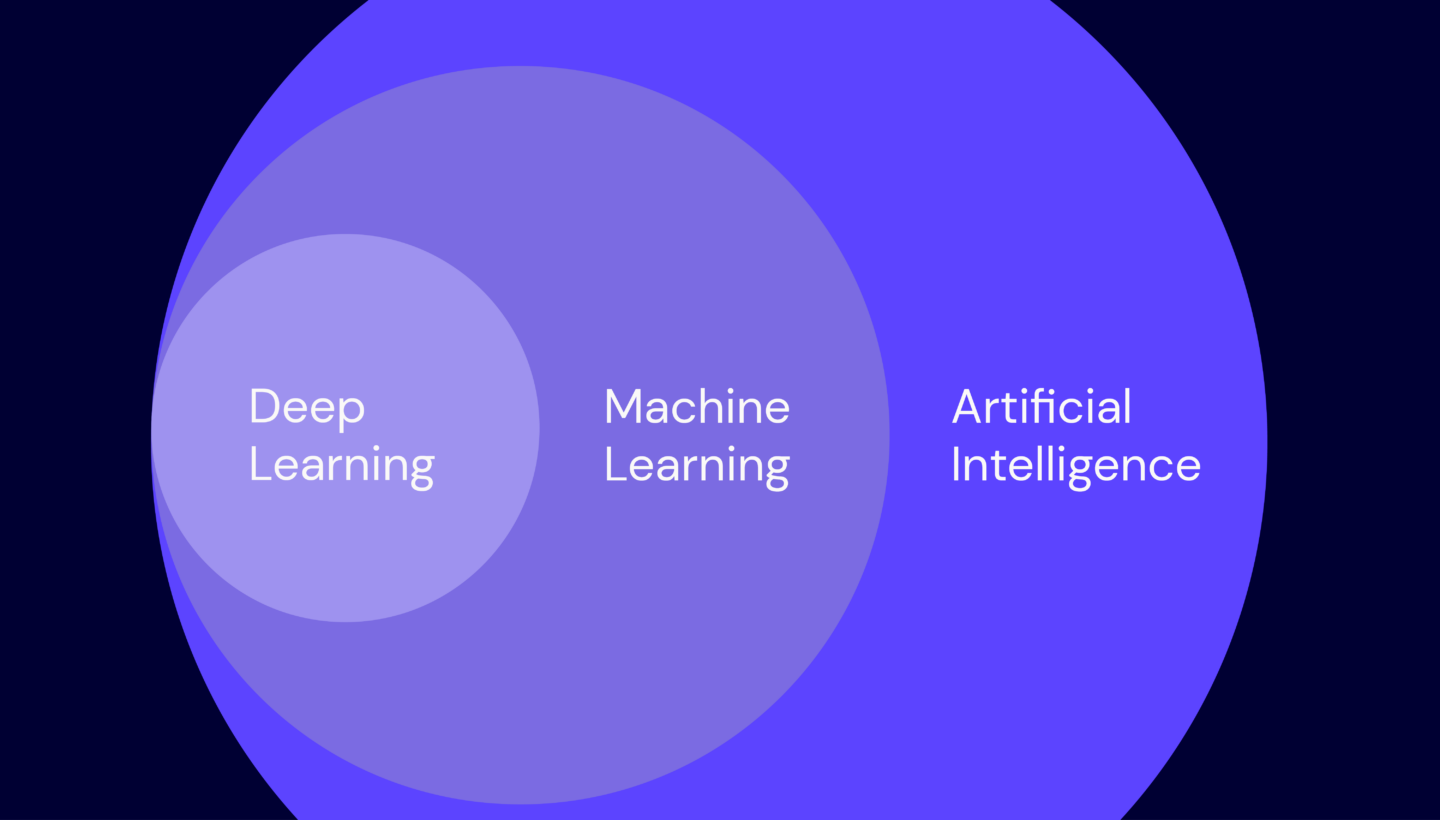
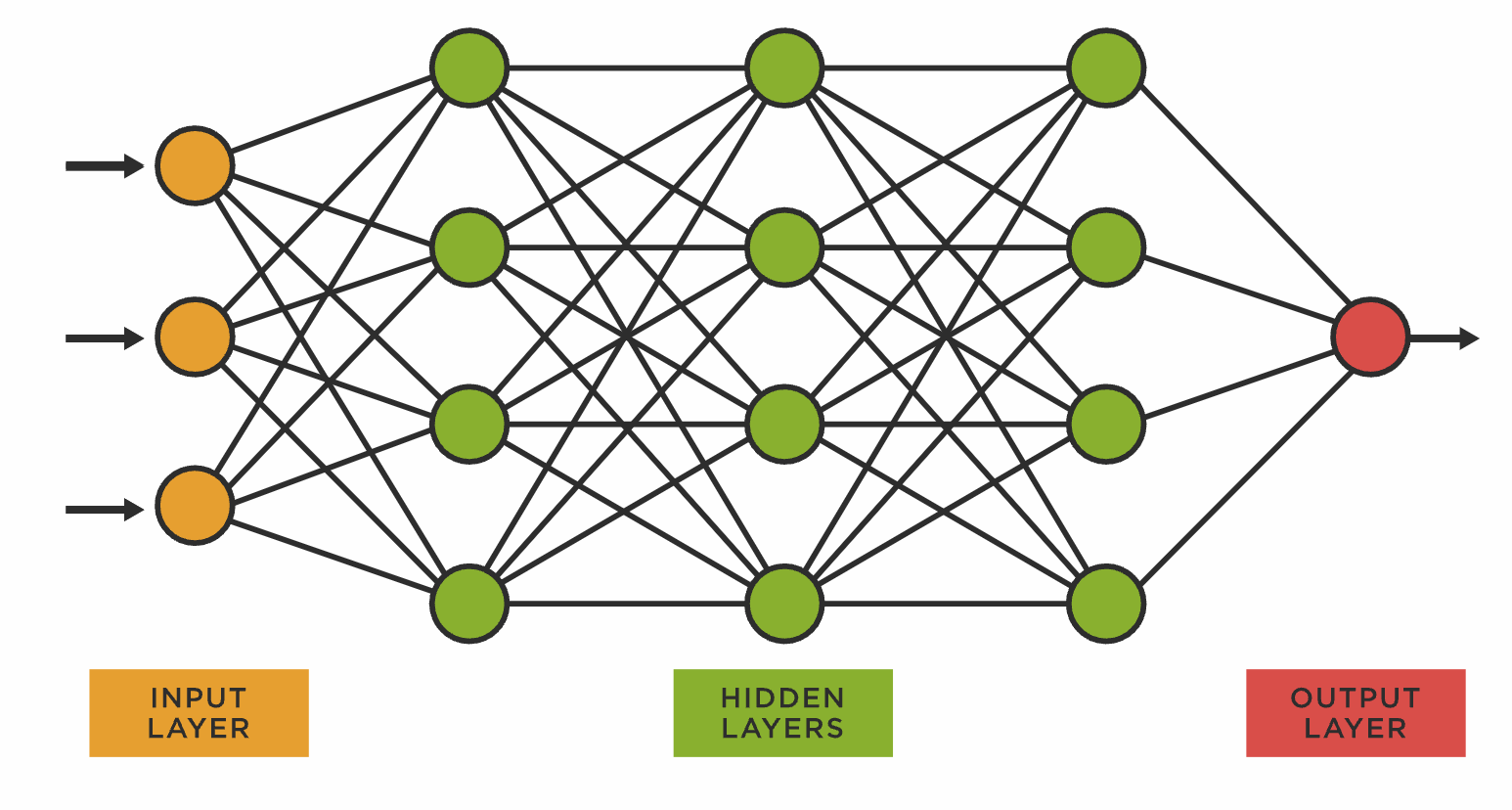

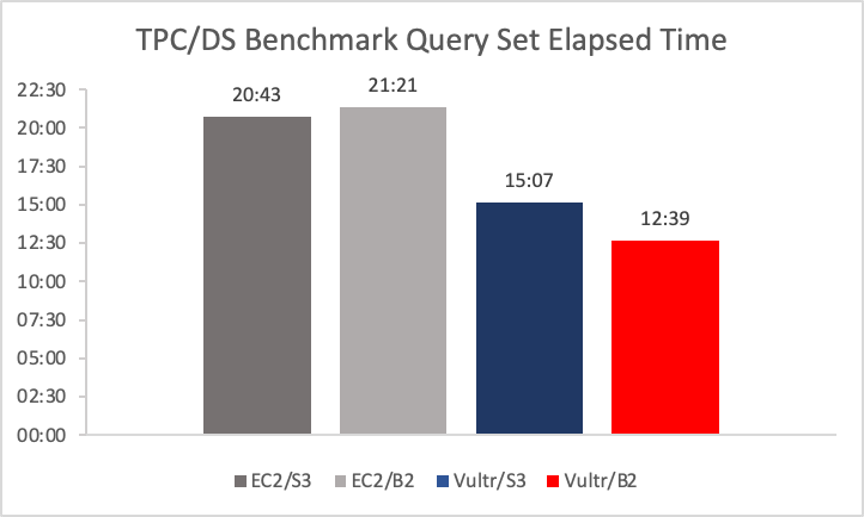

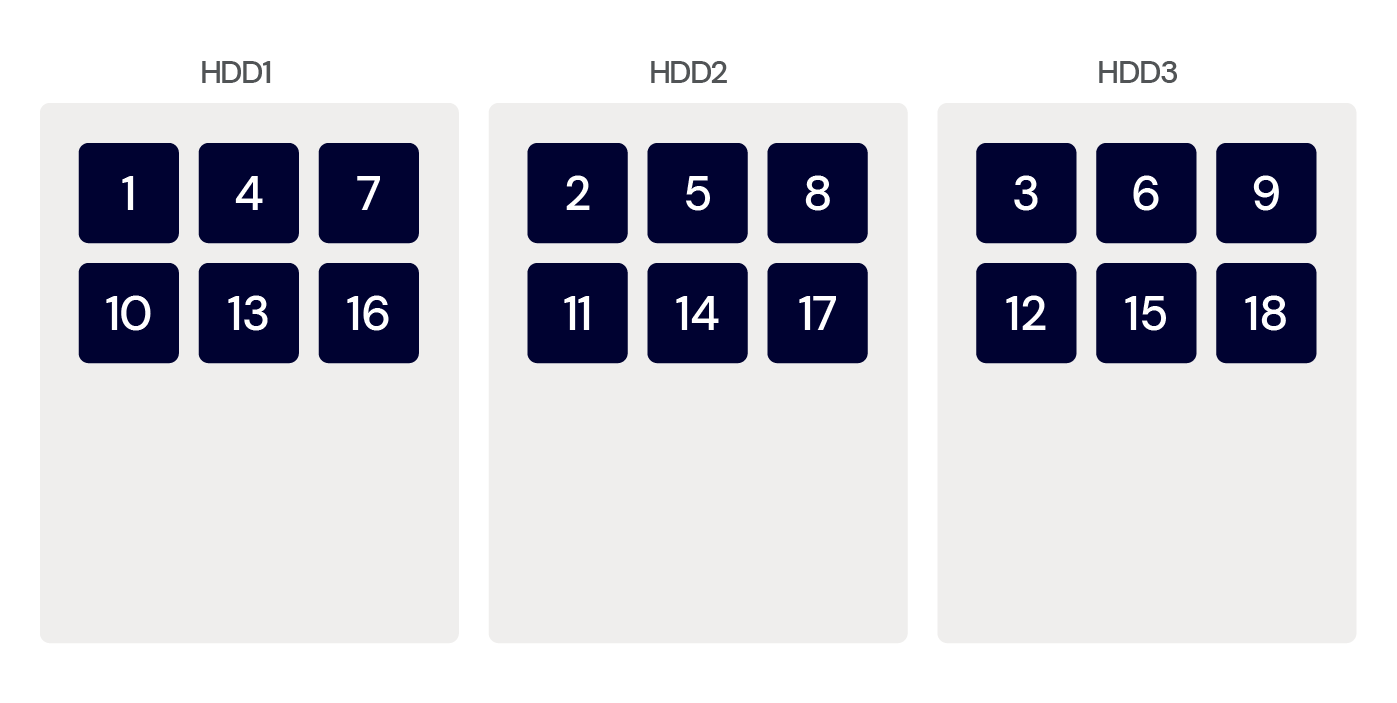
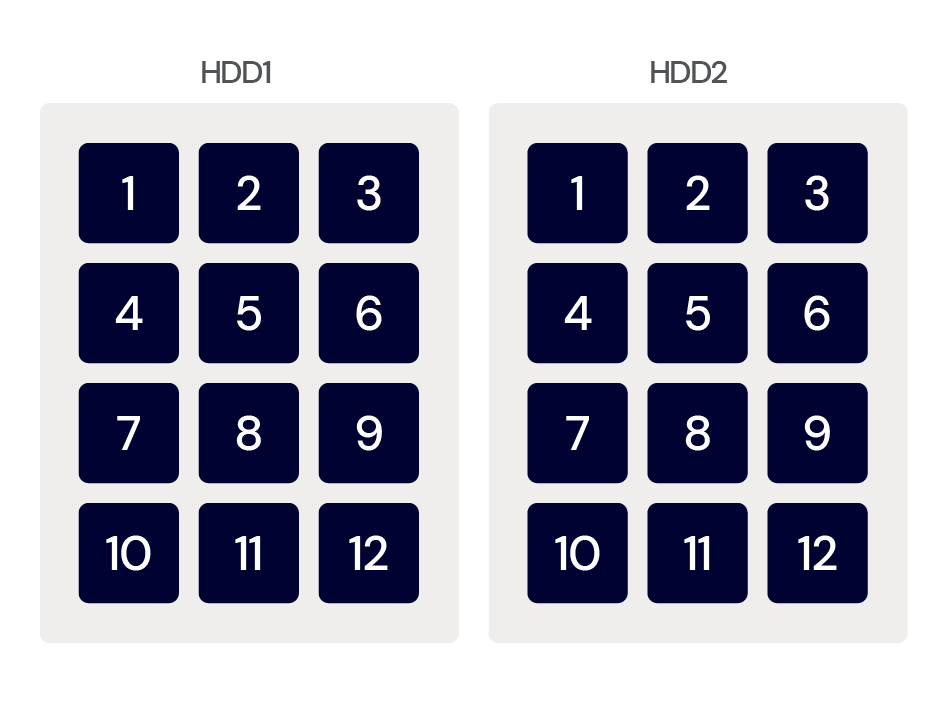
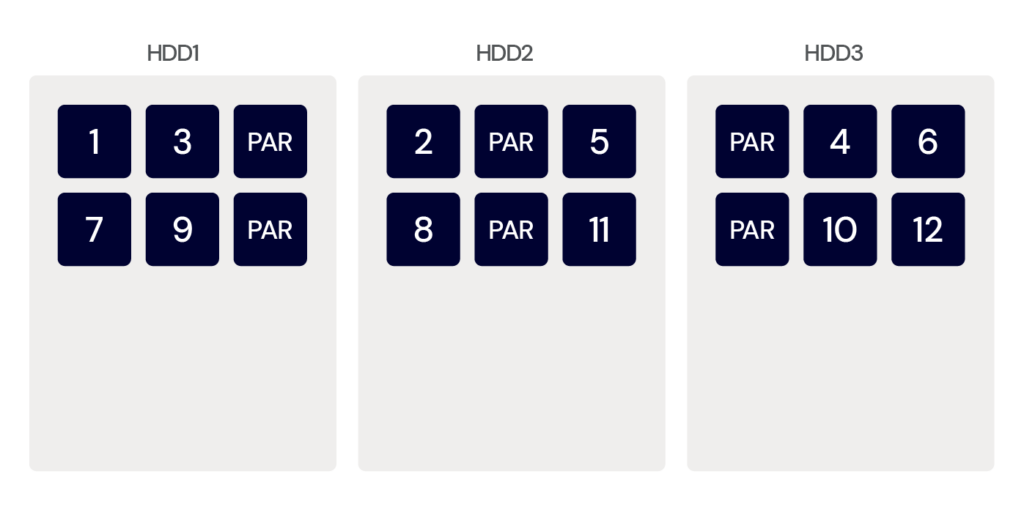
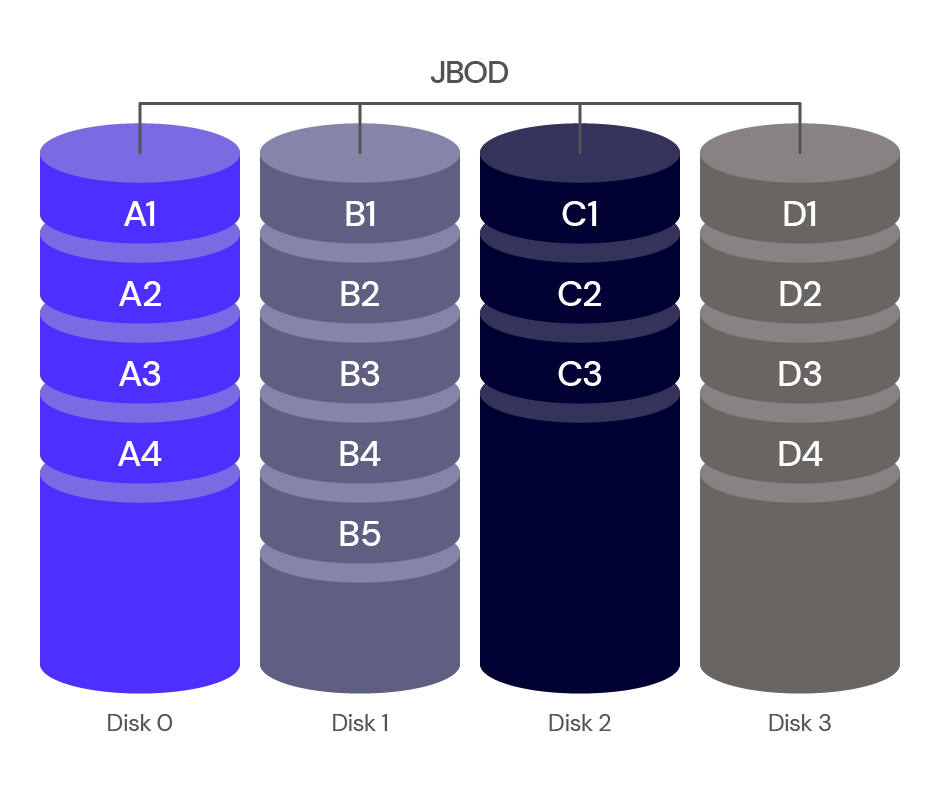
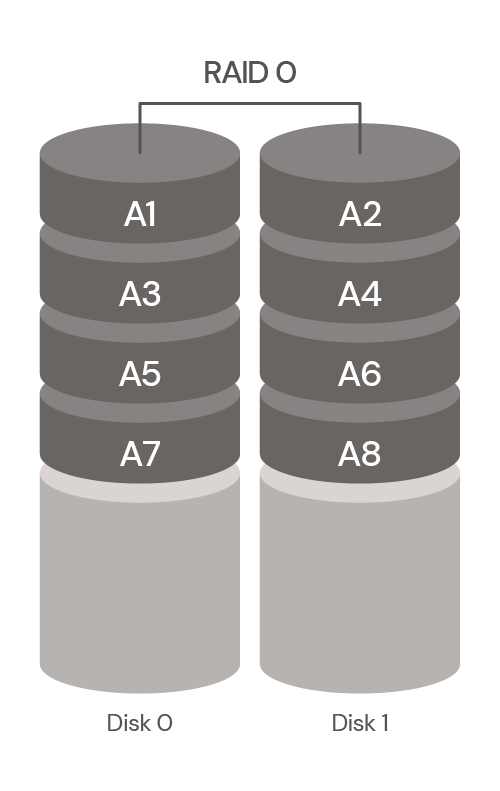
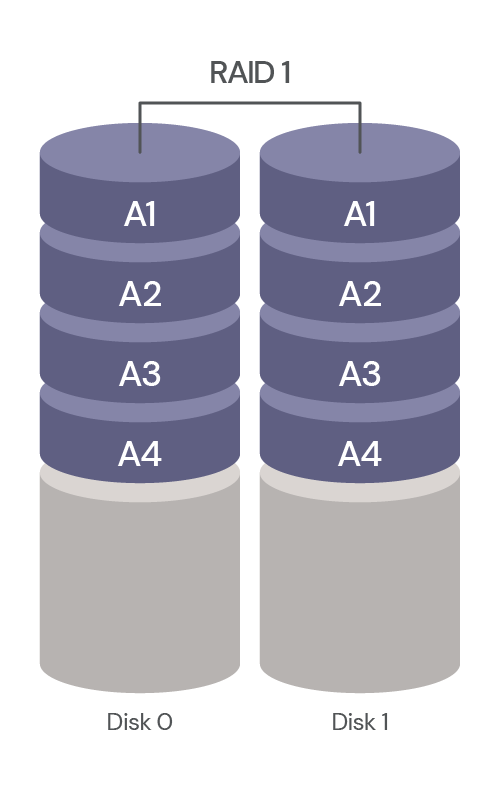
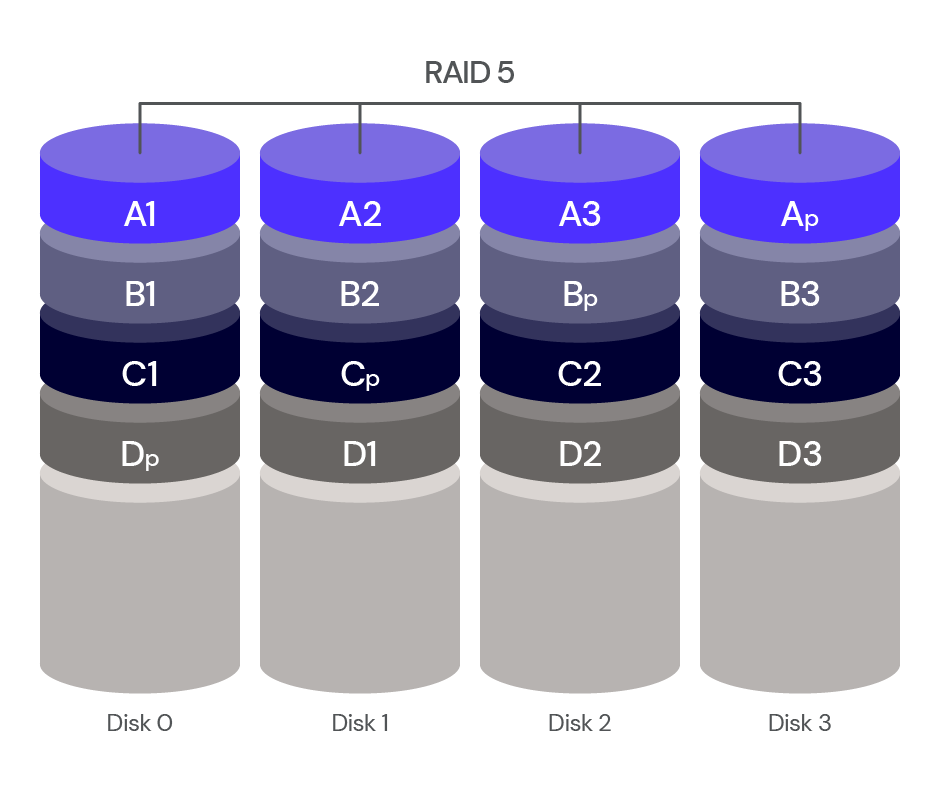
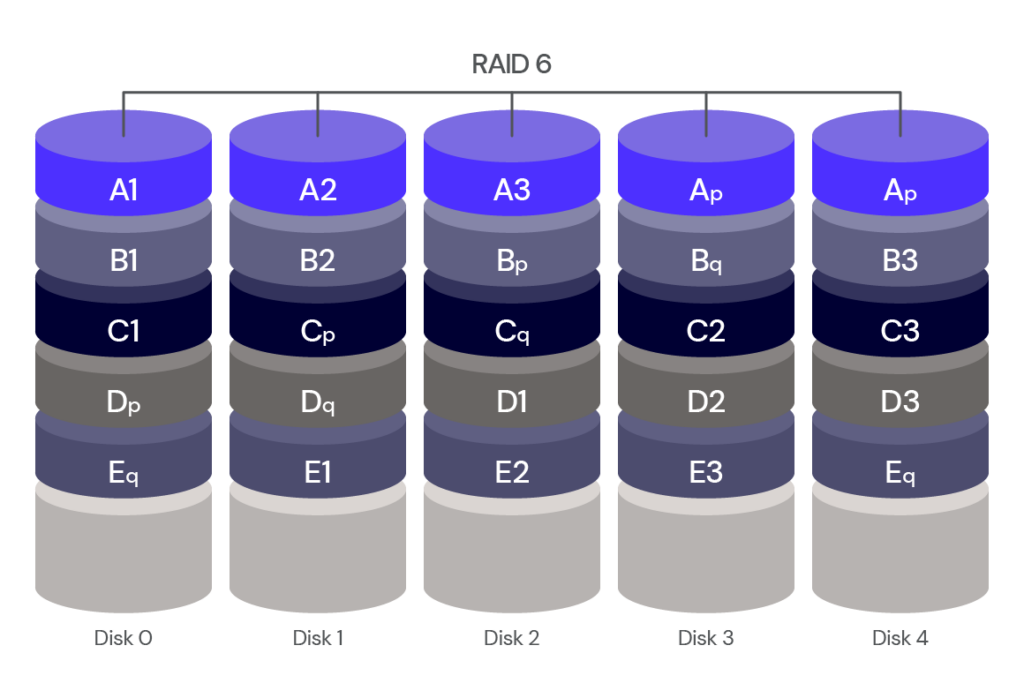
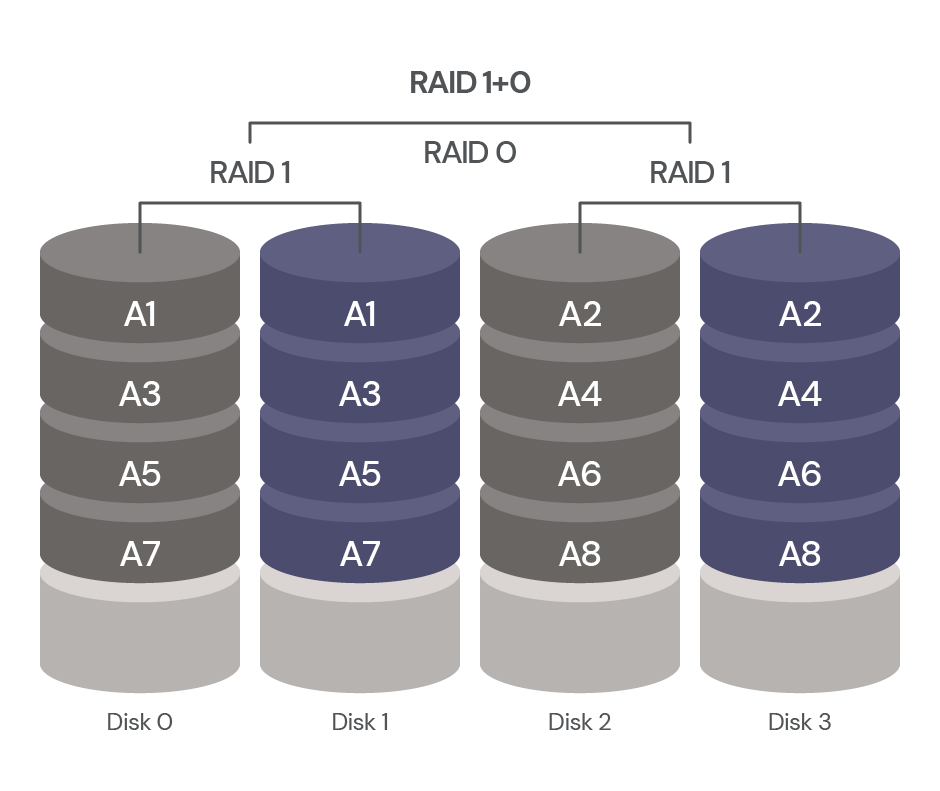


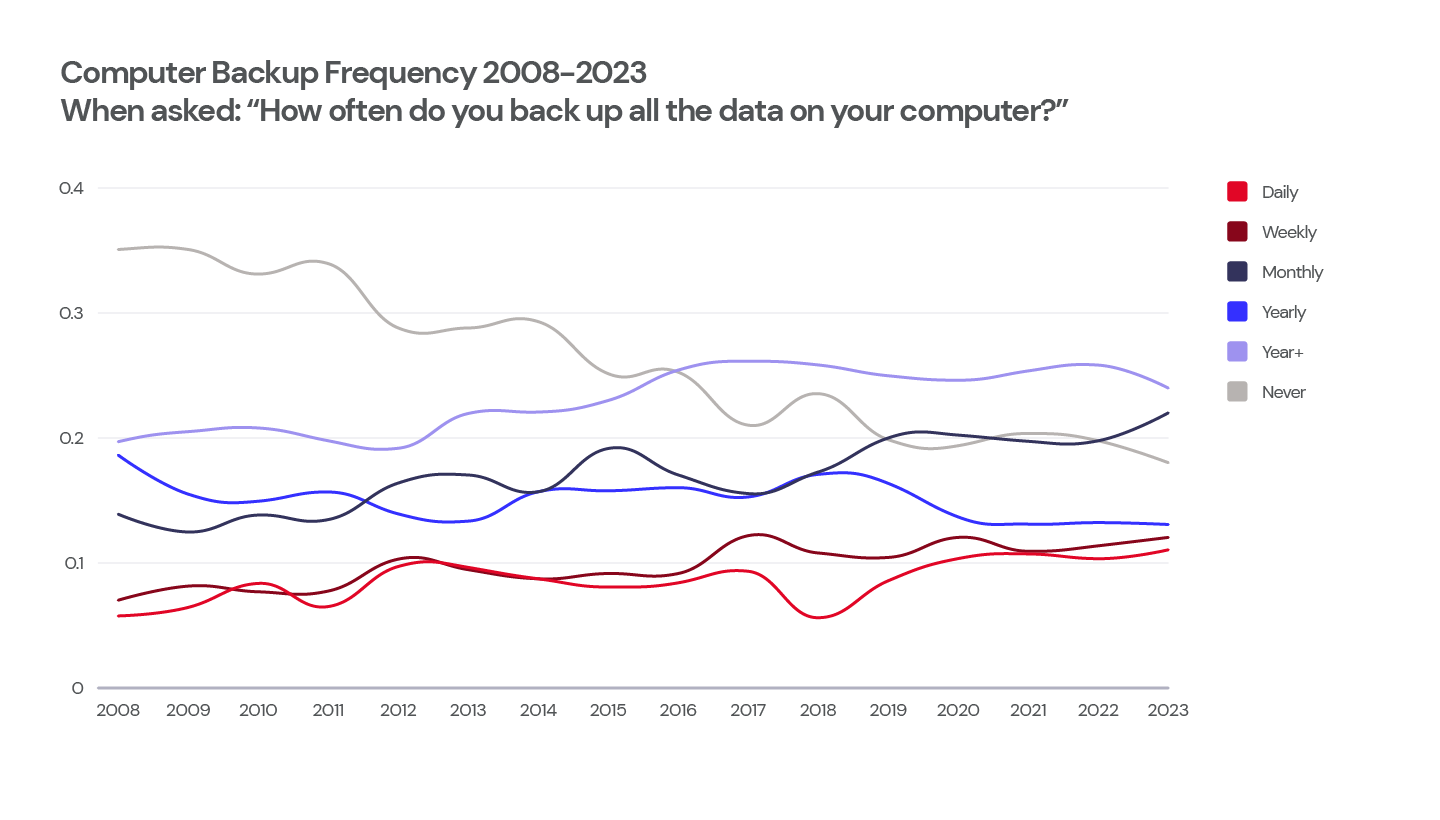

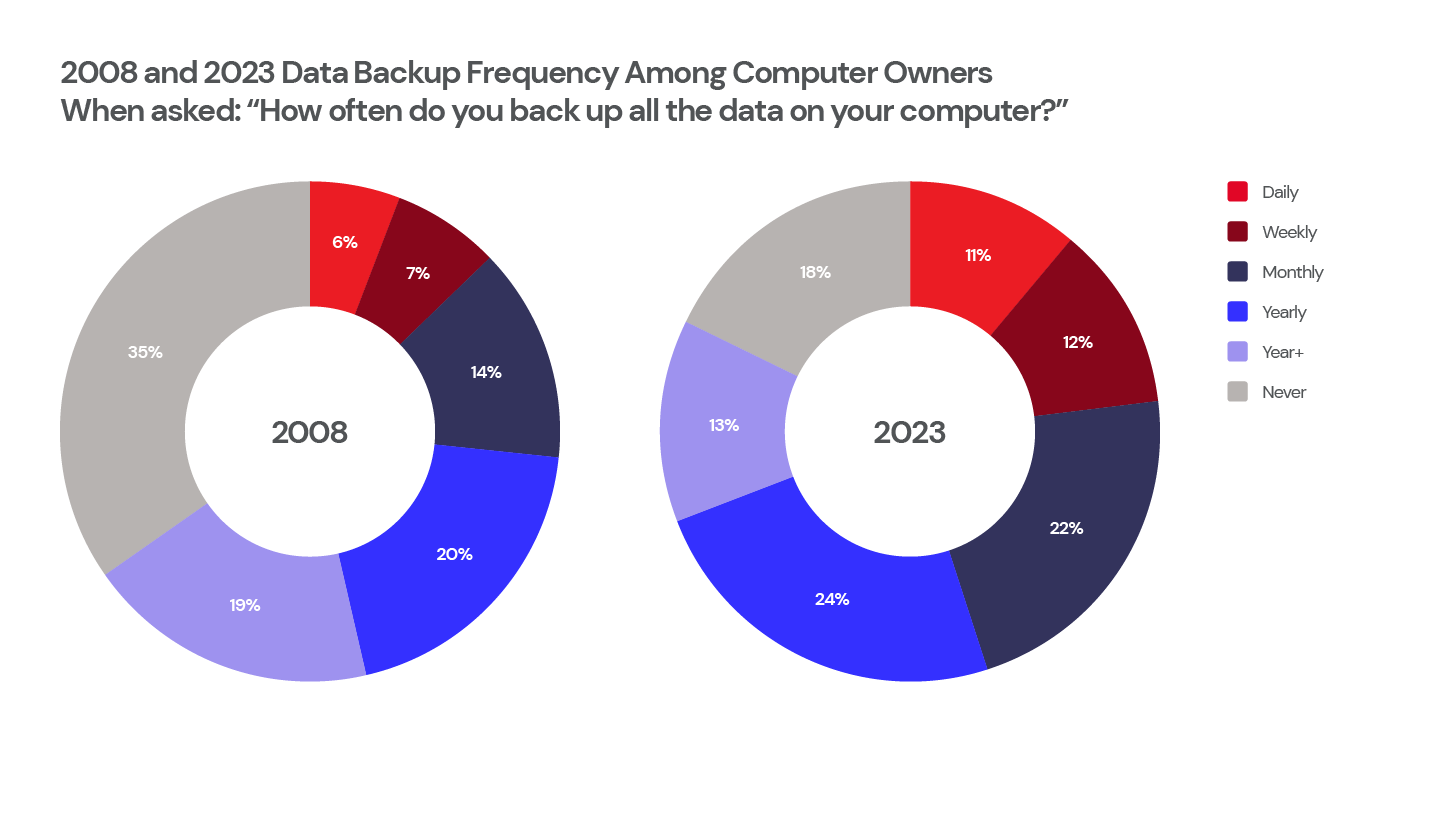
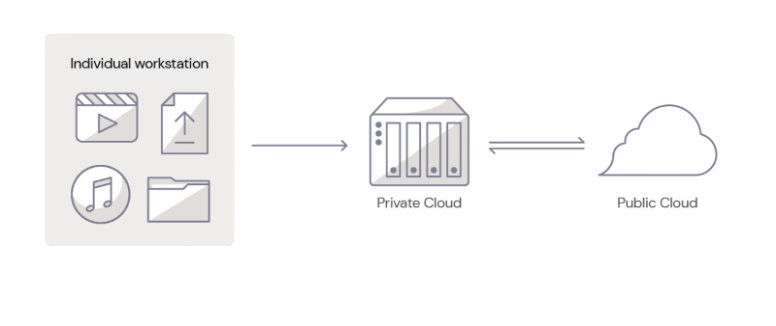

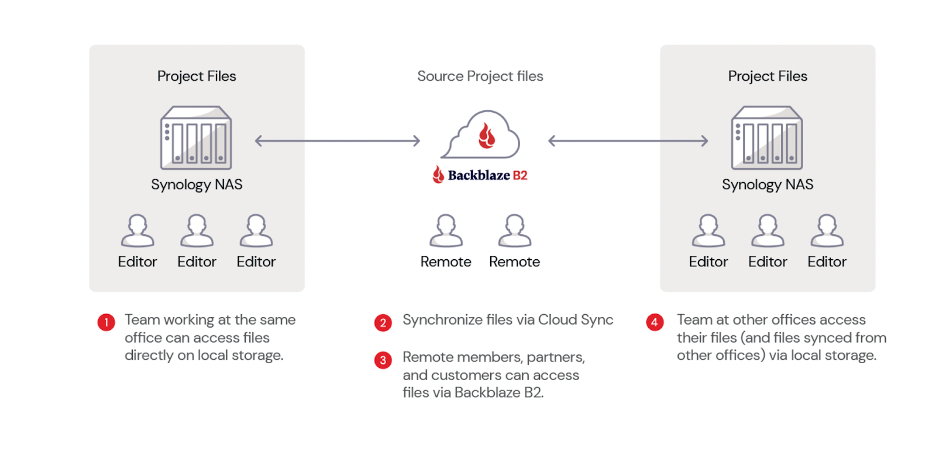
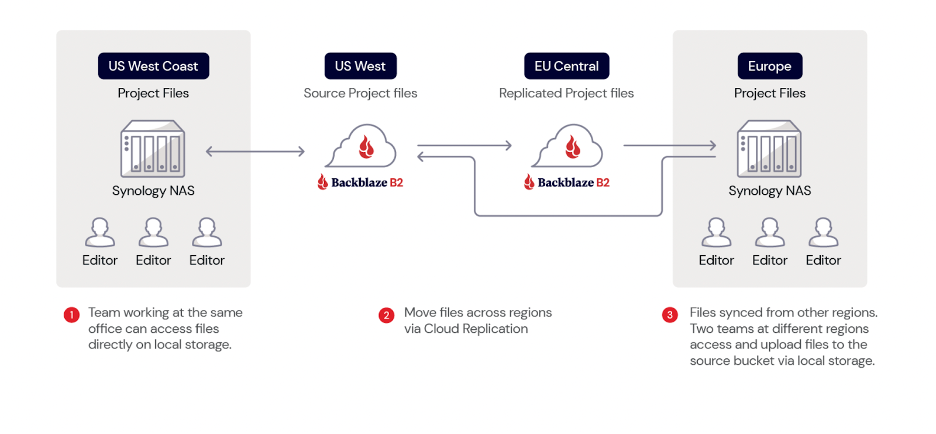
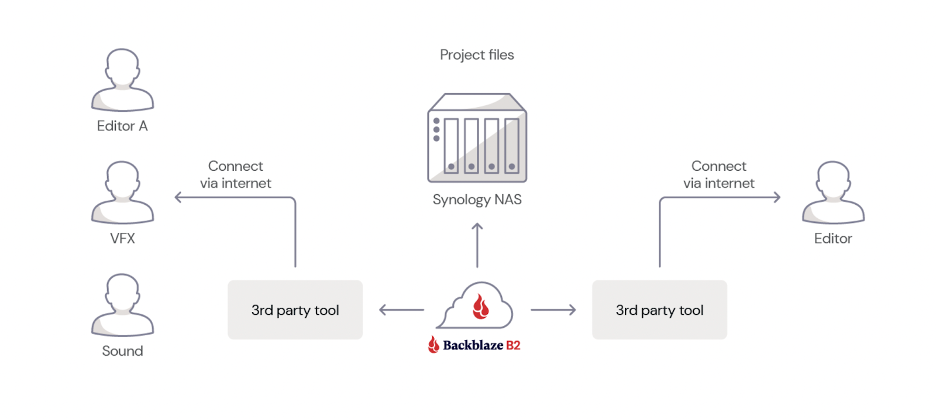
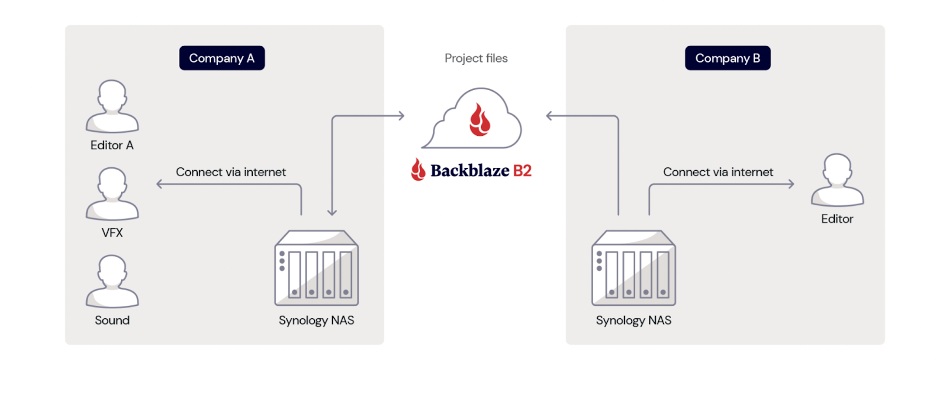
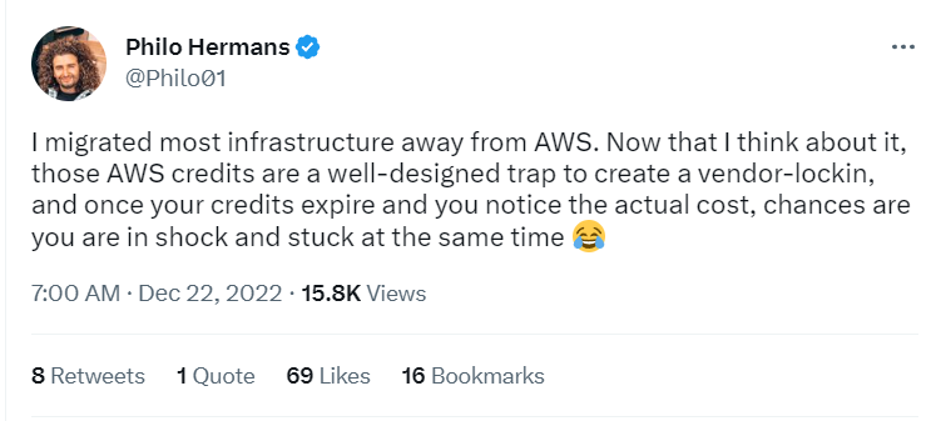

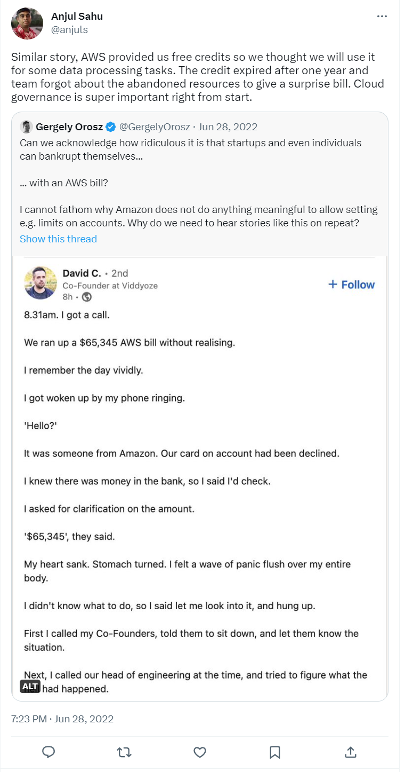
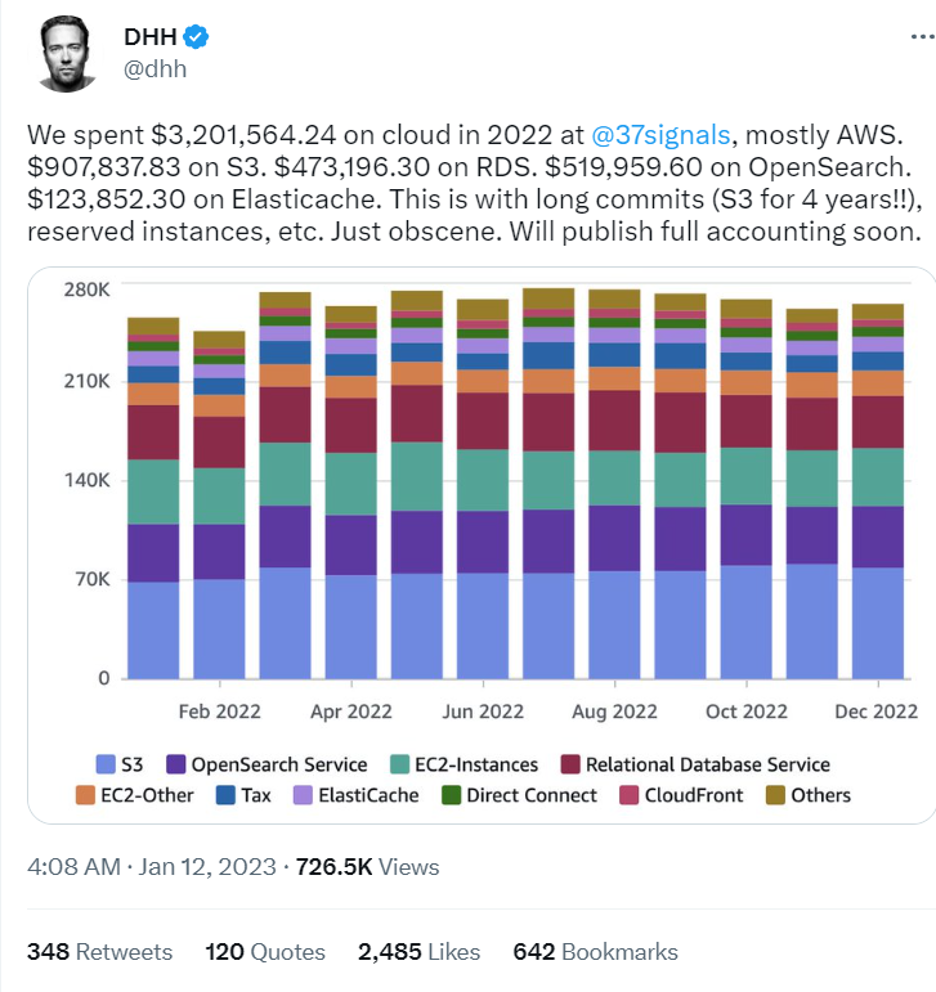

![A tweet from user Leo Guinan @leo_guinan that says (I also got my AWS bill for last month and it was about 4x what I was expecting after my credits ran out, so a little more push to get paid users [laughing emoji])](https://www.backblaze.com/blog/wp-content/uploads/2023/05/5_Cloud-Credits-Tweet.png)

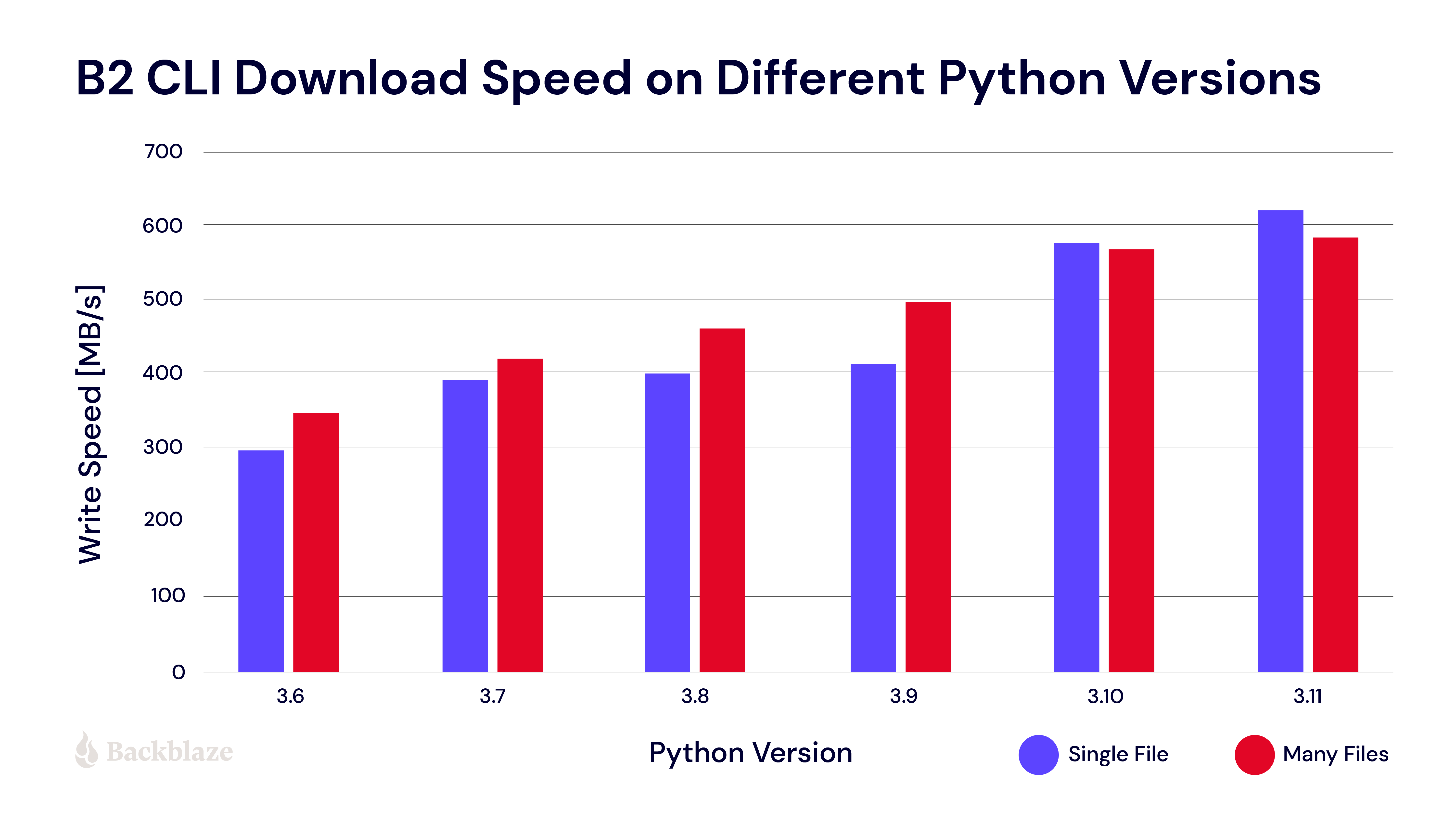
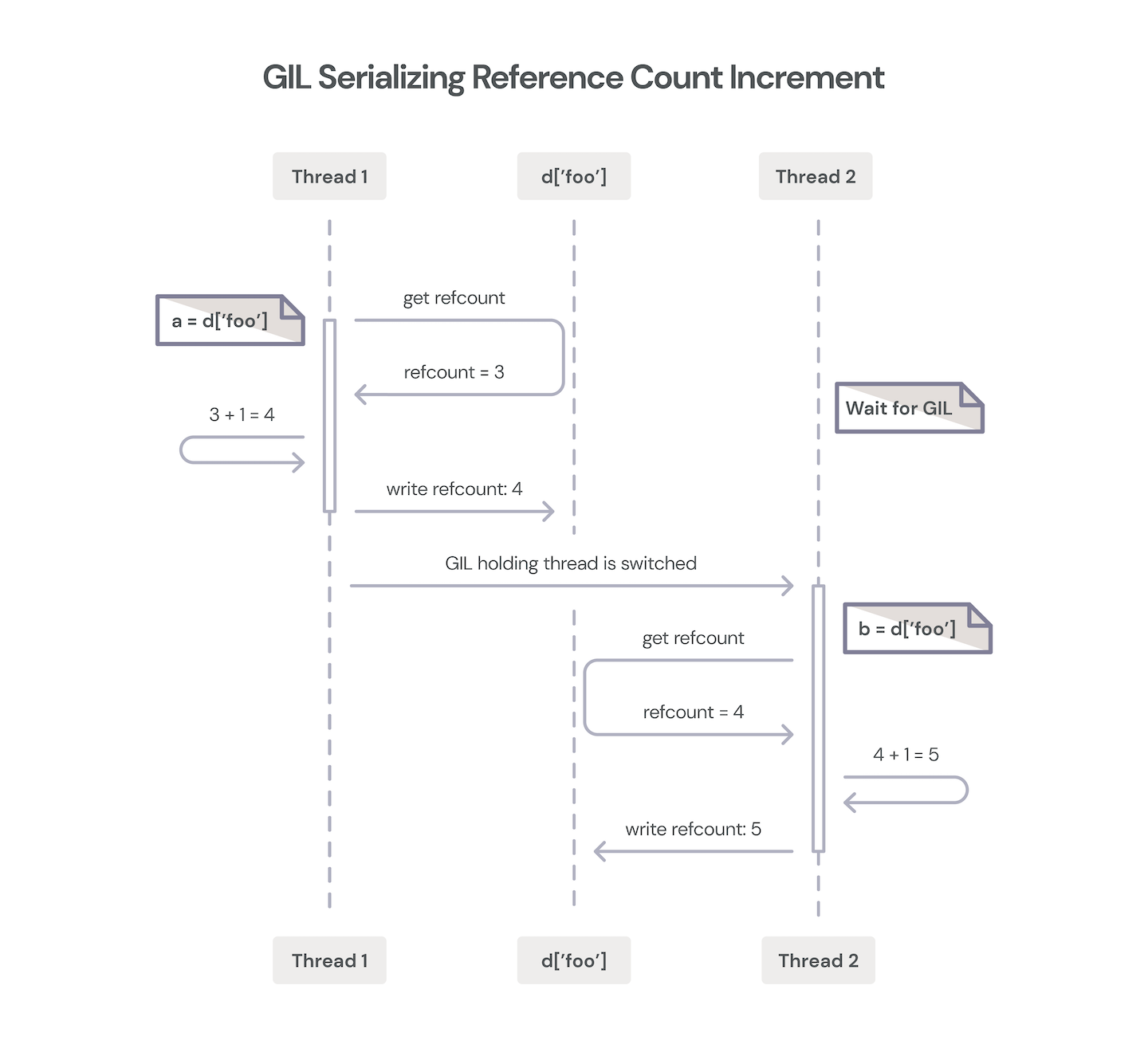
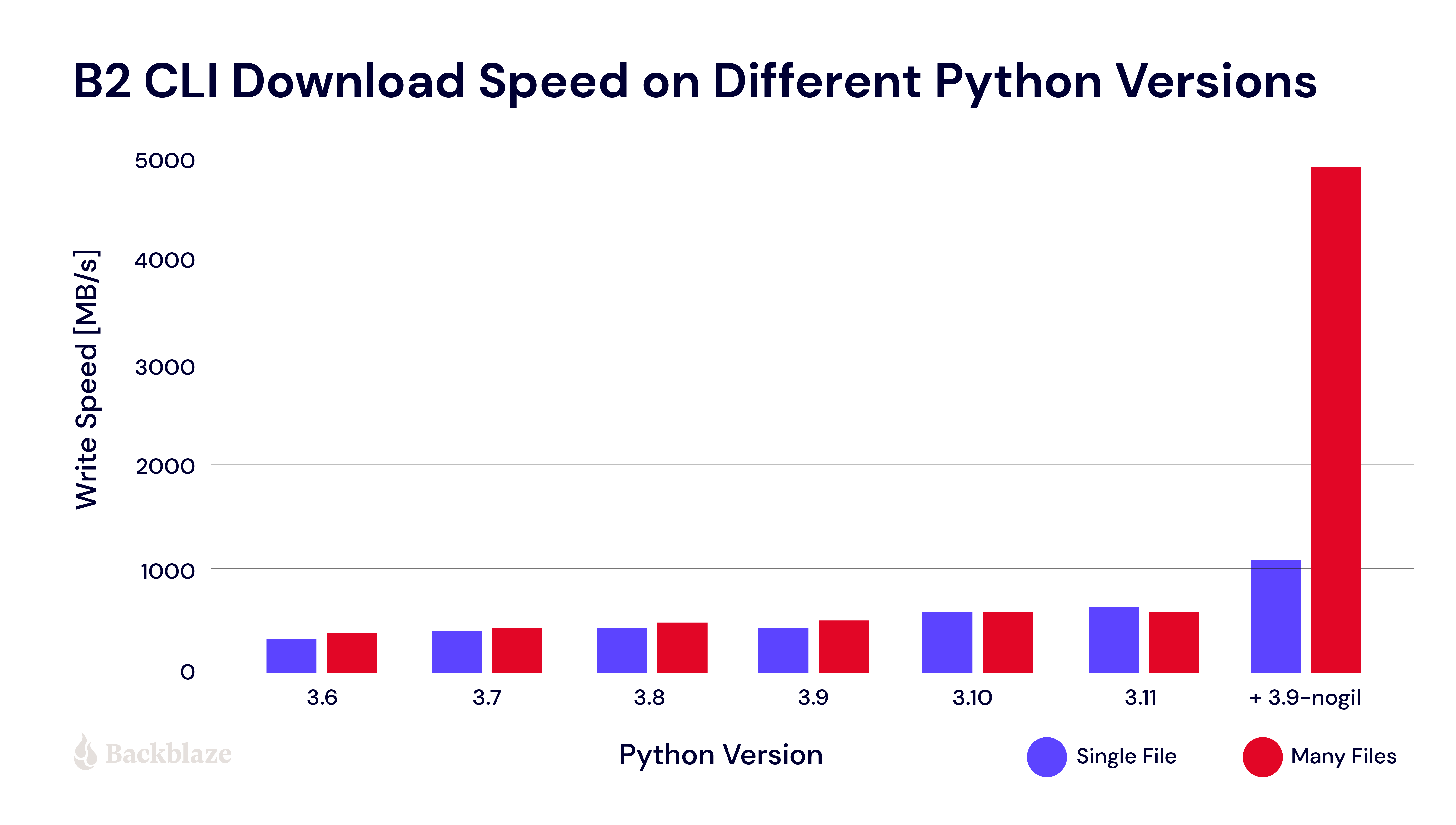
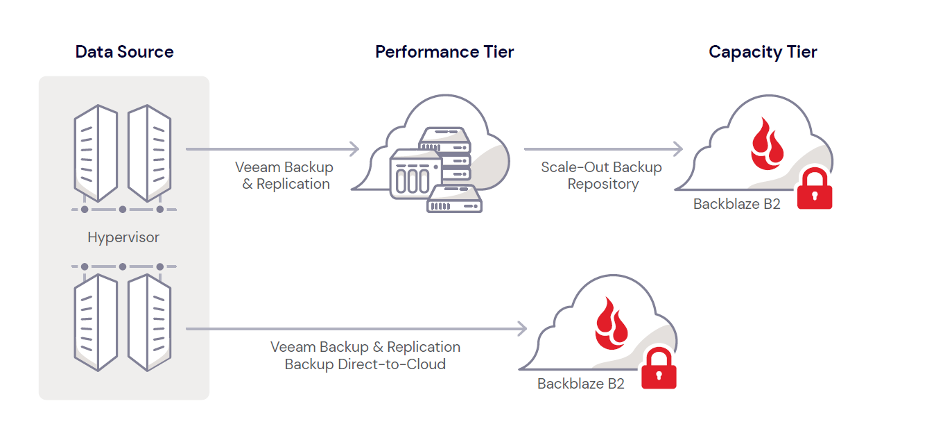
.JPG)