Tag Archives: research seminar

Integrating computational thinking into primary teaching

Post Syndicated from Veronica Cucuiat original https://www.raspberrypi.org/blog/integrating-computational-thinking-into-primary-teaching/

“Computational thinking is really about thinking, and sometimes about computing.” – Aman Yadav, Michigan State University

Young people in a coding lesson.

Computational thinking is a vital skill if you want to use a computer to solve problems that matter to you. That’s why we consider computational thinking (CT) carefully when creating learning resources here at the Raspberry Pi Foundation. However, educators are increasingly realising that CT skills don’t just apply to writing computer programs, and that CT is a fundamental approach to problem-solving that can be extended into other subject areas. To discuss how CT can be integrated beyond the computing classroom and help introduce the fundamentals of computing to primary school learners, we invited Dr Aman Yadav from Michigan State University to deliver the penultimate presentation in our seminar series on computing education for primary-aged children. 

In his presentation, Aman gave a concise tour of CT practices for teachers, and shared his findings from recent projects around how teachers perceive and integrate CT into their lessons.

Research in context

Aman began his talk by placing his team’s work within the wider context of computing education in the US. The computing education landscape Aman described is dominated by the National Science Foundation’s ambitious goal, set in 2008, to train 10,000 computer science teachers. This objective has led to various initiatives designed to support computer science education at the K–12 level. However, despite some progress, only 57% of US high schools offer foundational computer science courses, only 5.8% of students enrol in these courses, and just 31% of the enrolled students are female. As a result, Aman and his team have worked in close partnership with teachers to address questions that explore ways to more meaningfully integrate CT ideas and practices into formal education, such as:

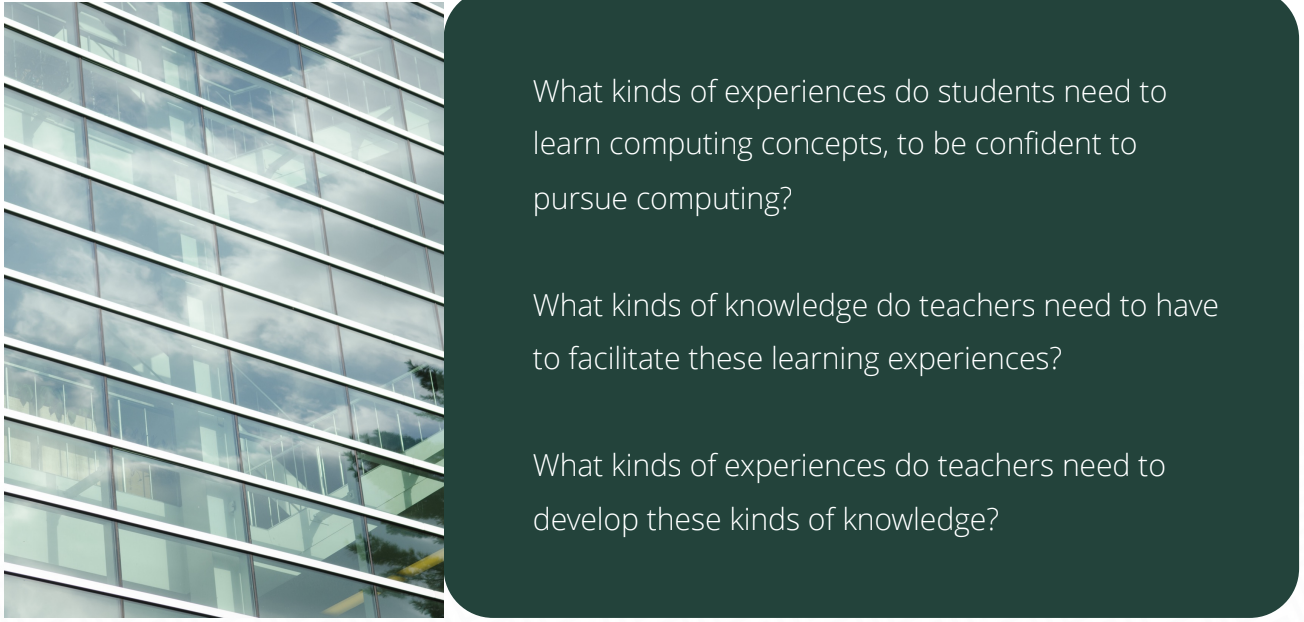
  • What kinds of experiences do students need to learn computing concepts, to be confident to pursue computing?
  • What kinds of knowledge do teachers need to have to facilitate these learning experiences?
  • What kinds of experiences do teachers need to develop these kinds of knowledge? 

The CT4EDU project

At the primary education level, the CT4EDU project posed the question “What does computational thinking actually look like in elementary classrooms, especially in the context of maths and science classes?” This project involved collaboration with teachers, curriculum designers, and coaches to help them conceptualise and implement CT in their core instruction.

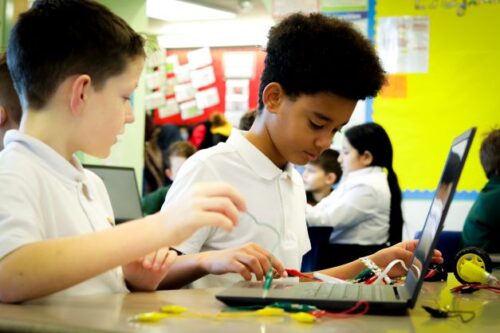
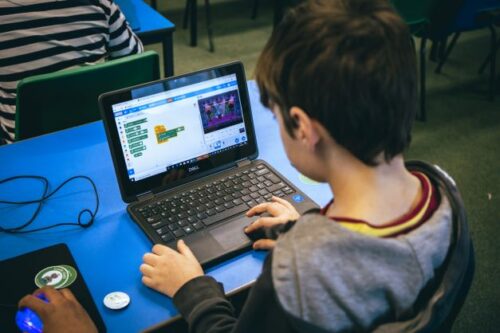
A child at a laptop

During professional development workshops using both plugged and unplugged tasks, the researchers supported educators to connect their day-to-day teaching practice to four foundational CT constructs:

  1. Debugging
  2. Abstraction
  3. Decomposition
  4. Patterns

An emerging aspect of the research team’s work has been the important relationship between vocabulary, belonging, and identity-building, with implications for equity. Actively incorporating CT vocabulary in lesson planning and classroom implementation helps students familiarise themselves with CT ideas: “If young people are using the language, they see themselves belonging in computing spaces”. 

A main finding from the study is that teachers used CT ideas to explicitly engage students in metacognitive thinking processes, and to help them be aware of their thinking as they solve problems. Rather than teachers using CT solely to introduce their students to computing, they used CT as a way to support their students in whatever they were learning. This constituted a fundamental shift in the research team’s thinking and future work, which is detailed further in a conceptual article

The Smithsonian Science for Computational Thinking project

The work conducted for the CT4EDU project guided the approach taken in the Smithsonian Science for Computational Thinking project. This project entailed the development of a curriculum for grades 3 and 5 that integrates CT into science lessons.

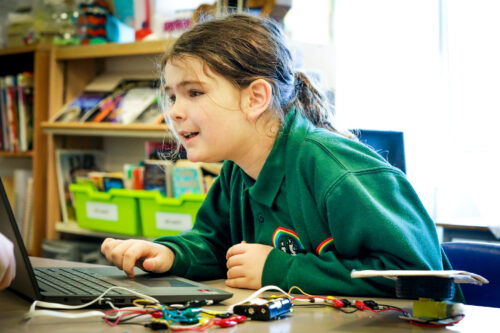
Teacher and young student at a laptop.

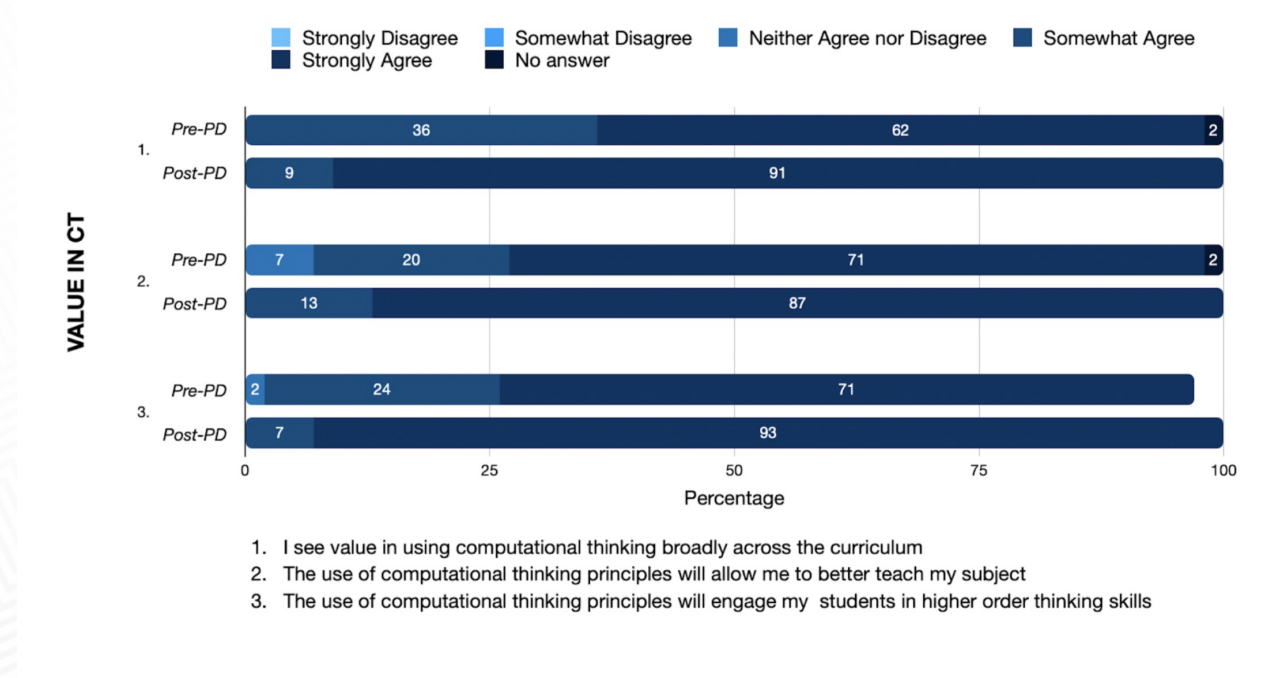
Part of the project included surveying teachers about the value they place on CT, both before and after participating in professional development workshops focused on CT. The researchers found that even before the workshops, teachers make connections between CT and the rest of the curriculum. After the workshops, an overwhelming majority agreed that CT has value (see image below). From this survey, it seems that CT ties things together for teachers in ways not possible or not achieved with other methods they’ve tried previously.  

A graph from Aman's seminar.

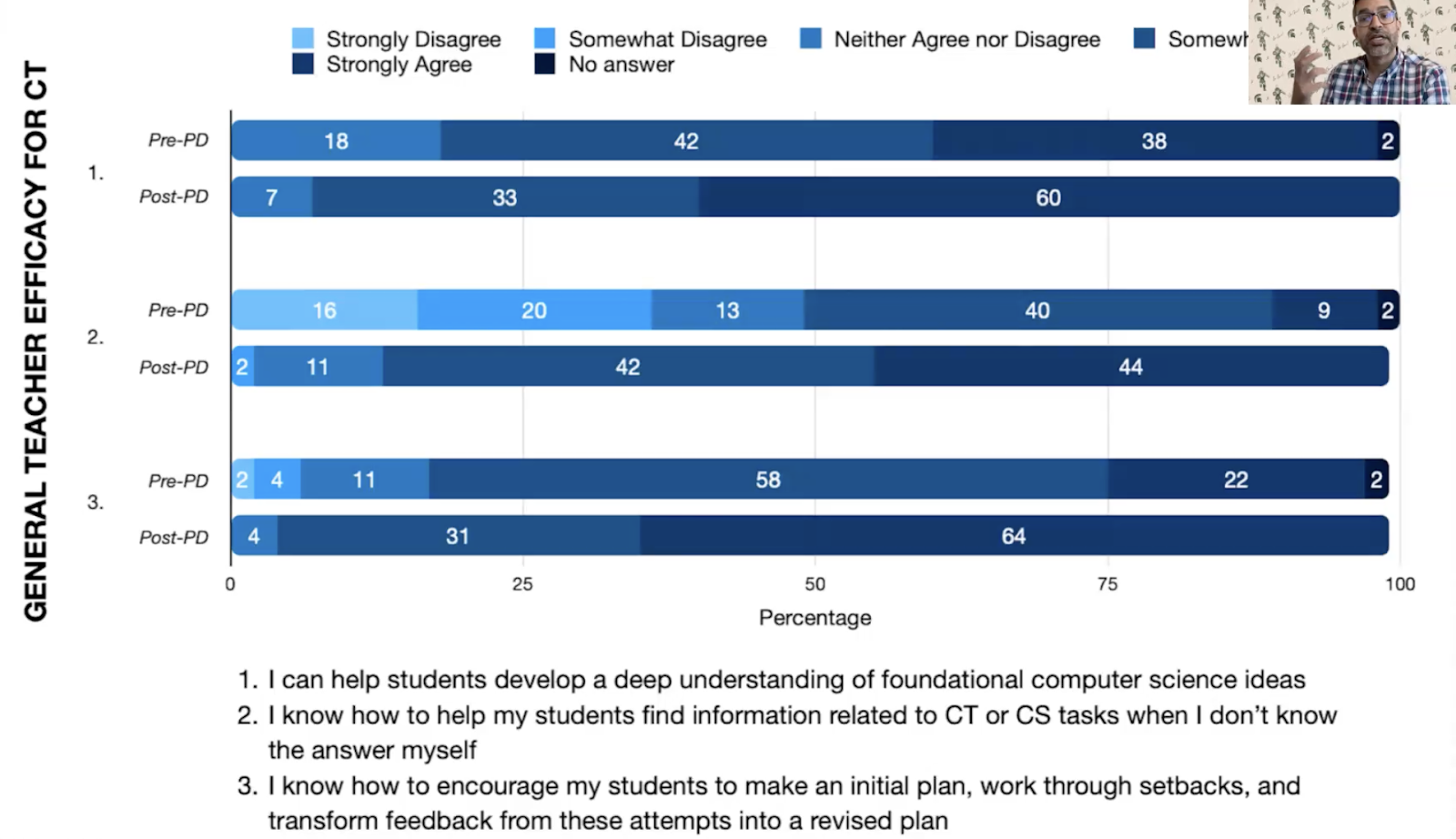
Despite teachers valuing the CT approach, asking them to integrate coding into their practices from the start remains a big ask (see image below). Many teachers lack knowledge or experience of coding, and they may not be curriculum designers, which means that we need to develop resources that allow teachers to integrate CT and coding in natural ways. Aman proposes that this requires a longitudinal approach, working with teachers over several years, using plugged and unplugged activities, and working closely with schools’ STEAM or specialist technology teachers where applicable to facilitate more computationally rich learning experiences in classrooms.

A graph from Aman's seminar.

Integrated computational thinking

Aman’s team is also engaged in a research project to integrate CT at middle school level for students aged 11 to 14. This project focuses on the question “What does CT look like in the context of social studies, English language, and art classrooms?”

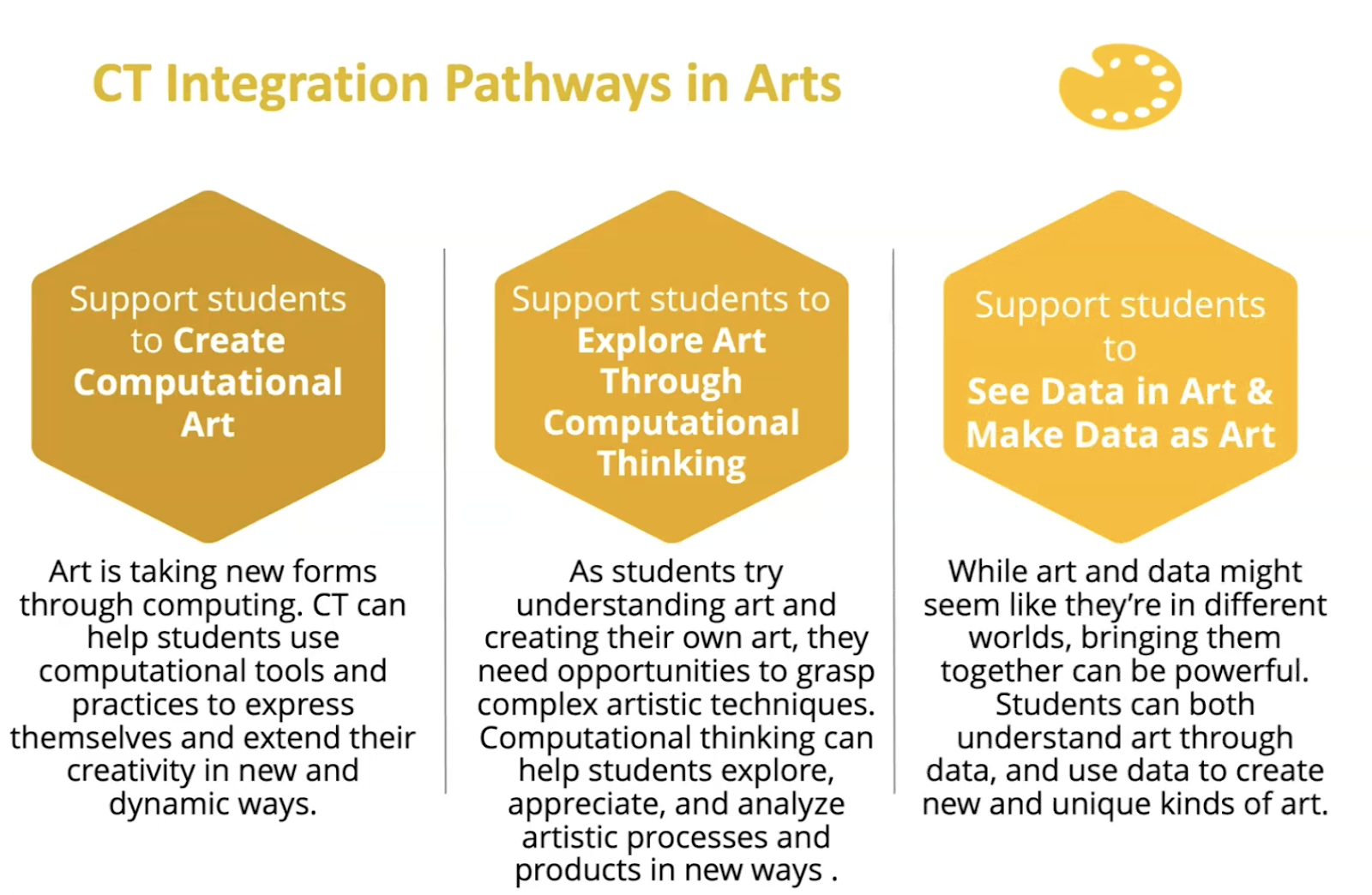
For this project, the team conducted three Delphi studies, and consequently created learning pathways for each subject, which teachers can use to bring CT into their classrooms. The pathways specify practices and sub-practices to engage students with CT, and are available on the project website. The image below exemplifies the CT integration pathways developed for the arts subject, where the relationship between art and data is explored from both directions: by using CT and data to understand and create art, and using art and artistic principles to represent and communicate data. 

Computational thinking in the primary classroom

Aman’s work highlights the broad value of CT in education. However, to meaningfully integrate CT into the classroom, Aman suggests that we have to take a longitudinal view of the time and methods required to build teachers’ understanding and confidence with the fundamentals of CT, in a way that is aligned with their values and objectives. Aman argues that CT is really about thinking, and sometimes about computing, to support disciplinary learning in primary classrooms. Therefore, rather than focusing on integrating coding into the classroom, he proposes that we should instead talk about using CT practices as the building blocks that provide the foundation for incorporating computationally rich experiences in the classroom. 

Watch the recording of Aman’s presentation:

You can access Aman’s seminar slides as well.

You can find out more about connecting research to practice for primary computing education by watching the recordings of the other seminars in our series on primary (K–5) teaching and learning. In particular, Bobby Whyte discusses similar concepts to Aman in his talk on integrating primary computing and literacy through multimodal storytelling

Sign up for our seminars

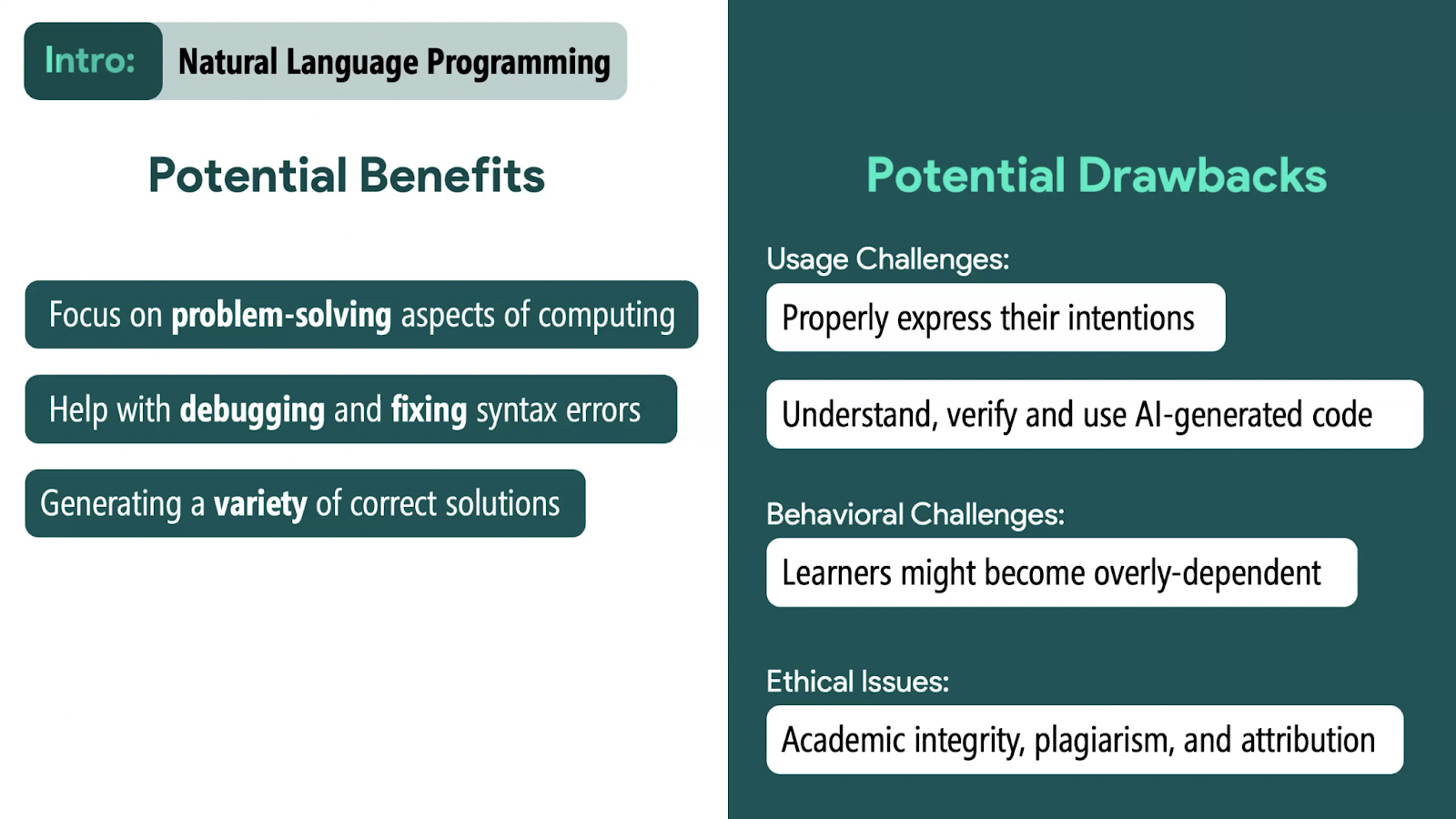
Our 2024 seminar series is on the theme of teaching programming, with or without AI. In this series, we explore the latest research on how teachers can best support school-age learners to develop their programming skills.

On 13 February, we’ll hear from Majeed Kazemi (University of Toronto) about his work investigating whether AI code generator tools can support K-12 students to learn Python programming.

Sign up now to join the seminar:

The post Integrating computational thinking into primary teaching appeared first on Raspberry Pi Foundation.
Engaging primary Computing teachers in culturally relevant pedagogy through professional development

Post Syndicated from Claire Johnson original https://www.raspberrypi.org/blog/culturally-relevant-pedagogy-areas-opportunity-adapting-lessons/

Underrepresentation in computing is a widely known issue, in industry and in education. To cite some statistics from the UK: a Black British Voices report from August 2023 noted that 95% of respondents believe the UK curriculum neglects black lives and experiences; fewer students from working class backgrounds study GCSE Computer Science; when they leave formal education, fewer female, BAME, and white working class people are employed in the field of computer science (Kemp 2021); only 21% of GCSE Computer Science students, 15% at A level, and 22% at undergraduate level are female (JCQ 2020, Ofqual 2020, UCAS 2020); students with additional needs are also underrepresented.

In a computing classroom, two girls concentrate on their programming task.

Such statistics have been the status quo for too long. Many Computing teachers already endeavour to bring about positive change where they can and engage learners by including their interests in the lessons they deliver, so how can we support them to do this more effectively? Extending the reach of computing so that it is accessible to all also means that we need to consider what formal and informal values predominate in the field of computing. What is the ‘hidden’ curriculum in computing that might be excluding some learners? Who is and who isn’t represented?

Katharine Childs.
Katharine Childs (Raspberry Pi Foundation)

In a recent research seminar, Katharine Childs from our team outlined a research project we conducted, which included a professional development workshop to increase primary teachers’ awareness of and confidence in culturally relevant pedagogy. In the workshop, teachers considered how to effectively adapt curriculum materials to make them culturally relevant and engaging for the learners in their classrooms. Katharine described the practical steps teachers took to adapt two graphics-related units, and invited seminar participants to apply their learning to a graphics activity themselves.

What is culturally relevant pedagogy?

Culturally relevant pedagogy is a teaching framework which values students’ identities, backgrounds, knowledge, and ways of learning. By drawing on students’ own interests, experiences and cultural knowledge educators can increase the likelihood that the curriculum they deliver is more relevant, engaging and accessible to all.

The idea of culturally relevant pedagogy was first introduced in the US in the 1990s by African-American academic Gloria Ladson-Billings (Ladson-Billings 1995). Its aim was threefold: to raise students’ academic achievement, to develop students’ cultural competence and to promote students’ critical consciousness. The idea of culturally responsive teaching was later advanced by Geneva Gay (2000) and more recently  brought into focus in US computer science education by Kimberly Scott and colleagues (2015). The approach has been localised for England by Hayley Leonard and Sue Sentance (2021) in work they undertook here at the Foundation.

Ten areas of opportunity

Katharine began her presentation by explaining that the professional development workshop in the Primary culturally adapted resources for computing project built on two of our previous research projects to develop guidelines for culturally relevant and responsive computing and understand how teachers used them in practice. This third project ran as a pilot study funded by Cognizant, starting in Autumn 2022 with a one-day, in-person workshop for 13 primary computing teachers

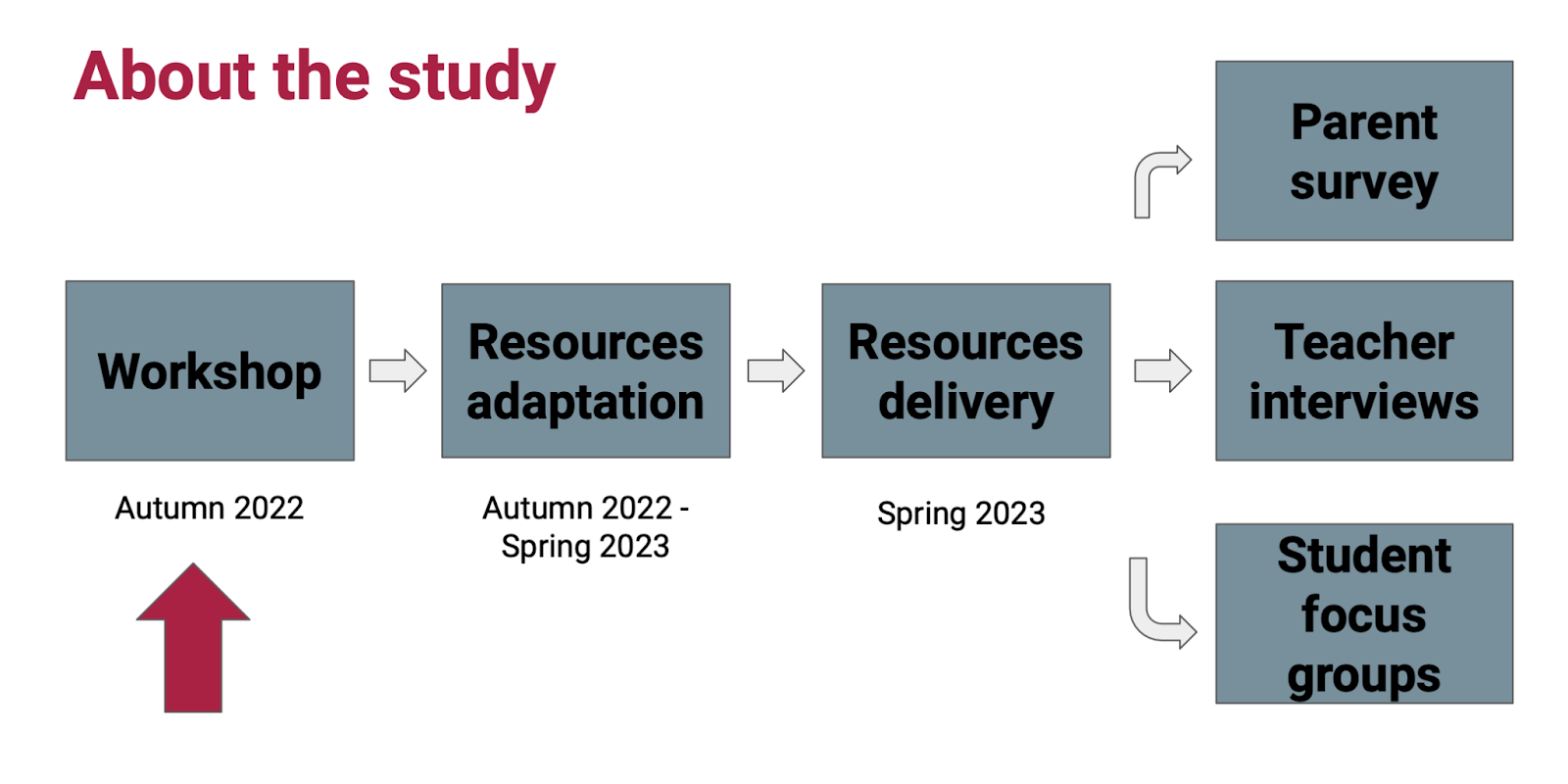
The research structure was a workshop followed by research adaption, then delivery of resources, and evaluation through a parent survey, teacher interviews, and student focus groups.

Katharine then introduced us to the 10 areas of opportunity (AO) our research at the Raspberry Pi Computing Education Research Centre had identified for culturally relevant pedagogy. These 10 areas were used as practical prompts to frame the workshop discussions:

  1. Find out about learners
  2. Find out about ourselves as teachers
  3. Review the content
  4. Review the context
  5. Make the learning accessible to all
  6. Provide opportunities for open-ended and problem solving activities
  7. Promote collaboration and structured group discussion
  8. Promote student agency through choice
  9. Review the learning environment
  10. Review related policies, processes, and training in your school and department

At first glance it is easy to think that you do most of those things already, or to disregard some items as irrelevant to the computing curriculum. What would your own cultural identity (see AO2) have to do with computing, you might wonder. But taking a less complacent perspective might lead you to consider all the different facets that make up your identity and then to think about the same for the students you teach. You may discover that there are many areas which you have left untapped in your lesson planning.

Two young people learning together at a laptop.

Katharine explained how this is where the professional development workshop showed itself as beneficial for the participants. It gave teachers the opportunity to reflect on how their cultural identity impacted on their teaching practices — as a starting point to learning more about other aspects of the culturally relevant pedagogy approach.

Our researchers were interested in how they could work alongside teachers to adapt two computing units to make them more culturally relevant for teachers’ specific contexts. They used the Computing Curriculum units on Photo Editing (Year 4) and Vector Graphics (Year 5).

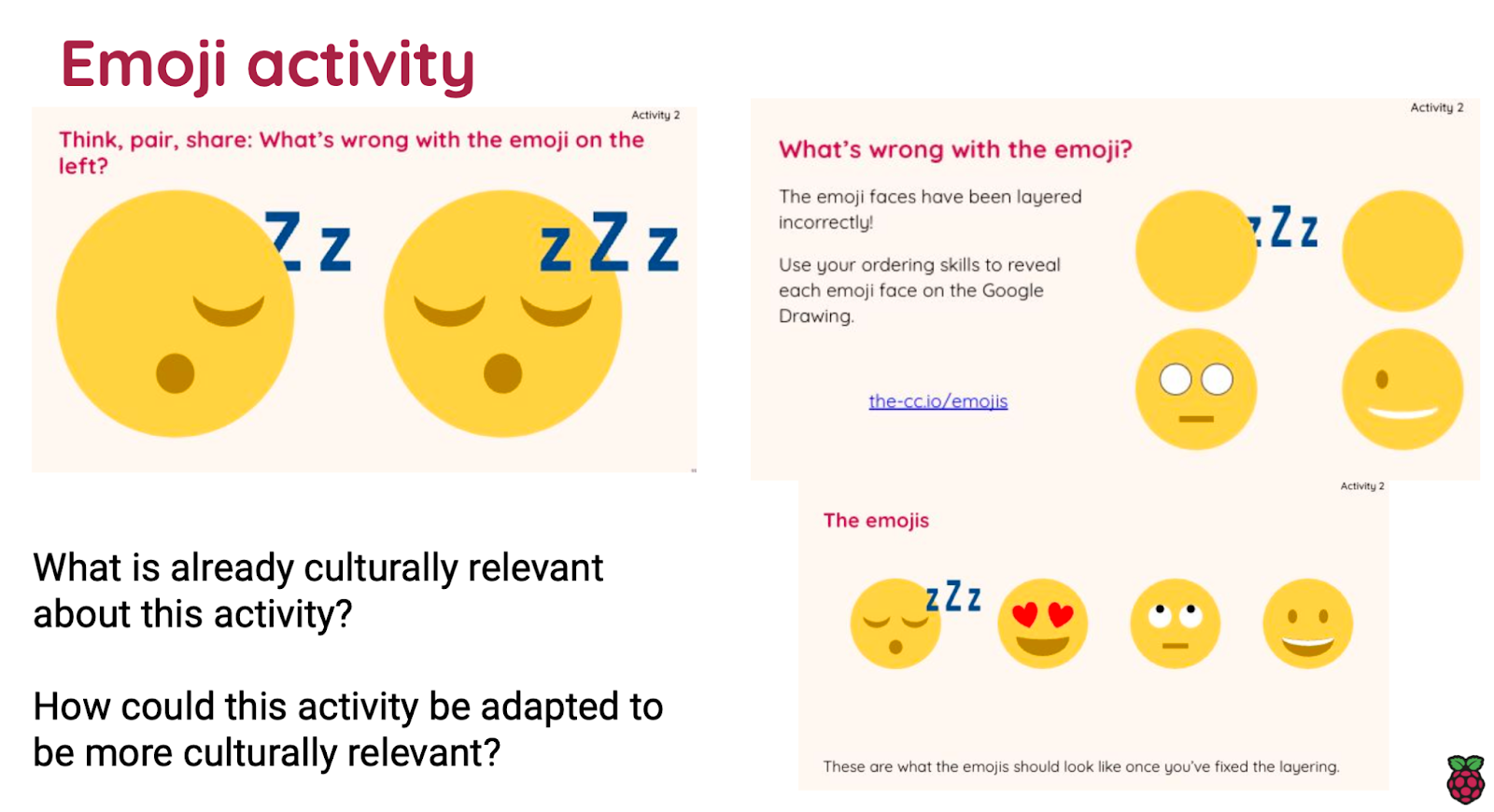
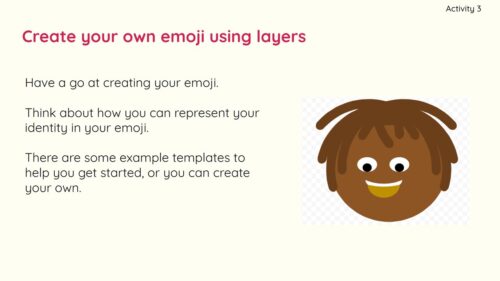
A slide about adapting an emoji teaching activity to make it culturally relevant.

Katharine illustrated some of the adaptations teachers and researchers working together had made to the emoji activity above, and which areas of opportunity (AO) had been addressed; this aspect of the research will be reported in later publications.

Results after the workshop

Although the numbers of participants in this pilot study was small, the findings show that the professional development workshop significantly increased teachers’ awareness of culturally relevant pedagogy and their confidence in adapting resources to take account of local contexts:

  • After the workshop, 10/13 teachers felt more confident to adapt resources to be culturally relevant for their own contexts, and 8/13 felt more confident in adapting resources for others.
  • Before the workshop, 5/13 teachers strongly agreed that it was an important part of being a computing teacher to examine one’s own attitudes and beliefs about race, gender, disabilities, sexual orientation. After the workshop, the number in agreement rose to 12/13.
  • After the workshop, 13/13 strongly agreed that part of a computing teacher’s responsibility is to challenge teaching practices which maintain social inequities (compared to 7/13 previously).
  • Before the workshop, 4/13 teachers strongly agreed that it is important to allow student choice when designing computing activities; this increased to 9/13 after the workshop.

These quantitative shifts in perspective indicate a positive effect of the professional development pilot. 

Katharine described that in our qualitative interviews with the participating teachers, they expressed feeling that their understanding of culturally relevant pedagogy had increased and they recognized the many benefits to learners of the approach. They valued the opportunity to discuss their contexts and to adapt materials they currently used with other teachers, because it made it a more ‘authentic’ and practical professional development experience.

The seminar ended with breakout sessions inviting viewers to consider possible adaptations that could be made to the graphics activities which had been the focus of the workshop.

In the breakout sessions, attendees also discussed specific examples of culturally relevant teaching practices that had been successful in their own classrooms, and they considered how schools and computing educational initiatives could support teachers in their efforts to integrate culturally relevant pedagogy into their practice. Some attendees observed that it was not always possible to change schemes of work without a ‘whole-school’ approach, senior leadership team support, and commitment to a research-based professional development programme.

Where do you see opportunities for your teaching?

The seminar reminds us that the education system is not culture neutral and that teachers generally transmit the dominant culture (which may be very different from their students’) in their settings (Vrieler et al, 2022). Culturally relevant pedagogy is an attempt to address the inequities and biases that exist, which result in many students feeling marginalised, disenfranchised, or underachieving. It urges us to incorporate learners’ cultures and experiences in our endeavours  to create a more inclusive computing curriculum; to adopt an intersectional lens so that all can thrive.

Secondary school age learners in a computing classroom.

As a pilot study, the workshop was offered to a small cohort of 13, yet the findings show that the intervention significantly increased participants’ awareness of culturally relevant pedagogy and their confidence in adapting resources to take account of local contexts.

Of course there are many ways in which teachers already adapt resources to make them interesting and accessible to their pupils. Further examples of the sort of adaptations you might make using these areas of opportunity include:

  • AO1: You could find out to what extent learners feel like they ‘belong’ or are included in a particular computing-related career. This is sure to yield valuable insights into learners’ knowledge and/or preconceptions of computing-related careers. 
  • AO3: You could introduce topics such as the ethics of AI, data bias, investigations of accessibility and user interface design. 
  • AO4: You might change the context of a unit of work on the use of conditional statements in programming, from creating a quiz about ‘Vikings’ to focus on, for example, aspects of youth culture which are more engaging to some learners such as football or computer games, or to focus on religious celebrations, which may be more meaningful to others.
  • AO5: You could experiment with a particular pedagogical approach to maximise the accessibility of a unit of work. For example, you could structure a programming unit by using the PRIMM model, or follow the Universal Design for Learning framework to differentiate for diversity.
  • AO6/7: You could offer more open-ended and collaborative activities once in a while, to promote engagement and to allow learners to express themselves autonomously.
  • AO8: By allowing learners to choose topics which are relevant or familiar to their individual contexts and identities, you can increase their feeling of agency. 
  • AO9: You could review both your learning materials and your classroom to ensure that all your students are fully represented.
  • AO10: You can bring colleagues on board too; the whole enterprise of embedding culturally relevant pedagogy will be more successful when school- as well as department-level policies are reviewed and prioritised.

Can you see an opportunity for integrating culturally relevant pedagogy in your classroom? We would love to hear about examples of culturally relevant teaching practices that you have found successful. Let us know your thoughts or questions in the comments below.

You can watch Katharine’s seminar here:

You can download her presentation slides on our ‘previous seminars’ page, and you can read her research paper.

To get a practical overview of culturally relevant pedagogy, read our 2-page Quick Read on the topic and download the guidelines we created with a group of teachers and academic specialists.

Tomorrow we’ll be sharing a blog about how the learners who engaged with the culturally adapted units found the experience, and how it affected their views of computing. Follow us on social media to not miss it!

Join our upcoming seminars live

On 12 December we’ll host the last seminar session in our series on primary (K-5) computing. Anaclara Gerosa will share her work on how to design and structure early computing activities that promote and scaffold students’ conceptual understanding. As always, the seminar is free and takes place online at 17:00–18:30 GMT / 12:00–13:30 ET / 9:00–10:30 PT / 18:00–19:30 CET. Sign up and we’ll send you the link to join on the day.

In 2024, our new seminar series will be about teaching and learning programming, with and without AI tools. If you’re signed up to our seminars, you’ll receive the link to join every monthly seminar.

The post Engaging primary Computing teachers in culturally relevant pedagogy through professional development appeared first on Raspberry Pi Foundation.
Spotlight on teaching programming with and without AI in our 2024 seminar series

Post Syndicated from Bonnie Sheppard original https://www.raspberrypi.org/blog/teaching-programming-ai-seminar-series-2024/

How do you best teach programming in school? It’s one of the core questions for primary and secondary computing teachers. That’s why we’re making it the focus of our free online seminars in 2024. You’re invited to attend and hear about the newest research about the teaching and learning of programming, with or without AI tools.

Two smiling adults learn about computing at desktop computers.

Building on the success and the friendly, accessible session format of our previous seminars, this coming year we will delve into the latest trends and innovative approaches to programming education in school.

Secondary school age learners in a computing classroom.

Our online seminars are for everyone interested in computing education

Our monthly online seminars are not only for computing educators but also for everyone else who is passionate about teaching young people to program computers. The seminar participants are a diverse community of teachers, technology enthusiasts, industry professionals, coding club volunteers, and researchers.

Two adults learn about computing at desktop computers.

With the seminars we aim to bridge the gap between the newest research and practical teaching. Whether you are an educator in a traditional classroom setting or a mentor guiding learners in a CoderDojo or Code Club, you will gain insights from leading researchers about how school-age learners engage with programming. 

What to expect from the seminars

Each online seminar begins with an expert presenter delivering their latest research findings in an accessible way. We then move into small groups to encourage discussion and idea exchange. Finally, we come back together for a Q&A session with the presenter.

Here’s what attendees had to say about our previous seminars:

“As a first-time attendee of your seminars, I was impressed by the welcoming atmosphere.”

“[…] several seminars (including this one) provided valuable insights into different approaches to teaching computing and technology.”

“I plan to use what I have learned in the creation of curriculum […] and will pass on what I learned to my team.”

“I enjoyed the fact that there were people from different countries and we had a chance to see what happens elsewhere and how that may be similar and different to what we do here.”

January seminar: AI-generated Parson’s Problems

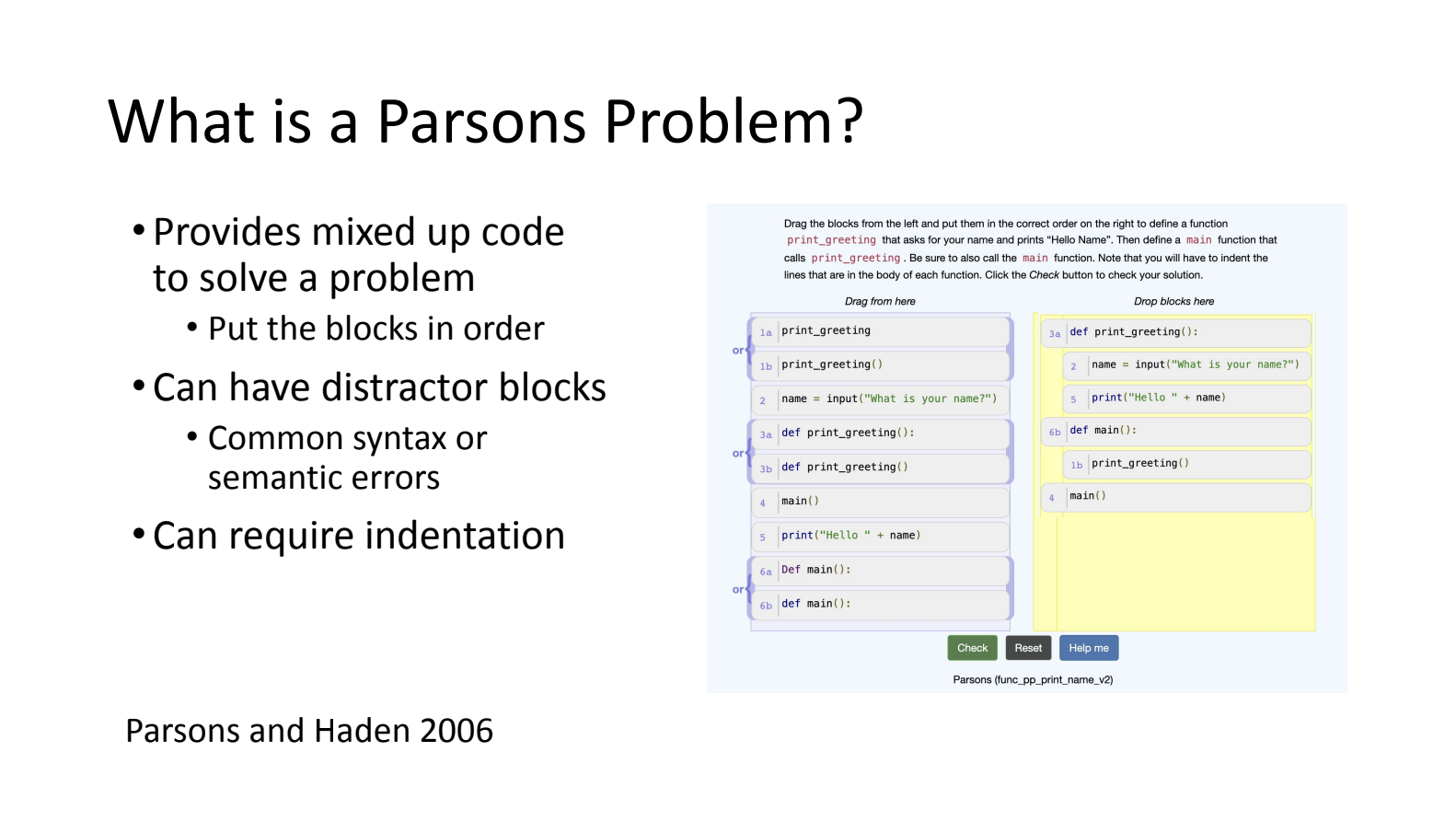
Computing teachers know that, for some students, learning about the syntax of programming languages is very challenging. Working through Parson’s Problem activities can be a way for students to learn to make sense of the order of lines of code and how syntax is organised. But for teachers it can be hard to precisely diagnose their students’ misunderstandings, which in turn makes it hard to create activities that address these misunderstandings.

A group of students and a teacher at the Coding Academy in Telangana.

At our first 2024 seminar on 9 January, Dr Barbara Ericson and Xinying Hou (University of Michigan) will present a promising new approach to helping teachers solve this difficulty. In one of their studies, they combined Parsons Problems and generative AI to create targeted activities for students based on the errors students had made in previous tasks. Thus they were able to provide personalised activities that directly addressed gaps in the students’ learning.

Sign up now to join our seminars

All our seminars start at 17:00 UK time (18:00 CET / 12:00 noon ET / 9:00 PT) and are held online on Zoom. To ensure you don’t miss out, sign up now to receive calendar invitations, and access links for each seminar on the day.

If you sign up today, we’ll also invite you to our 12 December seminar with Anaclara Gerosa (University of Glasgow) about how to design and structure of computing activities for young learners, the final session in our 2023 series about primary (K-5) computing education.

The post Spotlight on teaching programming with and without AI in our 2024 seminar series appeared first on Raspberry Pi Foundation.
Support for new computing teachers: A tool to find Scratch programming errors

Post Syndicated from Bonnie Sheppard original https://www.raspberrypi.org/blog/support-new-computing-teachers-debugging-scratch-litterbox/

We all know that learning to program, and specifically learning how to debug or fix code, can be frustrating and leave beginners overwhelmed and disheartened. In a recent blog article, our PhD student Lauria at the Raspberry Pi Computing Education Research Centre highlighted the pivotal role that teachers play in shaping students’ attitudes towards debugging. But what about teachers who are coding novices themselves?

Two adults learn about computing at desktop computers.

In many countries, primary school teachers are holistic educators and often find themselves teaching computing despite having little or no experience in the field. In a recent seminar of our series on computing education for primary-aged children, Luisa Greifenstein told attendees that struggling with debugging and negative attitudes towards programming were among the top ten challenges mentioned by teachers.

Luisa Greifenstein.

Luisa is a researcher at the University of Passau, Germany, and has been working closely with both teacher trainees and experienced primary school teachers in Germany. She’s found that giving feedback to students can be difficult for primary school teachers, and especially for teacher trainees, as programming is still new to them. Luisa’s seminar introduced a tool to help.

A unique approach: Visualising debugging with LitterBox

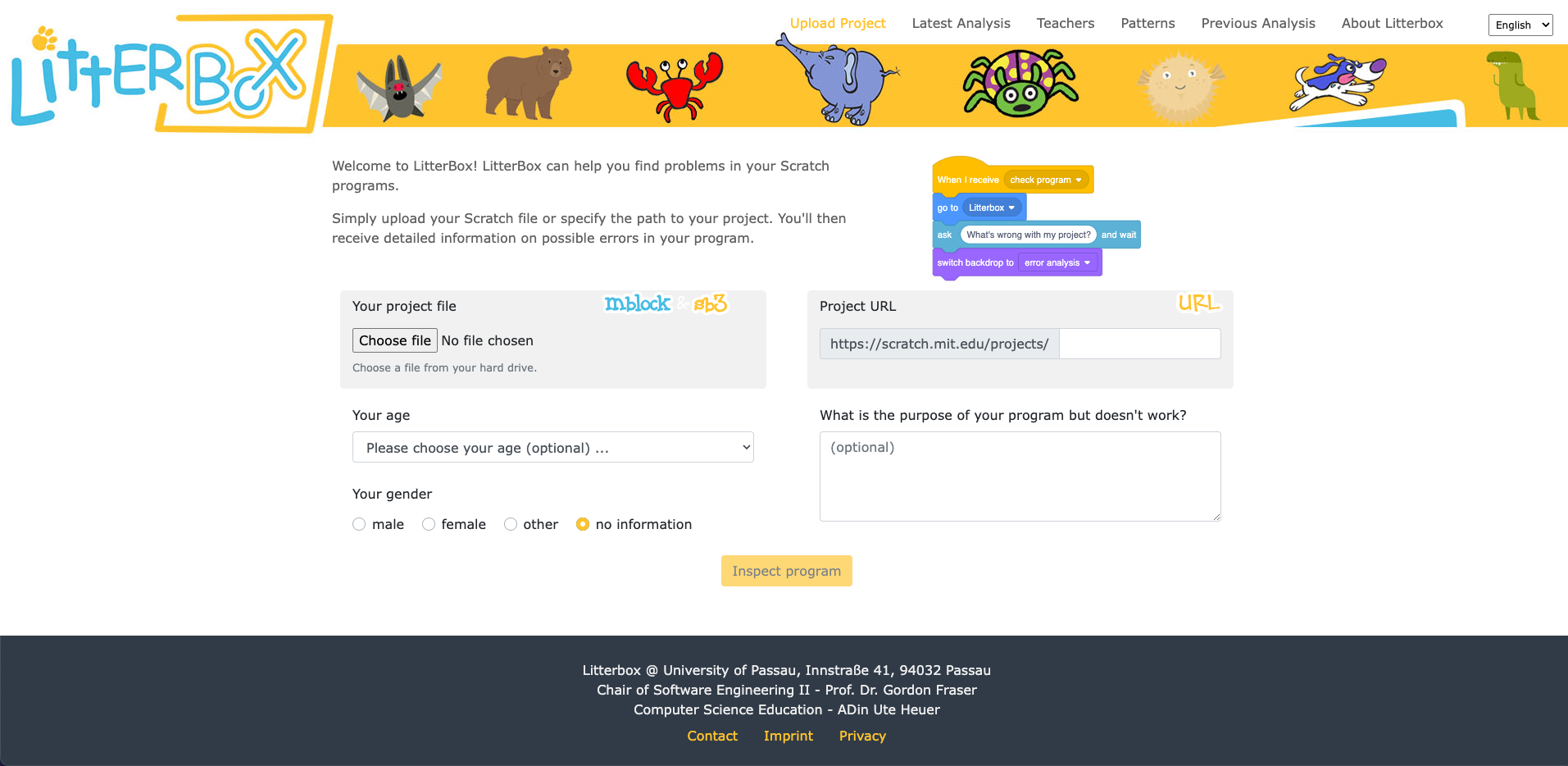
To address this issue, the University of Passau has initiated the primary::programming project. One of its flagship tools, LitterBox, offers a unique solution to debugging and is specifically designed for Scratch, a beginners’ programming language widely used in primary schools.

A screenshot from the LitterBox tool.
You can upload Scratch program files to LitterBox to analyse them. Click to enlarge.

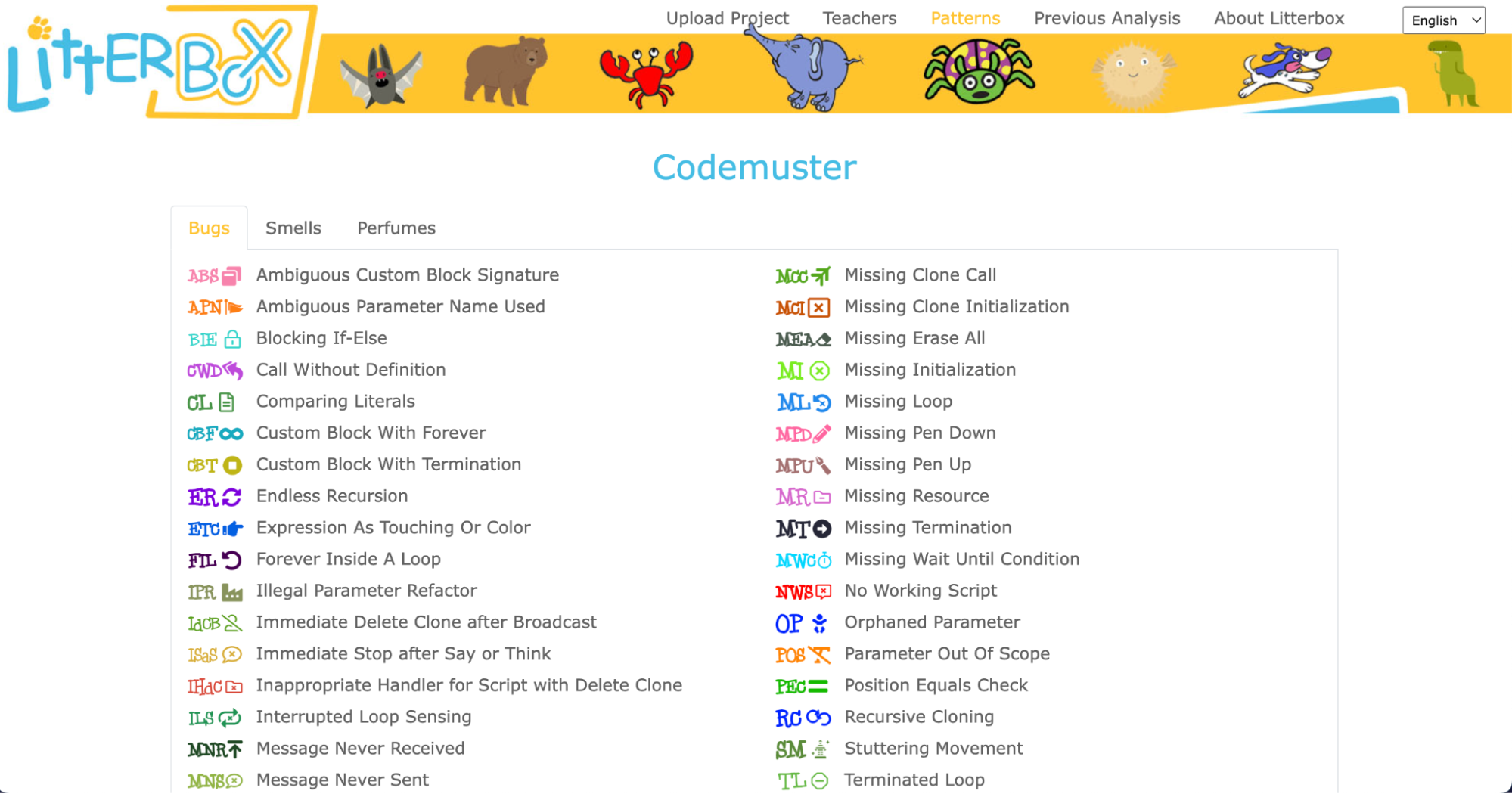
LitterBox serves as a static code debugging tool that transforms code examination into an engaging experience. With a nod to the Scratch cat, the tool visualises the debugging of Scratch code as checking the ‘litterbox’, categorising issues into ‘bugs’ and ‘smells’:

  • Bugs represent code patterns that have gone wrong, such as missing loops or specific blocks
  • Smells indicate that the code couldn’t be processed correctly because of duplications or unnecessary elements
A screenshot from the LitterBox tool.
The code patterns LitterBox recognises. Click to enlarge.

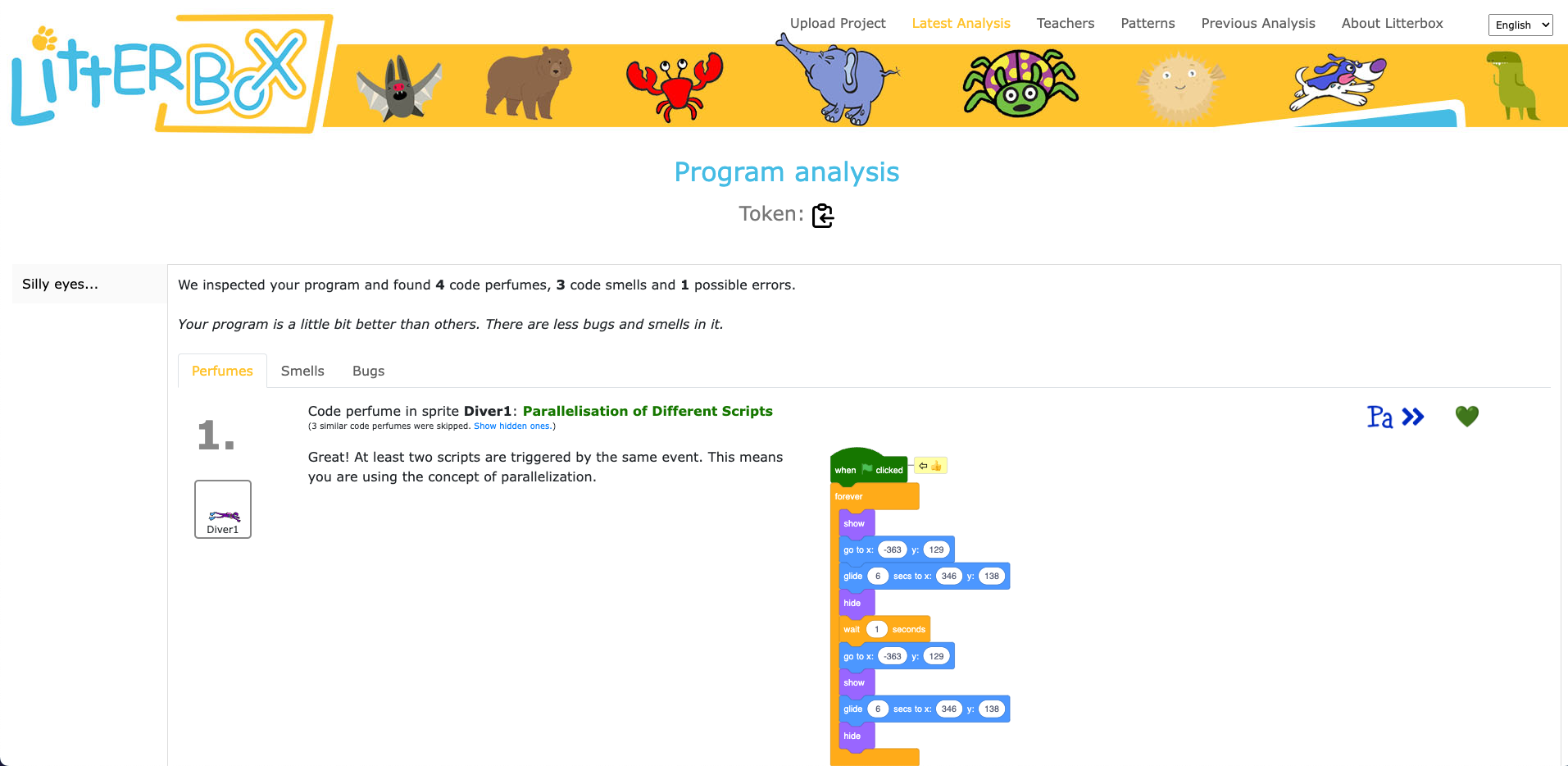
What sets LitterBox apart is that it also rewards correct code by displaying ‘perfumes’. For instance, it will praise correct broadcasting or the use of custom blocks. For every identified problem or achievement, the tool provides short and direct feedback.

A screenshot from the LitterBox tool.
LitterBox also identifies good programming practice. Click to enlarge.

Luisa and her team conducted a study to gauge the effectiveness of LitterBox. In the study, teachers were given fictitious student code with bugs and were asked to first debug the code themselves and then explain in a manner appropriate to a student how to do the debugging.

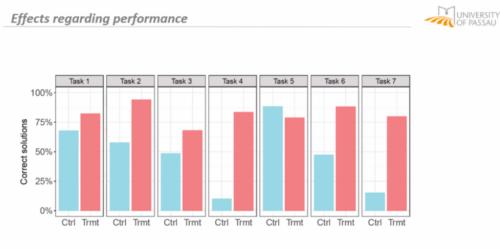
The results were promising: teachers using LitterBox outperformed a control group with no access to the tool. However, the team also found that not all hints proved equally helpful. When hints lacked direct relevance to the code at hand, teachers found them confusing, which highlighted the importance of refining the tool’s feedback mechanisms.

A bar chart showing that LitterBox helps computing teachers.

Despite its limitations, LitterBox proved helpful in another important aspect of the teachers’ work: coding task creation. Novice students require structured tasks and help sheets when learning to code, and teachers often invest substantial time in developing these resources. While LitterBox does not guide educators in generating new tasks or adapting them to their students’ needs, in a second study conducted by Luisa’s team, teachers who had access to LitterBox not only received support in debugging their own code but also provided more scaffolding in task instructions they created for their students compared to teachers without LitterBox.

How to maximise the impact of new tools: use existing frameworks and materials

One important realisation that we had in the Q&A phase of Luisa’s seminar was that many different research teams are working on solutions for similar challenges, and that the impact of this research can be maximised by integrating new findings and resources. For instance, what the LitterBox tool cannot offer could be filled by:

  • Pedagogical frameworks to enhance teachers’ lessons and feedback structures. Frameworks such as PRIMM (Predict, Run, Investigate, Modify, and Make) or TIPP&SEE for Scratch projects (Title, Instructions, Purpose, Play & Sprites, Events, Explore) can serve as valuable resources. These frameworks provide a structured approach to lesson design and teaching methodologies, making it easier for teachers to create engaging and effective programming tasks. Additionally, by adopting semantic waves in the feedback for teachers and students, a deeper understanding of programming concepts can be fostered. 
  • Existing courses and materials to aid task creation and adaptation. Our expert educators at the Raspberry Pi Foundation have not only created free lesson plans and courses for teachers and educators, but also dedicated non-formal learning paths for Scratch, Python, Unity, web design, and physical computing that can serve as a starting point for classroom tasks.

Exploring innovative ideas in computing education

As we navigate the evolving landscape of programming education, it’s clear that innovative tools like LitterBox can make a significant difference in the journey of both educators and students. By equipping educators with effective debugging and task creation solutions, we can create a more positive and engaging learning experience for students.

If you’re an educator, consider exploring how such tools can enhance your teaching and empower your students in their coding endeavours.

You can watch the recording of Luisa’s seminar here:

Sign up now to join our next seminar

If you’re interested in the latest developments in computing education, join us at one of our free, monthly seminars. In these sessions, researchers from all over the world share their innovative ideas and are eager to discuss them with educators and students. In our December seminar, Anaclara Gerosa (University of Edinburgh) will share her findings about how to design and structure early-years computing activities.

This will be the final seminar in our series about primary computing education. Look out for news about the theme of our 2024 seminar series, which are coming soon.

The post Support for new computing teachers: A tool to find Scratch programming errors appeared first on Raspberry Pi Foundation.
Young children’s ScratchJr coding projects: Assessment and support

Post Syndicated from Diana Kirby original https://www.raspberrypi.org/blog/childrens-scratchjr-projects-assessment-support/

Block-based programming applications like Scratch and ScratchJr provide millions of children with an introduction to programming; they are a fun and accessible way for beginners to explore programming concepts and start making with code. ScratchJr, in particular, is designed specifically for children between the ages of 5 and 7, enabling them to create their own interactive stories and games. So it’s no surprise that they are popular tools for primary-level (K–5) computing teachers and learners. But how can teachers assess coding projects built in ScratchJr, where the possibilities are many and children are invited to follow their imagination?

Aim Unahalekhala
Aim Unahalekhala

In the latest seminar of our series on computing education for primary-aged children, attendees heard about two research studies that explore the use of ScratchJr in K–2 education. The speaker, Apittha (Aim) Unahalekhala, is a graduate researcher at the DevTech Research Group at Tufts University. The two studies looked at assessing young children’s ScratchJr coding projects and understanding how they create projects. Both of the studies were part of the Coding as Another Language project, which sees computer science as a new literacy for the 21st century, and is developing a literacy-based coding curriculum for K–2.

How to evaluate children’s ScratchJr projects

ScratchJr offers children 28 blocks to choose from when creating a coding project. Some of these are simple, such as blocks that determine the look of a character or setting, while others are more complex, such as messaging blocks and loops. Children can combine the blocks in many different ways to create projects of different levels of complexity.

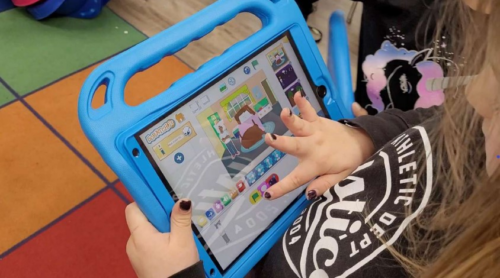
A child select blocks for a ScratchJr project on a tablet.
Selecting blocks for a ScratchJr project

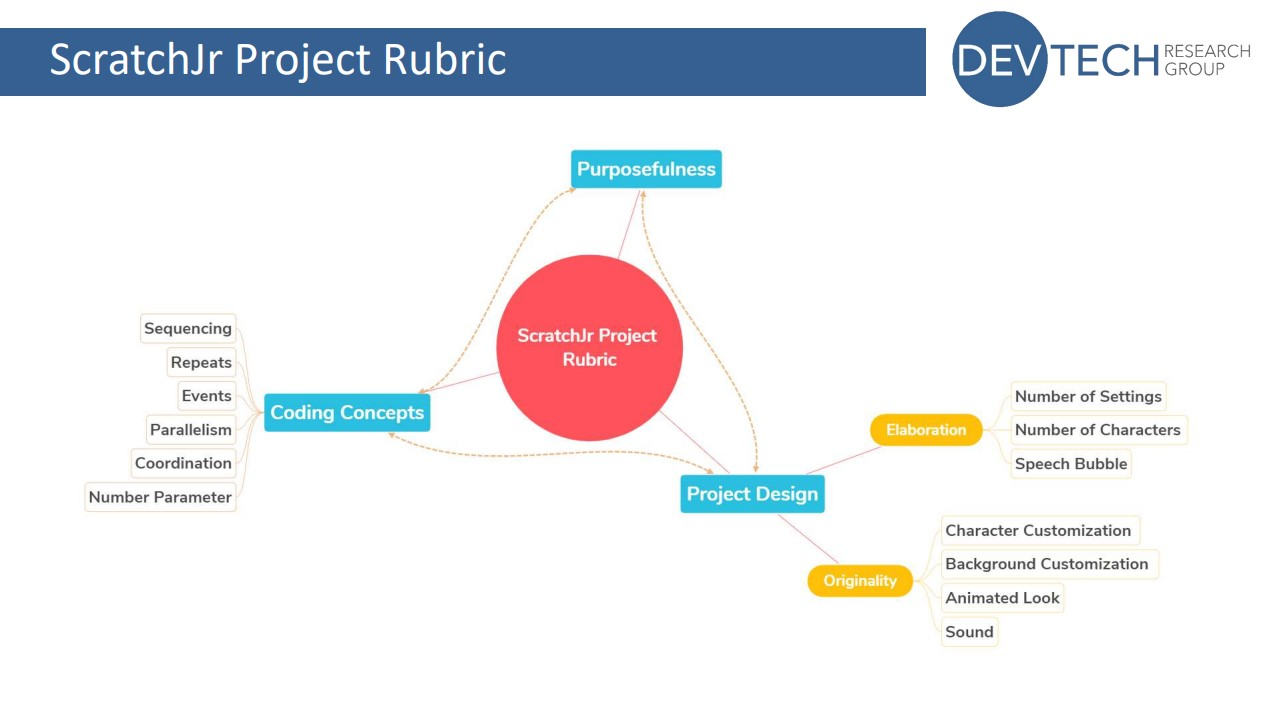
At the start of her presentation, Aim described a rubric that she and her colleagues at DevTech have developed to assess three key aspects of a ScratchJr coding project. These aspects are coding concepts, project design, and purposefulness.

  • Coding concepts in ScratchJr are sequencing, repeats, events, parallelism, coordination, and the number parameter
  • Project design includes elaboration (number of settings and characters, use of speech bubbles) and originality (character and background customisation, animated looks, sounds)

The rubric lets educators or researchers:

  • Assess learners’ ability to use their coding knowledge to create purposeful and creative ScratchJr projects
  • Identify the level of mastery of each of the three key aspects demonstrated within the project
  • Identify where learners might need more guidance and support
The elements covered by the ScratchJr project evaluation rubric.
The elements covered by the ScratchJr project evaluation rubric. Click to enlarge.

As part of the study, Aim and her colleagues collected coding projects from two schools at the start, middle, and end of a curriculum unit. They used the rubric to evaluate the coding projects and found that project scores increased over the course of the unit.

They also found that, overall, the scores for the project design elements were higher than those for coding concepts: many learners enjoyed spending lots of time designing their characters and settings, but made less use of other features. However, the two scores were correlated, meaning that learners who devoted a lot of time to the design of their project also got higher scores on coding concepts.

The rubric is a useful tool for any teachers using ScratchJr with their students. If you want to try it in your classroom, the validated rubric is free to download from the DevTech research group’s website.

How do young children create a project?

The rubric assesses the output created by a learner using ScratchJr. But learning is a process, not just an end outcome, and the final project might not always be an accurate reflection of a child’s understanding.

By understanding more about how young children create coding projects, we can improve teaching and curriculum design for early childhood computing education.

In the second study Aim presented, she set out to explore this question. She conducted a qualitative observation of children as they created coding projects at different stages of a curriculum unit, and used Google Analytics data to conduct a quantitative analysis of the steps the children took.

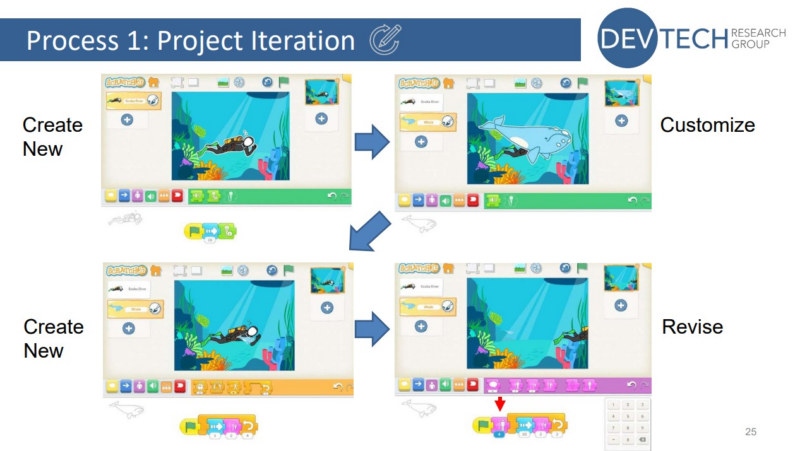
A Scratch project creation process involving iteration.
A project creation process involving iteration

Her findings highlighted the importance of encouraging young learners to explore the full variety of blocks available, both by guiding them in how to find and use different blocks, and by giving them the time and tools they need to explore on their own.

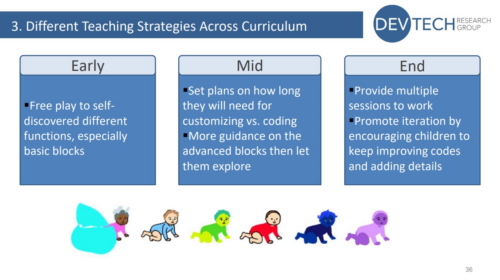
She also found that different teaching strategies are needed at different stages of the curriculum unit to support learners. This helps them to develop their understanding of both basic and advanced blocks, and to explore, customise, and iterate their projects.

Early-unit strategy:

  • Encourage free play to self-discover different functions, especially basic blocks

Mid-unit strategy:

  • Set plans on how long children will need on customising vs coding
  • More guidance on the advanced blocks, then let children explore

End-of-unit strategy:

  • Provide multiple sessions to work
  • Promote iteration by encouraging children to keep improving code and adding details
Teaching strategies for different stages of a ScratchJr curriculum.
Teaching strategies for different stages of the curriculum

You can watch Aim’s full presentation here:

You can also access the seminar slides here.

Join our next seminar on primary computing education

At our next seminar, we welcome Aman Yadav (Michigan State University), who will present research on computational thinking in primary school. The session will take place online on Tuesday 7 November at 17:00 UK time. Don’t miss out and sign up now:

To find out more about connecting research to practice for primary computing education, you can find the rest of our upcoming monthly seminars on primary (K–5) teaching and learning and watch the recordings of previous seminars in this series.

The post Young children’s ScratchJr coding projects: Assessment and support appeared first on Raspberry Pi Foundation.
Apply for a free UK teacher’s place at the WiPSCE conference

Post Syndicated from Bonnie Sheppard original https://www.raspberrypi.org/blog/free-uk-teacher-places-wipsce-conference-2023/

From 27 to 29 September 2023, we and the University of Cambridge are hosting the WiPSCE International Workshop on Primary and Secondary Computing Education Research for educators and researchers. This year, this annual conference will take place at Robinson College in Cambridge. We’re inviting all UK-based teachers of computing subjects to apply for one of five ‘all expenses paid’ places at this well-regarded annual event.

Educators and researchers mingle at a conference.

You could attend WiPSCE with all expenses paid

WiPSCE is where teachers and researchers discuss research that’s relevant to teaching and learning in primary and secondary computing education, to teacher training, and to related topics. You can find more information about the conference, including the preliminary programme, at wipsce.org

As a teacher at the conference, you will:

  • Engage with high-quality international research in the field where you teach
  • Learn ways to use that research to develop your own classroom practice
  • Find out how to become an advocate in your professional community for research-informed approaches to the teaching of computing.

We are delighted that, thanks to generous funding from a funder, we can offer five free places to UK computing teachers, covering:

  • The registration fee
  • Two nights’ accommodation at Robinson College
  • Up to £500 supply costs paid to your school to cover your teaching
  • Up to £100 travel costs

The application deadline is Wednesday 19 July.

The application details

To be eligible to apply:

  1. You need to be a currently practising, UK-based teacher of Computing (England), Computing Science (Scotland), ICT or Digital Technologies (N. Ireland), or Computer Science (Wales)
  2. Your headteacher needs to be able to provide written confirmation that they are happy for you to attend WiPSCE
  3. You need to be available to attend the whole conference from Wednesday lunchtime to Friday afternoon
  4. You need to be willing to share what you learn from the conference with your colleagues at school and with your broader teaching community, including through writing an article about your experience and its relevance to your teaching for this blog or Hello World magazine

The application form will ask your for:

  • Your name and contact details
  • Demographic and school information
  • Your teaching experience
  • A statement of up to 500 words on why you’re applying and how you think your teaching practice, your school and your colleagues will benefit from your attendance at WiPSCE (500 words is the maximum, feel free to be concise)

After the 19 July deadline, we’re aiming to inform you of the outcome of your application on Friday 21 July. 

Your application will be reviewed by the 2023 WiPSCE Chairs:

Sue and Mareen will:

  • Use the information you share in your form, particularly in your statement
  • Select applicants from a mix of primary and secondary schools, with a mix of years of computing teaching experience, and from a mix of geographic areas

Join us in strengthening research-informed computing classroom practice

We’d be delighted to receive your application. Being able to facilitate teachers’ attendance at the conference is very much aligned with our approach to research. Both at the Foundation and the Raspberry Pi Computing Education Research Centre, we’re committed to conducting research that’s directly relevant to schools and teachers, and to working in close collaboration with teachers.

We hope you are interested in attending WiPSCE and becoming an advocate for research-informed computing education practice. If your application is unsuccessful, we hope you consider coming along anyway. We’re looking forward to meeting you there. In the meantime, you can keep up with WiPSCE news on Twitter.

The post Apply for a free UK teacher’s place at the WiPSCE conference appeared first on Raspberry Pi Foundation.
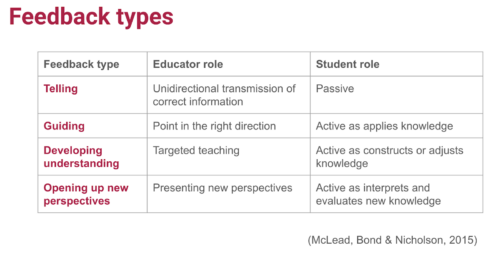
Running a workshop with teachers to create culturally relevant Computing lessons

Post Syndicated from Katharine Childs original https://www.raspberrypi.org/blog/research-teacher-workshop-culturally-relevant-computing-lessons/

Who chooses to study Computing? In England, data from GCSE and A level Computer Science entries in 2019 shows that the answer is complex. Black Caribbean students were one of the most underrepresented groups in the subject, while pupils from other ethnic backgrounds, such as White British, Chinese, and Asian Indian, were well-represented. This picture is reflected in the STEM workforce in England, where Black people are also underrepresented.

Two young girls, one of them with a hijab, do a Scratch coding activity together at a desktop computer.

That’s why one of our areas of academic research aims to support Computing teachers to use culturally relevant pedagogy to design and deliver equitable learning experiences that enable all learners to enjoy and succeed in Computing and Computer Science at school. Our previous research projects within this area have involved developing guidelines for culturally relevant and responsive teaching, and exploring how a small group of primary and secondary Computing teachers used these guidelines in their teaching.

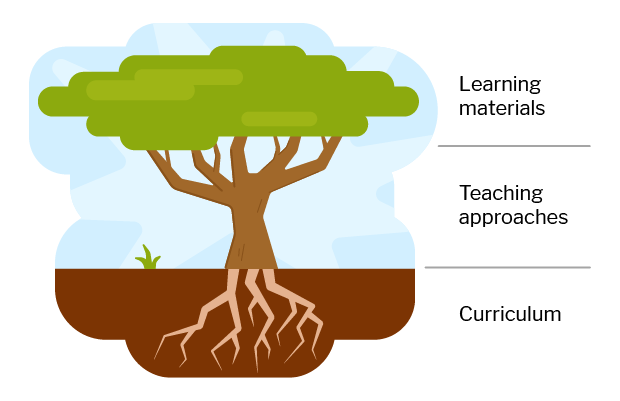
A tree symbolising culturally relevant pedagogy,with the roots labeled 'curriculum, the trunk labeled 'teaching approaches', and the crown labeled 'learning materials'.
Learning materials, teaching approaches, and the curriculum as a whole are three areas where culturally relevance is important.

In our latest research study, funded by Cognizant, we worked with 13 primary school teachers in England on adapting computing lessons to incorporate culturally relevant and responsive principles and practices. Here’s an insight into the workshop we ran with them, and what the teachers and we have taken away from it.

Adapting lesson materials based on culturally relevant pedagogy

In the group of 13 England-based primary school Computing teachers we worked with for this study:

  • One third were specialist primary Computing teachers, and the other two thirds were class teachers who taught a range of subjects
  • Some acted as Computing subject lead or coordinator at their school
  • Most had taught Computing for between three and five years 
  • The majority worked in urban areas of England, at schools with culturally diverse catchment areas 

In November 2022, we held a one-day workshop with the teachers to introduce culturally relevant pedagogy and explore how to adapt two six-week units of computing resources.

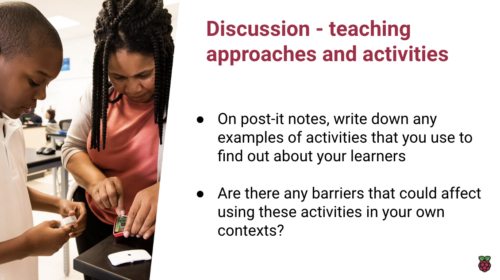
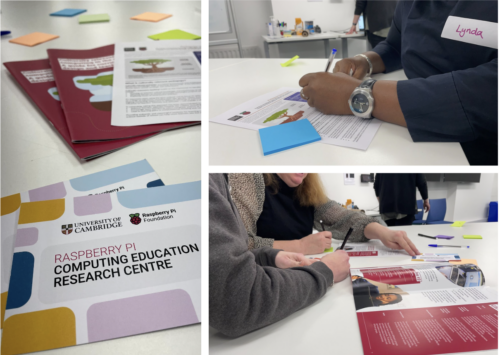
An example of a collaborative activity from a teacher-focused workshop around culturally relevant pedagogy.
An example of a collaborative activity from the workshop

The first part of the workshop was a collaborative, discussion-based professional development session exploring what culturally relevant pedagogy is. This type of pedagogy uses equitable teaching practices to:

  • Draw on the breadth of learners’ experiences and cultural knowledge
  • Facilitate projects that have personal meaning for learners
  • Develop learners’ critical consciousness

The rest of the workshop day was spent putting this learning into practice while planning how to adapt two units of computing lessons to make them culturally relevant for the teachers’ particular settings. We used a design-based approach for this part of the workshop, meaning researchers and teachers worked collaboratively as equal stakeholders to decide on plans for how to alter the units.

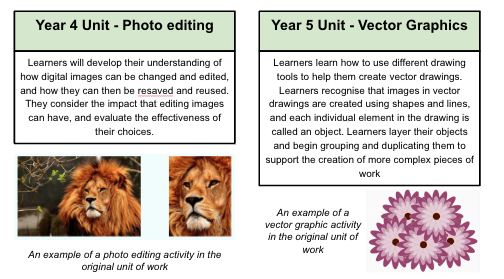
We worked in four groups, each with three or four teachers and one or two researchers, focusing on one of two units of work from The Computing Curriculum for teaching digital skills: a unit on photo editing for Year 4 (ages 8–9), and a unit about vector graphics for Year 5 (ages 9–10).

Descriptions of a classroom unit of teaching materials about photo editing for Year 4 (ages 8–9), and a unit about vector graphics for Year 5 (ages 9–10).
We based the workshop around two Computing Curriculum units that cover digital literacy skills.

In order to plan how the resources in these units of work could be made culturally relevant for the participating teachers’ contexts, the groups used a checklist of ten areas of opportunity. This checklist is a result of one of our previous research projects on culturally relevant pedagogy. Each group used the list to identify a variety of ways in which the units’ learning objectives, activities, learning materials, and slides could be adapted. Teachers noted down their ideas and then discussed them with their group to jointly agree a plan for adapting the unit.

By the end of the day, the groups had designed four really creative plans for:

  • A Year 4 unit on photo editing that included creating an animal to represent cultural identity
  • A Year 4 unit on photo editing that included creating a collage all about yourself 
  • A Year 5 unit on vector graphics that guided learners to create their own metaverse and then add it to the class multiverse
  • A Year 5 unit on vector graphics that contextualised the digital skills by using them in online activities and in video games

Outcomes from the workshop

Before and after the workshop, we asked the teachers to fill in a survey about themselves, their experiences of creating computing resources, and their views about culturally relevant resources. We then compared the two sets of data to see whether anything had changed over the course of the workshop.

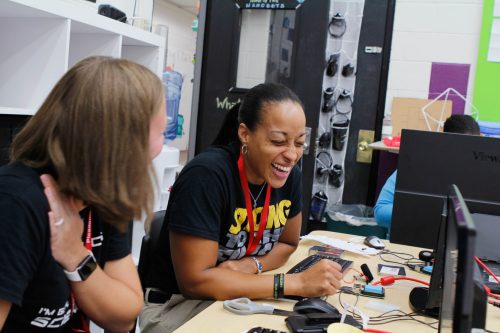
A teacher attending a training workshop laughs as she works through an activity.
The workshop was a positive experience for the teachers.

After teachers had attended the workshop, they reported a statistically significant increase in their confidence levels to adapt resources to be culturally relevant for both themselves and others. 

Teachers explained that the workshop had increased their understanding of culturally relevant pedagogy and of how it could impact on learners. For example, one teacher said:

“The workshop has developed my understanding of how culturally adapted resources can support pupil progress and engagement. It has also highlighted how contextual appropriateness of resources can help children to access resources.” – Participating teacher

Some teachers also highlighted how important it had been to talk to teachers from other schools during the workshop, and how they could put their new knowledge into practice in the classroom:

“The dedicated time and value added from peer discourse helped make this authentic and not just token activities to check a box.” – Participating teacher

“I can’t wait to take some of the work back and apply it to other areas and subjects I teach.” – Participating teacher

What you can expect to see next from this project

After our research team made the adaptations to the units set out in the four plans made during the workshop, the adapted units were delivered by the teachers to more than 500 Year 4 and 5 pupils. We visited some of the teachers’ schools to see the units being taught, and we have interviewed all the teachers about their experience of delivering the adapted materials. This observational and interview data, together with additional survey responses, will be analysed by us, and we’ll share the results over the coming months.

A computing classroom filled with learners
As part of the project, we observed teachers delivering the adapted units to their learners.

In our next blog post about this work, we will delve into the fascinating realm of parental attitudes to culturally relevant computing, and we’ll explore how embracing diversity in the digital landscape is shaping the future for both children and their families. 

We’ve also written about this professional development activity in more detail in a paper to be published at the UKICER conference in September, and we’ll share the paper once it’s available.

Finally, we are grateful to Cognizant for funding this academic research, and to our cohort of primary computing teachers for their enthusiasm, energy, and creativity, and their commitment to this project.

The post Running a workshop with teachers to create culturally relevant Computing lessons appeared first on Raspberry Pi Foundation.
Introducing data science concepts and skills to primary school learners

Post Syndicated from Katharine Childs original https://www.raspberrypi.org/blog/data-science-data-literacy-primary-school-scotland/

Every day, most of us both consume and create data. For example, we interpret data from weather forecasts to predict our chances of a good weather for a special occasion, and we create data as our carbon footprint leaves a trail of energy consumption information behind us. Data is important in our lives, and countries around the world are expanding their school curricula to teach the knowledge and skills required to work with data, including at primary (K–5) level.

In our most recent research seminar, attendees heard about a research-based initiative called Data Education in Schools. The speakers, Kate Farrell and Professor Judy Robertson from the University of Edinburgh, Scotland, shared how this project aims to empower learners to develop data literacy skills and succeed in a data-driven world.

“Data literacy is the ability to ask questions, collect, analyse, interpret and communicate stories about data.”

– Kate Farrell & Prof. Judy Robertson

Being a data citizen

Scotland’s national curriculum does not explicitly mention data literacy, but the topic is embedded in many subjects such as Maths, English, Technologies, and Social Studies. Teachers in Scotland, particularly in primary schools, have the flexibility to deliver learning in an interdisciplinary way through project-based learning. Therefore, the team behind Data Education in Schools developed a set of cross-curricular data literacy projects. Educators and education policy makers in other countries who are looking to integrate computing topics with other subjects may also be interested in this approach.

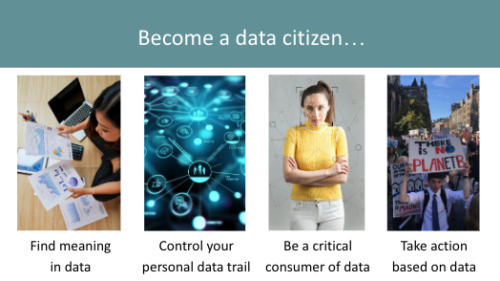
Becoming a data citizen involves finding meaning in data, controlling your personal data trail, being a critical consumer of data, and taking action based on data.
Data citizens have skills they need to thrive in a world shaped by digital technology.

The Data Education in Schools projects are aimed not just at giving learners skills they may need for future jobs, but also at equipping them as data citizens in today’s world. A data citizen can think critically, interpret data, and share insights with others to effect change.

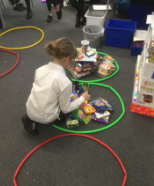
Kate and Judy shared an example of data citizenship from a project they had worked on with a primary school. The learners gathered data about how much plastic waste was being generated in their canteen. They created a data visualisation in the form of a giant graph of types of rubbish on the canteen floor and presented this to their local council.

A child arranges objects to visualise data.
Sorting food waste from lunch by type of material

As a result, the council made changes that reduced the amount of plastic used in the canteen. This shows how data citizens are able to communicate insights from data to influence decisions.

A cycle for data literacy projects

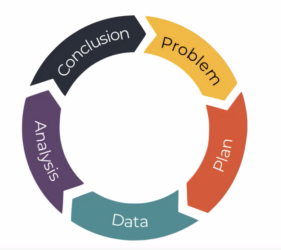
Across its projects, the Data Education in Schools initiative uses a problem-solving cycle called the PPDAC cycle. This cycle is a useful tool for creating educational resources and for teaching, as you can use it to structure resources, and to concentrate on areas to develop learner skills.

The PPDAC project cycle.
The PPDAC data problem-solving cycle

The five stages of the cycle are: 

  1. Problem: Identifying the problem or question to be answered
  2. Plan: Deciding what data to collect or use to answer the question
  3. Data: Collecting the data and storing it securely
  4. Analysis: Preparing, modelling, and visualising the data, e.g. in a graph or pictogram
  5. Conclusion: Reviewing what has been learned about the problem and communicating this with others 

Smaller data literacy projects may focus on one or two stages within the cycle so learners can develop specific skills or build on previous learning. A large project usually includes all five stages, and sometimes involves moving backwards — for example, to refine the problem — as well as forwards.

Data literacy for primary school learners

At primary school, the aim of data literacy projects is to give learners an intuitive grasp of what data looks like and how to make sense of graphs and tables. Our speakers gave some great examples of playful approaches to data. This can be helpful because younger learners may benefit from working with tangible objects, e.g. LEGO bricks, which can be sorted by their characteristics. Kate and Judy told us about one learner who collected data about their clothes and drew the results in the form of clothes on a washing line — a great example of how tangible objects also inspire young people’s creativity.

In a computing classroom, a girl laughs at what she sees on the screen.

As learners get older, they can begin to work with digital data, including data they collect themselves using physical computing devices such as BBC micro:bit microcontrollers or Raspberry Pi computers.

Free resources for primary (and secondary) schools

For many attendees, one of the highlights of the seminar was seeing the range of high-quality teaching resources for learners aged 3–18 that are part of the Data Education in Schools project. These include: 

  • Data 101 videos: A set of 11 videos to help primary and secondary teachers understand data literacy better.
  • Data literacy live lessons: Data-related activities presented through live video.
  • Lesson resources: Lots of projects to develop learners’ data literacy skills. These are mapped to the Scottish primary and secondary curriculum, but can be adapted for use in other countries too.

More resources are due to be published later in 2023, including a set of prompt cards to guide learners through the PPDAC cycle, a handbook for teachers to support the teaching of data literacy, and a set of virtual data-themed escape rooms.  

You may also be interested in the units of work on data literacy skills that are part of The Computing Curriculum, our complete set of classroom resources to teach computing to 5- to 16-year-olds.

Join our next seminar on primary computing education

At our next seminar we welcome Aim Unahalekhaka from Tufts University, USA, who will share research about a rubric to evaluate young learners’ ScratchJr projects. If you have a tablet with ScratchJr installed, make sure to have it available to try out some activities. The seminar will take place online on Tuesday 6 June at 17.00 UK time, sign up now to not miss out.

To find out more about connecting research to practice for primary computing education, you can see a list of our upcoming monthly seminars on primary (K–5) teaching and learning and watch the recordings of previous seminars in this series.

The post Introducing data science concepts and skills to primary school learners appeared first on Raspberry Pi Foundation.
Integrating primary computing and literacy through multimodal storytelling

Post Syndicated from Veronica Cucuiat original https://www.raspberrypi.org/blog/primary-computing-programming-literacy-storytelling/

Broadening participation and finding new entry points for young people to engage with computing is part of how we pursue our mission here at the Raspberry Pi Foundation. It was also the focus of our March online seminar, led by our own Dr Bobby Whyte. In this third seminar of our series on computing education for primary-aged children, Bobby presented his work on ‘designing multimodal composition activities for integrated K-5 programming and storytelling’. In this research he explored the integration of computing and literacy education, and the implications and limitations for classroom practice.

Young learners at computers in a classroom.

Motivated by challenges Bobby experienced first-hand as a primary school teacher, his two studies on the topic contribute to the body of research aiming to make computing less narrow and difficult. In this work, Bobby integrated programming and storytelling as a way of making the computing curriculum more applicable, relevant, and contextualised.

Critically for computing educators and researchers in the area, Bobby explored how theories related to ‘programming as writing’ translate into practice, and what the implications of designing and delivering integrated lessons in classrooms are. While the two studies described here took place in the context of UK schooling, we can learn universal lessons from this work.

What is multimodal composition?

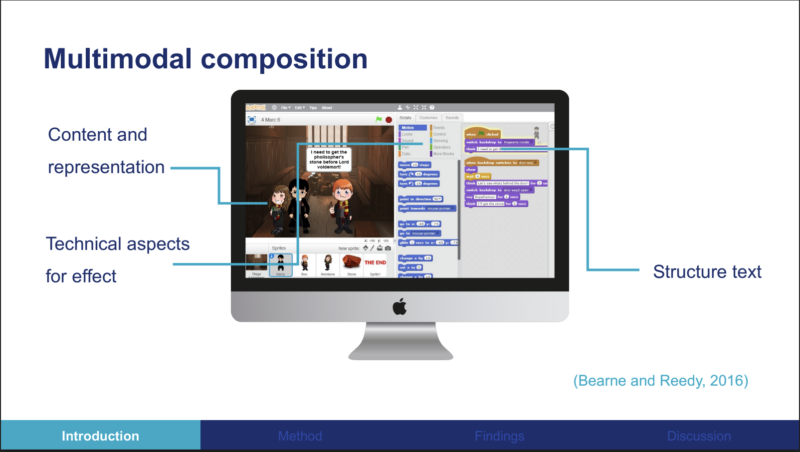
In the seminar Bobby made a distinction between applying computing to literacy (or vice versa) and true integration of programming and storytelling. To achieve true integration in the two studies he conducted, Bobby used the idea of ‘multimodal composition’ (MMC). A multimodal composition is defined as “a composition that employs a variety of modes, including sound, writing, image, and gesture/movement [… with] a communicative function”.

Storytelling comes together with programming in a multimodal composition as learners create a program to tell a story where they:

  • Decide on content and representation (the characters, the setting, the backdrop)
  • Structure text they’ve written
  • Use technical aspects (i.e. motion blocks, tension) to achieve effects for narrative purposes
A screenshot showing a Scratch project.
Defining multimodal composition (MMC) for a visual programming context

Multimodality for programming and storytelling in the classroom

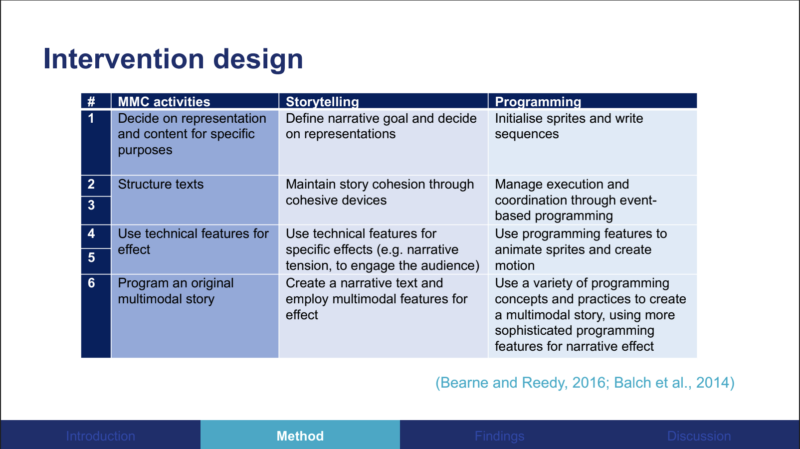
To investigate the use of MMC in the classroom, Bobby started by designing a curriculum unit of lessons. He mapped the unit’s MMC activities to specific storytelling and programming learning objectives. The MMC activities were designed using design-based research, an approach in which something is designed and tested iteratively in real-world contexts. In practice that means Bobby collaborated with teachers and students to analyse, evaluate, and adapt the unit’s activities.

A list of learning objectives that could be covered by a multimodal composition activity.
Mapping of the MMC activities to storytelling and programming learning objectives

The first of two studies to explore the design and implementation of MMC activities was conducted with 10 K-5 students (age 9 to 11) and showed promising results. All students approached the composition task multimodally, using multiple representations for specific purposes. In other words, they conveyed different parts of their stories using either text, sound, or images.

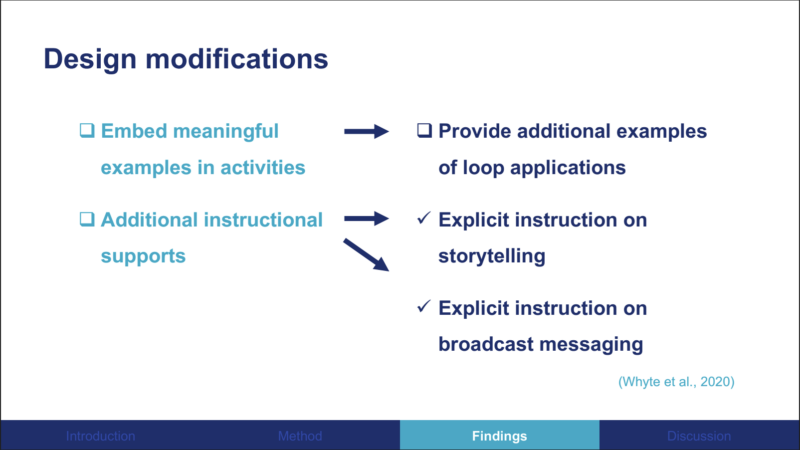
Bobby found that broadcast messages and loops were the least used blocks among the group. As a consequence, he modified the curriculum unit to include additional scaffolding and instructional support on how and why the students might embed these elements.

A list of modifications to the MMC curriculum unit based on testing in a classroom.
Bobby modified the classroom unit based on findings from his first study

In the second study, the MMC activities were evaluated in a classroom of 28 K-5 students led by one teacher over two weeks. Findings indicated that students appreciated the longer multi-session project. The teacher reported being satisfied with the project work the learners completed and the skills they practised. The teacher also further integrated and adapted the unit into their classroom practice after the research project had been completed.

How might you use these research findings?

Factors that impacted the integration of storytelling and programming included the teacher’s confidence to teach programming as well as the teacher’s ability to differentiate between students and what kind of support they needed depending on their previous programming experience.

In addition, there are considerations regarding the curriculum. The school where the second study took place considered the activities in the unit to be literacy-light, as the English literacy curriculum is ‘text-heavy’ and the addition of multimodal elements ‘wastes’ opportunities to produce stories that are more text-based.

Woman teacher and female student at a laptop.

Bobby’s research indicates that MMC provides useful opportunities for learners to simultaneously pursue storytelling and programming goals, and the curriculum unit designed in the research proved adaptable for the teacher to integrate into their classroom practice. However, Bobby cautioned that there’s a need to carefully consider both the benefits and trade-offs when designing cross-curricular integration projects in order to ensure a fair representation of both subjects.

Can you see an opportunity for integrating programming and storytelling in your classroom? Let us know your thoughts or questions in the comments below.

You can watch Bobby’s full presentation:

And you can read his research paper Designing for Integrated K-5 Computing and Literacy through Story-making Activities (open access version).

You may also be interested in our pilot study on using storytelling to teach computing in primary school, which we conducted as part of our Gender Balance in Computing programme.

Join our next seminar on primary computing education

At our next seminar, we welcome Kate Farrell and Professor Judy Robertson (University of Edinburgh). This session will introduce you to how data literacy can be taught in primary and early-years education across different curricular areas. It will take place online on Tuesday 9 May at 17.00 UK time, don’t miss out and sign up now.

Yo find out more about connecting research to practice for primary computing education, you can find other our upcoming monthly seminars on primary (K–5) teaching and learning and watch the recordings of previous seminars in this series.

The post Integrating primary computing and literacy through multimodal storytelling appeared first on Raspberry Pi Foundation.
Combining computing and maths to teach primary learners about variables

Post Syndicated from Katharine Childs original https://www.raspberrypi.org/blog/variables-primary-school-computing-maths-education-seminar/

In our first seminar of 2023, we were delighted to welcome Dr Katie Rich and Carla Strickland. They spoke to us about teaching the programming construct of variables in Grade 3 and 4 (age 8 to 10).

We are hearing from a diverse range of speakers in our current series of monthly online research seminars focused on primary (K-5) computing education. Many of them work closely with educators to translate research findings into classroom practice to make sure that all our younger learners have positive first experiences of learning computing. An important goal of their research is to impact the development of pedagogy, resources, and professional development to support educators to deliver computing concepts with confidence.

Variables in computing and mathematics

Dr Katie Rich (American Institutes of Research) and Carla Strickland (UChicago STEM Education) are both part of a team that worked on a research project called Everyday Computing, which aims to integrate computational thinking into primary mathematics lessons. A key part of the Everyday Computing project was to develop coherent learning resources across a number of school years. During the seminar, Katie and Carla presented on a study in the project that revolved around teaching variables in Grade 3 and 4 (age 8 to 10) by linking this computing concept to mathematical concepts such as area, perimeter, and fractions.

Young person using Scratch.

Variables are used in both mathematics and computing, but in significantly different ways. In mathematics, a variable, often represented by a single letter such as x or y, corresponds to a quantity that stays the same for a given problem. However, in computing, a variable is an identifier used to label data that may change as a computer program is executed. A variable is one of the programming constructs that can be used to generalise programs to make them work for a range of inputs. Katie highlighted that the research team was keen to explore the synergies and tensions that arise when curriculum subjects share terms, as is the case for ‘variable’. 

Defining a learning trajectory

At the start of the project, in order to be able to develop coherent learning resources across school years, the team reviewed research papers related to teaching the programming construct of variables. In the papers, they found a variety of learning goals that related to facts (what learners need to know) and skills (what learners need to be able to do). They grouped these learning goals and arranged the groups into ‘levels of thinking’, which were then mapped onto a learning trajectory to show progression pathways for learning.

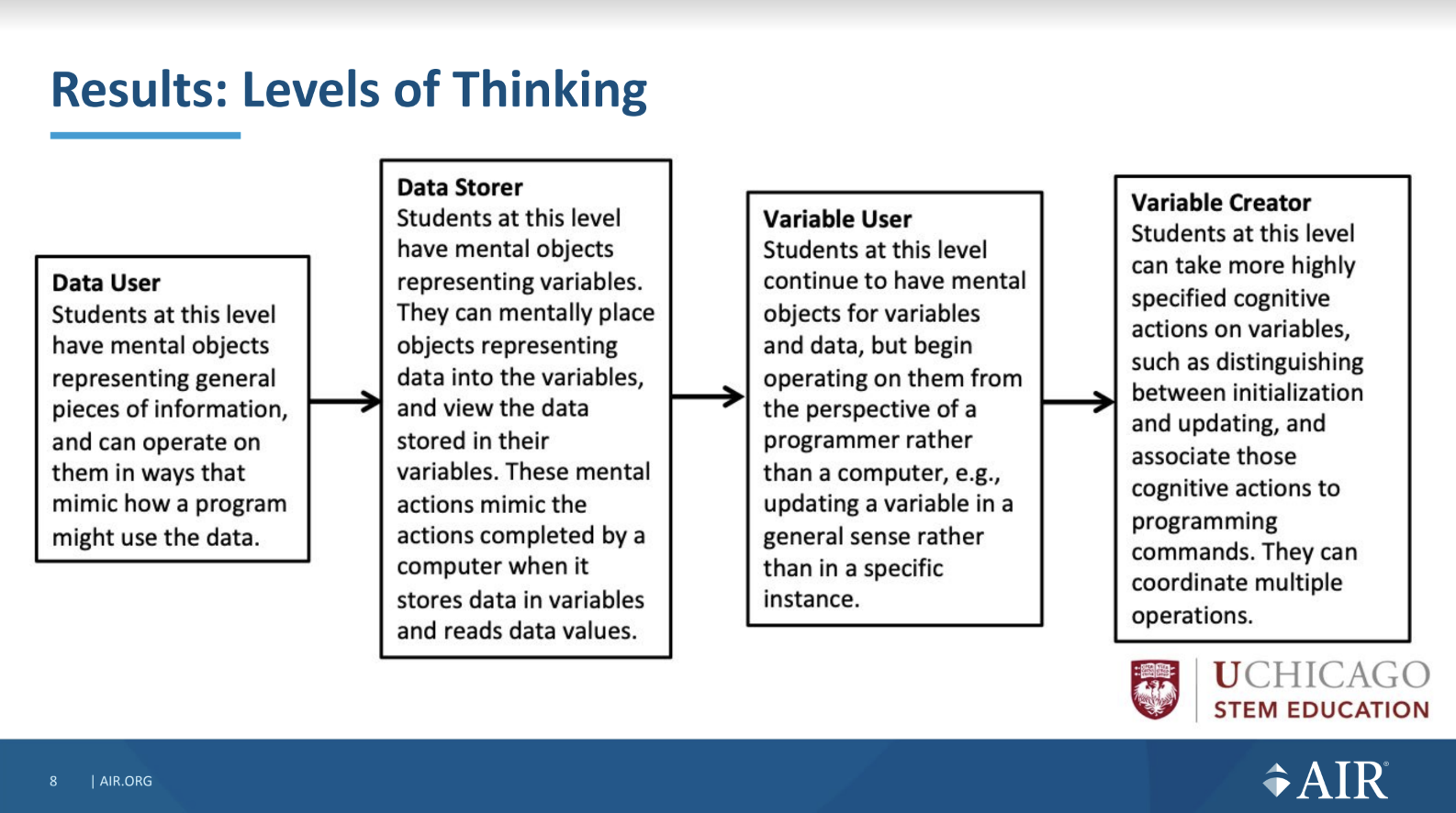
Four of the five levels of thinking identified in the study: Data storer, data user, variable user, variable creator.
Four of the five levels of thinking identified in the study: Data Storer, Data User, Variable User, Variable Creator. Click to enlarge.

Learning materials about variables

Carla then shared three practical examples of learning resources their research team created that integrated the programming construct of variables into a maths curriculum. The three activities, described below, form part of a series of lessons called Action Fractions. You can read more about the series of lessons in this research paper.

Robot Boxes is an unplugged activity that is positioned at the Data User level of thinking. It relates to creating instructions for a fictional robot. Learners have to pay attention to different data the robot needs in order to draw a box, such as the length and width, and also to the value that the robot calculates as area of the box. The lesson uses boxes on paper as concrete representations of variables to which learners can physically add values.

""

Ambling Animals is set at the ‘Data Storer’ and ‘Variable Interpreter’ levels of thinking. It includes a Scratch project to help students to locate and compare fractions on number lines. During this lesson, find a variable that holds the value of the animal that represents the larger of two fractions.

""

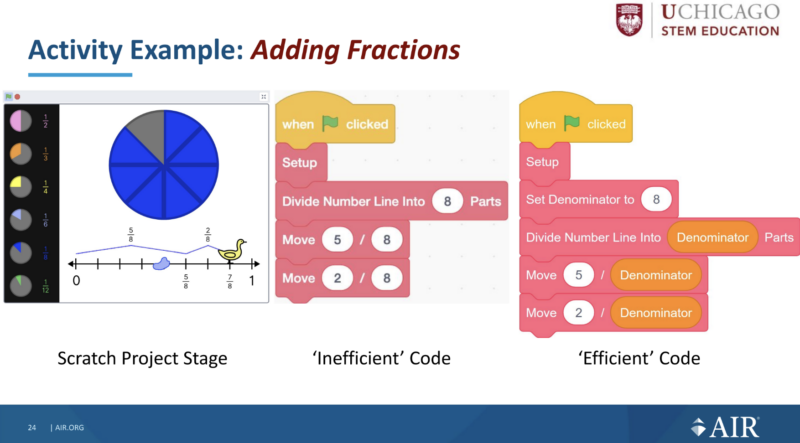
Adding Fractions draws on facts and skills from the ‘Variable Interpreter’ and ‘Variable Implementer’ levels of thinking and also includes a Scratch project. The Scratch project visualises adding fractions with the same denominator on a number line. The lesson starts to explain why variables are so important in computer programs by demonstrating how using a variable can make code more efficient. 

Takeaways: Cross-curricular teaching, collaborative research

Teaching about the programming construct of variables can be challenging, as it requires young learners to understand abstract ideas. The research Katie and Carla presented shows how integrating these concepts into a mathematics curriculum is one way to highlight tangible uses of variables in everyday problems. The levels of thinking in the learning trajectory provide a structure helping teachers to support learners to develop their understanding and skills; the same levels of thinking could be used to introduce variables in other contexts and curricula.

A learner does physical computing in the primary school classroom.

Many primary teachers use cross-curricular learning to increase children’s engagement and highlight real-world examples. The seminar showed how important it is for teachers to pay attention to terms used across subjects, such as the word ‘variable’, and to explicitly explain a term’s different meanings. Katie and Carla shared a practical example of this when they suggested that computing teachers need to do more to stress the difference between equations such as xy = 45 in maths and assignment statements such as length = 45 in computing.

The Everyday Computing project resources were created by a team of researchers and educators who worked together to translate research findings into curriculum materials. This type of collaboration can be really valuable in driving a research agenda to directly improve learning outcomes for young people in classrooms. 

How can this research influence your classroom practice or other activities as an educator? Let us know your thoughts in the comments. We’ll be continuing to reflect on this question throughout the seminar series.

You can watch Katie’s and Carla’s full presentation here:

Join our seminar series on primary computing education

Our monthly seminar series on primary (K–5) teaching and learning is of interest to a global audience of educators, including those who want to understand the prior learning experiences of older learners.

We continue on Tuesday 7 February at 17.00 UK time, when we will hear from Dr Jean Salac, University of Washington. Jean will present her work in identifying inequities in elementary computing instruction and in developing a learning strategy, TIPP&SEE, to address these inequities. Sign up now, and we will send you a joining link for the session.

The post Combining computing and maths to teach primary learners about variables appeared first on Raspberry Pi.

Gender Balance in Computing — the big picture

Post Syndicated from Sue Sentance original https://www.raspberrypi.org/blog/gender-balance-in-computing-big-picture/

Improving gender balance in computing is part of our work to ensure equitable learning opportunities for all young people. Our Gender Balance in Computing (GBIC) research programme has been the largest effort to date to explore ways to encourage more girls and young women to engage with Computing.

A girl in a university computing classroom.

Commissioned by the Department for Education in England and led by the Raspberry Pi Foundation as part of our National Centre for Computing Education work, the GBIC programme was a collaborative effort involving the Behavioural Insights Team, Apps for Good, and the WISE Campaign.

Gender Balance in Computing ran from 2019 to 2022 and comprised seven studies relating to five different research areas:

  • Teaching Approach:
  • Belonging: Supporting learners to feel that they “belong” in computer science
  • Non-formal Learning: Establishing the connections between in-school and out-of-school computing
  • Relevance: Making computing relatable to everyday life
  • Subject Choice: How computer science is presented to young people as a subject choice 

In December we published the last of seven reports describing the results of the programme. In this blog post I summarise our overall findings and reflect on what we’ve learned through doing this research.

Gender balance in computing is not a new problem

I was fascinated to read a paper by Deborah Butler from 2000 which starts by summarising themes from research into gender balance in computing from the 1980s and 1990s, for example that boys may have access to more role models in computing and may receive more encouragement to pursue the subject, and that software may be developed with a bias towards interests traditionally considered to be male. Butler’s paper summarises research from at least two decades ago — have we really made progress?

A computing classroom filled with learners.

In England, it’s true that making Computing a mandatory subject from age 5 means we have taken great strides forward; the need for young people to make a choice about studying the subject only arises at age 14. However, statistics for England’s externally assessed high-stakes Computer Science courses taken at ages 14–16 (GCSE) and 16–18 (A level) clearly show that, although there is a small upwards trend in the proportion of female students, particularly for A level, gender balance among the students achieving GCSE/A level qualifications remains an issue:

Computer Science qualification (England): In 2018: In 2021: In 2022:
GCSE (age 16) 20.41% 20.77% 21.37%
A level (age 18) 11.74% 14.71% 15.17%
Percentage of girls among the students achieving Computer Science qualifications in England’s secondary schools

What did we do in the Gender Balance in Computing programme?

In GBIC, we carried out a range of research studies involving more than 14,500 pupils and 725 teachers in England. Implementation teams came from the Foundation, Apps For Good, the WISE Campaign, and the Behavioural Insights Team (BIT). A separate team at BIT acted as the independent evaluators of all the studies.

In total we conducted the following studies:

  • Two feasibility studies: Storytelling; Relevance, which led to a full randomised controlled trial (RCT)
  • Five RCTs: Belonging; Peer Instruction; Pair Programming; Relevance, which was preceded by a feasibility study; Non-formal Learning (primary)
  • One quasi-experimental study: Non-formal Learning (secondary)
  • One exploratory research study: Subject Choice (Subject choice evenings and option booklets)

Each study (apart from the exploratory research study) involved a 12-week intervention in schools. Bespoke materials were developed for all the studies, and teachers received training on how to deliver the intervention they were a part of. For the RCTs, randomisation was done at school level: schools were randomly divided into treatment and control groups. The independent evaluators collected both quantitative and qualitative data to ensure that we gained comprehensive insights from the schools’ experiences of the interventions. The evaluators’ reports and our associated blog posts give full details of each study.

The impact of the pandemic

The research programme ran from 2019 to 2022, and as it was based in schools, we faced a lot of challenges due to the coronavirus pandemic. Many research programmes meant to take place in school were cancelled as soon as schools shut during the pandemic.

A learner and a teacher in a computing classroom.

Although we were fortunate that GBIC was allowed to continue, we were not allowed to extend the end date of the programme. Thus our studies were compressed into the period after schools reopened and primarily delivered in the academic year 2021/2022. When schools were open again, the implementation of the studies was affected by teacher and pupil absences, and by schools necessarily focusing on making up some of the lost time for learning.

The overall results of Gender Balance in Computing

Quantitatively, none of the RCTs showed a statistically significant impact on the primary outcome measured, which was different in different trials but related to either learners’ attitudes to computer science or their intention to study computer science. Most of the RCTs showed a positive impact that fell just short of statistical significance. The evaluators went to great lengths to control for pandemic-related attrition, and the implementation teams worked hard to support teachers in still delivering the interventions as designed, but attrition and disruptions due to the pandemic may have played a part in the results.

Woman teacher and female students at a computer

The qualitative research results were more encouraging. Teachers were enthusiastic about the approaches we had chosen in order to address known barriers to gender balance, and the qualitative data indicated that pupils reacted positively to the interventions. One key theme across the Teaching Approach (and other) studies was that girls valued collaboration and teamwork. The data also offered insights that enable us to improve on the interventions.

We designed the studies so they could act as pilots that may be rolled out at a national scale. While we have gained sufficient understanding of what works to be able to run the interventions at a larger scale, two particular learnings shape our view of what a large-scale study should look like:

1. A single intervention may not be enough to have an impact

The GBIC results highlight that there is no quick fix and suggest that we should combine some of the approaches we’ve been trialling to provide a more holistic approach to teaching Computing in an equitable way. We would recommend that schools adopt several of the approaches we’ve tested; the materials associated with each intervention are freely available (see our blog posts for links).

2. Age matters

One of the very interesting overall findings from this research programme was the difference in intent to study Computing between primary school and secondary school learners; fewer secondary school learners reported intent to study the subject further. This difference was observed for both girls and boys, but was more marked for girls, as shown in the graph below. This suggests that we need to double down on supporting children, especially girls, to maintain their interest in Computing as they enter secondary school at age 11. It also points to a need for more longitudinal research to understand more about the transition period from primary to secondary school and how it impacts children’s engagement with computer science and technology in general.

Bar graph showing that in the Gender Balance in Computing research programme, learners intent to continue studying computing was lower in secondary school than primary school, and that this difference  is more pronounced for girls.
Compared to primary school age girls, girls aged 12 to 13 show dramatically reduced intent to continue studying computing.

What’s next?

We think that more time (in excess of 12 weeks) is needed to both deliver the interventions and measure their outcome, as the change in learners’ attitudes may be slow to appear, and we’re hoping to engage in more longitudinal research moving forward.

In a computing classroom, a girl looks at a computer screen.

We know that an understanding of computer science can improve young people’s access to highly skilled jobs involving technology and their understanding of societal issues, and we need that to be available to all. However, gender balance relating to computing and technology is a deeply structural issue that has existed for decades throughout the computing education and workplace ecosystem. That’s why we intend to pursue more work around a holistic approach to improving gender balance, aligning with our ongoing research into making computing education culturally relevant.

Stay in touch

We are very keen to continue to build on our research on gender balance in computing. If you’d like to support us in any way, we’d love to hear from you. To explore the research projects we’re currently involved in, check out our research pages and visit the website of the Raspberry Pi Computing Education Research Centre at the University of Cambridge.

The post Gender Balance in Computing — the big picture appeared first on Raspberry Pi.

Combining research and practice to evaluate and improve computing education in non-formal settings

Post Syndicated from Bonnie Sheppard original https://www.raspberrypi.org/blog/research-practice-evaluate-improve-computing-education-non-formal-settings-seminar/

In the final seminar in our series on cross-disciplinary computing, Dr Tracy Gardner and Rebecca Franks, who work here at the Foundation, described the framework underpinning the Foundation’s non-formal learning pathways. They also shared insights from our recently published literature review about the impact that non-formal computing education has on learners.

Tracy and Rebecca both have extensive experience in teaching computing, and they are passionate about inspiring young learners and broadening access to computing education. In their work here, they create resources and content for learners in coding clubs and young people at home.

How non-formal learning creates opportunities for computing education

UNESCO defines non-formal learning as “institutionalised, intentional, and planned… an addition, alternative, and/or complement to formal education within the process of life-long learning of individuals”. In terms of computing education, this kind of learning happens in after-school programmes or children’s homes as they engage with materials that have been carefully designed by education providers.

At the Raspberry Pi Foundation, we support two global networks of free, volunteer-led coding clubs where regular non-formal learning takes place: Code Club, teacher- and volunteer-led coding clubs for 9- to 13-year-olds taking place in schools in more than160 countries; and CoderDojo, volunteer-led programming clubs for young people aged 7–17 taking place in community venues and offices in 100 countries. Through free learning resources and other support, we enable volunteers to run their club sessions, offering versatile opportunities and creative, inclusive spaces for young people to learn about computing outside of the school curriculum. Volunteers who run Code Clubs or CoderDojos report that participating in the club sessions positively impacts participants’ programming skills and confidence.

Rebecca and Tracy are part of the team here that writes the learning resources young people in Code Clubs and CoderDojos (and beyond) use to learn to code and create technology. 

Helping learners make things that matter to them

Rebecca started the seminar by describing how the team reviewed existing computing pedagogy research into non-formal learning, as well as large amounts of website visitor data and feedback from volunteers, to establish a new framework for designing and creating coding resources in the form of learning paths.

What the Raspberry Pi Foundation takes into account when creating non-formal learning resources: what young people are making, young people's interests, research, user data, our own experiences as educators, the Foundation's other educational offers, ideas of purpose-driven computing.
What the Raspberry Pi Foundation takes into account when creating non-formal learning resources. Click to enlarge.

As Rebecca explained, non-formal learning paths should be designed to bridge the so-called ‘Turing tar-pit’: the gap between what learners want to do, and what they have the knowledge and resources to achieve.

The Raspberry Pi Foundation's non-formal learning resources bridge the so-called Turing tar pit, in which learners get stuck when they feel everything is possible to create, but nothing is easy.

To prevent learners from getting frustrated and ultimately losing interest in computing, learning paths need to:

  • Be beginner-friendly
  • Include scaffolding
  • Support learner’s design skills
  • Relate to things that matter to learners

When Rebecca and Tracy’s team create new learning paths, they first focus on the things that learners want to make. Then they work backwards to bridge the gap between learners’ big ideas and the knowledge and skills needed to create them. To do this, they use the 3…2…1…Make! framework they’ve developed.

An illustration of the 3-2-1 structure of the new Raspberry Pi Foundation coding project paths.
An illustration of the 3…2…1…Make! structure of the new Raspberry Pi Foundation non-formal learning paths.

Learning paths designed according to the framework are made up of three different types of project in a 3-2-1 structure:

  • Three Explore projects to introduce creators to a set of skills and provide step-by-step instructions to help them develop initial confidence
  • Two Design projects to allow creators to practise the skills they learned in the previous Explore projects, and to express themselves creatively while they grow in independence
  • One Invent project where creators use their skills to meet a project brief for a particular audience

You can learn more about the framework in this blog post and this guide for adults who run sessions with young people based on the learning paths. And you can explore the learning paths yourself too.

Rebecca and Tracy’s team have created several new learning pathways based on the 3…2…1…Make! framework and received much positive feedback on them. They are now looking to develop more tools and libraries to support learners, to increase the accessibility of the paths, and also to conduct research into the impact of the framework. 

New literature review of non-formal computing education showcases its positive impact

In the second half of the seminar, Tracy shared what the research literature says about the impact of non-formal learning. She and researchers at the Foundation particularly wanted to find out what the research says about computing education for K–12 in non-formal settings. They systematically reviewed 421 papers, identifying 88 papers from the last seven years that related to empirical research on non-formal computing education for young learners. Based on these 88 papers, they summarised the state of the field in a literature review.

So far, most studies of non-formal computing education have looked at knowledge and skill development in computing, as well as affective factors such as interest and perception. The cognitive impact of non-formal education has been generally positive. The papers Tracy and the research reviewed suggested that regular learning opportunities, such as weekly Code Clubs, were beneficial for learners’ knowledge development, and that active teaching of problem solving skills can lead to learners’ independence.

In the literature review the Raspberry Pi Foundation team conducted, most research studies were university-organised on projects to broaden participation and interest development in immersive multi-day settings.

Non-formal computing education also seems to be beneficial in terms of affective factors (although it is unclear yet whether the benefits remain long-term, since most existing research studies conducted have been short-term ones). For example, out-of-school programmes can lead to more positive perception and increased awareness of computing for learners, and also boost learners’ confidence and self-efficacy if they have had little prior experience of computing. The social aspects of participating in coding clubs should not be underestimated, as learners can develop a sense of belonging and support as they work with their peers and mentors.

The affordances of non-formal computing activities that complement formal education: access and awareness, cultural relevance and equity, practice and personalisation, fun and engagement, community and identity, immediate impact.

The literature review showed that non-formal computing complements formal in-school education in many ways. Not only can Code Clubs and CoderDojos be accessible and equitable spaces for all young people, because the people who run them can tailor learning to the individuals. Coding clubs such as these succeed in making computing fun and engaging by enabling a community to form and allowing learners to make things that are meaningful to them.

What existing studies in non-formal computing aren’t telling us

Another thing the literature review made obvious is that there are big gaps in the existing understanding of non-formal computing education that need to be researched in more detail. For example, most of the studies the papers in the literature review described took place with female students in middle schools in the US.

That means the existing research tells us little about non-formal learning:

  • In other geographic locations
  • In other educational settings, such as primary schools or after-school programmes
  • For a wider spectrum of learners

We would also love to see studies that hone in on:

  • The long-term impact of non-formal learning
  • Which specific factors contribute to positive outcomes
  • Non-formal learning about aspects of computing beyond programming

3…2…1…research!

We’re excited to continue collaborating within the Foundation so that our researchers and our team creating non-formal learning content can investigate the impact of the 3…2…1…Make! framework.

At Coolest Projects, a group of people explore a coding project.
The aim of the 3…2…1…Make! framework is to enable young people to create things and solve problems that matter to them using technology.

This collaboration connects two of our long-term strategic goals: to engage millions of young people in learning about computing and how to create with digital technologies outside of school, and to deepen our understanding of how young people learn about computing and how to create with digital technologies, and to use that knowledge to increase the impact of our work and advance the field of computing education. Based on our research, we will iterate and improve the framework, in order to enable even more young people to realise their full potential through the power of computing and digital technologies. 

Join our seminar series on primary computing education

From January, you can join our new monthly seminar series on primary (K–5) teaching and learning. In this series, we’ll hear insights into how our youngest learners develop their computing knowledge, so whether you’re a volunteer in a coding club, a teacher, a researcher, or simply interested in the topic, we’d love to see you at one of these monthly online sessions.

The first seminar, on Tuesday 10 January at 5pm UK time, will feature researchers and educators Dr Katie Rich and Carla Strickland. They will share findings on how to teach children about variables, one of the most difficult aspects of computing for young learners. Sign up now, and we will send you notifications and joining links for each seminar session.

We look forward to seeing you soon, and to discussing with you how we can apply research results to better support all our learners.

The post Combining research and practice to evaluate and improve computing education in non-formal settings appeared first on Raspberry Pi.

Spotlight on primary computing education in our 2023 seminar series

Post Syndicated from Bonnie Sheppard original https://www.raspberrypi.org/blog/primary-computing-education-research-seminar-series-2023/

We are excited to announce our next free online seminars, running monthly from January 2023 and focusing on primary school (K–5) teaching and learning of computing.

Two children code on laptops while an adult supports them.

Our seminars, having covered various topics in computing education over the last three years, will now offer you a close look at current questions and research in primary computing education. Through this series we want to connect research and teaching practice, and further primary computing education across the globe.

Are these seminars for me?

Our upcoming seminars are for everyone interested in computing education, not just for primary school teachers — you are all cordially invited to join us. Previous seminars have been attended by a valuable mix of teachers, volunteers, tech industry professionals, and researchers, all keen to explore how computing education research can be put into practice.

Learner using Scratch on a laptop.

Whether you teach in a classroom, or support learners in a coding club, you will find out how our youngest learners develop their computing knowledge. You’ll also explore with us what this means for your learning context in practical terms.

What you can expect from the online seminars

Each seminar starts with a presenter explaining, in easy-to-understand terms, some recent research they have done. The presentation is followed by a discussion in smaller groups. We then regroup for a Q&A session with the presenter.

Attendees of our previous seminars have said:

“The seminar will be useful in my practice when our coding club starts.”

“I love this initiative, your choice of speakers has been fantastic. You are creating a very valuable CPD resource for Computer Science teachers and educators all over the world. Thank you. 🙏”

“Just wanted to say a huge thank you for organising this. It was brilliant to hear the presentation but also the input from other educators in the breakout room. I currently teach in a department of one, which can be quite lonely, so to join other educators was brilliant and a real encouragement.” 

Learn from specialists to benefit your own learners

Computer science has been taught in universities for many years, and only more recently has the subject been introduced in schools. That means there isn’t a lot of research about computing education for school-aged learners yet, and even less research about how young children of primary school age learn about computing. 

Young learners at computers in a classroom.

That’s why we are excited to invite you to learn with us as we hear from international primary computing research teams who share their knowledge in our online seminars:

  • Tuesday 10 January 2023: Kicking off our series are Dr Katie Rich and Carla Strickland from Chicago with a seminar on how they developed new instructional materials for teaching variables in primary school. They will specifically focus on how they combined research with classroom realities, and share experiences of using their new materials in class. 
  • Tuesday 7 February 2023: Dr Jean Salac from the University of Washington is particularly interested in identifying and addressing inequities in the computing classroom, and will speak about a new learning strategy that has been found to improve students’ understanding of computing concepts and to increase equal access to computing.
  • Tuesday 7 March 2023: Our own Dr Bobby Whyte from the Raspberry Pi Foundation will share practical examples of how primary computing can be integrated into literacy education. He will specifically look at storytelling elements within computing education and discuss the benefits of combining competency areas.
  • May 2023: Information coming soon
  • Tuesday 6 June 2023: In a collaborative seminar, Aim Unahalekhaka from Tufts University in Massachusetts will first present her research into how children learn coding through ScratchJr. Participants are encouraged to bring a tablet or device with ScratchJr to then look at practical project evaluations and teaching strategies that can help young learners create purposefully.
  • Tuesday 12 September 2023: Joining us from the University of Passau in Germany, Luisa Greifenstein will speak about how to give children appropriate feedback that encourages positive attitudes towards computing education. In particular, she will be looking at the effects of different feedback strategies and present a new Scratch tool that offers automated feedback.
  • October 2023: Information coming soon
  • Tuesday 7 November 2023: We are delighted to be joined by Dr Aman Yadav from Michigan State University who will focus on computational thinking and its value for primary schooling. In his seminar, he will not only discuss the unique opportunities for computational thinking in primary school but also discuss findings from a recent project that focused on teachers’ perspectives. 

Sign up now to attend the seminars

All our seminars start at 17:00 UK time (18:00 CET / 12:00 noon ET / 9:00 PT) and take place in an online format. Sign up now to receive a calendar invitation and the link to join on the day of each seminar.

We look forward to seeing you soon, and to discussing with you how we can apply research results to better support all our learners.

The post Spotlight on primary computing education in our 2023 seminar series appeared first on Raspberry Pi.

Building a maths curriculum for a world shaped by computing

Post Syndicated from Bobby Whyte original https://www.raspberrypi.org/blog/maths-curriculum-conrad-wolfram-computing-ai-research-seminar/

In the penultimate seminar in our series on cross-disciplinary computing, we were delighted to host Conrad Wolfram (European co-founder/CEO of Wolfram Research).

Conrad Wolfram.
Conrad Wolfram

Conrad has been an influential figure in the areas of AI, data science, and computation for over 30 years. The company he co-founded, Wolfram Research, develops computational technologies including the Wolfram programming language, which is used by the Mathematica and WolframAlpha programs. In the seminar, Conrad spoke about his work on developing a mathematics curriculum “for the AI age”.

In a computing classroom, a girl laughs at what she sees on the screen.

Computation is everywhere

In his talk, Conrad began by talking about the ubiquity of computation. He explained how computation (i.e. an operation that follows conditions to give a defined output) has transformed our everyday lives and led to the development of entire new sub-disciplines, such as computational medicine, computational marketing, and even computational agriculture. He then used the WolframAlpha tool to give several practical examples of applying high-level computation to problem-solving in different areas.

A line graph comparing the population of the UK with the number of sheep in New Zealand.
Yes, there are more people in the UK than sheep in New Zealand.

The power of computation for mathematics

Conrad then turned his attention to the main question of his talk: if computation has also changed real-world mathematics, how should school-based mathematics teaching respond? He suggested that, as computation has impacted all aspects of our daily lives, school subjects should be reformed to better prepare students for the careers of the future.

A diagram indicating that hand calculating takes up a lot of time in current maths classes.
Hand calculation methods are time-consuming.

His biggest criticism was the use of hand calculation methods in mathematics teaching. He proposed that a mathematics curriculum that “assumes computers exist” and uses computers (rather than humans) to compute answers would better support students to develop a deep understanding of mathematical concepts and principles. In other words, if students spent less time doing hand-calculation methods, they could devote more time to more complex problems.

What does computational problem-solving look like?

One interesting aspect of Conrad’s talk was how he modelled the process of solving problems using computation. In all of the example problems, he outlined that computational problem-solving follows the same four-step process:

  1. Define the question: Students think about the scope and details of the problem and define answerable questions to tackle.
  2. Abstract to computable form: Using the information provided, students translate the question into a precise abstract form, such as a diagram or algorithm, so that it can be solved by a computer-based agent.
  3. Computer answers: Using the power of computation, students solve the abstract question and resolve any issues during the computation process.
  4. Interpret results: Students reinterpret and recontextualise the abstract answer to derive useful results. If problems emerge, students refine or fix their work.

Depending on the problem, the process can be repeated multiple times until the desired solution is reached. Rather than being proposed as a static list of outcomes, the process was presented by Conrad as an iterative cycle than resembles an “ascending helix”:

A helix representing the iterative cycle of computational problem-solving.
The problem-solving ‘helix’ model.

A curriculum for a world with AI

In the later stages of his talk, Conrad talked about the development of a new computational curriculum to better define what a modern mathematics curriculum might look like. The platform that hosts the curriculum, named Computer-Based Math (or CBM), outlines the need to integrate computational thinking into mathematics in schools. For instance, one of the modules, How Fast Could I Cycle Stage 7 Of The An Post Rás?, asks students to develop a computational solution to a real-world problem. Following the four-step problem-solving process, students apply mathematical models, computational tools, and real-world data to generate a valid solution:

A module from Wolfram Research’s Computer-Based Maths curriculum.
Sample module from Computer-Based Math. Click to enlarge.

Some future challenges he remarked on included how a computer-based mathematics curriculum could be integrated with existing curricula or qualifications, at what ages computational mathematics should be taught, and what assessment, training, and hardware would be needed to support teachers to deliver such a curriculum. 

Conrad concluded the talk by arguing that the current need for computational literacy is similar to the need for mass literacy and pondering whether the UK could lead the push towards a new computational curriculum suitable for learners who grow up with AI technologies. This point provided food for thought during our discussion section, especially for teachers interested in embedding computation into their lessons, and for researchers thinking about the impact of AI in different fields. We’re grateful to Conrad for speaking about his work and mission — long may it continue!

You can catch up on Conrad’s talk with his slides and the talk’s recording:

More to explore

Conrad’s book, The Math(s) Fix: An Education Blueprint for the AI Age, gives more details on how he thinks data science, AI, and computation could be embedded into the modern maths curriculum.

You can also explore Wolfram Research’s Computer-Based Maths curriculum, which offers learning materials to help teachers embed computation in their maths lessons. 

Finally, try out Wolfram’s tools to solve everyday problems using computation. For example, you might ask WolframAlpha data-rich questions, which the tool converts from text input into a computable problem using natural language processing. (Two of my favourite example questions are: “How old was Leonardo when the Mona Lisa was painted?” and “What was the weather like when I was born?”)

Join our next seminar

In the final seminar of our series on cross-curricular computing, we welcome Dr Tracy Gardner and Rebecca Franks (Raspberry Pi Foundation) to present their ongoing work on computing education in non-formal settings. Sign up now to join us for this session on Tues 8 November:

We will shortly be announcing the theme of a brand-new series of research seminars starting in January 2023. The seminars will take place online on the first Tuesday of the month at 17:00–18:30 UK time.

The post Building a maths curriculum for a world shaped by computing appeared first on Raspberry Pi.

Data ethics for computing education through ballet and biometrics

Post Syndicated from Sue Sentance original https://www.raspberrypi.org/blog/data-ethics-computing-education-ballet-biometrics-research-seminar/

For our seminar series on cross-disciplinary computing, it was a delight to host Genevieve Smith-Nunes this September. Her research work involving ballet and augmented reality was a perfect fit for our theme.

Genevieve Smith-Nunes.
Genevieve Smith-Nunes

Genevieve has a background in classical ballet and was also a computing teacher for several years before starting Ready Salted Code, an educational initiative around data-driven dance. She is now coming to the end of her doctoral studies at the University of Cambridge, in which she focuses on raising awareness of data ethics using ballet and brainwave data as narrative tools, working with student Computing teachers.

Why dance and computing?

You may be surprised that there are links between dance, particularly ballet, and computing. Genevieve explained that classical ballet has a strict repetitive routine, using rule-based choreography and algorithms. Her work on data-driven dance had started at the time of the announcement of the new Computing curriculum in England, when she realised the lack of gender balance in her computing classroom. As an expert in both ballet and computing, she was driven by a desire to share the more creative elements of computing with her learners.

Two photographs of data-driven ballets.
Two of Genevieve’s data-driven ballet dances: [arra]stre and [PAIN]byte

Genevieve has been working with a technologist and a choreographer for several years to develop ballets that generate biometric data and include visualisation of such data — hence her term ‘data-driven dance’. This has led to her developing a second focus in her PhD work on how Computing students can discuss questions of ethics based on the kind of biometric and brainwave data that Genevieve is collecting in her research. Students need to learn about the ethical issues surrounding data as part of their Computing studies, and Genevieve has been working with student teachers to explore ways in which her research can be used to give examples of data ethics issues in the Computing curriculum.

Collecting data during dances

Throughout her talk, Genevieve described several examples of dances she had created. One example was [arra]stre, a project that involved a live performance of a dance, plus a series of workshops breaking down the computer science theory behind the performance, including data visualisation, wearable technology, and images triggered by the dancers’ data.

A presentation slide describing technologies necessary for motion capture of ballet.

Much of Genevieve’s seminar was focused on the technologies used to capture movement data from the dancers and the challenges this involves. For example, some existing biometric tools don’t capture foot movement — which is crucial in dance — and also can’t capture movements when dancers are in the air. For some of Genevieve’s projects, dancers also wear headsets that allow collection of brainwave data.

A presentation slide describing technologies necessary for turning motion capture data into 3D models.

Due to interruptions to her research design caused by the COVID-19 pandemic, much of Genevieve’s PhD research took place online via video calls. New tools had to be created to capture dance performances within a digital online setting. Her research uses webcams and mobile phones to record the biometric data of dancers at 60 frames per second. A number of processes are then followed to create a digital representation of the dance: isolating the dancer in the raw video; tracking the skeleton data; using post pose estimation machine learning algorithms; and using additional software to map the joints to the correct place and rotation.

A presentation slide describing technologies necessary turning a 3D computer model into an augmented reality object.

Are your brainwaves personal data?

It’s clear from Genevieve’s research that she is collecting a lot of data from her research participants, particularly the dancers. The projects include collecting both biometric data and brainwave data. Ethical issues tied to brainwave data are part of the field of neuroethics, which comprises the ethical questions raised by our increasing understanding of the biology of the human brain.

A graph of brainwaves placed next to ethical questions related to brainwave data.

Teaching learners to be mindful about how to work with personal data is at the core of the work that Genevieve is doing now. She mentioned that there are a number of ethics frameworks that can be used in this area, and highlighted the UK government’s Data Ethics Framework as being particularly straightforward with its three guiding principles of transparency, accountability, and fairness. Frameworks such as this can help to guide a classroom discussion around the security of the data, and whether the data can be used in discriminatory ways.

Brainwave data visualisation using the Emotiv software.

Data ethics provides lots of material for discussion in Computing classrooms. To exemplify this, Genevieve recorded her own brainwaves during dance, research, and rest activities, and then shared the data during workshops with student computing teachers. In our seminar Genevieve showed two visualisations of her own brainwave data (see the images above) and discussed how the student computing teachers in her workshops had felt that one was more “personal” than the other. The same brainwave data can be presented as a spreadsheet, or a moving graph, or an image. Student computing teachers felt that the graph data (shown above) felt more medical, and more like permanent personal data than the visualisation (shown above), but that the actual raw spreadsheet data felt the most personal and intrusive.

Watch the recording of Genevieve’s seminar to see her full talk:

You can also access her slides and the links she shared in her talk.

More to explore

There are a variety of online tools you can use to explore augmented reality: for example try out Posenet with the camera of your device.

Genevieve’s seminar used the title ME++, which refers to the data self and the human self: both are important and of equal value. Genevieve’s use of this term is inspired by William J. Mitchell’s book Me++: The Cyborg Self and the Networked City. Within his framing, the I in the digital world is more than the I of the physical world and highlights the posthuman boundary-blurring of the human and non-human. 

Genevieve’s work is also inspired by Luciani Floridi’s philosophical work, and his book Ethics of Information might be something you want to investigate further. You can also read ME++ Data Ethics of Biometrics Through Ballet and AR, a paper by Genevieve about her doctoral work

Join our next seminar

In our final two seminars for this year we are exploring further aspects of cross-disciplinary computing. Just this week, Conrad Wolfram of Wolfram Technologies joined us to present his ideas on maths and a core computational curriculum. We will share a summary and recording of his talk soon.

On 2 November, Tracy Gardner and Rebecca Franks from our team will close out this series by presenting work we have been doing on computing education in non-formal settings. Sign up now to join us for this session:

We will shortly be announcing the theme of a brand-new series of seminars starting in January 2023.  

The post Data ethics for computing education through ballet and biometrics appeared first on Raspberry Pi.

Using e-textiles to deliver equitable computing lessons and broaden participation

Post Syndicated from Katharine Childs original https://www.raspberrypi.org/blog/using-e-textiles-to-deliver-equitable-computing-lessons-and-broaden-participation/

In our current series of research seminars, we are exploring how computing can be connected to other subjects using cross-disciplinary approaches. In July 2022, our speakers were Professor Yasmin Kafai from the University of Pennsylvania and Elaine Griggs, an award-winning teacher from Pembroke High School, Massachusetts, and we heard about their use of e-textiles to engage learners and broaden participation in computing. 

Professor Yasmin Kafai illustrated her research with a wonderful background made up of young people’s e-textile projects

Building new clubhouses

The spaces where young people learn about computing have sometimes been referred to as clubhouses to relate them to the places where sports or social clubs meet. A computing clubhouse can be a place where learners come together to take part in computing activities and gain a sense of community. However, as Yasmin pointed out, research has found that computing clubhouses have also often been dominated by electronics and robotics activities. This has led to clubhouses being perceived as exclusive spaces for only the young people who share those interests.

Yasmin’s work is motivated by the idea of building new clubhouses that include a wide range of computing interests, with a specific focus on spaces for e-textile activities, to show that diverse uses of computing are valued. 

At Coolest Projects, a group of people explore a coding project.
A group of young people share their projects at Coolest Projects

Yasmin’s research into learning through e-textiles has taken place in formal computing lessons in high schools in America, by developing and using a unit from the Exploring Computer Science curriculum called “Stitching the Loop”. In the seminar, we were fortunate to be joined by Elaine, a computer science and robotics teacher who has used the scheme of work in her classroom. Elaine’s learners have designed wearable electronic textile projects with microcontrollers, sensors, LEDs, and conductive thread. With these materials, learners have made items such as paper circuits, wristbands, and collaborative banners, as shown in the examples below. 

alt=""
 Items created by learners in the e-textile units of work

Teaching approaches for equity-oriented learning

The hands-on, project-based approach in the e-textile unit has many similarities with the principles underpinning the work we do at the Raspberry Pi Foundation. However, there were also two specific teaching approaches that were embedded in Elaine’s teaching in order to promote equitable learning in the computing classroom: 
  1. Prioritising time for learners to design their artefacts at the start of the activity.
  2. Reflecting on learning through the use of a digital portfolio.  

Making time for design

As teachers with a set of learning outcomes to deliver, we can often feel a certain pressure to structure lessons so that our learners spend the most time on activities that we feel will deliver those outcomes. I was very interested to hear how in these e-textile projects, there was a deliberate choice to foreground the aesthetics. When learners spent time designing their artefacts and could link it to their own interests, they had a sense of personal ownership over what they were making, which encouraged them to persevere and overcome any difficulties with sewing, code, or electronics. 

Title: Process of making your project.   Learner's reflection: One main challenge that I faced while making this project was setting up my circuit diagram. I had trouble setting up where all my lights were gonna be placed at, and I had trouble color coding where the negatives and positives would be at. I sketched about 6 different papers and the 6th page was the one that came out fine because all of the other ones had negative and positive crossings which was not gonna help the program work, so I was finally able to get my diagram correct.
Spending time on design helped this learner to persevere with problem-solving

My personal reflection was that creating a digital textiles project based on a set template could be considered the equivalent of teaching programming by copying code. Both approaches would increase the chances of a successful output, but wouldn’t necessarily increase learners’ understanding of computing concepts, nor encourage learners to perceive computing as a subject where everyone belongs. I was inspired by the insights shared at the seminar about how prioritising design time can lead to more diverse representations of making. 

Reflecting on learning using a digital portfolio

Elaine told us that learners were encouraged to create a digital portfolio which included photographs of the different stages of their project, examples of their code, and reflections on the problems that they had solved during the project. In the picture below, the learner has shared both the ‘wrong’ and ‘right’ versions of their code, along with an explanation of how they debugged the error. 

A student portfolio with the title 'Coding Challenge'. The wrong code is on the left-hand side and the right code is on the right. The student has included an explanation beneath the wrong code: This is the wrong code. The problem I had was that I was putting the semicolon outside of the bracket. But the revision I needed was putting the semicolon inside of the bracket. That problem was a hard one to see because it is a very minor problem and most people wouldn't have caught it.
A learner’s example of debugging code from their portfolio

Yasmin explained the equity-oriented theories underpinning the digital portfolio teaching approach. The learners’ reflections allowed deeper understanding of the computing and electronics concepts involved and helped to balance the personalised nature of their artefacts with the need to meet learning goals.

Yasmin also emphasised how important it was for learners to take part in a series of projects so that they encountered computing and electronics concepts more than once. In this way, reflective journalling can be seen as an equitable teaching approach because it helps to move learners on from their initial engagement into more complex projects. Thinking back to the clubhouse model, it is equally important for learners to be valued for their complex e-textile projects as it is for their complex robotics projects, and so portfolios of a series of e-textile projects show that a diverse range of learners can be successful in computing at the highest levels. 

Try e-textiles with your learners

alt=""
Science and nature models made with an RPF project

If you’re thinking about ways of introducing e-textile activities to your learners, there are some useful resources here: 

  • The Exploring Computer Science page contains all the information and resources relating to the “Stitching the Loop” electronic textiles unit. You can also find the video that Yasmin and Elaine shared during the seminar. 
  • For e-textiles in a non-formal learning space, the StitchFest webpage has lots of information about an e-textile hackathon that took place in 2014, designed to broaden participation and perceptions in computing. 
  • 3D LED science display with Scratch” is a project that combines using LEDs with science and nature to create a 3D installation. This project is from the Raspberry Pi Foundation’s “Physical computing with Scratch and the Raspberry Pi” projects pathway.

Looking forward to our next free seminar

We’re having a short break in the seminar series but will be back in September when we’ll be continuing to find out more about cross-disciplinary approaches to computing.

In our next seminar on Tuesday 6 September 2022 at 17:00–18:30 BST / 12:00–13:30 EST / 9:00–10:30 PST / 18:00–19:30 CEST, we’ll be hearing all about the links between computing and dance, with our speaker Genevieve Smith-Nunes (University of Cambridge). Genevieve will be speaking about data ethics for the computing classroom through biometrics, ballet, and augmented reality (AR) which promises to be a fascinating perspective on bringing computing to new audiences.

The post Using e-textiles to deliver equitable computing lessons and broaden participation appeared first on Raspberry Pi.

Are you technocentric? Shifting from technology to people

Post Syndicated from Jane Waite original https://www.raspberrypi.org/blog/technocentrism-shifting-from-technology-to-people-computing-education-pratim-sengupta-research-seminar/

When we teach children and young people about computing, do we consider how the subject has developed over time, how it relates to our students’ lives, and importantly, what our values are? Professor Pratim Sengupta shared some of the research he and his colleagues have been working on related to these questions in our June 2022 research seminar.

Pratim Sengupta.
Prof. Pratim Sengupta

Pratim revealed a complex landscape where we as educators can be easily trapped by what may seem like good intentions, thereby limiting learning and excluding some students. His presentation, entitled Computational heterogeneity in STEM education, introduced me to the concept of technocentrism and profoundly impacted my thinking about the essence of programming and how I research it. In this blog post, particularly for those unable to attend this stimulating seminar, I give my simplified view of the rich philosophy shared by Pratim, and my fledgling steps to admit to my technocentrism and overcome it.

Our seminars on teaching cross-disciplinary computing

Between May 2022 and November 2022, we are hosting a new series of free research seminars about teaching computing in different ways and in different contexts. This second seminar of the series was well attended with participants from the USA, Asia, Africa, and Europe, including teachers, researchers, and industry professionals, who contributed to a lively and thought-provoking discussion.

Two teachers and a group of learners are gathered around a laptop screen.

Pratim is a learning scientist based in Canada with a long and distinguished career. He has studied how to teach computational modelling in K-12 STEM classrooms and investigates the complexity of learning. Grounded in working with teachers and students, he brings together computing, science, education, and social justice. Based on his work at Northwestern University, Vanderbilt University, and now with the Mind, Matter and Media lab at the University of Calgary, Pratim has published hundreds of academic papers over some 20 years. Pratim and his team challenge how we focus on making technological artefacts — code for code’s sake — in computing education, and refocuses us on the human experience of coding and learning to code.

What is technocentrism?

Pratim started the seminar by giving us an overview of some of the key ideas that underpin the way that computing is usually taught in schools, including technocentrism (Figure 1).

Pratim Sengupta's summary of technocentrism: device-centred approaches for pedagogy and computational design; ignores teaching, social and institutional infrastructures, cultural histories; transparency or universality of code as symbolic power; recursive methods for education research, experience measured by being folded back onto devices; leads to symbolic violence, misrecognition of experience, muting and omission of voices, affect and moral dimensions of experience.
Figure 1: The features of technocentrism, a way of thinking about how we teach computing, particularly programming (Sengupta, 2022). Click to enlarge.

I have come to a simplified understanding of technocentrism. To me, it appears to be a way of looking at how we learn about computer science, where one might:

  • Focus on the finished product (e.g. a computer program), rather than thinking about the people who create, learn about, or use a program
  • Ignore the context and the environment, rather than paying attention to the history, the political situation, and the social context of the task at hand
  • View computing tasks as being implemented (enacted) by writing code, rather than seeing computing activities as rich and complex jumbles of meaning-making and communication that involve people using chatter, images, and lots of gestures
  • Anchor learning in concepts and skills, rather than placing the values and viewpoints of learners at the heart of teaching 

Examples of technocentrism and how to overcome it

Pratim recounted several research activities that he and his team have engaged with. These examples highlight instances of potential technocentrism and investigate how we might overcome it.

In the first example research activity, Pratim explained how in maths and physics lessons, middle school students were asked to develop models to solve time and distance problems. Rather than immediately coding a potential solution, the researcher and teacher supported the learners to spend much time developing a shared perspective to understand and express the problems first. Students grappled with different ways of representing the context, including graphs and diagrams (see Figure 2). Gradually and carefully, teachers shifted students to recognise what was important and what was not, to move them toward a meaningful language to describe and solve the problems.

Research results from Pratim Sengupta showing students' graph designs and how much time they spent on various activities during the graphing task.
Figure 2: Two graphs from students showing different representations of a context, and a researcher’s bar chart representing how students’ shared understanding emerged over time (Sengupta, 2022). Click to enlarge.

In a second example research activity, students were asked to build a machine that draws shapes using sensors, motors, and code. Rather than jumping straight to a solution, the students spent time with authentic users of their machines. Throughout the process, students worked with others, expressing the context through physical movement, clarifying their thoughts by drawing diagrams, and finding the sweet spot between coding, engineering design, and maths (see Figure 3).

Research results from Pratim Sengupta showing images documenting a physical computing design activity and how learners explained their design.
Figure 3:  Students used physical movements and user guides to be with others and publicly share and experience the task with authentic users (Sengupta, 2022). Click to enlarge.

In a third example research activity, racial segregation of US communities was discussed with pre-service teachers. The predominately white teachers found talking about the topic very difficult at the beginning of the activity. To overcome this hesitancy, teachers were first asked to work with a simulation that modelled the process of segregation through abstracted dots (or computational agents), a transitional other. Following this hypothetical representation, the context was then recontextualised through a map of real data points of the ethnicity of residents in an area of the US. This kind of map is called a Racial Dot Map based on US census data. When the teachers were able to interpret the link between the abstracted dot simulation and the real-world data they were able to talk about racism and segregation in a way they could not do before. The initial simulation and the recontextualisation were a pedagogical tool to reveal racism and provide a space where students felt comfortable discussing their values and beliefs that would otherwise have remained implicit.

Pratim Sengupta explains a research activity with predominantly white pre-service teachers who learned to discuss racism and segregation through a transitional othering activity using maps and graphing census data.
Figure 4: To facilitate discussion of racial segregation, a simulation was used that bridges abstracted dots and real people, giving pre-service teachers a space to reflect on discrimination  (Sengupta, 2022). Click to enlarge.

My takeaways

Pratim shared four implications of this research for computing pedagogy (see Figure 5).

Pratim Sengupta presents the pedagogical implications of shifting from technocentrism to perspectival heterogeneity in education: code as utterances and intertext; heterogeneity and tranformation of representational genres, code lives in translation; teachers' voice needs to be centred in system and activity design and classroom work, researchers must listen; uncertainty and ambiguity play central roles, recognition takes time.
Figure 5: Pratim’s four implications for pedagogy. Click to enlarge

As a researcher of pedagogy, these points provide takeaways that I can relate to my own research practice:

  • Code is a voice within an experience rather than symbols at a point in time. For example, when I listen to students predicting what a snippet of code will do, I think of the active nature of each carefully chosen command and how for each student, the code corresponds with them differently.
  • Code lives as a translation bridging many dimensions, such as data representation, algorithms, syntax, and user views. This statement resonates deeply with my liking of Carsten Schultes’s block model [1] but extends to include the people involved.
  • We should listen carefully and attentively to teachers, rather than making assumptions about what happens in classrooms. Teachers create new ideas. This takeaway is very important and reminds me about the trust and relationships built between teachers and researchers and how important it is to listen.
  • Uncertainty and ambiguity exist in learning, and this can take time to recognise. This final point makes me smile. As a developer, teacher, and researcher, I have found dealing with ambiguity hard at various points in my career. Still, over time, I think I am getting better at seeing it and celebrating it. 

Listening to Pratim share his research on the teaching and learning of computing and the pitfalls of technocentrism has made me think deeply about how I view computer science as a subject and do research about it. I have shared some of my reflections in this blog, and I plan to incorporate the underlying theory and ideas in my ongoing research projects.

If you would like to find out more about Pratim’s work, please look over his slides, watch his presentation, read the upcoming chapter in our seminar proceedings, or respond to this blog by leaving a comment so we can discuss!

Join our next seminar

We have another four seminars in our current series on cross-disciplinary computing

At our next seminar on 12 July 2022 at 17:00–18:30 BST / 12:00–13:30 EDT / 9:00–10:30 PDT / 18:00–19:30 CEST, we will welcome Prof. Yasmin Kafai and Elaine Griggs, who are going to present research on introductory equity-oriented computer science with electronic textiles for high school students.

We look forward to meeting you there.


[1] You can learn more in the Hello World article where our Chief Learning Officer Sue Sentance talks about the block model.

The post Are you technocentric? Shifting from technology to people appeared first on Raspberry Pi.

A pair programming approach for engaging girls in the Computing classroom: Study results

Post Syndicated from Katharine Childs original https://www.raspberrypi.org/blog/gender-balance-in-computing-pair-programming-approach-engaging-girls/

Today we share the second report in our series of findings from the Gender Balance in Computing research programme, which we’ve been running as part of the National Centre for Computing Education and with various partners. In this £2.4 million research programme, funded by the Department for Education in England, we aim to identify ways to encourage more female learners to engage with Computing and choose to study it further.

A teacher encourages a learner in the computing classroom.

Previously, we shared the evaluation report about our pilot study of using a storytelling approach with very young computing learners. This new report, again coming from the Behavioural Insights Team (BIT) which acts as the programme’s independent evaluator, describes our study of another teaching approach.

Existing research suggests that computing is not always taught in a way that is engaging for girls in particular [1], and that we can improve this. With the intervention at hand, we wanted to explore the effects of using a pair programming teaching approach with primary school learners aged 8 to 11. We have critically and carefully examined the findings, which show mixed outcomes regarding the effectiveness of the approach, and we believe that the research provides insights that increase our shared understanding of how to teach computing effectively to young learners. 

Computing education through a collaborative lens

Many people think that writing computer programs is a task carried out by people working individually. A 2017 study of 8- and 9-year-olds [2] confirms this: when asked to draw a picture of a computer scientist doing work, 90% of the children drew a picture of one person working alone. This stereotype is present in teaching and learning about computing and computer science; many computer programming lessons take place in a way that promotes solitary working, with individual students sitting in front of separate computers, working on their own code and debugging their own errors.

A girl codes at a laptop while a woman looks on during a Code Club session.

Professional software development rarely happens like this. For example, at the Raspberry Pi Foundation, our software engineers work collaboratively on design and often pair up to solve problems. Computing education research also has identified the importance of looking at computer programming through a collaborative lens. This viewpoint allows us to see computing as a subject with scope for collaborative group work in which students create useful applications together and are part of a community where programming has a shared social context [3]. 

Researching collaborative learning in the primary computing classroom 

One teaching approach in computing that promotes collaborative learning is pair programming (a practice also used in industry). This is a structured way of working on programming tasks  where learners are paired up and take turns acting as the driver or the navigator. The driver controls the keyboard and mouse and types the code. The navigator reads the instructions, supports the driver by watching out for errors in the code, and thinks strategically about next steps and solutions to problems. Learners swap roles every 5 to 10 minutes, to ensure that both partners can contribute equally and actively to the collaborative learning.

Two female learners code at a computer together.

As one part of the Gender Balance in Computing programme, we designed a project to explore the effect of pair programming on girls’ attitudes towards computing. This project builds on research from the USA which suggests that solving problems collaboratively increases girls’ persistence when they encounter difficulties in programming tasks [4].

In the Pair Programming project, we worked with teachers of Year 4 (ages 8–9) and Year 6 (ages 10–11) in schools in England. From January to March 2020, we ran a pilot study with 10 schools and used the resulting teacher feedback to finalise the training and teaching materials for a full randomised controlled trial. Due to the coronavirus pandemic, we trained teachers in the pair programming approach using an online course instead of face-to-face training.

A tweet from a school about taking part in the pair programming intervention of the Gender Balance in Computing research programme.
A tweet from a school about taking part in the pair programming study.

The randomised controlled trial ran from September to December 2021 with 97 schools. Schools were randomly allocated to either the intervention group and used the pair programming training and the scheme of work we designed, or to the control group and taught Computing in their usual way, not aware that we were investigating the effects of pair programming. Due to the coronavirus pandemic, our training of teachers in the pair programming approach had to take place via an online course instead of face to face.

Teachers in both groups delivered 12 weeks of Computing lessons, in which learners used Scratch programming to draw shapes and create animations. The lessons covered computing concepts from Key Stage 2 (ages 7–11), such as using sequences, selection, and repetition in programs, as well as digital literacy skills such as using technology respectfully.

What can we learn about pair programming from the study? 

The findings about this particular intervention were limited by the amount of data the independent evaluators at BIT were able to collect amongst learners and teachers given the ongoing pandemic. BIT’s evaluation was primarily based on quantitative data collected from learners at the start and the end of the intervention. To collect the data, they used a validated instrument called the Student Computer Science Attitude Survey (SCSAS), which asks learners about their attitudes towards Computing. The evaluators compared the datasets gathered from the intervention group (who took part in pair programming lessons) and the control group (who took part in Computing lessons taught with a ‘business as usual’ model).

A teacher watches two female learners code in Code Club session in the classroom.

The evaluators’ data analysis found no statistically significant evidence that the pair programming approach positively affected girls’ attitudes towards computing or their intention to study computing in the future. The lack of statistically significant results, called a null result in research projects, can appear disappointing at first. But our work involves careful reflection and critical thinking about all outcomes of our research, and the result of this project is no exception. These are factors that may have contributed towards the result: 

  • The independent evaluators suggested that the intervention may lead to different findings if it were implemented again without the disruptions caused by the pandemic. One of their recommendations was to revert to our original planned model of providing face-to-face training to teachers delivering the pair programming approach, and we believe this would embed a deeper understanding of the approach. 
  • Our research built upon a prior study [4] that suggested a connection between pair programming and increased confidence about problem-solving in girls of a similar age. That study took place in a non-formal setting in an all-girls group, whereas our research was situated in formal education in mixed gender groups. It may be that these differences are significant. 
  • It may be that there is no causal link between using the pair programming approach and an increase in girls’ attitudes towards computing, or that the link may only become apparent over a longer time-scale, or that the pair programming approach needs to be combined with other strategies to achieve a positive effect. 

The evaluators also gathered qualitative data by running teacher and learner interviews, and we were pleased that this data provided some rich insights into the benefits of using a pair programming approach in the primary classroom, and gave some promising indications of possible benefits for female learners in particular. 

  1. Teachers spoke positively about the use of paired activities, and felt that having the defined roles of driver and navigator helped both partners to contribute equally to the programming tasks. Learners said that they enjoyed working in pairs, even though there could be some moments of frustration. Some of the teachers were even planning to integrate pair programming into future lessons. This suggests that the approach was effective both in engaging and motivating learners, as well as in facilitating the planned learning outcomes of the lessons,  and that it can be used more widely in primary computing teaching.

“I don’t know why I’ve never thought to do computing like that, actually, because it’s a really good vehicle for the fact that there are two roles, clearly defined. There’s all your conversation, and knowledge comes through that, and then they’re both equally having a turn.” — Primary school teacher (report, p. 38)

“I like working with both [both as a partner and by yourself] because when you do pair programming, you’re collaborating with your partner, making links, and you have to tell them what to do. But if you have a really good idea and then they put the wrong thing in the wrong place, it’s quite annoying.” — Female learner (report, p. 40)

  1. Both teachers and learners felt that having the support of a partner boosted learners’ confidence, which echoes previous research in the field [5, 6]. In computing, boys more accurately assess their capabilities, whereas girls tend to underestimate their performance [7]. When learners feel a positive emotion such as confidence towards a subject, combined with a belief that they can succeed in tasks related to that subject, this shows self-efficacy [8]. Our findings suggest that, through the use of the pair programming approach, both boys and girls improved their sense of self-efficacy towards Computing, which is corroborated by quotes from learners themselves. This is interesting because a sense of self-efficacy in Computing is linked to the decisions to pursue further study in the subject [9]. More research could build on this observation. 

“I do think that having that equal time to have a go at both, thinking of the girls I’ve got, will have helped my girls, because they lack a bit of confidence. They were learning very quickly that, ‘Actually, yes, we are sure. We can do this.’” — Primary teacher (report, p. 44)

“It might be easier to do pair programming [compared to ‘normal’ lessons] because if you’re stuck, your partner can be helpful.” — Female learner (report, p. 43)

Find out more about pair programming 

  • Download our Big Book of Computing Pedagogy a free PDF and read about pair programming on pages 58 and 59.
  • Watch this short video that shows pair programming being used in a primary classroom. 
  • Read the evaluation report of the pair programming intervention, where you’ll also find more quotes from teachers and learners.
  • Try the free training course on pair programming we designed and used for this project. It also includes links to the lesson plans that teachers worked with. 

Collaboration in our research

We will continue to publish evaluation reports and our reflections on the other projects in the Gender Balance in Computing programme. If you would like to stay up-to-date with the programme, you can sign up to the newsletter.

Two learners at a desktop computer doing coding.

The insights gained from this trial will feed forwards into our future work. Through the process of working with schools on this project, we have increased our understanding of the process of research in educational settings in many ways. We are very grateful for the input from teachers who took part in the first stage of the trial, with whom we developed an effective co-production model for developing resources, a model we will use in future research projects. Teachers who took part in the second stage of the project told us that the resources we provided were of good quality, which demonstrates the success of this co-production approach to developing resources. 

In our new Raspberry Pi Computing Education Research Centre, created with the University of Cambridge Department of Computer Science and Technology, we will collaborate closely with teachers and schools when implementing and evaluating research projects. You are invited to the free in-person launch event of the Centre on 20 July in Cambridge, UK, where we hope to meet many teachers, researchers, and other education practitioners to strengthen a collaborative community around computing education research.

References

[1] Goode, J., Estrella, R., & Margolis, J. (2018). Lost in Translation: Gender and High School Computer Science. In Women and Information Technology. https://doi.org/10.7551/mitpress/7272.003.0005

[2] Alexandria K. Hansen, Hilary A. Dwyer, Ashley Iveland, Mia Talesfore, Lacy Wright, Danielle B. Harlow, and Diana Franklin. 2017. Assessing Children’s Understanding of the Work of Computer Scientists: The Draw-a-Computer-Scientist Test. In Proceedings of the 2017 ACM SIGCSE Technical Symposium on Computer Science Education (SIGCSE ’17). Association for Computing Machinery, New York, NY, USA, 279–284. https://doi.org/10.1145/3017680.3017769

[3] Yasmin B. Kafai and Quinn Burke. 2013. The social turn in K-12 programming: moving from computational thinking to computational participation. In Proceeding of the 44th ACM technical symposium on Computer science education (SIGCSE ’13). Association for Computing Machinery, New York, NY, USA, 603–608. https://doi.org/10.1145/2445196.2445373

[4] Linda Werner & Jill Denning (2009) Pair Programming in Middle School, Journal of Research on Technology in Education, 42:1, 29-49. https://doi.org/10.1080/15391523.2009.10782540

[5] Charlie McDowell, Linda Werner, Heather E. Bullock, and Julian Fernald. 2006. Pair programming improves student retention, confidence, and program quality. Commun. ACM 49, 8 (August 2006), 90–95. https://doi.org/10.1145/1145287.1145293

[6] Denner, J., Werner, L., Campe, S., & Ortiz, E. (2014). Pair programming: Under what conditions is it advantageous for middle school students? Journal of Research on Technology in Education, 46(3), 277–296. https://doi.org/10.1080/15391523.2014.888272

[7] Maria Kallia and Sue Sentance. 2018. Are boys more confident than girls? the role of calibration and students’ self-efficacy in programming tasks and computer science. In Proceedings of the 13th Workshop in Primary and Secondary Computing Education (WiPSCE ’18). Association for Computing Machinery, New York, NY, USA, Article 16, 1–4. https://doi.org/10.1145/3265757.3265773

[8] Bandura, A. (1977). Self-efficacy: Toward a unifying theory of behavioral change. Psychological Review, 84(2), 191–215. https://doi.org/10.1037/0033-295X.84.2.191

[9] Allison Mishkin. 2019. Applying Self-Determination Theory towards Motivating Young Women in Computer Science. In Proceedings of the 50th ACM Technical Symposium on Computer Science Education (SIGCSE ’19). Association for Computing Machinery, New York, NY, USA, 1025–1031. https://doi.org/10.1145/3287324.3287389

The post A pair programming approach for engaging girls in the Computing classroom: Study results appeared first on Raspberry Pi.

Join us at the launch event of the Raspberry Pi Computing Education Research Centre

Post Syndicated from Sue Sentance original https://www.raspberrypi.org/blog/raspberry-pi-computing-education-research-centre-launch-event-invitation/

Last summer, the Raspberry Pi Foundation and the University of Cambridge Department of Computer Science and Technology created a new research centre focusing on computing education research for young people in both formal and non-formal education. The Raspberry Pi Computing Education Research Centre is an exciting venture through which we aim to deliver a step-change for the field.

school-aged girls and a teacher using a computer together.

Computing education research that focuses specifically on young people is relatively new, particularly in contrast to established research disciplines such as those focused on mathematics or science education. However, computing is now a mandatory part of the curriculum in several countries, and being taken up in education globally, so we need to rigorously investigate the learning and teaching of this subject, and do so in conjunction with schools and teachers.

You’re invited to our in-person launch event

To celebrate the official launch of the Raspberry Pi Computing Education Research Centre, we will be holding an in-person event in Cambridge, UK on Weds 20 July from 15.00. This event is free and open to all: if you are interested in computing education research, we invite you to register for a ticket to attend. By coming together in person, we want to help strengthen a collaborative community of researchers, teachers, and other education practitioners.

The launch event is your opportunity to meet and mingle with members of the Centre’s research team and listen to a series of short talks. We are delighted that Prof. Mark Guzdial (University of Michigan), who many readers will be familiar with, will be travelling from the US to join us in cutting the ribbon. Mark has worked in computer science education for decades and won many awards for his research, so I can’t think of anybody better to be our guest speaker. Our other speakers are Prof. Alastair Beresford from the Department of Computer Science and Technology, and Carrie Anne Philbin MBE, our Director of Educator Support at the Foundation.

The event will take place at the Department of Computer Science and Technology in Cambridge. It will start at 15.00 with a reception where you’ll have the chance to talk to researchers and see the work we’ve been doing. We will then hear from our speakers, before wrapping up at 17.30. You can find more details about the event location on the ticket registration page.

Our research at the Centre

The aim of the Raspberry Pi Computing Education Research Centre is to increase our understanding of teaching and learning computing, computer science, and associated subjects, with a particular focus on young people who are from backgrounds that are traditionally under-represented in the field of computing or who experience educational disadvantage.

Young learners at computers in a classroom.

We have been establishing the Centre over the last nine months. In October, I was appointed Director, and in December, we were awarded funding by Google for a one-year research project on culturally relevant computing teaching, following on from a project at the Raspberry Pi Foundation. The Centre’s research team is uniquely positioned, straddling both the University and the Foundation. Our two organisations complement each other very well: the University is one of the highest-ranking universities in the world and renowned for its leading-edge academic research, and the Raspberry Pi Foundation works with schools, educators, and learners globally to pursue its mission to put the power of computing into the hands of young people.

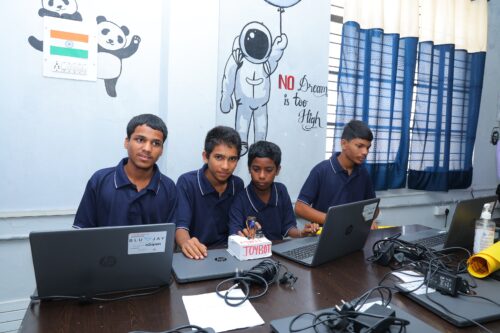
In our research at the Centre, we will make sure that:

  1. We collaborate closely with teachers and schools when implementing and evaluating research projects
  2. We publish research results in a number of different formats, as promptly as we can and without a paywall
  3. We translate research findings into practice across the Foundation’s extensive programmes and with our partners

We are excited to work with a large community of teachers and researchers, and we look forward to meeting you at the launch event.

Stay up to date

At the end of June, we’ll be launching a new website for the Centre at computingeducationresearch.org. This will be the place for you to find out more about our projects and events, and to sign up to our newsletter. For announcements on social media, follow the Raspberry Pi Foundation on Twitter or Linkedin.

The post Join us at the launch event of the Raspberry Pi Computing Education Research Centre appeared first on Raspberry Pi.

A teaspoon of computing in every subject: Broadening participation in computer science

Post Syndicated from Sue Sentance original https://www.raspberrypi.org/blog/guzdial-teaspoon-computing-tsp-language-broadening-participation-school/

From May to November 2022, our seminars focus on the theme of cross-disciplinary computing. Through this seminar series, we want to explore the intersections and interactions of computing with all aspects of learning and life, and think about how they can help us teach young people. We were delighted to welcome Prof. Mark Guzdial (University of Michigan) as our first speaker.

Mark Guzdial.
Professor Mark Guzdial, University of Michigan

Mark has worked in computer science (CS) education for decades and won many awards for his research, including the prestigious ACM SIGCSE Outstanding Contribution to Computing Education award in 2019. He has written literally hundreds of papers about CS education, and he authors an extremely popular computing education research blog that keeps us all up to date with what is going on in the field.

Young learners at computers in a classroom.

In his talk, Mark focused on his recent work around developing task-specific programming (TSP) languages, with which teachers can add a teaspoon (also abbreviated TSP) of programming to a wide variety of subject areas in schools. Mark’s overarching thesis is that if we want everyone to have some exposure to CS, then we need to integrate it into a range of subjects across the school curriculum. And he explained that this idea of “adding a teaspoon” embraces some core principles; for TSP languages to be successful, they need to:

  • Meet the teachers’ needs
  • Be relevant to the context or lesson in which it appears
  • Be technically easy to get to grips with

Mark neatly summarised this as ‘being both usable and useful’. 

Historical views on why we should all learn computer science

We can learn a lot from going back in time and reflecting on the history of computing. Mark started his talk by sharing the views of some of the eminent computer scientists of the early days of the subject. C. P. Snow maintained, way back in 1961, that all students should study CS, because it was too important to be left to a small handful of people.

A quote by computer scientist C. S. Snow from 1961: A handful of people, having no relation to the will of society, having no communication with the rest of society, will be taking decisions in secret which are going to affect our lives in the deepest, sense.

Alan Perlis, also in 1961, argued that everyone at university should study one course in CS rather than a topic such as calculus. His reason was that CS is about process, and thus gives students tools that they can use to change the world around them. I’d never heard of this work from the 1960s before, and it suggests incredible foresight. Perhaps we don’t need to even have the debate of whether computer science is for everyone — it seems it always was!

What’s the problem with the current situation?

In many of our seminars over the last two years, we have heard about the need to broaden participation in computing in school. Although in England, computing is mandatory for ages 5 to 16 (in theory, in practice it’s offered to all children from age 5 to 14), other countries don’t have any computing for younger children. And once computing becomes optional, numbers drop, wherever you are.

""
Not enough students are experiencing computer science in school.

Mark shared with us that in US high schools, only 4.7% of students are enrolled in a CS course. However, students are studying other subjects, which brought him to the conclusion that CS should be introduced where the students already are. For example, Mark described that, at the Advanced Placement (AP) level in the US, many more students choose to take history than CS (399,000 vs 114,000) and the History AP cohort has more even gender balance, and a higher proportion of Black and Hispanic students. 

The teaspoon approach to broadening participation

A solution to low uptake of CS being proposed by Mark and his colleagues is to add a little computing to other subjects, and in his talk he gave us some examples from history and mathematics, both subjects taken by a high proportion of US students. His focus is on high school, meaning learners aged 14 and upwards (upper secondary in Europe, or key stage 4 and 5 in England). To introduce a teaspoon of CS to other subjects, Mark’s research group builds tools using a participatory design approach; his group collaborates with teachers in schools to identify the needs of the teachers and students and design and iterate TSP languages in conjunction with them.

Three teenage boys do coding at a shared computer during a computer science lesson.

Mark demonstrated a number of TSP language prototypes his group has been building for use in particular contexts. The prototypes seem like simple apps, but can be classified as languages because they specify a process for a computational agent to execute. These small languages are designed to be used at a specific point in the lesson and should be learnable in ten minutes. For example, students can use a small ‘app’ specific to their topic, look at a script that generates a visualisation, and change some variables to find out how they impact the output. Students may also be able to access some program code, edit it, and see the impact of their edits. In this way, they discover through practical examples the way computer programs work, and how they can use CS principles to help build an understanding of the subject area they are currently studying. If the language is never used again, the learning cost was low enough that it was worth the value of adding computation to the one lesson.
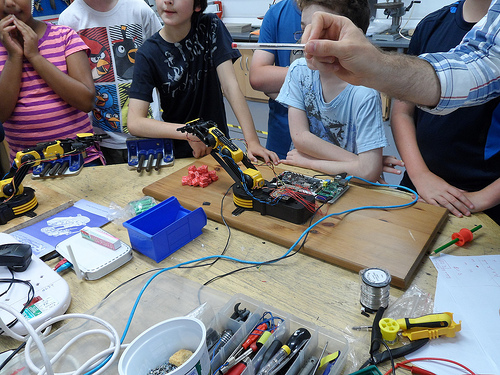
We have recorded the seminar and will be sharing the video very soon, so bookmark this page.
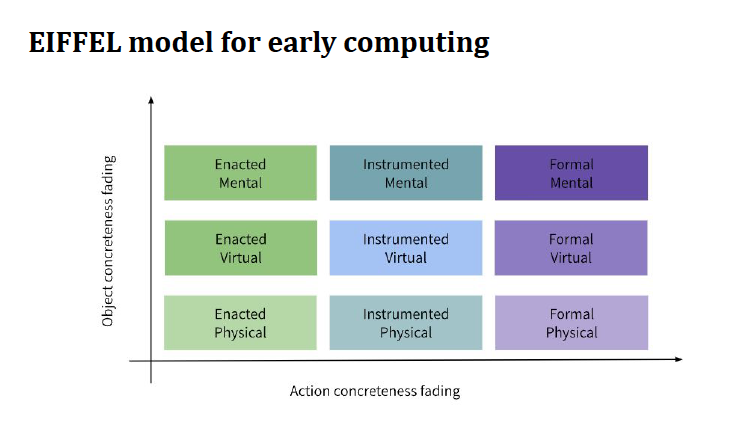
Try TSP languages yourself

You can try out the TSP language prototypes Mark shared yourself, which will give you a good idea of how much a teaspoon is!

DV4L: For history students, the team and participating teachers have created a prototype called DV4L, which visualises historical data. The default example script shows population growth in Africa. Students can change some of the variables in the script to explore data related to other countries and other historical periods.

Pixel Equations: Mathematics and engineering students can use the Pixel Equations tool to learn about the way that pictures are made up of individual pixels. This can be introduced into lessons using a variety of contexts. One example lesson activity looks at images in the contexts of maps. This prototype is available in English and Spanish. 

Counting Sheets: Another example given by Mark was Counting Sheets, an interactive tool to support the exploration of counting problems, such as how many possible patterns can come from flipping three coins. 

Have a go yourself. What subjects could you imagine adding a teaspoon of computing to?

Join our next free research seminar

We’d love you to join us for the next seminar in our series on cross-disciplinary computing. On 7 June, we will hear from Pratim Sengupta, of the University of Calgary, Canada. He has conducted studies in science classrooms and non-formal learning environments, focusing on providing open and engaging experiences for anyone to explore code. Pratim will share his thoughts on the ways that more of us can become involved with code when we open up its richness and depth to a wider audience. He will also introduce us to his ideas about countering technocentrism, a key focus of his new book.

And finally… save another date!

We will shortly be sharing details about the official in-person launch event of the Raspberry Pi Computing Education Research Centre at the University of Cambridge on 20 July 2022. And guess who is going to be coming to Cambridge, UK, from Michigan to officially cut the ribbon for us? That’s right, Mark Guzdial. More information coming soon on how you can sign up to join us for free at this launch event.

The post A teaspoon of computing in every subject: Broadening participation in computer science appeared first on Raspberry Pi.