Run interactive workloads on Amazon EMR Serverless from Amazon EMR Studio

Post Syndicated from Sekar Srinivasan original https://aws.amazon.com/blogs/big-data/run-interactive-workloads-on-amazon-emr-serverless-from-amazon-emr-studio/

Starting from release 6.14, Amazon EMR Studio supports interactive analytics on Amazon EMR Serverless. You can now use EMR Serverless applications as the compute, in addition to Amazon EMR on EC2 clusters and Amazon EMR on EKS virtual clusters, to run JupyterLab notebooks from EMR Studio Workspaces.

EMR Studio is an integrated development environment (IDE) that makes it straightforward for data scientists and data engineers to develop, visualize, and debug analytics applications written in PySpark, Python, and Scala. EMR Serverless is a serverless option for Amazon EMR that makes it straightforward to run open source big data analytics frameworks such as Apache Spark without configuring, managing, and scaling clusters or servers.

In the post, we demonstrate how to do the following:

  • Create an EMR Serverless endpoint for interactive applications
  • Attach the endpoint to an existing EMR Studio environment
  • Create a notebook and run an interactive application
  • Seamlessly diagnose interactive applications from within EMR Studio

Prerequisites

In a typical organization, an AWS account administrator will set up AWS resources such as AWS Identity and Access management (IAM) roles, Amazon Simple Storage Service (Amazon S3) buckets, and Amazon Virtual Private Cloud (Amazon VPC) resources for internet access and access to other resources in the VPC. They assign EMR Studio administrators who manage setting up EMR Studios and assigning users to a specific EMR Studio. Once they’re assigned, EMR Studio developers can use EMR Studio to develop and monitor workloads.

Make sure you set up resources like your S3 bucket, VPC subnets, and EMR Studio in the same AWS Region.

Complete the following steps to deploy these prerequisites:

  1. Launch the following AWS CloudFormation stack.
    Launch Cloudformation Stack
  2. Enter values for AdminPassword and DevPassword and make a note of the passwords you create.
  3. Choose Next.
  4. Keep the settings as default and choose Next again.
  5. Select I acknowledge that AWS CloudFormation might create IAM resources with custom names.
  6. Choose Submit.

We have also provided instructions to deploy these resources manually with sample IAM policies in the GitHub repo.

Set up EMR Studio and a serverless interactive application

After the AWS account administrator completes the prerequisites, the EMR Studio administrator can log in to the AWS Management Console to create an EMR Studio, Workspace, and EMR Serverless application.

Create an EMR Studio and Workspace

The EMR Studio administrator should log in to the console using the emrs-interactive-app-admin-user user credentials. If you deployed the prerequisite resources using the provided CloudFormation template, use the password that you provided as an input parameter.

  1. On the Amazon EMR console, choose EMR Serverless in the navigation pane.
  2. Choose Get started.
  3. Select Create and launch EMR Studio.

This creates a Studio with the default name studio_1 and a Workspace with the default name My_First_Workspace. A new browser tab will open for the Studio_1 user interface.

Create and Launch EMR Studio

Create an EMR Serverless application

Complete the following steps to create an EMR Serverless application:

  1. On the EMR Studio console, choose Applications in the navigation pane.
  2. Create a new application.
  3. For Name, enter a name (for example, my-serverless-interactive-application).
  4. For Application setup options, select Use custom settings for interactive workloads.
    Create Serverless Application using custom settings

For interactive applications, as a best practice, we recommend keeping the driver and workers pre-initialized by configuring the pre-initialized capacity at the time of application creation. This effectively creates a warm pool of workers for an application and keeps the resources ready to be consumed, enabling the application to respond in seconds. For further best practices for creating EMR Serverless applications, see Define per-team resource limits for big data workloads using Amazon EMR Serverless.

  1. In the Interactive endpoint section, select Enable Interactive endpoint.
  2. In the Network connections section, choose the VPC, private subnets, and security group you created previously.

If you deployed the CloudFormation stack provided in this post, choose emr-serverless-sg­  as the security group.

A VPC is needed for the workload to be able to access the internet from within the EMR Serverless application in order to download external Python packages. The VPC also allows you to access resources such as Amazon Relational Database Service (Amazon RDS) and Amazon Redshift that are in the VPC from this application. Attaching a serverless application to a VPC can lead to IP exhaustion in the subnet, so make sure there are sufficient IP addresses in your subnet.

  1. Choose Create and start application.

Enable Interactive Endpoints, Choose private subnets and security group

On the applications page, you can verify that the status of your serverless application changes to Started.

  1. Select your application and choose How it works.
  2. Choose View and launch workspaces.
  3. Choose Configure studio.

  1. For Service role¸ provide the EMR Studio service role you created as a prerequisite (emr-studio-service-role).
  2. For Workspace storage, enter the path of the S3 bucket you created as a prerequisite (emrserverless-interactive-blog-<account-id>-<region-name>).
  3. Choose Save changes.

Choose emr-studio-service-role and emrserverless-interactive-blog s3 bucket

14.  Navigate to the Studios console by choosing Studios in the left navigation menu in the EMR Studio section. Note the Studio access URL from the Studios console and provide it to your developers to run their Spark applications.

Run your first Spark application

After the EMR Studio administrator has created the Studio, Workspace, and serverless application, the Studio user can use the Workspace and application to develop and monitor Spark workloads.

Launch the Workspace and attach the serverless application

Complete the following steps:

  1. Using the Studio URL provided by the EMR Studio administrator, log in using the emrs-interactive-app-dev-user user credentials shared by the AWS account admin.

If you deployed the prerequisite resources using the provided CloudFormation template, use the password that you provided as an input parameter.

On the Workspaces page, you can check the status of your Workspace. When the Workspace is launched, you will see the status change to Ready.

  1. Launch the workspace by choosing the workspace name (My_First_Workspace).

This will open a new tab. Make sure your browser allows pop-ups.

  1. In the Workspace, choose Compute (cluster icon) in the navigation pane.
  2. For EMR Serverless application, choose your application (my-serverless-interactive-application).
  3. For Interactive runtime role, choose an interactive runtime role (for this post, we use emr-serverless-runtime-role).
  4. Choose Attach to attach the serverless application as the compute type for all the notebooks in this Workspace.

Choose my-serverless-interactive-application as your app and emr-serverless-runtime-role and attach

Run your Spark application interactively

Complete the following steps:

  1. Choose the Notebook samples (three dots icon) in the navigation pane and open Getting-started-with-emr-serverless notebook.
  2. Choose Save to Workspace.

There are three choices of kernels for our notebook: Python 3, PySpark, and Spark (for Scala).

  1. When prompted, choose PySpark as the kernel.
  2. Choose Select.

Choose PySpark as kernel

Now you can run your Spark application. To do so, use the %%configure Sparkmagic command, which configures the session creation parameters. Interactive applications support Python virtual environments. We use a custom environment in the worker nodes by specifying a path for a different Python runtime for the executor environment using spark.executorEnv.PYSPARK_PYTHON. See the following code:

%%configure -f
{
  "conf": {
    "spark.pyspark.virtualenv.enabled": "true",
    "spark.pyspark.virtualenv.bin.path": "/usr/bin/virtualenv",
    "spark.pyspark.virtualenv.type": "native",
    "spark.pyspark.python": "/usr/bin/python3",
    "spark.executorEnv.PYSPARK_PYTHON": "/usr/bin/python3"
  }
}

Install external packages

Now that you have an independent virtual environment for the workers, EMR Studio notebooks allow you to install external packages from within the serverless application by using the Spark install_pypi_package function through the Spark context. Using this function makes the package available for all the EMR Serverless workers.

First, install matplotlib, a Python package, from PyPi:

sc.install_pypi_package("matplotlib")

If the preceding step doesn’t respond, check your VPC setup and make sure it is configured correctly for internet access.

Now you can use a dataset and visualize your data.

Create visualizations

To create visualizations, we use a public dataset on NYC yellow taxis:

file_name = "s3://athena-examples-us-east-1/notebooks/yellow_tripdata_2016-01.parquet"
taxi_df = (spark.read.format("parquet").option("header", "true") \
.option("inferSchema", "true").load(file_name))

In the preceding code block, you read the Parquet file from a public bucket in Amazon S3. The file has headers, and we want Spark to infer the schema. You then use a Spark dataframe to group and count specific columns from taxi_df:

taxi1_df = taxi_df.groupBy("VendorID", "passenger_count").count()
taxi1_df.show()

Use %%display magic to view the result in table format:

%%display
taxi1_df

Table shows vendor_id, passenger_count and count columns

You can also quickly visualize your data with five types of charts. You can choose the display type and the chart will change accordingly. In the following screenshot, we use a bar chart to visualize our data.

bar chart showing passenger_count against each vendor_id

Interact with EMR Serverless using Spark SQL

You can interact with tables in the AWS Glue Data Catalog using Spark SQL on EMR Serverless. In the sample notebook, we show how you can transform data using a Spark dataframe.

First, create a new temporary view called taxis. This allows you to use Spark SQL to select data from this view. Then create a taxi dataframe for further processing:

taxi_df.createOrReplaceTempView("taxis")
sqlDF = spark.sql(
    "SELECT DOLocationID, sum(total_amount) as sum_total_amount \
     FROM taxis where DOLocationID < 25 Group by DOLocationID ORDER BY DOLocationID"
)
sqlDF.show(5)

Table shows vendor_id, passenger_count and count columns

In each cell in your EMR Studio notebook, you can expand Spark Job Progress to view the various stages of the job submitted to EMR Serverless while running this specific cell. You can see the time taken to complete each stage. In the following example, stage 14 of the job has 12 completed tasks. In addition, if there is any failure, you can see the logs, making troubleshooting a seamless experience. We discuss this more in the next section.

Job[14]: showString at NativeMethodAccessorImpl.java:0 and Job[15]: showString at NativeMethodAccessorImpl.java:0

Use the following code to visualize the processed dataframe using the matplotlib package. You use the maptplotlib library to plot the dropoff location and the total amount as a bar chart.

import matplotlib.pyplot as plt
import numpy as np
import pandas as pd
plt.clf()
df = sqlDF.toPandas()
plt.bar(df.DOLocationID, df.sum_total_amount)
%matplot plt

Diagnose interactive applications

You can get the session information for your Livy endpoint using the %%info Sparkmagic. This gives you links to access the Spark UI as well as the driver log right in your notebook.

The following screenshot is a driver log snippet for our application, which we opened via the link in our notebook.

driver log screenshot

Similarly, you can choose the link below Spark UI to open the UI. The following screenshot shows the Executors tab, which provides access to the driver and executor logs.

The following screenshot shows stage 14, which corresponds to the Spark SQL step we saw earlier in which we calculated the location wise sum of total taxi collections, which had been broken down into 12 tasks. Through the Spark UI, the interactive application provides fine-grained task-level status, I/O, and shuffle details, as well as links to corresponding logs for each task for this stage right from your notebook, enabling a seamless troubleshooting experience.

Clean up

If you no longer want to keep the resources created in this post, complete the following cleanup steps:

  1. Delete the EMR Serverless application.
  2. Delete the EMR Studio and the associated workspaces and notebooks.
  3. To delete rest of the resources, navigate to CloudFormation console, select the stack, and choose Delete.

All of the resources will be deleted except the S3 bucket, which has its deletion policy set to retain.

Conclusion

The post showed how to run interactive PySpark workloads in EMR Studio using EMR Serverless as the compute. You can also build and monitor Spark applications in an interactive JupyterLab Workspace.

In an upcoming post, we’ll discuss additional capabilities of EMR Serverless Interactive applications, such as:

  • Working with resources such as Amazon RDS and Amazon Redshift in your VPC (for example, for JDBC/ODBC connectivity)
  • Running transactional workloads using serverless endpoints

If this is your first time exploring EMR Studio, we recommend checking out the Amazon EMR workshops and referring to Create an EMR Studio.


About the Authors

Sekar Srinivasan is a Principal Specialist Solutions Architect at AWS focused on Data Analytics and AI. Sekar has over 20 years of experience working with data. He is passionate about helping customers build scalable solutions modernizing their architecture and generating insights from their data. In his spare time he likes to work on non-profit projects, focused on underprivileged Children’s education.

Disha Umarwani is a Sr. Data Architect with Amazon Professional Services within Global Health Care and LifeSciences. She has worked with customers to design, architect and implement Data Strategy at scale. She specializes in architecting Data Mesh architectures for Enterprise platforms.


GitHub comments used to distribute malware (BleepingComputer)

Post Syndicated from daroc original https://lwn.net/Articles/971008/

BleepingComputer

reported
on April 20 that some malware was being distributed via GitHub.
Uploading files as part of a comment gives them a URL that appears to be
associated with a repository, even if the comment is never posted.

A GitHub flaw, or possibly a design decision, is being abused by threat actors
to distribute malware using URLs associated with Microsoft repositories, making
the files appear trustworthy.

While most of the malware activity has been based around the Microsoft GitHub
URLs, this “flaw” could be abused with any public repository on GitHub, allowing
threat actors to create very convincing lures.

A new crash reporter for Firefox

Post Syndicated from daroc original https://lwn.net/Articles/971006/

On April 23, Mozilla

announced
that Firefox’s crash reporter has been rewritten in Rust, allowing the
project to address a backlog of issues.

Even though it is important to properly handle main process crashes, the crash
reporter hasn’t received significant development in a while (aside from
development to ensure that crash reports and telemetry continue to reliably be
delivered)! It has long been stuck in a local maximum of “good enough” and
“scary to maintain”: it features 3 individual GUI implementations (for Windows,
GTK+ for Linux, and macOS), glue code abstracting a few things (mostly in C++,
and Objective-C for macOS), a binary blob produced by obsoleted Apple
development tools, and no test suite. Because of this, there is a backlog of
features and improvements which haven’t been acted on.

[$] Existential types in Rust

Post Syndicated from daroc original https://lwn.net/Articles/970186/

For several years, contributors to the Rust project have
been working to improve support for asynchronous
code. The benefits of these efforts are not confined to asynchronous code,
however. Members of the Rust community have been working toward adding explicit

existential types
to Rust since 2017. Existential types are not a common feature
of programming languages (something

the RFC
acknowledges), so the motivation for their inclusion might be somewhat
obscure.

Security updates for Wednesday

Post Syndicated from jzb original https://lwn.net/Articles/971004/

Security updates have been issued by Fedora (abseil-cpp, chromium, filezilla, libfilezilla, and xorg-x11-server-Xwayland), Oracle (firefox, gnutls, golang, java-1.8.0-openjdk, java-11-openjdk, java-17-openjdk, java-21-openjdk, kernel, libreswan, mod_http2, owO: thunderbird, and thunderbird), Red Hat (container-tools:rhel8, gnutls, grub2, kernel, kernel-rt, less, linux-firmware, opencryptoki, pcs, postgresql-jdbc, and thunderbird), Slackware (ruby), SUSE (kubernetes1.23, kubernetes1.24, and opensc), and Ubuntu (firefox, linux-azure, linux-lowlatency, linux-nvidia, and ruby-sanitize).

Dan Solove on Privacy Regulation

Post Syndicated from Bruce Schneier original https://www.schneier.com/blog/archives/2024/04/dan-solove-on-privacy-regulation.html

Law professor Dan Solove has a new article on privacy regulation. In his email to me, he writes: “I’ve been pondering privacy consent for more than a decade, and I think I finally made a breakthrough with this article.” His mini-abstract:

In this Article I argue that most of the time, privacy consent is fictitious. Instead of futile efforts to try to turn privacy consent from fiction to fact, the better approach is to lean into the fictions. The law can’t stop privacy consent from being a fairy tale, but the law can ensure that the story ends well. I argue that privacy consent should confer less legitimacy and power and that it be backstopped by a set of duties on organizations that process personal data based on consent.

Full abstract:

Consent plays a profound role in nearly all privacy laws. As Professor Heidi Hurd aptly said, consent works “moral magic”—it transforms things that would be illegal and immoral into lawful and legitimate activities. As to privacy, consent authorizes and legitimizes a wide range of data collection and processing.

There are generally two approaches to consent in privacy law. In the United States, the notice-and-choice approach predominates; organizations post a notice of their privacy practices and people are deemed to consent if they continue to do business with the organization or fail to opt out. In the European Union, the General Data Protection Regulation (GDPR) uses the express consent approach, where people must voluntarily and affirmatively consent.

Both approaches fail. The evidence of actual consent is non-existent under the notice-and-choice approach. Individuals are often pressured or manipulated, undermining the validity of their consent. The express consent approach also suffers from these problems ­ people are ill-equipped to decide about their privacy, and even experts cannot fully understand what algorithms will do with personal data. Express consent also is highly impractical; it inundates individuals with consent requests from thousands of organizations. Express consent cannot scale.

In this Article, I contend that most of the time, privacy consent is fictitious. Privacy law should take a new approach to consent that I call “murky consent.” Traditionally, consent has been binary—an on/off switch—but murky consent exists in the shadowy middle ground between full consent and no consent. Murky consent embraces the fact that consent in privacy is largely a set of fictions and is at best highly dubious.

Because it conceptualizes consent as mostly fictional, murky consent recognizes its lack of legitimacy. To return to Hurd’s analogy, murky consent is consent without magic. Rather than provide extensive legitimacy and power, murky consent should authorize only a very restricted and weak license to use data. Murky consent should be subject to extensive regulatory oversight with an ever-present risk that it could be deemed invalid. Murky consent should rest on shaky ground. Because the law pretends people are consenting, the law’s goal should be to ensure that what people are consenting to is good. Doing so promotes the integrity of the fictions of consent. I propose four duties to achieve this end: (1) duty to obtain consent appropriately; (2) duty to avoid thwarting reasonable expectations; (3) duty of loyalty; and (4) duty to avoid unreasonable risk. The law can’t make the tale of privacy consent less fictional, but with these duties, the law can ensure the story ends well.

Learning from our hybrid training programme for youth and community organisations

Post Syndicated from Mirnali Koneswaran original https://www.raspberrypi.org/blog/learning-from-our-hybrid-training-programme-for-youth-and-community-organisations/

At the Raspberry Pi Foundation, we aim to democratise access to digital skills and technologies. One of the ways we do this is via partnerships with youth and community organisations that deliver frontline services to young people experiencing educational disadvantage.

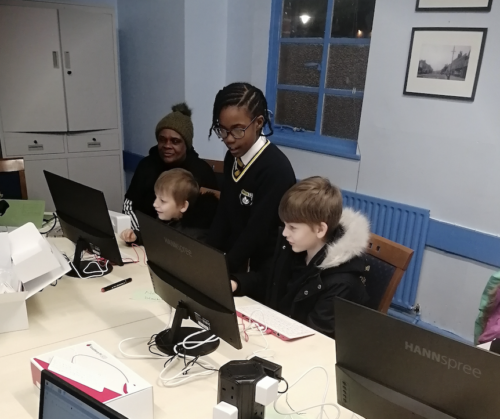
Two smiling adults at a computer.

In 2023 we delivered a hybrid training programme to 14 youth organisations in the UK to help youth leaders and educators incorporate coding and digital making activities into their provision to young people. The training programme was supported by Amazon Future Engineer. In this blog, we summarise what we’ve learned from our evaluation of the training and its impact.

Youth workers feel prepared to run digital making activities

In total, 29 youth leaders and educators participated in the training, which consisted of 12 modules delivered across 4 online sessions and one in-person day. We asked participants to complete surveys at several points throughout the programme to enable us to explore their feedback, the training’s impact on their confidence in facilitating computing sessions, and their experiences of running activities with young people.

The educators on this programme were already well motivated to run digital making sessions. But one of the main challenges youth organisations report to us most often is that their staff and volunteers need more confidence in their ability to deliver coding activities on an ongoing basis. It was therefore great to see that, following the training, every participant felt at least moderately prepared to run coding activities, with 2 out of every 5 participants feeling very prepared. Furthermore, we recorded positive impact of the training on participants’ readiness: after the training, 4 out of every 5 participants agreed they had the skills they needed to facilitate activities for young people.

“It was pitched right for the majority of attendees with no knowledge of Scratch[.]” – Karl Nicholson, Manchester Youth Zone

The training was well received

Educators found the training to be high quality and, in almost all cases, beneficial. Participants reported that attending two online sessions in preparation for the in-person training day had improved their experience of the in-person activites.

“It was really great. The online courses are excellent and being in-person to get answers to questions really helped. The tinkering was really useful and having people on hand to answer questions [was] massively helpful.” – Liam Garnett, Leeds Libraries

Some participants told us they struggled with the second online training session. This may be because it contained more challenging content: moving from block-based coding (Scratch) to text-based coding (Python), a transition we know many people new to programming can find difficult.

This feedback has helped inform the next iteration of our training programme for youth and community organisations.

A Learning Manager is supporting two adult educators during a training session.

Youth workers are now running digital making sessions

Since the training, attendees across the 14 organisations have reported that, so far, 39 digital making sessions have taken place, reaching 422 young people. Youth leaders and educators who have already run sessions also told us they intend to continue with coding and digital making activities with their young people in the future.

Young learners in a coding club.

Among these youth leaders was Marie Henry, founder of Breadline London, a grassroots charitable organisation based in Haringey, London, that supports families and young people to break the cycle of poverty through financial education, training, and practical workshops.

Since the training programme, Marie has gone on to start a regular coding club in her local area.

“We are immensely grateful to the Raspberry Pi Foundation team for their encouragement and unwavering support in empowering us to launch our own coding club. Their guidance, expertise, hands-on training workshops, and provision of essential equipment and devices have been instrumental in our journey towards building a positive community for our young coders.

With their help, we’ve gained the confidence, knowledge, and skills needed to inspire the next generation of coders and innovators. We still have a lot to learn, but with them by our side, we are confident that our coding club will be a great success.

Thank you, Raspberry Pi Foundation, for believing in our vision and helping us turn it into reality.” – Marie Henry, Founder of Breadline London

Some of the organisations that participated in the training have not yet run sessions, but plan to start delivery within the next 1 to 3 months. They continue to face some logistical challenges, ranging from staff shortages and volunteer availability, to encouraging local young people with limited prior exposure to computing to join the digital making activities. We are continuing to support these organisations to get up and running as soon as possible.

“Oh my what a great coding after school session I’ve had this afternoon…Scratch not only sets a starting point for children in their ITC learning, but is also a fun way to learn and build on skills they can take with them as they grow.

Planting the seeds of aspirations!” – Heather Coultard, Doncaster Children’s University

Our ongoing support to youth and community organisations

Our previous blog highlighted the importance of increasing young people’s sense of belonging within a coding club environment, to appeal to marginalised youth. Our findings suggest we are on the right track. Overall, participants felt positive about the training and found it to be of high quality, and it has helped them to deliver digital making sessions to young people in their communities. The organisations’ detailed feedback and impact reporting will continue to inform and improve the development of our training programmes going forward.

We thank Amazon Future Engineer for helping us run this rewarding programme. 

For more information about how we can support youth and community organisations in the UK in starting their coding clubs, please send us a message on the subject ‘Partnerships’.

The post Learning from our hybrid training programme for youth and community organisations appeared first on Raspberry Pi Foundation.

Критика към изследване на законодателната дейност на Юридически барометър

Post Syndicated from Bozho original https://blog.bozho.net/blog/4263

Вчера беше представено изследването на Юридически барометър за законодателните практики на този парламент. Заключенията в него и извадените заглавия са силно негативни. С ясното съзнание, че при ниското доверие към парламента всеки опит за влизане в конкретика е обречен, все пак искам да критикувам методиката на изслевдането, ръководено от Даниел Вълчев.

Изследването разглежда законодателната дейност през основната метрика „изменение на закон“. На база на това се градят всички наблюдения и заключения за това колко закони са изменени, колко бързо се изменят, колко често се изменят, колко пъти се изменя един закон и т.н.

Смятам, че тази методика е погрешна и не отразява реалния законодателен процес. В този смисъл, всички закючения на нейна база са подвеждащи.

„Изменение на закон“ може да са 50 параграфа изменителни разпоредби, които променят фундаментално закона, а може да е промяна на една дума. Такъв е примера с цитирания в изследването Закон за акцизите и данъчните складове, в който поне две от измененията са по 1 дума – промяна на термин („ветеринарномедицински продукти“ с „ветеринарни лекарствени продукти“) и промяна на име на министерство.

Далеч по-коректни мерни единици биха били „разпоредба“, „норма“ или „изменителен параграф“. Да, това изисква по-задълбочен, вкл. технически-асистиран анализ на текстовете, но ще даде далеч по-прецизна картина.

Също така, изследването правилно посочва, че големият брой изменения с „преходни и заключителни разпоредби“ се дължи на конкретно два закона, които изменят по 70 други, заради смяна на име на институция, но противно на логиката, тези „гранични случаи“ не са изключени от данните.

Некоректно и твърдението в изследването, че няма обществено обсъждане на внесените законопроекти от народни представители – по правилник такова се провежда на първо гласуване във водещата комисия, като по повечето закони постъпват становища от заинтересованите страни.

Ако някой иска да изследва законодателния процес сериозно, ето няколко идеи, освен основната метрика: изменения, направени устно в пленарна зала или в комисия на второ четене; изменения в други закони, добавени между първо и второ четене, разделяне на националното законодателство от европейското (защото е нормално европейските директиви да минават по-бързо), брой получени становища от заинтересовани страни; наличие на мотиви към предложения между четенията; последователни промени в едни и същи части на законите (глави/раздели/членове). Знам, че не е лесно, но ако някой има претенция да прави заключения за законодателния процес, трябва да го изследва наистина задълбочено. И тогава ще излязат други, правилни и разумни критики.

Материалът Критика към изследване на законодателната дейност на Юридически барометър е публикуван за пръв път на БЛОГодаря.

Supermicro A3SSV-16C-SPLN10F Intel Atom P5342 25GbE Motherboard Review

Post Syndicated from Patrick Kennedy original https://www.servethehome.com/supermicro-a3ssv-16c-spln10f-intel-atom-p5342-25gbe-motherboard-review/

In our Supermicro A3SSV-16C-SPLN10F review, we see what this 25GbE and 16-core Intel Atom P5342 Snow Ridge platform offers

The post Supermicro A3SSV-16C-SPLN10F Intel Atom P5342 25GbE Motherboard Review appeared first on ServeTheHome.

Using Amazon Verified Permissions to manage authorization for AWS IoT smart home applications

Post Syndicated from Rajat Mathur original https://aws.amazon.com/blogs/security/using-amazon-verified-permissions-to-manage-authorization-for-aws-iot-smart-thermostat-applications/

This blog post introduces how manufacturers and smart appliance consumers can use Amazon Verified Permissions to centrally manage permissions and fine-grained authorizations. Developers can offer more intuitive, user-friendly experiences by designing interfaces that align with user personas and multi-tenancy authorization strategies, which can lead to higher user satisfaction and adoption. Traditionally, implementing authorization logic using role based access control (RBAC) or attribute based access control (ABAC) within IoT applications can become complex as the number of connected devices and associated user roles grows. This often leads to an unmanageable increase in access rules that must be hard-coded into each application, requiring excessive compute power for evaluation. By using Verified Permissions, you can externalize the authorization logic using Cedar policy language, enabling you to define fine-grained permissions that combine RBAC and ABAC models. This decouples permissions from your application’s business logic, providing a centralized and scalable way to manage authorization while reducing development effort.

In this post, we walk you through a reference architecture that outlines an end-to-end smart thermostat application solution using AWS IoT Core, Verified Permissions, and other AWS services. We show you how to use Verified Permissions to build an authorization solution using Cedar policy language to define dynamic policy-based access controls for different user personas. The post includes a link to a GitHub repository that houses the code for the web dashboard and the Verified Permissions logic to control access to the solution APIs.

Solution overview

This solution consists of a smart thermostat IoT device and an AWS hosted web application using Verified Permissions for fine-grained access to various application APIs. For this use case, the AWS IoT Core device is being simulated by an AWS Cloud9 environment and communicates with the IoT service using AWS IoT Device SDK for Python. After being configured, the device connects to AWS IoT Core to receive commands and send messages to various MQTT topics.

As a general practice, when a user-facing IoT solution is implemented, the manufacturer performs administrative tasks such as:

  1. Embedding AWS Private Certificate Authority certificates into each IoT device (in this case a smart thermostat). Usually this is done on the assembly line and the certificates used to verify the IoT endpoints are burned into device memory along with the firmware.
  2. Creating an Amazon Cognito user pool that provides sign-up and sign-in options for web and mobile application users and hosts the authentication process.
  3. Creating policy stores and policy templates in Verified Permissions. Based on who signs up, the manufacturer creates policies with Verified Permissions to link each signed-up user to certain allowed resources or IoT devices.
  4. The mapping of user to device is stored in a datastore. For this solution, you’ll use an Amazon DynamoDB table to record the relationship.

The user who purchases the device (the primary device owner) performs the following tasks:

  1. Signs up on the manufacturer’s web application or mobile app and registers the IoT device by entering a unique serial number. The mapping between user details and the device serial number is stored in the datastore through an automated process that is initiated after sign-up and device claim.
  2. Connects the new device to an existing wireless network, which initiates a registration process to securely connect to AWS IoT Core services within the manufacturer’s account.
  3. Invites other users (such as guests, family members, or the power company) through a referral, invitation link, or a designated OAuth process.
  4. Assign roles to the other users and therefore permissions.
     
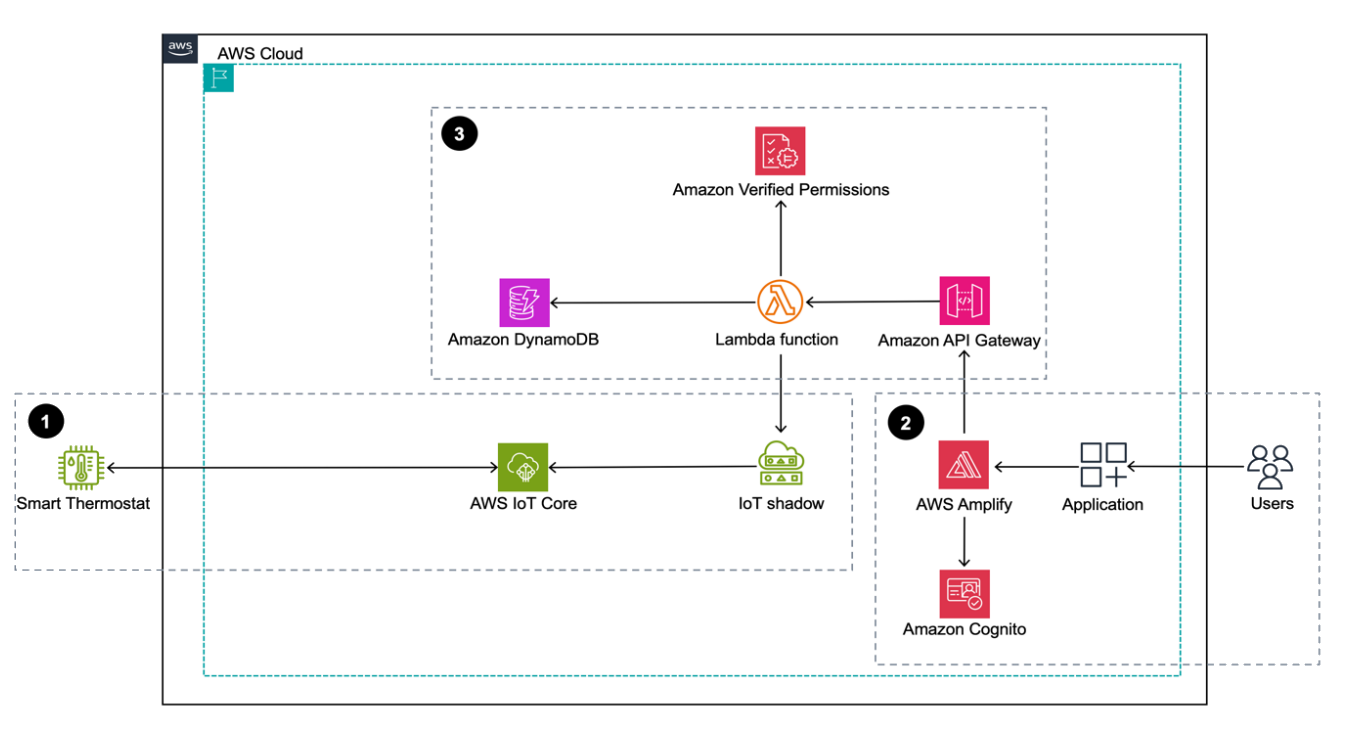
Figure 1: Sample smart home application architecture built using AWS services

Figure 1: Sample smart home application architecture built using AWS services

Figure 1 depicts the solution as three logical components:

  1. The first component depicts device operations through AWS IoT Core. The smart thermostat is on site and it communicates with AWS IoT Core and its state is managed through the AWS IoT Device Shadow Service.
  2. The second component depicts the web application, which is the application interface that customers use. It’s a ReactJS-backed single page application deployed using AWS Amplify.
  3. The third component shows the backend application, which is built using Amazon API Gateway, AWS Lambda, and DynamoDB. A Cognito user pool is used to manage application users and their authentication. Authorization is handled by Verified Permissions where you create and manage policies that are evaluated when the web application calls backend APIs. These policies are evaluated against each authorization policy to provide an access decision to deny or allow an action.

The solution flow itself can be broken down into three steps after the device is onboarded and users have signed up:

  1. The smart thermostat device connects and communicates with AWS IoT Core using the MQTT protocol. A classic Device Shadow is created for the AWS IoT thing Thermostat1 when the UpdateThingShadow call is made the first time through the AWS SDK for a new device. AWS IoT Device Shadow service lets the web application query and update the device’s state in case of connectivity issues.
  2. Users sign up or sign in to the Amplify hosted smart home application and authenticate themselves against a Cognito user pool. They’re mapped to a device, which is stored in a DynamoDB table.
  3. After the users sign in, they’re allowed to perform certain tasks and view certain sections of the dashboard based on the different roles and policies managed by Verified Permissions. The underlying Lambda function that’s responsible for handling the API calls queries the DynamoDB table to provide user context to Verified Permissions.

Prerequisites

  1. To deploy this solution, you need access to the AWS Management Console and AWS Command Line Interface (AWS CLI) on your local machine with sufficient permissions to access required services, including Amplify, Verified Permissions, and AWS IoT Core. For this solution, you’ll give the services full access to interact with different underlying services. But in production, we recommend following security best practices with AWS Identity and Access Management (IAM), which involves scoping down policies.
  2. Set up Amplify CLI by following these instructions. We recommend the latest NodeJS stable long-term support (LTS) version. At the time of publishing this post, the LTS version was v20.11.1. Users can manage multiple NodeJS versions on their machines by using a tool such as Node Version Manager (nvm).

Walkthrough

The following table describes the actions, resources, and authorization decisions that will be enforced through Verified Permissions policies to achieve fine-grained access control. In this example, John is the primary device owner and has purchased and provisioned a new smart thermostat device called Thermostat1. He has invited Jane to access his device and has given her restricted permissions. John has full control over the device whereas Jane is only allowed to read the temperature and set the temperature between 72°F and 78°F.

John has also decided to give his local energy provider (Power Company) access to the device so that they can set the optimum temperature during the day to manage grid load and offer him maximum savings on his energy bill. However, they can only do so between 2:00 PM and 5:00 PM.

For security purposes the verified permissions default decision is DENY for unauthorized principals.

Name Principal Action Resource Authorization decision
Any Default Default Default Deny
John john_doe Any Thermostat1 Allow
Jane jane_doe GetTemperature Thermostat1 Allow
Jane jane_doe SetTemperature Thermostat1 Allow only if desired temperature is between 72°F and 78°F.
Power Company powercompany GetTemperature Thermostat1 Allow only if accessed between the hours of 2:00 PM and 5:00 PM
Power Company powercompany SetTemperature Thermostat1 Allow only if the temperature is set between the hours of 2:00 PM and 5:00 PM

Create a Verified Permissions policy store

Verified Permissions is a scalable permissions management and fine-grained authorization service for the applications that you build. The policies are created using Cedar, a dedicated language for defining access permissions in applications. Cedar seamlessly integrates with popular authorization models such as RBAC and ABAC.

A policy is a statement that either permits or forbids a principal to take one or more actions on a resource. A policy store is a logical container that stores your Cedar policies, schema, and principal sources. A schema helps you to validate your policy and identify errors based on the definitions you specify. See Cedar schema to learn about the structure and formal grammar of a Cedar schema.

To create the policy store

  1. Sign in to the Amazon Verified Permissions console and choose Create policy store.
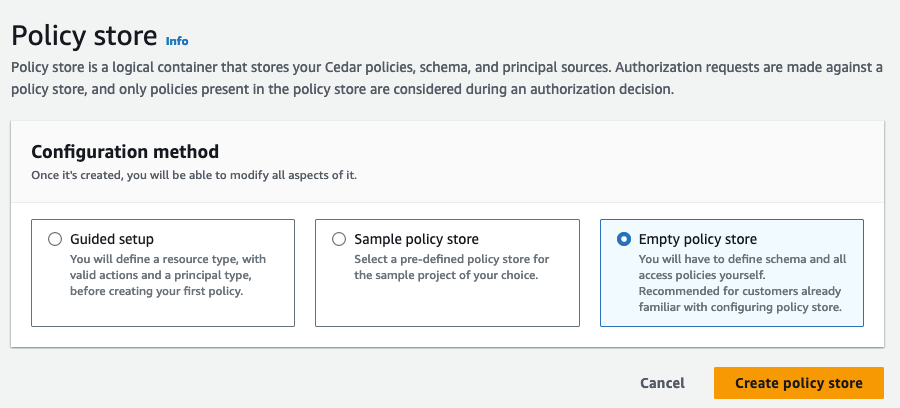
  2. In the Configuration Method section, select Empty Policy Store and choose Create policy store.
     
Figure 2: Create an empty policy store

Figure 2: Create an empty policy store

Note: Make a note of the policy store ID to use when you deploy the solution.

To create a schema for the application

  1. On the Verified Permissions page, select Schema.
  2. In the Schema section, choose Create schema.
     
    Figure 3: Create a schema

    Figure 3: Create a schema

  3. In the Edit schema section, choose JSON mode, paste the following sample schema for your application, and choose Save changes.
    {
        "AwsIotAvpWebApp": {
            "entityTypes": {
                "Device": {
                    "shape": {
                        "attributes": {
                            "primaryOwner": {
                                "name": "User",
                                "required": true,
                                "type": "Entity"
                            }
                        },
                        "type": "Record"
                    },
                    "memberOfTypes": []
                },
                "User": {}
            },
            "actions": {
                "GetTemperature": {
                    "appliesTo": {
                        "context": {
                            "attributes": {
                                "desiredTemperature": {
                                    "type": "Long"
                                },
                                "time": {
                                    "type": "Long"
                                }
                            },
                            "type": "Record"
                        },
                        "resourceTypes": [
                            "Device"
                        ],
                        "principalTypes": [
                            "User"
                        ]
                    }
                },
                "SetTemperature": {
                    "appliesTo": {
                        "resourceTypes": [
                            "Device"
                        ],
                        "principalTypes": [
                            "User"
                        ],
                        "context": {
                            "attributes": {
                                "desiredTemperature": {
                                    "type": "Long"
                                },
                                "time": {
                                    "type": "Long"
                                }
                            },
                            "type": "Record"
                        }
                    }
                }
            }
        }
    }

When creating policies in Cedar, you can define authorization rules using a static policy or a template-linked policy.

Static policies

In scenarios where a policy explicitly defines both the principal and the resource, the policy is categorized as a static policy. These policies are immediately applicable for authorization decisions, as they are fully defined and ready for implementation.

Template-linked policies

On the other hand, there are situations where a single set of authorization rules needs to be applied across a variety of principals and resources. Consider an IoT application where actions such as SetTemperature and GetTemperature must be permitted for specific devices. Using static policies for each unique combination of principal and resource can lead to an excessive number of almost identical policies, differing only in their principal and resource components. This redundancy can be efficiently addressed with policy templates. Policy templates allow for the creation of policies using placeholders for the principal, the resource, or both. After a policy template is established, individual policies can be generated by referencing this template and specifying the desired principal and resource. These template-linked policies function the same as static policies, offering a streamlined and scalable solution for policy management.

To create a policy that allows access to the primary owner of the device using a static policy

  1. In the Verified Permissions console, on the left pane, select Policies, then choose Create policy and select Create static policy from the drop-down menu.
     
    Figure 4: Create static policy

    Figure 4: Create static policy

  2. Define the policy scope:
    1. Select Permit for the Policy effect.
       
      Figure 5: Define policy effect

      Figure 5: Define policy effect

    2. Select All Principals for Principals scope.
    3. Select All Resources for Resource scope.
    4. Select All Actions for Actions scope and choose Next.
       
      Figure 6: Define policy scope

      Figure 6: Define policy scope

  3. On the Details page, under Policy, paste the following full-access policy, which grants the primary owner permission to perform both SetTemperature and GetTemperature actions on the smart thermostat unconditionally. Choose Create policy.
    	permit (principal, action, resource)
    	when { resource.primaryOwner == principal };
    Figure 7: Write and review policy statement

    Figure 7: Write and review policy statement

To create a static policy to allow a guest user to read the temperature

In this example, the guest user is Jane (username: jane_doe).

  1. Create another static policy and specify the policy scope.
    1. Select Permit for the Policy effect.
       
      Figure 8: Define the policy effect

      Figure 8: Define the policy effect

    2. Select Specific principal for the Principals scope.
    3. Select AwsIotAvpWebApp::User and enter jane_doe.
       
      Figure 9: Define the policy scope

      Figure 9: Define the policy scope

    4. Select Specific resource for the Resources scope.
    5. Select AwsIotAvpWebApp::Device and enter Thermostat1.
    6. Select Specific set of actions for the Actions scope.
    7. Select GetTemperature and choose Next.
       
      Figure 10: Define resource and action scopes

      Figure 10: Define resource and action scopes

    8. Enter the Policy description: Allow jane_doe to read thermostat1.
    9. Choose Create policy.

Next, you will create reusable policy templates to manage policies efficiently. To create a policy template for a guest user with restricted temperature settings that limit the temperature range they can set to between 72°F and 78°F. In this case, the guest user is going to be Jane (username: jane_doe)

To create a reusable policy template

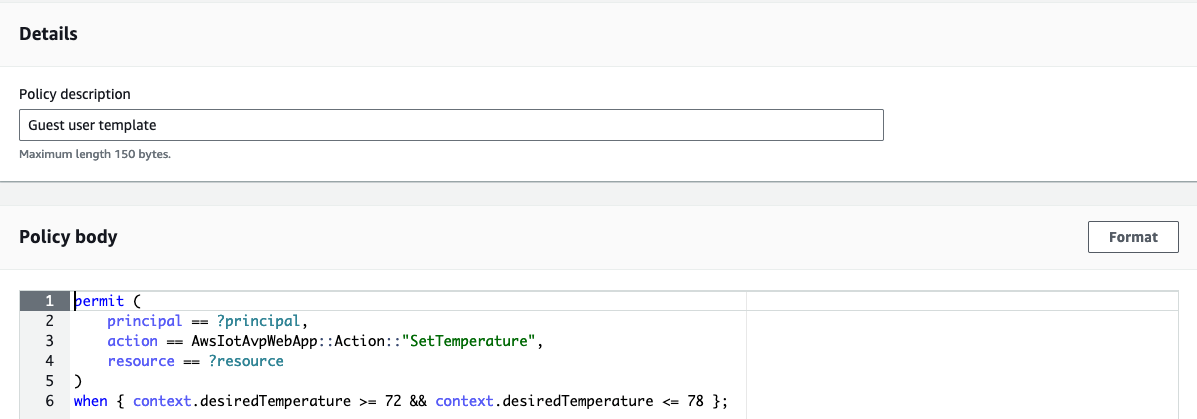
  1. Select Policy template and enter Guest user template as the description.
  2. Paste the following sample policy in the Policy body and choose Create policy template.
    permit (
        principal == ?principal,
        action in [AwsIotAvpWebApp::Action::"SetTemperature"],
        resource == ?resource
    )
    when { context.desiredTemperature >= 72 && context.desiredTemperature <= 78 };
Figure 11: Create guest user policy template

Figure 11: Create guest user policy template

As you can see, you don’t specify the principal and resource yet. You enter those when you create an actual policy from the policy template. The context object will be populated with the desiredTemperature property in the application and used to evaluate the decision.

You also need to create a policy template for the Power Company user with restricted time settings. Cedar policies don’t support date/time format, so you must represent 2:00 PM and 5:00 PM as elapsed minutes from midnight.

To create a policy template for the power company

  1. Select Policy template and enter Power company user template as the description.
  2. Paste the following sample policy in the Policy body and choose Create policy template.
    permit (
        principal == ?principal,
        action in [AwsIotAvpWebApp::Action::"SetTemperature", AwsIotAvpWebApp::Action::"GetTemperature"],
        resource == ?resource
    )
    when { context.time >= 840 && context.time < 1020 };

The policy templates accept the user and resource. The next step is to create a template-linked policy for Jane to set and get thermostat readings based on the Guest user template that you created earlier. For simplicity, you will manually create this policy using the Verified Permissions console. In production, application policies can be dynamically created using the Verified Permissions API.

To create a template-linked policy for a guest user

  1. In the Verified Permissions console, on the left pane, select Policies, then choose Create policy and select Create template-linked policy from the drop-down menu.
     
    Figure 12: Create new template-linked policy

    Figure 12: Create new template-linked policy

  2. Select the Guest user template and choose next.
     
    Figure 13: Select Guest user template

    Figure 13: Select Guest user template

  3. Under parameter selection:
    1. For Principal enter AwsIotAvpWebApp::User::”jane_doe”.
    2. For Resource enter AwsIotAvpWebApp::Device::”Thermostat1″.
    3. Choose Create template-linked policy.
       
      Figure 14: Create guest user template-linked policy

      Figure 14: Create guest user template-linked policy

Note that with this policy in place, jane_doe can only set the temperature of the device Thermostat1 to between 72°F and 78°F.

To create a template-linked policy for the power company user

Based on the template that was set up for power company, you now need an actual policy for it.

  1. In the Verified Permissions console, go to the left pane and select Policies, then choose Create policy and select Create template-linked policy from the drop-down menu.
  2. Select the Power company user template and choose next.
  3. Under Parameter selection, for Principal enter AwsIotAvpWebApp::User::”powercompany”, and for Resource enter AwsIotAvpWebApp::Device::”Thermostat1″, and choose Create template-linked policy.

Now that you have a set of policies in a policy store, you need to update the backend codebase to include this information and then deploy the web application using Amplify.

The policy statements in this post intentionally use human-readable values such as jane_doe and powercompany for the principal entity. This is useful when discussing general concepts but in production systems, customers should use unique and immutable values for entities. See Get the best out of Amazon Verified Permissions by using fine-grained authorization methods for more information.

Deploy the solution code from GitHub

Go to the GitHub repository to set up the Amplify web application. The repository Readme file provides detailed instructions on how to set up the web application. You will need your Verified Permissions policy store ID to deploy the application. For convenience, we’ve provided an onboarding script—deploy.sh—which you can use to deploy the application.

To deploy the application

  1. Close the repository.
    git clone https://github.com/aws-samples/amazon-verified-permissions-iot-
    amplify-smart-home-application.git

  2. Deploy the application.
    ./deploy.sh <region> <Verified Permissions Policy Store ID>

After the web dashboard has been deployed, you’ll create an IoT device using AWS IoT Core.

Create an IoT device and connect it to AWS IoT Core

With the users, policies, and templates, and the Amplify smart home application in place, you can now create a device and connect it to AWS IoT Core to complete the solution.

To create Thermostat1” device and connect it to AWS IoT Core

  1. From the left pane in the AWS IoT console, select Connect one device.
     
    Figure 15: Connect device using AWS IoT console

    Figure 15: Connect device using AWS IoT console

  2. Review how IoT Thing works and then choose Next.
     
    Figure 16: Review how IoT Thing works before proceeding

    Figure 16: Review how IoT Thing works before proceeding

  3. Choose Create a new thing and enter Thermostat1 as the Thing name and choose next.
    &bsp;
    Figure 17: Create the new IoT thing

    Figure 17: Create the new IoT thing

  4. Select Linux/macOS as the Device platform operating system and Python as the AWS IoT Core Device SDK and choose next.
     
    Figure 18: Choose the platform and SDK for the device

    Figure 18: Choose the platform and SDK for the device

  5. Choose Download connection kit and choose next.
     
    Figure 19: Download the connection kit to use for creating the Thermostat1 device

    Figure 19: Download the connection kit to use for creating the Thermostat1 device

  6. Review the three steps to display messages from your IoT device. You will use them to verify the thermostat1 IoT device connectivity to the AWS IoT Core platform. They are:
    1. Step 1: Add execution permissions
    2. Step 2: Run the start script
    3. Step 3: Return to the AWS IoT Console to view the device’s message
       
      Figure 20: How to display messages from an IoT device

      Figure 20: How to display messages from an IoT device

Solution validation

With all of the pieces in place, you can now test the solution.

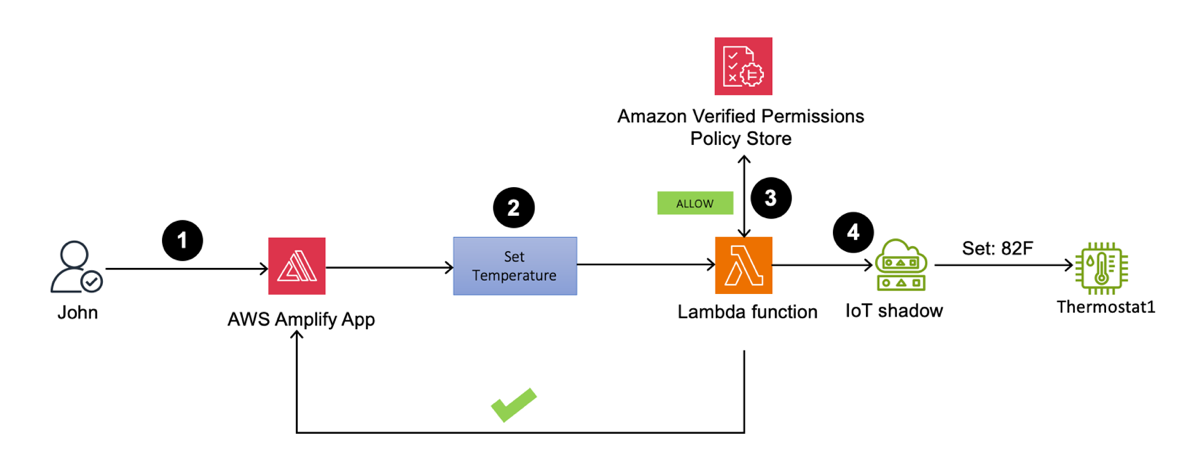
Primary owner signs in to the web application to set Thermostat1 temperature to 82°F

Figure 21: Thermostat1 temperature update by John

Figure 21: Thermostat1 temperature update by John

  1. Sign in to the Amplify web application as John. You should be able to view the Thermostat1 controller on the dashboard.
  2. Set the temperature to 82°F.
  3. The Lambda function processes the request and performs an API call to Verified Permissions to determine whether to ALLOW or DENY the action based on the policies. Verified Permissions sends back an ALLOW, as the policy that was previously set up allows unrestricted access for primary owners.
  4. Upon receiving the response from Verified Permissions, the Lambda function sends ALLOW permission back to the web application and an API call to the AWS IoT Device Shadow service to update the device (Thermostat1) temperature to 82°F.
     
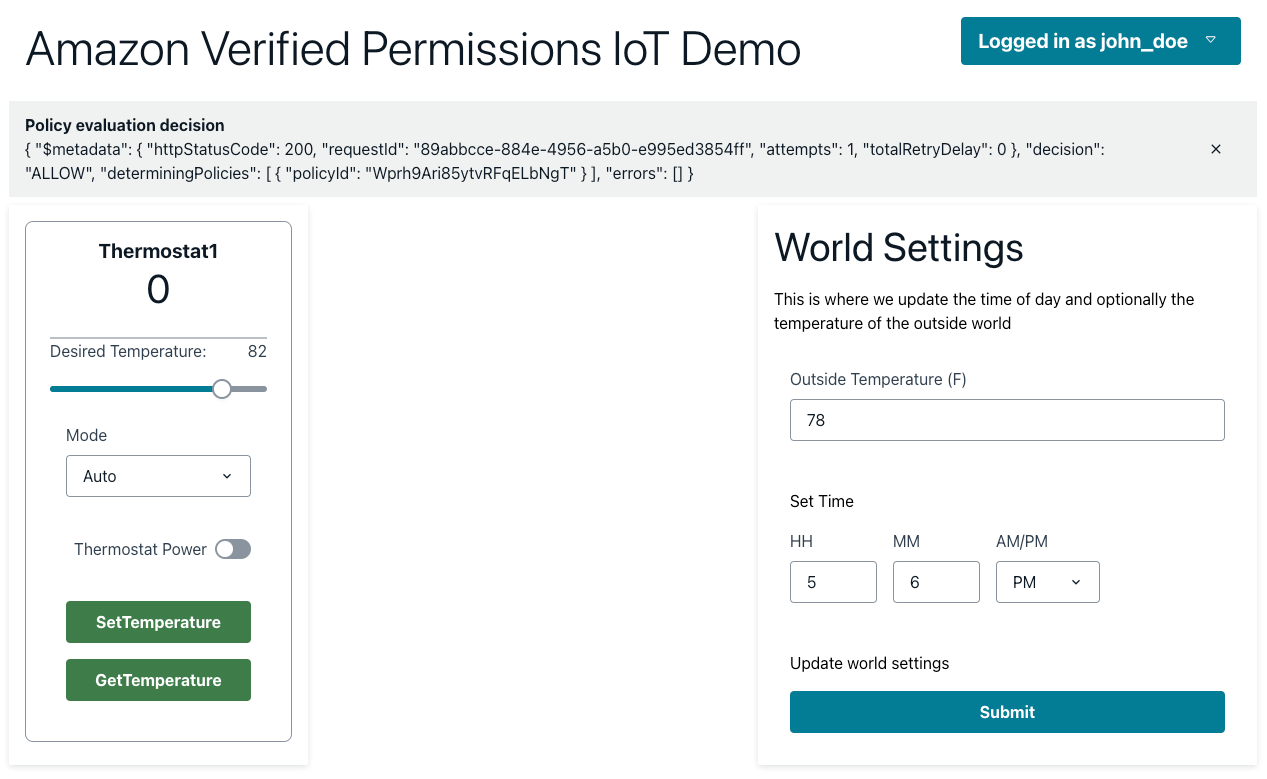
Figure 22: Policy evaluation decision is ALLOW when a primary owner calls SetTemperature

Figure 22: Policy evaluation decision is ALLOW when a primary owner calls SetTemperature

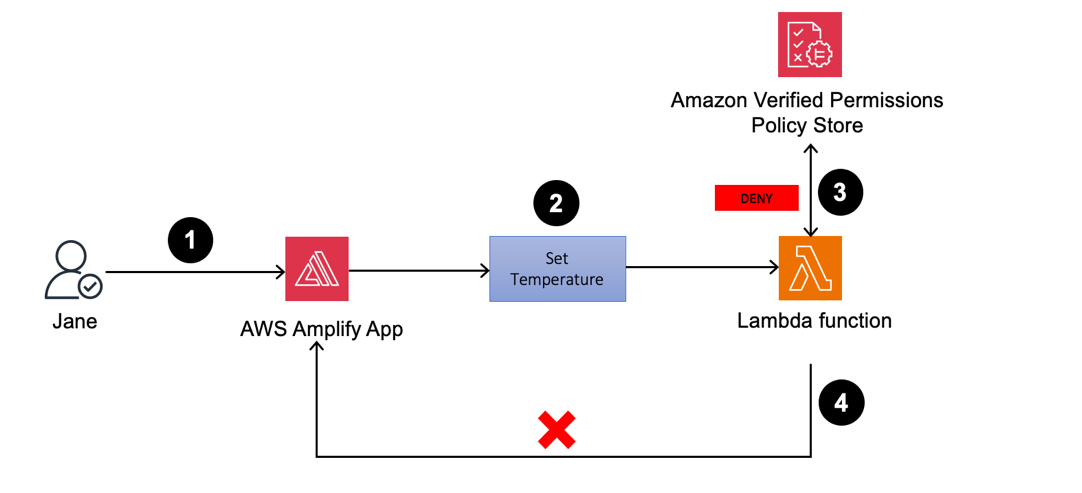
Guest user signs in to the web application to set Thermostat1 temperature to 80°F

Figure 23: Thermostat1 temperature update by Jane

Figure 23: Thermostat1 temperature update by Jane

  1. If you sign in as Jane to the Amplify web application, you can view the Thermostat1 controller on the dashboard.
  2. Set the temperature to 80°F.
  3. The Lambda function validates the actions by sending an API call to Verified Permissions to determine whether to ALLOW or DENY the action based on the established policies. Verified Permissions sends back a DENY, as the policy only permits temperature adjustments between 72°F and 78°F.
  4. Upon receiving the response from Verified Permissions, the Lambda function sends DENY permissions back to the web application and an unauthorized response is returned.
     
    Figure 24: Guest user jane_doe receives a DENY when calling SetTemperature for a desired temperature of 80°F

    Figure 24: Guest user jane_doe receives a DENY when calling SetTemperature for a desired temperature of 80°F

  5. If you repeat the process (still as Jane) but set Thermostat1 to 75°F, the policy will cause the request to be allowed.
     
    Figure 25: Guest user jane_doe receives an ALLOW when calling SetTemperature for a desired temperature of 75°F

    Figure 25: Guest user jane_doe receives an ALLOW when calling SetTemperature for a desired temperature of 75°F

  6. Similarly, jane_doe is allowed run GetTemperature on the device Thermostat1. When the temperature is set to 74°F, the device shadow is updated. The IoT device being simulated by your AWS Cloud9 instance reads desired the temperature field and sets the reported value to 74.
  7. Now, when jane_doe runs GetTemperature, the value of the device is reported as 74 as shown in Figure 26. We encourage you to try different restrictions in the World Settings (outside temperature and time) by adding restrictions to the static policy that allows GetTemperature for guest user.
     
    Figure 26: Guest user jane_doe receives an ALLOW when calling GetTemperature for the reported temperature

    Figure 26: Guest user jane_doe receives an ALLOW when calling GetTemperature for the reported temperature

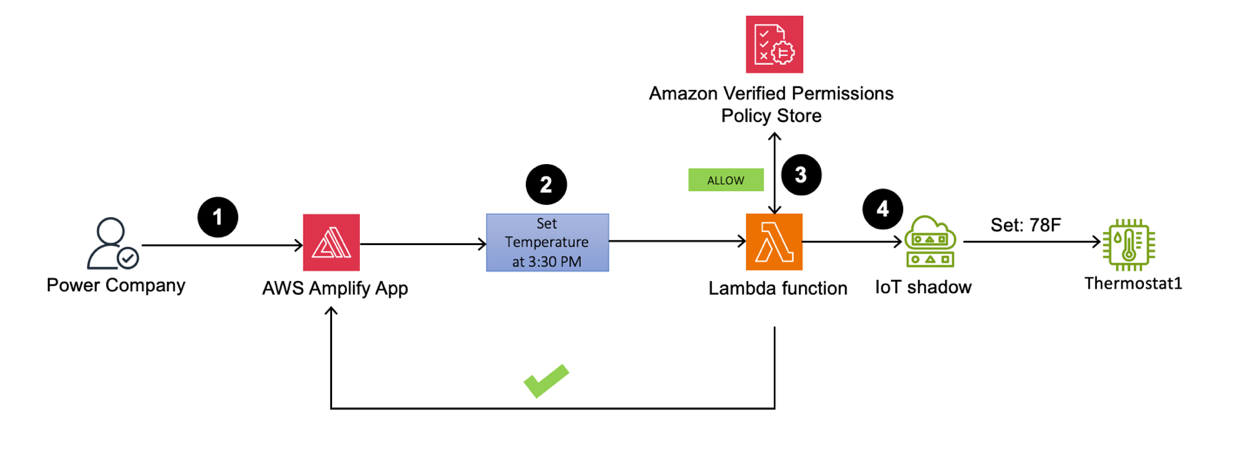
Power company signs in to the web application to set Thermostat1 to 78°F at 3.30 PM

Figure 27: Thermostat1 temperature set to 78°F by powercompany user at a specified time

Figure 27: Thermostat1 temperature set to 78°F by powercompany user at a specified time

  1. Sign in as the powercompany user to the Amplify web application using an API. You can view the Thermostat1 controller on the dashboard.
  2. To test this scenario, set the current time to 3:30 PM, and try to set the temperature to 78°F.
  3. The Lambda function validates the actions by sending an API call to Verified Permissions to determine whether to ALLOW or DENY the action based on pre-established policies. Verified Permissions returns ALLOW permission, because the policy for powercompany permits device temperature changes between 2:00 PM and 5:00 PM.
  4. Upon receiving the response from Verified Permissions, the Lambda function sends ALLOW permission back to the web application and an API call to the AWS IoT Device Shadow service to update the Thermostat1 temperature to 78°F.
     
    Figure 28: powercompany receives an ALLOW when SetTemperature is called with the desired temperature of 78°F

    Figure 28: powercompany receives an ALLOW when SetTemperature is called with the desired temperature of 78°F

Note: As an optional exercise, we also made jane_doe a device owner for device Thermostat2. This can be observed in the users.json file in the Github repository. We encourage you to create your own policies and restrict functions for Thermostat2 after going through this post. You will need to create separate Verified Permissions policies and update the Lambda functions to interact with these policies.

We encourage you to create policies for guests and the power company and restrict permissions based on the following criteria:

  1. Verify Jane Doe can perform GetTemperature and SetTemperature actions on Thermostat2.
  2. John Doe should not be able to set the temperature on device Thermostat2 outside of the time range of 4:00 PM and 6:00 PM and outside of the temperature range of 68°F and 72°F.
  3. Power Company can only perform the GetTemperature operation, but there are no restrictions on time and outside temperature.

To help you verify the solution, we’ve provided the correct policies under the challenge directory in the GitHub repository.

Clean up

Deploying the Thermostat application in your AWS account will incur costs. To avoid ongoing charges, when you’re done examining the solution, delete the resources that were created. This includes the Amplify hosted web application, API Gateway resource, AWS Cloud 9 environment, the Lambda function, DynamoDB table, Cognito user pool, AWS IoT Core resources, and Verified Permissions policy store.

Amplify resources can be deleted by going to the AWS CloudFormation console and deleting the stacks that were used to provision various services.

Conclusion

In this post, you learned about creating and managing fine-grained permissions using Verified Permissions for different user personas for your smart thermostat IoT device. With Verified Permissions, you can strengthen your security posture and build smart applications aligned with Zero Trust principles for real-time authorization decisions. To learn more, we recommend:

 
If you have feedback about this post, submit comments in the Comments section below. If you have questions about this post, contact AWS Support.

Author

Rajat Mathur

Rajat is a Principal Solutions Architect at Amazon Web Services. Rajat is a passionate technologist who enjoys building innovative solutions for AWS customers. His core areas of focus are IoT, Networking, and Serverless computing. In his spare time, Rajat enjoys long drives, traveling, and spending time with family.

Pronoy Chopra

Pronoy Chopra

Pronoy is a Senior Solutions Architect with the Startups Generative AI team at AWS. He specializes in architecting and developing IoT and Machine Learning solutions. He has co-founded two startups and enjoys being hands-on with projects in the IoT, AI/ML and Serverless domain. His work in Magnetoencephalography has been cited many times in the effort to build better brain-compute interfaces.

Syed Sanoor

Syed Sanoor

Syed serves as a Solutions Architect, assisting customers in the enterprise sector. With a foundation in software engineering, he takes pleasure in crafting solutions tailored to client needs. His expertise predominantly lies in C# and IoT. During his leisure time, Syed enjoys piloting drones and playing cricket.

20 години „борба с наркотиците“. Хроника на корупция и нарастващ популизъм

Post Syndicated from Светла Енчева original https://www.toest.bg/20-godini-borba-s-narkotitsite-hronika-na-koruptsiya-i-narastvasht-populizam/

20 години „борба с наркотиците“. Хроника на корупция и нарастващ популизъм

Младежите, навършили пълнолетие през последните години, нямат спомени от времето, когато е въведена една поправка в Наказателния кодекс (НК), засягаща много от тях. Някои дори не са били родени, когато тя е приета от парламента. През март 2004 г. Народното събрание гласува отпадане на текста в НК, според който не се наказва човек, носещ у себе си наркотик в количество за еднократна употреба.

По онова време правителството беше оглавявано от Симеон Сакскобургготски, а на власт беше коалицията между НДСВ, ДПС и „Новото време“. Председател на „Новото време“ беше днешният директор на БНТ Емил Кошлуков. Именно тази партия инициира криминализирането на еднократната доза. Особено активен в агитацията за законовата поправка беше депутатът Мирослав Севлиевски, затова и тя се запомни като поправката „Севлиевски“.

Какво се твърдеше, а какво стана

„Че някой е решил да напълни затворите с деца, е лъжа, която обслужва наркопазара“, твърдеше преди 20 години Севлиевски. На практика обаче от демократичността на всеки съдебен състав зависеше дали ще наложи ефективна присъда на някого за еднократна доза, или ще намери законова „врътка“, за да го отърве. Имаше случаи на 18–19 годишни тийнейджъри, влезли в затвора за половин цигара марихуана.

Така полицията отчиташе разкриваемост на престъпления, свързани с наркотици, а мрежите за разпространение на дрога си процъфтяваха. Поради това наркотиците продължаваха да бъдат достъпни, а най-уязвими бяха крайните им потребители, които живееха в постоянен страх от репресии. За тези от тях, развили зависимост към определени наркотични вещества, уязвимостта ставаше още по-голяма, защото страхът от преследване намаляваше шансовете им да потърсят и намерят адекватна подкрепа.

Всичко това стана възможно въпреки предупрежденията на множество експерти, лекари, юристи и организации, включително на Националния център по наркомании, че криминализирането на еднократната доза няма да има декларирания ефект, а напротив – ще стане предпоставка за увеличение на корупцията. А адекватната борба със зависимостите, каквато се практикува в европейските държави още по онова време, е свързана не с преследване на зависимите, а с превенция и лечение.

Вместо поука – увеличаване на репресиите

В течение на тези 20 години криминализиране на еднократната доза се правят множество изследвания, според които употребата им сред младите хора у нас се увеличава.

„В България продължава тенденцията на общо увеличение на броя на учениците, употребили наркотици, който влиза в известно противоречие с тенденцията на лек спад в повечето европейски страни, най-вече в употребата на марихуана“, е изводът от годишното изследване за 2011 г. на Националния фокусен център за наркотици и наркомания. По данни на същата организация през 2021 г. 14,7% от учениците от 8. до 12. клас са употребили някога поне едно наркотично вещество.

Трудно е обаче да има достоверна статистика, когато става въпрос за нещо стигматизирано и криминализирано, каквото е дрогата. От гражданската инициатива „Един грам живот“ отиват още по-далеч в заключенията си. В края на 2023 г. те твърдят, че по неофициални данни над 70% от учениците в България са пробвали наркотици. Данните са извлечени от анонимни анкети, направени от експерти. Гаранция за тяхната представителност и достоверност, разбира се, няма, но пък няма и официални данни по темата.

На този фон репресиите върху употребилите наркотични вещества се засилват. Обискирането по паркове, градинки и метростанции на хора, които според служителите на реда „приличат“ на такива, които биха употребявали наркотици, не престава. В края на миналата година например полицаи буквално изхвърлиха на пътното платно, по което минават коли, човек, когото се опитват да обискират, понеже чули разговор между трима души, в който се споменава марихуана. А друг от групата арестуваха заради „хулиганство“, но пък заповедта за арест е по друго обвинение – „нанасяне на лека телесна повреда“, понеже ухапал (чудно как) един от полицаите по коляното.

Към тези репресии се прибавят и все по-строги законови санкции, като основният фокус вече пада върху т.нар. пияни и дрогирани шофьори. Преди няколко години се въведе временно отнемане на книжката на лица, шофирали след употреба на алкохол и наркотици, дори да не са извършили престъпление. А от 2023 г. вече се отнема и самият автомобил. Въпреки че по данни на Института за пътна безопасност алкохолът и наркотиците са причина за едва 2,5% от катастрофите с жертви.

Колко е важно значението на понятията (и клишетата)

Представете си, че не сте яли от една седмица. Пиете хапче, на чиято листовка пише, че се приема след хранене. И се чудите защо ви става лошо – нали преди една седмица сте яли, значи го приемате след хранене. Едва ли бихте си помислили подобно нещо, нали? В противен случай бихте имали сериозни проблеми с функционалната грамотност.

Масовите медии използват изразите „пияни и дрогирани шофьори“ и „шофиране след употреба на алкохол или наркотици“ като равнозначни и в масовото съзнание те са се набили като устойчиви клишета. Какво значи обаче „след употреба“? Дали че човекът зад волана е пиян или дрогиран, или просто е пил алкохол или употребил наркотик някога в миналото?

Българското законодателство прецизно уточнява какво означава един човек да кара пиян. Ако алкохолът в кръвта е до 0,5 промила, не се носи нито административна, нито наказателна отговорност. От 0,5 до 1,2 промила следват административни санкции, които се увеличават пропорционално на количеството алкохол в кръвта. От 1,2 промила нагоре отговорността е вече наказателна, тоест става въпрос за престъпление.

За наркотиците обаче няма подобни уточнения. Може да сте изпушили един джойнт преди седмица, действието му отдавна да е изтекло, но тестът пак ще установи, че сте шофирали „след употреба на наркотици“.

Не по-маловажен проблем е, че полевите тестове за наркотици са пословично неточни – те могат да покажат позитивен резултат дори след употреба на легални лекарства, включително такива, които не предизвикват промени в съзнанието – като антибиотици и ибупрофен. Резултатът ви може да излезе позитивен дори ако просто сте си хапнали кифла с маково семе. А докато се изчакат по-достоверните резултати от кръвните тестове, минават месеци.

Затова адвокати като например Силвия Петкова, която води (и печели) дела за санкции за шофьори след фалшиво позитивни текстове, наричат „лудост“ идеята за конфискуване на превозното средство след полеви тест за наркотици. Междувременно отнетите автомобили заради употреба на алкохол и наркотици са над 2500 към 20 март. В някои градове вече няма място за тях, въпреки че държавата е започнала да ги продава.

Две лични истории

Редакцията на „Тоест“ разполага с личните истории на двама души, които показват как репресивността на мерките срещу хората, шофиращи „след употреба на наркотици“, води до увеличаване на корупцията. Запазваме тяхната анонимност, за да ги предпазим. Нека ги наречем Миро и Славчо – в чест на Мирослав Севлиевски.

Един ден Миро кара с колата към работа. Спират го полицаи за проверка. Той е сигурен, че не е извършил нарушение. Но пък е слушал музика и си е „куфеел“ – може поради това да им се е видял съмнителен. Проверяват документите му , багажника и започват да му задават различни въпроси. Питат го дали е ползвал наркотици, като го предупреждават, че ще му направят тест.

„Казах им, че съм пушил марихуана предишната седмица – може би събота или неделя. И те се оживиха, като разбраха тази работа. Започнаха да плашат, че нямало да отида на работа, сваляли ми номерата, отиваме в районното, арестуват ме… И аз им казах: „Добре, отиваме.“ Те обаче продължиха да настояват, че нататък става много лошо. […] „Ако те удари някой, за нищо ще изгориш. Може да не си виновен ти. Виждам, имаш деца, трябва да ги пазиш.“

След като го съветват да „почерпи“ за „доброто отношение“, Миро дава на полицаите всичките пари в брой, които носи у себе си – 90 лв. Чак после се сеща, че са го преметнали – спряла го е обикновена патрулна кола, а само автомобилите на КАТ разполагат с тестове за наркотици.

Ако аз в петък съм бил в Нидерландия и съм пушил джойнт – там това е напълно законно. Прибирам се в неделя. В понеделник ме спират български полицаи на българска територия – аз в нарушение ли съм, или не съм? – пита Миро. – По какъв начин нещо, което съм правил през уикенда и няма никакви последствия върху организма ми, тъй като действието му приключва до няколко часа след употребата, ме прави престъпник?

Историята на Славчо е аналогична. И той карал кола към работа – на връщане от работна среща, с не повече от 20–30 километра в час, спазвайки правилата. 

В 12 на обед в работен ден в един храсталак между къщички на тихо пътче, което излиза на Околовръстното, ме спират полицаи, изскачащи от шубрака. 

Не казват защо го спират, но не пропускат въпроса: „Скоро използвали ли сте наркотици?“ Славчо честно си признава, че е пушил трева през уикенда. За разлика от Миро обаче носи повече пари – 300 лв. Вземат му ги всичките.

Пак минах тънко – успокоява се Славчо, – има хора, които са придружавани до банкомат, за да дръпнат по една хилядарка от сметката си и да ги пуснат по живо, по здраво.

Последствията от репресиите за психичното здраве

Лечението на много заболявания изисква медикаменти, чиято употреба води до позитивен тест за наркотици – не само защото полевите тестове често дават фалшиви резултати, а и защото самите лекарства съдържат вещества, класифицирани като наркотични. Психиатърът Владимир Сотиров, управител на Амбулатория за психично здраве „Адаптация“, разказа пред „Тоест“ на какви проблеми се натъква в професионалната си практика заради санкционирането на т.нар. дрогирани шофьори:

„Факт е, че хората се притесняват, когато предписвам лекарства на зелена (бензодиазепини) и/или жълта рецепта (амфетамини), дали това няма да ги застраши, ако ги спрат полицаи за случайна проверка“, казва Сотиров. Според него така състоянието на пациентите му се усложнява: „Възниква още едно притеснение – дори страх – върху притесненията им, с които идват при мен и които аз се опитвам да лекувам.“

Тези притеснения имат основателна причина, а не са само в главите на пациентите. Така се стига до парадокс – в опита си да помогне, предписвайки адекватна терапия, лекарят може да усложни състоянието на пациента. „Аз съм този, който с препоръките си за лечение въвежда допълнителен симптом в клиничната картина“, отбелязва управителят на „Адаптация“.

Психиатърът обръща внимание и на нещо, върху което малко не-специалисти се замислят, а законотворците ни – хич. Понякога състоянието на пациентите представлява по-голям риск от забранените за шофьорите вещества, съдържащи се в лекарствата им:

Симптомите, от които хората страдат, повлияват на тяхното функциониране, включително в ролята им на шофьори, в много по-голяма степен от ефектите на лечението. Даже е обратното – ефектите от лечението целят подобряване на функционирането – включително шофирането – чрез облекчаване или редуциране на симптомите, които го затрудняват. 

Например в някои случаи на пациентите с паникатаки и други тревожни разстройства „практически задължително“ се изписва бензодиазепин. И така се намалява тревожността, която може да повлияе и върху шофирането – „така, както парацетамолът облекчава треската“.

„В общия случай хората използват наркотици по същите причини, поради които използват и всякакви други психотропни лекарства – да облекчат симптоми на тревожност или друго емоционално или психично страдание“, казва Сотиров. Затова той смята, че отношението към хората със зависимости не следва да е като към престъпници, а употребата на наркотици следва да се декриминализира. 

Защото наказателното преследване на употребяващите наркотици прибавя още едно страдание към страданието, наложило употребата.

Много потърпевши, но мижав интерес

На 20 април в София се проведе протест под надслов „Употреба“ не е „въздействие“. Едно от исканията на организаторите беше в НК „след употреба“ да се замени с „под въздействието на“. В мотивите си те обръщат внимание на пренебрежимо ниския дял на смъртността при пътнотранспортни произшествия, причинена поради употреба на дрога, и отбелязват, че рисковете от използването на смартфон при шофиране са далеч по-сериозни. В допълнение се казва и че определени хора редовно биват подлагани на тестове само защото са млади или изглеждат „алтернативно“.

Въпреки хилядите досъдебни производства и стотиците присъди за заклеймяваните като „пияни и дрогирани шофьори“ протестът се проведе при „мижав интерес“, ако използваме думите на певеца Панайот Панайотов. Вероятно част от потенциалните потърпевши са се опасявали да не станат обект на репресии само заради участието си в демонстрацията. Други (и някои от предишните) знаят, че ако постъпят като Миро и Славчо и подкупят полицаите, с голяма вероятност ще се отърват.

Има обаче една категория хора, които смятат, че са над правилата, и живеят с това убеждение. Като Кристиан Николов, причинил смъртта на журналиста Милен Цветков и осъден на 9 години затвор за това. Или Георги Семерджиев, осъден на втора инстанция на 20 години затвор за произшествие, в което живота си загубиха две момичета, минаващи по тротоара в момента на катастрофата. Има още много като Николов и Семерджиев. Те обикновено карат скъпи и мощни автомобили, имат свои хора в полицията или неслучайни родители, или разполагат с други ресурси, благодарение на които могат да живеят в безнаказаност. Поне докато се случи непоправимото.

Именно пробитата и корумпирана система, позволяваща на такива хора да бъдат над закона, е истинският „убиец на пътя“, ако използваме още едно медийно клише. Докато тя не се промени така, че правилата да важат за всички, няма значение дали ще се криминализира и шофирането с 0,5 промила алкохол в кръвта, както предложи МВР преди месец. Или ако пушенето на джойнт дори две седмици преди теста се наказва с доживотен затвор.

Последното май още никой не го е предложил, но натам вървят нещата.