Post Syndicated from BeardedTinker original https://www.youtube.com/watch?v=FMCuSD92TTg
Comic for 2023.04.16 – Fuck Around
Post Syndicated from Explosm.net original https://explosm.net/comics/fuck-around
New Cyanide and Happiness Comic
Halter of Versatility
Post Syndicated from Oglaf! -- Comics. Often dirty. original https://www.oglaf.com/halterofversatility/


Get an Intel Silicon Photonics 100GbE QSFP28 2km Optic for $6
Post Syndicated from Rohit Kumar original https://www.servethehome.com/get-an-intel-silicon-photonics-100gbe-qsfp28-2km-optic-sptsbp2clks-100g-cwdm4/
There are Intel Silicon Photonics 100G QSFP28 2km CWDM4 optics out there for under $6 that appear to have come from a hyper-scaler
The post Get an Intel Silicon Photonics 100GbE QSFP28 2km Optic for $6 appeared first on ServeTheHome.
Kyrgyzstan Photography Tour – 14 to 24 August 2023
Post Syndicated from Matt Granger original https://www.youtube.com/watch?v=VVF2EZlXmYg
Comic for 2023.04.15 – Baby Tooth
Post Syndicated from Explosm.net original https://explosm.net/comics/baby-tooth
New Cyanide and Happiness Comic
The 50 year old headphone dongle
Post Syndicated from Techmoan original https://www.youtube.com/watch?v=KDY7HVqM6ew
Duffy: Run an open source-powered virtual conference!
Post Syndicated from original https://lwn.net/Articles/929144/
On her blog, Máirín Duffy writes
about using open-source software to run a virtual conference. The Fedora design team
recently ran the first Creative
Freedom Summit as a virtual conference for FOSS creative tools. The team
could have used the same non-open-source platform that is used by the Flock Fedora conference, but took a
different path:
Using Matrix’s Element client, we embedded the live stream video and an
Etherpad into a public Matrix room for the conference. We used attendance
in the channel to monitor overall conference attendance. We had live chat
going throughout the conference and took questions from audience members
both from the chat and the embedded Q&A Etherpad.
Back in 2020, the Linux Plumbers Conference also put together a virtual conference using free
software, as did LibrePlanet and likely others.
Friday Squid Blogging: Colossal Squid
Post Syndicated from Bruce Schneier original https://www.schneier.com/blog/archives/2023/04/friday-squid-blogging-colossal-squid.html
Interesting article on the colossal squid, which is larger than the giant squid.
The article answers a vexing question:
So why do we always hear about the giant squid and not the colossal squid?
Well, part of it has to do with the fact that the giant squid was discovered and studied long before the colossal squid.
Scientists have been studying giant squid since the 1800s, while the colossal squid wasn’t even discovered until 1925.
And its first discovery was just the head and arms found in a sperm whale’s stomach.
It wasn’t until 1981 that the first whole animal was found by a trawler near the coast of Antarctica.
As usual, you can also use this squid post to talk about the security stories in the news that I haven’t covered.
Read my blog posting guidelines here.
AWS Security Profile: Ryan Dsouza, Principal Solutions Architect
Post Syndicated from Maddie Bacon original https://aws.amazon.com/blogs/security/aws-security-profile-ryan-dsouza-principal-solutions-architect/
In the AWS Security Profile series, I interview some of the humans who work in Amazon Web Services Security and help keep our customers safe and secure. This interview is with Ryan Dsouza, Principal Solutions Architect for industrial internet of things (IIoT) security.
How long have you been at AWS and what do you do in your current role?
I’ve been with AWS for over five years and have held several positions working with customers, AWS Partner Network partners, and standards organizations on IoT and IIoT solutions. Currently, I’m a Principal Solutions Architect for IIoT security. In this role, I’m the global technical leader and subject matter expert for operational technology (OT) and IIoT security, which means that I lead our OT/IIoT strategy and roadmap, translate customer requirements into technical solutions, and work with industry standards such as ISA/IEC 62443 to support IIoT and cloud technologies. I also work with our strategic OT/IIoT security partners to design and build integrations and solutions on AWS. And I work with some of our strategic customers to help them plan, assess, and manage the risk that comes from OT/IT convergence and to design, build, and operate more secure, scalable, and innovative IIoT solutions by using AWS capabilities to deliver measurable business outcomes.
How did you get started in the world of OT and IIoT security?
I’ve been working with OT for more than 25 years and with IIoT, for the last 10 years. I’ve led digital transformation initiatives for numerous world-class organizations including Accenture, Siemens, General Electric, IBM, and AECOM, serving customers on their digital transformation initiatives across a wide range of industry verticals such as manufacturing, buildings, utilities, smart cities, and more.
Throughout my career, I witnessed devices across critical infrastructure sectors, such as water, manufacturing, electricity, transportation, oil and gas, and buildings, getting digitized and connected to the internet. I quickly realized that this trend of connected assets and digitization will continue to grow and could outstrip the supply of cybersecurity professionals. Each customer that embraces the digital world faces cybersecurity challenges. At AWS, I work with customers to understand these challenges and provide prescriptive and practical guidance on how to secure their OT environments and IIoT solutions to help ensure safe and secure digital transformation.
What makes OT security different from information technology (IT) security?
OT and IT security are two distinct areas of security that are designed to protect different types of systems and assets. OT security is concerned with the protection of industrial control systems and other related operational technology, such as supervisory control and data acquisition (SCADA) systems, which are used to control and monitor physical processes in critical infrastructure industries such as manufacturing, energy, transportation, buildings, and utilities. The main focus of OT security is on the availability, integrity, safety, and reliability of these systems, as well as protection of the physical equipment that is being controlled. OT cybersecurity supports the safe operation of critical infrastructure. IT security, on the other hand, is concerned with the protection of computer systems, networks, and data from cyberthreats such as hacking, malware, and phishing attempts. The main focus of IT security is on the confidentiality, integrity, and availability of information and systems.
As a result of OT/IT convergence, IIoT, and the industrial digital transformation, our customers now must secure an increasing attack surface and overlapping IT and OT environments. They realize that it is business critical to secure OT/IIoT systems to avoid security events that could cause unplanned downtime and pose a safety risk. I refer to this as “securing cyber-physical systems and enabling safe and secure industrial digital transformation.”
How do you explain your job to your non-tech friends?
I explain that OT is used in buildings, manufacturing, utilities, transportation, and more, and when these systems connect to the internet, they’re exposed to risks. The risks are the same as those faced by IoT devices in our own homes and workplaces—but with greater consequences if compromised because these systems deal with critical infrastructure that our society relies on. I often share the Colonial Pipeline example and explain that I help AWS customers understand the risks and the consequences from a compromise, and design cybersecurity solutions to protect these critical infrastructure assets.
What are you currently working on that you’re excited about?
Our customers use lots of security tools from lots of different vendors. Security is a team sport, and I’m really excited to be working with customers, APN partners, and AWS service teams to build security features and product integrations that make it simpler for customers to monitor and secure OT, IIoT, and the cloud. For example, I’m working with our APN security partners to build integrations with AWS Security Hub and Amazon Security Lake, bring zero trust security solutions to OT environments, and improve security at the industrial edge.
Another project that I’m super excited about is bringing OT/IIoT security solutions to our critical infrastructure customers, including small and mid-sized organizations, by simplifying the deployment, management, procurement, and payment process so that customers can get more value from these AWS security solutions faster.
Another area of focus for me is tracking the fast-evolving critical infrastructure cybersecurity regulations, how they impact our customers, and the role that AWS can play to make it simpler for customers to align with these new security and compliance requirements.
Just like how the cloud transformed IT, I think the cloud will continue to revolutionize OT, and I’m super excited and energized to work with customers and APN partners to move OT and IIoT applications to the cloud and build nearly anything they can imagine faster and more cost-effectively on AWS.
What are the biggest challenges in securing critical infrastructure systems?
With critical infrastructure, the biggest challenge is legacy OT systems that may not have been designed with cybersecurity in mind and that use older operating systems and software, which can be difficult to upgrade and patch. These systems were designed to operate in an air-gapped environment, but there is a growing trend to connect them in new ways to IT systems. As IT and OT converge to support expanding business needs, air-gapped devices and perimeter security are no longer sufficient to address and defend against modern threats such as ransomware, data exfiltration, denial of service, and cryptocurrency mining. As OT and IT converge and OT becomes more cloud connected, the biggest challenge is to secure critical infrastructure that uses legacy and aging industrial control systems (ICS) and OT technology. We are seeing a trend to keep ICS/OT systems connected, but in smarter and more secure ways by using network segmentation, edge gateways, and the hybrid cloud so that if a problem occurs, you can still run the most important systems in an isolated and disconnected mode. For example, if your corporate systems are compromised with ransomware, you can disconnect your critical infrastructure systems from the external world and continue the most critical operations. There is a growing need to design innovative and highly distributed solution patterns to keep critical information and hybrid systems safe and secure. This is an area of focus for me at AWS.
What else can enterprises do to manage OT/IT convergence and protect themselves from these security risks?
I’ve done multiple presentations, blog posts, and whitepapers on this topic, and even if the solutions sound simple, they can be challenging to implement in industrial environments. I recommend reading the blog posts Managing Organization Transformation for Successful OT/IT Convergence and Assessing OT and IIoT cybersecurity risk, and implementing the Ten security golden rules for IIoT solutions. AWS offers lots of prescriptive guidance and solutions to help enterprises more safely and securely manage OT/IT convergence and mitigate risk with proper planning and implementation across the various aspects of business—people, processes, and technology. I encourage customers to start by focusing on the security fundamentals of securing identities, assessing their risk from OT/IT convergence, and improving their visibility into devices on the network and across the converged OT and IT environment. I also recommend using standards such as ISA/IEC 62443, which are comprehensive, consensus-based, and form a strong basis for securing critical infrastructure systems.
What skills do professionals need to be successful in critical infrastructure security?
Critical infrastructure security sounds harder than it really is. When I train people, I break it down into bite-sized pieces that are simple to understand and implement. There is some mystery around cybersecurity, but it’s just a lot of small parts. You must learn what all the parts are, what the acronyms are, and how they fit together to form cyber-physical systems. When I describe it in a real-world application, most people pick it up quickly.
Curiosity and a desire to continue learning are important characteristics to have, because cybersecurity is a fast-evolving technology field. Empathy is also important because to secure a system, you must have empathy for the people behind the work and why their goals and needs are important. For example, in the OT world, you have operations folks who just want the thing to work. If an alarm is going off on their computer screen and they must react by clicking a button, they don’t want their screen to lock them out so they can’t click that button, because this could cause the plant to have big problems. So, you need to design a solution that matches user access controls with roles and responsibilities so that a plant operator can take corrective actions in an emergency situation.
Another example is patching critical OT systems that have vulnerabilities. This may not be possible due to the risk of causing unplanned downtime, and it could pose a safety risk or result in additional time and cost for recertification due to compliance requirements. You must have empathy for the people in this situation and their needs, and then, as a security professional, design around that so they can still have those things but in a more secure way. For example, you might need to create mechanisms to identify, network isolate, or replace legacy devices that aren’t capable of receiving updates. If you are detail-oriented and have strong curiosity and empathy, you can succeed in the field of critical infrastructure cybersecurity.
What’s your favorite Amazon Leadership Principle, and why?
I have two favorite leadership principles: Learn and be Curious; and one that I initially discounted, Frugality. I believe that the best way to predict the future is to invent it, which is why I’m never done learning and seeking new ways to solve problems.
My view on the Frugality leadership principle is that we need to be frugal with each other’s time. There are so many competing demands on everyone’s time, and it’s important in a place like AWS to be mindful of that. Make sure you’ve done your due diligence on something before you broadly ask the question or escalate. Being frugal in my view is about being self-sufficient, learning to use self-service tools, and working with limited time or resources to deliver results.
I wake up every morning with the conviction that the world is always changing, and that, to succeed, I have to change faster by learning new skills and being frugal with time and resources.
What’s the thing you’re most proud of in your career?
I’m really proud of working with critical infrastructure customers across a diverse range of industries over the last 25 years and supporting their digital transformation initiatives. In the early part of my career, I was a design and commissioning engineer of industrial automation systems. In this role, I had the opportunity to design and commission new industrial plants and get them into operation, which was extremely fulfilling. I feel fortunate to have joined a company like AWS that takes cybersecurity seriously in developing its products and cloud services, and I’m proud to bring real-world experience in the design and security of cyber-physical systems to our critical infrastructure customers.
If you had to pick an industry outside of engineering, what would you want to do?
Growing up in India in a family of engineers and doctors, there were only two options: engineer or doctor. Both professions have the ability to change the world. Because my mother and brother worked at Siemens, I pursued a career in engineering. If I had to pick an industry outside of engineering, it would have been in the medical field.
If you have feedback about this post, submit comments in the Comments section below. If you have questions about this post, contact AWS Support.
Want more AWS Security news? Follow us on Twitter.
Upcoming Speaking Engagements
Post Syndicated from Schneier.com Webmaster original https://www.schneier.com/blog/archives/2023/04/upcoming-speaking-engagements-29.html
This is a current list of where and when I am scheduled to speak:
- I’m speaking on “Cybersecurity Thinking to Reinvent Democracy” at RSA Conference 2023 in San Francisco, California, on Tuesday, April 25, 2023, at 9:40 AM PT.
- I’m speaking at IT-S Now 2023 in Vienna, Austria, on June 2, 2023 at 8:30 AM CEST.
The list is maintained on this page.
Hacking Suicide
Post Syndicated from Bruce Schneier original https://www.schneier.com/blog/archives/2023/04/hacking-suicide.html
Here’s a religious hack:
You want to commit suicide, but it’s a mortal sin: your soul goes straight to hell, forever. So what you do is murder someone. That will get you executed, but if you confess your sins to a priest beforehand you avoid hell. Problem solved.
This was actually a problem in the 17th and 18th centuries in Northern Europe, particularly Denmark. And it remained a problem until capital punishment was abolished for murder.
It’s a clever hack. I didn’t learn about it in time to put it in my book, A Hacker’s Mind, but I have several other good hacks of religious rules.
Scale your authorization needs for Secrets Manager using ABAC with IAM Identity Center
Post Syndicated from Aravind Gopaluni original https://aws.amazon.com/blogs/security/scale-your-authorization-needs-for-secrets-manager-using-abac-with-iam-identity-center/
With AWS Secrets Manager, you can securely store, manage, retrieve, and rotate the secrets required for your applications and services running on AWS. A secret can be a password, API key, OAuth token, or other type of credential used for authentication purposes. You can control access to secrets in Secrets Manager by using AWS Identity and Access Management (IAM) permission policies. In this blog post, I will show you how to use principles of attribute-based access control (ABAC) to define dynamic IAM permission policies in AWS IAM Identity Center (successor to AWS Single Sign-On) by using user attributes from an external identity provider (IdP) and resource tags in Secrets Manager.
What is ABAC and why use it?
Attribute-based access control (ABAC) is an authorization strategy that defines permissions based on attributes or characteristics of the user, the data, or the environment, such as the department, business unit, or other factors that could affect the authorization outcome. In the AWS Cloud, these attributes are called tags. By assigning user attributes as principal tags, you can simplify the process of creating fine-grained permissions on AWS.
With ABAC, you can use attributes to build more dynamic policies that provide access based on matching attribute conditions. ABAC rules are evaluated dynamically at runtime, which means that the users’ access to applications and data and the type of allowed operations automatically change based on the contextual factors in the policy. For example, if a user changes department, access is automatically adjusted without the need to update permissions or request new roles. You can use ABAC in conjunction with role-based access control (RBAC) to combine the ease of policy administration with flexible policy specification and dynamic decision-making capability to enforce least privilege.
AWS IAM Identity Center (successor to AWS Single Sign-On) expands the capabilities of IAM to provide a central place that brings together the administration of users and their access to AWS accounts and cloud applications. With IAM Identity Center, you can define user permissions and manage access to accounts and applications in your AWS Organizations organization centrally. You can also create ABAC permission policies in a central place. ABAC will work with attributes from a supported identity source in IAM Identity Center. For a list of supported external IdPs for identity synchronization through the System for Cross-domain Identity Management (SCIM) and Security Assertion Markup Language (SAML) 2.0, see Supported identity providers.
The following are key benefits of using ABAC with IAM Identity Center and Secrets Manager:
- Fewer permission sets — With ABAC, multiple users who use the same IAM Identity Center permission set and the same IAM role can still get unique permissions, because permissions are now based on user attributes. Administrators can author IAM policies that grant users access only to secrets that have matching attributes. This helps reduce the number of distinct permissions that you need to create and manage in IAM Identity Center and, in turn, reduces your permission management complexity.
- Teams can change and grow quickly — When you create new secrets, you can apply the appropriate tags, which will automatically grant access without requiring you to update the permission policies.
- Use employee attributes from your corporate directory to define access — You can use existing employee attributes from a supported identity source configured in IAM Identity Center to make access control decisions on AWS.
Figure 1 shows a framework to control access to Secrets Manager secrets using IAM Identity Center and ABAC principles.
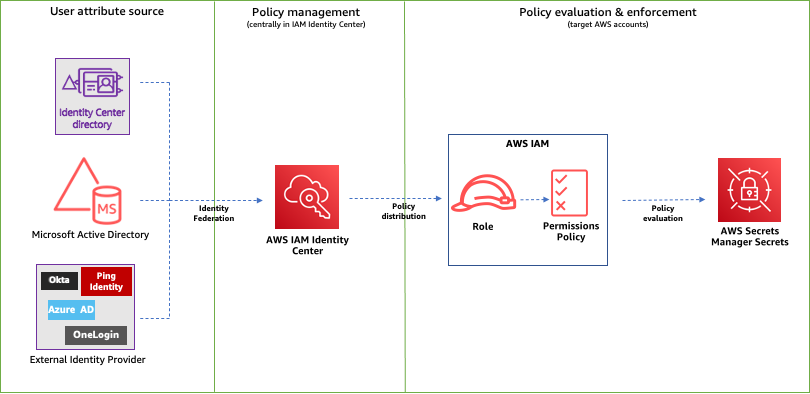
Figure 1: ABAC framework to control access to secrets using IAM Identity Center
The following is a brief introduction to the basic components of the framework:
- User attribute source or identity source — This is where your users and groups are administered. You can configure a supported identity source with IAM Identity Center. You can then define and manage supported user attributes in the identity source.
- Policy management — You can create and maintain policy definitions (permission sets) centrally in IAM Identity Center. You can assign access to a user or group to one or more accounts in IAM Identity Center with these permission sets. You can then use attributes defined in your identity source to build ABAC policies for managing access to secrets.
- Policy evaluation — When you assign a permission set, IAM Identity Center creates corresponding IAM Identity Center-controlled IAM roles in each account, and attaches the policies specified in the permission set to those roles. IAM Identity Center manages the role, and allows the authorized users that you’ve defined to assume the role. When users try to access a secret, IAM dynamically evaluates ABAC policies on the target account to determine access based on the attributes assigned to the user and resource tags assigned to that secret.
How to configure ABAC with IAM Identity Center
To configure ABAC with IAM Identity Center, you need to complete the following high-level steps. I will walk you through these steps in detail later in this post.
- Identify and set up identities that are created and managed in the identity source with user attributes, such as project, team, AppID or department.
- In IAM Identity Center, enable Attributes for access control and configure select attributes (such as department) to use for access control. For a list of supported attributes, see Supported external identity provider attributes.
- If you are using an external IdP and choose to use custom attributes from your IdP for access controls, configure your IdP to send the attributes through SAML assertions to IAM Identity Center.
- Assign appropriate tags to secrets in Secrets Manager.
- Create permission sets based on attributes added to identities and resource tags.
- Define guardrails to enforce access using ABAC.
ABAC enforcement and governance
Because an ABAC authorization model is based on tags, you must have a tagging strategy for your resources. To help prevent unintended access, you need to make sure that tagging is enforced and that a governance model is in place to protect the tags from unauthorized updates. By using service control policies (SCPs) and AWS Organizations tag policies, you can enforce tagging and tag governance on resources.
When you implement ABAC for your secrets, consider the following guidance for establishing a tagging strategy:
- During secret creation, secrets must have an ABAC tag applied (tag-on-create).
- During secret creation, the provided ABAC tag key must be the same case as the principal’s ABAC tag key.
- After secret creation, the ABAC tag cannot be modified or deleted.
- Only authorized principals can do tagging operations on secrets.
- You enforce the permissions that give access to secrets through tags.
For more information on tag strategy, enforcement, and governance, see the following resources:
- AWS Tagging Best Practices
- Implement AWS resource tagging strategy using AWS Tag Policies and Service Control Policies (SCPs)
- Securing resource tags used for authorization using a service control policy in AWS Organizations
- Protecting your ABAC security model through SCP guardrails
Solution overview
In this post, I will walk you through the steps to enable the IdP that is supported by IAM Identity Center.
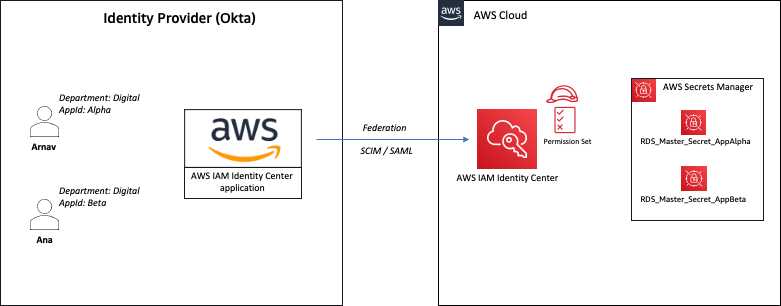
Figure 2: Sample solution implementation
In the sample architecture shown in Figure 2, Arnav and Ana are users who each have the attributes department and AppID. These attributes are created and updated in the external directory—Okta in this case. The attribute department is automatically synchronized between IAM Identity Center and Okta using SCIM. The attribute AppID is a custom attribute configured on Okta, and is passed to AWS as a SAML assertion. Both users are configured to use the same IAM Identity Center permission set that allows them to retrieve the value of secrets stored in Secrets Manager. However, access is granted based on the tags associated with the secret and the attributes assigned to the user.
For example, user Arnav can only retrieve the value of the RDS_Master_Secret_AppAlpha secret. Although both users work in the same department, Arnav can’t retrieve the value of the RDS_Master_Secret_AppBeta secret in this sample architecture.
Prerequisites
Before you implement the solution in this blog post, make sure that you have the following prerequisites in place:
- You have IAM Identity Center enabled for your organization and connected to an external IdP using SAML 2.0 identity federation.
- You have IAM Identity Center configured for automatic provisioning with an external IdP using the SCIM v2.0 standard. SCIM keeps your IAM Identity Center identities in sync with identities from the external IdP.
Solution implementation
In this section, you will learn how to enable access to Secrets Manager using ABAC by completing the following steps:
- Configure ABAC in IAM Identity Center
- Define custom attributes in Okta
- Update configuration for the IAM Identity Center application on Okta
- Make sure that required tags are assigned to secrets in Secrets Manager
- Create and assign a permission set with an ABAC policy in IAM Identity Center
- Define guardrails to enforce access using ABAC
Step 1: Configure ABAC in IAM Identity Center
The first step is to set up attributes for your ABAC configuration in IAM Identity Center. This is where you will be mapping the attribute coming from your identity source to an attribute that IAM Identity Center passes as a session tag. The Key represents the name that you are giving to the attribute for use in the permission set policies. You need to specify the exact name in the policies that you author for access control. For the example in this post, you will create a new attribute with Key of department and Value of ${path:enterprise.department}. For supported external IdP attributes, see Attribute mappings.
To configure ABAC in IAM Identity Center (console)
- Open the IAM Identity Center console.
- In the Settings menu, enable Attributes for access control.
- Choose the Attributes for access control tab, select Add attribute, and then enter the Key and Value details as follows.
- Key: department
- Value: ${path:enterprise.department}
Note: For more information, see Attributes for access control.
Step 2: Define custom attributes in Okta
The sample architecture in this post uses a custom attribute (AppID) on an external IdP for access control. In this step, you will create a custom attribute in Okta.
To define custom attributes in Okta (console)
- Open the Okta console.
- Navigate to Directory and then select Profile Editor.
- On the Profile Editor page, choose Okta User (default).
- Select Add Attribute and create a new custom attribute with the following parameters.
- For Data type, enter string
- For Display name, enter AppID
- For Variable name, enter user.AppID
- For Attribute length, select Less Than from the dropdown and enter a value.
- For User permission, enter Read Only
- Navigate to Directory, select People, choose in-scope users, and enter a value for Department and AppID attributes. The following shows these values for the users in our example.
- First name (firstName): Arnav
- Last name (lastName): Desai
- Primary email (email): [email protected]
- Department (department): Digital
- AppID: Alpha
- First name (firstName): Ana
- Last name (lastName): Carolina
- Primary email (email): [email protected]
- Department (department): Digital
- AppID: Beta
Step 3: Update SAML configuration for IAM Identity Center application on Okta
Automatic provisioning (through the SCIM v2.0 standard) of user and group information from Okta into IAM Identity Center supports a set of defined attributes. A custom attribute that you create on Okta won’t be automatically synchronized to IAM Identity Center through SCIM. You can, however, define the attribute in the SAML configuration so that it is inserted into the SAML assertions.
To update the SAML configuration in Okta (console)
- Open the Okta console and navigate to Applications.
- On the Applications page, select the app that you defined for IAM Identity Center.
- Under the Sign On tab, choose Edit.
- Under SAML 2.0, expand the Attributes (Optional) section, and add an attribute statement with the following values, as shown in Figure 3:
- Name: https://aws.amazon.com/SAML/Attributes/AccessControl:AppID
- Name format: URI reference
- Value: user.AppID

Figure 3: Sample SAML configuration with custom attributes
- To check that the newly added attribute is reflected in the SAML assertion, choose Preview SAML, review the information, and then choose Save.

Step 4: Make sure that required tags are assigned to secrets in Secrets Manager
The next step is to make sure that the required tags are assigned to secrets in Secrets Manager. You will review the required tags from the Secrets Manager console.
To verify required tags on secrets (console)
- Open the Secrets Manager console in the target AWS account and then choose Secrets.
- Verify that the required tags are assigned to the secrets in scope for this solution, as shown in Figure 4. In our example, the tags are as follows:
- Key: department
- Value: Digital
- Key: AppID
- Value: Alpha or Beta
Figure 4: Sample secret configuration with required tags

Step 5a: Create a permission set in IAM Identity Center using ABAC policy
In this step, you will create a new permission set that allows access to secrets based on the principal attributes and resource tags.
When you enable ABAC and specify attributes, IAM Identity Center passes the attribute value of the authenticated user to AWS Security Token Service (AWS STS) as session tags when an IAM role is assumed. You can use access control attributes in your permission sets by using the aws:PrincipalTag condition key to create access control rules.
To create a permission set (console)
- Open the IAM Identity Center console and navigate to Multi-account permissions.
- Choose Permission sets, and then select Create permission set.
- On the Specify policies and permissions boundary page, choose Inline policy.
- For Inline policy, paste the following sample policy document and then choose Next. This policy allows users to retrieve the value of only those secrets that have resource tags that match the required user attributes (department and AppID in our example).
- Configure the session duration, and optionally provide a description and tags for the permission set.
- Review and create the permission set.
Step 5b: Assign permission set to users in IAM Identity Center
Now that you have created a permission set with ABAC policy, complete the configuration by assigning the permission set to users to grant them access to secrets in one or more accounts in your organization.
To assign a permission set (console)
- Open the IAM Identity Center console and navigate to Multi-account permissions.
- Choose AWS accounts and select one or more accounts to which you want to assign access.
- Choose Assign users or groups.
- On the Assign users and groups page, select the users, groups, or both to which you want to assign access. For this example, I select both Arnav and Ana.
- On the Assign permission sets page, select the permission set that you created in the previous section.
- Review your changes, as shown in Figure 5, and then select Submit.
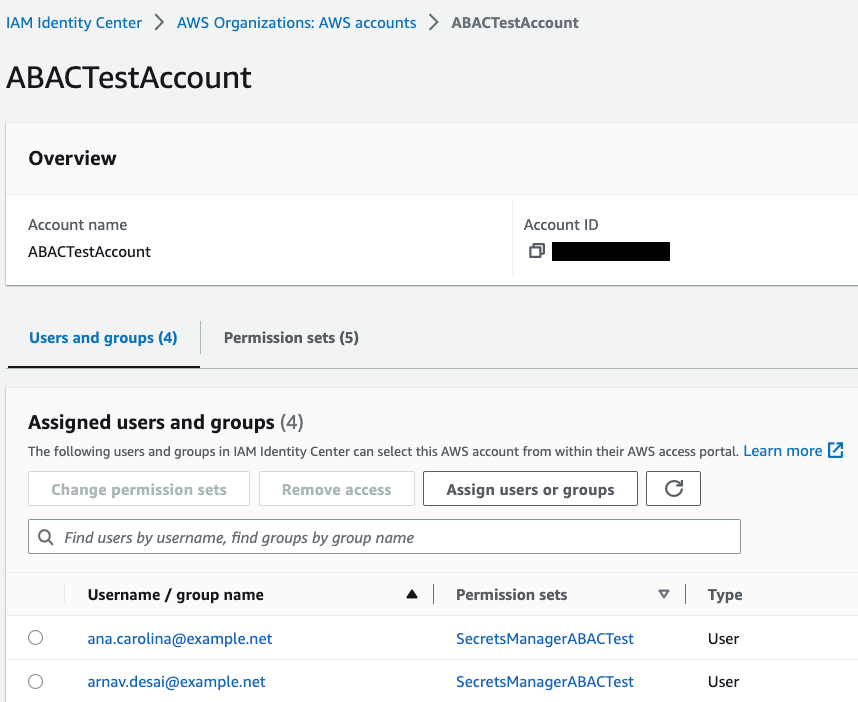
Figure 5: Sample permission set assignment
Step 6: Define guardrails to enforce access using ABAC
To govern access to secrets to your workforce users only through ABAC and to help prevent unauthorized access, you can define guardrails. In this section, I will show you some sample service control policies (SCPs) that you can use in your organization.
Note: Before you use these sample SCPs, you should carefully review, customize, and test them for your unique requirements. For additional instructions on how to attach an SCP, see Attaching and detaching service control policies.
Guardrail 1 – Enforce ABAC to access secrets
The following sample SCP requires the use of ABAC to access secrets in Secrets Manager. In this example, users and secrets must have matching values for the attributes department and AppID. Access is denied if those attributes don’t exist or if they don’t have matching values. Also, this example SCP allows only the admin role to access secrets without matching tags. Replace <arn:aws:iam::*:role/secrets-manager-admin-role> with your own information.
Guardrail 2 – Enforce tagging on secret creation
The following sample SCP denies the creation of new secrets that don’t have the required tag key-value pairs. In this example, the SCP denies creation of a new secret if it doesn’t include department and AppID tag keys. It also denies access if the tag department doesn’t have the value Digital and the tag AppID doesn’t have either Alpha or Beta assigned to it. Also, this example SCP allows only the admin role to create secrets without matching tags. Replace <arn:aws:iam::*:role/secrets-manager-admin-role> with your own information.
Guardrail 3 – Restrict deletion of ABAC tags
The following sample SCP denies the ability to delete the tags used for ABAC. In this example, only the admin role can delete the tags department and AppID after they are attached to a secret. Replace <arn:aws:iam::*:role/secrets-manager-admin-role> with your own information.
Guardrail 4 – Restrict modification of ABAC tags
The following sample SCP denies the ability to modify required tags for ABAC after they are attached to a secret. In this example, only the admin role can modify the tags department and AppID after they are attached to a secret. Replace <arn:aws:iam::*:role/secrets-manager-admin-role> with your own information.
Test the solution
In this section, you will test the solution by retrieving a secret using the Secrets Manager console. Your attempt to retrieve the secret value will be successful only when the required resource and principal tags exist, and have matching values (AppID and department in our example).
Test scenario 1: Retrieve and view the value of an authorized secret
In this test, you will verify whether you can successfully retrieve the value of a secret that belongs to your application.
To test the scenario
- Sign in to IAM Identity Center and log in with your external IdP user. For this example, I log in as Arnav.
- On the IAM Identity Center dashboard, select the target account.
- From the list of available roles that the user has access to, choose the role that you created in Step 5a and select Management console, as shown in Figure 6. For this example, I select the SecretsManagerABACTest permission set.
Figure 6: Sample IAM Identity Center dashboard
- Open the Secrets Manager console and select a secret that belongs to your application. For this example, I select RDS_Master_Secret_AppAlpha.
Because the AppID and department tags exist on both the secret and the user, the ABAC policy allowed the user to describe the secret, as shown in Figure 7.
Figure 7: Sample secret that was described successfully
- In the Secret value section, select Retrieve secret value.
Because the value of the resource tags, AppID and department, matches the value of the corresponding user attributes (in other words, the principal tags), the ABAC policy allows the user to retrieve the secret value, as shown in Figure 8.
Figure 8: Sample secret value that was retrieved successfully


Test scenario 2: Retrieve and view the value of an unauthorized secret
In this test, you will verify whether you can retrieve the value of a secret that belongs to a different application.
To test the scenario
- Repeat steps 1-3 from test scenario 1.
- Open the Secrets Manager console and select a secret that belongs to a different application. For this example, I select RDS_Master_Secret_AppBeta.
Because the value of the resource tag AppID doesn’t match the value of the corresponding user attribute (principal tag), the ABAC policy denies access to describe the secret, as shown in Figure 9.
Figure 9: Sample error when describing an unauthorized secret

Conclusion
In this post, you learned how to implement an ABAC strategy using attributes and to build dynamic policies that can simplify access management to Secrets Manager using IAM Identity Center configured with an external IdP. You also learned how to govern resource tags used for ABAC and establish guardrails to enforce access to secrets using ABAC. To learn more about ABAC and Secrets Manager, see Attribute-Based Access Control (ABAC) for AWS and the Secrets Manager documentation.
If you have feedback about this blog post, submit comments in the Comments section below. If you have questions about this blog post, start a new thread on AWS Secrets Manager re:Post.
Want more AWS Security news? Follow us on Twitter.
Metasploit Weekly Wrap-Up
Post Syndicated from Shelby Pace original https://blog.rapid7.com/2023/04/14/metasploit-weekly-wrap-up-6/
Rocket Software UniRPC Exploits
Ron Bowes submitted two exploit modules for vulnerabilities he discovered in the UniRPC server for Rocket Software’s UniData product. The first exploit module, exploit/linux/misc/unidata_udadmin_auth_bypass exploits an authentication bypass to ultimately gain remote code execution as the root user. The vulnerable RPC service has a hardcoded username, :local: and a predictable password of the form <username>:<uid>:<gid>. Using the root username and its corresponding uid and gid, an attacker can authenticate to the RPC service and execute a shell via the service’s OsCommand command.
The second module, exploit/linux/misc/unidata_udadmin_password_stack_overflow exploits an unauthenticated stack-based buffer overflow through the vulnerable service’s password field. Due to a lack of bounds checking on the buffer that the password is placed into, the saved return pointer can be overwritten, resulting in code execution as the root user.
New SCTP Payloads
Along with SCTP session support, sempervictus added four new payloads that work over the aforementioned stream-based transport protocol. Included in this set are two Unix command payloads that work over socat, a Python command payload, and lastly, a reverse SCTP shell payload for Linux.
Persistent Certificates
This week, adfoster-r7 improved on Metasploit’s support for PKCS12 certificates issued by Active Directory Certificate Services (AD CS). The improvements cause the existing admin/dcerpc/icpr_cert module to store certificates in the same manner as other credentials are stored when a database is attached. Now certificates will be visible from the creds command, and new ones can be added using creds add user:alice pkcs12:/path/to/certificate.pfx. This will help users manage these certificates and reuse them for Kerberos authentication with the admin/kerberos/get_ticket module and the CERT_FILE option as well as LDAP modules such as gather/ldap_query with the LDAP::CertFile option.
New module content (6)
Rocket Software Unidata udadmin_server Authentication Bypass
Author: Ron Bowes
Type: Exploit
Pull request: #17832 contributed by rbowes-r7
AttackerKB reference: CVE-2023-28503
Description: This adds two exploit modules that target UniData versions 8.2.4 (and earlier) on Linux. Due to a flaw in the udadmin service implementation, it is possible to get remote command execution as the root user. One module leverages a stack buffer overflow in a "password" field (CVE-2023-28502) and the other is an authentication bypass (CVE-2023-28503).
Rocket Software Unidata udadmin_server Stack Buffer Overflow in Password
Author: Ron Bowes
Type: Exploit
Pull request: #17832 contributed by rbowes-r7
AttackerKB reference: CVE-2023-28502
Description: This adds two exploit modules that target UniData versions 8.2.4 (and earlier) on Linux. Due to a flaw in the udadmin service implementation, it is possible to get remote command execution as the root user. One module leverages a stack buffer overflow in a "password" field (CVE-2023-28502) and the other is an authentication bypass (CVE-2023-28503).
SCTP Sessions
Author: sempervictus
Type: Payload
Pull request: #17502 contributed by sempervictus
Description: This PR adds support for SCTP sessions which Metasploit Framework can utilize for session transports similarly to TCP as it is a stream-wise transport.
Enhancements and features (5)
- #17353 from adfoster-r7 – Adds support for persisting PKCS12 credentials in Metasploit, i.e.
.pfx/.p12files. Theauxiliary/admin/dcerpc/icpr_certandauxiliary/admin/dcerpc/cve_2022_26923_certifriedmodules will now persist requested certificates for future exploitation. Thecredscommand can also directly persist certificates – for example:creds add user:alice pkcs12:/path/to/certificate.pfx. - #17502 from sempervictus – This PR adds SCTP sessions which Metasploit Framework can utilize for session transports similarly to TCP as it is a stream-wise transport.
- #17804 from cgranleese-r7 – Fixes the metadata for multiple modules which had invalid reference names, incorrect rankings, missing notes, etc. Additionally, this adds automation for verifying module metadata is correct.
- #17821 from bcoles – This enables the import of Nuclei scan results using the
db_importcommand. Both JSON and JSONL formats are supported. - #17862 from bcoles – Updates msfvenom to require apktools version 2.7.0 or greater when attempting to modify Android apk files, as it includes security improvements and bug fixes.
Bugs fixed (4)
- #17851 from Ryuuuuu – Updates the exploits/linux/http/apache_couchdb_cmd_exec to no longer report the target host as being vulnerable when the CouchDB version could not be extracted..
- #17864 from Ryuuuuu – A bug has been fixed in
auxiliary/admin/http/trendmicro_dlp_traversalandauxiliary/admin/http/tomcat_utf8_traversalwherebyprint_goodwas used when a file was missing instead ofprint_error. - #17867 from Ryuuuuu – A bug has been fixed in the
modules/auxiliary/scanner/http/surgenews_user_creds.rbmodule whereby the code did not properly check if there were no users in thenwauth.addfile prior to proceeding to operate on it. - #17872 from adfoster-r7 – Fixes a crash when modules relied on a hash identifying method that wasn’t always available. This method is now available as expected and modules will no longer crash.
Documentation
You can find the latest Metasploit documentation on our docsite at docs.metasploit.com.
Get it
As always, you can update to the latest Metasploit Framework with msfupdate
and you can get more details on the changes since the last blog post from
GitHub:
If you are a git user, you can clone the Metasploit Framework repo (master branch) for the latest.
To install fresh without using git, you can use the open-source-only Nightly Installers or the
binary installers (which also include the commercial edition).
3 benefits of migrating and consolidating your source code
Post Syndicated from Mark Paulsen original https://github.blog/2023-04-14-3-benefits-of-migrating-and-consolidating-your-source-code/
In a previous blog on consolidating your toolkit, we shared strategies to help you simplify your tech stack, which ultimately helps developers be more productive. In fact, developers are almost 60% more likely to feel equipped to do their job when they can easily find what they need.
But there are other benefits of consolidating and simplifying your toolkit that may be surprising–especially when migrating your source code and collaboration history to GitHub.
Today, we’ll explore three benefits that will support enterprises in a business climate where everyone is being asked to do more with less, as well as some resources to help get started on the migration journey.
1. Enable developer self-service culture
Some of the benefits enterprises can achieve with DevOps are improved productivity, security, and collaboration. Silos should be broken down and traditionally separated teams should be working in a cohesive and cloud native way.
Another benefit that DevOps enables, which is a key part of the Platform Engineering technology approach, is the ability for development teams to self-service workflows, processes, and controls which traditionally have either been manual, or tightly-coupled with other teams. A great example of this was covered in a previous blog where we described how to build consistent and shared IaC workflows. IaC workflows can be created by operations teams, if your enterprise separation of duties governance policies require this, but self-serviced when needed by development teams.
But this type of consistent, managed, and governable, self-service culture would not be possible if you have multiple source code management tools in your enterprise. If development teams have to spend time figuring out which tool has the source of truth for the workflow they need to execute, the benefits of DevOps and Platform Engineering quickly deteriorate.
There is no better place to migrate the core of your self-service culture to than GitHub–which is the home to 100 million developers and counting. Your source code management tool should be an enabler for developer productivity and happiness or else they will be reluctant to use it. And if they don’t use it, you won’t have a self-service culture within your enterprise.
2. Save time and money during audits
The latest Forrester report on the economic impact of GitHub Enterprise Cloud and GitHub Advanced Security, determined a 75% improvement in time spent managing tools and code infrastructure. But one of the potentially surprising benefits is related to implementing DevOps and cloud native processes that would both help developers and auditors save time and money.
If your tech stack includes multiple source code tools, and other development tools which may not be integrated our have overlapping capabilities, each time your security, compliance, and audit teams need to review the source of truth for your delivery artifacts, you will need to gather artifacts and setup walkthroughs for each of the tools. This can lead to days and even weeks of lost time and money on simply preparing and executing audits–taking your delivery teams away from creating business value.
Working with GitHub customers, Forrester identified and quantified key benefits of investing in GitHub Enterprise Cloud and GitHub Advanced Security. The corresponding GitHub Ent ROI Estimate Calculator includes factors for time saving on IT Audit preparations related to the number of non-development security or audit staff involved in software development. This itself can lead to hundreds of thousands if not millions of dollars of time savings.
What is not factored into the calculator is the potential time savings for development teams who have a single source of truth for their code and collaboration history. A simplified and centrally auditable tech stack with a single developer-friendly core source code management platform will enable consistent productivity even during traditionally time-consuming audit and compliance reviews–for both developers and non-developers.
3. Keep up with innovation
If you are using another source code platform besides GitHub, or if GitHub is one of several tools that are providing the overlapping functionality, some of your teams may be missing out on the amazing innovations that have been happening lately.
Generative AI is enabling some amazing capabilities and GitHub is at the forefront with our AI pair-programmer, GitHub Copilot. The improvements to developer productivity are truly amazing and continue to improve.
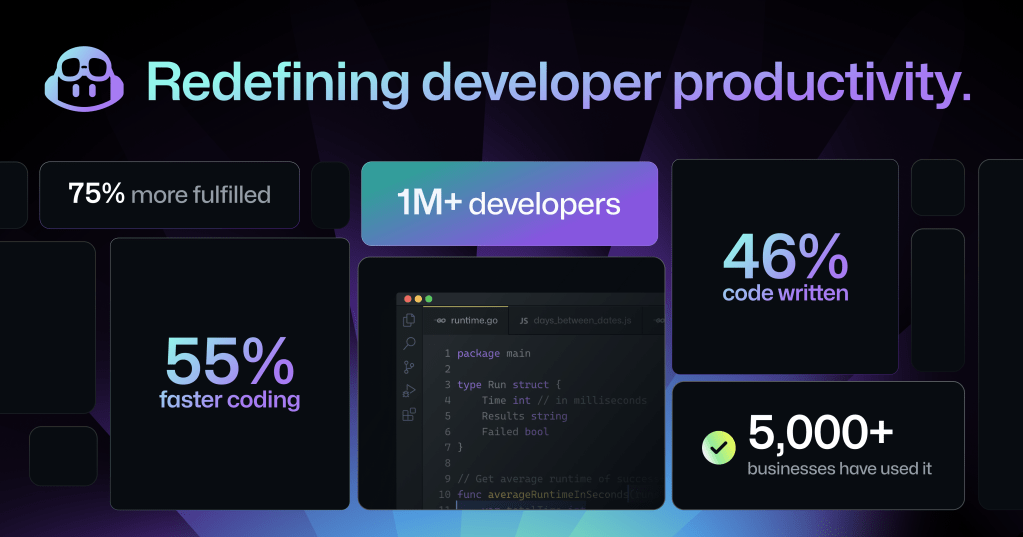
GitHub continues to innovate with the news about GitHub Copilot X, which is not only adopting OpenAI’s new GPT-4 model, but introducing chat and voice for GitHub Copilot, and bringing GitHub Copilot to pull requests, the command line, and docs to answer questions on your projects.
Innovations like this need to be rolled-out in a controlled and governable manner within many enterprises. But if your techstack is overly complex and you have several source code management tools, the roll-out may take a long time or may be stalled while security and compliance reviews take place.
However, if your development core is GitHub, security and compliance reviews can happen once, on a centrally managed platform that is well understood and secure. And you’ll be front row for all of the amazing new innovations that GitHub will be releasing down the road.
Get started today
If you are planning on migrating your source code and collaboration history to GitHub and have questions, thankfully, many other enterprises have done this already with great success and there are resources to help you through the process.
Visit our GitHub Enterprise Importer documentation for details on supported migration paths, guides for different migration sources, and more.
If you want to learn more about how GitHub can benefit your business, while increasing developer velocity and collaboration, see how GitHub Enterprise can help.
[$] TOTP authentication with free software
Post Syndicated from original https://lwn.net/Articles/925870/
One-time passwords (OTPs) are increasingly used as a defense against
phishing and other password-stealing attacks, usually as a part of a
two-factor authentication process. Perhaps the mostly commonly
used technique is sending a numeric code to a phone via SMS, but SMS OTPs
have security problems of their own. An alternative is to use time-based
one-time passwords (TOTPs). The normal TOTP situation is to have all
of the data locked into a proprietary phone app, but it need not be that
way.
TRENDnet TEG-S762 Review 2x 10Gbase-T and 4x 2.5GbE Unmanaged Switch
Post Syndicated from Bryan Young original https://www.servethehome.com/trendnet-teg-s762-review-2x-10gbase-t-and-4x-2-5gbe-unmanaged-switch/
In our TRENDnet TEG-S762 review, we see how this 2x 10Gbase-T and 4x 2.5GbE performs and why it is an interesting low-power option
The post TRENDnet TEG-S762 Review 2x 10Gbase-T and 4x 2.5GbE Unmanaged Switch appeared first on ServeTheHome.
Tim Spector | Food for Life: The New Science of Eating Well | Talks at Google
Post Syndicated from Talks at Google original https://www.youtube.com/watch?v=vtnDLY2a4Gs
How generative AI is changing the way developers work
Post Syndicated from Damian Brady original https://github.blog/2023-04-14-how-generative-ai-is-changing-the-way-developers-work/
During a time when computers were solely used for computation, the engineer, Douglas Engelbart, gave the “mother of all demos,” where he reframed the computer as a collaboration tool capable of solving humanity’s most complex problems. At the start of his demo, he asked audience members how much value they would derive from a computer that could instantly respond to their actions.
You can ask the same question of generative AI models. If you had a highly responsive generative AI coding tool to brainstorm new ideas, break big ideas into smaller tasks, and suggest new solutions to problems, how much more creative and productive could you be?
This isn’t a hypothetical question. AI-assisted engineering workflows are quickly emerging with new generative AI coding tools that offer code suggestions and entire functions in response to natural language prompts and existing code. These tools, and what they can help developers accomplish, are changing fast. That makes it important for every developer to understand what’s happening now—and the implications for how software is and will be built.
In this article, we’ll give a rundown of what generative AI in software development looks like today by exploring:
- The unique value generative AI brings to the developer workflow
- How generative AI coding tools are designed and built
- Why developers should care about large language models
- How developers are using generative AI coding tools
The unique value generative AI brings to the developer workflow
AI and automation have been a part of the developer workflow for some time now. From machine learning-powered security checks to CI/CD pipelines, developers already use a variety of automation and AI tools, like CodeQL on GitHub, for example.
While there’s overlap between all of these categories, here’s what makes generative AI distinct from automation and other AI coding tools:
Automation:  You know what needs to be done, and you know of a reliable way to get there every time. |
Rules-based logic:  You know the end goal, but there’s more than one way to achieve it. |
Machine learning:  You know the end goal, but the amount of ways to achieve it scales exponentially. |
Generative AI:  You have big coding dreams, and want the freedom to bring them to life. |
| You want to make sure that any new code pushed to your repository follows formatting specifications before it’s merged to the main branch. Instead of manually validating the code, you use a CI/CD tool like GitHub Actions to trigger an automated workflow on the event of your choosing (like a commit or pull request). | You know some patterns of SQL injections, but it’s time consuming to manually scan for them in your code. A tool like Code QL uses a system of rules to sort through your code and find those patterns, so you don’t have to do it by hand. | You want to stay on top of security vulnerabilities, but the list of SQL injections continues to grow. A coding tool that uses a machine learning (ML) model, like Code QL, is trained to not only detect known injections, but also patterns similar to those injections in data it hasn’t seen before. This can help you increase recognition of confirmed vulnerabilities and predict new ones. | Generative AI coding tools leverage ML to generate novel answers and predict coding sequences. A tool like GitHub Copilot can reduce the amount of times you switch out of your IDE to look up boilerplate code or help you brainstorm coding solutions. Shifting your role from rote writing to strategic decision making, generative AI can help you reflect on your code at a higher, more abstract level—so you can focus more on what you want to build and spend less time worrying about how. |
How are generative AI coding tools designed and built?
Building a generative AI coding tool requires training AI models on large amounts of code across programming languages via deep learning. (Deep learning is a way to train computers to process data like we do—by recognizing patterns, making connections, and drawing inferences with limited guidance.)
To emulate the way humans learn patterns, these AI models use vast networks of nodes, which process and weigh input data, and are designed to function like neurons. Once trained on large amounts of data and able to produce useful code, they’re built into tools and applications. The models can then be plugged into coding editors and IDEs where they respond to natural language prompts or code to suggest new code, functions, and phrases.
Before we talk about how generative AI coding tools are made, let’s define what they are first. It starts with LLMs, or large language models, which are sets of algorithms trained on large amounts of code and human language. Like we mentioned above, they can predict coding sequences and generate novel content using existing code or natural language prompts.
Today’s state-of-the-art LLMs are transformers. That means they use something called an attention mechanism to make flexible connections between different tokens in a user’s input and the output that the model has already generated. This allows them to provide responses that are more contextually relevant than previous AI models because they’re good at connecting the dots and big-picture thinking.
Here’s an example of how a transformer works. Let’s say you encounter the word log in your code. The transformer node at that place would use the attention mechanism to contextually predict what kind of log would come next in the sequence.
Let’s say, in the example below, you input the statement from math import log. A generative AI model would then infer you mean a logarithmic function.

And if you add the prompt from logging import log, it would infer that you’re using a logging function.
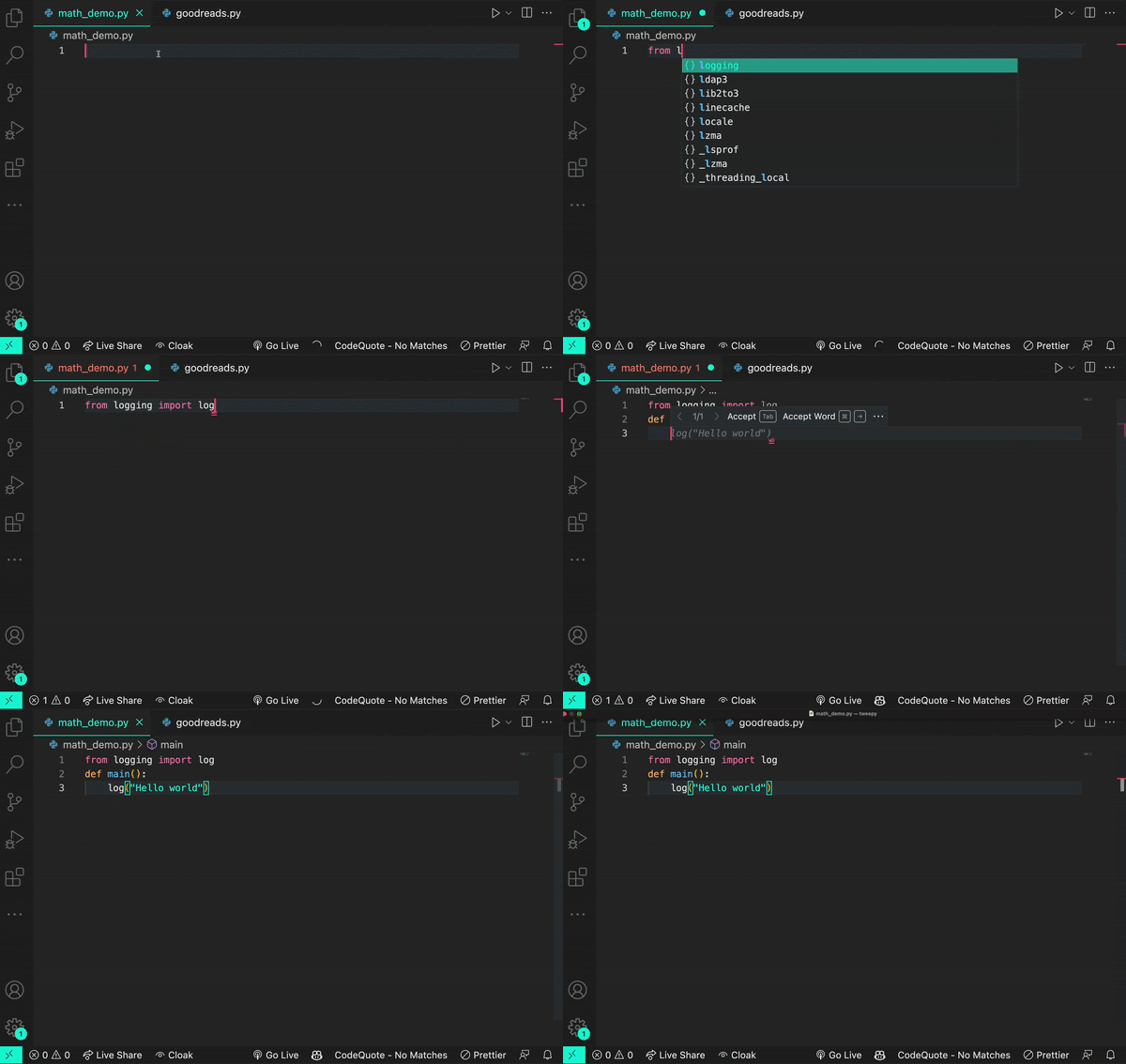
Though sometimes a log is just a log.
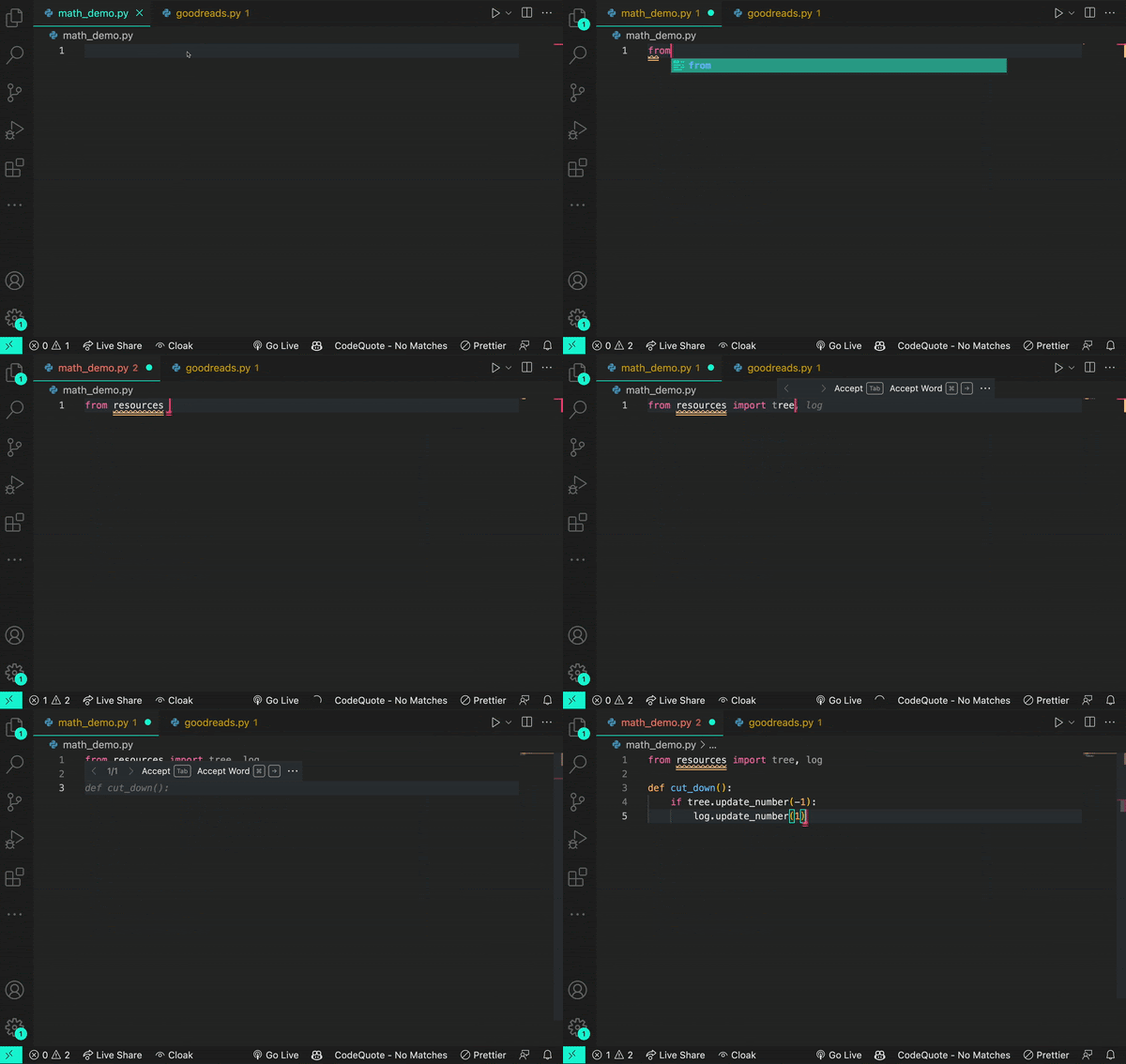
LLMs can be built using frameworks besides transformers. But LLMs using frameworks, like a recurrent neural network or long short-term memory, struggle with processing long sentences and paragraphs. They also typically require training on labeled data (making training a labor-intensive process). This limits the complexity and relevance of their outputs, and the data they can learn from.
Transformer LLMs, on the other hand, can train themselves on unlabeled data. Once they’re given basic learning objectives, LLMs take a part of the new input data and use it to practice their learning goals. Once they’ve achieved these goals on that portion of the input, they apply what they’ve learned to understand the rest of the input. This self-supervised learning process is what allows transformer LLMs to analyze massive amounts of unlabeled data—and the larger the dataset an LLM is trained on, the more they scale by processing that data.
Why should developers care about transformers and LLMs?
LLMs like OpenAI’s GPT-3, GPT-4, and Codex models are trained on an enormous amount of natural language data and publicly available source code. This is part of the reason why tools like ChatGPT and GitHub Copilot, which are built on these models, can produce contextually accurate outputs.
Here’s how GitHub Copilot produces coding suggestions:
- All of the code you’ve written so far, or the code that comes before the cursor in an IDE, is fed to a series of algorithms that decide what parts of the code will be processed by GitHub Copilot.
- Since it’s powered by a transformer-based LLM, GitHub Copilot will apply the patterns it’s abstracted from training data and apply those patterns to your input code.
- The result: contextually relevant, original coding suggestions. GitHub Copilot will even filter out known security vulnerabilities, vulnerable code patterns, and code that matches other projects.
Keep in mind: creating new content such as text, code, and images is at the heart of generative AI. LLMs are adept at abstracting patterns from their training data, applying those patterns to existing language, and then producing language or a line of code that follows those patterns. Given the sheer scale of LLMs, they might generate a language or code sequence that doesn’t even exist yet. Just as you would review a colleague’s code, you should assess and validate AI-generated code, too.
Why context matters for AI coding tools
Developing good prompt crafting techniques is important because input code passes through something called a context window, which is present in all transformer-based LLMs. The context window represents the capacity of data an LLM can process. Though it can’t process an infinite amount of data, it can grow larger. Right now, the Codex model has a context window that allows it to process a couple of hundred lines of code, which has already advanced and accelerated coding tasks like code completion and code change summarization.
Developers use details from pull requests, a folder in a project, open issues—and the list goes on—to contextualize their code. So, when it comes to a coding tool with a limited context window, the challenge is to figure out what data, in addition to code, will lead to the best suggestions.
The order of the data also impacts a model’s contextual understanding. Recently, GitHub made updates to its pair programmer so that it considers not only the code immediately before the cursor, but also some of the code after the cursor. The paradigm—which is called Fill-In-the-Middle (FIM)—leaves a gap in the middle of the code for GitHub Copilot to fill, providing the tool with more context about the developer’s intended code and how it should align with the rest of the program. This helps produce higher quality code suggestions without any added latency.
Visuals can also contextualize code. Multimodal LLMs (MMLLMs) scale transformer LLMs so they process images and videos, as well as text. OpenAI recently released its new GPT-4 model—and Microsoft revealed its own MMLLM called Kosmos-1. These models are designed to respond to natural language and images, like alternating text and images, image-caption pairs, and text data.
GitHub’s senior developer advocate Christina Warren shares the latest on GPT-4 and the creative potential it holds for developers:
| Our R&D team at GitHub Next has been working to move AI past the editor with GitHub Copilot X. With this new vision for the future of AI-powered software development, we’re not only adopting OpenAI’s new GPT-4 model, but also introducing chat and voice, and bringing GitHub Copilot to pull requests, the command line, and docs. See how we’re investigating the future of AI-powered software development > |
How developers are using generative AI coding tools
The field of generative AI is filled with experiments and explorations to uncover the technology’s full capabilities—and how they can enable effective developer workflows. Generative AI tools are already changing how developers write code and build software, from improving productivity to helping developers focus on bigger problems.
While generative AI applications in software development are still being actively defined, today, developers are using generative AI coding tools to:
- Get a head start on complex code translation tasks. A study presented at the 2021 International Conference on Intelligent User Interfaces found that generative AI provided developers with a skeletal framework to translate legacy source code into Python. Even if the suggestions weren’t always correct, developers found it easier to assess and fix those mistakes than manually translate the source code from scratch. They also noted that this process of reviewing and correcting was similar to what they already do when working with code produced by their colleagues.
With GitHub Copilot Labs, developers can use the companion VS Code extension (that’s separate from but dependent on the GitHub Copilot extension) to translate code into different programming languages. Watch how GitHub Developer Advocate, Michelle Mannering, uses GitHub Copilot Labs to translate her Python code into Ruby in just a few steps.
- Code more efficiently. While autocompletion has been in modern IDEs for years, LLMs can generate longer suggestions—sometimes multiple lines of code—that are often more relevant. A 2022 study published in the Proceedings of the Association for Computing Machinery on Programming Languages (PACMPL) observed 20 programmers who interacted with GitHub Copilot. They found that thanks to end-of-line suggestions for function calls and argument completions, developers were able to code faster and stay in the flow longer.
Our own research supports these findings, too. As we mentioned earlier, we found that developers who used GitHub Copilot coded up to 55% faster than those who didn’t. But productivity gains went beyond speed with 74% of developers reporting that they felt less frustrated when coding and were able to focus on more satisfying work.
- Tackle new problems and get creative. The PACMPL study also found that developers used GitHub Copilot to find creative solutions when they were unsure of how to move forward. These developers searched for next possible steps and relied on the generative AI coding tool to assist with unfamiliar syntax, look up the right API, or discover the correct algorithm.
I was one of the developers who wrote GitHub Copilot, but prior to that work, I had never written a single line of TypeScript. That wasn’t a problem because I used the first prototype of GitHub Copilot to learn the language and, eventually, help ship the world’s first at-scale generative AI coding tool.
- Find answers without leaving their IDEs. Some participants in the PACMPL study also treated GitHub Copilot’s multi-suggestion pane like StackOverflow. Since they were able to describe their goals in natural language, participants could directly prompt GitHub Copilot to generate ideas for implementing their goals, and press Ctrl/Cmd + Enter to see a list of 10 suggestions. Even though this kind of exploration didn’t lead to deep knowledge, it helped one developer to effectively use an unfamiliar API.
A 2023 study published by GitHub in the Association for Computing Machinery’s Queue magazine also found that generative AI coding tools save developers the effort of searching for answers online. This provides them with more straightful forward answers, reduces context switching, and conserves mental energy.
Part of GitHub’s new vision for the future of AI-powered software development is a ChatGPT-like experience directly in your editor. Watch how Martin Woodward, GitHub’s Vice President of Developer Relations, uses GitHub Copilot Chat to find and fix bugs in his code.
- Build better test coverage. Some generative AI coding tools excel in pattern recognition and completion. Developers are using these tools to build unit and functional tests—and even security tests—via natural language prompts. Some tools also offer security vulnerability filtering, so a developer will be alerted if they unknowingly introduce a vulnerability in their code.
Want to see some examples in action? Check out how Rizel Scarlett, a developer advocate at GitHub, uses GitHub Copilot to develop tests for her codebase:
- Discover tricks and solutions they didn’t know they needed. Scarlett also wrote about eight unexpected ways developers can use GitHub Copilot—from prompting it to create a dictionary of two-letter ISO country codes and their contributing country name, to helping developers exit Vim, an editor with a sometimes finicky closing process. Want to learn more? Check out the full guide >
The bottom line
Generative AI provides humans with a new mode of interaction—and it doesn’t just alleviate the tedious parts of software development. It also inspires developers to be more creative, feel empowered to tackle big problems, and model large, complex solutions in ways they couldn’t before. From increasing productivity and offering alternative solutions, to helping you build new skills—like learning a new language or framework, or even writing clear comments and documentation—there are so many reasons to be excited about the next wave of software development. This is only the beginning.
Additional resources
Automating Qakbot decode at scale
Post Syndicated from Matthew Green original https://blog.rapid7.com/2023/04/14/automating-qakbot-decode/

This is a technical post covering practical methodology to extract configuration data from recent Qakbot samples. In this blog, I will provide some background on Qakbot, then walk through decode themes in an easy to visualize manner. I will then share a Velociraptor artifact to detect and automate the decode process at scale.

Qakbot or QBot, is a modular malware first observed in 2007 that has been historically known as a banking Trojan. Qbot is used to steal credentials, financial, or other endpoint data, and in recent years, regularly a loader for other malware leading to hands on keyboard ransomware.
Typical delivery includes malicious emails as a zipped attachment, LNK, Javascript, Documents, or an embedded executable. The example shown in this post was delivered by an email with an attached pdf file:

Qakbot has some notable defense evasion capabilities including:
- Checking for Windows Defender sandbox and terminating on discovery.
- Checking for the presence of running anti-virus or analysis tools, then modifying its later stage behavior for evasion.
- Dynamic corruption of payload on startup and rewrite on system shutdown.
Due to the commodity nature of delivery, capabilities and end game, it is worth extracting configuration from observed samples to scope impact from a given campaign. Hunting enterprise wide and finding a previously missed machine or discovering an ineffective control can be the difference in preventing a domain wide ransomware event, or a similar really bad day.
Configuration
Qakbot has an RC4 encoded configuration, located inside two resources of the unpacked payload binary. The decryption process has not changed significantly in recent times, but for some minor key changes. It uses a SHA1 of a hard coded key that can typically be extracted as an encoded string in the .data section of the payload binary. This key often remains static across campaigns, which can speed up analysis with the maintainance of a recent key list.
Current samples undergo two rounds of RC4 decryption with validation built in. The validation bytes dropped from the data for the second round.
After the first round:
- The first 20 bytes in hex is for validation and is compared with the
SHA1 of the remaining decoded data - Bytes
[20:40]is the key used for the second round of decoding - The Data to decode is byte
[40:]onwards - The same validation process occurs for the second round decoded data:
Verification = data[:20],DecodedData = data[20:]

Campaign information is located inside the smaller resource where, after this decoding and verification process, data is clear text.

The larger resource stores Command and Control configuration. This is typically stored in netaddress format with varying separators. A common technique for finding the correct method is searching for common ports and separator patterns in the decoded data.

Encoded strings
Qakbot stores blobs of xor encoded strings inside the .data section of its payload binary. The current methodology is to extract blobs of key and data from the referenced key offset which similarly is reused across samples.
Current samples start at offset 0x50, with an xor key, followed by a separator of 0x0000 before encoded data. In recent samples I have observed more than one string blob and these have occurred in the same format after the separator.

Next steps are splitting on separators, decode expected blob pairs and drop any non printable. Results are fairly obvious when decoding is successful as Qakbot produces clean strings. I typically have seen two well defined groups with strings aligning to Qakbot capabilities.

Payload
Qakbot samples are typically packed and need execution or manual unpacking to retrieve the payload for analysis. Its very difficult to obtain this payload remotely at scale, in practice the easiest way is to execute the sample in a VM or sandbox that enables extracting the payload with correct PE offsets.
When executing locally Qakbot typically injects its payload into a Windows process, and can be detected with yara targeting the process for an unbacked section with PAGE_EXECUTE_READWRITE protections.
Below is an example of running PE-Sieve / Hollows Hunter tool from Hasherezade. This helpful tool enables detection of several types of process injection, and the dumping of injected sections with appropriately aligned headers. In this case, the injected process is wermgr.exe but it’s worth to note, depending on variant and process footprint, your injected process may vary.

Doing it at scale
Now I have explained the decode process, time to enable both detection and decode automation in Velociraptor.
I have recently released Windows.Carving.Qakbot which leverages a PE dump capability in Velociraptor 0.6.8 to enable live memory analysis. The goal of the artifact was to automate my decoding workflow for a generic Qakbot parser and save time for a common analysis. I also wanted an easy to update parser to add additional keys or decode nuances when changes are discovered.

This artifact uses Yara to detect an injected Qakbot payload, then attempts to parse the payload configuration and strings. Some of the features in the artifact cover changes observed in the past in the decryption process to allow a simplified extraction workflow:
- Automatic PE extraction and offset alignment for memory detections.
StringOffset– the offset of the string xor key and encoded strings is reused regularly.- PE resource type: the RC4 encoded configuration is typically inside 2 resources, I’ve observed
BITMAPandRCDATA - Unescaped key string: this field is typically reused over samples.
- Type of encoding: single or double, double being the more recent.
- Hidden
TargetBytesparameter to enable piping payload in for analysis. - Worker threads: for bulk analysis / research use cases.

Research
The Qakbot parser can also be leveraged for research and run bulk analysis. One caveat is the content requires payload files that have been dumped with offsets intact. This typically requires some post collection filtering or PE offset realignment but enables Velociraptor notebook to manipulate post processed data.
Some techniques I have used to bulk collect samples:
- Sandbox with PE dumping features: api based collection
- Virustotal search:
crowdsourced_yara_rule:0083a00b09|win_qakbot_autoANDtag:pedllAND NOTtag:corrupt(note: this will collect some broken payloads)

Some findings from a small data set ~60 samples:
- Named campaigns are typically short and not longer than a few samples over a few days.
- IP addresses are regularly reused and shared across campaigns
- Most prevalent campaigns are
BBandobamaprefixed - Minor campaigns observed:
azd,tokandrdswith only one or two observed payload samples each.
Strings analysis can also provide insights to sample behavior over time to assist analysis. A great example is the adding to process name list for anti-analysis checks.

Conclusion
During this post I have explained the Qakbot decoding process and introduced an exciting new feature in Velociraptor. PE dumping is a useful capability and enables advanced capability at enterprise scale, not even available in expensive paid tools. For widespread threats like Qakbot, this kind of content can significantly improve response for the blue team, or even provide insights into threats when analyzed in bulk. In the coming months the Velociraptor team will be publishing a series of similar blog posts, offering a sneak peek at some of the types of memory analysis enabled by Velociraptor and incorporated into our training courses.
I also would like to thank some of Rapid7’s great analysts – Jakob Denlinger and James Dunne for bouncing some ideas when writing this post.