AWS attained MTCS Level 3 certification under the new SS584:2020 standard

Post Syndicated from Clara Lim original https://aws.amazon.com/blogs/security/aws-attained-mtcs-level-3-certification-under-the-new-ss5842020-standard/

We’re excited to announce the completion of the Multi-Tier Cloud Security (MTCS) Level 3 certification under the new SS584:2020 standard in November 2021 for three Amazon Web Services (AWS) Regions: Singapore, Korea, and United States, excluding AWS GovCloud (US) Regions. The new standard, released in October 2020, includes more stringent controls for greater assurance as compared to the prior version SS584:2015, and a new CSP Self-Disclosure Form to provide to cloud service customers (CSC) for transparency. With the MTCS Level 3 certification, customers can be assured AWS security processes meet the stringent security controls set forth by the new MTCS SS 584:2020 standard for hosting their sensitive workloads.

AWS was the first cloud service provider (CSP) to attain the MTCS Level 3 certification for Singapore, in 2014, and is now one of the first few CSPs certified under the new SS584:2020 Level 3 standard. The services in scope have increased from 130 to 145, about a 10% increase since the last audit (September 2020).

The following services are newly added as in scope:

  1. Amazon Augmented AI (Amazon A2I)
  2. Amazon CloudWatch SDK Metrics for Enterprise Support
  3. Amazon Detective
  4. Amazon Finspace
  5. Amazon Kendra
  6. Amazon Keyspaces (for Apache Cassandra)
  7. Amazon Timestream
  8. AWS App Mesh
  9. AWS Audit Manager
  10. AWS Cloud Map
  11. AWS Device Farm
  12. AWS Glue DataBrew
  13. AWS Ground Station
  14. AWS Personal Health Dashboard

MTCS was the world’s first cloud security standard to specify a management system for cloud security that covers multiple tiers, and it can be applied by CSPs to meet differing cloud user needs for data sensitivity and business criticality. An intent of MTCS is for certified CSPs to be able to better specify the levels of security they can offer their users. AWS achieved this through third-party certification and fulfillment of the self-disclosure requirement for CSPs that covers service-oriented information normally captured in service level agreements. The MTCS framework establishes that the different levels of security help local businesses to pick the right CSP, and use of MTCS is mandated by the Singapore government as a requirement for public sector agencies and regulated organizations.

MTCS has three levels of security, Level 1 being the base and Level 3 the most stringent:

  • Level 1 was designed for non–business critical data and systems with basic security controls, to counter certain risks and threats targeting low-impact information systems (for example, a website that hosts public information).
  • Level 2 addresses the needs of organizations that run their business-critical data and systems in public or third-party cloud systems (for example, confidential business data and email).
  • Level 3 was designed for regulated organizations with specific and more stringent security requirements. Industry-specific regulations can be applied in addition to the baseline controls, to help supplement and address security risks and threats in high-impact information systems (for example, highly confidential business data, financial records, and medical records).

Benefits of MTCS Level 3 certification

AWS’s certification enables Singapore customers in regulated industries with the strictest security requirements to securely host applications and systems with highly sensitive information, ranging from confidential business data to financial and medical records, in a level-3-compliant MTCS environment. With the scope extended beyond Singapore to AWS Regions in Korea and the United States, it provides an alternative for Singapore government agencies to leverage AWS services which haven’t yet launched locally, and also provides resiliency and recovery use cases.

Financial Services Industry (FSI) customers in Korea are able to accelerate cloud adoption with MTCS controls that cover relevant regulations (the Financial Security Institute’s Guideline on Use of Cloud Computing Services in the Financial Industry, and the Regulation on Supervision on Electronic Financial Transactions (RSEFT)).

With increasing cloud adoption across different industries, MTCS certification has the potential to provide assurance to customers globally. Please reach out to your AWS representative if you have any services or Regions you would like to see in scope for the next MTCS audit.

You can now download the latest MTCS certificates and the MTCS Self-Disclosure Form in AWS Artifact.

If you have feedback about this post, submit comments in the Comments section below.

Want more AWS Security how-to content, news, and feature announcements? Follow us on Twitter.

Author

Clara Lim

Clara is the APJ-Lead Strategist supporting the compliance programs for the Asia Pacific Region, leading multiple security certification programs. Clara is passionate about leveraging her decade-long experience to deliver compliance programs that provide assurance and build trust with customers.

Why the World Needs Lower Egress Fees

Post Syndicated from original https://www.backblaze.com/blog/why-the-world-needs-lower-egress-fees/

Imagine a world where you can move data freely wherever you want, a world where you can use best-of-breed cloud providers to get the ideal service, optimize cost for your overall infrastructure, and build redundancy into your cloud platform—all without fear of lock-in.

In short, a world with lower egress fees.

Are lower egress fees a cure-all for the world’s problems? No, but it sure would make life easier for millions of companies. We believe in a multi-cloud world powered by low or zero egress fees. Today, we’re digging into what that means.

The Need for Multi-cloud

As companies seek to avoid vendor lock-in, get the best from different clouds, and provide redundancy for mission critical data, multi-cloud deployments are becoming more commonplace. According to Frost & Sullivan’s 2020 Global Cloud User Survey, respondents indicated growing from 43% adoption of multi-cloud in 2020 to 84% planned adoption of multi-cloud in 2022.

Multi-cloud deployments represent the future of cloud computing, and unlocking that potential means low or no egress fees.

The Case Against High Egress Fees

Cloud companies charge egress fees when customers want to move their data out of the provider’s platform. Existing diversified cloud providers such as Amazon charge egregiously high egress fees that make it expensive for customers to use multi-cloud infrastructures and therefore lock customers in to their services. These walled gardens hamper innovation and long-term growth.

The bottom line: high egress fees are a direct impediment to a multi-cloud future.

The Benefits of a Multi-cloud Future

The demand for multi-cloud infrastructure is rising and the case against high egress fees is gaining traction because a robust, multi-cloud system offers clear benefits:

  • Best-of-breed providers: Specialized cloud providers are focusing on key parts of the tech stack and offering the best services. Multi-cloud deployments enable customers to pick the best parts for their environment.
  • Disaster recovery: One of the biggest advantages of operating a multi-cloud environment is to achieve redundancy and plan for disaster recovery in a cloud-native deployment. If one public cloud suffers an outage, customers have mechanisms in place to direct their applications to failover to a second public cloud.
  • Cost optimization: Challenger companies (Shameless plug: that’s us!) can offer better pricing through innovation and a focus on specialized use cases than the traditional diversified clouds—Amazon, Google, and Microsoft.
  • Freedom from vendor lock-in: Many companies initially adopted one of the existing diversified cloud providers like Amazon or Google because they were the only game in town, but later felt restricted by their closed systems. Companies like Amazon seek to lock customers in with proprietary services. Adopting a multi-cloud infrastructure with interoperable providers gives these customers more negotiating power and control over their cloud deployments.
  • Unconflicted partners: Some customers find themselves in direct competition with companies like Amazon. Shifting their cloud usage to independent, unconflicted partners in a multi-cloud deployment means they don’t have to worry about how their data might be used against them, and they’re not spending money to support a direct competitor.

One Small Step in the Right Direction

After a recent AWS announcement, we’re one small, incremental step closer to that future where egress fees don’t hold you back. Last week, AWS announced an expansion of their free tier for data transfer to the internet from 1GB per month to 100GB per month. Fees above the free tier will remain the same, starting at $0.09/GB for 100GB to 9.999TB of data transfer out per month.

To understand this change in action, here’s a quick example. Previously, a customer egressing 100GB per month was paying $9 per month in egress fees. Now, they’ll pay nothing, and customers egressing above 100GB per month will get a $9 per month discount. (It’s worth noting that egress begins to be discounted beyond 9.999TB per month, but you’d be paying $900/month before that discount would take effect.)

Groundbreaking, it is not. But it’s a move that indicates AWS is bowing to industry pressure that calls their egress fees exactly what they are—exorbitant and egregious.

While it’s not going to be a payday for most customers, we still believe this is a good thing. Even a small reduction in fees could enable a customer to consider a multi-cloud solution when they hadn’t before. For example, let’s say a customer stores 1TB of data in Amazon S3, and they egress out 100GB per month. Egress used to cost them $9, now it’s free. That $9 per month savings could be used to store a backup copy of their 1TB of data (And then some!) in Backblaze B2 Cloud Storage, allowing them to achieve double the redundancy without changing their overall cloud spend. They get the peace of mind of knowing they’re better protected against data loss for the same cost.

Lower Egress = A Better, Multi-cloud World

At Backblaze, we’ve always believed it’s good and right to enable customers to readily use their data. Our egress fees stand at just $0.01/GB, and we’re proud to be a founding member of Cloudflare’s Bandwidth Alliance. Backblaze also waives egress fees to Fastly, Vultr, and other forward-thinking cloud companies, and we cover the cost of data migrations above 10TB through our Cloud to Cloud Migration service.

Lower egress fees support a flexible, open ecosystem on which customers are free to build multi-cloud deployments that level up their businesses. As a leading independent cloud storage platform, it’s part of our commitment to simplify the process of storing and using data. We’re just happy to see companies like Amazon starting to follow suit.

The post Why the World Needs Lower Egress Fees appeared first on Backblaze Blog | Cloud Storage & Cloud Backup.

The Grinch Bot is Stealing Christmas!

Post Syndicated from Ben Solomon original https://blog.cloudflare.com/grinch-bot/

The Grinch Bot is Stealing Christmas!

The Grinch Bot is Stealing Christmas!

This week, a group of US lawmakers introduced the Stopping Grinch Bots Act — new legislation that could stop holiday hoarders on the Internet. This inspired us to put a spin on a Dr. Seuss classic:

Each person on the Internet liked Christmas a lot
But the Grinch Bot, built by the scalper did not!
The Grinch Bot hated Christmas! The whole Christmas season!
Now, please don’t ask why. No one quite knows the reason.

The Grinch Bot is Stealing Christmas!

Cloudflare stops billions of bad bots every day. As you might have guessed, we see all types of attacks, but none is more painful than a Grinch Bot attack. Join us as we take a closer look at this notorious holiday villain…

25 days seconds of Christmas

What is the Grinch Bot? Technically speaking, it’s just a program running on a computer, making automated requests that reach different websites. We’ve come to refer to these requests as “bots” on the Internet. Bots move quickly, leveraging the efficiency of computers to carry out tasks at scale. The Grinch Bot is a very special type that satisfies two conditions:

  1. It only pursues online inventory, attempting to purchase items before humans can complete their orders.
  2. It only operates during the holiday season.

Now, attackers use bots to perform these tasks all year long. But in these winter months, we like to use the term “Grinch Bot” as seasonal terminology.

The Grinch Bot strikes first around Black Friday. It knows that the best discounts come around Thanksgiving, and it loves to get a good deal. Exclusive items are always the first to go, so attackers use the Grinch Bot to cut every (virtual) line and checkpoint. Cloudflare detected nearly 1.5 trillion bot requests on Black Friday. That’s about half of all our traffic; but more on this in a bit.

The Grinch Bot is Stealing Christmas!

The Grinch Bot strikes again on Cyber Monday. As shoppers find gifts for their loved ones, bots are ten steps ahead — selecting “add to cart” automatically. Many bots have payment details ready (perhaps even stolen from your account!).

The Grinch Bot will buy 500 pairs of Lululemon joggers before you even get one. And it’ll do so in seconds.

Nearly 44% of traffic comes from bad bots

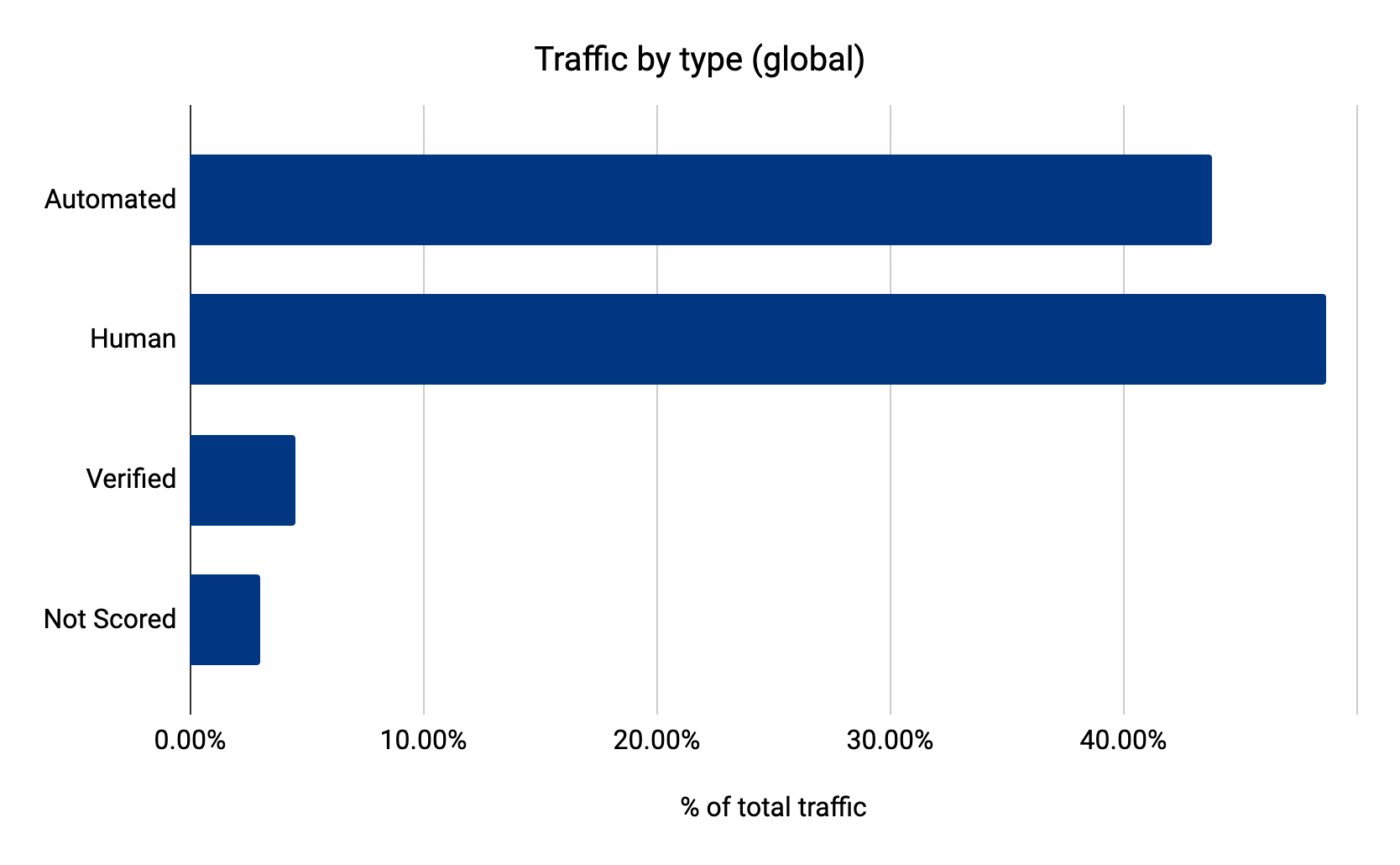
The Grinch Bot has friends working throughout the year, putting pressure on security teams and moving undetected. 43.8% of Internet traffic comes from these bots. When the holidays arrive, the Grinch Bot can ask its friends how to attack the largest sites. They have already been testing tactics for months.

The Grinch Bot is Stealing Christmas!

In response, many sites block individual IP addresses, groups of devices, or even entire countries. Other sites use Rate Limiting to reduce traffic volume. At Cloudflare, we’ve advocated not only for Rate Limiting, but also for a more sophisticated approach known as Bot Management, which dynamically identifies threats as they appear. Here’s a look at bot traffic before the holidays (1H 2021):

The Grinch Bot is Stealing Christmas!

When we looked at bot traffic on Black Friday, we found that it had surged to nearly 50%. Cloudflare Radar showed data close to 55% (if you want to include the good bots as well). Businesses tell us this is the most vulnerable time of the year for their sites.

Over 300 billion bots…

Bots are highly effective at scale. While humans can purchase one or two items within a few minutes, bots can purchase far more inventory with little effort.

During the year, Cloudflare observed over 300 billion bots try to “add to cart.” How did we find this? We ran our bot detection engines on every endpoint that contains the word “cart.” Keep in mind, most bots are stopped before they can even view item details. There are trillions of inventory hoarding bots that were caught earlier in their efforts by our Bot Management and security solutions.

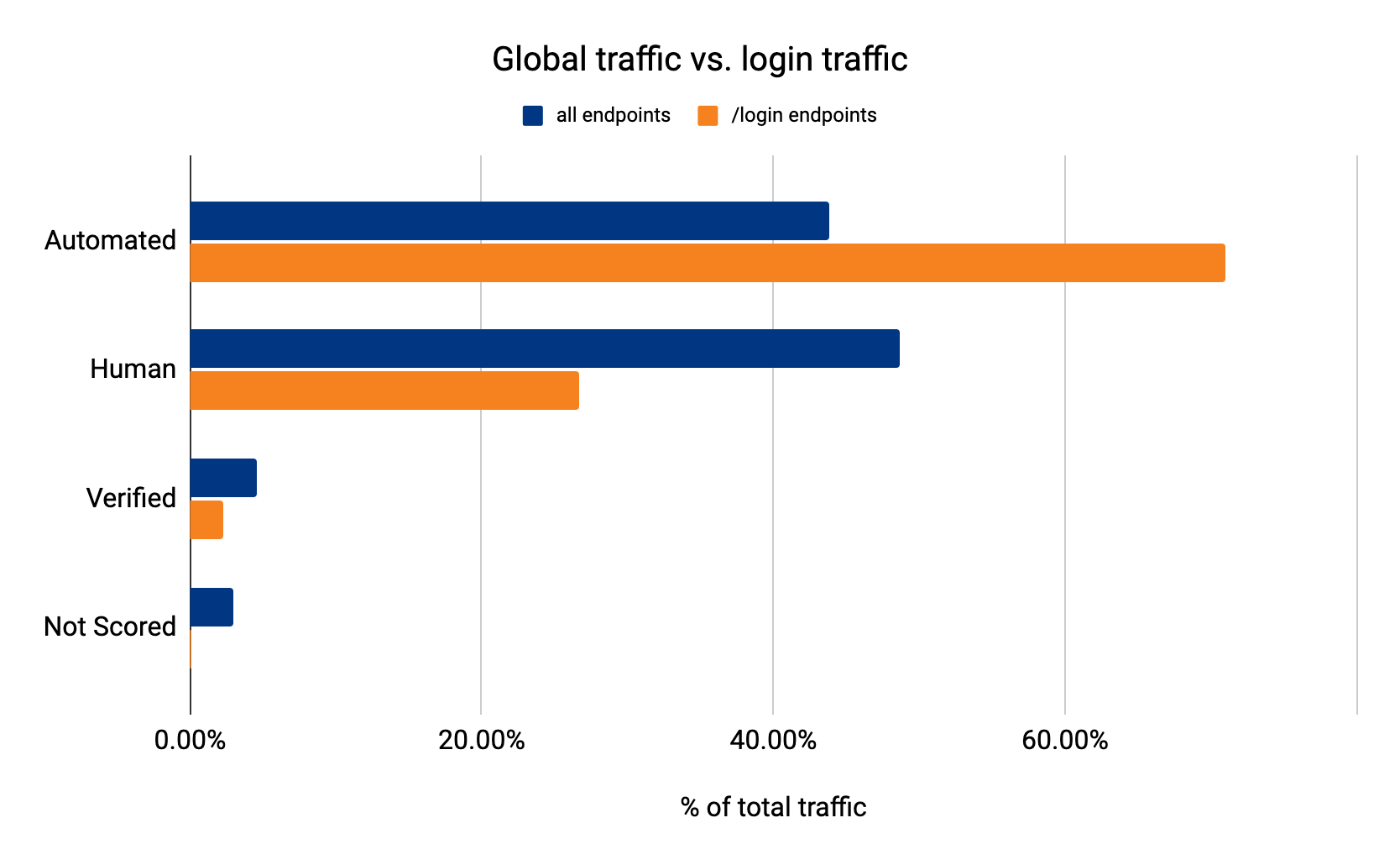
Even worse, some bots want to steal your holiday funds. They skip the ecommerce sites and head right for your bank, where they test stolen credentials and try to break into your account. 71% of login traffic comes from bots:

The Grinch Bot is Stealing Christmas!

Bots operate at such an immense scale that they occasionally succeed. When this happens, they can break into accounts, retrieve your credit card information, and begin a holiday shopping spree.

Deck the halls with JS Challenges

We hate CAPTCHAs almost as much as we hate the Grinch Bot, so we built JS challenges as a lightweight, non-interactive alternative:

The Grinch Bot is Stealing Christmas!

Not surprisingly, we issue more JS Challenges when more bots reach our network. These challenges are traditionally a middle ground between taking no action and completely blocking requests. They offer a chance for suspicious looking requests to prove their legitimacy. Cloudflare issued over 35 billion JS Challenges over the shopping weekend.

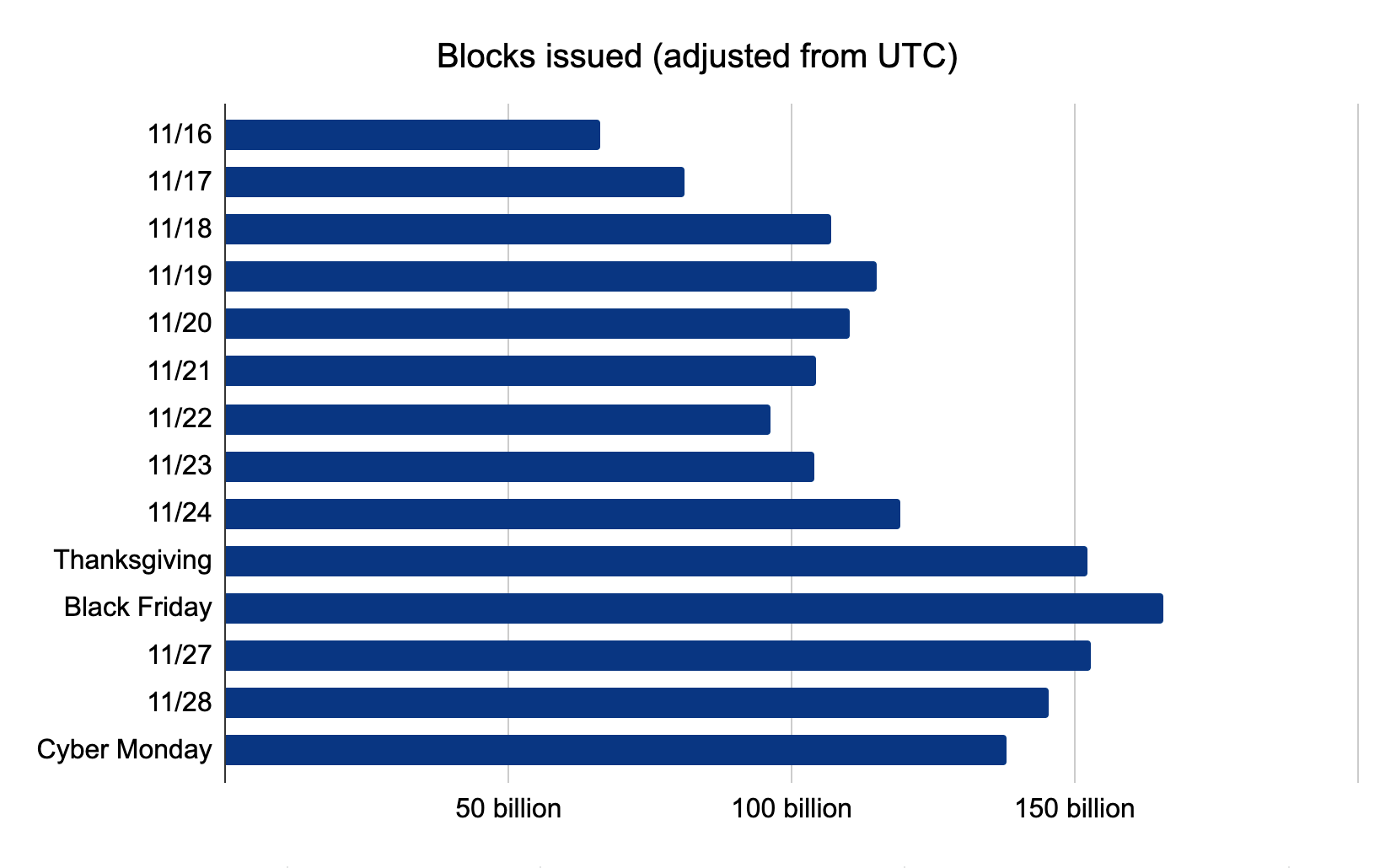
Even more impressive, however, is the number of threats blocked around this time. On Black Friday, Cloudflare blocked over 150 billion threats:

The Grinch Bot is Stealing Christmas!

While we expected the Grinch Bot to make its move on Friday, we did not expect it to recede as it did on Cyber Monday. Bot traffic decreased as the shopping weekend continued. We like to think the Grinch Bot spent its time furiously trying to avoid blocks and JS Challenges, but eventually gave up.

Saving the Internet (and Christmas)

While large retailers can afford to purchase bot solutions, not every site is so fortunate. We decided to fix that.

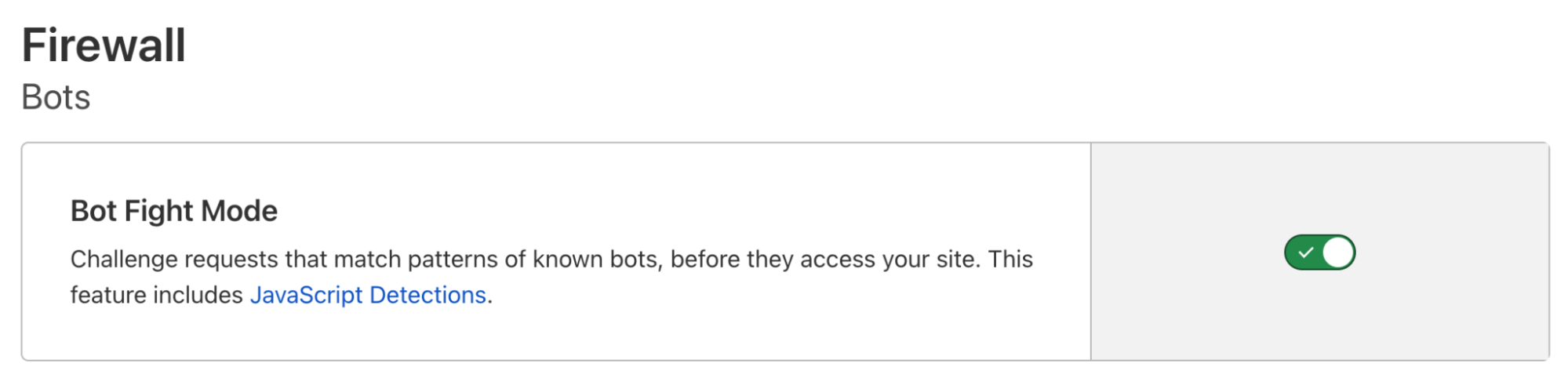
Cloudflare’s Bot Fight Mode is a completely free tool that stops bots. You can activate it with one click, drawing on our advanced detection engines to protect your site. It’s easy:

The Grinch Bot is Stealing Christmas!

And Bot Fight Mode doesn’t just stop bots — it makes them pay. We unleash a tarpit challenge that preoccupies each bot with nonsense puzzles, ultimately handing bot operators a special gift: a massive server bill. We even plant trees to offset the carbon emissions of these expensive challenges. In fact, with so many bots stopped in the snow, there’s really just one thing left to say…

Every person on the Internet, the tall and the small, ⁣
Called out with joy that their shopping didn’t stall!
He hadn’t stopped Christmas from coming! It came!
Somehow or other, it came just the same!
And the Grinch Bot, with his grinch feet ice-cold in the snow, ⁣
Stood puzzling and puzzling. “How could it be so?”

Integrate Okta to Extend Active Directory Infrastructure into AWS

Post Syndicated from Pavankumar Kasani original https://aws.amazon.com/blogs/architecture/integrate-okta-to-extend-active-directory-infrastructure-into-aws/

Are you ready to extend your on-premises Active Directory to Amazon Web Services (AWS) to remove undifferentiated heavy lifting? Would you like to maintain a highly available Directory Service for your applications? Companies who have already set up integration with Okta Identity Cloud for external or internal applications require Active Directory objects to be synced to Okta for authentication. To achieve centralized access for on-premises and cloud applications, you can extend your on-premises Active Directory to AWS Managed Microsoft Active Directory (AD) using a trust relationship.

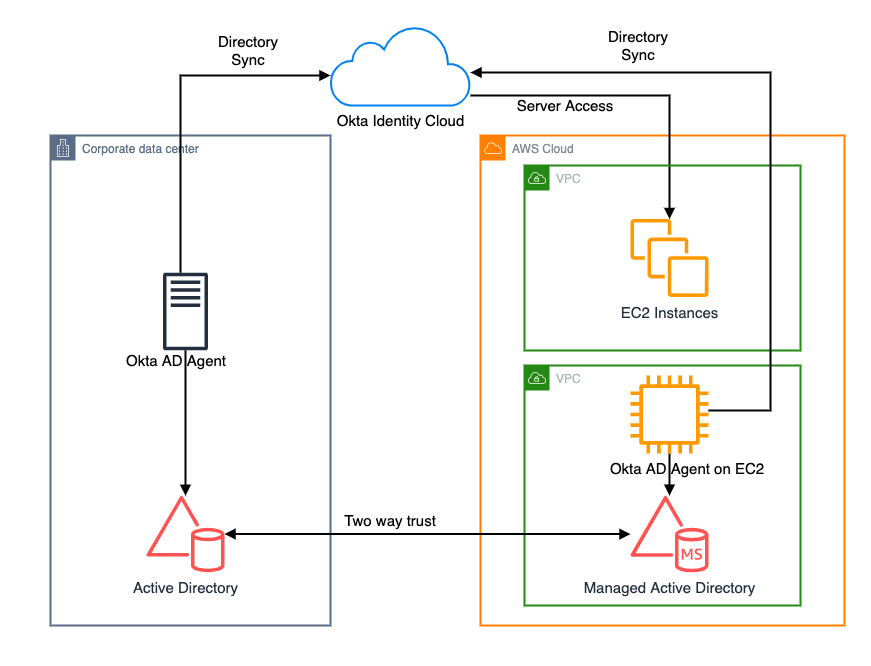
This blog shows an architecture pattern that you can use to synchronize your on-premises AD and AWS Managed AD objects. You can use Okta Identity Cloud using an Okta AD agent for syncing users and groups. The Okta AD agent can be installed and configured on a domain-joined on-premises server or an Amazon EC2 instance on AWS (see Figure 1).

AWS Directory Service lets you run Microsoft Active Directory (AD) as a managed service, and is powered by Windows Server 2012 R2. When you select and launch this directory type, it is created as a highly available pair of domain controllers connected to your Amazon Virtual Private Cloud (VPC). The domain controllers run in different Availability Zones in an AWS Region of your choice.

Okta is an enterprise-grade identity management service, which is compatible with many on-premises and cloud applications. The Okta AD agent enables you to integrate Okta with your on-premises AD. This way you can integrate your SaaS applications and your AD instances with Okta. You can simplify and centralize user management and share user credentials with other integrated cloud and on-premises applications.

Figure 1. Active Directory objects synchronization to Okta identity cloud

Figure 1. Active Directory objects synchronization to Okta identity cloud

Network connectivity between corporate data center and AWS Regions

Before getting started with configuring a trust relationship with on-premises AD and AWS managed AD, be sure you’ve read and understand the prerequisites for setting up trust. For example, it is highly recommended to have a VPN or AWS Direct Connect circuit in place between your VPC and your on-premises environment. To create a resilient VPN connection, refer to the Site-to-Site VPN User Guide.

AWS Site-to-Site VPN is a fully managed service that uses IP security (IPsec) tunnels to create a secure connection between your data center or branch office, and your AWS resources. When using Site-to-Site VPN, you can connect to Amazon VPC and also AWS Transit Gateway. Two tunnels per connection are used for increased redundancy. You can also create a dedicated or a hosted connection using AWS Direct Connect.

Trust relationship between on-premises AD and AWS Managed AD

A trust relationship is a link between two different domains. For example, a one-way trust scenario allows the user accounts from the trusted domain to access resources in the trusting domain. In a two-way trust scenario, user accounts and resources can be passed between the two domains bidirectionally. A two-way trust relationship is commonly set up between on-premises AD and AWS Managed AD to extend authentication. This is used for any directory-aware workloads in the AWS Cloud, providing users and groups access to resources in either domain using single sign-on (SSO).

AWS Managed Microsoft Active Directory (AD) supports external and forest trust relationships with your existing on-premises domain in all three trust relationship directions:

  • One-way incoming
  • One-way outgoing
  • Two-way bidirectional

To create a trust relationship, follow these steps:

  1. Prepare your on-premises domain for the trust relationship. This includes preparing your firewall configuration, enable Kerberos pre-authentication, and configuring conditional forwarders.
  2. Prepare your AWS Managed Microsoft AD for the trust relationship. This includes configuring your VPC subnets, security groups, and enabling Kerberos pre-authentication.
  3. Create the trust relationship between your on-premises AD and your AWS Managed Microsoft Active Directory (AD).

Install and configure Okta agent

Download and install Okta AD agent on your Amazon EC2 instance, which should be domain-joined with AWS Managed AD. One Okta AD agent can associate with multiple domains. Once the trust has been set up between on-premises AD and AWS Managed AD, you can associate multiple domains under the same Okta AD agent on Amazon EC2, instead of hosting and managing separate Okta AD agent servers in your own data center and AWS.

For a highly available architecture, a redundant Okta AD agent running in your corporate data center is recommended. This will help you avoid the impact of network connectivity failure between data centers and AWS Regions. Okta recommends installing multiple Okta AD agents on each domain server to achieve high availability and failover protection.

Read Okta AD integration step-by-step setup for installing and configuring Okta agent.

Validate AD objects

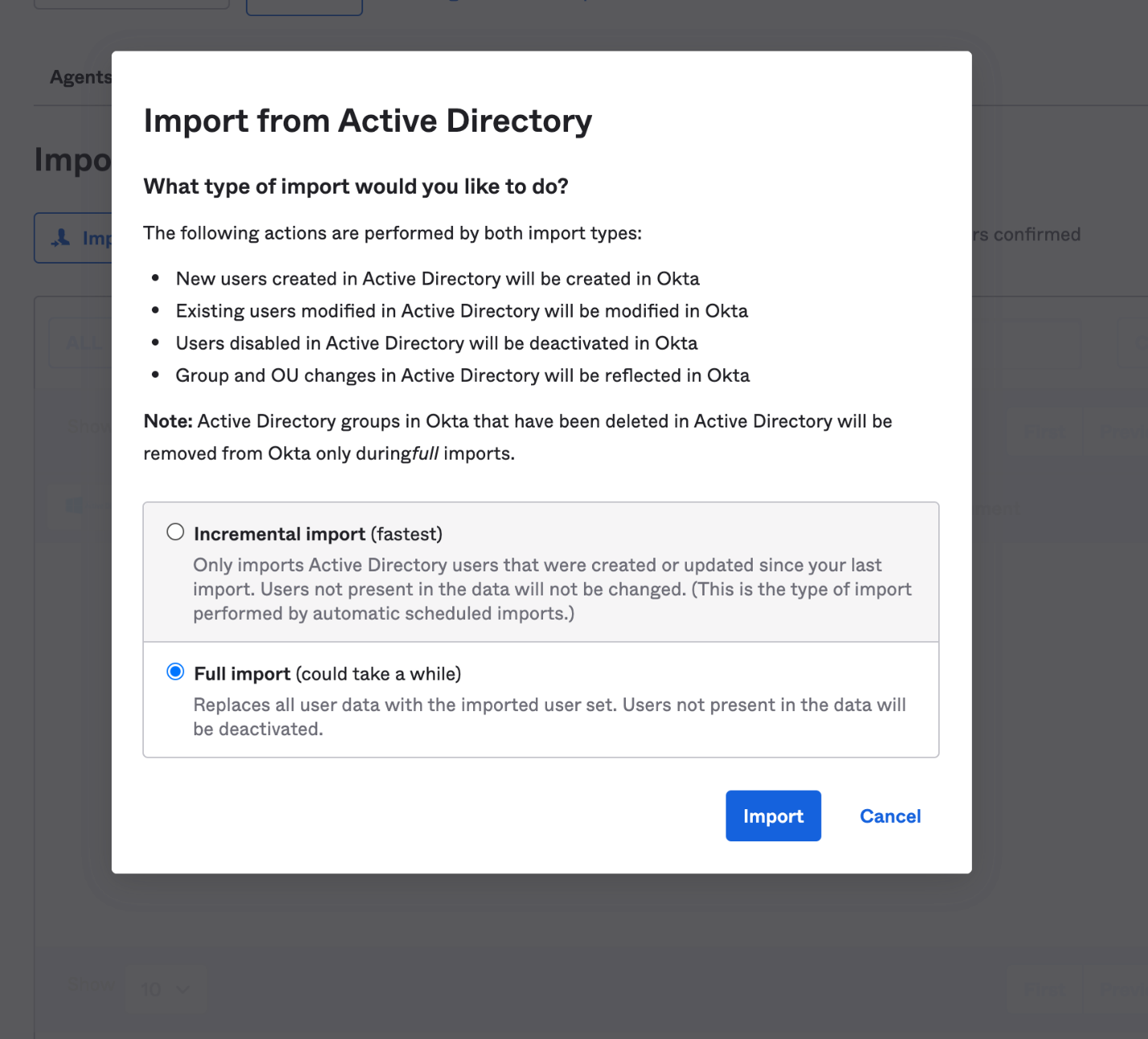
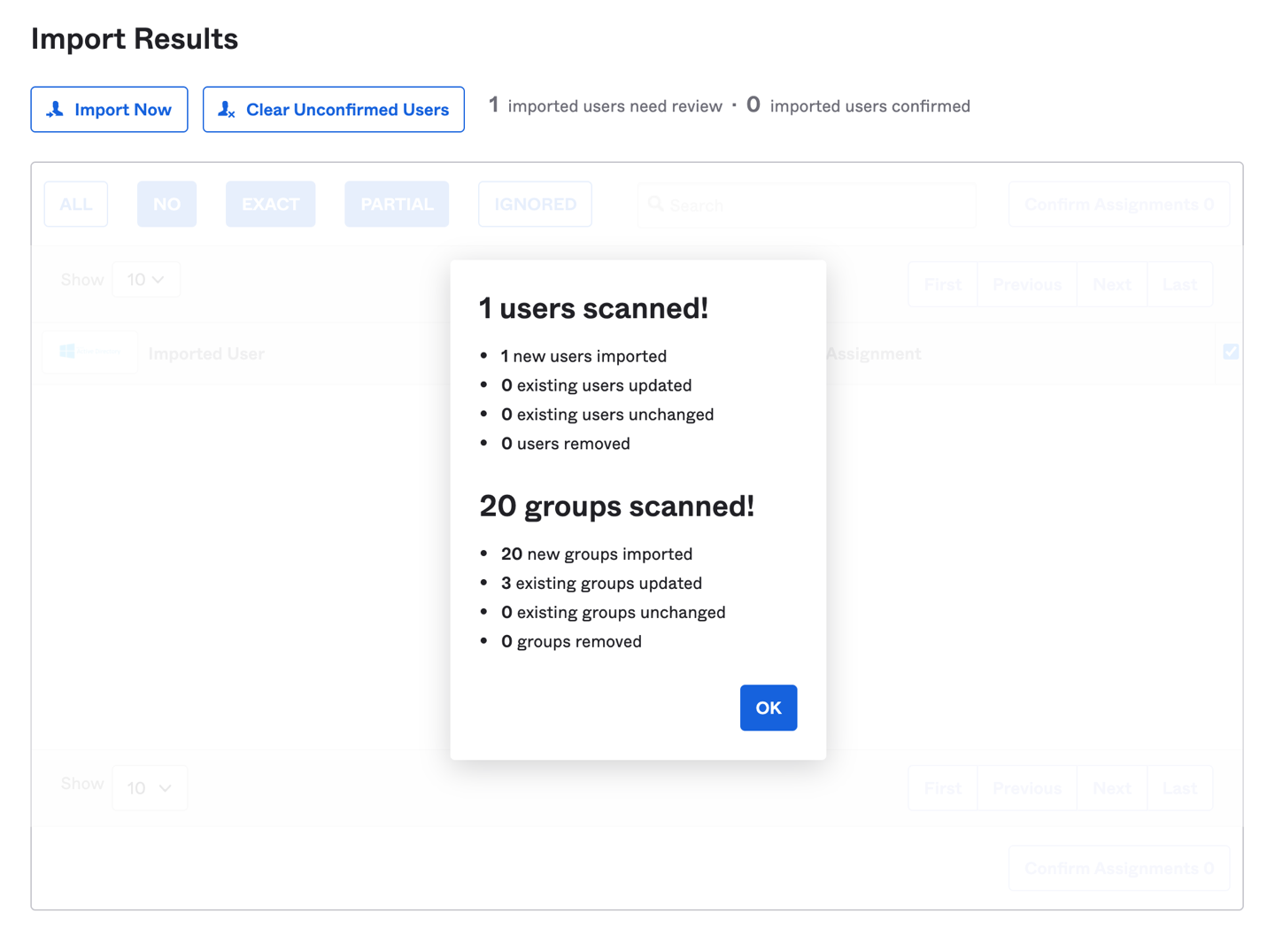
Once the Okta agent is installed and configured on the Amazon EC2 instance, log in to the Okta admin console. Under the provisioning to Okta tab, do a full import of users from AWS Managed AD (see Figure 2, Figure 3). The subsequent objects synchronization will be done through scheduled import with a minimum interval of one hour. After the import is done, if there are any user account overlaps between AWS Managed AD and Okta, manually assign the AD users to Okta users. You can create matching rules to automatically map the users from AD to Okta. Read Import AD users to Okta.

Figure 2. Import users under Okta admin console

Figure 2. Import users under Okta admin console

Figure 3. Import users results under Okta admin console

Figure 3. Import users results under Okta admin console

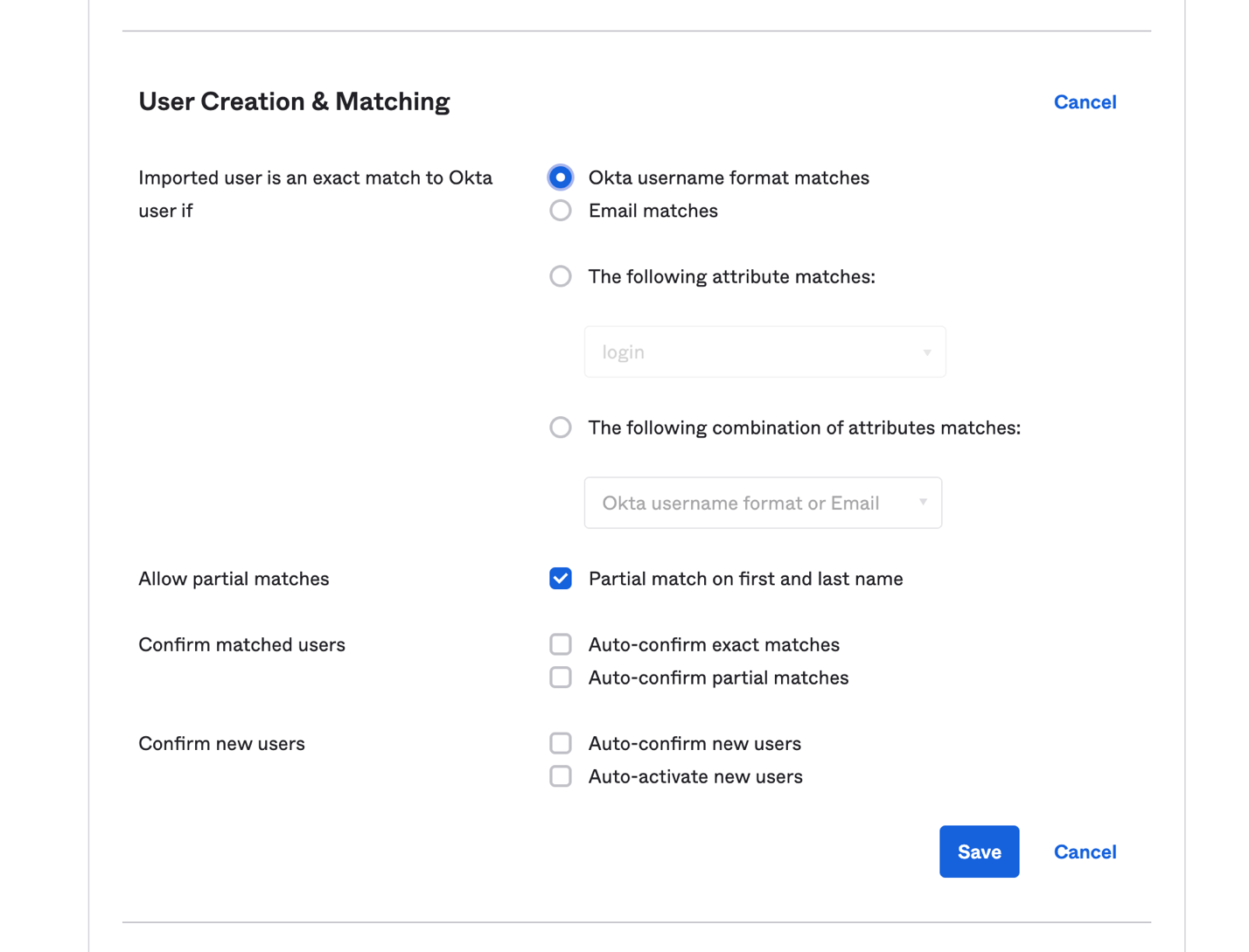
Matching rules are used in the import of users from all apps and directories that provide importing. If there is an existing Okta account, AD allows you to import and confirm users automatically (see Figure 4).

Figure 4. User creation and matching under Okta admin console

Figure 4. User creation and matching under Okta admin console

You can import groups from any forest or domain connected to Okta. The Okta AD Agent detects all groups in the domain or the organizational units (OUs) that you select. If you register an Okta AD Agent for more than one domain and you have the root OU selected for all domains, all groups will be imported. Read Import AD Groups to Okta to synchronize groups from AD to Okta.

Synchronize passwords to Okta

When you sign in to Okta using your organization’s AD credentials, the authentication process is delegated to the connected on-premises AD. Okta does not see or store the credentials.

In some cases, the credentials must be synchronized from a directory across Okta to an application. If a user changes the password stored in Active Directory and then tries to access applications using the same single sign-on session, they will receive a password error message. This is because the new password has not been synchronized to the application, so a new sign-in process is required for password validation.

To avoid a disruptive user experience, use the Okta AD Password Sync Agent to synchronize passwords from AD to Okta and to integrated apps. The Okta AD Password Sync Agent will track password changes in AD and then synchronize to Okta.

For more details on the password synchronization and password reset workflow, you can read step-by-step instructions on Synchronize passwords from Active Directory to Okta.

Summary

In this blog post, we discussed a way for synchronizing users and credentials from on-premises Active Directory and AWS Managed AD to Okta Identity Cloud. With synchronization, you can centralize access of cloud and on-premises applications and provide seamless access to AD-aware services within AWS.

Customers can also migrate on-premises AD to AWS using Active Directory Migration Tool (ADMT) along with the Password Export Server (PES) service.

Read more:

Introducing CentOS Stream 9

Post Syndicated from original https://lwn.net/Articles/877599/rss

The CentOS blog has announced the release of CentOS Stream 9:

CentOS Stream is a continuous-delivery distribution providing each point-release of Red Hat Enterprise Linux (RHEL). Before a package is formally introduced to CentOS Stream, it undergoes a battery of tests and checks—both automated and manual—to ensure it meets the stringent standards for inclusion in RHEL. Updates posted to Stream are identical to those posted to the unreleased minor version of RHEL. The aim? For CentOS Stream to be as fundamentally stable as RHEL itself.

To achieve this stability, each major release of Stream starts from a stable release of Fedora Linux—In CentOS Stream 9, this begins with Fedora 34, which is the same code base from which RHEL 9 is built. As updated packages pass testing and meet standards for stability, they are pushed into CentOS Stream as well as the nightly build of RHEL.

Даниела Везиева отклонява искания отговор от Биволъ по ЗДОИ Служебният кабинет бави информация за е-мобилите в Ловеч

Post Syndicated from Екип на Биволъ original https://bivol.bg/%D1%81%D0%BB%D1%83%D0%B6%D0%B5%D0%B1%D0%BD%D0%B8%D1%8F%D1%82-%D0%BA%D0%B0%D0%B1%D0%B8%D0%BD%D0%B5%D1%82-%D0%B1%D0%B0%D0%B2%D0%B8-%D0%B8%D0%BD%D1%84%D0%BE%D1%80%D0%BC%D0%B0%D1%86%D0%B8%D1%8F-%D0%B7.html

петък 3 декември 2021


Служебното правителство на Стефан Янев и конкретно министърката на икономиката Даниела Везиева не предоставиха в 14 дневен срок исканата от “Биволъ” информацията по Закона за достъп до обществена информация (ЗДОИ)…

[$] A filesystem for namespaces

Post Syndicated from original https://lwn.net/Articles/877308/rss

It is natural, when looking at the kernel development process, to focus on
patches that find their way to acceptance and become a part of future
kernels. But there can be value in looking at work that doesn’t clear the
bar; in failing, these patches often reveal things about the kernel and the
community that creates it. Such is the case with the proof-of-concept
namespacefs
patch series
recently posted by Yordan Karadzhov. One should not
expect to see namespacefs in a future kernel but, in failing, this work
showed a real use case and why it is hard to satisfy that use case in the
kernel.

Security updates for Friday

Post Syndicated from original https://lwn.net/Articles/877582/rss

Security updates have been issued by CentOS (krb5 and mailman), Debian (gmp and librecad), Fedora (php-symfony4 and wireshark), Mageia (bluez, busybox, docker-containerd, gfbgraph, hivex, nss, perl/perl-Encode, and udisks2/libblockdev), openSUSE (permissions), Oracle (mailman and mailman:2.1), Red Hat (mailman, mailman:2.1, and nss), Scientific Linux (mailman and nss), and SUSE (nodejs14).

Get notified when your site is under attack

Post Syndicated from Michael Tremante original https://blog.cloudflare.com/get-notified-when-your-site-is-under-attack/

Get notified when your site is under attack

Get notified when your site is under attack

Our core application security features such as the WAF, firewall rules and rate limiting help keep millions of Internet properties safe. They all do so quietly without generating any notifications when attack traffic is blocked, as our focus has always been to stop malicious requests first and foremost.

Today, we are happy to announce a big step in that direction. Business and Enterprise customers can now set up proactive alerts whenever we observe a spike in firewall related events indicating a likely ongoing attack.

Alerts can be configured via email, PagerDuty or webhooks, allowing for flexible integrations across many systems.

You can find and set up the new alert types under the notifications tab in your Cloudflare account.

What Notifications are available?

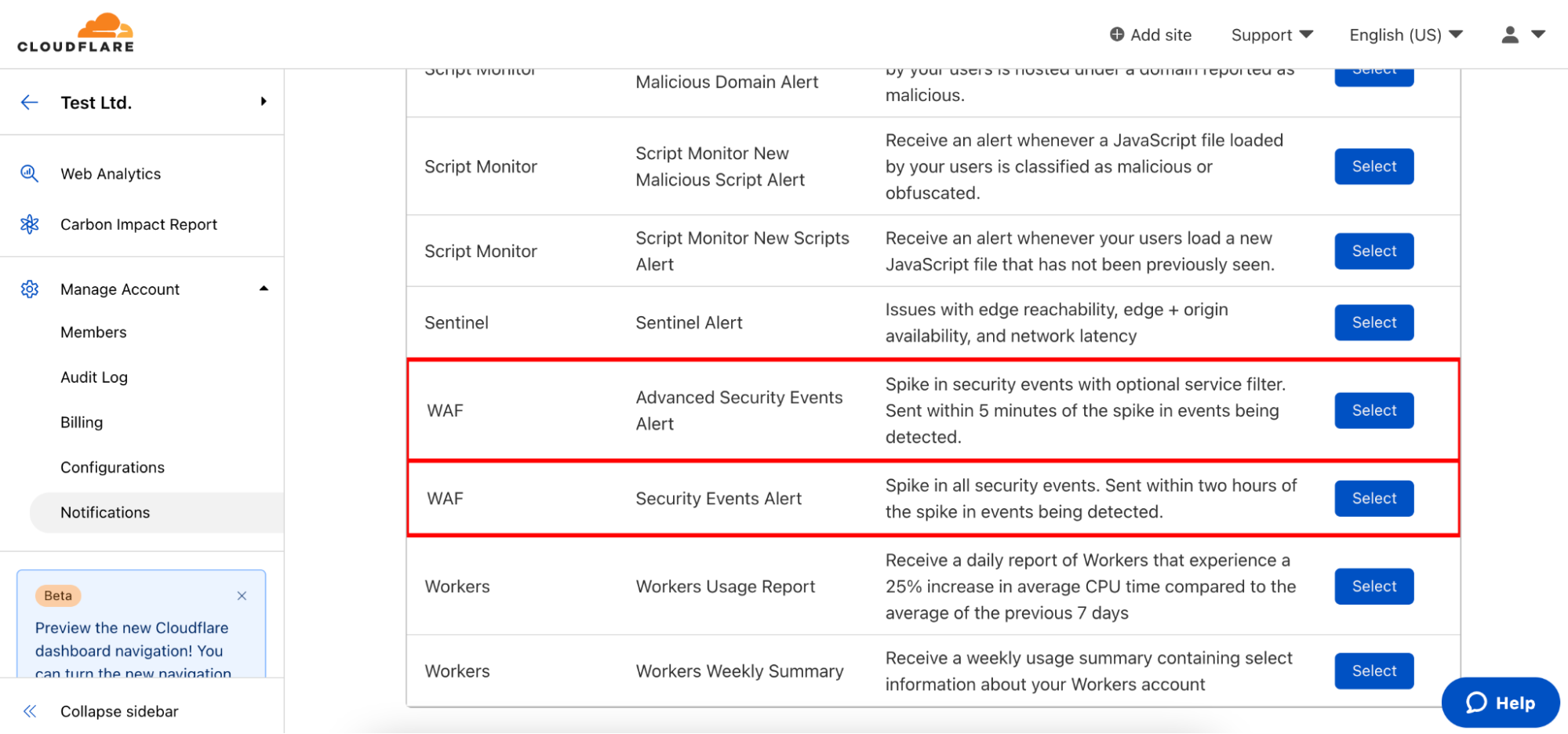
Two new notification types have been added to the platform.

Security Events Alert

This notification can be set up on Business and Enterprise zones, and will alert on any spike of firewall related events across all products and services. You will receive the alert within two hours of the attack being mitigated.

Advanced Security Events Alert

This notification can be set up on Enterprise zones only. It allows you to filter on the exact security service you are interested in monitoring and different notifications can be set up for different services as necessary. The alert will fire within five minutes of the attack being mitigated.

Alerting on Application Security Anomalies

We’ve previously blogged about how accurately calculating anomalies in time series data sets is hard. Simple threshold alerting — “notify me if there are more than X events” — doesn’t work well. It takes a lot of work to tune the specific thresholds to be accurate, and even then you’re still likely to end up with false positives or missed events.

For Origin Error Rate notifications, we leaned on the methodology outlined in the Google SRE Handbook for alerting based on Service Level Objectives (SLOs). However, SLO alerting assumes that there is an established baseline. We know exactly what percentage of responses from your origin are “allowed” to be errors before something is definitely wrong. We don’t know what that percentage is for Firewall events. For example, Internet properties with many Firewall rules are more likely to have more Firewall events than Internet properties with few Firewall rules.

Instead of using SLO based alerting for Security Event notifications, we’re using Z-score calculations. The z-score methodology calculates how many standard deviations away from the mean a certain data point is. For Security Event notifications we can take the mean number of Firewall events for each distinct Internet property as the effective “baseline”, and compare the current number of Firewall events to see if there is a significant spike.

In this first iteration, a z-score threshold of 3.5 has been configured in the system and will be adjusted based on customer feedback. You can read more about the system in our WAF developer docs.

Getting started with Application Security Event notifications

To configure these notifications, navigate to the Notifications tab of the dashboard and click “Add”. Select Security Events Alert or Advanced Security Events Alert.

Get notified when your site is under attack

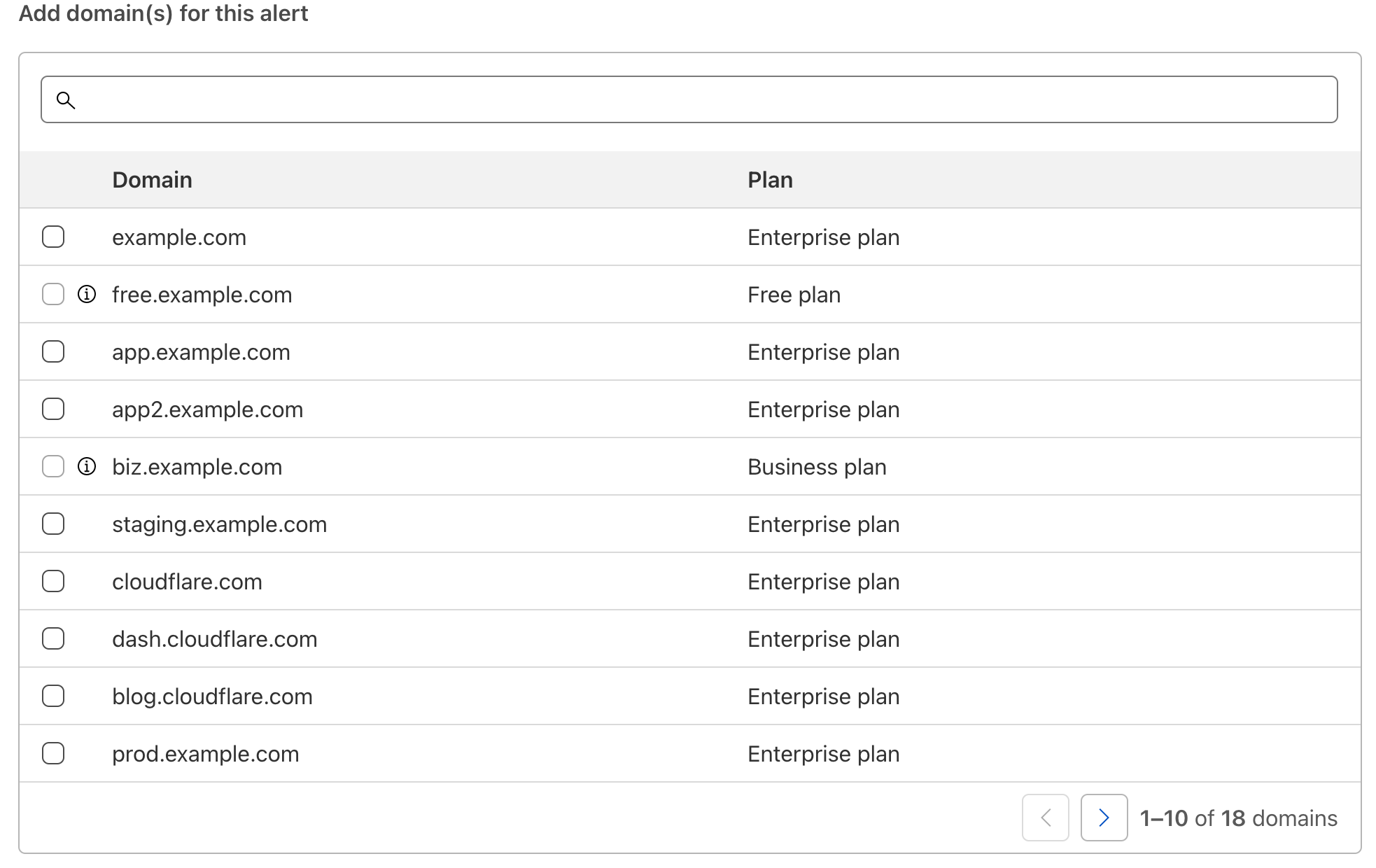
As with all Cloudflare notifications, you’re able to name and describe your notification, and choose how you want to be notified. From there, you can select which domains you want to monitor.

Get notified when your site is under attack

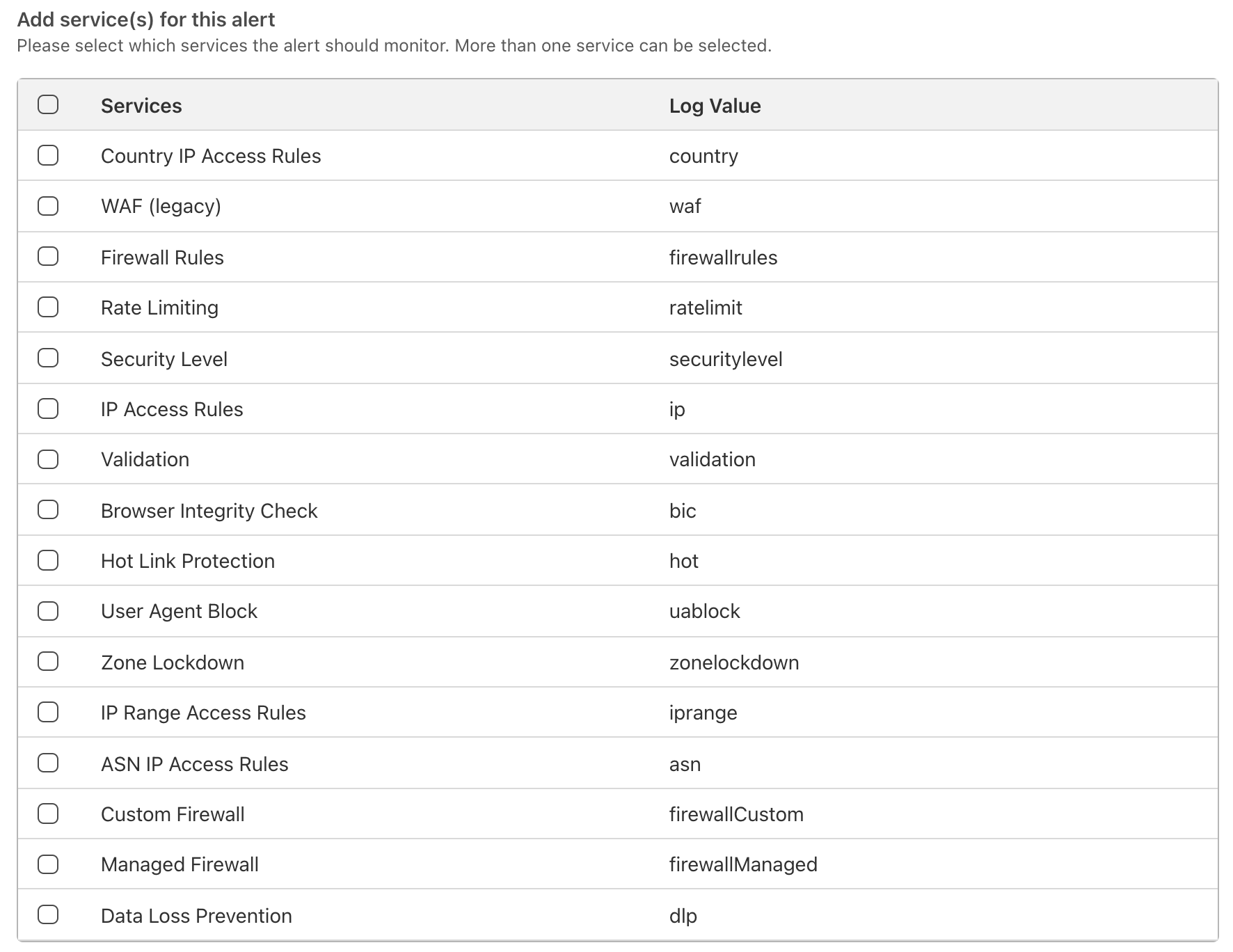
For Advanced Security Event notifications, you can also select which services the notification should monitor. The log value in Firewall Event logs for each relevant service is also displayed in the event you are integrating directly with Cloudflare logs and wish to filter relevant events in your existing SIEMs.

Get notified when your site is under attack

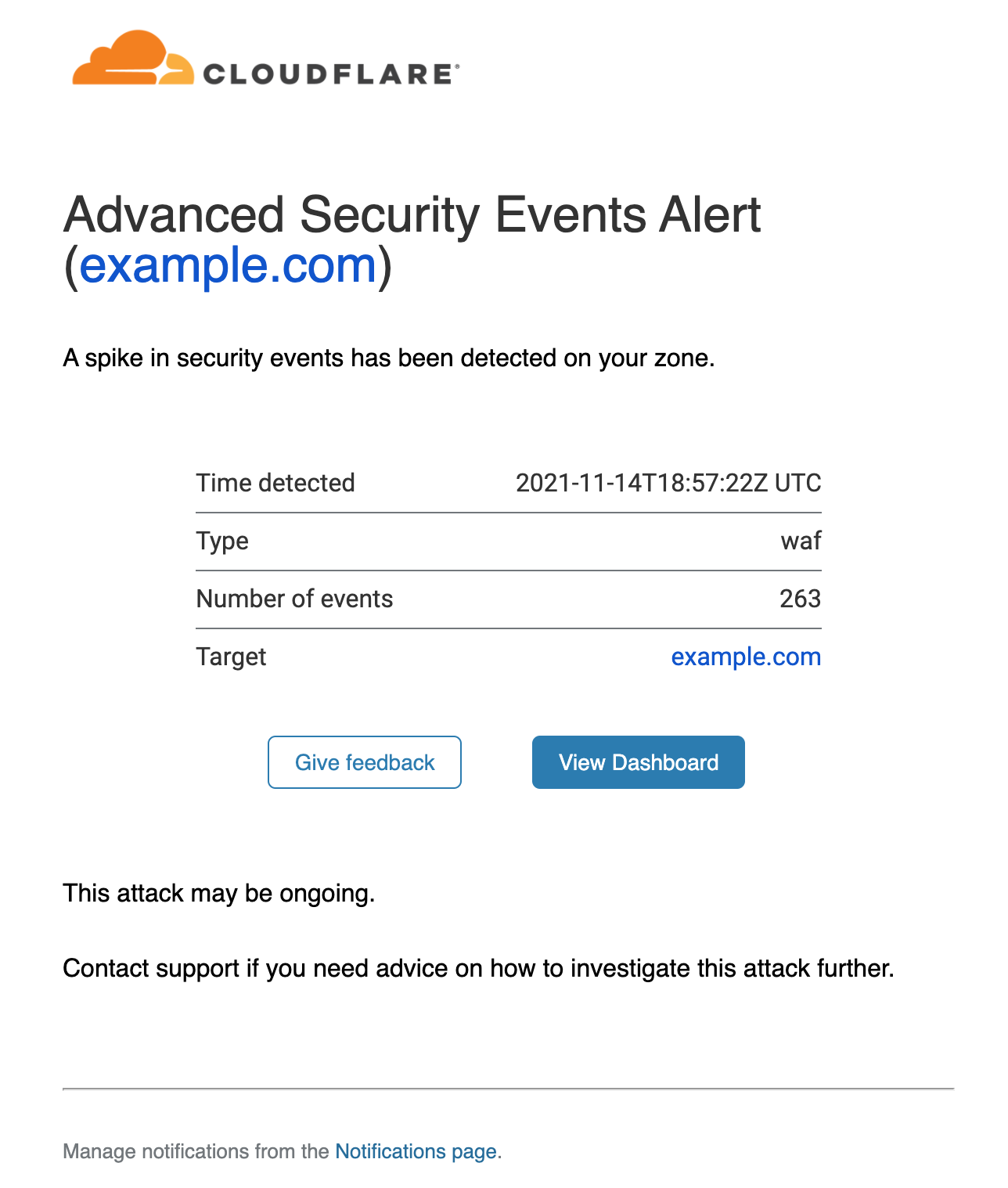
Once the notifications have been set up, you can rely on Cloudflare to warn you whenever an anomaly is detected. An example email notification is shown below:

Get notified when your site is under attack

The alert provides details on the service detecting the events (in this case the WAF), the timestamp and the affected zone. A link is provided that will direct you to the Firewall Events dashboard filtered on the correct service and time range.

The first of many alerts!

We are looking forward to customers setting up their notifications, so they can stay on top of any malicious activity affecting their applications.

This is just the first step of many towards building a much more comprehensive suite of notifications and incident management systems directly embedded in the Cloudflare dashboard. We look forward to posting feature improvements to our application security alert system in the near future.

Testing Faraday Cages

Post Syndicated from Bruce Schneier original https://www.schneier.com/blog/archives/2021/12/testing-faraday-cages.html

Matt Blaze tested a variety of Faraday cages for phones, both commercial and homemade.

The bottom line:

A quick and likely reliable “go/no go test” can be done with an Apple AirTag and an iPhone: drop the AirTag in the bag under test, and see if the phone can locate it and activate its alarm (beware of caching in the FindMy app when doing this).

This test won’t tell you the exact attenuation level, of course, but it will tell you if the attenuation is sufficient for most practical purposes. It can also detect whether an otherwise good bag has been damaged and compromised.

At least in the frequency ranges I tested, two commercial Faraday pouches (the EDEC OffGrid and Mission Darkness Window pouches) yielded excellent performance sufficient to provide assurance of signal isolation under most real-world circumstances. None of the makeshift solutions consistently did nearly as well, although aluminum foil can, under ideal circumstances (that are difficult to replicate) sometimes provide comparable levels of attenuation.

Field Notes: Building an Industrial Data Platform to Gather Insights from Operational Data

Post Syndicated from Shailaja Suresh original https://aws.amazon.com/blogs/architecture/field-notes-building-an-industrial-data-platform-to-gather-insights-from-operational-data/

Co-authored with Russell de Pina, former Sr. Partner Solutions Architect at AWS

Manufacturers looking to achieve greater operational efficiency need actionable insights from their operational data. Traditionally, operational technology (OT) and enterprise information technology (IT) existed in silos with various manual processes to clean and process data. Leveraging insights at a process level requires converging data across silos and abstracting the right data for the right use case in a scalable fashion.

The AWS Industrial Data Platform (IDP) facilitates the convergence of enterprise and operational data for gathering insights that lead to overall operational efficiency of the plant. In this blog, we demonstrate a sample AWS IDP architecture along with the steps to gather data across multiple data sources on the shop floor.

Overview of solution

With the IDP Reference Architecture as the backdrop, let us walk through the steps to implement this solution. Let us say we have gas compressors being used in our factory. The Operations Team has identified an anomaly in the wear of the bearings used in some of these compressors. Currently the bearings are supplied by two manufacturers, ABC and XYZ.

The graphs in Figures 1 and 2 show the expected and actual performance data of the bearings with respect to the vibration (actual and expected) against time. The points represent a cluster of plots which are represented as single dots here. The Mean Time Between Maintenance (MTBM) per the manufacturer for these bearings is five years. The factory has detected that for ABC bearings, the actual vibrations detected during its half-life is much more than the normal (expected) as shown. This clearly requires further analysis to identify the root cause for this discrepancy to prevent compressor breakdowns, unplanned downtime and cost.

ABC Bearings Anomoly

Figure 1 – ABC Bearings Anomaly

XYZ Bearings Vibration

Figure 2 – XYZ Bearings Vibration

Although the deviation observed from expected is much less in XYZ bearings, there is still a deviation which needs to be understood. This blog provides an overview of how the various AWS services of the IDP architecture help with this analysis. Figure 3, shows the AWS architecture used for this specific use case.

IDP AWS Architecture to solve for the Bearings Anomaly 

Figure 3 – IDP AWS Architecture to solve for the Bearings Anomaly

Tracking Anomaly Data

The sensors on the compressor bearings send the vibration/chatter data to AWS through AWS IoT core. Amazon Lookout for Equipment is configured as detailed out in the user guide with the necessary data formatting guidelines.

The raw sensor data from IoT Core which is in a JSON format is converted into a CSV format with the necessary headers to match the schema (one schema for each sensor) in Figure 7 using AWS Lambda. This CSV conversion is needed for the data to be processed by Amazon Lookout for Equipment. A sample sensor data from the ABC sensor, the AWS Lambda code snippet to convert this JSON to CSV and the output CSV which is to be ingested into Lookout for Equipment are shown in Figure 4,5 and 6 respectively. For detailed steps on how a dataset is created to be ingested into Lookout For Equipment, please refer the user guide.

Figure 4: Sample Sensor Data from ABC Bearings’ Sensor

Figure 4: Sample Sensor Data from ABC Bearings’ Sensor

import boto3
import botocore
import csv
import json

def lambda_handler(event, context):
    BUCKET_NAME = 'L4EData' 
    OUTPUT_KEY = 'csv/ABCSensor.csv' # OUTPUT FILE 
    INPUT_KEY = 'ABCSensor.json'# INPUT FILE 
    s3client = boto3.client('s3')
    s3 = boto3.resource('s3') 
    
    obj = s3.Object(BUCKET_NAME, INPUT_KEY)
    data = obj.get()['Body'].read().decode('utf-8')
    json_data = json.loads(data)
    print(json_data)

    
    output_file_path = "/tmp/data.csv"
    
    with open(output_file_path, "w") as file:
        csv_file = csv.writer(file)
        csv_file.writerow(['TIMESTAMP', 'Sensor'])
        for item in json_data:
            csv_file.writerow([item.get('TIMESTAMP'),item.get('Sensor')])
    
    csv_binary = open(output_file_path, 'rb').read()
    
    
    try:
        obj = s3.Object(BUCKET_NAME, OUTPUT_KEY)
        obj.put(Body=csv_binary)
    except botocore.exceptions.ClientError as e:
        if e.response['Error']['Code'] == "404":
            print("The object does not exist.")
        else:
            raise
    
    try:
        download_url = s3client.generate_presigned_url(
                         'get_object',
                          Params={
                              'Bucket': BUCKET_NAME,
                              'Key': OUTPUT_KEY
                              },
                          ExpiresIn=3600
        )
        return json.dumps(download_url)
    except Exception as e:
        raise utils_exception.ErrorResponse(400, e, Log)

Figure 5 –  AWS Lambda Python Code snippet to Convert CSV to JSON

Figure 6: Output CSV from AWS Lambda with Timestamp and Vibration values from Sensor

Figure 6 – Output CSV from AWS Lambda with Timestamp and Vibration values from Sensor

Figure 7: Data Schema used for Dataset Ingestion in Amazon Lookout for Equipment for ABC Vibration Sensor

Figure 7 – Data Schema used for Dataset Ingestion in Amazon Lookout for Equipment for ABC Vibration Sensor

Once the model is trained the anomaly is detected on bearing ABC as already stated.

Analyze Factory Environment Data

For our analysis, it is important to factor in the factory environment conditions. There are variables like factory humidity, machine temperature, bearing lubrication levels that could attribute to increased vibration. We have all the environment data gathered from factory sensors made available through AWS IoT Core as shown in Figure 3. Since the number of parameters measured through the factory sensors can change over time, the architecture uses a no-SQL database, Amazon DynamoDB, to persist this data for downstream analysis.

Since we only need sensor events that exceed a particular threshold, we set rules under AWS IoT Core to capture those events that could potentially cause increased vibration on the bearings. For example, we just want only those events that exceed a temperature threshold, say anything above 75-degree Fahrenheit along with the timestamp in Amazon DynamoDB. This is beyond the normal operating temperature for the bearings and certainly demands our interest.

So, we set a rule trigger as shown in Figure 8 in the Rule query statement while defining an action under IoT Core. The flow of events from an IoT sensor to Amazon DynamoDB is illustrated in Figure 9.

Figure 8 - Define a Rule in IoT Core

Figure 8 – Define a Rule in IoT Core

The events are received on a minute basis. So, if there are 3 records inserted in Amazon DynamoDB on a day, it means that there has been a temperature threshold breach for a maximum of 3 minutes.

We set up similar rules and actions to DynamoDB for humidity and compressor lubrication levels.

Figure 9: Event from IoT factory sensor to Amazon DynamoDB

Figure 9: Event from IoT factory sensor to Amazon DynamoDB

1)      Factory Data Storage

It is required to factor in both the factory data like machine id, shift number, shop floor and the operator data like the operator name, machine-operator relationships, operator’s shift, etc., for this analysis since we are drilling down to the granular details of which operators where working on the machines which have ABC bearings. Since this data is relational, it is stored in Amazon Aurora. We opt for the serverless option of the Aurora database since the operations team requires a database that is fully managed.

The  data of the vendors who supply ABC and XYZ bearings and their contracts  are stored in Amazon S3. We also have the operators’ performance scores pre-calculated and stored in Amazon S3.

2)      Querying the Data Lake

Now that we have data ingested and stored in various channels – Amazon S3, AWS IoT Core, Amazon DynamoDB and Amazon Aurora, it is required that we collate this data for further analysis and querying. We use Athena Federated Query  under Amazon Athena for querying across these multiple data sources and store the results in Amazon S3 as shown in Figure 10. It is required that we create a workgroup and configure connectors to set up Amazon S3, Amazon DynamoDB and Amazon Aurora as the data sources under Amazon Athena. The detailed steps to create and connect the data sources are provided in the user guide.

Figure 10: Athena Federated Query across Data Sources

Figure 10: Athena Federated Query across Data Sources

We are now interested to gather some insights across the three different data sources. Let us find all those machines and their corresponding operators with performance scores in factory shop floor 1 which have the lubrication levels as demonstrated in Figure 11.

Figure 11: Query to Determine Operators and their Performance

Figure 11: Query to Determine Operators and their Performance

From the output in Table 1, we see that operators on these machines which have the machine temperature levels of above the threshold to be having good scores (above 5, which is the average) based on past performance. Hence, we could conclude for now that they have been operating these machines under the normal expected conditions with the right controls and settings.

Table 1: Operators and their Scores

Table 1: Operators and their Scores

We would then want to find all those machines which have ABC Bearings and the vendors who supplied them as demonstrated in Figure 12.

Figure 12: Vendors Supplying ABC Bearings

Figure 12: Vendors Supplying ABC Bearings

Table 2: Names of Vendors Who Supply ABC Bearings

Table 2: Names of Vendors Who Supply ABC Bearings

As a next step, we would want to reach out to the vendors, Jane Doe Enterprises and Scott Inc.(see Table 2) to report the issue with ABC Bearings. The next step is to potentially modify the supply contracts and purchase only from XYZ manufacturer and/or to look for other bearing manufacturers in the vendor supply chain.

Conclusion

In this blog, we covered a sample use case to demonstrate how the AWS Industrial Data Platform can help gather actionable insights from factory floor data to gain operation efficiencies. We also did a walkthrough of a sample use case to demonstrate how the various AWS services can be used to build a scalable data platform for seamless querying and processing of data coming in with various formats.
[$] Detecting missing memory barriers with KCSAN

Post Syndicated from original https://lwn.net/Articles/877200/rss

Writing (correct) concurrent code that uses locking to avoid race
conditions is difficult enough. When the objective is to use lockless algorithms, relying on memory
barriers instead of locks to eliminate locking overhead, the problem
becomes harder
still. Bugs are easy to create and hard to find in this type of code.
There may be some help on the way, though, in the form of this
patch set
from Marco Elver that enhances the Kernel
Concurrency
Sanitizer
(KCSAN) with the ability to detect some types of missing
memory barriers.

The collective thoughts of the interwebz