Tag Archives: AWS Site-to-Site VPN

Building highly resilient applications with on-premises interdependencies using AWS Local Zones

Post Syndicated from Sheila Busser original https://aws.amazon.com/blogs/compute/building-highly-resilient-applications-with-on-premises-interdependencies-using-aws-local-zones/

This blog post is written by Rachel Rui Liu, Senior Solutions Architect.

AWS Local Zones are a type of infrastructure deployment that places compute, storage, database, and other select AWS services close to large population and industry centers.

Following the successful launch of the AWS Local Zones in 16 US cities since 2019, in Feb 2022, AWS announced plans to launch new AWS Local Zones in 32 metropolitan areas in 26 countries worldwide.

With Local Zones, we’ve seen use cases in two common categories.

The first category of use cases is for workloads that require extremely low latency between end-user devices and workload servers. For example, let’s consider media content creation and real-time multiplayer gaming. For these use cases, deploying the workload to a Local Zone can help achieve down to single-digit milliseconds latency between end-user devices and the AWS infrastructure, which is ideal for a good end-user experience.

This post will focus on addressing the second category of use cases, which is commonly seen in an enterprise hybrid architecture, where customers must achieve low latency between AWS infrastructure and existing on-premises data centers.  Compared to the first category of use cases, these use cases can tolerate slightly higher latency between the end-user devices and the AWS infrastructure. However, these workloads have dependencies to these on-premises systems, so the lowest possible latency between AWS infrastructure and on-premises data centers is required for better application performance. Here are a few examples of these systems:

  • Financial services sector mainframe workloads hosted on premises serving regional customers.
  • Enterprise Active Directory hosted on premise serving cloud and on-premises workloads.
  • Enterprise applications hosted on premises processing a high volume of locally generated data.

For workloads deployed in AWS, the time taken for each interaction with components still hosted in the on-premises data center is increased by the latency. In turn, this delays responses received by the end-user. The total latency accumulates and results in suboptimal user experiences.

By deploying modernized workloads in Local Zones, you can reduce latency while continuing to access systems hosted in on-premises data centers, thereby reducing the total latency for the end-user. At the same time, you can enjoy the benefits of agility, elasticity, and security offered by AWS, and can apply the same automation, compliance, and security best practices that you’ve been familiar with in the AWS Regions.

Enterprise workload resiliency with Local Zones

While designing hybrid architectures with Local Zones, resiliency is an important consideration. You want to route traffic to the nearest Local Zone for low latency. However, when disasters happen, it’s critical to fail over to the parent Region automatically.

Let’s look at the details of hybrid architecture design based on real world deployments from different angles to understand how the architecture achieves all of the design goals.

Hybrid architecture with resilient network connectivity

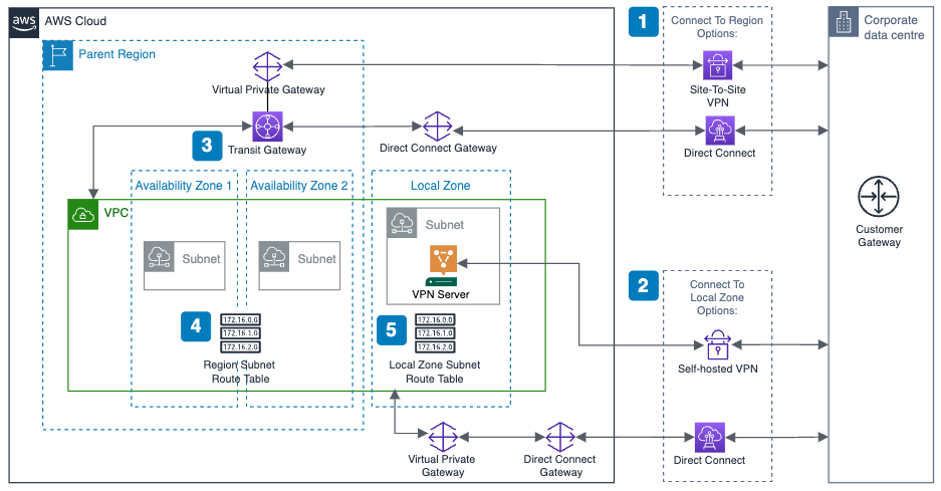
The following diagram shows a high-level overview of a resilient enterprise hybrid architecture with Local Zones, where you have redundant connections between the AWS Region, the Local Zone, and the corporate data center.

resillient network connectivity

Here are a few key points with this network connectivity design:

  1. Use AWS Direct Connect or Site-to-Site VPN to connect the corporate data center and AWS Region.
  2. Use Direct Connect or self-hosted VPN to connect the corporate data center and the Local Zone. This connection will provide dedicated low-latency connectivity between the Local Zone and corporate data center.
  3. Transit Gateway is a regional service. When attaching the VPC to AWS Transit Gateway, you can only add subnets provisioned in the Region. Instances on subnets in the Local Zone can still use Transit Gateway to reach resources in the Region.
  4. For subnets provisioned in the Region, the VPC route table should be configured to route the traffic to the corporate data center via Transit Gateway.
  5. For subnets provisioned in Local Zone, the VPC route table should be configured to route the traffic to the corporate data center via the self-hosted VPN instance or Direct Connect.

Hybrid architecture with resilient workload deployment

The next examples show a public and a private facing workload.

To simplify the diagram and focus on application layer architecture, the following diagrams assume that you are using Direct Connect to connect between AWS and the on-premises data center.

Example 1: Resilient public facing workload

With a public facing workload, end-user traffic will be routed to the Local Zone. If the Local Zone is unavailable, then the traffic will be routed to the Region automatically using an Amazon Route 53 failover policy.

public facing workload resilliency
Here are the key design considerations for this architecture:

  1. Deploy the workload in the Local Zone and put the compute layer in an AWS AutoScaling Group, so that the application can scale up and down depending on volume of requests.
  2. Deploy the workload in both the Local Zone and an AWS Region, and put the compute layer into an autoscaling group. The regional deployment will act as pilot light or warm standby with minimal footprint. But it can scale out when the Local Zone is unavailable.
  3. Two Application Load Balancers (ALBs) are required: one in the Region and one in the Local Zone. Each ALB will dispatch the traffic to each workload cluster inside the autoscaling group local to it.
  4. An internet gateway is required for public facing workloads. When using a Local Zone, there’s no extra configuration needed: define a single internet gateway and attach it to the VPC.

If you want to specify an Elastic IP address to be the workload’s public endpoint, the Local Zone will have a different address pool than the Region. Noting that BYOIP is unsupported for Local Zones.

  1. Create a Route 53 DNS record with “Failover” as the routing policy.
  • For the primary record, point it to the alias of the ALB in the Local Zone. This will set Local Zone as the preferred destination for the application traffic which minimizes latency for end-users.
  • For the secondary record, point it to the alias of the ALB in the AWS Region.
  • Enable health check for the primary record. If health check against the primary record fails, which indicates that the workload deployed in the Local Zone has failed to respond, then Route 53 will automatically point to the secondary record, which is the workload deployed in the AWS Region.

Example 2: Resilient private workload

For a private workload that’s only accessible by internal users, a few extra considerations must be made to keep the traffic inside of the trusted private network.

private workload resilliency

The architecture for resilient private facing workload has the same steps as public facing workload, but with some key differences. These include:

  1. Instead of using a public hosted zone, create private hosted zones in Route 53 to respond to DNS queries for the workload.
  2. Create the primary and secondary records in Route 53 just like the public workload but referencing the private ALBs.
  3. To allow end-users onto the corporate network (within offices or connected via VPN) to resolve the workload, use the Route 53 Resolver with an inbound endpoint. This allows end-users located on-premises to resolve the records in the private hosted zone. Route 53 Resolver is designed to be integrated with an on-premises DNS server.
  4. No internet gateway is required for hosting the private workload. You might need an internet gateway in the Local Zone for other purposes: for example, to host a self-managed VPN solution to connect the Local Zone with the corporate data center.

Hosting multiple workloads

Customers who host multiple workloads in a single VPC generally must consider how to segregate those workloads. As with workloads in the AWS Region, segregation can be implemented at a subnet or VPC level.

If you want to segregate workloads at the subnet level, you can extend your existing VPC architecture by provisioning extra sets of subnets to the Local Zone.

segregate workloads at subnet level

Although not shown in the diagram, for those of you using a self-hosted VPN to connect the Local Zone with an on-premises data center, the VPN solution can be deployed in a centralized subnet.

You can continue to use security groups, network access control lists (NACLs) , and VPC route tables – just as you would in the Region to segregate the workloads.

If you want to segregate workloads at the VPC level, like many of our customers do, within the Region, inter-VPC routing is generally handled by Transit Gateway. However, in this case, it may be undesirable to send traffic to the Region to reach a subnet in another VPC that is also extended to the Local Zone.

segregate workloads at VPC level

Key considerations for this design are as follows:

  1. Direct Connect is deployed to connect the Local Zone with the corporate data center. Therefore, each VPC will have a dedicated Virtual Private Gateway provisioned to allow association with the Direct Connect Gateway.
  2. To enable inter-VPC traffic within the Local Zone, peer the two VPCs together.
  3. Create a VPC route table in VPC A. Add a route for Subnet Y where the destination is the peering link. Assign this route table to Subnet X.
  4. Create a VPC route table in VPC B. Add a route for Subnet X where the destination is the peering link. Assign this route table to Subnet Y.
  5. If necessary, add routes for on-premises networks and the transit gateway to both route tables.

This design allows traffic between subnets X and Y to stay within the Local Zone, thereby avoiding any latency from the Local Zone to the AWS Region while still permitting full connectivity to all other networks.

Conclusion

In this post, we summarized the use cases for enterprise hybrid architecture with Local Zones, and showed you:

  • Reference architectures to host workloads in Local Zones with low-latency connectivity to corporate data centers and resiliency to enable fail over to the AWS Region automatically.
  • Different design considerations for public and private facing workloads utilizing this hybrid architecture.
  • Segregation and connectivity considerations when extending this hybrid architecture to host multiple workloads.

Hopefully you will be able to follow along with these reference architectures to build and run highly resilient applications with local system interdependencies using Local Zones.

AWS Week in Review – June 27, 2022

Post Syndicated from Danilo Poccia original https://aws.amazon.com/blogs/aws/aws-week-in-review-june-27-2022/

This post is part of our Week in Review series. Check back each week for a quick roundup of interesting news and announcements from AWS!

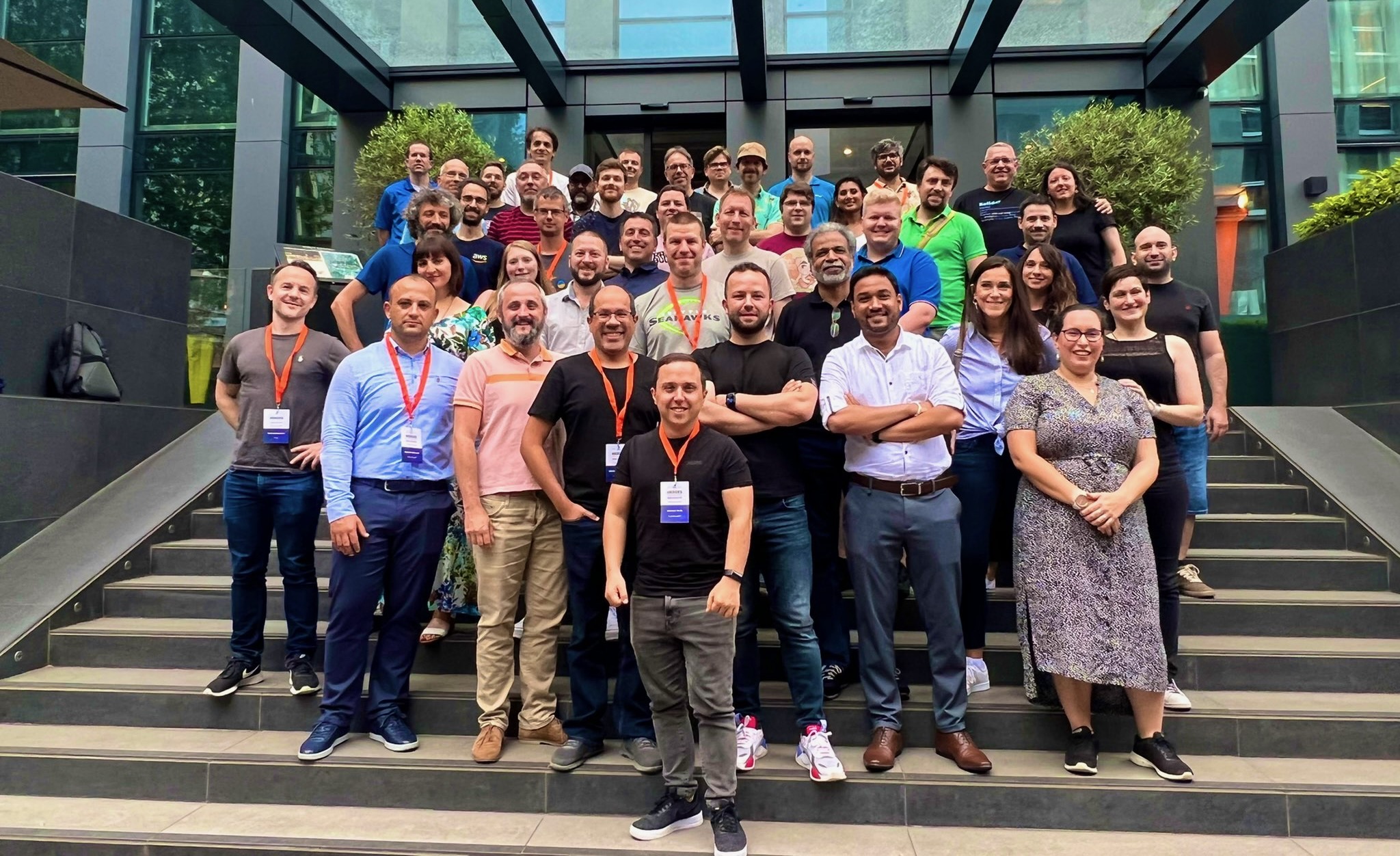
It’s the beginning of a new week, and I’d like to start with a recap of the most significant AWS news from the previous 7 days. Last week was special because I had the privilege to be at the very first EMEA AWS Heroes Summit in Milan, Italy. It was a great opportunity of mutual learning as this community of experts shared their thoughts with AWS developer advocates, product managers, and technologists on topics such as containers, serverless, and machine learning.

Participants at the EMEA AWS Heroes Summit 2022

Last Week’s Launches
Here are the launches that got my attention last week:

Amazon Connect Cases (available in preview) – This new capability of Amazon Connect provides built-in case management for your contact center agents to create, collaborate on, and resolve customer issues. Learn more in this blog post that shows how to simplify case management in your contact center.

Many updates for Amazon RDS and Amazon AuroraAmazon RDS Custom for Oracle now supports Oracle database 12.2 and 18c, and Amazon RDS Multi-AZ deployments with one primary and two readable standby database instances now supports M5d and R5d instances and is available in more Regions. There is also a Regional expansion for RDS Custom. Finally, PostgreSQL 14, a new major version, is now supported by Amazon Aurora PostgreSQL-Compatible Edition.

AWS WAF Captcha is now generally available – You can use AWS WAF Captcha to block unwanted bot traffic by requiring users to successfully complete challenges before their web requests are allowed to reach resources.

Private IP VPNs with AWS Site-to-Site VPN – You can now deploy AWS Site-to-Site VPN connections over AWS Direct Connect using private IP addresses. This way, you can encrypt traffic between on-premises networks and AWS via Direct Connect connections without the need for public IP addresses.

AWS Center for Quantum Networking – Research and development of quantum computers have the potential to revolutionize science and technology. To address fundamental scientific and engineering challenges and develop new hardware, software, and applications for quantum networks, we announced the AWS Center for Quantum Networking.

Simpler access to sustainability data, plus a global hackathon – The Amazon Sustainability Data Initiative catalog of datasets is now searchable and discoverable through AWS Data Exchange. As part of a new collaboration with the International Research Centre in Artificial Intelligence, under the auspices of UNESCO, you can use the power of the cloud to help the world become sustainable by participating to the Amazon Sustainability Data Initiative Global Hackathon.

For a full list of AWS announcements, be sure to keep an eye on the What’s New at AWS page.

Other AWS News
A couple of takeaways from the Amazon re:MARS conference:

Amazon CodeWhisperer (preview) – Amazon CodeWhisperer is a coding companion powered by machine learning with support for multiple IDEs and languages.

Synthetic data generation with Amazon SageMaker Ground TruthGenerate labeled synthetic image data that you can combine with real-world data to create more complete training datasets for your ML models.

Some other updates you might have missed:

AstraZeneca’s drug design program built using AWS wins innovation award – AstraZeneca received the BioIT World Innovative Practice Award at the 20th anniversary of the Bio-IT World Conference for its novel augmented drug design platform built on AWS. More in this blog post.

Large object storage strategies for Amazon DynamoDB – A blog post showing different options for handling large objects within DynamoDB and the benefits and disadvantages of each approach.

Amazon DevOps Guru for RDS under the hoodSome details of how DevOps Guru for RDS works, with a specific focus on its scalability, security, and availability.

AWS open-source news and updates – A newsletter curated by my colleague Ricardo to bring you the latest open-source projects, posts, events, and more.

Upcoming AWS Events
It’s AWS Summits season and here are some virtual and in-person events that might be close to you:

On June 30, the AWS User Group Ukraine is running an AWS Tech Conference to discuss digital transformation with AWS. Join to learn from many sessions including a fireside chat with Dr. Werner Vogels, CTO at Amazon.com.

That’s all from me for this week. Come back next Monday for another Week in Review!

Danilo

Integrate Okta to Extend Active Directory Infrastructure into AWS

Post Syndicated from Pavankumar Kasani original https://aws.amazon.com/blogs/architecture/integrate-okta-to-extend-active-directory-infrastructure-into-aws/

Are you ready to extend your on-premises Active Directory to Amazon Web Services (AWS) to remove undifferentiated heavy lifting? Would you like to maintain a highly available Directory Service for your applications? Companies who have already set up integration with Okta Identity Cloud for external or internal applications require Active Directory objects to be synced to Okta for authentication. To achieve centralized access for on-premises and cloud applications, you can extend your on-premises Active Directory to AWS Managed Microsoft Active Directory (AD) using a trust relationship.

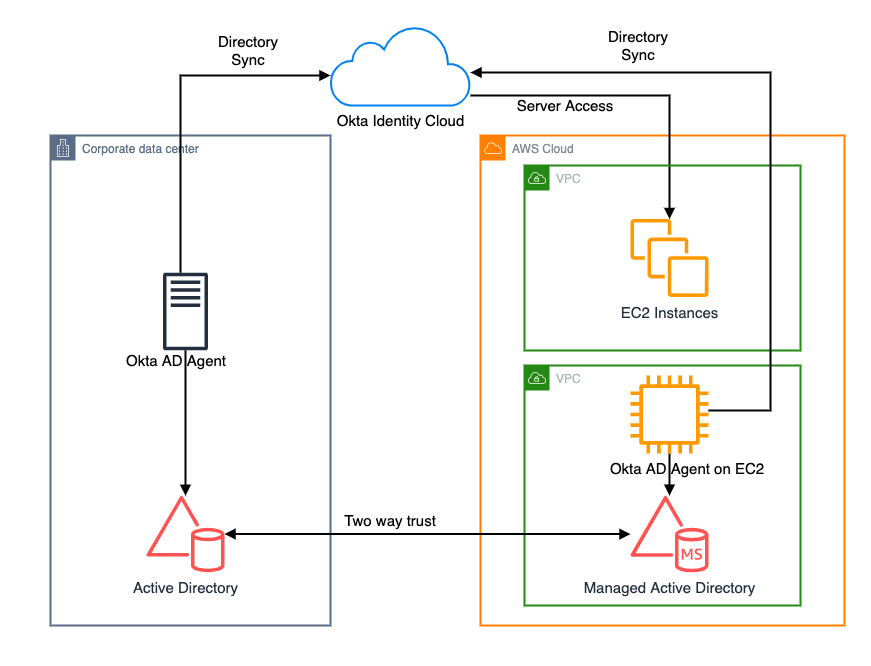
This blog shows an architecture pattern that you can use to synchronize your on-premises AD and AWS Managed AD objects. You can use Okta Identity Cloud using an Okta AD agent for syncing users and groups. The Okta AD agent can be installed and configured on a domain-joined on-premises server or an Amazon EC2 instance on AWS (see Figure 1).

AWS Directory Service lets you run Microsoft Active Directory (AD) as a managed service, and is powered by Windows Server 2012 R2. When you select and launch this directory type, it is created as a highly available pair of domain controllers connected to your Amazon Virtual Private Cloud (VPC). The domain controllers run in different Availability Zones in an AWS Region of your choice.

Okta is an enterprise-grade identity management service, which is compatible with many on-premises and cloud applications. The Okta AD agent enables you to integrate Okta with your on-premises AD. This way you can integrate your SaaS applications and your AD instances with Okta. You can simplify and centralize user management and share user credentials with other integrated cloud and on-premises applications.

Figure 1. Active Directory objects synchronization to Okta identity cloud

Figure 1. Active Directory objects synchronization to Okta identity cloud

Network connectivity between corporate data center and AWS Regions

Before getting started with configuring a trust relationship with on-premises AD and AWS managed AD, be sure you’ve read and understand the prerequisites for setting up trust. For example, it is highly recommended to have a VPN or AWS Direct Connect circuit in place between your VPC and your on-premises environment. To create a resilient VPN connection, refer to the Site-to-Site VPN User Guide.

AWS Site-to-Site VPN is a fully managed service that uses IP security (IPsec) tunnels to create a secure connection between your data center or branch office, and your AWS resources. When using Site-to-Site VPN, you can connect to Amazon VPC and also AWS Transit Gateway. Two tunnels per connection are used for increased redundancy. You can also create a dedicated or a hosted connection using AWS Direct Connect.

Trust relationship between on-premises AD and AWS Managed AD

A trust relationship is a link between two different domains. For example, a one-way trust scenario allows the user accounts from the trusted domain to access resources in the trusting domain. In a two-way trust scenario, user accounts and resources can be passed between the two domains bidirectionally. A two-way trust relationship is commonly set up between on-premises AD and AWS Managed AD to extend authentication. This is used for any directory-aware workloads in the AWS Cloud, providing users and groups access to resources in either domain using single sign-on (SSO).

AWS Managed Microsoft Active Directory (AD) supports external and forest trust relationships with your existing on-premises domain in all three trust relationship directions:

  • One-way incoming
  • One-way outgoing
  • Two-way bidirectional

To create a trust relationship, follow these steps:

  1. Prepare your on-premises domain for the trust relationship. This includes preparing your firewall configuration, enable Kerberos pre-authentication, and configuring conditional forwarders.
  2. Prepare your AWS Managed Microsoft AD for the trust relationship. This includes configuring your VPC subnets, security groups, and enabling Kerberos pre-authentication.
  3. Create the trust relationship between your on-premises AD and your AWS Managed Microsoft Active Directory (AD).

Install and configure Okta agent

Download and install Okta AD agent on your Amazon EC2 instance, which should be domain-joined with AWS Managed AD. One Okta AD agent can associate with multiple domains. Once the trust has been set up between on-premises AD and AWS Managed AD, you can associate multiple domains under the same Okta AD agent on Amazon EC2, instead of hosting and managing separate Okta AD agent servers in your own data center and AWS.

For a highly available architecture, a redundant Okta AD agent running in your corporate data center is recommended. This will help you avoid the impact of network connectivity failure between data centers and AWS Regions. Okta recommends installing multiple Okta AD agents on each domain server to achieve high availability and failover protection.

Read Okta AD integration step-by-step setup for installing and configuring Okta agent.

Validate AD objects

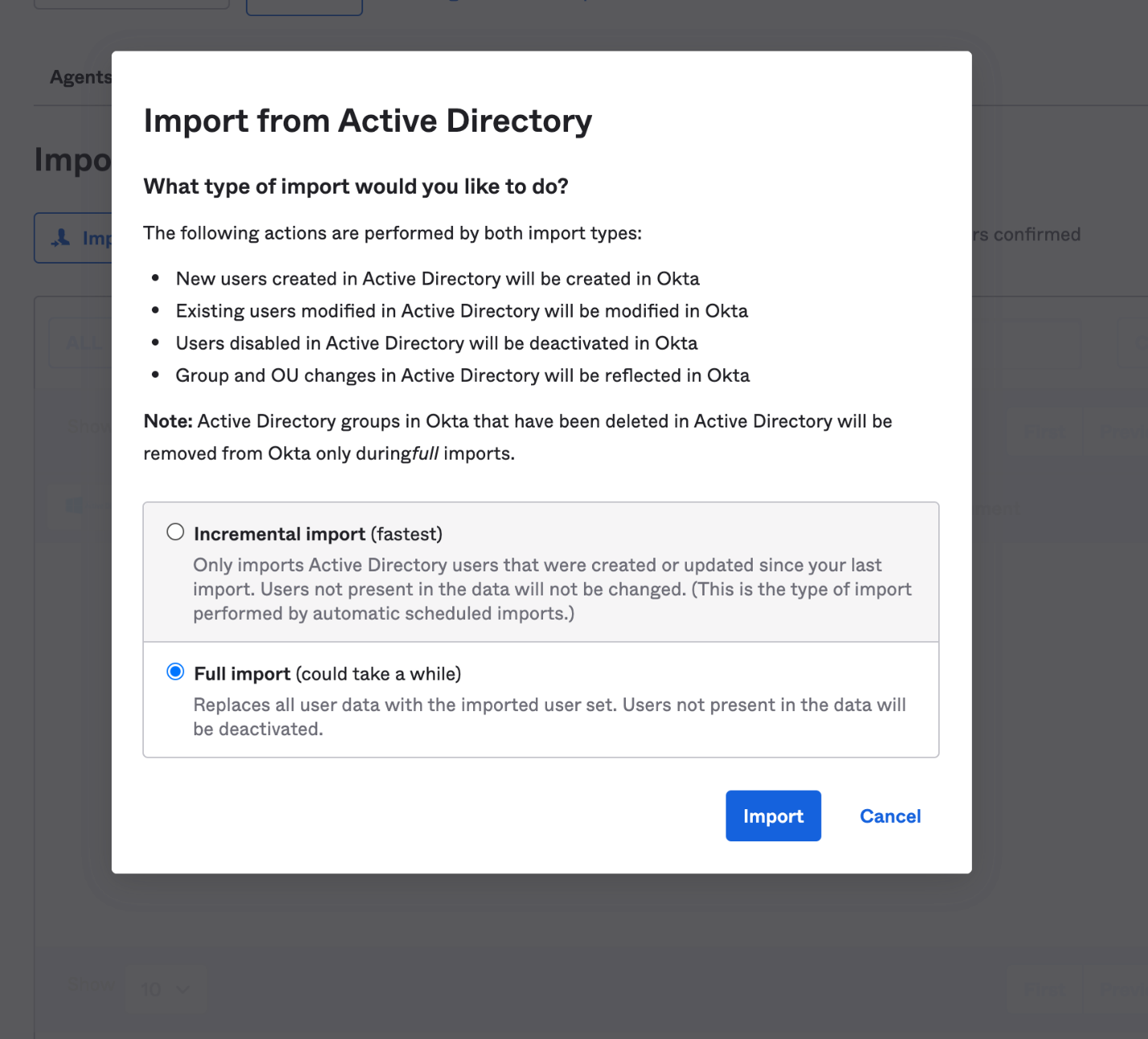
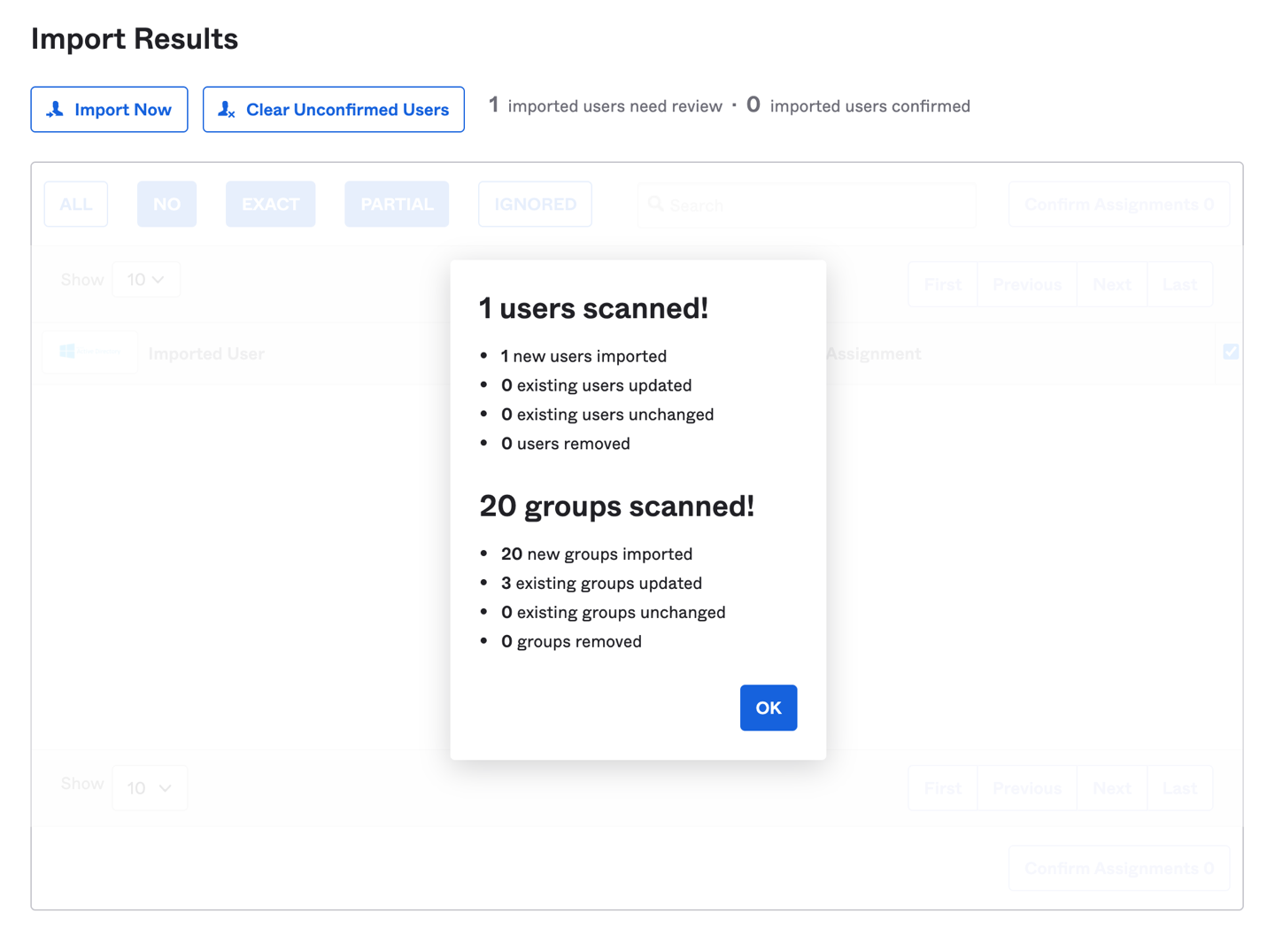
Once the Okta agent is installed and configured on the Amazon EC2 instance, log in to the Okta admin console. Under the provisioning to Okta tab, do a full import of users from AWS Managed AD (see Figure 2, Figure 3). The subsequent objects synchronization will be done through scheduled import with a minimum interval of one hour. After the import is done, if there are any user account overlaps between AWS Managed AD and Okta, manually assign the AD users to Okta users. You can create matching rules to automatically map the users from AD to Okta. Read Import AD users to Okta.

Figure 2. Import users under Okta admin console

Figure 2. Import users under Okta admin console

Figure 3. Import users results under Okta admin console

Figure 3. Import users results under Okta admin console

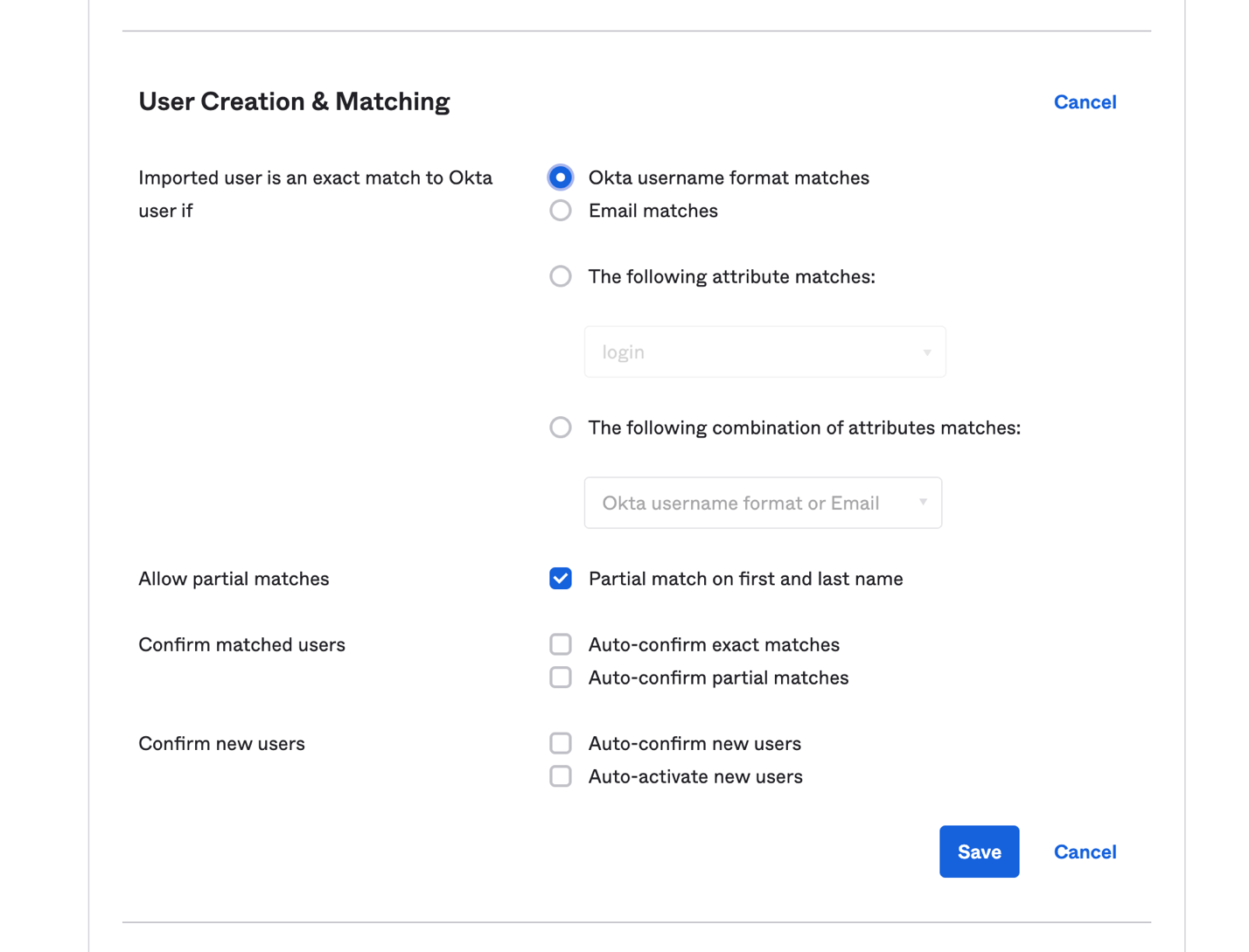
Matching rules are used in the import of users from all apps and directories that provide importing. If there is an existing Okta account, AD allows you to import and confirm users automatically (see Figure 4).

Figure 4. User creation and matching under Okta admin console

Figure 4. User creation and matching under Okta admin console

You can import groups from any forest or domain connected to Okta. The Okta AD Agent detects all groups in the domain or the organizational units (OUs) that you select. If you register an Okta AD Agent for more than one domain and you have the root OU selected for all domains, all groups will be imported. Read Import AD Groups to Okta to synchronize groups from AD to Okta.

Synchronize passwords to Okta

When you sign in to Okta using your organization’s AD credentials, the authentication process is delegated to the connected on-premises AD. Okta does not see or store the credentials.

In some cases, the credentials must be synchronized from a directory across Okta to an application. If a user changes the password stored in Active Directory and then tries to access applications using the same single sign-on session, they will receive a password error message. This is because the new password has not been synchronized to the application, so a new sign-in process is required for password validation.

To avoid a disruptive user experience, use the Okta AD Password Sync Agent to synchronize passwords from AD to Okta and to integrated apps. The Okta AD Password Sync Agent will track password changes in AD and then synchronize to Okta.

For more details on the password synchronization and password reset workflow, you can read step-by-step instructions on Synchronize passwords from Active Directory to Okta.

Summary

In this blog post, we discussed a way for synchronizing users and credentials from on-premises Active Directory and AWS Managed AD to Okta Identity Cloud. With synchronization, you can centralize access of cloud and on-premises applications and provide seamless access to AD-aware services within AWS.

Customers can also migrate on-premises AD to AWS using Active Directory Migration Tool (ADMT) along with the Password Export Server (PES) service.

Read more:

Overview of Data Transfer Costs for Common Architectures

Post Syndicated from Birender Pal original https://aws.amazon.com/blogs/architecture/overview-of-data-transfer-costs-for-common-architectures/

Data transfer charges are often overlooked while architecting a solution in AWS. Considering data transfer charges while making architectural decisions can help save costs. This blog post will help identify potential data transfer charges you may encounter while operating your workload on AWS. Service charges are out of scope for this blog, but should be carefully considered when designing any architecture.

Data transfer between AWS and internet

There is no charge for inbound data transfer across all services in all Regions. Data transfer from AWS to the internet is charged per service, with rates specific to the originating Region. Refer to the pricing pages for each service—for example, the pricing page for Amazon Elastic Compute Cloud (Amazon EC2)—for more details.

Data transfer within AWS

Data transfer within AWS could be from your workload to other AWS services, or it could be between different components of your workload.

Data transfer between your workload and other AWS services

When your workload accesses AWS services, you may incur data transfer charges.

Accessing services within the same AWS Region

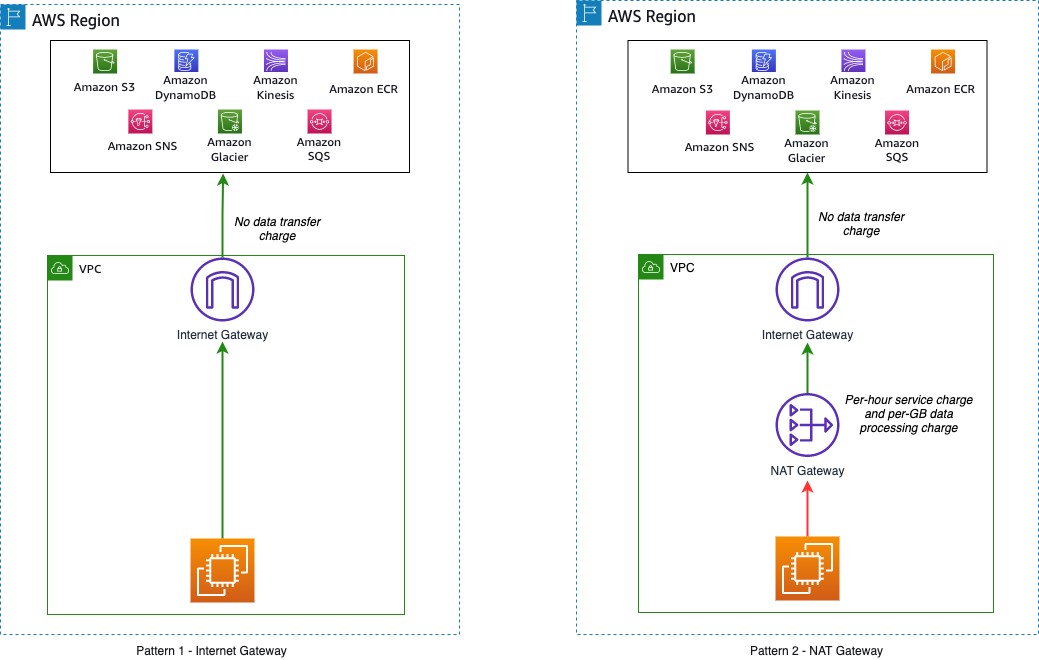
If the internet gateway is used to access the public endpoint of the AWS services in the same Region (Figure 1 – Pattern 1), there are no data transfer charges. If a NAT gateway is used to access the same services (Figure 1 – Pattern 2), there is a data processing charge (per gigabyte (GB)) for data that passes through the gateway.

Accessing AWS services in same Region

Figure 1. Accessing AWS services in same Region

Accessing services across AWS Regions

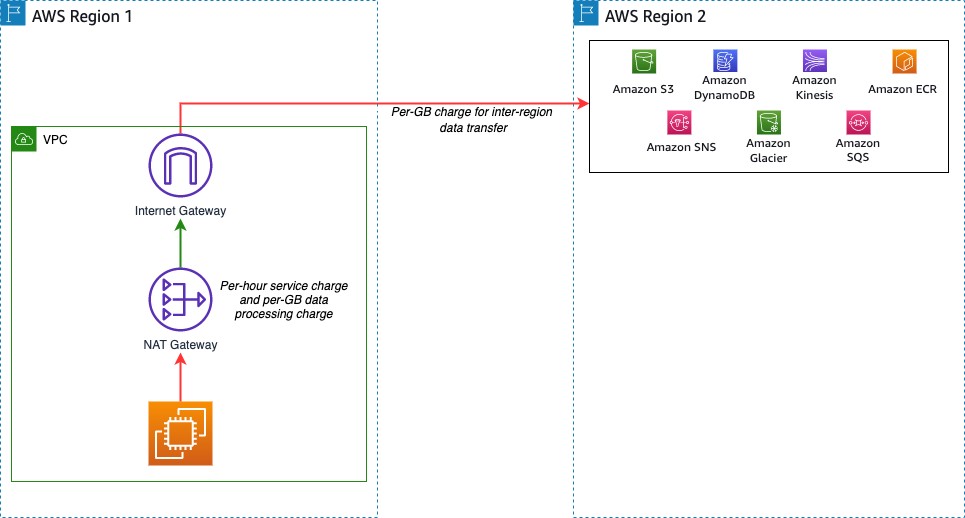
If your workload accesses services in different Regions (Figure 2), there is a charge for data transfer across Regions. The charge depends on the source and destination Region (as described on the Amazon EC2 Data Transfer pricing page).

Accessing AWS services in different Region

Figure 2. Accessing AWS services in different Region

Data transfer within different components of your workload

Charges may apply if there is data transfer between different components of your workload. These charges vary depending on where the components are deployed.

Workload components in same AWS Region

Data transfer within the same Availability Zone is free. One way to achieve high availability for a workload is to deploy in multiple Availability Zones.

Consider a workload with two application servers running on Amazon EC2 and a database running on Amazon Relational Database Service (Amazon RDS) for MySQL (Figure 3). For high availability, each application server is deployed into a separate Availability Zone. Here, data transfer charges apply for cross-Availability Zone communication between the EC2 instances. Data transfer charges also apply between Amazon EC2 and Amazon RDS. Consult the Amazon RDS for MySQL pricing guide for more information.

Workload components across Availability Zones

Figure 3. Workload components across Availability Zones

To minimize impact of a database instance failure, enable a multi-Availability Zone configuration within Amazon RDS to deploy a standby instance in a different Availability Zone. Replication between the primary and standby instances does not incur additional data transfer charges. However, data transfer charges will apply from any consumers outside the current primary instance Availability Zone. Refer to the Amazon RDS pricing page for more detail.

A common pattern is to deploy workloads across multiple VPCs in your AWS network. Two approaches to enabling VPC-to-VPC communication are VPC peering connections and AWS Transit Gateway. Data transfer over a VPC peering connection that stays within an Availability Zone is free. Data transfer over a VPC peering connection that crosses Availability Zones will incur a data transfer charge for ingress/egress traffic (Figure 4).

VPC peering connection

Figure 4. VPC peering connection

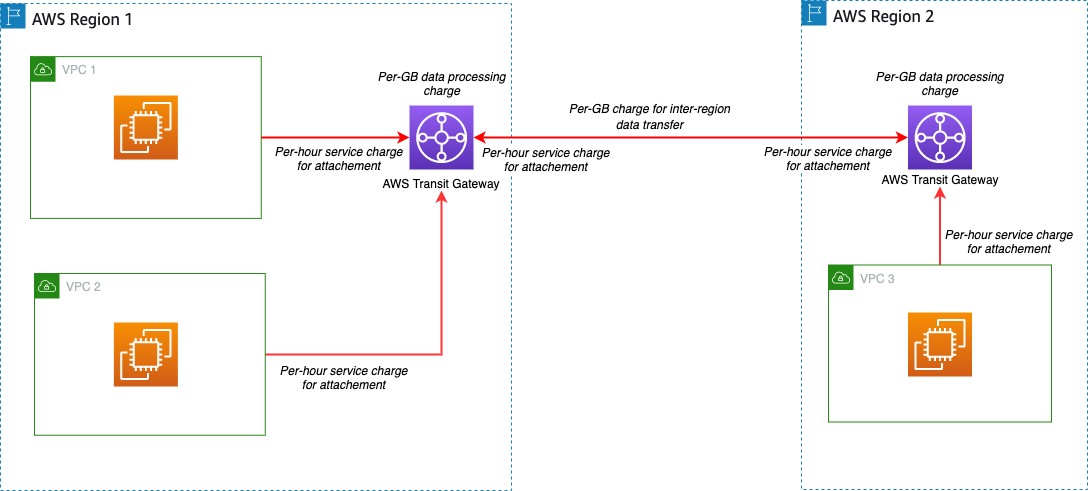
Transit Gateway can interconnect hundreds or thousands of VPCs (Figure 5). Cost elements for Transit Gateway include an hourly charge for each attached VPC, AWS Direct Connect, or AWS Site-to-Site VPN. Data processing charges apply for each GB sent from a VPC, Direct Connect, or VPN to Transit Gateway.

VPC peering using Transit Gateway in same Region

Figure 5. VPC peering using Transit Gateway in same Region

Workload components in different AWS Regions

If workload components communicate across multiple Regions using VPC peering connections or Transit Gateway, additional data transfer charges apply. If the VPCs are peered across Regions, standard inter-Region data transfer charges will apply (Figure 6).

VPC peering across Regions

Figure 6. VPC peering across Regions

For peered Transit Gateways, you will incur data transfer charges on only one side of the peer. Data transfer charges do not apply for data sent from a peering attachment to a Transit Gateway. The data transfer for this cross-Region peering connection is in addition to the data transfer charges for the other attachments (Figure 7).

Transit Gateway peering across Regions

Figure 7. Transit Gateway peering across Regions

Data transfer between AWS and on-premises data centers

Data transfer will occur when your workload needs to access resources in your on-premises data center. There are two common options to help achieve this connectivity: Site-to-Site VPN and Direct Connect.

Data transfer over AWS Site-to-Site VPN

One option to connect workloads to an on-premises network is to use one or more Site-to-Site VPN connections (Figure 8 – Pattern 1). These charges include an hourly charge for the connection and a charge for data transferred from AWS. Refer to Site-to-Site VPN pricing for more details. Another option to connect multiple VPCs to an on-premises network is to use a Site-to-Site VPN connection to a Transit Gateway (Figure 8 – Pattern 2). The Site-to-Site VPN will be considered another attachment on the Transit Gateway. Standard Transit Gateway pricing applies.

Site-to-Site VPN patterns

Figure 8. Site-to-Site VPN patterns

Data transfer over AWS Direct Connect

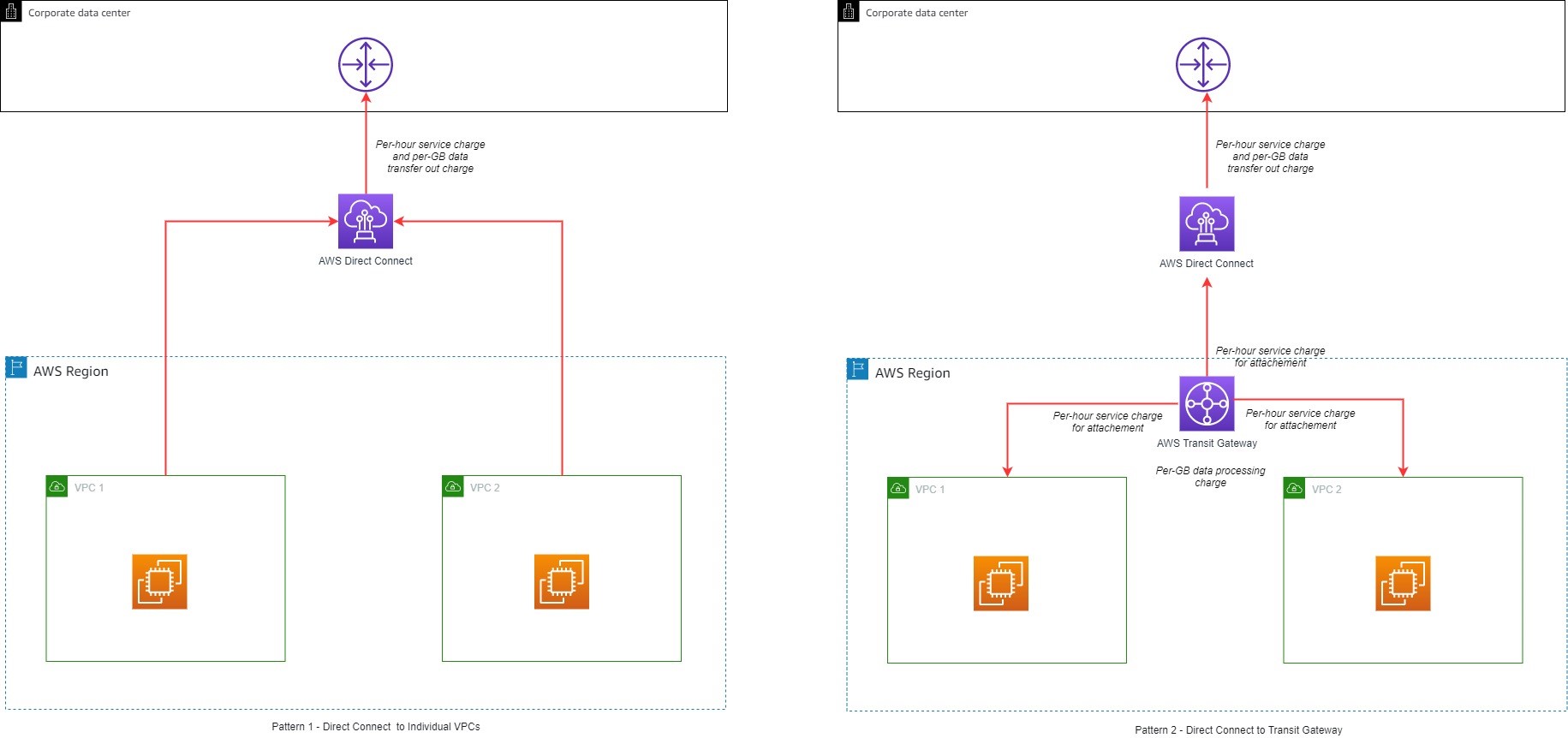
Direct Connect can be used to connect workloads in AWS to on-premises networks. Direct Connect incurs a fee for each hour the connection port is used and data transfer charges for data flowing out of AWS. Data transfer into AWS is $0.00 per GB in all locations. The data transfer charges depend on the source Region and the Direct Connect provider location. Direct Connect can also connect to the Transit Gateway if multiple VPCs need to be connected (Figure 9). Direct Connect is considered another attachment on the Transit Gateway and standard Transit Gateway pricing applies. Refer to the Direct Connect pricing page for more details.

Figure 9. Direct Connect patterns

Figure 9. Direct Connect patterns

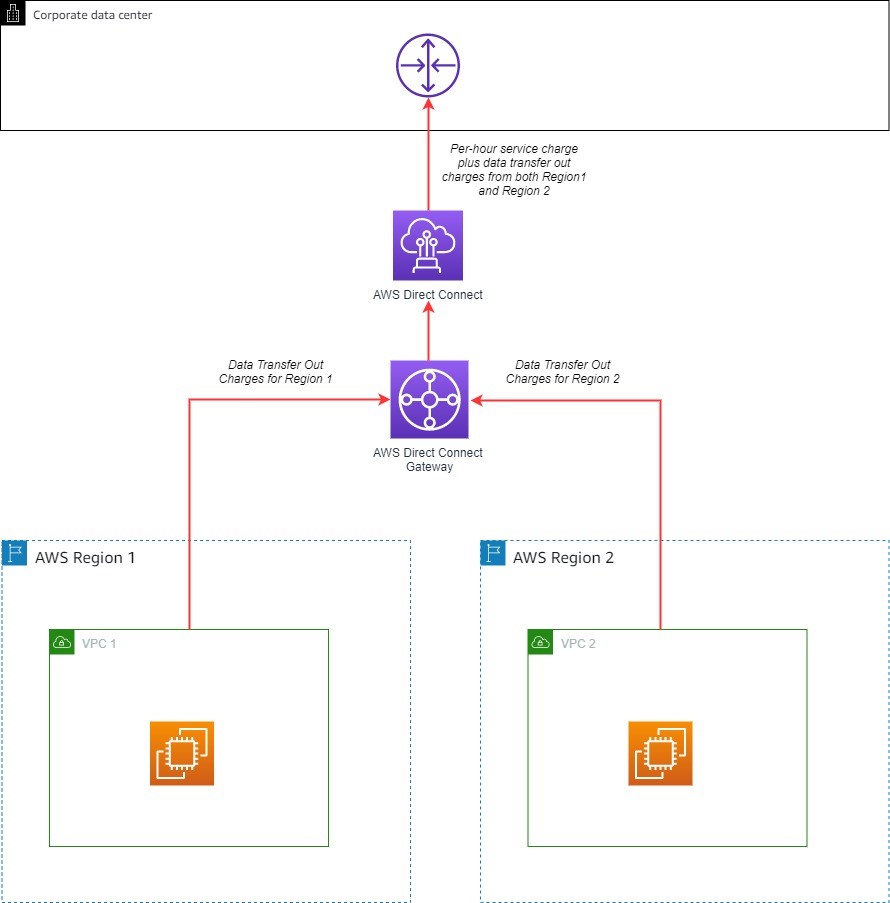
A Direct Connect gateway can be used to share a Direct Connect across multiple Regions. When using a Direct Connect gateway, there will be outbound data charges based on the source Region and Direct Connect location (Figure 10).

Direct Connect gateway

Figure 10. Direct Connect gateway

General tips

Data transfer charges apply based on the source, destination, and amount of traffic. Here are some general tips for when you start planning your architecture:

  • Avoid routing traffic over the internet when connecting to AWS services from within AWS by using VPC endpoints:
    • VPC gateway endpoints allow communication to Amazon S3 and Amazon DynamoDB without incurring data transfer charges.
    • VPC interface endpoints are available for some AWS services. This type of endpoint incurs hourly service charges and data transfer charges.
  • Use Direct Connect instead of the internet for sending data to on-premises networks.
  • Traffic that crosses an Availability Zone boundary typically incurs a data transfer charge. Use resources from the local Availability Zone whenever possible.
  • Traffic that crosses a Regional boundary will typically incur a data transfer charge. Avoid cross-Region data transfer unless your business case requires it.
  • Use the AWS Free Tier. Under certain circumstances, you may be able to test your workload free of charge.
  • Use the AWS Pricing Calculator to help estimate the data transfer costs for your solution.
  • Use a dashboard to better visualize data transfer charges – this workshop will show how.

Conclusion

AWS provides the ability to deploy across multiple Availability Zones and Regions. With a few clicks, you can create a distributed workload. As you increase your footprint across AWS, it helps to understand various data transfer charges that may apply. This blog post provided information to help you make an informed decision and explore different architectural patterns to save on data transfer costs.