NTP operates in the clear, and it is often the case that the
servers used by a client are not local. This provides an
opportunity for an adversary to disrupt an NTP session, by
masquerading as a NTP server, or altering NTP payloads in an effort
to disrupt a client’s time-of-day clock. Many application-level
protocols are time sensitive, including TLS, HTTPS, DNSSEC and
NFS. Most Cloud applications rely on a coordinated time to
determine the most recent version of a data object. Disrupting time
can cause significant chaos in distributed network environments.
While it can be relatively straightforward to secure a TCP-based
protocol by adding an initial TLS handshake and operating a TLS
shim between TCP and the application traffic, it’s not so
straightforward to use TLS in place of a UDP-based protocol for
NTP. TLS can add significant jitter to the packet exchange. Where
the privacy of the UDP payload is essential, then DTLS might
conceivably be considered, but in the case of NTP the privacy of
the timestamps is not essential, but the veracity and authenticity
of the server is important.
NTS, a secured version of NTP, is designed to address this
requirement relating to the veracity and authenticity of packets
passed from a NTS server to an NTS client. The protocol adds a NTS
Key Establishment protocol (NTS-KE) in additional to a conventional
NTPv4 UDP packet exchange (RFC 8915).
Тази седмица ресторантьорите и хотелиерите в Северна Гърция бяха доволни, защото България имаше национален празник. Което означава едно – гуляй на Офриньо (или подобно северногръцко крайбрежно курортче, неизвестно никому с нищо, преди да го налазят българите с панамерите).
В същото време ресторантьорите и хотелиерите в Банско пък никак не са доволни, понеже всички резервации от туристи от Израел и Близкия изток са отменени заради войната. Толкова ли няма българи, които карат ски? Има, разбира се, но предпочитат да ходят в Алпите, защото им излиза по-евтино от Банско. По тази причина от туристическия бранш настояват за дотация от държавата.
За помощ от държавата настояват и блокираните в Близкия и Далечния изток наши сънародници екскурзианти, които не могат да се приберат (да си бяха стояли на Банско!), понеже няма полети. А полети няма, защото не е добра идея да се движат пътнически самолети, докато летят ракети и дронове, не за друго.
А аз настоявам (защото явно всеки има право на това) да се проведе общ тест за функционална грамотност на нацията. Който не го издържи дори с минимален положителен резултат, да бъде ритуално изхвърлян от моста „Чавдар“, от Аспаруховия мост, от Витиня или от някакво друго сравнително високо място. Така както се твърди, че в зората на човечеството са правили храбрите спартанци с болните деца, вследствие на което са се превърнали в нация от хора с плочки и нито един освободен от физическо (справка – филмът „300“).
Защо ни е такъв общодържавен тест? Защото е крайно време да си признаем, че нещо не е наред с народ, който отива на екскурзия в Дубай или на Малдивите, при положение че от месеци – а в последния особено интензивно – се говори, снима, показва и коментира, че напрежението в Близкия изток се покачва и всеки момент ще прерасне в активен военен конфликт.
Изумителна е тази наша способност да се изненадваме всеки път като малки деца от неща, за които сме били предупредени месеци или даже години по-рано. Както ще стане и с Радевата „Прогресивна България“ – предупреждава се, че на поредния спасител е даден много сериозен начален тласък от създателите на спасители, ама няма кой да чуе.
По тази причина ще си вземе едни 32–33% на предстоящите избори. И после какво? Не е ясно. Няма и да стане. Лозунги има, яснота – не. В текста си „Поход към прогреса. И още банани“ Емилия Милчева обобщава тази липса на отговори така:
Онова, което мерят социолозите, за да го позиционират като победител във всички проучвания от началото на януари 2026-та досега, е не потенциалът на партия, а президентско-спасителският рейтинг на Румен Радев. Защото партия няма, програми (още) не са обявени и лицата в кандидатдепутатските листи не са известни. Основният политически капитал произтича от един лидер. Така както през 2001 г. дойде от невидимата корона на Царя, през 2009 г. – от мускулите и черната кожена тужурка на Бат’ Бойко, а сега идва от генералските пагони и ореола на „силната президентска ръка“, обещаваща нов ред и държавност.
И понеже споменах за създателите на спасители, съвсем естествено ми идва тъкмо ей тук да влезе вторият текст на Полковник А. – любимата ми тоестка мистификация. Този път Полковника ни разказва за една малка кафява книжка, която са притежавали всички офицери от Държавна сигурност. Нещо като наръчник, нещо като ръководство, нещо като упътване за употреба на държава и на хора.
Кафявата книжка не се появи случайно. Тя беше дете на страха.
Най-вече на онзи страх, който преживяхме по време на Карибската криза. Най-големият ми кошмар. Днес хората, които не помнят онези времена, когато СССР и САЩ бяха на ръба на ядрена война, нямат ни най-малка представа колко близо бяхме до края на всичко.
В перспектива „краят на всичко“ никак не звучи зле, но преди това ще трябва още да се помъчим със собствените си дефицити.
Един такъв е дефицитът на мечта. Коя е „българската мечта“? Защото си имаме „българския Лувър“, даже „българската Анджелина Джоли“, но мечта си нямаме. Защо днес изглежда толкова трудно да я формулираме пустата му и мечта, проследява Искрен Иванов в новия си текст „НАТО, ЕС и „българската мечта“. Но кое по-напред?“.
От националните мечти отиваме към позорния стълб. Те крачките от едното към другото са няколко, така че си е съвсем в реда на нещата. „На позорния стълб“ всъщност е заглавието на материала на Светла Енчева, посветен на отварянето за обществото на част от т.нар. регистър на педофилите. Предпазва ли това децата, или просто превръща страха в удобен политически инструмент, пита Светла и даже и отговаря, което не е особено присъщо в контекста на темата „педофилия“, защото по нея обикновено се мълчи единодушно. Като политиците в парламента.
Менопаузата – още една тема, по която мълчим, или ако говорим, го правим предимно с клишета. Някои от тях са верни. Някои от тях са най-голямата глупост на света. При всички положения сериозният преход, който променя тялото, паметта, съня и въобще цялостното усещане за собственото аз на всяка жена в този период, не е просто „от възрастта“. Надежда Цекулова разказва за менопаузата в последния текст от поредицата си „Анатомия на пола: Жена“.
Цялата рубрика на Надежда е създадена с идеята да промени някои закостенели обществени нагласи относно женското здраве. С промяната на нагласи се занимава и героят на Ина Иванова в поредицата „Тези хора“. Теодор Караколев, създател на платформата „Български архитектурен модернизъм“, която повиши социалната чувствителност към опазването на ценни сгради, е сред най-разпознаваемите изследователи на българската архитектура между двете световни войни. Ето малка част от разговора му с Ина:
В началото много мислех върху това колко голяма част от архитектурната история акцентираше върху сградите. Хората ги нямаше – какви са били, какво са правили, каква е връзката между човека и сградата. А интериорите също са част от ежедневието ни. На връщане към къщи може да избереш четири-пет маршрута. Но влезеш ли, имаш само едно стълбище, понякога го ползваш през целия си живот. Ако си израснал в някоя сграда, ще ти е трудно да я видиш с нови очи. Тя е тривиална част от теб, несъзнавано усещане, което те формира. Затова за мен е важно да покажем на хората, че това, което обитават, е всъщност красиво, достойно.
В броя имаме още една редовна рубрика – „По буквите“. Зорница Христова ни насочва към историята на всекидневието и мемоарния жанр с „Музеят на моето време“ от Слава Янакиева и „Цени и заплати през Възраждането (1750–1878 г.)“ от Мартин Иванов.
Малък откъс от обосновката на Зорница защо ни представя точно тези две книги:
Едната е субективен, личен опит, другата е неутралният глас на статистиката. Страници след страници списъци с цени на основни стоки през Възраждането и само в началото на главите – обзор и анализ. Видимо предназначено за учени, както и подобава на книга на университетско издателство.
Защо тогава ви говоря за нея? Защото е друга стратегия към истината в постистинния свят: този път не през гаранцията на личното свидетелство, а през гаранцията на изчерпателността.
В „Тоест“ гаранции за изчерпателност не даваме. Както впрочем и всякакви други гаранции, защото сме наясно, че нищо на този свят не ни е гарантирано. Може би само фактът, че ще става по-зле. Последното все едно не съм го казала.
Оставям ви с 42-рия епизод на „Т.Е. от Е.Т.“, в който не са окей нещата, както казва героят на нашето време Благо Джизъса, и ви благодаря, че сме заедно, което сигурно също е казвал Благо Джизъса някога, но съм убедена, че поводът е бил друг. (Ако искате да ни подкрепите, под видеото на Е.Т. сме ви оставили един любезен червен бутон. Натиснете го и вижте какво ще стане.)
Outposts servers provide compute and networking services that are designed for low-latency, local data processing needs for on-premises locations such as retail stores, branch offices, healthcare provider locations, or environments that are space-constrained. Outposts servers use EC2 instance store storage to provide non-durable block-level storage to the instances running stateless workloads. For applications that require persistent storage, you can create a three-tier architecture by connecting your Outposts servers to a third-party storage appliance. In this post, you will learn how to implement custom logic to provide high availability (HA) for your applications running on Outposts servers using two or more servers for N+1 fault tolerance. The code provided is meant to help you get started, and can be modified further for your unique workload needs.
Overview
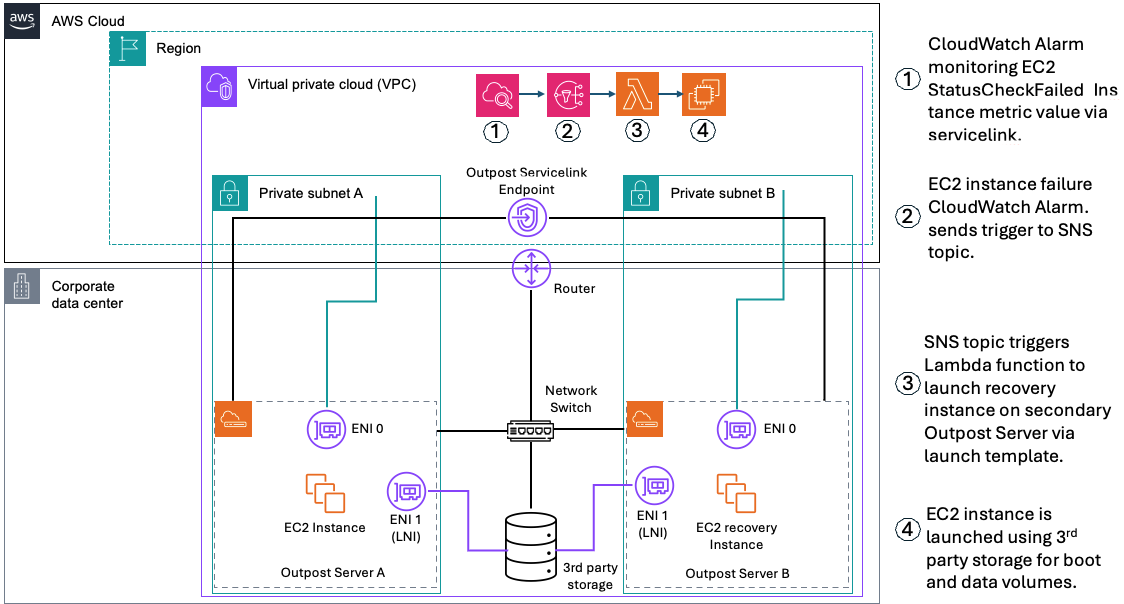
In the following sections we will show how custom logic can be used to automate EC2 instance relaunch between two or more Outposts servers using boot and data volumes on third party storage. If your EC2 instance fails while using this solution, an Amazon CloudWatch alarm monitoring the EC2 StatusCheckFailed_Instance metric of your source EC2 instance will be triggered, and you will receive an Amazon Simple Notification Service (Amazon SNS) notification. An AWS Lambda function will then relaunch your EC2 instance onto the destination Outposts server that you’ve set up for resiliency. This is done using a launch template created during setup, and the script will connect your relaunched instance to the existing boot and data volumes on your third party storage appliance. This storage device provides shared storage for your Outposts servers. If a single server fails, new instances can connect to existing volumes on the array. This allows for a zero data loss Recovery Point Objective (RPO) and a Recovery Time Objective (RTO) equaling the time it takes to launch your EC2 instance. Take advantage of the features on your storage appliance for configuring data durability and resiliency to hardware failures, and make sure that you are regularly backing up your SAN volumes.
Figure 1 – Solution Architecture for automated EC2 Relaunch
Prerequisites
The following prerequisites are required to complete the walkthrough:
For workloads with a low threshold for downtime, ensure that your secondary Outpost server that’s used for recovery has a unique service link connection.
Outposts servers must be colocated within the same Layer 2 (L2) network.
Network latency between the Outposts servers must not exceed 5ms round trip time (RTT).
Create launch templates for the EC2 instances that you want to protect, the launch wizard will help you create these.
Credentials with permissions for AWS CloudFormation, Amazon EC2, and (optional) AWS Secrets Manager if authentication is required. IAM Permission Examples.md is provided in the repository.
A Windows or Linux host that can access the storage appliance and your AWS account (management computer).
Python 3.8 or later (recommended) is used to run the init.py script that dynamically creates a CloudFormation stack in the account specified as an input parameter.
The first step is to deploy an EC2 instance configured to boot from a volume on the third-party storage that is prepared with an OS boot image. This step uses the launch wizard portion of the solution.
Download and extract the OutpostServer_Recovery_3Pstorage repository to the management computer that has the AWS SDK for Python (Boto3) and Python installed.
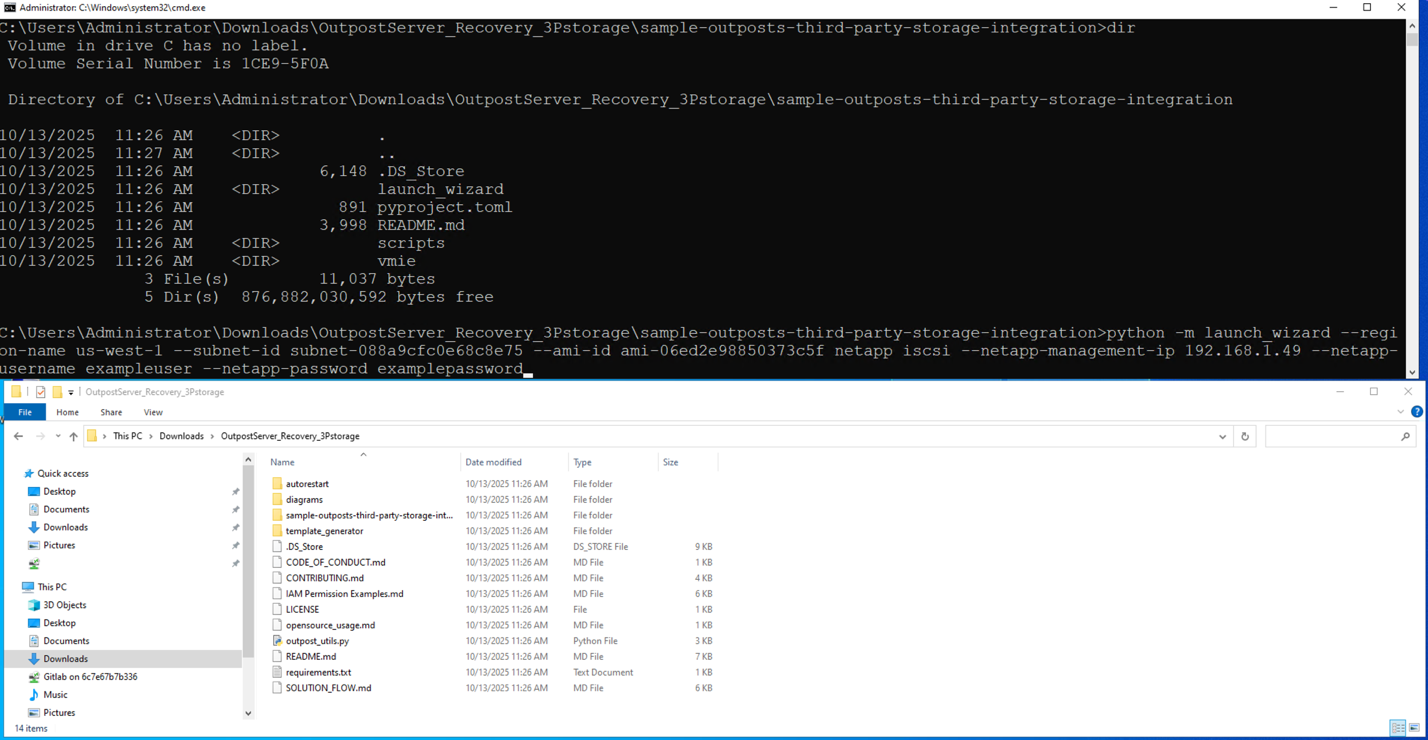
Run launch_wizard from the sample-outposts-third-party-storage-integration directory. You can run interactively or provide arguments for region, subnet, iPXE AMI, storage vendor, storage management ip, and credentials.
Figure 2 – Running launch wizard
When prompted for a feature name, enter sanboot.
For Guest OS type, enter in Linux or Windows.
When prompted “Do you want to continue with this unverified AMI?”, select Y.
The launch wizard will provide a list of instance types available on the Outpost server associated with the subnet you specified. Enter the instance type that you want to use.
The launch wizard will now prompt you for optional EC2 Key Pair, Security Group, and Instance Profile settings for the EC2 instance that you are launching.
Next, the launch wizard prompts you to specify an instance name. Note that specifying an instance name is required to set up automated instance recovery because the instance name is used as part of the recovery process.
Figure 3 – Taking user input for variable values
The launch wizard prompts for root volume size. This is the root volume that the iPXE AMI boots from. The default is a 1GB volume on the Outpost server instance storage.
Next, the launch wizard prompts you to select which third party storage controller you want to use based on the management ip that you specified. In this example, we are using NetApp, so I select a NetApp Storage Virtual Machine (SVM) named outpost_iscsi.
If the connection to the storage array is successful and the protocol is available (iSCSI or NVMe over TCP) you are provided additional storage options for initiator group and logical unit number (LUN).
In this example, we are using NetApp with iSCSI, so I can select an existing initiator group or create a new one.
You can specify an existing initiator qualified name (IQN), or the launch wizard can generate a new one. IMPORTANT: Make sure that IQNs are unique to each instance because duplicates can cause data corruption.
Next the launch wizard prompts which LUN’s you want to connect to this instance. For this example, I am going to use a Windows Server 2022 boot volume that I already created on the NetApp storage array.
You are now asked which storage array target interface you want to use for connecting to these LUNs.
The launch wizard provides the capability to specify guest OS scripts to customize the OS after sanboot. Combining this capability with storage array cloning provides a streamlined process for deploying new instances.
The launch wizard now displays the EC2 user data template that it generated for use with the iPXE AMI and asks if you want to proceed with launching the instance.
After the EC2 instance is launched, select yes to proceed with automated instance recovery setup.
Generating EC2 launch templates for recovery and failback
In the second step, we are generating EC2 launch templates for the EC2 instance launched in step 1. Launch templates can be generated for the primary and secondary Outpost servers. The launch template for the secondary Outpost server can be used for automated or manual recovery of the EC2 instance. Failback to the primary Outpost server is manual using the primary launch template.
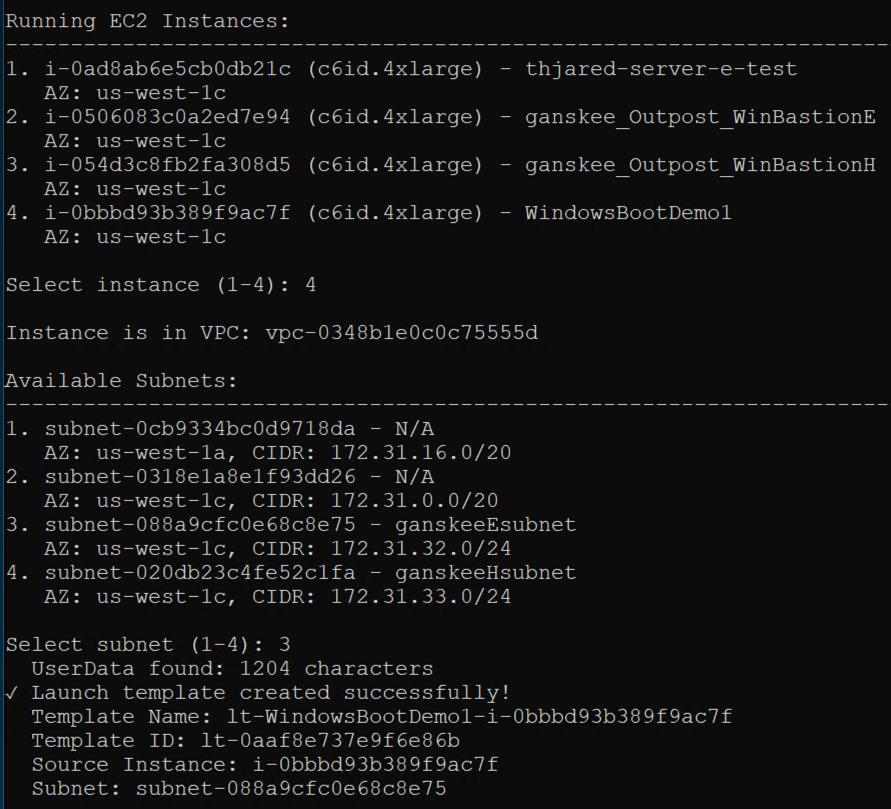
Select the instance that you want automated recovery for and select the subnet that you launched the instance in. This subnet represents the primary Outpost server that the instance is running on.
Figure 5 – Selecting subnets for EC2 instance relaunch
When prompted to create a second launch template for Outpost server recovery, select yes, and then select to use the same instance (for recovery on different Outpost server).
When you get a list of available subnets, select the subnet that’s associated with your secondary Outpost server. This is the server that the EC2 instance will be launched on in the event of the EC2 StatusCheckFailed_Instance metric triggers the CloudWatch alarm.
You will see both launch templates created successfully.
Deploying automated EC2 instance recovery
The third step creates a CloudFormation template for monitoring, notifications, and automated recovery of the EC2 instance deployed in step 1. The CloudFormation template automatically captures the instance and secondary launch template information necessary for automatic recovery.
Select Y to set up automated recovery. This will create a CloudFormation stack.
Provide a name and description for the CloudFormation stack.
Select whether you want automated recovery or notification only. This provides flexibility to choose manual or automatic recovery based on whether you want to verify the primary Outpost server is down before initiating recovery.
In the AWS CloudFormation console, monitor the CloudFormation stack creation process.
Figure 6 – CloudFormation stack creation in progress
After the CloudFormation Stack is complete, you have successfully deployed an EC2 instance using third party storage for boot and data volumes on a primary Outpost server. You also created instance recovery capabilities by using the Amazon Outpost server automated recovery solution for third party storage.
You can verify whether the EC2 StatusCheckFailed_Instance is healthy under the Alarms section in the Amazon CloudWatch console.
Considerations
The logic discussed in this post relies on the secondary destination Outposts server having a connected service link. For more information about how to create a highly available service link connection for your Outpost servers, see the Networking section of AWS Outposts High Availability Design and Architecture Considerations whitepaper.
Clean up
Confirm whether it is safe to terminate the Amazon EC2 instance that you launched with this walkthrough. The operating system and data volumes are on the third party storage, so EC2 instance termination only removes the iPXE AMI from the Outposts server instance storage. To clean up, complete the following steps.
Terminate the Amazon EC2 instance. Then, verify that the Instance state is Terminated to ensure that the instance is not using Outposts server resources.
Delete the Amazon EC2 Launch Templates associated with the Amazon EC2 instance that you terminated. The names of the launch templates that were automatically generated will start with ‘lt-‘, followed by the instance name and the instance id. If you generated a recovery launch template, it will have a ‘-recovery’ suffix in the name.
Delete the AWS CloudFormation Stack. The Stack name will start with ‘autorestart-‘ followed by the Amazon EC2 instance name.
Clean up your initiators, initiator group, and LUNs on the third party storage array.
Conclusion
With the use of custom logic through AWS tools such as CloudFormation, CloudWatch, Amazon SNS, and AWS Lambda, you can architect for HA for stateful workloads on Outposts server. By implementing the custom logic in this post, you can automatically relaunch EC2 instances running on a source Outposts server to a secondary destination Outposts server if an instance fails, and connect to existing volumes on a shared storage appliance for recovery. This also reduces the downtime of your applications in the event of a hardware or service link failure. The code provided in this post can be further expanded upon to meet the unique needs of your workload.
While the use of infrastructure-as-code (IaC) can improve your application’s availability and be used to standardize deployments across multiple Outposts servers, it’s crucial to do regular failure drills to test the custom logic in place. This is to make sure that you understand your application’s expected behavior on relaunch in the event of a failure. To learn more about Outposts servers, visit the Outposts servers User Guide. Reach out to your AWS account team, or fill out this form to learn more about Outposts servers.
This is a very weird story about how squid stayed on the menu of Byzantine monks by falling between the cracks of dietary rules.
At Constantinople’s Monastery of Stoudios, the kitchen didn’t answer to appetite.
It answered to the “typikon”: a manual for ensuring that nothing unexpected happened at mealtimes. Meat: forbidden. Dairy: forbidden. Eggs: forbidden. Fish: feast-day only. Oil: regulated. But squid?
Squid had eight arms, no bones, and a gift for changing color. Nobody had bothered writing a regulation for that. This wasn’t a loophole born of legal creativity but an oversight rooted in taxonomic confusion. Medieval monks, confronted with a creature that was neither fish nor fowl, gave up and let it pass.
In a kitchen governed by prohibitions, the safest ingredient was the one that caused the least disturbance. Squid entered not with applause, but with a shrug.
Bonus stuffed squid recipe at the end.
As usual, you can also use this squid post to talk about the security stories in the news that I haven’t covered.
Some of our releases add new ways in; this one adds new ways to stay in. There are, of course, still new RCE toys in the box (Tactical RMM via Jinja2 SSTI and an unauthenticated MajorDoMo exploit). Still, the underlying theme is payloads: more control over how they are packaged and delivered, and fewer “why did it die instantly?” moments. We, like our community of module authors, grew tired of having to do everything by hand. You can now pick encoders (and tweak their options) directly for exploit and payload modules without extra glue code. Less plumbing, more choosing-the-right-badchar-killer-at-runtime.
Description: Adds a new module evasion/linux/x86/rc4_packer that encrypts the generated payload with RC4, prepends an optional sleep-based delay (nanosleep), and decrypts/executes the payload at runtime via a compact precompiled stub.
Description: This adds an exploit module for CVE-2025-69516, a Jinja2 SSTI in Tactical RMM < 1.4.0 where the reporting template preview endpoint evaluates user-controlled templates without sandboxing, enabling authenticated RCE. The module logs in via the Knox API, auto-detects the API host from /env-config.js, and exploits the template preview feature.
MajorDoMo Remote Command Injection via cycle_execs Race Condition
Description: Adds three exploit modules for MajorDoMo, an open-source home automation platform. All three vulnerabilities are unauthenticated.
Enhancements and features (2)
#20852 from dledda-r7 – This adds encoder options for exploit and payload modules. It allows the user to select the encoder and modify its options when using exploit or payload without the need of adding additional code into the module.
#20987 from sjanusz-r7 – Allows AS-REP and Kerberoast modules to be ran against a pre-existing LDAP session as well as RHOST values.
Bugs fixed (5)
#20740 from Chocapikk – This adds a new SRVSSL option to the HttpServer library, allowing SSL to be enabled for the HTTP server independently from the HTTP client.
#20830 from SilentSobs – This fixes a portability issue in Msf::Post::File.stat where the code incorrectly assumed a GNU stat output format.
#20940 from g0tmi1k – Fixes an issue where the > (file Redirect operator) causes the exploit to fail. This updates the exploit to use tee to avoid that problematic operator and also increases debug verbosity, simplifies code, adds documentation, and adds support for fetch payloads to gain Linux Meterpreter sessions.
#20946 from g0tmi1k – Corrects issue where the revision value provided in the http requests can be outside the subset of revision id/value/numbers; a revision value that is not an actual revision value may result in a failed exploit. Also, cleaned up logic and increased debugging verbosity.
#21044 from adfoster-r7 – Fixes a crash when using db_import on a nessus with protocols other than tcp or udp.
Documentation
You can find the latest Metasploit documentation on our docsite at docs.metasploit.com.
Get it
As always, you can update to the latest Metasploit Framework with msfupdate and you can get more details on the changes since the last blog post from GitHub:
In early February, members of the Fedora Council met in Tirana,
Albania to discuss and set the strategic direction for the Fedora Project. The
council has published
summaries from its strategy summit, and Fedora Project Leader (FPL) Jed Spaleta,
as well as some of the council members, held a video meeting to discuss outcomes from
the summit on February 25. Topics included a plan to experiment with Open Collective to raise
funds for specific Fedora projects, tools to build image-based editions, and
more. Spaleta also explained his model for Fedora governance.
OpenAI is in and Anthropic is out as a supplier of AI technology for the US defense department. This news caps a week of bluster by the highest officials in the US government towards some of the wealthiest titans of the big tech industry, and the overhanging specter of the existential risks posed by a new technology powerful enough that the Pentagon claims it is essential to national security. At issue is Anthropic’s insistence that the US Department of Defense (DoD) could not use its models to facilitate “mass surveillance” or “fully autonomous weapons,” provisions the defense secretary Pete Hegseth derided as “woke.”
It all came to a head on Friday evening when Donald Trump issued an order for federal government agencies to discontinue use of Anthropic models. Within hours, OpenAI had swooped in, potentially seizing hundreds of millions of dollars in government contracts by striking an agreement with the administration to provide classified government systems with AI.
Despite the histrionics, this is probably the best outcome for Anthropic—and for the Pentagon. In our free-market economy, both are, and should be, free to sell and buy what they want with whom they want, subject to longstanding federal rules on contracting, acquisitions, and blacklisting. The only factor out of place here are the Pentagon’s vindictive threats.
AI models are increasingly commodified. The top-tier offerings have about the same performance, and there is little to differentiate one from the other. The latest models from Anthropic, OpenAI and Google, in particular, tend to leapfrog each other with minor hops forward in quality every few months. The best models from one provider tend to be preferred by users to the second, or third, or 10th best models at a rate of only about six times out of 10, a virtual tie.
In this sort of market, branding matters a lot. Anthropic and its CEO, Dario Amodei, are positioning themselves as the moral and trustworthy AI provider. That has market value for both consumers and enterprise clients. In taking Anthropic’s place in government contracting, OpenAI’s CEO, Sam Altman, vowed to somehow uphold the same safety principles Anthropic had just been pilloried for. How that is possible given the rhetoric of Hegseth and Trump is entirely unclear, but seems certain to further politicize OpenAI and its products in the minds of consumers and corporate buyers.
Posturing publicly against the Pentagon and as a hero to civil libertarians is quite possibly worth the cost of the lost contracts to Anthropic, and associating themselves with the same contracts could be a trap for OpenAI. The Pentagon, meanwhile, has plenty of options. Even if no big tech company was willing to supply it with AI, the department has already deployed dozens of open weight models—whose parameters are public and are often licensed permissively for government use.
We can admire Amodei’s stance, but, to be sure, it is primarily posturing. Anthropic knew what they were getting into when they agreed to a defense department partnership for $200m last year. And when they signed a partnership with the surveillance company Palantir in 2024.
Read Amodei’s statement about the issue. Or his January essay on AIs and risk, where he repeatedly uses the words “democracy” and “autocracy” while evading precisely how collaboration with US federal agencies should be viewed in this moment. Amodei has bought into the idea of using “AI to achieve robust military superiority” on behalf of the democracies of the world in response to the threats from autocracies. It’s a heady vision. But it is a vision that likewise supposes that the world’s nominal democracies are committed to a common vision of public wellbeing, peace-seeking and democratic control.
Regardless, the defense department can also reasonably demand that the AI products it purchases meet its needs. The Pentagon is not a normal customer; it buys products that kill people all the time. Tanks, artillery pieces, and hand grenades are not products with ethical guard rails. The Pentagon’s needs reasonably involve weapons of lethal force, and those weapons are continuing on a steady, if potentially catastrophic, path of increasingautomation.
So, at the surface, this dispute is a normal market give and take. The Pentagon has unique requirements for the products it uses. Companies can decide whether or not to meet them, and at what price. And then the Pentagon can decide from whom to acquire those products. Sounds like a normal day at the procurement office.
But, of course, this is the Trump administration, so it doesn’t stop there. Hegseth has threatened Anthropic not just with loss of government contracts. The administration has, at least until the inevitable lawsuits force the courts to sort things out, designated the company as “a supply-chain risk to national security,” a designation previously only ever applied to foreign companies. This prevents not only government agencies, but also their own contractors and suppliers, from contracting with Anthropic.
The government has incompatibly also threatened to invoke the Defense Production Act, which could force Anthropic to remove contractual provisions the department had previously agreed to, or perhaps to fundamentally modify its AI models to remove in-built safety guardrails. The government’s demands, Anthropic’s response, and the legal context in which they are acting will undoubtedly all change over the coming weeks.
But, alarmingly, autonomous weapons systems are here to stay. Primitive pit traps evolved to mechanical bear traps. The world is still debating the ethical use of, and dealing with the legacy of, land mines. The US Phalanx CIWS is a 1980s-era shipboard anti-missile system with a fully autonomous, radar-guided cannon. Today’s military drones can search, identify and engage targets without direct human intervention. AI will be used for military purposes, just as every other technology our species has invented has.
The lesson here should not be that one company in our rapacious capitalist system is more moral than another, or that one corporate hero can stand in the way of government’s adopting AI as technologies of war, or surveillance, or repression. Unfortunately, we don’t live in a world where such barriers are permanent or even particularly sturdy.
Instead, the lesson is about the importance of democratic structures and the urgent need for their renovation in the US. If the defense department is demanding the use of AI for mass surveillance or autonomous warfare that we, the public, find unacceptable, that should tell us we need to pass new legal restrictions on those military activities. If we are uncomfortable with the force of government being applied to dictate how and when companies yield to unsafe applications of their products, we should strengthen the legal protections around government procurement.
The Pentagon should maximize its warfighting capabilities, subject to the law. And private companies like Anthropic should posture to gain consumer and buyer confidence. But we should not rest on our laurels, thinking that either is doing so in the public’s interest.
This essay was written with Nathan E. Sanders, and originally appeared in The Guardian.
Each year, we bring the Analytics Engineering community together for an Analytics Summit — a multi-day internal conference to share analytical deliverables across Netflix, discuss analytic practice, and build relationships within the community. This post is one of several topics presented at the Summit highlighting the breadth and impact of Analytics work across different areas of the business.
At Netflix, our goal is to entertain the world, which means we must speak the world’s languages. Given the company’s growth to serving 300 million+ members in more than 190+ countries and 50+ languages, the Localization team has had to scale rapidly in creating more dubs and subtitle assets than ever before. However, this growth created technical debt within our systems: a fragmented landscape of analytics workflows, duplicated pipelines, and siloed dashboards that we are now actively modernizing.
The Challenge: “Who Made This Dub?”
Historically, business logic for localization metrics was replicated across isolated domains. A question as simple as “Who made this dub/subtitle?” is actually complex — it requires mapping multiple data sources through intricate and constantly changing logic, which varies depending on the specific language asset type and creation workflow.
When this logic is copied into isolated pipelines for different use cases it creates two major risks: inconsistency in reporting and a massive maintenance burden whenever upstream logic changes. We realized we needed to move away from these vertical silos.
Our Modernization Strategy
To address this, we defined a vision centered on consolidation, standardization, and trust, executed through three strategic pillars:
1. The Audit and Consolidation Playbook
We initiated a comprehensive audit of over 40 dashboards and tools to assess usage and code quality. Our focus has shifted from patching frontend visualizations to consolidating backend pipelines. For example, we are currently merging three legacy dashboards related to dubbing partner KPIs (around operational performance, capacity, and finances), focusing first on a unified data and backend layer that can support a variety of future frontend iterations.
2. Reducing “Not-So-Tech” Debt
Technical debt isn’t just about code; it is also about the user experience. We define “Not-So-Tech Debt” as the friction stakeholders feel when tools are hard to interpret or can benefit from better storytelling. To fix this, we revamped our Language Asset Consumption tool — instead of reporting dub and subtitle metrics independently, we combine audio and text languages into one consumption language that helps differentiate Original Language versus Localized Consumption and measure member preferences between subtitles, dubs, or a combination of both for a given language. This unlocks more intuitive insights based on actual recurring stakeholder use cases.
3. Investing in Core Building Blocks
We are shifting to a write once, read many architecture. By centralizing business logic into unified tables — such as a “Language Asset Producer” table — we solve the “Who made this dub?” problem once. This centralized source now feeds into multiple downstream domains, including our Dub Quality and Translation Quality metrics, ensuring that any logic update propagates instantly across the ecosystem.
The Future: Event-Level Analytics
Looking ahead, we are moving beyond asset-level metrics to event-level analytics. We are building a generic data model to capture granular timed-text events, such as individual subtitle lines. This data helps us understand how subtitle characteristics (e.g. reading speed) affect member engagement and, in turn, refine the style guidelines we provide to our subtitle linguists to improve the member experience with localized content.
Ultimately, this modernization effort is about scaling our ability to measure and enhance the joy and entertainment we deliver to our diverse global audience, ensuring that every member, regardless of their language, has the best possible Netflix experience.
Version
25.12.0 of the OpenWrt router distribution is available; this release
has been dedicated to the memory of Dave Täht. Changes include a switch to
the apk package manager, the integration of the attended
sysupgrade method, and support for a long list of new targets.
Cloudflare One has grown a lot over the years. What started with securing traffic at the network now spans the endpoint and SaaS applications – because that’s where work happens.
But as the market has evolved, the core mission has become clear: data security is enterprise security.
Here’s why. We don’t enforce controls just to enforce controls. We do it because the downstream outcomes are costly: malware, credential theft, session hijacking, and eventually the thing that matters most: sensitive data leaving the organization. What looks like a simple access policy can be the first link in a chain that ends in incident response, customer impact, and reputational damage.
So when you take a step back, most security programs – even the ones that look different on paper – are trying to answer the same questions:
Where is sensitive data?
Who can access it?
What paths exist for it to move somewhere it shouldn’t?
That’s the backbone of our data security vision in Cloudflare One: a single model that follows data across the places it moves, not a pile of siloed controls. That means:
Protection in transit (across Internet + SaaS access)
Visibility and control at rest (inside SaaS)
Enforcement in use (on endpoints)
And now, coverage at the prompt (as AI becomes a new interface to enterprise data)
Think of these as one connected system: visibility tells you what’s happening, controls constrain where data can move, and enforcement closes the last-mile gaps when content leaves an app. That’s the endpoint-to-prompt problem: data moves faster than product boundaries, so policy needs to follow the data, not the tool.
In this post, we’ll walk through a set of updates that push that vision forward – from browser-based Remote Desktop Protocol (RDP) controls, to operation-level logging, to endpoint data loss prevention (DLP), to AI security scanning for Microsoft 365 Copilot.
Remote access without data sprawl: browser-based RDP clipboard controls
Browser-based RDP is a practical way to provide remote access when you can’t assume a managed endpoint or installed client – common for contractors, partners, and occasional access workflows. Cloudflare One’s browser-based RDP adds visibility and policy controls to that access. But once you’re delivering a full RDP experience in the browser, the question becomes simple: how granular are your controls over where data can move, especially via the clipboard?
Today, we’re adding a setting that directly protects data: clipboard controls for browser-based RDP. With this new feature, security and IT administrators will now be able to decide whether their users can copy or paste information between their local device and the browser-based RDP session.
Clipboard restrictions are a perfect example of the productivity-security tradeoff. If users can’t copy and paste in the workflow they rely on, they’ll route around the control, whether it’s by taking screenshots, retyping data, or shifting work to unmanaged tools. Clipboard controls let you be precise: allow the workflow where it’s safe, and block it where it isn’t.
With clipboard controls in browser-based RDP, administrators can enable the copy/paste workflow users expect while enforcing granular control over directionality and context. For example, if users access a customer support portal that contains sensitive customer information, you might allow copy/paste into the session for productivity, but block copy/paste out of the session to prevent data from landing on unmanaged endpoints.
This functionality is now available in Cloudflare One and can be configured as a new setting within Access Application Policies for browser-based RDP apps.
Visibility without guesswork: operation mapping in logs
While remote access controls reduce risk, to tune them well, you also need to understand the specific actions users are taking inside SaaS apps.
We use a process called operation mapping (detailed in a recent blog post) to give visibility to these actions and simplify the way customers write policies for SaaS services. Our mapping process takes various elements of an HTTP request and interprets them as a single operation, e.g. ‘SendPrompt’, in the example of ChatGPT. We collect multiple operations that perform similar actions into an Application Control, e.g., ‘Share’ or ‘Upload’. The [what?] is viewable in our HTTP policy builder, allowing for simple policy authoring.
Today, we’ve taken that process a step further to enrich logs and provide greater visibility over how SaaS applications are being used in your organization – by extending that mapping into logging. Without any additional configuration, operations and application controls will now appear in log events for traffic that matches our operation maps.
In log details, you’ll now see both the application control group and the specific operation (e.g., SendPrompt for ChatGPT). This makes investigations and policy tuning faster.
The added context helps you understand usage patterns, accelerate forensic analysis, and spot potentially risky behavior, so you can tune policy with less guesswork and disruption to users.
Visibility is step one. To protect data in use, especially what moves through the clipboard, you also need enforcement on the endpoint.
Better endpoint protection: on-device DLP in the Cloudflare One Client
In a modern enterprise, sensitive information routinely moves from managed applications into unmanaged contexts – often via the clipboard. The risk isn’t only a file leaving the organization; it can be a snippet of proprietary code or a customer record pasted into an unauthorized large language model (LLM) or personal tool.
Cloudflare One already helps protect data in transit with Gateway and DLP, and provides visibility and control at rest through CASB and its API integrations. Now we’re extending coverage to data in use by bringing Endpoint DLP enforcement to the Cloudflare One Client, starting with high-signal workflows like clipboard movement, so data protection doesn’t stop the moment content leaves a browser tab.
That means sensitive data copied from a protected SaaS app doesn’t immediately become “policy-free” content the moment it hits the OS clipboard. With Endpoint DLP, teams can extend data protection to users’ fingertips without deploying a second agent or stitching together complex integrations.
For teams already using Cloudflare One for data protection, Endpoint DLP completes the model by adding a consistent enforcement layer for data in use.
This is the endpoint-to-prompt problem: if sensitive data can be copied locally, it can be pasted into an AI assistant just as easily. Once you protect data in use, the next question becomes unavoidable – what happens when that same data is transformed at the prompt?
AI visibility without blind spots: M365 Copilot scanning with API CASB
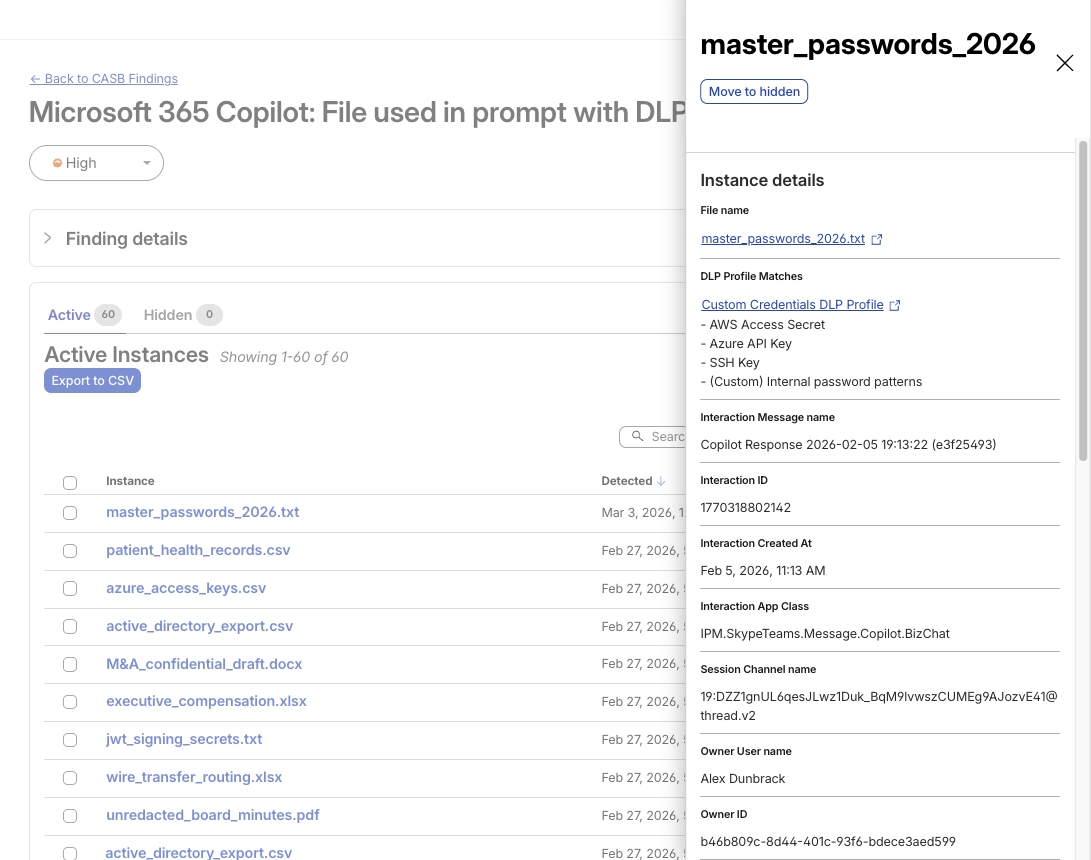
Starting today, customers using Cloudflare One’s API Cloud Access Security Broker (CASB) – which scans SaaS apps via API for common, yet risky security issues – can now analyze Microsoft 365 Copilot activity for data security issues, including chats and uploads that match DLP detection profiles.
Copilot findings surface with rich context (file references, profile matches, and interaction metadata) so teams can triage quickly instead of starting from raw audit logs.
A CASB Finding showing detection of a file used in M365 Copilot that matches an enabled DLP Profile
Customers can now see when Copilot activity includes sensitive data. For example, user prompts, Copilot responses, and uploaded files that match DLP detection profiles.
Microsoft 365 Copilot findings are available by default as part of the Microsoft 365 integration. If you already use this integration, go to Integrations in the Cloudflare One dashboard, update your Microsoft 365 connection, and start receiving Copilot findings. If you’re new to the integration, connect your Microsoft 365 tenant to gain visibility into Copilot usage and associated data security findings.
As AI product sprawl continues, we’ll be massively expanding coverage across additional AI assistants and core SaaS platforms throughout 2026 – stay tuned!
What’s next: unified data security in Cloudflare One
Over the last few years, enterprise security has expanded across more surfaces: SaaS, unmanaged endpoints, remote access patterns, and now AI assistants. But the objective – protecting sensitive data – hasn’t changed. The updates in this post reflect a single direction: consistent visibility and enforcement across data in transit, at rest, in use, and at the prompt. So policy follows data, not product boundaries.
Looking forward, our vision is broader than “data security features in data security products.” Over time, every Cloudflare One product will become more data-security-aware, with more data-oriented configurability, visibility, controls, and guardrails, built directly into the workflows teams already use across Access, Gateway, endpoint enforcement, and SaaS integrations. The goal is simple: wherever your users work and wherever data moves, Cloudflare One should be able to explain what’s happening and help you control it.
As the modern perimeter spreads across applications, browsers, endpoints, and AI prompts, patching together point solutions becomes harder to operate and easier to bypass. By building data security directly into Cloudflare One – from access controls to endpoint enforcement to AI visibility – and continuing to unify these layers, we’re helping teams build a clearer, more complete picture of their data risk and their data security posture from the endpoint to the prompt.
To provide the best experiences, we use technologies like cookies to store and/or access device information. Consenting to these technologies will allow us to process data such as browsing behavior or unique IDs on this site. Not consenting or withdrawing consent, may adversely affect certain features and functions.
Functional
Always active
The technical storage or access is strictly necessary for the legitimate purpose of enabling the use of a specific service explicitly requested by the subscriber or user, or for the sole purpose of carrying out the transmission of a communication over an electronic communications network.
Preferences
The technical storage or access is necessary for the legitimate purpose of storing preferences that are not requested by the subscriber or user.
Statistics
The technical storage or access that is used exclusively for statistical purposes.The technical storage or access that is used exclusively for anonymous statistical purposes. Without a subpoena, voluntary compliance on the part of your Internet Service Provider, or additional records from a third party, information stored or retrieved for this purpose alone cannot usually be used to identify you.
Marketing
The technical storage or access is required to create user profiles to send advertising, or to track the user on a website or across several websites for similar marketing purposes.