Post Syndicated from digiblur DIY original https://www.youtube.com/watch?v=048zMMRVKyQ
Kioxia AiSAQ SSD-backed RAG for Larger Scale AI Models
Post Syndicated from Cliff Robinson original https://www.servethehome.com/kioxia-aisaq-ssd-backed-rag-for-larger-scale-ai-models/
Kioxia AiSAQ is for SSD-backed RAG, allowing for larger scale and lower cost AI applications than those that are mostly DRAM backed with a catch
The post Kioxia AiSAQ SSD-backed RAG for Larger Scale AI Models appeared first on ServeTheHome.
Terror Tanks
Post Syndicated from The History Guy: History Deserves to Be Remembered original https://www.youtube.com/watch?v=OCVWaAM99TU
[$] LWN.net Weekly Edition for January 9, 2025
Post Syndicated from corbet original https://lwn.net/Articles/1003479/
The LWN.net Weekly Edition for January 9, 2025 is available.
Comic for 2025.01.09 – Tap On The Glass
Post Syndicated from Explosm.net original https://explosm.net/comics/tap-on-the-glass
New Cyanide and Happiness Comic
Announcing Certificate Profile Selection
Post Syndicated from Let's Encrypt original https://letsencrypt.org/2025/01/09/acme-profiles.html
We are excited to announce a new extension to Let’s Encrypt’s implementation of the ACME protocol that we are calling “profile selection.” This new feature will allow site operators and ACME clients to opt in to the next evolution of Let’s Encrypt.
As of today, the staging environment is advertising a new field in its directory resource:
GET /directory HTTP/1.1
HTTP/1.1 200 OK
Content-Type: application/json

{
    ...
    "meta": {
        "profiles": {
            "classic": "The same profile you're accustomed to",
            "tlsserver": "https://letsencrypt.org/2025/01/09/acme-profiles/"
        }
    }
}
Here, the keys are the names of new “profiles”, and the values are human-readable descriptions of those profiles. A profile describes a collection of attributes about the certificate that will be issued, such as what extensions it will contain, how long it will be valid for, and more.
For example, the “classic” profile is exactly what it sounds like: certificates issued under the classic profile will look exactly the same as those that we have always issued, valid for 90 days.
But certificates issued under the “tlsserver” profile will have a number of differences tailored specifically towards TLS server usage:
- No Common Name field (including a CN has been NOT RECOMMENDED by the Baseline Requirements for several years now)
- No Subject Key Identifier (including a SKID is NOT RECOMMENDED by the Baseline Requirements)
- No TLS Client Auth Extended Key Usage (root programs are moving towards requiring “single-purpose” issuance hierarchies, where every certificate has only a single EKU)
- No Key Encipherment Key Usage for certificates with RSA public keys (this KU was used by older RSA-based TLS cipher suites, but is fully unnecessary in TLS 1.3)
Additionally, in the near future we will offer a “shortlived” profile which will be identical to the “tlsserver” profile but with a validity period of only 6 days. This profile isn’t available in Staging just yet, so keep an eye out for further announcements regarding short-lived certificates and why we think they’re exciting.
An ACME client can supply a desired profile name in a new-order request:
POST /acme/new-order HTTP/1.1
Host: example.com
Content-Type: application/jose+json

{
    "protected": base64url(...),
    "payload": base64url({
        "profile": "tlsserver",
        "identifiers": [
            { "type": "dns", "value": "www.example.org" },
            { "type": "dns", "value": "example.org" }
        ],
    }),
    "signature": "H6ZXtGjTZyUnPeKn...wEA4TklBdh3e454g"
}
If the new-order request is accepted, then the selected profile name will be reflected in the Order object when it is returned, and the resulting certificate after finalization will be issued with the selected profile. If the new-order request does not specify a profile, then the server will select one for it.
Guidance for ACME clients and users
If you are an ACME client author, we encourage you to introduce support for this new field in your client. Start by taking a look at the draft specification in the IETF ACME Working Group. A simple implementation might allow the user to configure a static profile name and include that name in all new-order requests. For a better user experience, check the configured name against the list of profiles advertised in the directory, to ensure that changes to the available profiles don’t result in invalid new-order requests. For clients with a user interface, such as a control panel or interactive command line interface, an implementation could fetch the list of profiles and their descriptions to prompt the user to select one on first run. It could also use a notification mechanism to inform the user of changes to the list of available profiles. We’d also love to hear from you about your experience implementing and deploying this new extension.
If you are a site operator or ACME client user, we encourage you to keep an eye on your ACME client of choice to see when they adopt this new feature, and update your client when they do. We also encourage you to try out the modern “tlsserver” profile in Staging, and let us know what you think of the changes we’ve made to the certificates issued under that profile.
What’s next?
Obviously there is more work to be done here. The draft standard will go through multiple rounds of review and tweaks before becoming an IETF RFC, and our implementation will evolve along with it if necessary. Over the coming weeks and months we will also be providing more information about when we enable profile selection in our production environment, and what our production profile options will be.
Thank you for coming along with us on this journey into the future of the Web PKI. We look forward to your testing and feedback!
Announcing Certificate Profile Selection
Post Syndicated from Let's Encrypt original https://letsencrypt.org/2025/01/09/acme-profiles/
We are excited to announce a new extension to Let’s Encrypt’s implementation of the ACME protocol that we are calling “profile selection.” This new feature will allow site operators and ACME clients to opt in to the next evolution of Let’s Encrypt.
As of today, the staging environment is advertising a new field in its directory resource:
GET /directory HTTP/1.1
HTTP/1.1 200 OK
Content-Type: application/json

{
    ...
    "meta": {
        "profiles": {
            "classic": "The same profile you're accustomed to",
            "tlsserver": "https://letsencrypt.org/2024/12/20/acme-profiles/"
        }
    }
}
Here, the keys are the names of new “profiles”, and the values are human-readable descriptions of those profiles. A profile describes a collection of attributes about the certificate that will be issued, such as what extensions it will contain, how long it will be valid for, and more.
For example, the “classic” profile is exactly what it sounds like: certificates issued under the classic profile will look exactly the same as those that we have always issued, valid for 90 days.
But certificates issued under the “tlsserver” profile will have a number of differences tailored specifically towards TLS server usage:
- No Common Name field (including a CN has been NOT RECOMMENDED by the Baseline Requirements for several years now)
- No Subject Key Identifier (including a SKID is NOT RECOMMENDED by the Baseline Requirements)
- No TLS Client Auth Extended Key Usage (root programs are moving towards requiring “single-purpose” issuance hierarchies, where every certificate has only a single EKU)
- No Key Encipherment Key Usage for certificates with RSA public keys (this KU was used by older RSA-based TLS cipher suites, but is fully unnecessary in TLS 1.3)
Additionally, in the near future we will offer a “shortlived” profile which will be identical to the “tlsserver” profile but with a validity period of only 6 days. This profile isn’t available in Staging just yet, so keep an eye out for further announcements regarding short-lived certificates and why we think they’re exciting.
An ACME client can supply a desired profile name in a new-order request:
POST /acme/new-order HTTP/1.1
Host: example.com
Content-Type: application/jose+json

{
    "protected": base64url(...),
    "payload": base64url({
        "profile": "tlsserver",
        "identifiers": [
            { "type": "dns", "value": "www.example.org" },
            { "type": "dns", "value": "example.org" }
        ],
    }),
    "signature": "H6ZXtGjTZyUnPeKn...wEA4TklBdh3e454g"
}
If the new-order request is accepted, then the selected profile name will be reflected in the Order object when it is returned, and the resulting certificate after finalization will be issued with the selected profile. If the new-order request does not specify a profile, then the server will select one for it.
Guidance for ACME clients and users
If you are an ACME client author, we encourage you to introduce support for this new field in your client. Start by taking a look at the draft specification in the IETF ACME Working Group. A simple implementation might allow the user to configure a static profile name and include that name in all new-order requests. For a better user experience, check the configured name against the list of profiles advertised in the directory, to ensure that changes to the available profiles don’t result in invalid new-order requests. For clients with a user interface, such as a control panel or interactive command line interface, an implementation could fetch the list of profiles and their descriptions to prompt the user to select one on first run. It could also use a notification mechanism to inform the user of changes to the list of available profiles. We’d also love to hear from you about your experience implementing and deploying this new extension.
If you are a site operator or ACME client user, we encourage you to keep an eye on your ACME client of choice to see when they adopt this new feature, and update your client when they do. We also encourage you to try out the modern “tlsserver” profile in Staging, and let us know what you think of the changes we’ve made to the certificates issued under that profile.
What’s next?
Obviously there is more work to be done here. The draft standard will go through multiple rounds of review and tweaks before becoming an IETF RFC, and our implementation will evolve along with it if necessary. Over the coming weeks and months we will also be providing more information about when we enable profile selection in our production environment, and what our production profile options will be.
Thank you for coming along with us on this journey into the future of the Web PKI. We look forward to your testing and feedback!
New AWS Skill Builder course available: Securing Generative AI on AWS
Post Syndicated from Anna McAbee original https://aws.amazon.com/blogs/security/new-aws-skill-builder-course-available-securing-generative-ai-on-aws/
To support our customers in securing their generative AI workloads on Amazon Web Services (AWS), we are excited to announce the launch of a new AWS Skill Builder course: Securing Generative AI on AWS.
This comprehensive course is designed to help security professionals, architects, and artificial intelligence and machine learning (AI/ML) engineers understand and implement security best practices for generative AI applications and models in the AWS Cloud.
AWS Skill Builder is a learning center for AWS customers and partners to build cloud skills through digital trainings, self-paced labs, and other course types. AWS Skill Builder has a variety of AWS security content to help customers understand concepts and gain hands-on experience with AWS security.
The course highlights are as follows:
- Introduction to the Generative AI Security Scoping Matrix – Learn how to categorize and secure different AI implementations by using this innovative framework.
- Coverage of key AI security frameworks – Gain insights into the OWASP Top 10 for Large Language Models (LLMs) and the MITRE ATLAS framework.
- Practical security strategies – Develop skills to implement comprehensive security across the areas of governance, legal, risk, controls, and resilience for various AI scopes.
- Real-world applications – Apply security concepts to case studies covering consumer applications, enterprise solutions, pre-trained models, fine-tuned models, and self-trained models.
To take the new course
- Sign up for your free AWS Skill Builder account.
- Search for “Securing Generative AI on AWS” in the course catalog.
- Enroll in the course and start learning!
More information
For more information on generative AI security, we recommend reviewing our recent blog post series:
- Securing generative AI: An introduction to the Generative AI Security Scoping Matrix
- Securing generative AI: Applying relevant security controls
- Securing generative AI: data, compliance, and privacy considerations
We value your feedback and contributions. If you have thoughts or insights about the course after completing it, please share them in the Comments section below or contact AWS Support.
New Research: Enhancing Botnet Detection with AI using LLMs and Similarity Search
Post Syndicated from Tom Caiazza original https://blog.rapid7.com/2025/01/08/new-research-enhancing-botnet-detection-with-ai-using-llms-and-similarity-search/

As botnets continue to evolve, so do the techniques required to detect them. While Transport Layer Security (TLS) encryption is widely adopted for secure communications, botnets leverage TLS to obscure command-and-control (C2) traffic. These malicious actors often have identifiable characteristics embedded within their TLS certificates, opening a potential pathway for advanced detection techniques.
In first-of-its-kind research, Rapid7’s Dr. Stuart Millar, in collaboration with Kumar Shashwat, Francis Hahn and Prof. Xinming Ou, at the University of South Florida, studied the use of AI large language models (LLMs) to detect botnets’ use of TLS encryption by analyzing embedding similarities to weed out botnets within a sea of benign TLS certificates. The work was presented at AISec 2024 in Salt Lake City as part of the leading ACM CCS conference toward the end of last year, where previously Rapid7 collected the best paper award.
Botnets — networks of hacked devices that attackers control remotely — often use TLS encryption to hide their activity. This encryption keeps the traffic secure, making it challenging for traditional security tools to detect whether a device is part of a botnet. Millar and company found they could detect botnets by analyzing the unique characteristics in the TLS certificates that each server uses to identify itself, dramatically reducing the time and human effort required.
Large language models can represent text as embeddings, or numerical vectors that capture the meaning and structure of the text. These embeddings were used to create vector representations of the text in TLS certificates, such as the organization names and country codes listed on them. By projecting these representations into a vector space and then using a similarity search, any new certificate can first be compared to a known set of botnet and benign certificates, and then a decision made as to whether or not it is malicious.
They found that in using an open-source LLM called C-BERT, the model achieved an accuracy rate of 0.994, surpassing proprietary alternatives in accuracy, speed, and cost-efficiency. This means it could reliably distinguish between botnet and benign certificates far more effectively and efficiently than standard practices, which was confirmed through random sampling.
In order to simulate a real world scenario, the researchers tested the model on 150,000 TLS certificates. They found 13 certificates as potential botnets which, when verified against a malware detection service, yielded one certificate that was found to be malicious. This approach eliminated the time intensive and costly process of identifying malicious botnets manually.
The model was also able to identify zero-day botnets, or those that had not yet been documented before. By omitting certain known botnets during training and then testing with these omitted samples, they demonstrated that the model could still detect them, even without prior exposure.
Deploying this AI solution in a real-world environment offers cybersecurity teams a substantial advantage in botnet detection by reducing false positives and minimizing manual inspection. Future research aims to expand the range of certificate attributes used in embeddings, improve real-time processing capabilities, and integrate additional datasets for a broader scope. Explore the full research paper for an in-depth look at the methodology and results of an LLM-based approach to botnet TLS certificate detection.
[$] A look at the Sequoia command-line interface
Post Syndicated from daroc original https://lwn.net/Articles/1003243/
The
Sequoia OpenPGP library has been in development for some time. LWN
covered the library in 2020. Now the project’s
command-line interface has
been released. The sq tool offers a
promising alternative to the venerable
GNU Privacy Guard (GPG) tool — albeit one with a
different interface, set of terminology, and approach to the web of
trust. Several distributions are making increasing use of the tool
behind the scenes.
CVE-2025-0282: Ivanti Connect Secure zero-day exploited in the wild
Post Syndicated from Caitlin Condon original https://blog.rapid7.com/2025/01/08/etr-cve-2025-0282-ivanti-connect-secure-zero-day-exploited-in-the-wild/

On Wednesday, January 8, 2025, Ivanti disclosed two CVEs affecting Ivanti Connect Secure, Policy Secure, and Neurons for ZTA gateways. CVE-2025-0282 is a stack-based buffer overflow vulnerability that allows remote, unauthenticated attackers to execute code on the target device. CVE-2025-0283 is a stack-based buffer overflow that allows local authenticated attackers to escalate privileges on the device.
Ivanti’s advisory indicates that CVE-2025-0282 has been exploited in the wild against a limited number of Connect Secure devices. Per the vendor, Ivanti Policy Secure and Neurons for ZTA are not known to have been exploited in the wild at time of disclosure. Google’s Mandiant division and Microsoft’s Threat Intelligence Center (MSTIC) are credited with the discovery of the two issues, which almost certainly means further intelligence will be released soon on one or more zero-day threat campaigns targeting Ivanti devices.
Ivanti also has a short blog available on the new CVEs here.
Mitigation guidance
The following products and versions are vulnerable to CVE-2025-0282:
- Ivanti Connect Secure 22.7R2 through 22.7R2.4
- Ivanti Policy Secure 22.7R1 through 22.7R1.2
- Ivanti Neurons for ZTA 22.7R2 through 22.7R2.3
The following products and versions are vulnerable to CVE-2025-0283:
- Ivanti Connect Secure 22.7R2.4 and prior, 9.1R18.9 and prior
- Ivanti Policy Secure 22.7R1.2 and prior
- Ivanti Neurons for ZTA 22.7R2.3 and prior
Ivanti has a full table of affected versions and corresponding solution estimates in its advisory. As of 1 PM ET on Wednesday, January 8, patches are available for both CVEs in Ivanti Connect Secure (22.7R2.5), but the CVEs are unpatched in Ivanti Policy Secure and Neurons for ZTA (patches appear to be expected January 21, 2025, per the advisory).
Customers should apply available Ivanti Connect Secure patches immediately, without waiting for a typical patch cycle to occur. Ivanti’s advisory notes that “Exploitation of CVE-2025-0282 can be identified by the Integrity Checker Tool (ICT). We strongly advise all customers to closely monitor their internal and external ICT as a part of a robust and layered approach to cybersecurity to ensure the integrity and security of the entire network infrastructure.”
For the latest information, please refer to the vendor advisory.
Rapid7 customers
Our VM engineering team is researching options for coverage of CVE-2025-0282 and CVE-2025-0283 in Ivanti Connect Secure and expects vulnerability checks to be available to InsightVM and Nexpose customers no later than Thursday, January 9, 2025.
2024: Year in Review (Tor Blog)
Post Syndicated from jzb original https://lwn.net/Articles/1004460/
The Tor Project has published a
review of major milestones from 2024, including merging with
the Tails project, work to enable human-friendly .onion
addresses, and the launch of WebTunnel:
By mimicking common internet protocols, WebTunnel improves the
resilience of the Tor network in regions with heavy censorship. And
since its launch earlier this year, we’ve made sure to prioritize
small download sizes for more convenient distribution and simplified
the support of uTLS integration further mimicking the characteristics
of more widespread browsers. This makes Webtunnel safe for general
users because it helps conceal the fact that a tool like Tor is being
used.
Customize the scope of IAM Access Analyzer unused access analysis
Post Syndicated from Stéphanie Mbappe original https://aws.amazon.com/blogs/security/customize-the-scope-of-iam-access-analyzer-unused-access-analysis/
AWS Identity and Access Management Access Analyzer simplifies inspecting unused access to guide you towards least privilege. You can use unused access findings to identify over-permissive access granted to AWS Identity and Access Management (IAM) roles and users in your accounts or organization. From a delegated administrator account for IAM Access Analyzer, you can use the dashboard to review unused access findings across your organization and prioritize the accounts to inspect based on the volume and type of findings. The findings highlight unused roles, unused access keys for IAM users, and unused passwords for IAM users. For active IAM users and roles, the findings provide visibility into unused services and actions. Recently, IAM Access Analyzer launched new configuration capabilities that you can use to customize the analysis. You can select accounts, roles, and users to exclude, and focus on the areas that matter the most to you. You can use identifiers such as account ID or scale configuration using tags. By scoping the IAM Access Analyzer to monitor a subset of accounts and roles, you can reduce noise from unwanted findings. You can update the configuration when needed to change the scope of analysis. With this new offering, IAM Access Analyzer provides enhanced controls to help you tailor the analysis more closely to your organization’s security needs.
In this post, we walk you through an example scenario. Imagine that you’re a cloud administrator in a company that uses Amazon Web Services (AWS). You use AWS Organizations to organize your workload into several organizational units (OUs) and accounts. You have dedicated accounts for testing and experimenting with new AWS features called sandbox accounts across your organization. The sandbox accounts can be created by anyone in your company and are centrally recorded. You’re using tags on IAM resources and have followed AWS best practices and strategies when tagging your AWS resources. Tags are applied to the IAM roles created by your teams.
To make sure that your teams are following the principle of least privilege and are working with only the required permissions to access the AWS accounts, you use IAM Access Analyzer. You created an unused access analyzer at the organization level so it will monitor the AWS accounts in your organization. You noticed that you have multiple unused access findings. After analysis, your security team suggests the exclusion of some AWS accounts, IAM roles, and users so they can focus on the relevant findings. They want the sandbox accounts and the IAM roles they use for security purposes (such as auditing, incident response) to be excluded from the unused access analysis.
You can select accounts and roles to exclude when you create a new analyzer or update the analyzer later. In this post, we show you how to configure IAM Access Analyzer unused access finding to exclude specific accounts across your organization and specific principals (IAM roles and IAM users) once you have set up an analyzer. There is no additional pricing for using the prescriptive recommendations after you have enabled unused access findings.
Prerequisites
The following are the prerequisites to configure IAM Access Analyzer for unused access analysis:
- An unused access analyzer created at the organization level
- Administrative level access to the IAM Access Analyzer delegated administrator account
- A list of account IDs that you want to exclude
- IAM roles with tags
In the following sections, you will learn how to customize your IAM Access Analyzer to better suit your organization’s needs. This includes the following:
- Explore how to exclude specific AWS accounts from the analyzer’s unused access findings.
- See how to exclude tagged IAM roles from the analysis, allowing you to focus on the most relevant security insights and you see how to review exclusions on your analyzer to modify them as needed.
- By the end, you will have a tailored unused access analyzer that provides more meaningful and actionable results for your organization.
Exclude specific accounts across your organization
In this section, you will see how to update your existing unused access analyzer at the organization level through the AWS Management Console and AWS Command Line Interface (AWS CLI) to exclude specific AWS account IDs from its analysis.
If you don’t have an unused access analyzer in the organization, see this post for instructions on how to create one.
Use the console to update your unused access analyzer:
- Connect to your IAM Access Analyzer delegated administrator account (by default, your organization management account).
- Open the IAM Access Analyzer console in your management account. You will see the dashboard with your active finding by selecting the analyzer of your choice on the top right. In this example, the analyzer has 251 active findings.

Figure 1: Unused access findings dashboard without exclusions
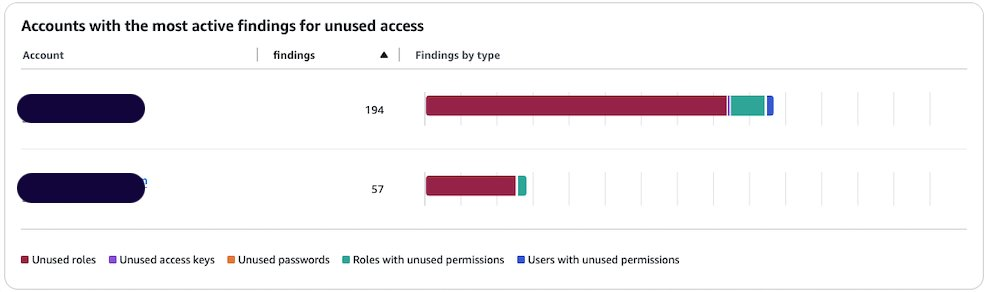
- You can see the split of active findings per account. The example account has 57 active findings that you want to exclude from it.

Figure 2: Unused access findings per account
- Select Analyzer settings under Access Analyzer in that navigation pane.
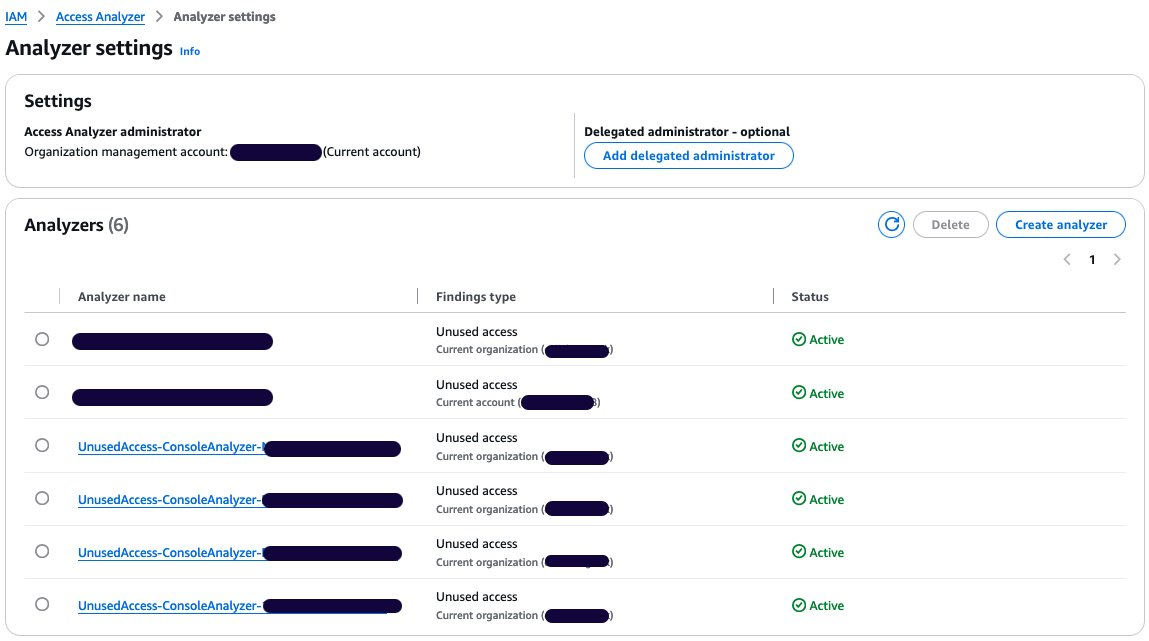
- The analyzer settings page presents the analyzers in your AWS Region and their status.
- Select your unused access analyzer in the list based on its name.

Figure 3: Active access analyzers
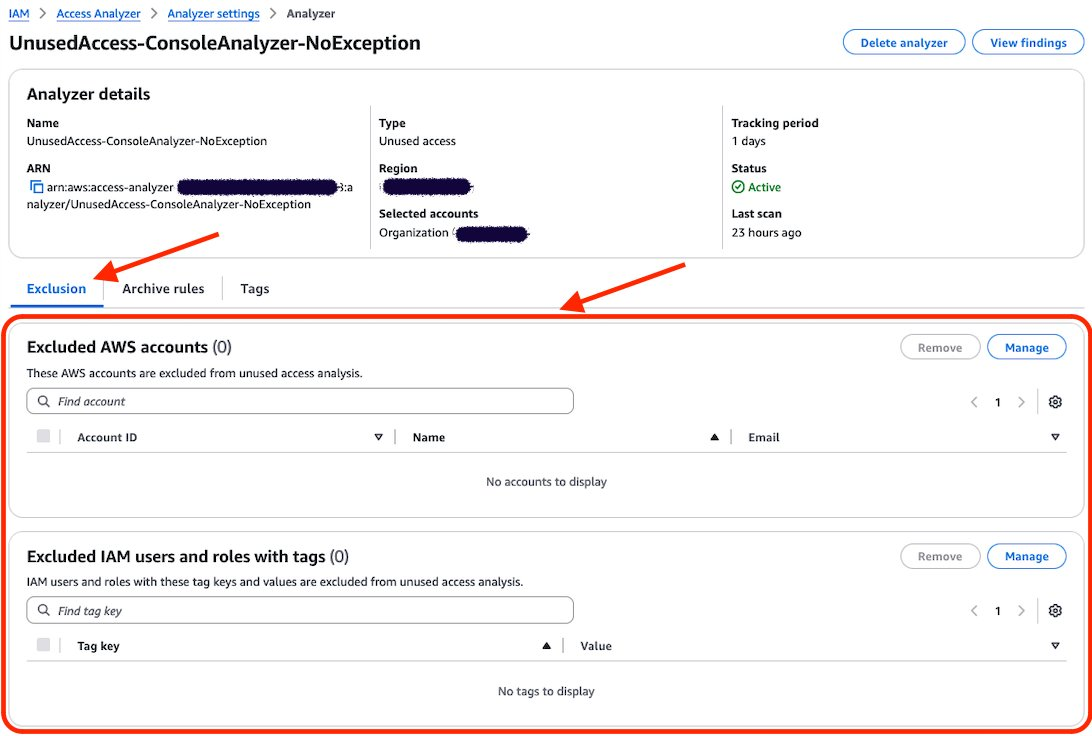
- On the Analyzer page, you can see the analyzer settings and a new tab called Exclusion. Because you have no excluded AWS accounts, the count of Excluded AWS accounts is 0 and there are no accounts displayed.

Figure 4: Unused access analyzer exclusion tab
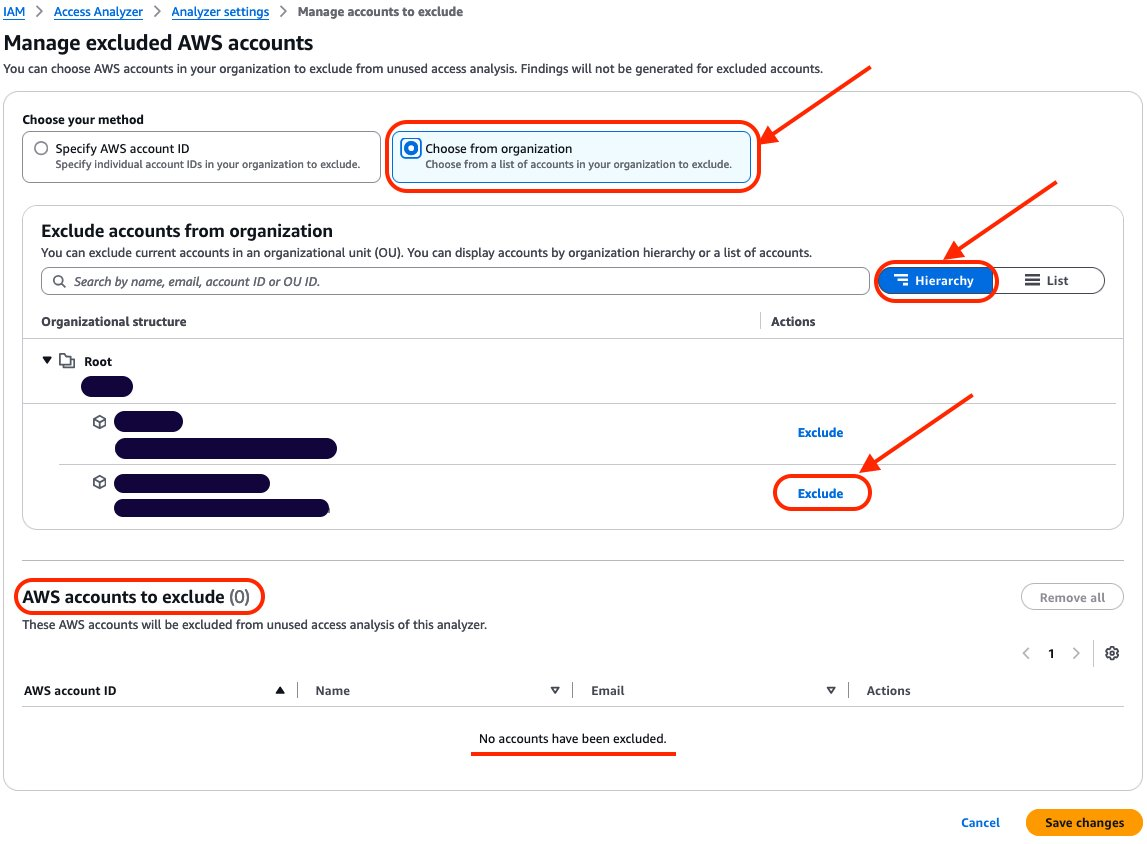
- Choose Manage in the Excluded AWS accounts section.
- Select Choose from organization and Hierarchy and choose Exclude next to the sandbox account that you want to exclude.

Figure 5: Exclude sandbox account
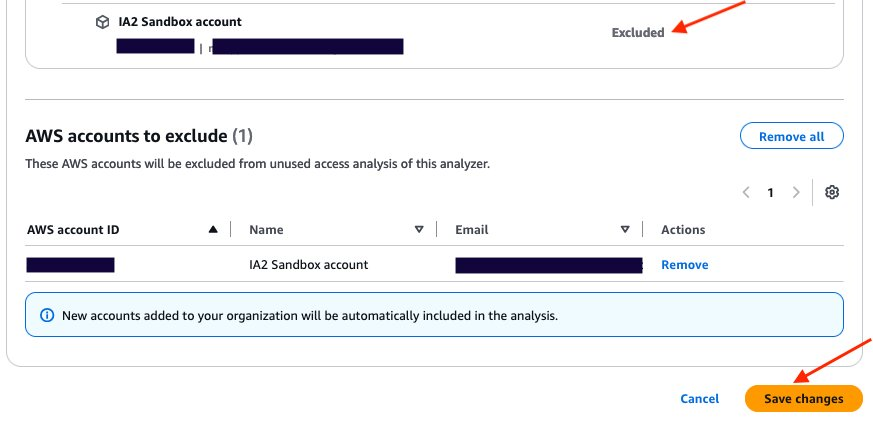
- After you select Exclude for the sandbox account, the account will be deselected and will appear in AWS accounts to exclude. The count of accounts to exclude has changed from 0 to 1. After you have finished, choose Save changes.

Figure 6: Verify that the account is excluded and save changes
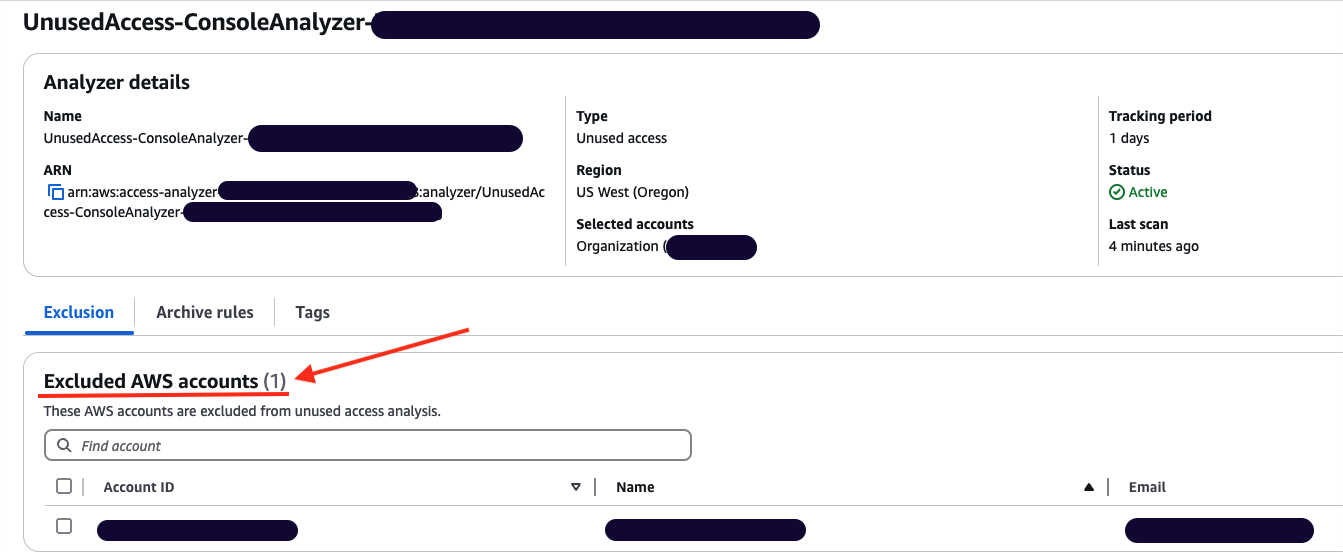
- The page will be automatically updated with your changes. You can then review the Excluded AWS accounts and verify that your excluded account is correctly configured.

Figure 7: Analyzer configuration updated with excluded account
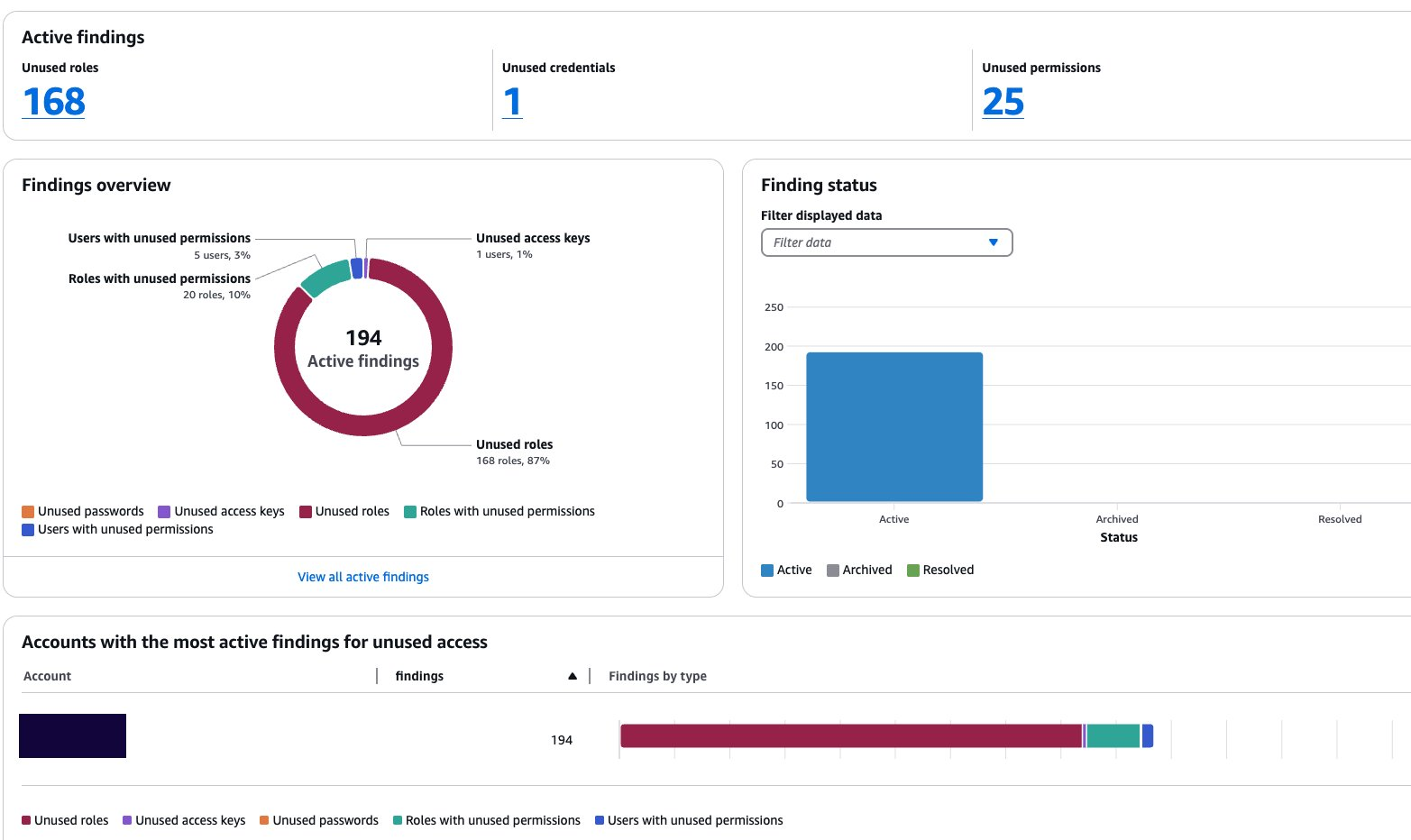
- You can go back to the console dashboard and see the results. In this example, the exclusion of the sandbox account has caused the total number of active findings to go down from 251 to 194.

Figure 8: Dashboard showing a reduction in active findings

Use AWS CLI to update your unused access analyzer:
You can update your existing analyzer using the AWS CLI command aws accessanalyzer update-analyzer. Use the following command, replacing <YOUR-ANALYZER-NAME> with the name of your analyzer.
You will obtain a result similar to the following:
You have successfully excluded a sandbox account from the unused access analysis. Now you will exclude the IAM roles used by the security team to audit your accounts based on tags.
Excluding specific principals in your organization using tags
In this section, you will see how to update an existing unused access analyzer by excluding tagged IAM roles in your organization using the console and then AWS CLI.
Use the console to update your unused access analyzer:
- Open the IAM Access Analyzer console.
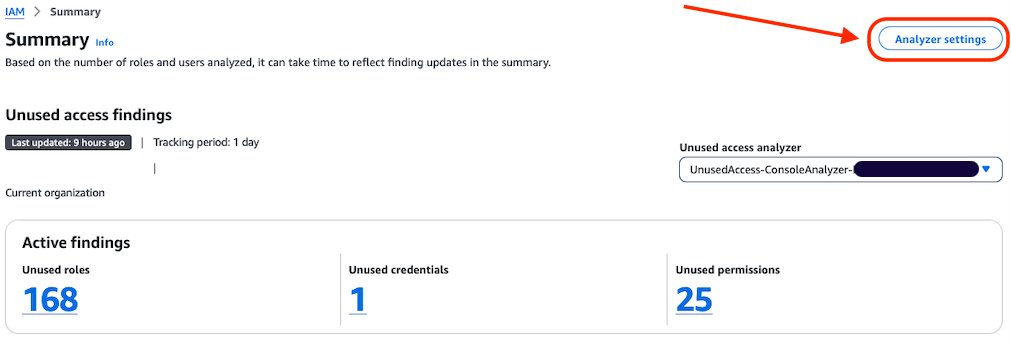
- Review the summary dashboard containing your unused findings. Choose Analyzer settings at the top of the screen.

Figure 9: IAM Access Analyzer summary dashboard
- You will see a list of analyzers created in your account in that Region. Select the analyzer that you want to update.
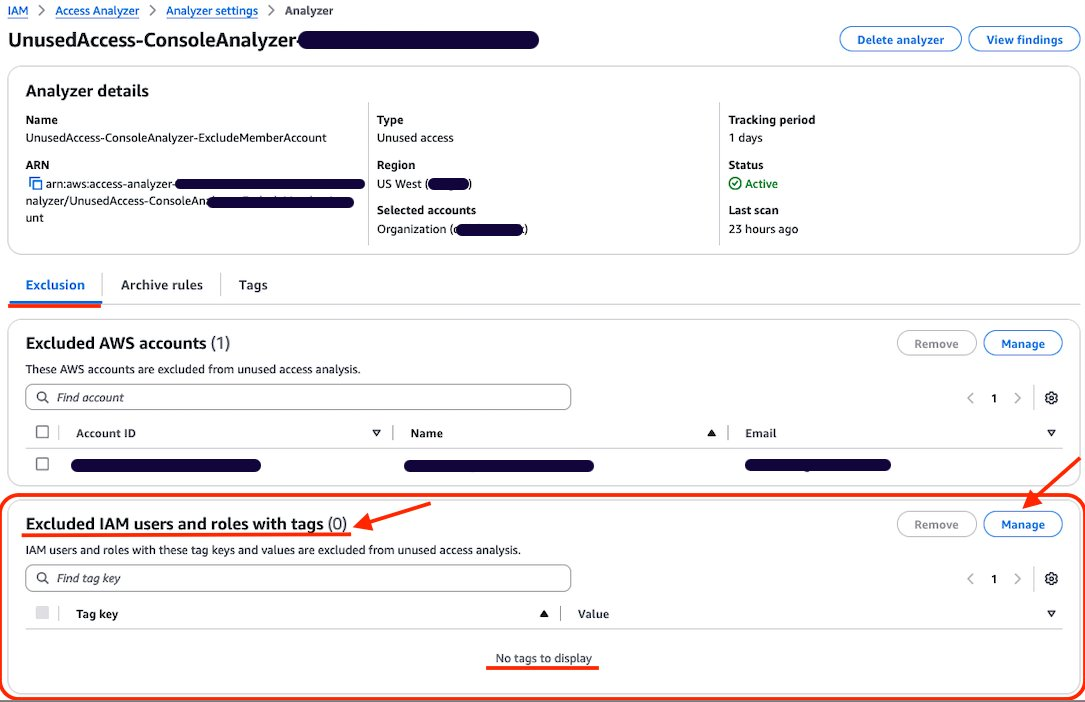
- Review the analyzer page. On the Exclusion tab, you will see Exclude IAM users and roles with tags with a count of 0.

Figure 10: Configure exclusion of IAM roles using tag
- Choose Manage in the Excluded IAM users and roles with tags section.
- Add the tags attached to the roles that you want to exclude from the analysis and choose Save changes.

Figure 11: Add tag to exclude
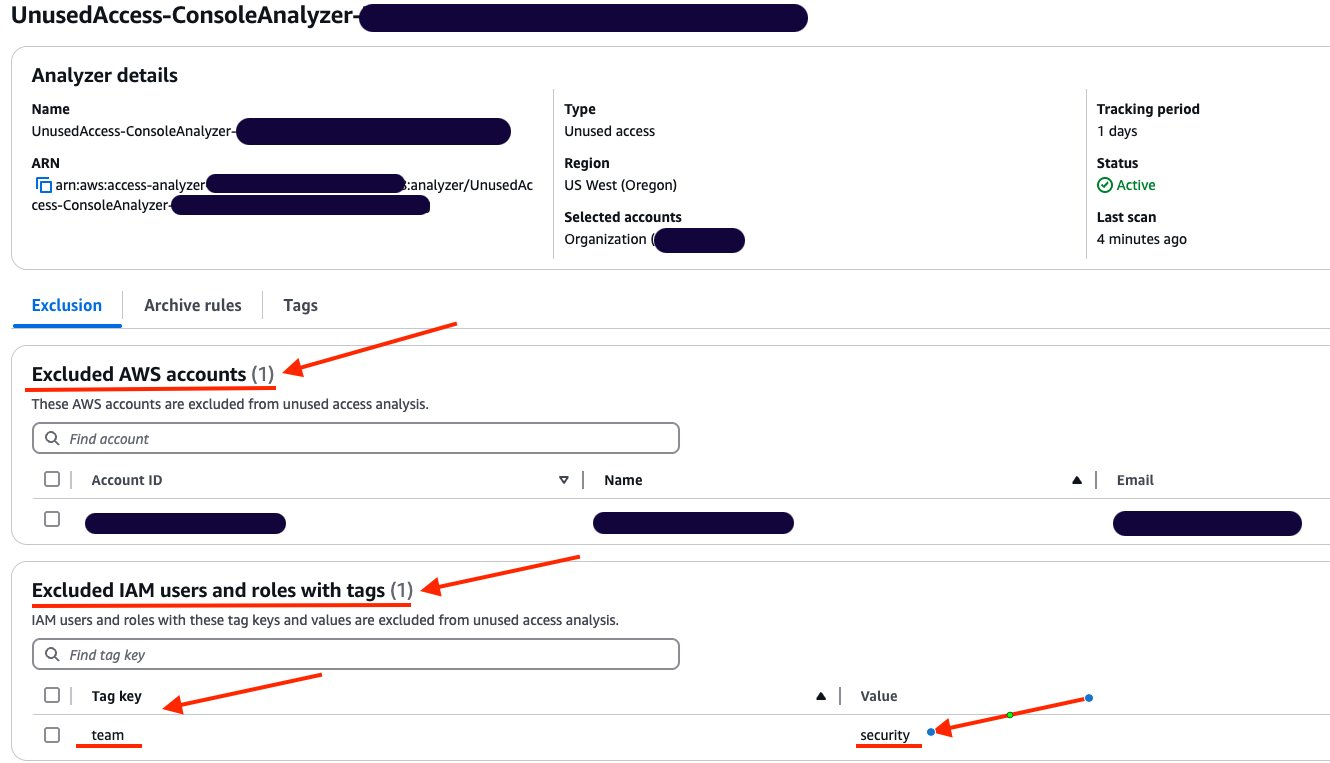
- You can now see that Excluded IAM users and roles with tags now has a count of 1, and you can see the tags in the list.

Figure 12: List of exclusion tags


Use AWS CLI to update your unused access analyzer:
You can also update your existing analyzer using the AWS CLI command aws accessanalyzer update-analyzer. Using the following command, replace <YOUR-ANALYZER-NAME> with the name of your analyzer.
A successful response will look like the following:
Review the exclusion on your analyzer
You can review, remove, or update the exclusions configured on your analyzer by using the console or AWS CLI. For example, as a security administrator managing multiple accounts, you might initially exclude IAM roles that have the tag security from analysis. However, you might need to review these exclusions if your policies change, requiring analysis of certain security roles or removing the exclusion entirely. By adjusting your exclusions, you can make sure that your analyzer’s results remain relevant to your organization’s needs and account structure.
Review the exclusion on unused access analyzer using the console:
In this section, review the tags that have been excluded from an analyzer.
- Open the IAM console.
- Select Access Analyzer, under Access reports, you will see a summary dashboard of findings from an analyzer.
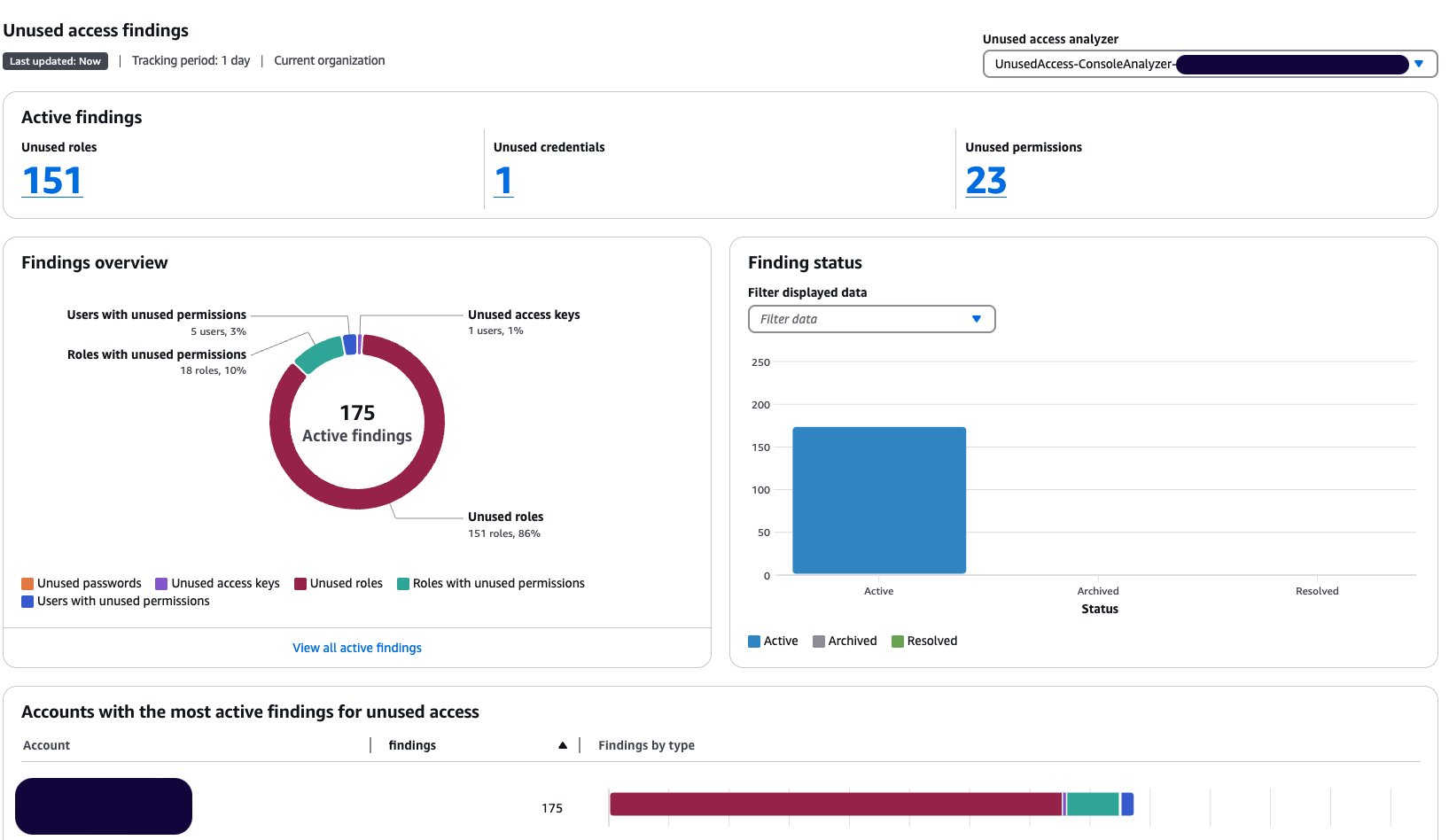
- The Active findings section shows the number of active findings for unused roles, the number of active findings for unused credentials and the number of active findings for unused permissions.
- The Findings overview section includes a breakdown of the active findings.
- The Findings status section shows the status of findings (whether active, archived or resolved).
Figure 13: Unused access analyzer dashboard
- Select the Analyzer settings at the top of the screen.
- Select the analyzer that you want to review to see the exclusion tags.

Figure 14: Review unused access analyzer exclusions
- After applying the tags, the updated dashboard is shown after the next scan.

Figure 15: Dashboard showing reduction of findings after exclusions
Review the exclusion on an unused access analyzer using AWS CLI:
Using the name of your analyzer, you can run the command get-analyzer to see the configured exclusion. Using the following command, replace <YOUR-ANALYZER-NAME> with the name of your analyzer:
aws accessanalyzer get-analyzer --analyzer-name <YOUR-ANALYZER-NAME>
You will get a response similar to the following:
Conclusion
In this post, you learned how to tailor your unused access analyzer to your needs by excluding specific accounts and IAM roles. To exclude the accounts in your organization from being monitored by IAM Access Analyzer, you can use a list of account IDs or select them from a hierarchical view of your organization structure. You can exclude IAM roles and IAM users based on tags. By customizing the exclusion on the unused access analyzer, you saw that the number of active findings went down, helping you focus on the findings that matter most. With this new offering, IAM Access Analyzer provides enhanced controls to help you tailor the analysis more closely to your organization’s security needs.
- To learn more about IAM Access Analyzer Unused Access, see Findings for external and unused access.
- To learn about the creation of unused access findings, see IAM Access Analyzer simplifies inspection of unused access in your organization.
- To learn about how to Refine unused access using IAM Access Analyzer recommendations.
- To learn about the strategies for achieving least privilege at scale, see Strategies for achieving least privilege at scale Part 1 and Part 2.
If you have feedback about this post, submit comments in the Comments section below.
Ravi Bapna & Anindya Ghose | Thrive: Maximizing Well-Being in the Age of AI | Talks at Google
Post Syndicated from Talks at Google original https://www.youtube.com/watch?v=bwS_PJBni8Y
Comic for 2025.01.08 – Celibate 2
Post Syndicated from Explosm.net original https://explosm.net/comics/celibate-2
New Cyanide and Happiness Comic
Announcing the pkgsrc-2024Q4 branch
Post Syndicated from jzb original https://lwn.net/Articles/1004429/
The pkgsrc developers have
announced the 2024Q4 branch of the pkgsrc cross-platform
packaging system. It is the default package manager for NetBSD, SmartOS, and is available for
Linux as well. This marks the 85th quarterly release of pkgsrc:
Since the pkgsrc-2024Q3 release, 110 packages were added, 1580 packages
were updated (with 2399 updates, including language-specific updates:
24 Go, 3 OCaml, 66 Perl, 5 PHP, 626 Python, 282 Ruby, 44 TeX). 33
packages were removed.
Security updates for Wednesday
Post Syndicated from jzb original https://lwn.net/Articles/1004428/
Security updates have been issued by Fedora (firefox, mupdf, and php-tcpdf), SUSE (etcd, file-roller, gtk3, kernel, python-django-ckeditor, rubygem-json-jwt, and tomcat10), and Ubuntu (ffmpeg, HTMLDOC, linux-aws, linux-raspi, linux-gke, linux-hwe-6.8, linux-lowlatency, linux-lowlatency-hwe-6.8, and tinyproxy).
Open source all the way down: Upgrading our developer documentation
Post Syndicated from Kim Jeske original https://blog.cloudflare.com/open-source-all-the-way-down-upgrading-our-developer-documentation/
At Cloudflare, we treat developer content like a product, where we take the user and their feedback into consideration. We are constantly iterating, testing, analyzing, and refining content. Inspired by agile practices, treating developer content like an open source product means we approach our documentation the same way an open source software project is created and maintained. Open source documentation empowers the developer community because it allows anyone, anywhere, to contribute content. By making both the content and the framework of the documentation site publicly accessible, we provide developers with the opportunity to not only improve the material itself but also understand and engage with the processes that govern how the documentation is built, approved, and maintained. This transparency fosters collaboration, learning, and innovation, enabling developers to contribute their expertise and learn from others in a shared, open environment. We also provide feedback to other open source products and plugins, giving back to the same community that supports us.
Great documentation empowers users to be successful with a new product as quickly as possible, showing them how to use the product and describing its benefits. Relevant, timely, and accurate content can save frustration, time, and money. Open source documentation adds a few more benefits, including building inclusive and supportive communities that help reduce the learning curve. We love being open source!
While the Cloudflare content team has scaled to deliver documentation alongside product launches, the open source documentation site itself was not scaling well. developers.cloudflare.com had outgrown the workflow for contributors, plus we were missing out on all the neat stuff created by developers in the community.
Just like a software product evaluation, we reviewed our business needs. We asked ourselves if remaining open source was appropriate? Were there other tools we wanted to use? What benefits did we want to see in a year or in five years? Our biggest limitations in addition to the contributor workflow challenges seemed to be around scalability and high maintenance costs for user experience improvements.
After compiling our wishlist of new features to implement, we reaffirmed our commitment to open source. We valued the benefit of open source in both the content and the underlying framework of our documentation site. This commitment goes beyond technical considerations, because it’s a fundamental aspect of our relationship with our community and our philosophy of transparency and collaboration. While the choice of an open source framework to build the site on might not be visible to many visitors, we recognized its significance for our community of developers and contributors. Our decision-making process was heavily influenced by two primary factors: first, whether the update would enhance the collaborative ecosystem, and second, how it would improve the overall documentation experience. This focus reflects that our open source principles, applied to both content and infrastructure, are essential for fostering innovation, ensuring quality through peer review, and building a more engaged and empowered user community.
Cloudflare’s developer documentation is open source on GitHub, with content supporting all of Cloudflare’s products. The underlying documentation engine has gone through a few iterations, with the first version of the site released in 2020. That first version provided dev-friendly features such as dark mode and proper code syntax.
In 2021, we introduced a new custom documentation engine, bringing significant improvements to the Cloudflare content experience. The benefits of the Gatsby to Hugo migration included:
-
Faster development flow: The development flow replicated production behavior, increasing iteration speed and confidence. Preview links via Cloudflare Pages were also introduced, so the content team and stakeholders could quickly review what content would look like in production.
-
Custom components: Introduced features like resources-by-selector which let us reference content throughout the repository and gave us the flexibility to expand checks and automations.
-
Structured changelog management: Implementation of structured YAML changelog entries which facilitated sharing with various platforms like RSS feeds, Developer Discord, and within the docs themselves.
-
Improved performance: Significant page load time improvements with the migration to HTML-first and almost instantaneous local builds.
These features were non-negotiable as part of our evaluation of whether to migrate. We knew that any update to the site had to maintain the functionality we’d established as core parts of the new experience.
After careful evaluation, we chose to migrate from Hugo to the Astro (and by extension, JavaScript) ecosystem. Astro fulfilled many items on our wishlist including:
-
Enhanced content organization: Improved tagging and better cross-referencing of related pages.
-
Extensibility: Support for user plugins like starlight-image-zoom for lightbox functionality.
-
Development experience: Type-checking at build time with astro check, along with syntax highlighting, Intellisense, diagnostic messages, and plugins for ESLint, Stylelint, and Prettier.
-
JavaScript/TypeScript support: Aligned the docs site framework with the preferred languages of many contributors, facilitating easier contribution.
-
CSS management: Introduction of Tailwind and scoped styles.
-
Content collections: Offered various ways to manage and enhance tagging practices including Markdown front matter validated by Zod schemas, JSON schemas for Intellisense, and a JavaScript callback for filtering returned entries.

Starlight, Astro’s documentation theme, was a key factor in the decision. Its powerful component overrides and plugins system allowed us to leverage built-in components and base styling.
Content needed to be migrated quickly. With dozens of pull requests opened and merged each day, entering a code freeze for a week simply wasn’t feasible. This is where the nature of abstract syntax trees (ASTs) came into play, only parsing the structure of a Markdown document rather than details like whitespace or indentation that would make a regular expression approach tricky.
With Hugo in 2021, we configured code block functionality like titles or line highlights with front matter inside the code block.
---
title: index.js
highlight: 1
---
const foo = "bar";
Starlight uses Expressive Code for code blocks, and these options are now on the opening code fence.
js title="index.js" {1}
const foo = "bar";
With astray, this is a simple as visiting the `code` nodes and:
-
Parsing `node.value` with front-matter.
-
Assigning the attributes from `front-matter` to `node.meta`.
-
Replacing `node.value` with the rest of the code block.
import { fromMarkdown } from "mdast-util-from-markdown";
import { toMarkdown } from "mdast-util-to-markdown";

import * as astray from "astray";
import type * as MDAST from "mdast";
import fm from "front-matter";

const markdown = await Bun.file("example.md").text();

const AST = fromMarkdown(markdown);

astray.walk<MDAST.Root, void, any>(AST, {
    code(node: MDAST.Code) {
        const { attributes, body } = fm(node.value);
        const { title, highlight } = attributes;

        if (title) {
            node.meta = `title="${title}"`;
        }

        if (highlight) {
            node.meta += ` {${highlight}}`;
        }

        node.value = body;

        return;
    }
})
When we migrated from Gatsby to Hugo in 2021, the pull request included 4,850 files and the migration took close to three weeks from planning to implementation. This time around, the migration was nearly twice as large, with 8,060 files changed. Our planning and migration took six weeks in total:
-
10 days: Evaluate platforms, vendors, and features
-
14 days: Migrate the components required by the documentation site
-
5 days: Staging and user acceptance testing (UAT)
-
8 hours: Code freeze and migrate to Astro/Starlight
The migration resulted in removing a net -19,624 lines of code from our maintenance burden.

While the number of files had grown substantially since our last major migration, our strategy was very similar to the 2021 migration. We used Markdown AST and astray, a utility to walk ASTs, created specifically for the previous migration!
A website migration like our move to Astro/Starlight is a complex process that requires time to plan, review, and coordinate, and our preparation paid off! Including our Cloudflare Community MVPs as part of the planning and review period proved incredibly helpful. They provided great guidance and feedback as we planned for the migration. We only needed one day of code freeze, and there were no rollbacks or major incidents. Visitors to the site never experienced downtime, and overall the migration was a major success.
During testing, we ran into several use cases that warranted using experimental Astro APIs. These APIs were always well documented, thanks to fantastic open source content from the Astro community. We were able to implement them quickly without impacting our release timeline.
We also ran into an edge case with build time performance due to the number of pages on our site (4000+). The Astro team was quick to triage the problem and begin investigation for a permanent fix. Their fast, helpful fixes made us truly grateful for the support from the Astro Discord server. A big thank you to the Astro/Starlight community!
Migrating developers.cloudflare.com to Astro/Starlight is just one example of the ways we prioritize world-class documentation and user experiences at Cloudflare. Our deep investment in documentation makes this a great place to work for technical writers, UX strategists, and many other content creators. Since adopting a content like a product strategy in 2021, we have evolved to better serve the open source community by focusing on inclusivity and transparency, which ultimately leads to happier Cloudflare users.
We invite everyone to connect with us and explore these exciting new updates. Feel free to reach out if you’d like to speak with someone on the content team or share feedback about our documentation. You can share your thoughts or submit a pull request directly on the cloudflare-docs repository in GitHub.
Fiery Vigil
Post Syndicated from The History Guy: History Deserves to Be Remembered original https://www.youtube.com/watch?v=Qxun10YJwYI
Highlights from Coolest Projects South Africa 2024
Post Syndicated from Afandi Indiatsi original https://www.raspberrypi.org/blog/highlights-from-coolest-projects-south-africa-2024/
Afandi Indiatsi, our Programme Coordinator in Africa, recently attended Coolest Projects South Africa 2024. Read on to hear her highlights.
What happens when creativity, enthusiasm, fun, and innovation come together? You get Coolest Projects South Africa 2024 — a vibrant showcase of students from all walks of life displaying their talent and shaping the future of technology.
Dozens of projects exhibited at the event in Cape Town
Hosted by our partner, Coder Level Up, Coolest Projects South Africa brought together creators, mentors, educators, and industry leaders to celebrate the creativity and ingenuity of young tech enthusiasts from across the country.
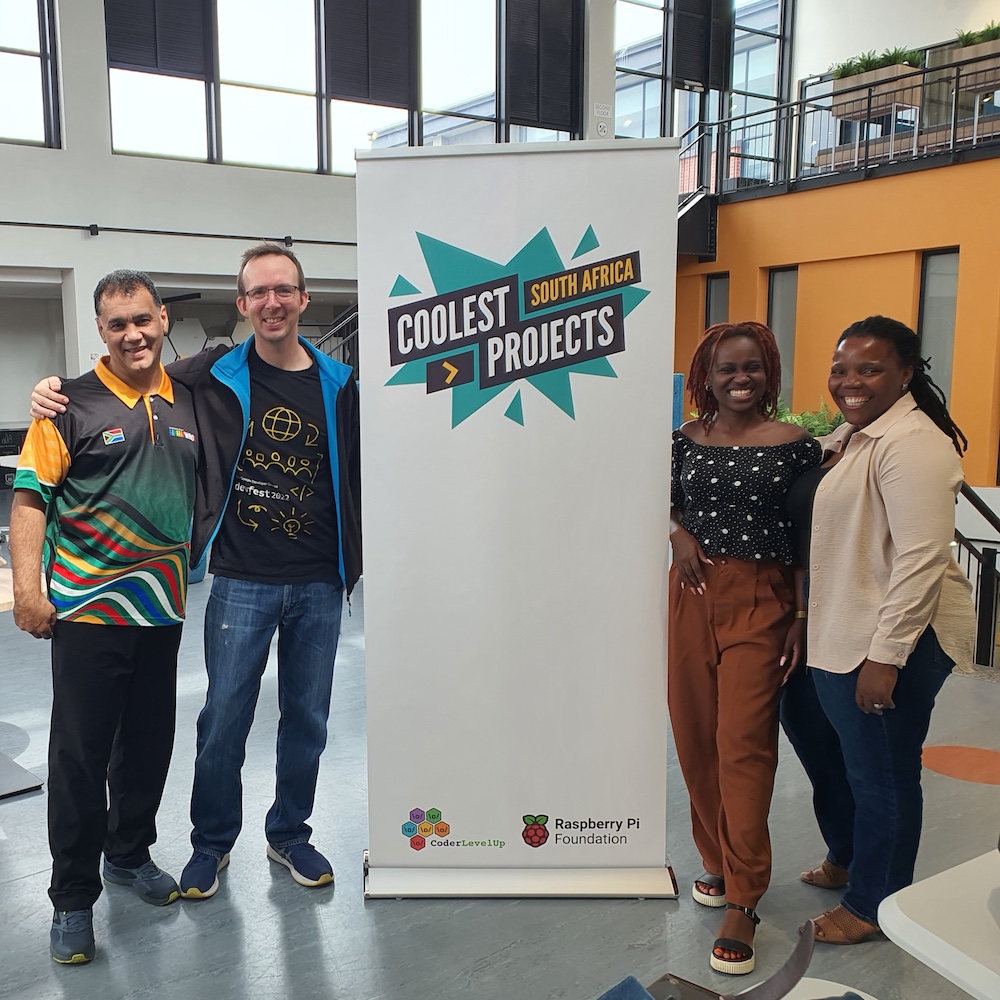
With nearly 200 projects submitted and dozens showcased, the event highlighted the impressive talent and potential of South Africa’s next generation of innovators.
Taking place at the University of Western Cape’s Department of Education in Cape Town, the event was a hub of excitement. Right from the start the venue was buzzing with activity, with the South African World Robot Olympiad (WRO) team kicking things off with a fantastic demonstration of their robotic inventions. Their creations came alive to cheers and applause as they performed flawlessly, leaving attendees in awe — what an inspiration they were!
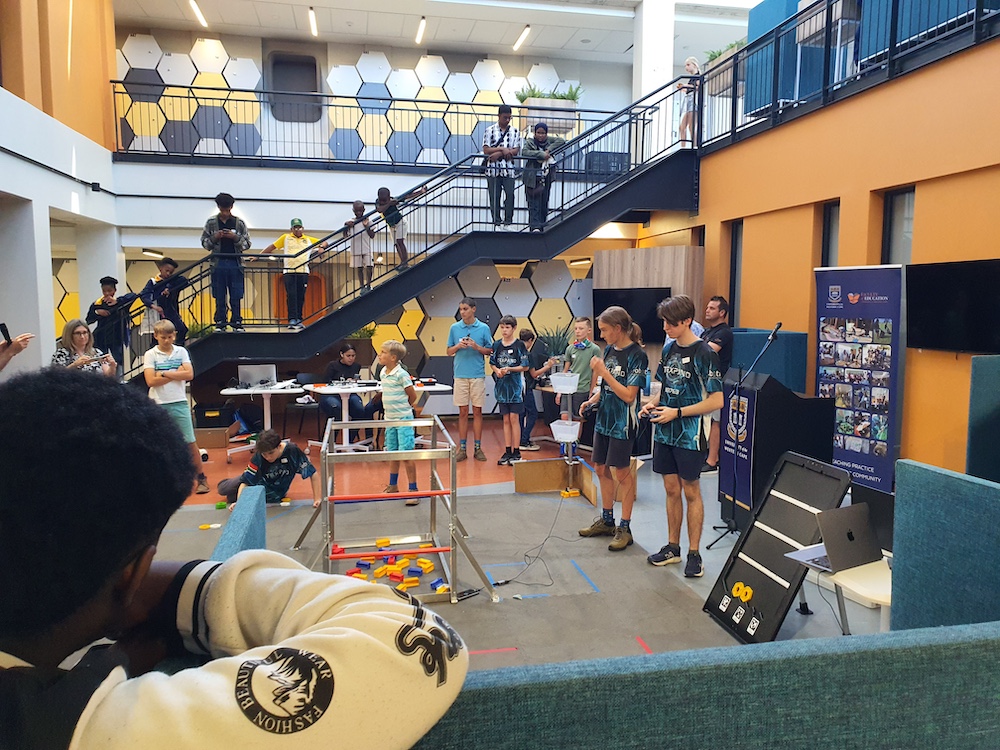
Standout projects ranged from garbage collection to chocolate
The participants then presented their projects, each of which was ingenious in its own way. From hardware and visual programming to game development and website creation, there was a wealth of ideas on display — and a demonstration of the boundless potential of young minds when given the right tools and guidance. Adding to the inclusive spirit of the event, participants from Durban and East London joined remotely, their energy resonating through Zoom.
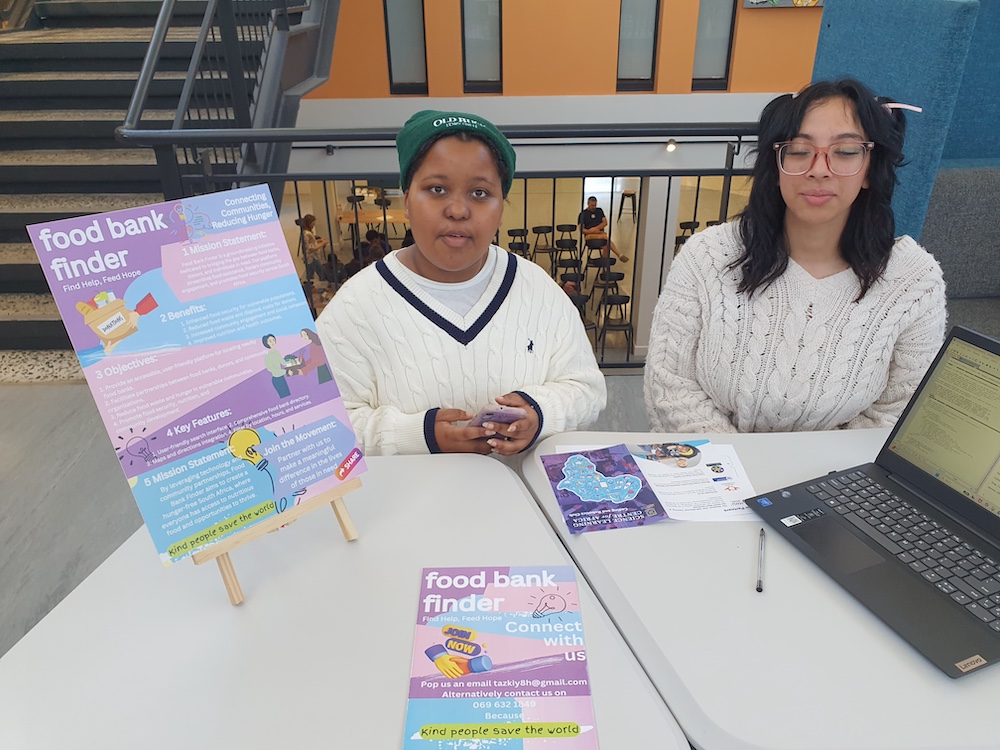
One standout project was a garbage collection robot created by an all-girls team from Nguzo Saba School. Using a LEGO kit, these creators transformed their idea into a functional invention. What made their project exceptional was their ability to improvise and enhance the kit to achieve their desired functionality. This was a true testament to their creativity, resilience, and problem-solving skills.
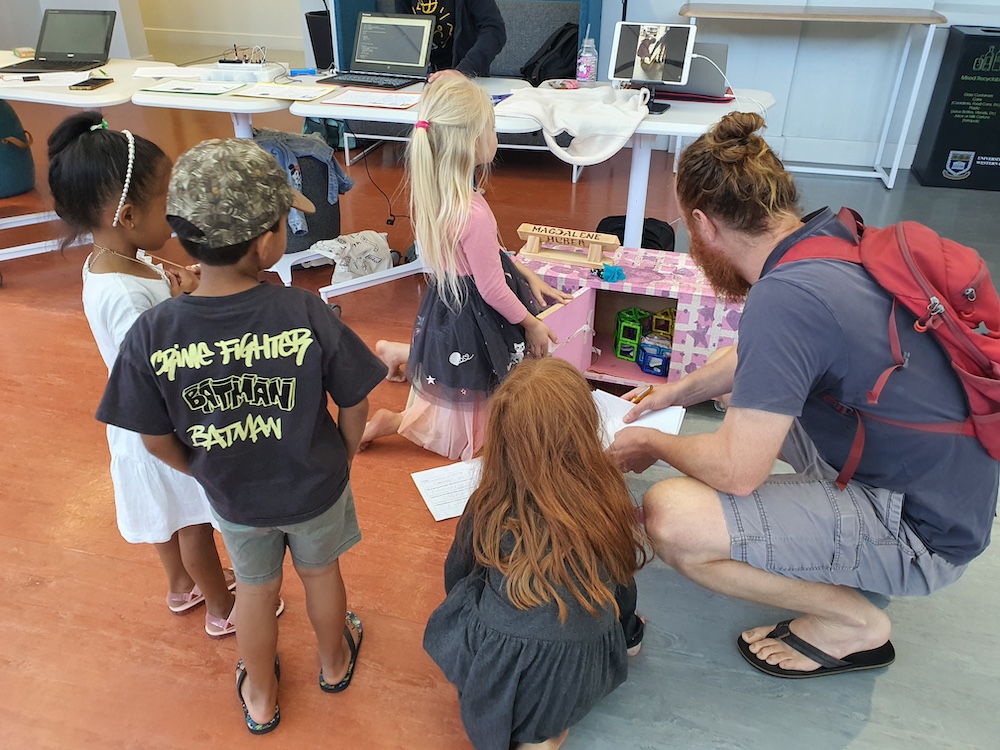
Another memorable presentation came from Emma, who used Scratch to tell the story of the history of chocolate. Her engaging narrative spanned the journey of chocolate from the Olmec civilisation in Latin America to today’s chocolate museums. Emma’s research was extensive, and she captivated the judges not only with her presentation but also with chocolate samples for everyone to enjoy — a sweet touch that left a lasting impression!
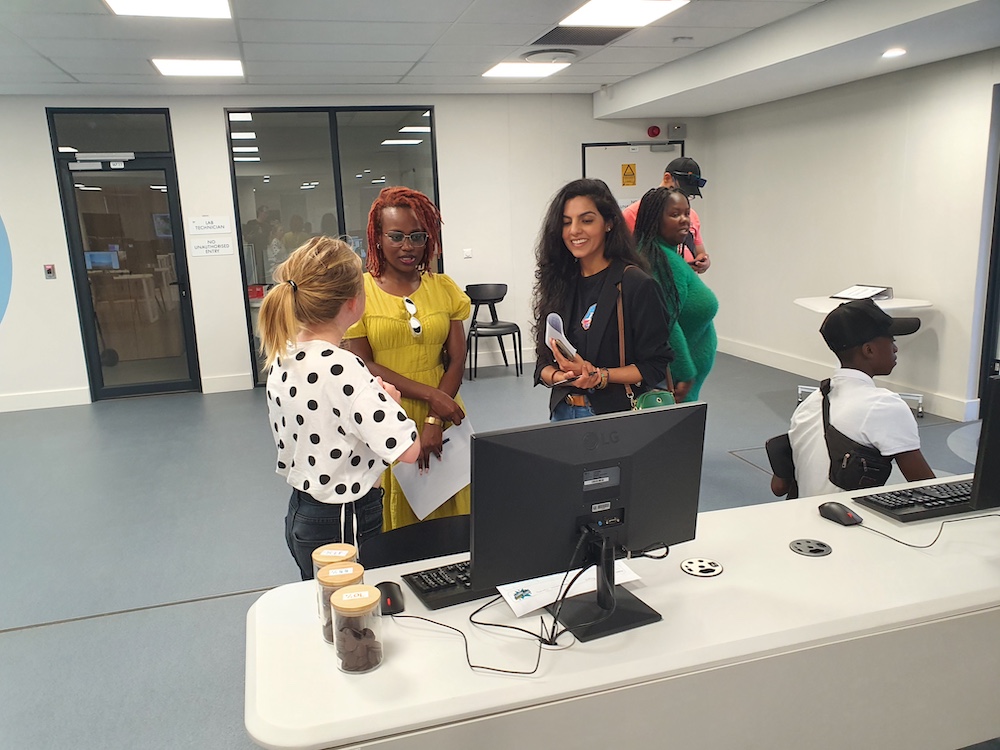
How Coolest Projects harnesses the power of education, creativity, and mentorship
A recurring theme throughout the event was the importance of mentorship. Many of the young people shared that they had sought guidance from mentors, teachers, and family members while developing their projects. This collaborative spirit underscored the role of supportive communities in fostering innovation and creativity among young creators.
Coolest Projects South Africa 2024 was more than a showcase of talent. It was a reminder of the transformative power of education, mentorship, and creativity. Every project had a story of passion and perseverance, and every creator left inspired to dream bigger.
As we reflect on this event — and the many other Coolest Projects events that took place around the world this past year — we are reminded that the future of technology is in capable, imaginative hands.
Get involved with Coolest Projects in 2025
Coolest Projects will be back and bigger than ever before in 2025.
The Coolest Projects online showcase is open globally to any young person up to age 18. Registration opens 14 January, and we’ll host a celebratory livestream on 25 June.
Thanks to an incredible network of partners, Coolest Projects events will also be hosted in person in many countries around the world. Go to the Coolest Projects website for more event dates and details.
The post Highlights from Coolest Projects South Africa 2024 appeared first on Raspberry Pi Foundation.