Use CI/CD best practices to automate Amazon OpenSearch Service cluster management operations

Post Syndicated from Camille BIRBES original https://aws.amazon.com/blogs/big-data/use-ci-cd-best-practices-to-automate-amazon-opensearch-service-cluster-management-operations/

Quick and reliable access to information is crucial for making smart business decisions. That’s why companies are turning to Amazon OpenSearch Service to power their search and analytics capabilities. OpenSearch Service makes it straightforward to deploy, operate, and scale search systems in the cloud, enabling use cases like log analysis, application monitoring, and website search.

Efficiently managing OpenSearch Service indexes and cluster resources can lead to significant improvements in performance, scalability, and reliability – all of which directly impact a company’s bottom line. However, the industry lacks built-in and well-documented solutions to automate these important operational tasks.

Applying continuous integration and continuous deployment (CI/CD) to managing OpenSearch index resources can help do that. For instance, storing index configurations in a source repository allows for better tracking, collaboration, and rollback. Using infrastructure as code (IaC) tools can help automate resource creation, providing consistency and reducing manual work. Finally, using a CI/CD pipeline can automate deployments and streamline workflow.

In this post, we discuss two options to achieve this: the Terraform OpenSearch provider and the Evolution library. Which one is best suited to your use case depends on the tooling you are familiar with, your language of choice, and your existing pipeline.

Solution overview

Let’s walk through a straightforward implementation. For this use case, we use the AWS Cloud Development Kit (AWS CDK) to provision the relevant infrastructure as described in the following architecture diagram that follows, AWS Lambda to trigger Evolution scripts and AWS CodeBuild to apply Terraform files. You can find the code for the entire solution in the GitHub repo.

Solution Architecture Diagram

Prerequisites

To follow along with this post, you need to have the following:

  • Familiarity with Java and OpenSearch
  • Familiarity with the AWS CDK, Terraform, and the command line
  • The following software versions installed on your machine: Python 3.12, NodeJS 20, and AWS CDK 2.170.0 or higher
  • An AWS account, with an AWS Identity and Access Management (IAM) role configured with the relevant permissions

Build the solution

To build an automated solution for OpenSearch Service cluster management, follow these steps:

  1. Enter the following commands in a terminal to download the solution code; build the Java application; build the required Lambda layer; create an OpenSearch domain, two Lambda functions and a CodeBuild project; and deploy the code:
git clone https://github.com/aws-samples/opensearch-automated-cluster-management
cd opensearch-automated-cluster-management
cd app/openSearchMigration
mvn package
cd ../../lambda_layer
chmox a+x create_layer.sh
./create_layer.sh
cd ../infra
npm install
npx cdk bootstrap
aws iam create-service-linked-role --aws-service-name es.amazonaws.com
npx cdk deploy --require-approval never
  1. Wait 15 to 20 minutes for the infrastructure to finish deploying, then check that your OpenSearch domain is up and running, and that the Lambda function and CodeBuild project have been created, as shown in the following screenshots.

OpenSearch domain provisioned successfully OpenSearch Migration Lambda function created successfully OpenSearchQuery Lambda function created successfully CodeBuild project created successfully

Before you use automated tools to create index templates, you can verify that none already exist using the OpenSearchQuery Lambda function.

  1. On the Lambda console, navigate to the relevant Function
  2. On the Test tab, choose Test.

The function should return the message “No index patterns created by Terraform or Evolution,” as shown in the following screenshot.

Check that no index patterns have been created

Apply Terraform files

First, you use Terraform with CodeBuild. The code is ready for you to test, let’s look at a few important pieces of configuration:

  1. Define the required variables for your environment:
variable "OpenSearchDomainEndpoint" {
  type = string
  description = "OpenSearch domain URL"
}

variable "IAMRoleARN" {
  type = string
  description = "IAM Role ARN to interact with OpenSearch"
}
  1. Define and configure the provider
terraform {
  required_providers {
    opensearch = {
      source = "opensearch-project/opensearch"
      version = "2.3.1"
    }
  }
}

provider "opensearch" {
  url = "https://${var.OpenSearchDomainEndpoint}"
  aws_assume_role_arn = "${var.IAMRoleARN}"
}

NOTE: As of the publication date of this post, there is a bug in the Terraform OpenSearch provider that will trigger when launching your CodeBuild project and that will prevent successful execution. Until it is fixed, please use the following version:

terraform {
  required_providers {
    opensearch = {
      source = "gnuletik/opensearch"
      version = "2.7.0"
    }
  }
}
  1. Create an index template
resource "opensearch_index_template" "template_1" {
  name = "cicd_template_terraform"
  body = <<EOF
{
  "index_patterns": ["terraform_index_*"],
  "template": {
    "settings": {
      "number_of_shards": "1"
    },
    "mappings": {
        "_source": {
            "enabled": false
        },
        "properties": {
            "host_name": {
                "type": "keyword"
            },
            "created_at": {
                "type": "date",
                "format": "EEE MMM dd HH:mm:ss Z YYYY"
            }
        }
    }
  }
}
EOF
}

You are now ready to test.

  1. On the CodeBuild console, navigate to the relevant Project and choose Start Build.

The build should complete successfully, and you should see the following lines in the logs:

opensearch_index_template.template_1: Creating...
opensearch_index_template.template_1: Creation complete after 0s (id=cicd_template_terraform)
Apply complete! Resources: 1 added, 0 changed, 0 destroyed.

You can check that the index template has been properly created using the same Lambda function as earlier, and should see the following results.

Terraform index properly created

Run Evolution scripts

In the next step, you use the Evolution library. The code is ready for you to test, let’s look at a few important pieces of code and configuration:

  1. To begin with, you need to add the latest version of the Evolution core library and AWS SDK as Maven dependencies. The full xml file is available in the GitHub repository; to check the Evolution library’s compatibility with different OpenSearch versions, see here.
<dependency>
    <groupId>com.senacor.elasticsearch.evolution</groupId>
    <artifactId>elasticsearch-evolution-core</artifactId>
    <version>0.6.0</version><!--check the latest version-->
</dependency>
<dependency>
   <groupId>software.amazon.awssdk</groupId>
   <artifactId>auth</artifactId>
</dependency>
  1. Create Evolution Bean and an AWS interceptor (which implements HttpRequestInterceptor).

Interceptors are open-ended mechanisms in which the SDK calls code that you write to inject behavior into the request and response lifecycle. The function of the AWS interceptor is to hook into the execution of API requests and create an AWS signed request stamped with proper IAM roles. You can use the following code to create your own implementation to sign all the requests made to OpenSearch within AWS.

  1. Create your own OpenSearch client to manage automatic creation of index, mappings, templates, and aliases.

The default ElasticSearch client that comes bundled in as part of the Maven dependency can’t be used to make PUT calls to the OpenSearch cluster. Therefore, you need to bypass the default REST client instance, and add a CallBack to the AwsRequestSigningInterceptor.

The following is a sample implementation:

private RestClient getOpenSearchEvolutionRestClient() {
    return RestClient.builder(getHttpHost())
        .setHttpClientConfigCallback(hacb -> 
            hacb.addInterceptorLast(getAwsRequestSigningInterceptor()))
        .build();
}
  1. Use the Evolution Bean to call your migrate method, which is responsible for initiating the migration of the scripts defined either using classpath or filepath:
public void executeOpensearchScripts() {
    ElasticsearchEvolution opensearchEvolution = ElasticsearchEvolution.configure()
        .setEnabled(true) // true or false
        .setLocations(Arrays.asList("classpath:opensearch_migration/base",
            "classpath:opensearch_migration/dev")) // List of all locations where scripts are located.
        .setHistoryIndex("opensearch_changelog") // Tracker index to store history of scripts executed.
        .setValidateOnMigrate(false) // true or false
        .setOutOfOrder(true) // true or false
        .setPlaceholders(Collections.singletonMap("env","dev")) // list of placeholders which will get replaced in the script during execution.
        .load(getElasticsearchEvolutionRestClient());
    opensearchEvolution.migrate();
}
  1. An Evolution migration script represents a REST call to the OpenSearch API (for example, PUT /_index_template/cicd_template_evolution), where you define index patterns, settings, and mappings in JSON format. Evolution interprets these scripts, manages their versioning, and provides ordered execution. See the following example:
PUT /_index_template/cicd_template_evolution
Content-Type: application/json

{
  "index_patterns": ["evolution_index_*"],
  "template": {
    "settings": {
      "number_of_shards": "1"
    },
    "mappings": {
        "_source": {
            "enabled": false
        },
        "properties": {
            "host_name": {
                "type": "keyword"
            },
            "created_at": {
                "type": "date",
                "format": "EEE MMM dd HH:mm:ss Z YYYY"
            }
        }
    }
  }
}

The first two lines must be followed by a blank line. Evolution also supports comment lines in its migration scripts. Every line starting with # or // will be interpreted as a comment-line. Comment lines aren’t sent to OpenSearch. Instead, they are filtered by Evolution.

The migration script file naming convention must follow a pattern:

  • Start with esMigrationPrefix which is by default V or the value that has been configured using the configuration option esMigrationPrefix
  • Followed by a version number, which must be numeric and can be structured by separating the version parts with a period (.)
  • Followed by the versionDescriptionSeparator: __ (the double underscore symbol)
  • Followed by a description, which can be any text your filesystem supports
  • End with esMigrationSuffixes which is by default .http and is configurable and case insensitive

You’re now ready to execute your first automated change. An example of a migration script has already been created for you, which you can refer to in a previous section. It will create an index template named cicd_template_evolution.

  1. On the Lambda console, navigate to your function.
  2. On the Test tab, choose Test.

After a few seconds, the function should successfully complete. You can review the log output in the Details section, as shown in the following screenshots.

Migration function finish successfully

The index template now exists, and you can check that its configuration is indeed in line with the script, as shown in the following screenshot.

Evolution index template properly created

Clean up

To clean up the resources that were created as part of this post, run the following commands (in the infra folder):

npx cdk destroy --all

Conclusion

In this post, we demonstrated how to automate OpenSearch index templates using CI/CD practices and tools such as Terraform or the Evolution library.

To learn more about OpenSearch Service, refer to the Amazon OpenSearch Service Developer Guide. To further explore the Evolution library, refer to the documentation. To learn more about the Terraform OpenSearch provider, refer to the documentation.

We hope this detailed guide and accompanying code will help you get started. Try it out, let us know your thoughts in the comments section, and feel free to reach out to us for questions!


About the Authors

Camille BirbesCamille Birbes is a Senior Solutions Architect with AWS and is based in Hong Kong. He works with major financial institutions to design and build secure, scalable, and highly available solutions in the cloud. Outside of work, Camille enjoys any form of gaming, from board games to the latest video game.

Sriharsha Subramanya Begolli works as a Senior Solutions Architect with AWS, based in Bengaluru, India. His primary focus is assisting large enterprise customers in modernizing their applications and developing cloud-based systems to meet their business objectives. His expertise lies in the domains of data and analytics.

Security updates for Tuesday

Post Syndicated from corbet original https://lwn.net/Articles/1004339/

Security updates have been issued by AlmaLinux (python-requests), Oracle (python-requests), SUSE (python-Jinja2 and rizin), and Ubuntu (ceph, linux, linux-aws, linux-aws-hwe, linux-gcp, linux-gcp-4.15, linux-hwe,
linux-kvm, linux-oracle, linux, linux-lts-xenial, linux-aws, linux-aws-5.15, linux-gcp, linux-gcp-5.15, linux-hwe-5.15,
linux-nvidia, linux-oracle, linux-raspi, linux-aws, linux-kvm, linux-hwe-6.8, linux-intel-iotg, linux-oem-6.11, linux-raspi-5.4, and salt).

Backblaze Adds Canadian Region, Expanding Location Choices and Data Sovereignty Options

Post Syndicated from Chris Opat original https://www.backblaze.com/blog/backblaze-adds-canadian-region-expanding-location-choices-and-data-sovereignty-options/

A decorative image showing Backblaze data regions, represented as clouds, around the planet.

Customers that have data governance, compliance, and performance at top of mind have more options for achieving all three with the opening of our new data region, known as Canada East (or CA East). The region is now available for current and future Backblaze customers.  

This new region builds on our mission to deliver high-performance, compliant, and cost-effective cloud storage solutions to businesses around the world and further expands our footprint in the North American market.

Meeting the needs of Canadian businesses

Our new CA East region is located in Toronto, Ontario, and has been designed to address the specific needs of Canadian businesses and organizations, many of which are subject to laws and regulations requiring data to be stored within the country. With this expansion, customers are able to ensure compliance with local regulations while taking advantage of a robust cloud solution that prioritizes data sovereignty. 

A local region also delivers performance benefits for Canadian customers. By reducing the distance that data needs to travel, Backblaze can offer lower latency and improved speeds for Canadian customers, making it ideal for real-time applications and large-scale data transfers.

Strengthening our partnership with Opti9

In collaboration with Opti9, an international leader in hybrid cloud solutions and a Veeam Cloud Storage Provider (VCSP), this expansion marks a significant opportunity for us to deliver robust managed services to Canadian businesses. Opti9, as the exclusive Canadian channel partner for Backblaze B2 Reserve and the Powered by Backblaze program, is uniquely positioned to bring this enhanced offering to market.

Opti9 and Backblaze share a unified vision of providing Canadian businesses and organizations with cutting-edge cloud solutions that are both affordable and high performing. Cloud data storage is evolving rapidly to meet changing customer needs. We are excited to launch this Canadian storage region in collaboration with Backblaze, which expands our overall cloud storage footprint in Canada. This partnership equips our Canadian partners and end-user organizations with the tools they need to thrive in today’s fast-evolving digital landscape.

—Cory Mac Donell, Vice President of Sales & Business Development, Opti9

Protecting data within borders

Canada’s cloud services market is expanding rapidly, driven by increased demand from industries such as healthcare, finance, and government—all of which often require data to remain within national borders. The new data region gives Canadian and international businesses more choice for storing their data while maintaining data sovereignty.

Competitive edge through open cloud solutions

Multi-cloud and hybrid cloud strategies are becoming all the more common. Businesses increasingly seek open, interoperable solutions that avoid vendor lock-in and allow them to integrate the best services from multiple providers and our offerings provide the flexibility and control businesses need, while still benefiting from the security, compliance, data governance requirements, and performance of a local data center. The new region enables companies doing business in Canada to tap into multi-cloud and hybrid cloud strategies as they look to strengthen their cloud infrastructure.

Security and compliance details for the Canadian region

The Toronto data center has been assessed and maintains a security program that addresses the requirements of SOC 1 Type 2, SOC 2 Type 2, ISO 27001, PCI DSS, and HIPAA. These certifications ensure the highest levels of security and compliance for businesses in regulated industries. 

Ready to store data in CA East?

The new data region is available to customers now, and you can create an account there by selecting CA East in the region drop-down when creating a Backblaze account. Already storying data with Backblaze and want to keep a Canadian copy? Leverage our Cloud Replication feature and diversify your storage. 

We’ll have more stories to tell about bringing up the data center and some of the interesting networking there, so stay tuned to the blog!

The post Backblaze Adds Canadian Region, Expanding Location Choices and Data Sovereignty Options appeared first on Backblaze Blog | Cloud Storage & Cloud Backup

Rapid7 Recognized with Top Score of 100 in 2025 Corporate Equality Index

Post Syndicated from Rapid7 original https://blog.rapid7.com/2025/01/07/rapid7-recognized-with-top-score-of-100-in-2025-corporate-equality-index/

Rapid7 Recognized with Top Score of 100 in 2025 Corporate Equality Index

On January 7, the Human Rights Campaign Foundation released their 2025 Corporate Equality Index (CEI), where Rapid7 earned a top score of 100.

The CEI is the nation’s leading benchmark for LGBTQ+ workforce equality, evaluating policies and practices in areas such as non-discrimination, equitable benefits, inclusive cultures, and corporate social responsibility. With this score, Rapid7 is recognized as a leader in LGBTQ+ Workplace Inclusion.

This recognition reflects Rapid7’s core value; and our commitment to creating a dynamic workplace where all people can build a rewarding career. Our core value  ‘Bring You’ is an invitation for everyone to embrace their uniqueness and bring their true selves to the workplace. We know that fostering a culture of inclusion enables people to be more creative and generate innovative ideas – essential skills when working in the field of cybersecurity. Additionally, we recognize that our work in this space is truly ‘Never Done’. We continuously evaluate, optimize, and seek feedback on programs and practices that support diversity, equity, and inclusion across the business. We’re proud of this recognition, and will continue to work towards building and maintaining a workplace where all people have access to the tools, resources, and communities that enable them to feel seen and valued, so they can make an incredible impact through their work.

In consideration for this recognition, the CEI examined Rapid7’s practices and policies against four core pillars:

• Non-discrimination policies across business entities

• Equitable benefits for LGBTQ+ workers and their families

• Supporting an inclusive culture; and,

• Corporate social responsibility

“HRC Equality Index recognition reflects a gold standard, one that ensures employees—regardless of their lived experience—have equitable access to benefits and are treated inclusively. We alignwith the HRC Equality Index standard, as we believe it fosters an environment that enables employees to bring their authentic selves to work. By cultivating an environment that nutures this dynamic, we empower our people to perform at their best and contribute meaningfully to the success of our business.

Additionally, achieving recognition on the HRC Equality Index underscores our broader commitment to being an employer who strives to reflect the global community we seek to secure. This milestone also highlights how essential equity is to our mission. Equity is a key part of the equation, and it is vital that we never lose sight of its importance.

I am incredibly proud that we are included on the index this year. This achievement reflects our ongoing commitment to fostering innovation, belonging, and excellence in all that we do.”

In addition to offering equitable benefits, Rapid7’s employee resource groups provide opportunities for people to come together around shared experiences. The Pride community provides space for LGBTQ+ employees and their allies to raise visibility and provide support through various virtual and in-office events. These initiatives include hosting external speakers, facilitating open discussions, and organizing celebrations.

To learn more about Rapid7 as a workplace, visit our careers page today.

US Treasury Department Sanctions Chinese Company Over Cyberattacks

Post Syndicated from Bruce Schneier original https://www.schneier.com/blog/archives/2025/01/us-treasury-department-sanctions-chinese-company-over-cyberattacks.html

From the Washington Post:

The sanctions target Beijing Integrity Technology Group, which U.S. officials say employed workers responsible for the Flax Typhoon attacks which compromised devices including routers and internet-enabled cameras to infiltrate government and industrial targets in the United States, Taiwan, Europe and elsewhere.

Title Launch Observability at Netflix Scale

Post Syndicated from Netflix Technology Blog original https://netflixtechblog.com/title-launch-observability-at-netflix-scale-19ea916be1ed

Part 2: Navigating Ambiguity

By: Varun Khaitan

With special thanks to my stunning colleagues: Mallika Rao, Esmir Mesic, Hugo Marques

Building on the foundation laid in Part 1, where we explored the “what” behind the challenges of title launch observability at Netflix, this post shifts focus to the “how.” How do we ensure every title launches seamlessly and remains discoverable by the right audience?

In the dynamic world of technology, it’s tempting to leap into problem-solving mode. But the key to lasting success lies in taking a step back — understanding the broader context before diving into solutions. This thoughtful approach doesn’t just address immediate hurdles; it builds the resilience and scalability needed for the future. Let’s explore how this mindset drives results.

Understanding the Bigger Picture

Let’s take a comprehensive look at all the elements involved and how they interconnect. We should aim to address questions such as: What is vital to the business? Which aspects of the problem are essential to resolve? And how did we arrive at this point?

This process involves:

  1. Identifying Stakeholders: Determine who is impacted by the issue and whose input is crucial for a successful resolution. In this case, the main stakeholders are:

    – Title Launch Operators
    Role:
    Responsible for setting up the title and its metadata into our systems.
    Challenge: Don’t understand the cascading effects of their setup on these perceived black box personalization systems

    – Personalization System Engineers
    Role: Develop and operate the personalization systems.
    Challenge: End up spending unplanned cycles on title launch and personalization investigations.

    – Product Managers
    Role: Ensure we put forward the best experience for our members.
    Challenge: Members may not connect with the most relevant title.

    – Creative Representatives
    Role: Mediator between the content creators and Netflix.
    Challenge: Build trust in the Netflix brand with content creators.

  2. Mapping the Current Landscape: By charting the existing landscape, we can pinpoint areas ripe for improvement and steer clear of redundant efforts. Beyond the scattered solutions and makeshift scripts, it became evident that there was no established solution for title launch observability. This suggests that this area has been neglected for quite some time and likely requires significant investment. This situation presents both challenges and opportunities; while it may be more difficult to make initial progress, there are plenty of easy wins to capitalize on.
  3. Clarifying the Core Problem: By clearly defining the problem, we can ensure that our solutions address the root cause rather than just the symptoms. While there were many issues and problems we could address, the core problem here was to make sure every title was treated fairly by our personalization stack. If we can ensure fair treatment with confidence and bring that visibility to all our stakeholders, we can address all their challenges.
  4. Assessing Business Priorities: Understanding what is most important to the organization helps prioritize actions and resources effectively. In this context, we’re focused on developing systems that ensure successful title launches, build trust between content creators and our brand, and reduce engineering operational overhead. While this is a critical business need and we definitely should solve it, it’s essential to evaluate how it stacks up against other priorities across different areas of the organization.

Defining Title Health

Navigating such an ambiguous space required a shared understanding to foster clarity and collaboration. To address this, we introduced the term “Title Health,” a concept designed to help us communicate effectively and capture the nuances of maintaining each title’s visibility and performance. This shared language became a foundation for discussing the complexities of this domain.

“Title Health” encompasses various metrics and indicators that reflect how well a title is performing, in terms of discoverability and member engagement. The three main questions we try to answer are:

  1. Is this title visible at all to any member?
  2. Is this title visible to an appropriate audience size?
  3. Is this title reaching all the appropriate audiences?

Defining Title Health provided a framework to monitor and optimize each title’s lifecycle. It allowed us to align with partners on principles and requirements before building solutions, ensuring every title reaches its intended audience seamlessly. This common language not only introduced the problem space effectively but also accelerated collaboration and decision-making across teams.

Categories of issues

To build a robust plan for title launch observability, we first needed to categorize the types of issues we encounter. This structured approach allows us to address all aspects of title health comprehensively.

Currently, these issues are grouped into three primary categories:

1. Title Setup

A title’s setup includes essential attributes like metadata (e.g., launch dates, audio and subtitle languages, editorial tags) and assets (e.g., artwork, trailers, supplemental messages). These elements are critical for a title’s eligibility in a row, accurate personalization, and an engaging presentation. Since these attributes feed directly into algorithms, any delays or inaccuracies can ripple through the system.

The observability system must ensure that title setup is complete and validated in a timely manner, identify potential bottlenecks and ensure a smooth launch process.

2. Personalization Systems

Titles are eligible to be recommended across multiple canvases on product — HomePage, Coming Soon, Messaging, Search and more. Personalization systems handle the recommendation and serving of titles on these canvases, leveraging a vast ecosystem of microservices, caches, databases, code, and configurations to build these product canvases.

We aim to validate that titles are eligible in all appropriate product canvases across the end to end personalization stack during all of the title’s launch phases.

3. Algorithms

Complex algorithms drive each personalized product experience, recommending titles tailored to individual members. Observability here means validating the accuracy of algorithmic recommendations for all titles.
Algorithmic performance can be affected by various factors, such as model shortcomings, incomplete or inaccurate input signals, feature anomalies, or interactions between titles. Identifying and addressing these issues ensures that recommendations remain precise and effective.

By categorizing issues into these areas, we can systematically address challenges and deliver a reliable, personalized experience for every title on our platform.

Issue Analysis

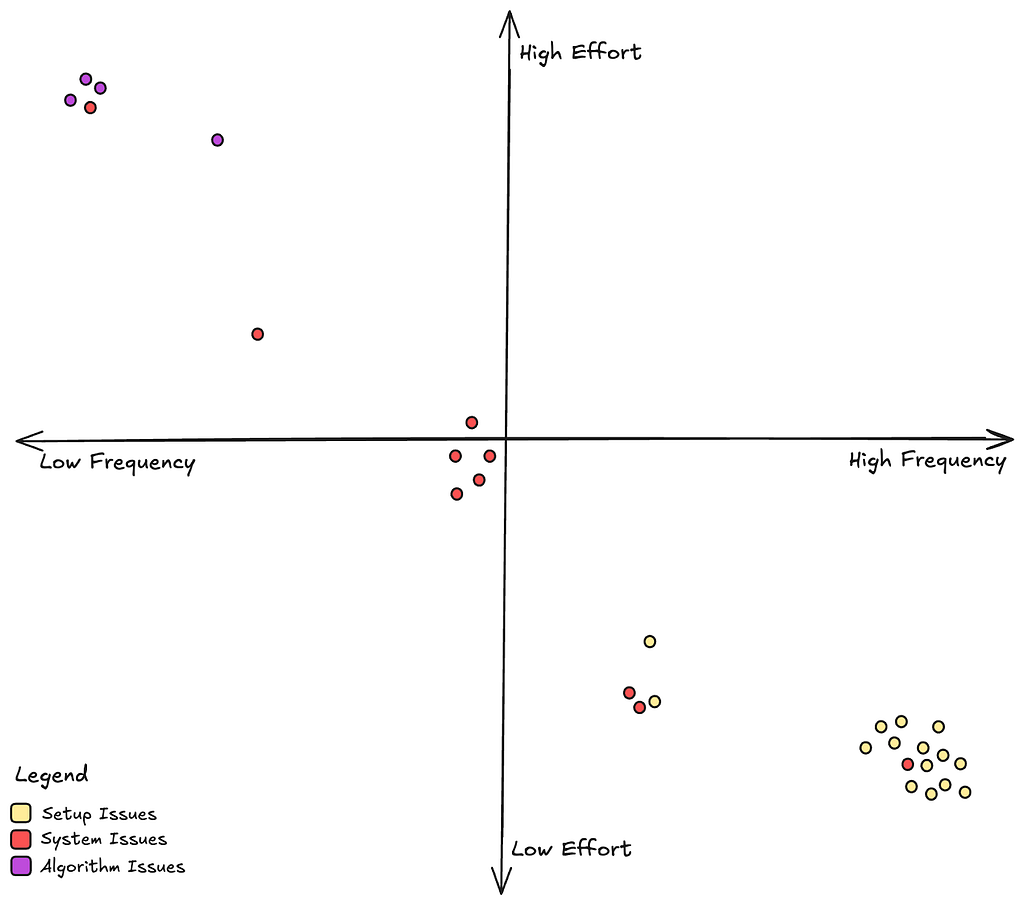
Let’s also learn more about how often we see each of these types of issues and how much effort it takes to fix them once they come up.

From the above chart, we see that setup issues are the most common but they are also easy to fix since it’s relatively straightforward to go back and rectify a title’s metadata. System issues, which mostly manifest as bugs in our personalization microservices are not uncommon, and they take moderate effort to address. Algorithm issues, while rare, are really difficult to address since these often involve interpreting and retraining complex machine learning models.

Evaluating Our Options

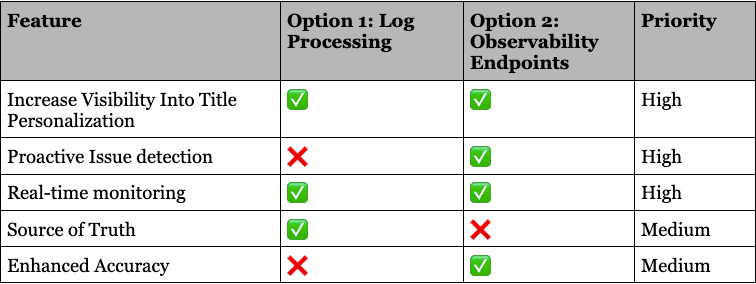
Now that we understand more deeply about the problems we want to address and how we should go about prioritizing our resources. Lets go back to the two options we discussed in Part 1, and make an informed decision.

Ultimately, we realized this space demands the full spectrum of features we’ve discussed. But the question remained: Where do we start?
After careful consideration, we chose to focus on proactive issue detection first. Catching problems before launch offered the greatest potential for business impact, ensuring smoother launches, better member experiences, and stronger system reliability.

This decision wasn’t just about solving today’s challenges — it was about laying the foundation for a scalable, robust system that can grow with the complexities of our ever-evolving platform.

Up next

In the next iteration we will talk about how to design an observability endpoint that works for all personalization systems. What are the main things to keep in mind while creating a microservice API endpoint? How do we ensure standardization? What is the architecture of the systems involved?

Keep an eye out for our next binge-worthy episode!


Title Launch Observability at Netflix Scale was originally published in Netflix TechBlog on Medium, where people are continuing the conversation by highlighting and responding to this story.

Unlocking innovation: three key themes from AWS re:Invent 2024

Post Syndicated from Anne Grahn original https://aws.amazon.com/blogs/messaging-and-targeting/unlocking-innovation-three-key-themes-from-aws-reinvent-2024/

Amazon Web Services (AWS) re:Invent drew nearly 60,000 attendees from across the globe to Las Vegas, Nevada, December 2–6, 2024. The conference featured 5 keynotes, 18 innovation talks, and 1,900 sessions and hands-on labs offering immersive learning and networking opportunities.

With dozens of service and feature announcements, and innumerable best practices shared by AWS executives, customers, and partners—summarizing highlights isn’t easy. Three themes caught my attention: generative artificial intelligence (AI), digital sovereignty, and security. 

Generative AI

The impact of generative AI was a central focus, as emphasized by Dr. Swami Sivasubramanian, Vice President of Data and AI at AWS, during his re:Invent keynote. The convergence of massive data sets and specialized compute made available through the cloud have created the perfect conditions for artificial intelligence to flourish. New tools and interfaces are enabling widespread adoption at an unprecedented pace, driving efficiency and unlocking creativity for all of us.

People’s expectations for applications are changing with generative AI. Organizations need more than just a chatbot or a single, powerful large language model (LLM) as they look to innovate and enhance customer experiences.

In their innovation talk, Architectural methods and breakthroughs in innovative apps in the cloud, Shaown Nandi, Director of Technology, and Ben Cabanas, Asia Pacific Director of Technology at AWS, showcased generative AI and advancements in developer tools. These advancements are transforming application design and removing the undifferentiated heavy lifting, empowering you to modernize systems and develop robust data strategies.

Nandi and Cabanas, along with leaders at Intuit, Anz Bank, and Siemens, explored three areas of cloud architecture (shown in Figure 1). These areas can give you the leverage you need to amplify the impact of your developers and data with cutting-edge techniques and breakthrough technologies like generative AI.

Watch Nandi and Cabanas’ session for more details.

Areas of cloud architecture that can give you leverage to accelerate your business include: Whitespace in the development lifecycle, New generative AI tools, and Modernization.

Figure 1: Three focus areas to gain leverage and accelerate solutions

Many of the announcements made during re:Invent are designed to help you meet real-world challenges, and gain the leverage you need to be successful as you build and scale transformative generative AI applications. The next generation of Amazon SageMaker, Amazon Nova foundation models (FMs), new Amazon Q capabilities, Amazon Bedrock Guardrails Automated Reasoning checks, and the task governance capability in Amazon SageMaker HyperPod are just a few of the new products and features you can use to increase agility, build trust, and control costs as you accelerate AI initiatives.

Visit the AWS News Blog for more top announcements.

Digital sovereignty

Digital sovereignty challenges and the technical measures, operational controls, and contract protections AWS offers to address them also featured prominently during the conference.

Customers are increasingly focused on maintaining control of their data and being able to meet regulatory requirements anywhere they operate. Digital sovereignty is emerging as a top priority, especially in the European Union.

In his breakout session, Digital sovereignty: overcome complexity and enable future-readiness, Max Peterson, Vice President of Sovereign Cloud at AWS, noted that digital sovereignty can mean different things to different organizations. Countries and regions around the world have their own requirements, and there is no uniform guidance around the types of workloads, industries, or sectors that need to meet them. Key challenges (depicted in Figure 2) include data residency, operator access restrictions, resilience and survivability, and independence and transparency—all of which are rooted in trust.

Digital sovereignty requirements can be broken down into two areas: Data sovereignty and Operational sovereignty. Data sovereignty includes data residency and operator access restrictions. Operational sovereignty includes resilience and survivability, and independence and transparency.

Figure 2: Digital sovereignty challenges

End users entrust organizations with sensitive information, and they need to feel confident that it’s handled safely and ethically. They expect the services they rely on to be secure, simple-to-use, and available. Likewise, the organizations that are building those services to store data need to trust the infrastructure they’re building on. They have to be able to provide assured proof that data and privacy are protected, and that control over data remains in the hands of those with the proper authority.

There is no one-size-fits-all approach to driving innovation while meeting digital sovereignty requirements. However, with AWS you can achieve the full benefits of the cloud while maintaining control over where you locate your data, who can access it, and how it’s used.

Peterson highlighted the AWS Nitro System that powers AWS Regions for trusted and confidential computing, and generative AI and machine learning (ML) innovations such as Amazon Bedrock. AWS sovereign cloud offerings range from encryption services to the new AWS European Sovereign Cloud (planned for Q4 2025). These offerings facilitate the control and choice you need to overcome data sovereignty challenges. They also balance the benefits of emerging technologies with the need to keep up with the evolving requirements of citizens and customers.

Watch Peterson’s session to learn more about AWS sovereignty controls and features.

Security

Raising the bar on security was an overarching theme. Chris Betz, CISO at AWS, set the tone during his innovation talk, Security insights and innovation from AWS, noting that security is the single most important expectation AWS customers have. We continuously invest in our security culture—working hard to help you do the same. Betz underscored the effectiveness of our Security Guardians program, which provides the tools, resources, and guidance developers need to address security considerations at each stage of development, and launch products that are Secure by Design. The program, Betz pointed out, has accelerated secure development and improved overall security at scale at AWS.

Watch Betz’s innovation talk to hear how Commonwealth Bank of Australia used a similar approach to support its DevSecOps transformation, and visit the AWS Security Blog to find out how you can build your own Security Guardians program.

For more about security culture, watch re:Invent breakout sessions Building a resilient and effective culture of security, Emotionally intelligent security leadership to drive business impact, and Better together: Protecting data through culture and technology.

Best practices for securing generative AI, AWS Identity and Access Management (IAM), and threat detection and response were also spotlighted. In the breakout session How Amazon threat intelligence helps protect your infrastructure, Will Bowditch, Security Engineer, and Saleem Muhammad, Principal Product Manager at AWS, described how AWS generates threat intelligence. Internal tools that include Madpot, Sonaris, and Mithra (described in Figure 3) allow us to proactively detect and act on millions of potential threats every day, before they become real security issues for customers.

Watch the session to learn more.

Internal AWS threat intelligence tools include MadPot, a globally distributed network of honeypot threat sensors with automated response capabilities that can react to threat actors’ evolving tactics, techniques, and procedures (TTPs); Sonaris, an active defense tool that analyzes potentially harmful network traffic and denies attempts to find unintentionally public S3 buckets and vulnerable services; and Mithra, an internal neural network graph model that uses algorithms for threat intelligence. Mithra ranks domain trustworthiness to help protect customers from threats.

Figure 3: Internal Amazon threat intelligence tools

Noteworthy announcements included AWS Security Incident Response, a new service that provides automated triage, coordinated communication, and expert guidance to help you streamline security event responses and recover from cybersecurity threats.

Not surprisingly, the subject of end-to-end encryption (E2EE) also grabbed attention in the wake of the ongoing breach of telecommunication networks by a state-sponsored threat actor known as Salt Typhoon. Because unauthorized parties may have access to unencrypted texts and phone calls, the Cybersecurity and Infrastructure Security Agency (CISA) and the Federal Bureau of Investigation (FBI) are advising Americans to start using encrypted messaging apps to protect text and voice communications.

In the breakout session How the U.S. Army uses AWS Wickr to secure mission-critical comms, Gabe Chiulli, Cloud CTO, and Christopher Watts, Cloud Services Division Chief at U.S. Army, highlighted how the U.S. Army Enterprise Cloud Management Agency uses AWS Wickr to allow users to chat freely while protecting sensitive communications.

Wickr helps organizations in all industries secure one-to-one and group messaging, voice and video calling, file sharing, screen sharing, and location sharing with 256-bit E2EE. Data residency controls allow you to host conversations in the region of your choice, and your technical teams can build and deploy Wickr Bot integrations to bring AWS ML and generative AI services to edge devices in a simple chatbot interface. Additionally, unlike consumer messaging apps, Wickr offers the data retention and administrative controls needed to help meet recordkeeping requirements, and manage user and device data remotely.

Visit our website, and read The Forrester Wave for Secure Communications Solutions, Q3 2024 report for more information.

Additional areas of interest

Engaging sessions covering additional topics such as quantum computing, multicloud environments, and lessons for dealing with complexity from Amazon CTO, Dr. Werner Vogels, also captured my interest during the conference.

The learning continues

It’s clear that generative AI will continue to expand technology horizons, and reshape customer experiences. Digital sovereignty needs will evolve with regulations, increasing efforts to maintain control over data. And security, as always, remains top-of-mind.

AWS re:Invent 2024 introduced new capabilities, best practices, and strategic partnerships to help you innovate and address challenges in these areas. It was an awe-inspiring experience, and I can’t wait to see what re:Invent 2025 will bring!

For more information about product announcements during AWS re:Invent, visit the AWS News Blog and AWS Blog hub.

To watch keynotes, innovation talks, and breakout sessions on demand, visit the conference website.

[$] Emacs in Scheme

Post Syndicated from jake original https://lwn.net/Articles/1001929/

During EmacsConf 2024, which
was held online in early December 2024, Ramin Honary gave a talk about Project
Gypsum
, which is his effort to rewrite Emacs in Scheme. Unlike most other Emacs clones,
which simply replicate the key bindings, Gypsum is also implementing Emacs
Lisp
(or Elisp). Honary is initially targeting Guile, which is an
implementation of Scheme, but wants to make the code portable
to any implementation of R7RS Scheme.

Нов по-лесен процес за изваждане на Европейска здравна карта

Post Syndicated from Боян Юруков original https://yurukov.net/blog/2025/ezok-nov-nachin/

Преди три години реших, че е добра идея да извадя Европейски здравноосигурителни карти на всички в семейството. Запънах се и в крайна сметка накарах НЗОК да приеме заявлението ми електронно. Година по-късно – през юни 2023-та вече бяха направили този процес официален и го описах подробно в статия. В последствие други допълваха със съвети – например, че може само с ПИК на НАП.

Голям недостатък си остана това, че заявлението беше Word документ, попълваше се трудно и доста хора се налагаше отново да го печатат и подписват. Днес в коментарите под статията ми Петър добави още една важна новина. От края на миналата година е възможно заявлението да се подаде изцяло през електронен формуляр.

Вече с изцяло електронен формуляр

За целта използва еФорми на портала на eGov. Може да прочетете подробно за услугата на страницата ѝ или направо да отворите формуляра. Използва се както с електронен подпис, така и с ПИК на НАП или която и да е друга форма на идентификация, която се поддържа. Тъй като за пръв път използвах този тип форми, ме пита за потребителско име и друга информация, след което даде грешка. При второ отваряне обаче нямаше проблем.

Избира се служба, която да изпълни услугата. Това би следвало да е автоматично, тъй като трябва да изберете тази по местоживеене. След това попълвате формуляра със същите данни, както тези в хартиения вид. Удобството е, че част от данните се попълват автоматично. Също така, изглежда че има възможност да се подава заявление за карта на дете само от единия родител – нещо, което беше усложнение в досегашния вариант.

Стъпка напред и все пак…

Един основен недостатък, която си остава, е това, което коментирах от самото начало. В случая определено виждаме напредък и подобрение в процеса, но отново се дигитализира и оптимизира нещо, което изначално не следва да съществува. В случая може да говорим за формуляра само, но дори принципът на работа на картите е сбъркан. Първо дори данните, които искат да попълваме ги имат вече в базите, знаят много добре къде живеем и къде сме поръчвали до сега. Целият процес би могъл да бъде с един бутон или дори по-лесно – опция за отказване и автоматично изпращане на картата при изтичане на старата.

Още по-добре би било да се удължи срокът на самите карти. Като аргумент защо са едногодишни за всички освен деца и пенсионери, отговорът на НЗОК беше, че така намаляват риска от злоупотреби. Т.е. някой да се лекува в чужбина при спрени здравни права. При запитване по ЗДОИ преди две години колко пъти това се е случвало при едногодишните карти, както и колко често се е случвало въобще на някой с валидна Европейска здравна карта да му изтекат правата по средата на периода, те отговориха, че не знаят. Всъщност, оказа се, че в никой момент НЗОК не може да каже колко хора са със здравни права. За всеки се прави индивидуална справка при нужда. Това далеч не е основният или дори от големите недъзи на НЗОК, но на практика с никакви данни и аргументи не могат да подкрепят решението срокът да е от една година, извън чисто чиновническия подход да се въвеждат забрани и ограничения. Така преди години са се опитали да намалят срока дори на шест месеца.

Защо въобще има пластика и липсва електронна система за проверка в реално време на правата при опит за използване на здравни услуги зад граница е отдавна стоящ въпрос. Отговорът за първото е, че форматът на ЕЗОК и въобще изискванията да е пластика и да се харчат толкова пари е междуведомствено решение на европейско ниво, което само чака някое председателство на ЕС да промени. Аналогично, електронна система за проверка на здравни права има и всяка каса може да сверява с друга, но не е автоматизирана и не е интегрирана за целите на това, което обсъждаме тук. Тоест има нужда от работа по решението, но инвестицията в такова решение ще е далеч по-малко, отколкото това, което отива за сега. Липсва политическа воля, а и има замесени интереси.

Въпреки че самите карти са безплатни за нас осигуряващите се, те струват доста на бюджета. Докато в миналото е имало някаква конкуренция в печатането им, в последните години дежурен кандидат и печелещ поръчката е печатницата на един конкретен депутат на БСП станал известен с лобизма си за запазване на прескъпите стикери за ГТП на колите, които отново той печата. Е, след като писах за спряната поръчка това лято и рискът да няма кой да печата картите, скоро беше пусната нова и отново същите я спечелиха на двойна цена спрямо предходните години.

Междувременно от електронният механизъм за поръчване на картата през първите шест месеца след статията ми и пускането на възможността се възползваха доста малко хора. Поисках данни в началото на 2024-та и имаше отчетливо увеличение. Ще поискам данните за цялата година и ще ги обобщя по-късно обаче, защото доста хора се сещат едва през юни и юли за тези карти – точно преди почивката си.

Затова ви препоръчвам да не чакате до лятото, а да се възползвате от електронната форма и доставка с куриер още в началото на годината, която натоварването и сроковете за обработка са по-малки.

The post Нов по-лесен процес за изваждане на Европейска здравна карта first appeared on Блогът на Юруков.

Mourning Steve Langasek

Post Syndicated from corbet original https://lwn.net/Articles/1004297/

From the Ubuntu Discourse instance comes the
sad news
that longtime Debian and Ubuntu contributor Steve Langasek has
passed away.

Steve passed away at the dawn of 2025. His time was short but
remarkable. He will forever remain an inspiration. Judging by the
outpouring of feelings this week, he is equally missed and mourned
by colleagues and friends across the open source landscape, in
particular in Ubuntu and Debian where he was a great mind, mentor
and conscience.

Part 3: A Survey of Analytics Engineering Work at Netflix

Post Syndicated from Netflix Technology Blog original https://netflixtechblog.com/part-3-a-survey-of-analytics-engineering-work-at-netflix-e67f0aa82183

This article is the last in a multi-part series sharing a breadth of Analytics Engineering work at Netflix, recently presented as part of our annual internal Analytics Engineering conference. Need to catch up? Check out Part 1, which detailed how we’re empowering Netflix to efficiently produce and effectively deliver high quality, actionable analytic insights across the company and Part 2, which stepped through a few exciting business applications for Analytics Engineering. This post will go into aspects of technical craft.

Dashboard Design Tips

Rina Chang, Susie Lu

What is design, and why does it matter? Often people think design is about how things look, but design is actually about how things work. Everything is designed, because we’re all making choices about how things work, but not everything is designed well. Good design doesn’t waste time or mental energy; instead, it helps the user achieve their goals.

When applying this to a dashboard application, the easiest way to use design effectively is to leverage existing patterns. (For example, people have learned that blue underlined text on a website means it’s a clickable link.) So knowing the arsenal of available patterns and what they imply is useful when making the choice of when to use which pattern.

First, to design a dashboard well, you need to understand your user.

  • Talk to your users throughout the entire product lifecycle. Talk to them early and often, through whatever means you can.
  • Understand their needs, ask why, then ask why again. Separate symptoms from problems from solutions.
  • Prioritize and clarify — less is more! Distill what you can build that’s differentiated and provides the most value to your user.

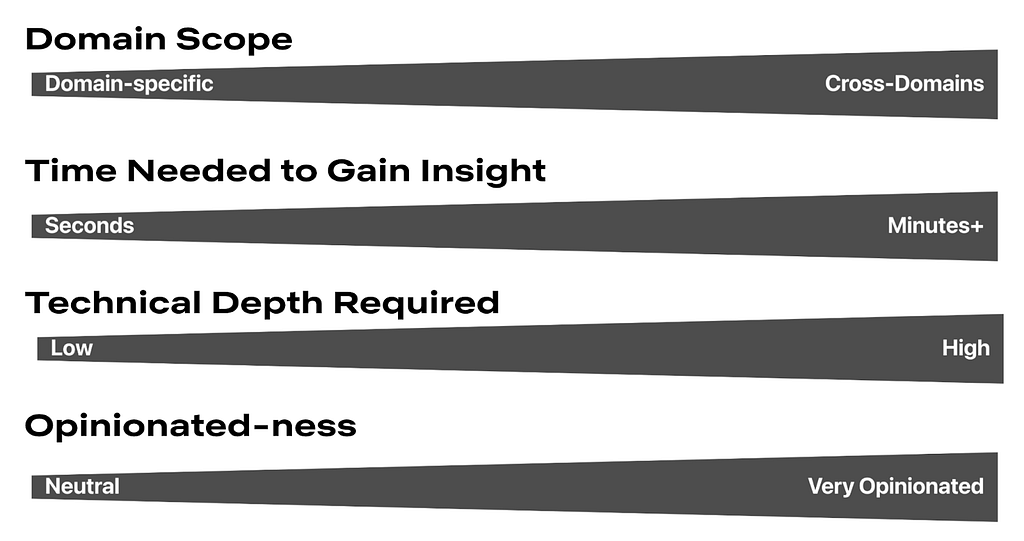
Here is a framework for thinking about what your users are trying to achieve. Where do your users fall on these axes? Don’t solve for multiple positions across these axes in a given view; if that exists, then create different views or potentially different dashboards.

Second, understanding your users’ mental models will allow you to choose how to structure your app to match. A few questions to ask yourself when considering the information architecture of your app include:

  • Do you have different user groups trying to accomplish different things? Split them into different apps or different views.
  • What should go together on a single page? All the information needed for a single user type to accomplish their “job.” If there are multiple jobs to be done, split each out onto its own page.
  • What should go together within a single section on a page? All the information needed to answer a single question.
  • Does your dashboard feel too difficult to use? You probably have too much information! When in doubt, keep it simple. If needed, hide complexity under an “Advanced” section.

Here are some general guidelines for page layouts:

  • Choose infinite scrolling vs. clicking through multiple pages depending on which option suits your users’ expectations better
  • Lead with the most-used information first, above the fold
  • Create signposts that cue the user to where they are by labeling pages, sections, and links
  • Use cards or borders to visually group related items together
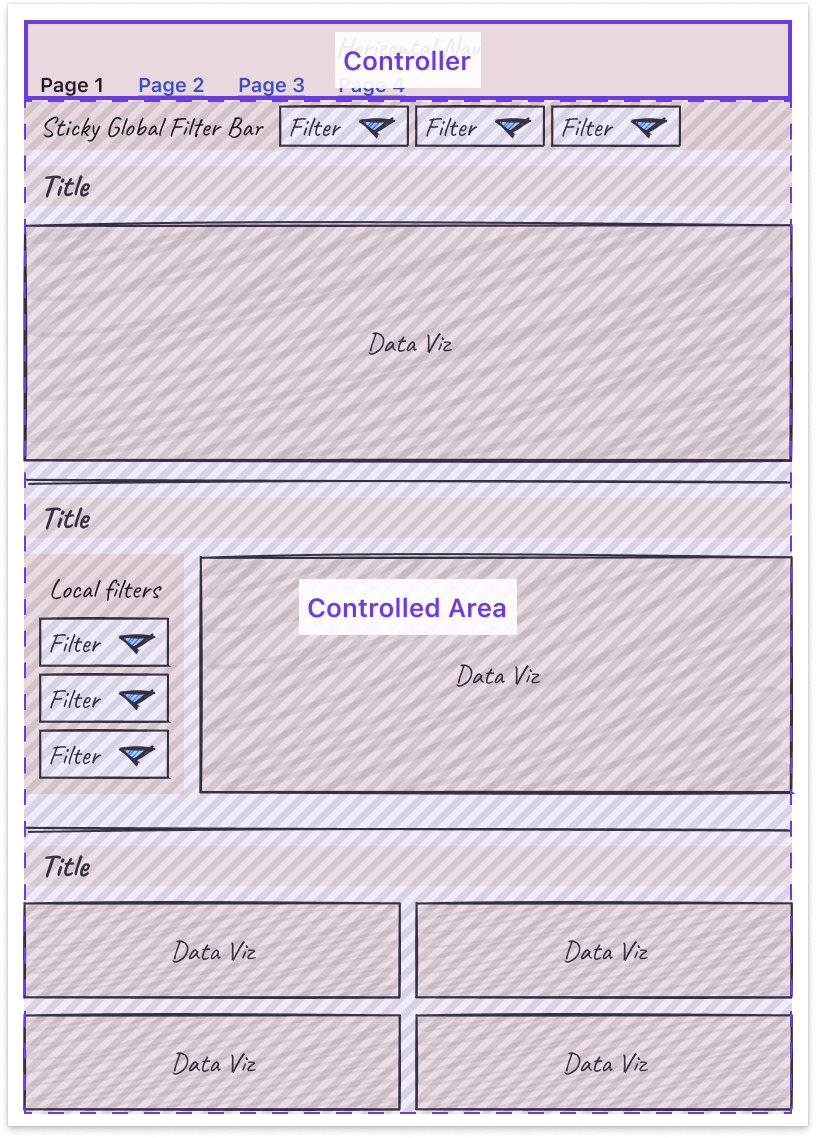
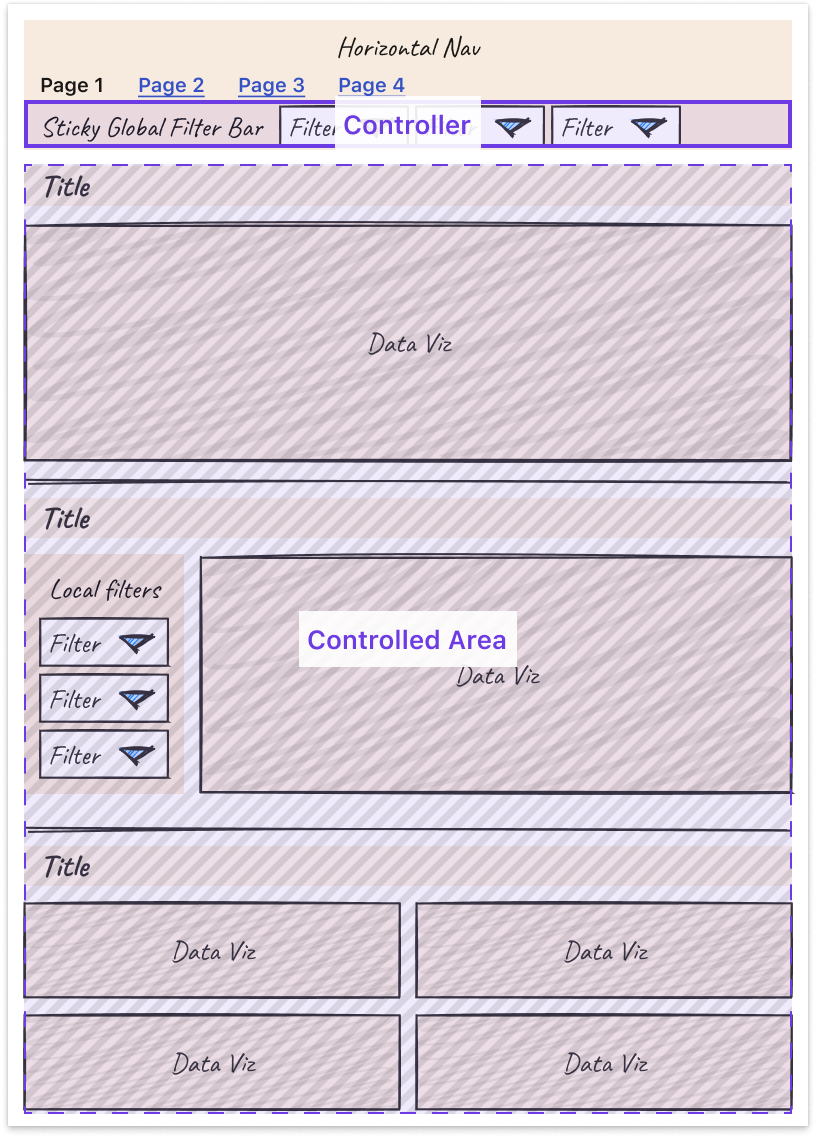
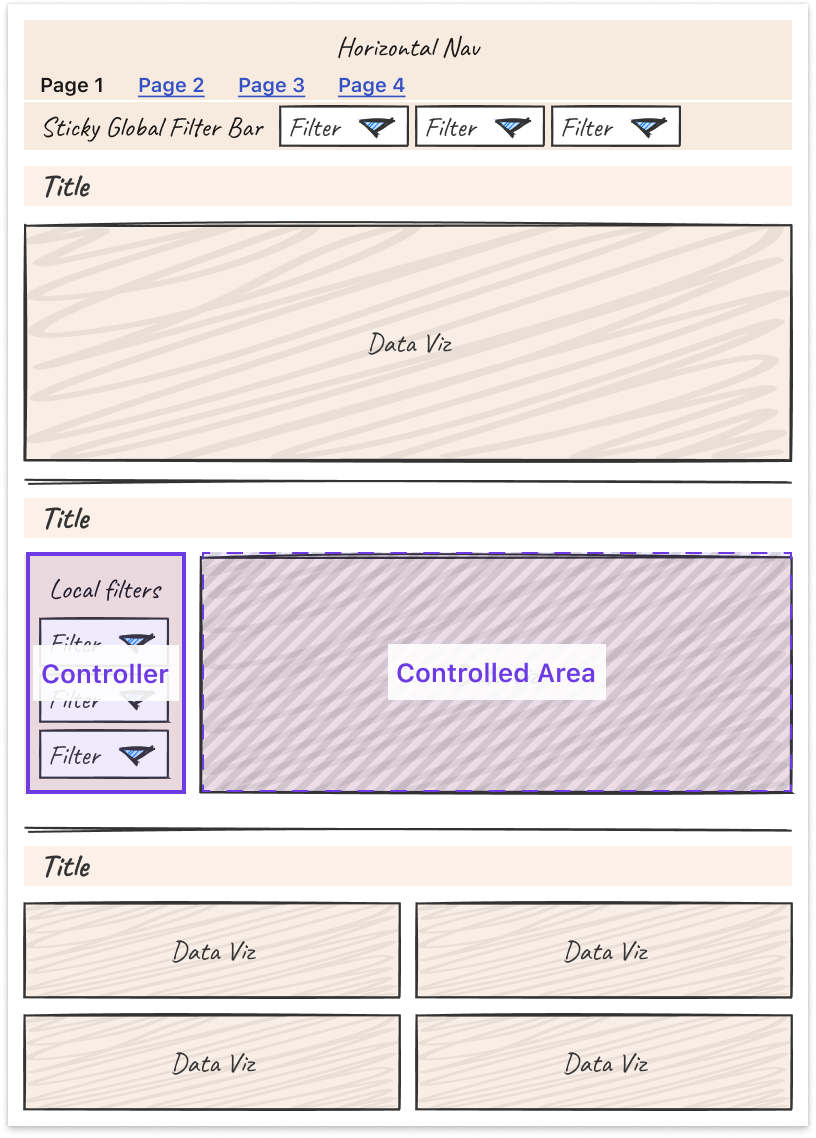
  • Leverage nesting to create well-understood “scopes of control.” Specifically, users expect a controller object to affect children either: Below it (if horizontal) or To the right of it (if vertical)

Third, some tips and tricks can help you more easily tackle the unique design challenges that come with making interactive charts.

  • Titles: Make sure filters are represented in the title or subtitle of the chart for easy scannability and screenshot-ability.
  • Tooltips: Core details should be on the page, while the context in the tooltip is for deeper information. Annotate multiple points when there are only a handful of lines.
  • Annotations: Provide annotations on charts to explain shifts in values so all users can access that context.
  • Color: Limit the number of colors you use. Be consistent in how you use colors. Otherwise, colors lose meaning.
  • Onboarding: Separate out onboarding to your dashboard from routine usage.

Finally, it is important to note that these are general guidelines, but there is always room for interpretation and/or the use of good judgment to adapt them to suit your own product and use cases. At the end of the day, the most important thing is that a user can leverage the data insights provided by your dashboard to perform their work, and good design is a means to that end.

Learnings from Deploying an Analytics API at Netflix

Devin Carullo

At Netflix Studio, we operate at the intersection of art and science. Data is a tool that enhances decision-making, complementing the deep expertise and industry knowledge of our creative professionals.

One example is in production budgeting — namely, determining how much we should spend to produce a given show or movie. Although there was already a process for creating and comparing budgets for new productions against similar past projects, it was highly manual. We developed a tool that automatically selects and compares similar Netflix productions, flagging any anomalies for Production Finance to review.

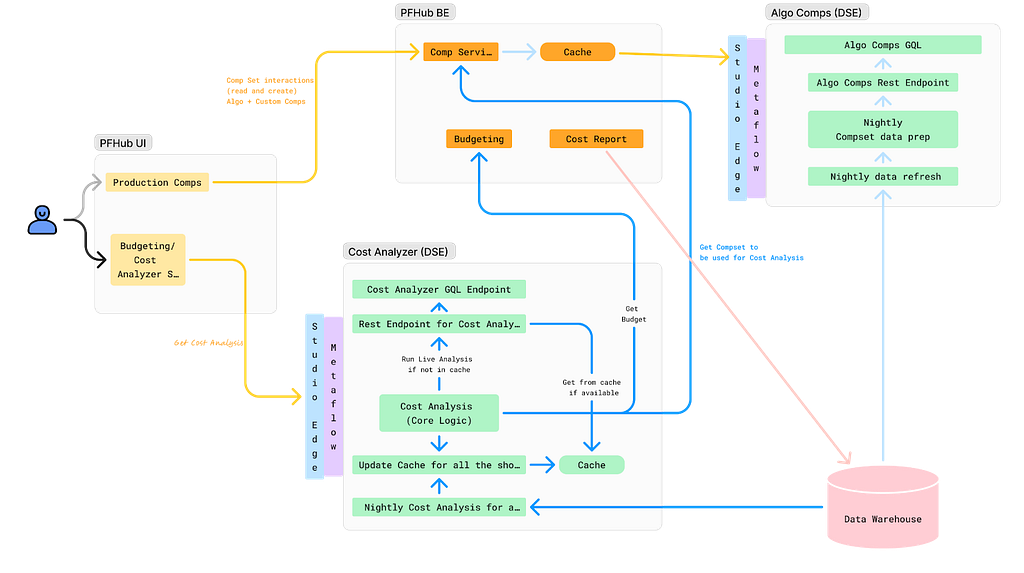
To ensure success, it was essential that results be delivered in real-time and integrated seamlessly into existing tools. This required close collaboration among product teams, DSE, and front-end and back-end developers. We developed a GraphQL endpoint using Metaflow, integrating it into the existing budgeting product. This solution enabled data to be used more effectively for real-time decision-making.

We recently launched our MVP and continue to iterate on the product. Reflecting on our journey, the path to launch was complex and filled with unexpected challenges. As an analytics engineer accustomed to crafting quick solutions, I underestimated the effort required to deploy a production-grade analytics API.

Fig 1. My vague idea of how my API would work
Fig 2: Our actual solution

With hindsight, below are my key learnings.

Measure Impact and Necessity of Real-Time Results

Before implementing real-time analytics, assess whether real-time results are truly necessary for your use case. This can significantly impact the complexity and cost of your solution. Batch processing data may provide a similar impact and take significantly less time. It’s easier to develop and maintain, and tends to be more familiar for analytics engineers, data scientists, and data engineers.

Additionally, if you are developing a proof of concept, the upfront investment may not be worth it. Scrappy solutions can often be the best choice for analytics work.

Explore All Available Solutions

At Netflix, there were multiple established methods for creating an API, but none perfectly suited our specific use case. Metaflow, a tool developed at Netflix for data science projects, already supported REST APIs. However, this approach did not align with the preferred workflow of our engineering partners. Although they could integrate with REST endpoints, this solution presented inherent limitations. Large response sizes rendered the API/front-end integration unreliable, necessitating the addition of filter parameters to reduce the response size.

Additionally, the product we were integrating into was using GraphQL, and deviating from this established engineering approach was not ideal. Lastly, given our goal to overlay results throughout the product, GraphQL features, such as federation, proved to be particularly advantageous.

After realizing there wasn’t an existing solution at Netflix for deploying python endpoints with GraphQL, we worked with the Metaflow team to build this feature. This allowed us to continue developing via Metaflow and allowed our engineering partners to stay on their paved path.

Align on Performance Expectations

A major challenge during development was managing API latency. Much of this could have been mitigated by aligning on performance expectations from the outset. Initially, we operated under our assumptions of what constituted an acceptable response time, which differed greatly from the actual needs of our users and our engineering partners.

Understanding user expectations is key to designing an effective solution. Our methodology resulted in a full budget analysis taking, on average, 7 seconds. Users were willing to wait for an analysis when they modified a budget, but not every time they accessed one. To address this, we implemented caching using Metaflow, reducing the API response time to approximately 1 second for cached results. Additionally, we set up a nightly batch job to pre-cache results.

While users were generally okay with waiting for analysis during changes, we had to be mindful of GraphQL’s 30-second limit. This highlighted the importance of continuously monitoring the impact of changes on response times, leading us to our next key learning: rigorous testing.

Real-Time Analysis Requires Rigorous Testing

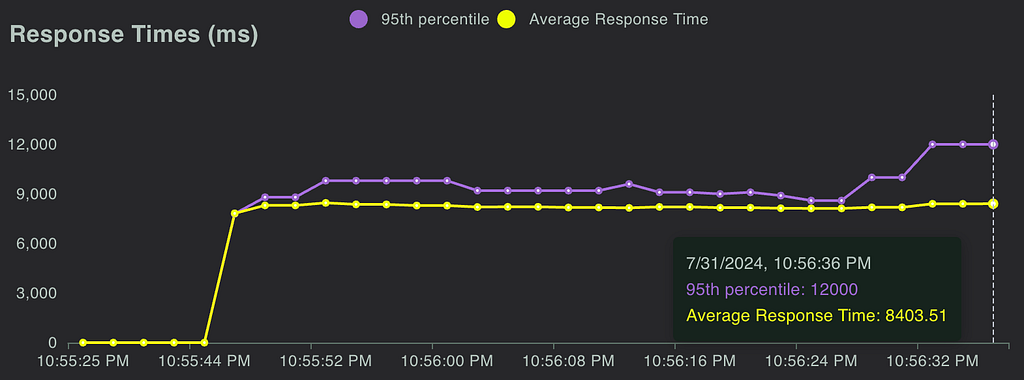
Load Testing: We leveraged Locust to measure the response time of our endpoint and assess how the endpoint responded to reasonable and elevated loads. We were able to use FullStory, which was already being used in the product, to estimate expected calls per minute.

Fig 3. Locust allows us to simulate concurrent calls and measure response time

Unit Tests & Integration Tests: Code testing is always a good idea, but it can often be overlooked in analytics. It is especially important when you are delivering live analysis to circumvent end users from being the first to see an error or incorrect information. We implemented unit testing and full integration tests, ensuring that our analysis would return correct results.

The Importance of Aligning Workflows and Collaboration

This project marked the first time our team collaborated directly with our engineering partners to integrate a DSE API into their product. Throughout the process, we discovered significant gaps in our understanding of each other’s workflows. Assumptions about each other’s knowledge and processes led to misunderstandings and delays.

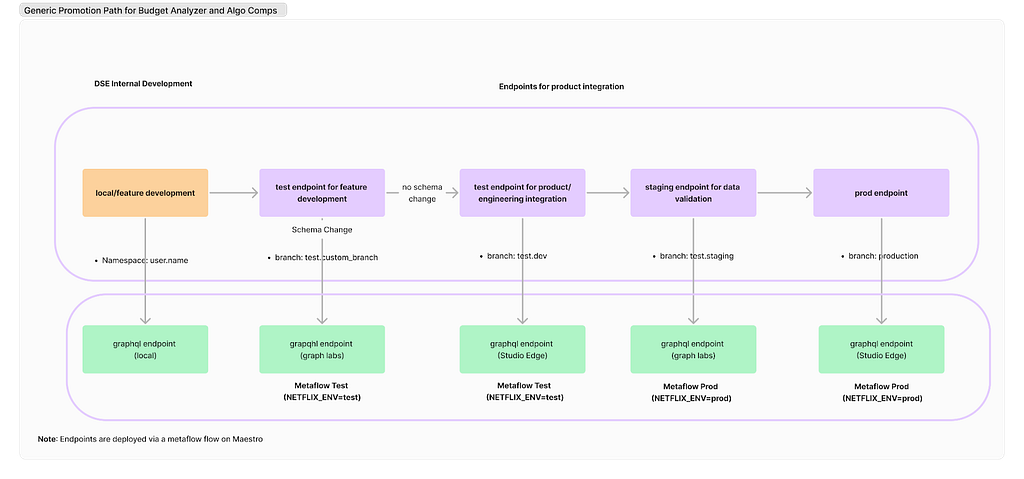
Deployment Paths: Our engineering partners followed a strict deployment path, whereas our approach on the DSE side was more flexible. We typically tested our work on feature branches using Metaflow projects and then pushed results to production. However, this lack of control led to issues, such as inadvertently deploying changes to production before the corresponding product updates were ready and difficulties in managing a test endpoint. Ultimately, we deferred to our engineering partners to establish a deployment path and collaborated with the Metaflow team and data engineers to implement it effectively.

Fig 4. Our current deployment path

Work Planning: While the engineering team operated on sprints, our DSE team planned by quarters. This misalignment in planning cycles is an ongoing challenge that we are actively working to resolve.

Looking ahead, our team is committed to continuing this partnership with our engineering colleagues. Both teams have invested significant time in building this relationship, and we are optimistic that it will yield substantial benefits in future projects.

External Speaker: Benn Stancil

In addition to the above presentations, we kicked off our Analytics Summit with a keynote talk from Benn Stancil, Founder of Mode Analytics. Benn stepped through a history of the modern data stack, and the group discussed ideas on the future of analytics.

Analytics Engineering is a key contributor to building our deep data culture at Netflix, and we are proud to have a large group of stunning colleagues that are not only applying but advancing our analytical capabilities at Netflix. The 2024 Analytics Summit continued to be a wonderful way to give visibility to one another on work across business verticals, celebrate our collective impact, and highlight what’s to come in analytics practice at Netflix.

To learn more, follow the Netflix Research Site, and if you are also interested in entertaining the world, have a look at our open roles!


Part 3: A Survey of Analytics Engineering Work at Netflix was originally published in Netflix TechBlog on Medium, where people are continuing the conversation by highlighting and responding to this story.

Ingest data from Google Analytics 4 and Google Sheets to Amazon Redshift using Amazon AppFlow

Post Syndicated from Ritesh Sinha original https://aws.amazon.com/blogs/big-data/ingest-data-from-google-analytics-4-and-google-sheets-to-amazon-redshift-using-amazon-appflow/

Google Analytics 4 (GA4) provides valuable insights into user behavior across websites and apps. But what if you need to combine GA4 data with other sources or perform deeper analysis? That’s where Amazon Redshift and Amazon AppFlow come in. Amazon AppFlow bridges the gap between Google applications and Amazon Redshift, empowering organizations to unlock deeper insights and drive data-informed decisions. In this post, we show you how to establish the data ingestion pipeline between Google Analytics 4, Google Sheets, and an Amazon Redshift Serverless workgroup.

Amazon AppFlow is a fully managed integration service that you can use to securely transfer data from software as a service (SaaS) applications, such as Google BigQuery, Salesforce, SAP, HubSpot, and ServiceNow, to Amazon Web Services (AWS) services such as Amazon Simple Storage Service (Amazon S3) and Amazon Redshift, in just a few clicks. With Amazon AppFlow, you can run data flows at nearly any scale and at the frequency you choose—on a schedule, in response to a business event, or on demand. You can configure data transformation capabilities such as filtering and validation to generate rich, ready-to-use data as part of the flow itself, without additional steps. Amazon AppFlow automatically encrypts data in motion, and allows you to restrict data from flowing over the public internet for SaaS applications that are integrated with AWS PrivateLink, reducing exposure to security threats.

Amazon Redshift is a fast, scalable, and fully managed cloud data warehouse that allows you to process and run your complex SQL analytics workloads on structured and semi-structured data. It also helps you securely access your data in operational databases, data lakes, or third-party datasets with minimal movement or copying of data. Tens of thousands of customers use Amazon Redshift to process large amounts of data, modernize their data analytics workloads, and provide insights for their business users.

Prerequisites

Before starting this walkthrough, you need to have the following prerequisites in place:

  • An AWS account.
  • In your Google Cloud project, you’ve enabled the following APIs:
    • Google Analytics API
    • Google Analytics Admin API
    • Google Analytics Data API
    • Google Sheets API
    • Google Drive API

For more information, refer to Amazon AppFlow support for Google Sheets.

For the steps to enable these APIs, see Enable and disable APIs on the API Console Help for Google Cloud Platform.

Architecture overview

The following architecture shows how Amazon AppFlow can transform and move data from SaaS applications to processing and storage destinations. Three sections appear from left to right in the diagram: Source, Move, Target. These sections are described in the following section.

  • Source – The leftmost section on the diagram represents different applications acting as a source, including Google Analytics, Google Sheets, and Google BigQuery.
  • Move – The middle section is labeled Amazon AppFlow. The section contains boxes that represent Amazon AppFlow operations such as Mask Fields, Map Fields, Merge Fields, Filter Data, and others. In this post, we focus on setting up the data movement using Amazon AppFlow and filtering data based on start date. The other transformation operations such as mapping, masking, and merging fields are not covered in this post.
  • Destination – The section on the right of the diagram is labeled Destination and represents targets such as Amazon Redshift and Amazon S3. In this psot, we primarily focus on Amazon Redshift as the destination.

This post has two parts. The first part covers integrating from Google Analytics. The second part focuses on connecting with Google Sheets.

Application configuration in Google Cloud Platform

Amazon AppFlow requires OAuth 2.0 for authentication. You need to create an OAuth 2.0 client ID, which Amazon AppFlow uses when requesting an OAuth 2.0 access token. To create an OAuth 2.0 client ID in the Google Cloud Platform console, follow these steps:

  1. On the Google Cloud Platform Console, from the projects list, select a project or create a new one.
  2. If the APIs & Services page isn’t already open, choose the menu icon on the upper left and select APIs & Services.
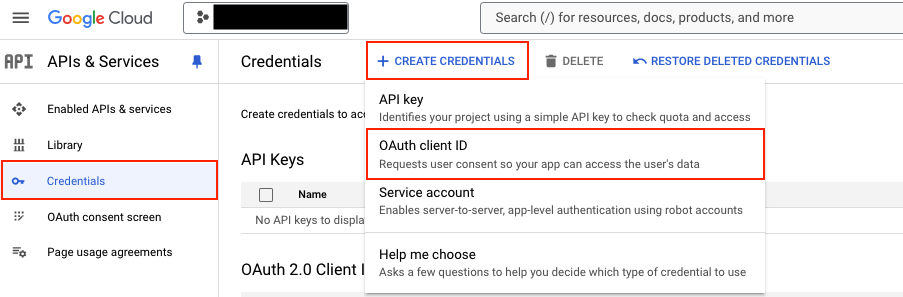
  3. In the navigation pane, choose Credentials.
  4. Choose CREATE CREDENTIALS, then choose OAuth client ID, as shown in the following screenshot.

  1. Select the application type Web application, enter the name demo-google-aws, and provide URIs for Authorized JavaScript origins https://console.aws.amazon.com. For Authorized redirect URIs, add https://us-east-1.console.aws.amazon.com/appflow/oauth. Choose SAVE, as shown in the following screenshot.

  1. The OAuth client ID is now created. Select demo-google-aws.

  1. Under Additional information, as shown in the following screenshot, note down the Client ID and Client secret.

Data ingestion from Google Analytics 4 to Amazon Redshift

In this section, you configure Amazon AppFlow to set up a connection between Google Analytics 4 and Amazon Redshift for data migration. This procedure can be classified into the following steps:

  1. Create a connection to Google Analytics 4 in Amazon AppFlow
  2. Create an IAM role for Amazon AppFlow integration with Amazon Redshift
  3. Set up Amazon AppFlow connection for Amazon Redshift
  4. Set up table and permission in Amazon Redshift
  5. Create data flow in Amazon AppFlow

Create a connection to Google Analytics 4 in Amazon AppFlow

To create a connection to Google Analytics 4 in Amazon AppFlow, follow these steps:

  1. Sign in to the AWS Management Console and open Amazon AppFlow.
  2. In the navigation pane on the left, choose Connections.
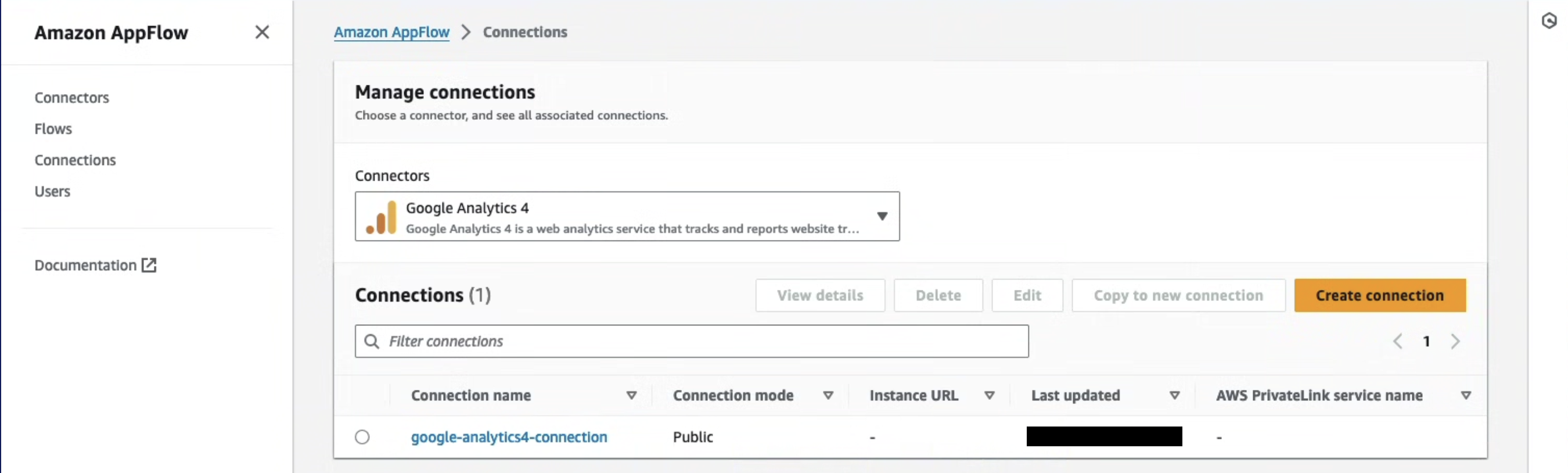
  3. On the Manage connections page, for Connectors, choose Google Analytics 4.
  4. Choose Create connection.
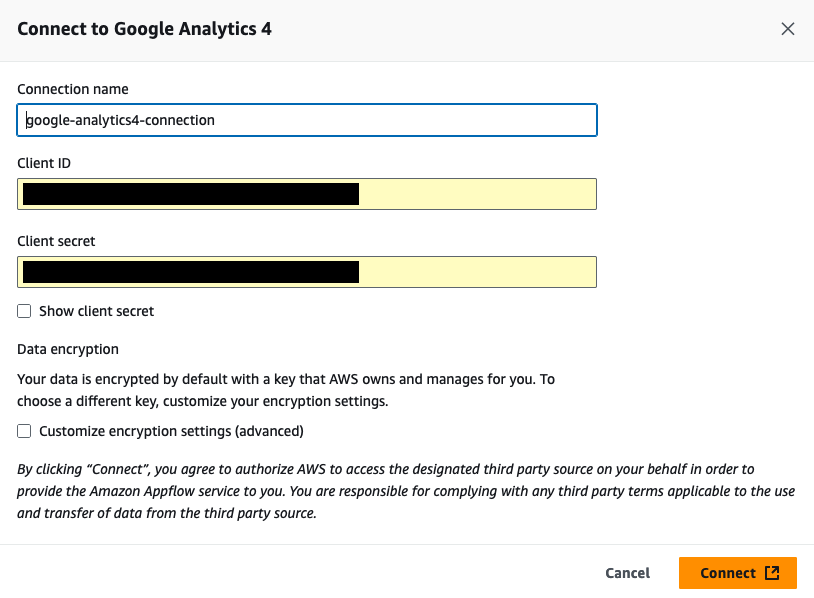
  5. In the Connect to Google Analytics 4 window, enter the following information. For Client ID, enter the client ID of the OAuth 2.0 client ID in your Google Cloud project created in the previous section. For Client secret, enter the client secret of the OAuth 2.0 client ID in your Google Cloud project created in the previous section.
  6. (Optional) under Data encryption, choose Customize encryption settings (advanced) if you want to encrypt your data with a customer managed key in AWS Key Management Service (AWS KMS). By default, Amazon AppFlow encrypts your data with an AWS KMS key that AWS creates, uses, and manages for you. Choose this option if you want to encrypt your data with your own AWS KMS key instead.

The following screenshot shows the Connect to Google Analytics 4 window.

Amazon AppFlow encrypts your data during transit and at rest. For more information, see Data protection in Amazon AppFlow.

If you want to use an AWS KMS key from the current AWS account, select this key under Choose an AWS KMS key. If you want to use an AWS KMS key from a different AWS account, enter the Amazon Resource Name (ARN) for that key:

  1. For Connection name, enter a name for your connection
  2. Choose Continue
  3. In the window that appears, sign in to your Google account and grant access to Amazon AppFlow

On the Manage connections page, your new connection appears in the Connections table. When you create a flow that uses Google Analytics 4 as the data source, you can select this connection.

Create an IAM role for Amazon AppFlow integration with Amazon Redshift

You can use Amazon AppFlow to transfer data from supported sources into your Amazon Redshift databases. You need an IAM role because Amazon AppFlow needs authorization to access Amazon Redshift using an Amazon Redshift Data API.

  1. Sign in to the AWS Management Console, preferably as admin user, and in the navigation pane of the IAM dashboard, choose Policies.
  2. Choose Create policy.
  3. Select the JSON tab and paste in the following policy. Amazon AppFlow needs the following permissions to gain access and run SQL statements with the Amazon Redshift database.
{
  "Version": "2012-10-17",
  "Statement": [
    {
      "Sid": "DataAPIPermissions",
      "Effect": "Allow",
      "Action": [
        "redshift-data:ExecuteStatement",
        "redshift-data:GetStatementResult",
        "redshift-data:DescribeStatement"
      ],
      "Resource": "*"
    },
    {
      "Sid": "GetCredentialsForAPIUser",
      "Effect": "Allow",
      "Action": "redshift:GetClusterCredentials",
      "Resource": [
        "arn:aws:redshift:*:*:dbname:*/*",
        "arn:aws:redshift:*:*:dbuser:*/*"
      ]
    },
    {
      "Sid": "GetCredentialsForServerless",
      "Effect": "Allow",
      "Action": "redshift-serverless:GetCredentials",
      "Resource": "*"
    },
    {
      "Sid": "DenyCreateAPIUser",
      "Effect": "Deny",
      "Action": "redshift:CreateClusterUser",
      "Resource": [
        "arn:aws:redshift:*:*:dbuser:*/*"
      ]
    },
    {
      "Sid": "ServiceLinkedRole",
      "Effect": "Allow",
      "Action": "iam:CreateServiceLinkedRole",
      "Resource": "arn:aws:iam::*:role/aws-service-role/redshift-data.amazonaws.com/AWSServiceRoleForRedshift",
      "Condition": {
        "StringLike": {
          "iam:AWSServiceName": "redshift-data.amazonaws.com"
        }
      }
    }
  ]
}
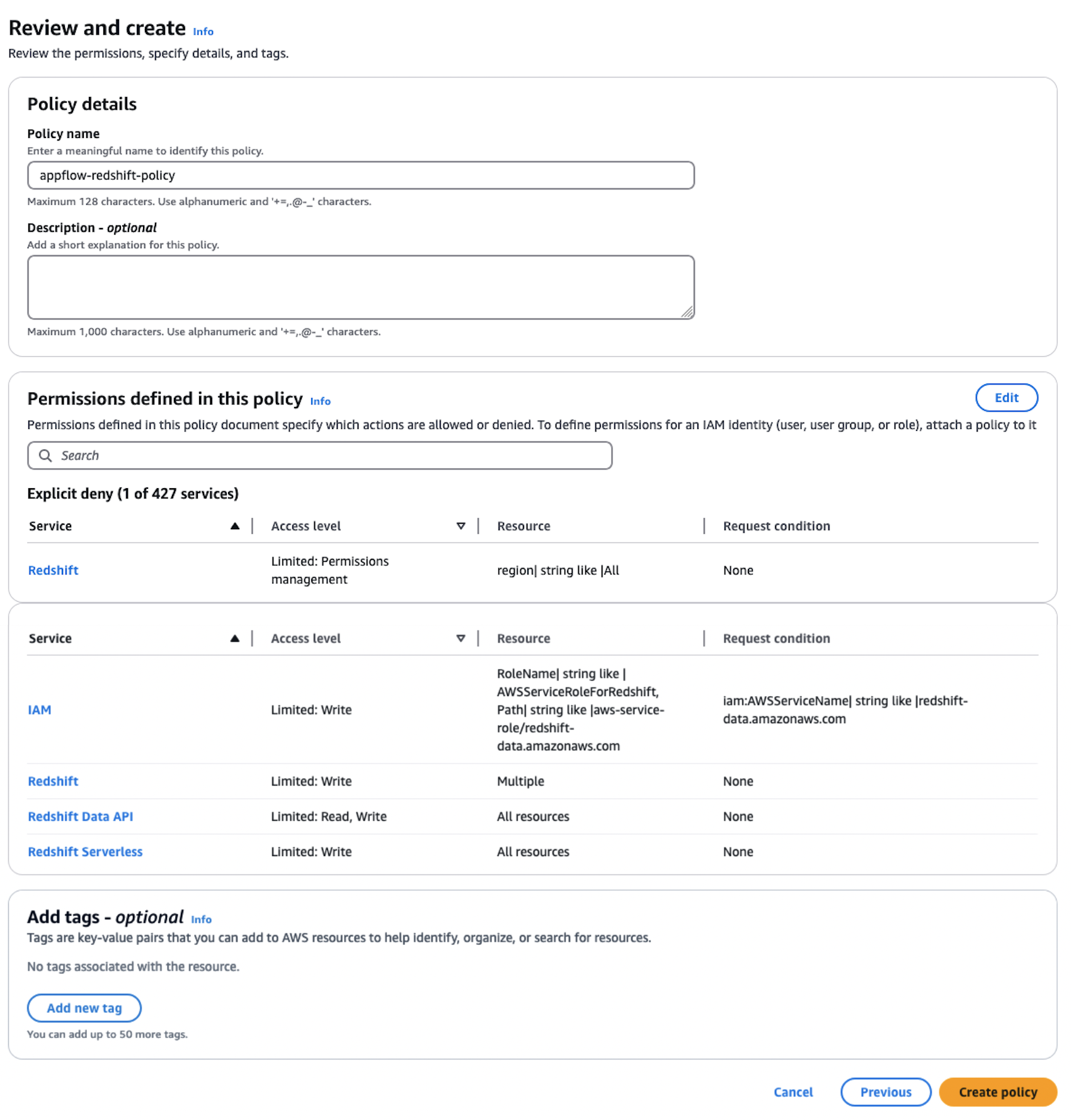
  1. Choose Next, provide the Policy name as appflow-redshift-policy, Description as appflow redshift policy, and choose Create policy.

  1. In the navigation pane, choose Roles and Create role. Choose Custom trust policy and paste in the following. Choose Next. This trust policy grants Amazon AppFlow the ability to assume the role for Amazon AppFlow to access and process data.
{
  "Version": "2012-10-17",
  "Statement": [
    {
      "Effect": "Allow",
      "Principal": {
        "Service": "appflow.amazonaws.com"
      },
      "Action": "sts:AssumeRole"
    }
  ]
}
  1. Search for policy appflow-redshift-policy, check the box next to it, and choose Next.

  1. Provide the role name appflow-redshift-access-role and Description and choose Create role.

Set up Amazon AppFlow connection for Amazon Redshift

To set up an Amazon AppFlow connection for Amazon Redshift, follow these steps:

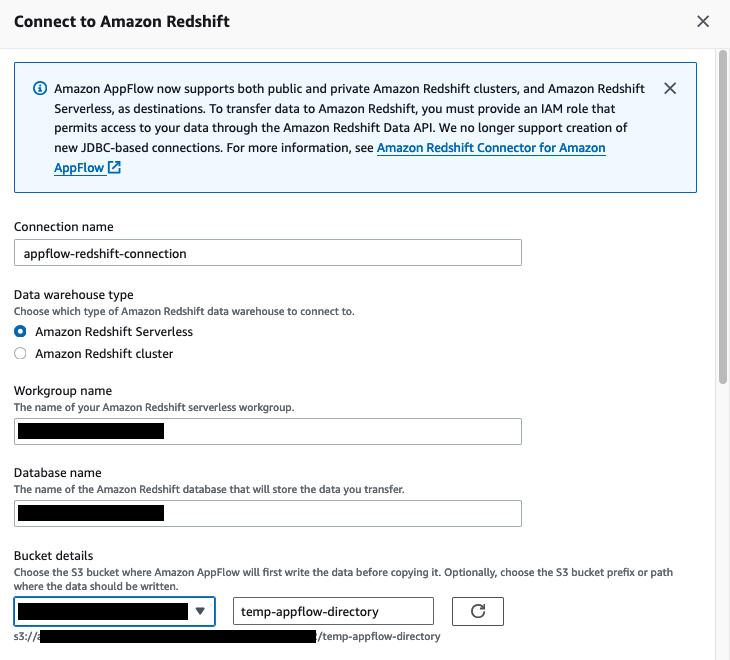
  1. On the Amazon AppFlow console, in the navigation pane, choose Connectors, select Amazon Redshift, and choose Create connection.

  1. Enter the connection name appflow-redshift-connection. You can either use Amazon Redshift provisioned or Amazon Redshift Serverless, but in this example we are using Amazon Redshift Serverless. Select Amazon Redshift Serverless and enter the workgroup name and database name.
  2. Choose the S3 bucket and enter the bucket prefix.

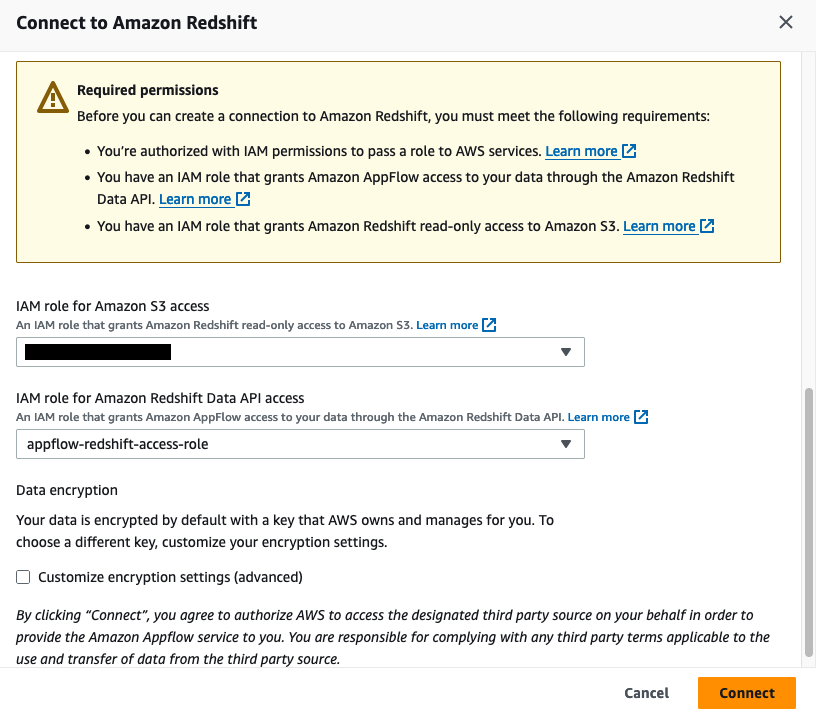
  1. For Amazon S3 access, select the IAM role attached to the Redshift cluster or namespace during the creation of the Redshift cluster. Additionally, for the Amazon Redshift Data API, choose the IAM role appflow-redshift-access-role created in the previous section and then choose

Set up a table and permission in Amazon Redshift

To set up table and permission in Amazon Redshift, follow these steps:

  1. On the Amazon Redshift console, choose Query editor v2 in Explorer.
  2. Connect to your existing Redshift cluster or Amazon Redshift Serverless workgroup.
  3. Create a table with the following Data Definition Language (DDL).
create table public.stg_ga4_daily_summary

(

event_date date,

region varchar(255),

country varchar(255),

city varchar(255),

deviceCategory varchar(255),

deviceModel varchar(255),

browser varchar(255),

active_users INTEGER,

new_users integer,

total_revenue  NUMERIC(18,2)

);

The following screenshot shows the successful creation of this table in Amazon Redshift:

The following step is only applicable to Amazon Redshift Serverless. If you are using a Redshift provisioned cluster, you can skip this step.

  1. Grant the permissions on the table to the IAM user used by Amazon AppFlow to load data into Amazon Redshift Serverless, for example, appflow-redshift-access-role.
GRANT INSERT ON TABLE public.stg_ga4_daily_summary TO "IAMR:appflow-redshift-access-role";

Create data flow in Amazon AppFlow

To create a data flow in Amazon AppFlow, follow these steps:

  1. On the Amazon AppFlow console, choose Flows and select Amazon Redshift. Choose Create flow and enter the flow name and the flow description, as shown in the following screenshot.

  1. In Source name, choose Google Analytics 4. Choose the Google Analytics 4 connection.
  2. Select the Google Analytics 4 object, then choose Amazon Redshift as the destination, selecting the public schema and stg_ga4_daily_summary table in your Redshift instance.

  1. For Flow trigger, choose Run on demand and choose Next, as shown in the following screenshot.

You can run the flow on schedule to pull either full or incremental data refresh. For more information, see Schedule-triggered flows.

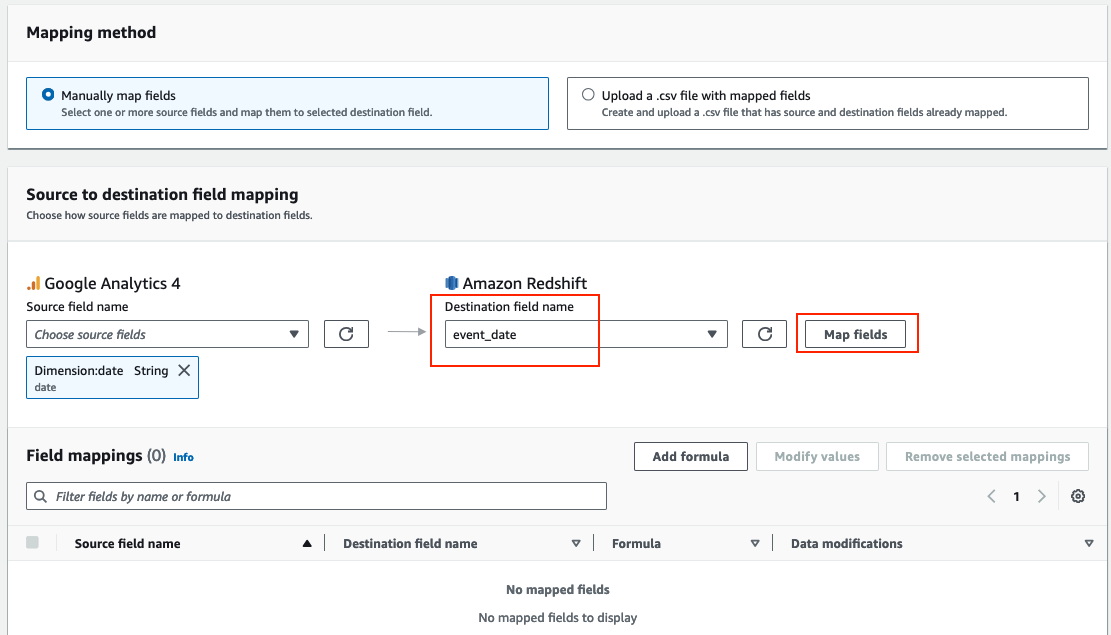
  1. Select Manually map fields. From the Source field name dropdown menu, select the attribute date, and from the Destination field name, select event_date and choose Map fields, as shown in the following screenshot.

  1. Repeat the previous step (step 5) for the following attributes and then choose Next. The following screenshot shows the mapping.
Dimension:browser --> browser
Dimension:region --> region
Dimension:country --> country
Dimension:city --> city
Dimension:deviceCategory --> devicecategory
Dimension:deviceModel --> devicemodel
Metric:activeUsers --> active_users
Metric:newUsers --> new_users
Metric: totalRevenue --> total_revenue
Dimension:date --> event_date

The Google Analytics API provides various dimensions and metrics for reporting purposes. Refer to API Dimensions & Metrics for details.

  1. In Field name, enter the filter start_end_date and choose Next, as shown in the following screenshot. The Amazon AppFlow date filter supports both a start date (criteria1) and an end date (criteria2) to define the desired date range for data transfer. We are using the date range because we have sample data created for this range.

  1. Review the configurations and choose Create flow.
  2. Choose Run flow, as shown in the following screenshot, and wait for the flow execution to be completed.

  1. On the Amazon Redshift console, choose Query editor v2 in Explorer.
  2. Connect to your existing Redshift cluster or Amazon Redshift Serverless workgroup.
  3. Enter the following SQL to verify the data in Amazon Redshift.
select * from public.stg_ga4_daily_summary

The screenshot below shows the results loaded into the stg_ga4_daily_summary table.

Data ingestion from Google Sheets to Amazon Redshift

Ingesting data from Google Sheets to Amazon Redshift using Amazon AppFlow streamlines analytics, enabling seamless transfer and deeper insights. In this section, we demonstrate how business users can maintain their business glossary in Google Sheets and integrate that using Amazon AppFlow with Amazon Redshift and get meaningful insights.

For this demo, you can upload the Nation Market segment file to your Google sheet before proceeding to the next steps. These steps show how to configure Amazon AppFlow to set up a connection between Google Sheets and Amazon Redshift for data migration. This procedure can be classified into the following steps:

  1. Create Google Sheets connection in Amazon AppFlow
  2. Set up table and permission in Amazon Redshift
  3. Create data flow in Amazon AppFlow

Create Google Sheets connection in Amazon AppFlow

To create a Google Sheets connection in Amazon AppFlow, follow these steps:

  1. On the Amazon AppFlow console, choose Connectors, select Google Sheets, then choose Create connection.
  2. In the Connect to Google Sheets window, enter the following information. For Client ID, enter the client ID of the OAuth 2.0 client ID in your Google Sheets project. For Client secret, enter the client secret of the OAuth 2.0 client ID in your Google Sheets project.
  3. For Connection name, enter a name for your connection.
  4. (Optional) Under Data encryption, choose Customize encryption settings (advanced) if you want to encrypt your data with a customer managed key in AWS KMS. By default, Amazon AppFlow encrypts your data with an AWS KMS key that AWS creates, uses, and manages for you. Choose this option if you want to encrypt your data with your own AWS KMS key instead.
  5. Choose Connect.
  6. In the window that appears, sign in to your Google account and grant access to Amazon AppFlow.

Set up table and permission in Amazon Redshift

To set up a table and permission in Amazon Redshift, follow these steps:

  1. On the Amazon Redshift console, choose Query editor v2 in Explorer
  2. Connect to your existing Redshift cluster or Amazon Redshift Serverless workgroup
  3. Create a table with the following DDL
create table public.stg_nation_market_segment(
n_nationkey int4 not null,
n_name char(25) not null ,
n_regionkey int4 not null,
n_comment varchar(152) not null,
n_marketsegment varchar(255),
Primary Key(N_NATIONKEY)
) distkey(n_nationkey) sortkey(n_nationkey);

he following steps are only applicable to Amazon Redshift Serverless. If you are using a Redshift provisioned cluster, you can skip this step.

  1. Grant the permissions on the table to the IAM user used by Amazon AppFlow to load data into Amazon Redshift Serverless, for example, appflow-redshift-access-role
GRANT INSERT ON TABLE public.stg_nation_market_segment TO "IAMR:appflow-redshift-access-role";

Create data flow in Amazon AppFlow

  1. On the Amazon AppFlow console, choose Flows and select Google Sheets. Choose Create flow, enter the flow name and flow description, and choose Next.
  2. Select Google Sheets in Source name and choose the Google Sheets connection.
  3. Select the Google Sheets object nation_market_segment#Sheet1.
  4. Choose the Destination name as Amazon Redshift, then select stg_nation_market_segment as your Amazon Redshift object, as shown in the following screenshot.

  1. For Flow trigger, select On demand and choose Next.

You can run the flow on schedule to pull full or incremental data refresh. Read more at Schedule-triggered flows.

  1. Select Manually map fields. From the Source field name dropdown menu, select Map all fields directly. When a dialog box pops up, choose the respective attribute values and choose Map fields, as shown in the following screenshot. Choose Next.

The following screenshot shows the mapping.

  1. On the Add Filters page, choose Next.
  2. On the Review and create page, choose Create flow.
  3. Choose Run flow and wait for the flow execution to finish.

The screenshot below shows the execution details of the flow job.

  1. On the Amazon Redshift console, choose Query editor v2 in Explorer.
  2. Connect to your existing Redshift cluster or Amazon Redshift Serverless workgroup.
  3. Run the following SQL to verify the data in Amazon Redshift.
select * from public.stg_nation_market_segment

The screenshot below shows the results loaded into the stg_nation_market_segment table.

  1. Run the following SQL to prepare a sample dataset in Amazon Redshift.
create table public.customer (
c_custkey int8 not null ,
c_name varchar(25) not null,
c_address varchar(40) not null,
c_nationkey int4 not null,
c_phone char(15) not null,
c_acctbal numeric(12,2) not null,
c_mktsegment char(10) not null,
c_comment varchar(117) not null,
Primary Key(C_CUSTKEY)
) distkey(c_custkey) sortkey(c_custkey);

create table public.lineitem (
l_orderkey int8 not null ,
l_partkey int8 not null,
l_suppkey int4 not null,
l_linenumber int4 not null,
l_quantity numeric(12,2) not null,
l_extendedprice numeric(12,2) not null,
l_discount numeric(12,2) not null,
l_tax numeric(12,2) not null,
l_returnflag char(1) not null,
l_linestatus char(1) not null,
l_shipdate date not null ,
l_commitdate date not null,
l_receiptdate date not null,
l_shipinstruct char(25) not null,
l_shipmode char(10) not null,
l_comment varchar(44) not null,
Primary Key(L_ORDERKEY, L_LINENUMBER)
) distkey(l_orderkey) sortkey(l_shipdate,l_orderkey)  ;

create table public.orders (
o_orderkey int8 not null,
o_custkey int8 not null,
o_orderstatus char(1) not null,
o_totalprice numeric(12,2) not null,
o_orderdate date not null,
o_orderpriority char(15) not null,
o_clerk char(15) not null,
o_shippriority int4 not null,
o_comment varchar(79) not null,
Primary Key(O_ORDERKEY)
) distkey(o_orderkey) sortkey(o_orderdate, o_orderkey) ;
copy lineitem from 's3://redshift-downloads/TPC-H/2.18/10GB/lineitem.tbl' iam_role default delimiter '|' region 'us-east-1';
copy orders from 's3://redshift-downloads/TPC-H/2.18/10GB/orders.tbl' iam_role default delimiter '|' region 'us-east-1';
copy customer from 's3://redshift-downloads/TPC-H/2.18/10GB/customer.tbl' iam_role default delimiter '|' region 'us-east-1';
  1. Run the following SQL to do the data analytics using Google Sheets business data classification in the Amazon Redshift dataset.
select
n_marketsegment,
sum(l_extendedprice * (1 - l_discount)) as revenue
from
public.customer,
public.orders,
public.lineitem,
public.stg_nation_market_segment
where
c_custkey = o_custkey
and l_orderkey = o_orderkey
and c_nationkey = n_nationkey
group by
1
order by
revenue desc;

The screenshot below shows the results from the aggregated query in Amazon Redshift from data loaded using Amazon Appflow.

Clean up

To avoid incurring charges, clean up the resources in your AWS account by completing the following steps:

  1. On the Amazon AppFlow console, in the navigation pane, choose Flows.
  2. From the list of flows, select the flow name created and delete it.
  3. Enter “delete” to delete the flow.
  4. Delete the Amazon Redshift workgroup.
  5. Clean up resources in your Google account by deleting the project that contains the Google BigQuery resources. Follow the documentation to clean up the Google resources.

Conclusion

In this post, we walked you through the process of using Amazon AppFlow to integrate data from Google Ads and Google Sheets. We demonstrated how the complexities of data integration are minimized so you can focus on deriving actionable insights from your data. Whether you’re archiving historical data, performing complex analytics, or preparing data for machine learning, this connector streamlines the process, making it accessible to a broader range of data professionals.

For more information, refer to Amazon AppFlow support for Google Sheets and Google Ads.


About the authors

Ritesh Kumar Sinha is an Analytics Specialist Solutions Architect based out of San Francisco. He has helped customers build scalable data warehousing and big data solutions for over 16 years. He loves to design and build efficient end-to-end solutions on AWS. In his spare time, he loves reading, walking, and doing yoga.

Tahir Aziz is an Analytics Solution Architect at AWS. He has worked with building data warehouses and big data solutions for over 13 years. He loves to help customers design end-to-end analytics solutions on AWS. Outside of work, he enjoys traveling and cooking.

Raza Hafeez is a Senior Product Manager at Amazon Redshift. He has over 13 years of professional experience building and optimizing enterprise data warehouses and is passionate about enabling customers to realize the power of their data. He specializes in migrating enterprise data warehouses to AWS Modern Data Architecture.

Amit Ghodke is an Analytics Specialist Solutions Architect based out of Austin. He has worked with databases, data warehouses and analytical applications for the past 16 years. He loves to help customers implement analytical solutions at scale to derive maximum business value.

The collective thoughts of the interwebz