Post Syndicated from The History Guy: History Deserves to Be Remembered original https://www.youtube.com/watch?v=1uqokF0rl-M
Part 2: A Survey of Analytics Engineering Work at Netflix
Post Syndicated from Netflix Technology Blog original https://netflixtechblog.com/part-2-a-survey-of-analytics-engineering-work-at-netflix-4f1f53b4ab0f
This article is the second in a multi-part series sharing a breadth of Analytics Engineering work at Netflix, recently presented as part of our annual internal Analytics Engineering conference. Need to catch up? Check out Part 1. In this article, we highlight a few exciting analytic business applications, and in our final article we’ll go into aspects of the technical craft.
Game Analytics
Yimeng Tang, Claire Willeck, Sagar Palao
User Acquisition Incrementality for Netflix Games
Netflix has been launching games for the past three years, during which it has initiated various marketing efforts, including User Acquisition (UA) campaigns, to promote these games across different countries. These UA campaigns typically feature static creatives, launch trailers, and game review videos on platforms like Google, Meta, and TikTok. The primary goals of these campaigns are to encourage more people to install and play the games, making incremental installs and engagement crucial metrics for evaluating their effectiveness.
Most UA campaigns are conducted at the country level, meaning that everyone in the targeted countries can see the ads. However, due to the absence of a control group in these countries, we adopt a synthetic control framework (blog post) to estimate the counterfactual scenario. This involves creating a weighted combination of countries not exposed to the UA campaign to serve as a counterfactual for the treated countries. To facilitate easier access to incrementality results, we have developed an interactive tool powered by this framework. This tool allows users to directly obtain the lift in game installs and engagement, view plots for both the treated country and the synthetic control unit, and assess the p-value from placebo tests.
To better guide the design and budgeting of future campaigns, we are developing an Incremental Return on Investment model. This model incorporates factors such as the incremental impact, the value of the incremental engagement and incremental signups, and the cost of running the campaign. In addition to using the causal inference framework mentioned earlier to estimate incrementality, we also leverage other frameworks, such as Incremental Account Lifetime Valuation (blog post), to assign value to the incremental engagement and signups resulting from the campaigns.
Measuring and Validating Incremental Signups for Netflix Games
Netflix is a subscription service meaning members buy subscriptions which include games but not the individual games themselves. This makes it difficult to measure the impact of different game launches on acquisition. We only observe signups, not why members signed up.
This means we need to estimate incremental signups. We adopt an approach developed at Netflix to estimate incremental acquisition (technical paper). This approach uses simple assumptions to estimate a counterfactual for the rate that new members start playing the game.
Because games differ from series/films, it’s crucial to validate this estimation method for games. Ideally, we would have causal estimates from an A/B test to use for validation, but since that is not available, we use another causal inference design as one of our ensemble of validation approaches. This causal inference design involves a systematic framework we designed to measure game events that relies on synthetic control (blog post).
As we mentioned above, we have been launching User Acquisition (UA) campaigns in select countries to boost game engagement and new memberships. We can use this cross-country variation to form a synthetic control and measure the incremental signups due to the UA campaign. The incremental signups from UA campaigns differ from those attributed to a game, but they should be similar. When our estimated incremental acquisition numbers over a campaign period are similar to the incremental acquisition numbers calculated using synthetic control, we feel more confident in our approach to measuring incremental signups for games.
Netflix Games Players’ Adventure: Modeled using State Machine
At Netflix Games, we aim to have a high number of members engaging with games each month, referred to as Monthly Active Accounts (MAA). To evaluate our progress toward this objective and to find areas to boost our MAA, we modeled the Netflix players’ journey as a state machine.
We track a daily state machine showing the probability of account transitions between states.
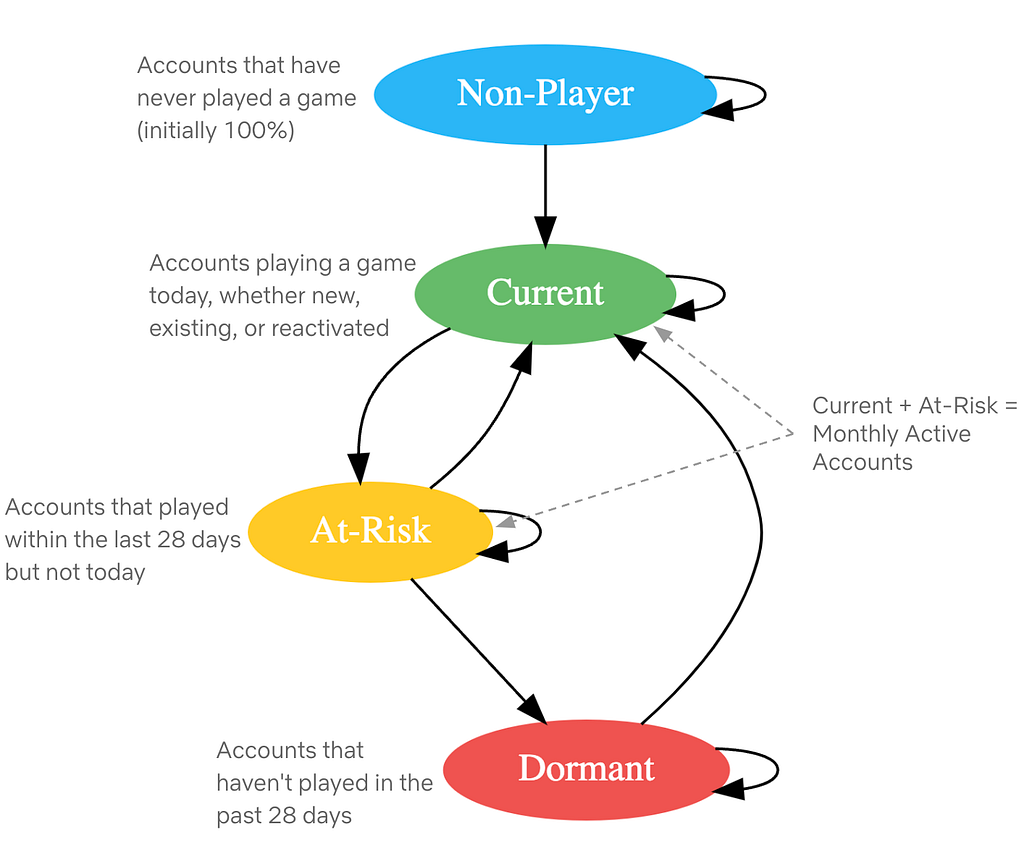
Fig: Netflix Players’ Journey as State machine
Modeling the players’ journey as a state machine allows us to simulate future states and assess progress toward engagement goals. The most basic operation involves multiplying the daily state-transition matrix with the current state values to determine the next day’s state values.

This basic operation allows us to explore various scenarios:
- Constant Trends: If transition rates stay constant, we can predict future states by repeatedly multiplying the daily state-transition matrix to new state values, helping us assess progress towards annual goals under unchanged conditions.
- Dynamic Scenarios: By modifying transition rates, we can simulate complex scenarios. For instance, mimicking past changes in transition rates from a game launch allows us to predict the impact of similar future launches by altering the transition rate for a specific period.
- Steady State: We can calculate the steady state of the state-transition matrix (excluding new players) to estimate the MAA once all accounts have tried Netflix games and understand long-term retention and reactivation effects.
Beyond predicting future states, we use the state machine for sensitivity analysis to find which transition rates most impact MAA. By making small changes to each transition rate we calculate the resulting MAA and measure its impact. This guides us in prioritizing efforts on top-of-funnel improvements, member retention, or reactivation.
Content Cash Modeling
At Netflix we produce a variety of entertainment: movies, series, documentaries, stand-up specials, and more. Each format has a different production process and different patterns of cash spend, called our “Content Forecast”. Looking into the future, Netflix keeps a plan of how many titles we intend to produce, what kinds, and when. Because we don’t yet know what specific titles that content will eventually become, these generic placeholders are called “TBD Slots.” A sizable portion of our Content Forecast is represented by TBD Slots.
Almost all businesses have a cash forecasting process informing how much cash they need in a given time period to continue executing on their plans. As plans change, the cash forecast will change. Netflix has a cash forecast that projects our cash needs to produce the titles we plan to make. This presents the question: how can we optimally forecast cash needs for TBD Slots, given we don’t have details on what real titles they will become?
The large majority of our titles are funded throughout the production process — starting from when we begin developing the title to shooting the actual shows and movies to launch on our Netflix service.
Since cash spend is driven by what is happening on a production, we model it by breaking down into these three steps:
- Determine estimated production phase durations using historical actuals
- Determine estimated percent of cash spent in each production phase
- Model the shape of cash spend within each phase
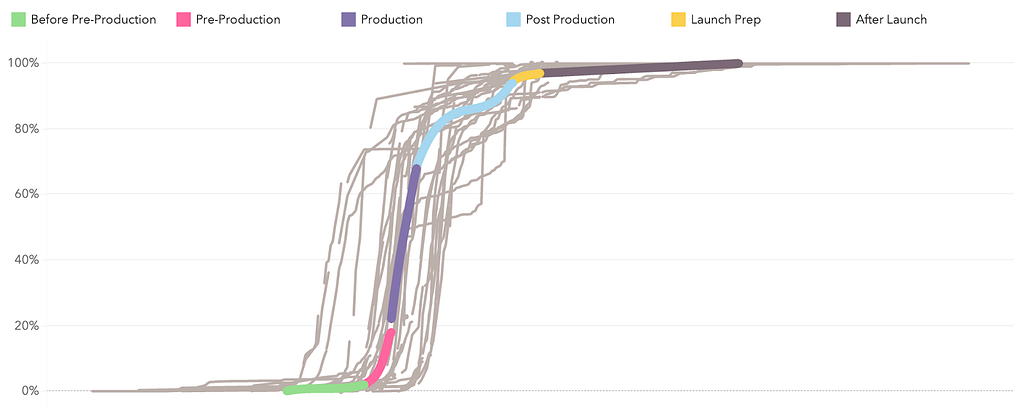
Putting these three pieces together allows us to generate a generic estimation of cash spend per day leading up to and beyond a title’s launch date (a proxy for “completion”). We could distribute this spend linearly across each phase, but this approach allows us to capture nuance around patterns of spend that ramp up slowly, or are concentrated at the start and taper off throughout.
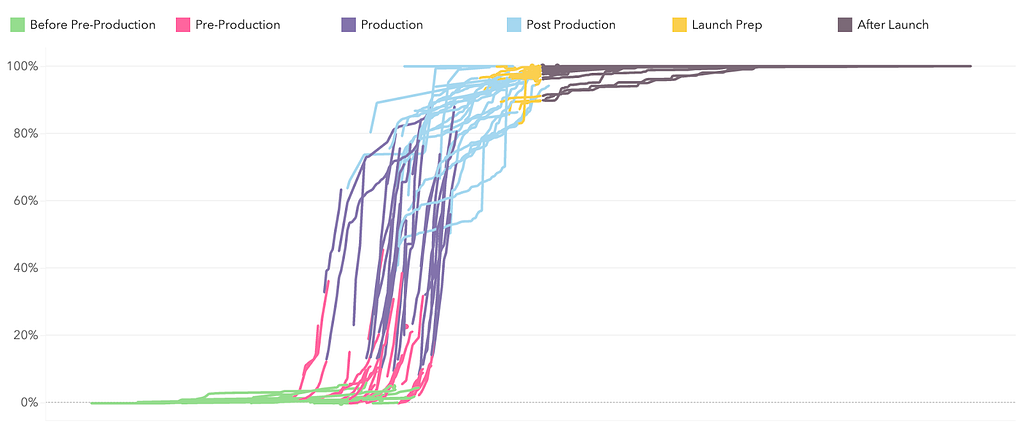
Before starting any math, we need to ensure a high quality historical dataset. Data quality plays a huge role in this work. For example, if we see 80% of our cash spent before production even started, it might be safe to say that either the production dates (which are manually captured) are incorrect or that title had a unique spending pattern that we don’t want to anticipate our future titles will follow.
For the first two steps, finding the estimated phase durations and cash percent per phase, we’ve found that simple math works best, for interpretability and consistency. We use a weighted average across our “clean” historical actuals to produce these estimated assumptions.
For modeling the shape of spend throughout each phase, we perform constrained optimization to fit a 3rd degree polynomial function. The constraints include:
- Must pass through the points (0,0) and (1,1). This ensures that 0% through the phase, 0% of that phase’s cash has been spent. Similarly, 100% through the phase, 100% of that phase’s cash has been spent.
- The derivative must be non-negative. This ensures that the function is monotonically increasing, avoiding counterintuitively forecasting any negative spend.
The optimization’s objective function minimizes the sum of squared residuals and returns the coefficients of the polynomial that will guide the shape of cash spend through each phase.
Once we have these coefficients, we can evaluate this polynomial at each day of the expected phase duration, and then multiply the result by the expected cash per phase. With some additional data processing, this yields an expected percent of cash spend each day leading up to and beyond the launch date, which we can base our forecasts on.
Assistive Speech Recognition in Dubbing Workflows at Netflix
Great stories can come from anywhere and be loved everywhere. At Netflix, we strive to make our titles accessible to a global audience, transcending language barriers to connect with viewers worldwide. One of the key ways we achieve this is through creating dubs in many languages.
From the transcription of the original titles all the way to the delivery of the dub audio, we blend innovation with human expertise to preserve the original creative intent.
Leveraging technologies like Assistive Speech Recognition (ASR), we seek to make the transcription part of the process more efficient for our linguists. Transcription, in our context, involves creating a verbatim script of the spoken dialogue, along with precise timing information to perfectly align the text with the original video. With ASR, instead of starting the transcription from scratch, linguists get a pre-generated starting point which they can use and edit for complete accuracy.
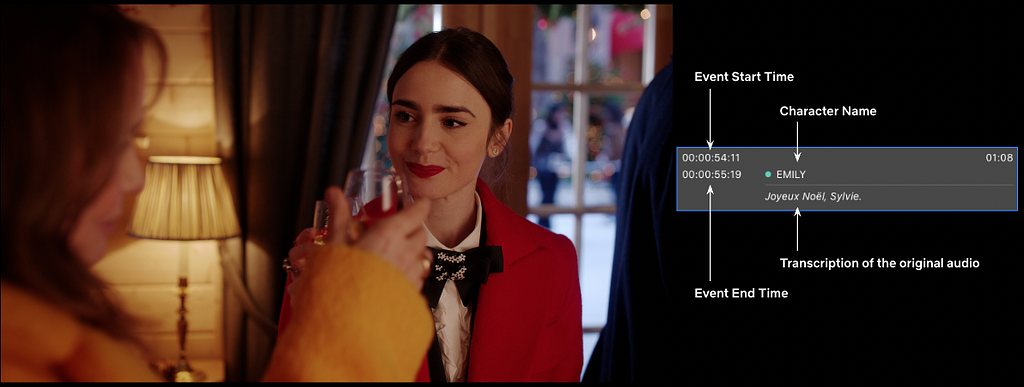
This efficiency enables linguists to focus more on other creative tasks, such as adding cultural annotations and references, which are crucial for downstream dubbing.
With ASR, and other new and enhanced technologies we introduce, rigorous analytics and measurement are essential to their success. To effectively evaluate our ASR system, we’ve established a multi-layered measurement framework that provides comprehensive insights into its performance across many dimensions (for example, the accuracy of the text and timing predictions), offline and online.
ASR is expected to perform differently for various languages; therefore, at a high level, we track metrics by original language of the show, allowing us to assess overall ASR effectiveness and identify trends across different linguistic contexts. We further break down performance by various dimensions, e.g. content type, genre, etc… to help us pinpoint specific areas where the ASR system may encounter difficulties. Furthermore, our framework allows us to conduct in-depth analyses of individual titles’ transcription, focusing on critical quality dimensions around text and timing accuracy of ASR suggestions. By zooming in on where the system falls short, we gain valuable insights into specific challenges, enabling us to further refine our understanding of ASR performance.
These measurement layers collectively empower us to continuously monitor, identify improvement areas, and implement targeted enhancements, ensuring that our ASR technology gets more and more accurate, effective, and helpful to linguists across diverse content types and languages. By refining our dubbing workflows through these innovations, we aim to keep improving the quality of our dubs to help great stories travel across the globe and bring joy to our members.
Analytics Engineering is a key contributor to building our deep data culture at Netflix, and we are proud to have a large group of stunning colleagues that are not only applying but advancing our analytical capabilities at Netflix. The 2024 Analytics Summit continued to be a wonderful way to give visibility to one another on work across business verticals, celebrate our collective impact, and highlight what’s to come in analytics practice at Netflix.
To learn more, follow the Netflix Research Site, and if you are also interested in entertaining the world, have a look at our open roles!

Part 2: A Survey of Analytics Engineering Work at Netflix was originally published in Netflix TechBlog on Medium, where people are continuing the conversation by highlighting and responding to this story.
Google Is Allowing Device Fingerprinting
Post Syndicated from Bruce Schneier original https://www.schneier.com/blog/archives/2025/01/google-is-allowing-device-fingerprinting.html
Lukasz Olejnik writes about device fingerprinting, and why Google’s policy change to allow it in 2025 is a major privacy setback.
EDITED TO ADD (1/12): Shashdot thread.
Love Canal: A Chemical Nightmare in Niagara Falls
Post Syndicated from Geographics original https://www.youtube.com/watch?v=xnK6XlHdt7w
DIY Motorized Loft Bed – A One-of-a-Kind Build for My Daughter!
Post Syndicated from The Hook Up original https://www.youtube.com/watch?v=otcFjKE8zbU
[$] Some things to expect in 2025
Post Syndicated from corbet original https://lwn.net/Articles/1003780/
We are reliably informed by the calendar that yet another year has begun.
That can only mean one thing: the time has come to go out on a limb with a
series of ill-advised predictions that are almost certainly not how
the year will actually go. We have to try; it’s traditional, after all.
Read on for our view of what’s coming and how it may play out.
Three new stable kernels
Post Syndicated from jake original https://lwn.net/Articles/1003984/
Greg Kroah-Hartman has announced the release of the 6.12.8, 6.6.69, and 6.1.123 stable kernels. They contain
important fixes throughout the kernel tree, as usual.
Security updates for Thursday
Post Syndicated from jake original https://lwn.net/Articles/1003983/
Security updates have been issued by Red Hat (container-tools:rhel8) and SUSE (liboqs, oqs-provider and python-Jinja2).
The most visited DevOps and Developer Productivity blog posts in 2024
Post Syndicated from Brian Beach original https://aws.amazon.com/blogs/devops/the-most-visited-devops-and-developer-productivity-blog-posts-in-2024-copy/
As we kick off 2025, I wanted to take a moment to highlight the top posts from 2024. Without further ado, here are the top 10 DevOps and developer productivity blog posts of 2024.
Announcing CDK Migrate A single command to migrate to the AWS CDK – This blog post announces the general availability of CDK Migrate, a new feature of the AWS Cloud Development Kit (CDK). CDK Migrate allows users to easily convert existing AWS CloudFormation templates, deployed CloudFormation stacks, or resources created outside of Infrastructure as Code (IaC) into a CDK application. The post explains the benefits of using IaC and compares CDK Migrate to the CloudFormation IaC Generator and CDK Import. It then provides a detailed walkthrough of how to use CDK Migrate to convert a CloudFormation template into a CDK application, including the migration process, code generation, and deployment steps.
Import entire applications into AWS CloudFormation – This blog post introduces AWS CloudFormation’s new IaC generator feature, which allows users to import entire applications and their related resources into Infrastructure as Code (IaC) management. The feature scans an AWS account, identifies relationships between resources, and generates a CloudFormation template based on existing infrastructure. This solves the challenge of manually creating templates for non-IaC resources and enables a more holistic approach to managing resource groups. The post demonstrates the feature’s use in importing a complex VPC setup into CloudFormation, highlighting its ability to simplify the process of bringing existing resources under IaC management, thus extending benefits like repeatability, reliability, and auditability to previously unmanaged resources.
Terraform CI CD and testing on AWS with the new Terraform Test Framework – This blog post discusses the use of Terraform Test, a new framework for validating Terraform modules on AWS. It explains how to create and run various test scenarios, including basic resource creation validation, input variable validation, and testing with supporting resources like KMS keys. The post also outlines how to integrate Terraform Test into a CI/CD pipeline using AWS services such as CodeCommit, CodeBuild, CodePipeline, and S3. It compares Terraform Test with other testing strategies and provides guidance on when to use each approach. The article concludes by recommending further resources for learning about Terraform testing and CI/CD on AWS.
AWS CodePipeline adds support for Branch based development and Monorepos – This AWS blog post announces new features for CodePipeline, including triggers and execution modes, which support branch-based development and monorepo strategies. The post outlines three pipeline examples: a GitFlow release pipeline using queued execution mode, a pull request validation pipeline using parallel execution mode, and a monorepo pipeline that triggers only for specific folder changes. These new capabilities allow teams to create more flexible and efficient continuous delivery pipelines. The post explains how to set up each pipeline type using the AWS Management Console, detailing the configuration of triggers, branch filters, and execution modes. These enhancements aim to simplify pipeline management for various development workflows.
Best practices for managing Terraform State files in AWS CI CD Pipeline – This blog post discusses best practices for managing Terraform state files in AWS CI/CD pipelines. It highlights the challenges of handling state files locally and recommends using remote backends, particularly Amazon S3 with DynamoDB for state locking. The post outlines steps to create and secure S3 buckets and DynamoDB tables for state management. It then provides an example architecture and implementation guide for integrating Terraform state management into an AWS CI pipeline using CodeCommit, CodeBuild, and Lambda. The post includes code snippets and instructions for setting up the infrastructure, deploying an application, and verifying the state file storage in S3 and DynamoDB.
How we sped up AWS CloudFormation deployments with optimistic stabilization – This AWS blog post discusses how CloudFormation improved its resource provisioning process, introducing an optimistic stabilization strategy that can reduce stack deployment times by up to 40%. The post explains the concept of resource stabilization in CloudFormation, contrasting it with direct AWS CLI deployments. It details the evolution from a sequential deployment approach to the new optimistic strategy, which allows for parallel resource creation while maintaining dependency checks. The update also includes a new CONFIGURATION_COMPLETE status, providing better visibility into the deployment process. These improvements aim to enhance deployment speed and efficiency for CloudFormation users.
Best practices working with self hosted GitHub Action runners at scale on AWS – This AWS blog post discusses best practices for using self-hosted GitHub Action runners on AWS at scale. It covers key aspects such as security, performance, and cost optimization. The post recommends using ephemeral runners and short-lived AWS credentials to enhance security, utilizing runner groups for isolation, and implementing warm pools to reduce startup times. It also suggests using optimized AMIs, considering Spot instances for cost savings, and leveraging Amazon CloudWatch for metrics and observability. The blog emphasizes the importance of understanding security responsibilities and provides strategies for efficient scaling and management of GitHub Action runners in AWS environments.
Amazon Q Developer just reached a 260 million dollar milestone – This blog post, dated August 1, 2024, highlights a significant milestone achieved by Amazon Q Developer, an AI-powered assistant for software development. Amazon CEO Andy Jassy announced that the tool’s code transformation agent helped migrate thousands of production applications from Java 8 or 11 to Java 17. This effort saved an estimated 4,500 years of development work for over a thousand developers and resulted in performance improvements worth $260 million in annual cost savings. The post also mentions that Amazon Q Developer offers various agents to assist with tasks like feature implementation, code refactoring, and documentation, potentially increasing developer productivity by up to 40%.
A new and improved AWS CDK construct for Amazon DynamoDB tables – This blog post introduces TableV2, a new AWS Cloud Development Kit (CDK) construct for Amazon DynamoDB tables. TableV2 offers several improvements over the original construct, including native support for global tables, simplified configuration of global secondary indexes and auto scaling, and CloudFormation drift detection across all replicas. It eliminates the need for a separate Lambda function to manage replicas and provides more granular control over replica properties. The post discusses the background, features, and benefits of TableV2, highlighting its capabilities in managing replicas, billing, and encryption. Overall, TableV2 is presented as a more powerful and flexible tool for building and managing DynamoDB tables at scale.
Introducing the next level of AI powered workflows with Amazon Q Developer inline chat – This blog post announces the introduction of inline chat for Amazon Q Developer, a new feature that combines in-IDE chat with direct code updates. Powered by Anthropic’s latest Claude 3.5 Sonnet model, this capability allows developers to describe issues or ideas within the code editor and receive AI-generated responses seamlessly integrated into their codebase. The post highlights how inline chat improves upon existing features like inline suggestions and separate chat windows, making it ideal for tasks such as editing existing files, fixing bugs, optimizing code, refactoring, and adding comments. Two examples demonstrate its effectiveness in refactoring code and adding documentation, showcasing the feature’s potential to enhance developer productivity.
re:Invent 2024 DevOps and Developer Productivity Playlist
Post Syndicated from Brian Beach original https://aws.amazon.com/blogs/devops/reinvent-2024-devops-and-developer-productivity-playlist/
The dust has settled after another re:Invent. I once again had the privilege of organizing the DevOps and Developer Productivity (DOP) track along with Jessie VanderVeen, Krishna Dalal, Megan Sattler and countless others. For 2024, the DOP track included 60 sessions. If you weren’t able to attend, I have compiled a list of the on-demand sessions for you below.
DOP220 Reimagining the Developer Experience at AWS – Software development is undergoing a seismic shift driven by generative AI, transforming how developers work, what they build, and who can become a developer. AWS empowers developers to fearlessly embrace this evolution, integrating cutting-edge yet responsible generative AI solutions across the development lifecycle. Explore real-world use cases accelerating legacy modernization, elevating cloud-native innovation, and unlocking remarkable results. Gain insights into AWS’s pragmatic approach, fueling creativity and customer impact. Join the vibrant community on this transformative journey, where generative AI is redefining software development, opening new frontiers for innovation, and democratizing access to coding for diverse creators shaping technology’s future.
DOP201 AWS infrastructure as code: A year in review – AWS provides services that enable the creation, deployment and maintenance of application infrastructure in a programmatic, descriptive, and declarative way. These services provide rigor, clarity, and reliability to application development. Join this session to learn about the new features and improvements for AWS infrastructure as code with AWS CloudFormation and AWS Cloud Development Kit (AWS CDK) and discover how they can benefit your team.
DOP202 Continuous integration and continuous delivery (CI/CD) for AWS – AWS provides one place where you can plan work, collaborate on code, and build, test, and deploy applications with continuous integration and continuous delivery (CI/CD) tools. In this session, learn about creating complete CI/CD pipelines using infrastructure as code on AWS.
DOP203 Governance and security with infrastructure as code – In this session, learn how to use AWS CloudFormation and the AWS CDK to deploy cloud applications in regulated environments while enforcing security controls. Find out how to catch issues early with cdk-nag, validate your pipelines with cfn-guard, and protect your accounts from unintended changes with CloudFormation Hooks.
DOP204 Amazon Q Developer: Your gen AI assistant for software development In this session, learn how Amazon Q Developer is transforming the developer experience by speeding up a range of tasks that support you as you research how to get started, evaluate system design, build secure and scalable applications, upgrade existing applications, and optimize application performance. Learn firsthand how Amazon Q capabilities for building, troubleshooting, and transforming applications faster and more easily frees you up to focus on experimentation and innovation.
DOP208 Accelerate .NET porting from Windows to Linux with Amazon Q Developer – Are you dreading the complexity and costs of migrating legacy .NET applications from Windows to Linux? Generative AI can help. In this session, learn how Amazon Q Developer transformation capabilities now automate .NET modernization tasks like dependency analysis and version upgrades, reducing costs by up to 40%. Explore how to rapidly port .NET applications to Linux, transition away from Windows, and break free of the security issues, rising license costs, and challenges with scaling—all while freeing your teams to focus on high-impact features that deliver business value.
DOP209 Accelerate application maintenance and upgrades with generative AI Developers spend significant time completing the undifferentiated work of maintaining and upgrading legacy applications. Teams need to balance investments in building new features with mandatory patching and update work. Now, using the power of generative AI, the Amazon Q Developer agent for code transformation can expedite these critical upgrade tasks, transforming applications to use the latest language features and versions in hours or days and saving significant costs. Join the session to learn what’s new and how your team can automate Java application upgrades.
DOP210 Accelerate multi-step SDLC tasks with Amazon Q Developer Agents While existing AI assistants focus on code generation with close human guidance, Amazon Q Developer has a unique capability called agents that can use reasoning and planning capabilities to perform multi-step tasks beyond code generation with minimal human intervention. Its agent for software development can solve complex tasks that go beyond code suggestions, such as building entire application features, refactoring code, or generating documentation. Join this session to discover new agent capabilities that help developers go from planning to getting new features in front of customers even faster.
DOP211 Optimize your AWS operations with generative AI and Amazon Q Developer Unlock the power of Amazon Q Developer to streamline your AWS operations. In this session, discover how to use this innovative tool within the AWS console to accelerate deployment, configuration, troubleshooting, and more across AWS Lambda, Amazon ECS, Amazon EC2, Amazon S3, and beyond. Harness first-party skills for Amazon Redshift, AWS Glue, and Amazon VPC, and explore third-party integrations with Wiz and Datadog. Gain insights into optimizing your AWS environments and supercharging operational tasks, empowering you to work smarter, not harder.
DOP213 Amazon Q Developer, Amazon Inspector & AI remediation for secure SDLCElevate your security posture with AWS offerings across the software development lifecycle (SDLC). Use Amazon Q Developer in the IDE to scan code before committing, Amazon CodeGuru in the CI/CD pipeline to block insecure deployments, and Amazon Inspector at runtime for continuous scanning. Harness the power of generative AI to automate remediation of security findings. This session demonstrates how to seamlessly integrate these services, empowering you to proactively identify and mitigate vulnerabilities throughout the SDLC, ensuring robust security from code to production.
DOP214 Unleashing generative AI: Amazon’s journey with Amazon Q Developer Join us to discover how Amazon rolled out Amazon Q Developer to thousands of developers, trained them in prompt engineering, and measured its transformative impact on productivity. In this session, learn best practices for effectively adopting generative AI in your organization. Gain insights into training strategies, productivity metrics, and real-world use cases to empower your developers to harness the full potential of this game-changing technology. Don’t miss this opportunity to stay ahead of the curve and drive innovation within your team.
DOP215 Next-generation CDK development with Amazon Q DeveloperThe AWS Cloud Development Kit (AWS CDK) has emerged as a powerful infrastructure as code tool, but building custom high-level constructs can be challenging. This session demonstrates how to leverage Amazon Q Developer, an AI-powered assistant for software development, to create tailored CDK constructs that encapsulate cloud architecture patterns. Learn to design effective constructs, utilize Amazon Q’s features for automated documentation and testing, and explore customization options to optimize the developer experience with infrastructure as code using AWS CDK and Amazon Q Developer.
DOP216 Customize Amazon Q Developer to speed up enterprise development Significantly accelerate development by customizing Amazon Q Developer. Generate even more relevant inline code recommendations and chat responses (in preview) by making it aware of your internal libraries, APIs, best practices, and architectural patterns. Save time building new features, refactoring code, improving application performance, or onboarding to a new codebase. In this session, learn how you can take advantage of Amazon Q Developer and your internal codebases to improve your developer experience and productivity. Also learn how National Australia Bank is using Amazon Q Developer to enable their development teams to ship faster and innovate more for their customers.
DOP217 Best practices for customizing Amazon Q DeveloperWith Amazon Q Developer, you can securely connect to your private repositories to generate even more relevant code recommendations based on your internal code repositories, ask questions about your company code, and understand your internal code bases faster. In this session, learn how to set up customizations and generate code based on your internal repos. Use the Amazon Q Developer chat in your IDE to ask questions about how your internal code base is structured, where and how certain functions or libraries are used, and how to use specific functions, methods, or APIs.
DOP218 Ship faster with Amazon Q Developer agent for software development With Amazon Q Developer, you can securely connect to your private repositories to generate even more relevant code recommendations based on your internal code repositories, ask questions about your company code, and understand your internal code bases faster. In this lightning session, you’ll learn how to set up customizations and generate code based on your internal repos. We’ll also use the Amazon Q Developer chat in the IDE to ask questions about how your internal code base is structured, where and how certain functions or libraries are used, or how to use specific functions, methods, or APIs.
DOP221 Modernize mainframe applications faster using Amazon Q Developer – Modernizing and migrating mainframe applications to cloud can require prolonged efforts including assessment, planning, and project execution. Generative AI can simplify and accelerate the journey. This session provides an overview of how Amazon Q Developer transformation capabilities can intelligently automate many of the burdensome steps involved in code base analysis, code documentation, code decomposition, modernization planning, and code refactoring, and can assist modernization consultants and mainframe teams with intelligent guidance rooted in mainframe and cloud expertise. Learn how modernization teams can focus on higher-value tasks with less undifferentiated heavy lifting and deliver modernized cloud-based applications fueling agility and innovation.
DOP223 What’s new with Amazon Q Developer agents Amazon Q Developer– agent capabilities can perform a range of tasks with minimal input—from implementing features and documenting and refactoring code to performing software upgrades. In this session, learn about the newly launched capabilities of the Amazon Q Developer agents. With a deep understanding of your code base, the agents can now help you generate in-depth documentation from source code, iteratively create unit tests across your code base, automatically perform code reviews, and assess the deployment risk of your code updates. See how these new capabilities can help you significantly speed up your entire software development lifecycle and ship higher-quality code to your customers.
DOP224 Accelerate modernization of VMware workloads using Amazon Q Developer – Ready to learn about how the new Amazon Q Developer transformation capabilities can simplify and automate the modernization and migration of VMware environments to AWS? This session shows you how Amazon Q Developer accelerates transformation projects from discovery, planning, and replatforming to deploying your VMware environments in Amazon EC2. Learn how the generative AI–powered capabilities help you scale and innovate by streamlining VMware migrations to AWS in a matter of months. Gain insights into how modernization teams can reduce undifferentiated heavy lifting, be more productive, and deliver business value faster.
Managing Reflections & Hotspots (Watch Photography Tutorial)
Post Syndicated from Matt Granger original https://www.youtube.com/watch?v=xNjF-s0dZ_c
Behind the scenes with Stream Live, Cloudflare’s live streaming service
Post Syndicated from Kyle Boutette original https://blog.cloudflare.com/behind-the-scenes-with-stream-live-cloudflares-live-streaming-service/
Cloudflare announced Stream Live for open beta in 2021, and in 2022 we went GA. While we talked about the experience of using it and the value it delivers to customers, we didn’t talk about how we built it. So let’s talk about Stream Live’s design, and how it leverages the distributed nature of Cloudflare’s network, rather than centralized locations as many other live services do. Ultimately, our goals are to keep our content ingest as close to broadcasters as possible, our content delivery as close to viewers as possible, and to retain our ability to handle unexpected use cases.
At a high level, Stream Live accepts audio/video content from broadcasters and makes that content available to viewers around the world in real time through the Cloudflare network, which reaches more than 330 cities in over 120 countries. Hence, there are two sides to this: ingesting data from broadcasters and delivering encoded content to viewers. Both sides are built on a combination of internal systems and Cloudflare products, including Cloudflare Workers, Durable Objects, Spectrum, and, of course, Cache.
Let’s start on the ingest side.
Broadcasters generate content in real time, as a series of video and audio frames, and it needs to be transmitted to Cloudflare over the Internet. To communicate with us, they choose a protocol such as RTMPS (Real Time Messaging Protocol Secure), SRT (Secure Reliable Transport), or WHIP (WebRTC-HTTP ingestion protocol) that defines how their content is packaged and transmitted. Each of these protocols is a way to transmit audio and video frames with various tradeoffs.
Regardless of the chosen protocol, the ingest lifecycle looks fairly similar. Broadcasters connect to an Anycast IP address using either a custom ingest domain or our default live.cloudflare.com. Both options direct to an IP address advertised from every Cloudflare data center around the world, minimizing the latency for broadcasters (both big and small) to our ingest points.
When the media content arrives at the Cloudflare server servicing the connection, it is first handled by a Spectrum application. Spectrum saved us time by implementing TLS termination for RTMPS, blocking potential DDOS attacks, and a few other protocol-specific benefits, such as our ability to support SRT broadcasters whose clients don’t support the Stream ID portion of the SRT protocol. Those broadcasters assume their connection can be fully identified by connecting to a specific port, which was a challenge for our multitenant service. We use Spectrum to expose many listening ports to specific broadcasters which get wrapped up in Simple Proxy Protocol and sent to one ingest service port. This is important, as our SRT implementation spends a non-trivial amount of CPU for each listening port, whereas Spectrum spends effectively nothing. In any case, Spectrum forwards all connections to the ingest service running on the same server.
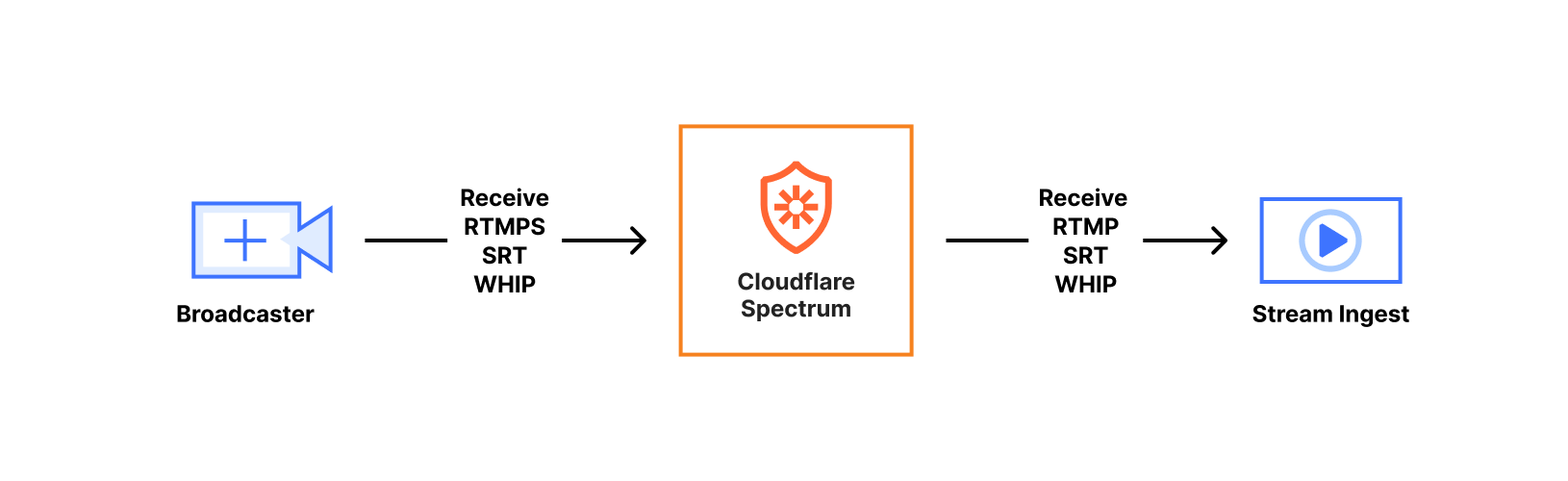
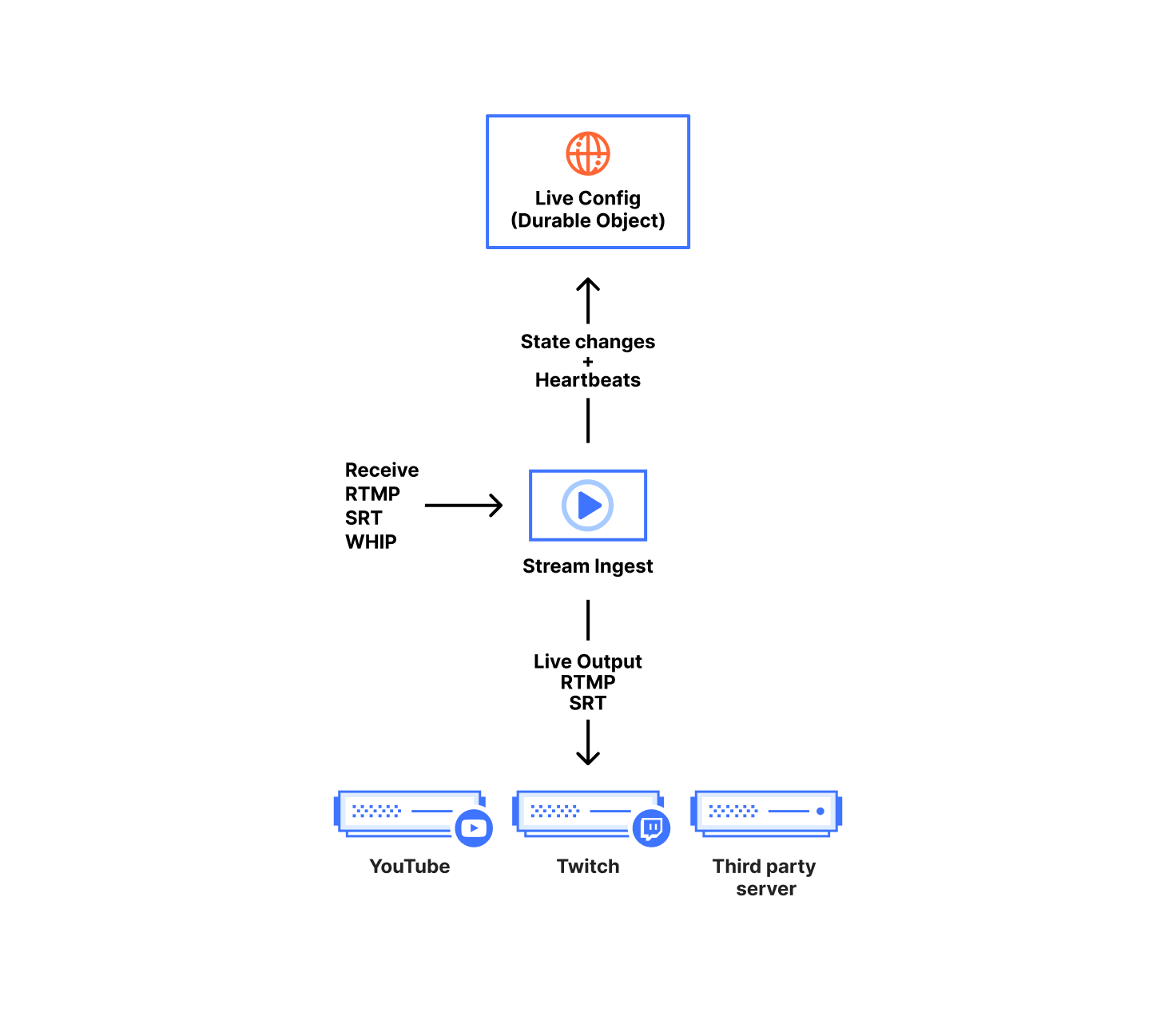
Our ingest service handles receiving content from broadcasters, forwarding to live outputs, and recording for HLS/DASH viewing. The ingest service is written in Go and acts on configuration and broadcast state stored in our Live Config Durable Objects. One Durable Object instance represents one live input; it contains both the customer configuration and the ongoing state of each broadcast.
We chose Durable Objects over a centralized database since they are not coupled to any specific data center, allowing them to be closer to each of our geographically distributed broadcasters while remaining highly available. In terms of customer configuration, we use Durable Objects to store everything defined when creating or modifying the live input.
We store the canonical state of the broadcast in the Durable Object. That includes timestamp metadata for keeping times monotonic, connection status, and which ingest service instance owns the broadcast. Any content received by the ingest service needs to be acknowledged and indexed by the Durable Object before it is made available to viewers. This splits our state into two types, ‘volatile’ and ‘committed’. Volatile state is content the ingest has received but not yet told the Durable Object about. Committed state is content the Durable Object has acknowledged and is used as a sync point for any other ingest service instance in the event they claim ownership of the broadcast.
This split between volatile and committed states is how we support broadcasters resuming a live broadcast after disconnecting and reconnecting for whatever reason, including a broadcaster network blip. That’s normally a relatively easy problem when you have centralized ingestion and state storage. Since broadcasters connect to an arbitrary server due to Anycast, we needed to get more creative in making sure that whichever server receives the reconnect has the data to continue the broadcast.
The ingest service itself is written as a relay, taking packets from one input stream and mapping them to multiple output streams. At the top level, the relay is implemented as two coupled ‘for’ loops that communicate over a Go channel, one for sending and one for receiving. When we receive data, we internally normalize it depending on the protocol. For example, some protocols send video packets as delimiter-based (annex B h264 NALU), but other protocols or file formats expect length-prefixed packets (avcc h264 NALU).
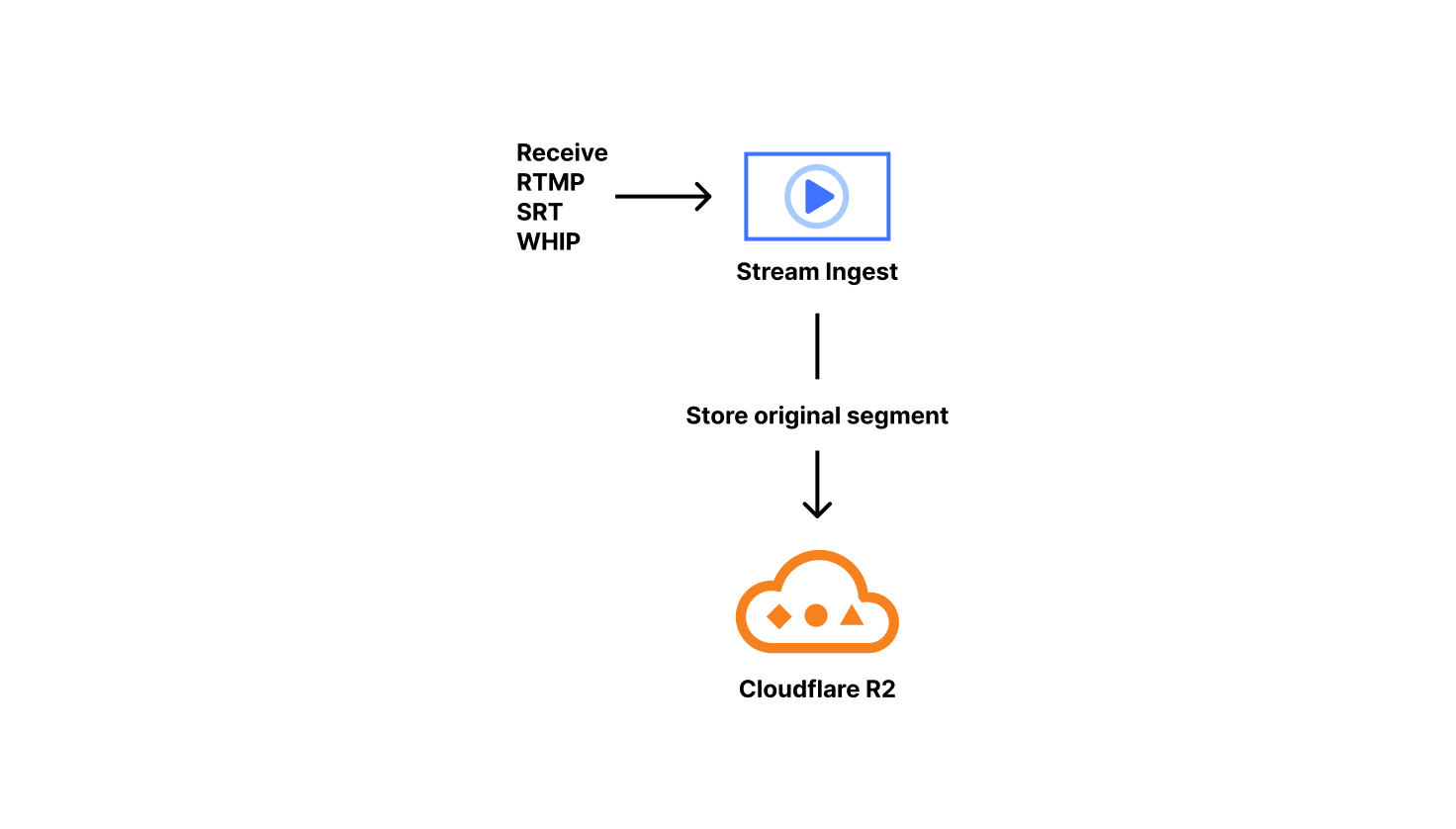
A special case of relay outputs is our Live Playback and Recording functionality. When this is enabled, we copy and sanitize the incoming packets. Specifically, we issue monotonically increasing timestamps, which solves many issues we’ve encountered with various customer encoders. To ensure everything is aligned, we drop severely misaligned audio/video blocks, something typically seen at the start of broadcasts. Those sanitized packets are packaged into fragmented MP4s on keyframe boundaries. We call those fragmented MP4s ‘original segments.’ Our ingest service stores the original segments in R2 and lets the live config Durable Object know the segment exists and how long it is.
These original segments are considered the canonical copy of the content a customer has uploaded to us, and are reused when transitioning from live to on-demand. Since these are required to serve live viewers, this is why we don’t currently provide an option to decouple live playback from recording. Supporting live playback automatically implements on-demand recording, with some state management overhead.
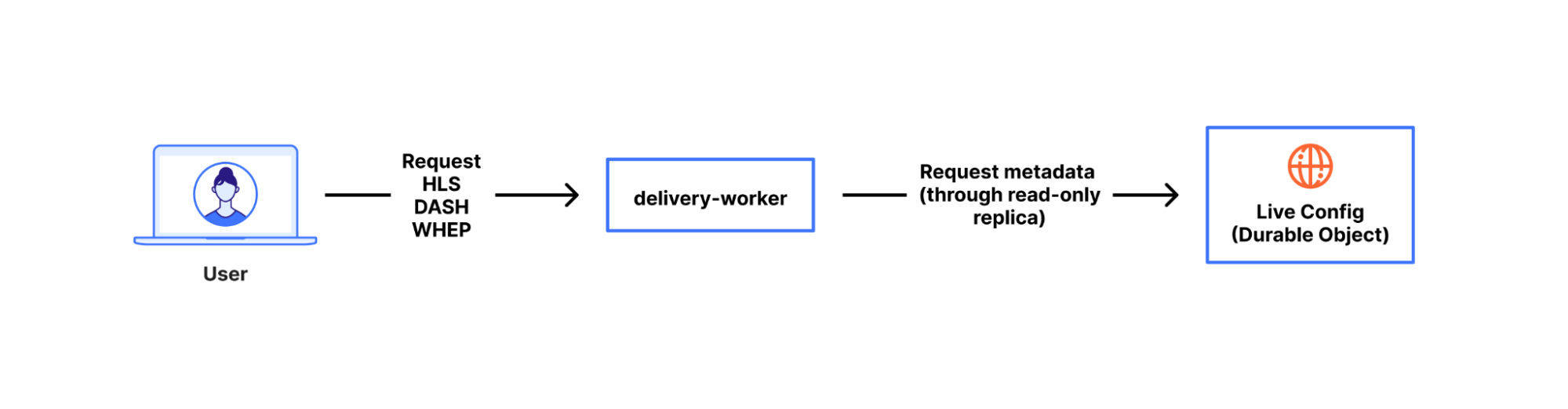
At this point, we’ve ingested the content, cleaned it up, and durably stored it. Lets talk about how viewers watch this content.
Most online video is delivered in short ‘segments’, multi-second chunks of content. Splitting the output allows content to be progressively emitted and is very cache-friendly. The protocols viewers use to request that content are typically HLS (HTTP Live Streaming) or MPEG-DASH (Dynamic Adaptive Streaming over HTTP). WHEP (WebRTC-HTTP Egress Protocol) is a non-segmented viewing method available for real-time viewing in some cases. However, we’ll focus here on playback using segmented content with HLS or DASH, since that’s most of Stream Live’s usage today.
To start viewing, a video player will request an HLS or DASH playlist which describes the attributes of the media content and acts as an index for each segment. The playlist tells us which segments map to what point of the video’s timeline. Those segments are inserted into a playback buffer to be decoded and displayed by a client’s player. Examples here will use HLS, which is a newline delimited format. The typical alternative is DASH, which is XML based.
First, ‘primary’ playlists describe which renditions of the same content are available, as well as where to get their specific index files. Those renditions can vary in bitrate, codec, framerate, resolution, etc. If you’ve ever picked ‘1080p’ from a video player quality menu, the player knew those qualities were available using this or similar methods. When selecting quality automatically, players choose the best rendition for the viewing machine’s capabilities (such as the ability to decode a certain codec) and network constraints. We use an internal representation of tracks (what kind of content, i.e. video), renditions (content parameters, i.e. 1080p), and muxings (where to find that content, i.e. in R2 bucket N or OTFE with call M) to generate both HLS and DASH, as the two formats contain nearly the same data, except organized differently. Here’s a simplified example of a ‘multi-variant’ or ‘primary’ HLS playlist that Stream generated. It includes some annotations to explain the components.
#EXTM3U
#EXT-X-VERSION:6
#EXT-X-INDEPENDENT-SEGMENTS
#EXT-X-MEDIA:TYPE=AUDIO,GROUP-ID="group_audio",NAME="original",LANGUAGE="en-0a76e0ad",DEFAULT=YES,AUTOSELECT=YES,URI="stream_2.m3u8" <- Audio track description + URL path
...
#EXT-X-STREAM-INF:RESOLUTION=426x240,CODECS="avc1.42c015,mp4a.40.2",BANDWIDTH=149084,AVERAGE-BANDWIDTH=145135,SCORE=1.0,FRAME-RATE=30.000,AUDIO="group_audio" <- description of variant contents
stream_1.m3u8 <- URL path to fetch variant
Second, ‘variant’ or ‘stream’ playlists contain a list of segments that can be downloaded and viewed for each rendition. These are used for both live and on-demand viewing. The difference is on-demand playlists contain a flag indicating no more content will be added to the index whereas live omits that flag to allow it to append content in future requests. As a result, you’ll see video players download M3U8 (HLS) or MPD (DASH) files approximately every 1–10 seconds when viewing a broadcast, looking for updated content.
#EXTM3U
#EXT-X-VERSION:6
#EXT-X-MEDIA-SEQUENCE:89281 <- Indicates position of sliding window
#EXT-X-TARGETDURATION:6
#EXT-X-MAP:URI=".../init.mp4" <- Initialization data
#EXTINF:4.000, <- How long the segment
.../seg_89281.mp4 <- Location of a segment
#EXTINF:4.000,
.../seg_89282.mp4
#EXTINF:4.000,
.../seg_89283.mp4
To serve all requests from viewers, we use a Cloudflare Worker called ‘delivery-worker’. It handles all requests for Stream content, and had its first commit in 2017, making it one of the earliest production-facing workers at Cloudflare. Since it’s a worker that executes as close to a viewer as possible, it frees us up to spend more time on content and metadata performance rather than where our logic runs. It delivers content, renders playlists, and performs a variety of other functions. For rendering playlists, the worker transforms the broadcast state from the durable object, as mentioned earlier.
When clients ask for the encoded media content the playlist advertised to them, delivery-worker will send a subrequest to our OTFE (on-the-fly-encoder) service that transits the Cloudflare network. That request describes the format of content requested, i.e. the video stream of segment 89282 at a 1280×720 resolution encoded using AVC (aka H.264) capped CRF with some specified bitrate cap. Then, OTFE will encode the original segment to output the specified configuration.
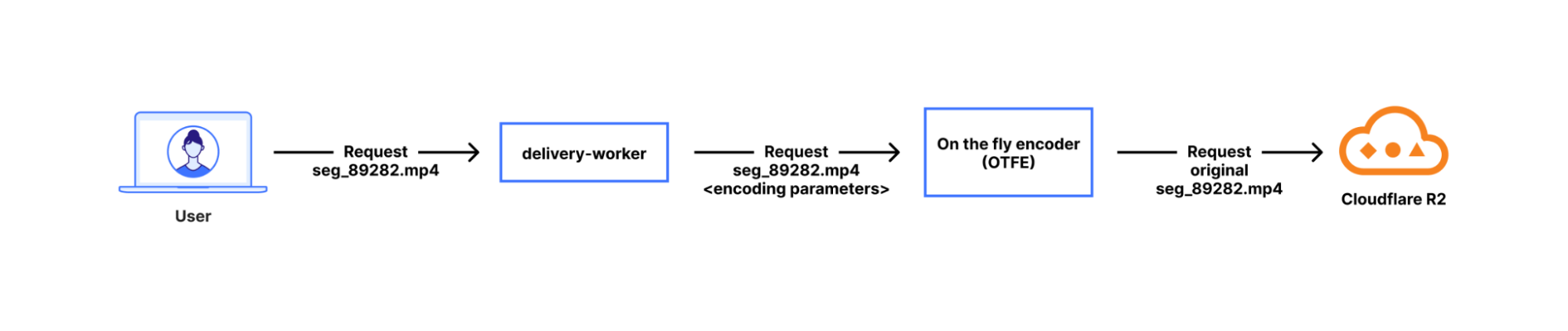
On-the-fly encoding is more efficient than always-encoding, which is the approach most other platforms take. If there are no viewers watching a specific quality level, or watching the broadcast at all, then we aren’t encoding it. That saves power, CPU time, RAM, network, and cache space. Doing nothing is always more efficient than doing something. This applies to a variety of customer use cases, since not all broadcasts have many viewers widely distributed across a range of connection qualities. For one case, consider when serving live broadcasts that are primarily viewed on high quality connections — encoding 240p or 360p variants would probably go to waste most of the time. For a more extreme case, there are situations where you definitely want recording enabled for live content, but viewing is an exceptional situation, such as for security cameras or dashcams. Of course, we have many customers that have active viewership for their broadcasts and this architecture allows us to serve both use cases.
On-the-fly encoding has a tradeoff: it is hard to implement for “media-correctness” and performance reasons. Media-correctness is important to ensuring smooth playback; individual segments need to have exactly the right start time and duration, or you get stuttering playback, audio/video desync, or entirely unwatchable content. Perfecting our media output requires fine-tuning our encoding, deep-diving into specs, and adjusting fragmented MP4s — especially since most encoders aren’t designed for per-segment encoding. For performance, we hide encoding delay by aggressively prefetching segments from delivery-worker. When a viewer initiates a request for Segment N, we initiate encoding of segment N+1. Since that logic is implemented as a worker, we can also easily add or iterate the prefetching however we want.
This encoding flow stands on top of the Cloudflare network, which also provides us with tiered caching and request coalescing. Request coalescing is the key to supporting many viewers simultaneously but only encoding once by enforcing that, for any number of viewers requesting the same encoded content, only one of those requests will make it to our encoder origin — thanks to Cache.
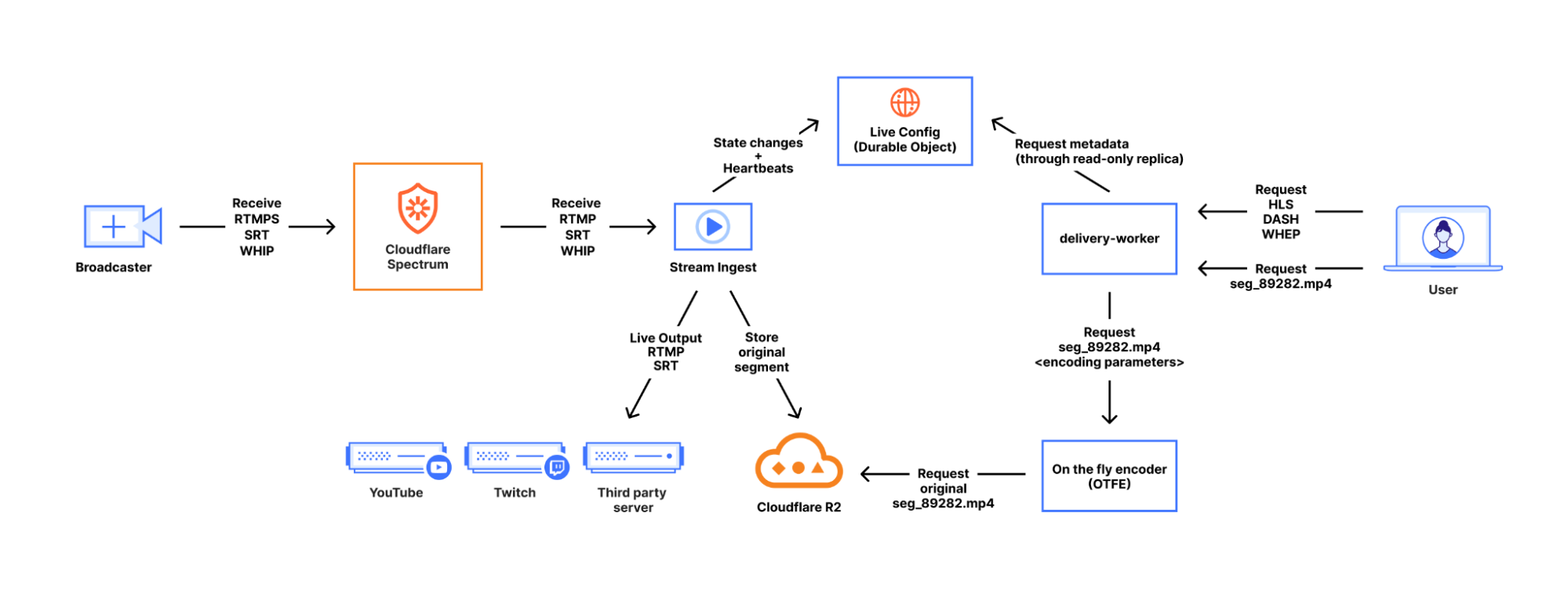
That’s how Stream Live works at a high level. We ingest content from users, send it to any desired live outputs, transcode it for viewing, and give viewers a choice of quality levels, with a lot of backend complexity hidden behind a friendly API. All of this is built on top of the Cloudflare network, with Cloudflare as Customer Zero for our own products and services, using the same as the ones available to our customers.
There’s a lot more we can write about for problems we’ve solved in building Stream Live over the last few years, but those will have to be for a future blog post. If this mix of media and distributed system problems discussed here sound interesting, the Cloudflare Media Platform is hiring for several roles. Apply and join us!
Ready to remix? Favourite projects to tinker with
Post Syndicated from Pete Bell original https://www.raspberrypi.org/blog/ready-to-remix-favourite-projects-to-tinker-with/
From crafting interactive stories to designing captivating games, the Raspberry Pi Foundation’s coding projects offer a hands-on approach to learning, igniting creativity and developing the skills young people need, like perseverance and problem-solving. In this blog, I explore two of my favourite projects that young coders will love.

Our projects are free and open to all. They are easy-to-follow, step-by-step guides that young people use to make their own games, animations, and websites using coding languages such as Scratch, HTML/CSS, and Python. The projects introduce coding concepts one by one and allow young people to build their knowledge progressively. As such, educators and volunteers running clubs don’t need to be experienced coders, and many volunteers in our community enjoy learning alongside their club members.
The power of remixing
One of the brilliant things about our projects is how easy it is to adapt them. This is called remixing, and it gives the learner the opportunity to create and modify a brand-new project that is personal to them.
“Remixing allows beginners to tinker with a pre-existing project and make increasingly complex modifications”
Do you have the reaction speeds of an astronaut?
My favourite project brings space into the classroom. Space is such an intriguing and mysterious thing, but aspects like the extremely high speeds that satellites and the International Space Station (ISS) travel at are difficult concepts for young people to understand.
The Astronaut Reaction Time Game in Scratch introduces young people to the fact that things happen very quickly at the speed the ISS travels. It includes links to maths and science (speed, distance, time, velocity, units, calculations, operators) and, for older learners, prompts discussions on computational abstractions and problem-solving.

The project tests reaction speeds, something that real astronauts have to do as part of their training. NASA has found that reaction speeds are slower on the ISS than on Earth, possibly as a result of the stress of zero gravity. It’s also a fun activity young people can share and play with their friends. Sharing is a key part of the club environment, and this project is ideal for generating a little bit of competition.
As with all projects, a scaffolded approach is taken, with challenges set for learners so that they can complete part of the project independently. If someone is stuck, they can get a hint in the form of an explanation or sentence, which then turns into the code blocks they need to solve the problems, finally giving them the solution if they really need it.
Remix: Exploring speed on planet Earth
Club volunteers can also introduce their learners to some of our physical computing projects, or they could design their own race track that measures the speed of a vehicle. They could even develop a program on a microcontroller like a Pico or micro:bit to measure the speed of young athletes on a running track. If learners are inspired to do more space-themed projects, we have that covered in our project collection.
Unleashing the creativity of coding through colour
My other go-to project is Colourful Creations. Coding is an excellent vehicle for self-expression, and this project showcases the ways programming can be used to create digital art. It uses the turtle library, which is an excellent tool for creating designs and patterns.
The name “turtle” stems from the Logo programming language created in the 1960s. Logo is mainly known for drawing lines, shapes and patterns on the screen and using a “turtle” on the floor to draw them on paper. The turtle library is, therefore, a selection of functions that can be used for drawing.
Part of the project’s appeal is that learners are given a blank canvas to which they can apply any theme. There are limited instructions, leaving lots of space for creativity. Whether it be climate change, a period in history, or some other topic, learners can work on their own poster or in pairs to create something bigger.
Remix: From project to presentation
The possibilities for remixing are almost endless, as learners can add more screens and turn their project into a mini presentation or unleash their artistic side and go wild with colours. The learning in this project leads perfectly to more complex turtle drawing projects like Robo-Trumps, providing a solid foundation in creative computing for you to build on later.
We want you to create your own versions of these projects. You could organise a themed day, which can give learners more freedom, or link with other projects such as Astro Pi. Try remixing the projects to start with, then building up to develop new and exciting projects based on the skills that have been learnt. Happy coding!
A version of this article also appears in Hello World issue 24.
The post Ready to remix? Favourite projects to tinker with appeared first on Raspberry Pi Foundation.
Me, My Future, and I
Post Syndicated from The Atlantic original https://www.youtube.com/watch?v=WV0v3BqhAco
Comic for 2025.01.02 – Vampire
Post Syndicated from Explosm.net original https://explosm.net/comics/vampire-2
New Cyanide and Happiness Comic
The 2025 Server Starting Point
Post Syndicated from Patrick Kennedy original https://www.servethehome.com/2025-server-starting-point-intel-amd-nvidia-broadcom-solidigm-micron-kioxia-marvell-arista/
We memorialize where we are starting 2025 in terms of major server subsystems in a post that we hope to look back on in the future
The post The 2025 Server Starting Point appeared first on ServeTheHome.
The GPU, not the TPM, is the root of hardware DRM
Post Syndicated from Matthew Garrett original https://mjg59.dreamwidth.org/70954.html
As part of their “Defective by Design” anti-DRM campaign, the FSF recently made the following claim:Today, most of the major streaming media platforms utilize the TPM to decrypt media streams, forcefully placing the decryption out of the user’s control
(from here).
This is part of an overall argument that Microsoft’s insistence that only hardware with a TPM can run Windows 11 is with the goal of aiding streaming companies in their attempt to ensure media can only be played in tightly constrained environments.
I’m going to be honest here and say that I don’t know what Microsoft’s actual motivation for requiring a TPM in Windows 11 is. I’ve been talking about TPM stuff for a long time. My job involves writing a lot of TPM code. I think having a TPM enables a number of worthwhile security features. Given the choice, I’d certainly pick a computer with a TPM. But in terms of whether it’s of sufficient value to lock out Windows 11 on hardware with no TPM that would otherwise be able to run it? I’m not sure that’s a worthwhile tradeoff.
What I can say is that the FSF’s claim is just 100% wrong, and since this seems to be the sole basis of their overall claim about Microsoft’s strategy here, the argument is pretty significantly undermined. I’m not aware of any streaming media platforms making use of TPMs in any way whatsoever. There is hardware DRM that the media companies use to restrict users, but it’s not in the TPM – it’s in the GPU.
Let’s back up for a moment. There’s multiple different DRM implementations, but the big three are Widevine (owned by Google, used on Android, Chromebooks, and some other embedded devices), Fairplay (Apple implementation, used for Mac and iOS), and Playready (Microsoft’s implementation, used in Windows and some other hardware streaming devices and TVs). These generally implement several levels of functionality, depending on the capabilities of the device they’re running on – this will range from all the DRM functionality being implemented in software up to the hardware path that will be discussed shortly. Streaming providers can choose what level of functionality and quality to provide based on the level implemented on the client device, and it’s common for 4K and HDR content to be tied to hardware DRM. In any scenario, they stream encrypted content to the client and the DRM stack decrypts it before the compressed data can be decoded and played.
The “problem” with software DRM implementations is that the decrypted material is going to exist somewhere the OS can get at it at some point, making it possible for users to simply grab the decrypted stream, somewhat defeating the entire point. Vendors try to make this difficult by obfuscating their code as much as possible (and in some cases putting some of it in-kernel), but pretty much all software DRM is at least somewhat broken and copies of any new streaming media end up being available via Bittorrent pretty quickly after release. This is why higher quality media tends to be restricted to clients that implement hardware-based DRM.
The implementation of hardware-based DRM varies. On devices in the ARM world this is usually handled by performing the cryptography in a Trusted Execution Environment, or TEE. A TEE is an area where code can be executed without the OS having any insight into it at all, with ARM’s TrustZone being an example of this. By putting the DRM code in TrustZone, the cryptography can be performed in RAM that the OS has no access to, making the scraping described earlier impossible. x86 has no well-specified TEE (Intel’s SGX is an example, but is no longer implemented in consumer parts), so instead this tends to be handed off to the GPU. The exact details of this implementation are somewhat opaque – of the previously mentioned DRM implementations, only Playready does hardware DRM on x86, and I haven’t found any public documentation of what drivers need to expose for this to work.
In any case, as part of the DRM handshake between the client and the streaming platform, encryption keys are negotiated with the key material being stored in the GPU or the TEE, inaccessible from the OS. Once decrypted, the material is decoded (again either on the GPU or in the TEE – even in implementations that use the TEE for the cryptography, the actual media decoding may happen on the GPU) and displayed. One key point is that the decoded video material is still stored in RAM that the OS has no access to, and the GPU composites it onto the outbound video stream (which is why if you take a screenshot of a browser playing a stream using hardware-based DRM you’ll just see a black window – as far as the OS can see, there is only a black window there).
Now, TPMs are sometimes referred to as a TEE, and in a way they are. However, they’re fixed function – you can’t run arbitrary code on the TPM, you only have whatever functionality it provides. But TPMs do have the ability to decrypt data using keys that are tied to the TPM, so isn’t this sufficient? Well, no. First, the TPM can’t communicate with the GPU. The OS could push encrypted material to it, and it would get plaintext material back. But the entire point of this exercise was to avoid the decrypted version of the stream from ever being visible to the OS, so this would be pointless. And rather more fundamentally, TPMs are slow. I don’t think there’s a TPM on the market that could decrypt a 1080p stream in realtime, let alone a 4K one.
The FSF’s focus on TPMs here is not only technically wrong, it’s indicative of a failure to understand what’s actually happening in the industry. While the FSF has been focusing on TPMs, GPU vendors have quietly deployed all of this technology without the FSF complaining at all. Microsoft has enthusiastically participated in making hardware DRM on Windows possible, and user freedoms have suffered as a result, but Playready hardware-based DRM works just fine on hardware that doesn’t have a TPM and will continue to do so.
 comments
Kingdoms United
Post Syndicated from The History Guy: History Deserves to Be Remembered original https://www.youtube.com/watch?v=fBYcubXScNo
An Algol 68 front end for GCC
Post Syndicated from corbet original https://lwn.net/Articles/1003916/
While some people are focused on new and trendy languages, José Marchesi
has, instead, gifted the world with a GCC front
end for the Algol 68 language.
This WIP is a GCC front-end for Algol 68, the fascinating,
generally poorly understood and often vilified programming
language. It is common knowledge that Algol 68 was well ahead of
its time back when it was introduced, and anyone who knows the
language well will suspect this probably still holds true today,
but more than fifty years after the publication of the Revised
Report the world may finally be ready for it, or perhaps not, we
shall see.
For those who see Algol 68 as too new, there was also a
COBOL front end posted in December.
Home Assistant 2025.1 – a year of … WTH
Post Syndicated from BeardedTinker original https://www.youtube.com/watch?v=EYkM4GvwkCs