Post Syndicated from The History Guy: History Deserves to Be Remembered original https://www.youtube.com/watch?v=uz3syICGM8U
A stereo with a twist – AKAI PJ-11
Post Syndicated from Techmoan original https://www.youtube.com/watch?v=aqc9akDIE_g
Седмицата (18–23 ноември)
Post Syndicated from Светла Енчева original https://www.toest.bg/siedmitsata-18-23-noiemvri-2/

1000 дни. Толкова бяха нужни на отиващия си президент Джо Байдън, за да даде благословията си Украйна да стреля с американски ракети по военни бази в Русия. Можем само да гадаем как щеше да се развие войната на Русия срещу Украйна, ако това разрешение беше дадено например през есента на 2022 г., когато украинската контраофанзива успя да отвоюва обратно територии от Харковска област та до Херсон. Тогава Украйна беше в силна позиция, а мандатът на Байдън беше далеч от края си.
Ще си кажете: тогава световните лидери се опасяваха, че Русия може да използва ядрено оръжие. Но Русия заплашва със същото и сега. Трябваше ли Доналд Тръмп отново да спечели изборите, за да проявят Байдън, а след него и някои европейски лидери някаква решителност? Ала няма смисъл да се питаме какво би било, ако.
Междувременно в България 51-вото Народно събрание вече две седмици не може да си избере председател, а първото му заседание се разтяга и точи като разтопено сирене гауда. Ако и за това депутатите не могат да намерят мнозинство, малко вероятно е да са в състояние да решат каквото и да е друго нещо – например да изберат правителство.
Това означава, че може би пак вървим към избори. Не че е някаква изненада – на Пеевски не му трябва редовно правителство, за да постига всичко, което иска. Например да намести „Новото начало“ в нова сграда, като за тази цел от нея се изнесат цели три институции.
На темата за буксуващия избор на председател на парламента е посветен и тазседмичният вътрешнополитически анализ на Емилия Милчева „Къде си, Мойсей?“. България си няма Мойсей, който да поведе народа, пък и не изглежда някой да го чака. Залогът за председателя на Народното събрание е толкова голям и поради конституционната реформа, орязваща правомощията на президента, която Румен Радев за пореден път обжалва.
Колкото и да е нестабилна България, тя е част от световната политика, напомня ни Анахит Хачикян в дебютната си статия за „Тоест“ „Зад кулисите на изслушванията за еврокомисари“. Избирането на Екатерина Захариева за еврокомисар е „звезден миг“, защото придава гражданска легитимност на българската политика, каквато вътрешните дрязги логично не могат да произведат. От статията научаваме и как минават изслушванията на кандидат-еврокомисарите, а също така че и в Европейския парламент има санитарен кордон, но за разлика от българския, той работи.
Продължаваме темата с Искрен Иванов, който прави анализ на българската външна политика, която отново е на кръстопът между Вашингтон и Москва. Уж социалистическият лагер вече не съществува, но като верен сателит все около планетата майка кръжим. Било от носталгия, било защото тази носталгия се подхранва и експлоатира от определени сили и гласовитите им говорители. Затова може да стане така, че България да изпие горчивата чаша на нов (или стария?) политически избор.
Ако с напредването на ноември ви става студено, не знам дали ще ви прозвучи утешително, че на някои места и през лятото вали сняг. В северната си поредица Светла Стоянова ни разказва за снежните лета в една исландска хижа. Те са студени, но пък пристрастяващо красиви. Ако искате да се стоплите, пълно е с горещи извори, които се използват за отопление. И освен леда, блещука и лава на няколко хилядолетия. А денят продължава… до следващата сутрин.
Правим елегантен преход от природата към културата с помощта на… пуйката. Тази птица, която се е превърнала в символ на американския Ден на благодарността, хем е животно (природа, значи), хем в името ѝ има нещо гнило, смята Екатерина Петрова. А като говорим за имена, вече сме в полето на думите. Ацтеките я наричат голямо чудовище, испанците – паун, българите – токачка, а английското ѝ название turkey идва от turkey-cock (‘турски петел’). Пък през 2022 г. Турция си смени англоезичното наименование от Turkey на Türkiye, за да престанат най-сетне да я асоциират с тази пуйка.
И докато сме на културна вълна, хайде да си поговорим за банята. Покрай страстите около пиесата на Бърнард Шоу в Народния театър се позамислих за историята на къпането и хигиената в България и в Западна Европа от Възраждането насетне. И реших да споделя. Не за друго, а защото не виждам причина нито да се обиждаме, нито да имаме комплекси по темата.
Ако сте очаквали препоръка – дочакахте. Неотдавна силно ме впечатли финландският филм „Четирима непораснали възрастни“, който гледах по MAX – изненадващо дълбок и човешки разказ за полиаморията. Без да идеализира и без да съди. Без да спестява възможните проблеми, но и без да превръща съдбата на героите в безизходица.
Но вероятно развитието на историята във филма е свързана и с особеностите на финландското общество – в една по-консервативна среда героите щяха да бъдат изправени пред проблеми както в друг любим филм – „Професор Марстън и жените чудо“.
Ако ви харесва да четете „Тоест“, напомням, че на вашата подкрепа разчитаме, за да продължаваме напред.
A kernel code of conduct enforcement action
Post Syndicated from jake original https://lwn.net/Articles/999197/
The Linux Foundation Technical
Advisory Board (TAB) has decided to “restrict Kent Overstreet’s
” based on a recommendation from the Code of Conduct
participation in the kernel development process during the Linux 6.13
kernel development cycle
committee. In particular, the scope of the restriction will be to “decline all pull
” during the development cycle.
requests from Kent Overstreet
Overstreet is the creator and maintainer of the bcachefs filesystem.
This
action stems from a message
Overstreet posted back in early September that was abusive toward another
kernel developer; there is a fair amount of back-and-forth about the
incident and the committee’s attempts to extract a public apology from
Overstreet in that thread. Overstreet has published a lengthy blog post
describing his side of the story.
Eviden Shows the Quad NVIDIA ConnectX-7 Cedar Module
Post Syndicated from Rohit Kumar original https://www.servethehome.com/eviden-shows-the-quad-nvidia-connectx-7-cedar-module/
We finally found the NVIDIA Cedar module with four NVIDIA ConnectX-7 NICs onboard at the Eviden booth at SC24
The post Eviden Shows the Quad NVIDIA ConnectX-7 Cedar Module appeared first on ServeTheHome.
Worst Nuclear Disaster in US History.
Post Syndicated from The History Guy: History Deserves to Be Remembered original https://www.youtube.com/watch?v=XUiRcckcbIk
Comic for 2024.11.23 – Customer
Post Syndicated from Explosm.net original https://explosm.net/comics/customer
New Cyanide and Happiness Comic
Dissecting the Performance Gains in Amazon Q Developer agent for code transformation
Post Syndicated from Jonathan Vogel original https://aws.amazon.com/blogs/devops/dissecting-the-performance-gains-in-amazon-q-developer-agent-for-code-transformation/
Amazon Q Developer Agent for code transformation is an AI-powered tool which modernizes code bases from Java 8 and Java 11 to Java 17. Integrated into VS Code and IntelliJ, Amazon Q simplifies the migration process and reduce the time and effort compared to manual process. It proposes and verifies code changes, using AI to debug compilation errors. In this blog post, we’ll explore recent improvements to our code transformation agent, particularly its enhanced debugging capabilities. The enhanced debugger agent significantly improves transformation efficiency and quality compared to the existing debugger.
How Amazon Q transforms Java applications
To upgrade Java codebases, the code transformation agent takes the source code input and verify the build and test in source Java version. It then uses deterministic tools to apply code changes, followed by building and testing the changed code in the target Java version. If errors occur in this stage, a generative AI-based system debugs and resolves the compilation errors. Until today, the debugger resolves each error one by one, locating the code file with the error in the codebase, and fixing it. This debug step iterates until all compilation errors are solved or the maximum number of iterations is reached.

As an example, if, as the result of a library upgrade, an import statement is missing or wrong, the AI debugger will re-build, iterate to find all the references in multiple files one by one, and update each reference to resolve the error. Refer to this blog “Three ways Amazon Q Developer agent for code transformation accelerates Java upgrades” for detailed explanation of each transformation step. This approach has helped Q Developer customers achieve accelerations of migration effort by over 40%.
Improving the debugging capabilities of code transformations
To further improve the ability of Q Developer to generate error-free code, we’ve just released multiple foundational improvements to the AI debugger.
- Multi-error context: the debug AI can now take multiple build errors into consideration, which provides more context, leading to better solution discovery.
- More tools available for the AI: compared to simply localizing error to a single file and fixing the error previously, the agent can now execute multi-file solutions by exploring the codebase and operating on multiple files.
- Inter-iteration memory: the debugger AI now remembers previous errors, which contributes to debugging new errors.
- Intelligent backtracking: the debugger AI can now recognize if the current solution path leads to a dead end, in which case the agent can roll back to the previous state.
To implement these capabilities, the debugger AI is re-architected as a multi-agent system. A memory management agent is responsible to analyze last iteration results and append the relevant portions to the inter-iteration memory. A critic agent is responsible to analyze progress and provide additional information to the debugger agent and, if a dead end is detected, rollback the progress to a previous state. A debugger agent, analyzes the memory and the critique from the previous agents and modifies or updates the plan to fix the remaining errors in the codebase. The debugger agent has its disposal a set of generic and specialized tools to browse and explore the codebase, edit source files, trigger builds, add dependencies, and so on. It is important to note that the agent only has access to the files and tools related to the transformation task, which limits hallucinations and drive towards progress.
Let’s examine how the agent handles recurring issues across multiple files with these improvements. Consider a scenario where several Java files are missing the same import statement after upgrading from Java 8 to Java 17. This happens when you upgrade from older Java collections (like Vector and Enumeration) to modern streaming operations. The system is capable of helping you update these patterns automatically. The agent is now able to intelligently detect this pattern and implement a comprehensive solution across all affected files. Suppose we have three Java files that use the java.util.stream.Collectors class, but the import is missing in each:
File1.java:
public class File1 {
    public List<String> process(List<String> input) {
        return input.stream()
            .filter(s → s.length() > 5)
            .collect(Collectors.toList()); // Error: Cannot resolve symbol 'Collectors'
    }
}
File2.java:
public class File2 {
    public Map<String, Long> countWords(List<String> words) {
        return words.stream()
            .collect(Collectors.groupingBy(
                word -> word.toLowerCase(),
                Collectors.counting()
            )); // Error: Cannot resolve symbol 'Collectors'
    }
}
File3.java:
public class File3 {
    public String concatenate(List<String> strings) {
        return strings.stream()
            .collect(Collectors.joining(", "));
            // Error: Cannot resolve symbol 'Collectors'
    }
}
After the agent detects the common issue and applies the fix, all three files would be updated as follows:
File1.java (after fix):
import java.util.stream.Collectors;

public class File1 {
    public List<String> process(List<String> input) {
        return input.stream()
            .filter(s -> s.length() > 5)
            .collect(Collectors.toList());
    }
}
File2.java (after fix):
import java.util.stream.Collectors;

public class File2 {
    public Map<String, Long> countWords(List<String> words) {
        return words.stream()
            .collect(Collectors.groupingBy(
                word -> word.toLowerCase(),
                Collectors.counting()));
    }
}
File3.java (after fix):
import java.util.stream.Collectors;

public class File3 {
    public String concatenate(List<String> strings) {
        return strings.stream()
            .collect(Collectors.joining(", "));
    }
}
In this example, the agent has identified that the same import statement (import java.util.stream.Collectors;) was missing in all three files. It then applied the fix consistently across all affected files, demonstrating its ability to recognize patterns and implement solutions efficiently across the entire codebase, avoiding different solutions attempts for each individual error, and saving iteration budget to solve different errors, if present.
The contrast between existing debugger and enhanced Agent is more clear when handling complex, interconnected changes. For instance, in updating Springfox Swagger from 2.0 to 3.0 (OpenAPI), both systems initially made similar changes. However, when faced with subsequent errors, their approaches diverged significantly. Consider this scenario:
Initially, both systems removed Springfox dependencies:
<!-- Removed by both systems -->
<dependency>
    <groupId>io.springfox</groupId>
    <artifactId>springfox-swagger2</artifactId>
    <version>2.9.2</version>
</dependency>
Later, when encountering a “missing symbol: Docket” error, existing debugger attempted to reintroduce Springfox:
<!-- existing debugger trying to add back Springfox -->
<dependency>
    <groupId>io.springfox</groupId>
    <artifactId>springfox-boot-starter</artifactId>
    <version>3.0.0</version>
</dependency>
In contrast, our Agent recognized this as consistent with the previous removal and rewrote the file using SpringDoc OpenAPI:
import org.springdoc.core.GroupedOpenApi;

@Configuration
public class SwaggerConfig {
    @Bean
    public GroupedOpenApi publicApi() {
        return GroupedOpenApi.builder()
                .group("springshop-public")
                .pathsToMatch("/public/**")
                .build();
    }
}
These latest improvements in our debug AI have yielded positive results. By incorporating multi-error context analysis, additional tooling of multi-file solution, and inter-iteration memory, the agent now delivers more comprehensive and consistent codebase upgrades. We tested our new approach on 62 large open-source applications, some containing over 100,000 lines of code, incorporating more than 100 open-source libraries. The results showed an 85% higher success rate compared to the previous approach. These enhancements significantly boost both the quality and efficiency of code transformation, marking a substantial leap forward in automated application modernization for Java.
Conclusion
With the latest improvements, Q Developer continues to accelerate the journey to modernize Java applications across your organization. For more context, please refer to the blog “Accelerate application upgrades with Amazon Q Developer agent for code transformation.”
As we continue to innovate in code transformation use cases, this release creates the foundation to expand language support, further enhance AI-driven problem-solving algorithms, and streamlining the integration with development workflows. Our goal remains to provide developers and organizations with cutting-edge tools that simplify complex maintenance and modernization processes and foster the adoption of modern, cloud-native architectures. Stay tuned for future updates as we push the boundaries of AI-assisted code transformation.
About the authors
Introducing a new experience for AWS Systems Manager
Post Syndicated from Matheus Guimaraes original https://aws.amazon.com/blogs/aws/introducing-a-new-experience-for-aws-system-manager/
Today, I’m excited to introduce a new and improved version of AWS Systems Manager that brings a highly requested cross-account, and cross-Region experience for managing nodes at scale.
The new System Manager experience provides centralized visibility of all your managed nodes which include various infrastructure types, such as Amazon Elastic Compute Cloud (EC2) instances, containers, virtual machines on other cloud providers, on-premise servers, and edge Internet of Things (IoT) devices. They are referred to as “managed nodes” when they have the Systems Manager Agent (SSM Agent) installed and are connected to Systems Manager.
If an SSM Agent stops working on a node for whatever reason, then Systems Manager loses connection to it and that node is then referred to as an “unmanaged node.” With the new update, Systems Manager can also help you to easily discover and troubleshoot unmanaged nodes. You can run and even schedule an automated diagnosis that provides you with recommended runbooks that you can execute to fix any issues and reestablish connection so they become managed nodes again.
Systems Manager is also now integrated with Amazon Q Developer, the most capable generative AI–powered assistant for software development. You can ask questions about your managed nodes to Amazon Q Developer using natural language and it will provide you with rapid insights plus links straight to Systems Manager where you can perform actions or continue to explore further.
With this release, you can also use AWS Organizations, to allow a delegated administrator to centrally manage nodes across the organization thanks to the new integration with Systems Manager.

Let’s examine a quick example that helps to demonstrate some of these new capabilities.
Imagine a scenario where you are a cloud platform engineer leading a migration plan aiming to replace all nodes running Windows Server 2016 Datacenter in the organization. Let’s use the new Systems Manager experience to quickly gather information about all the nodes that needs to be included in our plan.
Step 1 – Asking Amazon Q Developer
The easiest starting point is using Amazon Q Developer to ask what you want to find using natural language. Using the AWS Console, I open the Amazon Q chatbot and type Find all of my managed nodes running Microsoft Windows Server 2016 Datacenter in my organization.
Amazon Q quickly comes back with an answer: it tells us that there are ten nodes that fit the criteria and provides a list with an overview of each one.

There is also a link that redirects to the new Explore nodes page in System Manager where we can learn more information. Let’s follow it.
Step 2 – Reviewing our infrastructure
The Explore nodes page provides a comprehensive overview of all managed nodes across your organization, with options to group and filter results for quick access. In this case, we can see that the results are already filtered by Operating system name providing us with a list of all the nodes that are running Microsoft Windows Server 2016 Datacenter.

This is a great start! We could just finish here by downloading the report and add those nodes to our migration plan, however, this page only shows you information about your managed nodes. Could it be that there are unmanaged nodes that need to included in our plan? Let’s find out.
Step 3 – Handling unmanaged nodes
Open the menu, and navigate to the Review node insights page. Here you can see a dashboard with widgets that provide insightful interactive charts that you can use to drill down and discover more information about your nodes or even take actions. For example, the Managed node types pie chart shows the types of managed nodes we have whereas the SSM Agent versions graph provides us with an overview of all the different versions of SSM Agent running on them. You can also customize this view by adding and replacing widgets.
 We want to investigate any unmanaged nodes to make sure we don’t miss any that may need to be added to our migration plan. The Node summary widget clearly shows that there are two unmanaged nodes. This could mean that these nodes don’t have the SSM Agent installed in which case we will need to investigate them manually. However, it could also just mean there are issues with the SSM agent permissions or network connectivity preventing Systems Manager from managing these nodes and treating them like any other managed node. The new Systems Manager experience allows you easily troubleshoot and remediate SSM Agents issues so let’s attempt to do this now.
Start by selecting the piece of the chart displaying our unmanaged nodes. This pops up an option to initiate a comprehensive diagnosis of all our unmanaged nodes with only one click. Let’s run this.

The diagnosis reviews key configurations such as missing virtual private cloud (VPC) endpoints, misconfigured VPC DNS settings, and misconfigured instance security groups that may be preventing the SSM Agent from connecting to Systems Manager. After the scanning is complete, we can see that it displays two Misconfigured VPC endpoint findings. It also gives you a link that you can use to open a side panel containing a recommended runbook that you can execute to solve the issues as well as links to relevant documentation.

Choosing to execute the recommended runbook presents you with a detailed preview of the changes which include a thorough overview of the actions it’s going to take in addition to the input parameters used, a link to view a breakdown of the steps involved, and the target nodes for this execution.

Let’s choose to go ahead and select Execute. Keep in mind that this may incur costs, so make sure to review them before executing. You can keep an eye on progress on this page as it goes through the steps to attempt to fix the issues on each node.

Aha! After the remediation is complete, we can see that Systems Manager has found and corrected issues with the SSM Agent with two nodes. This means that Systems Manager is able to connect with the SSM Agent running in those nodes successfully making them “managed nodes.” We can verify this by returning to the Explore nodes page and noticing that the count of “unmanaged nodes” has been reduced to zero now.
Now that all of our nodes are managed, we’re ready to get a full list of all of those that need to be added to our migration plan.
Step 4 – Downloading a report
Back on the Explore nodes page we can see that the count for nodes running Microsoft Windows Server 2016 Datacenter has gone up from ten to twelve! That means that those previously unmanaged nodes that we fixed through the automated diagnosis are indeed running our target operating system.

This is exactly what we need so we choose to download a Report. You give it a file name, and then choose from a few options such as which columns to include. In this case, we choose to download a CSV file with a row containing the column names.

That’s it! We have our CSV with detailed information about the nodes that need upgrading across our entire infrastructure. And the best part? You can also use Systems Manager to automate the upgrade once you’re ready to go ahead with the migration.
Conclusion
Systems Manager is a critical tool for gaining visibility and control over your compute infrastructure and performing operational actions at scale. The new experience offers a centralized cross-account, cross-Region view of all your nodes in your AWS accounts, on-premises, and multicloud environments through a centralized dashboard, offering integration with Amazon Q Developer for natural language queries, and one-click SSM Agent troubleshooting. You can enable the new experience at no extra cost by navigating to the Systems Manager console and following the straightforward instructions.
To learn more, see the documentation for more detail about the new Systems Manager experience.
Check out this interactive demo for a full visual tour of this experience.
Friday Squid Blogging: Transcriptome Analysis of the Indian Squid
Post Syndicated from Bruce Schneier original https://www.schneier.com/blog/archives/2024/11/friday-squid-blogging-transcriptome-analysis-of-the-indian-squid.html
Lots of details that are beyond me.
Metasploit Weekly Wrap-Up 11/22/2024
Post Syndicated from Spencer McIntyre original https://blog.rapid7.com/2024/11/22/metasploit-weekly-wrap-up-11-22-2024/
JetBrains TeamCity Login Scanner

Metasploit added a login scanner for the TeamCity application to enable users to check for weak credentials. TeamCity has been the subject of multiple ETR vulnerabilities and is a valuable target for attackers.
Targeted DCSync added to Windows Secrets Dump
This week, Metasploit community member smashery improved the windows_secrets_dump module’s DOMAIN action to allow the operator to specify specific users or groups to retrieve Kerberos secrets for. By setting the KRB_TYPES option to USERS_ONLY or COMPUTERS_ONLY, the operator can target the specified account type. To be even more granular, the operator can target one or more accounts or groups by name with the KRB_USERS option. This should help operators obtain the desired information more quickly when targeting large domains.
New module content (4)
JetBrains TeamCity Login Scanner
Authors: adfoster-r7 and sjanusz-r7
Type: Auxiliary
Pull request: #19601 contributed by sjanusz-r7
Path: scanner/teamcity/teamcity_login
Description: Adds a new bruteforce scanner/teamcity/teamcity_login login scanner module that targets the JetBrains TeamCity service.
Judge0 sandbox escape
Authors: Takahiro Yokoyama and Tanto Security
Type: Exploit
Pull request: #19584 contributed by Takahiro-Yoko
Path: linux/http/judge0_sandbox_escape_cve_2024_28189
AttackerKB reference: CVE-2024-28189
Description: This adds an exploit module for a Judge0 sandbox escape which exploits CVE-2024-28185, CVE-2024-28189 and allows for unauthenticated RCE. Judge0 version 1.13.0 and prior are vulnerable.
Pyload RCE (CVE-2024-39205) with js2py sandbox escape (CVE-2024-28397)
Authors: Marven11, Spencer McIntyre, and jheysel-r7
Type: Exploit
Pull request: #19640 contributed by jheysel-r7
Path: linux/http/pyload_js2py_cve_2024_39205
AttackerKB reference: CVE-2024-28397
Description: This adds an exploit module that leverages CVE-2024-39205 which is an unauthenticated RCE in Pyload.
Ivanti EPM Agent Portal Command Execution
Authors: James Horseman, Spencer McIntyre, and Zach Hanley
Type: Exploit
Pull request: #19593 contributed by zeroSteiner
Path: windows/misc/ivanti_agent_portal_cmdexec
AttackerKB reference: CVE-2023-28324
Description: This adds an exploit module for, CVE-2023-28324, an unauthenticated RCE in Ivanti’s EPM where a .NET remoting client can invoke a method that results in an OS command being executed in the context of NT AUTHORITY\SYSTEM. This vulnerability is present in versions prior to EPM 2021.1 Su4 and EPM 2022 Su2. Included with this exploit module is a substantial amount of code to fill in the gaps of the existing .NET (de)serialization capabilities to enable the method to be invoked.
Enhancements and features (2)
- #19185 from dwelch-r7 – This adds a feature to the msfconsole UI that will show the currently selected action and how many are available in total. This improves action discoverability.
- #19643 from smashery – This updates the
DOMAINaction of theauxiliary/gather/windows_secrets_dumpmodule to allow individual users or groups to be targeted.
Bugs fixed (2)
- #19624 from cdelafuente-r7 – This fixes a bug that would occur when generating CSRs for AD CS with OpenSSL 3.4.0. The bug was related to an attribute in the request that can no longer be explicitly set.
- #19658 from cdelafuente-r7 – Updates the auxiliary/admin/kerberos/get_ticket module to work on Windows environments
Documentation
You can find the latest Metasploit documentation on our docsite at docs.metasploit.com.
Get it
As always, you can update to the latest Metasploit Framework with msfupdate
and you can get more details on the changes since the last blog post from
GitHub:
If you are a git user, you can clone the Metasploit Framework repo (master branch) for the latest.
To install fresh without using git, you can use the open-source-only Nightly Installers or the
commercial edition Metasploit Pro
Last Week Tonight Library: Season 7, coming 11/24!
Post Syndicated from LastWeekTonight original https://www.youtube.com/watch?v=gsVQTJmnXO8
Simplifying developer experience with variables and JSONata in AWS Step Functions
Post Syndicated from Chris McPeek original https://aws.amazon.com/blogs/compute/simplifying-developer-experience-with-variables-and-jsonata-in-aws-step-functions/
This post is written by Uma Ramadoss, Principal Specialist SA, Serverless and Dhiraj Mahapatro, Principal Specialist SA, Amazon Bedrock
AWS Step Functions is introducing variables and JSONata data transformations. Variables allow developers to assign data in one state and reference it in any subsequent steps, simplifying state payload management without the need to pass data through multiple intermediate states. With JSONata, an open source query and transformation language, you now perform advanced data manipulation and transformation, such as date and time formatting and mathematical operations.
This blog post explores the powerful capabilities of these new features, delving deep into simplifying data sharing across states using variables and reducing data manipulation complexity through advanced JSONata expressions.
Overview
Customers choose Step Functions to build complex workflows that involve multiple services such as AWS Lambda, AWS Fargate, Amazon Bedrock, and HTTP API integrations. Within these workflows, you build states to interface with these various services, passing input data and receiving responses as output. While you can use Lambda functions for date, time, and number manipulations beyond Step Functions’ intrinsic capabilities, these methods struggle with increasing complexity, leading to payload restrictions, data conversion burdens, and more state changes. This affects the overall cost of the solution. You use variables and JSONata to address this.
To illustrate these new features, consider the same business use case from the JSONPath blog, a customer onboarding process in the insurance industry. A potential customer provides basic information, including names, addresses, and insurance interests, while signing up. This Know-Your-Customer (KYC) process starts a Step Functions workflow with a payload containing these details. The workflow decides the customer’s approval or denial, followed by sending a notification.
{
  "data": {
    "firstname": "Jane",
    "lastname": "Doe",
    "identity": {
      "email": "[email protected]",
      "ssn": "123-45-6789"
    },
    "address": {
      "street": "123 Main St",
      "city": "Columbus",
      "state": "OH",
      "zip": "43219"
    },
    "interests": [
      {"category": "home", "type": "own", "yearBuilt": 2004, "estimatedValue": 800000},
      {"category": "auto", "type": "car", "yearBuilt": 2012, "estimatedValue": 8000},
      {"category": "boat", "type": "snowmobile", "yearBuilt": 2020, "estimatedValue": 15000},
      {"category": "auto", "type": "motorcycle", "yearBuilt": 2018, "estimatedValue": 25000},
      {"category": "auto", "type": "RV", "yearBuilt": 2015, "estimatedValue": 102000},
      {"category": "home", "type": "business", "yearBuilt": 2009, "estimatedValue": 500000}
    ]
  }
}
The original workflow diagram illustrates the workflow without new features, while the new workflow diagram shows the workflow built by applying variables and JSONata. Access the workflows in the GitHub repository from the main (original workflow) and jsonata-variables (new workflow) branches.

Figure 1: Original Workflow

Figure 2: New Workflow
Setup
Follow the steps in the README to create this state machine and cleanup once testing is complete.
Simplifying data sharing with variables
Variables allow you to instantiate or assign state results to a variable that is referenced in future states. In a single state, you assign multiple variables with different values, including static data, results of a state, JSONPath or JSONata expressions, and intrinsic functions. The following diagram illustrates how variables are assigned and used inside a state machine:

Figure 3: Variable assignment and scope
Variable scope
In Step Functions, variables have a scope similar to programming languages. You define variables at different levels, with inner scope and outer scope. Inner scope variables are defined inside map, parallel, or nested workflows and these variables are only accessible within their specific scope. Alternatively, you set outer scope variables at the top level. Once assigned, these variables can be accessed from any downstream state irrespective of their order of execution in the future. However, as of the release of this blog, distributed map state cannot reference variables in outer scopes. The user guide on variable scope elaborates on these edge cases.
Variable assignment and usage
To set a variable’s value, use the special field Assign. The JSONata part of this blog post further down explains the purpose of {%%}.
"Assign": {
  "inputPayload": "{% $states.context.Execution.Input %}",
  "isCustomerValid": "{% $states.result.isIdentityValid and $states.result.isAddressValid %}"
}
Use a variable by writing a dollar sign ($) before its name.
{
  "TableName": "AccountTable",
  "Item": {
    "email": {
      "S": "{% $inputPayload.data.email %}"
    },
    "firstname": {
      "S": "{% $inputPayload.data.firstname %}"
    },....
}
Simplifying data manipulations with JSONata
JSONata is a lightweight query and transformation language for Json data. JSONata offers more capabilities compared to JSONPath within Step Functions.
Setting QueryLanguage to “JSONata” and using {%%} tags for JSONata expressions allows you to leverage JSONata within a state machine. Apply this configuration at the top level of the state machine or at each task level. JSONata at the task level gives you fine-grained control of choosing JSONata vs JSONPath. This approach is valuable for complex workflows where you want to simplify a subset of states with JSONata and continue to use JSONPath for the rest. JSONata provides you with more functions and operators than JSONPath and intrinsic functions in Step Functions. Activating the QueryLanguage attribute as JSONata at the state machine level disables JSONPath, therefore, restricting the use of InputPath, Parameters, ResultPath, ResultSelector, and OutputPath. Instead of these JSONPath parameters, JSONata uses Arguments and Output.
Optimizing simple states
One of the first things to notice in the new state machine is that the Verification process does not use Lambda functions anymore as seen in the following comparison:

Figure 4: Lambda functions replaced with Pass states
In the previous approach, a Lambda function is used to validate email and SSN using regular expressions:
const ssnRegex = /^\d{3}-?\d{2}-?\d{4}$/;
const emailRegex = /^[a-zA-Z0-9._-]+@[a-zA-Z0-9.-]+\.[a-zA-Z]{2,4}$/;

exports.lambdaHandler = async event => {
  const { ssn, email } = event;
  const approved = ssnRegex.test(ssn) && emailRegex.test(email);

  return {
    statusCode: 200,
    body: JSON.stringify({
      approved,
      message: `identity validation ${approved ? 'passed' : 'failed'}`
    })
  }
};
With JSONata, you define regular expressions directly in the state machine’s Amazon States Language (ASL). You use a Pass state and $match() from JSONata to validate the email and the SSN.
{
  "StartAt": "Check Identity",
   "States": {
    "Check Identity": {
      "Type": "Pass",
      "QueryLanguage": "JSONata",
      "End": true,
      "Output": {
        "isIdentityValid": "{% $match($states.input.data.identity.email, /^[a-zA-Z0-9._%+-]+@[a-zA-Z0-9.-]+\\.[a-zA-Z]{2,}$/) and $match($states.input.data.identity.ssn, /^(\\d{3}-?\\d{2}-?\\d{4}|XXX-XX-XXXX)$/) %}"
      }
    }
   }
}
The same applies to validate the address inside a Pass state using sophisticated JSONata string functions like $length, $trim, $each, and $not from JSONata:
{
  "StartAt": "Check Address",
  "States": {
    "Check Address": {
      "Type": "Pass",
      "QueryLanguage": "JSONata",
      "End": true,
      "Output": {
        "isAddressValid": "{% $not(null in $each($states.input.data.address, function($v) { $length($trim($v)) > 0 ? $v : null })) %}"
      }
    }
  }
}
When using JSONata, $states becomes a reserved variable.
Result aggregation
Previously with JSONPath, using an expression outside of a Choice state was not available. That is not the case anymore with JSONata. The parallel state, in the example, gathers identity and address verification results from each sub-step. You merge the results into a boolean variable isCustomerValid.
"Verification": {
  "Type": "Parallel",
  "QueryLanguage": "JSONata",
  ...
  "Assign": {
    "inputPayload": "{% $states.context.Execution.Input %}",
    "isCustomerValid": "{% $states.result.isIdentityValid and $states.result.isAddressValid %}"
  },
  "Next": "Approve or Deny?"
}
The crucial part to note here is the access to results via $states.result and use of AND boolean-operator inside {%%}. This ultimately makes the downstream Choice state, which uses this variable, simpler. Operators in JSONata give you flexibility to write expressions like these wherever possible, which reduces the need of a compute layer to process simple data transformations.
Additionally, the Choice state becomes simpler to use with flexible JSONata operators and expressions, as long as the expressions within {%%} result in a true or false value.
"Approve or Deny?": {
  "Type": "Choice",
  "QueryLanguage": "JSONata",
  "Choices": [
    {
      "Next": "Add Account",
      "Condition": "{% $isCustomerValid %}"
    }
  ],
  "Default": "Deny Message"
}
Intrinsic functions as JSONata functions
Step Functions provides built-in JSONata functions to enable parity with Step Functions’ intrinsic functions. The DynamoDB putItem step shows how you use $uuid() that has the same functionality as States.UUID() intrinsic function. You also get JSONata specific functions on date and time. The following state shows the use of $now() to get the current timestamp as ISO-8601 as a string before inserting this item to the DynamoDB table.
"Add Account": {
  "Type": "Task",
  "QueryLanguage": "JSONata",
  "Resource": "arn:aws:states:::dynamodb:putItem",
  "Arguments": {
    "TableName": "AccountTable",
    "Item": {
      "PK": {
        "S": "{% $uuid() %}"
      },
      "email": {
        "S": "{% $inputPayload.data.identity.email %}"
      },
      "name": {
        "S": "{% $inputPayload.data.firstname & ' ' & $inputPayload.data.lastname  %}"
      },
      "address": {
        "S": "{% $join($each($inputPayload.data.address, function($v) { $v }), ', ') %}"
      },
      "timestamp": {
        "S": "{% $now() %}"
      }
    }
  },
  "Next": "Interests"
}
Notice that you don’t apply the .$ notation in S.$ anymore as JSONata expressions reduces developer pain while building state machine ASL. Explore the additional JSONata functions accessible within Step Functions.
Advanced JSONata
JSONata’s flexibility stems from its pre-built functions, higher-order functions support, and functional programming constructs. With JSONPath, you used the advanced expressions "InputPath": "$..interests[?(@.category==home)]" to filter Home insurance related interests from the interests array. JSONata does much more than filtering. For example, you look for home insurance interests, totalAssetValue of the category type as home, and refer to existing fields like name and email as JSONata variables:
The result JSON will be:
{
  "customer": "Jane Doe",
  "email": "[email protected]",
  "totalAssetValue": 1400000,
  "home": {
    "own": 2004,
    "business": 2009
  }
}
By following these steps, you ascend one level by collecting all of the insurance interests and their aggregated results. Notice that the category filter is no longer present.
which results in:
{
  "customer": "Jane Doe",
  "email": "[email protected]",
  "totalAssetValue": 1549000,
  "home": {
    "own": 2004,
    "business": 2009
  },
  "auto": {
    "car": 2012,
    "motorcycle": 2018,
    "RV": 2015
  },
  "boat": {
    "snowmobile": 2020
  }
}
Discovering complex expressions
Use the JSONata playground with your sample data to discover detailed and complex expressions that fit your requirements. The following is an example of using the JSONata playground:

Figure 5: JSONata playground
Considerations
Variable Size
The maximum size of a single variable is 256Kib. This limit helps you bypass the Step Functions payload size restriction by letting you store state outputs in separate variables. While each individual variable can be up to 256Kib in size, the total size of all variables within a single Assign field cannot exceed 256Kib. Use Pass states to workaround this limitation, however, the total size of all stored variables cannot exceed 10MiB per execution.
Variable visibility
Variables are a powerful mechanism to simplify the data sharing across states. Prefer them over ResultPath, OutputPath or JSONata’s Output fields because of their ease of use and flexibility. There are two situations where you might still use Output. First, you can’t access inner-scoped variables in the outer scope. In these cases, fields in Output can help share data between different workflow levels. Second, when sending a response from the final state of the workflow, you may need to use fields in Output fields. The following transition diagram from JSONPath to JSONata provides additional details:

Figure 6: Transition from JSONPath to JSONata
Additionally, variables assigned to a specific state are not accessible in that same state:
"Assign Variables": {
  "Type": "Pass",
  "Next": "Reassign Variables",
  "Assign": {
    "x": 1,
    "y": 2
  }
},
"Reassign Variables": {
  "Type": "Pass",
  "Assign": {
    "x": 5,
    "y": 10,
      ## The assignment will fail unless you define x and y in a prior state.
      ## otherwise, the value of z will be 3 instead of 15.
    "z": "{% $x+$y %}"
  },
  "Next": "Pass"
}
Best practices
Step Functions’ validation API provides semantic checks for workflows, allowing for early problem identification. To ensure safe workflow updates, it’s best to combine the validation API with versioning and aliases for incremental deployment.
Multi-line expressions in JSONata are not valid JSON. Therefore, use a single line as string delimited by a semicolon “;” where the last line returns the expression.
Mutually exclusive
Use of QueryLanguage type is mutually exclusive. Do not mix JSONPath/intrinsic functions and JSONata during variable assignments. For example, the below task fails because the variable b uses JSONata, whereas c uses an intrinsic function.
"Store Inputs": {
  "Type": "Pass",
  "QueryLanguage": "JSONata"
  "Assign": {
    "inputs": {
      "a": 123,
      "b": "{% $states.input.randomInput %}",
      "c.$": "States.MathRandom($.start, $.end)"
    }
  },
  "Next": "Average"
}
To use variables with JSONPath, set the QueryLanguage to JSONPath or remove this attribute from the task definition.
Conclusion
With variables and JSONata, AWS Step Functions now elevates the developer’s experience to write elegant workflows with simpler code in Amazon States Language (ASL) that matches with the normal programming paradigm. Developers can now build faster and write cleaner code by cutting out extra data transformation steps. These capabilities can be used in both new and existing workflows, giving you the flexibility to upgrade from JSONPath to JSONata and variables.
Variables and JSONata are available at no additional cost to customers in all the AWS regions where AWS Step Functions is available. For more information, refer to the user guide for JSONata and variables, as well as the sample application in the jsonata-variables branch.
To expand your serverless knowledge, visit Serverless Land.
Introducing generative AI troubleshooting for Apache Spark in AWS Glue (preview)
Post Syndicated from Noritaka Sekiyama original https://aws.amazon.com/blogs/big-data/introducing-generative-ai-troubleshooting-for-apache-spark-in-aws-glue-preview/
Organizations run millions of Apache Spark applications each month to prepare, move, and process their data for analytics and machine learning (ML). Building and maintaining these Spark applications is an iterative process, where developers spend significant time testing and troubleshooting their code. During development, data engineers often spend hours sifting through log files, analyzing execution plans, and making configuration changes to resolve issues. This process becomes even more challenging in production environments due to the distributed nature of Spark, its in-memory processing model, and the multitude of configuration options available. Troubleshooting these production issues requires extensive analysis of logs and metrics, often leading to extended downtimes and delayed insights from critical data pipelines.
Today, we are excited to announce the preview of generative AI troubleshooting for Spark in AWS Glue. This is a new capability that enables data engineers and scientists to quickly identify and resolve issues in their Spark applications. This feature uses ML and generative AI technologies to provide automated root cause analysis for failed Spark applications, along with actionable recommendations and remediation steps. This post demonstrates how you can debug your Spark applications with generative AI troubleshooting.
How generative AI troubleshooting for Spark works
For Spark jobs, the troubleshooting feature analyzes job metadata, metrics and logs associated with the error signature of your job to generates a comprehensive root cause analysis. You can initiate the troubleshooting and optimization process with a single click on the AWS Glue console. With this feature, you can reduce your mean time to resolution from days to minutes, optimize your Spark applications for cost and performance, and focus more on deriving value from your data.
Manually debugging Spark applications can get challenging for data engineers and ETL developers due to a few different reasons:
- Extensive connectivity and configuration options to a variety of resources with Spark while makes it a popular data processing platform, often makes it challenging to root cause issues when configurations are not correct, especially related to resource setup (S3 bucket, databases, partitions, resolved columns) and access permissions (roles and keys).
- Spark’s in-memory processing model and distributed partitioning of datasets across its workers while good for parallelism, often make it difficult for users to identify root cause of failures resulting from resource exhaustion issues like out of memory and disk exceptions.
- Lazy evaluation of Spark transformations while good for performance, makes it challenging to accurately and quickly identify the application code and logic which caused the failure from the distributed logs and metrics emitted from different executors.
Let’s look at a few common and complex Spark troubleshooting scenarios where Generative AI Troubleshooting for Spark can save hours of manual debugging time required to deep dive and come up with the exact root cause.
Resource setup or access errors
Spark applications allows to integrate data from a variety of resources like datasets with several partitions and columns on S3 buckets and Data Catalog tables, use the associated job IAM roles and KMS keys for correct permissions to access these resources, and require these resources to exist and be available in the right regions and locations referenced by their identifiers. Users can mis-configure their applications that result in errors requiring deep dive into the logs to understand the root cause being a resource setup or permission issue.
Manual RCA: Failure reason and Spark application Logs
Following example shows the failure reason for such a common setup issue for S3 buckets in a production job run. The failure reason coming from Spark does not help understand the root cause or the line of code that needs to be inspected for fixing it.
After deep diving into the logs of one of the many distributed Spark executors, it becomes clear that the error was caused due to a S3 bucket not existing, however the error stack trace is usually quite long and truncated to understand the precise root cause and location within Spark application where the fix is needed.
With Generative AI Spark Troubleshooting: RCA and Recommendations
With Spark Troubleshooting, you simply click the Troubleshooting analysis button on your failed job run, and the service analyzes the debug artifacts of your failed job to identify the root cause analysis along with the line number in your Spark application that you can inspect to further resolve the issue.

Spark Out of Memory Errors
Let’s take a common but relatively complex error that requires significant manual analysis to conclude its because of a Spark job running out of memory on Spark driver (master node) or one of the distributed Spark executors. Usually, troubleshooting requires an experienced data engineer to manually go over the following steps to identify the root cause.
- Search through Spark driver logs to find the exact error message
- Navigate to the Spark UI to analyze memory usage patterns
- Review executor metrics to understand memory pressure
- Analyze the code to identify memory-intensive operations
This process often takes hours because the failure reason from Spark is usually not challenging to understand that it was a out of memory issue on the Spark driver and what is the remedy to fix it.
Manual RCA: Failure reason and Spark application Logs
Following example shows the failure reason for the error.
Spark driver logs require extensive search to find the exact error message. In this case, the error stack trace consisted of more than hundred function calls and is challenging to understand the precise root cause as the Spark application terminated abruptly.
With Generative AI Spark Troubleshooting: RCA and Recommendations
With Spark Troubleshooting, you can click the Troubleshooting analysis button on your failed job run and get a detailed root cause analysis with the line of code which you can inspect, and also recommendations on best practices to optimize your Spark application for fixing the problem.

Spark Out of Disk Errors
Another complex error pattern with Spark is when it runs out of disk storage on one of the many Spark executors in the Spark application. Similar to Spark OOM exceptions, manual troubleshooting requires extensive deep dive into distributed executor logs and metrics to understand the root cause and identify the application logic or code causing the error due to Spark’s lazy execution of its transformations.
Manual RCA: Failure Reason and Spark application Logs
The associated failure reason and error stack trace in the application logs is again quiet long requiring the user to gather more insights from Spark UI and Spark metrics to identify the root cause and identify the resolution.
With Generative AI Spark Troubleshooting: RCA and Recommendations
With Spark Troubleshooting, it provides the RCA and the line number of code in the script where the data shuffle operation was lazily evaluated by Spark. It also points to best practices guide for optimizing the shuffle or wide transforms or using S3 shuffle plugin on AWS Glue.

Debug AWS Glue for Spark jobs
To use this troubleshooting feature for your failed job runs, complete following:
- On the AWS Glue console, choose ETL jobs in the navigation pane.
- Choose your job.
- On the Runs tab, choose your failed job run.
- Choose Troubleshoot with AI to start the analysis.
- You will be redirected to the Troubleshooting analysis tab with generated analysis.
You will see Root Cause Analysis and Recommendations sections.
The service analyzes your job’s debug artifacts and provide the results. Let’s look at a real example of how this works in practice.
We show below an end-to-end example where Spark Troubleshooting helps a user with identification of the root cause for a resource setup issue and help fix the job to resolve the error.

Considerations
During preview, the service focuses on common Spark errors like resource setup and access issues, out of memory exceptions on Spark driver and executors, out of disk exceptions on Spark executors, and will clearly indicate when an error type is not yet supported. Your jobs must run on AWS Glue version 4.0.
The preview is available at no additional charge in all AWS commercial Regions where AWS Glue is available. When you use this capability, any validation runs triggered by you to test proposed solutions will be charged according to the standard AWS Glue pricing.
Conclusion
This post demonstrated how generative AI troubleshooting for Spark in AWS Glue helps your day-to-day Spark application debugging. It simplifies the debugging process for your Spark applications by using generative AI to automatically identify the root cause of failures and provides actionable recommendations to resolve the issues.
To learn more about this new troubleshooting feature for Spark, please visit Troubleshooting Spark jobs with AI.
A special thanks to everyone who contributed to the launch of generative AI troubleshooting for Apache Spark in AWS Glue: Japson Jeyasekaran, Rahul Sharma, Mukul Prasad, Weijing Cai, Jeremy Samuel, Hirva Patel, Martin Ma, Layth Yassin, Kartik Panjabi, Maya Patwardhan, Anshi Shrivastava, Henry Caballero Corzo, Rohit Das, Peter Tsai, Daniel Greenberg, McCall Peltier, Takashi Onikura, Tomohiro Tanaka, Sotaro Hikita, Chiho Sugimoto, Yukiko Iwazumi, Gyan Radhakrishnan, Victor Pleikis, Sriram Ramarathnam, Matt Sampson, Brian Ross, Alexandra Tello, Andrew King, Joseph Barlan, Daiyan Alamgir, Ranu Shah, Adam Rohrscheib, Nitin Bahadur, Santosh Chandrachood, Matt Su, Kinshuk Pahare, and William Vambenepe.
About the Authors
 Noritaka Sekiyama is a Principal Big Data Architect on the AWS Glue team. He is responsible for building software artifacts to help customers. In his spare time, he enjoys cycling with his road bike.
 Vishal Kajjam is a Software Development Engineer on the AWS Glue team. He is passionate about distributed computing and using ML/AI for designing and building end-to-end solutions to address customers’ data integration needs. In his spare time, he enjoys spending time with family and friends.
 Shubham Mehta is a Senior Product Manager at AWS Analytics. He leads generative AI feature development across services such as AWS Glue, Amazon EMR, and Amazon MWAA, using AI/ML to simplify and enhance the experience of data practitioners building data applications on AWS.
 Wei Tang is a Software Development Engineer on the AWS Glue team. She is strong developer with deep interests in solving recurring customer problems with distributed systems and AI/ML.
 XiaoRun Yu is a Software Development Engineer on the AWS Glue team. He is working on building new features for AWS Glue to help customers. Outside of work, Xiaorun enjoys exploring new places in the Bay Area.
 Jake Zych is a Software Development Engineer on the AWS Glue team. He has deep interest in distributed systems and machine learning. In his spare time, Jake likes to create video content and play board games.
 Savio Dsouza is a Software Development Manager on the AWS Glue team. His team works on distributed systems & new interfaces for data integration and efficiently managing data lakes on AWS.
 Mohit Saxena is a Senior Software Development Manager on the AWS Glue team. His team focuses on building distributed systems to enable customers with interactive and simple-to-use interfaces to efficiently manage and transform petabytes of data across data lakes on Amazon S3, and databases and data warehouses on the cloud.
Introducing generative AI upgrades for Apache Spark in AWS Glue (preview)
Post Syndicated from Noritaka Sekiyama original https://aws.amazon.com/blogs/big-data/introducing-generative-ai-upgrades-for-apache-spark-in-aws-glue-preview/
Organizations run millions of Apache Spark applications each month on AWS, moving, processing, and preparing data for analytics and machine learning. As these applications age, keeping them secure and efficient becomes increasingly challenging. Data practitioners need to upgrade to the latest Spark releases to benefit from performance improvements, new features, bug fixes, and security enhancements. However, these upgrades are often complex, costly, and time-consuming.
Today, we are excited to announce the preview of generative AI upgrades for Spark, a new capability that enables data practitioners to quickly upgrade and modernize their Spark applications running on AWS. Starting with Spark jobs in AWS Glue, this feature allows you to upgrade from an older AWS Glue version to AWS Glue version 4.0. This new capability reduces the time data engineers spend on modernizing their Spark applications, allowing them to focus on building new data pipelines and getting valuable analytics faster.
Understanding the Spark upgrade challenge
The traditional process of upgrading Spark applications requires significant manual effort and expertise. Data practitioners must carefully review incremental Spark release notes to understand the intricacies and nuances of breaking changes, some of which may be undocumented. They then need to modify their Spark scripts and configurations, updating features, connectors, and library dependencies as needed.
Testing these upgrades involves running the application and addressing issues as they arise. Each test run may reveal new problems, resulting in multiple iterations of changes. After the upgraded application runs successfully, practitioners must validate the new output against the expected results in production. This process often turns into year-long projects that cost millions of dollars and consume tens of thousands of engineering hours.
How generative AI upgrades for Spark works
The Spark upgrades feature uses AI to automate both the identification and validation of required changes to your AWS Glue Spark applications. Let’s explore how these capabilities work together to simplify your upgrade process.
AI-driven upgrade plan generation
When you initiate an upgrade, the service analyzes your application using AI to identify necessary changes across both PySpark code and Spark configurations. During preview, Spark Upgrades supports upgrading from Glue 2.0 (Spark 2.4.3, Python 3.7) to Glue 4.0 (Spark 3.3.0, Python 3.10), automatically handling changes that would typically require extensive manual review of public Spark, Python and Glue version migration guides, followed by development, testing, and verification. Spark Upgrades addresses four key areas of changes:
- Spark SQL API methods and functions
- Spark DataFrame API methods and operations
- Python language updates (including module deprecations and syntax changes)
- Spark SQL and Core configuration settings
The complexity of these upgrades becomes evident when you consider migrating from Spark 2.4.3 to Spark 3.3.0 involves over a hundred version-specific changes. Several factors contribute to the challenges of performing manual upgrades:
- Highly expressive language with a mix of imperative and declarative programming styles, allows users to easily develop Spark applications. However, this increases the complexity of identifying impacted code during upgrades.
- Lazy execution of transformations in a distributed Spark application improves performance but makes runtime verification of application upgrades challenging for users.
- Spark configurations changes in default values or the introduction of new configurations across versions can impact application behavior in different ways, making it difficult for users to identify issues during upgrades.
For example, in Spark 3.2, Spark SQL TRANSFORM operator can’t support alias in inputs. In Spark 3.1 and earlier, you could write a script transform like SELECT TRANSFORM(a AS c1, b AS c2) USING 'cat' FROM TBL.
In Spark 3.1, loading and saving timestamps before 1900-01-01 00:00:00Z as INT96 in Parquet files causes errors. In Spark 3.0, this wouldn’t fail but could result in timestamp shifts due to calendar rebasing. To restore the old behavior in Spark 3.1, you would need to configure the Spark SQL configurations for spark.sql.legacy.parquet.int96RebaseModeInRead and spark.sql.legacy.parquet.int96RebaseModeInWrite to LEGACY.
Automated validation in your environment
After identifying the necessary changes, Spark Upgrades validates the upgraded application by running it as an AWS Glue job in your AWS account. The service iterates through multiple validation runs, up to 10, reviewing any errors encountered in each iteration and refining the upgrade plan until it achieves a successful run. You can run a Spark Upgrade Analysis in your development account using mock datasets supplied through Glue job parameters used for validation runs.
After Spark Upgrades has successfully validated the changes, it presents an upgrade plan for you to review. You can then accept and apply the changes to your job in the development account, before replicating them to your job in the production account. The Spark Upgrade plan includes the following:
- An upgrade summary with an explanation of code updates made during the process
- The final script that you can use in place of your current script
- Logs from validation runs showing how issues were identified and resolved
You can review all aspects of the upgrade, including intermediate validation attempts and any error resolutions, before deciding to apply the changes to your production job. This approach ensures you have full visibility into and control over the upgrade process while benefiting from AI-driven automation.
Get started with generative AI Spark upgrades
Let’s walk through the process of upgrading an AWS Glue 2.0 job to AWS Glue 4.0. Complete the following steps:
- On the AWS Glue console, choose ETL jobs in the navigation pane.
- Select your AWS Glue 2.0 job, and choose Run upgrade analysis with AI.

- For Result path, enter
s3://aws-glue-assets-<account-id>-<region>/scripts/upgraded/(provide your own account ID and AWS Region). - Choose Run.

- On the Upgrade analysis tab, wait for the analysis to be completed.

While an analysis is running, you can view the intermediate job analysis attempts (up to 10) for validation under the Runs tab. Additionally, the Upgraded summary in S3 documents the upgrades made by the Spark Upgrade service so far, refining the upgrade plan with each attempt. Each attempt will display a different failure reason, which the service tries to address in the subsequent attempt through code or configuration updates.
After a successful analysis, the upgraded script and a summary of changes will be uploaded to Amazon Simple Storage Service (Amazon S3). - Review the changes to make sure they meet your requirements, then choose Apply upgraded script.


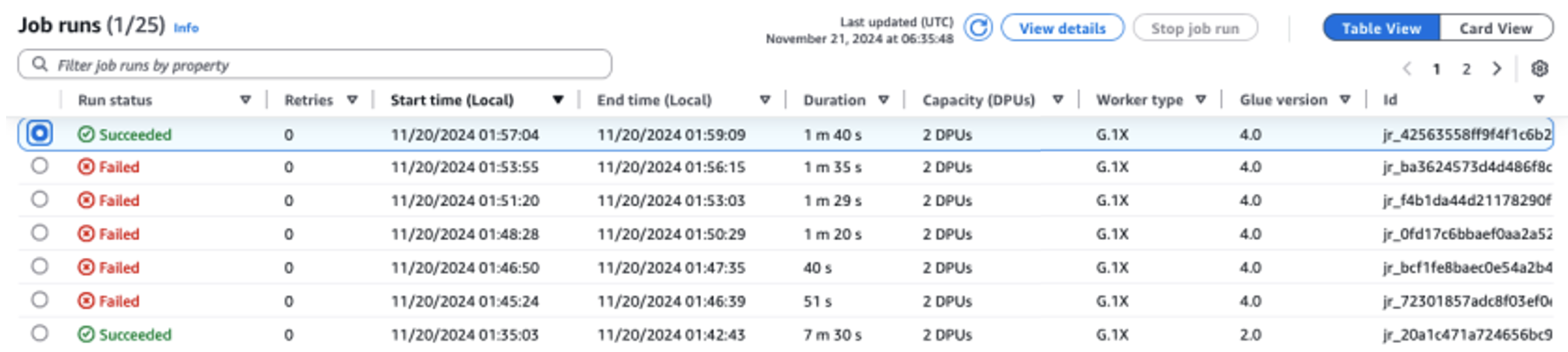

Your job has now been successfully upgraded to AWS Glue version 4.0. You can check the Script tab to verify the updated script and the Job details tab to review the modified configuration.
Understanding the upgrade process through an example

We now show a production Glue 2.0 job that we would like to upgrade to Glue 4.0 using the Spark Upgrade feature. This Glue 2.0 job reads a dataset, updated daily in an S3 bucket under different partitions, containing new book reviews from an online marketplace and runs SparkSQL to gather insights into the user votes for the book reviews.
Original code (Glue 2.0) – before upgrade
New code (Glue 4.0) – after upgrade
Upgrade summary
As seen in the updated Glue 4.0 (Spark 3.3.0) script diff compared to the Glue 2.0 (Spark 2.4.3) script and the resulting upgrade summary, a total of six different code and configuration updates were applied across the six attempts of the Spark Upgrade Analysis.
- Attempt #1 included a Spark SQL configuration (
spark.sql.adaptive.enabled) to restore the application behavior as a new feature for Spark SQL adaptive query execution is introduced starting Spark 3.2. Users can inspect this configuration change and can further enable or disable it as per their preference. - Attempt #2 resolved a Python language change between Python 3.7 and 3.10 with the introduction of a new abstract base class (
abc) under the Python collections module for importingSequence. - Attempt #3 resolved an error encountered due to a change in behavior of DataFrame API starting Spark 3.1 where
pathoption cannot exist with otherDataFrameReaderoperations. - Attempt #4 resolved an error caused by a change in the Spark SQL function API signature for
DATE_ADDwhich now only accepts integers as the second argument starting from Spark 3.0. - Attempt #5 resolved an error encountered due to the change in behavior Spark SQL function API for
count(tblName.*)starting Spark 3.2. The behavior was restored with the introduction of a new Spark SQL configurationspark.sql.legacy.allowStarWithSingleTableIdentifierInCount - Attempt #6 successfully completed the analysis and ran the new script on Glue 4.0 without any new errors. The final attempt resolved an error encountered due to the prohibited use of negative scale for
cast(DecimalType(3, -6)in Spark DataFrame API starting Spark 3.0. The issue was addressed by enabling the new Spark SQL configurationspark.sql.legacy.allowNegativeScaleOfDecimal.
Important considerations for preview
As you begin using automated Spark upgrades during the preview period, there are several important aspects to consider for optimal usage of the service:
- Service scope and limitations – The preview release focuses on PySpark code upgrades from AWS Glue versions 2.0 to version 4.0. At the time of writing, the service handles PySpark code that doesn’t rely on additional library dependencies. You can run automated upgrades for up to 10 jobs concurrently in an AWS account, allowing you to efficiently modernize multiple jobs while maintaining system stability.
- Optimizing costs during the upgrade process – Because the service uses generative AI to validate the upgrade plan through multiple iterations, with each iteration running as an AWS Glue job in your account, it’s essential to optimize the validation job run configurations for cost-efficiency. To achieve this, we recommend specifying a run configuration when starting an upgrade analysis as follows:
- Using non-production developer accounts and selecting sample mock datasets that represent your production data but are smaller in size for validation with Spark Upgrades.
- Using right-sized compute resources, such as G.1X workers, and selecting an appropriate number of workers for processing your sample data.
- Enabling Glue auto scaling when applicable to automatically adjust resources based on workload.
For example, if your production job processes terabytes of data with 20 G.2X workers, you might configure the upgrade job to process a few gigabytes of representative data with 2 G.2X workers and auto scaling enabled for validation.
- Preview best practices – During the preview period, we strongly recommend starting your upgrade journey with non-production jobs. This approach allows you to familiarize yourself with the upgrade workflow, and understand how the service handles different types of Spark code patterns.
Your experience and feedback are crucial in helping us enhance and improve this feature. We encourage you to share your insights, suggestions, and any challenges you encounter through AWS Support or your account team. This feedback will help us improve the service and add capabilities that matter most to you during preview.
Conclusion
This post demonstrates how automated Spark upgrades can assist with migrating your Spark applications in AWS Glue. It simplifies the migration process by using generative AI to automatically identify the necessary script changes across different Spark versions.
To learn more about this feature in AWS Glue, see Generative AI upgrades for Apache Spark in AWS Glue.
A special thanks to everyone who contributed to the launch of generative AI upgrades for Apache Spark in AWS Glue: Shuai Zhang, Mukul Prasad, Liyuan Lin, Rishabh Nair, Raghavendhar Thiruvoipadi Vidyasagar, Tina Shao, Chris Kha, Neha Poonia, Xiaoxi Liu, Japson Jeyasekaran, Suthan Phillips, Raja Jaya Chandra Mannem, Yu-Ting Su, Neil Jonkers, Boyko Radulov, Sujatha Rudra, Mohammad Sabeel, Mingmei Yang, Matt Su, Daniel Greenberg, Charlie Sim, McCall Petier, Adam Rohrscheib, Andrew King, Ranu Shah, Aleksei Ivanov, Bernie Wang, Karthik Seshadri, Sriram Ramarathnam, Asterios Katsifodimos, Brody Bowman, Sunny Konoplev, Bijay Bisht, Saroj Yadav, Carlos Orozco, Nitin Bahadur, Kinshuk Pahare, Santosh Chandrachood, and William Vambenepe.
About the Authors
 Noritaka Sekiyama is a Principal Big Data Architect on the AWS Glue team. He is responsible for building software artifacts to help customers. In his spare time, he enjoys cycling with his new road bike.
 Keerthi Chadalavada is a Senior Software Development Engineer at AWS Glue, focusing on combining generative AI and data integration technologies to design and build comprehensive solutions for customers’ data and analytics needs.
Shubham Mehta is a Senior Product Manager at AWS Analytics. He leads generative AI feature development across services such as AWS Glue, Amazon EMR, and Amazon MWAA, using AI/ML to simplify and enhance the experience of data practitioners building data applications on AWS.
 Pradeep Patel is a Software Development Manager on the AWS Glue team. He is passionate about helping customers solve their problems by using the power of the AWS Cloud to deliver highly scalable and robust solutions. In his spare time, he loves to hike and play with web applications.
 Chuhan Liu is a Software Engineer at AWS Glue. He is passionate about building scalable distributed systems for big data processing, analytics, and management. He is also keen on using generative AI technologies to provide brand-new experience to customers. In his spare time, he likes sports and enjoys playing tennis.
 Vaibhav Naik is a software engineer at AWS Glue, passionate about building robust, scalable solutions to tackle complex customer problems. With a keen interest in generative AI, he likes to explore innovative ways to develop enterprise-level solutions that harness the power of cutting-edge AI technologies.
Mohit Saxena is a Senior Software Development Manager on the AWS Glue and Amazon EMR team. His team focuses on building distributed systems to enable customers with simple-to-use interfaces and AI-driven capabilities to efficiently transform petabytes of data across data lakes on Amazon S3, and databases and data warehouses on the cloud.
AWS named as a leader again in the Gartner Magic Quadrant for Distributed Hybrid Infrastructure
Post Syndicated from Channy Yun (윤석찬) original https://aws.amazon.com/blogs/aws/aws-named-as-a-leader-again-in-the-gartner-magic-quadrant-for-distributed-hybrid-infrastructure/
Gartner published the second Magic Quadrant for Distributed Hybrid Infrastructure (DHI), which includes Amazon Web Services (AWS) as a leader again. AWS has three products in this DHI portfolio: AWS Outposts, AWS Snowball, and AWS Local Zones. In the accompanying Gartner’s Critical Capabilities for DHI, AWS is ranked number one in four out of six use cases evaluated by Gartner—including hybrid infrastructure management, edge computing, assured workloads, and artificial intelligence & machine learning (AI/ML)—and among the top two in the use case of container management.
Gartner evaluates 10 DHI providers based on their Ability to Execute, which measures a vendor’s capacity to deliver its products or services effectively, and Completeness of Vision, which assesses a vendor’s understanding of the market and its strategy for future growth.
Here is the graphical representation of the 2024 Gartner Magic Quadrant for DHI.
 Gartner recognized AWS strengths as:
- Leading public cloud provider – AWS DHI solutions appeal to AWS public cloud customers that want to extend their infrastructure to their data center and edge locations, while also migrating from their remaining private cloud infrastructure.
- As-a-service delivery – The fully managed infrastructure delivery of AWS Outposts simplifies operations and enables a hands-off, single-vendor approach to infrastructure management, including integration with some on-premises technologies.
- AWS support – Gartner clients report high satisfaction with the AWS worldwide support and services team.
We believe this leader placement reflects our innovation at the edge of the cloud for workloads that require low latency, local data processing, data residency, or migration with on-premises interdependencies. At AWS, we extend the same AWS infrastructure, AWS services, APIs, and tools wherever you need them for a truly consistent cloud experience.

Whether your workloads are running in the AWS Regions, in metro areas with AWS Local Zones, on premises with AWS Outposts, in the telco networks with AWS Wavelength, or at the far edge with AWS Snow Family, you can standardize on the same cloud operating model for all your applications. You can streamline developer workflow by standardizing on a common set of continuous integration and continuous deployment (CI/CD) pipelines. It also reduces the time, resources, operational risk, and maintenance downtime required to manage IT infrastructure.
As examples of accelerated innovation, we have added the latest generation of GPU-backed instances to Local Zones to better support ML workloads and expanded the number of locations. We have made Outposts available in more countries and added AWS services supported on Outposts to facilitate migration and disaster recovery, such as AWS Elastic Disaster Recovery and Amazon Route 53 Resolver to improve application availability and performance.
In addition, we have improved the disconnection tolerance for container-based workloads on Outposts by making it possible for customers to run both the Kubernetes control plane and nodes locally, and we enhanced its capabilities for multi-rack Outposts deployments.
Access the complete 2024 Gartner Magic Quadrant for DHI report to learn more.
— Channy
Gartner does not endorse any vendor, product or service depicted in its research publications and does not advise technology users to select only those vendors with the highest ratings or other designation. Gartner research publications consist of the opinions of Gartner’s research organization and should not be construed as statements of fact. Gartner disclaims all warranties, expressed or implied, with respect to this research, including any warranties of merchantability or fitness for a particular purpose.
GARTNER is a registered trademark and service mark of Gartner and Magic Quadrant is a registered trademark of Gartner, Inc. and/or its affiliates in the U.S. and internationally and are used herein with permission. All rights reserved.
Accelerate your data workflows with Amazon Redshift Data API persistent sessions
Post Syndicated from Dipal Mahajan original https://aws.amazon.com/blogs/big-data/accelerate-your-data-workflows-with-amazon-redshift-data-api-persistent-sessions/
Amazon Redshift is a fast, scalable, secure, and fully managed cloud data warehouse that you can use to analyze your data at scale. Tens of thousands of customers use Amazon Redshift to process exabytes of data to power their analytical workloads.The Amazon Redshift Data API simplifies programmatic access to Amazon Redshift data warehouses by providing a secure HTTP endpoint for executing SQL queries, so that you don’t have to deal with managing drivers, database connections, network configurations, authentication flows, and other connectivity complexities.
Amazon Redshift has launched a session reuse capability for the Data API that can significantly streamline multi-step, stateful workloads such as exchange, transform, and load (ETL) pipelines, reporting processes, and other flows that involve sequential queries. This persistent session model provides the following key benefits:
- The ability to create temporary tables that can be referenced across the entire session lifespan.
- Maintaining reusable database sessions to help optimize the use of database connections, preventing the API server from exhausting the available connections and improving overall system scalability.
- Reusing database sessions to simplify the connection management logic in your API implementation, reducing the complexity of the code and making it more straightforward to maintain and scale.
- Redshift Data API provides a secure HTTP endpoint and integration with AWS SDKs. You can use the endpoint to run SQL statements without managing connections. Calls to the Data API are asynchronous. The Data API uses either credentials stored in AWS Secrets Manager or temporary database credentials
A common use case that can particularly benefit from session reuse is ETL pipelines in Amazon Redshift data warehouses. ETL processes often need to stage raw data extracts into temporary tables, run a series of transformations while referencing those interim datasets, and finally load the transformed results into production data marts. Before session reuse was available, the multi-phase nature of ETL workflows meant that data engineers had to persist the intermediate results and repeatedly re-establish database connections after each step, which resulted in continually tearing down sessions; recreating, repopulating, and truncating temporary tables; and incurring overhead from connection cycling. The engineers could also reuse the entire API call, but this could lead to a single point of failure for the entire script because it doesn’t support restarting from the point where it failed.
With Data API session reuse, you can use a single long-lived session at the start of the ETL pipeline and use that persistent context across all ETL phases. You can create temporary tables once and reference them throughout, without having to constantly refresh database connections and restart from scratch.
In this post, we’ll walk through an example ETL process that uses session reuse to efficiently create, populate, and query temporary staging tables across the full data transformation workflow—all within the same persistent Amazon Redshift database session. You’ll learn best practices for optimizing ETL orchestration code, reducing job runtimes by reducing connection overhead, and simplifying pipeline complexity. Whether you’re a data engineer, an analyst generating reports, or working on any other stateful data, understanding how to use Data API session reuse is worth exploring. Let’s dive in!
Scenario
Imagine you’re building an ETL process to maintain a product dimension table for an ecommerce business. This table needs to track changes to product details over time for analysis purposes.
The ETL will:
- Load data extracted from the source system into a temporary table
- Identify new and updated products by comparing them to the existing dimension
- Merge the staged changes into the product dimension using a slowly changing dimension (SCD) Type 2 approach
Prerequisites
To walk through the example in this post, you need:
- An AWS Account
- An Amazon Redshift Serverless workgroup or provisioned cluster
Solution walkthrough
- You will use AWS Step Functions to call the Data API because this is one of the more straightforward ways to create a codeless ETL. The first step is to load the extracted data into a temporary table.
- Start by creating a temporary table based on the same columns as the final table using CREATE TEMP TABLE stage_stores (LIKE stores)”.
- When using Redshift Serverless you must use WorkgroupName. If using Redshift Provisioned cluster, you should use ClusterIdentifier.

- In the next step, copy data from Amazon Simple Storage Service (Amazon S3) to the temporary table. Instead of re-establishing the session, reuse it.
- Use SessionId and Sql as parameters.
- Database is a required parameter for Step Functions, but it doesn’t have to have a value when using the SessionId.

- Lastly, use Merge to merge the target and temporary (source) tables to insert or update data based on the new data from the files.

As shown in the preceding figures, we used a wait component because the query was fast enough for the session not to be captured. If the session isn’t captured, you will receive a Session is not available error. If you encounter that or a similar error, try adding a 1-second wait component.
At the end, the Data API use case should be completed, as shown in the following figure.

Other relevant use cases
The Amazon Redshift Data API isn’t a replacement for JDBC and ODBC drivers and is suitable for use cases where you don’t need a persistent connection to a cluster. It’s applicable in the following use cases:
- Accessing Amazon Redshift from custom applications with any programming language supported by the AWS SDK. This enables you to integrate web-based applications to access data from Amazon Redshift using an API to run SQL statements. For example, you can run SQL from JavaScript.
- Building a serverless data processing workflow.
- Designing asynchronous web dashboards because the Data API lets you run long-running queries without having to wait for it to complete.
- Running your query one time and retrieving the results multiple times without having to run the query again within 24 hours.
- Building your ETL pipelines with Step Functions, AWS Lambda, and stored procedures.
- Having simplified access to Amazon Redshift from Amazon SageMaker and Jupyter Notebooks.
- Building event-driven applications with Amazon EventBridgeand Lambda.
- Scheduling SQL scripts to simplify data load, unload, and refresh of materialized views.
Key considerations for using session reuse
When you make a Data API request to run a SQL statement, if the parameter SessionKeepAliveSeconds isn’t set, the session where the SQL runs is terminated when the SQL is finished. To keep the session active for a specified number of seconds you must set SessionKeepAliveSeconds in the Data API ExecuteStatement and BatchExecuteStatement. A SessionId field will be present in the response JSON containing the identity of the session, which can then be used in subsequent ExecuteStatement and BatchExecuteStatement operations. In subsequent calls you can specify another SessionKeepAliveSeconds to change the idle timeout time. If the SessionKeepAliveSeconds isn’t changed, the initial idle timeout setting remains. Consider the following when using session reuse:
- The maximum value of SessionKeepAliveSeconds is 24 hours. After 24 hours the session is forcibly closed, and in-progress queries are terminated.
- The maximum number of sessions per Amazon Redshift cluster or Redshift Serverless workgroup is 500. Please refer to Redshift Quotas and Limits here.
- It’s not possible to run parallel executions of the same session. You need to wait until the query is finished to run the next query in the same session. That is, you cannot run queries in parallel in a single session.
- The Data API can’t queue queries for a given session.
Best practices
We recommend the following best practices when using the Data API:
- Federate your IAM credentials to the database to connect with Amazon Redshift. Amazon Redshift allows users to get temporary database credentials with GetClusterCredentials. We recommend scoping the access to a specific cluster and database user if you’re granting your users temporary credentials. For more information, see Example policy for using GetClusterCredentials.
- Use a custom policy to provide fine-grained access to the Data API in the production environment if you don’t want your users to use temporary credentials. You can use AWS Secrets Manager to manage your credentials in such use cases.
- The maximum record size to be retrieved is 64 KB. More than that will raise an error.
- Don’t retrieve a large amount of data from your client and use the UNLOAD command to export the query results to Amazon S3. You’re limited to retrieving no more than 100 MB of data using the Data API.
- Query results are stored by 24 hours and discarded after that. If you need the same result after 24 hours, you will need to rerun the script to obtain the result.
- Remember that the session will be available for the amount of time specified by the SessionKeepAliveSeconds parameter in the Redshift Data API call. The session will terminate after the specified duration.Based on your security requirements, configure this value according to your ETL and ensure sessions are properly closed by setting SessionKeepAliveSeconds to 1 second to terminate them.
- When invoking Redshift API commands, all activities, including the user who executed the command and those who reused the session, are logged in CloudWatch. Additionally, you can configure alerts for monitoring.
- If a Redshift session is terminated or closed and you attempt to access it via the API, you will receive an error message stating, “Session is not available.”
Conclusion
In this post, we introduced you to the newly launched Amazon Redshift Data API session reuse functionality. We also demonstrated how to use the Data API from the Amazon Redshift console query editor and Python using the AWS SDK. We also provided best practices for using the Data API.
To learn more, see Using the Amazon Redshift Data API or visit the Data API GitHub repository for code examples. For serverless, see Use the Amazon Redshift Data API to interact with Amazon Redshift Serverless.
—————————————————————————————————————————————————–
About the Author
 Dipal Mahajan is a Lead Consultant with Amazon Web Services based out of India, where he guides global customers to build highly secure, scalable, reliable, and cost-efficient applications on the cloud. He brings extensive experience on Software Development, Architecture and Analytics from industries like finance, telecom, retail and healthcare.
 Anusha Challa is a Senior Analytics Specialist Solutions Architect focused on Amazon Redshift. She has helped many customers build large-scale data warehouse solutions in the cloud and on premises. She is passionate about data analytics and data science.
 Debu Panda is a Senior Manager, Product Management at AWS. He is an industry leader in analytics, application platform, and database technologies, and has more than 25 years of experience in the IT world.
 Ricardo Serafim is a Senior Analytics Specialist Solutions Architect at AWS.
Accelerate your migration to Amazon OpenSearch Service with Reindexing-from-Snapshot
Post Syndicated from Hang Zuo original https://aws.amazon.com/blogs/big-data/accelerate-your-migration-to-amazon-opensearch-service-with-reindexing-from-snapshot/
It is appealing to migrate from self-managed OpenSearch and Elasticsearch clusters in legacy versions to Amazon OpenSearch Service to enjoy the ease of use, native integration with AWS services, and rich features from the open-source environment (OpenSearch is now part of Linux Foundation). However, the data migration process can be daunting, especially when downtime and data consistency are critical concerns for your production workload.
In this post, we will introduce a new mechanism called Reindexing-from-Snapshot (RFS), and explain how it can address your concerns and simplify migrating to OpenSearch.
Key concepts
To understand the value of RFS and how it works, let’s look at a few key concepts in OpenSearch (and the same in Elasticsearch):
- OpenSearch index: An OpenSearch index is a logical container that stores and manages a collection of related documents. OpenSearch indices are composed of multiple OpenSearch shards, and each OpenSearch shard contains a single Lucene index.
- Lucene index and shard: OpenSearch is built as a distributed system on top of Apache Lucene, an open-source high-performance text search engine library. An OpenSearch index can contain multiple OpenSearch shards, and each OpenSearch shard maps to a single Lucene index. Each Lucene index (and, therefore, each OpenSearch shard) represents a completely independent search and storage capability hosted on a single machine. OpenSearch combines many independent Lucene indices into a single higher-level system to extend the capability of Lucene beyond what a single machine can support. OpenSearch provides resilience by creating and managing replicas of the Lucene indices as well as managing the allocation of data across Lucene indices and combining search results across all Lucene indices.
- Snapshots: Snapshots are backups of an OpenSearch cluster’s indexes and state in an off-cluster storage location (snapshot repository) such as Amazon Simple Storage Service (Amazon S3). As a backup strategy, snapshots can be created automatically in OpenSearch, or users can create a snapshot manually for restoring it on to a different domain or for data migration.
For example, when a document is added to the OpenSearch index, the distributed system layer picks a specific shard to host the document, and the document is ingested into that shard’s Lucene index. Operations on that document are then routed to the same shard (though the shard might have replicas). Search operations are performed across the shards in OpenSearch index individually and then a combined result is returned. A snapshot can be created to backup the cluster’s indexes and state, including cluster settings, node information, index settings and shard allocation, so that the snapshot can be used for data migration.
Why RFS?
RFS can transfer data from OpenSearch and Elasticsearch clusters at high throughput without impacting the performance of the source cluster. This is achieved by using the shard-level codependency and snapshots:
- Minimized performance impact to source clusters: Instead of retrieving data directly from the source cluster, RFS can use a snapshot of the source cluster for data migration. Documents are parsed from the snapshot and then reindexed to the target cluster, so that performance impact to the source clusters is minimized during migration. This maintains a smooth transition and minimal performance impact to end users, especially for production workloads.
- High throughput: Because shards are separate entities, RFS can retrieve, parse, extract and reindex the documents from each shard in parallel, to achieve high data throughput.
- Multi-version upgrades: RFS supports migrating data across multiple major versions (for example, from Elasticsearch 6.8 to OpenSearch 2.x), which can be a significant challenge with other data migration approaches. This is because the data indexed into OpenSearch (and Lucene) is only backward compatible for one major version. By incorporating reindexing as the core mechanism of the migration process, RFS can migrate data across multiple versions in one hop and make sure the data is fully updated and readable in the target cluster’s version, so that you don’t need to worry about the hidden technical debt imposed by having previous-version Lucene files in the new OpenSearch cluster.
How RFS works
OpenSearch and Elasticsearch snapshots are a directory tree that contains both data and metadata. Each index has its own sub-directory, and each shard has its own sub-directory under the directory of its parent index. The raw data for a given shard is stored in its corresponding shard sub-directory as a collection of Lucene files, which OpenSearch and Elasticsearch lightly obfuscates. Metadata files exist in the snapshot to provide details about the snapshot as a whole, the source cluster’s global metadata and settings, each index in the snapshot, and each shard in the snapshot.
The following is an example for the structure of an Elasticsearch 7.10 snapshot, along with a breakdown of its contents:
/snapshot/root
├── index-0 <-------------------------------------------- [1]
├── index.latest
├── indices
│   ├── DG4Ys006RDGOkr3_8lfU7Q <------------------------- [2]
│   │   ├── 0 <------------------------------------------ [3]
│   │   │   ├── __iU-NaYifSrGoeo_12o_WaQ <--------------- [4]
│   │   │   ├── __mqHOLQUtToG23W5r2ZWaKA <--------------- [4]
│   │   │   ├── index-gvxJ-ifiRbGfhuZxmVj9Hg
│   │   │   └── snap-eBHv508cS4aRon3VuqIzWg.dat <-------- [5]
│   │   └── meta-tDcs8Y0BelM_jrnfY7OE.dat <-------------- [6]
│   └── _iayRgRXQaaRNvtfVfRdvg
│       ├── 0
│       │   ├── __DNRvbH6tSxekhRUifs35CA
│       │   ├── __NRek2UuKTKSBOGczcwftng
│       │   ├── index-VvqHYPQaRcuz0T_vy_bMyw
│       │   └── snap-eBHv508cS4aRon3VuqIzWg.dat
│       └── meta-tTcs8Y0BelM_jrnfY7OE.dat
├── meta-eBHv508cS4aRon3VuqIzWg.dat <-------------------- [7]
└── snap-eBHv508cS4aRon3VuqIzWg.dat <-------------------- [8]
The structure includes the following elements:
- Repository metadata file: JSON encoded and contains a mapping between the snapshots within the repository and the OpenSearch or Elasticsearch indices and shards stored within it.
- Index directory: Contains the data and metadata for a specific OpenSearch or Elasticsearch index.
- Shard directory: Contains the data and metadata for a specific shard of an OpenSearch or Elasticsearch index
- Lucene Files: Lucene index files, lightly obfuscated by the snapshotting process. Large files from the source file system are split into multiple parts.
- Shard metadata file: SMILE encoded and contains details about all the Lucene files in the shard and a mapping between their in-snapshot representation and their original representation on the source machine they were pulled from (including the original file name and other details).
- Index metadata file: SMILE encoded and contains things such as the index aliases, settings, mappings, and number of shards.
- Global metadata file: SMILE encoded and contains things such as the legacy, index, and component templates.
- Snapshot metadata file: SMILE encoded and contains things such as whether the snapshot succeeded, the number of shards, how many shards succeeded, the OpenSearch or Elasticsearch version, and the indices in the snapshot.
RFS works by retrieving a local copy of a shard-level directory, unpacking its contents and de-obfuscating them, reading them as a Lucene index, and extracting the documents within. This is enabled because OpenSearch and Elasticsearch store the original format of documents added to an OpenSearch or Elasticsearch index in Lucene using the _source field; this feature is enabled by default and is what allows the standard _reindex REST API to work (among other things).
The user workflow for performing a document migration with RFS using the Migration Assistant is shown in the following figure:

The workflow is:
- The operator shells into the Migration Assistant console
- The operator uses the console command line interface (CLI) to initiate a snapshot on their source cluster. The source cluster stores the snapshot in an S3 Bucket.
- The operator starts the document migration with RFS using the console CLI. This creates a single RFS Worker, which is a Docker container running in AWS Fargate.
- Each RFS worker provisioned pulls down an un-migrated shard from the snapshot bucket and reindexes its documents against the target cluster. Once finished, it proceeds to the next shard until all shards are completed.
- The operator monitors the progress of the migration using the console CLI, which reports both the number of shards yet to be migrated and the number that have been completed. The operator can scale the RFS worker fleet up or down to increase or reduce the rate of indexing on the target cluster.
- After all shards have been migrated to the target cluster, the operator scales the RFS worker fleet down to zero.
As previously mentioned, the RFS workers operate at the shard-level, so that you can provision one RFS worker for every shard in the snapshot to achieve maximum throughput. If a RFS worker stops unexpectedly in the middle of migrating a shard, another RFS worker will restart its migration from the beginning. The original document identifiers are preserved in the migration process, so that the restarted migration will be able to over-write the failed attempt. RFS workers coordinate amongst themselves using metadata that they store in an index on the target cluster.
How RFS performs
To highlight the performance of RFS, let’s consider the following scenario: you have an Elasticsearch 7.10 source cluster containing 5 TiB (3.9 billion documents) and wants to migrate to OpenSearch 2.15. With RFS, you can perform this migration in approximately 35 minutes, spending approximately $10 in Amazon Elastic Container Service (Amazon ECS) usage to run the RFS workers during the migration.
To demonstrate this capability, we created an Elasticsearch 7.10 source cluster in Amazon OpenSearch Service, with 1,024 shards and 0 replicas. We used AWS Glue to bulk-load sample data into the source cluster with the AWS Public Blockchain Dataset, and repeated the bulk-load process until 5 TiB of data (3.9 billion documents) was stored. We created an OpenSearch 2.15 cluster as the target cluster in Amazon OpenSearch Service, with 15 r7gd.16xlarge data nodes and 3 m7g.large master nodes, and used Sigv4 for authentication. Using the Migration Assistant solution, we created a snapshot of the source cluster, stored it in S3, and performed a metadata migration so that the indices on the source were recreated on the target cluster with the same shard and replica counts. We then ran console backfill start and console backfill scale 200 to begin the RFS migration with 200 workers. RFS indexed data into the target cluster at 2,497 MiB per second. The migration was completed in approximately 35 minutes. We metered approximately $10 in ECS cost for running the RFS workers.
To better highlight the performance, the following figures show metrics from the OpenSearch target cluster during this process (presented below).

In the preceding figures, you can see the cyclical variation in the document index rate and target cluster resource utilization as the 200 RFS workers pick up shards, complete a shard, and then pick up a new shard. At peak RFS indexing, we see the target cluster nodes maxing their CPU and begin queuing writes. The queue is cleared as shards complete and more workers transition to the downloading state. In general, we find that RFS performance is limited by the ability of the target cluster to absorb the traffic it generates. You can tune the RFS worker fleet to match what your target cluster can reliably ingest.
Conclusion
This blog post is designed to be a starting point for teams seeking guidance on how to use Reindexing-from-Snapshot as a straightforward, high throughput, and low-cost solution for data migration from self-managed OpenSearch and Elasticsearch clusters to Amazon OpenSearch Service. RFS is now part of the Migration Assistant solution and available from the AWS Solution Library. To use RFS to migrate to Amazon OpenSearch Service, try the Migration Assistant solution. To experience OpenSearch, try the OpenSearch Playground. To use the managed implementation of OpenSearch in the AWS Cloud, see Getting started with Amazon OpenSearch Service.
About the authors
 Hang (Arthur) Zuo is a Senior Product Manager with Amazon OpenSearch Service. Arthur leads the core experience in the next-gen OpenSearch UI and data migration to Amazon OpenSearch Service. Arthur is passionate about cloud technologies and building data products that help users and businesses gain actionable insights and achieve operational excellence.
 Chris Helma is a Senior Engineer at Amazon Web Services based in Austin, Texas. He is currently developing tools and techniques to enable users to shift petabyte-scale data workloads into OpenSearch. He has extensive experience building highly-scalable technologies in diverse areas such as search, security analytics, cryptography, and developer productivity. He has functional domain expertise in distributed systems, AI/ML, cloud-native design, and optimizing DevOps workflows. In his free time, he loves to explore specialty coffee and run through the West Austin hills.
 Andre Kurait is a Software Development Engineer II at Amazon Web Services, based in Austin, Texas. He is currently working on Migration Assistant for Amazon OpenSearch Service. Prior to joining Amazon OpenSearch, Andre worked within Amazon Health Services. In his free time, Andre enjoys traveling, cooking, and playing in his church sport leagues. Andre holds Bachelor of the Science degrees from the University of Kansas in Computer Science and Mathematics.
 Prashant Agrawal is a Sr. Search Specialist Solutions Architect with Amazon OpenSearch Service. He works closely with customers to help them migrate their workloads to the cloud and helps existing customers fine-tune their clusters to achieve better performance and save on cost. Before joining AWS, he helped various customers use OpenSearch and Elasticsearch for their search and log analytics use cases. When not working, you can find him traveling and exploring new places. In short, he likes doing Eat → Travel → Repeat.
Amazon Black Friday with Price Tracking Data! Robotic Vacuums, Projectors and Smart Home
Post Syndicated from The Hook Up original https://www.youtube.com/watch?v=Jzrozw7idEg
From data lakes to insights: dbt adapter for Amazon Athena now supported in dbt Cloud
Post Syndicated from Darshit Thakkar original https://aws.amazon.com/blogs/big-data/from-data-lakes-to-insights-dbt-adapter-for-amazon-athena-now-supported-in-dbt-cloud/
At AWS, we are committed to empowering organizations with tools that streamline data analytics and transformation processes. We are excited to announce that the dbt adapter for Amazon Athena is now officially supported in dbt Cloud. This integration enables data teams to efficiently transform and manage data using Athena with dbt Cloud’s robust features, enhancing the overall data workflow experience.
In this post, we discuss the advantages of dbt Cloud over dbt Core, common use cases, and how to get started with Amazon Athena using the dbt adapter.
The need for streamlined data transformations
As organizations increasingly adopt cloud-based data lakes and warehouses, the demand for efficient data transformation tools has grown. Athena plays a critical role in this ecosystem by providing a serverless, interactive query service that simplifies analyzing vast amounts of data stored in Amazon Simple Storage Service (Amazon S3) using standard SQL. This enables you to extract insights from your data without the complexity of managing infrastructure.
dbt has emerged as a leading framework, allowing data teams to transform and manage data pipelines effectively. With the dbt adapter for Athena adapter now supported in dbt Cloud, you can seamlessly integrate your AWS data architecture with dbt Cloud, taking advantage of the scalability and performance of Athena to simplify and scale your data workflows efficiently.
Benefits of the dbt adapter for Athena
We have collaborated with dbt Labs and the open source community on an adapter for dbt that enables dbt to interface directly with Athena. Previously, the dbt adapter for Athena was only compatible with dbt Core, requiring teams to manually manage configurations and execute transformations locally or through custom setups. Now, with support for dbt Cloud, you can access a managed, cloud-based environment that automates and enhances your data transformation workflows. This upgrade allows you to build, test, and deploy data models in dbt with greater ease and efficiency, using all the features that dbt Cloud provides.
The support of the dbt adapter for Athena in dbt Cloud offers several advantages over using it with dbt Core:
- Managed infrastructure – dbt Cloud provides a fully managed environment for running dbt projects, eliminating the need for local setup, maintenance, and configuration. This saves time and effort, especially for teams looking to minimize infrastructure management and focus solely on data modeling.
- Scheduling and automation – dbt Cloud comes with a job scheduler, allowing you to automate the execution of dbt models. This feature makes sure your datasets are always up to date without needing to set up and maintain external scheduling systems like Apache Airflow. You can also set up dependencies between jobs easily within dbt Cloud, making sure that transformations run in the correct sequence without manual oversight.
- Enhanced collaboration and version control – You can use a web-based interface for editing and reviewing dbt models, enabling collaboration among data teams. You can review code changes directly on the platform, facilitating efficient teamwork. Additionally, dbt Cloud integrates with Git providers, making version control and code collaboration more streamlined. This makes sure your data models are well-documented, versioned, and straightforward to manage within a collaborative environment.
- Monitoring and alerting – You get built-in tools for monitoring job executions and performance to set up alerts and notifications for job failures, providing quick response times and minimizing disruptions. Furthermore, you can gain insights into the performance of your data transformations with detailed execution logs and metrics, all accessible through the dbt Cloud interface.
Common use cases for using the dbt adapter with Athena
The following are common use cases for using the dbt adapter with Athena:
- Building a data warehouse – Many organizations are moving towards a data warehouse architecture, combining the flexibility of data lakes with the performance and structure of data warehouses. Using Athena and the dbt adapter, you can transform raw data in Amazon S3 into well-structured tables suitable for analytics. This setup allows businesses to build a scalable and efficient data lakehouse where they can perform SQL-based transformations and make sure data is clean and ready for analytics without investing heavily in data warehouse infrastructure.
- Incremental data processing – The adapter allows for incremental data processing, where only new or updated data is transformed and processed. This feature reduces the amount of data scanned by Athena, resulting in faster query performance and lower costs. For example, instead of processing an entire dataset daily, dbt can be configured to transform only the data ingested in the last 24 hours, making data operations more efficient and cost-effective.
- Cost management and optimization – Because Athena charges based on the amount of data scanned by each query, cost optimization is critical. The adapter enables data teams to optimize transformations by creating efficient data models, such as partitioning and compressing data to minimize scan costs. Additionally, dbt’s automated scheduling in dbt Cloud can be used to manage the frequency of data transformations, making sure queries are run only when necessary, helping to control costs effectively.
- Data archiving and tiered storage – Organizations with a large amount of historical data can use Athena to query archived data stored in the lower-cost storage classes of Amazon S3 (such as Amazon S3 Glacier). With the adapter, data teams can build models that segment and process data based on usage patterns, making sure frequently accessed data is optimized for quick queries while older data remains accessible but cost-efficient. Alternatively, you can use Amazon S3 Intelligent-Tiering to optimize storage costs by moving data between two access tiers when access patterns change. This approach helps in managing storage costs while maintaining the flexibility to analyze historical trends when needed.
- Event-driven data transformations – In scenarios where organizations need to process data in near real time, such as for streaming event logs or Internet of Things (IoT) data, you can integrate the adapter into an event-driven architecture. For example, event data can be continuously loaded into Amazon S3, and dbt models can be configured to run incrementally, transforming the new data into structured formats for immediate analysis. This setup supports agile data processing while taking advantage of the serverless architecture of Athena to keep operational costs low.
- Compliance and data governance – For organizations managing sensitive or regulated data, you can use Athena and the adapter to enforce data governance rules. With dbt, teams can define data quality checks and access controls as part of their transformation workflow. This makes sure that only compliant, high-quality data is made available for analytics, and costs are optimized by processing only the data that meets governance standards. Additionally, dbt’s documentation features help maintain a clear record of data transformations, supporting audit and compliance efforts.
How to use the dbt adapter for Athena
To get started, create a project and set up a connection with Athena in dbt Cloud. The following figure shows the steps to create a project using dbt Cloud and configure the Athena connection.

Next, use the dbt Cloud interactive development environment (IDE) to deploy your project. The following figure demonstrates how to build dbt runs and deploy changes to Athena using the dbt Cloud interface.

Conclusion
At AWS, we are committed to providing you with the best possible tools and services to help you succeed in the cloud. dbt has emerged as a leading data transformation platform, trusted by thousands of organizations worldwide. By partnering with dbt Labs, we are able to bring the power of dbt directly to the AWS Cloud, empowering you to seamlessly integrate your data transformation workflows into the broader cloud infrastructure. This partnership is a testament to our shared vision of making data more accessible, reliable, and valuable for organizations of all sizes.
We are excited to see how you will use the dbt Cloud compatible dbt adapter for Athena to drive your data-driven initiatives forward. The combination of dbt and Athena creates a powerful and efficient environment for transforming and analyzing data in a serverless architecture. This synergy allows you to take advantage of the strengths of both tools, making it straightforward to manage complex data pipelines, reduce costs, and scale your operations.
About the Authors
 Darshit Thakkar is a Technical Product Manager with AWS and works with the Amazon Athena team.
 Selman Ay is a Data Architect in the AWS Professional Services team.
 BP Yau is a Sr Partner Solutions Architect at AWS helping customers architect big data solutions to process data at scale