Post Syndicated from The Prometheus Team original https://prometheus.io/blog/2024/11/14/prometheus-3-0/
[$] LWN.net Weekly Edition for November 14, 2024
Post Syndicated from corbet original https://lwn.net/Articles/997293/
The LWN.net Weekly Edition for November 14, 2024 is available.
Comic for 2024.11.14 – No Nut November
Post Syndicated from Explosm.net original https://explosm.net/comics/no-nut-november
New Cyanide and Happiness Comic
Metasense V2: Enhancing, improving and productionisation of LLM powered data governance
Post Syndicated from Grab Tech original https://engineering.grab.com/metasense-v2
Introduction
In the initial article, LLM Powered Data Classification, we addressed how we integrated Large Language Models (LLM) to automate governance-related metadata generation. The LLM integration enabled us to resolve challenges in Gemini, such as restrictions on the customisation of machine learning classifiers and limitations of resources to train a customised model. Gemini is a metadata generation service built internally to automate the tag generation process using a third-party data classification service. We also focused on LLM-powered column-level tag classifications. The classified tags, combined with Grab’s data privacy rules, allowed us to determine sensitivity tiers of data entities. The affordability of the model also enables us to scale it to cover more data entities in the company. The initial model scanned more than 20,000 data entries, at an average of 300-400 entities per day. Despite its remarkable performance, we were aware that there was room for improvement in the areas of data classification and prompt evaluation.
Improving the model post-rollout
Since its launch in early 2024, our model has gradually grown to cover the entire data lake. To date, the vast majority of our data lake tables have undergone analysis and classification by our model. This has significantly reduced the workload for Grabbers. Instead of manually classifying all new or existing tables, Grabbers can now rely on our model to assign the appropriate classification tier accurately.
Despite table classification being automated, the data pipeline still requires owners to manually perform verification to prevent any misclassifications. While it is impossible to entirely eliminate human oversight from critical machine learning workflows, the team has dedicated substantial time post-launch to refining the model, thereby safely minimising the need for human intervention.
Utilising post-rollout data
Following the deployment of our model and receipt of extensive feedback from table owners, we have accumulated a large dataset to further enhance the model. This data, coupled with the dataset of manual classifications from the Data Governance Office to ensure compliance with information classification protocols, serves as the training and testing datasets for the second iteration of our model.
Model improvements with prompt engineering
Expanding the evaluation and testing data allowed us to uncover weaknesses in the previous model. For instance, we discovered that seemingly innocuous table columns like “business email” could contain entries with Personal Identifiable Information (PII) data.
An example of this would be a business that uses a personal email address containing a legal name—a discrepancy that would be challenging for even human reviewers to detect. Additionally, we discovered nested JSON structures occasionally included personal names, phone numbers, and email addresses hidden among other non-PII metadata. Lastly, we identified passenger communications with Grab occasionally mentioning legal names, phone numbers, and other PII, despite most of the content being non-PII.
Ultimately, we hypothesised the model’s main issue was model capacity. The model displayed difficulty focusing on large data samples containing a mixture of PII and non-PII data despite having a good understanding of what constitutes PII. Just like humans, when given high volumes of tasks to work on simultaneously, the model’s effectiveness is reduced. In the original model, 13 out of 21 tags were aimed at distinguishing different types of non-PII data. This took up significant model capacity and distracted the model from its actual task: identifying PII data.
To prevent the model from being overwhelmed, large tasks are divided into smaller, more manageable tasks, allowing the model to dedicate more attention to each task. The following measures were taken to free up model capacity:
- Splitting the model into two parts to make problem solving more manageable.
- One part for adding PII tags.
- Another part for adding all other types of tags.
-
Reducing the number of tags for the first part from 21 to 8 by removing all non-PII tags. This simplifies the task of differentiating types of data.
-
Using clear and concise language, removing unnecessary detail. This was done by reducing word count in prompt from 1,254 to 737 words for better data analysis.
- Splitting tables with more than 150 columns into smaller tables. Fewer table rows means that the LLM has sufficient capacity to focus on each column.
Enabling rapid prompt experimentation and deployment
In our quest to facilitate swift experimentation with various prompt versions, we have empowered a diverse team of data scientists and engineers to work together effectively on the prompts and service. This has been made possible by upgrading our model architecture to incorporate the LangChain and LangSmith frameworks.
LangChain introduces a novel framework that streamlines the process from raw input to the desired outcome by chaining interoperable components. LangSmith, on the other hand, is a unified DevOps platform that fosters collaboration among various team members and developers, including product managers, data scientists, and software engineers. It simplifies the processes of development, collaboration, testing, deployment, and monitoring for all involved.
Our new backend leverages LangChain to construct an updated model that supports classification tasks for both non-PII and PII tagging. Integration with LangSmith enables data scientists to directly develop prompt templates and conduct experiments via the LangSmith user interface. In addition, managing the evaluation dataset on LangSmith provides a clear view of the performance of prompts across multiple custom metrics.
The integration of LangChain and LangSmith has significantly improved our model architecture, fostering collaboration and continuous improvement. This has not only streamlined our processes but also enhanced the transparency of our performance metrics. By harnessing the power of these innovative tools, we are better equipped to deliver high-quality, efficient solutions.
The benefits of the LangChain and LangSmith framework enhancements in Metasense are summarised as follows:
Streamlined prompt optimisation process.
Data scientists can create, update, and evaluate prompts directly on the LangSmith user interface and save them in commit mode. For rapid deployment, the prompt identifier in service configurations can be easily adjusted.
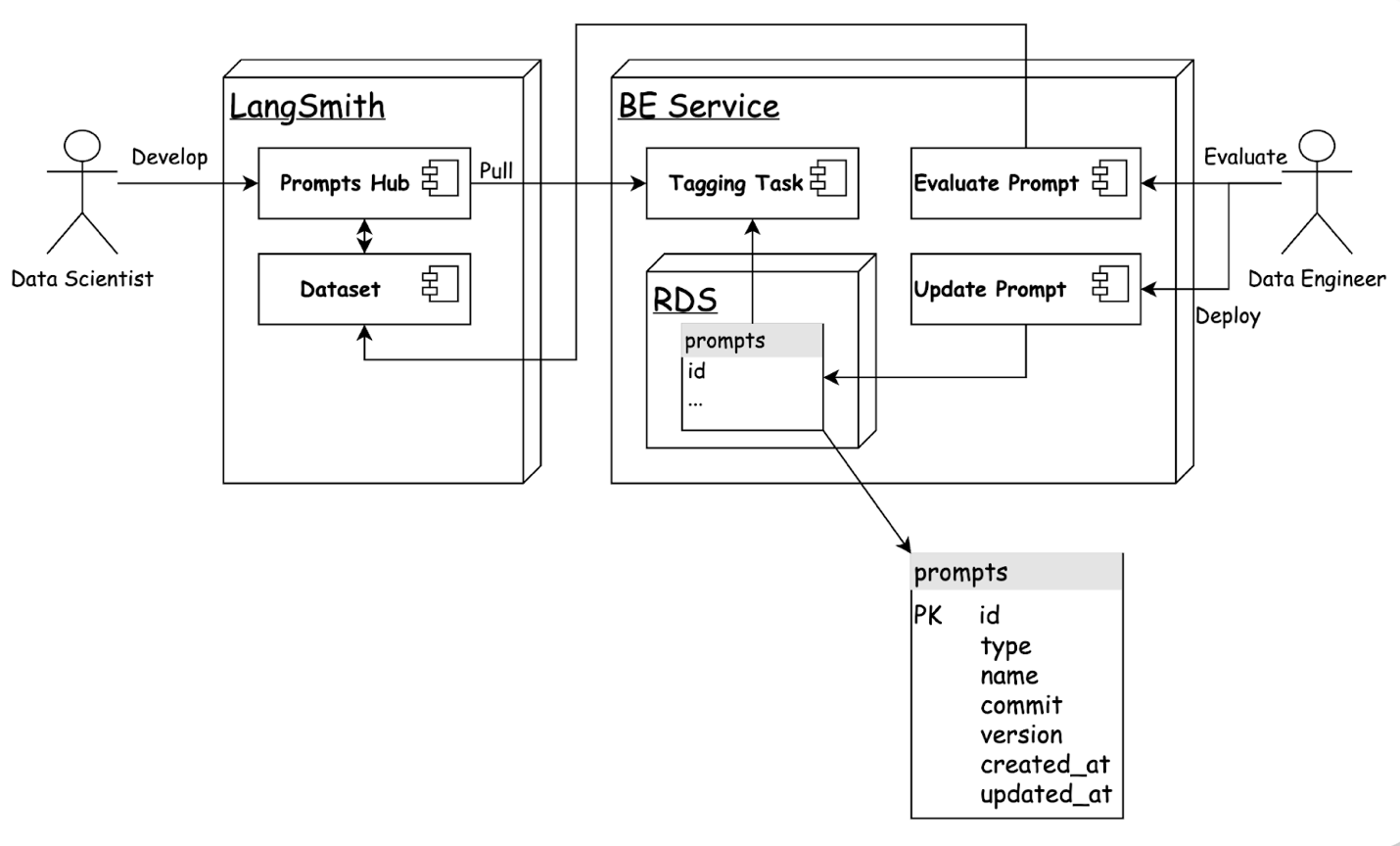
Transparent prompt performance metrics.
LangSmith’s capabilities allow us to effortlessly run evaluations on a dataset and obtain performance metrics across multiple dimensions, such as accuracy, latency, and error rate.
Assuring quality in perpetuity
With exceptionally low misclassification rates recorded, table owners can place greater trust in the model’s outputs and spend less time reviewing them. Nevertheless, as a prudent safety measure, we have set up alerts to monitor misclassification rates periodically, sounding an internal alarm if the rate crosses a defined threshold. A model improvement protocol has also been set in place for such alarms.
Conclusion
The integration of LLM into our metadata generation process has significantly improved our data classification capabilities, reducing manual workloads and increasing accuracy. Continuous improvements, including the adoption of LangChain and LangSmith frameworks, have streamlined prompt optimisation and enhanced collaboration among our team. With low misclassification rates and robust safety measures, our system is both reliable and scalable, fostering trust and efficiency. In conclusion, these advancements ensure we remain at the forefront of data governance, delivering high-quality solutions and valuable insights to our stakeholders.
We would like to express our sincere gratitude to Infocomm Media Development Authority (IMDA) for supporting this initative.
Join us
Grab is the leading superapp platform in Southeast Asia, providing everyday services that matter to consumers. More than just a ride-hailing and food delivery app, Grab offers a wide range of on-demand services in the region, including mobility, food, package and grocery delivery services, mobile payments, and financial services across 700 cities in eight countries.
Powered by technology and driven by heart, our mission is to drive Southeast Asia forward by creating economic empowerment for everyone. If this mission speaks to you, join our team today!
Announcing Prometheus 3.0
Post Syndicated from The Prometheus Team original https://prometheus.io/blog/2024/11/14/prometheus-3-0/
Following the recent release of Prometheus 3.0 beta at PromCon in Berlin, the Prometheus Team
is excited to announce the immediate availability of Prometheus Version 3.0!
This latest version marks a significant milestone as it is the first major release in 7 years. Prometheus has come a long way in that time,
evolving from a project for early adopters to becoming a standard part of the cloud native monitoring stack. Prometheus 3.0 aims to
continue that journey by adding some exciting new features while largely maintaining stability and compatibility with previous versions.
The full 3.0 release adds some new features on top of the beta and also introduces a few additional breaking changes that we will describe in this article.
What’s New
Here is a summary of the exciting changes that have been released as part of the beta version, as well as what has been added since:
New UI
One of the highlights in Prometheus 3.0 is its brand-new UI that is enabled by default:
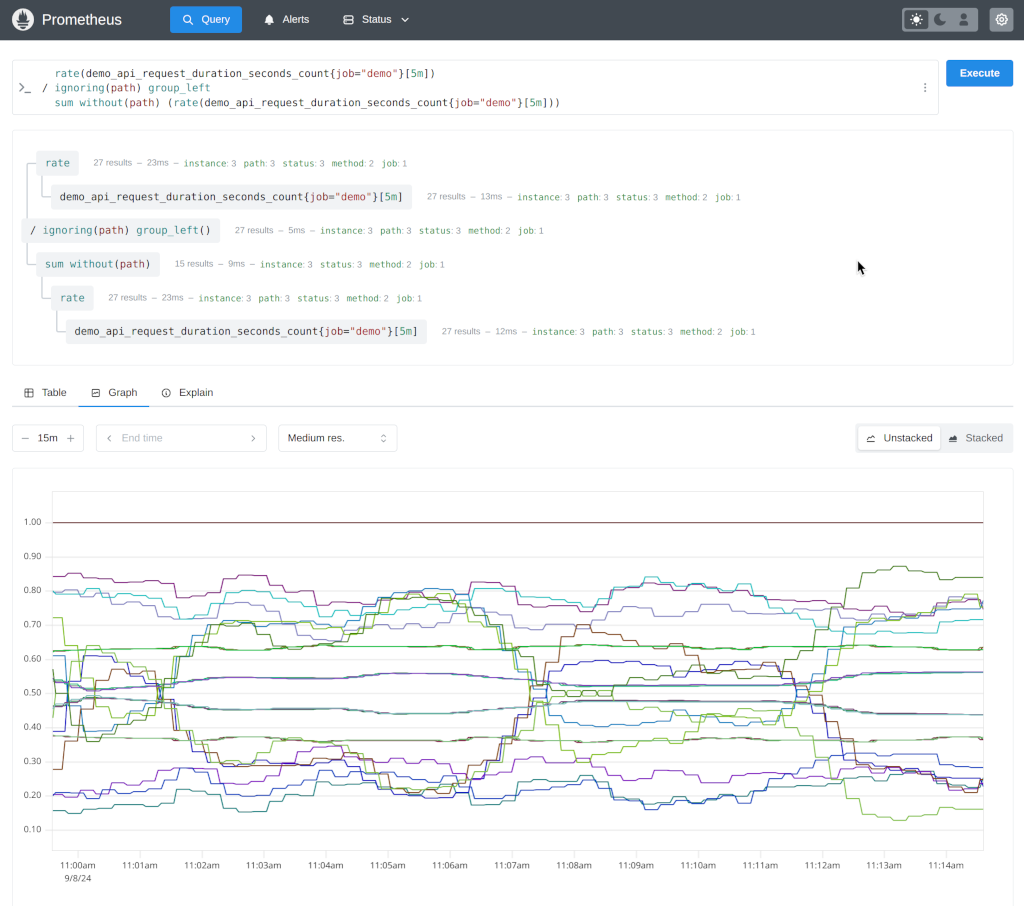
The UI has been completely rewritten with less clutter, a more modern look and feel, new features like a PromLens-style tree view,
and will make future maintenance easier by using a more modern technical stack.
Learn more about the new UI in general in Julius’ detailed article on the PromLabs blog.
Users can temporarily enable the old UI by using the old-ui feature flag.
Since the new UI is not battle-tested yet, it is also very possible that there are still bugs. If you find any, please
report them on GitHub.
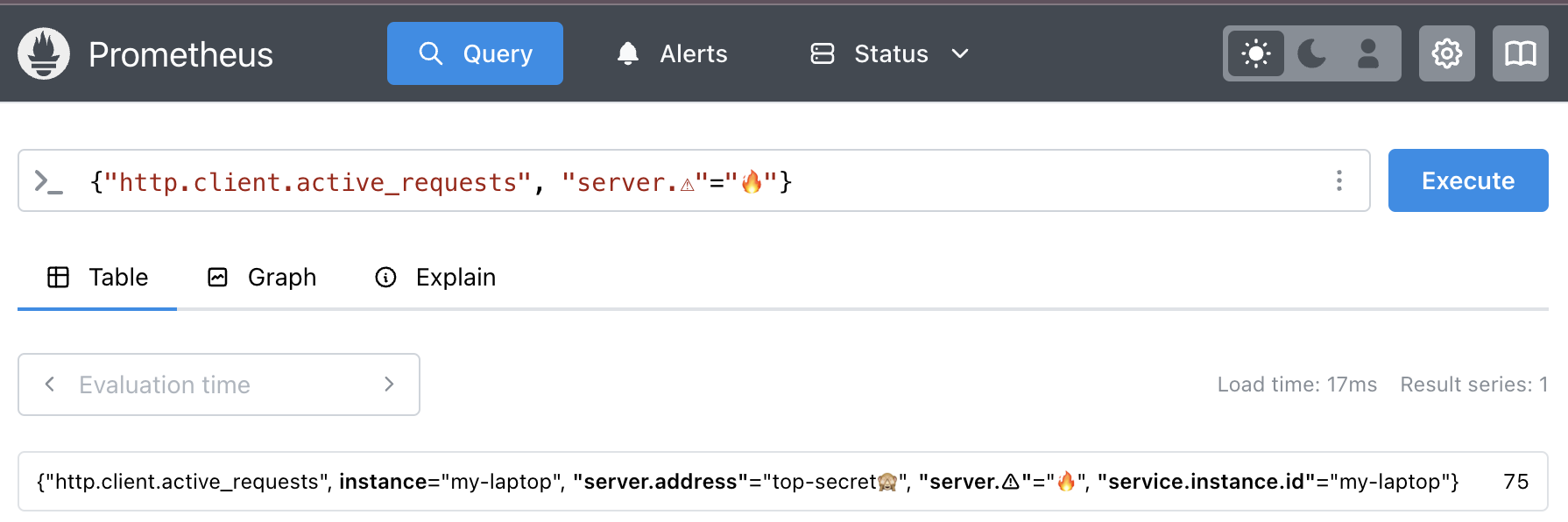
Since the beta, the user interface has been updated to support UTF-8 metric and label names.
Remote Write 2.0
Remote-Write 2.0 iterates on the previous protocol version by adding native support for a host of new elements including metadata, exemplars,
created timestamp and native histograms. It also uses string interning to reduce payload size and CPU usage when compressing and decompressing.
There is better handling for partial writes to provide more details to clients when this occurs. More details can be found
here.
UTF-8 Support
Prometheus now allows all valid UTF-8 characters to be used in metric and label names by default, as well as label values,
as has been true in version 2.x.
Users will need to make sure their metrics producers are configured to pass UTF-8 names, and if either side does not support UTF-8,
metric names will be escaped using the traditional underscore-replacement method. PromQL queries can be written with the new quoting syntax
in order to retrieve UTF-8 metrics, or users can specify the __name__ label name manually.
Currently only the Go client library has been updated to support UTF-8, but support for other languages will be added soon.
OTLP Support
In alignment with our commitment to OpenTelemetry, Prometheus 3.0 features
several new features to improve interoperability with OpenTelemetry.
OTLP Ingestion
Prometheus can be configured as a native receiver for the OTLP Metrics protocol, receiving OTLP metrics on the /api/v1/otlp/v1/metrics endpoint.
See our guide on best practices for consuming OTLP metric traffic into Prometheus.
UTF-8 Normalization
With Prometheus 3.0, thanks to UTF-8 support, users can store and query OpenTelemetry metrics without annoying changes to metric and label names like changing dots to underscores.
Notably this allows less confusion for users and tooling in terms of the discrepancy between what’s defined in OpenTelemetry semantic convention or SDK and what’s actually queryable.
To achieve this for OTLP ingestion, Prometheus 3.0 has experimental support for different translation strategies. See otlp section in the Prometheus configuration for details.
NOTE: While “NoUTF8EscapingWithSuffixes” strategy allows special characters, it still adds required suffixes for the best experience. See the proposal on the future work to enable no suffixes in Prometheus.
Native Histograms
Native histograms are a Prometheus metric type that offer a higher efficiency and lower cost alternative to Classic Histograms. Rather than having to choose (and potentially have to update) bucket boundaries based on the data set, native histograms have pre-set bucket boundaries based on exponential growth.
Native Histograms are still experimental and not yet enabled by default, and can be turned on by passing --enable-feature=native-histograms. Some aspects of Native Histograms, like the text format and accessor functions / operators are still under active design.
Breaking Changes
The Prometheus community strives to not break existing features within a major release. With a new major release we took the opportunity to clean up a few, but small, long-standing issues. In other words, Prometheus 3.0 contains a few breaking changes. This includes changes to feature flags, configuration files, PromQL, and scrape protocols.
Please read the migration guide to find out if your setup is affected and what actions to take.
Performance
It’s impressive to see what we have accomplished in the community since Prometheus 2.0. We all love numbers, so let’s celebrate the efficiency improvements we made for both CPU and memory use for the TSDB mode. Below you can see performance numbers between 3 Prometheus versions on the node with 8 CPU and 49 GB allocatable memory.
- 2.0.0 (7 years ago)
- 2.18.0 (4 years ago)
- 3.0.0 (now)
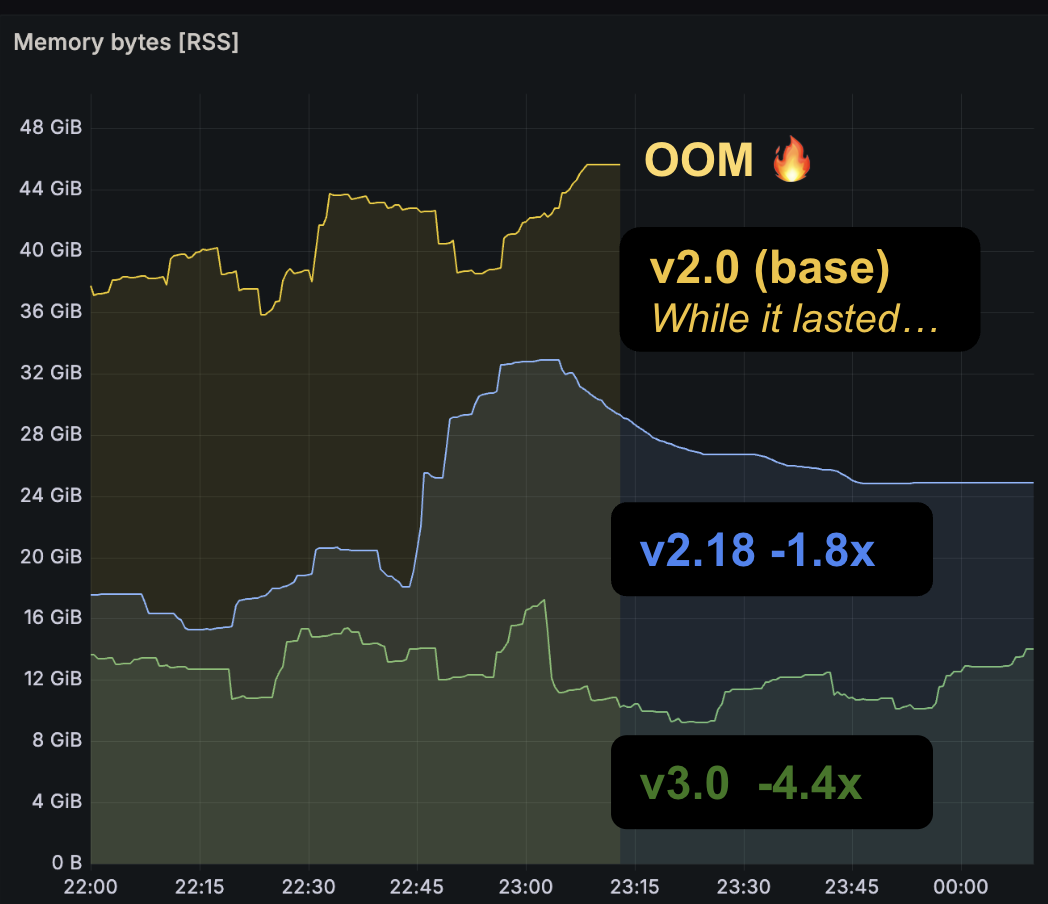
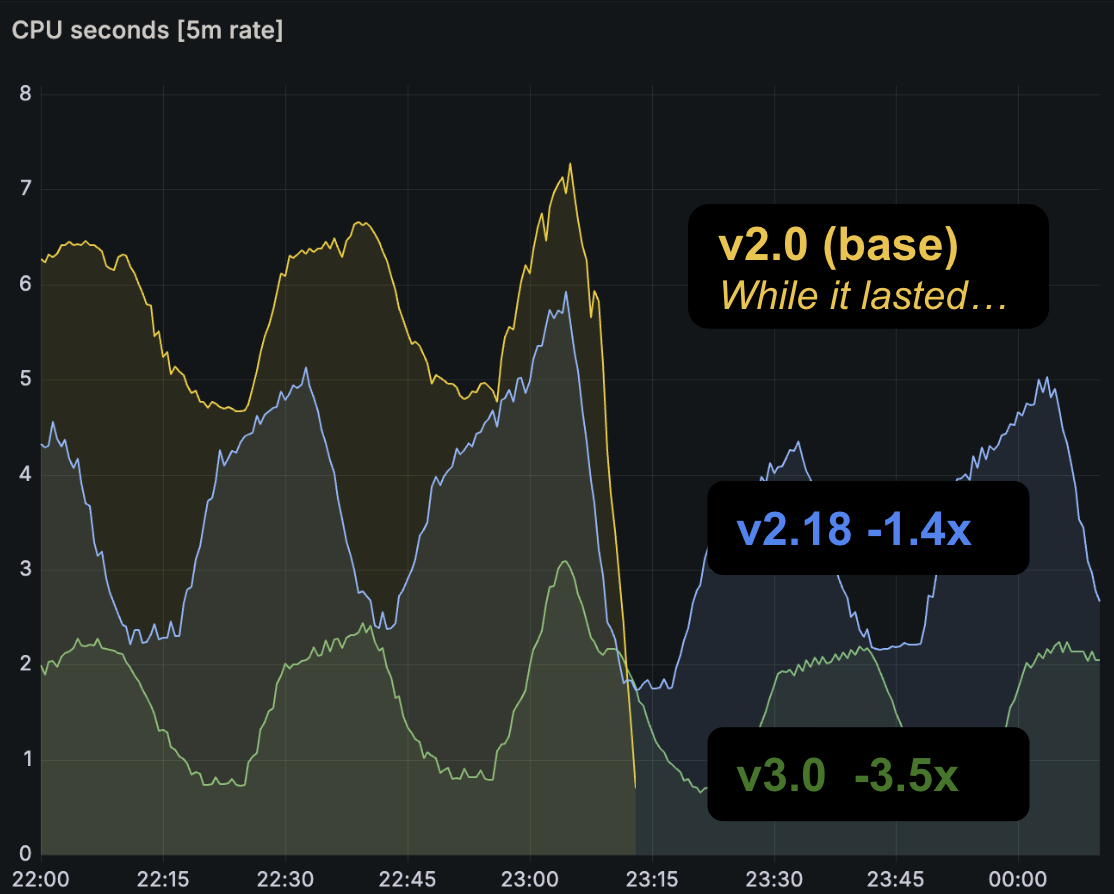
It’s furthermore impressive that those numbers were taken using our prombench macrobenchmark
that uses the same PromQL queries, configuration and environment–highlighting backward compatibility and stability for the core features, even with 3.0.
What’s Next
There are still tons of exciting features and improvements we can make in Prometheus and the ecosystem. Here is a non-exhaustive list to get you excited and…
hopefully motivate you to contribute and join us!
- New, more inclusive governance
- More OpenTelemetry compatibility and features
- OpenMetrics 2.0, now under Prometheus governance!
- Native Histograms stability (and with custom buckets!)
- More optimizations!
- UTF-8 support coverage in more SDKs and tools
Try It Out!
You can try out Prometheus 3.0 by downloading it from our official binaries and container images.
If you are upgrading from Prometheus 2.x, check out the migration guide for more information on any adjustments you will have to make.
Please note that we strongly recommend upgrading to v2.55 before upgrading to v3.0. Rollback is possible from v3.0 to v2.55, but not to earlier versions.
As always, we welcome feedback and contributions from the community!
Enhancing Message Reach: An Omnichannel Approach Using WhatsApp, SMS, and Email with AWS
Post Syndicated from Pavlos Ioannou Katidis original https://aws.amazon.com/blogs/messaging-and-targeting/enhancing-message-reach-an-omnichannel-approach-using-whatsapp-sms-and-email-with-aws/
SMS, WhatsApp, and email are essential channels for communication, each offering distinct advantages. SMS is known for its high deliverability and broad accessibility, making it a reliable choice for reaching users even without internet access. However, SMS can be costly, and delivery failures may lead to opportunity costs, such as potential lost sales if users cannot access their account or complete payment verification. WhatsApp provides a richer user experience at a lower cost but depends on internet connectivity and users having signed up for an account, which limits its reach. Email, while cost-effective and suitable for delivering detailed content, often faces issues including spam filtering and lower open rates.
By combining intelligent fallback mechanisms with broadcast capabilities, this versatile solution addresses a wide spectrum of communication needs, from time-sensitive transactional messages to expansive marketing campaigns. It sets the stage for diverse and impactful applications across various industries. The fallback mechanism dynamically switches to a backup channel if the primary one fails, ensuring that messages reach recipients. Meanwhile, the broadcast feature allows the simultaneous delivery of messages across multiple channels, maximizing reach and engagement. Together, these approaches extend message reach, improve user experience, and ensure reliable communication across platforms.
Use Cases
This multi-channel messaging solution is highly versatile, making it suitable for various use cases:
- OTP/Transactional Messaging: Timely and reliable delivery is critical for one-time passwords (OTP) and transactional notifications. The solution ensures these important messages are promptly delivered, utilizing fallback mechanisms across SMS, WhatsApp, and email in case of channel limitations or failures.
- Marketing Messages: This solution optimizes message delivery by selecting the most cost-effective and reliable channel while using the broadcast feature to deliver marketing messages across multiple channels, maximizing reach and engagement.
- Broadcast Messages: The broadcast option can be especially useful in sending high-priority or time-sensitive messages to a wide audience. Messages can be sent across multiple channels at once, increasing the likelihood that recipients will see the message in their preferred communication method.
Technical Solution
The architecture employs several AWS services to ensure reliable, cost-efficient message delivery:
- Amazon API Gateway: Accepts incoming API requests, including message details like content, recipient, fallback channels, and whether the message is broadcast or single-channel.
- Amazon Simple Queue Service (SQS): Manages the queuing of messages for both primary and fallback channels, as well as for broadcast messages, ensuring smooth processing and delivery.
- AWS Lambda: The Primary Message Handler Lambda function sends messages via the selected channel (SMS, WhatsApp, or email). If the primary delivery fails, the fallback process is handled by a secondary Lambda function. For broadcast messages, the message is sent to all specified channels simultaneously.
- Amazon DynamoDB: Stores message data and delivery statuses, enabling tracking of messages through all channels, including broadcast messages.
- Amazon Simple Notification Service (SNS): Publishes delivery status updates and triggers the next steps based on whether the message was delivered or failed.
- Amazon SES & End User Messaging Service: Email messages are sent via Amazon SES, while AWS End User Messaging handles SMS and WhatsApp delivery.
For a deeper technical breakdown of each component and the deployment steps, refer to the Github repository.
Architecture Diagram

Sending an SMS, WhatsApp, or Email
When sending a message, the system first attempts delivery via the primary channel specified in the API request, whether that’s SMS, WhatsApp, or email. The message details are processed by the API Gateway, which triggers the Primary Message Handler Lambda function:
- SMS: The message is sent via the End User Messaging Service. A delivery report is awaited to confirm whether the message was successfully delivered.
- WhatsApp: Similarly, the message is delivered via End User Messaging. Real-time read receipts and delivery statuses are tracked and updated in DynamoDB.
- Email: Email messages are sent through Amazon Simple Email Service (SES). The system tracks delivery confirmation events (like success or bounce) and updates the status in DynamoDB.
In all cases, if delivery fails or confirmation isn’t received within a specified period, the system triggers the fallback mechanism specified in the API request. This mechanism attempts to deliver the message through the secondary channel, ensuring message delivery via an alternate method.
For broadcast messages, the system simultaneously delivers the message across all specified channels, ensuring the widest possible reach. For example, an emergency notification might be broadcast via SMS, WhatsApp, and email, allowing recipients to receive the message through whichever channel they prefer.
Monitoring Delivery Status
The system tracks delivery statuses for all three channels:
- SMS: Delivery confirmations are provided by the SMS provider and published to an SNS topic. This triggers a Lambda function, which updates the message status in DynamoDB.
- WhatsApp: Real-time delivery and read receipts from WhatsApp are received and processed similarly to SMS. SNS triggers a Lambda function to update DynamoDB.
- Email: Delivery status for emails is tracked via events from Amazon SES (such as success, bounce, or rejection). These events are published to SNS, which triggers an update of the delivery status in DynamoDB.
The monitoring configured by this solution is solely for the fallback mechanism. It’s recommended to configure separately monitoring that you might require for storing and analyzing message engagement events.
Fallback to Secondary Channel
If the initial message delivery fails, the fallback mechanism is initiated, based on the fallback channel specified in the API request. The Primary Message Handler Lambda function places a request in the Secondary Channel Fallback Queue via SQS. The Secondary Message Handler Lambda function retrieves this request and sends the message through the secondary channel (for example, sending the message via WhatsApp if SMS delivery fails).
Deployment
Visit this GitHub repository for a detailed ReadMe and deployment guide of this solution.
Conclusion
This multi-channel messaging solution ensures reliable and efficient communication across SMS, WhatsApp, and email. By leveraging AWS services, the system guarantees message delivery through fallback mechanisms and a broadcast option. Whether sending one-time passwords, marketing communications, or emergency broadcasts, this solution adapts to different needs while optimizing costs and improving reach across multiple channels.
Simon Sinek | Building Optimism | Talks at Google
Post Syndicated from Talks at Google original https://www.youtube.com/watch?v=Wq6cv7V0cTo
Comic for 2024.11.13 – The Snip
Post Syndicated from Explosm.net original https://explosm.net/comics/the-snip
New Cyanide and Happiness Comic
Material Symbols and Status Card from HACS
Post Syndicated from BeardedTinker original https://www.youtube.com/watch?v=x25SYiDTlbs
How Volkswagen Autoeuropa built a data solution with a robust governance framework, simplifying access to quality data using Amazon DataZone
Post Syndicated from Dhrubajyoti Mukherjee original https://aws.amazon.com/blogs/big-data/how-volkswagen-autoeuropa-built-a-data-solution-with-a-robust-governance-framework-simplifying-access-to-quality-data-using-amazon-datazone/
This is a joint post co-authored with Martin Mikoleizig from Volkswagen Autoeuropa.
This second post of a two-part series that details how Volkswagen Autoeuropa, a Volkswagen Group plant, together with AWS, built a data solution with a robust governance framework using Amazon DataZone to become a data-driven factory. Part 1 of this series focused on the customer challenges, overall solution architecture and solution features, and how they helped Volkswagen Autoeuropa overcome their challenges. This post dives into the technical details, highlighting the robust data governance framework that enables ease of access to quality data using Amazon DataZone.
At Amazon, we work backward, a systematic way to vet ideas and create new products. The key tenet of this approach is to start by defining the customer experience, then iteratively work backward from that point until the team achieves clarity of thought around what to build. The first section of this post discusses how we aligned the technical design of the data solution with the data strategy of Volkswagen Autoeuropa. Next, we detail the governance guardrails of the Volkswagen Autoeuropa data solution. Finally, we highlight the key business outcomes.
Aligning the solution with the data strategy
At an early stage of the project, the Volkswagen Autoeuropa and AWS team identified that a data mesh architecture for the data solution aligns with the Volkswagen Autoeuropa’s vision of becoming a data-driven factory. With this in mind, the team implemented the following steps:
- Define data domains – In a workshop, the team identified the data landscape and its distribution in Volkswagen Autoeuropa. Next, the team grouped the data assets of the organization along the lines of business and defined the data domains. Because Volkswagen Autoeuropa is at an early stage of their data mesh journey, defining data domains along the lines of business is the recommended approach. As the data solution evolves, Volkswagen Autoeuropa might consider other criteria such as business subdomains to define data domains. The team defined more than five data domains, such as production, quality, logistics, planning, and finance.
- Identify pioneer cases – The team identified the pioneer use cases that onboard the data solution first, to validate its business value. The team identified two use cases. The first use case helps predict test results during the car assembly process. The second use case enables the creation of reports containing shop floor key metrics for different management levels. The following criteria were considered to identify these use cases:
- Use cases that deliver measurable business value for Volkswagen Autoeuropa.
- Use cases with high AWS maturity.
- Use cases whose requirements can be met with the first release version of the data solution.
- Onboard key data products – The team identified the key data products that enabled these two use cases and aligned to onboard them into the data solution. These data products belonged to data domains such as production, finance, and logistics. In addition, the team aligned on business metadata attributes that would help with data discovery. The data products are classified as either source-based data or consumer-based data. Source-based data is the unaltered, raw data that is generated from source systems (for example, quality data, safety data) and is useful for other business use cases. Consumer-based data is the aggregated and transformed data from source systems. Reuse of consumer-based data saves cost in extract, transform, and load (ETL) implementation and system maintenance.
In addition to the preceding steps, the team established a data quality framework to improve the quality of the data product registered in the data solution. The following table shows the mapping of the data mesh-based solution components to Amazon DataZone and AWS Glue features. The table also provides generic examples of the components in the automotive industry.
| Data Solution Components | AWS Service Features | Generic Examples |
| Data domains | Amazon DataZone projects and Amazon DataZone domain units | Production, logistics |
| Use cases | Amazon DataZone projects | Smart manufacturing, predictive maintenance |
| Data products | Amazon DataZone assets | Sales data, sensor data |
| Business metadata | Amazon DataZone glossaries and metadata forms | Data product owner information, data refresh frequency |
| Data quality framework | AWS Glue Data Quality | A quality score of 92% |
Empowering teams with a governance framework
This section discusses the governance framework that was put in place to empower the teams at Volkswagen Autoeuropa by enhancing their analytics journey. It highlights the guardrails that enable ease of access to quality data.
Business metadata
Business metadata helps users understand the context of the data, which can lead to increased trust in the data. Moreover, establishing a common set of attributes of the data products promotes a consistent experience for the users. In addition to the business context, at Volkswagen Autoeuropa, the metadata includes information related to data classification and if the data contains personally identifiable information (PII). The data solution uses Amazon DataZone glossaries and metadata forms to provide business context to their data. Apart from the previous benefits, using the appropriate keywords in Amazon DataZone glossary terms and metadata forms can help with the search and filtering capability of data products in the Amazon DataZone data portal.
Data quality framework
The data quality framework is a comprehensive solution designed to streamline the process of data quality checks and publishing a quality score. It uses AWS Glue Data Quality to generate recommendation rulesets, run orchestrated jobs, store results, and send notifications. This framework can be seamlessly integrated into an AWS Glue job, providing a quality score for data pipeline jobs. The quality score of a data product is published in the Amazon DataZone data portal for consumers to evaluate. The key components of the solution are as follows:
- Recommendation ruleset generation – The framework generates tailored rulesets based on metadata from the AWS Glue Data Catalog table, providing relevant and comprehensive quality checks.
- Orchestrated job execution – Jobs are run in AWS Step Functions to perform data quality checks using the generated rulesets against data sources, evaluating data quality based on defined rules and criteria.
- Result storage and notification – Results, including quality scores, quality status, and rulesets checked, are stored in an Amazon Simple Storage Service (Amazon S3) bucket, maintaining a historical record. End-users receive notifications with relevant details.
- Data quality score publishing – The quality scores are published in the Amazon DataZone data portal, enabling consumers to access and evaluate data quality.
- Subscription and quality score requirements – Consumers can subscribe to data sources or targets based on their desired quality score thresholds, making sure they receive data that meets their specific needs and standards.
- Integration and extensibility – The framework is designed for seamless integration into existing AWS Glue jobs or data pipelines and provides a flexible and extensible architecture for customization and enhancement.
Federated governance
Federated governance empowers producer and consumer teams to operate independently while adhering to a central governance model. For the data solution at Volkswagen Autoeuropa, this meant a centralized team defined the governance guardrails and decentralized data teams employed those guardrails. The following are a few examples of how the team established federated governance in Volkswagen Autoeuropa:
- Management of Amazon DataZone glossaries and metadata forms – In this mechanism, the Volkswagen Autoeuropa IT team defined the Amazon DataZone glossaries and metadata forms in a central manner. The data teams used them to publish the data assets in the Amazon DataZone. This provides consistency of business metadata across the organization. The following figure explains the process.

The workflow in the Amazon DataZone data portal consists of the following steps:

-
- The data solution administrator belonging to the Volkswagen Autoeuropa IT team aligns with stakeholders such as data producers, data consumers, and source system owners, and maintains the business metadata using the Amazon DataZone glossaries and metadata forms.
- The producer project teams use the Amazon DataZone glossary terms and fill the Amazon DataZone metadata forms to enrich the inventory assets.
- After the business metadata is populated, the team publishes the assets in the Amazon DataZone data portal.
- Management of Amazon DataZone project membership – In this scenario, the management of Amazon DataZone project membership is delegated to a designated administrator of the project. The following figure explains the process.

The workflow consists of the following steps:

-
- The data solution administrator belonging to the Volkswagen Autoeuropa IT team provisions the Amazon DataZone project and environment using automation. The data solution administrator is the owner of the project.
- The data solution administrator delegates the management of the Amazon DataZone project membership to a designated administrator by assigning the owner role.
- The Amazon DataZone project administrator assigns the contributor role to eligible users.
- The users access the Amazon DataZone project and its assets from the Amazon DataZone data portal.
Authentication and authorization
The Amazon DataZone portal supports two types of authorizations: AWS Identity and Access Management (IAM) roles and AWS IAM Identity Center users. The data solution supports both of these authorization methods. The choice of authentication mechanism is a function of the type of authorization used for Amazon DataZone.
For IAM role authorization, an IAM role is created for each user, incorporating a prefix. Each data solution user role has a permission to list the Amazon DataZone domains (datazone:ListDomains) and to get the data portal login URL (datazone:GetIamPortalLoginUrl) in the Amazon DataZone AWS account. For reasons that are out of scope for this post, there could only be three SAML federated roles in an AWS account in the customer environment. As such, the team didn’t have a dedicated SAML federated role for each Amazon DataZone user. The data solution user role implemented a trust policy allowing the user’s AWS Security Token Service (AWS STS) federated user session principal Amazon Resource Name (ARN). If you don’t have limitations on the number of SAML federated roles per AWS account, you can make all data solution user roles SAML federated roles and update the trust policy accordingly.
For IAM Identity Center authorization, the configuration is done either at the AWS Organizations level or AWS account level in IAM Identity Center. Because there are currently no APIs available for identity source configuration in IAM Identity Center, the team followed the appropriate instructions to configure the identity source on the AWS Management Console.
After the chosen authorization option is activated, Amazon DataZone administrators grant the IAM principals (IAM role or IAM Identity Center user) access to the Amazon DataZone portal. For more details, refer to Manage users in the Amazon DataZone console.
Business outcomes
Volkswagen Autoeuropa and AWS established an iterative mechanism to enable the continuous growth of the data solution. This iterative improvement is expressed as a flywheel as shown in the following figure.

The outcome of each component of the flywheel powers the next component, creating a virtuous cycle. The data solution flywheel consists of five components:
- Data solution growth – The primary focus of the flywheel is to accelerate the growth of the data solution. This growth is measured by metrics such as number of data products, number of use cases onboarded into the solution, and number of users.
- Enhancing user experience – This component focuses on enhancing the user experience of the data solution. One way to measure the user experience is through user feedback surveys.
- Data solution use cases – Improved, positive user experience with the data solution contributes to the increased number of use cases that want to onboard the data solution.
- Data producers and consumers – As the number of use cases increases, so does the number of data producers and consumers. Data producers make data available to power the use cases. Data consumers use the data to drive the use cases.
- Selection of data products – After data producers onboard the data solution, they publish the assets in the Amazon DataZone data portal. This leads to a larger selection of data products. This, in turn, creates a positive experience for the data solution users.
In addition to the previous components, the positive user experience is reinforced by improving governance guardrails, increasing number of reusable assets, and maximizing operational excellence.
As of writing this post, Volkswagen Autoeuropa reduced the time to discover data from days to minutes using the data solution. This led to approximately 384 times improvement in data discovery time. Data access took several weeks before the Volkswagen Autoeuropa and AWS collaboration. With the help of the data solution powered by Amazon DataZone, the data access time was reduced to minutes. Overall, the data solution resulted in regaining between 48 hours and weeks of customer productivity over the course of a month.
The data solution powered by Amazon DataZone is driving measurable business impact for Volkswagen Autoeuropa. It enables Volkswagen Autoeuropa to deliver digital use cases faster, with less effort, and a higher overall quality. Volkswagen Autoeuropa believes that Amazon DataZone will be key in their journey to become a data-driven factory and to leverage AI.
Conclusion
This post explored how Volkswagen Autoeuropa built a robust and scalable data solution using Amazon DataZone. The first step was to align the solution with Volkswagen Autoeuropa’s overarching data strategy to drive business value.
The establishment of a comprehensive governance framework was central to this effort. This framework encompasses key components, such as business metadata, data quality, federated governance, access controls, and security, which maintain the trustworthiness and reliability of Volkswagen Autoeuropa’s data assets. The post highlighted the Volkswagen Autoeuropa data solution flywheel, showcasing how the solution enabled improved decision-making, increased operational efficiency, and accelerated digital transformation initiatives across the organization.
The data solution built at Volkswagen Autoeuropa is one of the first implementations within the Volkswagen Group and is a blueprint for other Volkswagen production plants.
“This project is a blueprint for other Volkswagen production plants. By involving the AWS team and using Amazon DataZone, we are able to govern our data centrally and make it accessible in an automated and secure way.”
– Daniel Madrid, Head of IT, Volkswagen Autoeuropa.
If you’re looking to harness the power of data mesh to drive innovation and business value within your organization, we’ve got you covered. In Strategies for building a data mesh-based enterprise solution on AWS, we dive deep into the key considerations and current recommendations to establish a robust, scalable, and well-governed data mesh on AWS. This documentation covers everything from aligning your data mesh with overall business strategy to implementing the data mesh strategy framework.
To get hands-on experience with real-world code examples, see our GitHub repository. This open source project provides a step-by-step blueprint for constructing a data mesh architecture using the powerful capabilities of Amazon DataZone, AWS Cloud Development Kit (AWS CDK), and AWS CloudFormation.
About the Authors
 Dhrubajyoti Mukherjee is a Cloud Infrastructure Architect with a strong focus on data strategy, data analytics, and data governance at AWS. He uses his deep expertise to provide guidance to global enterprise customers across industries, helping them build scalable and secure AWS solutions that drive meaningful business outcomes. Dhrubajyoti is passionate about creating innovative, customer-centric solutions that enable digital transformation, business agility, and performance improvement. An active contributor to the AWS community, Dhrubajyoti authors AWS Prescriptive Guidance publications, blog posts, and open source artifacts, sharing his insights and best practices with the broader community. Outside of work, Dhrubajyoti enjoys spending quality time with his family and exploring nature through his love of hiking mountains.
 Ravi Kumar is a Data Architect and Analytics expert at AWS, where he finds immense fulfilment in working with data. His days are dedicated to designing and analyzing complex data systems, uncovering valuable insights that drive business decisions. Outside of work, he unwinds by listening to music and watching movies, activities that allow him to recharge after a long day of data wrangling.
 Martin Mikoleizig studied mechanical engineering and production technology at the RWTH Aachen University before starting to work in Dr. h.c. Ing. F. Porsche AG 2015 as a production planner for the engine assembly. Over several years as a Project Manager on Testing Technology for new engine models, he also introduced several innovations like human-machine collaborations and intelligent assistance systems. Starting in 2017, he was responsible for the shop floor IT team of the module lines in Zuffenhausen before he became responsible for the planning of the E-Drive assembly at Porsche. Additionally, he was responsible for the Digitalisation Strategy of the Production Ressort at Porsche. In October 2022, he was assigned to Volkswagen Autoeuropa in Portugal in the role of a Digital Transformation Manager for the plant, driving the digital transformation towards a data-driven factory.
 Weizhou Sun is a Lead Architect at AWS, specializing in digital manufacturing solutions and IoT. With extensive experience in Europe, she has enhanced operational efficiencies, reducing latency and increasing throughput. Weizhou’s expertise includes industrial computer vision, predictive maintenance, and predictive quality, consistently delivering top performance and client satisfaction. A recognized thought leader in IoT and remote driving, she has contributed to business growth through innovations and open source work. Committed to knowledge sharing, Weizhou mentors colleagues and contributes to practice development. Known for her problem-solving skills and customer focus, she delivers solutions that exceed expectations. In her free time, Weizhou explores new technologies and fosters a collaborative culture.
 Ajinkya Patil is a Senior Security Architect with AWS Professional Services, specializing in security consulting for customers in the automotive industry. Since joining AWS in 2019, he has played a key role in helping automotive companies design and implement robust security solutions on AWS. Ajinkya is an active contributor to the AWS community, having presented at AWS re:Inforce and authored articles for the AWS Security Blog and AWS Prescriptive Guidance. Outside of his professional pursuits, Ajinkya is passionate about travel and photography, often capturing the diverse landscapes he encounters on his journeys.
 Adjoa Taylor has over 20 years of experience in industrial manufacturing, providing industry and technology consulting services, digital transformation, and solution delivery. Currently, Adjoa leads Product Centric Digital Transformation, enabling customers in solving complex manufacturing problems using smart factory and industry-leading transformation mechanisms. Most recently, she drives value with AI/ML and generative AI use cases for the plant floor. Adjoa is an experienced leader, having spent over 20 years of her career delivering projects in countries throughout North America, Latin America, Europe, and Asia. Adjoa brings deep experience across multiple business segments with a focus on business outcome-driven solutions. Adjoa is passionate about helping customers solve problems while realizing the art of the possible through implementing value-based solutions.
[$] Truly portable C applications
Post Syndicated from daroc original https://lwn.net/Articles/997238/
Programming language polyglots are files that are valid
programs in multiple languages, and do different things in each. While polyglots are normally
nothing more than a curiosity, the
Cosmopolitan Libc project has been trying
to put them to a novel use: producing native, multi-platform binaries that
run directly on several operating systems and architectures. There are still
some rough edges with the project’s approach, but it is generally possible to
build C programs into a polyglot format with with minimal
tweaking.
Security updates for Wednesday
Post Syndicated from jzb original https://lwn.net/Articles/998044/
Security updates have been issued by AlmaLinux (expat), Fedora (chromium and golang-github-nvidia-container-toolkit), Mageia (curl, expat, mpg123, networkmanager-libreswan, openssl, php-tcpdf, qbittorrent, and x11-server, x11-server-xwayland, and tigervnc), Red Hat (kernel and libsoup), Slackware (mozilla), SUSE (firefox, kernel, python-PyPDF2, and xen), and Ubuntu (dotnet9, ghostscript, linux-aws, linux-oem-6.8, and pydantic).
Solidigm D5-P5336 122.88TB NVMe SSD Launched Shipping in Q1 2025
Post Syndicated from Patrick Kennedy original https://www.servethehome.com/solidigm-d5-p5336-122-88tb-nvme-ssd-launched-shipping-in-q1-2025/
The enormous new Solidigm D5-P5336 122.88TB NVMe SSD allows for 3PB of storage in standard 2U servers from almost any vendor
The post Solidigm D5-P5336 122.88TB NVMe SSD Launched Shipping in Q1 2025 appeared first on ServeTheHome.
Backblaze Rate Limiting Policy for Consistent Performance
Post Syndicated from Jeremy Milk original https://www.backblaze.com/blog/rate-limiting-policy/

Highways have lanes for a reason. The lanes help ensure that large volumes of traffic can reach their destinations quickly and safely. And they support order and predictability in systems where some folks want (or need) to go NASCAR fast and others like myself a little less so.
Backblaze is now applying such fundamental highway engineering thinking to the B2 Cloud Storage platform, introducing a rate limiting policy designed to effectively support different types of customers and usage demands so everyone can continue to enjoy the high performance storage they need while better protecting all from the risk that any one customer or set of customers creates a traffic pileup for everyone else.
In practical terms, the new Backblaze policy prevents unexpected API usage spikes by limiting customers’ call and byte rates to specific thresholds per a specific period of time; if the rate is exceeded, the customer will temporarily receive a 503 status code when using our S3 compatible API, or a 429 status code when using our Backblaze B2 native API. This is similar to policies and status codes you’ve seen from other global cloud object storage providers including Amazon Web Services S3 and Microsoft Azure.
Based on our analysis of customer usage patterns, we are confident that the overwhelming majority of you will not reach rate limit thresholds–just smooth sailing, or open road if we stick to the highway/lanes analogy.
Backblaze can also assist customers that need a limit increase, for performance and proof of concept (PoC) testing, recovery and restore, and/or anticipated everyday needs.
Click down details:
- All Backblaze B2 customers will be under the governance of the policy after it is rolled out across the platform. Backblaze Computer Backup usage is not within the scope of this policy.
- Customers will be assigned different default rate limits based on account history and usage patterns, as well as information gleaned during sales-assisted implementation and renewal planning discussions.
- New, self-service customers with smaller datasets stored will initially be provisioned for uploads up to 50 requests and 100MB per second, and for downloads up to 20 requests and 25MB per second, all per account. Other API operations may also be limited to keep traffic flowing, but again, this won’t be noticeable to most customers.
- Customers with larger datasets and all sales assisted customers whom we’ve supported during implementation and/or renewal will be provisioned with significantly higher limits and can be eligible for custom limits.
- Traffic analysis and engineering is a dynamic activity, so we’ll likely revise limits over time in response to evolving usage patterns, improvements we roll out, and, of course, customer feedback. We will announce significant changes here on the blog.
You can visit our API documentation for more information. Please also don’t hesitate to contact our support team with any questions and/or to proactively talk about the right rate limits to serve your unique needs.
The post Backblaze Rate Limiting Policy for Consistent Performance appeared first on Backblaze Blog | Cloud Storage & Cloud Backup
The Shortest War in History: The 1896 Anglo-Zanzibar War
Post Syndicated from The History Guy: History Deserves to Be Remembered original https://www.youtube.com/watch?v=IvsnRme3h0o
Mapping License Plate Scanners in the US
Post Syndicated from Bruce Schneier original https://www.schneier.com/blog/archives/2024/11/mapping-license-plate-scanners-in-the-us.html
DeFlock is a crowd-sourced project to map license plate scanners.
It only records the fixed scanners, of course. The mobile scanners on cars are not mapped.
Опасното разширяване на войната. Как севернокорейската армия се озова на фронта между Украйна и Русия
Post Syndicated from original https://www.toest.bg/opasnoto-razshiryavane-na-voynata-kak-severnokoreyskata-armiya-se-ozova-na-fronta-mejdu-ukrayna-i-rusiya/

В началото на октомври тази година украинското разузнаване съобщи, че няколко хиляди севернокорейски войници преминават обучение в Русия в подготовка за изпращане на фронтовата линия с Украйна. Националната разузнавателна служба на Южна Корея (NIS) по-късно потвърди информацията на Киев, като сподели сателитни изображения на руски плавателни съдове, транспортиращи 1500 войници от Северна Корея до руския град Владивосток за предполагаемо обучение.
На 23 октомври съветникът на Белия дом по въпросите на комуникациите в областта на националната сигурност Джон Кърби свидетелства за присъствието на най-малко 3000 севернокорейски войници. Сега Пентагонът смята, че в Русия те са 10 000 и са насочени към района на Курск в Западна Русия, за да се бият с украинските сили. В началото на ноември се появиха и първите сведения, че в Курска област вече се е състояло първото сражение между украински и севернокорейски части. Всичко това беше потвърдено на 13 ноември от говорителя на Държавния департамент на САЩ Ведант Пател.
Голямото разполагане на севернокорейски войски в Русия представлява тревожна нова фаза във войната между Русия и Украйна, като същевременно носи по-дълбоки последици за глобалната политика. Ще разгледаме пет ключови въпроса, свързани с ускоряването на военното сътрудничество между Северна Корея и Русия, и как това сътрудничество ще се отрази в по-широка степен на войната в Украйна.
Какво печелят Москва и Пхенян от дислоцирането на севернокорейски войски на фронта?
Обвиненият във военни престъпления руски президент Владимир Путин ще извлече незабавни военни ползи от севернокорейските войски. Съобщава се, че от 2023 г. насам Русия е получила от Северна Корея поне 7000 контейнера, които включват артилерийски снаряди, противотанкови ракети и балистични ракети с малък обсег, за да се попълнят силно изчерпаните руски боеприпаси и оръжия. Кремъл е изправен пред потенциален недостиг на наборници, а използването на севернокорейски войски временно би облекчило вътрешния натиск върху Путин от страна на руското Министерство на отбраната за мобилизирането на повече войници в армията тази есен.
Северна Корея вероятно ще получи допълнителни икономически ползи и по-голяма военнотехническа помощ от Русия, включваща сателитна и ракетна технология. Докато преди войната Путин се противопоставяше на ядрената програма на Северна Корея, сега Русия може да помогне за подобряването на ракетния капацитет и системите за доставка на ядрени оръжия на Пхенян. Русия също може да съдейства за обновяването на стареещия севернокорейски подводен флот. Освен това войниците на Северна Корея биха могли да придобият ценен боен опит, биейки се рамо до рамо с руснаците. По този начин ще могат и да оценят от първа ръка колко ефективна е военната им технология срещу произведените на Запад оръжия и защита.
Колко ефективни са севернокорейските войски и пред какви рискове е изправен режимът на Ким Чен Ун?
Не е ясно колко добре ще се представят севернокорейските войски в битка. Въпреки че са преминали обучение в руски военни бази в Далечния изток, различията в езика, културата, обучението и доктрината за водене на война могат да намалят ефективността на севернокорейските сили, докато не бъдат по-добре интегрирани с руските части. Доказателства за проблемната интеграция са вече налице – пленен от украинската армия руски войник разказа във видео, че севернокорейците изпитват трудности в ориентацията на фронта и по погрешка са открили огън по своите руски съюзници.
Ukrainians captured a Russian soldier in the Kursk region. He decided to surrender because North Korean soldiers were shooting in the wrong direction and might’ve even taken out two Russians.
Here’s hoping that “friendly fire” wasn’t so friendly after all. But even if it was… pic.twitter.com/94r7fgRef1
— Victoria (@victoriaslog) November 2, 2024
Съобщава се, че Ким Чен Ун е изпратил сили за специални операции от Единайсети армейски корпус, известен като Корпус на бурята. Това са елитни войници, обучени за мисии за проникване и убийства, с по-висока военна подготовка от новите руски наборници, изпращани на фронтовата линия. Въпреки това изглежда малко вероятно Ким Чен Ун да продължи да изпраща голям брой елитни войници в Русия, ако жертвите сред тях нарастват със същата скорост като убитите и ранените руснаци.
Един от рисковете, пред които е изправен севернокорейският режим, е възможността неговите войници да дезертират от бойното поле, стремейки се да останат в Украйна или в Южна Корея. Възможно е някои севернокорейски войници, които се предадат или бъдат пленени от украинските сили, да не искат да се върнат в Русия или в Северна Корея. Съществува вероятност да потърсят политическо убежище или да поискат да бъдат прехвърлени на южнокорейските власти. Украинското разузнаване съобщи, че вече 18 севернокорейци от войниците, разположени близо до руско-украинската граница, са дезертирали.
Как Южна Корея отговаря на севернокорейските войски в Русия?
От началото на войната Южна Корея не желае директно да изпраща нападателни оръжия на Украйна и предоставя предимно икономическа и хуманитарна подкрепа. Новото развитие обаче може да принуди Сеул да обмисли подкрепа за Киев чрез изпращане на оръжия и споделяне на разузнавателна информация. Южнокорейският президент Юн Сук Йол вече заяви, че от степента на севернокорейско участие във военните действия зависи дали Южна Корея би доставила оръжия на Украйна.
Независимо дали това ще стане, действията на Пхенян тласнаха Сеул да работи по-тясно с европейските си партньори, включително с НАТО. На 28 октомври делегация от длъжностни лица от разузнаването и отбраната на Южна Корея информира НАТО и тихоокеанските си партньори за оценките за разполагането на севернокорейски войски в Русия и обеща да продължи координацията за наблюдение на ситуацията в Украйна. Засиленото сътрудничество между Южна Корея и НАТО ще позволи на Сеул да споделя и получава информация относно бойните способности и тактики на Северна Корея и да проследява севернокорейските войски, изпратени на украинската фронтова линия. Южнокорейците биха могли да помогнат на украинците и в извършването на специални операции за насърчаване на севернокорейските войници да дезертират.
Къде стои Китай?
Китай засега не коментира официално факта, че в Русия има севернокорейски войски. Публично Пекин предлага дипломатически банални фрази, призоваващи за деескалация в Украйна и мир на Корейския полуостров. Пекин обаче остава притеснен от рисковете за ескалация, които не може пряко да контролира, от потенциалната нестабилност около китайските граници и от вероятността за засилено сътрудничество в областта на сигурността между Южна Корея, Япония и Съединените щати и възникващата координация между НАТО и Сеул в отговор на военния авантюризъм на Пхенян.
Пекин предостави дипломатическо и икономическо прикритие на Москва за нахлуването ѝ в Украйна, но отношенията между китайското правителство и Пхенян напоследък бяха хладни. Пропуските в комуникацията между трите страни поставиха Китай в неудобната позиция да се опитва да предотврати по-нататъшна дестабилизация на региона предвид собствените си геополитически и икономически предизвикателства. Според китайски анализатори Пекин вижда повече вреда от изпращането на севернокорейски сили в Русия, отколкото потенциална полза.
Как сътрудничество между Северна Корея и Русия ще се отрази на международните отношения?
Изпращането на севернокорейски войски в Русия показва, че Пхенян е напълно готов да подпомогне терористичната война на Русия в Украйна. Докато Северна Корея преди беше известна със своите киберзаплахи, пране на пари, трафик на оръжия и незаконна търговска дейност, то напредващото военно сътрудничество с Москва може да насърчи Пхенян да участва в други конфликти и бъдещи войни от името на партньори с подобно авторитарно управление, които се противопоставят на Запада. В зависимост от представянето им на фронта севернокорейските войски биха могли да бъдат дислоцирани заедно с руски части в Африка или в горещи точки от бившия СССР.
Присъствието на войските на Северна Корея в Русия има поне две дългосрочни последици. Първо, Путин отново демонстрира, че руските съюзници далеч не са изолирани, а са готови да подкрепят Русия в нейната война в Украйна. Ако Пхенян успее да получи нужните военни технологии от Русия в замяна на изпратени войници, това би накарало други авторитарни режими да изпробват същото. Иран например може да увеличи сътрудничеството си с Русия, докато се подготвя за възможна ескалация с Израел.
Второ, задълбочаването на военното сътрудничество между Русия и Северна Корея идва в момент на ескалация на напрежението на Корейския полуостров. Това включва неотдавнашното унищожаване от Северна Корея на междукорейски пътища и железопътни линии и предполагаемото нахлуване на южнокорейски дронове в Северна Корея този месец. Решението на Пхенян да изпрати войски в Русия индиректно предполага, че Северна Корея втвърдява стратегическата си позиция срещу Южна Корея. Ако Русия допълнително засили севернокорейския оръжеен капацитет, доставяйки войски и боеприпаси на Пхенян, то САЩ и техните съюзници в Европа и Азия ще трябва да се подготвят за нова фаза на по-голяма нестабилност и възможна ескалация в Далечния изток.
Докато Украйна се бие, съюзниците ѝ мълчат
Украинският президент Володимир Зеленски остро разкритикува пасивността на западните съюзници по отношение на включването на севернокорейски войски във войната. Той обвини политиците от страните съюзници в пасивно наблюдение на ситуацията, докато Москва подготвя нова офанзива, включваща севернокорейските части. Според Зеленски
Америка гледа, Великобритания гледа, Германия гледа. Всички просто чакат севернокорейските военни да започнат да атакуват украинската армия.
Киев повдигна и въпроса за потенциален превантивен украински удар по лагери в Русия, където се обучават севернокорейските войски. Украйна обаче не може да реализира такава превантивна операция без разрешение от съюзниците си да използва западните оръжия с голям обсег, за да удари цели дълбоко в Русия. Докато украинското Министерство на отбраната вече потвърди за „контакт“ между украински военни и севернокорейски части около Курск в началото на ноември, американски източници публикуваха данни за смесена руско-севернокорейска група от около 50 000 военни, за която се очаква също да бъде дислоцирана в Курска област в най-близко бъдеще.
Как толерирането на хомофобията направи възможно насилието пред Народния театър. И какво следва
Post Syndicated from Светла Енчева original https://www.toest.bg/kak-toleriraneto-na-homofobiyata-napravi-vuzmozhno-nasilieto-pred-narodniya-teatur/

Националисти, русофили и агенти на ДС провалят премиерата на театрална постановка в Народния театър, като не допускат зрителите да влязат в салона, докато полицията гледа безучастно. Постановката, режисирана от американския актьор Джон Малкович, е „Оръжията и човекът“ на Джордж Бърнард Шоу и е от далечната 1894 година.
Декларираните поводи за възмущение от пиесата са два. Първият е реплика на един от героите (българин), че той не вижда причина човек да се къпе по-често от веднъж в седмицата, а баща му никога не се е къпал. Вторият – че антивоенната пародия на Шоу тематизира Сръбско-българската война, а датата на премиерата ѝ – 7 ноември, – макар в масовото съзнание да се свърза само с Октомврийската революция, съвпада и с годишнина от Битката при Сливница в рамките на същата война (по стар стил, по нов годишнината е на 17 – 19 ноември).
Реалната причина за протеста обаче е, че той е организирано активно мероприятие.
Как се стигна до провалянето на премиерата
Ретроспекцията на къпането и некъпането в България и Европа заслужава специално внимание, затова тук фокусът ще падне върху осуетяването на театралната премиера. В редица публикации по темата се отбелязва, че то беше допуснато, след като подобни протести бяха организирани срещу филми и културни прояви на ЛГБТИ тематика. Има обаче един важен детайл – провалянето на премиерата на „Оръжията и човекът“ не просто следва хронологически осуетяването на прожекции и премиери на книги на ЛГБТИ тематика. То по-скоро е резултат от тях и от липсата на обществена подкрепа за правото на представителите на една малцинствена група да имат достъп до изкуство, което се отнася за хора като тях.
През 2021 г. например националисти се опитаха да провалят представянето на „Мравин“ в клуб The Steps – първата детска книжка, в която става дума за еднополови родители. На същото място дни по-късно на аналогичен натиск бяха подложени зрителите на късометражния филм на Слава Дойчева „Черупки“. В него се разказва колко трудни могат да бъдат семейните празници за хора в еднополови връзки, когато близките им не ги приемат. Тогава присъства полиция, но провокаторите са допуснати в залата.
Междувременно футболни агитки направиха опит да проникнат в сградата на Радио „Пловдив“, за да провалят представянето на две книги с лични истории на ЛГБТИ хора – „Смелостта да бъдеш“ и „Смелостта да бъдеш родител“.
Същата година над 500 привърженици на ВМРО обградиха мястото на прожекцията на македонския филм „Змия“, в който се разказва за приятелство (не от интимно естество) между момче и куиър мъж. След края на прожекцията зрители са преследвани и нападани по пътя към къщи. Това впрочем е една от малкото хомофобски прояви, чиито инициатори по-късно са осъдени.
Адвокатът и правозащитник Христо Копаранов, днес общински съветник от „Спаси София“, е един от зрителите на „Змия“. Пред „Тоест“ разказва как след прожекцията е успял да си тръгне с такси, обграден от полицейски кордон. Подобен опит е имал и с други филми на ЛГБТИ тематика – като споменатия „Черупки“ и белгийския „Близо“.
„Близо“ стана повод за хомофобска агресия в няколко града през 2023 г. Тогава привърженици на „Възраждане“ провалиха прожекцията на филма в кино „Одеон“, а пристигналите на място полицаи поздравяваха националистите и се снимаха с тях. Във Варна пък участници в протест срещу „Близо“, организирани от „Възраждане“, обиждаха и замеряха с предмети хора, отишли да го гледат, сред които е и Татяна Кристи.
„Видях 1933 [година] под благосклонния поглед на държавата в лицето на МВР – споделя Кристи, цитирана от „Свободна Европа“. – Замериха ме с шише, удариха ме, полицията видя всичко.“
И прожекцията на „Близо“ във Варна беше провалена. В Пловдив все пак се състоя – въпреки опита на „възрожденци“ да я осуетят и там.
Последната киножертва на националистическа пропаганда, отново от страна на „Възраждане“, беше филмът „Любен“. След поредната дезинформационна кампания Националният филмов център спря „Любен“ от участие във фестивала „Златна роза“.
От проваляне на прожекции – към щурмуване на институции
Когато хомофобските атаки срещу произведения на изкуството и на културата, свързани с ЛГБТИ хората, и срещу тяхната публика минават (с единични изключения) безнаказано, значи насилието работи. Особено когато се извършва на фона ако не на съучастието, то поне на бездействието на полицията и не среща отпор от страна на обществото. А щом работи, то ще разширява обхвата си. В този смисъл ЛГБТИ хората са опитни зайчета – чрез посегателствата срещу тях се изпробват обществените и институционалните граници на поносимост.
В началото на 2022 г. от „Възраждане“ се опитаха да проникнат в сградата на Народното събрание, понеже са против т.нар. зелени сертификати за COVID-19. Реториката им възпроизвеждаше лозунгите при щурмуването на Капитолия на 6 януари 2021 г., когато Тръмп загуби президентските избори:
Това е нашата сграда, това е нашият парламент.
На площада висеше декоративна бесилка. Изпратените на място полицаи бяха без защитни средства – шлемове, каски, щитове или палки – и едва успяха да удържат множеството да не нахлуе в сградата. По-късно МВР съобщиха за осем ранени полицаи и само един арестуван, понеже носел газов пистолет.
През май същата година пак от „Възраждане“ на два пъти опитаха да свалят знамето на Украйна от сградата на Столичната община. Първия път – с помощта на товарен автомобил с вишка. Присъстващите полицаи са предупредени да не се месят, защото щурмуващите Общината имат депутатски имунитет. При втория си опит „възрожденците“ използваха стълба. Въпреки многото присъстващи жандармеристи нямаше арестувани. Дори след като протестиращи обърнаха автомобил на жандармерията и се покатериха върху него.
Година по-късно пък проруски демонстранти, участващи в шествие под името „Общобългарски поход за мир и неутралитет“, заляха с червена боя Дома на Европа, в който се помещават представителствата на Европейската комисия и Европейския парламент в България. В шествието участваха политици от „Възраждане“, БСП, „Атака“, както и бивши леви депутати, като Мая Манолова.
В края на 2023 г. пък политици от БСП изкъртиха вратата на сградата на Областната управа в София. Причината? Искали да получат документите за демонтажа на Паметника на Съветската армия.
Без разбиване на врати, а отвътре, но все пак със сила беше превзет парламентът по време на последното заседание на 50-тото НС на 27 септември 2024 г. Представители на ИТН и „Възраждане“ създадоха хаос, физически блокираха достъпа до трибуната и прекъснаха кабели на микрофони. Така те попречиха да се приемат решения, които са необходимо условие, за да се отключи финансирането по Плана за възстановяване и устойчивост. В резултат на предизборния цирк България може да загуби поне 1,5 млрд. лв.
А в началото на тази седмица, на 11 ноември 2024 г., санкционираният по закона „Магнитски“ и превзел ДПС Делян Пеевски каза нещо, което може да се интерпретира като заплаха за превземане на парламента. Пред протестиращи в негова подкрепа, докарани с автобуси от страната, той заяви:
Това е последният път, в който ние ще бъдем цивилизовани и мирни тук отпред. Ако продължават с това отношение да не ни зачитат, ние с всички средства на демокрацията ще отстоим нашите права и аз като ваш лидер ще ги отстоя.
Не става ясно как се отстояват права „с всички средства на демокрацията“, ако това не се прави цивилизовано и мирно.
Кога се забеляза проблемът
След провалянето на премиерата на „Оръжията и човекът“ последваха изумени реакции, сякаш подобно нещо се случва за първи път. Те може би отчасти са причинени от комплекса „да не се излагаме пред чужденците“. Но мнозина като че наистина тепърва забелязват националистически и антиевропейски протест в България, който проваля нещо. Защото за тях ЛГБТИ хората не се броят, а според някои дори „си го заслужават“. А институциите не се ползват с особено доверие и опитите им за превземане със сила понякога дори будят симпатия.
Тъй като Народният театър, въпреки скандалите, свързани с настоящото му ръководство, е един от най-важните държавни културни институти, посегателството върху него предизвиква спонтанна вълна от обществена подкрепа. На второто представление на „Оръжията и човекът“ пред театъра пристигат не само актьори, но и много граждани, дошли да защитят правото на зрителите да видят пиесата, за която са платили билети.
Активисти за правата на ЛГБТИ хората впрочем също отиват пред театъра в подкрепа на актьорите, Малкович и публиката, защото знаят какво е да не бъдат допуснати да гледат филм. Сред тях е и Христо Копаранов.
Въпреки тази проява на солидарност обаче духът е пуснат от бутилката. Първо се експериментира върху малцинства. Ако мине – върху мнозинството, неговата култура и неговите институции.
Какво може да последва
Осуетяването на културни прояви, свързани с ЛГБТИ хората (което пък от своя страна е само част от цялата хомофобска и трансфобска агресия, която не е тема на тази статия, но я има), кулминира в приемането на поправка в закона, ограничаваща правото на изразяване на всичко, свързано с тях, в училище. Докъде може да доведе провалянето на театрални премиери и опитите за превземане на публични институции, ако няма силна обществена реакция, която да им се противопостави?
Ако популистки тълпи и дезинформационни кампании провалят театрални постановки, а театрите не срещат обществена подкрепа, логично е да започнат да се самоцензурират и да предлагат само „удобни“ пиеси. А не е изключено в един момент обявените за недостатъчно патриотични постановки да се окажат извън закона. Същото важи за книгите, филмите, музиката и останалите форми на изкуство.
Ако политици се опитват да щурмуват институции, без силите на реда да ги възпират особено, все някога може и да ги превземат. Тази перспектива си струва да се приеме сериозно поне по две причини:
Първо, България от вече три години е в постоянни цикли на предсрочни избори и парламенти, които не могат да формират стабилно мнозинство. В тази ситуация все по-голяма тежест придобиват гласовете, предлагащи алтернативи на настоящата избирателна система – от вдигане на 4-процентовата бариера за влизане в парламента до президентска република. Освен това много хора нямат доверие в изборния процес поради тежестта на контролирания вот и изборните манипулации.
На този фон, ако някой просто превземе властта – ей така, със сила, без избори, дали ще срещне сериозна съпротива, или преобладаващата част от населението ще си отдъхне, че най-сетне го управлява силна ръка и не го карат да гласува отново и отново?
Второ, победата на Доналд Тръмп на президентските избори в САЩ е вдъхновяваща за всякакви антидемократични движения, режими като този на Виктор Орбан и насилствени опити за превземане на властта. Провалянето на пиесата на Шоу, макар да има всички признаци на планирано активно мероприятие, особено като се има предвид, че е поставяна през годините в други театри тихо и кротко, беше представено като спонтанна обществена реакция, окрилена от победата на Тръмп предишната нощ.
35 години след падането (по-точно самодемонтирането) на тоталитарния режим е добре да не забравяме, че демокрацията не е даденост. Дори в страна като САЩ, която е неин символ. А какво остава за България, която не може да се похвали с дълга история на стабилно демократично съществуване. И в която демокрацията ни е подарена, а не сме се преборили за нея. Тя лесно може да се загуби – както с избори, така и със сила.
Don’t Mess with Four Eyes
Post Syndicated from The History Guy: History Deserves to Be Remembered original https://www.youtube.com/watch?v=_uW7la89fJM
Europa Clipper
Post Syndicated from xkcd.com original https://xkcd.com/3011/