Post Syndicated from xkcd.com original https://xkcd.com/2976/

Post Syndicated from xkcd.com original https://xkcd.com/2976/
Post Syndicated from Talks at Google original https://www.youtube.com/watch?v=bxjFU9o3f-8
Post Syndicated from Eric Z. Beard original https://aws.amazon.com/blogs/devops/use-aws-cloudformation-git-sync-to-configure-resources-in-customer-accounts/
AWS partners often have a requirement to create resources, such as cross-account roles, in their customers’ accounts. A good choice for consistently provisioning these resources is AWS CloudFormation, an Infrastructure as Code (IaC) service that allows you to specify your architecture in a template file written in JSON or YAML. CloudFormation also makes it easy to deploy resources across a range of regions and accounts in parallel with StackSets, which is an invaluable feature that helps customers who are adopting multi-account strategies.
The challenge for partners is in choosing the right technique to deliver the templates to customers, and how to update the deployed resources when changes or additions need to be made. CloudFormation offers a simple, one-click experience to launch a stack based on a template with a quick-create link, but this does not offer an automated way to update the stack at a later date. In the post, I will discuss how you can use the CloudFormation Git sync feature to give customers maximum control and flexibility when it comes to deploying partner defined resources in their accounts.
CloudFormation Git sync allows you to configure a connection to your Git repository that will be monitored for any changes on the selected branch. Whenever you push a change to the template file, a stack deployment automatically occurs. This is a simple and powerful automation feature that is easier than setting up a full CI/CD pipeline using a service like AWS CodePipeline. A common practice with Git repositories is to operate off of a fork, which is a copy of a repository that you make in your own account and is completely under your control. You could choose to make modifications to the source code in your fork, or simply fetch from the “upstream” repository and merge into your repository when you are ready to incorporate updates made to the original.

A diagram showing a partner repository, a customer’s forked repository, and a stack with Git sync enabled
In the diagram above, the AWS partner’s Git repository is represented on the left. This repository is where the partner maintains the latest version of their CloudFormation template. This template may change over time as requirements for the resources needed in customer accounts change. In the middle is the customer’s forked repository, which holds a copy of the template. The customer can choose to customize the template, and the customer can also fetch and merge upstream changes from the partner. This is an important consideration for customers who want fine-grained control and internal review of any resources that get created or modified in accounts they own. On the right is the customer account, where the resources get provisioned. A CloudFormation stack with Git sync configured via a CodeConnection automatically deploys any changes merged into the forked repository.
Note that forks of public GitHub repositories are public by nature, even if forked into a private GitHub Organization. Never commit sensitive information to a forked or public repository, such as environment files or access keys.
Another common scenario is creating resources in multiple customer accounts at once. Many customers are adopting a multi-account strategy, which offers benefits like isolation of workloads, insulation from exhausting account service quotas, scoping of security boundaries, and many more. Some architectures call for a standard set of accounts (development, staging, production) per micro-service, which can lead to a customer running in hundreds or thousands of accounts. CloudFormation StackSets solves this problem by allowing you to write a CloudFormation template, configure the accounts or Organizational Units you want to deploy it to, and then the CloudFormation service handles the heavy lifting for you to consistently install those resources in each target account or region. Since stack sets can be defined in a CloudFormation template using the AWS::CloudFormation::StackSet resource type, the same Git sync solution can be used for this scenario.

A diagram showing a customer’s forked repository and a stack set being deployed to multiple accounts.
In the diagram above, the accounts on the right could scale to any number, and you can also deploy to multiple regions within those accounts. If the customer uses AWS Organizations to manage those accounts, configuration is much simpler, and newly added accounts will automatically receive the resources defined in the stack. When the partner makes changes to the original source template, the customer follows the same fetch-and-merge process to initiate the automatic Git sync deployment. Note that in order to use Git sync for this type of deployment, you will need to use the TemplateBody parameter to embed the content of the child stack into the parent template.
In this post, I have introduced an architectural option for partners and customers who want to work together to provide a convenient and controlled way to install and configure resources inside a customer’s accounts. Using AWS CloudFormation Git sync, along with CloudFormation StackSets, allows for updates to be rolled out consistently and at scale using Git as the basis for operational control.
Post Syndicated from corbet original https://lwn.net/Articles/986906/
Version
24.8 of the LibreOffice office suite has been released. Changes
include the ability to filter identifying information from exported files,
easier creation of cross reference, better control over hyphenation, a
number of new spreadsheet functions, accessibility improvements, and more.
Post Syndicated from Rohit Kumar original https://www.servethehome.com/mikrotik-crs320-8p-8b-4srm-review-mikrotik-gets-poe-serious-marvell/
The MikroTik CRS320-8P-8B-4S+RM is a PoE++ switch that can power 90W Type 4 devices, up to 963W of total PoE power output, and at a low price
The post MikroTik CRS320-8P-8B-4S+RM Review MikroTik Gets PoE Serious appeared first on ServeTheHome.
Post Syndicated from Jimy Matthews original https://aws.amazon.com/blogs/big-data/how-kaplan-inc-implemented-modern-data-pipelines-using-amazon-mwaa-and-amazon-appflow-with-amazon-redshift-as-a-data-warehouse/
This post is co-written with Hemant Aggarwal and Naveen Kambhoji from Kaplan.
Kaplan, Inc. provides individuals, educational institutions, and businesses with a broad array of services, supporting our students and partners to meet their diverse and evolving needs throughout their educational and professional journeys. Our Kaplan culture empowers people to achieve their goals. Committed to fostering a learning culture, Kaplan is changing the face of education.
Kaplan data engineers empower data analytics using Amazon Redshift and Tableau. The infrastructure provides an analytics experience to hundreds of in-house analysts, data scientists, and student-facing frontend specialists. The data engineering team is on a mission to modernize its data integration platform to be agile, adaptive, and straightforward to use. To achieve this, they chose the AWS Cloud and its services. There are various types of pipelines that need to be migrated from the existing integration platform to the AWS Cloud, and the pipelines have different types of sources like Oracle, Microsoft SQL Server, MongoDB, Amazon DocumentDB (with MongoDB compatibility), APIs, software as a service (SaaS) applications, and Google Sheets. In terms of scale, at the time of writing over 250 objects are being pulled from three different Salesforce instances.
In this post, we discuss how the Kaplan data engineering team implemented data integration from the Salesforce application to Amazon Redshift. The solution uses Amazon Simple Storage Service as a data lake, Amazon Redshift as a data warehouse, Amazon Managed Workflows for Apache Airflow (Amazon MWAA) as an orchestrator, and Tableau as the presentation layer.
The high-level data flow starts with the source data stored in Amazon S3 and then integrated into Amazon Redshift using various AWS services. The following diagram illustrates this architecture.

Amazon MWAA is our main tool for data pipeline orchestration and is integrated with other tools for data migration. While searching for a tool to migrate data from a SaaS application like Salesforce to Amazon Redshift, we came across Amazon AppFlow. After some research, we found Amazon AppFlow to be well-suited for our requirement to pull data from Salesforce. Amazon AppFlow provides the ability to directly migrate data from Salesforce to Amazon Redshift. However, in our architecture, we chose to separate the data ingestion and storage processes for the following reasons:
To accommodate these requirements, we divided the pipeline into two parts:
This approach allows us to take advantage of the strengths of each service while maintaining flexibility and scalability in our data infrastructure. Amazon AppFlow can handle the first part of the pipeline without the need for any other tool, because Amazon AppFlow provides functionalities like creating a connection to source and target, scheduling the data flow, and creating filters, and we can choose the type of flow (incremental and full load). With this, we were able to migrate the data from Salesforce to an S3 bucket. Afterwards, we created a DAG in Amazon MWAA that runs an Amazon Redshift COPY command on the data stored in Amazon S3 and moves the data into Amazon Redshift.
We faced the following challenges with this approach:
To automate and resolve the aforementioned challenges, we used Amazon MWAA. We created a DAG that acts as the control center for Amazon AppFlow. We developed an Airflow operator that can perform various Amazon AppFlow functions using Amazon AppFlow APIs like creating, updating, deleting, and starting flows, and this operator is used in the DAG. Amazon AppFlow stores the connection data in an AWS Secrets Manager managed secret with the prefix appflow. The cost of storing the secret is included with the charge for Amazon AppFlow. With this, we were able to run the complete data flow using a single DAG.
The complete data flow consists of the following steps:
This approach helped us resolve the aforementioned issues, and the data pipelines have become more robust, simple to understand, straightforward to use with no manual intervention, and less prone to error because we are controlling everything from a single point (Amazon MWAA). Amazon AppFlow, Amazon S3, and Amazon Redshift are all configured to use encryption to protect the data. We also performed logging and monitoring, and implemented auditing mechanisms to track the data flow and access using AWS CloudTrail and Amazon CloudWatch. The following figure shows a high-level diagram of the final approach we took.

In this post, we shared how Kaplan’s data engineering team successfully implemented a robust and automated data integration pipeline from Salesforce to Amazon Redshift, using AWS services like Amazon AppFlow, Amazon S3, Amazon Redshift, and Amazon MWAA. By creating a custom Airflow operator to control Amazon AppFlow functionalities, we orchestrated the entire data flow seamlessly within a single DAG. This approach has not only resolved the challenges of incremental data loading and synchronization between different pipeline stages, but has also made the data pipelines more resilient, straightforward to maintain, and less error-prone. We reduced the time for creating a pipeline for a new object from an existing instance and a new pipeline for a new source by 50%. This also helped remove the complexity of using a delta column to get the incremental data, which also helped reduce the cost per table by 80–90% compared to a full load of objects every time.
With this modern data integration platform in place, Kaplan is well-positioned to provide its analysts, data scientists, and student-facing teams with timely and reliable data, empowering them to drive informed decisions and foster a culture of learning and growth.
Try out Airflow with Amazon MWAA and other enhancements to improve your data orchestration pipelines.
For additional details and code examples of Amazon MWAA, refer to the Amazon MWAA User Guide and the Amazon MWAA examples GitHub repo.
 Hemant Aggarwal is a senior Data Engineer at Kaplan India Pvt Ltd, helping in developing and managing ETL pipelines leveraging AWS and process/strategy development for the team.
 Naveen Kambhoji is a Senior Manager at Kaplan Inc. He works with Data Engineers at Kaplan for building data lakes using AWS Services. He is the facilitator for the entire migration process. His passion is building scalable distributed systems for efficiently managing data on cloud.Outside work, he enjoys travelling with his family and exploring new places.
 Jimy Matthews is an AWS Solutions Architect, with expertise in AI/ML tech. Jimy is based out of Boston and works with enterprise customers as they transform their business by adopting the cloud and helps them build efficient and sustainable solutions. He is passionate about his family, cars and Mixed martial arts.
Post Syndicated from Robbie Cooray original https://aws.amazon.com/blogs/architecture/how-wesfarmers-health-implemented-upstream-event-buffering-using-amazon-sqs-fifo/
Customers of all sizes and industries use Software-as-a-Service (SaaS) applications to host their workloads. Most SaaS solutions take care of maintenance and upgrades of the application for you, and get you up and running in a relatively short timeframe. Why spend time, money, and your precious resources to build and maintain applications when this could be offloaded?
However, working with SaaS solutions can introduce new requirements for integration. This blog post shows you how Wesfarmers Health was able to introduce an upstream architecture using serverless technologies in order to work with integration constraints.
At the end of the post, you will see the final architecture and a sample repository for you to download and adjust for your use case.
Let’s get started!
Wesfarmers Health used a SaaS solution to capture consent. When capturing consent for a user, order guarantee and delivery semantics become important. Failure to correctly capture consent choice can lead to downstream systems making non-compliant decisions. This can end up in penalties, financial or otherwise, and might even lead to brand reputation damage.
In Wesfarmers’ case, the integration options did not support a queue with order guarantee nor exactly-once processing. This meant that, with enough load and chance, a user’s preference might be captured incorrectly. Let’s look at two scenarios where this could happen.
In both of these scenarios, the user makes a choice, and quickly changes their mind. These are considered two discreet events:
In this scenario, two events end up in a queue with no order guarantee. Event 2 might be processed before Event 1, so although the user provided a “no,” the system has now captured a “yes.” This is now considered a non-compliant consent capture.

Figure 1. Animation showing messages processed in the wrong order
In this scenario, perhaps due to the load, Event 1 was transmitted twice, once before and once after Event 2, due to at least once processing. In this scenario, the user’s record could be updated three times, first with Event 1 with “yes,” then Event 2 with “no,” then again with retransmitted Event 1 with “yes,” which ultimately ends up with a “yes,” also considered a non-compliant consent capture.

Figure 2. Animation showing messages processed multiple times
With Amazon Amazon Simple Queue Service (Amazon SQS), queues come in two flavors: standard and first-in-first-out (FIFO). Standard queues provide best effort ordering and at-least once processing with high throughput, whereas FIFO delivers order and processes exactly once with relatively low throughput, as shown in Figure 3.

Figure 3. Animation showing FIFO queue processing in the correct order
In Wesfarmers Health’s scenario with relatively few events per user, it made sense to deploy a FIFO queue to deliver messages in the order they arrived and also have them delivered once for each event (see more details on quotas at Amazon SQS FIFO queue quotas).
Wesfarmers Health also employed the use of message group IDs to parallelize all users using a unique userID. This means that they can guarantee order and exactly-once processing at the user level, while processing all users in parallel, as shown in Figure 4.

Figure 4. Animation showing a FIFO queue partitioned per user, in the correct order per user
Wesfarmers Health also opted to buffer messages for the same user in order to minimize race conditions. This was achieved by employing an Amazon DynamoDB table to capture the timestamp of the last message that was processed. For this, Wesfarmers Health designed the DynamoDB table shown in Figure 5.

Figure 5. Example DynamoDB schema with messageGroupId based on user, and TTL
The messageGroupId value corresponds to a unique identifier for a user. The time-to-live (TTL) value serves dual functions. First, the TTL is the value of the Unix timestamp for the last time a message from a specific user was processed, plus the desired message buffer interval (for example, 60 seconds). It also serves a secondary function of allowing DynamoDB to remove obsolete entries to minimize table size, thus improving cost for certain DynamoDB operations.
In between the Amazon SQS FIFO queue and the Amazon DynamoDB table sits an AWS Lambda function that listens to all events and transmits to the downstream SaaS solution. The main responsibility of this Lambda function is to check the DynamoDB table for the last processed timestamp for the user before processing the event. If, by chance, a user event for the user was already processed within the buffer interval, then that event is sent back to the queue with a visibility timeout that matches the interval, so that the user events for that user is not processed until the buffer interval is passed.

Figure 6. Amazon DynamoDB table and AWS Lambda function introducing the buffer
Figure 7 shows the high-level architecture diagram that powers this integration. When users send their consent events, it is sent to the SQS FIFO queue first. The AWS Lambda function determines, based on the timestamp stored in the DynamoDB table, whether to process it or delay the message. Once the outcome is determined, the function passes through the event downstream.

Figure 7. Final architecture diagram
The Wesfarmers Health Digital Innovations team is strategically aligned towards a serverless first approach where appropriate. This team builds, maintains, and owns these solutions end-to-end. Using serverless technologies, the team gets to focus on delivering business outcomes while leaving the undifferentiated heavy lifting of managing infrastructure to AWS.
In this specific scenario, the number of requests for consent is sporadic. With serverless technologies, you pay as you go. This is a great use case for workloads that have requests fluctuate throughout the day, providing the customer a great option to be cost efficient.
The team at Wesfarmers Health has been on the serverless journey for a while, and are quite mature in developing and managing these workloads in a production setting using best practices mentioned above and employing the AWS Well Architected Framework to guide their solutions.
SaaS solutions are a great mechanism to move fast and reduce the undifferentiated heavy lifting of building and maintaining solutions. However, integrations play a crucial part as to how these solutions work with your existing ecosystem.
Using AWS services, you can build these integration patterns that is fit for purpose, for your unique requirements.
AWS Serverless Patterns is a great place to get started to see what other patterns exist for your use case.
Check out the repository hosted on AWS Patterns that sets up this architecture. You can review, modify, and extend it for your own use case.
Post Syndicated from Rapid7 original https://blog.rapid7.com/2024/08/22/preparing-for-unknown-risks-how-to-better-prepare-for-risks-you-cant-see-yet/

As security professionals we’re used to dealing with unknowns and unpredictability. We understand that it’s impossible to always know what’s around the corner. It’s not just about external threats and the big breaches splashed across the news headlines. On one hand, we’re combating threat actors attempting to steal information, money or simply trying to cause havoc. On the other, we’re trying to better understand employee behaviour amidst the myriad of applications they use on a daily basis; always vigilant for any suspicious activity. And while it certainly makes our jobs interesting, unpredictability runs contrary to how the organisations we protect prefer to operate.
Predicting what’s going to happen in our cyber world is nearly impossible. A greater challenge is explaining this to stakeholders and conveying how difficult it is to get (and stay) one step ahead of threat actors. We’re paid to understand this, yet it can often feel like shooting in the dark when anticipating the next strike.
Senior leadership teams thrive on certainty and predictability. So how do you plan and manage this?
Ultimately, you can only control what’s in front of you.:he tools, applications and services the business uses to operate. While this might seem obvious, many people spend a considerable amount of time and energy on things that can’t influence.
Your time is best spent focusing on what’s visible and within reach. Begin by identifying the crown jewels of your organisation — understanding the scope of your environment and what exactly you’re protecting. Then, implement controls and monitor for abnormalities.
Regularly conduct comprehensive risk assessments and vulnerability scans to identify potential weaknesses in your organisation’s IT infrastructure. This helps uncover existing vulnerabilities and potential entry points for cyber threats, particularly in areas where the ‘crown jewels’ are held!
Threat modelling provides very useful analysis, unique to your organisation. Various factors determine your threat model including industry, compliance and regulations and finally, customers. Using your threat model as a guide, you can get a clear picture of the unique risks your business faces and design controls around those. These insights can also inform your approach to Table Top Exercises, preparing you for potential incidents.
While predicting a threat actor’s next steps is challenging, gathering and understanding this information through these exercises can enhance your ability to anticipate future threats. Afterall, identifying unknowns is crucial.
With a clear focus on what you’re protecting, you’re now able to analyse and draw learnings from past events, which is often a good predictor of future occurrences. While threat actors are often portrayed as volatile and unpredictable (and this is true in some cases), they’re only human – and humans are creatures of habit. Recognizing patterns in their behaviour can provide valuable insights.
This is where threat intelligence gathering is extremely useful. Make sure you stay informed about the latest cyber threats and attack trends by monitoring reputable sources of threat intelligence. Placing yourself in a position to better understand what trends and patterns have occurred in the past, may help you better predict the types of threats or vulnerabilities your organisation could be subject to in the future.
Threats can come from any direction. Rapid7’s Threat Command scans the clear, deep, and dark webs for potential dangers before they affect your organisation. It provides contextualised alerts on threats affecting your business, proactively researching malware, tactics, techniques, and procedures (TTPs), phishing scams, and other threat actors. Threat Command replaces point solutions with an all-in-one external threat intelligence, digital risk protection, indicators of compromise (IOCs) management, and remediation solution.
Find out more.
Conducting risk assessments, vulnerability scans and gathering threat intelligence helps you to understand the ‘cyber profile’ of your organisation. This preparation helps you anticipate the types of threats typically used against similar-sized organisations or those in your industry. There are trends and patterns that emerge., for example, our Ransomware Data Disclosure Report found that internal financial data was leaked 71% of the time in the healthcare and pharmaceutical sectors — more than in any other industry, including financial services.
Threat actors focus on ‘big fish’ because they’re often newsworthy and recognizable – threat actors have egos too! Large organisations should consider strong encryption and network segmentation to contain potential threats. Prioritise data types for additional protection.
For smaller organisations, where an online presence is critical but public profile is lower, backup and recovery are essential. This is in case systems are locked or shut down. Ensure software and systems are up-to-date with the latest security patches to prevent threats exploiting known vulnerabilities. Automate this process to keep it off the to-do list.
Building a detailed picture of your data and crown jewels allows you to reduce risks and build cyber resilience, identifying potential unknowns along the way.
Managed Detection and Response (MDR) services accelerate your team’s incident-response capabilities with end-to-end service. Acting as a seamless extension of your team, our experts monitor your business 24/7/365.. They leverage proprietary technology and analytics to keep your business safe against advanced threats. You can also gain access to our award winning VRM technology to perform unlimited scans to your in-scope environment to spot vulnerabilities before they’re exploited by threat actors.
Find out more.
But don’t forget — communication is key. Organisations crave predictability and cybersecurity can often appear to be a ‘black box’ to those unfamiliar with it. Transparent lines of communication and regular updates means you can paint a clear picture of potential risks that could impact your business (not to mention the business benefits of investing in security).
Proactivity is essentia. With so much happening in our field, it can be tempting to simply react and respond to what’s going on around us. However, demanding weekly updates with your stakeholders and keeping them informed of your work will make managing a crisis more bearable. This way, if something unpredictable happens, it won’t be a complete surprise, and you’ll be better prepared to manage it and your senior leaders.
Post Syndicated from Brent Nowak original https://www.backblaze.com/blog/backblaze-network-stats-ingress-trends-and-what-they-tell-us-about-backup-behaviors/

Every day, thousands of Backblaze customers create and update files. These changes make their way into our system to be securely stored. Sometimes they are sent to us immediately, while other times the differentials are batched up into a job that runs at a scheduled time.
In this post, I’m sampling three points in our network where we take in a lot of ingress traffic off of the internet, and we’re going to explore some of the trends that we see.
So, why do we care about ingress trends? In short, it helps us with capacity planning, and it also tells us a lot about how people use cloud storage. We often think of planning in longer terms—weeks, months, or years. Here I wanted to focus on some of the patterns that we see during a shorter period; for example, a single day or a significant date, like the end of the calendar month. There are some interesting patterns we see in our client behavior that keep us on our toes when we are performing capacity planning.
We currently have two product offerings that have different usage and traffic patterns:
Since humans are using our system, we see very human quirks in our traffic profiles. For example, we humans like round numbers! We notice that a lot of backup jobs kick off at midnight local or UTC, or fire off at the top of the hour, or trigger on the first of the month. This means we see spikes of network traffic during these periods. Additionally, a lot of new content gets created during the day and then queued up to be uploaded to us in an overnight backup job.
Today we’re going to look at ingress traffic, which means we’re monitoring uploads from both Backblaze Computer Backup and Backblaze B2 into our environment. We’ll save downloads, traffic coming out of Backblaze, for analysis in future posts.
One common term that you’ll see on our graphs in the 95th percentile. The 95th percentile number is a point where 95% of all measurements are under and only 5% are over. This is a very typical method to use for monitoring, billing, and trend analysis in the telecom industry. It maps to a standard bell curve, and tells you that you’re capturing the vast majority of usage for planning purposes.

In one of our monitoring systems, we are sampling and recording the utilization on our network links and computing a 95th percentile over a five minute period.
With these items defined, let’s get into the data with some charts!
In this first sample, we see that the majority of our daily traffic falls within a nice range. What stands out here is the clock tick over from February to March, where we see a spike of ingress traffic that is outside the expected daily range.

Taking that same dataset, let’s take a closer look at the end of the month and zoom in on the calendar change into March.
Adding a vertical red line on 00:00 UTC where the month changes over, we see that there must be a lot of automated jobs that kick in right at the clock changeover into the new month.

Taking a look at another traffic sample from another point in our network, we see very distinct traffic patterns on the top of almost every hour.

Here’s a sample of traffic in our US-West region. During the business day on the West Coast, we see a lull in traffic, with a pickup after the business day is done. This makes sense to us as there are jobs that backup daily content that start to send traffic to us overnight.

It’s very interesting to see the impact of humans in our network traffic and the patterns that emerge. Generally we humans create and modify things during the day, and we like to back them up over night for safekeeping. And we also like round numbers—people tend to send data at the top of the hour, midnight, or end of the month.
All of these elements are very important in how we, at Backblaze, capacity plan and balance traffic over transit links. We do a lot of work to make sure that no matter what time of day or day of the month, you can reliably get your data into Backblaze.
But, you might also look at this data and take away a meaningful conclusion: Much like choosing to go to the grocery store at 10:30 a.m. on a Tuesday versus fighting the after-work rush at 6:00 p.m., scheduling jobs on the 15, 30, or 45 minute mark or mid-month instead of at the end of the month would mean you’re up against less traffic, which is never a bad thing (and it also smooths out our ingress, which we wouldn’t be mad about either).
At the end of the day, however you choose to schedule your jobs works for us. We’re just glad we’re able to store and protect our customers’ data reliably and affordably, and we’re happy to pass along any tips and trips for a better, less congested, backup experience as well.
Thanks for reading, and stay tuned for more graphs and commentary on how we strive to build a reliable, scalable, and forward looking network to serve our customer’s needs.
The post Backblaze Network Stats: Ingress Trends and What They Tell Us About Backup Behaviors appeared first on Backblaze Blog | Cloud Storage & Cloud Backup
Post Syndicated from daroc original https://lwn.net/Articles/985853/
On July 30, Al Viro sent
a patch set to the linux-fsdevel mailing list with a
comprehensive cover letter explaining his
recent work on ensuring that the kernel’s internal representation of
file descriptors are used correctly in the kernel.
File descriptors are ubiquitous; many system calls
need to handle them. Viro’s review
identified a few existing bugs, and may prevent more in the future. He also had
suggestions for ways to keep uses consistent throughout the kernel.
Post Syndicated from BeardedTinker original https://www.youtube.com/watch?v=c6YADFZJ01s
Post Syndicated from corbet original https://lwn.net/Articles/986844/
Matthew Garrett describes
the role of the Secure Boot Advanced Targeting mechanism and how it
played into the recent Windows upgrade problems.
So why is this suddenly relevant? SBAT was developed
collaboratively between the Linux community and Microsoft, and
Microsoft chose to push a Windows update that told systems not to
trust versions of grub with a security generation below a certain
level. This was because those versions of grub had genuine security
vulnerabilities that would allow an attacker to compromise the
Windows secure boot chain, and we’ve seen real world examples of
malware wanting to do that.
Post Syndicated from jake original https://lwn.net/Articles/986841/
Security updates have been issued by AlmaLinux (.NET 8.0, bind, bind9.16, curl, edk2, firefox, gnome-shell, grafana, jose, krb5, libreoffice, mod_auth_openidc:2.3, orc, pcs, poppler, python-setuptools, python-urllib3, python3.11-setuptools, python3.12-setuptools, thunderbird, tomcat, and wget), Fedora (webkitgtk), SUSE (apache2, glib2, and roundcubemail), and Ubuntu (kernel, linux, linux-aws, linux-aws-5.15, linux-azure, linux-azure-5.15,
linux-azure-fde, linux-azure-fde-5.15, linux-gcp, linux-gcp-5.15,
linux-gke, linux-gkeop, linux-gkeop-5.15, linux-hwe-5.15, linux-ibm,
linux-ibm-5.15, linux-intel-iotg, linux-intel-iotg-5.15, linux-kvm,
linux-lowlatency, linux-lowlatency-hwe-5.15, linux-nvidia, linux-oracle,
linux-raspi, linux, linux-aws, linux-azure, linux-bluefield, linux-gcp, linux-gcp-5.4,
linux-gkeop, linux-hwe-5.4, linux-ibm, linux-ibm-5.4, linux-kvm,
linux-oracle, linux-oracle-5.4, linux-raspi, linux-xilinx-zynqmp, linux, linux-aws, linux-azure, linux-gcp, linux-gke, linux-ibm,
linux-lowlatency, linux-nvidia, linux-nvidia-6.8, linux-nvidia-lowlatency,
linux-oem-6.8, linux-oracle, linux-raspi, linux, linux-aws, linux-kvm, linux-lts-xenial, linux, linux-gcp, linux-gcp-4.15, linux-hwe, linux-kvm, linux-aws, linux-aws-hwe, linux-bluefield, linux-hwe-5.15, linux-raspi-5.4, and qemu).
Post Syndicated from Nikita Cano original https://blog.cloudflare.com/wildcard-rules
Back in 2012, we introduced Page Rules, a pioneering feature that gave Cloudflare users unprecedented control over how their web traffic was managed. At the time, this was a significant leap forward, enabling users to define patterns for specific URLs and adjust Cloudflare features on a page-by-page basis. The ability to apply such precise configurations through a simple, user-friendly interface was a major advancement, establishing Page Rules as a cornerstone of our platform.
Page Rules allowed users to implement a variety of actions, including redirects, which automatically send visitors from one URL to another. Redirects are crucial for maintaining a seamless user experience on the Internet, whether it’s guiding users from outdated links to new content or managing traffic during site migrations.
As the Internet has evolved, so too have the needs of our users. The demand for greater flexibility, higher performance, and more advanced capabilities led to the development of the Ruleset Engine, a powerful framework designed to handle complex rule evaluations with unmatched speed and precision.
In September 2022, we announced and released Single Redirects as a modern replacement for the URL Forwarding feature of Page Rules. Built on top of the Ruleset Engine, this new product offered a powerful syntax and enhanced performance.
Despite the enhancements, one of the most consistent pieces of feedback from our users was the need for wildcard matching and expansion, also known as globbing. This feature is essential for creating dynamic and flexible URL patterns, allowing users to manage a broader range of scenarios with ease.
Today we are excited to announce that wildcard support is now available across our Ruleset Engine-based products, including Cache Rules, Compression Rules, Configuration Rules, Custom Errors, Origin Rules, Redirect Rules, Snippets, Transform Rules, Web Application Firewall (WAF), Waiting Room, and more.
Wildcard pattern matching allows users to employ an asterisk `(*)` in a string to match certain patterns. For example, a single pattern like `https://example.com/*/t*st` can cover multiple URLs such as `https://example.com/en/test`, `https://example.com/images/toast`, and `https://example.com/blog/trust`.
Once a segment is captured, it can be used in another expression by referencing the matched wildcard with the `${<X>}` syntax, where `<X>` indicates the index of a matched pattern. This is particularly useful in URL forwarding. For instance, the URL pattern `https://example.com/*/t*st` can redirect to `https://${1}.example.com/t${2}st`, allowing dynamic and flexible URL redirection. This setup ensures that `https://example.com/uk/test` is forwarded to `https://uk.example.com/test`, `https://example.com/images/toast` to `https://images.example.com/toast`, and so on.
In Page Rules, redirecting from an old URI path to a new one looked like this:
Source URL: `https://example.com/old-path/*`
Target URL: `https://example.com/new-path/$1`
In comparison, replicating this behaviour in Single Redirects without wildcards required a more complex approach:
Filter: `(http.host eq “example.com” and starts_with(http.request.uri.path, “/old-path/”))`
Expression: `concat(“/new-path/”, substring(http.request.uri.path, 10)) (where 10 is the length of /old-path/)`
This complexity created unnecessary overhead and difficulty, especially for users without access to regular expressions (regex) or the technical expertise to come up with expressions that use nested functions.
With the introduction of wildcard support across our Ruleset Engine-based products, users can now take advantage of the power and flexibility of the Ruleset Engine through simpler and more intuitive configurations. This enhancement ensures high performance while making it easier to create dynamic and flexible URL patterns and beyond.
“wildcard” (case insensitive): Matches patterns regardless of case (e.g., “test” and “TesT” are treated the same, similar to Page Rules).
“strict wildcard” (case sensitive): Matches patterns exactly, respecting case differences (e.g., “test” won’t match “TesT”).
Both operators can be applied to any string field available in the Ruleset Engine, including full URI, host, headers, cookies, user-agent, country, and more.
This example demonstrates the use of the “wildcard” operator in a Web Application Firewall (WAF) rule applied to the User Agent field. This rule matches any incoming request where the User Agent string contains patterns starting with “Mozilla/” and includes specific elements like “Macintosh; Intel Mac OS “, “Gecko/”, and “Firefox/”. Importantly, the wildcard operator is case insensitive, so it captures variations like “mozilla” and “Mozilla” without requiring exact matches.
In Single Redirects, the `wildcard_replace()` function allows you to use matched segments in redirect URL targets.
Consider the URL pattern `https://example.com/*/t*st` mentioned earlier. Using `wildcard_replace()`, you can now set the target URL to `https://${1}.example.com/t${2}st` and dynamically redirect URLs like `https://example.com/uk/test` to `https://uk.example.com/test` and `https://example.com/images/toast` to `https://images.example.com/toast`.
We understand that not everyone wants to use advanced Ruleset Engine functions, especially for simple URL patterns. That’s why we’ve introduced an easy and intuitive UI for Single Redirects called “wildcard pattern”. This new interface, available under the Rules > Redirect Rules tab of the zone dashboard, lets you specify request and target URL wildcard patterns in seconds without needing to delve into complex functions, much like Page Rules.
The Ruleset Engine powering Cloudflare Rules products is written in Rust. When adding wildcard support, we first explored existing Rust crates for wildcard matching.
We considered using the popular `regex` crate, known for its robustness. However, it requires converting wildcard patterns into regular expressions (e.g., `*` to `.*,` and `?` to `.`) and escaping other characters that are special in regex patterns, which adds complexity.
We also looked at the `wildmatch` crate, which is designed specifically for wildcard matching and has a couple of advantages over `regex`. The most obvious one is that there is no need to convert wildcard patterns to regular expressions. More importantly, wildmatch can handle complex patterns efficiently: wildcard matching takes quadratic time – in the worst case the time is proportional to the length of the pattern multiplied by the length of the input string. To be more specific, the time complexity is O(p + ℓ + s ⋅ ℓ), where p is the length of the wildcard pattern, ℓ the length of the input string, and s the number of asterisk metacharacters in the pattern. (If you are not familiar with big O notation, it is a way to express how an algorithm consumes a resource, in this case time, as the input size changes.) In the Ruleset Engine, we limit the number of asterisk metacharacters in the pattern to a maximum of 8. This ensures we will have good performance and limits the impact of a bad actor trying to consume too much CPU time by targeting extremely complicated patterns and input strings.
Unfortunately, `wildmatch` did not meet all our requirements. Ruleset Engine uses byte-oriented matching, and `wildmatch` works only on UTF-8 strings. We also have to support escape sequences – for example, you should be able to represent a literal * in the pattern with `\*`.
Last but not least, to implement the `wildcard_replace() function` we needed not only to be able to match, but also to be able to replace parts of strings with captured segments. This is necessary to dynamically create HTTP redirects based on the source URL. For example, to redirect a request from `https://example.com/*/page/*` to `https://example.com/products/${1}?page=${2}`, you should be able to define the target URL using an expression like this:
wildcard_replace(
http.request.full_uri,
"https://example.com/*/page/*",
"https://example.com/products/${1}?page=${2}"
)
This means that in order to implement this function in the Ruleset Engine, we also need our wildcard matching implementation to capture the input substrings that match the wildcard’s metacharacters.
Given these requirements, we decided to build our own wildcard matching crate. The implementation is based on Kurt’s 2016 iterative algorithm, with optimizations from Krauss’ 2014 algorithm. (You can find more information about the algorithm here). Our implementation supports byte-oriented matching, escape sequences, and capturing matched segments for further processing.
Cloudflare’s `wildcard crate` is now available and is open-source. You can find the source repository here. Contributions are welcome!
For more details on using wildcards in Rules products, please refer to our updated Ruleset Engine documentation:
We value your feedback and invite you to share your thoughts in our community forums. Your input directly influences our product and design decisions, helping us make Rules products even better.
Additionally, check out our `wildcard crate` implementation and contribute to its development.
The new wildcard functionality in Rules is available to all plans and is completely free. This feature is rolling out immediately, and no beta access registration required.
We are thrilled to offer this much-requested feature and look forward to seeing how you leverage wildcards in your Rules configurations. Try it now and experience the enhanced flexibility and performance. Your feedback is invaluable to us, so please let us know in community how this new feature works for you!
Post Syndicated from LastWeekTonight original https://www.youtube.com/watch?v=u2ii0DCREzA
Post Syndicated from VassilKendov original https://kendov.com/%D0%B2%D0%BE%D0%B4%D0%B0-%D0%B2-%D1%87%D0%B5%D1%88%D0%BC%D0%B8%D1%82%D0%B5-%D0%BD%D0%B0-%D1%81%D0%B5%D0%BB%D0%B0%D1%82%D0%B0-%D0%BE%D1%82-%D1%80%D0%BE%D0%B4%D0%BE%D0%BF%D0%B8-%D0%BD%D1%8F%D0%BC%D0%B0/
 Вода в чешмите на селата от Родопи няма, но проблемът не е в липсата на дъжд.
Много се е изписало за Маите. Тяхната цивилизация все още крие тайните си, макар някои обичаи да са доста добре изследвани.
При тях решението на всеки природен проблем се е свеждал до жертвоприношения. При продължителна суша например, владетелите са имали задачата да измолят дъжд от боговете. Те на свой ред са прехвърляли топката върху поданиците и са организирали публични жертвоприношения. В една от свещените пещери в Чечен Ица, където хвърляли телата от жертвоприношенията са намерени 127 тела, като 80% от тях са били момчета на възраст от 3 до 11 години. Лично мое предположение е, е това са били деца на политически опоненти.
Какво обаче се е случвало, когато владетелите не са успявали да измолят дъжд от боговете?
Ами много просто – пренасяли са в жетртва владетелите и техните семейства, и са избирали нов владетел.
Нищо не искам да кажа, но мисля че доста мъдър народ са били Маите. Затова и до ден днешен се възхищаваме на достиженията на цивилизацията им.
Да видим сега как ние с нашите достижения 1000 години след тях би следвало да се справим с липсата на вода в 21 век.
Тръбите не се виждат и не стават за PR
Може би едина от най-важните предпоставки за да не се реши проблемът с водата е, че тръбите са под земята и не се виждат. От друга страна копането и затваряне на улици създава доста неприятности на населението, а това не е добре. Всички знаем колко е важен PR-а за кмета на Община Родопи. Друго си е да е лапма, или улица, или някоя обновенна сграда… Вървиш си и се блъскаш в нея ежедневно. Няма как да не я видиш. Пък си речеш «Добър си ни е Кмета. Я виж колко неща прави неща за селото.» А водата? Те дъждовете като дойдат, всичко ще се оправи.
Хубаво ама така е от 5 години.
Администрацията няма проблем с водата
Служителите в Община Родопи до един имат жилища в Пловдив. А в Пловдив проблем с водата няма.
Злите езици говорят, че председателят на Общинския съвет г-н Владо Маринов, който живее в с. Бойково, нямал проблем с водата в къщата си за гости. Да но останалите в село Бойково имат такъв проблем всяко лято.
Аз самият съм жител на Бойково. Миналата неделя се разходих по планината над селото и стигнах до съседното село – Ситово. И то няма вода. Чешмите в гората обаче всичките бликат от вода. Явно вода има и дъждът не е фактор. Позагледах и старите каптажи (защото направиха нови преди години). Ами имат си вода, даже някои преливат. Откъдето и да го погледна, вода в гората има предостатъчно. В селата обаче няма, което ме навежда на друга мисъл.

Специално в Бойково загледах тръбите на каптажите, които водят към селото. Ами теснички са и са стари. Прди 2 седмици, докато пооправяха горския път за селския събор, спукаха тръбата и сега се вижда над земята. Според мен е 1.5 цола, но не мога да се закълна. Не носех шублер да я измеря. А ВиК мрежата в Бойково беше сменена преди години с изцяло нови тръби, които сад доста по-широки от тези, които доставят водата от каптажа. Колко са затлачени това е отделен въпрос. Знам обаче, че ВиК искат да им се отчужди право на преминаване или собственост върху земята, през които минават тръбите от каптажите, за да ги сменят. И са си прави. Много от тръбите минават през частни имоти, защото са правени по комунизма. Как си представяте ВиК да копае в частен имот?
И тук зачитаме закона за водите
чл.10 ал.4 (2) Политиката по експлоатация и реконструкция на В и К инфраструктурата се осъществява от кмета на общината.
ал. 1 Общинският съвет приема Програма за развитието на В и К сектора
ал. 2 Кметът на общината разработва Програмата и я предлага за обществено обсъждане.
И щом законът е такъв, продължаваме да търсим да видим какво пак не е свършила общината

Заделените пари в бюджета реално не се използват
В заседанията по обсъждането на бюджета, почти винаги съм сам. С малки изключения. Помня как жители на с. Марково, организирани от кмета г-жа Терзиева, дойдоха на такова заседание и съответно получиха най-голям дял от парите по изтегления кредит, за ремонт на няколко улици в селото.
Нищо, че всички ще плащат кредита, парите отиват в Марково.
ТАКА И ТРЯБВА ДА БЪДЕ! – Парите трябва да следват инициативните!
Да обаче и в Марково вече има режим на водата. Не ми се рови отново в бюджета (ако някои си плати ще му го изровя разбира се), но в последните бюджети имаше заложени капиталови разходи за водни колектори, които да решат проблема с водата в Марково. И така няколко години. Земята била отредена, проект по думите на кмета Михайлов имало, но колекторите нещо ги няма.
Всички знаем колко е сложна работата на кмета, но пък според закона по-горе, политиката по водата се осъществява от него. Това му е работата. Би следвало да е и приоритет. Много хубаво, че имаме LED лампи или тържества с хора във всяко село, ама водата…

Може би малко хора знаят, че акведуктът на Коматевския възел в Пловдив е захранвал Тримонциум с вода точно от землището на Марково. Тогава в Тримонциум по оценки на историци са живели между 60-80 000 души.
В днешното село Марково живет около 5500 души. Разбира се това са хора с много по-голямо потребление на вода от средния жител в древен Тримонциум. В селото има множество къщи с басейни и морави, изискващи напояване, така че потребленито не вода на тези 5500 може и да е по-голямо от това на древните жители, ако и да са били над 60 000 души.
Но и другото е вярно. Днес не строим акведукти, а полагаме тръби в дупки, изкопани с фадроми и багери. Загубите на вода би следвало да са много по-малко в сравнение с акведукта, а водита може да се пренася от много километри, благодарение на електричество и помпени станции.
Може ама някой трябва да има визията да го направи, а 5 години явно не са достаъчни за тази визия в Община Родопи. Не са римляни все пак и са тук само до следващите избори.
Ръстът в населението
Ето какво казва г-жа Терзиева, кмет на с. Марково
„”Признанието е голямо, това е много важен приз за всеки общественик, който е решил да извършва дейност за благото на хората. Марково е една кауза. Доста се разраства селото, в него вече има около 5500 жители. Тенденцията в последните 4-5 години е такава – младите семейства да отиват в населени места близо до големия град. Марково се намира на само 5 км от Пловдив, което го прави притегателно място”, заяви Терзиева пред Bulgaria ON AIR.“
Мисля, че ако синът ми в 6-ти клас прочете тези редове, веднага ще разбере, че инфраструктурата няма да издържи това развитие и трябва да се направят инвестиции за подобрението. За общинската администрация не мога да гаранирам какви изводи си правят от тази информация.
И понеже инвестициите изискват средства, отиваме на следващия очевидно нерешим проблем

Колко пари трябват, откъде да дойдат и какво пропуснахме
На този въпрос не мога да отговоря на прима виста. Мога да предполагам обаче.
От опит знам, че смяната на канализацията на едно село като Марково, ще струва около 30 млн. лева. Отделно пречиствателна станция. Последният бюджет на Община Родопи за 2024 е 52.5 млн.
С две думи без кредит или заем проблемът с доставката на вода няма да се реши. Просто не е по силите на Община Родопи. Нито финансово, нито административно, както е видно.
Селата от Община Родопи се водоснабдяват от ВиК Пловдив. Самия Пловдив е около 500 000 хиляди, но няма проблем с водата. Бюджетът им обач е 684 милиона. Възможностите им за получаване на кредит съответно също са 10 пъти по-добри от тези на Община Родопи.
Друг е въпросът, че Община Родопи похарчи кредита не за водна инфраструктура, а за лампи и пътища. Няма лошо разбира се, но така унищожава възможността за получаване на кредит за ВиК инфраструктура.
Сега вече би трябвало хората да научат думата „ПРИОРИТЕТ“ в харчовете. Ясно е, че улиците и лампите се виждат, ама не се пият. По лош път мога да се движа, със стара лампа мога да се осветявам, ама без вода в чешмата… Направо да хващаме коритата и на ходим да перем на реката. Администрацията на общината няма да ги мислим, те си отиват в Пловдив, а там всичко си има.
И тук един риторичен въпрос към жителите на с. Белащица „-Как очаквате пари за инфраструктура с бюджета на Община Родопи? Нали не искахте в пределите на Пловдив?“
Политическата страна на нещата
Ако трябва да падна на нивото на Общинската администрация, бих попитал съвсем по герберски „-И как очаквате да Ви дадем държавни пари за ВиК, като сте си избрали кмет комунист?“
Парите знаете, че не достигат никога. В положението на селата от Община Родопи са стотици други села с кметове близки до властта. На кое село да оправим водата по-напред? На Брестовица (с кмет комунист) или някое друго с кмет лоялен към друга политическа сила?
За финал ще съм доволен, ако в главите на хората остане схващането, че решението на проблема с водата не е еднократен акт. Трябват много предпоставки за да се случи. Този порядък за мен е най-добрия
Гласувате за хора с визия – Ходите на заседанията на Общински съвет и си задавате въпросите, колкото и да са неудобни – Обединявате се около хора с визия, а не с PR мания – Организирате протести пред Общна Родопи – Не си мълчите, когато в социалните мрежи бушуват тролове и се опитват да ви замазват очите.
Иначе и обичаят “Бяла пеперуда” върши работа до следващото лято, когато проблемът ще е същият.
Васил Кендов – жител на безводно Бойково
Моля използвайте приложената форма за записване на час за среща
[contact-form-7]
The post Вода в чешмите на селата от Родопи няма, но проблемът не е в липсата на дъжд appeared first on Kendov.com.
Post Syndicated from The Atlantic original https://www.youtube.com/watch?v=fok1pOrJR5w
Post Syndicated from Chris Board original https://blog.zabbix.com/migrating-from-datadog-to-zabbix-with-custom-metric-submission/28620/
For a few years, I’ve been monitoring 3 Digital Ocean servers with Datadog and using Datadog DogStatsD to submit custom metrics to Datadog. I am a big fan of Datadog and will continue recommending them. However, it became a bit too expensive for my needs, so I started looking for alternative options.
I decided to go down the self-hosted route as that was the least expensive option. I decided to go with Zabbix.
If you don’t know, Zabbix is a completely free, open source, and enterprise-ready monitoring service with a vast range of integrations for all of your monitoring needs. You can choose to install it on-premises or in the cloud.
I went with a $24 Basic Droplet in Digital Ocean with Regular SSD, which is actually below the minimum requirements that Zabbix specifies. It has been working fine and resource usage is minimal (around 40% RAM and 4% CPU use).
When you create a host to monitor, you assign templates. The templates are integrations you want to monitor, such as Apache, MySQL, and general Zabbix agent metrics like server performance (CPU, RAM, IO, etc.).
There were some things I had to create manually (including process monitoring) as I couldn’t find a built-in way of doing it. Datadog, had live process monitoring, so you could create a monitor which looks for a particular process, and then alert if that process wasn’t running.
Zabbix didn’t seem to have anything like this (that I could find) so I created custom templates and a custom shell script to look for the process name using the ps command (on Linux).
Another important function I needed was custom metric submission. This was originally done via the Datadog DogStatsD libraries available in pretty much any language, either as official libraries or via community versions. This would submit UDP data to the agent running locally on the server, and the agent would submit it to your Datadog account.
I didn’t want to rewrite all my apps to be able to send data to Zabbix, so I built a conversion tool. Its a small app I built in C# that listens on the same UDP socket as the Datadog agent (obviously, you’ll need to have the Datadog agent turned off). It receives the data from the Datadog DogStatsD libraries as normal, and the C# app converts the Datadog UDP data and submits an HTTP request to the Zabbix server via its API.
After everything was installed, I then re-created the various dashboards that I had from Datadog in Zabbix. A couple of examples are below:
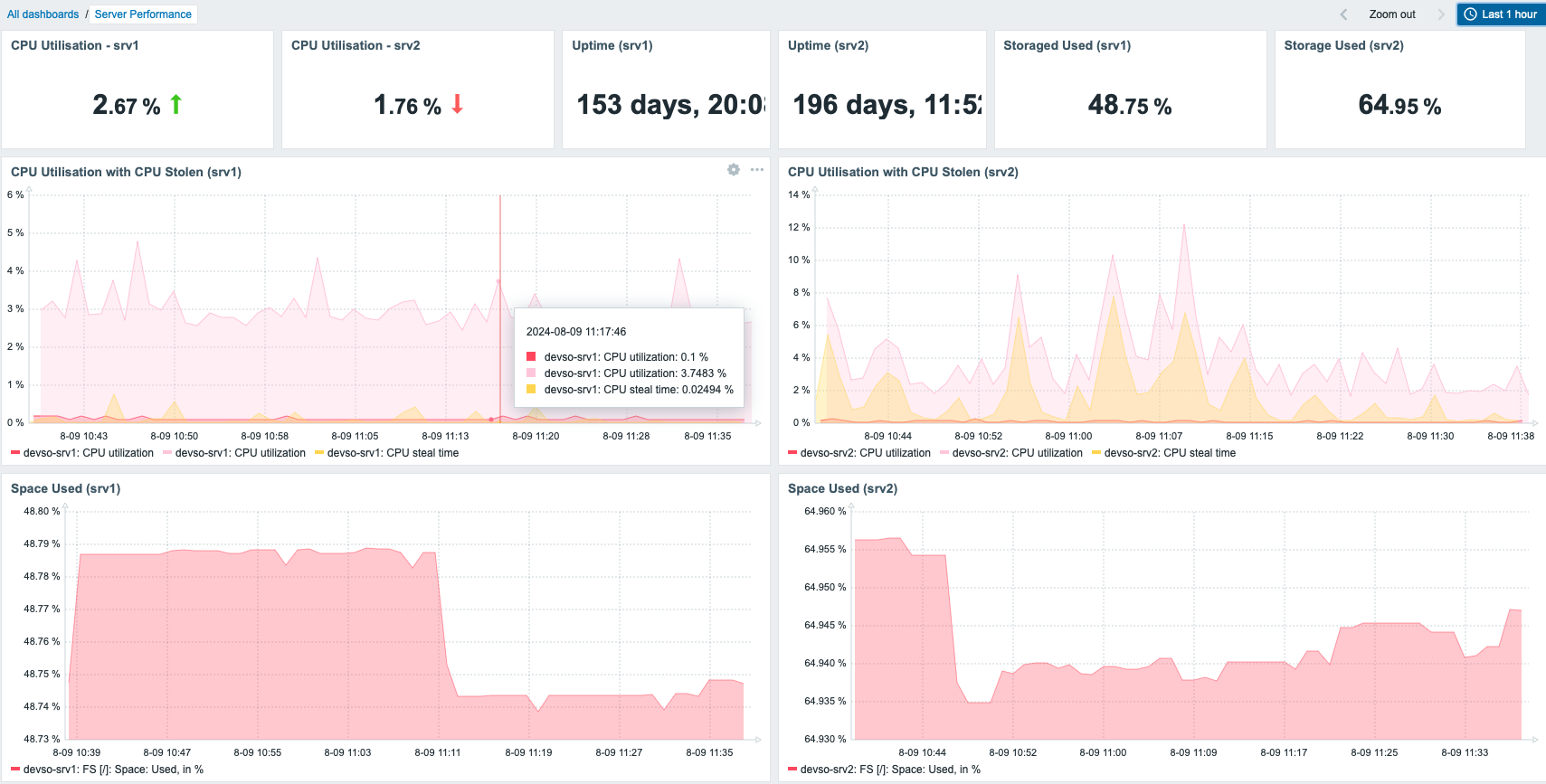
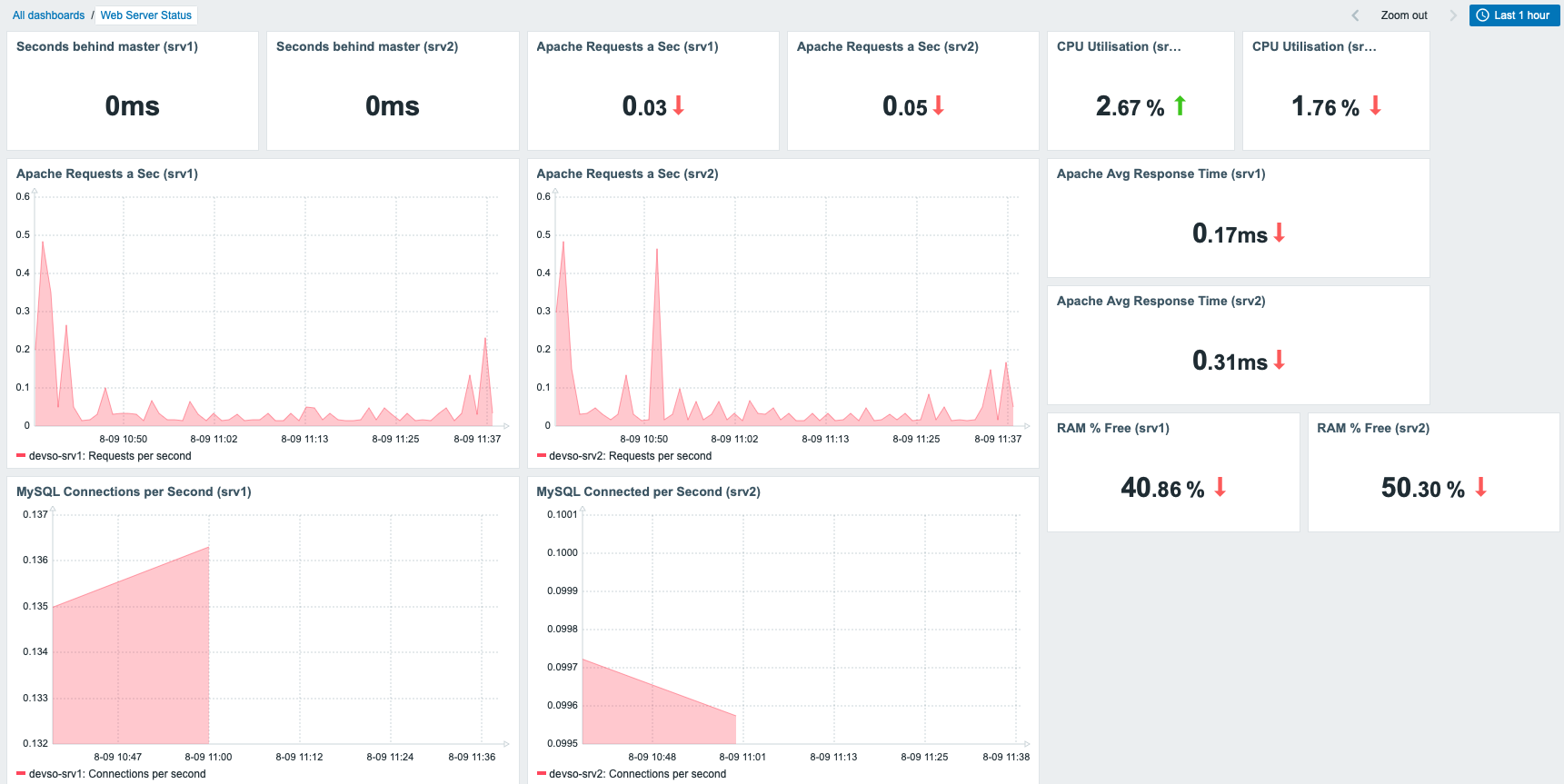
In terms of access and configuration, all of the metrics are sent over the private interfaces of each droplet. Nothing is available via the public interface.
Logging into the Zabbix web portal is done via a Cloudflare Tunnel that allows me to connect to the web portal over the private interface via the Cloudflare tunnels running on each of the servers for fault tolerance. This provides multiple levels of authentication, as you have to authenticate to Cloudflare and authenticate with Zabbix.
This post was designed as an overview to show that it is possible to migrate from Datadog to Zabbix fairly easily, with a small amount of development involved to convert Datadog custom metrics to Zabbix via the C# app.
The C# app isn’t publicly available, but if there is some demand for it I can look at open sourcing it. If you want a full rundown of how I migrated and set up the Zabbix server and the servers being monitored, please let me know and I can do a more in-depth blog post!
The post Migrating from Datadog to Zabbix with Custom Metric Submission appeared first on Zabbix Blog.
Post Syndicated from Matthew Garrett original https://mjg59.dreamwidth.org/70348.html
Short version: Secure Boot Advanced Targeting and if that’s enough for you you can skip the rest you’re welcome.
Long version: When UEFI Secure Boot was specified, everyone involved was, well, a touch naive. The basic security model of Secure Boot is that all the code that ends up running in a kernel-level privileged environment should be validated before execution – the firmware verifies the bootloader, the bootloader verifies the kernel, the kernel verifies any additional runtime loaded kernel code, and now we have a trusted environment to impose any other security policy we want. Obviously people might screw up, but the spec included a way to revoke any signed components that turned out not to be trustworthy: simply add the hash of the untrustworthy code to a variable, and then refuse to load anything with that hash even if it’s signed with a trusted key.
Unfortunately, as it turns out, scale. Every Linux distribution that works in the Secure Boot ecosystem generates their own bootloader binaries, and each of them has a different hash. If there’s a vulnerability identified in the source code for said bootloader, there’s a large number of different binaries that need to be revoked. And, well, the storage available to store the variable containing all these hashes is limited. There’s simply not enough space to add a new set of hashes every time it turns out that grub (a bootloader initially written for a simpler time when there was no boot security and which has several separate image parsers and also a font parser and look you know where this is going) has another mechanism for a hostile actor to cause it to execute arbitrary code, so another solution was needed.
And that solution is SBAT. The general concept behind SBAT is pretty straightforward. Every important component in the boot chain declares a security generation that’s incorporated into the signed binary. When a vulnerability is identified and fixed, that generation is incremented. An update can then be pushed that defines a minimum generation – boot components will look at the next item in the chain, compare its name and generation number to the ones stored in a firmware variable, and decide whether or not to execute it based on that. Instead of having to revoke a large number of individual hashes, it becomes possible to push one update that simply says “Any version of grub with a security generation below this number is considered untrustworthy”.
So why is this suddenly relevant? SBAT was developed collaboratively between the Linux community and Microsoft, and Microsoft chose to push a Windows update that told systems not to trust versions of grub with a security generation below a certain level. This was because those versions of grub had genuine security vulnerabilities that would allow an attacker to compromise the Windows secure boot chain, and we’ve seen real world examples of malware wanting to do that (Black Lotus did so using a vulnerability in the Windows bootloader, but a vulnerability in grub would be just as viable for this). Viewed purely from a security perspective, this was a legitimate thing to want to do.
(An aside: the “Something has gone seriously wrong” message that’s associated with people having a bad time as a result of this update? That’s a message from shim, not any Microsoft code. Shim pays attention to SBAT updates in order to avoid violating the security assumptions made by other bootloaders on the system, so even though it was Microsoft that pushed the SBAT update, it’s the Linux bootloader that refuses to run old versions of grub as a result. This is absolutely working as intended)
The problem we’ve ended up in is that several Linux distributions had not shipped versions of grub with a newer security generation, and so those versions of grub are assumed to be insecure (it’s worth noting that grub is signed by individual distributions, not Microsoft, so there’s no externally introduced lag here). Microsoft’s stated intention was that Windows Update would only apply the SBAT update to systems that were Windows-only, and any dual-boot setups would instead be left vulnerable to attack until the installed distro updated its grub and shipped an SBAT update itself. Unfortunately, as is now obvious, that didn’t work as intended and at least some dual-boot setups applied the update and that distribution’s Shim refused to boot that distribution’s grub.
What’s the summary? Microsoft (understandably) didn’t want it to be possible to attack Windows by using a vulnerable version of grub that could be tricked into executing arbitrary code and then introduce a bootkit into the Windows kernel during boot. Microsoft did this by pushing a Windows Update that updated the SBAT variable to indicate that known-vulnerable versions of grub shouldn’t be allowed to boot on those systems. The distribution-provided Shim first-stage bootloader read this variable, read the SBAT section from the installed copy of grub, realised these conflicted, and refused to boot grub with the “Something has gone seriously wrong” message. This update was not supposed to apply to dual-boot systems, but did anyway. Basically:
1) Microsoft applied an update to systems where that update shouldn’t have been applied
2) Some Linux distros failed to update their grub code and SBAT security generation when exploitable security vulnerabilities were identified in grub
The outcome is that some people can’t boot their systems. I think there’s plenty of blame here. Microsoft should have done more testing to ensure that dual-boot setups could be identified accurately. But also distributions shipping signed bootloaders should make sure that they’re updating those and updating the security generation to match, because otherwise they’re shipping a vector that can be used to attack other operating systems and that’s kind of a violation of the social contract around all of this.
It’s unfortunate that the victims here are largely end users faced with a system that suddenly refuses to boot the OS they want to boot. That should never happen. I don’t think asking arbitrary end users whether they want secure boot updates is likely to result in good outcomes, and while I vaguely tend towards UEFI Secure Boot not being something that benefits most end users it’s also a thing you really don’t want to discover you want after the fact so I have sympathy for it being default on, so I do sympathise with Microsoft’s choices here, other than the failed attempt to avoid the update on dual boot systems.
Anyway. I was extremely involved in the implementation of this for Linux back in 2012 and wrote the first prototype of Shim (which is now a massively better bootloader maintained by a wider set of people and that I haven’t touched in years), so if you want to blame an individual please do feel free to blame me. This is something that shouldn’t have happened, and unless you’re either Microsoft or a Linux distribution it’s not your fault. I’m sorry.
 comments
Post Syndicated from corbet original https://lwn.net/Articles/985783/
The LWN.net Weekly Edition for August 22, 2024 is available.