Tag Archives: Amazon Kinesis

Enhanced monitoring and automatic scaling for Apache Flink

Post Syndicated from Karthi Thyagarajan original https://aws.amazon.com/blogs/big-data/enhanced-monitoring-and-automatic-scaling-for-apache-flink/

Thousands of developers use Apache Flink to build streaming applications to transform and analyze data in real time. Apache Flink is an open-source framework and engine for processing data streams. It’s highly available and scalable, delivering high throughput and low latency for the most demanding stream-processing applications. Monitoring and scaling your applications is critical to keep your applications running successfully in a production environment.

Amazon Kinesis Data Analytics reduces the complexity of building and managing Apache Flink applications. Amazon Kinesis Data Analytics manages the underlying Apache Flink components that provide durable application state, metrics and logs, and more. Kinesis Data Analytics recently announced new Amazon CloudWatch metrics and the ability to create custom metrics to provide greater visibility into your application.

In this post, we show you how to easily monitor and automatically scale your Apache Flink applications with Amazon Kinesis Data Analytics. We walk through three examples. First, we create a custom metric in the Kinesis Data Analytics for Apache Flink application code. Second, we use application metrics to automatically scale the application. Finally, we share a CloudWatch dashboard for monitoring your application and recommend metrics that you can alarm on.

Custom metrics

Kinesis Data Analytics uses Apache Flink’s metrics system to send custom metrics to CloudWatch from your applications. For more information, see Using Custom Metrics with Amazon Kinesis Data Analytics for Apache Flink.

We use a basic word count program to illustrate the use of custom metrics. The following code shows how to extend RichFlatMapFunction to track the number of words it sees. This word count is then surfaced via the Flink metrics API.

private static final class Tokenizer extends RichFlatMapFunction<String, Tuple2<String, Integer>> {
     
            private transient Counter counter;
     
            @Override
            public void open(Configuration config) {
                this.counter = getRuntimeContext().getMetricGroup()
                        .addGroup("kinesisanalytics")
                        .addGroup("Service", "WordCountApplication")
                        .addGroup("Tokenizer")
                        .counter("TotalWords");
            }
     
            @Override
            public void flatMap(String value, Collector<Tuple2<String, Integer>>out) {
                // normalize and split the line
                String[] tokens = value.toLowerCase().split("\\W+");
     
                // emit the pairs
                for (String token : tokens) {
                    if (token.length() > 0) {
                        counter.inc();
                        out.collect(new Tuple2<>(token, 1));
                    }
                }
            }
        }

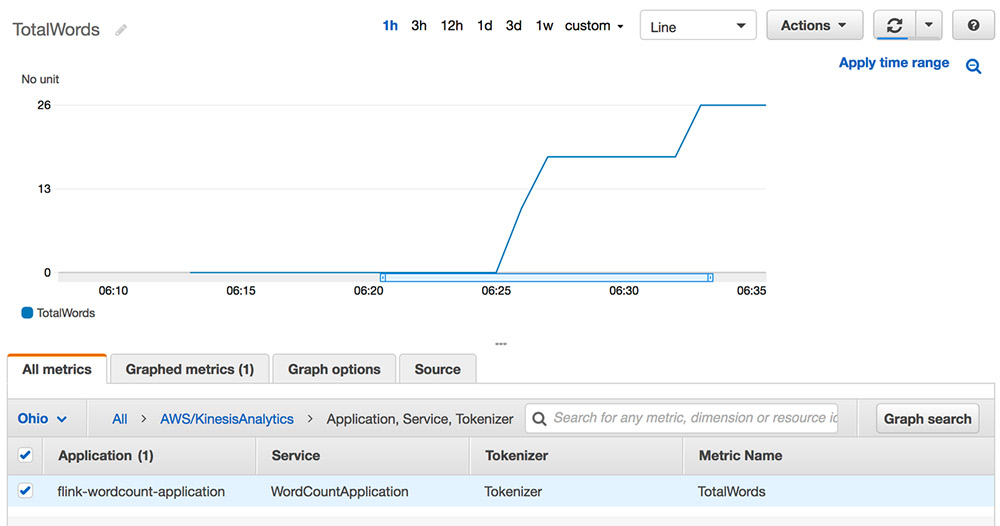
Custom metrics emitted through the Flink metrics API are forwarded to CloudWatch metrics by Kinesis Data Analytics for Apache Flink. The following screenshot shows the word count metric in CloudWatch.
Custom automatic scaling

This section describes how to implement an automatic scaling solution for Kinesis Data Analytics for Apache Flink based on CloudWatch metrics. You can configure Kinesis Data Analytics for Apache Flink to perform CPU-based automatic scaling. However, you can automatically scale your application based on something other than CPU utilization. To perform custom automatic scaling, use Application Auto Scaling with the appropriate metric.

For applications that read from a Kinesis stream source, you can use the metric millisBehindLatest. This captures how far behind your application is from the head of the stream.

A target tracking policy is one of two scaling policy types offered by Application Auto Scaling. You can specify a threshold value around which to vary the degree of parallelism of your Kinesis Data Analytics application. The following sample code on GitHub configures Application Auto Scaling when millisBehindLatest for the consuming application exceeds 1 minute. This increases the parallelism, which increases the number of KPUs.

The following diagram shows how Application Auto Scaling, used with Amazon API Gateway and AWS Lambda, scales a Kinesis Data Analytics application in response to a CloudWatch alarm.

The sample code includes examples for automatic scaling based on the target tracking policy and step scaling policy.

Automatic scaling solution components

The following is a list of key components used in the automatic scaling solution. You can find these components in the AWS CloudFormation template in the GitHub repo accompanying this post.

  • Application Auto Scaling scalable target – A scalable target is a resource that Application Auto Scaling can scale in and out. It’s uniquely identified by the combination of resource ID, scalable dimension, and namespace. For more information, see RegisterScalableTarget.
  • Scaling policy – The scaling policy defines how your scalable target should scale. As described in the PutScalingPolicy, Application Auto Scaling supports two policy types: TargetTrackingScaling and StepScaling. In addition, you can configure a scheduled scaling action using Application Auto Scaling. If you specify TargetTrackingScaling, Application Auto Scaling also creates corresponding CloudWatch alarms for you.
  • API Gateway – Because the scalable target is a custom resource, we have to specify an API endpoint. Application Auto Scaling invokes this to perform scaling and get information about the current state of our scalable resource. We use an API Gateway and Lambda function to implement this endpoint.
  • Lambda – API Gateway invokes the Lambda function. This is called by Application Auto Scaling to perform the scaling actions. It also fetches information such as current scale value and returns information requested by Application Auto Scaling.

Additionally, you should be aware of the following:

  • When scaling out or in, this sample only updates the overall parallelism. It doesn’t adjust parallelism or KPU.
  • When scaling occurs, the Kinesis Data Analytics application experiences downtime.
  • The throughput of a Flink application depends on many factors, such as complexity of processing and destination throughput. The step-scaling example assumes a relationship between incoming record throughput and scaling. The millisBehindLatest metric used for target tracking automatic scaling works the same way.
  • We recommend using the default scaling policy provided by Kinesis Data Analytics for CPU-based scaling, the target tracking auto scaling policy for the millisBehindLatest metric, and a step scaling auto scaling policy for a metric such as numRecordsInPerSecond. However, you can use any automatic scaling policy for the metric you choose.

CloudWatch operational dashboard

Customers often ask us about best practices and the operational aspects of Kinesis Data Analytics for Apache Flink. We created a CloudWatch dashboard that captures the key metrics to monitor. We categorize the most common metrics in this dashboard with the recommended statistics for each metric.

This GitHub repo contains a CloudFormation template to deploy the dashboard for any Kinesis Data Analytics for Apache Flink application. You can also deploy a demo application with the dashboard. The dashboard includes the following:

  • Application health metrics:
    • Use uptime to see how long the job has been running without interruption and downtime to determine if a job failed to run. Non-zero downtime can indicate issues with your application.
    • Higher-than-normal job restarts can indicate an unhealthy application.
    • Checkpoint information size, duration, and number of failed checkpoints can help you understand application health and progress. Increasing checkpoint duration values can signify application health problems like backpressure and the inability to keep up with input data. Increasing checkpoint size over time can point to an infinitely growing state that can lead to out-of-memory errors.
  • Resource utilization metrics:
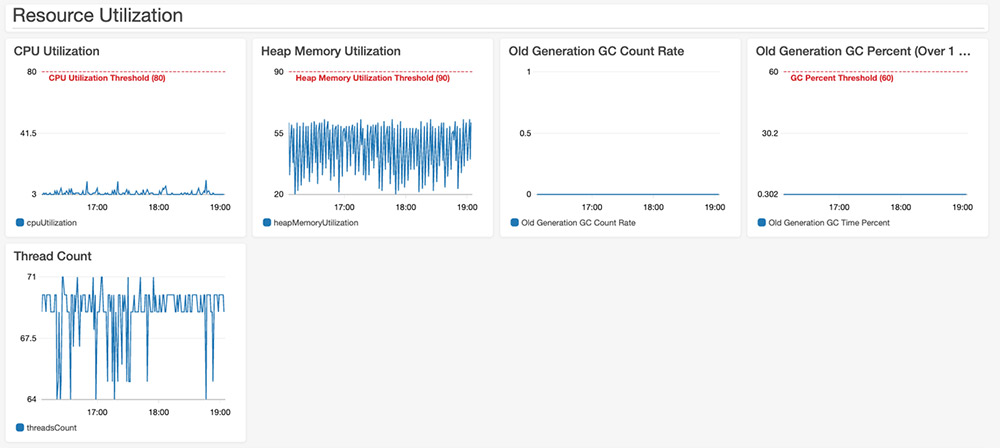
    • You can check the CPU and heap memory utilization along with the thread count. You can also check the garbage collection time taken across all Flink task managers.
  • Flink application progress metrics:
    • numRecordsInPerSecond and numRecordsOutPerSecond show the number of records accepted and emitted per second.
    • numLateRecordsDropped shows the number of records this operator or task has dropped due to arriving late.
    • Input and output watermarks are valid only when using event time semantics. You can use the difference between these two values to calculate event time latency.
  • Source metrics:
    • The Kinesis Data Streams-specific metric millisBehindLatest shows that the consumer is behind the head of the stream, indicating how far behind current time the consumer is. We used this metric to demonstrate Application Auto Scaling earlier in this post.
    • The Kafka-specific metric recordsLagMax shows the maximum lag in terms of number of records for any partition in this window.

The dashboard contains useful metrics to gauge the operational health of a Flink application. You can modify the threshold, configure additional alarms, and add other system or custom metrics to customize the dashboard for your use. The following screenshot shows a section of the dashboard.
Summary

In this post, we covered how to use the enhanced monitoring features for Kinesis Data Analytics for Apache Flink applications. We created custom metrics for an Apache Flink application within application code and emitted it to CloudWatch. We also used Application Auto Scaling to scale an application. Finally, we shared a CloudWatch dashboard to monitor the operational health of Kinesis Data Analytics for Apache Flink applications. For more information about using Kinesis Data Analytics, see Getting Started with Amazon Kinesis Data Analytics.


About the Authors

Karthi Thyagarajan is a Principal Solutions Architect on the Amazon Kinesis team.



Deepthi Mohan is a Sr. TPM on the Amazon Kinesis Data Analytics team.

Stream CDC into an Amazon S3 data lake in Parquet format with AWS DMS

Post Syndicated from Viral Shah original https://aws.amazon.com/blogs/big-data/stream-cdc-into-an-amazon-s3-data-lake-in-parquet-format-with-aws-dms/

Most organizations generate data in real time and ever-increasing volumes. Data is captured from a variety of sources, such as transactional and reporting databases, application logs, customer-facing websites, and external feeds. Companies want to capture, transform, and analyze this time-sensitive data to improve customer experiences, increase efficiency, and drive innovations. With increased data volume and velocity, it’s imperative to capture the data from source systems as soon as they are generated and store them on a secure, scalable, and cost-efficient platform.

AWS Database Migration Service (AWS DMS) performs continuous data replication using change data capture (CDC). Using CDC, you can determine and track data that has changed and provide it as a stream of changes that a downstream application can consume and act on. Most database management systems manage a transaction log that records changes made to the database contents and metadata. AWS DMS reads the transaction log by using engine-specific API operations and functions and captures the changes made to the database in a nonintrusive manner.

Amazon Simple Storage Service (Amazon S3) is the largest and most performant object storage service for structured and unstructured data and the storage service of choice to build a data lake. With Amazon S3, you can cost-effectively build and scale a data lake of any size in a secure environment where data is protected by 99.999999999% of durability.

AWS DMS offers many options to capture data changes from relational databases and store the data in columnar format (Apache Parquet) into Amazon S3:

The second option helps you build a flexible data pipeline to ingest data into an Amazon S3 data lake from several relational and non-relational data sources, compared to just relational data sources support in the former option. Kinesis Data Firehose provides pre-built AWS Lambda blueprints for converting common data sources such as Apache logs and system logs to JSON and CSV formats or writing your own custom functions. It can also convert the format of incoming data from JSON to Parquet or Apache ORC before storing the data in Amazon S3. Data stored in columnar format gives you faster and lower-cost queries with downstream analytics services like Amazon Athena.

In this post, we focus on the technical challenges outlined in the second option and how to address them.

As shown in the following reference architecture, data is ingested from a database into Parquet format in Amazon S3 via AWS DMS integrating with Kinesis Data Streams and Kinesis Data Firehose.

Our solution provides flexibility to ingest data from several sources using Kinesis Data Streams and Kinesis Data Firehose with built-in data format conversion and integrated data transformation capabilities before storing data in a data lake. For more information about data ingestion into Kinesis Data Streams, see Writing Data into Amazon Kinesis Data Streams. You can then query Parquet data in Amazon S3 efficiently with Athena.

Implementing the architecture

AWS DMS can migrate data to and from most widely used commercial and open-source databases. You can migrate and replicate data directly to Amazon S3 in CSV and Parquet formats, and store data in Amazon S3 in Parquet because it offers efficient compression and encoding schemes. Parquet format allows compression schemes on a per-column level, and is future-proofed to allow adding more encodings as they are invented and implemented.

AWS DMS supports Kinesis Data Streams as a target. Kinesis Data Streams is a massively scalable and durable real-time data streaming service that can collect and process large streams of data records in real time. AWS DMS service publishes records to a data stream using JSON. For more information about configuration details, see Use the AWS Database Migration Service to Stream Change Data to Amazon Kinesis Data Streams.

Kinesis Data Firehose can pull data from Kinesis Data Streams. It’s a fully managed service that delivers real-time streaming data to destinations such as Amazon S3, Amazon Redshift, Amazon Elasticsearch Service (Amazon ES), and Splunk. Kinesis Data Firehose can convert the format of input data from JSON to Parquet or ORC before sending it to Amazon S3. It needs reference schema to interpret the AWS DMS streaming data in JSON and convert into Parquet. In this post, we use AWS Glue, a fully managed ETL service, to create a schema in the AWS Glue Data Catalog for Kinesis Data Firehose to reference.

When AWS DMS migrates records, it creates additional fields (metadata) for each migrated record. The metadata provides additional information about the record being migrated, such as source table name, schema name, and type of operation. Most metadata fields add – in their field names (for example, record-type, schema-name, table-name, transaction-id). See the following code:

{
        "data": {
            "MEET_CODE": 5189459,
            "MEET_DATE": "2020-02-21T19:20:04Z",
            "RACE_CODE": 5189459,
            "LAST_MODIFIED_DATE": "2020-02-24T19:20:04Z",
            "RACE_ENTRY_CODE": 11671651,
            "HORSE_CODE": 5042811
        },
        "metadata": {
            "transaction-id": 917505,
            "schema-name": "SH",
            "operation": "insert",
            "table-name": "RACE_ENTRY",
            "record-type": "data",
            "timestamp": "2020-02-26T00:20:07.482592Z",
            "partition-key-type": "schema-table"
        }
    }

Additional metadata added by AWS DMS leads to an error during the data format conversion phase in Kinesis Data Firehose. Kinesis Data Firehose follows Hive style formatting and therefore doesn’t recognize the – character in the metadata field names during data conversion from JSON into Parquet and returns an error message: expected at the position 30 of ‘struct’ but ‘-’ is found. For example, see the following code:

{
	"deliveryStreamARN": "arn:aws:firehose:us-east-1:1234567890:deliverystream/abc-def-KDF",
	"destination": "arn:aws:s3:::abc-streaming-bucket",
	"deliveryStreamVersionId": 13,
	"message": "The schema is invalid. Error parsing the schema:
	 Error: : expected at the position 30 of 'struct<timestamp:string,record-type:string,operation:string,partition-key-type:string,schema-name:string,table-name:string,transaction-id:int>' but '-' is found.",
	"errorCode": "DataFormatConversion.InvalidSchema"
}

You can resolve the issue by making the following changes: specifying JSON key mappings and creating a reference table in AWS Glue before configuring Kinesis Data Firehose.

Specifying JSON key mappings

In your Kinesis Data Firehose configuration, specify JSON key mappings for fields with – in their names. Mapping transforms these specific metadata fields names to _ (for example, record-type changes to record_type).

Use AWS Command Line Interface (AWS CLI) to create Kinesis Data Firehose with the JSON key mappings. Modify the parameters to meet your specific requirements.

Kinesis Data Firehose configuration mapping is only possible through the AWS CLI or API and not through the AWS Management Console.

The following code configures Kinesis Data Firehose with five columns with – in their field names mapped to new field names with _”:

"S3BackupMode": "Disabled",
                    "DataFormatConversionConfiguration": {
                        "SchemaConfiguration": {
                            "RoleARN": "arn:aws:iam::123456789012:role/sample-firehose-delivery-role",
                            "DatabaseName": "sample-db",
                            "TableName": "sample-table",
                            "Region": "us-east-1",
                            "VersionId": "LATEST"
                        },
                        "InputFormatConfiguration": {
                            "Deserializer": {
                                "OpenXJsonSerDe": {
                                "ColumnToJsonKeyMappings":
                                {
                                 "record_type": "record-type","partition_key_type": "partition-key-type","schema_name":"schema-name","table_name":"table-name","transaction_id":"transaction-id"
                                }
                                }

Creating a reference table in AWS Glue

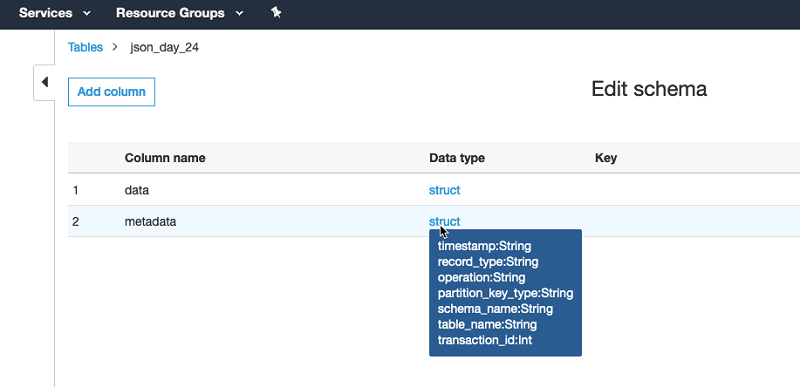
Because Kinesis Data Firehose uses the Data Catalog to reference schema for Parquet format conversion, you must first create a reference table in AWS Glue before configuring Kinesis Data Firehose. Use Athena to create a Data Catalog table. For instructions, see CREATE TABLE. In the table, make sure that the column name uses _ in their names, and manually modify it in advance through the Edit schema option for the referenced table in AWS Glue, if needed.

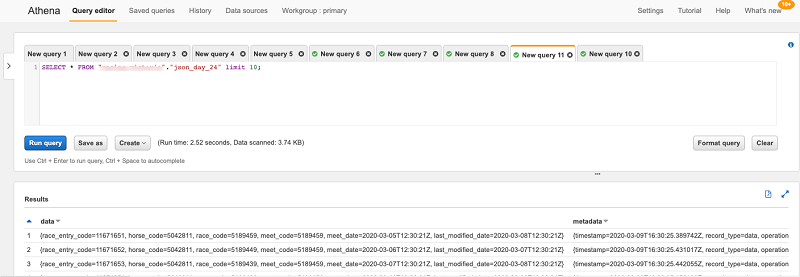
Use Athena to query the results of data ingested by Kinesis Data Firehose into Amazon S3.

This solution is only applicable in the following use cases:

  • Capturing data changes from your source with AWS DMS
  • Converting data into Parquet with Kinesis Data Firehose

If you want to store data in non-Parquet format (such CSV or JSON) or ingest into Kinesis through other routes, then you don’t need to modify your Kinesis Data Firehose configuration.

Conclusion

This post demonstrated how to convert AWS DMS data into Parquet format and specific configurations to make sure metadata follows the expected format of Kinesis Data Streams and Kinesis Data Firehose. We encourage you to try this solution and take advantage of all the benefits of using AWS DMS with Kinesis Data Streams and Kinesis Data Firehose. For more information, see Getting started with AWS Database Migration Service and Setting up Amazon Kinesis Firehose.

If you have questions or suggestions, please leave a comment.


About the Author

Viral Shah is a Data Lab Architect with Amazon Web Services. Viral helps our customers architect and build data and analytics prototypes in just four days in the AWS Data Lab. He has over 20 years of experience working with enterprise customers and startups primarily in the Data and Database space.


Building storage-first serverless applications with HTTP APIs service integrations

Post Syndicated from Eric Johnson original https://aws.amazon.com/blogs/compute/building-storage-first-applications-with-http-apis-service-integrations/

Over the last year, I have been talking about “storage first” serverless patterns. With these patterns, data is stored persistently before any business logic is applied. The advantage of this pattern is increased application resiliency. By persisting the data before processing, the original data is still available, if or when errors occur.

Common pattern for serverless API backend

Common pattern for serverless API backend

Using Amazon API Gateway as a proxy to an AWS Lambda function is a common pattern in serverless applications. The Lambda function handles the business logic and communicates with other AWS or third-party services to route, modify, or store the processed data. One option is to place the data in an Amazon Simple Queue Service (SQS) queue for processing downstream. In this pattern, the developer is responsible for handling errors and retry logic within the Lambda function code.

The storage first pattern flips this around. It uses native error handling with retry logic or dead-letter queues (DLQ) at the SQS layer before any code is run. By directly integrating API Gateway to SQS, developers can increase application reliability while reducing lines of code.

Storage first pattern for serverless API backend

Storage first pattern for serverless API backend

Previously, direct integrations require REST APIs with transformation templates written in Velocity Template Language (VTL). However, developers tell us they would like to integrate directly with services in a simpler way without using VTL. As a result, HTTP APIs now offers the ability to directly integrate with five AWS services without needing a transformation template or code layer.

The first five service integrations

This release of HTTP APIs direct integrations includes Amazon EventBridge, Amazon Kinesis Data Streams, Simple Queue Service (SQS), AWS System Manager’s AppConfig, and AWS Step Functions. With these new integrations, customers can create APIs and webhooks for their business logic hosted in these AWS services. They can also take advantage of HTTP APIs features like authorizers, throttling, and enhanced observability for securing and monitoring these applications.

Amazon EventBridge

HTTP APIs service integration with Amazon EventBridge

HTTP APIs service integration with Amazon EventBridge

The HTTP APIs direct integration for EventBridge uses the PutEvents API to enable client applications to place events on an EventBridge bus. Once the events are on the bus, EventBridge routes the event to specific targets based upon EventBridge filtering rules.

This integration is a storage first pattern because data is written to the bus before any routing or logic is applied. If the downstream target service has issues, then EventBridge implements a retry strategy with incremental back-off for up to 24 hours. Additionally, the integration helps developers reduce code by filtering events at the bus. It routes to downstream targets without the need for a Lambda function as a transport layer.

Use this direct integration when:

  • Different tasks are required based upon incoming event details
  • Only data ingestion is required
  • Payload size is less than 256 kb
  • Expected requests per second are less than the Region quotas.

Amazon Kinesis Data Streams

HTTP APIs service integration with Amazon Kinesis Data Streams

HTTP APIs service integration with Amazon Kinesis Data Streams

The HTTP APIs direct integration for Kinesis Data Streams offers the PutRecord integration action, enabling client applications to place events on a Kinesis data stream. Kinesis Data Streams are designed to handle up to 1,000 writes per second per shard, with payloads up to 1 mb in size. Developers can increase throughput by increasing the number of shards in the data stream. You can route the incoming data to targets like an Amazon S3 bucket as part of a data lake or a Kinesis data analytics application for real-time analytics.

This integration is a storage first option because data is stored on the stream for up to seven days until it is processed and routed elsewhere. When processing stream events with a Lambda function, errors are handled at the Lambda layer through a configurable error handling strategy.

Use this direct integration when:

  • Ingesting large amounts of data
  • Ingesting large payload sizes
  • Order is important
  • Routing the same data to multiple targets

Amazon SQS

HTTP APIs service integration with Amazon SQS

HTTP APIs service integration with Amazon SQS

The HTTP APIs direct integration for Amazon SQS offers the SendMessage, ReceiveMessage, DeleteMessage, and PurgeQueue integration actions. This integration differs from the EventBridge and Kinesis integrations in that data flows both ways. Events can be created, read, and deleted from the SQS queue via REST calls through the HTTP API endpoint. Additionally, a full purge of the queue can be managed using the PurgeQueue action.

This pattern is a storage first pattern because the data remains on the queue for four days by default (configurable to 14 days), unless it is processed and removed. When the Lambda service polls the queue, the messages that are returned are hidden in the queue for a set amount of time. Once the calling service has processed these messages, it uses the DeleteMessage API to remove the messages permanently.

When triggering a Lambda function with an SQS queue, the Lambda service manages this process internally. However, HTTP APIs direct integration with SQS enables developers to move this process to client applications without the need for a Lambda function as a transport layer.

Use this direct integration when:

  • Data must be received as well as sent to the service
  • Downstream services need reduced concurrency
  • The queue requires custom management
  • Order is important (FIFO queues)

AWS AppConfig

HTTP APIs service integration with AWS Systems Manager AppConfig

HTTP APIs service integration with AWS Systems Manager AppConfig

The HTTP APIs direct integration for AWS AppConfig offers the GetConfiguration integration action and allows applications to check for application configuration updates. By exposing the systems parameter API through an HTTP APIs endpoint, developers can automate configuration changes for their applications. While this integration is not considered a storage first integration, it does enable direct communication from external services to AppConfig without the need for a Lambda function as a transport layer.

Use this direct integration when:

  • Access to AWS AppConfig is required.
  • Managing application configurations.

AWS Step Functions

HTTP APIs service integration with AWS Step Functions

HTTP APIs service integration with AWS Step Functions

The HTTP APIs direct integration for Step Functions offers the StartExecution and StopExecution integration actions. These actions allow for programmatic control of a Step Functions state machine via an API. When starting a Step Functions workflow, JSON data is passed in the request and mapped to the state machine. Error messages are also mapped to the state machine when stopping the execution.

This pattern provides a storage first integration because Step Functions maintains a persistent state during the life of the orchestrated workflow. Step Functions also supports service integrations that allow the workflows to send and receive data without needing a Lambda function as a transport layer.

Use this direct integration when:

  • Orchestrating multiple actions.
  • Order of action is required.

Building HTTP APIs direct integrations

HTTP APIs service integrations can be built using the AWS CLI, AWS SAM, or through the API Gateway console. The console walks through contextual choices to help you understand what is required for each integration. Each of the integrations also includes an Advanced section to provide additional information for the integration.

Creating an HTTP APIs service integration

Creating an HTTP APIs service integration

Once you build an integration, you can export it as an OpenAPI template that can be used with infrastructure as code (IaC) tools like AWS SAM. The exported template can also include the API Gateway extensions that define the specific integration information.

Exporting the HTTP APIs configuration to OpenAPI

Exporting the HTTP APIs configuration to OpenAPI

OpenAPI template

An example of a direct integration from HTTP APIs to SQS is located in the Sessions With SAM repository. This example includes the following architecture:

AWS SAM template resource architecture

AWS SAM template resource architecture

The AWS SAM template creates the HTTP APIs, SQS queue, Lambda function, and both Identity and Access Management (IAM) roles required. This is all generated in 58 lines of code and looks like this:

AWSTemplateFormatVersion: '2010-09-09'
Transform: AWS::Serverless-2016-10-31
Description: HTTP API direct integrations

Resources:
  MyQueue:
    Type: AWS::SQS::Queue
    
  MyHttpApi:
    Type: AWS::Serverless::HttpApi
    Properties:
      DefinitionBody:
        'Fn::Transform':
          Name: 'AWS::Include'
          Parameters:
            Location: './api.yaml'
          
  MyHttpApiRole:
    Type: "AWS::IAM::Role"
    Properties:
      AssumeRolePolicyDocument:
        Version: "2012-10-17"
        Statement:
          - Effect: "Allow"
            Principal:
              Service: "apigateway.amazonaws.com"
            Action: 
              - "sts:AssumeRole"
      Policies:
        - PolicyName: ApiDirectWriteToSQS
          PolicyDocument:
            Version: '2012-10-17'
            Statement:
              Action:
              - sqs:SendMessage
              Effect: Allow
              Resource:
                - !GetAtt MyQueue.Arn
                
  MyTriggeredLambda:
    Type: AWS::Serverless::Function
    Properties:
      CodeUri: src/
      Handler: app.lambdaHandler
      Runtime: nodejs12.x
      Policies:
        - SQSPollerPolicy:
            QueueName: !GetAtt MyQueue.QueueName
      Events:
        SQSTrigger:
          Type: SQS
          Properties:
            Queue: !GetAtt MyQueue.Arn

Outputs:
  ApiEndpoint:
    Description: "HTTP API endpoint URL"
    Value: !Sub "https://${MyHttpApi}.execute-api.${AWS::Region}.amazonaws.com"

The OpenAPI template handles the route definitions for the HTTP API configuration and configures the service integration. The template looks like this:

openapi: "3.0.1"
info:
  title: "my-sqs-api"
paths:
  /:
    post:
      responses:
        default:
          description: "Default response for POST /"
      x-amazon-apigateway-integration:
        integrationSubtype: "SQS-SendMessage"
        credentials:
          Fn::GetAtt: [MyHttpApiRole, Arn]
        requestParameters:
          MessageBody: "$request.body.MessageBody"
          QueueUrl:
            Ref: MyQueue
        payloadFormatVersion: "1.0"
        type: "aws_proxy”
        connectionType: "INTERNET"
x-amazon-apigateway-importexport-version: "1.0"

Because the OpenAPI template is included in the AWS SAM template via a transform, the API Gateway integration can reference the roles and services created within the AWS SAM template.

Conclusion

This post covers the concept of storage first integration patterns and how the new HTTP APIs direct integrations can help. I cover the five current integrations and possible use cases for each. Additionally, I demonstrate how to use AWS SAM to build and manage the integrated applications using infrastructure as code.

Using the storage first pattern with direct integrations can help developers build serverless applications that are more durable with fewer lines of code. A Lambda function is no longer required to transport data from the API endpoint to the desired service. Instead, use Lambda function invocations for differentiating business logic.

To learn more join us for the HTTP API service integrations session of Sessions With SAM! 

#ServerlessForEveryone