Tag Archives: cloud security

Cloud Security Strategies for Healthcare

Post Syndicated from Marla Rosner original https://blog.rapid7.com/2023/03/14/cloud-security-strategies-for-healthcare/

How to Stay Secure in the Cloud While Driving Innovation and Discovery

Cloud Security Strategies for Healthcare

The healthcare industry is undergoing a transformational shift. Health organizations are traditionally entrenched in an on-prem way of life, but the past three years have plunged them into a digital revolution. A heightened demand for improved healthcare services—like distributed care and telehealth—ignited a major push for health orgs to move to the cloud, and as a result, implement new cloud security strategies.

But the processes and tools that worked well to secure healthcare organizations’ traditional data centers do not directly translate to the public cloud. Resource and budget strain, priority negotiation with leadership, and challenges with regulatory compliance only exacerbate a daunting digital maturity gap. These challenges are why many healthcare organizations have approached public cloud adoption tentatively.

The healthcare industry must innovate in the cloud to meet patient and business needs, but they need to do so without creating unnecessary or unmanaged risk. Most importantly, they must move to and adopt cloud solutions securely to protect patients in a new world of digital threats.

Major Challenges

Modern technologies bring modern challenges. Here are the main obstacles healthcare organizations face when it comes to securing the cloud.

Resource Strain

Like most industries, healthcare organizations face major obstacles when finding qualified security talent. That means hospitals, clinics, and other healthcare businesses must compete with tech giants, startups, and other more traditionally cybersecurity-savvy companies for the best and brightest minds on the market.

What’s more challenging is that the typical day of a security professional in healthcare tends to be disproportionately focused on time-consuming and often monotonous tasks. These duties are often related to maintaining and reporting on compliance with a sea of regulatory standards and requirements. Carrying out these repetitive but necessary tasks can quickly lead to burnout—and, as a result, turnover.

Moreover, those security professionals who do end up working within healthcare organizations can quickly find themselves inundated with more work than any one person is capable of handling. Small teams are tasked with securing massive amounts of sensitive data—both on-prem and as it moves into the cloud. And sometimes, cybersecurity departments at healthcare orgs can be as small as a CISO and a few analysts.

Those challenges with resource strain can lead to worse problems for security teams, including:

  • Burnout and rapid turnover, as discussed above
  • Slow MTTR, exacerbating the impact of breaches
  • Shadow IT, letting vulnerable assets fall through the cracks

Balancing Priorities With Leadership

It’s up to cybersecurity professionals to connect the dots for leadership on how investing in cloud security leads to greater ROI and less risk. Decision-makers in the healthcare industry are already juggling a great deal—and those concerns can be, quite literally, a matter of life or death.

In the modern threat landscape, poor cybersecurity health also has the potential to mean life or death. As medical science tools become more sophisticated, they’re also becoming more digitally connected. That means malicious actors who manage to infiltrate and shut down servers could also possibly shut down life-saving technology.

Tech professionals must illustrate to stakeholders how cybersecurity risk is interconnected with business risk and—perhaps most importantly—patient risk. To do that, they must regularly engage with and educate leadership to effectively balance priorities.

Achieving that perfect balance includes meeting leadership where they’re at. In healthcare, what is typically the biggest security concern for leaders? The answer: Meeting the necessary compliance standards with every new technology investment.

HIPAA Compliance and Protected Health Information

For stakeholders, achieving, maintaining, and substantiating legal and regulatory compliance is of critical importance. When it comes to the healthcare industry, one compliance standard often reigns supreme over all business decisions: HIPAA.

HIPAA provides data privacy and security provisions for safeguarding Protected Health Information (PHI). It addresses the use and disclosure of individuals’ health information and requires that sensitive information be governed by strict data security and confidentiality. It also obligates organizations to provide PHI to patients upon request.

When migrating to the cloud, healthcare organizations need a centralized approach to protecting sensitive data. InsightCloudSec allows you to automate compliance with HIPAA. Through our HIPAA Compliance Pack, InsightCloudSec provides dozens of out-of-the-box checks that map back to specific HIPAA requirements. For example, InsightCloudSec’s “Snapshot With PHI Unencrypted” policy supports compliance with HIPAA §164.312(a)(2)(iv), Encryption Controls.

Experience Gap

An evolving threat landscape and growing attack surface are challenging enough to deal with for even the most experienced security professionals. Add the health industry’s talent gap into the mix, and those challenges are multiplied.

Cloud security in the healthcare space is still relatively new. That means internal cybersecurity teams are not only playing a relentless game of catch-up—they also might consist of more traditional network engineers and IT pros who have historically been tasked with securing on-premises environments.

This makes it critical that the cloud security solutions healthcare industries implement be user-friendly, low-maintenance, and ultra-reliable.

Cloud Security Solutions and Services

As health organizations dive into work in the cloud, their digital footprints will likely grow far faster than their teams can keep up with. Visibility into these cloud environments is essential to an organization’s ability to identify, assess, prioritize, and remediate risk. Without a clear picture of what they have and where they have it, companies can be vulnerable to malicious attacks.

To avoid biting off more than they can chew, security professionals in healthcare must leverage cloud security strategies and solutions that grant them complete real-time visibility in the cloud over all their most sensitive assets. Enterprise cloud security tools like InsightCloudSec can enable automated discovery and inventory assessment. That unlocks visibility across all their CSPs and containers.

InsightCloudSec also makes it easier for teams, regardless of their cloud security expertise, to effectively define, implement, and enforce security guardrails. With resource normalization, InsightCloudSec removes the need for security teams to learn and keep track of an ever-expanding list of cloud resources and services. Security teams can make use of InsightCloudSec’s native, no-code automation to enable hands-off enforcement of their organization’s security practices and policies when a non-compliant resource is created or a risk configuration change is made.

The fact of the matter is that many healthcare security teams will need to build their cybersecurity programs from the ground up. With limited resources, strained budgets, and patients’ lives on the line, they can’t afford to make big mistakes. That’s why, for many organizations, partnering with a managed service provider is the right approach.

Rapid7’s managed services relieve security teams from the strain of running and building cloud security frameworks. They can also help healthcare security pros better connect lack of investment with risks to stakeholders—acting as an external set of experts.

The Bottom Line

Staying continuously secure in the cloud can be daunting, particularly for those responsible for not only sensitive medical, patient, and research data, but also the digitally connected machines and tools that ensure top-of-the-line patient care. Protecting the health of patients is paramount in the healthcare industry.

With the right tools (and teams) to support continuous security and compliance, this responsibility becomes manageable—and even, dare we say, easy.


InsightCloudSec

A complete cloud security toolbox in a single solution.

LEARN MORE

What Tech Companies Should Look For in Cloud Security

Post Syndicated from Marla Rosner original https://blog.rapid7.com/2023/03/08/what-tech-companies-should-look-for-in-cloud-security/

What Tech Companies Should Look For in Cloud Security

The cloud’s computing power and flexibility unlocks unprecedented speed and efficiency—a tech company’s two best friends. But with that speed and efficiency comes new environments and touchpoints in an organization’s footprint. That expanding attack surface brings along with it an expanding range of security concerns.

Rapid7’s Peter Scott joined Temporal Technologies’s Brandon Sherman and Ancestry’s Tony Black for a fireside chat to address today’s growing CloudSec challenges.

The key? Building technologies and security policies alongside one another—from the start. That applies to both companies that are moving to the cloud and those that are cloud-first.

Making Security an Enabler, Not a Blocker

When companies start to move and function in the cloud, SecOps must adapt their thinking and processes to ephemeral environments. That entails getting down in the trenches early on with tech teams as they innovate and create while spinning up new instances.

“We started working with the idea that everything should be ephemeral and short-lived… That really started getting us into that mindset of a true cloud infrastructure and architecture,” says Black. “It allowed us to start doing some things like tearing down our dead environments on the weekend if no one is using it. It reduces our attack surface and reduces our cost.”

Collaboration between tech and security teams drives secure cloud innovation. However, that level of collaboration requires consistent communication and most importantly, a willingness to build trust.

“If you don’t exercise that muscle of being engaged with those teams, then it’s going to atrophy,” says Sherman. “But if you keep working on it, then you get in earlier and earlier. Even with simple Slack conversations—if I can get involved at that part of it and help shape this whole process as it’s built out to help experiment securely… That’s awesome.”

Consistently collaborating with tech teams not only helps keep security top of mind and integrate cloudsec with DevOps; it also transforms SecOps from a dreaded blocker into a reliable enabler. This level of collaboration requires not only trust but also a mutual understanding that implementing security is a problem-solver, not a problem to be solved.

That gives SecOps the power to help dev teams accelerate into production with fewer bumps in the road—because each new feature is built securely from the start.

Cloud Risk Complete

Analyze, respond to, and remediate risks without a patchwork of solutions or additional costs.

LEARN MORE

Operationalization and Resiliency as Cloud Maturity Increases

Reframing security from a blocker to an enabler is indicative of a larger shift in security’s role across the entire enterprise. As companies’ cloud footprints grow and their maturity increases, CloudSec teams must ensure that their practices are not only scalable but also sustainable.

That means the security mindset needs to shift towards operationalization and resiliency.

“We want to be as reliable as running water,” says Sherman. “That is a really high bar to obtain. So you need really good operational metrics, rigor, and processes. But the nice thing about the cloud is that you can practice all those things.”

With the power of the cloud, tech companies have the freedom to rehearse their responses to even the most large-scale, potentially devastating attacks. By taking the time to practice building and breaking down high-risk environments, security teams can operationalize and, most importantly, plan for when—not if—new threats emerge.

To Black, it also comes down to establishing a consistent set of security practices that tech organizations hold to.

“A bunch of practices have to be in place. For example, no one should be able to touch a certain server, because if someone touches a certain server, then all of a sudden I can’t rebuild that the way it was before,” says Black, “Then, everything has to go through a pipeline. And that pipeline has to have controls … and checks in place to make sure that what we deploy is consistent and repeatable.”

Keeping track of that decision-making ripple effect is a major factor in how well security teams can operationalize their best practices for securing cloud-native environments.That dedication to operationalization and resiliency ensures a better experience for devs, sec, and—most importantly—clients.

Clients, the Cloud, and Securing Sensitive Data

Tech companies are (for better or for worse) held to a higher standard by users in terms of reliability, ease of use, and security. Meeting those standards is even more critical when users are trusting tech companies with personal information that might be as sensitive as DNA, as is the case with some of Ancestry’s clients.

What helps ensure and improve data protection in the cloud? A company-wide emphasis on customer trust.

“Fundamentally, our management team agrees that customer trust is part of the value proposition,” says Black. “We have to earn that trust every day… It really helps when the management team says that customer trust is part of the value proposition, so we have to spend money and take an effort to maintain that customer trust.”

Establishing a strong cloudsec foundation helps enable experiences that build customer trust. How can security teams create that base of security that keeps both dev teams and consumers happy? By approaching features as if they were to personally use them.

“Part of that comes down to being your own customer. If you trust your own company with your own data… You feel a lot better about it,” says Sherman.

Aligning the Evolution of Security and Technology

Security teams are no longer the department of “no.” With Gartner having predicted a 22% growth in worldwide cloud use by the end of 2022, tech companies should look out for this constant in cloud security: Change.

“The cloud changes beneath our feet. Things constantly evolve. If you’re stuck in a mentality of, ‘We do this thing, and this thing is security’,” says Sherman, “even if that’s best practice today, it might not be best practice tomorrow.”

Because of that constant change, success in the cloud is rooted in incremental progress. Taking on cloudsec challenges one bit at a time will ensure a smoother cloud journey for organizations looking to unlock the power of working in ephemeral environments.

Want deeper insights on how tech companies can tackle today’s cloud security challenges? Watch the full webinar below:

New InsightCloudSec Compliance Pack: Key Takeaways From the Azure Security Benchmark V3

Post Syndicated from James Alaniz original https://blog.rapid7.com/2023/03/01/new-insightcloudsec-compliance-pack-key-takeaways-from-the-azure-security-benchmark-v3/

New InsightCloudSec Compliance Pack: Key Takeaways From the Azure Security Benchmark V3

Implementing the proper security policies and controls to keep cloud environments, and the applications and sensitive data they host secure, is a daunting task for anyone. It’s even more of a challenge for folks that are just getting started on their journey to the cloud, and for teams that lack hands-on experience securing dynamic, highly-ephemeral cloud environments.

To reduce the learning curve for teams ramping up their cloud security programs, cloud providers have curated sets of security controls, including recommended resource configurations and access policies to provide some clarity. While these frameworks may not be the be-all-end-all—because let’s face it, there is no silver bullet when it comes to securing these environments—they are a really great place to start as you define and implement the standards that are right for your business. In a recent post, we covered some highlights within the AWS Foundational Security Best Practices, so be sure to check that out in case you missed it.

Today, we’re going to dive into the new Azure Security Benchmark V3, and identify some of the controls that we view as particularly impactful. Let’s dig in.

How does Azure Security Benchmark V3 differ from AWS Foundational Security Best Practices?

Before we get started with some specifics from the Azure Security Benchmark, it’s probably worthwhile to highlight some key similarities and differences between the Microsoft and AWS benchmarks.

The AWS Foundational Security Best Practices are, as one might intuitively expect, focused solely on AWS environments. These best practices provide prescriptive guidance around how a given resource or service should be configured to mitigate the risks of security incidents. Because the recommendations are so prescriptive and targeted, users are able to leverage AWS Config—a native service provided by AWS to assess resource configurations—to ensure the recommended configuration is utilized.

Much like the AWS Foundational Security Best Practices, the Azure Security Benchmark is a set of guidelines and recommendations provided by Microsoft to help organizations establish a baseline for what “good” looks like in terms of effective cloud security controls and configurations. However, where AWS’s guidelines are laser-focused on AWS environments, Microsoft has taken a cloud-agnostic approach, with higher-level security principles that can be applied regardless of which platform you select to run your mission-critical workloads. This approach makes quite a bit of sense given AWS and Microsoft’s respective go-to-market strategies and target customer bases. It also means implementation of these recommendations requires a slightly different approach.

As noted above, the guidance in the Azure Security Benchmark isn’t tied to Azure specifically, it’s more broad in nature and speaks to general approaches and themes. For example,it recommends that you use encryption and proper key management hygiene, as opposed to specifying a granular resource or service configuration. That’s not to say that Microsoft hasn’t provided any Azure-specific guidance, as many of the guidelines are accompanied by step-by-step instructions as to how you can implement them in your Azure environment. As AWS has provided checks within AWS Config, Azure has similarly provided checks within Defender for Cloud that help ensure your environment is configured in accordance with the benchmark recommendations.

Five recommendations from the Azure Security Benchmark V3 we find particularly impactful

Now that we’ve compared the benchmarks, let’s take a look at some of the recommendations provided within the Azure Security Benchmark V3 that we find particularly impactful for hardening your cloud security posture.

NS-2: Secure cloud services with network controls

This recommendation focuses on securing cloud services by establishing a private access point for the resources. Additionally, you should be sure to disable or restrict access from public networks (when possible) to avoid unwanted access from folks outside of your organization.

DP-3, 4 & 5: Data Protection and Encryption At Rest and In Transit

These recommendations are focused on ensuring proper implementation of data security controls, most notably via encryption for all sensitive data, whether in transit or at rest. Data should be encrypted at rest by default, and teams should use the option for customer-managed keys whenever required.

DP-8: Ensure Security of Key and Certificate Repository

Another Data Protection control, this recommendation is centered on proper hardening of the key vault service. Teams should ensure the security of the key vault service used for the cryptographic key and certificate lifecycle management. Key vault service hardening can be accomplished through a variety of controls, including identity and access, network security, logging and monitoring, and backup.

PA-1: Separate and Limit Highly Privileged/Administrative Users

Teams should ensure all business-critical accounts are identified and should apply limits to the number of privileged or administrative accounts in your cloud’s control plane, management plane, and data/workload plane. Additionally, you should restrict privileged accounts in other management, identity, and security systems that have administrative access to your assets, such as tools with agents installed on business-critical systems that could be weaponized.

LT-1: Enable Threat Detection Capabilities for Azure Resources

This one is fairly self-explanatory, but focuses on ensuring you are monitoring your cloud environment for potential threats. Whether or not you’re using native services provided by your cloud provider of choice—such as Azure Defender for Cloud or Azure Sentinel—you should leverage a cloud detection and response tool that can monitor resource inventory, configurations, and user activity in real time to identify anomalous activity across your environment.

Implement and enforce Azure Security Benchmark V3 with InsightCloudSec

New InsightCloudSec Compliance Pack: Key Takeaways From the Azure Security Benchmark V3

InsightCloudSec allows security teams to establish and continuously measure compliance against organizational policies, whether they’re based on service provider best practices like those provided by Microsoft, a common industry framework, or a custom pack tailored to specific business needs.

A compliance pack within InsightCloudSec is a set of checks that can be used to continuously assess your cloud environments for compliance with a given regulatory framework, or industry or provider best practices. The platform comes out of the box with 30+ compliance packs, including a dedicated pack for the Azure Security Benchmark V3.

InsightCloudSec continuously assesses your entire cloud environment—whether that’s a single Azure environment or across multiple platforms—for compliance with best practice recommendations, and detects noncompliant resources within minutes after they are created or an unapproved change is made. If you so choose, you can make use of the platform’s native, no-code automation to remediate the issue—either via deletion or by adjusting the configuration or permissions—without any human intervention.

If you’re interested in learning more about how InsightCloudSec helps continuously and automatically enforce cloud security standards, be sure to check out the demo!

AWS Melbourne Region has achieved HCF Strategic Certification

Post Syndicated from Lori Klaassen original https://aws.amazon.com/blogs/security/aws-melbourne-region-has-achieved-hcf-strategic-certification/

Amazon Web Services (AWS) is delighted to confirm that our new AWS Melbourne Region has achieved Strategic Certification for the Australian Government’s Hosting Certification Framework (HCF).

We know that maintaining security and resiliency to keep critical data and infrastructure safe is a top priority for the Australian Government and all our customers in Australia. The Strategic Certification of both the existing Sydney and the new Melbourne Regions reinforces our ongoing commitment to meet security expectations for cloud service providers and means Australian citizens can now have even greater confidence that the Government is securing their data.

The HCF provides guidance to government customers to identify cloud providers that meet enhanced privacy, sovereignty, and security requirements. The expanded scope of the AWS HCF Strategic Certification gives Australian Government customers additional architectural options, including the ability to store backup data in geographically separated locations within Australia.

Our AWS infrastructure is custom-built for the cloud and designed to meet the most stringent security requirements in the world, and is monitored 24/7 to help support the confidentiality, integrity, and availability of customers’ data. All data flowing across the AWS global network that interconnects our data centers and Regions is automatically encrypted at the physical layer before it leaves our secured facilities. We will continue to expand the scope of our security assurance programs at AWS and are pleased that Australian Government customers can continue to innovate at a rapid pace and be confident AWS meets the Government’s requirements to support the secure management of government systems and data.

The Melbourne Region was officially added to the AWS HCF Strategic Certification on December 21, 2022, and the Sydney Region was certified in October 2021. AWS compliance status is available on the HCF Certified Service Providers website, and the Certificate of Compliance is available through AWS Artifact. AWS Artifact is a self-service portal for on-demand access to AWS compliance reports. Sign in to AWS Artifact in the AWS Management Console, or learn more at Getting Started with AWS Artifact. AWS has also achieved many international certifications and accreditations, demonstrating compliance with third-party assurance frameworks such as ISO 27017 for cloud security, ISO 27018 for cloud privacy, and SOC 1, SOC 2, and SOC 3.

To learn more about our compliance and security programs, see AWS Compliance Programs. As always, we value your feedback and questions; reach out to the AWS Compliance team through the Contact Us page.

Please reach out to your AWS account team if you have questions or feedback about HCF compliance.

If you have feedback about this post, submit comments in the Comments section below.

Want more AWS Security how-to content, news, and feature announcements? Follow us on Twitter.

Lori Klaassen

Lori Klaassen

Lori is a Senior Regulatory Specialist on the AWS Security Assurance team. She supports the operationalisation and ongoing assurance of direct regulatory oversight programs in ANZ.

CIEM is Required for Cloud Security and IAM Providers to Compete: Gartner® Report

Post Syndicated from Aaron Wells original https://blog.rapid7.com/2023/02/15/ciem-is-required-for-cloud-security-and-iam-providers-to-compete-gartner-r-report/

CIEM is Required for Cloud Security and IAM Providers to Compete: Gartner® Report

In an ongoing effort to help security organizations stay competitive, we’re pleased to offer this complimentary Gartner® report, Emerging Tech: CIEM Is Required for Cloud Security and IAM Providers to Compete. The research in the report demonstrates the need for Cloud Infrastructure Entitlement Management (CIEM) product leaders to adopt trends that can help deliver value across Cloud Security and Identity and Access Management (IAM) enterprises.

CIEM product leaders looking to remain competitive in Cloud Security and IAM practices should consider prioritizing specific capabilities in their planning in order to address new and emerging threats and, as Gartner says:                            

  • Gain a further competitive edge in the CIEM market by investing in more-advanced guided remediation capabilities, such as automated downsizing of over-privileged accounts.
  • Appeal to a larger audience beyond cloud security teams by positioning CIEM as part of broader enterprise security controls.

Businesses not currently prioritizing CIEM capabilities, however, can’t simply “do a 180” and expect to be successful. Managing entitlements in the current sophisticated age of attacks and digital espionage can feel impossible. It is imperative for security organizations to adopt updated access practices though, not only to remain competitive but to remain secure.

Least Privileged Access (LPA) approaches lacking in effectiveness can find support in CIEM tools that provide advanced enforcement and remediation of ineffective LPA methods. Gartner says:

“The anomaly-detection capabilities leveraged by CIEM tools can be extended to analyze the misconfigurations and vulnerabilities in the IAM stack. With overprivileged account discovery, and some guided remediation, CIEM tools can help organizations move toward a security posture where identities have at least privileges.”

Broadening the portfolio

Within cloud security, identity-verification practices are more critical than ever. Companies developing and leveraging SaaS applications must constantly grapple with varying business priorities, thus identity permissions across these applications can become inconsistent. This can leave applications — and the business — open to vulnerabilities and other challenges.

When it comes to dynamic multi- and hybrid-cloud environments, it can become prohibitively difficult to monitor identity administration and governance. Challenges can include:

  • Prevention of misuse from privileged accounts
  • Poor visibility for performing compliance and oversight
  • Added complexity from short-term cloud entitlements
  • Inconsistency across multiple cloud infrastructures
  • Accounts with excessive access permissions

Multi-cloud IAM requires a more refined approach, and CIEM tools can capably address the challenges above, which is why they must be adopted as part of a suite of broader enterprise security controls.

Accelerating cloud adoption

Technology and service providers fulfilling IAM services are in critical need of capabilities that can address specific cloud use cases. Gartner says:

“It is a natural extension to assist existing customers in their digital transformation and cloud adoption journey. These solutions are able to bridge both on-premises identity implementations and cloud to support hybrid use cases. This will also translate existing IAM policies and apply relevant elements for the cloud while adding additional use cases unique to the cloud environment.”

In fact, a key finding from the report is that “visibility of entitlements and rightsizing of permissions are quickly becoming ‘table stakes’ features in the CIEM market.”

Mature CIEM vendors can typically be expected to also offer additional capabilities like cloud security posture management (CSPM). InsightCloudSec from Rapid7 is a CIEM solution that also offers CSPM capabilities to effectively manage the perpetual shift, adoption, and innovation of cloud infrastructure. Businesses and security organizations can more effectively compete when they offer strong solutions that support and aid existing CIEM capabilities.

Download the report

Rapid7 is pleased to continually offer leading research to help you gain clarity into ways you can stand out in this ultra-competitive landscape. Read the entire complimentary Gartner report now to better understand just how in-demand CIEM capabilities are becoming and how product leaders can tailor strategies to Cloud Security and IAM enterprises.

Gartner, “Emerging Tech: CIEM Is Required for Cloud Security and IAM Providers to Compete”

Swati Rakheja, Mark Wah. 13 July 2022.

Gartner is registered trademark and servicemark of Gartner, Inc and/or its affiliates in the U.S. and internationally, and is used herein with permission. All rights reserved.

The anatomy of ransomware event targeting data residing in Amazon S3

Post Syndicated from Megan O'Neil original https://aws.amazon.com/blogs/security/anatomy-of-a-ransomware-event-targeting-data-in-amazon-s3/

Ransomware events have significantly increased over the past several years and captured worldwide attention. Traditional ransomware events affect mostly infrastructure resources like servers, databases, and connected file systems. However, there are also non-traditional events that you may not be as familiar with, such as ransomware events that target data stored in Amazon Simple Storage Service (Amazon S3). There are important steps you can take to help prevent these events, and to identify possible ransomware events early so that you can take action to recover. The goal of this post is to help you learn about the AWS services and features that you can use to protect against ransomware events in your environment, and to investigate possible ransomware events if they occur.

Ransomware is a type of malware that bad actors can use to extort money from entities. The actors can use a range of tactics to gain unauthorized access to their target’s data and systems, including but not limited to taking advantage of unpatched software flaws, misuse of weak credentials or previous unintended disclosure of credentials, and using social engineering. In a ransomware event, a legitimate entity’s access to their data and systems is restricted by the bad actors, and a ransom demand is made for the safe return of these digital assets. There are several methods actors use to restrict or disable authorized access to resources including a) encryption or deletion, b) modified access controls, and c) network-based Denial of Service (DoS) attacks. In some cases, after the target’s data access is restored by providing the encryption key or transferring the data back, bad actors who have a copy of the data demand a second ransom—promising not to retain the data in order to sell or publicly release it.

In the next sections, we’ll describe several important stages of your response to a ransomware event in Amazon S3, including detection, response, recovery, and protection.

Observable activity

The most common event that leads to a ransomware event that targets data in Amazon S3, as observed by the AWS Customer Incident Response Team (CIRT), is unintended disclosure of Identity and Access Management (IAM) access keys. Another likely cause is if there is an application with a software flaw that is hosted on an Amazon Elastic Compute Cloud (Amazon EC2) instance with an attached IAM instance profile and associated permissions, and the instance is using Instance Metadata Service Version 1 (IMDSv1). In this case, an unauthorized user might be able to use AWS Security Token Service (AWS STS) session keys from the IAM instance profile for your EC2 instance to ransom objects in S3 buckets. In this post, we will focus on the most common scenario, which is unintended disclosure of static IAM access keys.

Detection

After a bad actor has obtained credentials, they use AWS API actions that they iterate through to discover the type of access that the exposed IAM principal has been granted. Bad actors can do this in multiple ways, which can generate different levels of activity. This activity might alert your security teams because of an increase in API calls that result in errors. Other times, if a bad actor’s goal is to ransom S3 objects, then the API calls will be specific to Amazon S3. If access to Amazon S3 is permitted through the exposed IAM principal, then you might see an increase in API actions such as s3:ListBuckets, s3:GetBucketLocation, s3:GetBucketPolicy, and s3:GetBucketAcl.

Analysis

In this section, we’ll describe where to find the log and metric data to help you analyze this type of ransomware event in more detail.

When a ransomware event targets data stored in Amazon S3, often the objects stored in S3 buckets are deleted, without the bad actor making copies. This is more like a data destruction event than a ransomware event where objects are encrypted.

There are several logs that will capture this activity. You can enable AWS CloudTrail event logging for Amazon S3 data, which allows you to review the activity logs to understand read and delete actions that were taken on specific objects.

In addition, if you have enabled Amazon CloudWatch metrics for Amazon S3 prior to the ransomware event, you can use the sum of the BytesDownloaded metric to gain insight into abnormal transfer spikes.

Another way to gain information is to use the region-DataTransfer-Out-Bytes metric, which shows the amount of data transferred from Amazon S3 to the internet. This metric is enabled by default and is associated with your AWS billing and usage reports for Amazon S3.

For more information, see the AWS CIRT team’s Incident Response Playbook: Ransom Response for S3, as well as the other publicly available response frameworks available at the AWS customer playbooks GitHub repository.

Response

Next, we’ll walk through how to respond to the unintended disclosure of IAM access keys. Based on the business impact, you may decide to create a second set of access keys to replace all legitimate use of those credentials so that legitimate systems are not interrupted when you deactivate the compromised access keys. You can deactivate the access keys by using the IAM console or through automation, as defined in your incident response plan. However, you also need to document specific details for the event within your secure and private incident response documentation so that you can reference them in the future. If the activity was related to the use of an IAM role or temporary credentials, you need to take an additional step and revoke any active sessions. To do this, in the IAM console, you choose the Revoke active session button, which will attach a policy that denies access to users who assumed the role before that moment. Then you can delete the exposed access keys.

In addition, you can use the AWS CloudTrail dashboard and event history (which includes 90 days of logs) to review the IAM related activities by that compromised IAM user or role. Your analysis can show potential persistent access that might have been created by the bad actor. In addition, you can use the IAM console to look at the IAM credential report (this report is updated every 4 hours) to review activity such as access key last used, user creation time, and password last used. Alternatively, you can use Amazon Athena to query the CloudTrail logs for the same information. See the following example of an Athena query that will take an IAM user Amazon Resource Number (ARN) to show activity for a particular time frame.

SELECT eventtime, eventname, awsregion, sourceipaddress, useragent
FROM cloudtrail
WHERE useridentity.arn = 'arn:aws:iam::1234567890:user/Name' AND
-- Enter timeframe
(event_date >= '2022/08/04' AND event_date <= '2022/11/04')
ORDER BY eventtime ASC

Recovery

After you’ve removed access from the bad actor, you have multiple options to recover data, which we discuss in the following sections. Keep in mind that there is currently no undelete capability for Amazon S3, and AWS does not have the ability to recover data after a delete operation. In addition, many of the recovery options require configuration upon bucket creation.

S3 Versioning

Using versioning in S3 buckets is a way to keep multiple versions of an object in the same bucket, which gives you the ability to restore a particular version during the recovery process. You can use the S3 Versioning feature to preserve, retrieve, and restore every version of every object stored in your buckets. With versioning, you can recover more easily from both unintended user actions and application failures. Versioning-enabled buckets can help you recover objects from accidental deletion or overwrite. For example, if you delete an object, Amazon S3 inserts a delete marker instead of removing the object permanently. The previous version remains in the bucket and becomes a noncurrent version. You can restore the previous version. Versioning is not enabled by default and incurs additional costs, because you are maintaining multiple copies of the same object. For more information about cost, see the Amazon S3 pricing page.

AWS Backup

Using AWS Backup gives you the ability to create and maintain separate copies of your S3 data under separate access credentials that can be used to restore data during a recovery process. AWS Backup provides centralized backup for several AWS services, so you can manage your backups in one location. AWS Backup for Amazon S3 provides you with two options: continuous backups, which allow you to restore to any point in time within the last 35 days; and periodic backups, which allow you to retain data for a specified duration, including indefinitely. For more information, see Using AWS Backup for Amazon S3.

Protection

In this section, we’ll describe some of the preventative security controls available in AWS.

S3 Object Lock

You can add another layer of protection against object changes and deletion by enabling S3 Object Lock for your S3 buckets. With S3 Object Lock, you can store objects using a write-once-read-many (WORM) model and can help prevent objects from being deleted or overwritten for a fixed amount of time or indefinitely.

AWS Backup Vault Lock

Similar to S3 Object lock, which adds additional protection to S3 objects, if you use AWS Backup you can consider enabling AWS Backup Vault Lock, which enforces the same WORM setting for all the backups you store and create in a backup vault. AWS Backup Vault Lock helps you to prevent inadvertent or malicious delete operations by the AWS account root user.

Amazon S3 Inventory

To make sure that your organization understands the sensitivity of the objects you store in Amazon S3, you should inventory your most critical and sensitive data across Amazon S3 and make sure that the appropriate bucket configuration is in place to protect and enable recovery of your data. You can use Amazon S3 Inventory to understand what objects are in your S3 buckets, and the existing configurations, including encryption status, replication status, and object lock information. You can use resource tags to label the classification and owner of the objects in Amazon S3, and take automated action and apply controls that match the sensitivity of the objects stored in a particular S3 bucket.

MFA delete

Another preventative control you can use is to enforce multi-factor authentication (MFA) delete in S3 Versioning. MFA delete provides added security and can help prevent accidental bucket deletions, by requiring the user who initiates the delete action to prove physical or virtual possession of an MFA device with an MFA code. This adds an extra layer of friction and security to the delete action.

Use IAM roles for short-term credentials

Because many ransomware events arise from unintended disclosure of static IAM access keys, AWS recommends that you use IAM roles that provide short-term credentials, rather than using long-term IAM access keys. This includes using identity federation for your developers who are accessing AWS, using IAM roles for system-to-system access, and using IAM Roles Anywhere for hybrid access. For most use cases, you shouldn’t need to use static keys or long-term access keys. Now is a good time to audit and work toward eliminating the use of these types of keys in your environment. Consider taking the following steps:

  1. Create an inventory across all of your AWS accounts and identify the IAM user, when the credentials were last rotated and last used, and the attached policy.
  2. Disable and delete all AWS account root access keys.
  3. Rotate the credentials and apply MFA to the user.
  4. Re-architect to take advantage of temporary role-based access, such as IAM roles or IAM Roles Anywhere.
  5. Review attached policies to make sure that you’re enforcing least privilege access, including removing wild cards from the policy.

Server-side encryption with customer managed KMS keys

Another protection you can use is to implement server-side encryption with AWS Key Management Service (SSE-KMS) and use customer managed keys to encrypt your S3 objects. Using a customer managed key requires you to apply a specific key policy around who can encrypt and decrypt the data within your bucket, which provides an additional access control mechanism to protect your data. You can also centrally manage AWS KMS keys and audit their usage with an audit trail of when the key was used and by whom.

GuardDuty protections for Amazon S3

You can enable Amazon S3 protection in Amazon GuardDuty. With S3 protection, GuardDuty monitors object-level API operations to identify potential security risks for data in your S3 buckets. This includes findings related to anomalous API activity and unusual behavior related to your data in Amazon S3, and can help you identify a security event early on.

Conclusion

In this post, you learned about ransomware events that target data stored in Amazon S3. By taking proactive steps, you can identify potential ransomware events quickly, and you can put in place additional protections to help you reduce the risk of this type of security event in the future.

 
If you have feedback about this post, submit comments in the Comments section below. If you have questions about this post, start a new thread on the Security, Identity and Compliance re:Post or contact AWS Support.

Want more AWS Security news? Follow us on Twitter.

Author

Megan O’Neil

Megan is a Principal Specialist Solutions Architect focused on threat detection and incident response. Megan and her team enable AWS customers to implement sophisticated, scalable, and secure solutions that solve their business challenges.

Karthik Ram

Karthik Ram

Karthik is a Senior Solutions Architect with Amazon Web Services based in Columbus, Ohio. He has a background in IT networking, infrastructure architecture and Security. At AWS, Karthik helps customers build secure and innovative cloud solutions, solving their business problems using data driven approaches. Karthik’s Area of Depth is Cloud Security with a focus on Threat Detection and Incident Response (TDIR).

Kyle Dickinson

Kyle Dickinson

Kyle is a Sr. Security Solution Architect, specializing in threat detection, incident response. He focuses on working with customers to respond to security events with confidence. He also hosts AWS on Air: Lockdown, a livestream security show. When he’s not – he enjoys hockey, BBQ, and trying to convince his Shitzu that he’s in-fact, not a large dog.

Define a custom session duration and terminate active sessions in IAM Identity Center

Post Syndicated from Ron Cully original https://aws.amazon.com/blogs/security/define-a-custom-session-duration-and-terminate-active-sessions-in-iam-identity-center/

Managing access to accounts and applications requires a balance between delivering simple, convenient access and managing the risks associated with active user sessions. Based on your organization’s needs, you might want to make it simple for end users to sign in and to operate long enough to get their work done, without the disruptions associated with requiring re-authentication. You might also consider shortening the session to help meet your compliance or security requirements. At the same time, you might want to terminate active sessions that your users don’t need, such as sessions for former employees, sessions for which the user failed to sign out on a second device, or sessions with suspicious activity.

With AWS IAM Identity Center (successor to AWS Single Sign-On), you now have the option to configure the appropriate session duration for your organization’s needs while using new session management capabilities to look up active user sessions and revoke unwanted sessions.

In this blog post, I show you how to use these new features in IAM Identity Center. First, I walk you through how to configure the session duration for your IAM Identity Center users. Then I show you how to identify existing active sessions and terminate them.

What is IAM Identity Center?

IAM Identity Center helps you securely create or connect your workforce identities and manage their access centrally across AWS accounts and applications. IAM Identity Center is the recommended approach for workforce identities to access AWS resources. In IAM Identity Center, you can integrate with an external identity provider (IdP), such as Okta Universal Directory, Microsoft Azure Active Directory, or Microsoft Active Directory Domain Services, as an identity source or you can create users directly in IAM Identity Center. The service is built on the capabilities of AWS Identity and Access Management (IAM) and is offered at no additional cost.

IAM Identity Center sign-in and sessions

You can use IAM Identity Center to access applications and accounts and to get credentials for the AWS Management Console, AWS Command Line Interface (AWS CLI), and AWS SDK sessions. When you log in to IAM Identity Center through a browser or the AWS CLI, an AWS access portal session is created. When you federate into the console, IAM Identity Center uses the session duration setting on the permission set to control the duration of the session.

Note: The access portal session duration for IAM Identity Center differs from the IAM permission set session duration, which defines how long a user can access their account through the IAM Identity Center console.

Before the release of the new session management feature, the AWS access portal session duration was fixed at 8 hours. Now you can configure the session duration for the AWS access portal in IAM Identity Center from 15 minutes to 7 days. The access portal session duration determines how long the user can access the portal, applications, and accounts, and run CLI commands without re-authenticating. If you have an external IdP connected to IAM Identity Center, the access portal session duration will be the lesser of either the session duration that you set in your IdP or the session duration defined in IAM Identity Center. Users can access accounts and applications until the access portal session expires and initiates re-authentication.

When users access accounts or applications through IAM Identity Center, it creates an additional session that is separate but related to the AWS access portal session. AWS CLI sessions use the AWS access portal session to access roles. The duration of console sessions is defined as part of the permission set that the user accessed. When a console session starts, it continues until the duration expires or the user ends the session. IAM Identity Center-enabled application sessions re-verify the AWS access portal session approximately every 60 minutes. These sessions continue until the AWS access portal session terminates, until another application-specific condition terminates the session, or until the user terminates the session.

To summarize:

  • After a user signs in to IAM Identity Center, they can access their assigned roles and applications for a fixed period, after which they must re-authenticate.
  • If a user accesses an assigned permission set, the user has access to the corresponding role for the duration defined in the permission set (or by the user terminating the session).
  • The AWS CLI uses the AWS access portal session to access roles. The AWS CLI refreshes the IAM permission set in the background. The CLI job continues to run until the access portal session expires.
  • If users access an IAM Identity Center-enabled application, the user can retain access to an application for up to an hour after the access portal session has expired.

Note: IAM Identity Center doesn’t currently support session management capabilities for Active Directory identity sources.

For more information about session management features, see Authentication sessions in the documentation.

Configure session duration

In this section, I show you how to configure the session duration for the AWS access portal in IAM Identity Center. You can choose a session duration between 15 minutes and 7 days.

Session duration is a global setting in IAM Identity Center. After you set the session duration, the maximum session duration applies to IAM Identity Center users.

To configure session duration for the AWS access portal:

  1. Open the IAM Identity Center console.
  2. In the left navigation pane, choose Settings.
  3. On the Settings page, choose the Authentication tab.
  4. Under Authentication, next to Session settings, choose Configure.
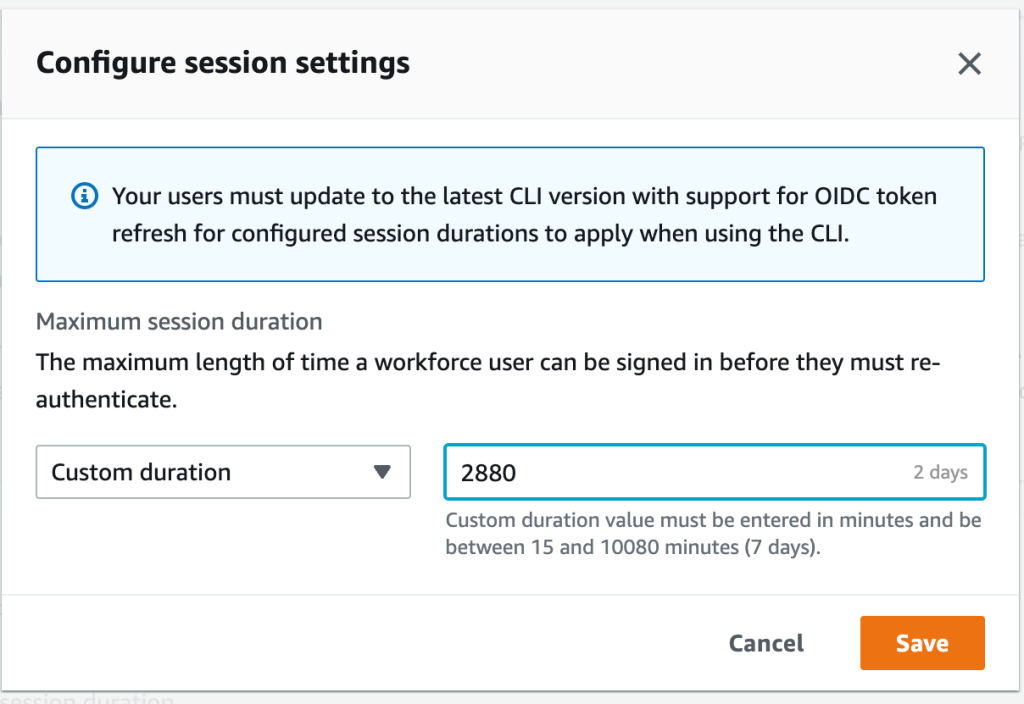
  5. For Configure session settings, choose a maximum session duration from the list of pre-defined session durations in the dropdown. To set a custom session duration, select Custom duration, enter the length for the session in minutes, and then choose Save.
Figure 1: Set access portal session duration

Figure 1: Set access portal session duration

Congratulations! You have just modified the session duration for your users. This new duration will take effect on each user’s next sign-in.

Find and terminate AWS access portal sessions

With this new release, you can find active portal sessions for your IAM Identity Center users, and if needed, you can terminate the sessions. This can be useful in situations such as the following:

  • A user no longer works for your organization or was removed from projects that gave them access to applications or permission sets that they should no longer use.
  • If a device is lost or stolen, the user can contact you to end the session. This reduces the risk that someone will access the device and use the open session.

In these cases, you can find a user’s active sessions in the AWS access portal, select the session that you’re interested in, and terminate it. Depending on the situation, you might also want to deactivate sign-in for the user from the system before revoking the user’s session. You can deactivate sign-in for users in the IAM Identity Center console or in your third-party IdP.

If you first deactivate the user’s sign-in in your IdP, and then deactivate the user’s sign-in in IAM Identity Center, deactivation will take effect in IAM Identity Center without synchronization latency. However, if you deactivate the user in IAM Identity Center first, then it is possible that the IdP could activate the user again. By first deactivating the user’s sign-in in your IdP, you can prevent the user from signing in again when you revoke their session. This action is advisable when a user has left your organization and should no longer have access, or if you suspect a valid user’s credentials were stolen and you want to block access until you reset the user’s passwords.

Termination of the access portal session does not affect the active permission set session started from the access portal. IAM role session duration when assumed from the access portal will last as long as the duration specified in the permission set. For AWS CLI sessions, it can take up to an hour for the CLI to terminate after the access portal session is terminated.

Tip: Activate multi-factor authentication (MFA) wherever possible. MFA offers an additional layer of protection to help prevent unauthorized individuals from gaining access to systems or data.

To manage active access portal sessions in the AWS access portal:

  1. Open the IAM Identity Center console.
  2. In the left navigation pane, choose Users.
  3. On the Users page, choose the username of the user whose sessions you want to manage. This takes you to a page with the user’s information.
  4. On the user’s page, choose the Active sessions tab. The number in parentheses next to Active sessions indicates the number of current active sessions for this user.
    Figure 2: View active access portal sessions

    Figure 2: View active access portal sessions

  5. Select the sessions that you want to delete, and then choose Delete session. A dialog box appears that confirms you’re deleting active sessions for this user.
    Figure 3: Delete selected active sessions

    Figure 3: Delete selected active sessions

  6. Review the information in the dialog box, and if you want to continue, choose Delete session.

Conclusion

In this blog post, you learned how IAM Identity Center manages sessions, how to modify the session duration for the AWS access portal, and how to view, search, and terminate active access portal sessions. I also shared some tips on how to think about the appropriate session duration for your use case and related steps that you should take when terminating sessions for users who shouldn’t have permission to sign in again after their session has ended.

With this new feature, you now have more control over user session management. You can use the console to set configurable session lengths based on your organization’s security requirements and desired end-user experience, and you can also terminate sessions, enabling you to manage sessions that are no longer needed or potentially suspicious.

To learn more, see Manage IAM Identity Center integrated application sessions.

 
If you have feedback about this post, submit comments in the Comments section below. If you have questions about this post, contact AWS Support.

Want more AWS Security news? Follow us on Twitter.

Ron Cully

Ron is a Principal Product Manager at AWS where he has led feature and roadmap planning for workforce identity products for over 6 years. He has over 25 years of experience leading networking and directory related product delivery. Ron is passionate about delivering solutions to help make it easier for you to migrate identity-aware workloads, simplify resource and application authorization, and give people a simple sign-in and access experience in the cloud.

Palak Arora

Palak Arora

Palak is a Senior Product Manager at AWS Identity. She has over eight years of cyber security experience with specialization in Identity and Access Management (IAM) domain. She has helped various customers across different sectors to define their enterprise and customer IAM roadmap and strategy, and improve the overall technology risk landscape.

How to improve security incident investigations using Amazon Detective finding groups

Post Syndicated from Anna McAbee original https://aws.amazon.com/blogs/security/how-to-improve-security-incident-investigations-using-amazon-detective-finding-groups/

Uncovering the root cause of an Amazon GuardDuty finding can be a complex task, requiring security operations center (SOC) analysts to collect a variety of logs, correlate information across logs, and determine the full scope of affected resources.

Sometimes you need to do this type of in-depth analysis because investigating individual security findings in insolation doesn’t always capture the full impact of affected resources.

With Amazon Detective, you can analyze and visualize various logs and relationships between AWS entities to streamline your investigation. In this post, you will learn how to use a feature of Detective—finding groups—to simplify and expedite the investigation of a GuardDuty finding.

Detective uses machine learning, statistical analysis, and graph theory to generate visualizations that help you to conduct faster and more efficient security investigations. The finding groups feature reduces triage time and provides a clear view of related GuardDuty findings. With finding groups, you can investigate entities and security findings that might have been overlooked in isolation. Finding groups also map GuardDuty findings and their relevant tactics, techniques, and procedures to the MITRE ATT&CK framework. By using MITRE ATT&CK, you can better understand the event lifecycle of a finding group.

Finding groups are automatically enabled for both existing and new customers in AWS Regions that support Detective. There is no additional charge for finding groups. If you don’t currently use Detective, you can start a free 30-day trial.

Use finding groups to simplify an investigation

Because finding groups are enabled by default, you start your investigation by simply navigating to the Detective console. You will see these finding groups in two different places: the Summary and the Finding groups pages. On the Finding groups overview page, you can also use the search capability to look for collected metadata for finding groups, such as severity, title, finding group ID, observed tactics, AWS accounts, entities, finding ID, and status. The entities information can help you narrow down finding groups that are more relevant for specific workloads.

Figure 1 shows the finding groups area on the Summary page in the Amazon Detective console, which provides high-level information on some of the individual finding groups.

Figure 1: Detective console summary page

Figure 1: Detective console summary page

Figure 2 shows the Finding groups overview page, with a list of finding groups filtered by status. The finding group shown has a status of Active.

Figure 2: Detective console finding groups overview page

Figure 2: Detective console finding groups overview page

You can choose the finding group title to see details like the severity of the finding group, the status, scope time, parent or child finding groups, and the observed tactics from the MITRE ATT&CK framework. Figure 3 shows a specific finding group details page.

Figure 3: Detective console showing a specific finding group details page

Figure 3: Detective console showing a specific finding group details page

Below the finding group details, you can review the entities and associated findings for this finding group, as shown in Figure 4. From the Involved entities tab, you can pivot to the entity profile pages for more details about that entity’s behavior. From the Involved findings tab, you can select a finding to review the details pane.

Figure 4: Detective console showing involved entities of a finding group

Figure 4: Detective console showing involved entities of a finding group

In Figure 4, the search functionality on the Involved entities tab is being used to look at involved entities that are of type AWS role or EC2 instance. With such a search filter in Detective, you have more data in a single place to understand which Amazon Elastic Compute Cloud (Amazon EC2) instances and AWS Identity and Access Management (IAM) roles were involved in the GuardDuty finding and what findings were associated with each entity. You can also select these different entities to see more details. With finding groups, you no longer have to craft specific log searches or search for the AWS resources and entities that you should investigate. Detective has done this correlation for you, which reduces the triage time and provides a more comprehensive investigation.

With the release of finding groups, Detective infers relationships between findings and groups them together, providing a more convenient starting point for investigations. Detective has evolved from helping you determine which resources are related to a single entity (for example, what EC2 instances are communicating with a malicious IP), to correlating multiple related findings together and showing what MITRE tactics are aligned across those findings, helping you better understand a more advanced single security event.

Conclusion

In this blog post, we showed how you can use Detective finding groups to simplify security investigations through grouping related GuardDuty findings and AWS entities, which provides a more comprehensive view of the lifecycle of the potential security incident. Finding groups are automatically enabled for both existing and new customers in AWS Regions that support Detective. There is no additional charge for finding groups. If you don’t currently use Detective, you can start a free 30-day trial. For more information on finding groups, see Analyzing finding groups in the Amazon Detective User Guide.

If you have feedback about this post, submit comments in the Comments section below. You can also start a new thread on the Amazon Detective re:Post or contact AWS Support.

Want more AWS Security news? Follow us on Twitter.

Author

Anna McAbee

Anna is a Security Specialist Solutions Architect focused on threat detection and incident response at AWS. Before AWS, she worked as an AWS customer in financial services on both the offensive and defensive sides of security. Outside of work, Anna enjoys cheering on the Florida Gators football team, wine tasting, and traveling the world.

Author

Marshall Jones

Marshall is a Worldwide Security Specialist Solutions Architect at AWS. His background is in AWS consulting and security architecture, focused on a variety of security domains including edge, threat detection, and compliance. Today, he is focused on helping enterprise AWS customers adopt and operationalize AWS security services to increase security effectiveness and reduce risk.

Luis Pastor

Luis Pastor

Luis is a Security Specialist Solutions Architect focused on infrastructure security at AWS. Before AWS he worked with large and boutique system integrators, helping clients in an array of industries improve their security posture and reach and maintain compliance in hybrid environments. Luis enjoys keeping active, cooking and eating spicy food, specially Mexican cuisine.

Trading Convenience for Credentials

Post Syndicated from Aaron Wells original https://blog.rapid7.com/2023/01/19/trading-convenience-for-credentials/

Tap. Eat. Repeat. Regret?

Trading Convenience for Credentials

Using food or grocery delivery apps is great. It really is. Sure, there’s a fee, but when you can’t bring yourself to leave the house, it’s a nice treat to get what you want delivered. As a result, adoption of food apps has been incredibly fast and they are now a ubiquitous part of everyday culture. However, the tradeoff for that convenience is risk. In the past few years, cybercriminals have turned their gaze upon food and grocery delivery apps.

According to McKinsey, food delivery has a global market worth of over $150 billion, more than tripling since 2017. That equates to a lot of people entering usernames, passwords, and credit card numbers into these apps. That’s a lot of growth at an extremely rapid pace, and presents the age-old challenge of security trying to keep pace with that growth. Oftentimes it’s not a successful venture; specifically, credential stuffing (no relation to Thanksgiving stuffing or simply stuffing one’s face) is one of the major attacks of choice for bad actors attempting to break into user accounts or deploy other nefarious attacks inside of these apps.

Sounding the alarm

The FBI, among its many other cybercrime worries, recently raised the alert on credential stuffing attacks on customer app accounts across many industries. The usual-suspect industries—like healthcare and media—are there, but now the report includes “restaurant groups and food-delivery,” as well. This is notable due to that sector’s rapid adoption of apps, their growth in popularity among global consumers, and the previously mentioned challenges of security keeping pace with development instead of slowing it down.

The FBI report notes that, “In particular, media companies and restaurant groups are considered lucrative targets for credential stuffing attacks due to the number of customer accounts, the general demand for their services, and the relative lack of importance users place on these types of accounts.” Combine that with things like tutorial videos on hacker forums that make credential stuffing attacks relatively easy to learn, and it’s a (to continue with the food-centric puns) recipe for disaster.

Some background on credential stuffing

This OWASP cheat sheet describes credential stuffing as a situation when attackers test username/password pairs to gain access to one website or application after obtaining those credentials from the breach of another site or app. The pairs are often part of large lists of credentials sold on attacker forums and/or the dark web. Credential stuffing is typically part of a larger account takeover (ATO), targeting individual user accounts, of which there are so, so many on today’s popular delivery apps.  

To get a bit deeper into it, the FBI report goes on to detail how bad actors often opt for the proxy-less route when conducting credential stuffing attacks. This method actually requires less time and money to successfully execute, all without the use of proxies. And even when leveraging a proxy, many existing security protocols don’t regularly flag them. Add to that the recent rise in the use of bots when scaling credential stuffing attacks and the recipe for disaster becomes a dessert as well (the puns continue).  

All of these aspects contributing to the current state of vulnerability and security on grocery and food-delivery apps are worrying enough, but also creating concern is the fact that mobile apps (the primary method of interaction for food delivery services) typically permit a higher rate of login attempts for faster customer verification. In fairness, that can contribute to a better customer experience, but clearly leaves these types of services more vulnerable to attacks.

Cloud services like AWS and Google Cloud can help their clients fend off credential stuffing attacks with defenses like multifactor authentication (MFA) or a defense-in-depth approach that combines several layers of protection to prevent credential stuffing attacks. Enterprise customers can also take cloud security into their own hands—on behalf of their own customers actually using these apps—when it comes to operations in the cloud. Solutions like InsightCloudSec by Rapid7 help to further govern identity and access management (IAM) by implementing least-privilege access (LPA) for cloud workloads, services, and data.

Solutions to breed customer confidence

In addition to safeguards like MFA and LPA, the FBI report details a number of policies that food or grocery-delivery apps can leverage to make it harder for credential thieves to gain access to the app’s user-account base, such as:

  • Downloading publicly available credential lists and testing them against customer accounts to identify problems and gauge their severity.  
  • Leveraging fingerprinting to detect unusual activity, like attempts by a single address to log into several different accounts.
  • Identifying and monitoring for default user-agent strings leveraged by credential-stuffing attack tools.

Detection and response (D&R) solutions like InsightIDR from Rapid7 can also leverage the use of deception technology to lure attackers attempting to use stolen credentials. By deploying fake honey credentials onto your endpoints to deceive attackers, InsightIDR can automatically raise an alert if those credentials are used anywhere else on the network.

At the end of the day, a good meal is essential. It’s also essential to protect your organization against credential stuffing attacks. Our report, Good Passwords for Bad Bots, offers practical, actionable advice on how to reduce the risk of credential-related attacks to your organization.

Download Good Passwords for Bad Bots today.

Recap to security, identity, and compliance sessions at AWS re:Invent 2022

Post Syndicated from Katie Collins original https://aws.amazon.com/blogs/security/recap-to-security-identity-and-compliance-sessions-at-aws-reinvent-2022/

AWS re:Invent returned to Las Vegas, NV, in November 2022. The conference featured over 2,200 sessions and hands-on labs and more than 51,000 attendees over 5 days. If you weren’t able to join us in person, or just want to revisit some of the security, identity, and compliance announcements and on-demand sessions, this blog post is for you.

re:Invent 2022

Key announcements

Here are some of the security announcements that we made at AWS re:Invent 2022.

  • We announced the preview of a new service, Amazon Security Lake. Amazon Security Lake automatically centralizes security data from cloud, on-premises, and custom sources into a purpose-built data lake stored in your AWS account. Security Lake makes it simpler to analyze security data so that you can get a more complete understanding of security across your entire organization. You can also improve the protection of your workloads, applications, and data. Security Lake automatically gathers and manages your security data across accounts and AWS Regions.
  • We introduced the AWS Digital Sovereignty Pledge—our commitment to offering the most advanced set of sovereignty controls and features available in the cloud. As part of this pledge, we launched a new feature of AWS Key Management Service, External Key Store (XKS), where you can use your own encryption keys stored outside of the AWS Cloud to protect data on AWS.
  • To help you with the building blocks for zero trust, we introduced two new services:
    • AWS Verified Access provides secure access to corporate applications without a VPN. Verified Access verifies each access request in real time and only connects users to the applications that they are allowed to access, removing broad access to corporate applications and reducing the associated risks.
    • Amazon Verified Permissions is a scalable, fine-grained permissions management and authorization service for custom applications. Using the Cedar policy language, Amazon Verified Permissions centralizes fine-grained permissions for custom applications and helps developers authorize user actions in applications.
  • We announced Automated sensitive data discovery for Amazon Macie. This new capability helps you gain visibility into where your sensitive data resides on Amazon Simple Storage Service (Amazon S3) at a fraction of the cost of running a full data inspection across all your S3 buckets. Automated sensitive data discovery automates the continual discovery of sensitive data and potential data security risks across your S3 storage aggregated at the AWS Organizations level.
  • Amazon Inspector now supports AWS Lambda functions, adding continual, automated vulnerability assessments for serverless compute workloads. Amazon Inspector automatically discovers eligible AWS Lambda functions and identifies software vulnerabilities in application package dependencies used in the Lambda function code. The functions are initially assessed upon deployment to Lambda and continually monitored and reassessed, informed by updates to the function and newly published vulnerabilities. When vulnerabilities are identified, actionable security findings are generated, aggregated in Amazon Inspector, and pushed to Security Hub and Amazon EventBridge to automate workflows.
  • Amazon GuardDuty now offers threat detection for Amazon Aurora to identify potential threats to data stored in Aurora databases. Currently in preview, Amazon GuardDuty RDS Protection profiles and monitors access activity to existing and new databases in your account, and uses tailored machine learning models to detect suspicious logins to Aurora databases. When a potential threat is detected, GuardDuty generates a security finding that includes database details and contextual information on the suspicious activity. GuardDuty is integrated with Aurora for direct access to database events without requiring you to modify your databases.
  • AWS Security Hub is now integrated with AWS Control Tower, allowing you to pair Security Hub detective controls with AWS Control Tower proactive or preventive controls and manage them together using AWS Control Tower. Security Hub controls are mapped to related control objectives in the AWS Control Tower control library, providing you with a holistic view of the controls required to meet a specific control objective. This combination of over 160 detective controls from Security Hub, with the AWS Control Tower built-in automations for multi-account environments, gives you a strong baseline of governance and off-the-shelf controls to scale your business using new AWS workloads and services. This combination of controls also helps you monitor whether your multi-account AWS environment is secure and managed in accordance with best practices, such as the AWS Foundational Security Best Practices standard.
  • We launched our Cloud Audit Academy (CAA) course for Federal and DoD Workloads (FDW) on AWS. This new course is a 12-hour interactive training based on NIST SP 800-171, with mappings to NIST SP 800-53 and the Cybersecurity Maturity Model Certification (CMMC) and covers AWS services relevant to each NIST control family. This virtual instructor-led training is industry- and framework-specific for our U.S. Federal and DoD customers.
  • AWS Wickr allows businesses and public sector organizations to collaborate more securely, while retaining data to help meet requirements such as e-discovery and Freedom of Information Act (FOIA) requests. AWS Wickr is an end-to-end encrypted enterprise communications service that facilitates one-to-one chats, group messaging, voice and video calling, file sharing, screen sharing, and more.
  • We introduced the Post-Quantum Cryptography hub that aggregates resources and showcases AWS research and engineering efforts focused on providing cryptographic security for our customers, and how AWS interfaces with the global cryptographic community.

Watch on demand

Were you unable to join the event in person? See the following for on-demand sessions.

Keynotes and leadership sessions

Watch the AWS re:Invent 2022 keynote where AWS Chief Executive Officer Adam Selipsky shares best practices for managing security, compliance, identity, and privacy in the cloud. You can also replay the other AWS re:Invent 2022 keynotes.

To learn about the latest innovations in cloud security from AWS and what you can do to foster a culture of security in your business, watch AWS Chief Information Security Officer CJ Moses’s leadership session with guest Deneen DeFiore, Chief Information Security Officer at United Airlines.

Breakout sessions and new launch talks

You can watch talks and learning sessions on demand to learn about the following topics:

  • See how AWS, customers, and partners work together to raise their security posture with AWS infrastructure and services. Learn about trends in identity and access management, threat detection and incident response, network and infrastructure security, data protection and privacy, and governance, risk, and compliance.
  • Dive into our launches! Hear from security experts on recent announcements. Learn how new services and solutions can help you meet core security and compliance requirements.

Consider joining us for more in-person security learning opportunities by saving the date for AWS re:Inforce 2023, which will be held June 13-14 in Anaheim, California. We look forward to seeing you there!

If you’d like to discuss how these new announcements can help your organization improve its security posture, AWS is here to help. Contact your AWS account team today.

If you have feedback about this post, submit comments in the Comments section below. If you have questions about this post, contact AWS Support.

Want more AWS Security news? Follow us on Twitter.

Katie Collins

Katie Collins

Katie is a Product Marketing Manager in AWS Security, where she brings her enthusiastic curiosity to deliver products that drive value for customers. Her experience also includes product management at both startups and large companies. With a love for travel, Katie is always eager to visit new places while enjoying a great cup of coffee.

Author

Himanshu Verma

Himanshu is a Worldwide Specialist for AWS Security Services. In this role, he leads the go-to-market creation and execution for AWS Security Services, field enablement, and strategic customer advisement. Prior to AWS, he held several leadership roles in Product Management, engineering and development, working on various identity, information security and data protection technologies. He obsesses brainstorming disruptive ideas, venturing outdoors, photography and trying various “hole in the wall” food and drinking establishments around the globe.

Hallmark Channel: Securing the Season

Post Syndicated from Aaron Wells original https://blog.rapid7.com/2022/12/22/hallmark-channel-securing-the-season/

How Crown Media protects its crown jewel

Hallmark Channel: Securing the Season

It’s that time of year again…chestnuts roasting on an open-fire, kids making wish-lists, and company holiday parties where you can showcase your most outlandish ugly sweater. It’s also the time of year we all get a little bit less cynical and take in a cheesy holiday movie or two. Enter Crown Media Family Networks and its holiday hitmaker, Hallmark Channel.

Hallmark Channel—and its streaming counterparts like Hallmark Movies Now—are unique in the entertainment world. The company provides year-round programming and has many fans the world over, but the end-of-the-year holiday season is when its content really pops off. Holiday-season die-hards show up for cheesily-wistful-yet-earnest films that have become a cottage industry and an annual jingle-bell juggernaut.

In 2021, Hallmark Channel finished as the number one network among “women 18 and above”, which led to $147.8 million in revenue generated from holiday programming alone. It’s safe to assume the company doesn’t want intellectual property (IP) theft cutting into those kinds of returns.

Cloud-based content delivery

Here’s a scary-sounding sentence for those wary of vulnerabilities: Hallmark Channel’s entire content library is managed in the cloud. Cloud has obvious advantages for any organization, like quick-scaling and not having to build on-prem systems from the ground up. However, it can also increase risk to intellectual property:

  • High-risk resources open to the public internet: If a particular cloud instance becomes accessible by anyone on the internet, revenue-generating IP may be compromised.
  • Increased complexity: IP can be spread across multiple clouds in multiple locations. This makes identity management critical—who has access? Why do they need access? Where are they located?
  • Delayed remediation: So the risk has been identified. But, how old is the data on which the remediation workflow is based? 6 hours? 12 hours? More? This significantly detracts from the efficiency of the remediation.

Action!

Holidays are a particularly busy time for threat actors. So, how do media companies like Hallmark Channel (or any organization) protect their intellectual property?  

  • Create a cybersecurity IP legal and strategic framework: According to the American Bar Association, film and TV studios should avoid single-event approaches to IP theft and create a framework that prioritizes strategic management of risk in the long term. Treating the risk of IP theft as systemic will yield benefits like faster mean time to detect (MTTD) and mean time to respond (MTTR).  
  • Address supply chain issues: Creating big-budget Hollywood content can involve hundreds of vendors and partnerships. Obviously, not everything can be taken in-house. Therefore it’s critical that a company like Hallmark Channel creates a process whereby each outside vendor’s IT and security is thoroughly vetted prior to engagement of services.
  • Implement a disaster recovery solution: Modern cloud playout to streaming services must continue uninterrupted, so media organizations must build redundancy into their content delivery systems. A disaster recovery solution that protects data, enables rapid restore, and offers failover capability is critical.
  • Keep clouds confidential: When the people that need to approve a cut of an in-progress TV show or film are scattered all over the world, a digital copy is uploaded onto what is essentially a public-facing cloud so they can access it, just like digital collaboration in any number of other industries. For holiday event films driving ratings and subscriber numbers however, that sort of collaboration can leave highly valuable content open to vulnerabilities and theft. Solutions like InsightCloudSec by Rapid7 can help to lock down identity and access management (IAM) protocols, as well as manage risk with real-time context across infrastructure, orchestration, workload, and data tiers.  

Making film and TV projects is a painstaking, long, and laborious process. All of the hard work by hundreds of people that goes into each project can be devalued by attackers in the blink of an eye. So to all cybersecurity professionals who are also major fans of holiday films and TV shows, let’s take up the call: Protect the IP!

You can read the previous entry in this blog series here.

Cloud Security and Compliance Best Practices: Highlights From The CSA Cloud Controls Matrix

Post Syndicated from Rapid7 original https://blog.rapid7.com/2022/12/22/cloud-security-and-compliance-best-practices-highlights-from-the-csa-cloud-controls-matrix/

Cloud Security and Compliance Best Practices: Highlights From The CSA Cloud Controls Matrix

In a recent blog post, we highlighted the release of an InsightCloudSec compliance pack, that helps organizations establish and adhere to AWS Foundational Security Best Practices. While that’s a great pack for those who have standardized on AWS and are looking for a trusted set of controls to harden their environment, we know that’s not always the case.

In fact, depending on what report you read, the percentage of organizations that have adopted multiple cloud platforms has soared and continues to rise exponentially. According to Gartner, by 2026 more than 90% of enterprises will extend their capabilities to multi-cloud environments, up from 76% in 2020.

It can be a time- and labor-intensive process to establish and enforce compliance standards across single cloud environments, but this becomes especially challenging in multi-cloud environments. First, the number of required checks and guardrails are multiplied, and second, because each platform is unique,  proper hygiene and security measures aren’t consistent across the various clouds. The general approaches and philosophies are fairly similar, but the way controls are implemented and the way policies are written can be significantly different.

For this post, we’ll dive into one of the most commonly-used cloud security standards for large, multi-cloud environments: the CSA Cloud Controls Matrix (CCM).

What is the CSA Cloud Controls Matrix?

In the unlikely event you’re unfamiliar, Cloud Security Alliance (CSA) is a non-profit organization dedicated to defining and raising awareness of best practices to help ensure a secure cloud computing environment. CSA brings together a community of cloud security experts, industry practitioners, associations, governments, and its corporate and individual members to offer cloud security-specific research, education, certification, events and products.

The Cloud Controls Matrix is a comprehensive cybersecurity control framework for cloud computing developed and maintained by CSA. It is widely-used as a systematic assessment of a cloud implementation and provides guidance on which security controls should be implemented within the cloud supply chain. The controls framework is aligned to the CSA Security Guidance for Cloud Computing and is considered a de-facto standard for cloud security assurance and compliance.

Five CSA CCM Principles and Why They’re Important

The CCM consists of many controls and best practices, which means we can’t cover them all in a single blog post. That said, we’ve outlined 5 major principles that logically group the various controls and why they’re important to implement in your cloud environment. Of course, the CCM provides a comprehensive set of specific and actionable directions that, when adopted, simplify the process of adhering to these principles—and many others.

Ensure consistent and proper management of audit logs
Audit logs record the occurrence of an event along with supporting metadata about the event, including the time at which it occurred, the responsible user or service, and the impacted entity or entities. By reviewing audit logs, security teams can investigate breaches and ensure compliance with regulatory requirements. Within CCM, there are a variety of controls focused on ensuring that you’ve got a process in place to collect, retain and analyze logs as well as limiting access and the ability to edit or delete such logs to only those who need it.

Ensure consistent data encryption and proper key management
Ensuring that data is properly encrypted, both at rest and in transit, is a critical step to protect your organization and customer data from unauthorized access. There are a variety of controls within the CCM that are centered around ensuring that data encryption is used consistently and that encryption keys are maintained properly—including regular rotation of keys as applicable.

Effectively manage IAM permissions and abide by Least Privilege Access (LPA)
In modern cloud environments, every user and resource is assigned a unique identity and a set of access permissions and privileges. This can be a challenge to keep track of, especially at scale, which can result in improper access, either from internal users or external malicious actors. To combat this, the CCM provides guidance around establishing processes and mechanisms to manage, track and enforce permissions across the organization. Further, the framework suggests employing the Least Privilege Access (LPA) principle to ensure users only have access to the systems and data that they absolutely need.

Establish and follow a process for managing vulnerabilities
There are a number of controls focused on establishing, implementing and evaluating processes, procedures and technical measures for detecting and remediating vulnerabilities. The CCM has dedicated controls for application vulnerabilities, external library vulnerabilities and host-level vulnerabilities. It is important to regularly scan your cloud environments for known vulnerabilities, and evaluate the processes and methodologies you use to do so, as well.

Define a process to proactively roll back changes to a previous state of good
In traditional, on-premises environments, patching and fixing existing resources is the proper course of action when an error or security concern is discovered. Conversely, when things go awry in cloud environments, remediation steps typically involve reverting back to a previous state of good. To this end, the CCM guides organizations to proactively establish and implement a process  that allows them to easily roll back changes to a previously known good state—whether manually or via automation.

How InsightCloudSec Helps Implement and Enforce CCM

InsightCloudSec allows security teams to establish and continuously measure compliance against organizational policies, whether they’re based on common industry frameworks or customized to specific business needs. This is accomplished through the use of compliance packs.

A compliance pack within InsightCloudSec is a set of checks that can be used to continuously assess your cloud environments for compliance with a given regulatory framework or industry best practices. The platform comes out-of-the-box with 30+ compliance packs, and also offers the ability to build custom compliance packs that are completely tailored to your business’ specific needs.

Whenever a non-compliant resource is created, or when a change is made to an existing resource’s configuration or permissions, InsightCloudSec will detect it within minutes. If you so choose, you can make use of the platform’s native, no-code automation to remediate the issue—either via deletion or by adjusting the configuration and/or permissions—without any human intervention.

If you’re interested in learning more about how InsightCloudSec can help implement and enforce security and compliance standards across your organization, be sure to check out a free demo!

James Alaniz and Ryan Blanchard contributed to this article.

Cengage LTI Session Management Leakage

Post Syndicated from Tod Beardsley original https://blog.rapid7.com/2022/12/20/cengage-lti-session-management-leakage/

Cengage LTI Session Management Leakage

Prior to December 10, 2022, Cengage, an education technology provider in use in many higher education environments primarily in the United States, had two issues in the way it handled session management over its Learning Tools Integration (LTI) pipeline.

The first issue involves leaving unexpectedly long-lived sessions and accompanying login links in the end user’s browser history as well as via cached GET requests, which could be used by unauthenticated attackers to impersonate the user. This appears to be an instance of CWE-525, "Use of Web Browser Cache Containing Sensitive Information." This issue is estimated to have a CVSSv3 score of 4.5 (Medium). A fix for this issue is expected in March of 2023.

The second issue involves a failure to check the LTI launch signature from connected applications, which could allow an authenticated attacker to impersonate another user. This appears to be an instance of CWE-347, "Improper Verification of Cryptographic Signature." This issue is estimated to have a CVSSv3 score of 6.5 (Medium). Note, this issue has been fixed by the vendor.

Product Description

Cengage is an education technology provider offering digital products including eTextbooks, homework tools and online learning platforms (such as WebAssign). Cengage’s online learning platforms integrate with Learning Management Systems (LMS). For more information about Cengage’s LMS integrations, please visit the vendor’s website.

Credit

This issue was discovered by Tony Porterfield, Principal Cloud Solutions Architect at Rapid7, while observing a family member use the application as an end-user. It is being disclosed in accordance with Rapid7’s vulnerability disclosure policy.

Exploitation

For the CWE-525 issue, it was observed that the "Cengage Single Sign-On" link was usable in the browser history, even though the user had already logged out of the application:

Cengage LTI Session Management Leakage

Clicking the circled link would log the user back in, and was active for at least an hour post-logout.

For the CWE-347 issue, it was observed that the signature check on an LTI launch request to https://gateway.cengage.com/rest/launchBasicLTI responds with a hidden form post containing the LTI parameters from https://gateway.cengage.com/launchBasicLTI/smartlink/basicLTILaunch.gwy as well as a field signatureVerified that is set to false if the signature is invalid. An end user could alter this response by setting signatureVerified to true, as shown below:

Cengage LTI Session Management Leakage

Once modified, the LTI session context would then be accepted by the server as authentic.

Impact

For the CWE-525 issue involving cached credentials, an attacker wishing to impersonate an authenticated user would either need to have access to the browser session of the targeted user, or access to network proxy logs which can cache these tokens (thus, implying a privileged position either locally or on the local network). Assuming this is the case, the attacker could go on to read and alter personal information involving the student. It appears possible to similarly hijack the sessions of instructors or administrators, but this hasn’t been tested or confirmed directly.

For the CWE-347 issue involving signature verification, an authenticated attacker may be able to assume sessions belonging to other users, possibly including other students, instructors, and administrators.

Vendor Statement

Cengage is continuously implementing and refining measures aimed to protect the privacy and security of the customer information entrusted to us. We value the contributions of security researchers like you, as reviews like this help us strengthen our security posture. We use multiple tools and processes, including DAST, SAST, penetration testing and VDP to identify and address security defects in our software.

[The CWE-347 issue] was fixed on December 9, 2022. The second issue is currently in remediation, and we plan to launch a fix as soon as possible.

We continually update and regularly identify ways we can improve our products both to better the learning experience for students and instructors and to ensure information remains secure. If you have found something you would like to report, please submit at https://bugcrowd.com/cengage-vdp.

Remediation

In December of 2022, Cengage released an update to its webassign.net service to address the CWE-347 (signature verification) issue, and is developing a fix for the CWE-525 issue, which we expect to see in March of 2023. Since this is a SaaS-based/cloud-hosted solution, end users, implementers, and integrators should not need to do anything to update or patch locally to address the signature verification issue — the latest version of the LTI implementation will already be available. Beyond this fix, end users have nothing to do to ensure they’re safe from impersonation, as they’re reliant on the provider to properly verify signatures.

While the SSO issue is being developed, end users would be wise to completely sign out of the local computer when complete with whatever academic tasks they were performing, as this would prevent opportunistic attackers from using stored session tokens locally. This is generally good advice anyway, even after the CWE-525 issue is resolved.

Avoiding caching session tokens inadvertently exposed through GET requests on a web proxy is more difficult for the average user to avoid, but as long as no untrusted users have access to proxy logs, the risk from exploiting proxy-cached session tokens is remote (an attacker who does have access to web proxies used by students, instructors, and administrators tend to already have more expansive offensive options).

Disclosure Timeline

  • September, 2022: Issue discovered by Tony Porterfield
  • Mon, Sep 12, 2022: Contacted Bugcrowd, Cengage’s VDP provider, to work out a disclosure agreement
  • Mon, Sep 19, 2022: Contact attempted to alternate contacts at Cengage
  • Wed, Sep 21, 2022: Agreement reached on disclosure terms
  • Thu, Sep 22, 2022: Vulnerability details communicated to Cengage via Bugcrowd with a public disclosure goal of November 15, 2022.
  • Fri, Sep 23, 2022: Triage begun at Bugcrowd (Issue 4464ed3d-3fb6-4287-ba46-786d21bebad0)
  • Sep 23 – Oct 25, 2022: Triage and reproduction work continued
  • Oct 26, 2022: Bugcrowd verified reproduction of the report
  • Nov 1, 2022: Extended disclosure time by approximately 30 days
  • Thu, Dec 15, 2022: Vendor provided update on fix status
  • Fri, Dec 20, 2022: This public disclosure

Spoiler Alert: Your Favorite Content Might Not Be Secure

Post Syndicated from Aaron Wells original https://blog.rapid7.com/2022/12/15/spoiler-alert-your-favorite-content-isnt-secure/

Securing intellectual property in the age of consolidation

Spoiler Alert: Your Favorite Content Might Not Be Secure

Rapid7, of course, is not in the entertainment industry. However, we have worked with some clients out there in that golden land of dreams and enchantment—also known as Hollywood. Case in point: the company formerly known as Discovery, Inc. A few years back, Rapid7 helped the entertainment conglomerate transform itself into a cloud-first company. Discovery’s IT team leveraged InsightCloudSec to facilitate the company’s strategic shift.

In the time since, the company has undergone some, shall we say, changes. Now known as Warner Bros. Discovery following a merger of the two legacy media companies, there’s a new CEO at the helm who is likely feeling pressure to offset the billions of dollars in debt the company currently holds.

From an intellectual property (IP) security standpoint, there are a number of factors that could put the company in a potentially vulnerable position, as we’ve seen with other entertainment giants. In this blog, the first of a two part series, we’ll look at the macro issue of the entertainment business shifting to a streaming-first focus, and the increasingly loud alerts of cybersecurity professionals to the fact that content and IP must be better secured—especially prior to its release.

The big content-distribution shift

Direct-to-consumer services and maximum choice are at the center of the content-distribution shift of the past decade. Netflix kicked off their streaming project with little fanfare back in the early 2010s, but quickly became the gold standard for popular, on-demand content from Hollywood’s biggest studios. And nothing accelerates a seismic shift in any industry like competition. Like dominoes falling, Paramount, Universal, Disney, Warner Bros., and Apple launched their own proprietary streaming services—all in the past few years. Try to picture the digital earthquake that resulted as cloud operations at all of those companies scaled up with blazing speed, challenging their security teams to keep pace.

A few years back, Netflix was one of the first to experience an IP theft of the type we now see in the current age of streaming-service proliferation. A vendor vulnerability exploited by an attacker became a supply-chain issue that saw an entire unreleased season of the popular Netflix series Orange is the New Black dumped online before it could premiere. This was especially disconcerting due to the nature of Netflix’s binge model dictating that all episodes of a series are completely finished prior to release—in the can, as they say in Hollywood. This meant all episodes were stolen as opposed to one or two.  

That breach occurred just as the other previously mentioned streaming services were being prepped but prior to market entry, perhaps suggesting that cybersecurity naiveté on Netflix’s part could have been to blame. It seemed they simply weren’t ready for this next stage in digital theft that attackers were about to unleash upon the world.

Since then, companies have begun to realize the education and actions they must undertake—not to mention the talent they must hire—to secure not just finished TV shows and movies, but all forms of valuable IP that exist under a production company or studio’s purview: scripts, unfinished edits of completed footage, the musical score of a piece of content, and much more.

Warner Bros. Discovery IP security

We, of course, have no inside knowledge of Warner Bros. Discovery’s actual current security posture. However, from an outside perspective, there are a few factors that could potentially increase its IP security risk:  

  1. The skip-hop of Warner Bros. from one conglomerate to another: The legacy Hollywood studio was formerly owned by AT&T and then departed that relationship to merge with Discovery, Inc. As cybersecurity professionals know, a time of mergers and acquisitions (M&A) can be quite joyous for attackers and put the cloud security of organizations at severe risk. Without taking the proper steps to keep environments secure during that time of change, companies leave themselves open to massive financial, regulatory, and reputational risk.
  2. The race to make their streaming service competitive in an extremely crowded market: Warner Bros. Discovery’s streaming service is stuffed with a legacy Hollywood studio’s back catalog, original series, and all sorts of additional content. In the race to be competitive by getting as much of that content as possible up on the service, are they leaving the door more open to attackers? Everyone knows that as soon as a film goes live on any sort of digital service, it’s almost immediately pirated and disseminated globally, cutting into the profits of streaming services.
  3. The axing of high-profile projects in favor of tax write-offs: In some cases, content was complete—or nearly so—when the decision was made to cancel the release. In the high-profile case of Batgirl, the filmmakers made public their attempt to save a copy of the film from its digital storage before they were locked out and the project forever shelved.

As we can see from that last point, the moves the company is making are decisive and have little mercy for talent or content. As a recent mega-merged conglomerate, the new company has its work cut out for it in several areas. Combining the content catalogs of the two previously separate companies is most certainly the largest and most critical challenge facing the current business. Protecting those decades worth of valuable IP from attackers should be just as much of a priority as the creation of the next Batman or Harry Potter film.

Making film and TV projects is a painstaking, long, and laborious process. All of the hard work by hundreds of people that goes into each project can be devalued by attackers in the blink of an eye. Plus, there’s nothing bad actors love more than a high-profile Hollywood hack. So, to all cybersecurity professionals who are also major film and TV fans, let’s take up the call to Hollywood studios: Protect the IP!

Next week, in the second part of this blog series, we’ll look at cloud-based content delivery systems for Hallmark Channel’s holiday programming as well as actionable steps studios (and other organizations) can take to protect their valuable IP.

Can Cloud Security Be Easier Than Complex?

Post Syndicated from Aaron Wells original https://blog.rapid7.com/2022/12/01/can-cloud-security-be-easier-than-complex/

A bigger piece of the meal

Can Cloud Security Be Easier Than Complex?

For those in the United States and certain parts of the world, it’s time for end-of-year holidays. That means lots and lots of big meals to celebrate these special occasions. Each dish created becomes part of that larger meal.  

Another important event that occurs around this time each year is budget planning for next year. Cloud security is one dish in the larger meal of the company’s entire budget, and you can bet that meal will be eaten quickly. Fighting for scraps of budget at the end of the meal won’t do. It’s important to identify exactly what you need so that you can get organized and get funding that will best secure cloud operations.  

The patchwork of tools that make up an effective cloud security solution shouldn’t be too complex or become siloed. In fact, if it can come from one provider offering a suite of out-of-the box solutions that operate from one platform, that would make things even simpler. And in the process of searching out that package of solutions – ideally from that single, trusted provider – and customizing it to your needs, you’ve gone through a similar process of preparing the dish that gets added to the larger meal.    

Impossible to secure?

In the new Rapid7 eBook 13 Tips for Overcoming the Cybersecurity Talent Shortage, we detail how Gartner® says the unique nature of cloud-native applications makes them impossible to secure without a complex set of overlapping tools spanning development and production. Admittedly, this sounds pretty dire. However, there are solutions – like InsightCloudSec from Rapid7 – that incorporate multiple capabilities into one, unified platform in order to remove the previously mentioned complexity. Let’s take a look at some of those different parts that can make up your ideal solution:

  • Cloud Security Posture Management (CSPM): Detects and reports on issues ranging from cloud misconfigurations to security settings.
  • Cloud Infrastructure Entitlement Management (CIEM): Provides identity and access controls to reduce excessive permissions and streamline LPA controls across dynamic cloud environments.
  • Cloud Workload Protection Platform (CWPP): Protects the unique capabilities or workloads running in a cloud instance.  
  • Cloud-Native Application Protection Platform (CNAPP): Provides instrumental data context across CSPM and CWPP archetypes to better protect workloads.

The ultimate goal would be to secure the entire lifecycle of your cloud-native applications, regularly scanning code throughout development and runtime. This ultimately enables a holistic security process that uncovers and remediates issues quickly and can be automated according to your burgeoning best practices.

What does easier cloud security look like?

Those best practices that will surface over time will tell you exactly what easier cloud security looks like for your organization. Customizing practices specific to your operations is technically the hard part, with the easier part to follow. Once automation protocols have been implemented, those protective and reactive controls help you innovate at the speed enabled by cloud environments. But even in the hard part of cloud setup, there are vendors providing platforms for unified solutions to make it easier out of the box.

InsightCloudSec from Rapid7

InsightCloudSec helps teams secure even the most complex cloud environments by surfacing and applying context to risk signals to understand and prioritize them based on potential impact. The solution significantly reduces mean time to respond (MTTR) by utilizing real-time detections and native automation to detect and remediate misconfigurations, vulnerabilities, policy violations, and overly-permissive roles.

  • Get agentless, real-time visibility into every resource and service running across your cloud environment.
  • Simplify cloud risk assessment with rich contextual insight into every layer of your environment.
  • Enforce organizational standards without human intervention with native, no-code automation.

More efficient cloud security solutions create happier teams. And that helps you to gain savings in multiple areas like time, money, and satisfaction.

More resources

Whatever your ultimate cloud operational needs are or whatever your multi-cloud environment looks like, you can now learn more about tactics to help you make your case for more – or any – cloud security at your company. Plus, get a handy checklist to use when looking into a potential solution. Get started now with the 2022 edition of The Complete Cloud Security Buyer’s Guide from Rapid7. You can also read the previous entry in this blog series here.

Rapid7 Integration For AWS Verified Access

Post Syndicated from Aaron Sawitsky original https://blog.rapid7.com/2022/11/30/rapid7-integration-for-aws-verified-access/

Rapid7 Integration For AWS Verified Access

Today at re:invent, Amazon Web Services (AWS) unveiled its new AWS Verified Access service, and we are thrilled to announce that InsightIDR — Rapid7’s next-gen SIEM and XDR — will support log ingestion from this new service when it is made generally available.

What Is AWS Verified Access?

AWS Verified Access is a new service that allows AWS customers to simplify secure access to private applications running on AWS, without requiring the use of a VPN. Verified Access also lets customers easily implement Zero Trust policies for each application reached via the service. The data needed for these policies is provided by integrations between Verified Access and third-party solutions like IdPs and device management tools. For example:

  • Access to a low-risk application might be granted to any employee who is logged into the organization’s IdP solution
  • Access to a highly sensitive application might only be granted to employees who are logged into the organization’s IdP solution, are part of a specific team at the company, are accessing from a company-managed computer that is fully updated, and have an IP address coming from a country on an allowlist

For customers who already have IdP and device management solutions, Verified Access can integrate with many of these vendors, allowing the customer to use their existing provider to define policies while still getting the convenience of VPN-less access to their private applications through Verified Access.

Unlock a Complete Picture of Your Cloud Security with InsightIDR

Verified Access generates detailed logs for every authorization attempt. InsightIDR will be able to ingest these logs from AWS’s just-announced Amazon Security Lake. InsightIDR customers will be able to see ingress activity from Verified Access alongside ingress events from sources like AWS Identity Access Management (IAM), VPNs, productivity apps, and more — not to mention telemetry from their broader cloud and on-premises environments. Like all ingress activity logs sent to InsightIDR, logs from Verified Access will be able to be used to detect suspicious activity, as well as be brought into investigations to help establish a complete timeline and blast radius of an incident. In addition, customers will have the ability to create custom alerts off of Verified Access logs to further scrutinize and monitor access to sensitive applications.

InsightIDR’s support for Verified Access is just the latest capability to come out of our never-ending dedication to support our customers as they adopt the newest cloud technologies. To learn more about how InsightIDR helps organizations using AWS, click here.

InsightIDR Launches Integration With New AWS Security Data Lake Service

Post Syndicated from Aaron Sawitsky original https://blog.rapid7.com/2022/11/29/insightidr-launches-integration-with-new-aws-security-data-lake-service/

InsightIDR Launches Integration With New AWS Security Data Lake Service

It has been an action-packed day at AWS re:Invent. For security professionals, one of the most exciting announcements has to be the launch of Amazon Security Lake. We see a lot of potential for this new service, which is why Rapid7 is proud to announce the immediate availability of an integration between InsightIDR and Security Lake. Read on to learn more!

What Is Amazon Security Lake?

Amazon Security Lake gives AWS customers a security data lake that centralizes AWS and third-party security logs. What’s more, all data sent to Security Lake is formatted using the recently-launched OCSF standard. That means even if logs come from different services or different vendors, all logs for a given activity (e.g. all cloud activity logs, all network activity logs, etc.) will have the same format in Security Lake. This will make it easy for customers and their third-party vendors to make use of the data in Security Lake without first having to normalize data.

Another big feature in Security Lake is the granular control it offers. Customers can choose which users and third-party integrations can access which data sources and determine the duration of data that is available to each. For example, a customer might give their developers the ability to view CloudTrail data from the past five days so they can troubleshoot issues, but give InsightIDR the ability to view CloudTrail data from the past year.

InsightIDR’s Integration With Amazon Security Lake

InsightIDR’s new integration allows it to ingest log data from Security Lake. At the moment, InsightIDR will only ingest logs from AWS CloudTrail. Over time, we plan to add support for additional OCSF log types, which will allow customers to send data from multiple AWS and third-party services to InsightIDR through one Amazon Security Lake integration. This will give us the potential ability to immediately ingest and parse logs from any new third-party solution that gets introduced, as long as that solution can export its logs to Security Lake. Another customer benefit is that by consolidating the ingestion of multiple logs via Moose, onboarding and ongoing maintenance will be greatly reduced.

If you are an existing InsightIDR customer and want to take advantage of the new integration with Amazon Security Lake, instructions for setup are here.

Unifying Threat Findings to Elevate Your Runtime Cloud Security

Post Syndicated from Alon Berger original https://blog.rapid7.com/2022/11/29/unifying-threat-findings-to-elevate-your-runtime-cloud-security/

Unifying Threat Findings to Elevate Your Runtime Cloud Security

The widespread growth in cloud adoption in recent years has given businesses across all industries the ability to transform and scale in ways never before possible. However, the speed of those changes, combined with the drastically increased volume and complexity of resources in cloud environments, often forces organizations to choose between slowing the pace of their innovation or taking on massive amounts of unmanaged risk.

Cloud security teams still struggle to gather all the relevant insights such as alerts, threat findings, and notifications in a single, consolidated place, and even when they succeed, these findings are often missing much of the context needed to perform quickly and conduct proper investigations with confidence.

A Single Pane of Glass for Runtime Security Threats

To address and overcome these challenges, we’ve introduced a series of agentless cloud detection and response (CDR) capabilities, empowering our customers to utilize better observability and context for proactive and collaborative investigations.

As part of our new CDR capabilities, we first introduced a unified threat findings view that curates runtime threat detections from various customer resources and cloud service providers to allow faster intelligence analysis and detection of potential risks.

This offers frictionless workflow integrations with third-party cloud vendors, collecting cloud events, alerts, and threat intelligence feeds from associated services, such as AWS GuardDuty. The new unified view not only consolidates all runtime threat detections from various sources, but also provides richer security context by associating the findings with the affected cloud resources and their properties, all in a single place.

These seamless integrations also ensure that companies are able to leverage their CSP’s newest security tools and capabilities, as well as keeping up with the latest developments in the ever-changing world of cloud infrastructure.

In addition to consolidating third-party threat findings, we’ve also built native detection for suspicious events in customer cloud environments. These native detection capabilities, which are based on research from Rapid7 cloud security experts and detect suspicious events within 90 seconds, include identifying potential threat actor behaviors such as:

  • A user marking an existing resource as publicly accessible/exposed to the world
  • A user making a resource unencrypted at rest
  • A user removing transit encryption for a resource
  • A user removing cloud protective measures, such as password policy
  • A user adding overly permissive policies to an existing resource

Along with providing individual alerts for these detections, admin can now also filter resources to get a view of only those assets that have seen a suspicious event in the last 24 hours. This allows flexibility in how individuals and teams are able to review, investigate, and report on recent threats across their cloud environment.

Simplify Mitigation at Scale

Runtime security is key to providing visibility and detecting a variety of threats that piggyback on network resources. With Rapid7’s continuous monitoring and analysis of native and third-party threat findings, teams are able to leverage advanced automated remediation of risks in their environment, including misconfigured resources and hygiene drifts, known and unknown vulnerabilities, uncontrolled access (Secrets, tokens, credentials, etc.), and more.

Along with identifying threats, teams are now able to leverage an intelligent automated notification for third-party integrations such as SIEM, ticketing platform, or chat solutions. This significantly helps with an advanced and much faster remediation process to isolate relevant resources and prevent further suspicious activity until a thorough investigation is completed.

Take a Holistic Approach to Runtime Security in
the Cloud

Rapid7 is on a mission to help drive cloud security forward across the entire industry and community. With this new set of capabilities, including our recently launched unified threats findings view, getting visibility into risks and threats is easier and more powerful than ever. Ultimately, we aim for our customers to benefit from our current and upcoming offerings, helping them to create greater impact and to drive business forward faster and at scale.

Want to learn more? Click here.

Reducing Risk In The Cloud with Agentless Vulnerability Management

Post Syndicated from Alon Berger original https://blog.rapid7.com/2022/11/28/reducing-risk-with-agentless-cloud-vulnerability-management/

Reducing Risk In The Cloud with Agentless Vulnerability Management

In order to gain visibility into vulnerabilities in their public cloud environments, many organizations still rely on agent or network-based scanning technology that was initially built for traditional infrastructure and endpoints.

These methods often struggle to keep up with the speed of change and scale of complex, and constantly changing cloud environments, forcing infrastructure teams to constantly play catch up and avoid significant blindspots caused by unprotected workloads.

Vulnerability management in the cloud starts with continuous discovery of the container images and host workloads that may contain them and the supporting resources that control how they are launched.  The assessment step produces  long lists of vulnerabilities that can lack the necessary context to help prioritize and accurately route the issue to the correct owners for remediation.

Getting Better Visibility and Control

Rapid7’s InsightCloudSec now addresses all these challenges and provides agentless vulnerability assessment capabilities for cloud-based container workloads and hosts.  Building on InsightCloudSec’s industry leading cloud resource discovery technology, we’ve unleashed the latest generation agentless methods for assessing vulnerabilities on Containers using side-scanning and on Hosts using image snapshotting.  Combined, this fully enables security teams to quickly identify where the vulnerabilities exist across their cloud infrastructure, what resources are responsible for managing the dynamic workloads that launch them, and the tools to manage response prioritization and remediation.

InsightCloudSec’s vulnerability management  capabilities are  purpose-built for cloud-native environments and leverage Rapid7’s proven vulnerability management expertise and intelligence.  Our agentless approach  reduces the unnecessary overhead of agent management on highly ephemeral cloud resources.

Vulnerability Management with Rapid7’s InsightCloudSec

Vulnerability management with InsightCloudSec focuses on container and host-based workloads found in production environments, where the risk of exploitation is the highest. The solution leverages event-driven detection capabilities, allowing teams to maintain an up-to-the-minute inventory of all resources in production. This in turn minimizes blind spots and allows for more trustworthy reporting.

The solution automatically analyzes new container images and host instances upon deployment and provides detailed intelligence and remediation guidance for known vulnerabilities. InsightCloudSec then periodically revalidates running hosts against the newest vulnerability data to detect and protect against drift.

Our comprehensive vulnerability detection spans operating systems, installed software packages, network services, and open-source software libraries and packages typically used as dependencies in these environments, providing customers with the broadest coverage available in the market.

Agentless Container and Host Workload Assessment

With agentless Vulnerability assessment, security teams gain robust, continuous visibility into what vulnerabilities exist in their cloud environment, without having to include an agent in their container and host golden images. We discover new container images and host instances in near-real-time and immediately gather the information necessary to perform the assessment without waiting for a scheduled scan window or impacting the performance of the live workloads.  

When new container images are detected in the monitored registries, InsightCloudSec performs a side-scan on them to index the inventory of operating system and installed software packages as well as any other dependent libraries that exist on which we can detect vulnerabilities.

In the same way, once a new running host (VM) instance is detected, InsightCloudSec fetches the workload’s runtime storage layer using remote harvesting and automated snapshot triggering to gather the data required for vulnerability assessment.

By combining workloads metadata gathered from cloud provider APIs with container and host vulnerability data, we are able to provide contextualized vulnerability reports and deep visibility of where they exist in cloud environments, allowing security teams to respond to those impacting the most critical applications and cloud accounts.

Conclusion

Rapid7 and InsightCloudSec strive to help security and operation teams apply proper processes and procedures across the deployment pipeline, allowing them to quickly respond to vulnerabilities of any sort and severity.

With an accurate assessment of detected vulnerabilities and intelligent, automated routing for faster remediation, our solution empowers teams to have a robust and continuous visibility into vulnerabilities that exist in their cloud environments.

Want to learn more? Click here.

2022 Canadian Centre for Cyber Security Assessment Summary report available with 12 additional services

Post Syndicated from Naranjan Goklani original https://aws.amazon.com/blogs/security/2022-canadian-centre-for-cyber-security-assessment-summary-report-available-with-12-additional-services/

We are pleased to announce the availability of the 2022 Canadian Centre for Cyber Security (CCCS) assessment summary report for Amazon Web Services (AWS). This assessment will bring the total to 132 AWS services and features assessed in the Canada (Central) AWS Region, including 12 additional AWS services. A copy of the summary assessment report is available for review and download on demand through AWS Artifact.

The full list of services in scope for the CCCS assessment is available on the AWS Services in Scope page. The 12 new services are:

The CCCS is Canada’s authoritative source of cyber security expert guidance for the Canadian government, industry, and the general public. Public and commercial sector organizations across Canada rely on CCCS’s rigorous Cloud Service Provider (CSP) IT Security (ITS) assessment in their decisions to use cloud services. In addition, CCCS’s ITS assessment process is a mandatory requirement for AWS to provide cloud services to Canadian federal government departments and agencies.

The CCCS Cloud Service Provider Information Technology Security Assessment Process determines if the Government of Canada (GC) ITS requirements for the CCCS Medium cloud security profile (previously referred to as GC’s Protected B/Medium Integrity/Medium Availability [PBMM] profile) are met as described in ITSG-33 (IT security risk management: A lifecycle approach). As of November 2022, 132 AWS services in the Canada (Central) Region have been assessed by the CCCS and meet the requirements for the CCCS Medium cloud security profile. Meeting the CCCS Medium cloud security profile is required to host workloads that are classified up to and including the medium categorization. On a periodic basis, CCCS assesses new or previously unassessed services and reassesses the AWS services that were previously assessed to verify that they continue to meet the GC’s requirements. CCCS prioritizes the assessment of new AWS services based on their availability in Canada, and on customer demand for the AWS services. The full list of AWS services that have been assessed by CCCS is available on our Services in Scope for CCCS Assessment page.

To learn more about the CCCS assessment or our other compliance and security programs, visit AWS Compliance Programs. As always, we value your feedback and questions; you can reach out to the AWS Compliance team through the Contact Us page.

If you have feedback about this post, submit comments in the Comments section below. Want more AWS Security news? Follow us on Twitter.

Naranjan Goklani

Naranjan Goklani

Naranjan is a Security Audit Manager at AWS, based in Toronto (Canada). He leads audits, attestations, certifications, and assessments across North America and Europe. Naranjan has more than 13 years of experience in risk management, security assurance, and performing technology audits. Naranjan previously worked in one of the Big 4 accounting firms and supported clients from the financial services, technology, retail, ecommerce, and utilities industries.