Tag Archives: General Availability

Cloudflare Area 1 – how the best Email Security keeps getting better

Post Syndicated from Joao Sousa Botto original https://blog.cloudflare.com/email-security/

Cloudflare Area 1 - how the best Email Security keeps getting better

Cloudflare Area 1 - how the best Email Security keeps getting better

On February 23, 2022, after being a customer for two years and seeing phishing attacks virtually disappear from our employee’s mailboxes, Cloudflare announced the acquisition of Area 1 Security.

Thanks to its unique technology (more on that below) Cloudflare Area 1 can proactively identify and protect against phishing campaigns before they happen, and potentially prevent the 90%+ of all cyberattacks that Deloitte research identified as starting with an email. All with little to no impact on employee productivity.

But preventing 90% of the attacks is not enough, and that’s why Cloudflare Area 1 email security is part of our Zero Trust platform. Here’s what’s new.

Email Security on your Cloudflare Dashboard

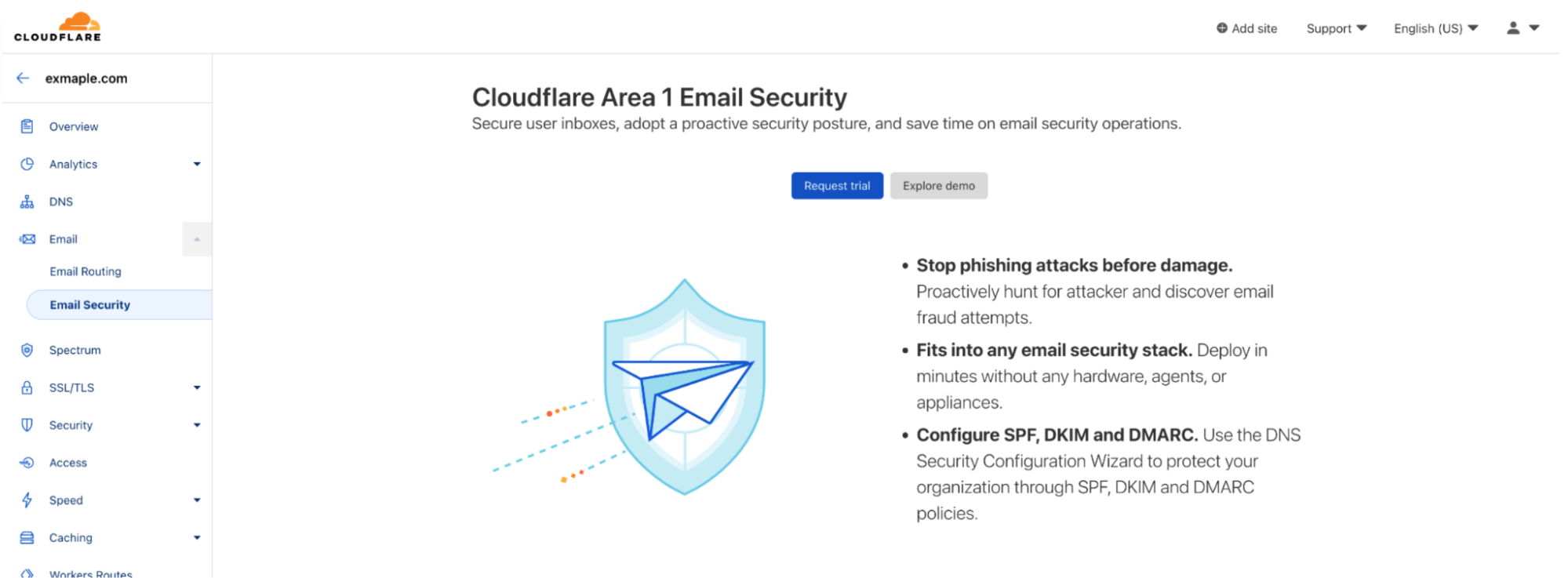
Starting today you will find a dedicated Email Security section on your Cloudflare dashboard. That’s the easiest way for any Cloudflare customer to get familiar with and start using Cloudflare Area 1 Email Security.

From there you can easily request a trial, which gives you access to the full product for 30 days.

Our team will guide you through the setup, which will take just a few minutes. That’s the beauty of not having to install and tune a Secure Email Gateway (SEG). You can simply configure Area 1 inline or connect through the API, journaling, or other connectors – none of these options disrupt mail flow or the end user experience. And you don’t need any new hardware, appliances or agents.
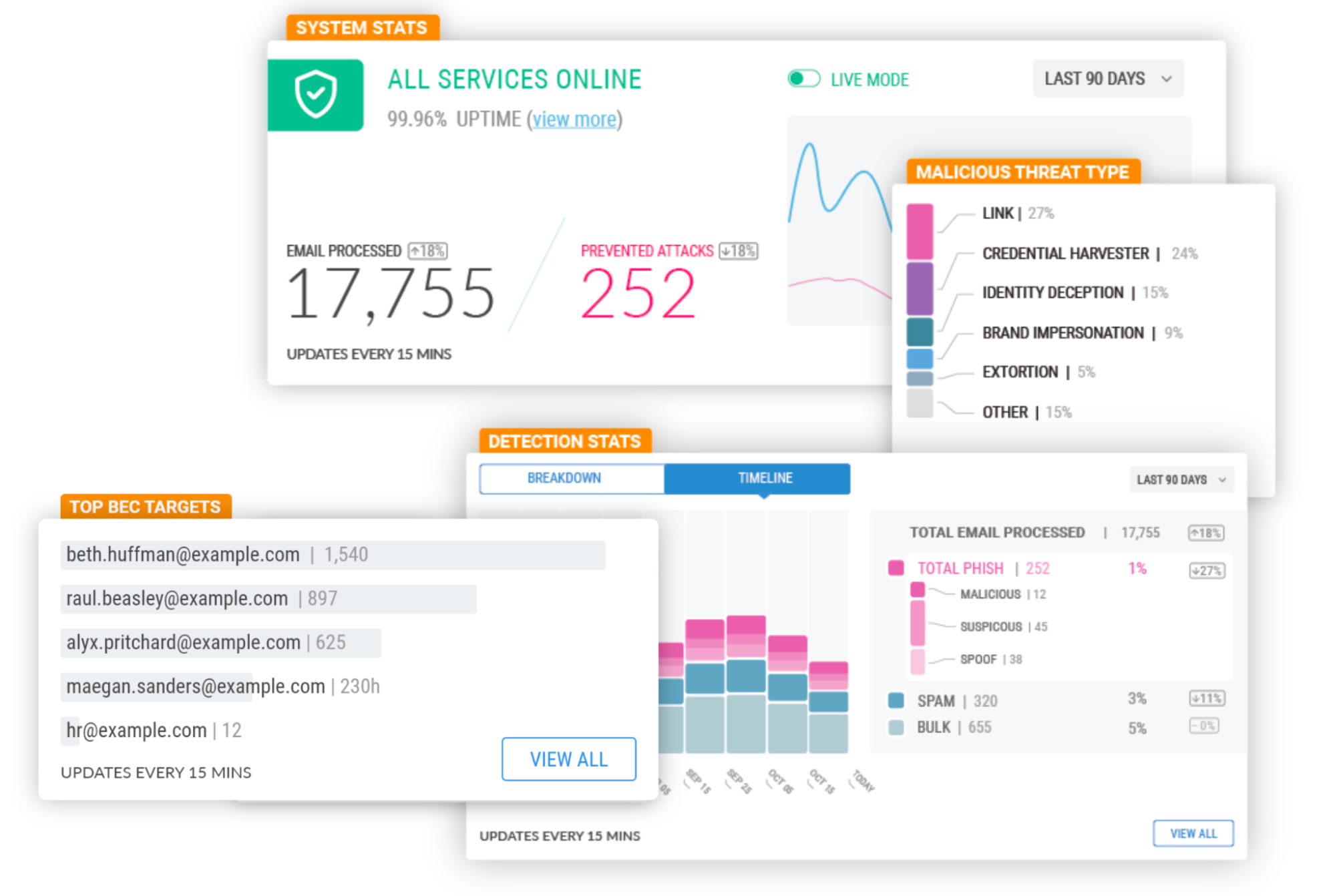
Once the trial starts, you’ll be able to review detection metrics and forensics in real time, and will receive real-time updates from the Area 1 team on incidents that require immediate attention.

At the end of the trial you will also have a Phishing Risk Assessment where our team will walk you through the impact of the mitigated attacks and answer your questions.

Cloudflare Area 1 - how the best Email Security keeps getting better

Another option you’ll see on the Email Security section of the Cloudflare Dashboard is to explore the Area 1 demo.

At the click of a button you’ll enter the Area 1 portal of a fictitious company where you can see the product in action. You can interact with the full product, including our advanced message classifiers, the BEC protections, real time view of spoofed domains, and our unique message search and trace capabilities.

Cloudflare Area 1 - how the best Email Security keeps getting better

Product Expansions

Being cloud-native has allowed us to develop some unique capabilities. Most notably, we scan the Internet for attacker infrastructure, sources and delivery mechanisms to stop phishing attacks days before they hit an inbox. These are state of the art machine-learning models using the threat intelligence data that Area 1 has accumulated since it was founded nine years ago, and now they also incorporate data from the 124 billion cyber threats that Cloudflare blocks each day and its 1.7 trillion daily DNS queries.

Since the product is cloud-based and no local appliances are involved, these unique datasets and models benefit every customer immediately and apply to the full range of email attack types (URLs, payloads, BEC), vectors (email, web, network), and attack channels (external, internal, trusted partners). Additionally, the threat datasets, observables and Indicators of Compromise (IOC) are now additional signals to Cloudflare Gateway (part of Zero Trust), extending protection beyond email and giving Cloudflare customers the industry’s utmost protection against converged or blended threats.

The expertise Area 1 gained through this relentless focus on Threat Research and Threat Operations (i.e., disrupting actors once identified) is also leading to a new large scale initiative to make every Cloudflare customer, and the broader Internet, safer – Cloudforce One.

The Cloudforce One team is composed of analysts assigned to five subteams: Malware Analysis, Threat Analysis, Active Mitigation and Countermeasures, Intelligence Analysis, and Intelligence Sharing. Collectively, they have tracked many of the most sophisticated cyber criminals on the Internet while at the National Security Agency (NSA), USCYBERCOM, and Area 1 Security, and have worked closely with similar organizations and governments to disrupt these threat actors. They’ve also been prolific in publishing “finished intel” reports on security topics of significant geopolitical importance, such as targeted attacks against governments, technology companies, the energy sector, and law firms, and have regularly briefed top organizations around the world on their efforts.

The team will help protect all Cloudflare customers by working closely with our existing product, engineering, and security teams to improve our products based on tactics, techniques, and procedures (TTPs) observed in the wild. Customers will get better protection without having to take any action.

Additionally, customers can purchase a subscription to Cloudforce One (now generally available), and get access to threat data and briefings, dedicated security tools, and the ability to make requests for information (RFIs) to the team’s threat operations staff. RFIs can be on any security topic of interest, and will be analyzed and responded to in a timely manner. For example, the Cloudforce One Malware Analysis team can accept uploads of possible malware and provide a technical analysis of the submitted resource.

Lastly, SPF/DKIM/DMARC policies are another tool that can be used to prevent Email Spoofing and have always been a critical part of Area 1’s threat models. Cloudflare Area 1 customers receive weekly DMARC sender reports to understand the efficacy of their configuration, but customers have also asked for help in setting up SPF/DKIM/DMARC records for their own domains.

It was only logical to make Cloudflare’s Email Security DNS Wizard part of our Email Security stack to guide customers through their initial SPF, DKIM and DMARC configuration. The wizard is now available to all customers using Cloudflare DNS, and will soon be available to Cloudflare Area 1 customers using a third party DNS. Getting SPF/DKIM/DMARC right can be complex, but it is a necessary and vital part of making the Internet safer, and this solution will help you build a solid foundation.

You’ll be hearing from us very soon regarding more expansions to the Area 1 feature set. In the meantime, if you want to experience Area 1 first-hand sign up for a Phishing Risk Assessment here or explore the interactive demo through the Email section of your Cloudflare Dashboard.

Isolate browser-borne threats on any network with WAN-as-a-Service

Post Syndicated from Tim Obezuk original https://blog.cloudflare.com/magic-gateway-browser-isolation/

Isolate browser-borne threats on any network with WAN-as-a-Service

Isolate browser-borne threats on any network with WAN-as-a-Service

Defending corporate networks from emerging threats is no easy task for security teams who manage complex stacks of firewalls, DNS and HTTP filters, and DLP and sandboxing appliances. Layering new defenses, such as Remote Browser Isolation to mitigate browser-borne threats that target vulnerabilities in unpatched browsers, can be complex for administrators who first have to plan how to integrate a new solution within their existing networks.

Today, we’re making it easier for administrators to integrate Cloudflare Browser Isolation into their existing network from any traffic source such as IPsec and GRE via our WAN-as-a-service, Magic WAN. This new capability enables administrators to connect on-premise networks to Cloudflare and protect Internet activity from browser-borne malware and zero day threats, without installing any endpoint software or nagging users to update their browsers.

Before diving into the technical details, let’s recap how Magic WAN and Browser Isolation fit into network perimeter architecture and a defense-in-depth security strategy.

Isolate browser-borne threats on any network with WAN-as-a-Service

Securing networks at scale with Magic WAN

Companies have historically secured their networks by building a perimeter out of on-premise routers, firewalls, dedicated connectivity and additional appliances for each layer of the security stack. Expanding the security perimeter pushes networks to their limits as centralized solutions become saturated, congested and add latency, and decentralizing adds complexity, operational overhead and cost.

These challenges are further compounded as security teams introduce more sophisticated security measures such as Browser Isolation. Cloudflare eliminates the complexity, fragility and performance limitations of legacy network perimeters by displacing on-premise firewalls with cloud firewalls hosted on our global network. This enables security teams to focus on delivering a layered security approach and successfully deploy Browser Isolation without the latency and scale constraints of legacy approaches.

Securing web browsing activity with Browser Isolation

A far cry from their humble origins as document viewers, web browsers have evolved into extraordinarily complex pieces of software capable of running untrusted code from any connected server on the planet. In 2022 alone, Chromium, the engine that powers more than 70% of all web browsing activity and is used by everyone to access sensitive data in email and internal applications has seen six disclosed zero-day vulnerabilities.

In spite of this persistent and ongoing security risk, the patching of browsers is often left to the end-user who chooses when to hit update (while also restarting their browser and disrupting productivity). Patching browsers typically takes days and users remain exposed to malicious website code until it is complete.

Isolate browser-borne threats on any network with WAN-as-a-Service

To combat this risk Browser Isolation takes a zero trust approach to web browsing and executes all website code in a remote browser. Should malicious code be executed, it occurs remotely from the user in an isolated container. The end-user and their connected network is insulated from the impact of the attack.

Magic WAN + Browser Isolation

Customers who have networks protected by Magic WAN can now enable Browser Isolation through HTTP policies.

Connect your network to Cloudflare and enable Secure Web Gateway

Magic WAN enables connecting any network to Cloudflare over IPsec, GRE, Private Network connectivity. The steps for this process may vary significantly depending on your vendor. See our developer documentation for more information.

Create an isolation policy

Isolation policies function the same with Magic WAN as they do for traffic sourced from devices with our Roaming Client (WARP) installed.

Navigate to the Cloudflare Zero Trust dashboard → Gateway → HTTP Policies and create a new HTTP policy with an isolate action.

Isolate browser-borne threats on any network with WAN-as-a-Service

See our developer documentation to learn more about isolation policies.

Enable non-identity on-ramp support

Prior to this release, Magic WAN + Browser Isolation traffic presented a block page. Existing customers will continue to see this block page. To enable Browser Isolation traffic for Magic Gateway navigate to: Cloudflare Zero Trust → Settings → Browser Isolation → Non-identity on-ramp support and select Enable.

Configuration complete

Once configured traffic that matches your isolation criteria is transparently intercepted and served through a remote browser. End-users are automatically connected to a remote browser at the closest Cloudflare data center. This keeps latency to a minimum, ensuring a positive end-user experience while mitigating security threats.

Try Cloudflare Browser

Isolate browser-borne threats on any network with WAN-as-a-Service

Interested in testing our remote browsing experience? Visit this landing page to request demo access to Browser Isolation. This service is hosted on our global network, and you’ll be connected to a real remote browser hosted in a nearby Cloudflare data center.

What’s next?

We’re excited to continue integrating new on-ramps to consistently protect users from web based threats on any device and any network. Stay tuned for updates on deploying Browser Isolation via Proxy PAC files and deploying in-line on top of self-hosted Access applications.

Cloudflare One Partner Program acceleration

Post Syndicated from Steve Pataky original https://blog.cloudflare.com/cloudflare-one-partner-program-acceleration/

Cloudflare One Partner Program acceleration

Cloudflare One Partner Program acceleration

Just a few short months ago, Cloudflare announced the launch of the Cloudflare One Partner Program.  Many customers want to start their journeys to Zero Trust but are not sure where or how to start. It became clear there was a significant opportunity to partner with the channel – to combine Cloudflare’s complete Zero Trust portfolio with a broad set of Cloudflare-enabled, channel-delivered professional services to help customers navigate meaningful ways to adopt a Zero Trust architecture. Underscoring this need to partner was the fact that over the last six months we saw a 50% increase in new Cloudflare Zero Trust customers being won with the channel.

Clearly customers are ready to cut through the market hype of Zero Trust and start implementing – with the right platform of products and services – and the right value contribution of their channel partners.

Since the launch of the Cloudflare One Partner Program, we’ve engaged with hundreds of partners through our recruiting campaigns and in our Zero Trust Roadshow. This has provided a tremendous amount of feedback on what is working and why we believe we have the right program at the right time. This feedback has consistently centered around a few key themes:

A broad Zero Trust platform – our channel partners see the value in having a broad zero trust platform that acknowledges the Zero Trust journey for their customers is not a “one size fits all.”  It takes the right set of cloud-native technologies to fulfill the varied requirements from smaller, mid-market customers to the largest enterprises. One customer may start the transition to Zero Trust Network Architecture (ZTNA) by phasing out VPNs for 3rd parties while another may start by replacing VPNs for their remote workers.

For others, the journey may start with the need to streamline their SaaS security or a compliance-driven need to protect web traffic from modern threats. We even see customers starting their Zero Trust journey by applying advanced, cloud-native protection to their email.

Each of these real customer use cases represents an “on-ramp” to Zero Trust architecture, rooted in a specific business need and desired outcome for the customer. Our partners tell us that having a broad Zero Trust platform comprising each of the services needed to fulfill these use cases means they are enabled to assess exactly what their customers need and compose the best starting point for their entry to Zero Trust.

Bundles make configuration and design easy – The Cloudflare One Partner Program provides exclusive access to a set of Zero Trust solution bundles optimized for the real use cases that partners encounter when helping their customers map out a Zero Trust strategy.

Cloudflare Zero Trust Essentials, Advanced and Premier bundles combine the required services to deliver a well orchestrated solution and are available direct from Cloudflare or through Distributors. The feedback from our partners SE community is that the bundles can save a significant amount of time in solution design and configuration.

Partner-delivered professional services – Customers of all sizes need channel partners to help them find the value in a Zero Trust architecture – to identify that first use case that will allow them to start their transformation. The Cloudflare One Partner Program acknowledges this critical role the channel plays in assessing customer requirements, designing and implementing the solution, and providing ongoing support.

For partners with existing services practices, our new enablement, certification, service blueprints and tools helps them light up their Zero Trust services offerings. For partners who don’t yet possess these capabilities, Cloudflare back-stops them with packaged service offerings delivered by authorized service partners. This creates a selling environment that ensures we all can find the best possible solution for every customer, design and deliver that solution in a highly efficient way and provide consistent ongoing support.

At our partner recruiting events, two representative tools that get super positive feedback  – A Roadmap to Zero Trust Architecture and our 90 Minute Zero Trust Assessment – both of which are proving highly valuable in helping partners jump start a meaningful Zero Trust dialog with their customers.

Reward for Value – In addition to delivering the broad Zero Trust platform, bundles and services enablement, the Cloudflare One Partner Program acknowledges the critical role and full contribution of our partners to bringing Zero Trust to life for their customers. Reward for Value is our partner financial incentive structure that rewards for developing Zero Trust opportunities (deal registration), designing a bundled solution and delivering professional services. This is an important acknowledgement that we can drive Zero Trust architectures to the market faster with the channel than we could do on our own. Our partners love the Reward for Value model, and we believe it’s an important foundation to building a mutually rewarding relationship with the channel.

If the Cloudflare One Partner Program resonates with you, and you’re serious about helping your customers find value in a Zero Trust architecture, let’s talk. We’d love to share more about all the Program elements outlined in this blog and how you can put them to work for your business. We’re building our Zero Trust channel one great partner at a time – are you next?

For more details visit our Cloudflare One Partner Program website.

Detect security issues in your SaaS apps with Cloudflare CASB

Post Syndicated from Alex Dunbrack original https://blog.cloudflare.com/casb-ga/

Detect security issues in your SaaS apps with Cloudflare CASB

This post is also available in 简体中文, 日本語, Deutsch, Français and Español.

Detect security issues in your SaaS apps with Cloudflare CASB

It’s GA Week here at Cloudflare, meaning some of our latest and greatest endeavors are here and ready to be put in the hands of Cloudflare customers around the world. One of those releases is Cloudflare’s API-driven Cloud Access Security Broker, or CASB, one of the newest additions to our Zero Trust platform.

Starting today, IT and security administrators can begin using Cloudflare CASB to connect, scan, and monitor their third-party SaaS applications for a wide variety of security issues – all in just a few clicks.

Detect security issues in your SaaS apps with Cloudflare CASB

Whether it’s auditing Google Drive for data exposure and file oversharing, checking Microsoft 365 for misconfigurations and insecure settings, or reviewing third-party access for Shadow IT, CASB is now here to help organizations establish a direct line of sight into their SaaS app security and DLP posture.

The problem

Try to think of a business or organization that uses fewer than 10 SaaS applications. Hard, isn’t it?

It’s 2022, and by now, most of us have noticed the trend of mass SaaS adoption balloon over recent years, with some organizations utilizing hundreds of third-party services across a slew of internal functions. Google Workspace and Microsoft 365 for business collaboration. Slack and Teams for communication. Salesforce for customer management, GitHub for version control… the list goes on and on and on.

And while the average employee might see these products as simply tools used in their day-to-day work, the reality is much starker than that. Inside these services lie some of an organization’s most precious, sensitive, business-critical data – something IT and security teams don’t take lightly and strive to protect at all costs.

But there hasn’t been a great way for these teams to ensure their data and the applications that contain it are kept secure. Go user by user, file by file, SaaS app by SaaS app and review everything for what could be potentially problematic? For most organizations, that’s just simply not realistic.

So, doing what Cloudflare does best, how are we helping our users get a grip on this wave of growing security risk in an intuitive and manageable way?

The solution

Connect your most critical SaaS applications in just minutes and clicks

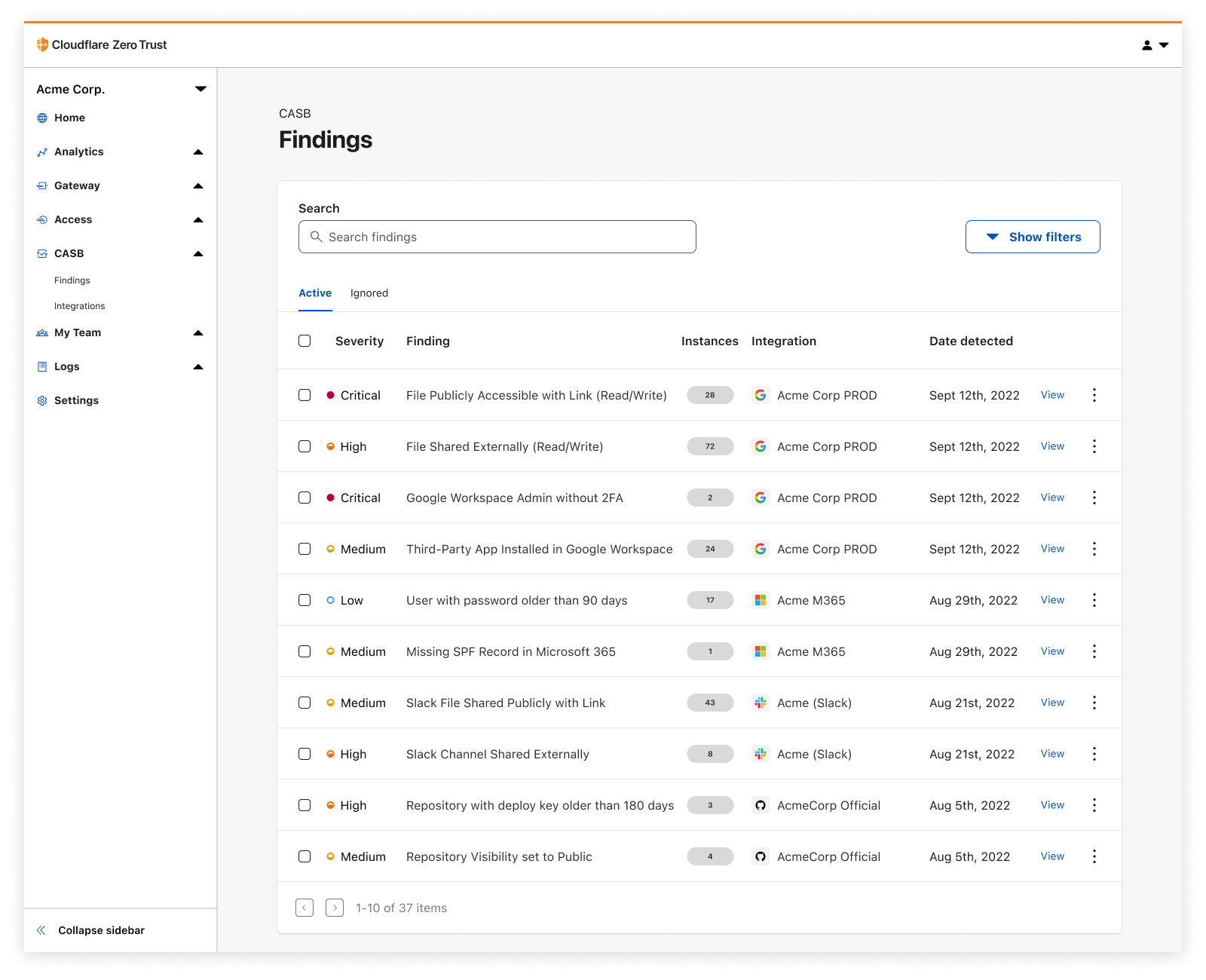
It all starts with a simple integration process, connecting your favorite SaaS applications to Cloudflare CASB in just a few clicks. Once connected, you’ll instantly begin to see Findings – or identified security issues – appear on your CASB home page.

CASB utilizes each vendor’s API to scan and identify a range of application-specific security issues that span several domains of information security, including misconfigurations and insecure settings, file sharing security, Shadow IT, best practices not being followed, and more.

Today CASB supports integrations with Google Workspace, Microsoft 365, Slack, and GitHub, with a growing list of other critical applications not far behind. Have a SaaS app you want to see next? Let us know!

See how all your files have been shared

Detect security issues in your SaaS apps with Cloudflare CASB

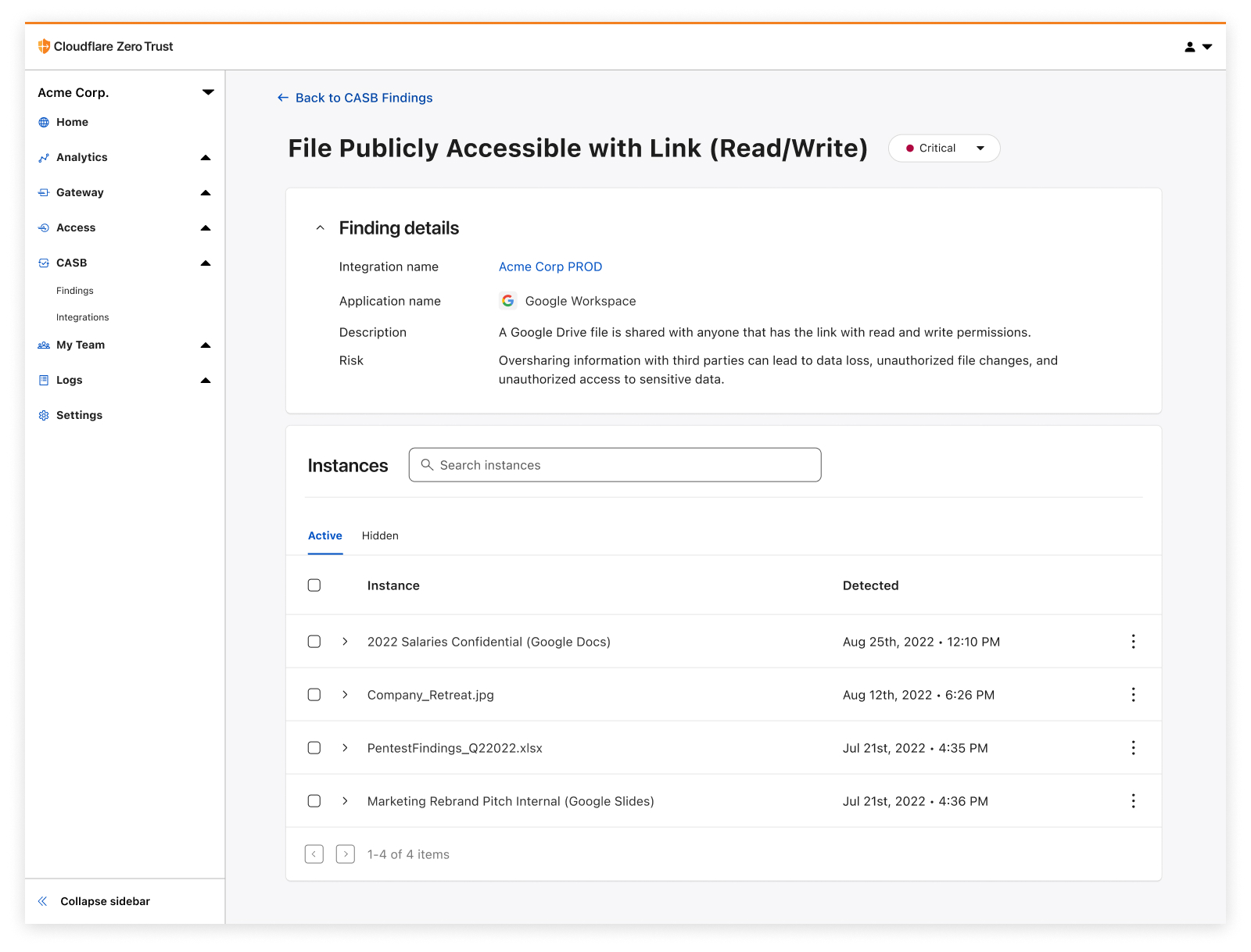
One of the easiest ways for employees to accidentally expose internal information is usually with just the flick of a switch – changing a sharing setting to Share this file to anyone with the link.

Cloudflare CASB provides users an exhaustive list of files that have questionable, often insecure, sharing settings, giving them a fast and reliable way to address low-hanging fruit exposures and get ahead of data protection incidents.

Identify insecure settings and bad practices

Detect security issues in your SaaS apps with Cloudflare CASB

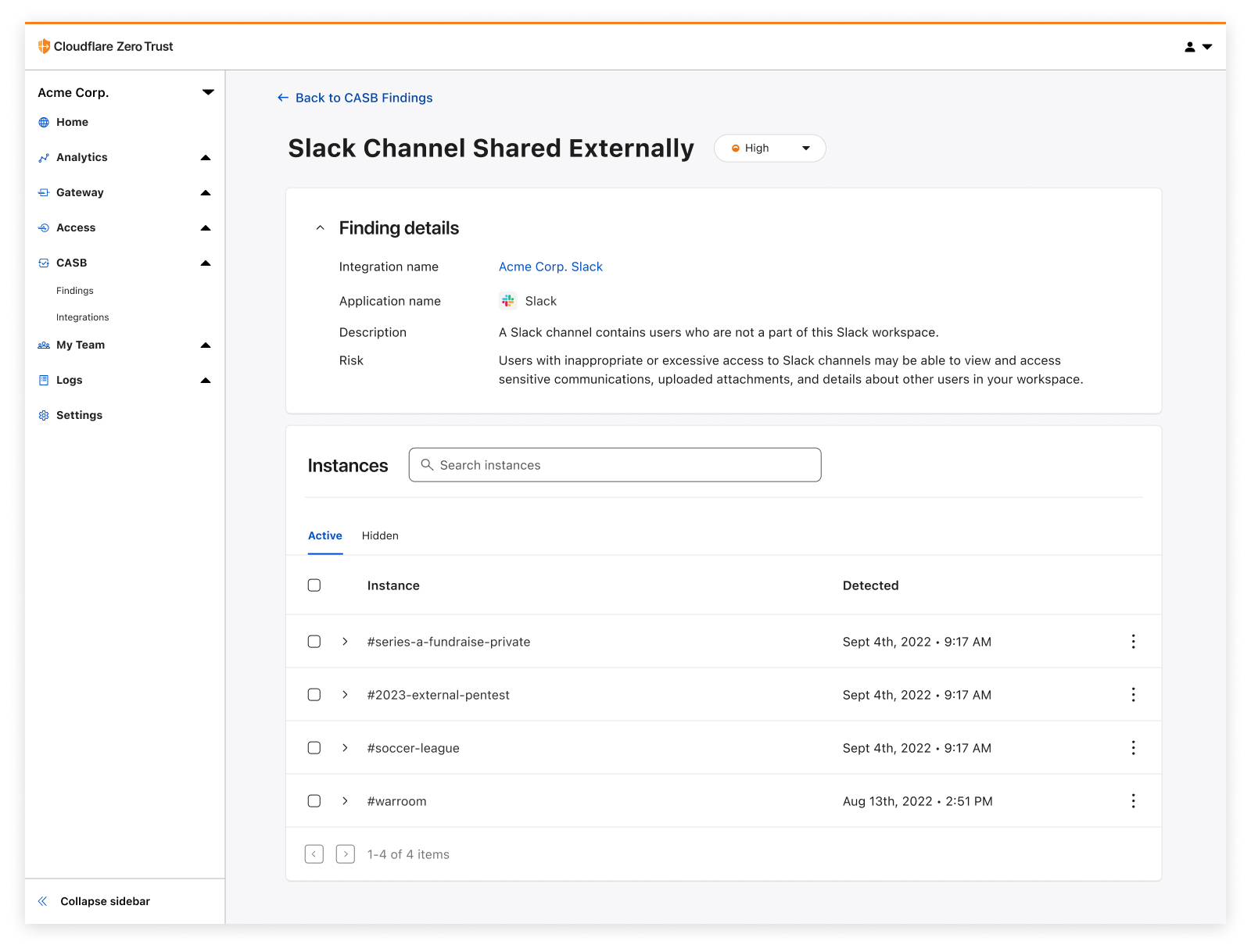
How we configure our SaaS apps dictates how they keep our data secure. Would you know if that one important GitHub repository had its visibility changed from Private to Public overnight? And why does one of our IT admins not have 2FA enabled on their account?

With Cloudflare CASB, users can now see those issues in just a few clicks and prioritize misconfigurations that might not expose just one file, but the entirety of them across your organization’s SaaS footprint.

Discover third-party apps with shadowy permissions

Detect security issues in your SaaS apps with Cloudflare CASB

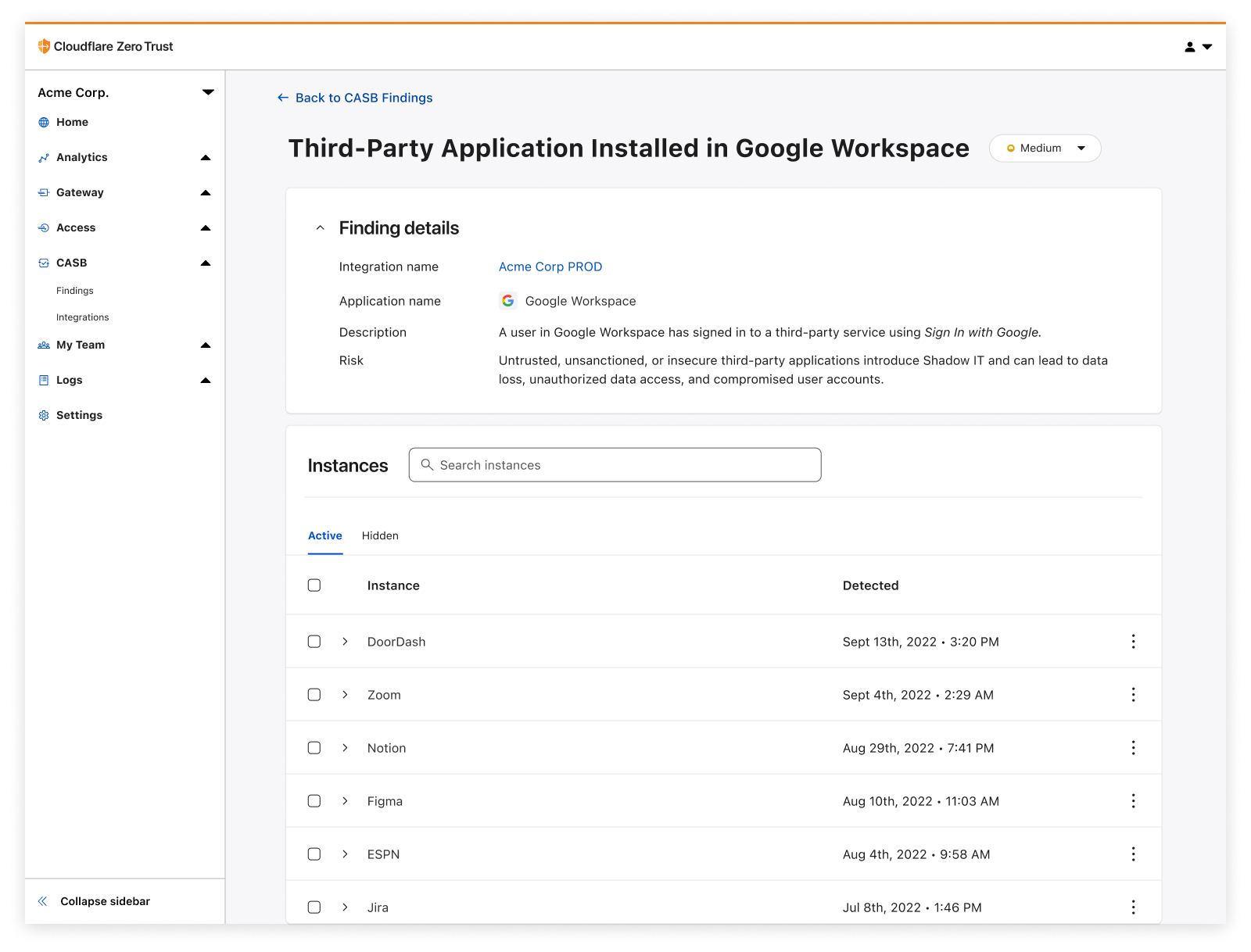
With the advent of frictionless product signups comes the rise of third-party applications that have breezed past approval processes and internal security reviews to lay claim to data and other sensitive resources. You guessed it, we’re talking about Shadow IT.

Cloudflare CASB adds a layer of access visibility beyond what traditional network-based Shadow IT discovery tools (like Cloudflare Gateway) can accomplish on their own, providing a detailed list of access that’s been granted to third-party services via those easy Sign in with Google buttons.

So, why does this matter in the context of Zero Trust?

While we’re here to talk about CASB, it would be remiss if we didn’t acknowledge how CASB is only one piece of the puzzle in the wider context of Zero Trust.

Zero Trust is all about broad security coverage and simple interconnectivity with how employees access, navigate, and leverage the complex systems and services needed to operate every day. Where Cloudflare Access and Gateway have provided users with granular access control and visibility into how employees traverse systems, and where Browser Isolation and our new in-line DLP offering protect users from malicious sites and limit sensitive data flying over the wire, CASB adds coverage for one of enterprise security’s final frontiers: visibility into data at-rest, who/what has access to it, and the practices that make it easier or harder for someone to access it inappropriately.

How to get started

As we’ve found through CASB’s beta program over the last few months, SaaS sprawl and misuse compounds with time – we’ve already identified more than five million potential security issues across beta users, with some organizations seeing several thousand files flagged as needing a sharing setting review.

So don’t hesitate to get started on your SaaS app wrangling and cleanup journey; it’s easier than you might think.

To get started, create a free Zero Trust account to try it out with 50 free seats, and then get in touch with our team here to learn more about how Cloudflare CASB can help at your organization. We can’t wait to hear what you think.

Cloudflare Data Loss Prevention now Generally Available

Post Syndicated from Noelle Gotthardt original https://blog.cloudflare.com/inline-dlp-ga/

Cloudflare Data Loss Prevention now Generally Available

This post is also available in 简体中文, 日本語, Deutsch, Français and Español.

Cloudflare Data Loss Prevention now Generally Available

In July 2022, we announced beta access to our newest Zero Trust product, Data Loss Prevention (DLP). Today, we are even more excited to announce that DLP is Generally Available to customers! Any customer can now get visibility and control of sensitive data moving into, out of, and around their corporate network. If you are interested, check out the bottom of this post.

What is DLP?

Data Loss Prevention helps you overcome one of their biggest challenges: identifying and protecting sensitive data. The migration to the cloud has made tracking and controlling sensitive information more difficult than ever. Employees are using an ever-growing list of tools to manipulate a vast amount of data. Meanwhile, IT and security managers struggle to identify who should have access to sensitive data, how that data is stored, and where that data is allowed to go.

Data Loss Prevention enables you to protect your data based on its characteristics, such as keywords or patterns. As traffic moves into and out of corporate infrastructure, the traffic is inspected for indicators of sensitive data. If the indicators are found, the traffic is allowed or blocked based on the customers’ rules.

The most common use for DLP is the protection of Personally Identifiable Information (PII), but many customers are interested in protecting intellectual property, source code, corporate financial information, or any other information vital to the business. Proper data usage can include who used the data, where the data was sent, and how the data is stored.

How does DLP see my corporate traffic?

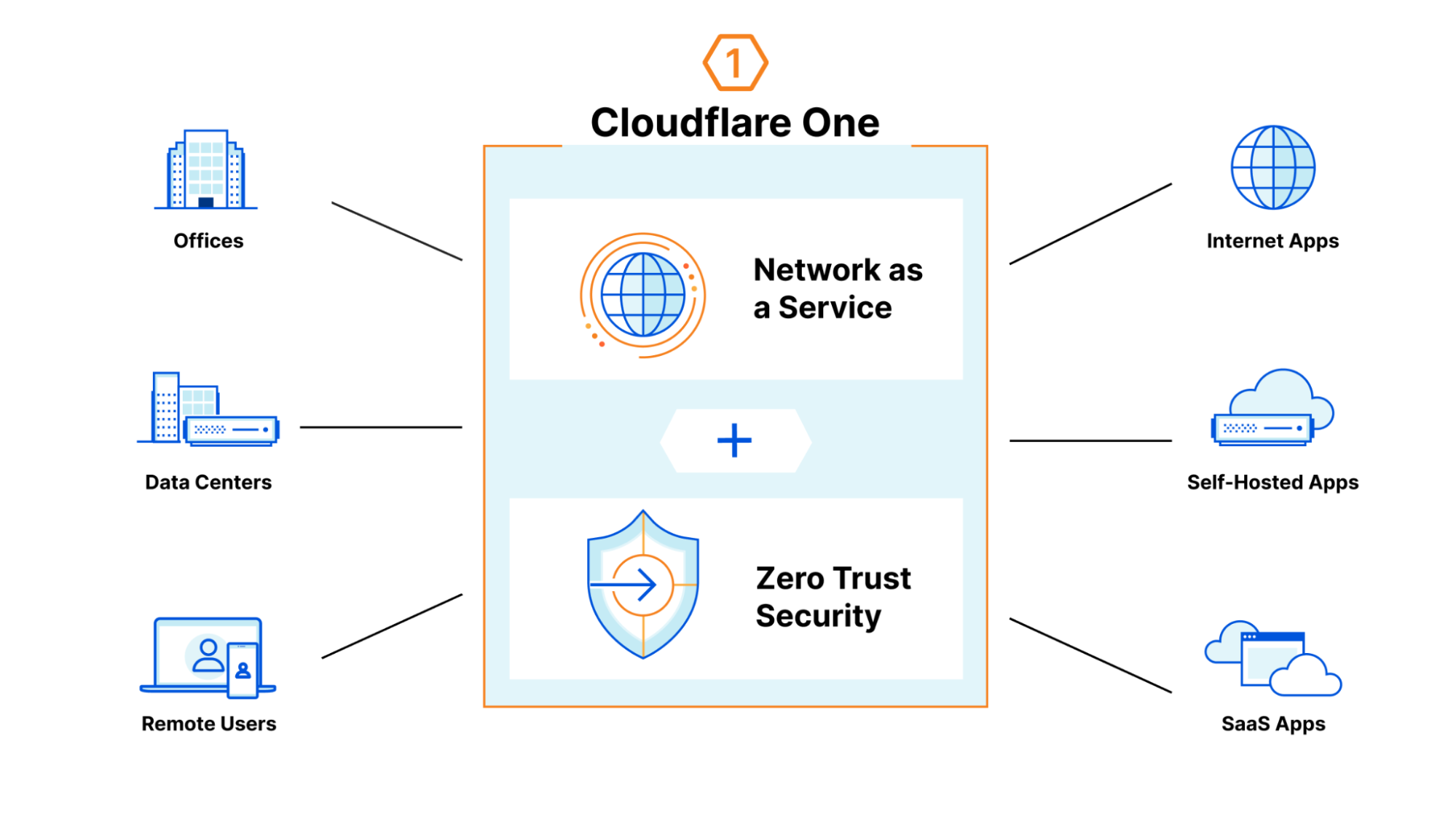
DLP is part of Cloudflare One, our Zero Trust network-as-a-service platform that connects users to enterprise resources. Cloudflare One runs traffic from data centers, offices, and remote users, through the Cloudflare network. This offers a wide variety of opportunities to secure the traffic, including validating identity and device posture, filtering corporate traffic to protect from malware and phishing, checking the configurations on SaaS applications, and using Browser Isolation to make web surfing safer for employees. All of this is done with the performance of our global network and managed with one control plane.

Cloudflare Data Loss Prevention now Generally Available

How does it work?

DLP leverages the HTTP filtering abilities of Cloudflare One. As your traffic runs through our network, you can apply rules and route traffic based on information in the HTTP request. There are a wide variety of options for filtering, such as domain, URL, application, HTTP method, and many more. You can use these options to segment the traffic you wish to DLP inspect.

When DLP is applied, the relevant HTTP requests are decompressed, decoded, and scanned for regex matches. Numeric regex matches are then algorithmically validated when possible, such as with checksum calculations or Luhn’s algorithm. However, some numeric detections do not adhere to algorithmic validation, such as US Social Security numbers.

If sensitive data is identified by the detection, the data transfer can be allowed or blocked according to the customer’s ruleset.

How do I use it?

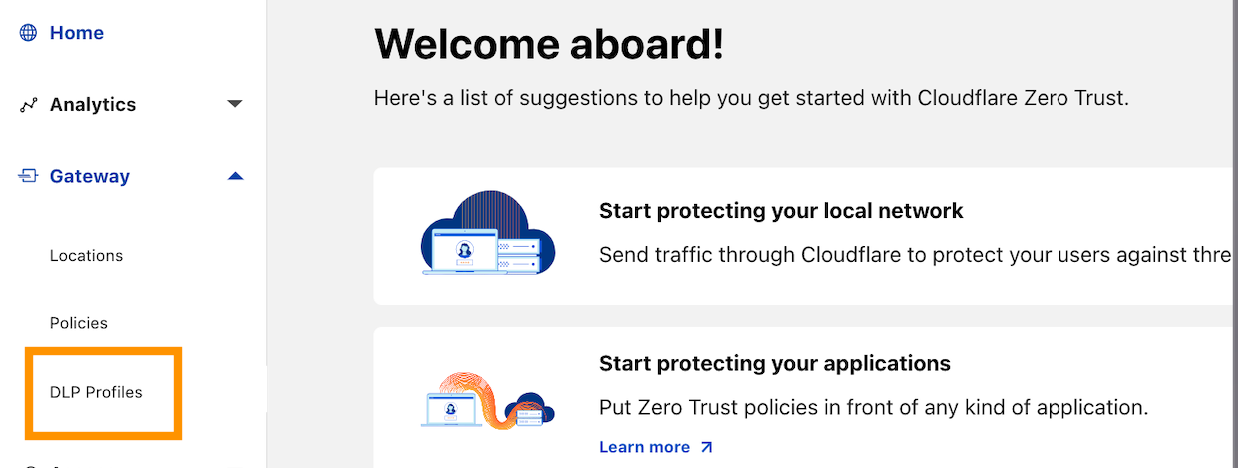
Let’s dive further in to see how this all actually comes to life. To use DLP in the Zero Trust Dashboard, navigate to the DLP Profiles tab under Gateway:

Cloudflare Data Loss Prevention now Generally Available

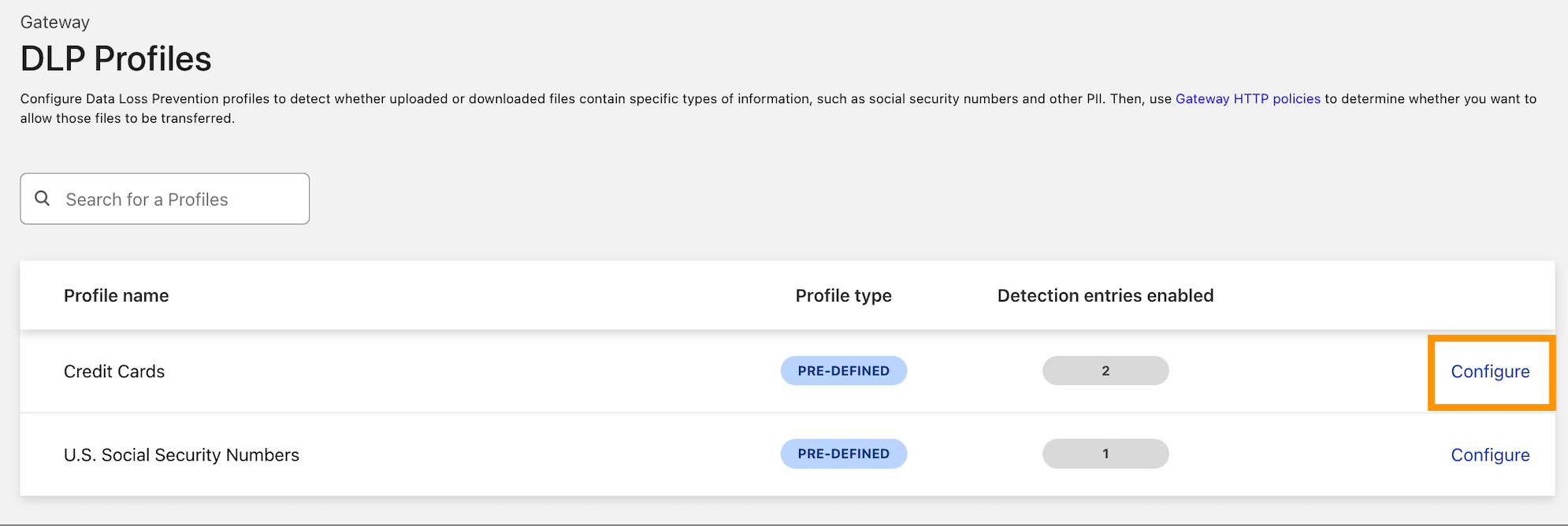
Decide on the type of data you want to protect. We currently detect credit card numbers and US Social Security numbers, but this is where we intend to grow a robust library of DLP detections.  Our next steps are custom and additional predefined detections, including more international identifiers and financial record numbers, which will be arriving soon.

When you have decided, select Configure to enable detections:

Cloudflare Data Loss Prevention now Generally Available

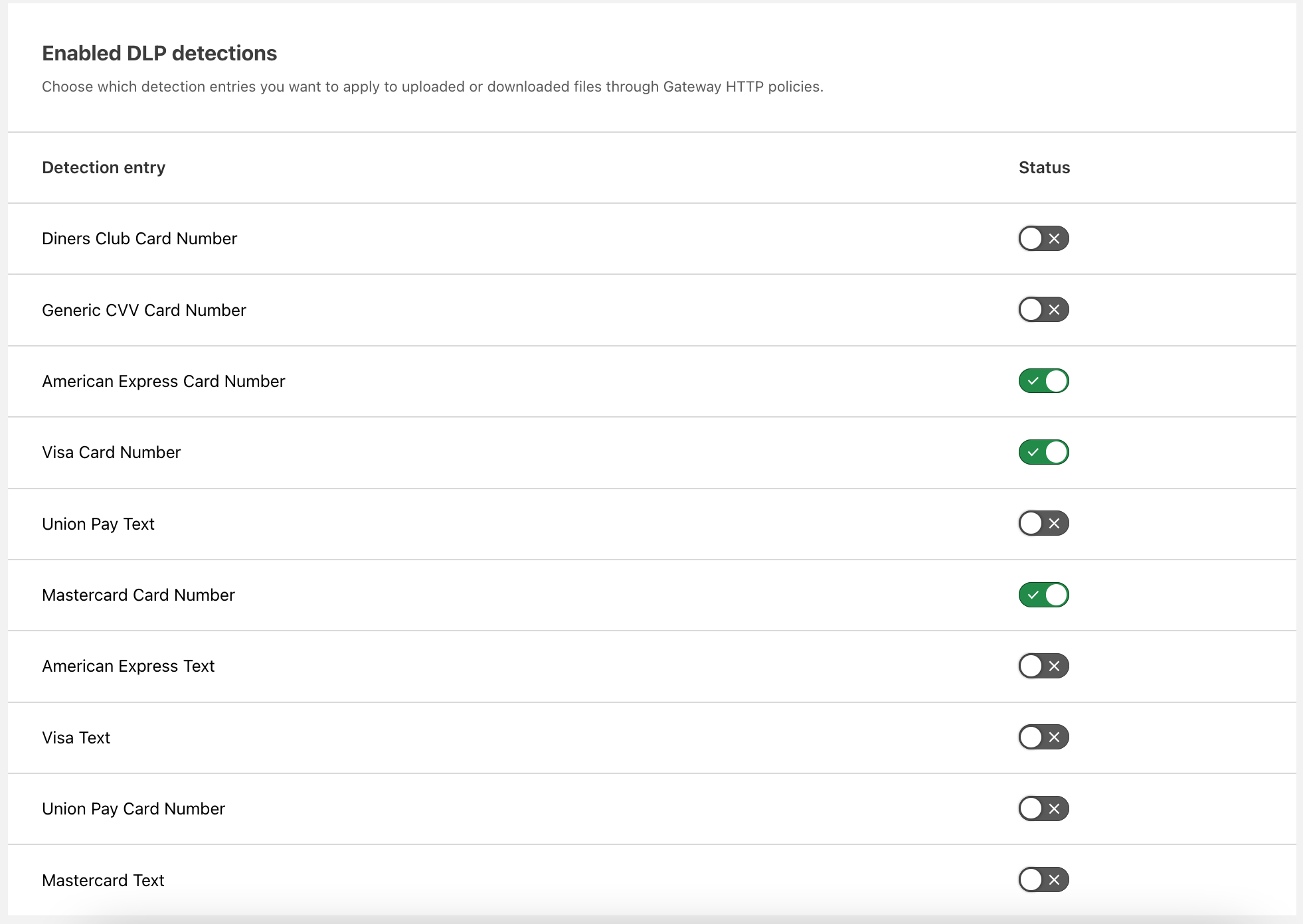
Enable the detections you want to use. As described above, these card number detections are made using regexes and validated with Luhn’s algorithm. You can make numeric detections for card numbers or detect strings matching card names, such as “American Express.”

Cloudflare Data Loss Prevention now Generally Available

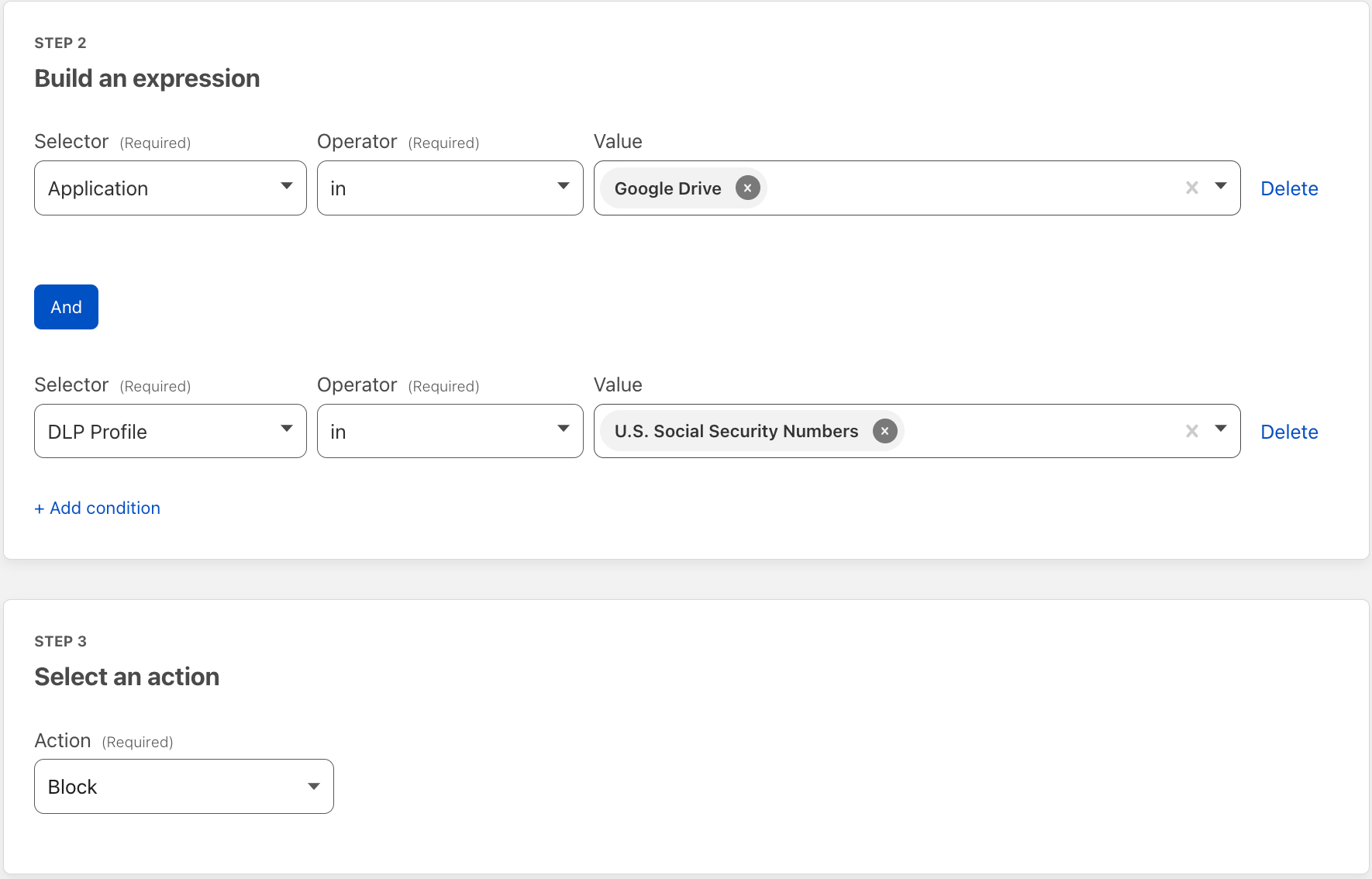
Then apply the detections to a Gateway HTTP policy on the traffic of your choosing. Here we applied DLP to Google Drive traffic. This policy will block uploads and downloads to Google Drive that contain US Social Security Numbers.

Cloudflare Data Loss Prevention now Generally Available

Holistic data protection with Cloudflare Zero Trust

Inspecting HTTP traffic for the presence of sensitive data with DLP is one critical way organizations can reduce the risk of data exfiltration, strengthen regulatory compliance, and improve overall data governance.
Implementing DLP is just one step towards a more holistic approach to securing data.

To that end, our Cloudflare Zero Trust platform offers more comprehensive controls over how any user on any device accesses and interacts with data – all from a single management interface:

We have architected our DLP service to work seamlessly with these ZTNA, SWG, CASB, and other security services. As we continue to deepen our DLP capabilities, this platform approach uniquely equips us to address our customers’ needs with flexibility.

Get Access to Data Loss Prevention

To get access to DLP, reach out for a consultation, or contact your account manager.

Introducing Advanced DDoS Alerts

Post Syndicated from Omer Yoachimik original https://blog.cloudflare.com/advanced-ddos-alerts/

Introducing Advanced DDoS Alerts

Introducing Advanced DDoS Alerts

We’re pleased to introduce Advanced DDoS Alerts. Advanced DDoS Alerts are customizable and provide users the flexibility they need when managing many Internet properties. Users can easily define which alerts they want to receive — for which DDoS attack sizes, protocols and for which Internet properties.

This release includes two types of Advanced DDoS Alerts:

  1. Advanced HTTP DDoS Attack Alerts – Available to WAF/CDN customers on the Enterprise plan, who have also subscribed to the Advanced DDoS Protection service.
  2. Advanced L3/4 DDoS Attack Alerts – Available to Magic Transit and Spectrum BYOIP customers on the Enterprise plan.

Standard DDoS Alerts are available to customers on all plans, including the Free plan. Advanced DDoS Alerts are part of Cloudflare’s Advanced DDoS service.
Why alerts?

Distributed Denial of Service attacks are cyber attacks that aim to take down your Internet properties and make them unavailable for your users. As early as 2017, Cloudflare pioneered the Unmetered DDoS Protection to provide all customers with DDoS protection, without limits, to ensure that their Internet properties remain available. We’re able to provide this level of commitment to our customers thanks to our automated DDoS protection systems. But if the systems operate automatically, why even be alerted?
Well, to put it plainly, when our DDoS protection systems kick in, they insert ephemeral rules inline to mitigate the attack. Many of our customers operate business critical applications and services. When our systems make a decision to insert a rule, customers might want to be able to verify that all the malicious traffic is mitigated, and that legitimate user traffic is not. Our DDoS alerts begin firing as soon as our systems make a mitigation decision. Therefore, by informing our customers about a decision to insert a rule in real time, they can observe and verify that their Internet properties are both protected and available.

Managing many Internet properties

The standard DDoS Alerts alert you on DDoS attacks that target any and all of your Cloudflare-protected Internet properties. However, some of our customers may manage large numbers of Internet properties ranging from hundreds to hundreds of thousands. The standard DDoS Alerts would notify users every time one of those properties would come under attack — which could become very noisy.

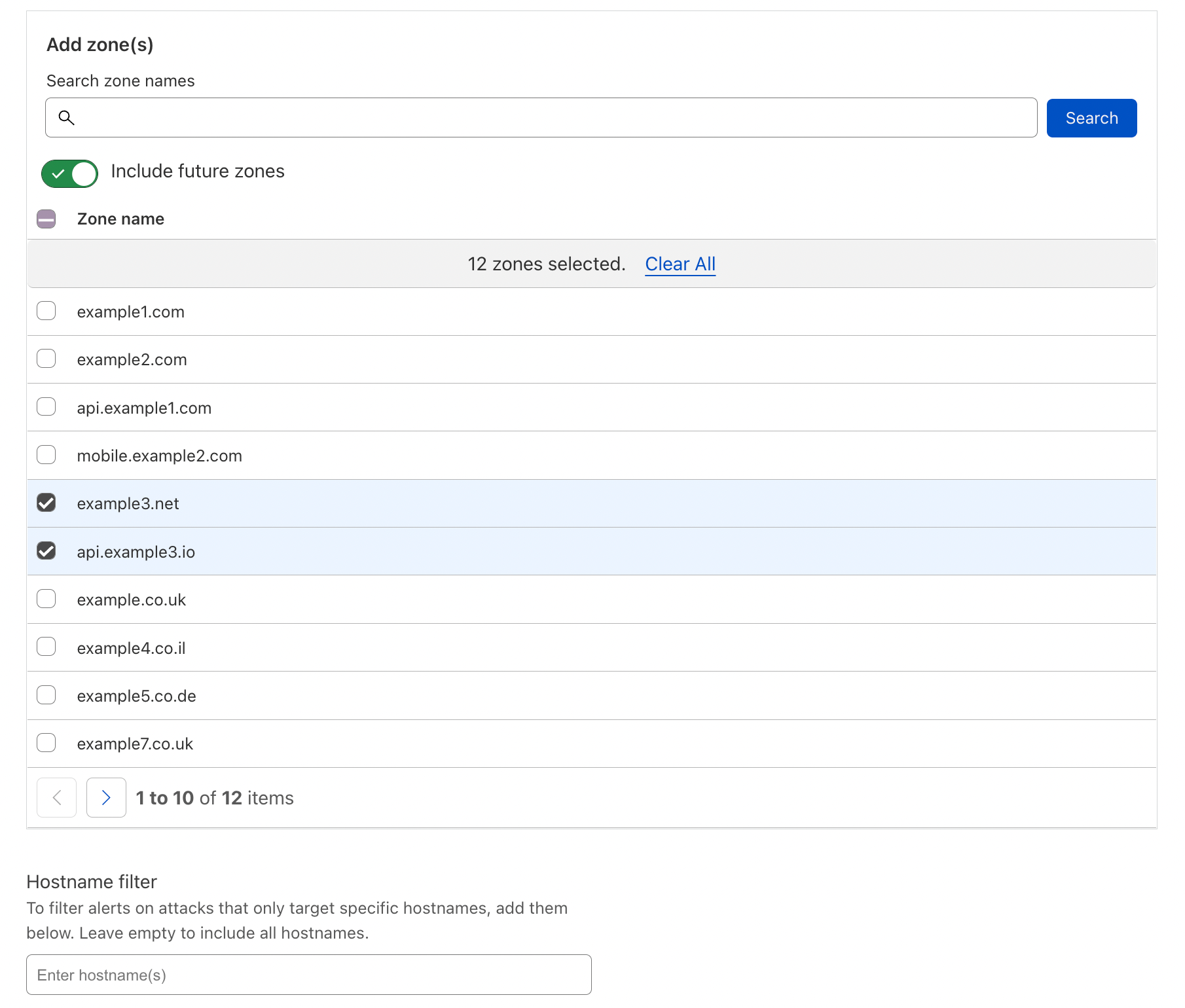
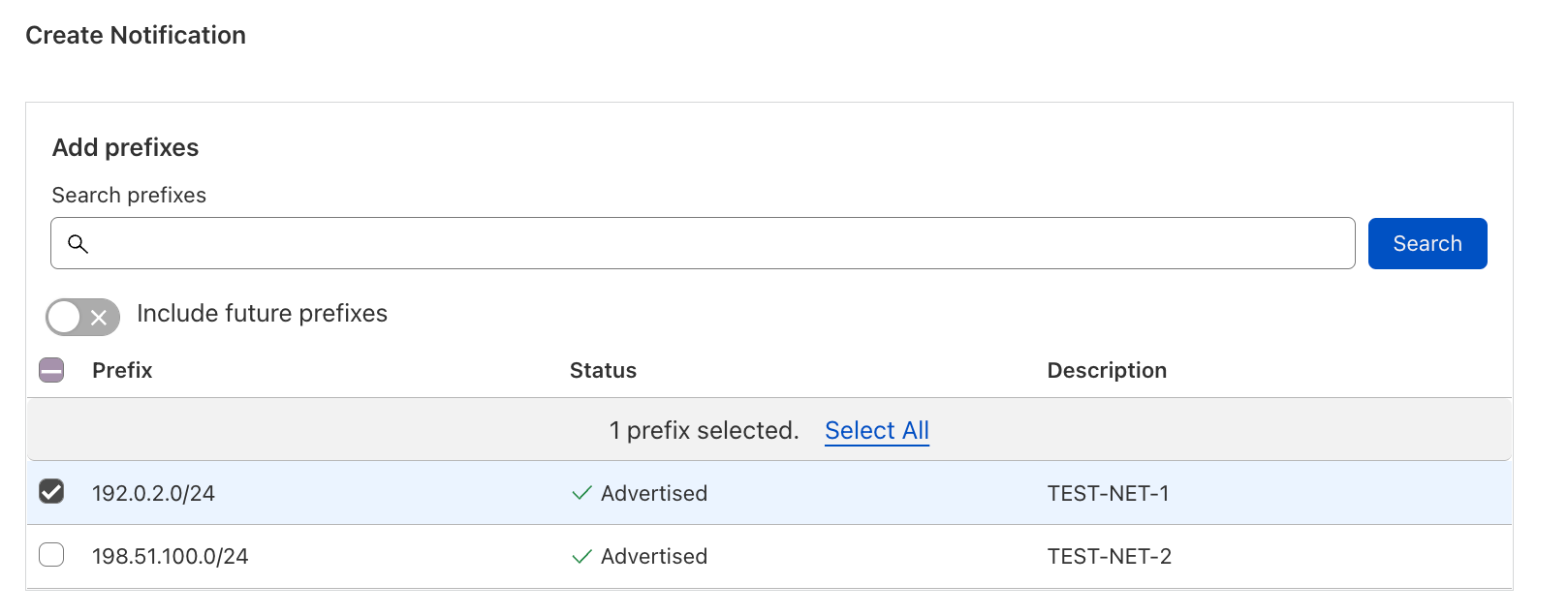
The Advanced DDoS Alerts address this concern by allowing users to select the specific Internet properties that they want to be notified about; zones and hostnames for WAF/CDN customers, and IP prefixes for Magic Transit and Spectrum BYOIP customers.

Introducing Advanced DDoS Alerts
Creating an Advanced HTTP DDoS Attack Alert: selecting zones and hostnames
Introducing Advanced DDoS Alerts
Creating an Advanced L3/4 DDoS Attack Alert: selecting prefixes

One (attack) size doesn’t fit all

The standard DDoS Alerts alert you on DDoS attacks of any size. Well, almost any size. We implemented minimal alert thresholds to avoid spamming our customers’ email inboxes. Those limits are very small and not customer-configurable. As we’ve seen in the recent DDoS trends report, most of the attacks are very small — another reason why the standard DDoS Alert could become noisy for customers that only care about very large attacks. On the opposite end of the spectrum, choosing not to alert may become too quiet for customers that do want to be notified about smaller attacks.

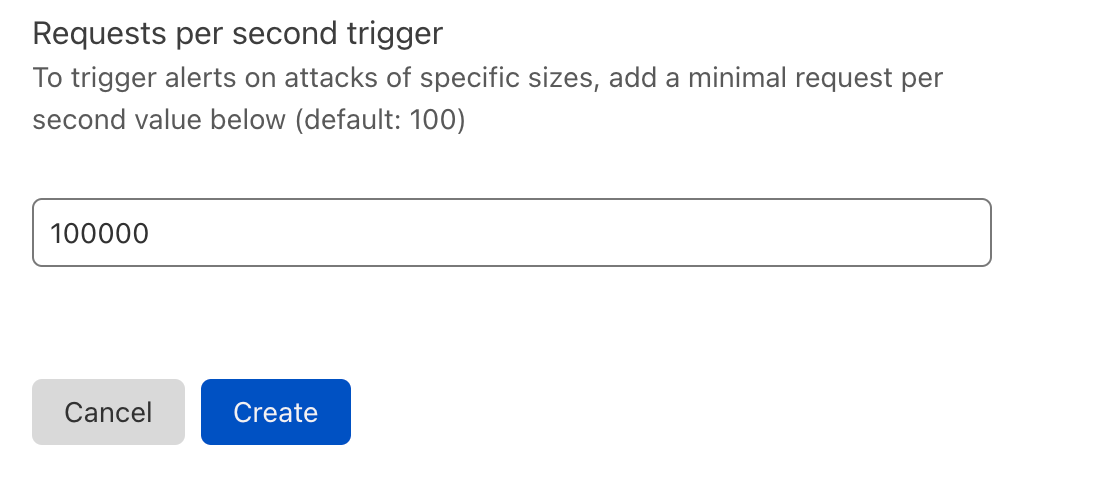
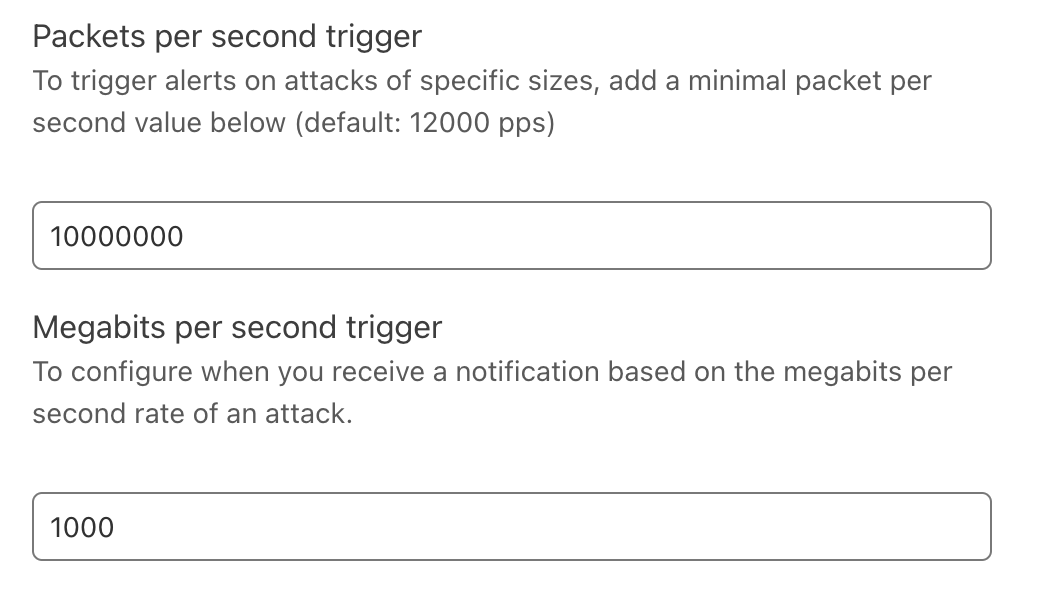
The Advanced DDoS Alerts let customers choose their own alert threshold. WAF/CDN customers can define the minimum request-per-second rate of an HTTP DDoS attack alert. Magic Transit and Spectrum BYOIP customers can define the packet-per-second and Megabit-per-second rates of a L3/4 DDoS attack alert.

Introducing Advanced DDoS Alerts
Creating an Advanced HTTP DDoS Attack Alert: defining request rate
Introducing Advanced DDoS Alerts
Creating an Advanced L3/4 DDoS Attack Alert: defining packet/bit rate

Not all protocols are created equal

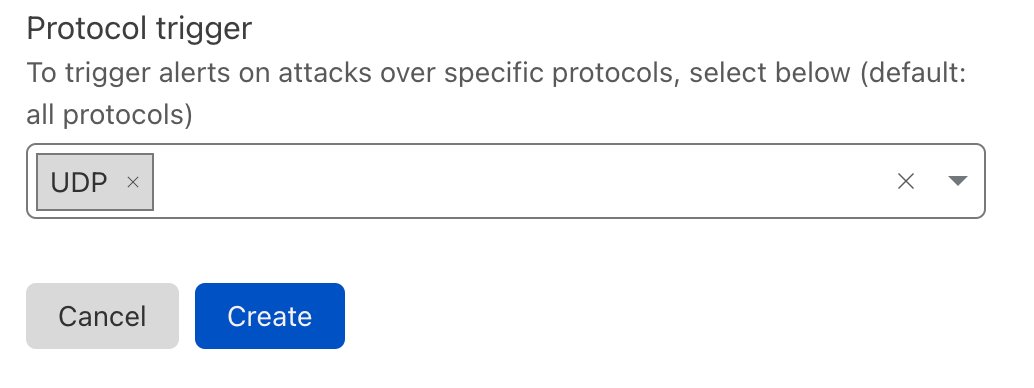
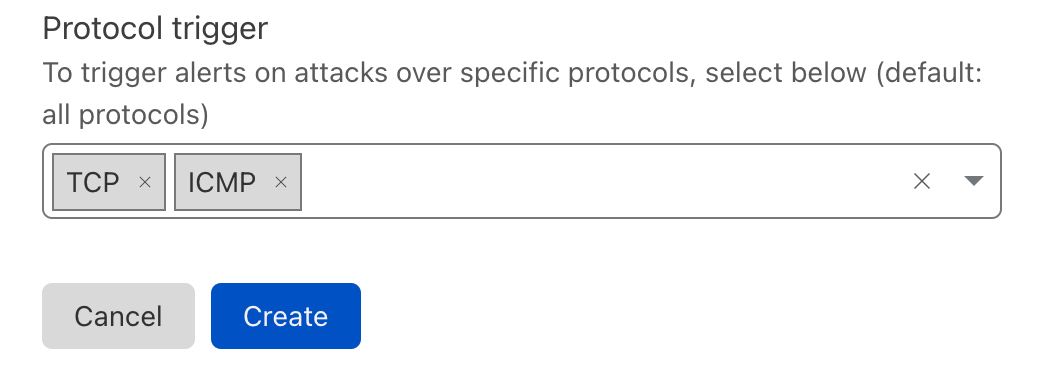
As part of the Advanced L3/4 DDoS Alerts, we also let our users define the protocols to be alerted on. If a Magic Transit customer manages mostly UDP applications, they may not care if TCP-based DDoS attacks target it. Similarly, if a Spectrum BYOIP customer only cares about HTTP/TCP traffic, other-protocol-based attacks could be of no concern to them.

Introducing Advanced DDoS Alerts
Creating an Advanced L3/4 DDoS Attack Alert: selecting the protocols

Creating an Advanced DDoS Alert

We’ll show here how to create an Advanced HTTP DDoS Alert, but the process to create a L3/4 alert is similar. You can view a more detailed guide on our developers website.

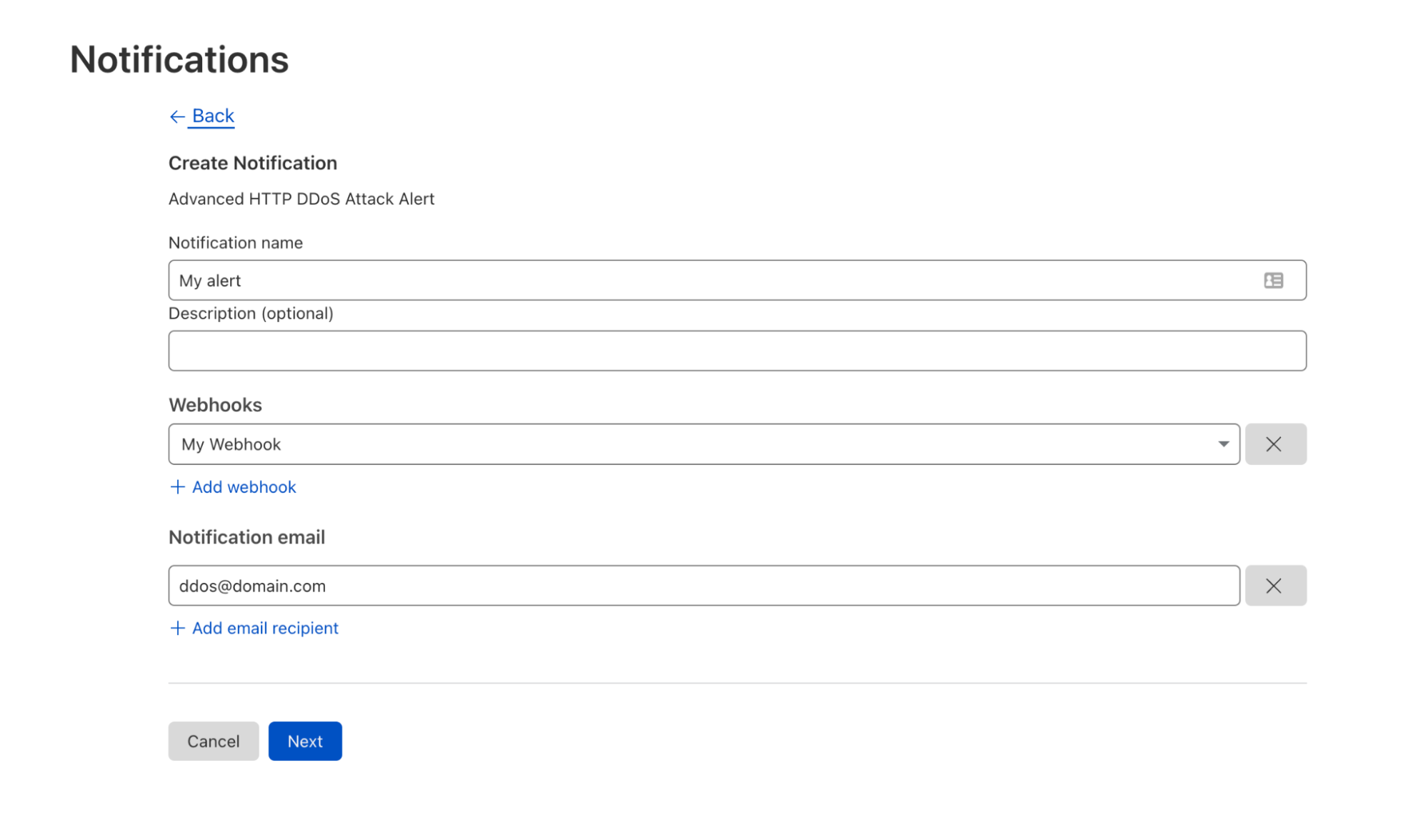
First, click here or log in to your Cloudflare account, navigate to Notifications and click Add. Then select the Advanced HTTP DDoS Attack Alert or Advanced L3/4 DDoS Attack Alert (based on your eligibility). Give your alert a name, an optional description, add your preferred delivery method (e.g., Webhook) and click Next.

Introducing Advanced DDoS Alerts
Step 1: Creating an Advanced HTTP DDoS Attack Alert

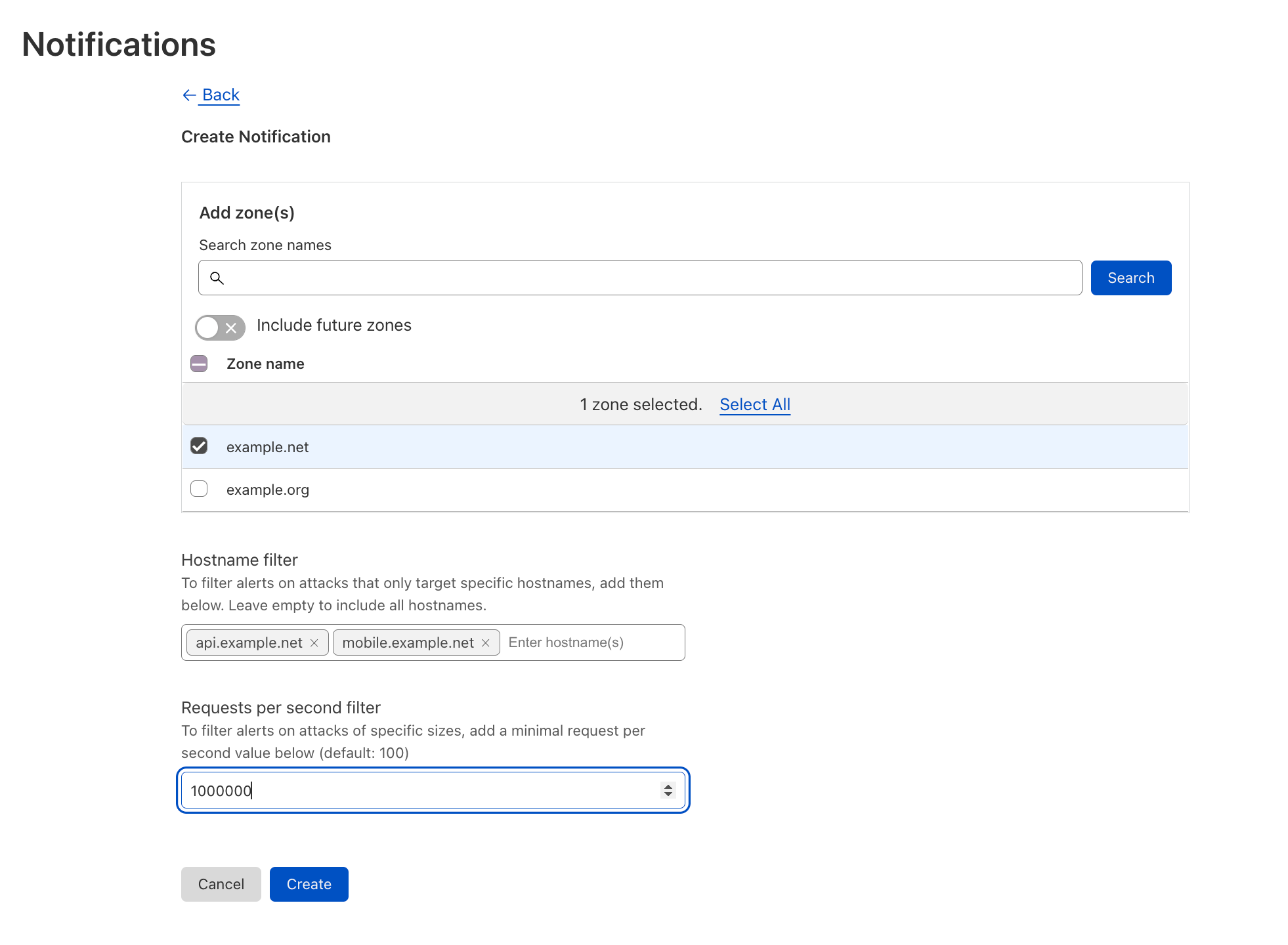
Second, select the domains you’d like to be alerted on. You can also narrow it down to specific hostnames. Define the minimum request-per-second rate to be alerted on, click Save, and voilà.

Introducing Advanced DDoS Alerts
Step 2: Defining the Advanced HTTP DDoS Attack Alert conditions

Actionable alerts for making better decisions

Cloudflare Advanced DDoS Alerts aim to provide our customers with configurable controls to make better decisions for their own environments. Customers can now be alerted on attacks based on which domain/prefix is being attacked, the size of the attack, and the protocol of the attack. We recognize that the power to configure and control DDoS attack alerts should ultimately be left up to our customers, and we are excited to announce the availability of this functionality.

Want to learn more about Advanced DDoS Alerts? Visit our developer site.

Interested in upgrading to get Advanced DDoS Alerts? Contact your account team.

New to Cloudflare? Speak to a Cloudflare expert.

Introducing Cloudflare Adaptive DDoS Protection – our new traffic profiling system for mitigating DDoS attacks

Post Syndicated from Omer Yoachimik original https://blog.cloudflare.com/adaptive-ddos-protection/

Introducing Cloudflare Adaptive DDoS Protection - our new traffic profiling system for mitigating DDoS attacks

Introducing Cloudflare Adaptive DDoS Protection - our new traffic profiling system for mitigating DDoS attacks

Every Internet property is unique, with its own traffic behaviors and patterns. For example, a website may only expect user traffic from certain geographies, and a network might only expect to see a limited set of protocols.

Understanding that the traffic patterns of each Internet property are unique is what led us to develop the Adaptive DDoS Protection system. Adaptive DDoS Protection joins our existing suite of automated DDoS defenses and takes it to the next level. The new system learns your unique traffic patterns and adapts to protect against sophisticated DDoS attacks.

Adaptive DDoS Protection is now generally available to Enterprise customers:

  • HTTP Adaptive DDoS Protection – available to WAF/CDN customers on the Enterprise plan, who have also subscribed to the Advanced DDoS Protection service.
  • L3/4 Adaptive DDoS Protection – available to Magic Transit and Spectrum customers on an Enterprise plan.

Adaptive DDoS Protection learns your traffic patterns

The Adaptive DDoS Protection system creates a traffic profile by looking at a customer’s maximal rates of traffic every day, for the past seven days. The profiles are recalculated every day using the past seven-day history. We then store the maximal traffic rates seen for every predefined dimension value. Every profile uses one dimension and these dimensions include the source country of the request, the country where the Cloudflare data center that received the IP packet is located, user agent, IP protocol, destination ports and more.

So, for example, for the profile that uses the source country as a dimension, the system will log the maximal traffic rates seen per country. e.g. 2,000 requests per second (rps) for Germany, 3,000 rps for France, 10,000 rps for Brazil, and so on. This example is for HTTP traffic, but Adaptive DDoS protection also profiles L3/4 traffic for our Magic Transit and Spectrum Enterprise customers.

Another note on the maximal rates is that we use the 95th percentile rates. This means that we take a look at the maximal rates and discard the top 5% of the highest rates. The purpose of this is to eliminate outliers from the calculations.

Calculating traffic profiles is done asynchronously — meaning that it does not induce any latency to our customers’ traffic. The system  then distributes a compact profile representation across our network that can be consumed by our DDoS protection systems to be used to detect and mitigate DDoS attacks in a much more cost-efficient manner.

In addition to the traffic profiles, the Adaptive DDoS Protection also leverages Cloudflare’s Machine Learning generated Bot Scores as an additional signal to differentiate between user and automated traffic. The purpose of using these scores is to differentiate between legitimate spikes in user traffic that deviates from the traffic profile, and a spike of automated and potentially malicious traffic.

Out of the box and easy to use

Adaptive DDoS Protection just works out of the box. It automatically creates the profiles, and then customers can tweak and tune the settings as they need via DDoS Managed Rules. Customers can change the sensitivity level, leverage expression fields to create overrides (e.g. exclude this type of traffic), and change the mitigation action to tailor the behavior of the system to their specific needs and traffic patterns.

Introducing Cloudflare Adaptive DDoS Protection - our new traffic profiling system for mitigating DDoS attacks

Adaptive DDoS Protection complements the existing DDoS protection systems which leverages dynamic fingerprinting to detect and mitigate DDoS attacks. The two work in tandem to protect our customers from DDoS attacks. When Cloudflare customers onboard a new Internet property to Cloudflare, the dynamic fingerprinting protects them automatically and out of the box — without requiring any user action. Once the Adaptive DDoS Protection learns their legitimate traffic patterns and creates a profile, users can turn it on to provide an extra layer of protection.

Rules included as part of the Adaptive DDoS Protection

As part of this release, we’re pleased to announce the following capabilities as part of Cloudflare’s Adaptive DDoS Protection:

Profiling Dimension Availability
WAF/CDN customers on the Enterprise plan with Advanced DDoS Magic Transit & Spectrum Enterprise customers
Origin errors
Client IP Country & region Coming soon
User Agent (globally, not per customer*)
IP Protocol
Combination of IP Protocol and Destination Port Coming soon

*The User-Agent-aware feature analyzes, learns and profiles all the top user agents that we see across the Cloudflare network. This feature helps us identify DDoS attacks that leverage legacy or wrongly configured user agents.

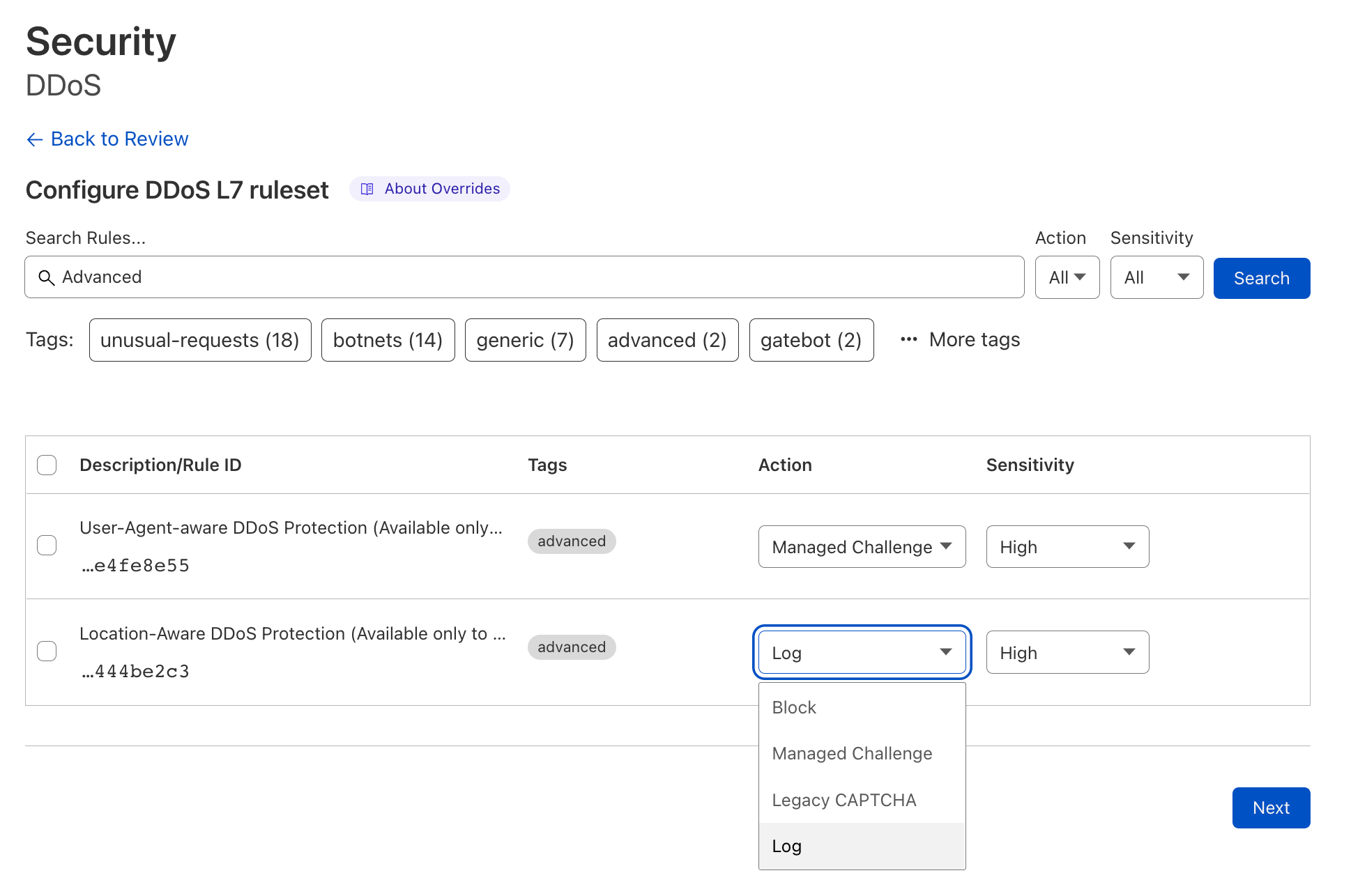
Excluding UA-aware DDoS Protection, Adaptive DDoS Protection rules are deployed in Log mode. Customers can observe the traffic that’s flagged, tweak the sensitivity if needed, and then deploy the rules in mitigation mode. You can follow the steps outlined in this guide to do so.

Making the impact of DDoS attacks a thing of the past

Our mission at Cloudflare is to help build a better Internet. The DDoS Protection team’s vision is derived from this mission: our goal is to make the impact of DDoS attacks a thing of the past. Cloudflare’s Adaptive DDoS Protection takes us one step closer to achieving that vision: making Cloudflare’s DDoS protection even more intelligent, sophisticated, and tailored to our customer’s unique traffic patterns and individual needs.

Want to learn more about Cloudflare’s Adaptive DDoS Protection? Visit our developer site.

Interested in upgrading to get access to Adaptive DDoS Protection? Contact your account team.

New to Cloudflare? Speak to a Cloudflare expert.

Improved Access Control: Domain Scoped Roles are now generally available

Post Syndicated from Garrett Galow original https://blog.cloudflare.com/domain-scoped-roles-ga/

Improved Access Control: Domain Scoped Roles are now generally available

Improved Access Control: Domain Scoped Roles are now generally available

Starting today, it is possible to scope your users’ access to specific domains with Domain Scoped Roles becoming generally available!

We are making it easier for account owners to manage their team’s access to Cloudflare by allowing user access to be scoped to individual domains. Ensuring users have the least amount of access they need and no more is critical, and Domain Scoped Roles is a major step in this direction. Additionally, with the use of Domain Groups, account owners can grant users access to a group of domains instead of individually. Domains can be added or removed from these groups to automatically update the access of those who have been granted access to the group. This reduces toil in managing user access.

One of the most common uses we have seen for Domain Scoped Roles is to limit access to production domains to a small set of team members, while still allowing development and pre-production domains to be open to the rest of the team. That way, someone can’t make changes to a production domain unless they are given access.

We are doing a rollout of this functionality across all Enterprise Cloudflare accounts, and you will receive an email when this functionality is enabled for your account.

Any existing access on accounts today will remain the same, with the ability to further scope down access where it makes sense. All of our account-wide roles are still available to assign to users.

How to use Domain Scoped Roles

Once you have Domain Scoped Roles, here is how to start using it:

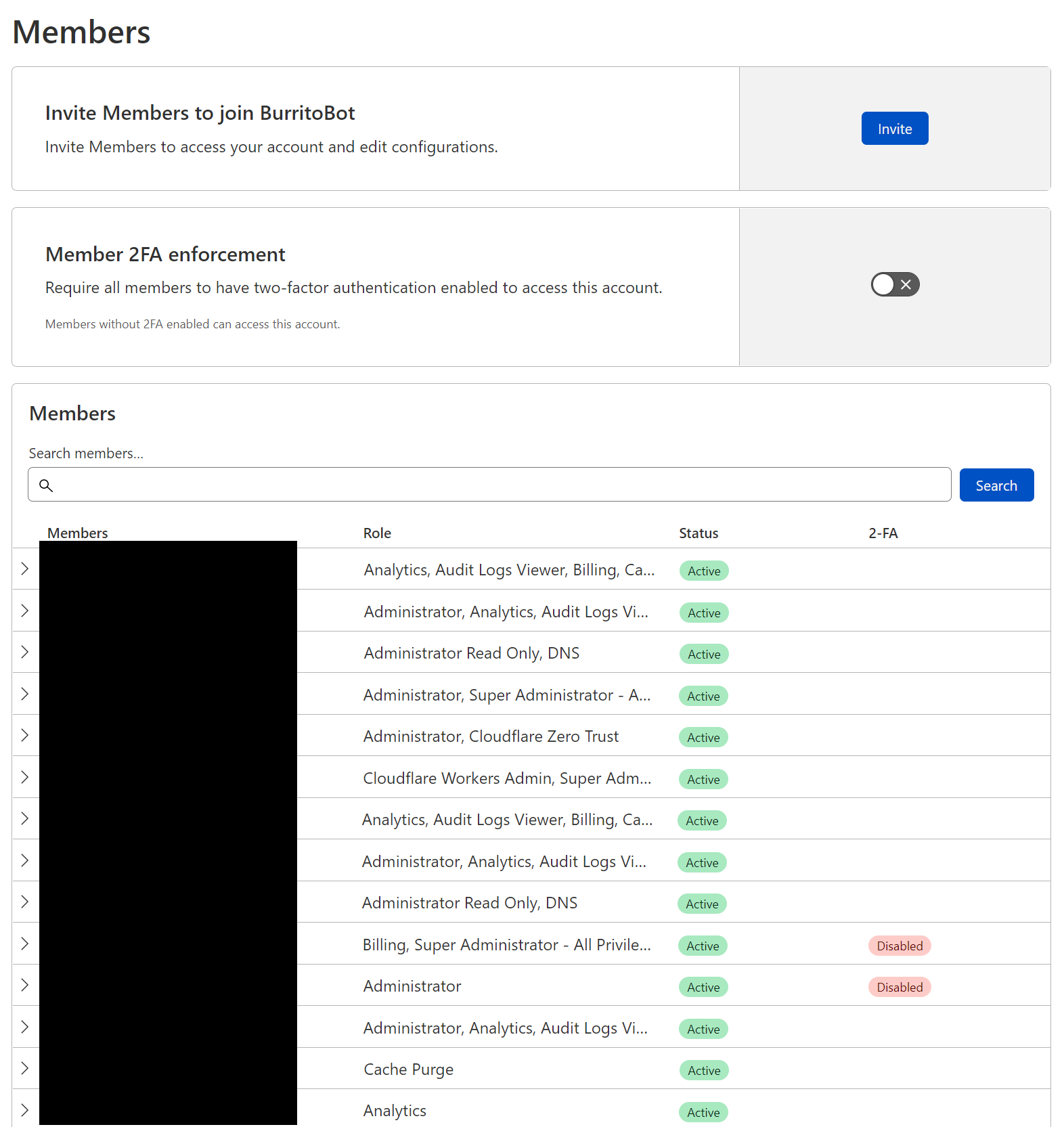
Log in to dash.cloudflare.com, select your account, and navigate to the members page.

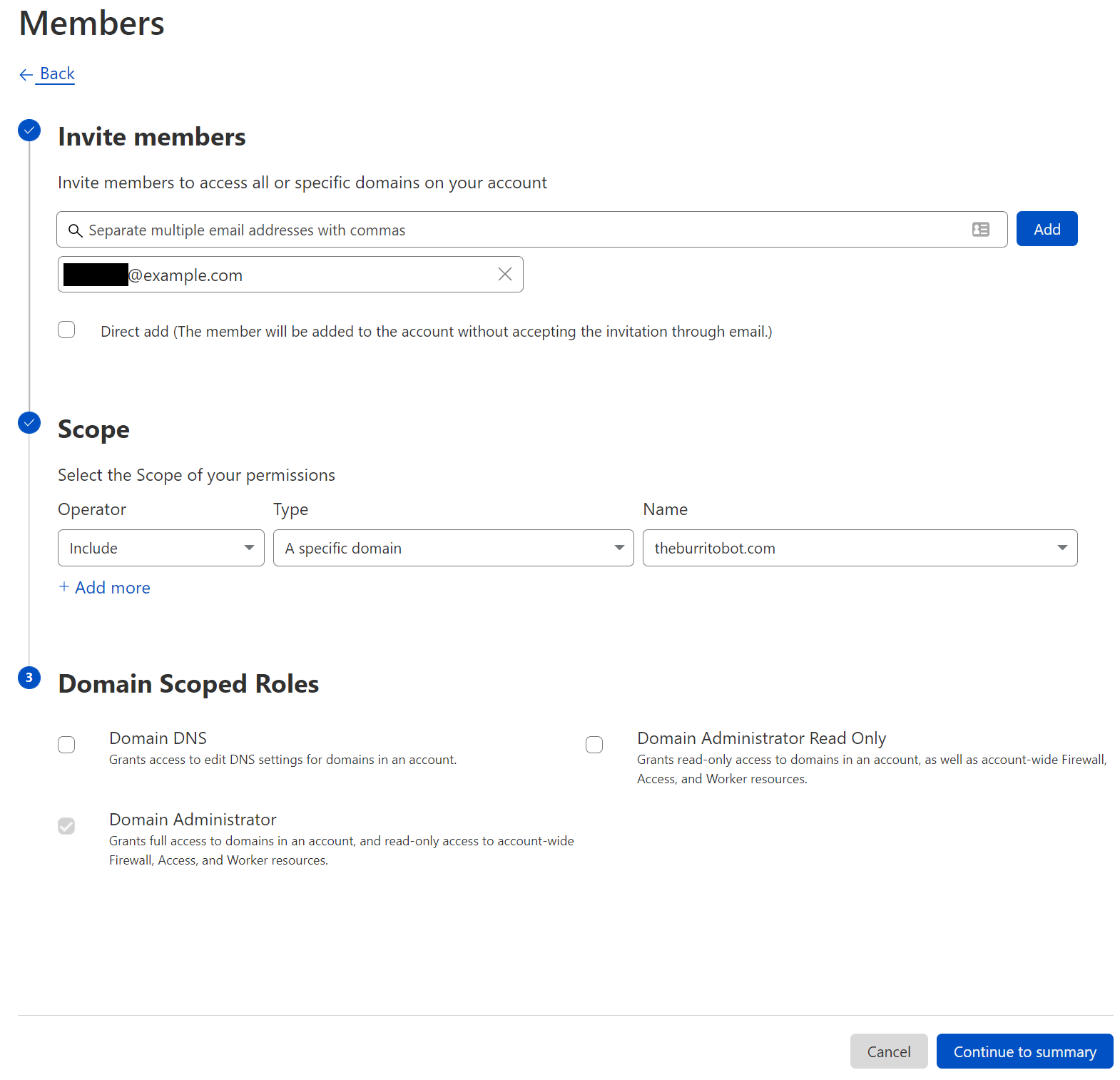
From this page, you can manage your members’ permissions. In this case, we will invite a new user, however you can also modify an existing user’s permissions.

Improved Access Control: Domain Scoped Roles are now generally available

After clicking “Invite”, you will determine which users to invite, multiple users can be invited at the same time. After selecting users, we provide appropriate scope. Within the scope selection list, three options are available: all domains, a specific domain, and a domain group. Selecting all domains continues to grant account wide access, and all of our legacy roles are available at this level of scoping. A specific domain or domain groups provide access to our new domain scoped roles. Finally, with a user and a scope selected, a role (or multiple roles) can be selected to grant appropriate permissions.

Improved Access Control: Domain Scoped Roles are now generally available

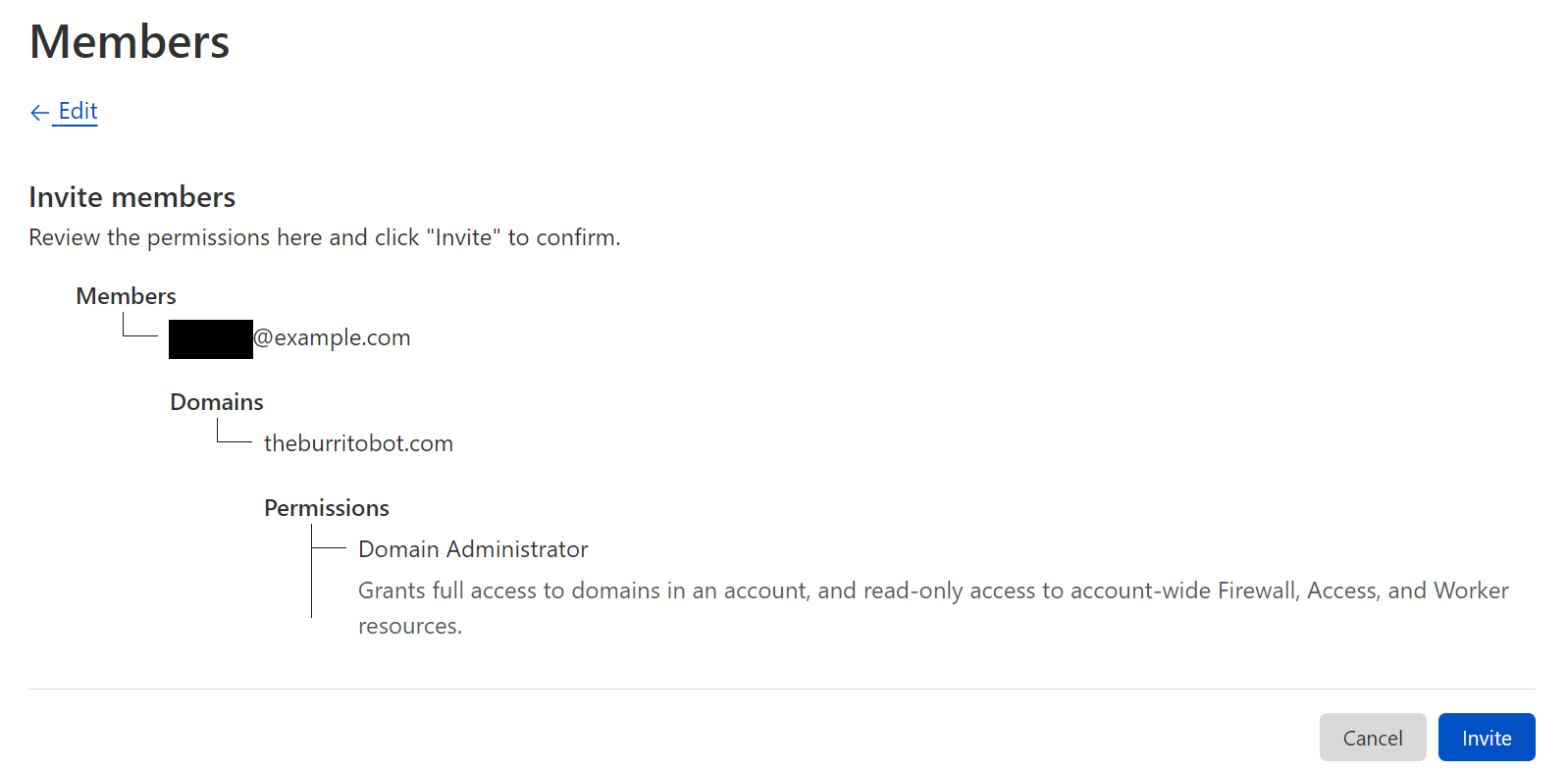
Before sending the invite, you will be able to confirm the users, scope, and roles.

Improved Access Control: Domain Scoped Roles are now generally available

Domain Groups

In addition to manually creating inclusion or exclusion lists per user, account owners can also create Domain Groups to allow granting one or more users to a group of domains. Domain Groups can be created from the member invite flow or directly from Account Configurations → Lists. When creating a domain group, the user selects the domains to include and, from that point on, the group can be used when inviting a user to the account.

What’s next

We are doing a rollout of this functionality across all Enterprise Cloudflare accounts, and you will receive an email when this functionality is enabled for your account.

Any existing access on accounts today will remain the same, with the ability to further scope access where you decide. All of our account-wide roles are still available to assign to users.

If you are an enterprise customer and interested in getting Domain Scoped Roles sooner, please contact your CSM to get enabled! Otherwise, you will receive an email when your account has this feature enabled.

This announcement represents a step forward in our migration to a new authorization system built for Cloudflare’s scale. This will allow us to expand these capabilities to more products in the future and to create an authorization system that puts customers more in control of their team’s access across all of Cloudflare’s services.

Cloudforce One is now generally available: empower your security team with threat data, tooling, and access to industry experts

Post Syndicated from Patrick R. Donahue original https://blog.cloudflare.com/cloudforce-one-is-now-ga/

Cloudforce One is now generally available: empower your security team with threat data, tooling, and access to industry experts

Cloudforce One is now generally available: empower your security team with threat data, tooling, and access to industry experts

Cloudflare’s threat operations and research team, Cloudforce One, is now open for business and has begun conducting threat briefings. Access to the team is available via an add-on subscription, and includes threat data and briefings, security tools, and the ability to make requests for information (RFIs) to the team.

Fill out this form or contact your account team to learn more.

Subscriptions come in two packages, and are priced based on number of employees: “Premier” includes our full history of threat data, bundled RFIs, and an API quota designed to support integrations with SIEMs. “Core” level includes reduced history and quotas. Both packages include access to all available security tools, including a threat investigation portal and sinkholes-as-a-service.

If you’re an enterprise customer interested in understanding the type of threat briefings that Cloudforce One customers receive, you can register here for “YackingYeti: How a Russian threat group targets Ukraine—and the world”, scheduled for October 12. The briefing will include Q&A with Blake Darché, head of Cloudforce One, and an opportunity to learn more about the team and offering.

Requests for Information (RFIs) and Briefings

The Cloudforce One team is composed of analysts assigned to five subteams: Malware Analysis, Threat Analysis, Active Mitigation and Countermeasures, Intelligence Analysis, and Intelligence Sharing. Collectively, they have tracked many of the most sophisticated cyber criminals on the Internet while at the National Security Agency (NSA), USCYBERCOM, and Area 1 Security, and have worked closely with similar organizations and governments to disrupt these threat actors. They’ve also been prolific in publishing “finished intel” reports on security topics of significant geopolitical importance, such as targeted attacks against governments, technology companies, the energy sector, and law firms, and have regularly briefed top organizations around the world on their efforts.

Cloudforce One is now generally available: empower your security team with threat data, tooling, and access to industry experts

Included with a Cloudforce One subscription is the ability to make “requests for information” (RFIs) to these experts. RFIs can be on any security topic of interest, and will be analyzed and responded to in a timely manner. For example, the Cloudforce One Malware Analysis team can accept uploads of possible malware and provide a technical analysis of the submitted resource. Each plan level comes with a fixed number of RFIs, and additional requests can be added.

In addition to customer-specific requests, Cloudforce One conducts regular briefings on a variety of threats and threat actors—those targeting specific industries as well as more general topics of interest.

Threat Data

The best way to understand threats facing networks and applications connected to the Internet is to operate and protect critical, large scale Internet infrastructure. And to defend attacks against millions of customers, large and small. Since our early days, Cloudflare has set out to build one of the world’s largest global networks to do just that. Every day we answer trillions of DNS queries, track the issuance of millions SSL/TLS certificates in our CT log, inspect millions of emails for threats, route multiple petabytes of traffic to our customers’ networks, and proxy trillions of HTTP requests destined for our customers’ applications. Each one of these queries and packets provides a unique data point that can be analyzed at scale and anonymized into actionable threat data—now available to our Cloudforce One customers.

Data sets now available in the dashboard and via API for subscribers include IP, ASN, and domain intelligence, passive DNS resolutions; threat actor cards with indicators of compromise (IoC), open port, and new Managed IP Lists are planned for release later this year.

Security Tools

Security analysts and threat hunting teams are being forced to do more with less in today’s operating environment, but that doesn’t reduce their need for reliable tools that can quickly identify and eliminate risks.

Bundled with Cloudforce One are several security tools that can be deployed as services to expedite threat hunting and remediation:

Threat Investigation Portal

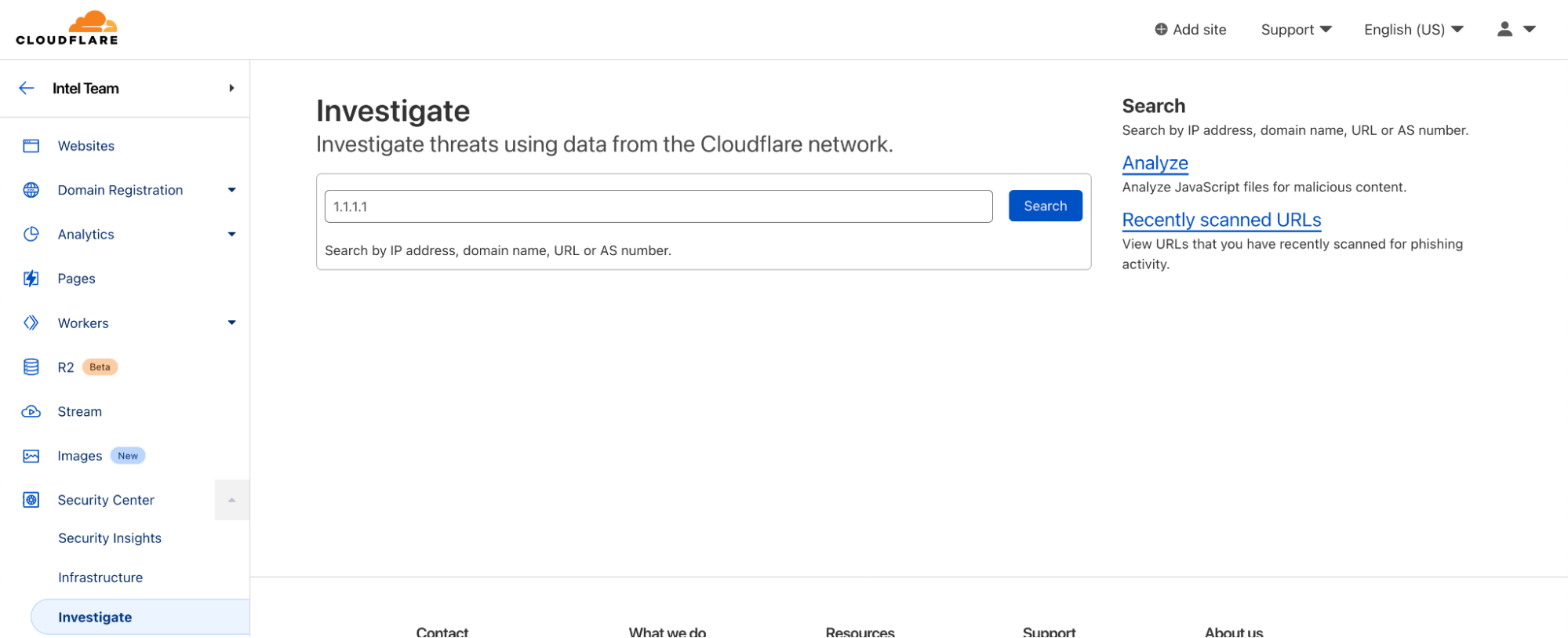
  • Located within Security Center, the Investigate tab is your portal for querying current and historical threat data on IPs, ASNs, URLs (new!), and domains.
  • URLs can now be scanned for phishing contents, with heuristic and machine learning-scored results presented on demand.
Cloudforce One is now generally available: empower your security team with threat data, tooling, and access to industry experts

Brand Protection (new!)

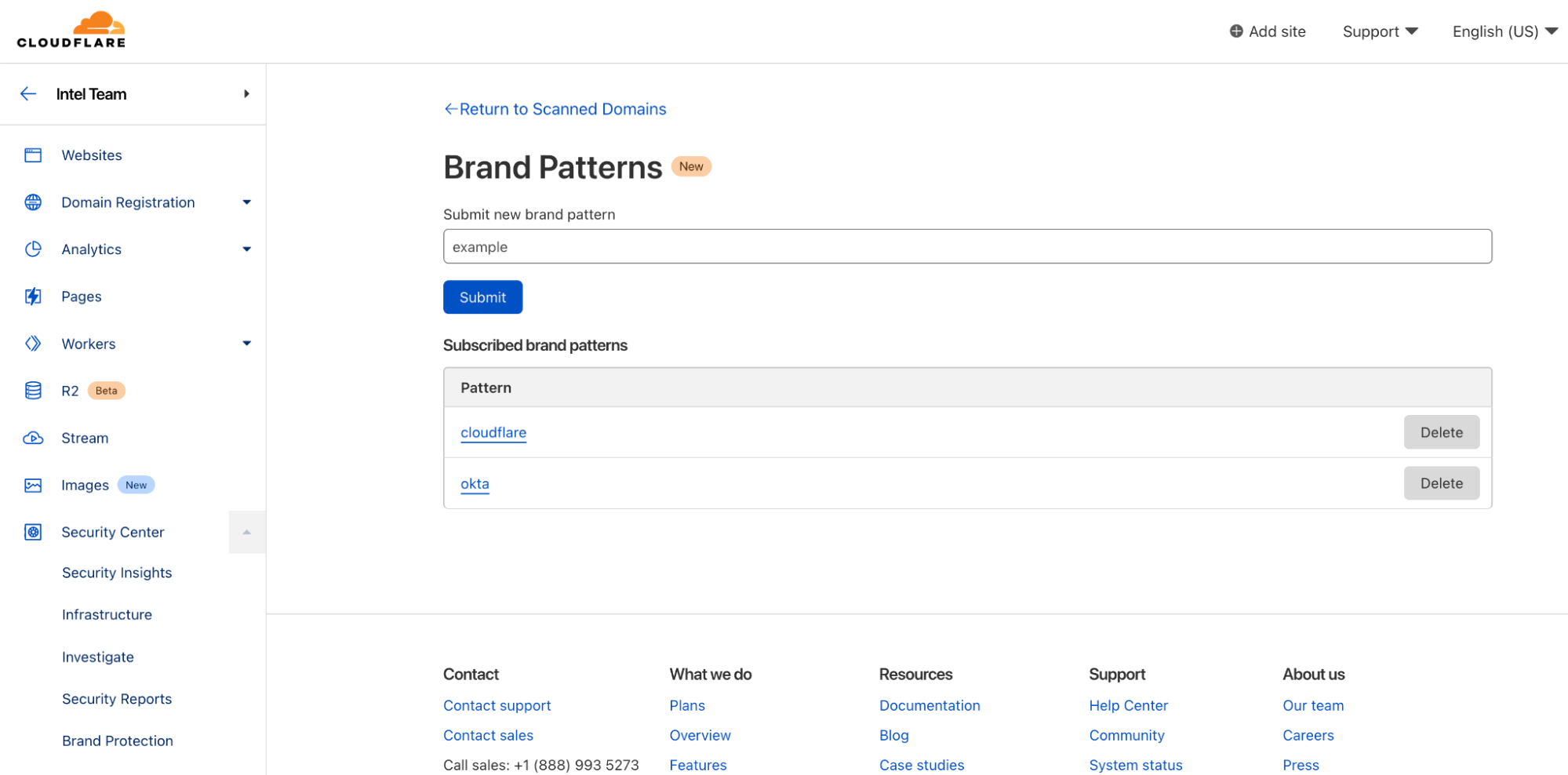
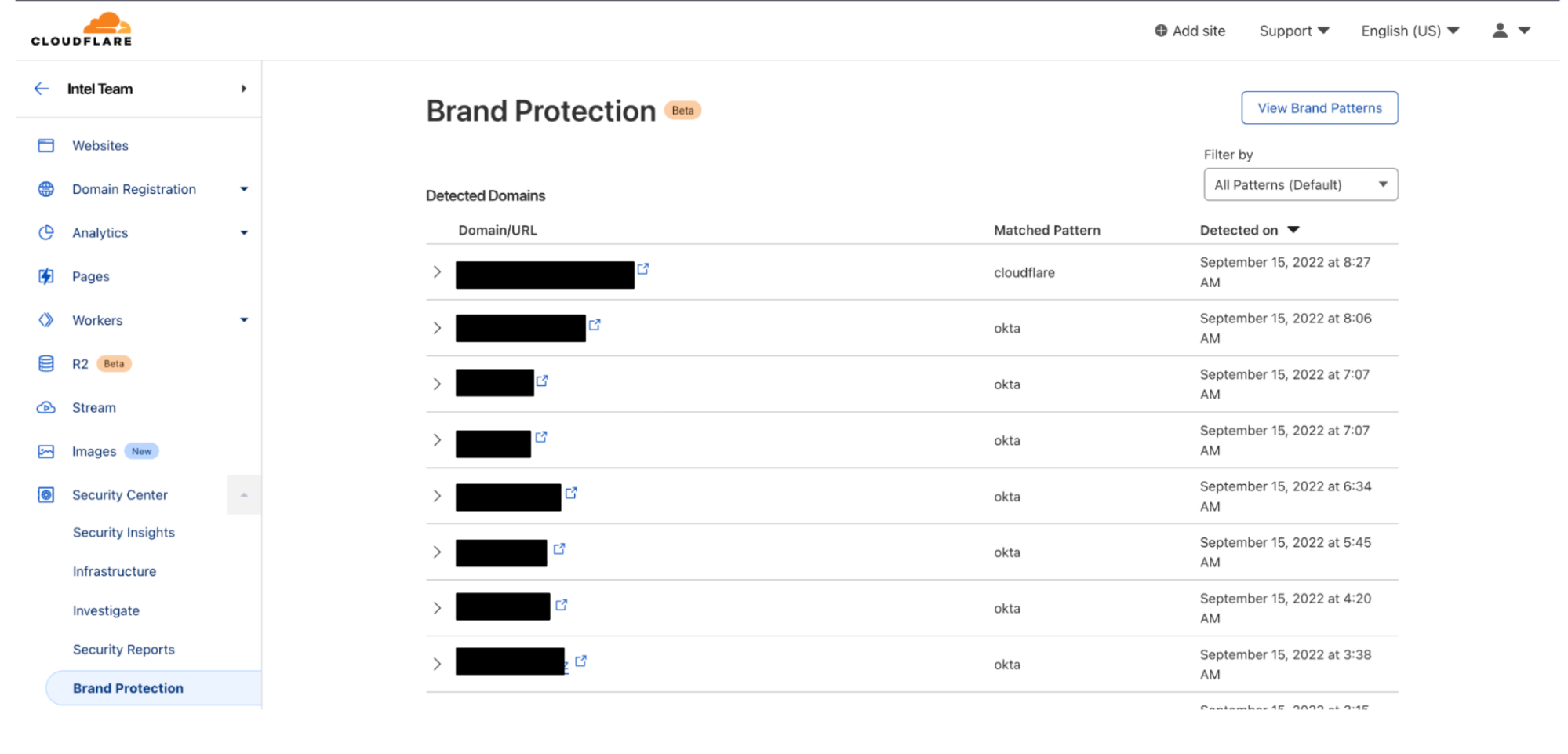
  • Also located within the Security Center, the Brand Protection tab can be used to register keywords or assets (e.g., corporate logos, etc.) that customers wish to be notified of when they appear on the Internet.
Cloudforce One is now generally available: empower your security team with threat data, tooling, and access to industry experts

Sinkholes (new!)

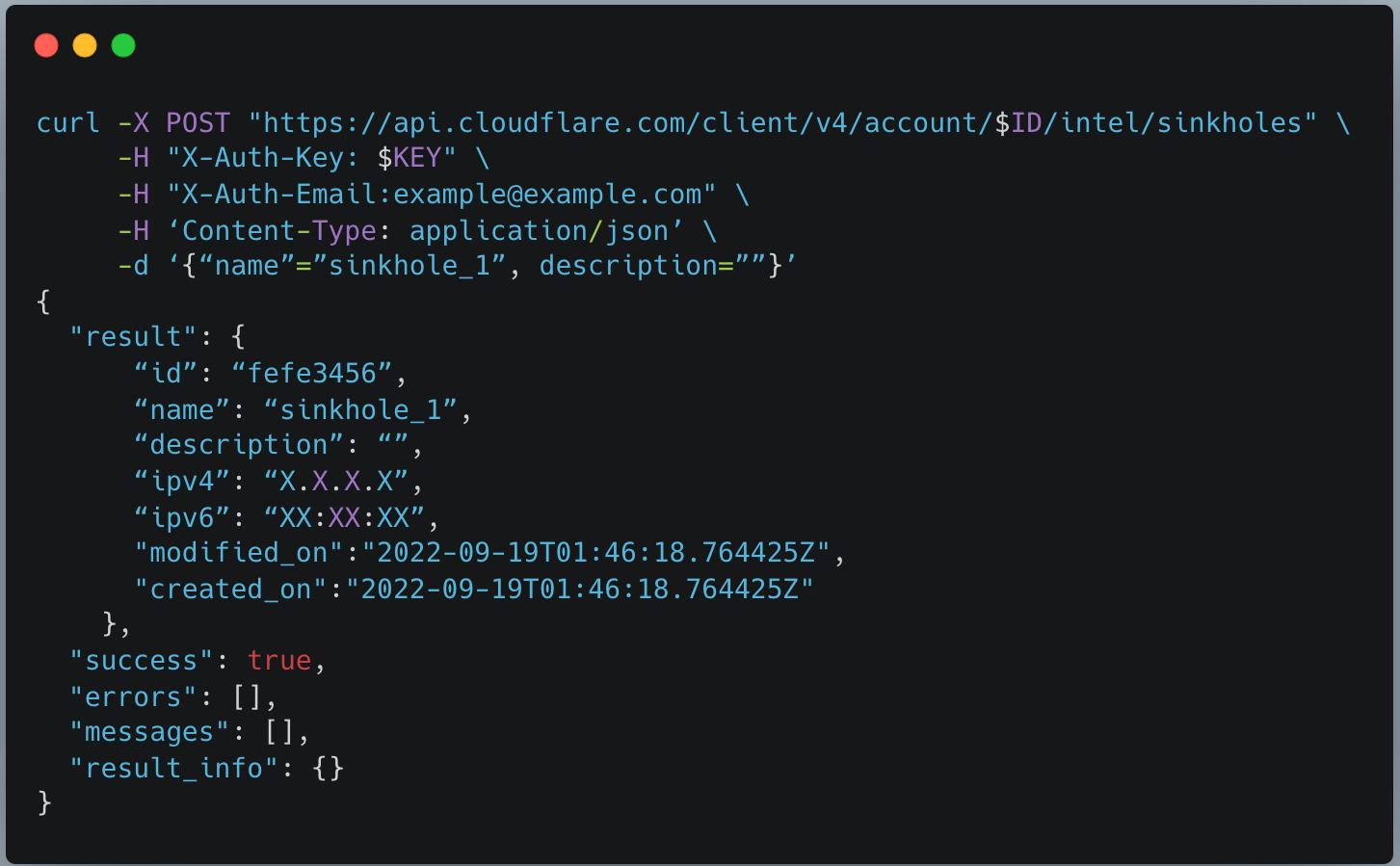
  • Sinkholes can be created on-demand, as a service, to monitor hosts infected with malware and prevent them from communicating with command-and-control (C2) servers.
  • After creating a sinkhole via API, an IP will be returned which can be used with DNS products like Cloudflare Gateway to route web requests to safe sinkholes (and away from C2 servers). Sinkholes can be used to intercept SMTP traffic.
  • Premier customers can also bring their own IP address space to use for sinkholes, to accommodate egress firewall filtering or other use cases. In the future we plan to extend our sinkhole capability to the network layer, which will allow it to be deployed alongside offerings such as Magic Transit and Magic WAN.
Cloudforce One is now generally available: empower your security team with threat data, tooling, and access to industry experts

Getting Started with Cloudforce One

Cloudforce One is open for business and ready to answer your security inquiries. Speak to your account manager or fill out this form to learn more. We hope to see you on the upcoming webinar!

Welcome to GA Week

Post Syndicated from John Graham-Cumming original https://blog.cloudflare.com/welcome-to-ga-week/

Welcome to GA Week

Welcome to GA Week

Cloudflare ships a lot of products. Some of those products are shipped as beta, sometimes open, sometimes closed, and our huge customer base gives those betas an incredible workout. Making products work at scale, and in the heterogeneous environment of the real Internet is a challenge. We’re lucky to have so many enthusiastic customers ready to try out our betas.

And when those products exit beta they’re GA or Generally Available. This week you’ll be hearing a lot about products becoming GA.

But it’s not just about making products work and be available, it’s about making the best-of-breed. We ship early and iterate rapidly. We’ve done this over the years for WAF, DDoS mitigation, bot management, API protection, CDN and our developer platform. Today analyst firms such as Gartner, Forrester and IDC recognize us as leaders in all those areas.

That’s one reason we’re trusted by the likes of Broadcom, NCR, DHL Parcel, Panasonic, Canva, Shopify, L’Oréal, DoorDash, Garmin and more.

Over the years we’ve heard criticism that we’re the new kid on the block. The latest iteration of that is Zero Trust vendors seeing us as novices. It sounds all too familiar. It’s what the DDoS, WAF, bot management, DNS, API protection, and serverless vendors used to say before we blew past them.

We innovate fast because we built a structure and culture that allows it. Cloudflare operates three main innovation teams (Product/Engineering, Emerging Technology and Incubation, and Technology/Research) that work on projects with differing time horizons. We encourage innovation from outside those teams as well.

In a week’s time it’ll be Cloudflare’s 12th birthday and, as every year, we’ll have a Birthday Week when we’ll announce radically new and different products that are likely to cause a great deal of surprise. The teams above have been working hard on things that will change how people think about Cloudflare.

But before we get there, you’re going to hear about products that are out of beta and generally available. Most of these things have been announced before, here on this blog. But they were in beta.

Now they’re ready for everyone.

In fact, we had so many products becoming generally available that we decided to create a new Innovation Week: Cloudflare GA Week. We’ll still keep making products Generally Available throughout the year, but this year, at least, we have a bonanza week of products that are ready.

Even during the beta these products have been in use by real customers, and you’ll be hearing from them this week as well. It’s always inspiring to see how our products are used. It’s one thing to build a product, it’s fascinating to work with customers on how they’ll use it and what it enables them to do.

We aren’t going to be satisfied until every one of the products we talk about is best of breed and a leader in its own category. Together they form Cloudflare’s platform, a platform which is unmatched by anyone in the industry.