Tag Archives: Price Reduction

Best performance and fastest memory with the new Amazon EC2 R8i and R8i-flex instances

Post Syndicated from Veliswa Boya original https://aws.amazon.com/blogs/aws/best-performance-and-fastest-memory-with-the-new-amazon-ec2-r8i-and-r8i-flex-instances/

Today, we’re announcing general availability of the new eighth generation, memory optimized Amazon Elastic Compute Cloud (Amazon EC2) R8i and R8i-flex instances powered by custom Intel Xeon 6 processors, available only on AWS. They deliver the highest performance and fastest memory bandwidth among comparable Intel processors in the cloud. These instances deliver up to 15 percent better price performance, 20 percent higher performance, and 2.5 times more memory throughput compared to previous generation instances.

With these improvements, R8i and R8i-flex instances are ideal for a variety of memory intensive workloads such as SQL and NoSQL databases, distributed web scale in-memory caches (Memcached and Redis), in-memory databases such as SAP HANA, and real-time big data analytics (Apache Hadoop and Apache Spark clusters). For a majority of the workloads that don’t fully utilize the compute resources, the R8i-flex instances are a great first choice to achieve an additional 5 percent better price performance and 5 percent lower prices.

Improvements made to both instances compared to their predecessors
In terms of performance, R8i and R8i-flex instances offer 20 percent better performance than R7i instances, with even higher gains for specific workloads. These instances are up to 30 percent faster for PostgreSQL databases, up to 60 percent faster for NGINX web applications, and up to 40 percent faster for AI deep learning recommendation models compared to previous generation R7i instances, with sustained all-core turbo frequency now reaching 3.9 GHz (compared to 3.2 GHz in the previous generation). They also feature a 4.6x larger L3 cache and significantly better memory throughput, offering 2.5 times higher memory bandwidth than the seventh generation. With this higher performance across all the vectors, you can run a greater number of workloads while keeping costs down.

R8i instances now scale up to 96xlarge with up to 384 vCPUs and 3TB memory (versus 48xlarge sizes in the seventh generation), helping you to scale up database applications. R8i instances are SAP certified to deliver 142,100 aSAPS, which is highest among all comparable machines in on premises and cloud environments, delivering exceptional performance for your mission-critical SAP workloads. R8i-flex instances offer the most common sizes, from large to 16xlarge, and are a great first choice for applications that don’t fully utilize all compute resources. Both R8i and R8i-flex instances use the latest sixth generation AWS Nitro Cards, delivering up to two times more network and Amazon Elastic Block Storage (Amazon EBS) bandwidth compared to the previous generation, which greatly improves network throughput for workloads handling small packets, such as web, application, and gaming servers.

R8i and R8i-flex instances also support bandwidth configuration with 25 percent allocation adjustments between network and Amazon EBS bandwidth, enabling better database performance, query processing, and logging speeds. Additional enhancements include FP16 datatype support for Intel AMX to support workloads such as deep learning training and inference and other artificial intelligence and machine learning (AI/ML) applications.

The specs for the R8i instances are as follows.

Instance size
vCPUs
Memory (GiB)
Network bandwidth (Gbps)
EBS bandwidth (Gbps)
r8i.large 2 16 Up to 12.5 Up to 10
r8i.xlarge 4 32 Up to 12.5 Up to 10
r8i.2xlarge 8 64 Up to 15 Up to 10
r8i.4xlarge 16 128 Up to 15 Up to 10
r8i.8xlarge 32 256 15 10
r8i.12xlarge 48 384 22.5 15
r8i.16xlarge 64 512 30 20
r8i.24xlarge 96 768 40 30
r8i.32xlarge 128 1024 50 40
r8i.48xlarge 192 1536 75 60
r8i.96xlarge 384 3072 100 80
r8i.metal-48xl 192 1536 75 60
r8i.metal-96xl 384 3072 100 80

The specs for the R8i-flex instances are as follows.

Instance size
vCPUs
Memory (GiB)
Network bandwidth (Gbps)
EBS bandwidth (Gbps)
r8i-flex.large 2 16 Up to 12.5 Up to 10
r8i-flex.xlarge 4 32 Up to 12.5 Up to 10
r8i-flex.2xlarge 8 64 Up to 15 Up to 10
r8i-flex.4xlarge 16 128 Up to 15 Up to 10
r8i-flex.8xlarge 32 256 Up to 15 Up to 10
r8i-flex.12xlarge 48 384 Up to 22.5 Up to 15
r8i-flex.16xlarge 64 512 Up to 30 Up to 20

When to use the R8i-flex instances
As stated earlier, R8i-flex instances are more affordable versions of the R8i instances, offering up to 5 percent better price performance at 5 percent lower prices. They’re designed for workloads that benefit from the latest generation performance but don’t fully use all compute resources. These instances can reach up to the full CPU performance 95 percent of the time and work well for in-memory databases, distributed web scale cache stores, mid-size in-memory analytics, real-time big data analytics, and other enterprise applications. R8i instances are recommended for more demanding workloads that need sustained high CPU, network, or EBS performance such as analytics, databases, enterprise applications, and web scale in-memory caches.

Available now
R8i and R8i-flex instances are available today in the US East (N. Virginia), US East (Ohio), US West (Oregon), and Europe (Spain) AWS Regions. As usual with Amazon EC2, you pay only for what you use. For more information, refer to Amazon EC2 Pricing. Check out the full collection of memory optimized instances to help you start migrating your applications.

To learn more, visit our Amazon EC2 R8i instances page and Amazon EC2 R8i-flex instances page. Send feedback to AWS re:Post for EC2 or through your usual AWS Support contacts.

– Veliswa

Announcing up to 45% price reduction for Amazon EC2 NVIDIA GPU-accelerated instances

Post Syndicated from Channy Yun (윤석찬) original https://aws.amazon.com/blogs/aws/announcing-up-to-45-price-reduction-for-amazon-ec2-nvidia-gpu-accelerated-instances/

Customers across industries are harnessing the power of generative AI on AWS to boost employee productivity, deliver exceptional customer experiences, and streamline business processes. However, the growth in demand for GPU capacity has outpaced industry-wide supply, making GPUs a scarce resource and increasing the cost of securing them.

As Amazon Web Services (AWS) grows, we work hard to lower our costs so that we can pass those savings back to our customers. Regular price reductions on AWS services have been a standard way for AWS to pass on the economic efficiencies gained from our scale back to our customers.

Today, we’re announcing up to 45 percent price reduction for Amazon Elastic Compute Cloud (Amazon EC2) NVIDIA GPU-accelerated instances: P4 (P4d and P4de) and P5 (P5 and P5en) instance types. This price reduction to On-Demand and Savings Plan pricing applies to all Regions where these instances are available. The pricing reduction applies to On-Demand purchases beginning June 1 and to Savings Plan purchases effective after June 4.

Here is a table of price reductions percentage (%) from May 31, 2025 baseline prices by instance types and pricing plans:

Instance type NVIDIA GPUs On-Demand EC2 Instance Savings Plans Compute Savings Plans
1 year 3 years 1 year 3 years
P4d A100 33% 31% 25% 31%
P4de A100 33% 31% 25% 31%
P5 H100 44% 45% 44% 25%
P5en H200 25% 26% 25%

Savings Plans are a flexible pricing model that offer low prices on compute usage, in exchange for a commitment to a consistent amount of usage (measured in $/hour) for a 1- or 3- year term. We offers two types of Savings Plans:

  • EC2 Instance Savings Plans provide the lowest prices, offering savings in exchange for commitment to usage of individual instance families in a Region (for example, P5 usage in the US (N. Virginia) Region).
  • Compute Savings Plans provide the most flexibility and help to reduce your costs regardless of instance family, size, Availability Zones, and Regions (for example, from P4d to P5en instances, shift a workload between US Regions).

To provide increased accessibility to reduced pricing, we are making at-scale On-Demand capacity available for:

  • P4d instances in the Asia Pacific (Seoul), Asia Pacific (Sydney), Canada (Central), and Europe (London) Regions
  • P4de instances in the US East (N. Virginia) Region
  • P5 instances in the Asia Pacific (Mumbai), Asia Pacific (Tokyo), Asia Pacific (Jakarta), and South America (São Paulo) Regions
  • P5en instances in the Asia Pacific (Mumbai), Asia Pacific (Tokyo), and Asia Pacific (Jakarta) Regions

We are also now delivering Amazon EC2 P6-B200 instances through Savings Plan to support large scale deployments, which became available on May 15, 2025 at launch only through EC2 Capacity Blocks for ML. EC2 P6-B200 instances, powered by NVIDIA Blackwell GPUs, accelerate a broad range of GPU-enabled workloads but are especially well-suited for large-scale distributed AI training and inferencing.

These pricing updates reflect the AWS commitment to making advanced GPU computing more accessible while passing cost savings directly to customers.

Give Amazon EC2 NVIDIA GPU-accelerated instances a try in the Amazon EC2 console. To learn more about these pricing updates, visit Amazon EC2 Pricing page and send feedback to AWS re:Post for EC2 or through your usual AWS Support contacts.

Channy

Announcing up to 85% price reductions for Amazon S3 Express One Zone

Post Syndicated from Channy Yun (윤석찬) original https://aws.amazon.com/blogs/aws/up-to-85-price-reductions-for-amazon-s3-express-one-zone/

At re:Invent 2023, we introduced Amazon S3 Express One Zone, a high-performance, single-Availability Zone (AZ) storage class purpose-built to deliver consistent single-digit millisecond data access for your most frequently accessed data and latency-sensitive applications.

S3 Express One Zone delivers data access speed up to 10 times faster than S3 Standard, and it can support up to 2 million GET transactions per second (TPS) and up to 200,000 PUT TPS per directory bucket. This makes it ideal for performance-intensive workloads such as interactive data analytics, data streaming, media rendering and transcoding, high performance computing (HPC), and AI/ML trainings. Using S3 Express One Zone, customers like Fundrise, Aura, Lyrebird, Vivian Health, and Fetch improved the performance and reduced the costs of their data-intensive workloads.

Since launch, we’ve introduced a number of features for our customers using S3 Express One Zone. For example, S3 Express One Zone started to support object expiration using S3 Lifecycle to expire objects based on age to help you automatically optimize storage costs. In addition, your log-processing or media-broadcasting applications can directly append new data to the end of existing objects and then immediately read the object, all within S3 Express One Zone.

Today we’re announcing that, effective April 10, 2025, S3 Express One Zone has reduced storage prices by 31 percent, PUT request prices by 55 percent, and GET request prices by 85 percent. In addition, S3 Express One Zone has reduced the per-GB charges for data uploads and retrievals by 60 percent, and these charges now apply to all bytes transferred rather than just portions of requests greater than 512 KB.

Here is a price reduction table in the US East (N. Virginia) Region:

Price Previous New Price reduction
Storage
(per GB-Month)
$0.16 $0.11 31%
Writes
(PUT requests)
$0.0025 per 1,000 requests up to 512 KB $0.00113 per 1,000 requests 55%
Reads
(GET requests)
$0.0002 per 1,000 requests up to 512 KB $0.00003 per 1,000 requests 85%
Data upload
(per GB)
$0.008 $0.0032 60%
Data retrievals
(per GB)
$0.0015 $0.0006 60%

For S3 Express One Zone pricing examples, go to the S3 billing FAQs or use the AWS Pricing Calculator.

These pricing reductions apply to S3 Express One Zone in all AWS Regions where the storage class is available: US East (N. Virginia), US East (Ohio), US West (Oregon), Asia Pacific (Mumbai), Asia Pacific (Tokyo), Europe (Ireland), and Europe (Stockholm) Regions. To learn more, visit the Amazon S3 pricing page and S3 Express One Zone in the AWS Documentation.

Give S3 Express One Zone a try in the S3 console today and send feedback to AWS re:Post for Amazon S3 or through your usual AWS Support contacts.

Channy

OpenSearch optimized instance (OR1) is game changing for indexing performance and cost

Post Syndicated from Cedric Pelvet original https://aws.amazon.com/blogs/big-data/opensearch-optimized-instance-or1-is-game-changing-for-indexing-performance-and-cost/

Amazon OpenSearch Service securely unlocks real-time search, monitoring, and analysis of business and operational data for use cases like application monitoring, log analytics, observability, and website search.

In this post, we examine the OR1 instance type, an OpenSearch optimized instance introduced on November 29, 2023.

OR1 is an instance type for Amazon OpenSearch Service that provides a cost-effective way to store large amounts of data. A domain with OR1 instances uses Amazon Elastic Block Store (Amazon EBS) volumes for primary storage, with data copied synchronously to Amazon Simple Storage Service (Amazon S3) as it arrives. OR1 instances provide increased indexing throughput with high durability.

To learn more about OR1, see the introductory blog post.

While actively writing to an index, we recommend that you keep one replica. However, you can switch to zero replicas after a rollover and the index is no longer being actively written.

This can be done safely because the data is persisted in Amazon S3 for durability.

Note that in case of a node failure and replacement, your data will be automatically restored from Amazon S3, but would be partially unavailable during the repair operation, so you should not consider it for cases where searches on non-actively written indices require high availability.

Goal

In this blog post, we’ll explore how OR1 impacts the performance of OpenSearch workloads.

By providing segment replication, OR1 instances save CPU cycles by indexing only on the primary shards. By doing that, the nodes are able to index more data with the same amount of compute, or to use fewer resources for indexing and thus have more available for search and other operations.

For this post, we’re going to consider an indexing-heavy workload and do some performance testing.

Traditionally, Amazon Elastic Compute Cloud (Amazon EC2) R6g instances are a high performant choice for indexing-heavy workloads, relying on Amazon EBS storage. Im4gn instances provide local NVMe SSD for high throughput and low latency disk writes.

We will compare OR1 indexing performance relative to these two instance types, focusing on indexing performance only for scope of this blog.

Setup

For our performance testing, we set up multiple components, as shown in the following figure:

Architecture diagram

For the testing process:

The index mapping, which is part of our initialization step, is as follows:

{
  "index_patterns": [
    "logs-*"
  ],
  "data_stream": {
    "timestamp_field": {
      "name": "time"
    }
  },
  "template": {
    "settings": {
      "number_of_shards": <VARYING>,
      "number_of_replicas": 1,
      "refresh_interval": "20s"
    },
    "mappings": {
      "dynamic": false,
      "properties": {
        "traceId": {
          "type": "keyword"
        },
        "spanId": {
          "type": "keyword"
        },
        "severityText": {
          "type": "keyword"
        },
        "flags": {
          "type": "long"
        },
        "time": {
          "type": "date",
          "format": "date_time"
        },
        "severityNumber": {
          "type": "long"
        },
        "droppedAttributesCount": {
          "type": "long"
        },
        "serviceName": {
          "type": "keyword"
        },
        "body": {
          "type": "text"
        },
        "observedTime": {
          "type": "date",
          "format": "date_time"
        },
        "schemaUrl": {
          "type": "keyword"
        },
        "resource": {
          "type": "flat_object"
        },
        "instrumentationScope": {
          "type": "flat_object"
        }
      }
    }
  }
}

As you can see, we’re using a data stream to simplify the rollover configuration and keep the maximum primary shard size under 50 GiB, as per best practices.

We optimized the mapping to avoid any unnecessary indexing activity and use the flat_object field type to avoid field mapping explosion.

For reference, the Index State Management (ISM) policy we used is as follows:

{
  "policy": {
    "default_state": "hot",
    "states": [
      {
        "name": "hot",
        "actions": [
          {
            "rollover": {
              "min_primary_shard_size": "50gb"
            }
          }
        ],
        "transitions": []
      }
    ],
    "ism_template": [
      {
        "index_patterns": [
          "logs-*"
        ]
      }
    ]
  }
}

Our average document size is 1.6 KiB and the bulk size is 4,000 documents per bulk, which makes approximately 6.26 MiB per bulk (uncompressed).

Testing protocol

The protocol parameters are as follows:

  • Number of data nodes: 6 or 12
  • Jobs parallelism: 75, 40
  • Primary shard count: 12, 48, 96 (for 12 nodes)
  • Number of replicas: 1 (total of 2 copies)
  • Instance types (each with 16 vCPUs):
    • or1.4xlarge.search
    • r6g.4xlarge.search
    • im4gn.4xlarge.search
Cluster Instance type vCPU RAM JVM size
or1-target or1.4xlarge.search 16 128 32
im4gn-target im4gn.4xlarge.search 16 64 32
r6g-target r6g.4xlarge.search 16 128 32

Note that the im4gn cluster has half the memory of the other two, but still each environment has the same JVM heap size of approximately 32 GiB.

Performance testing results

For the performance testing, we started with 75 parallel jobs and 750 batches of 4,000 documents per client (a total 225 million documents). We then adjusted the number of shards, data nodes, replicas, and jobs.

Configuration 1: 6 data nodes, 12 primary shards, 1 replica

For this configuration, we used 6 data nodes, 12 primary shards, and 1 replica, we observed the following performance:

Cluster CPU usage Time taken Indexing speed
or1-target 65-80% 24 min 156 kdoc/s 243 MiB/s
im4gn-target 89-97% 34 min 110 kdoc/s 172 MiB/s
r6g-target 88-95% 34 min 110 kdoc/s 172 MiB/s

Highlighted in this table, im4gn and r6g clusters have very high CPU usage, triggering admission control, which rejects document.

The OR1 shows a CPU below 80 percent sustained, which is a very good target.

Things to keep in mind:

  • In production, don’t forget to retry indexing with exponential backoff to avoid dropping unindexed documents because of intermittent rejections.
  • The bulk indexing operation returns 200 OK but can have partial failures. The body of the response must be checked to validate that all the documents were indexed successfully.

By reducing the number of parallel jobs from 75 to 40, while maintaining 750 batches of 4,000 documents per client (total 120M documents), we get the following:

Cluster CPU usage Time taken Indexing speed
or1-target 25-60% 20 min 100 kdoc/s 156 MiB/s
im4gn-target 75-93% 19 min 105 kdoc/s 164 MiB/s
r6g-target 77-90% 20 min 100 kdoc/s 156 MiB/s

The throughput and CPU usage decreased, but the CPU remains high on Im4gn and R6g, while the OR1 is showing more CPU capacity to spare.

Configuration 2: 6 data nodes, 48 primary shards, 1 replica

For this configuration, we increased the number of primary shards from 12 to 48, which provides more parallelism for indexing:

Cluster CPU usage Time taken Indexing speed
or1-target 60-80% 21 min 178 kdoc/s 278 MiB/s
im4gn-target 67-95% 34 min 110 kdoc/s 172 MiB/s
r6g-target 70-88% 37 min 101 kdoc/s 158 MiB/s

The indexing throughput increased for the OR1, but the Im4gn and R6g didn’t see an improvement because their CPU utilization is still very high.

Reducing the parallel jobs to 40 and keeping 48 primary shards, we can see that the OR1 gets a little more pressure as the minimum CPU increases from 12 primary shards, and the CPU for R6g looks much better. For the Im4gn however, the CPU is still high.

Cluster CPU usage Time taken Indexing speed
or1-target 40-60% 16 min 125 kdoc/s 195 MiB/s
im4gn-target 80-94% 18 min 111 kdoc/s 173 MiB/s
r6g-target 70-80% 21 min 95 kdoc/s 148 MiB/s

Configuration 3: 12 data nodes, 96 primary shards, 1 replica

For this configuration, we started with the original configuration and added more compute capacity, moving from 6 nodes to 12 and increasing the number of primary shards to 96.

Cluster CPU usage Time taken Indexing speed
or1-target 40-60% 18 min 208 kdoc/s 325 MiB/s
im4gn-target 74-90% 20 min 187 kdoc/s 293 MiB/s
r6g-target 60-78% 24 min 156 kdoc/s 244 MiB/s

The OR1 and the R6g are performing well with CPU usage below 80 percent, with OR1 giving 33 percent better performance with 30 percent less CPU usage compared to R6g.

The Im4gn is still at 90 percent CPU, but the performance is also very good.

Reducing the number of parallel jobs from 75 to 40, we get:

Cluster CPU usage Time taken Indexing speed
or1-target 40-60% 11 min 182 kdoc/s 284 MiB/s
im4gn-target 70-90% 11 min 182 kdoc/s 284 MiB/s
r6g-target 60-77% 12 min 167 kdoc/s 260 MiB/s

Reducing the number of parallel jobs to 40 from 75 brought the OR1 and Im4gn instances on par and the R6g very close.

Interpretation

The OR1 instances speed up indexing because only the primary shards need to be written while the replica is produced by copying segments. While being more performant compared to Img4n and R6g instances, the CPU usage is also lower, which gives room for additional load (search) or cluster size reduction.

We can compare a 6-node OR1 cluster with 48 primary shards, indexing at 178 thousand documents per second, to a 12-node Im4gn cluster with 96 primary shards, indexing at 187 thousand documents per second or to a 12-node R6g cluster with 96 primary shards, indexing at 156 thousand documents per second.

The OR1 performs almost as well as the larger Im4gn cluster, and better than the larger R6g cluster.

How to size when using OR1 instances

As you can see in the results, OR1 instances can process more data at higher throughput rates. However, when increasing the number of primary shards, they don’t perform as well because of the remote backed storage.

To get the best throughput from the OR1 instance type, you can use larger batch sizes than usual, and use an Index State Management (ISM) policy to roll over your index based on size so that you can effectively limit the number of primary shards per index. You can also increase the number of connections because the OR1 instance type can handle more parallelism.

For search, OR1 doesn’t directly impact the search performance. However, as you can see, the CPU usage is lower on OR1 instances than on Im4gn and R6g instances. That enables either more activity (search and ingest), or the possibility to reduce the instance size or count, which would result in a cost reduction.

Conclusion and recommendations for OR1

The new OR1 instance type gives you more indexing power than the other instance types. This is important for indexing-heavy workloads, where you index in batch every day or have a high sustained throughput.

The OR1 instance type also enables cost reduction because their price for performance is 30 percent better than existing instance types. When adding more than one replica, price for performance will decrease because the CPU is barely impacted on an OR1 instance, while other instance types would have indexing throughput decrease.

Check out the complete instructions for optimizing your workload for indexing using this repost article.


About the author

Cédric Pelvet is a Principal AWS Specialist Solutions Architect. He helps customers design scalable solutions for real-time data and search workloads. In his free time, his activities are learning new languages and practicing the violin.

Amazon OpenSearch Serverless cost-effective search capabilities, at any scale

Post Syndicated from Satish Nandi original https://aws.amazon.com/blogs/big-data/amazon-opensearch-serverless-cost-effective-search-capabilities-at-any-scale/

We’re excited to announce the new lower entry cost for Amazon OpenSearch Serverless. With support for half (0.5) OpenSearch Compute Units (OCUs) for indexing and search workloads, the entry cost is cut in half. Amazon OpenSearch Serverless is a serverless deployment option for Amazon OpenSearch Service that you can use to run search and analytics workloads without the complexities of infrastructure management, shard tuning or data lifecycle management. OpenSearch Serverless automatically provisions and scales resources to provide consistently fast data ingestion rates and millisecond query response times during changing usage patterns and application demand. 

OpenSearch Serverless offers three types of collections to help meet your needs: Time-series, search, and vector. The new lower cost of entry benefits all collection types. Vector collections have come to the fore as a predominant workload when using OpenSearch Serverless as an Amazon Bedrock knowledge base. With the introduction of half OCUs, the cost for small vector workloads is halved. Time-series and search collections also benefit, especially for small workloads like proof-of-concept deployments and development and test environments.

A full OCU includes one vCPU, 6GB of RAM and 120GB of storage. A half OCU offers half a vCPU, 3 GB of RAM, and 60 GB of storage. OpenSearch Serverless scales up a half OCU first to one full OCU and then in one-OCU increments. Each OCU also uses Amazon Simple Storage Service (Amazon S3) as a backing store; you pay for data stored in Amazon S3 regardless of the OCU size. The number of OCUs needed for the deployment depends on the collection type, along with ingestion and search patterns. We will go over the details later in the post and contrast how the new half OCU base brings benefits. 

OpenSearch Serverless separates indexing and search computes, deploying sets of OCUs for each compute need. You can deploy OpenSearch Serverless in two forms: 1) Deployment with redundancy for production, and 2) Deployment without redundancy for development or testing.

Note: OpenSearch Serverless deploys two times the compute for both indexing and searching in redundant deployments.

OpenSearch Serverless Deployment Type

The following figure shows the architecture for OpenSearch Serverless in redundancy mode.

In redundancy mode, OpenSearch Serverless deploys two base OCUs for each compute set (indexing and search) across two Availability Zones. For small workloads under 60GB, OpenSearch Serverless uses half OCUs as the base size. The minimum deployment is four base units, two each for indexing and search. The minimum cost is approximately $350 per month (four half OCUs). All prices are quoted based on the US-East region and 30 days a month. During normal operation, all OCUs are in operation to serve traffic. OpenSearch Serverless scales up from this baseline as needed.

For non-redundant deployments, OpenSearch Serverless deploys one base OCU for each compute set, costing $174 per month (two half OCUs).

Redundant configurations are recommended for production deployments to maintain availability; if one Availability Zone goes down, the other can continue serving traffic. Non-redundant deployments are suitable for development and testing to reduce costs. In both configurations, you can set a maximum OCU limit to manage costs. The system will scale up to this limit during peak loads if necessary, but will not exceed it.

OpenSearch Serverless collections and resource allocations

OpenSearch Serverless uses compute units differently depending on the type of collection and keeps your data in Amazon S3. When you ingest data, OpenSearch Serverless writes it to the OCU disk and Amazon S3 before acknowledging the request, making sure of the data’s durability and the system’s performance. Depending on collection type, it additionally keeps data in the local storage of the OCUs, scaling to accommodate the storage and computer needs.

The time-series collection type is designed to be cost-efficient by limiting the amount of data kept in local storage, and keeping the remainder in Amazon S3. The number of OCUs needed depends on amount of data and the collection’s retention period. The number of OCUs OpenSearch Serverless uses for your workload is the larger of the default minimum OCUs, or the minimum number of OCUs needed to hold the most recent portion of your data, as defined by your OpenSearch Serverless data lifecycle policy. For example, if you ingest 1 TiB per day and have 30 day retention period, the size of the most recent data will be 1 TiB. You will need 20 OCUs [10 OCUs x 2] for indexing and another 20 OCUS [10 OCUs x 2] for search (based on the 120 GiB of storage per OCU). Access to older data in Amazon S3 raises the latency of the query responses. This tradeoff in query latency for older data is done to save on the OCUs cost.

The vector collection type uses RAM to store vector graphs, as well as disk to store indices. Vector collections keep index data in OCU local storage. When sizing for vector workloads both needs into account. OCU RAM limits are reached faster than OCU disk limits, causing vector collections to be bound by RAM space. 

OpenSearch Serverless allocates OCU resources for vector collections as follows. Considering full OCUs, it uses 2 GB for the operating system, 2 GB for the Java heap, and the remaining 2 GB for vector graphs. It uses 120 GB of local storage for OpenSearch indices. The RAM required for a vector graph depends on the vector dimensions, number of vectors stored, and the algorithm chosen. See Choose the k-NN algorithm for your billion-scale use case with OpenSearch for a review and formulas to help you pre-calculate vector RAM needs for your OpenSearch Serverless deployment.

Note: Many of the behaviors of the system are explained as of June 2024. Check back in coming months as new innovations continue to drive down cost.

Supported AWS Regions

The support for the new OCU minimums for OpenSearch Serverless is now available in all regions that support OpenSearch Serverless. See AWS Regional Services List for more information about OpenSearch Service availability. See the documentation to learn more about OpenSearch Serverless.

Conclusion

The introduction of half OCUs gives you a significant reduction in the base costs of Amazon OpenSearch Serverless. If you have a smaller data set, and limited usage, you can now take advantage of this lower cost. The cost-effective nature of this solution and simplified management of search and analytics workloads ensures seamless operation even as traffic demands vary.


About the authors 

Satish Nandi is a Senior Product Manager with Amazon OpenSearch Service. He is focused on OpenSearch Serverless and Geospatial and has years of experience in networking, security and ML and AI. He holds a BEng in Computer Science and an MBA in Entrepreneurship. In his free time, he likes to fly airplanes, hang glide, and ride his motorcycle.

Jon Handler is a Senior Principal Solutions Architect at Amazon Web Services based in Palo Alto, CA. Jon works closely with OpenSearch and Amazon OpenSearch Service, providing help and guidance to a broad range of customers who have search and log analytics workloads that they want to move to the AWS Cloud. Prior to joining AWS, Jon’s career as a software developer included four years of coding a large-scale, eCommerce search engine. Jon holds a Bachelor of the Arts from the University of Pennsylvania, and a Master of Science and a Ph. D. in Computer Science and Artificial Intelligence from Northwestern University.

AWS Weekly Roundup – Application Load Balancer IPv6, Amazon S3 pricing update, Amazon EC2 Flex instances, and more (May 20, 2024)

Post Syndicated from Sébastien Stormacq original https://aws.amazon.com/blogs/aws/aws-weekly-roundup-application-load-balancer-ipv6-amazon-s3-pricing-update-amazon-ec2-flex-instances-and-more-may-20-2024/

AWS Summit season is in full swing around the world, with last week’s events in Bengaluru, Berlin, and  Seoul, where my blog colleague Channy delivered one of the keynotes.

AWS Summit Seoul Keynote

Last week’s launches
Here are some launches that got my attention:

Amazon S3 will no longer charge for several HTTP error codesA customer reported how he was charged for Amazon S3 API requests he didn’t initiate and which resulted in AccessDenied errors. The Amazon Simple Storage Service (Amazon S3) service team updated the service to not charge such API requests anymore. As always when talking about pricing, the exact wording is important, so please read the What’s New post for the details.

Introducing Amazon EC2 C7i-flex instances – These instances delivers up to 19 percent better price performance compared to C6i instances. Using C7i-flex instances is the easiest way for you to get price performance benefits for a majority of compute-intensive workloads. The new instances are powered by the 4th generation Intel Xeon Scalable custom processors (Sapphire Rapids) that are available only on AWS and offer 5 percent lower prices compared to C7i.

Application Load Balancer launches IPv6 only support for internet clientsApplication Load Balancer now allows customers to provision load balancers without IPv4s for clients that can connect using just IPv6s. To connect, clients can resolve AAAA DNS records that are assigned to Application Load Balancer. The Application Load Balancer is still dual stack for communication between the load balancer and targets. With this new capability, you have the flexibility to use both IPv4s or IPv6s for your application targets while avoiding IPv4 charges for clients that don’t require it.

Amazon VPC Lattice now supports TLS Passthrough – We announced the general availability of TLS passthrough for Amazon VPC Lattice, which allows customers to enable end-to-end authentication and encryption using their existing TLS or mTLS implementations. Prior to this launch, VPC Lattice supported HTTP and HTTPS listener protocols only, which terminates TLS and performs request-level routing and load balancing based on information in HTTP headers.

Amazon DocumentDB zero-ETL integration with Amazon OpenSearch Service – This new integration provides you with advanced search capabilities, such as fuzzy search, cross-collection search and multilingual search, on your Amazon DocumentDB (with MongoDB compatibility) documents using the OpenSearch API. With a few clicks in the AWS Management Console, you can now synchronize your data from Amazon DocumentDB to Amazon OpenSearch Service, eliminating the need to write any custom code to extract, transform, and load the data.

Amazon EventBridge now supports customer managed keys (CMK) for event buses – This capability allows you to encrypt your events using your own keys instead of an AWS owned key (which is used by default). With support for CMK, you now have more fine-grained security control over your events, satisfying your company’s security requirements and governance policies.

For a full list of AWS announcements, be sure to keep an eye on the What’s New at AWS page.

Other AWS news
Here are some additional news items, open source projects, and Twitch shows that you might find interesting:

The Four Pillars of Managing Email Reputation – Dustin Taylor is the manager of anti-abuse and email deliverability for Amazon Simple Email Service (SES). He wrote a remarkable post exploring Amazon SES approach to managing domain and IP reputation. Maintaining a high reputation ensures optimal recipient inboxing. His post outlines how Amazon SES protects its network reputation to help you deliver high-quality email consistently. A worthy read, even if you’re not sending email at scale. I learned a lot.

AWS Build On Generative AIBuild On Generative AI – Season 3 of your favorite weekly Twitch show about all things generative artificial intelligence (AI) is in full swing! Streaming every Monday, 9:00 AM US PT, my colleagues Tiffany and Darko discuss different aspects of generative AI and invite guest speakers to demo their work.

AWS open source news and updates – My colleague Ricardo writes this weekly open source newsletter, in which he highlights new open source projects, tools, and demos from the AWS Community.

Upcoming AWS events

AWS Summits – Join free online and in-person events that bring the cloud computing community together to connect, collaborate, and learn about AWS. Register in your nearest city: Hong Kong (May 22), Milan (May 23), Stockholm (June 4), and Madrid (June 5).

AWS re:Inforce – Explore 2.5 days of immersive cloud security learning in the age of generative AI at AWS re:Inforce, June 10–12 in Pennsylvania.

AWS Community Days – Join community-led conferences that feature technical discussions, workshops, and hands-on labs led by expert AWS users and industry leaders from around the world: Midwest | Columbus (June 13), Sri Lanka (June 27), Cameroon (July 13), Nigeria (August 24), and New York (August 28).

Browse all upcoming AWS led in-person and virtual events and developer-focused events.

That’s all for this week. Check back next Monday for another Weekly Roundup!

— seb

This post is part of our Weekly Roundup series. Check back each week for a quick roundup of interesting news and announcements from AWS!

Free data transfer out to internet when moving out of AWS

Post Syndicated from Sébastien Stormacq original https://aws.amazon.com/blogs/aws/free-data-transfer-out-to-internet-when-moving-out-of-aws/

You told us one of the primary reasons to adopt Amazon Web Services (AWS) is the broad choice of services we offer, enabling you to innovate, build, deploy, and monitor your workloads. AWS has continuously expanded its services to support virtually any cloud workload. It now offers over 200 fully featured services for compute, storage, databases, networking, analytics, machine learning (ML) and artificial intelligence (AI), and many more. For example, Amazon Elastic Compute Cloud (Amazon EC2) offers over 750 generally available instances—more than any other major cloud provider—and you can choose from numerous relational, analytics, key-value, document, or graph databases.

We believe this choice must include the one to migrate your data to another cloud provider or on-premises. That’s why, starting today, we’re waiving data transfer out to the internet (DTO) charges when you want to move outside of AWS.

Over 90 percent of our customers already incur no data transfer expenses out of AWS because we provide 100 gigabytes per month free from AWS Regions to the internet. This includes traffic from Amazon EC2, Amazon Simple Storage Service (Amazon S3), Application Load Balancer, among others. In addition, we offer one terabyte of free data transfer out of Amazon CloudFront every month.

If you need more than 100 gigabytes of data transfer out per month while transitioning, you can contact AWS Support to ask for free DTO rates for the additional data. It’s necessary to go through support because you make hundreds of millions of data transfers each day, and we generally do not know if the data transferred out to the internet is a normal part of your business or a one-time transfer as part of a switch to another cloud provider or on premises.

We will review requests at the AWS account level. Once approved, we will provide credits for the data being migrated. We don’t require you to close your account or change your relationship with AWS in any way. You’re welcome to come back at any time. We will, of course, apply additional scrutiny if the same AWS account applies multiple times for free DTO.

We believe in customer choice, including the choice to move your data out of AWS. The waiver on data transfer out to the internet charges also follows the direction set by the European Data Act and is available to all AWS customers around the world and from any AWS Region.

Freedom of choice is not limited to data transfer rates. AWS also supports Fair Software Licensing Principles, which make it easy to use software with other IT providers of your choice. You can read this blog post for more details.

You can check the FAQ for more information, or you can contact AWS Customer Support to request credits for DTO while switching.

But I sincerely hope you will not.

— seb

Best practices to optimize your Amazon EC2 Spot Instances usage

Post Syndicated from Sheila Busser original https://aws.amazon.com/blogs/compute/best-practices-to-optimize-your-amazon-ec2-spot-instances-usage/

This blog post is written by Pranaya Anshu, EC2 PMM, and Sid Ambatipudi, EC2 Compute GTM Specialist.

Amazon EC2 Spot Instances are a powerful tool that thousands of customers use to optimize their compute costs. The National Football League (NFL) is an example of customer using Spot Instances, leveraging 4000 EC2 Spot Instances across more than 20 instance types to build its season schedule. By using Spot Instances, it saves 2 million dollars every season! Virtually any organization – small or big – can benefit from using Spot Instances by following best practices.

Overview of Spot Instances

Spot Instances let you take advantage of unused EC2 capacity in the AWS cloud and are available at up to a 90% discount compared to On-Demand prices. Through Spot Instances, you can take advantage of the massive operating scale of AWS and run hyperscale workloads at a significant cost saving. In exchange for these discounts, AWS has the option to reclaim Spot Instances when EC2 requires the capacity. AWS provides a two-minute notification before reclaiming Spot Instances, allowing workloads running on those instances to be gracefully shut down.

In this blog post, we explore four best practices that can help you optimize your Spot Instances usage and minimize the impact of Spot Instances interruptions: diversifying your instances, considering attribute-based instance type selection, leveraging Spot placement scores, and using the price-capacity-optimized allocation strategy. By applying these best practices, you’ll be able to leverage Spot Instances for appropriate workloads and ultimately reduce your compute costs. Note for the purposes of this blog, we will focus on the integration of Spot Instances with Amazon EC2 Auto Scaling groups.

Pre-requisites

Spot Instances can be used for various stateless, fault-tolerant, or flexible applications such as big data, containerized workloads, CI/CD, web servers, high-performance computing (HPC), and AI/ML workloads. However, as previously mentioned, AWS can interrupt Spot Instances with a two-minute notification, so it is best not to use Spot Instances for workloads that cannot handle individual instance interruption — that is, workloads that are inflexible, stateful, fault-intolerant, or tightly coupled.

Best practices

  1. Diversify your instances

The fundamental best practice when using Spot Instances is to be flexible. A Spot capacity pool is a set of unused EC2 instances of the same instance type (for example, m6i.large) within the same AWS Region and Availability Zone (for example, us-east-1a). When you request Spot Instances, you are requesting instances from a specific Spot capacity pool. Since Spot Instances are spare EC2 capacity, you want to base your selection (request) on as many spare pools of capacity as possible in order to increase your likelihood of getting Spot Instances. You should diversify across instance sizes, generations, instance types, and Availability Zones to maximize your savings with Spot Instances. For example, if you are currently using c5a.large in us-east-1a, consider including c6a instances (newer generation of instances), c5a.xl (larger size), or us-east-1b (different Availability Zone) to increase your overall flexibility. Instance diversification is beneficial not only for selecting Spot Instances, but also for scaling, resilience, and cost optimization.

To get hands-on experience with Spot Instances and to practice instance diversification, check out Amazon EC2 Spot Instances workshops. And once you’ve diversified your instances, you can leverage AWS Fault Injection Simulator (AWS FIS) to test your applications’ resilience to Spot Instance interruptions to ensure that they can maintain target capacity while still benefiting from the cost savings offered by Spot Instances. To learn more about stress testing your applications, check out the Back to Basics: Chaos Engineering with AWS Fault Injection Simulator video and AWS FIS documentation.

  1. Consider attribute-based instance type selection

We have established that flexibility is key when it comes to getting the most out of Spot Instances. Similarly, we have said that in order to access your desired Spot Instances capacity, you should select multiple instance types. While building and maintaining instance type configurations in a flexible way may seem daunting or time-consuming, it doesn’t have to be if you use attribute-based instance type selection. With attribute-based instance type selection, you can specify instance attributes — for example, CPU, memory, and storage — and EC2 Auto Scaling will automatically identify and launch instances that meet your defined attributes. This removes the manual-lift of configuring and updating instance types. Moreover, this selection method enables you to automatically use newly released instance types as they become available so that you can continuously have access to an increasingly broad range of Spot Instance capacity. Attribute-based instance type selection is ideal for workloads and frameworks that are instance agnostic, such as HPC and big data workloads, and can help to reduce the work involved with selecting specific instance types to meet specific requirements.

For more information on how to configure attribute-based instance selection for your EC2 Auto Scaling group, refer to Create an Auto Scaling Group Using Attribute-Based Instance Type Selection documentation. To learn more about attribute-based instance type selection, read the Attribute-Based Instance Type Selection for EC2 Auto Scaling and EC2 Fleet news blog or check out the Using Attribute-Based Instance Type Selection and Mixed Instance Groups section of the Launching Spot Instances workshop.

  1. Leverage Spot placement scores

Now that we’ve stressed the importance of flexibility when it comes to Spot Instances and covered the best way to select instances, let’s dive into how to find preferred times and locations to launch Spot Instances. Because Spot Instances are unused EC2 capacity, Spot Instances capacity fluctuates. Correspondingly, it is possible that you won’t always get the exact capacity at a specific time that you need through Spot Instances. Spot placement scores are a feature of Spot Instances that indicates how likely it is that you will be able to get the Spot capacity that you require in a specific Region or Availability Zone. Your Spot placement score can help you reduce Spot Instance interruptions, acquire greater capacity, and identify optimal configurations to run workloads on Spot Instances. However, it is important to note that Spot placement scores serve only as point-in-time recommendations (scores can vary depending on current capacity) and do not provide any guarantees in terms of available capacity or risk of interruption.  To learn more about how Spot placement scores work and to get started with them, see the Identifying Optimal Locations for Flexible Workloads With Spot Placement Score blog and Spot placement scores documentation.

As a near real-time tool, Spot placement scores are often integrated into deployment automation. However, because of its logging and graphic capabilities, you may find it to be a valuable resource even before you launch a workload in the cloud. If you are looking to understand historical Spot placement scores for your workload, you should check out the Spot placement score tracker, a tool that automates the capture of Spot placement scores and stores Spot placement score metrics in Amazon CloudWatch. The tracker is available through AWS Labs, a GitHub repository hosting tools. Learn more about the tracker through the Optimizing Amazon EC2 Spot Instances with Spot Placement Scores blog.

When considering ideal times to launch Spot Instances and exploring different options via Spot placement scores, be sure to consider running Spot Instances at off-peak hours – or hours when there is less demand for EC2 Instances. As you may assume, there is less unused capacity – Spot Instances – available during typical business hours than after business hours. So, in order to leverage as much Spot capacity as you can, explore the possibility of running your workload at hours when there is reduced demand for EC2 instances and thus greater availability of Spot Instances. Similarly, consider running your Spot Instances in “off-peak Regions” – or Regions that are not experiencing business hours at that certain time.

On a related note, to maximize your usage of Spot Instances, you should consider using previous generation of instances if they meet your workload needs. This is because, as with off-peak vs peak hours, there is typically greater capacity available for previous generation instances than current generation instances, as most people tend to use current generation instances for their compute needs.

  1. Use the price-capacity-optimized allocation strategy

Once you’ve selected a diversified and flexible set of instances, you should select your allocation strategy. When launching instances, your Auto Scaling group uses the allocation strategy that you specify to pick the specific Spot pools from all your possible pools. Spot offers four allocation strategies: price-capacity-optimized, capacity-optimized, capacity-optimized-prioritized, and lowest-price. Each of these allocation strategies select Spot Instances in pools based on price, capacity, a prioritized list of instances, or a combination of these factors.

The price-capacity-optimized strategy launched in November 2022. This strategy makes Spot Instance allocation decisions based on the most capacity at the lowest price. It essentially enables Auto Scaling groups to identify the Spot pools with the highest capacity availability for the number of instances that are launching. In other words, if you select this allocation strategy, we will find the Spot capacity pools that we believe have the lowest chance of interruption in the near term. Your Auto Scaling groups then request Spot Instances from the lowest priced of these pools.

We recommend you leverage the price-capacity-optimized allocation strategy for the majority of your workloads that run on Spot Instances. To see how the price-capacity-optimized allocation strategy selects Spot Instances in comparison with lowest-price and capacity-optimized allocation strategies, read the Introducing the Price-Capacity-Optimized Allocation Strategy for EC2 Spot Instances blog post.

Clean-up

If you’ve explored the different Spot Instances workshops we recommended throughout this blog post and spun up resources, please remember to delete resources that you are no longer using to avoid incurring future costs.

Conclusion

Spot Instances can be leveraged to reduce costs across a wide-variety of use cases, including containers, big data, machine learning, HPC, and CI/CD workloads. In this blog, we discussed four Spot Instances best practices that can help you optimize your Spot Instance usage to maximize savings: diversifying your instances, considering attribute-based instance type selection, leveraging Spot placement scores, and using the price-capacity-optimized allocation strategy.

To learn more about Spot Instances, check out Spot Instances getting started resources. Or to learn of other ways of reducing costs and improving performance, including leveraging other flexible purchase models such as AWS Savings Plans, read the Increase Your Application Performance at Lower Costs eBook or watch the Seven Steps to Lower Costs While Improving Application Performance webinar.

Amazon S3 Glacier is the Best Place to Archive Your Data – Introducing the S3 Glacier Instant Retrieval Storage Class

Post Syndicated from Marcia Villalba original https://aws.amazon.com/blogs/aws/amazon-s3-glacier-is-the-best-place-to-archive-your-data-introducing-the-s3-glacier-instant-retrieval-storage-class/

Today we are announcing the Amazon S3 Glacier Instant Retrieval storage class. This new archive storage class delivers the lowest cost storage for long-lived data that is rarely accessed and requires millisecond retrieval.

We are also excited to announce that S3 Intelligent-Tiering now automatically optimizes storage costs for rarely accessed data that needs immediate retrieval with the new Archive Instant Access tier, which is ideal for data with unknown or changing access patterns. For existing customers, this will provide an immediate savings of 68 percent for data that hasn’t been accessed for more than 90 days, with no action needed. The Frequent, Infrequent, and now Archive Instant Access tiers are designed for the same milliseconds access time and high-throughput performance.

In addition, we are announcing the new name for the existing Amazon S3 Glacier storage class and several price reductions.

Amazon S3 Glacier Instant Retrieval
The Amazon S3 Glacier storage classes are extremely low-cost and built for data archiving. They are secure and durable, and they are designed to provide the lowest cost for data that does not require immediate access, with retrieval options from minutes to hours.

Many customers need to store rarely accessed data for several years. However the data must be highly available and immediately accessible. Today, these customers use the S3 Standard-Infrequent Access (S3 Standard-IA) storage class. This storage class offers low cost for storage and allows customers to retrieve their data instantly.

S3 Glacier Instant Retrieval is a new storage class that delivers the fastest access to archive storage, with the same low latency and high-throughput performance as the S3 Standard and S3 Standard-IA storage classes. You can save up to 68 percent on storage costs as compared with using the S3 Standard-IA storage class when you use the S3 Glacier Instant Retrieval storage class and pay a low price to retrieve data. For example, in the US East (N. Virginia) Region, S3 Glacier Instant Retrieval storage pricing is $0.004 per GB-month and data retrieval is $0.03 per GB. Learn more about pricing for your Region.

Media archives, medical images, or user-generated content are just a few examples of ideal use cases for S3 Glacier Instant Retrieval. Once created, this content is rarely accessed, but when it is needed it must be available in milliseconds.

To get started using the new storage class from the Amazon S3 console, upload an object as you would normally, and select the S3 Glacier Instant Retrieval storage class.

Upload object with the new storage class

This feature is available programmatically from AWS SDKs, AWS Command Line Interface (CLI), and AWS CloudFormation.

In my opinion, the easiest way to store data in S3 Glacier Instant Retrieval is to use the S3 PUT API using the CLI. When using this API, set the storage class to GLACIER_IR.

aws s3api put-object --bucket <bucket-name> --key <object-key> --body <name-file> --storage-class GLACIER_IR

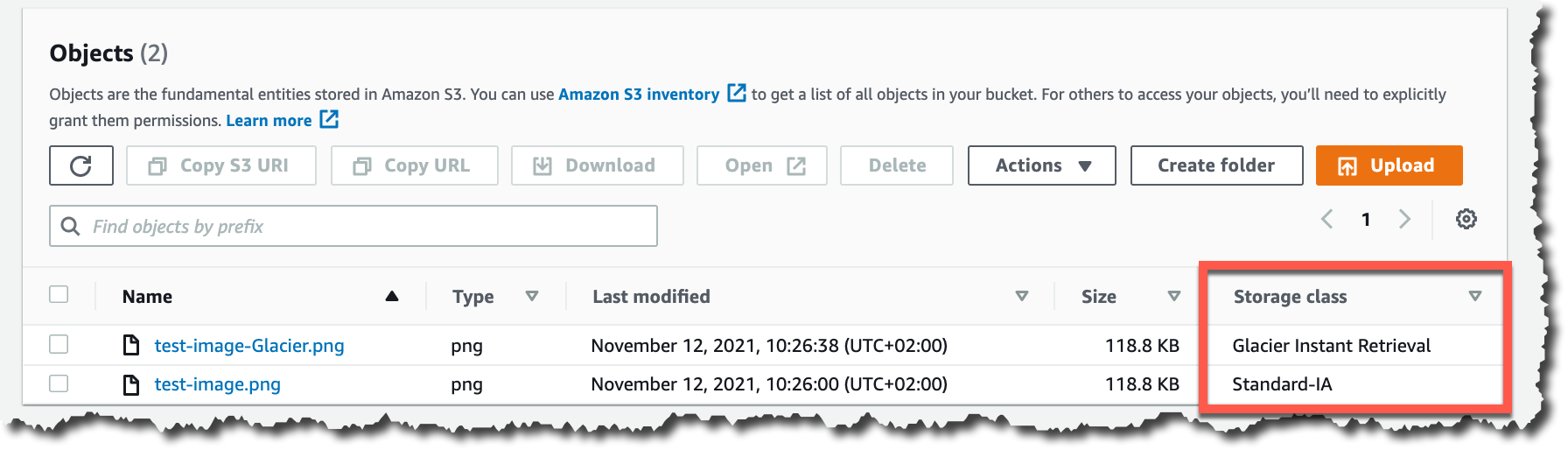
When the object is uploaded to Amazon S3, verify the storage class in the list of objects or on the object details page.

Storage classes

For data that already exists in Amazon S3, you can use S3 Lifecycle to transition data from the S3 Standard and S3 Standard-IA storage classes into S3 Glacier Instant Retrieval.

New Archive Instant Access Tier in S3 Intelligent-Tiering
S3 Intelligent-Tiering is a storage class that automatically moves objects between access tiers to optimize costs. This is the recommended storage class for data with unpredictable or changing access patterns, such as in data lakes, analytics, or user-generated content.

Until today, there were two low latency access tiers optimized for frequent and infrequent access, and two optional archive access tiers designed for asynchronous access optimized for rare access at a low cost.

Beginning today, the Archive Instant Access tier is added as a new access tier in the S3 Intelligent-Tiering storage class. You will start seeing automatic costs savings for your storage in S3 Intelligent-Tiering for rarely accessed objects.

The Archive Instant Access tier joins the group of low latency access tiers. This new tier is optimized for data that is not accessed for months at a time but, when it is needed, is available within milliseconds.

S3 Intelligent-Tiering automatically stores objects in three access tiers that deliver the same performance as the S3 Standard storage class:

  • Frequent Access tier
  • Infrequent Access tier
  • Archive Instant Access (new)

For a small monitoring and automation charge, S3 Intelligent-Tiering monitors access patterns and moves objects between the different access tiers. Objects that have not been accessed for 30 consecutive days are moved from the Frequent Access tier to the Infrequent Access tier for savings of 40 percent. When an object hasn’t been accessed for 90 consecutive days, S3 Intelligent-Tiering will move the object from the Infrequent Access tier to the Archive Instant Access tier, with a savings of 68 percent. If the data is accessed later, it is automatically moved back to the Frequent Access tier. No tiering charges apply when objects are moved between access tiers within the S3 Intelligent-Tiering storage class.

S3 Intelligent-Tiering access tiers

To get started with this new access tier, select Intelligent-Tiering as the storage class for an object when uploading an object using the S3 console. After 90 days of inactivity (30 days in Frequent Access tier and 60 days in Infrequent Access tier), S3 Intelligent-Tiering will automatically move the object to the Archive Instant Access tier. The introduction of the new Archive Instant Access tier has no impact on performance when you retrieve objects.

New name for the Amazon S3 Glacier storage class – S3 Glacier Flexible Retrieval
The existing Amazon S3 Glacier storage class is now named S3 Glacier Flexible Retrieval. This storage class now has free bulk retrievals in 5 to 12 hours, and the storage price has been reduced by 10 percent in all Regions, effective December 1, 2021. S3 Glacier Flexible Retrieval is now even more cost-effective, and the free bulk retrievals make it ideal for retrieving large data volumes.

These are the Amazon S3 archive storage classes:

  • S3 Glacier Instant Retrieval: The newest storage class is optimized for long-lived data that is rarely accessed (typically once per quarter). However when data is needed, it is available within milliseconds. For example, medical images and news media assets are perfect for this storage class.
  • S3 Glacier Flexible Retrieval: This newly renamed storage class is optimized for archiving data that can be retrieved in minutes or with free bulk retrievals in 5 to 12 hours. This storage class is ideal for backups and disaster recovery use cases, where you have large amounts of long-term, rarely accessed data, and you don’t want to worry about retrieval costs when you need the data.
  • S3 Glacier Deep Archive: This storage class is the lowest-cost storage in the cloud and is optimized for archiving data that can be restored in at least 12 hours. It’s great for storing your compliance archives or for digital media preservation.

Amazon S3 has reduced storage prices!
We are excited to announce that Amazon S3 has reduced storage prices of up to 31 percent in the S3 Standard-IA and S3 One Zone-IA storage classes across 9 AWS Regions: US West (N. California), Asia Pacific (Hong Kong), Asia Pacific (Mumbai), Asia Pacific (Osaka), Asia Pacific (Seoul), Asia Pacific (Singapore), Asia Pacific (Sydney), Asia Pacific (Tokyo), and South America (São Paulo). These price reductions are effective December 1, 2021.

Learn more about price reduction details.

Available Now
The new storage class, S3 Glacier Instant Retrieval, and the new Archive Instant Access tier in S3 Intelligent-Tiering are available today (November 30, 2021) in all AWS Regions.

The price cut for S3 Glacier and free bulk retrievals in all AWS Regions, and the S3 Standard-Infrequent Access/One Zone-Infrequent storage class in nine Regions will be effective on December 1, 2021.

Learn more about the storage classes changes and all the storage classes.

Marcia

AWS Free Tier Data Transfer Expansion – 100 GB From Regions and 1 TB From Amazon CloudFront Per Month

Post Syndicated from Jeff Barr original https://aws.amazon.com/blogs/aws/aws-free-tier-data-transfer-expansion-100-gb-from-regions-and-1-tb-from-amazon-cloudfront-per-month/

The AWS Free Tier has been around since 2010 and allows you to use generous amounts of over 100 different AWS services. Some services offer free trials, others are free for the first 12 months after you sign up, and still others are always free, up to a per-service maximum. Our intent is to make it easy and cost-effective for you to gain experience with a wide variety of powerful services without having to pay any usage charges.

Free Tier Data Transfer Expansion
Today, as part of our long tradition of AWS price reductions, I am happy to share that we are expanding the Free Tier with additional data transfer out, as follows:

Data Transfer from AWS Regions to the Internet is now free for up to 100 GB of data per month (up from 1 GB per region). This includes Amazon EC2, Amazon S3, Elastic Load Balancing, and so forth. The expansion does not apply to the AWS GovCloud or AWS China Regions.

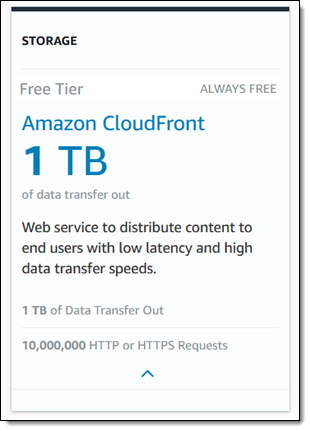
Data Transfer from Amazon CloudFront is now free for up to 1 TB of data per month (up from 50 GB), and is no longer limited to the first 12 months after signup. We are also raising the number of free HTTP and HTTPS requests from 2,000,000 to 10,000,000, and removing the 12 month limit on the 2,000,000 free CloudFront Function invocations per month. The expansion does not apply to data transfer from CloudFront PoPs in China.

This change is effective December 1, 2021 and takes effect with no effort on your part. As a result of this change, millions of AWS customers worldwide will no longer see a charge for these two categories of data transfer on their monthly AWS bill. Customers who go beyond one or both of these allocations will also see a reduction in their overall data transfer charges.

Your applications can run in any of 21 AWS Regions with a total of 69 Availability Zones (with more of both on the way), and can make use of the full range of CloudFront features (including SSL support and media streaming), and over 300 CloudFront PoPs, all connected across a dedicated network backbone. The network was designed with performance as a key driver, and is expanded continuously in order to meet the ever-growing needs of our customers. It is global, fully redundant, and built from parallel 100 GbE metro fibers linked via trans-oceanic cables across the Atlantic, Pacific, and Indian Oceans, as well as the Mediterranean, Red Sea, and South China Seas.

Jeff;

Amazon Textract Updates: Up to 32% Price Reduction in 8 AWS Regions and Up to 50% Reduction in Asynchronous Job Processing Times

Post Syndicated from Channy Yun original https://aws.amazon.com/blogs/aws/amazon-textract-updates-up-to-32-price-reduction-in-8-aws-regions-and-up-to-50-reduction-in-asynchronous-job-processing-times/

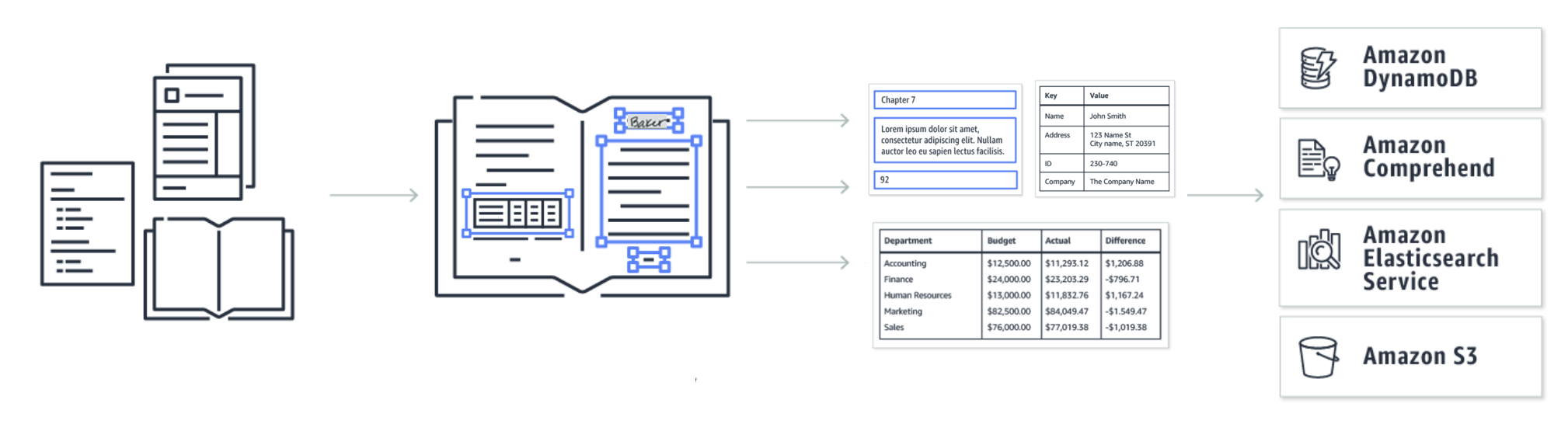
Introduced at AWS re:Invent 2018, Amazon Textract is a machine learning service that automatically extracts text, handwriting and data from scanned documents that goes beyond simple optical character recognition (OCR) to identify, understand, and extract data from forms and tables.

In the past few months, we introduced specialized support for processing invoices and receipts and enhanced the quality of the underlying computer vision models that power extraction of handwritten text, forms, and tables with printed text support for English, Spanish, German, Italian, Portuguese, and French.

Third-party auditors assess the security and compliance of Amazon Textract as part of multiple AWS compliance programs. We also added IRAP compliance support and achieved US FedRAMP authorization to add to the existing list such as HIPAA, PCI DSS, ISO SCO, and MTCS.

Customers use Amazon Textract to automate critical business process workflows (for example, in claims and tax form processing, loan applications, and accounts payable). It can reduce human review time, improve accuracy, lower costs, and accelerate the pace of innovation on a global scale. At the same time, Textract customers told us that we could be doing even more to reduce costs and improve latency.

Today we are excited to announce two major updates to Amazon Textract:

  • Up to 32 percent price reduction in 8 AWS Regions to help global customers save even more with Textract.
  • Up to 50 percent reduction in end-to-end job processing times for Textract’s asynchronous operations worldwide.

Up to 32% price reduction in 8 AWS Regions
We are pleased to announce an up to 32 percent price reduction in eight AWS Regions: Asia Pacific (Mumbai), Asia Pacific (Seoul), Asia Pacific (Singapore), Asia Pacific (Sydney), Canada (Central), Europe (Frankfurt), Europe (London), and Europe (Paris).

The API pricing for DetectDocumentText (OCR) and AnalyzeDocument (both forms and tables) in these AWS Regions is now the same as the US East (N. Virginia) Region pricing. Customers in those identified Regions will see a 9-32 percent reduction in API pricing.

Before the price reduction, a customer’s usage of the DetectDocumentText and AnalyzeDocument APIs would have been billed at different rates, by Region, for their usage tier. That customer will now be billed at the same rate, no matter from which AWS commercial Region Textract is being called.

AWS Regions DetectDocumentText API AnalyzeDocument API (forms + tables)
Old New Reduction Old New Reduction
Asia Pacific (Mumbai) $1.830 $1.50 18% $79.30 $65.0 18%
Asia Pacific (Seoul) $1.845 19% $79.95 19%
Asia Pacific (Singapore) $2.200 32% $95.00 32%
Asia Pacific (Sydney) $1.950 23% $84.50 23%
Canada (Central) $1.655 9% $72.15 10%
Europe (Frankfurt) $1.875 20% $81.25 20%
Europe (London) $1.750 14% $75.00 13%
Europe (Paris) $1.755 15% $76.05 15%

This table shows two examples of effective price per 1,000 pages for processing the first 1 million monthly pages before and after this price reduction. Customers with usage above the 1 million monthly pages tier will also see a similar reduction in prices, the details of which can be found on the Amazon Textract pricing page.

The new pricing goes into effect on September 1, 2021. It will be applied to your bill automatically. This pricing change does not apply to the Europe (Ireland), US-based commercial Regions, and US GovCloud Regions. There is no change to the pricing for the recently launched AnalyzeExpense API for invoices and receipts.

As part of the AWS Free Tier, you can get started with Amazon Textract for free. The Free Tier lasts 3 months and new AWS customers can analyze up to 1,000 pages per month using the Detect Document Text API and up to 100 pages per month using the Analyze Document API or Analyze Expense API.

Up to 50% reduction in end-to-end job processing times
Customers can invoke Textract synchronously (on single-page documents) and asynchronously (on multi-page documents) for detecting printed and handwritten lines and words (via the DetectDocumentText API) as well as for forms and tables extraction (via the AnalyzeDocument API). We see that the vast majority of customers invoke Textract asynchronously today for at-scale processing of their document pipeline.

Based on customer feedback, we have made a number of enhancements to Textract’s asynchronous API operations that reduce the end-to-end latency by as much as 50 percent. Specifically, these updates reduce the end-to-end job processing times experienced by Textract customers on worldwide asynchronous operations by as much as 50 percent. The lower the processing time, the faster customers are able to process their documents, achieve scale and improve their overall productivity.

To learn more about Amazon Textract, see this tutorial for extracting text and structured data from a document, this code sample on GitHub, Amazon Textract documentation, and blog posts about Amazon Textract on the AWS Machine Learning Blog.

Channy