Five Tips for Creating a Predictable Cloud Storage Budget

Post Syndicated from David Johnson original https://www.backblaze.com/blog/calculate-cost-cloud-storage/

A decorative image showing buildings, data, and icons indicating cost.

Editor’s Note

This post has been updated since it was originally published.

With spending on public cloud services expected to double by 2028, many businesses are looking for ways to cut cloud costs—or at least gain predictability in their spend. Forecasting cloud storage costs should be straightforward once you know what to look for.

Here are five tips you can use when doing your due diligence on the cloud storage vendors you are considering. The goal is to create a cloud storage forecast that you can rely on each and every month.

Tip 1: Navigate tiered pricing structures carefully

Many cloud providers still use tiered pricing structures, which can be misleading if not carefully understood. For example:

AWS S3 Storage Pricing Example

For this post, we’re comparing with hypothetical data stored in AWS S3’s U.S. East Region (N. Virginia) using pricing available at the time of publishing. Note that many factors may affect your final price, including selecting a different region, choosing a different storage tier, etc.

  • First 50 TB/month = $0.023 per GB
  • Next 450 TB/month = $0.022 per GB
  • Over 500 TB/month = $0.021 per GB

In order to receive lower pricing, you have to reach a specific amount of data stored. But, the lower rate only applies to data above the threshold for that tier. In other words, you don’t get a discount on the cumulative amount—each pricing tier is reflected in the data you’re storing. 

The mistake sometimes made is estimating your entire storage cost based on the level for the total data stored. For example, if you had 600TB of storage, you could wrongly calculate as follows:

600,000GB x $0.021 = $12,600/month

When, in fact, you should do the following:

(50,000GB x $0.023) + (450,000GB x $0.022) + (100,000GB x $0.021) = $13,150/month

That was just for storage. Make sure you consider the tiered pricing tables for data retrieval, and API transactions as well.

Tip 2: Don’t choose the wrong storage class

Many cloud providers, especially hyperscalers, now offer a wider array of storage classes than ever before. The idea is that you can trade service capabilities for lower costs. If you don’t need immediate access to your files or don’t want data replication or 11 nines of durability, you can choose to downgrade your service and gain cost savings. The biggest problem with this method is that you have to know what you are going to do with your data to pick the right service—as well as correctly anticipate future business needs—because mistakes can get very expensive. For example:

  • You choose a low cost, cold storage tier that takes hours or days to restore your data. What can go wrong? You need some files back immediately (if, for example, your backups are corrupted by ransomware) and you end up paying 10-20 times the cost to expedite your restore.
  • You choose one storage class and decide you want to upload some data to a compute-based application or to another region—features not part of your current service. The good news? You can usually move the data. The bad news? Even if you’re transferring within the same cloud storage company’s infrastructure, you’re often charged a transfer fee to move the data because you didn’t choose the right storage class when you started. These fees often eradicate any “savings” you had gotten from the lower priced tier.

Basically, if your needs change as they pertain to the data you have stored, you will pay more than you expect to get your data where you need it to be.

Tip 3: Don’t pay for deleted (or modified) files

Some cloud storage companies have a minimum amount of time you are charged for storage for each file uploaded. Typically this minimum period is between 30 and 90 days. You are charged even if you delete the file before the minimum period. For example (assuming a 90 day minimum period), if you upload a file today and delete the file tomorrow, you still have to pay for storing that deleted file for the next 88 days.

This “feature” often extends to files deleted due to versioning. If you set your system to keep three versions of each file, with older versions automatically deleted, you end up paying for those deleted versions for the full minimum duration.

In a typical backup workflow, let’s say you are using a cloud storage service to store your files and your backup program is set to a 30 day retention. That means you will be perpetually paying for an additional 60 days worth of storage (for files that were pruned at 30 days). In other words, you would be paying for a 90 day retention period even though you only have 30 days worth of backups.

Tip 4: Beware of hidden minimums

As the cloud storage market has matured, pricing models have become more complicated. To create an accurate budget, it’s crucial to understand all potential cost components, including some that might not be immediately obvious. Here are two key areas to examine:

  1. Minimum monthly charges: Some providers charge a set fee regardless of how little you store. For instance, you might pay for 1TB even if you only use 100GB.
  2. Minimum file sizes: Some services round up small files to a minimum billable size, often 128KB. While this might seem insignificant, it can add up quickly if you have millions of small files.

Tip 5: Be suspicious of the fine print

Misdirection is the art of getting you to focus on one thing so you don’t focus on other things going on. Practiced by magicians and some cloud storage companies, the idea is to get you to focus on certain features and capabilities without delving below the surface into the fine print. (And, sometimes the prices this technique generates feels like someone has pulled a rabbit out of a hat—to your company’s detriment.)

Read the fine print and as you scroll through the multi-page pricing tables and linked pages of all of the rules that shape how you can use a given cloud storage service. Stop and ask, “What are they trying to hide?” If you find phrases like: “We reserve the right to limit your egress traffic,” or “New users get free usage tier for 12 months,” or “Provisioned requests should be used when you need a guarantee that your retrieval capacity will be available when you need it,” take heed. 

And, even if it seems like you can turn the tables and use things like free credits in the short term, remember that you’ll want to have a plan for your long-term infrastructure when those credits run out as well. 

How to build a predictable cloud storage budget

As organizations increasingly rely on cloud storage for everything from day-to-day operations to long-term data archiving, the ability to accurately forecast and control these costs can significantly impact overall IT budgets and business planning.

The first place to start is data storage as it’s generally the easiest for a company to calculate. For a given month, you can calculate your data volume as follows:

Data stored = current data + new data – deleted data

Take that total and multiple by the monthly storage rate and you’ll get your monthly storage costs. 

Things can get more complicated if your business regularly uploads and downloads data. The data stored at the end of the month should get you at least in the ballpark. But, creating a predictable cloud storage budget requires a holistic understanding of your data needs, usage patterns, and the pricing structures of your chosen provider. It’s not just about estimating how much data you’ll store, but also how you’ll interact with that data over time. Will you be frequently accessing and modifying files, or primarily using the storage for long-term archiving? Are there seasonal fluctuations in your data storage or retrieval patterns? These factors can all influence your overall costs, and we’ll walk through a scenario to show that next.

Let’s do the math

To illustrate how to calculate your cloud storage costs, let’s work through an example using current Backblaze B2 pricing. We’ll focus on a single month for a growing business that is backing up business data to the cloud and verifying their backups have zero errors during recovery:

  • Initial storage at the beginning of the month: 100TB
  • New data added during the month: 10TB
  • Data deleted during the month: 5TB
  • Downloads during the month (egress): 75TB

Backblaze has built a cloud storage calculator that computes costs for all of the major cloud storage providers. Using this calculator, we find that Amazon S3 would cost $2,675 to store this data for a month, while Backblaze B2 would charge just $630.

Using those numbers for storage and assuming you download 75TB a month for backup validation testing, you get a total monthly cost of $8,725 for Amazon S3; Backblaze B2 would be $630 a month. 

The additional cost you see from AWS S3 is from download costs, also known as egress fees, and they can certainly take a toll on your budget. Backblaze offers free egress up to three times the amount you have stored so you can move data when and where you prefer.

The chart below provides the breakdown of the expected cost.

Backblaze B2 Amazon S3
Storage $630 $2,675
Egress Free* $6,050
Totals: $630 $8,725

*Up to 3x of average monthly data stored, then $0.01/GB for additional egress.

Of course each month you will add and delete storage, so you’ll have to account for that in your forecast. And, as we mentioned above, there may also be other fees like minimum storage duration fees or API transaction fees. Using the cloud storage calculator noted above, you can get a reasonable estimate of your total cost over the budget forecasting period.

Finally, you can use the Backblaze B2 storage calculator to address potential use cases that are outside of your normal operations, such as if you delete a large project from your storage or you need to download a large amount of data. Running the calculator for these types of actions lets you obtain a solid estimate for their effect on your budget before they happen and lets you plan accordingly.

Understanding cloud storage pricing gives you options

Creating a predictable cloud storage forecast is key to taking full advantage of all of the value in cloud storage. Organizations like Austin City Limits, Amplify, and Runbiz were able to move to the cloud because they could reliably predict their cloud storage cost with Backblaze B2. You don’t have to let pricing tiers, hidden costs, and fine print stop you. Backblaze makes predicting your cloud storage costs easy.

The post Five Tips for Creating a Predictable Cloud Storage Budget appeared first on Backblaze Blog | Cloud Storage & Cloud Backup
Adm. Grace Hopper’s 1982 NSA Lecture Has Been Published

Post Syndicated from Bruce Schneier original https://www.schneier.com/blog/archives/2024/08/adm-grace-hoppers-1982-nsa-lecture-has-been-published.html

The “long lost lecture” by Adm. Grace Hopper has been published by the NSA. (Note that there are two parts.)

It’s a wonderful talk: funny, engaging, wise, prescient. Remember that talk was given in 1982, less than a year before the ARPANET switched to TCP/IP and the internet went operational. She was a remarkable person.

Listening to it, and thinking about the audience of NSA engineers, I wonder how much of what she’s talking about as the future of computing—miniaturization, parallelization—was being done in the present and in secret.

[$] Plasma Mobile for highly configurable Linux phones

Post Syndicated from jake original https://lwn.net/Articles/986899/

Plasma Mobile is an open-source
user interface for mobile devices, developed by the KDE community. It’s
built on the same foundations as Plasma Desktop, including KDE Frameworks and the KWin window
manager. Much like its desktop counterpart, Plasma Mobile caters to
advanced users by offering extensive customizability. It is offered as an
option on phones with various mobile Linux
distributions
.

Security updates for Thursday

Post Syndicated from jake original https://lwn.net/Articles/987664/

Security updates have been issued by AlmaLinux (bind and bind-dyndb-ldap and postgresql:16), Fedora (less and python3.6), Mageia (nodejs & yarnpkg), Oracle (libvpx and postgresql:16), Red Hat (edk2, git, kernel, openldap, postgresql:15, postgresql:16, python3, and python39:3.9 and python39-devel:3.9), SUSE (apache2, python-setuptools, and python3-setuptools), and Ubuntu (linux-oracle).

Rust-for-Linux Wedson Almeida Filho drops out

Post Syndicated from corbet original https://lwn.net/Articles/987635/

Wedson Almeida Filho, one of the key developers driving the Rust for Linux project, has retired from the
project
.

After almost 4 years, I find myself lacking the energy and
enthusiasm I once had to respond to some of the nontechnical
nonsense, so it’s best to leave it up to those who still have it
in them.

As an example of the sort of “nonsense” he referred to, he provided a link to the video from the
Rust for filesystems discussion at the 2024
Linux Storage, Filesystem, Memory-Management, and BPF Summit. His work was
fundamental to getting the project as far as it has come; he will be missed.

Reducing Alert Noise with Birol Yildiz

Post Syndicated from Michael Kammer original https://blog.zabbix.com/reducing-alert-noise-with-birol-yildiz/28643/

Zabbix Summit 2024 is almost here, and we’re giving you a sneak peek into what you can expect to see on our main stage this year via a series of short interviews with a few of the eminent speakers who will grace us with their presence. First up is Birol Yildiz, the CEO and Co-founder of ilert GmbH and a man who is deeply passionate about keeping alert noise and fatigue to a minimum.

Please tell us a bit about yourself and the journey that led you to ilert GmbH.

My journey in the tech industry began with a deep passion for creating solutions that simplify and improve the lives of IT professionals. Before co-founding ilert GmbH, I spent over a decade working in various IT roles, ranging from software development to operations. I noticed that while monitoring systems were becoming increasingly sophisticated, the process of alert management and incident response was lagging behind.

This gap inspired me to create ilert, a platform focused on bridging that divide by optimizing alerting processes and reducing response times. Our goal at ilert has always been to empower teams with the tools they need to stay ahead of incidents, ensuring that their systems run smoothly and efficiently.

How long have you been using Zabbix? What kind of Zabbix-related tasks are you involved in on a daily basis?

Zabbix has been an integral part of ilert since 2018, when we first developed one of our early integrations with the platform. Recognizing its popularity among our customer base, we enhanced this integration in 2020, transforming it into a native integration and solidifying our partnership with Zabbix as a technology partner. Since then, Zabbix has become one of the most popular integrations within ilert.

On a daily basis, my involvement with Zabbix includes overseeing the continued optimization of our integration, ensuring that it meets the evolving needs of our users. I work closely with our development and support teams to identify and implement improvements based on user feedback and the latest developments from Zabbix.

Can you give us a few clues about what we can expect to hear during your Zabbix Summit presentation?

Alert fatigue has long been a significant challenge for the DevOps community, often leading to decreased efficiency and increased stress among professionals. In my presentation, we will explore innovative strategies that leverage AI to mitigate alert noise.

I’ll be discussing how to maximize the efficiency of your incident response process by leveraging Zabbix with advanced alerting and on-call management tools like ilert. I’ll share insights on reducing alert fatigue, improving incident response times, and ensuring that critical alerts reach the right people at the right time.

This talk will be particularly valuable for DevOps engineers looking to optimize their alert management systems and reduce the cognitive load caused by alert fatigue. Zabbix administrators will find it insightful, especially if they are interested in integrating advanced AI techniques into their monitoring workflows to achieve better performance and reliability.

Moreover, AI and machine learning enthusiasts will gain practical knowledge about applying AI in IT monitoring and alerting, making this session a comprehensive resource for anyone looking to advance their alert management strategies.

Reducing alert noise is something that’s on almost everyone’s wish list, but was there any particular incident or aspect of your professional life that made you want to focus on this topic?

Absolutely. There was a specific incident early in my career that left a lasting impact on me. We were using a monitoring system that generated a significant number of alerts, most of which were non-critical. One weekend, a critical issue was buried in a flood of low-priority alerts, leading to a delayed response and significant downtime for the business.

This incident underscored the importance of not just having a monitoring system in place but ensuring that it was configured to minimize noise and prioritize what truly matters. That experience drove me to focus on creating solutions that help teams filter out the noise and respond quickly to what’s really important, which is a core principle behind ilert’s offerings.

Are there any other similar issues that you can envision tackling with Zabbix?

Yes, beyond reducing alert noise, there’s a lot of potential in enhancing the collaboration between teams during incidents. For example, automating incident communication and resolution processes is an area where I see great value. By integrating Zabbix with incident management platforms like ilert, teams can not only reduce noise but also streamline communication, ensuring that the right people are involved at the right time and that resolution steps are clear and actionable.

Another area is optimizing the way multiple on-call teams work together using Zabbix and incident response platforms like ilert. In many organizations, different teams are responsible for specific sets of host groups in Zabbix, and it’s crucial that each team only receives alerts for the services they are directly responsible for. These are just a few examples of how we can continue to evolve our approach to incident management in conjunction with Zabbix.

The post Reducing Alert Noise with Birol Yildiz appeared first on Zabbix Blog.

Recommending for Long-Term Member Satisfaction at Netflix

Post Syndicated from Netflix Technology Blog original https://netflixtechblog.com/recommending-for-long-term-member-satisfaction-at-netflix-ac15cada49ef

By Jiangwei Pan, Gary Tang, Henry Wang, and Justin Basilico

Introduction

Our mission at Netflix is to entertain the world. Our personalization algorithms play a crucial role in delivering on this mission for all members by recommending the right shows, movies, and games at the right time. This goal extends beyond immediate engagement; we aim to create an experience that brings lasting enjoyment to our members. Traditional recommender systems often optimize for short-term metrics like clicks or engagement, which may not fully capture long-term satisfaction. We strive to recommend content that not only engages members in the moment but also enhances their long-term satisfaction, which increases the value they get from Netflix, and thus they’ll be more likely to continue to be a member.

Recommendations as Contextual Bandit

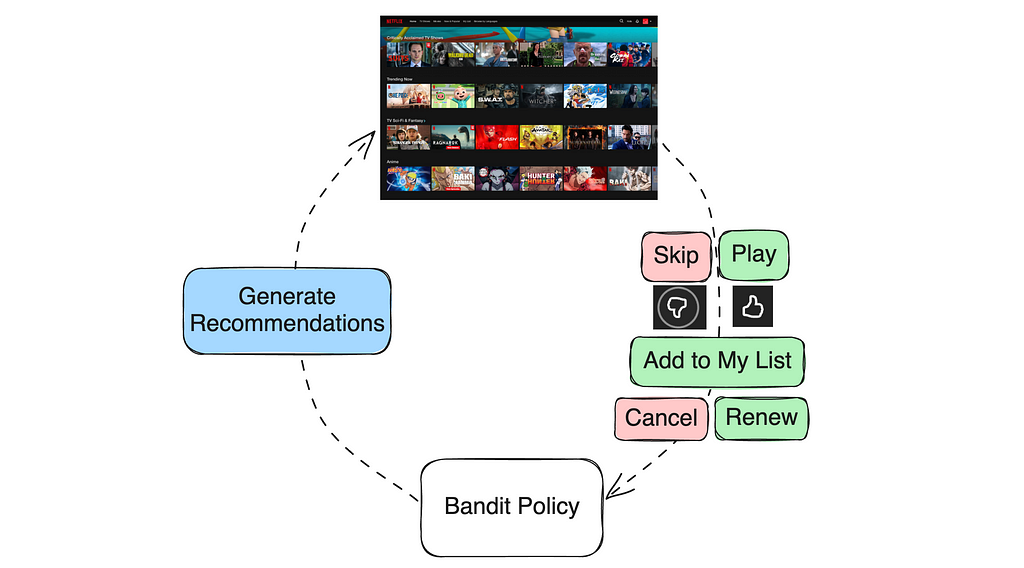
One simple way we can view recommendations is as a contextual bandit problem. When a member visits, that becomes a context for our system and it selects an action of what recommendations to show, and then the member provides various types of feedback. These feedback signals can be immediate (skips, plays, thumbs up/down, or adding items to their playlist) or delayed (completing a show or renewing their subscription). We can define reward functions to reflect the quality of the recommendations from these feedback signals and then train a contextual bandit policy on historical data to maximize the expected reward.

Improving Recommendations: Models and Objectives

There are many ways that a recommendation model can be improved. They may come from more informative input features, more data, different architectures, more parameters, and so forth. In this post, we focus on a less-discussed aspect about improving the recommender objective by defining a reward function that tries to better reflect long-term member satisfaction.

Retention as Reward?

Member retention might seem like an obvious reward for optimizing long-term satisfaction because members should stay if they’re satisfied, however it has several drawbacks:

  • Noisy: Retention can be influenced by numerous external factors, such as seasonal trends, marketing campaigns, or personal circumstances unrelated to the service.
  • Low Sensitivity: Retention is only sensitive for members on the verge of canceling their subscription, not capturing the full spectrum of member satisfaction.
  • Hard to Attribute: Members might cancel only after a series of bad recommendations.
  • Slow to Measure: We only get one signal per account per month.

Due to these challenges, optimizing for retention alone is impractical.

Proxy Rewards

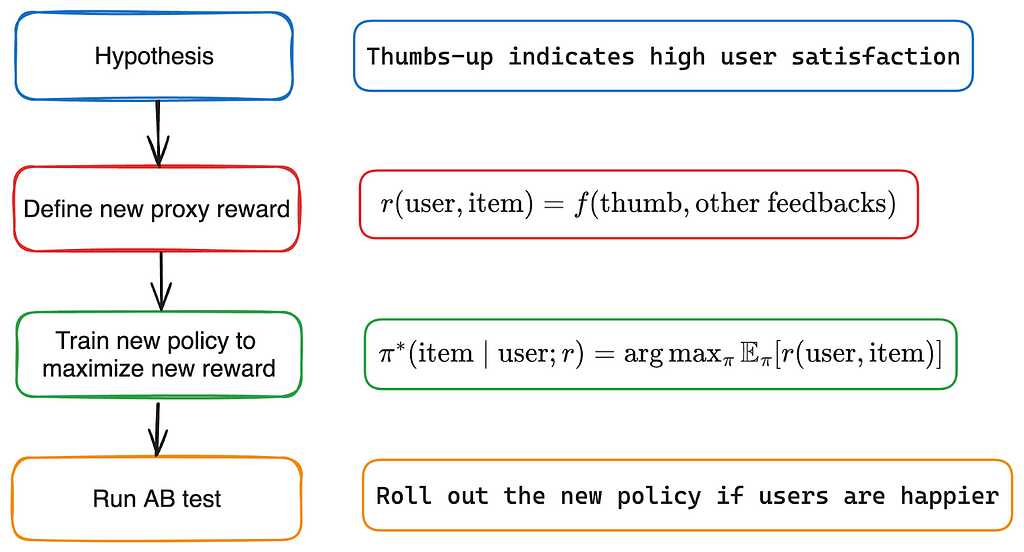
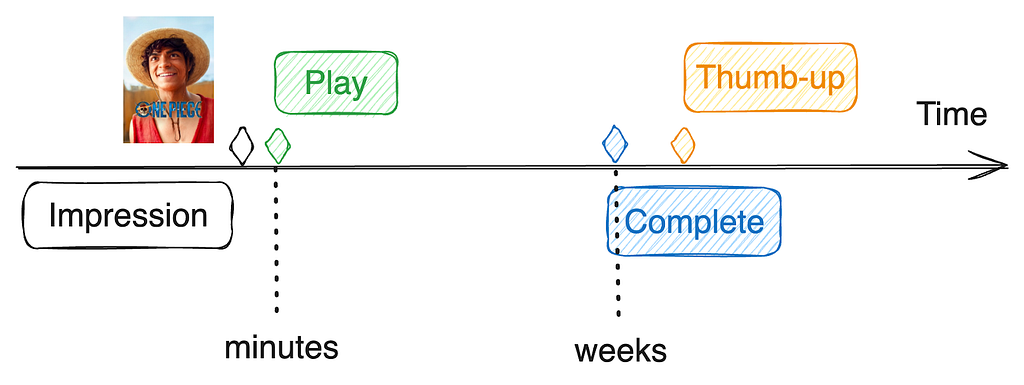
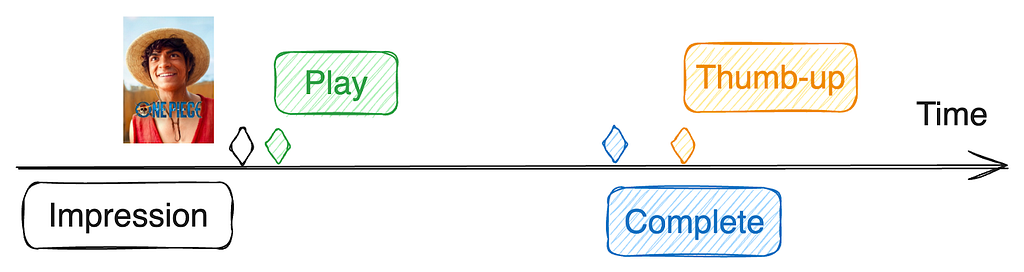
Instead, we can train our bandit policy to optimize a proxy reward function that is highly aligned with long-term member satisfaction while being sensitive to individual recommendations. The proxy reward r(user, item) is a function of user interaction with the recommended item. For example, if we recommend “One Piece” and a member plays then subsequently completes and gives it a thumbs-up, a simple proxy reward might be defined as r(user, item) = f(play, complete, thumb).

Click-through rate (CTR)

Click-through rate (CTR), or in our case play-through rate, can be viewed as a simple proxy reward where r(user, item) = 1 if the user clicks a recommendation and 0 otherwise. CTR is a common feedback signal that generally reflects user preference expectations. It is a simple yet strong baseline for many recommendation applications. In some cases, such as ads personalization where the click is the target action, CTR may even be a reasonable reward for production models. However, in most cases, over-optimizing CTR can lead to promoting clickbaity items, which may harm long-term satisfaction.

Beyond CTR

To align the proxy reward function more closely with long-term satisfaction, we need to look beyond simple interactions, consider all types of user actions, and understand their true implications on user satisfaction.

We give a few examples in the Netflix context:

  • Fast season completion ✅: Completing a season of a recommended TV show in one day is a strong sign of enjoyment and long-term satisfaction.
  • Thumbs-down after completion ❌: Completing a TV show in several weeks followed by a thumbs-down indicates low satisfaction despite significant time spent.
  • Playing a movie for just 10 minutes ❓: In this case, the user’s satisfaction is ambiguous. The brief engagement might indicate that the user decided to abandon the movie, or it could simply mean the user was interrupted and plans to finish the movie later, perhaps the next day.
  • Discovering new genres ✅ ✅: Watching more Korean or game shows after “Squid Game” suggests the user is discovering something new. This discovery was likely even more valuable since it led to a variety of engagements in a new area for a member.

Reward Engineering

Reward engineering is the iterative process of refining the proxy reward function to align with long-term member satisfaction. It is similar to feature engineering, except that it can be derived from data that isn’t available at serving time. Reward engineering involves four stages: hypothesis formation, defining a new proxy reward, training a new bandit policy, and A/B testing. Below is a simple example.

Challenge: Delayed Feedback

User feedback used in the proxy reward function is often delayed or missing. For example, a member may decide to play a recommended show for just a few minutes on the first day and take several weeks to fully complete the show. This completion feedback is therefore delayed. Additionally, some user feedback may never occur; while we may wish otherwise, not all members provide a thumbs-up or thumbs-down after completing a show, leaving us uncertain about their level of enjoyment.

We could try and wait to give a longer window to observe feedback, but how long should we wait for delayed feedback before computing the proxy rewards? If we wait too long (e.g., weeks), we miss the opportunity to update the bandit policy with the latest data. In a highly dynamic environment like Netflix, a stale bandit policy can degrade the user experience and be particularly bad at recommending newer items.

Solution: predict missing feedback

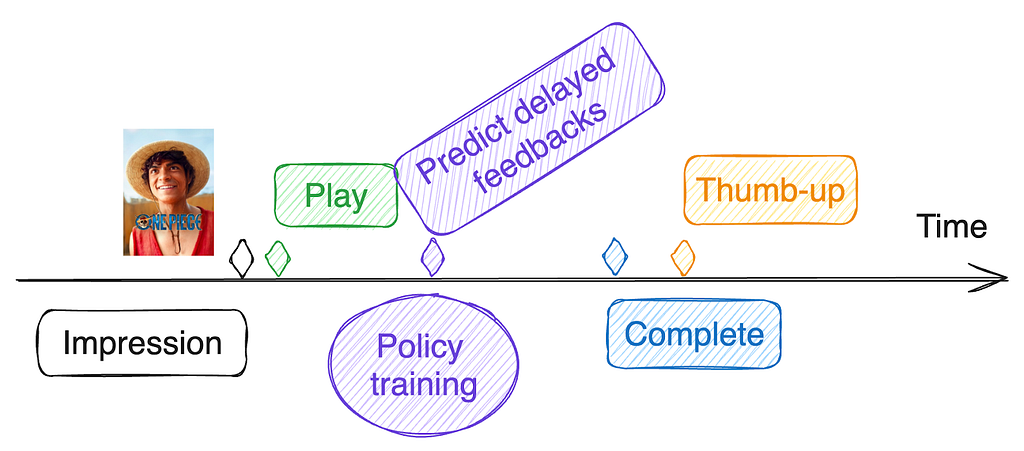
We aim to update the bandit policy shortly after making a recommendation while also defining the proxy reward function based on all user feedback, including delayed feedback. Since delayed feedback has not been observed at the time of policy training, we can predict it. This prediction occurs for each training example with delayed feedback, using already observed feedback and other relevant information up to the training time as input features. Thus, the prediction also gets better as time progresses.

The proxy reward is then calculated for each training example using both observed and predicted feedback. These training examples are used to update the bandit policy.

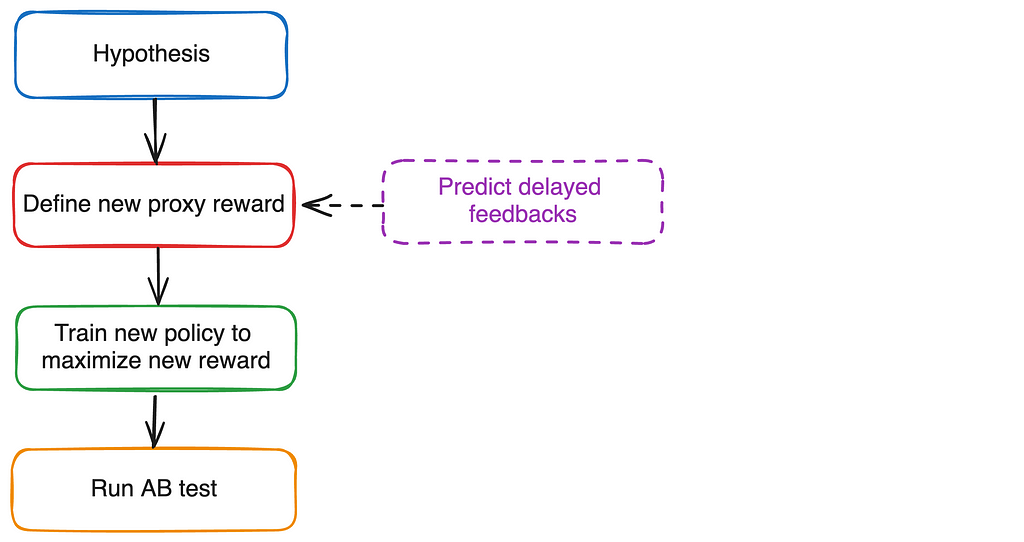
But aren’t we still only relying on observed feedback in the proxy reward function? Yes, because delayed feedback is predicted based on observed feedback. However, it is simpler to reason about rewards using all feedback directly. For instance, the delayed thumbs-up prediction model may be a complex neural network that takes into account all observed feedback (e.g., short-term play patterns). It’s more straightforward to define the proxy reward as a simple function of the thumbs-up feedback rather than a complex function of short-term interaction patterns. It can also be used to adjust for potential biases in how feedback is provided.

The reward engineering diagram is updated with an optional delayed feedback prediction step.

Two types of ML models

It’s worth noting that this approach employs two types of ML models:

  • Delayed Feedback Prediction Models: These models predict p(final feedback | observed feedbacks). The predictions are used to define and compute proxy rewards for bandit policy training examples. As a result, these models are used offline during the bandit policy training.
  • Bandit Policy Models: These models are used in the bandit policy π(item | user; r) to generate recommendations online and in real-time.

Challenge: Online-Offline Metric Disparity

Improved input features or neural network architectures often lead to better offline model metrics (e.g., AUC for classification models). However, when these improved models are subjected to A/B testing, we often observe flat or even negative online metrics, which can quantify long-term member satisfaction.

This online-offline metric disparity usually occurs when the proxy reward used in the recommendation policy is not fully aligned with long-term member satisfaction. In such cases, a model may achieve higher proxy rewards (offline metrics) but result in worse long-term member satisfaction (online metrics).

Nevertheless, the model improvement is genuine. One approach to resolve this is to further refine the proxy reward definition to align better with the improved model. When this tuning results in positive online metrics, the model improvement can be effectively productized. See [1] for more discussions on this challenge.

Summary and Open Questions

In this post, we provided an overview of our reward engineering efforts to align Netflix recommendations with long-term member satisfaction. While retention remains our north star, it is not easy to optimize directly. Therefore, our efforts focus on defining a proxy reward that is aligned with long-term satisfaction and sensitive to individual recommendations. Finally, we discussed the unique challenge of delayed user feedback at Netflix and proposed an approach that has proven effective for us. Refer to [2] for an earlier overview of the reward innovation efforts at Netflix.

As we continue to improve our recommendations, several open questions remain:

  • Can we learn a good proxy reward function automatically by correlating behavior with retention?
  • How long should we wait for delayed feedback before using its predicted value in policy training?
  • How can we leverage Reinforcement Learning to further align the policy with long-term satisfaction?

References

[1] Deep learning for recommender systems: A Netflix case study. AI Magazine 2021. Harald Steck, Linas Baltrunas, Ehtsham Elahi, Dawen Liang, Yves Raimond, Justin Basilico.

[2] Reward innovation for long-term member satisfaction. RecSys 2023. Gary Tang, Jiangwei Pan, Henry Wang, Justin Basilico.


Recommending for Long-Term Member Satisfaction at Netflix was originally published in Netflix TechBlog on Medium, where people are continuing the conversation by highlighting and responding to this story.

MLPerf Inference v4.1 NVIDIA B200 Whallops AMD MI300X UntetherAI Rises

Post Syndicated from Patrick Kennedy original https://www.servethehome.com/mlperf-inference-v4-1-nvidia-b200-whallops-amd-mi300x-untetherai-rises/

In MLPerf Inference v4.1 the upcoming NVIDIA B200 whalloped the current AMD MI300X but UntetherAI submitted some excellent efficiency runs

The post MLPerf Inference v4.1 NVIDIA B200 Whallops AMD MI300X UntetherAI Rises appeared first on ServeTheHome.

[$] MemHive: sharing immutable data between Python subinterpreters

Post Syndicated from jake original https://lwn.net/Articles/987238/

Immutable data makes concurrent access easier, since it
eliminates the data-race conditions that can plague multithreaded programs. At
PyCon 2024, Yury Selivanov
introduced an early-stage project called MemHive, which uses Python
subinterpreters and immutable data to
overcome the problems of thread serialization that are caused by the
language’s Global Interpreter Lock (GIL). Recent developments in the Python world have opened
up different strategies for avoiding the longstanding problems with the
GIL.

Announcing AWS Parallel Computing Service to run HPC workloads at virtually any scale

Post Syndicated from Channy Yun (윤석찬) original https://aws.amazon.com/blogs/aws/announcing-aws-parallel-computing-service-to-run-hpc-workloads-at-virtually-any-scale/

Today we are announcing AWS Parallel Computing Service (AWS PCS), a new managed service that helps customers set up and manage high performance computing (HPC) clusters so they seamlessly run their simulations at virtually any scale on AWS. Using the Slurm scheduler, they can work in a familiar HPC environment, accelerating their time to results instead of worrying about infrastructure.

In November 2018, we introduced AWS ParallelCluster, an AWS supported open-source cluster management tool that helps you to deploy and manage HPC clusters in the AWS Cloud. With AWS ParallelCluster, customers can also quickly build and deploy proof of concept and production HPC compute environments. They can use AWS ParallelCluster Command-Line interface, API, Python library, and the user interface installed from open source packages. They are responsible for updates, which can include tearing down and redeploying clusters. Many customers, though, have asked us for a fully managed AWS service to eliminate operational jobs in building and operating HPC environments.

AWS PCS simplifies HPC environments managed by AWS and is accessible through the AWS Management Console, AWS SDK, and AWS Command-Line Interface (AWS CLI). Your system administrators can create managed Slurm clusters that use their compute and storage configurations, identity, and job allocation preferences. AWS PCS uses Slurm, a highly scalable, fault-tolerant job scheduler used across a wide range of HPC customers, for scheduling and orchestrating simulations. End users such as scientists, researchers, and engineers can log in to AWS PCS clusters to run and manage HPC jobs, use interactive software on virtual desktops, and access data. You can bring their workloads to AWS PCS quickly, without significant effort to port code.

You can use fully managed NICE DCV remote desktops for remote visualization, and access job telemetry or application logs to enable specialists to manage your HPC workflows in one place.

AWS PCS is designed for a wide range of traditional and emerging, compute or data-intensive, engineering and scientific workloads across areas such as computational fluid dynamics, weather modeling, finite element analysis, electronic design automation, and reservoir simulations using familiar ways of preparing, executing, and analyzing simulations and computations.

Getting started with AWS Parallel Computing Service
To try out AWS PCS, you can use our tutorial for creating a simple cluster in the AWS documentation. First, you create a virtual private cloud (VPC) with an AWS CloudFormation template and shared storage in Amazon Elastic File System (Amazon EFS) within your account for the AWS Region where you will try AWS PCS. To learn more, visit Create a VPC and Create shared storage in the AWS documentation.

1. Create a cluster
In the AWS PCS console, choose Create cluster, a persistent resource for managing resources and running workloads.

Next, enter your cluster name and choose the controller size of your Slurm scheduler. You can choose Small (up to 32 nodes and 256 jobs), Medium (up to 512 nodes and 8,192 jobs), or Large (up to 2,048 nodes and 16,384 jobs) for the limits of cluster workloads. In the Networking section, choose your created VPC, subnet to launch the cluster, and security group applied to your cluster.

Optionally, you can set the Slurm configuration such as an idle time before compute nodes will scale down, a Prolog and Epilog scripts directory on launched compute nodes, and a resource selection algorithm parameter used by Slurm.

Choose Create cluster. It takes some time for the cluster to be provisioned.

2. Create compute node groups
After creating your cluster, you can create compute node groups, a virtual collection of Amazon Elastic Compute Cloud (Amazon EC2) instances that AWS PCS uses to provide interactive access to a cluster or run jobs in a cluster. When you define a compute node group, you specify common traits such as EC2 instance types, minimum and maximum instance count, target VPC subnets, Amazon Machine Image (AMI), purchase option, and custom launch configuration. Compute node groups require an instance profile to pass an AWS Identity and Access Management (IAM) role to an EC2 instance and an EC2 launch template that AWS PCS uses to configure EC2 instances it launches. To learn more, visit Create a launch template And Create an instance profile in the AWS documentation.

To create a compute node group in the console, go to your cluster and choose the Compute node groups tab and the Create compute node group button.

You can create two compute node groups: a login node group to be accessed by end users and a job node group to run HPC jobs.

To create a compute node group running HPC jobs, enter a compute node name and select a previously-created EC2 launch template, IAM instance profile, and subnets to launch compute nodes in your cluster VPC.

Next, choose your preferred EC2 instance types to use when launching compute nodes and the minimum and maximum instance count for scaling. I chose the hpc6a.48xlarge instance type and scale limit up to eight instances. For a login node, you can choose a smaller instance, such as one c6i.xlarge instance. You can also choose either the On-demand or Spot EC2 purchase option if the instance type supports. Optionally, you can choose a specific AMI.

Choose Create. It takes some time for the compute node group to be provisioned. To learn more, visit Create a compute node group to run jobs and Create a compute node group for login nodes in the AWS documentation.

3. Create and run your HPC jobs
After creating your compute node groups, you submit a job to a queue to run it. The job remains in the queue until AWS PCS schedules it to run on a compute node group, based on available provisioned capacity. Each queue is associated with one or more compute node groups, which provide the necessary EC2 instances to do the processing.

To create a queue in the console, go to your cluster and choose the Queues tab and the Create queue button.

Enter your queue name and choose your compute node groups assigned to your queue.

Choose Create and wait while the queue is being created.

When the login compute node group is active, you can use AWS Systems Manager to connect to the EC2 instance it created. Go to the Amazon EC2 console and choose your EC2 instance of the login compute node group. To learn more, visit Create a queue to submit and manage jobs and Connect to your cluster in the AWS documentation.

To run a job using Slurm, you prepare a submission script that specifies the job requirements and submit it to a queue with the sbatch command. Typically, this is done from a shared directory so the login and compute nodes have a common space for accessing files.

You can also run a message passing interface (MPI) job in AWS PCS using Slurm. To learn more, visit Run a single node job with Slurm or Run a multi-node MPI job with Slurm in the AWS documentation.

You can connect a fully-managed NICE DCV remote desktop for visualization. To get started, use the CloudFormation template from HPC Recipes for AWS GitHub repository.

In this example, I used the OpenFOAM motorBike simulation to calculate the steady flow around a motorcycle and rider. This simulation was run with 288 cores of three hpc6a instances. The output can be visualized in the ParaView session after logging in to the web interface of DCV instance.

Finally, after you are done HPC jobs with the cluster and node groups that you created, you should delete the resources that you created to avoid unnecessary charges. To learn more, visit Delete your AWS resources in the AWS documentation.

Things to know
Here are a couple of things that you should know about this feature:

  • Slurm versions – AWS PCS initially supports Slurm 23.11 and offers mechanisms designed to enable customers to upgrade their Slurm major versions once new versions are added. Additionally, AWS PCS is designed to automatically update the Slurm controller with patch versions. To learn more, visit Slurm versions in the AWS documentation.
  • Capacity Reservations – You can reserve EC2 capacity in a specific Availability Zone and for a specific duration using On-Demand Capacity Reservations to make sure that you have the necessary compute capacity available when you need it. To learn more, visit Capacity Reservations in the AWS documentation.
  • Network file systems – You can attach network storage volumes where data and files can be written and accessed, including Amazon FSx for NetApp ONTAP, Amazon FSx for OpenZFS, and Amazon File Cache as well as Amazon EFS and Amazon FSx for Lustre. You can also use self-managed volumes, such as NFS servers. To learn more, visit Network file systems in the AWS documentation.

Now available
AWS Parallel Computing Service is now available in the US East (N. Virginia), AWS US East (Ohio), US West (Oregon), Asia Pacific (Singapore), Asia Pacific (Sydney), Asia Pacific (Tokyo), Europe (Frankfurt), Europe (Ireland), Europe (Stockholm) Regions.

AWS PCS launches all resources in your AWS account. You will be billed appropriately for those resources. For more information, see the AWS PCS Pricing page.

Give it a try and send feedback to AWS re:Post or through your usual AWS Support contacts.

Channy

P.S. Special thanks to Matthew Vaughn, a principal developer advocate at AWS for his contribution in creating a HPC testing environment.

Efficiently processing batched data using parallelization in AWS Lambda

Post Syndicated from Chris Munns original https://aws.amazon.com/blogs/compute/efficiently-processing-batched-data-using-parallelization-in-aws-lambda/

This post is written by Anton Aleksandrov, Principal Solutions Architect, AWS Serverless

Efficient message processing is crucial when handling large data volumes. By employing batching, distribution, and parallelization techniques, you can optimize the utilization of resources allocated to your AWS Lambda function. This post will demonstrate how to implement parallel data processing within the Lambda function handler, maximizing resource utilization and potentially reducing invocation duration and function concurrency requirements.

Overview

AWS Lambda integrates with various event sources, such as Amazon SQSApache Kafka, or Amazon Kinesis, using event-source mappings. When you configure an event-source mapping, Lambda continuously polls the event source and automatically invokes your function to process the retrieved data. Lambda makes more invocations of your function as the number of messages it reads from the event source increases. This can increase the utilized function concurrency and consume the available concurrency in your account. Click the links to learn more about how Lambda consumes messages from SQS queues and Kinesis streams.

To improve the data processing throughput, you can configure event-source mapping batch window and batch size. These settings ensure that your function is invoked only when a sufficient number of messages have accumulated in the event source. For example, if you configure a batch size of 100 messages and a batch window of 10 seconds, Lambda will invoke your function when either 100 messages have accumulated or 10 seconds have elapsed, whichever happens first.

Event source mapping event batching

Event source mapping event batching

By processing messages in batches, rather than individually, you can improve throughput and optimize costs by reducing the number of polling requests to event sources and the number of function invocations. For instance, processing a million messages without batching would require one million function invocations, but configuring a batch size of 100 messages can reduce the number of invocations to 10,000.

Optimizing batch processing within the Lambda execution environment

Each Lambda execution environment processes one event per invocation. With batching enabled, the event object Lambda sends to the function handler contains an array of messages retrieved and batched by the event-source mapping. Once an execution environment starts processing an event object containing a batch of messages, it won’t handle additional invocations until the current one is complete. However, simply iterating over the array of messages and processing them one by one may not fully utilize the allocated compute resources. This can lead to underutilized or idle compute resources, like CPU capacity, and hence longer overall processing times.

Underutilized Lambda environments

Underutilized Lambda environments

Underutilization of compute resources can be generally caused by two things – non-CPU-intensive blocking tasks, such as sending HTTP requests and waiting for responses, and single-threaded processing when you have more than one vCPU core. To address these concerns and maximize resource utilization, you can implement your functions to process data in parallel. This allows more efficient utilization of the allocated compute capacity, reducing invocation duration, time spent idle, and the total concurrency required. In addition, when you allocate more than 1.8GB of memory to your function, it also gets more than one vCPU, which allows threads to land on separate cores for even better performance and true parallel processing.

Improved concurrency in Lambda environment

Improved concurrency in Lambda environment

When processing messages sequentially with a low compute utilization rate, reducing memory allocation may seem intuitive to save costs. This, however, can result in slower performance due to less CPU capacity being allocated. When your function is parallelizing data processing within the execution environment, you’re getting a higher compute utilization rate, and since raising the memory allocation also provides additional CPU capacity, it can lead to better performance. Use the Lambda Power Tuning tool to find the optimal memory configuration, balancing cost with performance.

Understanding the Lambda execution environment lifecycle

After processing an invocation, the Lambda execution environment is “frozen” by the Lambda service. Lambda runtime considers the invocation complete and “freezes” the execution environment when your function handler returns.

When the Lambda service is looking for an execution environment to process a new incoming invocation, it will first try to “thaw” and use any available execution environments that were previously “frozen”. This cycle repeats until the execution environment is eventually shut down.

Lambda worker lifecycle over time

Lambda worker lifecycle over time

Implementing parallel processing within the Lambda execution environment

You can implement parallel processing by running multiple threads in your function handler, but if those threads are still running when the handler returns, then they will be “frozen” together with the execution environment until the next invocation. This can lead to unexpected behavior, where the execution environment is “thawed” to process a new invocation, however, it still has background threads running and processing data from previous invocations. If you do not handle this properly, the behavior can cascade across multiple invocations, leading to delayed or unfinished processing and complicated debugging.

Threads frozen before finishing

Threads frozen before finishing

To address this concern, you need to ensure that the background threads you spawn in the function handler are done processing data before returning from the handler. All threads spawned within a particular invocation must complete within the same invocation in order not to spill over to subsequent invocations. This is illustrated in the following diagram. You can see threads start and end within the same invocation, and only once all threads have finished, the function handler returns.

Threads returning before end of invoke

Threads returning before end of invoke

Sample code

Programming languages offer diverse techniques and terminology for parallel and concurrent processing. Java employs multi-threading and thread pools. Node.js, though single-threaded, provides event loop and promises (for async programming), as well as child processes and worker threads (for actual multi-threading). Python supports both multi-threading (subject to Global Interpreter Lock) and multi-processing. Concurrent routines is another technique gaining attention.

The following sample is provided for illustration purposes only and is based on Node.js promises running concurrently. The sample code uses a language-agnostic term “worker” to denote a unit of parallel processing. Your specific parallelization implementation depends on your choice of runtime language and frameworks. AWS recommends you use battle-tested frameworks like Powertools for AWS Lambda that implement concurrent batch processing when possible. Regardless of the programming language, it is crucial to ensure all background threads/workers/promises/routines/tasks spawned by the function handler are completed within the same invocation before the handler returns.

Sample implementation with Node.js

const NUMBER_OF_WORKERS = 4;

export const handler = async (event) => {
    const workers = []; 
    const messages = event.Records;
    
    // For handling partial batch processing errors
    const batchItemFailures = [];

    for (let i=0; i<NUMBER_OF_WORKERS;i++){
        // No await here! The waiting will happen later
        const worker = spawnWorker(i, messages, batchItemFailures);
        workers.push(worker);
    }
    
    // This line is crucial. This is where the handler
    // waits for all workers to complete their tasks
    const processingResults = await Promise.allSettled(workers);
    console.log('All done!');

    // Return messageIds of all messages that failed 
    // to process in order to retry
    return {batchItemFailures};
};

async function spawnWorker(id, messages, batchItemFailures){
    console.log(`worker.id=${id} spawning`);
    while (messages.length>0){
        const msg = messages.shift();
        console.log(`worker.id=${id} processing message`);
        try {
            // A blocking, but not CPU-intensive operation 
            await processMessage(msg);
        } catch (err){
            // If message processing failed, add it to 
            // the list of batch item failures
            batchItemFailures.push({ itemIdentifier: msg.messageId});
        }
    }
}

See the sample code and AWS Cloud Development Kit (CDK) stack at github.com.

Testing results

The following chart illustrates a Lambda function processing messages using an SQS event-source mapping. After enabling message processing with 4 workers, the invocation duration and concurrent executions dropped to 1/4th of the previous value, while still processing the same number of messages per second. Thanks to parallelization, the new function is faster and requires less concurrency.

Function performance dashboard

Function performance dashboard

Looking at the invocation log, you can see that the function handler has spawned four workers, and all of them were completed before the handler returned the result. You can also see that although the handler received 20 items, with each item taking 200ms to process, the overall duration is only 1000ms. This is because items were processed in parallel (20 items * 200ms / 4 workers = 1000ms total processing time).

START RequestId: (redacted)  Version: $LATEST
2024-06-18T03:18:03.049Z    INFO    Got messages from SQS
2024-06-18T03:18:03.049Z    INFO    messages.length=20
2024-06-18T03:18:03.049Z    INFO    worker.id=0 spawning
2024-06-18T03:18:03.049Z    INFO    worker.id=0 processing message
2024-06-18T03:18:03.049Z    INFO    worker.id=1 spawning
2024-06-18T03:18:03.049Z    INFO    worker.id=1 processing message
2024-06-18T03:18:03.050Z    INFO    worker.id=2 spawning
2024-06-18T03:18:03.050Z    INFO    worker.id=2 processing message
2024-06-18T03:18:03.050Z    INFO    worker.id=3 spawning
2024-06-18T03:18:03.050Z    INFO    worker.id=3 processing message
2024-06-18T03:18:03.250Z    INFO    worker.id=0 processing message
2024-06-18T03:18:03.250Z    INFO    worker.id=1 processing message
(redacted for brevity)
2024-06-18T03:18:03.852Z    INFO    worker.id=1 processing message
2024-06-18T03:18:03.852Z    INFO    worker.id=2 processing message
2024-06-18T03:18:03.852Z    INFO    worker.id=3 processing message
2024-06-18T03:18:04.052Z    INFO    All done!
END RequestId: (redacted)
REPORT RequestId: (redacted) Duration: 1004.48 ms

Considerations

  • The technique and samples described in this post assume unordered message processing. In case you use ordered event sources, such as SQS FIFO Queues, and require preserving message order, you will need to address that in your implementation code. One technique might be creating a separate thread for each messageGroupId.
  • While providing performance and cost benefits, multi-threading and parallel processing is an advanced technique that requires proper error handling. Lambda supports partial batch responses, where you can report back to the event source that specific messages from the batch failed to be processed so they can be retried. You can collect failed message IDs from each thread and return them as your function handler response. This is illustrated in the sample above. See Handling errors for an SQS event source in Lambda and Best Practices for implementing partial batch responses for additional details.

Conclusion

Efficiently processing large volumes of data implies efficient resource utilization. When processing batches of messages from event sources, validate whether your function would benefit from parallel or concurrent processing within the function handler thus increasing the compute capacity utilization rate. With a high compute capacity utilization rate, you can allocate more memory to your function, thus getting more CPU allocated as well, for faster and more efficient processing. Use frameworks like Powertools for AWS Lambda that implement concurrent batch processing when possible, and use the Lambda Power Tuning tool to find the best memory configuration for your functions, balancing performance and cost.

For more serverless learning resources, visit Serverless Land.

[$] Debian discusses principles for package maintenance

Post Syndicated from jzb original https://lwn.net/Articles/986480/

Achieving consensus among Debian Developers on technical topics and
procedures can be, to put it mildly, challenging. Nevertheless, that
is exactly what Otto Kekäläinen has tried to do with a proposal that
would set up “principles all Debian packages should follow to be
open for collaboration in package maintenance
“. In the near term,
it seems unlikely that the proposal will be accepted, but the
discussion may be effective at improving collaboration nonetheless.