Post Syndicated from Daniel Abib original https://aws.amazon.com/blogs/compute/reducing-cross-az-latency-with-the-aws-lambda-metadata-endpoint/
Customers use AWS Lambda to build applications that connect to stateful, latency-sensitive backends such as Amazon ElastiCache, Amazon Relational Database Service (Amazon RDS), and other services that expose per-Availability Zone (AZ) endpoints. For high availability, Lambda automatically provisions your execution environments across multiple Availability Zones in a Region. That resilience is transparent to your code. It also means that, until now, a function had no way of knowing which Availability Zone it was running in. When a function in one AZ connects to a resource in another AZ, the request crosses the AZ boundary, adding network latency and, in some cases, cross-AZ data transfer costs.
Lambda now exposes Availability Zone metadata through a metadata endpoint in the execution environment. Your function can now discover its AZ ID (for example, use1-az1) with an HTTP request. You can use that information to prefer same-AZ endpoints for downstream services, reduce cross-AZ latency, and implement AZ-aware resilience patterns such as AZ-specific fault injection testing. The feature is available at no additional cost in all commercial AWS Regions where Lambda is available. It works across all runtimes, including custom runtimes and container images, and is compatible with SnapStart, provisioned concurrency, and functions in a virtual private cloud (VPC). For more information about these compatibility details, see Using the Lambda metadata endpoint.
In this post, you will learn how the Lambda metadata endpoint works, how to retrieve the AZ ID using Powertools for AWS Lambda or by calling the endpoint directly, and how to apply the AZ ID to route to same-AZ resources for lower latency.
Why Availability Zone awareness matters
Consider a latency-sensitive read path: an API-backed Lambda function that reads from an ElastiCache cluster with a node in each of three Availability Zones. Lambda places your execution environments across those same AZs for resilience, but the placement is independent of where each cache node lives. Roughly two out of three invocations end up talking to a cache node in a different AZ than the one the function is running in.
A same-AZ round trip typically completes in single-digit milliseconds. A cross-AZ round trip adds latency on top of that, and on a hot read path executed thousands of times per second, those milliseconds compound into higher p99 latency and additional cross-AZ data transfer charges. Before this feature, avoiding cross-AZ traffic from Lambda required custom workarounds. These included embedding AZ hints in environment variables per function version, or inferring locality from IP ranges, none of which were reliable.
The same pattern appears across many of the VPC-based, AZ-scoped services your functions connect to. With Amazon RDS and Amazon Aurora, the writer instance lives in a single AZ, and each read replica lives in an AZ of its own. A read-heavy function that spreads its queries across replicas will, more often than not, reach a replica in a different AZ. Once your function knows its own AZ ID, you can direct reads to the replica that shares it. This keeps the hot query path in-AZ while still failing over to another replica when no same-AZ one is available. For more information, see Configuring Aurora read replica load balancing.
Amazon MemoryDB extends the same idea to a durable primary/replica topology: writes go to the shard’s primary in one AZ, while reads can be served from replicas spread across the others. Consider a high-volume, read-mostly path that tolerates eventual consistency, such as looking up reference data or serving cached lookups. Steering reads to the replica in the function’s AZ keeps the hottest part of the workload in-AZ, while writes continue to route to the primary wherever it lives. Because replicas lag the primary by a small, asynchronous delay, send any read that must reflect its own write directly to the primary rather than to a same-AZ replica.
Container platforms exhibit the same behavior when Lambda calls into them. If your function invokes a service running on Amazon Elastic Kubernetes Service (Amazon EKS) or Amazon Elastic Container Service (Amazon ECS), the pods or tasks behind that service are distributed across AZs, and by default a request can land on any of them. You can combine the function’s AZ ID with topology-aware routing to keep east-west traffic within the AZ. Examples include Kubernetes Topology Aware Routing or an internal load balancer with cross-zone balancing tuned. The same reasoning applies to a function calling a private service fronted by an internal Application Load Balancer or discovered through AWS Cloud Map: knowing the caller’s AZ turns “any healthy target” into “the nearest healthy target.”
The metadata endpoint removes that guesswork. Your function asks the execution environment where it is running, gets back a stable AZ ID, and routes accordingly.
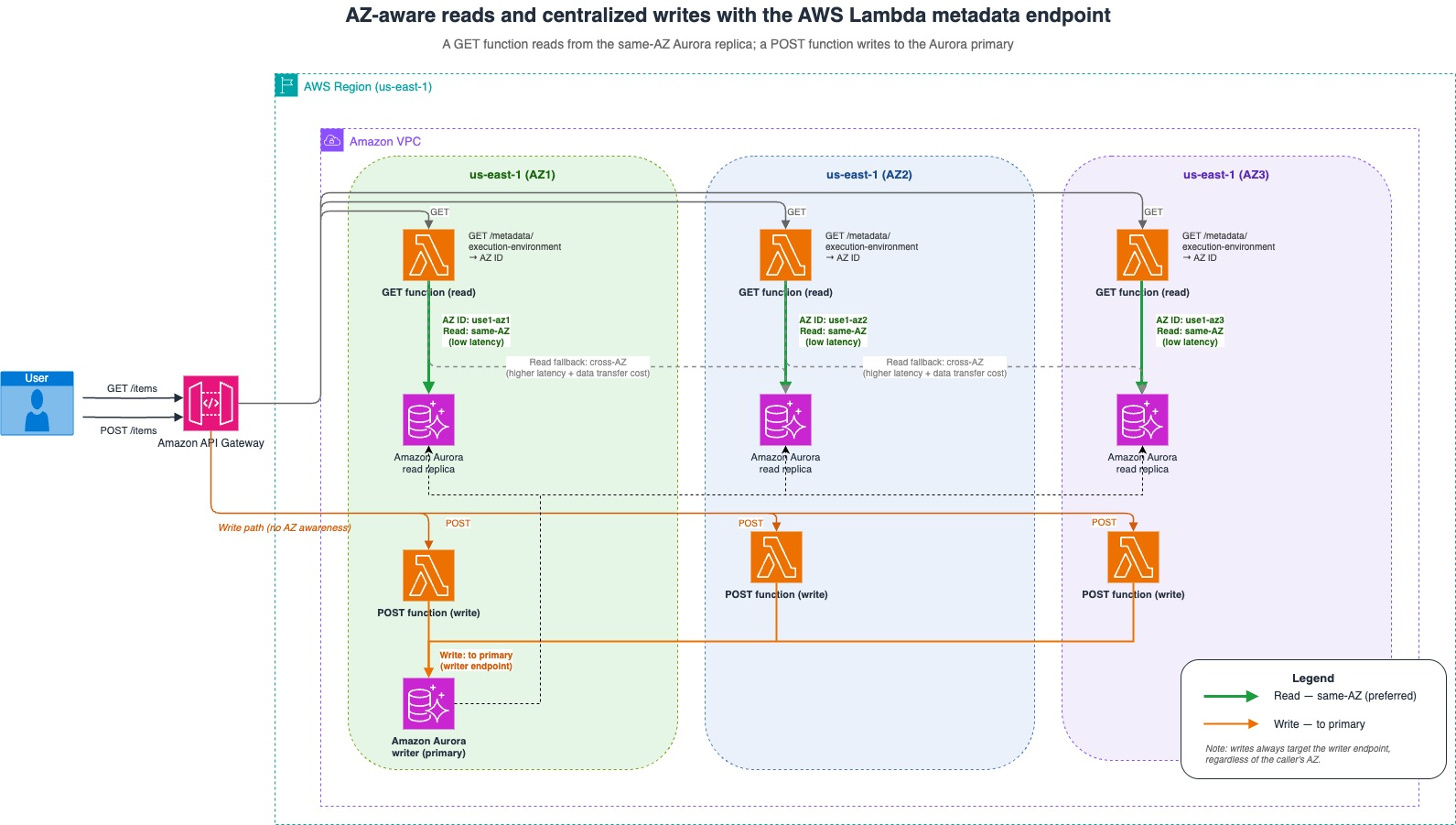
Figure 1: AZ-aware reads and centralized writes with the AWS Lambda metadata endpoint
How the metadata endpoint works
The metadata endpoint is a loopback HTTP API available inside the Lambda execution environment, accessible to both runtimes and extensions. Lambda automatically sets two environment variables in every execution environment:
AWS_LAMBDA_METADATA_API– The metadata server address in the format{ipv4_address}:{port}(for example,169.254.100.1:9001). For more information about how this address and port are assigned, see Using the Lambda metadata endpoint.AWS_LAMBDA_METADATA_TOKEN– A unique authentication token for the current execution environment, generated automatically at initialization. You include it in every metadata API request.
You retrieve metadata with an authenticated GET request:
The response is a small JSON document:
The Authorization header must contain a Bearer token (Authorization: Bearer <token>). This token-based authentication provides defense in depth against Server-Side Request Forgery (SSRF) vulnerabilities. Each execution environment receives its own randomly generated token, so a leaked or guessed URL alone is not enough to read metadata.
The response is immutable within an execution environment and returns a Cache-Control: private, max-age=43200, immutable header. We recommend that you cache the response and respect the TTL rather than calling the endpoint on every invocation. For SnapStart functions, the TTL is reduced during initialization so that clients refresh the metadata after restore, since a restored execution environment might come up in a different AZ. For more information, see Lambda SnapStart metadata behavior.
Retrieving the AZ ID with Powertools for AWS Lambda
The most direct way to consume the endpoint is with the Powertools for AWS Lambda metadata utility, available for Python, TypeScript, Java, and .NET. The utility caches the response after the first call and handles SnapStart cache invalidation automatically, so you don’t need to manage tokens, HTTP requests, or TTLs yourself. The following examples show how to use Powertools in each language.
Python
Install the Powertools package:
Use the metadata utility in your handler:
TypeScript
Install the Powertools package:
Use the metadata utility in your handler:
Java
Add the Powertools dependency to your pom.xml:
Use the metadata client in your handler:
.NET
Install the Powertools package:
Use the metadata class in your handler:
Calling the metadata endpoint directly
If you use a custom runtime, a container image, or prefer not to add a dependency, you can call the endpoint directly using the environment variables Lambda sets for you. The following example uses curl and jq to read the AZ ID:
Notice the configuration:
AWS_LAMBDA_METADATA_API: Lambda sets this to the metadata server address, so you never hardcode the host or port.Authorization: Bearer ${AWS_LAMBDA_METADATA_TOKEN}: The token is required on every request. A missing or invalid token returns401 Unauthorized.GETonly: The endpoint acceptsGETrequests. Any other method returns405 Method Not Allowed.
When you call the endpoint directly, retrieve the AZ ID once during initialization (outside the handler) and cache it for the life of the execution environment, rather than calling on every invocation. If your function uses SnapStart, refresh the value after restore, because the restored environment might run in a different AZ.
Understanding Availability Zone IDs
The endpoint returns an AZ ID (for example, use1-az1), not an AZ name (for example, us-east-1a). Before you use it, it helps to read the ID itself. An AZ ID follows the pattern <region-code>-az<number>:
use1is the shortened Region code, in this case US East 1 (us-east-1). Other Regions follow the same convention, such asusw2for US West (Oregon) andeuw1for Europe (Ireland).az1identifies the individual Availability Zone within that Region. Souse1-az1reads as “Availability Zone az1 in us-east-1.”
This distinction matters. AZ IDs always refer to the same physical location across all AWS accounts, while AZ names might map to different physical infrastructure in each account in certain Regions. In other words, the us-east-1a name in your account and the us-east-1a name in another account can point to two different physical Availability Zones, but use1-az1 is the same physical zone in every account. There is no fixed mapping between a name like us-east-1a and an ID like use1-az1. AWS assigns names independently per account to balance resources across zones. That’s exactly why the endpoint returns the ID: comparing AZ IDs gives you a consistent, account-independent result about whether your function and a downstream resource share a physical Availability Zone. For more information, see AZ IDs for cross-account consistency.
If you need the AZ name (for example, for logging or for an API that expects a name), convert the AZ ID using the Amazon Elastic Compute Cloud (Amazon EC2) DescribeAvailabilityZones API. To call it, add the ec2:DescribeAvailabilityZones permission to your function’s execution role:
Routing to same-AZ resources
Retrieving the AZ ID is only useful if you act on it. The following Python example shows the common pattern illustrated in Figure 1: look up the AZ ID once at initialization, select the connection endpoint that lives in the same AZ, and fall back gracefully when there is no same-AZ match.
Notice the design choices:
- Resolve at initialization:
AZ_IDandCACHE_ENDPOINTare computed once per execution environment, not per invocation, so the metadata lookup and endpoint selection don’t add latency to the request path. - Always provide a fallback: If there is no node in your function’s AZ (for example, the service isn’t deployed in every AZ the function runs in), fall back to any available endpoint. Correctness must not depend on a same-AZ match being present.
- Compare AZ IDs, not names: Because the endpoint returns AZ IDs, and services like ElastiCache and RDS expose the AZ of their nodes, you can compare the two directly for a reliable same-AZ decision.
Beyond latency-aware routing, the same AZ ID unlocks resilience testing. You can, for example, inject faults only in functions running in a specific AZ to validate that your application degrades gracefully during a simulated AZ impairment, without affecting traffic served from other AZs.
Best practices
Based on the endpoint’s behavior, keep these recommendations in mind:
- Cache the metadata: The response is immutable for the life of an execution environment. Read it once at initialization and reuse it. If you call the endpoint directly, respect the
Cache-ControlTTL rather than requesting on every invocation. - Handle SnapStart correctly: A restored SnapStart environment might resume in a different AZ than the one it was snapshotted in. Refresh the AZ ID after restore. Powertools handles this invalidation for you automatically.
- Ignore unknown fields: Additional fields might be added to the response in the future. Parse defensively and don’t fail if new fields appear.
- Degrade gracefully: Treat same-AZ routing as an optimization, not a requirement. Always keep a working fallback path so your function stays correct when no same-AZ resource is available.
- Keep the token server-side: The
AWS_LAMBDA_METADATA_TOKENis scoped to a single execution environment. Never log it or forward it outside the function.
Conclusion
In this post, you learned how the Lambda metadata endpoint helps your functions discover the Availability Zone they run in. With a single authenticated HTTP request, or one call through Powertools for AWS Lambda, your function can retrieve a stable AZ ID and use it to route to same-AZ resources, cutting cross-AZ latency and data transfer on hot paths, and to build AZ-aware resilience patterns like targeted fault injection. The feature works across all runtimes, integrates with SnapStart, provisioned concurrency, and VPC-enabled functions, and is available at no additional cost in all commercial AWS Regions where Lambda is available.
The key takeaway: if your Lambda function reads from or writes to AZ-scoped resources such as ElastiCache or RDS on a latency-sensitive path, resolve the AZ ID at initialization, prefer the same-AZ endpoint, and always keep a fallback. You get lower, more predictable latency with no change to how Lambda manages high availability for you.
To get started, see Using the Lambda metadata endpoint in the AWS Lambda Developer Guide.