Post Syndicated from Daniel Abib original https://aws.amazon.com/blogs/compute/optimizing-compute-intensive-serverless-workloads-with-multi-threaded-rust-on-aws-lambda/
Customers use AWS Lambda to build Serverless applications for a wide variety of use cases, from simple API backends to complex data processing pipelines. Lambda’s flexibility makes it an excellent choice for many workloads, and with support for up to 10,240 MB of memory, you can now tackle compute-intensive tasks that were previously challenging in a Serverless environment. When you configure a Lambda function’s memory size, you allocate RAM and Lambda automatically provides proportional CPU power. When you configure 10,240 MB, your Lambda function has access to up to 6 vCPUs.
However, there’s an important consideration that many developers discover: simply allocating more memory may not automatically make your function faster. If your code runs sequentially, it will only use one vCPU regardless of how many are available. The remaining vCPUs sit idle while you’re still paying for the full memory allocation.
To help benefit from Lambda’s multi-core capabilities, your code should explicitly implement concurrent processing through multi-threading or parallel execution. Without this, you’re paying for compute power you’re not using.
Rust provides excellent support for this pattern. The AWS Lambda Rust Runtime provides developers with a language that combines exceptional performance with built-in concurrency primitives. In this post, we show you how to implement multi-threading in Rust to achieve 4-6x performance improvements for CPU-intensive workloads.
Our Test Workload: Why Bcrypt Password Hashing?
For this analysis, we use bcrypt password hashing as our CPU-intensive workload to evaluate multi-core scaling behavior. This choice is deliberate for several reasons:
- Real-world relevance: Bcrypt is commonly used in authentication systems, making our benchmarks practically relevant rather than synthetic.
- Predictable CPU work: Bcrypt with cost factor 10 provides approximately 100ms of pure CPU work per operation on typical hardware, creating a consistent and measurable baseline.
- Embarrassingly parallel: Each hash operation is completely independent, making it an ideal candidate for parallel processing without shared state or lock contention.
- CPU-bound: Bcrypt is deterministic and CPU-bound (not memory or I/O bound), isolating the performance characteristics we want to measure.
Throughout this post, we process batches of passwords and measure how multi-threading improves throughput as we scale from 1 to 6 vCPUs.
Understanding Lambda’s vCPU Allocation
AWS Lambda allocates CPU resources proportionally to the configured memory. According to AWS Lambda function memory documentation, at 1,769 MB a function has the equivalent of one vCPU.
|
Memory (MB) |
Approximate vCPUs |
| 128 – 1,769 | ~1 |
| 1,770 – 3,538 | ~2 |
| 3,539 – 5,307 | ~3 |
| 5,308 – 7,076 | ~4 |
| 7,077 – 8,845 | ~5 |
| 8,846 – 10,240 |
~6 |
Note: The num_cpus crate returns the number of logical CPUs visible to the Lambda environment, which may differ from the allocated vCPU share. At lower memory configurations, you may see 2 CPUs reported even though only 1 vCPU worth of compute time is allocated.
Solution Overview
The solution consists of a Rust Lambda function that:
- Receives a request specifying the number of items to process
- Detects available vCPUs and configures a thread pool accordingly
- Processes items in parallel using the Rayon library (a data parallelism library that allows you to convert sequential iterators into parallel ones with a
.par_iter()call) - Returns performance metrics including duration and throughput
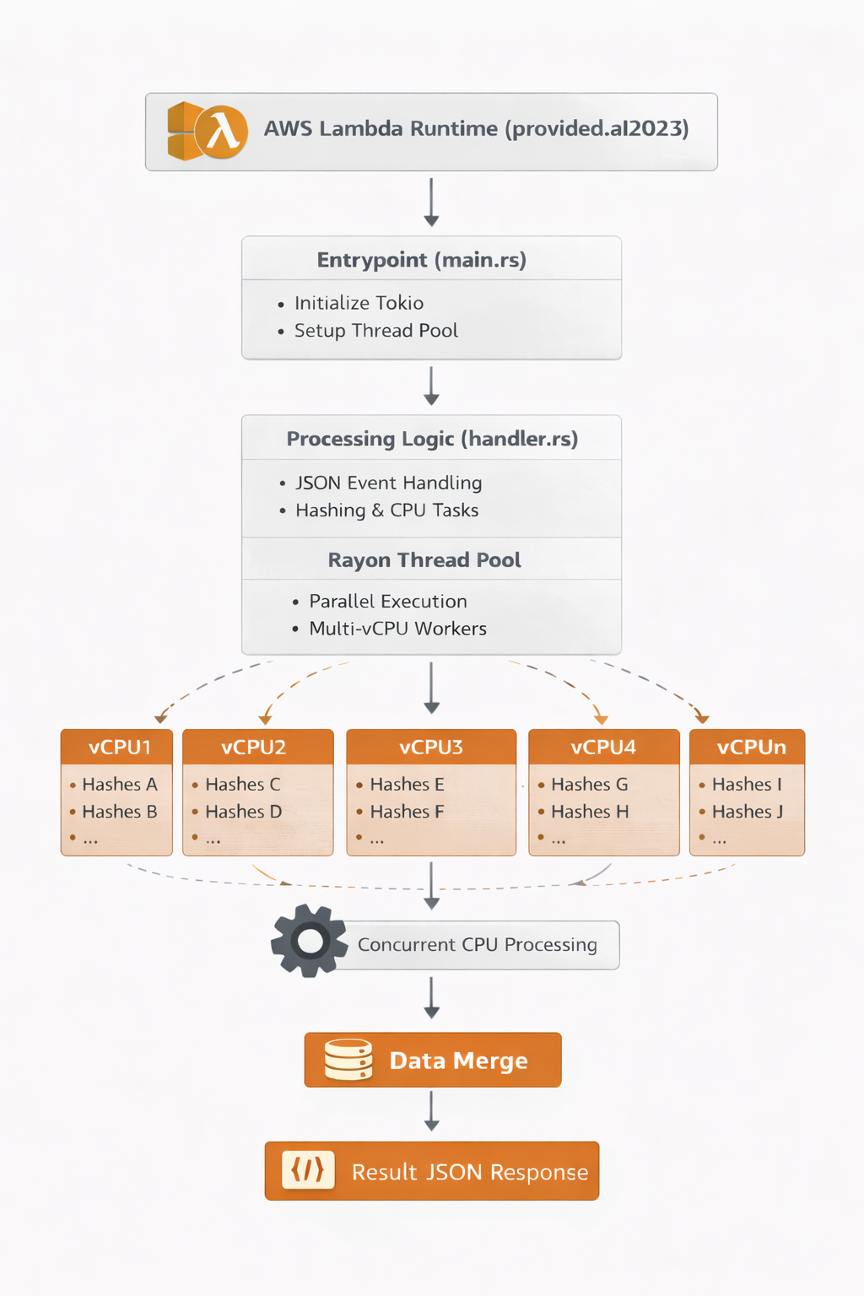
Architecture Diagram: Lambda receives request, initializes Rayon thread pool based on WORKER_COUNT environment variable, processes bcrypt hashes in parallel across multiple vCPUs, and returns results.
Creating a Multi-threaded Rust Lambda Function
Create a new Lambda project using Cargo Lambda:
cargo lambda new rust-multithread-demo
cd rust-multithread-demo
Dependencies
Update Cargo.toml with the necessary dependencies:
[package]
name = "rust-multithread-lambda"
version = "0.1.0"
edition = "2021"

[dependencies]
lambda_runtime = "1.0.0"
tokio = { version = "1", features = ["macros", "rt-multi-thread"] }
serde = { version = "1.0", features = ["derive"] }
serde_json = "1.0"
bcrypt = "0.15"
rayon = "1.7"
num_cpus = "1.16"

[profile.release]
opt-level = 3
lto = true
codegen-units = 1
strip = true
The optimization flags in [profile.release] reduce binary size and improve performance:
opt-level = 3: Maximum optimizationlto = true: Link-time optimization for smaller binariesstrip = true: Remove debug symbols
Implementing the Lambda Entry Point
First, let’s look at how we initialize the thread pool during cold start:
src/main.rs:
use lambda_runtime::{run, service_fn, Error, LambdaEvent};
mod handler;
use handler::{function_handler, get_worker_count, init_thread_pool, ProcessRequest};

#[tokio::main]
async fn main() -> Result<(), Error> {
    // Initialize Rayon thread pool at cold start (once per container lifecycle)
    init_thread_pool(get_worker_count());

    run(service_fn(|event: LambdaEvent<ProcessRequest>| async move {
        function_handler(event.payload).await
    }))
    .await
}
Why initialize in main() and not in the handler?
- Deterministic Configuration: The thread pool is configured once per container, before any requests arrive. This prevents race conditions if multiple requests try to initialize concurrently.
- Container Reuse: Lambda containers can serve multiple requests. Initializing in
main()ensures the configuration is set during the cold start and persists for all subsequent warm invocations. - Performance: Thread pool setup happens during cold start (already counted as initialization time), not during request processing.
Implementing the Request Handler
src/handler.rs:
use serde::{Deserialize, Serialize};
use std::env;
use std::sync::Once;
use std::time::Instant;
use std::collections::HashSet;
use std::sync::Mutex;
use rayon::prelude::*;

static INIT: Once = Once::new();

#[derive(Deserialize)]
pub struct ProcessRequest {
    count: usize,
    mode: String,
}

#[derive(Serialize)]
pub struct ProcessResponse {
    processed: usize,
    duration_ms: u128,
    mode: String,
    workers: usize,
    detected_cpus: usize,
    avg_ms_per_item: f64,
    memory_used_kb: u64,
    threads_used: usize, // Actual threads that processed items (proves multi-threading)
}

// CPU-intensive bcrypt hashing with cost factor 10
fn hash_password(password: &str) -> Result<String, bcrypt::BcryptError> {
    bcrypt::hash(password, 10)
}

// Process items one at a time (baseline for comparison)
fn process_sequential(items: Vec<String>) -> Result<(Vec<String>, usize), Box<dyn std::error::Error + Send + Sync>> {
    let results: Result<Vec<String>, _> = items
        .iter()
        .map(|item| hash_password(item))
        .collect();
    results
        .map(|r| (r, 1))
        .map_err(|e| Box::new(e) as Box<dyn std::error::Error + Send + Sync>)
}

// Process items in parallel using Rayon's work-stealing scheduler
// Thread pool size is configured once at cold start via init_thread_pool()
fn process_parallel(items: Vec<String>) -> Result<(Vec<String>, usize), Box<dyn std::error::Error + Send + Sync>> {
    let thread_ids: Mutex<HashSet<std::thread::ThreadId>> = Mutex::new(HashSet::new());

    let results: Result<Vec<String>, _> = items
        .par_iter()
        .map(|item| {
            thread_ids.lock().unwrap().insert(std::thread::current().id());
            hash_password(item)
        })
        .collect();

    let threads_used = thread_ids.lock().unwrap().len();
    results
        .map(|r| (r, threads_used))
        .map_err(|e| Box::new(e) as Box<dyn std::error::Error + Send + Sync>)
}

// Get worker count from env var or detect CPUs, clamped to 1-6
pub fn get_worker_count() -> usize {
    if let Ok(count_str) = env::var("WORKER_COUNT") {
        if let Ok(count) = count_str.parse::<usize>() {
            return count.clamp(1, 6);
        }
    }
    num_cpus::get().clamp(1, 6)
}

// Initialize Rayon global thread pool (only once per Lambda container)
pub fn init_thread_pool(workers: usize) {
    INIT.call_once(|| {
        let _ = rayon::ThreadPoolBuilder::new()
            .num_threads(workers)
            .build_global();
    });
}

// Read RSS memory from /proc/self/statm (Linux only)
fn get_memory_usage_kb() -> u64 {
    std::fs::read_to_string("/proc/self/statm")
        .ok()
        .and_then(|s| s.split_whitespace().nth(1)?.parse::<u64>().ok())
        .map(|pages| pages * 4)
        .unwrap_or(0)
}

// Main Lambda handler - processes items sequentially or in parallel
pub async fn function_handler(request: ProcessRequest) -> Result<ProcessResponse, Box<dyn std::error::Error + Send + Sync>> {
    if request.count == 0 { return Err("count must be greater than 0".into()); }
    if request.count > 1000 { return Err("count exceeds maximum of 1000 items".into()); }

    let items: Vec<String> = (0..request.count)
        .map(|i| format!("password_{:06}", i))
        .collect();

    let workers = get_worker_count();
    let mode = match request.mode.as_str() {
        "sequential" => "sequential",
        "parallel"   => "parallel",
        _            => if workers > 1 { "parallel" } else { "sequential" },
    };

    let start = Instant::now();
    let (results, threads_used) = match mode {
        "sequential" => process_sequential(items)?,
        _            => process_parallel(items)?,
    };
    let duration_ms = start.elapsed().as_millis();

    Ok(ProcessResponse {
        processed: results.len(),
        duration_ms,
        mode: mode.to_string(),
        workers: if mode == "parallel" { workers } else { 1 },
        detected_cpus: num_cpus::get(),
        avg_ms_per_item: duration_ms as f64 / request.count as f64,
        memory_used_kb: get_memory_usage_kb(),
        threads_used,
    })
}
Key Implementation Details
Thread Pool Initialization at Cold Start: The code initializes the thread pool in main() before the Lambda runtime starts, not during request processing. This approach is designed to eliminate race conditions and provide deterministic behavior across all invocations.
Important Note: Lambda initializes the thread pool once per container. The thread pool configuration retains its original value even if you change the WORKER_COUNT environment variable between invocations within the same container. For production deployments, keep WORKER_COUNT consistent for the function’s lifecycle.
Input Validation: The handler validates that count is between 1 and 1000 to prevent resource exhaustion.
Thread Tracking: The threads_used field proves multi-threading is working by tracking unique thread IDs during parallel processing. This provides empirical validation that work is distributed across multiple threads.
Memory Tracking: The memory_used_kb field reports RSS memory usage by reading /proc/self/statm, providing visibility into actual memory consumption.
Mode Selection: The function supports three modes:
sequential: Single-threaded processingparallel: Multi-threaded processing using Rayonauto: Automatically selects based on available workers
Building and Deploying
With the implementation complete, let’s compile the function for Lambda’s environment and deploy it to AWS.
# Build for ARM64 (Graviton2) - recommended for cost efficiency
cargo lambda build --release --arm64

# Or build for x86_64
cargo lambda build --release --x86-64
The build process produces a binary of approximately 1.7 MB (uncompressed) or 0.8 MB (zipped).
Deploy to AWS
Use Cargo Lambda to deploy the function with your desired memory configuration and worker count.
# Deploy with 6144 MB memory (4 vCPUs) and 4 workers
cargo lambda deploy rust-multithread-lambda \
    --memory 6144 \
    --timeout 30 \
--env-var WORKER_COUNT=4Note: To test different configurations, repeat the build and deploy commands with different --memory values and WORKER_COUNT settings for each configuration you want to benchmark. For comprehensive testing across architectures, build with --arm64, deploy all memory configurations, then rebuild with --x86-64 and deploy again.
Required IAM Permissions
The Lambda execution role needs the following permissions:
{
    "Version": "2012-10-17",
    "Statement": [
        {
            "Effect": "Allow",
            "Action": [
                "logs:CreateLogGroup",
                "logs:CreateLogStream",
                "logs:PutLogEvents"
            ],
            "Resource": "arn:aws:logs:*:*:*"
        }
    ]
}
Test the Function
After deployment, verify the function works correctly by invoking it with a test payload.
aws lambda invoke \
    --function-name rust-multithread-lambda \
    --payload '{"count":20,"mode":"parallel"}' \
    --cli-binary-format raw-in-base64-out \
    response.json
Performance Benchmarks
We tested multiple configurations on ARM64 (Graviton2) to measure the impact of multi-threading.
Test workload: Processing 20 bcrypt password hashes (cost factor 10)
Note: Benchmark results may vary between runs due to factors such as Lambda placement, underlying hardware differences, and AWS infrastructure conditions. The numbers presented here are representative of typical performance observed across multiple test runs.
Performance Results: ARM64 (Graviton2)
| Memory | vCPUs | Workers | Avg (ms) | P50 (ms) | P95 (ms) | P99 (ms) | Min | Max | Speedup |
| 1536 MB | ~1 | 1 | 1,885 | 1,882 | 1,898 | 1,898 | 1,877 | 1,907 | 1.00x |
| 2048 MB | ~2 | 2 | 1,334 | 1,331 | 1,341 | 1,341 | 1,324 | 1,356 | 1.41x |
| 4096 MB | ~3 | 3 | 685 | 683 | 699 | 699 | 669 | 704 | 2.75x |
| 6144 MB | ~4 | 4 | 463 | 464 | 467 | 467 | 453 | 469 | 4.07x |
| 8192 MB | ~5 | 5 | 338 | 343 | 345 | 345 | 325 | 346 | 5.57x |
| 10240 MB | ~6 | 6 | 280 | 278 | 292 | 292 | 271 | 293 | 6.73x |
Performance Results: x86_64
| Memory | vCPUs | Workers | Avg (ms) | P50 (ms) | P95 (ms) | P99 (ms) | Min | Max | Speedup |
| 1536 MB | ~1 | 1 | 1,671 | 1,675 | 1,681 | 1,681 | 1,659 | 1,684 | 1.00x |
| 2048 MB | ~2 | 2 | 1,253 | 1,249 | 1,265 | 1,265 | 1,241 | 1,294 | 1.33x |
| 4096 MB | ~3 | 3 | 892 | 891 | 899 | 899 | 888 | 900 | 1.87x |
| 6144 MB | ~4 | 4 | 429 | 425 | 443 | 443 | 417 | 449 | 3.89x |
| 8192 MB | ~5 | 5 | 330 | 323 | 349 | 349 | 317 | 358 | 5.06x |
| 10240 MB | ~6 | 6 | 292 | 292 | 298 | 298 | 291 | 298 | 5.72x |
Architecture Comparison
| Memory | Workers | ARM64 Avg | x86_64 Avg | Diff % | Faster Arch |
| 1536 MB | 1 | 1,885 ms | 1,671 ms | -12.8% | x86_64 |
| 2048 MB | 2 | 1,334 ms | 1,253 ms | -6.4% | x86_64 |
| 4096 MB | 3 | 685 ms | 892 ms | +23.2% | ARM64 |
| 6144 MB | 4 | 463 ms | 429 ms | -7.9% | x86_64 |
| 8192 MB | 5 | 338 ms | 330 ms | -2.4% | x86_64 |
| 10240 MB | 6 | 280 ms | 292 ms | +4.1% | ARM64 |
Key Observations
Cold Start Performance: Rust’s cold start initialization times are consistently between 19-28 ms across all memory configurations and architectures. ARM64 (Graviton2) shows slightly faster cold starts (19-23 ms) compared to x86_64 (26-29 ms). Both are significantly faster than interpreted runtimes because the binary is pre-compiled.
Near-Linear Scaling: Both architectures achieve impressive speedups:
- ARM64: 6.73x speedup with 6 workers (exceeds theoretical 6x!)
- x86_64: 5.72x speedup with 6 workers
Latency Consistency: The P95 and P99 metrics show excellent consistency:
- ARM64 at 6 vCPUs: P50=278ms, P95=292ms, P99=292ms (low variance)
- x86_64 at 6 vCPUs: P50=292ms, P95=298ms, P99=298ms
Both architectures show consistent latency at maximum parallelization.
Cost Analysis
Let’s analyze the cost implications of different configurations for processing 20 bcrypt hashes.
Cost Comparison: ARM64 vs x86_64 (us-east-1, as of January 2026):
| Config | Memory | Workers | ARM64 Duration | ARM64 Cost/1M | x86_64 Duration | x86_64 Cost/1M | Cheaper Arch |
| 1 vCPU | 1536 MB | 1 | 1,885 ms | $38.60 | 1,671 ms | $42.78 | ARM64 |
| 2 vCPU | 2048 MB | 2 | 1,334 ms | $36.46 | 1,253 ms | $42.77 | ARM64 * |
| 3 vCPU | 4096 MB | 3 | 685 ms | $37.47 | 892 ms | $60.80 | ARM64 |
| 4 vCPU | 6144 MB | 4 | 463 ms | $37.97 | 429 ms | $44.00 | ARM64 |
| 5 vCPU | 8192 MB | 5 | 338 ms | $36.94 | 330 ms | $45.10 | ARM64 |
| 6 vCPU | 10240 MB | 6 | 280 ms | $38.27 | 292 ms | $49.87 | ARM64 |
*Cheaper Arch
Cost Formulas:
- ARM64: (Memory in GB) × (Duration in seconds) × $0.0000133334
- x86_64: (Memory in GB) × (Duration in seconds) × $0.0000166667 (25% higher rate)
Key Insight: The 2 vCPU ARM64 configuration provides the lowest cost at $36.46 per million invocations while achieving 1.41x speedup. All ARM64 configurations remain cost-competitive ($36-$39 range) despite significant performance differences, demonstrating how increased throughput can offset higher memory costs.
Choosing the Right Configuration:
| Priority | Recommended Config | Rationale |
| Lowest Cost | ARM64, 2048 MB, 2 workers | $36.46/1M invocations, 1.41x speedup |
| Balanced | ARM64, 4096 MB, 3 workers | $37.47/1M invocations, 2.75x speedup |
| Low Latency | ARM64, 10240 MB, 6 workers | 280ms avg, 6.73x speedup |
When to Use Multi-threaded Rust on Lambda
Recommended Use Cases
- Batch data processing: Transform, validate, or enrich large datasets
- Cryptographic operations: Hashing, encryption, digital signatures
- Image/video processing: Resize, transcode, analyze media files
- Scientific computing: Simulations, data analysis, machine learning inference
- High-volume workloads: Functions invoked >100,000 times per day benefit from optimization
When to Consider Alternatives
- I/O-bound operations: Use async Rust instead of multi-threading for database queries or API calls
- Simple transformations: Functions completing in <100ms rarely benefit from parallelization
- Low-volume workloads: Development overhead may not be justified for <10,000 invocations per day
- Rapid prototyping: Python or Node.js may be more appropriate when iteration speed is critical
Cleanup
To delete the resources created in this post:
# Delete the Lambda function
aws lambda delete-function --function-name rust-multithread-lambda

# Delete the CloudWatch log group
aws logs delete-log-group --log-group-name /aws/lambda/rust-multithread-lambdaNote: If you deployed multiple configurations for testing, you’ll need to delete each function individually by repeating the delete command with each function name, or use the SAM template for bulk cleanup:
aws cloudformation delete-stack --stack-name rust-multithread-benchmarkConclusion
When you allocate more memory to your Lambda function, AWS provides proportionally more vCPUs—up to 6 vCPUs at 10,240 MB. However, sequential code only uses one vCPU, leaving the additional compute power idle while you pay for the full allocation. Multi-threaded Rust with Rayon enables you to harness all available vCPUs for CPU-intensive workloads, transforming unused capacity into real performance gains.
Our benchmarks demonstrate this clearly:
- Near-linear scaling: ARM64 achieved 6.73x speedup with 6 workers—you get proportional returns on your vCPU investment
- Fast cold starts: 19-28 ms initialization across all configurations, eliminating the cold start concerns often associated with compiled languages
- Consistent latency: ARM64 at 6 vCPUs shows only 1ms variance between P50 and P99, critical for predictable response times
- Cost efficiency: ARM64 is 15-20% cheaper than x86_64 with better scaling at maximum parallelization
The key takeaway: If your Lambda function performs CPU-intensive work and you’re allocating more than 1,769 MB of memory, you likely have multiple vCPUs available. Without multi-threading, those vCPUs sit idle. Rayon’s parallel iterators allow you to switch from sequential to parallel processing by changing .iter() to .par_iter() in your code.
Recommended starting point: ARM64 with 4096 MB (3 workers) offers an excellent balance of cost and performance for most workloads. Scale up to 6 vCPUs for latency-critical applications, or down to 2 vCPUs for maximum cost savings.
Additional Resources
- AWS Lambda Rust Runtime
- Cargo Lambda Documentation
- Rayon Data Parallelism Library
- AWS Lambda Memory and CPU Configuration
- AWS Lambda Pricing
The complete sample code, SAM template, and test scripts from this post are available at Github Repository.