Post Syndicated from Explosm.net original http://explosm.net/comics/5977/
New Cyanide and Happiness Comic
Post Syndicated from Explosm.net original http://explosm.net/comics/5977/
New Cyanide and Happiness Comic
Post Syndicated from Adam Bunn original https://blog.rapid7.com/2021/09/15/patch-tuesday-september-2021/

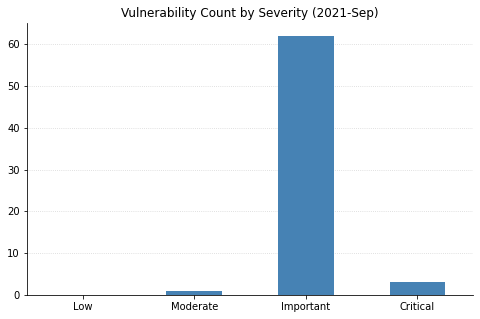
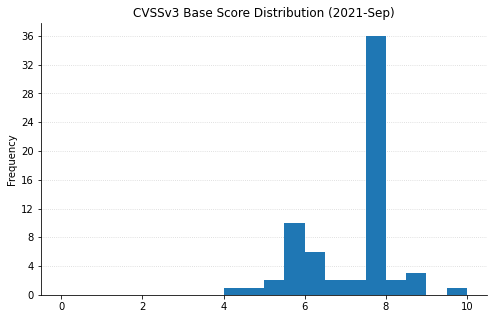
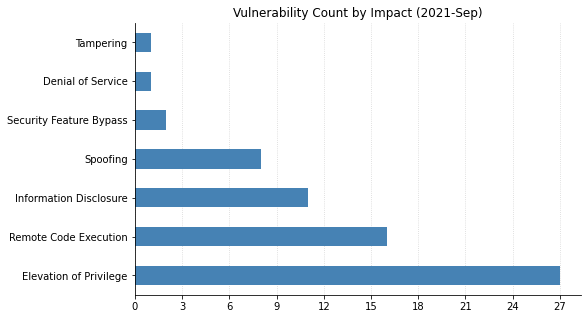
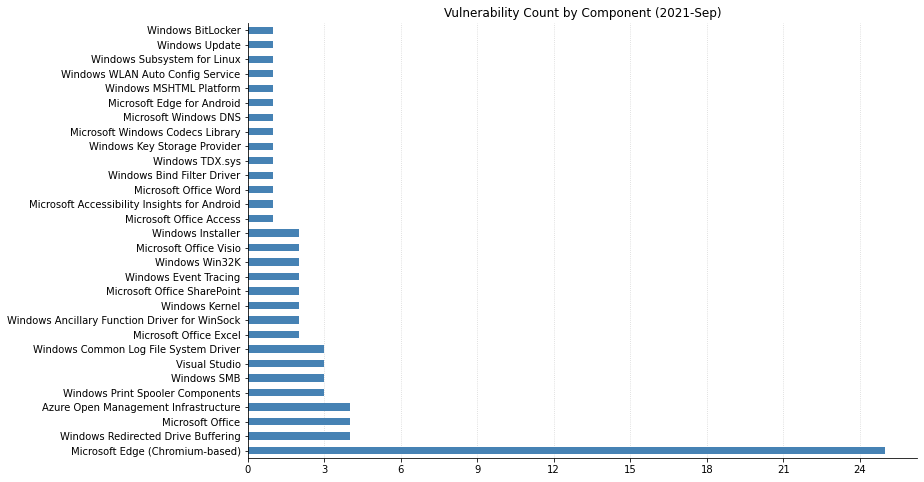
Microsoft has fixed a total of 60 vulnerabilities this month, including two publicly disclosed 0-days. Fortunately there are only a few issues rated critical this month with the vast majority of the remainder being rated important. Here’s three big things you can go patch right now.
The hot topic this month is the most recent remote code execution 0-day vulnerability in MSHTML. When it was first discovered it was only being used in a limited number of attacks, however this quickly changed once instructions for exploiting the vulnerability were published online. This vulnerability was severe enough to warrant publishing patches for older operating systems including Windows 7, Windows Server 2008 R2, and Windows Server 2008. Now that updates have been published for this vulnerability they should be applied as soon as possible.
This is the second publicly disclosed vulnerability updated this month. While the details surrounding this CVE are sparse, we do know that Microsoft has not detected exploitation in the wild.
Microsoft has made additional patches available for older operating systems. If you were previously unable to patch against this vulnerability you may want to review this new information.
| CVE | Title | Exploited | Disclosed | CVSS3 | FAQ |
|---|---|---|---|---|---|
| CVE-2021-38647 | Open Management Infrastructure Remote Code Execution Vulnerability | No | No | 9.8 | Yes |
| CVE-2021-38645 | Open Management Infrastructure Elevation of Privilege Vulnerability | No | No | 7.8 | Yes |
| CVE-2021-38648 | Open Management Infrastructure Elevation of Privilege Vulnerability | No | No | 7.8 | Yes |
| CVE-2021-38649 | Open Management Infrastructure Elevation of Privilege Vulnerability | No | No | 7 | Yes |
| CVE-2021-40448 | Microsoft Accessibility Insights for Android Information Disclosure Vulnerability | No | No | 6.3 | Yes |
| CVE-2021-36956 | Azure Sphere Information Disclosure Vulnerability | No | No | 4.4 | Yes |
| CVE | Title | Exploited | Disclosed | CVSS3 | FAQ |
|---|---|---|---|---|---|
| CVE-2021-38642 | Microsoft Edge for iOS Spoofing Vulnerability | No | No | 6.1 | No |
| CVE-2021-38641 | Microsoft Edge for Android Spoofing Vulnerability | No | No | 6.1 | No |
| CVE-2021-26439 | Microsoft Edge for Android Information Disclosure Vulnerability | No | No | 4.6 | No |
| CVE-2021-38669 | Microsoft Edge (Chromium-based) Tampering Vulnerability | No | No | 6.4 | Yes |
| CVE-2021-26436 | Microsoft Edge (Chromium-based) Elevation of Privilege Vulnerability | No | No | 6.1 | No |
| CVE-2021-36930 | Microsoft Edge (Chromium-based) Elevation of Privilege Vulnerability | No | No | 5.3 | No |
| CVE-2021-30632 | Chromium: CVE-2021-30632 Out of bounds write in V8 | No | No | Yes | |
| CVE-2021-30624 | Chromium: CVE-2021-30624 Use after free in Autofill | No | No | Yes | |
| CVE-2021-30623 | Chromium: CVE-2021-30623 Use after free in Bookmarks | No | No | Yes | |
| CVE-2021-30622 | Chromium: CVE-2021-30622 Use after free in WebApp Installs | No | No | Yes | |
| CVE-2021-30621 | Chromium: CVE-2021-30621 UI Spoofing in Autofill | No | No | Yes | |
| CVE-2021-30620 | Chromium: CVE-2021-30620 Insufficient policy enforcement in Blink | No | No | Yes | |
| CVE-2021-30619 | Chromium: CVE-2021-30619 UI Spoofing in Autofill | No | No | Yes | |
| CVE-2021-30618 | Chromium: CVE-2021-30618 Inappropriate implementation in DevTools | No | No | Yes | |
| CVE-2021-30617 | Chromium: CVE-2021-30617 Policy bypass in Blink | No | No | Yes | |
| CVE-2021-30616 | Chromium: CVE-2021-30616 Use after free in Media | No | No | Yes | |
| CVE-2021-30615 | Chromium: CVE-2021-30615 Cross-origin data leak in Navigation | No | No | Yes | |
| CVE-2021-30614 | Chromium: CVE-2021-30614 Heap buffer overflow in TabStrip | No | No | Yes | |
| CVE-2021-30613 | Chromium: CVE-2021-30613 Use after free in Base internals | No | No | Yes | |
| CVE-2021-30612 | Chromium: CVE-2021-30612 Use after free in WebRTC | No | No | Yes | |
| CVE-2021-30611 | Chromium: CVE-2021-30611 Use after free in WebRTC | No | No | Yes | |
| CVE-2021-30610 | Chromium: CVE-2021-30610 Use after free in Extensions API | No | No | Yes | |
| CVE-2021-30609 | Chromium: CVE-2021-30609 Use after free in Sign-In | No | No | Yes | |
| CVE-2021-30608 | Chromium: CVE-2021-30608 Use after free in Web Share | No | No | Yes | |
| CVE-2021-30607 | Chromium: CVE-2021-30607 Use after free in Permissions | No | No | Yes | |
| CVE-2021-30606 | Chromium: CVE-2021-30606 Use after free in Blink | No | No | Yes |
| CVE | Title | Exploited | Disclosed | CVSS3 | FAQ |
|---|---|---|---|---|---|
| CVE-2021-36952 | Visual Studio Remote Code Execution Vulnerability | No | No | 7.8 | No |
| CVE-2021-26434 | Visual Studio Elevation of Privilege Vulnerability | No | No | 7.8 | No |
| CVE-2021-26437 | Visual Studio Code Spoofing Vulnerability | No | No | 5.5 | No |
| CVE | Title | Exploited | Disclosed | CVSS3 | FAQ |
|---|---|---|---|---|---|
| CVE-2021-38625 | Windows Kernel Elevation of Privilege Vulnerability | No | No | 7.8 | No |
| CVE-2021-38626 | Windows Kernel Elevation of Privilege Vulnerability | No | No | 7.8 | No |
| CVE-2021-36968 | Windows DNS Elevation of Privilege Vulnerability | No | Yes | 7.8 | No |
| CVE | Title | Exploited | Disclosed | CVSS3 | FAQ |
|---|---|---|---|---|---|
| CVE-2021-40440 | Microsoft Dynamics Business Central Cross-site Scripting Vulnerability | No | No | 5.4 | No |
| CVE | Title | Exploited | Disclosed | CVSS3 | FAQ |
|---|---|---|---|---|---|
| CVE-2021-38656 | Microsoft Word Remote Code Execution Vulnerability | No | No | 7.8 | Yes |
| CVE-2021-38651 | Microsoft SharePoint Server Spoofing Vulnerability | No | No | 7.6 | No |
| CVE-2021-38652 | Microsoft SharePoint Server Spoofing Vulnerability | No | No | 7.6 | No |
| CVE-2021-38653 | Microsoft Office Visio Remote Code Execution Vulnerability | No | No | 7.8 | No |
| CVE-2021-38654 | Microsoft Office Visio Remote Code Execution Vulnerability | No | No | 7.8 | Yes |
| CVE-2021-38650 | Microsoft Office Spoofing Vulnerability | No | No | 7.6 | Yes |
| CVE-2021-38659 | Microsoft Office Remote Code Execution Vulnerability | No | No | 7.8 | Yes |
| CVE-2021-38658 | Microsoft Office Graphics Remote Code Execution Vulnerability | No | No | 7.8 | Yes |
| CVE-2021-38660 | Microsoft Office Graphics Remote Code Execution Vulnerability | No | No | 7.8 | Yes |
| CVE-2021-38657 | Microsoft Office Graphics Component Information Disclosure Vulnerability | No | No | 6.1 | Yes |
| CVE-2021-38646 | Microsoft Office Access Connectivity Engine Remote Code Execution Vulnerability | No | No | 7.8 | Yes |
| CVE-2021-38655 | Microsoft Excel Remote Code Execution Vulnerability | No | No | 7.8 | Yes |
| CVE | Title | Exploited | Disclosed | CVSS3 | FAQ |
|---|---|---|---|---|---|
| CVE-2021-36967 | Windows WLAN AutoConfig Service Elevation of Privilege Vulnerability | No | No | 8 | No |
| CVE-2021-36966 | Windows Subsystem for Linux Elevation of Privilege Vulnerability | No | No | 7.8 | No |
| CVE-2021-38637 | Windows Storage Information Disclosure Vulnerability | No | No | 5.5 | Yes |
| CVE-2021-36972 | Windows SMB Information Disclosure Vulnerability | No | No | 5.5 | Yes |
| CVE-2021-36974 | Windows SMB Elevation of Privilege Vulnerability | No | No | 7.8 | No |
| CVE-2021-36973 | Windows Redirected Drive Buffering System Elevation of Privilege Vulnerability | No | No | 7.8 | No |
| CVE-2021-38624 | Windows Key Storage Provider Security Feature Bypass Vulnerability | No | No | 6.5 | Yes |
| CVE-2021-36954 | Windows Bind Filter Driver Elevation of Privilege Vulnerability | No | No | 8.8 | No |
| CVE-2021-36975 | Win32k Elevation of Privilege Vulnerability | No | No | 7.8 | No |
| CVE-2021-38634 | Microsoft Windows Update Client Elevation of Privilege Vulnerability | No | No | 7.1 | No |
| CVE-2021-38644 | Microsoft MPEG-2 Video Extension Remote Code Execution Vulnerability | No | No | 7.8 | Yes |
| CVE-2021-38661 | HEVC Video Extensions Remote Code Execution Vulnerability | No | No | 7.8 | Yes |
| CVE-2021-38632 | BitLocker Security Feature Bypass Vulnerability | No | No | 5.7 | Yes |
| CVE | Title | Exploited | Disclosed | CVSS3 | FAQ |
|---|---|---|---|---|---|
| CVE-2021-36965 | Windows WLAN AutoConfig Service Remote Code Execution Vulnerability | No | No | 8.8 | No |
| CVE-2021-26435 | Windows Scripting Engine Memory Corruption Vulnerability | No | No | 8.1 | Yes |
| CVE-2021-36960 | Windows SMB Information Disclosure Vulnerability | No | No | 7.5 | Yes |
| CVE-2021-36969 | Windows Redirected Drive Buffering SubSystem Driver Information Disclosure Vulnerability | No | No | 5.5 | Yes |
| CVE-2021-38635 | Windows Redirected Drive Buffering SubSystem Driver Information Disclosure Vulnerability | No | No | 5.5 | Yes |
| CVE-2021-38636 | Windows Redirected Drive Buffering SubSystem Driver Information Disclosure Vulnerability | No | No | 5.5 | Yes |
| CVE-2021-38667 | Windows Print Spooler Elevation of Privilege Vulnerability | No | No | 7.8 | Yes |
| CVE-2021-38671 | Windows Print Spooler Elevation of Privilege Vulnerability | No | No | 7.8 | No |
| CVE-2021-40447 | Windows Print Spooler Elevation of Privilege Vulnerability | No | No | 7.8 | No |
| CVE-2021-36962 | Windows Installer Information Disclosure Vulnerability | No | No | 5.5 | Yes |
| CVE-2021-36961 | Windows Installer Denial of Service Vulnerability | No | No | 5.5 | No |
| CVE-2021-36964 | Windows Event Tracing Elevation of Privilege Vulnerability | No | No | 7.8 | No |
| CVE-2021-38630 | Windows Event Tracing Elevation of Privilege Vulnerability | No | No | 7.8 | No |
| CVE-2021-36955 | Windows Common Log File System Driver Elevation of Privilege Vulnerability | No | No | 7.8 | No |
| CVE-2021-36963 | Windows Common Log File System Driver Elevation of Privilege Vulnerability | No | No | 7.8 | No |
| CVE-2021-38633 | Windows Common Log File System Driver Elevation of Privilege Vulnerability | No | No | 7.8 | No |
| CVE-2021-36959 | Windows Authenticode Spoofing Vulnerability | No | No | 5.5 | No |
| CVE-2021-38629 | Windows Ancillary Function Driver for WinSock Information Disclosure Vulnerability | No | No | 6.5 | Yes |
| CVE-2021-38628 | Windows Ancillary Function Driver for WinSock Elevation of Privilege Vulnerability | No | No | 7.8 | No |
| CVE-2021-38638 | Windows Ancillary Function Driver for WinSock Elevation of Privilege Vulnerability | No | No | 7.8 | No |
| CVE-2021-38639 | Win32k Elevation of Privilege Vulnerability | No | No | 7.8 | No |
| CVE-2021-40444 | Microsoft MSHTML Remote Code Execution Vulnerability | Yes | Yes | 8.8 | Yes |
Post Syndicated from original https://blog.erratasec.com/2021/09/how-not-to-get-caught-in-law.html
I thought I’d write up a response to this question from well-known 4th Amendment and CFAA lawyer Orin Kerr:
Question for tech people related to “geofence” warrants served on Google: How easy is it for a cell phone user, either of an Android or an iPhone, to stop Google from generating the detailed location info needed to be responsive to a geofence warrant? What do you need to do?
— Orin Kerr (@OrinKerr) September 15, 2021
(FWIW, I’m seeking info from people who actually know the answer based on their expertise, not from those who are just guessing, or are who are now googling around to figure out what the answer may be,)
— Orin Kerr (@OrinKerr) September 15, 2021
First, let me address the second part of his tweet, whether I’m technically qualified to answer this. I’m not sure, I have only 80% confidence that I am. Hence, I’m writing this answer as blogpost hoping people will correct me if I’m wrong.
There is a simple answer and it’s this: just disable “Location” tracking in the settings on the phone. Both iPhone and Android have a one-click button to tap that disables everything.
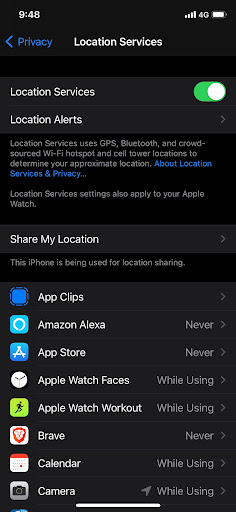
The trick is knowing which thing to disable. On the iPhone it’s called “Location Services”. On the Android, it’s simply called “Location”.
It’s that simple: one click and done, and Google won’t be able to report your location in a geofence request.
I’m pretty confident in this answer, despite what your googling around will tell you about Google’s pernicious ways. But I’m only 80% confident in my answer. Technology is complex and constantly changing.
Note that the answer is very different for mobile phone companies, like AT&T or T-Mobile. They have their own ways of knowing about your phone’s location independent of whatever Google or Apple do on the phone itself. Because of modern 4G/LTE, cell towers must estimate both your direction and distance from the tower. I’ve confirmed that they can know your location to within 50 feet. There are limitations to this, it depends upon whether you are simply in range of the tower or have an active phone call in progress. Thus, I think law enforcement prefers asking Google.
Another example is how my car uses Google Maps all the time, and doesn’t have privacy settings. I don’t know what it reports to Google. So when I rob a bank, my phone won’t betray me, but my car will.
Note that “disabling GPS” isn’t sufficient. I include the screenshot above because of how it mentions the phone relies upon WiFi, BlueTooth, and cell tower info to also confirm your location. Tricking GPS will do little to stop your phone from knowing your location.
I only know about this from the phone side of things and not actual legal cases. I’d love to see the sort of geofence results the FBI gets. There might be some subtle thing that I missed about how Android works with mobile companies, such as this old story where Android phones reported cell tower information to Google (since removed). Or worse, there might be something completely obvious I should’ve known about that everyone seems to know, but for some reason I simply forgot.
Both Apple and Google are upfront about what private information they do and don’t track and how to disable it. Thus, while I think they may do something on accident hidden from view, I don’t think there’s anything going on that isn’t documented. And what’s documented this concern is that simply turning off the “Location” button.
Update: Many comments note that Google does log the IP address of requests, and that IP addresses can sometimes be geolocated.
Well, yes and no. It’s not something companies log in that way. Thus, when given a geofence request for everything within a certain physical location, logs containing only IP addresses wouldn’t be something covered by the request. The log would need a record of the physical location to be covered. Moreover, geolocation by IP address is incredibly inaccurate, often telling you only what city or neighborhood where the IP address is located. Even if Google logged a record of the best-guess about location, I’m still not sure whether it would be an appropriate response to a geofence request.
In any event, this wouldn’t apply to mobile IP addresses. In America, consumer mobile phones don’t have public IP addresses by share the same pool of private addresses. Thus, the IP address from a mobile phone is meaningless for location purposes.
Now you can create a hypothetical situation like the following:
Then, yes, my argument is defeated, a hypothetical geofence request might then get you.
Which I actually like. It’s a good demonstration of why I doubt myself at the top of the post. I don’t think this scenario is likely, and hence don’t consider it a reasonable rebuttal, but “unlikely” doesn’t mean “impossible”. I’m still pretty confident that a one-click disabling “Location” is all you need to defeat geofence warrants given to Google.
Note that the discussion of this blogpost is just about the “geofence request to Google”. This “Capital Hill WiFi” hypothetical is unlikely to help with requests by location, but of course would for requests by IP address. Law enforcement could certainly ask Google for a list of users that came in via the Capital Hill WiFi IP address.
Except I bet they started with cell carriers and are being thorough.
Contact Google via public wifi in the Capitol and BOOM.
— Bob (Moderna #3) Kerns (@BobKerns) September 15, 2021
Post Syndicated from Aaqib Bickiya original https://aws.amazon.com/blogs/devops/codeguru-gridium-maintain-codebase/
Gridium creates software that lets people run commercial buildings at a lower cost and with less energy. Currently, half of the world lives in cities. Soon, nearly 70% will, while buildings utilize 40% of the world’s electricity. In the U.S. alone, commercial real estate value tops one trillion dollars. Furthermore, much of this asset class is still run with spreadsheets, clipboards, and outdated software. Gridium’s software platform collects large amounts of operational data from commercial buildings like offices, medical providers, and corporate campuses. Then, our analytics identifies energy savings opportunities that we work with customers to actualize.
Data streams from utility companies across the U.S. are an essential input for Gridium’s analytics. This data is processed and visualized so that our customers can garner new insights and drive smarter decisions. In order to integrate a new data source into our platform, we often utilize third-party contractors to write tools that ingest data feeds and prepare them for analysis.
Our team firmly emphasizes our codebase quality. We strive for our code to be stylistically consistent, easily testable, swiftly understood, and well-documented. We write code internally by using agreed-upon standards. This makes it easy for us to review and edit internal code using standard collaboration tools.
We work to ensure that code arriving from contractors meets similar standards, but enforcing external code quality can be difficult. Contractor-developed code will be written in the style of each contractor. Furthermore, reviewing and editing code written by contractors introduces new challenges beyond those of working with internal code. We have used tools like PyLint to help stylistically align code, but we wanted a method for uncovering more complex issues without burdening the team and undermining the benefits of outside contractors.
We began evaluating Amazon CodeGuru Reviewer in order to provide an additional review layer for code developed by contractors, and to find complex corrections within code that traditional tools might not catch.
Initially, we enabled the service only on external repositories and generated reviews on pull requests. CodeGuru immediately provided us with actionable recommendations for maintaining Gridium’s codebase quality.

The example above demonstrates a useful recurring recommendation related to exception-handling. Strictly speaking, there is nothing wrong with utilizing a general Exception class whenever needed. However, utilizing general Exception classes in production can complicate error-handling functions and generate ambiguity when trying to debug or understand code.
After a few weeks of utilizing CodeGuru Reviewer and witnessing its benefits, we determined that we wanted to use it for our entire codebase. Moreover, CodeGuru provided us with meaningful recommendations on our internal repositories.

This example once again showcases CodeGuru’s ability to highlight subtle issues that aren’t necessarily bugs. Without diving through related libraries and functions, it would be difficult to find any optimizable areas, but CodeGuru found that this function could become problematic due to its dependency on twenty other functions. If any of the dependencies is updated, then it could break the entire function, thereby making debugging the root cause difficult.
The explanations following each code recommendation were essential in our quick adoption of CodeGuru. Simply showing what code to change would make it tough to follow through with a code correction. CodeGuru provided ample context, reasoning, and even metrics in some cases to explain and justify a correction.
Our development team thoroughly appreciates the extra review layer that CodeGuru provides. CodeGuru indicates areas that internal review might otherwise miss, especially in code written by external contractors.
In some cases, CodeGuru highlighted issues never before considered by the team. Examples of these issues include highly coupled functions, ambiguous exceptions, and outdated API calls. Each suggestion is accompanied with its context and reasoning so that our developers can independently judge if an edit should be made. Furthermore, CodeGuru was easily set up with our GitHub repositories. We enabled it within minutes through the console.
After familiarizing ourselves with the CodeGuru workflow, Gridium treats CodeGuru recommendations like suggestions that an internal reviewer would make. Both internal developers and third parties act on recommendations in order to improve code health and quality. Any CodeGuru suggestions not accepted by contractors are verified and implemented by an internal reviewer if necessary.
Over the twelve weeks that we have been utilizing Amazon CodeGuru, we have had 281 automated pull request reviews. These provided 104 recommendations resulting in fifty code corrections that we may not have made otherwise. Our monthly bill for CodeGuru usage is about $10.00. If we make only a single correction to our code over a whole month that we would have missed otherwise, then we can safely say that it was well worth the price!

Kimberly Nicholls is an Engineering Technical Lead at Gridium who loves to make data useful. She also enjoys reading books and spending time outside.

Adnan Bilwani is a Sr. Specialist-Builder Experience providing fully managed ML-based solutions to enhance your DevOps workflows.

Aaqib Bickiya is a Solutions Architect at Amazon Web Services. He helps customers in the Midwest build and grow their AWS environments.
Post Syndicated from original https://xkcd.com/2516/

Post Syndicated from Emma White original https://aws.amazon.com/blogs/compute/optimize-costs-by-up-to-70-with-new-amazon-t3-dedicated-hosts/
This post is written by Andy Ward, Senior Specialist Solutions Architect, and Yogi Barot, Senior Specialist Solutions Architect.
Customers have been taking advantage of Amazon Elastic Compute Cloud (Amazon EC2) Dedicated Hosts to enable them to use their eligible software licenses from vendors such as Microsoft and Oracle since the feature launched in 2015. Amazon EC2 Dedicated Hosts have gained new features over the years. For example, Customers can launch different-sized instances within the same instance family and use AWS License Manager to track and manage software licenses. Host Resource Groups have enabled customers to take advantage of automated host management. Further, the ability to use license included Windows Server on Dedicated Hosts has opened up new possibilities for cost-optimization.
The ability to bring your own license (BYOL) to Amazon EC2 Dedicated Hosts has been an invaluable cost-optimization tool for customers. Since the introduction of Dedicated Hosts on Amazon EC2, customers have requested additional flexibility to further optimize their ability to save on licensing costs on AWS. We listened to that feedback, and are now launching a new type of Amazon EC2 Dedicated Host to enable additional cost savings.
In this blog post, we discuss how our customers can benefit from the newest member of our Amazon EC2 Dedicated Hosts family – the T3 Dedicated Host. The T3 Dedicated Host is the first Amazon EC2 Dedicated Host to support general-purpose burstable T3 instances, providing the most cost-efficient way of using eligible BYOL software on dedicated hardware.
When we talk to our customers about BYOL, we often hear the following:
T3 Dedicated Hosts differ from our other EC2 Dedicated Hosts. Where our traditional EC2 Dedicated Hosts provide fixed CPU resources, T3 Dedicated Hosts support burstable instances capable of sharing CPU resources, providing a baseline CPU performance and the ability to burst when needed. Sharing CPU resources, also known as oversubscription, is what enables a single T3 Dedicated Host to support up to 4x more instances than comparable general-purpose Dedicated Hosts. This increase in the number of instances supported can enable customers to save on licensing and infrastructure costs by as much as 70%.
T3 Dedicated Hosts drive a lower total cost of ownership (TCO) by delivering a higher instance density than any other EC2 Dedicated Host. Burstable T3 instances allow customers to consolidate a higher number of instances with low-to-moderate average CPU utilization on fewer hosts than ever before.
T3 Dedicated Hosts also offer smaller instance sizes, in a greater number of vCPU and memory combinations, than other EC2 Dedicated Hosts. Smaller instance sizes can contribute to lower TCO and help deliver consolidation ratios equivalent to or greater than on-premises hosts.
AWS hypervisor management features provide consistent performance for customer workloads. Customers can choose between a wide selection of instance configurations with different vCPU and memory sizes, mixing and matching instances sizes from t3.nano up to t3.2xlarge
You can use your existing eligible per-socket, per-core, or per-VM software licenses, including licenses for Windows Server, SQL Server, SUSE Linux Enterprise Server and Red Hat Enterprise Linux. As licensing terms often change over time, we recommend checking eligibility for BYOL with your license vendor.
You can track your license usage using your license configuration in AWS License Manager. For more information, see the Track your license using AWS License Manager blog post and the Manage Software Licenses with AWS License Manager video on YouTube.
T3 Dedicated Hosts are best suited for running instances such as small and medium databases and application servers, virtual desktops, and development and test environments. In common with on-premises hypervisor hosts that allow CPU oversubscription, T3 Dedicated Hosts are less suitable for workloads that experience correlated CPU burst patterns.
T3 Dedicated Hosts support all instance sizes of the T3 family, with a wide variety of CPU and RAM ratios. Additionally, as T3 Dedicated Hosts are powered by the AWS Nitro System, they support multiple instance sizes on a single host. Customers can run up to 192 instances on a single T3 Dedicated Host, each capable of supporting multiple processes. The maximum instance limits are shown in the following table:
| Instance Family | Sockets | Physical Cores | nano | micro | small | medium | large | xlarge | 2xlarge |
| t3 | 2 | 48 | 192 | 192 | 192 | 192 | 96 | 48 | 24 |
Any combination of T3 instance types can be run, up to the memory limit of the host (768GB). Examples of supported blended instance type combinations are:
If you are looking for ways to decrease your license costs and host footprint in order to achieve the lowest TCO, then using T3 Dedicated Hosts enables a set of previously unavailable scenarios to help you achieve this goal. The ability to run a greater number of instances per host compared to existing Dedicated Hosts leads directly to lower licensing and infrastructure costs on AWS, for suitable BYOL workloads.
The following three scenarios are typical examples of benefits that can be realized by customers using T3 Dedicated Hosts.
On-premises, you are taking advantage of the fact that you can easily oversubscribe your physical CPUs on VMware hosts and achieve high-levels of consolidation. As you can license Windows Server on a per-physical-core basis, you only need to license the physical cores of the VMware hosts, and not the vCPUs of the Windows Server virtual machines.
In this scenario, T3 Dedicated Hosts enable you to achieve similar, or better, levels of consolidation. Additionally, the number of Windows Server Datacenter licenses required in order to bring your workloads to AWS is reduced from 336 cores to 288 cores – a saving of 14%.
| On-Premises VMware Hosts | T3 Dedicated Hosts | Savings | |
| Physical Servers (48 Cores) | 7 | 6 | |
| 2 vCPU VMs per Host | 150 | 192 | |
| Total number of VMs | 1000 | 1000 | |
| Total Windows Server Datacenter Licenses (Per Core) | 336 | 288 | 14% |
On-premises you are taking advantage of the fact that you can easily oversubscribe your physical CPUs on VMware hosts and achieve high-levels of consolidation. You can now achieve far greater levels of consolidation by moving your virtual machines to T3 Dedicated Hosts, which have double the amount of RAM compared to your current on-premises VMware hosts.
By taking advantage of oversubscription and the increased RAM on T3 Dedicated Hosts, you can now achieve far greater levels of consolidation. Additionally, you are able to reduce the number of Windows Server Datacenter licenses required for BYOL. In this scenario, you can achieve a license reduction from 360 cores to 240 cores – a 33% saving.
| On-Premises VMware Hosts | T3 Dedicated Hosts | Savings | |
| Physical Servers | 10 | 5 | |
| Physical Cores per Host | 36 | 48 | |
| RAM per Host (GB) | 384 | 768 | |
| 2 vCPU, 4GB RAM VMs per Host | 96 | 192 | |
| Total number of VMs | 960 | 960 | |
| Total Windows Server Datacenter Licenses (Per Core) = Number of Servers * Physical Core Count | 10 * 36 = 360 | 5 * 48 = 240 | 33% |
In this scenario, you are taking advantage of the fact that you can bring your own eligible Windows Server and SQL Server licenses to AWS for use on Dedicated Hosts. However, as your instances all have low average-CPU-utilization, your current C5 Dedicated Hosts, with fixed CPU resources, are largely underutilized.
By migrating to T3 Dedicated Hosts, you can achieve a substantial reduction in licensing costs. As the total number of physical cores requiring licensing is reduced, you can benefit from a corresponding reduction in the number of SQL Server Enterprise Edition licenses required – a saving of 71%.
| C5 Dedicated Hosts | T3 Dedicated Hosts | Savings | |
| Total Number of Hosts Required | 28 | 6 | |
| 2 vCPU, 4GB VMs per Host | 36 | 192 | |
| Total number of VMs | 1008 | 1008 | |
| Total SQL Server EE Licenses = Number of Servers * Physical Core Count | 36 * 28 = 1008 | 48 * 6 = 288 | 71% |
In this blog post, we described the new T3 Dedicated Hosts and how they help customers benefit from running more instances per host in BYOL scenarios. We showed that heavily oversubscribed on-premises environments can be migrated to T3 Dedicated Hosts on AWS while lowering existing licensing and infrastructure costs. We further showed how significant licensing and infrastructure savings can be realized by moving existing workloads from EC2 Dedicated Hosts with fixed CPU resources to new T3 Dedicated Hosts.
Visit the Dedicated Hosts, AWS License Manager and host resource group pages to get started with saving costs on licensing and infrastructure.
AWS can help you assess how your company can get the most out of cloud. Join the millions of AWS customers that trust us to migrate and modernize their most important applications in the cloud. To learn more on modernizing Windows Server or SQL Server, visit Windows on AWS. Contact us to start your migration journey today.
Post Syndicated from original https://lwn.net/Articles/869118/rss
The Roundup Issue Tracker
is a flexible tool for managing issues via the web or
email. However, Roundup is useful for more than
web-based bug tracking or help-desk ticketing; it can be used as a simple
wiki or to manage tasks
with the Getting Things
Done (GTD)
methodology. The 20th-anniversary
edition of
Roundup,
version 2.1.0, was
released in July; it is a maintenance release, but there have been a number
of larger improvements in the last year or so. Here we introduce
Roundup’s
features along with the
recent developments that have helped make Roundup even more useful for tracking
issues to their resolution.
Post Syndicated from Curious Droid original https://www.youtube.com/watch?v=cvWoalQNMrU
Post Syndicated from Talks at Google original https://www.youtube.com/watch?v=n9Gd_XsAH_U
Post Syndicated from Uday Narayanan original https://aws.amazon.com/blogs/architecture/field-notes-how-to-enable-cross-account-access-for-amazon-kinesis-data-streams-using-kinesis-client-library-2-x/
Businesses today are dealing with vast amounts of real-time data they need to process and analyze to generate insights. Real-time delivery of data and insights enable businesses to quickly make decisions in response to sensor data from devices, clickstream events, user engagement, and infrastructure events, among many others.
Amazon Kinesis Data Streams offers a managed service that lets you focus on building and scaling your streaming applications for near real-time data processing, rather than managing infrastructure. Customers can write Kinesis Data Streams consumer applications to read data from Kinesis Data Streams and process them per their requirements.
Often, the Kinesis Data Streams and consumer applications reside in the same AWS account. However, there are scenarios where customers follow a multi-account approach resulting in Kinesis Data Streams and consumer applications operating in different accounts. Some reasons for using the multi-account approach are to:
The following options allow you to access Kinesis Data Streams across accounts.
In this blog post, we will walk you through the steps to configure KCL for Java and Python for cross-account access to Kinesis Data Streams.
As shown in Figure 1, Account A has the Kinesis data stream and Account B has the KCL instances consuming from the Kinesis data stream in Account A. For the purposes of this blog post the KCL code is running on Amazon Elastic Compute Cloud (Amazon EC2).
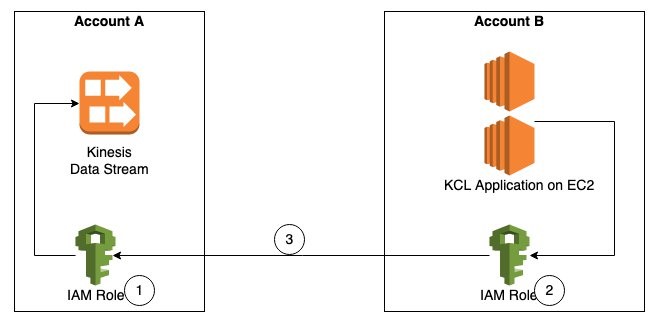
Figure 1. Steps to access a cross-account Kinesis data stream
The steps to access a Kinesis data stream in one account from a KCL application in another account are:
Step 1 – Create AWS Identity and Access Management (IAM) role in Account A to access the Kinesis data stream with trust relationship with Account B.
Step 2 – Create IAM role in Account B to assume the role in Account A. This role is attached to the EC2 fleet running the KCL application.
Step 3 – Update the KCL application code to assume the role in Account A to read Kinesis data stream in Account A.
First, we will create an IAM role in Account A, with permissions to access the Kinesis data stream created in the same account. We will also add Account B as a trusted entity to this role.
{
    "Version": "2012-10-17",
    "Statement": [
        {
            "Sid": "Stmt123",
            "Effect": "Allow",
            "Action": [
                "kinesis:DescribeStream",
                "kinesis:GetShardIterator",
                "kinesis:GetRecords",
                "kinesis:ListShards",
                "kinesis:DescribeStreamSummary",
                "kinesis:RegisterStreamConsumer"
            ],
            "Resource": [
                "arn:aws:kinesis:us-east-1:Account-A-AccountNumber:stream/StockTradeStream"
            ]
        },
        {
            "Sid": "Stmt234",
            "Effect": "Allow",
            "Action": [
                "kinesis:SubscribeToShard",
                "kinesis:DescribeStreamConsumer"
            ],
            "Resource": [
                "arn:aws:kinesis:us-east-1:Account-A-AccountNumber:stream/StockTradeStream/*"
            ]
        }
    ]
}
Note: The above policy assumes the name of the Kinesis data stream is StockTradeStream.
aws iam create-role --role-name kds-stock-trade-stream-role --assume-role-policy-document "{\"Version\":\"2012-10-17\",\"Statement\":[{\"Effect\":\"Allow\",\"Principal\":{\"AWS\":[\"arn:aws:iam::Account-B-AccountNumber:root\"]},\"Action\":[\"sts:AssumeRole\"]}]}"aws iam attach-role-policy --policy-arn arn:aws:iam::Account-A-AccountNumber:policy/kds-stock-trade-stream-policy --role-name kds-stock-trade-stream-roleIn the above steps, you will have to replace Account-A-AccountNumber with the AWS account number of the account that has the Kinesis data stream and Account-B-AccountNumber will need to be replaced with the AWS account number of the account that has the KCL application
We will now create an IAM role in account B to assume the role created in Account A in Step 1. This role will also grant the KCL application access to Amazon DynamoDB and Amazon CloudWatch in Account B. For every KCL application, a DynamoDB table is used to keep track of the shards in a Kinesis data stream that are being leased and processed by the workers of the KCL consumer application. The name of the DynamoDB table is the same as the KCL application name. Similarly, the KCL application needs access to emit metrics to CloudWatch. Because the KCL application is running in Account B, we want to maintain the DynamoDB table and the CloudWatch metrics in the same account as the application code. For this blog post, our KCL application name is StockTradesProcessor.
{
    "Version": "2012-10-17",
    "Statement": [
        {
            "Sid": "AssumeRoleInSourceAccount",
            "Effect": "Allow",
            "Action": "sts:AssumeRole",
            "Resource": "arn:aws:iam::Account-A-AccountNumber:role/kds-stock-trade-stream-role"
        },
        {
            "Sid": "Stmt456",
            "Effect": "Allow",
            "Action": [
                "dynamodb:CreateTable",
                "dynamodb:DescribeTable",
                "dynamodb:Scan",
                "dynamodb:PutItem",
                "dynamodb:GetItem",
                "dynamodb:UpdateItem",
                "dynamodb:DeleteItem"
            ],
            "Resource": [
                "arn:aws:dynamodb:us-east-1:Account-B-AccountNumber:table/StockTradesProcessor"
            ]
        },
        {
            "Sid": "Stmt789",
            "Effect": "Allow",
            "Action": [
                "cloudwatch:PutMetricData"
            ],
            "Resource": [
                "*"
            ]
        }
    ]
}
The above policy gives access to a DynamoDB table StockTradesProcessor. If you change you KCL application name, make sure you change the above policy to reflect the corresponding DynamoDB table name.
aws iam create-role --role-name kcl-stock-trader-app-role --assume-role-policy-document "{\"Version\":\"2012-10-17\",\"Statement\":[{\"Effect\":\"Allow\",\"Principal\":{\"Service\":[\"ec2.amazonaws.com\"]},\"Action\":[\"sts:AssumeRole\"]}]}"aws iam attach-role-policy --policy-arn arn:aws:iam::Account-B-AccountNumber:policy/kcl-stock-trader-app-policy --role-name kcl-stock-trader-app-roleaws iam create-instance-profile --instance-profile-name kcl-stock-trader-app-roleaws iam add-role-to-instance-profile --instance-profile-name kcl-stock-trader-app-role --role-name kcl-stock-trader-app-roleaws ec2 associate-iam-instance-profile --iam-instance-profile Name=kcl-stock-trader-app-role --instance-id <your EC2 instance>In the above steps, you will have to replace Account-A-AccountNumber with the AWS account number of the account that has the Kinesis data stream, Account-B-AccountNumber will need to be replaced with the AWS account number of the account which has the KCL application and <your EC2 instance id> will need to be replaced with the correct EC2 instance id. This instance profile should be added to any new EC2 instances of the KCL application that are started.
To demonstrate the setup for cross-account access for KCL using Java, we have used the KCL stock trader application as the starting point and modified it to enable access to a Kinesis data stream in another AWS account.
After the IAM policies and roles have been created and attached to the EC2 instance running the KCL application, we will update the main class of the consumer application to enable cross-account access.
To download and build the code for the stock trader application, follow these steps:
$  git clone https://github.com/aws-samples/amazon-kinesis-learning
Cloning into 'amazon-kinesis-learning'...
remote: Enumerating objects: 169, done.
remote: Counting objects: 100% (77/77), done.
remote: Compressing objects: 100% (37/37), done.
remote: Total 169 (delta 16), reused 56 (delta 8), pack-reused 92
Receiving objects: 100% (169/169), 45.14 KiB | 220.00 KiB/s, done.
Resolving deltas: 100% (29/29), done.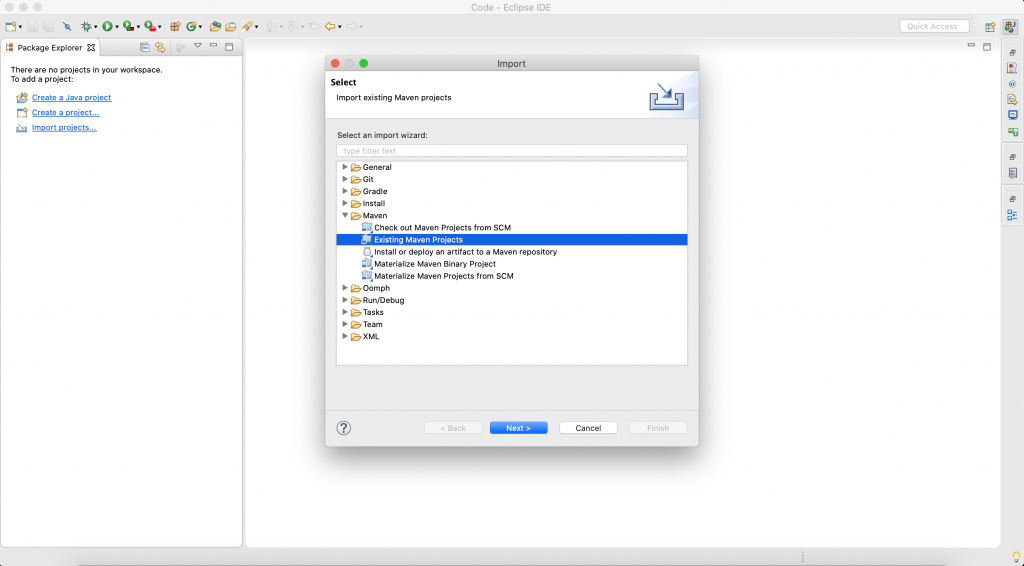
Figure 2. Create an Eclipse project
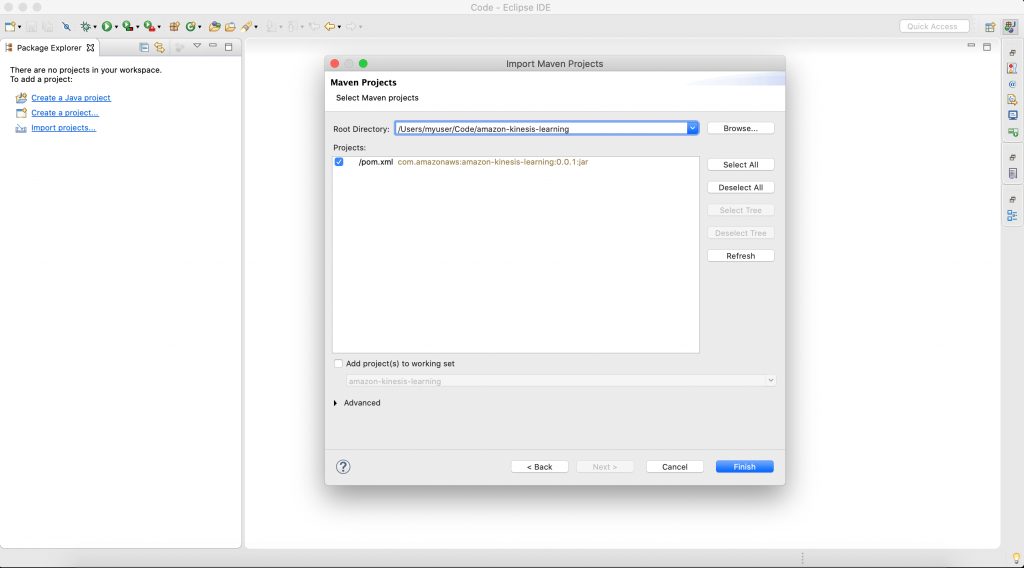
Figure 3. Select the folder for your project
Select Browse, and navigate to the downloaded source code folder location. The IDE will automatically detect maven pom.xml.
Select Finish to complete the import. IDE will take 2–3 minutes to download all libraries to complete setup stock trader project.
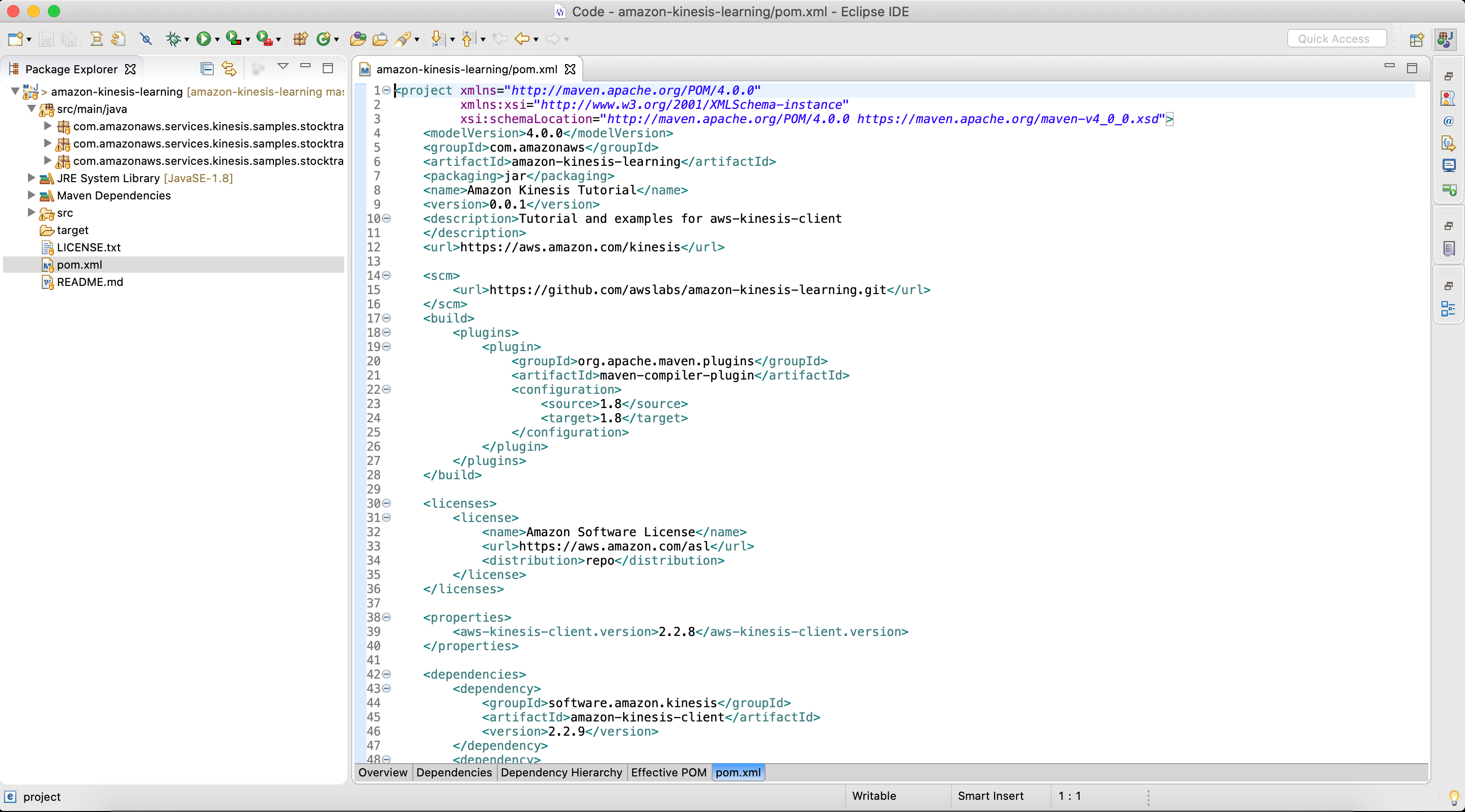
Figure 4. Final view of pom.xl file after setup is complete
<project xmlns="http://maven.apache.org/POM/4.0.0"
         xmlns:xsi="http://www.w3.org/2001/XMLSchema-instance"
         xsi:schemaLocation="http://maven.apache.org/POM/4.0.0 https://maven.apache.org/maven-v4_0_0.xsd">
    <modelVersion>4.0.0</modelVersion>
    <groupId>com.amazonaws</groupId>
    <artifactId>amazon-kinesis-learning</artifactId>
    <packaging>jar</packaging>
    <name>Amazon Kinesis Tutorial</name>
    <version>0.0.1</version>
    <description>Tutorial and examples for aws-kinesis-client
    </description>
    <url>https://aws.amazon.com/kinesis</url>

    <scm>
        <url>https://github.com/awslabs/amazon-kinesis-learning.git</url>
    </scm>

    <licenses>
        <license>
            <name>Amazon Software License</name>
            <url>https://aws.amazon.com/asl</url>
            <distribution>repo</distribution>
        </license>
    </licenses>

    <properties>
        <aws-kinesis-client.version>2.3.4</aws-kinesis-client.version>
    </properties>

    <dependencies>
        <dependency>
            <groupId>software.amazon.kinesis</groupId>
            <artifactId>amazon-kinesis-client</artifactId>
            <version>2.3.4</version>
        </dependency>
        <dependency>
            <groupId>commons-logging</groupId>
            <artifactId>commons-logging</artifactId>
            <version>1.2</version>
        </dependency>
		<dependency>
		    <groupId>software.amazon.awssdk</groupId>
		    <artifactId>sts</artifactId>
		    <version>2.16.74</version>
		</dependency>
		<dependency>
       <groupId>org.slf4j</groupId>
       <artifactId>slf4j-simple</artifactId>
       <version>1.7.25</version>
   </dependency>
    </dependencies>

 	<build>
        <finalName>amazon-kinesis-learning</finalName>
        <plugins>

            <plugin>
                <groupId>org.apache.maven.plugins</groupId>
                <artifactId>maven-compiler-plugin</artifactId>
                <version>3.6.1</version>
                <configuration>
                    <source>1.8</source>
                    <target>1.8</target>
                </configuration>
            </plugin>

            <plugin>
                <groupId>org.apache.maven.plugins</groupId>
                <artifactId>maven-assembly-plugin</artifactId>
                <version>3.1.1</version>

                <configuration>
                    <descriptorRefs>
                        <descriptorRef>jar-with-dependencies</descriptorRef>
                    </descriptorRefs>
                </configuration>

                <executions>
                    <execution>
                        <id>make-assembly</id>
                        <phase>package</phase>
                        <goals>
                            <goal>single</goal>
                        </goals>
                    </execution>
                </executions>

            </plugin>
        </plugins>
    </build>


</project>The updated code for the StockTradesProcessor.java class is shown as follows. The changes made to the class to enable cross-account access are highlighted in bold.
package com.amazonaws.services.kinesis.samples.stocktrades.processor;

import java.util.UUID;
import java.util.logging.Level;
import java.util.logging.Logger;

import org.apache.commons.logging.Log;
import org.apache.commons.logging.LogFactory;

import software.amazon.awssdk.auth.credentials.AwsCredentialsProvider;
import software.amazon.awssdk.regions.Region;
import software.amazon.awssdk.services.dynamodb.DynamoDbAsyncClient;
import software.amazon.awssdk.services.cloudwatch.CloudWatchAsyncClient;
import software.amazon.awssdk.services.kinesis.KinesisAsyncClient;
import software.amazon.awssdk.services.sts.StsClient; import software.amazon.awssdk.services.sts.auth.StsAssumeRoleCredentialsProvider; import software.amazon.awssdk.services.sts.model.AssumeRoleRequest;
import software.amazon.kinesis.common.ConfigsBuilder;
import software.amazon.kinesis.common.KinesisClientUtil;
import software.amazon.kinesis.coordinator.Scheduler;

/**
 * Uses the Kinesis Client Library (KCL) 2.2.9 to continuously consume and process stock trade
 * records from the stock trades stream. KCL monitors the number of shards and creates
 * record processor instances to read and process records from each shard. KCL also
 * load balances shards across all the instances of this processor.
 *
 */
public class StockTradesProcessor {

    private static final Log LOG = LogFactory.getLog(StockTradesProcessor.class);

    private static final Logger ROOT_LOGGER = Logger.getLogger("");
    private static final Logger PROCESSOR_LOGGER =
            Logger.getLogger("com.amazonaws.services.kinesis.samples.stocktrades.processor.StockTradeRecordProcessor");

    private static void checkUsage(String[] args) {
        if (args.length != 5) {
            System.err.println("Usage: " + StockTradesProcessor.class.getSimpleName()
                    + " <application name> <stream name> <region> <role arn> <role session name>");
            System.exit(1);
        }
    }

    /**
     * Sets the global log level to WARNING and the log level for this package to INFO,
     * so that we only see INFO messages for this processor. This is just for the purpose
     * of this tutorial, and should not be considered as best practice.
     *
     */
    private static void setLogLevels() {
        ROOT_LOGGER.setLevel(Level.WARNING);
        // Set this to INFO for logging at INFO level. Suppressed for this example as it can be noisy.
        PROCESSOR_LOGGER.setLevel(Level.WARNING);
    }

    private static AwsCredentialsProvider roleCredentialsProvider(String roleArn, String roleSessionName, Region region) { AssumeRoleRequest assumeRoleRequest = AssumeRoleRequest.builder() .roleArn(roleArn) .roleSessionName(roleSessionName) .durationSeconds(900) .build(); LOG.warn("Initializing assume role request session: " + assumeRoleRequest.roleSessionName()); StsClient stsClient = StsClient.builder().region(region).build(); StsAssumeRoleCredentialsProvider stsAssumeRoleCredentialsProvider = StsAssumeRoleCredentialsProvider .builder() .stsClient(stsClient) .refreshRequest(assumeRoleRequest) .asyncCredentialUpdateEnabled(true) .build(); LOG.warn("Initializing sts role credential provider: " + stsAssumeRoleCredentialsProvider.prefetchTime().toString()); return stsAssumeRoleCredentialsProvider; }

    public static void main(String[] args) throws Exception {
        checkUsage(args);

        setLogLevels();

        String applicationName = args[0];
        String streamName = args[1];
        Region region = Region.of(args[2]);
        String roleArn = args[3]; String roleSessionName = args[4];

        if (region == null) {
            System.err.println(args[2] + " is not a valid AWS region.");
            System.exit(1);
        }

        AwsCredentialsProvider awsCredentialsProvider = roleCredentialsProvider(roleArn,roleSessionName, region); KinesisAsyncClient kinesisClient = KinesisClientUtil.createKinesisAsyncClient(KinesisAsyncClient.builder().region(region).credentialsProvider(awsCredentialsProvider));
        DynamoDbAsyncClient dynamoClient = DynamoDbAsyncClient.builder().region(region).build();
        CloudWatchAsyncClient cloudWatchClient = CloudWatchAsyncClient.builder().region(region).build();
        StockTradeRecordProcessorFactory shardRecordProcessor = new StockTradeRecordProcessorFactory();
        ConfigsBuilder configsBuilder = new ConfigsBuilder(streamName, applicationName, kinesisClient, dynamoClient, cloudWatchClient, UUID.randomUUID().toString(), shardRecordProcessor);

        Scheduler scheduler = new Scheduler(
                configsBuilder.checkpointConfig(),
                configsBuilder.coordinatorConfig(),
                configsBuilder.leaseManagementConfig(),
                configsBuilder.lifecycleConfig(),
                configsBuilder.metricsConfig(),
                configsBuilder.processorConfig(),
                configsBuilder.retrievalConfig()
        );
        int exitCode = 0;
        try {
            scheduler.run();
        } catch (Throwable t) {
            LOG.error("Caught throwable while processing data.", t);
            exitCode = 1;
        }
        System.exit(exitCode);

    }

}
Let’s review the changes made to the code to understand the key parts of how the cross-account access works.
AssumeRoleRequest assumeRoleRequest = AssumeRoleRequest.builder() .roleArn(roleArn) .roleSessionName(roleSessionName) .durationSeconds(900) .build();AssumeRoleRequest class is used to get the credentials to access the Kinesis data stream in Account A using the role that was created. The value of the variable assumeRoleRequest is passed to the StsAssumeRoleCredentialsProvider.
StsClient stsClient = StsClient.builder().region(region).build();StsAssumeRoleCredentialsProvider stsAssumeRoleCredentialsProvider = StsAssumeRoleCredentialsProvider .builder() .stsClient(stsClient) .refreshRequest(assumeRoleRequest) .asyncCredentialUpdateEnabled(true) .build();StsAssumeRoleCredentialsProvider periodically sends an AssumeRoleRequest to the AWS STS to maintain short-lived sessions to use for authentication. Using refreshRequest, these sessions are updated asynchronously in the background as they get close to expiring. As asynchronous refresh is not set by default, we explicitly set it to true using asyncCredentialUpdateEnabled.
AwsCredentialsProvider awsCredentialsProvider = roleCredentialsProvider(roleArn,roleSessionName, region);KinesisAsyncClient kinesisClient = KinesisClientUtil.createKinesisAsyncClient(KinesisAsyncClient.builder().region(region).credentialsProvider(awsCredentialsProvider));
In this section we will show you how to configure a KCL application written in Python to access a cross-account Kinesis data stream.
A. Steps 1 and 2 from earlier remain the same and will need to be completed before moving ahead. After the IAM roles and policies have been created, log into the EC2 instance and clone the amazon-kinesis-client-python repository using the following command.
git clone https://github.com/awslabs/amazon-kinesis-client-python.git
B. Navigate to the amazon-kinesis-client-python directory and run the following commands.
sudo yum install python-pip
sudo pip install virtualenv
virtualenv /tmp/kclpy-sample-env
source /tmp/kclpy-sample/env/bin/activate
pip install amazon_kclpy
C. Next, navigate to amazon-kinesis-client-python/samples and open the sample.properties file. The properties file has properties such as streamName, application name, and credential information that lets you customize the configuration for your use case.
D. We will modify the properties file to change the stream name and application name, and to add the credentials to enable access to a Kinesis data stream in a different account. You can replace the sample.properties file and replace with the following snippet. The bolded sections show the changes we have made.
# The script that abides by the multi-language protocol. This script will
# be executed by the MultiLangDaemon, which will communicate with this script
# over STDIN and STDOUT according to the multi-language protocol.
executableName = sample_kclpy_app.py
# The name of an Amazon Kinesis stream to process.
streamName = StockTradeStream
# Used by the KCL as the name of this application. Will be used as the name
# of an Amazon DynamoDB table which will store the lease and checkpoint
# information for workers with this application name
applicationName = StockTradesProcessor
# Users can change the credentials provider the KCL will use to retrieve credentials.
# The DefaultAWSCredentialsProviderChain checks several other providers, which is
# described here:
# http://docs.aws.amazon.com/AWSJavaSDK/latest/javadoc/com/amazonaws/auth/DefaultAWSCredentialsProviderChain.html
#AWSCredentialsProvider = DefaultAWSCredentialsProviderChain
AWSCredentialsProvider = STSAssumeRoleSessionCredentialsProvider|arn:aws:iam::Account-A-AccountNumber:role/kds-stock-trade-stream-role|kinesiscrossaccount
AWSCredentialsProviderDynamoDB = DefaultAWSCredentialsProviderChain
AWSCredentialsProviderCloudWatch = DefaultAWSCredentialsProviderChain
# Appended to the user agent of the KCL. Does not impact the functionality of the
# KCL in any other way.
processingLanguage = python/2.7
# Valid options at TRIM_HORIZON or LATEST.
# See http://docs.aws.amazon.com/kinesis/latest/APIReference/API_GetShardIterator.html#API_GetShardIterator_RequestSyntax
initialPositionInStream = LATEST
# The following properties are also available for configuring the KCL Worker that is created
# by the MultiLangDaemon.
# The KCL defaults to us-east-1
#regionName = us-east-1
In the above step, you will have to replace Account-A-AccountNumber with the AWS account number of the account that has the kinesis stream.
We use the STSAssumeRoleSessionCredentialsProvider class and pass to it the role created in Account A which have permissions to access the Kinesis data stream. This gives the KCL application in Account B permissions to read the Kinesis data stream in Account A. The DynamoDB lease table and the CloudWatch metrics are in Account B. Hence, we can use the DefaultAWSCredentialsProviderChain for AWSCredentialsProviderDynamoDB and AWSCredentialsProviderCloudWatch in the properties file. You can now save the sample.properties file.
E. Next, we will change the application code to print the data read from the Kinesis data stream to standard output (STDOUT). Edit the sample_kclpy_app.py under the samples directory. You will add all your application code logic in the process_record method. This method is called for every record in the Kinesis data stream. For this blog post, we will add a single line to the method to print the records to STDOUT, as shown in Figure 5.
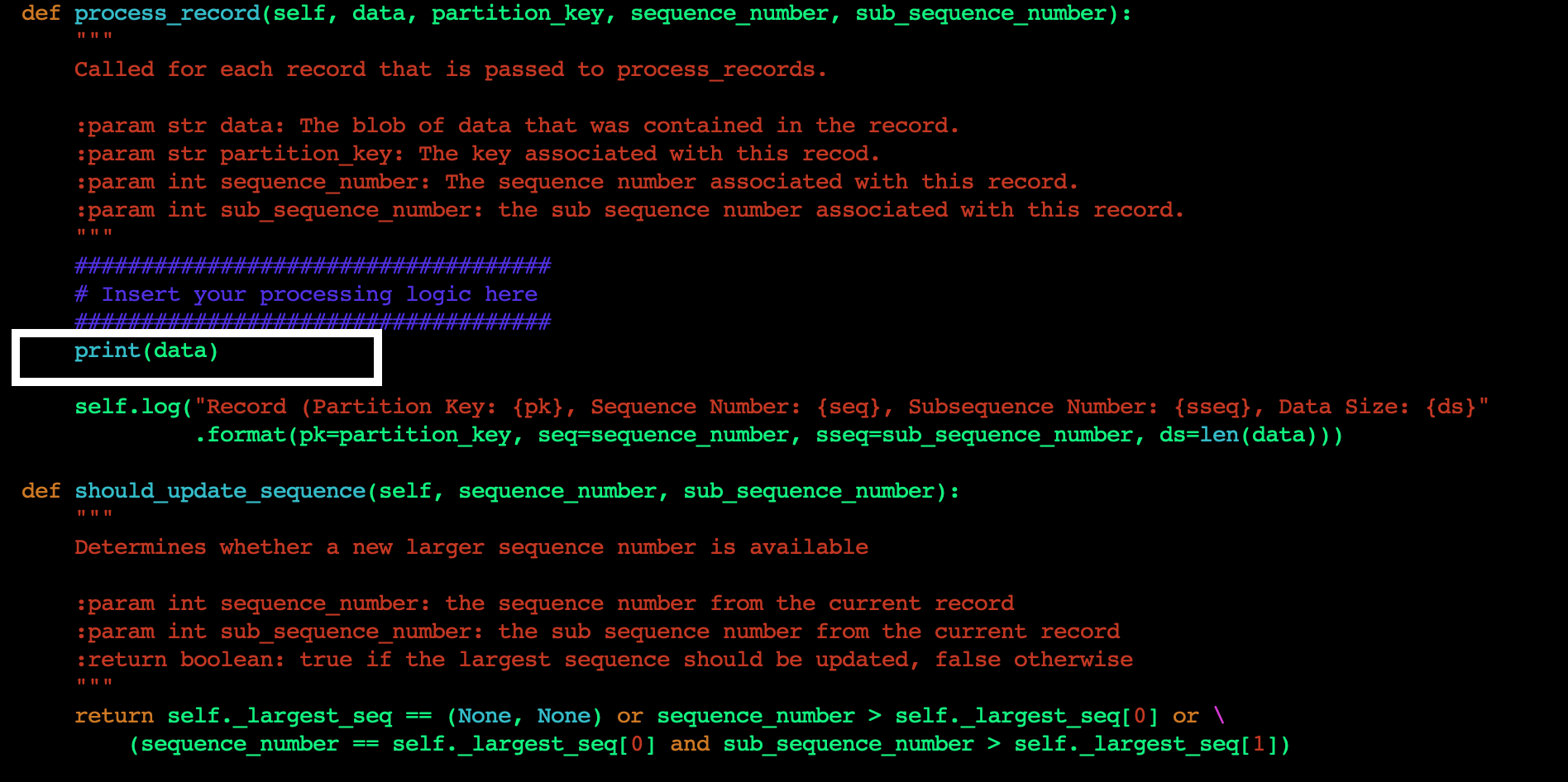
Figure 5. Add custom code to process_record method
F. Save the file, and run the following command to build the project with the changes you just made.
cd amazon-kinesis-client-python/
python setup.py install
G. Now you are ready to run the application. To start the KCL application, run the following command from the amazon-kinesis-client-python directory.
`amazon_kclpy_helper.py --print_command --java /usr/bin/java --properties samples/sample.properties`This will start the application. Your application is now ready to read the data from the Kinesis data stream in another account and display the contents of the stream on STDOUT. When the producer starts writing data to the Kinesis data stream in Account A, you will start seeing those results being printed.
Once you are done testing the cross-account access make sure you clean up your environment to avoid incurring cost. As part of the cleanup we recommend you delete the Kinesis data stream, StockTradeStream, the EC2 instances that the KCL application is running on, and the DynamoDB table that was created by the KCL application.
In this blog post, we discussed the techniques to configure your KCL applications written in Java and Python to access a Kinesis data stream in a different AWS account. We also provided sample code and configurations which you can modify and use in your application code to set up the cross-account access. Now you can continue to build a multi-account strategy on AWS, while being able to easily access your Kinesis data streams from applications in multiple AWS accounts.
Post Syndicated from Schneier.com Webmaster original https://www.schneier.com/blog/archives/2021/09/upcoming-speaking-engagements-12.html
This is a current list of where and when I am scheduled to speak:
The list is maintained on this page.
Post Syndicated from Crosstalk Solutions original https://www.youtube.com/watch?v=W4KeGYTgXY8
Post Syndicated from Molly Clancy original https://backblaze.com/blog/multi-cloud-strategy-architecture-guide/
Cloud technology has revolutionized IT operations over the past decade and a half. According to the Flexera 2024 State of the Cloud Report, 89% of respondents reported having a multi-cloud strategy in 2024, up slightly from 87% in 2023. Businesses are steadily relying on multi-cloud environments to enhance flexibility, optimize costs, and keep up with hardware improvements.
A multi-cloud approach leverages the strengths of multiple cloud providers to meet diverse business needs. Rather than relying on a single cloud provider or on-premises infrastructure, organizations distribute workloads across various platforms.
For those not yet utilizing a multi-cloud strategy or seeking to maximize their current approach, this guide explains the essentials of multi-cloud architecture. It covers the benefits of a multi-cloud environment, how to implement it effectively, and critical considerations to keep in mind for a successful deployment.
The shift to multi-cloud infrastructure over the past decade and a half can be traced to two trends in the cloud computing landscape. First, AWS, Google, and Microsoft—otherwise known as the “Big Three” and sometimes called hyperscalers—are no longer the only options for IT departments looking to move to the cloud. Since AWS launched in 2006, specialized infrastructure as a service (IaaS) providers, such as CoreWeave, DigitalOcean, and, well, us, have emerged to challenge the Big Three, giving companies more options for cloud deployments. Many challengers focus on specialized cloud functions—CoreWeave, for example, is a primarily GPU provider, though it also has its own storage cloud—who enhance their core functionality with partnerships. (What we like to call the open cloud.)
Second, many companies spent the decade after AWS’s launch making the transition from on-premises to the cloud, and dealing with complicated and expensive hyperscaler pricing structures that were the only option at the time. Now, new companies are built to be cloud native and existing companies are poised to optimize their cloud deployments. They’ve crossed the hurdle of moving or connecting on-premises infrastructure to the cloud and can focus on how to architect their cloud environments to maximize the advantages of multi-cloud.
Nearly every software as a service (SaaS) platform is hosted in the cloud. So, if your company uses a tool like Microsoft 365 for Business or Google Workspace along with any other cloud service or platform, you’re technically operating in a multi-cloud environment. But, using more than one SaaS platform does not constitute a true multi-cloud strategy.
In the cloud services industry, when we talk about “multi-cloud,” we’re referring to the use of multiple public cloud platforms to build your company’s infrastructure. This includes all aspects of your tech stack such as storage, networking, computing power, and more.
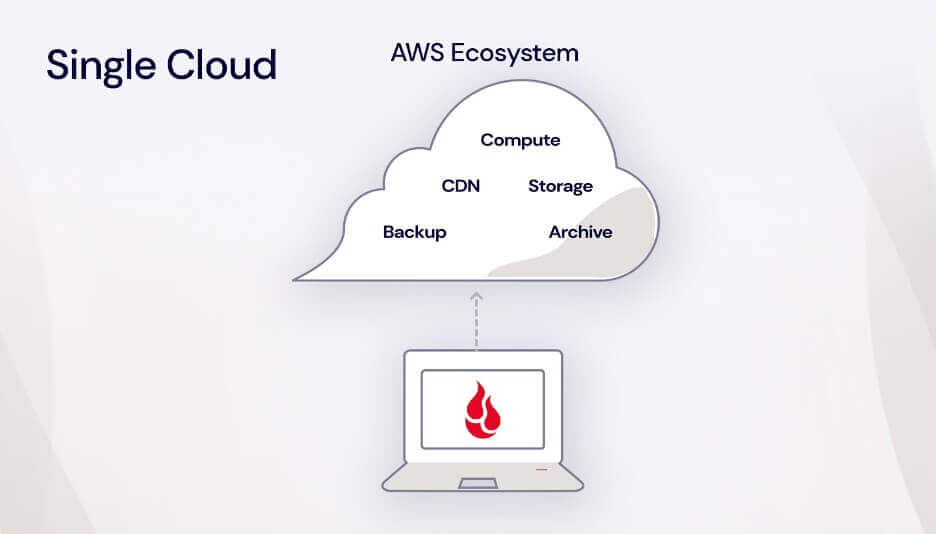
Essentially, it means not putting all your eggs in one basket (or in one cloud provider like AWS, Google, or even on-premises infrastructure), but instead leveraging the strengths of different cloud providers to meet your specific needs.
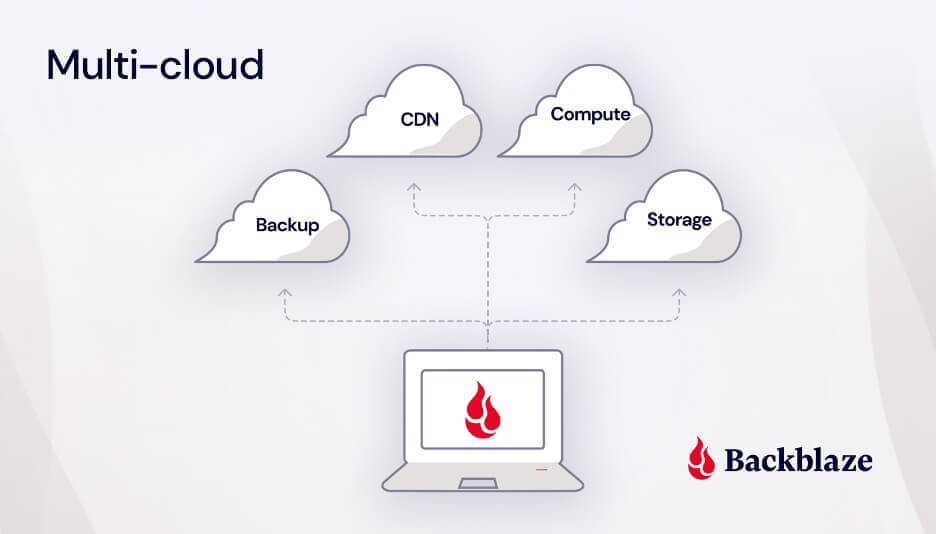
To be more precise, multi-cloud refers to the use of more than one public cloud platform. This strategy allows businesses to leverage the unique strengths and services of different providers, optimizing for performance and cost.
On the other hand, a hybrid cloud combines a private cloud with a public cloud. A private cloud is typically hosted on-premises, but it can also be hosted in a colocation data center. The key difference between private and public clouds is that a private cloud’s infrastructure, hardware, and software are maintained and used exclusively by your business.
Things can get even more interesting when a company uses a private cloud along with multiple public clouds. This approach, known as a hybrid multi-cloud strategy, maximizes flexibility and resilience, though it can be complex to manage.
The International Data Corporation (IDC) is forecasting cloud infrastructure spending to jump to $129.9 billion in 2024. That’s up almost 20% compared to 2023.
As multi-cloud deployments have become integral to operations, IT teams have incorporated them into an overall enterprise cloud strategy. And, as multi-cloud infrastructure has become more common, leading tools like Veeam, Commvault, Kubernetes, iconik, and rclone have been built to integrate with specific storage targets and complex storage infrastructure.
So, how do you actually use a multi-cloud strategy, and what is a multi-cloud strategy good for? Multi-cloud has a number of compelling use cases and rationales, including:
One of the key advantages of a multi-cloud environment is enhanced disaster recovery through redundancy. By leveraging multiple cloud providers, IT departments can easily implement the modern 3-2-1 backup strategy: three copies of data, stored on two different types of media, with one copy stored off-site or in the cloud. As cloud services have advanced, the primacy of on-premises backups has diminished, with data recovery from the cloud now almost as fast as from on-premises infrastructure and protected by regional separation in case of natural disaster.
Similarly, some cloud-native companies utilize multiple cloud providers to host mirrored copies of their active production data. If one of their public clouds suffers an outage, they have mechanisms in place to direct their applications to failover to a second public cloud.
E-commerce company, Big Cartel, pursued this strategy after AWS suffered a number of outages in past years that gave Big Cartel cause for concern. They host more than one million websites on behalf of their clients, and an outage would take them all down. “Having a single storage provider was a single point of failure that we grew less and less comfortable with over time,” Big Cartel Technical Director, Lee Jensen, acknowledged. Now, their data is stored in two public clouds—Amazon S3 and Backblaze B2 Cloud Storage. Their content delivery network (CDN), Fastly, preferentially pulls data from Backblaze B2 with Amazon S3 as failover.

Challenger companies can offer incentives that compete with the Big Three and pricing structures that suit specialized data use cases. For example, some cloud providers offer free egress but put limits on how much data can be downloaded, while others charge nominal egress fees, but don’t cap downloads. Or, you might see things like minimum storage duration fees, which means that you get charged for your data being stored even after deletion. Savvy companies employ multiple clouds for different types of data depending on how much data they have and how often it needs to be accessed.
simmer.io, a community site that makes sharing Unity WebGL games easy for indie game developers, would get hit with egress spikes from Amazon S3 whenever one of their hosted games went viral. The fees turned their success into a growth inhibitor. simmer.io mirrored their data to Backblaze B2 Cloud Storage and reduced egress to $0 as a result of the partnership between Backblaze and Cloudflare. They can grow their site without having to worry about increasing egress costs over time or usage spikes when games go viral, and they doubled redundancy in the process.
Many companies initially adopted one of the Big Three because they were the only game in town, but later felt restricted by their closed systems. Companies like Amazon and Google don’t play nice with each other and both seek to lock customers in with proprietary services. Adopting a multi-cloud infrastructure with interoperable providers gives these companies more negotiating power and control over their cloud deployments.
For example, Gideo, a connected TV app platform, initially used an all-in-one cloud provider for compute, storage, and content delivery, but felt they had no leverage to reduce their bills or improve the service they were receiving. They adopted a multi-cloud approach, building a tech stack with a mix of unconflicted partners where they no longer feel beholden to one provider.
Many countries, including those in the European Union (EU), have enacted stringent laws regulating where and how data can be stored, often referred to as data sovereignty or data residency requirements. These regulations ensure that sensitive data remains within specific geographical boundaries to protect privacy and maintain national security.
For companies subject to these data residency standards, employing a multi-cloud approach is a strategic way to meet regulatory requirements. By using multiple public cloud providers with diverse geographic footprints, organizations can store data in the required regions. This approach not only ensures compliance with local laws but also enhances data security and accessibility.
Organizations may use different cloud providers to access specialized or complimentary services. For example, a company may use a public cloud like DigitalOcean or Vultr for access to compute resources or bare metal servers, but store their data with a different, interoperable public cloud that specializes in storage (aka Backblaze!). Or, a company may use a cloud storage provider in combination with a cloud CDN to distribute content faster to end users.
No matter the use case or rationale, companies achieve a number of advantages from deploying a multi-cloud infrastructure, including:
The advantages of a multi-cloud system have attracted an increasing number of companies, but it’s not without challenges. According to a 2024 IDC Tracker, managing costs is complex due to different pricing models and billing structures across cloud providers, necessitating real-time cost monitoring and predictive analytics from any cloud integration. Additionally, Gartner highlights the shortage of skilled professionals to manage multi-cloud environments, requiring continuous upskilling and training investments. Basically, a good IT team is worth its weight in… cloud storage savings.
Despite these challenges plus performance management, security concerns, compliance requirements, and others, multi-cloud strategies offer improved flexibility and resilience, making them a valuable approach for medium to large enterprises.
As you plan your multi-cloud strategy, keep the following considerations in mind:
There are likely as many ways to deploy a multi-cloud strategy as there are companies using a multi-cloud strategy. But, they generally fall into two broader categories—redundant or distributed.
In a redundant deployment, data is mirrored in more than one cloud environment, for example, for failover or disaster recovery. Companies that use a multi-cloud approach rather than a hybrid approach to store backup data are using a redundant multi-cloud deployment strategy. Most IT teams looking to use a multi-cloud approach to back up company data or environments will fall into this category.
A distributed deployment model more often applies to software development teams. In a distributed deployment, different workloads, or different components of the same application are spread across multiple cloud computing environments based on the best fit. For example, a DevOps team might host their compute infrastructure in one public cloud and storage in another.
Your business requirements will dictate which type of deployment you should use. Knowing your deployment approach from the outset can help you pick providers with the right mix of services and billing structures for your multi-cloud strategy.
Managing costs in a multi-cloud environment is a challenge that every company faces. Effective cost management requires robust monitoring tools to track cloud utilization and spending, providing visibility into usage and identifying areas for optimization. Choosing cloud providers with straightforward, transparent pricing is essential to avoid unexpected costs and simplify budgeting.
Security risks increase as your cloud environment becomes more complex. There are more attack targets, and you’ll want to plan security measures accordingly. To take advantage of multi-cloud benefits while reducing risk, follow multi-cloud security best practices:
As cloud adoption grows across your company, you’ll need to have clear protocols for how your infrastructure is managed. Consider creating standard operating procedures for cloud platform management and provisioning to avoid shadow IT proliferation, where teams may adopt tools (in the cloud or not) that IT has not approved and isn’t managing. And, set up policies for centralized security monitoring.
If you’re ready to go multi-cloud, you’re probably wondering how to get your data from your on-premises infrastructure to the cloud or from one cloud to another. After choosing a provider that fits your needs, you can start planning your data migration. There are a range of tools for moving your data, but when it comes to moving between cloud services, a tool like our Universal Data Migration can help make things a lot easier and faster.
Backblaze B2 enhances versatile and secure backup solutions with features like Object Lock for immutable data storage and 3x free egress for when you need to recover data. In partnership with backup solutions like Veeam and disaster recovery services like Cloud Instant Backup Recovery, businesses can utilize Backblaze in a multi-cloud architecture to ensure continuous operation during ransomware attacks, hardware failures, or even force majeure. Backblaze also integrates into your multi-cloud tech stack so you can build applications and safeguard datasets on S3 compatible cloud object infrastructure with connected compute and integrated CDNs.
Have any more questions about multi-cloud or cloud migration? Let us know in the comments.
Multi-cloud storage is a term for the use of multiple cloud providers within one organization. For example, if your organization uses one cloud storage provider for sensitive medical documents to comply with HIPAA and another cloud storage provider for non-sensitive day-to-day documents, you’re using multi-cloud storage.
Multi-cloud refers to the process of using multiple clouds within the same cloud storage system. Hybrid cloud, on the other hand, refers to using two different kinds of cloud storage systems—private clouds and public clouds. They are both options that can be incredibly beneficial for many people and organizations, but they’re different methods of approaching cloud storage.
Multi-cloud is a common cloud storage strategy, and most organizations should consider its value for their operations. Multi-cloud has a number of compelling use cases and rationales, including disaster recovery, failover, cost optimization, avoiding vendor lock-in, data sovereignty, and access to specialized services.
Multi-cloud storage strategies offer many benefits depending on how you employ them. They provide more flexibility to meet or exceed regulatory and compliance requirements depending on your industry. They provide greater resilience and protection for your backup and recovery systems. And they provide you with greater flexibility to find the storage solutions that work best for your operations and your budget. Adding cloud providers can increase complexity in billing and administration, but properly managed, it provides your business the ability to better protect and use your data.
The post Multi-Cloud Architecture Guide appeared first on Backblaze Blog | Cloud Storage & Cloud Backup
Post Syndicated from Dan MacKay original https://aws.amazon.com/blogs/security/disaster-recovery-compliance-in-the-cloud-part-2-a-structured-approach/
Compliance in the cloud is fraught with myths and misconceptions. This is particularly true when it comes to something as broad as disaster recovery (DR) compliance where the requirements are rarely prescriptive and often based on legacy risk-mitigation techniques that don’t account for the exceptional resilience of modern cloud-based architectures. For regulated entities subject to principles-based supervision such as many financial institutions (FIs), the responsibility lies with the FI to determine what’s necessary to adequately recover from a disaster event. Without clear instructions, FIs are susceptible to making incorrect assumptions regarding their compliance requirements for DR.
In Part 1 of this two-part series, I provided some examples of common misconceptions FIs have about compliance requirements for disaster recovery in the cloud. In Part 2, I outline five steps you can take to avoid these misconceptions when architecting DR-compliant workloads for deployment on Amazon Web Services (AWS).
It’s common for FIs to have a portfolio of workloads they are considering deploying to the cloud and often want to know that they can be compliant across the board. But compliance isn’t a one-size-fits-all domain—it’s based on the characteristics of each workload. For example, does the workload contain personally identifiable information (PII)? Will it be used to store, process, or transmit credit card information? Compliance is dependent on the answers to questions such as these and must be assessed on a case-by-case basis. Therefore, the first step in architecting for compliance is to identify the specific workloads you plan to deploy to the cloud. This way, you can assess the requirements of these specific workloads and not be distracted by aspects of compliance that might not be relevant.
Resiliency is the ability of a workload to recover from infrastructure or service disruptions. DR is an important part of your resiliency strategy and concerns how your workload responds to a disaster event. DR strategies on AWS range from simple, low cost options such as backup and restore, to more complex options such as multi-site active-active, as shown in Figure 1.
For more information, I encourage you to read Seth Eliot’s blog series on DR Architecture on AWS as well as the AWS whitepaper Disaster Recovery of Workloads on AWS: Recovery in the Cloud.
The DR strategy you choose for a particular workload is dependent on your organization’s requirements for avoiding loss of data—known as the recovery point objective (RPO)—and reducing downtime where the workload isn’t available —known as the recovery time objective (RTO). RPO and RTO are key factors for determining the minimum architectural specifications necessary to meet the workload’s resiliency requirements. For example, can the workload’s RPO and RTO be achieved using a multi-AZ architecture in a single AWS Region, or do the resiliency requirements necessitate deploying the workload across multiple AWS Regions? Even if your workload is not subject to explicit compliance requirements for resiliency, understanding these requirements is necessary for assessing other aspects of DR compliance, including data residency and geodiversity.
As I mentioned in Part 1, data residency requirements might restrict which AWS Region or Regions you can deploy your workload to. Therefore, you need to confirm whether the workload is subject to any data residency requirements within applicable laws and regulations, corporate policies, or contractual obligations.
In order to properly assess these requirements, you must review the explicit language of the requirements so as to understand the specific constraints they impose. You should also consult legal, privacy, and compliance subject-matter specialists to help you interpret these requirements based on the characteristics of the workload. For example, do the requirements specifically state that the data cannot leave the country, or can the requirement be met so long as the data can be accessed from that country? Does the requirement restrict you from storing a copy of the data in another country—for example, for backup and recovery purposes? What if the data is encrypted and can only be read using decryption keys kept within the home country? Consulting subject-matter specialists to help interpret these requirements can help you avoid making overly restrictive assumptions and imposing unnecessary constraints on the workload’s architecture.
A single Region, multiple-AZ architecture is often sufficient to meet a workload’s resiliency requirements. However, if the workload is subject to geodiversity requirements, the distance between the AZs in an AWS Region might not conform to the minimum distance between individual data centers specified by the requirements. Therefore, it’s critical to confirm whether any geodiversity requirements apply to the workload.
Like data residency, it’s important to assess the explicit language of geodiversity requirements. Are they written down in a regulation or corporate policy, or are they just a recommended practice? Can the requirements be met if the workload is deployed across three or more AZs even if the minimum distance between those AZs is less than the specified minimum distance between the primary and backup data centers? If it’s a corporate policy, does it allow for exceptions if an alternative method provides equal or greater resiliency than asynchronous replication between two geographically distant data centers? Or perhaps the corporate policy is outdated and should be revised to reflect modern risk mitigation techniques. Understanding these parameters can help you avoid unnecessary constraints as you assess architectural options for your workloads.
Now that you understand the workload’s requirements for resiliency, data residency, and geodiversity, you can assess the architectural options that meet these requirements in the cloud.
As per AWS Well-Architected best practices, you should strive for the simplest architecture necessary to meet your requirements. This includes assessing whether the workload can be accommodated within a single AWS Region. If the workload is constrained by explicit geographic diversity requirements or has resiliency requirements that cannot be accommodated by a single AWS Region, then you might need to architect the workload for deployment across multiple AWS Regions. If the workload is also constrained by explicit data residency requirements, then it might not be possible to deploy to multiple AWS Regions. In cases such as these, you can work with our AWS Solution Architects to assess hybrid options that might meet your compliance requirements, such as using AWS Outposts, Amazon Elastic Container Service (Amazon ECS) Anywhere, or Amazon Elastic Kubernetes Service (Amazon EKS) Anywhere. Another option may be to consider a DR solution in which your on-premises infrastructure is used as a backup for a workload running on AWS. In some cases, this might be a long-term solution. In others, it might be an interim solution until certain constraints can be removed—for example, a change to corporate policy or the introduction of additional AWS Regions in a particular country.
Let’s recap by summarizing some guiding principles for architecting compliant DR workloads as outlined in this two-part series:
If you have feedback about this post, submit comments in the Comments section below.
Want more AWS Security how-to content, news, and feature announcements? Follow us on Twitter.
Post Syndicated from Dan MacKay original https://aws.amazon.com/blogs/security/disaster-recovery-compliance-in-the-cloud-part-1-common-misconceptions/
Compliance in the cloud can seem challenging, especially for organizations in heavily regulated sectors such as financial services. Regulated financial institutions (FIs) must comply with laws and regulations (often in multiple jurisdictions), global security standards, their own corporate policies, and even contractual obligations with their customers and counterparties. These various compliance requirements may impose constraints on how their workloads can be architected for the cloud, and may require interpretation on what FIs must do in order to be compliant. It’s common for FIs to make assumptions regarding their compliance requirements, which can result in unnecessary costs and increased complexity, and might not align with their strategic objectives. A modern, rationalized approach to compliance can help FIs avoid imposing unnecessary constraints while meeting their mandatory requirements.
In my role as an Amazon Web Services (AWS) Compliance Specialist, I work with our financial services customers to identify, assess, and determine solutions to address their compliance requirements as they move to the cloud. One of the most common challenges customers ask me about is how to comply with disaster recovery (DR) requirements for workloads they plan to run in the cloud. In this blog post, I share some of the typical misconceptions FIs have about DR compliance in the cloud. In Part 2, I outline a structured approach to designing compliant architectures for your DR workloads. As my primary market is Canada, the examples in this blog post largely pertain to FIs operating in Canada, but the principles and best practices are relevant to regulated organizations in any country.
Compliance requirements are sometimes prescriptive: “if X, then you must do Y.” When requirements are prescriptive, it’s usually clear what you must do in order to be compliant. For example, the Payment Card Industry Data Security Standard (PCI DSS) requirement 8.2.4 obliges companies that process, store, or transmit credit card information to “change user passwords/passphrases at least once every 90 days.” But in the financial services sector, compliance requirements for managing operational risks can be subjective. When regulators take what is known as a principles-based approach to setting regulatory expectations, each FI is required to assess their specific risks and determine the mitigating controls necessary to conform with the organization’s tolerance for operational risk. Because the rules aren’t prescriptive, there is no “checklist for achieving compliance.” Instead, principles-based requirements are guidelines that FIs are expected to consider as they design and implement technology solutions. They are, by definition, subject to interpretation and can be prone to myths and misconceptions among FIs and their service providers. To illustrate this, let’s look at two aspects of DR that are frequently misunderstood within the Canadian financial services industry: data residency and geodiversity.
Data residency or data localization is a requirement for specific data-sets processed and stored in an IT system to remain within a specific jurisdiction (for example, a country). As discussed in our Policy Perspectives whitepaper, contrary to historical perspectives, data residency doesn’t provide better security. Most cyber-attacks are perpetrated remotely and attackers aren’t deterred by the physical location of their victims. In fact, data residency can run counter to an organization’s objectives for security and resilience. For example, data residency requirements can limit the options our customers have when choosing the AWS Region or Regions in which to run their production workloads. This is especially challenging for customers who want to use multiple Regions for backup and recovery purposes.
It’s common for FIs operating in Canada to assume that they’re required to keep their data—particularly customer data—in Canada. In reality, there’s very little from a statutory perspective that imposes such a constraint. None of the private sector privacy laws include data residency requirements, nor do any of the financial services regulatory guidelines. There are some place of records requirements in Canadian federal financial services legislation such as The Bank Act and The Insurance Companies Act, but these are relatively narrow in scope and apply primarily to corporate records. For most Canadian FIs, their requirements are more often a result of their own corporate policies or contractual obligations, not externally imposed by public policies or regulations.
Geodiversity—short for geographic diversity—is the concept of maintaining a minimum distance between primary and backup data processing sites. Geodiversity is based on the principle that requiring a certain distance between data centers mitigates the risk of location-based disruptions such as natural disasters. The principle is still relevant in a cloud computing context, but is not the only consideration when it comes to planning for DR. The cloud allows FIs to define operational resilience requirements instead of limiting themselves to antiquated business continuity planning and DR concepts like physical data center implementation requirements. Legacy disaster recovery solutions and architectures, and lifting and shifting such DR strategies into the cloud, can diminish the potential benefits of using the cloud to improve operational resilience. Modernizing your information technology also means modernizing your organization’s approach to DR.
In the cloud, vast physical distance separation is an anti-pattern—it’s an arbitrary metric that does little to help organizations achieve availability and recovery objectives. At AWS, we design our global infrastructure so that there’s a meaningful distance between the Availability Zones (AZs) within an AWS Region to support high availability, but close enough to facilitate synchronous replication across those AZs (an AZ being a cluster of data centers). Figure 1 shows the relationship between Regions, AZs, and data centers.
Synchronous replication across multiple AZs enables you to minimize data loss (defined as the recovery point objective or RPO) and reduce the amount of time that workloads are unavailable (defined as the recovery time objective or RTO). However, the low latency required for synchronous replication becomes less achievable as the distance between data centers increases. Therefore, a geodiversity requirement that mandates a minimum distance between data centers that’s too far for synchronous replication might prohibit you from taking advantage of AWS’s multiple-AZ architecture. A multiple-AZ architecture can achieve RTOs and RPOs that aren’t possible with a simple geodiversity mitigation strategy. For more information, refer to the AWS whitepaper Disaster Recovery of Workloads on AWS: Recovery in the Cloud.
Again, it’s a common perception among Canadian FIs that the disaster recovery architecture for their production workloads must comply with specific geodiversity requirements. However, there are no statutory requirements applicable to FIs operating in Canada that mandate a minimum distance between data centers. Some FIs might have corporate policies or contractual obligations that impose geodiversity requirements, but for most FIs I’ve worked with, geodiversity is usually a recommended practice rather than a formal policy. Informal corporate guidelines can have some value, but they aren’t absolute rules and shouldn’t be treated the same as mandatory compliance requirements. Otherwise, you might be unintentionally restricting yourself from taking advantage of more effective risk management techniques.
Both of the previous examples illustrate the importance of not only confirming your compliance requirements, but also recognizing the source of those requirements. It might be infeasible to obtain an exception to an externally-imposed obligation such as a regulatory requirement, but exceptions or even revisions to corporate policies aren’t out of the question if you can demonstrate that modern approaches provide equal or greater protection against a particular risk—for example, the high availability and rapid recoverability supported by a multiple-AZ architecture. Consider whether your compliance requirements provide for some level of flexibility in their application.
Also, because many of these requirements are principles-based, they might be subject to interpretation. You have to consider the specific language of the requirement in the context of the workload. For example, a data residency requirement might not explicitly prohibit you from storing a copy of the content in another country for backup and recovery purposes. For this reason, I recommend that you consult applicable specialists from your legal, privacy, and compliance teams to aid in the interpretation of compliance requirements. Once you understand the legal boundaries of your compliance requirements, AWS Solutions Architects and other financial services industry specialists such as myself can help you assess viable options to meet your needs.
In this first part of a two-part series, I provided some examples of common misconceptions FIs have about compliance requirements for disaster recovery in the cloud. The key is to avoid making assumptions that might impose greater constraints on your architecture than are necessary. In Part 2, I show you a structured approach for architecting compliant DR workloads that can help you to avoid these preventable missteps.
If you have feedback about this post, submit comments in the Comments section below.
Want more AWS Security how-to content, news, and feature announcements? Follow us on Twitter.
Post Syndicated from BeardedTinker original https://www.youtube.com/watch?v=ps3xjDw1tVQ
Post Syndicated from original https://lwn.net/Articles/869221/rss
Security updates have been issued by openSUSE (libaom and nextcloud), Oracle (cyrus-imapd, firefox, and thunderbird), Red Hat (kernel and kpatch-patch), Scientific Linux (firefox and thunderbird), and Ubuntu (apport).
Post Syndicated from Talks at Google original https://www.youtube.com/watch?v=lSvDVeqw7Wk
Post Syndicated from Talks at Google original https://www.youtube.com/watch?v=GNmnSbwIU8o
Post Syndicated from Matt Granger original https://www.youtube.com/watch?v=my2E_wCw5WA

