Post Syndicated from Geographics original https://www.youtube.com/watch?v=fxfMSS-q5C4
Building a serverless GIF generator with AWS Lambda: Part 2
Post Syndicated from James Beswick original https://aws.amazon.com/blogs/compute/building-a-serverless-gif-generator-with-aws-lambda-part-2/
In part 1 of this blog post, I explain how a GIF generation service can support a front-end application for video streaming. I compare the performance of a server-based and serverless approach and show how parallelization can significantly improve processing time. I introduce an example application and I walk through the solution architecture.
In this post, I explain the scaling behavior of the example application and consider alternative approaches. I also look at how to manage memory, temporary space, and files in this type of workload. Finally, I discuss the cost of this approach and how to determine if a workload can use parallelization.
To set up the example, visit the GitHub repo and follow the instructions in the README.md file. The example application uses the AWS Serverless Application Model (AWS SAM), enabling you to deploy the application more easily in your own AWS account. This walkthrough creates some resources covered in the AWS Free Tier but others incur cost.
Scaling up the AWS Lambda workers with Amazon EventBridge
There are two AWS Lambda functions in the example application. The first detects the length of the source video and then generates batches of events containing start and end times. These events are put onto the Amazon EventBridge default event bus.
An EventBridge rule matches the events and invokes the second Lambda function. This second function receives the events, which have the following structure:
{
    "version": "0",
    "id": "06a1596a-1234-1234-1234-abc1234567",
    "detail-type": "newVideoCreated",
    "source": "custom.gifGenerator",
    "account": "123456789012",
    "time": "2021-0-17T11:36:38Z",
    "region": "us-east-1",
    "resources": [],
    "detail": {
        "key": "long.mp4",
        "start": 2250,
        "end": 2279,
        "length": 3294.024,
        "tsCreated": 1623929798333
    }
}
The detail attribute contains the unique start and end time for the slice of work. Each Lambda invocation receives a different start and end time and works on a 30-second snippet of the whole video. The function then uses FFMPEG to download the original video from the source Amazon S3 bucket and perform the processing for its allocated time slice.
The EventBridge rule matches events and invokes the target Lambda function asynchronously. The Lambda service scales up the number of execution environments in response to the number of events:
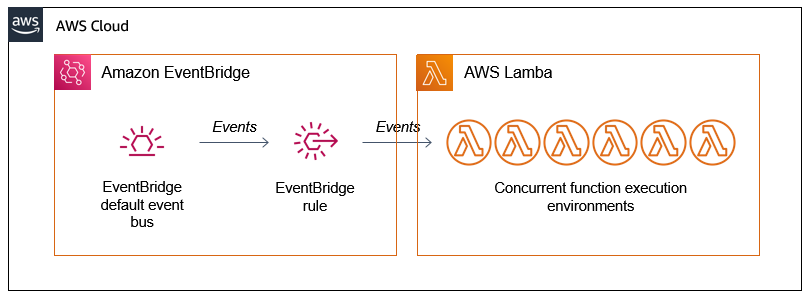
The first function produces batches of events almost simultaneously but the worker function takes several seconds to process a single request. If there is no existing environment available to handle the request, the Lambda scales up to process the work. As a result, you often see a high level of concurrency when running this application, which is how parallelization is achieved:

Lambda continues to scale up until it reaches the initial burst concurrency quotas in the current AWS Region. These quotas are between 500 and 3000 execution environments per minute initially. After the initial burst, concurrency scales by an additional 500 instances per minute.
If the number of events is higher, Lambda responds to EventBridge with a throttling error. The EventBridge service retries the events with exponential backoff for 24 hours. Once Lambda is scaled sufficiently or existing execution environments become available, the events are then processed.
This means that under exceptional levels of heavy load, this retry pattern adds latency to the overall GIF generation task. To manage this, you can use Provisioned Concurrency to ensure that more execution environments are available during periods of very high load.
Alternative ways to scale the Lambda workers
The asynchronous invocation mode for Lambda allows you to scale up worker Lambda functions quickly. This is the mode used by EventBridge when Lambda functions are defined as targets in rules. The other benefit of using EventBridge to decouple the two functions in this example is extensibility. Currently, the events have only a single consumer. However, you can add new capabilities to this application by building new event consumers, without changing the producer logic. Note that using EventBridge in this architecture costs $1 per million events put onto the bus (this cost varies by Region). Delivery to targets in EventBridge is free.
This design could similarly use Amazon SNS, which also invokes consuming Lambda functions asynchronously. This costs $0.50 per million messages and delivery to Lambda functions is free (this cost varies by Region). Depending on if you use EventBridge capabilities, SNS may be a better choice for decoupling the two Lambda functions.
Alternatively, the first Lambda function could invoke the second function by using the invoke method of the Lambda API. By using the AWS SDK for JavaScript, one Lambda function can invoke another directly from the handler code. When the InvocationType is set to ‘Event’, this invocation occurs asynchronously. That means that the calling function does not wait for the target function to finish before continuing.
This direct integration between two Lambda services is the lowest latency alternative. However, this limits the extensibility of the solution in the future without modifying code.
Managing memory, temp space, and files
You can configure the memory for a Lambda function up to 10,240 MB. However, the temporary storage available in /tmp is always 512 MB, regardless of memory. Increasing the memory allocation proportionally increases the amount of virtual CPU and network bandwidth available to the function. To learn more about how this works in detail, watch Optimizing Lambda performance for your serverless applications.
The original video files used in this workload may be several gigabytes in size. Since these may be larger than the /tmp space available, the code is designed to keep the movie file in memory. As a result, this solution works for any length of movie that can fit into the 10 GB memory limit.
The FFMPEG application expects to work with local file systems and is not designed to work with object stores like Amazon S3. It can also read video files from HTTP endpoints, so the example application loads the S3 object over HTTPS instead of downloading the file and using the /tmp space. To achieve this, the code uses the getSignedUrl method of the S3 class in the SDK:
 	// Configure S3
 	const AWS = require('aws-sdk')
 	AWS.config.update({ region: process.env.AWS_REGION })
 	const s3 = new AWS.S3({ apiVersion: '2006-03-01' })

 	// Get signed URL for source object
	const params = {
		Bucket: record.s3.bucket.name,
		Key: record.s3.object.key,
		Expires: 300
	}
	const url = s3.getSignedUrl('getObject', params)
The resulting URL contains credentials to download the S3 object over HTTPs. The Expires attributes in the parameters determines how long the credentials are valid for. The Lambda function calling this method must have appropriate IAM permissions for the target S3 bucket.
The GIF generation Lambda function stores the output GIF and JPG in the /tmp storage space. Since the function can be reused by subsequent invocations, it’s important to delete these temporary files before each invocation ends. This prevents the function from using all of the /tmp space available. This is handled by the tmpCleanup function:
const fs = require('fs')
const path = require('path')
const directory = '/tmp/'

// Deletes all files in a directory
const tmpCleanup = async () => {
    console.log('Starting tmpCleanup')
    fs.readdir(directory, (err, files) => {
        return new Promise((resolve, reject) => {
            if (err) reject(err)

            console.log('Deleting: ', files)
            for (const file of files) {
                const fullPath = path.join(directory, file)
                fs.unlink(fullPath, err => {
                    if (err) reject (err)
                })
            }
            resolve()
        })
    })
}
When the GenerateFrames parameter is set to true in the AWS SAM template, the worker function generates one frame per second of video. For longer videos, this results in a significant number of files. Since one of the dimensions of S3 pricing is the number of PUTs, this function increases the cost of the workload when using S3.
For applications that are handling large numbers of small files, it can be more cost effective to use Amazon EFS and mount the file system to the Lambda function. EFS charges based upon data storage and throughput, instead of number of files. To learn more about using EFS with Lambda, read this Compute Blog post.
Calculating the cost of the worker Lambda function
While parallelizing Lambda functions significantly reduces the overall processing time in this case, it’s also important to calculate the cost. To process the 3-hour video example in part 1, the function uses 345 invocations with 4096 MB of memory. Each invocation has an average duration of 4,311 ms.
Using the AWS Pricing Calculator, and ignoring the AWS Free Tier allowance, the costs to process this video is approximately $0.10.

There are additional charges for other services used in the example application, such as EventBridge and S3. However, in terms of compute cost, this may compare favorably with server-based alternatives that you may have to scale manually depending on traffic. The exact cost depends upon your implementation and latency needs.
Deciding if a workload can be parallelized
The GIF generation workload is a good candidate for parallelization. This is because each 30-second block of work is independent and there is no strict ordering requirement. The end result is not impacted by the order that the GIFs are generated in. Each GIF also takes several seconds to generate, which is why the time saving comparison with the sequential, server-based approach is so significant.
Not all workloads can be parallelized and in many cases the work duration may be much shorter. This workload interacts with S3, which can scale to any level of read or write traffic created by the worker functions. You may use other downstream services that cannot scale this way, which may limit the amount of parallel processing you can use.
To learn more about designing and operating Lambda-based applications, read the Lambda Operator Guide.
Conclusion
Part 2 of this blog post expands on some of the advanced topics around scaling Lambda in parallelized workloads. It explains how the asynchronous invocation mode of Lambda scales and different ways to scale the worker Lambda function.
I cover how the example application manages memory, files, and temporary storage space. I also explain how to calculate the compute cost of using this approach, and considering if you can use parallelization in a workload.
For more serverless learning resources, visit Serverless Land.
[The Lost Bots] Episode 5: Insider Threat
Post Syndicated from Rapid7 original https://blog.rapid7.com/2021/09/13/the-lost-bots-episode-5-insider-threat/
![[The Lost Bots] Episode 5: Insider Threat](https://blog.rapid7.com/content/images/2021/09/-The-Lost-Bots--Episode-1--External-Threat-Intelligence.jpeg)
Welcome back to The Lost Bots, a vlog series where Rapid7 Detection and Response Practice Advisor Jeffrey Gardner talks all things security with fellow industry experts. This episode, we’re joined by Alan Foster (Manager, Domain Engineers) to discuss insider threats. It’s a topic we’ve all heard about, especially for those of us who are compliance-focused, but it’s also one whose definition has changed in response to recent breaches. Watch below to learn about the various types of insider threats (including those you may not have thought about), which threat(s) could cause the most damage, and tips to reduce the risk.
![[The Lost Bots] Episode 5: Insider Threat](https://play.vidyard.com/fEtK639L5UQ8jreJDqLByG.jpg)
Stay tuned for future episodes of The Lost Bots! Coming soon: Jeffrey tackles vulnerability management and how it can not only reduce risk but also assist in your incident response programs.
GDB 11.1 released
Post Syndicated from original https://lwn.net/Articles/869060/rss
Version 11.1 of the GDB debugger is out. There are a number of new
features, and somebody will surely be disappointed to see that support for
debugging Arm Symbian programs has been removed.
Cloudflare Passes 250 Cities, Triples External Network Capacity, 8x-es Backbone
Post Syndicated from Jon Rolfe original https://blog.cloudflare.com/250-cities-is-just-the-start/


It feels like just the other week that we announced ten new cities and our expansion to 25+ cities in Brazil — probably because it was. Today, I have three speedy infrastructure updates: we’ve passed 250 on-network cities, more than tripled our external network capacity, and increased our long-haul internal backbone network by over 800% since the start of 2020.
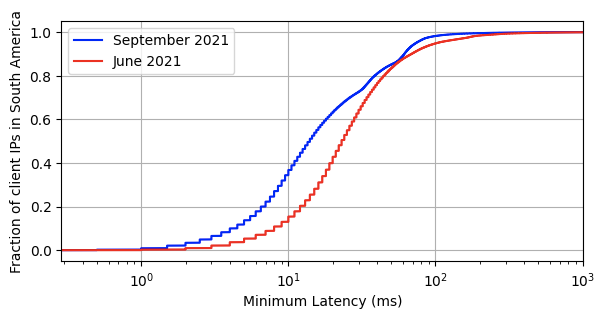
Light only travels through fiber so fast and with so much bandwidth — and worse still over the copper or on mobile networks that make up most end-users’ connections to the Internet. At some point, there’s only so much software you can throw at the problem before you run into the fundamental problem that an edge network solves: if you want your users to see incredible performance, you have to have servers incredibly physically close. For example, over the past three months, we’ve added another 10 cities in Brazil. Here’s how that lowered the connection time to Cloudflare. The red line shows the latency prior to the expansion, the blue shows after.
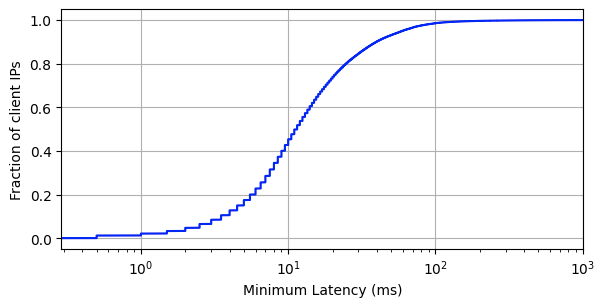
We’re exceptionally proud of all the teams at Cloudflare that came together to raise the bar for the entire industry in terms of global performance despite border closures, semiconductor shortages, and a sudden shift to working from home. 95% of the entire Internet-connected world is now within 50 ms of a Cloudflare presence, and 80% of the entire Internet-connected world is within 20ms (for reference, it takes 300-400 ms for a human to blink):
Today, when we ask ourselves what it means to have a fast website, it means having a server less than 0.05 seconds away from your user, no matter where on Earth they are. This is only possible by adding new cities, partners, capacity, and cables — so let’s talk about those.
New Cities
Cutting straight to the point, let’s start with cities and countries: in the last two-ish months, we’ve added another 17 cities (outside of mainland China) split across eight countries: Guayaquil, Ecuador; Dammam, Saudi Arabia; Algiers, Algeria; Surat Thani, Thailand; Hagåtña, Guam, United States; Krasnoyarsk, Russia; Cagayan, Philippines; and ten cities in Brazil: Caçador, Ribeirão Preto, Brasília, Florianópolis, Sorocaba, Itajaí, Belém, Americana, Blumenau, and Belo Horizonte.
Meanwhile, with our partner, JD Cloud and AI, we’re up to 37 cities in mainland China: Anqing and Huainan, Anhui; Beijing, Beijing; Fuzhou and Quanzhou, Fujian; Lanzhou, Gansu; Foshan, Guangzhou, and Maoming, Guangdong; Guiyang, Guizhou; Chengmai and Haikou, Hainan; Langfang and Qinhuangdao, Hebei; Zhengzhou, Henan; Shiyan and Yichang, Hubei; Changde and Yiyang, Hunan; Hohhot, Inner Mongolia; Changzhou, Suqian, and Wuxi, Jiangsu; Nanchang and Xinyu, Jiangxi; Dalian and Shenyang, Liaoning; Xining, Qinghai; Baoji and Xianyang, Shaanxi; Jinan and Qingdao, Shandong; Shanghai, Shanghai; Chengdu, Sichuan; Jinhua, Quzhou, and Taizhou, Zhejiang. These are subject to change: as we ramp up, we have been working with JD Cloud to “trial” cities for a few weeks or months to observe performance and tweak the cities to match.
More Capacity: What and Why?
In addition to all these new cities, we’re also proud to announce that we have seen a 3.5x increase in external network capacity from the start of 2020 to now. This is just as key to our network strategy as new cities: it wouldn’t matter if we were in every city on Earth if we weren’t interconnected with other networks. Last-mile ISPs will sometimes still “trombone” their traffic, but in general, end users will get faster Internet as we interconnect more.
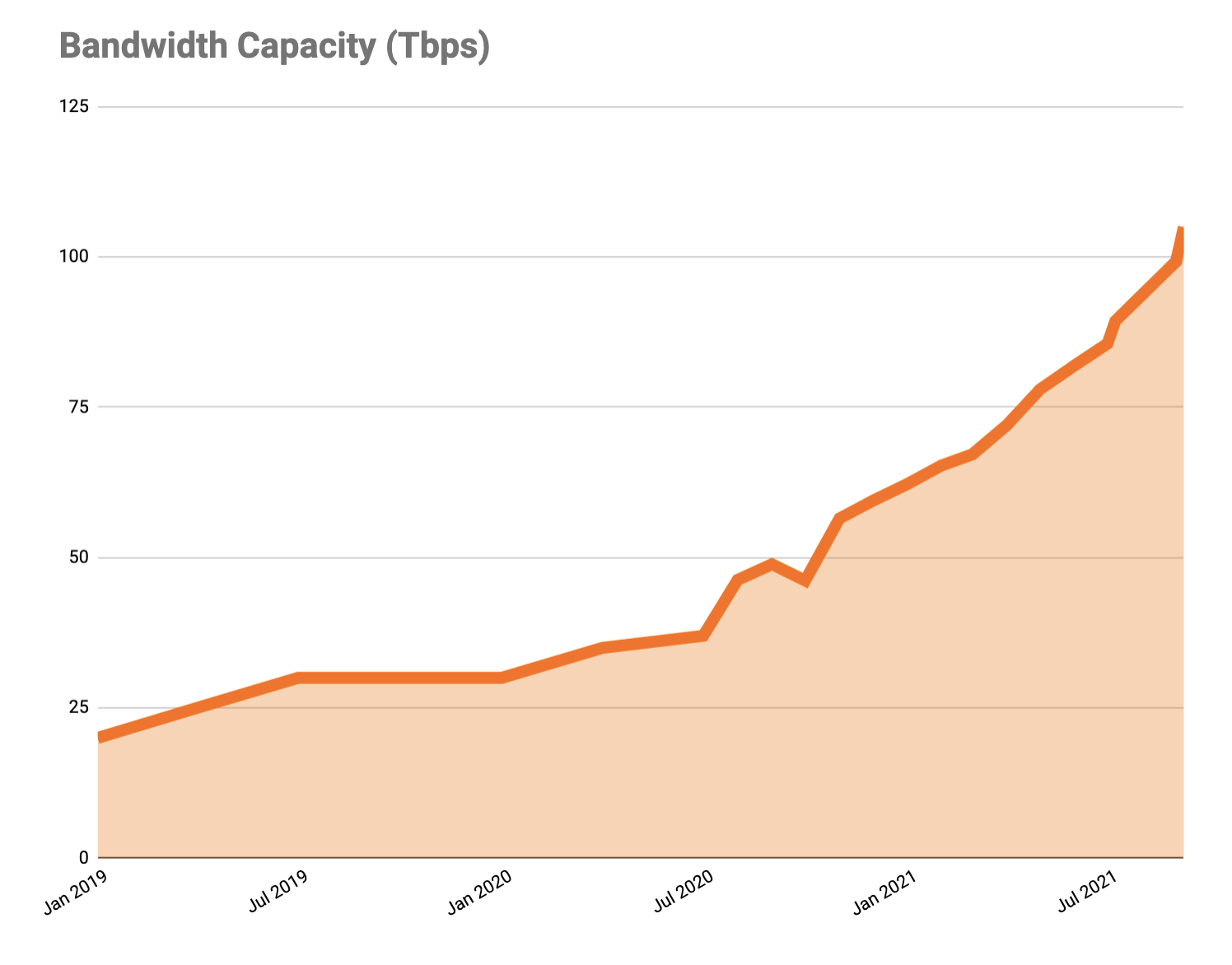
This interconnection is spread far and wide, both to user networks and those of website hosts and other major cloud networks. This has involved a lot of middleman-removal: rather than run fiber optics from our routers through a third-party network to an origin or user’s network, we’re running more and more Private Network Interconnects (PNIs) and, better yet, Cloudflare Network Interconnects (CNIs) to our customers.
These PNIs and CNIs can not only reduce egress costs for our customers (particularly with our Bandwidth Alliance partners) but also increase the speed, reliability, and privacy of connections. The fewer networks and less distance your Internet traffic flows through, the better off everyone is. To put some numbers on that, only 30% of this newly doubled capacity was transit, leaving 70% flowing directly either physically over PNIs/CNIs or logically over peering sessions at Internet exchange points.
The Backbone
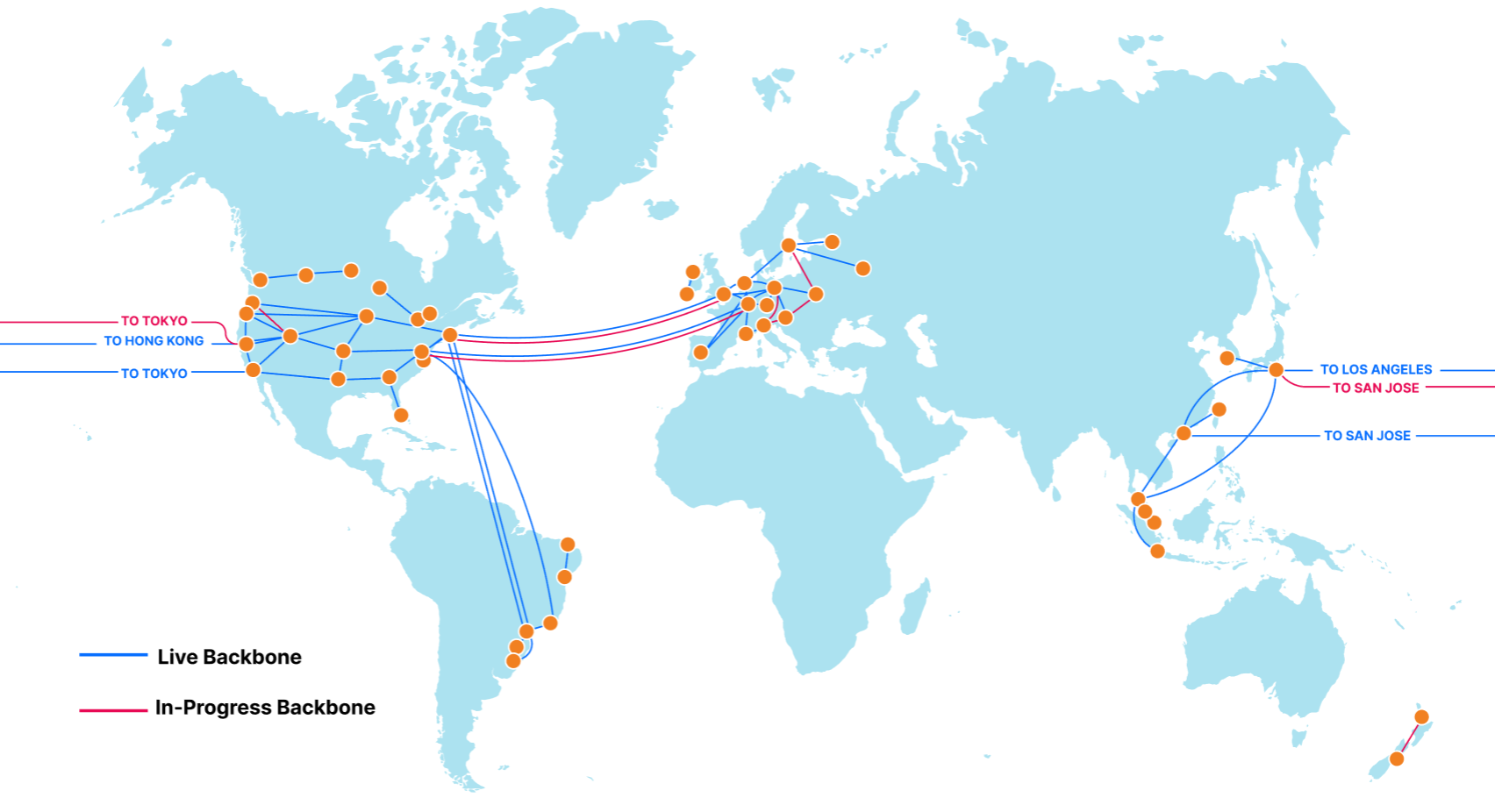
At the same time as this increase in external capacity, we’ve quietly been adding hundreds of new segments to our backbone. Our backbone consists of dedicated fiber optic lines and reserved portions of wavelength that connect Cloudflare data centers together. This is split approximately 55/45 between “metro” capacity, which redundantly connects data centers in which we have a presence, and “long-haul” capacity, which connects Cloudflare data centers in different cities.
The backbone is used to increase the speed of our customer traffic, e.g., for Argo Smart Routing, Argo Tiered Caching, and WARP+. Our backbone is like a private highway connecting cities, while public Internet routing is like local roads: not only does the backbone directly connect two cities, but it’s reliably faster and sees fewer issues. We’ll dive into some benchmarks of the speed improvements of the backbone in a more comprehensive future blog post.
The backbone is also more secure. While Cloudflare signs all of its BGP routes with RPKI, pushes adjacent networks to use RPKI to avoid route hijacks, and encrypts external and internal traffic, the most secure and private way to safeguard our users’ traffic is to keep it on-network as much as possible.
Internal load balancing between cities has also been greatly improved, thanks to the use of the backbone for traffic management with a technology we call Plurimog (a reference to our in-colo Layer 4 load balancer, Unimog). A surge of traffic into Portland can be shifted instantaneously over diverse links to Seattle, Denver, or San Jose with a single hop, without waiting for changes to propagate over anycast or running the risk of an interim increase in errors.
From an expansion perspective, two key areas of focus have been our undersea North America to Europe (transatlantic) and Asia to North America (transpacific) backbone rings. These links use geographically diverse subsea cable systems and connect into diverse routers and data centers on both ends — four transatlantic cables from North America to Europe, three transamerican cables connecting South and North America, and three transpacific cables connecting Asia and North America. User traffic coming from Los Angeles could travel to an origin as west as Singapore or as east as Moscow without leaving our network.
This rate of growth has been enabled by improved traffic forecast modeling, rapid internal feedback loops on link utilization, and more broadly by growing our teams and partnerships. We are creating a global view of capacity, pricing, and desirability of backbone links in the same way that we have for transit and peering. The result is a backbone that doubled in long-haul capacity this year, increased more than 800% from the start of last year, and will continue to expand to intelligently crisscross the globe.
The backbone has taken on a huge amount of traffic that would otherwise go over external transit and peering connections, freeing up capacity for when it is explicitly needed (last-hop routes, failover, etc.) and avoiding any outages on other major global networks (e.g., CenturyLink, Verizon).
In Conclusion
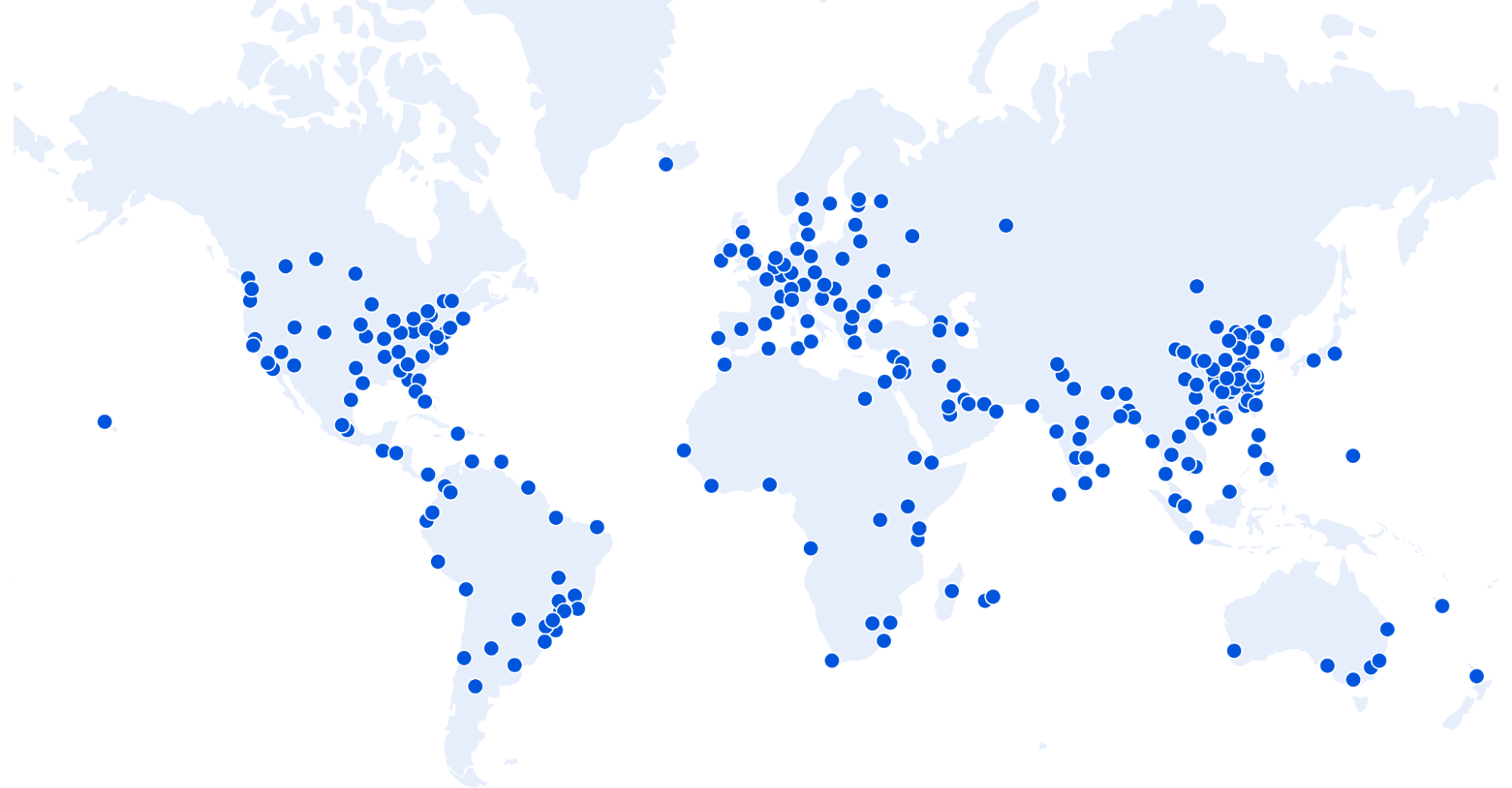
More cities, capacity, and backbone are more steps as part of going from being the most global network on Earth to the most local one as well. We believe in providing security, privacy, and reliability for all — not just those who have the money to pay for something we consider fundamental Internet rights. We have seen the investment into our network pay huge dividends this past year.
Happy Speed Week!
Do you want to work on the future of a globally local network? Are you passionate about edge networks? Do you thrive in an exciting, rapid-growth environment? If so, good news: Cloudflare Infrastructure is hiring; check our open roles here!
Alternatively — if you work at an ISP we aren’t already deployed with and want to bring this level of speed and control to your users, we’re here to make that happen. Please reach out to our Edge Partnerships team at [email protected].
Cloudflare Workers: the Fast Serverless Platform
Post Syndicated from Rita Kozlov original https://blog.cloudflare.com/cloudflare-workers-the-fast-serverless-platform/


Just about four years ago, we announced Cloudflare Workers, a serverless platform that runs directly on the edge.
Throughout this week, we will talk about the many ways Cloudflare is helping make applications that already exist on the web faster. But if today is the day you decide to make your idea come to life, building your project on the Cloudflare edge, and deploying it directly to the tubes of the Internet is the best way to guarantee your application will always be fast, for every user, regardless of their location.
It’s been a few years since we talked about how Cloudflare Workers compares to other serverless platforms when it comes to performance, so we decided it was time for an update. While most of our work on the Workers platform over the past few years has gone into making the platform more powerful: introducing new features, APIs, storage, debugging and observability tools, performance has not been neglected.
Today, Workers is 30% faster than it was three years ago at P90. And it is 210% faster than Lambda@Edge, and 298% faster than Lambda.
Oh, and also, we eliminated cold starts.
How do you measure the performance of serverless platforms?
I’ve run hundreds of performance benchmarks between CDNs in the past — the formula is simple: we use a tool called Catchpoint, which makes requests from nodes all over the world to the same asset, and reports back on the time it took for each location to return a response.
Measuring serverless performance is a bit different — since the thing you’re comparing is the performance of compute, rather than a static asset, we wanted to make sure all functions performed the same operation.
In our 2018 blog on speed testing, we had each function simply return the current time. For the purposes of this test, “serverless” products that were not able to meet the minimum criteria of being able to perform this task were disqualified. Serverless products used in this round of testing executed the same function, of identical computational complexity, to ensure accurate and fair results.
It’s also important to note what it is that we’re measuring. The reason performance matters, is because it impacts the experience of actual end customers. It doesn’t matter what the source of latency is: DNS, network congestion, cold starts… the customer doesn’t care what the source is, they care about wasting time waiting for their application to load.
It is therefore important to measure performance in terms of the end user experience — end to end, which is why we use global benchmarks to measure performance.
The result below shows tests run from 50 nodes all over the world, across North America, South America, Europe, Asia and Oceania.
Blue: Cloudflare Workers
Red: Lambda@Edge
Green: Lambda
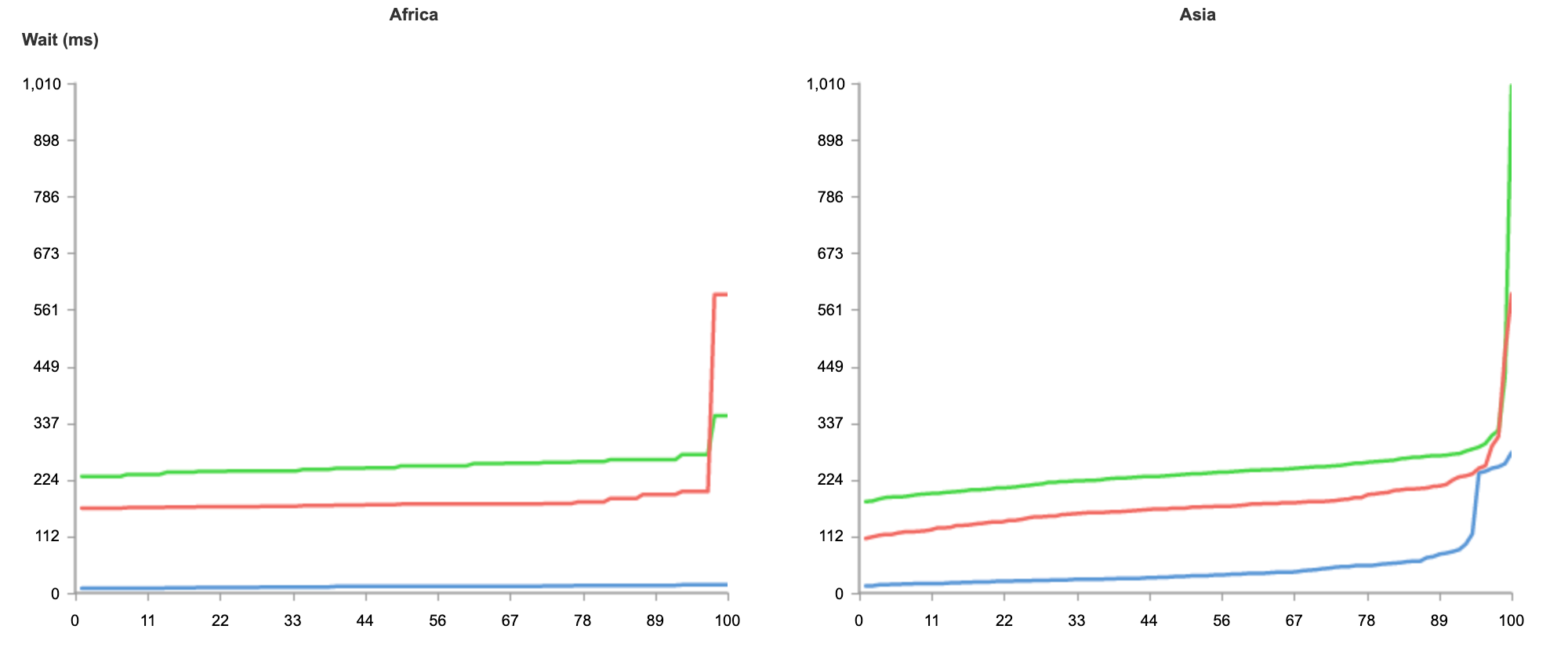
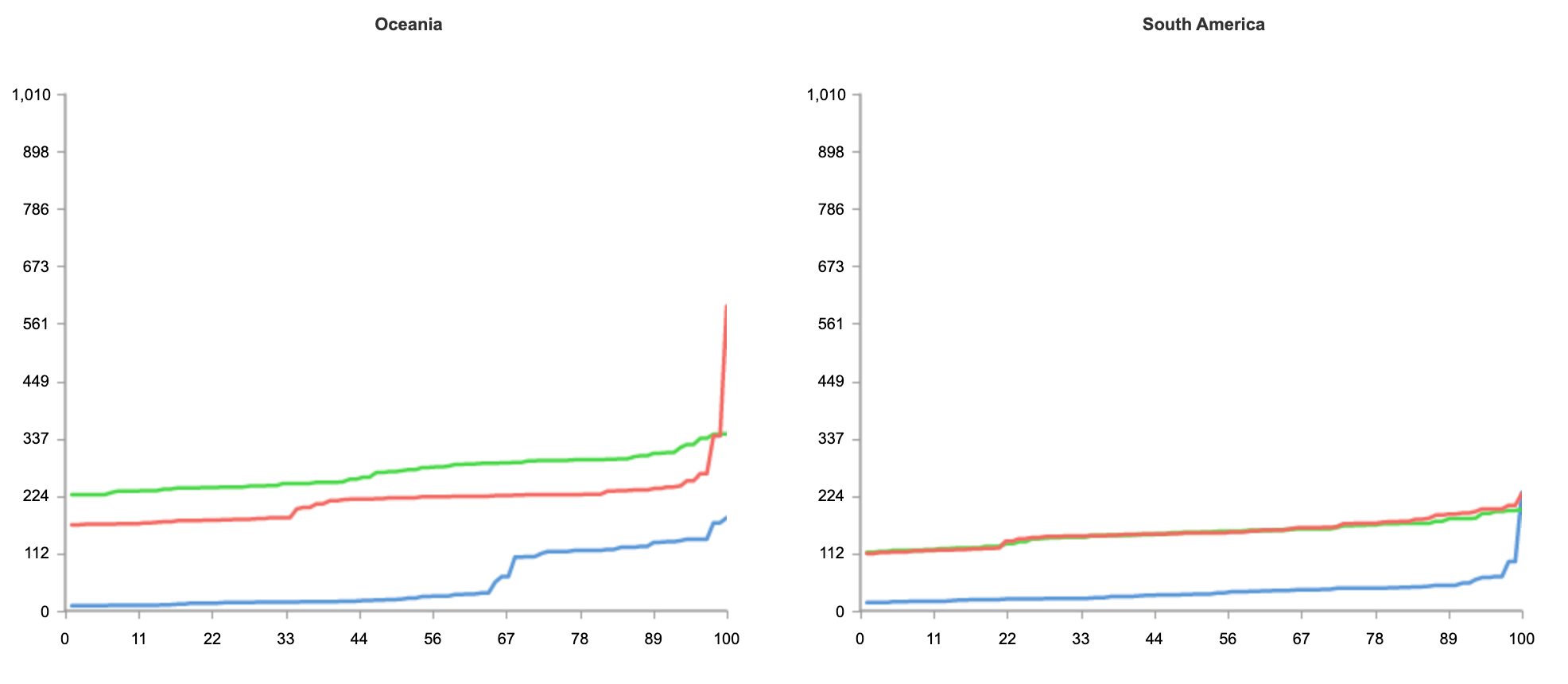
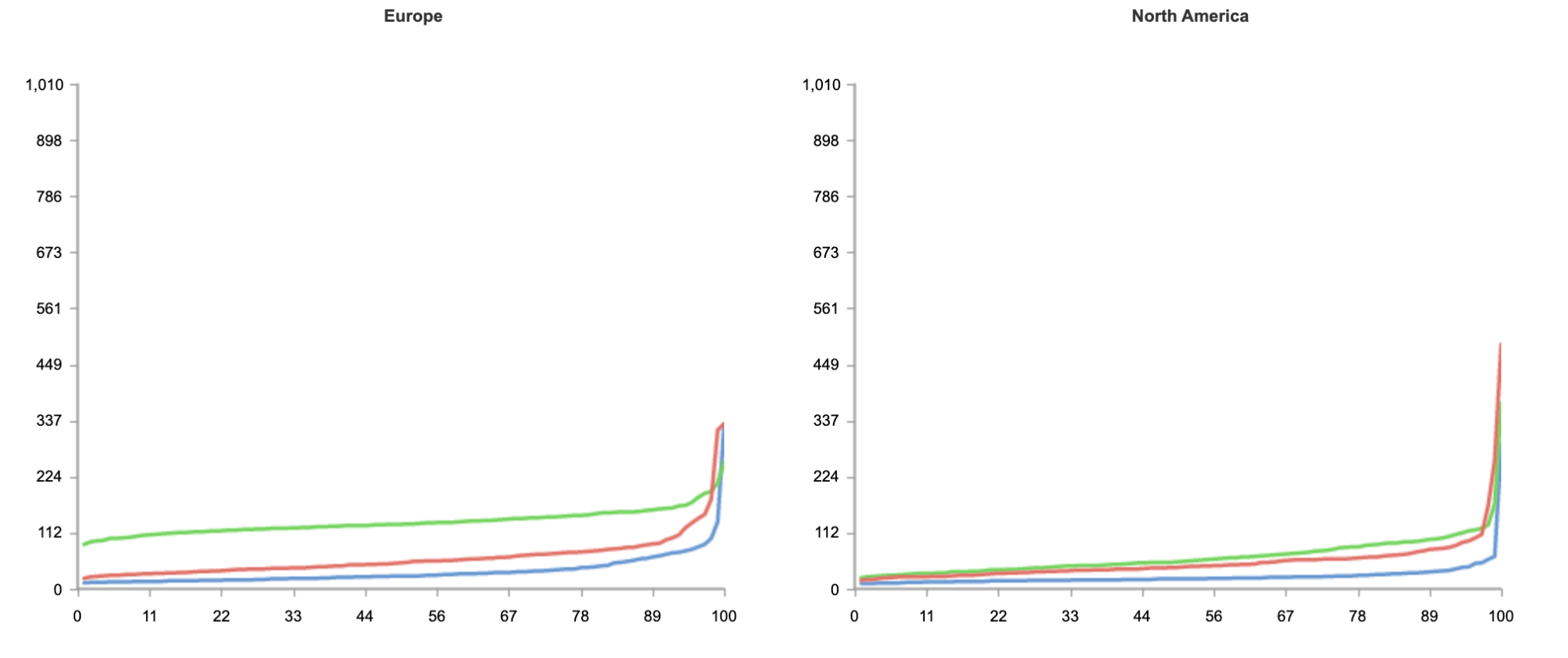
As you can see from the results, no matter where users are in the world, when it comes to speed, Workers can guarantee the best experience for customers.
In the case of Workers, getting the best performance globally requires no additional effort on the developers’ part. Developers do not need to do any additional load balancing, or configuration of regions. Every deployment is instantly live on Cloudflare’s extensive edge network.
Even if you’re not seeking to address a global audience, and your customer base is conveniently located on the East coast of the United States, Workers is able to guarantee the fastest response on all requests.
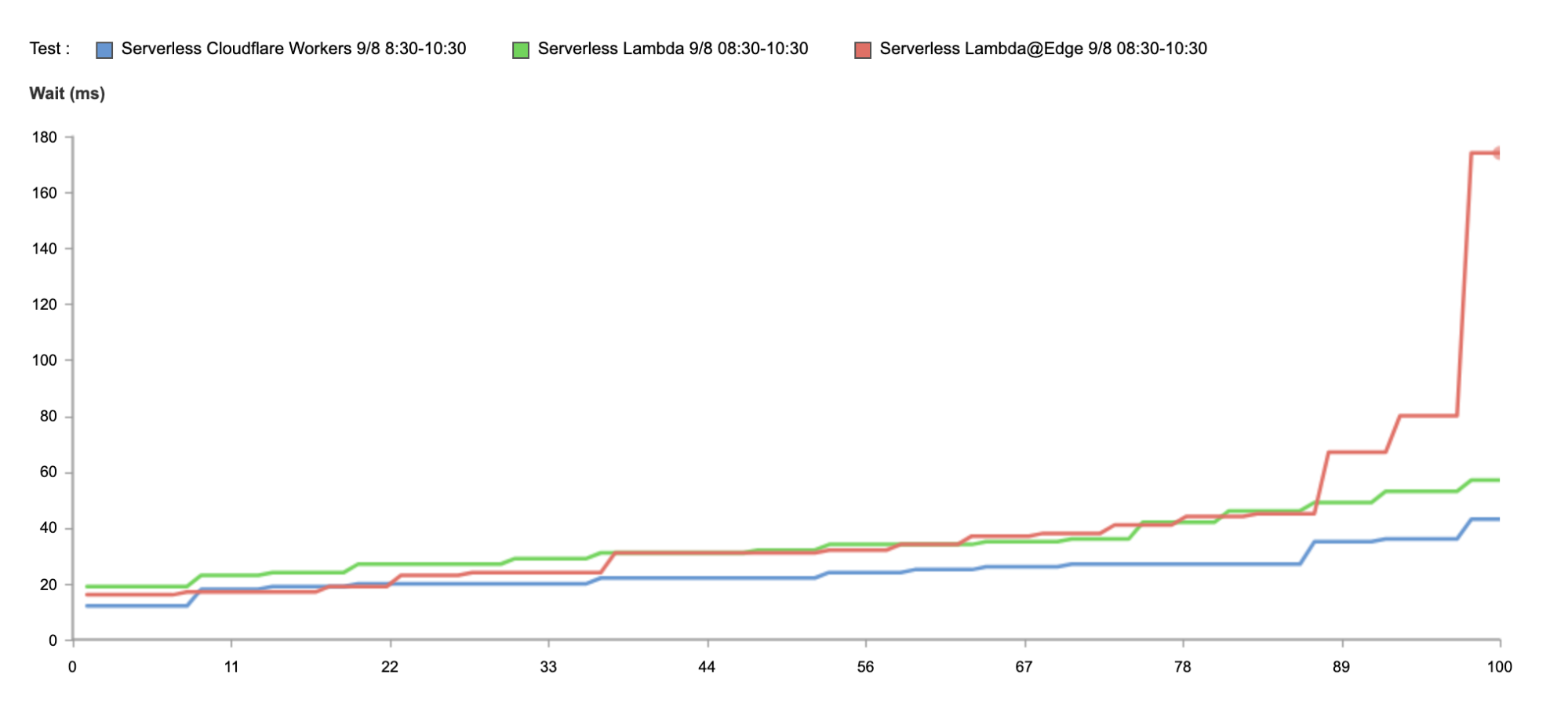
Above, we have the results just from Washington, DC, as close as we could get to us-east-1. And again, without any optimization, Workers is 34% faster.
Why is that?
What defines the performance of a serverless platform?
Other than the performance of the code itself, from the perspective of the end user, serverless application performance is fundamentally a function of two variables: distance an application executes from the user, and the time it takes the runtime itself to spin up. The realization that distance from the user is becoming a greater and greater bottleneck on application performance is causing many serverless vendors to push deeper and deeper into the edge. Running applications on the edge — closer to the end user — increases performance. As 5G comes online, this trend will only continue to accelerate.
However, many cloud vendors in the serverless space run into a critical problem when addressing the issue when competing for faster performance. And that is: the legacy architecture they’re using to build out their offerings doesn’t work well with the inherent limitations of the edge.
Since the goal behind the serverless model is to intentionally abstract away the underlying architecture, not everyone is clear on how legacy cloud providers like AWS have created serverless offerings like Lambda. Legacy cloud providers deliver serverless offerings by spinning up a containerized process for your code. The provider auto-scales all the different processes in the background. Every time a container is spun up, the entire language runtime is spun up with it, not just your code.
To help address the first graph, measuring global performance, vendors are attempting to move away from their large, centralized architecture (a few, big data centers) to a distributed, edge-based world (a greater number of smaller data centers all over the world) to close the distance between applications and end users. But there’s a problem with their approach: smaller data centers mean fewer machines, and less memory. Each time vendors pursue a small but many data centers strategy to operate closer to the edge, the likelihood of a cold start occurring on any individual process goes up.
This effectively creates a performance ceiling for serverless applications on container-based architectures. If legacy vendors with small data centers move your application closer to the edge (and the users), there will be fewer servers, less memory, and more likely that an application will need a cold start. To reduce the likelihood of that, they’re back to a more centralized model; but that means running your applications from one of a few big centralized data centers. These larger centralized data centers, by definition, are almost always going to be further away from your users.
You can see this at play in the graph above by looking at the results of the tests when running in Lambda@Edge — despite the reduced proximity to the end user, p90 performance is slower than that of Lambda’s, as containers have to spin up more frequently.
Serverless architectures built on containers can move up and down the frontier, but ultimately, there’s not much they can do to shift that frontier curve.
What makes Workers so fast?
Workers was designed from the ground up for an edge-first serverless model. Since Cloudflare started with a distributed edge network, rather than trying to push compute from large centralized data centers out into the edge, working under those constraints forced us to innovate.
In one of our previous blog posts, we’ve discussed how this innovation translated to a new paradigm shift with Workers’ architecture being built on lightweight V8 isolates that can spin up quickly, without introducing a cold start on every request.
Not only has running isolates given us advantage out of the box, but as V8 gets better, so does our platform. For example, when V8 announced Liftoff, a compiler for WASM, all WASM Workers instantly got faster.
Similarly, whenever improvements are made to Cloudflare’s network (for example, when we add new data centers) or stack (e.g., supporting new, faster protocols like HTTP/3), Workers instantly benefits from it.
Additionally, we’re always seeking to make improvements to Workers itself to make the platform even faster. For example, last year, we released an improvement that helped eliminate cold starts for our customers.
One key advantage that helps Workers identify and address performance gaps is the scale at which it operates. Today, Workers services hundreds of thousands of developers, ranging from hobbyists to enterprises all over the world, serving millions of requests per second. Whenever we make improvements for a single customer, the entire platform gets faster.
Performance that matters
The ultimate goal of the serverless model is to enable developers to focus on what they do best — build experiences for their users. Choosing a serverless platform that can offer the best performance out of the box means one less thing developers have to worry about. If you’re spending your time optimizing for cold starts, you’re not spending your time building the best feature for your customers.
Just like developers want to create the best experience for their users by improving the performance of their application, we’re constantly striving to improve the experience for developers building on Workers as well.
In the same way customers don’t want to wait for slow responses, developers don’t want to wait on slow deployment cycles.
This is where the Workers platform excels yet again.
Any deployment on Cloudflare Workers takes less than a second to propagate globally, so you don’t want to spend time waiting on your code deploy, and users can see changes as quickly as possible.
Of course, it’s not just the deployment time itself that’s important, but the efficiency of the full development cycle, which is why we’re always seeking to improve it at every step: from sign up to debugging.
Don’t just take our word for it!
Needless to say, much as we try to remain neutral, we’re always going to be just a little biased. Luckily, you don’t have to take our word for it.
We invite you to sign up and deploy your first Worker today — it’ll just take a few minutes!
Vary for Images: Serve the Correct Images to the Correct Browsers
Post Syndicated from Alex Krivit original https://blog.cloudflare.com/vary-for-images-serve-the-correct-images-to-the-correct-browsers/


Today, we’re excited to announce support for Vary, an HTTP header that ensures different content types can be served to user-agents with differing capabilities.
At Cloudflare, we’re obsessed with performance. Our job is to ensure that content gets from our network to visitors quickly, and also that the correct content is served. Serving incompatible or unoptimized content burdens website visitors with a poor experience while needlessly stressing a website’s infrastructure. Lots of traffic served from our edge consists of image files, and for these requests and responses, serving optimized image formats often results in significant performance gains. However, as browser technology has advanced, so too has the complexity required to serve optimized image content to browsers all with differing capabilities — not all browsers support all image formats! Providing features to ensure that the correct images are served to the correct requesting browser, device, or screen is important!
Serving images on the modern web
In the web’s early days, if you wanted to serve a full color image, JPEGs reigned supreme and were universally supported. Since then, the state of the art in image encoding has advanced by leaps and bounds, and there are now increasingly more advanced and efficient codecs like WebP and AVIF that promise reduced file sizes and improved quality.
This sort of innovation is exciting, and delivers real improvements to user experience. However, it makes the job of web servers and edge networks more complicated. As an example, until very recently, WebP image files were not universally supported by commonly used browsers. A specific browser not supporting an image file becomes a problem when “intermediate caches”, like Cloudflare, are involved in delivering content.
Let’s say, for example, that a website wants to provide the best experience to whatever browser requests the site. A desktop browser sends a request to the website and the origin server responds with the website’s content including images. This response is cached by a CDN prior to getting sent back to the requesting browser.
Now let’s say a mobile browser comes along and requests that same website with those images. In the situation where a cached image is a WebP file, and WebP is not supported by the mobile browser, the website will not load properly because the content returned from cache is not supported by the mobile browser. That’s a problem.
To help solve this issue, today we’re excited to announce our support of the Vary header for images.
How Vary works
Vary is an HTTP response header that allows origins to serve variants of the same content from a single URL, and have intermediate caches serve the correct variant to each user-agent that comes along.
Smashing Magazine has an excellent deep dive on how Vary negotiation works here.
When browsers send a request for a website, they include a variety of request headers. A fairly common example might look something like:
GET /page.html HTTP/1.1
Host: example.com
Connection: keep-alive
Accept:
text/html,application/xhtml+xml,application/xml;q=0.9,image/avif,image/webp,image/apng,*/*;q=0.8,application/signed-exchange;v=b3;q=0.9
User-Agent: Mozilla/5.0 (Macintosh; Intel Mac OS X 10_15_7) AppleWebKit/537.36 (KHTML, like Gecko) Chrome/91.0.4472.164 Safari/537.36
Accept-Encoding: gzip, deflate, br
As we can see above, the browser sends a lot of information in these headers along with the GET request for the URL. What’s important for Vary for Images is the Accept header. The Accept header tells the origin what sort of content the browser is capable of handling (file types, etc.) and provides a list of content preferences.
When the origin gets the request, it sees the Accept header which details the content preference for the browser’s request. In the origin’s response, Vary tells the browser that content returned was different depending on the value of the Accept header in the request. Thus if a different browser comes along and sends a request with different Accept header values, this new browser can get a different response from the origin. An example origin response may look something like:
HTTP/1.1 200 OK
Content-Length: 123456
Vary: Accept
How Vary works with Cloudflare’s cache
Now, let’s add Cloudflare to the mix. Cloudflare sits in between the browser and the origin in the above example. When Cloudflare receives the origin’s response, we cache the specific image variant so that subsequent requests from browsers with the same image preferences can be served from cache. This also means that serving multiple image variants for the same asset will create distinct cache entries.
Accept header normalization
Caching variants in intermediate caches can be difficult to get right. Naive caching of variants can cause problems by serving incorrect or unsupported image variants to browsers. Some solutions that reduce the potential for caching incorrect variants generally provide those safeguards at the expense of performance.
For example, through a process known as content-negotiation, the correct variant is directed to the requesting browser through a process of multiple requests and responses. The browser could send a request to the origin asking for a list of available resource variants. When the origin responds with the list, the browser can make an additional request for the desired resources from that list, which the server would then respond to. These redundant calls to narrow down which type of content that the browser accepts and the server has available can cause performance delays.
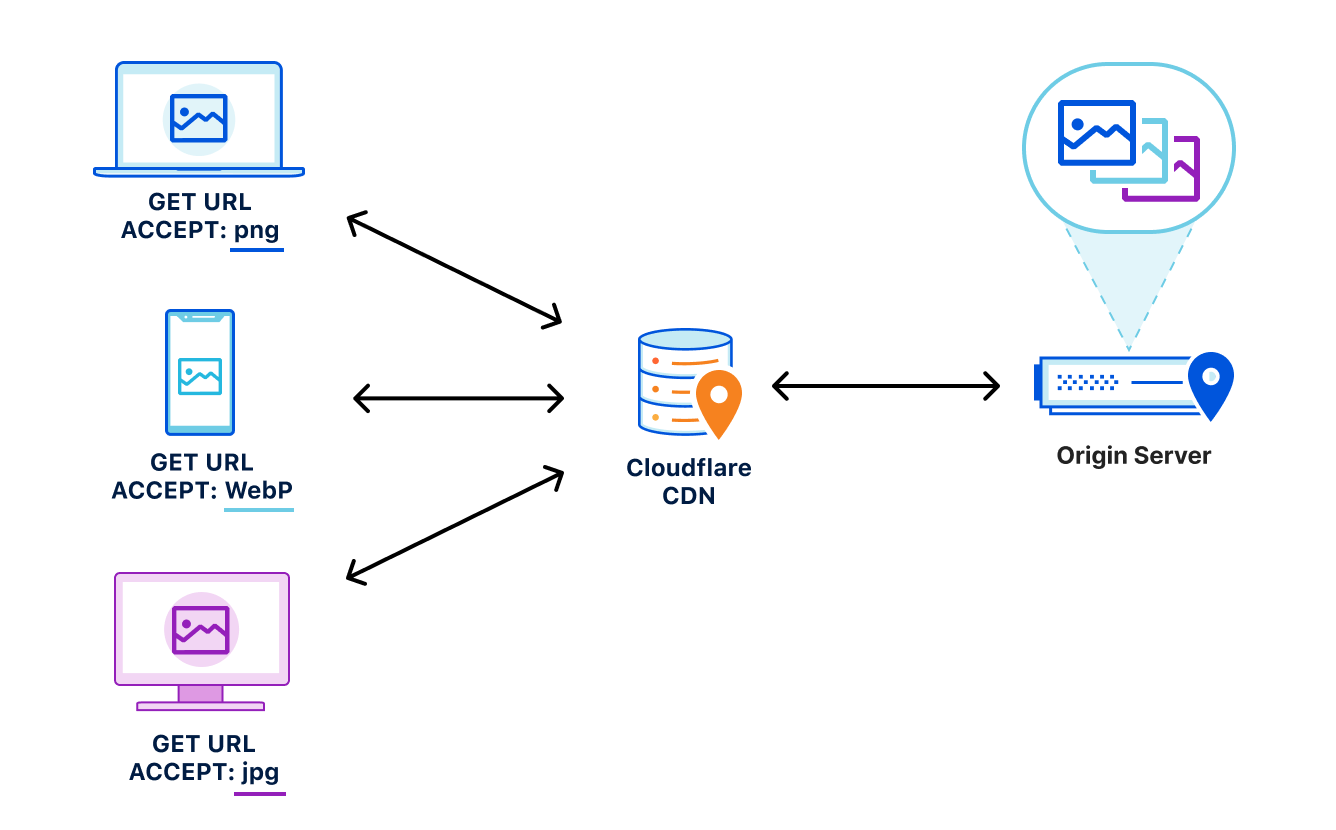
Vary for Images reduces the need for these redundant negotiations to an origin by parsing the request’s Accept header and sending that on to the origin to ensure that the origin knows exactly what content it needs to deliver to the browser. Additionally because the expected variant values can be set in Cloudflare’s API (see below), we make an end-run around the negotiation process because we are sure what to ask for and expect from the origin. This reduces the needless back-and-forth between browsers and servers.
How to Enable Vary for Images
You can enable Vary for Images from Cloudflare’s API for Pro, Business, and Enterprise Customers.
Things to keep in mind when using Vary:
- Vary for Images enables varying on the following file extensions: avif, bmp, gif, jpg, jpeg, jp2, jpg2, png, tif, tiff, webp. These extensions can have multiple variants served so long as the origin server sends the
Vary: Acceptresponse header. - If the origin server sends
Vary: Acceptbut does not serve the expected variant, the response will not be cached. This will be indicated with the BYPASS cache status in the response headers. - The list of variant types the origin serves for each extension must be configured so that Cloudflare can decide which variant to serve without having to contact the origin server.
Enabling Vary in action
Enabling Vary functionality currently requires the use of the Cloudflare API. Here’s an example of how to enable variant support for a zone that wants to serve JPEGs in addition to WebP and AVIF variants for jpeg and jpg extensions.
Create a variants rule:
curl -X PATCH
"https://api.cloudflare.com/client/v4/zones/023e105f4ecef8ad9ca31a8372d0 c353/cache/variants" \
	-H "X-Auth-Email: [email protected]" \
	-H "X-Auth-Key: 3xamp1ek3y1234" \
	-H "Content-Type: application/json" \
	--data
'{"value":{"jpeg":["image/webp","image/avif"],"jpg":["image/webp","image/avif"]}}'
Modify to only allow WebP variants:
curl -X PATCH
"https://api.cloudflare.com/client/v4/zones/023e105f4ecef8ad9ca31a8372d0 c353/cache/variants" \
	-H "X-Auth-Email: [email protected]" \
	-H "X-Auth-Key: 3xamp1ek3y1234" \
	-H "Content-Type: application/json" \
	--data
'{"value":{"jpeg":["image/webp"],"jpg":["image/webp"]}}'
Delete the rule:
curl -X DELETE
"https://api.cloudflare.com/client/v4/zones/023e105f4ecef8ad9ca31a8372d0c353/cache/variants" \
	-H "X-Auth-Email: [email protected]" \
	-H "X-Auth-Key: 3xamp1ek3y1234"
Get the rule:
curl -X GET
"https://api.cloudflare.com/client/v4/zones/023e105f4ecef8ad9ca31a8372d0c353/cache/variants" \
	-H "X-Auth-Email: [email protected]" \
	-H "X-Auth-Key: 3xamp1ek3y1234"
Purging variants
Any purge of varied images will purge all content variants for that URL. That way, if the image changes, you can easily update the cache with a single purge versus chasing down how many potential out-of-date variants may exist. This behavior is true regardless of purge type (single file, tag, or hostname) used.
Other image optimization tools available at Cloudflare
Providing an additional option for customers to optimize the delivery of images also allows Cloudflare to support more customer configurations. For other ways Cloudflare can help you serve images to visitors quickly and efficiently, you can check out:
- Polish — Cloudflare’s automatic product that strips image metadata and applies compression. Polish accelerates image downloads by reducing image size.
- Image Resizing — Cloudflare’s image resizing product works as a proxy on top of the Cloudflare edge cache to apply the adjustments to an image’s size and quality.
- Cloudflare for Images — Cloudflare’s all-in-one service to host, resize, optimize, and deliver all of your website’s images.
Try Vary for Images Out
Vary for Images provides options that ensure the best images are served to the browser based on the browser’s capabilities and preferences. If you’re looking for more control over how your images are delivered to browsers, we encourage you to try this new feature out.
War and Mosquitos
Post Syndicated from The History Guy: History Deserves to Be Remembered original https://www.youtube.com/watch?v=hf2QTQzGnZQ
Designing Contact-Tracing Apps
Post Syndicated from Bruce Schneier original https://www.schneier.com/blog/archives/2021/09/designing-contact-tracing-apps.html
Susan Landau wrote an essay on the privacy, efficacy, and equity of contract-tracing smartphone apps.
Also see her excellent book on the topic.
We’re sending Raspberry Pi computers to space for the European Astro Pi Challenge
Post Syndicated from Olympia Brown original https://www.raspberrypi.org/blog/astro-pi-2021-news-rocket-launch-hardware/
We’re super excited to announce that the European Astro Pi Challenge is back for another year of amazing space-based coding adventures.
This time we are delighted to tell you that we’re upgrading the Raspberry Pi computers on the International Space Station (ISS) and adding new hardware to expand the range of experiments that young people can run in space!
What’s new with Astro Pi?
The first Astro Pi units were taken up to the ISS by British ESA astronaut Tim Peake in December 2015 as part of the Principia mission. Since then, 54000 young people from 26 countries have written code that has run on these specially augmented Raspberry Pi computers.

Working with our partners at the European Space Agency, we are now upgrading the Astro Pi units to include:
- Raspberry Pi 4 Model B with 8GB RAM
- Raspberry Pi High Quality Camera
- Google Coral machine learning accelerator
- Colour and luminosity sensor
- Passive infrared sensor

The units will continue to have a gyroscope; an accelerometer; a magnetometer; and humidity, temperature, and pressure sensors.

The new hardware makes it possible for teams to design new types of experiments. With the Raspberry Pi High Quality Camera they can take sharper, more detailed images, and, for the first time, teams will be able to get full-colour photos of the beauty of Earth from space. This will also enable teams to investigate plant health thanks to the higher-quality optical filter in conjunction with the IR-sensitive camera. Using the Coral machine learning accelerator, teams will also be able to develop machine learning models that allow high-speed, real-time processing.
Getting into space
The Astro Pi units, in their space-ready cases of machined aluminium, will travel to the ISS in December on the SpaceX Dragon Cargo rocket, launching from Kennedy Space Center. Once the resupply vehicle docks with the ISS, the units will be unpacked and set up ready to run Astro Pi participants’ code in 2022.
Getting the units ready for launch has been a significant effort from lots of people. Once we worked with our friends at ESA to agree on the new features and hardware, we commissioned the design of the new case from Jon Wells. Manufacturing was made significantly more challenging by the pandemic, not least because we weren’t able to attend the factory and had to interact over video calls.

Once we had the case and hardware ready, we could take on the huge battery of tests that are required before any equipment can be used on the ISS. These included the vibration test, to ensure that the Astro Pi units would survive the rigours of the launch; thermal testing, to make sure that units wouldn’t get too hot to touch; and stringent, military-grade electromagnetic emissions and susceptibility tests to guarantee that the Astro Pi computers wouldn’t interfere with any ISS systems, and would not themselves be affected by other equipment that is on board the space station.
Huge thanks to Jon Wells and our collaborators at Airbus, Google, MidOpt, and Shearline Precision Engineering for everything they’ve done to get us to the point where we were able to ship the new Astro Pi units to the Aerospace Logistics Technology Engineering Company (ALTEC) in Italy for final preparations before their launch.
There are two Astro Pi missions for young people to choose from: Mission Zero and Mission Space Lab. Young people can participate in one or both of the missions! Participation is free and open for young people up to age 19 in ESA member states (exceptions listed on the Astro Pi website).


Mission Zero
In Mission Zero, young people write a simple Python program that takes a sensor reading and displays a message on the LED screen. This year, participation in Mission Zero also gives young people the opportunity to vote for the names of the two new computers. Mission Zero can be completed in around an hour and is open to anyone aged 7 to 19 years old. Every eligible entry is guaranteed to run on board the ISS and participants will receive an official certificate with the exact time and location of the ISS when their program ran.
Mission Zero opens today and runs until 18 March 2022.

Mission Space Lab
Mission Space Lab is for teams of young people who want to run their own scientific experiments on the Astro Pi units aboard the ISS. It runs over eight months in four phases, from idea registration to data analysis.

Have a look at the winning teams from last year for amazing examples of what teams have investigated in the past. But remember — the new Astro Pi computers offer exciting new ways of investigating life in space and on Earth. We can’t wait to see what ideas participants come up with this year.
To start, Mission Space Lab team mentors just need to send us their team’s experiment idea by 29 October 2021.
Follow our progress
You can keep updated with all of the latest Astro Pi news, including the build-up to the rocket launch in December, by following the Astro Pi Twitter account.
The post We’re sending Raspberry Pi computers to space for the European Astro Pi Challenge appeared first on Raspberry Pi.
Lukashenko: Last Week Tonight with John Oliver (HBO)
Post Syndicated from LastWeekTonight original https://www.youtube.com/watch?v=27FpoRiStgk
Comic for 2021.09.13
Post Syndicated from Explosm.net original http://explosm.net/comics/5975/
New Cyanide and Happiness Comic
Kernel prepatch 5.15-rc1
Post Syndicated from original https://lwn.net/Articles/869031/rss
Linus has released 5.15-rc1 and closed the
merge window for this development cycle.
So 5.15 isn’t shaping up to be a particularly large release, at
least in number of commits. At only just over 10k non-merge
commits, this is in fact the smallest rc1 we have had in the 5.x
series. We’re usually hovering in the 12-14k commit range.That said, counting commits isn’t necessarily the best measure, and
that might be particularly true this time around. We have a few new
subsystems, with NTFSv3 and ksmbd standing out.
Vaccine Research
Post Syndicated from original https://xkcd.com/2515/

Stable kernels for Sunday
Post Syndicated from original https://lwn.net/Articles/869006/rss
The
5.14.3,
5.13.16,
5.10.64, and
5.4.145
stable kernel updates have been released; each contains another set of
important fixes.
Let’s have a celebration stream – 10K Party
Post Syndicated from BeardedTinker original https://www.youtube.com/watch?v=50uGaaydjsc
Sonoff POWR3 25 Amp Smart Relay Review w/ Tasmota
Post Syndicated from digiblurDIY original https://www.youtube.com/watch?v=uF4cGGGFFm8
Welcome to Speed Week and a Waitless Internet
Post Syndicated from John Graham-Cumming original https://blog.cloudflare.com/fastest-internet/


No one likes to wait. Internet impatience is something we all suffer from.
Waiting for an app to update to show when your lunch is arriving; a website that loads slowly on your phone; a movie that hasn’t started to play… yet.
But building a waitless Internet is hard. And that’s where Cloudflare comes in. We’ve built the global network for Internet applications, be they websites, IoT devices or mobile apps. And we’ve optimized it to cut the wait.
If you believe ISP advertising then you’d think that bandwidth (100Mbps! 1Gbps! 2Gbps!) is the be all and end all of Internet speed. That’s a small component of what it takes to deliver the always on, instant experience we want and need.
The reality is you need three things: ample bandwidth, to have content and applications close to the end user, and to make the software as fast as possible. Simple really. Except not, because all three things require a lot of work at different layers.
In this blog post I’ll look at the factors that go into building our fast global network: bandwidth, latency, reliability, caching, cryptography, DNS, preloading, cold starts, and more; and how Cloudflare zeroes in on the most powerful number there is: zero.
I will focus on what happens when you visit a website but most of what I say below applies to the fitness tracker on your wrist sending information up to the cloud, your smart doorbell alerting you to a visitor, or an app getting you the weather forecast.
Faster than the speed of sight
Imagine for a moment you are about to type in the name of a website on your phone or computer. You’ve heard about an exciting new game “Silent Space Marine” and type in silentspacemarine.com.
The very first thing your computer does is translate that name into an IP address. Since computers do absolutely everything with numbers under the hood this “DNS lookup” is the first necessary step.
It involves your computer asking a recursive DNS resolver for the IP address of silentspacemarine.com. That’s the first opportunity for slowness. If the lookup is slow everything else will be slowed down because nothing can start until the IP address is known.
The DNS resolver you use might be one provided by your ISP, or you might have changed it to one of the free public resolvers like Google’s 8.8.8.8. Cloudflare runs the world’s fastest DNS resolver, 1.1.1.1, and you can use it too. Instructions are here.
With fast DNS name resolution set up your computer can move on to the next step in getting the web page you asked for.
Aside: how fast is fast? One way to think about that is to ask yourself how fast you are able to perceive something change. Research says that the eye can make sense of an image in 13ms. High quality video shows at 60 frames per second (about 16ms per image). So the eye is fast!
What that means for the web is that we need to be working in tens of milliseconds not seconds otherwise users will start to see the slowness.
Slowly, desperately slowly it seemed to us as we watched
Why is Cloudflare’s 1.1.1.1 so fast? Not to downplay the work of the engineering team who wrote the DNS resolver software and made it fast, but two things help make it zoom: caching and closeness.
Caching means keeping a copy of data that hasn’t changed, so you don’t have to go ask for it. If lots of people are playing Silent Space Marine then a DNS resolver can keep its IP address in cache so that when a computer asks for the IP address the software can reply instantly. All good DNS resolvers cache information for speed.
But what happens if the IP address isn’t in the resolver’s cache. This happens the first time someone asks for it, or after a timeout period where the resolver needs to check that the IP address hasn’t changed. In order to get the IP address the resolver asks an authoritative DNS server for the information. That server is ‘authoritative’ for a specific domain (like silentspacemarine.com) and knows the correct IP address.
Since DNS resolvers sometimes have to ask authoritative servers for IP addresses it’s also important that those servers are fast too. That’s one reason why Cloudflare runs one of the world’s largest and fastest authoritative DNS services. Slow authoritative DNS could be another reason an end user has to wait.
So much for caching, what about ‘closeness’. Here’s the problem: the speed of light is really slow. Yes, I know everyone tells you that the speed of light is really fast, but that’s because us sentient water-filled carbon lifeforms can’t move very fast.
But electrons shooting through wires, and lasers blasting data down fiber optic cables, send data at or close to light speed. And sadly light speed is slow. And this slowness shows up because in order to get anything on the Internet you need to go back and forth to a server (many, many times).
In the best case of asking for silentspacemarine.com and getting its IP address there’s one roundtrip:
“Hello, can you tell me the address of silentspacemarine.com?”
“Yes, it’s…”
Even if you made the DNS resolver software instantaneous you’d pay the price of the speed of light. Sounds crazy, right? Here’s a quick calculation. Let’s imagine at home I have fiber optic Internet and the nearest DNS resolver to me is the city 100 km’s away. And somehow my ISP has laid the straightest fiber cable from me to the DNS resolver.
The speed of light in fiber is roughly 200,000,000 meters per second. Round trip would be 200,000 meters and so in the best possible case a whole one ms has been eaten up by the speed of light. Now imagine any worse case and the speed of light starts eating into the speed of sight.
The solution is quite simple: move the DNS resolver as close to the end user as possible. That’s partly why Cloudflare has built out (and continues to grow) our network. Today it stands at 250 cities worldwide.
Aside: actually it’s not “quite simple” because there’s another wrinkle. You can put servers all over the globe, but you also have to hook them up to the Internet. The beauty of the Internet is that it’s a network of networks. That also means that you don’t just plug into the Internet and get the lowest latency, you need to connect to multiple ISPs, transit networks and more so that end users, whatever network they use, get the best waitless experience they want.
That’s one reason why Cloudflare’s network isn’t simply all over the world, it’s also one of the most interconnected networks.
So far, in building the waitless Internet, we’ve identified fast DNS resolvers and fast authoritative DNS as two needs. What’s next?
Hello. Hello. OK.
So your web browser knows the IP address of Silent Space Marine and got it quickly. Great. Next step is for it to ask the web server at that IP address for the web page. Not so fast! The first step is to establish a connection to that server.
This is almost always done using a protocol called TCP that was invented in the 1970s. The very first step is for your computer and the server to agree they want to communicate. This is done with something called a three-way handshake.
Your computer sends a message saying, essentially, “Hello”, the server replies “I heard you say Hello” (that’s one round trip) and then your computer replies “I heard you say you heard me say Hello, so now we can chat” (actually it’s SYN then SYN-ACK and then ACK).
So, at least one speed-of-light troubled round trip has occurred. How do we fight the speed of light? We bring the server (in this case, web server) close to the end user. Yet another reason for Cloudflare’s massive global network and high interconnectedness.
Now the web browser can ask the web server for the web page of Silent Space Marine, right? Actually, no. The problem is we don’t just need a fast Internet we also need one that’s secure and so pretty much everything on the Internet uses an encryption protocol called TLS (which some old-timers will call SSL) and so next a secure connection has to be established.
Aside: astute readers might be wondering why I didn’t mention security in the DNS section above. Yep, you’re right, that’s a whole other wrinkle. DNS also needs to be secure (and fast) and resolvers like 1.1.1.1 support the encrypted DNS standards DoH and DoT. Those are built on top of… TLS. So in order to have fast, secure DNS you need the same thing as fast, secure web, and that’s fast TLS.
Oh, and by the way, you don’t want to get into some silly trade off between security and speed. You need both, which is why it’s helpful to use a service provider, like Cloudflare, that does everything.
Is this line secure?
TLS is quite a complicated protocol involving a web browser and a server establishing encryption keys and at least one of them (typically the web server) providing that they are who they purport to be (you wouldn’t want a secure connection to your bank’s website if you couldn’t be sure it was actually your bank).
The back and forth of establishing the secure connection incurs more hits on the speed of light. And so, once again, having servers close to end users is vital. And having really fast encryption software is vital too. Especially since encryption will need to happen on a variety of devices (think an old phone vs. a brand new laptop).
So, staying on top of the latest TLS standard is vital (we’re currently on TLS 1.3), and implementing all the tricks that speed TLS up is important (such as session resumption and 0-RTT resumption), and making sure your software is highly optimized.
So far getting to a waitless Internet has involved fast DNS resolvers, fast authoritative DNS, being close to end users to fast TCP handshakes, optimized TLS using the latest protocols. And we haven’t even asked the web server for the page yet.
If you’ve been counting round trips we’re currently standing at four: one for DNS, one for TCP, two for TLS. Lots of opportunity for the speed of light to be a problem, but also lots of opportunity for wider Internet problems to cause a slow-down.
Skybird, this is Dropkick with a red dash alpha message in two parts
Actually, before we let the web browser finally ask for the web page there are two things we need to worry about. And both are to do with when things go wrong. You may have noticed that sometimes the Internet doesn’t work right. Sometimes it’s slow.
The slowness is usually caused by two things: congestion and packet loss. Dealing with those is also vital to giving the end user the fastest experience possible.
In ancient times, long before the dawn of history, people used to use telephones that had physical wires connected to them. Those wires connected to exchanges and literal electrical connections were made between two phones over long distances. That scaled pretty well for a long time until a bunch of packet heads came along in the 1960s and said “you know you could create a giant shared network and break all communication up into packets and share the network”. The Internet.
But when you share something you can also get congestion and congestion control is a huge part of ensuring that the Internet is shared equitably amongst users. It’s one of the miracles of the Internet that theory done in the 1970s and implemented in the 1980s has allowed the network to support real time gaming and streaming video while allowing simultaneous chat and web browsing.
The flip side of congestion control is that in order to prevent a user from overwhelming the network you have to slow them down. And we’re trying to be as fast as possible! Actually, we need to be as fast as possible while remaining fair.
And congestion control is closely related to packet loss because one way that servers and browsers and computers know that there’s congestion is when their packets get lost.
We stay on top of the latest congestion control algorithms (such as BBR) so that users get the fastest, fairest possible experience. And we do something else: we actively try to work around packet loss.
Technologies like Argo and our private fiber backbone help us route around bad Internet weather that’s causing packet loss and send connections over dedicated fiber optic links that span the globe.
More on that in the coming week.
It’s happening!
And so, finally your web browser asks the web server for the web page with an innocent looking GET / command. And the web server responds with a big blob of HTML and just when you thought things were going to be simple, they are super complicated.
The complexity comes from two places: the HTTP protocol is now on its third major version, and the content of web pages is under the control of the designer.
First, protocols. HTTP/2 and HTTP/3 both provide significant speedups for web sites by introducing parallel request/response handling, better compression and ways to work around congestion and packet loss. Although HTTP/1.1 is still widely used, these newer protocols are the majority of traffic.
Cloudflare Radar shows HTTP/1.1 has dropped into the 20% range globally.
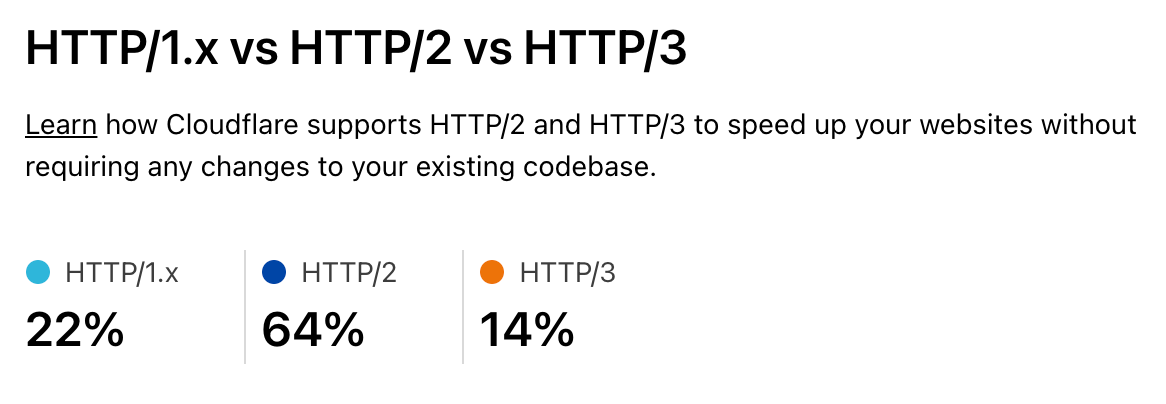
As people upgrade to recent browsers on their computers and devices the new protocols become more and more important. Staying on top of these, and optimizing them is vital as part of the waitless Internet.
And then comes the content of web pages. Images are a vital part of the web and delivering optimized images right-sized and right-formatted for the end user device plays a big part in a fast web.
But before the web browser can start loading the images it has to get and understand the HTML of the web page. This is wasteful as the browser could be downloading images (and other assets like fonts of JavaScript) while still processing the HTML if it knew about them in advance. The solution to that is for the web server to send a hint about what’s needed along with the HTML.
More on that in the coming week.
Imagical
One of the largest categories of content we deliver for our customers consists of static and animated images. And they are also a ripe target for optimization. Images tend to be large and take a while to download and there are a vast variety of end user devices. So getting the right size and format image to the end user really helps with performance.
Getting it there at the right time also means that images can be loaded lazily and only when the user scrolls them into visibility.
But, traditionally, handling different image formats (especially as new ones like WebP and AVIF get invented), different device types (think of all the different screen sizes out there), and different compression schemes has been a mess of services.
And chained services for different aspects of the image pipeline can be slow and expensive. What you really want is simple storage and an integrated way to deliver the right image to the end user tailored just for them.
More on that in the coming week.
Cache me if you can
As I mentioned in the section about DNS, a few thousand words ago, caching is really powerful and caching content near the end user is super powerful. Cloudflare makes extensive use of caching (particularly of images but also things like GraphQL) on its servers. This makes our customers’ websites fast as images can be delivered quickly from servers near the end user.
But it introduces a problem. If you have a lot of servers around the world then the caches need to be filled with content in order for it to be ready for end users. And the more servers you add the harder it gets to keep them all filled. You want the ‘cache hit ratio’ (how often content is served from cache without having to go back to the customer’s server) to be as high as possible.
But if you’ve got the content cached in Casablanca, and a user visits your website in Chennai they won’t have the fastest content delivery. To solve this some service providers make a deliberate decision not to have lots of servers near end users.
Sounds a bit crazy but their logic is “it’s hard to keep all those caches filled in lots of cities, let’s have only a few cities”. Sad. We think smart software can solve that problem and allow you to have your cache and eat it. We’ve used smart software to solve global load balancing problems and are doing the same for global cache. That way we get high cache hit ratios, super low latency to end users and low load on customer web servers.
More on that in the coming week.
Zero Cool
You know what’s cooler than a millisecond? Zero milliseconds.
Back in 2017 Cloudflare launched Workers, our serverless/edge computing platform. Four years on Workers is widely used and entire companies are being built on the technology. We added support for a variety of languages (such as COBOL and Rust), a distributed key-value store, Durable Objects, WebSockets, Cron Triggers and more.
But people were often concerned about cold start times because they were thinking about other serverless platforms that had significant spool up times for code that wasn’t ready to run.
Last year we announced that we eliminated cold starts from Workers. You don’t have to worry. And we’ll go deeper into why Cloudflare Workers is the fastest serverless platform out there.
More on that in the coming week.
And finally…
If you run a large global network and want to know if it’s really the fastest there is, and where you need to do work to keep it fast, the only way is to measure. Although there are third-party measurement tools available they can suffer from biases and their methodology is sometimes unclear.
We decided the only way we could understand our performance vs. other networks was to build our own like-for-like testing tool and measure performance across the Internet’s 70,000+ networks.
We’ll also talk about how we keep everything fast, from lightning quick configuration updates and code deploys to logs you don’t have to wait for to ludicrously fast cache purges to real time analytics.
More on that in the coming week.
Welcome to Speed Week*
*Can’t wait for tomorrow? Go play Silent Space Marine. It uses the technologies mentioned above.
An unusual player for a forgotten ‘70s music format
Post Syndicated from Techmoan original https://www.youtube.com/watch?v=tkkx2h-rIEI
Comic for 2021.09.12
Post Syndicated from Explosm.net original http://explosm.net/comics/5974/
New Cyanide and Happiness Comic