Намерих къде са онези 4400 имота, които държавата ще разпродава

Post Syndicated from Боян Юруков original https://yurukov.net/blog/2025/ms-4400/

На 8-ми май 2025 Министерски съвет прие Програма за упражняване правата върху държавни имоти. В нея се говореше за масова продажба на имоти собственост на държавата и държани фирми. Лично Желязков обясни как анализ посочил, че над 4400 сгради и/или имоти били неизползвани и щели да бъдат публично оповестени.

Месец по-късно това не се случи. Имало е доста запитвания от медии, но списъкът остана тайна. На 10-ти юни Екипът на София ми припомниха това и пуснах запитване по ЗДОИ. Исках всички данни за тези имоти, къде се намират, чия собственост са и прочие. До 23-ти юни нямаше отговор от тях и дори не бяха ми дали входящ номер на заявлението. Тъй като го връчих чрез ССЕВ знаех, че е било отворено и това е удостоверено криптографски. Припомних им на 23-ти, че са длъжни да отговорят. На 25-то получих отговор с предоставен достъп.
Отговорът им не беше технически изряден, тъй като не ми изпращаха таблица, както поисках, а линк към страницата на на МРРБ. Оказа се, че са публикували справката на 24-ти юни – след напомнянето им, че трябва да предоставят информацията по ЗДОИ. Самата таблица е била създадена на 10-ти май, но е редактирана точно в деня на публикуването си. Ден по-късно получавам линка от тях.

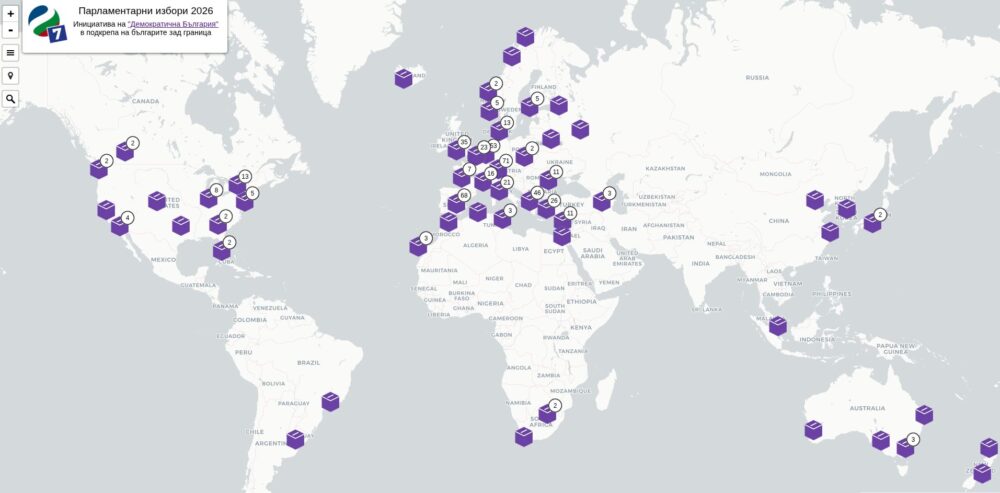
Тъй като справката им има редица проблеми с формата, използваемостта, но най-вече възможността някой въобще да се ориентира, снощи седнах и за няколко часа направих визуализация на това, което виждам. По-долу ще опиша как, но имам сериозни съмнения, че при взимане на решението си надали някой в онази зала на Министерски съвет всъщност е знаел за какви имоти става въпрос и е виждал какво ще разпродават така, както вие ще го видите сега.

Картата е аналогична за другите, които съм правил. С третия бутон от горе надолу може да я превключите на пълен екран. С четвъртия се връщате в изходна позиция. С последния – скривате карираните землища на населени места. Кръговете показват населените места с някакви имоти в данните на МС. Когато приближите се виждат парцелите и сградите. За 1022 от 4405 имота обаче по различни причини не успях да ги свържа с парцели, затова като натиснете на землището на населеното място (карираното поле), ще излезе списък с имотите, които са предвидени за продажба, но не е ясно къде са.

Няколко примера

Ето няколко от нещата, които ми направиха впечатление. Виждате централната част на София. Едната сграда е буквално на метри от Министерски съвет – точно до бирария Дондуковъ. На него е част от римски амфитеатър Сердика, а отпред има запазена фасада, която не изглежда да е маркирана като културна ценност. Това ще продава на търг Желязков.

На следващите две снимки виждате няколко имота в и около Бургас. Правилно виждате – МО продава няколко носа и парцели близо до плажната ивица.

Данни и методология

Справката на Министерски съвет може да видите сами. ще забележите, че записите са 5168. От тях 4405 имат номера, повечето от които са поредни. Последните две номера по големите са 4418 и 5851. Тъй като липсва запис с 2851, може да предположим, че са объркали и са имали това предвид вместо 5851. Липсват още 13 поредни числа, което може да значи или че са махани имоти в движение, или че в таблицата има пропуски и още е трябвало да бъдат отбелязани.

Записите без поредни номера са всъщност част от комплект имоти с общ номер. Например имот с няколко сгради към него. В картата горе ги комбинирам и като натиснете на обозначенията ще ги видите. Преглеждайки записите забелязах няколко които изглеждат като отделни имоти, но нямат свой номер. Не съм правил корекции по оригиналната справка обаче. Ще го направя идната седмица, защото сега искам да покажа точно както предоставиха от МС.

В данните липсва географски координати. Доста от имотите обаче имаха идентификатор на имота или сградата. Използвайки отворените вече данни от кадастъра успях да сложа точно тези обекти на картата. За над 1000 обаче знам само в кое населено място са. За тях използвах данни за землищата на населени места, които бях отворил преди десетина години.

Тъй като говорих за хиляди обекти по картата, когато я отворите ще видите много точки, които отбелязват групирането на населените места. Като натиснете на някоя, ако има само един обект там ще се отвори информацията за него. Иначе приближава на мястото. Така ще видите отделни пацели или сгради, ако има такива. Ако натиснете на карираното поле ще се отворят обектите без ясно местоположение.

Всичко това дава ясна представа, че списъкът е изготвян на ръка, набързо, без особено внимание за еднакво изписване или дори спазване на идеята на колоните. На места има идентификатори на парцели, но такива не съществуват в кадастъра, тъй като вероятно са стари или объркани. Има грешки в имената на доста общини и населени места, доста данни лисват или са видимо грешни. Въпреки това, успях да сложа на картата всички обекти за продажба.

Скоро на картата ще добавя визуална помощ за намиране на малки пацели – например пинче, бутон за геолокация на потребителя, линк от обектите в София, Благоевград и Пловдив към картата с документите на GovAlert и ще гледам да поставя чрез адреси и други белези част от активите. Добавих вече да се виждат данните от КАИС, но ми се ще да ги обновя, защото за последно съм ги свалял в края на май.

Защо това е важно?

Говоря от над десетилетие колко важни са отворените данни. Това, което Министерски съвет предостави като справка е престорена прозрачност. Първо, трябваше да им се напомня многократно и да се заплашат със съд. Второ, справката беше пълна с грешки и форматът не позволява повторно използване. Трето, данните не са единни като смисъл, качество, номенклатури и прочие белези, за някои от които имаме цели агенции, които се грижат. Не на последно място – липсва всякаква информация как е събрана тази справка, какъв е бил анализа, методологията и критериите.

Както и при данните на Черна писта, трябва отново да кажа, че не очаквам Министерски съвет да седне да прави такава карта. На мен ми отне една вечер, на тях ще им трябват шест месеца и стотици хиляди за поръчка. Тяхната задача, както и на всички институции, е да публикуват качествени, надеждни и готови за повторно използване отворени данни. Също да няма лиценз „всички права запазени“, както са направили МРРБ и според който в момента нарушавам авторските права на няколкостотин чиновници.

Разглеждайки имотите ще видите градски улици, междублокови пространства, исторически забележителности, културни и спорни зони, крайно апетитни имоти по курорти и дори цели полуострови. За много от тях ще изникнат въпроси за интереси, нужда, цена и дали вече не са уговорени. За други е абсурдно защо не се предоставят на общините предвид. Отговорите на тези въпроси може да се надяваме да получим от дълбоките дебри на държавни фирми, калинки и чиновници. Трябва обаче да знаем какво да питаме и че нещо ще се случи и се надявам тази карта да помогне малко в тази посока.

The post Намерих къде са онези 4400 имота, които държавата ще разпродава first appeared on Блогът на Юруков.

Russian Internet users are unable to access the open Internet

Post Syndicated from Michael Tremante original https://blog.cloudflare.com/russian-internet-users-are-unable-to-access-the-open-internet/

Since June 9, 2025, Internet users located in Russia and connecting to web services protected by Cloudflare have been throttled by Russian Internet Service Providers (ISPs).

As the throttling is being applied by local ISPs, the action is outside of Cloudflare’s control and we are unable, at this time, to restore reliable, high performance access to Cloudflare products and protected websites for Russian users in a lawful manner. 

Internal data analysis suggests that the throttling allows Internet users to load only the first 16 KB of any web asset, rendering most web navigation impossible.

Cloudflare has not received any formal outreach or communication from Russian government entities about the motivation for such an action. Unfortunately, the actions are consistent with longstanding Russian efforts to isolate the Internet within its borders and reduce reliance on Western technology by replacing it with domestic alternatives. Indeed, Russian President Vladimir Putin recently publicly threatened to throttle US tech companies operating inside Russia. 

External reports corroborate our analysis, and further suggest that a number of other service providers are also affected by throttling or other disruptive actions in Russia, including at least Hetzner, DigitalOcean, and OVH.

The impact

Cloudflare is seeing disruptions across connections initiated from inside Russia, even when the connection reaches our servers outside of Russia. Consistent with public reporting on Russia’s practices, this suggests that the disruption is happening inside Russian ISPs, close to users.

Russian Internet Services Providers (ISPs) confirmed to be implementing these disruptive actions include, but are not limited to, Rostelecom, Megafon, Vimpelcom, MTS, and MGTS.

Based on our observations, Russian ISPs are using several throttling and blocking mechanisms affecting sites protected by Cloudflare, including injected packets to halt the connection and blocking packets so the connection times out. A new tactic that began on June 9 limits the amount of content served to 16 KB, which renders many websites barely usable.

The throttling affects all connection methods and protocols, including HTTP/1.1 and HTTP/2 on TCP and TLS, as well as HTTP/3 on QUIC.

The view from Cloudflare data

Traffic trends

Cloudflare Radar exists to share insights and bring transparency to Internet trends. The high rate of connectivity errors to all our data centers has resulted in an overall decrease in traffic served to Russian users. The reduction in traffic can be observed on Cloudflare Radar:


Client-side reports via Network Error Logging

Some customers elect to enable W3C-defined Network Error Logging (NEL), a feature that embeds error-reporting instructions inside the headers of web content that users request. The instructions tell web browsers what errors to report, and how to do so. Below is a view of NEL reports that show an increase of TCP connections being ‘reset’ prematurely (as explained in our tampering and Radar resets blogs). Separately, the large growth in h3.protocol.error shows that QUIC connections have been greatly affected:


Corroboration of throttling using internal data

The effects of the throttling can also be observed in our internal tooling. The chart below shows packet loss to our Russian data centers, each data center represented by a different line. The Y-axis is the proportion of packet loss:


High packet loss is a strong signal but does not on its own indicate throttling, since there might be other explanations. For example, an explanation may be our servers trying to resend packets multiple times in during some other mass failure that hinders, but does not completely halt, communication.

However, we have two additional pieces of information to work with. The first consists of public reports that “throttling” in this case means blocking all connections after 16 KB of data has been transmitted, which takes 10 to 14 packets (depending on the underlying technology). Second, we have our recently deployed “Resets and Timeouts” data that captures anomalous behaviour in TCP when it occurs within the first 10 packets. Since 10 packets can contain 16 KB of data, some connections that are blocked around 16 KB will be visible at the “Post PSH” stage in the Radar data. In TCP, the ‘PSH’ message means Cloudflare got the initial request and data transfer has begun. If the connection is blocked at this stage, then many of the sent packets will be lost. 

The graph below uses Radar’s Data Explorer to focus on just the Post-PSH stage, where there is a dip followed by an immediate and proportionally large increase before June 11. This pattern corresponds closely with the loss data seen above:


If you run Internet sites for Russian users

If you are using Cloudflare to protect your sites, unfortunately, at this time, Cloudflare does not have the ability to restore Internet connectivity for Russia-based users. We advise you to reach out and solicit Russian entities to lift the throttling measures that have been put in place.

If you are a Cloudflare enterprise customer, please reach out to your account team for further assistance.

Access to a free and open Internet is critical for individual rights and economic development. We condemn any attempt to prevent Russian citizens from accessing it.

DR 101: How to Test Your DR Plan

Post Syndicated from Kari Rivas original https://www.backblaze.com/blog/dr-101-how-to-test-your-dr-plan/

A decorative image showing a cloud, objects, and a continuous loop.

Your disaster recovery (DR) plan is only as strong as your last test. Yet, many enterprises treat DR like a fire extinguisher—useful in theory, but rarely checked. Regular backup testing and disaster recovery drills are essential to ensure your plan works when it counts.

Let’s break down how to test your DR plan effectively and build a framework for continuous improvement.

Step 1: Building a disaster recovery testing framework

Your DR plan isn’t complete until it includes a clear, repeatable testing schedule. Here’s how to structure it:

  • Testing frequency: Establish a regular testing schedule. The optimal frequency depends on your company’s size and risk profile. A minimum of annual testing is recommended, with more frequent testing (every three-six months) beneficial for larger enterprises.
  • Testing types: Incorporate various testing methodologies into your plan. This might include:
    • Tabletop exercises: Simulate disaster scenarios through facilitated discussions, allowing your team to identify communication gaps and areas for improvement in the DR plan.
    • Walk-throughs: Step through specific recovery procedures outlined in the plan with your incident response team, ensuring team members understand their roles and responsibilities.
    • Limited scope DR drills: Simulate a disaster scenario with a specific system or application outage, testing recovery procedures for that particular environment.
    • Full-scale DR drills: Conduct comprehensive tests that simulate a full-blown disaster, involving all critical systems, applications, and personnel.

By rotating through these disaster recovery testing approaches, you’ll catch vulnerabilities before a real crisis does.

Step 2: Involve the right people (not just IT)

A solid DR plan isn’t just an IT function, it’s a team sport. Bring in key personnel from various departments (IT, legal, finance, etc.) to review your DR plan. You might discover potential oversights or areas for improvement that you may have missed with their diverse perspectives.

Step 3: Practice makes prepared

Regularly conduct DR drills and exercises to put your plan into action. DR drills should feel real. That means:

Involving your team. These exercises should involve all members of your IRT, including IT specialists, communication experts, and management representatives, simulating real-world response scenarios and fostering teamwork within the team.

Learning from every test. The primary objective of testing is to identify weaknesses and improve your DR plan. Track everything: timing, response quality, communication breakdowns.

Conducting a retrospective. Use your DR exercises and drills to analyze successes and failures, identify areas for improvement in the DR plan and update your plan based on the lessons learned.

  • Encourage open discussion and feedback from all participants, including the IRT and potentially impacted stakeholders.
  • Identify areas where the plan fell short or where communication could be improved.
  • Apply these insights to fortify your DR plan and improve your company’s overall disaster preparedness.

Step 4: Make the plan accessible

Ensure your DR plan is readily accessible to your IRT members, even during a disaster. Consider storing it in a secure, cloud-based location accessible from various devices and internet connections. Ensure you can access your plan even if your primary environment is down.

Step 5: Leverage the cloud for DR testing

Consider cloud-based solutions for DR testing and recovery. This eliminates the need for ongoing infrastructure investment dedicated solely to testing purposes. Leveraging tools like cloud storage and virtualized infrastructure services provide flexible, affordable options. 

Here are some key benefits of cloud-based DR testing: 

  • Cost-effectiveness: Cloud platforms offer on-demand resources, eliminating the need for dedicated infrastructure and associated costs.
  • Scalability: Cloud resources can be easily scaled up or down to meet your specific testing needs.
  • Repeatability: Cloud environments allow for replicating test scenarios consistently, facilitating effective training and  process improvement.

Final thoughts: Test, Learn, Refine, Repeat

Disaster recovery isn’t a one-and-done process. Every test is a chance to learn, refine, and prepare better for the next incident. Businesses that test regularly not only reduce downtime—they build trust with their teams, customers, and stakeholders.

Ready to simplify your disaster recovery storage? Explore Backblaze B2 for DR testing.

The post DR 101: How to Test Your DR Plan appeared first on Backblaze Blog | Cloud Storage & Cloud Backup

Simplifying sustainability reporting using AWS and generative AI in banking

Post Syndicated from Sachin Kulkarni original https://aws.amazon.com/blogs/architecture/simplifying-sustainability-reporting-using-aws-and-generative-ai-in-banking/

European banks face a new challenge with the European Commission’s transition from the Non-Financial Reporting Directive (NFRD) to the Corporate Sustainability Reporting Directive (CSRD) regulations. This transition represents an expansion in sustainability reporting scope that will affect approximately 50,000 companies, a significant increase from the previous 11,700.

This means that banks themselves need to file sustainability reports because they will now be one of those 50,000 companies, but for their own reporting, they also need to assess their clients’ sustainability reports because they lend or finance those companies.

In this post, you learn how you can use generative AI services on Amazon Web Services (AWS) to automate your sustainability reporting requirements, reduce manual effort, and improve accuracy. You do this by implementing an automated solution for extracting, processing, and validating data from corporate reports.

The challenge

Financial institutions and sustainability teams managing sustainability reporting face three critical challenges:

  • Scale and complexity: Banks and financial institutions must process thousands of annual reports and sustainability documents, often spanning hundreds of pages each. This process requires extensive data extraction, complex EU Taxonomy alignment calculations, and resource-intensive validation steps. Manual processing introduces significant risks of errors and consumes valuable team resources.
  • Regulatory compliance: Banks must now implement detailed CSRD requirements, track specific metrics for turnover, capital expenditure (CapEx), and operating expenses (OpEx), and calculate their Green Asset Ratio (GAR) as well as environmental risks that come with their loans, debt, or equity investments. These new requirements demand robust data collection and processing capabilities.
  • Data management: Processing Green House Gas (GHG) emissions data across Scope 1, 2, and 3 categories requires analyzing complex lending and investment activities. With strict reporting deadlines, organizations need efficient tools to process this expanding volume of sustainability data.

The sustainability team point of view

Banks finance a large variety of counterparties and economic activities. While their carbon footprint is primarily linked to the greenhouse gas (GHG) emissions of their counterparties (Scope 3), The direct GHG emissions (Scope 1) of financial institutions or the GHG emissions linked to their energy consumption (Scope 2) are usually limited. For banks, the most critical key performance indicator (KPI) is the GAR, which measures the proportion of a bank’s taxonomy-aligned balance sheet exposures versus its total eligible exposures, as shown in the following figure.

To calculate their GAR, banks must obtain and use sustainability data from annual reports or sustainability reports of up to 50,000 companies (many of which are subject to NFRD and CSRD reporting), and understand how much of their activities are linked to EU Taxonomy.

The manual process

In the example that follows, we use the Amazon 2023 Annual Report. Some of the data that teams would have to manually extract includes: Revenue, Scope 1, Scope 2, and Scope 3 emissions.

Amazon Annual Report

As you can see from the page count at the top of the preceding figure, people manually searching for this data would have to go through 92 pages to find the parameters they’re looking for. Next, we might determine that some of the data we need (Scope 1, Scope 2, Scope 3) isn’t available in the annual report, so we need to analyze the sustainability report. As shown in the following figure, to manually retrieve the relevant data from this report, we would have to go through 98 pages of information.

amazon sustainability report

To prepare a GAR, we would have to repeat this process across hundreds or even thousands of companies.

A solution using AWS and generative AI

To address these challenges, we propose an automated approach using AWS services. This approach can help banks streamline their sustainability reporting processes.

high level flow

Here’s how this solution works— as shown in the preceding figure:

  1. Upload your counterparties’ reports to Amazon Simple Storage Service (Amazon S3).
  2. Amazon Bedrock automatically:
    1. Determines NFRD eligibility.
    2. Extracts relevant sustainability data.
    3. Organizes information for GAR calculations.
  3. Review and validate the extracted data.
  4. Generate required regulatory reports.

Architecture

We divide the architecture into two areas:

  1. Data ingestion flow
  2. Report generation flow

Data ingestion flow

We use Amazon Bedrock Knowledge Bases to build an automated data ingestion flow. See Prerequisites for your Amazon Bedrock knowledge base data to understand supported document formats and limits for knowledge base data.

Data Ingestion flow

The workflow, shown in the preceding figure, is:

  1.  Annual reports or sustainability reports are uploaded into an S3 bucket.
  2. On the S3 bucket, we enable event notifications for events such as addition, change, or deletion of the reports.
  3. These events are sent to Amazon Event Bridge, which trigger an AWS Lambda function.
  4. The Lambda function syncs the data source to an Amazon Bedrock knowledge base.
  5. Amazon Bedrock Knowledge Bases processes the documents and converts it into vector embeddings. For more information, see Amazon Bedrock Knowledge Bases supports advanced parsing, chunking, and query reformulation giving greater control of accuracy in RAG based applications
  6. Amazon Bedrock Knowledge Bases stores the vector embeddings in the vector database of your choice, such as in an Amazon OpenSearch Serverless collection.

Now the data is read, broken into chunks, converted to embeddings and stored in a vector store. You use a report generation flow to ask questions about the information in the knowledge base.

Report generation flow

To automate the report generation for sustainability teams, we created the report generation flow shown in the following figure.

report generation flow

The report generation flow includes the following steps:

  1. When user uploads an annual report, the data from the report is ingested into the knowledge base, as shown in the data ingestion flow.
  2. A Lambda function—Invoke Bedrock Agent—is triggered to invoke an Amazon Bedrock agent.
  3. The Amazon Bedrock agent determines NFRD or CSRD applicability based on various parameters such as employee numbers and annual revenues. This agent then passes on what kind of regulation to apply to a Lambda function.
  4. The Lambda function Retrieve Sustainability Metrics retrieves various parameters needed for NFRD or CSRD from the annual report.
    1. The function receives NFRD or CSRD applicability from the Amazon Bedrock agent.
    2. Based on NFRD or CSRD applicability, there are specific sustainability metrics that need to be retrieved. For NFRD, there are about 15 metrics that need to be retrieved, and for CSRD, there are about 30 metrics.
    3.  The function iteratively sends {variable} to the Amazon Bedrock flow. For example, if the metric to be retrieved is Scope 1 emission, then the Lambda function will send variable=‘Scope 1 emission’
    4. The function gets the metric value from the Amazon Bedrock flow and when the required metrics are retrieved, creates a CSV file with the details.
  5. Amazon Bedrock flow:
    1. Retrieve {variable} (for example, ‘Scope 1 emission’) from the annual report. For this, we create a prompt, as shown in the following diagram.
    2. Use the prompt to fetch the value from the knowledge base.
        • Prompt:
          <query> You are an intelligent agent that helps retrieve information from a knowledgebase. Please find {{variable}}. Please return only a number and not any additional text. I only need the value so you will return one word</query>

    3. Return the value to the Lambda function in Step 4.

Breakdown of key components

Amazon S3 is used for storing annual statements and sustainability reports, providing highly durable and secure object storage that facilitate immediate access when needed for processing.

Amazon Bedrock Knowledge Bases enables using Retrieval-Augmented Generation (RAG) to optimize the output of a large language model by giving it the context of companies’ annual reports and regulatory requirements. It does so by creating chunks and vector embeddings from the annual reports to enable efficient information retrieval from a vector database of your choice.

Amazon Bedrock foundation models (FMs) extract information from an Amazon Bedrock knowledge base and generate standardized PDF reports for regulators, providing consistent formatting and alignment with CSRD requirements. We encourage you to choose the best foundational model for your use case through the flexibility and enterprise-grade controls of Amazon Bedrock. For this solution, we used Anthropic’s Claude Sonnet 3.5 as the model, but by using Amazon Bedrock, you can choose from over 50 different models to see which one best fits your use case.

Amazon Bedrock Flows orchestrates the document processing pipeline, coordinating between services to automatically extract required sustainability metrics and validate compliance requirements. This feature helps us manage the workflow from initial document ingestion through to final report generation.

Amazon Bedrock Prompt Management creates and helps manage precise prompts that help retrieve multiple sustainability metrics from reports for example: turnover, Scope 1, Scope 2, and Scope 3 emissions data. These structured prompts facilitate consistent data extraction across different document formats.

Amazon Bedrock Agents evaluates each uploaded document to determine NFRD or CSRD eligibility by analyzing company revenue, employee count, and incorporation details. The agents retrieve these parameters by using a Lambda function that’s part of the actions the agent can perform.

Lambda handles event-driven processing when new documents are uploaded. Lambda functions are also used by the agent to retrieve data from companies’ annual reports and trigger the appropriate workflows based on document type.

Amazon EventBridge is used to build event-driven applications at scale across AWS and manages workflow orchestration, automatically initiating document processing when new reports are uploaded through S3 event notifications.

This architecture enables banks to process thousands of sustainability reports efficiently. The solution scales automatically to handle increasing document volumes while keeping security a top priority.

Additional considerations

You can use the following additional AWS service to help further increase the accuracy of information retrieval from sustainability documents.

Amazon Bedrock Guardrails to make sure that the solution caters to responsible AI policies. Specifically, we have added contextual grounding checks to reduce hallucinations. This is important for the solution because we’re trying to find a few specific values in a large document, and these checks make sure that the metrics retrieved are based on the documents.

Automated reasoning checks which help to verify the metrics returned by the solution. Consider the metric Number of employees. There can be multiple places in the annual report where the number of employees is mentioned; for example, temporary workers, part-time employees, employees from various departments, employees from a company that was taken over last year, and so on. To arrive at the right number, automated reasoning checks help.

Benefits

This sustainability reporting solution cuts document processing time from 8—10 weeks to few hours. Banks get clear audit trails showing exactly how they extracted and validated sustainability data. When regulations are updated, the system adapts through its knowledge base without disrupting operations. Built-in security protects company data through the entire process. Access controls and encryption are in place to secure information. The output delivers standardized, accurate reports. This automation lets sustainability teams concentrate on environmental improvements rather than paperwork. Teams can instead analyze trends and develop initiatives instead of hunting through reports for data points.

Conclusion

As sustainability reporting requirements evolve, having a flexible and automated solution will become crucial. While we focused on NFRD reporting, the same pattern can be adapted for CSRD compliance reporting, SFDR reporting requirements, and Internal sustainability metrics, or EU Taxonomy alignment.

Customers looking to build their products in the Financial Services industry have access to industry and domain AWS specialists; contact us for help in your cloud journey.

You can also learn more about AWS services and solutions for financial services by visiting AWS for Financial Services and Generative AI on AWS.


About the authors

Building serverless event streaming applications with Amazon MSK and AWS Lambda

Post Syndicated from Tarun Rai Madan original https://aws.amazon.com/blogs/big-data/building-serverless-event-streaming-applications-with-amazon-msk-and-aws-lambda/

As organizations build modern applications with event-driven architectures (EDA), they often seek solutions that minimize infrastructure management overhead while maximizing developer productivity. Amazon Managed Streaming for Apache Kafka (Amazon MSK) and AWS Lambda together provide a serverless, scalable, and cost-efficient platform for real-time event-driven processing.

In this post, we describe how you can simplify your event-driven application architecture using AWS Lambda with Amazon MSK. We demonstrate how to configure Lambda as a consumer for Kafka topics, including a cross-account setup and how to optimize price and performance for these applications.

Why use Lambda with Amazon MSK?

Customers building event-driven applications have several key priorities when it comes to their architecture choices. They typically seek to reduce their operational overhead by using Amazon Web Services (AWS) to handle the complex, underlying infrastructure components so their teams can focus on core business logic. Additionally, developers prefer a streamlined experience that minimizes the need for repetitive boilerplate code, enabling them to be more productive and focus on creating value. Furthermore, these customers want to achieve both scalability and cost-effectiveness without the burden of managing compute infrastructure directly. Lambda integration with Amazon MSK effectively addresses these requirements, delivering a comprehensive solution that combines the benefits of serverless computing with managed Kafka services. For example, an ecommerce company can use Amazon MSK to collect real-time clickstream data from its website and process those events using AWS Lambda. With this integration, they can trigger Lambda functions to update recommendation models, send personalized offers, or analyze user behavior instantly—without provisioning or managing servers. The key benefits of using Lambda with Amazon MSK include:

  1. Simplicity through native integration – AWS Lambda offers native integration with Amazon MSK through a connector resource called event source mapping. You can use this integration to directly associate a Kafka topic—whether it’s on Amazon MSK or a self-managed Kafka cluster—as an event source for a Lambda function without writing custom consumer logic. With just a few configuration steps, event source mapping handles partition assignment, offset tracking, and parallelized batch processing under the hood. It uses the Kafka consumer group protocol to distribute topic partitions across multiple concurrent Lambda invocations, supports batch windowing, and enables at-least-once delivery semantics. Moreover, it automatically commits offsets upon successful function execution while handling retries and dead-letter queue (DLQ) routing for failed records, significantly reducing the operational overhead traditionally associated with Kafka consumers.
  2. Auto scaling and throughput controls – When using AWS Lambda with Amazon MSK through event source mapping, Lambda automatically scales by assigning a dedicated event poller per Kafka partition, enabling parallel, partition-based processing. This allows the system to elastically handle varying traffic without manual intervention. For advanced control, provisioned concurrency pre-initializes Lambda execution environments, eliminating cold starts and delivering consistent low-latency performance. Additionally, with provisioned event source mapping, you can configure the minimum and maximum number of Kafka pollers, providing precise control over throughput and concurrency. This is ideal for applications with unpredictable traffic patterns or strict latency requirements.
  3. Cost-effectiveness – AWS Lambda uses a pay-per-use model in which you only pay for compute time and number of invocations. When integrated with Amazon MSK, there are no charges for idle time, making it ideal for bursty or low-frequency Kafka workloads. You can further optimize costs by tuning batch size and batch window settings. For mission-critical workloads, provisioned concurrency provides consistent performance with controlled pricing.
  4. Event filtering – AWS Lambda supports event filtering for Amazon MSK event sources, which means you can process only the Kafka records that match specific criteria. This reduces unnecessary function invocations and optimizes your function costs. You can define up to five filters per event source mapping (with the option to request an increase to ten). Each filter uses a JSON-based pattern to specify the conditions a record must meet to be processed. Filters can be applied using the AWS Management Console, AWS Command Line Interface (AWS CLI), or AWS Serverless Application Model (AWS SAM) templates. For more details and examples, refer to the AWS Lambda documentation on event filtering with Amazon MSK.
  5. Handling Availability Zone outage for your consumer – Amazon MSK enables high availability for your Kafka brokers by distributing them across multiple Availability Zones within a Region. To maintain high availability across your application, you similarly need a consumer that offers high availability. AWS Lambda offers high availability and resilience by running your consumer functions across multiple Availability Zones in a Region. This means that even if one Availability Zone experiences an outage, your Lambda function will continue to operate in other healthy Availability Zones. While Lambda manages security patching and Availability Zone failure scenarios, you can focus on your application logic.
  6. Cross-account event processingCross-account connectivity between AWS Lambda and Amazon MSK allows a Lambda function in one AWS account to consume data from an MSK cluster in another account using MSK multi-VPC private connectivity powered by AWS PrivateLink. This setup is particularly beneficial for organizations that centralize Kafka infrastructure while maintaining separate accounts for different applications or teams.
  7. Support for JSON, Avro, Protobuf, and Schema Registries – AWS Lambda supports Kafka events in JSON, Avro and Protobuf formats via event source mapping. It integrates with AWS Glue Schema registry, Confluent Cloud Schema registry, and self-managed Confluent Schema registry , enabling native schema validation, filtering, and deserialization without custom code.

How Lambda processes messages from your Kafka topic

Lambda uses event source mappings to process records from Amazon MSK by actively polling Kafka topics through event pollers that invoke Lambda functions with batches of records. These mappings are Lambda managed resources designed for high-throughput, stream-based processing. By default, Lambda detects the OffsetLag for all partitions in your Kafka topic and automatically scales pollers based on traffic. For high-throughput applications, you can enable provisioned mode to define minimum and maximum pollers, and your event source mapping auto scales between the minimum and maximum defined values. In the provisioned mode, each poller can process up to 5 MBps and supports concurrent Lambda invocations.

After Lambda processes each batch, it commits the offsets of the messages in that batch. If your function returns an error for a message in a batch, Lambda retries the whole batch of messages until processing succeeds or the messages expire. You can send records that fail all retry attempts to an on-failure destination for later processing. To maintain ordered processing within a partition, Lambda limits the maximum event pollers to the number of partitions in the topic. When setting up Kafka as a Lambda event source, you can specify a consumer group ID to let Lambda join an existing Kafka consumer group. If other consumers are active in that group, Lambda will receive only part of the topic’s messages. If the group exists, Lambda starts from the group’s committed offset, ignoring the StartingPosition. The following diagram illustrates this flow.

Walkthrough: Build a serverless Kafka app with AWS Lambda

Follow these steps to build a serverless application that consumes messages from an MSK cluster using AWS Lambda:

  1. Create an Amazon MSK cluster. Use the AWS Management Console or AWS CLI to create your MSK cluster. When the cluster is up, create your Kafka topic(s). For detailed instructions, refer to the Amazon MSK documentation.
  2. Create a Lambda function using the AWS Management Console or the AWS CLI. To learn more about creating a Lambda function, refer to Create your first Lambda function. The Lambda function’s execution role needs to have the following permissions:
    1. Access to connect to your MSK cluster
    2. Permissions to manage elastic network interfaces in your VPC
  3. To connect Lambda to Amazon MSK as a consumer, set up event source mapping to link your MSK topic with the Lambda function. This allows Lambda to automatically poll for new messages and process them. Follow the guide on how to configure event source mapping.

For reference, configuring event source mapping involves three steps:

  1. Network setup – In the default event source mapping mode, you need to configure a networking setup using a PrivateLink endpoint or NAT gateway for event source mapping to invoke Lambda functions. In provisioned mode, no networking configuration is needed (and you don’t incur the cost of networking components).
  2. Event source mapping parameter configuration – This involves setting necessary configuration parameters for the event source mapping to be able to poll messages from your Kafka cluster. This includes the MSK cluster, topic name, consumer group ID, authentication method, and optionally, schema registry, scaling mode. You can configure the scaling mode for provisioned throughput, along with batch size, batch window, and event filtering for your event source mapping.
  3. Access permissions – This involves configuring required permissions to access the required AWS resources, and includes configuring permissions for the function to execute the code, permissions for the event source mapping to access your MSK cluster, and permissions for Lambda to access your VPC resources.

The following screenshot shows the console setup for configuring Amazon MSK event source mapping, including the Amazon MSK trigger related fields.

The following screenshot shows event poller configuration.

The following screenshot shows additional settings you can use, depending on your use case.

Optimizing AWS Lambda for stream processing with Amazon MSK

When building real-time data processing pipelines with Amazon MSK and AWS Lambda, it’s important to tune your setup for both performance and cost-efficiency. Lambda offers powerful serverless compute capabilities, but to get the most out of it in a streaming context, you need to make a few key optimizations:

  1. Enable provisioned concurrency for low-latency processing – For workloads that are sensitive to latency—cold starts can introduce unwanted delays. By enabling provisioned concurrency, you can pre-warm a specified number of Lambda instances so they’re always ready to handle traffic immediately. This eliminates cold starts and provides consistent response times, which is crucial for latency-critical use cases.
  2. Enable provisioned mode for event source mapping for high-throughput processing – For Kafka workloads with stringent throughput requirements, activate the provisioned mode. The optimal configuration of minimum and maximum event pollers for your Kafka event source mapping depends on your application’s performance requirements. Start with the default minimum event pollers to baseline the performance profile and adjust event pollers based on observed message processing patterns and your application’s performance requirements. For workloads with spiky traffic and strict performance needs, increase the minimum event pollers to handle sudden surges. You can fine-tune the minimum event pollers by evaluating your desired throughput, your observed throughput, which depends on factors such as the ingested messages per second and average payload size, and using the throughput capacity of one event poller (up to 5 MB/s) as reference. To maintain ordered processing within a partition, Lambda caps the maximum event pollers at the number of partitions in the topic.
  3. Optimize message batching using size and windowing – By integrating Lambda with Amazon MSK, you can control how messages are batched before they’re sent to your function. Tuning parameters such as batch size (the number of records per invocation: 1–10,000 records) and maximum batching window (how long to wait for a full batch: 0–300 seconds) can significantly impact performance. Larger batches mean fewer invocations, which reduces overhead and improves throughput. However, it’s important to strike a balance—too large a batch or window might introduce unwanted processing delays. Monitor your stream’s behavior and adjust these settings based on throughput requirements and acceptable latency.
  4. Apply filters to reduce unnecessary invocations – Not every record in your Kafka topic might require processing. To avoid unnecessary Lambda invocations (and associated costs), apply filtering logic directly when configuring the event source mapping. With Lambda, you can define filtering (up to 10 filters) criteria so that only relevant records trigger your function. This helps reduce compute time, minimize noise, and optimize your budget, especially when dealing with high-throughput topics with mixed content. For Amazon MSK, Lambda commits offsets for matched and unmatched messages after successfully invoking the function.

Conclusion

By combining Amazon MSK with AWS Lambda, you can seamlessly build modern, serverless event-driven applications. This integration eliminates the need to manage consumer groups, compute infrastructure, or scaling logic so teams can focus on delivering business value faster.

Whether you’re integrating Kafka into microservices, transforming data pipelines, or building reactive applications, Lambda with Amazon MSK is a powerful and flexible serverless solution. For detailed documentation on how to configure Lambda with Amazon MSK, refer to the AWS Lambda Developer Guide. For more serverless learning resources, visit Serverless Land.


About the Authors

Tarun Rai Madan is a Principal Product Manager at Amazon Web Services (AWS). He specializes in serverless technologies and leads product strategy to help customers achieve accelerated business outcomes with event-driven applications, using services like AWS Lambda, AWS Step Functions, Apache Kafka, and Amazon SQS/SNS. Prior to AWS, he was an engineering leader in the semiconductor industry, and led development of high-performance processors for wireless, automotive, and data center applications.

Masudur Rahaman Sayem is a Streaming Data Architect at AWS with over 25 years of experience in the IT industry. He collaborates with AWS customers worldwide to architect and implement sophisticated data streaming solutions that address complex business challenges. As an expert in distributed computing, Sayem specializes in designing large-scale distributed systems architecture for maximum performance and scalability. He has a keen interest and passion for distributed architecture, which he applies to designing enterprise-grade solutions at internet scale.

Oracle Linux 10 released

Post Syndicated from corbet original https://lwn.net/Articles/1027112/

Version
10
of the Oracle Linux distribution has been released.

Oracle Linux 10 is now generally available for 64-bit Intel and AMD
(x86_64) and 64-bit Arm (aarch64) platforms. Oracle Linux 10
delivers robust security and exceptional performance for business
agility and demanding workloads at cloud scale. Key features
include modernized cryptographic capabilities, advancements in
developer tooling, and innovations for resilient infrastructure.

Enhance data ingestion performance in Amazon Redshift with concurrent inserts

Post Syndicated from Raghu Kuppala original https://aws.amazon.com/blogs/big-data/enhance-data-ingestion-performance-in-amazon-redshift-with-concurrent-inserts/

Amazon Redshift is a fully managed petabyte data warehousing service in the cloud. Its massively parallel processing (MPP) architecture processes data by distributing queries across compute nodes. Each node executes identical query code on its data portion, enabling parallel processing.

Amazon Redshift employs columnar storage for database tables, reducing overall disk I/O requirements. This storage method significantly improves analytic query performance by minimizing data read during queries. Data has become many organizations’ most valuable asset, driving demand for real-time or near real-time analytics in data warehouses. This demand necessitates systems that support simultaneous data loading while maintaining query performance. This post showcases the key improvements in Amazon Redshift concurrent data ingestion operations.

Challenges and pain points for write workloads

In a data warehouse environment, managing concurrent access to data is crucial yet challenging. Customers using Amazon Redshift ingest data using various approaches. For example, you might commonly use INSERT and COPY statements to load data to a table, which are also called pure write operations. You might have requirements for low-latency ingestions to maximize data freshness. To achieve this, you can submit queries concurrently to the same table. To enable this, Amazon Redshift implements snapshot isolation by default. Snapshot isolation provides data consistency when multiple transactions are running simultaneously. Snapshot isolation guarantees that each transaction sees a consistent snapshot of the database as it existed at the start of the transaction, preventing read and write conflicts that could compromise data integrity. With snapshot isolation, read queries are able to execute in parallel, so you can take advantage of the full performance that the data warehouse has to offer.

However, pure write operations execute sequentially. Specifically, pure write operations need to acquire an exclusive lock during the entire transaction. They only release the lock when the transaction has committed the data. In these cases, the performance of the pure write operations is constrained by the speed of serial execution of the writes across sessions.

To understand this better, let’s look at how a pure write operation works. Every pure write operation includes pre-ingestion tasks such as scanning, sorting, and aggregation on the same table. After the pre-ingestion tasks are complete, the data is written to the table while maintaining data consistency. Because the pure write operations run serially, even the pre-ingestion steps ran serially due to lack of concurrency. This means that when multiple pure write operations are submitted concurrently, they are processed one after another, with no parallelization even for the pre-ingestion steps. To improve the concurrency of ingestion to the same table and meet low latency requirements for ingestion, customers often use workarounds through the use of staging tables. Specifically, you can submit INSERT ... VALUES(..) statements into staging tables. Then, you perform joins with other tables, such FACT and DIMENSION tables, prior to appending data using ALTER TABLE APPEND into your target tables. This approach isn’t desirable because it requires you to maintain staging tables and potentially have a larger storage footprint due to data block fragmentation from the use of ALTER TABLE APPEND statements.

In summary, the sequential execution of concurrent INSERT and COPY statements, due to their exclusive locking behavior, creates challenges if you want to maximize the performance and efficiency of your data ingestion workflows in Amazon Redshift. To overcome these limitations, you must adopt workaround solutions, introducing additional complexity and overhead. The following section outlines how Amazon Redshift has addressed these pain points with improvements to concurrent inserts.

Concurrent inserts and its benefits

With Amazon Redshift patch 187, Amazon Redshift has introduced significant improvement in concurrency for data ingestion with support for concurrent inserts. This improves concurrent execution of pure write operations such as COPY and INSERT statements, accelerating the time for you to load data into Amazon Redshift. Specifically, multiple pure write operations are able to progress simultaneously and complete pre-ingestion tasks such as scanning, sorting, and aggregation in parallel.

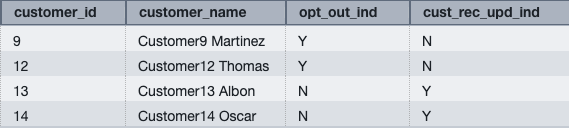
To visualize this improvement, let’s consider an example of two queries, executed concurrently from different transactions.

The following is query 1 in transaction 1:

INSERT INTO table_a SELECT * FROM table_b WHERE table_b.column_x = 'value_a';

The following is query 2 in transaction 2:

INSERT INTO table_a SELECT * FROM table_c WHERE table_c.column_y = 'value_b'

The following figure illustrates a simplified visualization of pure write operations without concurrent inserts.

Without concurrent inserts, the key components are as follows:

  • First, both pure write operations (INSERT) need to read data from table b and table c, respectively.
  • The segment in pink is the scan step (reading data) and the segment in green is write step (actually inserting the data).
  • In the “Before concurrent inserts” state, both queries would run sequentially. Specifically, the scan step in query 2 waits for the insert step in query 1 to complete before it begins.

For example, consider two identically sized queries across different transactions. Both queries need to scan the same amount of data and insert the same amount of data into the target table. Let’s say both are issued at 10:00 AM. First, query 1 would spend from 10:00 AM to 10:50 AM scanning the data and 10:50 AM to 11:00 AM inserting the data. Next, because query 2 is identical in scan and insertion volumes, query 2 would spend from 11:00 AM to 11:50 AM scanning the data and 11:50 AM to 12:00 PM inserting the data. Both transactions started at 10:00 AM. The end-to-end runtime is 2 hours (transaction 2 ends at 12:00 PM).The following figure illustrates a simplified visualization of pure write operations with concurrent inserts, compared with the previous example.

With concurrent inserts enabled, the scan step of query 1 and query 2 can progress simultaneously. When either of the queries need to insert data, they now do so serially. Let’s consider the same example, with two identically sized queries across different transactions. Both queries need to scan the same amount of data and insert the same amount of data into the target table. Again, let’s say both are issued at 10:00 AM. At 10:00 AM, query 1 and query 2 begin executing concurrently. From 10:00 AM to 10:50 AM, query 1 and query 2 are able to scan the data in parallel. From 10:50 AM to 11:00 AM, query 1 inserts the data into the target table. Next, from 11:00 AM to 11:10 AM, query 2 inserts the data into the target table. The total end-to-end runtime for both transactions is now reduced to 1 hour and 10 minutes, with query 2 completing at 11:10 AM. In this scenario, the pre-ingestion steps (scanning the data) for both queries are able to run concurrently, taking the same amount of time as in the previous example (50 minutes). However, the actual insertion of data into the target table is now executed serially, with query 1 completing the insertion first, followed by query 2. This demonstrates the performance benefits of the concurrent inserts feature in Amazon Redshift. By allowing the pre-ingestion steps to run concurrently, the overall runtime is improved by 50 minutes compared to the sequential execution before the feature was introduced.

With concurrent inserts, pre-ingestion steps are able to progress simultaneously. Pre-ingestion tasks could be one or a combination of tasks, such as scanning, sorting, and aggregation. There are significant performance benefits achieved in the end-to-end runtime of the queries.

Benefits

You can now benefit from these performance improvements without any additional configuration because the concurrent processing is handled automatically by the service. There are multiple benefits from the improvements in concurrent inserts. You can experience the improvement of end-to-end performance of ingestion workloads when you’re writing to the same table. Internal benchmarking shows that concurrent inserts can improve end-to-end runtime by up to 40% for concurrent insert transactions to the same tables. This feature is particularly beneficial for scan-heavy queries (queries that spend more time reading data than they spend time writing data). The higher the ratio of scan:insert in any query, higher the performance improvement expected.

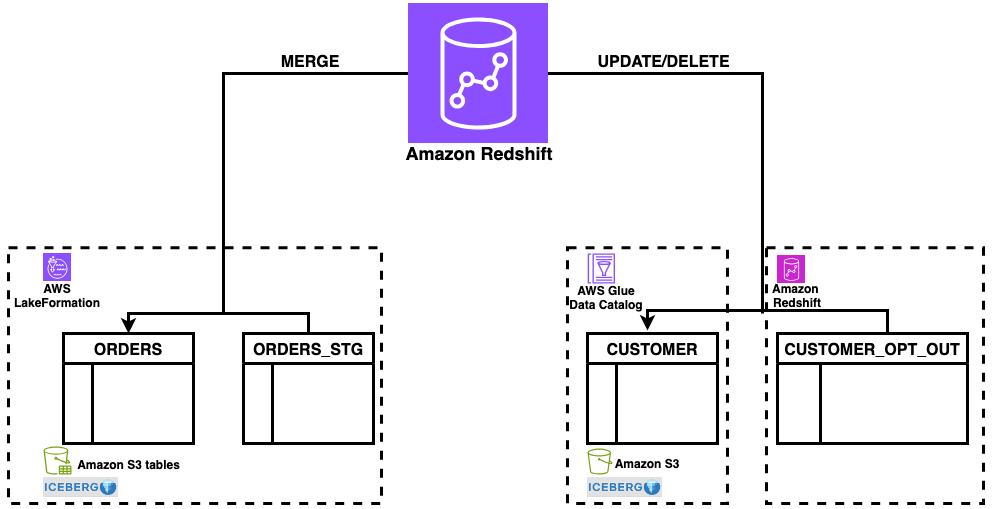
This feature also improves the throughput and performance for multi-warehouse writes through data sharing. Multi-warehouse writes through data sharing helps you scale your write workloads across dedicated Redshift clusters or serverless workgroups, optimizing resource utilization and achieving more predictable performance for your extract, transform, and load (ETL) pipelines. Specifically, in multi-warehouse writes through data sharing, queries from different warehouses can write data on the same table. Concurrent inserts improve the end-to-end performance of these queries by reducing resource contention and enabling them to make progress simultaneously.

The following figure shows the performance improvements from internal tests from concurrent inserts, with the orange bar indicating the performance improvement for multi-warehouse writes through data sharing and the blue bar denoting the performance improvement for concurrent inserts on the same warehouse. As the graph indicates, queries with higher scan components relative to insert components benefit up to 40% with this new feature.

You can also experience additional benefits as a result of using concurrent inserts to manage your ingestion pipelines. When you directly write data to the same tables by using the benefit of concurrent inserts instead of using workarounds with ALTER TABLE APPEND statements, you can reduce your storage footprint. This comes in two forms: first from the elimination of temporary tables, and second from the reduction in table fragmentation from frequent ALTER TABLE APPEND statements. Additionally, you can avoid operational overhead of managing complex workarounds and rely on frequent background and customer-issued VACUUM DELETE operations to manage the fragmentation caused by appending temporary tables to your target tables.

Considerations

Although the concurrent insert enhancements in Amazon Redshift provide significant benefits, it’s important to be aware of potential deadlock scenarios that can arise in a snapshot isolation environment. Specifically, in a snapshot isolation environment, deadlocks can occur in certain conditions when running concurrent write transactions on the same table. The snapshot isolation deadlock happens when concurrent INSERT and COPY statements are sharing a lock and making progress, and another statement needs to perform an operation (UPDATE, DELETE, MERGE, or DDL operation) that requires an exclusive lock on the same table.

Consider the following scenario:

  • Transaction 1:
    INSERT/COPY INTO table_A;

  • Transaction 2:
    INSERT/COPY INTO table_A;
    <UPDATE/DELETE/MERGE/DDL statement> table_A

A deadlock can occur when multiple transactions with INSERT and COPY operations are running concurrently on the same table with a shared lock, and one of those transactions follows its pure write operation with an operation that requires an exclusive lock, such as an UPDATE, MERGE, DELETE, or DDL statement. To avoid the deadlock in these situations, you can separate statements requiring an exclusive lock (UPDATE, MERGE, DELETE, DDL statements) to a different transaction so that INSERT and COPY statements can progress simultaneously, and the statements requiring exclusive locks can execute after them. Alternatively, for transactions with INSERT and COPY statements and MERGE, UPDATE, and DELETE statements on same table, you can include retry logic in your applications to work around potential deadlocks. Refer to Potential deadlock situation for concurrent write transactions involving a single table for more information about deadlocks, and see Concurrent write examples for examples of concurrent transactions.

Conclusion

In this post, we demonstrated how Amazon Redshift has addressed a key challenge: improving concurrent data ingestion performance into a single table. This enhancement can help you meet your requirements for low latency and stricter SLAs when accessing the latest data. The update exemplifies our commitment to implementing critical features in Amazon Redshift based on customer feedback.


About the authors

Raghu Kuppala is an Analytics Specialist Solutions Architect experienced working in the databases, data warehousing, and analytics space. Outside of work, he enjoys trying different cuisines and spending time with his family and friends.

Sumant Nemmani is a Senior Technical Product Manager at AWS. He is focused on helping customers of Amazon Redshift benefit from features that use machine learning and intelligent mechanisms to enable the service to self-tune and optimize itself, ensuring Redshift remains price-performant as they scale their usage.

Gagan Goel is a Software Development Manager at AWS. He ensures that Amazon Redshift features meet customer needs by prioritising and guiding the team in delivering customer-centric solutions, monitor and enhance query performance for customer workloads.

Kshitij Batra is a Software Development Engineer at Amazon, specializing in building resilient, scalable, and high-performing software solutions.

Sanuj Basu is a Principal Engineer at AWS, driving the evolution of Amazon Redshift into a next-generation, exabyte-scale cloud data warehouse. He leads engineering for Redshift’s core data platform — including managed storage, transactions, and data sharing — enabling customers to power seamless multi-cluster analytics and modern data mesh architectures. Sanuj’s work helps Redshift customers break through th

Introducing AWS Glue Data Catalog usage metrics for API usage

Post Syndicated from David Zhang original https://aws.amazon.com/blogs/big-data/introducing-aws-glue-data-catalog-usage-metrics-for-api-usage/

We’re excited to announce AWS Glue Data Catalog usage metrics. The usage metrics is a new feature that provides native integration with Amazon CloudWatch. This feature provides you with immediate visibility into your AWS Glue Data Catalog API usage patterns and trends.

AWS Glue Data Catalog is a centralized repository that stores metadata about your organization’s datasets. With its unified interface that acts as an index, you can store and query information about your data sources, including their location, formats, schemas, and runtime metrics.

As you scale your lakehouse architecture on Amazon Web Services (AWS) and maintain reliable data operations, observability and monitoring becomes critical to understanding and optimizing Data Catalog API usages.

With Data Catalog usage metrics in CloudWatch, you can achieve the following:

  • Monitor API call patterns at 1-minute intervals
  • Proactively request service quota increase for API rate limits
  • Enable the CloudWatch pre-built anomaly detection feature to identify abnormalities in your API usage
  • Understand lakehouse usage across more than 50 APIs

In this post, we demonstrate how to access these metrics, provide a step-by-step walkthrough, and set up meaningful alarms.

Access Data Catalog usage metrics in Amazon CloudWatch console

To access Data Catalog usage metrics, complete the following steps:

  1. Open Amazon CloudWatch console
  2. Under Metrics, choose All metrics
  3. In the search bar, enter Glue and choose Enter
  4. Choose Usage > By AWS Resource, as shown in the following screenshot

  1. The Metrics section opens and displays different catalog usage metrics that you can select from to create dashboards and alarms, as shown in the following screenshot

Monitor CallCount metrics

Each Amazon CloudWatch metric for Data Catalog is of a type API and set as CallCount. This means that for each API call on that specific resource (for example, GetConnection API) will be logged as one count. These metrics can seamlessly integrate into your existing CloudWatch dashboards, or you can use them to create new ones. For proactive monitoring, you can configure custom alarms that trigger automatically when this API usage exceeds your defined thresholds, helping you comply with service limits.

Under the Graphed metrics tab, you can provide additional customizations to match your monitoring needs. In the Details column, you can create alarms and enable anomaly detection to identify unusual patterns.

To help with effective API monitoring, CallCount metrics specifically focus on successful API calls. This way, you have more precise monitoring and can troubleshoot different types of API behaviors. The following screenshot shows the AWS Glue usage metrics view for GetTables API.

In the Statistics column, you can view your API usage beyond the default Sum, Min, and Max metrics. You can now select a wide variety of statistical methods to analyze your usage patterns, as shown in the following screenshot.

Metrics and dimensions for Data Catalog usage metrics

Data Catalog usage metrics use the AWS/Usage namespace and provide CallCount metrics. These metrics are published with the dimensions Service, Resource, Type and Class.

The CallCount metric doesn’t have a specified unit. The most useful statistic for the metric is SUM, which represents the total operation count for the 1-minute period. An important note is that the metric value is emitted at 1-minute intervals. Reducing the period further (for example, to 1 second) won’t change the emittance interval.

Metrics

Metric Description
CallCount The number of specified operations performed in your account.

Dimensions

Dimension key Dimension value Description
Service AWS Glue The name of the AWS service containing the resource. For Data Catalog usage metrics, the value for this dimension is AWS Glue.
Type API The type of resource being tracked. Currently, when the Service dimension is AWS Glue, the only valid value for Type is API.
Resource <API name>

The name of the API operation. Valid values include the following:

GetCatalogs, GetCatalog, GetDatabases, GetDatabase, GetTables, GetTable, GetTableVersion, GetTableVersions, SearchTables, GetPartitionIndexes, GetColumnStatisticsForTable, GetPartition, GetPartitions, BatchGetPartition, GetColumnStatisticsForPartition, GetConnection, GetConnections, GetUserDefinedFunction, GetUserDefinedFunctions, GetCatalogImportStatus, GetTableOptimizer, BatchGetTableOptimizer, ListTableOptimizerRuns, CreateCatalog, CreateDatabase, CreateTable, CreatePartitionIndex, CreatePartition, BatchCreatePartition, CreateConnection, CreateUserDefinedFunction, CreateTableOptimizer, UpdateCatalog, UpdateDatabase, UpdateTable, UpdateColumnStatisticsForTable, UpdatePartition, BatchUpdatePartition, UpdateColumnStatisticsForPartition, UpdateConnection, UpdateUserDefinedFunction, UpdateTableOptimizer, DeleteCatalog, DeleteDatabase, DeleteTable, BatchDeleteTable, DeleteTableVersion, DeletePartitionIndex, DeleteColumnStatisticsForTable, DeletePartition, BatchDeletePartition, DeleteColumnStatisticsForPartition, DeleteConnection, BatchDeleteConnection, DeleteUserDefinedFunction, DeleteTableOptimizer, TestConnection, ImportCatalogToGlue

Class None The class of resource being tracked. Data Catalog usage metrics use this dimension with a value of None.

Set up CloudWatch alarms for Data Catalog usage metrics

Data Catalog has defined rules to manage atypical usage patterns that limit the customer call rate at the granularity of requests per second. You can generate CloudWatch alarms using the CallCount metric so that limit increases can be done proactively. To configure a CloudWatch alarm with this threshold, complete the following steps:

  1. On the CloudWatch metrics console, select one of the available metrics, as shown in the following screenshot. In this example, we select the resource GetTables. You can select multiple metrics to fit your use case.

  1. Choose Graphed metrics.
  2. Choose Sum as the primary statistic.
  3. Set period to 1 minute.

  1. Choose Details and Create Alarm.

  1. For Threshold type, choose Anomaly Detection. You can also select Static based on your requirements and after you’ve determined a specific threshold value.
  2. Set the Anomaly detection threshold to 2 (default). The threshold value is used to determine the normal range of values for the metric. A higher value produces a thicker band of normal values. For more information on how CloudWatch anomaly detection works, refer to How CloudWatch anomaly detection works.
  3. Choose Next.
  4. For Send a notification to the following SNS topic, choose Create new topic.
  5. For Create a new topic, enter your Amazon Simple Notification Service (Amazon SNS) topic name.
  6. For Email endpoints that will receive the notification, enter your email address. In this example, we’re going to create a new SNS topic. However, you can use your existing SNS topics or use other options such as AWS Lambda or auto scaling action.
  7. Choose Create topic.

  1. Scroll down and choose Next.
  2. Enter an alarm name and a description and choose Next.
  3. Review all the details you’ve entered and choose Create alarm, as shown in the following screenshot.

By following these steps, you’ve successfully configured a CloudWatch alarm using anomaly detection that monitors your Data Catalog usage with the threshold that you set. The alarm will trigger when the CallCount metric exceeds the calculated threshold, sending notifications to your specified SNS topic and email endpoints.

This proactive monitoring approach prevents API rate limit issues and provides a smooth operation of your Data Catalog usage. For more information on using CloudWatch alarms, refer to Using Amazon CloudWatch alarms.

Conclusion

AWS Glue Data Catalog usage metrics is an effective enhancement to your data infrastructure monitoring capabilities. It addresses the growing need for detailed observability through Amazon CloudWatch in modern data architectures built on top of Data Catalog. You now have access to more granular statistics, moving beyond simple maximum and average request metrics to comprehensive performance indicators including p99 percentiles. These metrics are emitted in 1-minute intervals, providing visibility into your data catalog operations. Organizations can now proactively identify bottlenecks before they affect operations and efficiently conduct capacity planning through detailed usage patterns.

From building monitoring dashboards to setting up alerts, the native support with CloudWatch anomaly detection and flexible alarm configurations makes it straightforward to proactively monitor your lakehouse deployment and prevent abnormalities in your lakehouse usage. For more information, refer to Monitoring Data Catalog usage metrics in Amazon CloudWatch in the AWS Glue documentation. We recommend testing and using these metrics as part of your modern monitoring and observability strategy. We encourage you to share your feedback with us.


About the authors

David Zhang is an Analytics Solutions Architect specializing in designing and implementing large-scale data infrastructure, ETL processes, and extensive data management systems. He helps customers modernize data platforms on Amazon Web Services (AWS). David is also an active speaker at AWS events and contributor to technical content and open source initiatives. He enjoys playing volleyball, tennis, and basketball during his free time.

Noritaka Sekiyama is a Principal Big Data Architect with Amazon Web Services (AWS) Analytics services. He’s responsible for building software artifacts to help customers. In his spare time, he enjoys cycling on his road bike.

Sandeep Adwankar is a Senior Product Manager at AWS. Based in the California Bay Area, he works with customers around the globe to translate business and technical requirements into products that enable customers to improve how they manage, secure, and access data.

Abhay Joshi is a Software Development Engineer at AWS Glue and AWS Lake Formation. He is passionate about building fault tolerant and reliable distributed systems at scale.

Experience CS: A free integrated curriculum for computer science

Post Syndicated from Sofia Mohammed original https://www.raspberrypi.org/blog/experience-cs-a-free-integrated-curriculum-for-computer-science/

Experience CS is a brand-new, free, integrated computer science curriculum for elementary and middle school educators and anyone working with students aged 8 to 14. A key design principle for Experience CS is that any educator can use it. You don’t need a computer science qualification or previous experience in teaching computer science classes to deliver engaging and creative learning experiences for your students. That’s why, as US Executive Director, I’m especially pleased to announce the launch of the first six units in the curriculum today.

A vibrant yellow background with the text "Introducing Experience CS" centered. Four colorful, abstract shapes resembling coding blocks in purple, yellow, orange, and blue are placed around the text.

Read on to explore the new learning materials available and how you can start using them in your school.  

Six integrated computer science units 

Experience CS enables educators to teach computer science through a curriculum that integrates CS concepts and knowledge into core subjects such as math, science, and social studies. Ashly Tritch, computer science immersion specialist at Olson Middle School in Bloomington, MN, USA, said, “Cross-curricular computer science is important because it shows students how coding and tech skills can be used in other subjects like math, science, or even art. It helps make learning more interesting and helps kids understand how computer science connects to real life. The lessons that the Raspberry Pi Foundation is creating will be super engaging, with fun and creative activities that keep students curious and excited to learn.”

Six integrated computer science units are available to access, with more on the way. The units have been released in beta, and we would love to hear your feedback as we continue to make updates to the lesson materials. Each of the units includes an overview with a summary of the topics covered and a series of six to eight lessons, including lesson plans, slide decks, student-facing materials, and starter projects within our Code Editor for Education. 

We have designed the units to be cross-curricular, so students can learn about computer science concepts while deepening their understanding of related subject area content. For example, in “The me project,” grade 4 students (ages 9–10) explore the basics of Scratch, personalise sprites, and develop programs to create an animation that tells a story all about them. The project could be integrated into language arts lessons, enabling young learners to explore visual representation and write their own unique stories. In the “Smart communities” unit, students in grade 6 (ages 11–12) explore ways in which computing and technology can be used to create environments that are responsive to the needs of community members; this could be included within science or technology lessons.

Three educational unit cards are displayed: "Weather watchers", "The me project" and "Take a tour”.

Initially, the curriculum and resources have been mapped to national and local standards in the US and Canada, including the K–12 Computer Science Teachers Association Standards for Students, but they are available for teachers and students anywhere in the world to use.

You can register for a free Raspberry Pi Foundation account to start downloading the learning materials, including lesson plans, slide decks, student activity sheets and assessment criteria. 

A version of Scratch built especially for schools 

Experience CS has been built from the ground up to support safe, confident computing lessons in real classrooms. It includes self-directed creative projects using the popular programming language Scratch. We have built a version of Scratch that is especially for schools. That means it doesn’t have the community and sharing features that are central to the full Scratch platform. Instead, everything runs in a closed, classroom-ready environment that supports safeguarding policies and fits with school filtering systems. Simple and intuitive learning management features enable teachers to create accounts, set assignments, and review progress.

How to get started 

On the “Getting Started” page, teachers will find everything they need, including helpful videos and tutorials. The next webinar takes place on 16th July, where we will walk you through all six units available at launch and show you how easy it is to get started with the learning materials. Whether you’re a CS teacher, general education teacher, administrator, or someone who works with school-aged young people, this session will give you the practical tools and guidance you need to bring Experience CS to life in your classroom or program.

Professional development 

No matter your experience or skill level, the Experience CS content has been designed to be easy to use. However, we also provide professional development (PD) opportunities to help build confidence in teaching computer science. 

Teachers anywhere in the world can access free online courses offering flexible, self-paced learning to help you confidently teach block-based programming with effective, inclusive computing pedagogy. Our new course will develop your understanding of semantic waves while highlighting research-backed activities and examples directly from Experience CS units. 

Help shape Experience CS

Experience CS is supported by Google and builds on the fantastic work they have done to support educators and students through CS First. The team behind Experience CS includes educators with significant experience in teaching CS in elementary and middle school settings, and it is based on extensive classroom testing and research. We will continue to develop and improve the curriculum and resources in response to feedback from teachers and students. If you would like to help shape the future of Experience CS by testing new features and providing valuable feedback to improve the programme, sign up for the mailing list

What next? 

We can’t wait for you to explore Experience CS. We will continue to release more curriculum units as well as make the materials available in French and Spanish. Get a head start ready for the next school year by registering for a free Raspberry Pi Foundation account, which will allow you immediate access to all the lesson materials, and then create your school account to begin creating classes, add a scratch project to a class, manage student accounts and view student work.

The post Experience CS: A free integrated curriculum for computer science appeared first on Raspberry Pi Foundation.

Coccinelle for Rust progress report (Collabora blog)

Post Syndicated from jake original https://lwn.net/Articles/1027087/

Over on the Collabora blog, Tathagata Roy has an update
on the progress of targeting the Coccinelle tool
for matching and transforming source code to Rust. The Coccinelle for Rust
project
, which we covered in a 2024
talk by Roy at Kangrejos, is adding
the ability to transform Rust programs and the goal is “to bring
Coccinelle For Rust at par with Coccinelle For C in terms of basic
functionalities
“. There is still work to be done to get there, but
progress is being made in various areas.

Computational Tree Logic (CTL) is the heart of Coccinelle, which takes semantic patches and generalizes them over Rust files. Prior to using this engine, CfR used an ad-hoc method for matching patterns of code. This engine is the same as the one used for Coccinelle for C, with a few minor changes. Most of the changes were idiomatic but to the same effect. More information on the engine and its language (CTL-VW) can be found in the POPL Paper. With a standard engine, each step of the matching process can be logged, allowing us to learn and reuse the same design patterns from Coccinelle for C, including critical test cases.

The collective thoughts of the interwebz