Post Syndicated from Matt Granger original https://www.youtube.com/watch?v=RefaEdn7LEQ
Streamlining Cloud Compliance at GoDaddy Using CDK Aspects
Post Syndicated from Juan Pablo Melgarejo Zamora original https://aws.amazon.com/blogs/devops/streamlining-cloud-compliance-at-godaddy-using-cdk-aspects/
This is a guest post written by Jasdeep Singh Bhalla from GoDaddy.
AWS Cloud Development Kit (CDK) Aspects are a powerful mechanism that allows you to apply organization-wide policies, like security rules, tagging standards, and compliance requirements across your entire infrastructure as code. By implementing the Visitor pattern, Aspects can inspect and modify every construct in your CDK application before it’s synthesized into AWS CloudFormation templates, enabling you to enforce organizational standards automatically at build time.
At GoDaddy, we’ve used CDK Aspects to transform how we enforce compliance across our massive AWS footprint. Our Cloud Governance team is responsible for ensuring every AWS resource deployed across thousands of accounts adheres to strict security, compliance, and operational standards.
We have a simple goal:
Make it easy for developers to do the right thing without slowing them down.
Traditionally, we relied on documentation, Slack threads, and peer reviews to flag misconfigurations. But as our cloud footprint grew, this approach quickly hit its limits. It simply didn’t scale.
We needed something proactive.
From reactive to proactive: CloudFormation Hooks
Our first major leap forward came through CloudFormation Hooks. These allow us to validate every resource in a CloudFormation template against our compliance rules at deployment time. If a resource passes, it gets deployed. If not, the deployment is blocked, and we provide developers with clear, actionable error messages to help them fix the template.
This worked well, but it wasn’t perfect. Developers would often only discover issues after writing their entire templates using manual values to make the template compliant, and attempting deployment. This was a time-consuming process, and it was not a good developer experience.
We needed an automated way to make CloudFormation templates compliant with our compliance rules without manual effort.
This is where CDK Aspects come in.
CDK Aspects: compliance while you code
CDK Aspects are our answer to proactive, early-stage compliance enforcement — catching and resolving issues at the code level, before deployment.
In AWS CDK, an Aspect is a lightweight Visitor that can inspect and act on every construct in your infrastructure code before it’s synthesized into a CloudFormation template. This means you can apply organization-wide rules as developers write CDK code, not after.
Think of it as linting for your infrastructure.
Want to ensure all Amazon Simple Storage Service (Amazon S3) buckets have encryption enabled? Require specific tags on resources? Block public access on security groups? With CDK Aspects, all of that becomes not only possible, but automatic.
Under the hood: how CDK Aspects work
CDK Aspects are a powerful mechanism for inspecting and modifying your infrastructure as code. At their core, they use the Visitor Pattern, which allows you to traverse a tree of objects (constructs) and perform operations on each node without modifying the constructs themselves directly.
Interface IAspect
An Aspect is a class that implements the IAspect interface:
interface IAspect {
    visit(node: IConstruct): void;
}
The single visit() method is called for every construct in the scope where the Aspect is applied. Inside visit(), you can inspect, modify, or enforce rules on the construct.
Adding Aspects
To attach an Aspect to a construct (or a tree of constructs), use the following method:
Aspects.of(myConstruct).add(new SomeAspect());This adds the Aspect to the construct’s internal list.
When cdk deploy is run, a CDK app goes through several phases:

Figure 1: CDK app lifecycle from source code to deployment
- Construction – Constructs are instantiated.
- Preparation – Final modifications and Aspects are applied.
- Validation – Checks for invalid configurations.
- Synthesis – CloudFormation templates are generated.
- Deployment – Resources are provisioned in AWS.
Aspects are executed during the Preparation phase, which happens automatically. This ensures all rules, validations, or mutations are applied before synthesis, so your generated CloudFormation templates are compliant and valid before deployment.
During the Preparation phase of the CDK lifecycle, CDK traverses the construct tree and calls visit() on each node in top-down order (parent → children). Inside visit(), you can inspect, modify, or enforce rules on the construct.
visit(node: IConstruct) {
    if (node instanceof s3.Bucket) {
        node.encryption = s3.BucketEncryption.KMS; // Mutates the resource
    }
}
Example: CDK Aspects to automatically add S3 Encryption to all S3 buckets in a stack by mutating the resource.
class EnforceBucketEncryption implements IAspect {
    visit(node: IConstruct) {
        if (node instanceof s3.Bucket) {
            node.encryption = s3.BucketEncryption.KMS; // Mutates the resource
        }
    }
}
This aspect can be registered on the stack by calling the following method:
Aspects.of(this).add(new EnforceBucketEncryption());The template generated by CDK will look something like this:
Resources:
    MyBucket:
        Type: AWS::S3::Bucket
        Properties:
            BucketEncryption:
                ServerSideEncryptionConfiguration:
                    - ServerSideEncryptionByDefault:
                          SSEAlgorithm: aws:kms
From the example above, you can see that the BucketEncryption property is added to the MyBucket resource by the Aspect.
During the prepare phase, CDK traverses the construct tree from top to bottom – starting at the App, then each Stack, and down to resources like S3 buckets. At each node, Aspects are applied by invoking aspect.visit(node), allowing inspection and modification of resources. By the time CDK reaches the synth step, the CloudFormation template already includes these Aspect-driven changes, ensuring compliance and best practices are consistently enforced before deployment.
Types of CDK Aspects
AWS CDK distinguishes between two types of Aspects based on how they interact with your infrastructure: those that modify resources (mutating) and those that only inspect them (read-only).
Mutating Aspects
Mutating Aspects modify resources automatically (like adding encryption or logging). These change the properties of resources as they traverse your constructs. They are ideal for enforcing compliance and best practices like:
- Enforcing AWS Key Management Service (AWS KMS) encryption on S3 buckets
- Setting default timeouts on AWS Lambda functions
- Changing RemovalPolicy in test stacks
Mutating Aspects are powerful, but overusing them can introduce unintended changes, because they modify resources without explicit developer action.Always make sure you are aware of the changes, and avoid applying them to production resources without caution. Use logging or annotations to help you understand and debug the changes.
For example, the following aspect sets the default timeout on all Lambda functions to 300 seconds:
class SetDefaultTimeouts implements IAspect {
    visit(node: IConstruct) {
        if (node instanceof lambda.Function) {
            node.timeout = 300; // mutates the resource
        }
    }
}
Read-only Aspects
Read-only Aspects only inspect resources and report findings without modifying them. They’re ideal for compliance checks, tagging audits, and policy validation.
class RequireTags implements IAspect {
    visit(node: IConstruct) {
        const tags = Tags.of(node);
        if (!tags.hasTag("project_budget_number")) {
            Annotations.of(node).addWarning(
                "Missing required tag: project_budget_number",
            );
        }
    }
}
At GoDaddy, we use mutating Aspects to enforce compliance automatically, reducing manual work and ensuring stacks are compliant with our standards by default. We add read-only Aspects for stricter audits where mutation isn’t appropriate.
Common use cases for CDK Aspects
When building cloud infrastructure at scale, enforcing consistency across stacks can be an ongoing challenge. AWS CDK Aspects let you automatically enforce security, compliance, and operational standards across your entire infrastructure.
Below are some of the most impactful use cases where Aspects can save you time, reduce risk, and improve governance.
- Security & compliance: Security and compliance go hand in hand, and Aspects are a powerful way to enforce both before resources ever reach AWS. With Aspects, you can:
- Enforce encryption on S3 buckets, Amazon Relational Database Service (Amazon RDS) databases, and Amazon Elastic Block Store (Amazon EBS) volumes
- Require versioning on S3 buckets
- Flag wildcard * permissions in Identity and Access Management (IAM) policies
- Validate that required tags (like cost allocation tags) are present
- IAM policies: Aspects make it trivial and consistent across all stacks to apply the same permissions boundary to every IAM role.
- Tagging enforcement: Tags are the backbone of cost allocation, compliance, and automation. Yet, they’re easy to forget. With Aspects, you can enforce required tags across every resource.
- Operational best practices: Use Aspects to enforce sensible defaults and operational hygiene:
- Set Lambda function timeouts and memory sizes
- Ensure logging is enabled for S3, Amazon API Gateway(API Gateway), and AWS CloudTrail (CloudTrail)
- Testing made easier: You can use Aspects to override the default RemovalPolicy for test stacks to DESTROY, ensuring everything is cleaned up automatically.
- Working around 3rd-party constructs: Sometimes external constructs create resources you can’t fully configure, like an S3 bucket without encryption or logging options. Instead of waiting on maintainers or forking the library, you can apply an Aspect to modify those resources directly.
- Network policies: Networking issues often lead to security incidents. With Aspects, you can:
- Validate resources are deployed in approved Amazon Virtual Private Cloud (Amazon VPC) or subnets
- Prevent accidental public IP assignments
- Cost control: Budgets matter. Aspects can help by:
- Flagging high-cost instance types before deployment
- Limiting use of expensive storage classes
- Warning when provisioned throughput exceeds thresholds
You can combine these use cases into reusable, testable policies that run consistently across all CDK stacks.
CDK Aspects in action at GoDaddy
At GoDaddy, we define CDK Aspects and distribute them through a wrapper Stack that development teams use when building infrastructure with CDK. Every template a team creates is automatically made compliant with GoDaddy’s cloud compliance rules, without requiring manual updates or fixes.
As an example, some of the Aspects are:
- S3BucketAspect – Enforces encryption, logging, and public access block on S3 buckets.
- IAMRoleAspect – Flags wildcard permissions and enforces naming conventions.
- LambdaFunctionAspect – Validates timeouts, memory limits, and Amazon VPC configurations.
These Aspects enforce security, operational, and tagging standards at the code level. When you use the wrapper stack, the relevant Aspects are applied automatically, injecting the necessary properties into the CloudFormation template before deployment. This is intended to support compliance without slowing down development.
Each of these aspects implements the IAspect interface and is applied to stacks directly:
Aspects.of(myStack).add(new S3BucketAspect());
Aspects.of(myStack).add(new IAMRoleAspect());
Aspects.of(myStack).add(new LambdaFunctionAspect());
This approach means that when a developer defines a new resource, like an S3 bucket or IAM role, all relevant compliance rules are automatically applied:
const bucket = new s3.Bucket(myStack, "MyBucket", {
    // developer doesn't need to manually configure encryption or logging
});
During the CDK preparation phase, the aspect injects the required properties into the CloudFormation template, which is done before the template is synthesized and deployed. This ensures that the resources are deployed with the required properties at GoDaddy’s standards.
# s3-bucket.yaml - generated by `cdk synth`
Resources:
    MyBucket:
        Type: AWS::S3::Bucket
        Properties:
            BucketEncryption:
                ServerSideEncryptionConfiguration:
                    - ServerSideEncryptionByDefault:
                          SSEAlgorithm: AES256
            PublicAccessBlockConfiguration:
                BlockPublicAcls: true
                BlockPublicPolicy: true
                IgnorePublicAcls: true
                RestrictPublicBuckets: true
            LoggingConfiguration:
                DestinationBucketName: logging-bucket
                LogFilePrefix: logs/
Consider a team that deploys hundreds of S3 buckets per month, where each bucket requires encryption, logging, versioning, and public access block. With CDK Aspects, you don’t have to manually update the CloudFormation template to add the required properties.
This saves a lot of engineering effort and time, and ensures that the resources are deployed with the required properties that meet GoDaddy’s standards.
Conclusion
At GoDaddy, CDK Aspects have significantly transformed our approach to cloud infrastructure compliance.
Because Aspects run during the CDK preparation phase, before synthesis and deployment, they inject required properties like encryption, logging, and access controls into CloudFormation templates automatically. Developers write their CDK code as usual, and compliance happens behind the scenes. This eliminates the manual effort of configuring each resource to meet security and compliance standards.
This proactive approach has also improved developer productivity. Instead of discovering compliance failures after attempting deployment (as was the case with CloudFormation Hooks alone), developers now get compliant templates on the first synthesis. Fewer failed deployments mean faster iteration cycles and less time spent debugging configuration issues.
Policy enforcement is consistent because every team uses the same wrapper Stack with the same Aspects applied. Whether a team deploys an S3 bucket, an IAM role, or a Lambda function, the same tagging, encryption, network isolation, and cost control rules are applied uniformly.
Finally, this model scales. Adding a new compliance rule means updating a single Aspect in the shared library, and every stack that uses the wrapper inherits the change automatically. This lets our Cloud Governance team enforce standards across thousands of accounts with minimal operational overhead.
If you’re working with AWS CDK at scale, adopting CDK Aspects isn’t just a nice-to-have, it’s essential. Your future self and your security team will thank you.
To get started, pick one compliance rule, like S3 encryption, and implement it as a mutating Aspect. Once you see how it works, expand to cover tagging and IAM policies. From there, package your Aspects into a shared library that teams across your organization can adopt.
References
- AWS CDK – Basics of AWS Cloud Development Kit
- AWS CDK Constructs – Learn to build your own Constructs
- AWS CDK Aspects – How to use AWS CDK Aspects
- Visitor Design Pattern – More about Visitor Design Pattern
The content and opinions in this blog are those of the third-party author and AWS is not responsible for the content or accuracy of this blog.
Sodola SL510S-4T2XS Review A Cheap Half-Width 6-port 10G Web Managed Switch
Post Syndicated from Rohit Kumar original https://www.servethehome.com/sodola-sl510s-4t2xs-review-a-cheap-half-width-6-port-10g-web-managed-switch/
In our Sodola SL510S-4T2XS review, we see how this $169 half-width 6-port 10GbE switch performs compared to its competition
The post Sodola SL510S-4T2XS Review A Cheap Half-Width 6-port 10G Web Managed Switch appeared first on ServeTheHome.
The Incredible Story of the Cartel Olympics
Post Syndicated from The Atlantic original https://www.youtube.com/shorts/UPiRoi3h0xQ
Nir Eyal | Beyond Belief | Talks at Google
Post Syndicated from Talks at Google original https://www.youtube.com/watch?v=057mnWzLBcA
The uphill climb of making diff lines performant
Post Syndicated from Luke Ghenco original https://github.blog/engineering/architecture-optimization/the-uphill-climb-of-making-diff-lines-performant/
Pull requests are the beating heart of GitHub. As engineers, this is where we spend a good portion of our time. And at GitHub’s scale—where pull requests can range from tiny one-line fixes to changes spanning thousands of files and millions of lines—the pull request review experience has to stay fast and responsive.
We recently shipped the new React-based experience for the Files changed tab (now the default experience for all users). One of our main goals was to ensure a more performant experience across the board, especially for large pull requests. That meant investing in, and consistently prioritizing, the hard problems like optimized rendering, interaction latency, and memory consumption.
For most users before optimization, the experience was fast and responsive. But when viewing large pull requests, performance would noticeably decline. For example, we observed that in extreme cases, the JavaScript heap could exceed 1 GB, DOM node counts surpassed 400,000, and page interactions became extremely sluggish or even unusable. Interaction to Next Paint (INP) scores (a key metric in determining responsiveness) were above acceptable levels, resulting in an experience where users could quantifiably feel the input lag.
Our recent improvements to the Files changed tab have meaningfully improved some of these core performance metrics. While we covered several of these changes briefly in a recent changelog, we’re going to cover them in more detail here. Read on for why they mattered, what we measured, and how those updates improved responsiveness and memory pressure across the board and especially in large pull requests.
Performance improvements by pull request size and complexity
As we started to investigate and plan our next steps for improving these performance issues, it became clear early on that there wouldn’t be one silver bullet. Techniques that preserve every feature and browser-native behavior can still hit a ceiling at the extreme end. Meanwhile, mitigations designed to keep the worst-case from tipping over can be the wrong tradeoff for everyday reviews.
Instead of looking for a single solution, we began developing a set of strategies. We selected multiple targeted approaches, each designed to address a specific pull request size and complexity.
Those strategies focused on the following themes:
- Focused optimizations for diff-line components. Make the primary diff experience efficient for most pull requests. Medium and large reviews stay fast without sacrificing expected behavior, like native find-in-page.
- Gracefully degrade with virtualization. Keep the experience usable for the largest pull requests. Prioritize responsiveness and stability by limiting what is rendered at any moment.
- Invest in foundational components and rendering improvements. These compound across every pull request size, regardless of which mode a user ends up in.
With these strategies in mind, let’s explore the specific steps we took to address these challenges and how our initial iterations set the stage for the improvements that followed.
First steps: Optimizing diff lines
With our team’s goal of improving pull request performance, we had three main objectives:
- Reduce memory and JavaScript heap size.
- Reduce the DOM node count.
- Reduce our average INP and significantly improve our p95 and p99 measurements
To hit these goals, we focused on simplification: less state, fewer elements, less JavaScript, and fewer React components. Before we look at the results and new architecture, let’s take a step back and look at where we started.
What worked and what didn’t with v1
In v1, each diff line was expensive to render. In unified view, a single line required roughly 10 DOM elements; in split view, closer to 15. That’s before syntax highlighting, which adds many more <span> tags and drives the DOM count even higher.
The following is a simplified visual of the React Component structure mixed with the DOM tree elements for v1 diffs.
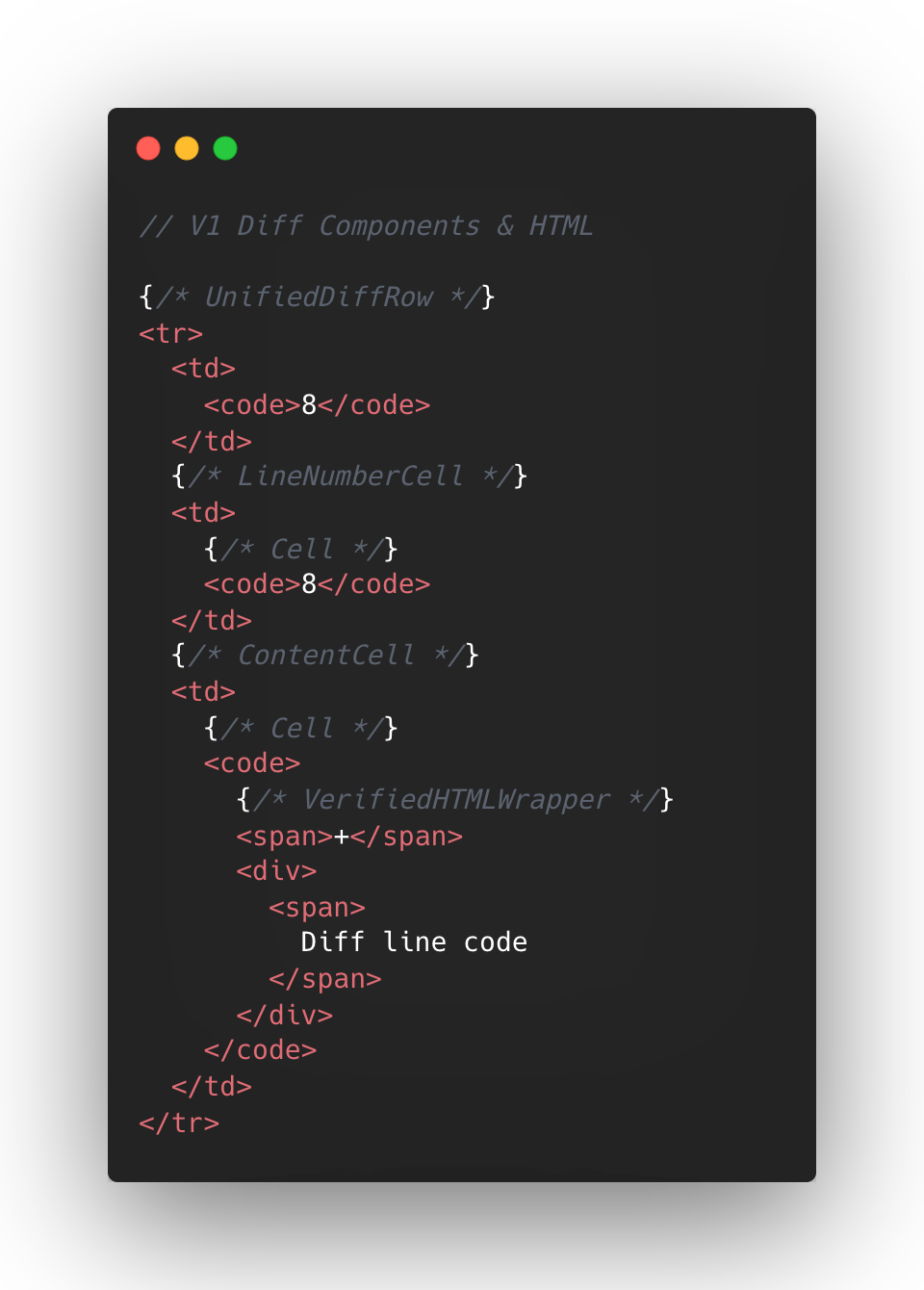
At the React layer, unified diffs typically contain at least eight components per line, while the split view contain a minimum of 13. And these numbers represent baseline counts; extra UI states like comments, hover, and focus could add more components on top.
This approach made sense to us in v1, when we first ported the diff lines to React from our classic Rails view. Our original plan centered around lots of small reusable React components and maintaining DOM tree structure.
But we also ended up attaching a lot of React event handlers in our small components, often five to six per component. On a small scale, that was fine, but on a large scale that compounded quickly. A single diff line could carry 20+ event handlers multiplied across thousands of lines.
Beyond performance impact, it also increased complexity for developers. This is a familiar scenario where you implement an initial design, only to discover later its limitations when faced with the demands of unbounded data.
To summarize, for every v1 diff line there would be:
- Minimum of 10-15 DOM tree elements
- Minimum of 8-13 React Components
- Minimum of 20 React Event Handlers
- Lots of small re-usable React Components
This v1 strategy proved unsustainable for our largest pull requests, as we consistently observed that larger pull request sizes directly led to slower INP and increased JavaScript heap usage. We needed to determine the best path for improving this setup.
Small changes make a large impact: v2
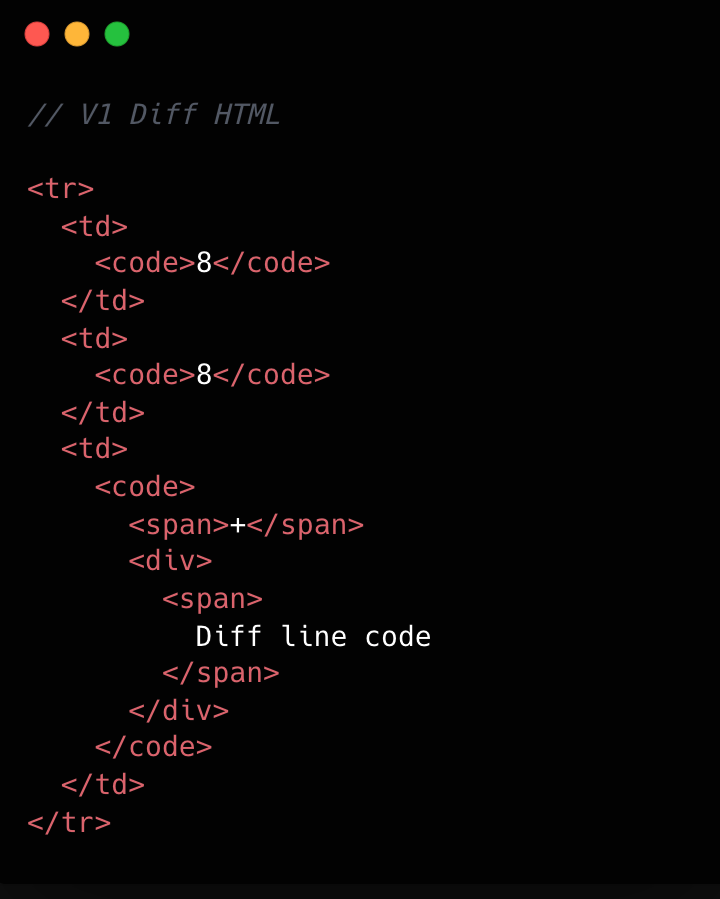
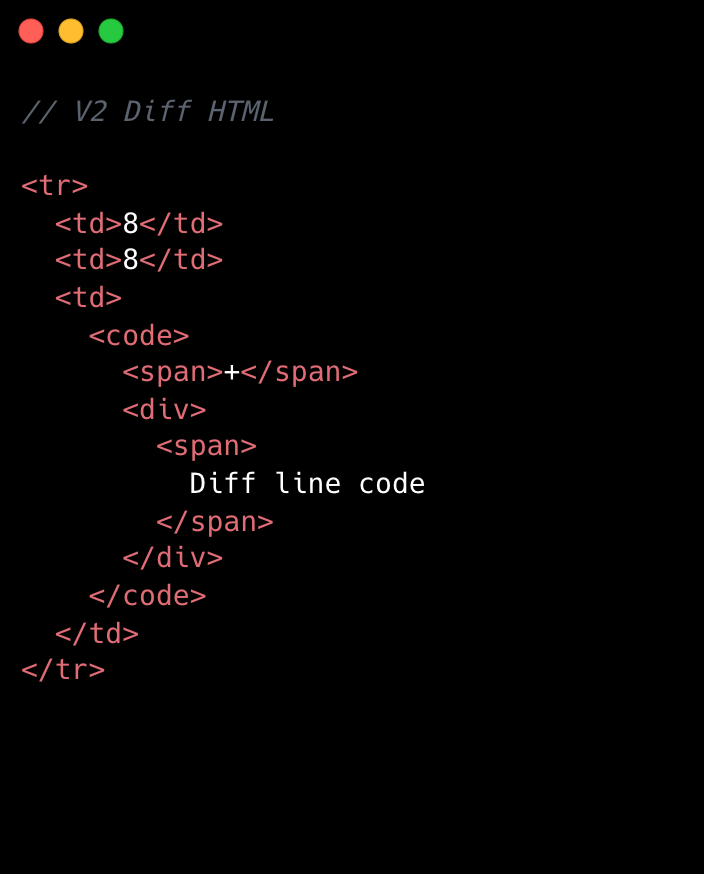
No change is too small when it comes to performance, especially at scale. For example, we removed unnecessary <code> tags from our line number cells. While dropping two DOM nodes per diff line might appear minor, across 10,000 lines, that’s 20,000 fewer nodes in the DOM. These kinds of targeted, incremental optimizations, no matter how small, compound to create a much faster and more efficient experience. By not overlooking these details, we ensured that every opportunity for improvement was captured, amplifying the overall impact on our largest pull requests.
Refer to the images below to see how v1 looks compared to v2.
This becomes clearer if we look at the component structure behind this HTML:
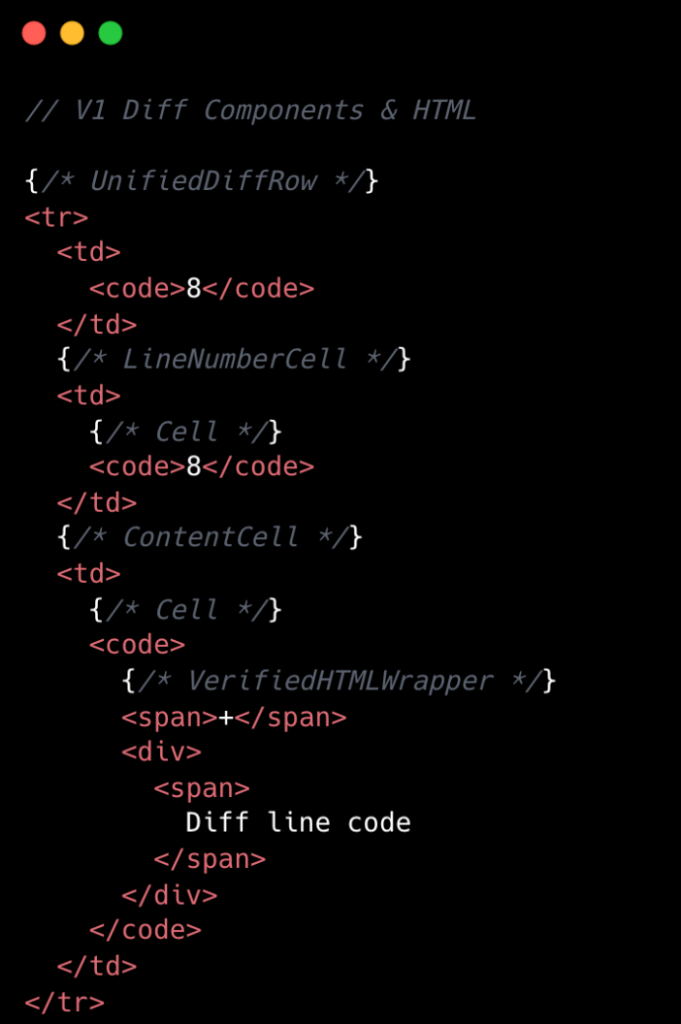
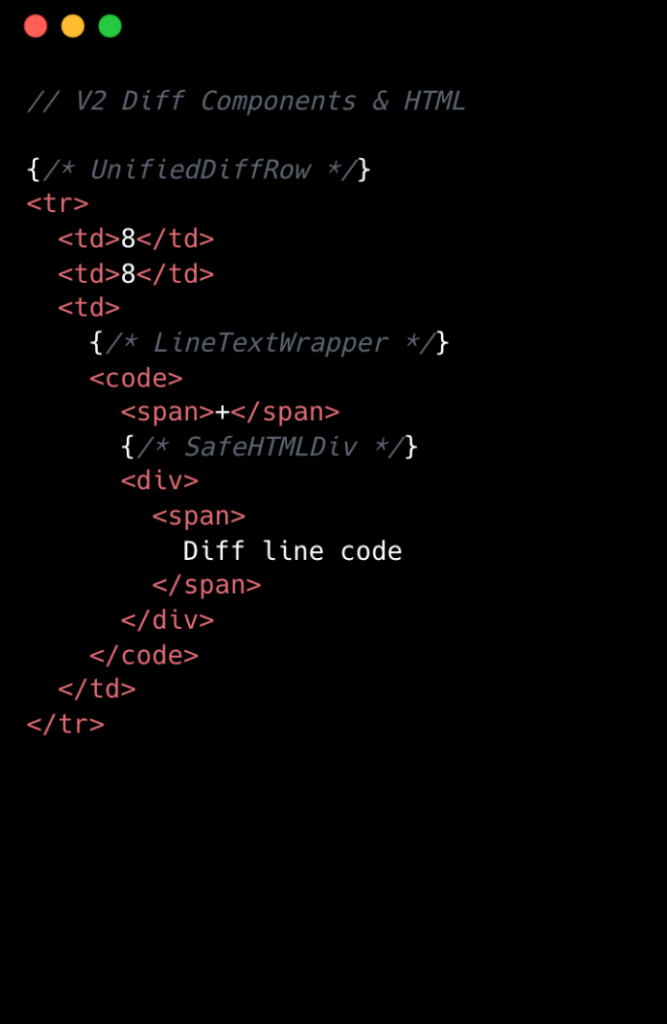
We went from eight components per diff line to two. Most of the v1 components were thin wrappers that let us share code between Split and Unified views. But that abstraction had a cost: each wrapper carried logic for both views, even though only one rendered at a time. In v2, we gave each view its own dedicated component. Some code is duplicated, but the result is simpler and faster.
Simplifying the component tree
For v2, we removed deeply nested component trees, opting for dedicated components for each split and unified diff line. While this led to some code duplication, it simplified data access and reduced complexity.
Event handling is now managed by a single top-level handler using data-attribute values. So, for instance, when you click and drag to select multiple diff lines, the handler checks each event’s data-attribute to determine which lines to highlight, instead of each line having its own mouse enter function. This approach streamlines both code and improves performance.
Moving complex state to conditionally rendered child components
The most impactful change from v1 to v2 was moving app state for commenting and context menus into their respective components. Given GitHub’s scale, where some pull requests exceed thousands of lines of code, it isn’t practical for every line to carry complex commenting state when only a small subset of lines will ever have comments or menus open. By moving the commenting state into the nested components for each diff line, we ensured that the diff-line component’s main responsibility is just rendering code—aligning more closely with the Single Responsibility Principle.
O(1) data access and less “useEffect” hooks
In v1, we gradually accumulated a lot of O(n) lookups across shared data stores and component state. We also introduced extra re-rendering through useEffect hooks scattered throughout the diff-line component tree.
To address this in v2, we adopted a two-part strategy. First, we restricted useEffect usage strictly to the top level of diff files. We also established linting rules to prevent the introduction of useEffect hooks in line-wrapping React components. This approach enables accurate memoization of diff line components and ensures reliable, predictable behavior.
Next, we redesigned our global and diff state machines to utilize O(1) constant time lookups by employing JavaScript Map. This let us build fast, consistent selectors for common operations throughout our codebase, such as line selection and comment management. These changes have enhanced code quality, improved performance, and reduced complexity by maintaining flattened, mapped data structures.
Now, any given diff line simply checks a map by passing the file path and the line number to determine whether or not there are comments on that line. An access might look like: commentsMap[‘path/to/file.tsx’][‘L8’]
Did it work?
Definitely. The page runs faster than it ever did, and JavaScript heap and INP numbers are massively reduced. For a numeric look, check out the results below. These metrics were evaluated on a pull request using a split diff setting with 10,000 line changes in the diff comparison.
| Metric | v1 | v2 | Improvement |
|---|---|---|---|
| Total lines of code | 2,800 | 2,000 | 27% less |
| Total unique component types | 19 | 10 | 47% fewer |
| Total components rendered | ~183,504 | ~50,004 | 74% fewer |
| Total DOM nodes | ~200,000 | ~180,000 | 10% fewer |
| Total memory usage | ~150-250 MB | ~80-120 MB | ~50% less |
| INP on a large pull request using m1 MacBook pro with 4x slowdown: | ~450 ms | ~100 ms | ~78% faster |
As you can see, this effort had a massive impact, but the improvements didn’t end there.
Virtualization for our largest pull requests
When you’re working with massive pull requests—p95+ (those with over 10,000 diff lines and surrounding context lines)—the usual performance tricks just don’t cut it. Even the most efficient components will struggle if we try to render tens of thousands of them at once. That’s where window virtualization steps in.
In front-end development, window virtualization is a technique that keeps only the visible portion of a large list or dataset in the DOM at any given time. Instead of loading everything (which would crush memory and slow things to a crawl), it dynamically renders just what you see on screen, and swaps in new elements as you scroll. This approach is like having a moving “window” over your data, so your browser isn’t bogged down by off-screen content.
To make this happen, we integrated TanStack Virtual into our diff view, ensuring that only the visible portion of the diff list is present in the DOM at any time. The impact was huge: we saw a 10X reduction in JavaScript heap usage and DOM nodes for p95+ pull requests. INP fell from 275–700+ milliseconds (ms) to just 40–80 ms for those big pull requests. By only showing what’s needed, the experience is much faster.
Further performance optimizations
To push performance even further, we tackled several major areas across our stack, each delivering meaningful wins for speed and responsiveness. By focusing on trimming unnecessary React re-renders and honing our state management, we cut down wasted computation, making UI updates noticeably faster and interactions smoother.
On the styling front, we swapped out heavy CSS selectors (e.g. :has(...)) and re-engineered drag and resize handling with GPU transforms, eliminating forced layouts and sluggishness and giving users a crisp, efficient interface for complex actions.
We also stepped up our monitoring game with interaction-level INP tracking, diff-size segmentation, and memory tagging, all surfaced in a Datadog dashboard. This continues to give our developers real-time, actionable metrics to spot and squash bottlenecks before they become issues.
On the server side, we optimized rendering to hydrate only visible diff lines. This slashed our time-to-interactive and keeps memory usage in check, ensuring that even huge pull requests feel fast and responsive on load.
Finally, with progressive diff loading and smart background fetches, users are now able to see and interact with content sooner. No more waiting for a massive number of diffs to finish loading.
All together, these targeted optimizations made our UI feel lighter, faster, and ready for anything our users throw at it.
Diff-initely better: The power of streamlined performance
This exciting journey to streamline the diff line architecture yielded substantial improvements in performance, efficiency and maintainability. By reducing unnecessary DOM nodes, simplifying our React component tree, and relocating complex state to conditionally rendered child components, we achieved faster rendering times and lower memory consumption. The adoption of more O(1) data access patterns and stricter rules for state management further optimized performance. This made our UI more responsive (faster INP!) and easier to reason with.
These measurable gains demonstrate that targeted refactoring, even within our large and mature codebase, can deliver meaningful benefits to all users—and that sometimes focusing on small, simple improvements can have the largest impact. To see the performance gains in action, go check out your open pull requests.
The post The uphill climb of making diff lines performant appeared first on The GitHub Blog.
How AWS KMS and AWS Encryption SDK overcome symmetric encryption bounds
Post Syndicated from Panos Kampanakis original https://aws.amazon.com/blogs/security/how-aws-kms-and-aws-encryption-sdk-overcome-symmetric-encryption-bounds/
If you run high-scale applications that encrypt large volumes of data, you might be concerned about tracking encryption limits and rotating keys. This post explains how AWS Key Management Service (AWS KMS) and the AWS Encryption SDK handle Advanced Encryption Standard in Galois Counter Mode’s (AES-GCM) encryption limits or bounds automatically by using derived key methods so you don’t have to. These methods generate a new derived key Kd from the main key K by using a random nonce. That way, encryption is done with a unique key each time, and K can be used for much longer. Similar derived key modes have been proposed in various schemes recently like (KC-)XAES, DNDK v2, and ia.cr/2020/1153.
Symmetric encryption bounds
Symmetric encryption algorithms encrypt large amounts of data in transit and at rest. Modern ciphers also authenticate data using an authentication tag — these are called Authenticated Encryption with Additional Data (AEAD) ciphers. Examples of AEAD ciphers include AES-GCM and ChaCha20/Poly1305.
AES-GCM is the most widely used encryption algorithm and was standardized by NIST in SP 800-38D. AES-GCM uses a 128- or 256-bit key K and a (usually 96-bit) initialization vector (IV) to encrypt and authenticate a plaintext P. It also authenticates additional authenticated data (AAD). The output is a ciphertext C and an authentication tag T: (C, T) = AES-GCM(K, IV, AAD, P)
At decryption, the recipient decrypts C and verifies the tag T by using K, IV and AAD and produces the original plaintext P (assuming the tag was authenticated successfully).
Encryption invocation limits
When encrypting data, it’s critical that the K, IV tuple does not repeat for the life of the key K. Otherwise, the security properties of AES-GCM are lost. SP 800-38D requires an implementation to have a probability of key and IV reuse less than one in 4.29 billion (<2-32). This can be achieved by using a deterministic IV that doesn’t repeat or a random IV. If a random IV is used, then it is necessary to rekey after 2-32 encryptions. For example, common protocols like TLS or IKEv2/IPsec prevent (K, IV) collisions by using deterministic (that is, starting from a random value and incrementing) IVs per connection.
Data bounds
Assuming the probability of an (K, IV) collision is statistically insignificant (<2-32), there are still data bounds when encrypting large amounts of plaintexts with the same key K. The block counter in AES-GCM is 32-bits, which leads to a limit of 232-2 bytes (68.72 GB) per encryption operation (per (K, IV) pair). Additionally, a failure to restrict the total amount of data reduces the security guarantees an adversary can distinguish between two different plaintexts, that is knowing which of two messages are encrypted in the ciphertext. The higher protection of indistinguishability, the lower the total number of bytes you can encrypt. NIST’s specification, SP 800-38D, suggests a limit of 268 bytes protected under a single key K which provides an indistinguishability probability of 50%. More conservative security margins are sometimes used, based on different analyses (ia.cr/2024/051, 10.1145/3243734.3243816). AWS sets a more conservative margin too, enforcing a negligible indistinguishability probability (<2-32) by default.
Once you reach the AES-GCM data bounds for a given security margin, you need to rotate the symmetric key. Such limits (for example, 232 encryptions per key with random IVs, or encrypting the maximum total data per key) could be reached in modern, high-scale encryption use cases. Tracking these limits across distributed systems with many concurrent sessions adds operational complexity. We have shared these challenges with using AES-GCM at the scale of AWS in a writeup and a presentation in NIST’s third NIST Workshop on Block Cipher Modes of Operation in 2023.
How AWS KMS uses derived keys
AWS KMS is a managed service that you can use to create and control the keys used to encrypt and sign data. The AWS KMS Encrypt API supports symmetric and asymmetric encryption. For symmetric key encryption, AWS KMS uses AES-GCM with 256-bit keys to encrypt a plaintext up to 4 KB in size. The AWS KMS request includes the plaintext, and the symmetric key identifier (KeyId) of the symmetric customer managed key (CMK) stored in KMS.
A symmetric key Encrypt API call to AWS KMS uses the CMK to derive a symmetric encryption key before encrypting the plaintext. AWS KMS generates a random 128-bit nonce N and produces a 256-bit symmetric key from the main key K specified in the KeyId by using a key derivation function (KDF). A KDF takes in a key, a label and context, an invocation-specific nonce N, and an output length LKm in bytes, and produces key material of that length as Kmat = KDF(K, <label>, <context>, N, LKm). <label> is usually an application- or invocation-specific value. <context> includes invocation-specific input. For AWS KMS, the KDF function is a NIST SP 800-108r1 Counter Mode KDF producing 256 bits of keying material with HMAC-SHA256 as the pseudorandom function. Kd is essentially produced with one call to HMAC-SHA256 with key K as: Kd = HMAC-SHA256(K, <ctx>),
where <ctx> consists of a counter value concatenated with constants and N.
Subsequently, AWS KMS generates a 96-bit random IV and encrypts the input plaintext input P with AES-GCM as (C, T) = AES-GCM(Kd, IV, AAD, P).
AWS KMS returns a CiphertextBlob that includes the IV, nonce N, ciphertext and tag (C,T) so that the CiphertextBlob can be decrypted on subsequent calls to the Decrypt API.
Intuitively, the 128-bit random nonce used to derive a per encryption key under a CMK ensures that a caller can go way over the 232 limit on the number of encryptions they can make under the CMK. Furthermore, the limit of 4 KB on the payload size for an AWS Encrypt call ensures the total amount of data encrypted under an encryption key stays well below NIST or other more conservative total encryption bounds. For more details and the mathematics of the security underpinnings of this scheme, see Key Management Systems at the Cloud Scale.
How AWS Encryption SDK applies derived key modes per invocation
The AWS Encryption SDK is a client-side encryption library used for encrypting and decrypting data. It can be configured to use data key caching to reduce API calls when encrypting multiple payloads. Using a nonce-based derived key for each AES-GCM encryption invocation eliminates the need for customers to keep track of the total amount of data they encrypt under a single data key.
Although the AWS Encryption SDK provides a lot of flexibility to accommodate many encryption scenarios, the default configuration handles key derivation and frame sizing automatically, so you don’t need to tune these settings for most use cases. To derive a different key per invocation, like AWS KMS, it uses a randomly generated value, N, the main key K, and some invocation-specific context in the KDF. N is 256 bits in the default configuration. The underlying KDF is the HMAC-based Extract-and-Expand Key Derivation Function (HKDF) with SHA512 as the default hash. Kd is essentially produced with one HKDF call with key K as:Kd = HKDF(K, salt=<lbl>, info=<ctx>, 32),
where <lbl> is a constant and <ctx> consists of constants concatenated with a random 256-bit value in the default configuration.
Subsequently, the AWS Encryption SDK uses the derived key Kd to encrypt user content, broken into 4-KB frames by default. Each frame plaintext Pf is encrypted with AES-GCM with a deterministic IV as (C, T) = AES-GCM(Kd, IV, AAD, Pf).
The 96-bit deterministic IV consists of the frame counter frameID, where frameID<232. The additional authenticated data AAD is specific to the Encryption SDK data frame. At decryption, the recipient derives Kd from K in the same way and decrypts the ciphertext C to produce the frame plaintext Pf and validates the authentication tag T.
The 4 KB frame size ensures that by default no more than 244 bytes (232 frames of 4 K bytes each) of data can be encrypted under a single encryption key. This is well below the NIST suggested bound (268), even with data key caching. It is also well below our conservative requirement of <2-32 indistinguishability probability. The limit of invocations per key, even with data key caching, exceeds the encryption counts in most high-scale applications.
Note: While the AWS Encryption SDK makes conservative choices in its default configuration, if you’re using legacy version 1.0 or making configuration changes, you might have lower security guarantees. For example, a custom maximized frame size of 232-1 bytes would lead to larger total plaintext size which is still below the 268 NIST suggested limit, but not below other conservative bounds.
Note that the default AWS Encryption SDK configuration also provides lesser-known security properties, like key commitment. The commitment string is produced similarly to the derived key, by using K and HKDF.
Conclusion
By deriving a unique key per encryption call, AWS KMS and the AWS Encryption SDK eliminate the need to manually track AES-GCM limits.
For the academic basis for AES-GCM’s bounds, see SP 800-38D and draft-irtf-cfrg-aead-limits. To read more on the cryptographic analysis of the key derivation scheme used in KMS, see Key Management Systems at the Cloud Scale. For more details on the Encryption SDK AES-GCM key derivation, see the AWS Encryption SDK algorithms reference.
If you have feedback about this post, submit comments in the Comments section below. If you have questions about this post, start a new thread on the AWS Security, Identity, & Compliance re:Post or contact AWS Support.
[$] Ubuntu’s GRUBby plans
Post Syndicated from jzb original https://lwn.net/Articles/1065420/
GNU GRUB 2, mostly just
referred to as GRUB these days, is the most widely used boot loader
for x86_64 Linux systems. It supports reading
from a vast selection of filesystems, handles booting modern systems
with UEFI or legacy systems with a BIOS, and even allows users to customize the
“splash” image displayed when a system boots. Alas, all of those features come with
a price; GRUB has had a parade
of security vulnerabilities over the years. To mitigate some of those
problems, Ubuntu
core developer and Canonical employee Julian Andres Klode has proposed removing
a number of features from GRUB in Ubuntu 26.10 to improve GRUB’s
security profile. His proposal has not been met with universal acclaim; many of the
features Klode would like to remove have vocal proponents.
Is AI Going to Turn Us All Into Middle Managers?
Post Syndicated from The Atlantic original https://www.youtube.com/watch?v=ncmuXQGGqBM
No kidding: Gentoo GNU/Hurd
Post Syndicated from jzb original https://lwn.net/Articles/1066241/
On April 1, the Gentoo Linux project published a blog post
announcing that it was switching to GNU Hurd as its primary
kernel as an April Fool’s joke. While that is not true, the project
has followed up with an announcement
of a new Gentoo port to the Hurd:
Our crack team has been working hard to port Gentoo to the Hurd and
can now share that they’ve succeeded, though it remains still in a
heavily experimental stage. You can try Gentoo GNU/Hurd using a
pre-prepared disk image. The easiest way to do this is with QEMU
[…]We have developed scripts to build this image locally and
conveniently work on further development of the Hurd port. Release
media like stages and automated image builds are future goals, as is
feature parity on x86-64. Further contributions are welcome,
encouraged, and needed. Be patient, expect to get your hands dirty,
anticipate breakage, and have fun!Oh, and Gentoo GNU/Hurd also works on real hardware!
Text for the April Fool’s post is available at the bottom of the
real announcement.
You Don’t Have a Security Problem, You Have a Visibility Problem
Post Syndicated from James Davis original https://www.rapid7.com/blog/post/em-security-problem-or-visibility-problem
What you’ll learn in this article
This article explains why many breaches are driven by gaps in visibility rather than advanced exploits, how attackers move through modern environments, and what changes when organizations start connecting assets, identities, and attack paths into a single view.
What is a visibility problem in cybersecurity?
A visibility problem exists when security teams cannot clearly answer three basic questions: what assets exist, who or what can access them, and how those elements connect. When those answers are incomplete, decisions are made based on assumptions – and that creates conditions where risk can grow, unnoticed.
As environments expand across cloud, SaaS, and hybrid infrastructure, the number of systems and identities grows quickly. What often falls behind is a clear understanding of how they relate to each other, and that gap is where attackers tend to operate.
How visibility gaps turn into breaches
A large medical technology organization experienced a breach driven by a series of compounding gaps rather than a single exploit. Internet-exposed assets created the initial entry point, while inconsistencies in device posture and identity enforcement, including gaps in platforms like Intune, weakened the security boundary. Attackers leveraged exposed or reused credentials and over-permissioned access to move laterally across systems. Without unified visibility across assets, identities, and managed devices, the attack path remained invisible until critical systems were reached.
Each of these conditions is common on its own, but what makes them dangerous is how they connect.
Why most attacks are not about flashy exploits
This breach did not rely on a zero-day vulnerability or an advanced technique. It depended on an exposed asset, valid credentials, and inconsistent enforcement across identity and devices. Those elements exist in most environments, but without visibility into how they overlap, they can be combined into a viable attack path.
Security teams often evaluate vulnerabilities individually, while attackers focus on how those weaknesses can be chained together. The risk is not just in what is vulnerable, but in how exposure allows movement.
What a visibility-first approach looks like
Improving outcomes depends on understanding how exposure exists across the environment and how different elements relate to each other.
Asset visibility is the starting point. Many organizations cannot confidently identify everything that is externally accessible, and attackers often find assets that were never intended to be exposed. Continuously mapping assets across cloud and on-prem environments reduces that uncertainty and limits entry points.
Identity is just as critical. Once access is established, movement depends on credentials and permissions. Stolen credentials, over-permissioned accounts, and weak authentication paths allow attackers to move beyond initial entry. Treating identity exposure as part of the attack surface helps identify these risks earlier, especially when leaked credentials can be tied to active accounts and privileges.
Attack path visibility connects these elements. Instead of evaluating findings in isolation, it shows how exposures can be combined into realistic attack scenarios. Through adversarial simulation, organizations can observe how an attacker could move from an exposed system to internal resources, which shifts focus toward removing viable paths rather than addressing isolated issues.
External signals, such as credential leaks, only become meaningful when tied back to internal systems. Monitoring for exposed credentials is useful, but correlating those credentials with active accounts and access levels is what turns that signal into something actionable.
Controls such as least privilege and multi-factor authentication remain essential, but they are only effective when applied consistently. Without visibility into where access exists, enforcement gaps are difficult to detect.
Why visibility changes the security outcome
The difference in a scenario like this is not simply better tooling. It is a shift in how exposure is understood and prioritized.
Attackers look for the easiest path through an environment. A visibility-first approach identifies those paths earlier, reduces them, and then examines why they existed. That changes how teams prioritize work, moving from reacting to individual findings toward removing viable attack paths.
How this works in practice
This is where platforms like Rapid7 support a more complete view of exposure. Surface Command aggregates telemetry from over 190 sources, helping organizations unify fragmented views of assets and identities. InsightCloudSec extends that visibility into cloud environments by enforcing best practices and least privilege without relying on manual processes. Vector Command focuses on how attackers move, using continuous testing and simulation to show how attacks would unfold across an environment.
On the intelligence side, integrating threat data with identity systems allows external signals, such as credential leaks, to be mapped to active accounts and validated in real time. That makes it possible to act before those credentials are used.
Together, these capabilities provide a clearer understanding of how exposure translates into risk.
Putting visibility at the center of security
Zero trust depends on more than policy. It requires visibility, identity, validation, and enforcement to work together continuously.
Without visibility, zero trust becomes difficult to apply in practice. With it, security decisions can be based on how systems actually behave rather than how they are expected to behave, which shifts organizations away from reacting to incidents and toward preventing them from forming.
Security updates for Friday
Post Syndicated from jzb original https://lwn.net/Articles/1066236/
Security updates have been issued by AlmaLinux (freerdp, grafana, kernel, rsync, and thunderbird), Debian (chromium, inetutils, and libpng1.6), Fedora (bind9-next, nginx-mod-modsecurity, and openbao), Mageia (firefox, nss and thunderbird), Red Hat (container-tools:rhel8), SUSE (conftest, dnsdist, ignition, libsoup, libsoup2, LibVNCServer, libXvnc-devel, opensc, ovmf-202602, perl-Crypt-URandom, python-tornado, python311-ecdsa, python311-Pygments, python315, tar, and wireshark), and Ubuntu (cairo, jpeg-xl, linux, linux-aws, linux-aws-6.17, linux-gcp, linux-gcp-6.17,
linux-hwe-6.17, linux-realtime, linux, linux-aws, linux-aws-hwe, linux-kvm, linux-oracle, linux, linux-aws, linux-gcp, linux-gke, linux-gkeop, linux-ibm,
linux-lowlatency, linux-nvidia, linux-raspi, linux-fips, linux-fips, linux-aws-fips, linux-fips, linux-aws-fips, linux-gcp-fips, and linux-realtime, linux-realtime-6.8, linux-raspi-realtime).
Maybe Trump should not have given this speech by Tom Nichols
Post Syndicated from The Atlantic original https://www.youtube.com/shorts/vTmU3euPgdw
A Brief History of Sugar
Post Syndicated from The History Guy: History Deserves to Be Remembered original https://www.youtube.com/watch?v=PDLF-rHUzfQ
Company that Secretly Records and Publishes Zoom Meetings
Post Syndicated from Bruce Schneier original https://www.schneier.com/blog/archives/2026/04/company-that-secretly-records-and-publishes-zoom-meetings.html
WebinarTV searches the internet for public Zoom invites, joins the meetings, secretly records them, and publishes (alternate link) the recordings. It doesn’t use the Zoom record feature, so Zoom can’t do anything about it.
Преди изборите: Инфлация на страхове, алгоритми на разделението и дъх на петрол
Post Syndicated from Емилия Милчева original https://www.toest.bg/predi-izborite-inflatsiya-na-strahove-algoritmi-na-razdelenieto-i-duh-na-petrol/

Предизборната кампания навлиза в острата си фаза, в която партиите изоставят неутралитета и започват да се конфронтират.
Докато служебната власт се опитва да се справи с ефекта от поскъпналите горива, купуването на вот и воя срещу двустранното Споразумение за сътрудничество в областта на сигурността между България и Украйна, мишените се сменят. Срещу служебното правителство открито се противопоставиха Радев, но и председателите на БСП и „Възраждане“ – Крум Зарков и Костадин Костадинов. Основният им аргумент е, че Андрей Гюров не може да поема такива международни ангажименти, защото е служебен министър-председател.
Тройка премиери с гарнитура
Кой управлява България, как я управлява и защо изобщо си прави труда? Не може ли просто да ни помолят любезно да напуснем, вместо да се хаби толкова време и ресурс? Емилия Милчева обобщава какво става напоследък.
 Емилия Милчева
„Борисов–Пеевски“ – мюрета на Радев
За прогресивния нов лидер Румен Радев приоритет е разграждането на олигархичния модел „Борисов–Пеевски“ и даже при посещението си в Крумовград и Момчилград заяви:
Искам вече веднъж завинаги да стане ясно: коалиция с Пеевски и с Борисов няма как да има.
А в действителност критиките му са фокусирани върху служебния кабинет и ПП–ДБ. Появата му след декемврийските протести също беше предизвикана (донякъде) от опасения, че ПП–ДБ могат да оберат значителна част от протестния вот и да обезсмислят излизането му на политическата сцена.
При обиколките си из страната сега Радев пусна отново в обращение няколко мантри от президентската си битност: първо, „сглобкаджиите“ (да се чете „ПП–ДБ“) трябва да бъдат наказани на изборите; второ, въвличат ни във война; трето, евтините руски енергийни суровини са наблизо – през Черно море, но угаждаме на ЕС, а цените галопират. Има и четвърто –
никой не ви попита за въвеждането на еврото.
Така Борисов и санкционираният за корупция от САЩ и Великобритания Пеевски стават фонов шум, докато огънят се насочва срещу ПП–ДБ.
Валутата на президента
Искаме да влезем в еврозоната, но просто нямаме желание. Така накратко могат да се обобщят последните изблици на зле насочен ентусиазъм от страна на президента. За по-подробно и смислено обобщение – вижте текста на Емилия Милчева.
 Емилия Милчева
В същото време водачът на „Прогресивна България“ в Кърджали – бившият вътрешен министър Иван Демерджиев, се опитва да нахъса избирателите, нахлувайки в офиса на ДПС – Ново начало. По-късно през Facebook покани за пехливански борби кмета на община Кърджали Ерол Мюмюн и лидера на ДПС – Ново начало Делян Пеевски. Видео го показва изправен срещу Мюмюн, и двамата като боксьори тежка категория – сцена, напомняща на мача от 1997 г., когато Майк Тайсън отхапа ухото на Ивендър Холифийлд.
Спортът сплотява и ни прави по-благородни и по-добри, а понеже явно няма да има политически дебат, гражданите на Кърджали ще могат да се насладят на спортен такъв.
Подобен сблъсък (почти) се състоя и в парламента – между Пеевски и съпредседателя на „Да, България“ Ивайло Мирчев в началото на декември миналата година.
Няма как, политиката неизбежно има и своята сценична част. Колко ефективно работи този тип комуникация за избирателите, ще стане ясно на 19 април, когато урните дадат своя отговор. Дотогава Румен Радев ще продължи да засилва евроскептичния си суверенистки и проруски наратив. Очевидно в щаба му добре разбират колко важна е автентичността за този тип послания – достатъчно, за да притиснат електорално формации като „Възраждане“, „Величие“ и МЕЧ, докато БСП с новия си лидер може да си позволи малка глътка въздух.
Тази генерална репетиция на Румен Радев за заседанията на Европейския съвет по-скоро разкрива ограничен потенциал за роля ала Виктор Орбан, който сам е изправен пред риск да загуби властта след изборите на 12 април. Ако не „троянски кон“ или инструмент за излизане от НАТО и ЕС, то със сигурност на Радев му се очертава друга роля: на руско „троянско пони“ в двора на Европа.
Ако Орбан падне, засега няма кой да го наследи като знаме на консерваторите и автокрацията в Европа, останала (до момента) бастионът на либералната демокрация.
А вие ще танцувате ли с президента?
Усеща се, сякаш политическият проект на Румен Радев дебне зад ъгъла. И понеже това е държава, в която всички работим по усет, е редно да се провери кой има чувство за ритъм, и то правилно чувство, за да се включи в предстоящите танци. От Емилия Милчева.
 Емилия Милчева
Къде минава демаркационната линия на Москва?
Възможно ли е обаче българската предизборна кампания да ескалира по оста Москва–Киев, подобно на сценария, разиграващ се в Унгария?
За Унгария това не са обикновени парламентарни избори. Резултатите от тях ще имат последици не само за страната, но и за цяла Европа, тъй като ще очертаят границите на политическото влияние между Брюксел и Москва.
Доминиращата външнополитическа тема превръща изборите в референдум за геополитическата ориентация на страната. Не по-малко важен е и въпросът възможно ли е да бъде спрян преходът на Унгария към нелиберална държава, замислен, осъществен и ръководен от Орбан – с демонтаж на върховенството на закона, с насочване на публичните ресурси към лоялни олигарси, със заличаване на медийната свобода и на индивидуалните свободи, с държавен контрол.
Разследващият портал VSquare и журналистът Саболч Пани предупредиха за намеса на руското военно разузнаване (ГРУ) в изборния процес, за което говори и съперникът на Орбан – Петер Мадяр. Властта определи тези твърдения като фалшиви новини, но VSquare съобщи, че наблюдава модели на намеса, сравними с тези на изборите в Грузия, Молдова и Румъния, за които беше обвинена Русия. Същата платформа публикува телефонен разговор от август 2024 г. между „човека на Путин в ЕС“, както наричат унгарския външен министър Петер Сиярто, и руския първи дипломат Сергей Лавров.
Българо-унгарската ос: Съюзниците на Путин в ЕС и НАТО
Радев в България и Орбан в Унгария си подават топката по демаркационната линия между ЕС и Русия. Твърде често тази топка минава в полето на Русия, където удобно я отиграва Путин. Този мач сме го гледали. Въпросът е има ли съдия и къде са му червените картони.
 Александър Малинов
Управляващият от 16 години Орбан и партията му „Фидес“ започнаха война с всички средства, които осигурява държавата с нейните институции, срещу Мадяр и създадената преди две години „Тиса“. В навечерието на кампанията Мадяр обяви, че е изнудван с незаконно направен запис, в който прави секс по взаимно съгласие с бившата си приятелка.
Унгарските тайни служби под предлог, че са действали срещу украински шпиони, се опитаха да превземат отвътре „Тиса“.
Скандалът се върти около предполагаема злоупотреба с власт от страна на правителството на Орбан. Според свидетелства на бившия служител Бенце Сабо пред унгарски разследващи медии, тайните служби са използвали измислено разследване (за детска порнография), за да атакуват ИТ специалисти, свързани с опозиционната партия „Тиса“, с цел да получат достъп до нейни данни. Това е станало чрез натиск, незаконно изземване на техника и копиране на информация, което вероятно е довело и до изтичане на лични данни на хиляди поддръжници. Властите отричат политически мотив и твърдят, че става дума за контраразузнавателна операция срещу „украински шпиони“, но не представят доказателства.
Орбан гради образ на опозицията като проводник на украински интереси, предупреждавайки, че евентуална победа на „Тиса“ ще въвлече страната във война с Русия и ще отклони ресурси към Киев. Дори стига по-далеч, обвинявайки Украйна в опит за намеса в изборите с „пари, натиск и агенти“, но и загадъчно предупреждава, че има
още няколко патрона в пълнителя.
От своя страна опозиционният лидер Мадяр насочва вниманието към връзките на властта с Москва. Той обяви, че ако спечели вота, ще разследва отношенията между Будапеща и Кремъл с фокус върху близостта на Орбан с руския президент Владимир Путин.
Петрол срещу отмяна на санкции?
Подхвърлянето на Радев за близостта на руския петрол ни връща към времената, когато той публично се противопоставяше на санкциите срещу Русия. Изявлението му идва в момент, в който инфлацията в България се впуска в галоп заради повишаващите се цени на горивата. Според изследване на „Алфа Рисърч“ 47% от българите посочват като първи проблем, с който да се заеме бъдещото редовно правителство, доходите и инфлацията, а за 33% най-важни са борбата с корупцията и реформата в съдебната система.
Европейската комисия отлага законодателното предложение за постоянна забрана на вноса на руски петрол като санкция заради войната на Русия с Украйна, както планираше. ЕС рязко намали вноса след инвазията през 2022 г. и за последното тримесечие на 2025 г. само 1% от петрола, който внася, е руски.
„Лукойл Нефтохим“ няма право да преработва руски петрол от 1 март 2024 г.
Москва се възползва от войната в Иран и блокирания Ормузки проток, за да предложи услугите си да облекчи пазара на петрол и петролни продукти.
Русия е готова да изиграе важна роля във формирането на новата архитектура на глобалната логистика и международната търговия на фона на проблемите в Ормузкия проток,
заяви руският президент Владимир Путин. САЩ отмениха за месец ембаргото за натоварените с петрол руски кораби.
Εдинствено Унгария и Словакия внасяха руски петрол към 27 януари, когато Киев съобщи, че руски дрон е ударил съоръжения на нефтопровод в Украйна, прекъсвайки доставките. Двете страни обвиниха Украйна, че умишлено забавя възобновяването на петролните доставки, което предизвика политически спор и в резултат Унгария блокира заем за Киев от ЕС.
Председателката на Европейската комисия Урсула фон дер Лайен вече заяви, че сега не е моментът да се вдигат санкциите срещу Русия и това би било стратегическа грешка.
В разместващия се световен ред България стъпва накриво
В последната седмица на предизборната кампания президентът Радев предизвика напрежение с една реплика за Крим. И макар че, като знаем досегашните позиции на Румен Радев спрямо Русия…
 Александър Малинов
Какво би предложил Румен Радев, ако например представлява България като премиер на заседание на Европейския съвет в Брюксел?
Ясно е, че цените на горивата ще внасят инфлация, а българските финанси вече са на дефицит 1,2% за първото тримесечие, тоест почти половината от планираното превишение на разходите над приходите е изядено от януари до март. Ако дупката в бюджета се разширява с това темпо, има три варианта: орязване на разходи, вдигане на данъци, нови заеми. Партиите, които дават заявки за властта, трябва да са готови и с рецепта за неотложни мерки.
Доминация в социалните мрежи
И ако на терен кампанията върви скучновато, в социалните мрежи политическите сили са се развихрили. В България манипулации в разпространението на съдържание в социалните мрежи основно в полза на Радев бяха разкрити в доклада „TikTokcracy Tracker: Алгоритмична манипулация в българските избори през 2026 г.“.
Според изводите в него Радев вече е спечелил изборите в социалните мрежи.
Данните от наблюдението във Facebook и TikTok показват ясен дисбаланс в онлайн видимостта на политическите сили. Съдържанието, свързано с бившия президент Румен Радев, доминира и в двете платформи, като обхватът и темповете му на растеж значително надвишават тези на конкурентите.
Войната на Русия срещу Украйна, както и новият конфликт в Близкия изток, осигуряват почти неизчерпаем поток от поляризирано и поляризиращо съдържание, което платформите са склонни да усилват. Случаят не е изолиран, а се вписва в по-широка европейска картина на избори, уязвими към дигитална манипулация, на фона на близки във времето изборни процеси в Унгария, Словения и България.
Не за първи път има обосновани предположения за руска намеса в избори в европейски държави. През 2024 г. например Европейският парламент изрази загриженост заради зачестилите руски опити за намеса в изборите в България на 9 юни. При гласуването на резолюцията обаче двама български евродепутати – Андрей Слабаков и Ангел Джамбазки (ВМРО/Партия на европейските консерватори и реформисти), се въздържаха.
Отборите на разделението
Балони и ехо стаи, в които ни сортират. Звучи като живот в сайфай и в кланица едновременно. А всъщност става въпрос за един обикновен ден в социалните мрежи. Александър Драганов обяснява кой ни противопоставя едни на други и чак толкова дълбоки ли са пропастите помежду ни.
 Александър Драганов
Eвродепутатите изразиха „силна загриженост за съществуването на мрежа от агенти по дезинформация в социалните и традиционните медии, академичните среди, неправителствени организации и партии, както и че има руски контрол върху тази мрежа“. Опасенията бяха засилени и от множеството имоти на руската държава в България, които служат като центрове на влияние върху демократичните процеси.
За да противодейства на външна намеса в изборите, идваща от Русия, този път България поиска съдействие от ЕС. За страната ни е активирана системата за бързо реагиране, която е част от доброволен механизъм на ЕС за сътрудничество на подписалите Кодекса за поведение относно дезинформацията.
Макар и не в мащаба на Унгария, предстоящите парламентарни избори в България също са определящи за мястото ѝ в ЕС. Еврото е нашият паспорт за по-дълбока интеграция, но възходът на Румен Радев може да я възпре.
По буквите: Праматаров, Барнс
Post Syndicated from Зорница Христова original https://www.toest.bg/po-bukvite-pramatarov-barns/

През 2000 г., на обръщалото на века, преведох половин книга от Джулиан Барнс. Бях наскоро завършила студентка, бях довършила чужд превод на „Дългът към удоволствието“ на Джон Ланчестър и ми дадоха да довърша и „История на света в 10 ½ глави“. В моята част се падна последната глава – „Сънят“. Може би я помните, Мариус имаше прочут моноспектакъл по нея, сега Йордан Славейков я поставя чудесно.
В „Сънят“ героят се събужда умрял. Неговата лична история е свършила и му предстои вечен рай. Малко по-рано пък Фукуяма беше обявил края на историята, завършила с победа на либералната демокрация. Разбира се, вечността не се оказва райска работа, дори да е скроена според всичките ти желания (у Борхес безсмъртните оскотяват…). Но и вечност не ни предстоеше. Барнс явно беше поприбързал с епилога – в следващите си книги продължи да разказва за приближаването към този „сън“. Още през 2004 г. заговори за старостта през „Лимони на масата“; през 2008-ма издаде „Няма нищо страшно“; после дойдоха „Пулс“ и „Предчувствие за край“, и „Нива на живот“ – за скръбта по съпругата му Пат.
През 2000 г. потъна „Курск“, на следващата самолетите се забиха в кулите близнаци, после дойдоха войните в Афганистан и Ирак, после Беслан, глобалната криза, Арабската пролет и Гражданската война в Сирия, анексирането на Крим, възходът на ИДИЛ… и за капак на всичко пандемията от ковид и трите големи войни. Очевидно проблемът ни е обратният: твърде много история, твърде бурна история се случва около нас. Все повече хора отбягват новините или гледат да ги дозират, за да не се побъркат. Какво прави писателят с такива читатели? Те не са жителите на провинциално градче, които отварят романче за малко драма. Тези читатели отварят книга, за да избягат от драмата. Дали?
„Златният сън“ от Веселин Праматаров
по мотиви от Шарл Нодие, София: изд. „Сонм“, 2026
В предговора на „Златният сън“ Шарл Нодие предписва като лек за смутни времена фантастичното. Склонни сме да му повярваме; той е живял по време на якобинския терор. Баща му бил инструмент на въпросния терор (като полицейски магистрат) и затова успявал някак да опази сина си въпреки непрестанните опити на момчето да помага на жертвите (защо това е опасно, можем да си отговорим, като си спомним сталинския терор). Шарл започнал още на 13 – заплашил да отнеме живота си, ако една жена бъде осъдена, задето изпращала пари на емигрант. Жената оцеляла, но бащата сметнал за благоразумно да предаде сина си на ментори, които да го занимават със старогръцки и други езици, както и с естествознание (единият бил виден фиколог, изследовател на водораслите).
И тъй, Нодие израснал между гражданската въвлеченост и ескейпизма – хем станал библиотекар (сравнително безопасно), хем скачал в защита на заподозрените (опасно); хем конфискацията на книжата му разкрила само труд по ентомология (безопасно), хем поседял в затвора, защото писал памфлет срещу Наполеон… След разни странствания се установил в Париж, където (вече по време на Реставрацията) станал библиотекар на Арсенала и създал прочут литературен салон, в който се навъртали младоците Виктор Юго, Ламартин, Алфред дьо Мюсе, Сент-Бьов, Нервал и пр. Един вид, таткото на френския романтизъм.
Нищо чудно, че предписва като хап фантастичното. „Златният сън“ е съвършена романтична история; в нея има екзотика (сцената е „Ориентът“), има притча, или по-скоро авторски сюжет, наметнал дрехата на древното предание; има прескачане от единичното към сюблимното. Имаме поредица от герои – изискан в разточителното си изящество гущер, млад глупав бедняк, мъдрец, разбойник и т.н. Попаднали един след друг на купчина жълтици, те кроят планове за богатството си (и двукраките „пречки“ пред него) – и заспиват под сянката на арчара, на огромното китно дърво. На смъртта. Всички са правили сметки без нея. И тъй, привиден ескейпизъм вместо политическите брожения на якобинска, Наполеонова и реставрационна Франция – „безвременния“ Ориент. От друга страна – опулване право в окото на дебнещата зад всеки сън смърт.

Интересно, че Веселин Праматаров, който в „На конци“ вече показа и художническо майсторство, и умение за подбор на тема, която хем е навременна, хем не е злободневна, тук е избрал за визуален език сецесиона, с видими препратки към неговото наследство. Това ми се струва подходящо както в едър план – този стил е видим наследник на романтизма, така и специфично в българската визуална история. Иван Милев например е силно белязан от военния си опит, който го разтърсва силно (и уврежда слуха му). И у Милев ще видим същия интерес към авторизираната легенда (например Ахинора). Праматаров добавя трети нюанс – изкуството на комикса за възрастни. Така книгата нарежда нашето време до якобинския терор и Първата световна война и някак казва: „Тези хора са живели близо до смъртта и вижте какво са създали, хайде по-смело.“
„Отпътуване“ от Джулиан Барнс
превод от английски Надежда Розова, София: изд. „Обсидиан“, 2026
В новата книга на Барнс срещата със смъртта не минава през притчи. Тя е доста фронтална – след толкова обговаряне в другите книги тук тя е буквална, медицинска: героят, а и самият писател, има рак. И Барнс не отвръща очи от реалността на тялото в медицинската машина – ту с почти смущаваща директност описва прегледа на простатата, ту с горчив смях коментира изливащите се в канала литри кръв (Барнс реколта…) Медицинският аспект на тази книга е странно успокоителен – за всеки преживял реалността, от която другите бягат.

Упадъкът на тялото е линеен и предизвестен. Но книгата се интересува от цикличността, от възвръщането. Най-явно това се вижда в любовния сюжет – двама приятели на героя, влюбени в студентските си години, се събират отново на старини и се женят. И в двата случая ги събира той. На пръв поглед историята следва холивудската формула „трагедия с щастлив край“. Само че щастливият край не е щастлив, защото не е край – историята продължава, трагедията продължава. Фукуяма за двойки. Но Барнс се интересува и от друга цикличност, от тази на спомена: повторната сватба между човека и преживяното от него. Споменът е изменчив, той лъже (както пише и Мария Степанова в погрешно „припомнената“ къща); освен това той бива редактиран (прочутата мадлена на Пруст в черновите е ту къшей хляб, ту суха бисквитка). Миналото, уж единственото ни останало владение на прага на смъртта, също ни се изплъзва – губейки паметта си, дали губим изцяло и себе си?
Странната утеха, предлагана от Джулиан Барнс, е не в края, а в началото на книгата. Също както в „Сънят“ той довежда до абсурд мечтата на човека за рай, тук представя колко страховита би била една вярна, неотлъчно следяща ни памет (като на Борхесовия Фунес?); как способността не просто да преразкажем, а да преживеем наново всеки изминал момент би била нетърпима, обсебваща.
Човек има правото да бъде забравен, чух веднъж от приятел. Мисля, че Барнс добавя: „Дори и от себе си.“
В емблематичната си колонка „Ходене по буквите“, започната още през 2008 г. във в-к „Култура“, Марин Бодаков ни представяше нови литературни заглавия и питаше с какво точно тези книги ни променят. В началото на 2020 г. той я пренесе в „Тоест“. Вярваме, че е важно тази рубрика да продължи. От човек до човек, с нова книга в ръка. От края на 2021 г. по буквите тръгна Зорница Христова.
Активните дарители на „Тоест“ получават 20% отстъпка от коричната цена на всички книги на над 15 български издателства. Кои са те – вижте в условията на Читателски клуб „Тоест“.
Новите проблеми на Варна
Post Syndicated from Веселин Златков original https://www.toest.bg/novite-problemi-na-varna/

На хората им е тъжно за Варна. Признават ми го често, когато посещават града, когато им разказвам за него, когато четат новините. Правят го по начин, който е различен от преди. Някога обвиняваха – къде с основание, къде без, че варненци сме твърде инертни и подозрително толерантни към властта на митичния ТИМ – първото, което идва наум, като се заговори по варненски теми. Всички бяхме подозирани, че сме се колаборирали с „голямото зло“ на основа постоянен адрес. Днес в тъгата по Варна има и голяма доза съчувствие – това е разликата.
Вече цяла България (от която половината е София) вижда, че гражданите на Варна правят каквото могат, изразяват позиция, протестират, гласуват, а резултатът – все по-голям упадък на града, който преди 30–40 години беше „най-европейският“, „лицето на държавата“ и т.н.
Никой обаче не е наясно с това повече от самите варненци.
Преди две десетилетия, когато започна да се прави новият Общ устройствен план на Варна, прогнозата за развитието на града беше фантастична. Нови булеварди и урбанизирани зони смело се чертаеха около една централна идея – населението ще расте. Според предвижданията към 2030 г. Варна трябваше да е половинмилионен град, а след още 20 години да е пораснала толкова, че да има нужда от метро.
Реалността се оказа друга. През 2012-та, когато с доста зор Планът беше най-сетне приет, във Варна живееха около 340 000 души. Според някои данни обаче през 2025-та населението не само не се е увеличило над тези стойности, а даже леко е намаляло. Все по-ясно е, че красиво обрисуваната „варненска мечта“, превърната в план със силата на закон, няма да се сбъдне.
Колкото по-голяма е амбицията, толкова по-болезнен е провалът
Идеите бяха наистина мащабни, но не стигнаха доникъде. На отворената обществена зона на пристанището трябваше да има концертна зала (нещо като Операта в Сидни), морски музей, аквариум (като в Барселона). В момента тя е запълнена с широка палитра от кръчми, лунапарк и автомивка.
Аспаруховият мост си остава единствен над канала море–езеро, поемайки самостоятелно целия трафик на Черноморието. Големият стадион все така се строи със скоростта на магистрала „Хемус“ и оптимистичната версия е, че след 20 години бавене най-накрая ще го има, макар и с двойно по-малък капацитет от някогашния „Юрий Гагарин“, който заслужено носеше титлата „национален“.
За новата библиотека, проектирана след голям международен конкурс, вече не се чува ни гък, ни мък. И това са само няколко примера за излъганите надежди, а има още много.
Библиотеката във Варна – рестарт или предизвестен край?
Защо ни е нова, модерна и красива библиотека, като можем да си имаме общински паркинг с кодово име „градинка“? За обществения „дебат“ около проекта на Варненската библиотека и неговата дълга и вълнуваща предистория разказва Анета Василева.
 Анета Василева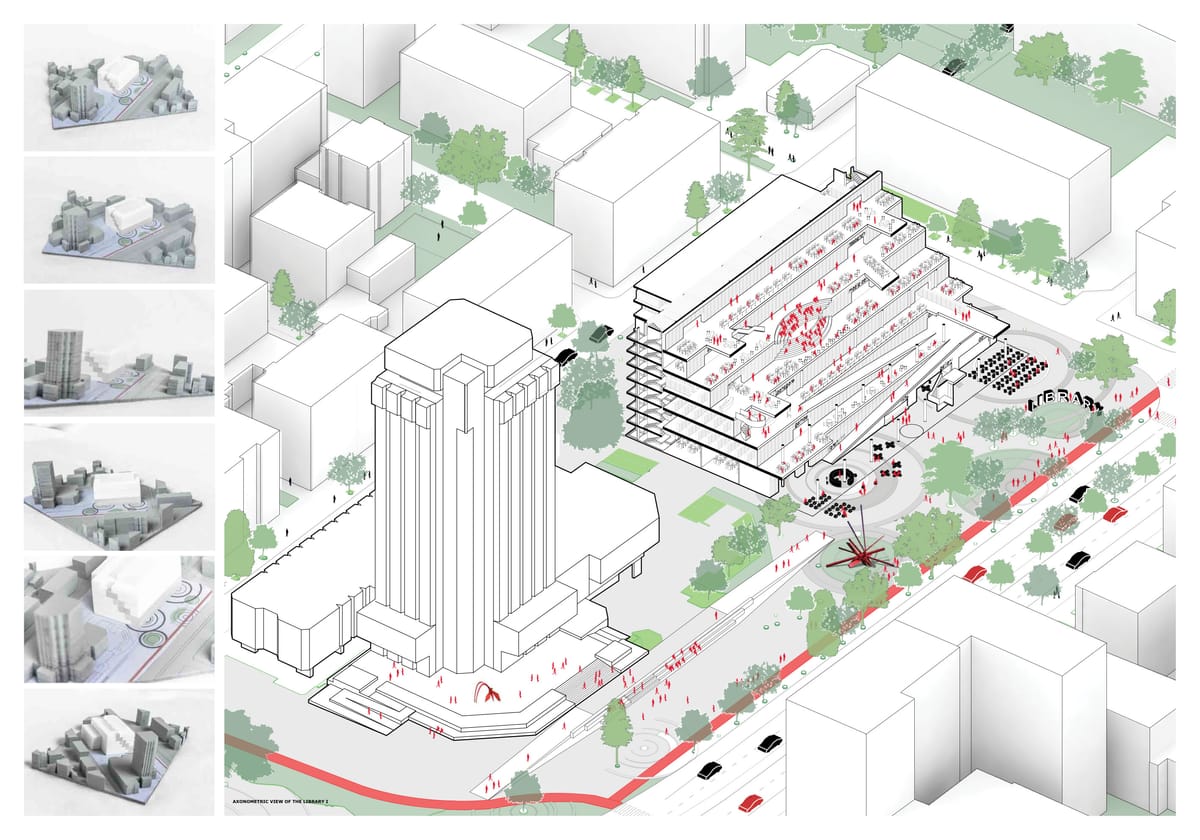
На този фон е очевидно едно – Варна е по-малък град, отколкото ни се иска, въпреки потенциала му, който винаги е бил огромен. Защо се получава така, е наистина дълга тема, в която са намесени сериозно и геополитически фактори. Нека припомним само, че тъкмо по времето на големите мечти и амбиции във Варненския залив военни кораби на България, Румъния, Украйна, Русия, Грузия и Турция правеха съвместни учения, а на Морска гара се извиваха опашки от семейства с деца, които чакаха да се качат на борда им и да се снимат за спомен с нагиздените в безупречно бели униформи чуждестранни моряци. Честите посещения на бойни кораби на САЩ и другите държави от НАТО също бяха атракция, не знак за някакво напрежение.

Руско-грузинската война и най-вече анексирането на Крим сложиха край на идиличната ситуация в Черно море и го превърнаха в рискова зона, което удари лошо Варна тъкмо когато тя беше намерила мястото си в тази оптимистична картинка. Няма ги днес десетките големи круизни кораби на сезон, няма ги красивите ветроходи от регатата „Тол Шипс“, която си остава най-престижното (и единственото) световно морско събитие не само за града, а и за цяла България. Липсва това, което караше и варненци, и туристи да въздъхват с възторг: „Ех, друго си е…“
Това, което има Варна днес, е имоти
Апартаменти – нови, стари, малки, големи, реновирани, санирани, в центъра, в комплексите, в курортите, които окончателно се превръщат в жилищни квартали. А има също и парцели, на които да изникнат още нови апартаменти, натъпкани в абсурдни сгради със съмнителни архитектурни и инженерни качества. На практика това вече не е град, а РЗП – разгърната застроена площ.
Не е ли абсурдно, че жилищата в един град растат като брой, а населението му намалява?
За мен е, но не и за пазара на имоти у нас. След като българите виждат в недвижимото едва ли не единствената възможна инвестиция, високите цени във Варна стават обясними. Все пак говорим за имот на морето. Да, не е гръцкото море, но все пак е нещо. А и по необясними за мен причини цените на имотите във Варна продължава да растат неудържимо, така че, ако си купил нещо преди няколко години, днес можеш да го продадеш с печалба. Или пък да събираш наеми, които също са диспропорционално високи на фона на състоянието на града и бизнеса в него.
Разбира се, жилища купуват не само българи, а и чужденци. Един пристанищен град винаги е отворен към света и вълните от преселения са напълно естествени. Руското присъствие във Варна често е най-яркият елемент на засилващата се тъга по развитието ѝ. Мнозина директно изказват притеснение, че тя е станала „руски анклав“; че по улиците не се чува българска реч. Това не е далеч от истината, но с една малка подробност.
„Руснаците“ във Варна не са само руснаци, а и украинци, молдовци, казахстанци. Варненците, дори и без филологическо образование, вече правят разлика между украински и руски говор, но това е, общо взето, новост – преди 2014-та никого не го беше грижа за това. Самите рускоговорещи пък се принудиха бързо да учат български, защото езикът им вече не е универсалното средство за комуникация от епохата на „вечната дружба“ с България. Преди дни магазинерка с характерен акцент ми обясни, че еди-коя си стока е „на него рафт“, което ме накара да се усмихна. Ясно, тя вече е от местните, вече си е варненка, независимо откъде е дошла.
За имигрантите „варненската мечта“ си е жива, защото им дава повече възможности за бизнес, за по-нормален живот, за повече свобода, ако щете.
По тази причина твърденията за „руски анклав“ са преувеличени и леко намирисват на ксенофобия, която няма как да просъществува в един пристанищен град, където и да е по света. Така че руснаците не са големият проблем на Варна.
Доста по-голям проблем е амбицията на местните управници да гонят „челни позиции“ за себе си и уж за града. Това води до грешки и безсмислици, които остават като паметници на глупостта, при това изключително трайни, защото в тях е налят бетон за милиони. Обектите, които се появиха в последните години с главна цел „усвояване“, са твърде много, за да бъдат изброени.
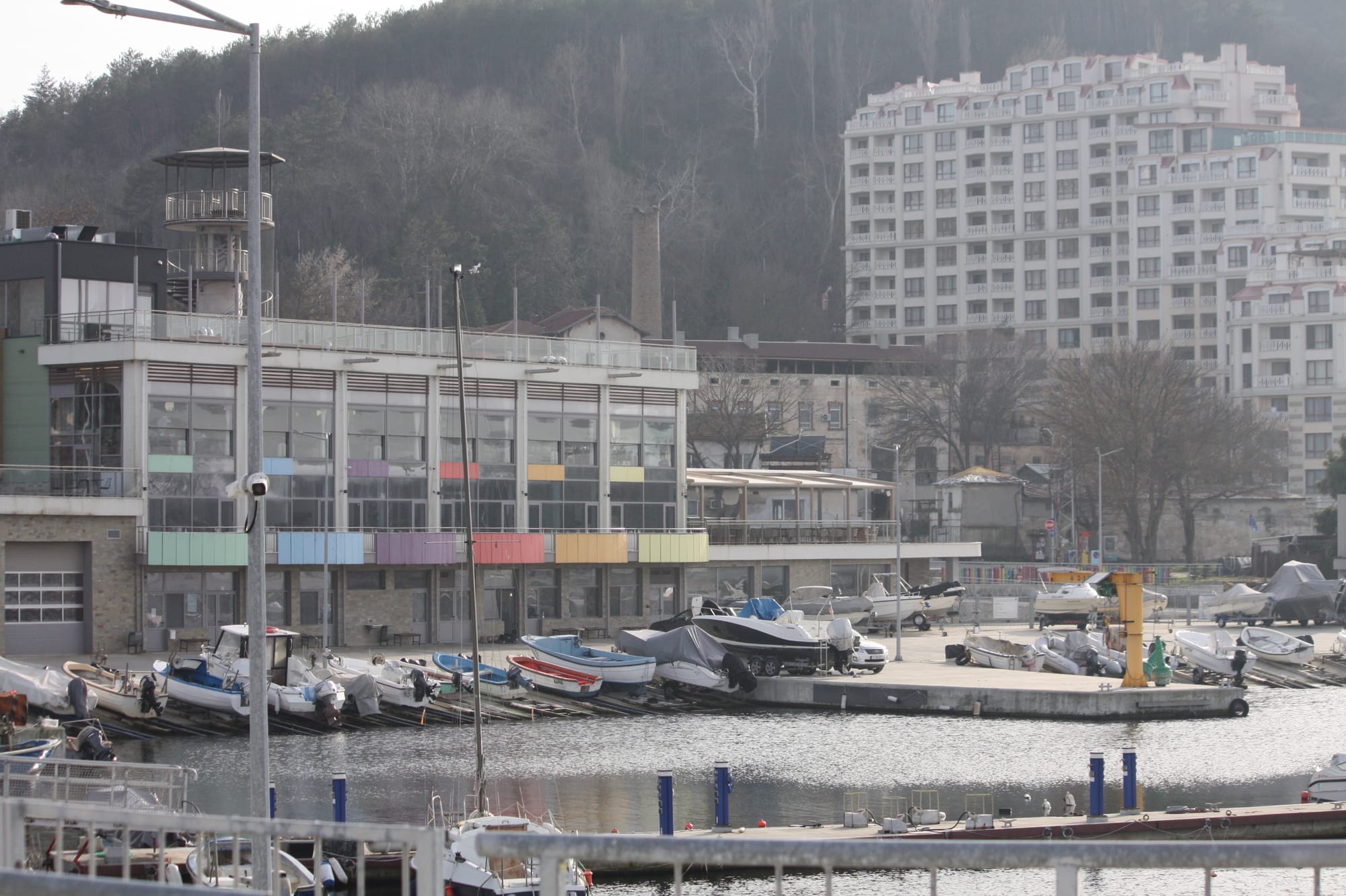
Емблематичен пример обаче е рибарското пристанище „Карантината“, заради което Европейската прокуратура повдигна обвинения за измама срещу бившия кмет Иван Портних и бившия областен управител Стоян Пасев, както и срещу други лица. Делото беше прекратено, а обвинението върнато от Софийския градски съд. Каквото и да е продължението на тази история, пристанището си остава на мястото, както и куриозният му проблем.
Оказа се, че то има вграден дефект от самото начало – точно на входа му се събират наноси и се образува плитчина, в която всеки по-голям плавателен съд може да заседне. При по-сериозно спадане на водното ниво плитчината се превръща в малко островче. Удълбочаването и изгребването на наносите, което не е евтино и не може да се прави постоянно, не решава проблема, защото теченията са такива, че пясъкът отново се натрупва на същото място. Грешката е в проекта, в който явно въпросните течения не са отчетени или нещо друго е сбъркано въпреки уверенията, че всичко е съгласувано със специалисти океанолози и всякакви други експерти, които би трябвало да предвидят тази „малка подробност“.
Днес „Карантината“ е пълна с малки лодки и яхти с по-малко газене, за които плитчината очевидно не е пречка, а шкиперите им са се научили да я заобикалят безпогрешно. Резултатът от инвестираните милиони обаче е много далеч от предвиденото.
Целта беше пристанището да се превърне в рибна борса, на която рибарските кораби да предлагат пресния си улов директно от морето при всички необходими условия. Но тъй като то е недостъпно за корабите им, това просто няма да го бъде, докато не се намери трайно решение за справяне с наносите. А то ще бъде сложно и скъпо.
Нещо подобно се случи и с Шишковата градинка в сърцето на града.
Целта беше тя да стане образец на модерна паркова архитектура, след като дълги години остарелият ѝ вид будеше съжаление. Изготви се красив проект, с амбициозен воден обект, наричан ту „водно огледало“, ту „водна стена“… Необходимите и за това милиони бяха намерени. След реконструкцията и с няколко години разлика Шишковата градинка изглежда точно толкова запусната, колкото и преди амбициозната намеса. Водното съоръжение бързо-бързо спря да работи и сега никой даже и не го забелязва, камо ли да помни било ли е красиво някога.

В крайна сметка стана така, че когато във Варна се започва нещо ново, това не буди някакво положително вълнение у гражданите, а по-скоро притеснение какво ще се обърка или скапе този път.
Новата коренна промяна, която очаква града, е свързана с Крайбрежната алея в района на буните. Там в момента са разчистени всички стари заведения, някои датиращи от 90-те, заради предстоящата реализация с огромно закъснение на проекта „Алея първа“ на „Холдинг Варна“ АД. По-младите поколения не помнят варненското крайбрежие в този вид и се чудят на радикалното разчистване.

„Тимаджиите ще правят нещо.“
Това отговарят многозначително варненците над средна възраст, защото е общоизвестно, че каквото и да се случва край морето, е свързано с икономическите структури, които местните наричат с това общо прозвище. И млади, и стари в крайна сметка стискат палци сега нещата да се получат поне прилично в този град, в който провалите са се превърнали в устойчива тенденция. Защото голямото богатство на Варна е едно – морето. В повечето случаи то е достатъчно, за да преглътнеш проблемите, с които градът те товари всекидневно. Но ако връзката на хората с него бъде нарушена, а не подобрена, вероятно Варна ще стане още по-малък град – и като население, и като значение.
MiTAC Shows Servers with Next-Gen CPUs and Solidigm SSDs at NVIDIA GTC 2026
Post Syndicated from Patrick Kennedy original https://www.servethehome.com/mitac-shows-servers-with-next-gen-cpus-and-solidigm-ssds-at-nvidia-gtc-2026/
At NVIDIA GTC 2026, we saw two new MiTAC servers with next-generation CPUs that we have not seen before, along with their GPUs and storage
The post MiTAC Shows Servers with Next-Gen CPUs and Solidigm SSDs at NVIDIA GTC 2026 appeared first on ServeTheHome.
Comic for 2026.04.03 – Superhero
Post Syndicated from Explosm.net original https://explosm.net/comics/superhero
New Cyanide and Happiness Comic