The Show Must Go On: Securing Netflix Studios At Scale

Post Syndicated from Netflix Technology Blog original https://netflixtechblog.com/the-show-must-go-on-securing-netflix-studios-at-scale-19b801c86479

Written by Jose Fernandez, Arthur Gonigberg, Julia Knecht, and Patrick Thomas
Netflix Zuul Open Source Logo

In 2017, Netflix Studios was hitting an inflection point from a period of merely rapid growth to the sort of explosive growth that throws “how do we scale?” into every conversation. The vision was to create a “Studio in the Cloud”, with applications supporting every part of the business from pitch to play. The security team was working diligently to support this effort, faced with two apparently contradictory priorities:

  • 1) streamline any security processes so that we could get applications built and deployed to the public internet faster
  • 2) raise the overall security bar so that the accumulated risk of this giant and growing portfolio of newly internet-facing, high-sensitivity assets didn’t exceed its value

The journey to resolve that contradiction has been a collaboration that we’re proud of, and that we think exemplifies how Netflix approaches infrastructure product development and product security partnerships. You’ll hear from two teams here: first Application Security, and then Cloud Gateway.

Julia & Patrick (Netflix Application Security): In deciding how to address this, we focused on two observations. The first was that there were too many security things that each software team needed to think about — things like TLS certificates, authentication, security headers, request logging, rate limiting, among many others. There were security checklists for developers, but they were lengthy and mostly manual, neither of which contributed to the goal of accelerating development. Adding to the complexity, many of the checklist items themselves had a variety of different options to fulfill them (“new apps do this, but legacy apps do that”; “Java apps should use this approach, but Ruby apps should try one of these four things”… yes, there were flowcharts inside checklists. Ouch.). For development teams, just working through the flowcharts of requirements and options was a monumental task. Supporting developers through those checklists for edge cases, and then validating that each team’s choices resulted in an architecture with all the desired security properties, was similarly not scalable for our security engineers.

Our second observation centered on strong authentication as our highest-leverage control. Missing or incomplete authentication in an application was the most critical type of issue we regularly faced, while at the same time, an application that had a bulletproof authentication story was an application we considered to be lower risk. Concepts like Zero Trust, Beyond Corp, and Identity Aware Proxies all seemed to point the same way: there is powerful assurance in making 100% authentication a property of the architecture of the application rather than an implementation detail within an application.

With both of these observations in hand, we looked at the challenge through a lens that we have found incredibly valuable: how do we productize it? Netflix engineers talk a lot about the concept of a “Paved Road”. One especially attractive part of a Paved Road approach for security teams with a large portfolio is that it helps turn lots of questions into a boolean proposition: Instead of “Tell me how your app does this important security thing?”, it’s just “Are you using this paved road product that handles that?”. So, what would a product look like that could tackle most of the security checklist for a team, and that also could give us that architectural property of guaranteed authentication? With these lofty goals in mind, we turned to our central engineering teams to help get us there.

Partnering to Productize Security

Jose & Arthur (Netflix Cloud Gateway): The Cloud Gateway team develops and operates Netflix’s “Front Door”. Historically we have been responsible for connecting, routing, and steering internet traffic from Netflix subscribers to services in the cloud. Our gateways are powered by our flagship open-source technology Zuul. When Netflix Studios and our security partners approached us, the proposal was conceptually simple and a good fit for our modular, filter-based approach. To try it out, we deployed a custom Zuul build (which we named “API Wall” and eventually, more affectionately, “Wall-E”) with a new filter for Netflix’s Single-Sign-On provider, enabled it for all requests, and boom! — an application deployment strategy that guarantees authentication for services behind it.
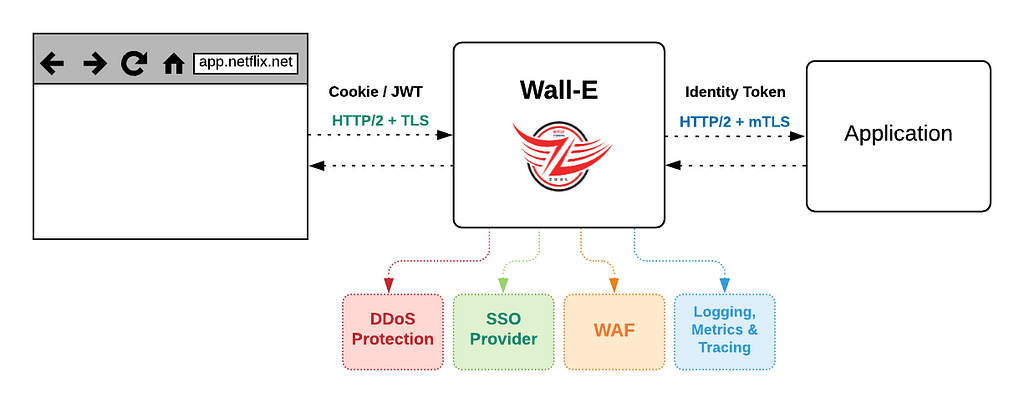
Wall-E logical diagram showing a proxy with distinct filters

Killing the Checklist

Once we worked together to integrate our SSO with Wall-E, we had established a pretty exciting pattern of adding security requirements as filters. We thought back to our checklist through the lens of: which of these things are consistent enough across applications to add as a required filter? Our web application firewall (WAF), DDoS prevention, security header validation, and durable logging all fit the bill. One by one, we saw our checklists’ requirements bite the dust, and shift from ‘individual app developer-owned’ to ‘Wall-E owned’ (and consistently implemented!).

By this point, it was clear that we had achieved the vision in the AppSec team’s original request. We eventually were able to add so much security leverage into Wall-E that the bulk of the “going internet-facing” checklist for Studio applications boiled down to one item: Will you use Wall-E?
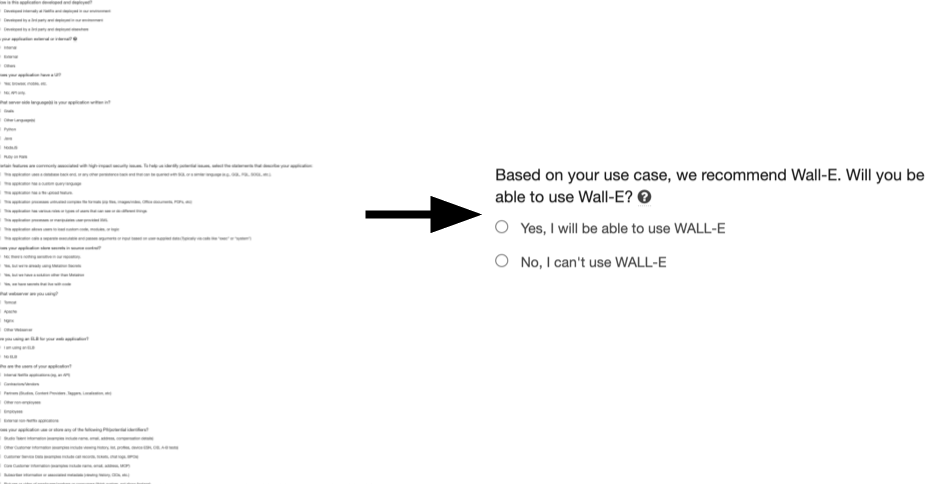
A small section of our go-external security questionnaire and checklist for studio apps before Wall-E and after Wall-E.

The Early Adopter Challenge

Wall-E’s early adopters were handpicked and nudged along by the Application Security team. Back then, the Cloud Gateway team had to work closely with application developers to provide a seamless migration without disrupting users. These joint efforts took several weeks for both parties. During our initial consultations, it was clear that developers preferred prioritizing product work over security or infrastructure improvements. Our meetings usually ended like this: “Security suggested we talk to you, and we like the idea of improving our security posture, but we have product goals to meet. Let’s talk again next quarter”. These conversations surfaced a couple of problems we knew we had to overcome to address this early adopter challenge:

  1. Setting up Wall-E for an application took too much time and effort, and the hands-on approach would not scale.
  2. Security improvements alone were not enough to drive organic adoption in Netflix’s “context not control” culture.

We were under pressure to improve our adoption numbers and decided to focus first on the setup friction by improving the developer experience and automating the onboarding process.

Scaling With Developer Experience

Developers in the Netflix streaming world compose the customer-facing Netflix experience out of hundreds of microservices, reachable by complex routing rules. On the Netflix Studio side, in Content Engineering, each team develops distinct products with simpler routing needs. To support that much different model, we did another thing that seemed simple at the time but has had an outsized impact over the years: we asked app teams to integrate with us by creating a version-controlled YAML file. Originally this was intended as a simplified and developer-friendly way to help collect domain names and some routing rules into a versionable package, but we quickly realized we had stumbled into a powerful model: we were harvesting developer intent.
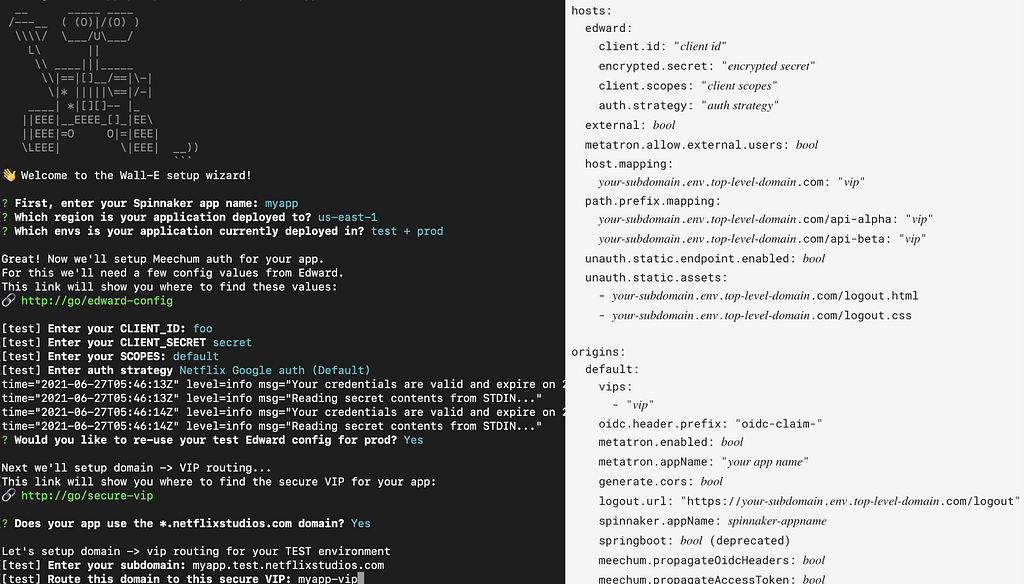
An interactive Wall-E configuration wizard, and a concise declarative format for an application’s routing, resource, and authentication decisions

This small change was a kind of magic, and completely flipped our relationship with development teams: since we had a concise, standardized definition of the app they intended to expose, we could proactively automate a lot of the setup. Specify a domain name? Wall-E can ensure that it automagically exists, with DNS and TLS configured correctly. Iterating on this experience eventually led to other intent-based streamlining, like asking about intended user populations and related applications (to select OAuth configs and claims). We could now tell developers that setting up Wall-E would only take a few minutes and that our tooling would automate everything.

Going Faster, Faster

As all of these pieces came together, app teams outside Studio took notice. For a typical paved road application with no unusual security complications, a team could go from “git init” to a production-ready, fully authenticated, internet accessible application in a little less than 10 minutes. The automation of the infrastructure setup, combined with reducing risk enough to streamline security review saves developers days, if not weeks, on each application. Developers didn’t necessarily care that the original motivating factor was about security: what they saw in practice was that apps using Wall-E could get in front of users sooner, and iterate faster.

This created that virtuous cycle that core engineering product teams get incredibly excited about: more users make the amortized platform investment more valuable, but they also bring more ideas and clarity for feature ideas, which in turn attract more users. This set the tone for the next year of development, along two tracks: fixing adoption blockers, and turning more “developer intent” into product features to just handle things for them.

For adoption, both the security team and our team were asking the same question of developers: Is there anything that prevents you from using Wall-E? Each time we got an answer to that question, we tried to figure out how we could address it. Nearly all of the blockers related to systems in which (usually for historical reasons) some application team was solving both authentication and application routing in a custom way. Examples include legacy mTLS and various webhook schemes​. With Wall-E as a clear, durable, paved road choice, we finally had enough of a carrot to move these teams away from supporting unique, potentially risky features. The value proposition wasn’t just “let us help you migrate and you’ll only ever have to deal with incoming traffic that is already properly authenticated”, it was also “you can throw away the services and manual processes that handled your custom mechanisms and offload any responsibility for authentication, WAF integration and monitoring, and DDoS protection to the platform”. Overall, we cannot overstate the value of organizationally committing to a single paved road product to handle these kinds of concerns. It creates an amazing clarity and strategic pressure that helps align actual services that teams operate to the charters and expertise that define them. The difference between 2–4 “right-ish” ways and a single paved road one is powerful.

Also, with fewer exceptions and clearer criteria for apps that should adopt this paved road, our AppSec Engineering and User Focused Security Engineering (UFSE) teams could automate security guidance to give more appropriate automated nudges for adoption. Every leader’s security risk dashboard now includes a Wall-E adoption metric, and roughly ⅔ of recommended apps have chosen to adopt it. Wall-E now fronts over 350 applications, and is adding roughly 3 new production applications (mostly internet-facing) per week.
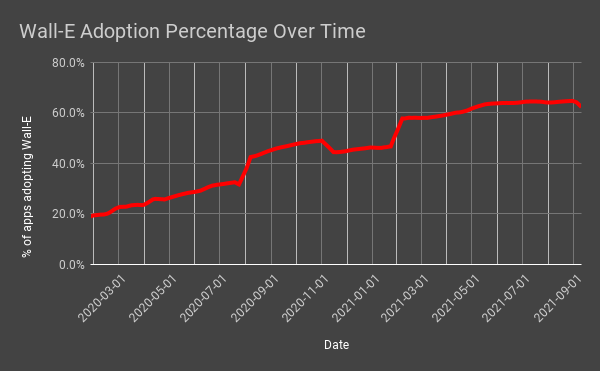
Automated guidance data, showing the percentage of applications recommended to use Wall-E which have taken it up. The jumpiness in the number of apps recommended for adoption is real: as adoption blockers were discovered then eventually solved, and as we standardized guidance across the company, our automated recommendations reflected these developments.

As adoption continued to increase, we looked at various signals of developer intent for good functionality to move from development-team-owned to platform-owned. One particularly pleasing example turned out to be UI hosting: it popped up over and over again as both an awkward exception to our “full authentication” goal, and also oftentimes the only thing that required Single Page App (SPA) UI teams to run actual cloud instances and have to be on-call for infrastructure. This eventually matured into an opinionated, declarative asset service that abstracts static file hosting for application teams: developers get fast static asset deployments, security gets strong guardrails around UI applications, and Netflix overall has fewer cloud instances to manage (and pay for!). Wall-E became a requirement for the best UI developer experience, and that drove even more adoption.

A productized approach also meant that we could efficiently enable lots of complex but “nice to have” features to enhance the developer experience, like Atlas metrics for free, and integration with our request tracing tool, Edgar.

From Product to Platform

You may have noticed a word sneak into the conversation up there… “platform”. Netflix has a Developer Productivity organization: teams dedicated to helping other developers be more effective. A big part of their work is this idea of harvesting developer intent and automating the necessary touchpoints across our systems. As these teams came to see Wall-E as the clear answer for many of their customers, they started integrating their tools to configure Wall-E from the even higher level developer intents they were harvesting. In effect, this moves authentication and traffic routing (and everything else that Wall-E handles) from being a specific product that developers need to think about and make a choice about, to just a fact that developers can trust and generally ignore. In 2019, essentially 100% of the Wall-E app configuration was done manually by developers. In 2021, that interaction has changed dramatically: now more than 50% of app configuration in WallE is done by automated tools (which are acting on higher-level abstractions on behalf of developers).

This scale and standardization again multiplies value: our internal risk quantification forecasts show compelling annualized savings in risk and incident response costs across the Wall-E portfolio. These applications have fewer, less severe, and less exploitable bugs compared to non-Wall-E apps, and we rarely need an urgent response from app owners (we call this not-getting-paged-at-midnight-as-a-service). Developer time saved on initial application setup and unneeded services additionally adds up on the order of team-months of productivity per year.

Looking back to the core need that started us down this road (“streamline any security processes […]” and “raise the overall security bar […]”), Wall-E’s evolution to being part of the platform cements and extends the initial success. Going forward, more and more apps and developers can benefit from these security assurances while needing to think less and less about them. It’s an outcome we’re quite proud of.

Let’s Do More Of That

To briefly recap, here’s a few of the things that we take away from this journey:

  • If you can do one thing to manage a large product security portfolio, do bulletproof authentication; preferably as a property of the architecture
  • Security teams and central engineering teams can and should have a collaborative, mutually supportive partnership
  • “Productizing” a capability (eg: clearly articulated; defined value proposition; branded; measured), even for internal tools, is useful to drive adoption and find further value
  • A specific product makes the “paved road” clearer; a boolean “uses/doesn’t use” is strongly preferable to various options with subtle caveats
  • Hitch the security wagon to developer productivity
  • Harvesting intent is powerful; it lets many teams add value

What’s Next

We see incredible power in this kind of security/infrastructure partnership work, and we’re excited to leverage these wins into our next goal: to truly become an infrastructure-as-service provider by building a full-fledged Gateway API, thereby handing off ownership of the developer experience to our partner teams in the Developer Productivity organization. This will allow us to focus on the challenges that will come on our way to the next milestone: 1000 applications behind Wall-E.

If this kind of thing is exciting to you, we are hiring for both of these teams: Senior Software Engineer and Engineering Manager on Application Networking; and Senior Security Partner and Appsec Senior Software Engineer.

With special thanks to Cloud Gateway and InfoSec team members past and present, especially Sunil Agrawal, Mikey Cohen, Will Rose, Dilip Kancharla, our partners on Studio & Developer Productivity, and the early Wall-E adopters that provided valuable feedback and ideas. And also to Queen for the song references we slipped in; tell us if you find ’em all.


The Show Must Go On: Securing Netflix Studios At Scale was originally published in Netflix TechBlog on Medium, where people are continuing the conversation by highlighting and responding to this story.

[$] The rest of the 5.15 merge window

Post Syndicated from original https://lwn.net/Articles/868221/rss

Linus Torvalds released 5.15-rc1 and closed
the merge window for
this release on September 12; at that point, 10,471 non-merge
changesets had found their way into the mainline repository. Those
changesets contain a lot of significant changes and improvements. Read on
for a summary of what came into the mainline in the roughly 7,000
changesets pulled since our first-half
summary
was written.

How The Mill Adventure Implemented Event Sourcing at Scale Using DynamoDB

Post Syndicated from Uri Segev original https://aws.amazon.com/blogs/architecture/how-the-mill-adventure-implemented-event-sourcing-at-scale-using-dynamodb/

This post was co-written by Joao Dias, Chief Architect at The Mill Adventure and Uri Segev, Principal Serverless Solutions Architect at AWS

The Mill Adventure provides a complete gaming platform, including licenses and operations, for rapid deployment and success in online gaming. It underpins every aspect of the process so that you can focus on telling your story to your audience while the team makes everything else work perfectly.

In this blog post, we demonstrate how The Mill Adventure implemented event sourcing at scale using Amazon DynamoDB and Serverless on AWS technologies. By partnering with AWS, The Mill Adventure reduced their costs, and they are able to maintain operations and scale their solution to suit their needs without their intervention.

What is event sourcing?

Event sourcing captures an entity’s state (such as a transaction or a user) as a sequence of state-changing events. Whenever the state changes, a new event is appended to the sequence of events using an atomic operation.

The system persists these events in an event store, which is a database of events. The store supports adding and retrieving the state events. The system reconstructs the entity’s state by reading the events from the event store and replaying them. Because the store is immutable (meaning these events are saved in the event store forever) the entity’s state can be recreated up to a particular version or date and have accurate historical values.

Why use event sourcing?

Event sourcing provides many advantages, that include (but are not limited to) the following:

  • Audit trail: Events are immutable and provide a history of what has taken place in the system. This means it’s not only providing the current state, but how it got there.
  • Time travel: By persisting a sequence of events, it is relatively easy to determine the state of the system at any point in time by aggregating the events within that time period. This provides you the ability to answer historical questions about the state of the system.
  • Performance: Events are simple and immutable and only require an append operation. The event store should be optimized to handle high-performance writes.
  • Scalability: Storing events avoids the complications associated with saving complex domain aggregates to relational databases, which allows more flexibility for scaling.

Event-driven architectures

Event sourcing is also related to event-driven architectures. Every event that changes an entity’s state can also be used to notify other components about the change. In event-driven architectures, we use event routers to distribute the events to interested components.

The event router has three main functions:

  1. Decouple the event producers from the event consumers: The producers don’t know who the consumers are, and they do not need to change when new consumers are added or removed.
  2. Fan out: Event routers are capable of distributing events to multiple subscribers.
  3. Filtering: Event routers send each subscriber only the events they are interested in. This saves on the number of events that consumers need to process; therefore, it reduces the cost of the consumers.

How did The Mill Adventure implement event sourcing?

The Mill Adventure uses DynamoDB tables as their object store. Each event is a new item in the table. The DynamoDB table model for an event sourced system is quite simple, as follows:

Field Type Description
id PK The object identifier
version SK The event sequence number
eventdata The event data itself, in other words, the change to the object’s state

All events for the same object have the same id. Thus, you can retrieve them using a single read request.

When a component modifies the state of an object, it first determines the sequence number for the new event by reading the current state from the table (in other words, the sequence of events for that object). It then attempts to write a new item to the table that represents the change to the object’s state. The item is written using DynamoDB’s conditional write. This ensures that there are no other changes to the same object happening at the same time. If the write failed due to a condition not met error, it will start over.

An additional benefit of using DynamoDB as the event store is DynamoDB Streams, which is used to deliver events about changes in tables. These events can be used by event-driven applications so they will know about the different objects’ change of state.

How does it work?

Let’s use an example of a business entity, such as a user. When a user is created, the system creates a UserCreated event with the initial user data (like user name, address, etc.). The system then persists this event to the DynamoDB event store using a conditional write. This makes sure that the event is only written once and that the version numbers are sequential.

Then the user address gets updated, so again, the system creates a UserUpdated event with the new address and persists it.

When the system needs the user’s current state, for example, to show it in back-office application, the system loads all the events for the given user identifier from the store. For each one of them, it invokes a mutation function that recreates the latest state. Given the following items in the database:

  • Event 1: UserCreated(name: The Mill, address: Malta)
  • Event 2: UserUpdated(address: World)

You can imagine how each mutator function for those events would look like, which then produce the latest state:

{ 
"name": "The Mill", 
"address": "World" 
}

A business state like a bank statement can have a large number of events. To optimize loading, the system periodically saves a snapshot of the current state. To reconstruct the current state, the application finds the most recent snapshot and the events that have occurred since that snapshot. As a result, there are fewer events to replay.

Architecture

The Mill Adventure architecture for an event source system using AWS components is straightforward. The architecture is fully serverless, as such, it only uses AWS Lambda functions for compute. Lambda functions produce the state-changing events that are written to the database.

Other Lambda functions, when they retrieve an object’s state, will read the events from the database and calculate the current state by replaying the events.

Finally, interested functions will be notified about the changes by subscribing to the event bus. Then they perform their business logic, like updating state projections or publishing to WebSocket APIs. These functions use DynamoDB streams as the event bus to handle messages as shows in Figure 1.

Event sourcing architecture

Figure 1. Event sourcing architecture

Figure 1 is not completely accurate due to a limitation of DynamoDB Streams, which can only support up to two subscribers.

Because The Mill Adventure has many microservices that are interested in these events, they have a single function that gets invoked from the stream and sends the events to other event routers. These fan out to a large number of subscribers such as Amazon EventBridge, Amazon Simple Notification Service (Amazon SNS), or maybe even Amazon Kinesis Data Streams for some use cases.

Any service in the system could be listening to these events being created via the DynamoDB stream and distributed via the event router and act on them. For example, publishing a WebSocket API notification or prompting a contact update in a third-party service.

Conclusion

In this blog post, we showed how The Mill Adventure uses serverless technologies like DynamoDB and Lambda functions to implement an event-driven event sourcing system.

An event sourced system can be difficult to scale, but using DynamoDB as the event store resolved this issue. It can also be difficult to produce consistent snapshots and Command Query Responsibility Segregation (CQRS) views, but using DynamoDB streams for distributing the events made it relatively easy.

By partnering with AWS, The Mill Adventure created a sports/casino platform to be proud of. It provides high quality data and performance without having servers, they only pay for what they use, and their workload can scale up and down as needed.

Security updates for Monday

Post Syndicated from original https://lwn.net/Articles/869103/rss

Security updates have been issued by Debian (qemu and thunderbird), Fedora (chromium, firefox, and mosquitto), openSUSE (apache2-mod_auth_openidc, gifsicle, openssl-1_1, php7-pear, and wireshark), Oracle (oswatcher), Red Hat (cyrus-imapd, firefox, and thunderbird), SUSE (apache2-mod_auth_openidc, compat-openssl098, php7-pear, and wireshark), and Ubuntu (git and linux, linux-aws, linux-aws-hwe, linux-azure, linux-azure-4.15, linux-dell300x, linux-hwe, linux-kvm, linux-oracle, linux-snapdragon).

Building a serverless GIF generator with AWS Lambda: Part 2

Post Syndicated from James Beswick original https://aws.amazon.com/blogs/compute/building-a-serverless-gif-generator-with-aws-lambda-part-2/

In part 1 of this blog post, I explain how a GIF generation service can support a front-end application for video streaming. I compare the performance of a server-based and serverless approach and show how parallelization can significantly improve processing time. I introduce an example application and I walk through the solution architecture.

In this post, I explain the scaling behavior of the example application and consider alternative approaches. I also look at how to manage memory, temporary space, and files in this type of workload. Finally, I discuss the cost of this approach and how to determine if a workload can use parallelization.

To set up the example, visit the GitHub repo and follow the instructions in the README.md file. The example application uses the AWS Serverless Application Model (AWS SAM), enabling you to deploy the application more easily in your own AWS account. This walkthrough creates some resources covered in the AWS Free Tier but others incur cost.

Scaling up the AWS Lambda workers with Amazon EventBridge

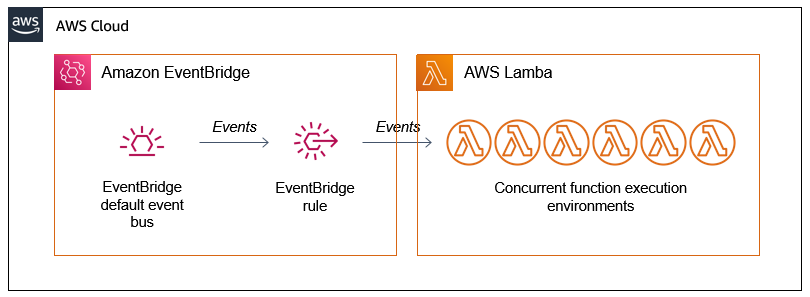
There are two AWS Lambda functions in the example application. The first detects the length of the source video and then generates batches of events containing start and end times. These events are put onto the Amazon EventBridge default event bus.

An EventBridge rule matches the events and invokes the second Lambda function. This second function receives the events, which have the following structure:

{
    "version": "0",
    "id": "06a1596a-1234-1234-1234-abc1234567",
    "detail-type": "newVideoCreated",
    "source": "custom.gifGenerator",
    "account": "123456789012",
    "time": "2021-0-17T11:36:38Z",
    "region": "us-east-1",
    "resources": [],
    "detail": {
        "key": "long.mp4",
        "start": 2250,
        "end": 2279,
        "length": 3294.024,
        "tsCreated": 1623929798333
    }
}

The detail attribute contains the unique start and end time for the slice of work. Each Lambda invocation receives a different start and end time and works on a 30-second snippet of the whole video. The function then uses FFMPEG to download the original video from the source Amazon S3 bucket and perform the processing for its allocated time slice.

The EventBridge rule matches events and invokes the target Lambda function asynchronously. The Lambda service scales up the number of execution environments in response to the number of events:

Solution architecture

The first function produces batches of events almost simultaneously but the worker function takes several seconds to process a single request. If there is no existing environment available to handle the request, the Lambda scales up to process the work. As a result, you often see a high level of concurrency when running this application, which is how parallelization is achieved:

CloudWatch metrics

Lambda continues to scale up until it reaches the initial burst concurrency quotas in the current AWS Region. These quotas are between 500 and 3000 execution environments per minute initially. After the initial burst, concurrency scales by an additional 500 instances per minute.

If the number of events is higher, Lambda responds to EventBridge with a throttling error. The EventBridge service retries the events with exponential backoff for 24 hours. Once Lambda is scaled sufficiently or existing execution environments become available, the events are then processed.

This means that under exceptional levels of heavy load, this retry pattern adds latency to the overall GIF generation task. To manage this, you can use Provisioned Concurrency to ensure that more execution environments are available during periods of very high load.

Alternative ways to scale the Lambda workers

The asynchronous invocation mode for Lambda allows you to scale up worker Lambda functions quickly. This is the mode used by EventBridge when Lambda functions are defined as targets in rules. The other benefit of using EventBridge to decouple the two functions in this example is extensibility. Currently, the events have only a single consumer. However, you can add new capabilities to this application by building new event consumers, without changing the producer logic. Note that using EventBridge in this architecture costs $1 per million events put onto the bus (this cost varies by Region). Delivery to targets in EventBridge is free.

This design could similarly use Amazon SNS, which also invokes consuming Lambda functions asynchronously. This costs $0.50 per million messages and delivery to Lambda functions is free (this cost varies by Region). Depending on if you use EventBridge capabilities, SNS may be a better choice for decoupling the two Lambda functions.

Alternatively, the first Lambda function could invoke the second function by using the invoke method of the Lambda API. By using the AWS SDK for JavaScript, one Lambda function can invoke another directly from the handler code. When the InvocationType is set to ‘Event’, this invocation occurs asynchronously. That means that the calling function does not wait for the target function to finish before continuing.

This direct integration between two Lambda services is the lowest latency alternative. However, this limits the extensibility of the solution in the future without modifying code.

Managing memory, temp space, and files

You can configure the memory for a Lambda function up to 10,240 MB. However, the temporary storage available in /tmp is always 512 MB, regardless of memory. Increasing the memory allocation proportionally increases the amount of virtual CPU and network bandwidth available to the function. To learn more about how this works in detail, watch Optimizing Lambda performance for your serverless applications.

The original video files used in this workload may be several gigabytes in size. Since these may be larger than the /tmp space available, the code is designed to keep the movie file in memory. As a result, this solution works for any length of movie that can fit into the 10 GB memory limit.

The FFMPEG application expects to work with local file systems and is not designed to work with object stores like Amazon S3. It can also read video files from HTTP endpoints, so the example application loads the S3 object over HTTPS instead of downloading the file and using the /tmp space. To achieve this, the code uses the getSignedUrl method of the S3 class in the SDK:

 	// Configure S3
 	const AWS = require('aws-sdk')
 	AWS.config.update({ region: process.env.AWS_REGION })
 	const s3 = new AWS.S3({ apiVersion: '2006-03-01' }) 

 	// Get signed URL for source object
	const params = {
		Bucket: record.s3.bucket.name, 
		Key: record.s3.object.key, 
		Expires: 300
	}
	const url = s3.getSignedUrl('getObject', params)

The resulting URL contains credentials to download the S3 object over HTTPs. The Expires attributes in the parameters determines how long the credentials are valid for. The Lambda function calling this method must have appropriate IAM permissions for the target S3 bucket.

The GIF generation Lambda function stores the output GIF and JPG in the /tmp storage space. Since the function can be reused by subsequent invocations, it’s important to delete these temporary files before each invocation ends. This prevents the function from using all of the /tmp space available. This is handled by the tmpCleanup function:

const fs = require('fs')
const path = require('path')
const directory = '/tmp/'

// Deletes all files in a directory
const tmpCleanup = async () => {
    console.log('Starting tmpCleanup')
    fs.readdir(directory, (err, files) => {
        return new Promise((resolve, reject) => {
            if (err) reject(err)

            console.log('Deleting: ', files)                
            for (const file of files) {
                const fullPath = path.join(directory, file)
                fs.unlink(fullPath, err => {
                    if (err) reject (err)
                })
            }
            resolve()
        })
    })
}

When the GenerateFrames parameter is set to true in the AWS SAM template, the worker function generates one frame per second of video. For longer videos, this results in a significant number of files. Since one of the dimensions of S3 pricing is the number of PUTs, this function increases the cost of the workload when using S3.

For applications that are handling large numbers of small files, it can be more cost effective to use Amazon EFS and mount the file system to the Lambda function. EFS charges based upon data storage and throughput, instead of number of files. To learn more about using EFS with Lambda, read this Compute Blog post.

Calculating the cost of the worker Lambda function

While parallelizing Lambda functions significantly reduces the overall processing time in this case, it’s also important to calculate the cost. To process the 3-hour video example in part 1, the function uses 345 invocations with 4096 MB of memory. Each invocation has an average duration of 4,311 ms.

Using the AWS Pricing Calculator, and ignoring the AWS Free Tier allowance, the costs to process this video is approximately $0.10.

AWS Pricing Calculator configuration

There are additional charges for other services used in the example application, such as EventBridge and S3. However, in terms of compute cost, this may compare favorably with server-based alternatives that you may have to scale manually depending on traffic. The exact cost depends upon your implementation and latency needs.

Deciding if a workload can be parallelized

The GIF generation workload is a good candidate for parallelization. This is because each 30-second block of work is independent and there is no strict ordering requirement. The end result is not impacted by the order that the GIFs are generated in. Each GIF also takes several seconds to generate, which is why the time saving comparison with the sequential, server-based approach is so significant.

Not all workloads can be parallelized and in many cases the work duration may be much shorter. This workload interacts with S3, which can scale to any level of read or write traffic created by the worker functions. You may use other downstream services that cannot scale this way, which may limit the amount of parallel processing you can use.

To learn more about designing and operating Lambda-based applications, read the Lambda Operator Guide.

Conclusion

Part 2 of this blog post expands on some of the advanced topics around scaling Lambda in parallelized workloads. It explains how the asynchronous invocation mode of Lambda scales and different ways to scale the worker Lambda function.

I cover how the example application manages memory, files, and temporary storage space. I also explain how to calculate the compute cost of using this approach, and considering if you can use parallelization in a workload.

For more serverless learning resources, visit Serverless Land.

[The Lost Bots] Episode 5: Insider Threat

Post Syndicated from Rapid7 original https://blog.rapid7.com/2021/09/13/the-lost-bots-episode-5-insider-threat/

[The Lost Bots] Episode 5: Insider Threat

Welcome back to The Lost Bots, a vlog series where Rapid7 Detection and Response Practice Advisor Jeffrey Gardner talks all things security with fellow industry experts. This episode, we’re joined by Alan Foster (Manager, Domain Engineers) to discuss insider threats. It’s a topic we’ve all heard about, especially for those of us who are compliance-focused, but it’s also one whose definition has changed in response to recent breaches. Watch below to learn about the various types of insider threats (including those you may not have thought about), which threat(s) could cause the most damage, and tips to reduce the risk.


[The Lost Bots] Episode 5: Insider Threat

Stay tuned for future episodes of The Lost Bots! Coming soon: Jeffrey tackles vulnerability management and how it can not only reduce risk but also assist in your incident response programs.

Cloudflare Passes 250 Cities, Triples External Network Capacity, 8x-es Backbone

Post Syndicated from Jon Rolfe original https://blog.cloudflare.com/250-cities-is-just-the-start/

Cloudflare Passes 250 Cities, Triples External Network Capacity, 8x-es Backbone

Cloudflare Passes 250 Cities, Triples External Network Capacity, 8x-es Backbone

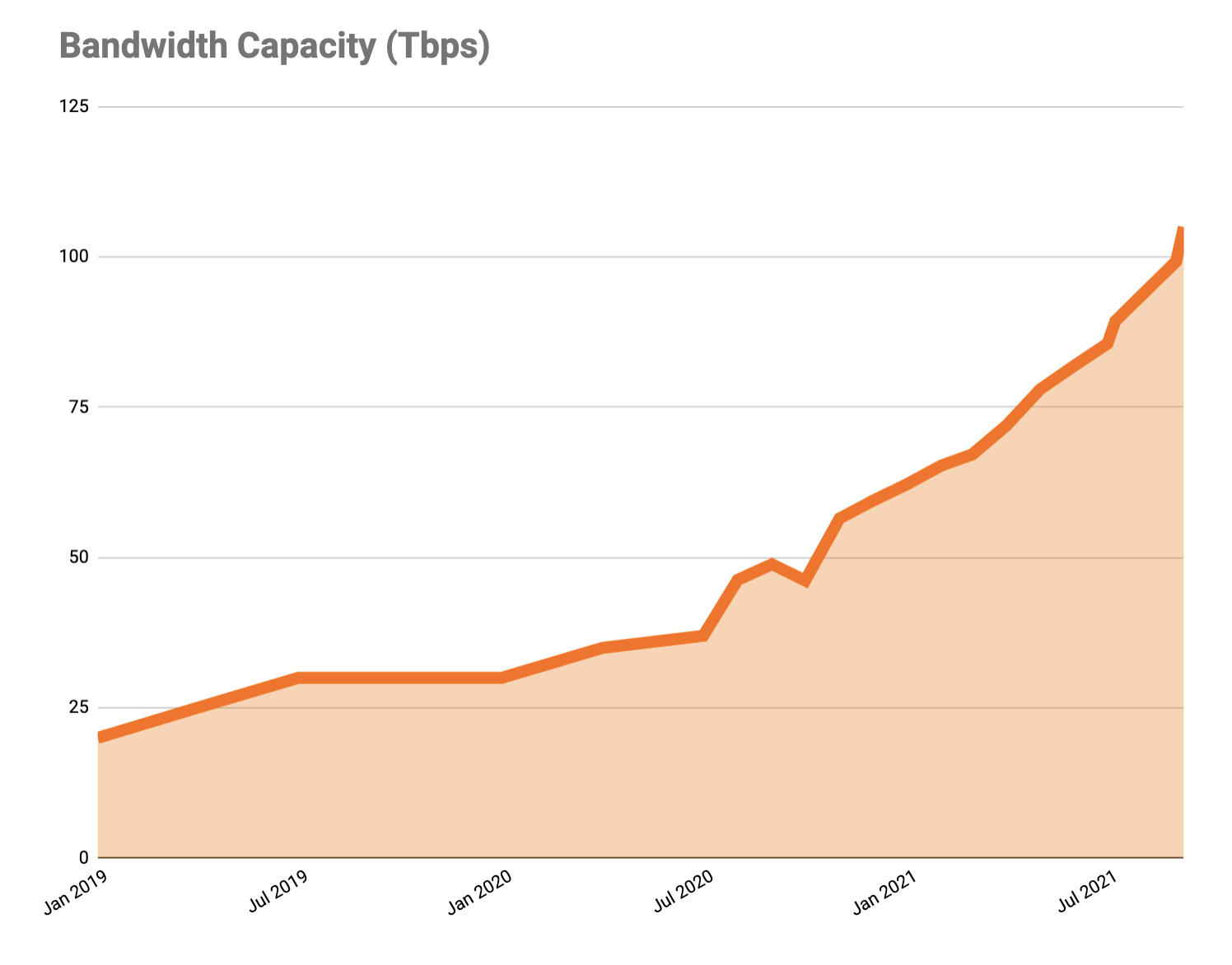
It feels like just the other week that we announced ten new cities and our expansion to 25+ cities in Brazil — probably because it was. Today, I have three speedy infrastructure updates: we’ve passed 250 on-network cities, more than tripled our external network capacity, and increased our long-haul internal backbone network by over 800% since the start of 2020.

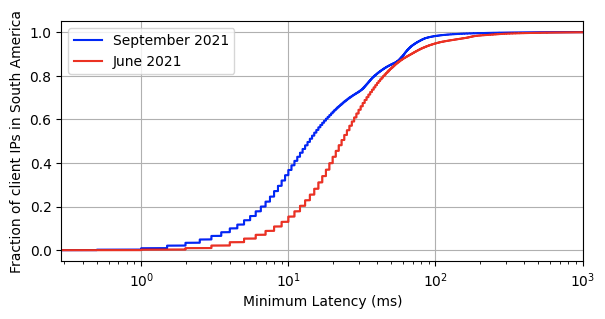
Light only travels through fiber so fast and with so much bandwidth — and worse still over the copper or on mobile networks that make up most end-users’ connections to the Internet. At some point, there’s only so much software you can throw at the problem before you run into the fundamental problem that an edge network solves: if you want your users to see incredible performance, you have to have servers incredibly physically close. For example, over the past three months, we’ve added another 10 cities in Brazil.  Here’s how that lowered the connection time to Cloudflare. The red line shows the latency prior to the expansion, the blue shows after.

Cloudflare Passes 250 Cities, Triples External Network Capacity, 8x-es Backbone

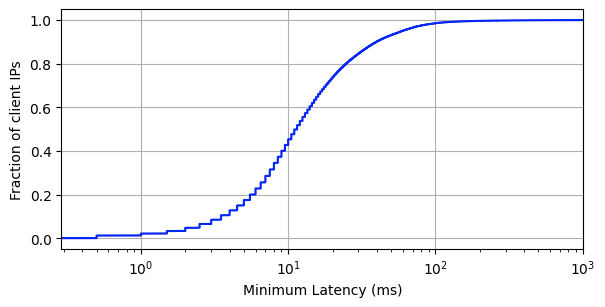
We’re exceptionally proud of all the teams at Cloudflare that came together to raise the bar for the entire industry in terms of global performance despite border closures, semiconductor shortages, and a sudden shift to working from home. 95% of the entire Internet-connected world is now within 50 ms of a Cloudflare presence, and 80% of the entire Internet-connected world is within 20ms (for reference, it takes 300-400 ms for a human to blink):

Cloudflare Passes 250 Cities, Triples External Network Capacity, 8x-es Backbone

Today, when we ask ourselves what it means to have a fast website, it means having a server less than 0.05 seconds away from your user, no matter where on Earth they are. This is only possible by adding new cities, partners, capacity, and cables — so let’s talk about those.

New Cities

Cutting straight to the point, let’s start with cities and countries: in the last two-ish months, we’ve added another 17 cities (outside of mainland China) split across eight countries: Guayaquil, Ecuador; Dammam, Saudi Arabia; Algiers, Algeria; Surat Thani, Thailand; Hagåtña, Guam, United States; Krasnoyarsk, Russia; Cagayan, Philippines; and ten cities in Brazil: Caçador, Ribeirão Preto, Brasília, Florianópolis, Sorocaba, Itajaí, Belém, Americana, Blumenau, and Belo Horizonte.

Meanwhile, with our partner, JD Cloud and AI, we’re up to 37 cities in mainland China: Anqing and Huainan, Anhui; Beijing, Beijing; Fuzhou and Quanzhou, Fujian; Lanzhou, Gansu; Foshan, Guangzhou, and Maoming, Guangdong; Guiyang, Guizhou; Chengmai and Haikou, Hainan; Langfang and Qinhuangdao, Hebei; Zhengzhou, Henan; Shiyan and Yichang, Hubei; Changde and Yiyang, Hunan; Hohhot, Inner Mongolia; Changzhou, Suqian, and Wuxi, Jiangsu; Nanchang and Xinyu, Jiangxi; Dalian and Shenyang, Liaoning; Xining, Qinghai; Baoji and Xianyang, Shaanxi; Jinan and Qingdao, Shandong; Shanghai, Shanghai; Chengdu, Sichuan; Jinhua, Quzhou, and Taizhou, Zhejiang. These are subject to change: as we ramp up, we have been working with JD Cloud to “trial” cities for a few weeks or months to observe performance and tweak the cities to match.

More Capacity: What and Why?

In addition to all these new cities, we’re also proud to announce that we have seen a 3.5x increase in external network capacity from the start of 2020 to now. This is just as key to our network strategy as new cities: it wouldn’t matter if we were in every city on Earth if we weren’t interconnected with other networks. Last-mile ISPs will sometimes still “trombone” their traffic, but in general, end users will get faster Internet as we interconnect more.

Cloudflare Passes 250 Cities, Triples External Network Capacity, 8x-es Backbone

This interconnection is spread far and wide, both to user networks and those of website hosts and other major cloud networks. This has involved a lot of middleman-removal: rather than run fiber optics from our routers through a third-party network to an origin or user’s network, we’re running more and more Private Network Interconnects (PNIs) and, better yet, Cloudflare Network Interconnects (CNIs) to our customers.

These PNIs and CNIs can not only reduce egress costs for our customers (particularly with our Bandwidth Alliance partners) but also increase the speed, reliability, and privacy of connections. The fewer networks and less distance your Internet traffic flows through, the better off everyone is. To put some numbers on that, only 30% of this newly doubled capacity was transit, leaving 70% flowing directly either physically over PNIs/CNIs or logically over peering sessions at Internet exchange points.

The Backbone

Cloudflare Passes 250 Cities, Triples External Network Capacity, 8x-es Backbone

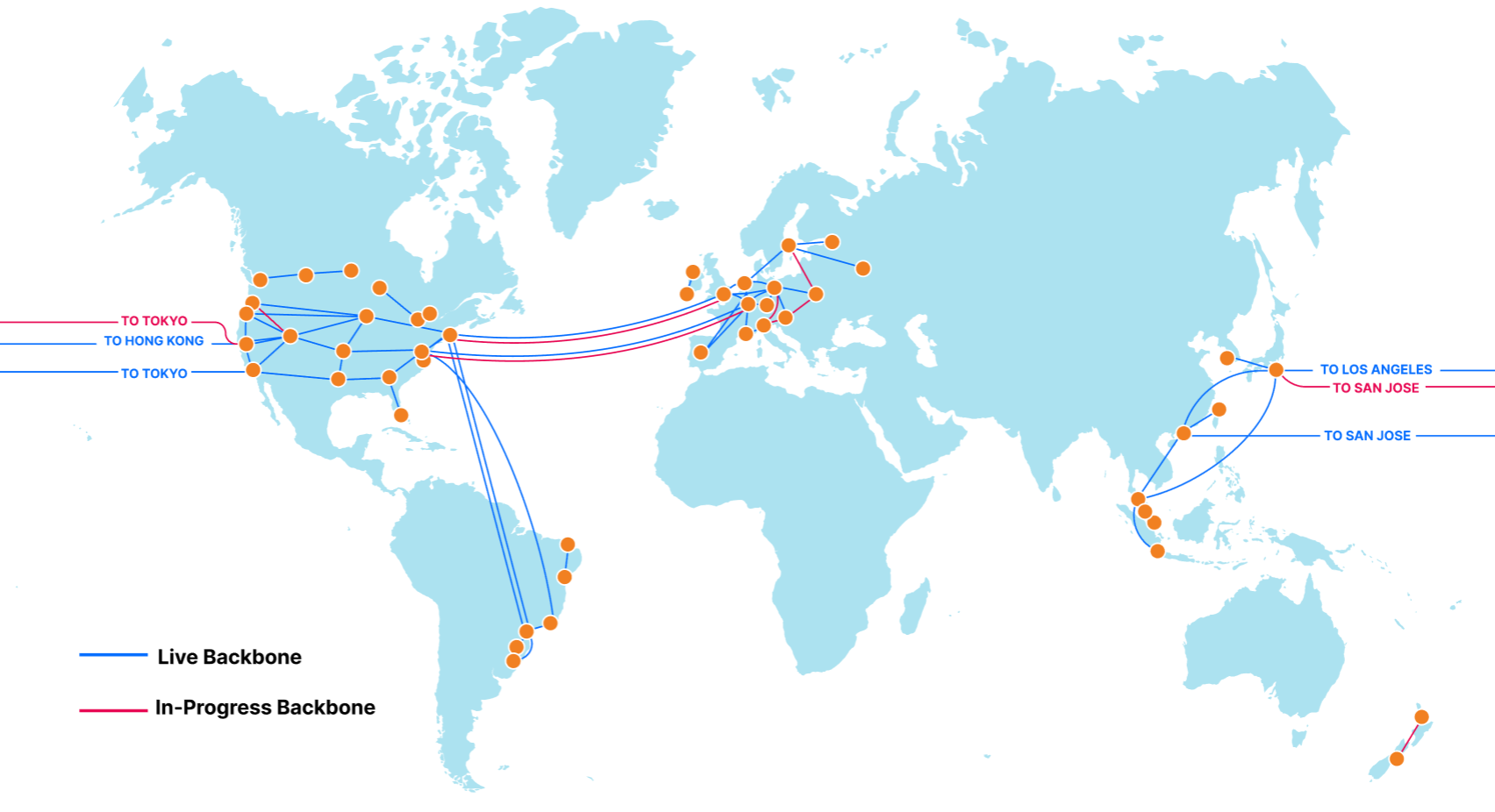
At the same time as this increase in external capacity, we’ve quietly been adding hundreds of new segments to our backbone. Our backbone consists of dedicated fiber optic lines and reserved portions of wavelength that connect Cloudflare data centers together. This is split approximately 55/45 between “metro” capacity, which redundantly connects data centers in which we have a presence, and “long-haul” capacity, which connects Cloudflare data centers in different cities.

The backbone is used to increase the speed of our customer traffic, e.g., for Argo Smart Routing, Argo Tiered Caching, and WARP+. Our backbone is like a private highway connecting cities, while public Internet routing is like local roads: not only does the backbone directly connect two cities, but it’s reliably faster and sees fewer issues. We’ll dive into some benchmarks of the speed improvements of the backbone in a more comprehensive future blog post.

The backbone is also more secure. While Cloudflare signs all of its BGP routes with RPKI, pushes adjacent networks to use RPKI to avoid route hijacks, and encrypts external and internal traffic, the most secure and private way to safeguard our users’ traffic is to keep it on-network as much as possible.

Internal load balancing between cities has also been greatly improved, thanks to the use of the backbone for traffic management with a technology we call Plurimog (a reference to our in-colo Layer 4 load balancer, Unimog). A surge of traffic into Portland can be shifted instantaneously over diverse links to Seattle, Denver, or San Jose with a single hop, without waiting for changes to propagate over anycast or running the risk of an interim increase in errors.

From an expansion perspective, two key areas of focus have been our undersea North America to Europe (transatlantic) and Asia to North America (transpacific) backbone rings. These links use geographically diverse subsea cable systems and connect into diverse routers and data centers on both ends — four transatlantic cables from North America to Europe, three transamerican cables connecting South and North America, and three transpacific cables connecting Asia and North America. User traffic coming from Los Angeles could travel to an origin as west as Singapore or as east as Moscow without leaving our network.

This rate of growth has been enabled by improved traffic forecast modeling, rapid internal feedback loops on link utilization, and more broadly by growing our teams and partnerships. We are creating a global view of capacity, pricing, and desirability of backbone links in the same way that we have for transit and peering. The result is a backbone that doubled in long-haul capacity this year, increased more than 800% from the start of last year, and will continue to expand to intelligently crisscross the globe.

The backbone has taken on a huge amount of traffic that would otherwise go over external transit and peering connections, freeing up capacity for when it is explicitly needed (last-hop routes, failover, etc.) and avoiding any outages on other major global networks (e.g., CenturyLink, Verizon).

In Conclusion

Cloudflare Passes 250 Cities, Triples External Network Capacity, 8x-es Backbone
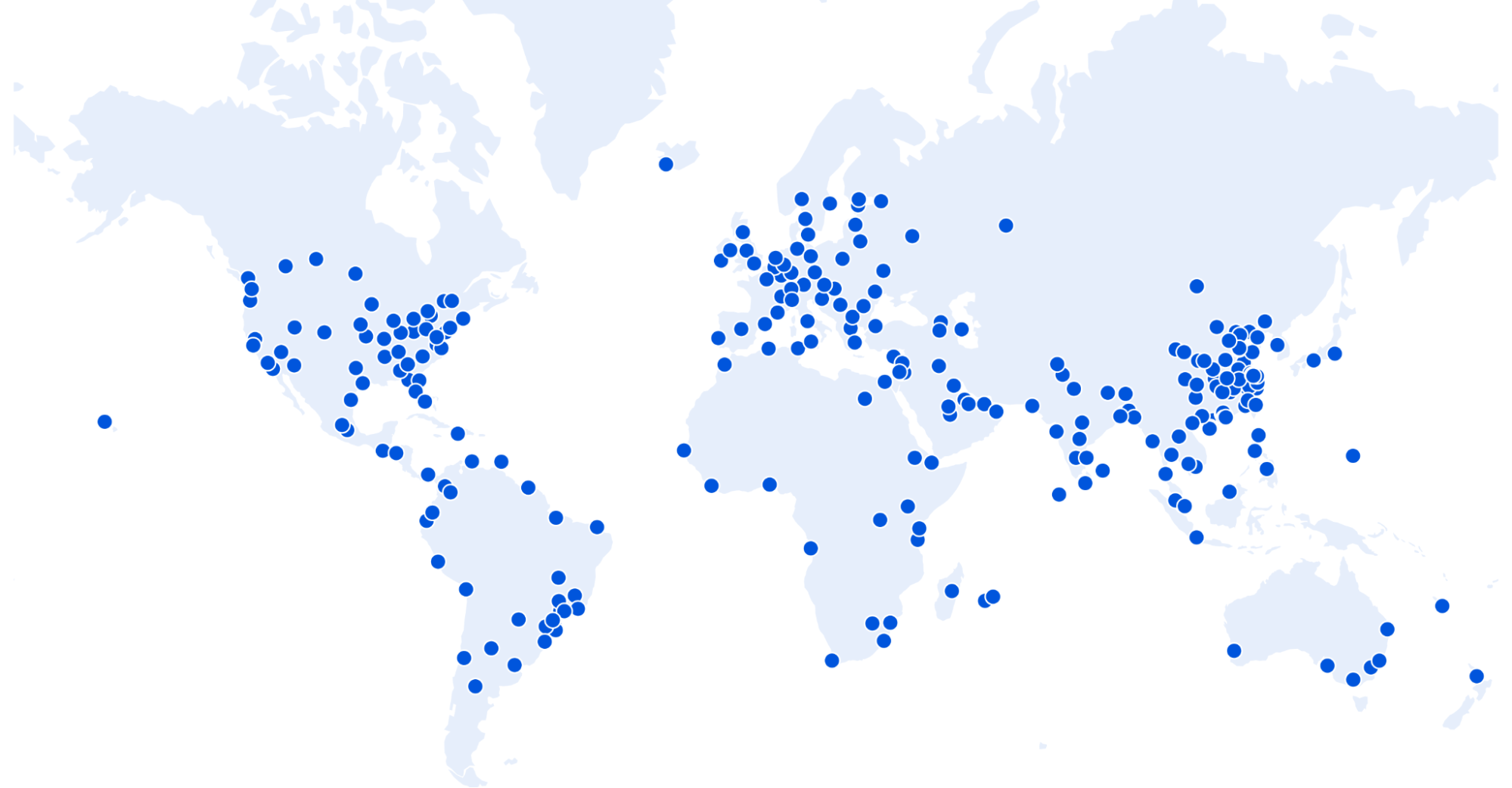
A map of the world highlighting all 250+ cities in which Cloudflare is deployed.

More cities, capacity, and backbone are more steps as part of going from being the most global network on Earth to the most local one as well. We believe in providing security, privacy, and reliability for all — not just those who have the money to pay for something we consider fundamental Internet rights. We have seen the investment into our network pay huge dividends this past year.

Happy Speed Week!

Do you want to work on the future of a globally local network? Are you passionate about edge networks? Do you thrive in an exciting, rapid-growth environment? If so, good news: Cloudflare Infrastructure is hiring; check our open roles here!

Alternatively — if you work at an ISP we aren’t already deployed with and want to bring this level of speed and control to your users, we’re here to make that happen. Please reach out to our Edge Partnerships team at [email protected].

Cloudflare Workers: the Fast Serverless Platform

Post Syndicated from Rita Kozlov original https://blog.cloudflare.com/cloudflare-workers-the-fast-serverless-platform/

Cloudflare Workers: the Fast Serverless Platform

Cloudflare Workers: the Fast Serverless Platform

Just about four years ago, we announced Cloudflare Workers, a serverless platform that runs directly on the edge.

Throughout this week, we will talk about the many ways Cloudflare is helping make applications that already exist on the web faster. But if today is the day you decide to make your idea come to life, building your project on the Cloudflare edge, and deploying it directly to the tubes of the Internet is the best way to guarantee your application will always be fast, for every user, regardless of their location.

It’s been a few years since we talked about how Cloudflare Workers compares to other serverless platforms when it comes to performance, so we decided it was time for an update. While most of our work on the Workers platform over the past few years has gone into making the platform more powerful: introducing new features, APIs, storage, debugging and observability tools, performance has not been neglected.

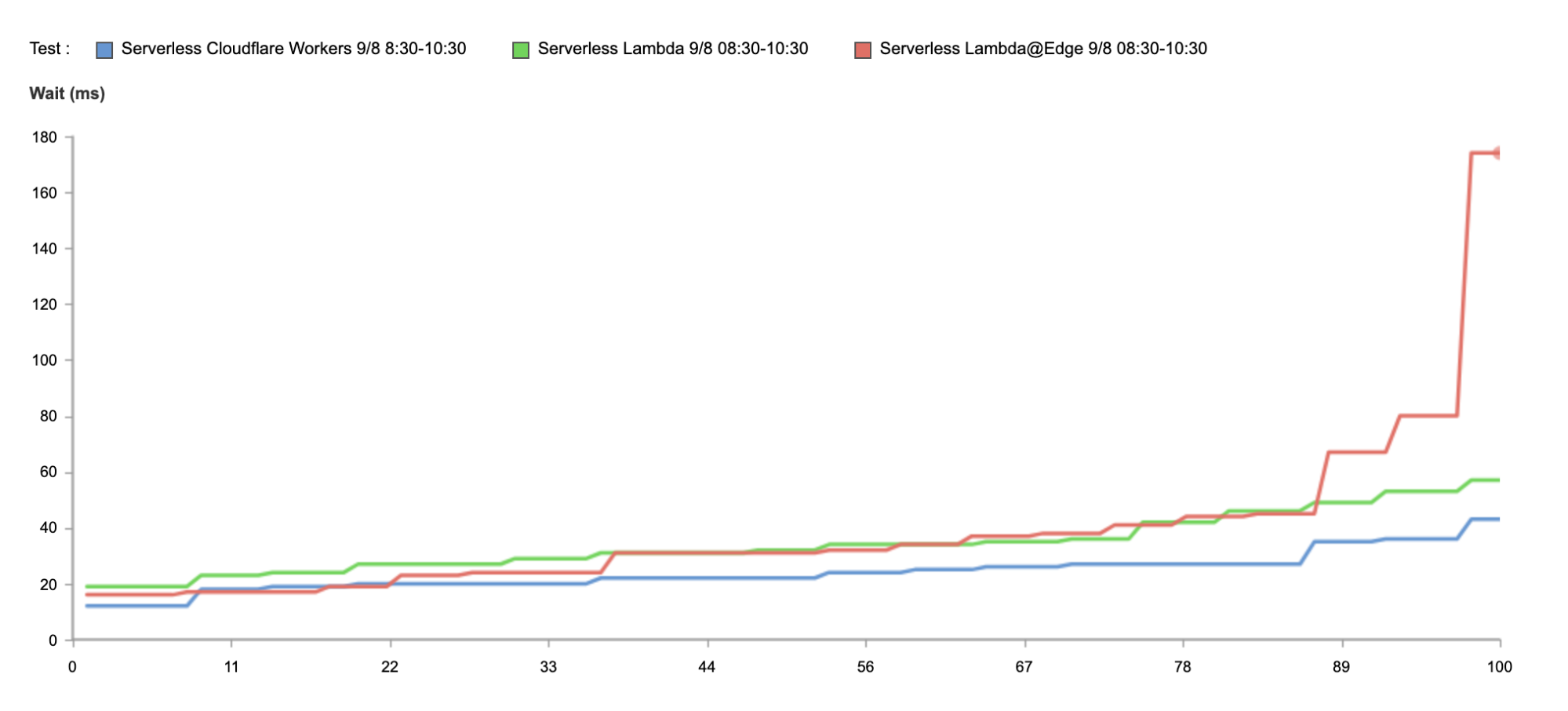
Today, Workers is 30% faster than it was three years ago at P90. And it is 210% faster than Lambda@Edge, and 298% faster than Lambda.

Oh, and also, we eliminated cold starts.

How do you measure the performance of serverless platforms?

I’ve run hundreds of performance benchmarks between CDNs in the past — the formula is simple: we use a tool called Catchpoint, which makes requests from nodes all over the world to the same asset, and reports back on the time it took for each location to return a response.

Measuring serverless performance is a bit different — since the thing you’re comparing is the performance of compute, rather than a static asset, we wanted to make sure all functions performed the same operation.

In our 2018 blog on speed testing, we had each function simply return the current time. For the purposes of this test, “serverless” products that were not able to meet the minimum criteria of being able to perform this task were disqualified. Serverless products used in this round of testing executed the same function, of identical computational complexity, to ensure accurate and fair results.

It’s also important to note what it is that we’re measuring. The reason performance matters, is because it impacts the experience of actual end customers. It doesn’t matter what the source of latency is: DNS, network congestion, cold starts… the customer doesn’t care what the source is, they care about wasting time waiting for their application to load.

It is therefore important to measure performance in terms of the end user experience — end to end, which is why we use global benchmarks to measure performance.

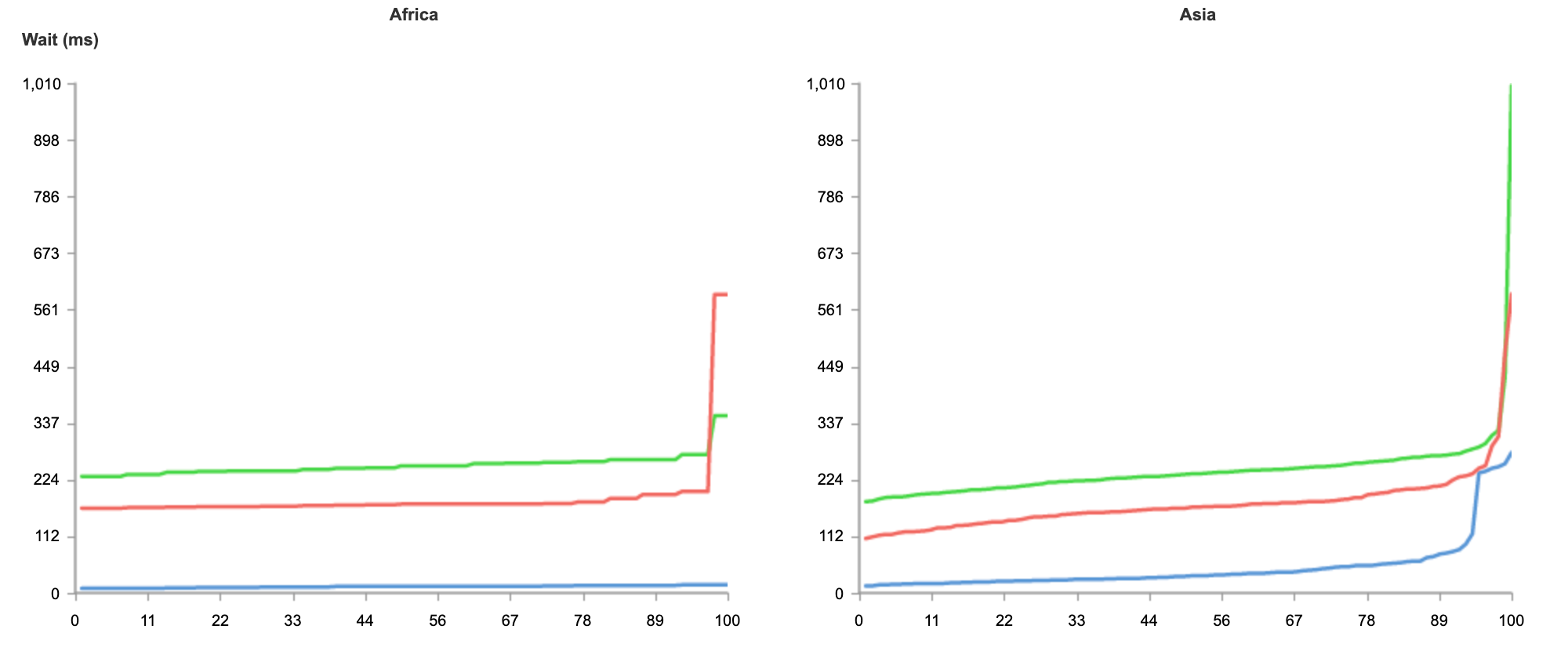
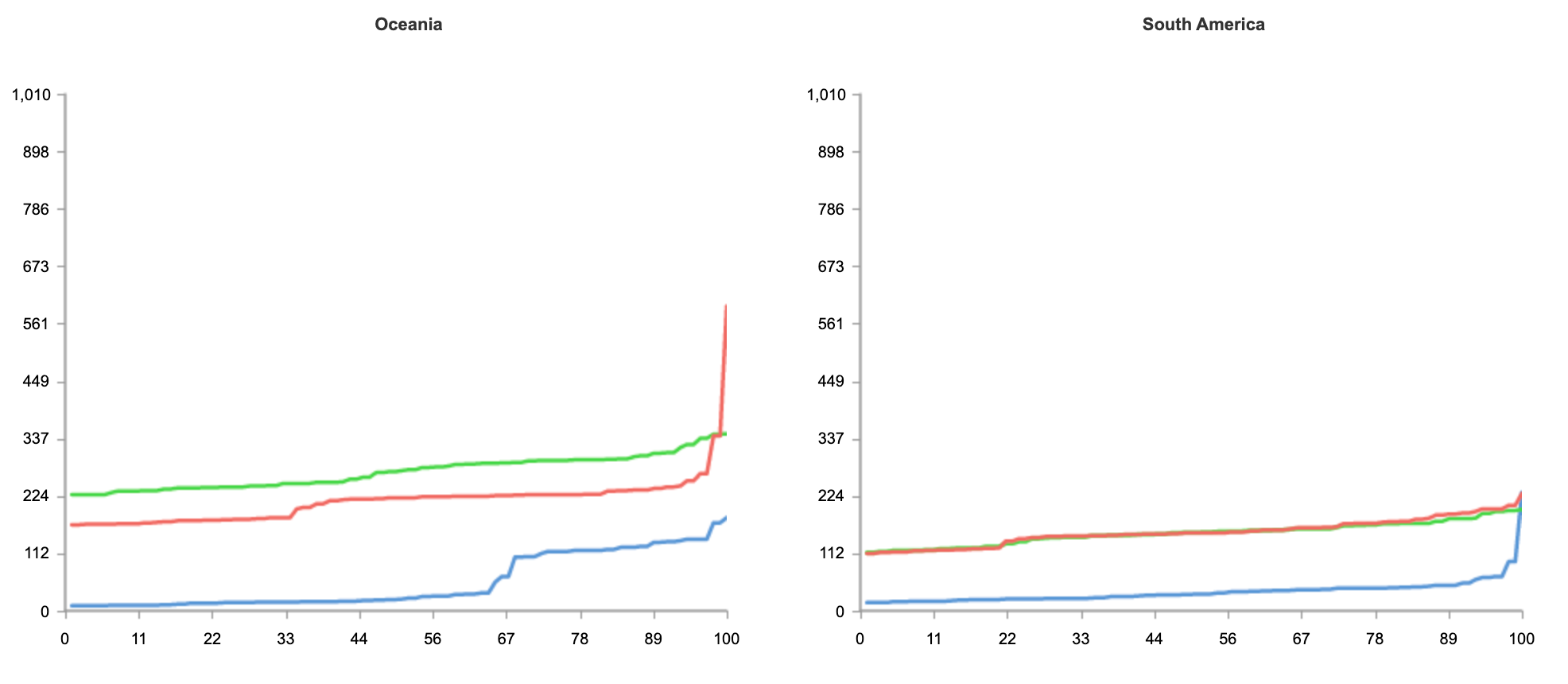
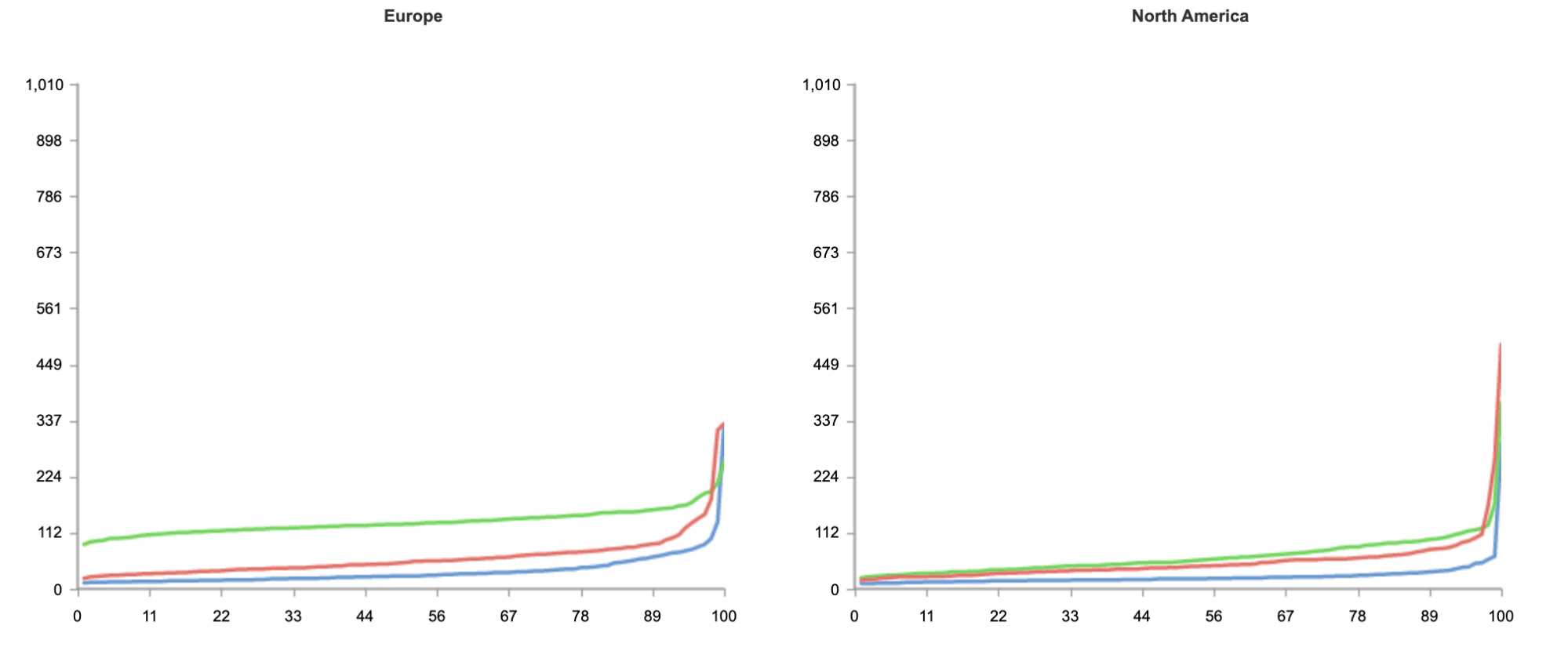
The result below shows tests run from 50 nodes all over the world, across North America, South America, Europe, Asia and Oceania.

Blue: Cloudflare Workers
Red: Lambda@Edge
Green: Lambda

(Link to results).

Cloudflare Workers: the Fast Serverless Platform

As you can see from the results, no matter where users are in the world, when it comes to speed, Workers can guarantee the best experience for customers.

In the case of Workers, getting the best performance globally requires no additional effort on the developers’ part. Developers do not need to do any additional load balancing, or configuration of regions. Every deployment is instantly live on Cloudflare’s extensive edge network.

Even if you’re not seeking to address a global audience, and your customer base is conveniently located on the East coast of the United States, Workers is able to guarantee the fastest response on all requests.

Cloudflare Workers: the Fast Serverless Platform

Above, we have the results just from Washington, DC, as close as we could get to us-east-1. And again, without any optimization, Workers is 34% faster.

Why is that?

What defines the performance of a serverless platform?

Other than the performance of the code itself, from the perspective of the end user, serverless application performance is fundamentally a function of two variables: distance an application executes from the user, and the time it takes the runtime itself to spin up. The realization that distance from the user is becoming a greater and greater bottleneck on application performance is causing many serverless vendors to push deeper and deeper into the edge. Running applications on the edge — closer to the end user — increases performance. As 5G comes online, this trend will only continue to accelerate.

However, many cloud vendors in the serverless space run into a critical problem when addressing the issue when competing for faster performance. And that is: the legacy architecture they’re using to build out their offerings doesn’t work well with the inherent limitations of the edge.

Since the goal behind the serverless model is to intentionally abstract away the underlying architecture, not everyone is clear on how legacy cloud providers like AWS have created serverless offerings like Lambda. Legacy cloud providers deliver serverless offerings by spinning up a containerized process for your code. The provider auto-scales all the different processes in the background. Every time a container is spun up, the entire language runtime is spun up with it, not just your code.

To help address the first graph, measuring global performance, vendors are attempting to move away from their large, centralized architecture (a few, big data centers) to a distributed, edge-based world (a greater number of smaller data centers all over the world) to close the distance between applications and end users. But there’s a problem with their approach: smaller data centers mean fewer machines, and less memory. Each time vendors pursue a small but many data centers strategy to operate closer to the edge, the likelihood of a cold start occurring on any individual process goes up.

This effectively creates a performance ceiling for serverless applications on container-based architectures. If legacy vendors with small data centers move your application closer to the edge (and the users), there will be fewer servers, less memory, and more likely that an application will need a cold start. To reduce the likelihood of that, they’re back to a more centralized model; but that means running your applications from one of a few big centralized data centers. These larger centralized data centers, by definition, are almost always going to be further away from your users.

You can see this at play in the graph above by looking at the results of the tests when running in Lambda@Edge — despite the reduced proximity to the end user, p90 performance is slower than that of Lambda’s, as containers have to spin up more frequently.

Serverless architectures built on containers can move up and down the frontier, but ultimately, there’s not much they can do to shift that frontier curve.

What makes Workers so fast?

Workers was designed from the ground up for an edge-first serverless model. Since Cloudflare started with a distributed edge network, rather than trying to push compute from large centralized data centers out into the edge, working under those constraints forced us to innovate.

In one of our previous blog posts, we’ve discussed how this innovation translated to a new paradigm shift with Workers’ architecture being built on lightweight V8 isolates that can spin up quickly, without introducing a cold start on every request.

Not only has running isolates given us advantage out of the box, but as V8 gets better, so does our platform. For example, when V8 announced Liftoff, a compiler for WASM, all WASM Workers instantly got faster.

Similarly, whenever improvements are made to Cloudflare’s network (for example, when we add new data centers) or stack (e.g., supporting new, faster protocols like HTTP/3), Workers instantly benefits from it.

Additionally, we’re always seeking to make improvements to Workers itself to make the platform even faster. For example, last year, we released an improvement that helped eliminate cold starts for our customers.

One key advantage that helps Workers identify and address performance gaps is the scale at which it operates. Today, Workers services hundreds of thousands of developers, ranging from hobbyists to enterprises all over the world, serving millions of requests per second. Whenever we make improvements for a single customer, the entire platform gets faster.

Performance that matters

The ultimate goal of the serverless model is to enable developers to focus on what they do best — build experiences for their users. Choosing a serverless platform that can offer the best performance out of the box means one less thing developers have to worry about. If you’re spending your time optimizing for cold starts, you’re not spending your time building the best feature for your customers.

Just like developers want to create the best experience for their users by improving the performance of their application, we’re constantly striving to improve the experience for developers building on Workers as well.

In the same way customers don’t want to wait for slow responses, developers don’t want to wait on slow deployment cycles.

This is where the Workers platform excels yet again.

Any deployment on Cloudflare Workers takes less than a second to propagate globally, so you don’t want to spend time waiting on your code deploy, and users can see changes as quickly as possible.

Of course, it’s not just the deployment time itself that’s important, but the efficiency of the full development cycle, which is why we’re always seeking to improve it at every step: from sign up to debugging.

Don’t just take our word for it!

Needless to say, much as we try to remain neutral, we’re always going to be just a little biased. Luckily, you don’t have to take our word for it.

We invite you to sign up and deploy your first Worker today — it’ll just take a few minutes!

Vary for Images: Serve the Correct Images to the Correct Browsers

Post Syndicated from Alex Krivit original https://blog.cloudflare.com/vary-for-images-serve-the-correct-images-to-the-correct-browsers/

Vary for Images: Serve the Correct Images to the Correct Browsers

Vary for Images: Serve the Correct Images to the Correct Browsers

Today, we’re excited to announce support for Vary, an HTTP header that ensures different content types can be served to user-agents with differing capabilities.

At Cloudflare, we’re obsessed with performance. Our job is to ensure that content gets from our network to visitors quickly, and also that the correct content is served. Serving incompatible or unoptimized content burdens website visitors with a poor experience while needlessly stressing a website’s infrastructure. Lots of traffic served from our edge consists of image files, and for these requests and responses, serving optimized image formats often results in significant performance gains. However, as browser technology has advanced, so too has the complexity required to serve optimized image content to browsers all with differing capabilities — not all browsers support all image formats! Providing features to ensure that the correct images are served to the correct requesting browser, device, or screen is important!

Serving images on the modern web

In the web’s early days, if you wanted to serve a full color image, JPEGs reigned supreme and were universally supported. Since then, the state of the art in image encoding has advanced by leaps and bounds, and there are now increasingly more advanced and efficient codecs like WebP and AVIF that promise reduced file sizes and improved quality.

This sort of innovation is exciting, and delivers real improvements to user experience. However, it makes the job of web servers and edge networks more complicated. As an example, until very recently, WebP image files were not universally supported by commonly used browsers. A specific browser not supporting an image file becomes a problem when “intermediate caches”, like Cloudflare, are involved in delivering content.

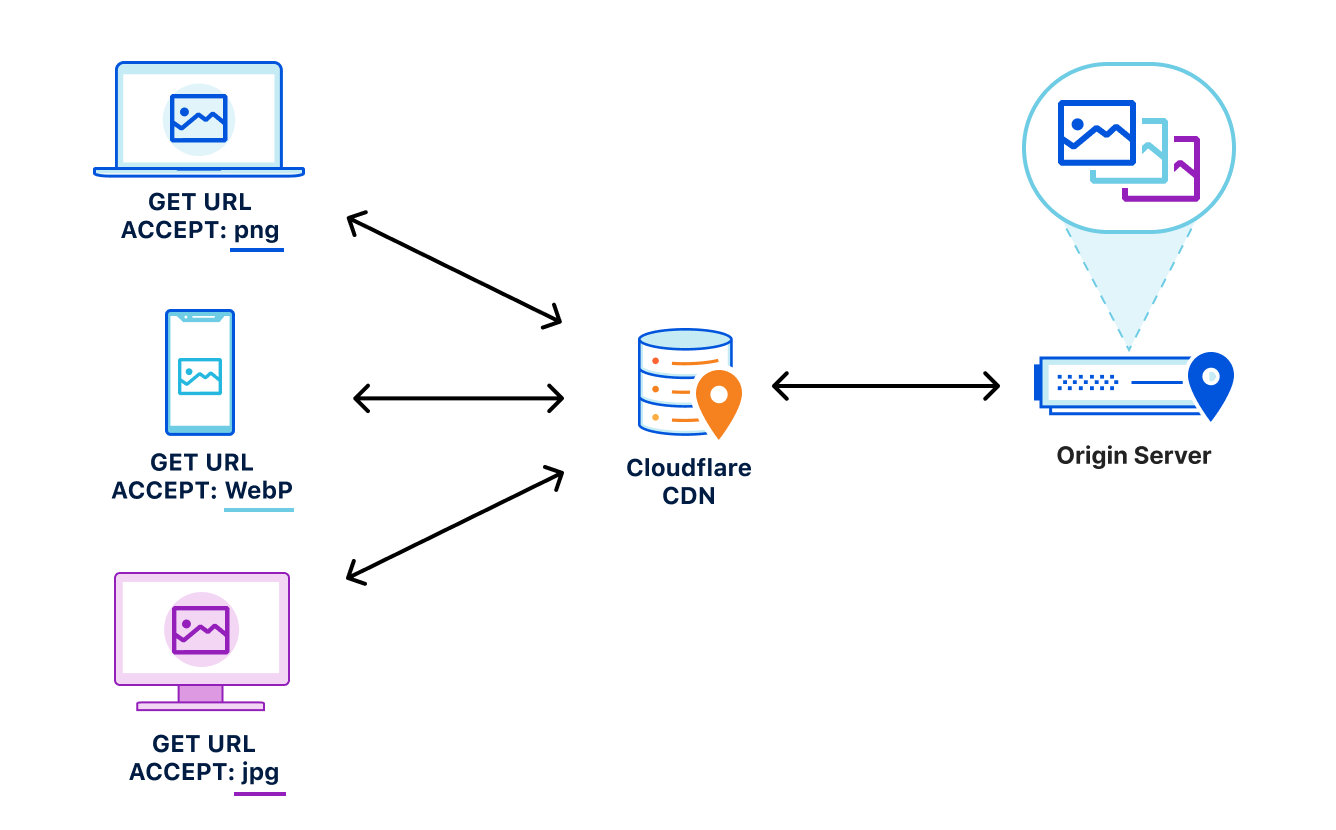
Let’s say, for example, that a website wants to provide the best experience to whatever browser requests the site. A desktop browser sends a request to the website and the origin server responds with the website’s content including images. This response is cached by a CDN prior to getting sent back to the requesting browser.

Now let’s say a mobile browser comes along and requests that same website with those images. In the situation where a cached image is a WebP file, and WebP is not supported by the mobile browser, the website will not load properly because the content returned from cache is not supported by the mobile browser. That’s a problem.

To help solve this issue, today we’re excited to announce our support of the Vary header for images.

How Vary works

Vary is an HTTP response header that allows origins to serve variants of the same content from a single URL, and have intermediate caches serve the correct variant to each user-agent that comes along.

Smashing Magazine has an excellent deep dive on how Vary negotiation works here.

When browsers send a request for a website, they include a variety of request headers. A fairly common example might look something like:

GET /page.html HTTP/1.1
Host: example.com
Connection: keep-alive
Accept:
text/html,application/xhtml+xml,application/xml;q=0.9,image/avif,image/webp,image/apng,*/*;q=0.8,application/signed-exchange;v=b3;q=0.9
User-Agent: Mozilla/5.0 (Macintosh; Intel Mac OS X 10_15_7) AppleWebKit/537.36 (KHTML, like Gecko) Chrome/91.0.4472.164 Safari/537.36
Accept-Encoding: gzip, deflate, br

As we can see above, the browser sends a lot of information in these headers along with the GET request for the URL. What’s important for Vary for Images is the Accept header. The Accept header tells the origin what sort of content the browser is capable of handling (file types, etc.) and provides a list of content preferences.

When the origin gets the request, it sees the Accept header which details the content preference for the browser’s request. In the origin’s response, Vary tells the browser that content returned was different depending on the value of the Accept header in the request. Thus if a different browser comes along and sends a request with different Accept header values, this new browser can get a different response from the origin. An example origin response may look something like:

HTTP/1.1 200 OK
Content-Length: 123456
Vary: Accept

How Vary works with Cloudflare’s cache

Now, let’s add Cloudflare to the mix. Cloudflare sits in between the browser and the origin in the above example. When Cloudflare receives the origin’s response, we cache the specific image variant so that subsequent requests from browsers with the same image preferences can be served from cache. This also means that serving multiple image variants for the same asset will create distinct cache entries.

Accept header normalization

Caching variants in intermediate caches can be difficult to get right. Naive caching of variants can cause problems by serving incorrect or unsupported image variants to browsers. Some solutions that reduce the potential for caching incorrect variants generally provide those safeguards at the expense of performance.

For example, through a process known as content-negotiation, the correct variant is directed to the requesting browser through a process of multiple requests and responses. The browser could send a request to the origin asking for a list of available resource variants. When the origin responds with the list, the browser can make an additional request for the desired resources from that list, which the server would then respond to. These redundant calls to narrow down which type of content that the browser accepts and the server has available can cause performance delays.

Vary for Images: Serve the Correct Images to the Correct Browsers

Vary for Images reduces the need for these redundant negotiations to an origin by parsing the request’s Accept header and sending that on to the origin to ensure that the origin knows exactly what content it needs to deliver to the browser. Additionally because the expected variant values can be set in Cloudflare’s API (see below), we make an end-run around the negotiation process because we are sure what to ask for and expect from the origin. This reduces the needless back-and-forth between browsers and servers.

How to Enable Vary for Images

You can enable Vary for Images from Cloudflare’s API for Pro, Business, and Enterprise Customers.

Things to keep in mind when using Vary:

  • Vary for Images enables varying on the following file extensions: avif, bmp, gif, jpg, jpeg, jp2, jpg2, png, tif, tiff, webp. These extensions can have multiple variants served so long as the origin server sends the Vary: Accept response header.
  • If the origin server sends Vary: Accept but does not serve the expected variant, the response will not be cached. This will be indicated with the BYPASS cache status in the response headers.
  • The list of variant types the origin serves for each extension must be configured so that Cloudflare can decide which variant to serve without having to contact the origin server.

Enabling Vary in action

Enabling Vary functionality currently requires the use of the Cloudflare API. Here’s an example of how to enable variant support for a zone that wants to serve JPEGs in addition to WebP and AVIF variants for jpeg and jpg extensions.

Create a variants rule:

curl -X PATCH
"https://api.cloudflare.com/client/v4/zones/023e105f4ecef8ad9ca31a8372d0 c353/cache/variants" \ 
	-H "X-Auth-Email: [email protected]" \ 
	-H "X-Auth-Key: 3xamp1ek3y1234" \ 
	-H "Content-Type: application/json" \ 
	--data 
'{"value":{"jpeg":["image/webp","image/avif"],"jpg":["image/webp","image/avif"]}}' 

Modify to only allow WebP variants:

curl -X PATCH 
"https://api.cloudflare.com/client/v4/zones/023e105f4ecef8ad9ca31a8372d0 c353/cache/variants" \ 
	-H "X-Auth-Email: [email protected]" \ 
	-H "X-Auth-Key: 3xamp1ek3y1234" \ 
	-H "Content-Type: application/json" \ 
	--data 
'{"value":{"jpeg":["image/webp"],"jpg":["image/webp"]}}' 

Delete the rule:

curl -X DELETE 
"https://api.cloudflare.com/client/v4/zones/023e105f4ecef8ad9ca31a8372d0c353/cache/variants" \ 
	-H "X-Auth-Email: [email protected]" \ 
	-H "X-Auth-Key: 3xamp1ek3y1234" 

Get the rule:

curl -X GET 
"https://api.cloudflare.com/client/v4/zones/023e105f4ecef8ad9ca31a8372d0c353/cache/variants" \
	-H "X-Auth-Email: [email protected]" \ 
	-H "X-Auth-Key: 3xamp1ek3y1234"

Purging variants

Any purge of varied images will purge all content variants for that URL. That way, if the image changes, you can easily update the cache with a single purge versus chasing down how many potential out-of-date variants may exist. This behavior is true regardless of purge type (single file, tag, or hostname) used.

Other image optimization tools available at Cloudflare

Providing an additional option for customers to optimize the delivery of images also allows Cloudflare to support more customer configurations. For other ways Cloudflare can help you serve images to visitors quickly and efficiently, you can check out:

  • Polish — Cloudflare’s automatic product that strips image metadata and applies compression. Polish accelerates image downloads by reducing image size.
  • Image Resizing — Cloudflare’s image resizing product works as a proxy on top of the Cloudflare edge cache to apply the adjustments to an image’s size and quality.  
  • Cloudflare for Images — Cloudflare’s all-in-one service to host, resize, optimize, and deliver all of your website’s images.

Try Vary for Images Out

Vary for Images provides options that ensure the best images are served to the browser based on the browser’s capabilities and preferences. If you’re looking for more control over how your images are delivered to browsers, we encourage you to try this new feature out.

We’re sending Raspberry Pi computers to space for the European Astro Pi Challenge

Post Syndicated from Olympia Brown original https://www.raspberrypi.org/blog/astro-pi-2021-news-rocket-launch-hardware/

We’re super excited to announce that the European Astro Pi Challenge is back for another year of amazing space-based coding adventures.

This time we are delighted to tell you that we’re upgrading the Raspberry Pi computers on the International Space Station (ISS) and adding new hardware to expand the range of experiments that young people can run in space!

What’s new with Astro Pi?

The first Astro Pi units were taken up to the ISS by British ESA astronaut Tim Peake in December 2015 as part of the Principia mission. Since then, 54000 young people from 26 countries have written code that has run on these specially augmented Raspberry Pi computers.

Working with our partners at the European Space Agency, we are now upgrading the Astro Pi units to include:

  • Raspberry Pi 4 Model B with 8GB RAM
  • Raspberry Pi High Quality Camera
  • Google Coral machine learning accelerator
  • Colour and luminosity sensor
  • Passive infrared sensor
Astro Pi MK II hardware.
The augmented Raspberry Pi computers we are sending up to the International Space station, in all their glory

The units will continue to have a gyroscope; an accelerometer; a magnetometer; and humidity, temperature, and pressure sensors.

Astro Pi MK II hardware with Coral machine learning accelerator.
The little device on the left is the Google Coral machine learning accelerator

The new hardware makes it possible for teams to design new types of experiments. With the Raspberry Pi High Quality Camera they can take sharper, more detailed images, and, for the first time, teams will be able to get full-colour photos of the beauty of Earth from space. This will also enable teams to investigate plant health thanks to the higher-quality optical filter in conjunction with the IR-sensitive camera. Using the Coral machine learning accelerator, teams will also be able to develop machine learning models that allow high-speed, real-time processing.

Getting into space

The Astro Pi units, in their space-ready cases of machined aluminium, will travel to the ISS in December on the SpaceX Dragon Cargo rocket, launching from Kennedy Space Center. Once the resupply vehicle docks with the ISS, the units will be unpacked and set up ready to run Astro Pi participants’ code in 2022.

Getting the units ready for launch has been a significant effort from lots of people. Once we worked with our friends at ESA to agree on the new features and hardware, we commissioned the design of the new case from Jon Wells. Manufacturing was made significantly more challenging by the pandemic, not least because we weren’t able to attend the factory and had to interact over video calls.

ESA astronaut Samantha Cristoforetti aboard the ISS. Credit: ESA

Once we had the case and hardware ready, we could take on the huge battery of tests that are required before any equipment can be used on the ISS. These included the vibration test, to ensure that the Astro Pi units would survive the rigours of the launch; thermal testing, to make sure that units wouldn’t get too hot to touch; and stringent, military-grade electromagnetic emissions and susceptibility tests to guarantee that the Astro Pi computers wouldn’t interfere with any ISS systems, and would not themselves be affected by other equipment that is on board the space station.

Huge thanks to Jon Wells and our collaborators at Airbus, Google, MidOpt, and Shearline Precision Engineering for everything they’ve done to get us to the point where we were able to ship the new Astro Pi units to the Aerospace Logistics Technology Engineering Company (ALTEC) in Italy for final preparations before their launch.

There are two Astro Pi missions for young people to choose from: Mission Zero and Mission Space Lab. Young people can participate in one or both of the missions! Participation is free and open for young people up to age 19 in ESA member states (exceptions listed on the Astro Pi website).

Mission Zero

In Mission Zero, young people write a simple Python program that takes a sensor reading and displays a message on the LED screen. This year, participation in Mission Zero also gives young people the opportunity to vote for the names of the two new computers. Mission Zero can be completed in around an hour and is open to anyone aged 7 to 19 years old. Every eligible entry is guaranteed to run on board the ISS and participants will receive an official certificate with the exact time and location of the ISS when their program ran.

Mission Zero opens today and runs until 18 March 2022.

Mission Space Lab

Mission Space Lab is for teams of young people who want to run their own scientific experiments on the Astro Pi units aboard the ISS. It runs over eight months in four phases, from idea registration to data analysis. 

Have a look at the winning teams from last year for amazing examples of what teams have investigated in the past. But remember — the new Astro Pi computers offer exciting new ways of investigating life in space and on Earth. We can’t wait to see what ideas participants come up with this year. 

To start, Mission Space Lab team mentors just need to send us their team’s experiment idea by 29 October 2021.

Follow our progress

You can keep updated with all of the latest Astro Pi news, including the build-up to the rocket launch in December, by following the Astro Pi Twitter account.

The post We’re sending Raspberry Pi computers to space for the European Astro Pi Challenge appeared first on Raspberry Pi.

Kernel prepatch 5.15-rc1

Post Syndicated from original https://lwn.net/Articles/869031/rss

Linus has released 5.15-rc1 and closed the
merge window for this development cycle.

So 5.15 isn’t shaping up to be a particularly large release, at
least in number of commits. At only just over 10k non-merge
commits, this is in fact the smallest rc1 we have had in the 5.x
series. We’re usually hovering in the 12-14k commit range.

That said, counting commits isn’t necessarily the best measure, and
that might be particularly true this time around. We have a few new
subsystems, with NTFSv3 and ksmbd standing out.

The collective thoughts of the interwebz